#animation
1 messages · Page 33 of 1
 timid temple
 viral yarrow
for some reasons all my custom emotes loop endlessly, It's a generic model, the loop is unchecked so I don't know what's causing this.
 quaint vault
about my rotating question, disregard it. i was being dumb and forgot rotator exists
 stone lotus
Hey, I've been making some override animations lately, they have only 1 frame, but every time I try to change away from them it takes them a few seconds to change, how am I able to fix that?
 timid sparrow
hey does anyone know why I can't change the armature rotation? I'm trying to rotate the neck in an animation and it won't let me
 halcyon dirge
@timid sparrow Are you in playmode?
timid sparrow
playmode? like where the buttons are blue at the top?
halcyon dirge
yes
timid sparrow
no
halcyon dirge
Odd.
 tepid lantern
@timid sparrow are u using the rotation tool
halcyon dirge
It's a safety feature that activates to prevent, you from messing stuff up whilst animating, and rigging.
timid sparrow
is there a way to stop it?
halcyon dirge
Normally it would just be because you are in "playmode" which is fixed by stopping it.
 clear yew
Does anyone know how to make an object you spawn using an animation override stay where you created it using that gesture animation?
i´m trying and trying and trying and i dont know how
viral yarrow
@clear yew you can try to scale it so that It's impossible to see it, and when the animation starts, scale it back to it's original size
clear yew
i have the object, which is a cube on scale 0, it has a big particle system on it, but the cube is still moving with me like this
i dont now how scaling will stop it from moving
clear yew
i thought so 😄
viral yarrow
and tbh I don't know then
clear yew
shit 😄
 proud topaz
Is anyone free to help me work through importing an animation? It's an fbx file, and in the rig menu I've selected Humanoid animation type, copy from other avatar as the definition, and selected my avatar as the source. When trying to apply, I get an import error telling me my transform heirarchy doesn't match, that it can't find the hips transform for the hips bone.
It's preventing me from extracting the animation file
 rugged yew
how do I make dynamic bones affected by gravity ? For hairs it's a bit weird if my character lay down
clear yew
hello how does one make an avatar shoot a fireball?
 main bone
I have a really dumb issue. I'm trying to do an animation override for the "fall" animation. The animation has transforms for generic (non-humanoid) bones. If I do an override for anything other than "Idle", the generic bone transforms don't work.
I have way too many oddly specific problems.
 valid estuary
Whats the best way to make bullets? A particle system or an actual animation?
clear yew
particle system
valid estuary
And how do i make the particles world space instead of local without them coming out from random points on the map and them being in the right orientation?
 plush meadow
Question.
How consistent is sound in custom animation?
Does it work all the time or only sometimes for others to hear?
valid estuary
Shooting too yes
plush meadow
For me it works sometimes.
What are your audio options?
Because I can see the muzzle flash of my gun.
But the sound is only for the user.
valid estuary
I think its more of an animation thing
I think its more of an animation thing
Audio settings shouldnt realy matter
Oh put the range up?
plush meadow
Sometimes the sound will not come at all.
It happened when my friend and I switched worlds.
He couldn't hear it on his end anymore.
valid estuary
Das weird
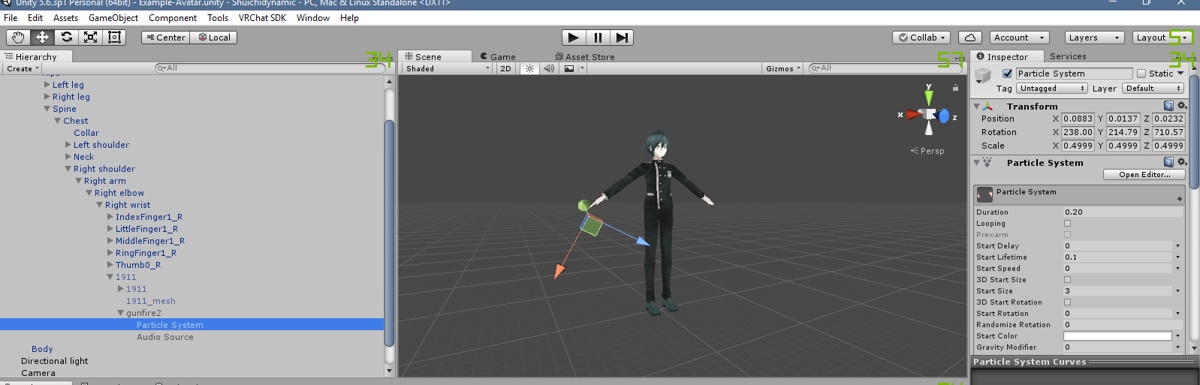
Audio sources should be default disabled and only be enabled to play the sound with the animation
plush meadow
can you send me the screenshots of what it should look like?
Maybe I screwed up somewhere.
I don't know.
valid estuary
1 sec
plush meadow

 prisma vessel
Hey guys! do generic animations work on vrchat?
 valid estuary
show me the animation of the shooting
plush meadow
You mean the picture of the settings for the duplicate where the animation was made on?
 plush meadow
So on the main model?
 plush meadow
Why do you have bypass reverb zones enabled?
valid estuary
doesnt reverb anymore then on stuff
would break everyones ears on that sound
you dont need that
prisma vessel
Hey guys, do you know how to loop animations to make them longer?
valid estuary
go to your animations
select all your markers
ctrl+c
put the red line on the last marker of your animation
ctrl+v
prisma vessel
OHH! yeah! thank you!

 hollow olive
is there a good tutorial somewhere on how to import a custom run animation?
everytime i try to over ride it messes up my walking animation


 valid estuary
are both frames the same settings?
plush meadow
Yeah.
valid estuary
you need to disable the audio in the inspector in the hierarchy
by default
the animation will turn it on for you and back to disabled
plush meadow
What do you mean by inspector?
plush meadow
You want to see my duplicate model's settings?
valid estuary
wheen you click on the audio source
should be default on your main body

i mean like that
top right
the small box
should be disabled
on your main body
so your animation manages it instead of it being always on
prisma vessel
Oh sorry I was wrong, yeah that was what I did with the blinking animation.
I meant like a dance, I want a dance to loop to be longer.
I know there's a 10 sec limit for those.
valid estuary
yeah just copy the markers should work fine?
prisma vessel
Oh, I can work the dance in that window? I'm gonna try.
clear yew
when you are making a animation in unity and it moves out of place do you have to put it back or is it oki?
valid estuary
if you stop the animation completely and the record function it should go back to its base state
plush meadow
I already did that in earlier screenshot. @valid estuary
plush meadow
So I have to disable everything on the main model?
Including muzzle?
@valid estuary
Can I show you my duplicate model settings as well?
valid estuary
no just the sound
the duplicate shouldnt matter at all
thats only where you do the animations on
plush meadow
So it doesn't mean anything if I change anything from the duplicate? https://gyazo.com/73dc485dcc841d7cbbfcbdaaac7e076f


So having the game object gunfire2 enabled on duplicate doesn't matter?
valid estuary
no because the duplicate gets deleted before you upload your model
normally
or atleast completely disabled
valid estuary
probably
since then the sound only triggers with the animation
instead of with the gun
plush meadow
So leave muzzle flash enabled on main?
valid estuary
yeah jsut the sound is broken right
plush meadow
yeah.
plush meadow
That completely disabled the sound. @valid estuary
Leaving it enabled with the game object off on main results in the sound working sometimes.
valid estuary
ohjeah
add the sound to the animation
so that the audio source gets enabled with the animation

 valid estuary
just add the audio source itself to the animation
game object is active 1
for the audio source
plush meadow
?
plush meadow
So you're telling me that I have to manually add both muzzle and sound to the animation?
Or jus the audio?
 stray sinew
[Q] How do I get rainbow trail for glowsticks working? My trails looks to be strationary(it'll make a straight line when I move instead of constant flow) and rotates with sticks before disappearing.
valid estuary
well no idea about that never tried that
clear yew
https://prnt.sc/i398zg how would i make it so that the sword on the back disapears when the sword in the hand apears?

so its kinda like you are grabbing it
clear yew
ahh
valid estuary
for the holstered weapon
clear yew
thank you my good friend ❤
clear yew
ye
i know abit about the animation and sound on animations but i just didnt know how to do that
so tank u
valid estuary
alrighty then m8
 hot orbit

 carmine shale
Does anyone have experience with the Snail Marker prefab? I can't seem to get it to work just following the 2 minute video.
plush meadow
Worked. @valid estuary Much thanks.
So from now on, always put audio separately even if it lies under a game object?
valid estuary
yeah
i mean it should work fine like how you had it but the game has problems with it
better to tell the animation specifically what to activate
 misty pasture
does anyone know how to make a phone that take screenshots
plush meadow
So whether or not the game object is enabled on the duplicate doesn't matter in the end? @valid estuary
Last question for sure.
 novel flower
I'm having an issue with 2 eye shape keys. For example >_< will activate fine but after a second the lower part appears to slightly clip. I think it's due to eye tracking. Any way to fix this?
 wicked garnet
can i get a hand with something?
not sure where to put this so i figured animation might be right
valid estuary
@plush meadow the duplicate doesnt matter at all
its literally only for animating stuff
wicked garnet
idk why but my avatars legs won't bend
wicked garnet
no my hight doesnt change when i bend down or anything
i can move the arms just fine though
clear yew
Guys, how can I add my own emotes?
wicked garnet
yeah it's never happend with any others that i've uploaded
wicked garnet
this sucks because it took forever to find this model
clear yew
@wicked garnet Are u looking for a model right now?
wicked garnet
no i'm just currently having trouble with one
at a standing position it's knees won't bend
but when i walk it has the right animation
also when i crouch and walk it sinks into the ground to my hieght
 weak gulch
@vestal hornet wellp I did like I did that but the sound effect wouldn't play
novel flower
Anyone know how to edit eyes? Mine are clipping a bit when I activate an eye shape key.
 devout star
Hey guys how would I loop a mixamo animation in Unity?
 sweet zealot
i have an idel animation i need looped, it is 1 second long but only plays once, how do i loop it?
devout star
Make sure loop time and loop pose is ticked
And that under Root Transform Positon Bake into pose is unticked
sweet zealot
googles thoes things cause i have no idea what those are
devout star
Ill send you a pic
sweet zealot
that would help a lot, thank you!
the idel animation is a beating heart, so its one model with 4 scale keys
clear yew
http://prntscr.com/i3a9xs how do i put Katana_R into the animation part?

i want to make it be invisible until i press the button
clear yew
ya i have vr
plush meadow
Is that on your main model or dupliate model?
clear yew
dup
plush meadow
Well, did you position the katana to your liking on the duplicate model?
clear yew
ye
plush meadow
Add property, and go into armature and keep looking till you find katana.
clear yew
alright
plush meadow
https://youtu.be/pC6sW4kJwa8?t=666 @clear yew

This shows you how to put weapons and audio into the game vrchat. More stuff here: Where I got the gun model: https://abyssleo.deviantart.com/gallery/5925409...
For further reference.
 lucid pewter
hey guys
clear yew
Hey Callie
lucid pewter
You guys know some good animation overrides, for standing and sitting, that can stop the noodle effect on my avatar

 marsh tide
So this is likely a simple error, facial animations interferening with hand gestures that they are not related to after being used, but only for a short time? So a smile set for Rock & Roll, but when used te open/close hand controls effect it and won't themselves play. Something I just missed in the override template?
 dim valve
So where do people get their animations for UNity?
sweet zealot
i cant seem to find extra animation settings for my animation, i need it to bake pose and all that but my only given checkbox is "loop"
dim valve
I'm already rigged properly
I'd rather not lose some special rigging from Unity, not sure how Mixamo works
plush meadow
It doesn't screw with rigging.
 undone glade
anyone have problems with audio sources working one moment and then they are just quiet when you jump to another world?
dim valve
How would I export from Unity to Mixamo? Is that a possibility?
plush meadow
You use the blender fbx that you made and upload that to mixamo. @dim valve
dim valve
Ah shit.
undone glade
just a bug then?
dim valve
I have way too much work
plush meadow
https://youtu.be/OsfdJVOVI70 @dim valve

One thing that I forgot to include is that I had uploaded my avatar .FBX to Mixamo before recording, so make sure you do that first! Another thing to note is...
plush meadow
I used by blender ones and they worked on my unity.
dim valve
I have no idea how to pull them out. Unity only ever wants to export as a unity package
lucid pewter
ok
clear yew
i was in the middle of animating and he got stuck like this, can anyone help https://imgur.com/a8isDj8

and ive got these issues and idk how to fix it, can anyone help me please
https://imgur.com/QmDCRBW
 lucid pewter
feet issue is a blender thing
and that other issue is nothing too much
You would wanna go into blender and edit the feet bones to that its higher up
 turbid sluice
Have a slight issue where my characters thumbs are ripping off during animations. http://prntscr.com/i3an4e
 sweet zealot
I have a beating heart i want to loop its animation for in idle, but: 1) when i override the idle the whole body slumps, 2) the animation does not loop
turbid sluice
But ither avatars are fine in the same animaton. http://prntscr.com/i3angy
 clear yew
@lucid pewter with the feet ive never gotten that issue before until i started animating
lucid pewter
oh
sweet zealot
any ideas on how to override an idle animation with a single object doing its thing without making the body slump?
 frank wigeon
anyone know my anime pls?https://imgur.com/a/NSoON
 clear yew
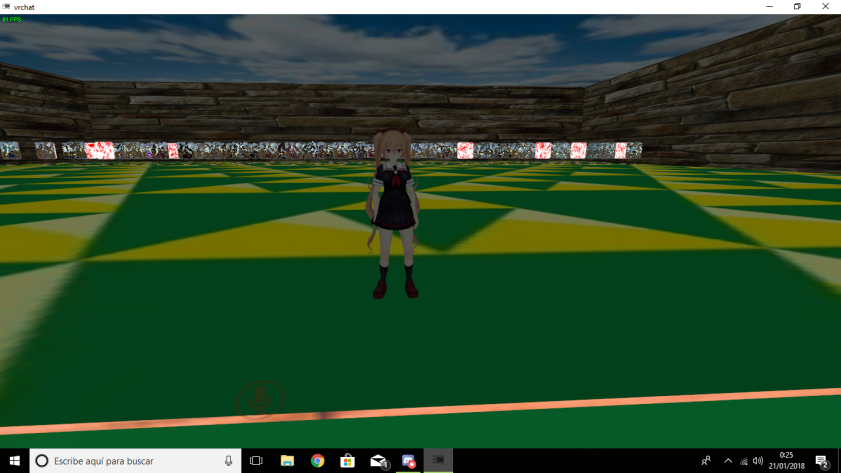
bois i've got a problem
sweet zealot
Vanilla, you can dm Boomerang himself, he is on this discord. I too had a reference model question of his avatars
 tepid lantern
rotate 90 degrees
 clear yew
when your animating and your model goes into the ground on its own, would it be like that in the game?
ive tried rotating and putting the system on different parts of the body
tepid lantern
@clear yew no iirc
tepid lantern
show me your bone structure
clear yew
ok
tepid lantern
@clear yew
 clear yew
ive tried shoulders, lower arms, upper arms, and hands
tepid lantern
do upper arms again
but reverse the particle systems direction
say if its rotated 90 degrees
make it -90
etc
clear yew
x or y?
tepid lantern
whichever flips it
clear yew
nvm
turbid sluice
So i figured out the issue with my thumb but no idea how to fix. The bone is huge? http://prntscr.com/i3atd1
 clear yew
@tepid lantern lmoa i actually fucked up my left and right because i was using my left and right not the model's
thanks
 rugged rain
If it still rotates the part properly when posing I think you can just move it into place. I've done that a couple times.
Like, just take that back part and place it by the other thumb joint. Then set them to be connected. Should work.
turbid sluice
seems to have worked. just a pain to get it to rotate in place but i can do it
just sucks I did all the dynamic bones and everything in Unity already.... anyway to just refresh the model with changes?
tepid lantern
@clear yew 🤦
rugged rain
Yup just export and import again.
turbid sluice
but that just makes a copy
and the old broken one is still there
it doesn't replace
rugged rain
Yeah. You have to do everything in Unity again.
turbid sluice
lovely
i can at least copy the components over. but have to relink it all
fun stuff
turbid sluice
2nd time I've had to. Just sucks find these issue way after
rugged rain
Forgot to move a couple finger bones into place.
Yeah.
Currently working on making an avatar from scratch, so I'm probably gonna have to do that a lot in the future.
 sullen hill
So I disabled blinking in Blender CATs when making eye tracking, but now the eye tracking doesn't seem to work in VRChat. Anyone have any ideas?
sullen hill
I dont think that's the case... The eye tracking works with my model when I leave the blinking function on
blender makes me sad.
 clear barn
sadness makes me blender
 tiny lily
Unity seems to love adding keyframes at 1:00 automaticly, is this a setting i can turn off somewhere?
clear yew
when you make your own animations do you want to set it as humanoid or generic?
 mystic umbra
humaniod
mystic umbra
cause then you can take the vrchat emotes in the overlay (i think thats what its called) and just replace those with an .anim file
if your avatar isnt humaniod then you cant use the vrchat's overlay
Im interested to see if there is a way to animate nonhumaniod figures tho
 finite jewel
What website can I download dances from?
 dawn shale
Does anyone have experience with fx?
 gentle cedar
When I have one of my animations in the CustomOverride being used, it breaks every hand gesture I do including ones not being replaced
No matter what gestures I make the hands stay in the default position, even if I haven't used the replaced animation yet
^ Fixed my problem by changing the animation being replaced
¯_(ツ)_/¯
 waxen junco
hey guys I can't get my snail marker working. if someone can help me I'll throw them some money on paypal. message me.
clear yew
https://prnt.sc/i3bqk0 how do i attach these sword parts to genji's back

im in blender btw
i basically want to attach them to his back so they move with me
 tepid sapphire
Hello, I noticed on a public avatar that they had separate animation overrides for the left or right hand (holding a hat or sword). How do I do that? I can't find any separate overrides in the CustomOverride that would be left or right hand specific.
 celest pewter
just place w/e u want in the hand u want it to appear in
clear yew
this is still in blender
i know how to do weapons but i want to attach these to his back
permanently
celest pewter
and when u do the override itll make it only appear on the hand u placed it in regardless of which controller ur using
clear yew
thats for doing weapons . _ .
celest pewter
o no thats for gobbo
clear yew
im basically trying to attach 2 objects together in blender
celest pewter
would just placing it on the meshs not work? i only do that on unity 🤔
 snow lance
can you not increase model elevation for custom walking animations to simulate flying? mine keep staying on the ground ingame despite changing the position, also, anyway to make the VRCHAT View position follow the model during an idle where it bobs up and down?>
 foggy pier
Anyone know of a way to take all the data from one model. ie animation collider info and put it onto a newly uploaded fbx?
tepid sapphire
Hmm, I remember it being separate for either left or right hand. It used the same gesture but behaved differently based on if it was my left or right controller.
lucid pewter
if i wanted to apply a custom walking animation to a character from mixamo, would i want it to be 60 frames per second or 30
foggy pier
Anyone know where I can get a rainbow shader that isnt the cubed one
clear yew
for some reason why the head doesnt animate, the first one is what i want the idle animation to be and the second on his head isnt doing that, is there a way to get what i want to work?
https://imgur.com/PMb4KGN , https://imgur.com/J0psr36


 manic rapids
Anybody can give me a good tutorial about music and animation synchronization for Unity?
 fervent plaza
Silly Question, but i forgot where to apply my custom animations, where are they?
main bone
I have an oddly specific and dumb issue. I'm trying to do an animation override. The animation has transforms for generic (non-humanoid) bones. If I do an override for anything other than "Idle", the generic bone transforms don't work. (To be more specific, it's for a tail.)
or is this place still dead
 spare bramble
anyone got the naruto run idle?
 muted prairie
run or idle ?
manic rapids
Can I make stream sound in Utity like in Adobe Flash? Or only source?
@everyone Can I make stream sound in Unity like in Adobe Flash? Or only source?
tepid lantern
@manic rapids dont do that
manic rapids
Why? I need synchronize some sound and animation.
main bone
I wonder, is there a way I can make a looping sound fade in and out (for an animation of course)
muted prairie
@manic rapids Don't spam the same message in other channels please
tepid lantern
@manic rapids dont try everyone pinging
manic rapids
oh
tepid lantern
@main bone make the actual audio clip fade in and out
main bone
no, it's a looping sound that lasts less than a second
tepid lantern
still able to fade it in and out
main bone
I want it to fade in when the animation is triggered and fade out when the animation stops. I can't do that by editing the file
main bone
hmm
muted prairie
If you know how long the animation is why don't you make a single game audio clip the same length as the animation and put your fading sound at the beginning and at the end ?
main bone
I don't know how long the animation is. It's not an emote or gesture
I'm making overrides for every animation
or as many as possible
muted prairie
Well, if you know how many frames and at how many frames per second it is playing you know how long it is
main bone
okay, but that's not how it is. The sound is set to play while the avatar is in the "falling" state
there is no set amount of time for that
it stops at the moment of landing
muted prairie
Is the falling + landing not a single animation altogether ?
 formal tangle
One of my Mixamo animations a ground crawl performs perfectly in unity but does so about a meter off the ground in VRChat anyone know a fix?
main bone
it can last any amount of time, it depends on the distance you fall
muted prairie
@formal tangle Check the animation menu on your file and check the first three boxes
@main bone oh, I don't think that is doable then
main bone
at least I tried
formal tangle
@muted prairie the "bake" ones? tried, did not fix
main bone
I have another weird issue though
formal tangle
also tried setting a negative y offset yet stayed the same in vrchat
muted prairie
@formal tangle the one that start the animation on the ground
main bone
If I put transforms for non-humanoid bones in the animation, and I use it for anything other than IDLE, they don't work.
tepid lantern
Anyone know why my shaders dont work with my animation?
theyre kinda advanced shaders to be fair
but still should work
formal tangle
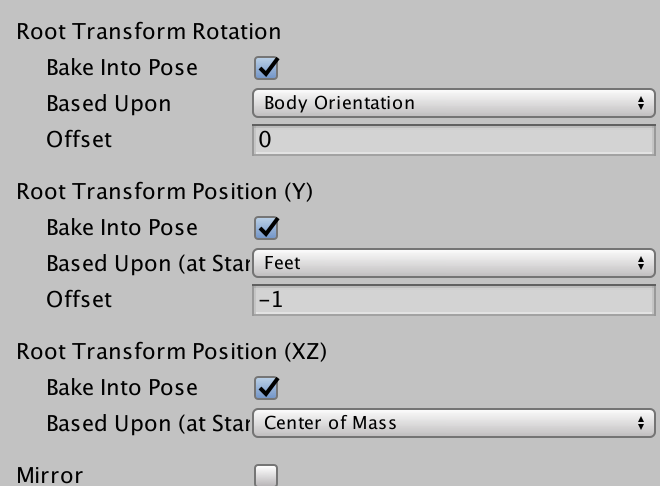
@muted prairie https://imgur.com/pHGTydb set all of these and it is as if I had not done anything in vrchat
 main bone
What I'm trying to do is trigger a different animation for Tails' tails while falling (to create a "flying" effect.) The tail animation won't change when I try to override the fall animation, no matter what I do.
the muscle flexes and the sound object do work though.
It's just this one thing that's preventing me from pulling it off.
 woven surge
Hello, can you help me with an animation?
main bone
I'm trying to get some help as well.
formal tangle
@main bone does it work on unuty?
muted prairie
@formal tangle Why's the offset at -1 ?
main bone
when falling
formal tangle
just not in vrchat?
main bone
exactly
even if I disable the default tail animations, dynamic bones, etc. it still won't work
woven surge
I did a magic circle on my avatar, my avatar is on the center, it's a big magic circle, but when my friend comes to me, he sees the circle smaller and smaller, depending where he is looking or not, the circle on his screen becomes smaller or bigger.... tried to put the Space Simulation on World.... can you please help me with this? please! D:
formal tangle
@muted prairie I tried these settings: check all boxes, check all boxes plus change middle one to feet, do all of that plus set y offset to -1 meters. none of these changed the height at which the crawl was done.
the settings in the image are just the settings I last set it to before giving up
they changes nothing 😦
@main bone can you try setting the falling animation as the idle animation and seeing if the tails continuously sping when idle?
in vrchat
main bone
I tried that
and sure enough, it worked
the default tail animation if part of my idle override as well, and that works
it just seems to not work with the other anims
formal tangle
I have an idea. can you find what the default vrchat falling animation is and open that in unity and just paste in the tail spinning animation and save it as a new falling anim?
formal tangle
you can find them and dublicate them then add stuff to them
main bone
let me check it out
formal tangle
alternatively you can find them , open the one you choose and control c the movements in it and then paste them into a new anim
i used this to solve an issue with my idle anim for an alien xenomorph so its tail would wag while idle in addition to the other default vrchat idle anims
woven surge
I'm sorry to be disturbing you, but... no idea about how to solve the problem I have? When I solve this I'll be finished but cannot find videos or info about this...
main bone
the thing is, I can't just put my keyframes into the default animation, I made an entirely new set of muscle flexes
and the length is dramatically different
all of the default anims are 0:01, not sure how that works
lucid pewter
Just a stupid question, when imputing animations, does anyone know what to do when the arms keep freaking out, for some reason my animations are all messed up because the arms are messed up

 cunning saffron
how do i setup the noenoe prefabs?
muted prairie
@formal tangle But why isn't the offset 0 ?
main bone
would you happen to know why transforms aren't working in the "FALL" override
lucid pewter
I have no idea
main bone
also, if I were to do a sitting animation, where would be a good location for the hips on a character that is a meter tall
lucid pewter
apparently so
though
is there any way of changing the shoulder distance on the animations
main bone
not sure what you mean
 main bone
are the arms just inside the body
lucid pewter
thats what i mean
people have said to move the shoulder bones
and that hasnt worked
and custom animations from mixamo dont work either
main bone
you can do that, but it has to be in rig configuration
move / rotate the bones where they need to be
doing it in the scene editor will have no effect
 summer peak
is there a way to attach a vmd to a model in unity?
 coral comet
Currently working on a flamethrower using some prebuilt fire assets- what settings in the manager do I tweak to get the particles to play on trigger and loop as long as I hold them?
summer peak
I'm following tutorials online but when I convert things to english the bones break animation
weak gulch
Can someone tell me why my custom emote is not on the VRChat generic model?
 fair slate
Does anyone know why when i try to cancel my animation with another animation, It does the new animation in slow motion once the animation is finished it cancels the earlier animation
So if i get out my lolipop wich i do on Rock n roll and then do point it does point over like the spand off 3 seconds and once it finishes it removes the lolipop
 rotund sparrow
does the VRCSDK have the animations that are in-game?
 unkempt swallow
Can anyone answer a question about Snail's Marker tool?
I followed the tutorial tit for tat: https://www.youtube.com/watch?v=Pi7i4sF_BgQ
But the animation overrides aren't working; they just break whatever animation I put them in.

Tutorial on adding the marker to your avatar and customizing it. Github: https://github.com/theepicsnail/Marker Unity Package: https://github.com/theepicsnai...
Specifically, trying to override any hand gesture breaks all hand gestures (so the touchpad does nothing), and trying to override an emote causes the avatar to sieze up and down rapidly.
And no drawing occurs.
main bone
Any tips for sitting overrides for a character that is one meter tall
so that I sit properly in chairs
 wintry matrix
maybe take the VRC chair template and have the legs positioned in an alterative sitting pose for an animation clip.. eg. sitting like a kid, legs crossed flat or have the legs spread out or to the side and not dropping below the seat. [or key them dangling] problem is you can't really account for all the possible char geometry out there used by world builders.
main bone
it's not the legs that are the problem
it's the fact that my torso sinks into the ground
thanks though, but I think I found a satisfactory solution
 normal skiff
what if the axis I want to rotate around isn't X, Y or Z...
summer peak
anyone know how to add a sound effect to a custom animation?
 vivid cairn
I'm trying to make an animation where a logo pops up behind me. it works fine in unity and when i use the emote in vrchat the sound i attached to it works fine, but no matter where on the armature i put the logo, it doesn't show up. they are both marked as active in the animation. any idea what I might be doing wrong?
vivid cairn
you know what, I haven't D: completely forgot about that. ill have a friend check it for me when they're online. thankyou 😃
normal skiff
cameras should also show it
hmm, rephrasing my own question... how do I get unity to let me rotate the way I want to rotate
somehow I would have thought the outermost white circle would rotate perpendicular to the current view, but it seems to be slightly off
 slow ember
hello?
can anyone help me?
im sorry to bother you guys but how to do you add a emote to vr chat, im making (trying) to make a thing that changes the sky into a nebula
normal skiff
custom overrides
slow ember
overrides? whats that?
normal skiff
search youtube for custom animation override tutorials, there are a few easy to find good ones around
slow ember
ok thanks trej
normal skiff
but like, changing the sky and stuff is probably not going to be in there
the main thing is it will explain how to hook everything in
slow ember
ik but i could give me a idea (i hope)
normal skiff
the way unity does rotations is so confusing 😐
main bone
how so
normal skiff
I want to rotate along a specific axis but all I can actually input is x,y,z
 errant finch
Ok, so im trying to add a prop to my character and everytime i add a keyframe, the next frame it resets. please help
normal skiff
so I start from (36deg,-30deg,-45deg)
and now I find the next position in the rotation manually, which seems to be (36deg, 30deg, 45deg)
but if I let Unity interpolate this, it doesn't follow a straight curve at all
and all I want to do is a plain rotation around (1,1,1)
main bone
I don't think it's a problem with the axes, Unity is just weird
not sure how else to do axes in a 3D space
slow ember
well i got bad news i am to dumbfounded even make the sky
im still trying to look for videos
normal skiff
the sky thing isn't really an animation topic anyway, it's rendering stuff
turning it on and off is about the only thing the animation would do
normal skiff
I assume people are probably just creating a gigantic sphere to fake it 😄
errant finch
Ok, so im trying to add a prop to my character and everytime i add a keyframe, the next frame it resets. please help?
 short maple
So I've continued on working on my BB8 avatar and planning to go a bit more advanced with it. Is it possible to give the antennas of it some movement? Kinda new to blender too so I'm not sure how much weight should I give it without being able to preview it 😓
normal skiff
isn't it supposed to reset on the next keyframe?
perhaps the question is ambiguous though
if you want a keyframe to have the same value as the previous one you can copy/paste...
or I think you can just omit it too?
 round girder
erm i have a question
main bone
I have a lot of questions
round girder
https://imgur.com/a/I5Xyg i animated my umbrella but it moved the whole avatar
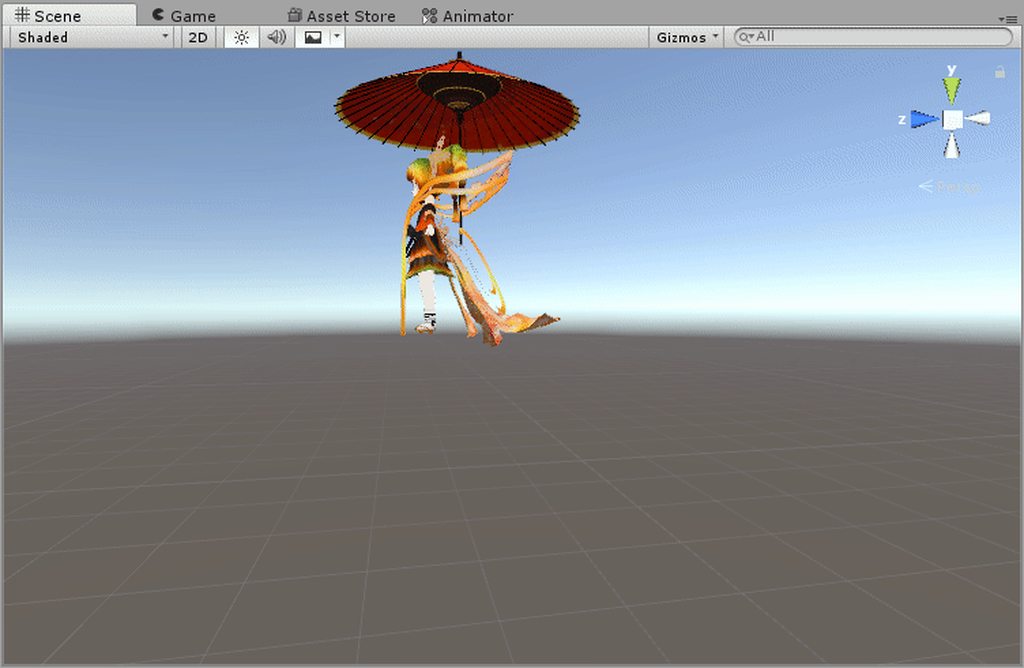
in game both my avatar and umbrella cantm ove
whr did i fck up
normal skiff
mystery: I have a prop with an Animation on it set to Play Automatically, but then when the prop appears, it doesn't play the animation
slow ember
ok i just made the sky thing using particles, turns out i was easy, thanks again verj
*trej
clear yew
Does anyone else get that problem with VMD dances where they are supposed to jump and move around in the dance but in vrchat they just stay on the same spot
summer peak
how'd you get VMD dances into Vrchat?
 glad topaz
I'm trying to make a continuous automatic animation loop for wings. I have the frames and poses done. I just dont know where to take it after i set up the animation in blender.
 jaunty gull
Hey friends, can anybody lend some insight in to how to add an effect to an avatar that functions as a pen that follows your fingertip?
like an animation that draws a line on your fingertip?
normal skiff
Tutorial on adding the marker to your avatar and customizing it. Github: https://github.com/theepicsnail/Marker Unity Package: https://github.com/theepicsnai...
jaunty gull
oh thanks omg
normal skiff
the line does disappear when the pen disappears and I'm not sure whether there's a way around it just yet
if you don't want the actual pen you can just set it not to render it
I see some people drawing lines which stay up despite their pen being put away so I know there is some way to do it -_-
jaunty gull
maybe they dont add the erase all override
normal skiff
I don't either XD
jaunty gull
hm, i think i get it, thanks for linking xD
normal skiff
being able to hide it and show it is fun in its own way anyway so I might just keep it the way it is now
I've mostly been using it to draw glasses and moustaches on people who are AFK
guh, I can't tell what I'm doing wrong with this animation controller
it only has one state .. how hard can it possibly be to get it to play my one animation lol
 fleet hill
Anyone know how to make it so if people are inside a box it says a text infront of there screen? like wherever they are in the box, Error.mdl has one
with his ground smash thing
 trail fulcrum
my hips dont move in the animation but everything else over turns to compensate and its disturbing. what have I done wrong
 cloud galleon
I made an animation for a generic rig, it is 1.5 seconds but it keeps looping until the maximum 10 second mark is reached. I want it to stop and not loop
normal skiff
ok the moral of the story is
if you're gonna make a prop animation, make it on a clone of the prop that isn't connected to the avatar
clear yew
Any tutorials on camera animations ( reflection cameras ) ?
 noble fern
anyone have which emotes go with the vive track pads?
Is fist the trigger? Center is also fist on track pad
 buoyant quartz
I seem to have lost my custom override controller, would anyone happen to have a spare?
buoyant quartz
Making me put effort into my work, how rude
noble fern
I mean it's called work for a reason ¯_(ツ)_/¯
 outer loom
Is this where I can ask questions about certain things involving animation/animating? (im a bit new)
noble fern
yes sir
outer loom
Nice
noble fern
I made one of those fading avatars
Has a little knuckles model and I just added the ability to rip its heart out
novel flower
How would i go about making a texture pulse a glow?
outer loom
I have a slight problem when it involves attempting to animate: Whenever I try and add a keyframe, the entire model goes back into its Default Pose, no matter what I do, it still sticks to its Default which doesn't allow me to animate it. It only occurs when the model is a Humanoid... Any Advice?
cloud galleon
@outer loom Use generic rig
outer loom
wouldn't it stick to a crouch pose when I import it onto VRChat?
short maple
So I have a model that's not painted yet, but I'm wondering how would you make the head of a model move around? I have a bone connected to the head of the BB-8 but not sure how to make the head move..
 torn sail
Hey How do I get eyes to animate based on my hands?
outer loom
so I turned it into generic, but now its a T-pose in game...
 gusty pawn
So, bout to start working on animations. Quick question before I look up a video. Am I able to have a character pull out a weapon from a seaparate .PMX file? Or does it have to already be rigged to the character?
outer loom
I found a solution to my problem... but it's pretty difficult to pull off... or rather time consuming...
trail fulcrum
Do share
gusty pawn
Yes? No?
outer loom
Apparently... I gotta use Sliders instead of the Traditional "Rotate Bone"
To Animate...
cloud galleon
My custom emotes keep looping until the maximum 10 second time is reached, how can I stop it?
outer loom
@cloud galleon - Select the emote, and there should be a thing called "Loop Time", did you try disabling it or did that not work?
cloud galleon
it did not work
cloud galleon
I made it
outer loom
Check to see if you might have accidently added a keyframe on the 10 second timeframe?
clear yew
How do I add the action of the next keyframe?
I click add key frame, the part I want to move, than position, then move it up, but it just makes both seconds move up
cloud galleon
no the last keyframe is at 1.5
the animation keeps restarting until 10 seconds are reached
outer loom
strange
clear yew
do you know drago
outer loom
what do you mean by "both seconds move up"?
clear yew
Like, second 1 and second 2 both have the leg moved up, resulting in no motion at all
I want it so second 1 is down second 2 is up
outer loom
That is the problem that I had for a while, is your model a Humanoid?
outer loom
ah, than Im not familiar, sorry
clear yew
Wait maybe I worded it wrong
I'm in animation tab right
I want to make it move
what should I do
outer loom
I'm not that good at unity, but I try to help out.
Try selecting a bone on the model and Rotate it?
or is that what you exactly done
outer loom
did you make a new animation clip?
outer loom
Well, sorry to say, I can't be much of help, sorry...
gusty pawn
Can anyone here answer a quick question about animation?
gusty pawn
So, bout to start working on animations. Quick question before I look up a video. Am I able to have a character pull out a weapon from a seaparate .PMX file? Or does it have to already be rigged to the character?
 drifting swift
you can pull out a weapon from a separate file
just add them in unity
via animation
gusty pawn
How would I get it to snap to the hand from there? Don't suppose there's a video to watch on this specific subject?
drifting swift
Showing you how to change default emotes to weapons & stuff. SUBSCRIBE, LIKE AND ALL THAT GOOD STUFF!! :D MY FIRST TUTORIAL ► https://youtu.be/0vdiCJRAExw DI...
gusty pawn
Poifect. Sankyu.
drifting swift

gusty pawn
Oh, real quick. Before I dive into this video.
rugged yew
When the title is in the thumbnail
gusty pawn
Is there a way in Blender or Unity to have a Shape Key stay at its max value regardless of the current animation?
Like, just one in particular?
drifting swift
i forgot how to make it stay on max
but try putting it at 100% and export it as fbx
gusty pawn
I've tried that. Doesn't seem to work. -__-
drifting swift
mmn...
Try moving it up the...
wait
Shape key window
put it at the topmost part, and delete the Basis shapekey and rename the one you want to Basis
cloud galleon
hello
drifting swift
hi @cloud galleon
drifting swift
what kind of animation is it?
drifting swift
is it for the animation tab?
cloud galleon
Yes
drifting swift
ah wait
drifting swift
do you use it in your controller or like a facial one?
cloud galleon
I use it in my controller
 cloud galleon
I did turn it off and it did not work
drifting swift
but if it is in this option
cloud galleon
It still looped
 cloud galleon
how do I do that

 clear yew
How do I go from one second to the next in animation?
I want to make my character move but if I skip to the next tab and move a part it makes both seconds move
drifting swift
@clear yew ah can you be a bit more specific
clear yew
Hm... how so?
 ruby elk
Anyone who can please show me how to add sound and effects to an mixamo animation?
drifting swift
@ruby elk sorry i dont know the answer to that particular one
 glacial lion
Anyone have experience with sneps cyber shader?
I want to take a look at a correct config bc I'm having issues
cloud galleon
@drifting swift It did not work
drifting swift
@cloud galleon aw
cloud galleon
Is it because I'm using a generic rig
clear yew
https://imgur.com/a/iKcIm so i made this ik for jaw, works well and everything
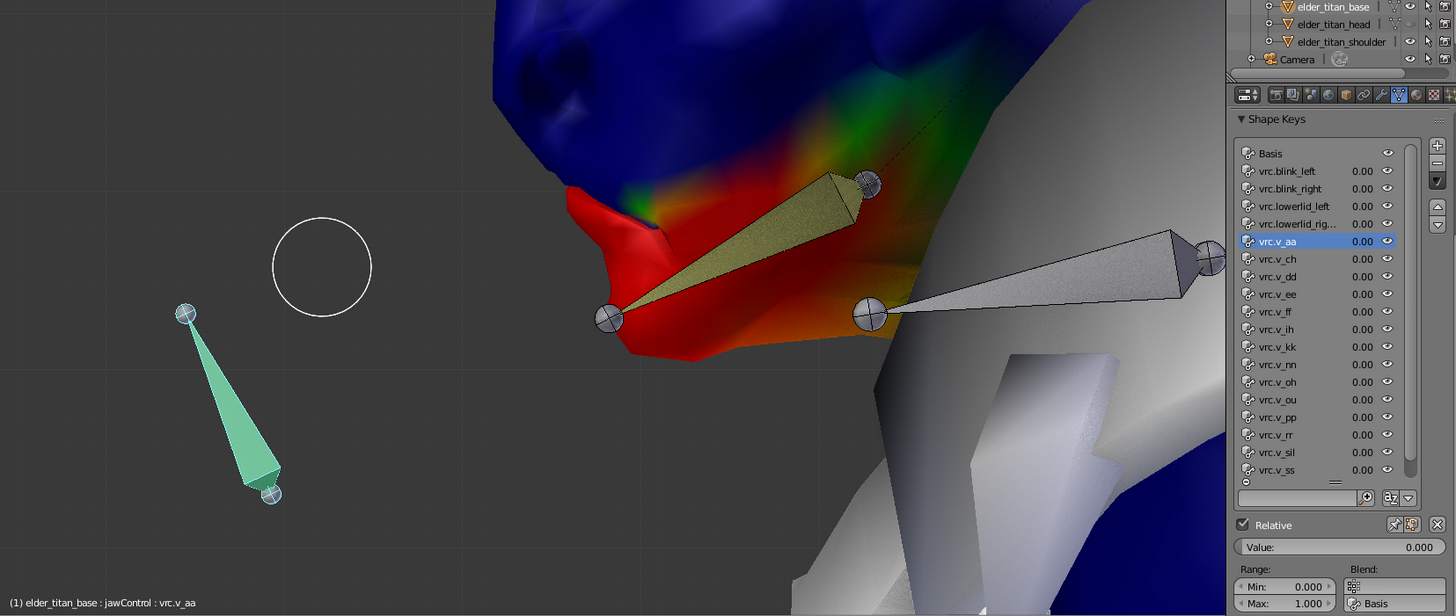
how do i use it to do shape keys with it
i dont wanna move polygons for each shape key, the model has teeth and stuff and it will be a pain in the as
 swift sage
Where do I place the "walk left" animation in a custom override? I see normal STRAFERT but no STRAFELT
novel flower
Anyone know how to make a texture pulsate?
 rapid cypress
@clear yew I believe there is an option to "select verts" from a vertex group via that would help with narrowing down shapekey vert selection..
But that's the good/bad thing about shape keys, they allow for more freeform movement, but are tedious
What sort of shape key are you trying to accomplish? Viseme sounds? Or something different?
Something I've used in my shape keys when I've got a bunch of tiny annoying to select objects is a dummy material I apply to things I want to select quickly
In the materials panel, there's a button to "select effected verts" with any given material on them
So... In effect, this can be used a bit like selection layers for Photoshop
cloud galleon
Help, my custom emote keeps looping until the amximum time has been reached
rapid cypress
hmm..
Is it an emote, or...
Wait you just said that.
Yeah I've got nothing on that one sorry..
clear yew
@rapid cypress what I'm trying to do is allow my model to flap it's jaw when I talk. I thought that adding a jaw bone would be enough, but I was wrong, now I'm trying to do the viseme sounds yes
rapid cypress
@swift sage I don't believe there's support for walk left/right
@clear yew gotcha, it's a long and painful one.. but you can get by on a few simple "major" shapes, as opposed to bothering with doing all.. what, 15-some mouth shapes?
swift sage
I see... well many thanks
clear yew
@rapid cypress googling a bit on phone now and it seems there's a way to convert a post to ashaoe key, I'll look into that more when I get home
clear yew
hay anyone know why my items are not showing in my coustome ao. they where working fine a little while ago
 fickle bay
https://gyazo.com/7acaf88fefc8799e2aae0e34e0ca4ae7 does anyone think they can help me make my ears go down like this? the blend shape for it was lost in blender somewhere and i use unity to animate because i have no clue how to blender

theres two seperate sets of ears it just hides one inside the head
fickle bay
@clear yew
Do you mean that pose the model goes into when you start changing keyframes?
I'm not a expert but I always heard you should animate on a duplicate model because it will break your model otherwise
fickle bay
That sucks
fickle bay
Awesome
clear yew
Thanks
clear yew
I'm so sorry but I can't help you out Z0mbie
fickle bay
That's ok I just hope someone can
 lilac dew
does making a model appear during an animation work the same as sound source, hide it and then add property > model > active ?
 proud estuary
right so
i made a custom emote uhh
it works, the emote works fine
but ever since i added it
whenever i click on something like worlds, avatars, system
my avatar goes flying away
 warm fiber
@fickle bay i've had the same problem for 2 weeks now, but someone posted me a version of that avatar that has the ears standing up, lemme get the link for you.
proud estuary
oh nevermind the emote doesnt work, the avatar just sinks right into the ground
fickle bay
@warm fiber
Mine does have the ears standing up I'm trying to make a animation where her ears go down
Specifically a idle animation where her ears switch between up and down multiple times
warm fiber
ohh that's what i was thinking about doing, except instead of it switching it 'twitches' as if a fly landed on it
fickle bay
Yeah just trying to find a way to do it and so far transforms seem to be the only way and it's super confusing to work with
fickle bay
I'm not sure what that is
warm fiber
noooo i forgot visimes D: got dynamic bones and everything GUH
novel flower
Anyone know how to simulate a pulsating glow effect on a texture? I assume some shader would do i
 warm furnace
Yeah shader
warm furnace
I don't think there is something existing like that(maybe). Either you make your own, or ask to someone to make it for you :p
 willow vortex
Hello, I've got a model with dynamic bones that animate fine in unity, but once uploaded they're static and unmoving, is there something I'm forgetting to do?
Apologies if this is the wrong spot to ask, new to this :)
novel flower
Ive seen some models with it. It just goes from bright to dim
 unkempt moat
Well it should never be that long so...
But where did you put it on
An emote or hand gesture?
cloud galleon
emote
unkempt moat
Then its a preset length
You cant have things like weapons or ect there and be able to move
only things like dancing
cloud galleon
Regular emotes are shorter than my animation
And they stop
But my animation keeps looping until the maximum limit time is reached
Is there a way to reduce that preset time length
unkempt moat
Not really sure
 torpid wadi
is it possible to make your avatar fade away when using a certain emote
i posted this in the wrong chat earlier whoops
 clear kraken
how do i make a Legacy animation loop?
Loop Time Loop Blend Loop Blend Orientation Loop Blend Position Y Loop Blend Position XZ
those are my options.
proud estuary
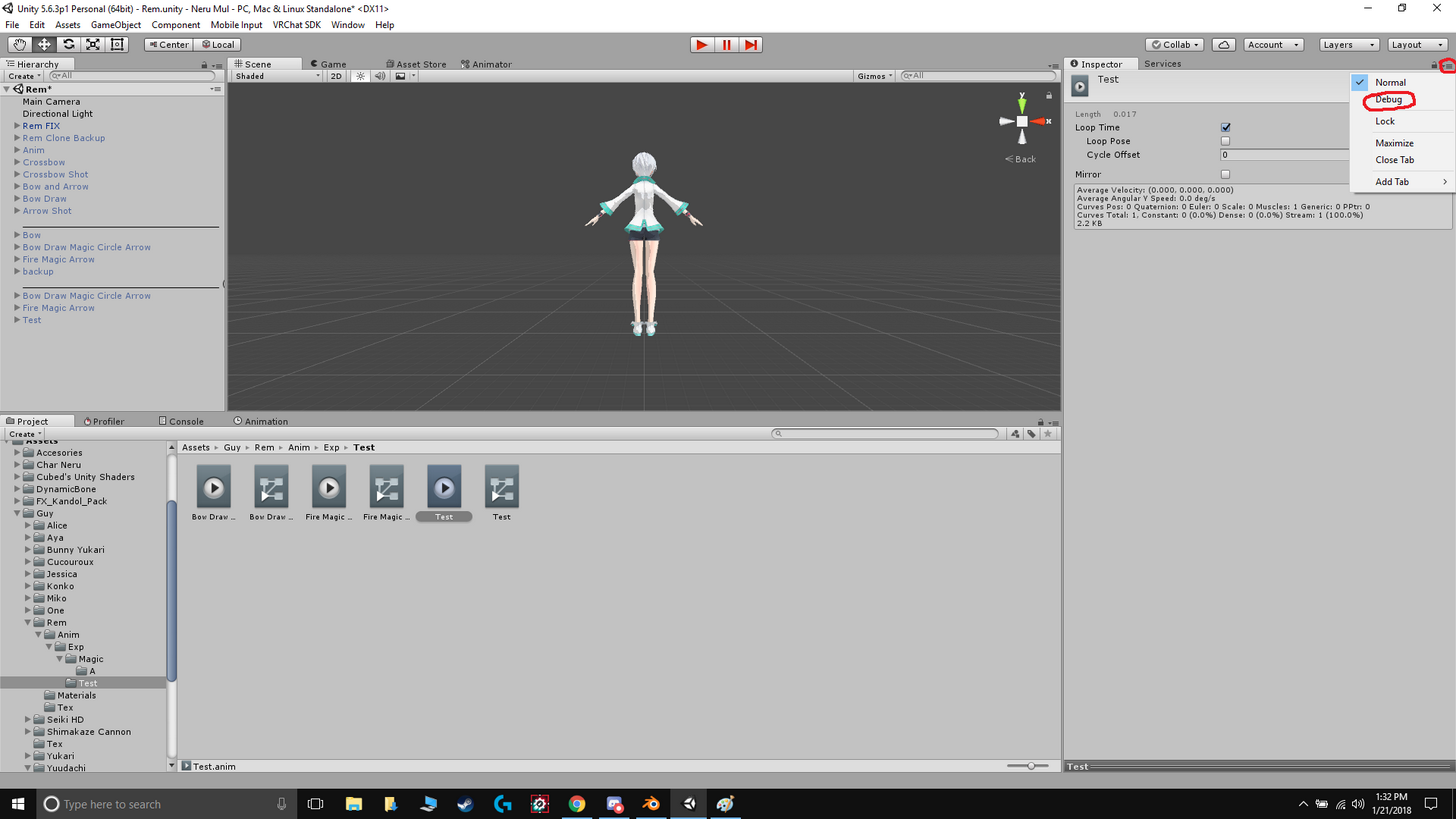
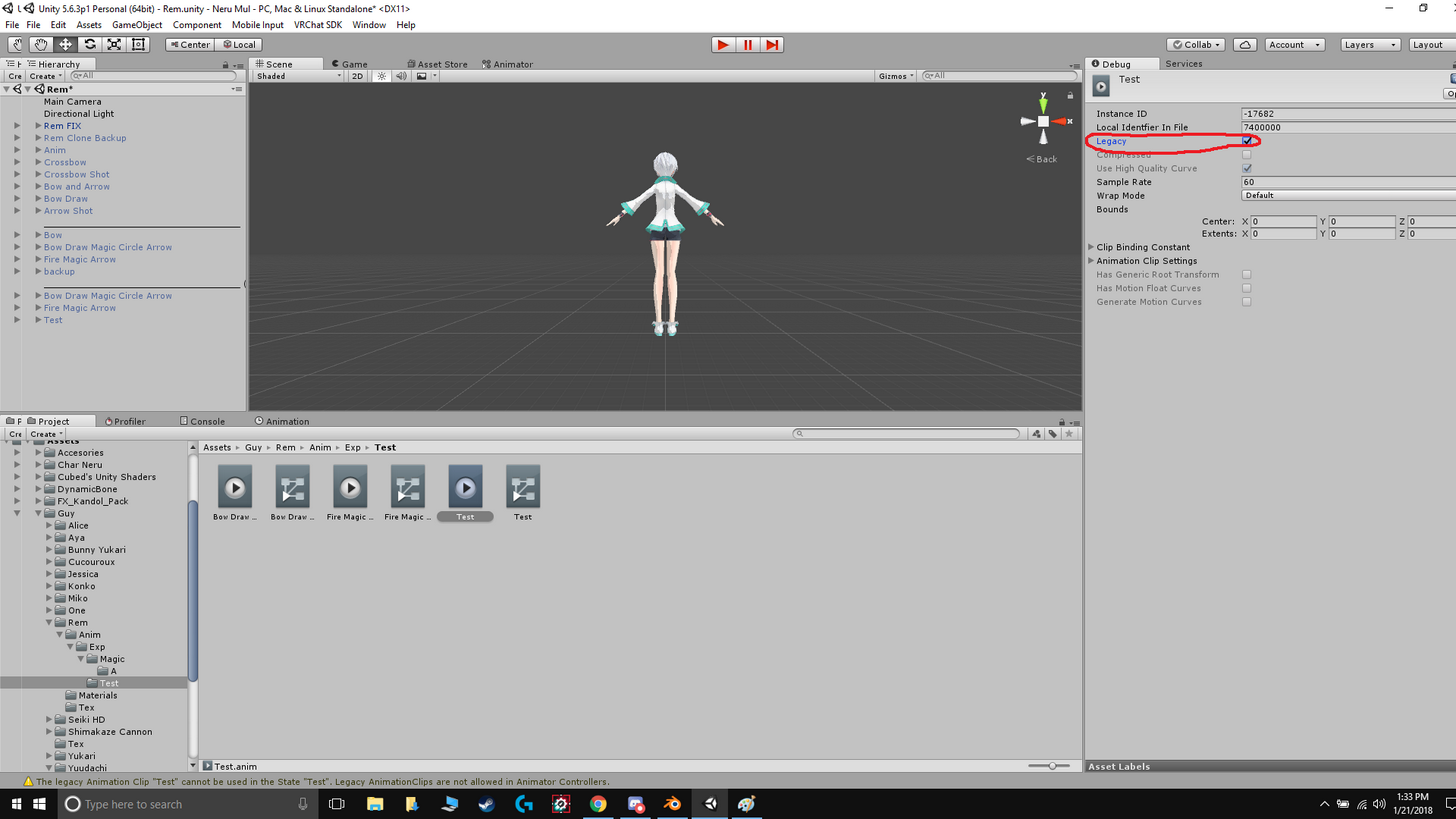
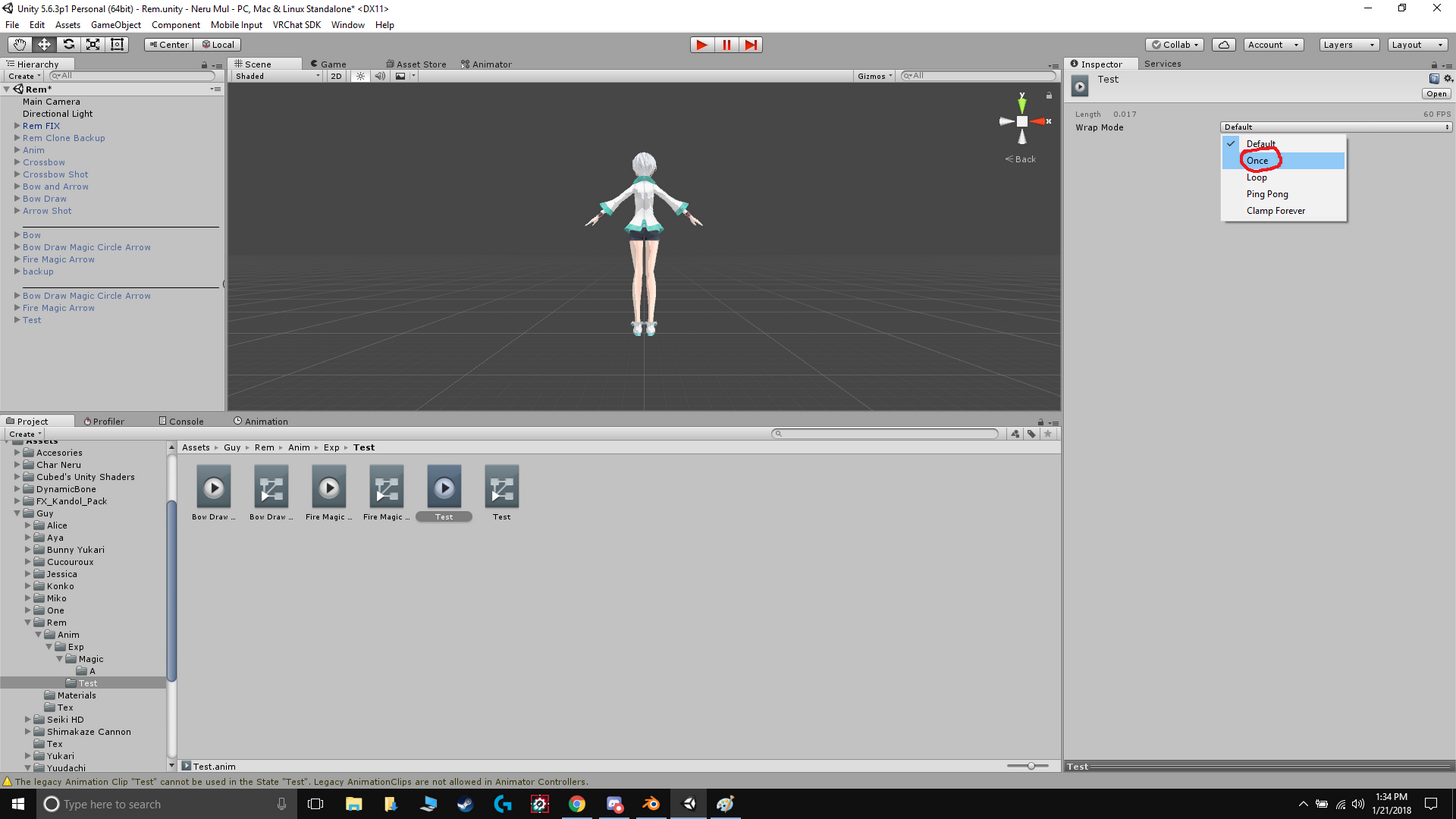
@cloud galleon in the animation's debug, check if the wrap mode is set to loop
clear kraken
it is now. and it's fixed. thank you.
rugged yew
how do I make dynamic bones physic based on gravity ?
 supple dawn
very important question anyone has any recommened boob dynamic bones settings?
clear yew
im new to animating and i was wounding if i was doing this right if not could someone show me how its done
https://imgur.com/PlwNAB2

 solid trail
Hmm anybody know a problem with the avatars not moving positions in animations in which they should? for example i made an animation in which the character should take a few steps back then run foward however the avatar does the animation on the spot and does not move backwards.
noble fern
So I've seen this on two different avatars. But they have an invisible cube, and when they put it on your head the interior is animated and has sounds. How would I go about trying to do this?
fickle bay
Ok so I've got a animation fully made for blinking and ear twitch that I have set to legacy and put in the animation component on the avatar
The blinking is blend shapes the twitch however is done using the transforms on the bone and controlling them in the animator
In game the blinking works completely fine however the ears don't move at all
It works in unity when I hit play and go to scene view but not in vrchat
Anyone know what's up?
fickle bay
Not sure what you mean by that can you elaborate? I'm only moderately knowledgeable about this stuff
@late phoenix
 late phoenix
Not at my computer right now but when you go to Add Property in the animation timeline you need to add a controller and not just a transform property
For example there'll be a controller for like Root Q and T and other stuff
I think it's like the 2nd thing down in the menu
It's the icon with like 4 little squares
fickle bay
So do I have to remake the twitch animation completely? Or is there some way to salvage what I've done already?
late phoenix
Maybe
If you add the animation controller you could probably copy the keyframes from what you already did
fickle bay
Ok so I've never used the animation controller while animating is it similar in some way to anything else I've might have done?
late phoenix
Mmm like have you animated blend shapes before?
fickle bay
Yup I got that down pretty well
late phoenix
It's like the same type of thing just for the arms or whatever you're moving
When you're moving stuff that isn't a blend shape you need an animation controller
Otherwise it'll like snap back into place
fickle bay
Ok cool
Thanks for the help your awesome
late phoenix
No problem hopefully that helps a bit, hard to explain when I'm not at my PC lol
 lucid remnant
anyone knoe an easy wat to pose fingers in unity for holding guns and such, messign with the values in the animation window is hard.
 naive heart
Have anyone here custom animations that I can download ?
lucid remnant
any free alternatives?
naive heart
like I don't what that animations with mixamo, instead I want the dab or some shit
noble fern
Then you could make them yourself?
naive heart
how? like I tried in Unity but u can't move the arms and shit
 native frigate
https://i.gyazo.com/f544df5dbce20848f3d34c9670a98e9b.png somebody knows a fix? I am trying to move the eyes for an animation, that has worked many times before, but now it just resets?

or rather what is the problem
native frigate
ye
noble fern
Then you make the movement
Then you add that to an animation override
Make sure you make a duplicate of your model or all your hard work will be for nothing
noble fern
Do you have the muscle animation from unity store?
naive heart
okay got it, what now?
noble fern
Go watch an animation override tutorial in VRChat
And that will walk you through basic animation
 limber horizon
Having a bit of trouble with particles. Would this be the right place to ask?
 thin loom
can any1 help me? tried to do particles but the scratch disk for my photoshop kept on saying its full
lol idk im having trouble with it too
my hard disk has 800gb free space but when i tried doing particles it goes down to 50gb
clear yew
@rapid cypress oh my god its as easy as changing pose to what you need and pressing apply as shape key
 topaz granite
Does anyone know how to make objects rotate on their own?
ruby elk
can somebody please show me how to edit Mixamo Animations? I'd like to add sound and effects to it but I can't seem to add any more properties to it
 gray pier
So animations dont take up poly slots correct?
clear yew
can anyone help, the dancing animation i made isnt working in game, the head isnt moving only the body is moving
 spark shard
Does anyone here know how to make an animation that plays in the background (like one you would use for eye blinking) start from the beginning if you had a gesture to enable it?
I'm trying to make an animation using it to sync with sound, however it seems the animation plays in the background even though it isn't enabled so it doesn't sync up correctly

 echo wraith
If I make an animation in Blender that spawns in an object just for that animation can that be used in VRChat?
 sand apex
why not make the animation through unity? I think you'd have an easier time since you'll be able to test to see if it works out too, That method might work though
ruby elk
Does anybody know how to edit Mixamo animations? Like i wanna use an animation as emote but also add some audio and effects to it but i can't add any more properties to the animation
echo wraith
I just know how to use Blender well, but not a bad idea.
sand apex
Yes, copy the properties of that dance and add it to your new animation and then just add the aduio/effects you wanted
sand apex
Doing animations in unity are a lot safer since you get to easily test them out
You should be able to copy the properties of the file not edit
sand apex
You want to copy all of the propertis and add them to a new one
ruby elk
Thanks a lot i will try that out !
can i dm you if i have any more newbie questions?._.
sand apex
Just don't forget to add the settings in too after you're done like you would with a regular dance
sure
ruby elk
aight, thanks
dawn shale
why does my unity go through so many uploading steps than usual?
sand apex
I think it's a safety measure
If you turn future proofing off it'll be a little faster
Future proofing just turns your uploaded model into a unity package as a backup feature for you if you somehow messed up your save for that model
novel flower
Anyone know how to give a texture a pulsating glow like this?
https://www.youtube.com/watch?v=1Nno15g8-b4
ลงคลิปต้อนรับเปิดเทอมค่ะ (?) 555 Model by GingerCat-P Motion by Mikusaki
sand apex
You've heard of noenoe shader?
novel flower
yep
sand apex
It's going to require some creativity but the idea is that you're going to need to add a couple of 3D rectangles that are really flat and put them on areas of your model you want to glow like that
Make it so all of the shapes are black and add the noenoe shader that makes it where a texture would transition across the Y axis (Up and Down or vice versa)
That's the general idea
You're going to have to put it really close to the model so it looks like it's a part of the outfit and make it as Flat as possible
ruby elk
@sand apex umm... how do i copy all of the properties of the mixamo animation?
 marble pollen
hey i need help, my cats "Create Eye Tracking" is unavailable to press, any way to fix this?
sand apex
Vaxe did you already convert the mixamo animation into humanoid and so on?
marble pollen
thanks in advance!
sand apex
Whispie are all the slots filled for the eye tracking?
marble pollen
yeah
ruby elk
@sand apex yeah i did
marble pollen
 sand apex
Click disable eye movement
marble pollen
it still doesnt work
 clear cipher
Guys I can't see the particles from my eyes do I need to do an animation for this?
marble pollen
i already tried that
sand apex
Vaxe you'll need to go into the animations tab, click the top animation, scroll all the way down and shift + click the last animation
Ctrl + C and then go to your new animation file and paste
 atomic canyon
Are there any collections of animation emotes around?
sand apex
@marble pollen maybe your mesh needs to be the body instead of what it is now?
atomic canyon
I'd really like the Snake dance emote some models have
 sand apex
That's odd then, I never had to deal with a problem like that
Usually even the blanks would be filled with "Basis" did you decimate or mess with anything on the model?
clear cipher
Who is good with animations?
trail fulcrum
So you removed key shapes?
sand apex
@marble pollen I mean, did you use quick decimate or decimate manually?
marble pollen
manually
sand apex
I think decimating anything on the face would mess it up regardless
marble pollen
i dont think the face is decimated
sand apex
It's missing the shape keys for the blinking?
Trying a new model separately and go straight to the eye tracking to see if it'll allow you to add a tracker in the first place
marble pollen
my other one worked
sand apex
You can speed that up
There was a way to get passed the 1 limit but I need to check on it
trail fulcrum
Just seeing broken animations that still go to the beat of music makes me want to ruin a animation so hard that it becomes the most intense rave this virtual world has ever seen
sand apex
Nevermind Nihlus there's probably some magic trick behind making it look like it's going faster i'm not that creative to figure it out
clear cipher
Guys who is good with Particles?
rapid cypress
@clear yew plsss that sounds so amazing! Tysm for sharing this revelation!
unkempt moat
Soo if i throw a animation that only switches on/off things (so no movements)
Would i be able to throw it on lets say the open hand emote without it not opening?
Or do i have to make the open hand emote myself then?
 subtle bay
Hey all, anyone know how I can set my trail renderer to linger for a bit instead of disappearing as soon as I close the override?
lucid remnant
anyone know how to make it so only players inside a sphere can hear the audio source? is it even possible?
 lost wren
I have a question!!!!! How to add animations to Emotes?
sand apex
@unkempt moat yeah just edit the bones so the hands don't actually open
@lost wren you'd have to lower the volume and use that as a test to see
unkempt moat
@sand apex I want it to work normally though thats the thingo
Like is there a easy way to make an animation over ride that does not edit the original animation 👀
Else ima just use something else
sand apex
The open hand emote should just be the open hand emote then if you're not touching anything?
unkempt moat
Yea but i want to throw the game object (on/off) within it
clear yew
@rapid cypress unfortunately i couldnt test if it worked properly (sinse the servers are down), an for some reason once i applied that pose to the shape key it messed up my bone, it was no longer moving hte jaw even though the weight paint was still there. I must have messed up
sand apex
@unkempt moat just make it so the game object is transparent/visible in the animation file?
rapid cypress
@clear yew whoa.... That's a lofty disclaimer..
Maybe it thought you preferred the shape key over the pose
Hard to tell
clear yew
https://imgur.com/a/PfLPW @rapid cypress
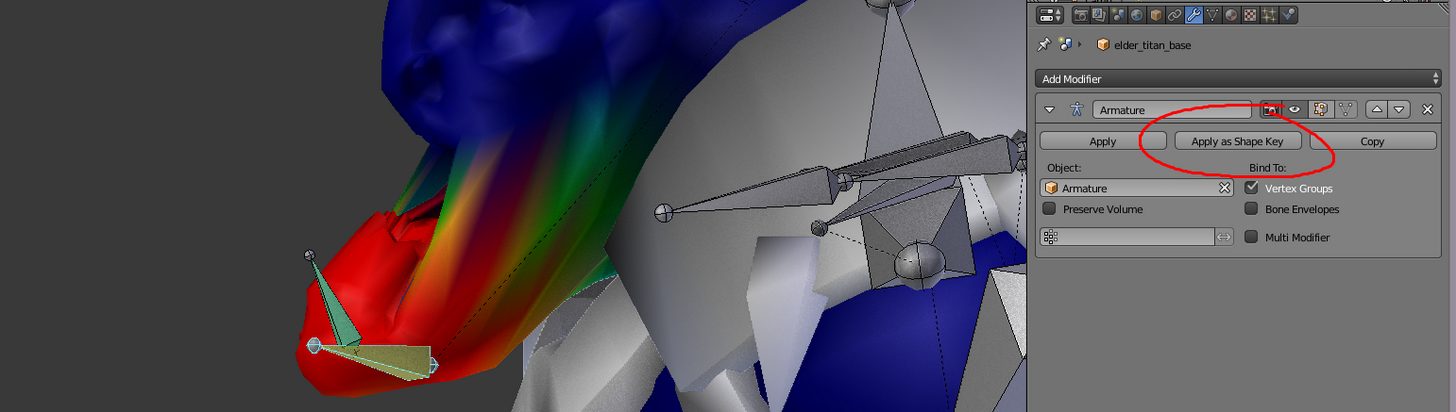
 regal magnet
Does anybody know why Dynamic bones don't work sometimes? I checked if the bones are correct and if they are weighted, but it's starting to get 50/50 if they actually move or nnot. Anybody know what this might be?
clear yew
i have no idea what im doing, i only started using blender couple days ago
unkempt moat
Might have to explain in more detail what im trying to do
An example:
I got a spell and a gun
Both have a basic animation (loading the spell/basic gun)
I want to have both change to an action (spell shooting and gun flashing)
My idea was to do that all within a signle other animation and create a second animation to switch between them
So i would turn off the normal spell and turn on the action animation with lets say an open hand emote
And if i got my gun out it would trigger that instead
sand apex
Oh you'd need more than 1 emote
unkempt moat
I know
But im pretty sure i can push both the end results into one emote by swapping whats happening
sand apex
You can
rapid cypress
@clear yew I've been beating my head against a wall with it for about a month now, so I can see where some of its mechanics are unfriendly for new users
sand apex
I don't think you can use the emote like a switch unless its a particle because that would require another emote to set the particle's render time back to 1 or 0 so it can turn off or be infinite
clear yew
can someone help me please for some reason the dancing animation isnt working, the first one is what i want i want to happen and the second one shows it not working, can someone help please
https://imgur.com/Cs8h6Ch , https://imgur.com/QrDV8XZ







 sand apex
It seems like your head isn't baked into the pose
Did you use the same settings as any other mixamo dance where you would bake them all into pose and set them to original?
lost wren
@clear yew
clear yew
@sand apex i made the animation in unity
rapid cypress
@sand apex !!! This is interesting info to me! Could you link me to a resigned that could solve this!