#animation
1 messages · Page 32 of 1
 topaz barn
 woeful rapids
10second for emotes. there is a way to make it infinite using hand gestures
topaz barn
@clear yew screen cap window with particle selected
 clear yew
 clear yew
ok
 torn sail
Hey I have a character that has a phone with their model, could I make it act like a camera? screen shows what im pointing the phone at, then I could make it take a picture? not actually saving the pic, but something that I would be able to show other people around me?
topaz barn
cameras are no longer whitelisted
torn sail
I saw similar functionality in a YT video but I cant find that video anymore :C
topaz barn
you cant use them anymore
torn sail
Thanks for the info!
I could probably make the screen a mirror to achieve a similar effect
you guys think that will work?
topaz barn
mirror is not a whitelisted component
Here is a list of the components you are allowed on avatars VRChat - VRC_AvatarDescriptor - PipelineManager Unity - Transform - Animator - [Skinn...
torn sail
Thanks
clear yew
@topaz barn yeah that didnt work only the sphere and sound appear
clear yew
@topaz barn the cylinder appears
 topaz barn
check the custom animation overwrite?
topaz barn
correct anim file is linked?
clear yew
yes
topaz barn
no reason then
topaz barn
try to upload your avatar with different name
like add v2 in the end
sometimes avatar server can be slow
so you know you are using the updated avatar when u see v2
clear yew
@topaz barn thanks it worked i cant see it but others can
 queen path
can anyone tell me what does TDOF property animations do?
topaz barn
tdof?
 valid estuary
hey guys i need kinda advanced help
wheen i dont pull out my guns all my dynamic bones are completely fine and work perfectly
but if i pull out my guns my whole body shakes randomly forward and backward and stops wheen i put away the guns
and the dynamic bones are broken and flail wildly around
topaz barn
@valid estuary what is your custom animation overwrite?
valid estuary

thats how i set it up
it only does that on fingerpoint
silver shooter equip
wait do you mean the animation window
valid estuary

thats the equip animation
also my holstered guns dont dissapear if i use that too
 candid token
I'm really confused. Known of my animations have looping to it but when i hit Emote on my animation that doesn't have LOOPING and it loops for about 23 times.
 topaz barn
whats the gameobject for
 topaz barn
under wrist
topaz barn
are the guns visible by default ingame?
valid estuary
no
if i fingerpoint only
and go away if i do anything else
inspector is disabled by default
topaz barn
the guns are shown by default according to your armature
valid estuary
ijust enabled that
on the ingame one it isnt active
it only shows wheen i actually do the animation
topaz barn
are the animations applied to the root armature of avatar or armature of the guns?
topaz barn
no thats good
valid estuary
the circle animation is ONLY on the circle tho
like the aiming thing infront of the gun
but i want that to play only wheen its out
so i did that
but the main problem is that my whole body jerks back and forth in 1 frame intervalls
wheen i take the guns out
for some reason
topaz barn
whole body, not just the hips?
topaz barn
take a look at your anim file
for taking out the gun
you have a position property
remove that
valid estuary
OH LOL
FUCK
i was like wtf is happening then it was this easy all along
thats totally whole body position too
wheen thefuck did that happen
ohjeah okay that probably fixed my problem then
thanks m8
but my holstered guns dont dissapear wheen i take out my guns
now i jsut feel retarded
lol
 turbid sluice
So the run animation I created. doesn't seem to overwrite. Any ideas? Do i need to replace more than just "RUNFWD"?
turbid sluice
hmmm even run back?
topaz barn
not runback
topaz barn
and it can look wonky
 topaz barn
run and strafe
 placid oriole
Hey, I imported vmd motion to my avatar in blender and after clicking play she is just standing, what's wrong ? I imported it on my avatar's bones
turbid sluice
what about SPRINT forward?
topaz barn
yes
turbid sluice
this to find out if it works thanks
valid estuary
@topaz barn ohjeah do you know why my holstered guns dont disaapear?
wheen i start the animation
the holstered gun is set to Game Obyect is Active 0
in the animation
topaz barn
make sure both frame in the anim file is identical
valid estuary
yeah they are both at 0
topaz barn
screencap?
 proven panther
Hey, I was wondering if anyone here knows how to create particles that have proper collisions (atleast with the map) and are anchored to the world rather then local (or some other work around).
 topaz barn
@proven panther there is collision module under particle system
valid estuary
doesnt have the same name anymore because i changed it at some point from Silver Shooter Holstered L to Shilver Shooter Holster right
valid estuary
how do i add a property to an animation which only exists in the animations folder?
topaz barn
please refer to this tutorial

Had to re-upload because of audio being too quiet should be fine now. I forgot to mention it in the video, but Murmur also answered questions I had and helpe...
@valid estuary ?
topaz barn
@proven panther https://youtu.be/yZxfQkxvxRI
Had to re-upload because of audio being too quiet should be fine now. I forgot to mention it in the video, but Murmur also answered questions I had and helpe...
proven panther
thanks so much dude
topaz barn
np
proven panther
 out of 5
topaz barn
name them properly
valid estuary
yes
candid token
Anyone actually had an issue where an emote would repeat itself for awhile until it stops?
even though t's not on loop

 hexed current
guys im trying to figure out, how do I do custom animations for a custom rig in unity?
It's not an mmd model so Idk how to do expressions and shit for it
topaz barn
@candid token the animation is applied to root armature right?
topaz barn
I need to see your anim file
candid token
the FBX?
candid token
highly recommended yes
 fallow dawn
hello, i added a custom idle standing animation for sitting in a wheelchair and i applied everything correctly yet my character is standing and not using the animation i selected does anyone know why?
topaz barn
go into the editing mode
candid token
how do you do that?
topaz barn
Make a duplicated of avatar
drag the animation file onto the duplication
go to animation tab
candid token
 topaz barn
the first key frame should be identical to the last key frame
candid token
how would you do that
candid token

 obsidian vigil
umm
im trying to do an animation
so i rotate the arm
as soon as i go though again it just snaps back
how can i prevent that from happening?
topaz barn
@obsidian vigil are you on vr?
obsidian vigil
Yes but it snaps back in unity
 viscid loom
Can someone teach me how to make custom animation on unity ?
viscid loom
Do you have a link to a good one ?
topaz barn
@obsidian vigil so arms rotation snaps back when?
 sacred gale
is it possible to spawn a game object through animations?
obsidian vigil
as soon as i drag the red line on another row of keyframes
topaz barn
@sacred gale yes
 edgy aurora
yes, will they stay? unlikely
sacred gale
how can i go about it?
topaz barn
@viscid loom take a look around youtube
obsidian vigil
Put my question behind im intereset in spawning stuff
sacred gale
ive already gotten the object to appear as an animation
topaz barn
Gameobject can be activated through animation
viscid loom
@topaz barn Yep i get it but do you have 1 or 2 to recommend ?
obsidian vigil
can you like make a pokeball to throw or something?
topaz barn

Creating custom animations for hand gestures and emotes in VRChat
This one covers the basics
Its up to you to discover
obsidian vigil
This is good as well @viscid loom https://www.youtube.com/watch?v=eT5_nyb0T1g&list=PLlqPjR6glT9lj7HeX3U4pFNEjwiRkVp4c
Showing you how to change default emotes to weapons & stuff. SUBSCRIBE, LIKE AND ALL THAT GOOD STUFF!! :D MY FIRST TUTORIAL ► https://youtu.be/0vdiCJRAExw DI...
topaz barn
@sacred gale it will stay as long as you hold the hand gesture
obsidian vigil
can you pick it up?
topaz barn
no
viscid loom
Ok thank gonna check those out
obsidian vigil
aww
topaz barn
Spawned object has no interaction to world or other players
sacred gale
if i dont have vr can i still get it to spawn with a press of a button?
topaz barn
@sacred gale yes. however as soon as the enote ends it will be gone
sacred gale
as if in holding a hotkey holds the animation on and releasing turns it off
hexed current
guys where could I find a 2d lip sync mouth sheet?
For custom visemes?
No idea where to find one
topaz barn
@sacred gale without vr you cant do hand gestures
the item will not stay
@hexed current cats tool can create visemes for u
hexed current
not on all models.
This model which is xnlara
when i highlight over it its greyed out
with no optuion to make them
😢
Did I do something wrong?
topaz barn
do you have blendshapes/shapekeys on the model?
topaz barn
@hexed current google shapekeys in blender
follow steps
if u find none
no visemes
hexed current
I have vertex groups lol
hexed current
this model isnt mmd, lol
So how can I create my own facial animations? Idk how to get a mouth sheet, im following a tutorial but he has mouths
it is a 2d character, persona 5 char
so it should be possiblew
 clear barn
In blender select the mesh, go to the tab that has a triangle with 3 dots and open the shape keys menu
There you press the + button twice and the second one is your new shape key
Select it and press tab to go on edit mode, there you can modify your expression
Press tab again and your shape key is done, you can change it by moving the value slider
hexed current
oh shit
I hav e mouth bones too
I might notr even need that
I can probably do shape keys with the mouth bones right?
hexed current
Ok so where do I get started xD
 rugged yew
Is there a reference somewhere to see how I should make my model blink/eyelid shape key ? Like how much should the model close the eyelid
clear barn
Select the skeleton and in pose mode, move the mouth, then select the mesh and using the armature modifier select “transform into shape key” or something like that
Then the movement that bone used to perform can be found as a shape key
sacred gale
anyone uses mixamo.com for animations?
 slender mango
does anyone know where i can get the Muscle Animation Unity Asset for free?
topaz barn
Dont ask that kind of stuff here
clear barn
@hexed current yes. Now if you go to the shape keys menu there’s the movement called “armature”
fallow dawn
does anyone know why the idle im trying to use does not match the preview on unity at all with my model ingame? i can see its different from the default but not what it should be
topaz barn
Are u on vr?
clear barn
Yay 😄
clear barn
Yes
hexed current
If i delete one of the 2 the slider 0-100 goes away
hexed current
got it
so like, if i wanna specify a mouth movement in unity, id select it and type in the nuimber?
clear barn
It’s the default position shape keys are based off
clear barn
Yes, move the slider until it’s a nice position, then click the drop down menu to the right and select “create new from mix”
Then name the new one “vrc.v_aa”
And keep going until you got all the mouth positions
hexed current
thats in unity though right?
or in blender?
or out of curiosity
do i create the keys
then just use cats?
Im confused cuz like, what does cats do to the one thing I just created?
Make multiple visemes?
 royal ridge
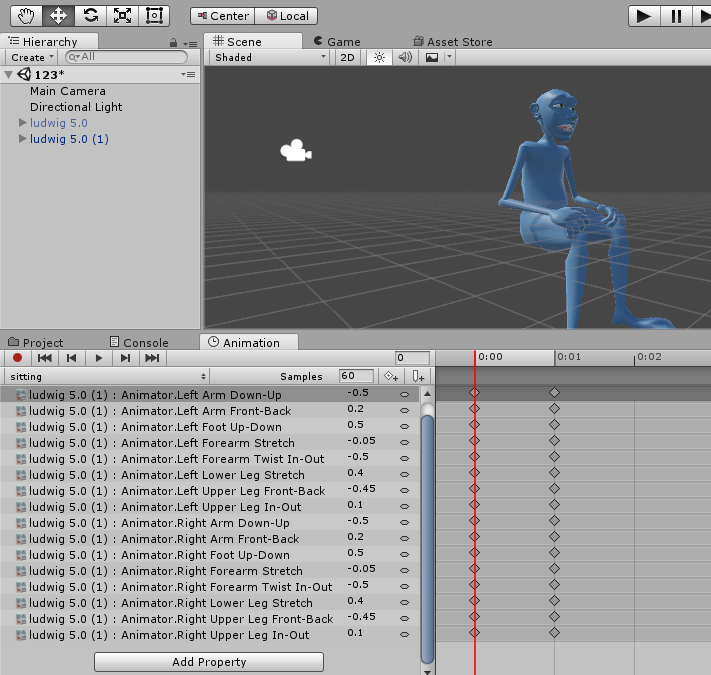
Hey guys how do I get an animation I just made into my assets folder? https://imgur.com/oPprM4c
 hexed current
idk how to edit multiple visemes.. posing doesnt do shit after creating that first one
clear barn
Make a couple for posing, like “OpenJaw”, “MouthWidth”, “TongueHeight”, etc
hexed current
Can there bem ultiple for the same mesh?
clear barn
Then combine those and select “new from mix” to make new keys, and name those the Vietnamese things
hexed current
Is that why it aint working?
clear barn
Yeah there can be multiple
hexed current
i cant get anything to move now
clear barn
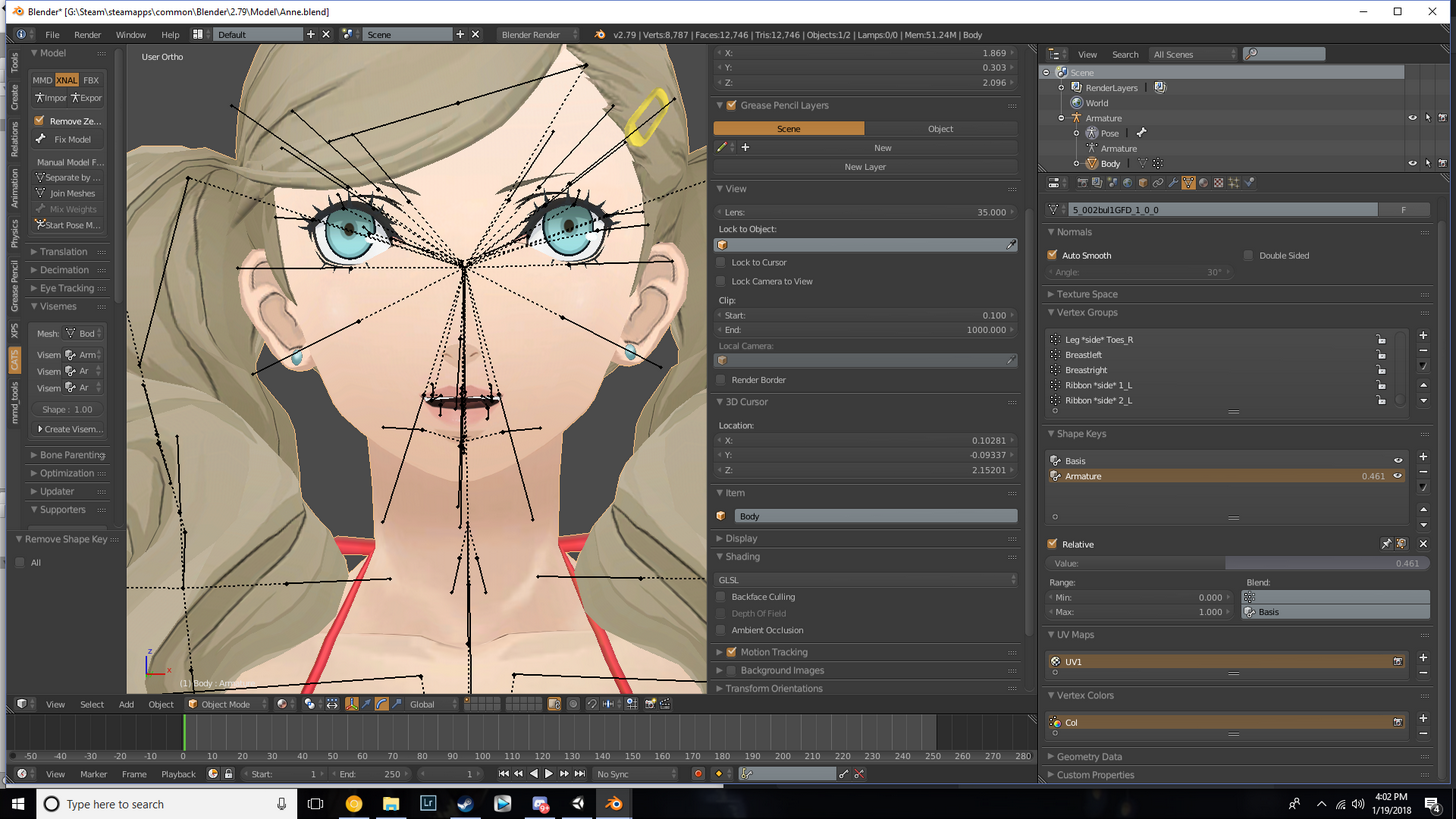
Screen cap your shape keys menu
clear barn
You have to upload it imgur and post the link
clear barn
¯_(ツ)_/¯
 clear barn
Ctrl+z all the way until it works lol
hexed current
like it works fine but why cant i make new shape keys -__
am i doing something wrong here lol
hexed current
yes
but i cant pose it
or change it
i can simply adjust it from 0 to 100 and it goes from default to open
clear barn
Yes that’s what it’s supposed to do, what do you need?
hexed current
I want to create different versions for the mouth for different visemes
thats what im supposed to do right?
one for open, one for smile, one for sad
clear barn
Yeah, but that’s just the one you’ll use for posing, that’s not an actual Vietnamese pose
You’ll make poses out of it
clear barn
Set that one to 0, and add a new key
Remember, all keys will move from default to its pose
You can combine multiple keys to make mouth shapes
hexed current
now the shape key
is greyed
and cant be adjusted
Wtf!
oh it was hidden]
derp
 fierce thicket
does anyone knows how do i fix the walking animations, so that my model doesn't spin when i walk/run?
hexed current
how do i create multiple shape keys?
Ive got one made for a blink, but posing wont do anything
 tranquil jackal
i got a pose, that i got with my model
how do i override that into the idle animation?
(MMD)
it's in a .vmd format
please tag me when you asnwer
 spare bramble
anyone got any shaders or materials for making electricity on a particle effect? i tried the free unity store one but it seems to be causing compiler issues
 sonic tiger
Shape keys are vertex edits, they do not take bones into account
if you want to use bones to make shape keys, you will need to pose your model, then bake the pose into the shape key by selecting "applly as shapekey" on the armature modifier
Be sure to remake the modifier after the apply, and reset your bone positions
 lucid pewter
clear yew
lucid pewter
clear yew
No
All you're doing is showing the "is active" in the animation window.
So the only polygons you're adding are the object i.e. weapon/sword.
queen path
anyone know how to prevent the avatar from clipping the floor with custome motes?
emotes*
 solar wolf
Animation for running is messing up clientside maing the avatar spin like a top but looks ok for others. will be really helpfull if anyone knows a fix
Seems like movement breaks and starts spinning when an idle is added, but works when removed
anyway to add idle without it breaking
 sullen saddle
does anyone have a quick guide to trail renders on a finger with a gesture?
is it done with the particle system?
 shrewd moon
It’s done with trail renderer
 celest pewter
@sullen saddle https://www.youtube.com/watch?v=Pi7i4sF_BgQ
 candid flame
@sullen saddle Here is a basic tutorial on how to do that : https://www.youtube.com/watch?v=TlCJfaJj3U0&

Hello, I have pulled this old video tutorial out of private status so that everyone can benefit from the information provided within. I apologize for the aud...
Well now he has 2 tutorials to choose from ^^.
sullen saddle
ty
celest pewter
the one i posted is more straight forward
candid flame
Anyway, I also had a question : I am trying to have an animation during which my charcter keeps its eyes closed, so I would like to know if there is a way to prevent an avatar from blinking during a custom animation ?
 sage cloud
Okay, so I've got a shape key that makes an object reduce in size to nothing when it's set to 100. How do I make the default state 100 and the final state to 0. Whenever I modify the value of a key it changes both the start and end.
solar wolf
Still have the problem with the animation making the avatar spin like a top if anyone knows a fix
 severe palm
has anyone got any good idle/standing animation so that arms don't clip through a skirt? the free mocap anims from unity store don't work for my character (aesthetics wise)
solar wolf
could edit the animations to fit
severe palm
which program should i use for that? i downloaded maya but i have 0 clue how to edit animations
solar wolf
unity
severe palm
can you help me out with this in dms WarPuppy?
severe palm
aight np
fallow dawn
hey guys i have a custom walking/running animation which work perfectly and i also have a similar idle animarion for sitting (the model will be in a wheelchair) the walk and run works fine but when i try a custom idle for sitting it works somewhat but the model is like half standing and sitting. ive even tried using the same animation for walking on idle and it breaks also so im at a loss
 ruby bear
question, if I translate my avatar as part of an animation does the viewball translate with it or no?
 hollow olive
when i try to make a manual animation, the avatar suddenly gets shifted down and their arms and knees bend in. any idea how to keep them in the initial t pose?
 ashen mesa
is there a reason Jaw Flap just flat out doesn't work?
topaz barn
?
ashen mesa
I set the lip sync to Jaw Flap and ingame my character's mouth just hangs open
It doesn't have visemes to fall back on
I'd just like Jaw Flap to work, is all
clear yew
How would you go about making an animation trigger to draw
 slate crane
Anyone know how to do something similar to the drinks with "gravity" affected liquid like in the Pug?
 rustic jewel
i'm having issues with my animations just not doing anything at all, even though i've assigned the animations in the override controller, any help?
nvm i think i was just being a stupid
 peak summit
@ashen mesa if you are trying to make your character's mouth move when you talk why not just use cats blender tool to make the face visemes?
 undone glade
Alright I want to make sure i'm doing this right.
Muzzle flash>child to wrist>active at key :00> inactive at key :01
or is there another more simpler way to do this.
I think I am doing this wrong not that I typed it out XD
undone glade
I'm simply trying to keep the sound effect, but having the flash.. you know.. flash. XD
I have the gun, the muzzle flash, and audio source.
unless I'm missing something in the animation
topaz barn
whats the problem?
peak summit
If you want it to move with the gun have it be a child of the gun
undone glade
It's all positioned correct just need the sound effect to keep going while the flash a simple flash
topaz barn
Flash should be continuous right?
 dull fiber
How are you guys animating cloth for emotes and stuff? I want my cape to flare during the emote but not sure how
peak summit
Then make the duration of the particle system as short as you want
topaz barn
So one flash, but gun fire sound is continuous?
Ugh
You want single fire or full auto
topaz barn
So one flash and gunshot sound?
undone glade
yep
undone glade
It's kind of like a flintlock pistol
topaz barn
I suppose you have duplicated the weapon right?
undone glade
I duplicated the avatar for the animation.
undone glade
peace sign to wield, devil horns to fire.
undone glade
or do you mean one to wield, one for the flash, and one to fire?
topaz barn
no
undone glade
thank god
topaz barn
one wield and one fire is enough
do you have flash particle created
make it child of firing
undone glade
most likely a mesh
undone glade
yep
undone glade
it was a lazy last minute thing
topaz barn
under new gameobject under firing gun
undone glade
I'm guessing just make the particle effect single and set it to like.. .1 or something.
because I think I just stumbled into making it.
 potent obsidian
lurks because they want to learn how to make a gun that fires in Unity too. '^'
topaz barn
Make particle emission rate 0.01
potent obsidian
Yesss..tell me the secrets.
 bleak delta
can someone help me with my Animations, if im going ingame my hands, face and other stuff is shaking hard
topaz barn
what animations do u have
bleak delta
in most of them i replaced them finger's
just face expressions
and where i change my finger's
bleak delta
as soon as i trigger it
bleak delta
what you mean?
potent obsidian
Take a screenshot of the animation file that keeps glitching out ingame
And post it here

 prime gale
huh this conversation makes me think I may have done something too, my game shakes like mad anytime I'm not alone
literally everywhere
 subtle sandal
could someone tell me how to change particles into a certain image/words?
bleak delta
not exceed -1 ?
hmm
ok
@topaz barn and the Loop worked for a prop it's not bugging arounda nymore
but my face expressions are'nt ingame
even on trigger
 arctic heart
@bleak delta youll need to animimate the other hand too
bleak delta
what you mean?
arctic heart
with a single face animation both hands need to be animated
looks like you only did the right hand, youll need to do left hand too
bleak delta
ah okay
and another question, if i go ingame my left thumb is broken
how can i fix it?
arctic heart
what cha mean?
 topaz barn
@arctic heart I am afraid that is not correct
bleak delta
wont move
topaz barn
You can animated facial expressions without touching hands
arctic heart
@bleak delta im not sure you might be able to use mesh render in Add Component to fix it but not sure
@topaz barn if not hands what would you use?
bleak delta
@arctic heart what do i have to do in Mesh render?
dull fiber
Hey guys, what's the best way to make a cloth with bones (like a cape) move during animation? Just need to figure out, have a character in a powering up pose and would like his cloak to flow a bit rather than be still
dull fiber
thanks
arctic heart
@bleak delta @bleak delta just animate the thumb to stay in a default position... but you said the thumb wouldnt move at all?
bleak delta
no even on the common gestures likes fist
arctic heart
When you set the Animation type to humandoid did you configure the hand bones any?
dull fiber
Hmm, adding gravit doesn't seem to do anything, are there a set of values I should be trying?
bleak delta
no i did'nt
arctic heart
@bleak delta youll probably need to manually set the bones then
 arctic heart
good ^-^
 soft shadow
how do u get a tail to wag
topaz barn
@soft shadow at all time or during hand gesture
dull fiber
Actually, I'm not sure applying gravity to the dynamic bone is doing anything at all
 nova rose
anyone got that dab animation that's been spreading around
topaz barn
@soft shadow Do you know how to create animations?
soft shadow
yes
topaz barn
Create a anim file
tail wagging
On root armature add component called "animation"
If you have that already
Make animation size 2
soft shadow
yes
topaz barn
Where you put avatar descriptor
soft shadow
oh
topaz barn
do you have an animation component there?
topaz barn
yes
drag the tail animation onto the new slot
also
for the setting of tail waggin anim file
set it to legacy and looping
like you did for eye blinking
soft shadow
okay
how do i get the tail moment in the animation clip though
like postioning it isnt working
topaz barn
transformation of the tail bones aren't working?
 dull fiber
Adding force in the animation doesn't actually do anything, confirmed lol
To the dynamic bones
Though I am getting results on a T-pose
 hard coral
are there any free programs to do custom animations for vrchat? i was going to use muscle animation editor, but i dont have the green to get it currently
topaz barn
you may add properties by hand
dull fiber
Figured it out. If you have multiple dynamic bone components on an object it'll only change the first one
hard coral
how hard is it to learn to do animations by hand?
clear yew
I guess this might be a better place to ask my question instead of #avatars-2-general. Whenever I do a gesture to perform an animation and accidentally sit down at the same time, the animation stays loaded until I switch worlds, is there any way to fix this?
For example pulling out a gun while at the same time sitting down makes the gun stay loaded
clear yew
Thanks for your input. But yeah, looking for another way.
hard coral
the root to it would be figuring out what triggers it, example, it registers you sitting down as an animation to play, but its already playing an animation, so it goofs and loops the animation already loaded while it tries to play sitting down
have you tried standing back up and sitting down again?
or does it just completely ignore your actions afterwards
clear yew
Yeah, nothing fixes it, performed the action again, tried sitting down and standing up again, etc. it just stays on my hand.
Don't really know whether its the animation thats looping or objects that are active forever either
Actually, I do know because I can move my hands freely, they are not tied around the weapon as they are when the animation plays.
Its just the objects that are active forever then I guess, unless I'm completely wrong.
 floral island
Hey is there an animation override for just pressing the trigger? on an oculus to be specific
 ivory lagoon
hey! could i get some help on mouth movements?
 brisk shell
So I made a particle system, and it fires out of my hand, but the particles move with my hand, how do I fire them and they keep traveling in the same direction?
ivory lagoon
i got this great ape model and he's got a mouth that hangs open a little, i just want it to come down slightly when i talk. how do i set this? it has a bone and is weight painted
i know I can use shapekeys but when I posed it it stayed the same in basis and ah mouth
or do i just set it in unity...?
 robust folio
Ok so Ive got everything done besides the animations, how would I go about taking the animations from the VRSDK and putting them on my model?
 unborn sun
Anyone willing to add lip sync to a already made model?
 weak gulch
sigh... I can never get this audio source to play as an emote on a generic model.
Anyone tell me if I'm wrong otherwise but I'll say what I did:
- Have the model audio source attached to the Armature of the model and have the sound as Hidden.
- Duplicate model and hid the original model
- Go to Animation tab
- Hit record
- Go to the armature and unhid Audio Source
- Ctrl + a in the animation slider and paste another version of it to the 05 second.
- Stop record
- Hid the duplicate model
- Duplicate the CustomOverrideEmpty
- Add the animation into Emote_1, Emote_2, Emote_3, Emote_4, Emote_5, Emote_6, Emote_7, Emote_8
- Add the CustomOverrideEmpty onto the VRC_Descriptor
- Upload model
- Attempt to Test (Going to VRChat)
- Failed (Model did not show an emote change in name)
 earnest garden
anyone know where I can find a lightsaber model with low poly?
hexed current
Is it possible to import custom animations for mmd models?
 bold meteor
Hey, I've just spent a while "making"(more like riping and creating a model. It's Giru from DB XV1/2). I was wondering if there was a way to "import" animations. I have no skill or know how into animating, and I don't want anything to fancy. Just simple walking so I can upload him lol
 onyx cape
is thier any thing in unity for bones that are like Dynamic Bones and works as well but is free
 quick iris
so i made an animation that makes my avatar floats, spawns the weapon and it circles the character, everything works fine
BUT
the weapon has a light
and that doesnt works
anyone can help me with that?
 copper moat
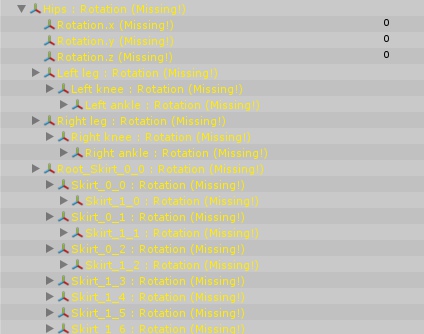
Hey guys, I have an audio source that plays when I use an emote, but it's waaaay too quite ingame. I can hear it but it's just a whisper
Can't set the audio sound limit any higher in unity since it caps at 0.5
but i've seen other users with louder audio sources on their models before
what gives?
clear yew
Even when I parent a particle system to my gun (with the particle system at the end of the gun for muzzle effect) it is at the bottom of my avatar (even though the position is at the end of the gun)
Why is this?
undone glade
Is there any good guide for muzzle flash particle effects?
clear yew
@undone glade this one is pretty ok, I followed it and muzzle flash works and all https://www.youtube.com/watch?v=YzYvNKgzTKY

This video assumes you have already watched this one: https://www.youtube.com/watch?v=61vO-IswFps&t=546s *Make sure you scale your model down to the size y...
let me know if you run into same issue I had above in pm tho
quick iris
can someone help me with light source not working?
i wanted to make my sword like, with light
didnt work
clear yew
alright so I figured out my issue on my own if anyone else runs into it: you just set your shit to local instead of world lmao
as in the particle system attributes
 mild blaze
for some reason my with my drawing animation ingame the drawing part is perfectly fine but the erase all doesn't work and it makes my hand go slowmo
weak gulch
@copper moat wait how did you do it?
 earnest trail
sacred gale
earnest trail
sacred gale
is it possible to have animations longer than 10 sec?
earnest trail
yes
sacred gale
how so?
 short maple
Hello guys. So I'm working on a BB8's animations through a simple forward, backward, left and right movement. Do I need to cut the start and end transitions when they start to speed up/slow down?
just to give it that infinite transition look when moving around
 rapid dock
So after lots of flailing at a material, i finally got it to work, got it on a flattened 3d object (Since the uploader doesnt take sprites).... But to make it rotate requires an animation as they dont take scripts either. I found a default spin animation in the library but it only plays once and way too fast.... That, and i dont fully understand C#
candid flame
Hello, I know there are a lot of questions already but I would like to add one that I can't find the answer to online :
I am trying to have an animation during which my charcter keeps its eyes closed, so I would like to know if there is a way to prevent an avatar from blinking during a custom animation ?
hollow olive
so when i try to make a custom animation I cant move any of the limbs. They al just go back to their previous position as son I let go. Any idea why?
 maiden wedge
Anyone here familiar with avatars and sound? I just want a avatar that as soon as it walks into the room starts playing music. But when I applied a audio source to my main mesh and uploaded it. Ingame it was really low. Others could barely hear it...
How do I fix this so that my music is nicely hearable? I don't own a VR headset and I want to make the music start playing as soon as the character is loaded in.
clear yew
@maiden wedge in audio source = linear logorythm..and is your sound to max volume?
 nocturne hare
I just got an idea the other day. is it possible to make a sign that you can write on and put it on your model? O.O like have it be a white sign in your left hand, and a marker in your right? I dont know a thing about how avatar stuff works 🤔
maiden wedge
I have Linear Rolloff. And when I turn the volume to value one it automatically reduces it to 0.5 and then it becomes really low in game even with the headset volume to max...
 amber pollen
they gutted the audio volume i think
 runic shoal
Do I have to buy Dynamic Bone package or there's an other way to get the same job done
amber pollen
gotta buy it
maiden wedge
And how can I bypass this gutted audio? Coz it is waay to low like 0,01% Volume rn
 stable pilot
anyone hear know how to make rainbow textures for like particles or have a script that does the color shift? dm answers
 carmine moon
for animation over ride what is this gesture caled in unity??? ✌🏽
 vagrant swift
guys
how do i trigger an audio source using an emote?
like when i pick dance, an audio plays
short maple
I don't think you can anymore (if it's relating to scripts) I'm not sure. I just use Soundpad from steam to do my sounds manually.
vagrant swift
nooooo
 fallen scarab
Hey guys. Just out of curiosity, what happens if you change avatars mid-emote? Does it just cancel the emote or will it continue to play but with the next avatar?
 errant light
using common sense it stops/cancel the emote or it won't work to change until the emote stops
fallen scarab
I would test it myself to get a definite answer but I can't get onto my main PC right now. Shame
errant light
lol, but the reason being is that when you change avatar then you don't bring anything with you from the old one so it shouldn't continue on the new one
fallen scarab
I was just thinking that since all avatars share the same selection of emotes they would just continue on from the same frame or something. Then again, emote overrides would probably mess that up anyways.
 marsh tide
Any way to lengthen an Emote so it dousn't immediately revert back after running?
 main bone
I made a custom idle animation - why this http://prntscr.com/i317wa
 fallen scarab
Emotes are limited to 10 seconds I believe. No idea if there's a way to bypass that limit currently.
main bone
Do you have an idea why my idle animation sinks into the ground
fallen scarab
It honestly could be a number of things. Is it still sunk in when you move around?
main bone
only while idle
What property are you supposed to use to set the position (since it's in the ground by default)
 swift folio
hello
main bone
do you know the answer to that question
swift folio
me?
main bone
anyone
swift folio
i dunno
main bone
I tried
swift folio
can i get some help
main bone
it's pretty empty in here
main bone
with what
swift folio
how do i make something invisible when an animation starts
main bone
I believe the 'Is Active' property will do that for you
swift folio
?
swift folio
yes but what i want is to make something that is stuck to the charcter or a part of the charcters mesh invisible
main bone
it has to be in a separate mesh
swift folio
yes
main bone
and you use the property I described
swift folio
?
main bone
just set the visibility while the animation is recording
obsidian vigil
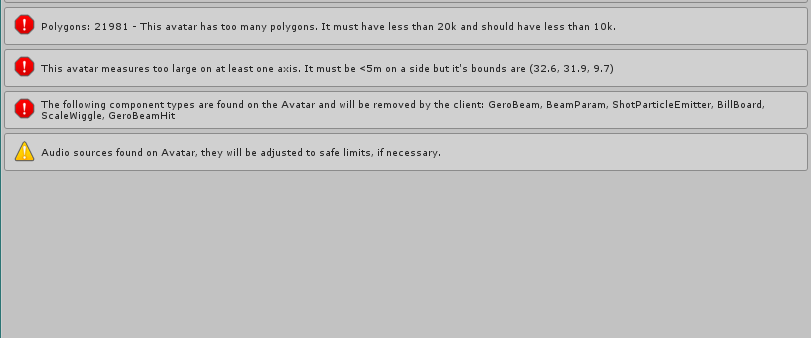
Umm Hey, how can i do something about this my model was below the poly limit before https://imgur.com/a/180tm
 swift folio
in the heirarchy
main bone
that works
obsidian vigil
also the components stop it from being uploaded
main bone
that would be a better question for #avatars-2-general
obsidian vigil
Its an animation though
main bone
did you add a mesh that gets toggled on and off using a gesture
obsidian vigil
I animated this https://media.giphy.com/media/So4TiytAqACd2/giphy.gif,

no
but technically
main bone
then how did the poly count increase
 wide palm
any particle emitters will also add to the poly count iirc
main bone
hmm
obsidian vigil
i can do sth about that but how do i get it to upload alongside my components?
 warm furnace
@obsidian vigil You're using the old particles system
obsidian vigil
How do i use the new one then
warm furnace
create "Particle system"
then you gonna need tomake each effect one particle system
and make a whole thiing
main bone
So hey, if someone could help me with this, that'd be neat http://prntscr.com/i317wa
I did a custom idle animation
obsidian vigil
but its an asset
main bone
happens only in idle
warm furnace
One fore forward ightning, one for backward, one for the railgun, one for the ball railgun going forward, one for the explosion, and for the money, you gonna need a money piece and make it appear, rotate dissapears
Yeah I know it's an asset
But those are old one, i've take one for a "waterfall" and it was shitty as hell, and would be correctly uploaded, so I've made my own
obsidian vigil
isnt there any way i can like copy the scripts from the asset or something?
warm furnace
If you know how works particles system works, should take you something like 3 4 hours to make the whole thing
obsidian vigil
i dont
warm furnace
Script doesn't work with avatar for the moment
You have no way to do it :X
At least
main bone
what property do I use to make the model level with the ground
 novel flower
Not quite sure how to go about doing this. I am trying to do a gesture where the avatar takes a weapon off their back and into their hands. I've created the main version with a weapon on their back then for the duplicate I moved it to their hand. and attached that to the main model. Now when I go to the animator I make a duplicate of it, but when I go to spawn it both avatars appear. What am I suppose to do?
warm furnace
You can take some particles asset from the asset store and combine them
like a lightning effect, + a laser beam, plus other one and combine all
obsidian vigil
arent they working on implementing custom scripts atm?
main bone
I have another query. Can I make dynamic bones disable while an animation is playing
warm furnace
@main bone Never tested before, but try to record when in tab animation, then uncheck dynamic bones.
novel flower
Anyone know how to go about uneqiupping weapon from back to hand as animation/
main bone
hmm
 languid nimbus
Ok idk if I should be asking in this channel or not but the top texture of my foot is teleporting behind me but only ever in VRChat
main bone
also one more time, what property do I use to set the whole model's position
languid nimbus
Nihlus, hide the weapon on your back and show a new version of the model in your characters hand when you do it?
warm furnace
@novel flower You need to have two weapon one is visible on your avatar, one is invisible in your hand, and when you do animation just make the one on your avatar invisible and the one on your hand visible
@main bone Idk
novel flower
Hmm.
 proud estuary
so um, in my avatar's custom emote
the emote works just fine, except
they sink into the ground whenever they do it
is there a way to fix that?
main bone
I just had that issue
look at the inspector
look at the drop downs that say "based upon"
change to original
proud estuary
thanks, which inspector exactly?
the animation or the avatar? i cant seem to spot it
main bone
the animation
proud estuary
well gosh do i feel like a blind bat
main bone
I have those moments as well
 grizzled cobalt
how do you make the fly thing on a character
main bone
what
main bone
 proud estuary
ive seen others do it so im sure its possible @grizzled cobalt
grizzled cobalt
yeah but how qwq
proud estuary

so these settings wont appear for me
if anyone could help me would be greatly appreciated ;w;
short maple
hello guys. So I've been playing around with animation movement on my non-humanoid avatar but the movement doesn't look like an infinite loop while walking. I made some custom animations that transitions into an infinite clip, but somehow the game wants to use the other clip attached to the model with the non-infinite clip. (kinda hard to explain..)
proud estuary
does it look like it cuts off at the end then starts over?
short maple
my custom animations for movement transitions into a smooth loop, but the original animation clip attached to the model doesn't. Idk why it's using the non-smooth transition considering that the controller has defined the custom animations and not the other.. 😕
so what the non-smooth clip does is that it starts moving at the start of clip, but then slows down at the end to a complete stop, then repeats
short maple
wait I just checked my model and I remembered I removed it, so it has to be to do with the custom animations perhaps..
though when I preview the animation in Unity it looks fine. So Idk what's going on 🤷
hmm okay the animation somehow reappeared but I've corrected the keyframe distance like you said. Gonna try again
warm furnace
Too small
can't read
take picture in paint, trim only the error with paint then repost
Or just write it down .-.
warm furnace
must be under 5 meters large
 serene glacier
Whats the best audio source setting for singing? So I dont blow everyones eardrums
warm furnace
lol depends of your mic
novel flower
Any way to fix eye shape keys? >_< face has clipping issues i think do to eyes and tracking
warm furnace
@novel flower when your face is doing blinking + facial expressions ?
novel flower
Dunno if its blinking. But if i move my head around while looking at mirror the >_< face and closed eye face seems to clip into head
warm furnace
if it's blinking try count seconds without moving see if it's regular
hmmm maybe it's eye tracking
you can desactivate both in blender
with catz plugin
novel flower
Like when I do the animation sometimes then >< looks nice, but then after a second or two the bottom portion of the >< clips into cheeck a bit
Does it have to do with Avatar descriptor positon?
 stray sinew
How do I get rainbow trail for glowsticks working? My trails looks to be strationary before leaving.
clear yew
Does anyone know why my animation is stuck like this http://prntscr.com/i32t2g o_o

Like, it doesnt play the animation at all it just freezes like that 😦
 sacred spear

 summer bramble
guys while animating an avatar with unity i got a problem with duplicated eyes, that comes out when i make the eyetracking with blender. Anyone know how to fix this?
nvmin i forgot to set jaw to "none"
 pliant plank
@solemn cloud search for jazneo's or shana's tutorials on VMD to vrchat
 solemn cloud
I don't think either of those covers creating a .anim file
 fair slate
Is there a way to edit an animation file?
like i have the file under my character but i dont know how to get it in to the animation file so i can edit it cause i made a mistake and need to remove it
in to the animation tab in unity*
pliant plank
@solemn cloud they cover converting a VMD into an animation to be used in unity, a.k.a. .anim
solemn cloud
I want to create a .anim that I can drag into custom animation overrides easily across multiple models, like all the ones loli army / kanna gang post
I'll look at it again closer if it covers that and I missed it in my skimming though
pliant plank
Alright so the quick rundown is as follows
Import vmd into blender
Export model with vmd in it as fbx to unity
Rig the model as humanoid correctly
Go to imported animations next to the rig select menu
Rename the name of the animation so you can export it ( if it has | in its name it can't be duplicated)
Then go under your model and duplicate the .anim in it
The animation will work on ALL of the humanoids rigged correctly
solemn cloud
Thanks for explaining - ̮ ̮-
On the step where you import the vmd, do you need to select all on the model before doing so? I tried importing the anim on a model that's already gone through various cats tool steps and the animation didn't seem to play when I tested it
Or could it be because I translated all the bones or something?
pliant plank
The model must not be alteref
Names must be the same and all bones should be present and unmodified
You need a standard unmodified .pmx/.pmd essentially
solemn cloud
ah that's why
In one of the tutorials they hit a button that says "shadeless" to make the textures appear, I can't seem to find it
they have a whole tab that I don't have
pliant plank
Yeah most people use CATS nowadays and don't install mmd tools...
pliant plank
Uh i thought i heard they implemented it into it
Oh well, take a screenshot of where you're searching for it
fair slate
Btw does anyone know how to open a .anim file inside of unity? never had to reopen it cause i didnt need to close unity
and now i dont know how to open the animation again so i can edit it
pliant plank
Can you not simply select it and open the animator window?
 fair slate
Ok got it open now, I have a problem with the face animation im doing, im doing a face animation while making 2 objects active. its just a smile with closed eyes face animation but the animation just spassing. Like it blinks at like 200 blinks a second
pliant plank
I don't see yours though, did you forget a link?
fair slate
Anyway to work around that or should i just not have a face animation + objective active animations?
yeah @solemn cloud u forgot ur ui


 pliant plank
Small plus symbol
 solemn cloud
i found it
 scenic pelican
does anyone know how to fix custom animations on generic rigged avatars
mine loop forever and lock me in place even though loop time is toggled off
 spiral oyster
Does somebody know how i can use UV/Material morphs ( blendshapes/shape keys) in Unity for animation or even in blender?
 drowsy gazelle
How i can position avatar in animation? Everything right but i positioned on 0.0.0 therefore half of me is under the flood
oh
i think i know where the problem is
or not
 fathom tartan
I have imported a model into unity and winking seems to have been read as the default idle animation for the face shape keys
can this be changed in unity or do i have to go back to blender to fix it
 robust hound
I have this little escort fortress that is activated like a handgun, but If I want to make him "float" with a up / down effect how do I do it?
Should I make the animation of the "handgun" longer and affect his transform.position or is this a wrong solution ?

 little raft
@robust hound You can give that escort an animation of its own and have it play on wake
little raft
@devout star Wouldn't recommend it unless you're tight and want to bring up a weapon on your avatar or something. There is a limit for a reason so either try to decimate a bit more ooooor wait till the poly limit is buffed up god knows when
 devout star
Got it thanks
robust hound
@little raft Oh, didn't think about it. Thank you :3
 keen escarp
is that a wo class model? 😄
little raft
I am guessing this is more of an animation issue so I will ask here. I am attempting to create an avatar that is riding an animal, I would like to ask if anyone has a rough idea of the changes needed to be done in order to keep the character on top of the animal that only has the hips and above animated so it stays on place.
To be more precise, I got VR, and I want to have the head and arms moving
 snow lance
When trying to put custom walk animations in, can i not have the model set to humanoid rig? my idles work fine but the walking animations default to the standard one and ignore my custom one entirely
 vestal hornet
Hi, Anyone know about custom emote controler with Unity? Edited some emotes but they all plays in loops for 30 sec before stoping, i dont know why...
 clear yew
Hello, i m trying to make Gun Animations, i can see my guns, hear the gun shot.. but the particles arent playing.. anybody a tipp?
maiden wedge
Hello everyone, I have the following issue regarding my avatar. I want to have music played on my avatar.
In Unity it sounds perfect and works well but as soon as I upload the character the sound becomes completely gutted.
How can I solve this problem?
rugged yew
Anyone has good dynamic bones settings for stuff like hairs/skirt ?
weak gulch
@vestal hornet You actually got the sound audio to be attached to a model or generic model and use it as an emote???
 covert girder
@rugged yew
https://media.discordapp.net/attachments/390929309965090826/401090402351972362/unknown.png
https://media.discordapp.net/attachments/390929309965090826/401089484512428032/unknown.png

 clear yew
Hey guys, having an... interesting issue here. Asked in the wrong channel initially.
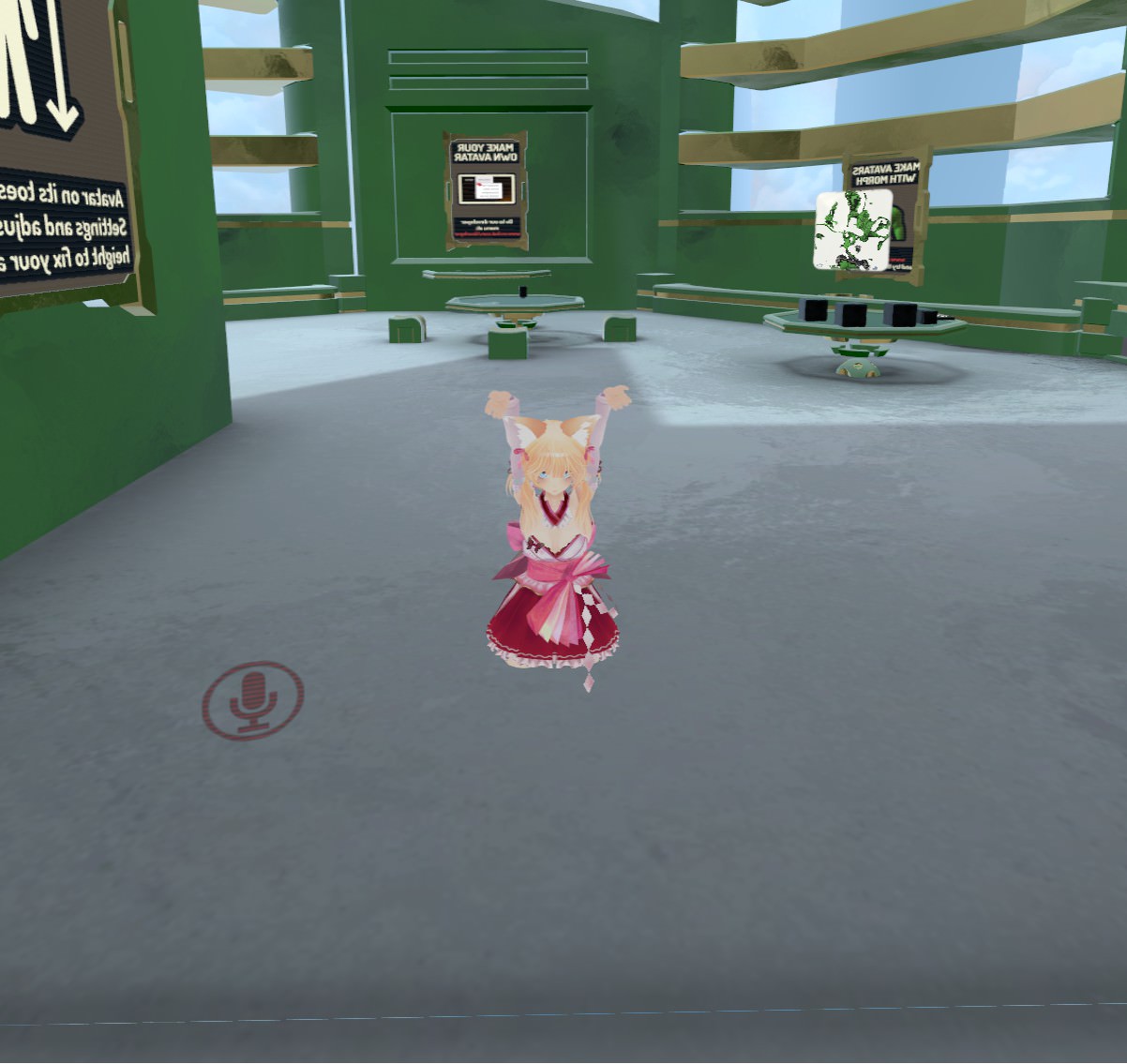
I just changed some animations for a custom avatar, and when I uploaded her and got her in game, she’s like halfway in the floor, but her hands are still up at where they’re supposed to be. This isn’t a view position issue because the camera is where it’s always been. Any help appreciated
rugged yew
go to a mirror in the lobby and take screenshot @clear yew
clear yew
Alright gimme a sec
idk how to attach messages, normally I just drag and drop
mind if I pm?
images, I mean*
rugged yew
upload to imgur and share the link
clear yew
 rugged yew
maybe your model wasn't rigged properly
vestal hornet
@weak gulch Yes, right click on a bone structure with animation and add an audio Source
clear yew
It was working fine prior. I made overrides for idle hands and thumbs up. Uploaded, this is the result
clear yew
Did you remember to delete the keys beyond the first two frames in the animation window?
clear yew
Oh you have an emote
Guessing loop isn’t enabled otherwise you wouldn’t have an issue
So I dunno
But @rugged yew if you don’t know what could have possibly gone wrong after just a simple animation override I’m gonna just redo the entire model... for like the 5th time
 thin cosmos
how do i make boobs jiggle in unity 🤔
 split atlas
U need Dynamic Bones Script
thin cosmos
sounds painful
rugged yew
is your model working fine without the animation @clear yew ?
thin cosmos
which begs the question, how did i do it before on ZZS...
split atlas
Seth has same problem like me
Glad meet da same ppl
Standing Animation make me confuse
clear yew
I had animations on her earlier today. No issues. I go in to change the idle hands and thumbs up to better looking ones (her hands were screwed up before) and now I’m in the floor
split atlas
Yep
clear yew
Additionally, she stands back up correctly if I start running
Only when running, however
split atlas
^^
clear yew
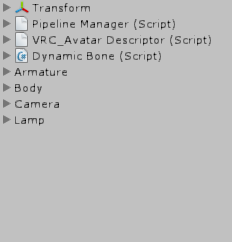
Can someone please help me, when I go the animation tab in unity and click add property there's no Animator tab just the otheres

 hollow olive
whenever i import a custom running animation, it works fine but messes up the walking animation in game. any idea why?
clear yew
@rugged yew figured it out. "Idle" in the overrides list is supposed to be for standing idle, not hand position idle. I had overwritten it for the hands, and so that caused the body to glitch. removing it fixed everything
also for @split atlas
try that if it's relevant to you ^^^
 daring frigate
So my avatar got eyetracking and blinking from CATS , where is the option to disable it during a custom animation ?
 signal raptor
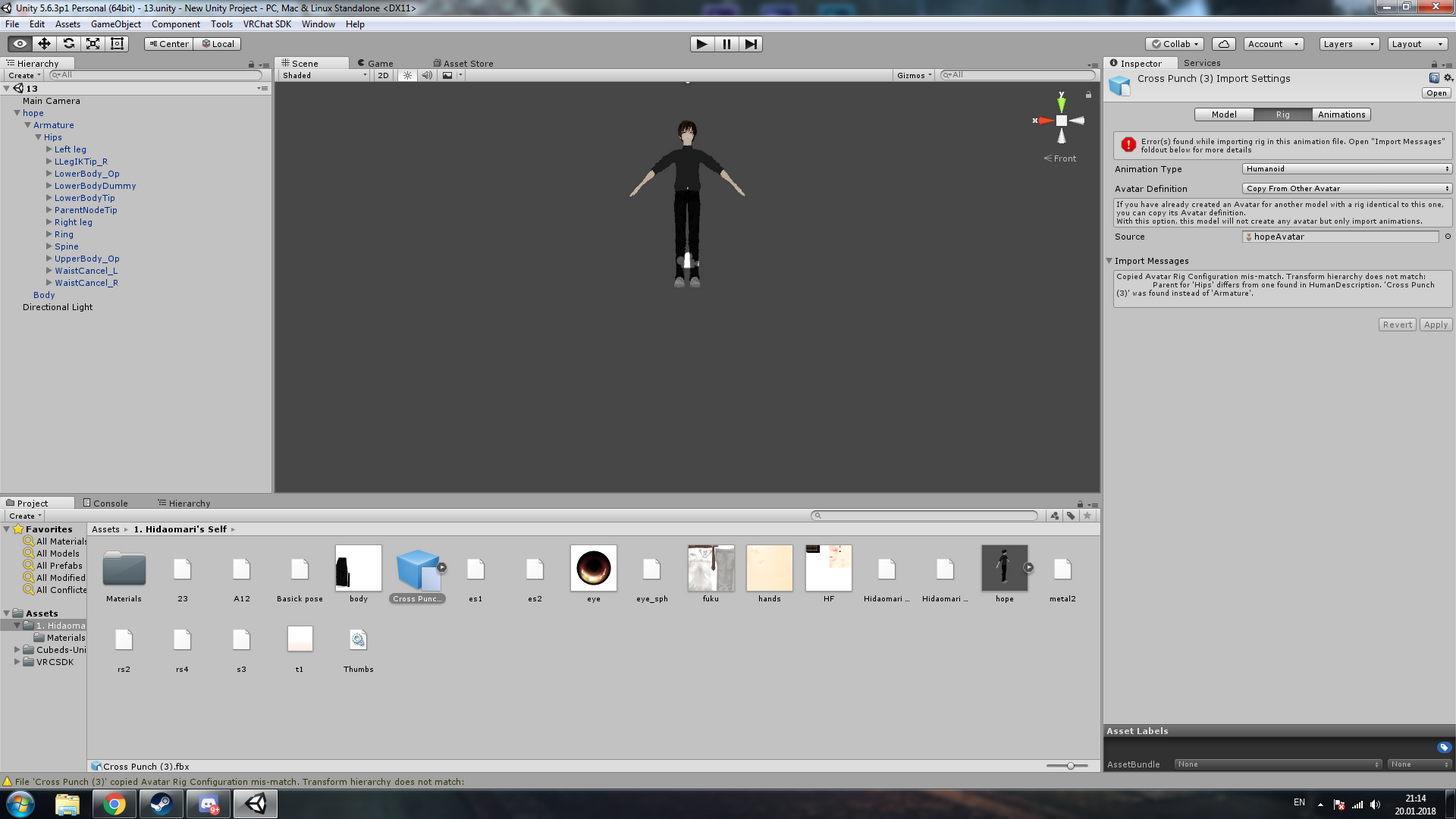
im trying to do a separate animation that actually fires my weapon...anyone know a good tutorial video on how i would do this? not sure if i need to make a 3rd animation model or how to go about it
 viral yarrow
could someone help me?
I have a character model that is made of gears, so they constantly spin, the problem is, whenever I do an animation for it,when the animation is done playing, it waits 2 second before re-playing. Any ideas how to make it loop constantly without pauses?
 timid temple
sucks how the client removes certain animation scripts :C
 drifting coral
anyone know how to make inbetween of this animation ?
https://i.imgur.com/CBvIEWl.gif
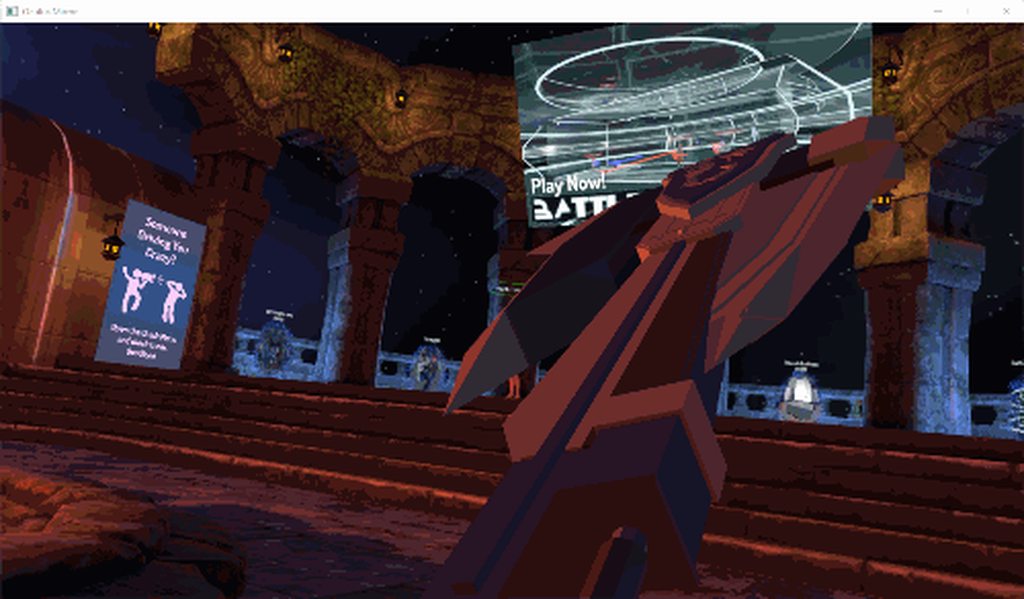
it just slows down and delayed when the animation happened
 quaint vault
i'm a bit stumped. is there a way to have an animation play on loop during a custom gesture? the model i'm working on has an arm cannon that has a bunch of tubes inside that needs to be spinning when i trigger the gesture, shown here https://i.imgur.com/FpDjSbV.jpg
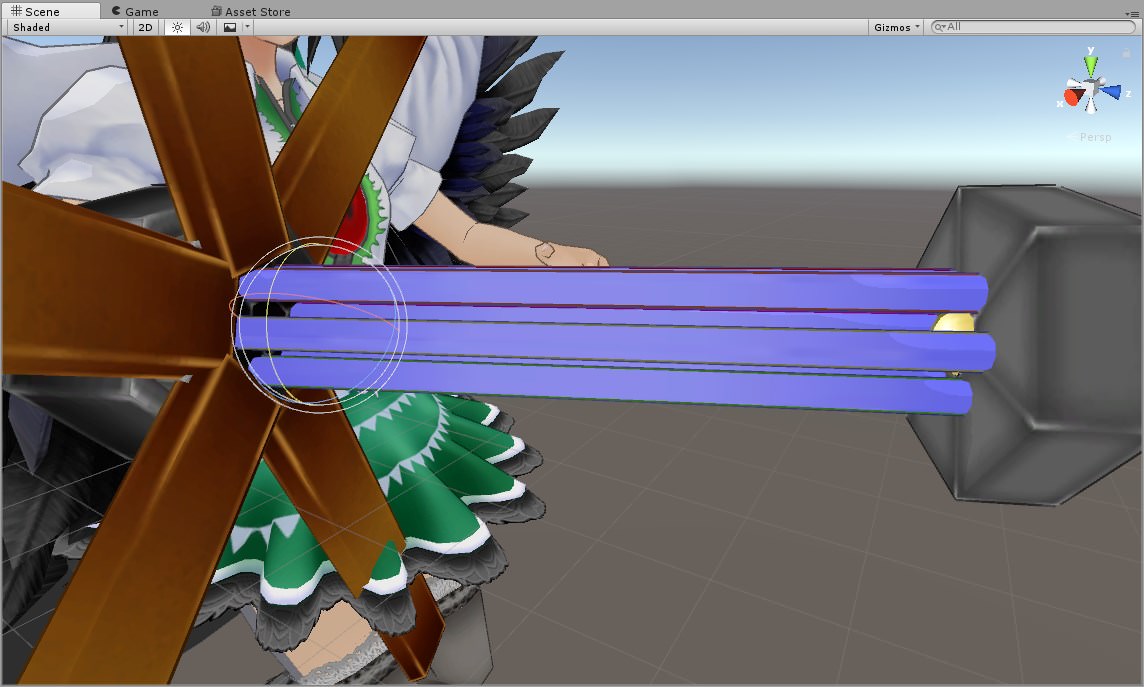
 plush meadow
Anyone tell me what the proper options should be for enabling gunfire muzzle flash on duplicate model?
 tepid lantern
Anyone got a decent male walking animation? the default one is shit
clear yew
hey guys i need help im tryin to import this piano model to vrchat and i did but the piano stands on its side and idk how to make the piano just like float over the ground https://i.imgur.com/D5ayfYR.png
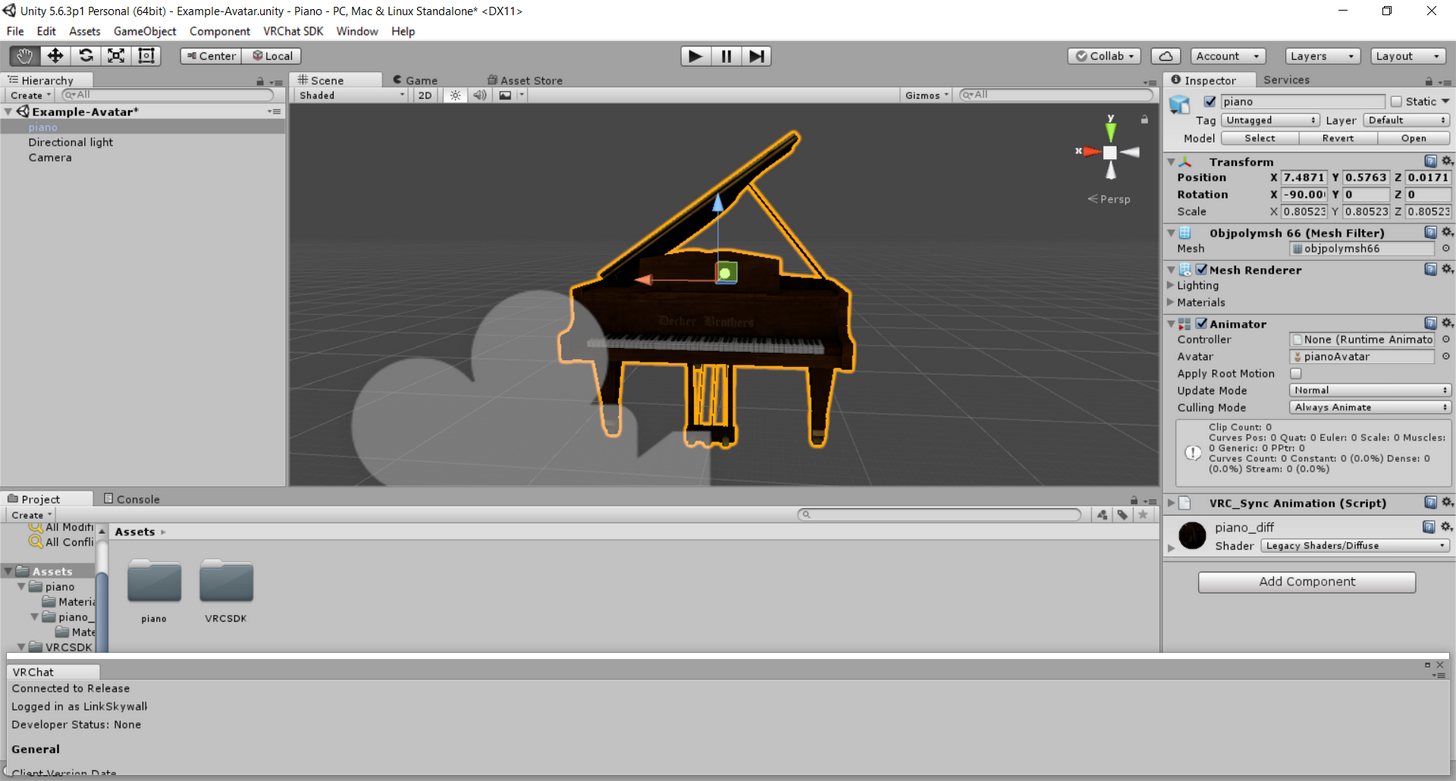
pls somebody help
tepid lantern
rotate it 90 degrees
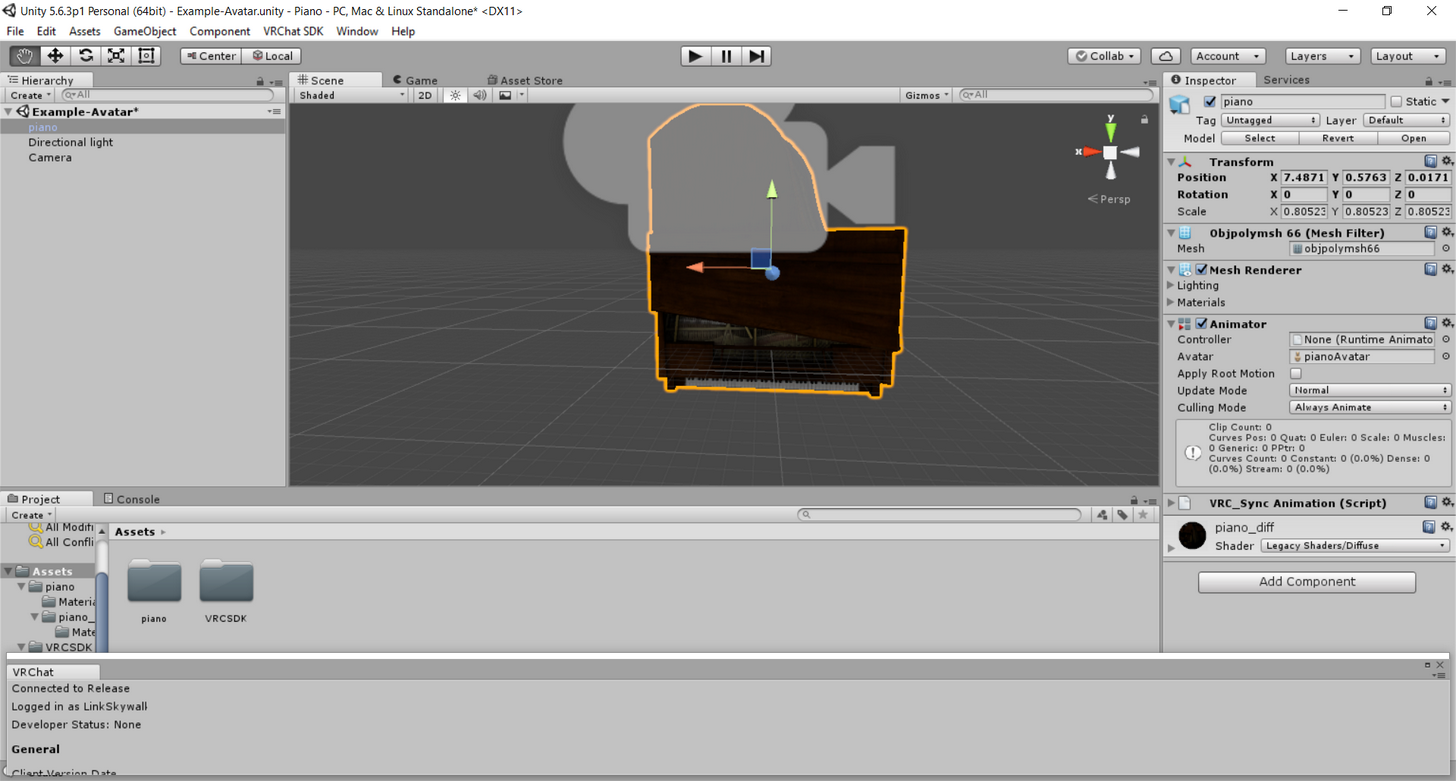




 tepid lantern
in unuity