#animation
1 messages · Page 24 of 1
 exotic ember
nah
cube starting fucking expanding
kill go to shape and turn it into a sphere
and set radius to 0 or .01
 sharp torrent
What is the game object set under?
exotic ember
nothing, its just a cube there
sharp torrent
Right click, create empty. Put the particle in the empty gameobject, then try to put the object under armature
exotic ember
nope, still giant DIO
sharp torrent
Can I see your animation tab again?
exotic ember
Only thing I can think of at this point is that the particle system scale is defaulting to the model
I think im just gonna start completely fresh in the morning
since im hitting a wall and I have to wake up at fucking 4am
sharp torrent
I have a feeling that your animation scale property is the cause of this. And shouldn't be an issue when you delete those and add the delays to the particles themselves
exotic ember
im really really really hoping that you are right
also dont forget to like comment rate and subsribe to my twitch
sharp torrent
It shouldn't cause it, but I do think it's related. And don't worry, I'll also brutally smash that like button like it owes me money xd
Meanwhile, I still have made no progress on how to goddamn edit this animation.... Why does unity make it so difficult?
 compact patio
Is there a difference between a gesture and an emote? X.x
 languid lark
@compact patio Gesture is for animation for guns, sword figure
emote is full body animation need animation whole body to do dance
or wave
compact patio
How can I access gestures? I only seem to have emotes available in my menu.
languid lark
you do that with vr controller
compact patio
Oohhh
languid lark
do you have VR?
compact patio
No XD
languid lark
your limit to emote only
compact patio
Is it possible to trigger audio clips without gestures?
languid lark
only last 10 sec in emote
compact patio
I see.
I've been trying that, but my avatar either jumps up and down repeatedly, or it sinks into muscle pose and no audio plays.
languid lark
you would need to make full body animation like in blender
or use mucsle animation editor that cost $15
compact patio
Ah, I see.
 proven panther
Hey, is it possible to have an emote just play an audio clip?
or will the character freeze up?
 clear yew
any clue how i fix this? http://prntscr.com/hyukeg
 languid lark
@proven panther it play audio only for 10 sec
clear yew
avatar is stuck in the ground when i play my animation
 sterile bronze
has anyone been able to link an animation on a key press
languid lark
@clear yew in animation tab there going be call bake Y
set that it change how it stand on the ground
 manic rapids
I have skin animation and movement animation. How playing they together?
compact patio
@languid lark Thank you again for your help! I've finally got a grasp on the issue I was having ^^
 cyan sparrow
Anyone else have their animations suddenly break in game? No update or anything.
cyan sparrow
No, everything is working fine except the emote no longer does what it should be doing
It was just a couple minutes ago
manic rapids
I have skin animation and movement animation. How playing they together?
Can i playing two animations together in Unity?
With no scripts.
 full breach
Is there a faster way to add animator properties in unity than by opeing them up one by one?
 proud grove
Going into record mode + modifying values through the inspector
clear yew
@languid lark I don't see what you're talking about with the "bake y" thing
languid lark
it be on the fbx model with animation it was on @clear yew
manic rapids
@proud grove Record mode? What is it?
proud grove
Click the little red circle in the Animation view, and you should see your play button go red
Modifying values in the Inspector will change the value through the animation + add a property if there isn't one
manic rapids
Oh, you meant in Animation.
Hmm, i dont undestend. Im open Anomation, looking on Inspector. What exacly volue im need to change?
@proud grove I have Controller and Avatar volue in inspector. What i need to change?
Or i some thing dont undestend.
clear yew
@JAZNE\
@languid lark Yeah I dont see that at all
@languid lark do you have any screenshots?
languid lark
@clear yew
clear yew
@languid lark http://prntscr.com/hyvceb

this is all i have
oh
see the animation
is built in unity
would I need to redo it?
yours was built in blender then moved it seems
languid lark
@clear yew did you made animation when it was in the ground?
 shrewd moon
@languid lark are you the one that created the snail marker?
languid lark
@shrewd moon no Snail made it
manic rapids
@proud grove Oh, you just saшd how create keyframes. I already know it. The question is how playing two animations clips together.
shrewd moon
Oof
clear yew
I may have, but it doesnt seem to matter where I move the rig
languid lark
Snail just lazy make forum for it lol
clear yew
it just always puts me halfway in the ground
languid lark
he say it was ok i did for him lol
manic rapids
Some one tell me how play two animations clips together in Unity please.
With no scripting.
shrewd moon
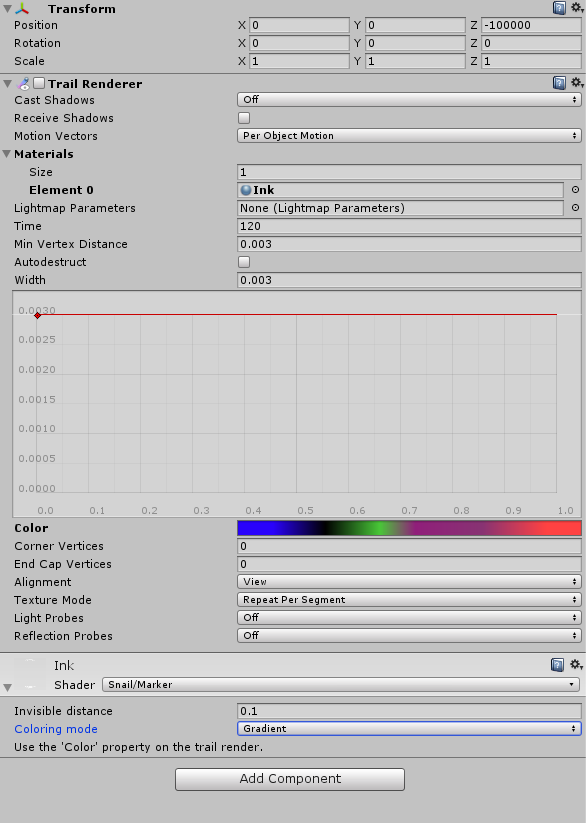
Would you know why the marker doesn’t for me? I’ve followed the tutorial video, the marker is seen in game, I have place the prefab into my right hand, did the over rides, it’s just not writing anything @languid lark
Also the marker mesh was massive compared to my regular sized avatar
I did resize it and move the trail source to the tip of the marker
languid lark
@shrewd moon did you click on the script was made for it
and go to folder
your avatar in
snail made script on the trail render part
need click on
shrewd moon
Oh hmm I’ll check it out tonight
 shrewd moon
Tick that box for trail renderer?
languid lark
no it turn on it self
just need hold down draw
button set to
did you set the animation in override file
 fast bloom
If you are using the auto-generated drawing animation with the prefab, the latest version of the draw animation just does something like this https://gyazo.com/662d909123ef3b8abcfd9528d1c28ae2

And the prefab has z -100000 on the trailsource initially
 silver lichen
fast bloom
silver lichen
fast bloom
@shrewd moon You want to have the trailposition enabled, but the trailsource disabled initially and off at the z -100000 position, you shouldn't have any problems after that. if you need more help you can @ me, I just got my own working a few days ago so it's fresh
 hardy wagon
hello people, how do you export a blender animation to unity?
I tried FBX but there is no option as mentioned in tutorials, the "include Default takte"
shrewd moon
@fast bloom thanks I’ll try this tonight
 pearl timber
anyone knows, good site to get custom Dance moves ?
 unreal sigil
Emote 1
 midnight coral
I'm trying to make a gun animation that can shoot, with a separate animation for pulling out the gun, and one for shooting it. What gestures should I choose to override that would be easy to switch between so I can shoot?
 hidden fulcrum
Alright, im struggling a bit. Im attempting to add a weapon to my avatar, but on the Animation tab. I can create , but i cant move to the point where i can edit keyframes and add properties
 unique night
@uneven flare you have to place the animation file, not the controller
so its incorrect in that screenshot
 uneven flare
what do u mean?
unique night
what file did you add out of the 2 dabs?
was it the one with the play button or the other one with the plus sign?
unique night
oooh ok
uneven flare
and the other dab is the dab animation
hidden fulcrum
While in the animation window, in add properties, my model doesnt have a Animator thing, so i cant add for an example, fingers to move?
unique night
now just insert the dab override into the vrc desciptor
in case you havent already
@supple sable is it a humanoid setup?
with bones all setup correctly?
hidden fulcrum
yeah
unique night
thats odd then
it should show the animator properties above armature
you can try duplicating another model, going into the example sdk animation files and applying the idle animation to it
uneven flare
where i can find already made animations?
unique night
then take the first frames of all properties
it might work that way
@uneven flare mixamo.com has premade animations
but you need to use their bone setup i thikn
uneven flare
oh...
i have to upload an emote for every avatar that i want to have the animation?
or they're universal?
 native jacinth
hey there guys
is there a 'detour' through muscle animation editor?
im plenty broke atm
manic rapids
Some one tell me how create humanoid bones animation in Unity? Every time when im trying do some thing, avatar stucking in a mantis pose.
languid lark

As you know in Unity we can't modify animator properties as easily as transform properties which we can modify in the Inspector. So I’ve written this tool which can control animator properties in a simpler way.
Features:
-
Modify humanoid animation clips by simply dragging silders.
-
Add/Remove animator properties.
-
Body group and muscle name are copied from muscle setup window so you can easily understand what they are.
-
'Mirror' button: You can control the values for both sides even if you change just one side, which is very useful when creating animations.
Contact: pavostudio@hotmail.com
no free one
cant talk about priate
in this discord
languid lark
other option is make animation in blender

This is a tutorial walking the viewer through most of the basic elements of creating an animation in Blender 2.66 Intro Music by - Sardi (me)
native jacinth
alright ty
 mild blaze
whats the stretched numbers for fist, and open hand?
proven panther
you guys know how i can play an emote (that's just sound) without sinking my character into the ground and freezing me?
unique night
you can have it as a gesture and it wont sink, as an emote you need to repose the model
using the animator properties in the animation timeline
like animator.root T property
@proven panther
 south mason
Is it possible to animate parts of an avatar if they’re not part of the configured rig in unity or is that beyond it?
hardy wagon
I want to have a box as avatar (imagine a cereal box), so is non humanoid, but I want to trigger animations on it, like twisting.... IDK, the thing is, what shall I put as controller and avatar in the inspector?
hidden fulcrum
I just finished adding a weapon to my avatar, but when i do the hand gesture in game, it slowly goes into the hand gesture i have in the animation but without the weapon. And then it goes back to being normal
 uneven acorn
If you override the animations do you still have a timer to it?
manic rapids
Some one tell me how play two animations together in Unity? Not scripting only, scripting not working in VRchat avatars.
 final harbor
Can someone pls help me with a particle issue?
It's not a complicated one I think, I don't know what I'm doing is all
But the particle is supposed to flash for a split second then go away, and not loop
But when I trigger it in game, it strobes
And loop is not on
 storm forum
dang didnt know the Muscle AnimationEditor was paid lol
 wild trellis
Can someone link me a good tutorial on making individual finger bones move?
 forest slate
im probably missing something stupid, but howdo i make the add property button not greyed out and actually clickable?
manic rapids
Who know how animate in Unity?
clear yew
Excuse me but can someone please help me with making a pen that can draw when doing a hand signal!
 grim fossil
add trail renderer to object make that object inactive and add an animation that makes it active and attach to a hand signal
 ocean dagger
How do I fix my model going down when I start an animation
 hasty yacht
spade, you can fix that by copying the keyframes from the idle animation in SimpleAvatarController
copy them into your override
once you have that as a point of reference, you can then animate towards your desired body positions with the next set of keyframes
 limpid raven
Where do you get dance animations from?
uneven flare
can anyone send me already made animations?
or where i can find them?
mixamo animations aren't good at all
:
:x
clear yew
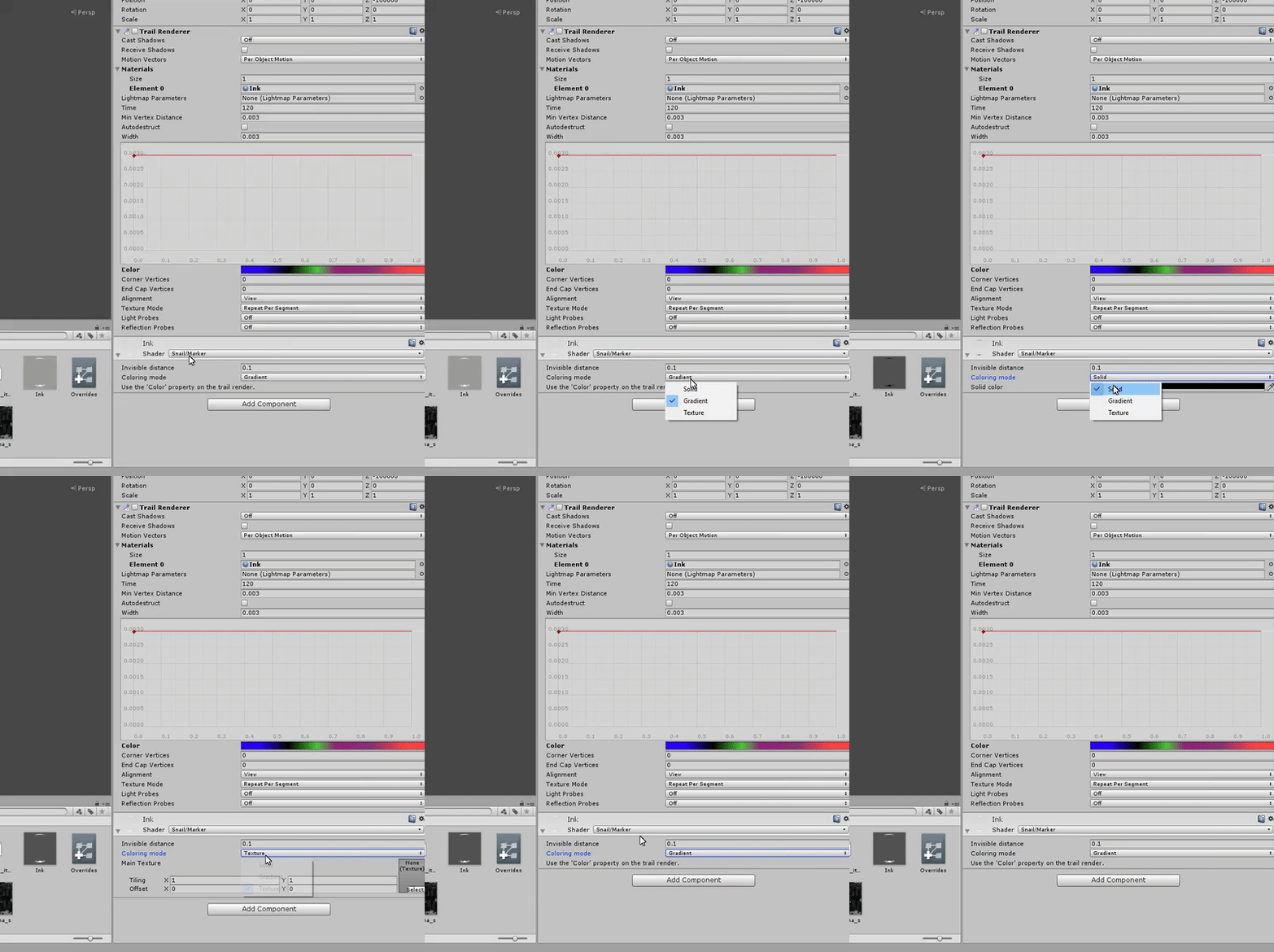
Excuse me can someone please help me with this https://www.youtube.com/watch?v=Pi7i4sF_BgQ&feature=youtu.be&ab_channel=vrcsnail when I go to gradiant then colour then make a rainbow then render it and stuff it doesn't work and the colour is white

Tutorial on adding the marker to your avatar and customizing it. Github: https://github.com/theepicsnail/Marker Unity Package: https://github.com/theepicsnai...
 silk hatch
Anyone who knows how to fade a material in/out in a Particle Emmiter?
 swift wyvern
Anyone knows why my avatar's hair keeps trembling and bugging after I use an emote?
languid lark
@clear yew did you make sure change ink shader
there setting ink shader need to change @clear yew
clear yew
@languid lark Where would I do that?
 empty wave
@silk hatch not sure exactly what you mean but checking color over time, then click the white box, click the top to add a key and set it to 50%, then click the other 2 keys at the top and set them to 0
silk hatch
Ive already tried that and that didnt work out :/
clear yew
@languid lark What do I do in the ink shader?
silk hatch
you mean this right?
empty wave
What kind of material is it
silk hatch
They are playing cards
clear yew
Yes
languid lark
@clear yew
silk hatch
jup
languid lark
@clear yew need to make sure color has right color you want
empty wave
Try clicking standard, go to the particle drop down and click the first one
silk hatch
Additive?
empty wave
I think yeah
languid lark
just follow the pic i posted
clear yew
@languid lark Yeah but where would I find it?
silk hatch
Didnt work, the cards do now have a whiteish glow though
clear yew
clear yew
empty wave
Hmm, i cant test it myself atm. I froze my comp with blender trying to increase a models smoothness lol
clear yew
Where there?
silk hatch
@empty wave rip :P
languid lark
alot people dont watch whole video
clear yew
I did
clear yew
He didn't exactly
silk hatch
I'll keep trying all the particle shaders for now
empty wave
Only other thing i have used for material is Legacy, transparent, difuse
silk hatch
If you do find it please mention me so i see the little notification :)
languid lark
snail marker only work with his shader he create
empty wave
Ill try when my comp is usable again lol
languid lark
if you use any other shader or anything diffferent it break the marker
clear yew
silk hatch
I could also try switching the color from white to black
clear yew
@languid lark Nothing has changed
empty wave
Does just dragging the picture of the card onto the particle effect without making it a material work?
empty wave
Dang
languid lark
Gardiant is for rainbow effect
silk hatch
has to be a material
languid lark
color just going solid color you pick
silk hatch
languid lark
texture what image you drop on it
empty wave
Is it a png picture?
languid lark
you guys make it hard then it look
silk hatch
yeah
silk hatch
@languid lark talking to us?
cuase i get confused when someone just suddenly joins the conv xd
empty wave
If you drag the non material picture onto the heirachy particle effect, not using the render menu, does it change?
languid lark
alot people dont watch video all the way only reason have problems
skip dont get stuff done correctly
silk hatch
it doesnt
languid lark
well i can draw all i want with my i only had that video
it was enough info understand it how it works
empty wave
Really, thats weird i made an animation yesterday and that worked for me
silk hatch
You mean dragging the png on the particle system?
empty wave
Yeah
silk hatch
lemme try making a whole new Particle System
and not touching anything else
alright, that worked
let me try fading them now
they fade but they have a white-ish glow to them let me try changing the color over time from white to black
empty wave
In the picture is there any transparency?
empty wave
Can you link the picture
 swift cipher
Guys can i get free Muscle animation Editor assets ?
silk hatch
@swift cipher you should prob just look for a download online and not ask ppl here
empty wave
Guessing you want the white border
languid lark
@swift cipher cant ask for priate software in discord
 cerulean stirrup
How hard is it to get an animation like a gun into your imported avatar. Im talking about vr when you do certain hand movements
swift cipher
@silk hatch @languid lark okey im sorry about that
silk hatch
@empty wave I want the whole card
empty wave
K my comp is restarting now then ill try some stuff
Damn blender, second time ive totally froze my comp...
silk hatch
Alright gl :)
Thanks for all the help btw
you've gotten me further then i got myself :)
empty wave
Lots of ppl helped me, gotta give back :)
silk hatch
mention me when you've got it :D im doing other things meanwhile
 hollow harness
do objects in animations count towards poly count?
 lean acorn
Only if they start off visible
hollow harness
gotcha, still not a thing to abuse however
lean acorn
Eeeh, polys dont actually lag as much as people give them credit for. Its the texture spam that usually does it
silk hatch
could you try making a unitypackage? @empty wave
sharp torrent
My light doesn't show up to people unless they stand really close to it. Anyway to fix this?
silk hatch
lemme try :)
why did that work 🤔
mine had like a really weird opacity on it
and everything is identical
empty wave
did it work?
empty wave
yw
empty wave
technology
silk hatch
left is yours, right is mine
i only needed to strech the cards
oh well 🤔
thanks again <3
empty wave
np 😃
 random mauve
i have azu-nyan project, but i am bad at animating. is here anyone good at blender and willing to help me.?
 gleaming heart
Anyone able to tell me what I have wrong? Trying to play the "Test" animation in cube 2's animator
uneven flare
can anyone send me the ninja running animation?
which animation should i replace the ninja running style?
run foward?
or sprint foward?
 vivid pond
Any tutorials on how to add sound to a custom animation
 jade rain

Gun is on for first and second keyframe
sound is on for first and off for second
is this correct?
 versed hornet
I remember there being an option in Unity where i can set all the shape keys, but not in animation. Just like how it looks by default
Does anyone know where i can find that?
@jade rain Like that the sound will go on/off every .1s
so unless that's what you want, no :P
versed hornet
you want it on a button press?
uneven flare
i have the ninja running animation , but which animation of vrchat should i overwrite it to work?
versed hornet
In that case you have to do 2 seperate animations. One for just the gun and one for shooting.
jade rain
FOr the shooting @versed hornet
versed hornet
RUNFRWD i assume Gabriel
jade rain
WOuld it just literally just be the audio source is active
on keyframe one
and thats it?
versed hornet
Well it depends, usually you do an animation for just holding the gun
and then one where the gun is held AND it shoots
unless you want just the sound on a seperate hand motion
in that case it would just be the sound
versed hornet
You probably need it to last for the duration of the sound
I dont think you can have just one
vivid pond
Hmm random question but would it be hard to have sound playing during a emote animation instead of a gesture animation
versed hornet
no, it's the same process pretty much
vivid pond
Ok good thanks
jade rain
if its less that one second
so just two keyframes
one on to turn it on and one off to turn it off?
uneven flare
GOOD VIBES
 spice meteor
hey guys did they add a server side particle limiter so its client side only?
sharp torrent
Is the sound currently bugged on gestures? It drops off too quickly no matter what setting I put it on
hidden fulcrum
I just finished putting a weapon on my avatar, but when I go to do the hand gesture in game, my hand slowly goes into the gesture I have set in the animation but without the weapon, and then goes back to normal
empty wave
@sharp torrent sound range got nerfed hard and if i set the range to something like 1-500 no one can hear it. 1-100 with the diagnal down graph for rolloff is the only thing thats worked for me so far
limpid raven
So I uploaded my avatar to Unity with the dance animation, but how do I give the dance it's own button prompt or whatever?
hidden fulcrum
You need to set it to a gesture or emote in a Custom Override
 summer mortar
shiro?
limpid raven
Oh, you have to override it
hidden fulcrum
Well you have to pick something to override whether it be one of your given emotes or a hand gesture
?Shizo
limpid raven
Also, is it possible to upload more than one dance at a time?
hidden fulcrum
Yeah, but you will be overriding more hand gestures and emotes, but that's typically fine
limpid raven
How do you override the emotes?
 cerulean cipher
you go into the SDK in unity and duplicate an empty customoverride
then just drag and drop your animation to whatever emote you want to overwrite
sharp torrent
How do I rotate something tilted, without it slightly dipping in the animation? Can't get it to rotate smoothly
 modest gyro
my particle system is in the wrong place, I've put it on a weapon but when I go on vrchat it's somewhere on my lower body and moves with my body
 peak relic
Does anyone know how to make an object's animation stay in position without it moving with your avatar?
 swift bone
tfw u put a gun with animations on ur model but forget about the 20k treshold
 sacred gate
@swift bone animations don't count toward poly count
swift bone
and how might i do that
hasty yacht
my particle system means it takes about a minute to upload my model 🤣
but the faces is still 12k
sacred gate
select the object, click the "is active" checkbox in the top-right (inspector)
 graceful nest
i'm trying to make an animation for an emote, but i dont know if will interrupt my blink animation. does someone know about it?
sacred gate
then when you make your animation be sure to set the "is active" property to true within the animation
@graceful nest blinking animations override everything
graceful nest
ok ty!
graceful nest
oh
swift bone
oh thx it worked
sacred gate
np
hasty yacht
just wanted to check, there's definitely no way to disable a gameobject thats part of your armature, e.g. a gun mesh parented to your right hand, without using vr gestures?
sacred gate
you mean like a toggle option?
hasty yacht
not using gestures, even when the gameobject is disabled in unity, it's always visible in desktop mode
sacred gate
disabling it should stop it displaying everywher
hasty yacht
doesnt seem to be the case, I have a large gun parented to the right hand of my avatar, and unticking the gameobject in the hierachy does not prevent it from appearing in-game
sacred gate
does it make it disappear in unity?
peak relic
Does anyone know how to make an object's animation stay in position without it moving with your avatar?
hasty yacht
actually it doesn't disappear in the scene window either
hasty yacht
but I disable the entire model when working on a duplicate for animations and that seems to work
I wonder what could be doing that
sacred gate
@hasty yacht it might be that the gun doesn't have a separate mesh
peak relic
@sacred gate I've seen someone actually do it before though.
hasty yacht
ah right, so the meshes are all joined
sacred gate
@peak relic what was the example they did?
hasty yacht
as a result of the cats plugin
If I understand it right, best practice would be to keep weapons as separate meshes
peak relic
They put some kind of bomb in place, moved away from it and it was exploding meme particles.😂
sacred gate
@hasty yacht it's easier to import as 2 separate files, model.fbx and gun.fbx
@peak relic it was either an emote, or particles. I don't know of a way to do it with objects but I don't have unity in front of me to figure it out
graceful nest
@sacred gate tested with another character and yes, blink animation still work even with emotes
 quiet jetty
Can someone show me where to find the "drawing" animation? So you can like draw with your fingers.
clear yew

Hello, I have pulled this old video tutorial out of private status so that everyone can benefit from the information provided within. I apologize for the aud...
 kindred mist
Anyone knows how to import mmd animations to your character?
clear yew
any guru know if i can get that particle system(peashooter energy) to shoot like the other particle system
or maybe someone could make me a very basic mesh of the peashooter from cuphead I could just do that 😄
 lucid remnant
if i wanted to have it so my character can pull out an object and be able to hand it to others, is that an animation thing or something else?
lucid remnant
i could have sworn i have seen people pull out food and others were able to take/eat it, maybe im misunderstanding it? 🤔
ocean dagger
anyone know how to replace the vrc blinking animations with a custom one? I tried this and it diidn't work
clear yew
might have been rp, they cant actually take it as an object
 muted anvil
Is it possible to add facial expressions to the existing hand animations without manually remaking the hand movements?
 plush meadow
Yeah.
Now you have to position the particle system in the area you want them to come from.
ocean dagger
Anyone know how to just disable eye-tracking/blinking entirely
plush meadow
Just don't make any eye movement in cats?
Or you can enable the option to check disable eye movement and blinking in blender.
ocean dagger
yeah that doesn't work apparently
 fading solar
i wanna make a hand movement then activate the particle
also i must remove the humanoid rig?
swift bone
heya, is there a way to trigger emotes like rock n roll? since i cant find it in the emote tab
 blissful frigate
It's a hand gesture
swift bone
ah thx
fading solar
emotes are hand gesture too right?
 paper orchid
Hi all, is this the place for questions in regards to dynamic bones?
plush meadow
 ocean dagger
Why is my custom blinking animation getting overwritten by the vrc one when I upload it?
plush meadow
Will this animation show up ingame?
exotic ember
finally got a beta version of za warudo working
 terse zephyr
hey, so i think my avatars eye animations might be in like
3 different layers?
possibly 4?
should i combine them all into one?
clear yew
I have a question.
If I wanted to use a .bik for an animated texture, would anyone happen to have any idea how I could go about getting the contents of the .bik?
fading solar
animation ends for example 1:25 but it ends faster
any tips?
do i need to drag the end keyframes to the right so i can make it longer?
 finite rock
yes
fading solar
if i click the huge play button, the animation is playing and the particles appear does that mean it is completed?
finite rock
well, stop your animation and play it inside unity
if it does what u want it is completed
finite rock
Sorry idk what is emote4
fading solar
@finite rock and i add the override file to custom standing anims and also on the animation controller?
 unreal palm
Im haveing an issue where when i blink and at the same time smile it will make this look (And yes im useing Animation.Enabled but it only works when blinking anim is not running)
https://gyazo.com/60ce84c097d2dcfc3293edd1aaba3195
Then when betwen the blink i get normal smile
https://gyazo.com/ccda9d298b168f87f24f34955ed35de2

 finite rock
@fading solar If u want your animation to be used with your gesture, u override a gesture animation, like fist. After that u drag your custom override animation file into custom standing anims
that was your question?
fading solar
yes, so i leave the animation controller to none? @finite rock
exotic ember
it doesnt hurt to put it in custom sitting as well right?
why the hells the text red
finite rock
@unreal palm Sorry, maybe it's a dumb reply but did u trying using others number with your blink property?
@unreal palm Sorry, maybe it's a dumb reply but did u trying using others number with your blink property?
@unreal palm Sorry, maybe it's a dumb reply but did u try using others number with your blink property?
unreal palm
Are you talking about the animation value?
Are you talking about the animation value?
@finite rock Are you talking about the animation value?
finite rock
yes @unreal palm
unreal palm
@finite rock That would not work that would only make my eyes go halfway down.
languid lark
@ocean dagger you need to make basis blink animation from cat plugin then use eye blink video i made
@ocean dagger you need to make basis blink animation from cat plugin then use eye blink video i made
clear yew
where can i get animations asside from mixamo?
finite rock
@unreal palm In the photo where the face is bugged, it looks like the eye (or at least the eyelashes) are at the same level as the mouth of your avatar.
languid lark
@ocean dagger you need to make basis blink animation from cat plugin then use eye blink video i made
finite rock
And my doubt was if you put any other value this happens too?
unreal palm
the mouth is perfectly fine, it has no effect on the mouth. its only when you add 2 eye values it wound happend
I think i can encounter it by adding key with my blink shape too 0 value in the smile animation
 grizzled furnace
Can anyone help me with my character's face?
 crisp depot
Is there a way in unity to stop the blinking from eye tracking while doing a gesture?
grizzled furnace
like the anmations and stuff
 heady sundial
You cannot hand objects to others @lucid remnant
And as usual Discord has me scrolled way up
@crisp depot yeah, you just gotta add the eyes to the animation and make sure they're open
Then they won't blink
AKA the eyes visemes should be open
Unless you don't want them open...
crisp depot
Closed, the gesture i use closes the eyes, but they still blink, while closed
exotic ember
I just put audio into my gesture override, but its hella quiet
any way to fix that?
it sounds fine enough in unity but its a whisper in game
forest slate
im probably missing something stupid, but how do i make the add property button not greyed out, and actually clickable?
exotic ember
i'd have to see more of your screen to say
forest slate
what else do you need?
forest slate
just trying to set my spear as is active ive done it for another model, but the button is greyed out this time
exotic ember
have the character selected, not the lance
then navigate throught the properties to the lance
forest slate
ah i just right clicked and clicked create new animation, i didnt create an animation from the model. i knew i was missing something.
exotic ember
that'd do it too
 abstract current
Is there a way to toggle an animation rather then hold the buttons down?
fading solar
how to fix the underground thing when i play the animation ?
 fluid light
but when i go to game it doesnt work
 compact pewter
I'm trying to add a Mixamo animation to my character, when i try to put them together it says my character is missing her hip bone even though she has it?
 ripe flame
Is it possible to rig and animate a genaric model?
finite rock
@compact pewter Are u trying to put the right thing?
I mean did u do everything u need to do, when u are trying to add a mixamo animation?
Drag insider your assets - Rig it as humanoid - apply
configure bones ( if your animation need it)
Then duplicate animation and drag inside your override animations
fluid light
can somene help me
my eye blink animation aint working even though i have set up the shape keys
and used the cats eye tracking tab to create the blinking
but when i go in vr chat it dont blink
the lip sync with visemes work but not the blinking
finite rock
@fluid light Just so i can understand, did u use unity and blender cats eye tracking to make your avatar blink?
clear yew
who can tell me what all the current limitations/restrictions are on adding sounds to animations??
compact pewter
@finite rock Oh my friend didn’t tell me that I needed to configure bones I’ll try that thank you!
finite rock
@compact pewter I mean some animations don't need
 proud prism
Hey so I just made a new avatar and added an animation so that I could pull out a weapon. Everything seemed to be okay. I could see the weapon in my hand when I made the gesture, but then everyone else in game said they saw nothing in my hand and that I was only doing the regular gesture. Anyone know what to do to fix this? Or is it just an issue with VRchat not loading things properly?
finite rock
@clear yew U mean like, server rules?
clear yew
i mean when people make avatars, sometimes the sounds get volume nerfed, don't they?
finite rock
yes
 turbid viper
is there a video on how to do what Ozzy has in this clip? - only visible close up https://clips.twitch.tv/StylishFurtiveNarwhalPRChase
 finite rock
@clear yew But if your problem is to be afraid of taking some kind of punishment because of a wrong set up sound, you can listen to your souce audio in unity at several different angles and decide which setting you think is best for you and others .
 icy hazel

some other people wanted to make a slenderman only show up when close so that must be it
turbid viper
thank you
clear yew
@finite rock nono, i was just asking if there's any hard restrictions... if it's just respect/honour system, then that's fine
but like, how a while back all sounds were nerfed hard
finite rock
from what i know, yes
 tiny lily
Does anyone have a video of how to best add facial expressions bound to finger positions on the controller and whatnot?
finite rock
But tbh idk many things so my opinion can not be trusted
@tiny lily https://www.youtube.com/watch?v=yfVmfGOOkOw

A VRChat tutorial on how to override hand gestures and emotes with your own custom animations. It can be used not just for VR users, but for desktop users to...

Unity - Custom Animation Overrides, Blinking Animation, Dynamic Bones & Colliders, Viseme. VRChat #3
Importing model - 0:37 Toe Removal - 1:37 Applying Shader - 2:29 Blinking Animation - 3:09 Animation Override (Facial) - 7:24 Avatar Descriptor & Viseme - 18...
tiny lily
Thanks!
clear yew
i heard that it's possible to do facial expressions with your face
i could be wrong
but iirc, Stay was doing it with that cat model
finite rock
From what i know, u can create facial expressions but u will use your controller to activate it
proud prism
anyone able to help me?
clear yew
don't some vr masks have little sensors for around your eyes?
clear yew
o
finite rock
@proud prism what is your problem?
clear yew
i'd love to do something like facial expressions and head tracking with something like facerig for non-vr people
proud prism
@finite rock so I just made a new avatar and added an animation so that I could pull out a weapon. Everything seemed to be okay. I could see the weapon in my hand when I made the gesture, but then everyone else in game said they saw nothing in my hand and that I was only doing the regular gesture. Anyone know what to do to fix this? Or is it just an issue with VRchat not loading things properly?
finite rock
So i did hear some ppl with the same problem yesterday
but idk how they fix it
I remember one person, after a while people started to see the animation he did
tiny lily
someone's been mentioning server issues
finite rock
yeah
tiny lily
slow uploading avatars etc
proud prism
so I just gotta wait it out?
 sand apex
How would you go about adding an animated image on an object in unity, does that involve shaders too?
proud prism

Tutorial on importing weapons and tools to your character to use in game. Links: Model: https://meennie46.deviantart.com/art/MMD-TDA-Mythic-Flower-Dress-Miku...
sand apex
I meant an animated image not an animation file itself
finite rock
@sand apex So i did try something like it
exported as fbx
but when i was trying my animation it didn't work
So i thought maybe i need to create bones for it?
sand apex
You mean like using a simple .gif and placing on an object in unity? that's what I'm trying to figure out
finite rock
So
i think u can't put .gif/.jpg/.png inside a animation
unless u transform it in fbx
clear yew
anybody know how people make stationary objects? by that i mean an animation that has something that is still and doesn't move when you rotate or anything
like for example if i wanted to make a turret avatar, where only the turret rotates, and the body is stationary
finite rock
So u can make a emote override
clear yew
i don't have vr
finite rock
no problem
clear yew
i'd probably put it on the idle animation
finite rock
if u override a emote, u will not be able to move your avatar when the animations is playing
but u can animate it to move or not to move
clear yew
naw that's not what i mean
finite rock
on unity
clear yew
i want to have it so it's always stationary when i am
and then i can look around
pick a facing
and select an emote to fire
people can make things like bullet casing that falls independently of avatar, or when they clone their avatar and the clone stays still
i want to know how they do that
uneven acorn
If you override the emotes is there any timer to it, or can it be however long you'd like?
clear yew
it's a simple question
how do you make things stationary thatdon't move no matter how you move?
like a physics prop or something
do i have to make it a rigidbody?
cuz what i could do, is have all the moving animations where the whole thing just slides around stupidly, then when i sit still, have the body replaced with an object duplicate that doesn't rotate or move
finite rock
@uneven acorn i think max is 10 sec
uneven acorn
Damn ;-;
finite rock
@clear yew Ok so u want a animation to play when your avatar is idle/walking/running?
icy hazel
i guess i could prob figure that out like make a root bone that's on the floor, on my origin. then bind shit to that
finite rock
with a object that don't move
clear yew
@finite rock i know how to modify animations, i just want to know how to make objects stationary in the world
like what works in vrchat
finite rock
What mrage said make sense
 olive lynx
Hi everyone. Would someone be able to walk me through how to add a custom sound to a custome animation? I can't seem to get the ahng of it.
clear yew
Hello everyone, kinda lame to ask but can someone help guide me with making the "Blink" animation itself. I can't find any tutorials to follow it which shows exactly how.. and I already know where the blink is for the mesh renderer and the duplicated model just don't know how to make the animation itself
 grave otter
https://i.imgur.com/XKuEBqq.png
My model stays in TPose when I preview it with anims, how can I fix this?
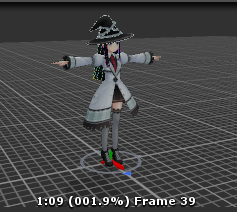
bones are fine afaik
Anyone got an idea?
:/
finite rock
@clear yew Did u try using cat plugins on blender to make your avatar blink?
@olive lynx https://www.youtube.com/watch?v=m4OCpPjzJ-0&t=29s watch this video

Tutorial explains: - How to create the soundfile - How to create the animation - How to trigger the animation Morgus tutorial: https://www.youtube.com/watch?...
if u have any question u can ask me or ask here again
@grave otter it happens with all your animations?
grave otter
yep
 finite rock
@grave otter Did u rig your animation?
finite rock
yeah ok
grave otter
my model is rigged if thats your question
grave otter
how would I do that?
grave otter
 frozen rose
So for a kirito charater im creating how would i go about adding the health bar to the side of the player and the little green icon floating above my players head?
would that be an animation or more of an addition to the character
grave otter
add the image assets as childs to your avatar in unity
olive lynx
Thank you @finite rock
finite rock
no problem
 neat breach
Hello there. I just have a particle effect that lasts for 5 seconds doesnt loop and it's only on my chest. I am getting this error and I dont know how to solve it

 cloud island
Hey so I'm trying to implement extra layers to the avatar controller to make it's wings flap and it's legs wobble a bit more as if it were airborne. Everything functions fine and animates well in unity but when I upload none of my changes appear, it's just the standard animations. Could somebody please tell me where I'm going wrong?
hidden fulcrum
I just finished putting a weapon on my avatar, but when I go to do the hand gesture in game, my hand slowly goes into the gesture I have set in the animation but without the weapon, and then goes back to normal
olive lynx
@finite rock so I watched the video and I know how to make the sound it's own seperate animation. But I want the (Smooth Criminal Lean) and the sound clip to be one animation. Right now I have two. One is my sound clip and the other is the smooth criminal lean.
So when I activate the lean, the sound clip will automatically play
olive lynx
No I just want teh one sound in it.
olive lynx
I can select the animation in my panel and everything. I figure I can just aadd the audio to this. But the proprties tab is greyed out.,
olive lynx
Even that is greyed out. Do I need to apply it to my avatar first?
finite rock
what u need to apply?
olive lynx
I am a tad bit lost. Sorry lol
plush meadow
If you want a gun with muzzle flash and audio at the same time, you should put them on the same game object
ex: gunfire game object has audio source and particle effect.
olive lynx
But I want to put audio on a custom animation.
olive lynx
Yea
I have the animation sitting in my assests folder in Unity and that's it right now.
finite rock
Did u change something when u created your audio source?
oh wait
i know what u did
olive lynx
What did I do????? 0_0 lol
finite rock
U are trying to change some animation that is already inside your assets
olive lynx
Yes
olive lynx
Ah pudding
olive lynx
Create a new animation, paste the keys and add a new property with music?
finite rock
yep
olive lynx
Thanks man, sorry for the trouble. I will give thatv a try
finite rock
hope it works
manic rapids
Hi. Can animation playing in VRchat with different action than emote? May be key pushing or mouse actions?
finite rock
i don't think so
manic rapids
to bad
clear yew
Hate to ask a question right after ya just got helping someone, but how would I go about making an animation that looks like my avatar is throwing a fireball? I've seen some people shoot fire and whatnot out of their hands. Would I have to make a model for the fireball first and then make an animation for my avatar and set it as an emote or is there something else I need to do?
finite rock
I think they use particles
uneven acorn
You might be able to use something with particles so you don't have to go through the trouble of making a separate object
 clear yew
Thank you very much. I tried some searches earlier and this didn't pop up. Will take a look into it
manic rapids
Can some one tell me how must working animation Spin In Place from mixamo? I attaching to emote, but avatar not spining, just moving on the place.
They working right, when im attaching they to Idle and preview in Unity. But when im attaching to emote, they not spining.
finite rock
Let me see if I get it, the animation is working inside the untiy however when you test inside the game it does not work is it?
 azure hare
Working on animating an object above my head to rotated on the Y access. I have the script that allows me to do so but when I go to Publish i get an error reading this,
Is there another way to allow an object to rotate around my head?
finite rock
Maybe if u add property and change value on each frame to rotate your object?
neat breach
Does vrchat like Particle attractors
or is the ingredient pack the only one that works with vrchat
exotic ember
I got a question, is there a way to have a solid particle, so that if one were to go inside of the particle their view would be tinted
I cant see any options in unity that stand out to me as being able to do this
finite rock
wish i could help u guys, but i don't know anything about particles
 shadow timber
so im trying to have a gman avatar with source engine animations, and i only have the walk animation down but its wonky in unity
why he do this
finite rock
Try changing the values for the leg property
shadow timber
is that in unity or...
 woven hinge
what are the best animations to override? i dont want to replace anything important http://puu.sh/yZpN7/e3bb3049b1.png

 mint marsh
any ideas on how to make an animation play indefenitely until you walk again?
finite rock
@woven hinge do u have vr?
woven hinge
yeah im on vr
finite rock
So what your animation do?
woven hinge
just facial expressions
finite rock
so u should change some gestures animation
woven hinge
and effects applied to face like star pupils, heart pupils, etc
woven hinge
ok thank you
finite rock
no problem
@mint marsh if u use vr and u override a gesture, i think your animation will be playing until u stop pressing your controller buttons
exotic ember
Shit, what is the name of the peace sign hand gesture
I cant find it listed in the override
finite rock
victory
woven hinge
what are the animation slots emote1-8?
exotic ember
the fuck is that victory
finite rock
its the emote u use on menu
exotic ember
thats like fuckin hentai victory
finite rock
but normally when u override a emote u can't move your avatar until your animation is over
clear yew
Can I use my emotes to put my model into different states? As in, use backflip emote to have my model take out a weapon? and then dance emote to put it back?
finite rock
no
 random fern
I have a minor issue when it comes to applying breast physics to this model. For some reason the point in the actual model seems to act as a root while the point way behind her is whats wiggling about when I'm in scene. Can anybody explain this to me? Thank you. Also not sure if I'm posting this in the right place. Sorry if not.
exotic ember
weapons are pretty much locked to gesture override
finite rock
/\
exotic ember
@random fern for future refence use the snipping tool so you only grab one of your monitors
random fern
sorry about that
exotic ember
are you fucking sorry
finite rock
@random fern Can u not try using another bone?
random fern
Depends if I can get an answer to my problem there x'D
exotic ember
also as far as that goes, dont you need dynamic bones for that kinda shit
random fern
Yeah thats in there I think. I'm ctually really new to this honestly but it's driving me up ther wall
 brisk talon
anybody ehre got any good tutorials on how to override the animations in unity, I have a dab animation I want to turn into an emote and i have no idea how to do it.
exotic ember
there are plenty
brisk talon
i found one and it didnt work so i figured id ask in here
finite rock
https://www.youtube.com/watch?v=V0l4-pH3vI4&t=913s jump to 10:50

Creating custom animations for hand gestures and emotes in VRChat
exotic ember
yeah morgus's is good
finite rock
if u have any question ask again
it's easy so i think u will not have any problem
@random fern So are u using dynamic bones?
random fern
Yes
exotic ember
lucky bastard
random fern
Theres a componant in the right there with all the values
exotic ember
I cant justify buyingit but I want them
random fern
Yeah a friend I can't get intouch with at the moment helped me out with the bill on that one tbh. Nice guy c:
Otherwise I'm just going to wait until tomorrow and ask them really. Just trying my luck with you guys
finite rock
@random fern I mean do u have any other bones to try?
random fern
Yes all the hair seems to work perfectly
Soon as I move onto the breasts however this happens
I've been following tuppers tutorials
exotic ember
im so close to the perfect za warudo
finite rock
@random fern i'll watch one tutorial too one sec
random fern
I may have indirectly just solved it..
random fern
YEP nailed it
It's the "End Length"
I set it from 0 to 0.1 and the wire spheres seemed to merge
Gonna play about with this a little more. Sorry if you went out of your way a little for me. Thank you for respoding 😄
shadow timber
for animation controller, i made a new state for my walking animation
sand apex
hey what requires you to make a world just to put on your model? There are some people who could take live photos or frames that have the exact moment and they say you need to have made a world
shadow timber
do i transition from start or from any state
clear yew
I have another question on weapons then, how can I run around with them? I have a weapon tied to my rock and roll emote, but when I move it disappears until i stop moving.
pearl timber
Anyone know's why in unity my eye blinking animation is right, but in game mouth moves with each blink
brisk talon
i got the animation overrides to work thank you @finite rock
pearl timber
any sites to get custom animations? or i need to make them my self?
 rose flax
i have a quick question
when doing an animation for this model, if I try to transform a specific part of the body, the transform values are just greyed out and revert to 1 whenever I try to change them
 noble fern
Hey guys got a question
how do you make certain textures glow in unity?
this may be the wrong channel to ask this tho
finite rock
particles if i'm not mistake @noble fern
noble fern
is it a shader or something else?
finite rock
@rose flax what are u trying to animate?
noble fern
Like there are just a couple materials I'm trying to make glow
finite rock
@noble fern https://www.youtube.com/watch?v=zNq1p8oXB3o&t=305s maybe it will help u
rose flax
I was trying to make a facial expression so my avatar's eyes would scale down
but I think I found it, I was using the wrong eyes
The other one didn't have shape keys
finite rock
oh ok
btw maybe your avatar already have some facial key frames u could use
idk if u know about that or not
rose flax
okay now another question
My skinned mesh renderer doesn't have a blendshapes drop down
finite rock
Maybe it's a problem with your weight painting
pearl timber
i have 0 clue, why my blink animation is broken in game, in unity is working fine
on each blink, mouth opens too
 split onyx
this is probably a stupid question, does anyone know if setting a smiling face as your default face with blendshapes interfere with animation override?
finite rock
well if u are changing your avatar face, i think it will be okay
split onyx
alright thanks
pearl timber
But be sure to keep copy of ur character, in case of needs
split onyx
ty for reminding me i probably would've forgotten
 steep cargo
how can I set up an object in an animation if I dont want it to move with where my avatars body and head moves?
 frail lynx
i have a kancolle character and the gun rig both modeled right now
i just dont know how to make it so i dont have it out all the time until i do an emote that brings it out
clear yew
Quick question! I did a custom override on an emote for a sword. In game, I can see the sword, but when I went to avatar testing and looked in the mirror, its not visible. Ideas?
plush meadow
So you are able to draw the sword ingame?
clear yew
yes!
plush meadow
Could anybody else see you?
It might just be the servers.
Assuming you did it correctly.
 torpid light
if you activate the game object in the animation mirrors don't show it, but i've heard you can instead activate the mesh renderer but keep the game object active at all times and it will show in the mirror
it's just for you though
assuming it shows up in your hand from the first person view
clear yew
hmm...
torpid light
people will still see the weapon in your hand and they will see your reflection with the weapon in your hand
plush meadow
Which tutorial did you follow?

This shows you how to put weapons and audio into the game vrchat. More stuff here: Where I got the gun model: https://abyssleo.deviantart.com/gallery/5925409...
I followed that guy's tutorial and got my gun appearing in front of others.
clear yew
Yeah, i watched that one, and a bunch of others ones just to confirm i was doing everything right
plush meadow
Although I haven't tested in front of an avatar mirror.
clear yew
well thanks for the quick input, ill keep looking into it
 spiral moth
clear yew
spiral moth
clear yew
anyone know any good miximaxio animations
 distant anchor
Might be more suitable to ask here. I want to create a new extra set of animations for my model. Duplicating in Unity with Ctrl D doesn't work for me. Because after I am done and have uploaded that new model it just overwrites the original. How do I get copies of the same model in-game?
torpid light
@spiral moth I don't have much experience with mixamo animations, but someone commeted on one of my videos saying how they fixed it
The issue was that the animation needed to be rigged as humanoid.
maybe that helps you idk
clear yew
How do you model Visemes with unity?
lucid remnant
if i want to make my avatar's hand close more is that a unity ot blender thing, im assuming blender
nvm i figured it out
 spice bramble
So animating a non-humanoid avatar......
lucid remnant
my bones are off abit
exotic ember
@clear yew, just use blender for that
 prime gale
Question, if I replace an animation, say Handgun, to make a prop appear, is that a toggle or do I have to hold the hand pose in VR?
hasty yacht
if my custom character no longer has any walking animation in game, where did I go wrong
ive been careful to apply an override only to two of the emotes, on a duplicate model
 warm furnace
Gesture have to be 2 frames(with less than 60 frames rates so less than 1s), or 1s ? (so 60 frames with a 60 frames rates) ?
hasty yacht
removed the overrides, re-uploaded, still the same, if i play any of the default emotes it just says [playing] and then I can no longer move around
 tawny elbow
Hey, is there anything I can do to help prevent the textures of 2d visemes from glitching out in different lighting? I know it's not something I can 100% fix but if there's anything I can do to reduce it I'd like to find out. (Please @ me if you respond I'm busy atm sorry 😅)
 vagrant tartan
can you make animations that affect other people? like someone in a world was making an image appear on other people's screens, or are they just spawning a really big particle effect?
warm furnace
@vagrant tartan you can't
vagrant tartan
someone was making images appear on everyones screens, how'd they do that?
like whole screen
 solid plaza
Is there any way to activate the same gesture multiple times? I have an animation override that shoots a particle effect in single fire but I would like to be able to use the guesture again without having to switch to a different one.
 agile arrow
does partical attractor just not work with vr chat?
solid plaza
What I mean is that, I have an animation with a gun that has muzzle flash on the end, with a sound and a bullet particle effect but after using the guesture to play that animation, the effects don't appear anymore
plush meadow
What position did you place your particle effect?
Does your muzzle flash work properly?
@solid plaza
solid plaza
Yes
plush meadow
How did you do it?
solid plaza
Everying works but only once
plush meadow
I'm struggling.
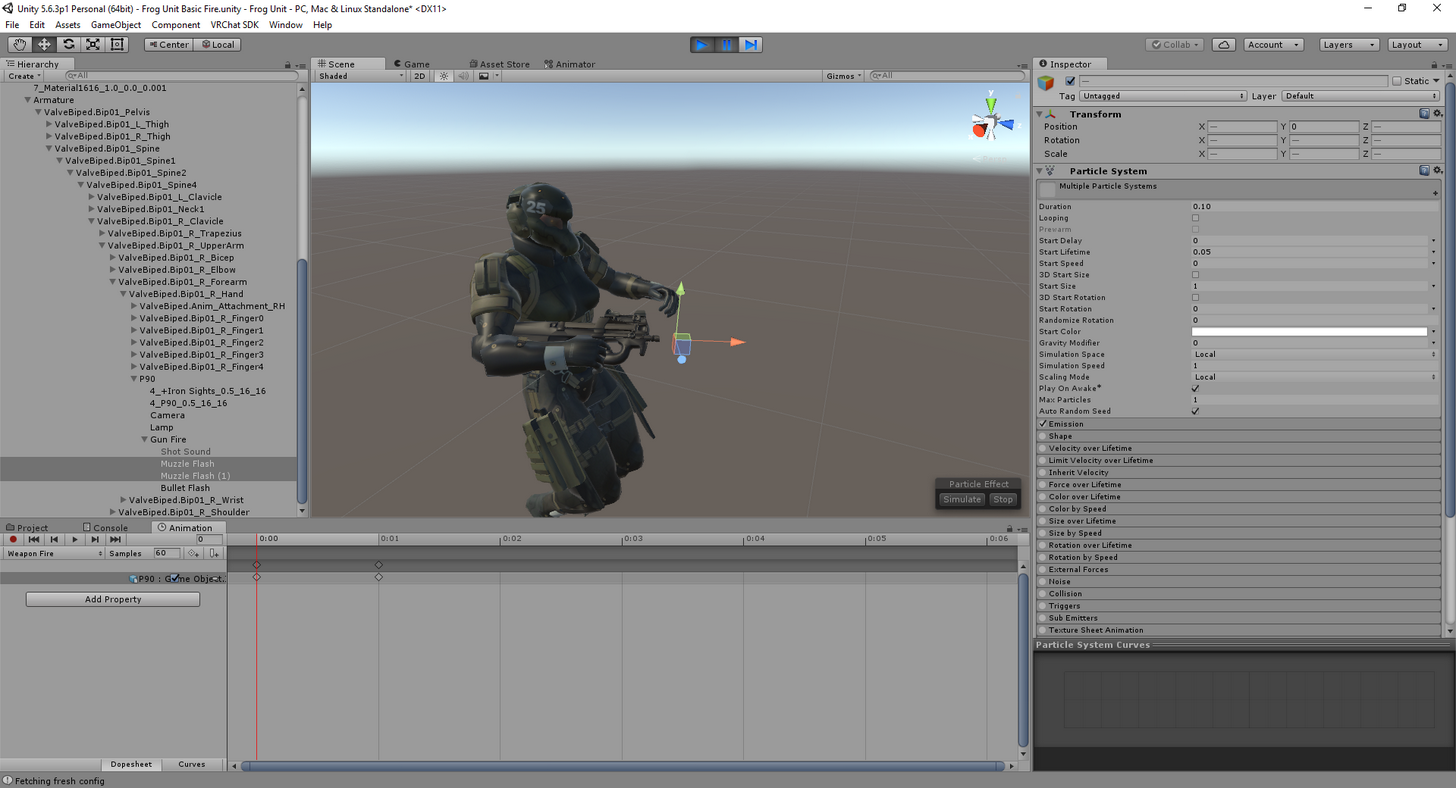
 grizzled sigil
Can anyone hook me up with some dynamic bones
agile arrow
does this mean it doesnt work at all?
grizzled sigil
as long as its under 2000
solid plaza
The way I did was by first placing the gun in the hierarchy armature of my model under the right hand. Then I made a particle effect for the muzzle under the weapon's hierarchy https://i.imgur.com/yI4xDoN.png
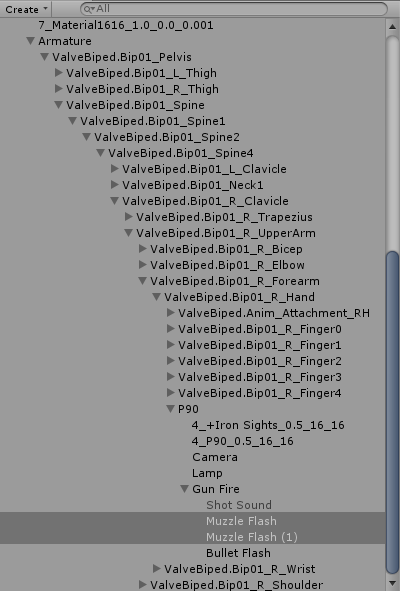
@plush meadow How does your animation work?
You can shoot your weapon multiple times but I can only shoot once
plush meadow
he just spams
thumbs up
I put draw animation on handgun
shoot on thumbs upo
he just repeats it and it keeps shootin
solid plaza
Damn, I thought there was a way to avoid doing that
Thanks for clearing that up
I thought there was some other way to do it like that
plush meadow
Why do you have two muzzle fires? @solid plaza
solid plaza
For vertical and horizontal view since they are flat
plush meadow
Is that main model or duplicate?
solid plaza
For making the animation I use the clone
plush meadow
Does placement of the particle system and audio on the main model matter?
solid plaza
I don't actually know but everything I use for clones, I have on my main model but hidden
plush meadow

How can I accurately place the muzzle flash?
Like it doesn't go where I want it to go.
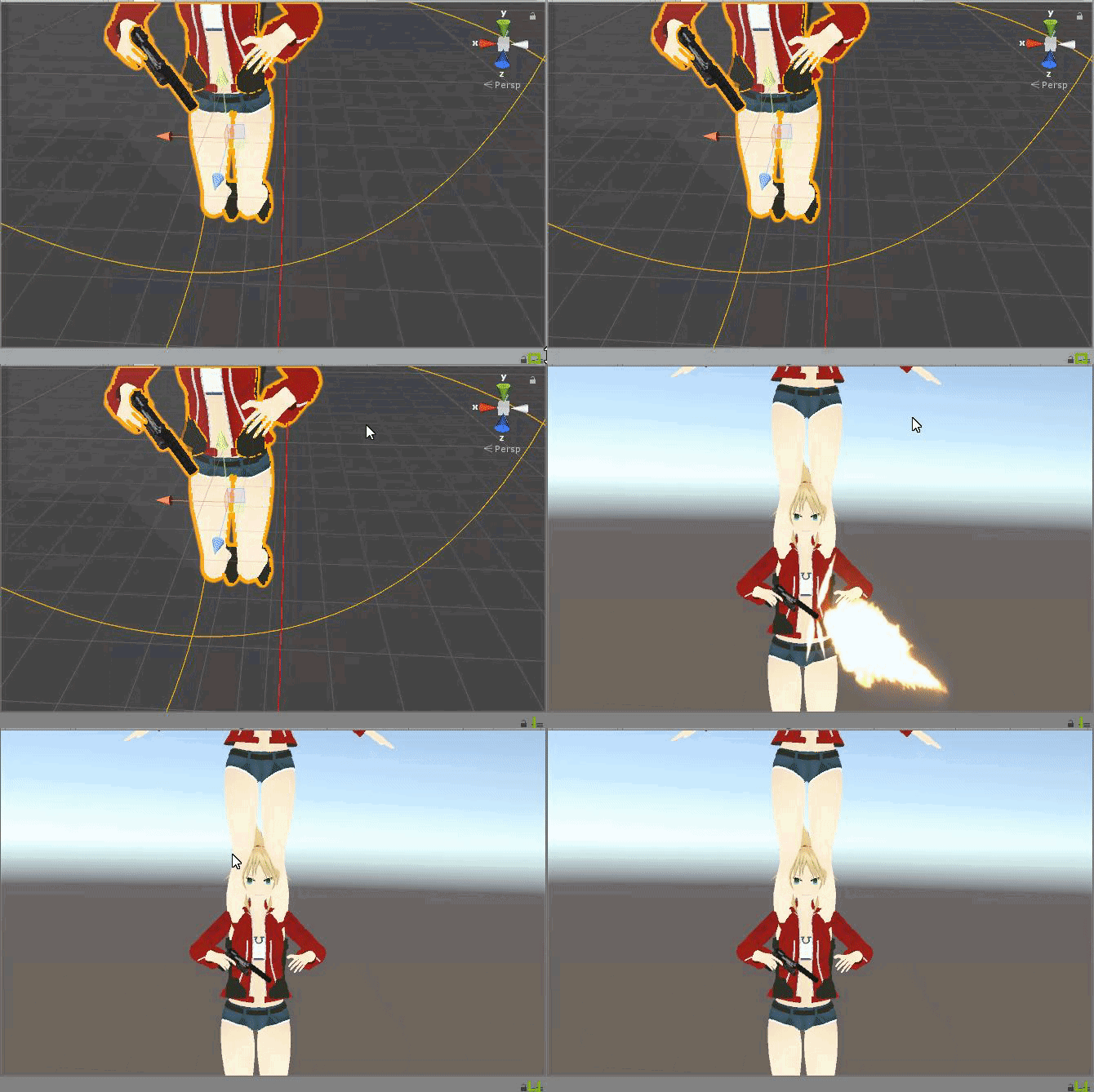
It looks right in the animation window, yet it's really off ingame.
solid plaza
The way I do it is by trying to fit the gun model to my main character model first so that the "gunfire" object is placed at the muzzle
Then I copy the main character model with the gun and muzzle attached properly and start doing the animation
plush meadow
I see.
So I have to position somewhat correctly on the main model.
The box keeps moving though;...
How can I deal with that?
solid plaza
Hmmm
Okay
Select the "gunfire" and put 0 in all x,y,z for the position
It should snap to the gun model

 austere finch
How come when I edit the material for the eyes of my character in the animation box, all the materials get moved around when I try to only move the eye material for the animation. I'm testing it and can't figure it out.
plush meadow
One more thing. Do I have to zero out the location of the muzzle flash as well?
solid plaza
If you move the gunfire cube, only the find inside of it's hierarchy will move with it
 solid plaza
You don't have to but it's easier for me to do on the main model
Hold on, I will show you on mine
austere finch
Aaaa, this is hard.
How come when I edit an offset for one material, it edits all of them?
plush meadow
You sure? I have a feeling that my main game object is heavily affecting the animation. @solid plaza
solid plaza
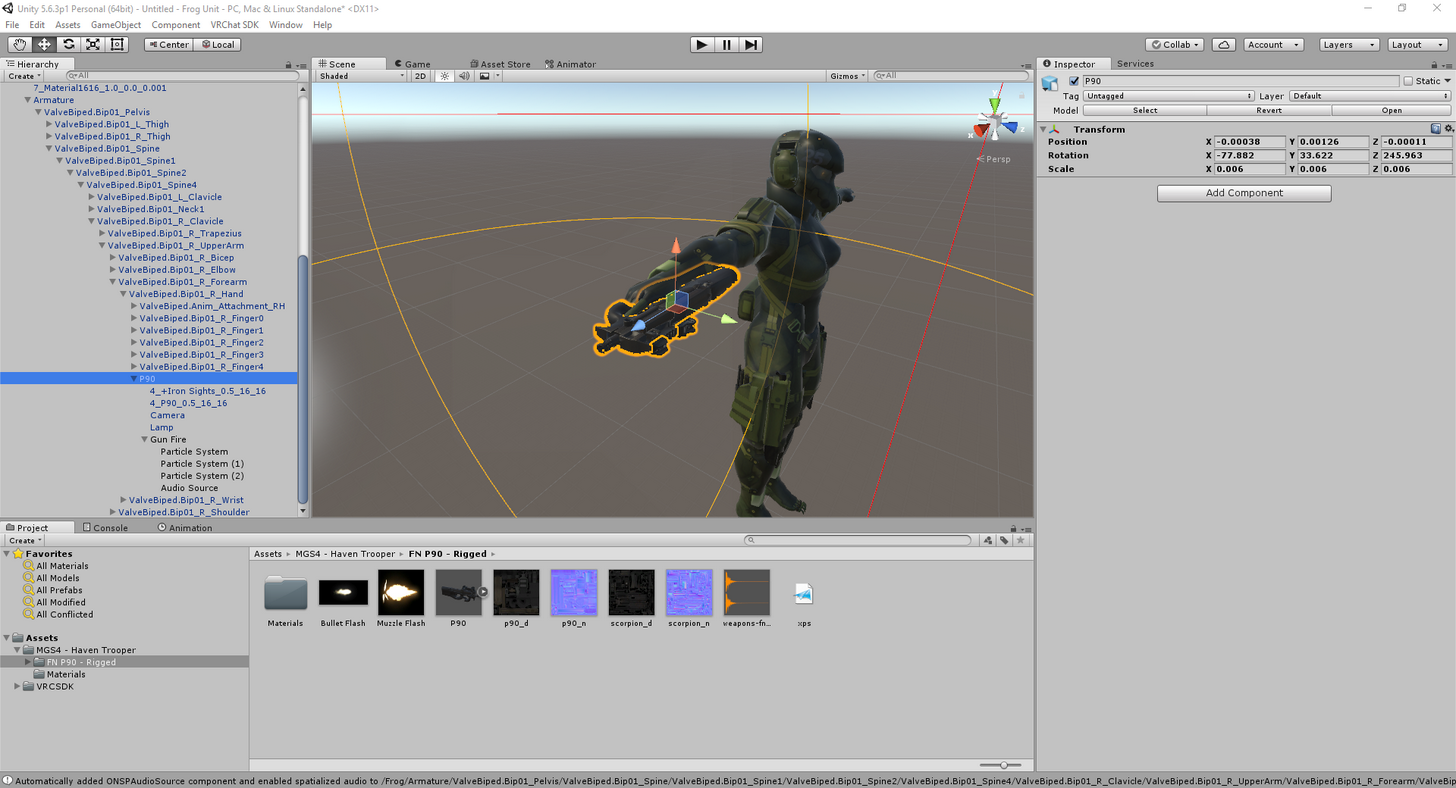
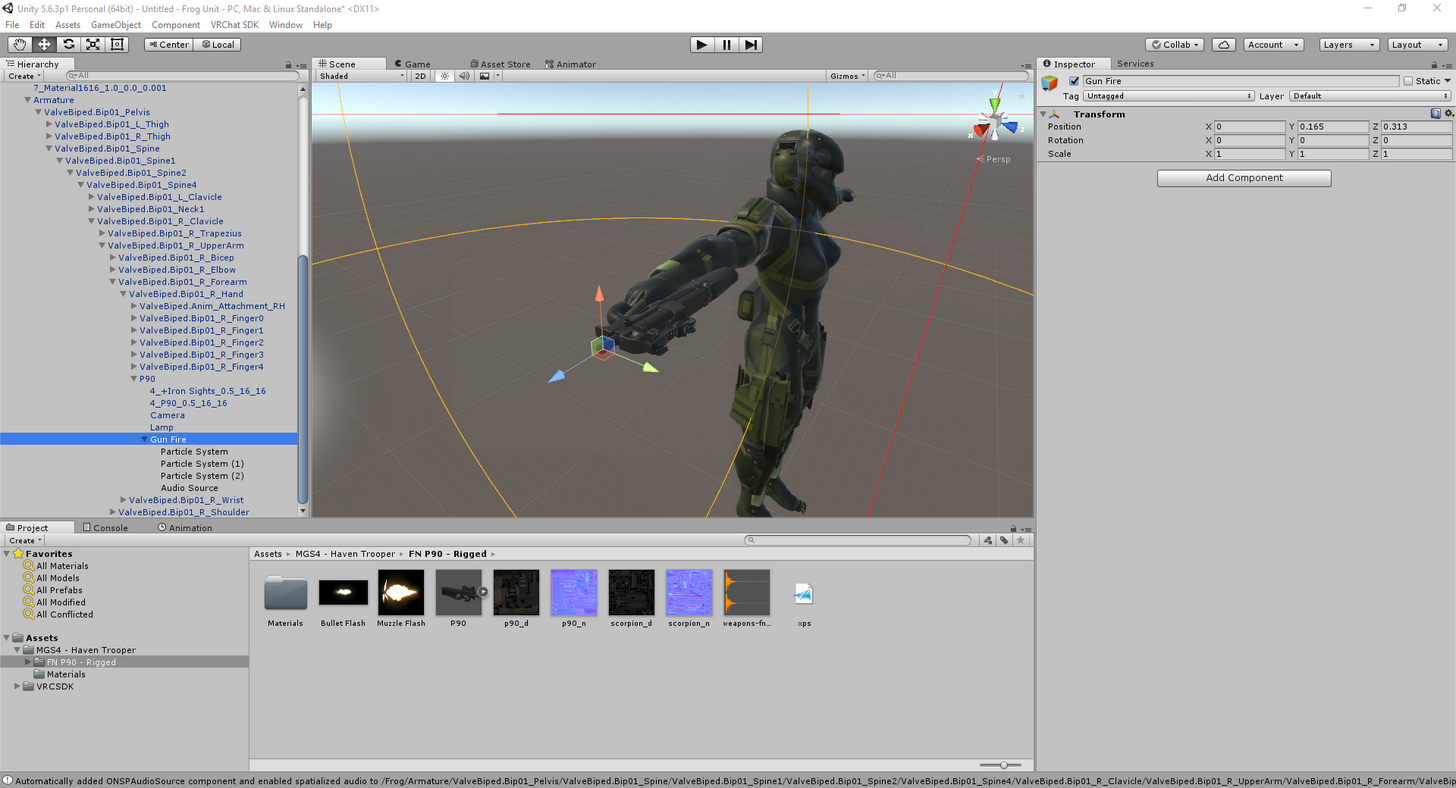
I just made a new main model, added a gun and placed particles and sound in the hierarchy.
That way, the muzzles and sound will always be at the tip of the gun, only then I duplicate my main model and start doing the animation
plush meadow
I see.
I just struggle with getting the gunfire object at the tip of the gun.
Like when I zoom in it goes past if I zoom out it gets close.
 bronze fulcrum
Someone here can help me ? The legs of my avatar is passing through the skirt, there is a way to fix that with dynamic bones ? i tried putting colliders but it isnt working
solid plaza
Yes, I struggle with that as well, not sure how to fix it myself honestly
bronze fulcrum
but can i minimize it ?
plush meadow
Yeah. @bronze fulcrum
bronze fulcrum
how ?
plush meadow
Place collider on hips and add as collider to dynamic bone.
Circle must barely clip skirt.
Is that good enough? @solid plaza
Even if the cube moves away from intended location when I zoom out?
solid plaza
The cube doesn't move, it's only from your perspective that it looked like it was next to the tip of the gun
bronze fulcrum
@plush meadow i already have a collider on the hips
solid plaza
You have to move all the way around and make sure the gunfire is placed at the tip
plush meadow
So click between gun and gunfire to check position?
I think I got it. Is it closer now? @solid plaza
solid plaza
lets see
plush meadow
IF you already have that many colliders then that's all you can really do. @bronze fulcrum
bronze fulcrum
humm



 solid plaza
Looks like you did it right
Now, no matter where you move your entire gun, that muzzle flash will always be there
fast bloom
@bronze fulcrum you can see the bones end a bit higher up than the actual skirt, I would try setting a radius or end length on your skirt dynamic bone script
solid plaza
@plush meadow Did you try duplicating your main model now?
Your model and gun should move but not the gunfire that has the muzzle in it
plush meadow
Should I be?
fast bloom
other than making the collision work, the only thing you can really do to reduce it is make it move less by increasing inert or manipulating the other properties
plush meadow
Won't the muzzle fire on the main model before duplicate matter?
solid plaza
If you hide the muzzle on the main model it won't
solid plaza
You only hide things you don't want to see on your main model without any guestures