#animation
1 messages · Page 15 of 1
 fervent elm
 peak relic
For some reason whenever I try and load in a whole song in an animation the song sounds like its breaking and distorted. Yet a sound clip works fine. Anyone know why?
 ivory lodge
@languid lark that marker contained a lot of polys :S
 languid lark
@ivory lodge dont need use the marker
use any other object
snail said in the video
 sonic tiger
@fervent elm Do you see the "Add Property" option on the left of the animation window?
ivory lodge
@languid lark how do i do
fervent elm
yes i see it
sonic tiger
Click it
then choose your particle effect
Those keyframes will allow you to control the particle effect from the animation
fervent elm
oooh ok i got it
sonic tiger
👍 😃
fervent elm
Thanks a ton
ivory lodge
@languid lark fixed it
 dawn shale
Anyone have any idea why my avatar goes into the ground when I pull out my gun ? lol
 frosty oyster
^
 ionic basin
anyone know what I have to do to set it so my weapon doesn't disappear when I move or using my other hand?
frosty oyster
^ that too
ionic basin
I think i just learned that vive users can't move with weapons. Does that hold true?
 polar iris
Hey guys, I made a custom animation for my avatar in Blender, exported it into Unity as part of an .fbx model, replaced a default emote with it and verified it works in-game. I duplicated the animation and added sounds to it in Unity, and mapped it to another emote, however when I try playing it ingame, my character just sinks into the ground and performs some kind of paddling pose. I still have the soundless animation mapped to another emote and it's working fine, anyone have any ideas what might be up?
ivory lodge
@languid lark have you tried the snail marker lately? for me it doesn't work corectly
@languid lark it draws all the time and the eraser doesn't work
ivory lodge
that's not what he said in the video?
languid lark
he use rift
ivory lodge
do I need to have mesh renderer active?
ivory lodge
but you have erase on rock?
ALSO is it possible to like combine the fingerpoint anim with the draw anim
languid lark
 undone glade
@polar iris check your animation for anything that says position. If you moved your avatar during it may have been recorded.
ivory lodge
oh
ivory lodge
I did watch the video you linked, he didnt say dat :S
so is the pen always floating between your fingers?
languid lark

Tutorial on adding the marker to your avatar and customizing it. Github: https://github.com/theepicsnail/Marker Unity Package: https://github.com/theepicsnai...
 warm furnace
https://cdn.discordapp.com/attachments/389236877078822923/398972679463632896/unknown.png The wrist goes wrong when he had a particle effect on it

 drifting portal
Does anybody have the breakdance and twerk animation that I could use? Can't seem to get them.
warm furnace
nvm
 brazen badger
1 frame animation stuck in a rapid loop this should be an easy fix right? Anyone know how?
 toxic solar
Aye, anyone here know how to make an edittable copy of the existing hand gestures? Or at least their values. I'd basically like them to stay the same, but add my own property to them instead of having to re-animate every finger and joint and such.
 tranquil current
how much work would it take for a model to pullout an axe or etc
toxic solar
Not much work at all. Unless you mean a whole baked in "Withdrawing it from it's sheath and holding it" then sure, but if you just want it to appear in your hand, that's easy.
sonic tiger
@brazen badger make sure both the frames of your one frame animation are exact copies
brazen badger
Yeah, pretty sure they are
sonic tiger
thats my best guess :/
brazen badger
or am I checking it incorrectly?
sonic tiger
click the little top diamond > crtl-c > click the second frame top diamond > ctrl-v
press play and see if it flickers
brazen badger

it doesn't flicker when I pres splay
but ingame it does
when triggering one of them
Is there any way to add multiple of these at once? https://i.imgur.com/wzCNnRp.png
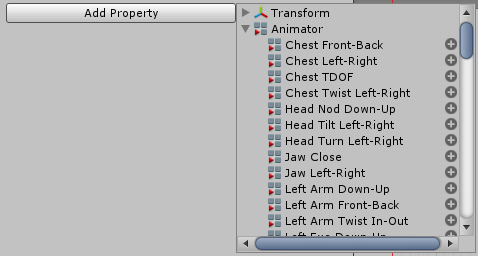
Clicking each of them individually is genuinely one of the most tedious things i've ever done
Well I'm stumped, don't know what's causing it, hopefully it's just the servers not uploading my new thing or something idk /shrug
 sweet zealot
just to clarify, for an item equip from a hand pose, i have to add every single finger on that one hand? Even if the hand pose is alright?
also what is the official name of the "spiderman" handpose?
brazen badger
ROCKNROLL you mean?
sweet zealot
yeah, guess thats the name.
that answers my second question. Thanks!
but seriously if i want to keep the hand pose but just have an item appear, do i have to do every finger?
brazen badger
If you're asking me specificly and that thanks was sarcastic I don't know mate, that's why I'm here myself getting help
 serene lava
@languid lark Hey I converted that model as well
Does anyone know how to use a custom animation controller in vrchat
sweet zealot
that was a real thanks, i genuinly didnt know its name and you gave me the name.
brazen badger
ah right just the "but seriously" threw me off mate my apologies, im frustrated after trying to fix stuff and load into the game, i'd try and help you with your issue by doing some testing but it's like impossible to test right now given the servers performance
sweet zealot
ack yeah! it took me 3 hours to get online just to test an elbow bending. took 30 seconds for me to see what i needed to adjust, it was awful for a 3 hour wait.
serene lava
vrchat://launch?ref=vrchat.com&id=wld_97fda4a1-f820-4f09-a88c-2d2a95b668f7:1~private
sweet zealot
if you get someone to make a world link for you away from hub it works, hub itself is messed up
sweet zealot
oh cool, like that! ^
serene lava
If you put that into you launch options you'll do it automatically
sweet zealot
thanks man!
serene lava
Although you have to launch it from steam, if you run the .exe it wont work
 fierce copper
mkay so im just making 100% sure
u can use animations/sound effects/particles without having VRGear right?
literally all my attempts on doing so so far have failed
 molten elm
why is it when I override an animation for a facial gesture, my fingers awkwardly and slowly move even though I didn't touch them
 clear yew
Excuse me, what's the override for sidewalk animation?
 wispy onyx
Is there a way to get the key-frame animator values for the default VRChat hand gestures? ie. Open Hand, Rock&Roll etc
 quartz summit
Hello I've got a quick question whenever someone has time. Fairly new to this but I made some anmation overrides for my avatar where the head moves. In-game though the head is stationary and continues to follow the camera during emotes. Not sure how to prevent this. Thank you for your time
I've seen it done so I know its possible I just don't know how
sweet zealot
animations dont show up on mirrors so if you were checking it on a mirror you wont see it
 normal skiff
that is still a mystery to me
because my cat ears are an animation and they do appear in a mirror
I assume the difference is that they're done using blend shapes
so...if I built a prop into the model itself using a blend shape...that would appear?
sweet zealot
perhaps?
clear yew
what doesn't show up on mirror is stuff you activate like swords, and effecrs
but blendshapes are shown
and movements
quartz summit
Right I asked as well and everyone says theres no movement in the head.
But it animates fine in unity (probably one of the most commonly uttered phrases around)
It's true tho
sweet zealot
the head movement might just be locked to follow the camera, perhaps have 2 rigged heads in same position, 1 for the normal movement, and the second to switch to when you want the animations?
quartz summit
And just hide the other one during animations? I could try that
Not on VR yet so I've had to override the existing emotes
sweet zealot
ohhhh wait how are you doing animations then? the animation menu?
quartz summit
Yes, sorry for not prefacing with that.
Emote overrides with animations I key myself
In unity's "super good" animator
 sacred wharf
Yo
So I heard from this one dude that some russian site had the dynamic bones thing for free
Is this true?
normal skiff
sounds like piracy to me
sweet zealot
wut? o_O since when do you need to buy a bones function?
sacred wharf
The dynamic bones for unity
 wintry matrix
yeah but it has to be whitelisted and cleared by vrchat for use in vrchat.. so it can't be an alternative or different script
sweet zealot
......strange..... mine has them already..... and i got the whole unity from the unity webstie.
oh! whitelisted, yeah
makes sense
wintry matrix
[not that its not possible for someone to code/release one, its a common techique you see in 3d software, harmonic transforms and such]
that being said no one is going to code one if theres a good one already widely used for $20.
sacred wharf
unless they wanted to be a competitor
wintry matrix
well yeah.. someone could release another one for $9 and then the original author price matches.
sweet zealot
quick question - what sound file is compatible to put in the animations for vrchat? ogg? wav? mp3?
 radiant raptor
Is there a way to make an animation stay? For instance I have a sword in my hand and on my back. I want to "swap" between them. I have an animation for both the sword on hand and shield to fade away just need to know how to make it stay until I swap back. If that makes sense?
 unique night
@sweet zealot ogg
sweet zealot
thanks
sacred wharf
Doesnt anything work as long as it is through unity?
sweet zealot
@radiant raptor if you are using keyboard set the animation for over a minute, if you are using VR just do it by hand pose
radiant raptor
I am using VR thank you. This is on Unity correct?
 long knoll
ANyone have a good guide i could follow for animation from the hands? Like when people make a gun that shoots, or make money appear, or even a camera
sweet zealot
you mean to equip an item?
long knoll
Yeah i guess. When they have like a sword on their back, and make it appear in their hands etc
sweet zealot
am i allowed to post a video tutorial link in here?
radiant raptor
hmm I can't hide the weapon through inspector....
serene lava
I would think so
sweet zealot

Tutorial on how to make weapons appear in game using a hand gesture. This is based on weapons already on your avatar. Links: Avatar used: https://darknessmag...
this video is the easiest to follow in regards of equipping things by VR hands
 terse sphinx
Emission of shader should be set below which number to avoid performance hit for other players?
sweet zealot
(im afraid that one i do not know)
frosty oyster
does a gun that i put on my character thru an animation have to be a rig or a model?
long knoll
Thanks!
sweet zealot
the item being equipped can be a model, just make sure its attached to the hand bone
if the item intends to move, it has to have its own bone set rigging, again being parented to the hand bone
sacred wharf
Sorry, how do you add animations like changing colors to your avatar?
sweet zealot
at the moment, i can only think of having duplicated bodies of different colors and having them swap by hand gestures. unless you wanted the rainbow effect - in which case i havent gotten that far yet and dont know how
 hollow sorrel
How come my animations aren't separated by hand? In the animator, it only says right hand. But in game it doesnt matter which hand i use
sweet zealot
i wish it could be by seperate hands too. T_T i wanted only one hand per wolverine claws but nope, only both
frosty oyster
does anyone know why my chracter glitches out when i use an animation to get a pistol
radiant raptor
what is the rocknroll gesture? Just the index and pinky finger or is the thumb included?
sweet zealot
its the middle two fingers bent inward and the others spread out. like "spiderman hand"
radiant raptor
thank you
 shadow harbor
Question for animation overrides (the item appearing ones). Which part of the object I want to appear do I turn off so that its not always shown
 white epoch
Does anyone have a source for a Quadra ped animation I'm currently in the process of animating a Sylveon
I know there is that free cat but IDK if I can import to the animation from it
molten elm
Can anybody help me real quick..?
The animation overrides aren't playing the facial animations, and whenever I use the gestures I reassigned, my fingers just move about slowly without doing anything.
 ashen sedge
@molten elm You probably have the animation length to 1 sec instead of 0.1 sec
molten elm
I'll double check
ashen sedge
Also both keyframes should be identical for gesture overrides
molten elm
Yeah, 2 keyframes, same ones
ashen sedge
First keyframe should be on frame zero, and the second one on frame one
fierce copper
so i was watching this tut and they said it had to be done differently if it was for emote override in the video, and that theyd make a vid on it later but that one isnt out yet
im currently at the point where im making the animation clip and the character like, goes down
how am i supposed to do it differently if its for emote override? (lets say for the cheer emote)
molten elm
languid lark
@fierce copper you would have stand up the avatar best way to do use blender or muscle animation editor that cost $15
molten elm
And I don't have to do anything else but add it to the override, and apply it to the descriptor, yes?
fierce copper
@languid lark sorry what do you mean?
languid lark

Assetstore: https://www.assetstore.unity3d.com/#!/content/32233 1.4 - NEW: Muscle Handles. - CHANGE: ‘RootQ’ now controlled by eulerAngles instead of Quatern...
emote full body animation
basic have edit all moveent of the body
when it go in mucle mode you have go in animation editor move leg
arm etc
simple cheer for emote alot more work
this asset will make it easier to do in unity with set different value
for mucle
languid lark

Welcome to the fifth character creation episode. Today we're animating a little walk cycle for our character. Download start file: https://www.dropbox.com/sh...
blender
watch video on animation
or you can take apart vmd or use mixamo animation
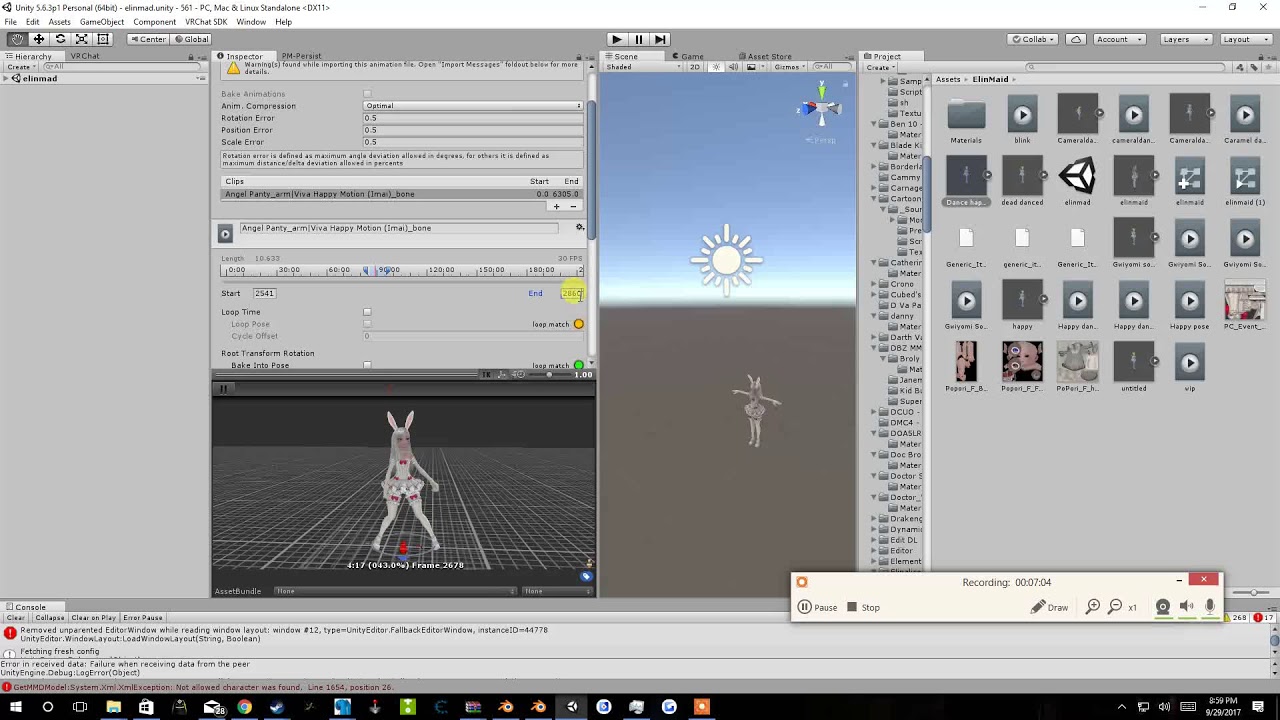
Tupper video on New MMD tool for blender https://tinyurl.com/y8yeonsd MMD Tool update version https://tinyurl.com/ybku6xft EvolvedAnt Gesture Overrides for T...
plus hackspanner post animation here https://sites.google.com/a/cgspeed.com/cgspeed/motion-capture/cmu-bvh-conversion
Making hobbyist 3D animating easier, cheaper, faster
fierce copper
eh thank you for the effort but thats not the kind of animation im trying to make, and it doesnt help with what im trying to do ;P
fierce copper
I'm trying to override an emote so when i use it it pulls a certain object
languid lark
you have to do full body animation
for that
it not like gensture
emote disable the IK for 10 sec
reason your character be stuck in that muscle pose
all that info i post correct info for emote
most anyone who know how to animation tell you same for emote
sweet zealot
is it possible to do a custom animation and a sound effect at the same time for the same hand gesture? Cause i notice the override slot only works for 1. Unless i should apply the sound override to the animation override?
im trying to make wolverine claws by rocknroll gesture, and i want the ogg sound file i have to activate on that same gesture too
languid lark
@sweet zealot just make game obj
with audio source
then add that to your animation
you make animation turn back on the game obj
sweet zealot
i figured it out, i needed to put the audio in the heirerchy of the animation obj itself. oops.
 light tiger
anyone havin the problem when animating a humanoid avatar does it refuse to change its bone rotation?
frosty oyster
has anyone found a fix for the random shaking when using animation overrides to have a gun
fierce copper
@frosty oyster emotes or hand gestures?
frosty oyster
emotes
fierce copper
eh if u happen to get a working answer could u send it to me?
gonna go n sleep now
im struggling with the same
xD
 wide plinth
hello! I haven't touched animation at all before. is there any way using the animation window in unity that I can use override a hand gesture (rock and roll probably?) to toggle on and off this gasmask for this model? As you can see the value 0 for the shape key has the gasmask on and value 1 takes it off
i did lip syncing for the model so i dont want it to go to waste by having a gas mask on all the time
frosty oyster
what is the rock n roll gesture im going try using that to see if the gun will work
fierce copper
@frosty oyster rock n roll only works if u have a vr headset
fierce copper
eh theres plenty of tuts for hand gestures in #tutorials
idk i havent tried them myselrf
languid lark
@frosty oyster if you look up i post info full animation
emote need full body animation be done
cant just be the finger and arms
it has to be whole model
languid lark
only be 10 sec
 languid cargo
whats the maximum amount you can scale your model for an animation
and what is the size of the hub world divided by 0.3 meters
languid lark
if you scale your model yoju going be broking avatar lol
armature dont change size it will stay same even if you make the mesh scale more
animation will not effect the bones size
 spiral sphinx
Hello, im currently trying to do an animation on my gundam with the wings, but dont see a wing option, anyone got a few mins to point me in the correct spot?
sweet zealot
in animation and add properties go under the armature until youve reached the point of whatever the wings are parented to, then in that list click the wings
 peak summit
I have a silly question. To make an object actually appear using a gesture do you need to have your hands be active IN the animation?
 muted prairie
Please tell me that someone here has successfully managed to use a mixamo animation
 glacial pike
that is the easiest one to get into the game :3
 foggy vector
does anyone have any .anim files theyd like to lend? thatd be great
muted prairie
@glacial pike Is it ???????
 cursive ether
When I copied my original avatar to make a weapon animation it brought it down some, should I move it back to where the original is?
 obsidian slate
guys, i put a rotating animator controller file to this winding key, but in play mode, it change the direction like the 2nd pic and spin, how to fix it
glacial pike
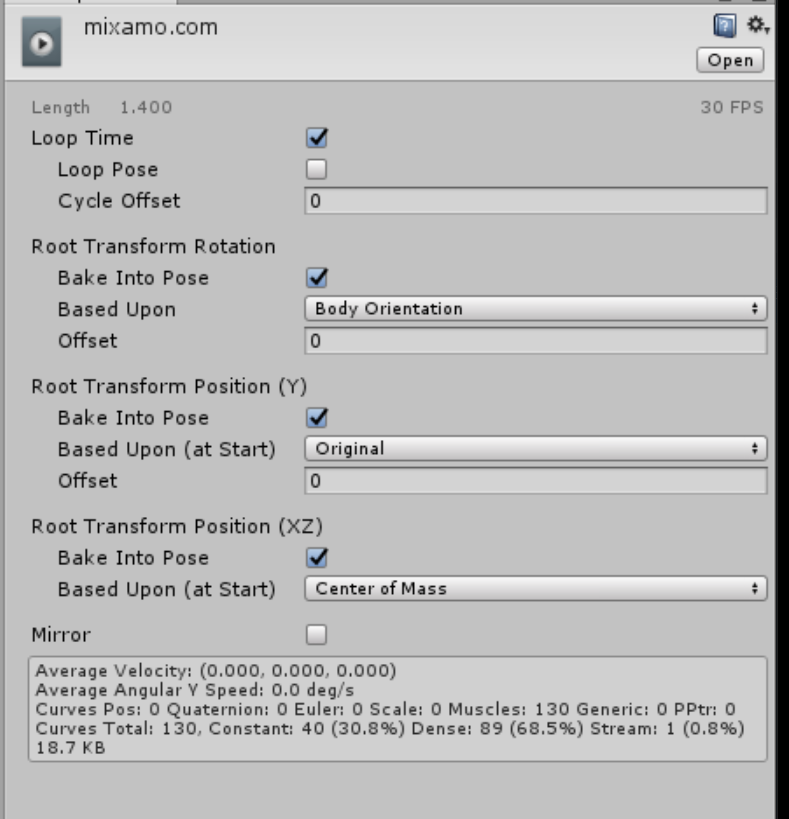
@muted prairie Yeah, maximo animations, download one, set options (as in picture), and add them to your animation override controller https://ibb.co/iHPKEw
 muted prairie
Ok that's my issue right now, i've downloaded a model from mixamo, it has an anim ccalled walking that does nothing in the preview and has those options
and the other anim is mixamo.com and has the walking animation in preview but not those options
 vagrant heron
Question! How to you get an audio emote to stay on while you move around?
If I move, it turns off
muted prairie
@glacial pike i'll try that right now though
with the walking anim that seems empty, maybe that's how it's supposed to be
foggy vector
How do I get the mixamo animation fbx to an actual anim file
 glacial pike
That is what worked for me atleast on the x many animations I used, though there are two types of files you can get. (look picture) the one file is a .anim, change the options as said above and it should work, the other one is a .fbx file, you need to change the rig of that to humanoid and then open up the file (little arrow) select the animation inside and select the options as shown in the first picture I sended :)
https://ibb.co/iOqHZw
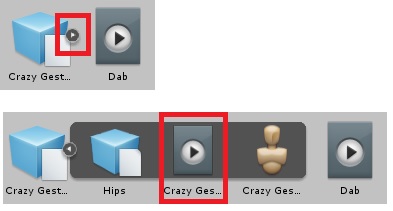 obsidian slate
@glacial pike can u check my 2 pics above for me, pleas
muted prairie
top right corner ?
oh
click ctrl + d
to make a copy
that one you'll be able to change the options
foggy vector
Ah ok thx
glacial pike
@obsidian slate I wish I was advanced enough to help you with that sort of things but i'm barely able to get basic stuff done myself, sorry :3
muted prairie
@glacial pike So my character isn't in the ground anymore, but the animation seems to play at hyper speed
foggy vector
Options still do not come up for me
muted prairie
how does one download only the animation from mixamo
@foggy vector can you screenshare ?
foggy vector
uhhhhhhhhhh
glacial pike
I don't know, never seen an option for the anim file alone sadly enough
muted prairie
I've tried the two animations and they do the same thing
that's honestly the only thing i can't understand right now, it's so frustrating
foggy vector
whyyyy is this so hard
When ever i try to play the animation the model goes halfway into the ground
glacial pike
Depends
muted prairie
ah ?
glacial pike
Custom animations (once you create yourself) don't have those options it seems, I run into the same trouble with what I'm trying to work on now
I'm trying to rotate a part of the character, fire a laser and go back to normale state, but the laser doesn't show up and I fall halfway through the floor every time I try as well
foggy vector
im going to screammm
muted prairie
and i thought my problem was difficult lol
i'll mess with the other options of the anim and then i'll kill myself probably
glacial pike
sadly there seem to be very little tutorials or information about that exact problem, so most of us are stuck and the people that do know are either busy, asleep, have to many people they are helping, or can't be bothered to answer
foggy vector
aaaaaaaaaa
glacial pike
I been stuck with this for the whole day aswell, aside from the 6 hour shift that is, maybe tomorrow i'll find an answer :3
spiral sphinx
can someone help me please 😦
 arctic quiver
What's the problem
spiral sphinx
im currently trying to do an animation on my gundam with the wings, but dont see a wing option, but the wings do have bones
arctic quiver
Hmm maybe you should look at animation tutorials
spiral sphinx
i have, none talk about the issue
 hoary coral
anyone ever try to put a spotlight on their avatar? I can't seem to get mine to face the correct direction in VR Chat. It looks like it is rotating and moving correctly in unity.
 olive stump

 trim plover
@hoary coral well I have got a spotlight on my avatar that functions like a flash light, and it works because I have it queued to an animation override
hoary coral
I have mine parented to a bone on my armature . I have an animation override that is supposed to swap out 1 model for another (make 1 active, deactivate the other) and then activate the light.
In VR Chat the light doesn't seem to follow the position and orientation of the bone I parented it to correctly.
glacial pike
nice, grats 😃
vagrant heron
How do I get my sona to not be in the floor with her new idle animation?
ashen sedge
@vagrant heron Add Root.T property and set it to the proper height
ashen sedge
Should be in the animator tab
 pure ledge
to move an object in an animation, do you need to edit the T-root, or can you just move it with the position arrows?
vagrant heron
She's still in the ground
I did something wroing
Wait, I did an emote and she fixed herself????
Another question
How do I make my character's default position the default animation position? Instead of the character dropping into that squat
So I want her like this
But she goes like this
obsidian slate
i set its position, but when in play mode, it jumped to another position to animate
toxic solar
Alright, so, trying to animate in Unity. simply wrapping the fingers around a knife with the rotation tool. For some reason, the figners keep snapping back to their origonal position, and I can't for the life of me find out what's wrong. Any help?
vagrant heron
@toxic solar You have to use this section to move the fingers
Not change the value at the top
Add each finger you're editing, and change the 0 value till they are how you like them
toxic solar
Ooof, so much for hoping this would be easy. Thank you
 slim swan
Hey I have this weird eye tracking bug anyone have an idea of what might be causing it?

 sonic wadi
im getting the same..... you probably use cats blender plugin right?
sonic wadi
maybe play around with "range" sliders in the plugin
idk.. im not too bothered by it
so i havent tried to fix it
slim swan
np thanks man
sonic wadi
good luck dude
clear yew
anyone really dank at animations and loves runescape want to help me build an animation im already done with it
just need help with 2 dragon heads coming out
How in the world do I get an mmd model to work on mixamo? I want dem animations
and yes I converted them into fbx. aside from that I'm lost
 wet garden
i think salazzle might be a lost cause
 tall zodiac
I finally figured out why my blendshapes in C4D would never import into Unity without crashing, translation errors most likely. Also has to be point based morophs. Im so happy
wet garden
i'll just keep dick salazzle around to start awkward situations
tall zodiac
How do i increase my animation clip lenght?
My blinking is way too fast
its like i have dust in my eyes
vagrant heron
How do you put the mixamo animations on a character? Is it as simple as dragging it into the custom animation slot thing?
tall zodiac
You make sure the animation is mapped as a humanoid rig, then ctrl d on the animation clip, the play button thingy, and add a CustomOverride from Animation folder in VRCSDK to your same folder, preferably rename it and make a copy. Then add that animation inside the CustomOverride, then replace your Standing Anims with your own CustomOverride
Should be a video on youtube explaining better
vagrant heron
I already have a custom animation thing with hand emotes on it, do I just add it to that?>
In the emote slots?
 uneven wing
Aaaanybuddy happen to know how to disable eye blinking? I checked disable eye blinking in CATS ... didn't seem to work?
 fathom plaza
If I delete the legs mesh under a dress but keep the shoes, will it still animate correctly when it walks?
uneven wing
I think so if you keep the bones?
fathom plaza
Thanks. I'd love to give it a try but I'm still trying on getting the mesh under 20k
vagrant heron
Should I add a walking animation to walkfwd or runfwd?
Or both?
In vr you always run I think, so I'm not sure
sonic wadi
@fathom plaza well deleting the legs should already help with that xd
 low plank
Hey I am trying to add audio on my model, I got it to work and the animation and everything works fine and the audio works but the problem is you can hardly hear it at all. I have the volume in the Audio Source at 0.5 and tried changing it to 1 but it still sounded the same. I also moved the camera closer but yet to get any better results. Any idea why this may be
Sounds fine in unity
pure ledge
is there a limit to how long a gesture can be?
 high gale
Anyone mind explaining to me how to have a animation to change the shape keys in my face to 1 for different expressions
I understand how to get weapons and all to work but thats about it
pure ledge
@high gale this may help you. https://www.youtube.com/watch?v=HzwKvXoOgXE&t=7s

Been a while! Sorry, I was sick and couldnt talk for a few days, you can even tell I was talking quietly here. Tutorial on Face Visemes / Emotions. Enjoy! My...
 magic oasis
my animators section dissapeared
how do i get it to come back
dunno what went wrong
its been there before
vagrant heron
I tried importing an Idle mixamo animation and now my character just stands frozen
 sand apex
Hey I'm curious if I edited both hands for a completely different animation and override it over something like rock n roll, no one will ever know when I'm doing the rock n roll gesture for the animation?
vagrant heron
What do you mean?
The rocka nd roll hand pose is replaced completely by whatever anim you put there
sand apex
Oh I meant that in reality I'd still have to do the rock n roll gesture just to trigger the anim I put over the original anim but I figured it out now I was just overthinking it
uneven wing
Anyone know if there is a manual way to disable eye blinking after you already created eye tracking with CATS?
I can't seem to click the button again.. messes things up
Oh, nevermind I think I got it
 snow lance
Anyone have the Muscle Animation Editor unity file for making overrides by chance?
tall zodiac
ugh no matter what i do i cant get my animaton blinking to slow down
its constantly fast
 mystic umbra
where can I find some gooddance animation
unique night
@tall zodiac is the blinking done with the animation timeline?
if so, you should be able to extend it in seconds
@mystic umbra check mixamo's site for some (needs their mixamo rig to be applied to yours I think, not 100% sure as I havent used the site yet besides looking at the dances available)
unique night
😃
 mighty harbor
Can you replicate the screen camera thing in the avatar testing? If youre able too please message me how <3 thanks
vagrant heron
I attached particles to my character's body and they suddenly became super tiny
how to make them bigger again?
they are like dot sized
 grim fossil
ive seen people use reflection probes or is it just a custom shader
 blissful frigate
question, how do you mesh swap?
 empty wave
Is there a way to add 2 miximo animations into one animation?
 shrewd moon
Can someone screenshot their correct audio settings for gun fire?
 steep citrus
anyone know why my animation took away all hand gestures and spawns the animation upon laoding in?
ideally a gesture was supposed to activate the animation but I think my over rides didnt work
unique night
@steep citrus did you animate on the original model or on a cloned model?
@blissful frigate you want to make use of the active object property in the animation timeline as far i know (not sure if there are other ways as im new to unity too)
 languid gull
Is there a certain height for custom sitting animations or is it just 0,0,0?
unique night
i'm not sure but would using the chair model in the sdk help?
I'd like to know if there is a certain height needed too
clear yew
is there a good video tutorial on how to make the finger-template-animation thing?
where you can for example put your fingers as a v or something and itll activate a new animation and spawn like a object or something?
like the way that people pull out guns and stuff
unique night
@clear yew animation overrides is what its called

Unity - Custom Animation Overrides, Blinking Animation, Dynamic Bones & Colliders, Viseme. VRChat #3
Importing model - 0:37 Toe Removal - 1:37 Applying Shader - 2:29 Blinking Animation - 3:09 Animation Override (Facial) - 7:24 Avatar Descriptor & Viseme - 18...
clear yew
thanks alot
 gusty oak
Is there a template on the vive controller of what point does what hand gesture? trying to animate a model and not at my regular setup, so cant test myself.
clear yew
And how versatile is coding the game? Is it free like gmod? more? less?
languid gull
Didn't know you could animate in unity. Thought it had to be files from blender or something
 tropic steppe
How are people doing the eyes/clothing animation like thier eyes/cloths have stars/pics playing on them?
unique night
@clear yew seems to be alot of potential to what you can do but probably not as free as gmod. As an example, someone created a phone that takes a selfie and updates it in game instantly with the photo
 trim nimbus
I am trying to do an facial expression as emote override but when I try to play it in VRChat my avatar just keeps flicking up and down very fast for a few seconds, you have an idea what could cause this behaviour? I have followed the guides but I don't know what I've done wrong
unique night
is it an emote or a gesture?
clear yew
@unique night Do you think itll be somehow possible to make like a somewhat realistic rp?
unique night
rp = roleplay?
clear yew
yeah
unique night
yeah definately
clear yew
yeah i saw the moon map
unique night
and then theres the aliens map with a working flamethrower and torch
trim nimbus
@unique night I have done some facial blend shapes as 2 frame long animation and set them to an emote override
clear yew
how do people build maps for the game? just unity? coding too? all by unity?
unique night
in terms of animation potential too check this out: https://www.youtube.com/watch?v=lgK9R61KgOE

Pokelawls LIVE playing VRChat Virtual Poke Virtual Encounter [24 hour new years stream]
clear yew
i started learning game dev not too long ago so if its on the same "path" ill practice modding a server instead of making a game
Thats how playerunknown started, asylum entertainment (identity) etc
unique night
@trim nimbus where did you put the override? did it go in the vrc descriptor or did you put it in the animation controller on the model?
trim nimbus
I put in in the avatar descriptor as standing animation override
unique night
and its triggered by which emote?
trim nimbus
I have set it to emote2 atm
unique night
that could be why
try placing it in close fist and test that
emote1, emote2 etc are for menu emotes
and can be 10 seconds long
clear yew
and will the game graphics stay as they are right now? or will they improve them?
trim nimbus
yes but I dont have VR headset so I'm kind of limited to menu emotes 😦
unique night
probably best they stayed as they are
 regal hollow
agreed
unique night
@clear yew yeah
clear yew
i dont have vr >_<
clear yew
so why not have the option to tweak the settings xd
unique night
it has to be as equal as possible since its a social game afterall
@trim nimbus make the emote longer then
with the slot you put it into, you can have a longer emote animation
that 2 frame animation will be over in a blink
trim nimbus
ok I will try that
unique night
but, your model will also move into ground
so you need to reposition back to base pose manually
add the property: animator.root T
and after you're done, click the animation file for the emote and click all the checkboxes that say "bake to pose"
in the inspector
 covert linden
hey, would anyone know how to fix the problem that with the clapping emote, the hands clip through each other?
clear yew
Replace with custom clapping anim
the original was made for humanoids with proportions that are... well, 100% humanoid
oversized hands/not properly scaled hands will always clip unless you do a custom anim
tropic steppe
How are people able to make thier models have the rainbow effect? is it a different shader from the ones that come with the models?
regal hollow
There is a rainbow shader in cubed paradoxes shaders
tropic steppe
is that in blender or unity?
regal hollow
unity
you have to import it

GitHub
Cubeds-Unity-Shaders - A compilation of custom shaders for Unity3D
tropic steppe
i c, do you just apply to the materials like you would usually do or is it something along the lines of animation?
regal hollow
in the material at the top of the details you can choose shader
tropic steppe
ok I see
 weary cargo
anyone know if there is a tutorial for adding a smartphone that can take pictures and stuff?
regal hollow
i can tell you how i did it
not sure if there is a tutorial out tho
i just had to experiment
weary cargo
you did it ?
regal hollow
aye
weary cargo
how did u do it ? 😮
i do know like, add a camera, put it on the phone, then add a render texture to the screen of the phone
regal hollow
thats it my man
weary cargo
i dont know the rest tho
weary cargo
but people can take like a photo, make the picture still for a moment to show the picture and stuff
u know on the phone
regal hollow
aye
weary cargo
so they take a photo, then the camera feed stops
regal hollow
both the same except one has the camera disabled
regal hollow
when the camera is disabled the render texture shows the last thing it saw
regal hollow
but im pretty sure thats not possible right now
weary cargo
that would require shitton of scripting im sure
regal hollow
aye
weary cargo
yeh
regal hollow
but its not worth their time to work on that right now
 north patrol
I'm getting lost in the different tutorials for eye tracking, can someone help me ?
regal hollow
@north patrol the most i know about eye tracking is hitting the little button in blender cats
weary cargo
btw this photo thing recuires two animations right? one for the pre photo, and one for the "frozen" picture right?, do u create one duplicate of your model for each animation?
north patrol
I don't want to mess the whole thing up so I'm not touching anything
regal hollow
@weary cargo ye two animations. and you can use the same model
north patrol
@regal hollow does it works correctly with your method ? I just don't want the dead fish stare
regal hollow
the disable the cam in the second anim
regal hollow
@north patrol All ive done is use cats and its worked fine for me
north patrol
@regal hollow I'm not sure on how to use it, I installed it yesterday
weary cargo
thanks alot for the help btw g1fan
regal hollow
isnt there a button beneath it
weary cargo
really appriciate it
regal hollow
@weary cargo np dude
fierce copper
@vagrant heron did you make that dj sona model urself? O.o
north patrol
@regal hollow doesn't let me click on it
north patrol
I have no idea what this is
regal hollow
What is your model?
north patrol
you want me to send it to you ?
north patrol
no
regal hollow
was it pre rigged
north patrol
I downloaded it pre rigged
regal hollow
but it wasnt mmd model
north patrol
no
 prisma kite
is there any way to raise the volume on a animation sound except boosting decibel level to distortion high levels in audacity?
north patrol
It's a kingdom hearts model
regal hollow
@north patrol It sound like it has no visemes
which means you need to make them manually
regal hollow
which is beyond my skill set atm
regal hollow
good luck
weary cargo
@regal hollow hey u here man
weary cargo
well, its going pretty darn bad
the smartphone is not showing up in the game
when i do the animation
only the fingers are in the right position
but the phone itself is not there

its there and added
but not showing up
dunno
regal hollow
are you sure both sets of values are the same?
weary cargo
the rockhard one
regal hollow
are you sure the original model has the phone
 weary cargo
hmm
@regal hollow g1fan, got it to work, just the texture i put the camera feed on is black?
ever gotten that problem?
 spare gazelle
Small question. For L/R strafe anims where would they go in the override?
regal hollow
@weary cargo make sure the texture is assigned to the camera
covert linden
@clear yew hey I had to go for a min. Where can I find the animations? Any chance I can just edit the original one?
 clear yew
iirc its mixamo's animations, not sure if they are avaliable for download somewhere
just google i guess
weary cargo
and i put that new renderer texture on the screen
regal hollow
@weary cargo is the texture assigned to the screen
weary cargo
yeh
oh shit
i made it a material first..
fuck im stupid
now it seems to work
thanks alot for the help again
damn
regal hollow
np dude
 tranquil plover
I'm guessing this goes here;
I've set an avatar, replaced the hair, remerged the hair with the head, the hair still won't move with the movement of the head.
Not sure why, the hair is part of the same mesh as the head, yet does not move with the head, at all, it seems.
empty wave
How do i make it so my avatar has no amimation?
empty wave
I thought it had to be humanoid to upload it?
empty wave
ah, does root node matter for generic?
tranquil plover
How do we set custom walk, and other movement to a model that is humanoid in design, but doesn't use optional bones that VRChat requires be mandatory for somereason?
 tired hazel
anyone encountered a issue when their avatar is instalaunched into the sky?
like a rocket
empty wave
Is there anyway to just disable the walking animation?
 sharp helm
Good day anyone.. Is it possible to replace the default Controller? Because I replace the controller in the override controller from the sdk and removed the entire emote tree.. but everything kept working.. Also adding a new layer didn't seem to do anything.. Is the default controller always used no matter what? Has anyone gotten any success in this?
 opaque rivet
Hi everyone, can you tell me how to make animations, where more than one object perform different animations? For example, mmd dancing
but what if I do not need this animation in the form of emotions?
sharp helm
I'm sorry, I misunderstood your question
sharp helm
I think I have the same question you have
I know it has to do with the animation controller
 old merlin
the controller got replaced by the client
opaque rivet
I think it's just impossible to do
 lime wadi
i want to know how to make my object that i have appear with a gesture override fly in a single direction
sharp helm
Freyka, if the controller gets replaced by client.. its impossible
 oblique panther
anyone here know with what people manage to draw with their finger tips
in like rainbow colors?
 scarlet wave
guys u ever get error when making triggers? It asks me if it's legacy?
how do I change it into legacy
 inland urchin
How would I go about making a spawn animation? I want my Anubis boy to spawn in in a coffin that rises from the ground,.
 rancid furnace
don't thinnk that's possible @inland urchin although you could make it so when you do the die emote he rises in a coffin after dying
lime wadi
how to make objects move in animation all i know is how to make them appear but i want mine to fly around
inland urchin
Perhaps. I know Brightside makes his Titan slam in from the sky on spawn so, perhaps he's got a real jank method.
oblique panther
not sure where to ask so pls point me to the right channel~ how do you get a gradiant rainbow preset for colors
like i wanna draw in rainbow colors
 unkempt moat
🤔
Soo anyone got any idea as to why the weapon animation i added does not show up and only makes my hand move slow/odd?
glacial pike
made the animation last 1 second instead of 0,1 second? (most common mistake I have heard about else I have no clue)
unkempt moat
Welp looks like copy pasting all the movements into another file worked so
Now im just floating in the air when i use it 👌
But i got an idea as to why that is
Or atleast i hope its that
glacial pike
My animation is just stuck in the ground xD
 kindred blade
is there any way I can add some very basic free not fancy animations? I'm playing m+kb with no vr anyways so not like I need anything fancy
right now the builder has a warning that I have no animator so anything that gets the job done
unkempt moat
Im not sure but i think change the emotes (wave, dying and ect) to something else
No idea how that would work but its the only way i can think of doing it
 echo gull
@kindred blade try this video starting at 13:17 https://www.youtube.com/watch?v=V0l4-pH3vI4&t=15s

Creating custom animations for hand gestures and emotes in VRChat
glacial pike
mixamo.com has some nice free stuff, it requires a bit of reading (or watching tutorial video) on how to import that into the game
kindred blade
im not sure if that does what I need though
i dont really want any additional fancy stuff I just want to make sure my model isnt a t pose sliding on the floor
unkempt moat
Well 🤔
Now im not in the air anymore when doing the animation but now im glighty as hell when i am not looking at a mirror
When i look at a mirror its fine 😂
I love this game some times
kindred blade
basically i want to resolve that second error
echo gull
did you set the animation type to humanoid ?
kindred blade
yes
maybe its because I decimated the model from within unity and it got messy idk
unkempt moat
Should not be it
echo gull
hmm well then i'm at a loss too ... sorry am just a pleb at this ^^
unkempt moat
Atleast never heard of that
Mind throwing a screen of the Inspector when you select the full avatar in the scene
And one of the rigging?
 mental comet
Anyone here had an issue where your lips move but your teeth dont? i dont know how to customize my lipsync :3
muted prairie
teeth weight painted to jaw bone ?
 prime elm
Is there anyway to trigger custom animation on keyboard/ mouse?
unkempt moat
I think you can only do that if you change the things like waving/dying emotes
But not how far that can be pulled
Also im not sure at all about it as i never tested it
 Welp i found out why my avatar was looking so funky
The second frame of the animation had the avatar moved compared to the first one
 upbeat wigeon
so ive got an audio source set up and have all the numbers right, but how do i tie it to a gesture?
or do i have to make another animation for it
yeah okay i think so
clear yew
anyone know a link to Wing flapping motion?
 tender apex
how do i take the die emote thats already in vrchat and just add sounds and a 2d effect to it?
clear yew

Tutorial explains: - How to create the soundfile - How to create the animation - How to trigger the animation Morgus tutorial: https://www.youtube.com/watch?...
unkempt moat
2d effect?
Why would you even...
And the same you would do it for any other emote...
First find the die emote/remake it and add sound to it then throw it in on the right emote
And i got no idea what the name for it is as they are called emote1, emote2 ect
tender apex
thanks, and @unkempt moat its so i can add this to it https://www.youtube.com/watch?v=vxJ01puNw4E

Download link: https://drive.google.com/file/d/0B81ZaVnNqp8zZ2tVT0oyMk55WDA/view?usp=sharing .AE link (recommended if you have AE! Comes with 'You Died' soun...
unkempt moat
Should be able to
I have never touched the emote things because welll im to lazy
Same goes for sound 😂
 chilly bough
Hey can someone help me out? I have a weird problem in unity
I added to my character an emote ( a dagger in my hand) and somehow only for me when i have my oculus on it gets renderd in each eye so i have weird double vision
Others said its fine
unkempt moat
As the users or ;p
Because lightsabers are cool
 wheat lion
check the tris oclac
 simple verge
2 million polyguns ?!
toxic solar
Aye, I'm running into an annoying issue: I duplicate my model to use as an animaion dummy, but in the "Animator" tab, it shows me one of the default one like IDLE Read-Only or whatever. How can I clear the board and make a new animation?
 plush meadow
Say that I have a model that's 19k tris and faces. If I add a weapon to that model that is 9k tris separately, does it still contribute to total tri count?
oblique panther
@plush meadow not if you use it for animation
 peak cosmos
is there any simple way i can make an animation for an avatar that just moves the head around where i'm looking?
plush meadow
So I should be fine if I'm making a model that can pull out a gun if I trigger the right movement?
peak cosmos
i guess i mean controller?
plush meadow
Good to know. Thanks. Was going to add a gun to a model I already tested in vrchat for a friend with vr.
 still rune
this has probably been addressed, but why do some characters have their mouths gaping open?
still rune
Even when I'm not talking
plush meadow
Yeah, my visemes does that sometimes.
It's not perfect, but usually if you speak again it corrects it.
empty wave
particle animations just don't want to work for me
character just does the clip though the ground thing and nothing happens
frosty oyster
uh i figured out why my character glitched out when i used a gun u have to have it as a gesture and not an emoji
chilly bough
So i guess im really the only one that fucked up in that way? Its so weird why does my weapon get randers 2 times in each eye
renderd*
 grizzled furnace
Are sounds added in the same way other animations are?
plush meadow
One question, how do you make a muzzle flash and add an accompanying gunshot? Also, how would you trigger the sound?

This shows you how to put weapons and audio into the game vrchat. More stuff here: Where I got the gun model: https://abyssleo.deviantart.com/gallery/5925409...
 solar wing
is there a way to download just the animations from mixamo? without having to upload a char, etc
 torpid light
Activate an empty game object with your effect on it @plush meadow . So maybe a particle effect or something on the empty game object
so in your gesture you should both active the gun and the empty game object
plush meadow
But how would you trigger the gunshot though?
torpid light
Use a 2nd gesture actually
plush meadow
Would it have to be some sort of gesture?
torpid light
yea on your other hand
so maybe use rock and roll for the gun and finger point for the shot
rock and roll will activate the gun while finger point will activate the effect
toxic solar
Anyone have previously working animations make their model explode? My simple, previously working knife holding animation now makes my character's model explode across the map and I have no idea why.
torpid light
and if the gun isn't active, you won't see the effect being active because the empty game object with the effect will be parented to the gun
plush meadow
Makes sense I guess. One more question, how does one trigger the rock and roll gesture?
I'm making the model for someone who has vr, unlike myself.
torpid light
on oculus? it's done by pulling the trigger with your thumb on the stick or buttons
i don't know for vive
toxic solar
Vive it's touchpad down
plush meadow
Thanks.
toxic solar
Roll finger aroudn the touchpad, he'll figure it out
torpid light
i find that some of the gestures are easy to accidentally press on oculus, so you may want to ask if they have oculus or vive and find out what gestures they want it on
 pastel hill
ok,so my avatar's eye tracking didn't work ,but it works in Unity and Blender and it also have "vrc.blink" shape
plush meadow
He has oculus.
unique night
are finger bones required in order to trigger gesture overrides? for example, my avatar has only a single hand bone (no fingers or thumbs). Would i still be able to make a thumbs up in real life and have it recognised in the game to trigger an animation?
 sharp torrent
Do you guys know how to make laser beam particle effects? Or know any good tutorials on that matter? A lot of online tutorials that I've found are using assets that aren't whitelisted in VRChat
spiral sphinx
anyone know why my animation works in unity, but in game it sinks me into this hole and does no animation or music? http://prntscr.com/hwxoyh
 empty wave
someone pls im going insane, how do i fix this pose shit
finally got the animation working in game but can't figure out why i go into this pose everytime i use it
 hexed token
Hey! Im trying to import new running animations from Mixamo into unity but I cant get it to work
 austere wadi
@hexed token There are some great tuturials online for that
 ripe carbon
my animation override for IDLE moves my model in the the ground, when I walk in any direction it moves back up, is there something I need to change in the avatarcontroler?
 graceful wraith
Yo
Can Somebody help me with a stationary Animation
I just want some light shows to my Tie fighter
thats all
 reef surge
what is the effect used to draw in the air like those markers in the art room and is there a tutorial or something to apply effect to my avatar?
 glad topaz
So im having a small issue, ive done custom hand gestures on 2 other avatars but for some reason every avatar i do now is missing its blendshapes in the mesh bar in unity. I have no idea why its not there when i dont decimate the face at all.
dawn shale
Hey guys, does anyone know any other sites for animations besides mixamo?
Not exactly what these are called so Idk what to search
 glacial spoke
is there a way to toggle something on and off without vr?
graceful wraith
Okay one question
How can I make one animation?
So I created 2 moving lighs
But each one has its own animation
And only one plays at a time
Hol up I got it
 gaunt pebble
Does anyone know why my avatar doesnt have any properties for animating the rig?
ripe carbon
I made a custom idle animation and my model is stuck in the ground, if I compensate for this my model when finishing motion moves from in the floor to the position I set in the animation.
Is there some blend between the default idle (which I can override) and some other animation that can’t not be overridden/is not in the override controller?
Also of note, when in VR and in idle the avatar will not move up and does with the head set but does in the walk/run/strafe animations
Has anyone else had this problem?
blissful frigate

VRCat: Community-Run VRChat Forums
Snail made cool marker override to draw in vrchat or people cant talk can write out what they want to say
[MEDIA]
This is Snail github for the...
 cedar escarp
Ok so ive made my model and now i need animations is this the hardest part?
is there a easy way to do it
 errant finch
Is there a way to overide an animation to play a Particle system only during the emote?
reef surge
thankyou @blissful frigate
errant finch
nvm i found a work around
 viral wigeon
someon can tell my if you can convert .vmd md file to fbx
steep citrus
does anyone know why animation override is breaking my characters hands? (all gestures stop working)
 lament raft
Yo yo how to facial expression
sharp torrent
Should my Wrap mode on my animation be default, or once if I want it to play just once? Seen a few tutorials and they differ.
 gleaming tusk
Hello, is there a way to loop the animation on the avatar controller?
clear yew
hello, i tried doing the eye tracking thing for my model via CATS but it doesn't seem to show me the shape keys in unity
what's wrong
high gale
When I try to edit one of my animations it wont let me add properties
even on empty animations
 pseudo pewter
Hmmn, I would like to move an entire (MMD) animation up a bit. I don't think that it can be done in Unity.
As for blender I am not really sure how to proceed. Trying to simply move the model up a bit at the very beginning results in some rather horrendeous material. (All movements become extreme wobbly)
 trail grotto
Was there anything in the update that broke selfie cameras? Mine just shows a grey screen now but it worked yesterday 😐
sweet zealot
i cant seem to find a tutorial on how to include a sound effect to an animation. ive been looking for 3 days. I include the sound effect in the heirarchy and in the animation, but theres no sound in vrchat for it
sharp torrent
Is there any way to quickly test an animation in-game without vr?
sweet zealot
im afraid not 😦
toxic solar
General question: If I'm a VR player and I make a custom over ride for one of the "Emote" slots, would hand gestures stop it like you're playing another animation?
 formal shard
Hi Is it correct to attach particle system to the amature ? Local simulation works well, but if I turn on world space, the particle system attached my hand moves with the direction I look. How to fix this problem ?
 lavish crag
so, how do I make an avatar use a running animation while running instead of the idle one?
sharp torrent
I can't figure out how to edit an animation after I finished it. Any help?
 thorny flame
Did i place it correctly? or how should i place it?
i mean the USP and the USP Fire
vagrant heron
@toxic solar Nothing stops the menu animations
They have to play out fully
Can anyone help,, why is this happening?
tender apex
hey guys, i dragged an ogg file to my assets but when i create an audio source and try to look for it, its not there, anyone know why?
drifting portal
Does anybody have the breakdance and twerk animation so I could donload them?
download*
 civic oracle
Stupid question: so CATS eye tracking just makes your character auto blink right
inland urchin
I'll wanna do some stuff with the Fist emote, but keep the ability to make normal fists. Any way to copy the fist animations keyframes?
civic oracle
Okay goodie, so I think I did that right at least, tiem to spend a hours on a simple animation
inland urchin
I'ma pop into VRChat, message me if anyone got an answer.
vagrant heron
Keep in mind every tim you pick something up it wil do the emote @inland urchin
 junior epoch
Hey, im curious to know where I can find custom emotes and such. I know how to set them up via animation overrides, just not sure where to find the actually emotes
unless I would have to make them myself
vagrant heron
junior epoch
Do I have to use the rig from Mixamo or just download my current model with its rig?
since the models I have are set for vrchat already
 floral pagoda
Is there any possible way to put in desktop hotkeys for emotes?
vagrant heron
just download the animation without a model/skin
then put the downloaded animation into your character's assets, make sure the animation is rigged as humanoid, and go to the animations tab and make sure these boxes are checked
@junior epoch
Then your animation will appear here
I reccommend changing the name from mixamo.com to whatever the animation is though
Or you'll get them mixed up if you have multiple
junior epoch
Alright, gonna have to get rid of the current downloaded character I have on Miaxmo, or I can prob just download animatinons when logged out, ty.
vagrant heron
When you hit download, there's an option 'without skin'
junior epoch
ty!
tender apex
can anyone tell me why the ogg file i drag into the assets shows up as a white sheet of paper and i cant find the clip for an audio source?
clear yew
any decent tutorial on how to add blinking?
i found some but one had no audio and the second one the guy explained nothing and had a really bad accent
civic oracle
So I can move the mouth with visme on the CATS tool, but when I go to unity I can't find a "jaw" object to assign as the face mesh 🤔
warm furnace
You dont need
Assign "body" mesh
Which is normally your only mesh
And then select viseme and fill all
 pastel forge
Yeah, body should contain all of the blend shapes
still rune
How does one go about implementing the "ah there and oh" keys for mouth movement?
 lavish palm
Anyone know how to make your avatar fly upwards using animations?
civic oracle
@warm furnace How should I fill all? I get a lot of shape options.
clear yew
i am getting error trying to login to vrchat server from unity, it says no connection 😦
btw i give up, no alpha channel screwed my model's hat, i find it impossible to add even a simple blink animation and i have no dynamic bone plugin installed so my model looks really bad 😦
 patent bramble
Servers are down
hoary coral
hmmm. For my new avatar Viseme for mouth works, but blinking and eye tracking do not.
clear yew
Does anyone have a good lightsaber model i could use?
 quasi walrus
how do i trigger a particle system in animations
 whole granite
@clear yew
 uncut shoal
I have this issue were all my animations make me sink into the ground rip...

 severe sierra
Got this working as a gesture override on my EVA avatar. I can't make the knife dissapear before it closes back up though and when I do the next gesture to put the knife in my hand it interrupts the animation.
muted prairie
first of all, that's dope
uncut shoal
Okay I'll go check thanks!
Like I'm just trying to activate a hidden mesh on animation and if I put the mesh were it should be without moving the avatar my avatar sinks into the ground and if I move it to the ground on my character then it just flys upward from the ground on animation
never just sticks to my freaking hand rip
severe sierra
It was tricky to figure out how to make it run the animation once the object is activated on a gesture and make it follow the shoulder bone
but it works
uncut shoal
dude that is dope
quasi walrus
@severe sierra nice
severe sierra
Now I wanna try other animated things like this with overrides 😄
muted prairie
What tutorial did you initially check for overrides ?
I'm not even sure if there's any tutorial right now for using mulitple overrides at the same time
severe sierra
this is the only one ive watched for overrides https://youtu.be/V0l4-pH3vI4
Creating custom animations for hand gestures and emotes in VRChat
 cyan sparrow
I'm working on a particle system and I want the subemitter to come out when the parent particle system finishes, but 'on death' does not seem to trigger that.
severe sierra
And no there really isn't, I just figured it out myself
cyan sparrow
Any tips?
severe sierra
This animation plays when I do the finger gun emote, the knife appears in my hand when I do the finger point and then the blade extends when I do a fist (using an occulus btw)
glacial pike
that tutorial is great for the basics, it just doesn't help at all when you try to make somewhat more advanced animations. Can't even find out why it still puts me under ground on custom created animations :/
glacial pike
tthat is the point, I already am on the ground :/
cyan sparrow
Are you making this animation in unity?
glacial pike
yes
cyan sparrow
By default it puts you at 0,0
I'm pretty sure you don't have your feet on the ground if you've not used Root T to shift yourself up.
That is what I had to do in my animation
glacial pike
there is no possibility to add a root-t though if I create an animation from a gameobject and then add that game object into my armature after the animation file was created (this also solves your character from breaking when you create an animation)
 prime gale
Is the Dance emote just one of the standard emotes in the override list, like EMOTE1 through 8?
glacial pike
it's #5
prime gale
that saves me a lot of trial and error
now if only servers would come back so I could publish this
 true basin
I'm starting a custom animation service soon, using motion capture
body+facial

finally a place to apply my mocap experience
I was pretty excited when I learned that Unity was now joined to the hip with Motionbuilder
muted prairie
People should find this very useful !
 hard crag
Is there a default blinking animation added to the idle one now?
true basin
I just wish VRChat would create a new mocap streaming API so that unsupported mocap systems can be developed for VRChat
something like having clients read from a live XML containing BVH data, which then gets applied to avatars in realtime
but for now, i'm stuck with the 10 second custom override limit
muted prairie
@true basin You can definitely make a suggestion on the canny website
hard crag
https://i.imgur.com/ZFNuWiP.jpg The automatic blinking thing is breaking my character's face 🤢





 true basin
just redo the animation
hard crag
I didn't add the animation though
Normally to get blinking I use a clip I created using blend shapes and add it as an animation component
plush meadow
How to rotate gun in unity?
hard crag
Seems that way, I have no animations/overrides to be making her blink and it's doing it. The right eye gets stuck and stuff o_O
true basin
what is your Lip Sync type?
Blendshapes shouldn't be automatically animating themselves, unless they were already animated
hard crag
viseme, and I have no shapes labelled as vrc.blink_left/right or w/e
shrewd moon
@plush meadow top left,under the assets tab
true basin
@hard crag did you load your model into motiobuilder to pick it apart?
hard crag
I don't use anything but blender and unity
plush meadow
Thanks. @quasi walrus @shrewd moon
quasi walrus
welcome
true basin
aw
hard crag
It seems to be using the first 4 blend shapes in the whole list as the blink and lower lid things even though they're not labelled as the vrc ones lol
prime gale
Is there some other override I'm not aware of? I really can't figure out where I would find the seated animations
hard crag
it's the same custom ovveride asset provided
but you have two slots on the descriptor
one for standing the other sitting
quasi walrus
back up
prime gale
Yee but the override itself doesnt contain seated animations for me to override is the thing

 quasi walrus
what is 5?
hard crag
or well, all of those animation spots are for sitting
quasi walrus
on the emots
prime gale
I assumed Idle was for standing, since I'd already replaced it and noted that was the case in game
hard crag
that's because you have two different slots on the descriptor
you make two copies of the override controller, one can be standing the other sitting
apply custom anims as you like to each one, then just use those controllers on the avatar descriptor
prime gale
Oh of course god why the hell didnt I realise that
hard crag
😃
prime gale
I was sitting there thinking that was it but for some reason didnt think I could like, copy and use the copy
doi
 sinful rover
When using emotes my model just locks in place and doesn't move. Any fix?
toxic solar
Question as a VR player: Would slotting in an animation to one of the "Emote" sections be able to be cancled with hand gestures/moving? As of now, using an animation as a VR player, control is kinda taken away from you unless you move, so I don't want to make something dramatic if it can't be easily cancellable.
 hot cargo
Sorry for piling on questions but does anyone know why an animation using hand gestures in vr would linger and the audio would loop? really hurting my head with this
plush meadow
Does this look okay in terms of positioning?
hot cargo
looks pretty good
dont animate the model you're importing into vrchat, animate a duplicate and apply that created animation to the override on the descriptor
make sure you delete the duplicate after you make the animation
but seriously guys why do my animations linger, the audio repeats and its really annoying, once its activated it wont stop
until the hand resets that is
hollow sorrel
Anyone have issues where a sound file is too low? Im trying to play music through an animation but the volume is very low
sinful rover
You might just need to up the gain in some audio editing program
clear yew
after adding a blinking animation my character sink into the floor 😦 how can it be fixed? i think is a common issue
 tepid laurel
So when wanting to add a magic effect on a model, do you want to use an actual model or an effect in unity?
hollow sorrel
the volume is already pretty loud. It works fine in Unity, but ingame it's barely audible
old merlin
@hollow sorrel it got lowered by the client
hollow sorrel
So i have to put the original file to extreme volume orrr
 naive panther
Anyone here know how animate an object spinning on its own axis?
clear yew
How do I upload my avatar to mixamo? If its a mmd converted to fbx
steep citrus
@clear yew Import into blender, delete all the bones/rigid bodies/joints an leave only the mesh. Re-export as an FBX, upload to mixamo an done
you have to sign into an abode account to use the feature
adobe*
clear yew
@steep citrus Thanks I'll try that
plush meadow
This look fine?
clear yew
But wait if I do that then won't all the visames, dynamic bones, and colliders be removed? @steep citrus
steep citrus
@clear yew yep it gets your model into VRchat with working hands an such an thats about it lol. its a quick process though. Mixamo in genral isnt going to provide you those things anyways
mixamo is the most basic skeleton possible
clear yew
Oh in a way that saddens me since there are lots of fun animations in mixamo Oh well
Thx anyways
steep citrus
you can still use the animations
clear yew
Oh I can?
steep citrus
yeah just download them an look up the emote tutorial I think thats how you do it. Ive never done it yet
shrewd moon
@clear yew I’ve made a middle finger animation and it overrides my rockstar gesture
You have to manual pose the fingers in the animations tab
clear yew
Alright I'll try that thanks a bunch
sinful rover
My emote loop like 20 times and loop is not checked in the settings?
clear yew
Lucy i just made it thanks anyway though
hoary coral
is there anything special I have to do to get the automatic blink and eye tracking to work? I made shapekeys (blinking, etc are first in the list) and assigned them in unity (mouth movement works), have a Body mesh, eye bones named correctly, etc.
When I load the avatar in vrchat it does not appear to blink or move the eyes (looking in a mirror)
 lyric edge
hey so my friend is trying to put facial expresions into the emote area
pure ledge
If I want to move my character in an emote do I need to adjust the T root or can I just use the position arrows in the animation tab?
lyric edge
how do we get it to work where he doesnt look like he is stuck in the ground?
 fresh merlin
Hello guys. I added sound sources and added them to my animations. I got them working in game. The problem I'm having is that the volume of the animations seem really soft
This is what I currently have for the settings. Was wonderinf if anyone had any insight on why the my sounds are really soft in game
sinful rover
Might help to increse gain
fresh merlin
I'll give that a try thanks
 elder bramble
Hi guys, I've been trying to do facial animations for my avatar but whenever I bring her into vrchat to perform the animation she'll dip halfway into the ground and sort of spasm between that condition and idle stand. This seems to happen on any avatars I do this on. Anyone got any advice what I should check?
Been checking past most of the youtube tutorials but I don't think I've missed any steps pertaining to animation overrides