#animation
1 messages · Page 11 of 1
 clear yew
Animation or Animator asset?
 flint wyvern
start on awake?
honestly this is my second day working on animations. I can do the hand stuff to make facial expressions now ez but this is a step up and there are less and less tutorials on youtube
 steady plover
when I give my avatar mmd dances, do you guys know why my avatar does the dance in only one spot rather than moving around. (might be because I made the hips have no parent, but I am not sure)
 unique night
In the particle settings, theres a little checkbox that says something like start on awake, make sure thats ticked
and then turn the particle visibility off
then in animation timeline, make it an active object in the first 2 frames
unique night
its play on awake, my bad
you have it ticked though
now turn the whole particle off
with the purple tick next to lightning name
now it wont play until its turned "on" or "awake"
to do that, add the active object property to the timeline and set it to on for the first 2 frames
flint wyvern
ahhhhhhhhhhh
unique night
(if its a gesture, if its an emote I think it can just be set to on on first frame only)
flint wyvern
okokok, its a shame I cant watch it though
unique night
well you can watch it and then turn it off when you're ready to animate 😛
flint wyvern
Oh i can!
unique night
whats the max particle count on yours?
flint wyvern
not sure but it looks badass
unique night
by default mine is 1000 but I dont know if thats death to vrchat XD
flint wyvern
dont worry about it
just upload and test and ask people
if its a problem you can ammend
unique night
true
its for a gimmick avatar i'm creating so trying to get the particles to form on my hand when i close my fist 😃
works well when it hits 1000 particle limit
XD
 rustic carbon
Is it possible to have hand sign animations of more than 1 frame?
Or does that break things
unique night
not for hand gestures
flint wyvern
so that after three seconds of me holding the rock anmd roll sign I dissapear
unique night
^that should be possible but I have no idea how you'd time the 3 seconds part
flint wyvern
in the animator
rustic carbon
oh so the hand gesture needs to activate a seperate animation file?
and only play it once
unique night
thats what I assume, emotes are for big animations
and a gesture is usually a 1 frame swap
unique night
I haven't tested it out myself but I guessing it might not work (hopefully im wrong)
@clear yew I think its the animation asset (not the animator)
 fallen flax
unique night
fallen flax
unique night
@peak forum said this about gestures today:
yeah I'm pretty sure all gestures have to be exactly 0.01s long
emotes can be up to 10s
also, even though gestures are only 0.01s long, it'll still interpolate to them naturally, it won't jarringly snap to it
so gestures work great for equipping weapons or items or triggering particle animations
flint wyvern
Feet, you dont have to loop the animations though right?
You can just do single play
unique night
yeah particles can be single
flint wyvern
Or I can make the animation like 100 seconds long
 sacred spear
guys how many seconts of a keyframe do i need for costum gestures?
sacred spear
0.1 makes its all glitchy snapping back and forward
clear yew
Couldn't find any humanoid settings :v
sacred spear

unique night
@clear yew whats your animation file?
sacred spear
just the finger
unique night
oh, try duplicating the same first keyframes
for the 2nd frame
I'm not sure if the first frame should be left default pose
I've never made a gesture yet, only emotes
sacred spear
so i dont need a empty keyframe where the gesture is not happening ? like how you do with objects?
hmm
unique night
is it like a mixamo dance emote?
if so, I can link you to a tutorial on youtube that goes over that whole process
this one goes over different types of emotes and gestures: https://www.youtube.com/watch?v=V0l4-pH3vI4

Creating custom animations for hand gestures and emotes in VRChat
@sacred spear it has a gesture part too so might help you find your answer (its for equipping a weapon though, but it might show you something that you missed)
sacred spear
i watched it when i was doing an object too hand thingy with gesture
i have not been able too replicate an actuall new gesture
so i dont undertstand
flint wyvern
ok guys wish me luck. If this ends up working I will make a tutorial because I feel it could help a lot of people
There is a lack of video tuts at this minyte
minute*
unique night
good luck 😄
flint wyvern
thanks man
 stoic python
can anyone plug this into their avatar real quick and tell me if their left foot is messed up in the animation also?
i tried plugging it into 3 different avatars and i'm still not sure if it's a common rigging problem or if the file i got off mixamo was just bad from the start
thanks in advance!
unique night
will try it out, just waiting for some particle packs to import into my scene :3
stoic python
thanks! : D i appreciate it
clear yew
can you download animation files from mixamo to use as overrides?
i dont know where to download animation files at
stoic python
you can, just search for and click on an animation from the left and there should be a big download button on the top right
you can use the sliders to adjust parameters
clear yew
it only saves as formats .fbx and .dae?
clear yew
dont you need them saved as .anim files?
stoic python
you import the fbx file into unity and make the rigging humanoid
and then check all the rigging by clicking configure
from then you can look at the animation on the animation tab and if it looks good just take the .anim file that's inside of the fbx package and duplicate it
clear yew
can i pm you? @stoic python
stoic python
yeah
stoic python
added
clear yew
anyone got a copy of muscle animation editor that they can send me, i appreciate it 😃
unique night
@stoic python I dont have a mixamo rigged character so can't test it , sorry 😦
do lights work in particle animations for vrchat? Noticed some particle systems from the asset store have lights attached
stoic python
it's fine! thanks anyway
 oblique panther
yeah lights work
unique night
😮 awesome
and as i'm getting to understand particles better (still new to it ) i realised why i was hitting 1000 particles and how I can achieve the same effect with considerably less 😃
0.01 intervals on emitter bursts lol
stoic python
so why is it important to duplicate a frame and put it on the frame right after (so you have 2 of the same value right after one another) if i want to do a sound or facial expression on the emote override?
unique night
its not important on emote override
I've got emotes working without 2 frame clones
its for gestures
from what I understand
it could be some unity related issue perhaps that im unaware of (i only started using unity last week for my first avatar
stoic python
i see
 high cape
can someone tell me what this dude does here? https://youtu.be/eT5_nyb0T1g?t=6m4s
Showing you how to change default emotes to weapons & stuff. SUBSCRIBE, LIKE AND ALL THAT GOOD STUFF!! :D MY FIRST TUTORIAL ► https://youtu.be/0vdiCJRAExw DI...
i can see he copies the first frames but then? <_<
copying the first ones and selecting the second ones aka pasting the first ones ontop doesnt seems to work edit: nvm fixed it
 torpid light
@stoic python The reason you make gesture overrides have the exact same keyframes for two frames is because they are looped forever while you have that gesture held down. If you have any difference in the keyframes, like for example your thumb is extended in the first but retracted in the second, then your thumb will spaz out really fast
 exotic crater
Need some help hiding a prop (umbrella). When I uncheck the prop in the armature, it does not disappear. I can delete the object just fine (I was playing online last night with it deleted). I can hid the whole model , but not the umbrella. Am I doing something wrong?
stoic python
ah, so that's why
oh boy an edna avatar, i can't wait
i don't think unchecking an armature will delete the entire thing completely
it still looks like it's there
unique night
@exotic crater is the original model hidden?
stoic python
just the bones are gone
unique night
as thats the clone right?
exotic crater
not the clone
unique night
make sure all umbrellas are hidden, just in case you're confusing the one thats visible for the one you thought you hid already
 sharp torrent
So there's a person that has an avatar that's basically an empty frame, but there's a 3d world inside, and they're holding it and moving around. You can't see inside it from behind, but you can from the front. How in the world is it possible to make stuff like that? Any idea? Posting this here too because I don't what the appropriate place to ask this
exotic crater
the tutorial from Morgus's video says to hid the prop that I want to use in the armature
unique night
thats correct, it needs to be hidden so it can turned on through animation
torpid light
@sharp torrent like this? https://www.youtube.com/watch?v=A_a29FfQy5A
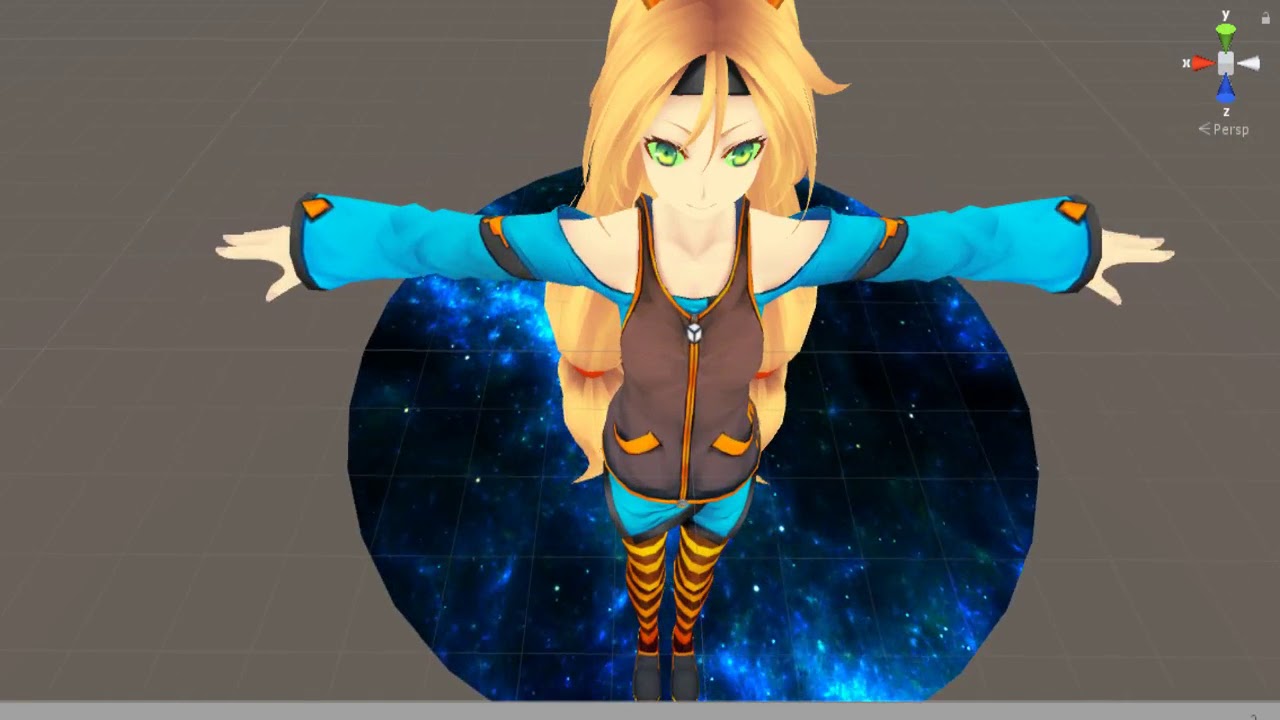 unique night
but looking at your screenshot, you're original model is still turned on right?
exotic crater
yes
unique night
just make sure your original model is set to invisible too whilst working with the clone
you can turn back on after your done
sharp torrent
Basically yes @torpid light There's a room inside the frame, a moving girl and little u-boats moving around the feet. Any tutorial for this stuff?
What is it called?
torpid light
It's a couple shaders using the stencil buffer
exotic crater
right, should I only be hiding the umbrella on the clone?
torpid light
so bascially you modify the avatars shaders to only draw if say 5 is written to the buffer
and then you write 5 to the buffer when drawing the circle
unique night
in the clone, only hide the umbrella (hide it in your original model too)
torpid light
the portal effect is a bit more complex than that as i can move outside the portal, but the idea is the same
unique night
@exotic crater the umbrella always needs to be hidden by default as its toggled visible through animation
torpid light
@sharp torrent https://www.youtube.com/watch?v=l7LQmJuoiBY This is where i got started

CLICK SHOW MORE FOR FILES AND INFO! We play around with stencil shaders! These bad boys can be used to create a LOT of different effects! To download the Bre...
sharp torrent
Now the character turned into a living room, that's static but a the person controls a doll moving around in first person. It also turned into a dog house, and is moving around as the dog. How can you spawn objects like that?
unique night
@exotic crater the reason why I say turn the original character off entirely is just to save you from confusion when animating the clone.
you can also move the clone to the side too
if you dont want to turn original off
torpid light
@sharp torrent maybe the effect is more like this? https://i.gyazo.com/43a8bb4009620fbb7d7e15ac22e199bd.gif
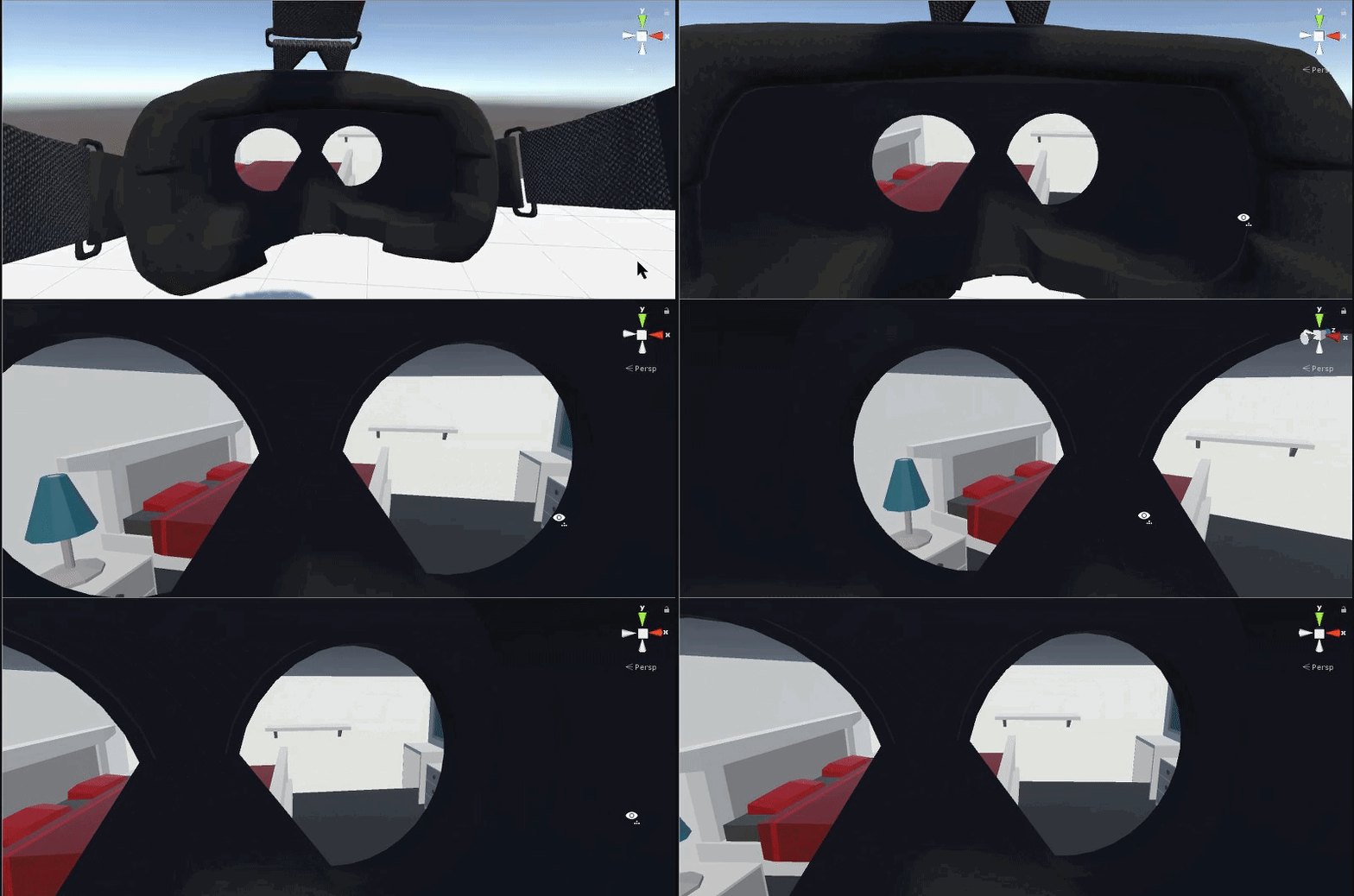
it's still just using the stencil buffer
sharp torrent
Perhaps yeah. But the living room was just on the floor, viewable from all angles, but it remainded static as the character was moving around. Is that also possible with stencil buffer?
exotic crater
so I unchecked the umbrella on both the clone and the original, and I have the intire onrigial model hidden as well, but the prop is still appearing. I know I don't have any other versions of it in unity on the scene
torpid light
But viewable only through the frame, right?
sharp torrent
No, the living room was just there, like any other object
A tiny living room, as if an object just spawned
torpid light
oh like they are holding a doll house or something?
i'm not sure i understand the effect
exotic crater
@unique night the prop was already on the model in the mmd file, should I bring it in seprately? Delete the umbrella in blender and then delete the model and just have the umbrella as a seprate model?
unique night
@exotic crater Might be worth a try, the prop is usually seperated and then added under the correct armature bone through unity
never tried keeping it with the same model file
exotic crater
ok, I will try that, thank you
sharp torrent
It was just there, a tiny couch, chair, carpet, table and stuff. The character could move around and stuff, without moving the props @torpid light
torpid light
oh i'm not sure how he kept the objects still while allowing him to move around in it
i would love to know becasue that vive effect i have has a problem where the room is parented to me so it rotates with my body
maybe an animation that sets the position, i'm not sure
was he able to setup the room anywhere he wanted, or was he just at a specific spot on the map?
 cloud nexus
Wait
If the VRChat has a clamp on how loud sounds are and such
Then how are people even making those stupid ear-rape avatars?
And that one small avatar which is a tiny anime girl with a present in it's back that plays the CS:GO "Bomb planted" sound effects
Those are loud as heck
sharp torrent
Here's one picture @torpid light Got some others, he can just move around the living room, whilst the room remains static, it spawned when he changed his character
2nd pic
Final one I took
sharp torrent
He told me he didn't make it, that he got the stuff from MMD, not sure if he put it all together or someone?
cloud nexus
I got a question, how does one make their sound effects louder and go further? Like about as loud as this: https://youtu.be/ESU-RCOPwaY?t=457
Sorry if the sound is very loud on this one! My earbuds make it sound quieter then most so editing on this was hard one. Hopefully it isn't that loud but if ...
 shy oak
@torpid light How did you get that texture for your portal?
torpid light
@sharp torrent He probably made it a rigidbody, but it doesn't move
that must be it
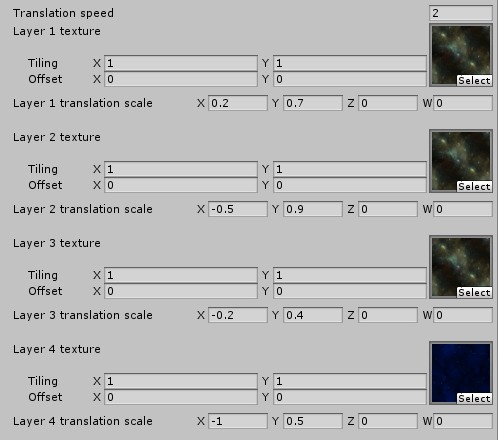
@shy oak it's a mix of 4 different textures scrolling at different speeds and their rgb values are multiplied together like tex1.rgb*tex2.rgb*2
there's a GDC talk that explains it really well 1 sec

Technical art is evolving rapidly. In many studios TAs play key roles in developing efficient tools pipelines, and ensuring art content is visually striking and optimized for performance. TAs bridge content and engineering, helping make both more...
i used the technique explain about half way through this video
shy oak
Oh ok thanks!
torpid light
starting at 25:00
sharp torrent
@torpid light What I don't understand is how you mix a humanoid character with that. Not sure if his character could leave the living room, but it was fully functioning. He was waving his arms around in VR and just walking around.
torpid light
@shy oak Here's the actual textures i used in the portal. I kinda just mixed some random tileable textures together until it looked good https://i.gyazo.com/2316fd411320920da423985e4d2e14c8.png

there's some really cool effects you can make from that technique
shy oak
@torpid light#509 Where did you find those?
 lost wagon
Does anyone know how to fix a Unity animation so I'm not half way in the floor? I followed a Youtube tutorial to make a custom animation but the model is broken.
torpid light
i'm not sure where i got the space dust one used in the first 3 layers but i remeber making it seamless in gimp
shy oak
Awesome ty
 uneven flare
i want the particle to stay in place
any help
?
I want the particle to stop following me
;/
 granite kettle
Does anyone know how to change the standing position of an avatar?
torpid light
@sharp torrent I'm almost certain it had something to do with rigidbodies, but i still can't figure out exactly how he did it https://i.gyazo.com/e4cb7604bd211a3030a03402ae809b6a.gif

this example still rotates with me but it doesn't move with me
or rather slightly moves with me i guess
 sonic tiger
Im having two issues with my hand position animation if anyone wants to give it a guess as to whats going on.
I have a particle effect attached to my head, but it doesnt look up or down with me
And it also triggers randomly every now and then. Not when I am using the hand position
torpid light
Is the simulation space set to world space or local space? i had a similar issues because mine was in world space
i don't know why world doesn't work in game but it worked in local sapce
space
sonic tiger
World space y ea
torpid light
yea i'm not sure there's a way to get world space working in vrchat, if you do please let me know though
sonic tiger
thats a shame, I want to be able spread it around a little
torpid light
same
 halcyon solar
how do i do the dab animation that i see other people doing?
sonic tiger
You can override your emote animations when you upload an avatar
torpid light
@sonic tiger you might be able to try a custom space with the transform being set to the game object with the avatar descriptor
i haven't tried custom at all but maybe that's the solution
unique night
@granite kettle its with root X and Root Y properties in the animator(?) category when choosing what property to add to the timeline (i may have gotten the names wrong slightly but its basically thje root properties that will set you do that
granite kettle
@unique night Root X and Y? I'm on the animator right now I'm just not sure where to look for the root thingy. This is my first time messing with it.
sonic tiger
So if I moved the particles would move with me, but as long as I stand still they would do it right
torpid light
nevermind i just tried it
it was stuck where i set it when it was uploaded
not to my hand
sacred spear
animations and gestures that have been created can be saved and reused on other models right ?
i know for sure with animation over rides but not sure about gestures
havnt tried yet
exotic crater
@unique night Hey, as an update. Importing the model and prop as seprate objects seemed to fix the issue with hiding it. Thank you for troubleshooting with me on that.
 trim flax
ugh, why my custom blinking animation somehow does not work on a copy of my avatar.... exact same setting related to animations, and yet somehow it does not work on one of them o.O
 mellow oak
if I make a custom idle animation, is it possible to stop it while a gesture is being used?
ive tried it as an animation instead, but for some reason it doesn't work like that (even though blinking is)
granite kettle
Hey, so I've made this animation however it's causing my avatar to be through the unity floor (the grid) and the legs are bent. Do I have to manually straighten the legs? When I look in vrchat it hasn't imported right? The hands are in the body?
clear yew
@granite kettle Thats because you added the animation file while was in the hierarchy of the avatar. You cant crtl+z or get rid of it. You have to reload the model/file.
granite kettle
Yeah but it's supposed to be a standing animation so the arms dont clip through the body
so I did it
however the legs are stuck bent for the animation
I'm super new to this so I'm not understanding what you mean, really
@Alakazam.#7817
clear yew
Do you have the file of your model before you added the animation?
granite kettle
yeah
clear yew
Load it.
granite kettle
Yeah, yeah. I have it loaded
clear yew
Ok good. Do you have smth like an face emotion/Visemes? Or are you testing around with particles
granite kettle
So what I did was copy the model, hid the original one, made the animation on the copy, then put the animation into the over ride. I put it into 'idle' cus I assumed that was the standing animation. I put the override into the "controller" and into the "standing animation" . The avatar looked normal. I checked the animation, the legs were bent but everything else was set as it was meant to. I sent it to VRChat, my character had her legs bent slightly and her hands were inside her body rather than slightly forward to be in her lap.
clear yew
Weird. Do you have any screenshare programm so I can look over the project?
Otherwise I'm pretty much out of ideas. Maybe try it again?
granite kettle
sure I don't mind. We can just discord call and I can show you whats going on. one moment, though.
clear yew
yup
 tidal zodiac
Qick question, How can i make my avatar in unity hvae a hair glowing/changing color effect so it also shows the hair in the dark
 pastel spruce
Where should I start with animation? I'm planning to animate Eggrobo, and I've got a generic rig, but no animations. I should probably also mention I have approximately 0 experience in this topic
 torn shale
hey I wanna ask if someone knows, but where do people get that dab emote from that I keep seeing so much? 😦
I cant find it anywhere, not on the asset store, not on mixamo
pastel spruce
Seriously I just need a place to start I have no idea what to do
seriously I think something's fucked up or I'm just lost
pls
 undone glade
@pastel spruce what's up?
pastel spruce
I'm trying to animate eggrobo
lost wagon
@granite kettle Did you get that animation issue sorted? I've been trying to fix it for hours and nothing I've read or watched online helps.
pastel spruce
I don't even want it to be complex, it's a robot so the animations are just gonna be a few movements
I just don't know how to make a clip
undone glade
simply adjust where you want a specific part to move and set the time.
pastel spruce
And now I don't even know what this is but it's probably bad
undone glade
hmm..
pastel spruce
This is just what I have right now. Do I just edit the "idle" file in the animator? Is it like Flash, with keyframes? Is there a counterpart of tweening?
Will I ever run out of questions?
granite kettle
@lost wagon I did not, sadly. I'm gonna go and figure this out eventually. I took a look at the idle pose that's given in unity and the model is standing above the grid. So, I'm assuming you have to go in and manually change the position of every leg joint and so on.
@pastel spruce I'm not 100% sure but I'm pretty positive it has tweening. It does work a lot like flash with keyframes and such.
pastel spruce
That's reassuring, since I'm a bit familiar with that. How does the tweening work? Just between frames?
granite kettle
I think it just automatically tweens?
I'm just dipping my toes in so I'm not sure.
pastel spruce
I'll only have a few poses with each animation, but will it just snap between them or shift?
granite kettle
If you skip over doing idle I think doing regular emotes and stuff works easily enough.
I think it shifts?
I'm not sure.
pastel spruce
It's a Generic type
granite kettle
Ah I haven't really used a generic. I think you can only change animations of humanoids
pastel spruce
fucc
But I thought you had to make your own animations for generics, since they don't have defaults.
trim flax
oh my fu.... god, where I can report bug or something? OMG.... if ANY of your custom animation overrides use this same shape keys as your custom animation added to game object - like custom blinking, it will not work... I just lost 5 hours trying to find what the f... is wrong.
pastel spruce
granite kettle
Maybe, see but I haven't worked with generics. I just remember hearing someone say in a video that idle poses for generics aren't possible. It just screws it over. Like this guy had a toucan but he couldn't change any animations for it.
pastel spruce
What.
So am I doing this all for nothing?
Shit, I need some help from someone who's done this before
lost wagon
@granite kettle Alright, thanks. If I manage to find a solution I'll PM you. But I've litterally been at this all day with no success. There isn't a single guide or even brief mention of fixing the broken pose.
pastel spruce
I feel like I fucked it up. What did I do wrong? Am I only able to use a humanoid rig?
granite kettle
@pastel spruce Yeah, I think you're only able to animate the humanoid rig
@lost wagon Alright, well I just got some help. I'm gonna try out their reccommendation then tell you if it works
pastel spruce
Are you positive? How else am I supposed to animate the generic rig if it won't use the default humanoid animations in VRChat?
lost wagon
@granite kettle That's great news. Good luck, I hope it works!
pastel spruce
Do I use the animation component on the object?
 split hearth
So, im trying to get a pencil to appear in my hand, but it seems like the scale of the pencil resets when I try to use the animation, this doesnt happen for the other two ive put in. ideas?
So its showing up freakishly large
granite kettle
@pastel spruce I am not positive. It's just what I've heard from videos. Google a bit more, I suppose.
 rich scarab
Hey guys - Done a couple of animations for a scared and a happy face on my avatar. Just overriding them now with the CustomOverrideController (Copied in to my main directory).
Was just wondering, which of the Controller animations is the Peace sign? The only one I could have a guess at is perhaps VICTORY ?
rich scarab
Super! Thanks for confirming
split hearth
I figured it out: The pencil had an animation component directly attached to it while the other objects didn't, removing that component fixed it.
granite kettle
@lost wagon So I've about managed to do the idle pose, however I have a few more things to work on
lost wagon
@granite kettle I'm still pouring over Unity documentaion and google searches with zero results.. It just seems to get more confusing the more I read. >.< But there has to be a way to do it. I have animations others have made that work. It's just mine that are broken...
unique night
@exotic crater glad to hear that worked 😄
shy oak
Anyone know how to add drawing to your avatar?
 warm furnace
Trail renderer 👌
unique night
is it possible to limit a gesture override to the right hand only?
or will it always work on both?
warm furnace
Other hands gonna go in default position
looks like a pat hand
but when you go do other gesture it show the gesture you're doing
unique night
I'm looking at the override list in unity and cant see other hands option
but i specifically want to close my right fist
and have it trigger
warm furnace
For example if you do an override with two victory signs for the right victory. If you do victory on right hands and thumbsup on left, you gonna see victory on right and thumbsup on left
unique night
Oh ok, so its just automatically done
im triggering a particle system parented to my right hand so it should be ok 😃 I'll just have to make sure not close my left fist XD
gonna test it now 😃 hopefully it works 😄
 nocturne anvil
how do i separate the 'maximo.com...' on the rumba fbx? i cant drag it out
 tropic nova
is there any way to change viewpoint to follow animation?
sonic tiger
Those of us in VR would puke 😛
tropic nova
i want to make a character that can fly when he runs but i want the view point to also be flying
 grim fossil
am i wrong or can an animation have like 100k polys
sonic tiger
You might be right, but if so its going to get fixed
If playerbase catches on, the game stops performing
tropic nova
yea im pretty sure there is no limit to poly count through animations
sonic tiger
Yea just be responsable with it
I dont imagine they will fix it unless it becomes an issue
grim fossil
i was gunna do an mmd dance stage with like 3 chars
sonic tiger
Do a good job decimating 😛
I heard you can get banned for single handedly lagging a room. But im sure going a bit over budget with your three characters would be fine.
nocturne anvil
can someone help me? i cant drag the animation out of its fbx, like in the tutorial video http://gph.is/2zZkjn9 how to do that?
 grim fossil
you dont just drag it into what anim u want
nocturne anvil
watch the GIF please
sonic tiger
You need to drag it directly into the slot in your animation override
nocturne anvil
and here is my case http://gph.is/2zZ1h0g
 sonic tiger
Yea.. you cant do that
Keep it in its home until you are ready to drag it directly into its needed slot
nocturne anvil
so we can drag it directly in override? cuz in the tutorial video i am following he can drag it outside
sonic tiger
oh interesting, im not sure why they can do that, but you can definitely just drag it directly into the override slot
nocturne anvil
ok thanks gonna try it
 signal fractal
is there a special way i should go about setting the animation type for a four legged model?
uneven flare
how to make my naruto glow like this?
how do i make my naruto glow like this?
???
sonic tiger
The standard material in Unity accepts an emission map once you check the emission box
This map will show its color even in darkness, and appears to glow
uneven flare
how do i do that?
sonic tiger
Im not sure how you could turn it on and off in an animation, but if you want to expiriment with it, just find the material in unity
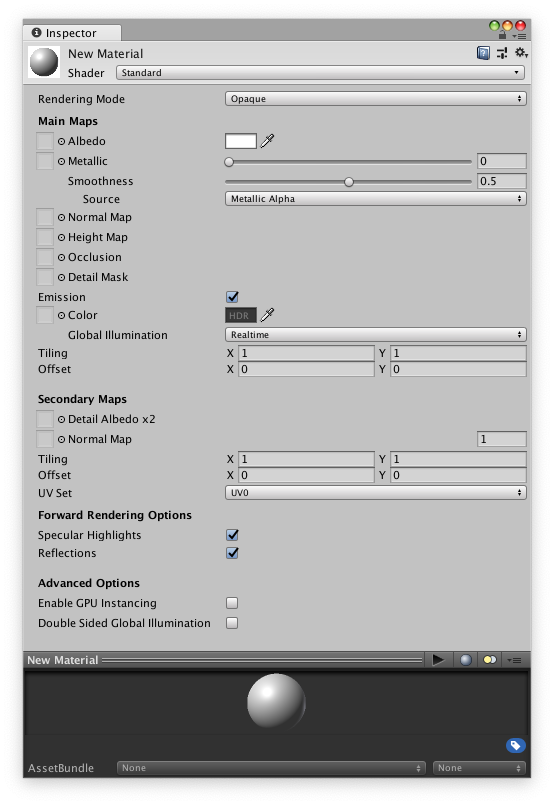
See the "Emission" channel for what to use for glow effects
You can try just adding your texture there if you want your character to just glow in his normal colors
granite kettle
Please @ me if you have an answer, but for some reason the origin of my character is off and when I go to 0x 0y it goes into the ground.
 pseudo kernel
@granite kettle In blender, make sure your model is standing on 0. Then set the 3D cursor to 0,0,0 then while your mesh and armature are selected, hit Ctrl+alt+shift+C and set origin to 3D cursor.
granite kettle
No. That's all fine. It's only like this in unity. I was trying to make an idle animation. @pseudo kernel
pseudo kernel
You may have to add a root before the hip bone
warm furnace
oh
all avatar are in a fucked up position when you make an animation
if your making an gesture ovverride you don't care a bout it
but if it's an emote, you need to move all
btw better making emote animation on blender i think
granite kettle
Okay managed to fix it, however
I'm trying to override the idle pose
but it puts me into the floor
@warm furnace
warm furnace
yeah like always when you do other animation no ?
I don't really know about ovverride idle pose
granite kettle
dang.. ok
warm furnace
sorry D:
there is some sample on the SDK package i think
you could take them and put it on a clone
to see
i guess
:p
unique night
yay, the particle system I was trying out worked as a gesture override (+sound file and point light). Got some fine tweaks to do and I also forgot to make my fist close with the fist gesture override. 😄
 ebon heron
is there seriously no faster way of adding properties to unitys animation tab... other than going down the hierarchy every damn time for every joint in each hand...
 vast elk
Not sure where to go for this... When I animate my character his feet turn backwards including his ankles (Which seem to knot up almost)
Anyone know what I am doing wrong?
unique night
@ebon heron I'd like to know this too, its really annoying not being able to multi-add them
ebon heron
seriously I dont know why you can just drag the bones from the skeleton in the scene hierarchy
unique night
apparently you can use record mode
and it'll auto add
but that doesn't work for me
 fluid wraith
Are there any tutorials on how to make your character draw with their finger?
 runic frost
@fluid wraith https://youtu.be/Pi7i4sF_BgQ

Tutorial on adding the marker to your avatar and customizing it. Github: https://github.com/theepicsnail/Marker Unity Package: https://github.com/theepicsnai...
fluid wraith
@runic frost Thank you 😄
runic frost
Can someone help me with adding the Snail Marker to my model? I'm trying to either add the function to an animation I already have or at lease edit the animation it imports so it looks correct.
 torpid olive
can someone tell me if the idle animation in the template controller is actually the sitting? or cant we override that?
 plush jungle
hey guys
runic frost
I have a doubt that you can override it but you could make a new one
plush jungle
super new to animations first time trying it : i have everyting set up but it doenst save the postion keyframe
how can i safe the keyframe after setting everything up ?
runic frost
could you send a snip of what you have in your animation window?
plush jungle
me ?
plush jungle
runic frost
the picture failed to show for me :/ hold on
ok so when doing your animations you dont want to be messing with the armature(as i assume thats what you put in), when you add a property you want to instead use the "animators"
runic frost
nope, its a long process but you can copy and paste it after that to new animations
plush jungle
oh great
so one time i have to set up every hand bone
and then i can just put the animation into my project and copy from there
runic frost
start at "Animator.(Left/Right) Hand Index.1 Stretched" and work down to "Animator.(Left/Right) Hand.Thumb.Spread" for both hands as the animation affects both when you do it on one hand. when you have this whole this you can reuse it if needed
plush jungle
ty alot =)
runic frost
you want that red vertical like in the window to the right to be over the first set of keynotes, delete the second set. once you have everything set up copy the liat you have by highlighting all of it, ctrl-c, move the red line to 1 second and ctrl-p.
If you get confused on anything here is a video: https://youtu.be/V0l4-pH3vI4
Creating custom animations for hand gestures and emotes in VRChat
plush jungle
yeah watched that one
but i was like there has to be a better way then clicking everything once
but google failed me
:D
runic frost
yeah you have to add all the animators individually.... at least that s what I know
plush jungle
btw i am looking for a lightsaber like he has in his video
but i cant really find one :/
runic frost
if a prop costs money dont buy it lol, I bought a cheap knife prop and the licence broke my VRCSDK
plush jungle
dont they just trigger the emote again when they put it in the moth ?
shy oak
Yeah I guess I could do that
runic frost
I have a cupcake I made on my avatar and I just activate it, have it clip through someones mouth and let go of the animation before i pull my hand out
shy oak
ah oke
plush jungle
btw how to i have to animate my second hand ? does it have to be the emote i want to overwrite ?
 ionic basin
Is there a limit on how many custom animations an avatar can have? My eyebrows in my face are fluttering up and down.
runic frost
@ionic basin if your eyebrows fluttering then your second line of keynotes maynot be the same as the first, remember to copy and paste any changes
@plush jungle one emote applies to both hands, no matter which hand an object is in
ionic basin
I'm creating separate animations though with only one expression each. But I think I get what you're saying
plush jungle
hm ok, so i need 1 emote to appear and 1 to disappear it right ?
or do i just keep pressing the "handgun" animation aslong as i want to have the sword out ?
runic frost
it should only appear when you press the emote
plush jungle
oh its pretty easy then :O well now i have to w8 for tomorrow :) my vr headset will get delivered then :D
runic frost
the second set is on the 0:01 and the red line represents which set you are viewing/editing
 quaint crystal
do models have to absolutely be generic for animations to even work? trying to do an animation of say like the eyes moving on an avatar and it never works
only the blinking part of my animation plays
uneven flare
how to make it glow?
 weary cargo
hey, anyone know why this happends when i try to upload a character with an animation with effects? https://gyazo.com/fc5312664fa2913cd9e171def34608a2

anyone know? its like the asset has been blocked or something by vrchat
or am doing something completley wrong
 iron crescent
@uneven flare If you want it to glow you need to add emissive properties
uneven flare
how i do that?
quaint crystal
https://s3.amazonaws.com/sneakytiki.tv/share/2018/01/01/2z4O1j9.gif so im trying to make this animation, got it ready to go and all
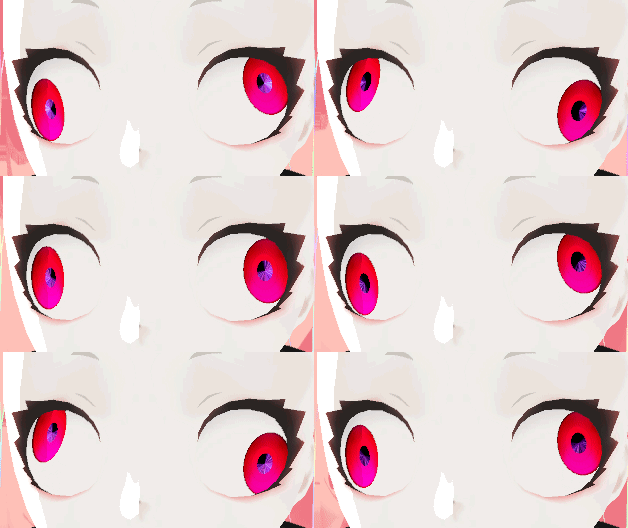
but it never plays inside of vrchat
only the blinking portion that comes afterwards
the eyes just remain static and facing forward, as if default
its also meant to just be a mild idle animation
clear yew
Is there a tutorial on how to give your character glows/auras, etc.
like a constant aura, not trying to have something ridiculous and annoying but, yea.
grim fossil
look up emissions and particle effects
clear yew
Hmm alright, thanks
sonic tiger
Is there a way to enable/disable particle systems in animations in a way that doesnt make all the particles instantly dissapear?
 proud grove
enable/disable the emission module instead
sonic tiger
Thanks!
ebon heron
does VRChat not like when you set particle systems to world instead of local? everytime I try and use world it puts the particle systems in weird places and doesnt properly emit from my hands unless I turn it off
sonic tiger
I am having the same issue. doesnt seem to want to parent properly
proud grove
with the current IK, world space particles do not work correctly when you place them on movable objects
you can either set them to local or move them to the root
sonic tiger
This needs fixing. Local space particles look bad
proud grove
it's not a simple fix, really
fixing it requires potentially breaking the entire IK system
trust me when I say that I've wanted it fixed since August, but I don't see it happening at the moment
sonic tiger
Nah it can be done with a new component. Just cache positions for one frame and update transforms for particle emitters
Thats why I hate not being able to script, like 90% of issues can be fixed with 6 lines of code
nocturne anvil
what is recommended audio volume in audio source component in unity?
sonic tiger
When I say fixed I mean "hacked in place". a real fix would be much harder.
But 6 lines of code would make my particle emiter work for my situation 😛
proud grove
A lot of people wish they could script, and it used to be possible, but there a lot of issues with allowing that
sonic tiger
aya you get props from me for asking that and not just maxing it. everyone just blasts audio :/
But im not sure, sorry
proud grove
my recommendation for audio is just to listen to it in the scene editor and see how loud it is, preferably at max volume
nocturne anvil
im afraid I hurt others ears. i set it in 0.2 and my friend said he can only hear it if he's touching me (super close)
proud grove
if its too loud then you can turn it down until its right
sonic tiger
I agree @proud grove , not a great idea. maybe if they just whitelisted a REALLY small set of commands. like just transform access and variables
proud grove
VRChat at the moment limits the audio range when you upload
and that is a bit harder than you think :x
nocturne anvil
thanks. gonna do more testing. thanks again 😃
sonic tiger
Yea they would have to write their own lua-like system I guess.. but I still want it
 muted prairie
You can always make suggestions for whitelisted scripts @sonic tiger
sonic tiger
First off @muted prairie , that model is awesome
second, looks like you have some errant weights in there
WHOA no I know whats going on
Your verts got indexed wrong in your blend shape
muted prairie
I created the right eye shapekey with mix first, then set the topology
sonic tiger
I dont know an easy fix, and its super annoying
but the vertex indexes got rearranged
sonic tiger
Make sure you dont change topology AT ALL when you set up blend shapes. even modifiers can re-index verts
muted prairie
Tupper told me :"lmao
duplicate the key, then mirror that key
then use "create shape key from mix" if you want a key for both eyes blinking"
 wise sundial
I saw someone earlier flying in one of the worlds, on a hoverboard. Any idea on how they did that?
muted prairie
I do not know how to create a duplicate of a shapekey though, google didn't help me either
@wise sundial Probably colliders
sonic tiger
Ive heard that you can use VR hands to put a collider under yourself to fly
proud grove
what I end up doing is setting the shape key to max value, then using blender's create shape key from mix
wise sundial
I've seen the under yourself collider.
But this one I saw earlier was pretty fluid so I assume a lot of work went into it then.
muted prairie
that's what i've been doing, but then am i supposed to set the main shapekey back to 0 and mirror shape key with topology on the second one at 0 too ?
i have no idea why it goes to pick all those vertices everywhere
the one on the tail blows my mind
oh, i've got it, i'm a dumbass
sorry for the tantrum, i hate blender at 5am
sonic tiger
For the life of me, I cant get my mouth to open during a hand pose..
The rotations on my jaw are redded out in the animator
muted prairie
Could it already be used for something else ?
sonic tiger
Yep. the moment I make any key with the transform, it locks forever and turns red
Unity's animator is SO messed up..
Why even have a record button if its going to auto turn on if you click anything in the entire editor
just remove the button and make record always on -_-
So you are supposed to use the animator properties? not the tranforms?
Im going to guess jawflap overrides it or something
weary cargo
i keep getting this https://gyazo.com/77a336f8401d40d9f016537dec137936

can someone please help me
i've been at it for like 6 hours now
trying to figure out what im doing wrong
muted prairie
What kind of particle system is it ?
muted prairie
Here is a list of the components you are allowed on avatars VRChat - VRC_AvatarDescriptor - PipelineManager Unity - Transform - Animator - [Skinn...
weary cargo
those are the only ones that work ?
muted prairie
yep
weary cargo
so how do people get really awesome effects ?
 severe sierra
People can do some impressive stuff with the basic particle system
weary cargo
hmm
severe sierra
There's free particle packs on the unity store you could check out for reference
sonic tiger
The basic particles can be combined with custom textures and even shaders to create a HUGE variety of effects
severe sierra
☝
weary cargo
i think i got it to work
i removed the main scriped and took the small parts off the effect, so the system think i made the effect
script*
 vagrant heron
Can someone with vive help me out and list all the emotes on the controller? I want to remap the bottom ones but I don't remember what they are
severe sierra
 severe sierra
its pinned in the #avatars-2-general channel
vagrant heron
Ahhhhh
sonic tiger
I think handopen triggers just a tiny bit every time you throw an item
I burp a tiny bit of fire when im trying to throw things
clear yew
hi could someone help me
how to do this https://www.youtube.com/watch?v=-MjnbFl4Tmc&feature=youtu.be
i see people do this but idk what its called and how 😛 from 0-35

Random VRChat funny moments and VR Twitch highlights 👍 If you enjoyed this video hit that "like" button and Subscribe! FOLLOW ME ▼ Twitter : https://twitter....
i thank to whoever helps me/././.
 languid cargo
when overriding animations do the ones that I create have to match in length with the ones that is overwritten
for instance the default WALKFWD animation is like 0:01 in length
if I made a longer walk animation would the rest just get cut off
languid cargo
okay thanks
 teal gale
this is a longshot
but anybody have the animation file for this?

做完了~ 灑花~ 終於有一次是做完的了(ㆆㅅㆆ) ---------------------------------------------------------------------- Music: TWICE - LIKEY (https://youtu.be/V2hlQkVJZhE) Model: ru...
languid cargo
idk anything about 3d animating but I guess find out how miku miku dance choreography files are stored and then hope that someone wrote a script to convert them into unity .anim or whatever the ones that blender uses
@iron crescent
whenver I try to play an animation that is longer
than 10 seconds
clear yew
helppp
iron crescent
why is your walking animation ten seconds long
iron crescent
You should only have one jump for the whole animation, maybe two if you want to keep it varied.
Since a walk cycle is just a short one second walk animation that repeats, I would aim to do the same with a slime jumping.
languid cargo
ill try ty
grim fossil
is drawing just a small particle effect
languid cargo
@iron crescent XD sorry to bother you but is this short enough
iron crescent
Perfect.
The animation itself could use some work, however that animation should work.
 weak geode
got a question how do i make my avatar diappear while walking?
iron crescent
Coffe#1924 Change the walking animation so that when he's walking the mesh renderer is disabled.
weary cargo
how do i make these blue? cus they seem to not be activated? https://gyazo.com/e356de76f9da179322c22f9399257d15

They are effects btw
 wooden ivy
I put a bunch of objects into a prefab so I can keep them common among my avatars using the same animations, but in-game they don't show up. They work fine in the animation preview.
 ashen sedge
@languid cargo Yo is that the MapleStory slime?
 hardy wagon
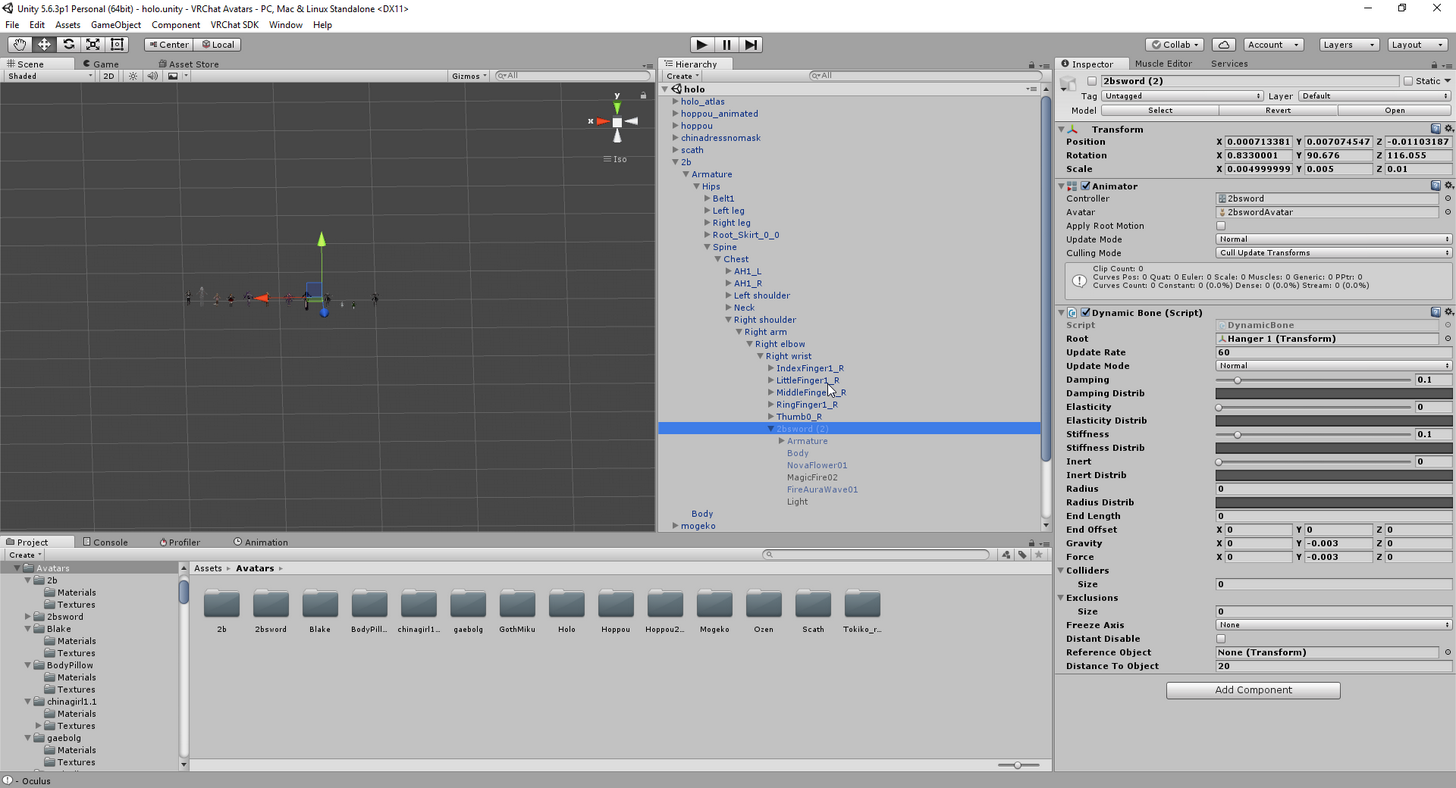
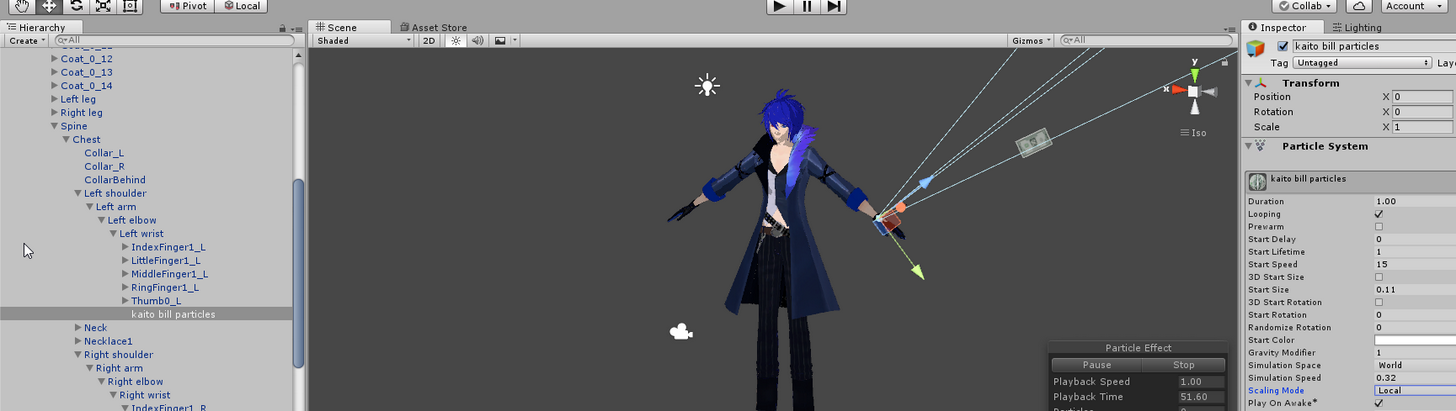
what is the trick to make a particle system to follow your hands?, I put the particle system ina gameobject inside the leaft hand armature, is this ok?+
 oblique panther
to make them follow your animation you do this
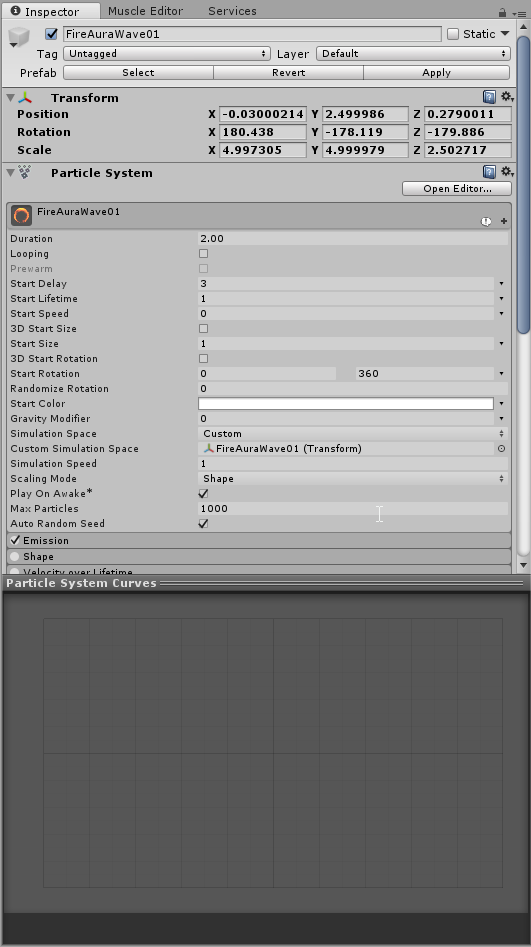
you change
"simulation space" to custom
oblique panther
and drag your armature in it
hardy wagon
that was the trick?
oblique panther
yeah
hardy wagon
awesome!
oblique panther
took me good 2h myself lol
oblique panther
i have nothing special yet really
just 2b which has particle effects on her sword
oblique panther
Caveland is my world so chances you find me there are pretty high :p also i go by the same name
hardy wagon
and I am puzzle on how to trigger the rock n roll hand pose with oculus
oblique panther
idk sorry. i have a vive
hardy wagon
my name is k014 too
would be cool to add people offline
reuploading avatar...
also, how do I delete an avatar?
ingame?
oblique panther
vrchatsdk > manage uploaded content
 slim basin
Anyone know if you replace the simpleAvatarController animations with your own how many key frames are you allowed to make
oblique panther
 oblique panther
you attach your object to the wrist
hardy wagon
and now it is attached to the left hand
oblique panther
but the particles to the object
hardy wagon
oh, that is why gravitiy does not work well?
oblique panther
gravity always goes up
and doesnt follow your animation really
i think my workaround was to set gravity to 0
and go to shape
box
hardy wagon
I want gravity
so I can decide direction where particles are emmited
but then, they all shall drop to the ground
hardy wagon
I am using cone
hardy wagon
is not an option for me
need to toss particles in the aire
and they have to fall to ground
eventually
like tossing confetti
you can point to emmit it downwards
and they shall fall down
but if you point upwards, they hall be emmited up, and then stop in air, and fall to ground
oblique panther
hm not sure how to do that
hardy wagon
if I figure out I will tell you
oblique panther
ok :3
oblique panther
no
hardy wagon
I see outside the armature
 split grail
can I use AvatarController for custom animations or is it blocked?
because cant get it work and there is AvatarControllerTemplate on sample assets folder
 silent radish
I'm making a rocket launcher with a shell, can I make the animation override for the hand symbol longer than one second?
 pseudo pewter
Woo!
split grail
wow, thats cool
warm furnace
cool
 lime nova
How do I get a prop to stay in the hand while moving
unique night
drop it under the correct armature bone
and it should stay with the hand
(in the heirarchy window)
lime nova
it is but as soon as i try to move around i guess it counts as a new gesture and cancels it out
 opal lodge
It shouldn't
lime nova
🤔
opal lodge
You need to hold the button tho I believe
Not sure since I don't own vr. But I've made some prop animations before
lime nova
theres no button press for gesture you just put your finger over the right area
unique night
oh that sounds cool, didn't realise you can do location specific gestures like that
opal lodge
do you have a run animation override @lime nova ?
I've not seen it being overwritten by just moving
opal lodge
I've seen plenty of people run around with a animated weapon
Not sure what the difference would be then
silent radish
arent those attached to the character?
opal lodge
Well they pulled it out I think
silent radish
speaking of animated weapon, how would I do that? I want my rocket launcher to shoot a shell out
can animations run longer than a second?
do they loop?
also it might be 2 different avatars with weapons and none
lime nova
I know you can have long animations and theres a checkbox to make them loop
unique night
I havent tested weapons or objects like that but I can run around with particles following my hand
I assumed it would have worked the same way for objects
lime nova
all the tutorials Ive seen just swap the animation for a hand gesture, and Im doing the exact same thing
 grizzled furnace
I want to shoot a fireball animation, how would i go about doing that?
unique night
@grizzled furnace read up on particle systems for vrchat. You basically create the fireball animation as a particle (or particles) and then trigger them with an emote or gesture override
grizzled furnace
Thank you
unique night
check the asset store too
you can get some well made ones that use low particle counts
grizzled furnace
Unity asset store?
grizzled furnace
ok thanks for the advice
unique night
can gesture overrides change the leg position without messing up?
or will they glitch out if you start moving?
 vagrant mango
looking for some animation help. possibly multipule avatars but defintly tons of armatures
so far i have 4 in this model but want more like maybe 18
 unreal sparrow
can shape keys control the pose of your avatar? i'm having some issues making my model blink
unique night
@vagrant mango why do you need more than 1 armature for a single model? (unless I'm reading that wrong)
@unreal sparrow yes you can use shape keys. I did that for my first avatar 😃 Animated a blink every 5 seconds on loop
vagrant mango
each armature is a diffrent dance
unreal sparrow
the eyelids are controlled by bones, but anytime i rotate the bones, it doesn't get saved to the Blink shape key
unique night
@vagrant mango you just need the animation file for the dance, it should work with a single armature as you'd activate with emotes
vagrant mango
and run so smooth
unique night
oh i see
im not sure if multiple armatures are allowed for a single avatar but you could create them as seperate avatars instead
vagrant mango
i belive they are
unique night
@unreal sparrow For my avatars I have no eyelid bones, they have a blink_left and blink_right shape key
vagrant mango
there is a tutorial for blinking eyes and mouth movments
that uses blender animation

In this video I will show you how to make your 2D eyes/mouth type avatar have a blinking animation and mouth movements for VRChat!
unreal sparrow
i used that method for my other avatars, @vagrant mango and it worked flawlessly, but this time i'm trying 3d blinking
vagrant mango
so my mocaped data applys to a model thats defaulty apart and squished together
default pose
unique night
@unreal sparrow try creating them with shape keys/blendshapes. My avatars have 3D blinking through that. You just have the shape keys move the vertices like you would with visemes
vagrant mango
rigging will be a nightmare
as i cant connect my points together to creat a skeliton
as its mocap
do you think its possible to create super low poly invisable avatar thats rigged
and have my dancer a 2nd mesh
well 16 meshes
as hands are not attached to lower arms are not atttached to upper arms ect...
unique night
I have no idea to be honest, hopefully someone else can give you an answer. I haven't seen an avatar that has multiple armatures (let one alone around 16) 😛
unique night
oh, multiple meshes is fine. I thought you meant it would have multiple armatures
vagrant mango
but i have seen people do model edits to fingers
maybe i could get that to play the animation
or
change the charater model i am using
unique night
Oh yeah, good point
forgot about model swaps like that
its possible they could be using 1 armature though
all skinned to the same one and then turned on and off
vagrant mango
i modeled these in 2007
unique night
when needed
vagrant mango
the mesh will need to change.. maybe a invisable texture to turn off on a 2nd model and turn invisable texture on the main model
my models are less then 700 polly
so even if i got 10 dancers it would still be smaller in polycount then most avatars i see on vrchat
vrchat is super non optimised
unique night
You might not need an invisible texture
vagrant mango
did you see the dancers?
unique night
theres an animation property that makes an object turn on and off
and yeah, i saw the image
vagrant mango
its so accurate to the game https://www.youtube.com/watch?v=-g1jfvKcwjA

MISSING HEART - Moonlight Shadow - Dance Dance revolution 5th Mix
hand modeled and textured by me
to look like the game
 silver lichen
for dances do people generally make their own animations or are there already completed dance animations for humanoids or something?
vagrant mango
yeah mine are mocaped
unique night
Here's how i see it working in my head: You rig all the dancers to the same armature. The dance animations are exported as animation files that you then load up in unity with animation overrides. Then in the animation timeline use the active object property to control which dancer is visible with that dance animation.
@silver lichen Mixamo has premade dance animations
vagrant mango
here this might make it easier
unique night
that you can import to your character (you'll need to use a mixamo rig i think)
silver lichen
thanks
vagrant mango
its really small
here is the blender file
with textures
and dancing
well does blender keep texture data in the .blend file
or is it external
boy i did not follow that chat lakuza was talking to phaseout...
not me
XD
i need to learn to chat right
and not think evoryone is thanking me and being kind to me
unique night
XD
unreal sparrow
@unique night thanks for the help, Lakuza! i got the blinking working now, it's beautiful
unique night
glad it worked 😄
 tall zodiac
Its impossible to do a emote in Unity where the character makes a face without the character going to the ground ye?
Like that weird sitting position you get when making a animation in Unity
 brazen badger
weird sitting position you get when making a animation in Unity
?
tall zodiac
Creating custom animations for hand gestures and emotes in VRChat
That one, no matter what i do i cant edit it out so my animation is in the ground ingame
Which makes me assume doing bone animations via transforms dont work unless you specifcially use blendshapes
unique night
@tall zodiac All emotes will go into the ground by default, you need to animate the entire pose to have it above ground if its gonna be an emote. Gesture overrides on the other hand can stay in the ground
when animating in unity
I thinks it the animator > root properties in the animation timeline
grizzled furnace
Can i add a particle effect with a gesture override?
Because if so i cant seem to get it right
clear yew
yeah, you can
opal lodge
I want to make a gun animation so they can shoot it. Getting the gun out is no big issue. But how do I make it so that can shoot it?
Is it just a second animation that makes a sound and flash?
 dim oyster
you can also toggle a partial emitter
opal lodge
Can you limit it so it can only be launched when the gun is out?
clear yew
what, a muzzleflash and sound?
opal lodge
Yeah. That's what I'd be looking for
clear yew
you could have them only play with the gun out
two animations, one is an idle gun and the second is the gun but with a flash particle and sound
they seamlessly switch to emulate gunfire
at least thats how I'd go about it. I may be wrong, forgive me if I am
dim oyster
that's pretty much how it is for now
clear yew
unfortunately, but hey, hopefully it'll improve with time
opal lodge
I'll give that a go then. Thanks for the input!
 echo vault
anybody knows how to get mycustomanimation into my model
so i could override the emotes?
clear yew
yeah
unique night
@echo vault assuming you have the animation ready and as an asset in the project asset folder. Create an animation override (theres an example one in the vrsdk folder under example animations). Duplicate that and drop it into the folder with your model so its easy to locate.
Then, go to the vrc avatar descriptor component of your model (in the inspector) and drag and drop the animation override file into Standing Anim (sitting anim too if you want it to play when seated). Then double click the animation override file and it'll display all the emotes and gestures you can do. Just drag your custom animation file into the slot thats appropriate (if you want it to replace an emote, drop it into one of the emote slots. If you want it to play when you close your fist, drop it in the fist slot)
 fluid nimbus
can i only move my fingers, make facial expressions etc if i buy the muscle animator asset? or is there another way around it
unique night
@fluid nimbus you can move whatever you want without messing with muscles
fluid nimbus
o
i was watching the really long megatutorial, and it showed him using the $15 asset
unique night
thats what a timeline can look like
that drop down menu at the bottom is the add property menu
you just choose body parts from the Animator group
fluid nimbus
is there a guide for creating gestures to activate facial expressions or pulling out a prop?
unique night
yeah, theres a few good ones on youtube. I'll find you a link to one
fluid nimbus
ty 😄
unique night
heres a good one: https://www.youtube.com/watch?v=p0txtOuZtx0

Unity - Custom Animation Overrides, Blinking Animation, Dynamic Bones & Colliders, Viseme. VRChat #3
Importing model - 0:37 Toe Removal - 1:37 Applying Shader - 2:29 Blinking Animation - 3:09 Animation Override (Facial) - 7:24 Avatar Descriptor & Viseme - 18...
covers alot of topics
so just grab the timecode for the facial expression one from the info
fluid nimbus
tyvm
clear yew
@brazen badger You'd hate my Sayori model then
not sure if i should ask here but
https://gyazo.com/213a1b4785ea397f4fd1452c1d39fe61
does anyone know what this kind of shader is? is it some particle effect? I've been trying to look all over and I still I don't know what this is called
 clear yew
the clothing specifically
@brazen badger Unable to get in game atm but my first ever custom animation with sound was to have her hold a noose and play Sayo-nara while holding it
clear yew
geez i guess asking at #avatars-2-general was no good
perhaps any of you guys know?
ah
unique night
can you not animate the material offset value?
and have it scroll through a texture file
I'm assuming thats how that space scrolling texture was done, although I havent checked if we can animate material attributes with a timeline
@clear yew just checked, you can animate texture attributes with a timeline
unique night
yup
unique night
You should look up animation override tutorials first
once you get to know the animation timeline, you want to use the skinnedmesshrenderer properties located inside each mesh group
clear yew
Ahhh alright
thank you so much!
echo vault
if a made a emote animation already for a model, can i add it to another model?
unique night
yes, as long as the armature parts are named the same it will work. I tend to use the same skeleton/armature for all my avatars to make it easy for sharing animations
echo vault
also why does my animation stay in place?
unique night
what are you animating? an emote or a gesture?
oblique panther
can you stop your blinking in an animation if its made by eye tracking?
echo vault
emote i mean
unique night
you need to animate the root to move it
echo vault
should i bake in pose?
unique night
yeah
echo vault
so click it for all?
unique night
i think i did, let me just check quickly
yeah i ticked all 3 back pose options in the animation file
echo vault
ok thank u
unique night
thats what my settings look like on the right
this is what my animation gesture looks like (ignore my really slow timing with the punch lol):
https://media.giphy.com/media/xULW8LB0ZRXtvGj93W/giphy.gif
 echo vault
can i put more than 300 frames in my emotes ?
echo vault
soo 600 is the limit?
unique night
I'm not 100% sure, you could always do a test animation like moving an arm about and then see if it plays the whole thing.
echo vault
i confirm that 300 is the limt and 10 seconds does count
if its over the 10 seconds or 300 frames, ur character just goes idle
clear yew
Quick question, am i able too switch character/avatar in unity, if my character has animations binded to it?
clear yew
@gaunt pebble it bugs out when adding animations to models I cant remember the exact reason, but what you should do is reload a save or the model entirely, select it and hit ctrl+D to duplicate it then work on animating the dupe and apply the animation to the non-bugged out one
 gaunt pebble
I do that
this is the dublicate that bugs out
I cant see what im animating like this lmao
clear yew
no way to fix it afaik lol unless you can somehow manually pose its body to get a good look
echo vault
how do i change my idle stance?
gaunt pebble
and how do you manually pose it?
 pastel ravine
working on a thing just wondering is this good for a running animation https://puu.sh/ySN6N/0839eaef5a.gif

 fallow silo
Having issues animating particles for my animation. Everytime I spawn it plays for the set duration
fallow silo
I'll try tahnks
clear yew
So im attempting to add a weapon and this happens when im ingame
Can you switch avatar if the avatar has animations binded to him? Will the animations still function on the new avatar?
fallow silo
Animations are stuck to character you were doing it on
 hardy mural
So when adding facial expressions to hand gestures how do you keep your hand from going all weird mid grab animation hand?
 sacred gate
yeah i'm having the same issue, when i do a hand gesture the hand just stays half-gripped
clear yew
@fallow silo So let's say I delete my character in unity and paste the same character in again, will the animation get deleted or just unbound? Or simply not work with the same/new avatar
fallow silo
Animations are saved directly as a separate file so you wont lose them
If you check your project destination, it will save as NAME.anim
clear yew
@fallow silo Okay so my avatar was a little too decimated so I will paste a lesser decimated version of him in unity, and it will work?
fallow silo
Wait there head to private to make it easier
 pale mauve
Is there a way to blend one 3D model into another in Unity? Like as a transformation sequence?
fallow silo
Trying to animate particles to come on for a set duration and delay on one animation. Having issues preventing it coming on when I spawn
Turning play on awake off didn't help
 wicked tangle
is there any way to replace default movement animations
such as walking and idle
Because I got a dude who i want to move like this
https://www.roblox.com/catalog/837023444/Pirate-Run

ROBLOX
Customize your avatar with the Pirate Run and millions of other items. Mix & match this run animation with other items to create an avatar that is unique to you!
fallow silo
You can using animation overrides
tidal zodiac
How can i add glowing eyes so they can be seein in the dark in unity?
I mean so they can been seein in the dark in game but make that in unity
pastel ravine
use the unlit matiral type
tidal zodiac
Do i get it from asset store? if so whats the name
 pine root
Does anybody know if you can move the view position in an animation? If so, how can i do it?
 silver gust
Does anyone know if you can import VMD motion files in to unity to use as animation overrides?
 bold cloud
how do you make a good floating animation =v
opal lodge
How do i add a new animation on a screen like this
split grail
@opal lodge press record and move avatar to that pose you want and then move that red cursor to next frame and same again until you have animation. Or use that curve editor on bottom of your screenshot
opal lodge
But I want a entire new animation, not edit any of these weird ones added
ah nvm, i jsut deleted the controller someone added to it
for some reason he added the simpleavatarcontroller on it
gaunt pebble
Does anyone have the carramelldansen emote and other weeb emotes?

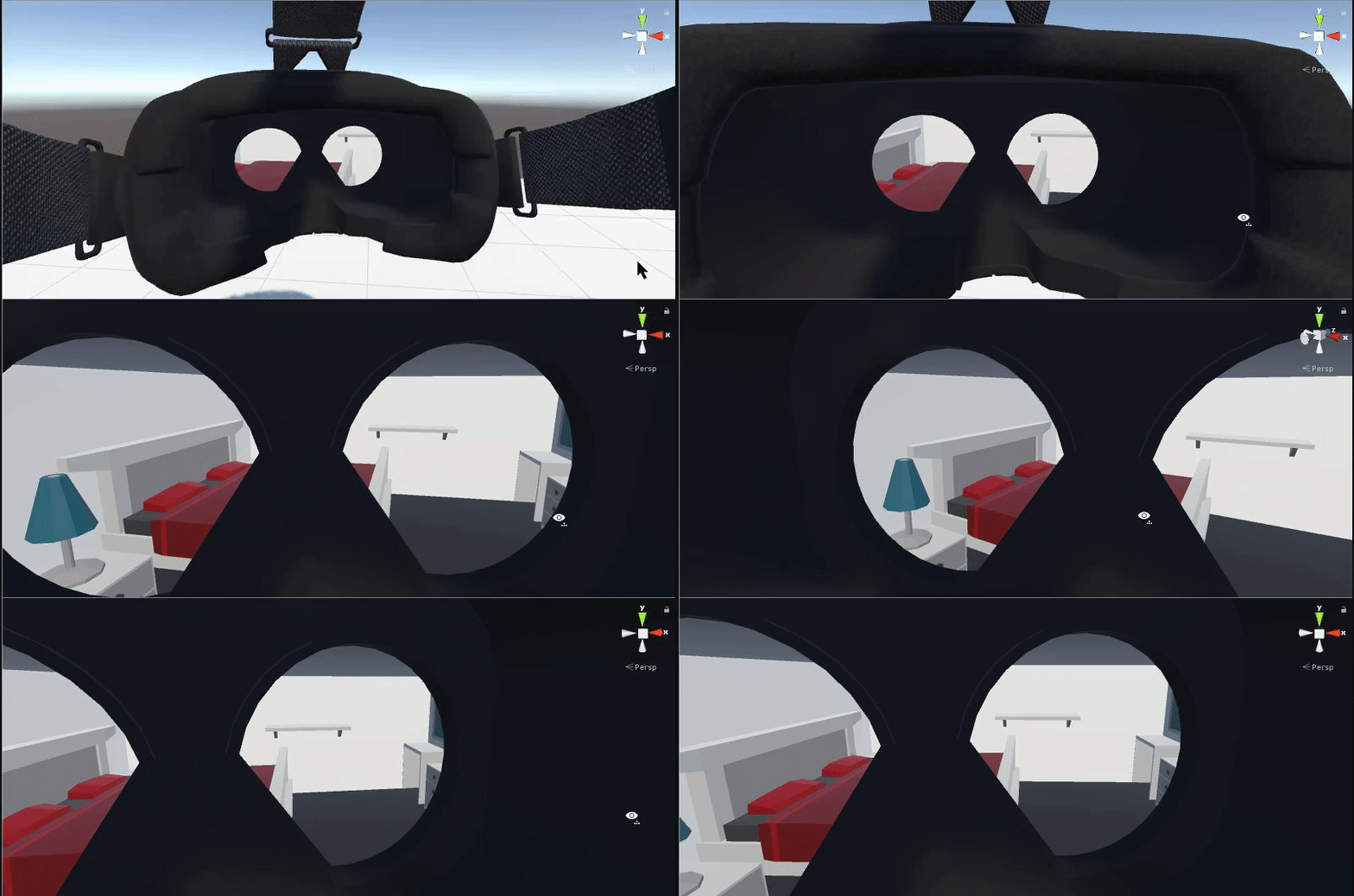
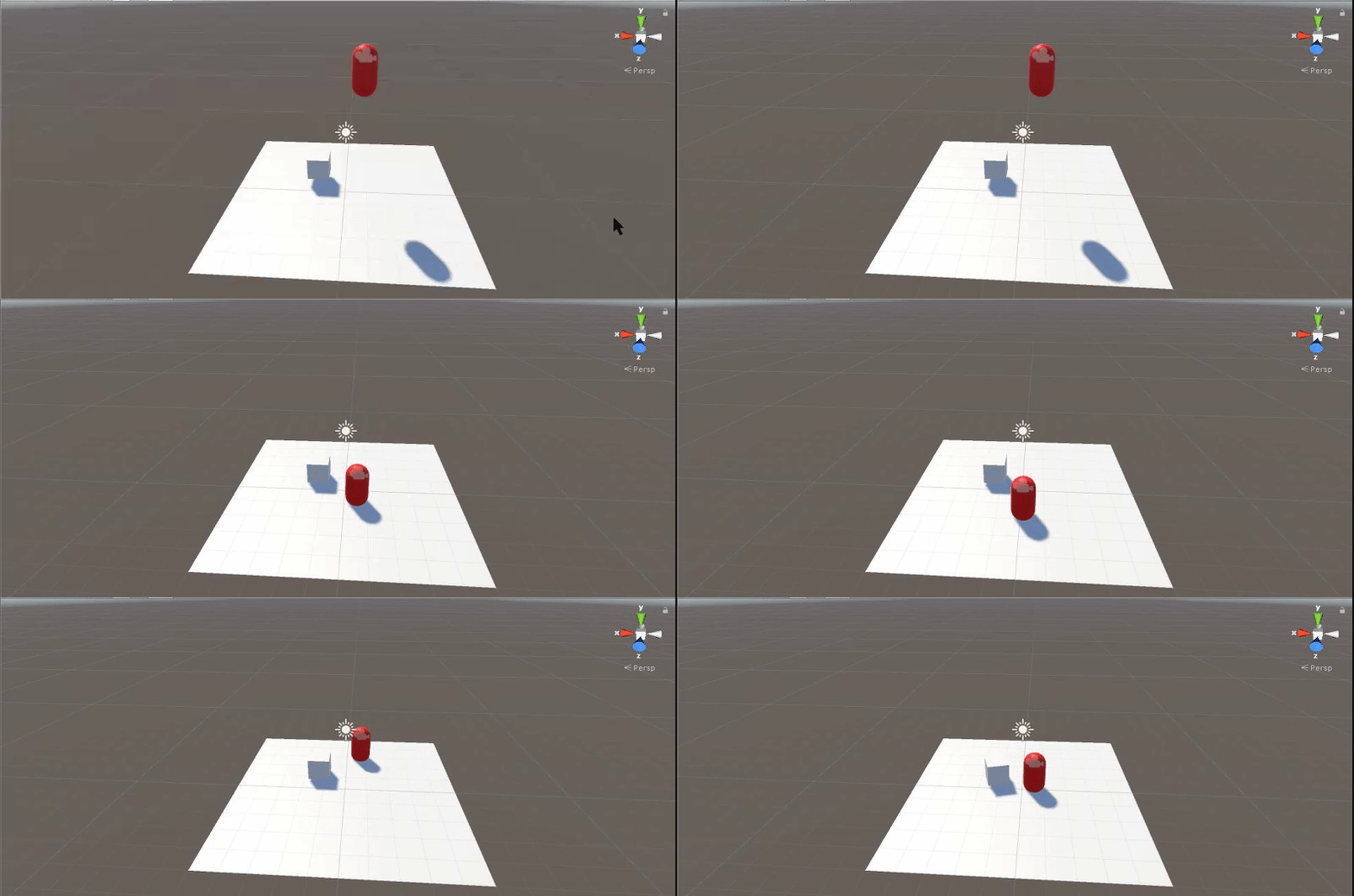


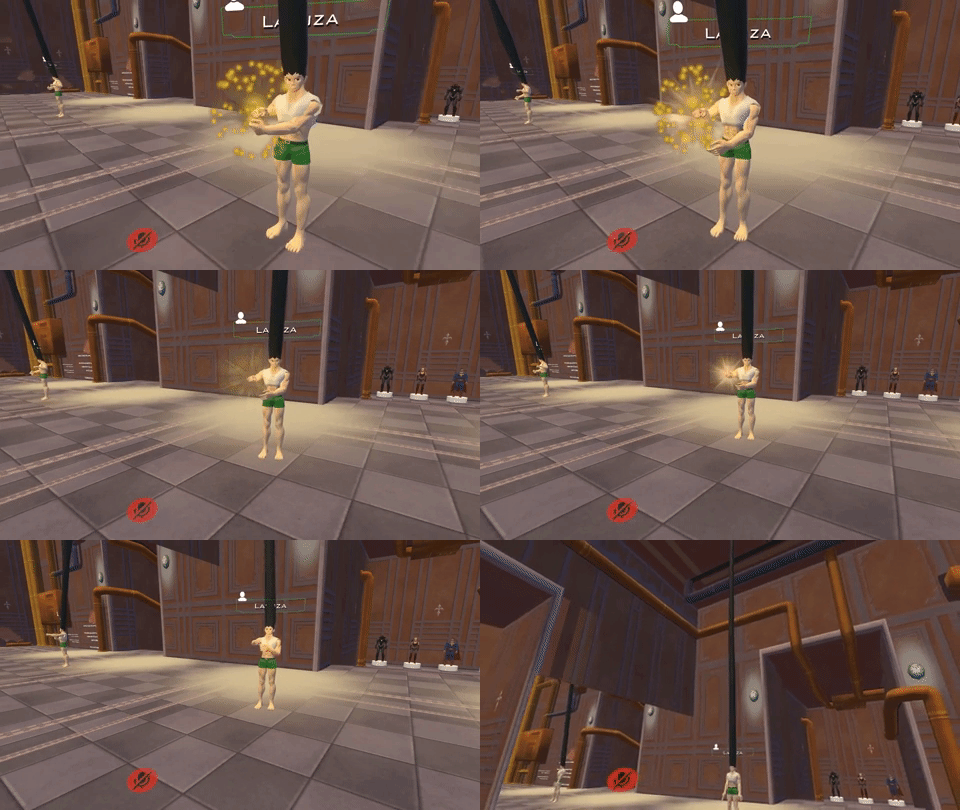

 sonic tiger
Yep!
If you drop something there, it will show up instead of the 8 emotes in your menu
opal lodge
Can anyone tell me why my audio isn't being played?
I disable it on default, has play on awake and I enable the sound together with my animation
but it doesn't get played, the rest does work tho
unique night
is it playing the audio inside blender when you preview it?
torpid olive
is mixamo down for anyone else? or rather i cant downloadanimations anymore. its stuck in forever "preparing download" but i can upload etc just fine and it worked earlier today
opal lodge
inside unity it is, when default equiping it on my model it does too
but people with VR tell me the sounds don't play when used with animations
I don't own VR myself but the people it's ment for tell me
unique night
its something to do with the falloff then
opal lodge
I can hear it myself when enabled on default
unique night
I'll screengrab my settings for the audio which work for me
With those settings it can be very clear when someone is close to me but gets quiet the further away they are
opal lodge
wait i'm stupid
does my base model also need the audio sources?
I only added them to my animated
unique night
yes it does 😛
unique night
make sure its turned off in the base model too
unique night
😃
steady plover
when I add mmd dances to my avatar, it dances in one spot rather than move around with the dance
anyone know how to fix it?
unique night
@steady plover you need to tick the bake to pose checkboxes in the animator file's inspector window
havent used mmd dances so not 100% sure
but try that out
unique night
hope it works out 😃
 mortal creek
anyone knows about animated textures?
steady plover
it would be amazing, because then I could finally join my vr friends on the dance floor without having weird looking dances