#animation
1 messages · Page 10 of 1
 prime holly
Ah the clippling planes were occluding it, kk
 carmine jay
Alright, thanks for the help! @prime holly
 upper sapphire
but swag i fixed
carmine jay
I did add "CustomOverrideAnim" but it still uses the default walk in vrchat.
I don't know why.
carmine jay
Where can I get these anim clips?
upper sapphire
what kind of custom walk were you in mind of
like did you allready have a custom walk animation?
upper sapphire
what did you wanna change it to
carmine jay
A female walk.
upper sapphire
so like, do you already have that female walk downloaded
carmine jay
Alright, is there a way to test the walk in unity?
Like, is there a way to play with the avatar in unity and test it before uploading it to vrchat?
 pseudo pewter
@upper sapphire does the model need to have certain requirements?
I tried uploading my model but it didn't work
I'm guessing it didn't like the bones structure
upper sapphire
@pseudo pewter did it show any errors before you published
pseudo pewter
Nope
I mean I just dragged the fbx into it, waited ~1min and it said the model failed or something
upper sapphire
what broke in game
pseudo pewter
I meant I dragged it into the mixamo upload avatar area
pseudo pewter
Aight
 clear yew
how do i make dynamic bones make hair move?
what do i put in its root? every hair part?
 terse sonnet
I'm still trying to figure out why my custom animations lock out my other hand gestures after being used while all I'm changing in the animation are facial blend shapes.
I'm wondering if there's some option I'm not using
 meager fossil
hey. so um.. i can't exactly find a tutorial to just replace VR chat emotes and stuff
like how you see people dancing with emotes. i don't really care if i have that one or not, but i do want to change my idle stand.
stance
clear yew
Im trying to figure out how to basically make weapons for avatars. are there any good youtube tutorials on it?
pseudo pewter
Check in #tutorials for a video that is called nepiest animation override or something
clear yew
aight. thanks my dude
 oblique panther
im trying to do an animation where i put my mask off

but ingame the mask stays on when i do the gesture
clear yew
Best tutorial to add custom sounds?
@oblique panther I think you may need to create a duplicate of just your mask, and have it visible by default but as you do the animation for taking it off it goes invisible and a duplicate, invisible by default becomes visible in your hand. im fairly new to this stuff so idk for sure
if you did do that and its not working then idk what could be causing it
 hardy mural
Hey guys, i was wondering, what happens if you put an animation on an emote?
Say, fireworks or something
oblique panther
i did that dean
pseudo pewter
I have edited the visemes generated by cat's to also move another part of the mesh on every viseme.
After I start talking it does indeed move that part but it never resets to the basic form.
Anyone got a clue on how to fix that?
clear yew
Guys I'm really confused
Can someone answer something for me
Basically
I'm seeing these people with a bunch of different emotions and swords and cool particles and weapons lol and i was just wondering if you could get the preset rather than spending 134091324081 hours on doing it
I'm pretty sure this is to do with animation
 stable pilot
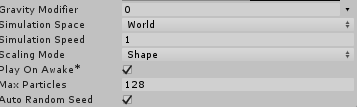
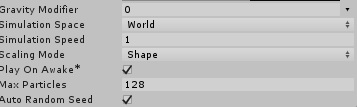
real fast how do you make a particle fly on its on directional or more specifically simulation usage: world/local
@clear yew no the closest is you give us the project folder and then we use ur model and do animations for you theres no "Insert spawn on any model" because the only reason the spawning works in the first place is because of duplicates of our models so simply giving a spawn script is kinda moot
 stable pilot
yea
clear yew
@stable pilot are you saying you'd do it for me
stable pilot
but i have that
stable pilot
@clear yew if i had incentive COUGH 20 bucks
clear yew
lol
stable pilot
@clear yew you are waaay better off just trying to do it urself
clear yew
i have 2 bucks in deviantart money
lel
yeah
i've tried for 2 days straight without sleeping
48 hours
lol
 spice meteor
of course u can buy presets for example Mesh Effects just nobody will share that with u for free lul
stable pilot
@clear yew give you a sanic
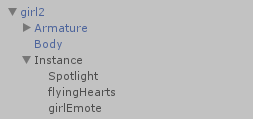
@spice meteor also is this on root model or the animation model
 spice meteor
Wait a moment is ur problem that ur particle system is changing direction with u like its bound to you or that it always faces you?
stable pilot
like the root model is world but animation was local
always changing with my movement
trying to achieve my dream of a kameha wave
spice meteor
so your wave is changing the direction on time with ur character movement even tho you set it to worlds?
stable pilot
no i just want it to fire and be on its own
emit*
cuz i have a secondary thing for that charge animation
this is purely the beam particle
spice meteor
for what, effects, weapon glow?
spice meteor
spice meteor
xd
clear yew
lol
pseudo pewter
Lul
clear yew
is Mixamo cheaper? @pseudo pewter
pseudo pewter
It's free as far as I know
clear yew
0
pseudo pewter
 quasi dirge
Sorry to butt in, but do you guys know where to find a pdf to explain how to edit a model to have something you can interact with (like a sword you can make out of nowhere)
clear yew
Oh
clear yew
This is literally what I want:
spice meteor
@quasi dirge https://www.youtube.com/watch?v=eT5_nyb0T1g&t=1s

Showing you how to change default emotes to weapons & stuff. SUBSCRIBE, LIKE AND ALL THAT GOOD STUFF!! :D MY FIRST TUTORIAL ► https://youtu.be/0vdiCJRAExw DI...
quasi dirge
Cool Thanks so much guys
stable pilot
i should make my own fast tl:dr
clear yew

This anime avatar in VRChat is great. It has so many different animations and cool things. I don't think I've managed to record all of the features of this a...
stable pilot
since most of these guys just talk
pseudo pewter
._.?
stable pilot
for tutorial vids
when most things needed were 30 secs of content needed
they enlongate to 5-10 mins
clear yew
There was this one Avatar could change from Rainbow to normal, had a minigun, had a pistol, had a hoverboard, like 20 different emotions, a dubstep gun..i don't think i have the patience for that
lol
spice meteor
i dont know some of his guides are okay but some are really bad
spice meteor
for example when he tries to explain cats or mmd tools or so and is like: yeah i just installed that i dont the fuck know how to set off the cartoon shader which is why my model glows purple
stable pilot
and god kurokuro9696 is the reason i went down this rabbit hole of creating
saw him and said "I will do this too"
poor past me.. the hours of fucking up
spice meteor
honestly the only two real hard things to learn are doing shaders urself and doing a model of your very own
stable pilot
agreed god bless shaders jesus the real mvps
spice meteor
but its so god damn unreal hard to learn it from the very basic i watched like 3 guides and they are always like yeah we gonna add a multiplier here and set this to this and put that into that and im like yeah motherfucker if you would explain why u would do that i might can recreate that
 lime nova
Does anyone here use Maya and have you used an animated texture on an avatar before?
 amber talon
having an issue making this model work, it clips through the ground and wont do the imported animations I assigned via the customoverride. Any clues?
 torpid light
Is that a generic rig and are you overriding emotes? Emotes can't be overrided on a generic rig
amber talon
Well the generic rig is an fbx with animations already in it
torpid light
What animations are you overriding though?
amber talon
First of all, how do I get it not to clip through the ground 😛
torpid light
the clipping is probably another issue, you can offset the transform of the armature in the rig import settings
amber talon
All of them, running, idle, falling, basic stuff
torpid light
You also need to drag the animation override into the controller slot of the animator on your avatar
 muted prairie
I've tried making a heat distortion particle effect, but in game it's almost not noticeable, what can i change ? https://i.gyazo.com/df59fe04464085c8f79399e8a3211062.mp4
torpid light
casue i don't think the custom standing/sitting work on generic rigs. I'm not sure though
torpid light
i was saying you can't override emotes
animations like walking and running are not emotes
i mean backflip/wave/clap and stuf flike that
amber talon
Oh right, no I mean to replace basic animations
or well, insert them
the model has animations already
torpid light
I would try adding the override to the animator on your avatar and see if they work
Unfortunately i'm not positve how to get it working with the default override thing. I made my own controller when i used a generic rig
but that's my best guess
amber talon
So you mentioned import settings for the clipping where do i find that?
torpid light
Go to the model in the assets folder and click on it. In the inspector there should be a rig tab
click configure
then select the armature in the heirachy and at the bottom of the inspector there should be a transform component
amber talon
Theres no configure with generic
torpid light
You might have to do "Create from avatar" or something. Send me a screenshot i forget what it looks like
amber talon
you mean copy from avatar?
amber talon
Create from this model
torpid light
actually im not sure if you can offset it in the same way you can with humanoid rigs
maybe try moving the model up in blender
in a humanoid rig you can just edit the configuration and move the armature around how you want
amber talon
Alight thanks ill try
clear yew
can anyone give me a quick rundown of adding sounds to a animation override? if its possible
 finite brook
how do i get my character to blink?
i have done everything in blender, just the unity part
pseudo pewter
@finite brook I used this video https://www.youtube.com/watch?v=p0txtOuZtx0&t=664s

Unity - Custom Animation Overrides, Blinking Animation, Dynamic Bones & Colliders, Viseme. VRChat #3
Importing model - 0:37 Toe Removal - 1:37 Applying Shader - 2:29 Blinking Animation - 3:09 Animation Override (Facial) - 7:24 Avatar Descriptor & Viseme - 18...
finite brook
thx
oblique panther
anyone here has experience with particles attached to a object for animation?
pseudo pewter
In unity?
finite brook
yes
pseudo pewter
The hand itself is probably easy
Just look for any finger and stretch em
Or index and middle in this case
Do you have vr?
 abstract current
watched a tutorial, but it wont let me copy and paste those animations onto the 0.01, apparently that makes the gun stay out forever?
clear yew
animation breaks model legs...any reason? both scales are 0.08
abstract current
If I left the animation liek that what happens?
clear yew
what, on keeping the gun out?
abstract current
yeah
clear yew
wheres the second set of keys, the end of the animation cycle?
did you accidentally delete it?
clear yew
if you're lookin to keep a gun out you need both sets lol that way when you switch emotes on the touch pad it dissappears
my damn issue right now is attaching audio to an animation and having it play in game
clear yew
yes. and see that red line? You need to move that by dragging it from the top and move it on top of the 2nd set of keys, then input the exact same values as the first set
abstract current
ok got it, thank you!
clear yew
np
 hot orbit
For some reason an animation i got from Mixamo only plays the first frame of the animation, and then immediately stops, any ideas as to why? Thanks
hot orbit
No, it's ingame, but i can send you that too if you'd like.
I saw someone talking about limiting that amout of frames it has in Mixamo
Could it be related to that?
clear yew
possibly
finite brook
what is the animation for ✌ called in unity?
clear yew
in the override controller thing?
finite brook
yea
clear yew
I believe it's labelled VICTORY
but idk for sure
I use the rocknroll one for custom stuff since its usually what the models in game use if they have weapons
or special emotes
finite brook
yea, but i want to add face animations to the ✌ emote
clear yew
what you'll have to do is custom animate the peace sign again as well as add a face animation to it then apply that animation to the current peace sign emote slot
finite brook
nope, i found the standart animations file, but victory doesnt seem to be the right one ^^
 sullen saddle
hey does anyone know how to make a emitted particle stop at a certain height?
lime nova
Now I've got a weird problem, my animations work everywhere but ingame
in the preview and when I go to upload it works
sullen saddle
if anyone knows about particles and collisions can you please @ me?
 loud violet
Does anyone here know how to reweigh the armature to a mesh in Blender?
pseudo pewter
I have edited the visemes generated by cat's to also move another part of the mesh on every viseme.
After I start talking it does indeed move that part but it never resets to the basic form.
Anyone got a clue on how to fix that?
sullen saddle
either manually do the weights on each bone with weight painting, or you can select the mesh > armature > ctr+p and do with automatice weights
but that can be a bit jannky simtimes @loud violet
pseudo pewter
@loud violet https://www.youtube.com/watch?v=Tl4qTgwQwYw&t=33s is a good short video on it
loud violet
Well, it may be less jank than this.
pseudo pewter
Which explains how to do the first thing that facity said
loud violet
Well, don't think it's a weighting issue now.
Anyone here know why the model seems to animate to the side like that?
 prime walrus
anyone experienced with editing an idle animation?
 fallow silo
Anyone got any experience with using the audio source? Having massive amounts of issues of getting it loud enough so anyone can hear, I've changed all the radius's ect
 uneven flare
can someone
teach me
how do i create sayan aura?
in unity?
a guy told me to go on photoshop
Make a transparent aura, like 5 textures, them i will then set these textures as billboard textures in Unity
and have an animation toggle them on and off in order 1 > 5
oblique panther
i managed to attach particle effects to an object 👌
that they move with the animation
hardy mural
Anybody know if there is avideo on how to add a drawing pen as an anmation?
 lofty radish
anyone know any good tutorials for visemes. i keep finding misinformative ones
 cloud nexus
Is there a way to increace the volume/radius of sound effects?
Because my character is pretty tall and has a sword, and the sword has a unsheatheing sound effect
But since my character is pretty tall, and the sound deteriorates over distance, people below me have a hard time hearing it
 clever shard
click on the audio source object and you can adjust the values
with minimum and max hearing distance and stuff
cloud nexus
And maybe if my sound effect isn't loud enough
I'll just make it louder in audacity
Right?
Yeah, it is simple
I was just making sure
cloud nexus
I have mine set to linear cuz that's what a tutorial shown me
clever shard
you can also drag the circles for the min and max values
cloud nexus
I guess I would just have to play around with it?
clever shard
yeah its trial and error
cloud nexus
Wait, quick question
Minimum, if people are inside the minimum circle
That is when the volume for the sound is maxed out?
clever shard
not sure tbh
cloud nexus
And the bigger circle is just when it deteriorates?
clever shard
they cant hear it outside the big circle
cloud nexus
Ye, I mean
clever shard
that orange circle isnt the minimum circle
cloud nexus
Between the small and big one
clever shard
theres a much smaller white one that ive put inside my avatar
cloud nexus
I'll just do some experimenting
clever shard
👍
cloud nexus
I just wish my upload speed was quicker though...
Takes like 10 minutes to upload
10-20
 frozen wind
any reason why my hand gestures reset everytime i start walking? i.e. the custom sword i rewrote to the point key disapears as soon as i click the walk forward key
 scarlet arch
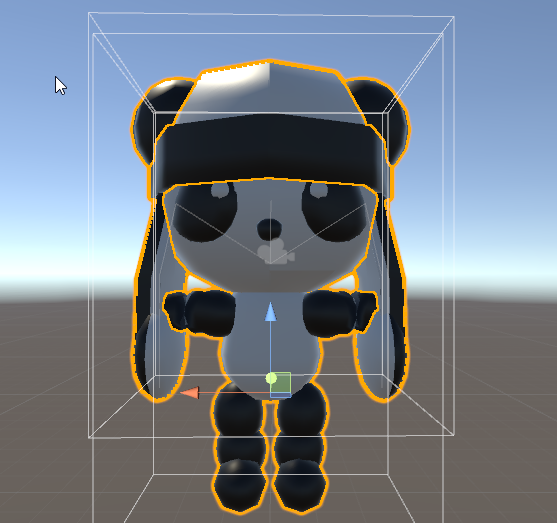
Hey guys, does anybody know how I can lock the hat to my dudes head so when the head moves in game, the hat moves with it instead of just floating without tilting? https://i.imgur.com/KzJWKVI.png
 cloud nexus
@pseudo pewter My upload speed is like, quarter of a MB a second
pseudo pewter
Yikes.
I have edited the visemes generated by cat's to also move another part of the mesh on every viseme.
After I start talking it does indeed move that part but it never resets to the basic form.
Anyone got a clue on how to fix that?
 lunar junco
Does anyone know how to add Gravity physics to an item (like a chain) so that it sways and moves naturally (or close). I am trying to add a chain weapon to my character (Kurapika from hunter x hunter). Would really appreciate any help or advice
 coral marsh
@lunar junco dynamic bones has that feature. https://www.assetstore.unity3d.com/en/#!/content/16743
look at the menu picture, you can see the setting sdfor gravity and force, those are what you use
i personally did it for hair that was rigged sticking out when it should be drooping
QUESTION: Which animation controller is the sit animation? I have small characters that dont sit right and i want to edit the default sit to one more suited for small people.
 ebon heron
ive tried just about anything I can think of and I cannot get my particle system and sound to activate on the hand open animation...
lunar junco
@coral marsh Thanks!
ebon heron
http://prntscr.com/hulrfc Ive got my emitters and sound attached to the hands I created the animation in a separete skeleton of the repulsor looping along with the beam sound, and ive added into my animation override file on my main rig... and its just not doing a damn thing when I get in game

 tropic nova
for changing models during an animation, how do i enable the second model game object without it switching the animation window to the other model
clear yew
anybody know how many frames the default walk/run has to be?
tried changing it but it keeps cutting off my animation before it cycles
tropic nova
@clear yew i dont think it matters how many frames. just make sure your first and last keyframes are identical. also right click them and set to auto
clear yew
only reason i thought that was the problem was it was cutting em off half way
clear yew
@hardy mural you can edit messages y'know
clear yew
@tropic nova that worked thanks for the help
@hardy mural i dont think you're able to do that anymore they changed it after people were being spammy\
clear yew
yes
clear yew
i dont know how
uneven flare
can*
clear yew
but i know you can
clear yew
so i moved some parts over from a original file onto my model cause i over decimated. but now the parts i moved dont move with the body how do i fix that
tropic nova
can anyone give me a quick rundown of how to change avatar through emote. i deactivate one game object and avtivate the other but all it does is put me in the ground for a few seconds
tropic nova
find a particle effect you want and then just put it in your higherarchy
hardy mural
@clear yew i saw someone with it today
They had a voice line playign when they used an animation
clear yew
i thought you mean't music
you can add audio clips to weapons
plenty of people have like gunshots
hardy mural
i wasnt to add a like 5 sec voice line when i use a particle effect
Kinda like the DBZ characters
Do you know how i would go about that?
ebon heron
okay I got my particle effects to work, now is it possible to have the effects only trigger on one hand? when I do my gesture it triggers the particles on both hands 🤔
 proven mango
god i wish there was a way to do this all quickly
ebon heron
I also lost the ability to jump for some reason... not sure what would cause that...
any does anyone know why a particle system might not show up in a mirror?
clear yew
how do i fix this LUL
the pants hat fluff and gloves
are not moving with the rest of the model
i copied them from an original file cause i over decimated
prime walrus
@clear yew looks like a bone weighting issue
the meshes arent weighted to any bones so they don't move when the bones do
clear yew
i just reparented the original objects to this one
didnt think there would be any issues
i have no idea how to do bone weights
tropic nova
can you give a sitting animation to a generic rig?
hardy mural
Is the HANDOPEN animation in the overide the animation where your fingers are stread out wide?
ebon heron
@uneven flare https://www.youtube.com/watch?v=CnykzgSxtz4

Made a little tutorial for some friends in VrChat. Hope this helps if you have any question you can ask on my discord, Also regular content should be back so...
@hardy mural yes
uneven flare
THX SO MKUCH
 blissful wave
Are there any issues if you put multiple dynamic bone colliders on the same part of the armature?
 wild egret
anyone know what happend here? i made a pulling a sword out the sheath animation and it works but this is wha ti see. people in game said it looks normal to them, but for me its like this.
 stable mesa
does anybody know how to make goku's powerup aura in unity?
prime holly
@wild egret You and other people use diffrent Controllers, so that's why they can see something diffrent to you. So that means that the FirstPersonController that's handling the animation for you is giving out a diffrent result
coral marsh
Guys i have an animation issue. I added a new idle animation, but it is making my character spin when i move. my body rotates around. apparently i only see this as ym friend doent. any way to fix this?
wild egret
@prime holly so do you know why my sword i sfloating behind me though?
 somber kayak
yo how do i add a picture e.g. a FeelsBadMan to a particle effect so it bounces around?
prime holly
@wild egret Did you enforce t-pose?
wild egret
i did not. will that fix it? i made the same animation on a normal link and it works fine.
tropic nova
can anyone give me a quick rundown of how to change avatar through emote. i deactivate one game object and avtivate the other but all it does is put me in the ground for a few seconds
pseudo pewter
@tropic nova
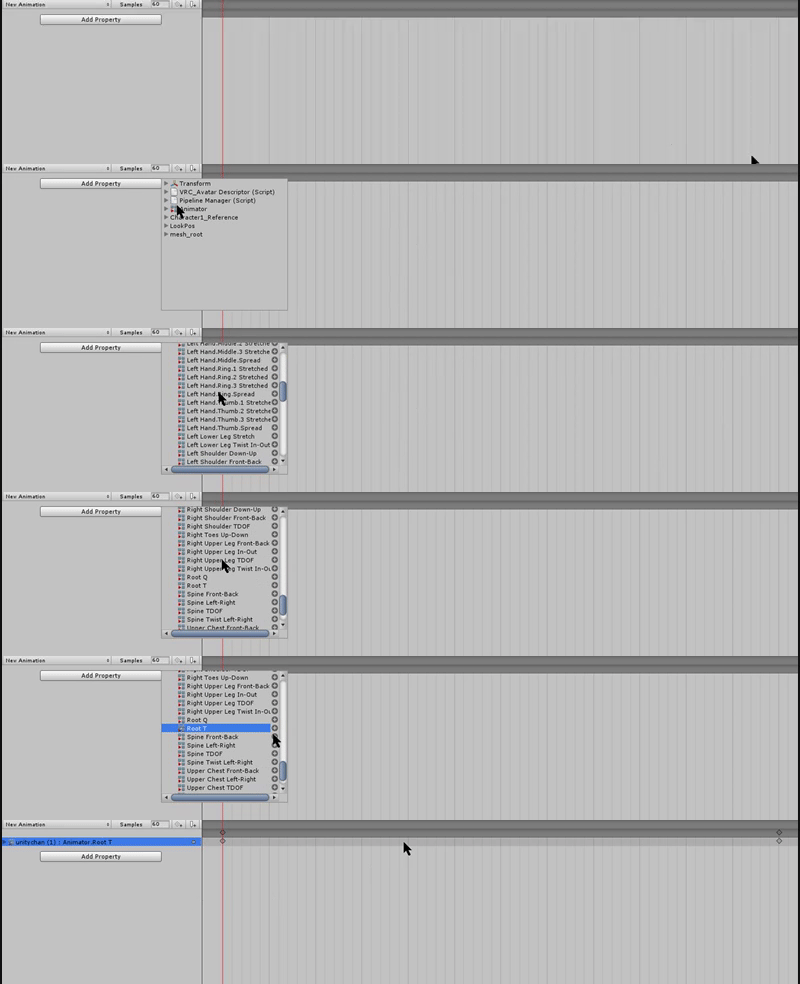
If your character is going in the ground during the animation you need to add a property to your animation called "Animator.Root.T" and change the Y value of that transform to offset the amount you are under the ground.
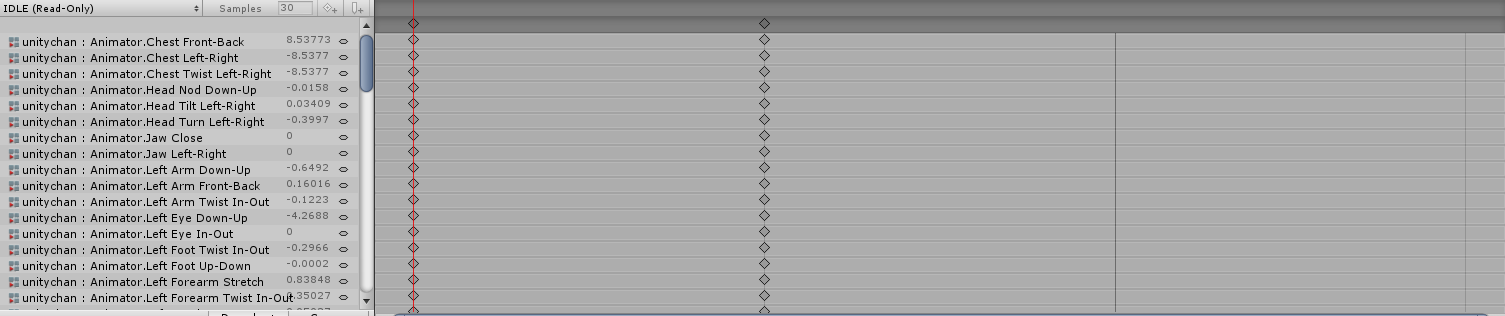
You can take the Animator.Root.T from the idle animation and use that instead of trying to figure it out yourself. With the original character that you upload selected you should see this in the animation tab https://i.gyazo.com/e4ec42f7be8b487bdbfe4dda00f52e22.png
Scroll down inside there until you find the animator.root.t and copy that. Then go to your duplicate character that you do the animations on and paste it in to the animation you made. That should solve being in the ground. If your character slowly goes into the ground towards the end of the animation, then you need to be sure that the last frame of the animation also has the same Animator.Root.T values. You can add it yourself without copying like this https://i.gyazo.com/0f84825296593a9b5fe99cf7a229ac42.gif

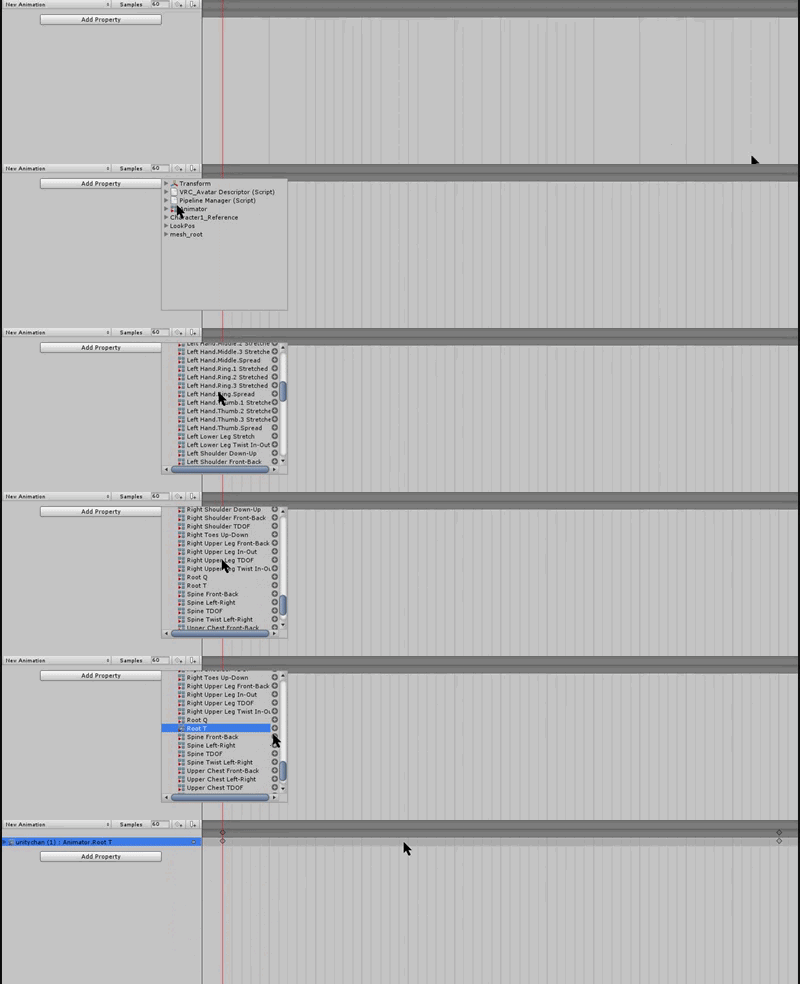
I had same issue as well and that is what fixed it for me
tropic nova
ty @pseudo pewter
@pseudo pewter do you know how to change avatar with emote? im just deactivating 1 game object and enableing the other. is that all i have to do?
pseudo pewter
Change avatar?
tropic nova
yea like a transformation
prime holly
@wild egret The Enforce T-pose updates the model so that the Rig is positioned correctly, which effects your local view
pseudo pewter
Do you mean like a permanent transformation?
tropic nova
yea
pseudo pewter
Or just for the duration of the emote
tropic nova
permanent
pseudo pewter
I don't think that is possible..
wild egret
@prime holly thanks alot
pseudo pewter
I could be wrong tho
tropic nova
ive seen people do it
but idk if its with vr and you just hold down a hand gesture or something and then return back when you let go of hand
just clicking emote to permanently transform idk if its possible but i want to try
coral marsh
@pseudo pewter do you by chance know why my avatar body spins for my screen after adding a new default idle pose?
pseudo pewter
I don't have an idea..
 ionic basin
Are dancing animations the same as any other animation or are they different somehow?
terse sonnet
So I think I figured out my issue earlier with the hands locking up after a gesture animation override. It seems like if you make the animations for hand gesture overrides longer than just 0.01s, there starts being problems. I didn't know tutorials were being specific there
coral marsh
I figured out my spining avatar issue. Bake bones in animations (including idle). /done
hardy mural
Hmm question guys
https://gyazo.com/156adf66ab9dea3ac2966646099c81ae so the sound and the effect are playing when i use the play button to watch the animation

But in game it doesnt have any sound
Does anybody know why?

 silent radish
ok so
question
mouth is closed on my av, but open when it's animated
how should I go about keeping the mouth closed?
blissful wave
My override animation set thing is empty for some reason?
The list is gone
nvm fixed it
silent radish
can anyone help me with this?
blissful wave
I imagine the issue is that the mouth is open by 'default'
So the fix would be to include the mouth/that viseme as a property and set it to 0
that would be my idea, at least
silent radish
that sounds correct, butm I don't know what to do to accomplish it
blissful wave
Is it a jaw bone or a viseme?
silent radish
jaw bone
blissful wave
That's a controllable property in the animator
silent radish
for lip sync?
blissful wave
no, as in, as making it part of your animation
blissful wave
Are you animating it through Unity?
silent radish
I am not doing the animation myself, I was just testing the animation using the controller template
blissful wave
I dunno what to tell you
silent radish
you could tell me where I could go to change the mouth to 0
blissful wave
I've never been there
silent radish
okay
blissful wave
Does anyone know if 'HANDOPEN' is that kinda relaxed hand position? And the 'stretched out' hand animation is just the default?
Or do I have that backwards?
proven mango
@silent radish https://www.youtube.com/watch?v=p0txtOuZtx0
Unity - Custom Animation Overrides, Blinking Animation, Dynamic Bones & Colliders, Viseme. VRChat #3
Importing model - 0:37 Toe Removal - 1:37 Applying Shader - 2:29 Blinking Animation - 3:09 Animation Override (Facial) - 7:24 Avatar Descriptor & Viseme - 18...
uneven flare
how do i add
proven mango
watch this vid
hardy mural
Hey guys got my sound on my perticle effect working but its so quiet its unbeleiveable
i didnt even know it was working at all
with max on the volume in unity and in game
uneven flare
how did you do that
less gentlu?
gently?
can someone help me?
how do i descrease the particle
to have more polygons?
less*
any help please?
HELPPPPPPPPPPPPPPPPP
PLEASEEEEEEEEEEE
 vagrant heron
How to I disconnect or delete an object without breaking the prefab instance? I want to make animations
Unchecking the active box box doesn't do anything
amber talon
Hey. I made a sound trigger for my avatar. Bound it to emote1 because I dont have vr. Its supposed to loop. Can I not use it as a toggle? Because when I press it freezes the avatar in place and there is no sound
hardy mural
Nope can't if you bind it to an emote
Is your sound lous?
loud*
i can hardly hear mine at all
maxed in the volume on audio sourc
Source
 slim phoenix
can anybody point me towards a good tutorial for animated skins? Like when people have hair or pieces of their outfit/skin that changes color?
slim phoenix
lol, sounds about right
i was trying to search it, but kept getting unrelated videos, my google-fu is not good lol
silent radish
tfw avatar chat points you towards animation
slim phoenix
welcome, we are all just confused here
hardy mural
welcome to the pit
the only thing i want to know
it how to make my sound on my animation llouder
and nobody can help me lol
sounds fine in unity
put it in game and its almost un hearable
slim phoenix
i wish i could help, ive never added sounds to my animations, the only think i can think of... could you perhaps pull the sound file into audacity, make it louder and see if that works?
hardy mural
ive never really used audacity but i will try i guess
clear yew
any way to add glowing effect to eyes on unity?
clear yew
This has probably been asked hundreds of times but.... what does the error "This avatar does not contain an animator, and will not animate in VRChat" mean?
hardy mural
did you put in your avatar descriptor
hardy mural
did you set your avatar to humanoid and configure it
clear yew
Yep.
hardy mural
anybody know what "clipping" is, about sound
clear yew
@hardy mural if you're still having trouble with audio could you send screenshots of your unity game scene or w/e and the settings for the audio source
clear yew
@clear yew Are you using an MMD Model?
hardy mural
i put a audio source on my animation
then animate it like any other weapon/effect
use the .ogg file extension for sound
uneven flare
I NEED TO ANIMATE IT?
i can't put a sound without animate?
i saw a guy with the saiyan aura
them a sound effect
without animating it
clear yew
you can attach sound without much effort if all you want is sound. I dont have much experience with particles yet
clear yew
@clear yew Unfortunately no, it's an SFM model but I've imported them before without issue.
 light wing
I just created some Shape keys in blender, but I can't select them in CATS. Thoughts?
clear yew
It'll let me import it but he doesn't move.
He has bones
you might need to delete the model from your assets in unity and readd it or maybe re-export it from blender or whatever program you extracted it with
Ah okay.
I'll try that.
usually I get that problem when the bones/mesh arent translated properly from Japanese to English
ok
so I re-export it
 steady plover
about to make a Shizuo avatar that dances hare hare yukai XD
uneven flare
i have to put the particles
in th chest?
for it to be attached in the model?
exemple
example*
clear yew
Idk how it works compared to like attaching a model but
I'd put that particle in the chest, yeah
clear yew
You got a custom trigger for it? How do you enable the particles?
steady plover
the translation thing causing errors might be fixed by changing locale to japanese?
or just translate the stuff 😛
clear yew
I use CATS MMD tools for translation and sometimes it breaks
clear yew
I need to know how you're using the particles, is it through a custom animation override thing?
steady plover
animation
if you activate the particles with animation, do the sound in the same animation
clear yew
ye
steady plover
do you want a constant or on active sound?
clear yew
basically you gotta attach the sound to whatever makes the particles show up
steady plover
constant is always on, on active has a trigger and doesnt last forever
uneven flare
always on
clear yew
oh
ezpz then
toss the sound file in the assets folder with your model
then drag it into the game scene
steady plover
you can set it in loop with a simple checkbox
uneven flare
ok
clear yew
then with the sound file in the game scene you wanna move the little speaker icon of it over top of your character and add it to the chest as well to attach it
clear yew
Hmmm, I wont be of much help there. I dont have experience with particles yet
hardy mural
following what
clear yew
its trailing him
uneven flare
yep
clear yew
instead of being static and attached to his body
hardy mural
put it in his hierarcy
hardy mural
and dont make it last as long
clear yew
he put it under the chest
hardy mural
that fine
how long is it lasting
because if its on loop it doesnt matter
dont make it last long because its lingering
steady plover
is there a limit to how long an animation override can be?
hardy mural
dont think so
steady plover
phew
uneven flare
hardy mural
idk though
steady plover
I guess I will test it out
steady plover
making an avatar with some dance animations
steady plover
hi
uneven flare
less
check the values
it's 0.10
duration
ok nobody will help me
i'm going to cry
@hardy mural
SOMEBODY SAVEEEEEEEEEEEEEEEEEE MEEEEEEEEEEEEEEEEEEEEEEEEEEEEEEEEEEEEEEEEEEEEEEEEEEEEEE
PLEASE
GUYS
SOMEONE
STOP IGNORING ME
I HAVE FEELINGS
I'M DOING THIS SHIT FOR OVER 7 HOURS
 kind wharf
lol I'm just sitting here trying to figure out why my eyes are twitching
uneven flare
CAN YOU HELP ME?
kind wharf
probably can't im so bad at this
steady plover
sorry man, was busy uploading my dancing shizuo
I dont know how to fix your problem though
 cyan sparrow
Hi guys, I want to do a very simple animation where my head flies around. I have a seperate mesh for the head, what is the best way for me to go about doing this?
steady plover
make an animation that moves the bone of the head (or fake head if that's what your gonna do) around, I guess?
steady plover
really?
muted prairie
can*
cyan sparrow
@steady plover I am completely new to animation. I have a bone for the seperated head, so all I need to do is find a basic animation tutorial and I should be able to do it? :3
 warm furnace
@uneven flare can you summup your problem ?
finite brook
can i somehow disable eye tracking in unity or do i need to redo my whole blender part?
accidently put it on and couldnt undo
muted prairie
remove the animation override ?
finite brook
no, i created eye tracking with cats, but it is bugged and i dont want to use it @muted prairie
warm furnace
@uneven flare So you want the particle to follow your person like an aura but don't move ?
uneven flare
yes
it's an aura
but it keeps following me
did you see the picture
when i move the character?
warm furnace
try change "Simulation space" to Local or shape
one of should works
because you make "world" = it's gonna take ernergy from your character to move
and follow you
but you want an aura, so it's bound to you not following you
uneven flare
yes
warm furnace
Hope for you because i'm going to bed. See you 😛
warm furnace
?
uneven flare
let me see if it works
warm furnace
^^
warm furnace
xD
warm furnace
Thanks
steady plover
@finite brook just unweight the eyes from the eye bones
found out what happens if you use animation override to add a dance that is longer than 10 seconds to an emote
after 10 seconds of dancing, you can move and jump again, but you still dance until the animation ends
warm furnace
It's thé same for Hand gesture 1s max and for emote 10s
Idk how to deal with sound effect
vagrant heron
Anyone know how to make the audio in emotes not sound so quiet that no one can hear?
Will I have to boost the audio in the actual sound file for it to get louder? Because it's already on 1 in the audio source panel
hardy mural
@uneven flare sorry i was in game
hardy mural
what did you need
hardy mural
See, you're smart
uneven flare
what?
hardy mural
sound louder*
uneven flare
and if it passes the limit
hardy mural
its like 1/20th people talking voices
uneven flare
the game will autoadjust
yes
you can't put the sound louder
than the game allows
i set mine to 0.378978
 ionic scaffold
I want to make my own animations, should I use Blender or Unity?
hardy mural
unity
hardy mural
lots of particle packages to use
uneven flare
TO DO ANIMATIONS
hardy mural
mix and match
uneven flare
yep
ionic scaffold
So my animation is basically making him hold that position for 12 seconds
But whenever he does the animation it's kinda broken..
hardy mural
? why not just rig it to your hand
then whyen you doa gesture it appears in yoru hand
and you can move it
ionic scaffold
I don't have VR
muted prairie
pay2win
ionic scaffold
That's why I'm trying to do my own animations
and override the standard emotes
Well thanks for the reply I'll try doing it in Blender, Unity is giving me cancer rn
 undone glade
somebody mentioned a site for good weapons and forgot what it was.
besides deviantart that is.
Let's take that out of context to
 fiery harness
You can override animations to non humanoid avatars?
 tawny elbow
Yeah you can, you'll need to dupilcate the animation override like you would for a humanoid avatar, however you import the custom animations you've done for the avatar into the slots
Oh yeah, I was wondering how people do those avatars with pens that draw in the air. Are there any tutorials on that?
i'm not sure what terms to search for lmao 😂
tawny elbow
It's not a component I have to buy/install first?
fiery harness
No, it comes with unity
tawny elbow
happy new year 😃
lime nova
Can anyone help with animated materials/texture in unity
tropic nova
is it possible to give a sitting animation to a generic rig?
vagrant heron
What's the best setting for audio emotes so it's not inaudible in game?
 sacred spear
i need some help with gesture overrides i seem too have broken something i put an object in the hand and when ever i go in vrchat and do the gesture the object shows up but it also slows down the cycling of the gestures so i have to wait few seconds for the gesture to make a full movement so that the object disapears
how can i fix this
it happens when ever i do the gesture for the object to appear it like breaks the hands and all slow in movment when trying to cycle too a diffrnt gesture
 tribal sparrow
If I want to have my hand animation move the entire centre of my character, is that actually possible? I am trying to make my character sit on a wall like spiderman without using (Emote). So far I have only been able to edit fingers and add items.
Editing transform position for Spine or just the entire mesh seems to not work.
 pseudo kernel
is there a way to not have my player model spin like a top in my view when using custom animations?
oddly enough I'm also working on a Spider-man
 tame ravine
Hellow all, I was directed to this channel in hopes of getting some help with audio files/poses. Would anyone be kind enough to offer assistance?
pseudo kernel
kinda quiet in here tonight, I'd help but I don't have the knowledge yet
tame ravine
Ah, yeah that's understandable with New Years and whatnot.
clear yew
Audio, huh? What do you need help with specifically for audio?
tame ravine
Well I've got around to modeling DIO from Jojo's Bizarre Adventure just to have a few laughs but I recently came across a guy who had a pose and a sound file that "fired" the weapon on his arm. I'd like to do the same with the DIO model but have the arms go out from the body while having "Za Warudo" sound file play.
clear yew
hmmm. do you have VR?
tame ravine
I do.
clear yew
do you have a seperate FBX model of the weapon? (If its one attached to his body, you can use blender to take it off and save it as a FBX model
tame ravine
Well it's not a weapon. More like a pose to trigger the audio file. Essentially it's extending his arms rougly into a T pose to trigger the sound.
clear yew
I dont know what it'd look like or how exactly you want it to look like but I can tell you how to make the changes you want
tame ravine
I'll PM you if that might work better.
clear yew
aight
 stray gulch
Hey is there ever a time where I actually use the expressions that are inside the head off a imported mmd model?
ionic basin
Does anyone know an actual informative tutorial on importing and using dance emotions?
 jade elk
I've been trying all night to get this custom weapon override to work. I followed https://www.youtube.com/watch?v=eT5_nyb0T1g seemingly perfectly but it doesn't work. VRChat recognizes the different emote name but when triggered, the avatar just sinks into the ground for a second and does nothing. The animation seems to work fine in Unity but not in VRChat. I'm not sure what I'm missing. Is there an extra step when you override emote # instead of a VR specific function like rock n roll?
Showing you how to change default emotes to weapons & stuff. SUBSCRIBE, LIKE AND ALL THAT GOOD STUFF!! :D MY FIRST TUTORIAL ► https://youtu.be/0vdiCJRAExw DI...
 crisp arrow
This going to hurt to say ,but i cant find a dabing animation to use as an emote for a charater im making for a friend anyone know where i might get one?
ionic basin
Anyone know a good tutorial video for importing and using .vmd dance animations?
cloud nexus
How does one make their sound effects louder and travel further? I been playing around with these settings and It just keeps sounding the same in volume and distance for me
(as in it's quiet and it fades out in a short distance)
(When I want it louder and it fades out from a further distance)
(Kind of like a bomb sound effect for example)
ionic basin
Anyone able to help me with importing a .VMD mmd dance animation?
 analog haven
Ninja I think it shortens it on purpose so that you don't annoy other people.
It's built in that way,.
 abstract wyvern
Yep vrchat has a clamp on sounds
clear yew
Anyone tell me what setup is best under dynamic bones to apply to breasts? I can’t figure it out and they’re looking like flopping liquid sacks going everywhere on each step
 sharp torrent
Did you put the inert up pretty high?
clear yew
Probably not. Is higher inert to prevent them from going everywhere?
sharp torrent
I usually always use a lot of inert, like 80-90% makes movement more subtle. And around 50% damping. But don't have too much experience with Dynamic Bones though
Other than that, just play around in the play mode and test it
clear yew
Yeah I’m new to it all but I been trying for 30mins to make them look real like and every step is like them doing 360 circles
sharp torrent
Try to make them really stiff and unmoving by putting a lot of setting real high, and move downwards from there maybe? Could make it easier?
pseudo pewter
I have edited the visemes generated by cat's to also move another part of the mesh on every viseme.
After I start talking it does indeed move that part but it never resets to the basic form.
Anyone got a clue on how to fix that?
 iron crescent
So if I want an idle animation I just need like one keyframe right?
pseudo pewter
Then your avatar would probably be static I'm assuming
When you idle you move a bit in place
iron crescent
oh
 runic frost
Can someone help me with adding the Snail Marker to my model? I'm trying to either add the function to an animation I already have or at lease edit the animation it imports so it looks correct. Any thoughts?
 edgy relic
Hello all, could I have help with my walking animation. I've used the CAO empty script and input the walking animation into it, applied it to the model's animator and the VRC descriptor standing animations. In game, the walking animation triggers but doesn't complete the full animation clip, it freezes into place until I stop and go again. Help would be greatly appreciated. Happy New Year.
terse sonnet
How do I allow particles to keep going until their lifetime is over, instead of being deleted when the particle system is disabled?
oblique panther
anyone has an idea why the particle is not moving with the object https://i.imgur.com/SvszOip.png
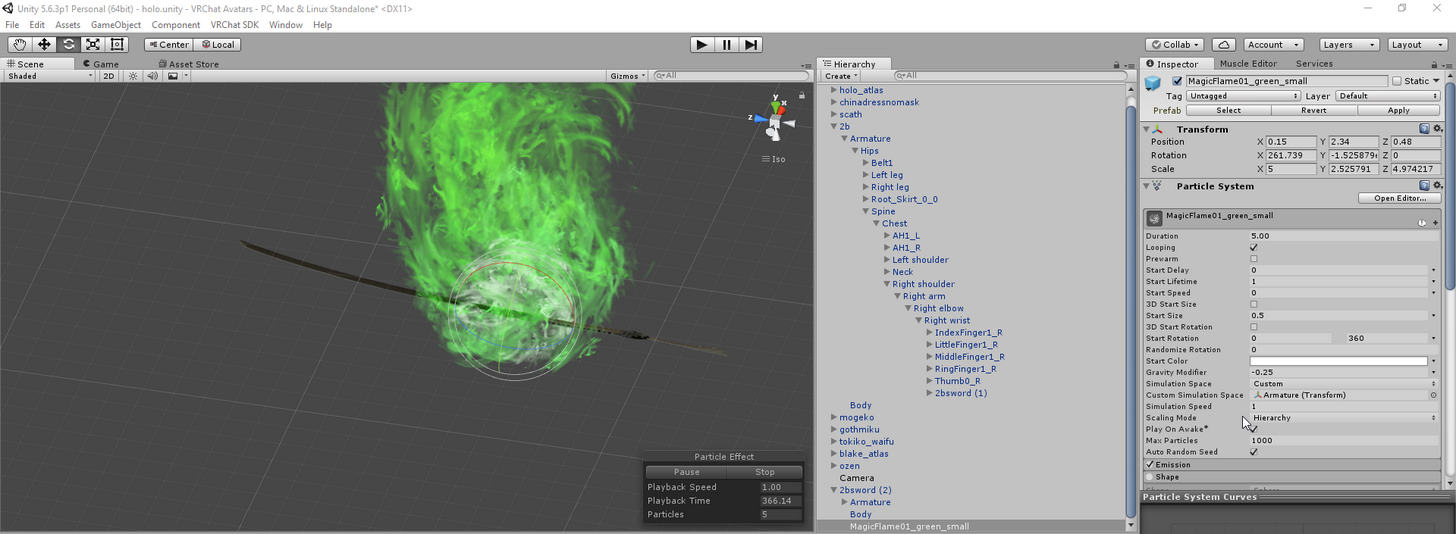
it always defaults back to this position
oh its because of gravity
iron crescent
i figured it out
yeet
jade elk
I think I figured out my problem. I don't think it's possible to do normal override animations without the vr gestures. Emotes function differently. The whole 2 frame trick doesn't work. I managed to get it to work but only after changing it to a 10 second animation.
 lavish palm
Anyone here know what is needed to make an avatar fly upwards abit for a jetpack animation?
tame ravine
Hey guys, I've hit a bit of a snag when adding a sound file to my animation. Instead of playing the file when I click the emote it plays it when I spawn in... i feel like im close to figuring out what the issue is, but other input is welcome.
clear yew
Is there a site or file pack that can find animations that I can use in unity?
Like what is the file name for the animations to use?
tropic nova
is it possible to give a sitting animaiton to a generic rig?
sullen saddle
Anyone know why the object isn;t snapping to the wrist where i've parented it to? first time i've seen this
warm furnace
did you parented the object to the wrist before or after making animation ?
sullen saddle
@tame ravine make sure you;ve got the sound object turned off in the hierarchy on your model, thats why it'll play when you spawn and not during the animation
@warm furnace yup parented it to the wrist before i started the animation
I don't want to have to reclone my avatar becasue i have other animations there where i;ve moved finger bones and thats so tedious to do lol
warm furnace
does before your animation, the object was actually in the hand ?
(I don't mean parent, but physically in your hand)
sullen saddle
yeah, it's physically moved into the hand in place ready to move the fingers in the animation
@warm furnace the master above the anim avatar
warm furnace
try to move it a bit of the hands, maybe it's clipping in it. But I don't think it's that
Maybe try to make parent it to the other hand or an other bone (like maybe the finger or something like that)
wait wai
In your animation did you put a key for the position of the object ?
sullen saddle
nope
warm furnace
Try it should work
sullen saddle
i've just recloned my master now and re doing the animations, it's working as intended now
warm furnace
¯_(ツ)_/¯
 trim flax
hyym, how to override walk animation, my model instead of walking normally lime in animation just stands in one weird pose
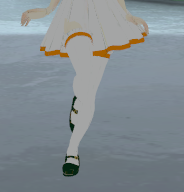
ok, fixed, it needs to be lopped I think
tame ravine
@sullen saddle https://gyazo.com/920c9754b1e0e95acda5687dc95db66c It looks off to me, but continues to play when spawning in the game.
 sullen saddle
whats node_id11?
you need to have what it's parented too turned of i think
that how i do my audio sources anyway
tame ravine
If I recall node_id11 is a parent for the mouth, tongue, nose, ears, eyes, etc.
sullen saddle
create a new empty
iron crescent
ok so
sullen saddle
parent the sound to that, and have your animation active that empty
iron crescent
if i make an animation in Blender, how do i get that animation and replace the default idle animation

this is what i have
should I just go look at a tutorial? lol
tame ravine
@sullen saddle So something like this? https://gyazo.com/f19cd07a728756403583b7339fa7147c

 balmy comet
When i want to apply a dancing animation in blender, do i really need a pmx file, or can i put the vmd on a fbx file in blender too?
sullen saddle
@tame ravine yeah, parent that game object to your head and you should be good
amber talon
Is it possible to make a walking audio source? So while I am walking you hear a sound?
I tried to put it on the walking animations but dont hear it
tame ravine
@sullen saddle Alright, how to target the head specifically now? Tried googling it but it brought me to scripts
sullen saddle
fly out the t-pose and it should show you the armature
t-pose > hips > spine > chest > neck > head
something along those lines
tame ravine
Does it matter where exactly on the head? or just in the tree?
amber talon
In order to make my sounds pass through so people hear it properly around me. Are these settings okay?
tame ravine
so something like this? https://gyazo.com/07174a9700ff1b99fbc3aa4b6f7e0207
 amber talon
Ehh well i heard people only hear it pretty quiet atm
 mighty harbor
is there a way to make the left and right hand gestures trigger independent animations?
Ah, shame it isnt for each hand
Also how do you do the drawing particles? For when people draw little temp things with their fingers.
add a material to the finger and throw that on?
Whats the easiest way to get that setup, I've only barely started to grasp basic things in unity aha ^^;
Yeah, I've got all that down.
tame ravine
I must have something wrong, I've been at this all night and it's just tedious. I bet it's something simple that I've been overlooking. https://gyazo.com/5304f7016d796747d5a0a99eb720323f I swipe down for the taunt and it does not play the sound file.
 mighty harbor
left
tame ravine
Alright, I followed a tutorial on it and it told me to delete the audio file. Let me make a copy and show you.





Let me pm that vid.
mighty harbor
I can add it to the finger directly?
oh, what goes on in the timeline with that?
what does the 1000 mean?
ahh, so the 1 in that screenshot is the 1000 I need to set?
Oh
gotcha
Its not that complex in the end
luckily.
spice meteor
Hey is it true that hand motion overrides can only be 1 keyframe else they break to change into a different hand motion?kinda like a loop?
mighty harbor
don't you need two keyframes just a copy though?
spice meteor
Crap
mighty harbor
Also, howcome when say I'm duel wielding I need to use the gesture on the other hand too for the animation to actually kick in?
spice meteor
Can u have 2 motions triggered at once one by ur left hand and one by the right?
mighty harbor
I set the motions on both hands
but it wont play on the other unless I do the same gesture.
Shame theres no way to hook into that for seperate animations :V
I did find an avatar that seemed to have both hands do something different today, not sure how, one got a gun the other a sword.
spice meteor
Do they even work on that game anymore i mean like seriously and not day z method alike?
finite brook
is there a way, i can disable my blinking while doing a face emote?
lavish palm
Kinda depends on what the override is, I have an override on my greyfox to open the mask but it's 30 frames to make it open smoothly
On hand controllers you can have 2 active at once by making different gestures on each hand
finite brook
1 frame emotes for the face, i just want the blinking disables while i do that
how?
mighty harbor
What type of texture should I use for the trial? Just a solid one?
finite brook
ok, gonna try that ^^ thx
is that the right one? @tender sierra
i have at 5 blink and at 10 double blink
does hand open automatically reset it?
or do i need to manually implement that first?
so it is a reset by default?
ok ^^
amber talon
Any idea why my volume slider keeps forcing back to 0.5?
Maybe, but people still say its not that loud
So how do I get it louder
When i test it in unity it seems fine
Oh the volumetric radius is at 0, how much should it be
pseudo pewter
I have edited the visemes generated by cat's to also move another part of the mesh on every viseme.
After I start talking it does indeed move that part but it never resets to the basic form.
Anyone got a clue on how to fix that?
amber talon
it keeps resetting it to 0
Both the volumetric radius and volume keeps resetting to 0 and 0,5. Probably the SDK preventing it
finite brook
@tender sierra still doesnt work xD seems to apply to the wrong model
i dont know how to get it to apply to the right one
 icy fog
Hey does anyone know if there is any way to apply a custom running animation to an avatar without an avatar/rigging. Made a 2d model using planes in Unity, and I madea custom running animation, but have no idea how I could get it into game. Would I have to make it into a rigged 3d model and work with it that way, because that feels it would take way too long -.-
 winter raven
Has anyone had their animations get stuck and then start to overlap if you do it again?
winter raven
victory
clear yew
thanks mate!
 fallen flax
@winter raven make sure the 0:00 and 0:01 key frames are exactly the same
winter raven
they are, is the thing
fallen flax
Zoom out on your animation timeline
Might be a stray keyframe
Somewhere along the line
winter raven
none
 wanton mortar
does anyone know how to do the dissolve effect on avatars? where they disappear as you walk further away
terse sonnet
yeah I'm pretty sure all gestures have to be exactly 0.01s long
emotes can be up to 10s
also, even though gestures are only 0.01s long, it'll still interpolate to them naturally, it won't jarringly snap to it
winter raven
crispy, that effect is a texture. one of the cubed shaders
wanton mortar
thanks a bunch man!
tribal sparrow
can gestures move the entire center of the character? from just using animation settings within unity? Transforms never seem to work
edgy relic
hey guys, i've got a walking animation ive put on my avatar, in game the strides aren't as long as the animation in unity. and the legs come to a halt after like a second, yet the hands are still swaying fine.
 unique night
is there a limit to how many particles can be emitted in vrchat per avatar? or whats the recommended max limit ?
(working on an emote that has some particles emitting to it but dont want to go over the normal limit that people use in vrchat
 flint wyvern
Anyone here knwledgable when it comes to custom animation particle effects? Im struggling