#animation
1 messages · Page 9 of 1
 torpid light
 clear yew
I used my right wrist (all the stretched right fingers)
I think there is 15 options of them
torpid light
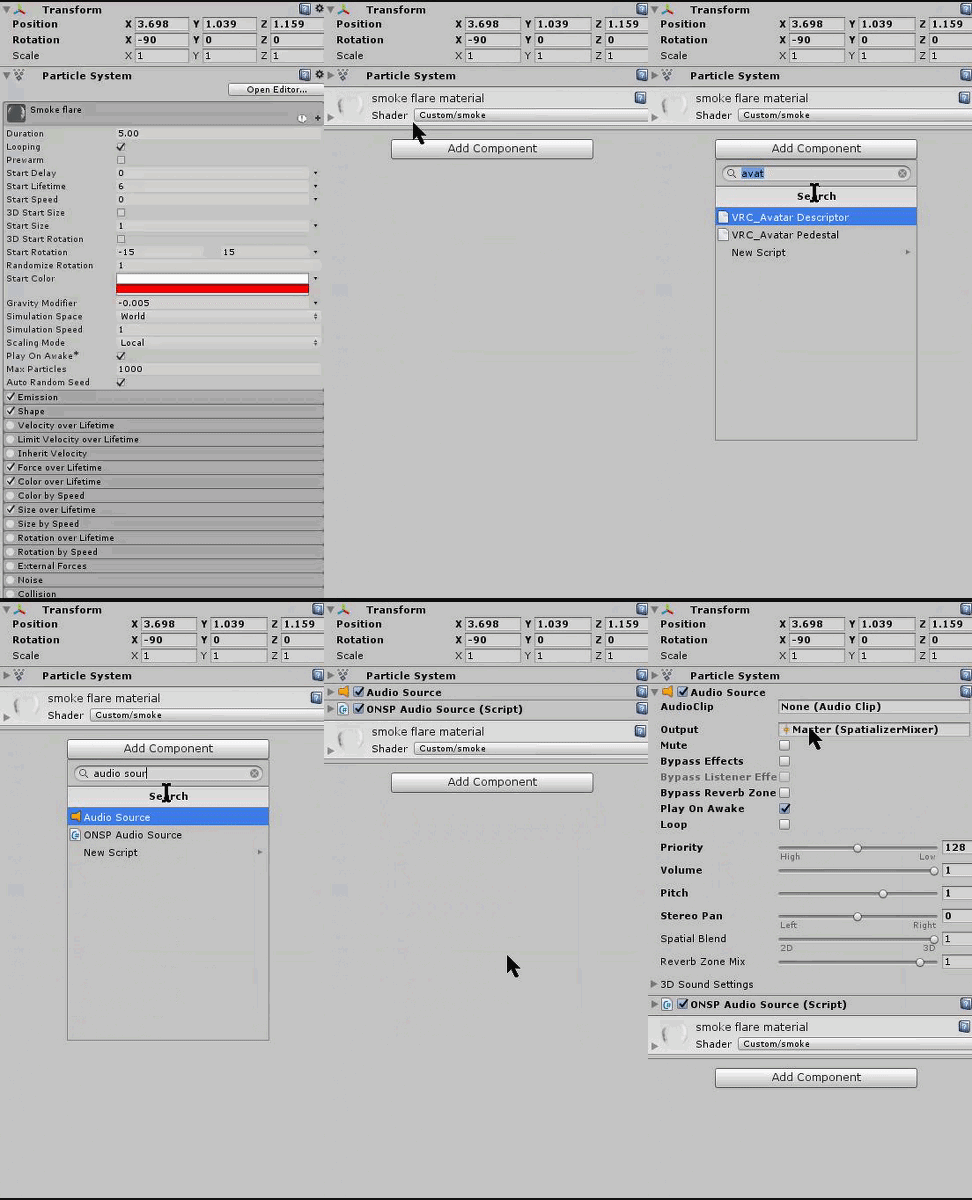
So in the animation i made i have a game object called frost particle system that's parented to my hand https://i.gyazo.com/8636162aa39000ab93cc0e51080f0f93.png

I would have to find the frost particle system game object in the heirachy and add the audio source like this https://i.gyazo.com/e5e4e25a3733b3a6106b2cafad1a35ca.gif
 clear yew
Lemme see
@torpid light if i want to add face expressions to default hand gestures, do I have to reanimate the hands manually or is it possible for me to attach the face expressions to the default hand gestures?
torpid light
i think since you have to override the animations you need to reposition the fingers like the original animation
i haven't done that though
you might be able to find the existing "handgun" or whatever animation and copy the keyframes to save you some work
clear yew
i see. do you know where the files are?
torpid light
they are in the sdk somewhere. Try searching for handgun/victory/fist or whatever the one you want to override is called
clear yew
got it.
 mighty spindle
So i can do the animation by first going into blender and then making 2 different items then animating it in unity, but then when i try to upload the hierarchy is incorrect. The only way I personally can fix that is by using CATS in Blender, but when i use the fix tool in blender it merges the 2 items together and then I cant animate them in unity . Hopefully that was a clear, but can someone help please
 trim dagger
wot
torpid light
You could add a cube the the scene and then add an animator to the cube and add the override empty to the controller slot
and then open the animation tab and they will all be in there
 light tiger
hey is it possible to keyframe the emission map's slider in custom animations?
let alone crossfade the emission maps into another emission map?
torpid light
So you want to copy the hand gesture so you don't have to position them youself right? So copy all of the first keyframes and put them into your new animation. Then you can do whatever other gesture stuff on top of that
clear yew
oh cool
torpid light
I don't really know what you mean by crossfade emission maps, sorry. As far as i know you can't edit material properties in animations. you would probably need a custom shader to do what you are asking
light tiger
ah okay
torpid light
maybe if you describe the effect you are trying to achieve i might be able to help idk
light tiger
i'll send it to you gimmie a second
 vale field
Is there a way to make animations longer in unity, like loop
 pseudo pewter
Hmn
Can anyone help with my animation
Playing emote seems to place my avatar ~1m into the ground
 solar relic
@pseudo pewter yes animation does that to the avatar
pseudo pewter
Can it be fixed?
torpid light
@pseudo pewter I'll paste what solved it for me and a few others
If your character is going in the ground during the animation you need to add a property to your animation called "Animator.Root.T" and change the Y value of that transform to offset the amount you are under the ground.
You can take the Animator.Root.T from the idle animation and use that instead of trying to figure it out yourself. With the original character that you upload selected you should see this in the animation tab https://i.gyazo.com/e4ec42f7be8b487bdbfe4dda00f52e22.png

Scroll down inside there until you find the animator.root.t and copy that. Then go to your duplicate character that you do the animations on and paste it in to the animation you made. That should solve being in the ground. If your character slowly goes into the ground towards the end of the animation, then you need to be sure that the last frame of the animation also has the same Animator.Root.T values. You can add it yourself without copying like this https://i.gyazo.com/0f84825296593a9b5fe99cf7a229ac42.gif
im going to make an updated video on doing animation overrides and audio
because so many ppl keep asking me how to do it after watching the videos
clear yew
i just cant seem to copy hand gestures properly
torpid light
Maybe they aren't actually setup in the sdk. It's probably easier to just manually move them at this point
clear yew
damn. sadness
one more thing, do i position both hands and they will move independently in the game?
 tall zodiac
Do you just make a idle animation of blinking if you want blinking right? Sorry for just asking suddenly
torpid light
try following this tutorial https://youtu.be/V0l4-pH3vI4?t=324
he manually moves the fingers

Creating custom animations for hand gestures and emotes in VRChat
i'm not sure @clear yew
clear yew
okay
torpid light
i assume if you setup say the hand gun to position your left hand as a peace sign and your right hand as an OK then it would use the one for the specific hand
since there is only one animation
but i can't really confirm that's how it works
tall zodiac
Using ok sign on one hand is same as on the other hand
They are not seperate i believe
 frozen wind
is there an easier way to add all the fingers when making a hand animation rather than going through add property>animator and clicking each part of the finger?
clear yew
so say i want to have handgun gesture i would probably need to position the fingers on both hands?
i just copied the properties from the sample animations and it make my life easier
frozen wind
any way to change clipping distance when in animation?
frozen wind
damn
torpid light
i don't think we have any control over what the camera does
 wispy parrot
Does anyone have a good resource where people are getting their Emote animations from? Like Breakdancing, Dabbing, etc.?
Or maybe a tutorial on how to make animations? Something other than using MMD and a Kinect sensor kinda has it's faults
 wraith hawk
wispy parrot
wraith hawk
wispy parrot
Besides mixamo, their animations aren't quite what I'm looking for, and they're a bit more generic
Not unless they had a user-uploaded animations section on Mixamo's website
wispy parrot
Again, looking for some of the animations that people have added to public-use avatars, like Dabbing, Breakdancing, caramelldansen, etc...
wraith hawk
pretty sure those are custom made animation
wispy parrot
Er, well they must have come from somewhere, some known resource
wraith hawk
custom made = made from scratch
wispy parrot
Those are pretty intricately made to be made from scratch though
Especially the breakdancing animation
wraith hawk
dabbing is pretty easy animation
wispy parrot
True
Well I thought I'd ask here and see if anyone knew where these people were getting these animations from
Also, do animations like these have to be loaded onto the model in blender and exported internally with the .fbx model? Or can they be loaded/applied to the model externally when in unity?
 quick pine
so i have an issue
can someone help
when i use my face animation my body flies into the air
this is the issue
 gentle pine
nice naked man 😄
 shrewd glacier
I know it's a small chance, but I've been trying to do this for the last 3 hours with a tutorial and I'm lost, possible someone could pm me in a call and walk me through this, or perhaps send me a really good tutorial?
And all I'm trying to do is add a weapon to my avatar
tall zodiac
Made blinking animation and put it on idle but i sink into the ground with it
Due to the character going that weird pose
 atomic aurora
ingame? or in unity?
tall zodiac
ingame
atomic aurora
what settings did you gave to the animation?
 mellow oak
hopefully two simple questions here
- Is there a way to disable blinking while a gesture is being used?
mellow oak
mind explaining what to look for?
atomic aurora
Yes, give me a sec I gona take pictures so it will be easier for you to find 😃
mellow oak
haha, thanks foxy
tall zodiac
ugh i wish my character did not go into that sitting position when using blink for some reason
mellow oak
the other question, if I want to have an animation of, lets say, ears moving down my head and holding there, whats the best way to get it from "flickering" through the animation?
tall zodiac
I cant even change it to default stance in Unity either
atomic aurora
so , to the blinking stuff

you just simply Disable the animation for the blinking
I'm not sure if this is the right way, prove me if not. but as far as i know this works
mellow oak
hey, as long as it works I wont complain
clear yew
@torpid light Dont know if you're still here but the sound I applied to the lightning/particle doesnt work. When I upload it it says "Audio sources found on Avatar, they will be adjusted to safe limits, if necessary
@torpid light I can upload it but I do not hear it ingame
torpid light
i'm not sure, maybe this will help https://vrcat.club/threads/audio-source-setup-for-avatar-sounds.179/
ONSP Audio Source always must present with Spartialization Enabled checkbox enabled
make sure those two are setup properly

VRCat: Community-Run VRChat Forums
For realistic sound.
In this mode not possible to precisely control audio range.
Decrease Volume in Audio Source component settings to control audio...
but at the same time i've heard of issues with audio sources on avatars lately and this thread has people saying similar thing
It seems like putting sounds on Avatars is nearly pointless now. They seem to either:
1. Not work
2. Work but so low no one can hear it
3. Work but so loud the entire server can hear it
I see
torpid light
it's possible it's playing but you have to have your head really close to hear it
maybe try putting one on your head to see if that's the case
or just put your head into the source if you are on vr
 thick badger
do you make custom emotes by just doing an animation in unity?
tall zodiac
anyone know why my blends shapes dont work in unity?
As in when making a animation
Setting them to 100 does nothing
Works fine in C4D 😦 Worked before but not now. Guess i will just give up
trim dagger
alright
i made a 50 minute video on animation overriding and how to put audio into the game
:^)
gentle pine
yay, do you have a link?
 proven mango
So i have this animation to make my character put on his hat
its a blendshape that's activated when i make a fist
is there any way to make the animation toggle?
 smoky pendant
Does anyone know how to set up drawing with an avatar, like how people draw with their finger, or if there is a tutorial for that?
mellow oak
@atomic aurora if you're still there, I forgot to mention I did the blinking with the CATS plugin, so I don't have that specific option under animation. I've played around a bit now with other options but still having the issue of blinking while eyes shut.
 fallen scarab
Does your model have to have a full set of hand bones in order to trigger gestures? My model doesn't have hands so I just added some thumb, index and middle finger bones to it with nothing attached to them in order to get full body IK. For some reason my gesture overrides just aren't triggering so I just wondered if that might be the reason why.
wraith hawk
@smoky pendant https://www.youtube.com/watch?v=Pi7i4sF_BgQ

Tutorial on adding the marker to your avatar and customizing it. Github: https://github.com/theepicsnail/Marker Unity Package: https://github.com/theepicsnai...
smoky pendant
thank you! @wraith hawk
 prime holly
Any good docs on using the mixamo animations for VRChat?
Or is it just overriding the animations?
mellow oak
so how does the cats plugin go about animating eye blinking? I've tried just about everything I can think of now. I'll probably just go back and remove it in blender then manually do it, but I wanted to see if anyone knew before I did.
 knotty zinc
is there a way I can push a specific material (things like blushing) closer to the face so I can actually appear in front?
whenever, I use my animation, it actually appears behind my face
 abstract wyvern
If it has a blend shape you can activate it in blender
 hardy nest
Hey guys, I just figured out how to add custom facial expresions but when I activate them in game, my hand stays in the defult postion.
Don't know what I missed.
 regal hollow
@hardy nest why would the hand do anything?
hardy nest
If I asign a facial expression to the Thumbs up postion on my hand, when I activate it the hand will not do a thumbs up.
prime holly
What animation do I override for the VR Running animation?
I changed the "RUNFWD" but that kept playing when standing in place and also disabled my controller input for the hands
hardy nest
So do I need to repostion every finger one by one?
regal hollow
If you want to do the gesture and the facial animation, you would need to ensure the animation changes your face and changes your hand shape.
hardy nest
OKay. I'll just have to learn how to model the hands.
Wasn't sure if there was somehting I did wrong or if I had to just remodel the hand shapes.
prime holly
Sokkz you could take the animations from th default thumbsup animation file
Than combine that with the face animation in one animation file
hardy nest
Where are those? In the VDSK?
 rigid seal
Does anyone have the pack with all the stupid emotes like CQC and the hovering spin kick?
Head spin and dab too?
rigid seal
I know of those ones
But there are some really stupid looking ones that aren't on there
clear yew
hallo I have little problem with edditing animation , so i am trying to make a gun for my avatar but it's sound effect seems will active when i just pull it out
is some other way that i can pull out the gun and "shoot" whenever i want?
regal hollow
@clear yew I may be wrong but i think people use two animations, one for a shooting gun and one for a stationary one.
and they switch between them
clear yew
oh.. So I have to make one with no sound effect and make one that have sound effect on the same time?
prime holly
Yup, two seperate animations
vale field
does anyone here have like a naruto run animation file?
solar relic
Mixamo
vale field
oh lol, another question, how would i extend some animations
for example when i flair, i only do one cycle
clear yew
Any chance someone knows where I might get my hands on an animation for the running animation from when you go dark souls with your best mates?
I've seen people with diff varients of it in game, just hoping someone might have one or know of one I can grab, just now starting with animation so making one from scratch doesn't sound appealing.
prime holly
Not anything on Mixamo?
clear yew
i have a more question for animation edditing . So I want to acctive my c4 with a sound and disappear it immediately will the sound effect will be cut if i dis active the game object in the 0:01 ?
vale field
@prime holly So to set the amount of loop is to set the cycle offset correct?
Or incorrect?
prime holly
Ah might not be able to do it without a script. you can duplicate the Animation in the animation window to repeat after the first
aka copy the properties of the first and place it after the last part finishes
 uncut monolith
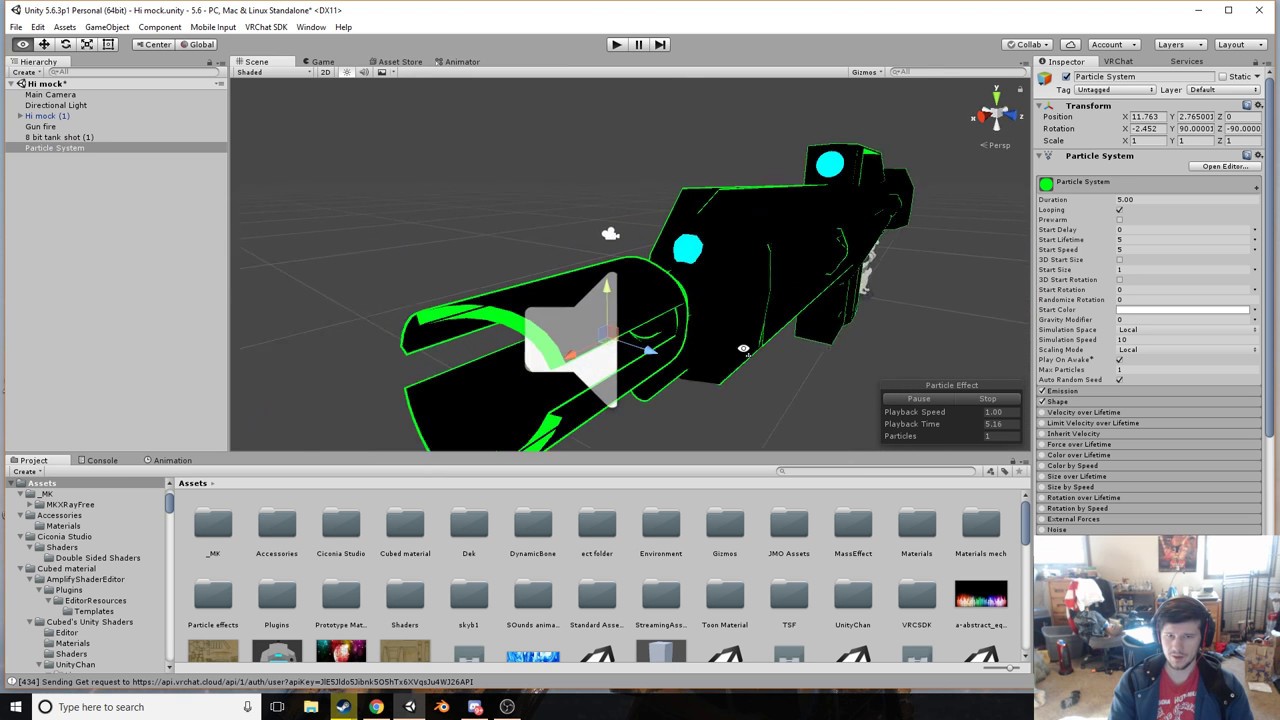
Is there a good tutorial for particle effects? Like I want to add the ability to shoot with my gun, and I'd like to add fire effect when pulling the trigger, but I'm not sure where to begin
I already know about sounds though
 open scroll
i just finished up a sword animation but whenever i do it in game my character stays the same height but the legs come off the ground up into my chest, what did i do wrong
clear yew
@uncut monolith https://www.youtube.com/watch?v=wsaGVhIVSf8 may help you
 uncut monolith
ah thanks
clear yew
but i have to notice you that the tutorial only lead your sound effect turned when you pull out your props
so i am not sure
someone told me that each prop maybe you wanna gun
you have to make 2
uncut monolith
I'm thinking I probably have to use up two gestures for this. One where I simply pull the gun out
and one that shoots
clear yew
once with sound effect and once don't have it
uncut monolith
Ah yeah, just what I was thinking
uncut monolith
thanks!
 glad topaz
Hi! So i have a prop weapon that i seperated from my avatar in Blender and i was wondering how to add it in as a prop? or do i have to re add it through blender before hand?
regal hollow
@glad topaz export it as its own fella
then skoosh it into to unity with your other boi
place it in your fellas hand
make it invisible
badaboom
badabing
you are ready to animate my friend
glad topaz
ok thanks
regal hollow
np fam
 terse sonnet
Got another question. So I wanted to make an animation using some blend shapes attached to a gesture (I chose hand open), and the animation plays correctly when I open my hand, but then all hand motion (grip, point, etc) afterwards becomes impossible until I reset it with a different emote. Any reason why this is happening?
 craggy sage
So why is that a character is rigged and moving in Unity, but not in ChatVR, its stuck in T-pose
glad topaz
im doing custom animations but when i open animations tab i already have a huge amount that came with the models files, do i get rid of them or what?
clear yew
Okay, so if I want my visemes to keep working, I have to do all of my animating in Unity. Which sucks, because I have to do all of my animations from scratch. But I can't figure out how to transform my model out of the ground. Any tips?
@glad topaz Remove the controller/override from your duplicated model.
hardy nest
So I duplicated the defult hand animations and added facial expresions to them but my hand will not move when I activte the expression. They stay in the defult postion. Any ideas?
terse sonnet
I'm having an identical issue ^
 iron flume
I have a question. i have made an animation for a weapon and it works fine(its a simple sword) but i want to add the weapon to the avatar and i want the weapon on the avatar to disappear when i have the one in the hand, do i just add the weapon to the mesh? or a bone? and since i did an duplicate off the avatar for the animation maybe i dont have to do enything?
 prisma kite
I have seen avatars that are able to write things in the air with their fingers, kinda like with a marker in presentation room. What is it called and how is it done?
prisma kite
Ok, gonna try looking into it
glad topaz
this is from a custom animation vid, but i cant find this enable animation in my drop down list. I only have animator in my list.
glad topaz
oh ok, im trying to make it where my custom face anim doesnt collide with auto blinking
 oblique panther
also i have still this problem that my arms are not fully stretching in vr
they're always bend
 neat gate
is anyone good with animations and particles here
glad topaz
yea im sitting so i always have my arms bent sadly
glad topaz
@shy oak like dynamic bones?
 shy oak
No just like the texture
glad topaz
well if you mean like skirst/hair thats dynamic bones
but textures like colors idk sorry
shy oak
Oh ok thanks
oblique panther
so when i stretch my arms
they're still kinda bend
i looked into weight painting but thats not the issue
i adjusted my ingame height
re-calibrated my vive
it works on some avatars
but not on most
iron flume
its there a way to make the weapon on the avatar to dissapear when i use the animation for it in the hand?
oblique panther
the only way to fully stretch my arms is to point the controlers away that i almost drop them
idk it sounds like a vive issue
but im lost here
clear yew
It sounds like a bone length issue to me, but if you so find out I would really really REALLY appreciate you pinging me what the solution was
 candid estuary
did the sdk update or something? my animation override stopped working, and says the list is empty
uncut monolith
Say if I want to give a particle a fire texture, what file format would that need to be?
.png's dont work well
terse sonnet
Don't you need a certain kind of material rendering for it to work well?
 keen ether
I could use some help debugging my custom override for taking out a sword.
uncut monolith
i dont even know
sounds annoying, ill just use a yellow ball using the particle creator. You only see it for a split second anyway cause it's gunfire
clear yew
@prisma kite https://www.youtube.com/watch?v=Pi7i4sF_BgQ
Tutorial on adding the marker to your avatar and customizing it. Github: https://github.com/theepicsnail/Marker Unity Package: https://github.com/theepicsnai...
 shut iron
https://imgur.com/a/mJmmR
anyone know what's wrong? all i did was add a shape key for blend shape, and now the face mesh doesn't move with the head
 clear yew
@shut iron Did you join the mesh before exporting as fbx?
From your screeny it seems like you forgot to.
To me, at least.
shut iron
i didn't. never had to before. how do i do that?
shut iron
i do
clear yew
Hit Fix or click Join. I usually hit join because I worry CAT might touch something I don't want it to.
Then try exporting it again.
It may be that the face mesh isn't weighted to those bones though.
One step at a time.
shut iron
cats doesnt work for my xps model anyways, so the join meshes button is grayed out. i'm sure there's an easy way to do it manually though, right? ill try googling it
 undone pier
hey uhh.. so im working on like a torch with animation, but after adding this flame effect with light to it.. the torch auto turns on even without using the animation..
 shut iron
it probably means the fire effect for the torch isn't disable in the inspector.
undone pier
how would i do that?
well i fixed the fire, but now the stick is..
doing it
on its own
shut iron
@undone pier go to your torch object and uncheck the box next to the name of the fire component, or whatever it is. the check box would be at the right, in the inspector.
undone pier
yeah i did that stuff
shut iron
i just joined the face mesh to a nearby head mesh
shut iron
alright, but ill worry about that once i get this friggin lip sync working..... ugh
it still doesnt move
shut iron
maybe it's because the servers arent working right now anyways? like everyone is stuck in a tpose, so maybe lip syncing isnt working either?
quick pine
i just put lip sync on and it works
shut iron
oh, i was talking to the other person. for you, i'm not quite sure
does it do that in unity?
 undone glade
@quick pine do you have custom animations?
quick pine
yea
undone glade
How many?
quick pine
that whats causing it
just onew
the face changes
but then my entire body goes into the air
undone glade
Did you by chance move your avatar while doing the animations for a better look?
quick pine
by that you mean put it into the test screen?
undone glade
I want you to look in the animation you have and see if there is a location as well set
undone glade
Should say position
prisma kite
@clear yew thank you so much! Will help immensly since i cant talk
 undone glade
Yep just as I thought... delete position and you're good
quick pine
before i do something stupid
can you highlight it
literally just remove the position key
undone glade
Yep the one that says position
quick pine
ok
undone glade
Delete it
And then you should be good to go :+1:
Make sure just in case to re apply the animation and stuff. Not sure if that is a thing, but better safe than sorry
Pretty much what you would normally do for animations
undone glade
There's a simple video I can share with you if that helps
 pure depot
well
undone glade
Well also depends what you're trying to do
pure depot
i dont want like importing an animation from the net
then add it to a character
i want the create the animation from scratch
undone glade
Yeah
pure depot
keyboard user here
undone glade
Ah
pure depot
not vr controller user
undone glade
There was a video on one of these channels just talking about what you want I believe.
pure depot
i mean
i dont want to use maximo to import animations
and add it to a character already
i want to create that animation from 0
then add it
undone glade

A VRChat tutorial on how to override hand gestures and emotes with your own custom animations. It can be used not just for VR users, but for desktop users to...
pure depot
ok thx
undone glade
See if that helps, I haven't watched it yet
pure depot
what i want to add
quick pine
that fixed the spaz problem too
pure depot
actually gonna show it in private
undone glade
@quick pine I experienced your pain before
quick pine
LOL
undone glade
That's why I know
undone glade
Shoot
quick pine
how do i turn off the blinking animation while doing that
undone glade
I honestly have no clue
undone glade
Shouldn't bother too much though
undone glade
Unless you're blinking faster than 5 seconds
quick pine
but its honestly not a problem im just so happy it works now
undone glade
:+1:
quick pine
alright gn
neat gate
Is anyone on here?
undone glade
Yep
@neat gate need help with something by chance or checking to see if there are any survivors?
neat gate
Help
undone glade
What's going on?
neat gate
So I think I did the animation correct
But whenever I do the gesture for the override in vrchat
Nothing happens
It’s particles btw
I tried making a rasenshuriken from naruto
undone glade
Most likely
neat gate
Ok because it’s 4 AM for me right now lol
undone glade
Yep 3am here
neat gate
Could you maybe try to help me tomorrow?
undone glade
No problem :+1:
undone glade
I'll try to research the whole particle effects more as well
neat gate
Ok
undone glade
Sure, I don't mind
 red summit
what does "shape key mix intensity" mean in visemes
neat gate
Maybe we can learn together 👍
undone glade
I haven't touched anything like that so must likely whatever the default would be
At least to the best of my knowledge
red summit
ok 👍
neat gate
Daemon what’s the best thing you can do in unity with a avatar
red summit
one moment
undone glade
@neat gate what do you mean?
undone glade
Adding accessories, facial expressions, and a mixture of both
undone glade
Guy
clear yew
Hallo.. I have a question. My gun's fire mod in game is a little bit loud .. So i wanna turn it a little bit lower.. I have to rebuild the animation or i can just turn the volume in the gun's Audio Source?
oblique panther
how would i go about changing the idle animation
in unity
im thinking like this https://i.imgur.com/0JA5Hgd.png

nope
i created a monster
lol
undone glade
@clear yew you wouldn't have to make a new one. You can always go edit it by selecting the animation and going to the animation tab, but otherwise see if you can lower the audio source maybe that will help.
clear yew
@undone glade alright I still will give it a try thanks :3
undone glade
Yep, just wanted to give you as well as anyone else a heads up if you feel like just deleting it and dreading the extra time needed to be put in
prime holly
@clear yew unless your chsnging the volume in the animation, than you can just change the audio source
clear yew
@prime holly Ok. thanks :3
 dusk yacht
Where can I get custom animations? Are all custom ones from like packs in the Unity store?
prime holly
Mixamo?
dusk yacht
Anything I can add to a character in Unity
prime holly
Upload yiur model, select an animation and download the fbx
You can than set up a avatar controller to use the animations it has attached to the fbx for your own character
Upload yiur model, select an animation and download the fbx
dusk yacht
It couldnt map my character apparently
It is in FBX and the bones should all be there
prime holly
Does unity automatically your bines when you set it to humanoid?
Or do you have to manually set some
dusk yacht
I have to manually set like one or two
prime holly
Those are probably what its having isses with
 old merlin
hello, quick question, does the eye tracking and blinking animation only work in vr mode?
pseudo pewter
You can also set up blinking on desktop
dusk yacht
When I try to download the fbx from Mixamo it says its unable to do so
I read up that it has to be "without skin" and I did that but doesnt make a difference
 wheat lion
Anyone have an expertise in gravity when creating dynamic bones?
pseudo pewter
Does anyone know how to play an animation when the object is enabled/unhidden in unity/
old merlin
@pseudo pewter i know, but i mean the default one, is it only for vr mode, or only others can see it
 opal lodge
how do i make sure the drink aligns with the hand when the model 'breaks'?
Can I just rotate the hand or should I rotate the can before starting the animation
 hardy mural
Hey guys, i was wondering if you could help me with soemthing real quick
im trying to get an animation where i take a hat off my head and have it in my hand
i have gotten it to be in my hand, but the hat stays on my head
I added the hat like a weapon and hid the hat on my the avatar in the animation
You know how to make my hat on my head dissapear?
This is my avatar https://gyazo.com/a245a65e5b2d327289014f908dfb68f1

The hat is in my hand in game when i do the emote but the hat also stays on my head
https://gyazo.com/ddfa02ba50e1ffdd6ed0e9306c6d0c33 this is the animation
 clear yew
anyone have the addon for rainbow shader they can link me
 gritty thicket
Is there a way to make animations work by pressing a key? VRC_EventHandler and VRC_Trigger are currently not supported.
dusk yacht
When I try and upload a character to Mixamo as FBX it says it cant rig it and when I upload it as obj from Unity it uploads but shows me blank grey screen in auto rigger
How can I fix that? Ive tried in both Firefox and Chrome and with Chrome the site seems to lag like crazy
 midnight flame

 past bobcat
 hot orbit
Any place where i can get complete animations from?
 alpine mason
@hot orbit Mixamo is one - https://www.mixamo.com/#/
How to test emotes within Unity? I try to change the 'emote' parameter within Animator, but it simply loops the animation. Emotes don't loop, right?
 crystal quarry
alpine mason
crystal quarry
alpine mason
Animation's "Loop time" is disabled.
 wanton mortar
on mixamo the animations are now .fbx but i thought they had to be .anim, will they still work?
 icy fog
Is there any way to fix sitting for characters that are a bit smaller? Always appear inside chair
 brazen crater
ehhm short question, are you allowed to modify the "AvatarControllerTemplate" in Unity under VRCSDK>Examples>Sample Assets>Animations?
icy fog
Think they suggest you make a duplicate
brazen crater
Perfect, thanks very much
 spice meteor
quick question if I import a model in generic the bones get removed right I cant animate a generic model with bones right?
alpine mason
Bones don't get removed. You just won't be able to use the default animations provided by VRChat.
... as your avatar is going to be classed as non-humanoid.
 remote onyx
So itll be stuck in t pose
 unkempt moat
Is there any good way to find out what shapekey mouth pose fits with what letter 👀?
clear yew
hello,can someone pls tell me how to make an animation that contains aparticle(lightning) appear only when i activate emote?
Is there someone who´s familiar with particle effects?
i made the animation but it appears always on the model :'((((((
i want it to be hidden until activation
brazen crater
Google Animation override Vrchat
brazen crater
it's baisicly the same, just use the particle module in unity
clear yew
if i put the particle in the model's armature it will appear all time
brazen crater
then disable it and do the same thing he did with the light sword
where you enable it again when you do the animation
clear yew
light sword? how to enable/desable?
brazen crater
Creating custom animations for hand gestures and emotes in VRChat
baisicly this just replace the light sword he's doing with the particle module you're using
clear yew
ok,ty 😃
brazen crater
no problem
 amber talon
Quick noob question, how do you get the animations of the fbx into ani files out of the model?
ctrl d doesnt seem to work
 analog haven
Is it possible to change to a different material without affecting the main model? For example, I'm wielding a knife. I want the character skin to be bloodied. I was thinking of duplicating the materials and changing them in another folder and attach that to the anim model. But that doesn't seem to be working, at least for me.
icy fog
I made a passive blinking animation but for some reason it is very weirdly sped up... any suggestions?
And making it slower doesnt help
its like it tries to blink for 1 frame and then reverts
(in-game that is, in Unity it looks fine)
brazen crater
@analog haven try posting that in another channel maybe avatar or something like that
amber talon
found my answer
analog haven
Well it's an animation so I figured here would be best.
brazen crater
@icy fog You have to limit it to 1 second, because you are overrwriting a 1 second animation
You may have more luck by changing the spawning dimension to world cause then the lifetime of the particles may not be limited by the animation time. But I myself am not quite sure how to do that.
mellow oak
Do dynamic bones override animations? I'm seeing it in the avatar menu but not in game
brazen crater
as far as I know they shouldn't override the animations, cause the animations are not designed for dynamic bones from the get go. You just have to make sure, that you don't have a dynamic bone tied to the basic animation set.
mellow oak
I'll remove it in a second and test it. I have full body tracking also though, so that could be the problem.
 icy depot
Hello everyone, i would like to ask a question.
Is it possible to trigger (override) and audio for 30 seconds? I've tried to do it, but even if i put it to 30, it still lasts a second.
 west nacelle
someone can help me about gun/animation (oculus) ? mp me^^
oblique panther
anyone know why my hands are like this when sitting https://cdn.discordapp.com/attachments/393152081197793291/396750896991830028/unknown.png

?
craggy sage
So i made shape keys and am trying to use CATS, but the tab wont show my shape keys i made, any ideas?
 royal timber
what other site is there besides mixamo?
amber talon
icy fog
@craggy sage remember to choose the place where the shape keys go to. For me its the one called "Body", the symbol is the upside down triangle with dots on the edges. Think the default place is top-right corner in blender
amber talon
I am trying to make mouth flap work, this is the jaw. it doesnt work in game
Any clues to why it wouldnt work?
icy fog
It works in unity but not blender?
amber talon
Ehh, that doesnt work either. And I just fixed the claw fingers, t-pose screws them up
 muted prairie
why do you have 100 bones in your face though 🤔
amber talon
converted so from the game, expressions and such
The one selected is definitely a good bone for mouth flap though
moves the whole jaw
craggy sage
@icy fog yeah, the problem was that i had more than one mesh in the file, so CATS, im guessing couldnt pick one >.< thanks
amber talon
https://www.reddit.com/r/VRchat/comments/7mpqg7/help_with_jaw_flap_rig/ Here is exactly the issue I seem to have. Instead of moving, the mouth just stays agape

reddit
I recently got a Kermit the Frog model completely set up and everything about it works fine besides the lip sync. Even though the model has a jaw...
unkempt moat
While on the topic of mouths
When using viseme for the mouth and not the jaw flap
What should i change if the mouth stays open when not talking within vrchat? 👀
icy fog
@amber talon if possible use Visemes. CATS in blender can help provide automatic visemes. And the mouth agape is general problem. The way to fix that is in Unity, when you go to set up the rig (where you change animation type to humanoid) click configure, and then "muscles & settings" if the mouth is open there, go back to "mapping", and select the jaw bone in "Avatar Configuration". Rotate that up a bit. It will look weird there, but keep on switching back and forth between muscles & settings until and Mapping until it looks right in muscles & settings, and then it will look fine in game
same for you @unkempt moat
probably at least
I had the problem with the mouth always being open and thats how I fixed it. Looks really weird when rotating it into the skull, but in game it looks good
amber talon
So I should use vesimes? dont I need to have a bunch of extra bones for that?
unkempt moat
I got no jaw bone though 👀
icy fog
Vandos, if you have 1 jaw bone it should be fine. My models I've used only had one bone, and then it worked at least
Oclac, are you using 2d textures?
unkempt moat
Nope xD
icy fog
What system are you using for visemes to make the mouth open?
unkempt moat
No idea how its called but with the https://i.imgur.com/qJmWqiG.png stuff
amber talon
I have no idea how the vesime works. Though when I use the jaw open and close in the muscles with mouth flap it works fine in the editor. And it was closed, I could open it and close it again just fine
icy fog
Yeah those of course, but check in Unity. Is there no jaw bone there? I would be very confused if there isnt. There should be something that makes the mouth open, and whatever that is, use that and rotate it up a bit
Set the Jaw open and close to its middle neutral state @amber talon Is it open then?
amber talon
Oh yeah it is open nvm
unkempt moat
Only got a toung bone : s
icy fog
then vandos go through with what I said
amber talon
SO i can fix it with the mouth flap or do i need to switch it to vesime?
icy fog
I have no idea how to fix it with mouth flap, but if you have the shape keys for voice vesimes are a lot easier.
unkempt moat
https://i.imgur.com/tLhNGpd.png https://i.imgur.com/jMWte0m.png
No mouth bone can be found anywhere (cant be assed to show everything ;p but as it should be under the head part anyway 🤷 )
amber talon
I do have the mouth closed in the editor now on mouth flap. But I need to use the vesime then. Alright, ill have to watcha tutorial I have no idea what all those fields are
unkempt moat
https://i.imgur.com/MpNzMr2.png
Originally the eye return L and mouth had the same so threw it on none
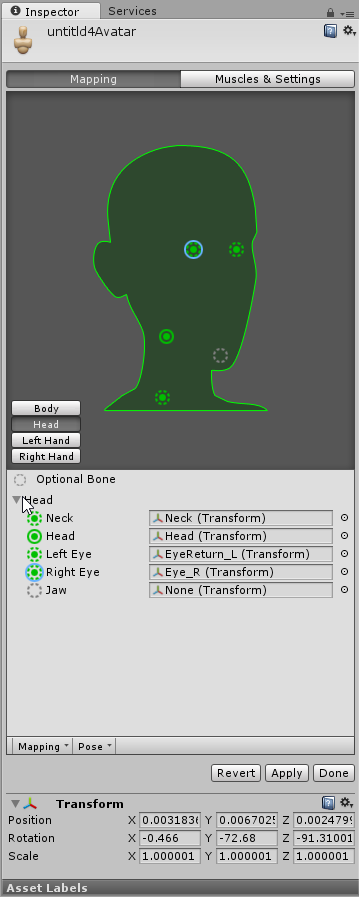
So it could not find a jaw orignally
the original automat
And im pretty sure i dont want my eye to move when talking 🤔
amber talon
@icy fog if I am using vesimes, I need blend shapes then? Or can I just use the jaw bone with it
clear yew
I made an animation (for emote )on a duplicate,then put it on the real model ,but in game when i activate the emote the avatar does the animation underground!!!! can someone tell me how to fix this? :'((((((((((((((((
 autumn turtle
are there any good tutorials for music playing hand gestures?
 blissful wave
What's the simplest way to get rid of the walking/crouching/prone idle and movement animations? I create an animation override set and left it blank, but that just makes it continue to use the default
wraith hawk
custom overide
 cursive sparrow
anyone know how to add a rotating or spinng motion to an avatar or object?
icy fog
using CATS you should be able to make automatic blend shapes depending on where you got the model from @amber talon
if not yes, you will have to make some kind
@oclac then I have no idea o.O in "Models & Settings check if you can move jaw up and down, then there is most probably something which you should be able to change
neat gate
Anyone good at particles here?
amber talon
I fixed it @icy fog , turned out mirrors just dont show mouth flap
or maybe my settings diabled it
prisma kite
Anyone here tried out the snail marker? Can't get it to work
icy fog
alright
clear yew
Hello, I made an animation (for emote )on a duplicate,then put it on the real model ,but in game when i activate the emote the avatar does the animation underground!!!! can someone tell me how to fix this? 😢
mighty spindle
hey im not sure if this is the correct place to ask, but how TF do people get gifs on their avatars EG their cloak is scrolling stars
 upper cloak
I can't get any eyetrack + blinking with cats. I have to do everything manually. Anyone facing a similar issue?
opal lodge
Does anyone have a list what animation is what number? (emote 1, 2, 3, ...)
pseudo pewter
It's top to bottom left to right
I.e. wave = 1 dance = 5
The rest I don't remember
I have edited the visemes generated by cat's to also move another part of the mesh on every viseme
After I start talking it does indeed move that part but it never resets to the basic form
Anyone got a clue on how to fix that?
blissful wave
Is there a way to lock the hips in place?
Or have some part of the mesh otherwise locked around the hips?
blissful wave
Okay, I figured that part out, but
what's the best way to get rid of the running/walking/crouching/etc. animations? If I had the animation override set but leave those options blank, then it still pulls in the default animations
 red linden
leaving them blank will just put in the default animations
you're gonna have to have another animation to replace them if you don't want the defaults
blissful wave
Yeah, I'm just wondering if there's a minimum you can do to make them act as if they just don't happen
Like, if I just put in a completely blank animation, will that stop it?
red linden
you can probably just put in an empty animation, but whenever those animations are supposed to be played it will make the avatar go in the weird default pose when you animate
 ionic basin
When I try to use a menu for face animations I get this in unity: https://imgur.com/a/vCuqk. I've already reinstalled twice. Anyone know what's going on?
 pseudo pewter
Oh my
ionic basin
It's really all my menus that do this but not as bad as the animation window.
pseudo pewter
The animation panel is quite bad
ionic basin
yea, idk what to do to fix. I'll prolly just redownload from the website but I've installed it twice already.
muted prairie
@ionic basin Are you using a tiny screen or odd resolution ?
ionic basin
1600x900
muted prairie
You're not using custom font either ? That's pretty odd
ionic basin
No, just the standard package from the website. Using 5.6.3p1.
muted prairie
and your whole window is using the unity screen ?
ionic basin
yep, tried maximizing and minimizing.
 scenic violet
Where can I find the custom animations like the Slav dance / dab etc.? I'm assuming they're public since a lot of avatars have them
 simple ferry
ok
I have a question, right.
Is the jaw bone supposed to be selected, in unity when rigging, for the mouth to move ingame?
or just the mesh?
muted prairie
yes
simple ferry
ok can i upload a picture of why i dont have a jaw bone from this model
i got the model from an mmd file and used the cats plugin on blender to make it work, then imported it as an fbx file into unity...
it was originally a bone, but the wrong bone, so I removed it
it was a hair bone called BLR
so I knew that was the wrong bone it should have took
muted prairie
you need manually create one then
simple ferry
manually create a jaw bone in blender or unity?
muted prairie
blender
 vernal pelican
Quick question: I'm trying to replace the waving animation for a character. Which animation in this list is it? I know its one of the emotes, just not sure which one
hardy mural
Do you guys know how you add a pen to draw with?
or those flames people shoot?
i can do stuff like making an object appear.
terse sonnet
I'm still wondering why when I add an animation for a handopen gesture, my hand becomes unable to do other gestures or basically move at all until I do an emote or switch avatars. What could I be doing wrong?
All I changed were some facial shape keys
 lost wagon
Is there a way to remove or disable the CATs Blender Blinking animations once you've added them? Instead of using the blendshapes I selected the animation seems to be pulling anything at random and my Avatar now looks stupid?
clear yew
Uh, i’m afraid no, but you can disable them by going to visemes and changing em
 loud violet
Hello all, I'm having a problem with this model using animations. The body seems to go off to the left causing a broken neck like issue on all animations.
clear yew
that’s a rigging problem ^
loud violet
Yup, tried to fix that but no much seemed to work. it seems a rotation is off somewhere by 90* but I don't know where.
lost wagon
are the blink anims bound to Visemes? I assumed they were separate, but I'll turn them off and see if that stops the "crazy face"
 royal reef
Hey guys, I'm trying to get animations from Mixamo and when I import them I have an issue when I 'copy from other avatar' I get the error rig mis-match Hip's for humanbone 'hips' not found. if I create with model then I can get it to work in unity
and I see the animation working great. However, when I upload and try it in VRChat, it messes up and im like mid air swinging my arms in weird ways.
I can even press the play button in unity and see my character correctly emulating the animation.
loud violet
I've been trying to find the issue with the rigging, but can't find much. Everything seems correct the only issue I could find is the spine is inverted, front animations go back and left animations go right an so on, but only there. Everything else works correctly.
And yes, this model has the least helpful node / transform names.
 peak summit
So I didn't realize making something the child of a bone before making the animation file fucks up your model
👌
clear yew
How do I keep like cat ears out all the time?
loud violet
Have them as part of the model?
loud violet
No, I mean do you have them as part of the base model?
loud violet
Will say once a model finishes uploading... ^
Okay, select your material you want to apply the rainbow hair to.
In the 'Shader' option in the top click on the drop down box which should say 'shader'.
Sorry, say 'Standard'.
Go to the CubedParadox list and select ToonRainbow.
loud violet
It will in Unity, but in game it should be a rainbow.
clear yew
kk
ionic basin
How do I stop my character from blinking through an facial expression?
loud violet
Is blinking set as an animation?
royal reef
copied avatar rig configuration mismatch transform hierarchy mismatch
ionic basin
I didn't set it as an animation. I set up my model for eyetracking and it has blinking.
royal reef
any ideas?
hollow its probably an issue with your viseme blender being set to your animation for a sound
loud violet
@ionic basin Sorry, no idea, haven't dealt with eye tracking yet.
royal reef
just as long as you have the correct set-up for the eyetracking, blinking works too.
loud violet
@royal reef And that's in the 'Rig' part of the character model?
royal reef
and as long as you have the keys set-up
remote onyx
IS there a way to just test how the avatar looks in Unity?
So I dont have to consantly import
royal reef
@loud violet I'm trying to copy the avatar animation from my own avatar when I import an animation from mixamo
In order to keep eyetracking, I cannot have Hips->spine->spine2->left/righteye
and mixamo requires this
sorry the order is "Hips > Spine > Chest > Neck > Head > LeftEye / RightEye"
and the mixamo rig has spine 2
so I'm confused how I can match the hierarchy
clear yew
@loud violet - Merging the model into the other model isn't difficult is it?
loud violet
You have to add the model and make sure the models animate correctly together. If you want someone else added to the model that's static / only moves with the other already rigged model, it's not that hard.
royal reef
I think i have to modify the muscle definitions or editing the animations externally
im not really sure how to access the muscle definintions
 ebon heron
Hello, im new here and I was just wondering if anyone knows of a good tutorial for adding a particle system to an animation? basically I have an ironman avatar that I want to have small repulsor beams shoot from my hands when I do the open hand gesture Ive got the particle systems in place im just not sure how to make them activate when I do the gesture
loud violet
Plenty of particle effect tutorials for VRChat on YouTube. Well, some.
ebon heron
yea I cant seem to find any for particular need but ill keep digging
 vital matrix
what i override for running animation?
ionic basin
@royal reef Can you clarify what you meant by viseme blender being set to an animation for a sound?
 stiff bison
I accidentally edited an animation on my main model frame and now it's constantly in that muscle pose thing or whatever, anyway to undo that? ctrl+z didn't do anything
ionic basin
my model doesnt make sounds
royal reef
this is an empty one
I mean your avatar is blinking when 'you' make sounds over the mic
when you should be having mouth movements
ionic basin
no, im not setup for lip movement.
royal reef
then whats the problem?
"How do I stop my character from blinking through an facial expression?"
what does this mean
facial expression meaning when you speak
ionic basin
I watched a video that showed me how to setup eye tracking which I got working and the model blinking was a plus. Now when I try to make face animations like sad or googly eyes, the blinkng causes the eyes to morph.
ionic basin
unity.
ionic basin
I created an animation and tagged it to my model. I haven't done any animation tinkering in blender.
I'll have to see if I can take a screenshot and post it.
royal reef
to me sounds like a rigging problem
vital matrix
to change sprint animation what i override?
undone glade
Does it matter how long a sound effect is?
I'm talking more like a minute or two not five hours
trying to get a good chainsaw sound effect that easily loops
 wintry adder
Hi! Is there a list anywhere describing what each custom controller animations needs to be gestured to use them
royal reef
Hey guys I'm having the error "copied avatar rig configuration mis-match transform hierarchy mis-match transform 'Hips" for human bone 'Hips' not found" can anyone help?
loud violet
Anyone here know how to fix the rigging problem where the model animated to wrong way? Here the model is animating to the left rather than the front which it should.
The head stays in the same position, bu the rest of the body moves to the left when they avatar stops moving.
royal reef
the head is not moving with the body?
loud violet
Yes.
royal reef
seems to me you need to re-weight the bones to the meshes
i.e. the head meses are not following the neck bone for example
so its just floating in free space
loud violet
Yes, which is... distracting.
royal reef
yeah its a problem with rigging
loud violet
And the cape moves too much, but I can just disable that.
loud violet
Used to Maya and this is a Blender model, how do you do that in Blender?
royal reef
the upside-down triangle opens up the vertex groups
 ripe carbon
Can I ask some questions about Visemes here?
royal reef
when you select your mesh
then if you type ctrl+tab it goes into weight mode or on the bottom left you can change from object mode to paint weight mode
and when you click on a vertex object
it has a coloring scheme which matches the effect the bone has on the mesh
hardy mural
https://gyazo.com/83894cf58d41f6418c01becd64edcb92 can someone xplain to me why this is notappreing in vrchat
 clear yew
the other ones are fine
hardy mural
i have mapped the animation into the override as well
royal reef
personally I would just reparent the bones to the mesh
loud violet
Huh, odd it's only in one area.
royal reef
well
thats for one bone
it seems your cape is entirely affected by your upper arm bone
if you select another vertex
another region will change color
oh nvm
your cape is just red
lol
hardy mural
anybody?
royal reef
lessgently, i have no idea I would like to know too
clear yew
@loud violet are the texture boxes suppose to be empty for rainbow
 shut dragon
does somebody here know how to make a gunshot animation? Like, the actual bullet trail coming out of the gun
loud violet
I have not previously used the rainbow filter, but the other shaders I have used with texture files.
How do you erase weighting?
loud violet
Okay, i'll try it now with all the weighting removed.
royal reef
you should be coloring the head bone to the face mesh nighson
loud violet
True, but that arm was the only area with any weighting, that may have been causing the problem. Maybe.
royal reef
if the arm was the only area with weighting, then you should be seeing your whole avatar not moving except for that arm.
weightpaint
here is mine
but i have multiple meshes and bones
clear yew
If animations aren't showing up in unity under skin meshed render but are showing up fine in blender - what happened?
loud violet
Okay, I see how you change the mesh selection now. This is the head.
hardy mural
alright another question, when this particle effect isnt in my hierarcy it looks fine.
royal reef
then how does your avatar configuration look?
 royal reef
Is your neck and head bones correctly attached?
 loud violet
I think so.
royal reef
make sure the sane name of the vertex you showed me where the head was red
is the same as the head bone and etc
you can also just rename the bones so you can understand it
clear yew
@loud violet Noice. PG!
loud violet
Okay, so it turns out the weighting for the head and neck are in the capes armature and not head / bodies armature...
See the top two nodes on the left? That's the head and neck.
This model was rigged by an insane person.
loud violet
Turns out the cape armature has a copy of every node.
royal reef
easily is to just reweigh the armature to the mesh
copy?
if you dont have dynamic bones
then just delete all of those bones
and reparent the bonesto the avatar mesh
because you can use a cloth animator for the cape in unity
oblique panther
how would i disable eye blinking in unity when its done by eye tracking
by an animtion override that involves blinking
 stoic ridge
Question is there a way I can disable eye movement through unity? Or do I have to comepletely disable it through Blender?
 rich scarab
Heya all,
Just creating an animation through unity at the moment where im causing some shapekeys to go from 0 to 100, followed a guide, made a duplicate of the model, bound up my own override controller, applied that controller to the original, Unfortunately cant test it in game at the moment due to it being too late to hook up the vive here.
Issue is previewing it in unity shows the model stuck in the floor just like a broken model?
Is that just a unity quirk or would I probably get that in game also?
 scarlet arch
Gonna post this here also because I'm not sure what this applies to https://gfycat.com/ParchedFailingAntlion
I'm using Dynamic bones for my Panda's hat and for some reason it's only attached on the left side of his head. The movement of all this seems so unnatually due to how the bones are laid out: https://i.imgur.com/hjTa11Z.png
Is anybody able to see the issue straight off or require any additional info?

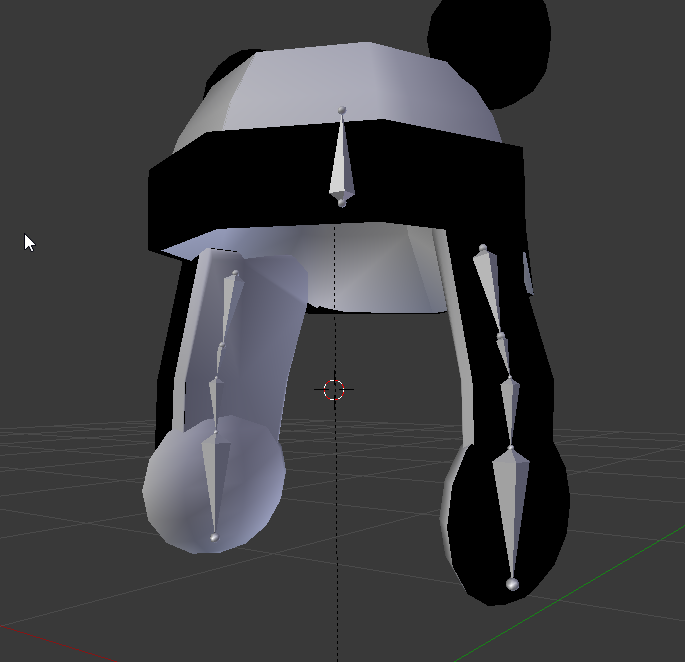
Ok, apparantly I messed up the origin point
 slow drum
Would anyone by any chance have the slav dance animation on hand?
 wild egret
aye guys, after i made a aimation im getting this error, anyone know whats up here?
the animation was just pulling a sword out of the sheath on my back
also, i checked the bone mapping and everything was normal
craggy sage
If your adding two swords, one to each hand, using the same mesh, can you use the same trigger for it?
wild egret
well, i have a sheath on my back that has (just a handle) then there is a full sword for the hand.
@craggy sage , should the sheath be in my armature like the sword, or should i combine the sheath to the models mesh?
craggy sage
VO___OV
basically im asking how do you duel wield two swords and have each work in each hand seperatly
wild egret
hmm, i thought you were trying to ansew my question., xD whooooops
 ornate terrace
Does anyone know why this happens when I try to add a gun to a models hand via fingerpoint? https://gyazo.com/40f20c3cda036b0b35ace0f656c7b256

 uneven flare
vale field
uneven flare
vale field
Does anyone here know how to loop animations in unity so they go for longer?
vale field
emotes, i have a flair animation, but it only does 2 cycles, and i want it to do like 6
clear yew
oh you just wanna set it blinking right?
wrong..
Looping <
I think you only can set few more on the animation
if you use the loop on debug it will loop forever
maybe you should wait others for help I still learning :3
blissful wave
So how does the different levels of 'weight' work? Do they only matter if two bones have some amount of weight on the same vertex?
Yep, that's how it works
vale field
Actually, does anyone have the "breakdance 2" animation file?
undone glade
@clear yew who needs blinking?
clear yew
@undone glade nah
undone glade

Unity - Custom Animation Overrides, Blinking Animation, Dynamic Bones & Colliders, Viseme. VRChat #3
Importing model - 0:37 Toe Removal - 1:37 Applying Shader - 2:29 Blinking Animation - 3:09 Animation Override (Facial) - 7:24 Avatar Descriptor & Viseme - 18...
clear yew
GameXMode
Does anyone here know how to loop animations in unity so they go for longer?
@undone glade I have a problem, In the game, Some animation with voice happened , my Left and Right channel in contrast and it feel like not 3D anymore
do you have any idea?
the voice such as gun fire
undone glade
Someone with a sound effect?
clear yew
yea
I mean that someone with a animation override gun
after the guy shoot . my left and right channel seems bug
my left channel runs to right
and my right channel runs to left
undone glade
Probably restart the game. Something like that happened to me before.
clear yew
it will fix the problem but i will happen if i see the guy shoot again
My headset don't have any problem .. so it's really cann't fix or just a small bug?
nvm then..
Thankyou :3
prime holly
Anyone familur eenough with the Char.Controller to set up per-hand animation overrides?
undone glade
@prime holly I'm pretty sure it goes by hand gestures and not per hand unfortunately
prime holly
I found the animation controller with the left/hand tree's
gonna override them seperatly rather than using the animation voerride
that should give me per-hand contro
if it uses the avatar controller I set anyways
 languid lark
overrride only hand one controller layout. mostly like they change or make better later in the future plans
override was just little hack they put in till they make somthing better lol
undone glade
All I know is more animations per hand and I need this in my life.
prime holly
undone glade
You have just opened Pandora's box.
languid lark
so it work with animator controller?
oblique panther
is there a unity asset that makes animations easier
languid lark
@clear yew musicle animation editor cost $15

Works on Unity 4.7 ~ 2017.1
As you know in Unity we can't modify animator properties as easily as transform properties which we can modify in the Inspector. So I’ve written this tool which can control animator properties in a simpler way.
Features:
-
Modify humanoid animation clips by simply dragging silders.
-
Add/Remove animator properties.
-
Body group and muscle name are copied from muscle setup window so you can easily understand what they are.
-
'Mirror' button: You can control the values for both sides even if you change just one side, which is very useful when creating animations.
Contact: pavostudio@hotmail.com
(English, Japanese and Chinese)
oblique panther
from the looks of it its more a quality of life asset
undone glade
I did figure out the chainsaw a bit. Only problem is it stays in my hand and plays the chainsaw sound effect when not in use even. So might be a lot safer to use them seperately
 languid lark
@oblique panther just put other mesh in her hands
then turn off the render off the mask on her face
then turn on the render in her hands
oblique panther
i do that all in unity yes?
oblique panther
can i seperate that one once i join them all?
languid lark
the one on your face just make it own fbx file
then put that back on her face in unity
you can equip items in unity
oblique panther
i bet its stupid easy to do
undone glade
Same with a mask
oblique panther
yeah
languid lark
just do same
oblique panther
im not sure how to turn the mask into its own fbx
undone glade
Blender
languid lark
when you export it select on the mask mesh only
then go export select mesh
it export only that mesh
set it like that
prime holly
@undone glade Don't know if it works yet, but if it does it doubles the avaialable animations
undone glade
Let me know :+1:
languid lark
@prime holly if you get it work should make a guide how to do it lol


 undone glade
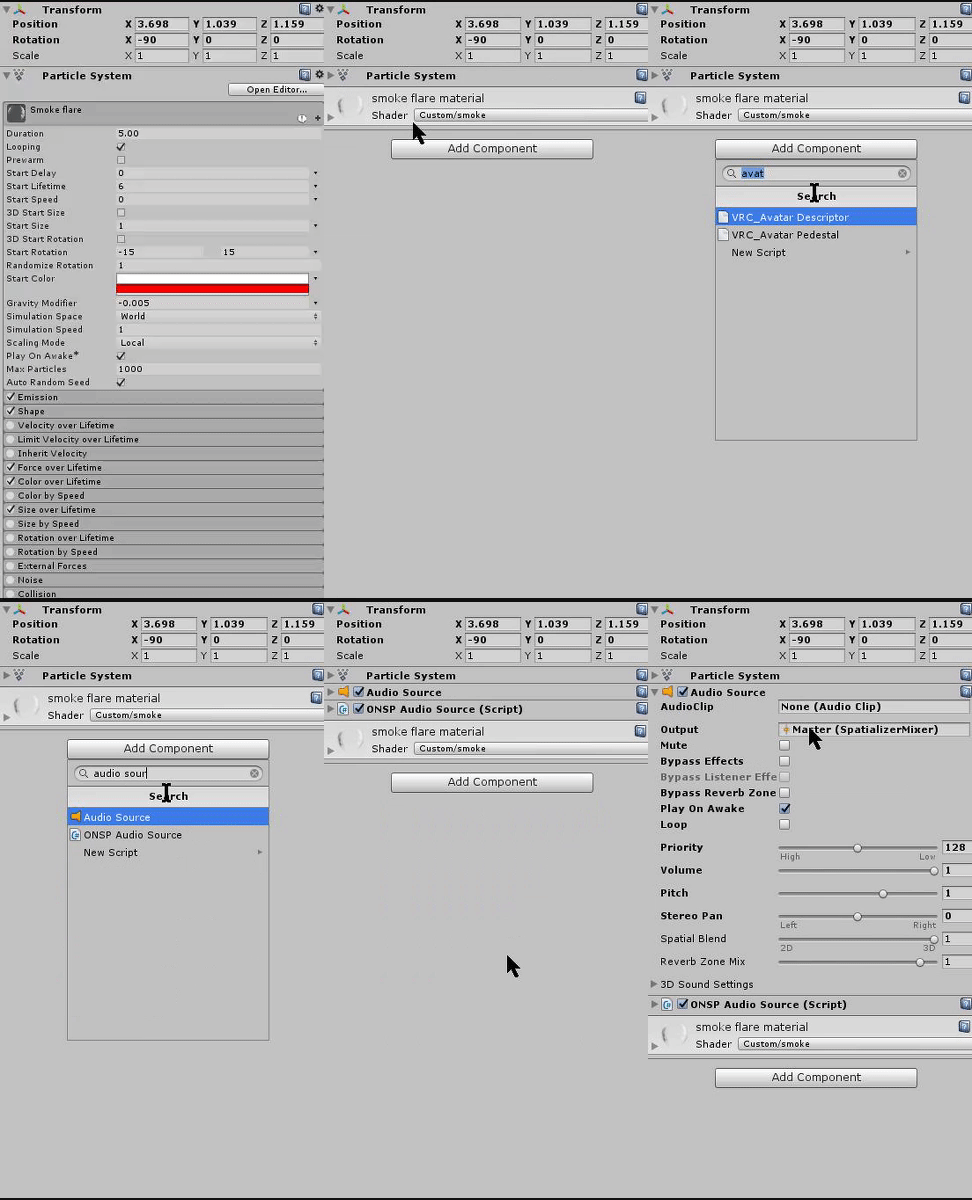
I just want a good chainsaw sound effect. Spending my time listening to chainsaws instead of sleep xD
oblique panther
thanks for the help 👌
prime holly
@languid lark Sure. It looks like Vrchat removes the avatar controller and replaces it if you just set that, so now trying using the custom override but with my new controller set as the template
 carmine jay
How can I get a custom standing anim, like walking and all that. I don't want the default anim.
prime holly
@carmine jay https://www.youtube.com/watch?v=V0l4-pH3vI4&t=1s
Creating custom animations for hand gestures and emotes in VRChat
@strange kite Can we upload a custom avatar controller?
 upper sapphire
How do I fix my weapon emote model dissapearing at certain angles?
prime holly
@upper sapphire At certain angles??
carmine jay
Thanks! Also, do you know how I can make an avatar glow? @prime holly
Or at least bright at night.
upper sapphire
@prime holly yes
prime holly
@carmine jay In the Shader for your model, add properties to the emissive value
prime holly
@upper sapphire The gun should only vanish if A: You have another animation overriding it or B: There's a sahder changing it
carmine jay
What properties? @prime holly
prime holly
upper sapphire
@prime holly no over rides.
it also has that problem when i view it in unity
which makes no sense to me
carmine jay
Because when I change the color the model's color change as well. @prime holly
prime holly
@carmine jay Yea that's it emitting light, which looks like it's changing the model's color
upper sapphire
like, look at this. if I look at it iin unity here, and then zoom in like 1 more inch it dissapears
prime holly
Looks like a shader issue, are you sing a custom material for it?
upper sapphire
prime holly
Does it happen when using the standard?
carmine jay
What about setting it to grey? Also, will the model have that same color or only at night when it glows. @prime holly
upper sapphire
@prime holly DUDE I FOUND THE FIX
prime holly
@carmine jay You can't tell when it's "At night" since the model does not have access to external lighting vairables outside of a custom shader.