#animation
1 messages · Page 8 of 1
 clear yew
 peak kiln
guys help how do i control my particles so that they flash in one place instead of flying everywhere
clear yew
Here's to hoping it works, though! I'm going to get started
Oh, and @torpid light My animation was all set to on trigger, the delayed effects were just set to have a start delay.
peak kiln
this is frustrating lol
peak kiln
true true
 torpid light
can you explain what you mean by flash in one place?
peak kiln
like
there arent particles shooting off
and the orb is stuck to one position
dies and creates a new one
im trying to make a siren @torpid light
clear yew
hmm, might tone it down a tad more according to peepz, well ill do that
 uncut monolith
welp lets try asking again
https://my.mixtape.moe/drwnka.webm Any idea why this is happening? The guns pop in and out depending on where I'm looking at. Shows fine in the camera in the test room, as you can see, but the guns pop in and out for other people too who i asked. I've set two guns to appear when the rock and roll hand gesture is done with either hand
im stumped, i dont know what to do to fix this
 trim dagger
um
let me see your unity
cause i have a katana on my rock n roll hand gesture
and it works fine for me
uncut monolith
I have a sword on set to the victory sign
and that one isperfectly fine
lemme load unity up, hold on
@trim dagger
trim dagger
can you move around with it in your hand
like for your sword
you can move with it on ur hand
and do you have vive or oculus
uncut monolith
vive. You mean walk around? Like sure I can swing my hands around and the guns will pop in an out of existence
walking kinda resets my fingers so everything disappears by default ive noticed
but I suppose thats just the game
I'm assuming it MIGHT be because I've set two objects to appear on each hand. I could probably fix it by setting two different gestures for each hands
but at that point im running out of gestures
trim dagger
yeah you cant move with the things in vive but in oculus you can
and you're sure you have the rock n roll hand sign out always?
uncut monolith
It's just a camera inside the the avatar testing room
And no they dont
people told me they saw both guns in the camera
but they would fade in and out
trim dagger
yeah
uncut monolith
if they looked at me directly
trim dagger
huh...
uncut monolith
this game is a wild ride
uncut monolith
Bone hierarchy?
uncut monolith
think if I got rid of the weapon bones it could potentially fix it?
the weapons themselves came on the model
they're not exactly necessary either
uncut monolith
yeah its really weird
I'll go ahead and see what it looks like if I only have one gun in one hand
if nothing else works then I'll just have to deal with one gun I suppose
trim dagger
yeah
 oblique panther
~
clear yew
allright, now apparently it doesnt do any more issues... well i hope its all fine now
oblique panther
so i tried to animation override
and it works
but the fingers are going crazy when i do it
they open and close really fast
the object itself is normal tho
 coarse hawk
that means you have different values for 0:00 and 0:01
oblique panther
yeah
coarse hawk
be sure they're the same or its going to do that
 tropic nova
i have a particle effect on my running animation, the problem is that the particle also spawns when im just walking forward. anyone know whats wrong?
oblique panther
i change nothing after it?
tropic nova
i have the running animation on runfwd
trim dagger
yea
tropic nova
@torpid light u there?
torpid light
Are you on desktop mode?
trim dagger
just try it again
oblique panther
will do~
torpid light
It might be because you can't really do the walk animation on dekstop. I'm not really sure
like you don't have much granularity
oblique panther
oh no im in vr
tropic nova
oh that sucks
torpid light
im talking to jimg
oblique panther
oops
tropic nova
on sprint forward it would do this wierd thing where it would spawn the particles but not do the running animation
but runfwd does both
torpid light
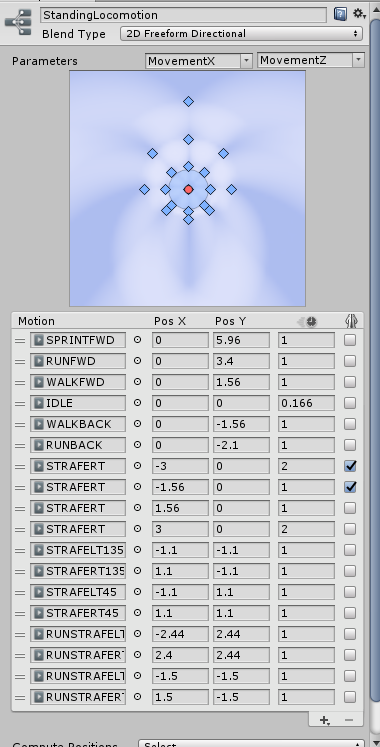
it's because it's blending between the animations
so like part of the animation is from the walk and part is from run
tropic nova
oooh
trim dagger
lol
torpid light
there's no way to tween between active and not active since it's binary
ill post a screenshot 1 sec
oblique panther
so i copy and pasted it
torpid light
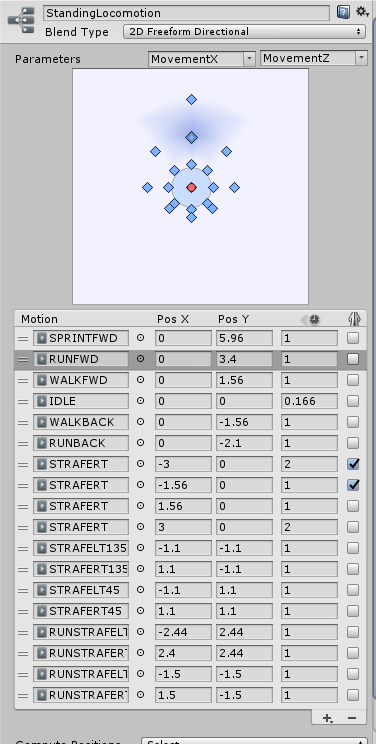
You can see i have the runfwd selected here in the blend tree https://i.gyazo.com/8747be91e1326b70a162393f83a0477c.png

it has a little bit of overlap between the nearby animations
so part of it is being used
oblique panther
do i give it the same values now
torpid light
and if you have even a little bit of the animation being blended, it's going to activate the game object all the way
tropic nova
do you think adding a custom walk animation where the particles are turned off would work?
trim dagger
Novamoon copy pasting means it has same values
torpid light
I mean it should work fine im not sure what you mean though
torpid light
like yes a custom animation without any activations in it will work fine
tropic nova
yea, i dont want the particles to activate when i am just walking forward, only when i run. i will try to make a walk animation
clear yew
allright, new question.
torpid light
You might be able to pull that off with a custom animation layer
clear yew
Can the animation itself cause lag if your character has been scaled in the unity's editor itself
oblique panther
i dont get it
trim dagger
Animations can always cause lag
oblique panther
im not retarded :c
 twin tree
🤔
oblique panther
it resets all but one value
clear yew
well i am REALLY confused now then.
Some people say it doesnt cause lag whatsoever, it doesnt lag on my end, but some people say their frame drops to 2 for a second
...???
Even toned down its the same
torpid light
Are you sure it's 4 particles?
clear yew
It uses different particle systems for the animations
which i toned down to the same as world model now
torpid light
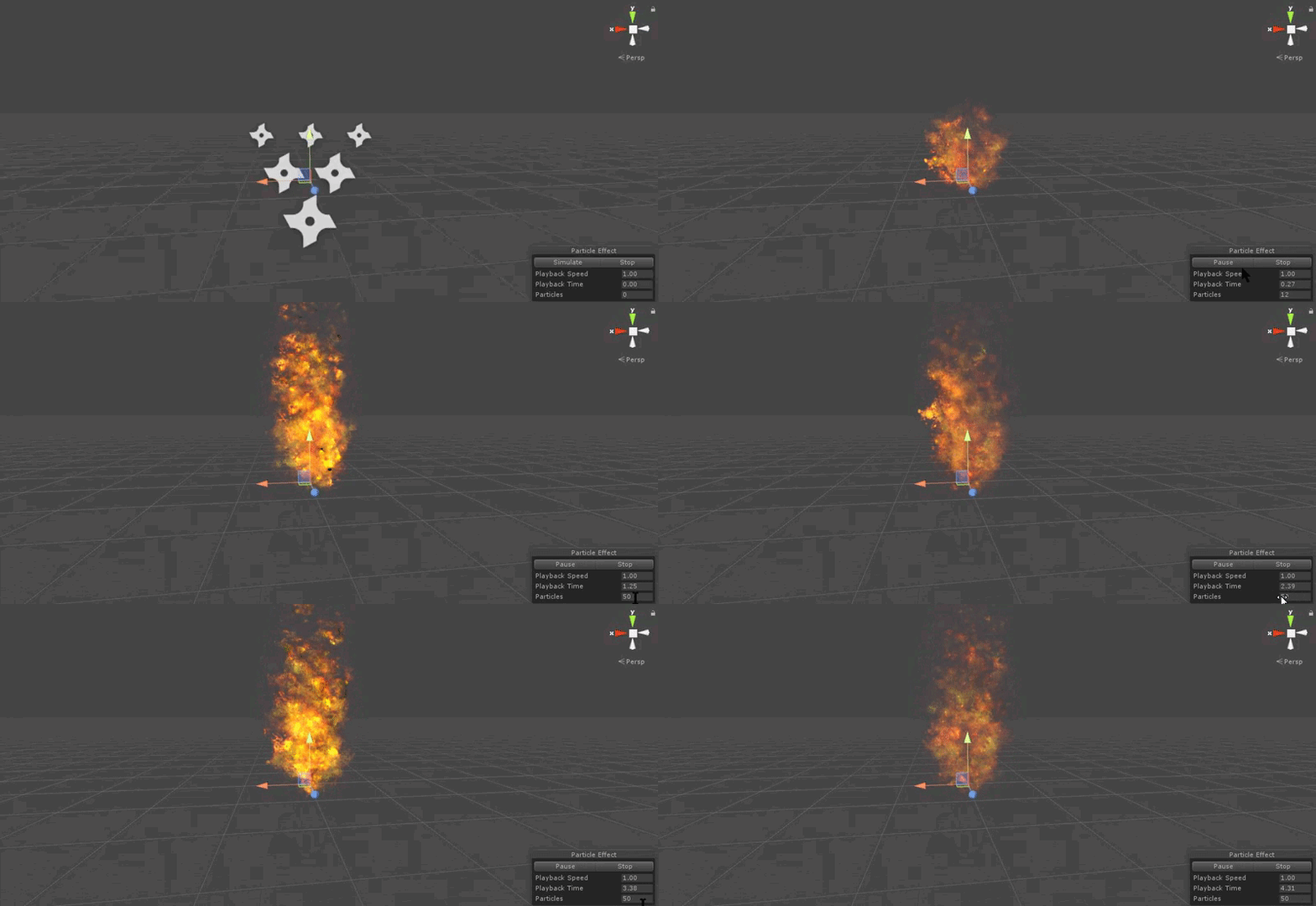
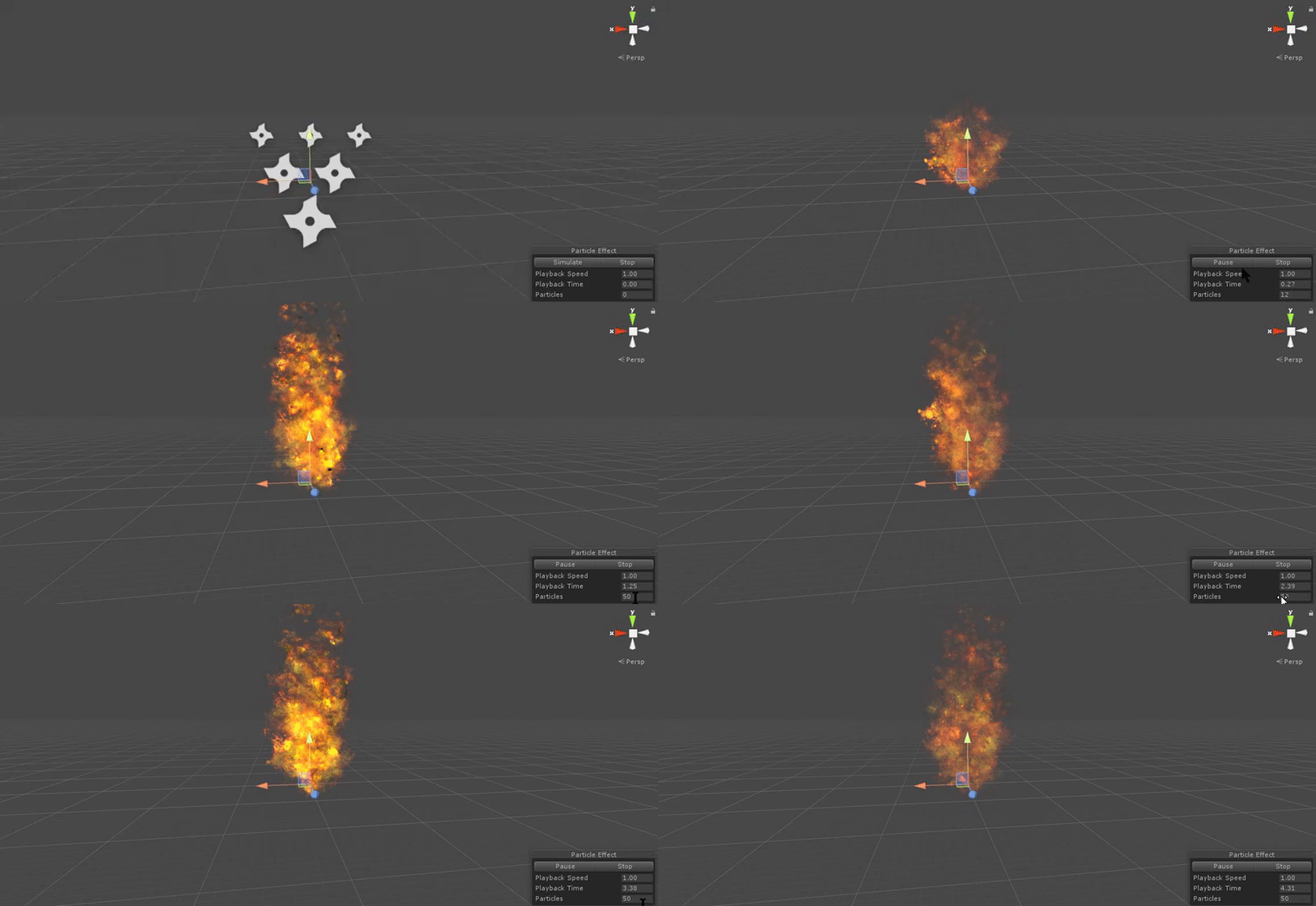
Can you click on the particle system and hit simulate and tell me the particle count?
if it's lagging it's probably not 4 particles with a 128x128 texture
i mean that just doesn't make sense
clear yew
so they are not the issue, i assume the issue can be the fact that my animation scale is wrong, and i scaled the player model down in unity without reimport
clear yew
I heard that could have been the case when i worked with a little fangame of mine
torpid light
like this @clear yew https://i.gyazo.com/5e82e3170d47b0602eda44ac00c3b189.gif
 torpid light
oh ok
clear yew
What i am doing right now, is finding the issue causing it
at first ill try to compress the textures a bit more
to 64 even, since they dont really matter that much. then gonna see maybe its the material causing issue for some people rather than particles themselves
 uneven bronze
🤔 When I make a custom animation and replace it for default emote, Do people see it ?
 gleaming tusk
Oh, damn I tried a custom walk animation and spins around as I walk, but my friends can see my model ok
is this a visual bug?
clear yew
better check and make sure it's working on your end too.
I had an avatar that shown up fine on my side... but from people's perspective it's arm looked like it was fapping
trim dagger
Lol
clear yew
not joking

I fixed it later because as it turned out, it was a bug with bones... but still, quiet hilarious
gleaming tusk
how did you fix it?
clear yew
That was the issue with the model itself
so i assume it might be the same on your end, try to check if some bones connected to right bones
and not wrong ones
@trim dagger it works! yay!
trim dagger
Ayy nice
uneven bronze
https://gyazo.com/fe3e45035063f3c1a61d8209ae84b742
Do people see it?
Gyazo
clear yew
A little wonky, (like starting to play the animation for a sec when I pull out my staff) but I'm happy
clear yew
Thats the thing i am actually trying to figure the F out
trim dagger
And yea bigzeek but at least you got that complicated mess to work lol
uneven bronze
🤔 My mic is broken, so I can't ask them
clear yew
why does it not lag on our end, but does on their?
torpid light
Does that actually follow where you look or is it just a set distance in front of you @uneven bronze
trim dagger
Because kirillian
uneven bronze
@torpid light set distance in front of me
clear yew
No way, duh. But my PC is really bad. by modern standarts.
trim dagger
So these big ass animations fuck me over
torpid light
that looked like it followed your cursor i was hype for a sec
torpid light
still a really cool effect
clear yew
I know about the double rendering, there's no need to explain that to me
trim dagger
??
uneven bronze
😍 tks
clear yew
VR renders two scenes at the same time, one for the left, other for the right, thus causing double the stress on GPU and CPU
Desktop mode only renders one scene, thus making it lighter
trim dagger
I just asked if you were in desktop or vr my dude
No need to turn into bill nye here
trim dagger
Ok so you answered your own question
clear yew
So how does particles affect people on high settings then? hmmm?
trim dagger
I use vr with a 960 so i lag with huge animations
clear yew
Same texture resolution size
 vernal cairn
SO I'm having issues with eye tracking. The eyes have bones, the bones are assigned in a human rig, and they all rotate properly. They don't function inside of VRChat though. What's up with that?
torpid light
might sound weird but ask someone else in game if they see them moving. My mouth moves for others but not me @vernal cairn
 remote onyx
Ok, when I want the mouth to move as I talk
do I just, keep the mouth closed by default when importing it?
Or open?
trim dagger
Closed
remote onyx
Alrighto
remote onyx
Nah
clear yew
hm. well, ive done something interesting now. I compressed all particles to lowest things possible, in total, there are 23 particles. As in each is a plane, so thats like extra... 23*2 = 46 tris. Its not heavy on memory or GPU or CPU, thats for 100%. What i did check now, is the sound playback... I did something different this time, and that is playback from Memory rather than streaming, i assume with assets like that it should help out the performance rather than decompressing and streaming it from VRChat's memory... that should help, but if not, then i can only guess it's the good ol scaling issue and i might have to redo everything from scratch again.
now... just gotta wait until the game is up to test once more.
Ingame profiler would've help for sure.
 fathom tartan
So have shape keys setup for blinking and bones for eye tryacking but im not sure how to add them in Unity where does one set it up?
I have the Lip Sync already setup but there is no similar area to setup blinking from what i can find.
 tame gust
Maybe someone can help me with this, I have a particle system and I want it to follow my weapon in my animation override. When I view it in the editor it looks alright, but in game the particle system just locks at my hip. Is there a way to make it follow the weapon without using "Local Simulation Space?" I wanted the particles to be left behind as I move.
clear yew
@tame gust put the particles as a child, in the heirechy, to the weapon?
tame gust
Yeah it's there, that's why I'm confused.
clear yew
Thats what I did for mine, using local simulation space and it follows
but your asking without, so I wouldn't know a workaround
tame gust
Yeah, probably require scripting and they still haven't implemented custom scripts.
Wish they'd update for the newest Unity build as well.
torpid light
im having the same issue @tame gust . I don't think world simulation works at all
tame gust
It does, but it locks at the first frame in the animation, so when I do my override and pull out my sword, it just locks at my side where it's placed in the editor.
torpid light
Yea same thing here
stuck where it was originally placed
makes sense now why i've seen so many particle effects where I've thought "Huh that would be so much better if it was in world space"
tame gust
Yeah, it's unfortunate. All you can do it enable the noise module and hold the weapon still and it'll do some neat things.
 slim phoenix
Is there a best tutorial video for custom animations to follow along with?
 peak summit
Anyone got a neat tutorial about particles and effects?
clear yew
There actually isn't any vids pinned to this channel
trim dagger
Fuck
U guys are trolling me
I have all these tutorials on my comp but not at my comp rn
slim phoenix
im not even sure how to see pinned things in discord >.<
trim dagger
If u pm me and u still haven't found the tutorial on youtube i can link you tomorrow
clear yew
theres a pin at the top
trim dagger
Im too lazy to get out of bed
slim phoenix
ah, i see
trim dagger
Theres two good ones on animation override and one good one on audio and particles
torpid light
If you are trying to create your own animations inside unity I've got a tutorial here https://www.youtube.com/watch?v=xxSezH13vAI
if you want to import animations from mixamo this video goes over it at about 13:00 https://www.youtube.com/watch?v=V0l4-pH3vI4
@slim phoenix
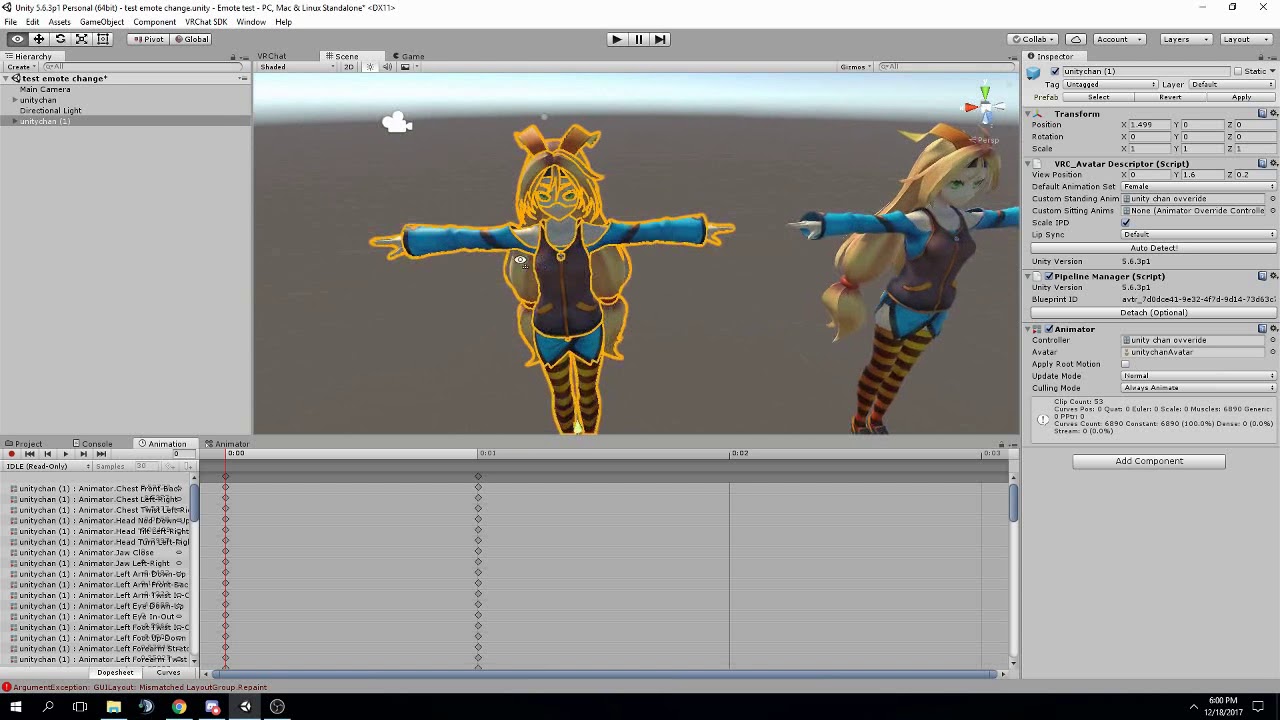

Creating custom animations for hand gestures and emotes in VRChat
peak summit
That I'm familiar with. I'm talking about things like particles. Pew pew lasers and whatnot
slim phoenix
ah, thanks @torpid light , I was looking for the first option!
I've watched one before to get a basic idea, and quick question, is there a way to set the time it is going for? is that done in keyframes?
peak summit
@torpid light but thanks for the 1st video I need that for later
torpid light
I don't go over creating the animations much, just how to get an override working in a not 30 minute video
trim dagger
As long as you have that hand gesture out
torpid light
it's keyframes and everything in between is tweened
slim phoenix
ah, gotcha
trim dagger
Cece theres one online for particles and audio
Search up like unity particle and audio tutorial or something
On youtube
Its the one with no sound
peak summit
Alrighr I'll keep that in mind
slim phoenix
thanks @trim dagger
trim dagger
Ye
 vale gazelle
so anyone good at doing weapon animations via emotes? if a person doesnt have a vr headset so its invisible inless u toggle the emote then your avatar does a sword swinging action and the sword becomes uninvisible?
 pure ledge
Lets say I have some different particle objects, if I don't include the 'set active' property on the animation, it won't show, right?
 pastel spruce
I'm trying to do generic rig animation override for the first time, how do I know what root node to use? I haven't gotten any responses in the regular avatar channel.
torpid light
Generic rigs can't have emote overrides
your charater will just freeze in place forever
if that's what you are trying
pastel spruce
Oh. I thought that's just what using a seperate animation from the standard male/female ones meant
But I'm trying to animate a generic rig is all
 mystic hull
Anyone able to point me in the right direction for adding collision to my avatar's ears to make it so I can touch them
?
torpid light
Yea you can do that. Just letting you know about the emote thing because i would have loved for someone to tell me that before i got into trying to make a generic rig
You need to make your own animation controller @pastel spruce . I would reference the default one and create it from there
any animator parameters in the default one can be used in your animator except for emote
pastel spruce
I have never done this before.
torpid light
yea you're going to need to understand how the animation controller works then
i suggest watching videos about just the controller in general to get an idea
You need to understand basic transitions and blend trees
clear yew
Hi guys.. I am try to make an animation here.. Is there any good video that can help me with?
Just want to set a props on my avatar and i can put it away and pull it out when i want
torpid light
this is what i watched https://www.youtube.com/watch?v=eT5_nyb0T1g
Showing you how to change default emotes to weapons & stuff. SUBSCRIBE, LIKE AND ALL THAT GOOD STUFF!! :D MY FIRST TUTORIAL ► https://youtu.be/0vdiCJRAExw DI...
clear yew
@torpid light I watch it before but I still don't know how to put the props away in game
torpid light
They should just go away. Well, they did for me at least
the object is set to hidden by default and shown in the animation and they go away when i do any other hand gesture
pastel spruce
It seems simple enough to just use the override option in the avatar descriptor, but is this really what I need to do?
torpid light
Yea overriding should work fine you just need to override a lot of animations
i personally find it easier to simplify the controller and make it myself, but I guess it's not as easy if you don't know what you are doing
pastel spruce
So basically create a clip for each of the options in the customoverride controllers?
torpid light
yea
pastel spruce
I mean, if those are the animation types in the game, it makes sense to just fill in the blanks
I just don't know what some of these are.
torpid light
if you do that, note that strafe left is actually the strafe right animation but mirrored.
pastel spruce
Uh... what about 135 & 45?
torpid light
If you create an object like a cube or anything and add an animtor to it and drag the override into it's controller slot you can view the animation controller
and see the blend tree

that's the blend tree
pastel spruce
I mean, there are already animations in the sample assets
pastel spruce
What happens if I don't set an override? Will it just use the default?
torpid light
it will probably just tpose you
the defaults reference humanoid bones which you won't have mapped as you aren't using a humanoid rig
so they can't move your character really
pastel spruce
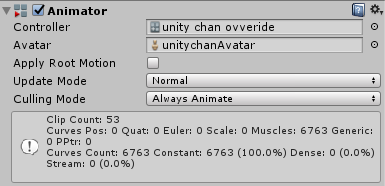
Wait, do I create an Animator Controller on the model?
 pastel spruce
So it's not in the avatar descriptor and is just its own component?
torpid light
both i think. I'm not 100% sure if the one in the avatar descripor does anything with a generic rig, but it worked when i put it in both
pastel spruce
What template should I use, then?
torpid light
I just used custom override empty and duplicated it for my own use
pastel spruce
But that's not a controller, it's an override
torpid light
it's an override of a controller
pastel spruce
Does it matter? Do I just dump all of the clips somewhere and use them there?
pastel spruce
...how do I duplicate the override controller? Is it the only controller I need?
mystic hull
Anyone know how to make a particle aura emote like the ones that say meme and stuff?
pastel spruce
Okay I have no idea how to animate
just... zero idea
it's 2AM I'm gonna get some sleep and try to understand how the hell this works tomorrow
torpid light
Yea take some time to get a basic understanding of animations in unity
it will make this a lot easier
 languid lark
animation muscle editor make much easier cost $15 assest store

Works on Unity 4.7 ~ 2017.1
As you know in Unity we can't modify animator properties as easily as transform properties which we can modify in the Inspector. So I’ve written this tool which can control animator properties in a simpler way.
Features:
-
Modify humanoid animation clips by simply dragging silders.
-
Add/Remove animator properties.
-
Body group and muscle name are copied from muscle setup window so you can easily understand what they are.
-
'Mirror' button: You can control the values for both sides even if you change just one side, which is very useful when creating animations.
Contact: pavostudio@hotmail.com
(English, Japanese and Chinese)
 strange kite
@pastel spruce I suggest you start with the SimpleAnimationController as a base for generic rigged avatars. You will at least have some support of the two layers and the animation parameters in that (for movement speed)
 craggy sage
is there a way to test the ingame hand animations?
tropic nova
does anyone know if there is a way to disable particle effects from running animation when im just walking
languid lark
@craggy sage if you want to test in game animation you need setup animator controller with finger finger animations
mystic hull
Anyone know how to make a particle effect to replace an emote?
Trying to make an emote that puts Traps Are Gay float around my Felix model for like 5 seconds
Can't figure it out though
tropic nova
@mystic hull uncheck the particle effect in the top of the inspector and during the recording of the animation re enable it by checking the box and stop recording. the emote will then trigger the particles
 hardy mural
Is the rocknroll emote a hand gesture?
tropic nova
uncheck the box in like this https://gyazo.com/c6edb1ce4f5e0703c3c65dea797862e2 and then hit the record button on your animation window and check the box again. but make sure the particle is off by default so the emote will trigger it on
 tropic nova
on the model. the particle will show up as a property in the animation after you record yourself checking the box
 iron crescent
how tf do i animate lol
mystic hull
@tropic nova When I put the particle effect on the armature the text becomes extremely small and unreadable
tropic nova
it doesnt necessarily have to be on the armature if you do not want it to attatched to any bones. you can just simply put it under the first parent in the higherarchy
 iron crescent
No
mystic hull
@tropic nova Checking the box didn't record anything
I unchecked it, pressed record, checked it and then pressed to stop recording
And nothing happened
tropic nova
thats wierd. try adding some random property first so the timeline shows up and then do it
iron crescent
whati did to get that to work is i clicked record and then moved something and the properties were added
but uh
what's happening for me is my avatar is randomly moving around unity when i move the arm around
 hardy nest
I have a problem. So I just learned how to add facial expressions. Only problem is that when I activate the expresion, my hand doesn't move ( Peace sign, pointing, thumbs up). The expresions work, but my hand just stays in the defult postion. Don't know what I missed. x-x
tropic nova
just add property > transform > position first
then it should let you record your particle effect
but dont actually change position values. just leave at 0 0 0
iron crescent
alright so jimb what was going on with my error do you know?
 pseudo pewter
Does anyone know how to import vmd into blender and play it's animation?
 frail pasture
Has anyone figured out how to apply an MMD (VMD) animation to models using the new CATS tool plugin?
tropic nova
@iron crescent sorry i dont know, i just started animating yesterday lol
iron crescent
yeet
frail pasture
Hitting 'Fix Model' breaks the VMD animation preview for me (and all tutorials uploaded online aren't working since they don't use CATS)
pseudo pewter
@frail pasture did you manage to get it imported and play a preview?
frail pasture
Yes its imported but the preview doesnt show the model moving at all.
pseudo pewter
I think that I've imported it properly but Idk how to play it
Idd
Looks like we are in the same boat 😛
frail pasture
Yep 😄
tropic nova
does anyone know why my emote bugs out my character and i cant move? its for a generic rig
 azure pilot
iirc vmd uses one of the mmd stuff to animate but cats plugin removes that
azure pilot
you could try manually fixing up the avatar yourself
mystic hull
@tropic nova ^^
frail pasture
Yeah... that seems to be the only solution atm @pseudo pewter @azure pilot
tropic nova
@mystic hull you can also just delete the position property if it messes with anything in the animation
pseudo pewter
Oh boy
azure pilot
If you hide the textures and bones you will see something like rounded cylinders all over with lines drawn to the bottom
mystic hull
@tropic nova If it didn't work I'm just going to call it a night
azure pilot
Not sure what that thing is called but im sure the vmd animation uses that
 feral sedge
ive thrown a question in rigging channel if someone knows
mystic hull
Thanks for the help though @tropic nova
tropic nova
np
does anyone know if it is possible to add an emote to a generic rig without your avatar bugging out?
azure pilot
Wait if it isnt humanoid how do you even import it into vrc?
pseudo pewter
@azure pilot you meant the rigidbodies?
tropic nova
@azure pilot you can import almost anything as long as it has an avatar descriptor
hardy nest
I have a problem. So I just learned how to add facial expressions. Only problem is that when I activate the expresion, my hand doesn't move ( Peace sign, pointing, thumbs up). The expresions work, but my hand just stays in the defult postion. Don't know what I missed. x-x
 radiant chasm
Hey guys, So if I have a non humanoid avatar with animations, How do I make it play my walk animation and stuff?
it uploaded ok as Generic and I spawn as it, but no animations
tropic nova
check your controller
oblique panther
so im checking on how to do facial expressions
and in the video
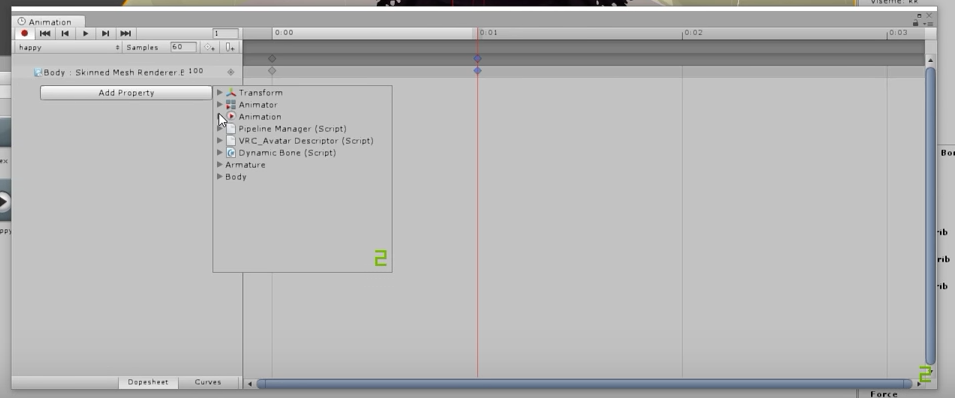
the animation button is not in my unity
 upper cloak
add it then
oblique panther
how tho
clear yew
so apparently my stuff doesnt lag anyone anymore. It was prolly server issues, but well, extra optimisiation helped too... so yay, virtual donald lives
wish i knew what caused it though...
 sly obsidian
I got one question, maybe you guys know that allready. I want to let something appear in my hand while it dissapears from the model itself. I tried to unhide it in like the clone, but that didnt work in vrchat. do i have to do something else?
 sour hedge
heya, is there a way to make my tail jiggle (not dynamic bones), as in moving in a certain way on it's own? I'm guess animation but I'm unsure how to realize it
tropic nova
yea you can do an animation. if you go to youtube and follow a tutorial it will tell you the basics. you just have to rotate some bones
sour hedge
oh, ok. Good to know. If I were to want it permanently, do I have to add it to... well, the idle animation?
cuz in unity I can't seem to add more animations to the cao for example
clear yew
So, I was wondering if I was supposed to be ripping the animations I want to modify from the VRChat SDK and modifying them rather than making animations from scratch for my ovverrides.
 steady plover
Idle and possibly walking
clear yew
I made idle animations from scratch in Blender and used them in an ovverride, but it disables my visemes. I was wondering if it was because I made them from scratch rather than ripping one from the SDK and modifying it. I only mention it here because I know others have the same issue and this may be a potential fix. I'll try it tomorrow myself to find out.
steady plover
Not sure, sorry man
oblique panther
gonna have to ask again
i wanna do facial expressions
and im watching this tutorial video that has this button
but i dont
the animation
to cancel blinking when i do the expression
steady plover
Do you not have the animation tab? Or is the missing button the only problem?
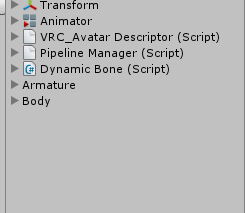 steady plover
I forgot how, but you can google to figure out how to make the animation tab appear, its something simple
oblique panther
hm i cant find it
this is so annoying
@languid lark you know everything
................................
now
i
do
problem fixed
thanks
lol
 opal lodge
when putting a weapon as a hand gesture override, do i need to edit the keyframes for both hands or only the one holding the weapon?
I've seen people do both in different tutorials
Gotcha, thanks!
clear yew
I have a question. I wanna add 2 props on both and so my animation override need to set 2 time and each hand once?
oh.. so you mean i only have to make it once ?
alright i got it .. i think i have to make it twice
Thank you :3
not the same thing but thanks anyway :3
clear yew
um.. which emo is that thumb and index and little finger will up?
oh thankyou :3
is there a keyboard button for taking out your handgun?
it's more fun if you have a vr set :3...
Can't I make a script that looks for me pushing a button and then do an animation?
or won't that work in VRchat?
 fallen flax
Think that only works on Generic models
clear yew
I just add a sound effect on my props and how can i tragger it in game ?
is there few more things i have to do?
oh.. so i have to do it first before i make this animation ..
just a trolling gun
and a trolling c4
 frigid pine
which emote nr is dancing?
 light tiger
is it possible to override the head bone's mouselook function to another bone?
light tiger
no i mean im using a non humanoid model that has a tiny humanoid skeleton with the model's actual skeleton
i want to make its actual head bone look around like the humanoid skeleton's head bone
 smoky pendant
Can anyone tell me how I can add drawing to a character, like how people use their finger to be able to draw? or if there is a tutorial on that?
 dark ether
Can someone tell me how to add a sound to a already made animation?
I've already added the audio source and the custom animation to emote 8
But how do i trigger the sound with the animation?
peak summit
Simple and silly question but if I want to make an animation of a character holding a weapon is that going to add to the poly count?
pseudo pewter
Hmn
The emotes are just in order of top to bottom left to right?
Im trying to follow the nepiest animation override vid
Its somewhere in #tutorials
 sweet topaz
can some one help me with my avatar?
 ocean slate
how to use those ingame?
 sweet topaz
Keeki
sweet topaz
fist press the trigger
ocean slate
press what?
sweet topaz
you use vr right?
sweet topaz
yea
ocean slate
😦
sweet topaz
animations only for vr
cause you need to be able to point ETC
what does your gun model look like?
pseudo pewter
Well, the emote animation can still be overridden on desktop right
ocean slate
pseudo pewter
Time to give it a try
 torn pawn
dildo or bodypillow is the best weapon
peak summit
Simple and silly question but if I want to make an animation of a character holding a weapon is that going to add to the poly count?
😏
pseudo pewter
Lmao
sweet topaz
no
i think
in a vid they said it wont
but idk
does any one know where i can find a good weapon model?
trim dagger
Theres tutorials online
smoky pendant
Can anyone tell me how I can add drawing to a character, like how people use their finger to be able to draw? or if there is a tutorial on that?
sweet topaz
yea ik but i cant find a good model
trim dagger
I dont think theres a way to have drawing attached to your character
Fahad ima get on my comp in a sec
Are you looking for gun models?
sweet topaz
gun or swords
smoky pendant
ive seen it on multiple models
sweet topaz
any thing that looks good
trim dagger
I know a good guy who has a good gun model page
sweet topaz
whats his name?
trim dagger
Im gettin on comp rn hold on boy
pseudo pewter
I seem to be placed ~1 lower into the ground when I use a custom emote
Anyone have an idea on how to fix that?
trim dagger

DeviantArt
These are all the gun that I have converted and rigged, feel free to look at and download these babies home
fahad
this is where i get my gun models
sweet topaz
ok thanks
trim dagger
yeah
sweet topaz

DeviantArt
trim dagger
DeviantArt
These are all the gun that I have converted and rigged, feel free to look at and download these babies home
just click
this link
trim dagger
because its his page
trim dagger
???
sweet topaz
i rather have a sword or a pistol or some thing like that
trim dagger
bro did you even look
he has swords and pistols
lol
its a deviantart page
thats why instead of www it's his own page
.
sweet topaz
yea i saw it no thanks
trim dagger
lol
then go search for it yourself
thats what i use
he literally has 20+ different pistols but if that doesn't satisfy you good luck trying to find anything else
sweet topaz
probarly didnt see it cause it was loading
pseudo pewter
Hmmn, how do you prevent your avatar from being deformed into another pose when you try to create an animation?
sweet topaz
create another duplicate of your avatar
trim dagger
you cant
sweet topaz
while u animate it?
trim dagger
your animation model is different from your main model
pseudo pewter
I know
I do use a different avatar but I noticed that when I play my custom emote
It takes the same pose as the 'deformed' one
sweet topaz
wierd
pseudo pewter
Yeah
trim dagger
then idk lol
pseudo pewter
I don't but I can still override emote1-8
trim dagger
ik
sweet topaz
Fade
trim dagger
?
trim dagger
its the same process as an avatar
you have to put it through blender
and then export it
trim dagger
?
sweet topaz
Fade
how do i add the materials?
i put the gun in unity
but it has no materials
its transperant
trim dagger
ok
first
select all the materials and change it to opaque
that should make it work
sweet topaz
...
trim dagger
so drag in the textures and all that
sweet topaz
ok so i watch a vid again
clear yew
so all my keyframes are like all switching to the same number
trim dagger
clear yew
idk what i'm doing wrong
sweet topaz
ok brb
clear yew
sweet topaz
FALprofessional
clear yew
i'm pretty sure
trim dagger
wait
are you doing animation overriding or like
emotes
er
hand gestures or emotes
clear yew
no i'm just doing a blink
 frosty spade
pretty sure cats does eye tracking not blinking
smoky pendant
yes cats does blinking
clear yew
nvm i got it
 pale skiff
cat tools does eye tracking and blinking
smoky pendant
Can anyone tell me how I can add drawing to a character, like how people use their finger to be able to draw? or if there is a tutorial on that?
 solar relic
Anyone help or give thier opinion?
solar relic
Yeah? Trigger animation
solar relic
@sweet topaz okay
sweet topaz
but when i put it in unity its a blank model no textures
solar relic
Did the folder that came with the gun had textures in it?
But u can make ur own texture if u want plain colours on the gun
sweet topaz
i think
DeviantArt
These are all the gun that I have converted and rigged, feel free to look at and download these babies home
do u know this site?
solar relic
Hmm sory I dont.
sweet topaz
check it
solar relic
Let me try n download it.
sweet topaz
and scroll down
its a bunch of weapons
not only 1
go down until you see blue backgrounds on the weapons and click on the glocks
thats the one i downloaded
lets talk in pm
solar relic
@sweet topaz cs5 sniper rifle?
sweet topaz
nope
glock

DeviantArt
Credit: Payday, Overkill Software and Neo-Haven converted and rigged by AbyssLeo Retextured by AbyssLeo DL includes 2 version, normal custom black Glock 22 and custom Two Tone G...
here
the direct link
sweet topaz
yea
i put them in my textures folder
but when i put it in unity
i cant see any textures
solar relic
Owh..
sweet topaz
try to import it into unity
solar relic
I guess u have to manually colour the textures on to the model
sweet topaz
one sec
ok
so this is what i did
Assets / Models / Hidaomari / Materials
yea i just made it a little neat
solar relic
Okay, does the material folder have texture balls in them(idk what they call those)
sweet topaz
ok i am in the material folder and i have textured avatar BALLZ but not textured gun BALLZ
xD
solar relic
Yeah those are the ones for ur gun
sweet topaz
ok
solar relic
Drag the ball on to ur gun
sweet topaz
xD
solar relic
Lol
sweet topaz
there is more than one BALLZ
solar relic
Yeah but pick the one says barrel_df or any gun parts
solar relic
Lol after this ill slap u
sweet topaz
so g22c_barrel_df
solar relic
Yes
solar relic
Inspect that n u will see a apello
Click the circle thingy and choose the texture call barrel_df.
sweet topaz
apello?
solar relic
Im opening my unity.
solar relic
Nah its alrigt im in vrchat atm afking
solar relic
Its called albedo
solar relic
Press circle thingy next to it
solar relic
Yes
sweet topaz
ok then?
solar relic
Search for barrel_df
solar relic
No it just fine if u just put it anywhere in ur asset
sweet topaz
ok i found g22c_barrel_df
solar relic
Yes click it
solar relic
Yes
Now go back to ur material folder, drag the shader n drag it into the barrel model
solar relic
So just continue on the other 5 parts
solar relic
Lol nope
solar relic
Noice have fun
sweet topaz
ok wait
one problem
i dont know if im supposed to duplicate the avatar and then make the animation
then check if its on the normal avatar
and yea...
solar relic
Uhm first u need to put the weapon on to ur main avatar
sweet topaz
ok
solar relic
Duplicate that avatar.
solar relic
Yes the gun on the main avatar should be hidden
solar relic
Well u have 2 models
solar relic
Owh glock is the gun... And hidaomari is ur avatar?
sweet topaz
yes
solar relic
Ah u forgot to parent the gun on too ur avatar
solar relic
Lol
solar relic
Yes
sweet topaz
yea
wait
is there any way i can attach it to my avatar and make it disapear when i equip it?
solar relic
Yes.. Its basicly the opposite.
sweet topaz
eh ok
for now ill just do the animation
so i can equip the gun ill do the other later
cause i just want to have a gun on my avatar
solar relic
K... Go to ur hierarchy n go to ur hand or middle finger
torpid light
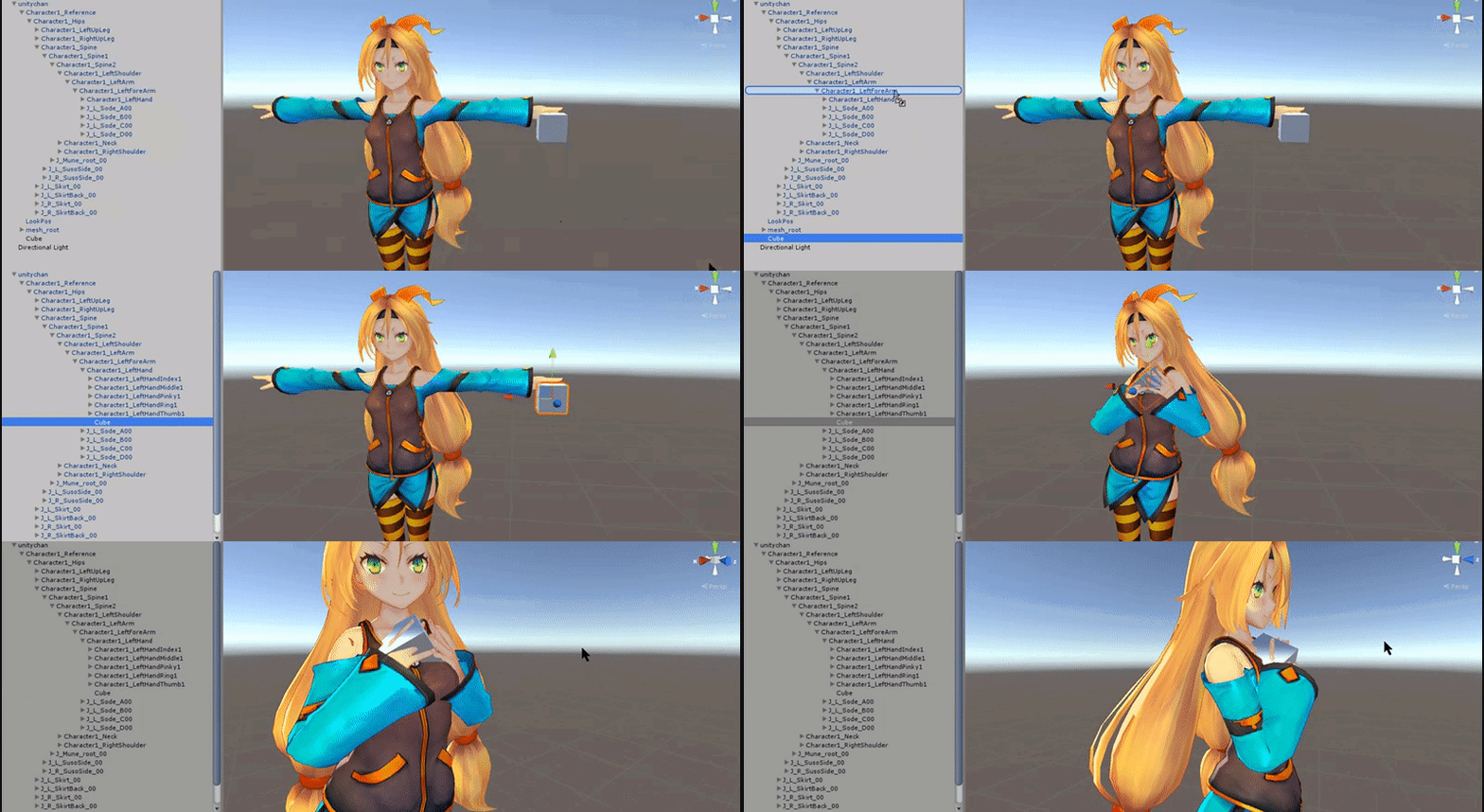 clear yew
I am finishing the animation but i still hard stuck with the guns firing sounds
sweet topaz
no thanks
one sec
faido
there is 2 arms
Arm2_R And Arm_R
Oh Nvm Found it
It was on the main arm
solar relic

solar relic
Drag the gun(at the hierarchy) on to that middle finger or hand
sweet topaz
wait
ok
so it says here
MiddleFinger1_R
and when i open its hierarchy it says middlefinger2_r
solar relic
Its an extension of it i guess.
solar relic
C
sweet topaz
C?
solar relic
Yes Amigo
solar relic
Good its parented to finger.
solar relic
U position the gun? On ur avatar hand?
sweet topaz
ill do that now brb
solar relic
U in vrchat atm?
sweet topaz
me?
solar relic
Yes
solar relic
Easier for me just to say it
sweet topaz
add me as a friend Fahadfareed15 xD
ok
one sec
ill get in
but i cant get on my vr right now
once im done with the avatar i will get on vr
ok hopping on one sec
solar relic
C
solar relic
Invited u
clear yew
So I made myself a Kakashi avatar to the game, I was thinking about adding lightning/particle to his hand with sounds. Any pros, knows how to go about this stuff, pretty new to sounds and particles :x
Example
I know that there already is another avatar with this effect.. Maybe I could get it in some way?
 fierce ivy
can someone sauce me dynamic bones?
fierce ivy
anyway to get it off the black market?
clear yew
not that i know of since the license would be tied to your account i believe
clear yew
anyone know how i add facial expressions to my gestures without overriding hands?
 quiet rose
 royal sky
Anyone know how stop my cloak from clipping into my arm? I've tried adding colliders and its helping only a little

 frozen wind
are there any good particle effects that dont render as 2d sprites?
I found a few in the asset store but when they went ingame they didnt look very good
trying to get an orb with smoke coming from it style
 abstract dew
Question, I wanted to do 2d mouth visemes, followed the tutorial (the 1h one) to do it and everything is fine in blender but the visemes dont work in unity, as in when i type the values in the blend shapes in the skinned mesh renderer, it changes nothing no matter what value I put in.
My thought is maybe its a problem with the model? I used a collada .dae model imported into blender and then exported as .fbx
Is it impossible to do somthing like this on that type of models?
light tiger
Quick question, what happens if your custom emote is longer than 10 seconds
torpid light
it just stops early
clear yew
http://alpha.thearthacker.com/welcome/ new site that just launched, made by industry art vets for artists. 2d, 3d, animation, ect. All free.
vernal cairn
So I managed to get eye tracking working (sort of) except for some reason I have times where the characters eyes just roll back, especially on short people. What's up with that?
torpid light
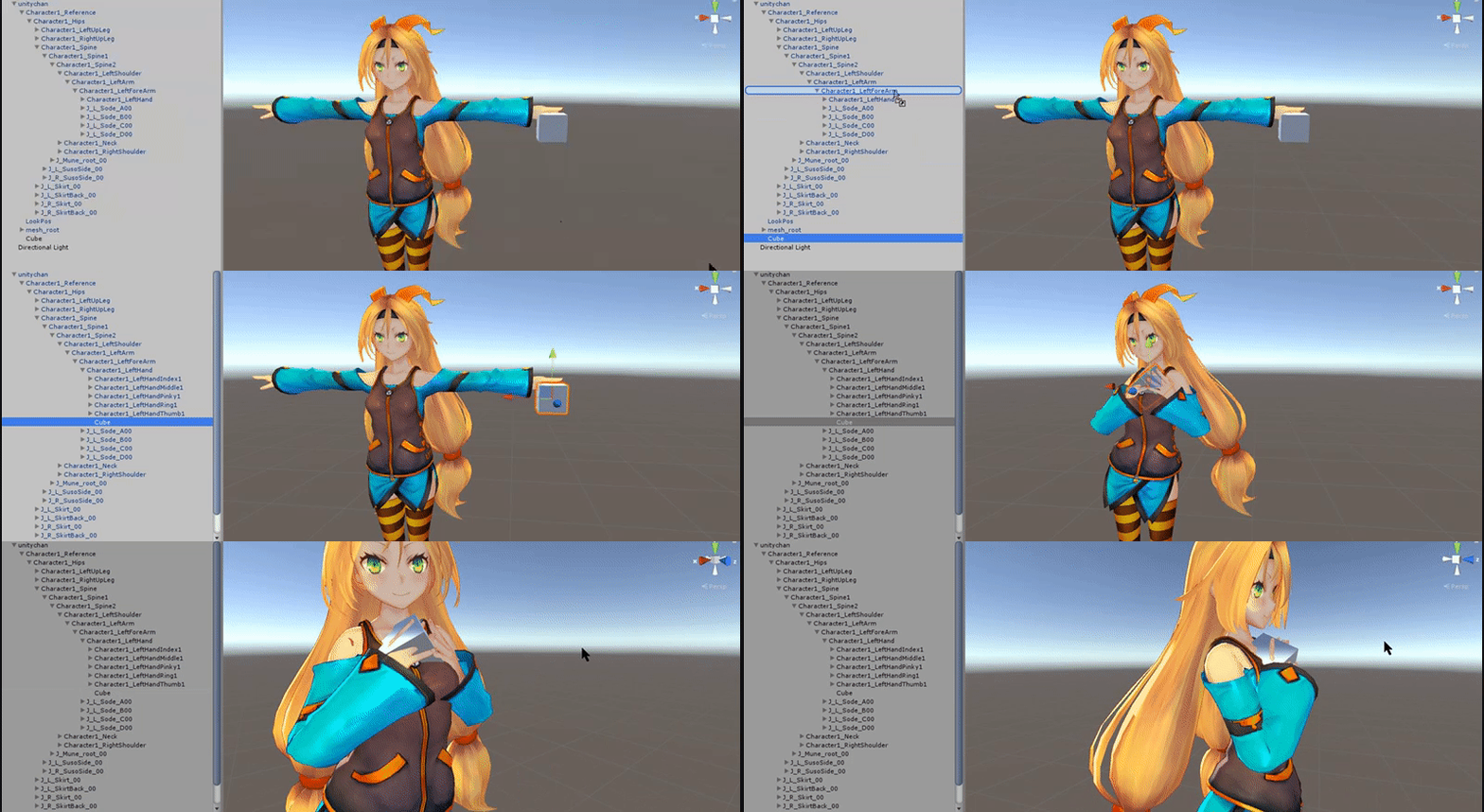
@frozen wind There aren't really any particle effects that are rendered in 3d. You can get a decent smoke by adding some shading to the texture so it looks something like https://gyazo.com/f44d6921048dbb75bb3f3102f493d26e
it makes it look more 3d if there is a bit of fake lighting to it



 swift root
Anyone knows how to get a gun to shoot?
craggy sage
so question, when you do eyes and for a custom head, do you need to mesh and rigg the eyelids?
uncut monolith
https://my.mixtape.moe/vljepo.webm
Does anyone know why this happens to my gun? The sword works fine as you see but the gun keeps popping in and out of existence
 proven mango
can anyone help? when i click add nothing happens
the icons dont show up here so its really strange
AH
space and slash in the name was screwing it up
 prime walrus
lol
 quasi kite
Hey guys~ anybody has a second to help me with animator related problems in unity?
torpid light
post the problem i might be able to help
proven mango
my character has a hat as a blendshape, how would i be able to make an animation that toggles the hat on/off?
sour hedge
okay i fiddled around a bit and tried to make a part of the model visible if I do an animation. Now, I only added it on an emote instead of gestures cuz I don't have VR yet. In the animation the additional stuff is visible, but I don't see it ig. Is it even possible with emotes instead of gestures? Or is there a difference in how to make em?
like, custom dance emots n stuff works
 lone yoke
Question, can I add a weapon and the animation to it after I have already made animations without the weapon attached?
 vale field
Does anyone know where to get good animations, all the mixiamo ones seem kinda buggy
 gritty thicket
Is there a way to make animations work by pressing a key? VRC_EventHandler and VRC_Trigger are currently not supported.
 upper sapphire
How do I fix my weapon emote model dissapearing at certain angles?
proven mango
remote onyx
When it says "includes spoilers"
we talking.. post case 1 or...
Cause I only finished case 2 I really gotta do more game
also your icon is P5
another game I gotta finish
proven mango
yeah it has spoilers for all of every game
clear yew
Quick question, is there a way that I can bind both a sound and a prop to the same gesture? Like a lightsaber with sound.
torpid light
yea just add an audio source to the prop
light tiger
is it possible to crossfade an emission map into another emission map in an animation?
clear yew
How do you go about that? 🤔
torpid light
Go to the game object and click add component and search for audio source
then for the audio clip drag in the sound file
clear yew
Ok I'll give it a try. thanks!
 devout fog
is adding custom emotes to a character a lot of work?
clear yew
Well actually it is a particle.. So I do not have the option to add a component, atleast that's what I know
torpid light
so you already have the object appearing on a certain gesture right @clear yew ?
clear yew
@torpid light Yes, the particle/lightning works fine ingame, I just want sound with it
torpid light
So whichever game object has the particle system on it is the one you need to add the audio source to
clear yew
That is the hands?
torpid light
depends on what object you are enabling/disabling