#animation
1 messages · Page 7 of 1
 versed tulip
versed tulip
versed tulip
good thinking
 drifting rapids
Hey, can anyone tell me if its possible to have custom emotes on a generic skeleton, because every time i trigger them ingame it just makes my avatar freeze.
 pseudo pewter
Did you set the value to 100?
 finite fossil
@versed tulip tried remaking the sil shape key and the issue still occurs
ive also tried removing the visemes altogether but the mouth still moves as if im talking at random intervals
versed tulip
@finite fossil Sorry, I'm at a loss then
finite fossil
np appreciate the help
versed tulip
Are your shapekeys in the right order?
finite fossil
@versed tulip
finite fossil
?
versed tulip
@finite fossil whilst is sounds stupid many tutorials (and my own experiences) say you need to have your shapekeys in a certain order for them to work right
finite fossil
alright ill try that
i rememeber eye tracking not working because my mesh was named "body" and not "Body"
versed tulip
The order is:
(Basis)
vrc.blink_left
vrc.blink_right
vrc.lowerlid_left
vrc.lowerlid_right
vrc.v_aa
vrc.v_ch
vrc.v_dd
vrc.v_ee
vrc.v_ff
vrc.v_ih
vrc.v_kk
vrc.v_nn
vrc.v_oh
vrc.v_ou
vrc.v_pp
vrc.v_rr
vrc.v_sil
vrc.v_ss
vrc.v_th
Hoepfull that'll help
finite fossil
ah its still happening NotLikeThis
finite fossil
yes
versed tulip
Well I wish you the best of luck in figuring it out
versed tulip
Its annoying as I've had the same thing multiple times and those steps have always fixed it... ah well
pseudo pewter
What was/is the issue?
finite fossil
ill go ahead and copy paste:
anyone know how to fix this issue where the mouth on this avatar moves by itself at seemingly random intervals? it moves as if im talking in game with visemes.
ive checked all the custom animation overrides and none of them seem to affect the mouth movement.
ive tried removing visemes on a duplicate avatar and testing in-game. The mouth was still moving.
yes my mic is muted in game. the normal visemes do work when i talk with my mic open in-game.
the jaw bone is unmapped in unity.
the mouth issue doesnt occur when i press play in the unity game-scene and watch for a bit.
would appreciate if anyone could help me out, thanks!
pseudo pewter
So random intervals and not periodic?
finite fossil
seems like it
 uneven bronze
 Can you replace the default emotes such as "dance, wave.." for your custome animation? I don't have VR headset
 pulsar storm
I've tried, but all that happened was one of these
- Idle there while being unable to move
- Shake up and down like I'm glitching through the ground
- Avatar goes halfway to the ground with the animation (currently here)
uneven bronze
I see....
drifting rapids
@uneven bronze Yes, you need to use the CustomOverride. You can put your animations in the emote slots there.
uneven bronze
I just try to make an animation that spawn a weapon, but when I use it; my avatar "Shake up and down like I'm glitching through the ground" @drifting rapids
@drifting rapids https://gyazo.com/bd90d327a0a79e602a5098def6b56f13

 harsh parcel
Trying to get in contact with Big Al. does anyone know his disc?
 trim flax
@uneven bronze yes, you can, and it works fine
as long as you have valid model
but can't be longer than 10 seconds
or weird things will happen
so you probably have some issues with bones? what you used to create animation?
 wheat lion
anyone know how to add all the finger bones when making an animation? and not just one by one
 fallen flax
@wheat lion muscle animation editor on Unity store is only way I know of apart from having a template
uneven bronze
@trim flax I follow this tut https://www.youtube.com/watch?v=eT5_nyb0T1g
Showing you how to change default emotes to weapons & stuff. SUBSCRIBE, LIKE AND ALL THAT GOOD STUFF!! :D MY FIRST TUTORIAL ► https://youtu.be/0vdiCJRAExw DI...
fallen flax
Hello
 compact walrus
heyo can someone tell me how to make particle effects visible on override animations? i set it up like every other of mine i did, like gesture so that a weeapon appears, but the effects dont appear, at all
trim flax
@uneven bronze can you show your animation view then?
uneven bronze
🤔 What do you mean by "Animation view? Animation view on Unity?
 sage lark
Does anyone here know how to make a "glitch" effect on a model? Something that would happen like every 30ish seconds?
wheat lion
how do i tpose my character after they've gone through the ground?
fallen flax
@wheat lion recommended to make a duplicate before making anim override because of this
 clear yew
I've tried making custom overrides according to the youtube tutorials but it is not working any tips
I've followed several step by step but the hand just goes to the default in game when doing the gesture. what could i be missing please
 sonic tiger
@sage lark likely your best bet there is a custom shader set up for vertex displacement. Definitely not beginner friendly though.
sage lark
eeek
 unborn sphinx
Does someone know a good site or place to find custom Animations / Emotes ? ( Speaking as a Desktop User )
wheat lion
mixamo @unborn sphinx
clear yew
does anyone know why a custom override would not function as expected after following all the steps in the tutorial video above by kuno
 fringe gull
I'm trying to edit one of my animations for my avatar, but i don't know who to open it and edit, i've succeded in opening it but i can't add a new property
 naive snow
Hello! , my avatar was working fine , now she's not walking , she's sliding , anyone knows how to fix this?
 kindred yacht
how do i loop walking animation ?
compact walrus
if its a simple walking animation, you can easily do that with additional keys, just copy the values to the new keys: 1->2->1->2
 abstract dew
Hello there, I have a question. How to do a simple 2d blink animation in unity. I have the textures for different eye keyframes, and the material/mesh with the eyes is seperate. I tried doing it by duplicating the model to make the controller, and doing the blink animation on that. It worked but only on the duplicate one. When I moved the created animation to the main avatar with 'animation' component it didnt work
I did it with the skinned mesh renderer > material reference property
compact walrus
sadly cant help much if its in unity, i did mine per blender, made blend shapes there and just uses those in unity
 muted prairie

In this video I will show you how to make your 2D eyes/mouth type avatar have a blinking animation and mouth movements for VRChat!
unity won't help afaik
 next shard
sooo i wanna try some basic animation for the idle pose or emotes. Anyone know how to do it XD
muted prairie
@next shard check #tutorials
kindred yacht
@compact walrus sadly its not simple
kindred yacht
i figured it out yaaas
 wraith hawk
Does anyone have a good example of dynamic bone preset for tails?
 frozen wind
Trying to get this particle to appear in my left hand, any idea why it wont appear?
sword appears but not the orb
muted prairie
@frozen wind maybe out of bounds ?
 dark zealot
is it not possible to add a facial expression while normally walking forward/backward/sprintforward?
i am getting glitched into the ground and do the the weird pose u do in animation editing.
or did i screw up somewhere?
frozen wind
new with particle effects, but it is right at its hands
i wouldnt think its out of bounds
next shard
okay when i import a mmd motion into blender, the animation is so broken
zzzz
why is it doing that XD
 kind void
clear yew
kind void
clear yew
Where does one get good models for like foods? weapons?
next shard
on deviant art and stuff?
frozen wind
what exactly are you looking for exiled?
 uncut monolith
https://my.mixtape.moe/drwnka.webm Any idea of why this is happening? The guns pop in and out depending on where I'm looking at. Shows fine in the camera in the test room, as you can see, but the guns pop in and out for other people too who i asked. I've set two guns to appear when the rock and roll hand gesture is done with either hand
next shard
my face animation is stuck on one expression in unity
why is it not changing expressions like in blender xD
is it because i might have decimated the face a little
so the face expression are not changing anymore
 uncut shoal
You have to re-add all the animes as unity ones and but them in a custom animator controller
 trim dagger
where can i find the animations for guns
is there a website
also when i take out a gun model or something and my tris count goes above 20k in-game what happens?
next shard
@uncut shoal it is a motion data from mmd tho
@uncut shoal so it should have been all in one
 keen sage
How can i overide WALKfoward animation https://imgur.com/a/seD7K i put the animation clip in the slot but the animation is not playing the rig humanoid and i have tested other animations in the emote tabs but i can figure out the walking animation set up

been baning my head for 2 days now on this
trim dagger
zz
muted prairie
@keen sage Did you use a copy of the vrchat animation file or did you edit the one in the sdk ?
muted prairie
ok, just wanted to make sure
next shard
i dont get
why my character expression stay the same
like if i save the blender file at a certain time with a certain expression in blender
it is gonna stay with that face during the whole animation in unity
= -=
and the animation is working fine in blender
the expressions and everything
keen sage

Creating custom animations for hand gestures and emotes in VRChat
here you go
 azure hare
Is there a way to fix my avatars sitting animation? he sits at the bottom of every chair.
 pliant dust
@trim dagger Here's another one too. https://youtu.be/eT5_nyb0T1g
Showing you how to change default emotes to weapons & stuff. SUBSCRIBE, LIKE AND ALL THAT GOOD STUFF!! :D MY FIRST TUTORIAL ► https://youtu.be/0vdiCJRAExw DI...
 hollow mica
Going to be doing live animation again for anyone who has questions, stop on down here: https://www.youtube.com/watch?v=RRoRg4Wfwm4
The full live process, start to finish!
clear yew
Anyone on currently, do you have any ideas as to why my idle override disables my lip sync visemes?
 versed tide
are you using blend shape visemes or jaw flap blendshape?
clear yew
Blend shapes.
clear yew
Hmmn. It shouldn't.
versed tide
it's the only thing i can think of atm
clear yew
I didn't create any. I only posed the model and made two keyframes. One at frame 1 and one at frame 24. Saved, exported.
next shard
i still haven't fixed my problem, any expert on animation can pm me on discord? xD
versed tide
try changing the name of the face mesh
clear yew
Alrighty.
versed tide
if it has eyetracking it would break it but if the visemes work, it could mean that the idle animation has keys baked on the shapes
next shard
@versed tide do you know why the animation on blender works fine but on unity the facial expression stay the same and it doesn't change at all.
clear yew
I will say that I didn't take the new model with the animation into the scene in Unity to upload.
I just used the animation it had for a controller which I then placed on the model that was already in the scene.
versed tide
i mainly animate on maya. but some issues i've found with face shapes on animations usually have something to do with names and hierarchy
next shard
mhhhhh
but in the video
they said not to rename anything or translate
because that is a mmd motion data
else the motion wouldn't work
xD
so that might be why the face animation isn't working in unity right?
versed tide
yeah. unity will try to find the exact name in the exact hierarchy so even if you rename the mesh from body to Body it won't recognize it
next shard
well you have any idea how to rename
just the facial expressions
with cat plugin
in blender
is it shape keys, bones, meshes & objects or materials?
versed tide
that's for the shape keys
versed tide
no prob. hope it works :)
 shut iron
quick question, if cat's blender tool can't do the lip syncing vesimes for me, do i have to do the shape keys manually myself? just want the stupid mouth to move
next shard
for the moment, the translation worked and the animation is still working on blender
will see in unity
versed tide
@shut iron yes. if you have Ah, oh, and ch shapes you can just mix them to create all the new shapes and just do some tweaking
which is what CATS do
shut iron
what do you mean, all the new shapes? do i need the whole alphabet, or just those three sounds? not sure what vrchat looks for
versed tide
vrc.blink_right
vrc.lowerlid_left
vrc.lowerlid_right
vrc.v_aa
vrc.v_ch
vrc.v_dd
vrc.v_ee
vrc.v_ff
vrc.v_ih
vrc.v_kk
vrc.v_nn
vrc.v_oh
vrc.v_ou
vrc.v_pp
vrc.v_rr
vrc.v_sil
vrc.v_ss
vrc.v_th``` glacial spoke
clear yew
glacial spoke
clear yew
i did eye tracking and blinking with CATS, and when I try to do blend shapes in Unity with overrides, it seems to be the blinking that messes up the eye expressions, looks like this https://puu.sh/yP5JP/20081abdb8.png

how would i fix that? stop the blinking?
versed tide
majestic
next shard
but it worked on other models tho
shut iron
@versed tide i'll give that a go. just wish that the jaw flap worked in the first place, since that would be much easier
clear yew
it works fine for a second, then i can see like blinking underneath and it messes up
shut iron
@next shard cats doesn't work for me. i think you NEED to have an MMD model, which i dont. it just doesnt work for me.
versed tide
@clear yew check each blinking shape solo and together maybe something is moving the vertices too much
next shard
oh i see
clear yew
how does CATS make the model blink? can i disable it in Unity?
next shard
maybe there is some kind of faster way than manuelly doing it
you can disable blinking
in blender
with cat
there is a checkbox
shut iron
@next shard i wish...
clear yew
i know but there's no way in unity unless you export again?
versed tide
yeah, unity looks for a mesh named Body and picks the first 4 shapes
if you want to disable it, the easiest way to do is renaming Body to something else
 ancient citrus
I was told i can ask on the discord for JiggleBone, i don't know if i'm in the right chat to ask for that but... Yeah.
next shard
jigglebone?
ancient citrus
That thingy that allows you to make hair or other stuff moving :p
ancient citrus
Yeah, but someone told me i can just ask for it on discord and someone would "give" it, i don't know how they go on about doing that but... yeah.
next shard
oh really
ancient citrus
Ya.
ancient citrus
I don't have 20 bucks 😄
shut iron
cough cough
next shard
cough cough
clear yew
i have it but can you just "give" an asset to someone? thought unity would add some protection for that lol
but maybe not
next shard
i believe it is like a package
ancient citrus
I mean i got nothing to lose in trying it.
clear yew
no, the cyber police might get me xD
shut iron
cough
shut iron
cough
next shard
o -o
 zinc flicker
How in the hell does one go about making gun animations. I know how to make it appear but to make it shoot is beyond me
ancient citrus
@next shard Did he give it to you too?
zinc flicker
Dude I'll give it to you np
ancient citrus
I got it now.
zinc flicker
I bought it on Black Friday
ancient citrus
Just gotta see if it actually works.
zinc flicker
It will if you put the folder in your assets
clear yew
i think its 1 animation override to make gun appear, then another one to make a particle system appear near the barrel to shoot?
next shard
so do you just apply the script on the character in unity
of course need dynamic bones but ye xD
zinc flicker
Yeah I knew that I just don't know what to override to make it shoot and how to animate bullets.
I know the particle system is used
shut iron
you put the dynamic bones script as a component of the model in unity. the overarching parent of everything within the model
clear yew
well you cant usually see a bullet cause it goes so fast, you'd just need a flash or whatever?
zinc flicker
Tracers....
zinc flicker
I guess I saw a video on YouTube but it had no sound so it wasn't very helpful
next shard
uhh guys
what was the button to play in unity and able to edit stuff
at the same time
next shard
well i remembered that we could like do something like that i forgot
i mean i can't move my char when i'm in play mode
shut iron
oh, add a component to the character called dynamic bones demo1
it allows you to move the character for testing
next shard
oh okay
well i'm done anyway
xD
gonna try it in game
it is a loop animation lull
uploading
next shard
my vrchat is loading forever in hubs
compact walrus
well, there was a annoucnement, that server have issues, so just wait
ancient citrus
So hum, i made a bone collider on the chest so the hair doesnt just go straight through but it doesnt seem to work.
clear yew
can some one help me with the problem
this avatar does not contain an animator and will not animate in vrchat
trim dagger
wait
do i need animations for guns to shoot
i just want like a simple prop
im not trynna do animations or anything just assign a certain animation in-game to the weapon
zinc flicker
Yeah i want to do that too but no one is answering my question
trim dagger

DeviantArt
These are all the gun that I have converted and rigged, feel free to look at and download these babies home
so if i were to download something from here
and i just want to put it in without animations
is this guide good
Showing you how to change default emotes to weapons & stuff. SUBSCRIBE, LIKE AND ALL THAT GOOD STUFF!! :D MY FIRST TUTORIAL ► https://youtu.be/0vdiCJRAExw DI...
clear yew
can you bind a animation to the trigger but for example a gun firing but also being able to pickup stuff or will it overright picking up stuff
trim dagger
Creating custom animations for hand gestures and emotes in VRChat
so in this guide
it doesnt tell me how to actually
put the model inside unity
it just starts from the model being inside unity
i need it from the beginning
clear yew
let me find you a good video one sec
@trim dagger https://www.youtube.com/watch?v=oGHzuk5YD1I

Tutorial on importing weapons and tools to your character to use in game. Links: Model: https://meennie46.deviantart.com/art/MMD-TDA-Mythic-Flower-Dress-Miku...
this one is very good i learned off of it
all her videos are good
trim dagger
how do i get this katana thing
clear yew
if you are just starting out modeling and animations
clear yew
is it a mmd katana?
trim dagger
here
ima just link you it
see it
i dont know like
how to import that into blender
i cant use cats with it cuz its not a 3d model right
like a human model with bones
clear yew
so on mmd tools and import from there
trim dagger
o ok
its all black
is therel ike a guide for
weapons or something
er its gray
wait wtf
is it the same as like
a 3d model?
and can i use cats for this or no
cause i have to get the cover off of it
clear yew
so for me it usually is like that to so what i do is import it threw mmd then export it as fbx but if it is to much poly then i blind decimate it
trim dagger
ok i exported it fbx
clear yew
i dont know how to import with textures my self
trim dagger
textures work
wait
whats the poly count
is there a tris count limit for weapons too?
clear yew
i dont think so
trim dagger
oh
 wintry vapor
for animations
trim dagger
then im fine right
wintry vapor
there are no tri counts
clear yew
i still try to get a small amount so i dont ag
clear yew
i put my weapons in the model im using the weapon for
trim dagger
but how
clear yew
like a whole new folder in the model folder
trim dagger
you need to put in textures too
clear yew
yea
trim dagger
wait wait
clear yew
so if you have a model folder
trim dagger
can i screenshare
clear yew
here call me on discord
Just a random question, is it possible to custom override an object thats throwable?
Not just a particle effect, but lets say I have a character with a gun, it would be more comical to just throw the gun instead of shoot someone with it
I could imagine making a custom animation to do that, but it would be the same everytime
shut iron
@trim dagger as long as you can still render the model out, dont worry about the errors untiy reports. i have a bunch, but they dont mean anything.
 mystic hull
Anyone know how I can add collison to clothes with dynamic bones, aka I can move them with my hands?
shut iron
@mystic hull go to one of your hands and add a "dynamic bones collider" to it, and adjust the size of the collider. i recommend setting it to one of the fingertips. then, copy that collider into the other hand/fingertip.
after that, go back to the clothes or whatever and its dynamic bones script. go into the "Exceptions" part of it and add 2 exceptions. then just click the circle next to those 2 slots and add the 2 hand colliders.
shut iron
glad to help
mystic hull
@shut iron WIll it still work if the finger is already part of a higher level exclusion?
shut iron
the higher level exclusion will probably take over
if the higher level exclusion has the collider taking up the fingertip's collider
mystic hull
@shut iron But if there is no collider on the higher exclusion we're good?
shut iron
if there isn't one, then yes, the finger tip will collide. not sure why you would have a higher level exclusion without a collider though
mystic hull
Because I'm a noob and messed up the bone structure and didn't want to have to put in 100 bone structures hahah
But thanks for the help
shut iron
yeah no prob
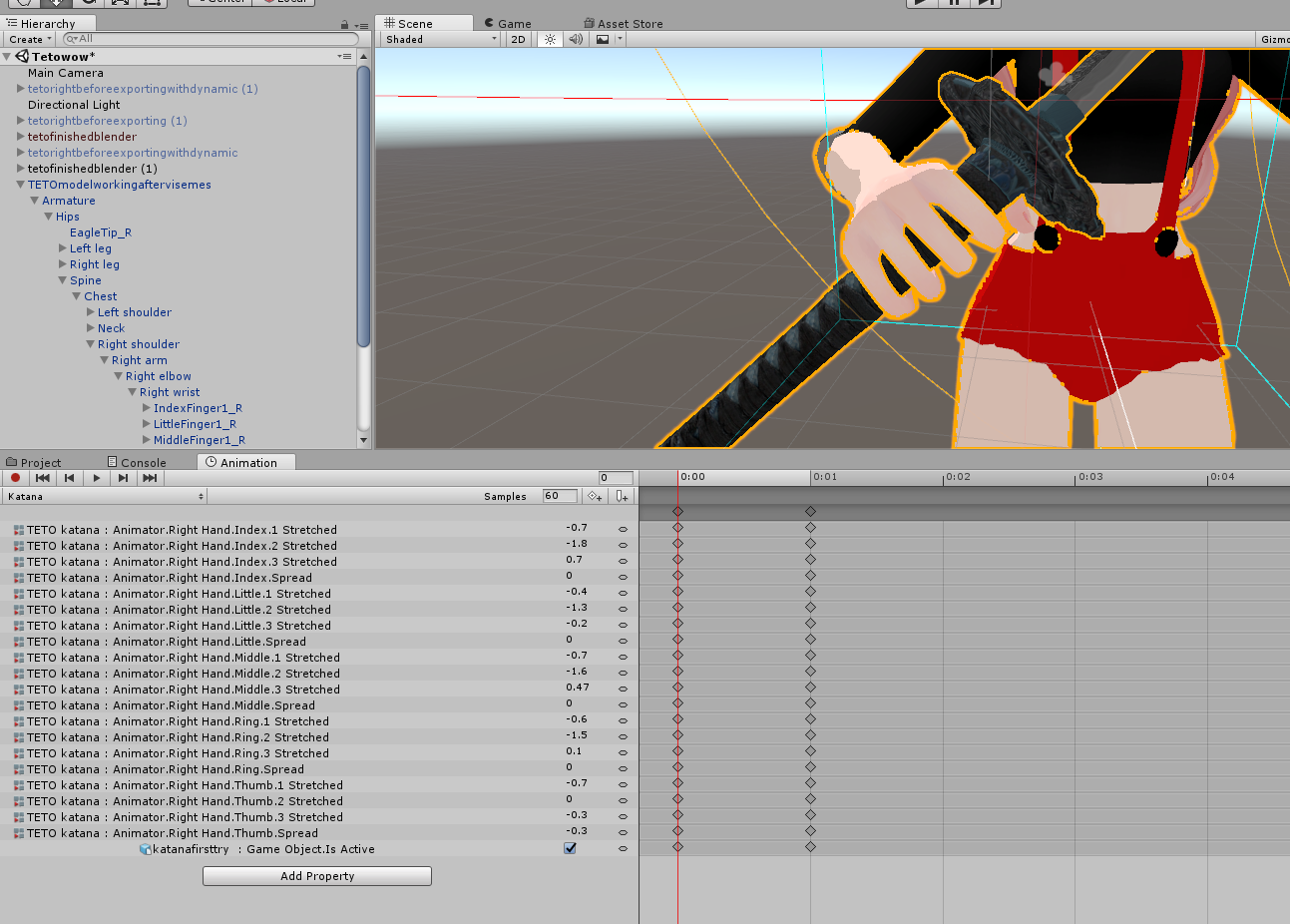
what the weapon visible in unity before you exported it?
is the katana part of your bone structure?
maybe it's the way you recorded that animation?
yeah
clear yew
hm is there any easy way to rip animations from another game
like i wanna take a model+ its animations
clear yew
top left > window > animation
 peak summit
Danke
Is there a way to add multiple properties at once in animation?
Or do I have to add every single finger bone individually
peak summit
R E E E
 tribal sparrow
Im losing my mind. My very first attempt at adding an item to the handposes worked flawlessly
And ever after that I've tried to replace that item with an item I actually wan't without succeeding at all. I've re-done and failed like 8 times now.
Just felt like venting
 wooden ivy
Just spend an afternoon adding each finger to one animation and then make 20 copies of that animation to use as bases
20 copies stored in different places because you'll never want to do it again
 hazy palm
Is this a bad thing that it is only one row?
 heady veldt
Does anyone know how to use the jaw flap bone lip sync? any time I have used it my character just ends up with an open mouth that doesn't move.
 tall zodiac
Anyone know why my animation suddenly stops playing after reimporting model?
Like i nthe preview window for animations
clear yew
Hey I have a question about importing PNGs to Unity, whenever I drag them into the materials/tex folders they always come up with a white or black background and I can't seem to get rid of it
 tranquil dove
plz teach me how to blink on unity assets suriyun model 😦
 azure crest
i have an error that i cant fix on my own
it first gives me an upper chest thing then after i fix that it gives me a heirarchy one
pseudo pewter
Do you need a separate model for each animation that you make
Or can you just reuse the same one
azure crest
i reuse the humanoid one
clear yew
hoo, well that was a pain in the butt to figure out, but i finally got particles, animations, events working together synced... before it always just made character go into default pose, ha.
Hello,i have a dog mmd and i want to put him in game.the problem is how to make him walk on his 4 feet?what type of rig should i use?
oh my god, the main model glitched out to have a glitchy hand though now it looks like a terrible fap
i wonder if its because animation that i am using has only 1 frame... for idle pose... hm, gotta check that out
allllright... better hope that fixes that.
 iron crescent
Is it possible to have props show up for just an animation, like how props show up when you use gestures with VR controllers?
clear yew
Thats what i am doing with infinite right now, pretty sure its possible
iron crescent
oh sweet
clear yew
figured the animation error out... apparently it's rig being messy with mecanim. Might have to modify it
next shard
Sooo how do you actually customoverride, can you actually import some animation from mmd via blender and then into unity and customoverride the emotes?
clear yew
depends on what you are trying to do
 distant anchor
Anyone able to help figure out eye tracking? Works in blender and in unity but doesn't translate to vrchat.
next shard
:/
clear yew
How do i make my mouth "3" shaped and left eye going to left and right eye going to right?
I was trying to do it like blinking animation but it didnt work
the "Scene" didnt show up after changing it to legacy
 upper cloak
I made a simple blink animation. In the preview (unity) everything seems to be working fine. However, ingame, while the blink works as intended, from time to time you can see a bit of inner mouth movement.
What might be causing this? Where should I look for the problem?
Also, is there a way to limit eye tracking? As in add certain rotation limits.
clear yew
hooray fixed the glitchy arm
upper cloak
@distant anchor you might have the rotation bones too far back, try setting them closer
distant anchor
Using cats?
distant anchor
Any good videos to learn proper placement?
distant anchor
No, only started recently, cats skipped a lot of the hard learning it seems.
upper cloak

Creating Eye tracking for your Avatar in VRChat Links: Download Unity MMD rigging: https://www.mediafire.com/file/7awm878q43c1m7q/MMD_EYETRACKING.ht Eyetrack...
clear yew
How do i make my face experssion stay forever? Like derp eyes or open mouth. Is this even possible? Edit: PC
upper cloak
check that for general setup
you have to play around with the rotator values for sensitivity
 fallow silo
Not sure if this is the wrong area or what and has most likely mentioned before but I've created an animation for my avatar but when he does the emote he goes within the floor for some reason?
distant anchor
So just to be clear, my rotation works, blinking works. It all works in both blender and in unity. But it doesn't work in game.
And that could just be bone placement?
upper cloak
@fallow silo you probably recorded the movement as well, make sure u only record the face animation
clear yew
huh. judging by the lack of reflections in the mirror i assume only i can see the particles.
weirdddddd
fallow silo
@upper cloak I have an animation involving the arms and hands though
clear yew
Heyo I'm using a character with no actual finger bones, it's an imported Roblox model, this is the error I'm getting, is it because there's no actual finger bones that I get this? https://gyazo.com/8e47d45ffa2c2d872e631c2e9db4abe1

 wise sundial
Yeah, that's correct
upper cloak
@distant anchor well, I dont have access to ur file to check, but yea, my best bet would be placement distance
move em closer to the iris
the closer they are, the crazier they get
distant anchor
Righto cheers, I'll give it a try.
upper cloak
@distant anchor make sure that they are str8 and have a 0 rotation value btw
 upper sapphire
who knows how to hide weapons when I pull one out? (v:
 rugged sierra
You need a separate mesh for the weapon on your back. Basically, in the animations overrides, hit record, select the weapon on your back and hide the weapon, it should appear in the animations override. Then just do what you normally would for making it appear in your hand @upper sapphire
upper sapphire
@rugged sierra the one on my back is technically completely different lolol
its not even a complete sword xd
fallow silo
So confused, I've created an arm/hand movement but yet when replacing the mote and testing the emote in game my character sinks into the floor
rugged sierra
You can separate it in blender by selecting parts of the sword in edit mode and hitting p>separate by selection
It will create a separate mesh for making it easier to work with.
rugged sierra
You cant
upper sapphire
NOOOOOOOO
rugged sierra
You have to redo the model if you haven’t created a save version of the final model
rugged sierra
@fallow silo Did you create a clone of your character to animate with?
I’m referring the the sword on your back
fallow silo
@rugged sierra Yeah yeah did the whole duplicate thing then animated it on the clone
upper sapphire
what if... I deleted the fake sword on my back, and then... put an actual complete sword on my back
so I dont have to go through blender?
o.o
rugged sierra
Have you checked to see you haven’t accidentally added something without knowing you did? One of my animations had Tpose animate in the animation which would cause my character to fly across the map when doing an override @fallow silo
That can work @upper sapphire
upper sapphire
that sounds great
and truuuu
lemme see if I can fitt it in there
I love my double type on my keyboard hehe
not my fault );
rugged sierra
😄
upper sapphire
@rugged sierra dont I have to connect this sword somewhere on my bones or no
rugged sierra
Yes, either the chest or hips
Create a copy of your character and then do it, in case it doesn’t go right
rugged sierra
If you already have a previous copy it’s fine
upper sapphire
nvm my clone dissapeared
rugged sierra
It’s just to make sure if it messes up, you don’t have to redo everything again
upper sapphire
making a new one xd
rugged sierra
😝
upper sapphire
holy fuck i had a heart attack
it was there but hidden
but i was like eh ima delette it and make a new dupe
and my sleepy ass deletetd both by accident
LOL
undo (v:
fallow silo
@rugged sierra I'll check but I don't believe so, been having issues for a while
upper sapphire
holy shit can ii like
add the 2nd mesh shiti to the one on my back
or is thatt iimpossible
thatd be next level
thinking about if i could avoid putting a new one on my back
if not thats cool cause either way im still doing the moving an actuaal one to my back
rugged sierra
You can
distant anchor
Are you even going to make the poly count
upper sapphire
yeah once i delete the fake sword i will still be good
you sure i can add it to the fake sword? 🤔
fallow silo
@rugged sierra Yeah I have no clue what is causing my animations to go a few cm under the ground, even in the animation preview in unity shows it under
distant anchor
@fallow silo is the second model for the animation got the correct coordinates, xyz same as the first model? If that even matters.
fallow silo
@distant anchor Yep there is no change, i legit have no clue what I've done wrong to even cause this
distant anchor
I remember seeing something about the bone hierarchy messing up with seats if you use dynamic bones on the hips. Only thing I can think of.
upper sapphire
alright so, i put the real sword on my back, gonna attatch it to some bone now
i ended up making it a tiny bit smaller so the blade doesnt clip through the sheath and still look good
fallow silo
Hmm not sure man all the models I seem to use have the animaton issue when I create one @distant anchor
 gentle vortex
iv got the hair skirt ears and tail physics working on my avatar with bone colliders on both legs and knees hip and chest but when sitting down the camera goes above the head, is this caused by a collider?
 past crow
@fallow silo When you make the animation, do you duplicate your model from the t-pose and animate the duplicate or animate the original?
When you animate in unity you need to dupe the original model, disable it, then animate the copy and then disable the copy and re-enable the original
fallow silo
@past crow I do exactly that, dupe the original, hide the original and animate on the dupe
past crow
And you don't change it's position or anything when animating correct?
fallow silo
Nope position isn't changed still at 0,0,0 and when I press Rec and begin to keyframe say the arm the model does that glitch where it sinks under. But I've seen all videos that happens which is why you use the dupe yeah
past crow
I also think it may be a known bug for the avatars sinking into the map
fallow silo
Think so but Idk what I can do to fix it
Like the reason to dupe the model in the first place is because it sinks when animating but then the animation preview shows it below the floor
next shard
so how do you guys override walking animation? o -o
fallow silo
@trim dagger You will get a sphere I think it is, which shows the range ect. Check on the right side when selecting the audio source and it gives options for loud and such
 uneven wing
Do you guys use the default walking / running animations, or is there a better version out there (Or do people make their own?)
next shard
guys
which emote is rocknroll
in customoverride
i mean what does it do actually in game
uneven wing
Sets your fingers to ... rock and roll.. uh
next shard
uhh
 next shard
ohh
uneven wing
lol
uneven wing
I think so?
next shard
okay
dark zealot
is ther a way to set animation to left or right hand only?
next shard
okay i have a problem with emotes override
how do we get the character back on floor
and not inside the floor
xD
dark zealot
you shouldnt change the animations like walking , idle or standing or stuff like that. happened to me too.
best if you use it only for the hand motions at the start
fallow silo
@next shard Exactly same issue here lmao
next shard
@fallow silo damn
@dark zealot what if you don't have VR and you just want the weapon to appear in your hand
@dark zealot do i just make an avatar like that?
dark zealot
@next shard i know you can attach it to some place of your character to be visable all the time but to attach it to the hand is another thing
and without vr i dont know what kind of motion you could do to trigger the weaponappearance
next shard
ye i guess
 agile ruin
Anyone knows how to apply particle animator to textures (unity)?
fallow silo
Anyone who has create an animation override and animated the arms or hands here?
Heyyo, I've got issues with the whole emote ending up going in the floor ect
I've done the whole duplicate thing as well
xd
ah rip
Haven't been able to find an answer with it sadly
 red rampart
Can I attach a sound to my custom made animation? (NonVR)
 inner lance
is there a tutoreieieiel for mmd motion to emote
 dense radish
I have blink in blender, but when I try to animate it in unity I can't seem to find it. Any ideas?
pseudo pewter
@dense radish where are you trying to look for it
dense radish
animation tab adding a property
 spare coyote
would it be right to ask here how I can change the expression on this texture sheet for an overide?
clear yew
How do I create a .mat from a .png?
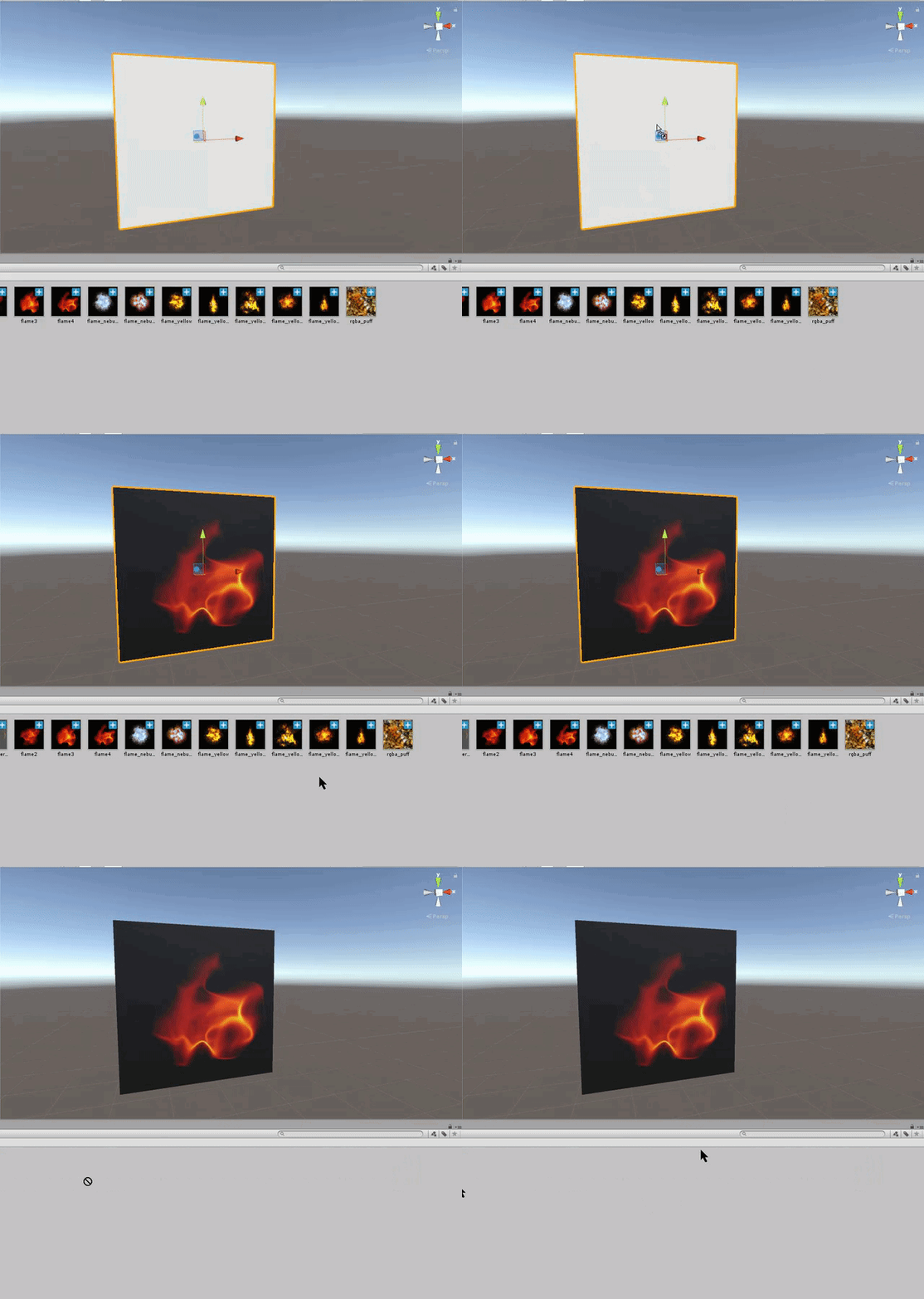
 torpid light
You can simply drag the png to the object you want to put it on like this https://i.gyazo.com/fb485832e9fd9eb237290008a86c1d0b.gif
Basically what this does is create a new material and set the "Albedo" to the texture.
@clear yew
 eternal mason
Im using the oculas touch controllers, does anyone know if there is anyway to asign the A and B buttons on them to trigger animations?
I cant find anything online about it.
clear yew
So, for my mage, I have a spell circle at her feet, but, the particles keep going up way into the sky ><
Is there a way to disable the Y axis movement, or do I have to add gravity to the object until it matches the Y axis movement?
torpid light
What are you trying to create? You could limit the velocity over the particles lifetime on the Y axis
clear yew
Just a spell circle that spins at her feet
torpid light
change the start speed to 0
and if you only want 1 circle that spins, you probably just want an emission rate of 1 with a lifetime of 1 so there's always one
or like lifetime of 10 and rate of 0.1 or something similar
You just want a rotating texture, right?
clear yew
Ya, oh my gosh, thanks been pulling my hair figuring this out ><
Now all I have to do is learn how to photoshop, apperently I'm not good at centering things
torpid light
in the material you made you can change the offset to fix it
but photoshop editing works too
torpid light
lol
 slow drum
How does one replace the running animation :x?
 vocal plume
does anyone know how to animate a material?
I want to create a blink animation but not sure how, I would only change the texture
torpid light
what do you mean by blink? Like fade in and out repeatedly?
or literally blinking an eye?
vocal plume
Uh, forgot to mention that it's for my character's eyes, right
torpid light
I believe avatars use visemes in blender to pull that off
i'm not too familiar with them, but hopefully that' sends u in the right direction
actually if you have visemes already set up it seems you just need to setup a long looping animation to actually do the blinking https://www.youtube.com/watch?v=cBIZrRWeBTM
 vocal plume
i dunno how to set those up
 abstract wyvern
@vocal plume You can use CATS in blender for blinking and eye tracking
If you have a mmd model
vocal plume
it's a really simple model
it is an mmd one iirc
but it doesn't have eye animations
 abstract wyvern
Ah I see
I found https://www.youtube.com/watch?v=ZB2aXKkwXuA&t=2033s a while ago
In this video I will show you how to make your 2D eyes/mouth type avatar have a blinking animation and mouth movements for VRChat!
Not sure if it'll help
vocal plume
that's a long video
 devout fog
are custom emotes a thing that i can make?
next shard
ye im still trying
but it just freezing in place
for custom emotes
why
tell meee
versed tide
yeah, i made a custom wave animation
ppl like to add twerking, caramel dansen, and breakdance to their custom animation sets
next shard
@versed tide can you help me on something
i'm just trying to make my avatar shoot a particle
it has a wav sound and particle system already
but when i press the emote in game, it just go up and down
and freeze on place
versed tide
i just followed this video but skipped the mmd part because it was a custom animation i made
https://youtu.be/oUSe5uDLSJM
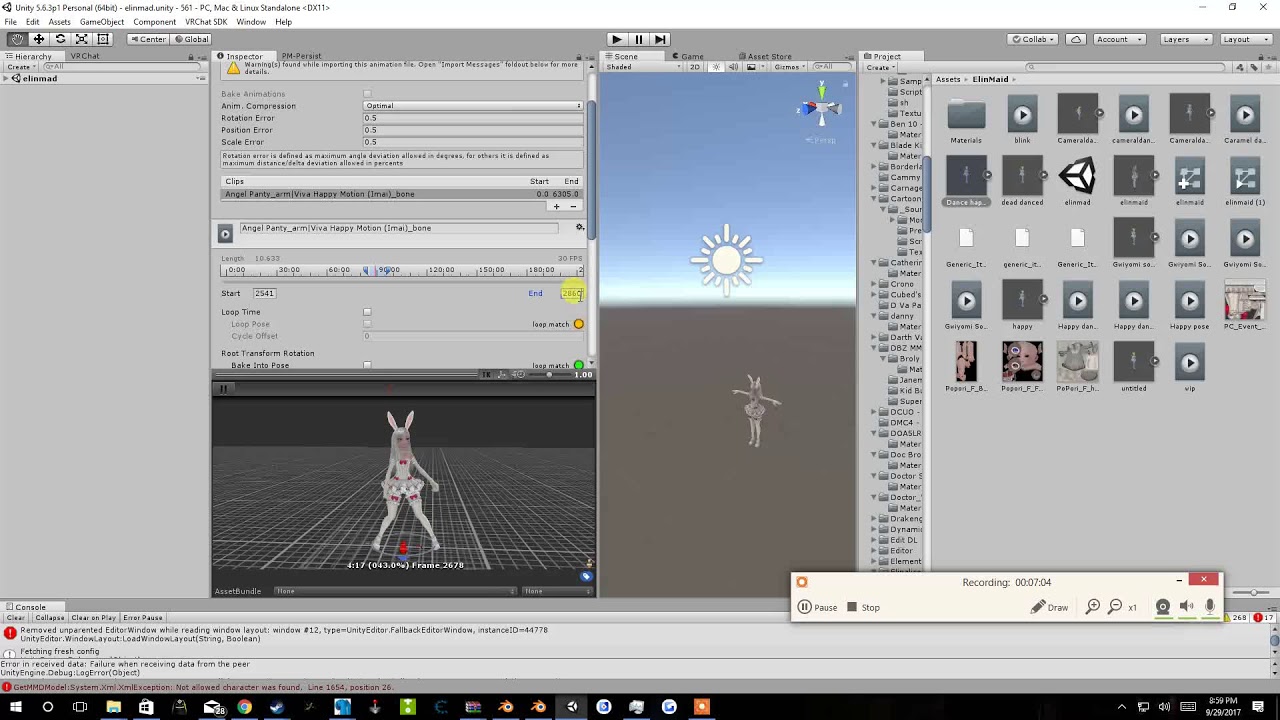
Tupper video on New MMD tool for blender https://tinyurl.com/y8yeonsd MMD Tool update version https://tinyurl.com/ybku6xft EvolvedAnt Gesture Overrides for T...
next shard
okay
versed tide
with hand gestures right?
next shard
i don't have vr
controllers
i'm just shooting from my head avatar
because it has cannons
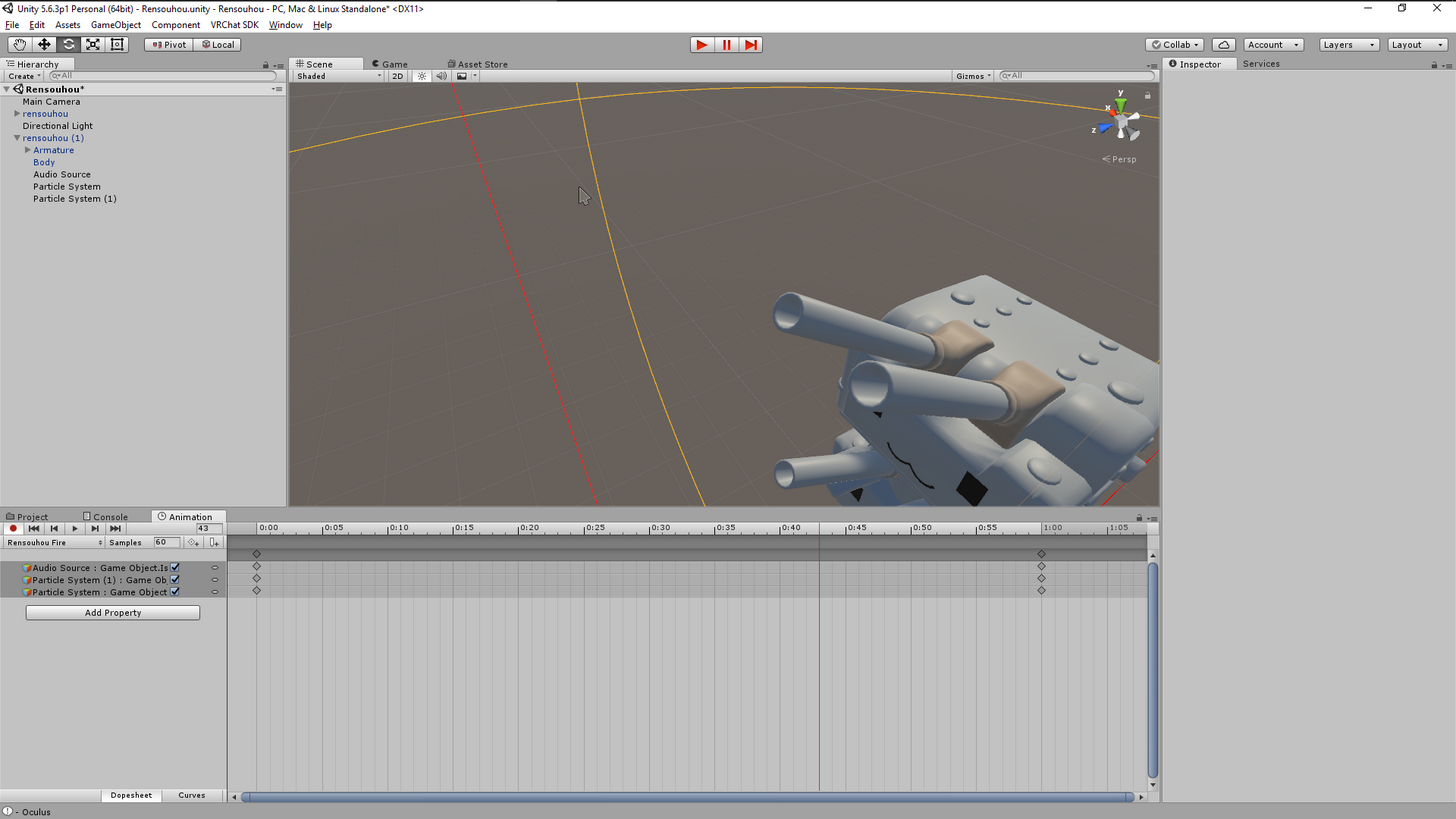
so i just added particle system
and a audio source
and animated that, put in custom override and put it back
and then i try, it just freeze
no audio is played
nothing
just my char going up and down for a while
and it stops
versed tide
ok, you need to make a clip with the audio and effects turned on and put it in one of those right?
torpid light
You can't override emotes with an avatar that uses a non-humanoid rig
torpid light
oh
torpid light
Does it move your character around slightly still? I ran into that problem when i tried making an invisible skeleton
next shard
so i just don't understand why i can't xD
torpid light
but i never tried making a tiny one that's pretty smart
next shard
yte
ye
my hands are little broken
but my feet moves
@versed tide
yes i need to put emotes there
 versed tide
and does the clip have humanoid animation?
next shard
well i made a duplicated
of my char
so yes i guess
yes it is humanoid
@versed tide
versed tide
i mean if it has animation on the bones
versed tide
maybe that's the issue. don't have much experience on that or adding the effects. but maybe... let me look for another video

Made a little tutorial for some friends in VrChat. Hope this helps if you have any question you can ask on my discord, Also regular content should be back so...
next shard
okay
i look at this video
thanks
my animation is working but my char is trying to go in the floor
lul
 edgy anchor
To fix that you should only animate on a duplicate avatar then save the animation and apply it to the override of your original avatar
edgy anchor
is your avatar trying to go through the floor ingame or unity?
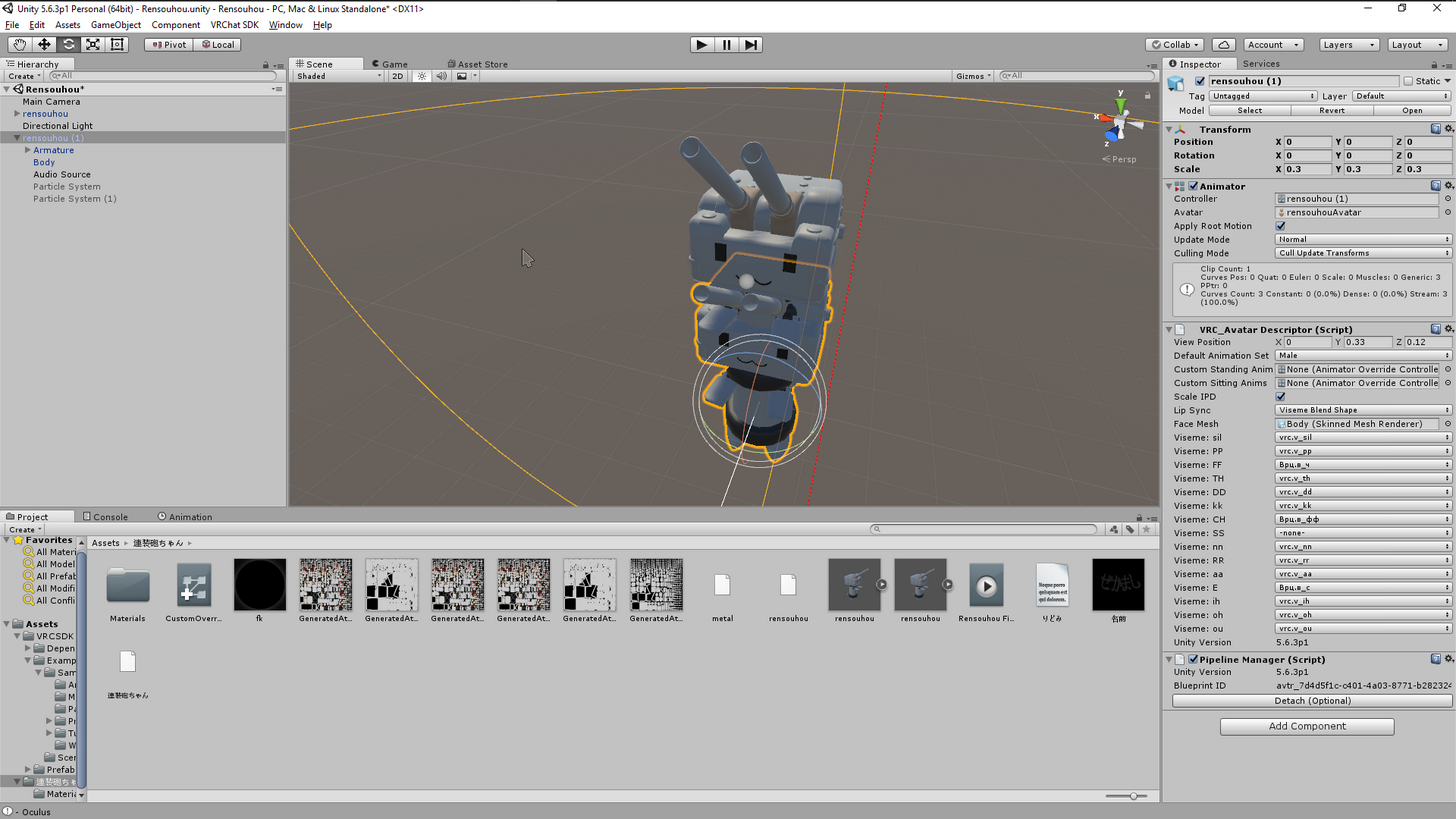 torpid light
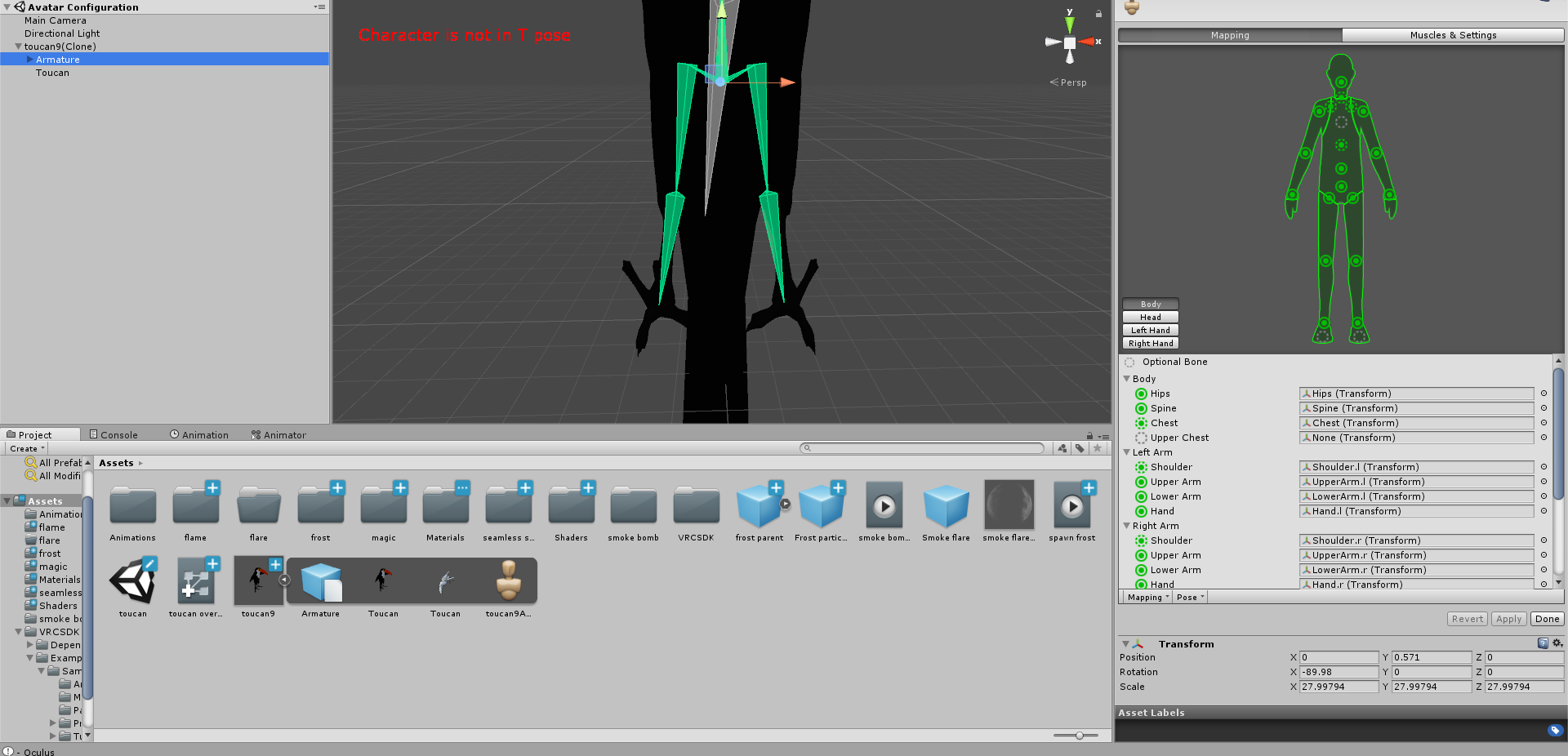
What fixed that for me was moving the armature in the rig configuration upwards to offset the amount that i was under the ground
edgy anchor
This will be easier to explain in a call
next shard
i can go in a call
edgy anchor
Do you have a second?
torpid light
not sure if it's the same problem tho
vocal plume
so far i managed to create an animation in blender that would offset the texture i'm using for the eyes but it doesn't seem to work in unity

that's all i've done for now, i don't see it work in blender but i assume it does
dunno how to get it to work in unity
next shard
so the problem is still here
we don't know why the emotes are not working
without hand gestures override
xD
i try toocanzs solution
@torpid light can you share me a pic of your rig offset configuration
you said you fixed it like that?
where do you do the offset
torpid light
1 sec
https://i.gyazo.com/d572cc337c7cfb0205beb7fee40a6ee4.png
mine was about 0.571 units too far in the ground so i changed the transform of the armature https://gyazo.com/220068d9fef2d9bda420e74833fb473b
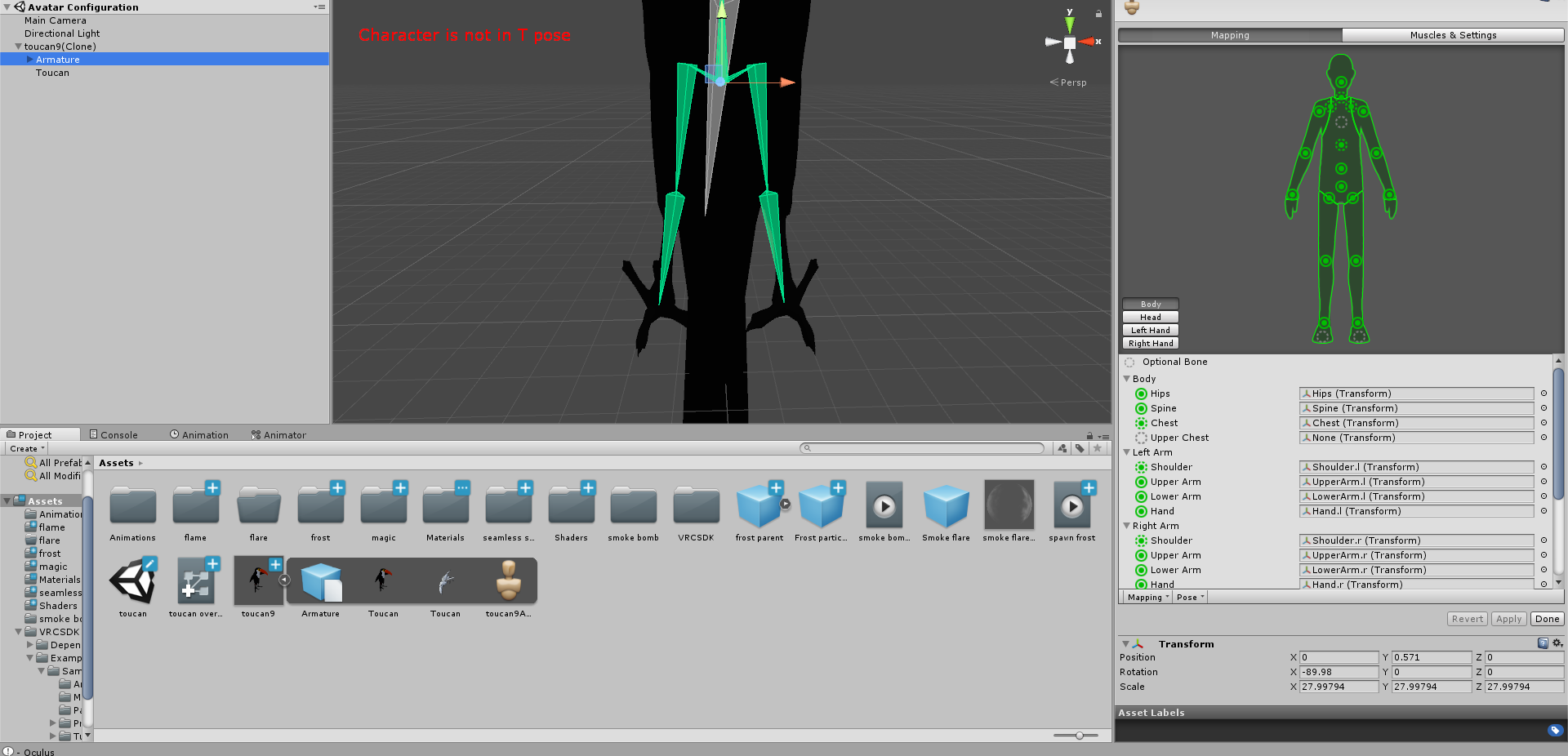
 next shard
was that the rig of the duplicated one where you do the animation?
torpid light
the original
next shard
the original one?
torpid light
yea, although i think if they share the same avatar either one should work
next shard
it only tries to go to the ground when i activate my custom emote
next shard
if i modify the original, mine is oging off the floor
torpid light
that's a different problem then
next shard
lul
torpid light
mine was walking around under the ground
vocal plume
what's a better way to do what i want to do then?
next shard
this problem is killing me
 bold dome
did you make your custom emote in blender?
if yes, did you make sure that the emote is in the right spot in blender? applied object position??
vocal plume
who are you talking to?
next shard
no i didnt make it in blender
it is just particle coming out of my char
so don't have to animate anything
but it just want to go to the floor everytime
@torpid light wait didnt you make a video about this problem? https://www.youtube.com/watch?v=xxSezH13vAI
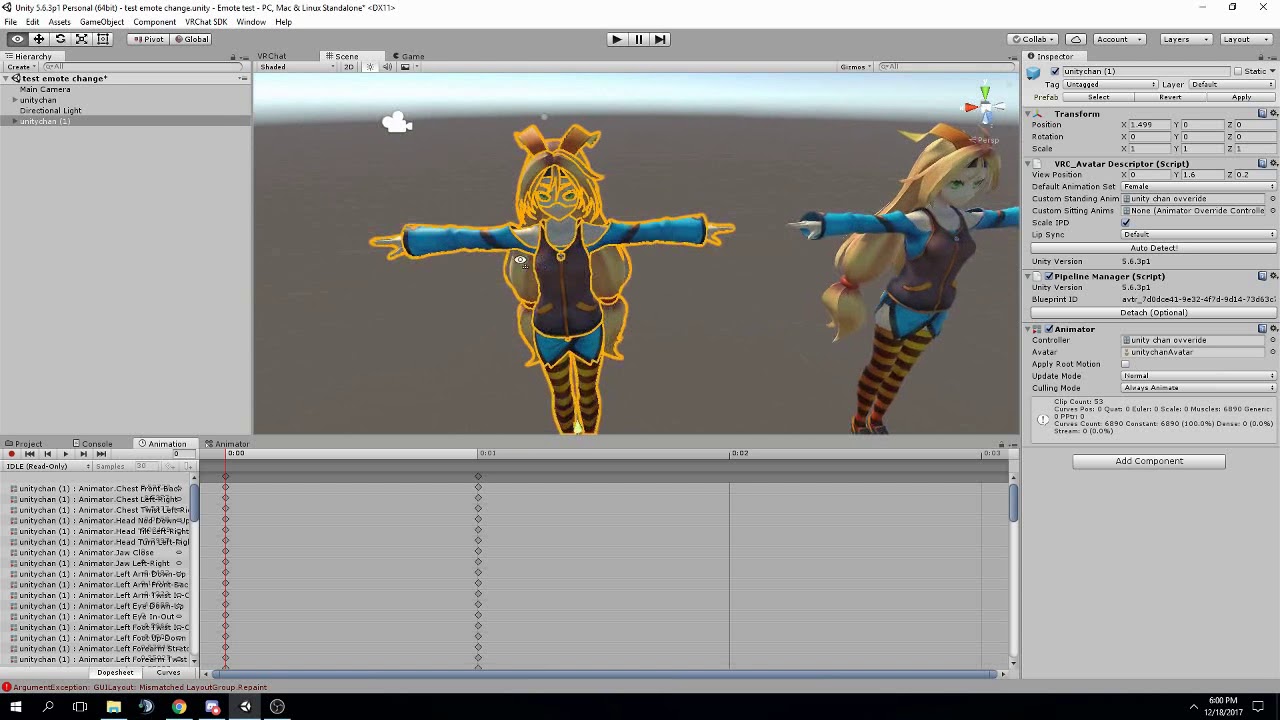
like this unity chan is also going under when you put the animation component
thats exactly the problem i have
in game and in unity
you said to move the bone in the comments instead of the root object, i don't really understand xD
torpid light
So i'm not sure what the solution is in that case tbh
i'll see if i can figure it out because more than one person has asked
next shard
alright
torpid light
I never actually tried to fix it because all i wanted to show was how to override anims without having to watch an entire 30 minute vid for it
torpid light
K so the default animations like idle/run/walk all offset the property "Animator.Root.T" to offset the under the ground-ness
so you can go to the idle animation and copy the property or just add it yourself
torpid light
sure
hollow mica
If anyone is interested in animation, I'm doing it live! https://www.youtube.com/watch?v=7ty2M18z-go

The full live process, start to finish!
uncut monolith
https://my.mixtape.moe/drwnka.webm Any idea of why this is happening? The guns pop in and out depending on where I'm looking at. Shows fine in the camera in the test room, as you can see, but the guns pop in and out for other people too who i asked. I've set two guns to appear when the rock and roll hand gesture is done with either hand
is there any alternate way of doing this without making this weird thing happen?
 vestal forge
I'm looking for tutorials on door animations or something like that. Do you guys know any?
clear yew
I'm looking for someone to do my animations for me cause life is hard. 😫
I kid.
Or do I? 😄
wraith hawk
how much $ u offer?
 atomic aurora
for facial animations, what settings does the animation needs?
muted prairie
Completely depends on the shapes afaik
 gleaming tusk
what does these stand for? I don't know which one is strafe to the left, right or which one is diagonal walk
clear yew
Can I set an audio sorce to be random from a batch of sources?
torpid light
without a script, i don't think so
 runic crane
how do i emojify my avatar?
torpid light
@gleaming tusk Strafe left is actually strafe right but mirrored
 urban loom
is there a tutorial on how to do a walking animation with 4 a legged model?
 hardy mural
Hey guys, i was wondering on how i would remove my hat and have it in my hand
 light tiger
Has the problem with having custom animations over emotes on non humanoid avatars been patched?
light tiger
What if you created a tiny humanoid skeleton that is not mapped to any part of the avatars mesh
However only animate the bones that are connected to the mesh to create the custom animation
torpid light
That works but the game will move around your character in unexpected ways
so when walking your character would bob up and down
light tiger
But the mesh isn't connected to the tiny skeleton
torpid light
Doesn't matter vrchat still moves the game object
light tiger
Hm
torpid light
You could try making a super tiny avatar so the bobbing is minimal. I haven't tried it , but i think it would reduce the bobbing based on the skeletons size
so if you get one extremly small you would have negligible bobbing
but i haven't tested it so i can't gaurentee that works
Having an invisible skeleton does let you override though if you are willing to deal with the bobbing
light tiger
I guess that'll work
torpid light
Let me know if the tiny skeleton thing actually reduces the bobbing at all
light tiger
But the bobbing means that the avatars mesh is somehow parented to the tiny skeleton?
What if it's in a completely different object group
torpid light
well it rotates the model based on where you are looking
so kinda rotation too
but that's probably something you want anyway
light tiger
I guess
torpid light
If you do make the avatar's skeleton tiny I think the hitboxes in gamemodes like CTF will be tiny too
i'm pretty sure they are attached to bones as my non-humanoid character didn't get hitboxes
light tiger
i wont be playing those gamemodes anytime soon
 mint island
Is it possible to have a particle effect only start with an emote?
torpid light
yes you would do an emote override and activate a game object with the particle effect inside that emote animation
mint island
Been trying that for the last few hours but it doesn't seem to do anything.. Must be doing something wrong :/
torpid light
If you are looking in a mirror to test it, you can't see particles from yourself in the mirror
mint island
Riiiiiiiight.. That could explain it.. haha thanks x.x
torpid light
go to the avatar testing world and there's a camera there to test it
i was pretty confused for a while myself
no clue why you can't see them...
clear yew
two questionez, 1) Would override work on skeletons that are custom. 2) Is it possible to make a looping emote yet
torpid light
emotes can't last more than 10 seconds no matter if they loop or not. If your skeleton is humanoid yes they work with the default animations
think of a humanoid skeleton as a protocol. If you follow the protocol then vrchat does a lot of stuff for you
uneven bronze
🤔 How long is 10s in Unity ?
torpid light
depends on the sampling rate of the animation. If it's 60 samples per second then it would be 600 frames
clear yew
Eh, i am just lazy to redo the animation preset because i forgot to apply humanoid skeleton first, so i was wondering if i could play it out like that anyway since it doesnt really need much animations other than 2
might redo it then if it wont work
torpid light
it looks like 400 frames or maybe 4 seconds. It's hard to tell cause unity seems to change what the timeline is showing you depending on how far zoomed you are. Select the end of that animation @uneven bronze and then look at the frame count above the 24 next to samples
hardy mural
Anybody have any clue how to have my hat appear in my hand
?
I cant move my hat into my hand for the animation
hat wont come off head
torpid light
@hardy mural https://www.youtube.com/watch?v=eT5_nyb0T1g
Showing you how to change default emotes to weapons & stuff. SUBSCRIBE, LIKE AND ALL THAT GOOD STUFF!! :D MY FIRST TUTORIAL ► https://youtu.be/0vdiCJRAExw DI...
uneven bronze
At 4 sec , it shows 96
clear yew
well shame. guess ill have to go fix that stuff. aaaa more work
hardy mural
i saw that one @torpid light but i need to be able to move the hat into my hand
clear yew
so much for the memes
torpid light
but you also need to hide the hat game object as well as showing the one in your hand at the same time @hardy mural
hardy mural
Do i create another hat and hide the one on my head?
torpid light
@uneven bronze then it's 4 seconds long. The reason i asked to check the frame count is because if you are zoomed in the number on the timeline actually shows the frame number rather than seconds. Just important to know cause you might make a 10 frame long animation thinking it's 10 seconds long
yes @hardy mural
uneven bronze
😍 Thanks !
torpid light
You need to override all of the movement animations @vocal sandal . no there isn't a tutorial that i know of
urban loom
😦
light tiger
omg now it says that my avatar is too small
urban loom
idk how I would override it
light tiger
using the small skeleton method
torpid light
Is it a yellow warning or a red one?
cause i get the too small one with my 3ft tall avatar
but i can upload
clear yew
okay, nevermind, wasnt that much work is all, just had to paste my particle stuff into another sequence
torpid light
@vocal sandal https://www.youtube.com/watch?v=xxSezH13vAI
gives a basic idea of how to override
instead of emotes you would do the run/walk stuff
light tiger
red
hardy mural
https://gyazo.com/5486f10a40f48a8732581566e68c52e8 so why am i unable to move this hat

nomatter what i do
torpid light
You aren't in play mode are you? or maybe in animation recording mode(red controls at the top)?
 torpid light
I'm not sure. The hat is probably not a game object but a skinned mesh so it isn't moveable without moving the entire head with it
hardy mural
https://gyazo.com/3cbb0a0a13cde47bd0fe153eed4009db made x,y,z all 150

how would i make it a game object
hardy mural
i used MMD_tool to separate them
 tropic nova
where in the override controller do i put custom running animations? i double checked and the animations are working the way i want but i put it into both SPRINTFWD and RUNFWD and neither trigger it
torpid light
Do you have the hat model as it's own model in unity?
hardy mural
No
torpid light
remove the hat from the model and try and get just the hat model as it's own game object
tropic nova
do custom running animations work with generic avatars?
torpid light
then parent it to the head
@tropic nova You can use any of the animation parameters you see in the default animator, so you can write one that does.
You should be able to override the animations, but use your rig rather than the humanoid bones too
you still need to make the animations yourself tho
tropic nova
@torpid light i have my animation ready but i put it in both runfwd and sprintfwd but they dont trigger
my custom idle animation is working tho
torpid light
does your avatar have the animator controller set to the override too?
not just in the avatar descriptor
hardy mural
Okay, so should i have just the hat, then import it into unity as a seperate fbx?
torpid light
yes
hardy mural
im confused af
tropic nova
i have my controller set to the duplicate avatar i used and then have my custom standing animation set to the empty override where i set in my custom animations @torpid light
torpid light
You need an animator with your override on the original like https://i.gyazo.com/547c4f7c9db00f5a8cec71f21d59bcad.png
 tropic nova
ok so your saying to put the empty override with the animations into the controller as well instead of the duplicate avatar?
torpid light
yea
tropic nova
ty
clear yew
oops, apparently went a bit overboard with particles... people say it looks cool though
but i'd better fix the main particles cause they say they... drop frames. not good.
Could it be that... disabled particle systems still show up on their end? as in, disabled as gameobject, and they cant see it, but the game still has to technically render it
hmmm....
tropic nova
am i able to make particle effects apear during a custom running animation?
clear yew
yep
i mean, my current project which is "Virtual Ronald McDonald" has a lot of particle work because i figured out how to make it work
torpid light
Disabled game objects are not rendered in any way
clear yew
strange, i guess i just tone down the main particles
urban loom
mmmm not what I'm looking for Toocanz 😦
at least i can thank ya
never knew i can override
tyvm
torpid light
np gl
clear yew
Throwing this here for peer review
well it seems like it's no longer causing frame drops, neato
torpid light
uh do you plan on putting that as an emote override? it's going to be too long if so
max is 10 seconds
tropic nova
how do i make a particle effect non active by default. I want it to activate while my custom running animation is going
torpid light
make it not active on the game object when u upload
then activate it as part of the animation
tropic nova
@torpid light sorry I am new at this. I disabled it like this https://gyazo.com/aac5f9d58d919e25f99193258ba606be (idk if thats what you meant) but when i go to add property and hit is active on the particle it does not add the property
 clear yew
hmmm... interesting.
torpid light
Yea that is what you want the particle to be like outside of the animation
clear yew
Either servers are laggy (because it still lags even after i change avatars) or maybe i am causing it
torpid light
then when recording an animation you want to enable it
clear yew
...nope, not me. For some reason great pug is having issues on it's own. Well i guess my stuff is fine then
torpid light
4 particles shouldn't be laggy anyone unless its a super high res texture or something
clear yew
nope, 128x128
torpid light
yea you got nothing to worry about
tropic nova
@torpid light thats the thing, idk what im supposed to do to activate it. i assumed hitting "is active" when adding a property in the animation window would do the trick but it didnt add anything
clear yew
Its just the servers then i assume
torpid light
@tropic nova you need to be in record mode. click the red record circle before activating it
the controls at the top will be red if you are in record mode
tropic nova
ohh ok ty
torpid light
you should also be able to click the check box next to the property to enable it too
clear yew
https://i.imgur.com/cbsFyLu.png i really dont think that this would cause issues

the only thing that might is the emote
but i dont activate it unless asked
still, all other maps are fine, except for the pug
for reference : https://youtu.be/fGjYovBBHmk

Original author: MatsudaSpecial Clone author: Meecafe, dragonn341 Enjoy. Meecafe's Channel: https://www.youtube.com/channel/UCWCCTTO8hC1KPcCJx5RTz5w
torpid light
yea lol that's not lagging anyone
clear yew
yeah, plus all other maps dont lag whatsoever, even during the taunt
...weird, really.
maybe its because of emission texture?
trim dagger
its really triggering
when people have shitty particle effects
that lag everyone out
this one guy had a sword and he had fucking lightning coming from every direction and i legit got 2 fps
clear yew
tell me bout it. I ran into a guy who either used the bad SDK to upload some super high res model and lag everyone down to 2fps, or something like that
heck, even my particle based emote is not lagging my own comp, and i have a very shitty laptop
trim dagger
ye
i dont fuck with particles
its too laggy
(and also because i dont want to learn it like i had to do with everything else)
clear yew
Its not that hard to learn actually, i did that avatar mostly to learn and screw around with particles too
as well as just having more meme avatars
clear yew
Quick question on whether or not this will work. I have a character that has a staff, and I want to cast spells with it... but be conservative with my animations as I am a expressive person.
Will this setup work.
I set my handgun trigger to pull out the staff
and I set my fist trigger to cast a spell
But! I don't want to cast the spell everytime I use the fist (like say I want to grab something)
If I had my spell as a child to the staff in the heirechy, even if I grab something, the spell would not go off unless the staff was also out, right?
its more like, duplicate one thing and modify it in unity itself
clear yew
I mean, ya, your right ><
trim dagger
thats what i use for my katana
clear yew
But so much work to get those fingers in the right place etc >< I'm lazy
clear yew
Have you washed your hands?