#animation
1 messages · Page 5 of 1
 severe sierra
 strange kite
Basically you create an object that has "play on awake" on it. It starts disabled, but you enable it with the gesture animation. When it gets enabled it plays it's own animation.
 languid lark
just need keep whole the button down till animation is done if you have long one
strange kite
@languid lark that works but the blend out to other gestures can be problematic.
severe sierra
I would imagine it would work better if the end of the animation ends where it starts
languid lark
reason i put on grip button for long animation lol
only time problem when you try pickup somthing with the trigger
turn on the grip
 pale trail
@severe sierra Thanks!
strange kite
Yeah "let go" gesture plays automatically when you drop an item.
severe sierra
Would be really nice if in the future you could enable/disable your overrides in game 🤔
pale trail
@strange kite Interesting. Going to give this a try, thanks again!
strange kite
Yup better custom animation system coming in the future for sure.
severe sierra
👌
 clear yew
anyone super bored?
 grim cave
hmm
i wanna replace my idle animation but idk how to even describe the action i want with my legs/feet
 dusty plume
woooaaah an animation chat :D
@grim cave you wanna be careful with making other movements on the idle animation. the legs may still want to use the IK stuff when you are using the normal animation set
if you want to, you can just make some extra bones to replace the avatars real legs. this will allow you to aniamte them the exact way you want. but you want be able to animate moving around even if you tried
 feral thorn
Any way i can replace my idle animation with a dance but not have my oculus controllers take over my arms?
 quasi gale
@feral thorn I haven't tried this because I don't have VR, but unmapping the finger bones from your avatar's rig configuration will supposedly disable IK for all bones except for the head.
dusty plume
IF MAKING OWN ANIMTION > Make animation in selected program > export model (check for tpose animation at top of alphabetical order) > import to unity project > FOR DANCE [Constant Playing] avatar do not use humanoid rig, keep generic > Make animation overide controller in assets > use set (Tpose animator or something) [if successful there will be only ONE animation slot.] > drag animation from model drop down into slot @keen elk
 keen elk
If I don't use the humanoid rig will that change my other animations?
dusty plume
@clear yew there a video above in this chat history
look at that, itll teach you the controls on animation in blender :)
@ @keen elk you wont be able to track with the avatar. usually people just make two avatars, one dancing idle and one for being in vr and doing stuff
if youre talking about emotes, any animstions applied to the humanoid rig bones will last only 10 seconds max
keen elk
Track as in if I had vr controllers?
keen elk
Cause I've only got a keyboard and mouse
So if that has no effect
On KB+M then I'll accept it
 boreal acorn
@clear yew thanks bud
dusty plume
@keen elk yep you fine my dude :) you wont have walking animtions. you will slide around dancing as if you were always still :)
if you want to walk around just make a seperate avatar thats uploaded normally
keen elk
The thing I wanna do
Is make a dance kinda like

Persona 3: Dancing Moon Night has been announced for release on PS4 and PS Vita in Japan in spring 2018. Watch more trailers here! https://www.youtube.com/wa...
Cause the MC is my avatar
languid lark

Here's a tutorial overview on how we got the motion capture animation for iron man in Chalk Warfare 3.0 (https://www.youtube.com/watch?v=-bm6izzQ8_I) Downloa...
dusty plume
see if you can find an animation rip somewhere. like a poser animation replicate
dusty plume
for mouth movements?
oh... never got that to worm but they should be in the mesh options or something
the avatar controller script could be an easy way to check
dont think thats enough for the eye tracking
you gotta be real specific with the names unless they changed it within the last week
like left blink, right blink, lower lid left and lower lid right
 fallen flax
Afaik the VRChat blinking will not work if your hierarchy is not the exact same as VRChat looks for
And you'll need to have the lowerlid movements even if on a dummy shapekey or else you'll get wacky stuff going on when you look down
You could just use the animator method in Unity if you only want blinking
clear yew
need help with activating door open/close animation on a button interaction.
 cobalt pivot
I highly recommend the Kinect motion capture method
But don't depend on that
Alwaya tweak it after captured
dusty plume
@clear yew make animation in unity or blender(learn whichever one through youtube or something) > then apply animation as idle to an aniamtion overide set. > then apply animation overide to standing slot on the avatat controller
 pastel ravine
so i found the animations for most female models in pokemon sun and moon
would they work in unity ? :T
dusty plume
when animating bones outside the humanoid rig, you need to mask the bones in on the animation. this can be found in the animstion tab when selecting the model in the assets window
@pastel ravine lol how
dusty plume
if they have a forward, backward, right, 45 degrees front and 135 degrees (45 backwards) [For left and right] and duplicated that for running and a sprint forward you got Keyboard an mouse all good
pastel ravine
ik they have a forward and back
not sure on 45 and 135
il look through it
if not il bodge one
nvm
its got a side step
:T
but im sure i can bodge
dusty plume
directly backwards run does not exist and also, in vr you MAY want animations for crouch fwd idle bck and left as awell a prone idle and fwd
pastel ravine
il look through more of them
dusty plume

JPG Image
pastel ravine
:/
dusty plume
did that image a while back for the movement animationsh
hopefully the poor finger drawing helps lol
pastel ravine
:T
also found pokemon animations
0w0
only walking forwards
and side stepping
:T
 rose helm
someone familiar with particles ?
i have a particle set under right wrist but its not following along
clear yew
If i will make blinking animation on Model1 then i can use the blinking animation on Model2 ?
dusty plume
@rose helm did you make the particle outside the model/avatar first?
@clear yew if they are the same armature sure
thats if they use bones
shapekeys, i mean they will work i think
 finite fossil
@clear yew some models have the same names for their blink animations but others dont
so you might have to remake it
 pastel ravine
nvm
 undone glen
is it possible to give your model an 'entrance' animation?
as in, something that happens when you change into that model
and only when you change into it
 ashen sedge
Override the idle animation, but place the controller in the sitting slot on the avatar descriptor @pastel ravine
ashen sedge
Yeah
pastel ravine
ok
ima try stuff out
tryed it out and for some reason my sprint animation doesnt work :Tc
ashen sedge
Sprint is rarely ever used. Only in worlds with increased movement speed you will see it
 misty gull
How do i Change the Standing animation?
 harsh lynx
how do i change bone angles? heard it has to do with animation
 spice meteor
hey guys can u tell me how I do not create but load in an animation file?
 half marlin
is thay i website for preset animations for my model with a gun no vr tho
pastel ravine
i dont think so :Tc
pastel ravine
so
just wondering
if i did an unity animation using uv x and y
would that work in game
languid lark
@clear yew only thing cat plugin remove is zero weight paint to bone mostly like your model maybe didnt come with wink or blink
 earnest verge
Anyone have a video on how to add sound to animations?
 tardy spade
Is it possible to create a cape for my avatar?
clear yew
Hello,can someone tell me how to add music to an avatar,for that it will start automaticly when i change to that avatar (trying to make a dance+song avatar)
rose helm
Someone familiar with mmd dance importing ?
On preview it displays the full animation of the MMD dance but when i add it to the controller and preview it it just does a few mill seconds of the full animation
also at the animatoin bar it only displays frame keys for 0 sec and 1 mil sec so theres that.
Yea that i know that its different then the regular one ^^
im just curious towards why its only playing a few mil seconds of it 😮
but on the preview when i click on the animation
it displays fully
clear yew
@silk berry can you pls tell me how to import just the sound?
rose helm
something like this ?

basicly under animator select the bone or w.e u want to move
save that animation and set that as idle
?
clear yew
drag it where exactly can you show me,and how to control the sound intensity? @silk berry
 regal cape
Hey guys im new here. Could anybody tell me how i can make custom dances for my avatars?
 muted prairie
it's a 20$ asset @clear yew
clear yew
ah ok LUL
 dusty cobalt
my face animation always comes off in blender after I import it and fix it with cat's tool
 clear yew
Any good tutorials you would suggest for making guns and such on hand gestures?
dusty cobalt

Tutorial on importing weapons and tools to your character to use in game. Links: Model: https://meennie46.deviantart.com/art/MMD-TDA-Mythic-Flower-Dress-Miku...
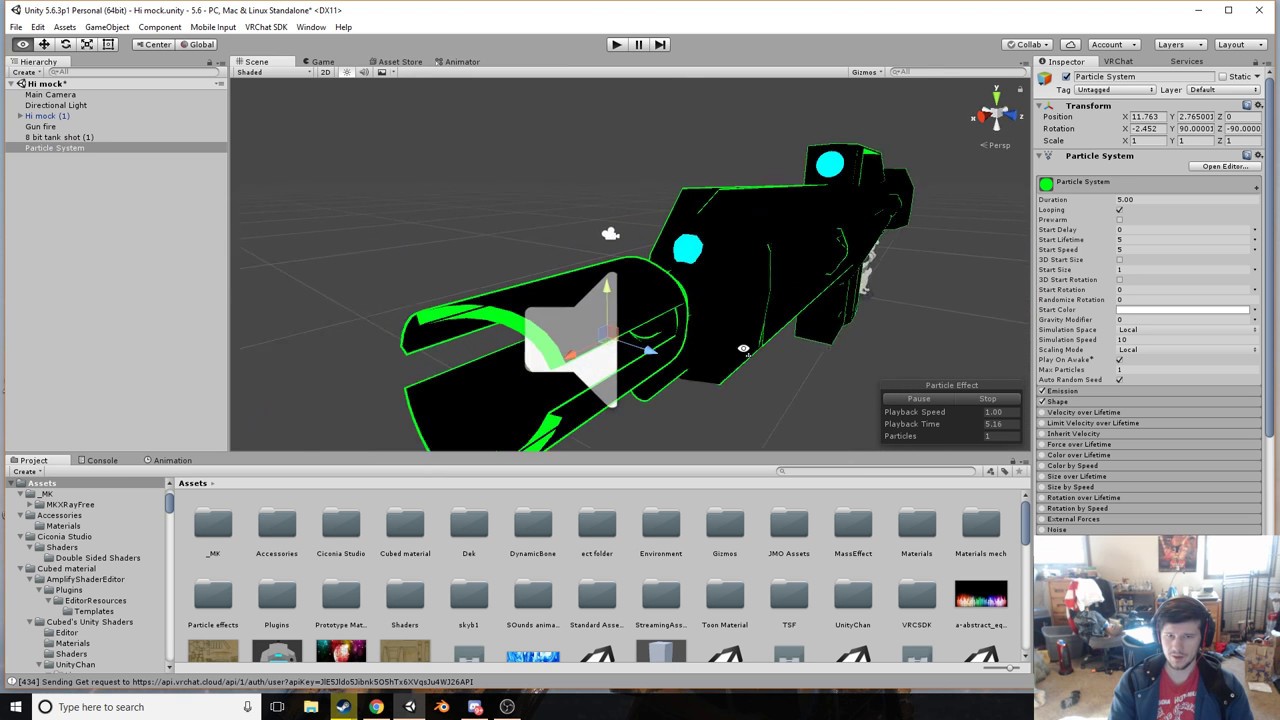 dusty cobalt
anyone knows a solution to my problem that I sent a few messages above
 versed tide
do you guys know if the custom faces in override have to be set on legacy?
versed tide
gotcha. yeah, it wasn't that. i got a person to test the avatar and the problem was that the hands weren't moving but the gestures were there
do i have to do something to have the hands move as well? like if i make a fist i want to be able to see the fist and also do the face
 chrome granite
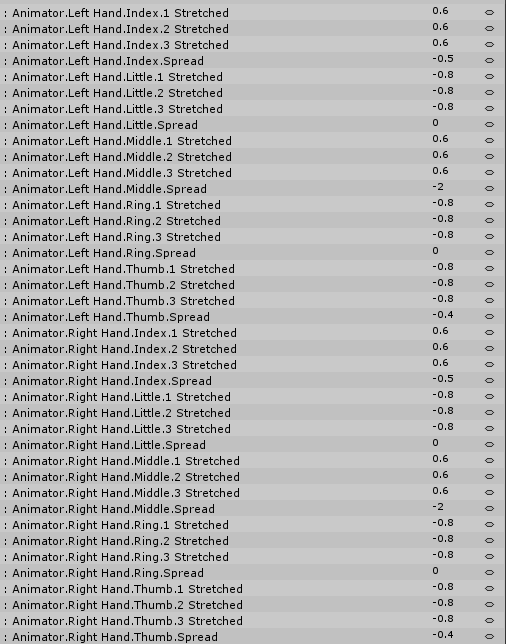
@versed tide You have to add keyframes for the hand animations, under the 'animator' dropdown menu, otherwise they're like this default 'open hand' pose
 versed tide
oh ok. that's what i thought. is there like a clip already made for those?
chrome granite
Not to my knowledge, something like a fist would be pretty easy to hash out though. It's just tedious since it's 20 keyframes per hand pose that you have to poke around with.
versed tide
u_u
versed tide
@chrome granite sorry to bother again but like i have to do it for both hands, right? like if i make a fist with the left hand and i put keys for only the right hand what would happen? or does the game knows which hand i'm closing and just move those fingers?
clear yew
i made an avatar that dance,when i click the play button the animation work in unity ..all good but in game it dosn't does anyone knows why?
chrome granite
@versed tide Sorry for the late reply, you have to do it for both hands, luckily if you're doing the same hand pose, the values will be identical for the other hand. If you don't put keys for the left hand and do the fist pose, you will get the default open hand shape for the left hand.
versed tide
alright thanks!
chrome granite
The upside to this is you can have two different hand shapes for one override animation, but they'll be bound to their respective hands
versed tide
yeah :D
also can you duplicate a clip? so for instance, i don't have to make a fist again if i want to make a point animation
chrome granite
I actually tried that earlier today, but no luck. Any changes that I would make to one animation would just mirror to the duplicated one.
versed tide
hnngg!
versed tide
@chrome granite i think i found a way on how to duplicate the clip. just go the top and create a new clip then go back to the 1st clip and copy all the keys, then to the new clip and paste
versed tide
me again. is there a way to stop the eyetracking blink when doing overrides?
grim cave
Is it possible to: 1. find and download .anim files to use (either online or from other people), and 2. use the same animation for multiple models?
like animations arent model-specific right
versed tide
if the avatar is set to humanoid the motion should be the same, except for maybe clip throught due to different body proportions. if the avatar has blendshapes or other bone animation that are not part of the humanoid, the hierarchy and names should be the same
 boreal rivet
Can I use the CustomAnimationOverride without VR? I just want to change my movement animations to stuff I found online.
versed tide
yeah, you can change the walks, run, and emotes
only ones you won't be able to use are the hand gestures
versed tide
is it normal for an avatar with some overrides and eye tracking to bug and get stuck with the eyes closed? idk what's causing it
keen elk
Alright how do I do a mocap dance so I can, you know
Make a character that has moves that he deserves
pale trail
GitHub
VRCMotionCapture - A unity project which you can use to record your own motion capture recordings directly out of VRChat.
 vocal plank
i have a particle set to world but its not coming out where its supposed to, its stuck at my side and doesnt move
languid lark
@vocal plank mostly like your particle world
need to change it
world setting make it stay one place
spice meteor
is there any program to work on unity .anim datas?
like delete keyframes and add some
languid lark
@spice meteor https://www.youtube.com/watch?v=cNnnaHqhks0

One of the annoying things when you are working with third party animations is that they show up as Read Only in the Animation window. This means you can't e...
spice meteor
appreciate that
languid lark
it show how to remove read only
 rich heath
Hey uhmm guys can i ask something really noob 😅 , i wanted to try and follow Kayla Jayde VRChat Avatars | Unity: Face Emotions/Visemes tutorial, at around 1 minute she opens the animation tab and she can click create, however when i click on it i get this https://gyazo.com/f905a409ebe4d70ed2c0f959ea03507f

 sage lily
well just make new and dont use that one @rich heath
rich heath
Holy shit im stupid haha @sage lily Thanks

 frosty shard
So, I started on this character today. And I'm trying to focus a bit on Dynamic Bones, and the Dynamic Bones Collider.
Apparently, I'm not very good at it, anyone that can lend me some help?
 meager spindle
Hey! Does anyone know how to trigger audio source upon animation triggering? I'm trying to add a dance animation (which is a .anim file) with music (.ogg) to the override but I don't seem to find the solution for it to trigger both at the same time. I've looked around the internet and I haven't found any tutorials for it. Plz help!
 torpid light
Activate a hidden game object at the beginning of the animation with an audio source that has "play on awake" enabled. At the end of the animation hide the game object again
meager spindle
Thanks! I'll go give it a try.
 crystal quarry
Gotta ask where would I get a effect for like a fireball what would I look up
Cause I'm trying to add a effect to something ( don't know how to do that either ) but I don't know where to look for those kinds of things
torpid light
A fireball would be a particle system
you could look for fireball on the asset store and im sure you'll find something
 wintry vapor
Just download a bunch of free particle systems
crystal quarry
Alrighttt
 solar relic
Hello.. Is making an animation hard?
Like frame by frame... Or should I frame then skip then frame?
pastel ravine
well no not exactly for some thing like eyes
or small things
like ears twitching or something
solar relic
So.. Basicly im making a hat tip animation..
Atm its good.. It just that it turns into a heli copter hand.
 modern dagger
Hello, i recently tried turning my finger gun gesture into equipping a gun
however now whenever i finger gun ingame it makes my fingers spasm
instead of spawning the gun
any ideas what i went wrong with?
 plucky skiff
ohh boy i have the same issue
modern dagger
:(
 gritty garnet
so umm i have a question, where do you guys get models for props?
plucky skiff
deviantart for me
modern dagger
same
modern dagger
@plucky skiff if someone gives us a response can u @ me incase i miss it? <3
plucky skiff
same counts for you
i play a biit around wiith it
question:
Peppers - Today at 8:41 PM
Hello, i recently tried turning my finger gun gesture into equipping a gun
however now whenever i finger gun ingame it makes my fingers spasm
instead of spawning the gun
any ideas what i went wrong with?
@modern dagger you might have an idea for that
when you go in your unity folder with the animation
check the preview for the animation... do you notice something ?
 patent light
if your hand spazzes out on animation trigger its most likely that at the start or the end of the animation you have accidentally left the default values, so it keeps quickly switching between default and modified hand
plucky skiff
bbubt it says for me that all values are completly the same
i fixed the issue with the spasm, but the sword (for me) doesn't spawn. @patent light
yes the object is active.
 light briar
I'm trying to follow a tutorial to add props/weapons. In the tutorial he creates a new animation but mine looks like this. how do i create a new animation?
EDIT: Seems the animation is Read Only. What can i do about that?

 raw frost
is giving my character mouthmovement and blinkin something hard to add on a Avatar wich was converted form MMD?
befor or after removing the entire expression stuff
arent those usualy just usefull if i wanna add either expressions myself or for MMD
Because i dont use a VRheadset so i cant even use them
But for Blinking and Mouthmoveemnt they are not needed
right?
crystal quarry
not really sure what to do here im trying to get light a fireball in my hand thing is I don't really know how to do that and im not sure what tutorial to look at that could possibly show me how to put a fireball with particle effects in my hand
can someone help me
pastel ravine
just wondering
do i have to make my chariters root bone move for walking animations?
languid lark
@pastel ravine for what? mmd, animatior controller?
pastel ravine
just for any animations for walking in vrchat
like
animation moves the root bone for movement
languid lark
oh yea add custom override animation dont like use hip bone
it make it stay on place
no matter what
pastel ravine
fuk
languid lark
if you in full body track it wont work at all
pastel ravine
so for something like a fourlegged you would have to make the animation move the root bone for movement
languid lark
maybe pupplet the legs hook to other leg
pull on the other mesh weight paint
that add extra bone
and weight painted
pastel ravine
so for something like this which has its own walk and flying animation would the walk need to move the model
languid lark
yea hip like not move with animation
i put on it
it keep it all stay one spot
it like lock
you could make generic avatar make your own ik
and animation for it
pastel ravine
that wouldnt work though?
pastel ravine
Oh?
crystal quarry
i mean i sorta get this but what i want is something that lights up and is firey in my hand i dont actually wanna shoot it just hold it while particles sorta show like it glowing and it being raident
not sure how to do that
languid lark
@pastel ravine https://www.youtube.com/watch?v=BEIaakl9vJE

This tutorial takes you through the first steps of getting a rigged and animated character from Mixamo, putting it into the Unity Mechanim system and then wr...
basic full animation
for the walking
and stand etc
alot work
pastel ravine
👍
crystal quarry
like here i got a good idea I want a ball with a material on it while a particle is underneath it sorta enhancing the way the ball looks making it look like its on fire
crystal quarry
have no idea where to find that shader
languid lark

Effect Animation - How to creat 3d effect animation for game Fire Orb - Unity Particles Effect Unity 3D effect tutorials ► Pls comment what you think or any ...
 devout loom
Does anyone know of any good video tutorials or web pages on how to make my character able to draw in the air with their finger?
languid lark

Tutorial on adding the marker to your avatar and customizing it. Github: https://github.com/theepicsnail/Marker Unity Package: https://github.com/theepicsnai...
devout loom
@languid lark Ah! thank you very much 😃
plucky skiff
so what exactly do i have to do when it happens that my sword isnt spawning, when trying to grab my sword?
languid lark
make sure 0:00 - 0:01 with the same thing each key
 carmine aspen
while adding a animation is there a way to add multiple properties without the menu closing?
plucky skiff
no
carmine aspen
what a pain in the bum :<
 proud grove
go into record mode and manually change values
it adds the property if its not there already
rich heath
Hey guys noob question but when i made an animation i also got a .controller file, am i supposed to put that one in my animator instead of the simpleavatarcontroller?
 rotund jewel
anyone know how to get my extra vive trackers working?
rotund jewel
yeah i have extra 3 2 on feet 1 on waist but what do i need to do to make em work with my avatars?
quasi gale
just wondering
do i have to make my chariters root bone move for walking animations?
@pastel ravine To expand on this a little bit: the root bone has no effect for walking animations in humanoid avatars. When you start walking, VRChat switches to 'Meathook Rigging' which sets your avatar's head bone as the pivot. While this does solve the problem of deciding where to position your avatar as they move, it does lead to some unexpected side effects. For example, if your avatar leans forward as part of their moving animation, then the entire avatar hierarchy will be shifted back to ensure the head is always exactly where your view position is.
I haven't determined whether this happens only for the local player, or for all other remote player avatars as well.
 tame surge
anyone have particle system settings for finger trails?
 paper bolt
is there a way to make it so the arms aren't inside the body when at a neutral position? And the claws to be pointing forward like they should be? (PM answer as I needa go to bed and I'll check in morn)
walking animation doesn't really clip thru but idle does alot
grim cave
can anyone help with finding the "common" anim files for twerking or whatever
there's like 5 or so for a Kanna model that im pretty sure people have been able to find and use for other models
clear yew
would anyone know why people see two of my avatar when they use vr?
paper bolt
just a whim, but maybe you unintentionally made a mirror that is only working on you
clear yew
well this happened with my other character too
out of my 3 only my first one is a single image in vr headsets
but this other one for some reason people with vr headsets can see 2 images of mne
me
 radiant chasm
Hey guys, stuck on a problem that came up out of nowhere, I cant get my character to not use the default male humanoid idle animation
it just started like an hour ago
I want to use my custom idle animation but no matter what if i stop moving he plays the default idle, all other anims work perfect
 quaint crystal
is there any restrictions on how long animations can be on your avatars or objects for vrchat?
quaint crystal
cool thanks just was wondering
radiant chasm
Anyone have any thoughts? theres no sign of my avatar being able to access the default idle animation but somehow it still plays
@strange kite im the skele bike dude
 clever salmon
I'm having difficulties attaching a particle effect to a weapon animation. When I start the animation the particle effect just floats in the air in front of me instead of following the tip on the spear that I tried to put it on and it follows where ever my character faces. Any ideas?
quasi gale
@radiant chasm Idle animations for humanoid avatars are largely driven by the IK system, so regular placement of the hands, leg, and head are enforced ontop of the animation you specified.
torpid light
Is the game object with the particle system on it parented to the tip of the spear? @clever salmon
radiant chasm
Ok, so in the Custon Standing anims i overrode the old idl with my and removed it entirely
but still does default
is that normal?
quasi gale
Depends what you mean by "removed it entirely"
If you just left the override slot empty, then it will fall back on the default one.
clever salmon
@torpid light The particle effect is parented directly to the spear.
quasi gale
Depends on what the animation was.
radiant chasm
my dude is posed on a bike, works fine when moving
so i made a animation with him in bike position at keyframe 1, then copied it to keyframe 10
so he just sits]
and them made the animation loop
and set it as the idle anim
quasi gale
As I said before, it's probably the IK system pulling the feet down to the ground.
strange kite
@radiant chasm the default idle is only useful for breathing and hand twitches. Most of a humanoid avatar is being animated by IK. So arms legs hips, neck etc are all being overriden
quasi gale
Incidentally, you can disable the IK system by unmapping the finger bones from the import rig.
quasi gale
Or simply use a generic rig to remove IK altogether.
radiant chasm
in my animation
but the default makes it act like im standing
for this avatar i dont really need it to be humanoid, just 2 animation, 1 for moving and 1 for standing
can I do a generic rig with that?
quasi gale
Sounds like that'd be the better choice.
clever salmon
@torpid light Odd thing is that if I move the spear around in the game space in Unity the particle effect follows the spear, but in game if I play the animation and the spear activates in my hand, the particle effect won't follow my spear.
quasi gale
Although you will lose head tracking and emotes with a generic rig...
radiant chasm
Do i have to start over in blender? or take the anims i have now and remove the humanoid part
torpid light
not sure why that would be the case
radiant chasm
I can like without those for this particular model
live*
i have a standing normal one and a mounted version of my avatar
mounted just needs to move with animation playing, and freeze when not
strange kite
Superscope it sounds like you want generic -- but you can't use overrides for that, you make your own Animation Controller.
radiant chasm
Ohh
makes me sad cuz everything is perfect, just standing still messes it up
So for the generic, on the VRC_Avatar Descriptor i use custom standing anims but my own controller? or leave blank and use the Animator component
strange kite
maybe you want to use a secondary set of legs?
radiant chasm
ohh
strange kite
don't assign the skinned legs to the humanoid rig
radiant chasm
Maybe, would be nice to not have to decimate more of my model to puplicate it
duplicate*
strange kite
no extra geo, just empty bones for the ik assignment
the animated legs get the skinning and the geo. the non-animated legs have no skin. they just get hooked up in the humanoid rig, and the ik takes them over, but no one sees
radiant chasm
Sounds good! Thank you 😄
clever salmon
I am at a loss as to why this freeking particle isn't following my spear :/
quasi gale
What's the particle system parented to? It should be parented to the hand bone that's holding the spear or the spear itself if it is unskinned.
clever salmon
@quasi gale I have it parented to the spear
quasi gale
Just to confirm, is the spear a skinned mesh or an unskinned mesh?
clever salmon
Skinned
quasi gale
Parent the particle system to the hand bone instead. Child objects are unaffected by skinning transforms.
clever salmon
Ok I'll see if this works
@quasi gale Nope, didn't work. The particle effect was still glowing in front of me instead of on my spear when I started the animation.
radiant chasm
Try empty gameobect on spear where you want effect and parent that empty object to spear
empty object should have the particle on it
clever salmon
Alright I'll give that a shot
@tribal escarp No dice, same effect.
@radiant chasm
radiant chasm
Thats odd, Can you screen shot your spear selected with inspector
clever salmon
radiant chasm
Is that disabled gameobject the particle effect?
or is it the lightning cloud
object
clever salmon
Cloud
radiant chasm
is cloud enabled and gameobject disabled?
clever salmon
They are disabled because I have an animation setup for them that acrivates them.
activates*
radiant chasm
Yeah, so when not animating they are both off?
clever salmon
Yes
radiant chasm
and during your animation a keyframe turns it on?
clever salmon
Yes
clever salmon
I have the animation working fine for the spear, it's just the particle effect that is having issues.
one sec
radiant chasm
it activated and everything at the right time, just not following spear?
clever salmon
Yeah
I just don't understand why my spear follows the animation fine but the Particle effect doesn't
radiant chasm
Could be simulation space, if it gets activated then its gunna happen at the point in the world
maybe you have to keep it local?
clever salmon
Yeah I can try that
radiant chasm
enable the particle effect and click play and click the effect in the hierarchy and drag it around
see if the particles follow
shouldnt mess with anything once you stop
clever salmon
They follow regardless if I pick Local or World
Only difference is that World has the particals linger after I drag it.
radiant chasm
Interesting, is it your spear tip the effect is covering?
radiant chasm
Yeah like hack said, a skinned mesh renderer doesnt move physically
only by animation
try making a empty game object
and parenting the spear to it
and putting the effect on the empty object
clever salmon
I did that earlier when you mentioned that, that's what the game object is in the spear.
radiant chasm
if you click the Spear object and drag it does the spear move?
clever salmon
Yes, and the particle effect moves with it.
radiant chasm
Honestly lost this point then 😦 has to be just some silly unity thing we are overlooking, any google advice?
seems like it just a basic unity thing should be lots of reports on it
radiant chasm
Damn, yeah ive been at mine forever, but eventually got it. yours seems like it should just work tho which sucks
clever salmon
It's gota be something with the Particle effect because I have an animation on my spear and it follows my hand movements without an issue.
Oh well, I'll leave it for tomorrow. I got my dynamic bones working today so I guess I have one win for today lol.
languid lark
Tutorial on adding the marker to your avatar and customizing it. Github: https://github.com/theepicsnail/Marker Unity Package: https://github.com/theepicsnai...
 honest basalt
hey so im trying to just add a sound to play whenever i make a fist
i followed a tutorial up to the very end
im pretty sure that its set up to work, but when i upload it
i have the custom standing animation override set to CustomEmpty or w/e
the only animation i have set in there is the new i have that overrides fist that adds nothing but the sound
but what do i need to set for the controller on the model?
when i have it set to none or simplevatarcontroller my model is t-posed in the upload screen
 modern urchin
don't want to interrupt, but I was told there was a way to test animations before uploading so I can see if my dynamic bones are working, is that a thing with the VRCSDK?
honest basalt
ugh this is so annoying
the tutorials for this are so vague. they dont specify if i need to end with the controller on "none" which is what the video ends on, or if i need a controller. they also dont specify if i need to select every animation in the override or leave them at none
they just say "fill all this out, uhhh.."

Creating custom animations for hand gestures and emotes in VRChat
its this tutorial

Tutorial explains: - How to create the soundfile - How to create the animation - How to trigger the animation Morgus tutorial: https://www.youtube.com/watch?...
and this one
modern urchin
with a blank override it just does what it usually does
honest basalt
yes but what should the controller be set to then
simpleavatarcontroller? the one that its always set to?
honest basalt
so i went in game and tested it and it didnt work
IK worked perfectly, but i had no animations
and the sound would just play when i spawned the model
if someone has an answer please @ me cause i gotta goooo
radiant chasm
Hey @strange kite So finnaly got the animations to work, but now my character wont leave the idle animation, even tho every other animation besides idle is my move animation
strange kite
@radiant chasm check the masking on your locomotion animations. They may only have the human bones enabled.
radiant chasm
Not sure what exactly that means, but i did what you said, and duplicated my bones, so my model is following my animation bones while the avatar is following the invis bones to keep it grounded
could it be because the bones touching the ground arent technically moving?
And does it update right away on changes to Custom standing anims? cuz the model changed but its behaving the same after removeing my idle anim
strange kite
When you select your fbx and look at the Inspector, checkout the Animations tab -- that lists all the animations embedded in your fbx file. Each one has a Mask property at the bottom. make sure the checkboxes for the bones that you are animating have been selected. I think by default they may just be standard human bones.
radiant chasm
Or do i have to restart VR chat to update that stuff
strange kite
sometimes you have to restart vrchat to get the avatar to update, but I like to change the name each time I upload, so I can tell i've got the right version.
radiant chasm
Yeah that sounds like a good thing to start doing
That was it...
restartign after upload
its finnaly working T.T
omg
Ty
strange kite
Cool. looking forward to seeing it.
radiant chasm
I get alot of WTF and laughs so thats a good sign
People definatly arent expecting it lol
quasi gale
@strange kite This is possibly related, but I've found that the VRChat movement blendtree for humanoid avatars doesn't properly do blending for non-humanoid bones. Humanoid bones work fine, but non-humanoid bones will always play their animation for the idle animation. All other animations such as jumping and emotes will also properly animate non-humanoid bones. It just seems to be a problem with that one blendtree.
radiant chasm
Yeah, everything else worked every time, the first time i tried to mess with the Idle animation it went screwy
strange kite
yeah, unfortunately, there's a mask on that layer so that the gestures above it (hands) are not affected. That layer mask only has a human bone setup, so rigs with extra bones get masked out.
quasi gale
Oh, interesting. That's good to know.
Good to know there's a valid reason for it at least.
plucky skiff
what could be the issue if i have copied all the keyframes, but the model still won't spawn
 untold topaz
is there suppose to be a dab animation file somewhere old in this chat?
 analog kelp
Having a little problem with my animations. I have one to make a gun appear (FingerGun) and one to shoot (ThumbsUp), But when I do the FingerGun it shoots, it shouldn't do that :/
 tight sorrel
If you replace the fist animation for an analogue animation, can you not grab something without also performing that animation?
 upbeat dew
quick question I was gonna use the Snail Marker and wanted to use gradient with a Rainbow gradient Preset any Idea where I'll find the rainbow preset ?
tight sorrel
@kind void https://www.youtube.com/watch?v=gCPcg9y4ZBM i think this covered lip sync too

Creating Eye tracking for your Avatar in VRChat Links: Download Unity MMD rigging: https://www.mediafire.com/file/7awm878q43c1m7q/MMD_EYETRACKING.ht Eyetrack...
btw your username makes you hard to ping
tight sorrel
oh i guess that works too
 foggy cloud
i hope someone can help me with this. Why can't i duplicate an animation of an avatar so its not bound to the prefab? I press ctrl + D but the animation doesnt duplicate. I also tried just exporting the animation via blender but it still creates an prefab.
upbeat dew
Will it show up like this ingame or will it be fine, otherwise how do I fix this ?
modern urchin
how do you import the animations from Mixamo to your character?
make sure that the material for the blush is cutout
upbeat dew
ah perfect
thanks
Do you happen to know where I'll get the rainbow gradient preset ?
 sour hedge
upbeat dew
sour hedge
upbeat dew
In the video ( Snail Marker ) he has a Rainbow Preset
I do have a rainbow shader but thats not the same thing and I do have cubeds shaders aswell
clear yew
Hey the animations I have setup seem to rapidly open and close hands, any fix?
 pulsar storm
are animation overrides only available in vr? I'm using desktop mode but when I try to use my custom animation it just makes my character shake up and down
finite fossil
@clear yew make sure the keyframes you set for the hands are on both timeslots
clear yew
@finite fossil Can you explain a bit more?
@finite fossil Can you explain a bit more?
@finite fossil Can you explain a bit more
finite fossil
the positional values on ur first keyframe for the hands are probably different from the next keyframne
clear yew
Alright
strange kite
Making hobbyist 3D animating easier, cheaper, faster
these will take a bit of massaging in Blender/Maya, but they're free!
honest basalt
So I asked for some help last night and didn’t get a reply, I’m trying to override a fist animation so that it’s the same but it has a noise
I followed the two tutorials on YouTube about it, I added the audio source, I created the animation, and I overrode it in CustomOverrideEmpty for the FIST animation
But one thing the tutorials didn’t specify is if I needed to override all animations. I tried doing that because my friend told me I did, but then in the unity animator all of the key frames were empty, unlike what it looks like by default
So then I uploaded two versions of the avatar, one where the Controller was set to the SimpleAvatarController and one where no controller was selected, as that’s how both the tutorials ended their screen
Both avatars would just play the sound when they spawned, and did not have any animations except my IK
What did I do wrong in the custom override? What should the controller be set to?
strange kite
@honest basalt For humanoid avatars, the main animation controller is unused, it doesn't matter what you put in that slot after its uploaded. The two override slots in the VRC_AvatarDescriptor are what will be used for standing and seated. Use a copy of the example override controller to put into these slots. You only need to put the animations into the override controller that you want to replace. The empty animations will get the defaults. (The SimpleAvatarController is an example for non-humanoid avatars).
honest basalt
Was CustomOverrideEmpty the wrong override that I wanted to start with then?
If that’s the case I don’t know why overriding one animation killed all of them
strange kite
That's right, just make a copy of it. Then replace any of the animations in it that you don't want to be default. Then put this controller into the (for example) StandingOverride slot in the VRC_AvatarDescriptor.
honest basalt
Huh, that’s exactly what I did
Do you know of anything else that might’ve killed animations in this process? I hadn’t tested the avatar prior to doing this, but previously it was a perfectly average Mixamo rigged standard humanoid shape
With the usual avatar creation process
I had no errors uploading it
strange kite
I would test the avatar first and make sure it works without overrides
honest basalt
Yeah I’m gonna now
strange kite
which animation did you override?
honest basalt
Just FIST
strange kite
is it only 2 frames of animation?
honest basalt
in fact I’m not even adding an animation, just key frame 1 and 2 to play a sound
strange kite
okay that sounds like it'd work. better test the avatar without overrides first, then.
honest basalt
My friend had told me that if I don’t change the animation it’ll maintain the fist animation with sound addition
I’ll do that and get back to you
Thanks
so, a few questions. when i create the override i want to the original to be CustomOverrideEmpty and not AvatarControllerTemplate or w/e?
the thing that its overriding?
@strange kite heres what it looks like https://i.imgur.com/H3Rhx2W.png
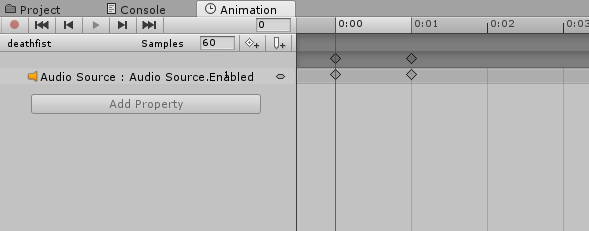
that should be sufficient to override, correct? also do i want it to be play on awake
one thing i was always confused about was how it knew to play the specific audio source i have in the model, i feel like i didnt tell it anywhere to play that clip
 safe shuttle
how to i make rainbow color? i don't find any tutorial
strange kite
@honest basalt yes, you enable PlayOnAwake and then enable the game object when you want it to play. This animation needs to be made as a animation on your avatar, so make sure your avatar is selected when you create the clip (it has to be a AnimationController/Humanoid anim, not a legacy one). When you create your first clip, you'll see that Unity generates an AnimationController tied to your Avatar. This is where your animation clips are created.
honest basalt
that mightve been what i was missing
strange kite
leave the main AnimController slot empty, select the avatar, and go into the animation tab. when you create a new clip, the AnimController is created and put into the main slot.
honest basalt
and do i want to leave that there whenever i upload? in the controller slot
https://i.imgur.com/Nhjl7r0.png thats what your referring to right

sorry for the dumb questions
ok now im confused, i restarted from scratch, clicked on my model in the project, created the animation, it set the controller to paul2u, i added audio source enabled property to the new .anim, but now for some reason the avatar is just like stuck in a seated position in the floor
@strange kite he's just stuck like this https://i.imgur.com/zYNreru.png
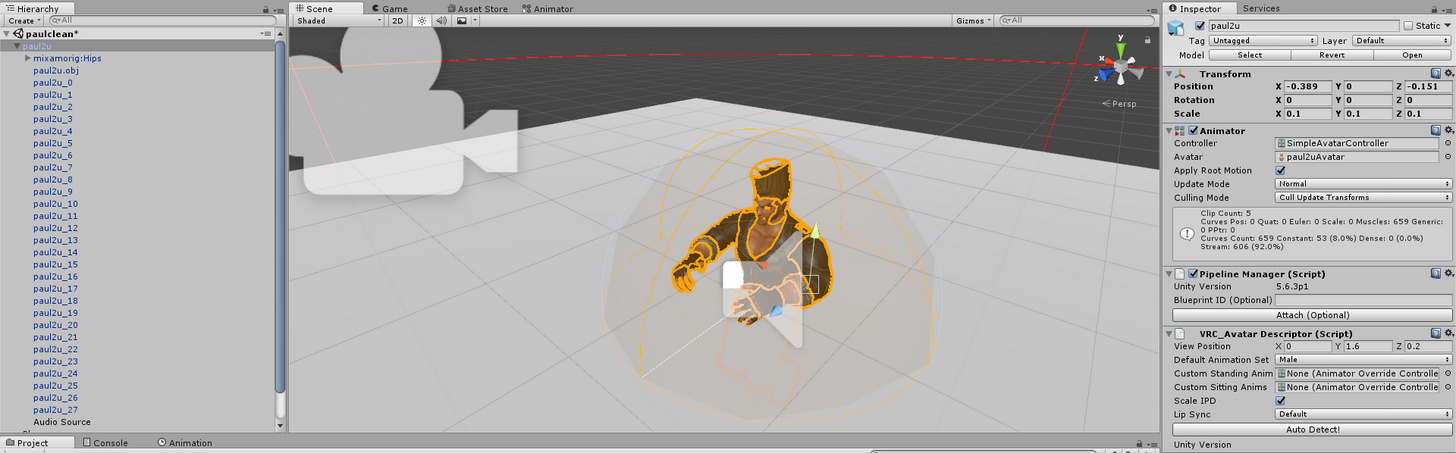
this only happened after i attempted to play the animation
i put the simple avatar controller back to attempt to get him back to normal
when i have that on and i hit play he stands back up but he keeps going inside the floor
https://i.imgur.com/Mp1qr8H.png can i force him back into t-pose? applying the textures again on this guy takes forever
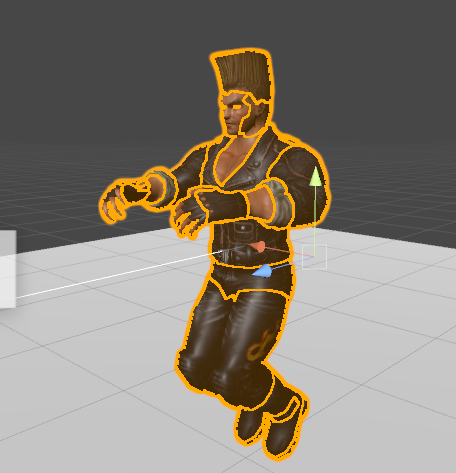
fuck it im just gonna restart again
@strange kite ok so whenever im creating the animation the moment i click on 0:01 in the keyframes it puts him in the fucking floor
i have no clue why its doing this
i click on the model in the hierarchy, go to the animator, create animation, add the property for audio source enabled, and whenever i click on keyframe 2 he starts drowning
strange kite
its normal to see that in the editor. it should be fine when you play it in game.
you are basically playing an empty muscle animation with your sounds, so thats the "rest" position of the avatar. when you are in game the idle is mixed in.
honest basalt
is there a way i can get him back to t-pose though
no matter what he seems to stay in rest
strange kite
You can load the TPose Controller on him. But make sure to go back to the other one when editting the animation.
 gusty crow
so I'm trying to make my avatar in unity breakdance, but the fbx wont upload to mixamo. I used another avatar to use on it, is there a way to change the other avatar's bones to the avatar I want to use on it?
honest basalt
also do i want to leave the animation controller that it created when i made the animation there when i upload it?
strange kite
@honest basalt it doesnt matter what controller you have in the main controller when you upload, that is replaced at runtime.
honest basalt
and do i want the audio source to be enabled when its uploaded
strange kite
if the audio source is enabled it'll start playing as soon as the avatar loads. not sure if you want that.
honest basalt
no
but what i did in the tutorial was turn the audio source off, hit record on the new animation, then enable it, and copy it to keyframe 2
strange kite
I like to make a test scene in the same project as the avatar, so i can try it out locally in VRChat, without loading Hub and all that.
basically an empty room, maybe with a mirror in it
honest basalt
https://i.imgur.com/nz2qcSj.png if i get this, does it mean he's not gonna have animations
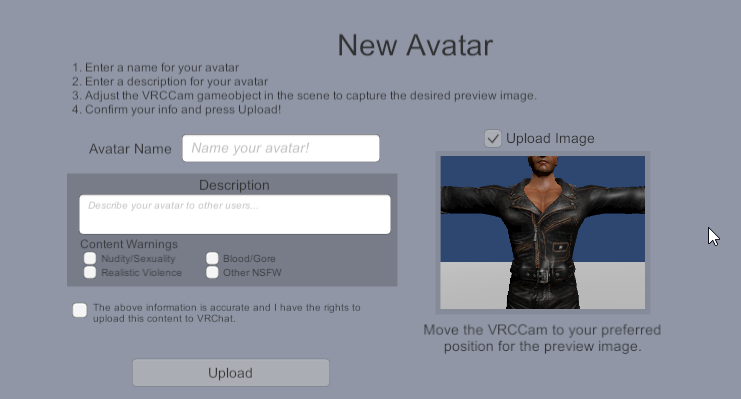
he was forced t-pose last time
i have no clue why his animations do not work
strange kite
@gusty crow as long as your fbx works in unity, you just need to set it up as humanoid rig, then you can apply it to any other humanoid. Unity does the bone remapping for you.
@honest basalt is this without the overrides? get the avatar working first before trying overrides.
strange kite
oh, you wont know until its uploaded an you've tried it inside VRChat.
 signal fractal
So i have this avatar all set up and ready to go. Only problem is ingame the legs clip through the skirt when they move. Is there a way to get around this with dynamic bones or something?
strange kite
@signal fractal yes you can use Dynamic Bone with colliders, but this is not very efficient and kind of overkill, esp for a short skirt. Usually weight painting the skirt properly (with some influence from the legs) will fix the problem.
honest basalt
im about to give it a try now
honest basalt
thanks @strange kite , it works now
its a little janky but it works
now to add more voice lines to different gesture
severe sierra
Anyone know why this might be happening? I have these blades on a looping animation that just rotate 180 but when hitting play in Unity they rotate 90, but in the animation preview theyre perfectly fine
Disregard, I had to go into the animation tab and fix the rotate in there
severe sierra
👋
gusty crow
So i used a butterfly kick on my avatar, it looks fine in the preview but in game his body goes in a wide circle while still doing the animation. I hade the "bake into pose" thing on Y and XZ, if that had anything to do with it.
severe sierra
Ok I have another question for this animation im working on. I got it working fine in game but whenever I turn my head the animation slows down
:/
The rig is just a "Generic" rig
 marble orbit
Question, how do you stop the blinking animation from the eye tracking while doing facial expressions?
 wraith hawk
Can you animated texture for example a gif image on T-shirt?
ashen sedge
With a proper shader - Yes
severe sierra
You can make animated textures
not sure if just dragging and dropping a gif into unity will work
wraith hawk
how you do that? i tried to make animation with different texture but no luck
gusty crow
How come any animation i put on my avatar that has them doing a backflip or flip, they don't gain any height off the ground or don't flip right?
In game
severe sierra
I had the same issue with my titan drop animations, though mine got stuck in the air
setting these to original fixed it
wraith hawk
so I can use the rainbow effect to make the color of the material changing, but how do I make it just a certain part of the material change?
 weary jackal
I am having a issue with my custom animation not overriding, is this a pretty common error/mistake on my part?
 vast sierra
I am unable to rotate past 180 or -180, whenever trying to do so, it just starts to go back up or down, does anyone know the reason for this?
I need to rotate it past 180 though, it helps when trying to circle and object around another, I was able to put in any value before, but then it just locked to 180 to -180
clear yew
I'm wondering how to do custom walking animations and stuff
I figured out what I'm going to xmas
 whole igloo
Has anyone got the Take on me Jogging meme animation i've been seeing recently?

Dark Souls - Take on Me (A-Ha) Author - ThePruld https://www.youtube.com/user/Grulide
 hollow mica
Question for everyone here, anyone know what the sitting animation is>? Trying to create a custom sitting animation.
 formal vine
do you guys know if it's possible to stop anim override that's already being played?
I'm trying to create something coming out of the ground but I want to have it reset as soon as I change gestures
languid lark
@hollow mica it idle just need make other custom override
for custom sitting slot
in avatar description
 wooden ivy
Is there a way to make an emote loop?
severe sierra
Dont think so
languid lark
nope
only last 10 sec or you wont be able to move
for vr we cant move if we use emote
wooden ivy
Heh, good answer, but my animation is only a few seconds long
I want it to loop the full 10
languid lark
they would need update there animation system
for vrchat
customoveridde more like hack
lol
but see everyone like this i think make more better verison later
 slow ferry
Hello everyone, So I did a simple animation overwrite to have a sword appear upon the Hand gun gesture. the problem im having is that I cannot get my avatar to do that hand gesture in game. Im using an Oculus, and I can make a fist or point but cannot form the handgun shape.
wooden ivy
Handgun is index extended, thumb extended, other fingers on controller
Different from pointing, where your thumb rests on the controller
Your thumb needs to be riiiight out
Is it possible to edit the default animation set? I made copies of each animation and then put them onto a controller in the place of the originals. When I go in-game the original animation plays but not what I added.
wraith hawk
@whole igloo found it by accident on mixamo
languid lark
@wooden ivy https://www.youtube.com/watch?v=cNnnaHqhks0
One of the annoying things when you are working with third party animations is that they show up as Read Only in the Animation window. This means you can't e...
wooden ivy
Is that relevant? I have already modified the animations.
wooden ivy
🤔 ?
So I made copies of each of the animations from the default avatar, and then used the animation editor to add parameters to them to modify visemes. Then I assigned each animation to the controller and then assigned the controller to the character. So when I go in-game, my hands move fine, but my visemes don't activate.
 tawny elbow
in unity, how can i preview a specific animation I have? i have two but everytime i click that play button it only shows one of them and i wanna see the other :0
wooden ivy
When you assign an animation to a character, Unity creates an animation controller that's connected to them, which is the flowchart in the Animator window when you select them. So if you have two animations on them, they'll both appear there, and one will be connected to Entry by default
Alternatively, when you select the character, and have the Animation window open, you can click the animation name to swap between the two and then click play
clear yew
So I want to put a character in a wheelchair do I keep them both in the same file, or do I export the character and the wheelchair seperate.
languid lark
@clear yew keep same on the model
need add neew leg bone
use other leg bone put the model into the wheel chair sit
clear yew
@languid lark Allright so it won't let me add eyetracking and blinking with the wheelchair there
is also what I'm trying to work on
languid lark
yea it should
only look for the right name for Hips,Spine,Chest,Neck,Head and Armature and mesh for Body
clear yew
I was thinking about exporting the wheelchair out then trying eye tracking, then porting the wheelchair back in, @languid lark would that work?
languid lark
better make into one mesh
2 skin mesh render will make perfomance drop
just rabel the UVmap the same
then it cane combine togther
clear yew
Do I need to combine their skeletons?
becuase I wanted to make the wheels spin when moving
languid lark
only thin need to do add new leg bones to hip
so you move in vrchat
and use the leg bone on mesh
put on the chair
clear yew
ok do I just dupe the ones I have or need to make entirely new ones?
languid lark
make it own avatar folder
it going avatar in wheel chair
it should have it own file
edit model like this need new folder
languid lark
make copy of your orignal work
it alot more work just put wheel chair on model lol
need add leg and adjust the bones
so can be on that wheel chair
clear yew
@languid lark So I managed to merge the wheelchair with the character
and get my eyetracking+blinking to work
so I keep em merged?
then I jsut create new leg bones?
languid lark
yes eye tracking if you label bone name correctly what i told youj
it all about bone names
your legs become useless for the wheel chair
so you have make compelte new legs
tawny elbow
I've made several animations and created a duplication of the vrchat overide controller and selected the right animations, however when in vrchat my avatar only plays one of the animations despite assigning several. How can I fix this? ;o
 pliant dust
@tawny elbow Emotes have a 10 second time limit, and gesture overrides can only be two frames long. You are following those rules, right?
clear yew
@languid lark So can I duplicate the leg bones I have, or do I need to make entirely new ones?
languid lark
you can make copy of the bones
clear yew
Thanks
tawny elbow
it's not emotes and not a finger gesture. it's walking/running and idle animations.
clear yew
name them something like dummy leg?
languid lark
yea
pliant dust
@tawny elbow Which ones did you override?
tawny elbow
clear yew
Ok I think I'm done in blender now
tawny elbow
if i wasnt meant to override one than oops? ahaha. It only plays the walk/run forward anims, not the idle or backwards
pliant dust
Hmm... everything I don't have experience with. I'll have to leave this to someone else. Oh, but how long are your animations?
tawny elbow
none of them go over 3 seconds
im gonna fiddle around with the things some more and hopefully i can find a solution
 lavish palm
Is it 60fps we need to make animations or 30?
clear yew
@languid lark Do I just set it up like normal now in unity with the bones?
lavish palm
Hoky doky, cheers
wooden ivy
Castlevania: Dancing All Night, anyone?
languid lark
@clear yew yea but you can do it in blender to
clear yew
Pose mode tells me it can't be moved in rest mode
wooden ivy
Yes, you need to change from Rest Position to Pose Position in the pose properties
clear yew
rest position
See it
I need to move the entire character donw that's fine right?
How do I move the bones down in pose mode?
Figured it out
tawny elbow
does anybody know why my avatar only plays one of the custom walking/standing animations and not the others?
pliant dust
@tawny elbow You didn't happen to set any of them to Loop, did you?
tawny elbow
I did, was I not meant to? :0
I'll set them off loop then
I turned loop off them and all it did was play the same animation it was stuck on once and then leave my avatar dead still 😅
pliant dust
Well, was worth a try!
clear yew
I'd also like add custom standing anims/so her arms rest on the arm rests
and of course movement anims like the wheels moving, and if possible her pushing the wheels
tawny elbow
All good ahaha, i'll just ask again a little later if i dont figure it out myself aha
i'd try looking up a guide for custom animations but all the vids are doing facial/weapon animations rip
clear yew
So I saved it for now and in unity she is floating?
help
it it becuase in blender her fake legs are going thru the ground
half marlin
so in unity all my models ar gone from the scene and i just spent 2hs in a model and when i go you upload it loads and when its in game scene b4 upload i see this ????
got it working
pulsar storm
what animator controller do you use for animation override?
languid lark
custom overrride
hollow mica
Hey guys
Anyone here know how to make it so that an extra animation is automatically started when my character loads?
I have tracers chest bit, to go in and out
It works in Unity fine, but doesn't move in game.
languid lark
try set debug mode legacy
anything hook to your body dont like to animations
so need force it with legacy
but make copy of the animation
 abstract marten
how do you get it to do animations in the game mine is stuck in t form
 pallid lake
I am having the same issue. The armature is correctly mapped but my character only bounces around in T-pose.
Anyone had a similar issue and a fix to it?
abstract marten
i forgot to rejoin everything back together on blender and ima try that
clear yew
Something messed up somewhere
spice meteor
is there a guide for importing long dances other than cheap mixamo override? I have some trouble understanding these or like at least concat mixamo dances
pallid lake
@abstract marten Lemme know if that works
languid lark
@spice meteor https://youtu.be/V0l4-pH3vI4
Creating custom animations for hand gestures and emotes in VRChat
the video show how to do it
abstract marten
@pallid lake didnt work
pallid lake
Darn, then we still need a fix if anyone has any ideas
spice meteor
@languid lark yeah thats just the basic override but id like to concat more dances to one because some animation dances go like 5 seconds and thats kinda a waste I also saw a lot of people doing really long dances with their model and they kinda said something like they extracted the mmd dance and put it on or something and Im really looking for something like that
languid lark
@spice meteor https://www.youtube.com/watch?v=kWFvuRmTeFg
Hi my name is Shana from vrchat and i started not long ago Learning how to import mmd dances to vrchat was one of the fun stuff to do for me so today im maki...
spice meteor
@languid lark thanks
abstract marten
@pallid lake think we are stuck
pallid lake
Heh i suppose so for now, maybe someone will come along at some point
abstract marten
its just so frustrating was working on trying to get this for so long
working that is
pallid lake
Yeah same, ive checked videos just to be sure I didn't miss anything and it seems I haven't. Cant seem to pinpoint whats going on here. Does your character slide around, or bounce around ingame?
abstract marten
slide
pallid lake
Hmm, for me an earlier version slid and now he bounces. Still T-pose though.
Wonder what changed
abstract marten
idk but im done trying to get it to work for now
radiant chasm
Whats max animation length your avatar will pose for?
 clever trellis
not 100% sure but ive read it was like 10 seconds
tawny elbow
Does anybody have any idea why in game my avatar only plays one animation despite me assigning several different ones in their animation slots? (btw please @ me if you have any answers since I'll be tabbed out)
It only plays the forward walk/run animation despite me assigning idle and backwards animations.
 sly obsidian
hmm, i just went on trying to make an animation, so my char holds a weap, but at the point when i dragged up all the stretched fingers, and lick the box "object.is active" the weapon didnt appear =o
quaint crystal
so ive been trying to import say a dance animation but for some reason the animations are extremely floaty when played back, like the feet arent locked to the floor like they should be 🤔
no idea how you would fix this as baking the animation into the pose has little effect for me
wooden ivy
Where can I get the goofy animations so many people have?
clear yew
any reason why animation override on Idle makes dance animation weird? like In Blender it looked extremely good, In Unity it looked 80/90% okay...and in the game it was absolute disaster = legs where rotating like hell and head spinning like the girl from the exorcist movie
@tawny elbow did you put it on Animator and Descriptor as controllers?
For me everything plays whatever I choose to add { running/idle/handgun }
only idle animations ducks with me
tawny elbow
What would those look like again?
Wait, I found it. I'm gonna set them and see if it works
abstract marten
@pallid lake i think i figured it out you have to make sure you export it to fbx correctly
clear yew
np
clear yew
how to upload 2 avatars with the same animation in one upload ? [ like multiplying ]
 regal ruin
You can do the same animation but not at the same time
You can have 2 avatars in unity's scene at one time but it won't allow you to publish and upload your avatar at the same time
clear yew
@regal ruin smh the McDonalds Snake guy was able to do it.....idk his Discord
regal ruin
i Don't know then, i've herd of a way to do that
clear yew
trying to do 2 Kannas fight animations... In Blender it's playing beautifuly - but in Unity only the 1 model and rigidbodies of the animation file is playing...ughhh
radiant chasm
Hey anyone know best way to see the particle effects on yourself in game? mirrors wont render it for me
wooden ivy
Change movement type to 3rd person and run around?

 kind void
do you play with vr?
@ocean wharf
"IK and Tracking" is for vr users if you dont use it just ignore and upload
 ocean wharf
It makes my hip really weird. It looks upside down
I mean i cant think of anything else that would make my hip this weird
kind void
Can cha screenshot it?
ocean wharf
Yea sure
clear yew
@radiant chasm In VRC Descriptor make your viewpoint Z : -3
radiant chasm
Thank you!
clear yew
NP
 clear yew
looks like...ummm....ummm..what the actual hell is this?
clear yew
beef
ocean wharf
any idea?
ocean wharf
is it even related to the first screenshot i sent?
clear yew
@ocean wharf drag your spine a little bit higher in rig tab
ocean wharf
ok
what should i try first
what souls said or kanna
cuz i honestly have 0 experience in configuring the rig
kind void
I have 0 idea what I'm saying
clear yew
xD
kind void
I never got a problem like that
ocean wharf
http://prntscr.com/hrdab1 before
 kind void
I only got one where the pelvis wasn't even in the model


 clear yew
Sometimes model creators includes specific height ratio
or weights of the bones are mixed
ocean wharf
actually a japanese friend helped me download this so theres no way i can know if the creator said anything about that
kind void
Well
I just completed my avatar
I did everything I could to it
Roy you did use blender cat tool
right?
ocean wharf
No i didnt use blender at all
kind void
Thats the problem
ocean wharf
I just decimated it in unity and tried to upload
kind void
mhm
ocean wharf
it worked last time so i figured out it'll be fine now too
kind void
You got lucky the last time
ocean wharf
what does blender cat tool do?
ocean wharf
oh damn
clear yew
@ocean wharf Fixes your armature automatically
kind void
all of the bones can be tranlated in english
clear yew
with one click
kind void
so u can add shit to it on unity
ocean wharf
the thing is
clear yew
is?
ocean wharf
when i use blender and then export it, it doesnt let me change it to humanoid in unity
ocean wharf
kanna
kind void
oof
clear yew
how to animate sky?
kind void
why are you animating the sky?
clear yew
I meant to say animation while in game cloud above her head or something like this
because it stays stacionary no matter what while in game
animation overrides doesn't help
wooden ivy
Umm, is there even a way to add to the default gestures? Nothing I do works
I want to keep the ability to move my hands, but also make face expressions... do I really need to remake all the hand movements from scratch?
clear yew
I wonder
How can some avatars dab on Desktop mode?
Like... lots of non-VR peeps dab
But how?
 narrow belfry
Animation override i suppose
 torn pawn
@clear yew create animation and put that in Animation, not Animator, wouldbe my guess
also i think u need to change it to legacy + check loop in debug
clear yew
@clear yew animation override
@torn pawn thanks for helping again...will try when I get home
torn pawn
at least that's what i use for simple animations
Jazneo has a video on blinking i think
that's what i used as basis
clear yew
@torn pawn maybe you would know how to duplicate/multiply animations x2 while in game? by that I mean 2 avatars syncing same animation - possible or nah?
torn pawn
nope no idea
clear yew
ahhh....Rare Spice stays silent...ughghh
pulsar storm
any other steps required after placing the animation override in avatar descriptor and animator controller? my character just stands there without doing anything
clear yew
@pulsar storm yes you need those
drag your Animation ovverride into Descriptor standing animation and controller animator
pulsar storm
I replaced emote1 with my character doing a ^.^ face but when I use the emote, my character just stands there
yup, i applied those but it still doesn't work
sometimes my character just bugs out by shaking up and down
is it because of desktop mode that I can't see it myself?
clear yew
did you rigged your animation as humanoid ? and CTRL+D it?
pulsar storm
yup
clear yew
something is wrong with the animation itself...or maybe you exported it for full [ too big ] or mini [ too small ] scale?
what was your characters scale when you exported it?
an your animations scale?
clear yew
make it 0.08 for you character
and 0.08 for your animation
when you export
less errors when you do that
marble orbit
For some reason, my facial animations are not working properly, only my mouth is the one that's correct, the eyes and the eyebrows is default eventhough they've got values in them. Anyone know the fix?
This is what it should look like, according to unity
clear yew
@pulsar storm yes
marble orbit
I think it could be an Eyetracking problem, but I'm not too sure about it.
clear yew
@marble orbit CATS?
marble orbit
Yep, I used CATS
marble orbit
I just added some random weight to the CATS eye tracking option because I already have a blinking animation of my own.
clear yew
delete some shape keys
marble orbit
I have 0.4.0 CATS
clear yew
which aren't useful
marble orbit
If I delete those shape keys, my mouth glitches out and the eye tracking applies to my mouth instead, my mouth flaps open
pulsar storm
Hey @clear yew , what are animations scale?
marble orbit
That happens @clear yew
So basically, what I'm trying to do here is that I wanted to do my own Blinking animation and change the Default standing face to my own Custom one, but also have eye tracking as well.
sly obsidian
One Question, when I want to add like 2 Objects for each Hand Trigger "RocknRoll" do i make 2 animations with 2 clones or do I make that in both in the same hidden model?
marble orbit
So yeah... Her mouth animates but not her eyes and her eyebrow, for some reason.
clear yew
In animator add all of them ( mouth/eyes/blink ) to animate em wia frames
Sorry I was off
 storm flower
Hey guys, i ported some custom animations but ingame they're all half body under the floor, how can I fix this?
torn pawn
u do animation on clone
 steady sorrel
Anyone able to advise on how to make a part of the avatar disapear