#animation
1 messages · Page 4 of 1
 wintry vapor
 muted prairie
This might be off topic but does anyone know anything about texture animation ?
 alpine viper
What's the best way to get mmds motions into emotes?
 silk ember
are there any default walking animations i can plot into unity and maybe just have to slightly edit to get to work? cause my model didnt come with any animations
 safe gorge
If your model uses a standard humanoid skeleton, then it will use VRChat's standard walking animation.
silk ember
okay thanks, i think i figured out why it didnt work (some errors that i didnt see before upload)
 quartz jewel
Can someone please explain why my characters jaw is OPEN in the game when its closed on the model?
I have the same problem with some other characters I've made as well...
- I also did all the mouth lipsync and the eyeblinking animations correctly based on a video with the right order. Assigned all the visimes to the visime controller in unity. But the eyes wont blink. The mouth animates with my talking like supposed to but stil open like that... Why is it open 24/7?
I would love to know...
The rest pose is closed mouth
same is model without armature
Please this is the only problem I have left before I can make my characters perfect
 versed tide
Does it have a jaw bone?
Go to avatar config and rotate the jaw up about 10 degrees
Might look weird on the scene but should work in game
quartz jewel
I was told to unnasign it in the rig
since the lipsyncs use keyshapes
not the armature
safe gorge
Did you set the lip sync mode to Viseme?
 languid lark
@quartz jewel if you use blendshape remove jaw bone in unity
humaniod configure
blendshape dont need jaw bone
versed tide
Yeah. I remove the jaw bone as well.
It’s useful for making custom visemes back in your 3d software tho
 rugged sierra
How do I add another frame at the 1s mark? It usually has another frame, but hasn't appeared this time.
 proud grove
right click -> add key
rugged sierra
Thanks 😄
 clear yew
would drawing with my hand be a animation?
 abstract wyvern
@alpine viper Not sure about emotes, sorry.
 red linden

前回:https://www.youtube.com/watch?v=OJSa9cuY-ak アニメーションのキーとしてゲームオブジェクトを表示させると、アニメーションが実質的なコンポーネントのプッシュスイッチのように運用できる。
it's in japanese but it's easy to follow
 atomic canyon
Are there .anim files already available that I can import into Unity?
languid lark

How to get Snail's Marker working with custom overrides Snail's Marker Github Repository: https://github.com/theepicsnail/Marker Original Custom Override Tut...
writeable marker override
 dull parcel
I have a bunch of anm files not anim is there anyway to convert them
or get them to work
 opal lodge
Is there some video material on walking animation override?
I'd need to animate these legs instead of my default ones
opal lodge
At the animation override file, do i need to fill them all in to function? Or will it fallback to default when it's selected to none?
 pliant dust
@opal lodge Yes, you do need to fill them all up or you'll be missing animations.
opal lodge
Gotcha, oh well, quickly going to try out the walk animation then
pliant dust
@opal lodge Just fill them with their respective All Caps placeholder animations that have the same names.
opal lodge
Yeah I found it, it's just that i was already uploading a version with only the walk filled in
pliant dust
Oh. How nice of it to do so.
 hollow zodiac
Anyone else noticed that the new update somewhat screwed up the walking/moving animations for custom avatars? It seems to be okay in front of the mirror but it looks weird from another person's perspective :/
 lunar storm
You may not like it, but this is what peak performance at porting looks like. https://gyazo.com/a0f786ee7b2d8775037d2154296f7fd5

 quartz mica
ok so im having problems with CAT when i port my model the texturs are missing. Please help
 brittle vigil

 hushed plank
how do u make your emote's duration longer?
hushed plank
how? can u send a screenshot hehe
brittle vigil
yeah sure
hushed plank
ty 😄
brittle vigil
im back
hushed plank
wb
 hushed plank
ok ty so much 😄
lunar storm
Is it just me or is audio super quiet now because of the update
You have to be standing literally right next to them to hear it
muted prairie
Depends on the people, since it's something you can set yourself, I suspect that it's been made a default low for most people and that it depends on the rooms as well
So yeah that's probably the latest update
 trim flax
ohhh, this is bullshit, in unity: https://i.imgur.com/qgZLWsG.png in game: https://i.imgur.com/RiSWxbF.png (hand inside leg)

 crystal quarry
Gg
 slate token
Can anyone tell me where there getting the Caralell dance anim from?
I looked a bit for it can can't find it
 merry sand
where can i find the animation for dabbing?
clear yew
Let's assume I pulled a model and its skeleton from a game, as well as its animations.
If I adjust the bones in a model (ex add an extra bone, or chane a parent), would I still be able to apply an animation to it? (with the possibility of some funkyness of course)
muted prairie
i believe the animation wouldn't be able to be applied
i've looked into it a lot, and unless i missed something, once a bone is moved, the whole thing is fucked
i imported an animation and my character was just in t-pose in the ground
clear yew
Ah, shit. Thanks Ruubick
muted prairie
But if you somehow find a solution, please ping me !@clear yew
clear yew
Will do! But it'll be a while. This was a preemptive ask
muted prairie
Can you do a whole screen screenshot pls
 junior depot
hello there :3
is there any known fix if more than one animation is set in the animation override but only ONE gets played on ALL gestures?
 untold fossil
Could you be a little more descriptive please @junior depot
junior depot
@untold fossil I tested again, I get the animation I have set up in one gesture (handgung) in override, but it gets triggered by ALL gestures with only IDLE as exception
untold fossil
is it a 2 frame prop?
junior depot
the animation got a 8sek time window
untold fossil
what are you using the 8 seconds for?
untold fossil
how many animations do you have
junior depot
only this one atm on my character
I uploaded the character seperatly to test with only that animation in override
untold fossil
so does it draw the weapon or is the weapon static and the firing is the animation
hmm
junior depot
the weapon gets drawn on all gestures, and fires
untold fossil
are all the other gestures mapped out
junior depot
nope
junior depot
do I have to fill all others with the standard ones?
junior depot
well I´m surprised, cause I got other avatars, wehen I didn´t fill the empty ones and they do not bug out :/
but I´ll try
 novel furnace
is it possible to put animation overide on a generic rig?
junior depot
@untold fossil I filled out all empty slot but it is still screwing up, still thanks for the kind advice
 ashen sedge
@dull parcel If it's a generic model you can only change the Y axis. You'd have to move the origin point in blender to set the view port to a different place
 native frigate
anybody got a dabbing .anim file?
opal lodge
For walking animation override. Do I also only need to forsee 2 key frames?
Or can I make a animation with like 20s
 obsidian vigil
so, im trying to bind sound to an animation but the dude in the video tells me to press record in unity and then check the box for the sound source, nothing appers in the animator though. What am i doing wrong?
 undone glen
is it possible to use an animation override to make your model, let's say, sink into a black puddle on the floor to mimic them becoming a shadow?
muted prairie
Sounds complicated but i'd say in theory yes
undone glen
I'm trying to think of how I could add the abilities of the character that I'm making the model for
and, with the character being a immortal vampire wizard, she can do a lot
clear yew
Why do I think that she's from Rosario + vampire?
undone glen
nah, she's from Negima
Evangeline A.K. McDowell
she's like 700+
she's got a lot of magic so I got figure out this animation override stuff
this is what I meant with the shadow thing
?
what?
 solar relic
Anyone help with unity?... I have 3 motion to be implemented into 3 models but the blender tree cant have 3 motion on them.
 lethal garden
Anyone have any ideas what I may be doing wrong as I am trying to get trail working on the index finger but nothing occurs https://i.imgur.com/xiengWG.png

 warm furnace
@undone glen Make frost/ice animation :e Like frostthrower
warm furnace
Also make an animation when you spawn your avatar, she comes from shadow. THat would be possible i THink
undone glen
if it is possible then I'm doing it
I'll probably end up figuring all this out and doing it all before I even get anywhere close to having enough money to get VR
and that's saying a lot since I am a heavy procrastinator
would it also be possible to use animation overrides to make the avatar's eyes glow brightly like in the most recent picture from HappiDeath in #vrchat-pictures
 blazing wadi
Hello I ahve a question. I'm stuck as somehow I can't add anything to add property
Anybody an idea how to fix this problem?
I can take no action. @warm furnace @undone glen any idea?
warm furnace
don't know send a screen
undone glen
I wouldn't be able to help, I only just imported a model the other day, I've no idea where to even on literally everything else
blazing wadi
I'm not able to add anything into the animation set. There is no plus next to the 'is activ'
I can't scale I can't set activ I cant do anything.
any idea?
The animation tool seem to be broken. I can't use it on any model.#
warm furnace
Don't know why
blazing wadi
Seems this is the problem...
I have removed the controller so its empty. Still no effect. But on other model I made befor It works.... so frustarting
blazing wadi
ok fixyed it.... I'm an idot..
versed tide
like to make the timing longer?
or loop it?
drag select the keys and drag the handles
i personally just add custom blinking or effects as an animation component to the model so it doesn't interfere with the idle. but that's just another way of doing things
tru
opal lodge
I tried making a custom walking animation. But my character just falls in the ground instead of playing the animation.
What i did was the following:
- Make a copy of my model
- Add a animation on the model of 40s that does one loop of the walk animation
- Add the animation to a customanimation
- Add the custom animation to my main model
What am i doing wrong? It seems like the arms do move like the animated model is in unity, but i don't need that to move, only the legs
 proper grove
Oh! I just had this problem! I'm pretty sure the rigged animation file has to be in the same folder as the original file (if that makes sense?)
basically ur animation file needs to be in the same folder as all its components. kinda like how ur avatar needs its materials and textures
opal lodge
so like this? It should all be in the same folder atm
 dense kayak
I need some help.
I published my avatar twice, and it had no animations, even though I had the Simple Avatar Controller enabled.
Idk what i'm doing wrong here.
proper grove
ah im still kinda new.. it might work!
i only rlly know how to use mixamos aniamtions LOL
proper grove
i was refering to @opal lodge
dense kayak
Oh
proper grove
hold on i have a video if yew want tho! it taught me

Creating custom animations for hand gestures and emotes in VRChat
dense kayak
Btw, here is my avatar. I might check that video out
proper grove
its pre str8 forward and that part only rlly lasts 2-3 mins
undone glen
I relate from my soul to sorry's username
dense kayak
@proper grove Is this what you are supposed to do?
 turbid bison
hi guys, just wondering why we have to animate all the hand bones when we want to do a gesture override? I don't see the purpose of it since the animation is plugged into an emote section in the animation controller
pliant dust
You just have to do it.
pliant dust
If you want the technical explanation, it's because if you don't do it, your fingers will remain in whatever default position they're currently in.
Which sort of defeats the purpose of having gestures in the first place.
Not that they help me any. (On desktop mode.)
 undone snow
so, im making an animation that has a rotating object, in unity, and whenever the animation is first starting and getting closer to ending, the speed of the rotation is slower than the in between section, how can I make the object continuously rotate at the same speed?
pliant dust
Synchronize your states so that you end exactly where you start?
undone snow
I'd like to think that i've already done that, but im not sure what you mean
pliant dust
Are your keyframes exactly the same at the end of the animation as at the start of the animation?
undone snow
Technically it is the same, since its a 360 degree rotation, but the actual value isn't
dull parcel
Is there a way to make audio trigger on keypress or in a menu instead of just randomly with avatars?
 supple sable
My avatar's blinking animation works in unity, but doesn't work ingame, does anyone know why?
 barren escarp
Is it set in loop and legacy?
supple sable
aye
barren escarp
Ok, could you show or tell step by step what you do?
supple sable
i created the animation in unity, changed to debug to change to legacy, changed back to normal and put it to loop, added the animation component to my avatar and put the animation in
pliant dust
@undone snow Hmm... I'll share with you a fun technique then!
pliant dust
@undone snow Make a shapekey that rotates the object 90 degrees to the right. Then, make a shapekey that rotates the object 90 degrees to the left. You can then use these two shapekeys to make a smooth complete rotation that ends where it starts!
red linden
keep it as legacy
undone snow
@pliant dust That would definitely work, but what if you only want it to rotate in one direction o.o
pliant dust
@undone snow It works with both directions!
supple sable
its kept in legacy mode, but i meant i change back from debug to normal mode
red linden
@supple sable did you check play automatically in your animation component, and did you put the animation inside the "Animation" and "Animations" boxes
pliant dust
@undone snow For example, say you want to do a complete Right rotation. You start by using the Turn Right shapekey. Then, with that shapekey still on, you use the Turn Left shapekey. You might be all, "Wait. Won't that negate the Turn Right?" It won't! Instead, it will make a result of turning 180 degrees right!
supple sable
yet it won't play in-game
red linden
do you have any other animations that change the shapekeys for your blink
pliant dust
@undone snow You then shift the Turn Right shapekey to 0. This causes you to turn 270 degrees! When you then shift the Turn Left shapekey to 0, you've done a 360 degree rotation and are ending where you started!
undone snow
@pliant dust I imagine this has to be done in blender first
pliant dust
@undone snow Well, yeah.
@undone snow You're also going to need to play with the keyframe curves to minimize the four stops that occur as you do this keyframe sequence, though.
undone snow
I've nearly gotten what im trying to do just in unity, I've never messed with the curves
pliant dust
@undone snow Actually, playing with the keyframe curves would solve your slowdown at the start and end of the animation, but instead, you'd get the object suddenly jumping back to it's original position thing.
 chrome granite
Is there a way to override the blink animation, then have it go back to blinking normally? I tried setting keyframes w/ 0 values in the override animation, but this completely disables blinking on the model.
pliant dust
@undone snow And that's like... equally unnerving.
@chrome granite I have no idea! It's why my avatar doesn't blink! Not because I can't, but because it messes up my animations!
undone snow
@pliant dust I was trying to avoid using blender because whenever i used rotations the object would scale way down then back up, which im imagining is because of the weight paint
so i've basically gone through what would probably be considered an ineffective work around
pliant dust
@undone snow In that case, mess around with the animation curve.
undone snow
For whatever reason, the controller that contained the animation clip, is no longer displaying it in the drop down list, despite it having been made in it
pliant dust
Oh boy...
(hates how Unity handles animations) So freaking clunky. I swear I only get things done in Unity's animation stuff by accident.
undone snow
i have the clip, and im looking at the animation layers, and i Can see the name of the clip in there, but the motion says none, and it wont take the clip as an option, why doe
i think ill just leave it alone and do it differently later when im wiser, its going to force me to redo my blinking animation anyway because of poor planning on my part :I
opal lodge
Did anyone here already make walk animation override and can help me with mine? having a few issues
 restive trail
It is
 glacial palm
gotcha
restive trail
so the 1:00 mark is 1 second
glacial palm
so the preview in unity is accurate then?
restive trail
it's realtime
glacial palm
aight sweet
glacial palm
xd
glacial palm
how would i go about making a sound trigger during an animation
i pretty much finished the animation bit
lethal garden
!online
 mild plankBOT
There are 2142 users in VRChat currently
 opal storm
Could someone tell me if its possible to remap the jumping button on my avatar?
 icy anchor
Is it possible to set an animation/shape key that utilizes a different UV map? I'm working on drawing a few different faces for a low-poly model, and was hoping I could switch between them instead of actual mesh deformations.
 chilly topaz
@icy anchor not yet. bodygroups are not a thing in vrchat so you'll need mesh deformations at the moment. there is probably a way to make 2d expressions work, but it won't be through texture swaps
muted prairie
@opal storm with an animation overwrite yes I think so
versed tide

In this video I will show you how to make your 2D eyes/mouth type avatar have a blinking animation and mouth movements for VRChat!
icy anchor
thanks!
chilly topaz
oh that's cool
 timid terrace
how to make working gun?
 naive nexus
Ah, is this where I come to learn how to make my avatar dab?
muted prairie
There's a dab animation somewhere
make sure to check the animation override tutorials before though
 arctic heart
anyone know anything about trail renderer?
languid lark
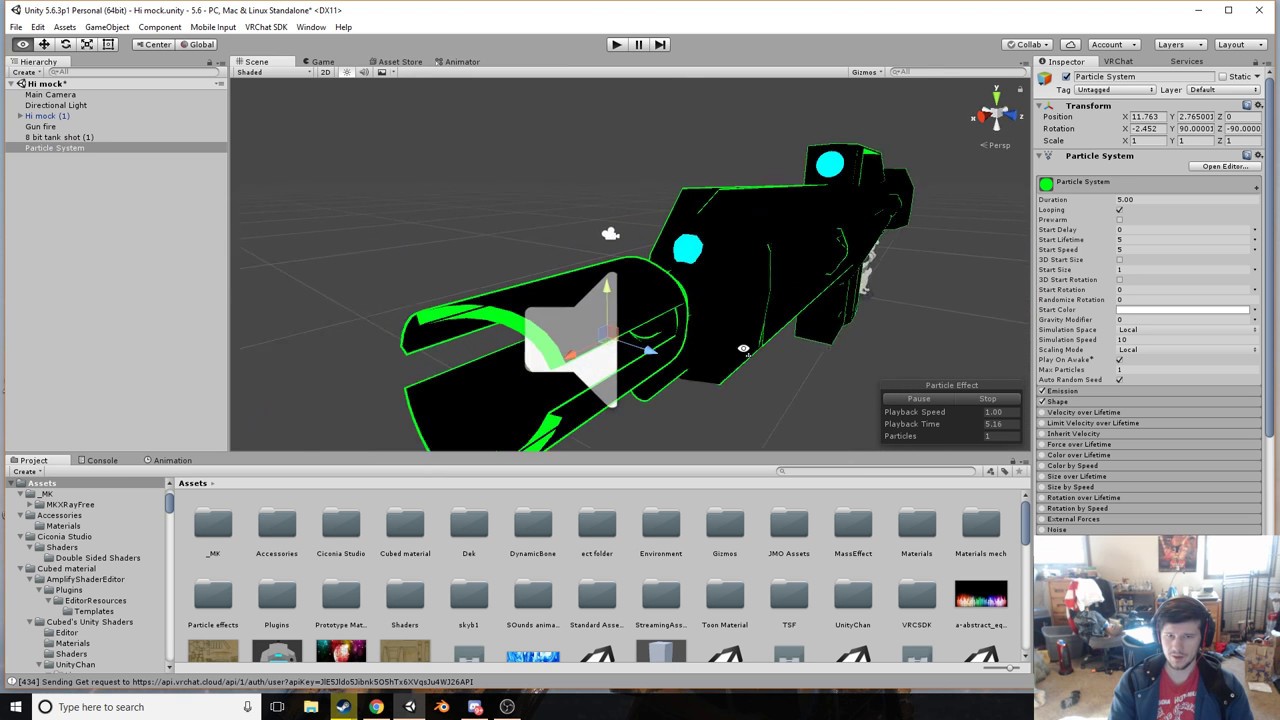
gun animation override from tutiroal from Doublegoose https://www.youtube.com/watch?v=wsaGVhIVSf8
 muted prairie
@timid terrace
timid terrace
@muted prairie thanks
muted prairie
It's Jazneo, not me 😉
timid terrace
still, i couldn't find that video
languid lark
there new ones
just made today lol
just sub me, tupper or doublegoose or anyone who make tutiroals
best way new info
 spark shard
@tender sierra Yeah that happens to me too, what I'm figuring is that you have to have a separate animation for your crouched idle position, as well as your prone for it to look okay
Haven't tested it, but that's my theory
D: I have no idea, If I do find something I'll be sure to send you a message ^_^
 upper crane
Crash Bandicoots fingers were an actual pain to work with but I finally got 4 decent anims with him 
muted prairie
How do we remove animations from only one hand ?
merry sand
hello guys. is there an animation like break dancing or dabbing?
muted prairie
Both exist, but you'll have to wait for someone who has them to send them to you, i'm not sure they are available online anywhere right now
 latent surge
muted prairie
latent surge
muted prairie
what's up
clear yew
Is there a link I can get to an updated tutorial for trigger animations? Something to replace the default ones
muted prairie
in world ?
merry sand
@clear yew ya i need that too
clear yew
yep guess there's not.
merry sand
i think there is
 edgy flint
someone have a solution for a soundproblem, i have 2 animations, 1 is pulling the gun, the second should use teh gunsound like im firing but... theres the problem the only thing i found for now is that if i set it on "play on awake" it working but anytime, no matter if i use the on gesture to fire or pulling out the gun, i tried yesterday to figure out whats wrong but now im completly clueless
ok maybe i found something now ^^ ill test it out but if u have some good ideas lemme know if its not work ^^
 fringe gull
Hey guys, my character does this weird lean in the animation screen, how do i fix it
 odd star
Anyone know where I can find a caramelldansen animation?
 median crescent
@odd star you can probably just search caramelldansen MMD motion download
and import it to blender
odd star
Ohh, I didn't think to search for the MMD motion, thanks ^^
clear yew
so, downloading motion mmds. Am I looking for VMD files? Those work?
opal lodge
I tried making a custom walking animation. But my character just falls in the ground instead of playing the animation.
What i did was the following:
- Make a copy of my model
- Add a animation on the model of 20 frames that does one loop of the walk animation
- Add the animation to a customanimation
- Add the custom animation to my main model
What am i doing wrong? It seems like the arms do move like the animated model is in unity, but i don't need that to move, only the legs
https://cdn.discordapp.com/attachments/390924344475254792/391690330371784714/unknown.png
 muted prairie
^ interested in this too
opal lodge
Feel like i'm just following the animation override video, but it isn't working
 strong wharf
i have some problem with custom idle animation my avatar always stand in defult in VRchat , any tips on how to fix this?
 solar edge
hello
 wooden ivy
How do I give my character an idle animation?
Without making new animations from scratch?
 finite brook
strong wharf
finite brook
strong wharf
@finite brook if you just want simple controlls you take "simple avatar controller", but if you want more type of animation it would be on "Avatar controller template". you might have to figure the rest out yourself :/
 whole igloo
Anyone got any animations I can use
solar edge
ok so
the model I got off the unity store came with animations
.control files
however
the VRC avatar descriptor isn't letting me use them as custom animations
 finite fossil
how to i disable the blinking animation when im using an override animation in game?
the blinking is automatically done because i have eye tracking implemented
strong wharf
@solar edge go to "animation" on VRCSDK folder and look at "CostumOverrideEmpty" you can place a bunch of costum animation there.
i recomend you make a second "CostumOverrideEmpty" by selecting it and press CTRL+D and drag it to your avatar folder .
im not able to help much since i only got started with the animation myself
opal lodge
Is there really nobody here who made a custom walking animation who can help me figure out what i did wrong? ..
native frigate
anybody got a tutorial for like pulling out a sword for my avatar?
solar edge
you mean like a custom emote?
I cant find an animation folder on VRCSDK
nvm just found it lmao
ok got it all set up
now I just gotta select the animations
what are PRONEFWD and PRONEIDLE?
strong wharf
@solar edge ProneFwd(Prone forward) ProneIdle(Prone Idle)
but you can also just ignore it, i dont have anything on prone
 quasi gale
@opal lodge I've actually been investigating something somewhat related.
From the looks of things, you're using a humanoid rig, so I'll be basing my analysis on that assumption. The rest pose for humanoid rigs is really weird in that they're usually halfway in the ground (Go into the Muscles & Settings tab of the rig configuration panel to see it) so the reason your avatar is falling through the floor is probably because your animation doesn't have a keyframe set for the Root T animation parameter and is reverting back to that rest pose. (I should also note that regular transform keyframes don't work on bones that have been mapped by the humanoid rig map)
As for why the remaining legs aren't moving, that's due to a combination of problems, but the main one is that the main walking blendtree for humanoid avatar animations is bugged up in that it won't interpolate animations for any keyframes besides ones for the mapped import rig. That is to say, you can animate the extra limb's in your IDLE animation, but they will always use that animation even when you start walking. (Emotes and jumping are fine as far as I can tell.)
The main workaround for this is to use a non-humanoid avatar and dispose of the humanoid rig map altogether. But that of course comes with the drawback of losing headtracking, hand tracking, and emotes, as well as needing to create your own animations and animation controller.
opal lodge
Aha, so if i get it right it's currently not possible to animate bones in the walk animation that aren't part of the humanoid structure?
Unless i'd make a non-humanoid avatar and do lots of manual work
opal lodge
Hmm, thats a shame. Was thinking i'd be able to pull that one of atleast
Thanks for the information tho, would be looking crazy to try and get it to work
guess i'll just keep it as more simple humanoid models for now, the crazy ones are still out of my league 😃
quasi gale
I'm still investigating into this, so I'll let you know if I find anything.
opal lodge
I'd appreciate it, thanks!
 quaint crystal
@quasi gale actually i'd like to point out that i did manage to animate additional limbs that arent part of the humanoid structure and still was able to maintain vr tracking, but i too am experiencing the issue where my avatar is close to the floor
quasi gale
@quaint crystal As part of the walking animation? How so?
quaint crystal

looks like this, those legs are just dummies tthe actual model has invisible legs
quasi gale
Hmm. But do they switch animations when you start moving and such, or is it just the same animation all around?
quaint crystal
i set this animation as my override for anything relating to movement
and idling
and it works ingame
quasi gale
Interesting, but from what I've tried, only the IDLE animation actually gets used. Everything else gets ignored when it comes to additional bones.
quaint crystal
so anyway i just need to figure out how to get the character to float off the floor
cause right now the model kinda sits ontop the floor and clips into the floor when i move
quasi gale
Which is a problem if you want those extra limbs to actually walk around.
It should be easy enough to change the Root T parameter in the animation, right? You could also just take the Armature node of your avatar and move it up a bit.
The sinking when you move part is caused by VRChat's animation system switching IK modes.
quaint crystal
i used Root T to make that hover animation but later found in vrchat that part of the animation never plays
so i might just use it to raise position
opal lodge
btw, what is that root T keyframe if i could ask. The name speaks a little for itself but i'm unsure
quasi gale
You can minimize the effects of the sinking-when-moving bug by matching your view position to be as close to the same position as your rig's head bone as possible
@opal lodge In the animation panel, if you click Add Property and expand out the Animator component, you'll see the animation parameters that control the mapped humanoid bones. Root T is the translation keyframe for the bone assigned to the Hips slot in the rig mapping when you import the rig.
If you import an animation alongside your model, these are the parameters that get used instead of the actual transform values of the nodes.
So the easiest way is to create your animations in Blender and import them with your model.
quaint crystal
yeah unity animations are easy to do but i wholesomely agree animations from third parties are always better
opal lodge
I guess for basic animations like changing face emotes it's just easier to do it in unity
quasi gale
I've always had trouble with it. Rotations for humanoid rig parameters are specified as quaternions, so it's a lot harder to adjust them.
 severe sierra
blender/3ds max has controls and tools that makes it easier to animate
 undone bronze
are you able to make a running animation in blender and make the game use it
quasi gale
@quaint crystal Oh, by the way, if you aren't getting anything by changing Root T, go into the rig configuration settings and check to see you have Translation DoF enabled. Otherwise translations will be ignored (according to the Unity docs anyways)
quaint crystal
ive actually never heard of that option until now, thats when your configuring the bones correct?
quasi gale
Yeah, it should be at the bottom of the Muscles & Settings tab.
There's also some settings in the animation asset itself that might help (Root Transform Position - Bake Into Pose)
quaint crystal
thanks ill try that, really want this histoire animation to work
i have lots of great stuff planned for it
quasi gale
Look forward to seeing it.
quaint crystal
wish i could upload rn but vrchat is having issues again
quasi gale
@undone bronze Custom running animations should be fine as long as you don't have additional limbs. Although the IK system will take control of the legs a little bit.
 sacred lion
why is vr chat having issues
opal lodge
servers are overloaded
sacred lion
ah makes sense why i cant log in
opal lodge
@quasi gale but to try the animation i can just put it as a idle animation and that should give me a good result or not?
quasi gale
As far as I've tested, that should work.
It will just keep playing that same animation even when you start moving.
opal lodge
Hmm, when servers are up i'll just try that once to see if I managed to get the animation correct
quasi gale
For the additional bones anyways.
 gaunt nest
so im trying to get the animator to make my models index finger point but the fingers just go back to the positon after i change it the animation tab
quasi gale
@gaunt nest From what I've experienced, the Unity animator can only set transform keyframes. This means that for bones controlled by the humanoid rig, those keyframes won't have any effect. You have to manually set keyframes for the rig parameters instead (Animator.Right Hand.Index in this case). As I've mentioned, they're specified as quaternions, so it's kind of a pain to do in Unity. You'd be better off doing it in Blender. (If anyone else has a better workflow for making humanoid animations in Unity, I'd love to hear it)
icy anchor
Is there a way I can test my walk animation in unity before uploading?
quasi gale
Not for the defualt animations, but you can for custom ones. First click play, then attach your OverrideAnimator directly to your avatar's Animator component. Open up the Animator state machine viewer and adjust the MovementX and MovementZ parameters as you like.
Just be aware that this won't allow you to preview the effects of foot IK which may alter the movements a bit.
 strange kite
@quasi gale @gaunt nest you need to animate muscle parameters not bone transforms to animate a humanoid. There's an asset on the store that makes this a bit easier, for about $15 bucks. It's not required though.
quasi gale
@strange kite Awesome. Good to know. Did you ever get emotes working on your facehugger avatar?
I found it kind of tricky to get a non-humanoid ground-based avatar to play nice with the humanoid IK system. The way it moves around your entire avatar hierarhcy - even the unrigged parts - is a real pain.
strange kite
I have visemes on chibi predator if that's what you mean.
quasi gale
Oh, neat. So did you end up switching over to a humanoid rig after all?
quasi gale
Oh, uhh. Oops I think I was thinking of @jaunty ridge 's avatar. I think I got you two confused because you also have a spider avatar.
strange kite
But yeah, trying to combine humanoid ik with a non humanoid could be tricky
quasi gale
You can disable the IK to some extent by unmapping the finger bones, but there's still a bit of weirdness whenever you move around.
strange kite
Better to not make it humanoid at all and use a custom controller, I'd think.
quasi gale
There's a lot of tradeoff. You can't use emotes when you're using a custom controller.
strange kite
True
quasi gale
You can hack it by using a sequence of directional inputs, but I've found that it's not guaranteed to show up on other player's clients due to network conditions.
strange kite
Oh interesting. Yeah if they don't sync with you it could get off.
quasi gale
I've got a big wishlist of things that I'm eventually going to dump onto Canny. Hopefully before the Avatar updates start going into production.
But for now, I guess we'll continue with workarounds like these.
strange kite
Cool. Yes custom animation layers and synchronized parameters would be good features.
opal lodge
Lets say i want to animate this sword to a character, can i make the chain have a animation that it feels natural?
Like you'd use dynamic bones on it?
or is that not possible for additions on models
quasi gale
I don't think there's any restrictions of that sort for dynamic bones as you see plenty of hair and cloth extensions that use it. Although I haven't actually used the dynamic bone script, so maybe someone else can speak to that.
opal lodge
Sweet, time to make some keyblades work!
 plucky skiff
alright 2 questions.... 1. How do i add a fixed position for my sword?
2. How do i override my input to switch the fixed point of the sword ?
(switching poiints -> from back to hand)
if anyone find it easier to explain me that stuff, i can do screen sharing and voice :p so dm if that might make you help me
pliant dust
@plucky skiff Here, follow this. https://youtu.be/eT5_nyb0T1g
Showing you how to change default emotes to weapons & stuff. SUBSCRIBE, LIKE AND ALL THAT GOOD STUFF!! :D MY FIRST TUTORIAL ► https://youtu.be/0vdiCJRAExw DI...
 calm ledge
im trying to make custom run animations in unity, but every time i test them in game they make my avatar sink 2 feet into the ground while they play
anyone know why that is?
nvm figured it out
 fathom atlas
anyone know how to add a permenant mic to my character not through custom animations
 storm flower
Guys, can some one give me some tips about having smoother animations while standing? I mean, when i look around and my legs move together to change the body position, is there any way to make that animation smoother?
 rose helm
Someone familiar with adding .Vmd files to a Pmx/fbx Model ? I'm using MMD Tools on Blender and Cats Blender Plugin but i cant seem to get the results done.
 tall zodiac
clear yew
tall zodiac
clear yew
Are visemes required for eye tracking?
pliant dust
@silk berry Make sure both animation keyframes are exactly the same. And you should only have two.
 surreal crater
Anyone know how to add weapons/props to character models? The youtube videos Ive been watching show the model with the weapon/prop already attached to the model
but I'd like to see from the very beginning how one brings in the weapon/prop in the first place
I assume it's no different than bringing in a character model?
@pliant dust 😃
merry sand
guys. are you using maximo for dance animation?
pliant dust
@surreal crater Don't look at me. I only know of the tutorials since I have no VR headset nor motion controls.
 tame surge
how can i get multiple animations to play simultaneously on an object?
merry sand
mixamo*

 torpid light
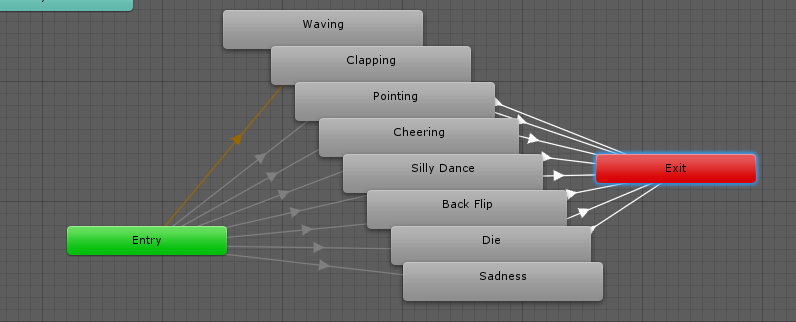
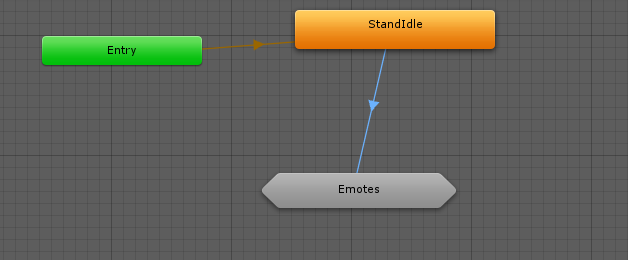
Does anyone have experience with overriding emotes like backflip/die/dance or whatever? I'm not sure why but my character stands still forever after trying to do an emote.
My animator looks like this
https://i.gyazo.com/30a9fdbcb95df53ce0b1ba1f731f98d2.png
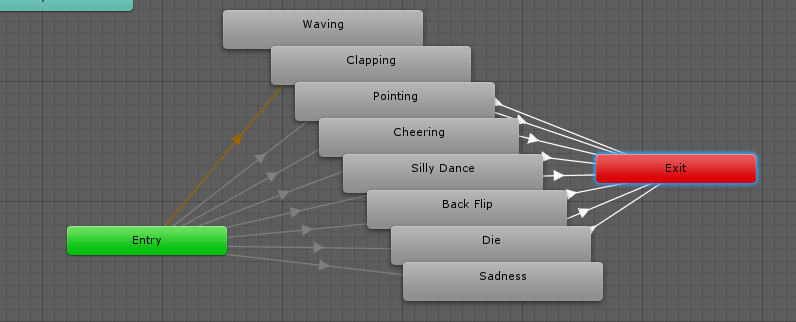
and the emote substate machine looks like
https://i.gyazo.com/740dfc73777cc29f7cc98d91b438f25d.png
The transition from StandIdle has a condition for emote > 0 and each of the transitions from entry to emotes have a check for equals 1-8.
Anyone got an idea what is causing the emote freezing?

 merry sand
is it hard to make this? unity chan with a super saiyan?
tame surge

Made a little tutorial for some friends in VrChat. Hope this helps if you have any question you can ask on my discord, Also regular content should be back so...
merry sand
@tame surge tnx
pliant dust
(snrks at the "Even Vegeta can do it".)
calm ledge
nvm thought i fixed my character not going into the ground with run animations but i didnt
im trying to make custom run animations in unity, but every time i test them in game they make my avatar sink 2 feet into the ground while they play
anyone know why that is?
the avatar stays above ground with the default run and walks, so im not sure what im doing wrong in custom animations
opal lodge
@calm ledge what are you trying to put a custom run animation on? Had a simular issue
calm ledge
@opal lodge im just trying to replace all the "RUNFWD", "RUNBACK", etc with animations of my avatar moving sorta side to side using the animators "Chest Left-Right" and "Chest Twist Left-Right"
the character just happens to be the same one you have in your profile pic lol
opal lodge
When you stand still the character isn't in the ground by default?
calm ledge
noo i didnt replace the idle animation so they go above ground when standing still
just when moving the animation plays
but they also sink into the ground by like 2 feet
opal lodge
I had to learn that replacing a movement animation with bones that aren't in the humanoid structure is pretty hard.
calm ledge
i tried adding leg bones in blender but not meshing anything to them so i could just use them as sort of invisible legs for the humanoid structure
but that didnt help
also tried making part of the tail a right leg
that also didnt help
calm ledge
lol so youre having the same problems getting miia into vrchat? xD
maybe its just the specific mmd model or something
opal lodge
People said it should be possible
 unique mirage
is there a place where i can download animations and just put them in the game
 elder hazel
im trying to make an object just appear above my hand when i do a gesture but it wont show up at all, do I absolutely need to add all the finger animators to get things working?
tame surge
no
how are you doing it
first keyframe should be disabled
2nd enabled
@elder hazel

 hard crag
the prop isnt considered part of the model prefab, shouldn't be an issue
elder hazel
ah ok
 undone star
Question: after I overrode the idle animation, every time I walk, I go slightly above the ground. Any ideas why?
I didn't override walking.
elder hazel
@tame surge I just realized why it isn’t working
my character doesn’t have finger bones
wooden ivy
One funny thing I found that may be a bad idea is that you cau use _end bones that control nothing for unused fingers
elder hazel
yeah thats mu plan now
 spice meteor
can someone explain to me why visements animations that breaks the position of the model (which is why you dupe them?) is not a problem when doing it for an VR animation but apparently is if you set it to an emote? I really have a hard time understanding to add an face expression to a non vr emote without my character going into a sit position
elder hazel
it has to do with the vrchat animator, basically you wanna make a duplicate and apply the changes to the duplicate, and then put the animation on the non-sitting model
if that makes sense
spice meteor
so the basic idea is to dupe, animate the model, screw up that model, take the animation, paste it to the original, throw it into the override and throw the override into the descriptor right?
elder hazel
yep
spice meteor
so If the model comes with visements bound to model emotes like these do I actually have to seperate them and port them one by one and be active on a given situation just like adding a weapon? https://gyazo.com/a7ea25ea59d54fc09ab7616dc677a987
 undone star
May I ask a question?
For some reason, even though my overriden idle animation is at the same level as the ground, walking animations and running animations are not.
Any ideas why?
opal lodge
Might depend on what you are animating. @undone star
undone star
The weird part is that I had to make the idle animation higher than everything else to fix my avatar "sinking" into the ground.
The other animations are already lower on the Y axis.
Should I just try making them even lower?
opal lodge
What does the model look like that you're trying to a animate?
opal lodge
I assume it's bones that aren't part of the humanoid structure? Like the tail?
undone star
Yeah, I had some fun animating the tail in the idle pose.
light source and all that jim jam
opal lodge
Truth be told I also have the same issues. Character sinks into the ground when making a move animation on bones that aren't in the humanoid structure
undone star
Hm... that's interesting.
opal lodge
They told me here it's very hard to pull it off
undone star
Well, I guess I'll have to put in double, then.
elder hazel
pm me i guess
 digital rampart
been searching on google and all i got was pulling out guns and sabers, where do i start to make my ryu do a tatsumaki animation?
https://rs112.pbsrc.com/albums/n177/shin_shoryuken/Ryu_TatsumakiSenpuuKyaku01.gif~c200

has to do with override a vrchat clap animation
ot something.. i believe
if yes.. a link to the guide would be nice
pliant dust
@digital rampart You'd likely have to override an Emote animation. Uhh... I can't reccommend it. Unity's default tools for animation are... really, really bad. It's a special kind of hell. So much so that people don't want to make a tutorial for it.
digital rampart
urggh.. nvm then
pliant dust
I mean, it's barely managable to do something like a quidk Dab. But... a hurricane kick? Urgh.
opal lodge
@quasi gale do you think it would be possible to animate those legs if I parented them as toes in the model or something? Been breaking my head on a bypass
torpid light
@pliant dust Do you think you could give a brief tl;dr of how you would override the emote? I've been messing around with the custom override and unity animations for a few hours now and I've only ever been able to freeze my character in place on an emote no matter what i try
pliant dust
@torpid light There no brief tl;dr for it. The best tl;dr for it is "Don't Do It! You have so much to life for!"
undone star
@torpid light Have you ever used Flash?
torpid light
Yes
undone star
It's based on the same idea of keyframes and tweens.
torpid light
I understand how the animations work in unity. I've gotten my character to move around perfectly fine, but it's the emotes that cause the problem
torpid light
@pliant dust Any links to lead me in the right direction at all? I really want to get this working
undone star
I currently have a problem of my own... apparently non-humanoid bones such as tails cause your Y-position to get all messed up.
pliant dust
Alright, here's the barebones. You only can make 10 second emotes. Anymore and the system breaks.
Once you make an animation, you have to slot it into the Animation Override.
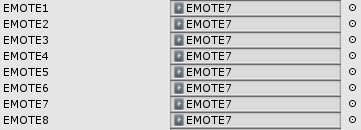
Of course, in one of the EMOTE# slots.
torpid light
I've done that. My test animation is 1.5 seconds and i've tried slotting it in the controller

I put it in all of them just for testing
cause once i get one animation the rest is easy
pliant dust
Bzzz! Too long! 10 seconds is all that's allowed or the system breaks!
undone star
I'm pretty sure 1.5 seconds is shorter than 10 seconds.
torpid light
hmmm so I have it setup correctly then?
pliant dust
Awfully short, though.
torpid light
Yea i'll replace it with an actual animation once it works in game of course
pliant dust
But yeah, you put your custom animation into the EMOTE# slot.
Then you can assign that Animation Override Controller to the Standing or Sitting Animation slots in your Scene with the Avatar in it.
(You'd probably want to put it in the Standing. Don't forget to leave the non-EMOTE# either blank or filled in with the placeholder stuffs that are named the exact same thing as their slots.)
torpid light
Ok i have the animation controller as it's own component at the momement(like you would in a normal unity asset) and it's working for movement. I'll try putting it in the avatar descriptor
that's probably it tbh
odd that movement works though
nope, same issue
edit: Looks like you can't have custom emotes with a non-humanoid controller.
undone star
Why is it that sometimes when I try to adjust the position or rotation of something, it gets stuck flipping between the value I assigned and 0?
Like, it's not even an "every other frame" thing. For example, if I click frame 0, it'll say (for example's sake) 0.15, then when I click frame 1 it'll say 0, then when I click frame 3 it'll say 0.15, then when I go back to frame 0 it'll say 0
even though it said 0.15 before
 proud lodge
Holy balls, my wife
muted prairie
@storm flower #tutorials
storm flower
My bad, thanks
spice meteor
hey guys when i import a custom dance animation is there a way to make it repeat in vrchat because one run is so short i would like to loop it for like 10 times before it ends
muted prairie
afaik it should loop automatically
spice meteor
huh? for me it plays the 60 frames for example and then ends regardless if i ticked loop time
 muted prairie
why is the last one red ?
spice meteor
i guess because the animation let the model go forward but i dont want that anyway
muted prairie
shouldn't the cycle offset be matching your frame duration then ?
spice meteor
its start time only
but i need it at a certain time to end
well in the end i just need to extend this animation i guess it would loop auto if I bind it to a vr headset gesture?
but not on a normal menu gesture
tame surge
anyone know how to make a proper muzzle flash?
muted prairie
@tame surge none of the tutorials you found show anything you like ?
tame surge
mostly just running into issues i'm not sure how to fix/improve
like why the particle gets smaller when i get close
 thorny flame
Can somebody tell me, how i can shoot with my MP5 when im pressing the Trigger Button, on my Oculus Rift. Because everytime i pull out my Gun, it shoots automaticly.
muted prairie
Shoot is probably set on the same trigger ? Or play on spawn something
thorny flame
I think i should place the MP5 File, not on the Handgun tab, rather i should place it on the Fingerpoint tab!?!
 keen sun
I have a question, this has probably been asked a million times; but I'm trying to override my animations by adding "weapons" that I will equip to my character. Does this weapon count towrads my character's 20k count?
 tawny elbow
OH LMAO i was just about to ask that
finite fossil
no but try to keep the weapons at a low poly count as well
keen sun
I see, thank you 😃
tawny elbow
wait is that about the emote animations or for spawning weapons in hand?
keen sun
I might be wrong but it seems to me that the only way to 'spawn' a weapon is through an animation override aka emote; but I suppose theoritically you could override your walking animation and add it there so Im not too sure.
tawny elbow
i was thinking through the hand motion stuff
finite fossil
yeah thats the normal way to do it, override an animation like the rock n roll sign or the finger pointing
tawny elbow
and that doesnt count towards poly?
finite fossil
it does not, but you should keep the gun or whatever object your spawning at a low poly count
just for performance sake
tawny elbow
Of course. I'm gonna suffer too if i dont optimise my models so i always try to aim for that
ty for the clarification : )
wait im back with another animation question
but more like for help finding something
anybody know of a good particle effect that looks like splashes in shallow water?
warm furnace
there are some good pack of particle effect for free on the asset store 😃
tawny elbow
anything that kinda looks like the stepping effect in the metaverse in p5 would be fantastic, but i'll settle for something else too
warm furnace
100best+particle effect and two other(Don't remember the name)
tawny elbow
Oh okay, i'll have a look at them
thanks for the reccomendations 👌
i also dont mind paying money for any if there's others that are also really good
spice meteor
anybody know how to extend the dances of mixamo?
clear yew
can I download dances or poses and replace them with my regular emotes? If so, where?
clear yew
Thanks but I've watched that video in full, not what I'm looking for.
That's why I'm asking people in here, I've watched like 3 videos on animation. Nothing's helpful.
spice meteor
@clear yew mixamo
anybody knows how to do this in blender with animations https://gyazo.com/620df42f8967aaed652d91f5596ba8f8

 barren ice
Anyone able for animation triggers? I'd pay for someone to do a few for me
clear yew
^ same
muted prairie
vrcat forum or vrchat traders discord
keen sun
I think I can't add swords and guns if I don't have VR, its a shame.
 final harbor
Does anyone know why a custom trigger's hands are working but the item isn't appearing?
finite fossil
what do you mean?
final harbor
The fingers are moving into the position they're supposed to, but the item isn't appearing
finite fossil
did you add the property to the animation?
so that the object gets enabled when you perform the animation
final harbor
I'm pretty sure
 final harbor
It's attached to the model, but not the one uploaded
finite fossil
it needs to be attached to the model
final harbor
When I try to do that, it just sticks to the hand as an object
finite fossil
you need to disable it while its on the model
 broken raft
What would you suggest the best tutorial for animations?
finite fossil
and make sure the object is parented to your wrist/hand
i mean theres a bunch out there with pretty much the same info
Creating custom animations for hand gestures and emotes in VRChat

Unity - Custom Animation Overrides, Blinking Animation, Dynamic Bones & Colliders, Viseme. VRChat #3
Importing model - 0:37 Toe Removal - 1:37 Applying Shader - 2:29 Blinking Animation - 3:09 Animation Override (Facial) - 7:24 Avatar Descriptor & Viseme - 18...
broken raft
Cheers
keen sun
I have a question, I'm getting an error in the VRChat build control panel when adding my sword to my character "The following component types are found on the Avatar and will be removed by client", its stopping me from uploading does anyone have any idea?
broken raft
@keen sun I got the same problem but it was just the model it’s self I didn’t have anything attached to it.
Did you ever try with out the sword and just the model?
keen sun
@broken raft Yeah with just the model is fine, as soon as I attach the sword I get this error. No idea why.
muted prairie
the sword may have its own component or script that isn't supported in vrchat
keen sun
@muted prairie If that's the case, bingo. I have a C# script running; I guess it was too cheeky of me to assume it would work.
@muted prairie Thank you, I guess I'll use a pure material.
opal lodge
Can i make a weapon animation and trigger it on the desktop version?
Or does it really need to be linked with the handgun trigger etc?
muted prairie
hand trigger afaik
opal lodge
I can't bind it to a emote button right?
clear yew
Question: how do i go about setting custom animations to emotes? i want all the normal ones besides 1 i just want to have a dab lol
muted prairie
Creating custom animations for hand gestures and emotes in VRChat
clear yew
@muted prairie Does that go through everything for setting emotes? or just triggers for gun animations? i watched one with the same title and didn’t help at all
muted prairie
@clear yew The emote part starts at 13:10
clear yew
Ah okay, thanks
 lusty cape
I have an fbx file thats an animation, how do I get it to work with my avatar?
muted prairie
i literally just posted the video about it
lusty cape
Ive tried that video but I just get the default animation pose in-app
and I have no idea how to assign the existing fbx animation to the model
languid lark
go to animation tab check mark Y and set the value so it not in the ground
muted prairie
If the animation doesn't play then it's because the model's armature has been altered afaik
lusty cape
that was it @languid lark, thanks! Didnt think to rebind all of that stuff in the animation as well as my avatar. Cheers
 bold cloud
anyone here have knwoledge of animation with mmd and willing to help editing this, please contact me

Google Docs
VRChat MMD model guide This is a guide for newcomers to use to modify MMD models and make custom avatar for VRChat. This process will take your TIME and PATIENCE, close this now if you do not wish to “waste your time” making these avatars or simply look at commissions links. Below will be the ...
 compact walrus
Can someone help me? "Simple" Problem: when i try to animate, like a item in my hand, i cant animate the fingers so that they grab that item, because when i add a property, there is no animator selectable. does someone know a solution?
native frigate
Is your model humanoid?
compact walrus
well sh**, .... i have no excuse for that. have been working on a lot of models nonstop. i think i need a break. thanks for the obvious hint lol wouldnt have guessed the problem was there
 indigo jolt
Anyone know why these textfields in Unity may be red and revert back to these 'initial' values whenever I try to change them?
muted prairie
What are you clicking on ?
make sure it's the model and not one of the things in your model
muted prairie
that's blender
indigo jolt
Only bone that seems to do this for me
muted prairie
not unity
muted prairie
Which bone is it
indigo jolt
The Jaw bone
muted prairie
Do you have visemes ?
indigo jolt
No
muted prairie
blendshapes ?
indigo jolt
Lip sync is set to Default in Unity
muted prairie
Something's going on with your jaw apparently
native frigate
Afaik red has to do with animation?
Like when my record button for animation is activated all changes are red
And the play/pause buttons too
indigo jolt
I see, so I guess the red has nothing to do with it
muted prairie
Oh so you were in play mode ?
indigo jolt
I am trying to do an animation
Every other bone I can rotate but this jaw bone, the value seems to snap back to a 'default' as soon as I rotate it
native frigate
Its red because its recording the changes as part of the animation
Oh
Dunno about that
tawny elbow
Is there any way to have partical effects only activate when i'm moving?
ashen sedge
Override the walking animation
tawny elbow
oh alright, i was worried that was gonna be a lot more difficult : )
maybe i shouldn't ask modelling qeustions as soon as i wake up lol
ty for the help : )
indigo jolt
Seems like the issue above i mentioned has something to do with the rigging. I removed the jaw bone from the rig entirely and now I'm free to animate it. So are bones in the rig not animatable in Unity or something?
muted prairie
Probably
 steady mantle
I dont know what happen to my animation I only made it so the sword open and closes like a wing flapping but it end up like this D: https://youtu.be/zREj0OFKPwU?t=1m28s
 clear yew
Any idea why animation shows normal in blender and in unity but in the game it kinda speeds up/collides with each body part
Using Avatar Controller template
steady mantle
I still cant get walking speed animation right... seems to slowdown when ingame
clear yew
@steady mantle same...but runnin ( RUNFWD ) makes avatar flying/levitating type of abomination
steady mantle
D:
I actually replaced my running and walking animation into floating since I cant sync up the leg speed...
clear yew
I did replace idle/ running fwd and walking forward = everyone in the hub 5 was looking at me like some kind of monster xD
How to i make my ava dance in game with a animation like die etc
You mean emotes? Or you want the actual animation?
ya i think so
Animation Override in your SDK
ya but how do i get a dance file or whatever to work on it
Watch Lil Mystical video about it...3 minutes to do
link?
ty
Np
Starts I think at 14:52
quasi gale
@opal lodge Well, there's only one toe bone for each foot, so I'm not sure how helpful it would be. You might be able to spin something by canibalizing the pinky finger bones which will give you 3 bones per hand for a total of 6. I haven't tested it personally, but if Unity's animation system allows arbitrary translation of the finger bones, you might be able to use them to animate your extra legs.
muted prairie
How would i go about removing animations from the left hand ?
Is that a default override and put blank into the corresponding slots ?
Is that even possible to remove the idle animation of the hand only ?
muted prairie
@clear yew #tutorials
You can also look in the search bar if you type override or emote, it's the one with elsa in a suit
 loud hamlet
Using Mixamo.com is the easiest way to get animations for emote overrides.
 fickle glacier
If a model doesn't have a jaw bone theres no way to use Visemes correct?
tawny elbow
Anybody got the particle ingredient pack on unity? any ideas on what values could make the ringtype effect have thinner rings here?
versed tide
so if i add a prop with a hand override, which means it should be turned off (right?), the uploader doesn't detect those tris but it's still there, right? i can't check because i don't have vr controllers yet
 jaunty ridge
It doesn't detect anything that's disabled. As far as unity is concerned a disabled gameobject does not exist, and does not get rendered until it's enabled.
versed tide
yeah, but will the weapon/prop be there when the user does the hand gesture?
tawny elbow
I was @ ed?
 solid heart
Wrong answer lol, I belive you need to edit it in the shapes tab
It's right under emissions
tawny elbow
I'll have a look at that later then, thanks!
solid heart
Yee
If not as I'm seeing on the actual particle being used, that's 3 of a set number so you may have more than one ring particle to look at
@tawny elbow
tawny elbow
nah, the 3 isn't making it thicker, it's just releasing more rings throughout the animation
solid heart
Oh no no
tawny elbow
they're all seperate
solid heart
At the vary top of the whole list where it says "ingredient-ringtype(once)-ring3
tawny elbow
i've tested it and turning it to one just made one thick ring come out instead of three thick rings
solid heart
What I was meaning was, you may have more than one type of ring particle to work with. It doesn't have to do with the stuff all in the middle
Colors can do a bit of change too. I know if you darken some things, the outer more see through spots seem to dissappear if not in multiply
tawny elbow
I'm not entirely sure what you mean sorry. By the looks of it, it's all a part of the one animation/particle effect
solid heart
This portion right here, it's saying you are using ring 3
Which would mean you have more than one ring type to work woth
tawny elbow
Oh yeah, okay. The other particles from the pack are named with the numbers. They do different ring effects, like I think 2 had the rings come inward?
I could check out the others though and see what settings they have
also tbh the video tutorial i watched on this wasnt too great lmao, so i'll also have a look for more comprehensive ones too
might help with understanding more ahaha
crystal quarry
How do I get a animation to play longer and also is their a way to get the body to move with the animations some animations I play I'm just stuck in one spot when I should be moving around
languid lark
@crystal quarry need vr controller
attact animator controller to game obj
then turn on the game obj
then hold the button till animation is over
emote only last 10 sec
pliant dust
Gesture overrides.
crystal quarry
Gotta gotta give me more then that plus a animation that's supposed to show my avatar walking around doesn't walk around he just sits there I'm not sure what to do about that
 limpid sundial
soo i heard i don't have to have vr to do some effects can somebody link me a tutorial or something? i would appreciate it 🤔
versed tide
haven't seen it completely but i think it covers it
https://youtu.be/CnykzgSxtz4
Made a little tutorial for some friends in VrChat. Hope this helps if you have any question you can ask on my discord, Also regular content should be back so...
limpid sundial
thank you
 thin monolith
Hey, im looking to animate my avatar with some aura sort of thing like how characters go super power mode with like electric in anime 😂 any tutorials/recommendations?
wooden ivy
☝
thin monolith
The link above?
limpid sundial
yes
thin monolith
Ah thanks
 gilded schooner
Anybody know where I can find some .anim files that are already made?
like dances, or emotes
limpid sundial
not gona lie but that tutorial was shit.. he didn't explain how to get to stuff.. so its not for total dummies
thin monolith
@limpid sundial ya i just watched it im totally lost, not for ‘dummies’.
limpid sundial
Showing you how to change default emotes to weapons & stuff. SUBSCRIBE, LIKE AND ALL THAT GOOD STUFF!! :D MY FIRST TUTORIAL ► https://youtu.be/0vdiCJRAExw DI...
this is better
tbh
thin monolith
Overwrite is the same as animation?
limpid sundial
yes
thin monolith
Ok thanks
thin monolith
Is that yours ? Lol
limpid sundial
yeah
thin monolith
That tutorial uses weapons though, looking for aura effects (hopefully adding some sound effects to it too)
limpid sundial
it should work
thin monolith
Im just not sure which steps not to do lol
crystal quarry
Idk I feel like you could play around with it
And figure rhat out
Specially if your adding this effect to your hand then playing it in a loop when a certain hand gesture happens
thin monolith
I want it to start at the feet and spread out electric stuff i guess?
@limpid sundial i think u have to duplicate the model to put the animation
limpid sundial
yeah i did
atomic canyon
Are there any .anim dance type files that people have already created that they are willing to share?
atomic canyon
Real quick question. I'm using a vmd file to make an animation in blender, but it's long and I just want to use a small portion of it. How do I crop the section I want to use?
nvm, figured it out ^^
Now to figure out how to open my character's eyes ><
muted prairie
@atomic canyon make sure to give your solution in this channel so that people can find it if they need it
atomic canyon
Oh sure, when looking at the animation bar at the bottom, there's a "Start" frame selection and an "End" frame selection, figure out what values you want those set to, set them, and walah!
I don't know enough about Blender to know what I'm doing for actually changing model aspects for the animation
For this dance animation section, her eyes are closed, but I want them opened
I think I just need to figure out how to access the model stuff for each frame
If anybody has some Blender experience I would greatly appreciate some guidance ><
atomic canyon
So....when I exported the .fbx and put it into unity, it still had the full animation....not the cropped section
opal lodge
@limpid sundial you have 2 options, add dynamic bones on the body so they're all in one place and organized, or put them on the specific bone itself. If you fill in a bone with children they will also get the same properties tho, unless you add them to the exclusions
limpid sundial
so
if i get it right i can add @little hollowb\er
fuck
so if i get it right i can ad dynamic bones to the body
and then ad exclusions
for like right leg left leg and spine? 🤔 @opal lodge
wooden ivy
Can I add onto the existing gestures? I tried making copies of the gestures from in Unity but they don't even show on the animation preview!
 feral thorn
I have all my movements set to a funny running animation but my arms get taken over by VR controllers rather than the animation. How do I stop the controllers from going over my animation?
clear yew
If u place model in unity, before it u change the animation type to humanoid, should i change the item animation type also to humanoid or let it be generic?
 topaz grail
How would I go about giving my character lights for the eyes? (Not sure if this is the right area to post this)
 wooden aurora
Use a light object?
 marble orbit
Hi, I need help with the problem that all emotes are showing at once. Idk how to fix this, and I'd want this to appear only when I press a button or trigger an emote
crystal quarry
are you in a animation now @marble orbit like were you making a animation and this happened?
Need to know more information
marble orbit
I've asked the other guy in #avatars-2-general and he told me that my problem could be the fact that I had the wrong version of unity
crystal quarry
thats possible I guess but Im still curious did you just open up unity and it showed this?
crystal quarry
okay? whats your problem now
marble orbit
I've got all expressions on at once, he told me to change it to opaque, I think I changed the wrong setting
There should be "Render mode" but I couldn't find it
crystal quarry
so all the expressions are still showing
muted prairie
@marble orbit You're using 5.6.3p1 now ?
crystal quarry
I was going to say can you give me a shot of what she looks like in blender
is she completely fine
marble orbit
crystal quarry
or are all her emotions showing there too
marble orbit
Oh, blender is fine
muted prairie
Try selecting the mesh in your hierarchy
muted prairie
look at the error at the bottom
marble orbit
muted prairie
Yeah you should start from scratch and install the shader's correctly just in case
marble orbit
I installed this shader from the Github link, is there perhaps a much more updated version?
crystal quarry
This even has me stumped
marble orbit
Link it here if you've got it, the one that I've got could be outdated
crystal quarry
did this only happen when you applyed the shader if so now I know where hes coming from
marble orbit
I think it was like that from the start, I just usually ignored the error
crystal quarry
switch the shaders to standard and find out real quick
crystal quarry
oof
marble orbit
Hmmm
finite fossil
Do you plan on using those blushes and stuff for emote overrides?
If not, just delete those meshes on blender
marble orbit
Yea, I'd want to be able to use them if possible
It's also worth it to have the rendering mode so that I can unhide the covered mouths in some MMD models
crystal quarry
:/
marble orbit
CubedShaders never get updated right?
or was there a new update?
My one is like 2 months old
marble orbit
The same github link?
Basically this https://github.com/cubedparadox/Cubeds-Unity-Shaders

GitHub
Cubeds-Unity-Shaders - A compilation of custom shaders for Unity3D
I'll redownload and reimport those shaders
How did you install your Cubed's shaders? Just drag and drop into the assets folder? @crystal quarry
crystal quarry
No
You gotta install the custom package
You go into unity
Click import package
Click custom package
marble orbit
It's looking for a unitypackage file, I don't think the CubedShaders has it
marble orbit
 marble orbit
I couldn't find the package file unlike my Dynamic bones





 marble orbit
crystal quarry
marble orbit
crystal quarry
ima just
marble orbit
For some reason my package folder was missing
crystal quarry
drop you the file
marble orbit
Sure, thanks
I got mine from github
Maybe that's broken or smth
@crystal quarry Thanks, I've got it. Now I'm going to reimport and see if that fixes the errors
clear yew
i have a model and a (.vmd)dance animation that works fine in blender but when i fix the bones the animation dosn't work anymore..can someone help me?what should i do to fix bone hierarchy withought affecting the animation?
marble orbit
@crystal quarry The errors were fixed, but I'm still unable to see the "rendering mode"
clear yew
yes
 granite prairie
Why my avatar dances around normally in unity but when I put it in emote menu and play the animation in game, he danced but doesn't move around
 boreal acorn
Hi guys are there any well known guides or videos that explain how to map facial emotions to hand gestures?
trying to figure it out
muted prairie
@boreal acorn this one will help https://youtu.be/p0txtOuZtx0
Unity - Custom Animation Overrides, Blinking Animation, Dynamic Bones & Colliders, Viseme. VRChat #3
Importing model - 0:37 Toe Removal - 1:37 Applying Shader - 2:29 Blinking Animation - 3:09 Animation Override (Facial) - 7:24 Avatar Descriptor & Viseme - 18...
brittle vigil
so
say I wanted to edit the sitting anim?
I cant find it in the node graph


if I leave them blank will they default to the mixamo oneas?
ok
out of curiosity could I tweak the transitions and stuff in the animator graph and have it take in game?
yeah I dont see a sit animaiton on here\
_<
unless its named something else?
 stuck cape
are mixamo animations any good? I exported one and didn't work as intended
clear yew
Can I use animation overides to have the Blush material here only show up during certain animations? It's stuck on currently and I'd rather not just delete it
 lofty radish
For animation overrides does it only last for the amount of time u spend doing the hand signal or does it just turn on when u do the signal, then turn off when u do it again?
versed tide
@clear yew i believe you can do it with a blendshape having the blush geometry just a little bit inside the face geometry and then move it outside when the animation override is active
clear yew
So would I have to go back to blender to do that?
 ivory helm
So I'm getting an error that says "This avatar does not contain an animator, and will not animate in VRChat" How does one fix this? I know obviously I need to add an animator but as a total noob, I have no idea how to do this. Is there a guide of some kind that will go into detail about this? I've found the animator section but everything I'm reading says it should be working
 torn pawn
@ivory helm select your dude on the left when u drag it in, then Add component on the right
typ ein descr and add vrc_avatar_descriptor
 hasty mist
How would you go about animating a bone to rotate infinitely?
hasty mist
I want to get a bone to rotate on the Y-axis infinitely
wooden ivy
If I attach face visemes to gestures, will both my hands play them at the same time?
severe sierra
you can do a gesture in 1 hand while doing another in the other hand
if both gestures affect the same bones/visemes it might get glitchy
actually i don't think it does
not 100%
hasty mist
still stuck trying to animate
wooden ivy
They affect the same mesh
I was thinking of putting viseme face expressions onto them.
 pale trail
I have a 5ish second looping animation I made in Blender that I'm trying to assign to one of the "finger gestures" in a custom Animation Controller. When it is triggered in VRChat it takes around 10 seconds to /very slowly/ transition to other animations. Did I create the animation wrong? I have other 2 frame animations that work fine with each other.
strange kite
The hand gesture are only designed to be 1 or 2 frames.
You can use those frames to enable other objects that have longer, separate animations on them. But if you make the gestures themselves too long you'll run into problems
pale trail
Oh, that's good to know, and that makes sense. Thank you both! By using the frames to enable other objects do you mean with triggers or something?
severe sierra
If you have a looping animation on an object that's only enabled when doing a gesture override
pale trail
Do you know of an example for that? I'm unfamiliar with the technique.
severe sierra
Creating custom animations for hand gestures and emotes in VRChat
The object you enable/show when doing a gesture override has a looping animation on it
not sure how else to explain it
pale trail
Oh you mean showing/hiding other bones.