
#world-development
39 messages · Page 92 of 1
 turbid ocean
Well, I'm not using it. But it's part of the SDK,, so it's there. I haven't used it.
Thanks for the help.
 quartz scroll
@kind leaf UModeler also has a free version. It's worth to try.
https://assetstore.unity.com/packages/tools/modeling/umodeler-lite-133081?utm_source=manual&utm_medium=link&utm_campaign=umodelerlite

Get the UModeler Lite package from TRIPOLYGON, Inc. and speed up your game development process. Find this & other Modeling options on the Unity Asset Store.
 spring temple
Dope dope dope
 indigo fossil
https://assetstore.unity.com/packages/tools/visual-scripting/amplify-shader-editor-68570
there isn't a free one, this is the closest there is

Get the Amplify Shader Editor package from Amplify Creations and speed up your game development process. Find this & other Visual Scripting options on the Unity Asset Store.
 proud harbor
Is anyone having issues with the newest version of the sdk where it just doesn't give any error but the publisher is blank
 rain shadow
proud harbor
Is anyone having issues with the newest version of the sdk where it just doesn't...
rain shadow
proud harbor
Is anyone having issues with the newest version of the sdk where it just doesn't...
Re-Import the SDK
 shut lichen
so i try get 3d sound but set on 2d sound for car?
 near escarp
Don't use the spatialization component
 kind leaf
So I noticed something strange, Ive seen it before in other Unity versions so I might just need a reboot. But if I have a float that is increasing such as a timer and the float is exposed to view the changes in the inspector it only visually updates every 5 seconds or so, to make it visually update as you'ed expect I have to wiggle the mouse over the inspector continuously. The actual float continues to update as expected in the background. Anyone else experience this?
proud harbor
im still having the issues where the builder breaking with no errors
rain shadow
proud harbor
im still having the issues where the builder breaking with no errors
Even after reinstalling the SDK?
proud harbor
yeap
rain shadow
Do you have any errors in the unity console?
proud harbor
nope
rain shadow
proud harbor
nope
What did you do to reinstall/reimport the SDK?
proud harbor
i manually remove the sdk the get a fresh version of the sdk from the website then i install it
rain shadow
Try import again without removing it
 subtle relic
how do i enable legacy movement in sdk3?
rain shadow
subtle relic
how do i enable legacy movement in sdk3?
VRCPlayerAPI UseLegacyLocomotion
subtle relic
rain shadow
VRCPlayerAPI UseLegacyLocomotion
thx
 olive shuttle
So i got a random question - So i made Door system with animations - Is possible to sync it?
 topaz basin
I never did something like this, but try adding vrc object sync to it & test it with somebody. Sounds interesting
olive shuttle
Il try that 😄
subtle relic
rain shadow
VRCPlayerAPI UseLegacyLocomotion
cant find that, doesnt seem to be a component
rain shadow
subtle relic
cant find that, doesnt seem to be a component
It's an Udon node
 faint ledge
Hi ♥️ did someone ever build a swimming world ? Do you know some tutorials ? 🧐
 rustic mantle

If you are migrating a #VRChat world to 2019 and it uses Standard Assets, you will get errors from ForcedReset.cs and SimpleActivatorMenu.cs. Thankfully you can safely delete these files without breaking anything. Clicking on the console error will take you to the file to delete. https://t.co/84Ivkzd5Am

 Twitter
·
Twitter
·
For anyone who still utilizes Standard Assets & Cyan's Climbing prefab
Climb mode and NotSoBad cars still work in 2019
 inner portal
Does anyone know the name of the asset/shader for the rain droplets on the glass?
proud harbor
rain shadow
Try import again without removing it
nothing change im going roll back on the sdk see if that helps
 errant beacon
inner portal
Does anyone know the name of the asset/shader for the rain droplets on the glass...
olive shuttle
errant beacon
inner portal
Does anyone know the name of the asset/shader for the rain droplets on the glass...
olive shuttle
possible to make a "trash can" that can delete stuff? like cans and such?
 leaden hazel
olive shuttle
possible to make a "trash can" that can delete stuff? like cans and such?
leaden hazel
olive shuttle
possible to make a "trash can" that can delete stuff? like cans and such?
Yes, create a trigger inside it and then script it to delete objects that get placed inside it
 sour scaffold
when I moved my world over to Unity 2019 I lost the control panel for the VRC SDK
I tried removing and replacing it with a new version but that didn't fix it
proud harbor
@rain shadow i guess rolling the sdk back works
rain shadow
proud harbor
<@!183779109296537600> i guess rolling the sdk back works
Were you on unity 2019 with the latest SDK from the website?
proud harbor
rain shadow
Were you on unity 2019 with the latest SDK from the website?
yeah i was
sour scaffold
How do I make it so when a player clicks a button they teleport somewhere
idk how to do it in Udon
proud harbor
@sour scaffold #udon-general
kind leaf
sour scaffold
idk how to do it in Udon
https://www.youtube.com/watch?v=vPPpFokmS-Y see this dudes channels for all your base udon needs

Here I've done a tutorial on creating a simple teleportation system for VRChat using both Udon and UdonSharp. This video was recorded and edited in a different manner, so if you have any thoughts, recommendations, or requests, I'm game to listen! Hope you can find this useful!
VRChat Udon SDK:
https://vrchat.com/home/download
UdonSharp:
https:...
 lunar raptor
someone knows how to fix vrc control panel not opening in 2019? i dont know what to do
 sour scaffold
lunar raptor
someone knows how to fix vrc control panel not opening in 2019? i dont know what...
sour scaffold
lunar raptor
someone knows how to fix vrc control panel not opening in 2019? i dont know what...
I had the same issue
check your console for build errors and fix them
You can just delete bad scripts

 near escarp
close unity and reopen it, there might be errors then
lunar raptor
already tried that. i opened a new one without anything. i am trying to reimport the sdk all the time. i dont know whats wrong
the one sdk world from vrc.com is the correct one right? or do i have to download somewhere else the new one?
nvm i found it. fucking unity opened it on my second monitor
which i never used for almost a year
 silent night
Got someone who’s looking at “strobe lights” for a dance club I’m gonna be making. Does anybody know of the way this is done? I’d assume animation is the best way of going about it, but what about to make it random and changing?
 dawn storm
Could animate intensity of either a material emission or a point light. If you need it in sync with music that'd be a Udon thing.
silent night
dawn storm
Could animate intensity of either a material emission or a point light. If you n...
What about the volumetric lighting that you could normally do? Would that be something to do with a “shape” with a particle shader being used for it to be see-through?
dawn storm
Honestly I have no clue, I'm new to this myself
silent night
It’s a new thing for me, but if I don’t force myself I won’t learn~
 polar quail
should i put automatic resync on or off for video player ?
polar quail
hmm ill put it on lets see
im also making quest support for my world but i heard video player does not work on quest ?
is that true
dawn storm
polar quail
oof so i have to make a playlist for quest users to be able to use it that scks
thank you for your answer
dawn storm
i know nothing about this at all I just searched stuff up in this server
Question of my own real quick, I'm trying to setup specific music for specific areas in my map, and I need the audio to sound the same regardless of if players are facing towards or away from the source, but only affect about a 65 meter area in radius. I have the far/near setup right but haven't found a way to get rid of the change in sound depending on player orientation, or, to make it only affect a certain area while not being 3d
silent night
dawn storm
Question of my own real quick, I'm trying to setup specific music for specific a...
Modify the drop off, that should fix it.
There should be a “Max” and “Min” distance that can be changed.
dawn storm
have it set for the area

So far I've gotten 2d sound that plays everywhere or 3d sound that plays in the specific area but changes in effect based on your rotation relative to source
 meager anchor
Tried deleting VRCSDK2, reimporting the new one twice, and..... yeah

 random owl
What errors do you have?
 nocturne crown
wont let me build

 harsh wagon
This might fall under world lighting more, but I'm having issues with the standard matcap shader on a world I'm making.
The matcap I'm using is made using a reflection probe on the map, but for some reason it's a lot darker when used at a matcap.
I know I could make the material fully metallic and smooth instead, but I'm going for good performance.
 crystal hazel
Has anyone else been having issues with chairs since the update? I can't for the life of me figure out what the issue seems to be. Running SDK3. Desktop is able to enter / leave stations without any issues, however in VR if some one enters a station, it locks them in place. Unable to exit by moving, unable to respawn. Have to force quit. Disable station exit isn't checked, so I'm lost.
 deft spoke
Anyone else unable to change anything in the "Configure World" screen besides the title of the world since migration into Unity 2019? Regardless of where I try and click to edit the description of the world or the number of players it can support it just will not change.
meager anchor
meager anchor
Tried deleting VRCSDK2, reimporting the new one twice, and..... yeah
Actually nevermind, I've just decided to create a new 2019 project, import the new SDK2, closed Unity 2019, and moved over everything my assets.
My next problem is that all the post processing doesn't work and it broke. I've already uninstalled and installed via package manager.
 random owl
meager anchor
Actually nevermind, I've just decided to create a new 2019 project, import the n...
random owl
meager anchor
Actually nevermind, I've just decided to create a new 2019 project, import the n...
You have post processing in the projects twice one is a package and other one is in your assets
meager anchor
Ohh I'll have to find the old one and delete it, Thanks 1!
rustic mantle
Does anyone know this works in 2019?https://twitter.com/Ruuubick_/status/1166014308918185984

Turns out a lot of world creators didn't know this, but you can easily find out what your world is made of, how much it weighs, to then be able to reduce its overall size :
Retweets
184
Likes
409
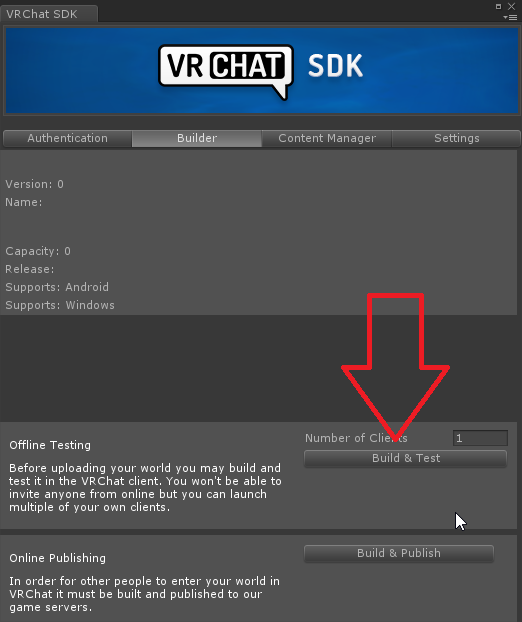 Twitter
·
Twitter
·
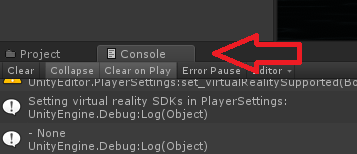
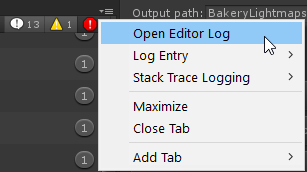

I open editor log and nothing is there
im trying to determine my filesize and nothing shows
rain shadow
rustic mantle
Does anyone know this works in 2019?https://twitter.com/Ruuubick_/status/1166014...
It will but you will need to build and test first
rustic mantle
rain shadow
It will but you will need to build and test first
i did
dont understand why it wont show
rain shadow
Like nothing at all?
rustic mantle
rain shadow
Like nothing at all?
o u mean build and test locally
i was doing build and publish lol
rain shadow
Build and publish should work also though
rustic mantle
what the
rain shadow
You can try build and test though
 pale marlin
oh wait I'm sorry I posted that in the wrong place
 scenic harbor
I am running into what I believe is the exact same issue; I followed the migration guide and have also tried re-importing the newest SDK and the url input field just doesn't show up (and all of the vrchat example prefabs that use it claim to be missing scripts)
meager anchor
hmm I know I'm not the only one about having the "not initialized in time!" error, that's the only error I see for like 300 objects.
So something is going on :/
 rain shadow
meager anchor
hmm I know I'm not the only one about having the "not initialized in time!" err...
rain shadow
meager anchor
hmm I know I'm not the only one about having the "not initialized in time!" err...
You don't need to worry about that error
You can stop it by installing CyanEmu into your project as that has a built in fix for it
meager anchor
Well when I press build and publish, the game window doesn't show for uploading, I thought those errors were the reason
rain shadow
On the console tab do you have error pause enabled?
rain shadow
Do you have any other errors?
meager anchor
Nope that's the only error, 300 of them
rain shadow
What does the game window show?
meager anchor
gimme a min to click build and publish
That's all it shows, just my project using the main camera i believe
 rain shadow
Find that camera and make sure the depth is 0 or lower
Or just disable the camera that is rendering in the game view
rain shadow
I meant what does the game window show when you go to build and publish
 meager anchor
rain shadow
I meant what does the game window show when you go to build and publish
meager anchor
rain shadow
I meant what does the game window show when you go to build and publish
It shows the same thing, so I'm just at an utter confusion right now
rain shadow
meager anchor
It shows the same thing, so I'm just at an utter confusion right now
If you scroll down is there a second scene file being added when you go to build and publish
In the hierarchy
rain shadow
Actually I think I can tell that there isn't
meager anchor
rain shadow
Actually I think I can tell that there isn't
yeah it's just my one scene
rain shadow
Restart/Reimport the SDK?
rain shadow
 vivid brook
im in unity 2018
vivid brook
im in unity 2018
If you are using unity 2018 and a recent SDK yes
The newst SDKs dont work with 2018
meager anchor
vivid brook
Does it matter
Yeah you'll need to follow the updating steps here, a lot of things with 2018 are broken right now.
#announcements message
vivid brook
oh god.
Thats going to be impossible.
This literally is so hard... I can't do this.
WOW
I hate this game.
 sudden lily
Is there some layer combination I can use to make a mesh bounce off a player? (Eg; a ball)
meager anchor
rain shadow
Restart/Reimport the SDK?
I think I found the problem, I believe it's the new SDK2 itself. I made a new Unity 2019 project, imported just the VRCSDK2, and tried uploading an empty project (with just VRCWorld, and a Plane).
It was the same thing....
rain shadow
meager anchor
I think I found the problem, I believe it's the new SDK2 itself. I made a new Un...
Oh
When you get that popup that says reload the scene press ignore and not reload

 winter oriole
what is the best video player for unity 2019?
vivid brook
Anyone know how to add fire to a world
the fire prefabs I got from asset store were utter garbage and didn’t work in my world
 neon heart
Does anybody have any advice with this problem, This a udon world I have been working on and i have been getting this over time with other worlds to since beta. Gradually over time its been getting worse and worse and now I just can't update my world, I've tried, deleting SDK, restarting PC, deleting cache both Unity in the temp folder and with lighting and even uploading to a new blueprint, All without fail lead me to this outcome, I'm completely lost on what to do.
 near escarp
neon heart
Does anybody have any advice with this problem, This a udon world I have been wo...
near escarp
neon heart
Does anybody have any advice with this problem, This a udon world I have been wo...
Check your console for errors
vivid brook
near escarp
Check your console for errors
hey ruubick- if an asset store item isn’t showing in game is it due to the asset not being optimized for VRC
near escarp
Nope, probably script based or shaders issues
neon heart
I did, It says upload file corrupted, I accidentally cleared it so I will upload again and I can paste it, Looking through there doesn't seem like anything, Ty for responding Ruuubick
vivid brook

Add depth to your project with Fire & Spell Effects asset from Digital Ruby (Jeff Johnson). Find this & more VFX options on the Unity Asset Store.
This is what I tried to put into my world
But didn’t show in game
 vivid brook
I had to delete the demo stuff haha
Do you have a good one you would reccomend for some quick fire?
vivid brook
Oh yea they have particle systems on their prefabs
near escarp
https://assetstore.unity.com/packages/vfx/shaders/particle-shaders-vol-1-35069
There's one fire one in there that might be good enough ?

Add depth to your next project with Particle Shaders Vol. 1 from Michal Piatek. Find this & more VFX Shaders on the Unity Asset Store.
The best fire effects are often through sprite sheets though
might want to look for that instead
 near escarp
Can you show only the errors, if there's any
neon heart
Um I'm not sure that there any
Just warnings


This is the entire console
There was errors yesterday but I removed them all and i was still getting an upload fail, The upload also takes a really long time, It use to be faily quick like maybe 10 minutes but since beta for me its been like 30 mins+
It always fails to right at the very end of upload, when it updates the upload file to. What I don't understand is this what I have rn with this world is Udon and Unity 2019 but I happened with my SDK2 worlds to on Unity 2018. Its a really weird issue to have, I don't know what could cause it.
near escarp
i'd like to see the console after you try to upload a world
meager anchor
rain shadow
https://feedback.vrchat.com/sdk-bug-reports/p/sdk2202108041123-pressing-build-an...
Yeah I found that eventually and that worked, thank you though ^^
 median egret


 true onyx
Hi
I Want to make my own World As a home And chill but dunno how to start
if someon would kindly help me I Will be grateful
pls @ me or send a dm
kind leaf
true onyx
pls @ me or send a dm
true onyx
@kind leafDo you have time to call?
kind leaf
naw, sorry first two links explain it all, the youtube search gives you plenty of visuals. bottom two links are tools that make life easier
 mint anvil
let me just grab my STATE OF THE ART blrnder!
true onyx
IKR Aka The Best
true onyx
Honestly iam trying to understand how to do it but its like learning math for the first time
 mossy cedar
hi, I just updated my projects to Unity 2019 following every step of the guide including installing udonsharp. My VRChat drop down menu is missing the builder and I get this error in the console

anyone have any idea what's wrong?
would appreciate some help
kind leaf
mossy cedar
hi, I just updated my projects to Unity 2019 following every step of the guide i...
select the second error about the standard asset. it should direct you to a script. delete it.
mossy cedar
okay, will try that
kind leaf
it should auto refresh after you delete the standard shit, if not save and reload. But normally it refreshes and just works.
true onyx
kevbal not tryna be annoying af
But uhhhh
I Need Help cuz i dont understand the vids
mossy cedar
@kind leaf that worked, thanks a lot, you're a lifesaver
I was working on a world to celebrate someone's birthday today and I was at my wit's end with things breaking last minute, so I really appreciate your help
kind leaf
mossy cedar
I was working on a world to celebrate someone's birthday today and I was at my w...
Anytime, good luck. We all have had that issue. Standard assets are in almost every unity asset.
kind leaf
true onyx
I Need Help cuz i dont understand the vids
So what are you confused about ?
true onyx
How to bulid
All i want is a room to put Photos in A Bed and a piano
But they all Going for the FULL ULTRA
kind leaf
And you have:
Unity 2019.4.29f1
Latest SDK (2 or 3 but not BOTH)
scene descriptor in the room
scene descriptor can easily be added by searching for VRCWorld in your project.
kind leaf
That was in English, there is no other way to ask about that that stuff lol. Just follow the top two links I sent and you wont have an issue.
 wraith cipher
is there a way to upload world straight from blender?
im not trying to get my world verified
true onyx
Hi
umm
I Can send you a link to a vid iam watching you can go to a specific minute and find it if you wana ofc @wraith cipher
wraith cipher
sounds good 😄
true onyx

Download Package here:
https://drive.google.com/file/d/1L9GfRTsKZgz8yo7ON_oGq7fNCrlpU6cH/view?usp=sharing\
Starting in Blender 0:58
Texturing 34:33
Exporting from Blender 1:02:45
Importing into Unity 1:03:06
Unity Materials and Textures 1:07:38
Importing Assets 1:13:13
Colliders 1:24:04
Pickups 1:26:37
Lighting 1:28:59
UI Triggers 1:49:05
Post ...
1:03:06
Thats the time you wana go to
I GIVE UP
wraith cipher
whats up zero? you good
true onyx
i been trying to understand buliding my own world for the past5h
It wont get in my brain
wraith cipher
https://www.youtube.com/watch?v=DB-ugW7xGhk try this one

In this video I show you how to create a world in Unity for VRChat.
*** [OLD] THIS VIDEO WAS MADE A WHILE AGO SO SOME PARTS MIGHT BE OUTDATED***
Timestamps:
Download Unity and the VRChat SDK 0:17
Build the world 2:33
Add textures and materials 5:18
Change skybox 7:29
Add a mirror and button 8:23
Add a VRC_SceneDescriptor and spawn point 10:15
...
i still dont get it but im chillin big time
kind leaf
wraith cipher
is there a way to upload world straight from blender?
im not trying to get my w...
no you cannot upload from blender. You create in blender and then can import the asset into unity. If you dont want it public you dont check the community labs box when uploading.

 unkempt turtle
have you tried detaching the blueprint id already?
true onyx
dunno whats that really
The world i got it From a world maker that gave it out for anyone that tryna start And modify so iam bretty new and donno
unkempt turtle
select the scene descriptor object and look for the pipeline manager component. there is a button saying "detach" on it
true onyx
@unkempt turtlesorry but wheres the scene descriptor
unkempt turtle
usually in the vrcworld prefab
 unkempt turtle
first of all you should unpause the scene
 unkempt turtle
then you should see if there is a VRCWorld Prefab like this in the hierachy
 true onyx
 unkempt turtle
once you clicked on the VRCWorld Prefab there should be a few components like this in the Inspector tab

the pipeline manager will have a button saying "detach"
 olive shuttle
Need help with some scripting - Im trying to make a trash can - Delete object. but im having some issues with the script. anyone able to help ?
 hollow obsidian
true onyx
but umm i ran into another problem how can i move the cam haha
hollow obsidian
true onyx
but umm i ran into another problem how can i move the cam haha
you go to the hierarchy and look for something called VRCCam. then go into your Scene in your main window and make sure you're set to move object. it's the four arrows above the tab I mentioned before if you didn't use it already. then just move it on the X, Y, and Z axis.
true onyx
hollow obsidian
you go to the hierarchy and look for something called VRCCam. then go into your ...
Thank you so much but wheres hierarchy
hollow obsidian
true onyx
Thank you so much but wheres hierarchy
it's on the left of your main window in Unity
 true onyx
ahhh
hollow obsidian
I can hop into a call with you to show it if you'd like
I'll have to open an old project though
true onyx
Yes please
hollow obsidian
a'ight gimme a second
true onyx
your guy here dum as hell
true onyx
Hit me up when you ready for the call iama tell ya why iam dum
hollow obsidian
I don't tend to talk in calls, but I can do that if you'd want me to... I have Voicemod active so it's up to you if you want to hear me or not.
true onyx
There no problem
hollow obsidian
a'ight then, lemme get the old project open rq
true onyx
OK
olive shuttle
well cruel
true onyx
Sorry brain iam new
hollow obsidian
olive shuttle
well cruel
also I have no idea how to fix your issue... and sorry for burring it
olive shuttle
hollow obsidian
also I have no idea how to fix your issue... and sorry for burring it
Its cool xD
kind leaf
olive shuttle
Its cool xD
are the objects already in the scene or are they instantiated?
olive shuttle
kind leaf
are the objects already in the scene or are they instantiated?
Well they kinda are
 kind leaf
pool, great; show me your script in pm

 lost breach
Hey is there a limit to how many panosphere materials you can have in a world (fulling from URLs) before it'd start to lag or anything?
I've only ever had one, but have an idea that could benefit from using a lot of them
proud harbor
ive run into a new issue where i cant update my world keep giving me a error saying i dont own my world id or im log in the wrong account and it logs me out
 echo rapids
Does anyone know if VRChat is going to fix the Youtube players volume soon? I don't want to update my room with the music blasting to loud.
proud harbor
echo rapids
Does anyone know if VRChat is going to fix the Youtube players volume soon? I do...
what you mean?
you gotta set the volume on the audio source yourself it should be under vrc spatial audio source set gain to 4 or something low
echo rapids
@proud harborIn my worlds the volume has been the perfect level. Since the updated to 2019, all the the Youtube player's volume are very low.
proud harbor
this is annoying
 echo rapids
Might be a script conflict?
 dusk summit
scenic harbor
I am running into what I believe is the exact same issue; I followed the migrati...
dusk summit
scenic harbor
I am running into what I believe is the exact same issue; I followed the migrati...
Remove the meta files in the windows explorer window of that folder
Then import again
VRChat
Migrating your project from Unity 2018 to 2019 LTS isn't as difficult as you might think! Here's a guide providing each step in detail.
 merry tartan
Can someone help me, my shader in unity isn't working. I've made it myself, but it's just not showing up
It's literally invisible when I use it
 kind leaf
merry tartan
kind leaf
merry tartan
 bold ibex
Aaaaaaa after updating unity andthe sdk it wont upload anymore
the only thing that happens when uploading is:

 true onyx
would like to add a photo in my Unity world can someone till me how
kind leaf
drag n drop it in the project, add a quad to the scene, drag n drop the photo texture onto the quad.
bold ibex
bold ibex
Aaaaaaa after updating unity andthe sdk it wont upload anymore
i fixed it by removing and reimporting the vrc sdk
 dim marsh
so apparently some of the quest users in my world are experiencing a weird thing where the world looks pitch black at certain angles
any reason that could happem?
near escarp
What kind of shaders do you have ?
 vagrant shale
Been having major issues using the new SDK with 2019. I've tried creating multiple projects with the new version of Unity and everything works like normal at first, I import the SDK, set up the collision matrix, all that stuff but when I go to publish, nothing happens. So I close and re-open Unity to find that under the VRC SDK, the control panel is gone leaving utilities and Udon Graph. So I delete the Udon and VRC folders and re-import the package and they're still gone. So I create a new project and start the cycle over again. I've done this about 3 times now, please send help.
 jolly gazelle
----> It seems that any menus that I have that are inside of an empty game object do not function, unless the object is active by default, upon entering the world. If the object is disabled by default, and activated via a toggle, any button I have inside that object won't work. The scripts are all there, but nothing functions. How do I solve this? This wasn't an issue until a few days ago. Is there a way around this? What else can I be checking if the scripts and objects are all implemented as they were before when they were working?
dim marsh
near escarp
What kind of shaders do you have ?
all mobile standrd lite
near escarp
that's after reuploading on 2019 ?
jolly gazelle
near escarp
that's after reuploading on 2019 ?
I never uploaded anything for this world. I just found it broken. I didn't make any changes, which is why I found it so confusing.
near escarp
in that case you should definitely update
 marsh sigil
can you purposefully have a world for friends only?
 shy sleet
anytime I go to update my world I get this error, anyone know why? (I'm still using the 2018 unity btw)

 polar dawn
 bold ibex
trying to build and test my vrc world doesnt matter how much i click on reload or ignore it doesnt let me test it and it keeps popping up, i restarted unity several times delteed the sample scene.meta but it still pops up :/

 near escarp
shy sleet
anytime I go to update my world I get this error, anyone know why? (I'm still us...
near escarp
shy sleet
anytime I go to update my world I get this error, anyone know why? (I'm still us...
Check your console
near escarp
bold ibex
trying to build and test my vrc world doesnt matter how much i click on reload o...
Is your world saved to a scene ?
bold ibex
to a sample scene
near escarp
Then chose ignore
bold ibex
i did but when i click on it it still doesnt load me into the test world
doesnt matter how much i click on ignore or on reload
it keeps appearing
near escarp
Are you using build and test ? Is there actually something in your scene ?
bold ibex
 near escarp
What's your world descriptor on ?
bold ibex
on the floor object
and when i click on build and test the window appears again and no matter what i click it then cancles the upload
near escarp
In this case i'm not sure, i'd suggest reaching out #vrchat-support
shy sleet
corrupt projectversion txt file, this doesnt seem to be tht big of a error
jolly gazelle
near escarp
in that case you should definitely update
The existed even after I updated the project.
near escarp
Sorry my question was the person below you
 frigid estuary
Maybe someone want's to ping this. It happened to me when I updated my Unity from 2018 to 2019. It caused my Bakery and CyanEmu for Unity to stop working and display vrc trigger components in 'list' kind of manner. GUITexture issue... Below is a short guide on how to fix the described issue:
https://answers.unity.com/questions/1638555/guitexture-adn-guitext-are-obsolete-standard-asset.html
Unity is the ultimate game development platform. Use Unity to build high-quality 3D and 2D games, deploy them across mobile, desktop, VR/AR, consoles or the Web, and connect with loyal and enthusiastic players and customers.
polar dawn
 left marlin
bold ibex
trying to build and test my vrc world doesnt matter how much i click on reload o...
left marlin
bold ibex
trying to build and test my vrc world doesnt matter how much i click on reload o...
This appears to happen for sdk2 projects in 2019. Pressing ignore solves it, but really wish there wasn't a prompt to begin with.
 stiff solar
For creating an SDK3 world, while there are several tutorials, which one in Youtube would you recommend for tutorials as I am considering remaking a world I made from SDK2 into SDK3
 queen cargo

 wintry shore
I know it's not supported officially, but I have heard of people being able to curate VRChat content on Linux. However testing it today it doesn't seem to function, getting stuck on calling a native windows function:
  at (wrapper managed-to-native) VRC.SDKBase.Editor.VRC_SdkBuilder.SHGetKnownFolderPath(System.Guid,uint,intptr,intptr&)
  at VRC.SDKBase.Editor.VRC_SdkBuilder.GetKnownFolderPath (System.Guid knownFolderId) [0x00006] in <0f0926a4d9fb4077ad2642f991762bd2>:0
  at VRC.SDK3.Editor.Builder.VRCWorldAssetExporter.ExportCurrentSceneResource () [0x00188] in <d66fa9d22d9945a2b8aa2d0e0c87378f>:0 ```
(this is using the native Unity linux editor btw, if that wasnt obvious)
I know we just made the move to 2019 and I wonder if this changed things somehow, as people reported it working about a year ago on reddit. posting this here since i'm testing this on the world sdkalso unrelated, but i have to login multiple times (i just enabled 2FA though, so i don't know if that's expected behaviour)
frigid estuary
[SDK2] hmmm i updated my world with 2019.4.29f1 but it didnt update after uploading. it was published however and the thumbnail changed how it was supposed to do too
no error messages whatsoever, except for the known "ignore" and "reload" button
strangely the textures are not being compiled before changing to the upload screen in game window
frigid estuary
tried to upload it as a new world. the new world immediately brings me back to my home world, but i can hear the sounds for a split second before being thrown out
is the world not supposed to be compiling shaders and all that or is it a sign of something not working when it isn't compiling shaders etc?

are these important to the problem?
 subtle cradle
So im having an issue with buttons now...
I have a button to press a toggle on...and nothing happens..I have it all set up like I used too
 mild spade
subtle cradle
I have a button to press a toggle on...and nothing happens..I have it all set up...
mild spade
subtle cradle
I have a button to press a toggle on...and nothing happens..I have it all set up...
Can you post a picture of your setup? Is it an Interact button (it highlights, then you press it) or a UI button (you point, then press)?
 thin kelp
I’m considering making a world, but I need to know a few specific values in advance, namely, what would be the minimum dimensions in height to fit a user with an average-sized avatar?
Basically I saw a pic of an underwater club in the Maldives and got inspired
 subtle cradle
mild spade
Can you post a picture of your setup? Is it an Interact button (it highlights, t...
subtle cradle
mild spade
Can you post a picture of your setup? Is it an Interact button (it highlights, t...
Its a highlight and press
 mild spade
Oh is Udon, should probably be asked on #udon-general If you can post another picture of how the Udon program (all the nodes) looks would help
 light violet
Hey folks, does anyone know how the VRChat rave streams do multiple camera angle and switch between them?
https://www.twitch.tv/loner_online like how in Loner's stream, the camera switches between 3~4 angles. I saw Ghost Club doing it too, and very frequently, as if it's automated

 lost roost
anyone know why all my walls floors and pretty much everything has dissapeared once i installed probuilder? i build this house with probuilder and for some reason i had to re import it and once i imported it again everything has dissapeared in the scene, its still there in my heirachy but nothing in the scene aside from things i imported that wernt made from probuilder
https://gyazo.com/b5604d1a9eeb4fb0dffc08a8ddf323ef
this is a picture for reference

 somber heart
Any ideas on what's happening to my depth of field post processing?
Before 2019, my worlds were fine, but once VRChat updated, I have like 2 areas going down the middle of my headset filled with the blurriness and then when test building today, it got weirder with just spots/moving areas that were blurry

^^^That's the best screenshot I could get of what I'm seeing
Otherwise it also seems to outline some parts?
 polar quail
can someone help me with mirror toggles plz i watched a tutorial i did exactly the ame but nothing worked
bold ibex
im working on my world rn and when i when to publish it the builder section of the sdk was empty
 shrewd coral
I'm working on a building, but it's the first time I've tried to do anything bigish. I'm wondering what some best practices are for things like this.
Like where I'm at right now, I've mostly focused on getting the interior put together, but I can either just add the exterior on top of it or I could do them separately and use doors to teleport.
Also when it comes to worlds, is there a good goal to stay under with Tris and materials?


I'm at like 125k tris which is kinda high for an avatar, but I don't know if that's bad for a map.
Also I can easily combine all the objects in blender to one and maybe atlas it into one material, but I don't know if I should do the building as a single object or separate rooms and figure out how to use occlusion and stuff to perform better.
bold ibex
I couldn't offer any professional afvice but uh 125k for thst big of a map seems reslly good
I also do not know if the best call for wrlds is to make it all one material and mesh
polar quail
the toolkit does not work my buttons dont work i dont get it

its suppossed to be on click but when i try in game nothing happens
can someone help plz
kind leaf
polar quail
can someone help plz
- Attach a VRC UI Shape component to the Canvas.
- Navigation on UI elements should be set to NONE.
polar quail
let me try
kind leaf
shrewd coral
Also I can easily combine all the objects in blender to one and maybe atlas it i...
Yes, 1 material is always the best call. But dont combine the meshes. You can group like meshes, but if you turn the entire build into one mesh than Occlusion culling is no longer efficiently optional.
kind leaf
select the canvas, in the inspector scroll to the bottom and press add component
in the drop down search UI shape
add
kind leaf
the youtube tutorials on UI buttons do 😛
 kind leaf
if your canvas is huge yeah, put the canvas layer to walkthrough.
normally when you make a gui you set the size to exactly what you need so you can tuck it away and not have the canvas overlapping with other stuff. vrc UI shape adds colliders at runtime to the ui elements
kind leaf
yeah it will, select the canvas, at the top of the inspector you will see a layer selection. its a dropdown, select it and change from default to walkthrough.
shrewd coral
kind leaf
Yes, 1 material is always the best call. But dont combine the meshes. You can gr...
Thank you so much for the info.
polar quail
what i put in the event camera ?
cuz i think thats the real issue here the event camera i put main cam mabe i should not put anything at all
kind leaf
nada, unless you need something specific leave the settings alone. Only things thant need changed on a canvas usually is the world space and scale.
polar quail
ok
kind leaf
well, was trying to get a screenshot for you but I chose the wrong project to load, it's massive and taking ages. This video shows you exactly how a gui is setup in vrchat. https://www.youtube.com/watch?v=FWU7ckfkUrw

Interacting with modeled buttons is fine, but when you have a lot of buttons and such all in one place, you may want to integrate them with Unity's UI system. Here's how you go about doing a basic UI setup with custom events!
00:00 - Intro
00:35 - UI Canvas Setup
05:40 - U# Slider Script
10:24 - Slider in VRChat
12:30 - U# Button Script
15:27 ...
polar quail
dude it still doesnt work i dont understand
ok ill look at the vid cuz i have massive headheck now its been 4 hours im trying to do this stupid mirror thing
kind leaf
assuming the layer is not UI, and it is default or walkthrough, and the vrc shape is attached, and canvas is set to world space; my guess would be you have buttons behind the canvas. If you left the canvas massive and moved the buttons around you could have slid them behind the canvas and its hard as hell to tell. Best practice when you make a canvas, after setting it to world space, set the scale to .001 for xyz. and expand as needed.
polar quail
ok how i set the size without fcking up the buttons ?
honestly lol u should make tutorials for vrchat content creation haha
kind leaf
I would but Vowgan provides enough. No point in repeating information thats already golden. Back to buttons, in the rect transform there is a box with some lines in it. Thats the anchor. You can change that to determine how the button will be effected by the canvas movements.
But the buttons wont break if you change the canvas scale, they will just get deforemed, you can resize them after.
all ui elements must be within the canvas to work though.
lost roost
anyone know why all my walls floors and pretty much everything has dissapeared once i installed probuilder? i build this house with probuilder and for some reason i had to re import it and once i imported it again everything has dissapeared in the scene, its still there in my heirachy but nothing in the scene aside from things i imported that wernt made from probuilder
picture for reference https://gyazo.com/b5604d1a9eeb4fb0dffc08a8ddf323ef
kind leaf
lost roost
anyone know why all my walls floors and pretty much everything has dissapeared o...
when you make anything with probuilder, when you are done you should use the export feature in probuilder to convert it to an obj. Probuilder doesnt save the mesh of the models you make so the moment you reinstall it, the data for the vertices is overwritten.
It's well documented, but because probuilder is so easy to use most people dont get that far reading and they only learn when that happens.
 red urchin
shrewd coral
I'm at like 125k tris which is kinda high for an avatar, but I don't know if tha...
red urchin
shrewd coral
I'm at like 125k tris which is kinda high for an avatar, but I don't know if tha...
i cant really speak for everyone, but i made a world that's fairly large out of just unity store assets, hundreds of different items and materials, many of them quite high poly, i dont know how many polys it is but my world is still better optimized than a lot of other worlds because it's using baked lighting and helps a lot, you having that many polys is probably absolutely fine
to my knowledge (from like 3 years of playing vrc), the main things that make a map lag are special shaders, particles, realtime lighting, mirrors, and many objects with colliders and physics
you should be fine though
kind leaf
verts(broken down poly) do count, 125k not so much 🙂 but 1-2mil verts is an easy 10-20 fps drop. Most worlds I make have 2mil verts in any view before optimization. By the end its 30-100k using occlusion culling and or view distance. * at the same time, verts mean nothing if they arnt rendered. Which supports the shaders/particle argument.
 cyan fern
anyone know why unity's doing this?
 kind leaf
hmm, doing what?
cyan fern
showing the plane through stuff after updating to 2019
kind leaf
the grid?
cyan fern
yeah
cyan fern
thanks! found it
kind leaf
🙂
lost roost
kind leaf
when you make anything with probuilder, when you are done you should use the exp...
ahh so how to i go about getting all the meshes back once reimporting probuilder to export everything?
kind leaf
lost roost
ahh so how to i go about getting all the meshes back once reimporting probuilder...
afaik you don't. It's a hard lesson to learn. Only saving grace would be if you made a backup of the world with probuilder still installed.
lost roost
i had it working fine, then took a break from the world, then today i get this, i dont understand it
wraith cipher
true onyx
i been trying to understand buliding my own world for the past5h
are you still having troubles or have you figured it out?
polar quail
@lost roost reimport probuilder
normally it fixes to reimport addons like that
im very familiar with probuilder as im a game design student and this shit happened to me on a university project every asset turned purple and errors were popping all i did was reimport the probuider and it fixed it
also you might want to download the latest SDK from vrchat if you still did not
cuz that also might be the issue
 thorn latch
Anyone know why my occlusion culling would be bugging out in that in some specific spots, the occludee acts as an occluder to another Occludee?
 remote vigil
So, how long does it take labs worlds to be approved? I've had one in there for months and it doesn't seem like it's going anywhere
olive shuttle
Anyone able to help me with a lock system for doors?
kind leaf
remote vigil
So, how long does it take labs worlds to be approved? I've had one in there for ...
heat/popularity. If your world gets a lot of traffic fast and doesnt have any restrictions (the nsfw checks) and is without game breaking flaws its pretty quick. If you fail at any of those it could be a looooong time. But eventually, it will get pushed to public.
remote vigil
kind leaf
heat/popularity. If your world gets a lot of traffic fast and doesnt have any re...
ah. dang. i guess 2 bars of heat isn't enough 😦
 kind leaf
yeah heat is an indicator for how rapidly people are attending. Visits show how many people have visited.
If your world is intended for social activities like a game, club, theater w/e you can also try marketing. There are show-off channels for that, twitter, w/e. If its just a home world I wouldnt bother.
subtle cradle
So now Im back at trying to figure how to to teleport people in Udon and I have no clue
near escarp
thorn latch
remote vigil
So, how long does it take labs worlds to be approved? I've had one in there for ...
It seems to vary based on how many people visit
 grim glacier
Hello, I am new here and was trying to test a world im building locally. When I build and test Unity cant seem to find the app to open and suggests that I find something on the windows store... Does anyone know a workaround for this?
found it.....
remote vigil
grim glacier
Hello, I am new here and was trying to test a world im building locally. When I ...
Point unity to your VRC exe

 icy yew
A few friends and I have noticed that worlds like Putt Putt Quest have vastly improved movement physics. I'm wonderin' where to get started on recreating a similar effect for my own worlds.
near escarp
iirc it's default unity physics
icy yew
Aaah
near escarp
Which sadly isn't the best on its own, but it allows for worlds like that to work well !
 rancid lake
How do I decrease gravity so players don't fall like a bullet?
near escarp
icy yew
Alright, I think that gives me a strong lil' lead. Thank you!
marsh sigil
im using that physical interaction prefab for buttons to be touch. for some reason the first world load is always toggle but every other one is touch. is that something someone here uses and knows about? or do i ask that in the udon section. unsure what it is really ;p
 grim crest
apparently everything in my world is purple for some players. i'm not sure if it's just the quest players or if it's something else. I have no idea how to fix it or what even is wrong or what is purple
near escarp
What shaders are you using ? If they start with Legacy, don't do that
grim crest
I had one legacy shader
near escarp
marsh sigil
im using that physical interaction prefab for buttons to be touch. for some reas...
You're likelier to get an answer in the udon channel
grim crest
the one legacy shader I had is just a particle and shouldn't be visible in the place people were saying was purple
kind leaf
grim crest
the one legacy shader I had is just a particle and shouldn't be visible in the p...
best to look at one object in particular that was reported as purple. It's not just legacy that turns purple, in fact, I have had legacy shaders work. But unsupported custom shaders can also be purple.
 silver lava
So, i've three years of experience in Blender, while i have almost zero experience on Unity. I'm trying to learn Unity shaders and Poiyomi, i was wondering.
Would be possible to make my vrchat world look like this:
https://cdn.discordapp.com/attachments/407141550636793857/874129270702760008/Screenshot_1047.png
https://cdn.discordapp.com/attachments/407141550636793857/874129387669307472/Screenshot_1048.png
https://cdn.discordapp.com/attachments/407141550636793857/874129496331145266/Screenshot_1049.png


 kind leaf
silver lava
So, i've three years of experience in Blender, while i have almost zero experien...
kind leaf
silver lava
So, i've three years of experience in Blender, while i have almost zero experien...
I don't see why not, not seeing anything outside of the norm. High shine and reflection probes. Also, Poiyomi isnt optimized for worlds.
silver lava
kind leaf
I don't see why not, not seeing anything outside of the norm. High shine and ref...
Gotcha, gotta learn what reflection probes are in a bit, which shader would you advice me to use? just standard?
i noticed that the standard lacks of stuff like roughness maps
kind leaf
silver lava
Gotcha, gotta learn what reflection probes are in a bit, which shader would you ...
yeah why not, its has the same hdri maps just with different naming.
honestly, I have to google it everytime I need to find out where to put the roughness but I'm thinking displacement and of course probably sounding real stupid lol.
silver lava
ngl another problem i'm having is blender baking, since those are all procedural materials
silver lava
kind leaf
honestly, I have to google it everytime I need to find out where to put the roug...
displacement and roughness are two different things, i don't think it's right
displacement modifies the mesh based on the texture while roughness just gives light values
 cerulean axle
I want to start building VRChat worlds. Where and how do I start?
kind leaf
cerulean axle
I want to start building VRChat worlds. Where and how do I start?
VRChat
Before getting started, ensure you have a Unity project with the SDK set up. If you want a great intro to creating your first world with pre-created assets, a tutorial video, and detailed steps, check out the VRChat Home Kit! Step 1 - Setting up a scene The first thing you need is a scene. This can ...
 stoic hill
Hello there, i'm trying to build and publish my world to vrchat, but when i try to do it, the console gives me these errors, is it something in the SDK or some external script?
 rain shadow
stoic hill
Hello there, i'm trying to build and publish my world to vrchat, but when i try ...
rain shadow
stoic hill
Hello there, i'm trying to build and publish my world to vrchat, but when i try ...
You need to delete the SimpleLightprobePlacer asset
stoic hill
That seemed to work, i have another issue, when i do the build & test thing, nothing happens, the VRChat client doesn't open, i went to the configuration to choose the client path, but vrchat still doesn't open up, am i doing something wrong?
rain shadow
stoic hill
That seemed to work, i have another issue, when i do the build & test thing, not...
Nothing in console?
 cinder spade
For ambient sounds on a map, what's a good length of soundfile ?
near escarp
That doesn't matter too much, it's more about filesize, make sure to set compression to 50 and enable its decompression type to streaming !
 unreal sleet
Anybody know a good video hosting site where i can upload videos that work on Vrchat video players? I tried bunny.net but it doesnt seem to work...
thorn latch
Anyone know why an object that is an occludee would appear to be occluding the main occluder mesh on my world when standing in front of it in a very specific place
 cedar horizon
How do I make a fur rug? (Since Unity doesn't support hairs in blender)
polar dawn
Very early development on a room I’m working on...what do we think? 


 green lagoon
that looks like a very big room
indigo fossil
silver lava
i noticed that the standard lacks of stuff like roughness maps
Unity’s standard doesn’t have roughness, but it has roundabout ways to use smoothness. I detail how to use roughness maps at the end of the textures and materials section here: https://steamcommunity.com/sharedfiles/filedetails/?id=2507157026

This is the text version of a work in progress guide about how to create your first VRChat World using a Unity-only workflow. I plan to record a video version using this script by the end of the summe
indigo fossil
cedar horizon
How do I make a fur rug? (Since Unity doesn't support hairs in blender)
Fur shader like Xiexie’s
silver lava
Was about to fall asleep, thank you for the gift ❤️
indigo fossil
Np
Is Unity’s terrain tools compatible with VRChat since the 2019 update? Are there any limitations?
polar dawn
green lagoon
that looks like a very big room
It’s because it’s white, that’s why it looks so empty, but it soon should be finished :P
 solid fog
I'm trying to make a vrchat world with avatar pedestals but for some reason the previews aren't lining up with the udon button. What do I need to do to adjust this?
 solid fog
I'm also just now noticing it's not using the custom "Wear Me" text I put on it.
 bold ibex
solid fog
I'm trying to make a vrchat world with avatar pedestals but for some reason the ...
bold ibex
solid fog
I'm trying to make a vrchat world with avatar pedestals but for some reason the ...
You probably figured it out by now, but you can make an empty and position it to wherever you want and rotate it however, and then drag that into the "Placement" entry on the VRC Avatar Pedestal script
This is where the empty would get dragged into
 cerulean axle
Which build of Unity do I need?
bold ibex
cerulean axle
Which build of Unity do I need?
2019.4.29f1
https://unity3d.com/de/unity/whats-new/2019.4.29 DL here get the windows and android for pc and quest support

Unity
Unity is the ultimate game development platform. Use Unity to build high-quality 3D and 2D games, deploy them across mobile, desktop, VR/AR, consoles or the Web, and connect with loyal and enthusiastic players and customers.
solid fog
bold ibex
This is where the empty would get dragged into
Thanks I'll try that
Any idea why the text isn't updating from the default "Use"?
silent night
What is the hitbox for the player pill collider?
2 meters tall by 1 meter wide?
Or is it 1 meter by 1 meter?
near escarp
2 in height, around 0.5 in diameter iirc
silent night
Hm. Okay.
I keep getting such mixed results in VRC.
Nanachi's/Hobkins are like impossible to size doors for without having a cube to compare with.
...And impossible to size worlds for.
leaden hazel
@silent night i thought the bounding box sizes to the avatar height?
When you point at someone and see their capsule, you see the outline of their collider.
When I've got in to bigger or smaller avatars, I still impact the walls at the correct distance away, I don't pass through it if I'm big or impact early if I'm small
leaden hazel
silver lava
i noticed that the standard lacks of stuff like roughness maps
Roughness is just inverted smoothness.
If you have photoshop, get the Super PNG plugin.
Bake your albedo(diffuse/colour) map, or metalness map, and your roughness map. (if you need transparency, use a metal map, even if its just all black or all white) Load the roughness in to photoshop, invert it, select all, copy.
In the colour or metal map, create a new channel and call it Alpha. Edit > paste in place.
Then file, save as, choose type super PNG.
Name file (I normally call it colour-smooth or such) . Plugin dialog appears. Choose alpha on the left.
Now load in the map to the standard shader to either the color or metal slot as required. Choose from the drop down which map to use as the source. Set the smoothness slide to half to follow the file exactly or tweak it up or down from there.
 river musk
So I'm stupid or i can't find the VRC Trigger
or has the name changed?
I'm using unity 2019.4.29f with the latest SDK
kind leaf
obvious question. are you sure you installed sdk2?
 hexed osprey
my video player audio was messed up after the upgrade,
any way to fix it?
kind leaf
hexed osprey
my video player audio was messed up after the upgrade,
any way to fix it?
what video player? Did you use a prefab? Which? Whats messed up about it?
hexed osprey
video player audio was messed up in many worlds i thought i would of been an issue people would know how to fix
the video player gets extremely loud and stops voices from working
if i remember correctly it was the default one
kind leaf
the audio source for the video player has a volume slider. afaik there is no default player. there is a default set of components for making one but most people use Merlin, Wolfe or ArchiTech.
hexed osprey
its not an issue with the slider
no matter what i do with it its still loud
and it doesnt allow me to hear anyone when its on (like its overriding their audio)
kind leaf
they are not relatable components. Ied assume its a vrc issue and not something we can change in unity. avataraudio, player audio and audio source do not communicate.
 half pawn
(I dont mean to interrupt the current conversation)
But ive tried to update my world to the newest unity version, and ive reimported the latest vrc world SDK. Everything seems to be working okay, except for the control panel.

Every other tab on the control panel works fine, i can log in and such
just the builder is empty
kind leaf
check console for errors. Anything ending in a scriptname.cs error will cause this; if no errors you can try reimporting the sdk. Do not delete it, just reimport.
half pawn
Looks like i have 4 errors...
 silver lava
leaden hazel
Roughness is just inverted smoothness.
If you have photoshop, get the Super PNG ...
silver lava
leaden hazel
Roughness is just inverted smoothness.
If you have photoshop, get the Super PNG ...

i will try haha
kind leaf
half pawn
Looks like i have 4 errors...
for those ied try to just re import the sdk, and/or restart unity. Im assuming that you arnt mixing sdk2 and sdk3 in the same project
half pawn
kind leaf
for those ied try to just re import the sdk, and/or restart unity. Im assuming t...
no Im not, never touched sdk2 before ^^
Hmm... no errors, yet no builder panel
leaden hazel
@silver lava ping back here if you get stuck at any step. I'll respond if I can. Real work permitting! ;)
kind leaf
half pawn
no Im not, never touched sdk2 before ^^
from docs.vrc
"The build control panel isn't appearing in the VRChat SDK menu dropdown!
There are two main reasons this might be happening:
Make sure you're using the recommended version for VRChat. (See Setting up the SDK)
Check your console tab to ensure there aren't any compilation errors from third-party scripts or components. If there are, you may need to remove those components/scripts."
VRCSDK3-WORLD-2021.08.04.15.07_Public is the current sdk3
silver lava
leaden hazel
<@215891455489605632> ping back here if you get stuck at any step. I'll respond ...
Oh yeah of course, i don't expect any help of any kind anyway, private work is more important. Thank you ❤️
leaden hazel
silver lava
Oh yeah of course, i don't expect any help of any kind anyway, private work is m...
Well, the not as fun day job anyway. XD
silver lava
haha well it depends from person to person 😛
olive shuttle
Here's a question - So im making a world. it's all honkey dory! - except for 2 of my "doors" they open fine and stuff the issue its like there is some Invisible barrier for like a sec before ur able to enter. and it is kinda holding you back. any advice on what it could be?
sudden lily
Do Audio Distortion filters not work in VRChat? I was hoping to add one onto the Audio Source of a television I've made for a video player to make it sound like a crappy old-fashioned TV, but it didn't seem to affect the sound output.
kind leaf
olive shuttle
Here's a question - So im making a world. it's all honkey dory! - except for 2 o...
you did a door animation tutorial for those? Ied toggle the collider off when the door open bool = true. Turn it back on when open = false. I recommend this approach because moving colliders and players don't mix well. Good way to yeet someone out of the map.
olive shuttle
kind leaf
you did a door animation tutorial for those? Ied toggle the collider off when th...
sheeesh didt not do the collider stuff. how would i set that up?
kind leaf
you animated the transform right, redo that process but also include the collider from the dropdown.
you setup the door like normal and on the last frame you just set the collider to off.
reverse for closed
olive shuttle
ohh ill look into it 😄 - still new to the animator xD
kind leaf
this is sdk3, but animations are universal. If you use sdk2 you apply the triggers like normal https://www.youtube.com/watch?v=Bw4uvjrvdbU
Accessing and controlling an objects animator is incredibly easy through Udon. Here's a short tutorial on how to go about about utilizing it through the example of a basic door. Assets for this and future videos will be available for download over on my Patreon, so if you'd like to work through the assets yourself of simply want to support me an...
this video wont show you about the collider advice, but youlll see when to add it.
olive shuttle
kind leaf
this is sdk3, but animations are universal. If you use sdk2 you apply the trigge...
Thanks maan 😄 great with a shark in this 😄 btw do you know of any good Door lock Tutorials?
kind leaf
2 or 3?
olive shuttle
3
kind leaf
havent seen an sdk3 tutorials on it but this prefabs is awesome and you can just examine the setup if you want to make your own https://blog.foorack.com/keypad-prefab-in-udon-for-vrchat/

Foorack
This is a drag-and-drop Keypad/Passcode Prefab for VRChat worlds made in Unity 2018.4.20 and SDK3 with Udon. This prefab requires no coding from your part and is very easy to setup. Password and target door are both easily configurable, with optional support for custom activation scripts if
olive shuttle
thanks 😄
kind leaf
also, you can view many more prefabs/shaders/ and tools here https://docs.google.com/spreadsheets/d/e/2PACX-1vTP-eIkYLZh7pDhpO-untxy1zbuoiqdzVP2z5-vg_9ijBW7k8ZC9VP6cVL-ct5yKrySPBPJ6V2ymlWS/pubhtml#
olive shuttle
kind leaf
also, you can view many more prefabs/shaders/ and tools here https://docs.google...
the part about disable the collider is it in the animator or?
kind leaf
you'll see where he adds the transform to the animation, then presses record, sets the timestamp and then moves the door. Right there, make sure the door is selected and toggle off the collider in the inspector. You should see a new diamond popup on the animation timeline.
this should be done while in record mode.
after door is open and collider is off you can turn off record mode and do the close animation.
olive shuttle
okay 😄
 glacial pond
i have a small sailboat out in a lake that wanders around a set path with an animation i made. what is the easiest way to sync it to everyone so they stop seeing it in different places depending on when they joined?
i know udon if that is needed, i just don't know how
kind leaf
glacial pond
i know udon if that is needed, i just don't know how
I cant write an example right now but you add an onlate join event, look for the animation bool value based off the master, and then set those values depending on the values returned by the master. This doesnt sync positions but syncs states. You can try adding an object sync component for that. If that doesnt work you have to try to sync using the above method but using the animation time stamps.
object sync should work if you assign an owner. Just on start set the owner to be the master.
glacial pond
Does that mean I should split it into multiple states, the entire loop is just one state and that’s all it does
kind leaf
ied try object sync first. Use a simple owner set script and try that.
glacial pond
I added a object sync component but it didn’t seem to do anything
kind leaf
The only thing I can think of would be to track the value of the animation timestamp use that value as a float and sync that. Officially animations are local only so you'ed have to do some out of the box thinking.
with something simple like a door, you just sync the bool, and the door will respond correctly. But something that has a path is a bit more complicated.
 desert python
for making spawn, people spawn in the direction of the blue arrow right? like if i rotated spawn on the y axis 180. would people spawn the other way around
harsh wagon
How would you guys approach making the wake of a boat?
I've been working on a map where you're on a boat, the water is animated to flow behind the boat and give off the illusion of movement
I tried modelling the wake of a boat and using a scrolling UV shader to animate it at the same speed as the water, but that looked bad.
errant beacon
probably a particle effect with 0 gravity that scales up over it's lifetime? the Distortion checkbox in the standard Unity particle shader might work here o:
there'd obv be shader solutions as well, though I don't know of any currently lol
 short gulch
harsh wagon
short gulch
harsh wagon
I'm not sure why I didn't think of that sooner
Any neat changes to the particle system with Unity 2019?
I remember when they updated to Unity 2017 and they added new emission shapes
errant beacon
ayy lol
I don't think so? haven't noticed anything super different with particles from 2018/2019
def not sure if something's been added though
harsh wagon
I still have my first uploaded avatar from 5.3.6p1 days
well, not uploaded to my account but I have the project files
errant beacon
heck lol
harsh wagon
errant beacon
ayy lol
I don't *think* so? haven't noticed anything super different with partic...
Is there a way to control the direction of particles over time without affecting their speed?
errant beacon
Depending on what effect you want, maybe Force over Lifetime or Noise? 2D/1D noise probably o:
 errant beacon
ah kk
you might be able to fake that with the Size Over Lifetime module?
As in, have your particle texture be two of those dots, have them emitting straight down the boat, and tinker with the scale graph until it looks right
 uncut schooner
Is there any way to get a specific version of the SDK3 ? Like im searching the "VRCSDK3-WORLD-2021.06.03.14.57_Public" but i cant find it anywhere
errant beacon
uncut schooner
Is there any way to get a specific version of the SDK3 ? Like im searching the "...
not afaik? generally you should be using the most recent version of the SDK, though o:
uncut schooner
errant beacon
not afaik? generally you should be using the most recent version of the SDK, tho...
yeah just wanna tryout a special unitypack i got and there for i would need this version 😅
harsh wagon
uncut schooner
yeah just wanna tryout a special unitypack i got and there for i would need this...
Lucky for you I keep all of them

All the way back to January 2018
 tender plover
why wont my world build and test?
using the newest sdk3 for worlds
and just to see if things would work i have the barebones of a world-- a plane and a spawnpoint
 swift fable
Any tips how to make a world like that western one with guns?
harsh wagon
errant beacon
As in, have your particle texture be two of those dots, have them emitting strai...
If I mess with the sorting to make the particles render behind the water, the effect looks pretty good!

I'll need to check if it has depth issues in VR though
errant beacon
vv cool! o:
errant beacon
swift fable
Any tips how to make a world like that western one with guns?
For the guns, this might help? https://www.youtube.com/watch?v=xJJG0m0Mwgc
errant beacon
tender plover
and just to see if things would work i have the barebones of a world-- a plane a...
Make sure you're at least New User rank or above ingame? otherwise check the console for errors o:
 white gulch
Anyone know how to fix "uh-oh" "use correct account or un-attach blueprint" error when trying to upload a world? no matter what i do with or without a blueprint it refuses to show me the upload screen for my world which Ive uploaded many times before and i do own the blueprint. ive reinstalled the sdk in the project that didnt fix it
tender plover
errant beacon
Make sure you're at least New User rank or above ingame? otherwise check the con...
haha im trusted, and the errors dont give me much info -n-
 errant spoke
What would you guys say is the most up to date guide to creating a world?
errant beacon
white gulch
Anyone know how to fix "uh-oh" "use correct account or un-attach blueprint" erro...
Contact VRChat support: http://help.vrchat.com/hc/en-us/requests/new
errant beacon
tender plover
haha im trusted, and the errors dont give me much info -n-
could send a screenshot here, and someone might know o:
tender plover
ahh ill just keep playin around and hope i get sumn right
errant beacon
errant spoke
What would you guys say is the most up to date guide to creating a world?
World creation really hasn't changed that much, with the v obvious exception of Udon/SDK3
for Udon help specifically I'd recommend VowganVR, and #udon-general - past that, most tutorials should be fine as long as they're for Unity 2018.4.20f1 or 2019.4.29f1 o:
errant beacon
tender plover
ahh ill just keep playin around and hope i get sumn right
fair lol, hope everything works out!
silent night
@leaden hazel Nah, there’s a capsule which is the player collider…Always have struggled with remembering exactly how big it is for VRC. Have to put a cube with approximate size in my Blender project to get comparison.
Otherwise going through doorways doesn’t work -3-
river musk
my 3.0 SDK's Control Panel Goes away
everytime I reopen my project
and i have to re make a project to get it back
remote vigil
Anyone know an easy way to cut doors and windows out of probuilder shapes? Boolean isn't an option because its virtually unusable
 leaden hazel
silent night
<@90531942100926464> Nah, there’s a capsule which is the player collider…Always ...
leaden hazel
silent night
<@90531942100926464> Nah, there’s a capsule which is the player collider…Always ...
Curious as well, like I said, small avatars I've found can fit through tiny gaps just fine
 proven glade
does this prefab work in desktop mode
 kind leaf
remote vigil
Anyone know an easy way to cut doors and windows out of probuilder shapes? Boole...
kind leaf
remote vigil
Anyone know an easy way to cut doors and windows out of probuilder shapes? Boole...
use edge loops and delete the face inside of the space you create with them. It will make an obvious gap between the faces that you will have to fill probably by extruding the surface of one of the faces.
kind leaf
proven glade
does this prefab work in desktop mode
yes, even has a pc only topdown view
near escarp
You tried an avatar that can actually see the table ?
 kind leaf
proven glade
yes
kind leaf
proven glade
yes
Thats interesting. Make sure you are using the latest release. I have put the table in many worlds. Used to require its own layer but that seems to be scrubbed. Its quite literally just a drag n drop prefab now.
near escarp
Did you press R ?
kind leaf
you dont put it on the layer really, you just create it and setup the layers properties but i dont recall the setup and its been removed from the readme.
if you can't get help here try the "Getting Support" section of the readme.
 kind leaf
that'll do it. try to reimport it.

GitHub
VRCBilliards: Community Edition. Contribute to FairlySadPanda/vrcbce development by creating an account on GitHub.
proven glade
I did multiple times
kind leaf
version 1.3.0?
kind leaf
k, so delete it in full and try 1.2.1 next version down. Not recommended to use outdated version but if it works it works
 kind leaf
the only way to fix the missing scripts is to re-add them. 1.3.0 seems to be a 2019 update. Unity is not backwards compatible just forward compatible.
proven glade
oh
kind leaf
1.2.1 waas built on 2018 though so you should be good
 kind leaf
udon was still compiling scripts 🙂
just press ok wait a min and try, if you dont have a spinner bottom right you should be good
uncut schooner
Anyone who can help me with card physics ? 😄 Mine just falling through everything hahaha

 buoyant hatch
does music affect the mb size of my own world?
uncut schooner
buoyant hatch
does music affect the mb size of my own world?
yes
buoyant hatch
dang
 timber coral
im currently updating my dark cloud world on vrchat and im trying to figure out how to make the audio of the world change once in a particular interior/house. does anyone currently know how to do this on unity or can teach me how? i am using vrcsdk3. i am willing to pay anyone who can help me with this issue
buoyant hatch
uncut schooner
yes
also thank you
uncut schooner
timber coral
im currently updating my dark cloud world on vrchat and im trying to figure out ...
search for "how to add music in vrc" and you will finde a proper way to do it
kind leaf
proven glade
you are importing the .unitypackage right? And not trying to add it with the master folder?
proven glade
kind leaf
you are importing the .unitypackage right? And not trying to add it with the mas...
yeah
kind leaf
proven glade
yeah
and you deleted the prior completely?
proven glade
yes I deleted the folder
timber coral
ive tried, on youtube and on other discords. i even reached out to the kingdom hearts vrchat community and nobody was able to help me yet. and i have music in my world but i just want it to change the background music once inside particular interiors. but no matter what i try it either only plays the original or both sounds are playing at the same time
kind leaf
timber coral
ive tried, on youtube and on other discords. i even reached out to the kingdom h...
add a trigger collider to the entrance of the house. OnPlayerTriggerEnter disable the outside music and enable the inside music. See Unity AudioSource for information on scripting that in Udon.
proven glade
im gonna try the version before unity 2019 update happened
timber coral
kind leaf
add a trigger collider to the entrance of the house. OnPlayerTriggerEnter disabl...
how do i do that, im so sorry im super new to all this. is it okay if we can chat and you can show me how to do this step by step? im willing to pay money if you have paypal, or cashapp, or zelle
kind leaf
I don't know about all that but I encourage you to look up as many videos as possible about adding music to a world, and triggers(collider triggers not sdk2 triggers). Videos, docs and trial by fire is how a lot of us learn. If you still need help later tonight feel free to pm me. I can't assist in video/voice until the kids are out.
timber coral
kind leaf
I don't know about all that but I encourage you to look up as many videos as pos...
sounds great thank you so much i highly appreciate it!
harsh wagon
What's considered a good number of particles for performance?
I know 0 is the best for performance, but I'm using them so
I also know it varies from user to user, but I just want a ball park figure
green lagoon
I wouldn't know the exact number probably as little of them as you can to get away with the look
kind leaf
depends on what the particles are used for. fog needs quite a bit. I try to keep them as little as possible to achieve the desired effect. no more no less.
harsh wagon
I'm using them for the wake of a boat
kind leaf
reduce until it looks like crap, and then boost it until it looks just right.
harsh wagon
Right now I'm at 2000
green lagoon
see how it looks when 1000
harsh wagon
 kind leaf
once you have something using the least amount of particles you can also setup a toggle for those on potatoes
proven glade
the pool table works perfectly now but how do I make props that you pick up like float staticly
kind leaf
on the rigidbody change gravity to kinetic
proven glade
gotcha
will it collide with things still or no
cause it seems to collide with my triggers
kind leaf
proven glade
cause it seems to collide with my triggers
depends on what your objective is. But for objects you don't want to collide you set them on layers that don't collide with each other or make new layers and set their collision matrix up under project settings physics tab. The matrix sets up just like youed think about a multiplication table.
when and if you do that, never change the settings of the default/vrchat added layers.
errant beacon
harsh wagon
Unity's particle shader is pretty well optimized from my (v limited lmao) testing, 2k particles for the whole scene shouldn't be an issue afaik
silver lava
https://cdn.discordapp.com/attachments/753311246769455114/874775126263091240/Screenshot_1056.png
https://cdn.discordapp.com/attachments/753311246769455114/874775189248933918/Screenshot_1060.png


Up Blender, down Unity.
Please... tell me i can do better than that xD
green lagoon
did you make sure to hook up the rest of your PBR Maps
silver lava
since those materials are procedural i baked just what was used, but yeah
green lagoon
okay just wanted to check because it looks like there wasn't normal map and proper smoothness for the marble material?
silver lava
 errant beacon
might want to check this guide? https://vrcat.club/threads/xiexes-lighting-tutorial-how-to-get-good-at-baked-lighting-101.2081/
use the progressive lightmapper though, not Enlighten like it shows
 green lagoon
okay so it looks like it's working fine now
silver lava
errant beacon
might want to check this guide? <https://vrcat.club/threads/xiexes-lighting-tuto...
Imma see, thank you ❤️
silver lava
green lagoon
okay so it looks like it's working fine now
didn't change anything, just a matter of if you're close to it
green lagoon
then that's probably just a case of how the renderers work?
is your blender screenshot from Cycles or the Eevee renderer
harsh wagon
Buying bakery was probably the best money I've spent on this game
silver lava
eevee but cycles looks almost the same
green lagoon
harsh wagon
Buying bakery was probably the best money I've spent on this game
yes it is so much nicer
 cold flume
Is Unity requiring people to use Unity 2019.4.29f1 instead of Unity 2018.4.20f1 now?
Because my Unity wasn't telling me this before
green lagoon
vrchat moved over to a new Unity version so yes you should be on 2019.4.29f1
green lagoon
actually the new update for 2019 was like 6 days ago
cold flume
Ah
green lagoon
VRChat
Migrating your project from Unity 2018 to 2019 LTS isn't as difficult as you might think! Here's a guide providing each step in detail.
harsh wagon
I can't decide on something here
which of these looks better?
This is the accurate lighting

This is with a light that's only visible on players in the reflection
 frigid estuary
left marlin
https://vrchat.canny.io/sdk-bug-reports/p/sdk2202108041123-pressing-build-and-up...
frigid estuary
left marlin
https://vrchat.canny.io/sdk-bug-reports/p/sdk2202108041123-pressing-build-and-up...
has this been resolved yet?
is there maybe a workaround to this?
still cant upload my world in 2019 because of this issue
left marlin
Not that I know of. Add a comment to the canny saying that it is completely blocking you and hopefully VRChat will prioritize it.
 shell pumice
I just have a quick question: When you're adding assets to the Unity (but not the world itself), avatar pedestals, and/or packages does that count for the world size?
green lagoon
only what's actually in the scene counts towards file size
frigid estuary
left marlin
Not that I know of. Add a comment to the canny saying that it is completely bloc...
Oh is it not blocking it completely for you? I thought that would be for everyone
shell pumice
Alright, thank you Rainwolf.
harsh wagon
near escarp
First one looks much better
Alright, I'll keep it as-is
left marlin
frigid estuary
Oh is it not blocking it completely for you? I thought that would be for everyon...
When I made the canny, pressing "ignore" moved to the upload screen. I didn't actually test uploading though. I haven't updated any sdk2 worlds in 2019 yet to know if it blocks all content.
frigid estuary
What happens for me is, that i can click ignore. After that the upload game window will show up, but after upload the world doesnt work. It either doesnt upgrade or if its a new one, will spawn you in it and then throw out out of it again
all data seems to be uploaded though
kind leaf
frigid estuary
Oh is it not blocking it completely for you? I thought that would be for everyon...
nope, I can upload just fine, as can everyone I build with.
left marlin
frigid estuary
What happens for me is, that i can click ignore. After that the upload game wind...
Check your vrchat log to see why it is kicking you out. This could be an unrelated issue and the log will explain why
frigid estuary
frigid estuary
it's those that appear
but thats all i got, all the above are the trigger initialized issues
left marlin
I'm referring to the in game log.
frigid estuary
how do I see that one
left marlin
!outputlog
 tawny lilyBOT
You can find your output log at C:\Users\%Username%\AppData\LocalLow\VRChat\vrchat named output_log.txt
left marlin
You would have to search for when it errors out.
frigid estuary
thanks i'll have a try

 silver lava
errant beacon
might want to check this guide? <https://vrcat.club/threads/xiexes-lighting-tuto...
silver lava
errant beacon
might want to check this guide? <https://vrcat.club/threads/xiexes-lighting-tuto...
Followed everything and this is the best i can take out of it
i feel defeated currently and unsatisfied, most probably i'm missing lots of knowledge and experience, i guess trying to use post processing will help
green lagoon
post-processing isn't going change how the specular highlights work
and you're not going to get identical results to blender
errant beacon
^ that'd be affected by the shader properties, but post processing can def entirely change a scene and how it's lit o:
also keep in mind that there will always be at least a slight difference in lighting results because of render/shader differences between programs
green lagoon
like your screenshots are showing it having the normal maps and materials behave correctly just different angles they're popping up
 silver lava
yeah i understand i won't make it identical as blender, wasn't expecting that, i just feel pretty overwhelmed cause i know some people would be able to make it look very realistic and cinematic but i'm currently uncapable of that
silver lava
green lagoon
https://i.gyazo.com/67a17a479445b782d3616992becbc0c2.png
i believe that's the reflection probe that needs to be changed in position
errant beacon
you're fine! Nobody started out being great at lighting/Unity in general c:
postprocessing can make a vv big difference in how a scene's lit though, and how it 'feels'
green lagoon
and also currently not seeing the particular problem with you Unity screenshots other than the specular highlights being in different spots
errant beacon
Silent has a great wiki on postprocessing: https://gitlab.com/s-ilent/SCSS/-/wikis/Other/Post-Processing
silver lava
i'm gonna try to use it but i know i need to get back at everything as soon as i feel less tired and try to improve
errant beacon
note that the postprocessing version listed there is outdated though, you shouldn't need to downgrade postprocessing versions anymore
silver lava
errant beacon
Silent has a great wiki on postprocessing: <https://gitlab.com/s-ilent/SCSS/-/wi...
thank you very much for all the info
silver lava
errant beacon
note that the postprocessing version listed there is outdated though, you should...
gotcha
errant beacon
yw! Good luck on the world c:
silver lava
green lagoon
and also currently not seeing the particular problem with you Unity screenshots ...
idk i just feel like it looks ugly, nothing much, meh, i shouldn't complain and just get to work 😛
green lagoon
personally looks fine to me and also you have a completely different Skybox between them so that's going to change the look quite a bit
kind leaf
Keep in mind post processing is PC only. If you intend to open your world to the masses Quest wont see the beauty.
green lagoon
so if you do intend to support the quest make sure you don't want to toss it into the trash can without the post-processing on
frigid estuary
ok now its really weird, after i click build and publish, it doesnt do anything at all, neither does it give any information in the Unity Console
tried reimporting sdk2 two times
silver lava
kind leaf
Keep in mind post processing is PC only. If you intend to open your world to the...
 frigid estuary
left marlin
You would have to search for when it errors out.
frigid estuary
left marlin
You would have to search for when it errors out.
even though my "Builld & Publish" button doesnt seem to work anymore at all right now, at least i found the vrc log from the day i tested what I was talking about before

 left marlin
frigid estuary
even though my "Builld & Publish" button doesnt seem to work anymore at all righ...
left marlin
frigid estuary
even though my "Builld & Publish" button doesnt seem to work anymore at all righ...
Issue appears to be that the world id does not match the id that was uploaded. Are you sure you are building a new world every time or are you using last build to get around the pop up?
frigid estuary
so the log above is from a newly uploaded world that just has the same objects, scene, lights etc but in 2019
frigid estuary
left marlin
Issue appears to be that the world id does not match the id that was uploaded. A...
it's really odd... so now I tried using that old id for uploading, the Build & Publish button started to work again mysteriously. Then we get the known prompt asking to ignore or reload. I click ignore. the upload game window becomes active and it doesnt really seem to upload a lot(?) It's 100 MB but my internet is very fast, still usually uploading bar is visible for at least about 2-3 seconds. In this case it isnt. It still says Content successfully uploaded though.
The only thing I'm left with is console messages as before
When I'm ingame, the world is not updated. It's the old 2018 version.
I'm seeing this in some details I changed, like the color of this swim donut.
old (currently ingame)

new (allegedly uploaded)
 frigid estuary
frigid estuary
frigid estuary
just to make sure: those vrc logs are from another day, where i tried uploading the world with another blueprint id to have it as a new world, so i could check if I could understand what was going on
left marlin
When was the last time you cleared your vrchat cache?
frigid estuary
a long time ago
but i wouldnt have thought that would influence the outcome of what youre uploading
you mean the ingame cache right?
left marlin
yes, In game cache
Vrchat mentioned that 2018 cache could affect 2019 uploaded worlds.
cedar horizon
indigo fossil
Fur shader like Xiexie’s
Do you know a good tutorial to teach me how to use that?
frigid estuary
left marlin
Vrchat mentioned that 2018 cache could affect 2019 uploaded worlds.
still didnt work
frigid estuary
frigid estuary
it's really odd... so now I tried using that old id for uploading, the Build & P...
cleared cache profile etc closed game, opened up game, closed again. then went to unity, tried uploading, then same as described here.
rain shadow
frigid estuary
still didnt work
Do you have clear on play disabled and have no errors in the unity console?
frigid estuary
rain shadow
Do you have clear on play disabled and have no errors in the unity console?
what happens right now is step by step:
i click "Build & Publish for Windows"

this window opens up
if I click ok it takes a few seconds to show the following:

i click on ignore, unity freezes for a moment to process something

VRC sdk window becomes this for a second then
then its like nothing happend and its all back to normal
cedar horizon
indigo fossil
Fur shader like Xiexie’s
How do I download that?
frigid estuary
frigid estuary
then its like nothing happend and its all back to normal
except that im left with all the console log messages


they look like this
rain shadow
Yes that will be why it isn't working
 sullen fiber
Im having issues, when I try to upload my world On sdk2 my unity project just freezes
frigid estuary
rain shadow
Yes that will be why it isn't working
what specifically
rain shadow
The bakery scripts failing to compile properly
Which is kind of strange since they should
silver lava


I think this is the closest i can get with post processing
i guess i will have to make then a second version of the world without PP for quest users
rain shadow
frigid estuary
what specifically
Go to Edit > Project Settings > Player and scroll down to other settings and in the scripting define symbols clear all of them
Alternatively remove bakery from your project and reimport it
kind leaf
silver lava
i guess i will have to make then a second version of the world without PP for qu...
other than maybe bloom (because all the special effects are useless or situational) post processing is just a shortcut. You can achieve all the ambient, texture tones and mood lighting without PP. Not saying you should on PC, unless you are trying to make a world highly optimized; but if you want Quest to experience the world like the PP guys do, lol, then yeah, with a little extra work you can mimic your color grading and ambient occlusion without it.
silver lava
kind leaf
other than maybe bloom (because all the special effects are useless or situation...
Understood, that makes me pretty optimistic then, i'll complete the world for pc so that i can have some "creative satisfaction" lets say, so i don't spend too much time on the lightning anymore
and then i'll work my way to master the lighting for quest
sullen fiber
When I click Collision Matrix my unity crashes please help
kind leaf
sullen fiber
When I click Collision Matrix my unity crashes please help
might want to look into the unity logs to find out whats going on https://docs.unity3d.com/Manual/LogFiles.html
 indigo fossil
cedar horizon
How do I download that?
indigo fossil
cedar horizon
How do I download that?
You gotta buy it from booth.pm
river musk
Whats the best way to reduce my world's data size
kind leaf
texture resolution and crunch compression
river musk
anything else to be aware of? for reducing
kind leaf
you can play around with mesh compression but its better to do that before you start placing things in the world. Audio files also stack up quickly.
river musk
yea i figure with audio file
kind leaf
Use the VRC Toolkit to help find your problem textures and quickly resize them
river musk
VRC toolkit?
 terse basalt
Does anyone know what some of these errors are? I migrated my world over to 2019 and the control panel disappeared. I thought that only happened when you're using the wrong SDK but I'm for sure using the right one
 kind leaf
river musk
VRC toolkit?
kind leaf
river musk
VRC toolkit?
Even in realistic builds I can get away with 512 resolution most of the time.
https://github.com/oneVR/VRWorldToolkit

GitHub
Unity Editor extension for making VRChat worlds. Contribute to oneVR/VRWorldToolkit development by creating an account on GitHub.
river musk
aight thanks time to sleep XD
frigid estuary
rain shadow
Go to Edit > Project Settings > Player and scroll down to other settings and in ...
doing this and reimporting bakey helped, thank you a lot!
frigid estuary
left marlin
Vrchat mentioned that 2018 cache could affect 2019 uploaded worlds.
thank you too!
green lagoon
kind leaf
Even in realistic builds I can get away with 512 resolution most of the time.
ht...
yep especially when talking about tiling textures
cedar horizon
How do I import a folder and everything in it to my project?
green lagoon
you just literally drag the folder into the file window at the bottom
sullen fiber
Im so frustrated everytime I hit collision matrix the scene just goes Not responding
shell pumice
Should I be worried about these errors coming from the VRChat SDK3?
 green lagoon
not particularly as those are yellow so it's not going to stop you
shell pumice
Fair enough, thank you. I'm still a beginner with this so I apologize if I ask a lot of simple questions like these.
 vestal wharf
I keep getting a error when I try to install ProBuilder in unity 2019, anyone knows why?
shell pumice
Yellow or red errors?
vestal wharf
Red
shell pumice
Can you please show us a picture of the errors?
shell pumice
Hey, at least it's working now.
 vast arrow
I forgot how to fix this error. Does anyone else know? Tag me if you know the answer! ❤️
 shell pumice
Okay, a new question has popped up. When testing the world, it loads up and then the screen goes black for a second before loading up the homeworld (Which I had changed to Aquarius). I don't see any conflicting issues unless it's something to due with UdonSharp.
Is there anything to fix this?
shell pumice
This error also showed up as well.
 green lagoon
you just have it checked off in the editor and make sure you have something to turn it on
shell pumice
Mhm, I can also provide a video tutorial on it if needed.
river musk
that would be helpful
sullen fiber
Anyone know what to do when I try to get the map to be ready to be uploaded by clicking Collision Matrix and it just freezes
polar quail
I have an issue where quest users aren't synced at all with PC users
How to fix this
Like when they play pool pc users can't see them playing pool or when they using the pens
sour scaffold
Anyone know how to fix this?
My grid shows through literally everything
2018 didn't do this
only when I moved the world over to 2019 this started
 polar quail
Hide grid under the gizmo dropdown menu
errant spoke
I'm trying to build & test a world for the first time but even though I own VRchat it's not showing as an option for opening the world.
 rain shadow
errant spoke
I'm trying to build & test a world for the first time but even though I own VRch...
rain shadow
errant spoke
I'm trying to build & test a world for the first time but even though I own VRch...
Go to the settings tab on the SDK panel and check the client path
errant spoke
Thanks
 visual shore
uhm...neeed a bit of help,when the update came out i just opened my project with unity 2019,dunno if it realted but i been having this problem since i updated,and im using my own worlds,plus even making a test world and getting the same issue
 green lagoon
do you have your backup of the project or did you open the project straight into 2019
visual shore
nope,didnt even knew we had to do a backup,plus my project would take +3 hours to even make a copy,i opened my unity 2018,saw i coulnt even use it bc i had to update,and did everything from there
if it wasnt for that i would just keep using 2018 as most updates break stuff anyways
green lagoon
okay then you're stuck with any bits that broke from doing it like that
visual shore
i mean i didnt had many scripts or stuff alredy assembled as my project was just building suff,didnt got to build mirrors,etc
i just wanna be able to local test worlds again,or upload even for that matter, but i keep getting that
dont really care i have to rebuild stuff at this point
green lagoon
delete the vrchat world descriptor and put in a new one
visual shore
would try,ive tried detaching the pipeline manager as well a couple times,or using a world id form an old project,still no help
the world is legit just cubes and pictures,didnt do triggers,or anything similar
green lagoon
okay then you would be fine with just deleting the descriptor and doing a new one as it's not like you're trying to update a already published map?
visual shore
green lagoon
okay then you would be fine with just deleting the descriptor and doing a new on...
yeah,so i had multiple scenes,but in reality i havent opened any of them yet,just started a new one,and even those scenes didnt had any vrc realated scripts
so just delete the descriptor and see if it works alright
hope that fixes stuff so i can properly work on the past projects
thank you for the help tho

green lagoon
glad to be of help hope it works
random owl
visual shore
uhm...neeed a bit of help,when the update came out i just opened my project with...
If you didn't get the issue cleared please contact #vrchat-support to get it fixed
polar quail
I have an issue where in my world quest and pc users can't see what the other is doing like when using a pen quest can only see quest and when using the pool table same happens
Plz someone tells me how to fix this
 dusk sapphire
the hierarchy of the pc and quest version of the world needs to be identical, other wise you can end up with desync issues such as that happening
did you remove or change anything in your scene between versions?
for things not on the quest version you can just have them disabled and or leave an empty game object in its space
 raw vessel
(UDON WORLD)
my 2 audio sources are overlapping each other even if i set audio source and spatial autio on big distance and lower their's values
what shod i need to do so they will be separate and not poluting each other?
any ideas ?
polar quail
@dusk sapphire ok so I need to have the exact same hierarchy ?
Is that the actual issue cuz yes quest has only 1 mirror available when pc has 3 toggle UI buttons
If that's the problem then I can solve it
dusk sapphire
yeah
 zealous venture
Wanted to ask again since I can't figure out how to fix these errors. Got these after updating from 2018-2019 and I did the conversion correctly (tried a bunch of other ways as well) to get the world to work in 2019 and it still doesn't work. Any suggestions on how to fix these errors?
 polar quail
I did not want to put the same buttons and all cuz I took time to set them on pc so I did not want to bother with quest and did 1 button 😂
But then I'll just make it a unity package and import into the quest version I guess
 viscid belfry
Regarding testing worlds for networking? Is there a quicker way to test besides publishing and launching two VR Chat clients?
kind leaf
viscid belfry
Regarding testing worlds for networking? Is there a quicker way to test besides ...
Test build, dont use the publish option. Other than that no. I think* you can use more than one player in cyanemu but not for network testing.
viscid belfry
@kind leaf Yeah I have been using the CyanEmu and before that I was just testing but I just wanted to see about testing some networked objects with another user if possible without publishing. Thanks for the insight.
kind leaf
yep, if you use the test build option change the number to 2 and it will open 2 clients for network testing.
 desert ledge
Is there a way to enable and disable fog with Udon?
kind leaf
desert ledge
Is there a way to enable and disable fog with Udon?
RenderSettings.fog = true;
if you want to setup a toggle you will use something like:
RenderSettings.fog = !RenderSettings.fog;
Not sure what that looks like in a graph.
sullen fiber
I have a pretty good computer but unity sdk2 when working on maps is still a super slow and freezing mess.
Is there anyway to make this process better?
kind leaf
you can try turning off lighting and effects but it really depends on what you are doing in the scene. If you have a ton of overlapping objects like trees that would be an example of bad design causing the issue.
 sullen fiber
Im working on a temple, that has 9050 meshes.
And it takes forever, to make 1 click on the sdk2 control panel
kind leaf
but you can navigate in the scene just fine?
sullen fiber
Yes
kind leaf
good. sdk3 has the same issue on big projects. not sure what the causes is sorry. I have it on at least two.
sullen fiber
Butter smooth. But the second the panel is up, its very very laggy/freezes
I cant control the scene or add/remove/edit when the panel is up tho
Too freeze and lag if it'll even let me me edit
kind leaf
just leave it closed until needed is my only recommendation. You can try support #vrchat-support but it is a known issue.
sullen fiber
Right now, all I want to do is make this map quest able. Its only 10mb but It takes probably an hour or 2 for one click inside the panel.
kind leaf
you dont have any console errors right? Nothing pertaining to sdk anyway
kind leaf
yeah, I'ed submit a ticket.
sullen fiber
In what channel?
kind leaf
"===== Contacting Support =====
If you require technical assistance with the application, please create a support ticket at http://help.vrchat.com/hc/en-us/requests/new.
"
shell pumice
shell pumice
Okay, a new question has popped up. When testing the world, it loads up and then...
Is there a solution for these?
sullen fiber
Ah gotcha. Thanks
kind leaf
sullen fiber
Ah gotcha. Thanks
ye, make sure to provide enough information, throw in unity logs, everything you think they might need to know to avoid playing email tag.
kind leaf
shell pumice
Is there a solution for these?
Black screen and return to home means your project failed to upload. You should have had errors while building. Check console, try building again, pay attention to the console. You can use the toolkit to better diagnose "most" issues. https://github.com/oneVR/VRWorldToolkit
desert ledge
kind leaf
RenderSettings.fog = true;
if you want to setup a toggle you will use something ...
I never knew it would be this easy to toggle fog!
I've never used UdonSharp.
kind leaf
at this point I'm not sure how it isnt included lol. I estimate about 90% of all prefabs use it 🙂
desert ledge
I'm asking a bunch of questions here so I can look back whenever I need them lol
bold ibex
i cant import ANYTHING into unity and it keeps saying these messages (ignore the names lol)
 shell pumice
kind leaf
Black screen and return to home means your project failed to upload. You should ...
shell pumice
kind leaf
Black screen and return to home means your project failed to upload. You should ...
Here's the errors that just showed up now.
 shell pumice
Okay, I think I fixed it, but I'm unsure.
Nevermind.
Okay, Is there at least a tutorial series for this? For installing the VRCSDK3 World's, implementing UdonSharp, VRWorld Toolkit, Varneon and etc?
desert ledge
kind leaf
RenderSettings.fog = true;
if you want to setup a toggle you will use something ...
Would you know how to disable an audio source and enable another one?
kind leaf
U#?
desert ledge
Yeah.
kind leaf
there are many ways but here is a quick example
    public AudioSource audioSource1;
    public AudioSource audioSource2;

    public override void Interact()
    {
        if (audioSource1.isPlaying)
        {
            audioSource1.Stop();
            audioSource2.Play();
        }
        else
        {
            audioSource2.Stop();
            audioSource1.Play();
        }
    }
I keep deleting and creating unity projects, still doesn't load and goes to the home-world instead. Followed a tutorial from 7 months ago and I'm starting to believe that Unity 2019.4.29f1 isn't functional for VRCSDK3.
 near escarp
I mean, everyone else is doing fine
kind leaf
how many cameras do you have active in your world?
shell pumice
One, and it's the main camera.
kind leaf
The VRCUICAM and VRCCAM are throwing me off..
did you install the toolkit?
shell pumice
Not yet, let me give that a try.
kind leaf
do that, build, nothing is going to change BUT you can then go to the toolkit in the toolbar and select debugger to get a better view of whats going on
shell pumice
Alright, here's this and all I did was add the toolkit and move the spawn location to a better spot.

Honestly I still don't have any idea what's going on with it.
I mean, I don't understand if I'm messing up the installation process or something else, but it just doesn't want to work with me.
near escarp
What shows up in the console after you uploaded ?
shell pumice
When preparing the upload, this is all that appears the console. Here's also more information on the VRCUICamera if it helps.

This is also using the U2019 VRCSDK3 Version 2021.07.15.13.46
near escarp
So far nothing out of the ordinary ?
shell pumice
Doesn't look like it, although it does add the VRCCam and DontDestroyOnLoad which contains UdonManager, and the VRCSDK (containing the UI and VRCUICamera) when building.
near escarp
It's just warnings 
shell pumice
All the warnings after the upload were all null titles and such.
And after testing the build, the screen goes black
And takes me to the homeworld.
uncut schooner
I´ve got a problem, i´ve got a deck of cards and managed to let them shuffle and reset the deck with a button, now the problem: If someone else takes another card out of deck, i just can reset my own cards, the 2nd client have to reset it as well to get my whole deck back in place. Anyone who could help ?
shell pumice
I appreciate the help, Ruuubick and Kevbal, but I feel like there's an internal issue that I can't seem to figure out. World Debugger is saying that everything is fine and warnings are only warnings. Maybe VRC itself is bugged since I'm not using the default homeworld, but I could be wrong.
near escarp
And that's on a blank project ?
kind leaf
you did upload it, correct? care to share the private link?
viscid belfry
Is it possible to disable the picture on an avatar pedestal? Would like to show a mesh, so I placed one on top of it but picture is also clipping with it
shell pumice
kind leaf
you did upload it, correct? care to share the private link?


If not that, here's the world ID
wrld_db8caeaa-bd6f-4cdf-9d43-73e44ba5f1cc