#world-development
39 messages · Page 56 of 1
 strange adder
 muted ravine
My first world.(Not bad, but not good either.)
 elder reef
I just started making a world today for the first time and I just run into problem after problem lol, it has been a headache for sure
 velvet forge
*9.
 runic epoch
So I have a world I've built in blender
Was wondering if there is a way to port it into unity (eventually vrc)
without having to painstakingly redo the hundreds of textures
 near escarp
You can try to export as gltf, but that'd require a specific addon in Unity to import back
 stable tulip
@muted ravine Looks really clean and I'm glad you didn't go too far with Post Processing
Good job
How big is your world file size though?
elder reef
Hello! I have been having massive issues with uploading my world to VRChat, is this the right place to ask?
I can't upload my world into VRChat no matter what I do, I have been sat here for hours and no tutorial is helping, nor uninstalling and reinstalling the application
Everytime I click "Upload World" It just dosen't do anything, and when I load into vr chat I don't see it anywhere
The world works perfectly fine in the test in the private offline instance, but I literally cannot upload it. Any suggestions? I use Unity Version 2018.4.20f1
Thevermind, I may have fixed the problem by completely restarting and making a new file for it
 bold ibex
is anyone free to quicly call as i have had this problem for some time now you dont havre to speak but i will
bold ibex
first actual project i'm working on https://vrchat.com/home/launch?worldId=wrld_44a523ab-6bbd-44c1-b628-d16d94228597

Lets be penguins
 maiden briar
Uh what’s the name of those avatar thingies where you can just click them and you turn into them and how do I add them to my world-
 fossil estuary
Anyone having issues selecting avatar peds in their worlds? I'm on SDK2, and I cannot select any of my pedestals

they're setup like this
I was thinking I have to have "change avatar on use" but havent tried that yet
 lethal moss
@maiden briar an avatar pedestal. its a prefab, jsut add the avatar ID to it
 tidal marsh
Anyone having any issues uploading? Getting an Internal Server Error when I just tried.
 quiet yarrow
someone else is apparently yeah
I'm having a script issue if anyone is willing to help out
 arctic herald
pro builder why?
maiden briar
@lethal moss how do I get an id
maiden briar
Does anyone know how to get a blueprint Id? The only source I found didn’t help, I think it was using an old version of vrchat
bold ibex
Can anyone help explain to me how lod group components work in worlds and how to set it up automatically? I’ve noticed some stuff you can get off the asset store that are capable of doing this but will it work with vrchat?
elder reef
Does anyone have a clue what is going on?
For some reason I cannot update or upload another vrchat world whatsoever, I have made tons of changes to one of my worlds but everytime I try to test it, it brings me back to my old world
And if I upload it and enter through vr chat, it crashes
near escarp
What does the console look like after upload
elder reef
 random owl
Delete the AllSkyFree_Menu.cs and disable error pause at the top of the console
elder reef
@random owl done and done, anything else I should do or should I try it again?
random owl
Just try again
elder reef
Just try again
@random owl It worked on the build and test, but do I have to reupload it in order for it to update to vrchat?
random owl
I mean yeah, how would it update on the server if you don't upload it again?
elder reef
I mean yeah, how would it update on the server if you don't upload it again?
@random owl Thank you so much
 modern ridge
how can i make the banners stop being occluded when the camera is too low but still should be able to see the banners
near escarp
you can remove them as occludees
 burnt pilot
Hi all , how can one use cinemachine to move objects in a world?
somebody here told me to use cinemachine
near escarp
never heard of that
burnt pilot
I meant cinemachine my bad @near escarp
near escarp
that's in Udon
burnt pilot
I can move an object with Cinemmachine ? @near escarp
and if so is there a guide or a starter point somewhere? a video maybe?
 short gulch
Ran into a little issue with a youtube player in my world, it seems to be playing some videos twice for some reason. I have a tracklist of 8 songs, and for some reason it'll play some songs twice, but its kinda inconsistent. Sometimes it goes to the next song, sometimes it doesn't. The player is the default VRC_videosync prefab from the sdk. Anyone else run into this before?
-Also is it possible to make the sound from the video player come from two audio sources? I have two different buildings that have screens in them showing the same video feed. The original one in the cafeteria works, but the duplicated one in the warehouse doesn't put out any sound.
Basically what I'm going for just for context
https://youtu.be/MyKp568qSU8

 umbral needle
Ello folks! I'm having a bit of trouble getting a YouTube music stream going for my SDK2 world - the default archive.org videos that get automatically added when you make a video player work just fine, but as soon as I replace any of them with a YouTube link they stop working - any idea what's going on here?
 autumn umbra
@umbral needle Often the problem is due to the YouTube downloader needing an update, but YouTube links do appear to be working in my worlds at the moment. One thing to check is that you're using the full link youtube.com/... and not the shortened youtu.be link
umbral needle
@autumn umbra Oooh interesting! Sadly, yeah, I am definitely using the full YT URLs - I did have https:// etc at the start though, could that be an issue?
autumn umbra
no, I usually leave that in
bold ibex
Does anyone know how I'd go about making something clickable thats animated and have it change animations upon click?
autumn umbra
I guess you already tried other URLs in case it's just one bad one? Also, your VRChat is up to date?
(i mean, i don't know why it wouldn't be, but just in case 😅 since the youtube fix was only last week iirc)
@bold ibex you can use animation bools & triggers, funnily enough i was just doing one, so here is a screenshot
bold ibex
Ooh thank you! that's ironic! ❤️
So it'd have just the normal anim on it that I want and then id just put the override I want it to change there into it?
ALso how would both overrides be able to be on there? 🤔
autumn umbra
sort of yeah, in your animator, you can set a bool parameter set to false by default. your normal "idle" anim can then be playing, and when the user presses the trigger it changes to "true" and changes the anim
one sec
bold ibex
so like here? o:
i have the normal idle playing atm and this is on the one i want it to change to
autumn umbra
something like this
so on the transition between idle>giantcat, i set the condition "giantcat" to "true", so it will only change when the trigger makes it true
bold ibex
hmm coz I have three animations as layers, would all of this be on one animator? o:
and then the one i wanna switch to so thats technically 4 anims?
but id only want the one animation to transfer over
aa would it be possible to maybee voice chat or something coz i wanna make sure im doing this right eek. of course if youre not busy! ;v;
Coz I'd want three of the layers to be turned off on trigger so that only one animation plays
these are those three layers
autumn umbra
on the vrc trigger, you drop in the gameobject which has the animator, so the bool change will apply to all the layers that are using that bool (hope that makes sense)
so yeah if you only want one animation to change, you can just use the bool on that one layer and you will be fine
sorry, can't voice chat atm!
bold ibex
well i want all of those to change and stop, i wonder if i can send a gif of what im trying to achive 🤔
autumn umbra
cool, so all you'd need to do is use that one bool parameter on each layer. So each layer will have a state called "animplaying" or something and then when the bool changes, they will all stop
bold ibex
https://gyazo.com/b59dafc19c6cc64f9d5dc664e5a19219 this is what im trying to achieve if that helps! ;v;
Also how would I go about putting the parameters on each layer? coz the parameters dont seem to change with my changing the layer
autumn umbra
ah i see so it's for the hair/skirt moving, etc? the parameters are usable on all the layers on that animator. you would just need to set up the states/transitions for each layer
bold ibex
ive never done somethin this complicated before so im a bit slow on this and I apologize ;;; 💔
its for the hair, the breathing and then the skirt and those are all the layers for that
autumn umbra
No problem! So on the parameters tab, you can add a parameter by clicking the + . I like to use true/false bools. Let's say you have a bool called "stop". Then for each layer, you can set your states for each one. So on the skirt layer, you would have two states: a "skirtmoving" state and a "skirtstopped" state, with the relevant animations playing for them. Between those two states, you have the transition. (right click on a state and click "make transition"). On that transition, you can set the condition for "stop" to "true".
then on your button object or whatever, you can make a vrc trigger like in my screenshot, with "stop" in the variable name, and operation as true.
I gotta go now but I hope that helps! 😄
bold ibex
I'll see if I can follow this! uvu thank you
Ah I doubt you're still here but I still don't understand what to do with that transitions coz i dont want them to transition right away or at all until its clicked x.x
lethal moss
#world-development message
if you look at that pic you cna see when you click on the transition, the window on the right should show info about it, you may want to uncheck the "Has Exit Time" box so the animation transitions when you want it to, and not when it ends. ION that same window"Conditions" section. You click the + and add a condition. Use the parameter you made as the condition, and choose for that Transition to occur when the parameter is set to true or false (if your paramater was a bool). ON the objects that you click to make this animation change youll want to put a trigger with AnimationBool action, and then as a receiver put the object which will be changings its animation, as shown in this pick #world-development message . The variable is the parameter you made.
autumn umbra
click on the arrow between her and stop
 blazing crescent
now how do you get the player to spawn
i can make the map i just need the info
bold ibex
Ohh I seee ok ok uvu
Also a completely unrelated question but how complicated would it be to have voices echo in a world?
ive seen one world do it where you could hear two people talking and it'd echo
 cursive seal
Im having some issues with my world and wondering if I can get some support. I cant seem to test or upload my world. All Ive changed is adding reflection and light probes.
Two errors in particular keep repeating in the console
Two delegators in existence.
UnityEngine.Debug:LogError(Object)
VRC.Core.UpdateDelegator:OnEnable()
Destroy may not be called from edit mode! Use DestroyImmediate instead.
Also think twice if you really want to destroy something in edit mode. Since this will destroy objects permanently.
UnityEngine.Object:Destroy(Object)
VRC.Core.UpdateDelegator:OnEnable()
 vernal prism
Is there an FAQ for SDK 2? I'd like to ask about how to set up mirrors with toggle on/off but feel thats probably been asked a million times.
near escarp
many many tutorials either on youtube or scattered across our documentation
The more specific you're trying to do things, the less reliable outside sources are and instead should be asking users themselves
bold ibex
For some reason, I'm trying to upload a world and I can't do anything with the icon ;;
near escarp
Is the window paused and if not, check your console for errors
bold ibex
hmmm these seem to be on the things I have with my triggers but im not sure what it means ;;
near escarp
those can be ignored, you sure the window was not paused ?
If you have error pause enabled in the console it would be
bold ibex
im pretty sure the window wasnt paused but ill have a look
i would mention i used an old world but detached the id
i dunno if thatd do anything
its completely new otherwise
cursive seal
Im struggling here. I cant figure out whats wrong. Did I accidentally break my world somehow?
bold ibex
its not paused as you can see @near escarp uvu
bold ibex
hmm that could be it, i may have an outdated sdk
near escarp
@cursive seal Check that you don't have two world descriptor or pipeline managers
cursive seal
I only have the one
near escarp
The error would suggest otherwise
cursive seal
near escarp
now check the doubles of the components that vrcworld uses
do t:nameofthecomponent
in the hierarchy search bar
cursive seal
Not exactly sure what you mean by that, sorry
I could screenshare or something if that would help. Ive been trying to figure this out nearly all day
random owl
You have error pause on
bold ibex
Now I've tried reinstalling the sdk and its just broken x.x
and it only shows utilities whenever i try to open up the vrcsdk window
cursive seal
Ive tried both with and without Error Pause
random owl
Well I mean you should only be trying with it off
@bold ibex check your console for errors
near escarp
Also worth making a new project with the latest SDK
bold ibex
but id have to restart wouldnt i then in a new project?
oh i think it might be poyoimis acting up
cursive seal
My head is going to explode
 bold ibex
not a new project but i could try removing things it could be
Wouldn't I have to entirely restart if I made a new project?
i think maybe it could be a scriptt
near escarp
yeah, what exactly do you need poiyomi for in a world project ?
random owl
I use poiyomi in worlds for sfx
cursive seal
I looked up my issue and Ive only found one person who had the same issue as me. It seems to be caused by Light Probes
 indigo pagoda
I use standard on everything trust me
bold ibex
i was testing something out with a vertex glitch effect uvu
but i dont need it anymore so i could remove it 🤔
also on build and test it instantly kicks me out
cursive seal
I found this thread on my issue, it seems to have a solution but im not sure how to implement it myself

VRChat Ask Forum
both were at a critical level, I’m using Unity 2018.4.20f1, just like you said. I found out what the error was, due to problems in my account here the topic took too long to be published and I ended up discovering the problem myself. There were two packages that I imported int...
random owl
@cursive seal if it's the simple light probe placer usually the first thing in debugging would be to check any packages since you last managed to build the console itself will have errors as well for what is stopping unity from building
random owl
You can always try but if they aren't throwing errors on build or normally might not help it's very hard to see much in your screenshots because you crop them so randomly
random owl
Good practice is to show the full unity window
cursive seal
Okay, so, the solution Im being told is
"This asset is a great time saver for creating light probe volumes. However, there are two errors when building for PC (not tried any other platforms).
To fix this for PC builds (other platforms untested)(until an official fix):
Put #if UNITY_EDITOR and #endif defines around line 61 and lines 34-35 in LightProbeGroupControl.cs. This will exclude the lines causing errors from builds. (These are only run in the editor anyway.)"
Which is great. I have the .cs file open in Notepad++ but I dont have experiance with these types of files. It says to add the change "Around line 61 and lines 34-35". I tried that but I dont think Im adding them the way it wants me to
The example given to me says
#if UNITY_EDITOR
... code that is being wrapped...
#endif
random owl
Yeah that's how you would add it hard it so if you are doing something wrong if I can't see what you are doing
cursive seal
Id be more than happy to show you
Thats what Im looking at. I just am not sure where to add the #if UNITY_EDITOR and #endif
 devout parrot
So im trying to publish a world and whenever i click "show control panel" to upload the world my unity freezes and i have to restart it, this happens everytime i click on it
random owl
You see those numbers on the left that's the line numbers the instructions tell you to add the #if around lines 34 and 35 so you add the first thing above 34 and the last thing under 35
cursive seal
So on lines 33 and 36?
lethal moss
ya, but make sure those curley brackets { surround the #if statements too
random owl
Same as the example you have don't edit existing lines but add lines to where you need them
random owl
That formatting hurts but I guess that should work, I don't know if defines needed to be on their own lines
cursive seal
Or like this?
random owl
Swap them not remove them
cursive seal
random owl
That looks good
cursive seal
Okay let me try to build and test now
random owl
@devout parrot some scenes make vrcsdk chug when doing the scene check I would help further but I gotta sleep
@cursive seal did you also add the #if to the other line from the instructions
cursive seal
yeah
random owl
Then it should be fine
cursive seal
Well, that drastically cut down the "Two delegators in existance" error, but one still remains and its not building
random owl
That error would not stop you from building unless you had error pause on
cursive seal
Error Pause isnt on anymore
random owl
Well then there's something more blocking the build
But I need to wake up for work in 3 hours so I need to sleep
cursive seal
Thanks for your help. Im looking threw the errors now. I have others but those are all errors that existed before this issue and it built fine then
I notice now that every time I go into Play mode, the error duplicates an additional time each time I run play mode.
bold ibex
I had it but everything kinda exploded and now I have to restart, how would I put fog on a camera? coz I did it before but I wasn't sure how
its like depth of field
cursive seal
Window > Rendering > Lighting settings I believe
bold ibex
ah yesss thank you uvu
https://gyazo.com/63cd71b27f604a8715713e8355c3b8bd i cant figure out what this is either x.x
 cursive seal
I feel like my brain is actually going to explode. I wish these errors would just point me to whatever it is theyre referring to
bold ibex
No matter what I do, I can't reachieve how I did this in unity before everything died while trying to transfer to another project
i used standard on the body but
now its way too shiny and i cant fix that
and i dont have any of the baked data. does anyone have any ideas on how to reachieve this ?
post processing and all? just the look of it?
near escarp
You should be able to copy over any post processing setup you made
bold ibex
It wasn't just post processing, everything to messed up when i tried moving over. but i just meant how to recreate this
near escarp
I would need to know how you created it in the first place 
bold ibex
Is it possible to take some kind of guess to how it feels from the look of things? at least the materials? coz its so much softer than what im doing now
coz i cant even remember exactly what i did and thats my issue
bold ibex
That one was broken
as soon as i tried
it broke when putting it into a new project
i dont have the old scene anymore coz something happened in between
near escarp

bold ibex
I was very afraid of this happening when I tried moving and i can't get it back to the way it was coz I don't have anything from the og anymore
not to mention removing shaders n such trying to figure out the uploading issue messed with things somehow too
near escarp
A good reminder to always use the latest SDK i guess
bold ibex
Well even then it shouldn't have messed up my scene
not like this
and im pretty sure that wasnt the issue either
Well I can't figure out why the shadow isn't showing up behind my model now on the floor and thats the one thing i liked about it
could be something with the directional light but im unsure
 wintry shore
shadow type: no shadows?
bold ibex
oohh i see~ ok thats weird coz i had it turned on before. my brains all scattered from the mess up x.x
bold ibex
hmmm still having an issue where I instantly get booted out of the world ( at least in testing )
NO console errors either that would matter ( I believe as far as I was told from earlier )
I also tried to upload the world and still can't put a picture
 outer terrace
I need help very badly, I am very familiar with world creation but suddenly a new world I made keeps kicking me right back to my home and my Unity gives me this error:
System.NullReferenceException: Object reference not set to an instance of an object.
  at DžDŽDŽDŽDžDžDžDžDŽDŽDŽDžDŽDžDžDžDŽDŽDžDžDŽDŽDžDžDžDžDžDŽDžDŽDžDŽDžDŽDžDžDŽDžDžDžDžDŽDŽDŽDŽDŽDž.DžDžDžDŽDžDžDžDžDžDžDŽDžDŽDŽDžDžDŽDžDŽDŽDŽDŽDžDŽDžDŽDžDžDŽDŽDžDŽDŽDžDžDŽDŽDŽDŽDžDŽDŽDžDžDŽDžDž (UnityEngine.Transform[] DžDžDžDŽDžDŽDŽDŽDŽDŽDžDŽDŽDŽDŽDŽDŽDŽDžDŽDžDžDŽDŽDžDŽDŽDžDŽDžDŽDžDŽDŽDžDžDŽDžDžDžDŽDžDžDžDžDžDŽ) [0x00000] in <00000000000000000000000000000000>:0
  at DžDŽDŽDŽDžDžDžDžDŽDŽDŽDžDŽDžDžDžDŽDŽDžDžDŽDŽDžDžDžDžDžDŽDžDŽDžDŽDžDŽDžDžDŽDžDžDžDžDŽDŽDŽDŽDŽDž.DžDžDŽDžDŽDžDžDŽDžDŽDžDŽDŽDŽDŽDžDŽDŽDŽDŽDžDžDŽDŽDžDŽDŽDžDžDŽDŽDžDžDžDŽDžDžDžDŽDžDŽDžDŽDžDŽDŽDž () [0x00000] in <00000000000000000000000000000000>:0
  at VRCFlowManagerVRC+DŽDžDŽDŽDžDŽDžDžDžDžDŽDŽDŽDžDžDžDŽDžDžDžDŽDŽDžDŽDŽDžDŽDŽDŽDžDžDŽDŽDŽDžDžDŽDžDžDžDŽDŽDžDŽDžDžDŽ.MoveNext () [0x00000] in <00000000000000000000000000000000>:0
  at UnityEngine.SetupCoroutine.InvokeMoveNext (System.Collections.IEnumerator enumerator, System.IntPtr returnValueAddress) [0x00000] in <00000000000000000000000000000000>:0
  at DžDŽDŽDŽDžDžDžDžDŽDŽDŽDžDŽDžDžDžDŽDŽDžDžDŽDŽDžDžDžDžDžDŽDžDŽDžDŽDžDŽDžDžDŽDžDžDžDžDŽDŽDŽDŽDŽDž.DžDžDžDŽDžDžDžDžDžDžDŽDžDŽDŽDžDžDŽDžDŽDŽDŽDŽDžDŽDžDŽDžDžDŽDŽDžDŽDŽDžDžDŽDŽDŽDŽDžDŽDŽDžDžDŽDžDž (UnityEngine.Transform[] DžDžDžDŽDžDŽDŽDŽDŽDŽDžDŽDŽDŽDŽDŽDŽDŽDžDŽDžDžDŽDŽDžDŽDŽDžDŽDžDŽDžDŽDŽDžDžDŽDžDžDžDŽDžDžDžDžDžDŽ) [0x00000] in <00000000000000000000000000000000>:0
  at DžDŽDŽDŽDžDžDžDžDŽDŽDŽDžDŽDžDžDžDŽDŽDžDžDŽDŽDžDžDžDžDžDŽDžDŽDžDŽDžDŽDžDžDŽDžDžDžDžDŽDŽDŽDŽDŽDž.DžDžDŽDžDŽDžDžDŽDžDŽDžDŽDŽDŽDŽDžDŽDŽDŽDŽDžDžDŽDŽDžDŽDŽDžDžDŽDŽDžDžDžDŽDžDžDžDŽDžDŽDžDŽDžDŽDŽDž () [0x00000] in <00000000000000000000000000000000>:0
  at VRCFlowManagerVRC+DŽDžDŽDŽDžDŽDžDžDžDžDŽDŽDŽDžDžDžDŽDžDžDžDŽDŽDžDŽDŽDžDŽDŽDŽDžDžDŽDŽDŽDžDžDŽDžDžDžDŽDŽDžDŽDžDžDŽ.MoveNext () [0x00000] in <00000000000000000000000000000000>:0
  at UnityEngine.SetupCoroutine.InvokeMoveNext (System.Collections.IEnumerator enumerator, System.IntPtr returnValueAddress) [0x00000] in <00000000000000000000000000000000>:0
I am having a pretty serious panic attack because my Labs world is getting reports now because people can;'t go to it
I can't take it down because I won't get my labs slot back
bold ibex
mm im back to here now this doesnt seem to work, the trigger shows up but it wont activate it
near escarp
Are you sure you're on the correct version of unity ? Are you using an editor tool ? The animator icon of your component is odd
bold ibex
Ah I fixed it, the parameter was wrong uvu
though I had one last question, is it possible to show post processing in the vrccam?
cursive seal
So, I got some sleep and Im here back at it. If anyone would be willing to help me out with my issue, I would be very appreciative
 fluid tulip
Can get get channels updated x...x where do i even post support questions involving sdk3 worlds when it's not udon related
Have same question posted in user support, just no clue where it belongs 🤷♂️
Does anyone know how to limit range of worldspace ui ?
cursive seal
Im really worried that Im going to have to scrap my world and start over
 late valve
Okay idk what's going on because this is the second time this happened, I am literally tried to publish my world and for like the 5th or 6th time it keeps getting an error when I try to publish so I reimported my stuff and now the vrcsdk control panel option is gone and everything and I only have Utilities option on it, I need someone's help bc idk why it keeps doing this.
random owl
I'm honestly not even sure what steps you exactly did to end up with two copies of vrcsdk in folders named like that
The errors you posted really tell you all you need to know if you read them
@fluid tulip don't think there's much way except to have invisible colliders blocking the raycasts from too far away
@cursive seal what is the actual problem you still have left
devout parrot
I have my world imported and its not that big of a world itself, but as soon as i set up colision matrixes my unity gets incredibly laggy, and sometimes freezes. Pls help
build and test button also dosent work
 astral turret
The lighting in my map goes through the walls and i have no idea why.
Can someone pls help?
arctic herald
any clues why frames drop ffrom 90 to 10 when i turn the mirror in my world on
 desert python
@astral turret have you tried ticking “two sided” for shadows?
@astral turret if the mirror uses alot of antialaising, it may have to buffer a bit, you should be able to lower it in its vrc mirror reflections
astral turret
@desert python It doesn't work but I have tried that, Also there is no mirror.
desert python
i meant apples woops lol
astral turret
Apples?
desert python
@arctic herald if the mirror uses alot of antialaising, it may have to buffer a bit, you should be able to lower it in its vrc mirror reflections
yeh
@astral turret are you baking the lights?
astral turret
I think I have.
desert python
all of the walls and objects were set to static? and if so, what lightmap res are you using @astral turret
desert python
it might fix it, moght also be how youre baking the light as well
cursive seal
@random owl Thanks for all of your help the other day. Ive finally sorted out the issue and was able to upload my world. Im not exactly sure how I fixed it, but I guess I did somehow lol
blazing crescent
so i cant do anything any more with unity i cant make maps with unity any more there was an error with unity it crashed and i lost all my struff so im gnna have to re install unity
idk what happen but the only thing i know is it stopped working
 orchid laurel
Does changing the Clipping Planes on the main camera in unity change the distance people can see when they are in my world?
 tawdry surge
https://youtu.be/h0L37_FUd8Y first look! will post here somewhere when it goes live
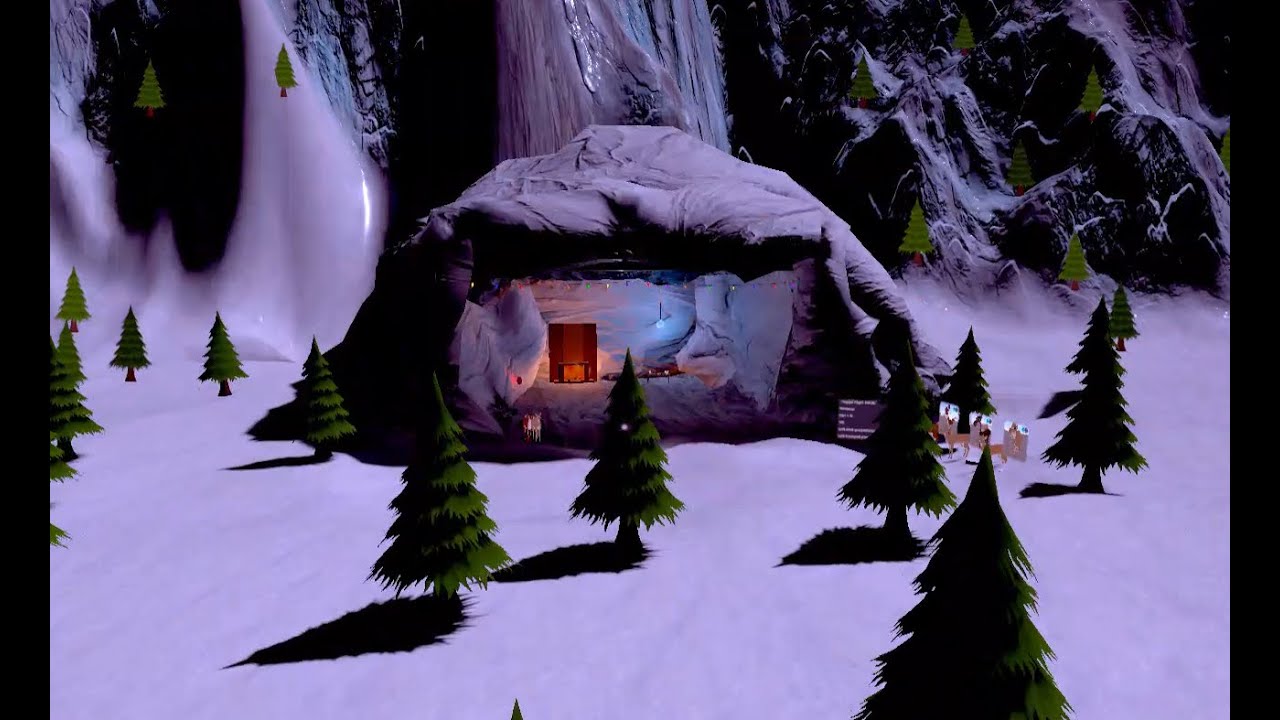
All reindeer models were created by me, from scratch. I've spent a while making this world, though it is not quite finished yet and it's pretty simple so far, since it's my first world.
I will try to post an update when this world goes live^^
tawdry surge
VRChat Christmastown 1.0 is published! I'm not a high enough rank to make it public yet, but here's the invite link if you want to join >>> https://vrchat.com/i/darth-julypanic-1a3ad Please ping me if there's any issues with the world! (also i will be in the world to accept invites but i am currently not wanting to interact so i am hiding somewhere in the world rn and will not voice chat)

Welcome to Christmastownǃ Donw here at the North Pole‚ you'll find several reindeer avatars to choose froma s well as a cave home to hang out in․ Feel free to explore the map as you wish and fly arou…
random owl
@orchid laurel as long as you have the main camera set as your reference camera in the scene descriptor
 crystal seal

World Made by Reco_ Discord˸ ǃ Reco#1480
bold ibex
i dont know what im doing wrong but i cant get box coilder to turn on lights help
desert python
it is correct
 livid current
@desert python it doesnt work when uploading, the error codes tells me to do something, but I dont understand what
livid current
uploaded, and the world doesnt work when joining, I think it is because of the avatarvalidation
desert python
is it world or avatar?
random owl
@livid current the avatar validation warning is only telling you that the variable isn't used currently which is normal since you are using sdk2 and not sdk3
And as literally said warnings don't really cause problems
desert python
theres none, but quest world limits are 50 mb @mighty spire
 mighty spire
@desert python when does it become unplayable?
desert python
uhhh
desert python
i mean, the biggest world file size ive gotten to is like 230 mb, so probably around 1872.8 mb? thats probably when my old gpuless pc would start loosing frames? but performances is based on how you optimize
and how much ram the world is asking for
desert python
how big is it? uploaded into vrchat i mean
mighty spire
I'm not
sure
I'm asking first
then making it
I'm a smart boy...I wouldn't want to waste my time modeling only to find out
desert python
ok, well if it goes like 500+ mb, I think 🤔 it cant be published to the public
desert python
theres no real limit, its just if you want it to be public or for quest, you have to start shrinking
mighty spire
I see
desert python
yea im also making a world for my self right now that is like 230 mb with it only being 10% complete
 quasi owl
does anyone know where i can get help making a car in unity for vrchat?
like maybe a discord or sum
umbral needle
@quasi owl Jetdog's Prefabs has a car example prefab, I haven't explored it myself though so I can't say how good it is to learn how to make them!

GitHub
Prefabs for vrchat to help creators ranging from beginners to more experienced users. - jetdog8808/JetDogs-Prefabs
quasi owl
it doesnt work i tried it
umbral needle
Aaaah dang, not sure then, sorry ><
quasi owl
all good
near escarp
@quasi owl There's the Not Bad Car prefabs in database pinned in channel
near escarp
you're doing something incorrectly then, they've been working for everyone else so far
 wise plaza
You need to put a scene descriptor on it
wise plaza
You have the vrc sdk imported right?
blazing crescent
yes
wise plaza
okay so you see the search bar at the bottom in your asset tab
blazing crescent
if ur telling me to put vrc worlds in the thingy i did and it keeps getting deleted
idk why
wise plaza
no in the search type in descriptor and you should find a scene descriptor
wise plaza
just drag it into the scene
blazing crescent
i cant do anything with it
lethal moss
are you sure your seen descriptor is deleted
im almost certain my wndow says the same thing, right before you go to the game window to add information about the level
wise plaza
in the scene tab can you see your world?
blazing crescent
yes
lethal moss
you gotta take a screen shot of the whole window once it gets to that point where the window pops up and you think its stuck
wise plaza
have you tried dragging the scene descriptor on the house itself?
blazing crescent
i tryed everything
i borke my keyboard my other one i had
because i was pissed off
lethal moss
can you show me the vrc worldobject, what it shows when u click on it
lethal moss
try deleting hat vrc world object and adding a fresh oen to your scene
the try to build it
lethal moss
ya if it stops anywhere you can send a screenshot and I'd like to see wheres its stopped or if there errors
might be able to help, or others here
blazing crescent
well ill just reinstall unity and delet all my projects then
wise plaza
doont do that
lethal moss
not needed
lethal moss
well you wil need to import te vrchat SDK again
because i think u deleted the vrcworld asset
lethal moss
you reimported the sdk?
lethal moss
put the vrcworld prefab into your scene
lethal moss
ya you might have to delete the whole VRCSDK folder before importing it in again.
blazing crescent
im sorry man but im not gnna get mad anymore im gnna re install fucking unity
thts it
lethal moss
your unity isnt the issue. It would work just as well to start a new project
you have thr correct version
blazing crescent
well im sorry to make you feel like ur dum or what ever but i removed it so ill just reinstall it
work on a world
lethal moss
I dont feel like that at all lol
lethal moss
understandable
blazing crescent
but i do need help tho i tryed the videos so
lethal moss
it onyl takes one small thing wrong for it not to work right
lethal moss
when you have a new project, just import the vrchat sdk ad make sure your scene has a VRcWorld object inside. Dont worry about that window that came up saying "A VRC_SceneDsecritper or VRC Avatardescriptor is required"
it always says that
all u need to upload a world is that vrcworld, and it will work
blazing crescent
so were do i download from
sdk2 or 3
from the websight right?
well srry to say to you lovely ppl but i got hacked offline
so fuck vr
i guess
livid current
"Cannot add menu item 'VRChat SDK/Utilities/Clear Cache and PlayerPrefs' for method 'VRC_SdkBuilder.ClearPlayerPrefs' because a menu item with the same name already exists.
UnityEditor.EditorApplication:Internal_CallUpdateFunctions"
I dont understand whats wrong
near escarp
is that preventing you from uploading ?
livid current
@near escarp it doesnt prevent me from uploading, however, when uploaded, it prevents me from joining the world, When I try joining it, I get kicked out immediatly, not even finished loading, just instantly joins back to the world I was in before
I can join it no problem when build and test, but when uploading, thats where the problem starts
near escarp
Make sure your vrcworld is properly setup with at least one spawn location, if that's correct then I'd suggest updating the SDK by following the steps in our documentation
livid current
I fixed it, it was a renderpipeline problem 🙂
BTW the bloom effect I can see in unity when I am creating, but it doesnt take effect when I upload the world, also not in Build & Test I cannot see the blooming effect in VR, no glowing, is there something I need to enable for VR to be able to see it in VR?
near escarp
@livid current Make sure the reference camera is set in the vrcworld prefab
 tawdry talon
clicking build and test seems to do nothing? I know im on SDK3 but udon chat seems more alligned to udon coding right now im just trying to upload a test world
near escarp
check for console errors
tawdry talon
I dont have any errors
which is also why its puzzling to me
I have like yellow alerts but no errors
near escarp
how many yellow ones ?
tawdry talon
10
they seem to be related to shaders
but they dont really seem to be critical errors
in fact when I hit clear the console and try again i get no errors
my last project randomly had this same problem
i made a new one and reinstalled the latest SDK
my game is routed correctly
im unsure of whats happening :/
near escarp
What about log messages generated when you click build and test ?
tawdry talon
log?
near escarp
the white ones
near escarp
tawdry talon
whats weird is that if i hit in settings
like extra buttons on build page
i get the last build button
if i click that it will run but gives me a seemingly older save of the project..?
idk
near escarp
How up to date is your SDK ?
tawdry talon
the latest one
random owl
Definitely sounds like something is stopping unity from building
Can you show some pictures of your unity
tawdry talon
for sure but idk what
nothing crazy
just a avatar for scale ref and some random objects
random owl
Click to the console tab and show a full picture again
near escarp
there's a world descriptor on something i assume ?
near escarp
You tried with the normal vrcworld prefab ?
tawdry talon
yeah VRC SDK3
wait
sorry misread that
well i will say that when i use the last build button
it will spawn me in like normal so it seems like my vrc scene descriptor works (worked?) fine
random owl
Nothing in the scene descriptor should be able to stop building from happening 🤔
tawdry talon
i just cant build and test what i have now
random owl
Can you import this and go to VRWorld Toolkit > World Debugger and show a picture of that
random owl
Yeah works with both
tawdry talon
yeah
near escarp
future proof publishing is not default right ?
tawdry talon
ok auto fixing all those
random owl
@near escarp think it still is
tawdry talon
man this tool should just be in the sdk by default
random owl
Last time I looked the code was like if future proof publish setting is not found as set in unity settings it's always on
tawdry talon
seems to be booting now finally
random owl
😄
tawdry talon
wow that easy
near escarp
yeah 1 can you apply for an unity engineer position pls
tawdry talon
now only thing is i can't jump
near escarp
that needs to be built in udon
random owl
#udon-general might be better for anything more you want to know
random owl
@near escarp if there was one open I would try to apply but I still got a lot to learn 😅
random owl
Standard
near escarp
standard is the most reliable
i use noenoe for toon since it supports lightmapping too
 silent adder
I want to make a UI slider for the updates of my world. Should I use a vertical Slider? And how could I make it move the text itself up and down?
(I am using TextMeshPro right now, which will be changed for UI)
tawdry talon
Question, best way to make a wall with a window?
 woeful tide
When trying to bake my world whether it is Lighting or Reflection Probes it crashes and I don't know why it is crashing my unity
Yet I can upload it without problem
silent adder
Try clearing the baked data before baking
woeful tide
@silent adder Thank you, That work
 hard crane
Is there an existing UV problem when publishing worlds?
Same UV, Unity vs. In-Game, I've "Fixed" this 10+ times and it still refuses.
hard crane
The lines aren't straight like they are in Unity. Lighting of the Game Object does nothing to accommodate nor fix the issue.
Speaking of the black grout lines on the bricks.
hard crane
Okay..
The bottom appears to slant upwards from left to right, and the top is completely straight.
My entire issue, that in Blender & Unity both UV's are compliant and look how they should, then by revising the world build through Build & Test, or completely uploading it results in this oddity that is on 3-4 wall joints.
Blender for comparison;
random owl
On my monitor that picture is almost completely black so it's hard for me to see the issue
But static batching can cause uvs to shift slightly
hard crane
Really..?
I'll re-bake and Build & Test to see.. if that's the case I don't want to contemplate why it does that.
random owl
I mean I would just ignore the issue if it's that
 steel badger
I've got a pickup item, is there any way to whitelist/blacklist what it collides with?
random owl
It's easier to be bothered by these issues when you are making the world vs people visiting it
hard crane
Very true.. I just want it to be as clean as possible.
random owl
https://docs.unity3d.com/2018.4/Documentation/Manual/LayerBasedCollision.html
Collision matrix and layers are used for that
steel badger
Thanks
hard crane
Okay, disabling Static batching fixed that issue but prompted another giant issue that a realtime light is now massively well shining.
hard crane
Fixed this issue too, with disabling the light re-baking the scene and enabling it again. Unity. Weird.
 vapid badge
How can I get an object to follow the player camera?
So where the player looks, the object follows their view
 wispy cloud
yeah Udon makes that pretty easy to accomplish
 obsidian crystal
my friend try to upload a world with the SDK2 but when she get to the point where she have to put a name for the world, she not able to interact with the text place for some reason?
 rain shadow
Could try disable everything in the scene when on that screen as something could be interfering with it
bold ibex
Do any of you know exactly what the dimensions of a portal are?
devout parrot
so i have some front face/back face culling issues on my world. I tried using a shader with culling options (Poiyomi toon) and just didnt like the look of it in my world. I want to keep the look of the unity standard shader. Is there a unity standard like shader that has culling options??
near escarp
rero standard might work for you
devout parrot
@near escarp would you mind sending me a link to it if possible
near escarp

GitHub
A Unity Standard Shader hack centered around VRChat compatibility. - RetroGEO/reroStandard
devout parrot
thank you!
steel badger
I have an object with a box collider that is being moved and resized throughout an animation, I want it to kill the player upon being hit by it. Should I use OnAvatarHit, or OnEnterTrigger (or if neither of those, what should i use)?
near escarp
@steel badger OnAvatarHit might be best
@bold ibex Use the correct unity version and it'll work
steel badger
Thanks @near escarp
 candid wigeon
I cant find any tutorials or documentation on the JukeBox component?? Does anyone have a guide on how to make it work :<
 edgy wolf
ehh most of the problems i have aside does anyone know a way to have exclusion in the mesh collider ? like a whole wall with collider and a hole in it for a door also i might not be around soon so if you could pm me the solution please and thank you
random owl
Mesh collider is based on the mesh you have set in it
If you need a hole in it you need to set a mesh with a hole for it
 jovial storm
how do i fix the effect on worlds where it looks ok in the left eye but not the right
desert python
in the camera doing the effects, you should be able to set to display on both eyes
random owl
@jovial storm since you seem to be building for quest, did you use the button in the sdk to swap between android and pc? Using that button is known to cause that problem you should use unitys built in dialogue for swapping the build platform to avoid it.
Alternatively usage of grabpass shaders on quest can cause that. My world tools world debugger will notify you if you have any in your scene:
https://github.com/oneVR/VRWorldToolkit/releases

GitHub
Unity Editor extension for making VRChat worlds. Contribute to oneVR/VRWorldToolkit development by creating an account on GitHub.
 west salmon
I'm trying to work out how to make a vehicle, but all the guides I can find are outdated. Could somebody point me in the right direction
edgy wolf
Not sure tbh but I think its an avatar with a car model
random owl
The prefabs database in pins has a vehicle prefab listed
west salmon
Thank you!
short gulch
Someone posted a prefab a long time ago that I built my cars off of. https://drive.google.com/open?id=11boGQsdbtMytq73Njkd9_IK05U5T6cxE
Google Docs
This one isnt on the prefab database and I personally think its better than the ones on there. You can switch between normal and sport mode, add a music track for a radio that you can toggle, I recommend removing the mirrors though.
 spiral dawn
Very new to VRChat looking for someone to build a world for me
desert python
@spiral dawn do you need help building one?
spiral dawn
Yes, I have no idea where and how to start, I would rather just pay someone to do it
desert python
ohhh, then you should go to VRC traders, theres a lot of people you can comission there
desert python
yes, its at the very top of #community-servers-old
spiral dawn
Thanks again!
desert python
np
short gulch
@west salmon here's a world I did a long time ago where I used them. They're scattered around the map.
https://vrchat.com/i/rasp-chumppuerto-c6476

VERY WIP Waterfront district from All Points Bulletin․
Just to give an idea of what they're like :3
west salmon
Thank you so much
bold ibex
Upon opening a Unity 2018.4.20f1 project with the most recent SDK2,these warnings pop up.
Thought it was nothing to worry about but upon trying to test the world it crashes,giving me another warning that i've never seen before.
Any idea on what's wrong with the files?Everything worked fine before that and the only things that i remember doing were changing the resolution of a few textures and making animations for multiple pieces of scenary through a single game object.
lethal moss
I dont think a warning like that will stop you testing your world. Are there no critical errors that happen
near escarp
VRChat
If you need to update your SDK, it is important that you follow these steps to ensure the update proceeds properly and you don't have any old/conflicting files. SDK3 For SDK3, you should be able to update in-place. This is especially important for SDK3-Avatars, as you may lose...
 manic raft
How do I fix the virtual keyboard typing double characters when in seated mode in desktop.
bold ibex
does anyone know how to make a video player because ive been trying for hours so far today and still no success?
it does have a pre made player but that isnt the one imma be using
thats why i need help
desert python
@bold ibex do you already have a prefab for the one you like or need one that works?
desert python
@bold ibex sdk2 or 3?
bold ibex
sdk 2 @desert python
desert python
@bold ibex i might have a unitypackage that works for sdk2 but ill have to send it tomorrow, it has a vol scroller and time scroller if thos are the aspects youre wanting
bold ibex
yes just the volume and video input search
@desert python thank you
anyone knows why i cannot fetch records? on the vrccsdk
desert python
whichs sdk?
bold ibex
then at the bottom of my unity screen, it says error fetching your uploaded avatars? so maybe i cant fetch anything?
2
I am trying to copy the blueprint id of a world i made awhile back but it doesnt let me fetch any records
desert python
oh, in sdk3, you usually dont fetch, ao im not sure what sdk2 does to fetch stuff, sorry
bold ibex
desert python
ohh, did you update your sdk?
bold ibex
yes
desert python
use the older one
bold ibex
wah?
desert python
theres a glitch currently
or an “error set” that makes the sdk require you to use a new onternet connection each time your refresh the list
 odd stratus
hey i have a problem, i cannot build and test my world.. every time i try to build and test it goes directly into my home world in vrchat... not the world that i wanna test.. can u guys help me?
random owl
https://github.com/oneVR/VRWorldToolkit/releases
Import this and check VRWorld Toolkit > World Debugger
blazing crescent
i got it working
finnally
i just need a skybox to go with the map
i dnt have one yet
i dont know how to do tht
blazing crescent
man i dnt get it
random owl
@latent bobcat I would suggest closing unity going into your project folder then deleting the Library > PackageCache folder
 latent bobcat
Yes i did that and it fixed now . i didn't delete the entire folder only the errors, if i delete evreything will that effect my project ?
random owl
@latent bobcat anything in the Library folder inside your project is safe to delete and will be rebuild next time you open Unity
edgy wolf
i need help QQ
desert python
id ask in animation sdk2
edgy wolf
The animations work but the texture isn't moving:c
random owl
@edgy wolf you most likely have the door set as batching static
Those can't move around
edgy wolf
it works !!! ❤️
tawdry surge
How do I fix the virtual keyboard typing double characters when in seated mode in desktop.
@manic raft if anyone knows a fix please ping me i would like to know too i have the same issue
 fossil dock
any idea how to make an item spin on interaction with sdk 2
 frosty matrix
no clue if this is the right place to ask, but I've seen these buttons around in a few different world, and can't seem to find them online. If anyone knows where i can find them, that would be greatly appreciated
random owl
@frosty matrix https://lura.booth.pm/items/1969082

VRChat向けにデザインしたスイッチの3Dモデルと、簡易的な機能を内蔵したPrefab集です。 1マテリアルでまとまっているので軽量です。 ・Mirrorスイッチ ・AvatarDirectionalLightスイッチ(5段階) ・PostEffectスイッチ(5段階) ・照明スイッチ ・ビデオプレーヤー用スイッチ ・ベッド用スイッチ ・椅子用スイッチ ・汎用オブジェクトスイッチ ・ボイスチェックスイッチ ---------------------- ver1.2 アップデート ・ボイスチェック機能のついたスイッチが追加されました!
frosty matrix
thank you so much!
 sacred warren
Does anyone know of a spritesheet shader that allows for emission?
random owl
Did you set them up from the sdk?
random owl
The sdk has never set them up automatically you always had to go into the the sdk tab and press setup layers 🤔
 trim musk
what? no?
random owl
Yes? You sure you just didn't press it without thinking about it?
trim musk
i dont even see a setup layers button
random owl
Show me what you see?
This has been the way to setup layers as long as I can remember
trim musk
WAIT...
okay honest to god i never had to press those 2 buttons
i've been doing this for 3 years, i never EVER seen that big red exclamation mark triangle
random owl
I feel like you might have always just pressed trough them without thinking about it?
Since you don't usually setup new projects that often
trim musk
never
random owl
Like I can import an old sdk and show you if you want
trim musk
i would've remembered the 2 buttons and then having to press "Do It"
it's fixed now, anyways. thanks for the help
random owl
@trim musk this is how the button looked like two years ago
trim musk
it always did it for me, i'd install my sdk and change layers for a gameobject. they're just there after the install
thats why i was so confused
trim musk
okay, but im telling you i never setup the layers with a button
so maybe it's an sdk fault
random owl
Have you been using a modified sdk that was doing it automatically?
trim musk
no
random owl
Well it's always been manual setup 🤷
sacred warren
Am I being dense? I see Worlds-SDK2 but no "Worlds-SDK3" or just "Worlds". Am I being blind?
 slow orbit
All SDK3 (udon) stuff is in the Udon category, after general and before Avatars 3.0
sacred warren
Hmmm, but what if it's a question about an SDK3 world, but not Udon specific?
near escarp
What kind of questions would you have that are general but not about Udon or wouldn't fit better into the other channels ?
bold ibex
Anyone knows how to make a working bar tap? Like I press it and when i put a cup underneath it, It will fill. Do I have to use a bool for that?
 tight dirge
Is anyone having issues with uploading worlds in SDK2? They are brand new but I can't upload to my account or my friends(tested it to see if it was just an issue with my account). Please @ me otherwise I won't see replies
near escarp
With a material, and a reflection probe
 elfin latch
ah, thank you! I wasn't sure if I had to do anything else besides the reflection probe
manic raft
How do I fix the virtual keyboard typing double characters when in seated mode in desktop.
steel badger
Is there a way to make a box collider collide with "Pickup" layers but not with the player?
 jolly mango
hmm, what is a way to lock an object's rotation definitively.
I'm using IsTrigger on my boxcollider as to not allow rotation by collision
And im locking rotation on the rigidbody
I want a cube to stay upright no matter what the player does
near escarp
Rotation constraint on an empty ?
jolly mango
ah that seems to have worked, thank you
jolly mango
alright upon further testing, it didn't work. I'm still able to rotate it in game
near escarp
If the player has the main object held, then that wouldn't work
they'd need to grab an invisible object, and the other object you want to not rotate might need a location and rotation constraint ?
jolly mango
I put a cube with all the vrc_pickup script stuff
and gave it a child of a cube with a rotation constraint on a non-parented empty
elfin latch
anyone have good dust particles they can share?
 woven condor
should i be using gpu instancing when building my maps - i never have
random owl
GPU Instancing only works when you have repeating identical meshes that aren't static batched
But if that's the case in most cases yes you should
woven condor
ahh ok that would be a no then - thank you
@elfin latch what type of dust - floating small particles in the air ? or surface dust - i try sending you yt tut link via DM but cannot
elfin latch
small floating dust particles! @woven condor
sacred warren
So Unity crashed when VRC was building it and now the VRC SDK options have disappeared except for the "Clear Prefs" one (typically what happens when a script error occurs) but there are no console errors either (of any type). Adding the SDK back in makes no difference as the importer implies everything already there and fine. Any ideas?
random owl
Could try the old restart unity trick
And can you show a picture of the full unity window with console visible so I can double check stuff for you?
sacred warren
Restarting Unity was the first thing I tried as I know reinitialising the whole thing can sometimes fix it. Let me do another clean restart and get the console from that.
@random owl Nothing in the console at all, which is suspicious in itself.
random owl
Yeah these are always fun
jolly mango
When that happens I normally just delete the VRCSDK file and reimport it
works for me
random owl
You did try importing the latest version of sdk2 right?
jolly mango
i normally just copy and paste in the vrcsdk folder from a backup project
random owl
That was to enverex
jolly mango
oh lol :P
random owl
And just copying it from a different project wouldn't be what I usually suggest you to do
jolly mango
what works works 🤷🏻♂️
also I'll put that my question still pends above as for it not to get too lost
random owl
Mainly just because it adds more things that can go wrong and they did say that they reimported the sdk already
jolly mango
well they said they reimported without removing any files. If you wanted to reimport fully
You'd delete vrcsdk file and the .meta
then reimport
random owl
Yeah that's true but in that case there would be plenty errors in the console
jolly mango
I've had the exact same issue before, crash during playerbuild/failed to upload half way through the upload
With similar results and fixed it through my method without any issues afterwards
random owl
Yeah I'm not really trying to say it didn't fix your problem
If the control panel button is missing it just generally means scripts aren't compiling and with unity there's thousand and one ways to make that happen
Most of those not related to the sdk itself
But also most of them would throw an error to the console
Console is always the best starting point to debug since when the issue is caused by some other asset than the vrcsdk it saves a reimport when you just fix that specific issue
sacred warren
Deleting the SDK and reimporting it fixed it, but yeah. Weird that it breaks like that with Unity seemingly completely oblivious to the fact it's dead.
random owl
Unity can be unity
sacred warren
I've had to remove and reinstall the SDK before when things broke, but it was never in this weird "silent" state.
random owl
I've seen it happen before but it's pretty rare for it to be completely silent
jolly mango
This problem is actually easily reproducible, just build any world and close out of unity/cancel any time during the build/shader bar and you'll get the exact same result
I wonder what the actual cause is
random owl
That's just the sdk 😂
Dw about it
They have the class defining the menu item twice in the sdk code for a while now
Which always makes it throw that warning
jolly mango
yeah but aside from that using those steps you can create the exact same issue without fail
random owl
Yeah since it's just a fault in the sdk
But it doesn't really do anything except throw the warning
jolly mango
meanwhile i still struggle to get my cube to stay upright 
random owl
Or wait did I misunderstand you above message? You mean that the control panel always disappears after force closing unity?
jolly mango
after force closing unity during it's initial build process yes
I've also had that happen occasionally during a "failed to upload" error thrown out like 3/4th of the way through the upload
random owl
Hmm then that sounds like it silently stops unity from building scripts and the reimport refreshes things to force the recompile
I've definitely had to do my fair share of force closing unity during those steps but haven't run into that issue
Is it a recent issue?
jolly mango
might be? version 2020.05.06.12.14
is the version im able to consistently create the result
random owl
Then it sounds like an old issue since that sdk is around 6 months old 😄
jolly mango
lol
random owl
Next time it happens you might get away with just right click reimport on the vrcsdk folder though
jolly mango
Can confirm it does indeed work.
Now im having another strange issue where the sdk is uploading a scene that is not active :P
random owl
That is another rare issue
And to fix it you gotta go out of unity
You know which the inactive scene is?
jolly mango
just restarted unity and it's still happening,
oddly joining into the world brings me into the unloaded scene then instantly boots me out into home world, and yeah i do know
random owl
Find the .meta file in the project folder for that scene
You need to edit it with a text editor to remove a line from it
jolly mango
which line?
jolly mango
got it ill test it out
Don't think it worked, uploading it begins building the other scene and compiling shader variants of that scene
random owl
If you didn't close out of unity while editing the meta file it might have not registered
jolly mango
random owl
So you closed unity removed the line and restarted?
jolly mango
correct, i removed the line from both the scenes now and ill test it again
that seemes to have worked
random owl
I've only seen this issue happen once before so results may vary
Took me a week to find that line in the meta file
elfin latch
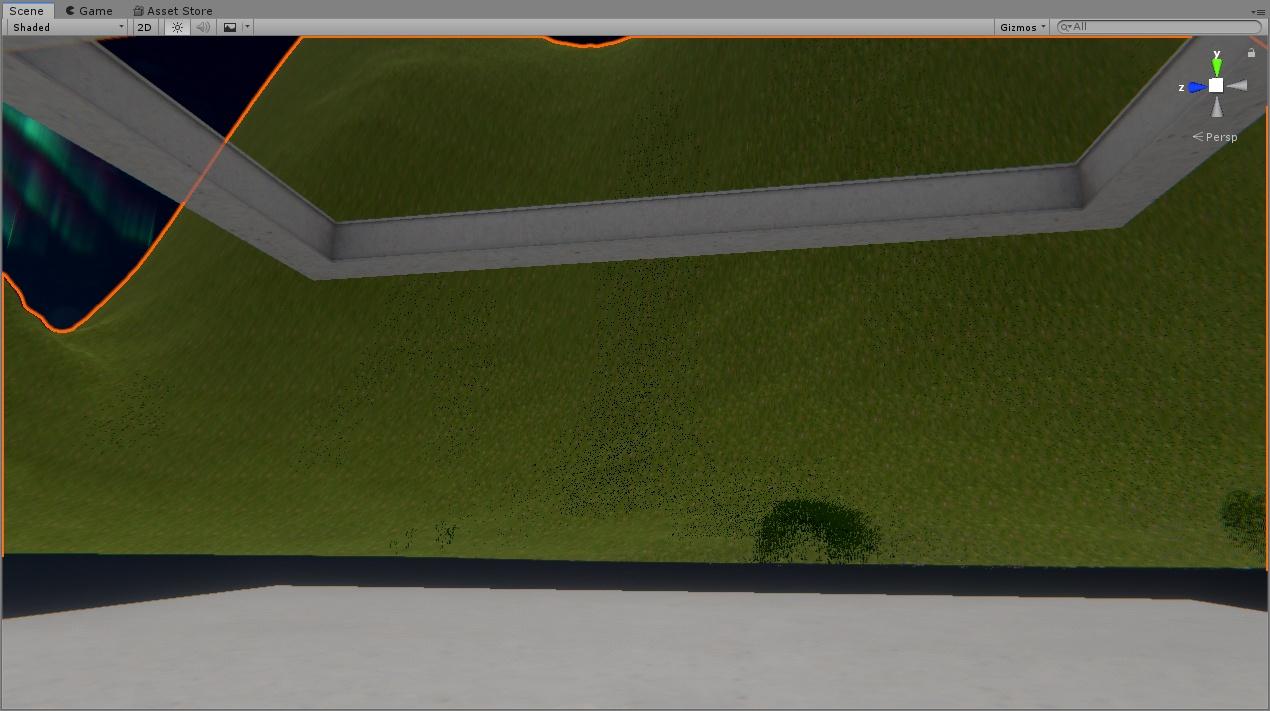
is there any way to move grass distance higher than 250?
https://i.imgur.com/LiKv49V.jpg it does this weird thing when it fades out and it's not even super far, idk how to fix it
 elfin latch
the grass is rendering at that distance but it's weirdly faded; is there a way to fix that?
random owl
Hmm not sure of the top of my head since I avoid unity terrain usage
Might be just the way the shader handles it
 mental verge
is there any way i could make a large eye that looks at the player in sdk2?
random owl
That could be done by just using a shader
tidal marsh
Mirrors from my pre-SDK2 world are broken; they have serious rendering issues (even low quality mirrors are doing the same thing).
Recreating the mirror by hand doesn't fix the problem.
Anyone else maybe possibly having this issue?
 random owl
In unity
With the inspector visible and the object selected
As little cropping as possible so I can see the whole unity window properly

 random owl
Did you use the prefab in the sdk to make those mirrors or from scratch?
Not seeing any of the usual problem causers at least in those pictures
tidal marsh
It was from scratch. I placed MirrorReflection in Mesh Render, and added the VRC_Mirror Reflection script (exactly as it was done before, essentially recreating the mirror without copying any components over).
I do not know how long it's been since it "was working before", but I made no changes to the mirrors before.
All I had to do was reinstall the SDK.
random owl
Just to make sure is that quad a default unity quad?
tidal marsh
That is correct.
random owl
Do you have a reference camera setup?
tidal marsh
If you're talking about the Main Camera of the world, that would be a Yes.
random owl
That only acts as a reference camera if you set it in the VRCWorlds scene descriptor
tidal marsh
That has been set, yes.
random owl
Can you show me your camera settings?
 random owl
Yeah that should be alright as well
Main thing here was that setting crazy values for far clip can cause that kind of rendering problem in mirrors
tidal marsh
That has to be set like that, as I said for the Day/Night switch. But that never caused an issue with the mirrors before.
A friend who helped me set that up uses the same thing, and his world is based on mirrors.
His world is fine.
random owl
Well that's all the main things that could go wrong checked now
tidal marsh
Do you think this could be VRChat itself?
random owl
It always could be but I haven't seen it happen quite like this before
tidal marsh
What do you think it could be then?
random owl
I might just try dropping the default prefab mirror from vrcsdk in the middle and seeing how that looks in build & test
tidal marsh
Build & Test sadly isn't an option for me, as it will force VR to initialize.
And I've been testing in desktop.
random owl
If you set the client path in settings to point directly to the VRChat.exe the non-vr checkbox will work
tidal marsh
In Unity?
random owl
If the path doesn't have the full path and is the shortened version non vr testing will not work for build & test
So basically it should look like in my screenshot
tidal marsh
Got it.
See if this works.
....Aaaand VR is enabling.
That doesn't work for me. I put in the exact path.
random owl
Is your sdk up to date? 🤔
random owl
But you haven't updated to latest version of the sdk?
tidal marsh
This world cannot handle the latest version.
random owl
What do you mean?
random owl
Yeah? My worlds made in unity 5.6 are on unity 2018 and running the latest sdk2.
tidal marsh
So wait.. it could possibly support SDK2?
random owl
Yeah I mean you are just basically on old version of sdk2
tidal marsh
I'm using the version just before the SDK2 update was released.
random owl
What unity version are you on?
random owl
Yeah I would just update your sdk to avoid possibly unnecessary debugging
tidal marsh
Hmm. I'll consider it. Because I feel this world is held together by duct tape at this point.
tidal marsh
Thank you for that info.
tidal marsh


Same thing, even with the latest version of SDK2 (also I'm a huge fan of the 'Force Non-VR' checkbox).
This is the Prefab of VRCMirror.
So we know for a fact it's not the SDK causing it. And yes I did a clean install.
...Something in the world, then. Maybe. I dunno. I've never had this issue before, and I've made no major changes to the world.
random owl
Hard to say honestly I would need to have a proper first hand look over at your project and see whether it happens on my end
tidal marsh
I do have a question though; does the reference camera have to face the same direction as the spawn point?
I'm thinking it might be the camera, that if I spin it around 180* it might fix the issue. But I wanna know first hand.
random owl
Position of the reference camera doesn't matter
It's just used to copy the values over to the player camera
Hence reference camera
tidal marsh
Hmm. Alright.
random owl
Though actually do you have the clear flag set to Don't clear on purpose on your camera?
And not Skybox
@tidal marsh oh yeah actually that could be it
Try setting your clear flag to Skybox
random owl
Good, I didn't realize to look at that setting earlier
tidal marsh
Hmm. I'm not 100% sure if my friend said to set it to Don't Clear or I did it myself, but I'm very glad that was it.
 storm sedge
I am trying to test my world on desktop and it keeps opening in vr even though I have Force non-VR on. Any idea how to fix that?
bold ibex
I made a world 3 months ago and I'm still in community labs so I'm wondering what is wrong
tidal marsh
I'm getting messages of "Trigger of 'ItemNameHere' was not initialized in time!" when uploading my world (all warnings).
woven condor
anyone know how to get the animation preview window back - reset layout to default - reinstall - nothing works - all installs effected - there must be a common file or reg key i need to remove or change - so annoying
tidal marsh
Thanks for clearing that up.
woven condor
reinstalling very animation fixed the missing preview window - thanks @near escarp sort of helped track it down
random owl
@storm sedge the client path in the sdk needs to be pointed directly to the VRChat.exe for the button to work like in this picture
bold ibex
Could anyone give me a hand as to why my UI button only works if I'm super far away?
elfin latch
how do i set up fading audio
near escarp
@bold ibex How far away ? There's most likely a limit
@elfin latch wdym by fading audio ?
bold ibex
I had a collider box in the way lmfao
elfin latch
like, I have a video player set up and I'm trying to figure out how to make it so that when you walk away, it fades like normal audio would instead of playing globally @near escarp
near escarp
What does your current audio curve look like ?
Only adjustment to the default would be to take the very end point and drop it down to 0
near escarp
500 is a bit far
near escarp
Well, depends on what the size of your world is
 normal harness
Hi ^^
I have a lil' problem with my world, I made a trigger and I animated it, but when the animation was add, the trigger seems missing in Vrchat, but not in unity, I'm pretty sure i've made something wrong, but what ? ^^'
 past wave
was updating one of my worlds to unity 2018 today and everything was going fine, fixed up some bugs. and then i got to the end when i realized that my builder menu is completely blank... never had this issue before. nothing else is broken
random owl
@normal harness missing how? What happens if you just enter playmode in unity?
@past wave does that also happen in an empty scene?
past wave
if i make an empty scene it tells me i need a world descriptor, and then if i place in the vrcworld object the error goes away but returns to being blank
random owl
Well then we know it's not your scene causing it, did you update your sdk according to the correct steps?
https://docs.vrchat.com/docs/updating-the-sdk#sdk2
VRChat
If you need to update your SDK, it is important that you follow these steps to ensure the update proceeds properly and you don't have any old/conflicting files. SDK3 For SDK3, you should be able to update in-place. This is especially important for SDK3-Avatars, as you may lose...
past wave
yep
exactly as it told me to, absolutely everything else is fine. no broken scripts or weird anomalies i can tell. just this menu is broken.
random owl
Anything particular in your console?
past wave
surprisingly empty for once
random owl
It's been a while since I debugged this problem last so I would need to read trough the sdk code again to check which situation causes this
But sadly I'm not on my computer atm
Do the other tabs show up correctly?
past wave
yep
random owl
https://github.com/oneVR/VRWorldToolkit/releases
Well I guess try importing this and checking VRWorld Toolkit > World Debugger just to see what shows up
past wave
random owl
Oh 🤔
Sounds like the same problem the sdk is having
Just a sec I'll check my own code
Huh this is actually interesting
past wave
hm?
random owl
So the problem seems to be when the sdk tries to check whether the collision layer matrix is setup yet
Do you know where to find that?
past wave
isnt that one of the first things it tells you to press before you can even publish the world?
that would have been done quite awhile ago
random owl
The sdk always checks for if it's already done while doing the other checks
If you go to your project settings you should find the collision layer settings there
Can you show a picture?
past wave
this one?
random owl
Also check your console select the error thrown and screenshot me the full stack trace from the additional info it gives you when you select something
past wave
this?
random owl
There should be a reset button for the collision matrix
I wonder if that would fix this issue
past wave
is there a default i can refer to? do i just turn them all off / on?
random owl
I'll dm you
 viral jay
Whenever I press upload nothing happens, does anyone know what's causing this?
random owl
Could you define nothing? As in you are able to press the button but nothing shows up in the console or elsewhere?
viral jay
25 errors, no clue what any of them mean
random owl
Screenshots please
viral jay
random owl
I'm gonna assume you have the error pause button enabled at the top of the console
viral jay
i do not
random owl
Can you show me just to make sure?
viral jay
random owl
Yeah not seeing anything out of the normal yet
All those errors are normal with the sdk and don't cause any problems
viral jay
thats what I thought
random owl
Though since it throws the errors I would assume it at least tries to enter playmode when you press upload?
viral jay
it does
after putting in the name and description it does nothing
yes I agreed to the rules
random owl
Can you show a picture of that view
random owl
There's couple things that could be going wrong off that description
https://github.com/oneVR/VRWorldToolkit/releases
You could just try to import this and check VRWorld Toolkit > World Debugger
random owl
Yeah importing the above should show you the issue
viral jay
alright
thank you
found the issue im pretty sure, tysm
aaaand now things disappear when I get too close
random owl
How exactly do they dissappear?
viral jay
If I zoom in within a certain distance its like the mesh renderer turns off
theres just nothing there
random owl
Zoom in?
viral jay
scroll in