#world-development
39 messages · Page 55 of 1
 near escarp
right click top and remove scene
 bold ibex
is that it?
near escarp
That's a good thing to try first
 eternal kindle
Ok so i successfully uploaded my world but it wont let me go to it?
Any chance someone can help me?
bold ibex
Probably same thing that happened too me
Look at mine and ruubicks conversation
You may find out why
I was wondering if anyone knew how I could put a video player so people could put a url in and watch what they want
eternal kindle
Im trying to do that rn with a prefabed one
bold ibex
Same here but it's hard cause there's not many tutorials
eternal kindle
NO kidding
bold ibex
Should I ping ruubick
eternal kindle
No no no thats how you get in trouble
How do you fix respawn?
Im in ceiling
Nvm got that
But am having issues with my video player too
bold ibex
@near escarp sorry to ping u twice but me and vanilly are having the same problem how do we make a video play that we can put urls in and it will play yt videos because there's not many yt videos that will help us with our problems (again sorry)
near escarp
There is a tutorial in our documentation
bold ibex
Oh ty
eternal kindle
Wheres the documentation
ok next issue I have is that the examples are not there?
@bold ibex are you getting anywhere?
bold ibex
A bit
eternal kindle
can i pm you?
near escarp
keep reading the doc steps
bold ibex
ok
bold ibex
@near escarp so now I got it working but now I need to make it so all the music toggles off so I can listen to the video player
 short gulch
Might be a good idea to stop pinging him so often haha. Just look through the documentation and you'll figure it out. No need to stop after each step.
(I'm guilty of doing the same thing in the past)
Oh I just read what you said, thats super easy to do. Just add a button with a vrc_trigger set to OnInteract, Toggle, SetGameObjectActive and drag the music audio source from your hierarchy to the target.
 normal harness
Hey, I hace a questino, how can I apply a .png texture with transparancy to my world ?
For exemple, here, on my screen, the whites zone are, normaly, transparant
 midnight flame
did i correct this for door be teleport 1 place to another? my first time setup teleport on door but everytime i look up YT videos all outdated because they all talking about advanced options even i dont have that in SDK2 and all YT videos all old anyways. none them never work for me
 void birch
Hello all, was working on a basic world with a floor and a wall, threw in a mirror prefab and connected it to a button with an interact trigger. Works great in build and desktop mode. However in VR my vision is completely screwed up. I don't fully understand what's happening but my right eye isn't seeing correctly. If I get my face right up against the mirror things look normal, but as soon as I back away my vision is screwed again.
Any idea what I'm doing wrong here?
short gulch
@normal harness go to the material and change the drop down menu that says Opaque to either Cutout, Fade, or Transparent. Cutout will make a hard cut at transparent parts, Fade will have a softer edge and Transparent will have a consistent transparency. You may also have to click the texture itself in your assets and check the box that says "Alpha Is Transparency"
normal harness
thanks 😄
 remote summit
So i was wondering what i need to do to a world if i am going to make it quest compatible
 lethal moss
@midnight flame Your trigger setup looks fine if you want to teleport them to "spawn", however i dont see a collider on that door, so they won't be able to interact with it.
 red thorn
hey folks. I am a college educator interested in possibly using VRChat as a surrogate platform for the classroom. Obviously, the idea of scaffolding the VRChat experience seems to be contrary to the development team's own goals. I am curious if anyone knows of a way to build a world that completely disables VRChat's GUI? I am more concerned with my students leaving than I am about protecting my own world... I know how to set up invite only worlds, and this is not my question.
short gulch
So are you just trying to make it so they can't leave the world? I personally dont have a solution for that, just trying to clarify. Awesome idea using vrchat for education btw.
red thorn
this is correct, my stance is as follows: if I can protect students from accidentally clicking on a wrong button and ending up in .... you know what I'm saying?
I understand how important freedom of expression is to this project, but there are some difficulties I'm encountering
I think I've seen some dance worlds that override the gui?
I might be mistaken
I definitely dont want a lawsuit, and I'm feeling limited by the SDK in this sense
short gulch
Gotcha, totally understand. Wouldn't want the students ending up somewhere questionable with a half naked person getting in their face
red thorn
correct
my uni could make 50 visitor accounts for student use
and the problem is solved
short gulch
@near escarp would be a good person to ask, he's one of the developers
short gulch
I think vrc could be a great tool for education tbh
 random owl
With the current community guidelines stopping someone from leaving a world is not something that is really allowed
red thorn
I kind of was afraid this is the case
random owl
But hopefully you get something interesting back from the email
red thorn
and some of vrc's competitors are providing this service
the need for this is here and now so
lol
 green lagoon
yeah like that would probably be easier on Mozilla Hub as There Is No menu button list of list of public Maps
but no scripting on that so that may not work depending on what you're wanting to do?
red thorn
disable the worlds option is basically the main thing
probably the friends option too
so that the host is the only person controlling the flow of the "classroom"/world experience for the invited guests
bold ibex
kill me, My world crashed while publishing and now the sdk won't show the control panel
midnight flame
audio is too big range, i need know how make small range for example small house because when far out map still hear music.
near escarp
spatial blend is 2D
midnight flame
?
near escarp
Do you want background audio in a specific area ?
midnight flame
yes
near escarp
go to advanced options in spatial component
near escarp
Yep, use audiosource volume curve
midnight flame
thats all i need turned on?
 mossy fog
Hey @void birch, can you give me more details about your mirror setup? (possibly add a screenshot)
 marsh sorrel
anybody know where to get these buttons from?
void birch
@mossy fog I figured it out, I screwed something up with the reflect layers, ended up replacing the mirror prefab and that fixed things
mossy fog
Alright
@marsh sorrel these don't look too difficult to make, do you have any knowledge on creating 3d models in a software of your choice?
marsh sorrel
nope idk how to make models
green lagoon

VRChat向けにデザインしたスイッチの3Dモデルと、簡易的な機能を内蔵したPrefab集です。 1マテリアルでまとまっているので軽量です。 ・Mirrorスイッチ ・AvatarDirectionalLightスイッチ(5段階) ・PostEffectスイッチ(5段階) ・照明スイッチ ・ビデオプレーヤー用スイッチ ・ベッド用スイッチ ・椅子用スイッチ ・汎用オブジェクトスイッチ ・ボイスチェックスイッチ ---------------------- ver1.2 アップデート ・ボイスチェック機能のついたスイッチが追加されました!
@marsh sorrel the source of the light switches
marsh sorrel
Thank you so much! @green lagoon 😄
green lagoon
no problem I just remembered I bumped into them on booth.pm recently
https://docs.google.com/spreadsheets/d/e/2PACX-1vTP-eIkYLZh7pDhpO-untxy1zbuoiqdzVP2z5-vg_9ijBW7k8ZC9VP6cVL-ct5yKrySPBPJ6V2ymlWS/pubhtml# also here's a handy spreadsheet of a lot of interactive doodads for 2.0 Maps
mossy fog
Hey everyone, I ve got problems setting up the VRC_Player Audio Override. I have 2 of them with different values, an animator is moving one of them into position and the other one out of the way depending on a set boolean parameter in my animator. Now I have a trigger (local, has to be) to set the boolean value to true which is located about 500 units away. Animations, Components, Animator & Parameter and Trigger all seem to work, the issue is that the player, which I can still see using a camera, seems too far away to be sending any audio.
To better understand what I mean, here is an Image ... I am on the stage constantly playing music, but the little icon above the name, that someone is speaking, doesnt show up.
 finite prawn
Does anyone know how to fix objects in the world that are pitch black? Because I have certain objects in my world that are just pitch black.
near escarp
Any screenshot ?
finite prawn
Yes, one moment.
The bottles have the standard shader, but everything else has VRChat lightmapped.
One of my friends skins also went pitch black also when he joined the world.
green lagoon
that's probably because you don't have any light probes
so you're Dynamic objects and avatars not receiving any light source
finite prawn
Oh I got ya. So whenever I do add a light probe, where should I place it? Since I have rooms scattered due to teleporters.
green lagoon
basically a set of light probes for each room

VRCat: Community-Run VRChat Forums
Greetings! Over my course of playing VRChat I've noticed that most worlds, mainly the ones that have baked lighting, are done poorly, or in an...
 bold ibex
I originally made my map in Gamma color mode, and I am learning now that I have to switch to Linear for it to work with VRChat. Switching to Linear destroys my lighting and a lot of the particles and shaders I created. My particles and shaders become less dull/saturated and are significantly less visually appealing. For example, the fire shader I created becomes a lot more flat in Linear vs. Gamma:
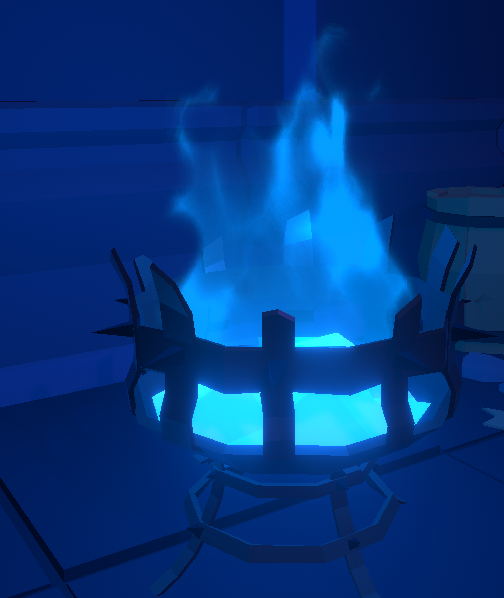
That one is linear, this one is gamma:
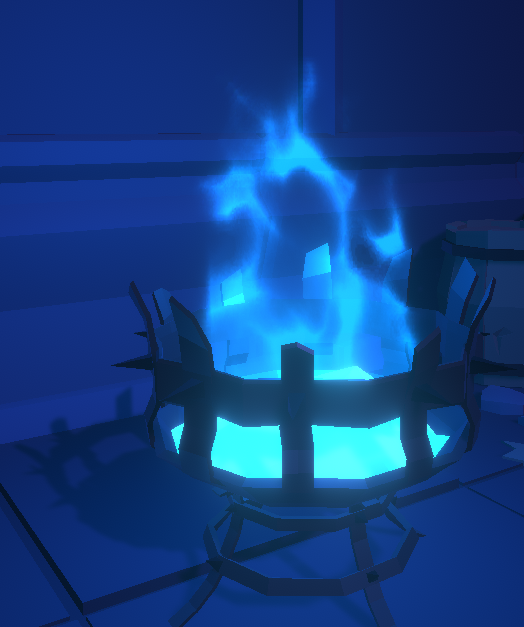
This is using additive colour blending. Overall, anything using additive colour blending is now significantly more flat and dull, is there any solution to these problems?
bold ibex
My canvas is suddenly appearing on top of everything - tried to delete and make a new one but it's still happening
how do I make it not-layer on top of everything and make it act like it's physically in the world?
random owl
@bold ibex enter and exit play mode that fixes it to render properly in scene view
bold ibex
very thanks to you 👍
 spice mulch
A lil screenshot from me playing around
 fallen ingot
Hi, experienced Unity + VR Chat devs, I have a question hopefully someone can answer. I've noticed in a few worlds, (example: the Grapling Gun world) that often times I can see and acquire a prop/asset (like a gun), or see and interact with game-elements (like in beatsaber), but I cannot see the very same gun prop or interactive game elements that other avatars are holding or using (and they can't see mine). It's like these items are instanced only for each avatar to see/use. It's super weird, thankfully not consistent across worlds. I don't understand why the UX for these assets/interactive elements is done this way, why devs would choose to do this, or is it a default thing that more experienced devs choose to 'fix?' It's super wierd UX to be in a social world, interacting with 'things' that only each individual can see, meaning that to eachother, we all look like we're waving our arms around when in fact we're using props as intended.
I'm truly curious as to why this happens or why it's a method purposefully implemented, and is it fixable? (How do you avoid this situation as a world-builder?)
– Thank you, in advance, for shining some light on this for me! (and anyone else also wondering about this). 🙂
random owl
Yeah you pretty much said it yourself it's up to the person who made the world how they make it and not everyone cares enough / knows how / doesn't want to make it visible for everyone
"avoiding it" would be a whole lot of paragraphs in itself and would really depend on what you are doing and how you are doing it so that's a bit too open ended question to answer
 supple drift
I heard when world creators go to hell, they're doomed to an eternity of attempting to sync everything in their worlds while VRChat perpetually makes changes to networking so they get stuck in a Kafkaesque nightmare of asking "Is this issue on my end or their end?" forever. 👻
fallen ingot
Thanks @random owl. I'm doing a lot of world-surfing for research. Observing this weird UX I described above, not sure how to expressly avoid it when I start designing/building/working with a dev. Is it a box to uncheck, is it a variable to set? What part of the SDK do I care about to make sure this doesn't plague my world? (Frequent thoughts when I find these instances...). Oyyy.
random owl
It depends so much on what you are doing and where
And there is also a difference with sdk2 which this channel is for and sdk3 which #udon-general is for
With sdk2 you want a box that players pickup to sync you add a object sync script on it
With udon which the grapling gun world you went to was most likely done with you "code in" the proper handling for it whether it's with the built in udon graph system or with something like udon sharp which basically put compiles c# into udon code
It's hard to give a single answer to that question
fallen ingot
@random owl I see, I see. ok - you've given me something to work with, thank you!!
 lyric sluice
hey guys i need some help
Is there a way to set a button to disable/enable a specific post processing component?
Id like to have a switch to turn the color filter on and off as a light switch
if someone knows a way of doing that id really appreciate some help
 sinful moss
Can't remember the answer i received when i asked this like a year ago:
Does the sdk2 Object Sync component effect all children on the object or only the one it's directly applied to?
I'm trying to optimize and fix some sync issues, and this info would be useful again.
 runic epoch
I am trying to make a certain video play as the skybox
but I am not sure where to start, or if it's possible

TV Static - Glitch Noise - BLACK - Old TV Noise Effect.
Free Download http://bit.ly/2p3ktrt
Password: fsfa
Big Footage Pack: Glitch / TV / VHS / Overlays
Download: http://goo.gl/8vfBU9
Password: freestockfootagearchive.com
More Free Footage: http://freestockfootagearchive.c...
or maybe have a gif texture that plays
sinful moss
can be done by programming a custom shader
Look at the way others have made animated textures, I'd bet you could dissect and make your own version out of it pretty easily, or even just repurpose one of the free ones to suit your needs.
 median egret
how do you setup a resync button for video players btw?
 proud grail
Is it not possible to animate/toggle "enable spatialization" at runtime?
 past wave
wonderful new problem, build and test just goes to 0% and then takes me back to my home world, and trying to use build and publish finishes instantly and going in game now shows that my world is broken...
sigh.. should have realized that build and test not working was a bad sign..
past wave
seems like i figured it out i guess... seems like the sdk in the project was a little too old i guess, worked perfectly last time i uploaded it..
sinful moss
^ on this note, is there a way to safely update old worlds to the newer sdk without them combusting?
eg: a 2017.4 world to a 2018.4?
random owl
If you are worried make a backup first and then follow the steps in the documentation
proud grail
For having 154k members help is sparse in this server
bold ibex
is there a way to make the videosync player work?
cause ive placed mine but its not working?
nevermind found it
median egret
would someone be able to help me with a counter setup?
lyric sluice
@proud grail yeah that surprised me a lot, I hope there's a discord out there that is solely based around making vrchat worlds
there's always a lot of questions about how to do certain things but not much of any answers
lethal moss
@proud grail while your animation is recording you can click the Enable Spatialization button in the audio source component and any changes will be included in the animation. Then you can turn it on and off as needed. Is this what you were looking for?
 tidal ridge
@proud grail People are busy; they have lives. SDK2 is out-dated now, so the general response that you’ll hear is ‘just use SDK3’. You’ll find a lot more people talking about SDK3 or UDON.
proud grail
The animation is made properly it's just that it dosen't work at runtime
tidal ridge
Any error messages?
proud grail
Hard to tell at runtime but in editor no
 sharp bloom
anything wrong with what i have set for triggers
im trying to have it so when the player walks in the cube area it sets a gameobject active, and sets it inactive when out of the zone but it doesnt seem to work and I cant find anything about it besides the vrchat default world having it https://cdn.discordapp.com/attachments/691404632504795199/769352122214907944/unknown.png
 random owl
Player layer is for other people so right now it would only be activating when someone else was walking trough it you should trigger it on playerlocal layer
I'm not seeing a collider either in your screenshot but I'll assume you have one
 late valve
I am trying to get my world to be quest friendly but I tried everything to reduce it but nothing is working what I am missing, can anyone help?
bold ibex
VRChat SDK problems
I’m getting the error message Cannot add menu item ‘VRChat SDK/Utilities/Clear Cache and PlayerPrefs’ for method ‘VRC_SdkBuilder.ClearPlayerPrefs’ because a menu item with the same name already exists. I have no idea how to fix it
I’m in unity version 2018.4.20f1
bold ibex
Remove all VRC SDK stuff from your project and reimport @bold ibex
Are there any Probuilder pros here?
I have 2 issues
- When I try to move a face when one of the edges is the same size as my snap increment, it collapses like in the screenshot
- I have snapping disabled, but it's still snapping regardless. How do I disable snapping for Probuilder?
Faces and edges seem to act very strangely in general sometimes
in this particular scenario, when i drag the face, one side comes first, and then i drag more to get the other side to follow
bold ibex
I did that and it’s still saying it @bold ibex
i don't think you totally cleared the project out
of all vrc sdk
you likely have it duplicated in a folder someplace (if you remove the SDK and then search 'vrc' you should find the duplicated lingering vrc content)
bold ibex
I removed all VRC SDK files from my world folder but it still saying it and now my SDK is saying utilities > Clear Cache and Playerprefs???
 sleek notch
im having these issues uploading my world and I honestly don't know the problem https://puu.sh/GGkGA/673ea4bb0e.png

anyone know how to fix this issue?
remote summit
So simple question. How do i make it so a world object don't have any colliders?
I would be thankful if anybody could explain it to me or point me to a text/video that show's it.
random owl
@bold ibex you would need to check your console for errors reimporting the sdk doesn't help in cases where it's not caused by it
@sleek notch none of those would technically stop you from uploading, since you didn't really specify what the problem in uploading is I can't say much
@remote summit you select the gameobject and remove any collider components by clicking on the cog wheel on them
remote summit
@random owl thank you a lot. Had a hard time figuring it out on my own. Its a blessing to have you sit here and help others so often.
sleek notch
Still having the issue of loading into the world for half a second and kicking me out
random owl
@sleek notch so your issue isn't in uploading but joining the world?
If you give me the world id I can check
random owl
You have spawn points properly set in your scene descriptor right?
 buoyant shard
How come when qvpens are put into a world they dont write? Do you have to do something extra with them to make them work?
 vital flame
Uh, I've tried uploading my map twice, it takes 2 hours almost to compile, and then this happens...
Is there anything I could try or check? Or is this normal to happen like this? It's the first time I try uploading a map...
Things like these are all over the place, I commissioned the map and the artist told me I just needed to keep trying to upload it several times and that it eventually will...
bold ibex
Is it normal that it takes a long time to upload a world that weighs 60 MB and it interrupt the upload to less than half and has to upload several times?
random owl
Also @buoyant shard qvpen needs standard assets to work
bold ibex
it is happening to me and many friends for 1 month ago
random owl
Your post processing layer most likely has it's resources file not being set
vital flame
It's odd since the post processing do works well when testing the map
How can I check that out?
random owl
Solved in dm's manual fixes are either recreating your post processing layer or manually setting the resources field in inspector debug mode
But the next release (V1.8.4) of my world tools also includes an auto fix for this issue which will be out tomorrow or the day after (For anyone who happens to scroll here with the same issue later)
https://github.com/oneVR/VRWorldToolkit/releases
bold ibex
can someone help me? every time I build and test my world, the game starts, but the loading bar just goes to 0 and sends me to my home world.
lethal moss
someone above had a similar issue. There solution was to check if their spawn points were properly set in the scene descriptor.
bold ibex
no, that's not the case for me
remote summit
@bold ibex how many times you tried it?
My pc sometimes stop loading worlds and then i need to restart VRChat before it works again.
remote summit
Does Unity give you any errors when you upload?
tidal ridge
@bold ibex Check to make sure you don’t have multiple SDK’s installed (could be hiding in folders); replace your SDK with a new download; re-bake your lighting & reflection probes; check to make sure you only have one VRC-World object in your scene; as a last resort, press detach in the VRC-World object panel (this will create an entirely new world instead of updating the existing one). Sometimes this works when your world is really truly scuffed.
bold ibex
I checked the spawn point. Removed the SDK and examples folder, detached the ID, re-installed 2.0 SDK. nothing
ofc I can still upload it privately and enter it but I want to build and test it
random owl
@bold ibex search for t:pipelinemanager in your hierarchy you most likely have multiple of them
bold ibex
you mean on the VRCWorld? no, there's just one
random owl
Can you give me the world id?
bold ibex
u mean this thing?
random owl
Yeah
bold ibex
yeah, that's it
bold ibex
JUST build and test
random owl
Make sure you have the client path in vrcsdk settings set directly to the VRChat.exe
bold ibex
how do i do that?
random owl
In the sdk settings the path should look like this and not generic
bold ibex
👀 it worked
 rain heart
I'm having very weird behavior on VRCStations
After leave my avatar got stucked on seating mode
And I can only spin around on the exit position
Great
 compact dove
Anyone know if the 'Updated recently bug' has been fixed yet?
finite prawn
Hey, so i have finished my worlds for a update on it and it took me to the World Creation scene, but when I click upload nothing happens, I tried reinstalling the SDK and everything, but it won't work. Also it isn't greyed out. Would anyone know how to fix that?
near escarp
Unpause button at the top ?
finite prawn
Nope, that isn't pressed on, only the play button.
near escarp
Check your console
finite prawn
InvalidOperationException: This cannot be used during play mode.
UnityEditor.SceneManagement.EditorSceneManager.MarkSceneDirty (UnityEngine.SceneManagement.Scene scene) <0x475a03f0 + 0x00052> in <706402a2245049d889fe6cc92a86dc69>:0
That's the message i got, and some other ones as well.
bold ibex
is the API down or is something wrong with my world
trying to upload it, but failing (despite a lack of an error message in unity and the standard dialog popping up)
huh, maybe it is a local issue
i hope it's not complaining that i moved the VRC SDK into a sub folder
i did that a while ago so it oughtn't be that causing problems
near escarp

random owl
That script doesn't really support unity 2018 so it stops things from compiling
Also might wanna remove the extra audio listener you have since that creates a lot of log spam
near escarp
Wild that there isn't a warning system for importing stuff that'll break your project
random owl
I mean it only does it in play mode lul
near escarp
when it's too late 
random owl
t:audiolistener ?
bold ibex
oh i see
doesn't work as i expected/ understood the advice
or maybe it does
but it doesn't do the google thing
you have to type exactly audiolistener for results to appear
((audiolistene wont retrieve it))
random owl
"t:" is also usually for searching components
random owl
It just affects the unity build
bold ibex
i removed the script from the scene
random owl
It's because it's not made to support unity 2018
bold ibex
brr
random owl
You need to remove it from the project
random owl
Because that's how unity be
bold ibex
thanks for help frens :kannabear:
what's the strategy on keeping project organised if moving things into subfolders can break them?
random owl
You would usually leave external assets in their original folders
Then you could either create a subfolder for your own assets
Or just sub folder the material models and such
bold ibex
ook
bold ibex
So.... how do you make chairs invisible again? I forgot. I know how to put the VRCChair and all but, I want to put it on top of a custom seat.
 vapid badge
so i cant interact with ui elements anymore for some reason. using jetdogs ui, and a videoplayer. both set to default too
not sure what I did
remote summit
A fast question i hope somebody will answer. Do i need a GameObject to make a object that can be pick't up or can i just add the PickUp component to a object?
lethal moss
If its in the scene, and has a collider and that pick up script, you can pick it up,. Any object in the scene is a GameObject
remote summit
@lethal moss If i understand it correct then creating a GameObject is something you use if you got more then 1 object you want to use at the same time?
lethal moss
well anything you add to the scene, any object that you see on the scene hierarchy IS a GameObject by definition. Your scene is made of gameobjects.
The gameobject acts a container for components, like the transform component (which every gameObject has) or the collider component, or mesh renderer component, or any component you wish to add to the game object to make it do what u want like audio or lights.
The pickup script component you can add to any gameobject wiht a collider cmponent, and you will be able to pick it up in game. These gameobjects can have children objects as well in the hierarchy with their own components, etc.
an object that's a child of of a gameobject with the pickup script, will be connected to it and move around with it in game when u pick it up (unless it has its own rigidbody component with gravity)
remote summit
So i can as easily create a cube and do so i can pick it up as i can by creating a GameObject and putting a cube into its hierarchy?
lethal moss
the cube itself can have the pickup script on it if you wanted
but ya what u said as well
remote summit
Ah okay
Thanks
And thanks for explaining about the GameObject's. Now i got a bigger understanding about what i am doing
lethal moss
no problem 😁
 tardy wadi
Is there a way with sdk2 to pull text from the web? Like you have a txt file hosted somewhere and display that text on a gameobject without having to update the entire world?
remote summit
I was wondering about when i make walls, floors. and roof if making the object smaller would be a good idea.
Saying it short: Is making the size of a object smaller going to make it smaller (Smaller as in less MB)?
 candid bison
@tardy wadi I don't think you can pull text but you could pull an image of text using the VRCPanorama component https://docs.vrchat.com/docs/vrc_panorama
VRChat
VRC_Panorama is used to view Panoramas in VRChat. There is an example prefab of VRCPanorama in the VRCSDK in the Prefabs folder.The VRC_DataStorage component should contain the following values in order for the VRC_Panorama to work properly:
tardy wadi
Yeah I was hoping I would not have to make a new image everytime I wanted to update something but yeah ok.
 waxen bronze
bit of a derp moment going on here. Trying to setup a switch that will toggle back and forth between two game objects that are just text. One is displayed, the other is hidden. Click and that swaps. Click again and it returns to how it was before.
I figured it would work the same way I setup like a Mirror button with SetGameObjectActive False on one and Toggle on the other, but that doesn't seem to be it.
vapid badge
small question
I have a map with baked lighting, et all
after a while I discovered "oh right, post processing wasnt working because camera was not assigned"
so I assigned the camera, and reuploaded with post processing on. And it makes the world laggy. any idea why?
also @waxen bronze cant you just set both to toggle?
if one is on and one is off, if both are set to toggle, they will toggle
waxen bronze
Yeah, It didn't work the first try, but I'm reuploading with them set that way right now again actually thinking I simply may have miss-clicked.
Edit: Fixed
near escarp
@vapid badge Which post processing options are you using and what is the world performance like in play mode to begin with
vapid badge
light bloom and color grading.
performance is normally fine.
I think i may have found the culprit though.
I left all the lights on after baking
near escarp
That would explain it
vapid badge
I have another issue though
I added 2 onentertrigger colliders. since the map is 2 floors, I dont want sounds from below bleeding above, and vice versa.
so those colliders take care of that.
however, they seem to interfere with the laser in regards to UI panels.
that said, i set the cubes to ignore raycast layer. and what happens is, the ui menus work in desktop mode, (and therefore, in the play mode test emulator) but not in vr.
actually, testing it now, they block everything interaction related, like chairs and such
vapid badge
thats the weirdest thing

 vale sigil
I want to teleport a player onto a moving object and my problem is how do I make sure they don’t fall off when they teleport onto it
 modern kayak
The vrchat player controller does not support standing on moving objects and moving with them. You're going to have to either use a station to lock the player in place on that object or go with a different strategy entirely
 north flare
Anyone know if a VRC_Object Sync will sync an Audio Source across clients? I want to have some music playing and have it be at the same timestamp for everyone (late joiners as well)
@ashen eagle
Hey there, did you figure this out?
 summer zealot
my video player (youtube music link) stopped working in my world, anyone know what I should do to fix ? should I just try reuploading w/a new link?
finite prawn
Anyone know how to reduce the size of the world once you have uploaded it? Cause mine is a bit big and I wanna make smaller. i have tried making the textures smaller and that did notin.
 desert python
@finite prawn are you using height/normal maps? and if youre using baked lighting with a high resolution could also take up some space
finite prawn
For the texture type? If so, I'm just using the default texture type.
desert python
in shader settings?
if they are all set to default and theres no baked lightmap, then idk what else to shrink the size
remote summit
@lethal moss how much experience do you have on making worlds?
remote summit
You don't mind if i ask some qestions do you? I am about to try and make my first (non test world) and i am not sure how to go about this
lethal moss
sure go ahead
 crude seal
Hey so, I have a question about the Video players. I have two in my world. I have a bad issue where one of my players works but the other does not and i have been trying for 2 hours to fix it with no success. Has anyone had this problem and knows what to do to fix it?
near escarp
unity screenshots of how you set them up would be infinitely more useful
near escarp
They both are called Old System, any reason for that ?
crude seal
They are from an old prefab i found on google a few months ago i think
There is a New system but that one does not even play at all
near escarp
I'd suggest spending a tiny bit of money and getting something that works really well like https://www.patreon.com/posts/quantum-player-v-39669997
@crude seal ^
near escarp
Sure
 quartz jacinth
is it possible to add url links into a vr chat world
 ashen eagle
@ashen eagle
Hey there, did you figure this out?
@north flare I did figure it out in a different way actually... I went with sliced up OGG files (had a playlist of songs for a club room) and I utilized the OnTimer events to trigger skipping to next index (song) in an AudioBank (controlled by master). It's a little clunky, and only syncs between songs, but it's much more performant than trying to keep sync streams going, especially if the world gets large.
I even built in a reset function if Master wants to start the playlist over.
Would i be able to use two of them in my world?
@crude seal I had 3 separate players in my world, I definitely found that the best way to bring them online was slowly... so I had timer events on start for Master that staggered to loading... basically at 5 seconds it enabled player 1, 10 seconds player 2, and 15 seconds player 3. This usually kept the master machine from chugging too much trying to pull in multiple players. However keeping all 3 working for all guests was just too much work, so I went back to 1 player and 2 Audio Banks (2 of the 3 players were just for music tracks). Let me know if you want more context on what I did, I can tell you.
crude seal
Oh i gotcha! I will do my best to try to set that up then : ) Thank you! I always seem to be very confused with Video players as they are the one thing i never can get to work. I shall give it a go when i wake up tomorrow
 quartz stag
the chair's are still broken, I create Rollercoaster type worlds and i cant continue working on it anymore for 2 months now, i usually move the world but on some parts i have to move the chairs. changing the properties in vrc_station doesnt stay after you try uploading it. after a certain speed, the players fall out of the chairs because the "Disable Station Exit" doesnt work anymore and doesnt stay active to keep them on the chairs. any info for a fix for that? there are a few cannys already for it // here a preview on what i was working on https://www.youtube.com/watch?v=C7wxGLo83_8

#VRChat #VirtualRide
 sweet atlas
Took the newset SDK, replaced and for some reason I have this
I don't have SDK3 and Udon in project
Okey. I fixed it
sweet atlas
Appeared and not responding
Yeah, someone has a lot of elements on scene
Not responding again
Nice
 vivid fractal
help, this has never appeared before (please @me with response!)
desert python
@vivid fractal why you want last build? and did you make sure unity is the correct version and using the unupdated versions of the sdk?
vivid fractal
I'll try changing the versions
I just tried to update my map as usual for halloween
 latent bobcat
Check if you have multibel Pipeline maneger or any erros in the console
short gulch
Anyone know of a fix for this? Whenever I go to test or upload my world it takes hours to compile the shader variants. I've reduced the amount of materials I'm using but that hasnt helped at all. Is there any way to possibly skip this step or prevent it from happening?
compact dove
@near escarp
The Updated recently not updating after new changes/update bug has gone.
Just putting it in to confirm you fixed it :D
Thanks a bunch!
near escarp
Thank you !
sweet atlas
What can I do if my Unity is calculating all object very long after "Set Collision Matrix"?
After that not responding, saw new window, clicked Unity and doing the same thing
Because like I said before I have so much elements on the map
near escarp
Why are you doing that after your world is built ?
bold ibex
Hello guys, I'm trying to upload a worldmap containing a camera and its screen, but it doesn't work in VRC. Do you guys have any idea?
It works fine in Unity scene and game mod, and tried SDK2 and 3 of the latest and also old versions with project from scratch
sweet atlas
Well I am doing nothing. Everything is fine until I press "Set Matrix Collission"
And I am stuck with Builder
sweet atlas
What I understand so far:
When you open Builder window, it updating all information from world (errors, etc.). When this window wake up, anywhere I click on that window, it will do the same thing due to so much elements on the scene.
I can't close that window and I can't publish because can't press button. Even I am trying to not interact non-Unity window, still the same thing
And I think that my large world can't be published in VRchat due that bug(?).
Combining meshes - not a deal. Maybe I can use that window with combined meshes, but say goodbye to optimization
near escarp
How large is the world ?
joining meshes is a good way to optimize in a lot of cases
can't always count on occlusion and static batching
sweet atlas
Let me show you
Region where players can walk
And here is the full map
Every tree is clone of one prefab and it has LOD with Impostor
- including Occlusion Culling for every static prefab
I don't remember, but I have somewhere more than 10000 elements
If I combine meshes, LOD won't work at all and OC too
near escarp
I guess in this case it won't, but that's not even close to the amount of objects some bigger worlds have, so not sure why it'd cause you issues
near escarp
i don't think it'd make a difference
sweet atlas
Sad noises
near escarp
3 or more seconds.
near escarp
the objects all have vrc triggers though
does the amount of component increase that by a lot ?
random owl
I haven't tested that much specifically myself
I just have run into the control panel chugging myself when testing large scenes for my own stuff
 solid helm
@bold ibex In VRC all cameras are disabled by default, you must enable it with a trigger on load
bold ibex
@solid helm It's been fixed a few hours ago, but the problem was something else.
I guess it's camera Component's setting issue. Thanks for your answer. 😊
solid helm
Ooh. Okay!
 left marlin
Just released an update to CyanEmu. You can now test audio settings along with the rest of your map directly in Unity! This release also includes a few other bug fixes too if you had the previous version. Requires the latest sdk.
https://github.com/CyanLaser/CyanEmu/releases/tag/v0.3.0
https://twitter.com/CyanLaser/status/1321669916668223488

GitHub
New features
97d8d45 349afc8 - Support for VRC_SpatialAudioSource so you can test audio directly in Unity. #7
3bad156 - Added the ability to name the local player and remote players (Thanks Nosjo)...

Just updated CyanEmu with some fixes and new features. Requires the latest VRCSDK. #VRChat
-Spatial audio support
-Naming test players
-Oculus input axes
-Interact distance fixed
-Fixes for multiple Udon components on the same object
https://t.co/olyeybLzS5

 Twitter
 hidden pawn
BTW, If you disable both "gravity" and "is Kinematic", the object will behave like if it was in space, if you only enable "gravity" is will behave like on Earth. If you only enable "is Kinematic" it will not be affected by any physical force ( it will always stay where it is, even after dropping it with force)
@mild spade Thanks! It helped me a lot😇
vivid fractal
Aight, still having the same problem from before...
Still no clue how it happened or how to fix it
Haven't changed any thing since my last map update, and I am really getting sick of this
All I've done is add a few things same as usual, yet I keep getting this error...
Does ANYONE know how to fix this!?!?!
bold ibex
I added volumetric lighting in my unity project for my world but it's not showing in game. Anyone know why and how to fix?
 frigid estuary
Anyone know where to get that special 3D mirrors/camera overrides to project a miniature of a region of the world as realtime 3D model in space?
as seen in this world:
https://www.vrchat.com/home/world/wrld_91805f98-fd56-497a-bf7e-772e434efb84

Testing camera overrides to do a bunch of random tricks․ Read the information panel for more detail․ Also includes the fluid simulator․
 stable tulip
@bold ibex Are you using scripts? You can't use any script thats outside of vrcsdk
median egret
is it not possible to have multiple colliders with vr users?
bold ibex
I am, any other ideas as to how I can go about doing this? @stable tulip
stable tulip
I recommend finding a shader that is similar to volumetric lighting
median egret
I have 2 different colliders touching, 1 being a trigger and it won't let vr people use on interact inside the collider
stable tulip
You can use custom shaders to your world
@median egret if your 2nd collider has "IsTrigger" enabled, try increasing the size of that collider or make it short that's on player's feet
median egret
gotcha
 neat badger
How would one go about muffling audio when a player goes underwater? Is that possible within VRChat? I have a post processing volume set up to activate when a player enters a box collider, so if I can trigger a change in the audio when they enter that it would be good. If I can't muffle the audio, then is it at least possible to play audio only for that player while they are in a box collider, so I can add some underwater sounds?
Looks like this is what I need to use. I'm not sure if adjusting Voice Far with low pass disable false will give me that muffled sound for players who are nearby, but I guess I'll try it out and see if it behaves how I want. https://docs.vrchat.com/docs/vrc_playeraudiooverride
VRChat
A region in a world where user voice and avatar audio properties can be adjusted.
 plush whale
Hi, So Im working on a world, trying to setup a video player in UDON. and Im curious if there is any way to store URL information
Right now what I am trying is an array of URL Input field, basically a giant board to store information. However I am noting that the URLS don't seem to persist in Unity after I enter the information in
short gulch
@plush whale youll want to ask this in #udon-general
plush whale
thought that was more for general questions about udon, where down here you would ask dev questions
Ok then thanks
short gulch
This is for SDK2, Udon is SDK 3
Does anyone know of a good way to pull off height fog in a map that has inconsistent terrain height and indoor areas that I dont want the fog to show up in? I just want a little bit of fog that lightly covers the ground but doesnt completely engulf the lower terrain areas
What I'm thinking is probably something along the lines of a volumetric fog shader that I could apply to a mesh that is made to cover only areas that I want fog to be, but is also vrchat friendly
median egret
like walks into a trigger and can't move for 5 seconds?
bold ibex
How do you stop the music playing while uploading world?
near escarp
top right corner of game window, mute audio
desert python
theres music when uploading?
median egret
is there like a onInteract stop? like to stop something when the player stops interacting
 mortal summit
Is there a way to detect input from VR controllers with one of the VRC.Triggers? I know there isOnKeyDown. Would the menu button on VR controllers be one of the key parameters or would this require totally different method?
 latent ridge
hello, I'm trying to use an OnNetworkReady trigger to run the SpawnObject event for each user locally, but it seems like if I add the SpawnObject event, then the OnNetworkReady trigger stops being local and becomes global (at least according to the info prompt), does anyone know why this is or how I can make it be local?
 keen galleon
Hi everyone, is there an efficient way in adding decals?
bold ibex
Later today I can hook you up with some form swbf2 if wanted
short gulch
@keen galleon tbh all I do is make a material, set it to fade so the edges are smooth and dont just cut off... like cutoff does... Use a transparent texture and apply the material to a plane. Then just adjust the plane to almost be touching the wall floor or wherever you want it, then remove the collider component from the plane. Probably not the most efficient way of doing it but it works for really simple stuff. Crappy looking example pic. (Restroom "sign" graffiti)
Would anything negative happen to my world if I happen to upload it with an old sdk? I haven't noticed anything bad happening with previous uploads of it, but wasnt sure if anything bad behind the scenes was going on. Wanna have this ready to upload tonight and just afraid to update and mess it up at the last minute lol.
I'd say the sdk I'm using is a few months old at this point.
 open thicket
Just use a new SDK
old ones are bound to be buggy and break triggers with updates to VRC infrastructure
short gulch
Alrighty but to be safe I'll upload it with the old one first, then with the new one. Problem is that I'm dumb and always end up breaking the sdk whenever I try to update it haha. Usually end up fixing it pretty quick but with how time sensitive this particular one was I didnt want to risk it.
 burnt pilot
does anyone know where i can get help for sdk3 worlds?
for some reason my world cannot be uploaded all of a sudden and the SDK is saying only ultilties - Playerprefs , cache
desert python
@burnt pilot you may need to reinstall the sdk, unity isnt seeing the full sdm for some reason
reimport i mean
burnt pilot
what do i need to exactly delete?
because i re imported and still the same
problem
desert python
right click the vrcsdk and click “show in explorer”
and in the file explorer, click the vrcsdk folder only and its meta file, and then press delete
and then reimport the package
desert python
if its still not showing the control panel, send a ss of the errors
burnt pilot
okay
hold on

importing doesnt check the checkboxes is that normal
I deleted the VRC folder as you said
@desert python
desert python
click all and import
the udon folder is still in your assets so it does not check mark them, if you click all, all deleted from the vrcsdk folder will be reimported
desert python
it seems you have a few more problems
but check if you can see the control panel now tho
desert python
you may need to reimport udon as well it seems, but usually its the vrcsdk folder that allows you to at least see the control panel
burnt pilot
how do i reimport udon?
desert python
right click the udon folder in assets and show explorer, delete both udon and the udon.meta
and then reimport that package
burnt pilot
do you have a package for udon?
desert python
the vrcsdk3 unitypackage file has udon inside
import it again and click all and then click import
burnt pilot
delete the vrc folder again or just import it again?
desert python
dont delete the vrc folder, just the udon folder and its meta
import the sdk again and it will all the udon requirements selected when you click all
 desert python
im out of suggestions, may want to ask this in udon-questions
bold ibex
Not sure if this is the right channel, but I created my first map with a buddy and it's public now! Here's a trailer


Throne of the Damned is PUBLIC on #VRChat ! Me and @MrMcMurfin built this map from scratch in 1 month as a personal project, just in time for #Halloween 🎃 - Come check it out!
#madewithunity #AmplifyShaderEditor #gamedev https://t.co/A1r1pNtAjL
Twitter
·
 outer terrace


Finally live! Woooo!
 wild ginkgo
so I am making a rather large world with sdk2 so no udon or anything. It works fine when testing it but when I publish and try to load in, it loads to black then eventually just goes back to default home. what are some of the common issues that could be causing this?
tidal ridge
Not much info about 97...I'll have to check this out. 🙂
Quest compatible too; great job man.
desert python
@wild ginkgo whatre the errors like in the console?
if theres like 32 red ones, then thats probably the main issue
wild ginkgo
@desert python so it looks like they are all either errors with the chairs not initializing in time and the triggers not initializing in time
cuz you are talking about the unity console correct?
desert python
yes, but if it thos, im not sure why theyrd cause it not to fully intialize in the build uploaded, i suggest getting thos errors sorted and try reuploading
wild ginkgo
alright. its just confusing me because in the test it all works fine, the chairs and triggers all work too, but then in published it doesnt even load
desert python
yea, its weird to me too. especially if the errors are only from thos processes not intializing
wild ginkgo
yeah I have just been thinking maybe it is because the data size as its 270, but I have seen larger worlds and those load. either way I have been trying to cut out what I can to save on the data size
desert python
yea 270 should work unless your rank is new user or user
are you sure theres no other errors?
wild ginkgo
nah I am on the known rank. and yeah its all having to do with those not initializing, I do have a few yellow, but for red errors thats what they are
im clearing it and gonna run it again though to see
desert python
ok, usually yellow errors rarely effect buildtesting and uploaded testing
wild ginkgo
yeah it still has all the same errors. and it has a report lol cuz im guessing no one else can load in. its literally only errors on those chairs and triggers. What would I do to fix those?
I do have a lot of triggers though so maybe it adds up and doesnt load? (with the chair triggers and other triggers I prob have 60 total)
runic epoch
what can i do to make an audio source louder?
and retain the volume throughout the entire area
 neat oracle
How much space do I need to create in order for players not to get stuck on stairs?
 near nova
I Need help with my world guys
happens since i have the new updated 2.0 SDK
never had that before
didnt use any other objects or assets
Console
near escarp
We just need to see the errors
near nova
worked with the last world i uploaded tought now im confused
near escarp
It'll always cause errors in a 2018 project if used
near nova
light probe placer was removed and still
ima try restarting my pc maybe than last time that helped too ...
bold ibex
Hello I recently started using blender and unity (5 days ago) and I just finished my first world but I’m getting a ton of error codes when I try to publish it. I would really appreciate someone’s help. I’m very pissed off because this took me a lot of time and everything’s perfect when I test the world but I’m not sure how to solve this problem!
Please add me if you are willing to help!
bold ibex
@bold ibex just looks like the SDK broke. The easiest way to fix this is to exit unity and delete all files having to do with the SDK from the main projects folder(by default, this goes to your documents page if you didn't select where to put your projects from the unity menu)
Once you do that, just reimport the sdk into the project and it should fix the errors.
If not, then if you haven't already, save the stuff you did as a new scene(only if you know for a fact you're done editing everything), then save the scene and find it in your project(goes to assets page by default), click on it, then as its highlighted, go to files and export. Once that loads make sure everything is selected except the SDK folder(s). Thatll make a new package for ya. Then just new project, SDK first, that new package next. Boom, fixed.
If you're not done editing, just do a new project, delete the SDK files from the old one, and put in the SDK in the new project, then drag and drop the assets folder(from the old project in documents/etc page) into the new project.
Both fix these issues.
random owl
Those errors are normal with the sdk @bold ibex, just disable error pause from the top of the console
wild ginkgo
so these were the same problems I was having last night and neither method fixed. I even made sure to redownload the sdk to make sure it was up to date
 sullen niche
i don't know if someone can help me, i try to use the QvPen (the sdk 2 one's) and for some weirds reasons, no trails and many errors. i installed the standard assets first and the QvPen after, reimport them a lot of time and still don't work...
wild ginkgo
those are some of the same errors I get with my triggers and chairs, I think it is whats causing my world to just sit at black screen when published but idk how to fix
sullen niche
i have standard assets in my project
wild ginkgo
oh ok, thats weird then, I cant figure out why my world wont load, those are the only errors I have
random owl
If you give me the world id I can check
sullen niche
sorry but i don't give my world id to strangers. don't take it personally but i protect myself and my worlds
random owl
That was to hawke not you
sullen niche
oh ok sorry
 main osprey
Hi I have a world dedicated to a podcast that I listen to, the show runners asked me if there was a way to set up a slide show that would include people's fan art. I said I could try, I sadly haven't figured out how to do so. Is there a script or a way to have that set up? I had built the world in 2.0 instead off 3.0 because I got a bit intimidated by Udon.
near escarp
You could have a big image atlas, and make an animation that moves the image UV to the next image
That kinda requires them to have the same size to work correctly but if not the atlas would need to be made manually
 stiff badge
when i updated my world the update is not in (when i join from vrchat), so i tried deleting the old one and upload the new one (updated one), and now when i join the world it gives me a black screen and puts me back to my home world..
near escarp
make sure you have a correct spawn point
stiff badge
it put me in the old one..
bold ibex
Thank you guys so much for the advice! I’ll try that stuff out! One last error, not sure if it matters tho.
neat badger
Is it possible to have a sound that plays over my entire world? I eventually plan to have different sounds in different regions, but I'm pressed for time on this, so if I can just make one sound play over the entire terrain that would be good. The terrain is much larger than the 40m limit.
neat badger
@near escarp Thanks! Appreciate it. Trying to launch my world tonight for Halloween. Is there any particular reason the volume is set to 0.05 on that prefab? Is that a value you found works well for audio files mastered at max volume for example?
near escarp
Nah you can adjust to whatever you need, it all depends on the audio file volume itself
neat badger
I can't seem to get my post processing regions for underwater areas to work. They work fine in the Unity editor when I move the camera into them.
There's nothing after the post processing script on that object.
This is my main volume which works. I set it to a lower priority than the others in case that was the issue even though these are supposed to be additive.
stiff badge
when i update my world, it puts me back to the old one..
 floral pond
I just started having an issue with a world I've been testing. Whenever I open the SDK control panel for the last steps, Unity will hang for at least 5 minutes straight. After it starts up again, if I take any action in the control panel like clicking any button, moving the window, anything, it will hang again for at least 5 minutes. I have no idea if I did something to cause this but I have no clue how to go about fixing it.
I previously was able to build & test without any issue, so I'm not sure what's going on.
floral pond
Well I just remade the exact same thing in another project and it started hanging again as soon as I clicked "Set Collision Matrix"
floral pond
Upon more testing, it seems to only affect the builder tab of the sdk control panel
near escarp
How complex is your world
Also set collision matrix is done once only when importing the SDK
floral pond
Shouldn't be complex compared to most worlds. It's basically a level ported from a 90's fps game, so it's just bunches of shapes and stuff.
near escarp
I'd suggest doing the collision matrix as the first thing when you make a project
floral pond
Well I'm able to get past that step, it's basically just accessing the builder tab is what's doing it
I just don't know why
near escarp
Check the console first
floral pond
I'm doubly confused becuase I was able to load it up and test it just fine earlier but now I can't. I can't think of anything I might have done that could affect it, I've just been trying to figure out how to get a door opening lol
Er rather, I still can load it up and test it, it just takes like 20 minutes
 toxic fulcrum
Hey! So I'm triggering an audio clip from a VRC oninteract trigger... it's working, but restarting the sample each time it's clicked. Is there a way to layer the sample so it plays multiple times over the top of each other?
toxic fulcrum
Trying to do it with a VRC_AudioBank too... even with multiple copies of the sample, it's still interupting the previous sound to play the next. 🤔
bold ibex
I really need some help with my world. I have this button that enables rain particles but i also want it to play rain sounds when you click it as well. My problem is that it wont let me turn the rain sounds on/off unless I the sound set to play on awake which i dont want to do. Would there be a way for me to play the sound without having to set it to play on awake?
 earnest storm
Hello! I am having a little problem with uploading a world. The world built successfully for local test and I proceed to upload it. However, the upload game view was forced on pause and I cannot interact with anything on it. I tried reimporting the sdk to see if it is overwritten but there was nothing to do with it. Anything I should be aware and check for?
desert python
does pressing the pause button again do anything?
desert python
that seems odd, what are errors like in the console?
earnest storm
I found one warning message in console saying
Cannot add menu item 'VRChat SDK/Utilities/Clear Cache and PlayerPrefs' for method 'VRC_SdkBuilder.ClearPlayerPrefs' because a menu item with the same name already exists.
UnityEditor.EditorApplication:Internal_CallUpdateFunctions()
and 612 errors about VRC_Trigger and Null reference (which should be unrelated as it built with no problem locally)
desert python
hmm, have you closed unity and reopened it?
earnest storm
Yes, for a few times
and the game view is stuck on its default value with has the player count on 64 instead of 16
so the manu should be failed to initialize
desert python
hmm, i see, i have had this happen but im not sure what caused it, try restarting your whole pc?
earnest storm
umm I tried that for once too
desert python
And therez no red errors?
earnest storm
there are but those are about the content in the project and not the SDK itself
oh
there are two more warning once I exit the playmode manually
desert python
sometimes if theres errors in the project, it will break the play function for rendering
it says the algebra is off, shouldnt mean anything
earnest storm
but it rendered fine without the SDK (clicking the play button) and the local test build was fine
earnest storm
I added a player mod to allow jumping and no more than that
desert python
i mean with the unity project player
earnest storm
oh nothing about that
earnest storm
not long, for building and getting into the stucked upload page, it's like a minute or two
desert python
hmm thats fast, but you also probably have a faster computer
you said you reimported the sdk yet?
desert python
what was it?
desert python
oh
earnest storm
the one in the console which force the game mode to pause for any console log error or warning
desert python
well I guess 🤔 that would do it lol
desert python
np
neat badger
Can anyone help me get my post processing volumes working? I made a post last night above with three screenshots showing how I have them set up. They work in the editor, but not in game.
near escarp
Make sure your layers are correct and that you set your camera as reference in vrcworld
neat badger
Ah, the reference camera bit seems to be what I missed!
Speaking of VRC_World though... I've got two other weird issues. All my objects having VRC_Pickup and work locally for players, but globally, nobody else can see what other players pick up. Someone told me last night I had to add a script to each object to make it global but I forgot the name.
The other weird issue I'm having is that my trigger volumes seem to repeatedly trigger when a player enters them. But those at least work globally, as they should.
random owl
Object sync script for syncing
What layers do you have that onentertrigger running on?
random owl
Since you have it on unbuffered every player is sending the trigger to everyone plus everyone else is sending it to everyone else as well since it triggers to everyone plus it's networked
neat badger
I don't understand what you're telling me.
"every player is sending the trigger to everyone" - Which I want, so others hear the sound as well when you trigger it and an associated animation if any...
"plus everyone else is sending it to everyone else as well since it triggers to everyone plus it's networked" - This is the bit I don't understand.
random owl
Hmm yeah I did word that a bit confusingly
neat badger
And what do you mean I have it unbuffered? "AlwaysBufferOne" sounds buffered to me?
random owl
I mean in this case I would change the trigger to local
neat badger
But I want other players to hear and see the animation. I have another object that plays an animation when players get close. I don't want that to just be local.
random owl
But like right now every player is checking for the onentertrigger and let's say a player enters it
For the player itself the playerlocal enters it and that says send the trigger to everyone else as well
And from the perspective of everyone else player enters the trigger and that also tells to them hey send this trigger to everyone else
So everyone is sending the trigger multiple times to everyone else
neat badger
Okay, I understand that, though I'm not sure why they would even include such a trigger mode?
The name of the trigger is confusing too "AlwaysBufferOne" Always buffer one what? And what does it mean to buffer in this context?
random owl
Well your setup from the pictures would work if you had it triggering just on playerlocal and not on both playerlocal and player
Buffering is just to sync stuff to laterjoiners
neat badger
Huh... Okay. I mean that makes sense, though it feels backwards to not have it triggered by other players locally. But I guess if each player transmits their collision to all others that makes sense.
Btw for anyone reading this, here are the docs, they're not any less confusing. 🙂 https://docs.vrchat.com/docs/trigger-broadcast-types
VRChat
When a adding a Trigger, you have the option to set who can trigger the trigger and whether the triggered action is buffered for new players who join the world or not. The main differences being: All normal types are buffered (apart from local)Unbuffered doesn't buffer the tr...
random owl
Are they confusing? 🤔 I can understand pretty well from them how it works.
But if you just set it to local and keep both of the playerlocal and player layers that less networking that needs to be done
neat badger
"Can be triggered by anyone the room, is sent to all players in the room and only buffers the last trigger of the triggered type. BufferOne is best practice for performance and state syncing."
I'm not sure where I got the idea to have both player and playerlocal trigger the event. Some tutorial told me to set it up that way I think.
random owl
But let's say you have a light switch that players can turn on and off that is global and not local
If you have it unbuffered it will desync for late joiners and everyone will see the light in the wrong state
If you have it bufferone then it keeps the current state for late joiners as well and doesn't get desynced
But then if you have some gun that shoots confetti and should be synced but only does one action that is not permanent
The you want it unbuffered since theres no need for late joiners to be sent that
But I gotta hop on vrc now so that's all I have time to write
neat badger
I guess there's two ways one could set this up. You could either:
- Have the local PC detect the local player and remote players colliding with something and trigger the animation that way, without transmitting network events or
- Have the local PC detect the local player colliding and then transmit that collision to other players with network events and have the local PC trigger on network events.
Where I got confused I guess is that I didn't realize with this setup remote players colliding with something locally would also transmit that event to other players... I wasn't thinking about transmitting events over the network maybe, but the player positions being transmitted...
Thanks for all the assistance though, I understand what's going on now. And the world all this is in is Murder Meadows which I uploaded to labs last night. I'll be posting an update today with some fixes including these.
I have to wonder though... What's the benefit of transmitting this sort of event to other players, if you already have their positions being transmitted and can trigger locally based on that?
As I said above, there seem to be two ways of doing this. Either:
- Trigger on local player position, then transmit that trigger to all other players.
- Trigger on local and remote player positions, don't transmit the trigger itself.
Oh wait I think I know the benefit... It has to do with the buffering, maybe?
Oh you explained a lot of that above, I should read all that. 🙂
"But then if you have some gun that shoots confetti and should be synced but only does one action that is not permanent
The you want it unbuffered since theres no need for late joiners to be sent that"
Yeah so... in this case... I don't need the raccoon sound to play for late joiners. So I guess I want it unbuffered...
So I want... AlwaysUnbuffered - "Can be triggered by anyone the room, is sent to all players in the room and is NOT run for anyone else who later joins the room"
And I want to remove "Player" from the layers which can trigger the action, so PlayerLocal detects their own collision and then tells all other players currently in the room they collided.
However...
The above, would seem to be functionally equivalent to using "Local" for the broadcast type, and keeping Player and PlayerLocal on the layers. Then the action will be triggered not by sending a trigger event over the network, but by the player positions which are already being transmitted over the network.
I suppose the only difference between the two is a little less network traffic if you trigger off transmitted positions, but at the cost of the potential for desync where a player does NOT trigger an action on their end, but because of position interpolation used in networking, on your end, you see it triggered.
neat badger
"Allow Collision Transfer Should ownership of object transfer if it collides with an object owned by another player"
What does this mean?
I'm making objects that players can pick up, and see other players moving globally.
This kinda sounds like there's some hidden "ownership" variable somewhere which will be set if a player hits one object with another object. But if that's the case, what happens if you are the owner of an object in your hands, and a player hits that object with another object with that checkbox enabled? Do you drop it? And what if both players have objects with that checkbox?
 inner kernel
@near escarp Hi, you mentioned in the world hop in my dance studio world earlier about the issue where people were falling out of the world because of play spaces. How would I go about fixing that?
near escarp
There's a checkbox on the TeleportPlayer trigger, align destination to playspace, uncheck that @inner kernel
inner kernel
Oh are you referring to this? I'll set it to false
and if you have a proper link to tsuna's prefab, id be happy to add the link to my map
oh whoops the screenshot didnt upload one sec
near escarp
@waxen kernel Do you have a link to your prefab that isn't from a cursed source
inner kernel
near escarp
correct
inner kernel
Awesome, thank you
 simple nimbus
Has YouTube videos not been working for anyone else?
Any YouTube video I put either hardcoded in the SyncVideoStream component or adding to the playlist in game doesn’t work
But twitch or other sites work fine
inner kernel
mine hasent been working either; I haven't touched it at all recently
short gulch
Mine haven't been working either
neat badger
Hey guys, is there a bug in the latest update regarding positional tracking of pickups? Last night I added the https://docs.vrchat.com/docs/vrc_objectsync component to all the props in my world so the interactions with them would be global, and it kinda worked, except the objects were all "floaty" on my end when other players were holding them... It was kinda like their positions were being smoothed way too much. And I'm now recalling I saw some setting somewhere, maybe in the VRC World component, which you could adjust to change some update rate, so I guess I'll investigate that now. As for the settings I have on the objectsync component, I have both Synchronize Physics and Allow Collision Transfer checked, but I don't think either of those would be the cause of this.
VRChat
Used to sync transform values of a game object as well as animations using animatorsActions available via TriggersRPC's are available via the SendRPC action
Hm, it would appear that update rate I thought I could modify was from an older SDK. It's referenced here but I don't see it in the official docs, or on the component in Unity: http://vrchat.wikidot.com/world-component:vrc-scenedescriptor
 steady mural
Yeah hi, I'd like to figure out why using ambient occlusion makes certain shaders see through in my world? last time I asked a question I was given about 3 web article links but I'd like to skip that and just get my answer and a fix for it please.
(this cube is using an emissive shader)
desert python
thats odd if it emissive, did you make sure that it was set to not receive shadows?
steady mural
I set the cube to emissive as an example to show that it becomes see through as soon as ambient occlusion is active in post processing
The problem persists with poiyomis shader aswell
desert python
thats quite odd, im not sure whats happening then
 indigo pagoda
@steady mural PP AO wasn't designed to function in the vr forward setup
avoid using it
steady mural
hm, well that sucks
steady mural
Yeah I'll do that when I get the world in working order
Anyways, I'm not sure if this exactly is a showcase channel per se but it is using sdk2, made this nice looking marble floor with pretty realistic light reflections
 glossy estuary
Hey! I'm having an issue with "Build & Publish for Windows", where it completes, seemingly successfully but then no menu appears under 'scene' afterwards. It just kinda does nothing! (I have uploaded a version this project previously) I have built and tested this world and it works completely fine. Also no errors in the console! Any help is appreciated 😄
 astral turret
I am having issues with the build and test in the vrchatsdk. Does anyone know how to fix this issue?
vale sigil
I am trying to get my player to teleport my player onto a moving object (dragon) and have them be in a invisible box so they can walk around once they teleport to it. Im running issues since they teleport but its lagged. if there is a better way to do it Im all ears.
 hot nebula
Does anyone know how i can make VRC_PortalMaker open a public room?
 analog leaf
Before I attempt this, is VRC_PlayerAudioOverride usable for creating muffled audio between floors? I'm wanting to muffle player audio between floors of my world so people underneath you would be quieter and and harder to hear but still be heard.
glossy estuary
I fixed my issue if anyone else needs help, I reset the Blueprint ID! 😄
stable tulip
@sullen niche I had a same problem with QVPens once. What I did is I went to that Example Scene where you can test out the pens. If they worked, I copied the prefab from example scene to the main scene (where your project is)
sullen niche
I will try this, ty
 knotty smelt
pickup object mesh colliders being marked convex are for optimization i'm assuming? What'd happen if I didnt?
 slow orbit
Depending on the mesh it could be a slight, or massive performance hit. Collision checks on a purely convex hull vs complex geometry is significantly cheaper.
When I say massive, I'm talking you'll feel the framerate change when it is colliding compared to when it isn't.
 atomic haven
For some reason, my triggers keep turning off the moment the game starts. All of them, all at once, just shut off and only turning them back on manually in unity in the middle of running the game lets them function again... which, of course, means I can't do anything about it in VRC.
atomic haven
Seems to have... fixed itself somehow.
steady mural
So I have a audio bank for a playlist of songs to cycle through in my world, I decided to place a button to toggle the music on or off, whenever I click it, the music turns off but whenever I click it again the music wont turn on, any idea why?
the button toggle is set to the audio source that plays the music btw
 unkempt turtle
gonna ask here cuz i dont know where else: am i doing something wrong or why are all my height maps turning blue in unity? my PBR mats all kinda look flat ;-;
 jagged canyon
@spiral solstice i was wondering what prefab you use for the pens?
 unborn elk
Try changing texture type from default to lightmap @unkempt turtle
unkempt turtle
that actually worked, thanks a lot! 👍
 remote shuttle
my mirror is white instead of a mirror. is there a fix for that?
unkempt turtle
is the layer MirrorReflection checked?
Player, PlayerLocal and MirrorReflection have to be checked for it to work and show stuff
remote shuttle
where is that?
random owl
Don't check playerlocal in mirrors
random owl
Can you show a picture of how you actually have the mirror?
random owl
I can't really see any details from that on how it's actually setup
remote shuttle
its just a plane with the standart vrc mirror mat on it
thats it
nothing more
nothing less
random owl
If by "Plane" you mean the default unity Plane that won't work for a mirror
You should be using a Quad instead
remote shuttle
it works on my other world tho
random owl
Plane should never work
remote shuttle
it does tho
random owl
And to begin with there is no reason to use a plane over a quad since it's just a bunch more polys
But I'm not gonna bother arguing about this
remote shuttle
and i tried it on other objects
its the mat
or the shader
even the mat looks like this
desert python
planes do work, but im not quite sure what you did to the mat to make it reflectionless
is the shader set correctly?
remote shuttle
random owl
The mat is supposed to look like that
desert python
tell it to go standard and put it back to fx-reflection
remote shuttle
didnt change
tell it to go standard and put it back to fx-reflection
@desert python
desert python
the mat should loon white, but applied it should reflect
unkempt turtle
the mirror script is added too?
random owl
But I'll say this again plane has it's local coordinates wrong way around this will cause a lot of rendering problems with mirrors
You should not use them as mirrors
desert python
try using the vrcmirror prefab
remote shuttle
the mirror script is added too?
didnt know about that but now its black instead of white
unkempt turtle
you have to select the layers including mirrorreflection
remote shuttle
mirror prefab works
after i imported the prefab the big mirror works too lol
thanks
well
unkempt turtle
these are the layers i usually use on mirrors
random owl
😔
What did I just say about the planes multiple times
@unkempt turtle player local should only be used for first person view should not have it on for mirrors
remote shuttle
dude
desert python
if you rotate a plane as a child, it will warp it
unkempt turtle
good to know! 👍
random owl
The prefab is not on a plane
remote shuttle
yes it is
vale sigil
How does one teleport a player on a moving object?
desert python
@random owl hav you never used a plane before?
unkempt turtle
add a gameobject to the moving object and set it as destination in the teleport script
vale sigil
I did that but all it does is teleport me into the air
random owl
@desert python yes I have where I should be using one
vale sigil
where the object used to be
desert python
ive only used quads as they seem more optimized
random owl
Quad on the left and plane on the right with broken rendering
unkempt turtle
is the gameobject a child object of the moving object?
desert python
i have never had that issue with mirror planes before
random owl
Local coordinates on a quad which are the right way around for a mirror
Local cordinates on a plane which breaks mirror rendering
desert python
but it also looks like it multiplied the tracking yea
i must have weird settings on my planes then if thats the mapping that is defaultly used
remote shuttle
its ok i just deleted my old geometry and used the prefab xD
random owl
You can't really change the default plane mesh without exporting it to blender and correcting it there
random owl
That doesn't change the mesh facing
desert python
i just tweak it when i want a multiple of a texture released
hmm, it changed something cus when i set planes to reflections, it does it like quad does
I don’t know, ill probably figure it out on the 13th or so when i redownload unity lol
i messed with the settings a lot
random owl
You can't really change settings on a default shape in unity
Changing the transforms on it won't change the actual mesh
 tropic wyvern
how do i test my world
i know about the build and test button but its not working
pls help
desert python
@tropic wyvern have you tried to build and publish and test it that way?
tropic wyvern
i have my basic format
desert python
what do you mean son
tropic wyvern
i have the vcr scene descriptor
and i just cant open the build and test
it wont open the vrclient
tropic wyvern
yes
random owl
You need to either run the install.exe in the games install folder or set the client path in the sdk settings to point directly to the vrchat.exe
random owl
Right click it on steam go to properties then local files and browse local files
tropic wyvern
and use it the sdk?
random owl
 hexed sinew
I'm having an issue updating one of my worlds. All I've done is update the mesh of an object in the world by replacing it with the new version, nothing else. and I can't update it. First it was getting stuck on 'creating file version record' so I updated the SDK, now it just won't show the 'Update World' menu at all.
random owl
Show a picture?
random owl
There should be some other errors causing those not to load
But all the trigger errors should be ignored
hexed sinew
Yeah I'm getting a lot of trigger errors but I figured that was being caused by something else
random owl
Are those two all that there is other than the trigger errors?
hexed sinew
I'm going through them now to double check
I may just be an idiot as well lol
I thought for sure the VRCWorld stayed in there, but it may have been removed when i updated the SDK. I'll go through it again and double check I have everything needed, but I'm hoping I don't get the "Creating file version record" but I was getting last time
random owl
Did you try restarting unity yet?
hexed sinew
I did but I'll do it again
random owl
For vague errors restarting unity or reimporting the sdk fully usually helps
https://docs.vrchat.com/docs/updating-the-sdk#sdk2
VRChat
If you need to update your SDK, it is important that you follow these steps to ensure the update proceeds properly and you don't have any old/conflicting files. SDK3 For SDK3, you should be able to update in-place. This is especially important for SDK3-Avatars, as you may lose...
hexed sinew
I'll try reimporting it again too. I followed those instructions but I could have missed something.
random owl
If you did already might not help but worth the shot
hexed sinew
I've managed to get this updated version to where it kept getting stuck last night.
Now to see if it'll just pinwheel here forever or not
random owl
Do you have future proof publish enabled?
hexed sinew
I should? I've updated this world many times, it's not new
random owl
No I mean you should not
hexed sinew
oh, sorry
random owl
I'm just ticking off things that can go wrong
hexed sinew
Yes, I appreciate you taking the time to help me try and figure this out
I haven't had issues in updating my worlds before so that's why I'm befuddled
random owl
Unity is magical
If I had some sorta proper error to read I could prob solve immediately but no error means stumbling around trying to solve it
hexed sinew
Alright, let me sort through the errors again
are the first ones that show up even before I try to upload the world
random owl
Top and bottom are fine but the middle one is a bit interesting
hexed sinew
is what I get when I try to upload the world
yeah i have no idea what script could be missing there.
random owl
And this was with future proof publish off?
hexed sinew
As far as I know, yes. I never enabled it, but to double check, where would I go to make sure that is off?
random owl
If it's an older project it might be auto enabled
It's in the settings tab of the sdk
hexed sinew
welp future proof was on lol - i disabled it. I'll also hide the missing script on the VRCWorld object to see what happens
random owl
Yeah no worries
But yeah alright
You should be able to upload now with the future proof publish disabled
hexed sinew
If my world wasn't uploading because of one little checkbox i'm gonna riot XD
but I'll give it a shot, let's hope it works
LMAO that was it! it uploaded
godamnit
thank you so much for your help!!
hexed sinew
That it can
knotty smelt
Question, how would I go about making a pickupable object reset itself to it's original position after a certain amount of time after being dropped?
lethal moss
@knotty smelt The pickup object has should have a trigger on it, "OnDrop". The action should be SendRPC( Respawn). Put in the desired delay and receivers should be itself. The method is VRC_ObjectSync.Respawn. The only thing i'm unsure of, I think the targets field can be local. if the object is synced which it should be, it should respawn for everyone.
knotty smelt
Alright, thanks i'll try that out after I wake up.
 elder needle
Anyone knows what markers work for worlds?
bold ibex
i need help i made pick up items and that have gravity but they all go through the floor and i have a box collider on the floor
lethal moss
what layers are your shelves and pick up objects
collision for them might not be enabled on the collision matrix
 reef gyro
Think I ran into another world bug besides a hosting world causing your audio to do weird things I think there is another bug if a world using a spawn reset (is trigger manual culling) parts of my world goes invisible even though the room is default on. I think this might be a net work issue. Anyone else having issues with their worlds? This world has been working for over an year up untill recently and the only fix is a whole new instance to refresh it. I have the world kept up for awhile and this started to happen. Late joiners and rejoiners mentioned my map being invisible for them which is when i found this out today. So far I haven't found a fix on my side to reset besides hitting respawn to reenter my spawn cull point. I tried stacking colliders, having colliders flip back and forth using active etc, and reuploading to rejoin that same instance off someone waiting in there. Map at start up is usually appearing mostly visible untill 5 seconds later and this includes running away from any spawn culling points.
I will make a new new instance and leave it running for the day or so just incase a client user caused the break even though I think its the net working messing up over time like it has done in the past with animations lagging out.
 mystic jackal
Idk where to put this so I’ll just put it here. When I try to upload a world I made (nothing much just a small world with a mirror) it goes to the thing to show how many people can join etc and when I click create or whatever it’s called, nothing happens? It says I’m able to upload worlds and avatars and I’m using the right unity and what not but- yeah- sorry if I posted this in the wrong channel, I didn’t know where else to post it-
random owl
@mystic jackal a picture of your unity would help
@reef gyro are you sure the triggers you are using for culling aren't networked or something?
 thick musk
Did anyone manage to get the windzone working?
reef gyro
triggers are all the same as they where b4 this all happened and was like this for a year or so. if something new came out that effected sdk 2 than idk I didn't change anything and was taking a break from my world to do other things so all I know is it has to be either something vrchat has done in a update or a player broke it with some weird thing that I don't know about.
@random owl still testing the world to see if it will break again on rejoining with a place holder keep instance up (alt acc) no issues yet but it still isn't even been 12 hours and im pretty sure I will need it up for 15+ if not a day or so when things start to act weird (animations on some things that doesn't using sync). edit world been running for over a day and its still running without issues. Maybe the bug was a client doing it or was fixed from the update we had?
ty for the reply btw
 heady dirge
Anyone know how to make a mirror toggle itself off when I get a certain distance away?
lethal moss
@heady dirge put sphere or cube collider around your mirror however big u want, mark it the collider as "is Trigger", make the collider object on the MirrorReflection layer. Put a trigger component on it, use OnExitTrigger. Make it call setGameObjectActive, make it set the mirror to false. Make the trigger local and it responds to PlayerLocal layer.
heady dirge
Oh thanks!
bold ibex
I have a GIF file here that I want to use as an animated texture on a face or walkway of a cube. I know Unity does not take GIF files so I can split this into a spritesheet if need be. My question is, is there a way I could use this animated texture on a face without custom scripts because VRChat doesn't take custom scripts iirc.
random owl
I would honestly just turn it into a video and use a unity video player component
modern kayak
It's not that many frames, wouldn't a flipbook shader be wayyy more efficient than a video player?
random owl
Hmm might be pretty close
But also less of a hassle of just turning it into a mp4 and using a video player 🤷♂️
bold ibex
I will try both methods. Could you provide a tutorial or explain both methods?
I'll try a flipbook shader first, if you could give me some pointers in that direction
modern kayak
You should be able to good gif to flipbook or something and there will be a website to do that
Then plug that texture into this https://github.com/thnewlands/unity-surfaceshader-flipbook

GitHub
Surface shaders with flipbook / spritesheet animation functionality - thnewlands/unity-surfaceshader-flipbook
bold ibex
Appreciated! And as for the mp4 player method?
 orchid dune
would anyone be able to help me with a world combat system? I don't want avatar particle combat, I want premade weapons in a world
 silent adder
Would any of you have a standard-like shader suggestion, that could support Matcap?
 marble minnow
Why are my mirrors white?
 noble cedar
How can I upload a world? I can't edit the informations
 strange adder
Hey guys, is there a VRC Trigger limitation? I am asking because I have a lot of triggers in a close area and after adding more, they don't seem to be functioning as expected. I have triggers set to make other triggers show up when you walk into them but only some work and some don't even though it's the same copy and paste trigger layout. Any help would be appreciated.
https://i.imgur.com/mS3m2PG.png
Trying to make some non euclidean geometry within Unity using triggers because I hate myself.
 pale citrus
help so in my world i keep being sent back home when i try to load into my room
dm me if u know fix
 slate spire
I am having an issue with particles, it renders correctly in the viewport but when exporting the world to VRChat it shows up like this. the fire disappears over the ground material but shows up again on the log. It does work at a certain angle, but I would like to make it so you can see the campfire from 360 degrees
Is there anything specific with particles in VRChat that would cause this issue?
this is how it shows up in the viewport
desert python
@slate spire I remember someone saying something about render queue being either too low or too high can mess stuff up like that, but im not 100%
strange adder
Hey guys, is there a VRC Trigger limitation? I am asking because I have a lot of triggers in a close area and after adding more, they don't seem to be functioning as expected. I have triggers set to make other triggers show up when you walk into them but only some work and some don't even though it's the same copy and paste trigger layout. Any help would be appreciated.
https://i.imgur.com/mS3m2PG.pngTrying to make some non euclidean geometry within Unity using triggers because I hate myself.
@strange adder
@near escarp You know if there is a hard trigger limit?
near escarp
There isn't
Are you enabling things on the player ?
What are you trying to achieve ?
strange adder
Honestly it is SO hard to explain what I am trying to achieve but basically there is a cube in the center. Each face shows a different 3D object in the middle using masks. I want the player to be able to walk inside of the cube and see the 3d Object in the center, walk out any side and have it transition between the objects again.
This



 modern kayak
Sdk2 Onentertrigger has a short cooldown, that might be what you're running into
I feel like you might be overcomplicating it though. It seems like you're already using shaders for the visual part, so there's no need to mess with enabling colliders until you actually enter the cube. Which means all you need to do is put colliders on the entry points. Onentertrigger blue > enable blue, disable red, disable green
burnt pilot
not sure where to put this but i have this problem where I think the skybox is clipping my world (you can see the buildings coming in and out) How can i fix the issue? heres a little GIF of the problem
 ruby kettle
would any one know how i can make a audio clip play when ever someone enters the world? so the world knows when a new player has joined kind of thing?
burnt pilot
theres a prefab for SDK3 worlds for it
 visual narwhal
that feels like a render distance issue @burnt pilot
Does anybody know how to set a world camera to desktop view?
I've been trying to figure this out for a while now but google is useless for this, it thinks i want to use the avatar camera but i want to make a world camera the desktop view~ ^^
visual narwhal
i could be wrong with this, but i think you need to asign a camera to the VRC_SceneDescriptor then the farClip settings of that camera will be used @burnt pilot
random owl
visual narwhal
there we go @1 got you.
burnt pilot
I apply that to the camera i already have in my scene or make a new camera? @random owl
random owl
Usually I would suggest to use the main camera you already have to keep the game view consistent with the in game settings
burnt pilot
Gotcha, testing it now
visual narwhal
@1 you wouldn't happen to know the answer to my queery perhance?
random owl
You want to overwrite the first person view with a camera in the world?
visual narwhal
Essentually yes, but just for desktop. My intention is to have the camera's view on screen and record in the world.
i want to say it's achieved like so, but it seems not to be working that way.
random owl
I can't really remember the specifics from the top of my head
But I don't think it can overwrite the view with a target render texture set
Also vrc disables cameras automatically if you have them enabled by default
Also remember that forward rendering shaders will break in deferred rendering if you are doing what I think you are 😅
visual narwhal
^^ i've a button to enable the cameras but thank you for that and thank you for the reminder with the deferred rendering.
So if not a camera with a texture set then perhaps a normal camera instead?
modern kayak
If a camera is rendering to a texture then it won't render to the screen
visual narwhal
Heya @modern kayak, the camera i'm trying to test with just now doesn't render to a texture but i still can't seem to get it to show as desktop cam.
modern kayak
Idk what else you've done with the camera so here are steps I know work:
Start with an empty gameobject, add camera, set target eye to none, disable camera component, then have some way of enabling the component at runtime like a button or animator
visual narwhal
thank you so much @modern kayak strippping everything back and going back to basic worked ^^ I think i didn't work like that for me the first time cause i messed with the target renderer ^^
strange adder
Why are you enabling triggers though ?
@near escarp
To disable the mask that displays the fake object and swap it out with the real object so the player can walk into the face and walk around said physical object without it vanishing because they walked past the mask
near escarp
Ok, your wording is maybe a bit confusing, you're not actually disabling triggers but you mean using triggers to disable/enable right ?
This is the best thing in the world for SDK2 world creation https://discordapp.com/channels/189511567539306508/361741445352259584/767121811959185449
You should be using it to test ^
strange adder
This is the best thing in the world for SDK2 world creation https://discordapp.com/channels/189511567539306508/361741445352259584/767121811959185449
@near escarp Sorta? non euclidean geometry is so hard to explain really.