#world-development
39 messages · Page 51 of 1
 near escarp
 rare sedge
does anyone have a tutorial or something on how to implement a videoplayer into a room? can't find anything on the internet
@noble mica
Have you tried youtube? I wont believe that you wont find anything !
There is couple videos, I dont know how good those are
 noble mica
I stg I couldn't find a video for what I'm trying to do on yt
only things on how to fix problems about the player
 maiden terrace
im having some terrain problems. ive textured and made hill with the terrain tool and i built and tested it for vrchat but it was just a flat white area. any ideas on how to fix?
the problem is still there even after pressing build and publish
 covert timber
hi! would I be able to use this to create a vrchat world? Just wanted to confirm before I buy the asset pack :)
https://assetstore.unity.com/packages/3d/environments/urban/hq-archviz-modern-studio-apartment-150641
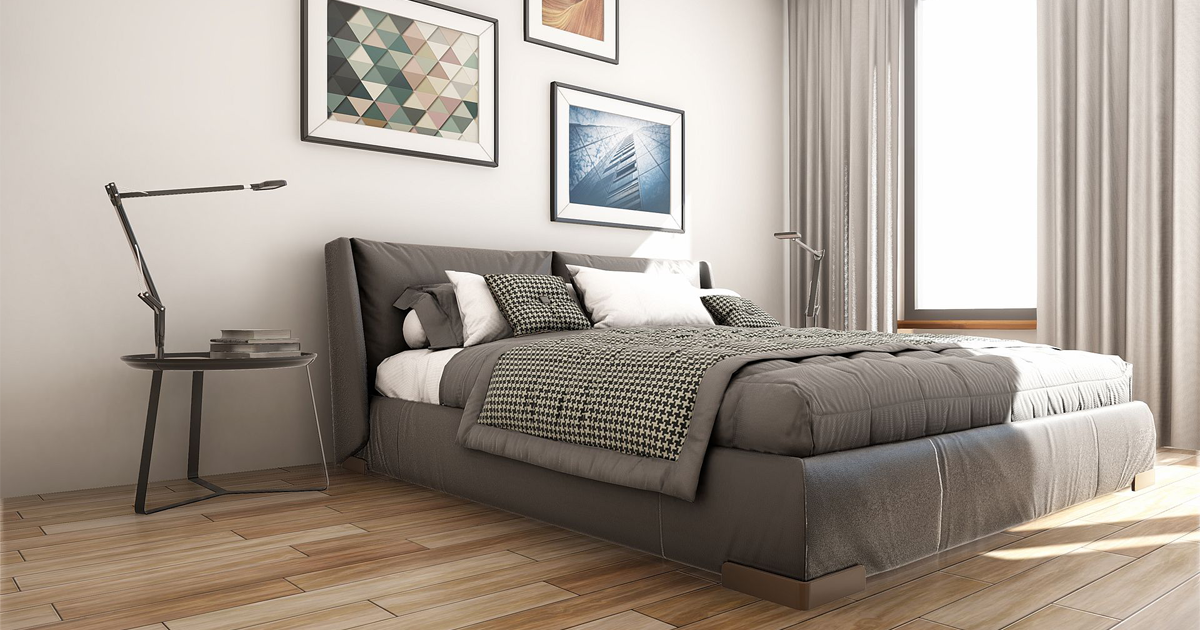
Elevate your workflow with the HQ ArchViz Modern Studio Apartment asset from Next Level 3D. Find this & other Urban options on the Unity Asset Store.
 latent swift
How can I create a door that has to be physically pushed open? I don't want a button that makes it play an animation, I want to be able to simulate an actual object on a hinge.
 stable tulip
Probably but they might be too detailed and it could be bad on performance @covert timber
This file size looks big too so you will probably have to compress some textures
at least down to 512 or 1024
@latent swift Search up "Physical Door" in here: https://docs.google.com/spreadsheets/d/e/2PACX-1vTP-eIkYLZh7pDhpO-untxy1zbuoiqdzVP2z5-vg_9ijBW7k8ZC9VP6cVL-ct5yKrySPBPJ6V2ymlWS/pubhtml
You are probably looking for this one
or maybe "Perfect Doors"
latent swift
Thanks!
Am I the only one who can't seem to get Force Non-VR to work?
The only way I think I have ever gotten it to work when testing a world is if my VR headset is unplugged.
What layer does an object have to be on so a player can interact with it without pressing buttons?
I am working on creating a hinged based door but the player just walks right through it.
Also I already checked to make sure it has colliders.
latent swift
I have no idea what's going on with it now.
I can open the door with a pickup-able object but I can't open it by walking into it. I can move it by walking into it if it's already open though.
Please if someone can help me, I have no idea how to fix this.
 fading ginkgo
is there a layer in unity that wont render to the VRC cameras?
covert timber
thx Kadeko
 bold ibex
Hey, I'm trying to get on OnEnterTrigger event working. Are these the right settings, or no?
 mild spade
They seem right, -Kasai. Are you having any trouble with it? (the sphere collider is not active)
bold ibex
That would be OnEnterCollider Squall
this is OnEnterTrigger
basically as soon as the player enters in this invisible sphere, an event is supposed to trigger. But its not
mild spade
The "isTrigger" on the collider checked or unchecked decides whether it will be an "onEnterTrigger" or "onEnterCollider" You still need to have the collider active for it to work.
 obsidian crystal
Hello everyone  , so i'm trying to make my first World map and a try to make a pick able object but when i or someone else move it people other than the one who move it can't see it move. how can i make it global
bold ibex
objectsync @obsidian crystal
obsidian crystal
is it with Udon for the Objectsync?
bold ibex
@mild spade the problem with having a collider tho is that it will prevent me from going into the sphere like intended, where Enemy1 is located. And with it having an animation set to run after the player when player gets within the sphere, that will cause the player to get pushed around by the collider. YOu dont need it for OnEnterTrigger events. I did it before with AddDamage
SDK2 ObjectSync @obsidian crystal
obsidian crystal
oh i only get the SDK3 that why i dont have it
bold ibex
so you're using udon? therefore this isnt the channel for you
 random owl
You most definetly need the collider active for onentertriggers
mild spade
When "isTrigger" is selected on the collider, it will lose any physics interactions with any other collider. When you activate the collider, does it pushed the player around? And when you deactivate the collider it doesnt?
obsidian crystal
oh ok thank @bold ibex and sorry
bold ibex
ok ,i guess it worked, but now there's 3 enemies instead of 1 for some reason
 tulip arch
Is there any prefabs for video screens with a searchbar ? So you could play your own Videos from like yt and stuff.
bold ibex
every video player prefab has that function. Just choose which one you like the most
tulip arch
Do i have to enable it somewhere? I got a screen in my world but there is no search function.
bold ibex
i think so? I haven't used any of the prefabs yet, so i cant help here. But it should be in the folder somewhere?
tulip arch
I found a screen, it was in the Poiyomi shader pack ^^ Im gonna see if that works
tulip arch
Nah its not working, sad. Anyone know how to make a Video Player with search function?
stable tulip
You can search it up on internet. There are a lot of them that has video player with search bar
It doesn't need to use custom shaders in order to use video player. SDK has it's own shader for that.
 placid cape
Heyo, anyone know what the most efficient and cost effective way to host video files with special encoding for a movie world would be? I'm thinking Amazon cloudfront but I was wondering what other people think
 bitter sentinel
Does anyone here has experienced pickup objects suddenly flies everywhere like a poltergeist causing huge fps drop spike? is there any fix for it or should i just turn on kinematic?
near escarp
if they fly everywhere it means they're colliding with something on start
 ashen eagle
@near escarp You know anything about baked lighting? Got a couple of meshes that are showing up black even though they're set static and 'Generate Lightmap UVs' is checked.
All other meshes look good. Just two imported FBXs giving me trouble
 fossil estuary
So - I'm also having a small issue - on some of the meshes in my world, they are flickering - when I move around , I'm thinking it's a lighting issue, but I don't know too much about lighting to potentially fix the problem
near escarp
@ashen eagle make sure their scale in lightmap isn't too big, that the shader they have supports lightmapping and that there's no error in console for them
@fossil estuary Only s few realtime lights can affect an object, only solution is to bake
ashen eagle
@near escarp lightmap size is 1024 (although I've tried as low as 64), resolution is 1, no errors, and normal albedo shader with texture
near escarp
1 texel is not gonna give any result
ashen eagle
I've tried up to 10, no dice
You'll also note the mesh next to her (giant robot) is rendering just fine
Whether I mark her static or not, comes out black
near escarp
and no warning either ? what does the mesh renderer component look like
bitter sentinel
@near escarp no it didnt happen on the start, it usually happens every 10 minutes or so, just starts poltergeist-ing everywhere and cause the fps drop
near escarp
@ashen eagle Did you enable Swap UVs for a reason ?
ashen eagle
oh yeah, was getting desperate 🙂 I've put it back, no change
near escarp
Now i'm wondering what else you could have changed lol
@bitter sentinel They might be better off as kinematic then
ashen eagle
That was it really...
bitter sentinel
i see
near escarp
@ashen eagle Reimport it then, but post screenshot of the inspector view of the object in your scene too
ashen eagle
Roger that
bitter sentinel
also is there any idea on how to fix chair interacts appearing as 1x1x1 box?
ashen eagle
Weirdly enough an hour age the girl to the left (in red) was also rendering pitch black, no idea why she started working again 😦
near escarp
It says the object has overlapping UVs
also not sure why you'd need a realtime lightmap
ashen eagle
Yeah I think realtime GI was enabled by default... doesn't matter if i switch it off or not
Also my console warns "There are 1086 objects in the scene with overlapping UVs" but this is the only one causing me issues
Almost all my assets are imported FBX's so not really surprised.
ashen eagle
lowers mesh count (as opposed to going into blender and decimating)
Black outline is a mat on the the fbx itself, gives it a cell shaded look
it's literally just a black albedo opaque shader, nothing serious
near escarp
that seems like a lot of stuff that could potentially mess with lightmapping
it's usually pretty straight forward
ashen eagle
I just removed the mesh simplify script, no change sadly
And I agree... usually it should be!
near escarp
are you baking that quickly ?
bitter sentinel
ah i forgot to put an image
ashen eagle
baking takes a while (~10 minutes) but you know within 30 seconds if it's going to work because everything else in the scene BUT that one mesh starts illuminating
near escarp
static batching breaks this @bitter sentinel
ashen eagle
Even if I let it finish it'll stay pitch black
bitter sentinel
static batching ?
near escarp
Are you using a mesh collider or box ?
ashen eagle
I'm going to delete the entire mesh, reimport, reskin, and try again... fingers crossed
bitter sentinel
im using box collider
near escarp
Try without doing anything first, no material, no script, just generate lightmap uvs @ashen eagle
@bitter sentinel well then you get a box collider lol
bitter sentinel
no i mean it should be this small, not that big
also you mention something about static batching
i think i tried static-ing all the stuff besides the pickup, so maybe that?
near escarp
yep
ashen eagle
Ok just with model only it seems to be baking correctly... gonna add back layers until I'm finished. Something must have gotten borked in unity 😦
FYI that AudioBank trigger thing was a total bust... way too complicated and finicky. Went back to video sync and life is much better
 white scarab
Does anyone have any idea why some of my buttons (interact triggers) work fine on desktop but they don't highlight or otherwise appear interactable in VR? All actions on the trigger work flawlessly as designed, on desktop. Other triggers, seemingly doing identical things, with identical component configs, work normally in VR as well as desktop.
World is on the current version of SDK2. The trigger is a component on a regular cube. It is set as MasterBufferOne, and has two actions, SetGameObject active with a single object set as false, and then another SetGameObject active with a different single object set as true.
near escarp
Are your triggers within a bigger collider ?
white scarab
Yes, there is a collider on an empty game object that detects when someone re-enters that area (re-spawns) so it can set that area of the world as active again, and make the other areas inactive.
But the collider itself encompasses that whole area.
near escarp
alright, in that case you need to set that collider to the MirrorReflection layer
The tool from 1 that is pinned in this channel can detect those and fix them automatically
if you're using the latest SDK2, that should work perfectly ^
white scarab
Awesome! Thanks for the help, it was driving me crazy! I'm glad to know there is a tool for detecting this kind of stuff in the future. It seems really unintuitive that the issue would be what you describe, but I am sure that is what's going on.
 outer terrace
Hey there, experts...I'm uploading my first world (and I've put a ton of work into it!) and the uploader says it was uploaded successfully, but when I try to follow the link, or launch the world from inside VRC it immediately kicks me to my home
near escarp
Make sure there's no errors in unity console
make sure your spawn is also unobstructed
 minor mica
hey so is anyone having this uploading problem? ive changed some stuff in my world and running test build or uploading the world publicly isnt applying any of the changes i made... does anyone know a fix or is it some crap i have to wait for a day or just wait for the servers to realize "oh hey look i've been updated" type deal
 harsh wagon
I have 2 questions
1: How do I fix these leaky edges? I'm using Bakery.
2: what do I put in this map I've started working on? It's going to be a home world I think.
near escarp
Do you use the denoise fix bright edges option ?
also you need to make sure those walls are perfectly placed
well it's your world so you should probably figure that out before making the world 
harsh wagon
I just got bored and started throwing something together
The walls are all perfectly aligned, I used the grid in blender to make sure of that
That fixed one of the edges
near escarp
are you sure its height is correct as well ?
harsh wagon
So the bright edges are meant to be a denoising issue right?
I disabled denoising just to check and they're still there.
near escarp
no this is probably due to hos it's built
harsh wagon
There's nothing too complex about it, just a bunch of planes
near escarp
Then make sure the vertices of your corners are merged
harsh wagon
apparently I was just dumb and forgot to generate lightmap UVs
near escarp
That'd do it
harsh wagon
I needed to add some thickness to the walls anyway, I just had an idea for a second floor
ashen eagle
hey so is anyone having this uploading problem? ive changed some stuff in my world and running test build or uploading the world publicly isnt applying any of the changes i made... does anyone know a fix or is it some crap i have to wait for a day or just wait for the servers to realize "oh hey look i've been updated" type deal
@minor mica I've never had an issue with delays... confirmed it's uploading to the same world ID?
 tardy iron
What's the secret behind those worlds that allow you to stream movies? Is there a script I should look at, and a way to connect it to my own server for friends?
harsh wagon
Turns out, fur shaders make really good grass shaders!
harsh wagon
It's running pretty well actually, my PC isn't high-end by any means and I'm getting a solid 90
I struggle to get 60 in a decently populated pug
near escarp
getting 90 solo doesn't mean much, it's the lowest bar for a world
you could be barely holding 90 vs way above 90 in terms of what you can handle
harsh wagon
I'll load a few clients up
Keep in mind though, this is a home world so I don't expect much traffic
near escarp
fair enough, but i think you can find a much better looking grass shader
like Xiexe's
harsh wagon
got a link?
I've been using this fur shader because I couldn't find a good grass-specific shader
 solid helm
Depending on what the fur shader does it might not be bad as grass. After all, grassy terrain will typically have less polygons than a character model and people are less likely to shove their faces into it.
harsh wagon
It's quite an old shader, made by a game studio who gave it away last year or so.
Link's dead unfortunately, they made a pro version and then stopped distributing the free one
apparently they made the free version specifically for VRChat
harsh wagon
Oh! before I forget
do you know what's up with your fake glass shader @solid helm? I want to use it but it's broken for me.
solid helm
Broken how?
 forest forum
Is it possible to get particles to show up in a mirror? I made a fire effect but I can't seem to figure out how to get it to show up, so it looks a bit off,
random owl
Needs to be two sided particle shader since most just face your camera which causes them to face the wrong direction in mirrors
latent swift
How do I add a Boolean on a ProBuilder cube?
 wraith ruin
Audio filters on VRCVideoSyncStream audio source. I have not got it to work no matter what i try. Am i doing something wrong or should it work even?
 vale loom
Does anyone happen to know where I can find the rain-on-glass shader that's used in a lot of worlds?
They seem to use the same one but I've been unable to find it so far~
 lyric acorn
Is this a good channel o talk about spookality eligibilityrequirements, if not, where?
 desert raft
Got a problem where particle effects get smaller the closer you get.. and big from a distance.. Where do i fix that?
 faint wren
Does any one know how to fix this world glitch i have where avatar sounds are muted but the world sound is not.
My world pretty much finish was fixing that problem for last.
latent swift
What layer do I put a door on? If I want the player to be able to push the door open with their hands or just by walking into it what layer would that be put on?
 wispy cloud
Player and PlayerLocal at the least, but I'm not sure if that would work by itself. I think you'd need to somehow put colliders on players, but I'm not too sure on that one. Might work without it though I don't know
latent swift
Okay, thank you.
@faint wren Maybe it's something to do with audio fall-off?
try taking a look at this and see if it helps any: https://docs.vrchat.com/docs/vrc_spatialaudiosource
I am not sure though, I have never had a problem like that before.
Does anyone else here know how to fix that issue?
How do I add a object to players that join my world, specifically colliders. I need the colliders to be on the players hands and feet when they join.
minor mica
yeah so ive trying so to upload my world and it wont update at all and just incase i made sure the idea is the same, and that wasnt the case plus i deleted the sdk and full wiped it to make sure and reuploaded the sdk to my unity after closing and reopening and it still wont update. https://vrchat.com/home/launch?worldId=wrld_f14e6461-9b3b-47e6-9430-5ac0850975c8 this is the world but any update i try to make or test build i try to run on it will not update or work at all...

The Elf Creator brings de ELVES
tardy iron
that's a cool looking world. Sorry I can't help
I'm new to worlds and have a question: What's the secret behind those worlds that allow you to stream movies? Is there a script I should look at, and a way to connect it to my own server for friends?
latent swift
Normally you would use a addon for that. In the latest version of SDK3 then all of that stuff is broken though.
 oblique sparrow
i cant find the vrc_trigger in add component with the new sdk
is there somthing else is should be using or did i mess somthing up
 jolly cape
sdk3 has no triggers
oblique sparrow
what do i use instead
jolly cape
if you wanna use triggers, sdk2
jolly cape
if you wanna use udon, sdk3 #udon-general
desert raft
Got a problem where particle effects get smaller the closer you get.. and big from a distance.. Where do i fix that?
I tried to change the min/max particle size but it didnt fix it all, just made it a little better
 manic sonnet
So I didn't know that the trigger component was downgraded in VRCSDK2, I have no idea how to use this, I can't even find where to put the actions and receivers. Help?
I want to implement trigger based occlusion.
manic sonnet
Did my SDK get messed up? I don't even have the option to publish the world now...
SDK2
near escarp
yeah you have console errors
manic sonnet
all i did was drag the new SDK into unity, and the previous version was SDK2 as well
near escarp
yeah that's sadly not how you update the sdk
VRChat
If you need to update your SDK, it is important that you follow these steps to ensure the update proceeds properly and you don't have any old/conflicting files. SDK3 For SDK3, you should be able to update in-place. This is especially important for SDK3-Avatars, as you may lose...
manic sonnet
 swear ive done it like that before
thanks ill look at that
oh so you remove the old one first
ahh
thanks
I have another question; can you replace SDK3 with SDK2?
manic sonnet
uhhhh
lyric acorn
For Spookality event, is unity/booth/or other free distributed assets a valid use, or do I have to sit and model cabinets and cups myself. A bit unsure on the terms, I don't know what full rights are involved with things like that other than credits
I guess related, any license-free music sources? Most I can find are for live streaming
 copper prairie
How do you update a map made with an old version of Unity? Mine was made in 2017.4.28f1. Also what is the best video player right now?
near escarp
@lyric acorn "If you've got the rights to upload to VRChat (and therefore grant us a license via our Terms of Service), then you can use it in spookality"
manic sonnet
So I tried slapping the mirror material onto a plane... that doesn't work.. How do I make a mirror?
 thorny wind
vrc_mirror component @manic sonnet
thorny wind
@manic sonnet https://i.imgur.com/PxrY2mn.png
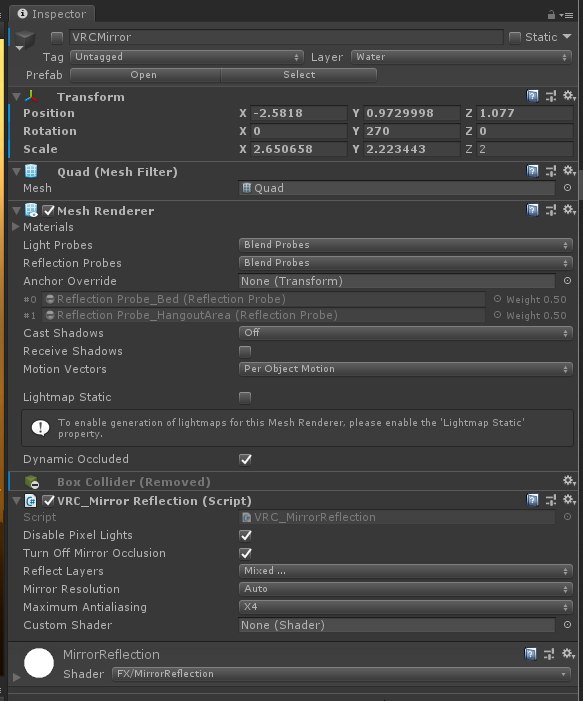
here's one of mine for ref
it may be slightly different in sdk3, I don't have a screenshot to hand for that
manic sonnet
Thank you, that helps
 exotic tartan
had to redownload unity and SDK to create a new world and I am pretty sure I have the correct versions downloaded but when I try to test build it won't work, it keeps saying my computer cannot find an app to run it..... not sure what I am doing wrong
I lost my HDD that had all my old unity stuff on it and hadn't used it in the while... maybe I downloaded the wrong version? I dunno
nevermind I am an idiot, my path wasnt set up
 orchid verge
Does anyone know how to add animations to chairs so that you change the pose?
wraith ruin
Audio filters on VRCVideoSyncStream audio source. I have not got it to work no matter what i try. Am i doing something wrong or should it work even?
I'm struggling
 arctic herald
how do i make a button display a random like object, im making a triva thing and id like to make a button display a random question
plaese @ me if you can explain
tardy iron
A version of my world worked and I'm able to do Built & Test, but I made changes, changed the skybox, baked a new lightmap, and now when I do Build & Test it only loads the old version. what might this indicate?
oh, I missed errors in the console. The skys I added are throwing errors. Would that prevent a proper build?
the answer is yes
arctic herald
do you know how todo the objecct thing im referring too? id love to help but its a little more complicated than my knowledge base
tardy iron
I do not, if your'e asking me. I'm very new to creating worlds
arctic herald
same xD i know how to make them small files and optimised and shit but yeah cool stuff nah
bold ibex
Does anyone know why the VRChat SDK panel isn’t showing “Open Control Panel”?
near escarp
@bold ibex You have to fix the errors in the console
bold ibex
@near escarp The one I can't figure out how to fix says "Assets\Editor\CrossPlatformInput\CrossPlatformInputInitialize.cs(91,17): error CS0619: 'BuildTargetGroup.WebPlayer' is obsolete: 'WebPlayer was removed in 5.4, consider using WebGL'". How would I fix that?
near escarp
Are you using the latest sdk ?
bold ibex
I beleieve so, I downloaded the one I'm using on August 15, 2020.
near escarp
How did you update the SDK ?
bold ibex
I deleted the one I had before and just installed the most recent one on the website. But I did that before making this world.
near escarp
Through this ? https://docs.vrchat.com/docs/updating-the-sdk#sdk2
VRChat
If you need to update your SDK, it is important that you follow these steps to ensure the update proceeds properly and you don't have any old/conflicting files. SDK3 For SDK3, you should be able to update in-place. This is especially important for SDK3-Avatars, as you may lose...
bold ibex
I beleive so.
near escarp
Are you trying to make something for the quest or trying to use a webplayer component in your world ?
bold ibex
- I'm not trying to make it quest compatible, I'm trying to make it for PC.
- By webplayer do you mean a YouTube video player? If so, then no.
bold ibex
Which one?
The two folders are called "CrossPlatformInput".
The note is called "CrossPlatformInputGuidelines".
The left script is called "CrossPlatformInputInitialize".
The script all the way to the left is called "CrossPlatformInputManager".
near escarp
the script CrossPlatformInputInitialize.cs
bold ibex
Ok so that made it so I could press "Build and Test" but when I tested the world it just sent me to my home world. Did I do something wrong?
random owl
Check if you have a empty spawn point in your scene descriptor
bold ibex
How would I do that?
near escarp
your vrcworld prefab in your hierarchy
bold ibex
It has the right coordinates for the position on the top.
random owl
There's the spawns section at the top of the scene descriptor component
near escarp
yes
bold ibex
Does this look correct? This is all that was under "Spawn".
near escarp
Do you have a collider below your spawn ?
bold ibex
Yeah, a mesh collider
random owl
You can import this and check the world debbuger under VRWorld Toolkit > World Debugger
https://github.com/oneVR/VRWorldToolkit/releases
bold ibex
It says this:
random owl
Doesn't seem to be building properly then
Might wanna clear the console once and after that doing build & test and checking trough if there's something off
If nothing there then checking the vrchat output log after it's thrown you back home
bold ibex
When I did that, it sent me back to my home world again and put these 4 errors in the console:
bold ibex
Which script?
random owl
The one specified in the error
bold ibex
So I have to delete 'MenuItemAttribute' and 'MenuItem'?
random owl
At the start of the error it says a path and a script name
bold ibex
So I just delete 'ObjExplorer'?
random owl
ObjExporter.cs yes
bold ibex
THAT WORKED!!! THANK YOU SO MUCH @near escarp @random owl YOU GUYS ARE AMAZING!
 lunar sedge
when i import sdk into my project this is what i see 
near escarp
you have console errors
lunar sedge
oh i see
 deep nymph
error says"Cannot add menu item ‘VRChat SDK/Utilities/Clear Cache and PlayerPrefs’ for method ‘VRC_SdkBuilder.ClearPlayerPrefs’ because a menu item with the same name already exists."
And it leads my uploading scene pause.
random owl
Disable error pause in console
 idle shell
could somebody help me with the VRCVideoSync in unity?
I have 2 buttons that is suppose go to the next song and go to the previous song.
I have 3 URLS placed but in game the 2 buttons dont work at all
but the videos DO play and do play all 3 of the songs i have
 fringe wave
I'm trying to test my world, but I just get suck on the logging in screen, with this error in my unity console
 short forum
There are issues with the vrc servers rn @fringe wave
fringe wave
ah okay
 proven hearth
Is it just me, or is chairs behaving odd? Had no problem in sdk3 with stations, and not I tried sdk2 and chairs, and nothing works as it should. My avatar is just standing up in the chair
bold ibex
Can someone explain to me how to move meshes from 3Ds max to unity with a good texture? Because I'm having A LOT of trouble with this. I already saw that pdf about texel density but I still can't do it in practice. And it’s too frustrating. Now I can understand why 90% of the worlds on vrchat have horrible textures.
near escarp
what do you consider a good texture ?
bold ibex
A texture that works as planned. If I made a texture of 2048px for 1 meter of mesh, when I am in unity I want 2048px for 1 meter and not something different.
near escarp
If you have an example of the difference i'd be interested, sounds like just the difference with having proper UVs and not having any
 supple drift
Yeah, using trim sheets or base materials to get a higher TD ends up being a hand-in-hand workflow between the textures themselves and having proper meshes/UVs. Worlds generally don't have "horrible textures", just a lower or uneven texel density because there's obviously a lot of kitbashing going on.
but I wouldn't get too fussy or beat yourself up about sticking to a target TD because it's just not usually gonna happen through the iterations (especially when you're dealing with the current size expectations of worlds) but even attempting to keep it cohesive should help visually
 vale thicket
So i believe @minor mica had this problem yesterday which i am getting now. (or maybe its something else idk)
Im uploading an update to my world, the vrchat website shows its updated, my sdk controll panel shows its updated, but when i get in game its stuck in the old version. making new instances of the world doesnt help. and i tested it a few hours later and still didnt update in game.
any ideas?
vale thicket
nothing
near escarp

vale thicket
like i say it says version 3 of world in the sdk and on the website
when in game its still version 1
(i uploaded it again to see if just another upload would fix it)
near escarp
no warnings and no errors ?
vale thicket
nope
near escarp
Try upload to a new ID then just to test
vale thicket
yeah that was gonna be my next step, but i thought i should atleast raise attention to this considering it happened to other people
as thats not an option for published worlds
but yeah ill come back once fresh upload is complete
now thats interesting, i guess it must be something my end as the separate upload, uploaded loading the world kicks me to my home
well mb maybe the spawn location is in the floor or something dumb, i did move everything
actually ive no clue what it could be, i guess while im here, you have some ideas ?
near escarp
Any screenshot ?
vale thicket
of? ^^
near escarp
your scene, your vrc world etc
vale thicket
near escarp
well i can already see some errors
vale thicket
i have errors from some buttons from pens which i didnt get around to fixing yet and they didnt cause trouble in v1
unless i missed something
 vale thicket
i am
near escarp
simple light probe placer ?
vale thicket
indeed o -o
near escarp
yeah, that has caused a ton of uploads to fail in the past
vale thicket
ah oof
near escarp
can't say why for sure
vale thicket
well, that sucks xD ill yeet that and do it the old fashion way or not at all
near escarp
If you've generated the probes, deleting the asset should be fine, and then try uploading again
vale thicket
oh, fair enough ill try thanks
near escarp
making sure to remove the component on the light probe group too
short forum
Question about the Spookality Competition: If my current world is already cross-play, can I just mention it is meant for the PC only contest?
vale thicket
still getting sent back to home, thats unfortunate
near escarp
and you have a single spawn right ?
vale thicket
yes
near escarp
Try resetting the transform component on the vrcworld
vale thicket
we have found success thank you :) i did also discover a hidden chair left ontop of the spawn location, maybe that had something to do with it, regardless thanks for helping my mess up ^^
latent swift
How do I delete one of my worlds from my account?
near escarp
Content manager in SDK
latent swift
Oh duh, thank you*!*
 short gulch
This is a general question for both worlds and avatars, is it possible to set an audio source as a one shot audio clip? That way it could be retriggered without cutting off the previous one.
near escarp
For worlds yes, avatars i don't think so
Since it's done through the audio bank component which isn't whitelisted on avatars
 spare bridge
Does any one know why my world is 39.19 Mb even though i only have a floor and mirror in the world?
near escarp

Turns out a lot of world creators didn't know this, but you can easily find out what your world is made of, how much it weighs, to then be able to reduce its overall size :
Retweets
178
Likes
403
 Twitter
 placid cape
hiya, I'm making a movie world but I'm having issues with long videos, for some people it stops working halfway through a movie at the same time but for me it keeps playing, any ideas?
 ivory swift
I'm trying to build a vrchat world is saying I need a new app to open this
im trying to test it
bold ibex
🥶
near escarp
@ivory swift any screenshot ?
random owl
You need to run the install.exe inside the vrchat installation folder @ivory swift
 candid wigeon
Is there an easy way to make the skybox rotate? I want me sky to look animated without actually doing animated textures (please ping if replying)
near escarp
@candid wigeon make a giant inverted sphere
thorny wind
@near escarp for something a little more granular, I recommend this asset by @eager pollen https://github.com/MunifiSense/VRChat-Build-Size-Viewer

GitHub
A script for viewing the build size for VRC worlds and avatars after building. - MunifiSense/VRChat-Build-Size-Viewer
near escarp
Yeah I'm using that myself, but beginners have a hard time with unity add-ons
I guess I'll pin this instead of my tweet
random owl
Theres also the official build report viewer from the package manager
That's what I use myself usually
 keen gust
what is the name of the world attack on titan
 proper gulch
does unity have pixel depth offset? i've got some very depthy materials in use but the illusion breaks down when two of them intersect
 indigo scaffold
i created a simple avatar world and wanted to make it quest compatible but it doesent load on the quest at all
somebody know what i have to do
 main mantle
Ott : That PDO example is really bad, it's clearly 2 different meshes... Anyways, I'd say work on the normal maps first, they should help you make a proper "fake depth"
short forum
@indigo scaffold Did you follow all the steps on making a cross-play world in the vrc documentation?
 slow orbit
@proper gulch If you need PDO you'll need to do it in the shader itself.
@main mantle Normal maps aren't going to help much if at all when parallax offset is involved.
 urban sorrel
I'm making my first world and doing the awful thing of simply scaling cubes to act as walls, instead of having sensible models. I then add a window in and layer cubes around it and to not have seems I end up with z-clipping. What's the best way around this? Can I use probuilder to merge the meshes or something? Can I get unity to snap to other objects when playing them, and measure specific distances?
short forum
You can use probuilder to merge meshes. And dont worry, my first world i did the same thing lol.
urban sorrel
I tried merging the meshes, but it seems to more "group" them than cull the overlapping meshes into one.
So the Z fighting was still happening
short forum
You can hold down ctrl to move objects in your scene by 1 on the x,y,z axis to make things more precise, then go into the inspector and edit it by decimals instead.
urban sorrel
Okay thanks!
ivory swift
@random owl I was looking at a solution to open my world in test mode and it just says it should automatically open when I click Build & Test
random owl
Yeah as long as you have set done the install.exe at some point
ivory swift
were is it?
ivory swift
thx
manic sonnet
Could someone point me in the direction where I can learn how to add occlusion to my world with SDK3? Like an Udon tutorial or something?
near escarp
I don't think that has anything to do with Udon, that's just a Unity thing
proper gulch
@slow orbit are custom shaders allowed in worlds?
ivory swift
how do I make a custom deck of cards for vrchat world
proper gulch
i guess they're more heavily moderated
short forum
please use that
manic sonnet
I wanted to make it so I spawn in a room and theres a cube in the shape of the room. When I am in the cube it would not render whats outside the room and when I step out of the cube it would render the rest
You are saying that is all Unity?
bold ibex
I guess im really stupid. How does someone actually make world audio for... worlds?
Hey all, I'm having a problem uploading an update to a world I've been working on. The editor control panel shows the right world ID and stuff, ut after I click publish, the upload page says "new world creation" and I can't actually click anything.
manic sonnet
@bold ibex
random owl
You can search your hierarchy for t:pipelinemanager and check if you see multiple objects coming up @bold ibex
Also make sure you have error pause off in your console
bold ibex
@manic sonnet Well, you see, it is there
do i not use spatial audio component and only use audio source?
manic sonnet
you will want both @bold ibex
bold ibex
its still only going to one spot, in unity it works FINE with 2d spatial blend, but in vrchat it forces it to 3d and it gets quieter the more i go away
manic sonnet
So you want it to be the same volume no matter where you are?
bold ibex
yes
short forum
@bold ibex go to your audio source, add the vrc spatial audio, and disable spatialization
bold ibex
@1 thank you, the error pause was the issue on my end. All good now, Rock on 😄
... uhh im assuming thats inAdvanced options?
bold ibex
the component is broken
short forum
Broken?
manic sonnet
Just remove the component and re-add it
bold ibex
ive probably done that thousands of times through various projects
that worked, thank you the component i guess wasnt installed correctly
 lean mortar
Hey, does anyone know if you can make audio sources local?
short forum
@lean mortar Like triggered locally using a button?
lean mortar
sort of like where one person could here one song and another could trigger another song and the other would only here the song they chose
short forum
Your triggers need to be set to local. If your using sdk2, there is an option next to the interact, like advanced mode?, that allows you to change the triggeres between local, global, owner, ect.
For udon, its set automatically to trigger locally only
lean mortar
So would this allow someone to cycle through songs locally, such as like a local tracklist player?
short forum
Eh, not really. I have not really messed with the track component on audio sources, but i know you can have multiple audiosources for all your songs, then just hide/unhide the sources you want for the song and set it to local so the trigger is only activated locally
lean mortar
Aah ok thank you!
lean mortar
Do you know if you can have a local video player aswell? that lets each user play their own video on it?
near escarp
make every interaction local
lean mortar
Ah! Thank you!
faint wren
my world pretty much done but i have a glitch where avatar sounds are muted but world audio works any one hade this issue before?
near escarp
either reduce the priority on world audio sources, or reduce the amount of audio sources active
faint wren
so there is to much audio that it can't compute with the avatar sounds
near escarp
there's a limit of 64 active audio sources in unity
faint wren
ah now i see ill count my audio sources then
near escarp
including player voices
manic sonnet
What do these 2 settings need to be in order to hear the audio fully?
I keep adjusting them because I can barely hear my audio
I have the spatialization off
near escarp
what are you trying to do ?
manic sonnet
I want to hear the audio at full volume throughout my whole world
 nimble cedar
Anybody familiar with animators?
Looking to try have a slider control which keyframe a certain animation is at
short forum
@manic sonnet Change the volume slider not in that script. Those two are used for spatialization
manic sonnet
If I have spatialization off, then those settings dont matter, right?
near escarp
manic sonnet
I have the volume slider at 1 and yet I still can't hear it..
near escarp
nope
near escarp
With the volume set at 1 ?
Sounds like your audio track is too quiet
what does it look like in the unity preview ?
 tawdry narwhal
hey I have the same problem, I can't hear my sounds
manic sonnet
No I did not set it to one, I left your prefab as it was
near escarp
can you post a screenshot of the audio track preview in unity
manic sonnet
I set it to 1 and I can hear it now, but it is still too quiet
This what you mean by preview?
When I press the play button there, it is the right volume
Oh
I opened it again and now it works
near escarp
yeah that's suuuuuper quiet
manic sonnet
It sounds good now
I have one more question.
My mirror is super dark
but the actual room isnt
near escarp
What mirror options do you have enabled
manic sonnet
near escarp
enable pixel lights ?
 iron surge
I'm having trouble updating a world. Each time I hit 'Build and Test' it processes, launches the game and starts up with a previous build / version of the world without any of my recent changes. I'v removed and reinstalled the SDK. I've cleared the cache in-game. I have no custom scripts.
random owl
Clear your console once do test & build and afterwards check for any weird logs there
iron surge
Nothing with a 🛑 . Plenty of yellow though. I hadn't looked at them while it was working.
random owl
There was some other people mentioning that the new patch caches things differently so test and build wasn't working properly though
Could be that as well
iron surge
iron surge
It's still giving me the old build when I 'Build & Test' with 'Error Pause' off.
iron surge
No change from changing, adding, removing Blueprint ID.
No change from replacing / reimporting the VRCWorld object.
No change from exiting and restarting Unity.
I think I got it!
In the VRCSDK Control Panel settings, I didn't have the Client set.
iron surge
Nope, updated once, then more of the same.
 tall coral
I'm having the same issue too. And what makes it even more odd is when I load a different scene it still gives me the old build of the original world. And even when I load a completely different project and do 'Build & Test' I still get the old build of the world in the original project.
tall coral
Maybe but I tried clearing my local cache and it still didn't give me the correct build. I'm going try Build and Publish and see if that at least gives me the right build.
near escarp
yeah iirc the bug is that clearing local cache actually doesn't clear it
i'd only be suspicious if it was happening on another ID completely
 green niche
why isn't none of my changes applying when I save the project?
I went on ahead to build & test but found out that none of the things that I changed actually appeared in-game
near escarp
@green niche @tall coral @iron surge For the moment you can delete the vrchat cache folder manually
VRChat
Why can't I upload content yet? You must obtain at least "New User" Trust Rank in our Trust and Safety system in order to upload content. You can get this by just spending a few hours in VRChat, hop some worlds, and make some friends. Give it some time and you'll be able to up...
green niche
done, still didn't work out ;-;
near escarp
green niche
still an older version of my world, I don't know if I may have missed anything..
did something wrong,etc
is there anything I can do at this point or do I have to start all over? .-. rip
near escarp
i'd suggest waiting for now
tall coral
it worked for me but I have to delete the folder every time I do a 'Build and Test' for any changes I make. However 'Build and Publish' worked just fine although I rather not build and publish every time I want to test something.
green niche
well the only thing i've done was clear the cache, i've heard there are other methods but don't know how to execute them
green niche
manually
near escarp
Then it could be your content, check your unity console
green niche
mb, 46 warnings.
alright, I see, i'll try to fix it judging by the error message
how do I uninstall stuff I got from the unity store? it seems to mess up my world with all the errors it's giving me,
I don't know why it even appears despite me making a whole new project..
like, assets, i mean, something i subscribed to from the unity store began to screw up every project of mine with errors I don't even know how
near escarp
yes
green niche
Ok so I fixed the errors, still got the older version of the world.
Just got plain old warnings.. do they matter? Oh, deleted the cache again and it updated.
 simple nimbus
SyncVideoStream component with 4 livestreams. it is set to autostart and when you load into the world everything works fine. I have a cube to act as a trigger to SendRPC different indexes of the playlist and it just doesn't work and I have no idea why... can anyone help?
bold ibex
I created a new world and finished uploading it, but why can't I enter that world? (Create the World for the first time)
near escarp
 neat blade
I am having problems with animating the tardis i have created...
I don't know even after watching a few tutorials, how to do stuff
can someone help me?
I want to make it, so once you "take off" the door locks, and the lever/button cannot be pressed again for around 20 seconds...
A tardis movement system I am needing help with as well, same goes to exterior alpha...
IF that is possible(which i think isn't)
arctic herald
Can someone help me do something? i want to make a button display a random object. not just toggle it but i want to make a button for a trivia game and im trying to figure it out
arctic herald
so i meant i dont want just one object, i want it to randomly pick one of many objects
for like a random trivia question
@near escarp
near escarp
Yeah, there's the randomize function in the vrchat trigger component
arctic herald
i was playing with that, does it just select a random object or randomly decide if it turns on/off
arctic herald
okay thats easy xD
would you recommend just doing like 30 objects of questions sort of thing or would their be a more efficient way
Any got any clue why it doesnt update the world when i test build?
 real moth
Using sdk2 Build & Test no longer works. Everytime I use it, it is stuck on an old build. There are no errors in the console, I've restarted Unity, restarted windows, re-imported a fresh download of the sdk, even re-installed vrchat
There's at least one other person reporting the issue too: https://discordapp.com/channels/189511567539306508/337672341041446912/749152779695685642
arctic herald
yo i just discovered this too
 gusty trench
guys, my world isnt building and i have no console errors aswell
arctic herald
i did it like 30 mins ago now i got nothing
gusty trench
im guessing its for everyone then
arctic herald
might be part of the server issue
gusty trench
Might be the new update
real moth
Building and uploading works, but that's no way to develop
indigo scaffold
Have an issue with my world, tried making a tiny avatar world but everytime I load it on quest it bounces you back to your homeworld, does someone know a fix?
real moth
Since it's the weekend I suppose it probably won't be fixed until at least Monday unless someone can come up with a workaround
real moth
Like maybe we can just manually delete the old build or something
I am just a unity/vrchat noob though
gusty trench
alright so this is weird, when i build & test only trigger colliders get built
simple nimbus
SyncVideoStream component with 4 livestreams. it is set to autostart and when you load into the world everything works fine. I have a cube to act as a trigger to SendRPC different indexes of the playlist and it just doesn't work and I have no idea why... can anyone help?
This got buried so im bringing back
simple nimbus
looks like this may be because my world isn't updating when i build... this is all i have in the console i don't see any errors
real moth
Try MasterBufferOne instead of AlwaysUnbuffered
Might also need to resync as another OnInteract
simple nimbus
yea i was just messing with that to see what was working
it was the same issue as above people
build & test not working
gg
published it and it's fine
proven hearth
Hey everyone, so I now suddenly cant seem to add anything to my scene.. I add something, its there, but when I build and launch the things I added is not in the world.. Any ideas?
proven hearth
Is that why its missing on my side.. cause im super confused ATM
random owl
Most likely
proven hearth
Hmm ok.. well will be waiting then. was confused about my table missing the other day, but now it just seems super broken, as I only have clear cache in the VRCsdk tab
random owl
That would be a different issue
Compile errors in your console most likely
@proven hearth
proven hearth
Arrrrgh.. I have no clue how to fix these things
proven hearth
@random owl here you go
random owl
@proven hearth you can start by removing the textmesh pro package from your package manager under Window > Package Manager
It will most likely bring up new errors
proven hearth
Hmm there is no package manager there.. wth happened.. lol
random owl
That's gonna be a bit more annoying of a problem to deal with then
You can try making a new project and seeing if it's happening there as well or alternatively closing unity and deleting the Library folder inside your unity project
proven hearth
I did not even touch anything, its like i left it yesterday, just broke.. what the hell
 analog path
Build and test not working ?
random owl
Yeah build and test broken atm
analog path
ah...
proven hearth
Ok ill look into doing a new project otherwise delete..
Ya making a new project put the manager back
random owl
Okay that's a good thing
proven hearth
but not in the project where I need it.. lol
random owl
You can try fixing the old project by deleting the Library folder like I mentioned above
proven hearth
Ok trying that
random owl
If that doesn't work I don't sadly have time for more involved project fixing right now
real moth
It must be holding on to an old build then? Is there a way to just delete that old build to force a new one?
I tried deleting the files that the console points to when it launches, but they just get replaced with the same version so there must be a source somewhere
oh lol
you already answered it my bad: "delet[e] the Library folder inside your unity project"
proven hearth
Well I did that.. And be sure to back stuff p
up
Cause my whole project went bye bye
real moth
womp womp
random owl
@proven hearth just deleting the library folder wouldn't cause the whole project to dissappear it would just cause everything to be reimported and built from the assets folder
proven hearth
Well It for some reason did. Could no longer get access to anything for some reason, was just a camera and a light in the world when loading it
random owl
You would need to load the scene you had open before
Because otherwise it just opens into a empty scene
proven hearth
I tried. Not sure wth is going on. I had a backup though
Just without all the changes I did
real moth
Dox, are you sure you don't have to just re-open the scene? deleting the Library folder makes unity forget which scene to open it looks like
proven hearth
I thought I did..
But as Im a total damn unity noob, I might have just not done it right.. 😦
real moth
Sadly even after rebuilding the Library folder mine is still using the old build
proven hearth
But even if I did mess up, I still did not have show the control panel or the packet manager
so I was still stuck
random owl
@real moth the build & test problem is on vrchat's side
real moth
Yeah, but it's pulling the build it uses from somewhere... right? If I knew where that was stored, wouldn't deleting it force a new build?
Or is it actually stored on the servers?
random owl
You can clear the local cache manually which should make it update
proven hearth
Btw, if 1 object, say a table, shows up in your scene, but not when you test or publish it.. what can it be?
random owl
Most likely the same problem as Lodax caching bug on vrchat's side
But there can also be other reasons
proven hearth
ok good then.. I did upload yesterday though. its in my scene, and when I test it, I can stand on it, but its not there..
random owl
Do build & upload if that works then it's on vrchat's side
proven hearth
I did upload yesterday with the table there, but its no there on the vrchat side either.
not*
real moth
That works for me, too bad it's such a painful workflow. I'll just hang up the world building for the weekend I guess
urban sorrel
When I'm running "local test" it's not updating the world from the previous version, is there a common reason for this?
analog path
Build and test work for me after deleting my cache 👍
random owl
@urban sorrel caching problem on vrchat's side with the new update as we are discussing here right now
You can clear your cache manually and try again
urban sorrel
Ah okay thanks!
proven hearth
Im so confused now the prior I build and tested show up, and not what I just did.. lol.. I think ill just wait until it actually works.. and yes cleared cache aswell
analog path
I think we have to delete the cache each time that we do a build and test. I added a cube in my world, build and test again and the world was not updated
😕
proven hearth
Ahh make sense.. 😦
 misty marsh
delete the cache as in deleting it inside the game?
analog path
misty marsh
I see, and if I were to do that everytime I try and test the world it should work even with the current issue?
proven hearth
I tried ingame, I cant get that to work. so need the manual way..
analog path
Ok, I delete my cache (manual method) again and the cube is here
proven hearth
I must be doing something wrong
I tried that too.. and still the old old one I had done before
analog path
close VRChat (and maybe unity just for this time), delete your cache, build and test
analog path
?
proven hearth
Now the showing the control is going from the VrchatSDK tab.. 😦
analog path
hum I'm not sure I understand
proven hearth
you know where you have to build and test.. I cant access that
analog path
Are you log in ?
proven hearth
Yes.. but the only thing I can access now in the VrChatSDk tab is "Utilities" which has Clear Cache and PlayerPref
analog path
check your console if you have errors 🤔
proven hearth
I have a few
analog path
with red sign ?
analog path
send me a screenshot in private I will help you
proven hearth
I have the entire code copied, its just one error that has nothing to do with textmesh as I can see
 magic vessel
i am trying to build and test my world, but the changes i make are not reflected in-game. instead, vrchat opens an older version of my world. i have no errors in my project. is there some way to fix this?
proven hearth
you have to wait until vrchat fixes this.. or delete your cache each time you need to test it
 tame reef
This happen to me aswell. I've been working on my world for several of hours today and it worked fine. Then all the suddenly it refuse open the newest version of my world when I build and tested it.
magic vessel
@proven hearth i deleted my game cache, and also reinstalled the game, and i still have the same issue. is there some sdk cache that I don't know about?
analog path
Go back in the conversation and look the screenshot I posted, you have to delete your cache with manual method.
magic vessel
i have already done so
bold ibex
Anyone here that would take a minute to help me solve something?
Problem explanation: An Old edition of the map continues to upload
Unity, 2019.4.20f1, SDK 2

I have just resetted my PC, and I Installed Unity and the SDK. Got In and installed QV Pen/standard assests.
I uploaded It (Build & Run) to try It, worked fine.
I got out, add a button/skybox and hit build and run agin. Not added In.
Created a new project and added only the SDK 2 Into It and a spawn point and hitted build & run. The old project Is uploaded, any Ideas?

renew the world id?
random owl
It's a bug with the latest vrchat update you can try manually clearing your cache to help the issue
If you scroll up this chat is literally all just people having this problem
bold ibex
Allright, will take a look @random owl Thank you, will return soon :3
@magic vessel
I would have uninstalled the other unity version you would change out and Install the correct one (2018.4.20f1)
magic vessel
i am using 2018.4.20f1
bold ibex
Then which version of Unity does It open up for you?
bold ibex
Allright, then let's have a recap of the Issue. You told me you hit the build & run and It opens up the wrong unity version, or am I wrong?
magic vessel
it opens the wrong version of my world
i create a world with a plane, and i hit build & run, and it works correctly
bold ibex
Then It's the same Issue that I'm currently on. Will ping you If I manage to solve It with with some help from here
magic vessel
but then i add a cube, and when i hit build & run, the cube does not appear in-game
bold ibex
Yeah, and If I understand what 1 Just said. Than It's an bug which Is for the latest SDK update. So I'm clearing It manually now to check It.
@random owl Manually cashe clear from Ingame does not work. Is that the Issue with the newest update?
random owl
The issue is caching inside vrchat is broken currently
VRChat
Why can't I upload content yet? You must obtain at least "New User" Trust Rank in our Trust and Safety system in order to upload content. You can get this by just spending a few hours in VRChat, hop some worlds, and make some friends. Give it some time and you'll be able to up...
You can also just build & upload which should work
bold ibex
Thank you, solved the simple Issue.
Got It, and you just explained it pretty simple. Just the cashe part that was the Issue all along. Just made myself rip 4 weeks of works xD
@magic vessel There you go, try that explanation and see If It solves your Issue
Wouldn't it be easier just to renew the world id before uploading to test? World id can be renewed from the scene descriptor. Logically if it hasn't got a cache it won't fall back to the previous one. I don't pretend to know how it all works though.
bold ibex
Might be, just thought It was strange. But I'm fine with clearing the cache manually before uploading one change I want to check
 tight cloud
I am trying to build a local test world but it is only loading the previous build. I am only getting warning messages. Is there a way to enable a more detailed error messages?
 narrow breach
I'm gettin gthe same issue right now Ponzis. It's not uploading any changes I've made in the past 30 or so mins.
reading up it looks like cache is broken?
random owl
Yes
tight cloud
So I need to clear cash every time I change something?
random owl
Or just work on the unity side until the problem get's patched most likely on monday
Build & Publish should work better for now
narrow breach
That's unfortunate. I'm just getting ready to upload a world, and doing some last minute tweaks. Time to blow the cache away. 😄
random owl
Good luck 😅
short forum
Thankfully, I finished my bug fixes Yesterday, before everything went south.
narrow breach
Just to clarify, you're saying build and publish is not affected because it downloads the world each update, right?
random owl
Yeah afaik the problem is just that the build and test world get's cached wrong causing you to load into the same world everytime
No one has reported having problems with build and publish so far
 split hare
anyone know a decent fog particle or shader? I'm trying to hide the edges of my terrain and give the appearance that "you can't progress past this" so I wanted to add like a fog effect to the border of the region used as the map but I didn't account for this when the terrain was made so I need to hide the edges
manic sonnet
For some reason my audio stops playing after about 500 meters from its location. Why?
 subtle garnet
is the audiosource set to global?
subtle garnet
as for the boundary mist, I'd design the world to not let players go far enough to see the edge of the terrain by designing in physical boundaries like walls and fences.
The mist idea seems harder to achieve and more costly perf wise
 heavy quiver
Hi! Just small question. Anyone else who knows how fix problems with Unity making VrChat load old world project than open new one? In local world testing I mean
bold ibex
I had the same audio problem in one of my worlds, i'm not sure what caused it. The audio only seemed to work when i was right on top of it.
random owl
@heavy quiver caching is currently broken with the new patch so local testing can be a bit broken
heavy quiver
Oh...
random owl
https://docs.vrchat.com/docs/frequently-asked-questions#how-do-i-clear-the-vrchat-cache
You can try manually clearing your cache but results can vary
VRChat
Why can't I upload content yet? You must obtain at least "New User" Trust Rank in our Trust and Safety system in order to upload content. You can get this by just spending a few hours in VRChat, hop some worlds, and make some friends. Give it some time and you'll be able to up...
heavy quiver
Well I checked with cleaning VrChat cache and still does launch old world
random owl
But did you clean it manually or in game?
random owl
That's why I specified manually above since that seems to be working for people
heavy quiver
Ok let me try now then
ugh still happens
Still opens the old world even when removed cache
short forum
^ This also can happen if you have build errors, regardless if you cleared your cache or not
heavy quiver
Like I tried do new world with only one platform and it continue to load deleted project
 analog leaf
its gonna be a long weekend lol
i got a big update to my world i really wanna test but cant
 fallen knoll
for some reason my world is not updating when I go to test it, it's not saving any of the changes when I upload it for offline testing
detaching the blueprint ID did nothing to help
near escarp
@urban sorrel #udon-general
urban sorrel
@near escarp ty deleted
fallen knoll
for some reason my world is not updating when I go to test it, it's not saving any of the changes when I upload it for offline testing
detaching the blueprint ID did nothing to help
 raw siren
i have no idea what this means im new to unity and trying to figure it out as i go but this makes no sense to me
 solid atlas
i got a question is it possible to have a audio visualiser in a world ?
like any song thats played through a video window gets a audio bar animation ?
tight cloud
When VRC is building they are improperly setting the graphics device for mac builds. This is nothing to worry about.
raw siren
well how do i join a local world cuz i dunno how to test my worlds whem i dont see a away of joining it
fallen knoll
for some reason my world is not updating when I go to test it, it's not saving any of the changes when I upload it for offline testing
detaching the blueprint ID did nothing to help
raw siren
tulip arch
How can i Prevent Smoke/Fog from Rotating with the Head in VR? I got these Settings, Particle system is set to World and "Allow Roll" is off!
lean mortar
Hey, is there anyway to mute an audio source with a vrc trigger?
near escarp
@tulip arch vertical billboard is the one i think
tulip arch
Thanks!
near escarp
@lean mortar yep, SetComponentActive
lean mortar
does that mute it and keep the song running in the background? or would it restart when activated again?
near escarp
the song stops and yes it'd restart
lean mortar
hmm, do you know if there is a way to keep it running in the background?
near escarp
Don't turn it off
lean mortar
Is that possible do you know? Thank you!
near escarp
I don't think there's a way in SDK to sync songs already being played. You could turn on the song for whoever, but it would start from the beginning for them locally
lean mortar
hmm okok thanks for the help!
how about if i made an anim that triggers mute? would that play locally? or would that mute for everyone? @near escarp
near escarp
Depends if the trigger is local or not
lean mortar
so a local trigger to play an anim would play the anim locally?
near escarp
yep
lean mortar
nice! ok thanks ill try that
stable tulip
I found an issue that whenever I try to build and test the world, it takes me back to the old version of the map (No new changes) I checked if I have any console errors or models that causes the issue, but no result.
tulip arch
Try reinstalling the SDK
stable tulip
okay
analog path
You have to delete your cache manually
stable tulip
Already tried that
analog path
I have the problem with the build and test and when I deleted my cache the build and test work but I have to do this each time
stable tulip
It's strange I don't have too many things in my world
I just started with a new project and I already have issues
analog path
I hope that the vrchat team will fix the build and test quickly
analog path
if you have vrchat open, close vrchat, delete cache in "%AppData%..\LocalLow\VRChat\vrchat" and you can build and test
stable tulip
I think I had an error somewhere in my project so that rejected the build
fallen knoll
for some reason my world is not updating when I go to test it, it's not saving any of the changes when I upload it for offline testing
stable tulip
So you are running into same issue like me?
magic vessel
everyone is aving this issue right now
stable tulip
and I thought it was my world, oh my god


 stable tulip
Okay that worked. Thank you cellomonster and xCommando
lean mortar
@near escarp sorry ive got one more question, is there a way i can teleport the player when they enter an area? ive been trying with onentercolider and onenterinterract but none of them teleport me
near escarp
OnEnterTrigger on the PlayerLocal layer
lean mortar
oh ok, Thank you!
raw siren
well i found the issue and made progress but it loaded the world and tried to initialize but kicked me back to my home
😢
proper gulch
how can I get canvases to be completely diffuse and not glow in the dark?
hmm
it looks like when I set the shader to UI/Lit/Bumped it gets lit but not shadowed
stable tulip
@raw siren Try to delete cache by following this process:
 simple palm
I got this error on a older map and cant seem to get rid of it
near escarp
simple palm
thanks
arctic herald
so, ive figured out the randomiser on the trigger but how to i make it toggle one object, basically i have 3 objects and i want it to randomly pick one of them but have them all able to be turned on
arctic herald
nevermind
 spark thunder
can i make it where..when u click a seat it makes u lay down?
i think ive seen it but idk how to do it
arctic herald
i want to figure that out too
i think if you add an animator to the seat
and make the animation that thingy it might work
candid wigeon
i cant take this shit anymore lmao
 deep charm
Does anyone know how to fix these errors? They show up when I try to Build and Test my world.
This is my first time making a world using the new SDK, this never happened before and unfortunately I'm a noob at this, so any help would be very much appreciated.
random owl
Those are warnings not errors they can be ignored
deep charm
Yeah that normally is the case but for some reason my test build won't load up like it normally do.
deep charm
ooooh thanks!
 viscid elbow
where is the best place to post worlds?
lean mortar
Is there any way to rotate the seated direction of a vrc station?
random owl
For all those people who find it more convenient to bother you with their question rather than search it for themselves.
@lean mortar you would just need to rotate the chairs station enter player location
lean mortar
oh ok, Thank you!
 lone shell
do physic materials work on players?
like, can I put physics materials on objects and have them affect players 🤔
proven hearth
Is it still not worth working on your world? Meaning is it still broken?? lol
 late flume
Anyone know how to add a singular photo into a world, such as a group photo for example ? whenever i try to atach it to something like a plane it always repeats itself over the plane
mild spade
Carlos, on the material you used to show the photo, do you have this set to 1,1 and 0,0?
random owl
Quad would be better also
 tidal axle
is the unity chan model good for getting the scale of stuff in your world right?
near escarp
the sample avatar in the SDK is 1.8m
candid wigeon
😔 how do i fix these?? (ping when responding please)
near escarp
@candid wigeon someone already pinged you yesterday for that
candid wigeon
:( and nothing worked
near escarp
Which steps did you follow ?
bold ibex
i keep getting flung out of the world i built like there is a collider box covering the entire thing
 charred nexus
hi guys, is there some reason why my world, when i click build and test, just loads up an older version of the world?
i've made numerous changes to my world
but when I hit build and test, it loads up a previous revision
should I reset my vrchat cache?
ah shoot, other people have had this issue too, found the fix. thanks!
 terse terrace
ah shoot, other people have had this issue too, found the fix. thanks!
@charred nexus How did you fix this, I just came here to look for a fix or post to ask?
Edit sorry for the ping I found the announcement.
late flume
Is there a current way to fix this issue ? the whole Udon thing confuses me and i couldn't find a way to allow my world to have looping music by myself, so I've come to ask if anyone knows what to do!
charred nexus
add a VRC_SpatialAudioSource
the auto fix button doesn't work unfortunately
at least on my end
late flume
do you know where that is located ? i dont see it in my prefabs
charred nexus
add the component to your audio source
you click add component
and add a VRC_SpatialAudioSource
no prefab
late flume
You are a genius LMFAO, thank you so much!
charred nexus
no prob
late flume
Also @charred nexus , i hope I'm not bothering you with asking this but do you know why on only one floor model the light flickers on it when moving around? its like its only on one section of it and when you move away from it, it goes back to normal
charred nexus
nope, never had that problem
stable tulip
@late flume Are you using Realtime lighting?
bold ibex
Umm I have a question
So I'm trying to put a texture on a plank but it keeps coming out to big
Can someone help please 🙏
:3
near escarp
too big ?
late flume
@stable tulip for the directional lights yes i am
bold ibex
And it just is to big for the plank but I wanna make the texture fit perfectly
near escarp
any more context on what *this *is ?
 remote vigil
I'm having a strange bug.
bold ibex
I wanna make the textures on the box smaller
remote vigil
When I build and test, it's building a previous version of my world. Lemme screencap
Current state of world
Version that always gets built. It's about an hour behind
stable tulip
@remote vigil There is a current issue with the newest update so if you want to fix this, delete your cache by following this step:
near escarp
@bold ibex Change the tiling of the texture
bold ibex
How do I do that
remote vigil
ty, that worked
near escarp
@bold ibex it's on your material
 worthy kite
@bold ibex look for tiling
bold ibex
Ty
 summer peak
is there a tutorial on how to make bloom lighting in your world?
 hushed quiver
I am experiencing a rather odd issue at the moment anytime I try to test my new map it loads a old version. Is there a fix?
 scenic flume
I have the same damn issue, you have to delete cache as defined in the VRC FAQ. Its the only way I've found to fix it and you have to do it every time....
hushed quiver
oh thanks I have been stuck
scenic flume
Yeah, it sucks because Ill forget about it then have to rebuild a big scene -.-
hushed quiver
Thanks it worked
 vestal karma
Can anyone help with this door animation?
I've made sure that it's not set to static, but it still does this.
It plays correctly in Unity
near escarp
How is it setup in unity
vestal karma
Heck, first I have another problem. When I try to Build and Test, it seems to keep building an older version of the world. It keeps showing the version with the baked lighting like in my example video, but I've since cleared the baked data and restarted Unity.
vestal karma
Ahhh, thank you
scenic flume
I actually wonder where tf that bug came from because I wasn't having that issue until yesterday.
vestal karma
So I did fix my door problem, I just couldn't see it.
scenic flume
RIP lol
I wonder how many ppl gunna have similar issues until they fix that... I noticed that as long as you clear cache before VRC loads it works OK
So its literally a bug in VRC itself
Its like VRC is stuck pointing at you're old world instead of updating to the version you just built
near escarp
Yes, it broke with the latest patch, we'll have it fixed on monday
scenic flume
I'm just glad I'm not going crazy and its not just me because I thought for sure I was yesterday xD
Also, thank youuu
placid cape
Hey is build and test not working properly for anyone else? it puts me into the world but not the latest build
oh wow I literally just have to read up lmao
 lyric sluice
omg no way
does it not work for anyone?
nvm ignore me
actually no dont ignore me
I have the same damn issue, you have to delete cache as defined in the VRC FAQ. Its the only way I've found to fix it and you have to do it every time....
@scenic flume
how do you delete the cache im not having any luck finding that faq
mild spade
VRChat
Why can't I upload content yet? You must obtain at least "New User" Trust Rank in our Trust and Safety system in order to upload content. You can get this by just spending a few hours in VRChat, hop some worlds, and make some friends. Give it some time and you'll be able to up...
lyric sluice
thank you
analog leaf
i cleared my cache both ways and still have the same issue, could it be my symlink?
stable tulip
Using the "clear cache" button does not work. You have to do it manually.
If you are still running into same issue, check console errors.
 pulsar escarp
I also had to remove *player directories for it to work. but well, I wait for fix. cleaning this every time when doing fine tuning is too annoying
pulsar escarp
yup, I even have lower fps since update. seems there are more deeper issues with last update. but well, they will have it fixed, it was weekend after all
lone shell
Is local testing still broken for anyone else?
lone shell
hopefully
currently I have to wait 45 min for my world to upload to test it cuz of slow upload speed :(
stable tulip
You can just clear the cache by following this process:
@lone shell
you have to do this every time you build and test your game
 sleek oracle
Hello guys! I have one problem - maybe you can help me - World not updating when I try to test it - even when i create a new scene from scratch , it still shows my the prev world
sleek oracle
Oh you think its an error between Unity and VRchat? I just started making world yesturday
random owl
It's a caching issue in vrchat
sleek oracle
so i just need to wait?
random owl
Or do what the above messages say
remote vigil
To whoever helped me last night, thanks. I finally got trusted after uploading that world
random owl
@sleek oracle it doesn't work from the settings it needs to be done manually
 quasi tusk
I wasn't able to find any water shaders, or physically make one from scratch, so I ended up using Poimoi Shader, and it works successfully and moves.. Although it doesn't have any depth (Its just a plane)
bold ibex
For anyone who is too lazy to do it manually, i made a button for the vrchat sdk that removes the vrchat folder in locallow. In unity open the vrc menu and press clear cache. Then you can test your world
random owl
@bold ibex you could have also run it on build callbacks so then you wouldn't need to press a button
random owl
Wouldn't need to force it necessarily just ask on build if the user want's to
bold ibex
mehhh too much work it will get patched today hopefully
random owl
It would be quite simple actually
lone shell
SO um, I have a question
I baked my lights in unity and they looks fine
but this is how it looks like in vrchat
anyone knows what causes this? 🤔
 simple arrow
@lone shell What shader are you using for those materials?
lone shell
unity standard shader
simple arrow
Hm, do you get any errors in the console?
lone shell
only standard errors I get in every project for the vrc triggers
simple arrow
Thats odd, i remember i got similar issues like that and it was because of my shader.
lone shell
and a bunch of these
simple arrow
Was this the first bake or after numerous times?
lone shell
numerous times