#world-development
39 messages · Page 40 of 1
 jolly cape
 glass scroll
i chose mesh colliders and it started to feel laggy
 simple nimbus
i'm trying to have a trigger to enable/disable an animated object that goes up and down. The trigger works, but the animation doesn't stay in the same range.
meaning: if i disable when the object is at the highest point of the animation and then re-enable, the object will start going up from that position.
anyone have any thought?
nevermind i got it, root motion
simple nimbus
lol
 austere siren
is there a way to share data between all world instances? Like a scoreboard for example
simple nimbus
i would guess object sync?
anyone know how to make my world space text not show through objects?
austere siren
wouldnt object sync only work per instance and not all incstances?
austere siren
yea was trying to use unitywebrequest but it's not called at all
simple nimbus
probably because of vrchat
 bold ibex
Is there a way to make a published world private without deleting it?
 strange mesa
that I'm not so sure
I haven't made a VRChat world for anybody public for a LONG time tho
but some worlds are left behind, forgotten
it's sad, ya know?
 wispy ermine
Hello, today I came across this video about an Interior Mapping Shader: https://www.youtube.com/watch?v=dUjNoIxQXAA.
I found it really interesting and was wondering if anyone has considered using one or is already using one in one of their worlds. I'd love to see an example of this in vrchat.

I've been fascinated by technique used on the windows in Marvel's Spider-Man and Forza Horizon 4 so I set out to learn how these games achieved the effect and to see if I could build an Interior Mapping Shader myself using Shader Graph in Unity. Here's how it went...
Like co...
strange mesa
I could do it sometime! give or take 2 years or so!
 slow orbit
@wispy ermine If you head to the 2020 New Year's Times Square world, there's a multi-layer parallax shader on at least one storefront (stand in front of Orkel's statue, with the VRC HQ in the background, look to your left)
wispy ermine
oh, thank you!!! I'll take a look over the weekend!
 graceful patio
I'm having this issue where my world downloads, initializes the world, loads you in, then instantly blackscreens and sends you to your home. Does any body have the same issue and/or know a possible cause or solution?
slow orbit
@wispy ermine So skipping through that video, it's different to what the storefront uses (I'd know because I wrote the basis for that one and Afromana expanded & tweaked it) but it's definitely something for me to have a look into, especially since we can't use unity's shader graph.
 tribal dune
i wanted to mess around with trying to make a world like i did with trying to make an avatar
i just wanted to build and test a world with a rectangle to make sure i could actually launch it
apparently i messed up somewhere because when i went to test i got this
i have a feeling that shouldn't happen
is there some sort of separate vrchat client i have to install for testing or something i missed
 random owl
You can go into the vrchat install folder and run the "install.exe" in there as an adminstrator
tribal dune
where's the location of the vrchat install folder by default
tribal dune
found it
thanks
hopefully it works this time, don't know why it didn't do that in the first place
ok yep its working
random owl
It should normally prompt you to do that install every time you close/open vrchat
tribal dune
only when i close it, i thought it was just bugged or something
didn't realize that was a second installation
random owl
It's just for associating the links with vrchat so your computer knows what program to open
tribal dune
i might have tons of other questions as i go along
austere siren
@graceful patio yes, check your Unity error log
 drowsy laurel
Ive tried everything and my videoplayer audio just wont work or I cant hear it
graceful patio
@austere siren I do see errors. is there any in specific I should look for?
I'm not sure what I can fix and I cant
austere siren
Which errors do you see?
 woven condor
@bold ibex log into vrcaht.com - you can unpublish a map there
@simple nimbus does text show through objects after publish / in game - my text show only in editor through objects
austere siren
hmm i have most of those as well... did you try baking the lighting?
tribal dune
just curious, if i were to make a world would there be a way for me to publish it for only myself to directly access (i.e. people i invite could join but random people can't enter the world or see it)
austere siren
@tribal dune I think the only way is to Build and Test and then invite people...
graceful patio
just don't make it public
tribal dune
just want to know in advance before i try to make a home world to realize i can't make it private
graceful patio
hmm i have most of those as well... did you try baking the lighting?
yes I have
woven condor
dont click the labs checkbox it will be private only
tribal dune
i mean my home world is nowhere near done but just wanted to know in advance, thanks
graceful patio
all my lighting is mixed, but I baked it before I uploaded it. also, something important to note:
this world worked fine- up until the update to Unity 2018, then my world became unjoinable. so, I imported my assets to a new project and remade it all in Udon. and now we're here.
I've also tried deleting and re-importing the sdk, so we'll see if that works once it finishes uploading.
drowsy laurel
._.
graceful patio
2018.4.2f1
woven condor
4.20f1 ?
austere siren
looks like yea
graceful patio
that only happened when I hit upload
austere siren
you added any Udon scripting?
graceful patio
yeah, for player teleports, turning on/off mirrors
austere siren
try removing those and see if it works then
austere siren
chairs shouldnt be an issue
graceful patio
ill just remove my custom ones
austere siren
just wish there was a way to access an external server for data =/
graceful patio
this might take a bit
 remote hare
can i get help with worlds here
drowsy laurel
mood
graceful patio
I think I might have found my issue! I need to test though.
drowsy laurel
Does anyone know how to fix videoplayer audio
or even have a prefab of a working one for vrcsdk2
remote hare
so when i went to go publish my word to the community labs i did that but then when i opened vrchat it wasn't in my my words tab thing and when i joined it it just sent me back home
graceful patio
@austere siren Got it worked out! some of my scripts were conflicting after I updated the SDK. thanks for the help!
bold ibex
Can anyone tell me why the '' VRC_Trigger '' component does not appear for me, even though it has already been added to Unity.
 near escarp
because you're using the SDK3
bold ibex
@near escarp Sorry, but I did not understand, the SDK3 is not for making worlds?
It worked, thank you very much.
 solid valve
making a beastars avatar world for quest and pc soon :))
bold ibex
wish more worlds that were supported on quest were available
 warm bear
@bold ibex check some of mine out that i made, all of my worlds are quest compatible
bold ibex
dm me the names and ill check them out
is that irl or in game
i cant tell, its hard to tell nowadays
 somber geode
@bold ibex use a different shader for the doors and walls that are having the issue
 proper lion
 safe magnet
The worlds im tryna join aint launching
bold ibex
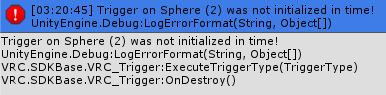
So recently my world has been having these issues with triggers
https://prnt.sc/shu996
 cobalt sluice
p sure that's just what you see when publishing and you can just ignore it
jolly cape
Yeah
That is nothing you have to bother with
Its absolutely meaningless
I get a ton of those in one of my maps and everything works
 lunar jolt
https://gyazo.com/b1b087eacdb1df73b9143f6d296b82aa
Incorporated the keyboard prefab into my most recent world and it doesn't work
I've tried the "Standard Assets" packages I was told to add in by someone in the past
still does not seem to work. Suggestions?

Is anyone familiar with this keyboard prefab and why it might not work ?
jolly cape
Sdk2 or Sdk3
lunar jolt
SDK2
it also didn't work before SDK2 came out when I tried it in a different world
before there was a distinction between SDK2 and 3 or even 2 separate ones rather
@jolly cape
jolly cape
Hmm have you tried reimporting it after installing standard assets?
I had a similar issue with qv pens
jolly cape
Hmmm
lunar jolt
I have not tried deleting the asset from the scene and the asset folder and manually re-importing it though I don't know if that would do it but I didnt because for some reason you have to zoom out really far to move the entire keyboard prefab
dont know if anyone else has trouble moving it around, I had to set a second viewport to be able to see what was going on
 stark bronze
So I reuploaded a world I made with a bunch of optimizations and now the world boots me back to my home world. Why is this happening?
All i really did was combine some meshes and rebake the lighting.
jolly cape
Check logs
stark bronze
In unity?
lunar jolt
Resolved
I got Standard Assets directly from the Unity store in the unity program its self
rather than external sources claiming to be up to date
worked immediately -facepalm-
stark bronze
Sorry, but what would I be looking for in the logs?
stark bronze
stark bronze
So how would I fix those issues?
jolly cape
Not so sure but you seem to be missing a script on VRCWorld
Which might be the issue but im not sure
stark bronze
Weird, I didn't change anything with a script?
jolly cape
You seem to use a trigger component on VRCWorld but dont have an event handler
stark bronze
So add an event handler?
jolly cape
Odd
stark bronze
Will test in a few.
stark bronze
I have no idea what it could be.
jolly cape
I wanted to ping ruuubick to ask for help but hes asleep qwq
So the trigger issue persists
Can you screenshot the components added to "VRCWorld"
Also make sure your sdk isnt outdated
jolly cape
Nice!
 sudden lily
Is there a proper way to use the Skybox unity component for a world in VRChat?
 visual swan
Hello everyone. How do I add textures to walls?
austere siren
just drag a material onto it
 jade roost
Anyone have any idea why the VRC_Trigger Proximity thats set at 2 or lower has a global reach as if the proximity is over 5 or more?
visual swan
@austere siren when i do that the texture is repeated - im using probuilder
they look like this
 bleak moat
Well first you can either change the texture tiling on the material or just edit the UVs in probuilder
austere siren
@visual swan easiest is to use tiling or UV editor like @bleak moat said
bleak moat
also, you need to make sure the texture isn't too low-res if you're stretching it over the whole wall, cause it'll look bad, or if you keep it tiling, make sure the detail doesn't tile as noticeably
visual swan
Im new to do this so i'm not sure what tiling or uv editot is I'll look it up
bleak moat
just open your material
there should be a tiling and offset section at the bottom
just play with the values
UV editor is a bit more complicated
bleak moat
like reset the material?
@visual swan next to the texture slot there should be a small circle thingy, click it and then click 'none' on the top left in the panel that pops up
bleak moat
the grid texture? well yeah, that's another material
You had the default grid material on the probuilder mesh, then you changed the material to a custom one. since you just removed the texture of the material, it's still there, just without a texture. If you want the grid back you need to change the material back to the default probuilder grid
 austere siren
@golden trail hard to see without knowing your world project
 golden trail
@austere siren
bold ibex
@golden trail that's a result of the world being too big. Any world that is 200+ MB has that effect where it says 200/200 or 100% loaded.
golden trail
thanks for that explaination, the X file theme just stop
austere siren
it was a rhetorical question, since it's clearly self made @near escarp
near escarp
what shader is that ?
visual swan
i applied textures by using a legacy shaders / diffuse
random owl
Don't use legacy shaders
bleak moat
standard shader?
visual swan
how do i assign a texture the the standard one? it won't let me drag and drop a texture picture
random owl
Where exactly are you trying to drag it in it?
visual swan
a texture
random owl
Into that slot?
visual swan
how do i stop this from happening? all objects are walkthrough
random owl
Do they have colliders on them?
visual swan
what is a good place to get props for unity? I need a bar counter
bold ibex
Help
near escarp
because there is most likely have console errors
near escarp
VRChat
Requirements We're going to need a couple things before we can get started. Current Version of Unity. We strongly recommend using Unity Hub, available on that page.VRChat SDK - See the Choosing your SDK page to see how to choose the correct SDK for your use. Step 0 - Install...
@bold ibex Do it correctly with SDK2
bold ibex
So do you want me to configure it correctly or download another one?
my horrible english excuses me
@near escarp Can you tell me more clearly what should be done. . .
near escarp
If you've done all the steps correctly then it should be fine
bold ibex
My other projects are running normally, only this one gave this problem
@near escarp When I try to practice VRC_TRIGGER on others it works out,
But when I try to add that, it looks like this in my new project
random owl
https://docs.vrchat.com/docs/updating-the-sdk
Go trough the update steps usually it should clear up if it doesn't there's something more wrong with your project with some asset you have in it most likely
VRChat
If you need to update your SDK, it is important that you follow these steps to ensure the update proceeds properly and you don't have any old/conflicting files. Simple Update Here's how you update your SDK. If you're just uploading avatars, you can use the following process: ...
bold ibex
All I wanted was to put a button to turn on the mirror, but it's hard
 winter wigeon
My world wont let me test it, it just takes me to my homeworld, any fixes?
Im on SDK 3, correct unity version too, thought id add that info
bold ibex
@winter wigeon it will do that sometimes. Usually making a new VRCWorld object and replacing it with the old one works, but if not, you have to build and publish in order to test the changes you've made
winter wigeon
Alright, Ill try the new world spawner, thank you
bold ibex
Does anyone happen to know what the Randomize checkbox does on a trigger? I'm a bit curious
 rotund plume
Hello everyone, I was about to upload my first custom world but the next message appeared. What does It means? I mena, how long I will need to wait
near escarp
literally read
winter wigeon
you're whats called a "Visitor", VRchat has a User Level system, to upload worlds and avatars you need to be a "New User", pretty much play Public worlds and meet people for a day or two
random owl
?upload
 odd roverBOT
You must obtain at least "New User" Trust Rank in our Trust and Safety system in order to upload content. You can get this by just spending a few hours in VRChat, hop some worlds, and make some friends. Give it some time and you'll be able to upload content in no time.
As an aside, you must have a VRChat account to upload content. That means you can't use a Steam account, Oculus account, or Viveport account to upload content like worlds or avatars.
Source: https://docs.vrchat.com/docs/frequently-asked-questions
rotund plume
Thanks! I just didn´t know if the time was needed to be spent on vrchat or Unity
bold ibex
@near escarp is there a way to do randomized events? I want a randomized event to play once the player activates a trigger. RN, I have 10 different objects, each with the same settings. And once the player activates the trigger to start the randomizer, only one of the 10 objects will appear in the map, but it's random which one appears after the player triggers the event to start the randomizer.
For instance, the player triggers an OnInteract trigger that starts an OnEnable object trigger that's hidden at the start. I want this to be the randomizer that chooses one of the 10 objects to randomly spawn in the map(unhide the object since the object is hidden)
near escarp
Did you look at the trigger or ?
bold ibex
no. There's a OnInteract trigger that the player has to click on to start the randomizer, which I have hidden. the OnInteract trigger triggers the randomizer to be active, which that has an OnEnable trigger that i showed above, with all the 10 objects I want it to randomly pick from inside of that trigger, which is set to SetGameObjectActive.
near escarp
So why aren't you using the randomize option ?
bold ibex
idk how to use it. I'm not sure if it will pick a random object if they're all in the same SetGameObjectActive section or if they need to be their own individual SetGameObjectActive component
me literally using the new sdk rn
near escarp
Did you even try pressing the checkbox ?
bold ibex
I'm not sure if this is correct or not ****
near escarp
You'll need one for each object, then give them the same value
So create 10 SetGameObjectActive actions
each with their respective target, and give them 0.1 value
@bold ibex you downloaded the wrong SDK
That's the SDK3 for Udon
it doesn't use vrc_triggers
bold ibex
so like this, but 1 for each object i want the trigger to randomly set active?
near escarp
yep
bold ibex
ok thanks
is it better to have them be a toggle or true? because i did have a few issues with having delayed events on a toggle
near escarp
You need to use True/False, and if you want to make a new one spwan and turn off the other one for the next click, you need to make another OnEnable trigger that turns all of them off
 wraith ruin
My avatar is standing on some stations, does not go into sit pose, is it my avatars problem or the worlds?
bold ibex
it is because there is an idle for Custom Sitting Override
what if i want the randomized object that the randomizer enables to also be a randomizer itself, and after set time, it also enables a random object(one of the boxes) as well?
because i'm trying to make a system where a random box appears after some time, and after that box has appeared, the player has a set time to find the box before another one takes its place in a different location @near escarp
wraith ruin
I need to have different override controller for sitting animations with idle removed if i want to still use my other overrides?
bold ibex
yes. if you use the same override controller for both standing and sitting in the descriptor, both the standing and the sitting idle will be the same @wraith ruin
bold ibex
I'm thinking if i have a separate event from the randomized stuff with the same delay that gets rid of the main object so it doesn't break and spawn multiple boxes, i should be fine...
 subtle cradle
:/ I Can run my world in Build & Test and load in it just fine, but when I upload it, I cant load into it...>:
bold ibex
Hello! I'm making some non-interactable characters in my world that I want to animate. They.. sort-of work, but the animations don't seem to want to play all the way through.
This is the current setting I have on the actual animation controller
and all animations are checked to this at the moment
near escarp
The important thing is what's inside your animator
bold ibex
What should I look for?
near escarp
Well, a screenshot would help 
bold ibex
Lol gimme a sec
here's one of the animators
They're basically all the same except for the actual animation slapped on them, since I have no idea what I'm doing 🙃
near escarp
And they work in play mode ?
bold ibex
Yes, it's just in VRChat where they seem to stand still
bold ibex
They are, yes. They're humanoid rigs, no extra components. Just the models and the animations on them.
I have them parented to an empty game object per character so I can easily move them around.
near escarp
Did you check the log after testing your world to check for potential errors ?
bold ibex
By log do you mean the Unity console or?
Well, that's weird, they started working without me doing anything. Weird.
near escarp
Did you set them up in the SDK ?
bold ibex
wasnt sure i had to.
I made worlds before but maybe im missing a step
usually they are there
Just kinda confused me
near escarp
Not until you set them up in the SDK window control panel
bold ibex
right click on your assets folder, show in explorer. save your scene, close unity, delete the vrcsdk folder completely. reopen unity, reimport the sdk.
also expand your console more
nvm there are only 3 errors shown yeah do what i said.
u can ignore the yellow ones they are not critical
sometimes they are but
so you deleted the vrchat sdk folder from the explorer once you actually closed unity
hmm
and ur using latest sdk
wait
ur trying to use sdk3
you must be using something in your world that utilizes something from sdk3
and sdk 2 doesnt have that
if its nothing special.
or crazy
u can redo all that.
but idk how many triggers you have,
well why do you want to go back to vrcsdk2
This may help
yep remove all the triggers/scripts
pickup's
anything sdk related
the world gameobject
is one people forget
visual swan
This may be a stupid question...but how do i back up my project?
 sacred warren
Close Unity and copy the project folder somewhere else.
visual swan
thank you
 muted kayak
im trying to upload a map, but im not sure how to apply the textures to it?
nvm i gave up
 gaunt minnow
any links to in-depth guides on preparing worlds for quest?
in particularly interested in stuff like lighting
visual swan
when building and testing a map and clicking on the force non vr - will that stop steam vr from opening every time i want to test out the map?
 humble island
Hi. I'm having the same problems JustGD has importing an old world to Unity 2018.4.20f1 with VRCSDK2-2020.05.12.10.37
- Made in 2017.4.28f1
- VRCSDK-2019.08.20.13.28
- Hasnt been touched since december last year
I just want to add a little detail in it and republish it, but i cant see the vrchat tab anywhere. Is there a way to make a package of the whole scene (with hierarchy and all) and import it to a new scene with the new SDK2 in it?
near escarp
If you follow the correct steps it'll work
random owl
Don't import sdk3 to a world project made on the old sdk the fix is over here:
https://docs.vrchat.com/docs/sdk-troubleshooting#im-getting-errors-related-to-sdk3-or-udon-in-a-project-using-sdk2-or-vrc_spatialaudiosource-in-a-project-using-sdk3
For @ripe raven as well if you are still having problems with the issue in your screenshot
humble island
thanks. But still no luck. Deleted the SDK folders in the project and the VRC files in the regedit as the instructions said. Checked the "project settings > player > scripting define symbols" and it was empty. Reimported the right sdk (VRCSDK2-2020.05.12.10.37) but still no vrchat control panel.
i tried making a new scene from 0 with vrchat sdk2 and no problem. the only option i see is to export(pack) and import into a brand new scene.
but i dont know how to package the whole scene
random owl
@humble island I understood from your message that you had the same errors in your console as JustGD?
near escarp
1's image posted above is how it's supposed to be fixed, but it looks like you deleted all define symbols
oh wait no
you didn't change the runtime version
it's still on 3.5 @humble island
humble island
 !!!
!!!
random owl
humble island
(checking...)
humble island
oof. now i get 2 more warnings
random owl
Is that Post Processing V1?
random owl
I've never used V1 so not sure, easiest might be just to delete that folder and import the latest version of post processing from the package manager
 rich tendon
Helloooo!
humble island
hello!
@random owl YES!! That did it! I deleted the folder "PostProcessing" and fixed it!
Thank you!!!!!!!! 👍
random owl
@dark kernel would need to use ProBuilder or something similar
It's available in the package manager inside unity
Yes just press install at the top
That's a good place to start usually
 vagrant hamlet
I was thinking about getting mesh baker. Does anyone have it and is it any good?
visual swan
does anyone know where I can get the colour pen prefabs like the one in the presentation room?
 north parrot
Pinned messages
@visual swan
Look in one of those repositories
I saw a few different options there for pens
north parrot
No problem bud
remote hare
Were can i find like lamp prefabs?
bold ibex
@near escarp i got the randomizer set up properly, but when the trigger goes off, instead of 1 box being chosen randomly out of the 10, 2 are chosen randomly, and it seems one of the 2 boxes that are chosen randomly are always the same box
is it choosing 2 because I have an additional setgameobjectactive event that has a delay on it(that disables the randomizer)? and because it has a delay, it chooses to select more than 1 box?
near escarp
The second should be on a different object imo
enable the one that disables all and then enable the one that turns on object randomly with a delay if necessary
bold ibex
^ that's the jist so far. The reason i want to make it to where once you get a box, that box cannot be selected by the randomizer, is because there is a trigger for the boxes' mesh that is OnInteract that gets rid of the mesh you click on. But if i make it to where this trigger just gets rid of the gameobject that the mesh is on, the randomizer can still pick it and it may decide to constantly choose to enable that very gameobject repeatedly, supposedly softlocking the player @near escarp
near escarp
I don't think you can do that reasonably easily
bold ibex
i mean the player could still technically get all the boxes, but depending on the RNG of the randomizer, it might take a while.
visual swan
I need help with the QV pens - everything works in game besides the ink ???
austere siren
is it best practice to make every that doesn't move a static? It seems to have increased my baking time by so much
near escarp
light baking ?
austere siren
yes
near escarp
well yeah, everything that is marked static needs to be taken into account for the light bounces and shadows
austere siren
no wonder it said 7 hours remaining
near escarp
With Unity's lightmapper that's not surprising
austere siren
i guess that's only an option for when you're actually releasing, but hard to check the performance difference. Worried my world might become too heavy atm
near escarp
There's a lot of settings to adjust for light baking
near escarp
Window>lighting
bold ibex
what does the slider do for randomize btw?
jolly cape
I think the slider changes the "weight" of the outcome
bold ibex
so like 0.1 = 10% chance, and 1= 100% chance?
jolly cape
if 1 is max then likely
bold ibex
ah okay
austere siren
I'm amazed a program actually managed to use all my cores for once, Unity taking it all to just bake some lighting
just to bake some lights...
bold ibex
 hi.. I was thinking about having a 360 video in a cylindrical room.. but I'm not sure if I should keep the uv maps rectangular or unwrap them to be in a circle
or like dis
 past wave
I would think the top one would work best
bold ibex
okis
near escarp
well preferably you'd want the UV's height to match the proportion of the video so that there's no weird scaling issue , unless you don't mind it being vertically compressed
bold ibex
I'd want it to be accurate to the vid.. I'm not sure what the best method to do that is
the video has a 2 x 1 ratio so like twice as wide as it is tall
3840 x 1920
I've made the cylinder height 10 meters round 5 meters tall I hope that's right
but idk anything about trig
idk we'll see
unless the fact I made the cylinder the right shape already the uv should fill..
i have no idea..
circle test to solve my problems kappa
once I fix the circle it's gud
 ..wait I'm dumb
 zinc juniper
question, do hosted mp4's sync to new joins, or is that limited to just YT vids?
 balmy gate
@zinc juniper You have to set them up very specifically: have the URL hardcoded in the VideoPlayer, have a VRC_SyncVideoPlayer on the same object, and toggle the object on to start playing it. If you do this, it should sync the timestamp in the video across new joins.
Note: I have not tested this in Unity 2018
 potent finch
hello,does anyone know where to get this world?https://twitter.com/rangerxjustice/status/1184159855046811649

#vrchat So I found a comfy soft bread world and now I know my purpose is to get the comfiest bed in the world into vrchat. Stay tuned.

 Twitter


this thing feels so comfy :3
near escarp
@potent finch I'm pretty sure the tweet implies they're working on it
potent finch
@near escarp this tweet was from last year,and I have been went through his world,he already put bed in his few vrchat world already
for now,I havn't found second person who had this bed yet
near escarp
Well if they created it themselves then that makes sense ?
gaunt minnow
tfw 6 people in my VRchat world but they're in a private instance and i'm not invited ;'(
visual swan
how do i make items pickable and throwable?
gaunt minnow
@visual swan you can find simple tutorials about this on youtube
they are really easy to follow
visual swan
@gaunt minnow I've found one and when I add the vrc pickup and oject sync the prop dissapears when I test and build
visual swan
I manage to make it work but what collider do I use for a shape like this?
north parrot
Mesh collider.. check is convex
gaunt minnow
Yeah mesh collider should just do something like collision on the shape of the object itself
north parrot
Yep.. but be sure to check the box 'is convex' to get the shape of your object to be correct in game
random owl
Not to mention that non-convex mesh colliders aren't supported to be used with rigid bodies
visual swan
oh
i fixed it by adding a box collider and then just resizing it
and it works perfectly
will it cause any issues doing it this way?
random owl
No that's the most optimized way of doing it
 remote patio
Anyone knows how UI Password feature works on the world? Trying to put that in my world
 frank kayak
why would you turn it off?
 rain idol
I am here to self advertize a world https://vrchat.com/home/launch?worldId=wrld_9b42d316-1e53-4419-8ce0-cb13c9747fca

A world that is a hangot and a place to get avatars eventually‚ complete with mirrors water phsics and a bed․
visual swan
what video prefab do people use that allow youtube links
rain idol
avatars are currently in development and will be out in future updates
past wave
anyone know why unity isnt letting me create a prefab? i drag it into my assets and i can see the mouse icon that its trying to do it but nothing is there.
past wave
nvm it just randomly decided to start working for no reason at all
gaunt minnow
Sombody tested my quest world, it worked mostly, but they had a problem with a difference in what the left and right eye were seeing. Any suggestions how to remedy this?
visual swan
area lights are not emitting any light
 autumn umbra
@visual swan for youtube you can use the vrc syncvideoplayer, or if you want other people to enter urls, take a look at the prefab list in the pinned messages
area lights are baked only, did you bake your lighting?
visual swan
how do I do that? @autumn umbra
autumn umbra
ahh, in Window > Rendering > Lighting settings. But I'd really suggest looking at the unity docs if you're new to lighting: https://docs.unity3d.com/Manual/LightingInUnity.html
 autumn umbra
you need to click generate lighting. but also, you'd need to mark the objects that your area light is hitting as 'static' (top right in the inspector) so they'll store the lighting data.
autumn umbra
great!
visual swan
if i bake my lights now - is it going to affect performance in unity?
 onyx kindle
can you use vrcsdk2 on a 2018 unity world?
autumn umbra
it could take a while to bake if it's a big scene. but once it's done, you may find it's a little faster if anything. Generally for vrc you want to use baked lights when possible, it helps performance a lot.
@onyx kindle yes
onyx kindle
Well for some reason I can't upload my world
autumn umbra
getting any error message?
 visual swan
my textures have gone potato is this normal during baking?
autumn umbra
@onyx kindle that seems weird that it's referencing sdk3 if you're using sdk2. I'd suggest deleting the VRCSDK folder altogether, restart unity and then reinstall SDK2
autumn umbra
@visual swan yeah that's normal, it won't look right until it's finished. you can see the progress in the bottom right
visual swan
@autumn umbra thank you
visual swan
i fear that the baking process is stuck
I have these arrors -are they affecting the baking process?
autumn umbra
it shouldn't stop it from actually baking... has it progressed at all? maybe unity died :/
visual swan
how can i see the progress?
its been gong for almost an hour
it says preparing baking and then baking
 hard crane
@visual swan Try setting your baking to “Progressive CPU” with Real-time GI turned off. This will give you an estimate of completion time- and is generally better for quality controlled baking.
visual swan
@hard crane should I cancel my current baking? is there a way a special way to cancel it or should i just quit unity?
hard crane
I’m not sure, if you want to: Quit Unity -> open lightmapper settings and clear any lightmap data that is present “.
random owl
@visual swan you also seem to have a bunch of objects that have no lightmap uvs, you can try my unity editor extension to find and fix them all
https://github.com/SudoOne/VRWorldToolkit/releases
visual swan
I cancel the generate thing and quit without saving - I no longer have red errors. Perhaps it was affecting the baking process?
@random owl I will check it out thank you
random owl
Tell me if there's any problems with it if you 👍
And the errors wouldn't necessarily do something by just being in your console log, though can't say without seeing them
 visual swan
any idea what it could be? i've only used probuilder and I've added textures to it
I've not done anything major
random owl
But if the errors are gone now you should be fine
visual swan
just imported props
 hard cedar
I saw some people mentioning the use of VRC_Panorama with Udon on the Udon feedback site. How is that done? I can't find the VRC_Panorama prefab or component anywhere in the V3 SDK, but the documentation specifically warns against mixing the two SDKs
random owl
Yeah that shouldn't be a thing 🤔
Are you sure they weren't just requesting to have it?
hard cedar
Creators have already altered the VRC_Panorama server system to return data directly through images, which can then be processed through Texture2D functions in Udon.
(implying that it has been done already, given the past tense)
random owl
That sounds like he is saying what has been done in the past and how it could be improved with udon
There is gonna be a new component for udon that has the same functionality as panorama but that hasn't come out yet
hard cedar
ah, damn. well, it's gonna be immensely more difficult to populate content in the world I'm working on with no way of fetching structured data from the internet or parsing structured data pasted into a text field
probably going to need to write my own data format and a parser for it in Udon until we get Web and/or JSON
 rough wedge
Anyone know if particle forcefields work in worlds?
 fluid cipher
They specifically whitelisted them so I'd find it hard to believe they wouldn't work
 pale willow
Hello. i have a question. Last time i updated my world was about a month ago and the triggers would not activate with vr, desktop was fine. If i update to te newest sdk2 will it be fixed?
i am having "not initialized in time" and " object reference not set to instance of an object errors for every trigger including chairs and pedestals.
bold ibex
those are fine @pale willow . they are common errors that dont really impact the world that much. What is the trigger that cannot be activated with VR? (OnInteract? OnEnterCollider? etc)
bold ibex
so the interact works for desktop but not vr? what event is the OnInteract triggering? (SetGameObjectActive, Teleport player, Etc.)
pale willow
yes and teleport and setgameobjectactive all interact triggers
bold ibex
which one is the one that doesn't work for vr?
pale willow
destroy game object, spawn prefab, teleport player, set game object active and pedestals and chairs. none of them work for vr
 fierce jackal
chairs triggers are busted , https://vrchat.canny.io/bug-reports/p/vrcstation-chairs-no-enterexit-triggers-work
had a world where i had to remake the triggers other places to make them work, they didnt want to be in this gameobject i had them in for some reason
bold ibex
for teleport player, is the checkbox for Lerp on remote clients turned on, and is set to toggle @pale willow ?
onyx kindle
Can someone please help with this error, it is stopping me from uploading my world https://i.imgur.com/fctlvxH.png
 random owl
pale willow
random owl
pale willow
what is the lerp on remote clients?
im using the normal triggers
no it wasnt. i found it
bold ibex
usually is a trigger is tagged as true instead of toggle, some users may experience difficulties with getting the event to happen.
 lyric yew
@onyx kindle looks like your issue is directly connected to the sdk. like you imported a new one over an old one or deleted an old one and added another. Look at the link he posted under you and properly refresh your sdk not just a reimport
pale willow
so what about toggling game objects?
and also i was not even able to highlight my recent trigger buttons to try and interact with them
onyx kindle
thank you @lyric yew
visual swan
how do I stop these white orbs from reflecting on the walls/
near escarp
you mean lights ?
visual swan
yeah I used point lights
in game they show up on the walls
the walls look shiny too
near escarp
Well, either make the wall not reflective or move the light
visual swan
how do i make it non reflective?
near escarp
change the material properties
roughness to max
smoothness to 0
either available
 umbral reef
pale willow
umbral reef
pale willow
Hello again. Will somebody please help me with the issue of not being able to highlight or select the objects set for triggers in vr?
near escarp
Can you show how you set up your objects ?
pale willow
this is a simple mirror toggle button
it will not highlight in game for vr users but it will for desktop users
near escarp
Did you test yourself on both ?
pale willow
yes and so did 2 other users
this was on the older sdk 2 and i want to prevent it from happening on the newest sdk2
near escarp
change the action alwaysbufferone to local first
pale willow
ok i did that now
near escarp
make the button static just in case
pale willow
how do i do that?
near escarp
top right corner
pale willow
ok got that
near escarp
k upload and test
pale willow
what does the static do?
pale willow
@near escarp It did not work. the buttons are still unselectable in vr.
near escarp
what layer is the object on ?
pale willow
layer?
What are the layers? I did the thing the sdk said with layers but i dont remember what it said.
ok i looked and they are on default layers
do they have to be on interactive, player or player local?
near escarp
they need to be default, i assume you have tooltips enabled in your vrchat settings ?
near escarp
in that case i'm not sure, could be a vr specific bug, worth looking at the vrchat canny to make sure it's not an already existing report
pale willow
ok ill look. it does tend to happen only with my world though
it does not seem to be a bug that has been put there. it happened with the last sdk as well. so i do not believe it is a bug rather an error in the project itself since changing the uploading component has not resolved the issue.
what would changing the layers of the buttons do though? along with items that can be held?
near escarp
nothing changed, do you have a picture of your button in vrc ?
pale willow
i do not but i have tested it again with a changed layer to no avail.
it is set how you said to set it. all buttons are this way and nothing.
what about the tags? do i need to change those?
i could get a picture if need be
hard cedar
Google is being absolutely worthless right now; is there a way in Unity to just move selected objects by a certain amount?
I have several objects selected, I just want to move them -5 on X
literally every single google result is about doing this at runtime; I just want to do it in the editor
random owl
Just add -5 to the value in the inspector and press enter
hard cedar
even if some objects aren't currently at 0? it'll do it relatively?
I just answered that with a hard "no"; it put everything at -5 X
random owl
Hmm that's a good question I usually do it on single objects
hard cedar
I don't want that; if something's at 20 X I want it to end up at 15 X
random owl
Yeah doesn't seem to be possible normally
Only if the objects are at the same level on that axis
hard cedar
that's ridiculous...
random owl
@hard cedar here's a simple tool to do that, since I wrote it quickly it's super basic
It'll go under Tools > Object Mover
hard cedar
ah cool, thanks
random owl
Then just select the objects you want to move and write how much to which direction and press button
 sinful moss
most consistent stream player set up/prefab is which right now?
random owl
@hard cedar I noticed I left a single layout in there so it would keep throwing errors here's fixed one
pale willow
Any luck figuring out my situation?
random owl
Can you enable the Physics Debugger from Window > Analysis > Physics Debugger and show an overall picture of what's happening around the button?
random owl
Yeah I wanna see if there's something obstructing interacting with the button you have
pale willow
here you go. What should i do next?
random owl
Do you have any trigger zones or anything around it
pale willow
nope
random owl
Do you have a test version uploaded you could give me the world id to?
random owl
Can't find it in the search for some reason can you give me the world id?
pale willow
sure but in a dm ok?
random owl
If it's a public world the world id is something everyone can see
pale willow
yeah true ok wrld_71c4c872-0e78-4d45-8fcd-095b61f0268f
sorry this is my first world ive had functional for a long time and its only 65% ish functional since the udon update
items falling through the ground to never respawn and this vr non selectable stuff
random owl
You might wanna set the colliders as triggers on your rings
Or set them to Pickup layer
pale willow
they are supposed to be interacted with destroyed and a jingle plays. they are not supposed to be picked up
random owl
Yeah but that stops the player from colliding with them
Maybe set them to triggers and change the trigger to be onentertrigger so they get collected when you run trough them
That's how I expected them to work and got thrown off when I ran at them
random owl
OnEnterTrigger might be a lot better just make sure to set all the colliders to be triggers as well
pale willow
ok
random owl
And set the layer it detects to be PlayerLocal
pale willow
gotcha
random owl
Not sure why the mirror wouldn't work on vr though
pale willow
well the toggling of anything with a buttton or teleporting is broken in vr
there is three total sections but vr users are stuck at the main one
random owl
https://github.com/SudoOne/VRWorldToolkit/releases
Wanna try importing this to your project and seeing if the world debugger finds any issues
random owl
VRWorld Toolkit > World Debugger from the top bar
pale willow
got it
the only thing that pops up is the ring on enter collider you said i should have
random owl
You can press the autofix button for those so it changes the layer to a better one
pale willow
and that i have no post processing and three mirrors on by default
random owl
Hmm yeah not sure at all why the mirror button wouldn't work in vr
pale willow
its all the buttons not just the mirror. the check point bar, the ring by the mirror. The floating cubes are supposed to toggle the music on and off. The button by the changelog
none of it works in vr but fine on desktop.
random owl
The only thing I can really think of that might cause that is you have a big trigger collider around everything for some reason
Can you open the Physics Debugger again and show a picture of the whole starting around
So I can see the outside as well
pale willow
first area
random owl
Also hide everything but triggers from here
pale willow
ok
random owl
But keep collider types
pale willow
like this?
 bronze granite
random owl
bronze granite
random owl
@bronze granite check your console when you try to login
@pale willow can't see anything atleast from those picture try zooming in into the first area so I see around this
pale willow
pale willow
Well what i did was make a new project, put in the new sdk2 then take all the assets from the old version of the world except the vrchat folder and sdk folder and meta files and import them to the new project. thats what i had to do to fix the sdk breakage when they updated to udon
random owl
What kind of sdk breakage?
pale willow
the world crashed multiple times and same with unity and the world never wanted to load in unity afterwards
random owl
🤔
random owl
I mean Udon wouldn't really do anything to a SDK2 world
pale willow
maybe the unity update or sdk update. something like that
all i know is when the multi big update happened, my world broke for a while
random owl
You can avoid any problems usually by following the official migration guide
https://docs.vrchat.com/docs/migrating-from-2017-lts-to-2018-lts
VRChat
Migrating your project from Unity 2017 to 2018 LTS isn't as difficult as you might think! Here's a guide providing each step in detail.
pale willow
im reading through this now and i did follow all the steps
and i never had any post processing that i know of
ive also compared the triggers of my world to the functioning counterpart of my friends world and they are identical except for the names interaction text and the object being affected.
random owl
Yeah I couldn't see any problems either with what you have
pale willow
should i just start from scratch?
considering ive had it up and running for more than two years
random owl
It most likely will fix your issue
And if it somehow happens again at least you can follow back on your steps and see how it happened
pale willow
i guess so.
hard cedar
is there really no way to set the text on TextMesh Pro from Udon?!
random owl
Udon questions are better posted to #udon-general
 green sparrow
Is it possible to do a lightswitch with baked lighting?
hard cedar
oh, didn't see the udon category
random owl
Not really a proper way no since it get's baked in
Some people use an animator to switch around between two versions of meshes with different lightmaps but that can't change lightprobes so it usually just looks off
green sparrow
Yeah.
I made an attempt like that last year, but gave up and use real time, I'd rather just avoid realtime.
random owl
In some cases you can make really good day and night cycles using special techniques that still look good and are optimized like Red_Sim did with this world
https://twitter.com/Red_SIM/status/1262355603776823296

My new "Lone Island" world has been released to VRChat after almost 8 months of development! Beautiful sky with real starmap and constellations, day/night cycle, chill music and more :3 Check it now: https://t.co/DwMejhu9TS
 Twitter
But ofc if you want to start having a lot of point lights it get's expensive fast
Single directional light that's well configured can still be practically free in some cases
green sparrow
Oh is that his fancy skybox?
 tough fractal
Hi guys :3 im super super baby fresh to unity and blender and all, but I have a world i want to make. Remaking some local buildings and im wondering what do you guys recommend. Making the building in blender and importing as an asset, or hand building it in unity? Im looking to mostly just make the front, and im thinking blender for the sake of some "important" details. but I dunno :3
im figuring making the detailed front in blender, and blocking in the halls with unity as needed
green sparrow
Could go the ProBuilder & ProGrids route in Unity to get a general layout and structure in place, then export the mesh to blender and do your more detailed work in there.
Saves time really since you can prototype a general look/layout without having to handbuild all the mesh in blender.
tough fractal
Sweet :) thanks for the info, I have some googling to do :D
pale willow
ok one issue i cant seem to resolve rn
green sparrow
Yeah, watch some tutroials, Probuilder is definitely the way to go if you want to be a bit more involved on the Unity side. Don't use Unity base objects though, they suck... so terrible.
pale willow
why does this happen?
tough fractal
can do :D!
green sparrow
The pink?
green sparrow
Oh, weird, what version of Unity?
random owl
Might wanna check your console too
green sparrow
Huh, that is weird. I don't know, never had an issue like that. You could try changing your layout from the top right there.
And that. lol
pale willow
random owl
Yeah that definitely looks like your problem
random owl
Try restarting your unity first and seeing if it goes away
pale willow
ill try that
random owl
How to reproduce: 1. Open attached project "Material_errors_stripped.zip" and scene "SampleScene" 2. In Hierarchy window, expand "BU...
I found this in the unity error tracker
But it's marked as Won't Fix
green sparrow
Someone suggested just restarting Unity in one thread, though I assume you already did that.
random owl
Repro steps: 1. Open "1182069_EditorWindow_material" project 2. In the top menu, press Test > Test Window 3. In the Project windo...
This one's marked "By Design" 🤔
Could be related to you having the error shaders in that inspector view
pale willow
i mean i just put this in he scene and bam it was there
green sparrow
Don't suppose there is a searchable term for what I have seen some people do with animations on mirrors?
pale willow
So my errors in unity are just caused by unity errors and thats maybe why my world broke... idk
random owl
@green sparrow can you explain more what you mean with animations?
green sparrow
Well, I have some mirrors that when you toggle, they have a little animation that places and steadily makes them appear.
seen some*
My typing is bad today....
Basically. Some worlds have a mirror that have an effect when toggled on or off.
random owl
An animator that animates the mirror?
green sparrow
I guess.
random owl
With custom shader and setup if it has any special effects
green sparrow
Tried Googling, but didn't come up with much.
random owl
Haven't really seen any of those around most of them are made by the people who made the world
green sparrow
Oh boy, looks like I am making my own shader.
pale willow
ok just to say i reimported the two other areas and both were doing the exact same as before.
even on the prior project
green sparrow
So it happens only with those objects?
 livid sun
Is there a video player prefab out there that can mirror what it plays?
i.e. reverse left/right on playback
 rancid acorn
Hello, everyone.
I'm wondering which SDK I should use when developing the world.
Can anyone tell me?
near escarp
it's written on the website where you download the SDKs
if you want to use triggers, SDK2, if you want to use Udon, SDK3
rancid acorn
@near escarp thank you👍
pale willow
ok new area just made from models resource put through blender, meshes joined, exported, put into unity and THE EXACT SAME ISSUE as the other two areas. WTH?
i did no changes to shaders or anything. this is put straight in with it being moved out of the way of the main area.
this is also a brand new project, brand new fbx for the island and brand new sdk2. Is my unity corrupt, glitched and or bugged?
pale willow
turns out it was not bugged because i uninstalled and reinstalled unity and nothing changed
pale willow
So I have an update on the subject
Part 1 I uninstalled and reinstalled unity 2018.4.20f1. I made a brand new project with no sdk.
I then imported 3 fbx files: planet wisp, Station Square, and Angel Island, 3 material folders one for each fbx and same for texture folders.
(Keep in mind there was no meta files imported whatsoever.)
When put into the scene Planet wisp material inspector works as normal
When Angel Island was put into the scene the inspector was glitched.
When Station Square was put into the scene the inspector was glitched.
Part 2
I then proceeded to remove and delete each fbx and corresponding textures, materials and all meta files from all so only one fbx and folders were in the project at any given time.
I opened the scene again and the same inspectors were glitched as before for the exact same fbx files.
I had each of the fbx opened and separate from the others and the results were the same. Two fbx files had glitched inspector while one remained intact.
I had each of the fbx and corresponding folders open in seperate projects with the same inspectors being glitched.
So in the end, once you get this glitched inspector, there is no fix.
Also, these fbx files, texture folders and materials folders all fully functioned in the previous version of unity used by Vrchat.
bold ibex
anyone knows the closest font for vrchat nameplates? trying to add fake nametags
 lapis jacinth
Hey does anyone know if this is something I should be worried about? And if so how do I fix it? Along with that the publish menu is no longer showing when I attempt to publish it either.
bold ibex
Added avatar models to my world and my world went from 30mb to a 100mb anyone knows how to fix this
bold ibex
Do anyone know where I can find a working tv with a url
lapis jacinth
Speaking of avatars, would there be a reason why I cant upload my vrc world with mini versions of avatars of made? It threw up the error about the vrc_avatar descriptor and that I couldnt upload, but they didnt have the descriptor on them in the world
 honest spade
Need some help on VRC_Station.
Since VRChat made many updates on the SDK. The VRC_station might have some problem on "Animator Controller" because I try to put in any pre-made animator controllers (Custom sit animations, dance, etc,.) to it. It will change back to prefab or none all the time. I have no clue to fix it.
bold ibex
Hi, got question about VRC_PlayerAudioOverride, got no such Component. SDK Version 2020.05.06
Another question is SDK Version, what is the difference between version showed in VRChat Build Settings and SplashScreen. On Splash I got 2019.2.4
wraith ruin
I would need to toggle multiple things with one button. Is there premade scripts for it? Like i would be able to switch between lq and hq mirrors
udon
 civic totem
Hi, I got a question regarding bringing Lidar data/point clouds into VRC, has any one here tried this before? I have the unity workflow down but its just not work when I build to VRC
 dusty spruce
So I've been getting these console errors after publishing, and while the upload worked, the world itself is a bit broken. Anyone know how to fix this?
tl;dr "Triggers not initialized in time."
I might try putting in the newest SDK.
fierce jackal
ignore that, its 'normal' now
there's also that 'destroyed object' also normal , should still work
But you might need to move the triggers somewhere else if it still being wierd, i had to move 60+ triggers to somewhere else before they behaved, still gave that error
 upper meteor
hello everybody.. i have a audio source in my scene and i can hear it in editor but after compilation its disappears. Spatial blend is 3D and Vrc_spatial audio Source(script) are enabled
can somebody help me with that?
dusty spruce
@fierce jackal Move the triggers? You mean actually move the game objects itself?
fierce jackal
had to recreate them on other gameobjects before mine worked again
visual swan
Hi
does anyone know why the qv pens don't work?
when i add them to the world and spawn they dont write
lapis jacinth
I cant put mini versions of my avatars in my world, anyone know why? It keeps talking about the vrc avatar descriptor not matching, but that script did not exist on any of the models
north parrot
@lapis jacinth have you uploaded these models ever at any time?
lapis jacinth
Yes, but in the world I brought them into, the avatar descriptor was removed
north parrot
Well, it sounds like it isn't.. an error like that would mean you still have 1 somewhere that does... at any rate.. i would use the original model prefab that you have of every avatar..
lapis jacinth
Alright, ill upload one at a time and make sure to double check each one
north parrot
Not an already uploaded version
What i did was kept a base model of all my avatars BEFORE I put the descriptor on them... basically a copy.. so it hasn't ever had an avatar id attached to it..
lapis jacinth
Alright, ill grab the fbx's then instead from their respective files on my pc
north parrot
Let me know if that works for you
lapis jacinth
Will do, might be a little bit but I will @ you most likely. Thank you for the help btw!
north parrot
No problem..
 glacial pond
Is there any way to offset the mirror reflection location so it works as a portal?
dusty spruce
So I have no idea what causes this to happen.
I update my world, and it worked before, but then this new vrchat update comes along, and now it's broken:
Frozen loading bar above my head.
Hand Gesture Triggers crash VRChat,
Mirrors don't reflect players, (I have MirrorReflection on.)
Other players avatars are in a perminant idle stance, but can still move. (Also have a frozen loading bar above them.)
Otherwise everything still works in the world, it's just these few issues that seem to ruin it.
I would really appreciate it if someone could help me with this, or if VRChat does another update which fixes this bug.
I'm using SDK2, by the way.
 nocturne steeple
question
how do i use the videoplayers?cause i put youtube links but they dont work
 elfin ravine
What's the best avatar world with particle and shaders?
 chilly tendon
Is there a render distance setting or limit? I have some meshes far out not appearing.
near escarp
350 default afaik
 rain shadow
@dusty spruce That can be caused by having a playermods component that adds health when you don't have a combat system component in the scene also
green sparrow
I feel like the inspector is slowly growing... Doesn't even scale properly since making it any smaller adds the scroll bar at the bottom.
Ah, ok. Seems to only be that way for stuff with Udon on it.
 turbid scaffold
So using SDK2 I'm trying to make a counter by having a button that updates a text to increase its number by one every time it is pressed. Any ideas on how I can do that?
dusty spruce
@rain shadow I'm pretty sure I have a combat system component already.
chilly tendon
@near escarp can I increase it?
near escarp
Yes in your reference camera
chilly tendon
yeah its right there on the wiki doi thanks man
winter wigeon
Im getting compiler errors when trying to upload my world, yet its not giving any details, just had to move to another project since SDK 3 wasnt working for me
Found the fix
green sparrow
What render pipeline does VRC use?
random owl
The default built-in one
green sparrow
Doesn't Unity 2018 have others like LWRP?
random owl
Yes but that's not what VRChat is built on and changing into a new one would require all content to be wiped basically
bold ibex
Hey guys, I'm trying to make a audio effect work in a v2sdk world I'm building. I can't for the life of me get it to play, and I feel I'm missing something really simple. I have a VRC_spatial audio source, but the only audio plays if I uncheck "enable spatial audio".
green sparrow
Pretty sure reflection probes are just evil.
 chrome vector
@bold ibex Are you placing the audio in the world or in an object? Also, make sure you change it from spatial blend 2d to 3d!
bold ibex
@chrome vector The 3d blend was it, thank you so much for the help 😄
bold ibex
Yeah, I don't think I touched that slider and I woulda never thought to look at it.
chrome vector
Honestly, it threw me for a loop when I encountered it my first time. After I read the documentation, I realized it was all there in front of me.
 spring linden
does someone know if the grappling hook function like in the world "hook junkers" is open source and can be download somewhere??
 terse fossil
Im trying to setup an area that when entered it will change the game object status to be off so the top area wont be loaded when they are in the area below, I've been trying to do a OnTriggerEnter and it doesnt seem to work, I have a trigger box collider surrounding the area at the bottom and it wont change the game object to be set active when I enter the trigger area. any way to set this up another way?
chrome vector
Maybe you could do culling?
 earnest anvil
So im trying to add cards into my world, and You know how in Drinking Night they have a button where it resets the cards position?
How do I do that?
wraith ruin
Wth is happening? How do i fix this, happens in game too when the object is barely in the vicinity.
https://gyazo.com/3bbf910840c0ed351618b09dba5337f5
Heres the setup for the image
near escarp
@spring linden I believe it's on the vrc ask forums
 sinful acorn
Is it possible to make a world where the player can walk on a sphere like in Mario Galaxy?
wraith ruin
@sinful acorn Yes. I've seen that in vrchat.
sinful acorn
What world?
wraith ruin
No idea. Was in world hopping rampage then
bold ibex
Mapping out a room. Would the lighting be good in a closed off room made in blender, or should I use the walls as a reference in Unity?
Like should I make the whole room in one mesh (walls), or multiple?
bleak moat
Not sure how Unity would handle a convex object like that, just in case I'd split it in multiple faces
 compact dove
Anyone using 'Qv PenSet_v2.1.2.1' in their world know how to make them functionable or a better pen set in general?
 quartz topaz
Anyone know a world which has a small set of cubes or something with physics that you can just play with, like stack them and what not? Tag me please.
visual swan
why is this pink?
jolly cape
Missing material/shader
visual swan
I'm also applying mesh colliders but Im still able to walk through things
jolly cape
Make sure they are on a layer that cllies with the player and are set to static
I recommend the default layer
visual swan
I've just remembered that the legacy shaders cause this
i've set them to standard now
thank you
jolly cape
np
 empty umbra
Its A Small World After All!!!!
 wicked crown
is there a way to script the cutoff value of a low pass filter on an audio source? I've seen it done but can't figure out how to do it with an animator
simple nimbus
a world i had no problem wiht no longer runs when i hit build & test, anyone have any ideas?
it looks like none of my projects are building...
earnest anvil
ANyone got a beer pong prefab thats actually decent?
The ones I've found are not available / broken link.
simple nimbus
have you used mimi's beer pong? https://drive.google.com/open?id=1j4TS5eNCqXX8u6-OzsP5qqBVKH5fIVjE you just need to add a mesh collider to the plate and then add the ball respawn point to the trigger that is on the ball
Google Docs
simple nimbus
that just means you can't preview
try hitting ellipses at the top right
ohh wait i see at the top it says it's in trash
rotund plume
Hello everyone. I´m making a world for my friends and I had an idea to put a Cinema on the second floor. Everything was going Ok but the standard video player I have is too small for the cinema I´ve made. Going trough public cinema worlds in VR chat I saw this type of control panels and I really would like to add It to my world. Is there any Assets for Unity of this type of control panels including the screen? I didn´t found any.
 torpid pivot
Hey can anyone help with VRWorld tool kit? I've imported it but World Debugger is blank? Do I need to set something?
random owl
@torpid pivot can you show me a picture of your console? Might be some error state I missed.
torpid pivot
Sure, I'm having this come up related to it
random owl
Ahh I forgot a null check there, I'm gonna fix it right now
 jolly heart
Quesiton about triggers. Im trying to get particles trigger to do damage. But its not activating the damage. Does the particle object need to have a collider? Does the Fx need to have collider set up in a specific way? I have the combat script set up, in a separate object in scene. The particle trigger is on the VFx object. Should it be somwhere else?> I appreciate the helP! 🙂
near escarp
OnParticleCollision with the correct layer will work
Particle does not need a collider
 odd swallow
Am I allowed to upload a world only with the purpose to celebrate the birthday of a friend?
random owl
Yes you are
By default unless you submit it to community labs it's just gonna be private on your account where only you and the people you give the world link to can create instances of it and invite friends to them
near escarp
playerlocal, the trigger should be on the capsule itself i think ? I'm not too knowledgeable about the combat system
rotund plume
Question: In a custom world (private) is it possible for my friends to put their own youtube videos on the video player? Because I´m always the
Master Client but I would like them tu put their own songs on video whenever they want, I´m the only one who can do that in the world
random owl
Just have your friend load into the world first by dropping a portal and waiting a second
rotund plume
Yeah I know, but If there is another way to do this and I can make everyone "admins" , It would be better
Like in some public worlds that everyone can put a youtube video whenever they want
random owl
Just get an prefab that supports everyone putting urls in

GitHub
Basically the video player in Hangout House for VRChat - MunifiSense/Hangout-Player
Here's a prefab of the hangout houses player that should have a non master switch
rotund plume
That´s was what I was looking for like 1 week. Thanks !
bold ibex
can anyone help me with post processing in dms?
i just need someone to look over my scene and check if everything is correct
cuz everything works, but when i upload it, i can't see the post processing in game
random owl
You can try my world debugger it should tell you immediately what's wrong
https://github.com/SudoOne/VRWorldToolkit/releases
If it doesn't I can have a look myself
random owl
After you import it go to VRWorld Toolkit > World Debugger and look under the Post Processing section of it
bold ibex
eh... it's not here
random owl
Your modified sdk is really out of date so that's why it's not working, I suggest deleting it and getting the official sdk
 solar adder
If ur making a world, I think SDK3 is the one you need
random owl
Not if you want to use triggers or are working on an old world
solar adder
Ah true
bold ibex
i imported it, but i see this message?
random owl
Go to your console press clear once and then show a screenshot
random owl
bold ibex
nope
random owl
Go back to where my picture up above instructed you to go and screenshot what the scripting defines says
bold ibex
random owl
I'm gonna dm it to you since the bot isn't gonna let me copy it here
bold ibex
ok
 turbid thorn
hey, does anyone know what the maximum number of players per room is? assuming a really basic world
random owl
What you set in the world settings is the softcap which can be max 40 and the hardcap of how many players can be in the room will always be the softcap x 2 so 80
chilly tendon
Can you increase the step up amount?
 nimble echo
SDK2: how would I make something that spawns for only the master of the world, maybe passes off to the next master on playerleave?
jolly heart
Anyone know of an tutorial to set up a bow?
jolly cape
@nimble echo What about a button that is local and master only that toggles an object?
 sleek willow
If anyone knows where I can get a rain shader for windows, please send it my way!
drowsy laurel
I still want working audio on my videoplayer
 cyan needle
Hi, soo I updated my SDK and now I get this error which I have no idea why does it happen
Assets/VRCSDK/Dependencies/VRChat/Scripts/ShaderStripping/StripPostProcessing.cs(10,30): error CS1644: Feature `expression bodied members' cannot be used because it is not part of the C# 4.0 language specification
random owl
cyan needle
Thank you
@drowsy laurel audio on my video player is not working aswell only in older versions which I can't seen to figure it out
drowsy laurel
yea
When I was first woprking on my project testing it worked fine
at the end it stopped working
really sucks
drowsy laurel
yes
 inner phoenix
Does anyone know if there's a way to open a link from vrchat? Or is it too sketchy? I just wanted to do a button that when it's pressed it opens a discord url
 hot forge
alguien sabe que puedo hacer? :c
 marble minnow
idk if this is the right place to post this but i keep getting this error when trying to import the vrchat sdk
what does this mean?
random owl
Looking at that you most likely tried to import a new sdk on top of an old one without going trough the proper steps
Best to follow these steps when updating your sdk
https://docs.vrchat.com/docs/updating-the-sdk
VRChat
If you need to update your SDK, it is important that you follow these steps to ensure the update proceeds properly and you don't have any old/conflicting files. Simple Update Here's how you update your SDK. If you're just uploading avatars, you can use the following process: ...
marble minnow
okay ill try that thankyou
 shell frost
Do you have to make a new project for every world? I made a new scene to upload a new world but it's just kicking me back to my home world when I try to open it.
bold ibex
Anyone know why when I generate lighting for bake lights (with everything static enabled) it doesnt show light in my unity project?! The lights are also set to baked
 coral raven
Is there anyway to exclude object from post processing global such as VideoPlayer?
near escarp
Nope
 quartz hinge
With custom animations on stations I can't move my fingers. I there an easy way to fix that?
bold ibex
Anyone know why when I generate lighting for bake lights (with everything static enabled) it doesnt show light in my unity project?! The lights are also set to baked
 grave mesa
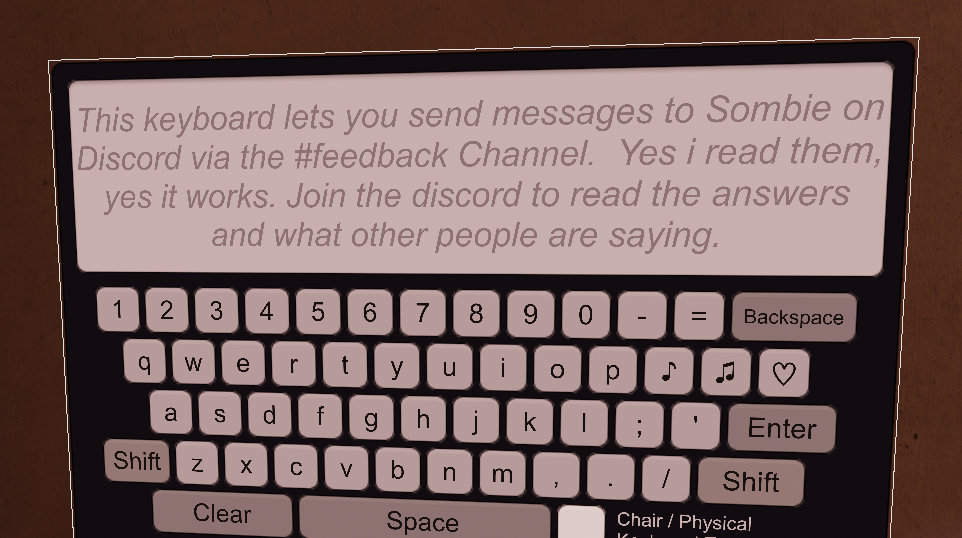
Im trying to find this thing for my world, like a discord feedback thingie, but i have no idea what to search for or how to find it, and im not even sure if this is the correct place to ask, but can anyone guide me the right way?


 potent girder
so i was trying to update a world of mine but i cannot seem to upload it.
the upload bar simply does not move at all
i uploaded this same world just fine yesterday and have not had a problem like this before
my best hint is this error message but i really have no clue what it means let alone how to do anything about it
terse fossil
I believe that was custom code tbh but im not fully sure because the SDK doesnt allow to much custom code but if anything its a custom trigger setup and connected to a discord account or bot for sending msgs @grave mesa
I cant really read that error @potent girder its really blurry on my monitor
terse fossil
let me turn on my main display, my secondary sucks. So I'll check it out and tell you want I think it could be
Is that the only error or is there more in unity?
potent girder
it is the only one
also only seems to appear after the upload has been frozen for a while
terse fossil
it seems to be a connection error if you ask me as it is a HTTPRequest
How long have you been trying to upload it?
grave mesa
@terse fossil yeah, i thought so, but do you have any sources for where i could get my hands on that, booth? or?
potent girder
left it for about an hour just to be sure it wassn't just being slow
tried a few shorter sessions after that
also checked to see if there's anything wrong with my net... as far as i can tell anyway my own connection is fine
terse fossil
@grave mesa Custom trigger setup prolly set up by the creator, if you could try to ask them about they may be kind enough to send you how to do it or a unity package with an example for you to copy from.
@potent girder I would say give it a SDK reimport as it might fix it as that fixes a lot for some reason or see if there is any other asset from the store that might be messing with it if you installed anything fomr the assetstore
terse fossil
Alright do give an update when you find out anything
potent girder
well... i reimported the sdk
that seemed to make it worse for a moment since i couldn't open the control panel
gave unity a restart just to be sure.
and now its uploading (so far) without issue :3
terse fossil
good, hopefully all works out