#world-development
39 messages · Page 36 of 1
 pure cloud
i did that. because i can't press the play button to test without building first.
 near escarp
in that case i have no idea sorry
pure cloud
well, i think might have to create from scratch
create new world, submit as new world
 random owl
So you still have the error even though you changed the runtime and restarted?
pure cloud
i do not have the error after the runtime change but i can't click anything in the world info screen
random owl
That's some other error then you fixed one but have some more
Anything in the console when you enter the publish screen?
And show a picture or your console and whole unity screen while in the bugged out publish screen
pure cloud
pure cloud
yeah my knowledge of unity is not that advanced yet
so how do i change from that to normal material
random owl
I haven't used substance materials directly in unity before so I'm not sure what would be the fastest way to convert
pure cloud
i got this from asset store btw
random owl
Can you show me what you got?
pure cloud
this bridge has the substance thingy
 mild swan
anybody got any ideas on my issue about cameras?
random owl
Hmm I haven't worked with substances in unity at all so I'm not sure how to convert it easiest or what you need to convert
Easiest would be to find some bridge that doesn't use substance materials but that's a lot of repeats in your console so I'm not sure if it's just that one
pure cloud
Easiest would be to find some bridge that doesn't use substance materials but that's a lot of repeats in your console so I'm not sure if it's just that one
@random owl Thanks
pure cloud
i already removed the bridges with the substance designer
build & test still brought me to previous build
 bold ibex
I made my first build in unity and really want to have it in vrchat but im just visitor although having 14 hours in the game can anyone help me
mild swan
keep playing the game, you'll get to new user in no time
bold ibex
thanks for the info
random owl
@pure cloud you might need to remove all the substance stuff from your project
 rain heart
What is levels?
random owl
Levels is static batching stuff for example
That occlusion culling data looks worrying as well
You should leverage GPU Instancing for some stuff most likely and optimize some stuff more in blender
But can't really say much since I can't see what your world looks like
rain heart
Yea rn our shader having issue with GPU Instancing
random owl
That's all I can say with just seeing that picture, but that's definitely gonna require more work 😅
rain heart
It's a huge world😅 I have done pretty decent optimizations rn
(Probably the largest world in VRChat but I can't be sure since I don't really know how large Vkets are)
So levels are there because gameobjects are static?
random owl
There's some other stuff inside levels as well but it's in this case it's mostly the the combined meshes for static batching
I did see you also asking why your build suddenly went to 1.3 gb I've seen some cases where that happens just suddenly
rain heart
Yea it went from 370 to 1.23G so I'm so confused XD (Althought I did add a lot of stuff)
Specally this build is targeted for more compact size so ...
random owl
I think some people fixed it by migrating their stuff to a new unity project but I don't usually suggest going that route
And I don't know what really causes it other than seeing some people have it happen to them
rain heart
Should I turn off Static Batching? I never heard of this term before?
rain heart
That's the page I'm on rn😅
random owl
Oh 😄 Glad to hear someone is browsing the docs 😅
I wouldn't suggest turning it completely off on everything
rain heart
I thought I need it for occlution
random owl
No that's a different setting which you should really also optimize since your occlusion file is 45 mb
rain heart
This is my current setting
random owl
That might need some changes as well since those are more of a general scene setting and not a huge scene setting
rain heart
OK Thank you, I will look into it
random owl
Yeah optimizing a large scene takes time 😅
rain heart
This is the map😅
random owl
And overall have a look at your scene and find all gameobjects that can use GPU Instancing and try disabling static batching on those to use instancing instead
Yeah for that you should definetly setup the occlusion culling properly even if it's gonna take time
Like small objects should not be marked as static occluders just occludees
And huge ass stuff in the background that doesn't actually occlude anything should not be marked as either
rain heart
OK So I guess just building
 errant creek
How to open debug gui in test world?
random owl
@errant creek https://docs.vrchat.com/docs/keyboard-and-mouse
"These Debug options are disabled unless you launch VRChat with the --enable-debug-gui launch option."
VRChat
You can play VRChat using a keyboard, mouse, and monitor! No headset required. Movement is handled via the standard FPS "WASD" setup, with your mouse adjusting your view position. Your head will point in the direction you're looking. It is not possible to move your arms while ...
There was also more that you had to add now just a sec
"--enable-debug-gui --enable-sdk-log-levels --enable-udon-debug-logging" that's all the stuff if you want all the logging enabled
But you might not want to have them in use always
rain heart
Can I turn off static batching if I have GPU Instancing?
random owl
But yeah @rain heart it's gonna take some thinking and doing to properly optimize that map
Static batching overrides GPU Instancing
So you need to turn off static batching for GPU Instancing
rain heart
OK
errant creek
There was also more that you had to add now just a sec
@random owl Which shortcut can showup the udon debug infomation?
random owl
It should be in one of them might wanna ask in #udon-general for more info I haven't worked with udon much yet
@rain heart "GPU Instancing only renders identical Meshes with each draw call, but each instance can have different parameters (for example, color or scale) to add variation and reduce the appearance of repetition." this is the rule to gpu instancing
 rain heart
I will take a read, Thank you
random owl
Also if you have a version uploaded please send me the world id so I can go have a look how it looks ingame
rain heart
Sure thing
Btw how can I make each instance different color? I thought I can only change color per material
random owl
That's under the per instance data in what I linked you
Haven't really tried it myself so I've got no simple explanation
 balmy gate
@rain heart you need to use a method that sets MaterialPropertyBlock. In udon, that means using an actual MaterialPropertyBlock. Otherwise, you may be able to use an animator but I hear that might not be reliable
In SDK2 (non udon), this trick may be easier to use for changing color:
https://mobile.twitter.com/cyanlaser/status/1174233128191373312
We use this in VRMC for distinguishing all 500 or so cube types


I hate that this works. Trying to optimize a map for Quest but dynamic objects won't batch because different materials. I wrote a shader that checks the millimeter scale of the object to determine the color so everything uses the same material. Thanks @Lyuma2d #vrchat https:/...
 Twitter
But you will need to write a custom shader if you wish to do that
 random sage
is there any way to show avatar pedestals in the scene editor
hard to organize them when I can't see them lol
pure cloud
you can press the play button
 white bison
@pure cloud do you know why my uis don't work in vrc but work in unity?
I think it has something to do with them not having a camera or something cause in unity I can add a camera to the UI but can't in vrc..it says it might not work without one
pure cloud
you mean the UI that has the player pointing to the wall and clicking it?
Sorry i cant help you with that, im not good at that
i only know about button to teleport and toggle stuffs
 maiden raven
I uploaded a world and in the sdk content manager it shows my world there but when i go in vr chat its not in the "mine" row. How do i fix this?
white bison
The ones you can add buttons and sliders to
 crimson steeple
anyone else having trouble with the build&test ? every time i build and test now it brings me to an older version of the world idk why
pure cloud
anyone else having trouble with the build&test ? every time i build and test now it brings me to an older version of the world idk why
@crimson steeple i have that problem too.
i was thinking, oh maybe my world is using older unity and older sdk because it's using the latest vrchat.exe to test
So what i did was migrating the unity from 2017 to 2018 and from older sdk to latest one.
still didnt work
my solution now is to create a new project from scratch
detach the pipeline world id,
and attach the world id that i already have
anyone think this could work?
crimson steeple
detaching id didn't worked btw
already done that like twice
it still goes to the older version @pure cloud
im going to try to reimport sdk
turns out even after doing a clean sdk reimport the problem remains
makes no sence
random owl
Look at your console that's where the errors are
crimson steeple
none that are important
 opaque ravine
Hello
 mystic python
Hey hey, I've just recently updated my unity and upgraded the unity project to the 2018 version
When I click upload now all the VRC_Trigger's give errors in the console and the upload crashes...
I have reimported all the SDK stuff and scripts I was using, I have like 0 programmer knowledge so this might be something really easy to fix, if anyone is able to help you'd make my day :)
mystic python
Let me try and upload it with that disabled
Seems to be uploading, my god dude @random owl thanks xD I feel like a dummy now I've spend like 4 hours on getting this to work
 mental iris
if only this was spoon fed nooo you actually got to know wtf your doing. (im being extremely obnoxious about this because this stuff gets harder and harder to do as the days go on what with all the revisions / limits and stuff)
random owl
There doesn't really exist any real limits right now 🤔 expect for quest
In most cases the problems come from external assets that have been packaged wrongly or just aren't properly supported by their makers
Otherwise as long as you read the docs you should be fine
 wicked forge
I built and published a new version of my world but instead of overwrite the old one it created a new one. Anyone know why this happened?
random owl
You need to have the same avatar id set in your pipeline
wicked forge
Where can I see the "avatar ID" for my world?
OH so it changed when I deleted and recreated a VRCWorld objecct then? I see
random owl
Yeah that would change it
 rustic mantle
I have an issue where I'm trying to publish an existing world to community labs. When I click publish nothing happens. The confirmation pop-up doesn't come up.
I tried uploading through unity and nothing happens. It still remains private.
 serene estuary
trying to find a way to fix people spawning on the roof of a building, maybe the roof needs to be taller? ive tried it but they always end up spawning on the roof, trying any new suggestions
 jolly heart
I cant upload any worlds everytime I tried to test them or log into one it resets me back to lobby world... Any one can help?
 fathom gorge
i know what you mean it may because of your lighting is baked thats what happned to be
wicked forge
isnt lighting supposed to be baked? all my lights are baked and I have no issue.
 rare meadow
is a female mannequin that only shows the like conture of the breats (and the other parts of it) forbidden to have in a world or is it fine?
white bison
dude people have jiggle physics and straight up nude avatars im sure its fine
rare meadow
i dont want to get banned ahhhh
white bison
put it in #avatars-2-general tho
rare meadow
why?
white bison
this is worlds
white bison
ohh
rare meadow
i want a mannequin in my world
white bison
nvm then ill fuck myself
rare meadow
👉 👈
white bison
OOF
 odd roverBOT
@rare meadow Too many caps.
rare meadow
can i use it can i not ahh
 short gulch
Does it have nipples or not? If not and there arent any on the texture then I'm sure it would be fine. If it does have em though you would probably need an answer from staff. Is it just like a store mannequin?
rare meadow
its not texture i want to make it metallic but has the counture of nipples yeah
yeahhh a store mannequin
its not a lewd world, i just like the feminine vibe it looks so fancy
@split copper
short gulch
So something like this? https://assets.costway.com/media/catalog/product/cache/1/image/530x/9df78eab33525d08d6e5fb8d27136e95/s/-/s-l1600_10__32_143.jpg
 rare meadow
yeahh exactly
more breats and more feminine
and has nipples
i mean i could just shape the nipples away
will it be fine then?
short gulch
That would proably be okay as long as its not too detailed, just my guess though, would need a staff answer to be 100%
rare meadow
awww okay
short gulch
Best bet would probably be to share a pic of it and @ someone like Ruubick
 mental verge
anyone know why in game my VRC_Videosync is gray?
 nimble echo
Looking for some help with video players
mental verge
in my world i bump into and get stuck on random things as if there is a collider there but there is nothing
even if i select everything no collision shows up where i get stuck
 mild spade
Are you using terrain ?
mental verge
nope
mild spade
A building with a mesh collider maybe?
random owl
Physics debugger is 👌
mental verge
Thanks for helping out, physics debugger helped out alot
mental verge
so some colliders i could fix but theres still some weird ghost one in this doorway
mild swan
still looking for help if you can, im trying to set up a camera system for my stage world, and im struggling to find info on how to make the camera view go full screen when you hit F9 similar to those MMD worlds, so far i have my cameras animated how i want them, and i found out how to have a material show the camera view which is great for a little screen in game, but now i need to get it to show full screen on a toggle, where do i go from here?
 hazy temple
mild swan
hazy temple
mild swan
ah okay so i got it full screen now, but how do i make it toggle to full screen and back to normal desktop?
 raven plank
Anyone got tips on getting a sync video/stream player working again? Was working in my world for 3 weeks and now nothing even tho I don't remember chaning it
 livid sequoia
i have a few questions about world making.
- im trying to make my mirror button when loaded in starting disabled (off)
how do i make that
 green lagoon
disable the mirror in the object hierarchy on the map and then use the button to turn it on locally
 opal goblet
Does anyone have an idea why this might happen?
 blazing laurel
Broken face normal (orientation)? If you turn off culling on the left one, does it look right?
 balmy relic
the normal face the wrong side
 flat carbon
@winged vessel you're the creator of the Musical flowers world, right? a VRC/unity update broke post processing and fog.
I couldn't contact you anywhere else cuz you had DMs off
 winged vessel
@flat carbon cheers! thanks for letting me know ❤️ I appreciate it.
flat carbon
👍💖 yw
I love that world and it's special to me :3
mental verge
anyone able to help out with the collision problem
 fathom bobcat
someone knows why this happens when i use my vrc camera? its only in the vrc camera mode the world it self looks good, is this bc of the mirrors that don't like the post-processing layer ? i'm confused.
balmy gate
What's wrong?
balmy gate
Ahh I understand yea.
Do you see the problem in mirrors too? Only in the vrc camera? Does it show up in desktop mode?
fathom bobcat
yea i see it in mirrors two and in unity playmode two
balmy gate
Ok, because all of those are not single pass stereo... so one shader variant of something is messed up
fathom bobcat
u see the logo behind the mirror
balmy gate
Does this world use SSAO (ambient occlusion from post processing)
fathom bobcat
yeaa
balmy gate
Ok, That tends to look poor in VR. This issue could likely be fixed by right click and reimporting PostProcessing . But I would also suggest to disable ambient occlusion
Two reason AO is strange in VR: first, it kind of changes as you move your head or look around because it depends on what is around it (screenspace). Second, it can do different things in each eye
fathom bobcat
ooh thats to bad bc it looks so good in vr itself till u use the camera
balmy gate
Which gives things a weird shiny look
I guess, to each their own. I know a lot of VR users really dislike AO. I see the appeal too and in desktop mode it would be ok :-p
But yeah the actual issue you hit is some of your post processing shaders were somehow not compiled for desktop mode, so right click reimport should fix that
fathom bobcat
reimport on the package then ?
balmy gate
Which is weird because usually it's the other way around..... I'm still a bit confused
It's very possible that ambient occlusion is completely not supported any more
So I would suggest turning it off.
If you really want AO in your world, baking lighting should already provide that via the lightmap
mental verge
this is the collider issue im having btw
theres a collision in that doorway when i build and test
but nothing in editor
 empty sparrow
Make sure its tall enough! Its gotta be 2.1m tall for ppl to fit through comfortably (technically the collider is 2 but it causes sticking weirdness if the doorway is only that tall and u gotta like wiggle to get through)
mental verge
i had it at exactly 2 meters is probably why then
empty sparrow
Oo ye that’d do it!
mental verge
Thanks so much for helping me out btw
fathom gorge
can I activate running in my world and deactive it with button if i can then how do i do it
 fluid sage
Anybody have syncing problems after updating Unity while still using VRCSDK2?
balmy gate
what type of syncing problems?
it's recommended to update to the newest VRCSDK2 if you update unity to 2018.4.20f1
make sure you have that ^ exact version of unity
 sacred warren
Someone needs to tell JackieDemon not to use SSAO in his world either, hurts your eyes as each eye sees a different thing.
 fallow sluice
how would i have 2 different game objects visible per eye? say i want the left eye to see one thing and the right to see another?
near escarp
That sounds like a bad idea !
fallow sluice
@near escarp i want to make a 3d camera with screen, so i have 1 camera per eye and one screen per eye. the issue is that i need to hide the right screen for the left eye and vice versa
 median sentinel
How do you get a basic video player working in a world?
fallow sluice
the easiest would be to get a videoplayer prefab/package
near escarp
@fallow sluice Ah, if it's for a camera then you can chose which eye it targets in the camera component at the bottom
 sharp pewter
I'm trying to create this feature of where I would hit a button and it will randomly activate a game object (in this case a picture), and then when the button is hit again, it would hide that game object and randomly activate a different one (another picture).
So basically a button that gives you a random new picture every time you hit it, without just infinitely spawning them on top of each other. How would I go about that? I tried using a trigger with the randomize function but then it doesn't toggle one off when you toggle one on, and sometimes duplicates the randomization.
fallow sluice
@near escarp that didnt work. ive set my right camera to right eye, and my left to left eye. i can still see both screens with both eye. i want to only be able to see one screen per eye (or have a 3d video screen any other way)
i would think i need to change the setting of the screen, not the cameras anyways
near escarp
If that doesn't work then I'm not sure there's a way
sharp pewter
I believe those are all done with TCL's 3d shaders
GitHub
Contribute to TCL987/UnityShaders development by creating an account on GitHub.
fallow sluice
i mean ive also seen avatars which only render some parts for one eye, so that has to be possible
but ill see if i can use that somehow
okay so that shader works. now how do i combine 2 seperate camera images to one side by side one
 dull silo
Does anyone know how to add a tooltip/label to a button in Unity? Trying to research with search engines has given me next to nothing
 vivid elk
 woven condor
out of labs in 28 hours after publish - wow good gowk VRChat algorithm
white bison
Anyone have an idea how to make a sweet reflective material for a hardwood floor?
I have a material with .9 metallic and .9 smoothness. It looks shiny in my bottom window but its matte on the material
near escarp
Do you have a reflection probe baked ?
 humble lance
question does anyone have post processing for 2018?
 royal moth
should be able to get it from window > package manager
white bison
I dont have any reflection probes I have a bunch of light probes though @near escarp
How many reflection probes do I need and do I make them static?
near escarp
Try with at least one around your room, and no
white bison
This is taking forever to bake
near escarp
I don't think your lighting is baked correctly btw
white bison
can you help?
the floor in here is reflecting stuff from the other room
@near escarp
near escarp
ah, enabled box projection in the settings
white bison
then rebake?
near escarp
yep
bold ibex
why can i not see some items in the mirror?
near escarp
What's the blue from ?
near escarp
yeah but what are they
white bison
just wall divider things for decoration with a shader on them
near escarp
what kind of shader
white bison
near escarp
stuff like that matter, emission is not a one thing fits all
near escarp
Is it supposed to be emissive ?
white bison
Yeah I want it to glow
near escarp
try with a normal standard shader and emission then
near escarp
Then i'm not sure that can be baked in
bold ibex
is there any way to make these walls the same
the darker wall is a cube and the brighter wall is merged with the whole world
near escarp
the same as in ?
bold ibex
same lighting level
near escarp
Where is your light pointing at ?
bold ibex
near escarp
Why would you use a directional light 
bold ibex
shall i remove it?
near escarp
Yep i think you can get something better
bold ibex
still same
near escarp
Can you show the whole unity window
near escarp
i'm trying to understand what's lighting up your walls
bold ibex
i think its something to do with lighting cause the wall on the right is also a bit darker
near escarp
you should be using one group
near escarp
have you have is light probes groups, instead of light probes
near escarp
yeah, you should look up a tutorial on how to place lightprobes
one group should be enough
white bison
oof, this is how spooky from the black cat told me to do it
unless im just stupid. probs that one.
near escarp
@bold ibex What does it look like with all lights turned off ?
white bison
I'd have to re bake the scene
near escarp
Bless spooky but she had to let someone else do the lighting in her world because it wasn't very good
white bison
OOF
bold ibex
actually 2 different things which confuse me, so I had a button to toggle lights and it just darkened some parts and then i removed the lights completely once and then my avatar was black and u could only see emissions
white bison
near escarp
Yes, that's normal
bold ibex
and in unity nothing changes when i turn lights on or off
white bison
is the light baked? @bold ibex
near escarp
@white bison Did you read through a guide on bake lighting ?
i don't think anything is baked in your world
white bison
I watched Brackeys tutorial @near escarp
bold ibex
near escarp
looking at your screenshot i don't think it is
white bison
All disabled
near escarp
there is no shadows
near escarp
you don't want to bake shadows of objects ?
white bison
idk if ive ever seen a world with shadows?
near escarp
white bison
oof
near escarp
here my objects cast shadows, and those are baked
near escarp
Yeah, but the most important parts are :
-All your scene objects are static if you want them to cast shadows/receive shadows/lights
-All meshes in scene should have the generate lightmap UVs checked
Lots of tutorials pinned in #world-lighting
near escarp
delete them all
they're not placed correctly either way
This is what mine looks like in a complex scene
bold ibex
damn
near escarp
There basically should be probes where the lighting intensity/color changes
white bison
holy sweet fuck
near escarp
That's done through an addon though, i'm not insane
bold ibex
white bison
what addon??
bold ibex
bold ibex
white bison
how much is it now then
near escarp
20 bucks i think
white bison
do I set all my lights to soft shadow?
near escarp
Sure
white bison
omg
near escarp
works with any component name
white bison
doesnt show probes tho?
bold ibex
😂
white bison
so if I delete all these and buy auto probe
then i can put my thumb in my ass and let it do the work for me
near escarp
You can generate probes automatically yes
white bison
do I have to re place the lights?
near escarp
you'll have to bake the lights correctly
 ruby ruin
My point lights when baked will cast light but won't cast shadow onto terrain.. will onto non-terrain objects tho
white bison
correctly
ruby ruin
any idea anyone?
white bison
I go to window > rendering > lighting settings and click "generate lighting"
near escarp
@ruby ruin Check the pinned video in #world-lighting
@white bison Yeah, but the most important parts are :
-All your scene objects are static if you want them to cast shadows/receive shadows/lights
-All meshes in scene should have the generate lightmap UVs checked
white bison
All of my objects are static
near escarp
check the second step then
white bison
near escarp
Also, not all shaders support baked lighting
ruby ruin
thanks checking
near escarp
So whatever your eye shader thing is, it might just not do anything
near escarp
Most avatar shaders don't support it
Try with standard shader at first
see if it makes a difference
then you can try with different ones
white bison
is there a quick way to replace everything using 1 material with another?
near escarp
Sure, t:meshrenderer
near escarp
That'd do it
you don't need a metallic map for a wooden wall
take smoothness down to 0
bold ibex
smoothness is now on 0
bold ibex
bold ibex
white bison
I just noticed you work for vrc
bold ibex
white bison
that explains a lot.
near escarp
street knowledge
white bison
it would be epic to work for vrc
near escarp
@bold ibex Looks a lot better already ! Something might still something affecting your other walls, or it's the camera's direction
white bison
I am big confused
So this couch I am using has a Assets/Prefabs folder but also had Assets/Prop Assets/Comfy Couch folder. In there is this
but I cant actually drag it into the world
I can with the one in Prefabs BUT idk if the properties from this are applying to that
near escarp
Can you drag it in the hierarchy ?
near escarp
oh that's normal
white bison
Yeah I can but its invisible
near escarp
you have too many realtime lights in view @bold ibex
Unity only supports up to 4-8 and then starts screaming
And since the lights above also affect the wall, it fights between them all
@white bison try changing the scale, press F
it might be gigantic/tiny
near escarp
that's a large fucking couch
bold ibex
near escarp
put your cursor on it and read what it does
white bison
alright. got a static couch with generate uvs.
time to blow 20 bucks
thank god for trump bucks
This one Ruuubick?
near escarp
that's the one
bold ibex
@near escarp in fact is there any way to make that wall on the right as dark as the other one?
white bison
this poor man has his discord set to online so he gets a ding every time we @ him. F
auto probe imported..
near escarp
Depends if you didn't anything special to the other one, if your world is symmetrical it should be the same
white bison
is this the part where I cry?
bold ibex
mhm
near escarp
@white bison It should be super simple
white bison
I enabled them all and set them to static
30 intensity
I found anything lower doesnt even show
near escarp
eh, it's fine
white bison
My accent divider things have the avatar shader on them still
do I need to make a new one standard emission?
near escarp
Sure if it looks correct
white bison
imma try with this first
weird my picture is really..white now
these are my lighting settings
near escarp
go with 4k lightmap size
white bison
OOF
near escarp
You can do the probes once your bake is correct
white bison
alright so do I just throw it in the oven at 425 for an hour now?
I think my reflection thing is still wrong
white bison
Baked Indirect and Enlighten is fine? if I do progressive my unity crashes completely
 white bison
Typically takes like 10 minutes...
near escarp
yeah cause it ain't baking shit
white bison
?
near escarp
you didn't have anything static, correct shaders, or shadows
so it didn't have to calculate anything
near escarp
With unity it could take 18 hours lmao
white bison
why did I buy 64gb ram. oof
near escarp
Everyone switches to Bakery over time because unity's lightmapper sucks
it uses your CPU
white bison
well....thats a 3500x
near escarp
and that's not very powerful compared to a gpu
near escarp
bakery uses your GPU, and bakes much better, and much faster
white bison
thats probably like $200
near escarp
if you want to spend another 20 bucks on something you'll use often
white bison
oof
near escarp
50% off
balmy relic
I have an amd gpu so it wont work it seen
white bison
oof
bold ibex
also whats the thing that rest & sleep world uses to make your emissions glow, is it bloom?
white bison
I only have a 1080 ftw
white bison
What do you have? 👀
near escarp
2080ti 
bold ibex
and how do you add bloom? also @me its helpfull
near escarp
yeah, that sounds reponsible

GitLab
A surface shader for Unity providing cel-shading. (Forward rendering only)
white bison
now lets see how long this whole unemployment thing goes cause apparently an IT job is NoN eSsEnTiAl
near escarp
please careful with the bloom, easily hurts the eyes and look like shit !
white bison
oof
balmy relic
You have to spend money where you use it. So if you do a lots of render/game. High end tech is needed.
near escarp
@white bison difficult to work from home ?
bold ibex
so where do i apply it?
white bison
My position was help desk cause it was a paid internship through the college or whatever
near escarp
@bold ibex Read 
white bison
the other chick is 50 and is the sys admin
oh this is nice
bake finished
looks like everything got BURNT
ok, picture doesnt want to send
now I have 0 lighting
bold ibex
where is the unity package manager
ruby ruin
is bakery much faster then the progressive gpu lightmapper?
bold ibex
whats good
near escarp
@ruby ruin Yes
white bison
you asked where pm is at
ruby ruin
sold
white bison
Hey uhhh...I dont have lighting anymore 👀
white bison
near escarp
Your ground is using which shader ?
near escarp
metallic to 0
white bison
rebake?
its just weird cause the other room is lit up
there's point lights in there
near escarp
You can try more intensity/range on a specific light
white bison
I dont want the range to go past the thing I want to light right?
near escarp
Bakery also has another great tool that came out recently 
white bison
which is?
near escarp
Realtime lighting preview
white bison
WHAT
near escarp
it's an addon to bakery
white bison
probably another 20
near escarp
might be 15 actually
white bison
yeezus
cant be putting all this mun mun into making a personal world lol
I dont want the range to go past the thing I want to light right?
near escarp
you change the range or the intensity
or both
right now you're baking at very low res to get any result
white bison
my intensity is already 30
near escarp
sweet, it's not completely black !
near escarp
Yeah
white bison
ill set all lights to 70 intensity?
ruby ruin
ok bought bakery... the built in unity gpu was a huge improvment over enlighten so if this is even faster its worth it
near escarp
@white bison yep
@ruby ruin It'll look better, and will have a ton more options
and will reduce the size of your lightmaps
ruby ruin
ya
near escarp
it's cool once you have a grasp on it
white bison
if I ever get my Index I wanna try to make a small game from scratch
white bison
@near escarp guessing you have an index
near escarp
yessir
white bison
how long have you had it?
is it worth it?
near escarp
I've had my unit since March of 2018, it's wonderful, the controllers tend to break down though
white bison
ugh...thats what ive heard.
kinda makes me think about just getting the vive pro.
how many controllers have you had to rma?
near escarp
i'm on my third left controller
white bison
they replace them for free right?
near escarp
yeah
near escarp
the thumbstick drifts
white bison
I heard that if you dont push the thumbstick in thats less likely to happen
thoughts?
near escarp
it could, i personally don't have any gestures/emotes, so i barely press it, and it still breaks down over a couple months 
the new units are a bit better though
so we'll see
near escarp

white bison
bruh
I gotta wait that long to erp with the waifus :/
jk. that shits weird
I guess 3 left controllers in 2 years isnt THAT bad? how long is the warranty?
near escarp
dunno, i got dev units so it's probably a forever thing for me, but it should be at least two years for most people
white bison
oooffff. lucky
Whos the main vrc dev?
baking is done
anddd absolutely nothing changed
love it
near escarp
We're all vrc devs 
white bison
noice
near escarp
try 300 intensity
white bison
and try .5 smoothness instead of .9?
near escarp
sure
white bison
alright, be back in an hour
bold ibex
@near escarp so how do I download this?
near escarp
what is that
near escarp
bold ibex
near escarp
does that not download it ?
near escarp
one sec
bold ibex
looks like heaven
white bison
0 metallic .5 smoothness floor material
this entire room should be very much lit up.
white bison
Uh what?
near escarp
oh yeah, different lights need different settings
bold ibex
and then on the empty game object he told me to made do i make the layer on that water aswell
white bison
wot
near escarp
spotlights and point lights are not the same type
white bison
I know that much
near escarp
@bold ibex yes
white bison
my spot lights are 8 range, baked, 300 intensity
near escarp
it's explained in the steps
@white bison make them 50 intensity
Keep adjusting until it looks correct
white bison
is there a max?
near escarp
White is max lol
white bison
wait wot
near escarp
If it's completely white, you've reached the max intensity
white bison
well if 300 is still dark wouldnt 50 be dark..?
near escarp
i'm talking about the heaven room
white bison
oh im not worried about that one rn
im still trying to figure out why this room is black except for the emissive materials..
near escarp
emissive is always fine on its own
white bison
the 9 spot lights are outputting absolutely nothing
tired of waiting for it to keep baking. about to just throw in the towel and say screw it and get bakery..
near escarp
We all reached that point at different speeds
white bison
This just doesnt make any sense to me right now
This room should be lit like a college teen.
well...typical one. im straight edge & "boring"
this pains me
near escarp
welcome to the world of light baking
near escarp
don't import the examples
near escarp
it's all worth it
white bison
I just dont understand why these lights are outputting absolute fuck all
at 30 intensity I had them doing something before changing settings
now at 300 they do nothing
near escarp
realtime and baked are different
white bison
The lights have been set to baked the whole time
bold ibex
1 more thing, i can see them through walls
white bison
I had light probes before though now I don't
white bison
turn on lightmap static
and make the pillows non static or people cant move them
Nvm they aren't static
near escarp
@white bison yeah but again, if the settings are incorrect and shaders not supporting it, you didn't bake anything, and baked lights still behave as realtime
white bison
Do you have any clue as to why it's acting like this?
The floor and walls are standard Shafer's
Shaders**
near escarp
Make sure your mirror shows the pickup layer @bold ibex
@white bison Depends on the intensity
bold ibex
but they arent pickable i took that off
near escarp
doesn't matter, they're still on the pickup layer
bold ibex
this?
white bison
The floors are reflecting the emissive blue things
white bison
Then what?
bold ibex
great
near escarp
screenshot
near escarp
are they halfway into the ceiling ?
near escarp
that isn't good
white bison
wot
near escarp
if there's a mesh between your room and the light, it won't do anything
white bison
😐
well lets try that then..
I want the white parts of the lights to light up though as if the light is actually coming from them
near escarp
Sure, you can set them as unlit white
or make them emissive with the standard shader
but if they block light, then yeah. kinda defeats the purpose
white bison
It's still baking and there's already a lot of light
Probably not the final product yet though.
bold ibex
anyone know what the best current video player for worlds is? im trying to find one to put in my world.
white bison

Google Docs
World Prefabs
Name of Prefab,Author Name,Description,Download Link,Date submitted,Your Name,Other,Preview,Keyword
CameraSelfie+wall,Dieu,Camera on pickable pad with screen on it + Big Screen TV linked to it + Respawn timer on drop on a respawn gameobject,
I was sent this sheet it might help find some stuff
Why does light baking take so long??
Is it using the speed of my 5400rpm hard drive with clicking issues?
near escarp
because CPU
near escarp

near escarp
Can be adjusted, shader might not support it either
But hey, you have actual shadows now
white bison
I really cant tell
but
the walls are still pitch black
so should I side light the walls?
the ceiling lights dont really hit them
near escarp
it's most likely just the shader
white bison
2018.4.20f1?
near escarp
yeah
near escarp
once you move up, you can delete the others
white bison
my walls are using this material
near escarp
the albedo is very dark
near escarp
Mmh, click on the meshw it should show you which part of the lightmap it is on
You can see what it looks like there
white bison
this is the lightmap
Yeah definitely something up with that material cause other ones work fine
what do I choose for bakery?
near escarp
First you need to add the bakery light component on all your lights
You can check out his documentation, it's pretty good
white bison
I think it froze when I hit render accidentally. oof
bold ibex
anyone wanna help me with making a looping background like if you were riding in a subway tunnel
white bison
point light for spot/point lights
near escarp
yeah

 near escarp
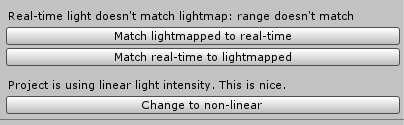
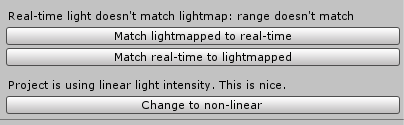
match lightmapped to realtime
near escarp
ye
white bison
aight
default settings for bakery..?
ahh...have to do light probes and reflection probes separate
white bison
holy jesus
bold ibex
any fix?
white bison
weird those go through the floor
bold ibex
yeah u can see the text everywhere
white bison
Its saying "Adjusting uv padding for assets/monitor/aoc_v.15.skp" forever
near escarp
sketchup meshes could have fucked up UVs
you need to check the console after this
it'll tell you what to edit on the mesh settings to fix it
@bold ibex What component is it ?
white bison
alright I will if it finishes
still says it btw lmao this is taking longer than the other oof
near escarp
if it's really fucked it could take a while
near escarp
don't cancel !
white bison
gpu usage is at 4%
near escarp
it hasn't started yet
white bison
I cant every time I hover on the window its just a spinning circle
near escarp
just let it do its thing
white bison
its been doing this for 15 minutes 😂
near escarp
fuck sketchup models i guess
you can quit unity
like kill the process
it saved your scene before baking
near escarp
Set its index format to 32 bits
 rugged tundra
anyone got any good settings for a bouncing ball? i have a basketball with a hoop in the world im making
white bison
so...
where is index format
found it
starting now
alright still doing it
deleting it
lookin kinda sexy now ngl
Now for light probes... I have auto probe
fluid sage
To sync animations and obejcts do we still use Object Sync?
near escarp
Yes
fluid sage
Sweet!
white bison
@near escarp I hit render probes in bakery and all my shiny materials stopped being shiny
near escarp
Bake your reflection probes
 floral drum
Has anyone ever used cube 2 sauerbraten to create maps? You can export your maps to ".objs" and import them into blender. Not sure about the process of importing them into unity though.
 cobalt sluice
Can anyone help me figure out why my world space UI canvases are appearing through geometry in the 2018.4 editor?
Looks like this
I also noticed that interact text/collider outlines are being rendered beneath the UI canvas (in game) as well
floral drum
@cobalt sluice My two cents but, does any of your textures have alpha channels?
 supple drift
Sounds like a render queue thing to me
bold ibex
@near escarp what do u mean by component
its a child of an empty game object i created
u can even see it through the avatar
near escarp
There might be another way to get text then
bold ibex
I usually create it in blender but i wanna try using the text tool
alright let me try
@bronze smelt like this?
cause it doesn't work
supple drift
What happens when you change the render queue?
bold ibex
well if its low it disappears when higher it stays the same
 bronze smelt
Put it at 2999
bold ibex
bronze smelt
And 3001 still shows it?
bold ibex
bronze smelt
Use a different shader then, GUI is actually meant for interface that goes above all
bold ibex
any way of making it white
putting emissions on it fucks it up
nvm i used a different shader
all good thanks
bold ibex
also how do you add a sleep mode where everything goes darker
 wild mirage
NullReferenceException: Object reference not set to an instance of an object
VRCSDK2.RuntimeWorldCreation.Start () (at Assets/VRCSDK/Dependencies/VRChat/Scripts/RuntimeWorldCreation.cs:82)
help
pls
 rose prairie
How do I know if a mirror is facing the correct side?
in unity?
this is my first time making a world so sorry if this is an obvious question
near escarp
the blue arrow points to where it's facing
rose prairie
oh okay, thanks!
 buoyant lark
I can't test my world. It doesn't give me an error but it doesn't come up either.
Anybody know the solution to this?
near escarp
doesn't come up ?
buoyant lark
I click on the test, I go on VRChat it puts me in the default house
It doesn't show me my world
I can share my screen with you
Can you help me with it?
rose prairie
Also how can I test my world without launching into vr?
Is there a way to change the directory?
near escarp
@buoyant lark It means you're probably missing a floor collider
 wicked crown
Anyone have any tips for making a deck of cards without 52 different materials? Make them in blender and assign the faces appropriately I assume?
near escarp
@rose prairie if you update to the latest SDK there's a no-vr option
@wicked crown texture atlasing
wicked crown
figured ty ty
rose prairie
ah okay!
buoyant lark
@near escarp What am I suppose to do? I'm confused? Can I show you my world?
near escarp
Just make sure you have something to stand on in your world