#world-development
39 messages · Page 33 of 1
 supple drift
 small kelp
ohh alright
 bold ibex
So Im trying to test my world and it takes me to my home instead...for some reason control panel wont recognize it? help? Update: ok got it now
Had to remove and re-add the vrc_scene descriptor
I just successfully imported 2018 to my projects but.. the text can be see thru the world. Anyone knows how to fix that?
set the text and canvas layers to Environment
If they're set as UI they'll layer on top of everything
didnt fix it
it was on default
 simple arrow
ever since the new update to 2018.4.20f1, i can no longer use the color picker
i get this error in the console
bold ibex
welp build and test STILL doesn't work...
@bold ibex I had to click play so it fixes xD Thank you
small kelp
so i got unity and in the installer it says get visual studio 2017
but i already have visual studio 2015
bold ibex
anybody now how to get rid of these? won't let me test or upload
Ok, had to make a dummy project and replace the vrcsdk+meta files from that. seems to work
Did anybody else have a bunch of their shaders get changed to Autodesk Interactive?
 zenith field
Hey I have a question relating to unity if anyone can help me
bold ibex
Is it not possible teleport all players on the map at once to a location via VRC Trigger?
 hybrid mica
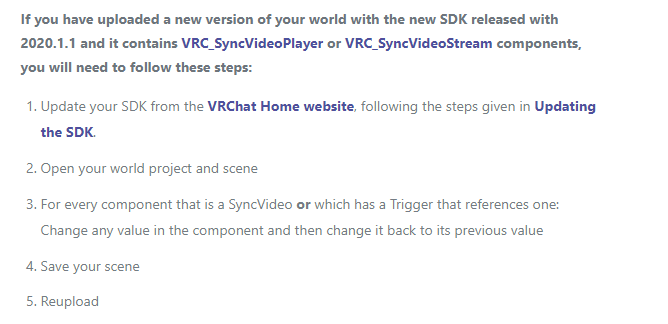
i have video player in my world i did not update my world but i did update my world to the new unity so does that mean i still need follow these steps? https://i.imgur.com/MxtVXRT.png
 modern kayak
@bold ibex yes, but you have to keep in mind that teleports will only fire for the "instigator" of the trigger which means the person who detected and broadcasted the action. In order to get around this you just need to make everyone be the instigator.
To do that all you have to do is have an alwaysunbuffered activate custom trigger > local teleport player
 mental iris
do you need the patched sdk?
bold ibex
sweet, thanks phase!!
mental iris
if you dont plan to use video players do you need the announced sdk or no?
proly do as everything requires the abaolute latest in api
zenith field
When I try to run a test build of my environment in unity using sdk 2 it doesn’t update/reflect any changes I made. How can I fix this?
mental iris
check if you got deprecated assets/scripts and get rid of them
use to be able to use deprecated stuff not anymore with 2018
so get rid of any and all deprecated stuff and it shuld work
and or update them
zenith field
Oh okay I didn’t know the sdks were compatible with 2018 I’ve been using 2017. Thank you!
bold ibex
anything on this? no compiler errors, but worries me
 stray sand
Jetdogs prefabs version 4.0 is now public. https://twitter.com/jetdog8808_dev/status/1246261517516967940?s=20

Updated my #VRChat prefabs to 2018: https://t.co/TjH789eVGQ
I plan to expand into Udon as well soon.
If you would like to support me: https://t.co/Xf3fObMcms
 Twitter
 wicked crown
Anyone having videosync issues since the 9pm (~1hr ago) update? Previously my videos were actually working fine. Can't get autoplay to work now
 eager quiver
I updated my projects to Unity 2018 with a new SDK2 yesterday and everything worked fine, but now regardless of what scene I load it only uploads the very first scene I uploaded yesterday. It basically overwrites everything I upload or test with this one scene. I don't have this problem in my SDK3 project. Any ideas?
 left marlin
@sacred warren Fixed the archery prefabs. Let me know if you have any issues with them.
https://twitter.com/CyanLaser/status/1246268697930391553

Continuing with #VRChat 2018 prefab updates, Archery Prefabs V1.3 has been updated in the prefab database. VR bows should work again. https://t.co/fEmru1HRR1
 Twitter
bold ibex
Twitter
bold ibex
@wicked crown Video sync is not working for my world anymore, either. I tried a fresh VRCVideoSync prefab and it failed to work 2/3 times in a new project.
 sacred warren
@left marlin thanks and well done
Am I ok just replacing the bows, or does the whole lot need to be replaced?
wicked crown
@bold ibex yeah same here, my own broke as well as two prefabs
strange the last update that was supposedly broken they still were working fine for me
I can skip to the next track and it ques up fine though
left marlin
Uh, honestly I haven't tried migrating anything yet. Kind of don't want to migrate my old world. The prefab should just auto update, I hope
 pale willow
I need some help with something on my world here.
bold ibex
@wicked crown I figured it out
if you're using VRCVideoSync or something close to it, you can just increase the delay on the trigger that plays the video and it should start working properly again
I guess the Play trigger is now happening at the wrong time or something
wicked crown
oooo ill try that thank you!
 brazen juniper
so i can't for the life of me figure out why the sdk keeps throwing assembly errors
no scripts in this project other than the sdk its self
 near escarp
Is it an SDK2 or 3 world
brazen juniper
SDK2
wicked crown
looks like you installed sdk3 and you can't do that for sdk2
near escarp
yeah that's the one thing you're supposed not to do 
wicked crown
 brazen juniper
wait that shouldn't prevent the sdk from working in the first place right?
wicked crown
I obviously can't speak with absolute certainty but it's almost certain it wouldn't work at all
the two kits are very different
 vale steeple
yea i made that mistake
wicked crown
@bold ibex Also just implemented that and it worked so you have my thanks ❤️
vale steeple
You cant install sdk3, delete it, then install sdk2
brazen juniper
ooohh ok
vale steeple
They need to be kept completely separate, the way I fixed it was messing with my project files and deleting sdk3 / udon related stuff in project settings and stuff, then wait for all my assets to reimport
pale willow
I need some help getting my world up and running again.
vale steeple
woulda been easier just importing everything to new project tho tbh
near escarp
@pale willow Did you check your audio sources ?
wicked crown
yeah heavy i'd suggest rolling back to your pre-upgrade backup if you made one
then do sdk 2
brazen juniper
yeah i was trying to fix this world for a friend and they must have loaded SDK3 and given up
pale willow
I did and the path and they are where they are suppossed to be. @near escarp
near escarp
VRChat
If you need to update your SDK, it is important that you follow these steps to ensure the update proceeds properly and you don't have any old/conflicting files. Simple Update Here's how you update your SDK. If you're just uploading avatars, you can use the following process: ...
near escarp
follow the steps
near escarp
Check your audio sources again, if it's trying to use the ONSP gizmo then there has to be one in your scene
use t:audiosource in the hierarchy search bar if you need to
 kindred thicket
Hello, I also updated my world and now I have the following Warnings and Errors (if you have any ideas on how to fix please let me know):
near escarp
warnings are normal
try adding a very short delay to the button?
oh nvm it's every trigger
wicked crown
yeah @near escarp i've been getting those as well
the errors for triggers
no problem once compiled though
near escarp
@kindred thicket Did you try uploading ?
kindred thicket
Yes, it uploads and works, I'm just concerned that they are in the console.
wicked crown
it is a bit annoying to sift through those as well
pale willow
I just checked them all again with the t:audiosource and they are all good and then i get 999+ errors again of the same thing
 random sage
Is there any way to make a collider not block clicks?
got an invisible wall in front of a mirror so your face doesn't clip through it when you walk up to it but its blocking the on/off buttons lol
 random owl
Set the collider to be on the mirrorreflection layer then it won't block raycasts
Though if it's not a trigger collider not sure what happens but you can try
pale willow
@near escarp Nothing came up.
random sage
hmm no luck
still blocked
is there a docs page for layers?
dont really understand what they mean
near escarp
 neon heart
I'm still having issues with my world since the update on the SDK and the VRC update. I've changed a value on each of my toggles that control music for my world then changed back and even increased the delay to 5 seconds for the video player and when I'm in my world its still nothing. It worked yesterday fine and it wasn't until the vrc update that it broke
My movie player in my cinema is also broken and refuses to play anything by default like it usually does and when you put a link in. Both working fine yesterday.
SDK2
I even tried deleting the SDK and anything related to it and fresh importing the current one and still nothing.
These are the toggles I use and sliders.
 mental verge
hey im new to making worlds and i was wondering how i could get bloom on my world but only in a certain area
wicked crown
@mental verge I think you can assign the items you want bloom to affect to a specific layer and then have the bloom only target that layer
or you could be lazy like i would do it and have a collider in that area that toggles on / off bloom on enter
mental verge
i have a collider but bloom is always on everywhere
do i have to build the map and test to preview because ive just been trying to use game view
wicked crown
sort of you could toggle the on and off in unity to preview it
but i don't think you can test the collider unless you're in game
mental verge
oh alright i could see how it would look but it wasnt turning off outside the collider
ill build and see if that works
 lost urchin
I was in the middle of making a world when the update happened. I managed to (privately) upload the world before but have edited it quite a bit and ever since transferring to the new unity, despite me trying to upload the newer version of my world, its only the old version.
I'm not sure if its some weird blueprint ID or something but I'm getting annoyed. I deleted the old version in hopes that'd fix it, but now all it does is load up, go black screen and send me back to my home world
ok i tried to put in the new sdk and it says something about "memory stream" files being out of bounds
mental verge
i had to update and detach blueprint
lost urchin
i cant find the blueprint id
random owl
@lost urchin it's in the vrcworld object
@mental verge Did you get it working it sounds like your volumes are set to be global if the collider isn't working right?
lost urchin
you life saver thank you
mental verge
volumes arent global and now its not working at all
idk what i did to break it
ill prolly just scrap the idea
random owl
Can you screenshot how you have it setup?
random owl
You have the box collider component disabled in the picture
mental verge
lol i didnt even notice
random owl
You might want to create a new layer for the post processing
Since having a trigger collider that is around the whole room stops raycasts from working
mental verge
made a new layer now
random owl
You also need to change the layer collision matrix
So go to your Project Settings > Physics and set the new post processing layer like MirrorReflection has it setup and that should do it
lost urchin
this may be a stupid question, im still new to this worlds stuff, but if i update this sdk, do i need to replace mirrors and chairs?
and should i delete the sdk currently in the world first or
random owl
VRChat
If you need to update your SDK, it is important that you follow these steps to ensure the update proceeds properly and you don't have any old/conflicting files. Simple Update Here's how you update your SDK. If you're just uploading avatars, you can use the following process: ...
lost urchin
ah thank thank
random owl
Just don't update from VRCSDK2 to VRCSDK3 and vice versa since they are incompatible
 rich basin
How do you make pickups be synced between people?
What happened to objectsync? Is that built into the new pickup script?
mental iris
whats a better toggle for doors is it better to have a clickible plane to go through them or a on avatar collision (just walk into the door to go to next area)
rich basin
Used to be an objectsync script you'd add, but that doesn't seem to exist anymore in SDK3, so I'm not sure how I would make these pickups sync between users. Is it built into the pickup script now, or given a new name? Would I have to manually add it in with udon?
 junior cloak
"or has a trigger that reference to one"
So i need to changed every triggers that reference to the video player ?
Not like i have over 600 of them or anything
My morning gonna be interesting
 winter stump
anyone know how to fix this?
mental verge
My VRCVideoSync is gray anyone know a fix?
mental iris
@rich basin my audio works in worlds i just did all corrections and fixes to one i manage and gonna post it as all works im in a build and test instance and all seems ok. if you want i can dm you a screenshot of what i have the audio prefab settings to if that will help you
with audio issues as i think i recall you asking about audio problems earlyer
mental verge
heres my settings on the video player if it helps
mental iris
Shouldn't there be a on network ready call like it use to have?
mental iris
Ok I see it I had to scroll down on my inspector
Half Bren pwr atm XD
just trying to tidy up a few fkd up triggers before i publish my world for 2018 update XD
@rich basin this is the settings im using for my audio source. it may look massively loud af and just absurdly obnoxious but it really isn't. its set this way to cover the entire world and not fade off coz there's a lot of areas in the world and if your outside the range it dont cover the whole world. additionally ppl can toggle off music with bgm on off toggles i set. hope this helps you with getting your audio working
you dont have to set it like this but this is a rough set up for whatever audio you want going
 spring linden
i want to use sdk 2 and i got this error
"Assets\VRCSDK\Dependencies\VRChat\Scripts\Validation\AvatarValidation.cs(191,82): error CS0234: The type or namespace name 'SDK3' does not exist in the namespace 'VRC' (are you missing an assembly reference?)"
any solutions?
near escarp
make a new project from scratch and this time don't add the sdk3 into it
spring linden
is unity remember anywhere i used sdk3? i mean there musst be a way to fix this, i never saw an asset what force you to start a new project because you can not delete everything
 vast crescent
go to edit > project settings > player > other settings and in the Scripting Define symbols, replace VRC_SDK_VRCSDK3 with VRC_SDK_VRCSDK2
 sharp turret
what this
spring linden
thx, "starting new project"...just lol...
 balmy relic
@sharp turret am not sure. I dont know what those drawing mean in the two box
spring linden
@sharp turret that means 1. in your Lighting Window, at the bottum, just uncheck "Auto Generate" and 2. dont use ONSP on audio source, I can vaguely remember vrchat dont allow ONSP anymore, just use auto fix
spring linden
jea then just remove this component and add vrc_spatialaudiosource
sharp turret
why the video player doesnt work in game? @spring linden
I can put link but when I press play nothing happens?
spring linden
thats a question i can currently not answer to, sorry, its long time ago i used this, maybe someone else can answer
spring linden
sometimes it is not a problem of the prefab, sometimes it is a problem between the vrchat servers and youtube
mental iris
as for the auto generating you can shut it off. if left on its only going to take longer to upload the world. it dont matter if its on or off but i think its better to proly disable that
sharp turret
oh
video players are not working in my world
nothing happens when I press the buttons
mental iris
iws player broken got rid of it and used the vsynch from sdk same thing broken
just the grey screen
mega oof
i hate to say it but its just something that needs to be done away with XD
no matter how meny updates it goes through they never work
alright i cant say that coz its like 50/50
but still
hard to add those when there broken 50% of the time XD
sharp turret
iwashi player worked before the new sdk
mental iris
so its just going to take time for them to work again
ill remove it till it works again coz its sort of a tease like "oh sweet a video player" huh? it dont work leaves world
:/
sharp turret
this is my world
put the link
press play
nothign happen
this is hangout player
mental iris
now that one looks nice i can create a tv frame with Probuilder to fit around it so its not a floating screen XD
mental iris
i mean id leave them in but i kinda dont like leaveing broken prefabs in worlds
x.x
it sorta teases ppl
but hopefully they fix video players in future update patches
most likely it be the sdk patches that fix it
er or both game and sdk, i dont know
 dusk sapphire
not sure whats wrong with other video player prefabs, but its working in my world at least, with the exception of this issue with setsynctype https://vrchat.canny.io/bug-reports/p/912-set-sync-type-triggers-for-sync-stream-player-throws-an-error
sharp turret
what video player do you use @dusk sapphire
mental iris
im fairly sure most ppl use iwashi or the sdk one
not sure of how many there are out there. while im at it anyone know the name of the virtual keyboard for worlds. like the one in tell your tuna world or worlds that have those
dusk sapphire
i started off with jetdoggs but modified to the point its pretty much my own, you can find it in bedroom theatre
 restive current
I use the one in the SDK. from what i have tried it seems to be either that the PlayRPC is not triggering properly or the "OnNetworkReady" seems to have some hiccups, but i may be wrong. Ended up getting the video to play by just pressing "next" but only the master can see it, just blank screen for anyone else joining.
mental iris
have you tryed doing always buffered or unbuffered global ect? those settings played with them nothing worked
restive current
yeah i tinkered around a bit... in the end i just scrapped the whole NetworkReady and instead put a collider at spawn that uses "OnAvatarHit". that triggers "NextRPC" and then removed the collider. temporary fix but it works i guess... but again only the master can see the video.
and i litteraly dont know what im doing so dont follow my example xD
i just want my worlds to work "somewhat" so i can start learning Udon instead
mental iris
are the brand new udon worlds better then the older legacy supported triggered worlds?
restive current
no clue... but ive had a world im mind for a long time that i think can be done now and im very excited for that
mental iris
oh well gl in your developments of said world :3
restive current
thank you i think ill need it 😄
mental iris
i assume at one point everyone will need to use udon. so proly best to set a new project with sdk3 and start learning it so that when its all one thing you already got the basics down
restive current
yeah... thats a scary thought tho... like this game has so much nostalgia potential like a few years ahead...
creators of worlds will stop beeing arsed to update the stuff way before the game itself stopps developing
hopefully things made in udon will survive longer tho ^^
dusk sapphire
okay looks like the latest sdk broke video players to some degree again
i too am gettign that issue where hitting play/pause/stop etc only works for master
restive current
did you follow the steps in todays announcement for world creators?
dusk sapphire
yes
restive current
cool then im not alone
dusk sapphire
oh hang on, now its working, huh
mental iris
i alredy updated my world without the player or the toggle not gonna re open unity to re add it again
x.x
im gonna wait till i have more stuff to add before i re add video players
restive current
@dusk sapphire does it work for others in the world aas well?
dusk sapphire
yea i'm testing with 2 clients
restive current
i got it working as well when you put in a link ingame.. like if you make a playlist it does not seem to work for me
sharp turret
why my vrchat world image doesnt show
I uploaded with the vrccam
but in game it only shows skybox
sharp turret
my friends world with Hangout player works, but when I put hangout player on my world it doesnt work in game pls help
 languid seal
@sharp turret hello, did you click upload image before you publish you're world?
dusk sapphire
hmm, i was absolutely positive iwasync video player was working for me in build 912
its not working now in build 916
sharp turret
yes I did
mental verge
I have a long video of songs that is around 3 hours. is there a way i could play this and sync to all players without using just an audio source
mental iris
so i goto ask this. how did they do that total revamp on japan shrine world?
is that unity world still or..?
balmy relic
what you talking about
 manic sonnet
Am I able to publish a new world as an existing one? I have a world on sdk2 but I want to remake it on sdk3+udon, could i somehow overwrite the blueprint ID?
 vocal raptor
I got a problem
I upload my world but when I want to test it
It load but after the loading I dont spawn in my map
an another loading start and I spawn in the Vrchat home
mental iris
TL;DR
it problem didn't build correctly. you shuld check your build logs or check if you got any bad/ deprecated scripts or assets. i had a similar situation and i mismatched one of my worlds i took it down till i can fix it but now got to wait to put it back up again as i fixed it. i deleted the offending assets/ scripts and nothing is clashing anymore. only things im getting are the flood of trigger warnings and other such nonsense i was told to flat out ignore as thats just a buggy thing atm that isn't actually anything to be worried about
mental iris
i went to check the dark waters 2 world and you fall through spawn.... i think that world broke with the update ill try to play it again but if it broke i hope its creator fixes it coz thats a really epic rpg map
i realy loved that map i hope they fix it when they can
on a side note anyone know where i can find a realy good semi optimal bloom shader?
 dusky jungle
Hi all, I got a quick question. In the SDK3, where did player mods go? (Speed, jump height etc)
modern kayak
you have to make an udon script that sets those values
dusky jungle
Okay, thanks
sacred warren
Do audio elements that are enabled, but aren't playing, count towards the limit?
sacred warren
Check the console, there will be an error in there from something.
mental verge
i have 2 red errors
NullReferenceException: Object reference not set to an instance of an object
VRC.Core.BestHTTP.Caching.HTTPCacheService.ClearImpl (System.Object param) (at <790ca7477c2240ba99ef2eb1c1217d29>:0)
System.Threading.ThreadHelper.ThreadStart_Context (System.Object state) (at <e1319b7195c343e79b385cd3aa43f5dc>:0)
System.Threading.ExecutionContext.RunInternal (System.Threading.ExecutionContext executionContext, System.Threading.ContextCallback callback, System.Object state, System.Boolean preserveSyncCtx) (at <e1319b7195c343e79b385cd3aa43f5dc>:0)
System.Threading.ExecutionContext.Run (System.Threading.ExecutionContext executionContext, System.Threading.ContextCallback callback, System.Object state, System.Boolean preserveSyncCtx) (at <e1319b7195c343e79b385cd3aa43f5dc>:0)
System.Threading.ExecutionContext.Run (System.Threading.ExecutionContext executionContext, System.Threading.ContextCallback callback, System.Object state) (at <e1319b7195c343e79b385cd3aa43f5dc>:0)
System.Threading.ThreadHelper.ThreadStart (System.Object obj) (at <e1319b7195c343e79b385cd3aa43f5dc>:0)
UnityEngine.UnhandledExceptionHandler:<RegisterUECatcher>m__0(Object, UnhandledExceptionEventArgs) (at C:/buildslave/unity/build/Runtime/Export/UnhandledExceptionHandler.bindings.cs:47)
heres one
i think i fixed it
nope nvm i got it to say build but now when i build it doesnt actually update any changes i made
manic sonnet
I still have the issue where Post Processing just isn't working
 autumn umbra
you're using v2 right?
mental verge
nowwww i think i fixed it
autumn umbra
@manic sonnet hmm, I haven't had any problem with it... you have volumes set up with box colliders on them, and "is trigger" is checked? and the post process layer is on your main camera, with the trigger set to itself?
manic sonnet
yes yes and yes
i followed the guide exactly
even if i add an effect at maximum settings, nothing changes
@autumn umbra
near escarp
Then you missed a step
autumn umbra
what if you check "is global" on the volume?
manic sonnet
that doesnt change anything
oooooohhhh
haha
i had to change the layer type
duh
autumn umbra
ah 🙂
autumn umbra
that's not ideal, I think... I put mine on my own layer, or the water layer usually
manic sonnet
i had it on the water layer and it doesnt work
it only works if i put it on everything
idk why
autumn umbra
oh, but you set the layer to water on the post process layer on the camera as well, right?
autumn umbra
set your volume's layer to water as well
manic sonnet
how do i do that? there isnt an option that says layer
autumn umbra
I have two problems since the new update: SyncVideoPlayers don't start when using "OnNetworkReady". They do work when activating them manually. Is there a suitable alternative for having them continually synced as people join/leave? 🤔 I could just use OnSpawn, but not sure if that'd be reliable. Also, Audiobanks are broken for me since 2018 went live. They did work in beta.
I'll probably make a canny but would be grateful if anyone has any ideas.
sacred warren
Anyone have any idea about the audio thing?
near escarp
OnPlayerJoin might work more reliably
and then turn that off locally so that it's not triggered every time
 warm fern
Rubick Onplayer join as local broadcast?
autumn umbra
@near escarp that sounds good, thank you
mental iris
I'm gonna avoid video players
There a very tedious asset that are to sensitive and very unreasonablely difficult to keep functional
v.v
 ebon lichen
anyone have any idea why its doing this to me?
my SDK is up to date version VRCSDK2-2020.04.03.13.11
near escarp
@ebon lichen That's apparently due to the poiyomi editor stuff
@warm fern are you sure it's not the video player's fault ?
That the RPC is getting lost
ebon lichen
ohh ok thank you i will withdraw Ruuubick !
near escarp
if both OnPlayerJoin and OnNetworkReady were broken i feel like we'd know
warm fern
I think it is an issue with play rpc
When I use play RPC with same settings as next nothing happends when I use next next track plays
ebon lichen
thank you so much @near escarp
manic sonnet
btw, am i able to make post processing work with mirrors?
the grass on my terrain has a weird ghosting on it
warm fern
newest
manic sonnet
sdk2 or sdk3
 hexed elm
New glitch is happening. I've got a werewolf map with a lot of scripts that run locally for gamemasters ...
Thing is... When someone becomes gamemaster something happens to the VoIP and they stutter a lot... Like vrchat is having a script overload
autumn umbra
@near escarp Tried this, but same as Lycon, didn't work
near escarp
I had a hard time with this too in 2017, if your setup doesn't work in 2018 as it did in 2017 then I'd say write it up in a canny for now
autumn umbra
It did work in 2017 and 2018 beta (using OnNetworkReady). Sure, will write a canny
autumn umbra
I do have a feeling that it may be more to do with SendRPCs rather than OnNetworkReady/OnPlayerJoin. Because I also have local mp3 players using SendRPCs which also don't work.
 azure idol
Hey, i been reading video players are still not "rly working" is that true, or should i spend my day on somehow fixing it? ;o
autumn umbra
@azure idol yes, spend your day fixing it, and then tell us the solution 😉
@warm fern yeah, next seems to work on the video player for me.
hmm
azure idol
Karaoke Central doesnt rly seem affected by it. Otherwise i use youtube links not sure, if thats a special problem.
warm fern
Yes becuse index rpc works
autumn umbra
hmm, I'll also try using sendrpc playnext on the audiobank as well, will see if that works
warm fern
I did not think that trigger support will end in 24 h lol
manic sonnet
ive went into a test world of my world and the post processing isnt there?
azure idol
Sometimes i believe we rather should give it some time, and get us busy with other stuff, while vrc trying to get it running properly, otherwise its a rly bad feeling to know your own world is somekind not working. ;c
autumn umbra
@manic sonnet make sure your PP volume is covering the area of the world you are in
unless it's a global one
manic sonnet
oh so i have to turn on global... duh tysm once again xD
autumn umbra
you can use global as long as you don't need different PP effects in different areas
azure idol
Thaaaank you @autumn umbra @warm fern pat Guess i will head on looking into new avatars for now. Or even peak into SDK3 :^^
 proper lion
is there a way to send http requests to some server?
i'm trying to save the state of my world
 coarse flax
I have a dumb question. can you still upload models/world on the old unity or since the update came out, you have to use the new updated unity]
mental iris
use the new one. i dont think 2017 is no use anymore
i cant go back to 2017 now anyway coz i already did full migration
coarse flax
ok
sacred warren
any ideas how to see the report on a world? i seem to have acquired a second one but no ideas why
 north parrot
This new sdk update compiles maps so much faster...I'm thoroughly impressed.. and grateful
 loud storm
no, you can't see the reports on your world, only the amount of times it has been reported, they are meant for the moderators/staff
sacred warren
you can see some of them, they appear with a gavel next to the name
 smoky raptor
Is there a format requirement for audio clips to play on trigger? My mp3s play fine if play on load is enabled, but trying to trigger it produces no sound, even if I just switch out the sound file in the action example world from the SDK. I notice the default sound is .ogg.
loud storm
what do you mean you can see "some of them", all you get is a number of how many times it has been reported, it won't show you the actual reports because they are meant for mods/staff
though it tends to be the Reports number -1 because the first report is there by default, probably for the labs i reckon
sacred warren
some reports show under tags with a gavel
loud storm
um, are you sure? i've never seen that
sacred warren
yup
smoky raptor
nvm volume on the example was super low and my audio is also quieter in game than in unity = almost inaudible.
random sage
what's the difference between a plane and a quad?
random sage
I mean good to know but doesn't really answer why haha
 ripe garden
plane is basically a quad, but subdivided, i think 10x subdivision or something around that
random sage
ooh I see
ripe garden
not worth using planes as it just ads unnecessary geometry for a flat surface
random sage
what's the use case for that? seems like quad would always be more performant in that case
ripe garden
ngl, i have been wondering the same thing for quite a while
random sage
hah
been googling for a bit and can't seem to find a straight answer
oh well at least I know which one to use
thanks ^^
ripe garden
oh, there is one more difference tho, quad likes to be a little bis- uh, non cooperative, and always face the opposite direction of what you want when creating it
random sage

oh do quads only have one side?
or is it just by default only textured on one side
ripe garden
yeah, quads are one sided
random sage
ahhh guess I'll just make some really thin cubes then for playing cards
ripe garden
oh also, should watch out if you use quads for things that players will collide with, mesh collision will work just fine on one side, but all hell will breaker lose when touching the other side
mental iris
use a cube a ball and a cone color them red blue and green have a flat plane color it black add a mirror done a world
mental iris
you triggered unity
just ignore it your triggers are fine
check there correct if so then you can ignore those warnings
you can ignore any and all 'object is not an object' and not installed and all that coz thats something the new sdk seems to be firing off even tho your triggers are most likely correct
every time i see those im like unity got triggered by my triggers XD. its a warning/error that isnt a real error. as far as im aware
sacred warren
Yeah, it's an incredibly annoying "feature" of the newer SDKs
 frail atlas
https://gfycat.com/frayeddazzlingconey is there no way to make the pickup range less than this for pickups? it overlaps things and i basically can't use the interactable between them
 mental iris
you need some realtime reflection probes in those mirrors
 pastel oak
Ok mirror dweller
mental iris
XD
 vague ingot
I'm having a hard time with the new SDK2, I'm unable to move VRCWorld within the scene. Does anyone know why this would be happening? Yes I am selecting it in the hierarchy, no my unity sites nier lag when adding the prefab. It does not allow me to move it within the scene, or even let me see where it is.
sacred warren
Should that even be an object in the world?
 true apex
Is this for just worlds, or also problems loading into worlds?
vague ingot
I need the location of it to set where my spawn is.
 cloud linden
hey guys did you check the new sdk2 with videoplayers? is just me or the option "play on awake" isn't working properly ?
i wanna hear from you before making a bug report, i might do something wrong but i doubt it.
sacred warren
@vague ingot The world descriptor can be on anything and placed anywhere, you then just tell it which object to use as the spawn point.
Question: Are triggers still broken if you spawn in them? i.e. if you spawn into a world within a trigger, it doesn't actually fire the onenter trigger. Is that still the case?
 sleek willow
Hey, I'm looking for a video player that consistently plays videos and streams really well and has world audio. Something similar to this world https://vrchat.com/home/world/wrld_52c06791-34b5-4b5e-8372-3b09a01bcef9

Like it's 1999ǃ
Or if anyone knows where i can find that video player that would be appreciated
manic sonnet
Okay, so I am having multiple problems with my world right now:
-I have an audio source, its spatial blend is set to 2D but when I am in the game it sounds 3D.
-My post processing is making it so I see through things in mirrors.
-And when I sit down in a VRCChair I am floating about a foot off of it lol
random sage
for the last one, make sure the interactive part of the chair is in the right place @manic sonnet
or try a different avatar maybe
random sage
haha
manic sonnet
I found that the 2nd problem is because of Ambient Occlusion, but I still have no idea how to fix the audio 
manic sonnet
Is there a way for me to have the Ambient Occlusion not interfere with the mirror?
modern kayak
don't use post process ambient occlusion, it's not VR friendly
manic sonnet
I dont use VR
its for my home world
but ty, i will note that for my friend's world
sacred warren
anyone know how to get silents water shader to actually go transparent?
i had this issue earlier when i set up the original version and it seemed to fix itself. now ive moved to v2 i have the same issue again. the world has a realtime light for depth passes.
 icy tartan
why does the vrc sync video player doesnt work...
winter stump
@icy tartan did you fix the issue with the last build thing?
icy tartan
what do you mean
 icy tartan
It was just an broken sdk ye
winter stump
ight all good
icy tartan
But why does the sync video player doesnt work... that update made no sense everything is broken and I updated everything...
 ionic shell
im having this issue when i try to update my world in unity 2018 and not sure how to fix
icy tartan
lets just say everything is dead
bold ibex
[SOLVED, ping or smth if you also need help with this] ellooo anyone reading this, i just upgraded my world project to unity 2018 successfully...but the world in question is currently in community labs, and i don't know how to go about pushing a new update without publishing a new place 😳
i was told i could use the world id, i was able to find it from the "my worlds" section on the website but i have no idea what to do with it, sorry for the dumb question!!
lost urchin
@ionic shell I think that means you need to reset all your triggers bc thats what i needed to do
But I also come with a question lol
I'm making a chess board, and I'd like to have it where the chess pieces collide with the board but the players don't collide with the board. I'm a bit of a noob in that
Because moving pieces far into the board makes users walk on top of the board and its a hassle
@icy tartan I think vrc addressed that sync vid players weren't working and they were gonna try to fix it
icy tartan
I hope it will
ionic shell
well is there an easy way to reset the triggers?, because there are way too many for me to do that one by one
icy tartan
@lost urchin By the way it cant be that, Rooftop Movies works
makes no sense
and it wasnt updated after that Unity Update
dusk sapphire
@sacred warren have you by chance reported other worlds while in your own maps? i recently found out a fair number of bogus reports on my world were probably caused by myself and my friends because of this bug lol https://vrchat.canny.io/bug-reports/p/if-you-report-a-different-world-from-what-youre-currently-in-the-report-is-issue
junior cloak
Yeh, updating it break it @icy tartan
Tho if you follow everything said in #announcements it should be fine again
icy tartan
@junior cloak not rlly I had the Issue also before Updating
junior cloak
Even tho it's a pain in the ass to change every triggers and co
Must admit i didn't read eveything
What's the issue exactly ?
icy tartan
mine?
junior cloak
Yeah
sacred warren
@dusk sapphire Hah, that's hilarious but I don't think it was that.
icy tartan
vrc sync player doesnt work ->started after they went to unity 2018, but it makes no sense because Rooftop movies are working and theyre still outdated
junior cloak
It make perfect sense.
The new SDK broke it, you updated your world and included a broken version in it
But the last updated fixed it
icy tartan
I updated it because of that issue 🙂
junior cloak
I'm running a 700+ movies theater and i had to update everything aswell
icy tartan
I did no Update to my world
junior cloak
Fucking pain in the ass
It also depend of which script he's using and the setup he have i guess
icy tartan
he is using vrc sync player
junior cloak
Since there's 2 scripts and multiple way to setup videos
icy tartan
I asked
so basically the same setup like mine
but mine didnt worked after the vrc update ^^
see no sense
junior cloak
You surely have small differences of setup tbh
dusk sapphire
there can be many ways of setting up video players
some use rather esoteric methods, such as iwasync
junior cloak
Do you play files directly or use youtube, do you use the playlist options or change the input everytime ?
There's multiples way of using it even tho i agree with you it's just annoying.
icy tartan
Im using it from my dropbox and it worked perfectly
now I cant even use only a vrc sync make an url on it the screen would be black
So I cant fix it thats it
dusk sapphire
are you using a url input to play files from dropbox or are they hardcoded in your playlist
icy tartan
url
but doesnt matter it also doesnt work if I just use an vrc sync player with 1 url in it + autostart
 pulsar steppe
anyone have idea what is this water shader?
https://sfu.dy.fi/e405/kVNw1fVzrNtxBlnZ/VRChat_KXRkU8ZOfl.jpg
 zenith field
still having issues seeing my unity project... This is what i see in unity vs what I see what I test and build....what could be going wrong?
zenith field
I asked about this earlier but it seems like I;m having the same issue with the 2018 version of unity
 vale briar
Welp, I'm so confused about these video players now. Earlier today managed to sorta fix video players in some of my worlds and have them reliably start up correctly by using the SendRPC (next ) and a delay, was also able to see videos in other worlds which had buttons to trigger next. But suddenly now when I got on to check hours later, literally nothing works again. Are video players basically a lost cause for the most part till vrchat does something about it?
 high needle
Yo wassup everyone! Im new to this whole VRChat thing but im very curious about the development of worlds. Is it possible to display info from the web in worlds?
modern kayak
you can get videos and images, that's it. It's pretty locked down in that regard
modern kayak
well an image can contain text
and video has audio
within those limitations people have gotten very creative. For example someone has made their own server output encoded audio which represents data and then udon decodes it like dialup
high needle
what is udon?
modern kayak
it's the programming that's available in vrchat
modern kayak
by default it's a node graph, but you can also use custom compilers in order to program in C# or python
high needle
oh cool, is there a suggested/standard practice?
modern kayak
it's all pretty similar to best practices in regular unity programming. Not sure what you mean though
high needle
was just wondering if it would be easier to use udon or through a custom compiler
modern kayak
if you've never done programming before, the node graph is probably easier to get into. But overall it's very much worth using Udonsharp because it has more features, less bugs, and is easier to maintain large amounts of code.
zenith field
dang, can someone help me lol
modern kayak
won't get an answer if you don't ask a question
high needle
thank you, ur help is very much appreciated
zenith field
oh I asked what could be the issue for my environment not updating when I test build it.
I sent photos as well
When I make changes in unity and then test it to launch in VR chat it doesn't look the same as it does in unity
Does anyone know what could be the issue?
modern kayak
sounds like a script isn't compiling. Do you have any errors in your log?
bold ibex
Does someone know how i make a Water Terrain?
zenith field
There is no errors
there should be free water shaders in the unity standard assets\
 neat shale
Hey, if I had to import my world to a new project is there a way to update in unity as opposed to having to submit it publicly again?
zenith field
one second

Get the Standard Assets (for Unity 2017.3) package from Unity Technologies and speed up your game development process. Find this & other Asset Packs options on the Unity Asset Store.
 narrow nebula
morning folks, is there anything special you have to do to be able to log in when testing worlds from unity?
zenith field
I just log in regularly @narrow nebula but for some reason the changes I make do not show up when I test my world
oh I dont think that water shader is compatible with vr actually
narrow nebula
for some reason my view looks like this, and moving the mouse around doesn't allow me to look around and see the rest of the UI
zenith field
my bad lol
narrow nebula
I've tried unplugging my index to no avail
 torpid pivot
Video players not auto playing anymore?
icy tartan
nope video players are dead
zenith field
This one is better @bold ibex

Add depth to your next project with VRWaterShader from synqark. Find this & more VFX Shaders on the Unity Asset Store.
Oh hi Cait I dmed you on twitter the other day lol
bold ibex
thank you alot 
 zenith field
rpc?
I'm going to try opening up unity again....
These are the only console messages I get
anything abnormal?
neat shale
Hey, if I had to import my world to a new project is there a way to update in unity as opposed to having to submit it publicly again?
random owl
@neat shale you need to assign the world id of the old world to the VRCWorld object
random owl
Those messages in your console are all normal
zenith field
Hoping to figure this out uhhhh cause it's actually a school project at this point
ok I figured. There seems to be nothing wrong other than my unity scene not being the same as my test screen. As if it doesn't update the test build every time I run it.
random owl
Remove the Clear on play from your console
Then try to build & test again and see if errors appear during the build process
zenith field
no errors just the typical yellow icons
I wonder what it could be, usually I have no issues building regular VR environments
for use outside of vr chat I mean. I'm using the newest sdk and compatible version of unity too
random owl
What it basically means when you load into the old version of the map instead of the new one is something goes wrong during the build process so instead of the new build replacing the old one it just goes and open the old scene
random owl
Even if it's not an error there's something happening during the build process, try clearing the console and going trough the test & build then post screenshots here of the stuff that appeared during the build process
random owl
You didn't have errors enabled for those screenshots
Enable them and show me what they were
zenith field
I think this is from the skybox im using ill try to delete it and see if that helps?
random owl
Yeah there we go delete that script and it'll start working again
zenith field
Omg
I feel so dumb
thank you...
So I'm guessing skyboxes from the asset store aren't compatible with VRchat? or only certain ones
So glad I finally dealt with this lol
random owl
That's just some kind of menu for the skyboxes, that has some kind of script error in it
You shouldn't need the script to use a skybox
zenith field
okay makes sense thank youu 😅
mental verge
anyone know why i cant interact with the buttons in my world UI
random owl
It's most likely because of the collider of the post processing did you do all the changes I advised to do?
"So go to your Project Settings > Physics and set the new post processing layer like MirrorReflection has it setup and that should do it"
You might have missed this one
zenith field
sorry to interrupt but how do you get post processing fx to show up outside of unity and in VRchat?
random owl

GitLab
A surface shader for Unity providing cel-shading. (Forward rendering only)
You need to do all the steps
 sudden lily
Does anyone know if the new build fixed the bug where spawned prefabs wouldn't have dynamic bones enabled?
zenith field
It worked! Thank you @random owl you're so helpful
zenith field
So I've done basic scripting in unity, not sure how it works in the context of VRC. I'm hoping to have a simple script that plays a sound when the object I'm picking up collides with my avatar's hand or another object. If I were in unity I would do something like void OnTriggerEnter(Collider Box) and then have the sound play at collision. any tips on how I'd achieve this?
random owl
You can't do custom scripts in vrchat they get removed on upload, you used to have to use Triggers only but now you can also use Udon which is VRChat's own scripting language #udon-info
Triggers are for VRCSDK2 and Udon is for VRCSDK3
zenith field
hmmmm ok
sudden lily
Well, I can now confirm the dynamic bones bug is STILL present on spawned prefabs.
random owl
Is there a canny for the bug?
sudden lily
Good point and no, so I made one.
 fair compass
So I started a new world and wanted to try the SDK3, but didn't realise I would apparently(correct me if I'm wrong) have to learn Udon for even all the basic trigger stuff. So I wanted change it back to SDK2 and deleted everything from the folders like in the migration progress, but after I import the SDK2 I keep getting errors like this! Can you fix this or am I just screwed? and forced to start over If I don't want to spend time now learning UDON
mental verge
im trying to have an animated character in my world but when the animation plays in play mode it goes to 0,0
sacred warren
@narrow nebula It's booting in VR Mode, get the desktop launcher script from the pinned prefabs page to stop that from happening
mental verge
i checked to see if the anim set pos but it doesnt
sacred warren
So, Silent's water shader, it's not transparent. I had this issue when I tried v1 ages ago and it magically fixed itself. I've now updated to v2 and the same issue has reappeared. There's a realtime light so the depth buffer should be enabled. That said, you can see the lantern through the water, but not the terrain... so it's like it's only partially working?
Comparatively, if I switch back to v1...
balmy relic
your map is pretty hard on my system. in desktop i get haft the frame rate
sacred warren
Yeah, I'm not quite sure what the bottleneck is. The lack of being able to properly cull objects is a real issue unfortunately.
mental verge
anyone know how i coud fix the animations going to 0 0 0 thing?
 quasi shard
Good day folks! I created my first world using the HomeKit tutorial found here: https://docs.vrchat.com/docs/vrchat-home-kit. My assumption, which may be incorrect, is that I would be able to sit on the chairs that I created using the VRCChair in the SDK. Was that an incorrect assumption? Test instance or uploaded world, nobody can sit on the furniture. (Or I just plain did something wrong.) I don't get a target box to click on to sit on them. Any thoughts?
Oh and I used SDK3, that seems like what they want us using now?
supple drift
You need to use SDK2 for the home kit. You'll only want to use SDK3 if you're making an Udon-based world (or if they update the home kit with an Udon version at some point) 🌞
quasi shard
So SDK2 builds will still work if we upload them?
I apologize, I think I misunderstood the update. I thought we were required to use SDK3 from now on. Thank you so much! I will start over.
supple drift
SDK2 will upload + work fine! There just won't be any new features added, etc. as SDK3/Udon becomes the focus
quasi shard
I have time then 😛 Thank you! You have been SO helpful!
bold ibex
what ya guys think so far
bold ibex
It looks amazing!
 sacred blade
Hello, I'm trying to get a new layer to work, it's for a vehicle collider, my issue is that the controllers (that are on the pickup layer) are inside of the vehicle collider (the vehicle collider is a trigger), it works in desktop, but in VR I can't grab the pickups.
Any idea how to fix this? I've tried putting them on sort and swapping around, but no change :c
i created a custom layer because I want it to coline only with default and other vehicle layers
 vague pasture
Hi, I was wondering, how is the best way to make a worl with multiple rooms? as you can see on the picture i have the labby open, but i want to add the main room, and i was wondering if there are any good tricks that people know, example put a wall in betwin so the player dosen't render everything near/behind it?
had a problem in my older world that when people looked a certain direction there fps droped from 70, to 45-50, and was wondering if there is a smart and way to go past it, all i can think of is some sort of wall bewin the rooms, or just put all the rooms aboce eatchother (decently far away from eatchother) 🙂
random owl
Occlusion culling is your friend definetly
near escarp
That's because you need to disable everything else when you teleport
random owl
Not necessarily disable you could also limit the far clip plane in the camera or leave a wall between the places set to EditorOnly and baked into the occlusion
Lot's of methods you could use depending on how you want to do it
vague pasture
wait is Occlusion culling not on from the start?
vague pasture
oooh okey, will look up a video on that, but what would be the best option for performance?
random owl
Depends on how you want the world to work
There isn't really a one case works for all solution when it comes to max optimization
vague pasture
well i wanna have many rooms to seperate all object (so its not like 130k tris for one world)
oh okey gotchu
random owl
If you make it that you teleport to the other room have them decent length from each other and change the Far Clip in the reference camera to not reach the other rooms is atleast a good start
Occlusion culling helps more if there's stuff that occludes in your rooms
vague pasture
ooh okey, well i could have rooms far away and fix all that, but i can't seem to find the far clip thing
random owl
Do you know how to setup a reference camera?
vague pasture
not really, i have only used the standard main camera
random owl
In your vrcworld you can define a reference camera under the scene descriptor
I just always use the default Main Camera for it
Then on the camera the clipping planes are here
Don't look at my values though they are just for my special case needed for my world 😅
vague pasture
oh yeah i dont even have one xd, so i jsut drag it in
vague pasture
oke, so now the question is the settings xd
random owl
And far clip can be anything you want
vague pasture
yeah, thanks a lot! 😄 hopefully this will improve the world even more 😄
so now i guess i just need to make the rooms far away from eatchother so thay dont come inside thie camera view and i sould be all set right? 😄
random owl
Yeah basically
vague pasture
gotchu! will set up other thing aswell when i figure out how! but thanks a lot! 😄
random owl
Lot more you can optimize but that's a basic and easy to setup thing to improve performance
vague pasture
yeah, if the performance become mega shit, i might come back for more advice XDD
bold ibex
Mmh...
smoky raptor
can the audio of a video player not be spatially limited? neither the max distance nor far settings affect anything.
acting like it's 2D but the sliders are at 3D, which is an issue I had in the past with audio sources
torpid pivot
Auto play videos broken now?
 twin tinsel
Can anyone tell me why i cant join the ''Hotel on the beach''? I load in for 1 sec but then i get teleported to Home
 honest solar
Sooo, i redid my Audio for my World, just as explaind in the #announcements
but my Audio still isnt working, anyone else has the same issue? I keep getting the Error that the Youtube URL isnt working/readable 🤷♂️
pale willow
I just downloaded the most recent sdk2 from the vrchat home website and I'm still getting the same errors though I was emailed that my issues were caused by the sdk. I did not move anything or change anything. I had checked every audio source in the world and none of them are using the oculus spatializer. Any advice staff?
near escarp
Check in your files directly if there's any mention of that file
If not then I'd suggest redoing your project from scratch
 median egret
so I was working on a world, changed things after testing it before and none of the changes are happening for it even if I do offline testing?
even if I deleted the ID too
median egret
idk what it could be tbh D:
 rain heart
Hello everyone, I'm new to world creation and I'm tring to test my map with SDK3 but I can't get it working in the builder
Build and test sent me to my home and Publishing shows this
pale willow
@near escarp It is in there though i just checked.
rain heart
I'm getting "Copying assembly from 'Temp/VRC.Udon.dll' to 'Library/ScriptAssemblies/VRC.Udon.dll' failed" In console
pale willow
i did
near escarp

pale willow
i did the regedit twice
near escarp
Then i'd suggest making a new project
pale willow
and removed the folder multiple times
near escarp
not worth spending more time on a corrupted one imo
pale willow
so mine just corrupted?
near escarp
looks like it, can't know what you've done for sure so better to start clean
pale willow
I have had this world for over two years, the only thing that corrupted it was the update. Never had a problem before this.
I updated it just like when we went from Unity 5 to 2017, and from sdk to sdk.
The newest SDK gave me older versions of the same thing, 7/25/2019 to be exact. That's all I'm saying.
So tell me, would I have to remove all triggers and such, import the new sdk and put them back on? Is that what you mean by clearing the sdk?
pale willow
I just check for the most recent onsp files and not one of them are even for this year. Some of them were given to me by the team through the sdk.
could just be my computer messing up the dates but still it doesnt happen that often to be of any issues.
median egret
Anyone know why my world won't update?
 trim musk
what layer are the vive tracker balls on so you can see them in a vrc mirror?
 glacial pond
is there any way to do true audio-reactive shaders? not pre-baked animations? not to voice, just to world audio files.
zenith field
Does VRchat not support Alembic animations?
Tryin to upload an old old vr project of mine and I was able to use cloth animations because of unity's alembic importet
*importer, everything runs fine but the cloth animations don't work. if i have to sacrifice that its fine but if there is a work around would love to know
clip
supple drift
Don't you need to use a timeline asset for alembic sequences in Unity? I'm not super familiar with alembic in realtime, but I know you used to not be able to use timelines or the playable director in VRChat so possibly that is the reason
Also, that is so beautiful 😍
north parrot
So.. I have a world that has a terrain collider.. but it isn't working at all.. every other object in it has colliders but my trees and ground... even the buildings colliders work.. any fix for this?
zenith field
oh yes it requires a timeline so I guess that is it. & Thank you so much! I'm excited about showing my work outside of school 🥰
supple drift
I could totally see something like that as a piece on Adult Swim's Off The Air segment or something. It's vry purty~ Excited to see it in VR one day! 🌞
 spark thunder
i realllllllly need help... has anyone had a world they made disappear? the file still opens but like my house is gone but the stuff i put in the house are there.... theres stuff in the heirachy missing

i tried the migrating thing and my computer crashed during it trying to open the scene and when i was finally able to open it after the computer retsrated it self all of it was gone
north parrot
Did you try re-importing the assets
vague pasture
yeah, seems like you just need to re-import your assets 🙂
 real beacon
Hi there everyone, super VRChat n00b here. I spent a few hours following this guide https://docs.vrchat.com/docs/vrc_syncvideostream to try to get an in-world SyncVideoStream running to play a livestreaming YouTube channel, but when I start up my test world, all I see is black on the VRC_VideoScreen object I created. I've looked up and down this document to see if I might have missed a step, but it just keeps coming up the same. I wasn't hearing any audio from the VRC_VideoSpeaker object I created either :< Does anyone know if there's some gotchas somewhere in this? Like I said, I'm a super noob when it comes to this, and I have a project in mind I'm hoping to do for a local event I volunteer for, but I'm getting pretty frustrated trying to get a livestreamed video playing.
VRChat
Similar to VRC_SyncVideoPlayer, this component provides the control center and playlist options for your video. Each entry now has a SyncType which supports the following modes: Normal - this is a normal playback video whose timecode is synced among viewers.LiveStream - this...
Maybe I need a "Play" button? That document didn't say anything about it, but the VRCSyncVideoPlayer seems to require it. I did click the "auto-start" option for the SyncVideoStream object though...
autumn umbra
@real beacon autoplaying video players are somewhat broken at the moment. I'd suggest waiting a while until they release another patch. You might have some luck using a button with "sendrpc playnext" to start it though.
real beacon
Ah okay, I'm glad it might not just be me being bad at this
Honestly I was surprised that it was even a feature to begin with, so I'm actually rather impressed it half works
Where does VRChat get its money from?
autumn umbra
Investors
real beacon
Sorry, I just meant I'm surprised it works as well as it does for a free download. But yeah I'll give those suggestions a try
mental iris
I say just not use them
There an ugly asset that aways breaks. Now if someone makes one that's future proff and never breaks I'd love to use it
As the current ones are to unstable
real beacon
So the thing I wanted to do was to live-stream a group of DJs for an event I volunteer for. We had rented a club out for a couple hundred people at the end of this month, but lockdowns are preventing that. I was hoping we could have the DJs livestream to people in VRChat
I'm probably going to atleast try, cause learning experience. Hopefully one day it'll be more stable
mental iris
If there's a way to directly embed a video into a world without RPC that be cool like direct Media embedding
It open a screen and prompt window and you put the link in the popup
Hit ok and it then play
External controls
But that limmits it to desktop mode only as you can't window out in VR
Hummm
 primal echo
Does anyone know if it's possible to export an FBX scene directly into Unity from blender with all materials?
mental iris
Then in unity you can extract the mats for it
What version of blender do you use and do u have a plug-in in blender called cats?
mental iris
Give me a min I'll take some shots of how to get the fbx with textures and dm you
primal echo
Thank you so much 😄
sacred warren
@real beacon It's doable but video players in VRChat have always been notoriously unreliable and break all the time. Also people tend to fall out of sync over time.
real beacon
Hmm... could I have a resync button people could hit?
 cyan pike
there have been resync buttons in the past video players but they tend to lag the shit out of the world
primal echo
@mental iris If I do this will it remove material properties like sheen/reflectiveness that I've set up?
mental iris
it might
primal echo
😦
mental iris
you may not want to follow it exactly if thats the case as thi is for things just flat up exporting it
primal echo
Ok I mean I'll see what I can save but remaking materials in unity is gonna be a pain in the ass lol
mental iris
my method retains them as materials. you can play with shade's and stuff in unity
primal echo
ok cool
mental iris
sent sorry if its to much i cant do videos as i dont have video equipment or programs and i doubt youd want a wobbley hand cell phone cam one XD
also if anyone is following youtube guides with stuff make sure there up to date as a lot of them are old methods that dont work anymore
albeit some still do but there's a lot that dont
 winter fox
is there a detailed changelog of what changed about triggers in sdk2 this update? My stuff is broken
primal echo
Anyone know why my walls would be doing that? It doesn't happen in the mirror
And it stops happening when I get far away from it
pulsar steppe
@primal echo that kinda looks like lightmap problem, do you have "Generate Lightmap UVs" on on your wall fpx?
zenith field
does anyone know what could be causing this error
pulsar steppe
@zenith field select one of those errors and screenshot error details
pulsar steppe
Select your fpx file from project view, on inspector you have those 4 buttons at the top, select "Model" and there, at the bottom, is checkobx
 primal echo
Whats the fpx file?
pulsar steppe
on project window, that part where all your files in project are listed
primal echo
Yeah I see it but I don't know what I'm looking for in it. I dont have an fpx file
Sorry if I'm dumb I'm brand new to unity
pulsar steppe
select that wall, on inspecor you can find component "Mesh Filter"
primal echo
Ok found it
pulsar steppe
click that mesh which is on that mesh box, it will highlight that mesh and then you can find fpx where it comes from
 primal echo
Ok i clicked it and it highlighted the model in the files
 zenith field
Here's the error expanded. When I test build it everything works fine. I only started getting that error after deleting extra files I wasn't using. Every time I tried to build and publish it wouldn't fully load. Thanks for your patience btw
I figured if I deleted the stuff I wasn't using in the project it would make it easier to package and load into VRChat but I guess I was wrong lol
pulsar steppe
@zenith field when you upload map, it will only upload files that are required, not any extra files that are not required.
zenith field
ahhh that makes sense, dont know why it wont fully upload then :/ is it possible my environment is just too big?
whats the max size?
primal echo
It didn't change it
pulsar steppe
I don't know is there any max size, but even it there is its big.
primal echo
Ok I think I found a fix, how can I disable auto baking and clear the baked light maps?
pulsar steppe
@primal echo try Window > Rendering > Lighting settings, at the bottom, there is "Auto generate" checkbox, disable that, and then on right side of "Generate Lighting" button is smapp arrow down, click it and clear baked data. After that generate lights again
yea
@zenith field are you sure that you are using right unity version?
primal echo
It worked thank you :DDD
zenith field
2018.4.2 YES
sorry caps
my unity project was made in an older version of 2018 but it seems relatively fine. only thing that doesn't work when I test it is the alembic animations. Someone already explained those dont work in vrchat so thats fine
Is there a limit to the amount of worlds i can publish in one day?
near escarp
If you're using the standard shader, turn down smoothness to 0, it'll look much better !
 dapper jungle
Hi my friend is having a problem where he can't load into his world he's created (it was working previously)
any ideas on what's happening??
he just keeps getting sent back to the default home
zenith field
there has been a lot of worlds going offline and then showing up again but no idea
bold ibex
Anyone known how to make a deck system for drawing random cards and shuffling them
 open thicket
how can i make an interact button where it stops an animation midway
whatever day cycle i have i want to be able to pause
modern kayak
@open thicket you can make a float be used for the speed of the animation. If the float is 1, it plays at full speed. if it's 0, it stops. You can do this in the settings of the animation state
winter stump
how do we add jumping in this update?
open thicket
i had a feeling it was a float but i wasn't sure if it would work properly
do I just put the multiplier parameter at 0
modern kayak
yeah the multiplier
open thicket
cool
and shadow render distance?
i checked quality settings
and set the distance to a higher value
but the shadows weren't rendering from further away
modern kayak
you can't adjust quality settings
those are determined by vrchat and when you launch the game you can shift-click it
bold ibex
anyone knows why my door keeps teleporting me away from it at the exact same spot? triggers all fine but after the whole update this got fucked
sacred warren
@left marlin Works great, just so you know.
left marlin
Glad to hear
sacred warren
The existing prefab (post prefab replacement) -almost- worked, but the arrow would go a bit weird so I had to swap out the bow for a clean prefab.
left marlin
Oops. I never did try updating a world with it.
Not sure how it would handle the prefab update since I made the arrow itself a prefab using the new nested prefabs.
sacred warren
Just need to add my sound triggers back to it now and it'll be back as it was (bow release and arrow hit sounds).
 rain shadow
@left marlin When using the scene reset did you also disable gravity on the rigidbody or did it work without having to do that?
left marlin
I didn't have a rigidbody on the object.
Is there a problem with gravity and scene reset?
rain shadow
Probably fine, I likely just had a weird setup
 timid jackal
do any have the shared working cars for unity to vrchat ?
rain shadow
@timid jackal http://vrcprefabs.com/browse On this list there is a package named not bad cars that you could try
mental iris
is that a good place for prefabs?
random owl
Yes
mental iris
ill check it out then when im done redoing animations on my avatars coz i got tired of the same thing for all of them XD
junior cloak
So I have a problem :^)
I cannot edit any values in my vrc_trigger anymore (The SendRPC (addURL) is what i'm trying to change right now)
It just get reset to the initial value lol
mental verge
i may be doing this wrong but im trying to only make a mirror work in a little area but its staying disabled instead of enabling when im in the zone
random owl
First you have the collider disabled, secondly you are checking for collisions against you are checking for collision against default you should check it against player local
sacred warren
Working occlusion culling settings are eluding me and any changes I make just seem to make things worse. Can anyone suggest what's going on here? There's clearly nothing blocking the camera...
sacred warren
@junior cloak Yeah, random triggers of mine ended up missing or messed up too.
junior cloak
I had 1600 triggers
I'm not re-doing everything.
GJ for the sdk update, perfect boys
junior cloak
Well, I did put an older sdk (the first one of release) and it fixed my issues, but the latest sdk litteraly break every triggers
mental iris
None of my trigger's broke o.o only thing I had to fix were the fact the prefab mouse cursor and ball were removed from the SDK. So what I did was extract those from the back up and put them in a folder called never break again XD. Once I put them back in my world and hid there mesh renders I was able to re reference the toggled trigger I had. I used them as teleport waypoint.
So fixing my trigger's weren't hard to do
It makes me wonder tho
Why did they remove them? All it was was a cube and a sphere. It's not like it was a massive unoptimized asset. Prolly coz you can add cube or spheres by default in unity editor so remove them
🤷♂️
sacred warren
Anyone? I need to get this culling sorted but I'm not finding any decent info on it anywhere.
rain shadow
Set the smallest hole to 0.1
 hollow raptor
are video players still broken?
rain shadow
Might make it better but I'm not entirely sure what causes that issue
hollow raptor
i got 643 errors when upgrading my project all triggers fml 😂
rain shadow
Video players work but the play function on them doesn't
hollow raptor
ok so how do you get them to play
rain shadow
Instead of play use the next function
hollow raptor
ahhhaahaaa
sacred warren
@rain shadow Yikes, looks like this is going to take over 10x longer to process now. Is the resulting size also likely to be significantly bigger?
hollow raptor
thanks buddy lol even tho my project is complaining that triggers are not initialised in time it seems they all work
mental iris
I'm still not gonna use them coz I have a feeling it's gonna break again 😔
rain shadow
Yeah occlusion on such a large map gets bad fast depending on the settings
hollow raptor
use trigger based occlusion for big maps
rain shadow
@sacred warren You could disable occlusion on those objects and instead just rely on lods to cull them
hollow raptor
or ^
rain shadow
afaik he probably already does
sacred warren
Ok, so it went from 6.4MB to 6.6MB... but the problem persists, heh.
LOD culling has issues all of it's own, though I am using it for some things.
Trigger culling is also proving a problem because it breaks seats. Any seats within a trigger cause the triggers to not see the user when they sit down, which is infuriating.
Actually I'm very quickly remembering why I abandoned world creation here... 😦
I mean... what is it hitting? There's nothing there...
mental iris
I'd say ship it
That looks kinda cool but I know that's not a good thing
Looks like some kinda rave Laser
sacred warren
That's not part of the world, that's the occlusion culling camera raycasting visualiser.
mental iris
Ik XD I'm just saying it looks cool
Also your world room there looks like a midevil castle pub or rustic style rpg fantasy like place
sacred warren
Pretty much
balmy relic
something block the view the umbrella should go way further
do you have something in shadow only in some place ?
anyway set only the wall and celling floor as occluder
primal echo
Anyone know of any working video player prefabs?
north parrot
I dont atm... I'm about to remove mine from already existing worlds
primal echo
seems like theyre all broken at the moment it really sucks
smoky raptor
Does the OnVideoEnd trigger not work? I'm trying to disable the video object when the video ends, but nothing happens. I can get a button to toggle it on and off, but I need it to disappear when it's done playing (local file)
 plucky geyser
Got a question when uploading world, my world was working fine before the update but now when it update hit whenever i try to load into it after like being in the world for .1 of a sec it loads me out back to my home world. I re uploaded it but still happens, any advice?
 balmy gate
!outputlog @plucky geyser you'll have to look through the output log for some information
 tawny lilyBOT
You can find your output log at C:\Users\%Username%\AppData\LocalLow\VRChat\vrchat named output_log.txt
balmy gate
maybe double check that you have the Spawn set up in the VRCSDK spawns list and nothing else got cleared in the VRC Scene Descriptor
some SDK updates would clear some things. Also double-check that you have a collider
 timid scroll
Hi, can anyone give a couple of real VRC World examples regarding the size of a map in Unity units? So for example, Project Japari park is an immense map and where as the VRC Hub is way smaller. What are the approx sizes of these maps in unity units?
primal echo
@near escarp Yesterday you said I should turn down smoothness on the shader to 0, how do I do that?
primal echo
Ah ok, what if I want some materials to be smoother/shinier though?
near escarp
then you'd increase it
 fair panther
Hi guys, I'm struggling with animations in VRChat online with multiple people. I just got the rights to upload content, so I'm new to syncing, but some of my animations work only for whoever is in the room first (master?). It's a state machine based on animation booleans that are trigger by children of the object that has the animator. All the objects also have the VRC sync animation component. Theoretically it should work, but it doesn't. Any tips? Thank you!
autumn umbra
@fair panther it sounds like you have it right, but there seems to be some issues with syncing animations atm - see https://vrchat.canny.io/sdk-bug-reports/p/local-animations-not-syncing-when-using-objectsync
 jovial charm
@primal echo video players are broken in the way that autostart doesnt work and the sendrpc play doesnt work, so gotta use a play index to get videos to start
near escarp
Did anyone make a canny for the play rpc issue ?
fair panther
@autumn umbra ah, that is unfortunate 🙁 bad timing to get uploading rights I suppose 😅
near escarp
Can you add a test world/repro steps ? Canny for issues should have some info
not just for us but other users who might run into the same issue
jovial charm
I do not have a current test world to show it happening in that's public
When I am home I can add some screenshot pictures of my video player components and the send rpc play button if that would help @near escarp
near escarp
thx !
autumn umbra
@near escarp there are a couple more cannys about the play rpc issue: https://vrchat.canny.io/sdk-bug-reports/p/vrcaudiobankplay-cannot-be-executed-with-vrctriggers-sendrcp and https://vrchat.canny.io/sdk-bug-reports/p/sendrpc-play-does-not-work
near escarp
Thanks !
mental iris
is there a place to share links for your worlds so more ppl know about them?
near escarp
 spark lily
tbh i dont have any idea on how i could do this but is it possible to make some sort of npc? like make an object or a model follow the nearest player? and if so how could i do that?
hexed elm
anyone know the situation with QV's pens
near escarp
I believe the creator of that prefab updated it
hexed elm
yep he did it 1 or 2 days ago
 oblique mango
What is the correct way to assign colliders for furnitures?
near escarp
Create box colliders
oblique mango
Ah. Thank you. ❤️
 exotic bear
@spark lily i don't know how, but someone already did that. check UDON AI TEST. https://vrchat.com/home/world/wrld_f60fd160-042d-476d-84a1-0bdf321246a5

Udon Ai test
 vague tide


 lost siren
Anyone know if theres a way to get Video player working in SDK3? Or do we need to stay on SDK2 for that?
lost siren
Ah, Thank you!
primal echo
Anyone know why my chairs aren't working? I've put the vrcchair prefab in the scene and set the visible parts to not render. Is there anything else i need to do?
glacial pond
When I grab a pickup how do I make it not translate to my hand position and instead just start tracking my hand from where it was grabbed? I have seen pickups do this but mine always snap closer to my hand
It makes passing from one hand to another not seamless
modern kayak
Are you talking about how it comes closer to your hand, or are you talking about how it snaps fully into a specific location every time?
primal echo
Mine do that too adeon it's weird
glacial pond
I’m not using the gun mode or perfect aim mode or whatever it’s called. But it does scoot closer when grabbed
And I want it not to
modern kayak
There's a bug where if you set it to gun/grip mode but don't define a root, it will break and just never snap. It may have been fixed on later sdk's though
glacial pond
Oh. So that’s what people are doing
If a bug it would make a good feature
I actually want pickups that only move from moving hands while grabbed
No snapping or scooting at all
primal echo
What is vrc station?
 kind linden
A moving chair.
primal echo
I don't know what I'm doing wrong man I just can't get my chairs to work it's really bugging me
 fair falcon
Hello, i have Dice pieces in my world and when someone picks them up, the person randomly crashes in the exact moment when they pick it up, do i have something here that is set incorrectly ?
 mild spade
You cannot use custom scripts on VRChat. Try removing the script and also try using another Shader and perhaps remove the material in the box collider (unless you know why you are using those shaders and collider materials)
fair falcon
Oh so i should remove the "Die_d script" ? That is a custom one ? I will try removing it then and do those other things too, thanks for the idea.
mild spade
Im sure it gets deleted when you upload, but just to make sure yes remove it. Is this part of a prefab? Or did you make all of this yourself?
fair falcon
it is a prefab, free unity asset.
mild spade
I see. Let me know if your problem persists.
fair falcon
But then i have also game pawns which have the exact things, but they don't have any custom scripts and they still cause crashing too, so i am not sure what i should remove there, they also have no material in the collider box.
mild spade
Does it crashes you too? You could check the log files to see what caused the crash.
fair falcon
Yep they do, where are those log files located ?
 frigid estuary
For some reason this object is not synced ingame for all players. It is animated. The animation starts itself whenever the local player joins the world but it should start with the first person and be synced from that point on for everyone who joins late.
Hierarchy:
2003eclipse Object:
2003eclipse Object (4): [Root/Parent Object]
It also seems to only be local/not synced since the update.
frigid estuary
Btw I noticed the VOLT dance club world has screen space reflections, I thought those weren't possible in vrchat? How did they do it?
modern kayak
It's just grabpasses, not really proper screenspace reflections
frigid estuary
Looks good though, how do I get that to work?
balmy gate
The one used in the VOLT was programmed by error.mdl - I do not know if they have distributed it to the wider VRChat community. It requires use of a GrabPass and the _CameraDepthTexture
primal echo
Anyone know how to make it so props are server side
 jolly plaza
Did the debug menu shortcuts change in the latest update? RShift+Backtick+number isn't opening the menu anymore
left marlin
@jolly plaza You need to to start vrchat with debug parameters to see the menus
--enable-debug-gui --enable-sdk-log-levels --enable-udon-debug-logging