#world-development
39 messages · Page 27 of 1
 random owl
You do a trigger that runs TeleportPlayer on the local player
 split magnet
ok... can you run me through the process? is that possible?
random owl
Do you know triggers at all yet?
split magnet
no not yet...i just started learning today
random owl
Do know how to add a component to a gameobject yet?
split magnet
no
random owl
Okay so if you want to keep it simple just make a normal cube
Then when you select it you can add a vrc trigger component on it
split magnet
i has two platforms and two cubes...one cube each for teleporting the player to the other platform
random owl
Yeah you just setup them separately
split magnet
ok trigger for first cube
random owl
Then on the vrc trigger you add a OnInteract
 cloud onyx
help
split magnet
done
random owl
Change this to local so it doesn't affect more than the person using the button
Then under the currently empty actions list you can add a new event which you need a TeleportPlayer
split magnet
it does not give me an option to put it on local
random owl
Oh yeah you have to enable the advanced settings checkbox
split magnet
ok done
random owl
And now the receiver is where the player will be teleported
For that you just make a empty gameobject and put it where in the world you want the person to be teleported
split magnet
thats it?
split magnet
do i have to put the empty target object onto the ground?
random owl
Where ever you want the player to be teleported to
split magnet
looks easy
random owl
I usually put them slightly higher just incase
VRChat
Triggers are the current main method world creators can get interactivity into their worlds! Although more advanced forms of interactivity are on their way, triggers can do quite a lot right now. Concepts Master Client One Master Client is assigned per instance. Typically, it ...
You can look at the documentation for all the different trigger explanations
@cloud onyx is your sdk up to date?
random owl
That sounds like it's out of date I would need to check what the current version number is
You most likely have some problem in the world causing you to get thrown out
cloud onyx
random owl
Yeah that's the latest one then
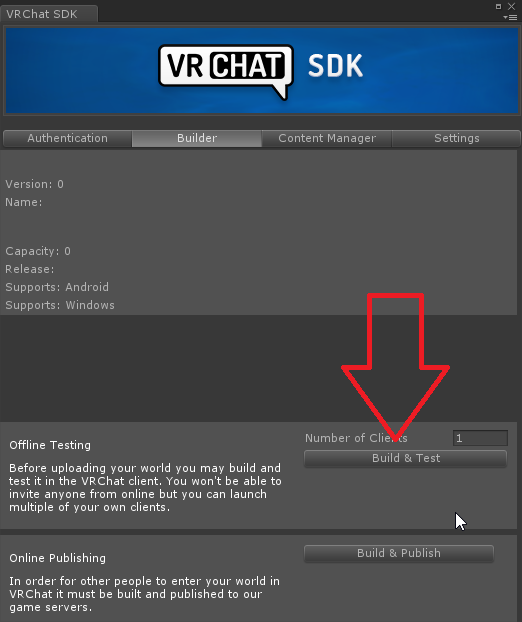
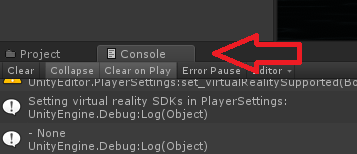
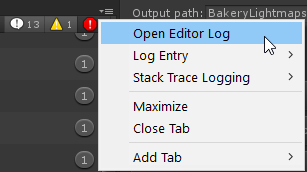
If you dm me your vrchat log of you trying to test the world I can check what it says there
"C:\Users%Username%\AppData\LocalLow\VRChat\vrchat"
cloud onyx
I may have found the problem?
split magnet
it worked like a charm 🙂 i can now teleport from one room to another
cloud onyx
random owl
Just turn the gameobject the way you want them to be teleported in
The blue arrow is the way they'll teleport when looking at the local pivot
cloud onyx
This is the only Unity error I get
Could not load world wrld_1d74035e-8e1e-468e-b6eb-dff46e415107 because it didn't exist.
UnityEngine.Debug:LogErrorFormat(String, Object[])
<OnGUISceneSettings>c__AnonStorey7:<>m__1(ApiContainer) (at Assets/VRCSDK/Dependencies/VRChat/Editor/ControlPanel/VRCSdkControlPanelBuilder.cs:862)
VRC.Core.APIResponseHandler:RetryRequest(Int32, HTTPRequest, HTTPResponse, ApiContainer, Int32, Boolean, String)
VRC.Core.APIResponseHandler:HandleReponse(Int32, HTTPRequest, HTTPResponse, ApiContainer, Int32, Boolean)
VRC.Core.<SendRequestInternal>c__AnonStoreyE:<>m__13(HTTPRequest, HTTPResponse)
VRC.Core.BestHTTP.HTTPRequest:CallCallback()
Shouldn't be your problem if it's just local testing throwing you out
split magnet
this is so cool, OMG im in love
i saved the images into a folder so i can remind myself how to do it, thank you 1
what is the standart height of an avatar? Do i need to generate a door frame with a maximum height? or can i make a door frame with a standart height of 2 meters, like in Real Life?
 cedar nebula
you might have problems collision wise, the doorway needs to be at least 2 meters tall or else the player collider gets stuck. I don't know the actual size, but a 2.1 hole seems to work fine?
split magnet
yes, you are right...i just experienced it... the collision box is 2 meters...and if the door is exactly 2 meters than the avatar gets stopped for a second.
random owl
Yeah remembered that it was 1.8 for some reason
split magnet
but to make it more realistic looking... i put the door frame height to 2.50 meters
i felt like a giant looking right at the frame with my nose when i walked through
random owl
There's not much to know that's vrchat specific for materials other than crunch compress your textures and adjust their size to be sensible in the case you are using that texture in
Usually for worlds you want to stick to standard shader (unless your are building for quest) you might find some information on pbr workflow though
cloud onyx
I did it!

My first world‚ mainly a test․ Will be updated a good bit as I find out what I'm doing․
split magnet
i just looked at it
its cool
but...why is it 20 MB?
how do i see the megabyte size of my little space?
random owl

Turns out a lot of world creators didn't know this, but you can easily find out what your world is made of, how much it weighs, to then be able to reduce its overall size :
Retweets
138
Likes
310
 Twitter
 split magnet
okok...mine says 60 kb so far
can i assume ...that 480 triangles are 60 kb of geometrical data?
because right now my project is 480 triangles big
thats 1.2 mb for 10 000 triangles...is that corect?
random owl
Triangles are usually your smallest worry in a worlds file size
Most of the file size comes from textures and such
split magnet
i know...but am i correct in the assumption that 480 triangles is 60 kb?
random owl
It's most likely gonna be hard to but triangles into kilobytes since that's not all the data contained in a 3d model
split magnet
i am aware of that
and i will plan accordingly
a 1k colour texture can have up to 500kb
im planing roughly 1 MB per object
random owl
That's honestly not the best way to approach world building
split magnet
and why do you think so?
im surly not getting suprised by staggering Megabite numbers
and i keep a certain overview about what the scope of my project might or might not be
random owl
I mean if that way works for you why not but since a world usually is comprised of multiple objects of varying sizes and features I wouldn't really think about it like that when approaching building a new world
split magnet
nods
i have a shitty internet conection...i download 3 MB per seconds... lets assume i do not want to wait longer than 10 seconds for my map to load...than i need to keep it around 30 MB in size
random owl
There's a lot of ways to optimize a worlds download size even while having a lot of stuff in it
split magnet
of course
its all about planing so i do not get crazy with building and have nasty suprises in a week or two weeks time into the production
if i can optimize it and get it even smaller than expected, i would be happy 🙂
i am sure the hardware is cool enough to deal with much larger sizes
i feel like 1999 all over again when i had to calculate every kb on images when doing a webpage
but this could all change in the next 24 months
when we get proper internet in the country side of Australia
than i will not worry about download speed
 stray sand
set it to convex on the mesh collider. and what layers are they on.
 bold ibex
after clickin on convex, 3 of them worked but the other 3 didnt
stray sand
how are those 3 set up?
bold ibex
stray sand
they still fall through. im assuming they are set to the same layers as the others.
stray sand
at the moment i can think of anything that would be causing the issue
 fossil dock
Can I get some help on how to setup a movie player in my world
 lament briar
I cant see the world i uploaded in the "Mine" section in my world menu, anyone know why?
 kind linden
What Unity version are you using?
fossil dock
I'm using unity 4.28f1
kind linden
hmmm...
 nimble hinge
Anyone know of or have an edge detection shader or image effect? Preferably one that works on geometry. I just want to have a black outline on all edges, showing from all angles.
I tried using https://github.com/jean-moreno/EdgeDetect-PostProcessingUnity with post-processing stack, but I don't think it works anymore. It just covers the camera with a black splotch.

GitHub
Unity legacy Edge Detect image effect ported to Post Processing Stack v2 - jean-moreno/EdgeDetect-PostProcessingUnity
 near escarp
What you tried any of the avatar shaders just in case ?
nimble hinge
Yeah, that screenshot is with Poiyomi's, for example, but it doesn't affect the areas that really need it, such as that raised area in the background. They also don't seem to outline edges on the inside of objects, just the general outline of the object as a whole.
 ripe garden
Ah from what i remember poiyomi does that intentionally, that is to not outline the hair strands or inside of the eye sockets for example, not sure if there is an option to disable it
bold ibex
anyone knows how to make an object (pickup) reset? as in if i move it somewhere and click a reset. It will go back there like how it spawned?
 stoic stream
In the VRC_Trigger script, if you set-up multiple OnInteracts and then put together an animation sequence using AnimationIntAdd / AnimationIntSubtract - is it often a good item to chain them all within the same VRC_Script or should I add another VRC_Script component for each set of actions?
stoic stream
For reference: testing the sequence with the 'Play' button works right, but doesn't work properly in-game.
split magnet
should i use Ambient Occlusion by post processing or should i bake AO textures and use those instead?
what is better for VRchat?
nimble hinge
I ended up just editing the UVs to produce the effect I was looking for, but now I've run into a new issue.
For some reason, it shows up way differently in unity than in Blender, once imported.
I'm using the default shaders, and it continues to occur with Poiyomi's. Any ideas?
 empty umbra
following the wildwoods boardwalk structure
gonna take a long time to build wildwood nj beach
wildwood nj boardwalk is a 2 mile long boardwalk
ill lay down the boards/cement path for the tramcar and texture them

well hope you all like the little i have as of right now lol
 raven cloak
good luck
empty umbra
 supple sundial
Im interested in creating my own world for uploading, is that something I can get help with here?
I have the 3d modeling as well as texturing skills, just no knowledge of unity or how to import the world for usage
cloud onyx
Yep you can get help here. I only know the basics of what you need though, so I can help you get a basic world done
Or, I can give you a tutorial video

If you want more please let me know by subscribing and liking/sharing
Support me on: https://www.patreon.com/Matownerie
Files Needed: https://drive.google.com/file/d/1vs7RTlaB-yJrzAcUZfThsyB_iKf2Nvqr/view
Make a unity account: https://id.unity.com/en/conversations/f86793a...
The unity version you need is 2017.4.28f1
fossil dock
Does dropbox work with the vrcsdk video prefab
empty umbra
Hey Ruuubick i know Pill made a Titanic world already i was wondering if you and i would make a Recreation of it sinking and you having to find your way out before your underwater? sounds like a cool escape game world..
unless pill wants to do that
 stone hollow
Youll probably have to ping them.
 ivory swift
Do anyone know if it Is it possible to edit a players avatars key shape with a button in the world or timer or something
Applying that the Avatar was made for the world
ivory swift
how do worlds make avatars dance and move their mouths without using key shapes then?
ivory swift
Sorry That what i mean
empty umbra
I'm not pinging ruuubick or any of them, they are working so no ill probobly talk to them on saturday event...
empty umbra
each plank has been place down in the 5 hour straight building my eyes hurt...
Wildwood NJ Will Be Coming I Estimate 4 years
there will be a lot of stuff in the world
it will be vrchats first real full shore resort
stone hollow
any reason it couldnt have just been a tiling plank texture...?
also did you not think to place them down in bulk, do 1 then 2 then 4 then 8 etc
empty umbra
but if it does come to that then yea
empty umbra
lol thats funny
using standard shaders to start with before i go and spark it all up with better shaders
with out texture i will be lost in what is what lol
stone hollow
Not sure how much you're going to get out of shaders if your basemesh is already lagging
empty umbra
?
stone hollow
You can make it look as pretty as you want, but what use is it if its unplayable
Nevermind
I was mostly speaking from your previous world that ive been too, the disney one
Its absolutely unplayable
empty umbra
Wishes? or Disney Wishes?
stone hollow
The one you showed at community meetup
stone hollow
Oh alright
empty umbra
anyways going back to building ttyl
 solid helm
Stick with Standard and you'll be fine
 nimble echo
does anyone know and good shaders for a waterscape? essentially looking to have an endless-looking skybox
or water shaders
empty umbra
ok I'm done for the day oh man, been at it for 8 hours i might do some tomorrow idk this world im going to take my time on and be a project that ill work on here and there...
 fresh quail
@empty umbra Try not to fatigue yourself out with your project, but try not forget to work on it either
Set a schedule
bold ibex
are there any quest friendly pens? for worlds
 raven sundial
Solid advice. I tend to go all in with a project and just end up getting burned out. My current project I limit myself to a couple hours a day max
split magnet
when it says: Compressed Size:6.2 mb .... does it mean thats the final package everybody downloads?
near escarp
pretty much yes
lament briar
Help! When i upload worlds i cant see it in the "Mine" Worlds Menu, is there any reason why this happens and how can i fix it?... Its a private world
near escarp
Which version of unity are you using
near escarp
yep wrong one
VRChat
Requirements We're going to need a couple things before we can get started. Unity 2017.4.28f1 - Scroll down to find LTS Release 2017.4.28f1If you have Unity Hub installed, you can just click here to install the proper version. Do NOT install the 2017.4 version that's in the l...
"i've uploaded before and it worked"
doesn't matter if it's wrong this time !
lament briar
alright, thanks for the help :>
 balmy gate
@bold ibex QvPen (requires standard assets and vrcsdk setup layers first).
You must make two mods: search for Ink in the inspectorand use shift click to select all objects named exactly "Ink"
- change the shader dropdowns to Unlit/Color
- Set the trail width from 0 to 0.005
Here's the creator's tweet in japanese:
https://twitter.com/aivrc/status/1178799412983713792

Questを使用している方にテストしてもらったのですが、以下の設定をすることでQuest向けのワールドでも使えるとのことでした。
・InkのTrailRendererのWidthを0より大きくする
・InkのMaterialをQuestに対応したシェーダーにする(Unity標準のUnlit▷Colorなど)
Twitter
Oh and the actual asset: https://booth.pm/ja/items/1555789 @bold ibex

VRChatのワールド用の14色のペンセットです。 完璧に同期が取れるというわけではなく、速めにペンを運ぶと同期が取れにくくなります。その場合はゆっくり書くなどしてください。 Presentation RoomなどのようなLate Joinerへの同期は取れません。 同じインスタンスに長時間(2時間程度)いると書いた文字が他のプレーヤーに同期されにくくなります。 その場合はインスタンスに入り直すことで解消できます。 ※ExMenu用最小限アセット ExMenu(拡張メニュー) ( https://chiugame.booth.pm/items/15...
balmy gate
I'd suggest having is trigger
Oh wait thats the pickup
What layer is the pickup on
And what settings are on your trigger collider that detects it
You showed the enter trigger but what collider does it have
Also what layer is the trigger object on
The trigger object?
I would consider default even
Pickup might not collide with everything
It needs to be on a layer compatible with both playerlocal and pickup
Check the collision matrix in edit->project settings-> physics
empty umbra
all hand built...
that little cut out section is were the rest rooms will be
also down below on the otherside will be the showers you use to rinse the sand off
i have to make all that lol
 short gulch
Looks great so far. I know its supposed to be NJ, but its bringing back memories of vacationing in Ocean City, MD. The boardwalk looks similar to OC's
empty umbra
another 2 hours later lol
told you im good
i like making everything with shapes and all by hand looks good
 hollow latch
But did you fix your avatar wishes 🤔
balmy gate
@bold ibex I just tested your dnd world and the pens aren't drawing on PC
if you did change the shader, you also need too make the width something higher then 0 or they will be invisible
 hexed elm
my test client is suddenly crashing for some reason
wasn't happening yesterday. Crashes on an empty project too
 fallow turtle
i have too many questions😬
-is there another option for text?(i used 3d text) because this one you can see through anything
-tried making teleportation where you just walk into an object and you teleport but it didnt work, so made it where you trigger an object and tp. but sometimes your avatar gets stuck behind a wall object etc. but your view point still teleports.
-how to make a clock( have this clock prefab with scripts seems like it should work but it doesn't just stays at 00:00) or does it have to be a certain an asset made just for vrchat
-the objects that have a certain layer and they should not show up in a mirror, but they still show up in game mirror
@near escarp well there are some questions 😄
near escarp
will get to them asap 
random owl
For the text:
http://wiki.unity3d.com/index.php?title=3DText
fallow turtle
alright ima do this
 tropic yarrow
another good things for text
https://github.com/Merlin-san/Unity-MSDF-Fonts
https://github.com/Merlin-san/MUI
but need to edit them a bit manually to make seeable through walls

GitHub
Basic tool to convert Unity fonts to use Multichannel Signed Distance Field fonts - Merlin-san/Unity-MSDF-Fonts
GitHub
Modification of the Unity builtin UI shader that fixes the edges of quads being visible on text characters - Merlin-san/MUI
 scarlet bone
Soo In my world I have weapons that are using the Pickup and using the "Grip" to align the gun in the correct orientation. However, when I use PC to pick it up, its pointed the right direction, but when I get in VR the weapons point up instead of forward. Curious if this is intended behaviour/ how to fix. The orientation is off by 90deg depending if in VR or screen mode.
near escarp
@fallow turtle Can you show how you setup your teleportation ? Would help debug it
Clock of what kind of time
which layers
raven cloak
i think when i update the tank chibi avatar world i will try to hide some pink floyd easter eggs
fallow turtle
the orb you press to teleport
spawn point is next to it
avatar gets stuck behind this glass for exmpl.
not always though
near escarp
So, axis is important, and don't teleport people in colliders
fallow turtle
ye its above floor
oh you mean the spheres axis too?
i know that you spawn facing like the spawn objects axis
near escarp
Make sure it's not too close to the glass panel
fallow turtle
i have triggers and text on reserved3 and in unity its correct
clock could show how much you have been in the world or something
near escarp
don't use reserved layers
and custom scripts don't work
you would need to look for a specific prefab
ivory swift
How can you activate player avatars key shape or animations with the world stuff
Assuming that the Avatar was made for the world
Like something Special animation that only plays if something happens in the world for only that world
scarlet bone
OHH i see the documentation now, for some reason using "Grip" instead "Exact Gun" does indeed differ by 90degs. Guess Ill just switch them over and should be fixed. Rather odd "grip" is setup to be different for vr/pc.
balmy gate
@ivory swift if you're asking about MMD worlds and the like, they use stations
 civic cipher
Hey guys, anyone know how to make UI scroll bars work in VRChat? I followed some instructions that aren't VRC specific for making the scroll bar but I can't find anything specifically for VRChat.
balmy gate
Station lets you use an animator controller that lets you override blend shapes (assuming you know their names and they use Body as their mesh name) and move humanoid animator properties @ivory swift
@civic cipher Anything in UI should work in vrchat worlds. It will create a Canvas. Make sure to set the Canvas to world space and create a VRC_UI Shape component on it. As well as a very skinny box and appropriately sized collider component on the surface of the canvas
For scrollbar and slider especially, make sure to change the Navigation dropdown to None in the inspector. Otherwise walking around will change the last focused ui element.
civic cipher
Ohh cool, that fixed most of it. Thanks @balmy gate. Only thing is that it scrolls when I look at it while pressing a movement button in desktop mode
balmy gate
Navigation to None should fix that @civic cipher
Check all the individual scrollbar objects inside the scroll view
civic cipher
@balmy gate Setting navigation to none isn't fixing it. I checked all of the objects in my UI and there's only one with a navigation property and that's set to none.
balmy gate
only thing I can think is mess with "movement type" setting of the Scroll Rect -- try making it so there's no way to move it without the scrollbar. you can go to play mode and use arrowkeys or mouse to check this.
Each scrollbar itself should have a navigation - there could be two scrollbars if you have a scroll rect so I would double check
bold ibex
@balmy gate Havent updated it xD I will now
civic cipher
@balmy gate Nah, I double checked everything. There's only one of everything:
I just tested a scroll bar in a world that's currently in the community spotlight and evidently the creator of that world doesn't know what to do about this issue either. I wonder if this is a bug in the VRC SDK.
 rain shadow
@civic cipher Can you not interact with the scroll bar only or is it all UI you cant interact with?
civic cipher
@rain shadow I can interact with the scroll bar. I'm trying to make it not scroll just from pointing at the UI panel and pressing a movement key. It's irritating when a panel scrolls as I'm trying to stand closer to make it easier to read.
rain shadow
If it still occurs even when all the UI elements in your scene have navigation set to none that could be a bug
civic cipher
Yeah it's possible. I've found worlds made by other people with the same issue.
bold ibex
@balmy gate Wait a sec, it didnt work? I changed all the shaders to unlit color and all to 0.005
balmy gate
those settings are correct. not sure what went wrong in game when I tried it. I'll have to check again
did you test it in game?
bold ibex
yep
did i not install the right standard assets? i literally installed all of them @balmy gate
hexed elm
can someone help me find out why my test client keeps crashing in every project
 nimble hull
test...client?
hexed elm
The unity one
When you're trying to test your world
looks like a reset fixed it nevermind
nimble hull
ah!
sorry my brain weighs 3 grams
its metabolism is pretty good
i do not world dev so im not sure why but if its fixed then it is fized
bold ibex
fixed it @balmy gate
balmy gate
oh? what was the issue
 kindred thicket
What does Reports mean? Did I possibly do something wrong?
 bronze smelt
1 report is normal. Look at it like a report that the world has been made
System message basically
split magnet
i have a simple 4x4 sprite sheet .. and i want it to be on a surface
how do i approach that?
i used a c# script that animates the tiles .. but VRchat does not show it
Is there a VRC script equivalent for animating a tiled sprite sheet like a flipbook animation?
stray sand
@split magnet i would suggest a shader or you can use a animator.
stray sand
That part i cant help with at the moment.
 chilly charm

balmy gate
have you played with physics materials?
you could have some fun injecting a bit of upward velocity with a AddVelocity trigger action in OnEnterCollider
 trim musk
well, im trying to test my build in offline mode, but it keeps opening the windows store icon to find a program to open it in
fixed, the vrchat client directory wasn't using the right location, for some reason
civic cipher
Anyone know how to make a particle trail ribbon split apart? I'm trying to make a pen and when I re-enable the emitter, it always connects the current location of the pen to the location it was when I deactivated it.
fallow turtle
how do you make new world(another one)? it keeps wanting to overwrite the first world, im even trying to upload from new project
 coral wing
make sure the world you're uploading does not share a blueprint ID with another world
if you click on the vrcworld prefab you should see the VRC pipeline manager script there which will show the blueprint id
you can detach it to assign it a new one
fallow turtle
ah okay
 jaunty grove
Hi everyone, I am working on my first world and it is ready for upload so I opened the control panel/builder and confirmed "do it" on the prompts and there were no errors, I tested it using my VIVE and everything worked. The issue I am running into is when I try to build & publish it does start to process but the mouse disappears and freezes on the window where I would name and such and the only way to get control of my Unity is the Exit play mode. I have tried using Unity 2017.4.28f1 and I just tried to build it on 2018.4.14f1 and I am using the most updated SDK VRCSDK-2019.09.18.12.05_Public. Never had an issue uploading avatars before so this is new to me.
fallow turtle
should use Unity 2017.4.28f1
jaunty grove
Yeah, I thought so. I have always used that version but got the same result @fallow turtle . The world is not crazy big and loads up very quick when testing. I removed custom shaders, removed the lake shader too
jaunty grove
I have a FPS Drifter to tour the world could that be an issue? If I remove that should I just use a standard camera as the reference camera?
near escarp
if that's a custom script it won't work
jaunty grove
thank you @near escarp that helped me with the screen freezing now I just need to do more to research on optimization because the upload failed.
no errors after I removed the pipeline, I assume I must do the test first then upload
jaunty grove
I understand, testing went fine and I am new to thing so I do not know what happened.
kindred thicket
Happy Friday!
I have been experimenting with the Hangout Player and I have noticed that the Previous and Next buttons normally work good. However when you click Stop the player says loading and the playlist empties so only the last song played is played when you click Previous or Next. Is this Normal behavior?
If so, is there a way to prevent the playlist from emptying?
Thanks
fallow turtle
i wanna make a new area in the world should it just be far away from the first one to not be noticeable or creating new scenes work here( you teleport to dif area with different skybox etc.
can u even have two skyboxes in one scene?
balmy gate
@civic cipher two ways to do discontinuous trail pens:
- First and most common (works on avatars too): use Snail's pen shader which removes large polygons with a geometry shader, combined with an animation that moves the pen up/down by like 1000m to release it.
- Second option: Instantiate a trail renderer for each pen stroke. This works efficiently even on quest because Unity will batch trail renderers!! QvPen uses this technique, using ExplosionFireAndDebris as the script to instantiate objects.
@fallow turtle to control skyboxes: you cannot animate a skybox directly, so a few options:
- use a skybox shader which switches cubemap based on directional light orientation. There is one linked in prefabs database and Maebbie has a tutorial on this. Not quite intended for this use case.
- make a duplicate material for each skybox you want. Use a UI Button to invoke the CopyPropertiesFromMaterial on your skybox material. I don't think anyone has tried this before but it sounds super easy so report back if you give it a try. Use EventSelectorOnce from toybox to make a UI Button object that auto clicks itself when activated.
- use the classic inverted sphere method: just make a sphere with flipped normals around each area, or attach it to the "player tracker" (see toybox in prefabs database) and animate that
@kindred thicket it's common for stop buttons to clear the playlist: but usually because they do a SendRPC Clear. I think not clearing the playlist can be use. Also double check if you are using the sync video stream (more compatible but windows 10 only) or sync video player version.... I think hangout player supports both
Video players in VRChat are so buggy it's hard to say if the problem isn't in VRChat itself D-:
 tropic scaffold
Anyone know how to make a basic mirror
civic cipher
Hrmm, I'll have to look into the QvPen
 lusty condor
balmy gate
lusty condor
balmy gate
@tropic scaffold like vrcmirror?
random owl
It looks like it actually has some personality unlike 90% of other worlds, I like it
 noble ether
Thank you :3
kindred thicket
@balmy gate Thanks for the Info.
If I turn off "Normal" I get a pink screen, in world I hear sound but see no video. If both "VRCVideoSync" and "Normal" are enabled then I can see and hear the video (which is how I have had it all along). Turning off "Normal" makes everything stop working. I turned off the Sound in the Prefab because I'm using a different one and all the controls, Play, Stop, etc, are pointed at VRCVideoSync and are targeted to "Owner".
This is the VRCVideoSync
I have just been shrinking it and moving it behind "Normal"
balmy gate
Pink is a bit weird. Can you check what shader is selected on that quad's material?
I think generally you use Video/RealtimeEmissiveGamma
kindred thicket
I don't see a material listed anywhere. I will try to add one and turn off "Normal"
balmy gate
Hmm? It had material set to null?
kindred thicket
It didn't have a material component until I dragged the Video Material I'm using on "Normal"
This might really fix some things.
bold ibex
what's the best way to setup a chain reaction system? lets say there are 3 objects the player can interact with, and once you interact with one, the other 2 objects that the player didn't interact with are replaced with different objects depending on which object the player interacted with. For example, lets say the 3 objects are a treasure chest, a sword, and a gem.
When the player interacts the chest first, the sword and gem have different locations than they originally had, but when the player clicks on the sword or the gem first, vice versa happens. The remaining two objects have a different location(basically i duped the objects and placed them in a different location on the map, and hid them).
But if the player interacted with x object first, the other remaining objects would have a similar outcome.
for example, if player interacted with the chest first, then interacted with the gem next, the sword would change its' location, but if the player interacted with the gem instead of the sword first, the sword would change its' location.
Vice versa for if the player interacted with the gem/sword first(if (chest/sword) or (chest/gem) interacted with, remaining object has their location changed)
right now i only have one object that has multiple duplicates of itself and each duplicate has a different location on the map, the rest of the two objects don't have different locations.
for example, the sword has 3 different locations, two are hidden duplicates, and one is the first sword location, which is an unhidden sword, and depending if the player interacts with the sword or not, I wanna make an event to trigger to where if player doesn't interact with the sword, the swords' location changes(basically hides the first sword, and unhides the second sword) and vice versa if player doesn't click on the second sword(hide second sword, unhide third sword)
but i'm worried if player interacts with one object to hide the first sword and unhide the second sword, that if the player interacts with the second object it will unhide the first and third sword
 inner kernel
Does anyone know if there are any microphone assests for unity?
like a user who can talk into a microphone and it plays throughout the world
balmy gate
@inner kernel You should to look at player audio override: https://docs.vrchat.com/docs/vrc_playeraudiooverride - it is designed for that purpose: everyone inside The collider is amplified.
Tips: put the collider on the MirrorReflection layer to avoid interfering with object interraction; enable the object only locally on the player who has the mic. As craZy as it sounds, player audio is computed locally
VRChat
A region in a world where user voice and avatar audio properties can be adjusted.
inner kernel
I'll look into it, thank you so much!
 exotic vault
Are updating worlds Glitched Rn?
exotic vault
Does anyone know how to fix the glitch where you can't upload a map correctly
and when you do
Your viewpoint becomes the camera

 frozen glade
so i want to use the teleport player script but how do i avoide the player getting stuck in one of the colliders?
bold ibex
have the trigger teleport the player to a gameobject that is at least 01.0-10.0 scale above the place you want to teleport the player. @frozen glade
bold ibex
more along the lines of this
frozen glade
huh
bold ibex
it's above the place i want to teleport the player
frozen glade
yea but i still get stuck in the door when i do it
bold ibex
do you need a collider on the door?
frozen glade
isnt the collider needed to trigger the door
bold ibex
what specifically do you want to do? and you don't need the teleport location to be right at the door. Have it next to the door or something
frozen glade
simply want to build a outside from the house
so i want the door to telport you outside and back in.
bold ibex
oh? Then create an animation for the door to rotate it/ make it look like it's opening if the outside is literally right out the door. If it's not, just make a duplicate house where outside is, have the inside area door have a trigger that teleports player to outside, preferably placed near the outside door, facing away from it, and have the outside door with a trigger to do the same thing with the inside area, with the teleport location near the door, but facing away from it.
frozen glade
the door isnt seperated sadly^^
bold ibex
if you hide the door, can outside be seen?
bold ibex
oh? if the door has a knob, then create a sphere, put a transparent material on it, then put an oninteract trigger on it that teleports the player to x destination, and vise versa on the other side of the door.
place said sphere where the knob is
frozen glade
would still get stuck in the door somehow
bold ibex
even if the teleport location is nowhere near the door?
if that's so, check to see if the collision is set up right. some houses aren't made hollow after all.
especially the ones from the asset store. so far the only hollow houses there are the Mega Fantasy Pack ones
frozen glade
outside teleporting works fine but back in is like nah
the door has no knob outside but i will add one.
fallow turtle
is this how you would add bloom? ( is the bloom(optimized) the right option or whatever i want?)
tropic yarrow
@fallow turtle to add bloom you need to use Post-Processing Stack 2 on player's reference camera,you can get it from github page
fallow turtle
alright i'll look into it
fallow turtle
the QvPens dont draw ingame sometimes , can moving folders around in assets ruin things?
ok fixed it, seems like you cant move some folders around
 regal hollow
Is it possible for small avatars to go thru small holes??
tropic yarrow
@regal hollow collider on the head and something advanced, or on beta(in future) with udon easy method is to make 2nd collider from head to model's bottom and resize it on Update method and use it for world collision instead of original player collider; if you have an idea how to make it with triggers you can use this method too
 sinful moss
How are people making horizontal platforms drag players? Is it a unity trigger reparent?
balmy gate
have you seen a working example of this recently?
running a "seamless teleport" script every frame will move you at a velocity equal to the world position of the teleport object
there's no way to reparent the player, and my understanding is physics based solutions don't work any more, at least provided that the player is "grounded". there may be a trick to unground the player and then hit them with a physics object to launch them, but I don't know if that is reliable
I think the classic moving platform physics broke around a year ago. maybe even earlier if they ever worked at all
Seamless teleport can be found in the prefabs database, in the pinned messages
There's a new searchable database too btw!!
noble ether
Heyo, I have an issue where I combined the unity blocks and then when I apply the material, its not wrapping around correctly. How can I combine these blocks, then have the brick texture not tile like that?
Brick texture ^
kindred thicket
I have a number of trigger cubes that don't show the Interact icon for desktop users unless you are literally 1/2 inch from them. They are on the Default Layer, do you have any ideas why. I even tried setting the Proximity to 5 with no change.
Thanks
noble ether
Change it like 9.2, thats my magic number @kindred thicket
kindred thicket
ok, Thanks I will try it.
kindred thicket
Hmmm, that didn't make a difference. I will try making them from scratch.
kindred thicket
Well, that didn't make a difference. It appears that when I make the button anything other than Local, the Proximity value doesn't work.
kindred thicket
I have been working on a video player also, I am really close to getting it to work the way I want, at least with just one person in the room. What problem are you having?
fallow turtle
for some reason these random reflections apeared (the reflections are from a far away reflection probe , but even if i turn all reflection probes off its still there
its like that one reaflection probe became global idk
kindred thicket
is it possible you baked already and the material is showing the baked reflection? Sometimes I have had to undo the bake for it to reset to the actual lighting.
fallow turtle
i deleted the probe and the wall has probes off and its still there
is unity trolling me?
kindred thicket
If the "Clear" button is enabled, click it to clear the bake.
This will show you if you have baking
fallow turtle
what does ocllusion culling have to do with it
oh do i rebake the whole lightning?
kindred thicket
Occlusion makes things disappear when it's not in the players view. I have used that to clear my baking in the past. you will need to rebake when you are done with the lights and they are the way you want.
fallow turtle
rebaked evrything that reflection probe doesnt even exist and the reflection is still everywhere
kindred thicket
Is it here when you clear the baking?
fallow turtle
ya baked without the reflection probe
its everywhere, water too. the reflection apeared when i just opened unity(before if was all good)
kindred thicket
You are now beyond my ability to help, hopefully someone else will chime in. 🙂
fallow turtle
so weird ¯_(ツ)_/¯
fallow turtle
@near escarp sorry for ping, any idea what could cause this uuh global(?) raflection?
near escarp
are you baking with unity or bakery ?
fallow turtle
unity
near escarp
Clear GI cache maybe @fallow turtle
rain shadow
@fallow turtle under the lighting tab you could try set the environment reflection settings to something like this
split magnet
Is there a List of what interactions can be done somewhere? with examples and how to do it?
near escarp
fallow turtle
alright seems like clearing gi cache fixed it 👍
split magnet
i assume with an AnimationTrigger i can animate a door to slide open
random owl
Those are for use with animators
split magnet
which i have no idea what animators are yet
random owl
https://docs.unity3d.com/Manual/class-AnimatorController.html Always a good time to learn about animators 👍
 split magnet
it has something to do with the player character?
and to control what the avatar does?
random owl
That's how your avatar works in vrchat but you can't influence that sadly
split magnet
ok
split magnet
for now i have to learn about what interaction can be done with Game Objects and the results of it.
random owl
Here's how my mirror is setup with an animator
On the left are the booleans you can use triggers to control with AnimationBool
split magnet
awrr...too advanced for me
im not there yet
i can only do simple things like touch a cube and get teleported
or touch a cube and make a sound
i do not know how to turn off the sound
not yet
kind linden
Animators are less complex than scripting.
random owl
Yes
split magnet
nods
random owl
Mine in the picture might be intimidating but you can also do simpler things with them
near escarp
It's easy but you need to try a couple things to get accustomed
split magnet

Help to support the channel if you are feeling super kind: https://www.patreon.com/dapperdino
Join our Discord: https://discord.gg/sn9xXK4
In this video I show you how to use the animator controller and set up some simple animations in the state machine. Then I show how to c...
random owl
Here's what my example does in use
split magnet
i can make a door button that will tell the Door to slide to the side (animation) ?
random owl
Yeah that's one thing you can do
split magnet
with animator
near escarp
Very easy yes
split magnet
if i want to make a energy door...i would need to make a physical object (which will be the energy wall) have no collision box (to make it none physical)
do i use the animator for it too?
near escarp
in that case it's better to disable the collider component with a trigger
split magnet
or should i do a Teleport instead
near escarp
You can do anything !
random owl
In that case it really just depends on how you want to do it
split magnet
so it will not be negative on the system resources
near escarp
it's not about efficiency, it's about what you want to do
there's no performance cost involved
split magnet
ok
near escarp
unless you have hundreds of complex animators
split magnet
i might have 20 or more energy doors at one stage
near escarp
completely fine
kind linden
Wrong channel.
split magnet
what is the wrong channel?
random owl
Some spam was posted
 somber ember
Hello, I wanted to ask if anyone knows if it's possible to import model of a world from the 3d design program known as Rhino to Unity. I am more familiar with using the Rhino program, and was wondering if there are anything I should be aware of. I assume applying textures, placing lightings and special effects, as well as granting which objects are physical or can be mesh are something I should know when importing the model.
random owl
Can it export in FBX format?
somber ember
yes it can
random owl
Then you should usually export into FBX and use that in unity
The rest of your questions don't really have a simple answer since there's plenty things you need to do when world building
Optimization is important though
bold ibex
Anyone here got a nice rain particle prefab that they’d be willing to share so that I could use it for my worlds? I have no idea how to set it up and it would be extremely convenient to have and play around with
 crystal flower
anyone know how i can get textures from dangonronpa
split magnet
i sent you a message
split magnet
now you did
raven cloak
i kinda feel like we need a pink floyd museum
 atomic plaza
Working on a map
So far I'm just testing stuff in Unity with the steamvr plugin base
will probably port to vrchat later on
hexed elm
My friend is making a map and her SDK only shows utilities. We've tried re-importing the sdk from a blank project but it isn't solving the issue. Anyone know what to do?
https://cdn.discordapp.com/attachments/680934751120392228/680950566075105426/unknown.png

her triggers are messed up too
fresh quail
How exactly does offline testing work? I press "Build & Test" and it just opens VRC with my normal default home set.
random owl
Some problem in the world is throwing you back into your home
fresh quail
Would it be in the Console of unity?
random owl
Usually better luck checking the vrchat output log unless there ofc are existing errors in your console
fresh quail
2020.02.23 02:30:48 Log - [AssetBundleDownloadManager] [344] Request completed with state: Error and message: Could not find file "C:\Users(IRL Name)\AppData\Local\Temp\DefaultCompany\VRChatAvatar\customscene.vrcw"
How would i make it find the custom scene
random owl
In that case unity couldn't build the scene for some reason, do you have anything sticking out in your unity console?
fresh quail
Nothing too crazy, I can use play mode normally so it's having no problems being able to compile.
Mainly, two delegators in existance and Destroy may not be called from edit mode.
random owl
Play mode and building isn't the same
fresh quail
I'll try offline uploading it again and seeing what it says.
kind linden
Anyone know how to make a custom skybox?
fresh quail
When I go to my upload tab, I get "Could not load world (wlrd_ID numbers) here because it didn't exist.
random owl
Go to your VRCWorld and in there detach the world id
Then the offline testing should work again
@kind linden there's a lot of ways to make a custom skybox you just need to make a cube map
kind linden
How do I do that?
random owl
You can do it with photoshop, unity, blender there's so many programs to make one in I can't really list them all
kind linden
Thanks!
random owl
@kind linden if you just google how to make a cube map you can find a lot of guides with different programs
 rich silo
anyone have iwaSyncVideo_2.2 ?
random owl

GitHub
Contribute to ikuko/SyncVideoPlayer_iws development by creating an account on GitHub.
This is 2.3 is that okay?
Here's also the older 2.2
https://github.com/ziritsu/SyncVideoPlayer_iws

GitHub
Contribute to ziritsu/SyncVideoPlayer_iws development by creating an account on GitHub.
random owl
2.3 seems to just be one simple fix to make it easier to drop into a world
rich silo
thank you
random owl


Not sure when it was fixed, but we can finally change player mods at any time in a world. Hopefully people will use this for proper asymmetric game play. I can finally remake my Freeze Tag world. #VRChat https://t.co/2yLBJjzxcj
Likes
143
Twitter
If it hasn't broken at some point yes
fresh quail
Getting "Error building Player because scripts had compiler errors" and "Could not load world because it didn't exist" stuff.
very, very confused
random owl
Can you see the script compiling errors in your console?
fresh quail
Think I know the problem.
random owl
If some script doesn't compile properly that stops unity building it properly so the world doesn't exist
I have never tried it myself so I can't say much expect link that tweet
Should be possible with udon atleast
You could work on it in beta
 fresh quail
Okay, finally got everything working, but my avatar spawns in extremely tiny, does changing the size of the spawn object affect the size of the player when spawned in
rain shadow
@fresh quail If the world is too big you will need to scale it down to the player size, you can't scale the player
rain shadow
Easiest to just scale it to a size that feels right
@rich silo Did the previous version of the video player work or were you trying to update because it wasn't?
random owl
@fresh quail lot of people use the tutorial avatar to help scale their world while working on it
fresh quail
already got it, dw.
just testing some extra features rn, should have a release pretty soon
random owl
@rich silo if you give me the world id where you uploaded that test I can confirm whether it's a issue on just your end
 reef sparrow
 candid yoke
any of you know how to set an object as an ai that follows the closest player and will do damage upon contact?
 coral ruin
this is probably a stupid question, but how do i make objects solid? i keep falling through my world infinitely
candid yoke
click add component, and search "mesh collider"
on the thing you want to collide with
coral ruin
ah alright, so do i change anything or is it just having the collider good enough?
random owl
Also as a note a mesh collider is not always the best idea esp if you are putting them on something that's very high poly
coral ruin
im trying to make a floor
random owl
If it's just a box shape just add a box collider
But that also depends on how your world is shaped on how you should do it
random owl
In that case mesh collider is usually okay as long as you they aren't super high poly
coral ruin
alright the mesh worked nicely
now i gotta figure out how to make the sky not grey, and add some sound
random owl
For the sky you gotta swap out the basic unity skybox to something else
coral ruin
oh i just realised why its black but i dont know how to fix it
so uh. yknow if you import a transparent image, it doesnt show up transparent? how do you make it actually transparent?
because this is.. kinda funky
random owl
What exactly is that?
coral ruin
clouds around it
coral ruin
the flowers do it to
how do i change them?
random owl
Select the texture in your project and set alpha as transparency
Might also have to swap the shader settings
coral ruin
i set alpha as transparent and it just removed a bit of staticy lookign stuff between where the image stops and the solid colour begins
random owl
Did you change the material settings?
If your material is set to use opaque they can't be see trough gotta go cutout or transparency depending on the case
coral ruin
im a bit confused as to what you mean
random owl
Oh yeah I think you have the materials embedded right now you gotta select the model in your assets and go to the materials tab in your import settings for it
There should be extract materials there
coral ruin
all of the textures shown in my world are coming from the png images in my assets folder. i think thats the case because before i put them in the entire world was solid white
coral ruin
oh right, the flower says it has a shader called m5 on it. it doesnt let me change it though
oh
oh
random owl
Those are embedded right now so you can't change the settings
If you select the model in your assets and then extract the materials you can change the settings
coral ruin
o.o
random owl
Go to the folder where you extracted the materials to
Make sure the shader is set to standard
coral ruin
it didnt exactly give me an option to export. it only had the thing to change from embeded to legacy
random owl
What did it look like?
coral ruin
random owl
What is in that materials folder at the top of your assets folder?
random owl
Now select the one's that should have transparency and either change them to cutout or transparency
coral ruin
woah
the flowers be lookin fresh but the skybox still isnt visible
ive decided to just get rid of the clouds already there and just implement a skybox that already has clouds
 sacred zodiac
Well since Unity 2018 has been delayed for so long. I've been stuck not able to update one of my projects cuz. I migrated them to 2018.
Reimporting them back to 2017 broke my project, and am kinda impatient that 2018 isnt here yet.
I was wondering if there is other ways to get my Project back to 2017 from 2018 fix.
civic cipher
So you can embed materials in a model's file now and have Unity import it? Can Blender do that?
trim musk
anyone have documentation / a tutorial on how to use PhysSounds correctly?
kindred thicket
Is there a way for invert a camera in VRChat?
I would like it to act like a mirror.
stray sand
@kindred thicket what are you trying to do?
kindred thicket
I have a number of camera in my world and when you are on the stage performing you can watch the performance in front of you, but when you move left in the camera you move right. I would like the camera to be inverted so when you move right, on the screen it moves right also.
stray sand
I would just invert the uvs on the mesh you are using.
Inverting the display instead of the camera.
stray sand
Not sure why you are using a particle shader. But you can change the transform to -1 to invert it or change the tiling to -1
kindred thicket
Thanks for mentioning that, When I use the the regular shader, the screen shines white and that ruins the look of the stage. So since I couldn't figure out how to change that (I tried a lot of may), I resorted to a Black material and the Unlit Particle Shader to lighten the screen so the video can be seen. Other wise it's dark.
Got it, Thanks
 blazing laurel
You can simply use the shader Unlit/Texture
 north elk
Hello, just wondering if there is a prefab/ method out there that allows visitors in-world to have an additional menu?
Ive seen it in some worlds like VRC minecraft and an RPG world, tho I haven't found much info about them...
Just asking since I have a large (but optimized) world that I want users to easily find things. Such as toggling day/night mode, small mirrors, etc...
split magnet
how do i gather trust for publishing a world to Community Labs?
near escarp
play vrc
split magnet
how long do i have to play it?
random owl
It's not time based
solid helm
Until you have made some good friends
 dry vale
You just have to play the game normally. It's intentionally vague to prevent people from abusing the system
blazing laurel
@north elk You can use ExMenu. It can be downloaded here:
https://chiugame.booth.pm/items/1510744
north elk
Thanks, I'll give that a try ~
split magnet
ok.... lets see how this turns out than 🙂
split magnet
if i can not write my own scripts...how do i make a music player with buttons than?
random owl
You use triggers (or udon once it's properly feature complete)
split magnet
ok, i found out how to put a song with a trigger. but when i make a second button with a second trigger both songs are playing. What is udon?
stray sand
If you want a very basic music player. Have the music you want on separate audiosources with play on wake enabled. Then have triggers that enables the song you want and disables the ones you don’t want.
kindred thicket
I have been able to get the Stream player to work pretty good in my world - I just had 8 people in the room and it worked. It was glitchey, but far better than it was. Just a quick question, why is the target set to Owner? Is there a better setting for this that will improve performance or reduce glitcheyness? It's the Hangout player and I want anyone in the room to be able to use the player at any time.
split magnet
i assume nobody has done a tutorial about that stuff yet?
stray sand
@kindred thicket keep it as owner. The network owner is the one who syncs the video player to everyone. So if another person want to click the next button that method has to be set to the owner if the video player. The custom url stuff works cause you can change the owner if the video player.
 round cradle
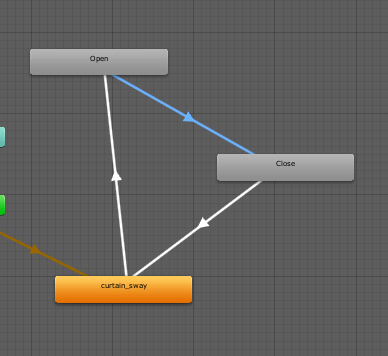
hello, i am trying to get a state to animate a pair of drapes to reveal a mirror and i cant seem to get the state to work right, it opens but it wont close.
stray sand
@split magnet i don’t believe so. But what i suggested is very simple.
@round cradle can you post a image of the animator. Im assuming you dont have a transition to the closed state.
 kindred thicket
Thanks
round cradle
i have the open >> closed transition set to Open = false
stray sand
Does it transition in the editor?
round cradle
 stray sand
Click play and manually set it to false.
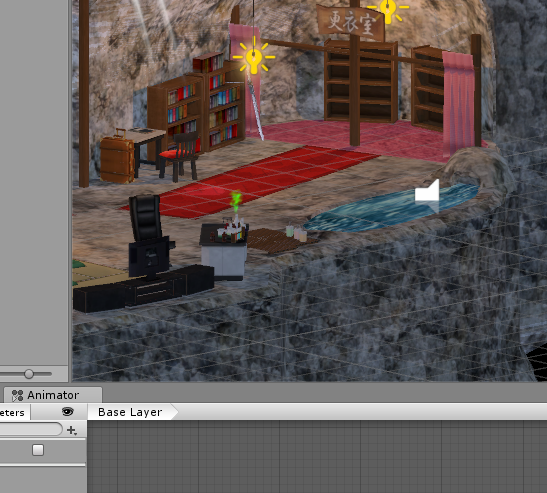 stray sand
On a side note i think you can upload images directly to discord and dont need to post to imgur.
round cradle
im using shareX
stray sand
How long is the open animation. Is it trying to finish that animation before transitioning?
round cradle
it's a second long
i dont think it's interuptng anything
i have exit time disabled anyway.
stray sand
I feel like there is something turned on that is stopping it but i cant think of what it would be at the moment.
kindred thicket
Another question, I entered an instance of my world that someone else created and when I entered the world they were dancing on the stage but I couldn't hear the music they were dancing too. The audio sources are set to AlwaysUnfuffered. Am I out of luck for new people who enter the world to be able to hear the music for that dance that's playing?
stray sand
Are you using a audio source for the music or a video player?
Oh wait just clicked in my head.
round cradle
hmm i deleted the transition and re enstated it and its working better now.
stray sand
Syncing audio sources is not very straight forward.
If you have a late joiner join during a song it will have that new user starting at the beginning of the song.
round cradle
not sure what that was about thanks for your help anyway!
stray sand
👍
kindred thicket
Audio source. I have two different ways to interact in the world, scripted dances using an audio source and a live freestyle rock band situation using a stream player.
Well, I don't want it starting at the beginning so I'm good the way it is. Thanks
The stream player does what I want.
stray sand
I dont suggest video players for dancing worlds personally. Desyncing is more common.
Unless both are independent from each other.
kindred thicket
They are independent and totally different things, but in the same world
split magnet
ok, im going to ask the same question here: "how do you toggle off a sound with a trigger?"
 supple drift
@split magnet SetGameObjectActive + set the audio source's game object to false. Can also use SetComponentActive if you have other components on the game object that you don't wanna disable.
 winter stump
Is there a max amount of non-static objects allowed?
cedar nebula
That is completely situational. Meshes under 300 tris will automatically be Dynamically Batched, but there is some CPU overhead for that. Otherwise you can enable GPU Instancing in the settings of your materials, but this will only instance objects that share the same mesh and material, and it can easily be broken by all sorts of things like lightprobes, reflection probes, that sort of thing. Outside of these, it's safe to assume that every material on every non-static objecting is adding another drawcall. And too many drawcalls is no good
winter stump
yeah the less the better, but I was thinking like pixel lights there is a limit per object. so I thought there might be a limit to how many non-static objects there can be at a single moment
cedar nebula
Oh like an actual hard limit? Not that I know of, I guess it's as many as your computer can handle
winter stump
sweat as 👌
fallow turtle
have an item witch you can pick up and then press to play a sound , witch otion should i choose, so that everyone around the person clicking would hear it
i was thinking is alwaysunbuffered or ownerunbuff better?
 sand fossil
@fallow turtle if set to OwnerUnbuffered, only world owner/master will be able to trigger the sound
but yes people around will all hear the sound
fallow turtle
isnt owner the person who picked up the item becomes the owner of the item until someone else picks it up and becomes the owner?
sand fossil
no, Owner mean the person who created the instance
sand fossil
oh wait, maybe you right, well tbh I use OwnerUnbuffered for trigger videos on my world, only the world master can trigger them, im confused now xD
fallow turtle
ok ill just leave it on allways unbuff now 😄
sand fossil
well, I think the best it you should try with a friend, since I been using Owner as the world owner
fallow turtle
yea
sand fossil
VRChat logic confuse me now
fallow turtle
i think master is master(owner) of the instance, owner is the first person that presses/uses/picks the object untill someone uuh else does it later and becomes the new owner
sand fossil
well on my world, the Owner trigger can only be trigger by the world master/owner
fallow turtle
¯_(ツ)_/¯
sand fossil
🤷♂️
fallow turtle
xd
 sacred warren
Have you enabled the UV map on the model itself?
sand fossil
yes, I try check the UV, baked lighting, still have black spot
Im using Bakery to bake my lighting*
sacred warren
Can you show a screenshot of the bit I'm referring to?
sand fossil
this ?
sacred warren
Looks alright. Is that after baking? If so, try changing the scale in lightmap to 10 or 20, just to see if it sorts itself out.
sand fossil
sacred warren
The lightmap scale just for that object, not for the scene as a whole.
sand fossil
ooh ok
sacred warren
Some weirdly spaz out and need their scale increased considerably to map properly.
sand fossil
change nothing :/
 open thicket
How accurate is the count for people in private instances of your world? I see a constant 70 in one of my worlds but it’s been like that for a couple weeks
bronze smelt
It seems to be a bit bugged out at the moment
split magnet
i just made a VR HMD and i want it to be a object i can pick up
its not a trrigger i guess
?
because i want to be the trigger a teleport
is it a collision?
on collision pick it up?
kindred thicket
My YouTube player stopped working this morning, are any of you having the same issue. I noticed a new update to the dl, but that was a week ago.
split magnet
when i was making my HMD pick up... it was telling me that something gets unlinked. Now when i continue editing the level and add more content in maya it does not register anymore with unity. How do i fix that?
split magnet
also, when i use the HMD it teleports me as expected. But i take the HMD with me. IF somebody else is in the room and also needs to use the HMD as teleport can now not do it because the HMD is with me at the new location
its stressing me out LOL
kindred thicket
Sorry for my ignorance, I don't understand some of the lingo these days. What is HMD?
split magnet
Head Mounted Display
kindred thicket
and when you click on it it should take you to a teleport somewhere in the room?
or a location in the room
split magnet
it teleports me somewhere else when i use it
kindred thicket
when you click on it, you go where you want, but take the HMD with you? but want it to stay where you last put it?
split magnet
i can pick it up and hold it in my right hand....and when i use it it teleports me....the problem is..the HMD teleports with me
kindred thicket
because it's still in your hand. Which makes sense because I have a dance world and if I have something in my hand when I start the dance, then it goes with me. It's floating in the air because I'm invisible and on the Pad, but my avatar is dancing in front of me. I can even move it around.
I don't know how to force the object to be dropped
on a trigger
split magnet
we have similar problems yes.
kindred thicket
It doesn't hurt my world at all. If you want everyone to have their own HMD you can make it local
split magnet
another person who was with me in the room, who also would have to pick up the HMD and teleport, can not TP now because it is in my hand and not ontop of the Desk in the other room
kindred thicket
Maybe you could make an animation that moves the object back to the Desk, then it can be trigged after you arrive at the new location.
I reset my cameras and instruments to their default locations with an aniamtion. It works well for me.
I broke my player by accident, whoops.
 coral grove
Could they just fix the infinite loading screen already...2years and still waiting
split magnet
how do i convince unity to use my maya .mb file as a source again?
 royal ridge
stray sand
royal ridge
stray sand
@split magnet the vrc pickup has a drop method. https://docs.vrchat.com/docs/vrc_pickup
VRChat
Used to allow objects to be picked up and held Requires: RigidbodyColliderRPC's are available via the SendRPC action
Ive not used it in a while but it should still work.
You could then call respawn when its dropped.
kindred thicket
@split magnet it might help if you send screen shots of what's happening.
split magnet
i had a hard time to reimport and retexturing everything again..but...lesson learned. I will finish the level first and than deal with interactive objects...untill then i have to practice with cubes
i can not use the game objects from maya directly
 blazing laurel
@royal ridge Are you asking about entering a minecraft world, or making one? VRMC can be launched from this link:
https://vrchat.com/home/launch?worldId=wrld_27db3aca-3e49-4c91-b88a-94c09891984a
sinful moss
Do we have support for custom animation controllers yet? Eg: IK rigged felines?
 toxic bone
Hey guys
i updated the SDK today but i cant update any of my worlds only publish new ones? is this normal? anyway i can update my already public world?
any help would be great
near escarp
If you opened your projects then they should have the same world ID, if not then you need yo copy those from your content manager tab into the world descriptor
toxic bone
@near escarp thanks thats done the trick 🙂
fallow turtle
im using iwa player , i wanna have multiple screens elsewhere and so that it would be synced how do you do that?
also what version better to use v2.1 or v2.2s?
sacred warren
Well typically newer = better...
 scarlet needle
raven cloak
scarlet needle
raven cloak
not bad
bold ibex
Hiya guys, Posted an update to a world i did yesterday to the community labs. Wanted to have your guys honest oppinion on the world and if its something i should fix or change. This is my first world i have made and released. Worlds name on community labs is Hope. 🙂
any tip or hint how i can improve or fix the world is highly appreciated
random owl
It's a really good world for being your first world
The lighting seems to be baked properly on all parts
And the performance is very good
You seem to not have occlusion culling right now though which is the one thing you could improve on
Otherwise great job 👍 time to start on a new world
 latent glacier
how do you get a video player in a vr chat world that you can enter a url into and play it like the one juibi showd in his screen shot
fallow turtle
go to pinned msg's
there is a link for buncha prefabs
the video player is called iwaSyncVideo somthing like that
i use this video player too but for some reason some ppl crash when someone changes the video idk
bold ibex
@random owl Thanks for the feedback ^^, i will work on the occlusion culling 🙂
bold ibex
Hey guys :) I was wondering if anyone knows this: is it possible and if so how can I make all items that are able to be picked up eventually respawn to their original place?
I have a lot of items / props in my world that people can interact and play with, but it kind of gets a bit messy in the end.
 buoyant hollow
yes that is possible. Have objects set to respawn in the vrcworld object. Now when you drop a item off the map it will respawn. Set up a teleport point that is just above the respawn height. Set up a local trigger that is on drop, teleport to, that respawn point you set up. Give that trigger a set time. Sadly this method does not restart the timer if you pick the object back up. @bold ibex
be aware that if multiple objects respawn at once they will violently collide with each other and you will get a network lag spike.
bold ibex
@buoyant hollow i understand, thank you so much for clearing it :)
buoyant hollow
you can use animators to make a timer that does reset when you pick up the object, it does add a bit more complexity though.
stray sand
@buoyant hollow @bold ibex the object sync component has a respawn method. Ive used a timer trigger on a sub gameobjects that gets enabled on drop and when triggers uses the respawn method.
Ive not experienced any troubles with it so far.
buoyant hollow
Thanks Jetdog. That is very good to know.
fallow turtle
can you have more than one video player? i put in two but weird stuff happenin when you try to press something ( videos change place/ dissapears etc.)
and does this(dynamic prefabs on vrcworld obj.) sync the videos for everyone?
 empty pivot
hi, was just woundering if anyone knows what im doing wrong, im trying to get my world completly dark to mess around with spot lights and whatever but whenever I do the world itself still lights up even if I turn off and on scene light
near escarp
Disable realtime global illumination, and you should find a simpler skybox !
empty pivot
thank you!
fallow turtle
why are the arrows facing wrong way
fallow turtle
yea was trying changing it but if the plane or edge is selected it doesnt change
near escarp
is that a probuilder thing ?
fallow turtle
yea, its probably because of that
split magnet
I have problems uploading a test world...the speed is incredibly slow and times out after a while
Is there a solution for this?
near escarp
What's in your test world ?
split magnet
Around 6 MB of geometry and textures
It worked the other day
But in the last 48 hours it does not
Lets see if it works today
bold ibex
guys, can i ask you. have been trying to search around. Do anyone here know where and how i can get pens in to a world?
bold ibex
damn, but thanks anyway 🙂
split magnet
4 min for 50%
Thats 3 mb in 4 min
So far it has not timed out
That was 8 minutes
Is this normal?
Or just my crappy internet?
cedar nebula
@split magnet have you disabled Future Proof Publishing in the SDK settings yet? Because if not, you should try that
blazing laurel
@bold ibex use QvPen: https://booth.pm/en/items/1555789
split magnet
why, what does "Future Proofing" do?
bold ibex
@blazing laurel Thank you so much ❤️
blazing laurel
Future proofing has no effect right now @split magnet it was used to upload your world as a unity package
fallow turtle
is there a limit how much you can update the world? cuz i keep forgeting things 😄
near escarp
Nope
fallow turtle
okey
split magnet
fun things happen to me from time to time... ever so often unity applies randomly textures to all the objects
so i have to retexture every single object again to make it look right again
it happened two times in the last 10 days and today
bold ibex
anyone knows how to add music to a world and not increase the worlds mb by 50? I have this 1 hour mix that I want to add in and I cannot do it via video player so I can make it quest compatible
 glacial pond
Using Unity, How do I make world "test world" launch the desktop client instead of running on my rift
nvm found it
Actually no, I still need help
I've disabled VR Support in Player Settings but when i do a test build it re-enables itself.
latent glacier
so im falling threw the floor on a world im making for vrc how to fix this?
split magnet
click on your mesh you want to import...tick the box near Generate Colliders
that should do the trick
latent glacier
i thank i may have made the room to small LOL
blazing laurel
@glacial pond unplug rift before you launch the world
glacial pond
well yes that works but i'm looking for a unity solution x_x it's very inconvenient to move my whole tower just for unity dev
split magnet
is there something like "states" with triggers? i would like to make a slideshow and the next button is supposed to trigger the next material
near escarp
animators yep
kindred thicket
Yes, I used to have a trigger that moved a carousel each time a cube was clicked. It's just a matter of making the animation trigger the next state using the same parameter.
Mine was called Next.
split magnet
i need a tutorial/video tutorial that explains it to me in an easy digestible way
kindred thicket
I can send screen shots like the other day. Were they easy to understand?
 light holly
Suggestion, is there a way to archive 1001's world?
https://www.vrchat.com/home/world/wrld_551c30cb-0e56-4c69-9176-10e259a89e2a

raymarching shaders‚ chill music‚ jetpacks and a video screen‚ by 1001 and SCRN
latent glacier
how do i make a spawn location for my world?
stray sand
@light holly scrn might have access to the source files. So mainly up to them what happens to it. Other then that just have to hope backwards compatibility in vrchat updates go well.
@latent glacier in the scene descriptor you can set up a array of spawn locations.
latent glacier
so i made a world but the items wor to small and when trying to re load the world after updating every thing and making stuff biger and adding some extra stuff it loads the out dated instance with the micro sized furniture
kindred thicket
Are you doing it in Test mode?
latent glacier
yes
kindred thicket
Sometimes Test Mode doesn't load right (most of the time for me), I always upload it as private then make it my home for testing. That has almost never failed.
It takes longer but not as long as having to do it three times in test mode to work once.
latent glacier
yay it crashed and got rid of the vrchat sdk LOL
cedar nebula
@latent glacier check your Unity console for errors and try to resolve them, usually it's a script from one of the assets you downloaded which is giving you problems
sinful moss
VRC_trigger spawned objects seem to forget their Teleport-to transforms.
The originals function flawlessly and move to the designated position when prompted, but all copies either fail to teleport at all or (in cases where the original remains present,) teleport to the original.
The respawn action, while mostly functional, only returns the objects to the original world position. I need the copy's teleport transforms to move around the world with the player.
Does anyone have experience with this?
 modern kayak
spawned objects in general cannot maintain their references to the outside world, it's not just teleport to and it's not a bug, it's a limitation of prefabs
sinful moss
the teleport transform is currently inside the object technically, i had hoped that would circumvent that. I think i just came up with an alternative though. I'll experiment and post results if any are useable.
modern kayak
so you want the respawn to teleport them back to where they were first spawned?
sinful moss
The Source that the object spawns from moves around the world, i need the spawned objects to respawn onto the moving platform.
modern kayak
yeah that's an outside reference. Prefabs can't have outside references
you can get around this with dynamic prefabs, but they can be buggy and you need a couple workarounds to work with them. If it is possible in your use case, it would be easiest to have a pool of objects that you bring in and take out, rather than spawning and destroying.
sinful moss
The moving platform is inside the prefab
modern kayak
but it exists from the world start?
sinful moss
yes
modern kayak
I don't mean it needs to be inside a prefab, I mean it needs to be inside the prefab that gets spawned. Spawned prefabs are entirely self contained
modern kayak
you said it exists from world start. That means it's not inside any of the spawned prefabs
sinful moss
Order of events (so you can see what i mean):
1.The world starts
2.The initial prefab instance is triggered (containing all the sub objects that i'm trying to move.)
-
A player interacts with the origin objects.
-
additional origin objects can be spawned as well via trigger.
When trying to move the spawned sub objects of the dynamic prefabs that i use as containers for additional moving platforms, what i stated initially above occurs.
It's good to know that it wasn't something i was doing wrong, but now i want to find a way to do it anyway.
there has to be one, i just need to get creative.
modern kayak
right, those additional objects will have no references to the initial prefab
sinful moss
..........
modern kayak
but if you're going to have one big prefab with everything inside it, why not just have everything exist from the start?
sinful moss
You're not understanding, it's okay though. There needs to be more than one of the initial container. due to the extreme complexity of each, having more than is necessary has a significant negative impact on performance. On top of it being a needed gameplay mechanic I was hoping to find an easy way to allow players to manage those numbers themselves.
rain shadow
@sinful moss If all you need is to have spawned objects keep their references to objects already in the scene you should look into the propspawner v2 setup
modern kayak
propspawner uses dynamic prefabs that I mentioned. But it's not just spawning objects on command, it specifically spawns one object per player in the world. You can modify it to not do that, though. But at that point you're throwing away 90% of it
it's in the database, which is at vrcprefabs.com/browse
rain shadow
But from what you've said using spawned objects for what you're trying to do seems unnecessary
sinful moss
Looking it over, i don't think it will do the trick. I'll think of something, i always do.
Thanks for trying guys, sorry every request i have is a head scratcher and often asked without full context.
modern kayak
It really comes down to how spawning is a pain in the ass and if you can avoid it you should
sinful moss
found a way around it by using a triggered follow script
easy mode
sleep well guys
 supple tinsel
does disabling culling masks don't work anymore?
I already disabled what I need to do but I can still see it
I already put the camera onto the reference camera aswell
modern kayak
you can change culling masks of cameras that you put into the world, but you can't change the vrchat player camera
supple tinsel
actually it kinda does but as long you don't know that you can still see the map form above the world
 onyx kindle
is there anyway to hide something from the players eye but its seeable in a mirror?
like something to do with layers
modern kayak
yes, put it on mirrorreflection layer
that layer is special in that it doesn't show up in the player's view
onyx kindle
huge
bold ibex
Anyone knows how to add abunch of songs without exceeding the 50mb limit? (trying to make my world quest compatible)
buoyant hollow
set the compression settings way down, set it to mp3 and streaming so you don't kill memory.
sacred warren
You mean Vorbis? Don't use MP3, it's inferior and not even one of the options when building for PC.
buoyant hollow
use vorbis on pc, mp3 on quest.
quest has to use software to decode vorbis, but can do it using hardware on mp3. Yes its sound quality inferior, but its cpu overhead is a lot less than mp3.
fallow turtle
had 12+ ppl in a lobby and the fps was on the lower side(~40 or a bit lower(in vr)) the avatar maybe weren't the most optimized but still, not that many people.
i have baked lights , oclusion cul., textures are compressed( the world is 20mb) i have buttons to disable some stuff also set camera view distance a bit lower so that you couldnt see some places from another(does it work with oclusion?)
is it bad that the world is flat with no closed areas so you can kinda see everything mostly
does the object merge/mesh bake thing helps with fps?
near escarp
Can you show the settings of your baked lights in your scene
fallow turtle
this?
near escarp
no your actual lights
fallow turtle
short gulch
I thought color temperature mode didn't work?
near escarp
@fallow turtle if you upload them enabled them they'' count as realtime
you need to disable them after they're baked
fallow turtle
the culling masks?
near escarp
no, the light
fallow turtle
like disable the object?
near escarp
yes
 wraith ruin
Is there a keyboard chat prefab out there to download? Like in the Mute chat world
balmy gate
@wraith ruin https://chiugame.booth.pm/items/1024339

このパッケージはVRChatでテキストチャットができるようになるプレハブセットになります! 通常(無料)と投げイワシ(Boost用)がありますがどちらも同じ内容なのでご注意ください! ■ パッケージ内容 ・キーボードのプレハブ ・キーボードのセットアップ用エディタ拡張/Scriptファイル ・プレハブに使用しているModel・Texture・Material・Shader・Animation・Font・Soundファイル ・サンプルシーン ■ 使用方法
raven sundial
sketfab recently announced this.
https://sketchfab.com/blogs/community/sketchfab-launches-public-domain-dedication-for-3d-cultural-heritage/
Thinking of making a museum using some of these models

We are pleased to announce that cultural organisations using Sketchfab can now dedicate their 3D scans and models to the Public Domain.
 green lagoon
make sure to learn how to decimate models so that you don't make the frame rates go splat as the scan resolution was intended for single viewing on sketchfab
raven sundial
of course
latent glacier
VRCVideoSync Wont work when trying to change videos
 normal fossil


 latent glacier
how do i make a butten to turn mirror on and off
 empty sparrow
https://m.youtube.com/watch?v=vSkqnMflF7o&t=95s @latent glacier
Second tutorial on VRChat world triggers. I go over how to add mirrors, cameras and screens, and how to turn GameObjects off and on locally for only you.
The intro is a little choppy. I haven't updated my CPU in 5 years and I was recording in 1080 with two instances of VRChat ...
near escarp
@normal fossil Check the pinned items, there's an inverted sphere prefab, use that for the skybox in your world and toggle/rotate if you need
latent glacier
so im having the problum where it load loops then puts me here
near escarp
Make sure you have a collider under your spawn
inner kernel
When the video stream scripts looks for a video, how does it determine what is the video?
latent glacier
i do it wont load the world
modern kayak
check if your console in unity has any errors
latent glacier
o it had tow sceens that was causing a bug
 gaunt pier
My object are fall under the terrain and other objects. I want to grab it and fall it down after grab lost.
modern kayak
don't use a mesh collider for dynamic objects
gaunt pier
i have now see its not falling its invisble
modern kayak
use boxes, spheres, and capsules. You can put multiple primitive colliders as children of the rigidbody in order to roughly approximate the shape of the object
gaunt pier
only visit when i activate isKinematic
split magnet
i did something and now the icons in my asset folder are super small... how can i change it back so the icons and texture preview images are nice and big again?
random owl
There's a zoom slider bottom right of the assets window
split magnet
thats it thanks 🙂
latent glacier
any one else having this problem?
gaunt pier
how i can add a m3u file radio stream?
 remote summit
How do i make a object that can teleport a player when they interact whit it.