#world-development
39 messages · Page 16 of 1
 normal wave
now i can set the value!
setting it to 0 makes it completely still
using decimals makes it slower!!!
it worksss
so does the star texture have to be transparent for it to overlay?
normal wave
oops
 balmy gate
it's multiplying all 3 textures and then adding it to the main texture
normal wave
oh
balmy gate
Main * Overlay1 * Overlay2 + Main
normal wave
but that would mean they still have to be transparent, no?
balmy gate
not sure it even matters: it's multiplying the colors
normal wave
balmy gate
and the output alpha will be 1 or 2 depending on if you make it transparent but that won't matter becuase it's opaque
normal wave
so making sure, overlay is the cool galaxy shit and then main is the stars
balmy gate
um I think the other way
normal wave
ok
balmy gate
you want the main to be what always shows
balmy gate
I would maybe suggest removing line 192
normal wave
okay
balmy gate
Thanks bot
normal wave
(tex2Dgrad( _MainTex, panoUVs*_MainTexScaleOffset.xy + mainTexScroll,viewDdx,viewDdy ) * _MainTint) *
?
lol the bot
balmy gate
that one yes
just put // at the beginning to comment it out
that way you can undo the changes easily
but basically if your main texture is black/dark it's multiplying the overlay by 0
which means you can't see it
balmy gate
other thing weird is it's multiplying overlay with overlay 2
I would make the * into a + in your case
actually you can try keeping the main tex and changing all three to + and see what happens
normal wave
ok
but wtf is happening with this texture lol
its not showing there
uh
changed the * to a +
and
whiteness
balmy gate
[HDR][NoScaleOffset]_Overlay2("Overlay 2", 2D) = "white" {}
any texture not set is white
you can change that to say "black" or put a black texture in
normal wave
for overlay 2?
balmy gate
for multiply you want white because multiplicitive identity is 1, but for addition you want black because additive identity is 0
 wispy cloud
Alright decided I would ask this in worlds since this issue is only presenting itself when trying to upload a world.
I am uploading my first VRC world, so I don't expect it to be smooth. It already exists on VRC and I can travel to it.
The issue is, everytime that I go to upload it, Unity progressively starts swallowing more and more of my RAM. I have 16GB to use, and uploading this V0.2 of the map, it is about 1/3rd of the way there and Unity is currently sitting at around 13.5 GB of RAM usage. The RAM usage only starting increasing once the world began uploading. A minute ago when I tried this after baking the lighting a few times after adjustments, it actually crashed a lot of shiz. Again, this is only happening when I am uploading a world. Uploading an avatar is fine and my RAM never goes beyond an unacceptable amount
(It actually crashed Discord while I was typing this up, and Unity proceeded to crash failing to upload the new version of the world)
Is there some known thing about uploading worlds that I'm doing wrong that could be causing this issue, or is it just some unique thing I'm gonna have to figure out?
I guess I should add, it's a relatively simple world. A small room with a chessboard and two chairs, a few pieces of furniture, and that's about it. There's not much to it at all, as it's meant to be a simple experiment.
oh that wasn't spam
Long story short, I saw where someone said that they just didn't go into Scene view to alter their upload image character when theirs crashed on them, and in not doing that this time it is uploading fine at 2.5GB of RAM usage
So, just didn't go back into scene view once you start the upload process.
 near escarp
how heavy is your map ?
wispy cloud
Not very at all. It's literally the simplest thing I could think of doing that has some mild quality to it. Shader-wise everything is using standard, poly count is fairly low, etc...
The first upload that kept crashing the only thing I was doing different was uploading a new image, and editing the description. Not doing that is the only thing I did differently and it's uploading fine
Here's the uploaded world (which it also somehow has a report even though it's private?) so you can at least see the details https://vrchat.com/home/world/wrld_976ad407-578b-4777-a7b6-4c8423ece44b

My first VRC World to learn the ropes․ Will be expanded upon with time․
Mb's on the world in VRC is 117.41
normal wave
ok so this is my first time experimenting with atnimations so i have no idea what im doing
basically i animated something coming out of the ground and id like it to only do the animation after i press the button, and once the animation is done and it's come out of the ground it stays there.
i recorded the keyframes and made the animation, but it plays as soon as i enter the world it replays on loop. anyone know how i can assign it to a button and when it's done with the animation for the first time, it stays there on the last frame? thanks 😄
wispy cloud
(Discovered that somewhere somehow it's my world eating the RAM not unity itself, which boggles me because there's nothing that should as far as I'm aware. I'll have to run some tests on it)
near escarp
@normal wave Turn off loop time on the animation file
@wispy cloud Make sure the performance is acceptable in unity first
there's a lot of tools available
wispy cloud
That was the confusing part because the first time it was running just fine. It was only the second time uploading that I actually had any issues with it, and it runs perfectly for me when I was in-world. I think I found the source of the problem though and am uploading again to see if I've fixed it
 stray sand
Do you have future proofing on? Could be trying to package the project eating up ram.
wispy cloud
See, the first time I had issues uploading turns out that was the issue, and it was actually crashing my project before it even had the chance to really begin uploading. Would be nice if that was stickied somehwere in here honestly, but a search got me sorted on that part.
But I failed to answer your question which is No I don't have it enabled at the moment.
(I believe I found out what the problem was, but I'm not going to post it until I see that it's been solved, just waiting on the upload atm)
wispy cloud
Oh yeah fixed it EZ
So, I develop in Unreal Engine because I like UE4 substantially more than Unity, and not being used to Unity one bit combined with being sheltered by the Unreal Engine, I had next to no idea what the "Is Kinematic" option on rigid bodies was for, so naturally I had that checked on every piece of the chess board as I assumed this meant they would be allowed to move naturally, not quite knowing that the rigid body component itself would do that regardless.
So, going through and unchecking Is Kinematic on a chessboard's worth of chess pieces is what ended up fixing it. No more constant RAM eatage going on now, and the world is great. Now I just need to fix the gotdayum chairs and it'll be good
(this might have been part of it because this is the second only change I made, not quite sure, but I also made sure that the autohold on all of the chess pieces on the VRC_Pickup script component was set to no instead of auto detect like it defaults to)
 dusk sapphire
does anyone know how you can force the outline of a pick up object to be another mesh?
To be specific I have a pick up looks like its locked rotationally by having the actual object using follow target on the pick up so it doesnt follow its rotations.
However, the pick up has the outline of a sphere. If possible, I'd like to have the outline be the follow target objects outline. If I have the mesh on the actual pick up or a child of it, the outline will rotate when a user picks up and bends it.
I've seen some worlds where this is not the case, so either they are using some other trick to make their pick ups not rotate, or they are changing the pick up outline to match the follow target objects outline
 left marlin
@sacred warren I went through and converted all meshes in the archery prefabs to fbx making it all bake properly. I didn't test the VR Bow, but the Auto Bow seems to be working. I also removed the Cubed Shader since that is no longer supported. Prefab Database should auto link to the new download too. Let me know if you have any issues.
https://www.dropbox.com/s/mi9yp2vawv3qel1/Archery Prefabs V1.2.unitypackage

@dusk sapphire You can read about how pickups and interacts decide what to highlight on the wiki http://vrchat.wikidot.com/world-component:vrc-pickup#toc4
You might be able to have a fake mesh with an invisible material to get the highlight. Other annoying techniques like reparenting the actual mesh might also work. ¯_(ツ)_/¯
dusk sapphire
the problem is I dont want the fake mesh to rotate
i've tried reparenting a child object with a fake mesh but it looks like the highlights are checked at run time and not at setup
unless... reparent on pick up and reparent it back on letting go
thats... a bit too much
hm, could you put an animator on the parent of pick up objects that forces their rotations to always be upright?
left marlin
It would be local rotation, so not really. Another method would be to have it copy the rotation of another object every frame, but again that seems not worth it.
 sacred warren
@left marlin Nice. When is the balloon popping / confetti supposed to trigger btw? The target seems to work, but I can't find in what scenario this is supposed to happen.
left marlin
Shooting the target and then shooting the balloon. It only works if the layers are setup properly
Which I didn't properly test
dusk sapphire
no i mean, if a pick up is the child of a parent, could an animator on a parent force all child objects back to 0,0,0 rotation relative to the parent with an animation?
left marlin
Animators are on update. I don't know when pickups are calculated, but I assume that it doesn't work that way. I know even with rigidbody constraints, pickups get around them. It's weird. Hopefully general constraints with 2018 will make this easier
 dusk sapphire
yeah, but it looks like calling animator.rebind lets the animation work
i guess i could make it a much higher interval?
left marlin
Well, you are calling something every frame. There are other things you could do, but they may not be as simple to setup ¯_(ツ)_/¯
dusk sapphire
I think i'll just deal with having sphere collider highlights for my pick ups for now though heh
sacred warren
@left marlin So you have to shoot the balloon in the 2 seconds or so while it's changed colour?
 opal goblet
@dusk sapphire The pickup script probably overwrites it, but have you tried locking the rotation on the rigidbody?
opal goblet
Even on the fake mesh object?
sacred warren
Wait, the balloon is supposed to float up?
dusk sapphire
fake object is a child of the pick up so it would rotate with the parent anyways
its locked relative to parent but parent still rotates so
left marlin
What happens if you use joints?
Have an external object that follows and never rotates, and you use a joint to a child mesh of the pickup that keeps that rotation, but also jointed to the pickup to keep it's position?
opal goblet
Was just about to say that
left marlin
Enverex, you should visit the published archery world. The actual one or the prefab version and see if the bows act the same way.
The balloon should float up. Do you have all of standard assets imported? I don't know if it is a bug on my part with the latest export or you have something missing.
dusk sapphire
hmm i could try that
sacred warren
@left marlin Every time I remember that that's an actual world I could test, I'm never at a PC 😛 I have all of standard assets and toybox loaded now, that's what fixed it not working at all for me (which was the original issue). It all works at this point, except for the balloon which changes colour, but doesn't float away or pop.
left marlin
In my test version it floated away but didn’t pop. I also didn’t setup layers in that project. I can’t think of a reason why it wouldn’t float up though. Maybe try deleting it and adding the prefab back in and see.
dusk sapphire
nice that did the trick
sacred warren
When I imported it, it asked me if I wanted to set up the layers so I'd assume that's correct?
left marlin
To be honest, the target is setup in a stupid way but I’m too lazy to remake it.
dusk sapphire
though i'm using follow target to keep the external objects position
which i was already using before
so.. how much is a performance hit for a fixed joint for like 36 pick ups lol
left marlin
The layer setup is a script I wrote to not overwrite all your layers but just the ones for that project. At the time, another prefab that used layers replaced everything.
Uh, you can always try profiling the cost of fixed joints for that. I doubt it will have that much impact unless you are targeting quest.
dusk sapphire
yeah i plan on making a quest version
for that i suppose i can just let quest users deal with sphere highlights
sacred warren
Not sure if I've disabled something by accident, but in the past, if I clicked a texture in a shader, it would take me to that texture in the project window, but now it doesn't, it just flashes the folder name it's in on the side. What do I need to change to reenable that functionality?
 opaque chasm
hey, how do you add a LQ mirror?
I mean I know how to do it with the reflection script but what about the positioning of that mirror? how does it work with the HQ mirror?
i can't just put them on top of each other right
 rain shadow
The usual setup is to have it so the button to enable the high quality mirror toggles it and disables the low one and vice versa
opaque chasm
oh wait i'm dumb
wait so the LQ mirror BUTTON needs to disable the HQ mirror when you toggle the LQ mirror?
rain shadow
could have phrased my explanation better
opaque chasm
So like it disables + enables
rain shadow
well yeah you make it so when you enable the mirror you want it to also disable the ones you don't want enabled
opaque chasm
uhm.. mind telling me how to do that
rain shadow
with triggers or buttons?
well do you know how to use a trigger to turn on a mirror?
opaque chasm
yea i have a HQ mirror that is currently off and it enables after hitting the button
 bold ibex
Do two buttons
First button:
SetGameObjectActive -> HQ Mirror - True + LQ Mirror - False
Second button:
SetGameObjectActive -> HQ Mirror - False + LQ Mirror - True
opaque chasm
uhmmm i'll do that, thank you both
one more thing, i have a video player that when the audio goes on the world music still works too so it's double the audio
how do i make it so when the video player works the world music stops and vice versa
or should i just add a button next to the TV to enable/disable world music.. uhmm..
rain shadow
Could probably use OnVideoStart on the video player and have it disable the other audio
opaque chasm
thanks guys appreciate all this help a lot
i accidentally just tried to import a video player that apparently has API scripts or something but I hit the 'no thanks' button, and seems like it hit my project with errors and now i get this when trying to 'play' the project
whut should i do with this ><
and do what, delete them?
these are the only errors that lead somewhere, the rest seem to be like these
bold ibex
Oh god, yeah, okay, in this case i think you need to close Unity project, go into your Unity project folder - Assets and get rid of VRCSDK folder and open project back and reinstall it
opaque chasm
ah like last time, okay
would that hurt my project in any way
the scene is super messy
bold ibex
It should not but in case you are paranoid you always should do a backup before doing that type of change just in case
opaque chasm
will do, thanks again to you guys
❤️
:3
oh yea, how can i make it a little darker inside to give it a better atmosphere with the lights from the lamps inside?
bold ibex
I'm not sure what you exactly are trying to ask but from what i get you want to make entire place darker but lamps brighter?
sacred warren
Turn the intensity of your lights down. Also bake your lighting and GI.
opaque chasm
uhmm i'm using point lights around the house but i want the middle area to be a little darker
i guess the entire place darker makes sense and the lights make it brighter where i want it to be
how do i do that?
bold ibex
Find lights you are using and change intensity on them
sacred warren
Keep in mind you don't really want more than 1 realtime light at a time for performance reasons.
bold ibex
Go for baked so it doesn’t have to update constantly
Worlds with 10+ realtime lights + Shadows on 
rain shadow
cinematic experience
bold ibex

sacred warren
I created a candle that used around 5 moving realtime lights on a particle projector to simulate the flickering effect. Looked fine in Unity, dropped you from 90 to about 10fps in VR if you got within a few metres of it. Whoops.
 opaque chasm
but i put them in different places so what should i do
bold ibex
I have at least 20 in mine and it runs fine
Switch them to Baked and bake them in Lighting tab
90 FPS easy
opaque chasm
what's the different between realtime and baked
opaque chasm
ah so baked is like an idle light that stays the same
bold ibex
Use backed for lighting but if you want color changes real-time would be best
sacred warren
Baked also has zero performance impact as they're basically just textures, although it does take up extra space.
opaque chasm
didn't know my light was changing with real time or something
bold ibex
Just experiment and see what works for you
But backed would be best for actual lighting
opaque chasm
ah good to know then
bold ibex
If you want performance that is
opaque chasm
so about making the place darker, adding more intensity will make them more noticeable the way i want it to?
because i kinda want a darker atmosphere
bold ibex
Set the render to important if you want to look better
Add soft shawodows and increase the multiply
Light intestate
No more than 3 before it gets to bright
sacred warren
Baked can look like realtime, it's just it'll be obvious when something like an avatar goes there because the light won't shine on/reflect off them. e.g. this is all baked - https://cdn.discordapp.com/attachments/629302253768933376/647036899424468993/unknown.png

It's just harder to tweak as you can't see the result of your changes immediately.
opaque chasm
i kinda didn't want the shine on the face
maybe in specific places
so that's better
sacred warren
Also mark everything that won't ever move, as static so that it actually gets baked.
sacred warren
That's what I said, only different 😛
bold ibex
👌
bold ibex
That’s pretty good can you dm me world link @opaque chasm
bold ibex
https://gyazo.com/35b312324cf7f3c97f464226a6f8cec3 anyone know how to fix ??my dances always end with a tpose
 near escarp
There's no animation clip ?
bold ibex
i get these errors when im uploading
oki i fixed by just retyping another line of code
@near escarp if there no clip they will still dance but only issue for now is after dancing they will return in tpose
near escarp
Then in your animator you should have a transition back to idle pose
sacred warren
Is it possible to have the audio reverb zones apply to everyone, not just the person speaking? Someone mentioned an audio listener but you can only have one of those per scene so I don't think that's going to be the right approach (unless you implement it in a different manner somehow).
 gleaming terrace
im trying to use baked lighting in my world for once to help with performance and its jsut something I need to learn, but on testing the avatars are super dark, is there a way I can make a light sorce for just avatarts and not the world? or just something to help it?
 short gulch
I might be wrong but I think you would need light probes for that
sacred warren
You need at least a single mixed light to keep dynamic objects illuminated, but that's all.
 rich silo

 obtuse bolt
hi i got a question (sorry for my english) so i want to upload (make a update) from my world is private actually and when i make build and publish is immediately finsih to uplaod but still the old version of my world in vrchat i try to upload the same world with a new ID but still the old version from my world i'm confused is the first time that happen some one know the reason ? thanks you
 rigid knoll
does anybody know where i can get dynamic now (collidable snow) thats been used in afew vrchat worlds i see afew in the asset store in unity but i wanna make sure its the right thing to get
balmy gate
Called YUKI snow by butadiene
@rigid knoll https://www.foriio.com/works/1704

foriio
“ワールド"Silent snow"で使用した雪とオーロラの入ったUnitypackage"YUKI"を配布します~ 改変、商用利用、再配布可です(再配布はちょっとだけ条件がありますが)カスタマイズのための簡単な説明書やサン...
rigid knoll
oh my god thank u u saved me !
 daring patrol
hey, where can i change the talk distance in my map? the documentation for VRC_SceneDescriptor talks about voice falloff range near, and voice falloff range far, but i'm not seeing those. i DO see voice talkDistance under VRC_Player Mods, but i've increased that dramatically and noticed no difference 😦 any help please?
balmy gate
https://docs.vrchat.com/docs/vrc_playeraudiooverride is the new system
A region in a world where user voice and avatar audio properties can be adjusted.
daring patrol
thank you!
daring patrol
Not noticing any difference in the distance when raising it 😦
...even when raising it dramatically
😕
wispy cloud
Uncheck global. Global means that all players can hear eachother regardless of distance (at least as far as I'm aware)
daring patrol
that's what i'm trying to have happen, since the region isn't working. and even with global checked, that still isn't happening.
and i believe global just means that the override settings defined below is apply globally across the map.
wispy cloud
Yup you right, checking the docs to make sure I wasn't lying to you (turns out I was)
daring patrol
yeah, so, not sure how to increase the distance. seems pretty simple, but isn't actually working.
rain shadow
The global checkbox means that those settings will be used regardless of where players are
you have to increase the settings to actually change anything though
daring patrol
i increased the near value by a bit more than that, haha! okay, disabling lowpass filter to see if that helps
rain shadow
Also ramp up the priority possibly
daring patrol
higher number priority? like what?
rain shadow
yeah
Getting the override to work properly can be difficult
it doesnt work properly
daring patrol
hmm. looks like priority just means which override takes precedence if there are multiple overrides. for mine there won't be.
rain shadow
You would assume so yeah but this is VRChat
near escarp
There is a tutorial scene in the SDK for audio override @daring patrol
daring patrol
Okay. I'll check it out in the morning when I'm more awake. Thank you
 open thicket
is there an eta on when we're switching to 2018 unity?
 bronze smelt
Not yet
stray sand

open thicket
soontm
opaque chasm
hey, i got my HQ and LQ mirrors working fine, how can one disable them if he wants none of them after one is triggered?
i have it set to
button 1; HQ true LQ false
button 2; HQ false LQ true
opaque chasm
❤️
i thought about it but toggle sounded a little weird, thought it will not work in the first place
bold ibex
Is unity updated?
bronze smelt
Not yet no
bold ibex
Does anyone ever get kicked out of their world they just uploaded the instant they join it back to their default VRChat pre-hub world? I don't know what's causing this, I'm in the middle of trying to hotfix other stuff. Suddenly feels like I might have broke it but I can't tell if it's me or VRC.
@rich silo isn't that the error you get when you fill up your harddrive while in the middle of a project? I got that once and I was max capacity
rain shadow
@bold ibex Go to the VRCWorld object and on the pipeline manager theres a detach button, if you click that and upload again it should work fine
bold ibex
thanks, though I realized I deleted one of my VRCWorld spawn transforms, so there was an empty slot there, could that cause it too? trying a re-upload in the meantime
rain shadow
Yeah its usually one of those two things
 vivid storm
So im making a control panel to control a few this, and I have 3 buttons for mirror, High, Low, and Off. When I press the high or low their buttons disappear. I have each button set to enable their respective mirror and disable the other. Any ideas why this is happening?
near escarp
You should only have a single vrc trigger per object
vivid storm
Gotchya
Thanks for the help!
I should be able to throw multiple actions per trigger then right?
I'm still new with doing actions/triggers
near escarp
Each button should be a toggle for the mirror itself
while also turning the two other off
yeah, as many action as you want
but having one button for each mirror with their own respective vrc_trigger is better
and easier to debug
Also make all your trigger local for this
vivid storm
Gotchya
Toggle makes sense
So that worked (in terms of the mirrors actually turning on/off), but the buttons still disappear on use.
dusk sapphire
if you have a target empty, it targets itself
vivid storm
haha
i wonder how long it would've taken for me to figure that one out, tyty!
Good to go, thanks again guys! @dusk sapphire @near escarp
 severe frost
what does Allow Collision Transfer do on the VRC Object Sync
does it make the object collide with other pick up stuff?
cause I'm having that problem where someone picks up a box and the other objects around it suddenly flies off out of sync
but for other people those others are still in the same place, gets synced back if they pick the item up
left marlin
Collision transfer is a way for having objects bump into other objects and transfer who the owner is. This doesn't change what can bump into others, it's more for if you had say a bowling alley but you didn't own the pins, hitting your bowling ball into the pins would then make the physics collision look proper instead of waiting for the network latency of the original owner of the pins to see your ball hit them.
vivid storm
Anyone have any bar prefabs? (ie pickupable drinks)
 solemn swan
I'd like to make it so that the spawnpoint moves locally for players whenever they hit a certain trigger, anyone have any experience with something like that?
left marlin
The spawn point is a gameobject like everything else. Any technique you know to move objects will also work on the spawn point.
Animations are probably the easiest to explain, but also not very "update friendly" in that if you move the point in the world, you need to also update your animations.
solemn swan
I have a lobby that players spawn in, and once they hit start they get teleported into the first room. so I could simply animate the spawnpoint to scoot over there?
left marlin
Yes
solemn swan
Okay, so I now have an animation where it's idle at spawn and one where it shoots over to the next room
do I use PlayAnimation for it, or?
left marlin
Have you used animator controllers before?
You can set it up so that it defaults to the idle animation, and then you can use your VRC_Trigger to send an Animation Trigger so that the animator then transitions to the "next room" animation.
solemn swan
A little. already have it set up to default to the idle animation. Do I simply type in the name of the transition animation clip in the Trigger section?
With the spawnpoint as receiver
left marlin
In the vrc_trigger, have the action be Animation Trigger and give it a name. In the animator controller, add a new parameter. Select trigger and give it the exact same name (Spelling/spaces matter!).
Once the trigger has been added, right click your idle state, add transition, drag and click your other state. Click the new line that appears. At the bottom of the inspector it should say "conditions". Click the plus sign to add the a condition. If you have no other parameters, it should default to the animation trigger you added.
You can test animators in play mode, so be sure to mess with it to see if it is doing what you expect.
vivid storm
So im trying to make an object pickup, when I go to pick up my object, an invisible version of my object is picked up and the original object model stays in place. Any ideas?
left marlin
The object is probably static. Check the top right of the inspector and make sure it is not set to static. Batching static is usually what causes this.
bold ibex
has anything changed VRC side with mesh collision over the last couple of days? I have a mesh collider that's rather complex and has worked great up from April up until yesterday where now I go into it (it's a maze) and my fps stutters nonstop, and this all stops when I disable the mesh collider. i used to have two of these running side by side, so I'm confused.
left marlin
I don't know if anything has changed, especially since they haven't updated live in a while, but complicated mesh colliders can be bad for performance.
bold ibex
i guess I'm going to try flipping some of the cooking options on and off, idk what else to do besides leave the mesh collision off but then people can just walk through walls
left marlin
I usually recommend using primitive colliders or make a simplified mesh collider for your geometry.
bold ibex
i just wonder what was letting me get by with 90 fps with this maze for so long that I must have somehow took out
sacred warren
@left marlin Are they only bad for performance when being colided with, or do they somehow passively decrease performance?
left marlin
When you get near them, it has to check every polygon on the mesh, I think. Unity might optimize this some, but primitive colliders are pure math where as mesh colliders scale with how many polys are in it.
 austere bison
If I use the beta VR chat unity version people still be able to play my map on my current VR chat application
left marlin
If you have a version of your map on the current unity, then people will use that in live. Updating your unity and uploading your map will only affect those on the 2018 build.
austere bison
The average player can't just play the map or is that ok if it's on the new unity
So create a map on the new unity upload it will everyone be able to play or is it limited to the application version is that what you're trying to say
bronze smelt
It's limited. 2018 can use 2018 and lower world. But 2017 can only use 2017 or lower.
opal goblet
So the client is downward compatible?
 subtle garnet
backwards, yes
opal goblet
meh words
subtle garnet
true, but terminology makes easier to search for
opal goblet
Indeed. Right Terminology is very important
austere bison
So is there any point in creating a map on the newer version of unity I just stick with the one that's widely used
opal goblet
Well at some point no one will be able to use the old version.
The point is that if you already use the new version, you wont have to update it, whenever they do.
austere bison
Plus you have to take into account they said the version number might change before actual release of that unity support
opal goblet
Well yes, but moving between two different LTS versions in the same year is much smoother than going from 2017 to 2018
austere bison
True but there's always the one compilation that fall through the cracks slightly jump a version number
opal goblet
Well in either case you would have to update it
bronze smelt
Major, Minor, Patch.
We're only jumping patch versions, so chances of anything happen is very small.
opal goblet
So either you already work with new tools 2018 provides, and have to update it. Or you work with the old version and have to update it.
bronze smelt
Just look at what type of world you're going to make and decide based on that. The more complicated (game world) the more likely we'll probably be in 2018 as a example
 vague panther
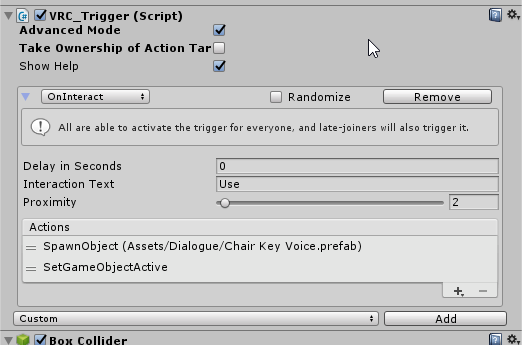
hey guys, probably a super basic question but how do you change the "interact" text on objects you can interact with? (sorry to interrupt the convo)
bronze smelt
But 2018 has bugs that can stop you from doing things.
@vague panther If it's a trigger, it will have the text field Interaction Text where you can change the text
The pickup component is the same, Use Text
austere bison
Side question if I inport a map that I have purchased what's the best way to work out the correct map scale so avatars are the correct size
vague panther
https://i.imgur.com/F8luje5.png can't seem to find it 😦
 near escarp
@austere bison there's a sample avatar in the sdk
bronze smelt
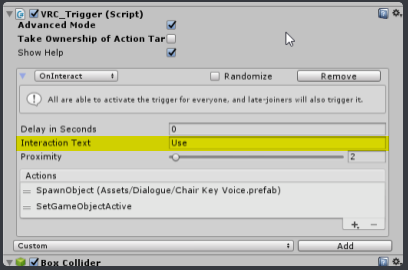 austere bison
Is there a default scale that everyone uses or is that too easy and just have to work out yourself with the sample avatar
near escarp
sample avatar is 6ft or 180cm tall
which is taller than the average model you'll see
 fair helm
Does anyone know where I can find a wheelchair world?
near escarp
so you can set its scale to maybe 0.85
austere bison
Thank you I'll give that a shot
vague panther
I've a bit of a less basic question now - if I want 2 things to happen when the player interacts, but I want one of them to happen immediately and the other to be delayed, how do I do that?
I can't put 2 "oninteract" thingies for some reason
 meager anchor
Not sure how many of you are familiar with QVPen or Exmenu, but they worked in my worlds before, and now they dont for some reason :/. I got all the prereq asset packs too.
opal goblet
@vague panther It depends on what you actually want to do, but you would generally use an ActivateCustomTrigger action, that points to another trigger, that has a delay. So you would want to put everything that should happen immediately plus the ACT in the OnInteract, and everything that should be delayed on the Custom Trigger
 past wave
anyone know why my buttons to toggle my mirror in my world arent working? it just makes the button disappear, its set up the exact same as another world of my where it works.
rain shadow
possible causes are multiple trigger components on the same object, wrong sdk version, or wrong unity version
past wave
unity is the 2017 version ive been using, the sdk is the same one we have had for quite some time now, and theres only one component on each button
like i said it works just fine in my other worlds, where its set up the exact same
past wave
 cedar nebula
it's targetting the button itself
past wave
oh crap
i could have sworn that i had something else on there
this is what i get for working at this time of night with very little sleep
wait, how come the mirror one doesnt work either, its connected to the right thing
on the mirror one, the button stays there, the mirror just doesnt toggle
cedar nebula
you'd probably have to send a picture of that too, but I'd guess the receiver on that is also not quite right
rain shadow
What does it look like with the mirror on? is it facing the right way?
past wave
... it was in the wall
maybe i should check things a little closer before asking things
 rancid junco
Anyone knows that how to fix owaSyncVideo_v2.2s Player?
Im having a issue where I have set it on to world. I connect button to it to hide it to not having option to minimize lag. I have video player in world, I go test it. Its plays music normally, but as I want to delete on going song I press Delete and music still plays as well I press Video again its open same window where is music playing so I cant add new song to play.
I cant pinpoint what is making this to happen because I have same videoplayer in my other world where its working just fine.
Sometimes as I re add button/videoplayer sometimes videoplayer is gone for good when I unhide it ones, but then its gone for good ones I close hide it.
 delicate marsh
silly question i suppose, but, what's the best way to make a nice shiny window? Just a transparent mat with smoothness all the way up and realtime lights?
rain shadow
Preferably a reflection probe instead of a realtime light
 storm plover
Anyone wanna help with teaching me how to make a basic avatar world? I've been making a lot of avatars recently so I wanted to go make some public
 full escarp
whenever i try to upload a world it always crashes my unity and i dont know why. so i end up just giving up. does anyone know a fix or something that i can do to stop the crashing?
delicate marsh
what does the "position damper" do on configurable joints?
how much it dampens the movement anytime the config joint hits the target position?
sacred warren
When the unity log says "Levels" in the size breakdown, what is a level?
full escarp
can anyone help me? i have uploaded my world but it wont let me into the world it starts to send me there but then instantly backs out and sends me back to my home
sacred warren
Does the world work in test mode in Unity?
full escarp
when i choose test mode it opens vrchat then it takes me to the world. That is the only way i can enter the world
sacred warren
Hmm, that implies the world itself is ok. Did you try reuploading it?
full escarp
im gonna do that in a min, i will let you know if it works or not :3
full escarp
yeah still didnt work when i re uploaded it
sacred warren
Any errors in the console while it was packaging/uploading it?
sacred warren
Looks like part of the SDK is missing. Reinstall the SDK package and restart Unity.
full escarp
alright i will
sacred warren
Are the lights set to baked or "mixed"?
 rugged jolt
HELP , im trying to update my world and for some reason it says that its Unpublished , but i had that world up for at least a few months now.
I have a blueprint version still attached to it too
if i reupload it with a different name or something will the people that have it favored still have it ?
Actually pressing the upload button just doesnt do anything.... is the world uploading part dead ?
 mild spade
Very likely there is something wrong with your project. When was the last time you uploaded a world?
rugged jolt
i uploaded some content about 2 weeks ago
sacred warren
Nothin in the console?
mild spade
If you added anything to the project there might be some errors
rugged jolt
i did add something but nothing different than what i normally add.
just a new avatar
ok
nvm
.... my bad
i create custom pedestal ... and one of them had a identifier on it
thanks for the help though
 fleet nova
hiyo, somebody knows I could find textures for grids like The Box ?
bold ibex
@fleet nova for anything related to the box just check its github https://github.com/DrPotatoNet/TheBoxVRC

GitHub
A simple VRChat world. Contribute to DrPotatoNet/TheBoxVRC development by creating an account on GitHub.
mild spade
@fleet nova The lighting is baked right? Do you have light probes on the world?
fleet nova
I added probes and relaunched baking now it works
vivid storm
So I put my world on Labs, and out of the 150+ visitors I got 1 report. Is it possible to see why it was reported?
past wave
I might be wrong but I think all world's have 1 report on them, because even my private world's have 1 report
storm plover
I was thinking of making my own world but I have no idea how to, I've only made avatars so far
sacred warren
Yeah, all reports start with reports at 1, so you actually have 0 real reports.
bold ibex
im still stuck on tpose for idle pose after dancing tho im using override controller
 sacred warren
Does VRChat support third party terrain shaders? I know custom shaders work in worlds, but terrain is always a bit complicated in VRC.
 solid helm
If they don't need scripts, yes!
sacred warren
Hmm, ok then, I'll have to try them out, thanks.
 velvet warren
just a small question, is the tutorial from this still up to date? (would i need to download a version of unity 2017 etc.)
https://docs.vrchat.com/docs/vrchat-home-kit
Resource Links Download Unity 2017.4.28f1 - https://unity3d.com/get-unity/download/archive (Make sure you click on "2017.x", then find "2017.4.28") VRChat SDK - [http://vrchat.com/download/sdk](http://vrchat.com/download/sd...
sacred warren
Yes, that's still correct. 2018 will be out soon but currently it's still that 2017 version.
velvet warren
thank you! I'm glad the download i had running primitively hadn't already completed
 void remnant
can anyone help me ? i want to upload my world to test it out... but the options are gone
void remnant
but since i'm a noob in unity (still learning) does it give detials on the problem ? wheni click he play button it doens't let me as it pops out another error
wispy cloud
If you go to the Window tab and find the Console, any of the red errors are the ones that are preventing you from uploading. Usually reading those will tell you exactly what is failing where. If it's something you don't need, getting rid of it is usually the easiest solution.
void remnant
😮
i'll try that when i get home, thx for helping , if i can't solve it i'll let you know
 smoky oriole
tiny edit to no-vr test build launcher script. by request, cancel button added to dialogue. no other change, if not ever did not needed cancel, don't need redownload. http://secondstrife.com/vrchat-vbs/
wispy cloud
Also, just by the error at the bottom of your Unity, it seems like you're having script issues with the Standard Assets/Effects/ImageEffects/Scripts/Antialiasing.cs file in particular. Likely that's not the only issue though. If you ended up not using any standard assets or their scripts in particular, you can try deleting that Scripts folder. That'll at least fix that error, but if you're using that for anything in your scene it'll break it. Best to make a backup before you just nuke it
void remnant
i have 2 backups of the world.. but if i need the script? what should i do.. deleted and put it back in ?
wispy cloud
You could try deleting it and then redownloading and importing it. It could fix it, or you might end up with the exact same error
storm plover
Anyone mind helping me create an avatar world? I got a bunch of avatars I want to publish but I never made a world before
fleet nova
how do you add reverbs on your world, like when you speak or other people speak ?
 elder igloo
Im trying to test my world, but my VRC SDK has missing options and I cant upload, I get these errors when i import a brand new SDK
sacred warren
With the Unity sale now on, does anyone have any recommendations on purchases? Many don't work on VRChat so it's best to get explicit recommendations rather than just buying what looks interesting.
sacred warren
@void remnant You're using the wrong version of Unity
void remnant
@sacred warren I've always used the same version of unity ... and I already uploaded round 10 avatars and a world..never had any problems
sacred warren
But you're having issues now, so switch to the correct version before trying to do anything else.
The fact it worked before (when technically it shouldn't have) isn't a reason not to fix it 😉
void remnant
But I'll have to rebuild everything
sacred warren
Why would you have to do that? It'll just update itself when you load the new version of Unity.
 coral wing
Unity will import the project to the newer version fine, just make a back up of it just incase something happens
vague panther
hey there, quick question - how do you make it so chairs can only be interacted if youre nearby? right now theyre selectable from SUUUPER far
 tropic yarrow
@vague panther at least you can make a Trigger cylinder/cube/ with onEnterTrigger and onExitTrigger that disable/enable the chair
sacred warren
Hmm, Unity won't let me do anything, I just get a windows pong sound if I click anywhere. And I don't know how long ago I saved 😦
 weak python
Is there a way to make lighting like a spotlight appear on toon shaders? I'm trying to make a world and I want to use toon shaders, either Cubed Paradox', Poiyomi's, or Xiexe's and I want there to be light shining on the floor from a TV screen, but I can't figure out how to make the light show up on a material with toon shading.
 indigo pagoda
Works fine with default settings
opaque chasm
i load into my world like this and i can't move
any1 knows why? was working b4 and didn't change anyth
sacred warren
Are you inside a collider or something?
austere bison
so why is my video green is it to do with lighting
sacred warren
@ashen charm I was referring to @opaque chasm 's comment about being stuck
vivid storm
Any reason a mirror wouldn't reflect lighting on a player?
Everything else is lit, and players are lit when not looking in a mirror
 random owl
Mirrors don't reflect real time light by default
It's very expensive to have realtime light in mirrors
vivid storm
Hmm, any workaround for that?
random owl
You should look into baking your lights
You can also enable pixel lights in the mirror settings but it's gonna be terrible for performance
vivid storm
I enabled pixel lights to test, still no lighting on the player
left marlin
Does your light affect the mirror reflection layer?
vivid storm
yes
 rose prairie
Not sure if this is a bug or not, but whenever I'm in specific worlds, my arms in VR tend to clip into my face far worse than other worlds. It happens on nearly every avatar I have in specific worlds.
sacred warren
Bakery question, or perhaps more general Unity question, but is there any way of saying "this is partially transparent" when baking lighting? I seem to have the hard options of solid or transparent, neither of which would work well. The current issue results in complete shadowing through things like leaves.
 autumn umbra
@ashen charm Look in the pins for the prefab spreadsheet. There's a keypad prefab for doors there. You could modify that to enable your URL input box locally, so only the person with the code will see it. But make sure that the play button is set to play for everyone.
 verbal breach
I have a problem with the skyboxes, I downloaded some from the asset store and when I decided to test the world, the skybox did not appear
yet in the editor it appears
I used 6-sided skybox, mobile skybox and cubemap skybox, none of them gave results
is it because of a tab, something in the configuration or something wrong with the assets (I also made my own skybox and also didn't show up)
here is in the lightning settings
sacred warren
Mute notices and warnings in the console and see if anything is listed there.
sacred warren
Sounds like things designed for a different version of Unity
I'd try reimporting the AllSky folder, if that doesn't fix it then you could try deleting that specific script, but you'd lose access to whatever that specific script did.
verbal breach
i'mma try reimporting it, if that does not work either well...i'll see if I can take a panoramic photo from my ceiling and use that
sacred warren
You can right click the folder and just select reimport
verbal breach
welp, wish i'd knew that 5 minutes ago, i'm redownloading it from the store
...oops?
now I got this
I think the best option is to nuke the world and start from scratch :/
 rough cloak
world has a buggy spawn until the avatar loads in (otherwise teleported back to the spawn) and unable to upload but able to do the private test
sacred warren
The error above implies there was another error
The missing blueprint just means it's not uploaded yet
verbal breach
i'mma try using the skybox in another project to see if the problem is in the materials
and zajarn...have you tried deleting the spawn and making another?
bold ibex
Anyone got an idea why my world wont update? It will upload but all changes i made to it arent there and its an old build of the world.
I tried detaching the ID. Making a new scene
Nothing worked.
near escarp
Same thing as above, check the console
rough cloak
okay
bold ibex
Hm?
WHat am i looking for in my console?
I got about a thousand messages saying "There are two audio listeners in the scene." But nothing really standing out.
verbal breach
huh, check in the hierarchy if you have an audio component somewhere
and turn it off/delete it
balmy gate
Delete the second audio listener (usually on the camera) and try again
bold ibex
Odd thing to keeep my world from updating O.o but ill give it a shot.
balmy gate
You shouldn't have any red errors except maybe one that shows up when uploading like somethings about api that's normal
verbal breach
An ar app i'm mkaing crashed for the same exact thing, so don't overthink it
balmy gate
It's not, but it is causing spam that causes you not to see the real error
Then clear the console and make sure to turn off clear on play
Then try again
bold ibex
I uh... go this red error
"layer numbers must be between 0 and 31
UnityEngine.Physics:IgnoreLayerCollision(Int32, Int32)
DigitalRuby.PyroParticles.FireBaseScript:Awake() (at Assets/PyroParticles/Prefab/Script/FireBaseScript.cs:84)
DigitalRuby.PyroParticles.FireConstantBaseScript:Awake() (at Assets/PyroParticles/Prefab/Script/FireConstantBaseScript.cs:79)"
My fireplace?
balmy gate
PyroParticles is a script, so not allowed in vrchat
balmy gate
Editor scripts are the only custom scripts allowed
bold ibex
Tbh it was just a prefab for a fire. My bad.
balmy gate
As are a small set of asset store things like dynamic bone, final ik and standard assets
balmy gate
You have to delete the script
No dont delete the camera
Delete the audio listener component on one of your cameras (there is a second one somewhere in your scene)
Vrchat ignores most things on the reference camera anyway, so it's just to fix errors in the editor
bold ibex
Ok ill try all that, thank you very much @balmy gate
bold ibex
I got rid of the script and the audio listener and my world build still wont update.
@balmy gate sorry for the ping
balmy gate
Can you check for errors in the console?
Clear console again, make sure clear on play is off
Then rename or add some random empty object
So that it builds the scene agaim
Then try another build
balmy gate
Find any and all red error messages in console
bold ibex
i dont have any but ill add an object
i added a cube. should i hit play?
im going to try it again and build it
rough cloak
only unable to upload world now
balmy gate
@rough cloak can you disable "Clear on Play" and clear your console, then try an upload? What shows up in the Console window?
any red errors?
rough cloak
no errors but a bunch of gray bubbles pop up
balmy gate
those should be fine
do you see the form to give a name / description / upload an image?
balmy gate
this is an update to an existing world?
rough cloak
nope new world upload
balmy gate
worlds always have an image. if it's new, it's going to include whatever you have there. anyway, you check the box and hit upload, and then what happens
balmy gate
so what happens after you upload?
rough cloak
unity is being slow unfortunately
balmy gate
so the upload is stuck / really slow?
what does it say exactly when it gets stuck
is there a progress bar?
balmy gate
can you just show a screenshot of where it's stuck
balmy gate
huh? that picture is before you type in the name and select a picutre
I'm really confused
rough cloak
yea its stuck there
balmy gate
can you please be more descriptive. I'm having trouble even understanding what is stuck / what the problem is
what order did things happen
rough cloak
its just now getting to the upload point
balmy gate
you previously said you were typing in the description
rough cloak
its just being super slow
balmy gate
but I know that typing in the description happens after building
and now you show a screenshot where it's building
rough cloak
i had cancelled it and was re building it
balmy gate
ok if you're just saying everything is slow, that's just unity. there's nothing we can do about that
balmy gate
ah ok, and it stays at that screen?
rough cloak
yea generally
balmy gate
the SHow in Worlds Menu line should disappear
if it doesn't, it means you aren't logged in or don't have permission to upload for some reason
or can't contact vrchat servers
can you open the console tab and look at the last few lines?
rough cloak
okay
at the top something about setting required player settings and at the bottom it reloading assemblies
but no errors
only the gray bubbles
balmy gate
they might not be red: can you look for something like 401 unauthorized api.vrchat.cloud
or something like that
near the bottom
rough cloak
okay
balmy gate
usually if I see the screen like that I have to logout and login again
but the next upload will work fine
rough cloak
nvm
i expanded the console and low and behold a red error
NullReferenceException: Object reference not set to an instance of an object
VRCSDK2.RuntimeWorldCreation.Start () (at Assets/VRCSDK/Dependencies/VRChat/Scripts/RuntimeWorldCreation.cs:82)
balmy gate
what is it?
var desc = pipelineManager.GetComponent<VRC_SceneDescriptor>(); desc.PositionPortraitCamera(imageCapture.shotCamera.transform);
so that may mean you have two pipeline managers in the scene. maybe you have an avatar in the scene
or you have a pipeline manager and a scene descriptor on different objects
type t:pipelinemanager into the scene hierarchy search bar
if you want to upload an avatar in the world, make sure to remove the pipelinemanager and avatar descriptior
rough cloak
it brings up two things
balmy gate
that's the problem yes
rough cloak
there is no avatar
balmy gate
you can only have one thing
rough cloak
okay
balmy gate
so one of them needs to be deleted
but exit play mode and do it in the editor
and then try another upload
rough cloak
okay
rebuilding
it made a new pipeline
there was no pipeline and when it rebuilt it put in a new pipeline
my brain is a bit fried
XD
balmy gate
there can't be no pipeline
if it is not working, stop play mode, and type t:pipelinemanager into the scene hierarchy search bar
balmy gate
was there something next to it?
like a scene descriptor? or just the pipeline manager
rough cloak
i see a community labs button
rough cloak
yay
balmy gate
just check approve and upload. I wouldn't do labs on the first upload
rough cloak
well it uploaded fine but cant leave spawn area
balmy gate
collider issue? what happens when you try
rough cloak
?
balmy gate
"can't leave spawn area". what happens when you try to leave spawn area?
does your character move at all? completely stuck? does it collide with something invisible?
rough cloak
teleports back to the spawn point
no being stuck and there is movement
invisible kill wall is the best way to say it
balmy gate
what did you set your respawn height to in the VRC_Scene Descriptor
respawn height is the height you will need to be at for respawn to happen
not the height you spawn into
easy to confuse the two
if you set it to 0, you will randomly respawn
rough cloak
okay its set to 4 i think
balmy gate
yeah that's way too high
rough cloak
nope 2
balmy gate
make it something negative, below the bottom of your owrld
try -10 maybe to start with
bold ibex
Ok i got it working, thanks @balmy gate for the big help. I just have one more issue. The mirror isnt rendering me, but it renders others. THe same for other. Their avatar isnt rendered but everyone else is. Do i have the wrong layers selected? The only one i have turn on is the Player Layer in the Mirror Reflection. WHat am i missing?
balmy gate
You need player and Mirrorreflection layers
Player is a layer that includes everyone except the local player. This separation is also useful for detecting collision triggers: usually you detect the PlayerLocal layer
PlayerLocal is the "real" local player with their head chopped off
MirrorReflection is the local player's evil twin with a real head
void remnant
@wispy cloud hey i deleted the script that was causing problems (it was standard assets that i didn't even used) and i uploaded the world. tho for some reason its only 7mb in vrchat and when i click join , when it finishes loading it takes me back home for some reason..so i can't get in.. do you know what it might be ?
wispy cloud
Are you sure that there's no other errors? Checking the console will show you all of them. Normally when a world doesn't update on an upload (or fake uploads) then there's more errors
left marlin
Click build again and once it finishes, check the console. Some errors only show up when you build the scene.
void remnant
ook thx for the tips you guys 
bold ibex
sometimes my uploads get stuck right here and I have to crash Unity
weird though because cancel doesn't want to cancel, it just turns grey and stays like that
opal goblet
Yeah thats been a meme for a while.
 raw vessel
is there a way to speedup unity's "hold on" and "importing small assets" procedure because
i wait almost 1 an a half day to my project loads up
and my world project is almost 12 gb
and i do that cause i don't want to import over and over new stuff in my project
so i decide to put it all together in it.
subtle garnet
0.o
short gulch
Yikes
sacred warren
Enable the local cache, that should help. Also make sure you're using SSDs.
raw vessel
ssd check
so all i have to do is to enable local cache
but i will found out where that local cache is located
thanks for the help
sacred warren
Edit > Preferences > Cache Server > (set to local)
raw vessel
got it thanks
but right now i must wait importing process to be registered into unity
and that will take's few hours
and i'm afraide to cancel importing process because
i might break something
or upon opening a new unity instance will repeat
same process again
but i can move everything out from my unity project
except vrsdk but i will not going to do that
because importing process is like 75% completed
so this recommendation i will use for future project's
 stone garnet
unity keeps crashing when pressing on build&publish, tried different sdk version and a friend crash too when he tried to upload the world from a package i made months ago. Updated the world 2 weeks ago without a problem
sacred warren
Nothing interesting in the console?
vivid storm
All the player models in my world are "jittery" anyone experience that before?
sacred warren
Your world is probably way to far from 0,0,0
vivid storm
Ah, that's probably the case then
 tacit radish
How do i turn off and on colliders with triggers?
cedar nebula
use the SetComponentActive trigger targetting an object's collider component
 barren ice
Is there a way to keep grass that you've painted from following the direction you are looking?
 pallid jolt
Does anyone currently own the volumetric fog and mist asset off the asset store? (This one: https://assetstore.unity.com/packages/vfx/shaders/fullscreen-camera-effects/volumetric-fog-mist-49858 )
The VRChat docs say it's "currently malfunctioning" and it's been that way for a long time. Curious just to what extent it's not working. I've been wanting to get this and use it but don't wanna waste my money if it just flat out doesn't work in VRChat anymore and won't be fixed.

BLACK FRIDAY SALE! 50% OFF!!
Check also our other assets on sale . NEW!
✓ Fog of War SceneView Editor
✓ VR: Single Pass Instanced support
✓ Fog Profiles with transition options
✓ Dynamic Fog & Mist 6.7 with Render Scale and PPS Extensions for Unity 2018.1+
Volu...
 prisma sleet
anyone know of a good rain particle system that isn't laggy, and free?
near escarp
@pallid jolt Doesn't currently work, probably won't for a while
@barren ice Disabling billboarding must be an option somewhere
@prisma sleet there ins't really any good one that isn't either laggy or costs money
pallid jolt
Real big oof. Thanks, though. I'll save my $25 and skip it.
sacred warren
Hmm, if volumetric fog doesn't work, how do you do different "fogs" in different areas?
Also, does VRC have any issues with multiple terrains?
cedar nebula
particles are the only way to do fog areas right now but it's not always a great solution, and super hard to get it to look good without bad performance
also you're fine to use multiple terrains, you might have to worry a bit about the performance though as terrain is always going to be a bit bad on drawcalls
solid helm
Umm, what? That's not the only solution at all!

GitLab
A shader for Unity that renders simple, cheap fake volumetric lights with instancing.

In my Frozen Emptiness map (not released yet) I use this to fog out a few areas
I'm also working on something that does fog in a box but it's not really ready yet
sacred warren
Hmm, far too dense though, I'm looking for distance fog
solid helm
Make it really big. Then disable it with triggers.
A big fog sphere can be less dense, and you can control the visibility that way
I have an (unfinished) map where I did that to have dynamic animated fog. But it's kind of aliased compared to the real thing.
sacred warren
Does it have issues with shaders or other lights being visiblethrough it?
sacred warren
Er, people in my world can only hear each other if they are more than 8m or so from each other.
Any ideas?
bold ibex
@sacred warren that's odd. did you mess with the voice player mod?
sacred warren
Nope
solid helm
As it's a depth based effect, it can only affect objects that write to the depth buffer. To minimise issues it is rendered before other transparent draws.
 queen ferry
I've been struggling with the new player voice mod. I need it short but not too short. It's either you can hear too far away or it's too hard to hear close by and you need to be up on them. Another time I did zones for voice ranges and it didn't go well (people muffled in same areas at any range inside) or way too loud (they are in your ear even though they are across the room). I'm not a fan of this thing lol
storm plover
I'm trying to get my spawnpoint to work but I'm not sure what's wrong with it specifically
Not sure if this pic helps but those are my settings
I can't load into the world at all
I try to test it and it just boots me to my home world
2017 version, latest sdk, and there are no errors in the console
bold ibex
from what i recall it might be usually caused by objects with VRC_Trigger on them so go over them and make sure there is nothing wrong with them
storm plover
I don't know what would be wrong with them, they're all just objects that toggle on or off a mirror or avatars
bold ibex
Does anyone know how to add a volume slider for your world music?
Nvm found a video about it
storm plover
Not sure. Also I did notice that the mirror reflection script is greyed out for whatever reason
 lyric bear
Does anyone know how music is changing in void club? all rooms have different music.
 tawny lilyBOT
You can find your output log at C:\Users\%Username%\AppData\LocalLow\VRChat\vrchat named output_log.txt
storm plover
Idk where I'd check it since I don't even have a location named "app data" anywhere on my pc
short gulch
I believe appdata is a hidden folder by default.
storm plover
Alright, that worked
The file can not be loaded because it was created for another build target that is not compatible with this platform.
Please make sure to build AssetBundles using the build target platform that it is used by.
File's Build target is: 13
Found this one
I assume I just have to change my Unity build to PC from Android or something?
bold ibex
Yeah, of course you need to do that if you are uploading for PC
 shut lichen
Hi you know how fix stop move round camera on chair.
 stone hollow
Excuse me?
stone hollow
The sentence makes absolutely no sense
 tardy sundial
sacred warren
tardy sundial
sacred warren
Asking again as everyone's drawing a blank. Anyone know what causes this? (the weird old mod red name-tag appearing in the world, same place, everyone can see it except the original instance creator until they rejoin)
balmy gate
do you spawn any prefabs in your world?
it's probably something getting mixed up with some internal VRC objects
try changing names of your objects and any prefabs you spawn so they don't start with the same thing they may have
or you can do the classic coverup - shift up your world a bit so 0,0,0 is in the ground, and then nobody will ever have to know
sacred warren
That's not actually 0,0,0, or anywhere near it oddly enough
And the only prefab I'm using (although I deleted it at one point to make sure it wasn't the cause) was the Archery prefab
elder igloo
Hi, so Im trying to test my world by uploading it as private, but when I click on GO I get sent back to my Home world. Not sure what the reason or error would be
vivid storm
So I'm trying to make a ceiling fan rotate. When I apply a rotation in an animation file, it rotates off one of the ends of the blades, not the center. Any ideas?
bold ibex
Can someone help me as to getting portals to work??
I put the id in and I look in the world and it just says loading world
Please @ me
stone hollow
@vivid storm It rotates around the origin of the model.
opal goblet
Just use an empty game object as a "fake" origin, make the fan a child, and rotate the parent instead
bold ibex
im making a world with trees i have the modle made do i copy and paste models or use terrian for better performance
bold ibex
does anyone know how to make a world that when press 1 or 2 it changes you into a selfile cam and for 2 thrid person
 chilly grove
If a client takes ownership over a synced object, turns off its VRC_ObjectSync component, sets the object's position locally with an animator and turns the VRC_ObjectSync component back on - does the object's synced position get updated to match the local position on the owner's client? Also, will the object spring back to its previously synced position before teleporting to the local position due to the networked object syncing implementation?
left marlin
You can't turn off VRC_ObjectSync
chilly grove
Oh damn you're right
How about if the whole object was disabled then instead of turning off the VRC_ObjectSync component?
left marlin
What is your goal?
I don't ever recommend disabling an object sync object
chilly grove
I want to teleport a synced object instantly to a position without it being affected by the network sync implementation since it causes the object to fly across the world to reach the intended position
left marlin
TeleportTo should prevent the lerping, but I can't remember if that was fixed
chilly grove
It doesn't
TeleportTo and Respawn both cause the object to lerp to the position
If there is more than one person in the instance
Dunno what state the 2018 build is in, but it does it on live at least
left marlin
Are you trying avoid lerping visually or is it causing another bug?
chilly grove
I'm trying to avoid the visual lerping
left marlin
You will never know when the lerping is done, so you wouldn't know when to re enable it.
chilly grove
The thing is, does the network sync actually lerp in the backend?
Or is it visual only
bold ibex
@left marlin your prefabs group does meetups of lots of people right? i wonder how quest handles those? cause i find if i join a room of more than 15 people people start to sound like drunk robots lol
left marlin
The meetups we do are not quest compatible. World hop and Community meetup are both normally very large, pc only uploaded, and quest (without link) cannot join.
bold ibex
ah okay
bronze smelt
We're usually in the 50-60 range of people early on. So wouldn't play well at all with Quest
bold ibex
ohhh haha no kidding
left marlin
We started off at 73 last community meetup
sacred warren
Is it possible to change the fog properties on the fly with triggers?
left marlin
No, we do not have access to the unity fog settings. You would need a custom shader if you want to have changeable fog.
sacred warren
Sigh face.
It's like there's lots of things that would be very useful to be able to do, but you can't, but then all the simple things that seem like they'd be workarounds also don't work
left marlin
1001 and Silent have shaders for it.
But we know everything we do is a workaround
bold ibex
@left marlin OnUse, OnSet, and OnReset are all called globally with Always Buffer One. Only OnPreivew (Local) is called locally. the documentation on the randomization prefab says this, but OnUse OnSet and OnReset are set as Local, is this because they are triggered by another trigger that is global?
left marlin
Yes, it will be triggered in something under the DO NOT TOUCH or whatever I named it. It's been awhile
bold ibex
im trying to teleport the object OnUse, so in the OnUse trigger, im triggering a UI button via animator to 1) teleport the object, and 2) turn it's object sync to non kinematic. 1 works, 2 only works for the client that triggered the draw in the first place
sacred warren
@left marlin Before I try those, do you know if they have any massive caveats? The amount of times I've switched to something because someone said it's the better way of doing it then ran into a laundry list of issues that make it a worse solution is starting to pile up, heh.
bold ibex
i thought putting an object sync on the UI event item would sync the animators so that the UI event happens globally but that does not work either :p
left marlin
Uh, I haven't messed with custom fog much, but I trust 1001 and Silent since they are shader wizards. I haven't looked at 1001's system, but I ended up modifying silent's fake light slightly to make my own black fog.
Kev, Object sync only affects animators and transforms. Animation sync is time based and has looping issues. I do not recommend using animation sync for something like this.
You can only change kinematic through the send rpcs and last I test (at the beginning of the year) it didn't work out properly for non owners/remote players. The canny probably still exists out there.
You may not be able to solve the object lerping issue until they fix that.
verbal breach
anyone knows why is this happening?
in unity itself the models appear fine
I changed the material to standard and vrchat/standar
verbal breach
wait, I think I found the problem
when I test the world, it doesn't test the world with the changes
why?
when I click build and test, the world it loads is an old version
anyone knows how to solve this?
is the world completely nuked?
left marlin
Delete the door controller script as it is causing an error and you can't use it in vrchat anyway.
verbal breach
yeah, I deleted it and now everything works perfeclt
like a panacea (does that word exist in english?)
balmy gate
@chilly grove the lerping happens on the receiving side and it takes something like 0.5 seconds, never seen it take more than 1.0 seconds. Waiting 1 second works very reliably and it is what I do in VRMC
Starting a new world based on this is going to butt against 2018 which will completely change some aspects of object sync. Problem is it's still buggy and there doesn't seem to be clear communication on what they intended to change and how to do things. Tupper has said that they changed networking library and stuff affecting object sync is expected but I'm hoping for amore concrete explanation
chilly grove
Nice, if it's only being lerped client side maybe it'll work then
balmy gate
pretty sure. Lerping sender side would be idiotic because the whole point of interpolation is to cover up for networking errors
left marlin
So, what happens if everyone teleports the object to the destination, does it still lerp back?
balmy gate
The same object? If they aren't owner
My guess is object sync overwrites the position with the correct one each frame
left marlin
You can teleport it, but network ownership may force it back.
balmy gate
But in 2018 that prop hunt video looked weird. Maybe they broke somethijg
Oh also... rigidbody vs no rigidbody makes a huge differrnce
left marlin
I don't believe it is every frame. You can see it happen in live.
balmy gate
The behavior I was explaining was object syncs with no rigidbody
Rigidbody has to conform to physics and vrchat does something weird to sync them even if they are marked kinematic
Non rigidbody will sync precise positions, but rigidbody will update only if the distance is big enough and lazily. Positions will be off by as much as 1/4 meter or something of that magnitude across clients. Didn't do specific science on this
Actually don't take my word on that as I was at the same time diagnosing the "object syncs don't update" bug.
chilly grove
Going to have to test it out, was hoping someone else had already gotten annoyed enough with the network sync being terrible at setting object positions to come up with a workaround for it
balmy gate
Yes I use 5 object syncs and cycle through them... using an animator to keep track of which one is currently available to move and providing a cooldown for moving onto the next state (exit time of 0.3 seconds + animation trigger condition).
It's an awful solution to a silly problem but that's what VRC js all about
sacred warren
Who is "Graham"?
sacred warren
Ahh, fair enough. I assumed it was some weird assignment.
balmy gate
yeah that's a glitchy screen you get if you go back from a world in a specific way
I've seen that while browsing worlds. it's probably what is default in the UI
left marlin
(Graham is founder and CEO of VRChat)
balmy gate
wait is there more than one graham?
left marlin
No, there is only one
balmy gate
oh well ok lol I guess he's more than just a dev then lol
left marlin
That screen also shows up when you are in a local test world since it can't download any information about it.
 balmy igloo
Hey guys, any world suggestion on vrchat?
I'm just installing it, lol
Hope can get along 
sacred warren
This is a channel for help making worlds, rather than discussing random existing worlds.
balmy igloo
Ohh sorry about that
Newbie misktakes, lol
sacred warren
No worries 😛
 deft dove
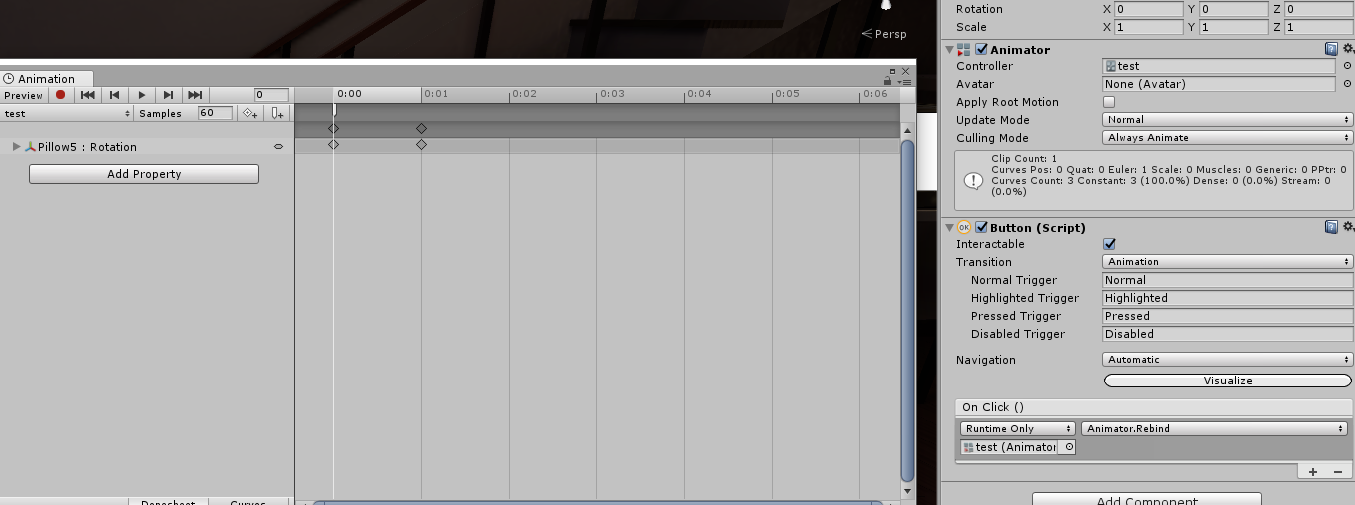


 ornate turret
this is a chat for developing worlds, for normal/random chat use #vrchat-general-2 , #general-media or #vrchat-general-1
bold ibex
Can I ask questions here about world building? I have some problems baking my point lights 😅
ornate turret
ask your question directly, no need to ask for permission 👍 you'll get a faster answer if you ask it straight up
elder igloo
Hi, so Im trying to test my world by uploading it as private, but when I click on GO I get sent back to my Home world. Not sure what the reason or error would be
queen ferry
Wondering if there's a way I can use a transparent shader but it'll hide avatars? Making an open roofed spectating area but I don't want them to be seen
rain shadow
You could probably use a basic unity plane object between the two areas and bake occlusion
queen ferry
hm.
With how spotty the local multi client test button is, I'll have to wait to try it later.
delicate marsh
why isn't my reflection probe showing up in game
got it set to realtime
i could probably bake it
but
anyways it's showing on my glass in unity
but then not in game
bold ibex
Alright so I checked all my pointlights as baked, I added a light phrobe group and a light reflection phrobe. these are my settings in lighting and I've watched several tutorials but no matter what I do the result after baking it is that several objects in the room turns out odd looking. Is there something I'm doing wrong or?
delicate marsh
look at your import for your object
i had a similar issue
it was the checkbox for 'generate lightmap UVs'
if it's on
or off
bold ibex
Im using a controller for my dances .. my issues so far when exiting from a chair , my avatar will be in tpose . im on a test environment and it does this too on a live one
bold ibex
Can I upgrade to unity 2018
bronze smelt
@bold ibex what Schnitzel said. But also adjust padding and settings for the models if required.
@bold ibex You can, but it still got some bugs. As it isn't out on Live yet
bold ibex
thanks buddy
 lilac summit
is this a good place to ask for help with my world? i haven't really posted much in this server but somebody recommended i ask for help here
bronze smelt
Here would be the best place
lilac summit
alright hang on lemme grab a picture of what's going on
okay so i'm having this issue where after baking, segments of my wall are showing what appears to be some sort of shadow or seam~ this also happens for pretty much any place where two faces meet... for example objects i've used the boolean tool from probuilder to make which have extra faces all over it tend to have seams in strange places (yes, i know it's not a good idea to use that). by the way please forgive the bad/dark lighting, this world is supposed to be kind of dark and i wanted to show a picture of how it really looks.
near escarp
what is it supposed to look like non baked ?
lilac summit
what do you mean? like what does it look like when it's not baked lighting? the seams seem to go away
like if i add a realtime light to an area the seams go away
so the one on the top is baked and you can see all the seams of where any two segments or faces of the wall meet.. the bottom is with a realtime light i added to the scene
also if i go into light explorer and switch everything from baked to realtime it seems to stay the same
 outer crane
Is it just me or does everyone have an issue with VRCs Spatial Audio Source?
outer crane
Im not sure what the issue is for your baked lighting but try playing around with your lighting setting. Maybe the bounce lighting. @lilac summit
Here is a link with some tips.

Justin from LMHPoly published a nice article on setting up a perfect lighting in Unity.
lilac summit
thank you @outer crane ❤️
near escarp
@vapid quarry Any idea ?
 vapid quarry
lemme just catch up
outer crane
Also @lilac summit . If you have a large scene your working on and your lighting takes a while to render try getting this asset from unity its on sell right now as well.

Bakery is a high-end, production-ready, hassle-free GPU lightmapper, designed as an alternative to Enlighten and Progressive.
NOTE: Requires modern Nvidia GPU (6xx or newer) and 64-bit Windows (7 or higher).
Doesn't support AMD cards for baking.
Tested on everything ...
It uses your GPU and not your CPU like unity does for whatever reason.
vapid quarry
@lilac summit Try merging the 2 meshes or faces you're trying to get the seems gone on and then bake. You might have to move the UV's around normally its just the case of automatically using box or plane uv's.
Remember to save before hand though
 carmine magnet
@lilac summit 
lilac summit
@outer crane thank you i was told about that the other day and had actually totally forgot about it!! that should be helpful as my computer is rather slow ^^ and @vapid quarry i'll try that~ are there any easy ways to merge the faces rather than individually selecting each one? i've been doing that by hand and there's a lot of faces to go through.. possibly hundreds 😅 and AB i'm sorry i forgot this server had thousands of people in it and lazily typed AB referring to tony and clicked enter thinking it'd be the only name that came up!! my bad home skillet
outer crane
@lilac summit Also make sure you have Nvidia GPU. Bakery wont work with AMD GPU. As for merging meshes there is an asset for that too lol.

Combine meshes and materials to reduce draw calls.
Fix models and create atlases so they can share materials (for static/dynamic batching)
Fix scaling, rotation and translation in imported models
- Create Texture Arrays
- Works with any material and shader
- Full m...
It can also help to lower your batches. It's on sell as well.
You can try the free one but the other one is better.
lilac summit
considering right now money is tight i might try out the free one for now but keep this bookmarked until i have a little more to spare~ thank you for the resources ❤️
sacred warren
I tried that, it didn't work well for me. The merging and everything went perfectly, but none of the resulting meshes would handle baked lighting properly, they were a complete mess.
sacred warren
Bakery please.. why... why have you made everything Christmas?
random owl
Well now you got your halloween and christmas setup ready and planned 😅
sacred warren
Also New Neo Tokyo https://cdn.discordapp.com/attachments/628102741037809666/649725896881602580/unknown.png

 random owl

 toxic moth
Sorry if i am being dumb right now but how do you bake the lighting and refection in a vrchat world

rain shadow
@toxic moth https://discordapp.com/channels/189511567539306508/534472776841691137/584421955403382817 Check the links here and they should mostly help and if you run into issues or don't quite understand it right away then you can ask here or in the lighting channel
toxic moth
Thx
 untold vine
I need some help and I do not know how to fix it. For some reason in my world there is an invisible person. I have updated the VRC stuff. But there’s a name plate in the ground that’s is red for a few seconds then goes away. But some people are claiming that they see it for a long time.
sacred warren
@untold vine I had the same issue. Make sure you don't have an VRC NPC spawner in your world anywhere.
bold ibex
@delicate marsh hello again, thank you for replying to my question, I appreciate it! ^^ I checked and 'generate lightmap uv's' are off. Should I try baking it with it on?
near escarp
if they're off, they're not baking anything ! @bold ibex
bold ibex
Aaah I didn't know that, thank you for the heads up @near escarp!
bold ibex
Uhm so my door went through just fine but when I'm trying to apply it to lots of my other objects, unity freezes and when I shut it down and reopen it the prefab is 'broken' and I have to reimport it but then I'm back to square one x'D
Anything else I can do fo fix this?
near escarp
Besides waiting no, you can't bypass this step
bold ibex
Alrighty, thank you for letting me know ^^ @near escarp
 oblique quest
Is there a way to change/edit the color of one asset/texture, like apply a tint or something on it, without actually, having to do a separated texture or changing other objects using the same texture files?
nvm, kinda found a way of doing it xD
opal goblet
@oblique quest Just to make sure:
Thats what shaders are for. No matter what you do, if you want to render something you will need a shader. A shader is then applied to a material and the material defines the shaders properties in an "instanced" way. The shader is a little program that tells your GPU what to draw where. Its basically just some complex mathematics. However you can also use that to give a material a "Tint". Most shaders have that in-built but you could also define your own behaviour. Most shaders do multiplicative tints. so the RGB values of the Albedo is multiplied with the RGB values of the Tint.
oblique quest
Not gnna lie, the explanation looks fancy asf, but I dont understand half of it 😂 👌 I need explanation for dummies. But anyway, I find a way on my own to "apply a tint or different color into something" without it affecting other stuff using the same materials
opal goblet
Well yeah. Just rendering a lit cube from nothing but the OS language is....hard
Unity does ALOT of work for you
Understanding the entirety of Unity could take someone that has a general understanding of Informatics....well definitely more than a year
oblique quest
By chance, do you know, what kinds of wind effects work on vrc. Messing with some assets and whatnot, found some grass or prefabs that actually work ingame, in vrc. And actually move with wind effect, but other trees or objects from different assets, I try different options and they wont work. Once I load ingame wind wont work on them
opal goblet
That is a case-by-case question. Cant really answer that.
Shaders can even "manipulate" geometry. As I said they tell the GPU what to render and where to render it.
Some wind is done by doing something like that. Some wind uses the CPU (C# Scripts) that move the object or parts of it.
Some wind objects might even be done using bones xD
I think the Standard Unity Terrain has an option for Wind
but Unitys Terrain is kinda weird in VRC
oblique quest
I just would love to know one wind option that dsnt break once u load it in vrc
opal goblet
Good luck have fun xD
oblique quest
Ffff
 abstract plover
Anyone know why my world doesn't show up in vrchat's search? Even when you search the exact name, it doesn't show up.
https://vrchat.com/home/launch?worldId=wrld_e2dfdf14-8472-45d7-a9e4-1dd92e1de012
It's optimized
bold ibex
anyone knows how to make a clock that shows the actual time? digital clock btw
 hybrid mica
hello wanted to know if there way fix a bug i have where if update my world voices keeps changing back to range 15
balmy gate
@abstract plover shows up for me. it's about 3 pages down the search list, and you must only search for "optimized"
a lot of worlds include text like "please use an optimized avatar" so those will all show up first
and the search uses OR not AND, so if you type box, it will find every world with box in its name, so you have to only type optimized
I hate to say this, but if you want your world to be searchable you have to find something unique to put in the world title or description that is searchable
abstract plover
ok cool
bold ibex

VRChatのワールドで使用できる、現実世界の日本時間を読み込んで表示する時計です。 また、一時間毎や特定の時刻など、現実時間をトリガーとしたイベントを作成することができます。
if possible, a digital clock
@bold ibex

VRChatでアバターに入れたりワールドにおいたりできるワールド時間のシェーダーです。 プレイヤーがワールドに入ってからの経過時間を表示します。 パララックス機能によって3Dのような効果がついた背...
search google easy
woah wut, i searched and couldnt find one, Thank you so much
 sudden lily
Is there some hidden trick to making your own mirror properly? I've copied the prefab's elements exactly to a Plane in Unity, but mine is bugging out with weird rendering glitches.
sacred warren
Tick the option to disable culling, that'll likely fix it
sudden lily
I do not see an option for that in VRC_Mirror_Reflection or the Mesh Renderer.
sudden lily
I was hoping to make one that looked nice rather than just a floating flat panel.
Worse comes to worse I'll just use the prefab, but it just seems like I'm missing something basic with it.
 sleek willow
Ahh okay I understand, was just curious. If you copy the components by hitting the cog on them to the plane does the same issue occur?
sudden lily
Yup, tried that.
sacred warren
Let me check mine, 1 sec
sacred warren
"Turn off mirror occlusion" was the one
sleek willow
Beat me to it.
sacred warren
Looks like you've already got it off so it's not that
sudden lily
It's ticked there, but I just tried it and no dice.
sacred warren
What shader are you using on the object(s) that are misbehaving?
sudden lily
Nothing. It's just a plain standard material.
Tried removing it on the off chance, but no dice there either
Only material on the glass is the MirrorReflection
Oh as an fyi, the mirror panel is its own mesh and material.
sacred warren
So the issue is that it can see through the top of the wall, I assume?
sudden lily
No, it's glitching out. HOld on.
No, it's flickering like mad, and has lingering elements when it refreshes as the angle changes.
If we look to the left, that's the bog-standard Unity panel I tried sticking a mirror on.
sacred warren
Hmm, that's what that mirror occlusion setting is supposed to fix.
sudden lily
Might just go with the prefab for now then 😑. I know it's not like an avatar or anything, because the prefab's just fine.
sacred warren
You can always just change the prefab one to look like yours.
sudden lily
Ahhhhhh, got it! I think it's something to do with the mesh. Overrode it with the Quad and it's rendering fine.
sleek willow
Huh. Good to know.
elder igloo
Is there anything wrong with the VRC Avatar Pedestals, whenever i add them to my world and try to Upload, Unity crashes