#world-development
39 messages · Page 9 of 1
 sturdy stone
 flat dagger
That's more details then I've seen in a while
flat dagger
Are there more details on Udon? I'm not familiar with it at all. Is it a new language or just a plugin to allow for avatar/world makers to use their own C# scripts in a safe way?
 supple drift
Visual scripting. If you're familiar with Playmaker, probably somewhat similar to that!
flat dagger
So like UE4's blueprint system? Neat! Is this something they made themselves? I'm not seeing anything about it on the googles...
 halcyon gulch
yeah it's something they've been making
flat dagger
Huh. Interesting.
Similar to https://ludiq.io/bolt ?

Ludiq
Discover the most intuitive tool for game and XR development.
supple drift
yeah! They were actually originally gonna roll with Playmaker for a bit, but decided to make their own bespoke solution so they could own it / not rely on a third party dev
flat dagger
Smart. Ballsy, but in the long run best
 green lagoon
and not require folks to pay 60 bucks if they want to make stuff
halcyon gulch
this is the only thing they've shown of udon

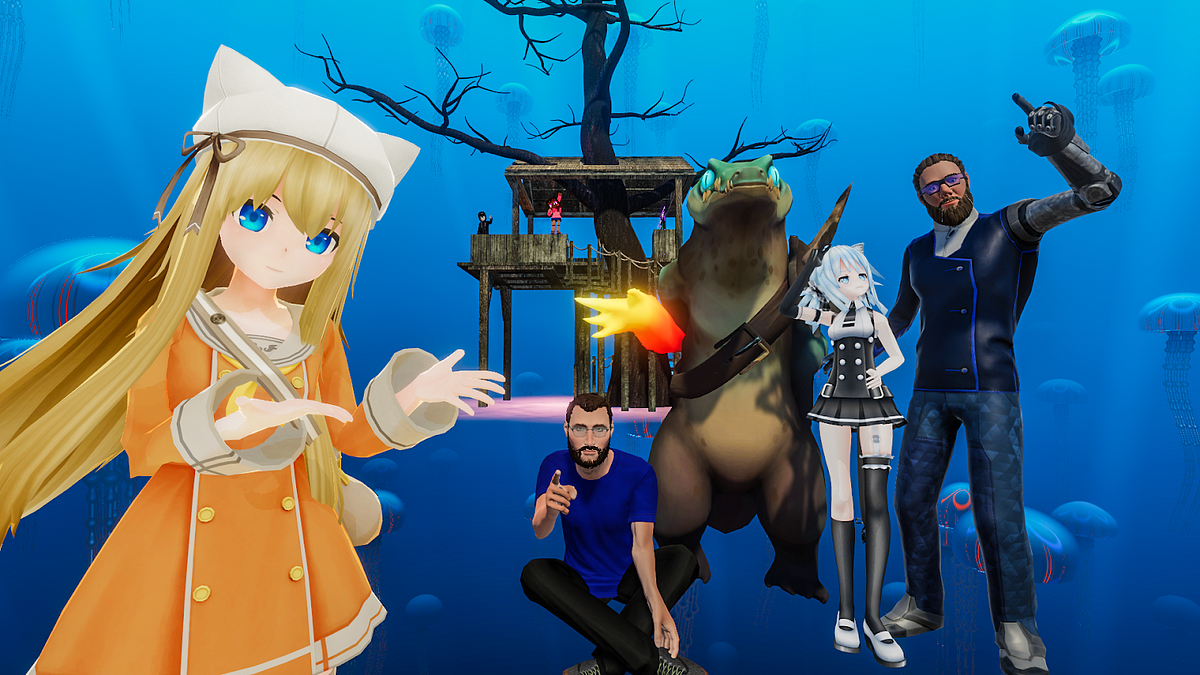
Medium
The VRChat team is excited to announce that we have raised $10m of funding in a Series C investment round.
flat dagger
Interesting. With this, I could really build out my world the way I'd hoped... So the world/terrain would dynamically tessellate and gravity would be radial, so you could walk around the entire surface of the habitat
No to mention, I could create unique spawn points to let people claim houses/areas as their own
 warm marten
that would be fun asf
it would be really cool to have more content on worlds so players can actually have a "regular" place to go rather than hopping worlds ever 5 or 10 minutes
flat dagger
Indeed
And I'd love to see bigger worlds
There's only so many bedrooms a person can visit...
 cedar nebula
That's been on my mind as well. Why do creators keep publishing hangout worlds? Unless your's is somehow doing things different there's no reason people would go there compared to the much better and more popular ones that already exist. I can understand making a hangout as a first world at least but more than 1 feels like way too much. At least include an easter egg!
flat dagger
Right? I made my first world purely as a learning process...
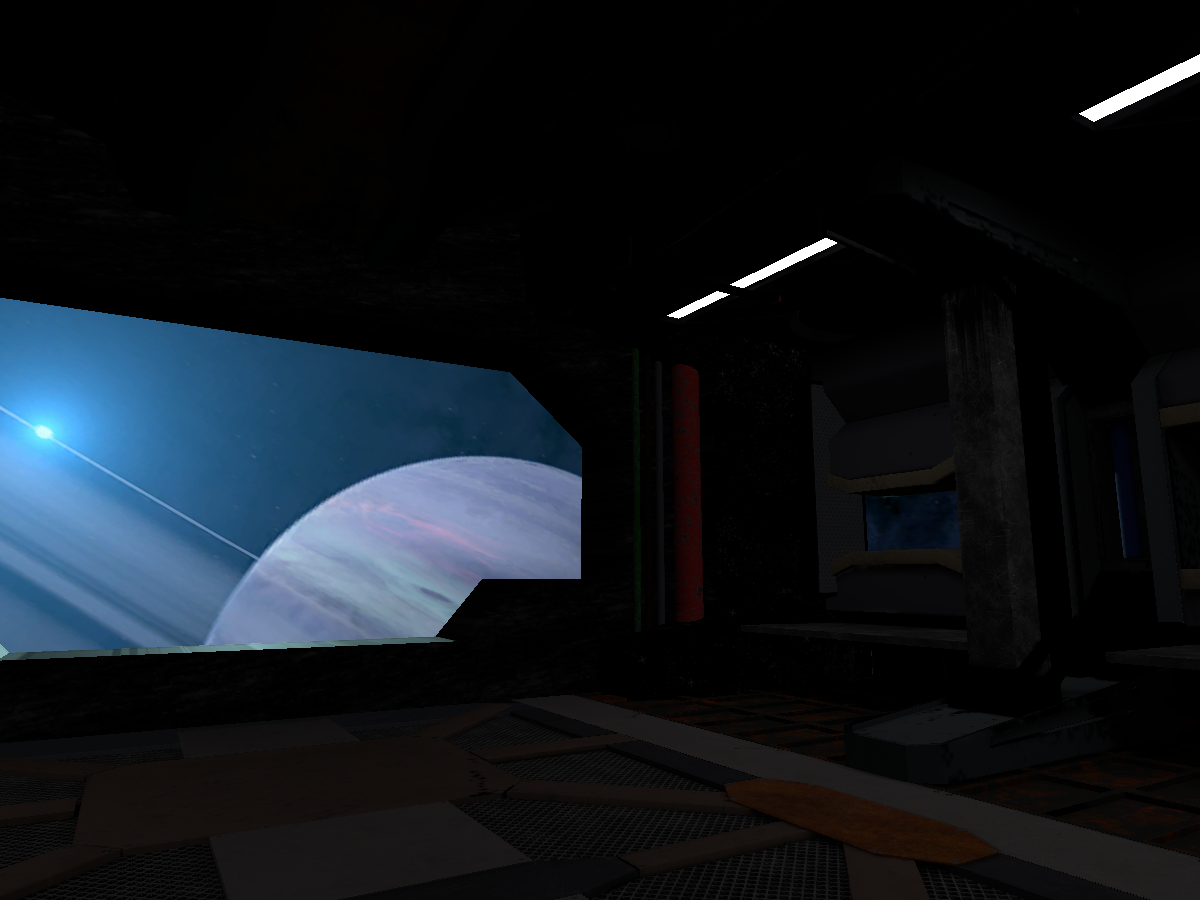
Working on a space station scene‚ including avatars I have made․ Now with Quest supportǃ
And my next one will have a purpose other then a place to show off avatars
As a proof of concept, it works surprisingly well, although I don't see it being Quest ready anytime soon.

My attempt at an ONeil Type space station․ It's actually 20km in diameterǃ
This last one is ALL geo. No sky box
warm marten
@cedar nebula lowkey i had an idea of something like a Square or a plaza with different buildings you can go into and hang out in
flat dagger
The idea being that eventually you'll be able to explore the whole place
warm marten
that would make a place so much easier to revisit rather than that same "chill cozy room"
flat dagger
Imagine you could "save your spot" and come back t the same world later and spawn where you left off and not at the same ol spawn zone.
Or being able to teleport to freinds int he same world
cedar nebula
Anything that'll innovate I'm okay with. Just please for the love of god, no more 'small rainy room with a mirror using Aces tonemapping and warm lighting'
 opal goblet
They should just sneakily push a patch on April 1st that disables the Mirror Script for the whole day :^)
cedar nebula
amount of people playing vrchat drops to 0
flat dagger
LOL
I can understand why avatar worlds would need a mirror, but why does EVERY world seem to need one?
halcyon gulch
they literally mesmerize people
cedar nebula
I'd say every world should have a mirror just because you never know when you need to check something on your avatar. Just, build a world that's so good that you don't need the mirror
halcyon gulch
what are cameras
cedar nebula
desktop users tho
 fervent scarab
bang bang!!! KA-boom!! lightning!
im trying to put as much character into my world. have it really funny goofy and silly
green lagoon
yes that is lovely
and whistles nervously as my current projects pretty much just one of chill cozy room but with pink and cyan lighting
 stone hollow
Petey is stealing the show for real
if this map isnt spotlight day 1 ill actually cry
flat dagger
🙂
 cobalt sluice
Can anyone tell me why my grass bends in play mode but just slides in VRChat?
green lagoon
mostly just working on a small cozy area for myself as I wanted a little apartment to be home world for myself
cedar nebula
everyone is allotted one hangout world. Anymore than that I will personally come to your house to teach you triggers so you can make better worlds
flat dagger
LOL
 solid helm
@cobalt sluice Be a little more specific
 copper prairie
I opened my project in unity and all of my assets are gone. Am I screwed or can it be fixed?
cobalt sluice
@solid helm it looks like this (only in-game) https://youtu.be/1QbpCZuGe7M

This will show you how to fix the sliding 'DETAIL MESHES' in UNITY when they blow in the wind. Check out my new course over on Udemy where you will learn to ...
solid helm
I can't watch that at the moment, can you explain more about your setup?
cobalt sluice
I have a bunch of grass meshes I got off the asset store, they're painted on the terrain as detail meshes set to grass rendering mode
They use the standard shader
With wind on the bending looks perfect in play mode, but when I build the map and test it the grass slides horizontally along the ground instead of bending
I'm not sure why VRChat doesn't like it...
 sleek willow
How would I make a button to toggle specifically Post Processing
 near escarp
OnInteract (Local) > SetGameObjectActive > Post processing Volume (Toggle)
cedar nebula
(only works with post processing v2 by the way, v1 can't be changed at runtime)
flat dagger
That really should be a pinned post. That's the 10th time I've seen the exact same question about post processing
near escarp
people don't read pinned posts
fervent scarab
@near escarp. I DO!! 😡
near escarp

fervent scarab
It's 2 am and I'm reading unity optimizing. I've lost control of my life
near escarp
we've all been there
fervent scarab
I leave with this and my love for this new medium. Goodnight
warm marten
it's midnight and im staring at blender
"why are you like this"
and pikapetey im so excited to keep seeing what youre coming up with, keep giving us updates! :D
i need updates on my favorite shibe boys
fervent scarab
@warm marten shibe community is hella fun. I'm still having a blast every time I log on.
green lagoon
that's a bunch of cuties I love the skin for various animal characters people end up making
solid helm
@cobalt sluice What asset are they from? Are you sure they use Standard? I don't see how you would get bending grass from Standard
cobalt sluice
@solid helm Uh it bends because it's painted on the terrain as a detail mesh, so it responds to the terrain's wind settings
for the time being I've just turned the wind off so the grass doesn't slide everywhere
solid helm
@cobalt sluice Standard doesn't have the code for wind bending in it
cobalt sluice
oh crap am I just an idiot
solid helm
So, to my knowledge, wind shouldn't affect it at all...
cobalt sluice
Maybe it's because I have a shader called "Hidden/TerrainEngine/Details/WavingDoublePass"? It's not applied to the mesh prefabs though
My other map doesn't even use prefabs it just uses the models directly so I'll try that
 unique iron
@green lagoon People like mirrors for social activity and preening one another. Also staring at your animu self.
Usually when I look in a mirror I'm just like, "Heehee! I'm an anime girl lul"
I notice a lot of times people sit with each other in front of mirrors and stroke each other's hair. Reminds me of allopreening between birds.
In some ways, I really feel it's almost instinctive of us to gravitate to mirrors and do that.
green lagoon
well I can certainly tell you that characteristic applies even outside of VR as it's frickin trippy as hell to look at yourself in the mirror the first time you wear a fursuit
unique iron
yeah, definitely a similar affect. "I look different omg wow"
 split hare
Okay I've been tossing ideas to make a horror map but does anyone know how to do the jumpscares that take over your whole screen?
unique iron
omg lol
what about something similar to the old Grudge web game, where you were doomed to a jumpscare the second you go inside a haunted house? it's just a matter of a random time assigned to your "death".
I remember this one house I built in another game that looked normal until people wandered into the bathroom, then a sound played and they got tossed into the haunted underground. then I sat around all day to see who got thrown in lol
split hare
That sounds really cool actually what world is it so i can check it out?
unique iron
oh it's gone now, it was a super old game
split hare
Oh another game missed that
split hare
You can do something like that in unity i just sont know how to do the jumpscares so i can make my map
unique iron
so for a haunted house, once someone teleports into the house, their variable is set to a death flag, and then a random amount of seconds can be assigned to when the jumpscare happens
split hare
That part makes sense as I've messed with triggers before its the how to make the jumpscare appear on their screen, like is it a shader i need? Or is it something i need to set on like a quad with the image i want the jumpscare to be
unique iron
Found this that might help: "Someone I know has managed to achieve this with shaders, but they won't share with me how.
I however did create a blood particle effect that on collision created a sub emitter, So that the blood spray would leave a pool on the ground.
In testing I discovered that spraying it on a person causes they're view to turn transparent red colour, for the life of the particle.
That might be a easier way to go around doing this, for your water gun scenario that is. "
you know who might also know, is Jar.
Jar does this for their Murder maps
Their discord is given on their maps too, so you can get it and ask them
split hare
Hmmm im not at my pc to try something like that but I'll try that when i get home other wise I'll try contacting them, I could try asking OfficialSayon too since im part of his discord his maps are full of scary stuff
unique iron
I want some halloween candy...
split hare
Oof same? But i have a massive sweet tooth and little self control so no candy for me
unique iron
I think I wanna add ragtime songs to my map haha
 manic latch
im gonna assume I cant make a trigger to toggle realtime global illumination huh
near escarp
Nope
manic latch
sheeeet
green lagoon
and also that would probably hurt the frame rate
manic latch
mm I have everything baked but emission from a video screen only works with realtime on
fervent scarab
@manic latch fake it, atlass everything in that room as 1 material. the "glow" from the tv is just a slight emission map. Have the trigger swap out the materials for the entire room to the new "lighting"
near escarp
i think they want realtime emission color of what's on the screen
Which can be done, but it's wayyyy more complicated than it sounds
unique iron
sometimes using unity asset store stuff is like digging through some old theatre props and being like, "Yeah I work with this"
I wish I could get the plugin for wearing temp costume props on a map though, it would be fun to make a theatre-dressup room.
manic latch
mmm yea I want the screen to light up the world like a real one would.
I threw in an option to toggle between two screens one has emission that effects the world the other one doesnt
that should offer some improvement surely 🤷
 carmine sigil
Is there a way to make old "Admin Approved" (pre-community labs) world public?
sdk and website give errors when trying to publish to community labs
id: wrld_84f5ab11-0b25-435b-af92-9d668db1005f
near escarp
even if you private them first ?
carmine sigil
it already is private
near escarp
i removed the tag, mind trying again ?
carmine sigil
that worked thanks!
 knotty portal
yo, i have a question
are there any tutorials on uploading gmod maps into vrchat?
Or do we gotta make maps from scratch in unity
I'm cool with either option
 short gulch
There are tools that can convert Source maps to Unity, don't know any free ones off the top of my head though
@PastaSparq#5461
knotty portal
Awesome, thank you for telling me
 digital veldt
hi i have 2 questions.. so i added some rain to my world but it doesnt show up in game.. it does in unity.. and for some reason the ui menu of tsuna prefab video player doesnt show up when close.. any one can help me ?
copper prairie
@digital veldt In Tsuna's prefab there is an area detect pad, make sure it is above ground.
copper prairie
If you place the UI against a wall make sure all of it is outside the wall too, I accidently dragged only part of it out
digital veldt
i double checked
near escarp
@digital veldt what kind of rain ?
copper prairie
@digital veldt Only other option I have for you is delete that video player prefab and place a new one
near escarp
Does it rely on scripts ?
digital veldt
yeah probably
near escarp
That's the reason then
digital veldt
ah yeah thats true a friend told me that scripts dont work in vrchat for now i forgot i never work with them
than let me change my question. does anyone know where i can get a rain prefab or something like it
nvm i just use a diff particle and put a rain sounds should work to
near escarp
yeah the ones i've seen are particle systems
@vapid quarry Do you have that raindow shader available ?
near escarp
the one you showed on the map with waves and raymarched clouds ?
 vapid quarry
ah
the cloud shader?
Are you wanting the raindrop shader, rainbow shader or the cloud one xD?
@digital veldt So I use a shader from here https://assetstore.unity.com/packages/3d/environments/urban/archvizpro-interior-vol-6-120489 for the raindrops on the ground. Its a little expensive 44euros but it comes with a lot of premium assets too. That's if you want very realistic ground effects (I'll drop a gif for you after this post)
For my rain falling I use https://assetstore.unity.com/packages/vfx/particles/environment-weather-effect-71831
 royal canyon
just make sure it doesn't rely on Custom Scripts and you're good 😄
fervent scarab
@near escarp. When can we expect spookality rules/contest to be announced? 👀 💦 💦
near escarp

royal canyon
👀
supple drift
wuuubick senpai pwease gib spook
 tribal current
would anyone happen to know how to fix this?
looking in the console, im finding this error but i have no clue what it means
further looking makes me think its this
fervent scarab
Pweeze daddy WUUBWICK I wuv spwookaiwity owo nuzzle wuzzle... uwu
near escarp
@tribal current delete the test folder in post processing
unique iron
yep that means VRCSDK is happy with it now lol
This is a really helpful checklist if you run into error messages while trying to test/build a map. https://vrcat.club/threads/have-world-building-issues-here-are-a-few-things-to-try.3243/

VRCat: Community-Run VRChat Forums
Greetings all,
This is a long post and i hope some of you find it helpful. This feels random for my self as i don't usually post on forums unless I...
royal canyon
anyone have any worlds they'd like me to check out? If I like them enough I'll give them a "favorite"
 balmy gate
Checked out the interactive math world by phi16 yet? It's really fascinating
unique iron
Perfect world idea- someone creates a map dedicated to Too Many Cooks
and there's a looping song but when you try to turn it off, you can't.
unique iron
It looks great!
near escarp
@tribal current Including baking ?
tribal current
yup
near escarp
Impressive !
tribal current
6
its a port of new serena
im 99% sure im done so im gonna go ahead and labs it
 neon narwhal
have not got a chance to see what i have for it but i did get some files
had them for a long time never got around to looking
holy fk im lazy LMOA
are you going to make it an avatar world?
neon narwhal
seen some people use super small avatar pictures that you can turn on and off with a switch
prob the best way if you did
 bold ibex
Anyway for a world creator to block out the light coming from lightavatars?
fervent scarab
im going to lead my players through a Spooky underground cave to get to the vet clinic. this is the music
stone hollow
@bold ibex bake all lighting and dont allow the mesh to take light from real time sources
Added bonus of being super optimised
 unreal juniper
@vapid quarry that's awesome! i'll save to buy those effect! 😮
Does anyone had this issue with the vrc triggers "toggers" They used to respond good before now when test my world on VR mode, I can't select the togger, Its still detect the calliders but there's nothing to click anymore, however i was testing the world on Desktop mode, everything was normal, does anyone have any idea why that happen? is it something to do with the sdk or vrchat?
warm marten
Petey, youre giving me the sp00ks
balmy gate
@unreal juniper make sure you don't have an extra collider around the vrc trigger button. even if the button is set as "is trigger", it will block vr users from using the vrc triggers behind it
unreal juniper
Oki, thx ❤
fervent scarab
oooh boy here we go!
warm marten


fervent scarab
baking
aieeee!! baking is taking much much more time around...
it teases me with 1 job left. 👀
oh.... nevermind
near escarp
ADM GPU ?
cobalt sluice
Can someone help me fix voices in my maps? On every map I upload you can't hear people if you're within 10 feet
I've tried adding voice as a player mod and set it to 30 distance but that didn't help
fervent scarab
ITS WORKING!!! @near escarp WANNA COME SEE A WIP?!
near escarp
mmh sure
fervent scarab
cool thanks for your advice @near escarp
near escarp
you're welcome, feel free to ping me in #world-optimization if you have any questions
cobalt sluice
also if anyone ever runs into the problem I mentioned above just remove all audio sources in the map
cobalt sluice
every time I make my audio source not entirely 3D it turns global... is that normal?
cedar nebula
@cobalt sluice there's been audio changes in the past couple months. You can only change the voice range using the vrc player audio override component. For world audio, you should attach a vrc spatial audio source but you can just check use AudioSource Volume Curve so it keeps your audio source settings.
With that said, I have seen in another case where if the audio isn't fully 3D then it becomes global. Kind of weird, might need to look into it
cobalt sluice
@cedar nebula thanks, I know about the audio changes (voices stopped working in my map when I converted from ONSP to the new component). Makes sense that the player mod wouldn't work anymore, I'll use an override component instead.
And yeah I want to have loud music playing that is nearly 2D, but only around a certain area. Right now VRChat makes it global if it isn't fully 3D audio.
bold ibex

This world has been uploaded with permission of DrPotatoǃ
 open thicket
so I am having an issue where users can't press a collider for an oninteract function because they are already inside a collider set as an on enter trigger
for example desktop users can click the coins underwater without a problem
but vr users can't
i'm using an on enter trigger to change the audio from land to underwater once they are inside
is there a way to fix this and still have both the coins and sound effects working?>
hey there friend
@vast lantern
lol
open thicket
AH
i already knew this existed
but because you were doing it for your world
i thought it was already fixed
 vast lantern
Hmm
open thicket
my mini solution was to create a trigger box that still affects the player
but
leave a little headroom
for the colliders
for pickup
i was asking if theres an easier way
vast lantern
I think that would work, but yeah hopefully there's a less hacky way of doing it
I was also going to ask how I can crossfade between two separate looping audio sources
open thicket
i think
animation states
like
idk if transition states affect the audio as well
vast lantern
I see
open thicket
i have another solution actually now
but it requires player tracking
you have an invisible player tracker
set the collider to interact with that special player tracking layer
still haven't figured the tracking out
lol
 sacred zodiac
What's the audio settings for the surround effect.
Regardless where the Audio Source game object is positioned in the world.
cedar nebula
@open thicket @vast lantern set the layer of your trigger collider to MirrorReflection. This puts it in a quantum state where it both has collision but also doesn't, allowing it to work with OnEnterTrigger without actually getting in the way of raycasting
@sacred zodiac in the advanced settings of the spatial audio component, uncheck spatialization. Then in the audio source component make sure it's set to 2D, and then I usually like to go the extra step of setting max and min distance to something absurdly big but I don't think it's actually necessary.
If that doesn't work for you, use Mimi's 2D audio prefab, you can find it in the prefab database (check the channel pins for a link)
sacred zodiac
TY.
vast lantern
@cedar nebula I already had my onEnterTriggers set to MirrorReflection, but VR users still can't click on them for some reason
cedar nebula
are you sure you don't have something else that's getting in the way? I doubt they patched the MirrorReflection behavior
vast lantern
I checked but I don't think I have anything in the way, but I'll check again
 blissful marsh
Alright, so there's an old Bionicle game from 2006 that's called Bionicle: Heroes. Me and my friend want to rip the hub world from it to make it an avatar world for the Bionicle models that he has. We're currently at the stage where we have extracted the .dat archive of the PS2 version of the game and inside there were files with these kinds of extensions:
- .vag (usually not more than 1,5MB in size, presumably PS2 compressed audio)
- .an3 (judging by file names, these are animation files)
- .cfg (this one's obvious)
- .fpk (not as large in size,???)
- .gsc (usually around 5-12MB, scripts or models?)
- .guic (???)
- .pak (package files, weren't able to unpack)
I really wanna know how to open some of these file formats listed above. Any help will be appreciated.
 spring linden
is it possible to toggle shadows with a button?
 subtle garnet
Pretty sure you can with the event system
near escarp
@blissful marsh You should Google that instead ! This is a bit too close to the rule 13
blissful marsh
@near escarp Oh, my bad. It's not just close. It is a direct violation))
I'll stop
sleek willow
@sacred zodiac You can also automatically make an audio source be world audio by selecting the audio file in your assets and dragging it into your higherachy. It automatically creates a 2D audio source.
Also, if I have mixed lighting, is it possible for me to make a dimmer? If so how? I'm looking for people to maybe be able to turn the lights on as low or high as they want in certain rooms.
royal canyon
@sleek willow you could use Post Processing or use a sphere with a dimmer shader on it
get in touch with me in DM and I'll send you the shader I'm talking about
open thicket
If I have a game object enabler in my map and I want to make a sync objects button, how do I do it?
royal canyon
sync objects button?
there's a component called "Object Sync" but I'm not sure if it can be done with a button or not
@open thicket
 mild spade
Hmm I dont think it is possible to sync objects positions it they are disabled. You would need to enable them first then sync their positions then disable them again. I am not conpletely sure (if that is what you are asking for @open thicket ) you would need to explain a little more what you are trying to make.
 modern kayak
and besides, enabling/disabling objectsync is very unreliable. Even in the best of cases, you need to make sure that both players have the object enable before it can be synced. But even then, objectsync can sometimes just straight up break and never be synced again if you disable it. Best to keep it always enabled
open thicket
hmm, if i were to have mesh render component off and then just turn objects on after a trigger event, would it still affect performance?
 woven condor
I think this ambient occlusion ghost when use camera - is there a way to fix it ? it only happen with camera
 coral wing
is this with post processing? It's not recommended to use AO
royal canyon
@open thicket that's a decent idea, you'd just have to test it I believe.
open thicket
@woven condor probably the screenspace AO that isn't configured for VRChat in the post processing stack
If you want AO in your world It's highly recommended you bake AO in your scene in the lighting tab
You can follow XieXie's lighting tutorial if you are confused

VRCat: Community-Run VRChat Forums
Greetings! Over my course of playing VRChat I've noticed that most worlds, mainly the ones that have baked lighting, are done poorly, or in an...
cobalt sluice
Is there any way to only bake lighting in a certain area? Like for huge maps where only the main area needs it
royal canyon
I'd stick to baked lighting throughout the entire map for performance honestly, and only have Mixed lighting on sources that move.
realtime is a bit excessive when Baked lighting can handle the same things
cobalt sluice
The thing is, I don't have a direct light so the rest of the map is unlit. But because the map is so big it takes around an hour to bake
royal canyon
did you adjust your lighting settings?
woven condor
thank you for comments - @open thicket i am use bakery for lighting, i am testing solution now - thank you
royal canyon
@cobalt sluice make these your lighting settings and see if it still takes an hour to bake
cobalt sluice
@royal canyon I haven't messed with them so I'll try that thanks!
royal canyon
oh boy you're gonna be mad you haven't done it from the beginning 😂 @cobalt sluice
now isn't too late though! I hope it helps my guy
cobalt sluice
Probably I've spent days just baking lighting lmao
royal canyon
oh jeez lol yeah nah it should take at most like....minutes.
depending on your PC
yo let me know how it goes, too. I'm curious as to how it will affect your baking time.
cobalt sluice
Yeah I had hoped adding light probez would help but nop
royal canyon
oh Light Probes are different
cobalt sluice
Btw I have all my point lights set to mixed
royal canyon
set them to baked if they don't move
cobalt sluice
Kk
royal canyon
as for light probes, with baked lighting, they will sample the nearest light source and will reflect light onto objects NOT set as "Static" within your scene.
That's what the probes are for 🙂
like with my Pool Party! map, I only have lighting in one area and didn't have light probes but had baked lighting
cobalt sluice
Oh ok right light probes are for moving objects basically- and players
I think I needed those anyways because players were pitch black without them
green lagoon
yep that's because the light probes are supposed to provide the players lighting
cobalt sluice
Doesn't mixed kind of solve that though?
green lagoon
and also you don't need to have your outside of the main play area have the same scaling on the light map so you could potentially make it a lot smaller so that it doesn't take time trying to bake a huge space
cobalt sluice
How do you change the scaling for an area?
royal canyon
@cobalt sluice mixed lighting is like baked but it only casts shadows on non-static objects
green lagoon
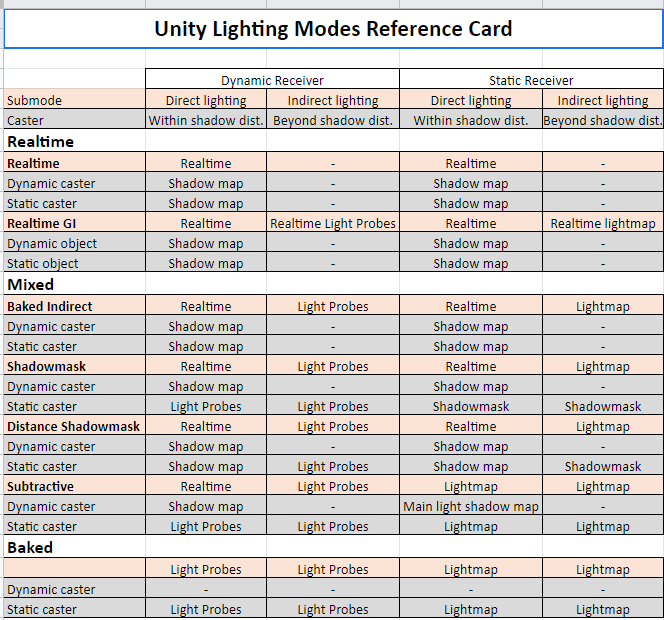
VRCat: Community-Run VRChat Forums
Greetings! Over my course of playing VRChat I've noticed that most worlds, mainly the ones that have baked lighting, are done poorly, or in an...
royal canyon
That ^^^^
cobalt sluice
Thanks guys!
fervent scarab
making a world is fucking tough 🙂 🔫
royal canyon
need help @fervent scarab?
fervent scarab
need help balanceing my design what i want to do and the constraints
royal canyon
never dealt with Nav Mesh
copper prairie
Does anyone know where I can get a prefab animated door?
royal canyon
but NPC's aren't so bad if you want to animate them
@copper prairie animated door no but there's a prefab for a hinged door. You'll have to do the animations yourself if you want it animated
copper prairie
@royal canyon Could you link me that please?
royal canyon
it's in the prefabs but Cyanlaser has an animated door tutorial if you'd like to follow it
First actual tutorial on VRChat triggers. Goes over creating an object to act as a door, animating the object, adding triggers to make the object open on pla...
here's the link to Prefabs database
copper prairie
Thank you very much.
royal canyon
no worries 🙂 if you have any trouble let me know and I'll try my best to help
bold ibex
i don't think vrchat supports navmesh if i recall
but theres workarounds im pretty sure
royal canyon
I believe it does, it was used in the VKET3
bold ibex
vket creators had access to custom scripting
stone hollow
They had one script, that vrc team made for them custom.
bold ibex
I assume thats the one that opens chrome tabs on your pc
stone hollow
Yep!
bold ibex
nope
royal canyon
even the chat system?
bold ibex
that prefab for it is free on booth
stone hollow
yeeeep.
bold ibex
yep
stone hollow
The chat system is super laggy
 minor finch
stone hollow
minor finch
stone hollow
Baking artifacts
stone hollow
Bake with different settings
cobalt sluice
@royal canyon baking is still taking multiple hours... maybe I should make everything that's not being hit by light not static?
The number of jobs always starts somewhere in the 800s
royal canyon
jeez man 😮 how many lights do you have?
cobalt sluice
14
royal canyon
are they all set to baked?
cobalt sluice
I could probably condense 8 of them down to 1
yes
it looks like your settings are higher than mine actually, I had indirect res = 1, lightmap res = 1, and lightmap size = 1024
minor finch
what part of the baking process is it hanging on?
minor finch
do you use light probes?
cobalt sluice
I assume it's because I have a huge world with a ton of static objects
no light probes atm
minor finch
yeah that's what i've experienced with large worlds with directional lighting
cobalt sluice
thing is there's no directional lighting
no direct light and the intensity multiplier is 0
so their algorithm sucks and is just trying to calculate for nothing
stone hollow
I have a map with 100+ lights and it has 11 jobs
royal canyon
static objects will have baked lighting and dynamic objects will not, only light probes will light dynamic objects
stone hollow
Somethings wrong if you got that many jobs
cobalt sluice
I'm gonna unstaticify everything but what's near my lights, I imagine it'll improve drastically
stone hollow
But then theyll be real time
royal canyon
not static = dynamic lol
change your texels per unit on resolution to 10, lightmap size to 2048 and turn OFF realtime global illumination
open thicket
@cobalt sluice you can check what you marked as static in the baked lighting tab
and then see if you lightmap sizes for those individual game objects are too high
that can clamp your lightmapping speed if it's way too high
cedar nebula
@minor finch you get that ugly camo look on stuff if you try to bake lights on something that doesn't have lightmap UVs. In the import settings for that mesh enable 'Generate Lightmap UVs' and then rebake and it'll how it should
open thicket
oh yeah that too
lol
make sure all the objects in your scene have lightmap UV's @cobalt sluice
minor finch
I'll give that a shot, thanks again Igbar
cobalt sluice
It's going much faster now that I marked everything else as not static, taking around 15 mins
@open thicket baked lighting tab?
open thicket
if you're not marking anything as static it means no lightmaps are being made for it
open thicket
if its pitch black
open thicket
increase the indirect lighting intensity to something higher than 0
royal canyon
just do it 😂 jkjk
cobalt sluice
actually it's at 1 rn
open thicket
whoah i don't use that tab lol
royal canyon
jesus christ the lights
open thicket
but basically
to have decent lighting
with shadows baked
i set all my lights to baked mode
everything i want lightmaps for will be marked as as static
UNLESS they are dynamic (moving) objects
you can try progressive lightmapping if the map isn't too large and it bakes faster than enlighten
cobalt sluice
yeah that's basically what I've done
open thicket
but it can leave artifacts
i set my lightmap resolution to 10 tbh
and the result is still decent
and a lower lightmap size
cobalt sluice
well it's only taking 15-20 mins right now, I might turn the res down from 2048 to 1024
open thicket
that's normal i think
cobalt sluice
I used Sky's settings
royal canyon
2048 is actually lower I believe than 1024
open thicket
2048 is a higher lightmap size wat haha
royal canyon
lmao I said "I believe" but yeah 😂
 cobalt sluice
Is Bakery a good investment?
 cobalt sluice
I have a 1070
royal canyon
I've never had to use Bakery but I've never used more than 3 or 4 lights for my world either
cobalt sluice
For my last dark map I just went with all realtime lights because lightmapping was being super painful
minor finch
it fixed the issue, thanks @cedar nebula
open thicket
trust me when you get a hang of lightmapping you will feel so much better about your maps and its performance
cause baked lighting changes everything when it comes to optimization
cobalt sluice
well I was still getting 45fps without issue
open thicket
Technically with VR you should get around 90 fps without anyone in the map
near escarp
it just looks much better too
cobalt sluice
I have a map with 1 direct light and didn't bake, was getting 45fps fine but a friend was tanking to 15 for some reason... might be because it's CPU heavy?
rip messages
minor finch
do you have a lot of objects on the map?
royal canyon
@cobalt sluice my settings work perfect for a few lights. I had a friend make a world with like 4 realtime lights and I was getting 45FPS, he used my settings and I was getting 90FPS like it was nothing.
I think overdoing it with lights will kill any render time though
cedar nebula
if you want the most performance out of lightmaps, use 4k instead of 2k. The more lightmaps you have the more it breaks batching. Less lightmaps leads to more batching leads to more performance, though I think the 4k does increase the file size a bit more
 vestal canyon
Does anyone know any good Web player with decent UIs?
 oblique gull
what dose this mean?
near escarp
Clean the console errors
 lyric dew
@oblique gull I can't explain exactly what the problem is but I usually just clear the blueprint ID. If the world was uploaded in the past delete it from the list of worlds you uploaded
Usually fixes it for me
oblique gull
the thing is that's all it is, is a flat plane with a dark sky box i'm wanting to test
lyric dew
I would just delete the vrc world and then go ahead and put up a new one
then try to upload
other than that Idrk what to do
oblique gull
I'm currently on 2019.8.23.13.45
oblique gull
mine is kinda out of date anyway, might as wall just update it
lyric dew
alright and if that doesnt work, the best thing is just to overall remake the world, since you only have a plane, a skybox and thats it, shouldnt take too long
oblique gull
but its weird, that its doing this, for just a simple test map
lyric dew
yeah it is
oblique gull
nothing, same problem, even did a new one with nothing just the vrc world and testing did nothing be boot me back to me home
oblique gull
i guess never mind, i do have a project that's letting me upload worlds
near escarp
You need a floor collider to fall on in the world, otherwise it isn't valid and will boot you home
bold ibex
yeah remember to set up layers in the control panel
 simple flume
Can I get a short tutorial on how to tie a camera to a texture in the world? IF possible I'd like to be able to apply a shader to it as well
Oh, applying a rendertexture to an item creates a texture automatically! I hope that shaders are applied correctly still
bold ibex
make a camera object and also make a rendertexture object
then put the render texture in the 'target texture' camera slot
 foggy spire
soooo im making a map that was converted from a map in hammer and i want to make windows that you can see through, how do i do that exactly? also how do i add water to the map?. sorry if this sounds like I'm asking too many questions
 teal slate
for see through windows use a transparent shader on the windows material and adjust alpha. for water, create a plane and apply one of the many community water shaders found in the prefabs database pinned to this channel.
foggy spire
thank you
digital veldt
hello does any one know how lights show up in mirror ? the avatars are black in mirror
royal canyon
@digital veldt I'm assuming you have baked lighting. You'll most likely need light probes 🙂
just go to Game Object > Lights > Light Probe Group then you can move the individual yellow spheres to create the bounds of your area
also if there are things that aren't receiving light right now, untick "static" in the Inspector tab up top.
this is how my light probes look in my pool party world
the yellow spheres and magenta lines are the Light Probe Group
digital veldt
thank you
 lilac tangle
near escarp
lilac tangle
near escarp
usually a flat plane, you don't want bobbing
near escarp
it sucks in VR
fervent scarab
excuse me Ruuukick some of us like jaring and chaotic experiences.
 junior glacier
So, how do I make a world portal put everyone in the same instance of the world?
Cause as it stands if someone enters my world portal, and someone enters after them, it puts them in a brand new instance with only themselves
Driving me nuts
:C
 unborn elk
@lilac tangle Maximum incline character can go up is 60 degree
 quartz eagle
Lmao I had to
cedar nebula
@fair rover players in stations don't have collision. The way around this would be to use the Follow Target script from Standard Assets with the PlayerTracker prefab from Toybox to have a collider follow the player and use that for detection instead (make sure one of the objects has a rigidbody)
@junior glacier world portals work on weird logic. If you have the portal enabled at start and don't disable it then it should function correctly, I think there's something weird that happens if it gets disabled
minor finch
Is VRcat dead?
 nimble hull
oiiii world creators, ill test ur unity 2018 vrc worlds. i dont have the most time but i will try to make room for trying things out, just DM me and ill let u kno if its possible
digital veldt
i thought this would be easy but apparently it isnt soo does any know how i can make the tsuna video player for everyone or master instead of owner ?
royal canyon
@digital veldt I'm not sure if you can, actually. Even the Iwaplayer v2.1 doesn't allow for it. Only the IwaPlayer v2.2 does. But @teal slate has a prefab that is a tablet that has Video player, gallery, Virtual-weekality news, and a camera. I use it in my pool party world for a video player. It's just better lol
digital veldt
thanx i found the hangout one testing it now
 frank kayak
quick question, whats the max amount of heat a world can get?
if thats. the right term
stone hollow
6 iirc?
frank kayak
understandable lmao
stone hollow
Im seeing 7 on the room of the rain, but the stat doesnt seem to do much.
frank kayak
idk either im just excited bc it means people like my stuff lmao
stone hollow
Whats the map?
frank kayak
worm on a string avatars 👀
stone hollow
Are they worms on strings?
frank kayak
yeah its based on a toy thats actually p old
frank kayak
ur like invisible and its attached to ur hand so ur just a tiny floating worm its gr8
👀 👀 👀 👀
its a rlly simple world i should bake the lighting lmao
stone hollow
ill let you know how broken it is on the beta
frank kayak
😔
frank kayak
theyre using poiyomis so idk if that has any effect but i'll have to fix that when we update
stone hollow
i see the thing at the top
frank kayak
yeah you grab them
stone hollow
Poiyomis just requires a reupload. so its simple enough
 indigo pagoda
I've confirmed the shader to be working in 2018
frank kayak
oh nice
indigo pagoda
but there are some UI issues atm
stone hollow
Just a reupload, right?
stone hollow
Cool, thanks poi :-)
frank kayak
ty for providing us with such a nice shader btw
stone hollow
Do you get a notification every time someone mentions your name here?
you're always on the ball
indigo pagoda
If you want to know exactly what's going on with the shader feel free to send me a dm and I'll invite you to the server or just click the discord button at the bottom of the shader ui
stone hollow
Ill take that as a maybe 😛
frank kayak
i'll prolly join later today 👌
 balmy relic
I I want to put a fake cercle shadow on the floor that follow the player. How could I acheve that?
vestal canyon
does anyone know a way to edit post Processing using Sliders via ui? (Trying to make a interactive environment settings for my world)
 dry vale
Do reverb Zones work with 2d audio?
cobalt sluice
Speaking of reverb zones I've never heard one that sounds good- mainly because it only affects your own voice
fervent scarab
hello questions
how do i make a foggy cliff fall of doom?
like you see in a lot of old 64 games?
near escarp
do you have an example ?
fervent scarab
trying
its like that fog that is any 64 game that "characters fall to their doom"
normally on a cliff
distance fog
the fucking nintendo 64 had this fog I can't find an image of it.
k imagine this but lower graphics
near escarp

Make various clouds with Massive Clouds
Massive Clouds renders 3D clouds with volume rendering in screen space. More than 60 different presets are available and you can start using them right away. Of course, all the parameters can be customized freely, so you can create ...
fog seems to be something hard to achieve, you either sacrifice look or performance
fervent scarab
ok cool and What would be the trick for it on a quest?
I figure the quest has at LEAST the power of a nintendo 64
teal slate
The quest doesn't handle transparent materials very well. I doubt fog would run smoothly.
teal slate
I don't have a quest so I'm not sure what its capable of but while testing fog and other particle effects as well as transparent materials with a friend that has a quest we found that using transparent materials significantly dropped frames in fairly optimised worlds
fervent scarab
adi it's not a material though.
teal slate
@vestal canyon you can do this by controlling the weight of a post processing volume via an animation. This will only work on post processing stack v2
near escarp
you would need a flat particle
fervent scarab
cool, and Stack V2 is that a setting in unity? or something i need to get as well?
teal slate
Only if you want to control post processing via sliders
near escarp

GitLab
A surface shader for Unity providing cel-shading. (Forward rendering only)
teal slate
I was just answering question from someone else. But if you want post processing you can use the link ruuubick just posted. It's disabled for quest though.

 queen mortar
any chance does anyone know why when im offline testing a world it loads in then breaks then sends me back to spawn? theres no errors, cleared chache, using future build and renders fine
teal slate
If you want global fog you can use unitys built in fog but it does have issues with lighting and shadows
fervent scarab
lighting is baked on quest side and there should be no issue with realtime lights
the unity's fog is this something i can toggle on and off with the event system?
near escarp
@queen mortar make sure you have a floor collider
queen mortar
yeah im aware im using terrian
teal slate
@fervent scarab You can only toggle it via unity in lighting settings. You might also need to change the shader of the terrain. Vrc has issues rendering unity built in fog on built in terrain shaders. Best test first to see if it renders on terrain, grass and trees.
near escarp
future build ?
fervent scarab
@teal slate k, all my "terrian" is models i've made in 3dsmax and am importing
teal slate
You should be fine then
queen mortar
future publish my bad btw
near escarp
disable it
vestal canyon
@teal slate thanks ^^
mild spade
Is there a reason Post Processing would not work on VRChat but would work on Unity after updating to a new SDK? I just updated to the newest SDK and changed only the reference camera's near value. Nothing else was changed. I see the effects on Unity, but not on VRChat (the world does updates)
 sand fossil
Hi, so I would to know if someone can help me with my world, so I have a menu that I did, but I will like that when the player click and activate the menu (per exemple mirror) well the color will change so the player can know that he activate this option
mild spade
@sand fossil One way is to have an animation that changes color value of the text by OnClick. Other way is to make a copy of the Mirror text, change its color and keep it inactive. Then activate that text while the mirror is on, and disable it when the mirror is off. One note is that you dont need to have a VRC Trigger to activate a Local event if using UI buttons since all UI events are local by default.
sand fossil
Ok thanks for the help 😄
 paper cosmos
Hey, I'm having an issue with some objects not syncing in my world for all players. I had made a Toggleable Camera that displays on a screen, and you can move the camera around, but for some reason if someone else toggles the camera on first, and someone does it after, the camera object no longer syncs and each of us see 2 different things on the screen.. Is there any way to fix this? Dx
Okay I found out its not just the camera, It seems as if any movable objects are toggled off by default, if one person toggles them on and moves then, once someone else toggles them on, They're not synched for the 2nd anymore... Is there any fix for that? I had just upgraded to the new Unity I'm supposed to use, and the new SDK as well...
cedar nebula
The only fix is not to toggle the object itself, toggle its components instead
paper cosmos
So as long as I'm only toggling the Components, it will still sync with all Players in the world, including late joiners as well?
cedar nebula
@paper cosmos Yeah components aren't synced in the same way so it should work no problem
 left thistle
whenever i test the world and my game starts, the world doesnt update. It is only showing my first test I have done and all the other objects and skybox i have added is not showing.
cedar nebula
sounds like you have compile errors. Go back into Unity, open the Console tab and make sure Error Pause and Clear on Play are disabled, then hit Play at the top and see what errors come up and try to resolve them, usually by deleting what's causing the issue. If you recently imported post processing v2 then delete the Tests folder
left thistle
where are the tests folders located?
I disabled Error Pause and Clear on play and there arent any errors
cedar nebula
it'll be in the post processing folder, but that's only if you installed the entire package instead of just the folder you need
left thistle
I found the problem, It was my skybox for some reason. Thanks for the help!
 limpid pivot
Working on a world that's big in scale. I noticed the further my friend and I got from spawn the more our avatars would jitter. You have to get pretty far to notice the jitter. Any idea how I could remedy this?
 bronze smelt
Yeah, don't go too far away from the 0,0,0 point
Like, there is no other solution for it. It's just how it works
limpid pivot
I'm guessing it's a limitation with how vrc works? I could of sworn I've been in bigger worlds and never noticed but maybe that's just it. I never noticed before. I thought maybe if the spawn point moved with the player to each location that could work but I haven't tested. If it's tied to the 0,0,0 point though that wouldn't work anyways. Oh well.
bronze smelt
It’s a limit in Unity and any other game engine really. Not much we can do about it in VRC.
Games that have gigantic worlds with no loading screens isn’t one big world all together. Its split into sections and loaded when needed
 hardy nest
For some reason this corner of the room lights up when looking at it from certain angle, it should be dark. And this only happens in play mode or in game
Normal
tribal current
so
i wanna add a mirror to my world, but its already not the greatest in performance
i know how to make a toggle mirror, but id like to replicate that thing i see in some worlds where theres an expensive/cheap toggle as well as an on/off toggle, but i cant seem to find anything on how to do that
anyone here happen to know?
cedar nebula
@hardy nest Is your lighting realtime? That can happen if you don't bake your lights. Also do you actually need that directional light, because it looks like its an indoor scene
@tribal current A cheaper mirror would just reflect the MirrorReflection and Player layers. All you have to do is duplicate your mirror, set it to those settings, and then you need to add a little extra logic to your buttons. Have one button toggle your expensive mirror but disable the cheap mirror, and the other button toggle the cheap mirror but disable the expensive mirror
tribal current
so what would i wanna do from here?
ohhh wait i get it now i think
have it set expensive as false, and toggle cheap? then vice versa for the other button
 glad ferry
I have a question related to a world I'm working on. Is it possible to do a 3D Geometry skybox like you'd see in something like UE4?
left thistle
trying to build a test world and i keep getting stuck on this
tribal current
hm
i thought just showing the player layer wouldve been enough
right well ive got it working now so thats done
the world is new serena if anyone wants to see it
cedar nebula
@left thistle it's trying to bake your lighting, just close Unity (the cancel button does nothing), reopen the project, go to Windows > Lighting and at the way bottom disable Auto Generate Lighting. Eventually you'll want to bake your lights but its better to do that on your own time after you actually know how to do that
 deft vault
I'm trying to make a trigger fire only when every player has exitted its volume. I've tried experimenting with Trigger Individuals being off and OnExitTrigger, but it doesn't seem to work. Is this kind of exit trigger possible in VRC?
cedar nebula
you can do it but it's a bit more work. Use the trigger volume like a 'room sweeper', where every time somebody exits the trigger you then sweep the room to see if somebody is left by having them activate an OnEnterTrigger. If the trigger isn't activated in so many seconds then activate your final trigger
left thistle
is there a way to have my audio bank play right when someone enters the map?
cedar nebula
Does it actually have to be an audio bank? Because you could do it very easily by just using an audio source with play on awake
deft vault
I've been trying to do something like that Igbar, but I can't figure out how to cancel a delayed command. My original idea was to setup a relay that's toggled off if there's still someone there, but there is no documentation on how to make one. I tried to tinker with an "OnEnabled" thing but it fired no matter what
royal canyon
@left thistle just make it OnNetworkReady
 left lintel
Does anyone know if there's a way to create or fake Godrays?
royal canyon
I believe you can do it with particles. Stretched billboard, I believe.
sleek willow
been stuck like this for awhile, any ideas?
cedar nebula
@left thistle if you want to do more than one song then you'll have to get fancy. I'd recommend using Ruubick's "RandomizedContinuousAudioBank" prefab, you can find it in the vrcprefabs database (pinned in this channel)
@deft vault I'd use an animation that's a second or two long and if finishes then it activates your trigger. You can interrupt by changing the state of the animator or something like that
oh OnTimer might also work but that's been finnicky in the past
deft vault
Oooohh, that's really clever! I'll try experimenting with that, thank you!
cedar nebula
@left lintel There's a prefab for that in the database, "LightRays" by Gallium. Check the channel pins for a link. I could have sworn Xiexe had one as well but I can't find it in the database so not sure
supple drift
I think Xiexe's is called XSVolumetrics, dunno if it's in the db (def should be tho)
cedar nebula
can't find it in the database but here's a github link https://github.com/Xiexe/XSVolumetrics

GitHub
World of Warcraft inspired Volumetrics that hold up well in VR with small cost to performance. (You have to not be dumb when placing it though :P) - Xiexe/XSVolumetrics
left lintel
Tysm @cedar nebula
cobalt sluice
@left lintel there's also one Unity provides in "Unity Particle Pack" on the asset store, I use that one
Anyone know why my sprite renderer is appearing pink in game? It's not using a script so idk what's up
cedar nebula
sprite renderer just straight up doesn't work right now
cedar nebula
it's been a few months
https://vrchat.canny.io/sdk-bug-reports/p/default-sprite-material-broken-ingame
ah yeah it's not the sprite renderer itself, just the default sprite material
 low jacinth
If i was to try to make a world, do i need to build the geometry for it using unity or can i build the room in blender, import it and have walls and floor etc have physics?
sand fossil
How to launch a test build without vr?
bold ibex
@sand fossil try this http://secondstrife.com/vrchat-vbs/
it will ask you if you want desktop or vr each test build launch, and you can edit the script if you want it to open desktop each time etc
sand fossil
thanks
cedar nebula
@low jacinth You can build it in blender, in fact I'd recommend that you do. What do you mean by have physics though? Do you just mean collisions or something else?
low jacinth
yeah collisions, i guess there is something that needs to applied to the mesh to make it have physics, like being able to stand on a floor? Does that follow the geometry of what has been made or will it make a bounding box or how does it work?
no dynamic bones or stuff like that, just being a world
chairs ive seen there are prefabs for than can be placed and then hidden inside whatever else
if one makes custom seats for example
cedar nebula
You can just give the mesh a collider component, but it depends on what type of collision you want. Mesh collider will follow the geometry but it can really unoptimized_. It's better to rebuild the collision out of 'primitive' colliders like boxes, sphere, capsules, etc. Either that or check Convex on the mesh collider component, but this might not be what you want if players can go inside it.
low jacinth
alright, so id build my room nicely and then put shapes for where the collisions should be, like a putting a box at floor level and giving it a collider so it can be stood on
cedar nebula
yeah could do that
 onyx kindle
solid helm
onyx kindle
solid helm
Great, I hope it helps!
vast lantern
I have a quick Q, if I set a public world to private and then later set it to public again, does it have to go through community labs again?
cedar nebula
yeah
 quasi rampart
hiii ❤ experimenting with worlds for the first time, and when building my world it's freezing at this point:
wondering if anyone knows why? O:
cedar nebula
It's baking your lights, I'd recommend going to Windows > Lighting and then all the way at the bottom disable Auto Generate Lighting. Eventually you'll want to learn how to bake your lights but it's better to do that on your own time and after you know what the settings do (default SUCKS), check the channel pins in #world-lighting when you get around to learning
quasi rampart
O:
thank you! <3!
thank you so much, @cedar nebula ❤ that was exactly my problem ^ w^!!! saved me so much googling <:D
quasi rampart
so, i'm wanting to have some unity terrain visible in the distance through the fog in my world, i can see it in unity when i run the scene, but in vrchat the montains aren't there O: any ideas? ❤
cedar nebula
you need raise your render distance
http://vrchat.wikidot.com/worlds:guides:render-distance
 harsh briar
Has anyone managed to get exmenu working? I imported iwashibox, Toybox and qvpen, but neither the prefab nor the sample scene work, and looking at the console, it seems some scripts are missing
cedar nebula
did you install standard assets as well? Because you probably need that too. Double check with the readme txt files though
harsh briar
do I need all the standard assets? I just noticed that line in the file
cedar nebula
probably not all of them, most likely just Utilities and Cameras but I don't know for sure
harsh briar
alright, gonna try importing some of those
harsh briar
it works now!
if anyone has any issue similar to me, the packages I imported are: crossplatforminput, camera and utility
though it's likely the only package that was actually needed was utility
 dusty fjord
What are people using to load youtube videos so quickly?
bold ibex
cant launch into my world with build and test am just sent to home world no matter what
mild spade
@bold ibex Check for errors on the console tab.
bold ibex
all fixed
vestal canyon
Does anyone know how to use animate controller with ui sliders? I use pp2 and want to change between settings. Dm me pls 
lyric dew
How do I make a UI button toggle an object?
because I have a mirror that is off by default but when I click the UI button it turns on but when I hit it again it stays on and wont turn off
Same with my performance+ button, since everything is on by default, when I click it, nothing will turn off since it's already all on.
So the problem is once an object or something is set to active it wont set it un-active
teal slate
Use the toggle script instead of button
lyric dew
thanks
 craggy elbow
Having an issue where when I try to join the world I created it goes to a black screen for a few seconds then boots me back to my home world, any ideas?
 chilly shoal
How can you look at the file sizes of your world? I mean I know that mats, textures, and geometry will be whatever size those files are. But I think my world has something in it thats boosting the file size up for no reason
@craggy elbow thats usually caused by VRC_Triggers
lyric dew
@craggy elbow What version of unity are you using as well? Sometimes the wrong version of Unity does that
@chilly shoal A big thing is do you have sounds in your world? Like music, other stuff like that?
chilly shoal
nope. I just killed a lot of videos too
i know theres a way to look at the size but I can't find in the discord search for some reason
lyric dew
Other things could be larger objs or fbsx
craggy elbow
2017.4.28f1, and it may be the vrc_triggers I'll take them out and try it without.
tyty
craggy elbow
Objects (3D cubes)
chilly shoal
search for customscene when your notepad comes up
lyric dew
Use UI buttons
I just switched over all the buttons in my ITC Podcast world and it's a lot better than cubes
chilly shoal
UI is the way to go 😄
lyric dew
always
sand fossil
Hi, I would like to know if that possible to modify a value of a Materials with a slider? The lightness here
fervent scarab

A Terrible spooky nightmare for the poor shibasǃǃ
cedar nebula
@sand fossil You can use an animation to move the slider. Actually maybe a UI slider too? I don't know if those can change materials
sand fossil
That what I use, UI Slider @cedar nebula
cedar nebula
I have not tested if UI Sliders can reference materials, it might be possible? Just find a material property I guess and look for something like Lightness.float or something along those lines
sand fossil
ok
balmy gate
UI Sliders can reference animator times
using Rebind -> Update (dynamic float) on an animator to reset it and the seek forward by x seconds
and so you mean an animation clip that has a material setting to 0 at time 0:00 and set to 1 or whatever at time 1:00
@sand fossil just like in avatars you can use Mesh Renderer.Material._SomeValue properties to animate things
before rebind and update, make sure to also set animator speed to 0
the old solution is uncheck the animator but that may break in unity 2018, we're not sure yet if that will get fixed or not... so safest is enable it and set speed to 0
fervent scarab
@warm marten respawn causes glitches though
 proud harbor
Soo are video player broken again
fervent scarab
pwease check out my world owo
bold ibex
anyone know who made Watching Paint Dry?
i wanna hook 'em up with my source engine shader
cedar nebula
the world creator name is on the same menu, you can also find out from the website if you search for the world. You're looking for "Zangeiti"
 stray sand

Will be available soon at: https://github.com/jetdog8808/JetDogs-Prefabs
bold ibex
Can I ask for help on a world here
 left marlin
Yes
bold ibex
Okay thank you, so usually when I'm done with a world I like to test it out before making it public. But this time it says "You'll need a new app to open this VR Chat link" instead of opening my VR Chat
I have found zero info online how to fix it so I'm kind of desperate, I don't want to update my world publicly because there might be some issues that I'm not comfortable with having
Hence why I really need to test it out but can't
left marlin
What link are you using?
You should be able to test in game by finding your world in the "Mine" category towards the bottom
left marlin
Check your settings and make sure you have the vrchat.exe linked properly
cedar nebula
you have to direct it to the actual .exe location, it's buried in all the steam folders
bold ibex
I never had to do that in the past though, is that something I have to do now?
If you could show me how to do that, that'd be awesome
left marlin
I'm surprised it worked in the past. It doesn't know where your install is when you import the sdk the first time.
bold ibex
Again, it would be awesome if you show me how to do that
left marlin
Do you have oculus or steam install of vrchat?
You press edit and find your install location.
Steam: C:\Program Files (x86)\Steam\steamapps\common\VRChat
Oculus: C:\Program Files\Oculus\Software\Software\vrchat-vrchat\
These are the default locations. If you have a different structure, no one can help you with that as it depends on what you set.
left marlin
@Nako#5603 Follow how?
Did you just change your name?
@bold ibex, follow the player how?
Close enough, but here is a video on player tracking in worlds
https://youtu.be/Yik63cfyuD8

This tutorial goes over how to create a player tracker and 3 examples of how to use it. The player tracker was first created by HardLight and released in his...
I'm not sure what you mean. At this point, this will give you the location of the local player. From there it is just how do you make your object follow an object in the way you want.
Download standard assets and drag the AIThirdPersonController in the scene. This is unsynced, but will work for what you want. You can check the prefab database for Fionna's AI Pets Pack to get a basic description on how to work with ai, but it is somewhat old now.
left thistle
how do i make one of the video players where people can enter youtube urls
 ripe zenith
@left thistle : I've used this one on previous worlds and like it, works with youtube links but bufffers a bit before showing: https://github.com/MunifiSense/Hangout-Player

GitHub
Basically the video player in Hangout House for VRChat - MunifiSense/Hangout-Player
left thistle
okk tyy
quasi rampart
question! I have mountains far in the distnace in my world, and I want them visible from far away, but because of how you can apparently see further through the corner of your eye, when you turn your head the land appears/disapears O:
 ornate turret
increase the far plane on the camera
and then drag and drop that camera into vrcworlds camera reference
default far plane is 1000
bronze smelt
VRChat SDK > Show Control Panel > Builder
If you don't see Show Control Panel, then you got to sort out the errors you got in the Unity console
bold ibex
no clue what this means
fervent scarab
Question, how do i have a collider check for another collider. and what layer do i set that collider on so players don't interact with it. (im trying to set up some crude AI systems for an NPC monster)
bronze smelt
@bold ibex Re-import the SDK
near escarp
@fervent scarab Use OnEnterCollider
spring linden
currently i have a problem with offline testing and uploading because it doesnt load the new stuff in my world, everytime it will start with some older stuff.. what can be the problem?
near escarp
check the console for errors
spring linden
a lot of erros like this
FileNotFoundException: Could not load file or assembly 'VRCSDK2, Version=0.0.0.0, Culture=neutral, PublicKeyToken=67033c44591afb45' or one of its dependencies.
near escarp
reimport the SDK correctly and you'll be good
spring linden
what you mean by correctly? i updated some minutes ago to the newest version, with the older one befor i had the same problem
near escarp
If you need to update your SDK, it is important that you follow these steps to ensure the update proceeds properly and you don't have any old/conflicting files. ## Simple Update Here's how you update your SDK. If you're just uploading avatars, you can use the following proc...
spring linden
ok i did, but still the same problem
stray sand
let me just put this here. https://twitter.com/jetdog8808_dev/status/1181252159804973057?s=20

 near escarp
@spring linden which version of unity are you on ?
near escarp
what did you do inbetween ?
spring linden
nothing
near escarp
are you logged into the sdk ?
spring linden
yes
near escarp
log out and try again
spring linden
believe me, this is not the problem
near escarp
no clue then
spring linden
remember, the packaging process of the sdk is not working, it bypass it and starts the world immediately
 vocal schooner
when i try to bake my lights it says i have no lightmaps, but i dont understand this, it worked before, i changed nothing, but now it this
sleek willow
Are your lights actually set to baked? And do you have your meshes set to static?
 shut lichen
bold ibex
shut lichen
bold ibex
how do you change the clipping planes for the camera you use to move around the world
opal goblet
@bold ibex afaik you cant. At least not directly. Select the Object and press F to focus on it, that will automatically adjust the clipping. Unless you really need to get close and personal that should work.
bold ibex
i need to get really close
opal goblet
well then you can try to cheat it by creating a child sphere and make it really tiny. focus on that and then navigate around.
Otherwise I dunno
lyric dew
How do I switch over my unity project to android to upload for Oculus Mobile thing
open thicket
how can i make a bell that rings when someone joins the map
is that OnNetworkReady with an audio trigger?
OH
modern kayak
onplayerjoin > local > audio trigger
modern kayak
yep
modern kayak
onnetworkready also totally works, but that means you are having that one player broadcast to everyone else. When possible, you want to use local events. And onplayerjoin fires when you detect anyone joining, so it can be local
open thicket
interesting
is there also a way where you can store physics data
like
if you were to swing from an object
using the climbing prefab
and let go
it would apply physics
so you'd fly and not just fall down immediately
modern kayak
it is possible to make a climbing system that is physics based but I'm not sure what you mean by "store physics data"
modern kayak
yeah but it's not built with physics in mind


Also, I got moving objects working. Here's something fun you can do with them! https://t.co/mxApB9cQ0G
 Twitter
open thicket
Twitter
open thicket
ah
modern kayak

After a bunch of iterations, I've finally got something I'm really proud of. Rigidbody based player so you can fling yourself? Check. Don't interrupt normal player movement? Check. Dynamic collider so you can crouch under things and get up over ledges? Check. https://t.co/...
Likes
177
Twitter
modern kayak
we're both using the same method of detecting the player's root position and applying an offset, but while the original is using pickups to directly affect the offset, I'm letting a rigidbody affect that offset and then just using joints to affect it
lyric dew
So anyone know how to upload a world for the quest?
open thicket
is this a downloadable prefab already? @modern kayak
also i'm looking forward to your zerogravity mode, that's going to change so many things with creative maps
modern kayak
it has a pretty complex set up so I haven't released it yet. We just released dead station: trident 4 if you want to try it out though
modern kayak
You've checked the "convex" option which is preventing it from going in. Usually you would want convex because it is WAY more efficient, but since you want something to go inside you need it concave. Alternatively, you could rebuild the collission out of multiple box colliders and that would be even more efficient than a convex mesh collider
Non convex mesh colliders do not collide with other non convex mesh colliders because it would be far too expensive to calculate
If you can, you should be building all your collision out of primitives like boxes, spheres, and capsules, especially if they are rigidbodies and pickups. But if your world is too complex to rebuild out of primitives, then you can get away with a non convex mesh collider as long as everything else is primitives
coral wing
the pickup's scale probably isn't uniform with the parent object
sand fossil
im a noob, how can I change it?
mild spade
Scale - x1 y1 z1 OK x2 y2 z2 OK x23 y24 z 50 Not okay
sand fossil
yea the base object have different size, cant change it because the object will be all broke
modern kayak
What matters is the parent of the object. You can rescale the object with the mesh but never rescale objects with children
sand fossil
nvm yea i did something wronf
left thistle
my vrc_trigger now looks like this. I feel like i remember it looking a lot more simpler?
left marlin
Check your console for compile errors
If no compile errors, check the top right of the inspector for the three lines and change out of debug mode.
left thistle
left marlin
Delete the old sdk completely and reimport the new one. Looks as if you have duplicates.
left thistle
okay thank you
 rain roost
Is all volumetric fog broken currently?
near escarp
Yes, the asset is currently not working
left thistle
how do i make one object be able to turn on/off colliders of other objects?
cedar nebula
use the SetComponentActive trigger action
short gulch
Alright Phase that looks amazing. Any idea when we'll be able to get our hands on it? @modern kayak
 carmine meadow
Any sort of detection for generic vs. humanoid avatars?
left marlin
@carmine meadow you can perform a test using a station since for some reason generic avatars can’t enter stations right now but once in the station, players can turn into generic.
carmine meadow
Right, that's what it was thanks. Forgot about using stations like that-- been out of VRChat for a couple of months XD
balmy gate
@left marlin even if the world does a SendRPC to force the player into a station?
left marlin
Yes, I used it in my wall world and I add a check to see if they even entered the station.
lyric dew
Two questions:
1.) How do I upload my worlds for Oculus Quest?
and
2.) Does anyone know if there is like anyway to make something like a ui that I can click on and use my keyboard to type?
left marlin
@lyric dew
- Switch unity to android from the build settings.
- Ui input field with the vrc Ui shape component on the canvas will allow you to focus on the Ui and type with your keyboard. There is no ingame keyboard and requires a physical keyboard to use.
lyric dew
Thats fine but thanks so much, its perfect
modern kayak
@short gulch public release is post poned mostly due to how complicated it is to set up and how many caveats there are. It's difficult to convey every little possible step you have to do to set it up for your own world
 cloud nova
Does anyone know how I can tie an object to a spawned player like a camera or UI?
cedar nebula
If you want it locally for each player then yeah that's super easy. Use the PlayerTracker prefab from Hardlight's Toybox to get the players position and then use the Follow Target component from Standard Assets to follow the PlayerHandle, maybe some with offset so it's not right in your face. If you want it so each player has their own and other players can see it/interact with it in some way then you'll have to mix in the PropSpawner system (also in Toybox) and that makes it a lot more complicated and prone to bugs and other issues
cloud nova
Would it be alright to add you for questions on it? I'll go snag the toybox (because world fab isn't my regular area of play)
cedar nebula
if you're going to use PropSpawner then I won't be able to help, I haven't personally messed with it myself because of all the horror stories I've heard about it 😅
For general tracking stuff though this CyanLaser video can help you out (you won't need to build your own tracker if you just use the PlayerTracker prefab)
https://www.youtube.com/watch?v=Yik63cfyuD8
This tutorial goes over how to create a player tracker and 3 examples of how to use it. The player tracker was first created by HardLight and released in his...
cloud nova
Thank you so much!
fervent scarab
@near escarp I got the goofy vacuum working in my world!! 🤣
fervent scarab


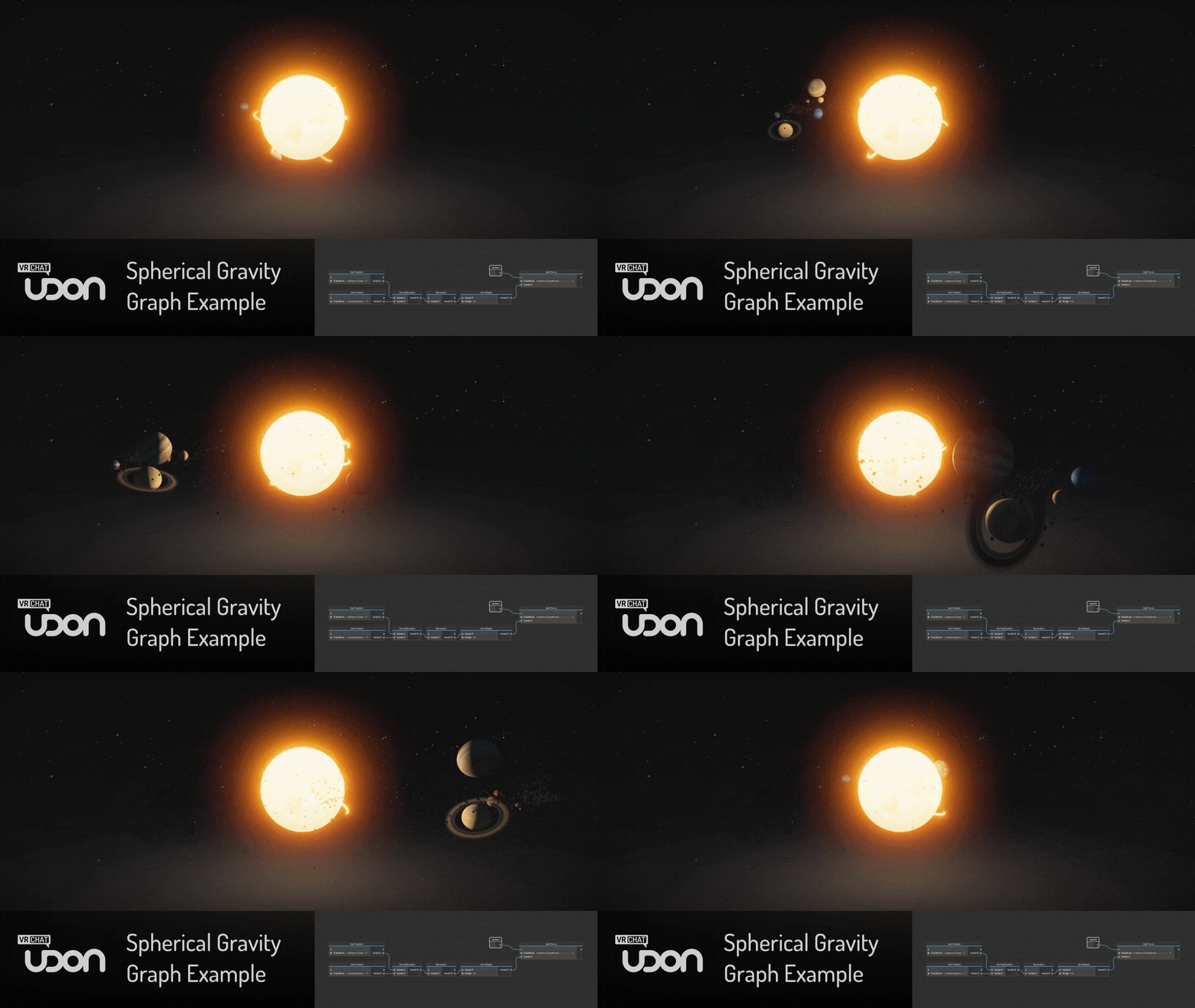
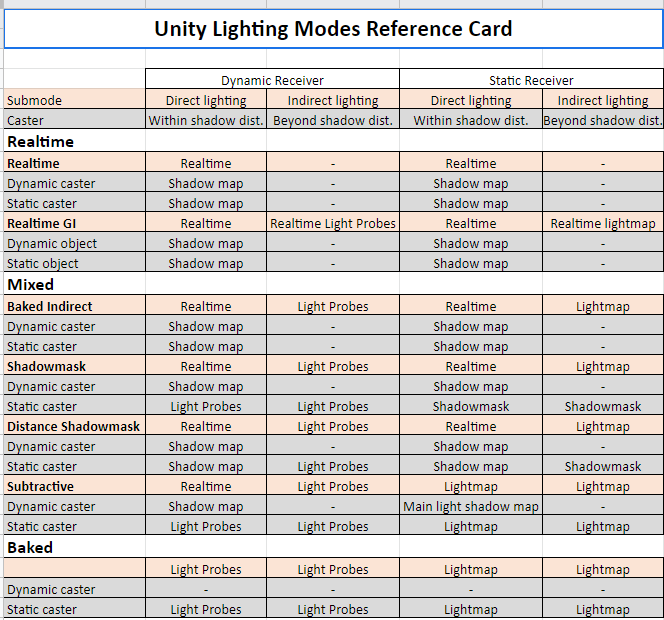
I have solved the @VRChat #mirrorsimulator problem! with the introduction of THE MIRROR GUARDIAN!
Now Live in my "Shiba Spooky-Ville" world.
https://t.co/xAlGU6AkQJ https://t.co/narLZdkrhr
Twitter
fervent scarab
@stone hollow thanks. I love my mirror guardian.
minor finch
Im rolling XD
 heady rover
How do i fix spatial audio? VRC_Spatial audio component doesn't work for me
cedar nebula
the audio can't be 2D at all, it has be 100% 3D (assuming that's your issue)
 maiden halo
Hello !
I am currently making a video player and cannot find information on how to make it so that players can embed their links with you tube ...
Please tell me how to do this.
cedar nebula
use the iwashi player or hangout house player, trying to make it yourself is wwaayyyy more trouble than its worth
quasi rampart
sooo, I want to make a world where the characters are on an airship, and they fly through a world O:! I thought at first I could move the world around the zeplin instead of the other way around, to avoid weird jerky movement or avatars being left behind- but when I do this, it just ends up super laggy O: wondering if anyone knows what I should do?
cedar nebula
you could use chairs, those will keep players bound to the airship. If you can't do that then yeah your only real option is to move the world around the airship instead. You'll have to optimize it around the fact that you can't use static batching though, gpu instance your materials or use dynamic batching (every object has to be under 300 vertices)
bold ibex
Anyone knows why the avatar pedestal is not showing in world? xD I just added the default one and added the blueprint ID and thats it, but its not showing up for some reasons in the test mode v-v
short gulch
Phasedragon, Understood thanks! Really looking forward to it whenever you get all that figured out. Tried it out in that Dead Station world last night and was really impressed. (Not pinging you to avoid being annoying)
fervent scarab
anyone know why a worlds Heat rating would be set to 0 after an update?
near escarp
give it time to adjust
fervent scarab
next question is it possible for a trigger collider to be triggered by another trigger collider?
near escarp
You'd need to use OnEnterCollider for that iirc
fervent scarab
k cool and i can use other layers for that right?
near escarp
yessir
bold ibex
Anyone knows why when I update my world it just makes a new of the same world xD?
In fact I have a trillion dead worlds lying around because you only can publish a world every week, and if I have to wait for next week to make a new world again its gonna be kinda meehehehehehhe
e_e
I have one world which sends me to a blank space with a sign that says go to vrchats discord | and then I have this current one which sends me directly to the main home from vrchat itself.. So in order to kinda avoid that I would do the fix, but when I tried to update the world after adding the fix, it just made a new world which is also private, I think I'm lost
 narrow nebula
is there any reason why when testing a world using the "Build & Test" option, that the window which opens doesn't respond to any mouse movement (but still clicks)?
 modern wyvern
how do i upload my world to public
chilly shoal
Check the box that says labs when you're in playmode after pressing build
bold ibex
can i edit my public world without putting it again into community labs?
 opaque finch
@bold ibex Yes. Any world that is currently public will remain public when you update it.
bold ibex
@opaque finch thanks 
left thistle
how do i make one of those mini UI's within the world that allow you to tick boxes for mirrors, sound, colliders, etc
balmy gate
Add object -> UI -> Button, Checkbox etc
Then go to the Canvas object it creates, make sure it is not screenspace, set scale appropriately etc and add Box Collider component with large x and y scale and small z to match the canvas and add VRC_UI Shape component too
@left thistle finally you can hook up tour checkboxes or buttons to triggers by adding a trigger component and putting a trigger object into On Click () and go to VRC Trigger -> Interact. Then add stuff in the trigger's on interact
You can also call other unity functions directly where they make sense
(You actually dont need the vrc trigger or interact bits...some things can be done directly from button or checkbox or any other ui component)
fervent scarab
k i now have to add a boss battle in my world
i have an idea that is amazing
in my world there are Plushie shibas. my community loves them. They have to save Plushie Shiba from THE DOG SNATCHER!!
Greybox test. God it's easier than I thought
It's not too much more work to make this a full boss battle. Like you have to make it accross the platforms, to the other side, pick up the ammo, make it back across the platforms, and fire at the Dog snatcher. Meanwhile he's slowly turning and swiping at you. with a Collider that makes you despawn the Ammo, and teleports you back to the start.
Classic three stage boss battle with elevating intensity, Platforms start moving, Flying colliders appear.
left thistle
thank you so much Lyuma
left thistle
I couldnt find checkbox but i found the "toggle" one but everytime i make it, it appears inside my video player hierarchy and when i drag it out it becomes invisible @balmy gate
balmy gate
Because unity adds ui things into an existing canvas or creates one only if no canvas exists
So make a new canvas where you want one first and then add your toggle to it @left thistle
left thistle
Okay got it, one last question. How do i make it Local?
sorry about pinging you about this @balmy gate
near escarp
put it behind a toggle set to local