#world-development
39 messages · Page 7 of 1
 balmy gate
Like why doesn't content manager have the publish button . This despite both a web and a sdk redesign. They both use the same api
 solid helm
They're probably waiting for someone to make a Canny about it before they can work on it
 split seal
I'm having an issue when I want to build and publish my test version of the world I'm making, it's the first time it pops up and whatever i tried it didn't work, anyone has an idea ?
I've tried testing it, but whenever I do it as soon as it boot up the game instead of putting me in the test world it just puts me home
and like, the world is already online and working fine, the only changes I did was adding a missing piece of Collision, replaced some PP values, and add a UI
But now nothing works 🤷
 random owl
It looks like it's trying to upload the last build scene, there used to be a checkbox for that in the UI but can't remember if the new ui has it
split seal
I've been searching for it, But impossible
random owl
Oh no wait not a checkbox the old ui had buttons Last build and New Build
split seal
I've tried the test run but it doesn't work
random owl
You might wanna try reinstalling the vrc sdk and see if that helps
random owl
Hmm sadly can't help much more than that rn since I'm not on a computer
split seal
That's cool don't worry, I'll probably just upload it completly on the Regular World ID, but if it breaks it'll be a pain to go back that's it
Huh, ... So now even when I want to upload it on the normal World ID, It doesn't work anymore ... I guess I broke something
That test button that doesn't work triggers me so much, and if I just look at the console it seems that it doens't work because the response of my Client is Null
random owl
I did just notice that warning in the bottom of your unity
Might wanna check console to see if there's any more
split seal
Yeah the error is basic, Just post Processing not being able to reach for the Framework API
But it usually uploaded it anyway
then the rest of the errors are the usual VRC SDK being the VRC SDK
and then the debug saying the response of the client is Null
Then entire console notifications
I know
But since it doens't do error on normal runtime
it doens't pause
It's like, an SDK error
but it's not
and it's weird
Like, The scene works well, and the UI aswell
I've imported the scene in a test VR app
and it works perfectly
But the upload fail for VRC
 frail aurora
Script error
split seal
Yes, and it's the PP stack that does it
Look I'll screen cap what unity stops on
It shouldn't
and yet it does
Only when I try to upload the world
frail aurora
Did you try commenting it out just as a test?
 bold ibex
great thing about assemblies like that
if they're greyed out, they arent being used in the script at all
 supple drift
do you have the tests folder still in your project? you gotta remove it! (check the pinned messages)
frail aurora
Looks like it
supple drift
I mean the Test folder within the post processing folder - it has scripts or references in it that cause build issues!
looks like it's present from your console
split seal
Okay
You got me
I didn't see it was from that test folder
Now everything seems to work as usual again
frail aurora
Yeppo :3
supple drift
It's alright, it's pretty much an evil folder here at this point
supple drift
split seal
😂 😂
bold ibex
omfg
split seal
Totally
bold ibex
folder boi for sure
Gotta love how useful, and also how vague the console is in unity...
Gotta have an experienced eye to understand what the hell its trying to tell you
frail aurora
Usually errors tell you where the find the problem, in this case in PostProcessing-2/Tests it's just like folders on your computer in how they're structured. So if you get another one, you can know what particular asset (or script) is causing problems.
bold ibex
yee
frail aurora
Just look out for the great big red exclamation mark sign xD
bold ibex
good ol compiler error sign
if its big and red it means ya dont get to move forward
if its yellow
then you should probably look at it, but its also KINDA fine to ignore it
 weak raven
aight can't figure out why it's popping this error code up...
weak raven
almost all those errors are due to things that don't have a variable inside the VRCSDK
can test.
can not upload.
 near escarp
Detatch the world ID, and possibly reimport the SDK correctly
bold ibex
Hello
I wanted to publish a world
But i have that
Even with a new project new scene ect..
When I test the world, i'm in the VRC Home :/
balmy gate
Do you have post processing in your world? Did you make sure to delete the Tests folder?
Can you check console panel for red errors?
 rain badger
i wanna add options so u can turn thing on and off. or change the settings. like other worlds do with post processinng [Worlds Like Home of dreams] does anybody know how?
near escarp
OnInteract triggers buttons with toggle
rain badger
i know that part. but i dont know how to toggle stuff with post processing. like turning certain thing off or on. and changing its value. like very high bloom or very little
 misty shoal
I'm not getting a test folder but I am getting the same error that's been floating around, "last built scene cannot be found" etc
I can't make any sense of the errors in console or what I'm supposed to do.
balmy gate
Turn off clear on play. Clear the console. Change something in your scene. Like rename anything or move an object over a tiny bit
Detach the pipeline in the pipeline manager on your vrc scene object
Them try doing new build
And if you see anything red other than "VRCGlobalRoot is not defined" (this error is normal) then that is your problem
Look for the first couple red errors and paste or screenshot them if you are unsure
Also does your world use Post Processing? Yes or no @misty shoal
So you have the same error as @bold ibex ?
Also to ask: which unity version do you have? And which sdk version
misty shoal
No post processing
same error
unity 2017.4.28f1, the sdk from June
I'm getting this now, same as before, I just don't know what it means
balmy gate
Try deleting SampleScenes in assets unless you are using those
Those sample scenes are incompatible with your unity version, vrchat or both
You probably only need to delete scripts (.cs files) in SampleScenes @misty shoal
Oh also you should have Standard Assets in your project. It is required for a lot of prefabs and can help make your life easier. "Standard assets" can either be all the things in edit ->import package and do each one or can be downloaded on the asset store
That might possibly also fix the error you have
misty shoal
Trying both now, thank you
Looks like it's good, I don't want to publish it just yet because I'm not done but it also wasn't updating the test world, which it's doing now. Thanks again for the help!
bold ibex
@balmy gate I didn’t had the great Unity version so... i will test tomorrow
 royal canyon
@rain badger you'll need Post Processing Volume slider
rain badger
Post processing volume sliders?
iv got something like this set up
but i dont know how to actually connect it to control the post processing stuff
 lost breach
Is there any way to add a "skip forward 5s" button to a VideoSyncPlayer ?
oh can only stream player handle that
 flat dagger
Evnin all. I've been noodling with a lil world for a while now, and just yesterday I started seeing this weird artifact in the baked shadows.
From what research I've been able to do, it seems to be a bug in this version of Unity's GI baker and I just have to keep tweaking settings until it magically goes away. However, with a full bake taking 45+ min, that's kinda painful
I'm hoping someone here has hit this before and know's where to focus my attentions
 ancient pecan
My world has quite a few lights, more than the default maximum. How do I get around this?
And please don't say I have to bake them
flat dagger
Sorry
ancient pecan
I swear if I have to wait the 3 hours
flat dagger
That's kinda what uya gotta do
ancient pecan
and it doesn't end up looking good
flat dagger
Unless they HAVE to be realtime shadows, ya gotta bake
flat dagger
Trust me, I'm in that same hell right now
ancient pecan
Is there a way to bake the lighting as it is without all the fancy ray tracing?
 bronze smelt
You don't need to wait 3 hours to bake if you change the settings for the lighting in the project and on your assets
ancient pecan
OK for some reason it isn't taking 3 hours now
How do I know it's baked, and what do I do after that? Can I just upload the world and it will include that?
bronze smelt
The bottom right progress bar will be gone and you will have a folder with the scene name
that has the bake data in it
ancient pecan
god why is unity lighting so weird and complicated
light probes and global illumination and mixed lights and reeee
just let me use 40 real time lights
cant be that hard can it /s
 fervent scarab
question about world making: Here is an example that was posted in this chat yesterday. It really opened my eyes to how modular i have to approach making the worlds. and how much data that can save.
SO MY QUESTION:
With indiviual pieces, like this, would I have to put all their transforms at world 0 before export then re-assemble them into the building within unity? I find that if i export my level as a whole, the inidvidual parts have their origin point be offset to the actual geometery peice
how do I manage that so no seams are visible? I've litterally never really environments before, my entire career has been character rigging and animating.
flat dagger
freezing transforms on all the individual pieces to 0 is one way to handle this as long as you aren't repeating any pieces
What I do is make my set pieces and place the origin at a corner
Then I can use grid snap to accurately place them
fervent scarab
freezing transforms in unity or in my modeling program?
flat dagger
Before export in the app.
fervent scarab
ah! thats the missing peice cool, export format?
flat dagger
If you want all the pieces to import into the right exact place automgically, then thats how
FBX is the go to
fervent scarab
k, i was using .obj for environments because i know Darn Hyena was compaining that his .fbx was having difficulty culling properly
flat dagger
Well, culling is in the geo. The format is really just a wrapper. It doesn't change the data
fervent scarab
next question, if I scale in unity after import. is that going to screw things up with culling and lightmap baking?
flat dagger
I don't see why it would
Baked lighting is all based in UVs
And culling is controlled either by volumes or layers
fervent scarab
ok, cause for my map im not really measuring things out and paying attention to units. Im eyeballing things mostly and it's giving me more an organic feel to my map
flat dagger
Usually you get your scene laid out the way you want before lighting anyways
Since baking only works on static objects
So you want to make sure auto-bake is off until you have everything just where you want it to stay
fervent scarab
🤔 I should probably greybox most of it though
fervent scarab
but yes, freeze transforms that was the info i was missing. thanks!
flat dagger
Cheers and good luck!
 green lagoon
yes you should actually gray box it out and pay attention to units so your pieces fit together

Get the example texture and mesh files from this tutorial: https://gumroad.com/polygonacademy Free UE4 lighting presets + Tutorial : https://youtu.be/_bqpw5s...
also trim sheets are very helpful when you're doing modular environments so that you can get most of your kit down to like 2 or 3 materials
as you basically build out of tiling textures or trim sheets
ancient pecan
So I'm using the post processing stack, and in vr each screen gets kinda split into 2
Is there a certain effect that causes this?
supple drift
Anti-aliasing is the usual culprit
 stone hollow
It's expensive anyway
 cedar nebula
vrchat already has anti-aliasing, you don't need more on top of that
stone hollow
Do we know what aa type vrc used?
supple drift
MSAA i believe
cedar nebula
sounds right
solid helm
Yeah, it's MSAA
ancient pecan
Made my first world in a long time, it's funny how much of a better job I did now that I know a lot more about unity and blender
It feels nice because I'm proud of my work but also kinda sad because I know no one is gonna go to it at all
near escarp
it's alright, make stuff for yourself first, then you can keep enjoying it, and then you can share them with friends
Also @ancient pecan if you want to show your world to people who like to see them, join the community meetup on Sunday !
Check the pinned message in #events
ancient pecan
I'm assuming that no one wants to really go to it, considering the subject matter at hand cough fortnite cough cough. I just tried to recreate an area of the game only seen in a very specific trailer, but also use a ton of new techniques in blender and unity.
near escarp
Well, fortnite is much more popular as a theme than 99% of the current existing worlds have, so at least you have that 😄
 open thicket
how would i go about creating a counter for vrchat? one where i place something into a container and then it counts how many go in the bin?
it would be easy 1 by 1
but i have multiple bottles going into these bins
royal canyon
@open thicket check out Smoothie's counter prefab. You'll just have to move the collider into the bin.
royal canyon
I've used it to make a ball game
royal canyon
 spring linden
does someone know what everything can lead to a long blackscreen befor the map can be seen besides long audio files?
 tropic yarrow
@spring linden meshes with few million polygons, have 10sec black screen before map got unpacked on my full gtasa map, you can also add camera canvas to make blackscreen looks more interesting but only for desktop users
 wary elbow
is this normal to showing me the "Configure World" even when im upload this world at first time?
cuz im having a trouble with joining the world
i can't even join to my world
it was okay before but it suddenly happened
 frosty bone
I have strange problem with prefab model. When i rotate it, it will not rotate itself, but it just rotate "inside" the box instead rotate whole thing, causing model will look different. What is missing here?
See here. It wont rotate correct, the box collision seems don't want rotate with pencil?
i just put pickup, sync and box collision on pencil prefab, and see, it wont rotate correctly
it's not first time, some prefab pieces has also same rotate problem.
some are fine, some not.
Second problem: i made box collision box with OnEnterTrigger and OnExitTrigger, and i want use box to activate / disactivate something. But it's not working when i walk through the box. Which layers are needed for detection with local player?
I cannot use Player layer, it will just block me.
wary elbow
seems its really hard to understand that picture
frosty bone
sec
wary elbow
lemme know more information
frosty bone
lemme clip it

I am sure many seen this problem earlier with some prefab items.
wary elbow
thats really weird
frosty bone
I just throw prefab in world, add pickup / object sync and also box collision so i can grab it. No problem? Not with every prefab.
wary elbow
can you send me that prefab?
wary elbow
did you tried any other models?
wary elbow
i mean other pencils
frosty bone
No this is only i have
wary elbow
lemme try it
frosty bone
i delete animation part because it will let it vanish
wary elbow
yeah you should
wary elbow
im working on it
in somehow, i can't pick up the pencil
just a sec
okay at least in my case, it working so good
im gonna show you a picture
make sure you put the exact properties to your own
wary elbow
why you put the box collider when you could put the same mesh collider in the same mesh
is any reasons to you have to do that
?
frosty bone
so that box collider is problem
wary elbow
maybe
frosty bone
try it with box, instead of mesh
wary elbow
okay
frosty bone
then it might go crazy
box is choosen because it uses less data
and less heavy generally
wary elbow
im gonna do like this
wary elbow
yeah
frosty bone
And any advice about collision box for player detection?
it must detect if player is inside box or not
i tried it, but it wont work. Even InterActive layer only.
wary elbow
i've never tried that component but i will try that now
frosty bone
its common used to control mirrors on/off when you walk off, or turn camera or let monster spawn. Mostly used in world games.
You put empty box collison there, add triggers on it like OnEnterTrigger / OnExitTrigger
But it's local player interaction
wary elbow
how about OnPlayerJoined?
frosty bone
hmm
wary elbow
may i try it?
frosty bone
Player join world, and leave it
wary elbow
im gonna try with what you said
wary elbow
lemme know if that pencil problem has fixed
frosty bone
ok confirmed no problem in test world
Seems something in other world affected on some items
wary elbow
yeah
frosty bone
The world is made with free room prefabs from asset store, it's SciFi room pack
now i go test box collision trigger
oh there is also OnEnterCollider / OnExitCollider
OnAvatarHit is also other
wary elbow
yeah
but if i delete the Collider, im not sure if OnEnter(Exit)Collider gonna works as well
OnEnter(Exit)Collider isn't works
frosty bone
https://www.youtube.com/watch?v=A70dtbfZeK0 here is also simliar scene with triggers
First actual tutorial on VRChat triggers. Goes over creating an object to act as a door, animating the object, adding triggers to make the object open on pla...
oh box collider must set as trigger, i forgot it
wary elbow
yeah but i tried that and failed
frosty bone
eh?
frosty bone
no that, just screen or mirror on/off
i watching video above and it explains pretty much
so i go try it
frosty bone
yep, i saw it in tutorial video above.
wary elbow
did you fixed the pencil problem?
frosty bone
i go check it soon, now checking trigger
wary elbow
glad to it helps you 🙂
 short gulch
Is there any way to use a different character movement system in vrchat, like one on the unity store for example?
near escarp
As they'll most likely rely on scripts, nope
short gulch
Alrighty then, I figured it was worth asking. The default unity first person movement is kinda jarring
near escarp
Use the holoport ?
balmy gate
@short gulch a few prefab authors have built their own player controllers using physics and relative teleports
See the popular climbing prefab as a good example of this
You could imagine a variant where you "climb" on a moving vehicle that moves how you want
short gulch
Oh I just meant its weird, not uncomfortable to use. I guess jarring wasnt the right word.
So this one you're talking about lyuma, you can't cancel momentum when falling by tapping forward, right?
balmy gate
I suppose not, but it's probably possible with work to detect this and then do something. Also it is possible to detect touchpad / joystick movement on the first device (left controller usually). Some driving worlds use this for example
short gulch
Sounds perfect, thanks! My biggest problem with vrchats movement is that physics dont seem to matter and that you can just cancel your fall and glide whenever you want.
balmy gate
I think that's kind of a "bug" actually that affects humanoids
If you make people use a generic avatar they can't cheat like that
short gulch
Oh yeah, now that you mention it I was wondering why I couldnt climb walls and glide with my car avatar. That'd explain it.
Thanks for the info though, I'll check out that climbing prefab and see if it does what I want it to
 left marlin
Uh, I doubt the climbing prefab will do what you want since I made it super specific to climbing.
Phase’s system is all physics based which is probably what you want.
short gulch
Ah ok then, is his just on the community prefab list too?
left marlin
He hasn’t released it yet. I don’t know the status at all. @modern kayak any updates on physics locomotion?
 modern kayak
The system is done but I'm working on how to release it. Needs a good readme, editor scripts, maybe even videos
short gulch
Cool, looking forward to it then :)
 left kettle
Hello hello~ I'm trying to make a "class" system if you will but have no idea how to go about this. So for example, I'm trying to make a button where the person who clicks on this button, they'll get a blue sphere while everyone else gets a red sphere. How do I go on about carrying this out? I'm not all too familiar with broadcasting types just yet but I imagine it'd have something to do with the "owner" broadcast type. These spheres would be attached to the player tracking prefab as well.
 minor finch
So I've placed a canvas near the Iwashi video player and it has caused the video player to disappear, has anyone else experienced this?
cedar nebula
@left kettle you're pretty much describing Prop Spawner, also from the Toybox. You'd still have to do some stuff to make the class logic work, but the above-head visuals can be handled by Prop Spawner
@minor finch Did you set it up correctly? You need to set something as a Dynamic Prefab, I think it's in the readme. If you already have then update your SDK to the latest one, the ones from earlier this month had an issue that broke Dynamic Prefabs
left kettle
OoO. Will do! Thank you very much~ I was just taking into a look into Alekso's "Master Checker" as well so I do have an idea of how to go on about this plan. Once again, thank you very much~
minor finch
@cedar nebula Updated the SDK and also placed the video player as a dynamic prefab.
when i get time i'm going to replace the video player in the scene as well as the extra canvas to see if i can't recreate it
 modern star
Dose anyone know how to make a VRchat world?
near escarp

You can find a lot of tutorials on youtube to get started @modern star
If you have specific questions about certain steps you can always ask here
modern star
Ok! Thanks so much. <3
wary elbow
is anybody have an idea what is this error?
seems like it is the cause about i can't update my world
left kettle
@wary elbow try uploading with a fresh world ID.
From what it looks like, the ID for the world you're trying to upload might've been deleted.
wary elbow
i've been doing that like over than 10 times
never works
updated unity, VRCSDK and still nothing is solved
modern kayak
Wait when you say you updated unity, what version of unity are you on exactly?
royal canyon
did you try removing the VRCWorld and re-adding it?
wary elbow
yeah
and nothing's changed
im so desperate about this problem
im working on my world like more than a month
i can't lose my world like this way
 mild venture
I just had an issue like this. The error was resolved by unchecking all other pipeline manager scripts on everything else but the vrcworld, and deleting all avatar descriptors besides the one on my world. I had a bunch on some avatars. :/ The issue resolved itself after doing that. But now my upload world button won't even work. XD
wary elbow
there is only one pipeline manager exists in my world...:(
royal canyon
If you haven't already, close Unity, browse through to find your project folder in your Documents, delete the SDK folder and everything associated with it. Then re-open Unity and re-import the SDK. Otherwise you can export a UnityPackage with everything except the SDK, start a new project, then import your UnityPackage.
wary elbow
thanks for information but i've already did that as well
royal canyon
you've exported a UnityPackage?
wary elbow
yeah
wary elbow
now im trying on another project
royal canyon
I thought you said you did that already
royal canyon
sometimes that's what it takes
wary elbow
i will give it a try
royal canyon
I had to COMPLETELY redo my very first world because I didn't know I could export a UnityPackage
royal canyon
it only took 3 days to redo it though
took a week to do it the first time
so it wasn't that bad
just always make sure your Unity and SDK are up to date cuz that will cause a lot of problems for you if you have the new Unity and an older SDK
wary elbow
is there any problems with updating the new version of SDK or unity?
wary elbow
it's VRCSDK-2019.09.18.12.05_Public
royal canyon
like I said, pull down the menu like I showed and "Check For Updates"
btw are you showing any errors in your Console?
wary elbow
that shows me "an update is available" message but when i go to settings menu it is already VRCSDK-2019.09.18.12.05_Public
yeah i have
royal canyon
what errors are in your console?
 royal canyon
but still, download that version anyway and install it anyway
if your SDK was truly up to date it wouldn't say an update is available
balmy gate
Does your world use post processing?
royal canyon
I meant from the dropdown
wary elbow
what is Post Processing?
royal canyon
I'll take that as a no then
wary elbow
i've never seen that
royal canyon
there's something in your project then
your current project
maybe a custom script or something
did you download a skybox?
like AllSky Free?
wary elbow
yeah im using downloaded skybox
royal canyon
is it AllSky Free?
wary elbow
should i delete it?
i have no idea i will check
i will delete the skybox
but it does works before
royal canyon
don't do that, I'm just checking to see if there's a custom script
royal canyon
well there could be one in your assets somewhere that's hidden but I don't think that's the issue. the issue is coming from the SDK I believe
wary elbow
could the materials be cause by this problem?
royal canyon
I don't think so
wary elbow
i mean i have really realistic materials on my chairs
royal canyon
materials wouldn't cause an issue
wary elbow
okay
royal canyon
unless it's a custom script
balmy gate
Ok clear your console, disable clear on play
royal canyon
^^
balmy gate
Then move an object a tiny bit and try build and publish again
You have to change something otherwise build publish doesn't do anything
wary elbow
okay
royal canyon
btw when you exported your UnityPackage, did you untick the VRCSDK folder?
otherwise it'll export it
and you don't want that
wary elbow
i've included the VRCSDK
royal canyon
that might be your issue then
wary elbow
im working on the original project
royal canyon
export a UnityPackage and DON'T include the SDK folder on export
wary elbow
okay i will do that again
royal canyon
then when you get into a new project, import the package and reimport the NEW SDK
then try that
 mild spade
Are you sure there are no more than one pipeline manager? Or 2 scene descriptors? Try deleting those two and upload it, if it tells you it needs one, then we can be certain there is only one (for future reference)
wary elbow
i have only one VRCWorld object and there is no any like avatars or something
royal canyon
that doesn't matter there could be a Pipeline Manager or Scene Descriptor on anything
wary elbow
there is no reason to be few pipeline managers
but the SDK doesn't show any error about that
royal canyon
it won't if there's 2
flip through all of your objects and look in the Inspector tab to see if there's more than 1
wary elbow
yeah i just checked and i found no second Pipeline Manager
royal canyon
ok
so commence with exporting the package into another project and do not include the VRCSDK folder.
royal canyon
from the VRChat.net website?
wary elbow
yeah
royal canyon
ok cool
bold ibex
hey can i have some help
royal canyon
so when that package gets imported, import the NEW SDK 🙂
wary elbow
okay cool
bold ibex
ok so i started making a world about saturday and im trying to upload it now
whenver i test runn it or publish it publishes as an old version
wary elbow
omg you are same with me
royal canyon
what Unity version and SDK version are you using?
bold ibex
The latest one
balmy gate
What unity version
royal canyon
yeah "the latest version" doesn't really tell us much
balmy gate
Check post processing folders and delete Tests
bold ibex
there isnt a post processing folder
balmy gate
Clear console, disable clear on play, move an object a bit and then build and publish again. Then look for every red error and send them
royal canyon
if you're using Post Processing there's definitely a post processing folder
balmy gate
It would be PostProcessing directly in assets
But other script errors can cause the same problem. Let's see what the errors are
royal canyon
did you disable clear on play?
royal canyon
no problem, if you have any more issues I'll help if I can
frosty bone
@wary elbow i found the problem about weird morphing items when try rotate.
royal canyon
it
its probably parented under a game object that doesn't have a position of 0 or something
wary elbow
what was that
royal canyon
or it was imported with a weird angle
royal canyon
yeah just unparent it
wary elbow
oh
royal canyon
yep! 🙂
wary elbow
that is so good for you
frosty bone
But how can i make sure it goes well when in game object?
must it set on neutral 000 / 111 ?
frosty bone
so no other values are allowed, okee
frosty bone
hmhm
royal canyon
I think the Parent object takes precedence over the child objects
frosty bone
yeah i saw it
values changed when moved to object with values
no problem if it's not pickup.
royal canyon
it doesn't necessarily have to be parented under an empty game object either if it's a pickup or not
if you want things to move together just parent the objects under the object with the pickup
it'll apply the pickup to the children as well
 red magnet
anyway to fix this reflection problem for waters? the skybox is a sphere btw
royal canyon
I'm not sure @red magnet maybe try another water shader?
weak raven
water is a mechanic that you have to play around with, make sure the metallic surfacing isn't set to high. @red magnet
wary elbow
are you guys have any good ideas to loop the few audio clips?
royal canyon
like background music?
frosty bone
Question: can you make hole in the ground terrain?
like you want make path to go under terrain
red magnet
i think the issue is that the water shader simply do not support vr environment.. if anyone has a good water shader that works great on vr with reflection/refraction let me know please, thank you
red magnet
thanks
 civic forge
how do you make quest world? what settings do you go to>
near escarp
civic forge
ty
wary elbow
@royal canyon yeah
i want to play few musics on my world and make it loop
like one by one
first -> second -> third -> ... -> last -> first
royal canyon
you could do it with Animation Events
 woven condor
I'm stuck with this - any help please - i have oninteract trigger 4 timed events - how can i stop 2nd activation of trigger while events play out ?
royal canyon
use Animation Events
fervent scarab
question about material counts in VRCHAT worlds. is it better to have many material slots and repeating textures on them or condense everything to few material slots and just big gross looking textures
trying to set up my UV's better I think this is going to be a new better method
 balmy relic
import all the song in audacity and put them back to back
Of what I saw in all the mobile game asset that I rip is.
one big ass texture or two
And multiple material. So culling work corectly. Idk
 delicate marsh
i'm using post processing and i want to have players be able to toggle screen effects
i have the profile on the main camera and i have an animation to toggle the component 'post processing behavior' set to a button local on interact
works in unity when i test the trigger but not in game
any ideas?
balmy gate
Post professional behavior isn't a component in post processing v2
You must be using post processing v2 to make it togglable
And then you want to toggle the Post Processing Volume object or component @delicate marsh
balmy gate
Follow silent's tutorial for setting up pp v2 https://gitlab.com/s-ilent/SCSS/wikis/Other/Post-Processing

GitLab
A surface shader for Unity providing cel-shading. (Forward rendering only)
You need to delete version 1 or rename it is fine too
Then find the official unity github and download it from there
It's not in asset store. Silent's guide should have a link
delicate marsh
ok ty. so there's no way to trigger without v2 right?
balmy gate
Correct. V1 is static and according to 1001 is poor quality and deprecated
So basically you shouldn't use pp v1 in for any new project
Ppv2 make sure to delete Tests folder after importing. Also be careful about layers
The layer the pp volume object is on must match the layer you used in the dropdown for post processing layer component
bold ibex
poor quality is a little strong but yeah, v2 is faster, looks better, has some things fixed for vr and future proof so to say 😄
 lone epoch
is avatar pedestal possible with ui button? settings like this isn't works for me 🤔
(nevermind, fixed it)
royal canyon
@fervent scarab dude, Probuilder is lit.
fervent scarab
@royal canyon probuilder?
royal canyon
Yeah it has UV features, too. I use it, but what you're using seems to be awesome too.
fervent scarab
oh... ive kinda resorted to oldschool ways
royal canyon
lol nice
 warm marten
wtf pro builder has uv features?
i didnt know that
you mean i dont have to slog though trying to make a functional uv map on blender?
mild venture
So I'm trying to publish my world, but the naming, description and upload button never appear. Anyone know the fix?
mild venture
I mean, it starts playing itself after I click publish in the builder
then it just never goes to the naming window and whatnot
 raw arrow
Oh I see the problem now oops
I understood it wrong. Have you tried saving the project and the scene and whatnot and tried restarting unity?
mild venture
Yeah, I've replaced the sdk as well. I've had nothing but problems with the latest sdk :x
all errors I've gotten were sdk related
I got rid of them, but now it just never goes to the upload window
idk why
raw arrow
This probably won't fix it but I see you're view in the game tab is scaled differently, maybe try setting that back to default and trying?
mild venture
Nah, I've tried that.  I even made a new unity project.
Could it be that my Unity is
Unity 2017.4.28f1 Personal?
raw arrow
It does matter if your version is free or paid, the numbers really just need to be the same
And I'm assuming you can't upload if you're not on the latest SDK?
mild venture
Yeah. Should I switch to an older sdk?
 blissful sundial
Are there any guides on how to make an escalator?
raw arrow
You could try it, but it might break it
mild venture
Hmm. Guess I'll try with a backup. Thanks. 🙂
raw arrow
Might have to send in a support ticket or something, that's kind of a major issue tbh
mild venture
Yeah, it really is. :/ None of my friends knew how to fix it.
This anything important?
raw arrow
The sdk might be trying to turn on some sort of vr mode. I don't think it's a problem but I'm no expert with errors
mild venture
Ah, okie. Thanks tho 🙂
cedar nebula
you might have errors that you're not seeing. Disable Clear on Play and Error Pause and do another build, then see what comes up
 remote plover
I have a ball and a sprite. I want the sprite to move with the ball, but not rotate with it. Is there a way to do this using fixed joints, or billboard renderers or something?
mild spade
@remote plover Using the "follow target" script from the "Standard assets" will let any object follow another object without affecting rotation.
remote plover
Thanks! That's exactly what I needed
mild venture
How to stop a reflection probe from flickering? 🤔
When I look upward a bit, I notice the ground stops showing the reflection probe's work.
Like so.
bold ibex
Hello. I deseperatly need help form my world. I started to make a little bedroom, everything worked fine, I managed to bake lights, world runs at 100fps on my crappy computer.
Then I added a second room to expand my world, as a second mesh. Now the game caps at 30 fps and light baking is hell. 😦
Do I need to put occlusion areas on each room or a single one for the whole scene?
My world looks and lightin settings look like this
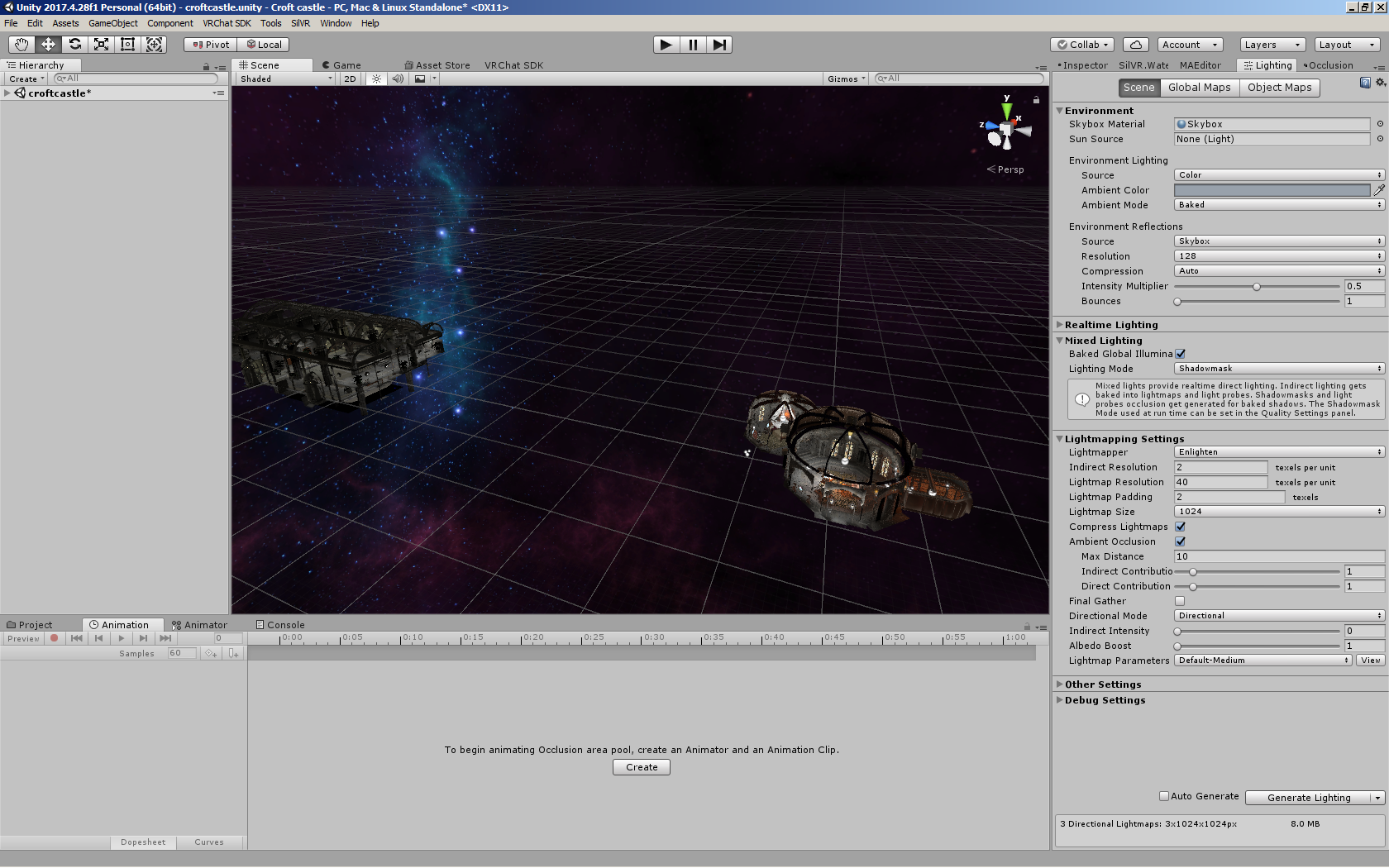
Am I doing something wrong?
woven condor
thank you @royal canyon animation events work for play without interrupt. Now i cannot reset for switch to work again. oninteract switch set bool true - how do i reset bool false without switch press so events not loop ?
bold ibex
Hello, I get sent to the default spawn thingy when I try to enter my own world that I just made from the VRChat home kit video
e_e
bronze smelt
@bold ibex Did you add the Spawn object to the Scene Descriptor in VRCWorld?
 lyric turtle
Is someone willing to help me with a problem, like i have some mirrors and i want them to turn of each other so you only can activate one at the time.
 unique comet
i want to add a miror to my world but i want it to be the old optimised people only one can someone show me how i do it?
bronze smelt
@lyric turtle There are multiple ways you can do this. Some better than the other.
The simplest way would just have a local custom trigger with all the mirror object in it that turns them all off.
Have that fire first, then under than you add another trigger to turn what ever mirror you want on.
This is the "first time" way of doing it.
@unique comet Just remove the layers you don't need on the mirror and you'll get what you want.
unique comet
ah ok
but can i get a memory refresh on all the button toggles and shit
like the press x thing and boom optimised mirror
lyric turtle
Sweet thx, ill see if i can make that happen
bronze smelt
@unique comet You need to have two mirrors and use a trigger to switch between them on Key Press
bronze smelt
You can't edit the layers in real time, therefor you need two mirrors. But only one is enabled at any time
mild spade
@woven condor If you want an animation event to fire once and reset itself after, you would use a "trigger" instead of a "bool"
bold ibex
Do you guys know why, everytime I join my world it sens me to this stuff e.e
The only thing that my world contain is this;
fervent scarab
@lyric turtle i like this username uwu
lol
@bronze smelt does that method need a delay or does the even system follow down the list like it's a que list
bronze smelt
It's supposed to go down the list
fervent scarab
I have a question for Unity, is there another method of snapping models together instead of setting the snapping size? can i snap objects together based on their pivot point?
lyric turtle
@fervent scarab Well thank you #^-^#
 stray sand
@fervent scarab there's vertex snapping (https://docs.unity3d.com/2017.4/Documentation/Manual/PositioningGameObjects.html) someone could have made a editor script to snap to pivot points.
 quartz stag
coming halloween!
woven condor
thank you @mild spade - for future i will use - i find how set "Bool" at animation end false without use trigger - i change perhaps but for now is work fine.
@weak raven have you 2 scenes in hierarchy
 cyan pike
@mild venture the flickering is cuz of bloom in the world with reflection probe with the material metallic set to high also make sure your probe is set to cover the whole world if you just want one also could be from bad UVmapping to
mild venture
Thank you!! @cyan pike How do I check the UVmapping? In Blender? I'm afraid UVmapping is one of the things I've not touched up on yet.
cyan pike
yea blender
mild venture
You know any good tutorials?
Oh, wait. I have dabbled a bit in this before. I was thinking UVmapping was something else. Nvm.
supple drift
Can you post a gif/video of the reflection probe flickering or disabling when you look a certain way?
short gulch
You could use probuilder to edit UVs too
And I need to read the whole message before responding lol.
supple drift
Do you have any real-time or mixed lights in your world? The only flickering like that I've seen is when you cross the max pixel light limit which maybe might look like a reflection probe shutting off.
mild venture
@supple drift
I do. I've mixed lights
What is the max pixel light limit?
I was looking into that last night, and couldn't figure it out.
cyan pike
oh that is from the mixed lights
you have to many and they cant all be rendered at once
need to bake them tbh to stop them from doing that or reduce the amount you have from what ive tested before if you have more then 6 mixed lights all in one room all being rendered at once it will cause a big fps drop
mild venture
Ohhh. Yeah, there's 8 torches, two bonfires and then two point lights near the horse statues to give them a bit of a glow.
What about my probe? It's set to realtime atm because when it's set to baked, there's no reflection at all. Do my lights have to be baked in order to use a baked probe? Or can I use baked lights and a realtime probe?
supple drift
Yeah! Baking is the best option for performance. If you need to cast shadows from avatars/players, you can use a single approximately-placed mixed light and use the culling mask so it only affects players (which will make it a lil cheaper)
In the Lighting window, you can click the dropdown arrow on the button that you'd use to bake and have it just bake all the reflection probes in your scene! I def would recommend baking your lighting though
mild venture
Makes sense, thank you both. 🙂 Darn. The only thing was that I've the lighting as animations to produce that bright to dim fire effect
cyan pike
no you need to bake your whole world project to get the probed baked you can leave the lights at mixed for testing
mild venture
so if I baked that, then the animation would be screwy i think?
cyan pike
no it wont mess with the animation if you leave thos on mixed (if they are rotating) only but bake the rest
mild venture
Do I bake things in the Occlusion tab?
Or does it bake automatically? Because I've set it to auto generate since my PC is a beast, so it doesn't take long. But is there something more I need to do to bake it?
I just thought baked lights weren't working since I couldn't ever see them while testing, so I've had them at mixed.
Would someone be willing to screenshare with me for a few min? :3
cyan pike
window > lighting > settings near the bottom it will say Generate lighting
mild venture
Ohh, I see. So I just switch my lights to baked and push that instead of having auto generate on
mild venture
It is kinda annoying having it try to load every time I move something a fraction of a centimeter lol
What is the max setting for pixel lights?
cyan pike
i have mine set to 35
mild venture
I see. How high can it go?
supple drift
In the client, it's between 4-8 depending on the quality settings the player sets iirc
In our use cases / for the sake of optimization, we should rlly never be hitting close to that 😅
mild venture
To 35? XD
cyan pike
i have all the light sources in my world i used that setting on baked
supple drift
Mine is set pretty high in the editor too bcs I wanna get a rough preview of as many lights as possible without drop outs before I bake em. VRChat will enforce it down to the 4-8 in the client anyway!
supple drift
Sure!
supple drift
So your quality settings are gonna get overridden by VRChat anyway, but you can match them if you want bcs one of the devs posted the settings they use in #development-advanced (it's in the pinned messages)
Doesn't look like your lights are baked though bcs no lightmaps! Just need to generate lighting (and there's tons of tutorials on le interweb on baking lighting in Unity too to get your settings right)
mild venture
Yeah, I followed Xiexe's tutorial for the most part, so I hope it's okay. 🙂 I guess I've never baked them yet then. Oops. XD So these light settings seem like they'll go with my probe settings? I just need to generate the lighting now?
And thank you so much
supple drift
Ideally, you'd make all your lights baked instead of mixed and use light probes to light dynamic objects (like pickups and avatars) for performance! Then you could generate (assuming everything that doesnt move is static)
You'll run into the issue where you can't flicker your candles if you fully bake your lights tho. Maybe a hacky way to do subtle flickering w/ baked lights would just be to animate a post-processing volume that is graded to be slightly dimmer. Someone else might have a better idea!
mild venture
I never did the lightprobes, because I was confused when it came to that part. :x I guess I need to do those. It still says I have no lightmaps after baking. Hmm. 😤
Yeah, I may just have to say goodbye to my torch animations.
But my map is static, yeah.
cyan pike
you have the light probe group hidden thats why
mild venture
Oh. Well, I did hide it cuz I threw it in the project and didn't know what to do with it. The tutorial I saw, they duplicated like, idk, ten or so lightprobes? I wasn't sure how to do it. Do I just fill up the room with them?
that's all i had it as
hahahaha
Is that why my reflection is screwy? Not doing the lightprobes?
🤦
Or, I mean, is that why baking wont work?
Because no light probes? I feel dumb
I'm sorry lol
cyan pike
no probes no baked stuff i think
mild venture
Ahhhhhhhhh
awe.
"It makes sense"
is what it deleted
How many lightprobes should you fill a big room like this with? Should I just duplicate like... idk, 20 of them or so?
cyan pike
dont really know
cyan pike
if you have an Nvidia card its best to buy the Bakery plugin for unity will help do the baking faster
near escarp
You need lightprobes where light intensity changes
Covering your entire world is fine, making sure there isn't any under the floor or behind walls
mild venture
Ah, so all around my torches and whatnot. Thanks, Ruuubick. 🙂
near escarp
You can have a few thousand baked ones and it'll be fine
mild venture
😱 .... 😈 Time to go light probe crazy then. 😂
Is this what you spoke of? @cyan pike
cyan pike
yea
mild venture
It looks quite nice
cyan pike
it is sadly i cant use it cuz it doesnt support AMD cards
supple drift
It goes on sale every now and then, I got it for like ~20-25 USD. If you're planning on developing worlds for a bit, it saves quite a bit of time
mild venture
Okay, plz porgib all the questions. But how do I make a skybox seamless without those annoying little square lined bits you can see?
Awe. I'm sorry.
Sweet, I'll have to grab it when it's on sale then
cyan pike
place the skybox texture on a inverted sphere if the skybox texture is already laid out correct
cyan pike
blender invert the normals

Today, we learn how to flip normals in Blender 2.8! IMPORTANT LINKS: Blender https://www.blender.org/ SOCIAL MEDIA: YouTube (skits) https://www.youtube.com/c...
mild venture
Thank you, I'll watch this :3
 plucky yacht
Anyone ever have the VRC Prefab mirror just break?
cyan pike
nope
mild venture
😂 Don't worry, I've done similar stuff like that all week
near escarp
A 3 minute video to flip normals lmao
supple drift
Gotta get that ad rev 
mild venture
I tried watching a nine min one before that, and some people just talk to talk. XD Hahahaha
 finite grove
lol
mild venture
"Like, what are you getting at?" sometimes lol
emerge even more confused when vid is longer
 primal sequoia
how do I make an avatar pedestal show the avatar name instead of "Use"?
finite grove
Some people like to be very descriptive but some of them just add clutter(in my view) to the video
supple drift
It reminds me of those recipes online that start with like five paragraphs about the author's life story
mild venture
Yeah, just to add time to a vid.
near escarp
@primal sequoia Change the Use text on the trigger
finite grove
Anyone know if a world can have a map system(Like porting over a gamemode from gmod and having it load a random/player voted map)
primal sequoia
I meant to ask, how do I make the use text use the avatar title automatically?
supple drift
@finite grove Within one world? You could enable and disable whatever and/or use occlusion portals to draw (or not draw) certain things - then set up a voting mechanic to control all of that. If that's what you mean!
near escarp
@primal sequoia You can't do that automatically
 fossil estuary
In order for a world to be public do I have to check the community labs box before uploading?
supple drift
Yes, it'll go into labs and then eventually become public (as long as it doesn't get reported, etc.)
 spark thunder

i was generating lightmaps and my computer crashed and now when i opned my scense my whole house is gone... u can see where i had a picture and lights in the house can i get it back
?
anybody?
 copper prairie
Can a sprite be used as a mirror trigger?
cedar nebula
anything can be used as a trigger really. If you mean pressing the sprite like a button then all it needs is a collider and an OnInteract trigger
copper prairie
Ty
 past burrow
@spark thunder unfortunately there's no way to recover an unsaved scene on unity but all of your files like models, textures and more should be fine, you have to put'em back together on the scene
spark thunder
it was saved
my computer crashed and then it was gone but all my lights and stuff were still there
spark thunder
can someone help me with my reflection probe?
i want my reflection to be for each part of the room and it keeps just showing the dang skybox as the reflection!
near escarp
Edit the bounds of the reflection probe
or move it within the room if you haven't already
copper prairie
@spark thunder https://www.youtube.com/watch?v=DM8QfRzxZpY

How to quickly and efficiently add baked lights to your world in VRChat. Info is also useful for anyone just getting into doing baked lights within Unity in ...
spark thunder
is this video just doing baking cuz i know how to bake. this problem is soemthing new and it doesnt make sense
ive done that @near escarp
copper prairie
He talks about the reflecting the skybox problem
 simple halo
Does anyone know why this is happening ?
near escarp
@spark thunder Can you post screenshots of the setups ?
 hot bobcat
So I just finished a world on VR CHAT but I am new to it. What are the requirements to to upload a world?
simple halo
Mainly just have to be a User Rank in the Trust System and the world follows the rules of the game @hot bobcat
hot bobcat
@simple halo I get that but idk how to upload in the first place and how long it takes to get a user rank in the trust system. Do you by chance know any videos that show you how to upload a world through unity?
 severe crown
you use unity to upload worlds into Vrchat
theres a VRchat SDK extention that you use in Unity to upload the world
but you need a certain amount of hours in the game to be able to upload avatars and worlds into the game first.
copper prairie
@simple halo https://youtu.be/ynQRg4LhNjE?t=1608

Home Kit is a Unity Package with the assets you’ll need to customize and upload your own home. The tutorial is aimed at beginners, so it’s a perfect starting...
 river frost
@hot bobcat https://www.youtube.com/watch?v=uZlKTm8Uhd0 ignore the unity version mentioned in the video

💕Download Links💕 Unity 5.6.3p1: https://unity3d.com/unity/qa/patch-releases/5.6.3p1 VRChat SDK: https://www.vrchat.net/download/sdk Make World Public: https:...
spring linden
is it possible to get some error/debug information if a world can not load because of some stuff? everytime if i try to test my world it sends me back to the home world but i dont know how to find the problem(besides deleting everything)
cedar nebula
check the outputlog for errors, but usually the problem can found in the Unity console
!outputlog
 tawny lilyBOT
You can find your output log at C:\Users\%Username%\AppData\LocalLow\VRChat\vrchat named output_log.txt
weak raven
@backwards#8560 sorry for late reply, I only have 1 scene.
 leaden atlas
Hi all,
Does someone know if this works in VRChat?
https://assetstore.unity.com/packages/tools/terrain/r-a-m-river-auto-material-101205

Discord Channel | Website & Support | Facebook
Pack support unity:
- Unity 5.6
- Unity 2017
- Unity 2018
- Unity 2018 LW SRP 3.0.0
- Unity 2018 LW SRP 4.2.0
- New Unity Terrain 2018.3+
- We released R.A.M 2019 for unity 2018.3, 2019, HD RP 4,9 and 5,7, LW RP ...
It contains scripts... but I just found scripts for the editor (have checked the preview).
 chrome lynx
vrc does not support custom scripts if it is not on vrc's whitelist
 coral wing
Editor scripts are allowed, but the only way of knowing if something works is testing it
seems like it's a flowmap generator? so it could work, but it uses it's own shader so I'm not sure if it'll cause any trouble in VR
balmy gate
With asset store stuff I'd generally expect to do extra work to make it compatible with VR (stereo support for shaders) and/or VRChat (no scripts), which is annoying because you're playing extra for a supposedly prepackaged and working solution. I wish they had a way to preview the asset before putting down $40-50
fervent scarab
for science!!!
lyric turtle
So can someone pls help? is there a way for me to update the world i have, like i have made a world in blender, made it an fbx and uploaded it in unity, now i have made some more changes in blender and i dont want to conect all tha buttons and stuf in unity again. is there a way for me to just put in the updated object?
balmy gate
if you overwrite an FBX file by exporting it on top of it or overwriting it in explorer, then open Unity, unity will detect the changes and refresh
just make sure not to change too much of the structure (splitting meshes, renaming stuff, changing armatures for skinning) because then you may have to reassign materials or rerig those parts
also I always recommend to keep backups of old FBX and old scene files
@lyric turtle
lyric turtle
I'll make sure to make a backup ^^ and thanks ill try to see if i can get it to work :3
river frost
Hello guys:) anybody knows is it normal that I uploaded a new world to community lab but it doesn't appear in my profile? I remember the first world I uploaded few months ago appear right away in my profile when I uploaded it.
near escarp
Which profile ?
river frost
the profile in game
near escarp
you mean the worlds menu row called "Mine" ?
river frost
it appears in "Mine" and in community labs too, but it doesn't appear in my profile😂
near escarp
I don't think community labs show up there ?
river frost
Ahh I removed it and decided to upload it again because I thought it bugged😥
but it happens to my friend too
bronze smelt
CL worlds should show on the list too. But if it's cached, it might not show up right away.
As long as the world shows up in the CL row you're fine.
Example: https://i.imgur.com/XV9n3r6.png
 open thicket
how can I make something where it displays a number of things "found" on the players screen? like say how many items they've already collected
good example the doom world with the health bar etc
short gulch
What would you guys say are the best gun prefabs currently available? Preferably a pack with different types of guns (auto, semi-auto, shotgun, sniper rifle, etc.)
supple drift
I'm not sure, but if you're working on a shooter - Udon is (supposed to be) right around the corner and is probably worth the wait if you just started working on it
green lagoon
or maybe start working on your environment arts & level design while you wait for udon
short gulch
Mkay, nice to hear Udon is almost ready. I was just curious if there are any better than jetdogs, they behave kinda strangely. Like if you shoot someone, the particle will hit their hitbox and kinda float there for a bit, but they need to move into the particle for it to actually deal damage. So if you shoot someone while they are moving away from you it wont deal damage
I found that you're actually more likely to hurt yourself than someone else with these guns
supple drift
Yeah, I think shooters are just way more complicated than they seem when it comes to mechanics and even syncing (in general, but especially in our case).
I mean we dunno what Udon really has yet to work with, but definitely more than we have now which should help. Doing things like matchmaking and team stuff is a pain rn too. I'm sure there will be some advanced shooter prefabs post-Udon. Maybe you can make it! 😉
coral wing
best way to do guns without weird sync issues is with raycasts which right now can be accessed using one of the standard scripts, but yeah with udon stuff should be easier so hopefully we'll have access to that
copper prairie
Does anyone know where I can get a height ruler model, or know how to figure out real world measurements while making a world?
bold ibex
Any recomended water shader to use for small stuff like sinks, etc?
supple drift
It's relative, but most Unity stuff uses meters as the default so 1 unit = 1 meter is prob the best way to go. There's a height chart in the Avatar Testing world that most use for avatars so that's prob our best scale reference. I usually just use the blue fred in the sdk for height ref when greyboxing @copper prairie
coral wing
if you're importing a model use a unity cube for scale
and yeah 1 unit = 1m
I generally like to import my avatar, a nikkei, and a cube with it's origin at the base so it's y is the height of the cube
copper prairie
Thank you guys.
stone hollow
👍
@bold ibex Any reason you can just use a translucent blue plane? sink water doesnt usually move a whole lot (alot of water shaders emulate ocean/sea so they arent a good fit)
fervent scarab
@stone hollow what are your worlds?
stone hollow
The Junkyard, Crafty Climbers, Sunset boat, The Box of Marriage, I co created Balloon Farm awhile ago?
stone hollow
I actively seek out original works so i cant complain really
Also Junkyard and Crafty were in spotlight, how could you miss them 😔
Why do you ask, anyway?
 soft lynx
How can I make my world darker?
near escarp
darker how ?
soft lynx
Lighting.
The lighting in my world is too bright. I want to make it so dark that the mansion and sky are barely visible.
I only have one lighting source, but I tried turning it down a lot and it didn't work.
near escarp
You could maybe try with post processing instead then
GitLab
A surface shader for Unity providing cel-shading. (Forward rendering only)
soft lynx
Ooh, that sounds perfect! Thank you!
stone hollow
Looks like the model just inst recieving light at all
or is using an unlit shader
Post processing is (and always should be) a last resort!
stone hollow
Looks like the model just is nott receiving light at all
soft lynx
Oh my god! Yes! This is exactly what I was looking for!
bold ibex
it looks good, but it might make everybody's avatars too dark
be sure to check how avatars look with those lights and post settings
soft lynx
Will do.
fervent scarab
an evil vets torture device THE NEUTERIZOR!!
stone hollow
better not be what i think it be
weak raven
^
 dusk gulch
Does anyone know what settings I need to have checked in the circles for my videos to play for others who join my world and have it be in sync with where I am at? I can get the videos to play for myself but my friends are just seeing a grey screen.
solid helm
@stone hollow Colour grading should be the last resort but tone mapping should be the first thing you set up
stone hollow
Not if you do your colors right in the first place?
solid helm
There is no doing it right when Unity displays them in the wrong colour space 😋
cedar nebula
@dusk gulch Make it MasterUnbuffered and set the Targets to Owner. Yes it sounds weird but that's the setup
solid helm
Saying "just do the colours right" is bad advice. If this was a 2D game with sprites it would make sense, but because of how Unity does lighting that's just going to make things harder for people for no reason because they'll assume they set things up wrong when the reality is that Unity isn't displaying their art properly.
dusk gulch
@cedar nebula Didn't work 
fervent scarab
my evil vet clinic is taking shape
solid helm
And you can go out of your way to work around this and still have issues. You can make all your materials unlit, paint all the lighting in by hand, and you'll still see things look too bright or too dark because Unity is still rendering things in a way that assumes they'll be tonemapped at the other end.
cedar nebula
It didn't work? I don't see why it wouldn't, that's the setup... how is it not working? It won't play for other people or it just isn't playing at all?
dusk gulch
It plays for me with pretty much every setting I try but its just a grey screen for others
I feel like im losing my mind trying setting after setting
supple drift
What do you mean Unity is displaying in the wrong color space? You're makin me nervous
dusk gulch
Could me using a button as a trigger to wake the video player impact it?
cedar nebula
hhhmmm I'm not sure what the problem is then. Maybe they've changed how video players function since I last messed with it. Have you looked at the example scene in the SDK to see how that's setup?
how you trigger it shouldn't really matter
cedar nebula
I wouldn't set it up like that. Video players don't work well when disabled, ever. Also OwnerUnbuffered doesn't really work in this situation. Use AlwaysUnbuffered
dusk gulch
Yeah the idea was to have buttons linking to different videos so that it would be like an easy way to switch to the next one at will. Much like the popular movie world that is setup with a server only this would operate at a smaller scale and based on links.
cedar nebula
I think what those do is all the videos are under one playlist and playing a specific video jumps to that spot in the playlist. It's all one video player and it's never disabled, only Stopped
 frank geyser
Does anyone here know how to use custom animation controller on the vrc station (aka custom sitting animations when you sit on a vrc chair)
near escarp
@rare bobcat What do you mean by apply the material and preview
@frank geyser In your avatar components there's an override slot for sitting animation
frank geyser
this isnt for an avatar, its for a vrc chair. I have a prefab and the default sitting animation on that is different, and i dont have to change anything on my avatars
On the custom prefab chairs i got the only thing thats changed is the animation controller on vrc station
near escarp
Did you add your animation file to that to override it ?
frank geyser
yeah i made it animation file from an avatar and if i put said animation controller on any random avatar it plays the animation perfectly
but if i put it on the vrc station on the animator controller, it changes nothing
near escarp
What does your animation controller look like ?
frank geyser
what do you mean?
near escarp
how did you configure it
frank geyser
i posed a random avatar on how i wanted it in the animation tab and took that
should i be using a overidecontroller instead
frank geyser
ok kinda got it, but its not playing what the animation its supposed to play
just stays still
and its different from the other custom sitting animations form the prefab i got
i think the ani file isnt working properly
but when i apply the ani to random ava it works fine
near escarp
@rare bobcat i believe there's a bug with the setmaterial trigger list
are the material names similar ?
So you have multiple materials in the list and it only grabs the first one ?
Or is that specific to the object it's sent to
near escarp
that would do it 😄
frank geyser
8 months
near escarp
i got confused when you said "it works on any model"
frank geyser
same
 deft dome
I have a question.
frank geyser
but ig i didnt rig them bc i didnt need to
deft dome
I'll just ask it later
near escarp
@rare bobcat Can you check your triggers in your world, and then look at your log to see if there's any indication of the trigger not firing or the material being the cause ?
sorry i meant publish your world as a local test
C:\Users\X\AppData\LocalLow\VRChat\vrchat
output_log
it's created when you start a session
you can open it at the end to see events in detail
stone hollow
put it in a pastebin
near escarp
@rare bobcat Can you post pictures of your setup as well ?
near escarp
So what isn't working in this clip ?
near escarp
I'm not aware of those limitations, but what are the differences between the upper and lower row ?
And have you tried using a copy of the component of the top row for the bottom row to see if having two triggers solves the problem ?
modern kayak
I would recommend using an something other than setmaterial, like an animator. Setmaterial has always been kinda iffy
fervent scarab
@near escarp notices you owo...
spring linden
is it normal that shadows start to flicker as more i'm far away from the center of a world?
cedar nebula
realtime shadows tend to have those problems in general to be honest, floating point errors probably just make it worse
 sterile flame
Ok so now I have the documentary out the way and can focus on other projects, I wanna learn how to build my own world. I have a lot of inspiration from mina Francesca who made the secret cafe garden utopia, my dream world and such. I love how intuitive and interactive the world is as well as just how beautiful they all are and pleasant to sit and relax in.
The idea is basically a cafe by day and a cool whiskey and cocktail bar by night (so two different versions when you interact with a switch in the world, master only)
Now my only problem is... I know absolutely noting when it comes to unity... most avatar packages I get my hands on I end up breaking them and doing something stupid xD
Point me to the right tutorials and tips so I can get a base down. I'll get to triggers and things later sown the line.
There will be a section dedicated to pocky :3
 finite mountain
@open thicket
- hardlight's playertracker prefab (so you can pin objects to the player camera to serve as your HUD)
- an animator on that pinned object with a set of different animations it transitions to depending on a parameter. The animations display numbers or coins or whatever.
- give the collectable objects scattered around your world each a vrc trigger that sends the AnimatorIntAdd action to change the parameter in the pinned HUD object.
- if you want something to happen when the parameter hits a certain value (like a door that unlocks at 100 coins) add another animation to the pinned HUD object and have the animation enable a child object. Give that child object a vrc trigger that OnEnable does the thing you want.
mild spade
@sterile flame You could start by watching CyanLaser's youtibe tutorials on world development. https://www.youtube.com/playlist?list=PLIoLQ-8wanr9jQWDUIs_2zshaDD_Lg-9R
Keep in mind he uses old SDK and things might look differently.
If you have any question about unity just ask here, as simple as it is, just ask, we will help you.


 bronze smelt
Those videos are a bit above what was asked for ^_^
Start with using free assets and play around in the editor, once you feel comfortable with that.
Then you can start looking at more advanced things like getting it into VRChat, optimize content, bake light ect.
fervent scarab
more props/furniture for my world
royal canyon
make sure your VRCWorld is slightly above
the terain
then retry it
hmmm try a box collider on it then
on the terrain
that's fine
it'll still work
or actually you can try ticking "Convex" under the Mesh Collider
idk why it doesn't work though, it should if it has a collider on it
huh? what's the terrain made of then?
highlight the terrain and let me see it in the Inspector
take off the box collider and mesh collider
you only need 1 collider per item
try it
tawny lilyBOT
┬──┬ ノ( ゜-゜ノ) There you go
royal canyon
my bad.....
well then take off the terrain collider and readd the mesh collider
2 colliders on 1 item won't work especially if they're overlapping
Unity won't know which collider to actually use
near escarp
if it's flat, add a gigantic box collider
most of it looks pretty flat, try with thaat
royal canyon
did you test it with the mesh collider?
near escarp
Why is the collider component disabled
royal canyon
If you're gonna be ungrateful for trying to help you, I won't any longer.
No need to be a crybaby about it
.>
near escarp
should have googled it to begin with 
royal canyon
^^^ THIS
left marlin
Lol, your layer is player. Change it to default and keep the terrain collider.
near escarp
Did you change your terrain layer on purpose ?