#world-development
39 messages · Page 6 of 1
 mild spade
 alpine otter
yeah
I know its not going to look exactly like that in game, it was more just an example of what im looking for
mild spade
Have you tried a different world? Which world are you testing that on? The world must have reflective probe baked for you to see it.
alpine otter
im testing this on a custom world, from the VRCSDK prefab folder. How would i setup reflective probe baking?
mild spade
Also the mesh must have reflections enabled
I dont think that world had reflection probes.
alpine otter
I think you right. I'll mess around and see how it goes
Nope, still black. where should the mesh renderer be applied?
mild spade
This may be more suitable for #avatars-2-general instead of here.
alpine otter
Its not an avatar issue though. on worlds like home and pug it works fine. the issue only happens when im in a custom world im building from the prefab world provided by the VRCSDK
mild spade
Like I said before, the reflection is dependent on baked reflection probes on the world you are currently on. If you want to see it on your world, you have to add Reflection Probes and bake them. I will help you add one.
alpine otter
Thats what i just did and i didnt see any difference. help would be nice
mild spade
How did you bake it? Do you see a sphere that reflects the surroundings? like this
 vague torrent
After some tinkering I refollowed the tutorial to set up a video player for the stream, and now the video part is working, but it seems to be mirrored because all the text is reversed- and its audio isn't linking to it right because i hear nothing
alpine otter
@mild spade I ended up scrapping the world. something was causing issues with the probe. a new world fixed whatever the issue was. thankyou for helping
 languid escarp
I'm new here. I'm curious if it's possible to get a commission for a world. Is there anyone I can talk to about that?
 cedar nebula
a lot of the skilled world creators don't ever check this channel, you might have better luck looking in the VRCTraders discord
languid escarp
thank you
 solemn adder
I'm wondering why my world isn't in the recently updated list
Is it I need the new sdk or idk?
cedar nebula
world rows are always finnicky. I'd update your SDK anyway if you haven't in over a month though
 indigo narwhal
Hey, If anyone could explain to me how multiple audio sources work on a Videoplayer and how I can lowpass the audio based on how far away a person is that would be super appreciated. Please ping me if you do cause I might be tabbed out.
Didn't really find much when googling
 neat plume
@solemn adder make sure you're using the latest SDK as well as the recommended unity version. I had similar issues because i was using one Unity version too high. As soon as I went down a version it worked
Does anyone know a good way to do a score counter? I have a jank way of doing it but would prefer something better if possible
cedar nebula
I think there's a prefab or two in the database for it. It was either a shader or big ass state machine. PhaseDragon keeps telling us to use hardlight's slider to somehow do it but it sounded way more complicated than it should have to be
neat plume
Where can one find such a database?
cedar nebula
check the channel pins for a link, it's the tinyurl one
neat plume
Ah thankyou
Slider sounds like a good idea actually
Considering it's a manual score counter the player sets
cedar nebula
oh he did make a prefab for it, check near the bottom for 'Counter' by Phasedragon
neat plume
Pog
That spreadsheet is so good wtf
Are those world snail pens better than noenoe's for sync?
Eh i'll just test it tonight
cedar nebula
none of the pens we have work very well sadly. This one was brought to my attention earlier today, seems promising but haven't tested it
https://65536.booth.pm/items/1555789

VRChatのワールド用の14色のペンセットです。 ある程度文字が読める程度に同期が取れます。 「位置をリセット」「線を消去」のボタンがあります。 また、マスターのみが実行できる「All Reset」ボタンがあ...
solemn adder
@neat plume I'm using unity 2017.4.28f1 while my sdk is pretty much from march
cedar nebula
yeah there's the problem
neat plume
If you get a chance to test those pens before me let me know how they look
 warm aspen
https://vrchat.com/home/launch?worldId=wrld_d6ced7f4-e76b-4545-bd4f-2d5166680cfd Hey, check out this VRchat world. It's a really neat kingdom hearts world made by a rather talented person, feel free to try to send him a friend request and talk to him if you want he's rather friendly and can explain more about the world if you want.

This is hub of the Organization XIII Vrchat group of creaters came and stay awhile and don't forget to join our discord Got it memeriosed
 torpid hazel
is there any problem with youtube videoplayers? I haven't updated my world but it stoped working for 1hour to another
torpid hazel
oh that's a relief
 shrewd harness
I suggest, to have a "troubleshooting" menu in your world, to explain why the video may not work
torpid hazel
yeah that's a good idea, meanwhile, is there a way to remove baked shadows from the world? I don't know what I did wrong but the world has no sensical shadows
 indigo pelican
how to add more then 1 audio file in the world with play on awake & shuffle? I tried the vrc audiobank but it's not play on awake and you need to connect that to a button
 autumn umbra
@indigo pelican you can put an OnEnterTrigger at the spawnpoint and use that to trigger the audiobank
 near escarp
 short gulch
Is there a way to make random sound effects play at random times? The city I'm porting is from a game where the city is pretty much at war and in the background at random times you may hear a distant explosion, police siren, or a shootout.
near escarp
Random times ? That would involve animators and triggers
short gulch
Sounds more complex than I expected lol
 onyx canyon
Is there a way to get 3D off of these?
 bold ibex
Is there a way to resizes the flares on a light source? Or the distance it reaches?
 snow pine
 balmy gate
That looks fine. VRCGlobalRoot is normal and means nothing bad. Unpause unity with the big pause button at top middle of unity. Fill out the form and upload.
@snow pine
 junior cloak
https://niyah.eu/i/3951.png
Seem like youtube-dl is not working anymore ?
 onyx canyon
Can someone help us there a way to turn 3D off of these
indigo pelican
Thanks @near escarp & @autumn umbra
 minor finch
have you tried using the menu in the corner? I thought there was a 3d local off button?
@onyx canyon
onyx canyon
That doesn’t do anything except make it split but it’s fine I’m already like an hour into Godzilla
minor finch
oh ok
torpid hazel
can someone give a heads up on the youtube player thing?
cedar nebula
when it's fixed? Probably won't be touched until vrchat rolls out the next update
bold ibex
@cedar nebula thanks I didn't know about the collider thing ❤
bold ibex
I have a dumb question, what kind of lighting/setup do you need to do to get your avatar to reflect on the vrcmirror with the light in the world
@bold ibex Just put a realtime point light somewhere nearby (or a spotlight, if thats what you prefer)
cedar nebula
I don't think that's the issue. On the mirror component itself, enable realtime pixel lighting. Keep in mind it's bad on performance, it's better to bake your lighting and then illuminate avatars with lightprobes
bold ibex
oh.. could you teach me how to use lightprobes
or.. I mean
Idk

Unity 2017.2.0 Light Probes Tutorial. In this video tutorial, I will show you how to set up Mixed Lighting (using Baked and Realtime Shadows). How Light Prob...
ty
 peak pelican
This happens in only this part of my terrain, what do i do!
(it happens in a bit of other places but it doesnt happen in many other places
worked out a weird work around
just do a smooth or random terrain edit in the disappeared area
near escarp
could be caused by your boundaries script ?
peak pelican
how do you put particles in a world? I have a particle system up and it works in unity but how do i build it?
near escarp
build it ?
peak pelican
When i build the world in the builder the particle system isnt there
(i apologize for the poor wording)
cedar nebula
does it use a script/component that isn't the Particle System?
 steel shell
Post a screenshot of your particle system
peak pelican
 royal canyon
does it show up in Play Mode?
 barren ice
I'm having an issue with post processing. I have it set up in Unity, and it's showing it's working, but in VRC it shows nothing. Does anyone know why it's doing this?
royal canyon
@barren ice probably because you do not have your Main Camera set as your Reference Camera in your VRCWorld
cedar nebula
also delete the Tests folder if you have it, otherwise your world won't update
cedar nebula
and I love you random citizen SkyAtlas!
barren ice
oof i can't remember where to set up reference cam, I'm so exhausted x.x
oh never mind
i remember now lol
That was the issue btw, thank you. ^_^ ❤
royal canyon
no worries glad you got it resolved @barren ice 🙂
barren ice
Anyone good with DoF? xD It's like it's doing the opposite of what i want it to
I can't seem to get it to focus in the front insead of the back
royal canyon
I typically don't use DoF
barren ice
i've seen a couple worlds with decent DoF that looked reeeaallly well, so I wanted to try it out :3
royal canyon
If your Aperture/F-stop value is a low number (say f1.7 for example) the you're depth of field (the range that items will be in focus) will be narrower than if you have a high value (for example f11).
If the target you want sharp is at, for example, 10meters away and you have your focal distance set to 1m then you will most probably not have a sharp image (except for anything that is 1m away from the camera).
FYI I think you haven't adjusted the focal point and so the item you want to be in focus simply won't be...
If you adjust only the focus (and leave the fstop/aperture where it is) you will notice that your depth of field decreases as you focus on items closer to the camera (not much will be in focus. But as you focus on further items away you will notice that more is in focus as the depth of field increase.)
hopefully that helps
Try increasing Focus Distance
royal canyon
@barren ice I was able to achieve the effect
I included my settings
it's very sensitive
cedar nebula
if you include DoF make sure people can turn it off, or even just have it off by default. It's absolutely horrible in VR
cedar nebula
you should use color grading as well, the tonemapping is amazing. Can really change the atmosphere of a world
royal canyon
I'm not too familiar with color grading
cedar nebula
it's not complicated as long as you're not using a custom tonemap. Pretty simple to just up the saturation a bit, make the temperature a bit warmer, things like that
royal canyon
Filmic or Neutral?
bold ibex
Wish more world creators used color grading 🙏🏻
royal canyon
I'm implementing it now
cedar nebula
Filmic ? Are you using post processing v1?
royal canyon
Yeah I couldn't get v2 to work
cedar nebula
did you ever look at silent's guide for setting it up?
royal canyon
where can I find it?
balmy gate

GitLab
A surface shader for Unity providing cel-shading. (Forward rendering only)
royal canyon
thanks!
cedar nebula
damn that was fast
balmy gate
It also tells you what not to use
royal canyon
Good. Sometimes knowing what NOT to do is better than knowing what TO do 😂
barren ice
yeah I'll def have an option to turn it off. My worlds are basically made to help people relax. So I'm adding bloom to soften things, and maybe DoF option. ^_^
balmy gate
I would advise against having DoF on at all since lots of people are in vr
And they aren't going to go fumbling through a menu when they see your world feels uncomfortable
barren ice
It won't be an option thats on when you enter. And I don't plan on making it very strong if I do actually add it
 stone hollow
Dont need to color grade if your colors are good anyway 😉
royal canyon
^^^^
neat plume
Anyone have any ideas how i can do object snapping, like a magnet on a fridge?
When the user puts a pickup object against a certain area of a fridge it would snap to that position
I thought about using layers and teleporting the object on enter trigger, but i only have like 4 layers avaialable but i have 24 locations i need to snap objects to
cedar nebula
check this page on object detection, you're looking at using Lifted Colliders. It's still a WIP page but the basic information should be there
http://vrchat.wikidot.com/worlds:guides:object-detection
neat plume
That's exactly what i need i think, thanks a lot :)
 unique comet
aah so i imported poyomi's shader and it broke my mirror
any fix?
wait it works now
nv,
 past wave
So i have a animation to rotate a ceiling fan in my world, everytime it makes a full rotation it slows down and then starts up again, how do i keep it at a constant speed?
balmy gate
right click the animation curve and set to linear
for the last frame you might need constant to avoid spinning backwards to 0 quickly
past wave
how do i go about that? i set it to linear now, its not slowing down but it still resets when it starts to loop
nvm i got it figured out
 modern kayak
If all you need is simple spinning, there's a standard asset script called auto move and rotate that's really handy for that
past wave
heh, seem to have alot of questions lately, i have a small display of models in my world, i also have avatars for them aswell, is there a way to make it so if i press the model it will work like a pedestal and change my avatar?
royal canyon
yes @past wave
wait
There's a way I'd just have to figure it out again
I think you'd drag in the avatar pedestal and change the mesh and the collider to your model
past wave
how would i go about that?
cedar nebula
the actual pedestal component and the interact can be 2 different things. Just copy the trigger from the actual pedestal onto the model, then give the model a collider so you can interact with it. Then on the actual pedestal object itself scale it down to 0 so the preview picture doesn't show
 keen roost
Thought I might as well put this here too in case someone sees it here first. So, I have a world I've been working on for the past year or so, and for some reason for the past little while something has happened with the world and now, whenever I enter, I can't hear my avatar sounds and nobody in that world can talk to each other, as if the world is muting player sounds. I don't know how to fix it, but it's driving me crazy! If anyone knows anything about fixing world sound I would greatly appreciate the help! Here's a link to the world if you need to check it out yourself - https://vrchat.com/home/launch?worldId=wrld_f19a5cfb-230d-4a3c-b730-15ad4cadec12

Relax in the mountains‚ breathe in the scent of a majestic waterfall‚ and․․․ find robots?Maybe fixed now?(Uploading to ask devs for help)
cedar nebula
update the most recent SDK, clear any settings that affect player voice range (I think at this point it's only the setting from the Mods component), and then make a new object with the voice override component and leave all the settings default and make sure it's set to global. If that doesn't clear up the issue then something else might be going on, like you're on the wrong Unity version
keen roost
hmm, ok, I'm in the right unity version and the most recent sdk, so I'll try what else you said next. I'll be back to report!
keen roost
Ok, well I tried it, but no luck, settings default and set to global, the whole thing, and still nothing. I can hear my world's ambient sounds just fine but any avatar audio is silent
cedar nebula
check the override settings then, make sure avatar audio isn't set to 0 or something crazy
keen roost
nope, it shows as 10 40 40 40
force spatial is turned off by default, but other than that everything has a value
cedar nebula
I've heard of this issue before but we never actually solved it. Just want to double check, what Unity version are you using? And do you have anything in the world that might be doing something wonky, like a Standard Assets script? Maybe it's just an avatar that's bugged, try using a different one?
keen roost
Hmm, interesting. I'm using version 2017.4.28f1. And I'm not sure, how would I check for an asset script? And nah, it does it with any sound avatar, and those avatars work in other worlds just fine
its a very strange, isolated issue
cedar nebula
yeah that's the correct unity, and you'd have to be using the correct SDK to even use the override component... checking for scripts woulda be kind of overkill, just think back to if you added anything weird. Maybe an asset pack included something strange?
keen roost
I think I might have found something. Gimme one sec
dang it, Unity froze. Gimme one more second XD
ok, this is so freaky. I even have a super old version of the same world in the Unity Project, and the sounds WORK on that one! there must be something interfering with it in the newest version. just what is the question
 stray sand
@keen roost How many audio sources are in the world. Unity limits how many audio sources play at once.
keen roost
a lot, now that you mention it. I haven't counted, but I filled the world with ambience
stray sand
If there are more then 32 audio sources being used unity will start turning some off based on priority and distance.
keen roost
does that include people talking though?
stray sand
I would assume vrc uses audio sources for players voices.
keen roost
hmm, that may indeed be a problem then. Yeah, like, every light source in my world had a soft fire sound on it. Might have to delete some of those
stray sand
Lowering the max distance and lowering the priority of them should work.
Also for setting priority “Priority is an integer between 0 and 255. 0=highest priority, 255=lowest priority.”
If that doesn’t work then deleting them should work.
keen roost
yeah, I also at one point had physics based sounds on some objects, but I'm not using that plugin anymore, so I went ahead and deleted those sources. Let me check that and then if that doesn't do something I'll just go through and lower max distances on everything
keen roost
welp, tried both. Still no luck. I must be missing something here that's staring me right in the face, I just can't put my finger on it
 rain badger
i used the VRChat SDK to upload the world and now everything is grey for me. does anyone know why my world has done that in unity
royal canyon
@rain badger what version of Unity and SDK are you using?
rain badger
it was the newest one cas i just installed it. it seems fine now after i restarted unity
but it was odd
it did this
it seems fine now anyway
royal canyon
that's weird must have just been a glitch or something
mild spade
@rain badger That happens when you use the search feature. It will only show the objects you typed. If you look closely, On the hierarchy next to "create" there is a search field. You typed something and everything turns gray except what you typed (if it exists)
You typed "wd"
mild spade
It happens by accident at times lol
rain badger
i thought i some how broke it
royal canyon
I didn't even notice that. I knew it grayed out sometimes with search but didn't even put two and two together
I was looking at assets not hierarchy
bold ibex
Possible to add footsteps sound to the player with 'Playertracking'?
cedar nebula
yeah, jordo did it in his Ebony Hawk map. Getting it to sync (have other people hear your footsteps) is incredible impractical though. I don't remember exactly how he did it but I think he was using a trigger collider that teleports to your position every second or something and exiting it would play the sound. It was just a simple movement detector
 quartz lantern
so the new update do not make me to do a test to see if the map is working
do anyone get the same problem?
 supple drift
I tried doing footsteps too and it was mildly uncomfortable in VR so I scrapped it. It might be better if you have a single-room world with a single ground surface type - but we use the acoustics of our footsteps as part of our spatial awareness IRL so I think the lack of room influence with the footsteps is just weird.
Would love to see footsteps be a native client thing one day tho! At least after we get some form of audio propagation 🤓
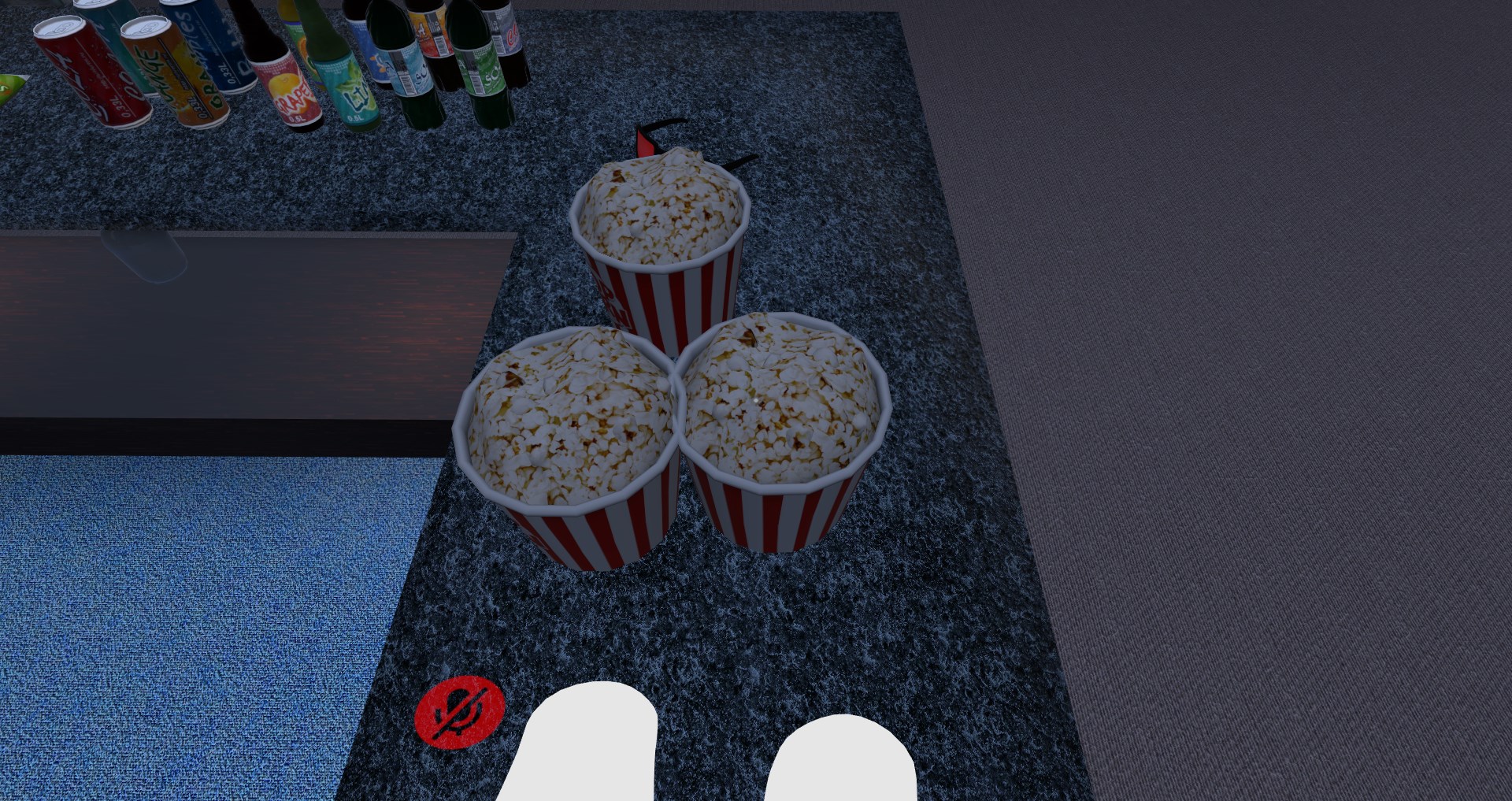
junior cloak
Sometimes, some of my props do not have the pick-up script and it seem to be totally random on which one
 left marlin
Do you mean some of your props can't be picked up?
junior cloak
I have a lot of pick-up props that are using the vrc_object sync ;could that be the case ?
yeah.
but like ; all of the popcorn here are exactly the same game object
And one of them can't be picked up
sometimes it's not the one in the middle but the one on the left ; a bottle.. or any of them
left marlin
Do you have any colliders in the area? Those will usually block interactions and pickups
junior cloak
seem totally random
nope
Can also pick-up the one just on the side and the collider of the one in the middle seem to not work
left marlin
Does the object itself have multiple colliders?
If they are the same size, then it will be difficult to pickup
junior cloak
oh, I moved one
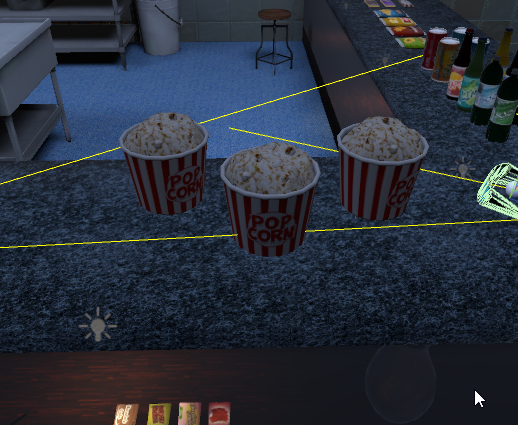
that's the default I have ; I'm finishing baking light and will try again
But it kind of happen on any random object when the instance load ; if someone else pick it up then it's fine
not a big problem ; i'm just trying to understand
 ripe depot
There's a collider debugger you can use to see if there's any rogue colliders.
I think it's called physics or something
junior cloak
I ended up removing the middle one and just duplicated the one on the side ; going to try now.
It's not a collider problem tho ; That's what bugging me
Problem seem to be fixed ; oh well
thanks tho ;w;
left marlin
Are you sure you don't have anything static about it?
junior cloak
Certains
I litteraly did ctrl+d one of the two working on the side

if i lay down on it it clip trough the map and respawn with a collider
what the f u c k lmao
mild spade
can you post pic of all components on the object? Also their hirearchy

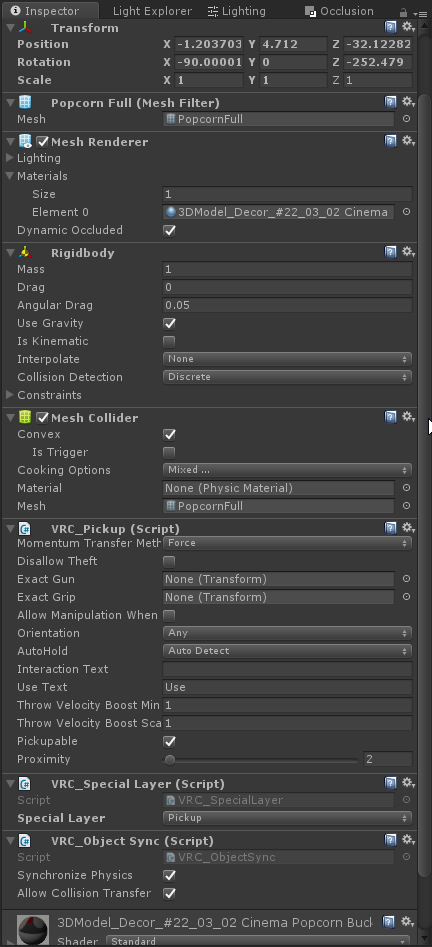 left marlin
You really shouldn't be using a mesh collider for pickups
mild spade
remove special layer
junior cloak
🤔
I'll put some box colliders after ; every other pick-up use the special layer tho since I don't want people to collide with them but i'll give it a try
Building without the special layer rn
mild spade
You can use Unity's layers. Set the layer to "pickup"
junior cloak
I can't pick it up in game if I do it this way
mild spade
special layer is very old and should not be used
junior cloak
oof ; Well i'll try the unity layer again then
I guess the special layer was the problem. Would be nice if it had a notice or anything
Thanks Squall & CyanLaser !
ripe depot
Why does special layer even exist? lmao
left marlin
Before custom layers were a think
thing*
All it does is set the layer
Which we now can upload and even set with triggers
ripe depot
ohh, pre 5.6?
junior cloak
idk i followed a tutorial lmfao me newbie world creator
left marlin
Did they not have layer uploading with 5.6?
ripe depot
ohh, custom for VRC
junior cloak
nvm ; still happening holy
left marlin
👀
junior cloak
I was able to move it for like, some sec ; alt-tab into discord ; get back in game and
:notlikethis:
ripe depot
Have you tried using a box collider?
junior cloak
Changing every colliders to box as we speak 💖
Well ; after some minutes of waiting it is still working.
Is there a specific reason of why in the hell this particular one would heck up and not the others one while using mesh colliders ? Since they're all the same mesh & settings .-.
Thanks a lot again tho ; Learning is a always good and optimizing aswell ; time to add some snack machine now yay
royal canyon
sometimes triggers don't like mesh colliders. It's best to use Convex too if it's a pickup with a Mesh collider.
if you ever use Mesh colliders and it's not working, try ticking Convex, and then if it doesn't work switch to Box or Capsule collider. Sphere works too but I only really use it for spherical interacts
junior cloak
Yush ; I was using convex already, switched them all to box instead ;w;
 vestal agate
Good evening. I've noticed that a lot of VRC worlds feature different "sectors" between which players can teleport between, allowing them to escape laggy sections of a world. What's the best way to accomplish this? How far does each "sector" have to be from one another in order to maximize the effect?
Is there something else at play as well? Are assets being unloaded and reloaded when players travel between these different points?
left marlin
Assets are never unloaded in a world. They may not be rendered thanks to occlusion culling though. I suggest reading up on that in the pins in #world-optimization.
Sometimes people will use "trigger Occlusion" which when teleporting, turns off other portions of the map. When doing this, you need to be very careful as synced objects still need colliders or they will fall for everyone else.
vestal agate
I'm not planning on having any physics-based interactables in this world, or anything that would require syncing, but I'll keep it in mind!
 stiff escarp
hey i just got the latest VRChat SDK and I can no longer access the test worlds i build
are there common causes for this?
vrchat opens, tries to launch the test world, goes black for a few seconds and diverts to my home world
 teal slate
Have you tried reuploading the world? Sometimes the upload is corrupt.
stiff escarp
hey, this was for a local test but it worked after reimporting SDK
 dusty fjord
where was that new tool that shows you a breakdown of all the types of assets in your world?
left marlin
Do you mean like the size of all assets uploaded with your world?
left marlin
https://twitter.com/Ruuubick_/status/1166014308918185984
Make a new test build for your world. Find your editor logs by clicking the 3 lines on the console window. Search for the last instance of "customscene" and you should see the breakdown of your assets in the uploaded bundle.

Turns out a lot of world creators didn't know this, but you can easily find out what your world is made of, how much it weighs, to then be able to reduce its overall size :
Retweets
131
Likes
299
 Twitter
@near escarp Can you pin your tweet so it is easier to find?
dusty fjord
that's the tweet I was looking for, thanks 🙂
near escarp
supple drift
When you pin it, make sure you write that they have to search for 'customscene' too!
I was too slow
left marlin
I can edit it to add that
bold ibex
supple drift
Any errors in your console?
bold ibex
nope
supple drift
You using Post Processing v2?
bold ibex
no clue what that is
supple drift
We have a post processing stack that if you don't delete a certain folder, it can result in all sorts of weird build issues - but that's obviously not the case here!
Usually when someone gets that, they can diagnose it bcs it's throwing them errors in their console so that's weird! Can you enter play mode within Unity fine?
bold ibex
yh
omg so i deleted a file with some stuff i dont use for the map and now its working and uploadin fine
so it was a file that was blockin it
supple drift
possibly a script!
bold ibex
yeah
royal canyon
SDK hates non-WL scripts
left marlin
People write editor scripts for assets without considering build time. It would fail for non vrchat projects too.
royal canyon
It's still elusive for me as well. I still don't quite understand it all.
bold ibex
wrap your editor scripts in #if UNITY_EDITOR to ignore vrchat and building stuff
left marlin
The problem is when other assets don't do the same
bold ibex
there should be better explanations and warnings about using asset store things in the vrchat docs 😐
some people spend a lot of money on stuff they can't use
royal canyon
using asset store 3D models is ok but that's about it IMO
bold ibex
yeah exactly, there's some particle packs and shaders that work fine, but it's impossible to tell from the store pages
 magic patio
im looking for someone who can help me with the video player in a world if i could get someone to do a video share with me and explain what i need to do that would be amazing
unique comet
i have an issue with my map where i cant spawn into it as in it loads for like a milisecond and boom home world
 open thicket
Check your collider especially terrain and make sure the terrain collider is ticked on @unique comet
open thicket
Sometimes you could also have a spawn that might be inside a collider
unique comet
i think i enabled a mesh collider from my memory
open thicket
You can set your own custom spawn if you wanted to, just place the gameobject in the map and then set it in the inspector
If the entire world is using a mesh collider
And it’s set to convex
unique comet
ok let me check
open thicket
You’re going to be spawned in the collider probably
open thicket
Exactly
unique comet
ah so i have some concearn
am i just gonna be floating?
because those seem to fly above the stairs
open thicket
Yes
unique comet
ah fek
open thicket
Check from other angles
open thicket
Click the stairs
Let me see the inspector tab
Unless the entire map is one big mesh
unique comet
so no floating?
unique comet
ah kk
open thicket
I do see a box collider
In one of those first pics
Idk what that was for
But if it’s for spawn
Adjust it so it goes down
unique comet
sooo uuuh i think i can spawn now?
unique comet
ah ok
also how can i make shure that these have coliders so i dont fall thru them?
open thicket
The best way is to test it tbh
But easiest way is to align the box colliders to the wall
And then scale it
Delete the mesh render so it’s invisible or disable the component
unique comet
ok
 distant gulch
Are custom chairs that still allow you to use facial expressions a thing?
unique comet
i try to find out how i do that but im still new as hell to making maps so could you elaborate on how i do that?
@open thicket
 weak jolt
Is there a non-fps killing way to display a rather distant planet?
 green lagoon
off the top of my head a alpha texture or attached as part of the Skybox
open thicket
Just make a box when you right click
In the hierarchy
Drag the box into the scene
Scale the box next to the parts of the wall that you might fall off on
Scale as in expand it and make bigger
You can press E to switch to that tool
And then move it next to the wall
If you wanted to hide the box
So it’s not visible and only the collider is there
Either disable the mesh render component by untucking the box next to it in the inspector, or delete it completely
@unique comet
open thicket
@weak jolt rainwolf’s suggestion is probably the best way to display a distant planet without having to use a png/alpha cutout.
unique comet
wait cant i just put a collider on the boxes on the wall?
open thicket
You could if there’s a mesh for them
unique comet
its just the colour black
open thicket
There’s a lot of creative things to do
weak jolt
Alright, thanks @green lagoon and @open thicket
open thicket
It should but just use the box
unique comet
ok
open thicket
Mesh collider components tend to use more data and probably eat up more cpu IIRC
unique comet
can i add the colider to a mirror?
open thicket
But box colliders and primitive colliders are more performant and optimized
You can add the collider to anything you want
You could use box colliders to make dummy colliders for entire worlds
unique comet
ah ok
open thicket
I personally use dummy box colliders for trees too
Trees using mesh colliders can be very messy
unique comet
soooo back to the acctual map its self do i not enable the coliders?
open thicket
Think about it like this
If you want to stand on a surface of the map
You want colliders on then
unique comet
yeah
but the whole floating thing is throwing me off
do i chose another map to work with or
open thicket
The floating happens because there’s a collider making you float
You have to find the problematic collider
Sometimes colliders intersect with each other because meshes are in between each other
There’s probably a collider in that spawn area that you were showing that had a box collider that was floating above the surface
Almost all assets you import will have meshes attached to them which you can have a mesh collider attached with it
Convex is good for things like rocks and surfaces with outward appearances or won’t be really stepped on; nothing inward facing
And don’t give up hope, map making isn’t something that most vrc users can do!
open thicket
No worries
bold ibex
⊂ヽ
\\ Λ_Λ This is Memecat. Help
\( 'ㅅ' ) memecat take over
> ⌒ヽdiscord by pasting her
/ へ\
/ / \\
レ ノ ヽつ
/ /
/ /|
( (ヽ
| |、\
| 丿 \ ⌒)
| | ) /
⊂ヽ
junior cloak
no.
weak jolt
The VRCCam is still the camera for the thumbnails, right? For some reason it just won't upload a picture...
balmy gate
Does it upload the world successfully but the picture is missing? Or it gets stuck uploading
weak jolt
The upload/updates have all been successful thus far
This is how it looks like when it's ticket. Not sure if that is how it's supposed to look like
balmy gate
That's a bug with the SDK. It will look fine after upload
It makes the box transparent and applies post processing twice or something
Check ingame or on https://www.vrchat.com/home/

VRChat lets you create, publish, and explore virtual worlds with other people from around the world.
weak jolt
Alright, but it still didn't upload a new picture after I relocated the cam
balmy gate
How do you know it did not upload a picture?
Is the picture blank? Or broken error image? Or gets stuck uploading
weak jolt
Whenever I join the world it's not the view that I set it to
balmy gate
The icon of the world ingame might be cached and may take time to update if you upload another image
Check in the browser in vrchat.com/home and maybe use shift reload on the world to reduce chance that it is cached
weak jolt
It has been the same picture ever since the first upload. I have done about 10 updates since then and never has the picture changed. Not in the browser nor in the game
balmy gate
If it is already public maybe try filing a support ticket by email or online. If it is still private, have you tried deleting the world and making a new one?
The picture is taken at the end of upload, not the beginning. Also the aspect ratio used may differ. Other than that I have never seen it differ from the preview in the uploader
weak jolt
Yeah, I'll try deleting it before making it public. Also, the VRCCam can just be placed into the world without having to do anything else, right?
balmy gate
You just move it around where you want
The default position is always bad
And check the preview in the corner of the scene view
Not placed yourself. It should put one in the world during upload process
And then you move that one
If you add a second VRCCam that could break maybe
weak jolt
Okay, I was trying to see if I did something wrong but that's exactly what I did so.. Well.. I'll just delete it and reupload it
Thanks for your time @balmy gate
unique comet
Also @open thicket I am at a restraunt now so is it possible that when I get back in say an hour you could call and run me thru things or are ya in a timezone difference or something along those lines
weak jolt
I deleted the world, changed some camera parameters, placed the camera to different positions but nothing helped, I am always getting the same picture
unique comet
ok so i am making a world for the first time as evident by above and i cant even load into the world without getting booted out anyone able to help?
 gentle scroll
Does anyone know how to fix this issue?
 fresh plover
@weak jolt
for a easy way to handle adding a planet in sky box is make every thing in the sky you like .. turn off every thing like the terrain and add a reflection probe .. set the resolution and bake it .. this can now be converted to a cubemap and used as the new skybox ..
weak jolt
Thank you @fresh plover gonna have a look into that later
royal canyon
@gentle scroll do you have a Scene Descriptor on your VRCWorld?
also check your console for errors
if you have PostProcessing, delete the test folder.
minor finch
so i'm trying to create background music within my world, but i don't want it to be heard in 3d space
i've changed the spatial blend to 2d, but it still sounds like 3d to me
what should i do so it just sounds the same everywhere i go, no matter how i turn?
minor finch
surely there's something that doesn't require a prefab?
near escarp
I've only used jetdog's
left marlin
You can also add the new vrc_spacialized audio component and click the checkboxes in advanced for 2d audio and used special curve.
royal canyon
^^^
near escarp
minor finch
oh hek
minor finch
ikr?
royal canyon
now you have to worship him
minor finch
lol
junior cloak
Hello boys !
So ; I'm trying to locally change the second material of a mesh using an UI & vrc trigger;
The "SetMaterial" only ask for a material and change the element 0 ; any ways to do it without using an animator component ? ( I mean, if I have to i'll do it but :o )
It would be good to be able to set which element we wanna change tho
minor finch
Thanks everyone
left marlin
I think you can only set the material of the first slot and not any of the others.
junior cloak
Yeah ; I just ended up making a duplicate of the game object instead ; lazy to do it with the animator component
bold ibex
Could someone here possibly tell me common issues with uploading world's? Ones that cause unity to crash every time?
bold ibex
I keep getting this issue and I have no idea how to fix it since I was able to upload before. Now it just keeps doing this after I made some changes.
 warm marten
any tips on making water reflective in world? Im just starting to get into unity.
cedar nebula
@bold ibex the most common uploading issue is having Future Proof Publishing enabled in the SDK settings, disable it if you haven't already. Using the wrong Unity version can cause problems too, make sure you're on 2017.4.28f1, and also make sure your SDK is up to date. Finally, you might have scripts that are throwing errors. Disable Clear on Play in your console and then run a build and see what issues come up
bold ibex
Okay thank you!
royal canyon
@junior cloak smart workaround
junior cloak
💖
royal canyon
is there any way to make a Pickup master only?
left marlin
Uh, it's awkward but yes
In order for only one person to be able to pick up something, then that means only they have the collider enabled (or you can animate the "pickupable" checkbox, but you need to make sure the animator is on a parent object)
The way to make it master only would mean you would need to detect who is master. This can be done with a master local check when the user joins the instance and for everyone who isn't master, it will need to check when they become master (on player left).
There is an example of that in the database and I also wrote out the setup on the wiki.
repasting here for others later
http://vrchat.wikidot.com/worlds:guides:master-local-triggers
royal canyon
Isn't there a "master checker" prefab?
left marlin
Yes, there are two both doing different things to achieve the same results.
 dapper willow
@cedar nebula how do you disable future proof? i feel like i may need to because i have been having issues with unity crashing like when i go to upload to vrc it goes through till the last point where i can name world and shortly after i start the second half of the upload unity crashes and this happens every time.
cedar nebula
go to the settings in the vrchat SDK and just uncheck it
 robust frost
okay this is getting really annoying it happens each time. its the first time compiling and uploading so there is nothing it can find but it keeps insisting that does how do you fix this
left marlin
Check your console right after building and scroll to the top of it. Do you see any errors as it should say why it failed.
robust frost
 finite mountain
what are the correct tags for a game world?
left marlin
game is the only one needed to get into the games category
finite mountain
thanks cyan
royal canyon
@robust frost Close Unity, locate your project file in your (documents, probably) and then locate the SDK folder and delete it. Reopen your project and reimport your SDK package. See if that works for you.
 spring linden
can someone give me a link where i can find the newest version of the flyer prefab?
distant gulch
I've seen people move objects in a grid in their world, any idea how it might be done?
Like, objects would snap to nearest location
modern kayak
yes that's done with a combination of standard asset scripts and taking advantage of a limitation of unity where objects far away lose precision. To break it down into the basics, you just have two objects and one of them is offset by 1 mil meters which makes it snap to 1 meter increments. Then the original object is following it back in turn which makes it inherit the snapping
spring linden
does someone know what the problem is when the chairstick of the flyer prefab will disappear and stop working when i start flying?
 tranquil brook
@modern kayak
modern kayak
don't move when you sit in it
moving makes you stand up, and the prefab is meant to despawn when you get off
tranquil brook
i want the download of the cats blender plugin ._.
open thicket
2D Audio is really easy to achieve without the prefab and doesn’t require large rolloff distances
 flat dagger
Anyone know if there's any documentation on the exact limitations on the Quest version of VRC in regards to worlds? I kow about the "Best Practices" one but I'm looking for a "Does/Does Not Work" style document. For example, VideoSyncPlayer doesn't work on Quest. Reflective shaders don't work (hell, most shaders don't). So, I'd love to see a simple go/no go breakdown...
balmy gate
Quest is an Android device, and it runs OpenGL ES 3.0 to my knowledge (Not Vulkan) so you are limited by capabilities of OpenGL ES, including being limited to Shader Model 3.0
Mobile GPUs use what is called tiled renderers, and the Quest build renders directly to the backbuffer
What this means is no GrabPass / readback of pixels, no HDR and no post processing
Reflective shaders work, assuming you are using reflection probes and not something complicated like screenspace reflection (Generally no screenspace effects as those depend on GrabPass)
So what doesn't work on quest are refractive shaders as those use GrabPass
flat dagger
Well, you can do a LOT with OGL3 that VRC doesn't necessarily allow
balmy gate
however transparent glass with reflection probe looks really good. you usually don't need refraction
VRC allows world creators to do anything that VRC has support for, just like the PC version
now there are are performance costs to some things, but as a world creator it is up to you to find acceptable tradeoffs
Worlds are not restricted to VRChat/Mobile shaders (and in fact, should often not use those shaders)
Video Players do work. What does not work is Sync Video Player and Sync Video Stream (barring any future updates)
so that's kind of it as far as restrictions I am aware of. Most other things come down to performance. Feel free to ask here about feasibility if you have such an idea
flat dagger
Hmmm.
balmy gate
Also if you have a specific shader that does not work on quest and want to know how to achieve it or a similar effect, feel free to ask. A lot of VRChat shader authors are inexperienced and do stupid stuff.
For example a popular fire shader and glass shader were modified to use Tesselation for some unknown reason. Those shaders work great without tesselation (and perform better!) so often it's just a matter of disabling tesselation and change the shader model to 3.0 and tada! quest support
flat dagger
The "review" in the control panel complains if I use anything but the VRC/Mobile shaders
balmy gate
that's definitely a bug, but it might be that it thinks you are trying to upload an avatar
first, are you on the latest SDK?
flat dagger
Yup
balmy gate
second is the upload button greyed out or does it let you through
flat dagger
Always make sure I'm on latest SDK
balmy gate
it says it's a world right? Like it shows Test Build / New Build buttons?
flat dagger
Actually, If I see big red warnings, I don't even try as I don't want to get any downvotes. Trying to earn my way up to workshop publishing
balmy gate
warnings have no effect on world stats after upload.
flat dagger
But reports do
balmy gate
reports happen if your world looks bad or doesn't work. Often following vrchat defaults and warnings will end up with a bad world
For example, always change your Build Settings texture compression to ASTC if you upload a quest world
otherwise everything will have green and purple spots all over.
flat dagger
Huh. Good to know
balmy gate
the warning is there for a reason, and you should understand why it is there but not always follow it literally
for example, it is good advice to use shaders optimized for mobile. Don't use Standard or PC shaders unless it calls for that
but that doesn't mean sticking only to VRChat/Mobile for worlds
flat dagger
OK. So, let me run this idea by you. I wanna build a space station (one that rotates to create gravity). Obviously I can't rotate the world, but I can rotate the BG
Also, as far as I can find, VRC doesn't support arbitrary gravity vectors. Is this accurate?
balmy gate
Yea...sadly it seems that support for changing gravity broke in 2017 to my knowledge.
but it sounds like you just want to rotate a skybox
flat dagger
Right
balmy gate
or some sort of star background / planets around the station to provide the illusion that the station is rotating?
flat dagger
right
Only option I can see that I could animate is the heading, but that's around the veritcal axis, which wouldn't work for the scenario I'm thinking of
balmy gate
can you just animate the rotation of some object that contains all the background objects around you?
flat dagger
Hmm. ATM, I'm just using a sky shader
balmy gate
here's my star skybox hack. works fine on quest
it's based on the default unity skybox
flat dagger
Nice. Thanks!
Now I get to see if 0.0031 rpm is slow enough to not make me sick!
Hmm. Do I need to do a full lighting bake to see the shader? Getting nothing but black atm.
balmy gate
Oh that shader needs a directional realtime light to know the stars direction
One realtime directional light can be in your scene with no performance cost
You can set it low intensity. That's how the shader knows which way to rotate
balmy gate
Or modify it to get the rotation some other way
Make sure to turn off shadows of course
flat dagger
All lighting was set to baked only
balmy gate
Yeah one directional realtime light with no shadows is allowed
Everything else must be baked
flat dagger
And voila! Let there be light! Thanks!
So, if I animat the rotation of that light, I animat the shader. Perfect! Cheers!
short gulch
Any idea what might be causing this? https://i.imgur.com/tDNnxIl.png
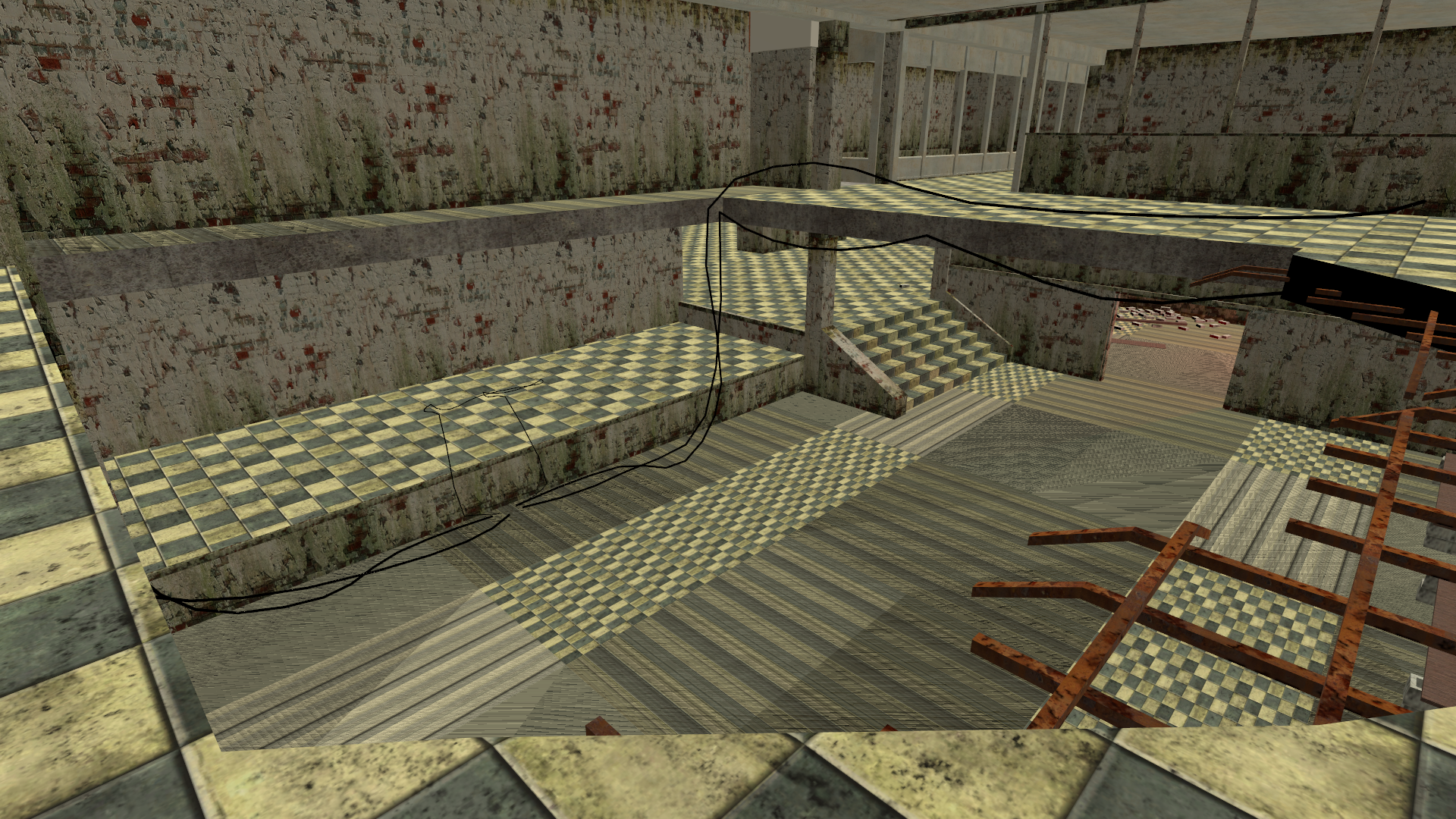 stone hollow
Poor uv map?
short gulch
Looks fine in the editor https://i.imgur.com/deQuXj3.png
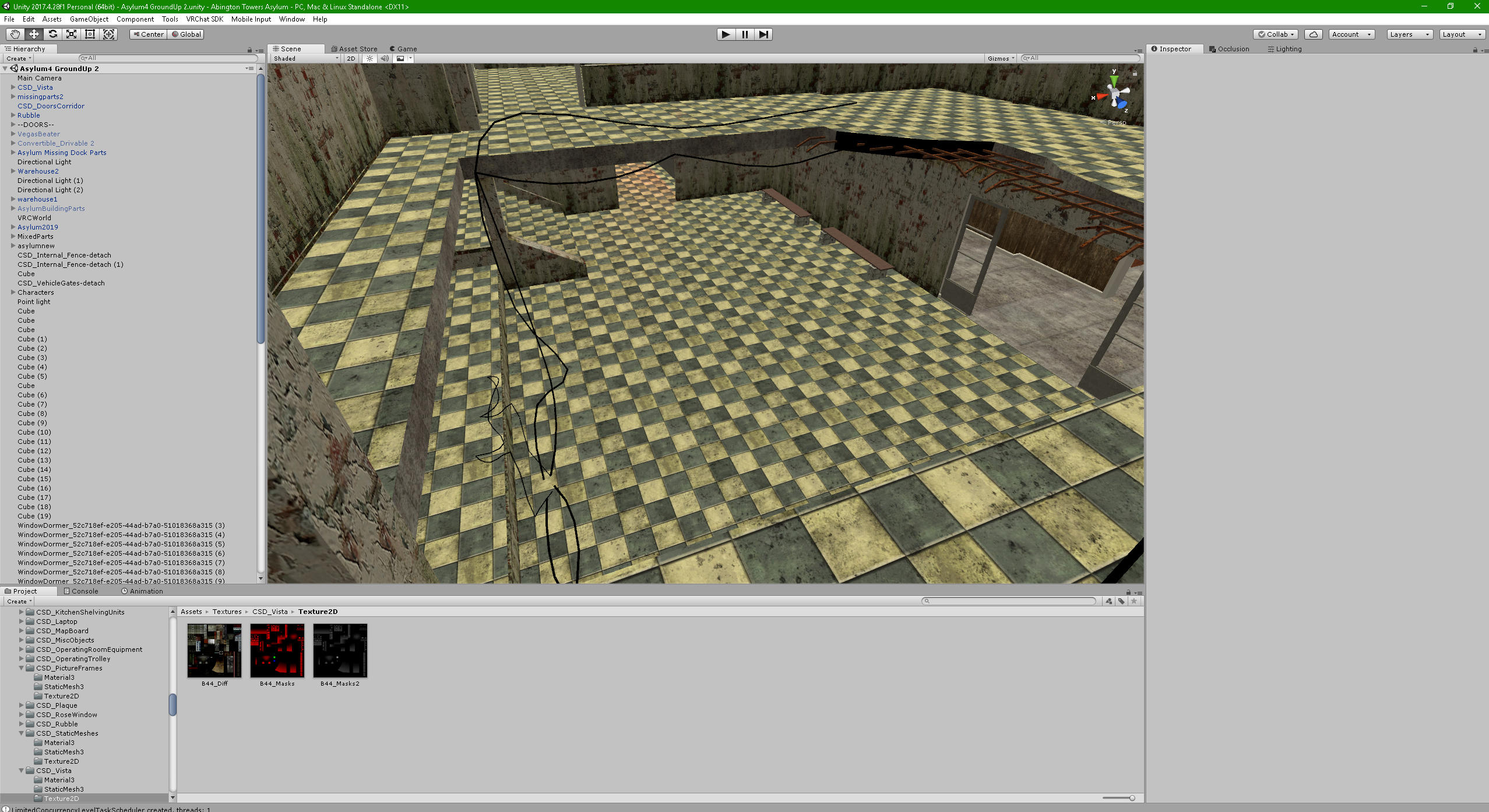
would having a really old sdk potentially mess something like that up? Might be something to do with probuilder too
 past burrow
guys, i have post processing stack 2 and i made a UI menu ,can someone tell me how to trigger post processing stack with a ui element like button, check box, etc?
balmy gate
Change your main post processing volume to only have stuff you always want on, like color grading and auto exposure.
Then, make another post processing volume and check is global, and set the stuff that you want a toggle for - for example Bloom. Make this object disabled (or enabled as you wish)
Now, you can toggle on and off this extra game object to control the extra post processing features
Make sure to set the layers correctly for your extra PP Volumes! (the tutorial uses Water layer) @past burrow
past burrow
so i can have a pp volume for every effect and if i toogle'em all they will all work together like all-in-one?
balmy gate
yes that's one simple way to do it
Another way if you want variable changes to the volume instead of just a toggle, you may want to set the Weight property. To do this, you will need an Animator.
Animators can be controlled using triggers or other ways... If you want to control the Weight using a UI slider control, I wrote how to do this a few times. Search this discord for the word "Rebind" to find my posts on the subject.
flat dagger
Hey @balmy gate . still there?
balmy gate
ya
flat dagger
So, I've got myself a rotating skybox. At least, in editor. When testing a build though, it doesn't seem to work. Does VRC limit what you can use for a skybox shader?
balmy gate
hmm, could be the directional light doesn't actually work in vrc
so that shader would have to be modified to get the rotation some other way
I'm assuming you mean quest
flat dagger
Actually, I'm just testing on my local system
And I'm using a script to rotate the shader values
balmy gate
to be honest probably easiest thing is instead of using a skybox, make a sphere with a texture or cubemap on it, and rotate that
nothing shows ingame? it is black?
oh you're testing for PC in play mode?
flat dagger
Right
And I'm rotating the skybox via this in update:
RenderSettings.skybox.SetFloat("_RotY", RenderSettings.skybox.GetFloat("_RotY") + 0.0035f);
junior cloak
Script ? Here's your problem.
balmy gate
for what purpose? That's not going to actually work in vrc because scripts aren't allowed
flat dagger
Gah
balmy gate
if you put that shader on a sphere you can use an Animator to change that property
junior cloak
^
flat dagger
I don't think you can access that value in an animator
junior cloak
It's a material
balmy gate
if you want it on the actual skybox, the only way to animate a rotation is by animating the directional light rotation.
balmy gate
otherwise don't use the actual skybox and use a sphere instead is easiest
you can access material properties in animator but it has to be an actual Mesh Renderer
flat dagger
Hmm.
balmy gate
then it shows up as Mesh Renderer -> Material._RotY for example
junior cloak
Yep
flat dagger
How would I get an actual mesh to render the same way a skybox does though?
balmy gate
oh you want an inverted sphere instead of a normal sphere. the prefabs database has an inverted sphere
or you use a normal sphere and edit the shader and add the line Cull Front
flat dagger
Also, how would I get the animator to essentially rotate forever? From what I can tell, the animator does have a post-curve = infinity option
bold ibex
enable loop in the clip
balmy gate
the VRCSDK includes a rotate in the examples folder
flat dagger
Well, it's gonna be a slow rotation. Like 30 min per full rotate
 lavish aspen
Can any one help with my issues with transparent going in and out, Everything is standard and the Glass is standard transparent with roughness. https://www.youtube.com/watch?v=GDZYiExn8Po heres a video of it happening
 flat dagger
Try making it more dense, like a 4x4 grid
Gotta give the engine more to work with when trying to figure out what belongs in front vs behind when dealing with flat objects
lavish aspen
humm thats new ill give it a go thanks
flat dagger
Sure thing. Good luck!
flat dagger
So, I have an animator on the material of a sphere. And it looks fine in editor. But in test, the camera is all messed up. I can only move my head up and down, not side to side. My avatar can't move but the hands work. It's really weird. If I just disable that sphere, everything is normal.
flat dagger
OK. Other odd thing I just noticed is that I only see the material animating in the scene view. Not game view.
Ah. Had to turn off the environment's use of the shader
And it's working. A little too well. 🙂 nned to slow it down. It's just fast enough to mak me a lil motion sick...
minor finch
Has anyone here had any success with Iwashi Video Player v2.2s? I feel like I'm missing a step
basically when i try to interact with it in-game the whole display just disappears
cedar nebula
it's not your fault, there's a current issue with the SDK where the dynamic prefabs in the scene descriptor get wiped and filled with random objects. You'll have to use an earlier SDK or wait for an SDK update
minor finch
hmm guess who has been saving their SDKs hehe
oh it mentions that it needs an event handler system, do you know what that means?
er
event system
cedar nebula
ah yea I was about to say Event Handler is auto added to triggers. Event System is for use with UI stuff. I think you can just add one
cedar nebula
yeah just create it, I don't really know what it does but making a UI canvas always makes one for you so I assume it's important in some way
minor finch
yeah i've noticed that too
past burrow
@balmy gate still there?
minor finch
sure enough it works with an old SDK
flat dagger
Anyone know the maximum dimensions for a world?
robust frost
@royal canyon it didnt work sadly
@flat dagger there is not really a limit but the further you go out the wierder the unity calculations get. youd hit your storage limit and cause a lot of lag when loads of pollys and items have to be rendered
but that wouldnt be a problem before you hit your storage limit
 spark thunder
anyone know a good site to find a jazz lounge model?
not having any luck
like the low lighting red velvet walls, stuff like that
warm marten
i'm in the process of modeling my own lounge, if youre wanting to get started in blender, this may be your chance to start learning
Furniture is pretty easy to learn and theres tons of tutorials
otherwise the unity asset store probably has what youre looking for and you might have to find textures online to fit your needs
spark thunder
not looking to do all that right now
im looking through alot of websites and noone has a dang jazz lounge i dont get it
flat dagger
Trying to make an ONeill type space station, with a radius of 10km. I'm gonna go out on a limb and say that's probably outside Unity's range, but I can still make the thing and then render most of it into a skybox
 pure plaza
might want to find a picture of a lounge like you want, then look for models of the different objects that are similar to or match it. probably wont find a whole lounge to go. atleast thats how i'd go about it.
or instead of searching for a jazz louge, look for a jazz bar, might give different results
green lagoon
yeah I would definitely go with the Skybox route jjfranzen
flat dagger
I just imported a rough prototype into Unity for fun. It's actually working...
spring linden
does someone know what the problem is when the chairstick of the flyer prefab will disappear and stop working when i start flying?
royal canyon
@spring linden is it Jetdog's prefab?
spring linden
@royal canyon no, an older one
royal canyon
Jetdog has a good flying prefab
spring linden
but is it still working?
royal canyon
It works for me
junior cloak
https://niyah.eu/i/81974.webm
A way to make a pick-up not have momentum when i release it even if i'm "throwing" it ?
( perhaps the constraint in the rigid bodies ? )
royal canyon
untick gravity I think? then it'll be like it's floating in space
junior cloak
yeah i did, I wish for it to not float when i throw it
junior cloak
Perfect, thanks ! 👌
royal canyon
awesome!
 hardy mantle
hihi, is it best I use unity 2017 with the SDK provided by vrc, rather than unity 2019? Im having problems with scenedescripter and spawn points with 2019
 bronze smelt
You have to use the Unity version the docs tells you to use. Unity 2019 will not work.
Requirements We're going to need a couple things before we can get started. - Unity 2017.4.28f1 - Scroll down to find LTS Release 2017.4.28f1 If you have Unity Hub installed, you...
hardy mantle
thanks for the link, much appreciated 🙂
 amber silo
Anyone know what causes douple vision in maps? Im confused everything is disabled and its still doing it
balmy gate
@amber silo is it the whole screen is splitscreen, or some object/ mesh is double vision (right eye sees the mesh in a different place)?
The cause is often that the shaders were compiled by mistake without support for single pass stereo
amber silo
its splitting the screen for vr in half
balmy gate
To fix, right click each shader that is acting up and do Reimport
amber silo
sometimes even 4
balmy gate
Hmm so that's caused by a bad post processing feature
amber silo
turned off post processing completely did the same thing
balmy gate
Is it PPv2 or PPv1?
amber silo
PPv2
balmy gate
I'm not convinced you turned it off correctly. That shouldn't be possible without post processing
Do you have any grabpass effects
amber silo
nope
balmy gate
For the split screen issue it would need to be a broken grabpass or broken post processing features like depth of field, motion blur, etc
GitLab
A surface shader for Unity providing cel-shading. (Forward rendering only)
Does your menu show up in both halves
amber silo
yes
balmy gate
Then the only thing that can do that without render queue manipulation is post processing
amber silo
even with it on its only colour grading and bloom
balmy gate
Try unsetting the reference camera. Or disable post processing layer and all post processing volumes for now. Just to make sure pp is the culprit
However I believe the fix is to right click reimport all shaders in post processing v2
Or reimport the whole post processing v2
Make sure to delete Tests if you reimport the whole
(Those settings are fine so your post processing stack got compiled without single pass stereo support)
And yes post processing v2 actually uses the shaders in your project to do the color grading etc.... you could theoretically modify them in your world if you wanted
spring linden
does someone know a better solution to have a audio player that plays songs one after the other? to have a big audio file lead to problems and a videoplayer i dont want
royal canyon
I made my own music player and it doesn't increase load size
balmy gate
Do you want the audio uploaded with your world or not?
spring linden
i wanna use audio files they are in the project
royal canyon
that's gonna add a huge chunk to your world in MB size and decrease world loading time
I have a 15-track Music Player in my world and my world is still under 75MB
I added 2 songs to my world at first and it added 20MB easily
spring linden
i just have my big audio file but i need something like a audio player because big audio files make long blackscreens
royal canyon
oh so you'd like to import multiple files instead of one huge file
amber silo
my suggestion is making sure to compress the audio a hell of a lot
 red magnet
is there cases where your lab world wont go to public because of bugs or whatever issue?
royal canyon
yes
 peak hatch
Anyone know a fix for this texture issue?
junior cloak
🤔 seem like uv mapping ? maybe texture is tiled ?
 shell geyser
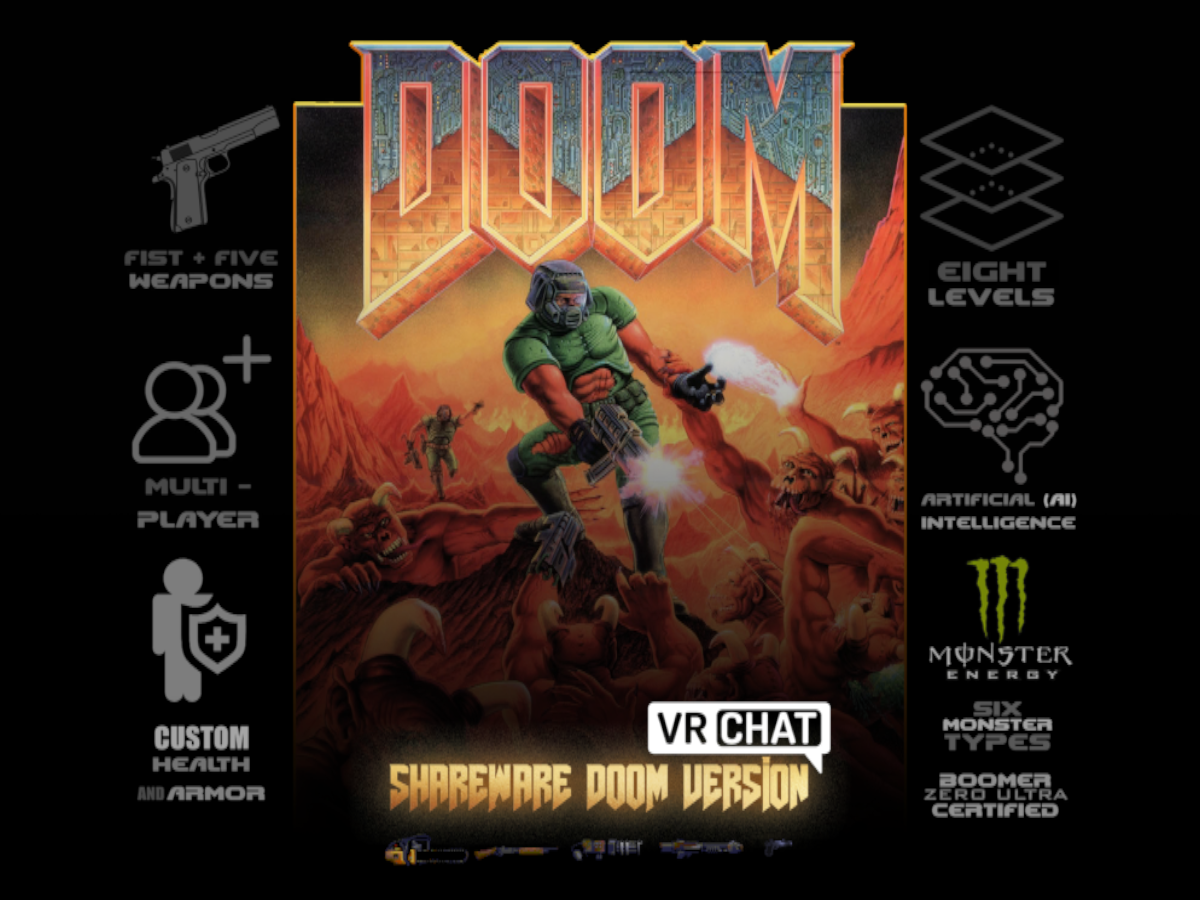
Version 1․1․0 Classic DOOM․ Eastimated play time 40 minutes to 1 hour․
♥ ♥ ♥ ♥ ♥
I'm a sucker for all things Doom
past wave
Every. Damn. Platform.
short gulch
40 minutes? Is that the whole damn game?!
 fervent scarab
whos already starting on their halloween world?
red magnet
so is there a way to fix the lab world wont go to public bug? should i contact someone?
balmy gate
OMG that world looks awesome
is it the escher's relativity world? it's been only in labs for 1 day but 550 visits
red magnet
ye i was just wondering why it wouldn't go public even tho some other worlds with less visits and was uploaded later than mine got published, just wanted to make sure
balmy gate
did the 550 visits happen mostly before you labs'ed it or after?
red magnet
most of it was after it labed
balmy gate
obviously they won't reveal the rules but i have seen worlds upgrade to public quicker so I don't know. my own hangout world take almost 5 months to go out of labs but it was also just the usual unity cube floor with mirror and avatars type of world so not surprising
red magnet
a okay so the mods actually have rules for this instead of having some automated script
internal rules that no one knows i guess
balmy gate
hmm? no it's automated
I mean we just don't know the exact rules. all you can do is compare to other similar examples
balmy gate
maybe give it a few days
red magnet
ye deffinently
balmy gate
any chance of a quest version? 😉 no PC for a couple weeks on vacation
red magnet
heh never done it before but maybe i will 🙂
 fluid cipher
Spookality 2019 soon TM
stone hollow
It will likely start on the 21st, like last year.
fluid cipher
Good to know
fervent scarab
@stone hollow VRchat durring halloween is when it goes CRAZY. Im working on overhauling my world and having everything that Dog's are affriad of in the world. So like SPOOKY FLYING VACCUUM CLEANERS! and the haunted mansion is THE VETENARIAN OFFICE!!
feast your eyes on a dog's greatest fear
stone hollow
Yeah haha sounds fun, im trying to make a new map that ive had the idea for awhile, in a similar style to the junkyard map
fervent scarab
im thinking of having rolled up newspapers smacking things shouting "BAD DOG!"
fervent scarab
possibly a faceless mannequin standing in the corner, if you approach it it turns around and says "welp, im off to work" closes the door behind it.
stone hollow
the real evil
fervent scarab
im having a fun time comming up with ideas that are common fears for dogs.
I hope to make my map more "silly halloween" rather than actually spooky
stone hollow
Mines more of just an environment thats a bit spooky
i have a couple of ideas for halloween characters too
red magnet
so the world whent public, there was no bug, it was just me being an idiot
 shadow blaze
anyone know how to delete the plugins folder without it coming back...
spring linden
does someone know if it's possible to that a sound file can active the next sound files when it ends to create something like a loop with multiple audio files?
fervent scarab
@spring linden I would match the length of sound with a timmer delay
spring linden
i can imagine
warm marten
I demand being able to have a squirt water bottle so i can spray bad dogs >:(
supple drift
@shadow blaze Close your Unity project, go to the project folder in explorer and remove the folder (and the .meta file) - then open up the project when you're done
shadow blaze
kk
fervent scarab
i am a spoopy vacuum cleaner!! oooOOOoo!!
spoopy gate!!
question, so I made the gate in pieces and im gong to assemble them in Unity. What is the best setting to put on the gate and fence to minimize impact?
I heard of GPU instancing but apparently that doesn't work too well with cards?
junior cloak
Uhm
Well the part that is not supposed to move should be static, your lights baked and you should use occlusion culling when you can !
That's what I know at least 👀
fervent scarab
what about animated NPC's? like this spoopy ghost vacuum that will chase players around.
 sage gust
hey guys, dont know if this is the place to ask questions but, is there a way to get the players rotation in a vrchat world?
balmy gate
define "get" - I mean there are ways to get a game object to mimic the position and rotation of the player using something called the "Player Tracker"
CyanLaser has a tutorial on making this, and there is such a prefab included in the toybox I think - see the prefabs sheet in the pinned messages.
once you have a game object mimicing the player rotation, there are lots of interesting ways to use this information
there are other ways as well: for example using some raycasting components ( prevent camera clip), using culling of animators or dynamic bones to detect if you are looking in a given direction.
sage gust
@balmy gate Thank u~, just started looking at the tutorial video!
bold ibex
Anyone know how to do volumetric lighting inside of vrchat? xd...
https://i.imgur.com/lxdVorJ.png
Like you can do inside of blender or with Aura 2
https://www.youtube.com/watch?v=_v4vxIPWdAg
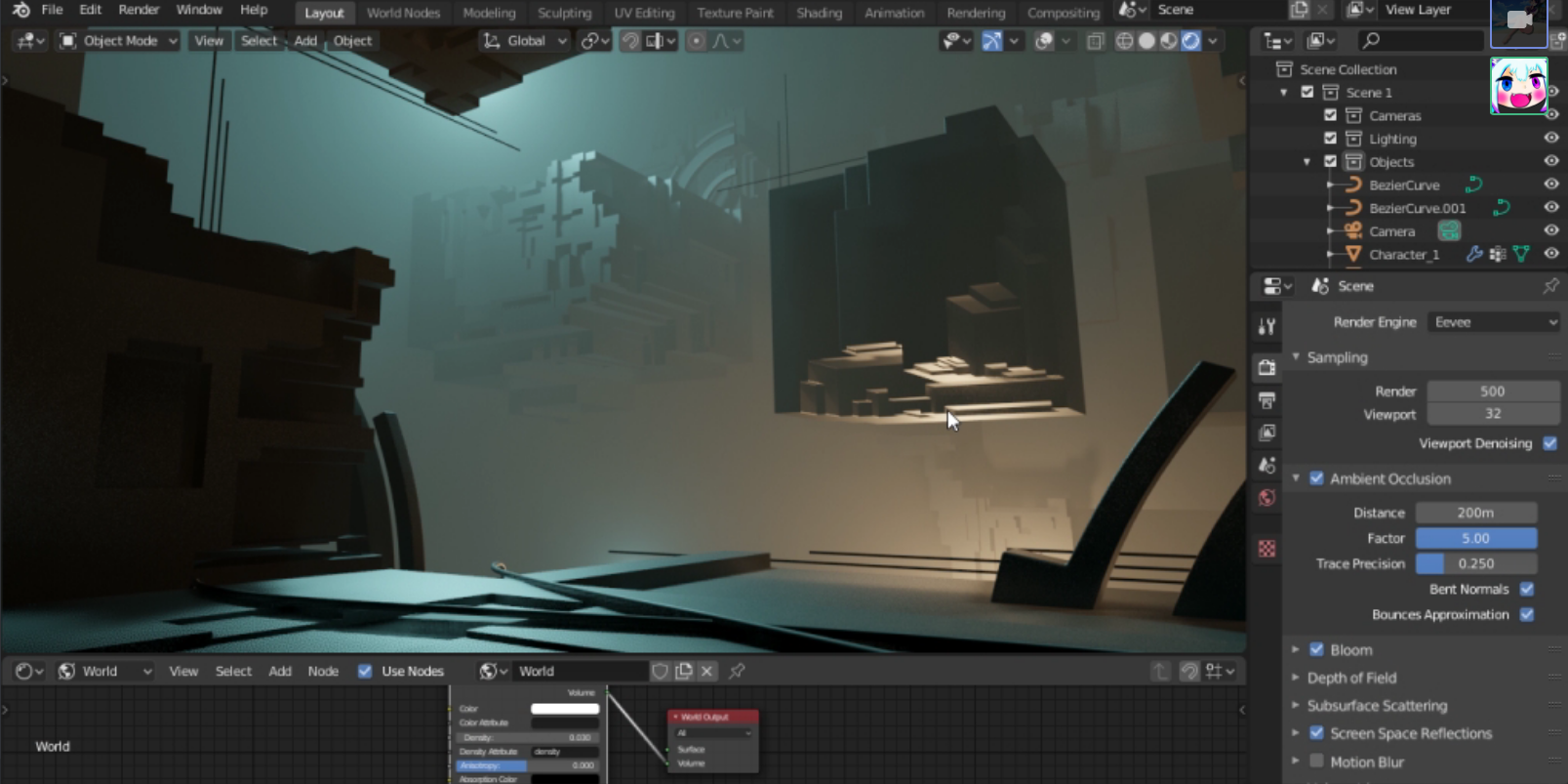
Aura 2 - Volumetric Lighting & Fog is a high-end volumetric lighting/fog solution for Unity3D. Aura 2 is available now on the Asset Store : http://u3d.as/1qBF
royal canyon
fresh plover
well i think some fake volumetric lighting does sort of work in VRchat
i forget who made them perhaps @lucid pier
dusty fjord
Does anyone know what gives your world the ‘environment-hateful’ tag and what affect it has?
 solid helm
Reports
royal canyon
Probably be worth an effort to see if there's anything remotely hateful in your world and probably remove it?
lol
otherwise....tf bruh
ppl reporting just to be trolls
people literally go on reporting raids
right? lmao like wtf
bruh ima go report your world for it loading too fast right now...smh
you're so HATEFUL to have such a FAST LOAD!
wait
LOAD TIME!
the first one sounded bad...
smh
dusty fjord
Wtf, does it do anything to the world?
I haven’t changed anything that could make it thought of as hateful
junior cloak
lol

Does anyone know what gives your world the ‘environment-hateful’ tag and what affect it has?
in #worlds
·
it's w/e tbh
i got it aswell because litteraly 3 people out of 50k+ reported
pepega
fresh plover
@junior cloak is that the new world ?
dusty fjord
@junior cloak sucks hard 😦 but it doesn’t mean anything then whatever
 ornate turret
yeah doesn't mean much, at most devs will check the worlds I think to investigate to see if the reports have any truth in them
got some on my worlds too
"environment-performance" & "environment-malicious" on one of mine
4 reports
fresh plover
i wonder if we did a truly hatful world it would pass with positive great place to visit ..
or hey just change the world name to hateful world
hateful world of xxx
how do you even define a hateful world ?
do they have a guideline or something
vr pill may have something ? @bold ibex
solid helm
Or maybe there is something hateful in your world and you don't realise it.
fresh plover
that's not helpful
 golden vessel
I need some help with world lighting. This is something I've done many times before but now since I changed SDK it doesn't work. When I bake lighting, the lightmap renders on the scene in unity and functions fine. When I upload the world and view it in VRChat, the baked lighting is gone. Everything is static, everything as a UV map. There are no dynamic light sources. I've tried directional, indirecrional. I've tried all different baking methods for baked global illumination. Nothing works. I don't understand what I'm missing?
I also do have light probes set up, as I'm trying to make a curved iMax cinema with globa illumination
I need to get the baked lighting to upload first before I can get that working.
 vocal schooner
is there maybe a codelock prefab that i can use? i created one last year and it was suuper tedious and annoying that i would prefer to use a pre build one
stone hollow
Should be one in here https://tinyurl.com/vrcprefabs
fervent scarab
dunno if im doing this right. lol
im proud of this UV though, im thinking of how the UV's will work AS i build the environment.
stone hollow
It could be more efficient but yeah thats good
Im going for the same approach to all my other maps, 1 texture atlas for everything 👀
fervent scarab
It will be shrunk down and a atlas with everything yeah
I have to squeeze 3 separate environments into the world AND quest compatible for spookality.
fervent scarab
Yeah this part is the veterinary clinic where you choose your spooky shiba
 half osprey
uganda knuklesT_T
fervent scarab
@stone hollow. I have the music picked out for the interior too https://audiojungle.net/item/groovy-halloween/9066911

AudioJungle
Music description
Three versions included!
A fun, quirky and playful Halloween track with a happy, retro vibe and spooky but friendly ghostly elements. A groovy beat, vintage theremin, goofy ba...
stone hollow
I havent even thought this far ahead yettt
Im teetering on if i should go full spooky or add some kind of alien cute characters
fervent scarab
Im aiming for silly spooky.
teal slate
Go space spooky it'll be different
stone hollow
but do i go silly aliens or naw
supple drift
Blue, you could prob save yourself tons of art / texture time if you get or make a bunch of trim sheets before you start unwrapping yo stuff. sci-fi/space stuff works rlly well with em
green lagoon

Get the example texture and mesh files from this tutorial: https://gumroad.com/polygonacademy Free UE4 lighting presets + Tutorial : https://youtu.be/_bqpw5s...

A hot topic and trend of the games industry is modularity, or the process of organizing groups of assets into reusable, inter-linkable modules to form larger structures and environments. The core idea is reusing as much work as possible in order to save memory, improve load t...
https://www.artstation.com/benmitchell11/collections/629788 I made a artstation collection showing off various modular building pieces and trim sheets which are quite useful techniques when dealing with environments
 supple drift
thanks for posting these! time savings aside - it's a great technique in the toolkit for maximizing your texel res while minimizing materials + build size
green lagoon
no problem it's a very helpful techniques
and the modular Concepts / video games and virtual reality article has a whole bunch of Articles listed at the bottom
bold ibex
For PP, whats the recommended settings for using "Lift" in color grading? I see that it could be very disturbing or annoying for VR users.
supple drift
@bold ibex I personally would keep it at default. I think some people might use Lift to add a shadow color cast for stylistic reasons, but if you're going for something more realistic: ACES Tonemapping -> corrective Gamma + Gain adjustments
bold ibex
Alrighty! thank you : )
 ember sundial
I'm trying to use bloom but it's only working on one half of my map. Can anyone help?
supple drift
Whatcha mean? Can you post some stills?
fervent scarab
😒 @stone hollow
stone hollow
😎
fervent scarab
i will fight you
fervent scarab


 stone hollow
this angers me
red magnet
hey guys, is there a way to toggle multiple skyboxes without removing skybox from lighting-envirotment?(your default skybox)
near escarp
I don't think you can interact with the environment lighting at runtime no
bold ibex
You could "cheese" it with an inverted sphere thats mapped to apply a skybox
solid helm
You can do a few tricks to give the appearance of multiple
near escarp
I guess you'd need to rely on post processing
solid helm
Post processing is only one part of it
fervent scarab
I need more owo factor in my world
 unique iron
hi pikapetey
balmy gate
@red magnet if you use your free realtime directional light you can aso branch based on the rotation of the light, even using fractional values of rotation and the frac () function to toggle stuff without significantly changing rotation
Like 24.1 is box 1, 24.2 is box 2 etc
 weak raven
is anyone having trouble uploading worlds?
 outer scaffold
can someone help me >.<
bold ibex
try that
bold ibex
is unity paused?
weak raven
nope
bold ibex
pause it and try
weak raven
still not letting me
bold ibex
odd
weak raven
what version of unity are you on?
bold ibex
check the lab maybe? and me 2017.4
weak raven
.15?
bold ibex
yes
weak raven
hmm
bold ibex
sorry..
weak raven
all good. time to do some testing around...
bold ibex
wish i could be more of help but i never had any problems with new one soo i wouldent know the fix
weak raven
I might have to uninstall and reinstall it to fix... going to try everything else before doing so...
bold ibex
ok
royal canyon
@weak raven detach your scene descriptor world ID and then try it again
@outer scaffold are you getting any console errors? You seem to have something in your world like a skybox script maybe? that's causing the error.
weak raven
will try once my unity starts responding again... ty
royal canyon
no problem let me know if it works or if you still have issues
outer scaffold
I'm re-installing unity I'll try again but if it doesn't work I'll check to see if its the skybox
bold ibex
sorry i wasent much help
royal canyon
which skybox are you using @outer scaffold ?
outer scaffold
ah it was one I found on the assests store I forgot what it was called though.
bold ibex
was it like a normal daytime sky?
royal canyon
If it's AllFree or any other skybox with custom scripts, that custom script can't be used with VRChat.
outer scaffold
ah okay it think it might have been one of them
bold ibex
soo sky like animated onces you mean?
royal canyon
any that use custom scripts
if those scripts haven't been whitelisted by VRChat they will not upload.
bold ibex
ok
royal canyon
It will always thrown an error
bold ibex
interesting
royal canyon
the upgrade to UDON (I think) will allow for Custom Scripting though
don't quote me on that lol
outer scaffold
ok I just checked it was allfree sky
royal canyon
yeah you'll have to ditch that one and find another. Allfree ALWAYS does that and people always use that one lol
delete the entire AllFree folder and just find another nice one on the store
weak raven
ok tested and still doesn't work.
royal canyon
have you tried reinstalling the SDK @weak raven?
also which Unity version are you using?
royal canyon
ohhhhh that's why!!! you need a Unity upgrade. 😉 Log into VRChat.net, and go to Download and click on Download Unity
weak raven
so need to download newer unity... got it.. lets try.
royal canyon
you should always check for the newest Unity version if you Update your SDK
outer scaffold
yay! it worked
bold ibex
@outer scaffold glad it worked out and again sorry i dident help much
outer scaffold
its fine klaus you at least tried
bold ibex
ok
 worthy crater
hey, when i test my world my mirror shows up as a pink square. anyone know why?
royal canyon
@worthy crater it doesn't look like it has a shader on it. The pink signifies a missing shader.
worthy crater
@royal canyon where do i add the shader? do i make a material for the mirror with a shader on it?
royal canyon
You can just add a new material and then change the shader to FX/MirrorReflection
worthy crater
that worked, thank you :)
royal canyon
no worries!
 upper latch
Bummer.
balmy gate
@upper latch did you check if there is a delete button in Manage Uploaded Content in unity from the vrc sdk? I know one exists for avatars