#development-advanced
1 messages · Page 44 of 1
 stiff lily
 kind prawn
Downloading brand new files through the main website.
Once through the updater within Unity.
Either method would the same result.
stiff lily
I meant how are you overwriting the files in your folders
 toxic hedge
@kind prawn if you're just importing over top of the existing one you may have stray scripts littered throughout the tree. Delete the vrchat sdk directory from your assets folder before importing the new one.
stiff lily
it's a bit more complicated than that https://docs.vrchat.com/docs/updating-the-sdk
If you need to update your SDK, it is important that you follow these steps to ensure the update proceeds properly and you don't have any old/conflicting files. ## Simple Update Here's how you update your SDK. If you're just uploading avatars, you can use the following proc...
kind prawn
If I'm downloading the unitypackage, I usually just open that up, and let Unity write over files as necessary. I haven't tried that doc you linked, so I'll give that a go and see if anything changes for me with my previous projects containing this issue.
Is VRChat using Unity 2017.4.28 currently?
toxic hedge
yeah 4.28f1
kind prawn
Ah, I think that might be the issue. Been using an older version, guess I missed an update.
kind prawn
So, installing a fresh SDK onto a new, updated Unity still gives me that issue. When I import the unitypackage, the VRC SDK doesn't show up in the toolbar until I close the Unity window and open it up again. Then I'll get the same issue I had before.
 remote chasm
Is there a way to add finger spreading support? Piggy backing of index support is cool but it would be even cooler for intergrators
@summer berry maybe you know! other then official support you are knowledged on working with boundairies imposed so far 😉
 near bronze
the inner workings of the player controller are completely outside the limits of worlds and avatars
remote chasm
gestures could be triggered through buttons from vive trackers (pogo pins on bottom)
I assumed 😦
I was told years ago id have to piggy back on index but index only does finger bends to a degree
near bronze
we can do a fair bit with the player's location, but not on any of the bones of the player's avatar
remote chasm
@dusk pewter aev ill buy you a dinner in person at anime expo if you can somehow pitch this.
I wonder what it takes for people to help with expanding controller functionality in vrchat
Is it something that you guys would consider third party involvement for?
i know its a canny.io thing but seeing how full that list is
 trail jacinth
> meanwhile
https://www.youtube.com/watch?v=oEG2-Yc-0Wc

Showcase of full body avatars using the new finger skeleton retargeting in Neos VR - Leap Motion's skeletal model is completely automatically mapped to any u...
 drifting token
Neos doesn't have the essentials down and keeps getting distracted by small, ultimately unimportant details
I also fail to see the point in integrating the editor into the game
Cause vr interfaces are uh
Not Good
trail jacinth
VRChat and Neos could have such a wonderful baby :'(
drifting token
They're uhm..
Direct competitors lol
trail jacinth
Well yeah. Thats how it works. One always does something better and something worse. Just like Vive and Oculus...
drifting token
I do think it has a lot of potential it just needs to turn it's focus back to polishing the basics like animations and stability
 polar wagon
this has probably been asked a thousand times but there's no way to swap out animation overrides via gestures right?
drifting token
no lol
polar wagon
Other than the obvious work around which involves seperate armatures and enabling disabling stuff
drifting token
what would you do with multiple armatures
polar wagon
not multiple armatures, sorry
mispoke
I meant multiple sets of the same bones
and mesh
drifting token
for what exactly
polar wagon
like say I want to hop on a skateboard and have my legs go into a skating pose
while retaining use of my hands
etc
I'd need to clone the bottom half of my body
and have it be a seperate mesh and bones
and have them frozen in place or animating differently
and then enabling the appropriate mesh via gesture
because I can't just tell vrchat "hey, change my running animation on this gesture"
drifting token
could do it through material swap to retain a single mesh but yeah the basic idea would always need to be the same
polar wagon
sucks
maybe some day
And material swaps don't show up in mirrors anymore which is really annoying
 finite lava
Hi
drifting token
👀
finite lava
Huh?
 short umbra
I want to make an animation where I take my tail out of my back and hold it with my hand. Is there a tutorial for that anywhere? Is anyone able to help me with this?
 lucid summit
have a second tail that is detached from the avatar nested in the hand bone and activate it on gesture
it'll be setgameobject.active in the tab, there should be some videos on youtube that cover gestures
you might want to try out the ones specific to guns or just weapons in general @short umbra
 devout rock
its amazing how optimised we can make really complex things.
lucid summit
You could definitely make it all one object if you wanted to and just change the size of that part of the armature
but yeah
trail jacinth
Does anyone know of an example for a SendRPC that uses "Custom Method" or knows what the "Custom Method" RPC field is for?
devout rock
So im no genius but
ive seen that its possible to trigger animations on collisions.
is it possible to for example have an invisible collider on your hand, that only collides with like a sword sheath and when the two touch, it triggers an inventory toggle trigger, and like puts the sword that was in the sheath in that hand.
?
i think vrchat mods is a bad word. either way somebody there actually pulled it off
 lyric iris
yeah its possible
animation on collision, or animation on particle death, or stop action animation (all the same thing), is done by using the stop action option that is on particle systems to reset an animator. you stop the animator from running the first time when the avatar first loads or a parent object is enabled, then you use stop action(set to disable) to reset the animator, and it animates what you need.
it's not that simple that's just a summary to help
here is my package for it
@devout rock
you're meant to use cibbi's broken emitter script to make full use of this
 drifting token
There are some packages of stop action animators I host in my asset server also (creator of the vrcm post here)
@devout rock
I created the method used to do so which is what is in the stop action kit
The one for my toggles also has an experimental set up script to generate entire inventories with it with a single button
Courtesy of my friend Cibbi
devout rock
yeah its really smart, using particle death to do things
all because we cant be trusted with scripts.
which is really fair tbh, because people will break the game even more with scripts.
devout rock
Yeah state machines are really smart, like one animation triggers many but only one is active ect.
and then we have so many ways to trigger different states
an animation that goes one by one through them all
an emote that just picks it and things like this
drifting token

Demonstration 1 of the inventory functionality of an asset I'm working on preparing for distribution. Each numbered icon corresponds to a full gameobject so ...
 warm niche
Thats so cool ^^
devout rock
Now thats something that id love to try.
so This is all basically just killing this which causes this or have i completely lost the plot
drifting token
More or less
Stop action causing an object to be disabled and re-enabled. Triggering an animator to reset to its entry state, performing a single action
using a combination of traditional state machines and stop-action animators I made a "seamless" gun which has ammo, plays a click sound when shot while empty, reloads on activation without needing to be animated, and plays an effect when let go
with the gesture just animating the behaviour of the animator (proxy)
I also later incorporated a pitch "randomizer" for the fire sound fx
devout rock
you are a kind of person i would constantly join just to see what you have made.
cause that is awesome.
drifting token
also for the same avatar prototyped a simple way to create speed detection for movement based particle emission
prototypes, of course
devout rock
so if its moving fast enough, it will notice that its fast enough to do something
drifting token
right
devout rock
so that could be as simple as a trail and a slash audio or if somebody managed to pull it off, 2 avatars that were designed to work together.
cause i know thats possible, because people have made these bands that when another with the same key is in the world they glow.
drifting token
Pretty sure that's just cameras and a rendertexture?
devout rock
im not exactly sure, ive only heard about them,.
So anyways
you have the ones that trigger when hit but can be manually reset
How exactly would you get the togglable ones to work.
lyric iris
you should be able to do global cross avatar animation with uimenu layer and stop action collision
rokk tested it
devout rock
Woah.
drifting token
UImenu is on the chopping block so hopefully when it's removed it gets replaced with something viable
on avatars i mean
devout rock
so like gonna just make up some simple one,
2 avatars, one has collider, one has particle, on their hand, so if they touch it could for example trigger a high five sound effect.
lyric iris
yeah
devout rock
that can cause some very creative things.
lyric iris
im going to make a package for it eventually, provided that it doesn't get removed as rero says
drifting token
Whatever they replace it with won't work across avatars, rest assured
That's the entire point of disallowing UIMenu
devout rock
Is the system that causes this entire thing, laggy or something worse.
lyric iris
there is one hazard, which is that you can cause subemission errors for yourself if you set up subemission incorrectly
this will fill your log with gigabytes of data
just yours, though
devout rock
so basically giving somebody the ability to instantly memory leak your vrchat client
lyric iris
well, for cross avatars it wouldn't occur i think. only for the person with the particle system that is complaining
since person B would only have a collider on them
devout rock
so cross avatar systems are still for the best to be untouched.\
drifting token
Well seeing as they will be depreciated I'd say so.
lyric iris
you can do it safely either way
drifting token
you are basically making something that will break guaranteed.
Which in the end is up to you.
lyric iris
yeah you might get a few months of fun out of it, maybe
devout rock
Anyways back to what we were talking about.
How do togglable stop particles exactly work.
devout rock
Cause ive found the greatest way to explain something in vrchat, that i understood straight away is having a small section explaining in like paint or something the theory behind this
Like https://www.youtube.com/watch?v=SySnHIhiVgM he explains that this works like an actual stencil.
drifting token
I plan on making short-form guides to some of my more frequently used solutions/systems sometime soon
stop action being one of them
as well as a video accompaniment for the stop action inventory generator script from my 2 button toggle asset i host on my asset server
devout rock
because the difference between State machines and the stop particle system is that its more reliable, you could use an inventory system to disable the entire thing via emotes, or just reset it.
Where as state machines have to be tweaked perfectly.
drifting token
well, stop action and collision in general is dependent on framerate so you still have to tweak for that
devout rock
Still, this means for high end vr this is much more reliable.
lyric iris
@devout rock https://youtu.be/eaWiAK0Nu4E
devout rock
thanks
lyric iris
you're welcome, re-dl the package i linked earlier incase you downloaded it right after i posted it
added the basic parts folder for this vid
devout rock
Having an intuitive guide to how to do them helps a ton
So the Start/stop particles are kept on the root of the model
and they get rigid bodied to empty game objects in the eg hand.
lyric iris
yes, although if for some reason you prefer ik follower you can use that
final ik will work too if you have the set up
devout rock
I would only use ik follower for world particles since they would likely be used more.
So you can have one trigger particle on your finger, that be used like in reroSlate, can interact with smaller buttons (which are just small colliders) seperately.
Which kinda confused me since How could you have like a sword trigger to your hand if the buttons are obviously tracked to something else.
lyric iris
yep
devout rock
So how can the particle that gets killed activate for example a sword on the hand if the trigger par is obviously on the button.
wait the enable particle enables the entire thing which is on the hand.
the enable particle is the button
the particle killer is attached to the finger or whatever.
and you just kill enable particle
and it triggers the system its connected to enabling or disabling set.
So ignore that
how do i make a system where one button toggles it off and on
devout rock
ok thanks
lyric iris
basically, just have a particle that subemits a stop action disable particle for every game object you've enabled that needs to be disabled
in my package, I enable objects named "Set"(because a set of your objects go under it)
so in button inventory, 1 reset particle subemits every Set object
devout rock
so its on buttons and one disable all button
instead of having 1 button and 1 off button. so its like an emote inventory but its just in the playspace
devout rock
Also
cant you completely avoid having to have a point emote by just using valve index.
lyric iris

Gist
WIP Button Inventory Guide Unfinished Clearly. GitHub Gist: instantly share code, notes, and snippets.
devout rock
since everything is just strapped to the bone.
lyric iris
you still want an override generally with hand interactions because you can brush the collider with unintended movements
devout rock
fair, so i can have that rigged to my regular point emote, so when gesture ovs are active i can just point right?
lyric iris
yes
button inventory is set up so it opens on a combination gesture
handopen + fingerpoint opens it, and it will remain open until you release handopen
devout rock
So Hand open makes the buttons appear
Finger point turns the safety off and activates all of the colliders on your finger.
does mean things can get confusing cause hand open on index is, literally have your hand open but i can just have that on another emote anyways.
so button invent stays on the root?
lyric iris
its not a normal combo gesture
devout rock
I play vrchat on the index so doing gesture overwrites requires you to turn on gesture overwrites which means this doesnt get in the way anyways.
lyric iris
handopen and fingerpoint start an animator sequence instead of enabling/disabling objects
both overrides need to be active for the output animator to start
the output animator, in this case "open_menu", unhides the buttons
yeah button inventory stays at root. you can move the state objects around. they're stop action systems
naming scheme in the animators for button inventory may not be the exact same, but it's the same as in stop action kit
difference is because i just updated the naming scheme in the kit
guide should cover all the necessary parts of the setup. i recommend doing the setup and then uploading with some child cubes or whatever to test
you probably also want to use a big af cube on yourself
like this big af cube
dont put it on public avatars, is wasteful
but this big af cube will make it so people dont cull your animations or ik when not looking at you
so if someone is turned away from you, you can still sync them
devout rock
Cull?
lyric iris
another word for "remove"
devout rock
like block them.
lyric iris
culling in this context is removing things that don't need to be rendered because you're not going to be able to see them anyway
typically your ik and animations are culled when people aren't looking at you
a big cube will make it so everyone is always looking at you, technically
they are inside you
devout rock
Oh because lots of this is done locally, and if somebody cannot see you it can mess the anims up for them and piss them off
lyric iris
yeah
devout rock
So just having this on the root so you dont get unloaded.
lyric iris
its best for performance avatars
like, you're performing
most of the time you dont need to animate for people that aren't looking at you
cause they won't see it anyway
and people block animations unless they want to look at them anyway
devout rock
Yeah you have animations you show off, and some people do like to rp.
Like having a big cube on a regular avatar is a pretty dick move.
the only downside is that
if your shaders are muted.
then if the cube isnt apsolutely huge, people will be annoyed.
now that you have explained this all to me, i finally understand why visitors with giant cubes are not malicious models its cause they were not designed to be muted.
lyric iris
well my cube is really, really big
the cube is so large that if you see it ngl doesn't really matter
the person seeing it is 10k units away from you
devout rock
so far away the skybox is usually in the way of it.
lyric iris
they're probably broken out there anyway
and since the backface doesn't render on the cube you only see if you are outside of it and have shaders blocked
devout rock
Yeah if they can see it, they are either glitching, just messing about ect.
devout rock
thanks for the tip
yeah i see how nobody will ever see this. and cubes are not laggy to boot.
lyric iris
yeah the only performance cost is that people will be rendering you all the time
which for one avatar is no big deal
you wouldn't want it on like 20+ avatars in the same instance probably
devout rock
Which if they can look at you in the first place, usually isnt a problem
and making the avatar public is a bad idea because its like having a giant sign that says, clone me to lag the server.
lyric iris
would be the same as just looking at 20+ avatars at once
devout rock
Well considering i only lag when there are 20 avatars in view, should be fine.
So i have a small idea, its like a kinda hud idea, where the menu is tracked to my head on the corner of my vision or is that a bad idea.
like getting in the way kind of thing
lyric iris
you maybe wouldn't want the button fixed to head all the time, even if they're hidden
you'd probably want them to be fixed to world in front of your face while open, or something
devout rock
anyways does the menu just hide itself once it starts?
or do i have to hide it before i upload it
lyric iris
it's hidden automatically once the scene starts
devout rock
So ive got an item set up and positioned, how do i make it so i dont lose the position , like by moving the state machine?
so i put it in the wrist and then what, do i just copy the position to the state and reset the item once its in set
lyric iris
you can arrange position/rotation/scale offsets how you need. its best to keep the position/rotation at 0 and scale at 1 for the state object hierarchy, then have your offsets on the child objects
unity will rescale and keep offsets as you move things around so you'll need to adjust it so your final hierarchy has correct transforms
devout rock
So just move set to where the item was.
oh so i literally just have to go toss the item in set and the state in the wrist and happy days.
lyric iris
yes, there is nothing special about the buttons, apart from where the colliders are located
they're just mesh renderers
cubes
devout rock
know any shaders that i can use to just recolor the tex- wait the default right
lyric iris
yeah you can add color to standard shader
devout rock
yeah
lyric iris
once the guide is done there will be an easy way to start a custom animated menu
you can do it now but not a lot of people are familiar enough with this sort of system to make that change
most people that use this just keep the default cubes lol
devout rock
For now i think i should be able to deal with,
toggle activates the set, and i should be able to use simple animating to for example,
spawn the weapon on my back as default and have my fist animation hide the sheathed weapon and unhide a hand one
lyric iris
which is not really what i intended but lol
devout rock
well retexturing stuff is easy, infact you could even just move the buttons around you in a circle and have it bound to your prefab if you wanted
would look cool remodelling the buttons to the weapon it corrisponds to., and it would look pretty seemless.
lyric iris
yeah that is fine, but for like custom menu transitions for entry and exit
like rero's slate is a good example
rather than just a button panel its a fully animated rich button panel
devout rock
The menu prefab is just a keypad of simple buttons that was designed to be torn apart and used creatively.
lyric iris
yee
devout rock
Yeah, he went above and beyond on the intention of selling it as an asset. so it makes sence.
but id love to learn how to bind everything like a toggle.
so the colliders are on the pointer.
lyric iris
the particles are on the pointer, the colliders are children of the button meshes
devout rock
could we hide the particles or would that mess it up
lyric iris
what do you mean hide? hide the pointer?
devout rock
state 1 is on
so the enable particle is removed.
and the disable particle is enabled
lyric iris
no need to hide the particles really. their lifecycle is managed and they are invisible by default
devout rock
and the disable state 1 is also just clipped or child of the enable.
so making a toggle system.
like on the reroslate
talking to a person who knows what they are doing is why the discord is so good.
lyric iris
you'll want to manage colliders for that
instead of conditionally hiding the enable particle
devout rock
either way, sure i know how to model and the general rules of the thing, i think ill stick to having a reset button for now
since im no good with messing around with the entire function,
lyric iris
like, enable particle always on, but the collider that kills it is conditionally on
devout rock
So
set is on, so enable collider is off and the disable collider is on.
could be achieved via state machines and a giant headache at the cost of probably 0.12 secs.
lyric iris
yes something like that. my prefab isn't really set up to do that out of the box, you'd need to adjust the state object hierarchy and animators slightly to do it
i don't actually like bidirectional functionality with the buttons though
devout rock
does it sound more unreliable.
lyric iris
since it really increases the complexity and you have to account for desync more
devout rock
Well still the state keypad is reliable and also pretty good on its own, along with being basically infinitely expandable.
lyric iris
it's manageable but you need to really think about your interface and have good sense of state management
i think rero slate does it well because he thought about the interface a lot and you can power cycle the system if someone does get desynced and the implementation isn't careless
devout rock
noticed a problem with my model
42 is much larger than the max of 32.
also having 78 materials is a problem.
drifting token
if you're going to do anything advanced
forget about the perf rating
There is not a single thing you can do about it
devout rock
Well im more scared about the fact that im hitting the max rather than it having bad profs.
78 material slots. is
much much more than 32..
drifting token
delete the material from the render module, set from billboard to none, turn off render
done
pretty sure the perf rating will count a mat but it won't affect performance
devout rock
render module?
drifting token
in the particle
devout rock
oh
lyric iris
particles should have all that stuff set to none anyway
not sure where the materials are coming from other than the cube buttons
doesn't exactly matter, everything is either disabled until you're using it or it doesn't render anything anyway
devout rock
12 are from the buttons.
lyric iris
sdk just counts it to be safe about potential
devout rock
around 20 are from my model but thats after i atlassed it down from a whopping 38
lyric iris
yeah i dont see any materials other than the buttons
maybe the sdk is just counting particle systems as materials
devout rock
well its letting me press build whats the worse that can happen
lyric iris
yeah it won't stop you
devout rock
its either that or the sdk is glitched.
lyric iris
and real performance profile is fine
devout rock
wait now i know the problem
for whatever reason my animating model might have been on
nope.
lyric iris
nah i see the high material count too, i just don't see any unexpected materials in inspector
and all the particles have none selected for the material
devout rock
do they load in vrchat.
and i know drawcalls are a real lag causer but doesnt matter if they dont even get called right
lyric iris
no, even if the particles had assigned materials, the render module is off by default
nothing renders so there is no draw call
devout rock
Do the physics collider count being 26 mean anything bad
do note im using latest sdk
lyric iris
not unless they are always calculating collisions, which they shouldn't be. they're disabled by default too
and trigger colliders
devout rock
who knows.
lyric iris
im thinking the sdk is just counting particle systems as 1 material for some reason
that's the only thing i can think of regarding the material count
i guess i can test that
yep, it does
you don't actually have that many materials in your scene
devout rock
well considering i have 11 slots ive just realised i must have a trumpet in the theme of spooktober.
On a sidenote do you have an optimal audio source setting, like decent range ect
drifting token
Here's what setup for a toggle looks like with the generator script in my asset server asset for stop action toggles (:
https://youtu.be/UOzLfrZYnSM

If you're interested in picking up this unitypackage and script contact me on Discord: rero#9097 Thank you for the awesome work, Cibbi! This is a video guide...
can be used to generate configurable entire inventories
(future video)
devout rock
well it took me a while but ive set something up and im off to go upload and test it
also you gotta make a tutorial on that speed detector.
drifting token
working on it
devout rock
also
nobody should ever be muted on vrchat unless they are actually being malicious
drifting token
making a mini series of short-form videos about a lot of the solutions ive developed recently
devout rock
because playing the game laggily is honestly just the raw vrchat experience
id reccomend you do them in an order from easy to hard
then if you playlist them you basically are showing all of the skills going into something before you use it
devout rock
there is only 3 ways i can actually understand and do a consept in vr
1 - when i lock myself in my room until it works
2 - 1 but when im heavily sleep deprived
3 - both above but once the caffeine kicks in
devout rock
honestly that is literally all of my friend's main tactic
open up vrchat, sit down , chat with your mates, drink and open unity up
drifting token
I do that but I skip the first uh
3 things
lyric iris
i too drink standing
devout rock
well who wants to throw up on their unity project and brick the pc before art is made
so i either have been banned.
or my login is broke
or steam vr died
well ive confirmed both pass and user are right.
ok i just plane cant login on the app
i can on chrome
gonna try rebooting
Nvm i was using my display name rather than my user, thanks a ton lin it works like a charm
seems to act strange when not in the home, on murder 3 its floating at an angle?
like not interactable
drifting token
combat systems break physics
devout rock
any work arounds?
drifting token
no.
 dark sigil
probably has to do with how they add colliders with the combat system, but I'm not too sure
 summer berry
Chiu found a fix. Apparently having it off at start but turning it on later works.
drifting token
yeah that fixes a few things with this game :/
 static relic
So you can animate rigidbodies on to avoid them breaking in Combat Instances?
summer berry

CombatSystemによってJointが壊れる不具合を回避する事のできるAnimatorのついたプレハブを配布開始しました!
https://t.co/m9XKlMRW0U
#VRChat #booth_pm
Retweets
124
Likes
181
 Twitter
static relic
Twitter
static relic
Oooh. I'll try it on my main. She has like one low-impact particle I like to twirl around. Thanks for the heads up!
drifting token
does it just animate the rigid and move it back to 0?
since when it turns on itll be misplaced
summer berry
I haven't actually looked, just saw the conversation
drifting token
Does ikfollower work in combat maps?
drifting token
if ikfollower works ill just stick to using that for the targets and limbik for positioning so i can control it better
static relic
I just see this as a quick fix for a lot of avatars that are already using joints. I still haven't tried to IK anything to me.
drifting token
makes sense, ik_follower is annoying to use
it works well if you have the right setup but the conditions for that are oddly specific
static relic
And yeah, IK_follower was partly for combat maps, I thought. So it's supposed to work. Supposed to.
 kind brook
Can anyone point me in the right direction to learn or help me figure out how to use Raycasting for the purpose of damaging players when shooting them?
I have already attempted the use of particle systems with... inconsistent results.
drifting token
you can use cameras for this, no?
kind brook
Not sure how that'd work
 civic ivy

summer berry
@kind brook Download Jetdog's prefabs and import Standard assets.
There is a Standard asset script called ProtectCameraFromWallClip that takes a camera and positions it so it doesn't move through walls (using a raycast). The damaging part is using OnEnterTrigger on either the player collider or whatever collider you give to players.
static relic
So the "fix" does work. But it offsets my Particle. Had the expectation. I should try it in Full Body since it loads the model in T-pose so it should have time to activate it before I leave the rigidbody behind when my IK kicks in.
The offset seems the same when I put my arm out in T-pose or just keep it natural though, which is odd. I checked the positions of everything in Unity and they're fine.
So maybe I need to manually offset it to fix it. I don't know.
drifting token
just animate the object rigid to it's 0 position with an animator that doesn't loop and/or suspends after state 1
kind brook
@summer berry I've got jetdogs prefabs, but wont the camera instantly hit the thing it's looking at? I assume I'm hiding/unhiding something
drifting token
also no it shouldn't immediately hit anything it shouldn't if it's just a ray cast from the camera
static relic
Could put it on the Particle's parent.
kind brook
I've used the ProtectCameraFromWallClip before, just not 100% sure how it'd be helpful.
smol brain
drifting token
you can use it as an example of how to use a camera for a raycast
kind brook
Hm... alright. i've found it,
Thank you all for your help, May have come up with something but I need to test it first. Very grateful ^^
I gave it a little test, and it seems to do damage to me and none to the person I'm shooting
I may have forgotten to change the broadcast type
Seems to be nothing to do with the broadcast type. Still doing damage to the shooter.
static relic
I tried setting the position to zero 5 frames after load, but its offset is exactly the same. There's something I did, maybe. Even though the particle is where it should be in Unity.
 severe hinge
@static relic if you're using the IKFollower for particles I've noticed that it tends to shove the particle right onto whatever you parent it to (in my case it was a hand bone) regardless of where it's actually supposed to be or where I wanted it to be. So instead of a particle being 10 inches off of my hand, it was shoved into the center of my hand for instance. My guess is that it's applying this every time that it does IK calculations, which means that you couldn't offset it without disabling IK somehow.
static relic
I was trying to use a fix for Rigidbodies in combat worlds.
drifting token
ik follower works if you make a child tha has the offset you need and put the particle there
it also has a few other conditions you need to meet on the avatar to work properly
avatar root and armature object scale need to be 1,1,1, the object with the script on it will always be set to the 0 position on the bone so you need a child that has the actual offset you need
you obviously can't animate the object that has the script on it
if you follow those really specific rules ik_follower does what it's supposed to
and lags a few frames behind
which is...
like cmon
it had one job ):
severe hinge
That sounds about right tbh. I had thought up a solution similar to that but never went in to implement it, just went back around to rigidbodies. Don't really go into combat worlds anyways so I've never had an issue with it, was just looking for a more "VRChat optimized" way of doing it
kind brook
@summer berry So that raycast thing you mentioned for me to look at - even the prefab in the folder works backwards. When it hits someone, it damages the shooter, not the one being shot.
summer berry
I don't actually know how Jetdog has it setup, but if you are doing damage, you need the detection to happen on the remote player's game. If you are using OnEnterTrigger, you need it to only be player local. Anything else will damage the shooter. This will be affected by latency, making aiming harder though. You will be able to shoot yourself too. @kind brook
kind brook
It is on only PlayerLocal, yet it still damages the shooter ;n; @summer berry
summer berry
Uh, I guess depends on how you have it setup then
kind brook
I believe I had it on local before, but it did damage to the shooter. let me just retest and confirm.
summer berry
Also, don't turn off the object, only disable/enable the collider. If you haven't done so, add a kinematic rigidbody to the collider object too.
kind brook
Hmm... it isn't doing any damage to the person I'm shooting - however, if i shoot it at the ground near me I do take damage.
So it doesn't seem to be sending anything to the person being shot.
I'm using a test client of myself, though, not sure if it makes any difference.
summer berry
Never use local testing if you are testing networking or multiplayer. You are required to upload and use two or more different accounts.
summer berry
Use an alt (Steam or oculus)
kind brook
Hm, so far the prefab one is working as intended, guess it was due to me just locally testing it.
Trying to replicate it though
 shadow dock
@kind brook the raycast gun in my prefabs was a old leftover from some testing i did. The main guns I’ve focused on and worked pretty well use particles. You would still need to account for network lag.
kind brook
sees the prefab author typing, heavy breathing
Yeah but i've discovered that the particle version doesn't work well unless the target is moving.
If they're stationary, it's very... unreliable
shadow dock
Ya it broke when vrc moved to unity 2017. Never went back to fix it and had to leave vrc for a while. Ive been getting back into things and currently working on a new update. Includes fixes to some things like the particle guns.
kind brook
Ohh, that sounds interesting :3c
Any chance you could point me in the right direction?
I mean I've tried a bunch of things, and I've been trying to get these weapons working with damage for a while. It's never been crucial for what me and my group use them for, but it's been a highly requested thing from me from many members.
shadow dock
ive only done personal testing with it. ive not done a proper test with them yet
but they should work.
kind brook
:o
I've got testing subjects here, and active worlds that use guns. I could try them out and get back to you if youd like!
shadow dock
its just the particle guns with some changes to make them work.
if you want.
i had a box set to player local and i was taking damage with it not moving.
heres a small teaser of what ive been adding.
currently trying to figure out some bugs.
shadow dock
👍
kind brook
Going to give those particles a try now, one on one my guns and yours too.
@shadow dock They work a lot better! When the target is moving laterally the network still has issues trying to register a hit, though.
So you added a Size over time to make the system detect collisions more reliably?
shadow dock
in 5.6 the size over time didnt do anything. in 2017 when the sub particle spawns its stopped right before the players collider and the size overtime lets the collider have a second change to hit the collider. like i said you will still need to account for network lag which is why lateral movement doesn't hit that often.
kind brook
Yeah
shadow dock
the current set up favors the person being shot instead of the person shooting.
kind brook
I wonder though, will it be borked again when we move to 2018?
yeah, I know, which is okay in our cases since the targets we will be shooting will be stationary a lot
shadow dock
maybe but at that time we should be getting udon soon after.
kind brook
Udon?
shadow dock
<.<
i have some magic to share with you then.
to put it simply its vrchats solution to scripting in vrc.
shadow dock
this was the original post they had about it. https://medium.com/@vrchat/vrchat-node-graph-playmaker-and-soon-1a958672688d

Medium
Hello, VRChat! Today we’d like to chat about a hot subject for our Community Creators — the integration of Playmaker. It is no secret we…
a preview image they released.
this is the road map vrchat has shared.
assumptions is udon is built in unity 2018 so that will have to come first.
 scarlet pagoda
I'd like to make some clones of my avatar follow me, or rotate around me, but I want them to follow the height of the terrain, which can't be done with a clone shader. Anyone know how to do this? I've seen it done, and the person mentioned dynamic bones I believe, but as far as I know dynamic bones don't collide with the world, so I'm not sure how the avatars were following the terrain, and I'd prefer not to have to build a custom armature in Blender just to enable this effect. I'd also like to be able to make a set of avatars orbit me, but follow the terrain. I suspect rigidbodies would be involved here, and maybe some joints, though I don't have a lot of experience with them and don't know if rigidbodies collide with the world.
drifting token
Sounds like you'd need collision to be able to have it stay on the ground
scarlet pagoda
My friend says he just parented copies of the avatar to a chain of bones... And he doesn't think there are any colliders. But he also didn't think they followed the terrain till I sent him this screenshot:
Apparently he also lost the files for this so he can't show me how he set it up.
drifting token
could just be a chain of dynamic bones with no elasticity
kinda like how lamia do their tails
scarlet pagoda
Yeah but how do you make them collide with the world? I've only ever been able to make dynamic bones collide with dynamic bone colliders. And I don't know how or if you can make objects on an avatar, or clones of an avatar on an avatar collide with the world. Would it just be a rigidbody on there, with gravity enabled?
drifting token
They wouldn't need to since the bones would just take the exact path you do
cause 0 elasticity
scarlet pagoda
Ah I see, that makes sense!
What if I wanted to make two copies of myself rotate around me though, but follow the terrain? Do you think rigidbodies might do the job there?
devout rock
How do you make an animator play an animation once without looping
devout rock
now i feel stupid
yep
now it enters
does the animation and leaves it there, and repeats once it is reactivatedf
thanks rero
now my weapons feel a bit more seemless
drifting token
yea if you want to go a step even further you can use stop-action to automatically reset the animator
thats what i do for my revolver
since it dissolves when you let go of it it needs to reset to 6 rounds each time it's taken out

lol haven't named the states yet ^^'
devout rock
you
really should
also you dont really have to due to your organisation method
just a good way to remind yourself what does what if you leave and come back to it
drifting token
I try to in case I need to show it as a demonstration of something I'm trying to explain
devout rock
also
have you seen anything about making the particle system working on combat maps
drifting token
oh yeah physics break with the combat system
apparently there is a work-around but I haven't seen it work yet.
I just use IK_Follower
Since I invented the method and develop separately Lin's packages which use my mechanisms differ slightly
devout rock
ill look into it
More or less
Lin keeps the colliders in the root attached to the wrist and the particles on the finger as local.
drifting token
I do the opposite and just put IK_Follower on the sample/trigger particles
devout rock
well the system works, its not like i need to summon a giant scythe on murder anyways
devout rock
you also cant animate the game object its attached to
yeah.
Actually, lin keeps the particles on the root as well.
both are rigid bodied to different points
devout rock
for some reason im no longer able to lock my animation tab.
meaning i have to go through my heirarchy just to enable a single thing
drifting token
open another animator window
devout rock
once again
thanks
something that i want very much, is a script that just Generates an animation with either the left or right hand animators selected.
like that is what i spend majorety of my time doing whilst animating.
Animators.
left_hand.Index.1
all to middle finger spread
drifting token
?
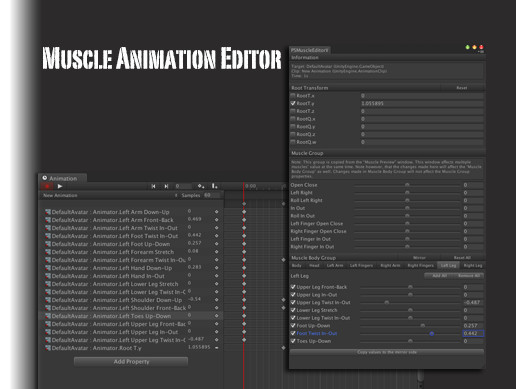
Note: If you have problem with the newest version, please completely delete the MAE folder and reimport it!
As you know in Unity we can't modify animator properties as easily as transform properties which we can modify in the Inspector. So I’ve written this tool which c...
devout rock
You know when you have to animate your hand and you have to add the properties of every finger one by one
devout rock
Cool
it also allows you to animate it all in one go by the looks
lyric iris
If you need it to work on a combat map, using ik follower to replace the joints should be fine, but you would need to customize the gestures so they animate the correct paths
Since to use ik follower you would need the particles/colliders nested in your armature
@devout rock
 proud meadow
This prefab also claims to fix joints when in a world with Combat System: https://chiugame.booth.pm/items/1593401

このパッケージはCombatSystemのあるワールドでも壊れないJointを設定できるプレハブセットになります!
 sonic locust

devout rock
Ngl atm im really starting to have some ideas thet would work but no method to preform them
like imagine a sword that, if it goes fast enough summons a slash (repeatable to stack slashes) that when a second gesture overwrite is activated makes them all like feel like they attack at once maybe by having them all fly forwards.
anybody got any ideas on how that might work
drifting token
animate velocity over lifetime with a gesture so you can control them moving
lyric iris
@devout rock you can try this

******REQUIRES FINAL IK 1.7.1 https://lindesu.ga https://github.com/oofdesu/lin-unity-packages https://discord.gg/8ADXhQT Animate with the swing of your arm....
this will place an object in world space where you slash
stacks up to 8 times by default
there is a minimal setup video on my channel
drifting token
I'm gonna make a video on my speed detection when i finish the demo media for the touch inventory generator
static relic
Could just change the lifetime so the slash stays so you have time to pull the gesture that adds speed/velocity. If you got crazy enough, you could set the velocity in local space and control where they go once you pull the gesture. Fun stuff.
Maybe I should do that. ^
drifting token
or if you want each slash to stay for a set time and then move forward you could just use the curves
static relic
Imagine slashing then the slash turns into a controllable projectile all the sudden.
Or just let it die without pulling the gesture.
drifting token
yea you could do that with velocity over lifetime
static relic
Would be easy to mess with people.
A different gesture to just kill it early instead.
oof
drifting token
I got sidetracked cause someone told me to "just make a gun out of unity cubes" as a joke
lyric iris
how many cubes is that
static relic
XD
drifting token
the labels are offsets and empty objects
drifting token
was just gonna use fbx epo what is lyumas
static relic
Oh. Idk what you just mentioned. Lyuma mesh tool combines meshes or same materials in Unity.
It's handy.
drifting token
would it retain the offsets for the slide/trigger?
static relic
I don't know~
I think you can combine siblings.
Instead of the entire thing at once.
I haven't actually used it on plain meshes.
Just skinned.
But I think it works for meshes too?
drifting token
@proud meadow
static relic
Oh. And the shape key thing.
Is supposed to be really neat, but I haven't tried it.
drifting token
i took like 15 minutes to make it
static relic
Oh.
Lyuma updated it a while ago apparently and I should download it.
It merges shapekeys over now?
whoo~
proud meadow
@drifting token https://github.com/lyuma/LyumaShader/blob/master/LyumaShader/Editor/LyumaMeshTools.cs
I really need a proper distribution channel for this stuff

Be careful with using LMT on meshes with shapekeys and more than 64k vertices (verts not polycount). It can cause a huge performance hit
drifting token
same shapekey issue when face isn't split yeah?
proud meadow
I just have an avatar that has good performance stats and one mesh but drops frames from 60fps to 40fps if used
drifting token
friend of mine was having issues with a BL3 model and separating the head and removing the shapes from the rest fixed them
static relic
I remember the keyframing shapekeys talk, but not how to use it.
drifting token
so just to be sure
i can combine my 3 main objects into meshes
on the uh
cube gun
lol
proud meadow
Yes, you can also skin each part to bones and combine them further
static relic
That bot.
drifting token
is a skinned mesh renderer more performant than 3 regular meshes?
proud meadow
Definitely not here because they can be batched. And probably not for small numbers of meshes
drifting token
that's what i had guessed
proud meadow
But if you already have an avatar mesh then it could be a performance win to merge the gun into your avatar.
It's negligible either way lol
drifting token
yeah i thought it would be
proud meadow
Heck keeping them as unity cubes and letting unity batch them might even be best. Just make sure to set the Anchor Override of all cubes to one thing
drifting token
thats what the main "CubeGun" object is for haha
it's not like I even remotely care about my perf rating
might just leave them
proud meadow
after learning about the blendshape performance issues--yea you have to know when to ignore the performance stats
the Excellent category is actually worse performance because you're required to have one big skinned mesh with all blendshapes on it
drifting token
i know right
I've even tried propagating every vert not on the face before export and it obviously didnt make any difference
still dropped my frames
proud meadow
I should add a mesh splitter tool to LyumaMeshTools that splits meshes based on polygons that don't contain any verts with shapekeys
drifting token
thats a good idea
static relic
o:
I have A model that I should probably split. I hear about the performance issues with shapekeys and high poly meshes, but I didn't think it was as bad as you just described.
near bronze
Apparently it's fixed in 2018
The problem was that having blend shapes active made it do all the skinning on the cpu, which is horrendously inefficient
 polar oak
from what i understand, it's still cheaper to split them in 2018, but they're being done on GPU so it doesn't matter as much
and you need to change the import settings on the mesh to import tangents instead of calculating them
 dull hollow
So it's better to have 2 skinned meshes where one is the face with all the blendshapes and the other is the body with none?
proud meadow
@polar oak how do I know if my blendshapes are imported or calculated if I have broken the prefab
I want to be able to check in a script too...what do I look for
@dull hollow correct
polar oak
iirc it should be wherever the mesh import settings are, but idk whether it gives you that option with .asset meshes
proud meadow
Theres some debate about cpu vs gpu resources in 2018 so maybe there it's debatable
May as well shelve the issue until 2018
Yea .asset don't have it . Must be some data in the mesh object itself
Only thing I can think is it sets tangents and normals of blendshapes to null
polar oak
yeah it's probably stored somewhere within .asset yaml
proud meadow
Instead of array of stuff. I need to test this
polar oak
if you can't find a setting for it, i guess just supply it with custom tangents and normals and see if it uses them
 tardy folio
afaik, the blendshape perf hit is still pretty trash
polar oak
idrk that much, all i'm going off of is what merlin's said lol
tardy folio
https://discordapp.com/channels/189511567539306508/629486998159228938/630386901588639759
It still has overhead. It's less costly since it's on the GPU, but now you're contesting with the time on the GPU for everything else. When it ran on the CPU you had some 'free' time since it ran the skinning on worker threads that are usually just sleeping. On my avatar with ~40k verts, with default import settings the blend shapes made skinning take 0.4ms on my 1080ti. Changing the import settings for tangents from Calculate Mikkt space to Import brought that down to 0.2ms, but it's still a consideration you will want to make if you have a high poly avatar with blend shapes.
 finite sedge
I may have missed an update. But what's the story about vrchat supporting playmaker or not? Are there still plans for that?
near bronze
they ditched playmaker and are now making their own system called udon
finite sedge
@near bronze Ahh gotcha. Thanks for the update. I'm excited to see what they come up with.
dull hollow
In a post made about vrchat they showed off a node chart of a spherical gravitational pull that spun gamebojects around a sun. Don't have the link rn
 dusty garnet
Not sure if this is the right channel for this, but I'm wondering if it's possible in VRchat to make avatars/players in a world children to a specific game object in the world? I want to move this game object around in the world, while still allowing players to walk around inside of it. If I don't parent them to the object, it'll just move out from underneath them
I've never seen anyone do this before, so I'm assuming it's not possible at the moment? If it isn't, will it be added in the future? O:
tardy folio
You'll have to move everything other than that place
dusty garnet
yeah, I tried that, but it causes way too much lag because of the number of things in the world :<
So, I'm assuming at the moment player/avatars appear at the highest level in the object hierarchy, right?
drifting token
They're children of the world root, no?
dusty garnet
oh, maybe of the scene?
drifting token
Can't you locomote while in a station or what does that check box do
dusty garnet
not sure what you're saying. in a station? O:
drifting token
There is a setting on the station component
dusty garnet
let me seee...
hm, the documentation says it's to allow avatars to sit down on something?
drifting token
Stations make you a child of them when you sit in them do they not?
dusty garnet
probably, there's an option that apparently allows mobility, so i'll try that O:
near bronze
mobile stations don't pull the player with them as if they're reparented
and stations in general do not reparent the player
I have a way to "reparent" the player to another object which does make the camera and your position very steady with the object but your legs will be trying to "walk" in world space, making them flop around behind you
the primary benefit to being able to reparent the player for a situation like this is if you want the world to be more freeform, where players can walk around on solid land or even have multiple vehicles independently. But it gets really advanced really quickly. If all you want is a hangout world with a cool background, then you should just move the world around the ship as if it was a background
drifting token
Ah didn't know that about stations, never touched them until the flying thing.
dusty garnet
it's a very detailed and big world with terrain, and apparently moving terrain with allot of objects causes lots of lag :<
near bronze
are you actually piloting the airship around and you want the players to get out and walk around?
dusty garnet
it just follows a set path
i want them locked to the airhsip
they don't get to walk around on the land
near bronze
then you have plenty of leeway in combining meshes and decimating polys
dusty garnet
yeah, the poly count is already extremely low, there's absolutely no lag even with quite a few people in the world
the issue i think is that, and maybe this is an issue with unity, moving large pieces of terrain seems to cause lag
near bronze
is it just a bunch of separate meshes that can't be batched?
dusty garnet
or many game objects, even if they're parented together
near bronze
oh wait does it have colliders?
dusty garnet
the terrain does O:
think it might lag less if i remove the terrain colliders? can i do that?
near bronze
ahh it is very expensive to move objects with colliders and no rigidbodies. It expects them to be static and when that isn't the case it has to do a whole other process that it is not as efficient at
dusty garnet
let me try moving it without the colliders~
hmm, yeah it seems to be a terrain thing D: i disabled everything but the terrain, and removed the terrain colliders. still laggy :<
near bronze
yeah even with the colliders disabled, I'm not surprised that terrain is going to misbehave when moved
you should be able to convert the heightmap to a regular mesh
not sure what tools exactly but I'm sure it's possible
dusty garnet
yeah, i can probably use a displacement map in blender to do it
that does mean i'll have to manually place grass and things though > w>
near bronze
yeah the last time I saw someone doing this, they created their own environment from scratch and didn't run into that issue
the issue they ran into was that they wanted players to get out and walk around, and that's quite problematic
tardy folio
See darkwaters 2
 jolly turret
the show control panel went away and wont open again
VRCSDK-2019.09.18.12.05_Public
idk what to do
i edit stuff in regedit and it did nothing. i tried reinstalling the sdk.
i tried restarting the computer. nothing will fix it
 stable hazel
you probably have some other type of compile error. Open the Console tab, make sure Clear on Play and Error Pause are disabled, then enter Play mode and see if any new errors show up
jolly turret
no error at all
i draged the window to my second screan then it just disapeared
ive tried edeting regedit and restarting removing some chashed data ect
 tepid sail
is scripting in maps a thing now?
drifting token
not normally at least :v)
 frail grove
is it possible to manipulate shader settings with a vrc trigger? I pretty sure it isn't but i thought I'd ask.
dark sigil
you can use an animation to modify the material's parameters and then use a trigger to trigger the animation
proud meadow
@frail grove what do you mean "pretty sure it isn't"? that's quitter talk.
frail grove
LOL
drifting token
pretty much anything is possible if you're enough of a hack
frail grove
I said that to imply that I've exhausted the methods in my depth of knowledge
oh yeah duhr i forgot about using animations
proud meadow
😉 yeah there's a lot of crazy weird stuff you can do with unity vrc
frail grove
I never use animations for anything but animations 😄
dark sigil
animators are great for state machines
drifting token
some of the workarounds in this game are like seeing a wall and running all the way around the earth in the opposite direction to get to the other side instead of being able to climb it.
frail grove
yeah thats usually what I do. You know whats funny I thought about it when I woke up out of bed and I forgot it
then i came here
lyric iris
Or like figuring out how to phase through matter instead of climbing the wall
drifting token
vibrate rapidly.
trail jacinth
Very rapidly.
frail grove
So I got an animation built that goes from 0 to 1 and moves the slider one the shader. I've made a slider with a value of zero to 0 to control it on the UI. I set up a animationfloat on the animation called frequency. The problem I have is how do I get the onvaluechanged slider value in to the vrctrigger
proud meadow
Triggers just do on/off or actions
Why do you want the slider to be used in a trigger? What's your goal here
frail grove
goal is take a float value from the slidere
use said float value to set the playback time in a specific animation
playback time controls a slider in the material
profit
its this part that makes me think its not possible to get the dynamicfloat value from the UI slider
frail grove
hmm i could probably do it with push buttons. its sloppy but it will likely work
trail jacinth
@frail grove Using sliders to controll animations is definitely possible. There was a recent discussion in another discord. I will try to get a system running and then show you how it works alright?
frail grove
That would be great. I know there was a prefab but it used rigidbodies and joints. I'm doing this with UI
frail grove
ok
trail jacinth
Okay got a Unitypackage ready, dunno if I should/can post it here tho
trail jacinth
aight
frail grove
not that they'd give you crap for it
 final wigeon
If you're legally allowed to share something and it doesn't break any other rules I see no problem with posting it here.
trail jacinth
Alright. Thx
 fervent vortex
Howdy! I'm updating one of my avatars for the halloween season, and something I wanted to try was getting an animated texture. Is it possible to do that? In particular, I think animating via a spritesheet would work best for me, if possible. I'm open to anything however.
stable hazel
yeah you can do that, you'd have to use a shader though. I think poiyomi's has an option for that
scarlet pagoda
Can someone help me understand how RigidBodies work?
For example, using a Rigidbody to make particles shoot out of your hand...
You place the rigidbody script on the hand, and check freeze positon and rotation for all the axes, right? But the documentation says that Freeze Position freezes the position of the Rigidbody in world space, and Freeze Rotation freezes it in local space.
It makes sense therefore to freeze the rotation, as you don't want it to rotate in local space. Though this also does not make sense because why should the rigidbody ever rotate at all if you're not applying any forces to it?
But what does not make any sense is checking the freeze position boxes, as the documentation says those are in world space, and why would you want a rigidbody attached to your hand which your particles are supposed to follow to be frozen in space where the hand initially was? If freeze position worked in local space, not world space, them it would make sense to check these boxes. So unless the documentation is wrong I have no idea what's going on here.
 dull hollow
In this situation, yes, the documentation is wrong. Rigid bodies on your hands should have all constraints checked.
scarlet pagoda
In this situation? That doesn't make sense.
If there's something different about this case versus some other case, I need to know what, and why it's done this way. Otherwise I'll just be following instructions without understanding the how and why of it, which will prevent me from doing more creative things than just making particles fly out of my hands in the right direction.
You also say the documentation is wrong yet that seems like a major error to make in multiple places in the documentation and when I searched for help on it, everyone on the Unity forums confirms that positon is world space. So I'm really confused about what's going on under the hood here.
stable hazel
if you just want world space particles use the ik_follower component. It's a frame behind but much easier to use than messing with rigidbodies and constraints
https://docs.vrchat.com/docs/vrc_ikfollower
IKFollower is intended to be used to help particle systems sync up with their proper location after the IK has been solved, so you can shoot particles out of your hand into world space without having to use RigidBodies. This is far more optimal and has almost no performance c...
scarlet pagoda
I'm not trying to make world space particles. What I'm trying to do is understand how Rigidbodies can be used.
Now, technically what I'm trying to do right now is make a second copy of my avatar move with me. But I didn't mention that because I didn't just want an explanation of how to set things up with no understanding of why it's done that way. My friend has done that and he tried to show me what he had done, and what he did is like the opposite of how it's done with the particles, where he's got the target joint rigidbody with the contstraints on it instead of the source. He too doesn't have any idea why this works or why he did it that way. So that is why I am asking here, what these values actually do, because how he's doing it, and how particles work, make no sense if constrain position is in WORLD space not LOCAL space.
Also you're mistaken in suggesting I use IK follower, because it is broken. You say it's a frame behind. But the problems with it are much worse than that. I had it on an avatar that fired particles and almost nobody with a vive or index could see the particles shooting out of their own hands. It only worked for them once I started using the rigidbodies method.
Oh and in my friend's setup, he checks Is Kinematic on the source rigidbodies. So yet another difference from the way particles work that's driving me crazy trying to understand what's going on under the hood.
near bronze
I would suggest using kinematic instead as well. Kinematic means that the object does not get affected by physics, it will never move. It's effectively locked in place, however the big difference between locking and kinematic is that locking still does all the normal physics stuff, it's just stuck.
When you joint an object to a locked body, it will be pulled with all the same normal amount. If you joint to a kinematic body, it will be pulled with effectively infinite force.
Because the force applied between two joints is relevant to the difference in mass between the two objects, and in the context of joints, kinematic bodies have infinite mass
Also ik follower isn't completely impossible to use, it just has a couple requirements. For example the avatar cannot be anything other than a scale of 1. You should resize your avatar with import settings, not transform
scarlet pagoda
I'm pretty sure I did scale those avatars with the import settings only.
static relic
IK_Follower fixes a lot of problems that Rigidbodies can't. But it goes the other way around too.
Also, if you do need to scale the model in Unity, I think you can use scale factor in the model tab of the FBX?
Without having to go back. But scaling is a small enough change to just do it. Sooo.
trail jacinth
Always make sure to Apply Scaling and check that little button that doesnt look like a button next to the scale option when exporting as FBX in Blender.
scarlet pagoda
If I want an object on my avatar to remain stationary in world space, does the method listed here still work? https://www.reddit.com/r/VRchat/comments/8nrpmd/help_how_to_spawn_object_on_world_space_with/

reddit
I saw who guy spawn ship and dolphins with his avatar in my world.That dilphins and ship were animated... I want know how to do that. I searched...
Namely: "Create an empty object on your avatar, and add a fixed joint to it"
Or did they break that method, and I need to do something with rigidbodies now? I thought the way it was done was with a rigidbody with infinite mass attached to one end of a hinge.
near bronze
yes that method will work. The reason is because when you make a joint but don't give it a target, it defaults to the world. And adding a joint assumes a rigidbody.
I assume the hinge thing was something similar but adding extra mass would not help. If anything that would make it worse because it would take longer to get back to it's position after being moved by the avatar
tardy folio
you also need an animator with an empty controller and root motion ticked.
otherwise remotely it's borked.
near bronze
doesn't that only apply to fixed joints? I always use configurable
 velvet badger
Does anyone know if Particle collision trigger set as Alwaysbufferone will trigger one time for each person in instance?
scarlet pagoda
So with this method, does hiding the object with the joint cause it to reset its location to the player's? Like, if the player moves, it won't move with it, so something has to happen to allow you to move about the world, and trigger the object to appear near you but stay fixed in that position till you decide you no longer want it there, right?
near bronze
if something is parented to your avatar, it will move with you. If the joint is active it will try to go back to it's saved position. When fixed joints go from disabled to enabled, they go through a startup process that involves storing their position relative to the body that they are connected to. Which means when you enable them, they will remember where they were enabled and try to go back to that position despite being moved all around by the object they are parented to
This behavior is something you can change though. If you use a configurable joint you can set auto configure to false and type in whatever number you want, and it will go to that world space position every time. You can't do this with rotation though 😦
drifting token
you can always just animate it back to wherever you need it every time you drop it
near bronze
yeah there's also that. The reddit post had someone asking if an animation was necessary to reset it and someone said no, which is false if you want to drop it right in front of you every time
scarlet pagoda
@drifting token So like, put an animator on the object, with a non-looping animation with one keyframe to set the position and rotation of it in avatar space, and then when I hide and show the object that will play once and reset the location for me?
I should mention it's my intent to use a gesture to make this object appear, and I assume if I were to try to reset the position with the gesture animation, it looping would cause the object to act as if its parented to my avatar instead of moving freely in the world.
So the logical thing to do then would be to put a non-looping animation on the object that I want to remain stationary that resets its position once each time its made visible by the gesture.
lyric iris
@near bronze same thing seems to happen on config joints
@scarlet pagoda https://github.com/oofdesu/lin-unity-packages/blob/master/world_fixed_joint.unitypackage

GitHub
Contribute to oofdesu/lin-unity-packages development by creating an account on GitHub.
scarlet pagoda
Okay now for something completely different... Is there a way I can render a mirror-clone of my avatar? In other words, imagine the mirror clone which is already rendered for a mirror, but without the mirror acting as a portal. Instead the avatar would be standing there in space, mirroring my movements, and I can approach it and when I raise my right hand, it raises its left hand, but mirrored to my right side, just as in a mirror.
I have a clone set up which can mimic my movements, using rigidbodies, but I've had only very limited success gettting bits of it to mirror my movements, and I realize that even if I got it perfect, I couldn't approach or move away from the avatar with this method as it would never move in the opposite direction as me in global space. But a mirror does exactly that with a copy of my avatar. I just need a way to duplicate what they're doing there, perhaps with a shader of some kind.
scarlet pagoda
Well, yes, if I knew how to code shaders. But I don't, so I was wondering if there was a pre-exisitng option. Like maybe the mirror prefab has a shader that comes with it or something that would work? I should probably look in that folder and see what there is...
Hm... Despite many years of C++ experience and the code being extremely simplistic I don't have a clue how that mirror.shader works. I don't see any loops, or any way it could be flipping the model around a plane. Maybe it's replaced at runtime with another shader by VRChat. In any case, it doesn't look like something I can mod. I was hoping to see a stencil buffer in use which I could just disable to make the mesh appear outside the mirror space, but there's no mention of that in there either.
near bronze
the vrchat mirror shader is not doing anything special, it just handles the surface of a render texture. The real magic is the camera that is being positioned to give the right view
proud meadow
@scarlet pagoda You cannot replicate what the VRC mirror script is doing. You can use a camera 2D + render texture and depth information to make a 3d mirror by extruding vertices, as in "Depth Mirror" from Neitri's github:
https://github.com/netri/Neitri-Unity-Shaders
Alternatively you can use this technique to have a shader render a second copy (you will see it headless) of the avatar across a mirror plane, using the "Root Bone" slot on your mesh, add a pass that flips your mesh across 0,0,-1 and switch to Cull Front culling:
https://twitter.com/Lyuma2d/status/1165107161367629825

GitHub
Collection of shaders for Unity3D and VRChat. Contribute to netri/Neitri-Unity-Shaders development by creating an account on GitHub.


Built a VR safe mirror as a #VRChat avatar. Requires no render texture! However, requires changes to each mesh wanting to be visible in the mirror:
A stencil test with a depth pre-pass, and set the mirror as "Root Bone" so the mirror is (0,0,0) in object space. #madewithu...
Twitter
For world authors, another method exists to use a stereo camera and properly position it relative to the playspace center to track your movements. This type of camera nor the standard assets scripts needed to track are not allowed on avatars: https://www.vrchat.com/home/world/wrld_31c60deb-c19e-49bd-ba20-f69d04b21d30

A mirrored dimension․ [NOTE˸ Does not work with stream camera]
scarlet pagoda
Hmm, these methods don't really help.
To give you a better idea of what I'm trying to achieve, I want to be able to dance with a copy of my avatar. But I don't want to just dance next to it doing the same moves... I know how to achieve that already. I want it to mirror my movements, so I can move towards it, and clasp hands for example.
proud meadow
@scarlet pagoda Using a shader to render a copy flipped around the "root bone" origin point would work for this purpose. I've made an avatar with this.
Your head will not be visible without using either a physics based "head bone copying" technique, or a modification to the mesh to have duplicate head geometry and a shader to correct the scaling.
you can use a fixed joint or other world locking technique to lock this "root bone" to the world.
If you don't want to use an object, another straightforward approach to be used in a shader is to make a reference point, such as rounding your position to the nearest 5 meters and rotating or flipping around that.
I'd be happy to chat in DMs if you're interested in trying shader based techniques
I'd still recommend Neitri's "Depth Mirror" as it is easy to set up and works better than you think. you can easily flip or rotate it as you desire since it constructs actual 3d geometry... downside is it uses a camera which means friends only...but if it's only for your own use anyway that should be fine
 buoyant pelican
Anyone know how you can submit a world for the Halloween 2019 playlist? Does it require a specific tag when uploading or do you have to submit it to the Spookality 2019 contest?
stiff lily

Google Docs
View the full terms of the Spookality 2019 Contest on our site: https://vrchat.com/spookality
This form will close on October 23rd at approximately 12PM Pacific (Los Angeles) time.
 bright falcon
if u want it only on the halloween world menu tab just add the tag halloween
buoyant pelican
alright cheers
shadow dock
@sleek flicker try disabling the avatar then reenable.
if your still having the issue
 sleek flicker
Yeah I did. It stops, then starts again. Its not causing any problems workflow wise. So.. 🤔 guess ill just ignore for now until i feel like really looking into it. I read in much earlier versions of Unity that this kind of thing was a bug. But it had to do with fixed joints, which all mine stay disabled until I upload
shadow dock
I've had the issue where the transform on a game object didn't update correctly causing that error. moving the object thats having the error fixes it. enabling and disabling also fixed the error for me.
sleek flicker
Just restarted Unity and it went away. ez pz 
scarlet pagoda
I guess you're not supposd to hide the armature with the rigidbodies on it. The Three Amigos suffered for my mistake!
But this does make me wonder... If I did want to hide the armature so as not to have all those rigidbodies active all the time for optimization purposes, would I be able to reset them with my animation by setting all the rotations and positions on the clones back to 0?
scarlet pagoda
Well to clarify, I'm not asking if they do reset, because they don't and those abominations get worse each time I make them visible. I'm asking if reseting the transforms and positions for the ridigdbodies to 0 would work...
...but I've just realized that those rigidbodies are not on objects attached to the bones, but on the bones themsevles... Which means I'd have to copy the position and rotation of all the bones into my animation, not just set them to zero.
...but I wonder if merely creating a new keyframe for each of those bones would have that keyframe auto set to the default value, so I don't have to copy it into the animation? I suppose it should.
I'm not sure that will work though, as when I would trigger this reset, the main avatar would no longer be in a default pose, so they would link up to it in a different post than the default and start moving from there, which is kinda what's happening when I make them visible again, except they've already got some rotation applied to them so they're not even starting from the default pose.
Well....
Anyone got a clone shader that actually mimics the default shader and supports cutout rather than being full bright? The only one I have is full bright with no cutout. Actually I can't even recall if the clones move with my avatar whenI wave my arms. I assume they do.
proud meadow
@scarlet pagoda Here I edited Standard to add some geometry shader instanced cloning. Feel free to edit buildCloneMat in the CGINCLUDE block to change how they are cloned: e.g. rotate the matrix or whatever.
The template should work in other shaders: the main changes to embed geometry passes in existing shaders are
- Change #pragma vertex vertSomething to #pragma vertex vertGeom
- Change #pragma target to 5.0
- In each Pass block, look at the function definition of vertSomething and add a line:
CLONE(vertReturnType,vertSomething,vertInput,WITHTANGENTS) - Specifically for surface shaders, click "Show generated code" in the shader inspector, and save that generated file somewhere, then add
CLONE(v2f_surf,vertSurf,appdata_full,WITHTANGENTS)right before each ENDCG block
also, don't try to run this shader on a Mac. Thing wasted half an hour of my time with several unity crashes before I figured out that it's just another case of geometry shader support on mac being broken. D-:
 opal canopy
@proud meadow are they broken in 2018 as well?
proud meadow
haven't tested tbh. they actually used to work in 5.6 oddly enough
I'll let you know if I get time to test 2018 on mac
opal canopy
Ah, don't worry about it too much. Was curious but don't really have a use case for them so don't go out of your way to test :)
 next cargo
Anyone knows the settings to make steering world particles on avatars? I'm trying to make a guided missile
near bronze
just velocity or force over time
near bronze
yeah the options are local and local means aligned to the gameobject that the particle originated from
and the other thing is that in the renderer tab you want to set render alignment to velocity so it faces the direction you want
next cargo
I got renderer already set to Velocity but I just can get it to guide properly, does it have to do with how force over time setting?
near bronze
what exactly do you mean by not guiding properly? Is it going the wrong direction? Not responding to you at all?
next cargo
The particle is not steering when i rotate the game object
near bronze
pic of settings?
near bronze
you don't have any numbers typed in to the velocity or force
also it's not both, it's either. Depends what you want
next cargo
near bronze
use velocity if you want it to respond immediately, use force if you want it to be more of a suggestion
next cargo
I'm trying to use velocity, pretty much guide the missile with my hand, do i need to add another rigid body to make it work?
near bronze
as long as you already have world space particles working, no
next cargo
Ok I think I got it to work now i just got to mess with the settings, thanks @near bronze
 near wing
im trying to make enimy ai script enerything works fine and it targets the object but when i go in to vrchat it dosent track the object anymore?
is thare a way to target players directly? was going a round about way and make the enimy track a sword you were holding but that broke in vr chat
near wing
got that
near bronze
inside there is something called playertracking, and in that prefab is the "playerhandle" which will be the position of the player
note that this is the local player, so when you have two people then it will track each of them individually on their own client, and it does not know where other players are
near wing
ok ill give it a try ...the video i was watching was trying to use lookat player but i think thats old
 pine depot
Also vrchat will not accept your custom scripts
near bronze
a good way to sync AI is to add an extra layer of abstraction. Make an object with the followtarget script targeting playerhandle, and an objectsync script to sync it's position. Then make the AI target that. When you want the AI to target a specific player, make that player take ownership of the objectsync, broadcast to disable the followtarget, then locally enable the followtarget
near wing
oow so the script wont work in the firstplace
near bronze
oh I assumed you were using standard assets AI. Standard assets are whitelisted, your own scripts won't work
if you're trying to follow tutorials, they usually need to be vrchat specific
near wing
how would i change the distence the npc can see me? ..i have a navmesh down and a ai character controller aimed at a target object but it seams to walk to that object nomater the distence?
even when its outside the navmesh
near bronze
you'll need to make a more complicated system to determine whether or not the player is within a certain distance
near wing
ok so ill just leave it at on off maby ..how bad is it?
near bronze
one way would be turning on a collider and seeing if it triggers onentertrigger on playerlocal
near wing
how might i go about keeping 2 moveing game objects together whill toggling them on and off....right now im trying to set the first one to "setgameobjectactive" false/ and the second one true thin i want to move it to the position of the first one but i dont know how..... how might i keep them together, how do i teliport the second one to the first?
trail jacinth
There multiple ways to "teleport" objects.
However thats probably not even needed
near wing
?:)
trail jacinth
If you parent two objects the child will always "follow" the parent
but it can also be moved individually
However that means that if the parent gets deactivated the child also gets deactivated
so what you want is to have a parent that you move around that has two children
the two game objects you need
near wing
hmm can i have the 3 under the parent and toggle them on and off under the parent?
trail jacinth
exactly what I proposed.
near wing
can i have a ai on the parent and the childrin fallow its navmesh?
trail jacinth
Should work. Just make sure that all the requirements for the AI apply to the Parent.
(Like colliders I think)
near wing
ok makeing a fully animated enimy npc ..useing diffrent amimated set enimys and switching them out with colideer meshes for distence based realtime animations ..just needed to keep them together when thay switched:)
trail jacinth
I dont exactly know what youre doing so I cant say if youre doing it the best way (that I would know of) but using parents is usually the easiest to keep game objects together :)
near wing
i couldent fined any peramiters i could use for the animator to switch animations
so i just have 3 enimys set with walk ..fight .dead and i switch them out with colliders set to delete one and spawn the next
so mutch easyer to do with just one cusom script
thanks for the help have a nice day^_^/
trail jacinth
Well using different animations is actually much easier than using different objects but ok xD
Unless youre talking about things like Avatars (Unity not VRC)
near wing
my problum is in the animator you set up a first state "walking" and a second state "fighting" thin you need a peramitor to trigger the switch...so far nothing iv tried can be used as a npc animation trigger that works like distence from player or even movement in the x direction .. im wondering if vrc blocked custome anomator controllers
trail jacinth
Ehm...no?
You can Add Parameters in Animator Window, when you've selected the Animator.
And you can set those Parameters via VRC_Trigger
trail jacinth
You need to go to the Trigger -> SetAnimatorBool and then type in the Name of the Bool you want to set
near wing
and its being triggered by a mesh collition
near wing
hmm si iv tried to make a custom trigger and name it something and it dosent pop up whare i need it ...is thare a ciston trigger receaver
custom trigger recever
trail jacinth
A custom trigger can only be called by UI Buttons, Animation Events or other VRC_Triggers (ActivateCustomTrigger).
Usually you want the condition to be something like OnEnterTrigger (which means that the VRC_Trigger will activate when a collider enters the collider of the object the trigger is on (on the specified layer) (one of the colliders has to have isTrigger set to true)
near wing
ok on my enimy its set to trigger with my sword colliding with it .... is the action animationbool
trail jacinth
For example::
If you want to have a trigger that fires when the player is a certain distance away, you will need a sphere of that radius that follows the player.
When the object enters the sphere its within range and when it leaves the sphere its out of range. Meaning that you can use PlayerFollower + OnEnterTrigger/OnExitTrigger to determine if a Player is a certain distance away from something or not.
near wing
i have it set like that but on the enemy side ...it has a box collider set to trigger when my swords collider enters it at 10m ..i need that to trigger a change in animation to the fighting state thin after i get to it and hit its own hitbox" right now its a diffrent gameobject in attack mode so its a diffrent collider box dont know how i would do a second trigger with one gameobject"
would i set the trigger thats thare to animation bool or animation trigger ..how do i link it to the paramitor
trail jacinth
You need to insert an Animator into the field above the Name
near wing
the animator is set to the walking state
trail jacinth
You should watch Cyans videos on Triggers they might teach you a lot
near wing
havent found any videos that isent linked to a player button
trail jacinth
I dont think you really understand how Unity works or at least now how it works in the frame of VRChat content creation...
And I need to sleep so I cant help you now, maybe someone else can explain sorry
¯_(ツ)_/¯
near wing
ow well thanks for the help youv gave me some ideas ..go get some sleep...goodnight^_^/
near wing
so i now have the object set up when i touch it with the sword it triggers and the object gets deleted so the triggers fine. i set the trigger to animationbool , set the receiver to the objects animator and named it isdmged. in the animator i have the state walking and death. iv set a parameter bool isdmged and set the transition for isdmged to be true. it dosent trigger the animation change...any help would be appreciated
near wing
finaly got the transition working thank you @trail jacinth turns out the vrc trigger dosent work untel you test and launtch it in client lol ..your a life saver
drifting token
wrong channel
 uneven quiver
Anyone knows whether going offline on Steam prevents viewing IP in Steam's Networking P2PSessionState_t via GetP2PSessionState ?
trail jacinth
AFAIK going into offline mode prevents you from even connecting to the steam network. So yeah it wouldnt show your IP....because you would never be able to connect.
uneven quiver
That's what I'd guess too but then if I understand correctly you're still using Steam Networking for VoIP somehow
trail jacinth
Hmm idk
uneven quiver
I also wonder whether VRC devs are able to block this command altogether since it's only for debug purposes
Leaving it open is a valid security risk
 sharp burrow
That's how Steam P2P Voice works sadly
uneven quiver
I mean according to Steam Docs it's not needed for p2p voice to work
sharp burrow
In the recent update to Steam they added a protection layer to their voice, so could be that you are reading. But it wasn't that before
 wary tangle
Going 'offline' doesn't stop the local ip from showing at least
Just don't have steam open and launch vrchat from the executable directly and your steam id shows as just 0
 stoic holly
Quick qustion: is this trick still works? Didn't used this trick for like a year, so idk is this suitable or not for current vrc.
I mean executing custom triggers from animations by calling ExecuteCustomTrigger on VRC_Trigger
near bronze
yes it does
stoic holly
ok thanks
 versed sky
Quick question, does anyone know how to make a list query like in the Capture the Flag Team setup. I'm trying to figure it out and cant get my brain wrapped around it
trail jacinth
Well whats a "Player"? :P
drifting token
teams? like in capture the flag or gold rush or whatever
in official maps
which is why I think it's probably something we don't have access to
trail jacinth
Yeah but "Player" is not defined in Unity. You have to define it yourself.
For example you could define a Player on Team Red to be:
"All Clients that have a certain GameObject enabled"
And then you could "querry" that.
But if you actually want to access the Metadata like Username, then no you cant do that.
proud meadow
@versed sky In case you didn't catch that, CTF and other official maps use custom scripts, so they can do anything they want.
 pearl condor
I finally got placing a fixed object in a world working, but for some reason, it does not sync
What it's supposed to do is spawn an object and lock it at that position. Which works just fine for me, but everybody else sees it attached to my avatar
pearl condor
it's on an avatar though
yeah^^
I'm using an animation to toggle it
which is just this, attached to a gesture
drifting token
you need an animator with apply root motion checked on it on the object with a joint
stiff lily
Did you add the animator though ? screenshot has it empty
drifting token
thats not the point of the animator
the animator is to fix the world joint since they've been broken for awhile
stiff lily
an empty one ?
stiff lily
interesting
pearl condor
it's been broken for so long I only found out how to do it by checking a year old reddit post comment, complaining about it being broken lol
pearl condor
Also, I could have sworn I had apply root motion checked. I'll update you once I tried it out
drifting token
you literally do not in that screenshot lol
pearl condor
I know, and I can't believe it haha
okay, updated it. No idea why the "apply root motion" box wasn't checked, but it is still attached to my avatar for others
drifting token
I think you also need an avatar in the slot below controller
pearl condor
Giving that a shot. Thanks for the help so far.
Well, was worth a shot, but assigning an Avatar causes it to freak out haha
The fact that it's working alright client side but does not work server side breaks me
static relic
Working locally and working globally is always a battle. Working locally but not globally sucks, but it's even better when it works globally but not locally and no one's telling you.
Then you're talking about how it's broken and they don't even know what you're going for and it looks fine to them.
drifting token
oh wait you do need an animator but it can be empty @pearl condor
and does need root motion checked
with no avatar
pearl condor
It is^^'
An animator with
Controller: None
Avatar: None
Apply Root Motion: checked
Update Mode: Normal
Culling Mode: Always Animate
proud meadow
@pearl condor rero means you need an animator controller.
Make a new animator controller, make an empty animation and put it into the controller then set the controller in the animator component
pearl condor
Oh!
Thank you, I'll try that
pearl condor
aaand it broke and is just going all over the place now Idiot me forgot to remove the cube collider
pearl condor
Okay, so after adding an empty controller (no need for an empty animation as far as I could tell) it's finally working
Thank you guys so much 
 autumn lichen
hey guys how can I play a twitch stream in vrc like with the youtube player?
is it even possible
pine depot
yes
proud meadow
@autumn lichen Lookup the VRC_SyncVideoStream component for twitch if you want to make it yourself... or add the iwa sync video player that is popular: https://github.com/ziritsu/SyncVideoPlayer_iws - or jetdog's or others are also available at the prefabs database https://tinyurl.com/vrcprefabs
GitHub
Contribute to ziritsu/SyncVideoPlayer_iws development by creating an account on GitHub.
lyric iris
@pearl condor do you have a reset mechanism?
pearl condor
@lyric iris no, sadly. It's stuck at the initial position. Maybe you could do something with an animation that sets its transforms to 0 or something, but I haven't experimented with that
lyric iris
Yeah that's exactly what you need to do
You set transforms to 0 while the joint is off
Here are some patterns for it
GitHub
Contribute to oofdesu/lin-unity-packages development by creating an account on GitHub.
gesture and emote
pearl condor
Oh, thank you very much @lyric iris !
I wish I had that sooner haha
So happy it finally works~
 honest lagoon
oh boy, do I love this program
 mortal olive
? @honest lagoon whats happening
honest lagoon
@mortal olive I dont know either
mortal olive
i mean is it just no doing anything?
mortal olive
what does the sdk say
honest lagoon
nothing
mortal olive
the vrc sdk says nothing....
honest lagoon
yup XD
mortal olive
show
honest lagoon
dont worry about it, just sdk loosing its mind from time to time
 narrow snow
i trying to create player to move in some waypaths
but it won't work
here is an video link
so you can experiment and guide me to the right place
i wish that someone can make proper step by step video
tutorial how to successfully achieve that
VIDEO:
https://streamable.com/s/7gnm7/zmafkn
any help pls
drifting token
If that's a script it's not gonna work 🤷
I don't even need to see the video to tell you that much.
narrow snow
well so far vrchatsdk accepting it
drifting token
Doesn't matter if it's not whitelisted