#development-advanced
1 messages · Page 40 of 1
 warm niche

Get the package HERE: https://vrcmods.com/item/3813--Prefab-Animate-On-Collision-VRCModsVER-1-W-TUTORIAL How to Use Move the "PulseAnimator" object so that t...
Link in that vid
Then there is mine here

GitHub
Contribute to oofdesu/lin-unity-packages development by creating an account on GitHub.
Ready to go but no documentation
 dense cedar
oof
 frail grove
I figured out all that sync streamer nonsense. It was due to me not calling take ownership before adding the url.
 lethal girder
is the external video play list that 'old' worlds use still work? I remember the VOID using that before
(to update the playlist without updating the world)
warm niche
Im starting to get a bit annoyed, how do i get particles to follow my head properly, because they're parented to the head bone, however, they dont move with the head, and are weirdly shaking in different directions
They also dont dissappear like other objects within the head bone
nvm
unity was just being a glitchy peice of trash it always is
 brazen coral
how is this done?
 drifting egret
Probably a panorama component to fetch the stats from the web. Simultaneously, this request is logged on their end and used to increment the "visits" counters.
brazen coral
But where do you get those stats from? The VRChat website only shows total visits
drifting egret
They keep them themselves.
When your game downloads that stats image, it gets that image from a server belonging to the map creator. The server is set up to manually keep track of how many people download that image.
brazen coral
I was looking to do something like this anyway, how would I go about getting the latest stats from my VRChat automatically? @drifting egret
 near bronze
you don't, you have to make your own server
and when people access that server via vrc_panorama, you keep track of that
brazen coral
I see, thanks
so i'll just start the counter from the current total and then add every new panorama request to the counter
 timid tapir
Use a free hosting platform, and PHP can do this easily.
To make life even easier, have a host with CPANEL and PHPMYADMIN
 young rover
Hello people I need help with controls of the space ship, for now I can make it go forward, backwards and roll it on Z axis, I ma doing this with animations, by changing "Relative Force" and "Relative Torque" on a "Constant Force" component by checking for triggers "Key Up" and "Key Down", this works, but not well, as you see in the video, I would like to know if there is a better way to do this, I would like to ask you for help

Just another test of the ship control systems Assets are from No Man's Sky
This is what the animation controller looks like
What I am doing here is basically make a transition from state to state by changing the "State" variable by pressing and releasing keys
but it's causing some issues
I have not find another way yet
May be I could improve it if I create 1 animator for each movement type, like 1 for fw/bw, thrust, 1 for roll left and roll right and one for doing up and down, but I don't know if this will cause problems on the component I am animating because it's been animated by different animations, but the variables I am animation are actually different
 proud meadow
@brazen coral check out the 1% of Virtuality exhibit by y23586. It shows some pretty cool ways of using these type of stats
near bronze
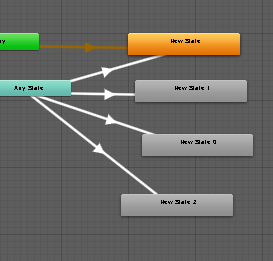
@young rover you want to use animator layers. They are like completely independent animators but they're all inside one animator and draw from the same parameters. And as long as no layers are conflicting and both affecting the same value, you're totally fine. One layer can affect Z while another affects Y for example
also you should definitely check out any state. Making a transition from any state is as if you were to make a transition from every single state in the layer, instead of actually having to make a transition from every single state
For example this https://i.imgur.com/1Vf62y0.png is effectively identical to this https://i.imgur.com/eTN5Qv9.png

 thin compass
@warm niche Been playing around with the a audio on collide prefab, think i have a decent idea of the logic behind how it works now. So basically you turn play on awake after the particle is turned on, so when the particle dies aka it has 10000 life so it only dies on collide. it only plays after the lifetime of the particle is over as well, but for some reason if it collides with someone i guess it somehow interacts with them and the audio file "wakes up" and plays.
the only problem i've run into is that is always seems to collide with my avatar so i can't see where my particle is shooting off to
young rover
@near bronze Thank you so much for the help! I will try it this way! 😄
warm niche
Move the particle away from yourself a bit
It's probably colliding with your player local pill
And yeah it'll collide with another person's pill too, and die that way
But it's local for them
young rover
It would be nice if you could just access a variable of an allowed component trough triggers
This trigger system sucks for more complex systems
warm niche
And yeah your understanding is pretty much correct. Play on awake is animated on after the objects enable for the first time. Then, stop action is used on the particle so it disables when the particle dies. It's always being animated on, so it turns off for a few frames then is forced back on. Since play on awake is on at this point, the audio starts from the object being re-enabled
@thin compass
 polar robin
I've been thinking for a while now, is there a definitive way to prevent people from doing the many ways of going through walls and colliders in general for worlds? Doesn't seem like there's a definitive way
 nocturne prairie
Not sure if its possible, but maybe adding a respawn layer outside the walls when touched?
polar robin
I've tried adding walls that teleport you to a specific location when you touch them within the existing walls, but doesn't seem to work. People still get through the walls/door. In my specific case, I'm trying to prevent people from getting into a room that's accessible only by a door with a code.
 tardy folio
Surround the room in a collider that covers the entire thing and have it enabled, when you enter in the correct code disable it (locally!)
polar robin
That's actually an interesting idea...but wouldn't they still be able to go through it despite it covering everything? It would probably be the exact same as the current walls with colliders that already exist
tardy folio
Well if you have an on enter trigger on it they'll never be able to get inside it.
polar robin
Ah ok I see, I'll have to try it out eventually. Thanks for the idea! Appreciate it
tardy folio
If you want someone to test, hit me up! 😏
brazen coral
Hey, how can I have a video player that only downloads the video when the specific video trigger is pressed?
thin compass
@polar robin i'd say the best way is make nothing inside exist until the door code is put in correctly 😃
and make it local so if someone else puts the code in it doesn't appear for you
basically if you want to make people progress through a certain path, you add triggers for when they walk over things to enable the next room's game objects
thats one way, not the only way but one way.
you can choose to make it local or global so you only need one player to successfully complete a task to proceed
proud meadow
Yes it works, object sync with the boxes unchecked does the same but also syncs position
 fringe hazel
i need some help with the triggers i want to implement 6 buttons and one of them should activate a certain thing but if the player activates another button it should deactivate the other thing he activated how do i do that
 dapper sky
Having an issue with several avatars in Desktop mode and I can't figure out what's causing it: When I switch to one of the avatars in question, everything works fine until I press ESC and then access any of the selectable menus from there. Once I do that and then close out of the ESC menu, looking up and down on my avatar dramatically moves my entire head up and down instead of rotating my head as it normally would. This results in some of my avatars being almost unusable in Desktop since looking up and down while standing up has me faceplanting into the floor when I look down.
Has anyone else had this problem/is there a known fix?
brazen coral
Hey, how can I have a video player that only downloads the video when the specific video trigger is pressed?
 velvet finch
ok just got kicked out of s and g 100k fridayswitch's hosted game 4 player left
this is the 5th time
can i get refunds on this this is like 500k maybe 480 k
i wrote this to jeff not sure where to send
young rover
Hello people, I can't just nail it... I can't make the flying machine to work, the current setup I have is broken and it has to do with the "Local" and "AlwaysBufferOne" configuration, I just don't understand how it works.
I have uploaded a prefab of the ship
I hope some one can help me configuring this properly
Blue - Should be enabled for everyone
Purple - Should be enabled for everyone
Yellow - Should be enabled for pilot only
Orange - Should be enabled for pilot only
Green - Should be enabled for everyone
Red - Should be enabled for pilot only
The real problem has to do with Yellow, Orange and Red.
Yellow is the stick you grab to control the orientation of the ship and for a strange reason only the first guy who entered the ship can pick it up, no one else even if he releases it
Orange, are the buttons that enable/disable the controls, currently they enable for everyone, they should only be enabled for the pilot
 fierce python
Think owner only is a bit hard, but you can do it a bit different by having it activate the buttons when you trigger an local trigger instead
young rover
Red are the controls:
W - Thrust forward
S - Thrust backwards
A - Roll left
D - Roll Right
Space - Boost (Same as thrust forward but faster)
Q - Go Up
E - Go Down
fierce python
Still i think local only is the way to go, and have them trigger something that you need broadcasted with a custom trigger to Everyone
young rover
Problem with this, once controls are enabled, every one walking on the map (Desktop user with keyboard) will start activating the controls, which result on a mess, basically every one can control the ship once the controls are enabled
fierce python
you can have the controls activate only local once in the seat
or they click a local start button
you activate them only locally
that would fix that problem
just remember to have an exit station trigger to locally turn them off again
don't remember if that is only activatable on the station that is on the Gameobject or not.
you can always find workarounds
young rover
I am going to show you the current set up for the guy who enters the chair
OnInteract, only makes the player to enter the seat
fierce python
Buffer one i think is not good to have as you dont need any other player joining the map to trigger that when joining
i think if i remember is to have this as local or everyone will get that message and trigger the Use Station command
young rover
It works like this, because in "Target" section it is set to local
fierce python
Everyone will trigger that as local in the map
young rover
Only the guy who enables it goes in to the chair
fierce python
nono, thats not how it goes,
young rover
but every one see that this guy gets in the seat
fierce python
players is always synced you dont need to sync players
fierce python
that will trigger the person pressing the collider to enter
young rover
These are also attached to the chair
This will enable the buttons (should be for the pilot only) and then play a sound for everyone else
fierce python
buffer one only if you need the players joining the map late to play the last action of that trigger
else its unbuffered
young rover
So, I change "AlwaysBufferOne" to "AlwaysUnbuffered"
fierce python
always buffered will remember all the clicks or uses that trigger has and play the actions that many times when an player joins the map
fierce python
no used for almost anything, buffer one is good for deactivating gameobjects that should not be active for gamemodes or something
example is that you start something on a map, if an player joins he wont need to activate the game as it is already active, thus bufferOne is a good broadcast for that
Always is just all players will either trigger it or everyone can trigger it for everyone
Master is just the Master of the World/instance that can trigger it, or triggers the Action for everyone.
fierce python
if you have an Custom trigger that triggers an Master trigger it will be the master that triggers it for everyone.
good for an synced animation with an CustomEvent trigger so not everyone plays that trigger once the animation is done.
young rover
Right
fierce python
On exit can be local only if you dont have any triggers or anything that needs broadcasted in those gameobjects
unless you have particle effects of sorts.
young rover
The local trigger here will disable every control for the pilot, then, for safety in case any object is still enabled, it will disable everything for every one, then it will play a sound for everyone
So, is there a problem if I call a custom "Always Unbuffered" trigger from a "Local" trigger?
fierce python
if on enter is local you dont need it broadcasting again, but what you can do is Disable and enable the game objects when entering so not the previous user has it active if something bugs up.
young rover
@olive oxide kill me
fierce python
but that is something you can do later on if you see fit
you could have an "fix me" button that is always active somewhere for it
that you set up the triggers and the setup for it
young rover
The thing here is that when a pilot enter the seat, I want a local event only for him (buttons and controls enable) and a global event for every one (play sounds)
fierce python
yes that is alright
local it is then
Always for the sound is alright
you could even have it as Master only if the sound is triggered from an local trigger :p
young rover
But as I told you, the moment the pilot enters the seat, the buttons are enabled for everyone
fierce python
its only interact that should have a problem with master only triggers
young rover
Master won't be useful here, because there are multiple starships on the map
fierce python
i was just pulling an example, i usually write like this.
young rover
Thanks dude, I appreciate it
fierce python
buttons was enabled for everyone because you had it as everyone was entering the seat
fierce python
ye, could be
young rover
I still think some events should be se to "AlwaysBufferOne" like the engine sound, thrust sound, roll sound or boost sound, because those SFX play as a loop
fierce python
also any player collider that is sitting in a seat is turned into the layer that you set on the seat, so if you want to trigger something from a player sitting in a seat you would have to change the layer of the seat when entering it 😉
fierce python
oh i mean if you want an area trigger "OnEnter" to trigger an player while in a seat you need to do it like that
not all triggers
just an hint.
you could add an custom layer to the plane too if you need it to trigger something.
young rover
Yes, because I have this issue when the starship leaves a collider that is set "on the planet", it makes a transition into space, which basically disables the ground stuff and change skybox
fierce python
Movable Trigger Areas need also an Rigidbody on the same object as the Trigger Collider to work correctly because Unity Physics.
young rover
Thanks for the advise
fierce python
just keep it as Kinematic and you dont need to do anything with it
young rover
ok
fierce python
if those objects is sound objects you should rather have it play oneshots of the audio instead of activating gameobjects with loops, if you need it only as 1 play each time
young rover
So, let me try the map with one spaceship for now, and if it works, I will add 2 more then try again, if it works, I am going to add some more safety stuff, try again, then update the current version to the new one
fierce python
ye, you just need to experiment
come back if you get stuck with anything
its good to know about the Always Broadcasts as it is easy to make a feedback loop with them
and you crash the world
or just lag everyone because it triggers every frame
young rover
I have two kind of SFX, loop and no loop, those which has no loop, I trigger them with AudioTrigger and those with loop, I trigger them by enabling/disabling the game object
fierce python
right, you only need to send that as Always broadcasts if you need to activate them, but keep the triggers that triggers an always trigger disabled for everyone except the local person, i think that would keep them safe from making feedbackloops
not sure if that works dont remember
you may need them on for everyone
its hard not to make anything overcomplicated 😄
took me a long time to find out lots of stuff and to shrink triggers to only have the basics.
fierce python
used several hours on a basic thing to work and did like 5-6 iterations of it until i was happy with the resaults
try to use Animators
young rover
I have to
fierce python
they are quite powerfull as you can trigger Buttons with them
unity button can reference more than the triggers can and activate other states and calls for components
young rover
I use animations as a timer, which just reminded me that when I trigger an animation that least more than 45 frames it won't reach the final frame
fierce python
remember, you can set the sample rate to be 90 in the animations
so it is synced with the updaterate of the world
young rover
For example I need a timer of 2 seconds, at first frame it disables an object, than at last frame it should enable it, but it does not
fierce python
it may be too fast
fierce python
you can do that with a normal trigger, the triggers is queued
young rover
where is all that documentation?
fierce python
so if you have both disable and enable gameobject it will trigger them in queue
they recently fixed that
before it was random what came first and last
buttons do that too
they are more reliable 😉
never broke them 😄
all unity components are harder to break than trigger system they have
but that's how it is
young rover
thanks you for the info
some times things are easier to break tahn to make them work...
fierce python
yupp, and lots of stuff they have been into is tied together so they usually break loads of stuff while updating
young rover
I mean in general
fierce python
but the unity stuff is not touched as unity usually does its own thing
young rover
not only yhem
fierce python
like the seats they left open on the avatars that was active for a few days 😄
young rover
I still don't know how to add seats to avatars, but I will investigate that later
for now it does not matter
fierce python
they got an own component for avatars
so should be the same as world seats maybe even easier
fierce python
how breaks?
would rather have an button do it but ye
you start the engine with an button and
young rover
Ok, same problem as before, once engine os turned on, every one can control the ship by walking
young rover
also I was the only one who could pick up the controller stick
let me show
the buttons will enable for every one still
fierce python
you can have the start button disable for everyone once clicked and the local will activate the other objects
just have the button local trigger and let the trigger trigger an custom that deactivates the start button with alwaysUnbuffered broadcast
that should work
else you can add the other gameobjects with that custom trigger, remember to have the deactivate gameobject at the end
young rover
I am trying to figure out where do I enable the controls
fierce python
local
young rover
Ok I think I found the issue
Thing is, then click on "Turn engine on" (which trigger a local and alwaysbufferdone triggers), the alwaysbufferone trigger plays an animation, when that animation ends the controls are enabled for local
but since it's enabled from alwaysbufferone that is the issue
young rover
I should realy separate all local and alwaysbufferone triggers
young rover
this time I should nail it
fierce python
Local>Master>Owner>Always kind of
You should always use local when you can
Master after that
then Owner or Always
i think Owner is a bit buggy still
Owner is more for Ownership transfer and "ObjectSync" items
young rover
But weird thing is if I already set OnStationEnter to local, why was I able to see the buttons once other player entered the seat?
fierce python
AH
On station entered is triggering for everyone
use buttons
i remember now
since a player is synced they trigger onEnter because everyone sees the player entering it
its a bug i think
shouldnt be like that you need to work around it
young rover
it's fine, it would be a mess it that would not sync
fierce python
so buttons it is then
young rover
I think I know how to fix it with button, thanks
fierce python
ye, but the on enter trigger should not be activated for everyone
young rover
right
fierce python
just remember the issue with on enter and onexit now that you said that
both has the same problem
so you dont need the Always on exit
as everyone will send it to everyone
young rover
So I should not trigger anything when someone enters the seat
fierce python
making a heavy trigger event happen the more players are in the map
It should only trigger it based on the broadcast
young rover
if I want local trigger
fierce python
but it triggers for everyone.
so you need a button instead then or a lever or a key you turn to start the engine
just use onInteract then
but always have an Debug button to reset everything that is always active, good way to fix something when a player leaves in the seat.
young rover
yeah
young rover
so if some one leaves world or respawn while sitting, will they trigger OnStationExit?
fierce python
dont think respawn triggers anything
so that is one of the bugs that can make the ride or plane unusable
there is ways to detect an player not sitting in the chair anymore but i have not made that myself you you need to check that out yourself
or find someone who knows
you could check the flying personal transport planes that is already prefabs on.
they are deleted once you leave them
or removed
so you just spawn an plane and once left it deletes them
young rover
Oh, so you are the guy who made them
young rover
Yes, i am actually using one as template
fierce python
good, 😉
young rover
I think I will do that, but first I need to make it work
fierce python

 trail jacinth
Is it normal that my Animator controller on a GameObject with an Object Sync is not actually synchronised? xD
young rover
Hello people! I have an issue here, you see, I got these flying jetpack prefabs, they are enabled by default. and I am also showing the configuration of the controller stick
Problem here is that no one except the first player joined can grab the controller stick
as you can see there is nothing restricting players from grabbing it, unless "Configurable Joint" component has something to do
everything works fine, except player can't grab the control stick
 violet owl
Oh man, my friend had the same exact problem b4, I'll ask him
young rover
thanks dude
violet owl
Np
 shadow dock
its a ownership issue. in my prefabs i recreated the jetpacks fixing some issues and simplifying it. if you just want a quick fix on enter station for the station take ownership of the controller.
young rover
Thanks dude, but how can I configure taht?
I mean, how can I change the ownership of a GameObject?
I seee
😄
In the TakeOwnership method, should I set target to Local?
shadow dock
its either local or all. in not in unity at the moment so i cant be sure. if you select the take ownership from scene actions the default settings should be correct.
young rover
OK, I try local first, then all
What is the layer for the player?
Is it Player or PlayerLocal?
shadow dock
playerlocal is the layer your avatar is on. player is the layer other players are on.
 crystal fiber
Following a tutorial on enemy ai but it use FPSController want to use for vrchat want to know the position of the player ???
near bronze
Generic unity tutorials are not going to help you, they will almost always require custom scripts which are not allowed in vrchat. That being said, there are still plenty of ways to do what you want, but nothing about AI has been made into a video tutorial. Cyanlaser on YouTube has the biggest collection of tutorials though, that's a good place to start. He has one on tracking the player for example. For everything beyond those videos, your best bet is to ask questions here.
crystal fiber
Thanks , will see cyanlaser tut. I made a world Lord of the Rings and adding a dungeon beneath HelmDeep and want to have patrol enemy in it following a path to kill intruders to respawn in cell !
frail grove
some triggers seem to have broke. I am reuploading worlds with the new sdk
frail grove
yeah my deferred triggers aren't even executing
near bronze
Find a repro and make a canny
 summer berry
(and once you make one, mention it as a comment on this one: https://vrchat.canny.io/bug-reports/p/deferred-triggers-break-execution-order)
frail grove
np. im going to daisy chain it directly off the other trigger
i was firing both of them off of a button
testing now
also the sdk never got updated. not sure if that was meant to be
nope. same problem. I see it fire the trigger but the trigger does nothing. its like the damn delay timer isn't working
doesn't matter if i fire both triggers from a button or in succession having the first trigger fire the second trigger
near bronze
Not every vrchat update comes with an sdk update
frail grove
ahh the way tupper posted it sounded like there was a new one
near bronze
Oh you're right there should be
summer berry
The sdk does actually update your triggers either. The sdk is just how we interact with their code, but their code still changes. If they ever change the api to a trigger, then you are required to update the sdk.
frail grove
i messaged tupper. sure his stuff is blowing the hell up right now
well thats what I'm thinking cyan. They changed the video handler stuff
and this is related. but it appears to me that the fire trigger just isnt working. I'm gonna test with everything firing on one trigger with no delay just to rule out the video player. The the dev console isn't showing a play action at all
Cyan, should i just make a world with the bare components running those triggers for the canny?
frail grove
with big buttons thats say "Fires both triggers off this button click and everything is scuffed"
near bronze
Is a unity package necessary or can they just get it
frail grove
you upload it and post a world id
summer berry
They don't need the package. They can just join the world
That
Apparently my "2" world was really helpful because they just had to join, click button and see if it worked or not.
frail grove
yeah. unfortunately i got other things to take care of right now like going to bed
summer berry
You don't really need to have a description in the world if your canny explains it well.
frail grove
yeah iw as just gonna take screen shots of my trigger components and put them on planes in front of the button
that way they know whats going on
summer berry
You can do both. Uploaded world with trigger screenshots
frail grove
i'll do it tomorrow
 tiny furnace
So I have a problem. one of my worlds was public and at some point changed to public to friends but was not actually public. I couldn't update it as it would take me to old build and so I decided I would delete the world from my profile and re upload and submit it with a new ID with the same name and bio and all that. It went through and says its public but when friends click on me it is in fact not public and when I click on it in the mine section is says unlisted
this world has been public since September of last year and I have been updating it since then with no issues until a week ago.
I also have the most recent SDK and aside from a minor texture changes nothing in the world really is different from say a week or 2 ago.
frail grove
If you submit it with a new ID, it won't be public regardless of what you're reading.
brazen coral
hey, if I set my triggers to PlayAtIndex with Master they don't work. They work if it's owner, is there a fix?
 slate canyon
warm niche
slate canyon
warm niche
is there anyway to change the bloom in a room with post processing v1 or v2?
 stiff lily
Yep, under the bloom setting
warm niche
oh, I should clarify. Is there a way to change it dynamically when in a room upon button clicks etc in a UI or something
I was thinking about trying the layer collisions with post processing v2 but wasn't sure if it would work
stiff lily
You can animate post processing values of a volume i believe yes
or you can enable volumes through animations/triggers and move them
with the falloff, you can have a smooth transition
stiff lily
No idea, but you should use V2 regardless
proud meadow
Make a global post processing volume with everything except bloom at priority 0 weight 1. Add a second one just with bloom. Put it higher priority and weight to 0 or whatever initial value. Put an animator on it to control the Weight on post process volume. Then you can use various triggers or slider prefabs to control that animator and therefore the weight of the bloom
tiny furnace
@frail grove I was reading the official spreadsheet that shows what worlds are public and what are not. So at some point a DEV saw and approved it and yet it stays unlisted.
frail grove
It can take a little bit of time after it gets approved. Mine took two days after the sheet was approved to be public
trail jacinth
Found this gem in the Console. Makes perfect sense xD
 dark sigil
if(!!false) return !!!true
 fresh sage
Any possible way to add an "Agro range" to the Standard Asset's ThirdPersonCharacter AI?
near bronze
Possible, yes. Easy, no. It's not as simple as just adding it to the AI. The only thing the AI does is pathfinding to a target. It's your job to build a system that determines where that target is. So everything like who it attacks, when it attacks, when it stops attacking, that's all up to you and however complicated you want to build it
fresh sage
Aren't we still locked from custom code? Or are you saying it's very difficult but possible through the event system?
near bronze
The event system is really best used for detecting things and setting things off. B the real logic, state machines, all of that, is built with animators
tiny furnace
@frail grove By yesterday it had been like 3 days since it was approved and now its 4 and I have screenshots of my issues. It goes through is approved yet is not public after days.
Open to friends same as before.
Should I open a support ticket or something?
 obtuse condor
who wants to catch these hands
proud meadow
You can submit an update and it will go back into community labs. I don't understand this either. Happened to my world and I put it back in labs, not sure that actually helps
 manic cloud
my friend had to email support for the community labs issue
 ember root
Im looking into adding some Ai animal's to run around in my world. does anyone have good tutorials or something that i can look to since scripting isn't allowed. and im not sure how to go about it without scripting
I know aboout AI character control but not sure if thats everything needed since i havent tested
 quick heron
uh haven't fully try this yet however was thinking about using Pegasus to set up and drive the animals then use runtime recorder to record them into .anim for a loop

GitHub
Record animations in Unity runtime. Can save to .anim, maya, or FBX ASCII format. - newyellow/Unity-Runtime-Animation-Recorder
 distant aurora
when using the SyncVideoStream with live content, what are the formats actually supported?
does it do things like HLS or even DASH?
(please @ me if you know something, i might not see it for a little while otherwise)
ember root
Yeah I have all the animations already from another project I did in non vr. I’m just trying to find out the best way to use air nodes to make the animal walk around in a random premade trails
quick heron
Pegasus
ember root
Ohh that cost money tho and does that even work with vrchat? since im assuming its custom scripts
ember root
Im not sure how it was done. i know i went to a map the a few weeks ago that had a cat that moved around the map. it could have been a animation of the cat just walking around the house without and ai stuff. not sure though
INtresting theres a vrc_npc componet. not sure how it works yet though
ember root
I found a pretty nice tutorial/prefab on how to get the basic functionality still not quite sure on how to have it move around randomly or even to multiple points but I’ll probably mess with it when I wake up since I’ve forced my self to stay up way way to late normally got to bed like 5-6 hours ago lol
quick heron
Pegasus may not work in VRchat but you could use it in Unity and record the animations with the run time record i just posted above .. making a walk around with out any scripts could take a very long time making each shape key, so use a scripted setup like Pegasus and record the movements into runtime this way it could easy be used in VRchat
ember root
I found another way to go about it with a prefab that was pinned in one of the channels
quick heron
kk
what prefab was it ? i will be doing the same in future for some fish swimming around
check you DM
warm niche
Anyone know if VRchat supports or will support the HI5 VR gloves ? https://hi5vrglove.com/store
near bronze
as long as they support steamvr's skeletal input system, then the answer is maybe, eventually, probably when knuckles release officially there will be a big push for it.
but directly supporting those gloves if they have some proprietary thing, then no absolutely not
warm niche
cools
 zinc briar
"With programmable haptic feedback, SDK’s for both Unity and Unreal, and compatibility with the VIVE™ tracker and controller, Hi5 VR Glove Business Edition provides you with key solutions to fully immerse your customers in VR for games, exhibitions, educational experiences, and training simulations."
SDK's for both Unity and Unreal
seems proprietary to me, so chances are zero to none I believe
near bronze
sounds like knuckles would be way better anyway ¯_(ツ)_/¯
the only advantage gloves could have over knuckles is if they have restriction or at the very least haptic feedback on the fingertips. This has nothing like this, just detection
 rotund oasis
Hmm... I want to try out a compute shader at work but my work laptop is a Quadro K610M
Wonder if I can get mesa to run Vulkan on that old thing? haha
Intel(R) Core(TM) i7-4810MQ CPU @ 2.80GHz Hmm... what gen is that?
4600 Intel graphics. Strangely enough, apparently mesa can do Vulkan on a GPU as old as 3000 series.
Anyone know if compute shaders should work in 2017.04? They seem to load up. But not getting any kind of result.
Wow... trying to do compute shaders on an underpowered laptop is slow as death. 🤣
Ah well... I give up for now. Maybe straight up programming is better.
rotund oasis
Also: without a compute shader this calculates nice and quick on the i7 linearly...
Wow, this erosion simulator from that Coding Adventures video looks pretty good. 😄
 white ruin
Whenever I go to the VRCSDK settings it will flash between 2 different settings menus. I can't type anything before it'll switch. Same goes for checking the boxes. I tried uninstalling and reinstalling both the VRCSDK and Unity. How do I fix this?
white ruin
@late steppe I have Unity 2018.3.12f1
white ruin
and the VRCSDK I'm unsure because it's still asking me to use the 2017 version
but I downloaded the 2019 one
 late steppe
Use unity hub to install 2017
white ruin
and deleted any other VRCSDKs
late steppe
You can download 2017 the should work
white ruin
I already tried unity 2017 and it did the same thing
late steppe
So you did install latest sdk
white ruin
I did but it still says I need the 2017 version
late steppe
Hmm
white ruin
I deleted everything I could find of older vrcsdks
late steppe
Ok so your for sure running on the correct 2017 version
white ruin
of unity or the vrcsdk?
late steppe
Unity
late steppe
Ok
white ruin
@late steppe So I'm using the right version for the VRCSDK but it's still doing the flashing thing and I can't type without the text disppearing
late steppe
I’m not sure then
white ruin
I give up
proud meadow
any red errors in the Console window? can you try on a new project and import nothing, then just add the VRCSDK from the official download and nothing else. Does it let you log in if you do that? @white ruin
then start importing assets one by one. probably there's a script in your project causing problems
ember root
Super late to this You have to have the 2017 version of unity to do anything with vrchat. Anything newer will not upload or work
Hopefully once then 2018 lts comes out in a couple months vrchat will move over to it since it has some nice improvements and fixes
 gilded umbra
sadly,i doubt that'll happen any time soon. that's a hell of a move for a game driven by user created content
ember root
It would such since all worlds and avatars would probably need to be updated well worlds atleast not so much avatars.
drifting egret
They can move over once a 2018 LTS version exists, but I imagine even then it would take quite a bit of time.
Would bring a lot of potential performance improvements to the table, such as the jobs-based Final IK (once the bugs are ironed out on Root Motion's part), as well as jobs-based dynamic bones
ember root
Yeah the game its self should go over just fine they will have to maybe make small changes but yeah in my opinion the performance improvements and also the new terrain system and so on outways the small cons of needing to import the world to a newer unity and uploading
zinc briar
LTS 2018 is coming out in a few weeks actually
It got announced for the release of 2019.1 today
ember root
Yeah its gonna be some time in may
near bronze
hopefully going from LTS to another LTS will make things smoother, but still it's not to be taken lightly. But they'll want to make sure everything is stable first, and at the moment that is not the case
ember root
Going from lts to lts should really be smooth only thing that could become a issue is if any of the vrchat code uses old api calls
warm niche
think they will actually move over? seems like it would be imperative given the emphasis on mobile target lately
ember root
I think it would be more beneficial if they did since it will improve a lot of performance related stuff especially with unity terrain related stuff. also depends on how unity does there lts. if unity stops long term support on 2017 to replace it with the 2018 then they will have to move if they want that support
But 2017 lts ends in 2020 so lets hope they update to 2018 around when it releases
drifting egret
Well they should move over, but they may not be in any hurry to do so.
There are LTS releases currently out that fix some bugs like no mic switching and there hasn't been an upgrade to that either
And I figured they would also upgrade due to the giant security flaw in "open in asset store" links?
But apparently safety isn't as much of a concern if you actively create content for the game (worlds and avatars), only if you play the game.
ember root
i just now realized they are on a lts release from November of last year.
No point in not upgrading since its only small fixes and nothing like super major other then security flaws and fixes
 polar wagon
Anybody know if there's a way to change your animation override via gesture?
Like say I wanted to use a gesture to change my walk cycle animation
near bronze
You can't change your animation but you could change the model that's being displayed, which would be running a different gesture
It would be pretty janky but it could sort of work
white ruin
@proud meadow The only error is the avatar descriptor. Which for whatever reason isn't showing up.
Yeah it looks like it's a problem with my specific avatar
timid tapir
Hi, so I am trying to make a button that rolls a die, but the dice is just text on the wall. For some reason it just isn't working.. I've been troubleshooting for 1/2 an hour with no change at all.
The button:
https://gyazo.com/89a76bed2044bf687551c71763e14ab1
Animation controller:
https://gyazo.com/4a023f4752fff4e3c2a5ad6dc92d94bd
The animation:
https://gyazo.com/fe027069a7ed099347672d48122683e7
The trigger:
https://gyazo.com/0870f262446e4d8677a308452c35345d
I can't see anything immediately wrong, but maybe some fresh eyes could possibly help?


Pressing the button for sure works, as I made a couple of blocks to debug and the one that gets set active for the button is the only one that is set active.
If I play the animation controller in unity, it plays the animations and returns. But of course I can't test the triggers until I am in game.
near bronze
What does the animation look like? Are you using an animation event to call setrollzero?
timid tapir
3rd picture
 near bronze
What's the reason for going through an animator at all?
timid tapir
So I can make the dice change a few times before it picks a number

as an animation
So it looks cool
near bronze
Ah
The speed of the animation is 3, maybe it's skipping over the event somehow? I'm not sure if it would or not
timid tapir
rand 4 and 5 are set to speed 1..
so even if it skipped the first 3, it should still at least change twice
See why I am stumped .-. haha
near bronze
Well first of all, change it to an animation trigger not a bool
Triggers are consumed when they are used for an animation, so you don't have to worry about turning them back off
timid tapir
What do I set as the trigger?
near bronze
For all the transitions like from 1 to 2 and 2 to 3, do you have exit time off? That might also cause it to transition immediately and skip the event
Trigger is another type of parameter, just like a bool
 near bronze
Ah, don't have transition time
timid tapir
set transition duration to 0?
near bronze
Yes
near bronze
Did you change the interact to also change the animation trigger instead of a bool
timid tapir
Just tried that, still didn't work .-.
I am just going to go back to what I had before and not do the animation, just the trigger because that works fine.
Just not as nice :/
near bronze
I don't see anything obviously wrong with the animation either, changing to animation trigger is just a minor improvement not fixing an error
timid tapir
It works 100% if I don't use the animator so I know its not the triggers .-.
at least maybe
near bronze
However, I should note that you definitely should not be using always bufferone for every trigger in a chain of triggers
This is because if you have multiple players, they will each receive the action and rebroadcast back to other people
timid tapir
I know, I haven't gotten to that yet lol. I was trying to make it work before I did the cleanup
near bronze
If you want to work on that later, then at the very least make everything local
timid tapir
If I make the random dice one local, everyone will get a different number - I would want to make it master, wouldn't I?
near bronze
No, local means only the person that pressed it will see the results
near bronze
Yes that's what I mean, if you haven't gotten to working on the syncing part then you shouldn't just leave it always bufferone. That is going to cause exponential lag
If you haven't bothered with it yet, just have it not sync. That way you can work on the functionality and deal with syncing later
timid tapir
It works if I just don't do the animation which is just visual. I would want it to properly sync out of the box.
If I just have it select a number as soon as they press it - that part works.
near bronze
Yeah it works but if you have more people it will cause lag exponentially. This is a terrible practice
If you have a chain of events you need I make sure you're not over broadcasting
timid tapir
Have the button press local, and the random number chooser AlwaysUnBuffered?
near bronze
Yes exactly
 white ruin
I'm having a problem with one of my arms glitching and twitching back and forth
It only happens with the right arm, not the left
trail jacinth
Lol I was just about to ask what the best system for a RNG is...I guess the only true RNG would be to use the "Randomize" function of the VRC_Trigger, because that one uses the pseudo-random algorythm right?
warm niche
How complicated would it be to make an accessory that can play different audio files and have said files be interchangable via a another accessory you can put in? Think music player but on your arm.
timid tapir
Using a VRC_AudioBank not really that hard.
proud meadow
I don't recommend audiobank just because it's a bit buggy in my experience / doesn't loop or skip properly between tracks. For worlds, you can use UI Buttons to change the "AudioSource.clip" to any file on the same audio source. You can also use PlayOneShot or the built in vrc trigger play functions depending on if you want to allow multiple overlapping clips from the same audio source
 clear lagoon
So I added a vrc_station to one of my avatars. People can use it and such. But when they get off of it, they can no longer move around. any idea why that might be?
late steppe
That’s happened to me on and off for one of mine but not that much anymore so I’m not sure
 wooden silo
Is it possible that they're getting stuck in the floor when they get off?
clear lagoon
I don't think so, as they got off while I was holding them up in the air
drifting egret
@clear lagoon can you show the station settings?
You must use default settings for the most part. Mobility set to Immobilize, and "Seated" has to be ticked.
frail grove
I can confirm this as I've tested it extensively.
clear lagoon
Ah, I un-ticked “Seated”. That is probably the issue then. I’ll try changing that back when I get home. Thanks!
late steppe
Is it also imobalize for vehicle
clear lagoon
Yep. Once I checked seated again it worked
drifting egret
Not sure why this is even allowed to happen on avatar chairs
¯_(ツ)_/¯
Must be a bug
 twin oasis
I wish someone told me that C# was easier than C++, and very similar
I tried C# at work today for a practical application, and it was like I already knew C#
the memory management part is blowing my mind
it's like C++ without all the extra bs that you have to account for
 golden valley
and if you need to do some low level stuff, you can use unsafe code
or use interoperability and c++ code
late steppe
do i need vr ik script for vrchat
warm niche
Depends on what you are doing @late steppe
For using ik scripts with objects in the armature as target, yes. Also it lets you configure your avatar ik behavior
If you're using final ik scripts that don't have a target in the armature, then you don't need to use vrik
warm niche
can you make a custom Script to save data in it, to generate the Scene?
i would like to have an GameObject with an "TrainData" Component, and this holds multiple "TrainStationData"
this is just used to generate animations/animation-controller
and should not run on VRChat
like an Editor-Only-Thing
summer berry
You can create editor scripts to generate your world, but you need to understand programming and c# to do it.
warm niche
i know c# 😂
i just want to avoid, making everything by hand
i have to do so much stuff that can be automated better
summer berry
Not everyone here does. But the way you worded the question was confusing.
I have probably written an editor script for all of my projects after my first. They are so helpful.
warm niche
like, moving the world, controlling destination display, lock/unlocking doors on the right side, sound controling etc
is there a way to add a curve into the inspector?
summer berry
As a visual? Probably.
warm niche
i want to set certain speeds at a specific time
near bronze
Are you talking about an editor script or something that will play Ingame?
warm niche
editor script that generates stuff for the ingame
near bronze
So you want to make a curve in the script that creates a curve in the animation?
warm niche
kind of
i have audio files for each station
like
Station 0
Station 1
Station 2
and then i have files for
a drive from Station 0 to 1
drive from Station 1 to 2
now ive some data structures to hold some data for the stations
trail jacinth
For some reasons I cant interact with the UI Canvases in my world (even the completely standard ones)...I must be missing something but I dont know what?
(No I didnt delete the EventSystem, its not that I cant just click the buttons, but it doesnt even raycast onto the Canvas)
okay Im an idiot
trail jacinth
Nah I forgot that you need a Panel
drifting egret
Not sure if you need one but
¯_(ツ)_/¯
Also make sure neither the canvas nor any of its children contain colliders
trail jacinth
Wait what were you going to say?
drifting egret
And that there's a UI Shape component on the canvas
You need that
And finally, the Z Pos of the canvas and its children should be 0 or buttons may fall "behind" the panel
Making them not clickable
trail jacinth
Ahh okay thanks. Canvases 101
frail grove
Anyway to get feedback from the console and use that to generate an error message in the game on a trigger or something?
summer berry
Probably not an error, but I have used empty custom triggers as ways to log when an event happens just for checking and debugging.
frail grove
yeah im just trying to figure out if i can make a "url error" indicator on my CP when people screw it up by entering the wrong url and nothing happens
 gleaming bane
Anyone here know what causes certain models to not work with flying colliders?
Working on a mech rn and the collision wont work for the flight system I usually do.
near bronze
it needs to be in advanced mode
warm niche
thx ❤
 safe musk
https://docs.vrchat.com/docs/vrc_videoscreen If a texture is provided, it will be used as the "default" screen when nothing is playing. Is this broken? Inputting any sort of texture works fine in Unity, but it's always a pure white screen in-game when using the new video player.
For use with VRC_SyncVideoStream. This component is placed on the MeshRenderer of an object that will display the screen. You may have more than one VideoScreen connected to a SyncVideoStream. The material index and texture property are indicated a...
You've gotta be kitten me. 😾 It randomly started working on a different build when I was working on something else entirely.
Nevermind, it didn't start working. I forgot to change back the material index to 0 after some experimentation.
 winged lintel
So, anyone ever run into the issue of particle shaders and transparency not showing up at all in Unity
winged lintel
fixed it, model had no vertex alphas
dapper sky
Anyone know if it's possible to make a particle that expands past the view when growing it with size over lifetime?
near bronze
Yeah, you're running into the maximum size probably. Default is set to 0.5, which means it won't be displayed any larger than half the screen. If you make it something like 10, that will allow it to get much bigger
That's all in the renderer tab
dapper sky
Ah gotcha, thank you much
safe musk
RE: Transparency not showing up. Unity is weird if you have multiple transparent objects overlapping. It doesn't calculate it on like, a per-pixel basis. It pretty much just renders the one whose origin is closest to the camera primarily, then any overlapping transparent things as if they were behind the other transparent thing.
Try chuckin' a P-ball into the big funnel in Fidget Balls to see what I'm talkin' about.
Oh, didn't see the bit where it was figured out. -_- Need coffee.
 kind brook
Can't figure out why my Enter trigger is not working. Unless I'm using it wrong; Trying to make an object appear that when you walk into it's collider it heals you
 dapper mountain
@kind brook post picture of the components of the gameobject that heals.
 dusky drift
What event function do I need to use to call a Button's On Click through an animation? I can only find get_onClick() but that doesn't seem to be it?
dusky drift
Thanks. I tried that one out. I had set to change the parent of a child to another parent, but that didn't seem to work for some reason. Got it working now, thanks anyway. Supposed to use Transform.SetParent instead of Transform.Parent
drifting egret
Yes, that's what I figured too
And to unparent stuff, for some reason setting Transform.parent to none doesn't work either, you have to call DetachChildren() on its parent.
kind brook
@dapper mountain I actually managed to get it working, kind of, just forgot to set the layers. Just it heals everyone who is damaged and not the target
dapper mountain
Is it set to PlayerLocal only?
drifting egret
The trigger has to be Local too
If it's synced then yeah, that will heal everyone.
dusky drift
Actually. Interestingly enough I set it to SetParent with the parent being the VRCWorld (just to have a parent) and that seems to work just fine. Weird
near bronze
you can also use detach children
dapper sky
How would I go about spawning a particle that stays at a fixed point in the world when I activate it? Setting the particles to World render space and then just placing them outside the armature didn't work, and someone suggested just putting a fixed joint on it that wasn't bound to any specific rigidbody because that would make it bind to the world or something, but that didn't work either
drifting egret
Which part of the world particles "didn't work"?
@dapper sky
You also have to set the rotation to world or velocity so it won't rotate with you
In the renderer module
Render alignment
dapper sky
The particles are still bound to my avatar location and rotation, I'll try setting render alignment to world and see if that fixes it
drifting egret
If the simulation space is world then it should not move with you
With render alignment set to world, it should not rotate with you
dapper sky
So what I mean by it rotating with me is that I have particles spawning in a circle around me, and when I turn or move, that circle of particles also moves and turns, not the individual particles turning.
So I think render alignment should be View, but I just want to spawn the particles, then be able to walk away freely without the particles being bound to my avatar's location or rotation in any way
dapper sky
still not sure how to do that though
dapper sky
turns out I just had to place a fixed joint on the particle and not edit the rigidbody in any way. That makes it so that the particle stays fixed in space no matter how I move or turn, but now I need to switch the view render so that it's not just a plane fixed in space
warm niche
You're gonna have to reset your fixed joint as well @dapper sky
warm niche
@dapper sky a fixed joint connected to nothing will gain an offset position as you move away from it, turn it off, and turn it back on
so you need to include a position reset in your handling of the fixed joint
to reset it back to it's starting position local to you
oh and fixed joints connected to nothing also have a bug that requires a specific work around
dapper sky
Will I need to include a position reset if it’s just a brief animation? It just spawns a particle that lasts for like three seconds
Also what bug? And what’s the workaround
warm niche
if you ever move or rotate while the fixed joint is active, yes
the bug makes it so the fixed joint only works locally, not globally
the fix is weird
how are you activating your animation
gesture override?
dapper sky
Yeah
And okay, guess I’ll just make a reset gesture, didn’t know I’d need to, thank you
near bronze
or just don't use fixed joints, problem solved
configurable joints have many more options
dapper sky
Can configurable joints fix a gameobject in space once activated so I can move around while it’s active without affecting its position?
near bronze
yeah, and they won't have the issue that fixed joints do
they do everything fixed joints do and way more. Like with your circle of particles, you could have it joint to the world on rotation only, so it still follows you on position but doesn't turn with you
dapper sky
Well I want the particles to stay where they spawn, not follow me in any way
 safe light
Anyone know a good way to extract a model from a ROM to use as a playermodel to create an avatar?
near bronze
wait you want the particles to stay? There's no reason for a world joint anyway. That's only if you need a physical gameobject to stay behind
safe light
not find the model online, but actually take the ROM and dig out the model of an NPC or something
dapper sky
I have particles patented under gameobjects. I want to spawn the circle, and have it stay where it spawns for the duration of the animation no matter how I move or turn. With no fixed joint, the circle moves with me and repositions as I turn, which I don’t want.
near bronze
is the particle system on a bone that moves with IK, like your hands?
or is it just directly beneath you
dapper sky
It’s just beneath me, not bound to any bone. I placed it outside the armature, but still under the model.
near bronze
then yeah just set the particle to world space
dapper sky
Just setting it to world space didn’t do it, it still followed my avatar
near bronze
on rotation or position as well?
dapper sky
Yes. There was no change.
near bronze
then you're not doing the right thing
dapper sky
Setting simulation space to world, right?
near bronze
for position, it would be simukation space
dapper sky
Yeah that didn’t do it by itself.
near bronze
for rotation it would be render alignment
dapper sky
So when I say rotation, I mean I am spawning several particle systems in a circle around me. When I turn, that imagines circle also “rotates”
Not the individual systems rotating
near bronze
Are you constantly spawning new particles, or do you want to drop one burst of particles and then leave it there
dapper sky
It’s not constant, but it’s a variety of particles that together last for no more than 5 seconds
near bronze
that's not my question
dapper sky
The particles I’m using are from a prefab that I didn’t make, it’s composed of 6 different particle systems and I don’t know if they’re burst or constant emission
dapper sky
I’m away from my computer, I can’t post anything for at least another hour, I’m sorry
I’ll tag you with a gif when I get home
warm niche
@near bronze config joints have the same issue, haven't been able to find a setting that fixes the bug
@dapper sky the emission location is moving with you, so even though they are world particles, they emit from you
Fixed joint or config joint will solve this, is same effect, but you would still need to reset it, and the bug is still there on config joints
How are you enabling the particle system?
dapper sky
@near bronze @warm niche Sorry for not posting this earlier, this is the gist of what the particles look like
I have the particles being activated under the respective "Fire Pillar" game objects, then I animate their timed activation using the "Fire Pillars Super Parent" gameobject, then activate THAT for the gesture animation
warm niche
Is there any way you can change the particle systems so they subemit from a world particle?
I think that might solve the effect emitting from you
Otherwise, look at this

GitHub
Contribute to oofdesu/lin-unity-packages development by creating an account on GitHub.
dapper sky
I could maybe do that, I'll give it a shot soon, thank you for the idea
Also thank you for that package, I'll give that a shot if it doesn't work
 bitter ruin
Frigging... Anyone knows why blend from shape only works one on a mesh or something? I Keep trying to apply my new basis through all the shape keys.
but it ain't working :V
drifting egret
If you want to apply a shape key as the new basis, you should use the Cats "apply as basis" feature, otherwise it might be tough to get working properly
bitter ruin
Doesn't work, and that just made the shapekeys for other things reach further :s
This sucks x .x;
Cause its the eyebrows and some teeth.
So if I seperate those.
and remove all shape keys.
Then Im losing expression and teeth are just gonna be there when I talk x .x;
 subtle kelp
@bitter ruin Can you tell me more about it? What exactly didn't work?
bitter ruin
Well, It made the basis I wanted to try two times bigger,
And the other shape keys still made the eyebrows, return back to normal.
 tropic jewel
Anyone know what's required to get triplanar world overlay shaders working on particles? (The "wooper shader" type)
I've had it working when just attached to regular objects or avatars already just fine, but it won't seem to show on any particle.
Am using a mesh particle with the same material that's working on other things. Same scene and has the required directional light.
drifting egret
The ones I've used work quite well
Rero's doesn't work on world particles because the object is assumed to be at 0,0,0 @tropic jewel
Generally to fix it, you need to not use the mesh's origin point, but the Particle's "Center" that you can pass in via Custom Vertex Streams.
tropic jewel
@drifting egret I'm currently using Neitri's shader. I assume it's the custom vertex stream part I'm missing then?
 agile rapids
Possibly the wrong section but, if I wanted to create a "Leader Board System" in my world, how could one go about storing player name data and read data in unity?
near bronze
You'll have to manually approve it and add to it, but it's just a matter of making an image and hosting it somewhere then using vrc panorama to get it from the internet
agile rapids
Is there any custom C# code I could use to at least upload points? O:
near bronze
Well you can't use custom programming in vrchat
agile rapids
Ahh okay.
near bronze
There are ways to do a lot of stuff, but getting the players name and communicating with the internet are two things that are basically impossible
agile rapids
Well thank you anyway. Lol I want to make a capture the flag game and I'm having a bit of trouble with teams and play data :x
Player*
near bronze
Oh, you want a leaderboard ingame? I thought you meant an internet based leaderboard
Like a permanent one
If you just want something that's entirely self contained in the instance, that's doable. Although you'll have to rely on identifying players by generic names like player 1, player 2, etc, or give them the option to name themselves. but they'll have to do that every time
agile rapids
That's not so bad. I suppose I could have a static leader board for each round, see who had the flag for how long
Which team won, etc
 stable hazel
couldn't you use a camera to freeze frame the nameplates, or the faces of their avatar? It won't work for late joiners but it's a possible solution to identifying people
agile rapids
I suppose. But I'd have to either hope their looking at the camera, have the camera follow their head and lock it's position, or something else xD
Any good tutorials out there? ;0
stable hazel
These are about the only tutorials for advanced stuff we have https://www.youtube.com/playlist?list=PLIoLQ-8wanr9jQWDUIs_2zshaDD_Lg-9R


#12 might be what you're looking for in terms of tracking the player's head
near bronze
Yeah getting a picture of the players head isnt so bad actually
You can use playertracking to get their exact camera location and put the camera inside that
Or inside an objectsynced thing, that'll be the annoying part
agile rapids
Yeahhhh lol
warm niche
im feeling stupid rn,
i try to make 1 animation curve based on the data in another animationcurve
currently the animation curve is linear for the motion but i have another curve that says how the acceleration from that thing is
this is the acceleration curve
and it should be applied to
AnimationCurve worldCurve = AnimationCurve.Linear(0f, startZ, clipLength, destinationZ);```it should look like this in the editor
rotund oasis
https://answers.unity.com/questions/1173078/is-it-possible-to-change-shader-of-terrain-details.html
So I'm guessing I should be able to override the Unity3D shader with one that's more compatible with VRC using this method. Am I right?

Unity is the ultimate game development platform. Use Unity to build high-quality 3D and 2D games, deploy them across mobile, desktop, VR/AR, consoles or the Web, and connect with loyal and enthusiastic players and customers.
Otherwise my waving grass is all black.
 rough sleet
@rotund oasis Sadly no, the grass shader cannot be overridden that way. There isn't a way to use lightmapping with Unity's terrain grass.
 nova dirge
Is there anyone willing to kinda mentor me as I go along making my first world? I am a quick learner, already pretty much have the bones done by myself with only having to watch a single tutorial. Anyway, just someone who won't mind chatting and answering questions etc 1 on 1? discor11Luv
stiff lily
world
bones

 topaz jolt
@agile rapids did you ever find a tutorial on how to set up a leader board and track player points? I am also trying to implement the same functionality
trail jacinth
@nova dirge did you actually mean avatar and not "world"? Because bones are something used in the armature of avatars, and not typically in worlds xD (And if you actually meant world then Id like to help, cuz obvious reasons ^^)
nova dirge
I meant world, I didn't mean bones of avatar. I meant like the bones of a building, sorry poor choice of words lol
trail jacinth
Bones of a building? Well now Im honestly curious what the hell youre doing xD
nova dirge
Just set up plane floor and walls so far. This is honestly the first time I've ever even looked at Unity let alone made something in it. But Im not 100% new to design.
trail jacinth
Ahh okay well just add me if you want. Im not an expert, but Id say Im decent when it comes to Unity.
nova dirge
That is super generous, thank you!
agile rapids
@topaz jolt I have not :(
topaz jolt
Ah ok well if I figure it out on my end I’ll let you know. But if anyone has any helpful guides or tips to making a score board it would be much appreciated
shadow dock
@topaz jolt question what type of score board are you looking for?
or more information on what you would want it to do.
topaz jolt
@shadow dock I want a way for individual players to score points /store points and then display that score where everyone can see, and a way to determine the winner(the one with the most points) but I dont know how one would create a score that incremented/ increased with the given VRC triggers and actions. Let me know if you need more information than that. I don't even know how to keep score
shadow dock
it matters how you want to build the world that would determine how difficult it would be to make. a simple way to display points and increment the value are with animator int add and subtract.
topaz jolt
😮 ooooooo I didn’t know they could be used like that! Ok thank you
trail jacinth
Can you spawn an object as a child of another object?
near bronze
not directly, but you could spawn a dynamic prefab and then as soon as it is spawned it can reparent itself to the object you want
trail jacinth
Problem is that I have an Animation on that object that moves it around, but I want it to move around based on the position of another object, not in global space. Whats the best way to achieve that?
near bronze
could you reword that question with less prepositions? Not sure which one you mean by "that object" and "it"
trail jacinth
I have a prefab, that has an Animation which moves itself around. Now I want to Spawn that prefab on a position of another GameObject. Problem is that the Animation immediately sets the Prefab to 0,0,0. I want it to move based on the position of that specific GameObject however.
Ahh got an Idea
I parent that prefab to something that doesnt move and then spawn that thing at the position of the GO
Sometimes I think too complicated xD
near bronze
reparenting shouldn't be necessary unless the position you want it to move around is also going to move
trail jacinth
And even then you could just use a FollowTarget
near bronze
if you want it to move around the position you spawn it at instead of snapping to 0,0,0, then just run the animation on an object inside the prefab instead of the prefab directly
trail jacinth
Yeah thats exactly what Im doing now
agile rapids
So I give up. I'm not very good with unity, java, c#, python sure. But I'm new to Unity lmao
Does anyone know of any good methods to creating a minigame?
Im having trouble with sorting teams and give that player a specific role
like 2 defenders, 4 offence bois and spectators xD
near bronze
It's definitely not an easy problem. Not something anyone has made a prefab for. I think your best bet would be either let the players do all of it themselves instead of building a complex system that will do it for them, or work on other projects so you can learn more from the ground up instead of skipping straight to something big like that.
trail jacinth
Is there a way to "access" or trigger something on another game object via a spawned prefab? Because you cannot reference another GameObject in the Scene from inside a prefab :(
near bronze
Two ways: one, by putting a collider at a specific place in the scene and detecting that. And two, by using a dynamic prefab instead. Which is not technically a prefab, instead it's more like a copy paste. Which means you can have an object that gas all the references like normal, then just copy and paste
trail jacinth
How would that dynamic prefab way work?
near bronze
You take an object in the scene and drop it into your scene descriptor's dynamic prefabs list. Then you make a spawnobjwct trigger and call that prefab by name instead of by dropping in an object. In order to do that you have to go into debug mode and type the name, and then leave the trigger alone. If you expand it, it will delete the name and you have to re-type it in debug mode
trail jacinth
Ahh so the object itself will never be an actual prefab
near bronze
No path, just name
near bronze
Yes
trail jacinth
And you can only safely look at them in Debug mode right?
near bronze
You can look at the trigger in normal mode, just don't expand it
trail jacinth
@summer berry @near bronze Big News, I might have found a way to directly call "Press()" for Buttons via an AnimationEvent on a different GameObject. I want you to test my idea, because you understand this alot better, but Im pretty confident that it will work ^^ The technique is generally pretty cool and useful (I think) and maybe you dont know about it yet
drifting egret
Isn't that already possible by just calling Press(), and having that button click event call press on another object directly?
trail jacinth
Yes but you can also execute a custom trigger on another gameobject with this
I dont know how useful it is yet, but I think it is pretty neat
Its actually pretty simple. If you look at an AnimationEvent in the Debug Mode there is a GameObject set as its Root. You can (in theory) change that to whatever Object you want, and then its basically as if you were executing that AnimationEvent on that Object instead. So you can call Press(), Interact(), ExecuteCustomTrigger(), basically everything that an AnimationEvent can do, but remotely.
summer berry
🤔
drifting egret
Are you talking about the "Object" field?
trail jacinth
summer berry
Have you tested this?
I never thought to try it, but it sounds interesting.
trail jacinth
Im about to.
drifting egret
That would be weird. Animations are in assets and should not be able to have any link to anything in the scene
Well they can, but only if set after the scene was initialized
trail jacinth
Thats what I thought aswell xD
drifting egret
You could set a connected body on a prefab's joint component, and then spawn it for example
Using UI buttons
trail jacinth
Hmm okay seems that it unfortunately automatically resets itself
But that might be a Debug quirk, like editing Triggers.
manic cloud
10 lashes for each ping
drifting egret
uwu
trail jacinth
Ok so yeah, it seems that it cannot have a different root than its supposed to. Either I havent thought of something or it is in fact not working like that. meh
trail jacinth
Anyone knows what causes this kinda behaviour when spawning Objects?
summer berry
Spawning the object causes that. I want to assume it is harmless but not sure.
trail jacinth
Well that is really odd...because I (for some reason) cannot Reap those objects...any idea why?
summer berry
You are probably calling it wrong.?
I have those warnings/errors and I can still reap. You need objectsync to reap obviously, so I always include that on the top level of the spawned object.
trail jacinth
I have a root object that just has a tranform and an object sync. Everything else is a child of that. Im spawning in the Root Object. And Im trying to Reap that. Console says that the call has been invoked. Yet it doesnt disappear.
near bronze
Is the trigger that calls reap inside the object being reaped?
near bronze
No that's how it should be
trail jacinth
On the same root object aswell
and its being called by an AnimationEvent that is in an Animation on an AnimationController that is a component of one of the childs
near bronze
It can be anywhere inside
trail jacinth
Okay found the problem
near bronze
And are you 100% sure that the object you're trying to reap is the one that's spawned, and not the original that started in the world? Only spawned objects can be reaped
trail jacinth
I had put the Animator on a different object to seperate logic and visuals. And I oopsie-daisy forgot to put the Trigger that is called by the AnimationEvent onto that new Object. and because the Visual Controller and Logic controller looked very similar I havent noticed that...I really need some coffee xD
near bronze
Ah alright
trail jacinth
Just confirms that most of the time its human-side errors not computational. derp.
near bronze
But also spawned objects are annoying and there are so many different things you need to fulfill that are not obvious at all
kind brook
Is there any way to send an object/pickup to a location without using this component?
https://i.gyazo.com/3c39ec6b846aa25c974bd0abfd905bf1.png
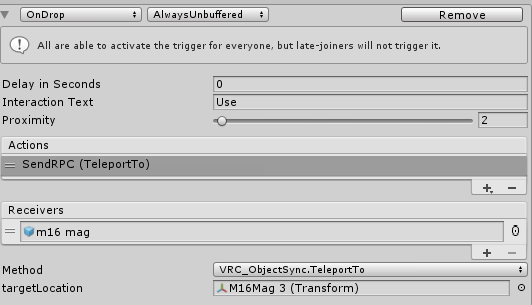
I have to make a unique target location for every single instance of this item so I can't put it in a spawner. I just want to reset the position.

If multiple of the same object is in the scene, this "OnDrop" Call sends the dropped object to the targetLocation of the wrong parent
summer berry
@kind brook Yes, there are multiple ways to teleport an object. What are your requirements?
There are "simple" methods and super complicated methods.
If rotation doesn't matter and only one location to teleport to, you can add the "FollowTarget" script from standard assets, drag in your target, set the offset to 0,0,0, and disable the component. When you want to teleport, enable the component and then disable it again a few frames later.
kind brook
I want to be able to prefab the object and have it be able to reset the position individually.
So... I had two firearms, and if they reloaded at the same time, the magazine for one of the guns would teleport to the position of the oldest gun in the instance, not the unique teleport location on the object itself. I fixed this by giving each teleport position (the targetLocation) a unique name and adding a set number to the world.
summer berry
If you want it to be a prefab, it needs to be self contained.
kind brook
Yeah.
nova dirge
Besides asset store, are there other places to find things to help with making a world? Im looking for plushies and like hair brushes and cute stuff
topaz jolt
You can search online for free 3D models thats are plushies and hair brushes
nova dirge
Ive tried but so many of them are just images or not free
nocturne prairie
You can still find stuff on deviantart and convert them. XPS,Xnalara, MMD etc. At least this way you have more to look from
sketchfab too
ember root
DeviantArt, sketch fab, free3d, free3dbase all have nice stuff free3dbase is more like house appliance then it is general items. but most are low poly. just credit creators if you do use stuff. unless its a paid asset you bought. Even then its nice to still credit them.
 civic coral
Hi, it's a nice weekend! I have some questions regarding player's health and health bars
I'd like to add some kind of visualization of the player's health or object's health, just like most of the gun worlds do on the guns. I've researched about combat system and onDamageXXX triggers, but I'm still not sure about how I can visualize the exact health value with a custom-made pickup-able object. Any hints?
My best solution is to trigger an animation with OnPlayerDamaged trigger
civic coral
I've found my solution, but pretty ugly. Still curious about any other methods.
topaz jolt
I am curious how this is implemented. How will these HP0-5 know what the players health is? As in how do you pass the health value from the player to this animationInt value? @civic coral
 quick solar
any word on the index being implimented into a future vrc update?
so we can get that smooth finger trackiing
drifting egret
No word yet. Currently it supports Oculus-style gestures and that's it.
quick solar
riiiip
that definitely needs to be implimented by august for when the index starts hitting homes
trail jacinth
Bit more advanced, but Is there a way to tell Unity to Ignore a script when building the VRChat stuff? I use a helper script that does some stuff for me, but when I want to build VRChat it complaints about the script using unknown Namespaces and what not... 🙃
summer berry
You can put your helper scripts in a folder called "Editor" and it will then be treated as editor only. This might break other scripts if they try to reference this script though.
civic coral
@topaz jolt I didn't use any methods to pass an HP value to the animator. In fact, I haven't found one. This one is based on OnPlayerDamaged trigger, assuming damage values are all exactly 1
summer berry
There are no ways to pass damage between the combat system and something else. You need to handle it yourself. Which is why advanced creators will say to not even use the combat system for managing health but do all the work yourself. When you want the player to die, take all their health away at once.
civic coral
I would appreciate if anyone suggest a way to introduce exact HP value into any game logics
summer berry
We can already do everything in the combat system except for the ragdoll.
summer berry
You already seem to have the animator setup, you can use something similar to that for everything. Does your healthbar need to be shown to other players? It would be annoying, but you could make a single health system that all damage objects refer to and then inside that it tells all gun health bars to change. I'm not sure how I feel about it being on the weapon as then you would need the weapon to see your health. You could instead make a hud and put it always on the player's face.?
civic coral
I don't think I need to show HP to other players. My plan is to create some non-coop PVE experience
summer berry
So, single player?
civic coral
I mean no cooperation in terms of strategy, but all players play together nonetheless
HUD should be achievable with shaders, I guess?
summer berry
I don't go over using it as a HUD, but here is a video explaining player tracking and some examples: https://youtu.be/Yik63cfyuD8
If you want to use the canvas for a HUD, you can stop on the basic version. I think the advanced one will break visual ui elements. That and you should make the plane distance 1 instead of 0.

This tutorial goes over how to create a player tracker and 3 examples of how to use it. The player tracker was first created by HardLight and released in his...
civic coral
Oh it's you! I've dropped into your channel once and your videos are helpful
summer berry
That is always good to hear.
 toxic dagger
Hiya! i've been breaking my head against an issue for days now
how can i teleport an object to an item when i use it (that is picked up) and it stays in the place where it was teleported
and then its disabled when you released the trigger
nothing ive tried worked ;~; ive looked up vids and forums and stuff but it just oofs T_T
dapper mountain
@toxic dagger You could play around with a script called "Follow Target" from Unity´s Standar Assets. You set its target and it will follow it as long as the component is active.
toxic dagger
Thanku Ill try it! 💕
 jolly turret
what are these super weird artifacts ? seemed to have came after i made most stuff lightmap static
stable hazel
you need generate lightmap UVs enabled on your imported meshes. Find the object in your assets and it'll be in the import settings
jolly turret
thank you! 😃
jolly turret
if i downgrade the meshes using mantis the lightmap gets weird again. is there a way to fix it for objects with updated meshes
drifting egret
The generated meshes probably need lightmap UV's made too. Not sure how that's handled in Mantis
If it generates assets you can do it on those
For probuilder you have to "Generate UV2"
jolly turret
it just makes meshes of the same object with less polygons
so it just makes new meshes
meshes have no settings
trail jacinth
I still dont understand Canvases in VRChat xD
Ive added the Ui_Shape script and just but a simple button on it. It still doesnt let me interact with it...is there anything else I have to pay attention for?
drifting egret
Make sure the Z pos of everything on the canvas is 0
trail jacinth
Is.
drifting egret
Make sure you do not have any colliders anywhere on the canvas
Because even if you don't change it the Z pos may mess itself up
dapper mountain
For me usually is that I dont have a "Main Camera" xD
trail jacinth
Nah I deleted the Main Camera
drifting egret
Oh that might be a problem
trail jacinth
Or disabled it
trail jacinth
I have a PP Camera tho, can I just set that as the reference Camera?
drifting egret
Well yeah
trail jacinth
So every camera would work?
 unborn dew
I saw one person that clicking on unity on play through the game tab, was avle to click on his canvas, but I tried and I cant, just wondering If I can do that now that you are talking about canvas
trail jacinth
No that works, but I guess it has to do with what Camera is assigned and what Camera is rendering to what Display
I guess reading the entire Canvas documentation on Unitys Manual might be helpful xD
But only if the Button is set to "Editor and Runtime"
unborn dew
Oh I see
Is your button working? Check if you have a text if its interaction "collider" is not on the way
trail jacinth
Nah I already got the Button working...but only if I have my Menu opened xD
I know that this is a common problem, but how do I fix it?
 rough magnet
Anyone here have any helpful resources on shader creation I can look into?
trail jacinth
@rough magnet >> https://catlikecoding.com/unity/tutorials/
Pretty neat, but very theoretical. If you really want to learn about how Shaders work then thats a good one.
If you just want some practical tips on making Texture Shaders for VRChat then this is probably a bit too much.
A collection of tutorials for people who want to learn C# and shader programming in Unity. Useful to both novice and experienced developers.
trail jacinth
So again my UI Button only works while having the Menu opened...how2fix?
drifting egret
@trail jacinth the Canvas or any of its children or parents are not on the UiMenu layer, right?
And you added UI Shape component to the canvas itself?
trail jacinth
Yeah added UI Shape to the Canvas Root Object and everything is on the UI Layer
drifting egret
If it's on the Ui layer that would explain why you can only interact with it when the menu is open
Put it on Default instead
@trail jacinth
trail jacinth
Okay so VRChat doesnt like that hmm?
drifting egret
Well it does like it, it's just how it's designed
People do that intentionally so you can't accidentally access the menus from across the map
It's a feature
Just not very well documented
trail jacinth
Hmm makes sense...but you could also just block the raycast with a big sphere around it
"Just not very well documented" truer words have never been spoken...
rough magnet
@trail jacinth appreciate the link, this is great
trail jacinth
Hope it helps ^^
nova dirge
So I want to import an animated pmx (furniture, not avatar) file to Unity. I know how to export pmx to fdx, but not with animation. Can anyone help or know of a YouTube video to help? Cuz I can't seem to find answers >.<
quick heron
in exporting from Blender ?
if you have a PMX file you can open it in blender and remove the animation and export that as a FBX
nova dirge
yeah but I want to keep the animation
how do I do that? When I export as FBX it doesn't seem to keep I don't think
quick heron
on the fbx check import animation
nova dirge
it starts as a PMX file
warm niche
anyone here use probuilder for their worlds?
stiff lily
@barren axle 🐭
 modern edge
So I'm getting close to completing the art assets for my first world, and I'm starting to look into/think about shaders, scripting, and materials etc. and one of the main things I want to do is find a good way to make a mirror that's lower-impact than what you normally see, while trying not to sacrifice quality. I know one of the main things most worlds do is simply omit the background geometry and only render characters, but this led me to a question: Would it be possible to, say, composite this sort of lower-impact reflection with a low-impact world reflection (e.g. a static cubemap or cubemap that only updates every several frames) to minimize impact, while still being able to offer a "full" world reflection? Would the performance tradeoff even be significant? I'm not afraid to get my hands dirty if I can, so even if it's "difficult" I'm willing to give it a go.
Also if this is better off in like Worlds or World-Optimization let me know.
 oak pollen
Hmm, inverted sphere/cube (depending on probe type) on reflection layer.. Depends on environment complexity and if happy with how it looks
modern edge
The environment isn't that complex but I still want to save any performance I could. As far as looks as long as both are lit properly it should be fine. In fact with the way the world is laid out it should even be ideal (there are very few instances where e.g. the avatar would be able to be behind a world element)
Basically I'm just wondering if it's possible, if it'll save a decent amount of performance, and if so where I can go to learn how. I'm not too versed in Unity just yet and I'm not sure how I'd set things up so I can sample the cubemap and the avatar's reflection and combine them etc. For what it's worth if it works out I'd be happy to dump the prefab or script or whatever somewhere so everyone can use a similar technique.
shadow dock
@modern edge with a mirror and updating reflection probe i fear it would be more performance intensive then just having a full mirror showing everything. You can have a 360 image that only the mirror sees of the room but it wont look nice. I did try as a test to use a reflection probe with box projection to make things look right. While it did distort the image to where my head is it distorted it in the wrong direction which made it look strange.
modern edge
Well the probe could be static or update at a low frequency. I'm just wondering what the possibilities are here.
oak pollen
Technically it could be more efficient because time slicing and no longer stereo rendering, but only profiling can show - need to have multiple options and toggle them at runtime while watching frame timings to see which is faster
 barren axle
@warm niche I've used Probuilder for all of my worlds! I use Probuilder + Polybrush. Did you need help with something?
safe musk
From experience, users hate anything that is not a completely vertical VRC_Mirror script, preferably wide enough not to have to jockey for position in front of.
You can make other "mirrors" with cameras or reflection probes, but people will join your world, look for the mirror, if they can't find it, they'll leave. If they find it and it's not what they expect, they'll complain about it a lot, then leave.
warm niche
@barren axle yeah i was just wondering if it has any compatability issues when it comes with the whole physics portion of vrchat. and perhaps if it could cause any compiling errors? oh and is there a reason that the grab points of generated objects tend to be in awkward positions, such as i tried animating a isohedron that was generated in probuilder to simply rotate but the central location of it is at a weird spot. so it made it rotate in a wacky motion. Oh and one more thing, does the generated objects make the MB of the world go up alot?
jolly turret
How do i make the light only affect players skin light level instead of the whole map. it still gives of light on the map and not only on players
jolly turret
in other words how to i increase avatar brightness without environment brightness