#development-advanced
1 messages · Page 31 of 1
 drifting egret
If someone disables their body mesh and doesn't have anything else enabled, their name tag will stutter a lot
Depends on their mesh bounds too
But mesh bounds aren't a huge issue since the SDK doesn't allow you to make them big
 golden valley
that's probably part of the reason why there's a bounds limit
drifting egret
The other reason is that they don't want huge avatars
golden valley
yea true
IK is pretty expensive so you wouldn't want a normal avatar having huge bounds either
cause then they won't be culled
drifting egret
Oh yeah
I forgot about that
The IK system in this game is expensive, unfortunately we can't fix that
They're working on a new IK system but it's probably just Final IK 1.7.1 with tweaked values, no performance improvements
If voice and dynamic bones would go into their own threads it would help a lot
IK would be tougher
Dynamic bones is just a visual transform AFAIK
 echo bay
2018.1 is broken asf
 cold minnow
which doesn't support a lot of multithreading functions introducted in .NET 4
2018.1 works well
echo bay
It'll broke IK, PUN, all worlds, most of materials and shaders so almost every avatars
Also they'll have to redoo the Playmaker compatibility they are working on for months
cold minnow
shaders aren't really broken
golden valley
there's apparently a button in the editor that will attempt to auto upgrade shaders
so it shouldn't be that hard
cold minnow
Playmaker is shit
custom scripting is the way to go
Playmaker creates really bad habits
echo bay
Real problem is about everybody having to reupload their worlds and avatar. And VRChat devs to redo all the compatibility between their own scripts and every assets they were using needing to be uppgraded too
cold minnow
Yes, it may be newbie-friendly but
echo bay
Basically it's just recreate a whole vrchat from scratch at this level of refractoring
cold minnow
That's why you upload avatars with "Future-proof"
echo bay
Are you sure future proof mean it'll be ok with a whole new source code ?
I do hope so !
cold minnow
Future proof means the whole project is uploaded
echo bay
Oh
cold minnow
They can make an utility to update all avatars then
echo bay
That's why it take me like 10 hours
echo bay
Yeah same here
Though asking for them to change the unity version is not just like "Hey, update windows"
They used an unity version and buildt everything on it, and the assets version they are using may not be compatible within them on later versions. It's an huge work, and even if I hope that they'll do it, there is nothing less sure
Also working on it also mean stop to develop VRChat furthermore for all the transition time
drifting egret
The reason they're doing Playmaker is so they can give world makers better tools without allowing them to use scripts outright
Playmaker gives them a controlled environment in which they can develop without maliciously breaking the game
I've played around with it and it's super cool
How good it'll be depends on the actions we are allowed to use eventually
Playmaker is a good thing
And yeah, updating Unity will be incredibly painful
So painful that they probably won't ever get to do it, the game will be dead by then. Not that it's dying quickly, it's just that it will probably take like 5 years
Which is a shame because performance only seems to be getting worse
echo bay
Maybe performances get worst because more and more people discover overconsuming shaders and keep making more unoptimized worlds and avatars. As you said before
I don't think the servers are the problem
drifting egret
I dunno, it seems to be something inherent in the game itself
Or all the worlds are simultaneously getting laggier
It might be the camera update as well, if they're always on then that's gonna lag
echo bay
The camera thing seem to have broked many things
Full body tracking eyes as exemple, which don't seem logic at all
 final wigeon
Eye tracking in fullbody has been broken forever, really.
The times I've had really bad perf is almost always the CPU bottlenecking, and getting everyone present culled outside of my view frustum has usually helped a fair bit.
drifting egret
And tbh, it would also help quite a bit for Oculus users if this game natively used the Oculus API
It always improves my performance by a lot
echo bay
Can the devs even use it ?
drifting egret
Yeah, I don't see why not
A lot of games do it, and Unity has native support for it
echo bay
I mean, isn't it a part of the deal from Steam to give them money to have the platform ?
Exclusivity ?
drifting egret
A lot of Steam games support Oculus
Doesn't mean they need to start offering it on the Oculus store
Serious Sam VR supports it for example
Besides, a lot of games are available on Steam and the Oculus store
echo bay
But if you do launch them from steam wont it start steam vr too ?
drifting egret
Not if we got an option to use the Oculus API
Or it would switch over once started
echo bay
Oh, seem pretty sweet
drifting egret
Serious Sam 3 VR gives me roughly 35 FPS with SteamVR API, but full 90 with Oculus
It's because Oculus tracking is demanding for the CPU, and emulating it through SteamVR is even worse
echo bay
Yeah, as an oculus user I have a lot of problems in vrchat at every new world loading
drifting egret
On that note, I really should not have gotten an Oculus with this CPU lol, should have gone with WMR
drifting egret
Same lol
final wigeon
Constellation/Lighthouse is noticably better than WMR's tracking system. I have both vive & WMR and there's some things I just can't get the WMR controllers to do properly. Usually fast motion going in and out of the tracking area.
drifting egret
I just got word that our college classes today are canceled so I have time to actually do something
 normal aurora
well
tomorrow I have off work, but it's a bit of an exception
and worse than that, there's a chance I won't be able to VR for a few days after tomorrow, but it depends
normal aurora
I seem to remember reading somewhere that shaders and orientation of the object and particle systems didn't play nice together, but I can't remember where I read it or what to search for
but in any case the effect is like https://i.imgur.com/zqKIiym.png
drifting egret
World mesh particles cannot rotate themselves based on the particle system or their velocity
You need a shader that visually aligns them to their velocity
It works fine but it has its own issues of course
golden valley
requires vertex streams to be setup properly on the particle system and in the shader, which can be annoying
normal aurora
in this case I don't really care about velocity because they're not moving, but rotation matters
drifting egret
That shader needs them to be moving though
Otherwise it doesn't know how to align them
You can make them move extremely slowly so you don't see them move
normal aurora
I can add a Rotation3D into the stream too of course
and it puts that in texcoord0.zw and texcoord1.x
drifting egret
What rotation?
normal aurora
the rotation of the cubes
drifting egret
World mesh particles don't have them, that's the issue
They have zero awareness of which way they're oriented
Their collision spheres don't rotate either, so the particle itself is actually always facing the same way
normal aurora
I thought that's what the vertex stream was supposed to fill in
drifting egret
It can pass particle data to the shader
But world mesh particles don't have that data to begin with
So the shader essentially fakes the data based on the velocity
normal aurora
which these don't have because they're not moving 😃
but I don't see why velocity would work if rotation3d doesn't
and why rotation3d would even be an option if it doesn't work
I'm still curious to find out what's actually inside the rotation3d though so I'll still try to get it in
golden valley
if they had rotation3d then they would be rotated as mesh particles
they just don't have it
normal aurora
they are rotated though ...
golden valley
it's fixed in later versions of unity
normal aurora
I mean, it's rendering them rotated
I can't even add velocity anyway, same error message 😐
golden valley
you might be able to rotate them in shader using instance id or something to differentiate them
and then generate a random axis from the instance id
you want them to spin in the air, right?
just constantly rotating
drifting egret
Oh, that's what you mean
Yeah, you can give them fixed rotation
They just cannot get any kind of orientation from their parent if set to worldspace
You can make them rotate a fixed amount over their lifetime, or give them rotation based on velocity etc
normal aurora
yeah I could probably fake the whole thing in the shader really
have the shader rotate the mesh so that it just knows it
golden valley
the colliders still wont rotate with them if you rotate in shader
normal aurora
it's fine, the only collision I will ever put in might be to stop them intersecting with me
but yeah, I will still have to find something to use as a source of reproducible randomness
golden valley
instance id is the only thing i can think of
unless their position isn't changing then you could use world position
normal aurora
that is sort of the case too actually, so that's too options at the moment
instance ID looks like a better option for general usage though yeah
so conceptually everything seems doable but keeping track of where everything is is going to be painful
like any object to world transforms I'm using would have to be changed over and such
still kind of curious why I can't get the extra stream data in anyway 😐
it says my inputs don't match but I do have a texcoord1 and there's nothing higher in the stream
golden valley
post a screenshot of the vertex streams and your vertex input struct
normal aurora
golden valley
and what's the error?
normal aurora
"vertex streams do not match the shader inputs"
it also suggests the shader has to actually use the values, so it might be doing some voodoo to figure out what values I'm reading, so I tried actually reading it, and nope
golden valley
it might want you to just use float texcoord 1 : TEXCOORD1;
normal aurora
ah, I actually tried that already too, haha
golden valley
hmm yea maybe it's complaining that you aren't using them in the vertex shader? I'm not really sure
normal aurora
I'm going to have to read the editor code to figure out how it determines it I think
golden valley
it may also be complaining about fixed4 color too
normal aurora
interestingly it does show a warning about color each time too, which then vanishes as soon as the screen repaints
golden valley
yea i would leave it as a float
this is why i said that vertex streams can be annoying at times
for some reason it always isn't as easy as just adding it to the stream and the shader
i can't remember if having to actually use the values in the vertex shader mattered last time i tried this
normal aurora
yeah .. that one diagram on that other page suggests it might be but because they didn't seem to post code, what it's actually doing could be anything
also .. if I use less than texcoord2 I get another warning from surface shader itself about GI not working, so I have to include that many at a minimum I think
oh well, tonight's fun time is over anyway, lol... I should get some sleep and maybe try again in a few days after working on something else for a bit
thanks for the help 😃
golden valley
gn
 rough sleet
@echo bay @drifting egret Upgrading Unity has gotten a lot less disruptive compared to previous versions. VRChat may need to do some work to make their code work but it would be a lot less than a re-write. Upgrading requires a content wipe because compiled shaders aren't compatible between versions. Alternatively they can force everything to use standard instead but then it looks weird.
 sharp burrow
I think we would manage with another content wipe ^_^ Just give us a heads up
drifting egret
Yeah
If they give us a beta a few weeks in advance, we can all adapt before the update hits
rough sleet
One issue I can see is that while 2018.1 has a lot of improvements and features, 2018.2 is also supposed to have a lot of improvements and features.
rough sleet
For example the GPU accelerated progressive lightmapper is supposed to be in 2018.2
 manic cloud
forcing me to use standard shader is worse fate than losing avatars 
rough sleet
The GPU lightmapper would make it a lot easier to get people to bake their lighting because it makes it take a lot less time.
So upgrading to 2018.1 and having a content wipe now would require another content wipe to upgrade to 2018.2 in order to get the GPU lightmapper.
drifting egret
True, but
GPU lightmapping might not be that big of a priority
People don't not bake their lights because it takes long, they do it because they don't care or think it's too hard
rough sleet
Also with the addition of the long term support x.4 releases which get bug fixes without new features it starts to make sense to target that.
The GPU lightmapper makes baking take seconds
So you can just move your lights around in almost real-time until you get the look you want.
You get your view baked almost immediately and the rest of the world bakes in after.
drifting egret
That's cool
rough sleet
It's a bit of a hard sell to convince people to bake their lighting when it takes an hour or more every time they make a change.
Also an engine upgrade isn't a magic bullet for performance problems it just gives them more tools to tackle the problems.
echo bay
Also when your world run at 90 fps on vr on a gtx970, there is a moment you must stop to optimise and think about having it good looking with proper realtime, wind and stuff
rough sleet
So they could still improve the situation without one.
echo bay
We wont need light baking at first time if everything else is on the point
rough sleet
Eh, that depends heavily on the world.
echo bay
Though i cringe when i do see most of vrchat ugly worlds hardly working at 40 fps with almost nothing in
rough sleet
If you have a real-time directional light with shadows your draw calls can get out of hand pretty quickly.
echo bay
Yeah it is true that i alway do remove the shadow from my realtime
Mostly because its insane performanxe eater for almost nothing rendered
rough sleet
Using mixed lighting in shadowmask mode is an option if you still want dynamic shadows.
Real-time spot lights with shadows are only 2x the cost of spot lights without shadows, while point lights are 7x the cost.
And directional lights are technically infinitely more expensive CPU wise because the brightest directional light is done in the base pass without an extra draw call.
echo bay
But when i see that with full realtime light, sun halo, post processing bloom, AA, Wind in tree leave, a 4k skybox and a whole 700x700 stereoscopic mirror reflection as water i still manage to have 90fps on vr on low end vr gpu, i really do think that overomtimising shouldnt be a thing.
rough sleet
8x MSAA is on by default in VRChat because VR needs it to not look terrible.
echo bay
We should just manage to get a decent framrate for a decent experience
rough sleet
So you don't need FXAA if you're using it
echo bay
I didnt knew that thanks !
rough sleet
You'll find that it's not terribly difficult to optimize a world enough to get 90FPS alone even on a weaker GPU like a 970 but it is basically impossible to maintain that as the population of the instance increases.
The reason is a combination of Dynamic Bone, IK, voice, networking, and avatar draw calls takes up too much time on the main CPU thread.
echo bay
Its only a problem if you are planning your worlds for a lot of people. But yeah i do admit that avatars are the worst frame killers
rough sleet
Full worlds are a terrible user experience
You can have some or all of your friends online in a world but you can't join them because you inexplicably get sent to an empty instance instead.
echo bay
Yeah but sometimes you want to make a world only for a certain amount of people. If you plan it for 4, you wont let 32 enter in
Its just like video game. If the video game coop is for 2, its bad when you are 4, but that's why it was made
We cant alway give the best experience with an mmo
 mental narwhal
Spend hours and days on your realistic, moody lighting and effects, then fill it with a bunch of unlit avatars, yay! That's VRChat. lol.
 tribal wraith
Not sure if the right spot. When I use audio on an Avi and assign linear line it sounds great nothing ear rape and I'm going by the simple 1min tutorial popular on YouTube. Recently it reverts to linear rolloff when I'm building to upload. The sound ends up extremely quiet in game. Any ideas why it's doing this? I keep the range between 0-15 on linear
I remove onsp component generated when I create my audio source
I only change priority to max, vol to .3, and make the curve a linear line which looks like a diagonal on the graph, I keep range between 0-15
On build it defaults to rolloff and changes the other settings
 azure chasm
as far as i know the ONSP component is required for valid radius settings
somethin to do with VRChat i think
mental narwhal
@tribal wraith you are talking about in a World not on an Avatar, right? We enforce spatialization and falloff curve on Avatars. Ah, i see you said "Avi" -- i thought you meant a videoplayer. So no, you cannot use linear falloff on an avatar.
tribal wraith
Is there somewhere I can read up on the audio application for avatars? The video might be outdated.
I just need my sounds to be normal not quieter than a whisper, but it is defaulting with each build
Or can the falloff be adjusted without decreasing the sound values. I believe the curve is really what's affecting it the most. I'm just not sure how people are getting normal sounds out of their avi animations etc
If it defaults them to that each time
mental narwhal
The falloff curve attempts to mimic real sound behaviour. You should use the ONSP element as that has some gain. You cannot adjust the falloff curve but you can adjust minimum and maximum ranges. All that said, be very, very careful with avatar audio. Many people do not want to hear those extra sounds while they are conversing with each other. Now that we have a mixer channel for avatar sources, I think people are trying to make their avatar audio louder. This will probably result in everyone keeping that mixer channel even lower. That's what I do. In the end you don't have control on how loud someone hears your avatar audio -- they are in control.
tribal wraith
I'm not trying to make ear rape I agree with that it's more for personal avatars for myself and friends. The roll off isn't the only thing that defaults but I'll take a look at it.
I believe people modify the sdk for ear rape and that isn't the intention. Just normal sounding audio. It could be the audio file as not all of them sound bad. Of course I believe it's because I have onsp on some and not others.
mental narwhal
you can't modify the SDK, the limits are performed on the client at runtime.
tribal wraith
I read a thread back in February where tupper said to remove onsp so maybe that's where I'm going wrong
So people are just boosting the audio before they apply it.
mental narwhal
Yes, we went through a few interations of adjusting the audio. Removing ONSP is an option, but it doesn't really change much in the new setup, and the ONSP element is a more realistic spatialization curve.
tribal wraith
I'll try reapplying it, and the audio is epic sax guy but it's probably too low in mp3 format?
mental narwhal
Yes, that's what i mean about the mixer. People try to abuse it, so they max out the audio to the edge of our limits. In response everyone adjusts their mixer settings low. Nobody wins.
tribal wraith
Ah ok
Yeah I keep it normal levels, the sound on this is just too quiet even at max on mixer
I have another that sounds fine so that's why it was confusing
mental narwhal
because you are listening with the linear ramp you aren't hearing the real falloff. Use the ONSP (and enable the Oculus spatializer) and you should hear how it sounds in game. But there are limits to the min/max ranges, too.
tribal wraith
Anyways thanks for taking the time to elaborate. I started playing a month ago and I've been learning stuff rather fast and as coding goes there's many deprecated articles out there so thank you for clarifying.
Moving on to particle affects this weekend.
mental narwhal
cool. have fun!
tribal wraith
Thanks
 cold trench
Has anyone had luck with any reflective water shaders in worlds? The Unity ProWater asset in the standard assets package has left/right eye rendering issues.
Would the VRC_Water component help?
 nocturne stag
I've always used a shader called VRWaterShader from unity's asset store
Best looking water shader for vr I've found so far
Costs about 10usd though
Also made by a fellow vrchatter
 verbal plume
I would like to ask if there was a posibility to stream a whiteboard page onto vrchat avatar
 warm niche
that reminds me i need to change the audio point on my gun because i keep blasting myself in the head
 uncut tusk
if anyone here has an AMD card and can help me out with a test, please let me know 😃
verbal plume
Coukd somebody direct me to some sort of documentation for web player?
 autumn hatch
@verbal plume The only documentation I know of is this
https://vrchat.readme.io/docs/vrc_webpanel
And no, don't think you can do that with avatars
verbal plume
What i noticed was that evry time i turned cookies on the panel stoped working
 nova seal
Sorry if it's a dumb question but how do I install Shader Forge into a project? It was removed from the asset store and I'm not sure what to do with the github copy of it.
I tried extracting the zip to the project folder but unity isn't recognising it
All the installation guides say to doubleclick an asset file but there isn't one
normal aurora
@verbal plume I can confirm that too, all my panels behaved very unpredictably until I turned off cookies
on top of that, there are some limitations of the web panel which don't appear to be covered by any of the documented limitations 😐
I have tried a couple of canvas-heavy apps which just don't even load, and I have never been sure how to diagnose it, but recently I ran across some projects on github where people programmatically bring up the dev console, which seems like the way to go
I dunno about typing into that in a useful way though. from VR anyway
you can find a few hints on webpanel stuff that english docs don't list by crawling through japanese wikis
(like the trivia that mjpeg videos apparently still work even though every other kind is blocked)
 amber vortex
AddURL Owner
Adds a URL to the playlist (only works if a video clip is not present in the playlist)
does that mean you can only call it once, or how should I read that?
 ember dune
Hey, I need help! I have been trying to add web panel to the scene. It worked fine for one time. Now whenever I try a build it shows a blank white page.
Can anyone help me in this. Thanks in advance!
 lavish elm
Does anyone know how I would go about having meshes/shapekeys toggled by emotes? I have too many props attached to my avatar and would like to be able to switch between them without needing to switch between avatars everytime.
 vapid prairie
Would anybody be interested in starting a VRC World Creators team?
 frozen pike
Already have my own team
We are currently working on a spaceship world to be used for fun and role players
 robust yarrow
oooh nice 😃 looking forward to seeing that 😄
frozen pike
I'm focusing on the tech and team management, got someone working on the visual part of the world, another working on the Unity UI for use on surfaces. Much prefer the Unity UI for interaction rather than physical objects.
The life signs system I plan to use will be interesting.
Since they have added plus and minus to variables in animations I plan to use it to monitor/increase/decrease a particle effect size in a 3d representation of the ship.
Like those scripted ones in the official hub
robust yarrow
yeah the UI system is something I want to use before I release mine to public
instead of relying on game objects for buttons
warm niche
im so confused
my friend said you can modify and assign the material array so that you can have 1 material that sits on top of all the materials
and affects the entire mesh
but i cannot find where to do it
i changed the size of the array
but it just assigns the material to a random spot
echo bay
I really though that UI is for 2D games, and interacting with gameobject for 3D
I mean you should be able to "touch" things on VR
Flat UI is boring and from past
robust yarrow
its great for menu systems
or where you have a lot of buttons close together
trying to grab or touch a specific one can be almost trial and error since you're more likely to highlight the wrong button
warm niche
For the snail marker, I want to write but only for 20 seconds , instead of removing it all with a hand jesture how do i do that?
sharp burrow
Reduce the life time for the particle system
warm niche
i dont think theres no particles for snail tho
pretty sure you have a "lifetime" on the snail marker
if you put "20" in it
it will start to erase itself after 20 seconds
Ohhh!
on trail enabler animation right?
oo ty!!
Will this new Node Graph replace the current trigger system?
 fierce python
They talked about actions and triggers being inn it so i think yes
 lofty sail
how do you optimize your avatar to be lag-free beyond the 20k poly limit? atlasing can't be the only thing.
rough sleet
@lofty sail Keep the number of bones affected by dynamic bone to a minimum.
One skinned mesh renderer with minimal materials
lofty sail
ok.
 plush island
How would you get the VRC_Midi Note In to work? like do i just put it on an object and go in the game with a midi device plugged in and it'll work? not sure how it works
sharp burrow
That is just how it works yea
plush island
ah i see
warm niche
hello
has anyone had the bug where animated materials revert back to their original material?
 near bronze
are you checking in a mirror?
warm niche
im trying to get my materialization to work
but when i use a material override using tghe animator
its fine until i change objects
when i change to something else
then go back tot he object that was animated
2 of the materials
change tot he default
in a 6 material object... 2 of them change to default
near bronze
When you change a material in an animator, it doesn't change everything that uses that material, just the one thing you animated
warm niche
yes i know
but the issue is when i click on something else after
the animation changes to a random material
that isnt what i specified
for example the original material is white.... i use a black material for the the animation
i click out
go back into animator
the material is wrong
but the other ones are right
near bronze
oh this is all in unity?
warm niche
in unity
near bronze
the animator is just a preview, it won't stick
warm niche
i know
near bronze
even in play mode
warm niche
my workflow is correct
it is a bug
that i dont know how to fix
the workflow is correct
my firend watched me do it in screenshare
but for whatever reason the material always changes to the default
when it should maintain
in all keyframes
but in every keyframe the 1 material refuses to accept
after i click outside the animator window
regardless if i select something else
i am trying to do a dissolve animation for an object
but it will not work because oft he bug
and it doesnt matter which material or shader i use
it's as if there is a hidden override that refuses to allow material changes on that layer
and i cannot find it in debug mode
normal aurora
hey, webgl works in the web panel
I don't suppose there's a way to get stereoscopic out of that other than by rendering two scenes side by side and using a shader
final wigeon
Stereo video is basically that, either SBS or OU video + shader to direct each half to the relevant eye.
I also wonder if playing video via webgl would break the webpanels as usual or not. Probably.
normal aurora
hmm, I hadn't considered whether webgl could do that
a few people have found unique workarounds for getting video past the blockade lol
but yeah, the only thing preventing me doing good stereoscopic web stuff in a web panel is that I'd kind of need to know the orientation of the player's camera
whereas if I did it by laying multiple web panels on top of each other, unity would take care of that
or even if I did it with multiple colour layers in the web pane and a shader to split them for each depth layer
realllllly what I'd like to do is fire a trigger from js 😐
warm niche
Does anyone know what can prevent the options menu from working and not being able to move when i spawn in my world? Interacting with a chair fixes it.
Maybe this is a bug only with test client?
 outer orchid
this is kind of a shot in the dark but maybe someone will have an idea. I'm thinking about making a shader that dilates my avatar's eyes in darker lighting. I think it would be easy to make it instantly react to the lighting, but a slow reaction to the change would be much cooler. I've been racking my brain for how I might do that, maybe something with particles, but nothing is coming to mind.
if I could make a particle system that changes color based on the lighting or something... Alas.
rough sleet
@outer orchid The post processing stack has eye adaptation
You can control the speed to a degree.
Oh, wait, you mean your avatar's pupil's dilating?
That would require you to use a camera loop to track how dilated it is over time
However that only works for friends.
Non-friends will have your camera disabled.
outer orchid
yes, the actual pupil dilating. can you direct me to more info about camera loops?
rough sleet
I'm not sure if there's any guides on it.
outer orchid
I think I'm seeing your line of thought. I've never used a camera in VRC though so I don't understand the bit about only friends seeing it.
rough sleet
You just point an orthographic camera at a quad that has a shader that takes the render texture the camera renders to as an input.
So your shader runs on the quad using the previous frame's output as its input.
It's kind of useless now because it only works for friends.
At least for avatars, it works fine in worlds.
rough sleet
You'll also probably run into issues with it working locally because your head is collapsed down to almost zero so you don't see the inside of your head.
outer orchid
I'm going to work on the shader with instant change and worry about making a transition later
 calm agate
I am trying to give my character an animation that allows them to point in a particular direction, have a marker appear on the ground where they are pointing, and then press another button to cause an explosion or something. Given the small number of whitelisted components figuring out a way to do this has been pretty difficult (impossible maybe?) but I was wondering if you all had any suggestions for it.
One kind of hack-y method that might show some promise is having the aimer be an object that is affected by gravity and giving it a collider, and having it parented to the hand of my avatar with lots of distance. that way when I point in a direction, it's fairly far away and it falls to the ground, and then when I move my hand closer to me the collider keeps it moving flat across the surface, which is the behavior that I want
The only issue is, once I move the marker towards me, it decreases that initial distance between it and my hand and so were I to point farther away from me again the marker would remain close to me.
If there was something that let me affect the velocity/acceleration of a rigidbody? I have no idea if I'm approaching this remotely correctly or if it is even possible, but any advice would be appreciated. thanks.
near bronze
You wouldn't want to use a gameobject, you'd do the entire thing with particles. Just have a very fast, very rapid, invisble particle coming off your hand, then when it hits a surface it subemits your indicator which will have a very short life time that matches or is a little bit higher than the first particles firerate
 graceful stump
i need help so have a my car moving and everything but it will not go forward
it goes backward and turns in the front
 sand canyon
@graceful stump I had this happen when I messed with the Mimi Kart prefab too much, even after I “fixed” it back.
I think it had to do with messing with the suspension somehow.
Though even just removing the wheel effects messed t up sometimes. 🤷🏼♀️
graceful stump
whell i am just using the trigger and stuff
i am not using the same kart just the triggers
sand canyon
The vehicle script has a lot going on. I wish I knew.
sand canyon
I think the standard assets prefab relies on a very specific configuration and if you are missing a piece that happens.
graceful stump
do i need the effects then
sand canyon
I left them on, just took off the sound files.
graceful stump
wheel effect
sand canyon
I had issues with random particles from my world appearing for the wheel skids though.
I tried to scrub all of that out, but deleting entirely broke the steering.
graceful stump
would you like to see what mine looks like
sand canyon
This is the end result, I made it so that you can slap any body and chair mesh on and the working car part is invisible.
sand canyon
Tho it was entirely trial and error, no actual deep knowledge involved. I think you have to leave wheel effects on, just don’t put anything in it.
graceful stump
okay thanks
sand canyon
Good luck
sand canyon
👍
warm niche
i am in desperate need of an answer to how to fix grabpass shaders breaking transparent materials, and causing stuff to flicker or disappear depending what direction you face and if there are portals in the room and so on
normal aurora
so after messing around quite a lot, I think I have figured out what's going on here. if you have any js files in the project intended for use with the web panel, Unity itself tries to read those js files as scripts. Unity's own rules for parsing js are more strict than normal js, so there are errors, which prevents building the project. thus as long as I have local files I'm trying to use with the web panel, when I try to test or upload, I always get the old version.
I'll just go dig for an existing ticket and/or file one
any useful js library causes the issue too. jQuery? sorry, can't use it. Three.js? nope.
it stops being a problem if you just host all the crap externally anyway
 runic mauve
@eager leaf nope not feature yet for that in vrchat
 eager leaf
Darn, thank you for the quick response.
 crude schooner
has anyone did try to use depth blend node in shader forge whenever i try to make it its just black http://www.acegikmo.com/shaderforge/images/web/screenshots/depth_blending.jpg
 steel swallow
Haven't looked at your link (on mobile), but I assume you're referring to using the depth buffer. Normally a script is put on the player camera telling it to render the depth texture, but our workaround is to add a directional light with .001 intensity, hard shadows on, and culling set to only the water layer (or any other unused layer). This will also set the flag. @crude schooner
The depth texture is basically a grayscale image of the current frame with closer geometry being lighter and further being darker. The color value of this texture is used to calculate distance for other things, or you can also return it directly to create some neat effects.
crude schooner
wait how does that light with shadow will help me to get information of what is closer and further from geometry @steel swallow
steel swallow
dark = far, light = close
I've never used a node editor like shaderforge before, so I'm not sure how to explain it in that context
but in code you can use the color values to say stuff like "if (depth == dark) {col.rgb = float3(1, .5, .7);}"
that's about as best I can explain it xD
calm agate
I am doing a particle system that uses subemissions triggered by collision. It works fine in unity but in VRC the particles collide and subemit in thin air. Any insight into what's going on? I'm emitting particles very quickly if that makes a difference.
near bronze
are either of them local space simulations?
near bronze
Yeah they'll need to be world space if you want them to collide with the world properly
calm agate
ah ok thanks
near bronze
World space particles have other challenges, though, do you know about fixed joints or IKFollowers?
calm agate
no sorry. i am probably a bit in over my head sticking my nose into advanced development, as i am actually relatively new
just figured subemissions seemed like a somewhat advanced topic
near bronze
yeah np, the channels here can be kinda ambiguous so you're fine
But if you're ever doing world particles attached to a part of your armature like your hand, they won't immediately move with your hand, instead they'll be stuck in the same position as if you were locked in a t-pose. In order to fix that, you need either an IKFollower, which is really easy to set up but has a ton of annoying flaws, or a fixed joint and rigidbody, which is mostly perfect but a little bit more annoying to set up. Here's a video that goes over how to set it up: https://youtu.be/VmEED0E_e4w
drifting egret
@calm agate particles collide with PlayerLocal by default
You need to drag a VRCWorld prefab into your scene, setup layers, setup collision layers (in the upload window), then remove the VRCWorld again
You can then disable collision with PlayerLocal inside your particle system so it doesn't collide with yourself.
 gray skiff
Is there a way with the current SDK to make a randomizer?
Like selecting a random object to display?
near bronze
Depends, if you just want a random texture like on a particle, a texturesheet can do that
But if you want full gameobjects and everything they come with, you could do pseudo random with a very fast cycling inventory system. Only problem is it would probably not be synced between clients
autumn hatch
Enable advanced mode on the trigger component and there it is
near bronze
Oh look at you with your fancy world triggers :p
 sturdy frost
Would anyone know how to make an animation property of a slider in a script?
gray skiff
The randomized trigger only triggers one out of the many at a time?
sand canyon
I believe you can weight them. But that’s the idea.
You can do random a bunch of different ways depending on exactly what you are trying to do.
You can get random from OnTimer, from physics, from an animator (slightly less random), or the random actions
 oak pollen
For some reason unity does not like providing a texture that is currently being drawn to. Need to use a pass-through shader to a second render texture to do accumulative processing >.<
<rant>Aaan can create a 3D render texture, assign it to camera, but not allowed to provide it to a material via inspector...</rant>
 abstract eagle
Can anyone with knowledge about Stencil Shaders help me get my particle systems to only appear behind and around my model, but not infront? When infront, it covers up my model too much. I don't want that.
golden valley
Modify the particle systems' shader to have a stencil comparison of NotEqual and reference of some number(say 5 for example).
Then in your characters' shader have a reference value of 5, comparison of Always, and a pass set to Replace
as long as your character is first in the queue(should be as it's geometry and your particles are transparency) it should work fine
@abstract eagle
abstract eagle
@golden valley Thanks! I'll try that next time I start up Unity. ^^
abstract eagle
I got it working, however I'm having a compiler error now when trying to play the scene.
 hollow lotus
Hey, is it possible to use another person's avatar ID for your avatar pedestals?
robust yarrow
if they give you the ID yeah
hollow lotus
And is it possible to retrieve ID's of the default avatars?
robust yarrow
as fas a i know, no
also make sure you trust the player you get the ID from, as they can update that avatar anytime
 subtle kelp
@hollow lotus Also you can only use that avatar on pedestrals if it is set to public
hollow lotus
Got it. Thanks, guys.
 velvet badger
Anyone has an idea why new stream thing does not respect 2 d sound from audio source?
sand canyon
You can get any avatar ID you wear from the output log
@hollow lotus !outputlog
!outputlog
 olive oxideBOT
You can find your output log at C:\Users\%Username%\AppData\LocalLow\VRChat named vrchat;outputlog.txt
hollow lotus
Thanks a lot, in that case I might use it as well.
subtle kelp
@mighty gorge how is it called?
subtle kelp
Ah very nice, thanks!
 slender marsh
Do you by chance know a good program for ripping static meshes from Unreal engine games? I'm currently using umodel and it crashes whenever it opens a upk with static meshes.
robust yarrow
don't think you're allowed to ask stuff like that here 😛
slender marsh
Oh sorry lol, I just saw them talking about the psk importer above
robust yarrow
true 😛
drifting egret
Doesn't say in the rules you can't though
You just can't link to rips
And yeah, umodel has that issue with static meshes quite a bit
I haven't found an alternative, I didn't care much because all the models I wanted were skeletal meshes like weapons
autumn hatch
- No discussion of piracy / game ripping or links to get such content. This extends to directing people how to get a model of a character from a game.
drifting egret
Oh, whoops. My bad.
slender marsh
Ah okay sorry Zarniwoop
autumn hatch
Is all good
lofty sail
In all honesty, that rule is meaningless. Why ban speech of something if the action is allowed?
 nocturne prairie


 slender marsh
Agreed, but rules are rules I guess. I imagine its so people from other companies don't have us documented saying that we're ripping their assets n stuff. Thats something they might try to sue over if they're a-holes.
lofty sail
They could still be sued for not stopping it all the way.
warm niche
so if i put dynamic bone collider on the hands , so if my avatar looks like its sitting will the skirt go kinda up u know above the legs?
 dusky drift
Anyone would mind helping me with an issue I'm having regarding throwable darts in a world? I'm having some trouble on making the physics for VR work properly. In VR you have to currently throw with a lot of force to make some distance, but I'd like to make that a bit easier.
Changing overall world gravity seems like a bad idea, Adding constant force eventually makes them fly upwards, Drag stops them horizontally in their tracks, Mass doesn't help either. Anyone an idea?
near bronze
You could try particles. The inherit velocity module can be set to higher than 1 so it goes faster than it was launched
dusky drift
Hmm. The problem with particles would be that you can't walk up to the board and pick the dart up again.
But yeah, I completely forgot about the throw velocity boost.
near bronze
Hmmm that does seem like it would be nice
I haven't dived into world triggers, but I bet you'd be able to do something with that
dusky drift
The solution might be in the boost scale in vrc_pickup, actually.
How much throwing should scale, higher = faster thrown while lower means slower throw speed
near bronze
I think I've heard about a world with stuff that could be thrown extra fast. Haven't seen it myself though
dusky drift
The world is more oriented towards VR users than desktop, so VR user accuracy is a bit more important here. Darts are quite easy on desktop regardless.
dusky drift
Yep. Boost scale did it for me
sand canyon
I had the opposite problem. Vr users could whip objects across the map
I set up a test world for throwing. Boost is the only thing that affected vr
Mass has no effect on throw for either.
near bronze
Is there any way to have a pickup object in a world attach itself to more than just the wrist bone? Like you pick it up and one part goes to your hand, one part goes to your arm, etc.
dusky drift
I set the mass, drag and angular drag to 0. Desktop users can throw them fine if they hold the button down ~2 seconds. And the boost helps for VR people
 zinc harbor
what was the plugin/code that vrchat uses for its webpanel. I know its a third party solution but I cant find the name anymore.
 karmic hill
Is there a way I can animate my viseme shape keys using text?
Like mapping phonemes. Or is there some kind of lip sync plugin?
sharp burrow
@zinc harbor There is no third party solution to it. https://docs.vrchat.com/docs/vrc_webpanel
zinc harbor
There is
VRChat uses a code framework for that.
Thats been confirmed by a dev for me. I just dont remember what the name was.
It is similar how avatars are based on FinalIK and how VRCMirrors is an edited mirrorreflection script
sharp burrow
Enbedded Browser is the only one I can think of that supports 5.6 then
zinc harbor
Worst case I am just gonna look into the code used by vrc and hope it isnt bundled into the dll
Hmm no it isnt on unity store
It is a multi purpoe solutions for multiple engines
I remember that much
rough sleet
@zinc harbor It is Coherent UI
zinc harbor
You got it
rough sleet
Which was discontinued so you probably won't be able to find it.
rough sleet
They (the company that makes the addon) replaced it with Coherent GX
sand canyon
@karmic hill you mean on your own avatar?
Or for NPCs
You can’t add something like that to avatars afaik but I can help you with lip sync stuff for worlds
karmic hill
Ah. I meant my own avatar. I want to do some lip sync but want to avoid manually setting the visemes in an animation lol
 shadow dock
ui input field
frozen pike
I can do that?
Ok then!
Shouldn't take long
I tend to use Unity UI for everything now
shadow dock
its the best loved it since i first got it working.
 boreal flame
do u guys know anything about generic avatars and gestures and emotes etc
cuz i need help with making gestures work for the avatar and to make emotes work correctly
 hearty lantern
neither emotes or gestures work on generic rigs
what you can do is use a humanoid rig with no/invisible mesh
then put your generic model in that
which will give you access to gestures and emotes
 raven idol
emotes do work afaik but last I tried was a few months ago.
also they get locked into anim for the full minute after the emote ends, disregarding the animation length
unless they fixed that
frozen pike
I know I have seen this before but can't remember
Need to store and submit a variable
For the UI Text input
tribal wraith
Hey everyone, so I'm making a particle affect works great but my friend can't see it. I have the simulation space set to world any other settings I'm missing?
I can see the particle myself in game
near bronze
Try to switch to another avatar and back to make sure he's getting the updated version
tribal wraith
It did have a loaded effect but that could be it
Occasionally I have to restart vrchat audio files. The sound was a bit to loud previously and I lowered the decibels and they were able to hear that change. Could need a restart though
boreal flame
can u guys help with a generic avatar bug
 green lake
just post the question and someone who knows will answer
boreal flame
ok why wont this work in the game, the template i had used these parameters https://i.gyazo.com/2d853cf0167d2a6fb6c8a26ccda999d0.mp4
its playing on top of a blend tree
when i trigger the gestures it wont play any
green lake
dont know much about using the animator but you used the custom override empty as the controller right
green lake
you might need to copy the settings from the custom override empty to the new animation controller then
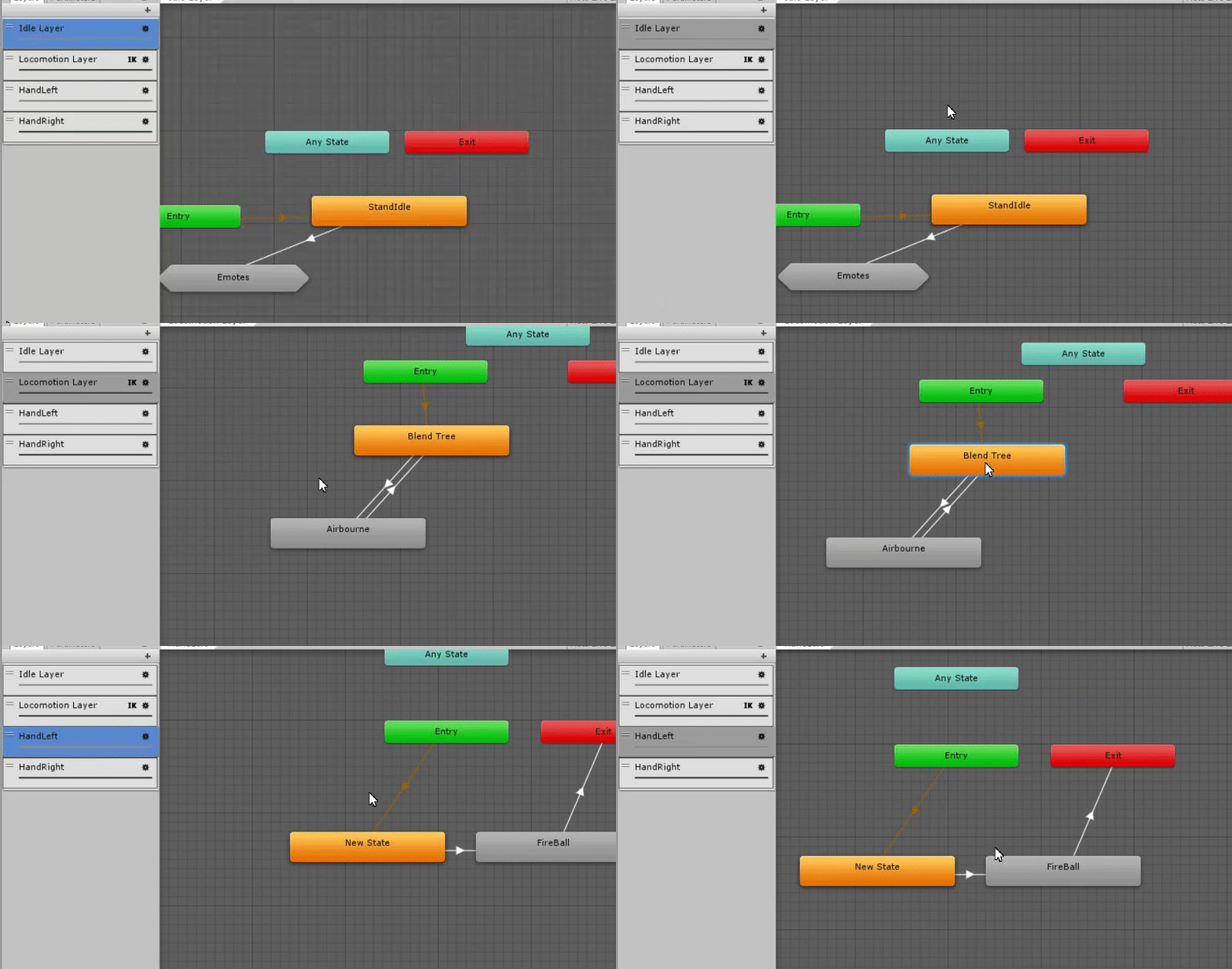
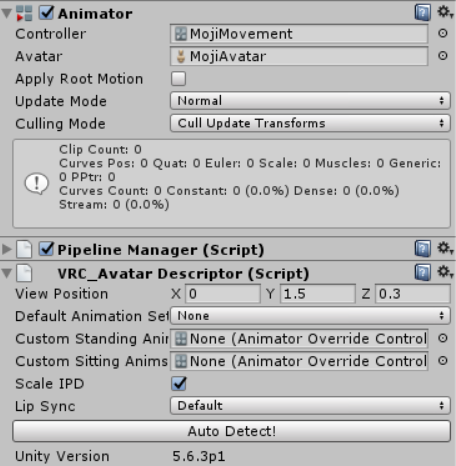 green lake
 green lake
otherwise it wouldnt be overriding any of the default animations
boreal flame
that doesnt matter tho
look at the 2nd image [2]
its a generic avatar so it does not use vrchats animation set, it uses that animation controller in the gif
green lake
but the emotes would be tied to pressing the d-pad on the vive
boreal flame
what
green lake
tbh i dont know much about this but i'm just trying to use logic
green lake
;/
boreal flame
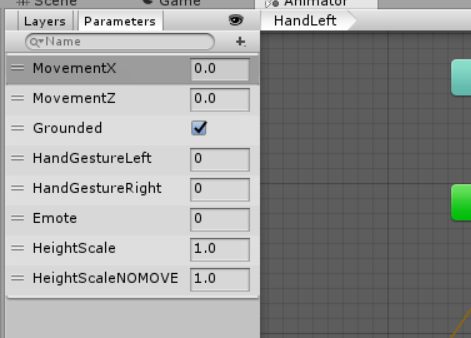
what im not understanding is why my animation controller is not working correctly in vrchat
it should be playing that animation when the hand gesture is set to 5
but it isnt
green lake
well i dont know how to help then
near bronze
I'm not sure exactly what you're doing wrong there, but I know that usually if someone wants gestures on a generic you have to have an invisible humanoid underneath
drifting egret
Generic rigs do not have gestures
Period
You indeed need a fake humanoid model without a mesh, and then the generic rig somewhere underneath, next to the armature
normal aurora
alright, final IK broke again. it was working before the update and the last time someone tested it with me the only thing that didn't work was object sync. now I've fixed object sync but final IK itself is broken. when I read the logs, it's the same "script missing" thing that I had when I was trying to use v1.7, except I have been using v1.6.1 since then and it was working fine until the update. \
now I want some way to verify whether the older build works, so it would be nice if I had a way to download it and run it in test mode :/
I was so close to getting everything working and now even single player test mode doesn't work anymore. not even if I revert my project back to the version that was originally uploaded and run that
boreal flame
yes but how do i set up the invisible humanoid thing
without breaking the rig and while still having the animator
boreal flame
i need to have all things the same except have a gesture param that works
mental narwhal
@normal aurora sorry, we currently only support FinalIK v1.6.1. There's a beta going on right now where we are testing the upgrade. There are bugs in v1.7 for fullbody, so when we release it will probably be with v1.8 (or whatever the next release will be called)
 frigid nymph
@mental narwhal will the next release have the IK upgrade?
mental narwhal
Probably not, there are a few more features to add. Also, FinalIK v1.8 has not been released yet, either.
boreal flame
do u know how to fix the generic avatar anim controller bugs
it doesnt support gestures (even though the sample controller has parameters for them) but even when i use fake humanoid bones it will only play the anim controller animations in unity but not in the game
i am trying to get gestures to work for a non-humanoid avatar and so far nothing works
they are part of a custom-made animation controller that is supposed to play a masked firing animation while that gesture is active
but since generic avatars dont use the gesture params and since the fake humanoid thing doesnt let me use my own controller its not working out
mental narwhal
@boreal flame gestures aren't supported for non humanoid rigs. They are originally intended for hands, which a generic rig doesn't necessarily have.
boreal flame
u can still add gestures if its a quadraped or etc etc where it doesnt follow bipedal rigs
and they could also be used for other purposes like playing animations on top of movement which would allow people to create more intricate 'gestures' on vr triggers
and i dont understand why i cant use my own controller with the humanoid type even when i specified to use no default set
mental narwhal
There is quite a bit of detail to how the humanoid controller is setup. You would need to match all the layers, behaviours and variables or things would break. That said, we are looking into how we could allow you to replace it.
drifting egret
@mental narwhal there is a sample controller included in the SDK though
And as far as I know, if you were to somehow use that sample controller ingame and replace all the animations, it would work perfectly.
The only thing you would need to add is an Avatar Mask for the left/right gesture layers.
The animations might be an issue, though. AFAIK the ones used ingame are licensed, so you can't add those into the SDK. That was the reason the devs gave for not being able to customize our controllers.
But people can make their own animations, so we really, really should get the option to use our own animator controllers.
This would allow us to do a lot of cool stuff and truly customize the way our animations look. We would be able to make longer gestures by giving the gestures a fixed transition time, we would be able to separate gestures based on left/right hand.
What if we had a special set of dummy animations, that the game would automatically recognize and replace with the ingame ones?
mental narwhal
That's what the override system does.
drifting egret
That is true, but unfortunately, the override system only allows us to replace the animations themselves
Not the way the controller works
Even if we would have to make the entire animation set again by ourselves, it would still be good. Eventually someone will come with an "open-source" replacement set anyway
mental narwhal
As for the gestures, they we're only intended for hand poses, and the system is being hacked a bit now [thanks EvolvedAnt, lol]. We'll come up with a better system that's designed around the new usage.
drifting egret
Yeah, it makes sense
mental narwhal
The problem with changing how the controller works is that it could break ik and the smooth blending we do. Part of allowing a custom controller may involve doing your own ik, too.
drifting egret
Smooth blending? Do you mean the blend tree that blends between all the different standing/crouching and standing/walking states?
The sample controller seems to include the blend trees well enough. Not sure about the IK system. I've seen some issues with legs crossing while crouching. Doesn't Final IK handle most of it?
mental narwhal
And blending into and out of ik during locomotion, they all interact
fierce python
Well, it is a price to pay to update a system. Some things break and some things keeps working for a bit more, and if it does break stuff, let players be able to adapt to the new system in a Beta build for a few months before releasing it.
this way, the users that is dedicated and know how can get a touch into it and give the public a heads up for the change.
dusky drift
Problem is a big chunk (be they a minority or not) don't pay attention to upcoming changes and suddenly see their stuff broken and become very vocal about it
boreal flame
yea but heres one of the things i was working on, i was rewiring a gesture to instead of use hand based gestures it would play looping masked animations such as left and right firing which would be really cool for making stuff like fake weapons because you can move while playing them
https://i.gyazo.com/2d853cf0167d2a6fb6c8a26ccda999d0.mp4
and the animator for the most part is very easy to re-make because it works by changing parameters then the only stuff that truly changes functions in how emotes and probably gestures work
at the very least something like a "Custom" for the animation set scrolldown would be nice and it would ensure that gestures and all that other stuff will properly work in the game and would change parameters and such accordingly
that way for both generic and humanoid rigs if you wish to have a more complicated animation controller you can
one of the things i have added for example is a jump start and end animation instead of having a single airborne animation
this does work perfectly in the game but of course i still need the gestures to work
i would also like a fix with the viewpoint for generic avatars to base X and Z position off of the root or something similar because currently on generic avatars only the Y position is used causing unfixable bugs where the camera will be stuck inside of the avatar when you dont want it to be
mental narwhal
^ we could add this, but it would make your character pivot around the viewpoint, instead of the root, when turning.
boreal flame
why cant it do both
cant you create some sort of invisible object or offset the collider or whatever locally
but yea u can see im just trying to use the controller to make better and more interactive character designs
boreal flame
also i still like at the very least something like a "Custom" for the animation set scrolldown where u can choose Male Female or None defaults
normal aurora
@mental narwhal thing is, I do have 1.6.1 right now :/
but that's a good confirmation that I'm still on the right version
and now I'm even more mystified as to why it would suddenly not work
and because steam stores its app cache in the wrong location, I don't get working backups of it, so I can't restore an old vrchat to test that
but I reuploaded an old world which was working the last time we tested it (the IK was working, at least), and now it doesn't work. and at the first time I'd tested it, I hadn't yet updated the SDK either, so I think it's the update to the app which broke it
drifting egret
For what it's worth, I have a Final IK script in my world that still works.
Using Final IK 1.6.1
I reuploaded the world today, too.
normal aurora
:<
drifting egret
So it's not that the game updated to 1.7 or something
normal aurora
if I had an older copy of vrchat's exe I could probably demonstrate that still working, but because valve's devs don't know where files go on an operating system I can't
but even the basic examples no longer work when I upload them
at least, not for my client
time to find a disassembler and see exactly what scripts are inside vrchat
:/
it would be really helpful if the log would say which script it couldn't find, the name and/or the UUID
as far as I can tell, BipedIK is still in the whitelist, but not in the assembly we're now using at runtime
maybe I'm looking in the wrong place though
(and of course, if it were there, why would VRChat itself be saying the script is missing)
@drifting egret do you happen to be using the one script which still works? which script is it? 😃
maybe I can narrow it down to either a problem with just some scripts (though I have tried a ton so far), or a problem with all scripts but just for me
normal aurora
not first and foremost, it isn't
boreal flame
it doesnt do anything at all other than store notes and instruments
normal aurora
it's a communications format
normal aurora
so clearly the context here is that VRChat added MIDI support and they want an example of it
boreal flame
oh ok
normal aurora
I'm curious about the other thing they added at the same time which somehow I had never heard of
drifting egret
@normal aurora using Look At IK
normal aurora
ok, that doesn't work either. (and as you know, I'm using the exact same version you are)
so it's something specifically being done to me and nobody else
or my client and nobody else's
everything works in unity's play mode, but not in vrchat's test mode
maybe it's time to delete the Library dir and see what happens
normal aurora
nup, still breaks
normal aurora
ok. so, a brand new project, import just the minimum stuff, test, that works
existing project, new scene, test, that doesn't work
so there is some project-level setting messing with final IK somehow
normal aurora
turn the volume up? honestly no idea, haven't had it fail to make sound yet
the proximity it defaults to is a really short distance though so you might just be too far away or something
getting somewhere on my issue - removed all the contents of my main project, put in just the bits from the new project, that works. then reverted all the asset removals without changing the project settings at all - broken again
so some asset file somewhere else in the project is somehow breaking this scene
must be another SDK bug like that js one I found that wasted a day trying to get my web panel world to upload, except with this one, it does update the world, but the result doesn't work properly
normal aurora
well now it's confusing
 merry coral
and set the audio for the video player to direct
normal aurora
initially you were talking about webplayer, which anyone who reads it would assume means web panel
merry coral
oops sorry
normal aurora
for video player, you'd use the example one pinned in #world-development which just works out of the box
or maybe the example home thingy has a working one actually, I haven't looked at it yet
merry coral
hmmm
web panels don't play video
or in other words it tells me not to play videos with it
normal aurora
yeah it doesn't
there are ways. ways I have not yet completely figured out
well this is bullshit. I had somehow made final IK stop working just by copying unrelated assets back into the project, but now I have deleted said assets and final IK is still not working
then shut down unity, copy the exact same files back in, and that works
is there some internal state in unity itself breaking uploads? and restarting it alone is enough to purge it :/
actually, I might be getting closer. if I move the final IK packages into the dependencies dir where all my other deps are, that somehow breaks it (wtf?!)
rename directory back -> works again
🤔
 coarse kraken
If I wanted to add a sound to my walking animation, a small bell jingling for example, how would I do that?
 daring ravine
@hybrid raft Hi MMMaellon! Excuse me, I have a question. Is your physsound solution applicable in my situation?
i want down stair player cant hear up stair player speaksound. and up stair player can hear down stair player speak sound. is it possible?
anyway, I try it.
sand canyon
@daring ravine the audio goes not have any geometry occlusion capabilities. So you have a sphere only
You can fake this by physically separating your up and downstairs with identical hallways and a hidden teleport.
So your upstairs is actually like 200m away but your players can’t tell.
daring ravine
@sand canyon Thank you for your help. But taht way, upstair player will not be able to hear downstair player's speak sound. right??
@sand canyon Anyway... 😉 I think This Function is impossible in VrchatSDK. 😫
sand canyon
That is correct, if you move them far away you won’t hear voices
But you can put two audio sources for music
Just have both audio sources use the same clips
merry coral
Ok so I got sound and video to play
Which is great
But for what ever reason once I upload the world and go into it. Nothing loads
Are at the very least
Takes longer to load
Anyone know why this happens?
 lean meadow
Can anyone help with shader?
subtle kelp
@lean meadow http://sol.gfxile.net/dontask.html
lean meadow
I need to make shader for cube/sphere it should be invisible and all inside the cube/sphere should be invisible too, any ideas, tips, suggestions?
lean meadow
no, thats different and i need to hide some things
normal aurora
what about objects behind the sphere
hiding stuff inside and behind seems easy
hiding stuff only inside is boolean subtraction, which is harder
oak pollen
@lean meadow you just do 'discard' in fragment shader
normal aurora
that's if your shader is also rendering the objects inside the sphere of course
I don't think it's that simple though. what should it render if the sphere intersects only partially?
oak pollen
Ah, missed the "objects inside" part..
normal aurora
totally depends on the actual goal too. maybe the trick is more easily done using some other technique
for example, if you just want a gimmick sphere to put on someone's head to make it vanish, maybe you just set a sphere to opaque but then not paint it
it will hide objects behind it too, but maybe nobody will notice
on the other hand, if you're aiming to hide some object you're holding, maybe it's easier to actually disable the object
or maybe it's a stencil buffer, so you can hide the one object whether it's inside or behind (or in front), whereas everything else is unaffected
meanwhile for my issue I'm trying a good, old-fashioned "hide the actual emissive material" approach :/
but even this isn't lighting things up, so I dunno anymore
green lake
@brave fog one channel is enough
warm niche
read the fucking rules
dont spam your shit on multiple channels
is that so hard to understand?
green lake
i spam but only in 3 channel so it oki
 iron pollen
Cease.
dusky drift
Then chances are its not publicly shared.
boreal flame
cri
 latent hemlock
I seem to be having some sort of render queue issues in game where anything I set it to in unity are being seemingly discarded by VRChat after upload
velvet badger
Can I make stream player work with 2d spatial blend?
speaker component seems to override all settings
drifting egret
@latent hemlock I'm pretty sure manual render queue changes are often ignored by VRC
You need to set it in the shader itself
Material properties don't always work
latent hemlock
ah that's annoying, tbh never once had a manual render queue change respected
dusky drift
Hmm... video streams don't seem to work unless they start enabled. And the moment you disable and re-enable them, they stop working. Anyone an idea?
^ for anyone coming across this issue. Set it to auto-play
latent hemlock
Ok this is more of a unity thing but does anyone know what could cause a shader’s GUI to suddenly stop working apart from just deleting the GUI script?
latent hemlock
Figured it out, it wasn’t the power outage but that sure made me have a hard time remembering that I slipped in a new asset bundle which I just found out was broken
frozen pike
Any thoughts on getting the name of the world owner and then printing it using the uitext action?
sharp burrow
Not possible yet (or at all)
drifting egret
@boreal flame you can't without making it generic, that's the point
Walking animations are explicitly defined to ignore all movement outside of muscle movements
Unlike any other animation in the game, such as idle or gestures.
If you manually move some scarf or hair bones in a walking animation for example, it won't work.
You can try it out for yourself
Scarves aren't part of the humanoid rig definition so they're discarded
boreal flame
because they use humanoid masking it masks only humanoid bones
drifting egret
Yep
boreal flame
almost all the animations use humanoid masking
drifting egret
Except idle
And gestures
Then why did you say "they don't have masking" earlier?
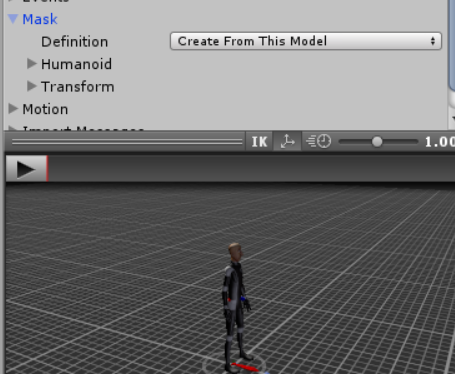 drifting egret
Masking is defined in the controller AFAIK
In the layers
The thing is, idle has masking but idle also exists on a layer without masking
Let's dive into the Animator used ingame real quick
boreal flame
no ik wym
but idk why its playing it unmasked when its also in blendtree and the blendtree plays on top of it
 boreal flame
ik
drifting egret
This layer is outside of the blend trees and this layer has no masking
Which is why it works on Idle
The walk animation only exists within the Locomotion layer, which probably has masking applied to the layer. I don't know, we don't have the avatar masks used ingame
It's different from the gesture mask though
The gesture mask just excludes all muscle movement except the hands
But it does not exclude any objects that might be on your avatar, whereas the walk animation does
I know you probably know this already, I just wanted to publicly lay out an explanation
mental narwhal
Hey I explained in #avatar-rigging , the override system in Unity preserves the masking of the original animation, or at least that's what we've seen.
So you can't override an idle of something that was bipedal, with an animation of something quadrupedal.
 ancient sapphire
Hi I was wondering if anyone can tell me which components I can use (like VRC_Triggers/Actions) to give a pick up object propulsion/lift like a rocket? I've been trying a ton of the options but there's so many that the trial and error of it all is feeling a little daunting. If anyone can help I would greatly appreciate it!!! Thanks!! :3
sand canyon
@ancient sapphire Constant Force is the component.
It’s not a VRC component, it’s a Unity one, but SetComponentActive with a VRC trigger to turn it on.
near bronze
Any ideas on making a local mesh particle's rotation stay constant with the world in the same way world particles do?
 digital pulsar
@near bronze you can try rotation lock snail shader maybe https://github.com/theepicsnail/Shaders
near bronze
Nice, that's exactly what I'm looking for 👍
lean meadow
If anyone knows where I can find particles that react to the sound or at least know how they work, I will be very thankful for the tips.
drifting egret
I think that's not possible
You can sync them to the sound yourself using animations or shaders
But you'll have to sync it manually AFAIK
lean meadow
@drifting egret i saw some equalizer on avatars and when person speak it react to voice
ohh i just realize that it can be like visemes
warm niche
hmm.... Is this normal..? https://imgur.com/dNl6p3H
drifting egret
Yeah, that's almost certainly just visemes
@warm niche the first and second frame in your animation are different
Move the red line to 0:01 and you will see.
warm niche
so I want to make a huge bubble, like a background, well inside it .. it doesnt seem to appear, how do i do that?
warm niche
I have the avatar inside the sphere, will the sphere texture show inside? http://prntscr.com/k32ius
also where do i put the sphere if i want to put it with the avatar
near bronze
You need to invert it so it shows on the inside
Which you can do by just setting the scale to negative numbers
warm niche
do i do it like this? https://i.imgur.com/qTofpSu.png

okay i got it
hhmm nvm
i want to do it in panosphere
 harsh sedge
Hmm, is it possible to change between multiple animator controllers on a single generic rig? Currently I am going around that by having duplicates of said rig; each with the different animator controllers... not very efficient.
drifting egret
Nope
 modest yew
How to change the parent of an object with triggers?
sand canyon
Cyanlaser has a tutorial for that
On youtube
Which I can’t find right now for some reason
warm niche
changing the parent in an avatar or world only ?
modest yew
World
warm niche
okay
modest yew
I'm doing this for rooms, not props
warm niche
I got myself some pbr textures and now I am unsure if I should use the spec or metal workflow?
has an albedo, height, norm, and Roughness texture
basically which shader should I use and were do I put the roughness texture?
dusky drift
If I remember correctly, I'd refrain from using sbar textures if they're procedurally generated. It has to be generated for everyone who joins, eats CPU. Furthermore, using all those maps is also quite taxing and on VR it won't really be noticable for most people. But if you still insist, you can just use the standard shader. Roughness map you have to invert as Unity uses smoothness instead of Roughness.
warm niche
thanks for the reply, I think you misunderstand, I am using a pbr setup there needs to be nothing generated I just plug in textures for my materials. As an example for why to use this. If you want a brick wall you could use a high poly model that has all the bricks, or use a normal and height map to "fake" all that geometry and a roughness/smoothness texture to make micro surface detail appear.
warm niche
thanks for the inversion tip btw ^^
dusky drift
What I meant was that the link you pasted is has a download to a sbar, which tend to be dynamically generated once loaded in unity. But now I see there's images if you scroll down, so forget the first portion, so you can ignore that part 😄
normal aurora
so I have some weird thing going on here. an animation in my world enables an object. The object has an OnEnable with four tasks: clear the URL list on a video player; add a new URL; play the video; set the text on a Text somewhere in the scene to the song title
what happens is: the song title gets set, but the video player is still blank
the same video URL in a copy of the world which just puts it directly into the player on startup plays fine, so I know the problem is not the video
I'm also foreseeing a looooot of problems syncing video player and remote control state
dusky drift
A video player always needs a video on by default or it won't play any new videos. From own experience at least.
lofty sail
So I've heard of people optimizing their dynamic bones. and I've seen the results first hand with no lag to speak of. does that kind of optimization happen in unity or do you need to do something in blender first?
sand canyon
Well, you can dissolve bones to make the chains have less bones in Blender. How else can you optimize them, Id like to know
Removing unnecessary colliders maybe?
green lake
CATS has a bone optimization tool so you can merge the bones
it'll make dynamic bones alot more optimized
sand canyon
Just reducing bone count then?
lofty sail
alright. now that that's answered, I started unwrapping my model for texture atlasing and the guide showed it to keep all it's textures rendered but mine just reverted to all solid colors.
the face in particular just went completely gray
sand canyon
Which guide? The tupper one?
Wasn’t that one missing a very important step where you switch UV maps
Always back up before atlas
 sour mural
So been thinking about something, doing 3D you know old school, polarized but inside VR, with a overlay that is different for each eye display. But im having trouble finding a solution that works or lets me overlay seperate screens
Is it possible to make a shader to render on a specific vr display?
near bronze
There are 3D video shaders, yeah. Meant for watching 3D movies in VR. You'll have to dig into how they work to be able to apply it to what you want though
sour mural
hmm
sour mural
Was digging around for a shader that might work and found a good one that includes cubemaps and 6 sided textures in one + rotation of texture made by Unity, could be useful if anyone needs it: https://github.com/Unity-Technologies/SkyboxPanoramicShader
For their maps
final wigeon
@sour mural There's a shader variable unity_StereoEyeIndex which returns 0 for the left eye, and 1 for the right eye.
 twin oasis
has anyone implemented a midi-enabled piano in a public world, yet?
 summer berry
Div and Jet are trying I think. Not sure if they finished
twin oasis
awesome
twin oasis
im building my own
pretty easy
ok, I have all my triggers and animations set up
where do I find individual piano key sounds?
dusky drift
I've got one working as well. Sounds a bit silly but charming in it's own way.
I recorded my own
twin oasis
is the sustain pretty decent with just note on and note off?
dusky drift
There's no sustain at all from what I've seen
As in; all notes have the same length regardless of how you play them
twin oasis
with On Note Off, you should be able to disable the sound source
im talking about individual key sustain
dusky drift
Oh, right. I didn't do it that way, actually. I just recorded short notes.
twin oasis
but, now I wonder if sustain pedals can be used for all keys
dusky drift
Can try if you give me a moment
I should try that actually, re-record with longer notes and adjust it a bit so it stops playing when you turn off
dusky drift
you could also use a DAW if that's any easier
Cubase or something like that, if you own it
Nope, my sustain pedal doesn't work.
twin oasis
aww
I could use a DAW, but my old midi keyboard might sound unique
a Casio I picked up almost 20 years ago from sams club
hollow lotus
Is it just me or OnEnterTrigger and OnEnterCollider don't always work?
dusky drift
OnEnterCollider tends to be a bit buggy, but OnEnterTrigger generally works. Just make sure that what it's touching is a trigger and that the layers are set correctly
summer berry
The on enter/exit trigger/collider functions require one of the objects to have a rigidbody and also be able to collide (layers as Oninbaise mentions)
dusky drift
rigidbody?
oh you mean the object that wants to collide into it?
For a sec I thought you said the trigger/collider needs one, haha
summer berry
The object with the collider needs a rigid body. Pickups already force this though.
hollow lotus
Well, it definitely looks like I've tried everything, no luck so far.
summer berry
What are you doing that is failing?
hollow lotus
One of the objects is supposed to go through a trigger and destroy itself.
I even recreated a simplified version with two cubes, something's not working for me right, although I've never had any issues with these triggers before.
So, this is VRC_Trigger on cube A.
https://i.imgur.com/r2JIa69.png

I definitely applied the "Destroyer" layer to cube B.
Maybe I'm missing something, I just don't know what.
dusky drift
Make sure that cube A has a Collider set to Is Trigger ON, and I would also disable " Trigger Individuals " to be safe
robust yarrow
@hollow lotus If i remember right, the object needs rigidbodies enabled i think if its not a player controller object (which would have rigidbodies anyways if its a pickup 😛 )
hollow lotus
Yeah.
summer berry
Can’t tell from the image you posted, but what is the layer for both of the objects and how did you set up the collision matrix for that layer?
dusky drift
Collision matrix shouldn't matter. If he didn't touch them, then there's no issue. The layer of Cube A shouldn't matter either.
summer berry
It’s set to a custom layer. It’s possible the matrix was also edited.
dusky drift
Yeah, if he did edit it he might have screwed something up there. But the default settings of the Matrix when making new layers shouldn't give any issues.
hollow lotus
One of them is PickUp, and I tried switching layers as well.
Where can I find the matrix?
summer berry
Edit -> project settings -> physics
The object layer you are trying to detect needs to match the layer listed in the trigger.
hollow lotus
Seems fine to me. https://i.imgur.com/8KpdfGi.png

And yes, before you ask, I need all of these layers.
robust yarrow
just out of curiosity, do you need all the new layers interacting with every other layer?
I usually keep trigger specific layers only interact with player, environment and their own layer
so my checkboxes look like this:
https://i.gyazo.com/3ac54603e852751d7fa2902aa073c5a6.png
 hollow lotus
Usually no. There's an advanced chess world with tons of various triggers as well as most of these layers involved that I created a long time ago, but it was so buggy I decided not to make it public.
I needed these layers because half of them represents specific chess pieces.
robust yarrow
ah i see
ok, so going back to the enter trigger problem
how is it being activated? do the objects move themselves into the trigger or is a player picking one up and placing it into the trigger zone?
hollow lotus
Well, there are two different situations, and I failed at making any of them work completely.
In one case users have to pick up a pen and toggle marks on the calendar with it.
And another one is, you can pick up photos and throw them into a paper shredder.
robust yarrow
I usually give the pickup a child object
that has the new layer
so lets say i give it the rubber duck layer
dusky drift
OnEnterTriggers don't work if a player is holding it, I think. Or I've been doing it wrong all this time.
robust yarrow
then the target trigger also has rubber duck layer
and then in the vrc trigger: the target layer is also rubber duck layer
that works for me
to set it up so its all local only is a little more work
you have to turn the child object off for everyone when its picked up, and then locally turn it back on for the owner
that will let you throw the object into a trigger
and have it only affect the previous owner
hollow lotus
For now, I'm just testing these 2 cubes because nothing seems to be working.
I guess I could apply the trigger to another object instead, but it's not gonna be any more different.
robust yarrow
could you post a screenshot of the target object?
where the "key" object is placed
hollow lotus
One sec, I'll try something else.
By the way, triggers should work fine in Play Mode without having to be tested in VRC, right?
summer berry
No, you need to test in vrchat for all things trigger related
hollow lotus
Some of them worked in Play Mode though.
summer berry
Which ones?
hollow lotus
Now that I think about it, I'm not sure which ones.
I thought it was OnEnterCollider, but it's not working for me at the moment.
summer berry
The trigger code isn’t in the sdk, but in the client, so it wouldn’t make sense for it to run in unity.
hollow lotus
Well, the pen triggers I mentioned aren't working for me anyway, I tested the hell out of them, but I should see if that's the case with the shredder then.
hollow lotus
Yep, never mind, my bad, they seem to be working fine.
At least the cubes are working, but actual triggers I'm working on aren't doing so well at the moment. I hope I missed something and it's not just another issue with the SDK.
frozen pike
Anyone messed with sliders and animation integers?
Trying to make a slider change a int value in an animation
frozen pike
I know I can change animation int with vrc triggers
But getting a slider to interface with that is a bit more complicated
summer berry
I know HardLight included something with a slider in his latest toybox that allowed you to change the lighting settings in the room. Going from your message in #world-development you are doing this for loli’s? Does it need to be a slider? While hacky, there is a way to detect avatar size and do something about it.
@frozen pike pinging in case you didn’t see.
frozen pike
A slider working on a light to change intensity is easy
summer berry
Search toybox. I linked it within the week I think.
frozen pike
Already doing so
summer berry
On mobile so I can’t link again easily
frozen pike
version 2.0?
summer berry
Yes
summer berry
I didn’t look how it was setup. Also, you never really answered my question on why it had to be a slider.
frozen pike
Still really interesting
trying to keep everything in a nice handy UI
Like a admin panel
 knotty pulsar
one question. why the hell are the devs using Photon as a networking framework
do they not know how to network at all? even UNET HLAPI is better
 tiny quest
Idk, ping them and ask?