#development-advanced
1 messages · Page 26 of 1
 normal aurora
it will invent random IDs sometimes for some things
so that one ID will change for the whole file even though nothing changed
 north dust
question
i have the bubble bomb for yoshikage kira spawning, controllable, in that it moves along z axis, aka directly opposite my characters head, so i can control where it goes, still cant spawn audio, but i seem to be having sync issues
when ever i control where the bomb goes it seems to make it desync
 dull umbra
@north dust Avatar IK is disabled for all avatars offscreen for performance reasons, so if someone can't see you, they won't see your head movements which means the particle won't get updated properly. It's the same problem players with air-markers built into their avatars have to deal with. Anytime someone's not looking at them, their writing gets messed up.
north dust
is there any way to hard code force it to be used at all times?
and also, is there any way, ANY way i can have a gameobject sat in the world using a blank fixed joint, have it's rotation mimic my avatars camera?
 tired plume
There is no way for us to modify the IK so hard coding something like that is impossible.
north dust
Is it possible to make colliders that can touch other peoples dynamic bones? Or possible to make my dynamic bones be touched by anyone else? So I can touch other peoples hair and stuff or other people touch mine? While on the subject. Can you spawn items that other people can use? Like instead of having a gun appear in my hand. Could I spawn the gun as an item and drop it? Personally I believe it should be possible if everyone can use the same items that was generated from a world.
like for instance, could i make it where i spawn like a fuccin staircase, and i or my friends can climb it?
 runic mauve
@xLePlay#3746 nope
 barren lantern
Okay, new question-- Is the Web Panel API even supposed to be available to players yet? Almost all functions that return methods don't work, getting stuck in a pending state, and there's very little mention of it besides one tip that appears in the Unity Editor when you're making a Web Panel. From the little I can find from other players on using the Web Panel API, I'm not the only one with the pending issue. Does anyone who has used the web panel API know how to fix this?
If anyone wants to replicate or test, you can assign VRCSDK2.Networking.GetServerTimeInSeconds to a variable and get a valid response back, but other functions, such as VRCSDK2.Networking.get_LocalPlayer, will never return anything despite being called in the same way.
I know they're not failing outright, either, because then the status would change and I'd get an error to reflect it. They're just stuck in the pending state.
dull umbra
@barren lantern Any WebPanel JS function that deals with a non-primitive type will spit out an error in the logs and fail to return. From what I hear, the whole WebPanel API is largely an outdated prototype, so don't expect it to work reliably.
barren lantern
Ah, I see. I was wondering why more worlds didn't make use of WebPanels if they can do things similar to custom triggers (that'd be great for richer input), but that makes sense.
normal aurora
what differences exist between rendering in VRChat and rendering in Unity?
dull umbra
@normal aurora VRChat mostly adheres to whatever you set in the world's reference camera, but the ZNear is limited to between 0.01 and 0.05
Which could influence any effects you might have with the zbuffer.
 gray skiff
Does anyone know a way to copy the contents of a RenderTexture to Texture2D material without custom scripts?
 harsh nest
@gray skiff not sure if this is what you mean, but you can assign RenderTexture into Texture2D slot on any material
gray skiff
But then the freeze frame is only local
Im trying to essentially cache a polaroid for a world like AI photo studio
harsh nest
they just disable camera, so the RenderTexture is no longer overwriten and appears frozen, you can test that in editor
gray skiff
yeah i get that working but its still local
harsh nest
I don't know how you are freezing it, but Iam using VRC_Trigger that disables the camera component and is set to Always
normal aurora
@dull umbra the thing I'm seeing seems on the surface to be some kind of distortion... I'm computing what happens to a ray when it goes into a cube, and VRChat's rendering of it is coming out differently to Unity's. initially I would suspect some kind of difference in the angle of the camera, perhaps...
I already ruled out it being VR-specific - checked last night with a desktop user and they saw it too
what's weird is it even seems to mess with the surface of the cube. even though my material has 0 smoothness and 0 metallic, it comes out looking shiny somehow
but the surface of the cube is the simplest calculation, the ray hits immediately and exits all loops, and returns a fixed colour
 lethal girder
@gray skiff where are your camera used? World or as avatar emote/gesture?
gray skiff
i figured out my issue, thanks anyways
lethal girder
Oh nice
normal aurora
I wonder if my bug is just in the computation of normals... maybe I have to distort the normal somehow just for VRChat where I don't have to for Unity
something to do with tangent space vs world space maybe
 warm niche
maybe the ray doesn't hit and return the fixed color like you mentioned
normals shouldn't cause refections to be toggled at all
distorting them is never a good idea
 rough sleet
@normal aurora Can you elaborate on the differences you're seeing?
normal aurora
I'll try to post some pics tonight (10 hours time)
the screenshots I do have are too indistinct to be useful
I found some vaguely related discussion about tangent space normals on the Unity forum including a link to github which I'll be trying out too
normal aurora
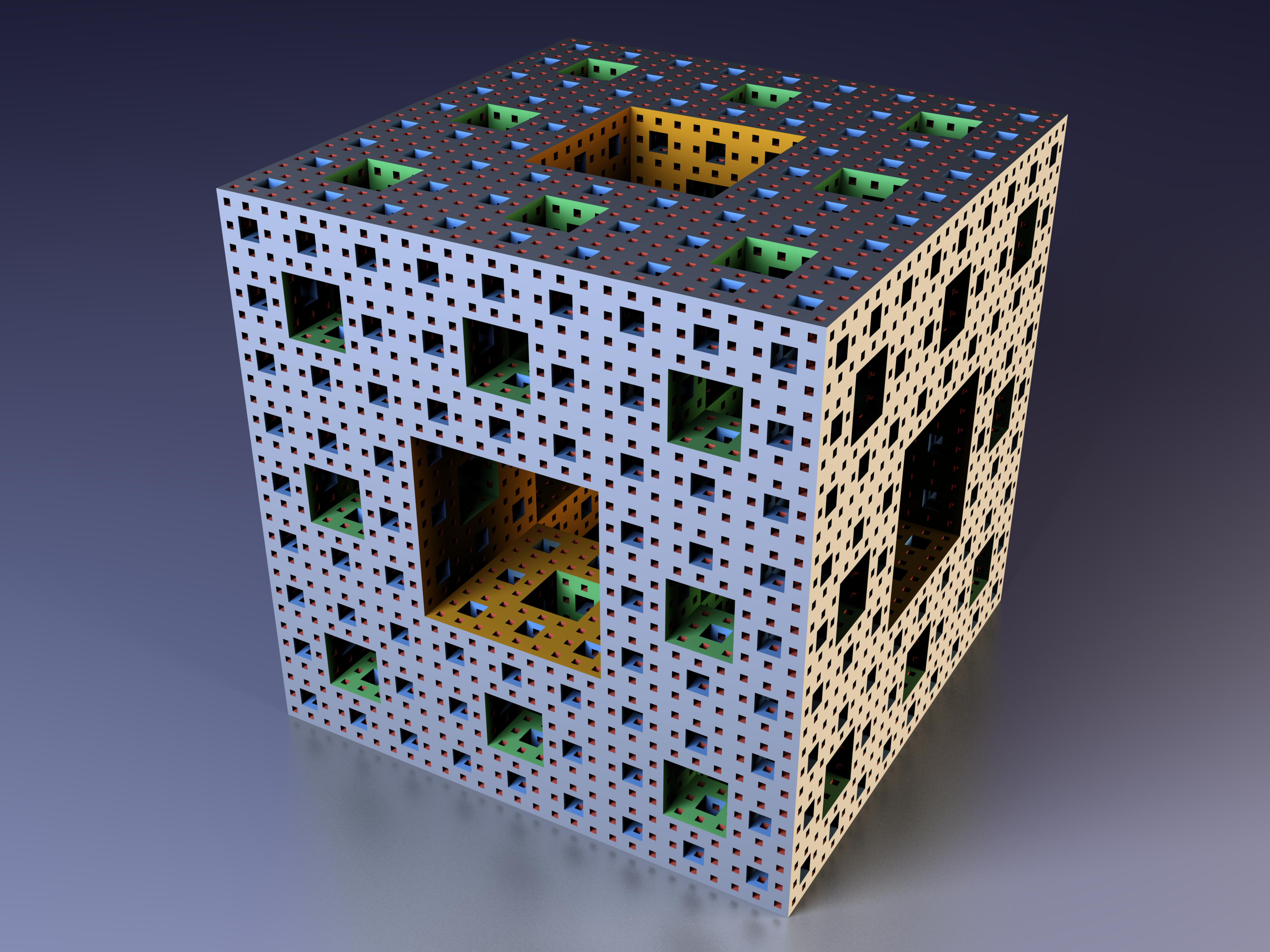
the previous error this shader had on OpenGL actually created some interesting art
I wouldn't know how to make this fractal if I wanted to
but now I do - instead of using the built-in max() function, define your own max(x,y) and implement it as ((x)>(y))?(x):(y), and it will produce this result on OpenGL.
warm niche
what happens if you let it do a less sierpinsky steps?
because that's supposed to look like this https://upload.wikimedia.org/wikipedia/commons/5/52/Menger-Schwamm-farbig.png
the space folding is off
normal aurora
yep, it just isn't obvious why that max function would cause that
I had a screenshot somewhere of order=1 which showed the problem quite clearly too. what seems to happen is a small nick gets taken out of only two sides of the cube, and when you repeat that over and over, you eventually get that artwork
here's the next one. in Unity: https://i.imgur.com/uuhGCwg.png in the hub: https://i.imgur.com/cFgWFXJ.jpg
in the world where I was testing it last night it didn't have this flat white appearance and looked like some kind of shimmering silver
either way I think the normals are the problem so that's the first thing to try
 wary path
does anyone have a shader that supports uv scrolling and transparency
 limpid raven
does anyone know how to use colliders to like mega jump or have any tutorial that could show me?
 odd fable
@wary path if you don't find one by the weekend let me know and I'll make one
@limpid raven pretty easy, put a regular unity collider in your character and then any time you jump you'll go flying
 civic plume
odd fable
civic plume
odd fable
depending on where you put it, you can control the collider by leaning forward or back
or you can just put one on your hand
wary path
Yeah I have one that uses a color mask but I'm trying to replicate an effect from smash 4
It's just a uv scrolling effect however the base texture isn't transparent
So what they use probably reads black as alpha
odd fable
you can just make the color mask then
wary path
I tried but it leaves a black splotch in the middle
It also doesn't roll the full range of the animation
It'll start half way on the edge of the thing that needs to be scrolled and go from there
I'd be able to give you a better example when I get home in an hour or so
 simple basalt
Wait hang on
You can attach normal colliders to your own avatar?
What happens if two people do that and then try and collide with each other?
 autumn hatch
Nothing happens
Currently there is no way to interact with another avatar, through any means besides shader magic. But even then you could argue you're not really interacting with someone else
simple basalt
Just curious :)
But you can attach normal colliders to yourself and uss that to muck with world physics
So for example use your hand as a ping-pong racket and slap ping-pong balls without picking them up?
🤔
autumn hatch
You can only do that with particle systems AFAIK
 sour mural
I got a avatar i forgot to turn off mesh colliders for on the cubes i used for my stencil buffer shader test and it makes my avatar fly up at 120km/h lol
simple basalt
^^ that's the thing
If colliders can interact with the world that opens up for some shenanigans 😃
 forest wagon
Anyone good with Mecanim and Logic Gates?
 manic cloud
I mean you can interact with others on a local scale, where only they see it - if collision is set to everything, then it will interact with others on their end.
dull umbra
@simple basalt As far as I have observed, all non-trigger colliders attached to an avatar are moved to the Player layer for remote clients and to the Player Local layer for the local client. These layers are set to be unable to interact with each other or objects in the Pickup layer. However, world objects in any other layer should still be interactable.
lethal girder
anyone can help me with the problems i have?
- i want to make the little monitor thing act as ui like the red mic button
- render my avatar only, tried setting camera's culling mask to 'PlayerLocal' but the head is gone in render
- (solved, kinda.. i want it to show to me only)
here's my test video https://streamable.com/dehzg
normal aurora
avatar colliders can definitely interact with world objects like balls
I guess it's up to whoever creates the world though because it doesn't work on everything
 drifting egret
I'm pretty sure your head is hidden locally, to avoid camera clipping
lethal girder
2 & 3 solved... now my remaining problem: how to put the monitor look like HUD
i have been searching for screen space shaders but no luck
sob
limpid raven
does anyone know how to use colliders on avatars to jump higher or fly? i cant figure it out
 unique dust
hello averyone
 low peak
has anyone done anything cool with 3d shaders?
harsh nest
@low peak I've seen person who ported raymarching shader from shadertoy.com , or others did their own simpler raycasting & raymarching
harsh nest
@lethal girder actually I guess your HUD is parented to your avatar root ? I think you could make it rotate with your head if you added fixed joint connected to head rigidbody
lethal girder
Its on neck only since when i put it in head, its disappearing
First time hearing about fixed joints, gonna read more about it. Thank u very much!
 robust yarrow
i want a specific object (when placed in a collider of another object) to trigger something. Is this the correct way to go about doing this:
- create a cube (turn off mesh renderer) and place it inside the pickup object
- give this cube a new layer (key layer)
- On the receiver object, add a vrc_trigger and make it enter trigger. Click on advanced and set the layer to the cube's key layer
- then add the actions i want the trigger to carry out
warm niche
Pretty much.
You don't have to do the fist step and create a second cube, but its good practice. On receiver check is trigger.
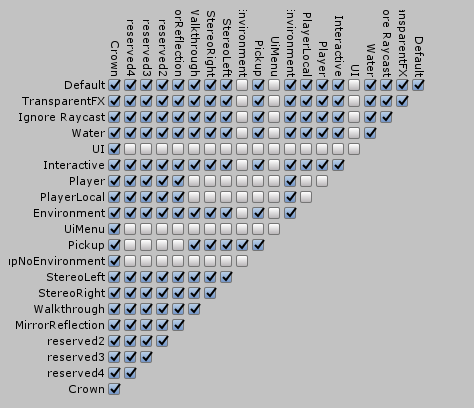
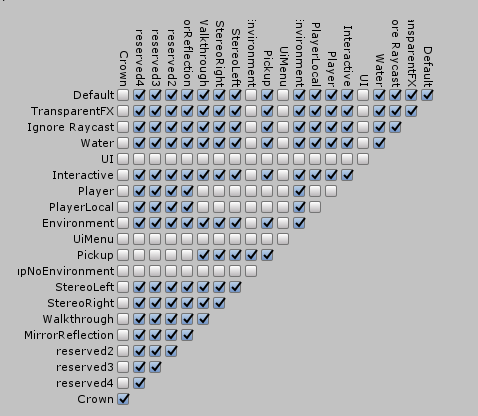
Make sure the collision matrix allows collision between the layers ur using
robust yarrow
collision matrix? 😮 thats a new one. never messed with any settings for this
 dark sigil
Basically it lets you control what layers can collide with eachother
you can like set a water layer or something and make it so players won't collide with it but have a layer for floaties or something so the floaties will collide with the water
 frozen pike
I can make spawns but how do I make a kill all spawned objects?
Tried using the prefab in the destroy objects but that just kills the prefab so I can no longer spawn more objects
robust yarrow
@dark sigil , @warm niche so right now my new layer looks like this (crown layer):
https://i.gyazo.com/ac3a34e9b59f0e316601615f262a5df5.png
both receiver and key are using crown layer
do i just make it so only crown is the ticked one?
 tawny galleon
does anybody know a way to make a subemitted particle play a sound without scripting? ie emit a particle which subemits on collision with a plane, then the subemission of that plays a sound when it spawns
i havent messed around with anything yet but something tells me just putting an audio source on the particle to be subemitted and setting it to play on wake wont work.
dark sigil
you'd probably want it to collide with the default/environment layer too so it doesn't just fall through the floor
robust yarrow
makes sense, thanks 😃
warm niche
can Custom RPC used to trigger AudioSource.OneShot? hows do the Custom RPCs work? The current AudioTrigger trigger only plays one or two sounds and breaks, I am trying to pool some audio and have them play reliably and OneShot seems to be the way... but no option, so is Custom RPC a way to acheive this?
can you PM if if anyone reads this, looks like this channel isnt too active
thanks
 restive basin
Hello everyone. I have an question. Is it possible the have an simple AI on an map for an dynamic environment? Something like birds and rabbits moving around by random. Sorry for my bad english. Greetings from Germany.
 tidal island
Im not sure, but here's an English tip: Avoid using "an", and instead use "a". Most sentences use "a". It also sounds correct even if wrong. "an" is much more noticable, and distracting.
If you want to use "an", then try to only say it right before words that start with vowels.- a, e, i, o, u. For example: "I have an elbow, and an apple"
barren lantern
So web panels, by default, also create an audio source. I was thinking that this was for playing HTML5 <audio> tags or using the Web Audio API, but all of my attempts have been less than successful in playing audio out of a web panel. Anything I'm missing? I know playing video won't work, but I was hoping this would be different as it's just the audio.
barren lantern
Nevermind! As it turns out, Web Panels choke on MP3 format audio. OGG plays fine.
 sharp burrow
@restive basin not at the moment no, because that requires script. So you can only do it with animations for now
restive basin
Thank you for the information. 😉
 fossil viper
can you trigger sounds and particle effects WITHOUT using "Is Active" currently?
I'm asking because i noticed that particle systems completely reset if I use the normal way to trigger them
i would like my gunshot smoke and ejected casings to continue to exist (and fade out) even if the animation starts again
warm niche
So I just sadly found out that the onEnter trigger doesn't work if you are passing through it in a seat via animation :/
 junior drum
@fossil viper on your particle system disable emission and have the animation enable the emission
and make the particle system always active
the particles will then always stay there even after you stop the animation but won't emit any more until you do it again
fossil viper
what kind of emission settings do i need for that? because i currently use burst emission to fire one burst at the start
i guess only the continous emission works in that case
fossil viper
@junior drum so enabling the emission also resets the burst? ok thanks for that info
fossil viper
do you do you by any chance know how to have animations be on subobjects (a gun) and still work as emotes?
i have an animation created on a gun in blender, so when i import everything is specified as root/bolt/position instead of character/.../right hand/gun/root/bolt/position
just putting the animation on the character breaks it
 median reef
Someone plz help me, Pickup objects often uncontrolable and undetatchable from avatar in my vehicle. fist time Spawned vehicle is no problem. but after that, this issue will caused.
Is this available any information??
https://vrchat.canny.io/bug-reports/p/picked-up-object-is-uncontrollable-when-grabbed-2nd-time-from-spawned-object
 worthy carbon
Hello, I am trying to create a missile launcher particle system, and for the missile I am using a particle system with a mesh renderer. I want to be able to set the simulation space to world, but the rotation of the missile is then always facing the same direction, no matter where it's going (the rotation is always the same). I want to find a way to be able to set the start rotation of the missile as the rotation of my emitter, is there any way to do this? Thanks
warm niche
you need a custom shader, a friend of mine wrote one for me, i don't know if i can share it
normal aurora
I'm curious as to how to write it more than seeing the actual source
actually writing the shader seems like it would be straightforward once you have the velocity
does it have _CameraMotionVectorsTexture in it?
the unity manual more or less mentions _CameraMotionVectorsTexture in passing and then doesn't explain anything about how to actually use it, so it isn't clear what is stored in it
worthy carbon
@warm niche How would a shader work for that exactly? How does it rotate a particle?
warm niche
i don't write shader, a friend of mine does and he made one for me to keep the roatation of the particle
harsh nest
@worthy carbon https://realtimevfx.com/t/unity-5-5-5-6-align-mesh-particles-with-velocity-using-vertex-stream/2328 I will send you shader based on this link once I am home
 sand canyon
@restive basin About your birds and rabbits—you can make particles for your woodland creatures. Give them colliders for the ones that stay in the ground and use the Noise for random movement.
Also I think it might be possible for some AI to work but I haven’t actually implemented it.
forest wagon
@harsh nest Sometimes I wonder what limits Shaders have
worthy carbon
@harsh nest Thank you in advance!
harsh nest
@worthy carbon here is the shader that makes particles align with velocity https://www.dropbox.com/s/sh17ak00k0wz4zs/Particle mesh align with velocity.shader remember to enable Custom Vertex Streams in same order as in the post https://realtimevfx.com/t/unity-5-5-5-6-align-mesh-particles-with-velocity-using-vertex-stream/2328
 light lark
hi, I'm trying to make an object where every time someone picks it up, it makes a sound, however, every time someone picks it up it breaks and starts to cut off the audio until its unheard. can someone help me on how to fix that?
sand canyon
@light lark here's what has worked for me: put a child audio source on your pickup, with Play on Awake and OnTimer that's as long as your clip with SetGameObjectActive false on itself. Your parent pickup has a trigger OnPickUp SetGameObjectActive on the audio source.
light lark
ok thanks i shall attempt that
 limpid oasis
I'm looking into an advanced technic where you can toggle things on and off using emotes. Example in video. https://youtu.be/7e7kHiWB0lc?t=5m1s
manic cloud
don't think any1 is going to share that with you, at least not for free
autumn hatch
Ooh interesting. It's definitely some animator property, but dunno how it persists outside the emote. Do share if you learn how it works
manic cloud
i was shared with how to do it, and can say that def not easy if you're unfamiliar with mecanim
it's just to mostly make others wonder how it can be done
 lean meadow
tell me please what font is used on the name plate
fossil viper
my avatars sound sources are REALLY quiet, but other avatars sound sources are fine. max range on oculus onsp seems to be clamped to 30 for me, can anybody help with this? please post if you know, thanks
manic cloud
@fossil viper min 2 max 30, remove onsp, volume isn't needed higher than 0.5
fossil viper
@manic cloud that made it quite a bit louder, thank you
but 0.5 seems a bit quiet to me still (im making a gunshot animation)
drifting egret
The OCSP audio component thing is now done at runtime, so you should delete it if your SDK is even remotely up-to-date
If you want it louder, you should make the sound itself louder.
forest wagon
@limpid oasis Particles can be toggled easily
But the people that know how to toggle objects don't share it; if it gets spread a lot it's not unique or special anymore
warm niche
^
Its really not hard. But we don't like sharing that. Its a big piece to a lot of our bigger animation projects.
lethal girder
I've done that to my squirtle petting and cabbage spawn to save 'gesture' space lol, didn't even know it was 'special'
What i have done was just enable the squirtle mesh renderer then disable the mesh renderer of the cabbage thru animation and put it in emotes slot. Done the same thing to another emote slot but this time its the cabbage that is enabled
Then enable both objects thru animation and put it in victory gesture slot
Thats the idea, dunno how they did it in the youtube video, i only tried putting selfie camera but only local, since its taxing on performance, and i dont like bypassing the safeguards vrc put on it
dull umbra
I'm not sure why everyone's being so secretive about it. I made that thing late last year and released it publicly on this very channel. The main issue really is that it's hard to setup and a pain to explain. There's also an issue where it can easily get desynchronized across clients, so there's no guarantee what you see will be the same as what others see.
lethal girder
Yeah, latecomers dont see it toggled apparently
dull umbra
These days it's mostly been passed around by word of mouth, but you can find it if you search "Toggle Props" on this channel.
autumn hatch
I really don't hope the actual reason why people not wanting to share info like that is "But then I'm not special anymore 😦 ". I spent a lot of time back in the days trying to figure out simulated eyetracking, how it worked, what didn't work and how to troubleshoot it and I personally made sure to let as many people as I can know about it.
I really doubt it, but I really hope the community doesn't start to hog new tricks like that to themselves
lethal girder
@lean meadow my nameplate psd was gone with my old PC, gonna dig my search history and ping you if i ever found it
lethal girder
i used Biondi Sans, but it just looks similar and vrc definitely uses different font, heres a nameplate i made months ago for my npcs https://cdn.discordapp.com/attachments/410356345297174530/428417043973406720/nameplateprev.png
lean meadow
@lethal girder ok, thank you
sand canyon
@autumn hatch Out of curiosity, what does the eyetracking? I have used Salsa for NPC animations.
It's lip sync isn't as good as the one in game though.
warm niche
hellop
hello
i need help
my default t pose file is broken and wont let me drag it onto my animation duplicate
can someone please tell me how to apply the file to reset my t pose before i start the animation
 sonic locust
No idea if there's a way to do it
Or at least I haven't manage to do it
Did you accidentally add an animation to the main avatar?
warm niche
i did it
warm niche
@autumn hatch Another reason is it can be abused to crash people, and good things end when things are abused
but its basically they're both particles
autumn hatch
@sand canyon Simulated eye tracking is hard-coded, so you just got to meet the requirements and then it will be activated automatically. It's basically naming the armature "Armature" and your mesh containing your eyes or whole avatar "Body" and you must have very specific naming order for the hip bone up to the left/right eye bones
lethal girder
are you guys talking about npc having eye tracking?
autumn hatch
Head and eyebones needs to have the tail of the bone be perfectly straight above the head of the bone and zero roll
Just how to get it to work on your avatar
lethal girder
ohhh
autumn hatch
First 4 blendshapes after basis is hard-coded for blinking and such aswell
Got a tldr tutorial in #tutorials explaining everything better
It's short, but to the point
Speaking of, I should make a 2D visemes tutorial later. I dare say I gotten really good at making those
warm niche
I have a camera on my avatar that is set to show on my main desktop display, which it does, unless I'm in a world with post processing effects. Can anyone think of why this would be? pm or @ me, thanks.
 pine pasture
hey Guys,
is there a way to trigger a trigger only, if all player left the Area?
I want to create a Bossfight. It triggers many triggers in the fight.
I want to trigger a trigger, thet resets everything when all players wiped out or teleported to respawn
is it possible?
 bleak tendon
you could maybe try doing something like this:
In a hidden part of the map you have a cube that always falls on a different trigger. But if somebody is in the room the trigger in the room teleports the cube back to the top, so if everybody leaves and the cube falls down the bossfight can reset
pine pasture
this idea is a good idea o.o
bleak tendon
not even sure if that could work I guess if you're in the room the trigger blocks your cursor but not sure though
bleak tendon
maybe try it out first and then report back, it could also cause lag, cause everybody is porting the cube up all the time
pine pasture
It'S worth a try
robust yarrow
you could use alwaysbufferone?
 noble cypress
what
robust yarrow
would that prevent it from triggering multiple times?
noble cypress
if you add another end point underneath
that can only be triggered when there is noone in the zone and the one above deactivates?
so it falls through the first one that would let the trigger cube respawn
instead of the players being the cause of the respawn
?
dunno
less updates per second i guess
robust yarrow
is a hidden cube needed?
i was thinking enter trigger > activate boss triggers, exit same trigger > deactivate triggers
pine pasture
The Mission is "simple":
Reset the Fight after all players left the area
bleak tendon
but then it's hard to sync it with everybody else
pine pasture
@robust yarrow there's the problem. If one person leaves the fight by "Respawn", the "OnExitTrigger" gets triggered
and the bossfight resets
robust yarrow
oh yeah thats a good point XD
pine pasture
I want to prevent that xD
robust yarrow
you could move respawn to the boss area 😛
sharp burrow
Another world that deals with this, just have a button outside the boss area that resets the fight (of course it's not troll proof)
bleak tendon
how does the object sync actually work, when it collides with a local only object that other players don't have?
does it actually colide for everyone or how is it handled?
pine pasture
@sharp burrow yea, that's the problem. I want to make this thing automated
bleak tendon
Because if it collides with a local object but renders for everybody, then you could make an object block the path for the falling cube, and everytime somebody dies he despawns his instance of the blocker, so if everybody dies nothing is blocking it anymore and the cube falls
of couse then when somebody enters the room the blockers spawns for the person individually
pine pasture
It's a easy idea:
Players start the fight -> Boss triggers some triggers -> one guy is dead -> Respawns outside the area/can't go back in -> everyone is dead -> no one is in area -> Boss battle resets
sharp burrow
Need a large trigger for the player layer that checks if the boss area is empty or not then
pine pasture
doing this locally for the players would result in => Players are still in fight => dead player can go back in and retrigger everything
bleak tendon
but do you kinda get what I'm going for cellenseres?
pine pasture
yea
noble cypress
thats the problem tho @sharp burrow how (with the current vrc triggers) can you check the positions of players even if you add it to the player layer
pine pasture
but if I do the blockers for everyone individually, the triggers will reset for everyone individually
sharp burrow
Well it only covers the boss area, so wouldn't trigger on those outside
bleak tendon
that's what I'm unsure about, if the cube has objects sync it may have to first pass all the locally spawned blockers
sharp burrow
Go take a look at GM3 studio, he got a midi maker that works with the cubes. Cubes are local, but sound is for everyone
I think it was local at least
pine pasture
Can one Player "activates" a blocker for everyone?
bleak tendon
Yes I think so
pine pasture
For example:
7 Players goes into the fight
every player triggers a Blocker for everyone.
The Falling cube gets enabled:
(Falling Cube)
(7 Blockers)
(Reset Trigger)
One player dies
one blocker gets disabled
because he exits the area
and when the last player dies, it's
(Falling Cube)
-no blockers, falling cube can get through-
(Reset Trigger)
change 7 to n. So the number of the blockers should be variable, depends on how many players are in the bossroom/triggers the "enable blocker" Trigger
every Blocker needs to be a own game Object for everyone
which can be enabled/disabled OR spawned/despawned by enter and Exit trigger
bleak tendon
only problem I see here is how you correctly disable the individual cubes if they are spawned for everyone?
pine pasture
that'S what I try to find out
pine pasture
But you get the Idea what we want to do exactly, right?
bleak tendon
yep
pine pasture
we still don't know how to get this to work perfectly...
that's why we ask for help
bleak tendon
Ohh god I think I have a really scuffed I idea hoow it could work
pine pasture
The only thing that bothers me...
Can a player disable the same blocker that he had enabled when it's globally and not locally?
ohhh, tell me 😄
bleak tendon
ok so this time you have to stack the blockers and every time somebody falls off the map you remove the most bottom blocker
pine pasture
there's one problem.
The number of players is variable
how should I make the blockers variable?
bleak tendon
you can achieve this by having a trigger on the blockers that destroy themselves when they collide with a different layer, so when somebody dies it spawns a remover on the certain layer whitch then falls with gravity so it doesn't disturb the system
you just make an extremely long line
and depending on the number of players it will spawn so many blockers
pine pasture
how to check how many Players are in the fight? 😂
bleak tendon
I think you could trigger the remover everytime somebody dies
then if nothing goes wrong it should hopefully work
sharp burrow
I would also add a back up option (two triggers far apart) that resets the fight just in case
pine pasture
I'll try something. That will be difficult
sharp burrow
You can spawn a cube inside a object (that is attached to it) right?
bleak tendon
Yeah I guess having backup buttons is always smart
pine pasture
I've to get it to work to spawn as many blocks/blockers as people are in the arena when the battle starts
sharp burrow
If you can spawn cubes inside another object, you could animate that object to circle a point and every time a cube (special layer) touch the "sensor" the timer resets. So if the timer reach 0 the fight resets
bleak tendon
you spawn a blocker in, when a player goes through the gate, but in that case I'd make the gate a teleport gate where you have to press button or the gate
pine pasture
that's one thing I want to prevent. To make it like the original, where's no teleport.
bleak tendon
hmm
then you could make a trigger that disables itsself locally once you rigger it
and at the same time spawns a blocker
pine pasture
can I create a Trigger that destroys itself only locally and spawns a Blocker for "everyone" at the same time?
Like => The Fight starts => one Blocker spawns for every Player in this area.
I guess this will work...
BUT: how to tell the system to destroy just only one of these blocks when a player dies
noble cypress
on enter trigger activate game object locally for everyone that runs through.. so you can use one block for multiple players? if so then you could still just make it a 3 block setup.. the falling one, the end point, and the one that gets activated for every player locally.. it will reset the falling one back to the top for as long as there is someone "alive".. on "death" they deactivate it locally.. for as long as there are players in it the falling block will reset
, no?
pine pasture
if I spawn the blockers at the same position and lets drop a "blocker-destroyer" to destroy the block that collides with it, it will destroy all blocks because the blockers are at the same position?
bleak tendon
so the blockers have gravity and fall down naturally. The removers also fall with gravity. You have the stack of blockers float somewhere, so that the blockers collide with eachother so that they stack attop eachother. Then when somebody dies it spawn the remover at the lowest most blocker. The blocker is removed and the remover falls to the floor.
pine pasture
the blockers will likely spawn at the same time
bleak tendon
oh yeah damn
pine pasture
because the bossfight starts for everyone at the same time. That's the time when the blockers spawns
If a block only exists locally. And there's a block on top of that which everyone can see
does the block fall?
sharp burrow
Blocker - Local
Checker - Local
OnCollider - Buffer?
pine pasture
or "floats" it for everyone
bleak tendon
yeah that's also what I'm wondering it would make life so much easier
noble cypress
when one person enters the area, let them activate "blockercube" locally.. for every person there is in the room there will be a local blocker cube.. if they die, remove it. the "triggercube" shouldn't be able to fall as long as there is still 1 remaining local cube (1 player alive).. if all local cubes are terminated the "triggercube" will fall onto the "fightreset" cube
pine pasture
now I have to find out: Does the Triggercube fall if there's a local Block you can't see`?
So everyone dead would see it float?
theoretically?
noble cypress
schroedingers unity triggers
pine pasture
The question: Does it fall locally for player 1 (dead) even if Player 2 is still alive and has a blocker activated locally?
bleak tendon
I really gotta go now will you be able to report back how vrchat behaves?
pine pasture
sure!
bleak tendon
and good luck hope it works out ^^
pine pasture
thanks!"
pine pasture
Okay, doesn't work as I wished... Have to recheck that
warm niche
Hello
I would like to create a blender addon that generates a simple rigid body + blank mesh + material
Can someone help me
It doesnt exist on google
 crisp pendant
vrc default strafe animations are turned roughly how many degrees?
sand canyon
I have an idea for your boss battle
The issue is that you really need one large collider as a detector. You can’t have this on all the time because it will interfere with other interactions.
So have it pulse on fast enough to detect and disable an OnTimer reset
Fast enough that players don’t notice
@pine pasture @bleak tendon
So you can have a looping animator controller that sets the detector active say for .2s every 2 seconds
In those .2 seconds it looks for an OnEnterTrigger for players and sets a Boolean
If it does not set the Boolean, it goes to reset state
sand canyon
@autumn hatch thanks, I was actually more curious about what’s inside the black box (trust me, I got eye tracking and visemes down pat by now), I’m more thinking about NPCs. Right now my laborious process involves using the SALSA asset, then Unity Runtime Recorder to get the lip sync from visemes, then manually syncing it up in an animator with a face avatar mask...it would be soooo much better if there were a lip sync and eye tracking asset whitelisted.
pine pasture
so when I "animate" this trigger to check every .5 sec (for example) if there's no player Enter, the boolean will stay "false" and can reset other triggers?
how to check for a boolean by using the OnEnterTrigger?
autumn hatch
NPCs I don't know anything about, sorry
sand canyon
Simplest controller path—three states, one is wait, one is detect, one is reset. Reset goes back to Wait. Actually your OnEnterTrigger action should be an animator trigger that goes to Reset, not a Boolean. Then Reset has an exit time back to Wait.
Wait and Detect just have exit times and will loop automatically until the “no players” trigger is sent.
sand canyon
The noplayers trigger is probably something like a deadman switch, because lack of something in the collider isn’t a trigger. It wold be a separate object that will set the trigger unless actively disabled in the Detect phase
So I changed my mind again, Boolean makes more sense.
Detect phase: game object Detector is active. OnEnterTrigger is sets NoPlayers True. The Reset phase sets NoPlayersFalse.
It’s so much easier to figure out the logic while actually building the controller, sorry
pine pasture
something like this?
OnEnterCollider sends boolean "true" to animator, when player is in Collider, otherwise bool stays false. Animation goes to "Reset Bossfight" and triggers the Reset for the triggers
something like this
sand canyon
Sounds good, give it a try
I would make the Detect cycle as short as you can do reliably detect otherwise you might miss some hits. Also use Trigger not Collider
sand canyon
Don’t forget to loop back to Wait from reset
pine pasture
made it a bit different
the animation starts first time with "PlayersAlive = True".
it waits 0.5 sec
Detect checks if PlayersAlive = "true."
If PlayersAlive = "false" => Reset will be triggered (sets gravity to this object, which resets everything by colliding with the "Reset Trigger Object"
If PlayersAlive = "true" => It jumps back to Wait.
wait waits again for 0.5 sec.
Detect checks if playersAlive ="true" etc etc
sand canyon
👍 give it a go. You can test your controller in Play mode, drag the animator tab over to the hierarchy area and view the scene, you can manually set the parameters and see what happens. Doesn’t make the vrc triggers go but that way you can debug your logic separately.
pine pasture
yep
I can just put an Object with the Layer "Player" in the OnEnterTrigger.
it will do it's thing, I hope 😄
pine pasture
I guess I've found out how to do it
BUT
getting a "Deferring event of type AnimationTrigger because dispatcher is unavailable." when PlayerObject enters the trigger
sand canyon
😩
pine pasture
what does that mean and how to fix that?
first time it seems to work.
But creating a Animation for the OnEnterTrigger which enables/disables "Box Collider", "VRC_Trigger", "VRC_Eventhandler" to retrigger with the player seems not to work
it get triggered once for one PlayerObject
pine pasture
fixed o7
Works like a charm now.
Today accomplished:
- awesome Bossfight-Startanimation
- Creating a System to check if players in specific area
- Creating a System to reset Bossfight when all players in Bossfight are "dead" automatically
- Timed Triggers
- Triggers with specific Conditions
warm niche
hello
somoene help me please
i need a way to force a shader change on a model in animation
i can do it with a cube
but it is disabled for avatars
can someone teach me the bypass
I have a camera on my avatar. I set it to use display 1 main, so its view is showed on my desktop. It works in VRChat, except in worlds that use post processing. Using this for a selfie stick to make videos with an awesome new style. Any idea why post processing keeps the cameras view from showing on the desktop window?
sand canyon
@pine pasture can you share your working player detector?
You were productive today!!
warm niche
nobody?
Its a working selfie stick! Can we figure out why post processing on maps is keeping an avatar camera from using Display 1?
sigh
this is infuriating
there are no results on google or reddit or any development site
rough sleet
@warm niche My initial guess is that it's because the post processing happens after your camera has rendered so your image gets drawn over.
rough sleet
@warm niche Are you trying to change the shader or the material?
warm niche
TCL do you know how to unlink the body object from the duplicate so i can change the shader
both
neither works
rough sleet
Hmm, what shaders are you trying to switch between?
pine pasture
And the resetcube which gets triggered to set gravity of it to "on" when no player is in Playerdetector anymore
https://abload.de/img/resetcubez6s32.png
rough sleet
You just duplicated the model in Unity?
warm niche
no
i did it the same way when i do animations
but it doesnt work with shaders
how do i make it work like shaders
i can do it with a cube
i can shader change a cube
but any modifications to a body object duplicated or not causes changes to both
rough sleet
@warm niche Hmm, that's odd. How are you duplicating it, and how are you changing the shaders?
rough sleet
@warm niche Did you get it working?
warm niche
So i have a random question
when you export maps and stuff, are all the assets in the project sent
or just the stuff in the scene?
Cause i have one massive project file for my vrchat stuff, and just put everything into seperate scenes
 grim pasture
@warm niche Assuming the VR Chat SDK uses Unity's standard asset bundle features (and I don't see why it wouldn't) then it will only include what's actually used & referenced in the scene.
warm niche
yes, it only builds with dependencies, so only assets you used will be packaged
it will go over all of them, so if you have a HDRI skybox pack but don't use it, every time you build it will unpack the images but not include them in the final upload, so remove any big pack you're not using or just leave the textures you use and delete the rest for example
to save a lot of time waiting for the assets to be bundled
omg
wtf
how do i fix unity
i rebooted my computer
opened unity up
and it froze again
 balmy zenith
what do you mean by froze?
barren lantern
Hey-- I'm trying to upload an update to a world I'm building, and the editor crashes every time immediately after clicking "Upload", in the part of the process where it creates an optimized file. From the editor log and the crash log, it's crashing of an access violation when it tries to compress the file before starting the upload process. Has anyone else encountered this issue or know how to fix it?
lethal girder
i encountered it 3x and what i've done was created new project then copy/pasted the assets folder while unity is closed
sand canyon
@barren lantern you have any cloud backup or sync like Dropbox or Drive running?
 pseudo fiber
Someone familiar with Ingame Video Players/Animated Models that active on trigger. (and every player that joins later the room will have the current time/status synchronized with those that are already in the room ?)
Having an issue with the synchronize.
warm niche
I guess it's a "thing" now for people not to help each other and share information. Just remember how greed works out in the end. You get what you put in to life. What you put out comes back to you. I salute all of the people that find things out, make wikis, and build docs, post packages, prefabs, and actually help the community by sharing and being active. You know who you are. The creepy folks who take, and take, without ever helping anyone hold on to the "precious" thing you have until it vanishes like all matter. Let go of what you think you have. You have nothing in the end except the people around you. Thanks to the OG community, I am happy that people have taken it upon themselves to build dev communities around VRC in many places. I had a big vision for community repo where we all share what we make...but it seems non-existant.... but the irony in "protecting" your vrc "inventions", is incentiveless... 1st.. you can not sell your Invention unless you are taking advantage of others. Open up
 quick bluff
Does anyone know how the normal coordinates mapping for textures in blender works? I've managed to get a static version working in unity using the object normals, but in blender I see that the texture also changes/moves when your camera moves but I'm not sure what operations that entails.
barren lantern
@lethal girder Got the world re-uploaded by doing that, thanks! I'm glad I got it working again.
pine pasture
Hey Guys, I think I need some help!
I got my Playerdetection-System and stuff to work but I'm stuck with reseting some stuff now :(
I've created a Animation Controller to detect Players within a location by using a OnEnterTrigger which sends a "PlayersAlive" to the animator every 5 seconds.
As long as the Animator gets that, It rotates between "Wait" and "Detect".
If there's no Player in EnterTrigger, Detect jumps to reset.
the PlayerDetector should fall on a Reset-Button by activating gravity on it's rigidbody.
This works pretty fine. The Reset Button gets pressed.
But now here's the problem...
I want to add another State to the animator which puts the playerdetector back to it's original Position (like in the screenshot).
But as soon as I add this State to the Animator, the Playerdetector won't fall anymore even when the gravity is activated. The ResetPos doesn't get "triggered" yet because the condition isn't fullfilled.
https://i.snag.gy/ezgQwV.jpg
How can I let the cube fall even if the new State is added, which should put the cube back to it's original position when the condition for it is fulfilled? (Condition is between "ActivateGravity" and "ResetPos")
robust yarrow
would using the any state function help at all?
so no matter what state its in, it can trigger the reset?
pine pasture
any state?
Nah.
as soon as the Playerdetector falls on the Reset Button (ActivateGravity), the Reset button sends a "reset" signal to the Animation Controller.
this switches the State "Activate Gravity" to "ResetPos".
This should reset the Position of the PlayerDetector for the next use
and as soon as I put the "ResetPos" into the Animator (even if there's no transition to this one, the Gravity gets activated but the playerdetector doesn't fall
hmm... fixed it somehow qwq lol
sand canyon
Why are you using a gravity switch at all and not just activating an object with an OnEnable trigger?
restive basin
Hey guys, is there a way to trigger a vrc_trigger script with particles ?
robust yarrow
trying to get pickup object to work using pickup use up + down triggers. The action when released takes about 3.5 seconds to complete. So i have an ontimer which disables the triggers and reactivates them after the timer is complete. However , whilst waiting for the cooldown to complete if I press the action button , it will carry it out the moment the triggers are reactivated. Is there any way to prevent the action from queuing like this? If the game object is disabled shouldnt use the triggers on it right?
or do i have to turn the trigger components off with it too?
EDIT:
i've done a half fix that i'm happy with for now. It queues up only some of the action and it requires the action to be available and re-activated for it to work 😃
 hallow storm
we can change gravity in VRC?
robust yarrow
seems like we can
Testrun (the world) seems to have it changed
or at least feels like it
robust yarrow
can a local trigger on one object activate a trigger(on another object) that will play out for everyone?
or will the followup triggers always be local?
 sick lodge
any shader wizards know what conditions cause a surface shader to interact badly with the post processing stack bloom effect
stuff like this https://i.imgur.com/wT1XyBb.jpg
here it is especially bad https://i.imgur.com/OTFhauo.jpg
pine pasture
@sick lodge
Can you tell me where you get the Phos_model? I'm looking for it for a while already
sick lodge
uh
i probably googled like phosphophyllite in katakana and MMD
its a niconico website iirc
pine pasture
okay, got it. My version is VRChat-Ready now.
https://i.snag.gy/wyxWjh.jpg
forest wagon
@warm niche Welp sharing some stuff also lead to huge abuses
That's why I keep easily abusable stuff to myself
sand canyon
Lakuza you can’t disable a vrc conponent
Make your picupusedoen trigger a tivae a child instead
@restive basin you can put colliders on particles so I don’t see why they couldn’t trigger, may take custom layer
restive basin
I'll try this. Thank you 😉
balmy zenith
Question: Does anyone know how to use prop api?
dark sigil
@sick lodge it's caused by the bloom with objects with impossible geometry such as scaling things to negative or scaling things to zero
not sure how it can be fixed though
warm niche
@sick lodge it's legacy shaders probably, the specular calculations on those are wrong and will blow out the bloom on maps with PP
use the standard shader for metallic/reflective stuff .. it does the right calcs
 cunning ore
So i started using FinalIK. I got to put down targets in the world space and hold them. How would i go about keeping rigid bodies with fixed joints in place and NOT hold down emote keys?
it will be on an avatar btw
 kindred kiln
A finalik user, nice. I still have to setup mine for my world
cunning ore
yeah. I got a placeable turret. Discovered having a target off of the head is as buggy as world space particals
kindred kiln
Oh
cunning ore
now as a new experiment i want to place down the finalIK targets
kindred kiln
Yeah, I bought it so I can use it to smooth out attack animations on npc
cunning ore
I been finding the vrc animations are overriding the IK. Friends are saying it has to do with script execution order which can be re-ordered before upload.
A armature that is not the player should be fine but i never tested that.
normal aurora
is accessing _CameraDepthNormalsTexture impossible? I just get grey from it
_CameraDepthTexture does work though
odd fable
vrc is using the forward renderer afaik, which means that won't get written
for VR most things use a forward renderer due to bandwidth concerns
normal aurora
so I guess if I want something like this I'll have to sample the texels next door to figure out the gradient somehow
odd fable
yep, that's a common thing to do
often simple displacement maps are what you get in a material, and that sampling is necessary to generate the normal in the first place, though it's a bit shittier in screen-space since you're not operating on a single material
normal aurora
yeah there are literal edge cases where I can't tell the difference between an object with a high slope and two objects
odd fable
what I've done for SSAO and other things needing bilateral filtering is to use both the relative and absolute gradients
works decently with enough tuning
normal aurora
I think first I would have to get the depth value in a usable state lol... right now it's like I get either 0.0 or 1.0
harsh nest
@sick lodge I think you are outputting color values greater than 1 (for any channel) and thus bloom kicks in
sick lodge
thats what i suspected too
and impossible geometry also causes the problem
so i'll need to look into both
can i clamp my color values?
sorry i don't into shaders much
fixed4 c = tex2D (_MainTex, IN.uv_MainTex) * texCUBE(_Cube, IN.worldRefl) * _Color;
half rim = 1.0 - saturate(dot (normalize(IN.viewDir), o.Normal));
o.Albedo = c.rgb + (_RimColor.rgb * pow (rim, _RimPower));
what the heck nevermind
i guess the gloss value is bad on the standard surface shader
i don't even know why i had that line in there
problem 1 solved hehe
normal aurora
ok, so I'm mapping the screen coordinates correctly, and getting a depth value out, but I can't figure out how to convert the depth value I get into a useful depth that can be used to transform to world space
normal aurora
Using: UNITY_SAMPLE_DEPTH(tex2Dproj(_CameraDepthTexture, suv));
Result: https://imgur.com/a/nSh4M
Using: SAMPLE_DEPTH_TEXTURE(_CameraDepthTexture, suv);
Result: https://imgur.com/a/epp67
so like, whatever alternative 1 is doing, the UV coords are right on the way in, but then the result I get is slightly off somehow, and whatever alternative 2 is doing, the UV coords are wrong, but the result I get seems to have values which transform correctly from there on
harsh nest
@sick lodge Iam doing this in my shader:
float m = max(o.Albedo .x, max(o.Albedo .y, o.Albedo.z));
if(m > 1) o.Albedo /= m;
normal aurora
closer... https://imgur.com/a/CPSaz
harsh nest
@normal aurora this seems to work for me https://gist.githubusercontent.com/netri/8f48994252f3437d9a22c9ae82cb9cb2/raw/00add539a1aa04f66d2abab8784472e991400a1f/World%2520Space%2520Position.shader
normal aurora
ok, so the difference is that mine is based on github.com/keijiro/DepthInverseProjection and it was using some esoteric maths to get the view position and then converting that to world position, and I wasn't able to figure out how it worked yet in order to check it
whereas this one is using LinearEyeDepth somehow. I tried that previously too and could never get it to line up correctly
but this one works. at least in non-VR
I have no way to describe what's going on in VR without recording video lol
normal aurora
oh right I think it's just flipped UVs
so my weird patterns, as it turns out, are due to computing the screen UV in the vertex shader. moving my existing logic unchanged to the fragment shader removes them
the rest I'll have to figure out tomorrow because sleep is probably a better idea than coding at 3am lol
odd fable
those two implementations are doing the same thing
but one of them uses hardcoded vertex positions for a triangle covering the screen (the most efficient way to do a postprocessing draw call)
and the other uses the actual input vertex positions
and the other difference is that Neitri's is doing math in world space instead of view space (though it's the same math)
light lark
Hello, how can I make a cube where every time someone goes through, they activate a teleport trigger?
harsh nest
Does anyone have any idea how to make animation (Emote) that disables the animator that is playing it and/or ends up stuck ?
For example I want my fingerpen to be enabled only after I click Emote > Enable Fingerpen
@light lark if you mean touch cube to teleport: Box Collider (IsTrigger: true), VRC_Trigger > OnEnterTrigger(AdvancedMode, Local) -> TeleportPlayer -> set target position GameObject in receivers
light lark
i did everything you told me however it still doesnt work
harsh nest
@light lark sorry, seems I missed, Layers: PlayerLocal
 cold minnow





 sand canyon
Ask around for people to give you their text shader
normal aurora
@odd fable something about the view space calculations makes it break in VR though. as soon as I replaced it with Neitri's world space ones, it lined up correctly.
the view space calcs seem like they were doing more operations anyway, so it's probably faster this way too
the bit that I don't really understand in both sets is the idea of having a direction vector which isn't normalised, and then using that for a calculation, and somehow getting the right result at the end, lol ...
odd fable
@normal aurora the direction vector is actually not a direction vector, it's the vector from the view position to the point on the near plane representing that fragment
you can see what LinearEyeDepth is doing in UnityCG.cginc
goes back from depth in [0, 1] to clip space, where 0 is the camera position
normal aurora
nods
odd fable
if you take that value and multiply by i.screenPosition.w, you end up with a depth from the camera where 1 is at the far plane
if you take that value and multiply it by "worldDirection" scaled to the far plane and add it to the camera position, you get the position of the fragment
imagine if it were right at the near plane, you'd multiply by 1
what I just described is not quite what is done in the shader, but it's a bit easier to understand
normal aurora
yeah, so it's converting a 0~1 value to inf~1
(more or less)
that my normal maths apparently works as-is is surprising too, lol
so only the pos was wrong the whole time and the little distortions just carried through
odd fable
I don't know exactly what was going on in your case without experimenting with it, but I think probably some bad interpolation
normal aurora
yeah that was the case
odd fable
I only really know GLSL, Cg is new to me
normal aurora
once I moved it out of the vertex shader it magically worked without the glitches
odd fable
actually a much easier way to think about it is that the screenPosition.w component is actually the distance to the near plane
so you're simply normalizing the direction vector when you divide by it
this normalization has to happen in the fragment shader tho
normal aurora
yeah
 tired gate
How do you setup a drivable vehicle in a world? I've been experimenting with a few things, but haven't gotten anything working at all
sand canyon
Mimi's karts are pinned in worlds channel. Add pickup script to parent and uncheck pickupable to fix a sync bug on them.
tired gate
I've tried setting one up, but it falls through the world on load in
 urban tapir
anyone know why a lens flare on a rotating directional light would jitter in vr?
on desktop it doesn't jitter but on vr it shakes
harsh nest
@normal aurora the worldDirection bit is where Iam confused too, here is my take: if you look https://en.wikibooks.org/wiki/GLSL_Programming/Vertex_Transformations perspective projection, it seems the screenPosition.w contains distance to your pixel (and probably the same value that is then with some transformations saved into depth buffer), worldDirection contains direction to pixel in world space, depthBuffer is in clip space, we can use the 2 values to transform depthBuffer into world space direction, by doing https://en.wikipedia.org/wiki/Cross-multiplication => world space direction to pixel / pixel clip space depth = world space direction to depth buffer pixel / depth buffer clip space depth
 harsh nest
@hot stone what are we looking at ? custom shader ?
 hot stone
yes
plugging in some additional lambertian diffuse shadows seems to be what I was lacking
or at least one of them
flat lit toon:
https://i.imgur.com/oeNTuQZ.png
cbbt:
https://i.imgur.com/vxUVR6K.png


excluding me having not plugged the lighting into outlines and such yet
hot stone
 normal aurora
and of course _CameraDepthTexture isn't available in all worlds, and in the world where it isn't available, I end up filling the near plane with the effect, essentially hitting myself in the eyes
harsh nest
@normal aurora _CameraDepthTexture seems to be only available if the world has at least one (directional ?) light with shadows enabled
hot stone
what shader variable is linked with unity's skybox intensity?
noble cypress
my mate and i are working on a small project (a world) and we were working with unitys collab function... actually pretty neat but when i add something to the scene when he is working on some models triggers or something, when i upload what i've added it deletes all his progress he made when he saves and loads my changes. because for me his changes didn't exist... thats not really collaborating thats just filesharing, we could do that with other websites aswell... is there like a plugin for unity or something that'd enable us to actually work together on different things in the same scene in realtime?
harsh nest
@hot stone you can probably find that in Unity's built-in skybox shader, which you can download on Unity web (Unity builtin shaders 5.6.5f1)
hot stone
that's not it
I've been fiddling with the built-in skybox settings for hours but they only link to the gradients
harsh nest
@hot stone I don't understand your question then
hot stone
if the source is left as skybox there's a slider for multiplier which seems disconnected from the other values that'd otherwise be used for gradient


I can set up lighting to work with a static intensity multiplier and/or to use the gradients, but there doesn't seem to be a value for the skybox intensity anywhere
harsh nest
No clue, but for my shaders to work with skybox I copied the lighting/global illumination code generated by ShaderForge PBL shader
hot stone
don't have it
I'm writing everything manually
i'm not even a coder
but I guess I've made it this far
normal aurora
you can get it from the compiled result of a surface shader too
I still have to figure out why my shadows don't work despite using proper lighting calls everywhere
but I'll almost certainly deal with it by copying from what happens in a surface shader
hot stone
if the eyes are a separate material you can find the eye material if it already exists and change the shader
alternatively you can create a new material and drag/drop it onto the eyes in the viewport
tired gate
How do you make flying vehicles for a world?
sand canyon
There is a Jet in standard assets. It does work in vrchat but I found it hard to control, didn’t do a ton with it. For jet pack type flight I think people have used the constant force component.
tired gate
hmmm, I'll mess around with it then, see if I can get it working
One issue I've been having with vehicles is that after activating the trigger that enables the car controller and carusercontrol, it only works for a split second, and to get any sort of motion I have to spam click the button while pressing where I wish to go
normal aurora
the jetpack stuff is so much easier than actual vehicles too. the only way it could be better would be if auto-hold worked
 dull shard
Is it possible to add an audio listener to a microphone object that can transfer to an audio source somewhere else?
dull shard
I see thanks. Is this due to the limitations on VRChat or the oudated Unity version that VRChat uses?
runic mauve
@dull shard nah it would be more like need to be script need to made for it
 golden jackal
Does anyone in here make custom avatars?
warm niche
hello
help me pls
how do you move an item into another heierarchy in blender?
i cant join my items because they are in seperate heierarchys
it wont let me drag and drop like in unity
and control J is disabled because seperate trees
you cannot join items that are in seperate trees
and i cant figure out how to assign the item to another tree
golden jackal
Does anyone here make quality custom avatars??
grim pasture
@golden jackal Try asking in the avatar channel.
 boreal flame
how to make those laser beam particle things on gesture
where it can hit stuff and create hit particles and draw laser beam
forest wagon
@golden jackal What do you refer to "quality" and "custom avatars" ? From scratch? High Quality?
robust yarrow
will all triggers set to always buffer one or always unbuffered stay local if they are activated by a separate local trigger?
Also, is there any way to stop a trigger from bugging out from multiple players going into the enter trigger? would this be always buffer one?
bleak tendon
@robust yarrow When something is on always buffer one but is activated from a local only trigger then it triggers for everybody.
I don't quite get the other questions
robust yarrow
ok thats great thanks 😃
as for the other question, i have some enter triggers that get stuck in a loop after a few minutes by players walking into it that area (even with the enter trigger object turned off).
it feels like it builds a queue for triggers
and then plays them endlessly when its reactivated
i've made a work around now where I just animate the enter trigger object off the map when i would normally have it turned off
(still need to test that though)
bleak tendon
I still don't quite get it, I probably would need to see it for myself to fully understand
but are you using an animator to handle the logic, or do you use trigger trigger logic
robust yarrow
its me being bad at explaining things 😛
I have a box collider (is trigger) with mesh renderer off.
The vrc_trigger is set to enter trigger (always buffer one) that activates an animation bool for Object A, it also turns a few other objects on that disable the enter trigger.
Object A plays a new animation and transitions into a new idle state and a new interaction object is enabled.
clicking this interaction object triggers a new animation on Object A which ends with it looping back to the original idle animation.
The interaction trigger also turns itself off and re-enables the enter trigger object to let players repeat this process.
The problem i had yesterday when testing it with 2 other players is that Object A got stuck in a loop as if the enter trigger was being restarted constantly
so Object A would go from Original idle > animation bool turned on > 2nd idle > animation bool off > original idle
bleak tendon
boi this is a hard one but I think I understand the situation
I assume you used only triggers for the activation of the animation
maybe try to change it to triggers instead of bool and see if that still happens, that would mean, that the enter trigger is indeed beeing constantly triggered
robust yarrow
will try animation triggers out 😃 sorry about the confusing explanations XD
bleak tendon
Nah it was actually well explained
warm niche
Hello
Can someone link me a guide on seperating the hair and eyes from a texture atlas
I tried to do it but it doesnt work
And #tutorials and youtube have nothing
dark sigil
separate the hair and eyes from the mesh and hide them
then recombine the other meshes and atlas that mesh
when you're done atlasing you can recombine everything
Make sure you're atlasing the correct mesh (the one that has everything you want to atlas)
 winged lintel
so, quick question. is there a way to change the pose for sitting in a world
I forget if that was something that could be done or not
sand canyon
@winged lintel Flashfire in an avatar or in the chair script?
You can do it in the station script,yes
And I believe also avatar but that's not my bailiwick
For chair script: make an animator controller for your chair. Put the sitting clip in it--you can use Mixamo clips or poses, just Configure Rig when you import the fbx. Put that animator controller in the Station script on the chair.
warm niche
Thanks @dark sigil
Tupper needs to fix his videos
Seperating eyes and hair from the atlas should be standard practice
And proper heirarchies
And crouching pose fix
I know how to do them now
But he doesnt say anything about them
sand canyon
K, make your own tutorial!
dark sigil
you don't need to separate anything from the atlas
unless you want special shaders on them or something
winged lintel
Thanks Fionna, that helps
dark sigil
??
How so
Everything should always be one mesh to reduce draw calls
It's fine if you want multiple materials which is best kept at ~1-4
There's no reason to have separate meshes for avatars
 hazy spear
anyone knows a way of converting IES files into a png and maybe with alpha channel
robust yarrow
why separate them? I can understand with hair if you want to use cutout etc but eyes can stay on the same atlas
(you can get hair working within the same atlas too if cutout doesnt mess with the rest of the areas)
tired gate
How do you create a jetpack similar to what is used in the Test run map? I've tried messing around with the constant force component but couldn't get anything working properly
 sick forge
Are we currently capable of rendering to just one eye of a VR user? Say I want an object to only appear on the right eye of a VR user.
drifting egret
This may be way over my head, but is there a way to make a shader that makes something only render for specific hardware ID's? Or perhaps the inverse better yet, something that shows up for everyone except if the hardware ID matches
Since a lot is available to you in those shaders, I was wondering if there's a way to get a unique ID of some sort and test against it
warm niche
@drifting egret https://docs.unity3d.com/Manual/SL-ShaderCompileTargets.html
crisp pendant
What are ways to disable an avatar's full body tracking?
sick forge
remove the skeleton
harsh nest
@tired gate I replicated the jet from test run world, I used configurable joints for both the rotation and thrust.
lethal girder
@sick forge , any luck with rendering to only one eye? i've been looking too
 silent cape
Is it possible (And if it is, how would i do it) to have your view point on your models finger for example, and have it so when you are in vr, and you move your finger, the view point moves with it?
tired gate
Hmm, alright, I'll try messing around with the joints
normal aurora
unity_StereoEyeIndex definitely works for rendering to only one eye, it’s the way the stereoscopic pictures/videos work
There are examples in the pinned messages even
 cold oyster
@silent cape first thing I'd think of would be your head would have to be in your finger. If you'd want your head to follow your hand around when you move, ya might have to mess with joints.
@warm niche if you're talking about how some people put memes inside their body, they just put the object inside their mesh and weight paint it properly
silent cape
ah, i will try that, thanks for the help @cold oyster
cold oyster
@silent cape yep. Also what I meant by head being in your finger was your head bone, just to clarify
silent cape
so, i would gobinto the rigging, and chang the finger bone to the head one?
warm niche
Oh ok ty
warm niche
@cold oyster so i just throw an extra bone inside go into pose mode and set automatic weights?
cold oyster
I've personally never done it. I'm pretty sure your view point follows your head bone so I would try to get a head bone into your finger somehow. Hopefully you're somewhat knowledgeable about rigging and how bones work @silent cape
@warm niche if you want to just put a plane or a circle inside your chest, just put it inside of your chest and paint it 1 to the chest bone. If you want it to follow your head bone, just paint it 1 to your head bone
silent cape
@cold oyster im not, but i have lots of spare time to figure it out, XD
cold oyster
xd
crisp pendant
Why is unity unable to find my dynamic bone and vrc pipeline manage scripts?
north dust
yo
i need help bad
so basically, i need to knokw how to have a model copy my main avatar's animations down to the tee. meaning i need it to copy all translations or whatever. to give context i have one model that has itt's right arm invisible, and the other inverse, only right arm is seen. then, i want the one with only the right arm to copy all my movements so it seems like the arm is just normal
any help?
drifting egret
Is this in an emote?
Why do you need to do this?
If you explain what you want to achieve, there could be easier alternatives than whatever you're trying to cook up
north dust
ok
so basicaly
i have a trump avatar that can hold a revolver, but i dont have vr
so i have aparticle stand like arm holding it for me
i can handle making the aiming system etc
BUT
what i want to happen, is to have a mcree model, and have his arm hold the gun and move like im aiming it, and to have it fire where im looking
ive already got that whole aiming thing down
but i cant just have mcree's arm appearing, and not having his right arm dissappear
meaning, that i dont want my mcree havin 3 fuccin arms lol
so i have 2 models now
one with invis right arm
and one where right arm is all thats visible
i want the one with the right arm visible to copy my avatar's movements and animations etc so that it looks like my arm never changed
drifting egret
Well, there are several options. You could make the right arm a separate mesh, and enable/disable its skinned mesh renderer in an animation.
You can just select the right arm in Blender and make it a separate mesh
You could shrink it down in a shape key so it's basically invisible, but that might look a little weird. Shape keys are smoothed out in gestures, which means that you'd see your arm shrink/grow as it disappears or reappears.
If you want two different arms to follow the same movement, you'll have to use Joints in Unity to synchronize the arm movement. Or you can put both right arms on the same bones.
There's a pretty good chance that both arms are already weight painted correctly, and that they will already move correctly if you position the bones correctly.
I personally think joints would be the easiest approach though
north dust
putting fixed joints on all bones, including the fingers, and mapping the rigidbodies on them to the main rig's bones?
i thought about doing that
sand canyon
FYI political avatars are against community guidelines.
Can avatar animations use avatar masks?
That can be done with an arm
But one approach is to have three meshes: body, normal arm, aiming arm. Turn off the one you don’t want.
 fierce python
Satirical avatars imitating politicians are not illegal in anyway, this is just comedy. Doing the wrong things like advertise and straight out threatening i.e. executing them is illegal from what i see.
sand canyon
fierce python
Just as i said, as long as it is comedy based you can use any avatars
Talking and promoting or having any illegal intent is banable
Politics*
sand canyon
I’m not a mod, but I know worlds have been denied for having political avatars. 🤷🏼♀️
fierce python
May be some emotes and also the risk of it spreading to become a political view behind it.
sand canyon
Does anyone have a way to mocap in game?
I have an animation to make of someone drawing and I can’t think of an easy way to make it.
Found references to 4month old thing, anyone used it? Q's VRChat MoCap animation?
sand canyon
downside is you have to use a generic rig
runic mauve
@mighty gorge they use mimi avatar for it before it just has be your avatar
it record the data make into animation file
Q would know more of it he one who made it
sand canyon
this plus Unity Runtime Recorder and I will never have to hand-animate ever again!
winged lintel
So, I got a issue with my spawner
I'm trying to get my vehicle prefab working for others, but it seems only to move for the first one in the room
I set the trigger to sendRPC to the spawner, and set the targets to "owner"
also was set to alwaysbufferone
wait, might have figured this out actually. Forgot that there was the SpawnObject trigger instead
 blissful walrus
That was used so i could capture sign language for people to learn but Q wants to update it so it can work with humanoid animations so you can swap the avatar you use. If it still works you use the avatar you want to animate and can't swap it
warm niche
@cold oyster what do you mean paint an object as 1 to a bone?
has logging in with 2 clients been disabled? I used to use one client to film another client one in PC and one in VR, is this still possible, or is one account able to login from one location now? Thanks
warm niche
also all webpanels seem to be Whitescreen today not sure if this is for everyone, or just my connection
resetting client fixed whitescreened panels
low peak
Im trying to think up, what would be a cool, aoe effect
cold oyster
@warm niche if you’ve weight painted before you should know that you can only paint from zero to one. As long as you paint it it’ll follow. You’ll have to make it a child of the armature as well
warm niche
o ty
 remote wind
Whoa.. Does this work? I had no idea you could do your own IK
It is my understanding that full body does not use the VRIK component, does this make the process more complicated?
rough sleet
@remote wind Yeah, full-body requires a different technique.
VR IK is used for 3 or 4 point tracking.
While full-body (6 point) tracking uses FBB IK.
It might work to just replace the VR IK component with a FBB IK component.
It depends whether VRChat overwrites the FBB IK's settings the same way it does for VR IK.
remote wind
Makes sense
 tidal light
Should I be placing VRC_World on the player layer?
autumn hatch
No, you shouldn't have to mess around with layers on it
tidal light
So when the player spawns, they are considered players (layer) or playerlocal?
autumn hatch
Your own player agent is PlayerLocal while every other users agents are Player
tidal light
ahh
tidal light
@autumn hatch do you know how to sync an object to a playerlocal?
autumn hatch
Do you mean how to sync objects between players?
tidal light
yes
or more like: connecting an object to a player on spawn
For example, I created a health bar
but I want to sync it to a player
autumn hatch
You'll probably have to do some trigger logic and set the broadcast type to local
So the triggers only occur on your client
tidal light
sadly, others wont be able to see it?
autumn hatch
Really depends on how you manage to set it up
Also you cannot attach gameobjects to individual players
unless you force them to carry something with them
sand canyon
It is possible to spawn a prefab type thing for each spawn that's basically a station/vehicle/character controller this way in theory
every spawned in player activates a new one
I'd love to work on this but I went and broke my world tyring to optimize
tidal light
ouch
I am working on that right now
my idea was the same as yours fionna
Spawn in >> onEntertrigger>>> VRC_Station set to: Unseated, mobile (No exit) >>>
sand canyon
can you walk around in that case?
tidal light
yes
sand canyon
does the station stay with you though
sand canyon
I know that controllers can work such that you walk around and they mimic your motions, since I've gotten buggy vehicles and ball controllers to do that by accident.
sand canyon
Mimi had a mech world at the last dev meetup. Their sync was a little broken so people could control three at once like an army
someone exited one and it maintained ownership and walked around mimicking them
that was a third person controller she said
i don't recommend ball controller, lol. I got the world's worst hoverboard on one of those
sand canyon
i would start there or third person maybe yes
tidal light
So I do the same thing as what I did with the VRC_Station
but add the first person controller to it?
tidal light
@sand canyon if you use the first person controller
and attach an object with a mesh with the animator of health
it seems to work
sand canyon
nice!
tidal light
going to do more test to see how out of sync/ wonky it is
tidal light
@forest wagon yeah it is not
playerlocal affects you
and player is what affects other player than the player themselves
I tested it and it helped fix my teleport trigger problems
@sand canyon I tried it, but it didnt follow
sand canyon
yeah figures
sand canyon
So people have been trying to get a HUD working. This seems similar.
tidal light
Have they gotten it to work>?
well, I think I will just do an interact-able cube that will link a player to that cube with take ownership
and that cube is set to local
so only the person themselves can see it
and then teleport just the player to the adventure world
and the only way they can see their hp is by turning on the camera that shows the cubes hp
through the onPickupUseDown
I set the camera to toggle
sand canyon
Is there a standard layer that only stops avatar movement but lets other colliders through? (Opposite of walkthrough)
oh i can just look nvm
tidal light
unsure L:D
sand canyon
nope I'd have to make one
forest wagon
anyone good with shaders could dm me? ~ appreciated (just got a question)
drifting egret
IME nobody will probably DM you, just ask your question here and you will be better off
 glass field
anyone with some experience with texture atlasing / materials in here willing to help me figure out WTF is going on with this one material?
 woven cargo
Hey guys, I have an issue with an avatar.
I have 5 elements on the mesh, and I am making an animation that essentially changes materials to their duplicated with different settings and shader with an animation override. When I place all materials to the timeline by making a keyframe, for the first time everything is set right, but when I open the .anim file again, materials are swapped all over the place that are incorrect, and there is no way to avoid it. I have been figuring this out for about 2 hours and couldn't find any resolution. I'd really appreciate your help.
https://gfycat.com/IncomparableHalfAmazonparrot
 gritty shore
I actually need help with Unity and VRchat recognizing Feet IK
 sick verge
Does anyone here know when making a chair that uses a custom 'animator controller', what are the needed steps and/or settings needed to be made to allow hand gestures to work properly?
wary path
Can you make a world portal that connects stuff with the same instance number?
Example if I were to make a mario 64 hub
And wanted people to go to bob-omb battle field
I'd want invite+#1000
To lead to invite+#1000
And bacj
to link bigger maps
Is that possible at the moment?
PM or ping me is anyone knows
autumn hatch
I had this saved from earlier on how you can format VRC world links to create specific instance types
Invite
vrchat://launch?id={worldId}:~private

Invite+
vrchat://launch?id={worldId}:~private~canRequestInvite

Friends
vrchat://launch?id={worldId}:~friends

Friends+
vrchat://launch?id={worldId}:~hidden
So if you were to create an in-game link you could format it like this WORLDID:6081:~private~canRequestInvite to create a portal that leads to a world with instance number 6081 and invite+ type. @wary path
I haven't tried it myself on ingame portals yet, but I don't see why it shouldn't work
wary path
However what if there were multiple people in instance 1000 and mulipleinstances in 1001
Would both those portals lead to 1000
Or would they lead to their indivdual instance names
That is what I want
So private worlds can explore without having to rendezvous or step on other peoples toes
autumn hatch
As long there are free slots in instance 1000, no matter which instanced world you would enter from, you would end up in the same destination.
wary path
Fuck, yeah thats not what I'd want
If only I could resolve this lighting and fog issue I wouldn't need to try and make portal work arounds
Since atm you can't change fog render settings with a vrc trigger
And the further you get from the map origin, the shadow quality starts fucking up
autumn hatch
I don't know if this will work in your case, or if it works at all, but couldn't you use the trigger system and animators to change the clipping distance on a reference camera and use that as the fog?
normal aurora
I wonder if I can build prefabs by manually writing the YAML file
I have like 200 songs that I want in a playlist and no obvious way to do it otherwise
wary path
I'm using the lighting system fog at the moment, not because of far clip issues but for atmosphere
autumn hatch
Like you always have unity fog enabled, but dynamically change the far clipping distance to make the fog "thicker"
wary path
I could go completely without fog but I feel like that would ruin the enviroment
Kokiri Forest definitely needs it, since thats how it is in the game
Makes it feel more dense
autumn hatch
Absolutely :o
wary path
I'd just need to make sky domes for each part
But any sort of issues regarding performance, or lighting quality, would even be solved with just being able to link portals to the owner's instance
I don't want the quality of my map to be low, I've seen enough as it is that get off on just being "good enough"
Thankfully with the reactions, the videos, and even the bug reports, it's all encouraging
normal aurora
fog shaders are a thing too, right? fetch depth texture and use that to determine how much to white out the pixel
and you could adjust the density of it based on world position
wary path
I'm not sure if that is possible without scripting though
I'd also need to change the color depending
On where you're at
normal aurora
shaders have access to camera position
wary path
Hyrule field is naturally a bit less fog, more just a horizon blur
autumn hatch
Could set up local triggers to animate shader properties worst case
wary path
Gerudo valley has a lot of dust and is yellowish
Truth be told I'm not good at shaders
autumn hatch
Have you been to the dev meetup events? Might find someone there
normal aurora
I just spent days trying to convert a recursive shader into a non-recursive version only to realise that Cg lacks all the other features I would usually use for that purpose too
wary path
I'm a bit worried about performance too, but the performance is going to be bad regardless of how big or optimized I make my map
Just because of the current state of VRchat
normal aurora
nnn... yeah, tell me about it, my prototype runs in 300-400fps in unity but I can barely get a stable 45fps in VRChat
where is the rest of the time going if it isn't running my shader? :/
autumn hatch
Sweetspot seems to be around 25 players, more or less depending on how heavy the world is itself (And player avatars of course)
normal aurora
and like I'm comparing the times with 1 person standing in a test world
normal aurora
so it only has to render the avatar and one object with my shader on it, and it's still slow
wary path
And use cats to delete duplicate materials
I imagine that would severely reduce the draw calls on my map too
Even though my map runs fine
autumn hatch
That would allow for more people to be in it before frames start tanking, yeah
wary path
I mean the entire zone
Dungeons included
are under even the avatar limit
Wait no that wouldnt work
They're not considered the same material
I'd need to manually assign each material
At the moment the road block is two things
Making it so I can click on a picture to use an avatar pedestal instead of the default shit
And finding a way to link zones together seamlessly, whether or not it requires physically loading into another instance
normal aurora
browsing the docs, I come across this page called VRC_IKFollower which is really exciting until you see the "(proposed)" text lol
so anyway, there is an RPC you can send to an avatar pedestal to make the user change avatar in response to some other trigger
so presumably you can just wire that up to an OnInteract on anything else
wary path
I've tried that with no effect
I also need to figure out what exactly I need to have interact triggers work for vr users
Is it literally just having the trigger collider you interact with set to interactive in the layers
autumn hatch
VR users cannot interact with triggers if it's inside another trigger volume
Desktop users do not have this problem
normal aurora
I haven't been doing anything special with my buttons
wary path
I'm not sure how right that is because I've done that using like
A janky method of putting the trigger as a rigid body
autumn hatch
I've done testing of it myself and I had friends confirm it, so that is right.
You also might need thicker colliders for vr users, so they're easier to actually highlight
As you need to put your controller inside the trigger volume
normal aurora
there is that .. like don't make door handles as thin as the ones in the void club used to be
wary path
Maybe I just need to completely refactor the map
It's becoming a bit of a mess
Just like the menu
Spiderwebs coming off the menu because of canvas origin
 earnest dune
Don't forget to mark your objects as static if they don't move though, if they do move, ensure your shader has instancing enabled if it is supported, and a lot of duplicate items are present
sand canyon
@normal aurora I have a few interacts that use hidden pedestals
I can show you trigger setup later if you want
Sorry wrong tag @wary path
autumn hatch
As with pretty much all unity games, yes
Also try to not ping all chat mods for questions like these
We're not tech support, though some of us do know stuff
Thanks
 burnt anchor
Anyone knows good settings for disortion shader as particle?
silent cape
Wondering if binaural microphones work in Vrchat, has anyone here tested this?
low peak
Do you have an ear shaped adapter for your microphone? Quality shouldn't be an issue, while bitrate is like 24k, Opus has some pretty impressive compression.
But, yea you only get mono, and you probably need stereo to get the full binaural effect.
warm niche
it won't work in mono at all
low peak
Maybe if you had 2 avatars close enough, and fed 1 channel to each..
warm niche
the delays would still destroy the psycho acoustic effect
 tulip fractal
If a shader chooses a random value, does the same value get chosen for all clients, or does vary from person to person?
tulip fractal
That's what I figured, just wanted to make sure.
low peak
Would it be possible to share information between players and shaders?
warm niche
there is some unity variables you can access in a shader for syncing up things
forest wagon
I think the random value is local
So its a random value for each player on their own
So random(1 to 50) would mean Player 1 gets 24 and Player 2 gets 17
same thing happens with particle systems
warm niche
sharing stuff between shaders would be through writing a rendertarget in one shader and reading it in the other
forest wagon
^ you mean like with stencils?
warm niche
but never between connected players
forest wagon
the ref value can be used to reveal other stencils
because most people use ref 1 in stencils
funnily
warm niche
yeah like stencils but with a pixel/rendertarget buffer
forest wagon
i see
warm niche
you are writing rgba but you can read/write them as 4 floats to store stuff
crisp pendant
Is there any difference in performance in several dynamic bone scripts across several bone chains vs. one script over the root of all the bone chains?
autumn hatch
The number of dynamic bone components you use don't matter at all performance wise
What matters is the total number of bones that get physicalized
normal aurora
this shader is taking a while to compile...
getting around the lack of recursion by cloning the method 10 times and calling the next one down for each
what could possibly go wrong?
if it tries to inline everything it might get a shock
normal aurora
nice, lol... waiting for it to explode then
rough sleet
Since VRChat's running in DX11 Unity compiles the shader into HLSL.
What are you doing that you need recursion in a shader?
rough sleet
Ah
normal aurora
the iterative ray marching I was doing wasn't quite getting the performance I wanted in-game so I figured I'd step back and see if any other approaches would work
normal aurora
lol, "Internal error communicating with the shader compiler process"