#development-advanced
1 messages · Page 22 of 1
 autumn plover
or higher
once theres 20 players
all verying with diffrent poly and vert counts
most are rather high
it will kill a vr users performance at some point
or non-vrusers
 polar zinc
How can I take link from Youtube for VRC Video Player? Only 720p can be played? I tried 1080p video, and they dont working.
polar zinc
Error: "WindowsVideoMedia error 0xc00d36c4 while reading". How can i fix this?
 glacial ice
Can someone tell me if LODs need to share the same seams for unwrapping or can I unwrap them individually?
 dusky drift
Playing around with particles, Local simulation space particles seem to work. But if I set it to world simulation space, it doesn't seem to show up in VRChat.
 void linden
hey guys sry this might not be an advanced question: I have a particle system (circle) I now want to rotate it by 90° but i have no idea how i do that all i do just moves the vectorsystem and thats it
void linden
This wasnt possible so i did another system with different settings . When i come to the particle effect with the camera now it gets smaller, so I cant enter the particle cone at all :/
 somber moth
The VRCSDK says that I can choose a video clip as the source for the VRC_SyncVideoPlayer component. However, I can only choose a URL as the source, despite the Video Player it relies on having a video clip as its source.
 remote wind
Is VRChat rendering in forward or diferred path?
 final wigeon
@remote wind Forward by default. Deferred has some funky issues with VR so unless you really need something in deferred, stick with forward.
remote wind
No Forward is best for my purposes, I have a shader I would love to use that enjoys forward. Thank you for your reply.
 sweet crystal
Repeating my question from earlier: How can I have a skybox in a world follow the player or not be clipped?
 glass cosmos
Generally a skybox is meant to entirely encompass an area
 warm niche
Generally if you want a "Different" Skybox
You'd have to change it with scripts
That or use the Panorama shader
or something
and only close off the area you want it to encompass
final wigeon
@sweet crystal The skybox material should do that by default. As in never be clipped.
As long as it's actually applied to the unity sky in the lighting panel.
warm niche
which you can just drag and drop it into the scene usually
's what i did
What i'm curious to know is
Is it possible to add UI elements to the game?
sweet crystal
I want to use a mesh as a skybox so it can be animated
There doesn't seem to be any way to put that into Unity's skybox 👀
final wigeon
In that case use a mesh skybox and crank up the far clip plane in the reference camera so at the far reaches of the map the skybox won't clip @sweet crystal
sweet crystal
But when I've tried it, the clip plane has no effect in-game
final wigeon
You need to set the reference camera in the vrcworld component.
sweet crystal
I've done that already for post processing
Oh, my other message vanished
How much higher should I set it than it takes for the skybox to be visible in game mode?
 severe halo
Anyone here have experience adding sound to the walk animations?
remote wind
Does VRChat not render a depth texture at all?
I can access depth textures in any scene I create, except for the avatar example scene
 golden valley
i haven't been able to either. I think they use foward rendering so it's not free. not sure how to tell though
remote wind
Ztest still works though, what the heck is it testing against
 unkempt walrus
I remember a year or 2 ago hearing about unity working on a VR interface for development (i.e. you would have a set of tools to work on vr projects while using a headset)
can't seem to find any info on it anymore
does anyone know if that ever got anywhere?
 rough sleet
@sweet crystal Careful with setting far clip too high, you'll run into precision issues and get z-fighting.
@remote wind VRChat does sometimes render a depth texture but it hasn't been reliable when I tried it.
It always renders to a depth buffer for ZTest it just doesn't expose it as a texture unless the camera is told to by a script.
There's extra cost to rendering out the depth texture.
 nocturne scarab
what happens if two people try to upload the exact same avatar? like if you shared the gameobject w/ someone, the blueprint ID already set and they try to upload to different accounts?
golden valley
I was working on a map with someone and it will tell you that you don't own that blueprint basically
nocturne scarab
ahh
 runic mauve
polar zinc
runic mauve
polar zinc
I setted objects to individuals layers for using in OnCollider trigger, but now I cant use one of them, and pass through to another. How can I fix this?
 hazy wren
i was having an issue like that and i set the layer i looked for to everything and it worked
i gues that may not work if you only want objects in a certain layer to activate the trigger
 turbid musk
Yo, someone knows how to change the running animation? I don't like it
 devout rose
So I saw someone doing something really cool today, they were able to draw with their finger words in the air. I thought that was really awesome, does anyone have any idea how they did it? I figured maybe some sort of particle system?
 plush island
why isn't anything deleting from my uploaded content?
is there some sort of server glitch atm or something?
right when i asked that t
lol
said the uploads are down
makes sense
 torpid wedge
for some reason the screens in the movie theater and the screens in the clubs are either white or black for me and i have no music playing but all my friends can hear it, is there something im doing wrong? my friend reinstalled it to another drive and it worked but i tried it, and it didnt work, is there something i can do?
 upbeat pine
So i can't seem to upload this one model, its only this one though, it gets stuck on future proofing or pushing upload speeds
 lean cave
@upbeat pine you need to update sdk, old one not working anymore
 digital chasm
@lean cave do you need to update unity as well?
 brazen wharf
@torpid wedge don't think this if the right channel, try #user-support-old
warm niche
@warm niche all you need to do is head into objects .. whatever one you chose as a pickup and use the option of "prevent theft"
torpid wedge
@brazen wharf thank you
sweet crystal
Does Unity support looping oggs with the LoopStart/LoopLength tags?
 stiff lily
What's the settings to change for a particle system to prevent the particles from being seen through objects and mesh ?
 serene folio
isnt it queue?
 drowsy hollow
How to do reverse culling or flip normal in unity?
severe halo
anyone here have experience adding sound to walking animations?
stiff lily
@serene folio Where would that be ? Is that a rendered setting ?
serene folio
I am not exactly sure what you want to achieve
stiff lily
I have a particle effect coming off of my avatar, people told me they can see it through walls, i don't want that to be the case
 vital river
can anyone please help me with getting my particles to work ???
stiff lily
@serene folio Ok, that fixed it, thanks !
serene folio
now return us cameras to make photos! 😦
vital river
Help plez.
 vague grail
vital river
vague grail
vital river
i have 2 particle affects that are modified and made. But i do not know how to get them to work with my char in vr chat . . i tried and loaded up my avatar but there was no affects @drowsy hollow
 mild fossil
Has anyone here been able to implement a compute shader with the VRChat SDK?
warm niche
is it possible to add dynamic bones for panties?
 tepid sail
uhm why
 dreamy dagger
^^^^^^^ i love these 2 questions next to each other ❤️
tepid sail
you can add dynamic bone to anything but how would they be added to panties?
dreamy dagger
Yes you can add dynamic bones to anything @warm niche
turbid musk
How to change a character running animation? the vanilla one isn't good
 halcyon pendant
Hello. I wish to teleport a player with a trigger to a certain location. However, when he enters trigger, he doesn't get teleported there. Instead, he gets teleported a few meters from the object. How to solve this problem ?
Can a player be teleported to a different level ?
Fixed it. Had only to change the layer to PlayerLocal
 silver lily
Anyone know what I may have done to cause this?
Basically it seems like something on my avatar is causing the entire world to turn very dark, including other people's avatars.
Only on my screen though
 pseudo swan
tepid sail
pseudo swan
tepid sail
Is there any way to make the eye tracking in the model match your eyes irl with the HTC Vive eye tracking?
runic mauve
@tepid sail nope it just simulation
eye tracking
it script tell your avatar to look at close person
runic mauve
real life eye tracking be to much for network
for vrchat
cpu will have tons problem if 50 people use real life eye tracking
it have problem keep up
final wigeon
It's not that much extra, just another two bone rotations to send.
mild fossil
It would only have the potential to be expensive client side, if at all. The bone rotations still only get sent every tick
tepid sail
I figured, if the game can keep up with the controller updates it could easily use the eye movements too
 trim ibex
i mean it would not be expensive on cpu/client side at all since the client would just show what the server tells it to
mild fossil
yeah lol. edited for clarity
trim ibex
i guess you would maybe want a bit of smoothing or something in there
tepid sail
Or the option to turn it off in the menu
mild fossil
does the sdk not already handle that? lerping/smoothing between ticks?
final wigeon
I don't think so, there's a lot of subtleties in eye movement that should not be smoothed out at all if possible.
trim ibex
i guess so yeah
warm niche
i feel like i belong here.. seeing as people in #world-development dont have a clue..
@final wigeon i had an idea earlier.. or rather .. something popped into my mind.. i stated how it would work in the chat had interest.. but was told it would be hard if not impossible.. well earlier i did it.. and i recorded the entire process in unity.. 1 hour 7 mins of working out.
 forest mesa
Where are the Blueprint id's stored in maps other than in the VRC World prefab I am unable to upload a updated version of my friend's and mine map? We are co making this map and we have been sharing it back and forth I was previously able to upload it before the new sdk now I can't. Anyone have any ideas?
 rose hemlock
whats the tick rate for VRC? 20hz?
drowsy hollow
I am looking for a front culling shader, or some shaders I can modifie upon to cull front.
 turbid meteor
Do b bones work in unity/vrchat or only octahedral?
 minor zealot
 mighty compass
anyone know of the name of the shader that animates the texture? like makes it scroll?
 sage arrow
ShadeForge
sweet crystal
You can use an animation for that
 twin oasis
will playmaker be as powerful as gmod lua?
 robust ridge
 dull umbra
@mighty compass It is possible to do this without a shader:
https://cdn.discordapp.com/attachments/354707126087843851/400021657273630720/ScrollTextures.gif
plush island
anyone know the reason why i basically freeze when someone joins my world?
did i fuck up settings or something
 jolly frost
Is VRChat confined to older versions of Unity or will the game be updated for, say, Unity 2018?
runic mauve
@jolly frost vrchat only 5.6.3.p1
jolly frost
Oh yeah, I know, but I'm curious if the way VRChat works makes it unfeasible for them to upgrade to newer versions of Unity
 sturdy kayak
I don't know about VRChat specifically, but it's often a lot of trouble to update a project to a newer version of Unity, with random bugs appearing all over the place
jolly frost
Like, are they stuck with 5.6.3?
sturdy kayak
That said, it's just more work, seeing how VRChat probably doesn't have much stuff that would break user-side it should just be a bit more work to update their Unity version
Not that I see why they would need to though
runic mauve
when use project from new unity you cant downgrade that project
only be upgrade only
jolly frost
I was looking at all the great changes for Unity 2018 and how much that could improve the VRChat modding experience and thinking if it'd ever become accessible for us
sturdy kayak
Are there any mods currently out for VRChat?
jolly frost
Well, by modding here I just mean world creation and avatar creation
sturdy kayak
oh
runic mauve
cant use modification client that banable
 versed matrix
Is it possible to to duplicate a shape key and invert its value in Blender ? I have a shape key that need its 1 and 0 value to be inverted basically
ping me if someone can answer please
 tired plume
@versed matrix so basically you want your new shape key at 0 to be equivalent to what the old shape key was when it was set to 1?
versed matrix
Yes, and the 1 value to be the 0
I have a shape key that lower the lower eyelid from 0 to 1, and I want a separate shape key that does the inverse so it up the lowerlid from 0 to 1 @tired plume
sweet crystal
@jolly frost As I understand the situation, it takes great effort on the part of the development team to integrate the changes between each major version, which is why there's a large delay. But that doesn't mean they're not looking at it.
stiff lily
@versed matrix why do you need that shapekey ?
versed matrix
CATS Eye tracking tools only accept a shape key that lower the lower eyelid, and I only have one that raise it @stiff lily
stiff lily
Can't you set it to 1 and create a mix of that one ?
versed matrix
Is it possible without affecting the original shape key ?
stiff lily
Yes that's the point of creating from mix I believe
versed matrix
Alright, I don't want to waste your time more than necessary, do you have a tutorial I can read/watch somewhere ?
stiff lily
I haven't had to create a lowerlid for my avatar so I may be wrong, but I think that should work
Do you need 2D or 3D shapekey ?
versed matrix
That depend if the one I'm duplicating is 3D/2D no ?
stiff lily
No I'm asking if your models face's shapekey are 2D or 3D 🙂
Whether they're completely flat or not you'll need a different tutorial
versed matrix
And how do I check that I'm sorry
stiff lily
No worries, if the surface you're trying to move is a flat plane or not
if you have eyeballs or half eye balls it's 3D, if your eye is a flat image it's 2D
versed matrix
the eyeball is in 3D, and the lowerlid shapekey affect vertex around it
stiff lily
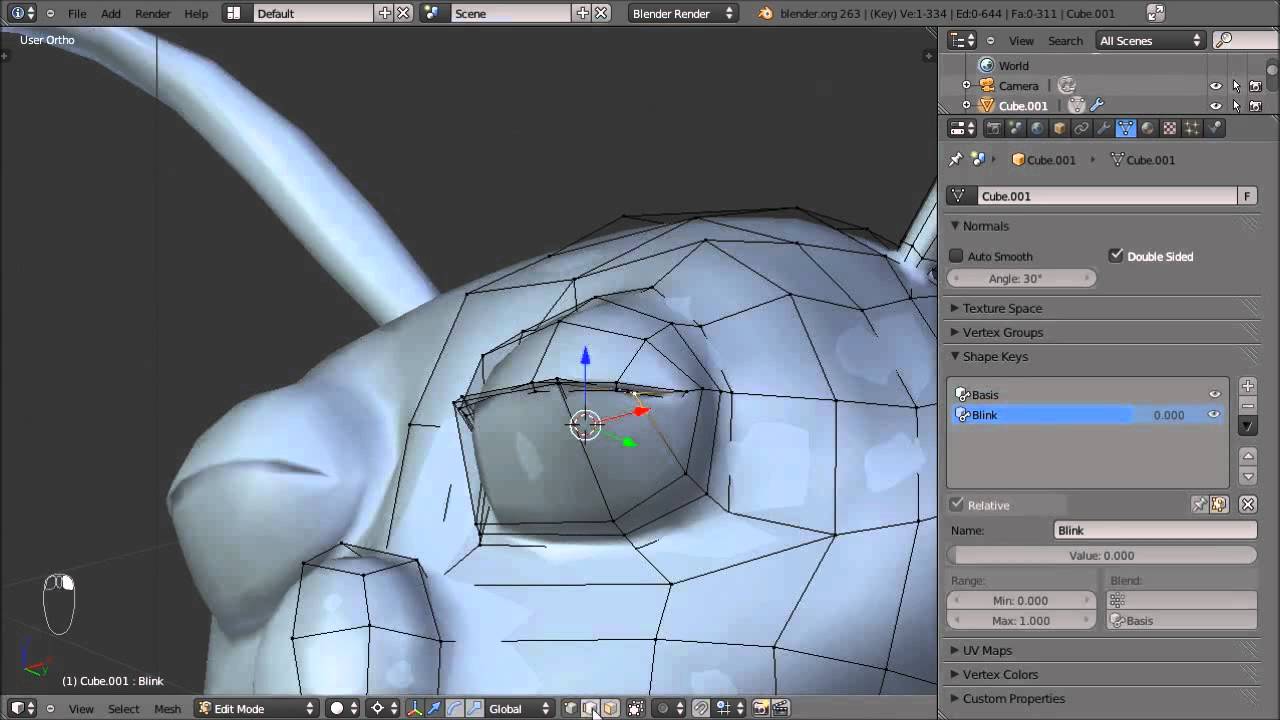
In this video I show you the basics of Target-Based facial animation. Using a fairly simple model of an alien-head (download provided), I demonstrate how to ...
This is the tutorial i followed and it worked perfectly
versed matrix
The shape key doesn't affect the eyeball is it sill ok ?
stiff lily
It shouldn't affect the eyeball at all yes
versed matrix
I'll watch the video then thanks
mighty compass
@dull umbra Oh cool, but i found an animated shader
versed matrix
A shape key at 0 value is always equal to the basis shape key ?
An animation can only start from basis ?
tepid sail
you can change that in the animator on blender
versed matrix
Without changing the basis shape key ?
final wigeon
@versed matrix Shape keys are positional changes relative to the basis key.
Think of it as basis[x,y,z]+shapekey[x,y,z]
per vertex
versed matrix
My model basis shape has its lower eyelid raised, so I can't make a shape key that start at 0 with the eyelid lowered and slowly come back to the basis shape ?
final wigeon
You could start with the lowered shape key at full, then animate that going to zero influence.
versed matrix
CATS Eye tracking tool only accept a shape key that raise the lower eyelid
stiff lily
You could also not use lowerlid at all
If you simply move one vertex just a tiny tiny bit, it'll use that and you'll only need to make blink
versed matrix
Screw it I'll just make an animation for the lowerlid, will report later.
Here it is :
https://i.imgur.com/0sI1uyP.png
Is this good enough for VRChat lower eyelid Eye tracking ?
stiff lily
Was it an mmd ?
versed matrix
yes
stiff lily
and it didn't have pre made shapekeys when you imported it ? that's pretty unusual
versed matrix
By default I think it has the eyelid raised and provide shape to lower it, but CATs only accept the inverse
Is it hard to add Eye tracking without CATS ?
final wigeon
@versed matrix It's pretty easy, you just have to follow the setup instructions exactly or it won't work.
Also non-spherical eyes don't work too well with it.
versed matrix
I just have to find those instructions 😛 Maybe you have them ?
versed matrix
Specifically the part about the lower eyelid, that's the most obscure point
stiff lily
versed matrix
Specifically the part about the lower eyelid, that's the most obscure point
I suspect VRChat assume avatars have their lower eyelid lowered by default, and raise them with the related shape key. So if my model has by default it eyelid raised and can only be lowered I'm kinda screwed
stiff lily
Your eyelid wasn't up on your first screenshot was it ? If not you can still make a new one manually, you just have to edit the basis shapekey to have the lowerlid lowered and then make a new lowerlid shapekey starting from the bottom
versed matrix
That's where I'm going, I can't edit the basis shape key. It's going to mess up motion import from MMD
It's only the eyelid but still
Anyway thanks for your answer, I was going down the rabbit hole for this one
Now if all MMD model have their eyelid raised by default it's a bit sad for VRChat
 raven idol
What is this issue with triggers spawning the wrong (similarly named) prefabs? How tf do I get around this?
my Dark Magician Girl cards just suddenly decided to start spawning as Dark Magicians this build
(I've had this problem with Kuriboh and Kuribohrn and Buster Blader and Buster Blader, the Dragon Destroying Swordsman before too)
runic mauve
@versed matrix you have to create lower lid it a blendshape thing
versed matrix
That doesn't change the fact that my model has by default its eyelid raised and VRChat want it to be lowered in the basis shape key
runic mauve
because creator didnt made them
on that model
most stuff want need add your self not every mmd creator does same thing
versed matrix
Well in my case my model has the eyelid raised and has a shape key to lower it
I'm writing a guide I intend to share when it's done, that's why I'm trying to be as exhaustive as possible.
To end on this topic, can you confirm that for correct eyelid eye tracking, VRChat want the model to have the eyelid lowered in the basis shape key @stiff lily ?
runic mauve
lowerd eye when person get near you
then start squit at the person
that what lower lid script for
but really new people to 3d model dont care about this till they get better at 3d model
versed matrix
Is my statement correct or not 😐 ?
runic mauve
you can make lower lid move the eyebrows
when person get near
it just effect
when person move towrd you
upper just normal blink animation
versed matrix
VRChat only want a shape key that raise the eyelid, so that means the basis shape key must have the eyelid lowered ?
I just want to be sure, I need a direct answer
runic mauve
you need 4 this blendshape because if you dont leave on it it use visime blendshape
in 4 colum
versed matrix
I'm only talking about the eyelid part of eye tracking
Guess I'll check directly in Unity
runic mauve
in blender and unity you have to make sure this like this all time on model https://i.gyazo.com/8a25367a6ff5eded358c09402b216ebf.png
this 4 need be first 4 colum if you dont have them then it replace with a visime blendshape
because eye tracking to look at 4 colum for blendshape for blink
versed matrix
Wait, is blinking part of the eye tracking ?
runic mauve
yes
versed matrix
ohhhhhhhhhhhhhhhhhhhhhhhhhhhh
that explain a lot
so eye tracking will use both blink and lowerlid shape keys to dynamically close/open the eye depending on how close someone is ?
runic mauve
the lowerlids do
but blink i think just random timer
so dont have regluar blink in lower lid
then you eye be close
lol
when they get near you
versed matrix
if someone get near my model, the lowerlid value increase and raise it ?
runic mauve
yea
versed matrix
so if nobody is near my model, the lowerlid value stay at 0 and the lowerlid stay low ?
runic mauve
yea it just effect when person close
versed matrix
so that still mean that VRChat want the basis shape key to have eyelid lowered
runic mauve
it just mean eye tracking was made to have 4 blendshape but cat add basis so people dont complan there eye tracking not working not every model have lower lid so you have make your own
if you want more feature from eye tracking
people dont understand how eye tracking like to blame tool for you it
versed matrix
But you said blinking wasn't used for eye tracking
What lowerlid exactly does : if someone get near your avatar, the eyelid shape key value increase and raise your lower eyelid. That means your basis shape key must have your model with its eyelid lowered, and have shape keys that raise them. You need one lower eyelid shape key per eye.
runic mauve
@versed matrix it is for eye tracking
simple as that
mouth shape only for visime for lip sync
 harsh knoll
how hard would it be to make a grenade object, so when you throw it then it would explode after a few seconds and respawn
 vestal lodge
Anyone know how to add fog support to cubed's flat lit shader? It looks like the code's there but fog doesn't affect it.
glass cosmos
Can someone point me in the right direction for how to create a clickable portal? I've got a map I've made for my world and I'd like it that if you click on the points on it you'll be teleported to them but I'm not sure where to start.
harsh knoll
@glass cosmos try this http://vrchat.wikia.com/wiki/Adding_a_Teleporter
glass cosmos
Merci
 fair valve
Hey, I was wondering if anyone here knows how to create particles that have proper collisions (atleast with the map) and are anchored to the world rather then local (or some other work around).
I know it can be done, I just need to find someone who knows how to do it
 queen crow
I just started having an issue in unity where changing the position, or rotation of an object changes it for a split second, then puts it back to where it was
Is there an option that I may have triggered that causes this?
Ope nvm
Was caused by dynamic bone
warm niche
Trying to make a volume button for a youtube video, trouble is, i press the volume half button and it turns the song off rather than turning the sound down to half... https://i.imgur.com/qADlS0P.png What the trigger does is it turns off the full volume and then turns on the half volume, am i doing it wrong?
Track 1 and 2 are disabled by default.
 hallow portal
@warm niche Can't you make an animation clip of the volume slider and trigger that?
 tender orbit
Hey, I'm getting an odd bug where only the player playing as the model can't see themself in the mirror fully. Everyone else sees the avatar fine in mirrors and normally, but when you look at a mirror... https://cdn.discordapp.com/attachments/253987535527608320/403999244224167967/20180119204758_1.jpg
stiff lily
@tender orbit Did you join your meshes ?
tender orbit
I did use CATs's joinmesh option and I don't have a long list of materials in blender or unity, just one unified body. I thought it might've been due to the skin, hair and dress all being pure white with a full white alpha channel, but I was able to see friends perfectly fine in the mirror. This hasn't happened with other MMD models
stiff lily
So the swimsuit is the only thing that isn't a full white alpha channel ?
And you were able to see friends who had a full white alpha channel parts of their bodies ?
tender orbit
No, that's the odd thing. It's part of the body and it isn't red, it's black
the bow is the only red thing and is a seperate object which is a child of the avatar's head
stiff lily
Ok that's interesting, can you send us as much info as you can in an email at support@vrchat.com with an output log ?
tender orbit
Oh, I thought it was something I was doing wrong
It might just be a bug?
I could write down the info and send it yeah, not sure what an output log is though.
https://cdn.discordapp.com/attachments/253987535527608320/404037556032897042/31234.png That's what the model is meant to look like, and it looks like that in mirrors to everyone else. It's just odd to me
tender orbit
@stiff lily Well I submitted that email, I'll probably just keep messing with it and see what effects it has
@sterile cipher Thanks for the quick response there via email, It's quite surreal talking directly to devs bout an issue I've stumbled onto, hah
 sterile cipher
Glad to help. Yours is a strange one I've seen around. I've not found a fix yet.
tender orbit
It's not a huge gamebreaker, it's just a bit annoying and I assumed it was caused the model is 90% black or white, the textures themselves aren't solid blacks or whites but most of 'em look like lightmaps with the amount of colour.
I sent some examples in a screenshot via email
tender orbit
@sterile cipher By Ommit the Emission layer, do you mean make them all black with a 0 alpha channel? As I can't just leave it blank or delete it using cubed's shaders, I could also leave alpha at around the halfway point.
I did remove the one emission texture still left on the model, however
sterile cipher
Hum.. yes. Maybe. I'm guessing just as much as you are at this point. 
tender orbit
Trial and Error is the true power here
glass cosmos
Does anyone know if it's possible to make a trigger that would save a render layer as an image to your computer? I'd love to make my cameras more functional with something like this
runic mauve
@glass cosmos that would be need to be script but vrchat dont let script
glass cosmos
Damn
tender orbit
Ah, nah, no change Tupper, with the emission shaders blacked out. Damn
 oak sparrow
Hey when putting particles on your avatar, is there any way to make the particles never move at all ever whatsoever, not even a jiggle?
whenever i move, the particles move, no matter what bone, rigid body, fixed joint, local, bounds.
move around position wise, when tied to a bone they angle with that bone.
 atomic shuttle
Simulation space: world
tender orbit
Yeah, but they'll stay stuck in the world location then right?
even if the object that's controlling them moves, like I tried to make a sword trail with that
oak sparrow
I want a particle that is a ring, to stay in xyz around me as i move.
Just as it sounds.
But it wobbles.
tender orbit
You could have the ring's particle spawn on a very slow speed like 0.25 or w/e and it'll pulse
but if you just want a flat image following you you could use a textured plane, right?
idk
oak sparrow
game obj rigid body under armature, connected fixed joint to head, rigid body xyz xyz.
err no rigid, just fixed joint xyz xyz
sorry i just fell down -.-
Yep just confused myself. I'll take a damn pic
atomic shuttle
Lmao. You can parent it to your avatar not under a bone, that way it will ignore your up and down from running animation
But still follow you
atomic shuttle
Yeah... give that a shot lol, it's how I did my particles
oak sparrow
add rigid body to avatar or just parent it?
atomic shuttle
Whatever the top most parent is of your whole avatar
Drop the particle effect object under rhaf
That*
No influence by the armature
oak sparrow
remove the rigid body from w/e, and fixed joint on the game obj? just game obj under avatar.
Yep got it, awesome!
Thanks!
 vital lagoon
@sterile cipher I know someone that has that exact issue, the one that @tender orbit is having.
Here is how he looks himself in the mirror: https://puu.sh/z5a26/4ed7d2e854.jpg
and Here's how everyone else looks at him: https://i.imgur.com/ftcoRgs.jpg
tender orbit
Yeah, it's pretty odd. Seems some random materials just don't load in first-person.
warm niche
My video player is so bugged it turns the sound back on when i disable all the 'sound' objects.
I disable all the 'sound' objects by pressing a button, it mutes the sound, then when the next song comes up on the playlist it somehow enables all the 'sound' objects again.
 dim fern
@tender orbit Just saw your avatar issue. Sorry if this isn't much help, buuut that's actually an incredibly common issue for that model in particular. I've seen a lot of people have that problem before. I just assumed it was known. Tagging @sterile cipher too, if you could supply the original DL to them they could try and take a look at why this is happening. I'm sure a lot of people who use it would appreciate knowing what's wrong.
It's not shaders, either. I've seen complaints with people who use animated shaders and such.
Since that model's popular to edit.
warm niche
Wish i'd known about playindex earlier, i presume it plays a particular video in a playlist?
tender orbit
Oh, one sec
warm niche
Which one do i chose so that everyone can see the video at the same time even if they join later. All, allBuffered or AllBufferedOne?
tender orbit
@dim fern @sterile cipher Here's the download I used that had the mirror problem https://uruchiha.deviantart.com/art/MMD-Kancolle-Princess-Northern-647886627
warm niche
The servers are playing up again so can't test it out, does the Playindex continue playing other songs in the list after it plays the first one. If not then it's not going to be much use and i'll just stick with my enable/disable objects one.
warm niche
Is there a way to speed up cubed's rainbow shader?
 dry silo
I also have that problem on my avatar that its fine for everyone except for wheen i look at myself in a mirror
Fully selfmade avatar tho
And like half the body is missing
polar zinc
Some body tell me why most of video from Youtube im placed to VRC Sinc Video Player just skiped and not played? Only news are played.
No music video, no other video just not working.
It is some copyright video protection? Or what?
 urban tapir
what's the difference between master and owner broadcast types? Don't know which is which
 marsh narwhal
I think one is the author the other one is the creator of the room
urban tapir
that's what I'm trying to find out
 autumn hatch
https://vrchat.readme.io/docs/trigger-broadcast-types
Master - Can be triggered by the master of the room, is sent to all players in the room and is run for anyone else who later joins the room.
Owner - Can be triggered by the owner of the object, is sent to all players in the room and is run for any anyone else who later joins the room.
In short, Master = Client typically first entered the room. Owner = Client who last interacted with object. @urban tapir
Two clients trying to stack objects with each others usually don't do too well, because two objects with a different owner don't play nice
marsh narwhal
nice
urban tapir
is it possible to send voice audio from one room to another?
urban tapir
like capture audio from one camera and send it through an audio source like a tv
 ivory lily
so is there a super simple way to do if statements
or do we have to wait for scripting for that
 pale violet
does rendering in unity have to be single pass? i have a great shader that only works with multi.
looking through discord it seems like multi pass is supported. however whatever i put the shader on, i see two of, different for each eye. in the unity preview this is fixed when i put it on multi.
stiff lily
Yeah this doesn't work in vr headsets afaik
pale violet
oh not at all? that's sad, this shader looks amazing.
serene folio
some maps do this to my water shader, anyone has any idea what the hell is wrong? sometimes displays properly, sometimes whoel screen is white as hell:
hmm unable to link
hallow portal
@proven obsidian If you still want POM in unity you have to get UBER shader from the asset store https://assetstore.unity.com/packages/vfx/shaders/uber-standard-shader-ultra-39959 amazing stuff....
 proven obsidian
warm niche
proven obsidian
warm niche
Does anyone know how to make an object you spawn using an animation override stay where you created it using that gesture animation?
i´m trying and trying and trying and i dont know how
oak sparrow
So I wanted to fill in a gap in my models neck area that had no texture, created a sphere and placed it right under the head in armature, so it tracks with the head movement, but when I get in game, my character spins rapidly and floats into the sky endlessly. Only stopped after I removed the sphere?
I have the hair attached the same way, and it causes no issues. As have none of the other objects I've placed on top of in front of or behind heads.
I'm just going to assume it is because the object placed was touching the head / neck armature in the 3d world.
 finite gyro
So does anyone know how playmaker is gonna be implemented? Like can we start working on our maps with it and be able to upload once it's out?
stiff lily
@severe dagger wrong place
 sick shuttle
Okay, so I have a thing where you click it, it plays a sound. But it only works once
After that, it just plays what sounds like the last fraction of the sound
So I think I'm missing some sort of "reset" to the sound
oak sparrow
Oh. I forgot to report. The solution to my issue was to take the original model, put it into blender, create a sphere where I wanted it to fill in the vert / faces gaps. Export as fbx, mixamo to rig, unity to upload. Changed the bounds box of the sphere in the head to 000,000.
 errant spoke
Would this be where I get assistance for uploading issues? The avatar is good to be uploaded and I have uploaded it, and given it a name, but still I don't see an avatar under personal. The only reason I can think of was because the picture I uploaded with the avatar wasn't showing the avatar itself.
 balmy raptor
anyone know my anime pls?https://imgur.com/a/NSoON
 robust juniper
how do i create a mirror to be used on a phone
urban tapir
if its an avatar use a camera, though its only local so other people don't see it
warm niche
@errant spoke try logging out then log back in
errant spoke
Still nothing, thank you though! @warm niche
 fickle kestrel
My image file doesn't seem to be properly applying... any fix or anyone know what I fucked up? https://gyazo.com/9de6baff551c42627b7f2d2a9a9e2da5
I used the shader "UnityChan/Clothing - Double Sided" to get my model to look like this
https://gyazo.com/2f591c6ee4e2c8e36f6fe03eda4f977c
instead of this
https://gyazo.com/98208e37186339b255179e1f21581d75
(sorry for the picture spam.)
warm niche
have you tried other shaders?
fickle kestrel
I was looking through them
warm niche
are they still having the same problem?
fickle kestrel
Most seem to cause that to happen in game
The base model seems to be half transparent for some reason before the shader is applied
warm niche
have you checked your materials are set to opaque?
warm niche
have you tried cube paradox's shaders? the ones with the outlines? you can try that
fickle kestrel
They put on the texture, but this... invrtedness won't go away
warm niche
i wish i could help you, but im not well knowledged enough around this section of unity
i apologize
fickle kestrel
Yeah, I'm lost as well. Thanks for the suggestions though, it means a lot
Here's the back view, for reference, I suppose
https://gyazo.com/a990ae2ba48aa72276884aa4fa35b91b
warm niche
try looking at this
i think this is what you're getting
@fickle kestrel try these
warm niche
alright
fickle kestrel
I think Iknow what I have to do
warm niche
oh?
fickle kestrel
In blender, there's a setting that "fixes" this, but ususally deletes the bones in the process
warm niche
fuck
fickle kestrel
Perhaps if I do that, then manually add the bones back...?
warm niche
you might have to
if it fixes the problem then yeah
try saving the file
then do this
save it as another file
then you can try copy the bones from that to the fixed one
you might need to adjust the weight paint n all that stuff again
warm niche
👀
fickle kestrel
warm niche
you got it!?
fickle kestrel
Time to boot it to VRChat and hope
warm niche
PREACH
fickle kestrel
@warm niche IT WORKED!
fickle kestrel
thank you so much! :D
now, to scale it up a bit xd
it came out a lil short, but tha't s much better than not functional, lmao
rough sleet
@pale violet VRChat always uses Single Pass Stereo when running in VR.
There's no way to set a room to be multi-pass, also as far as I'm aware shaders have to be compiled separately for single pass vs multi-pass.
 mild holly
Anyone know how to make it so if people are inside a box it says a text infront of there screen? like wherever they are in the box, Error.mdl has one
with his ground smash thing
pale violet
@rough sleet in the player settings is were i can set it as multi pass, and then the shader works. i don't see any setting in the shader/material area to change this.
rough sleet
Did you try that in VRChat?
During the 5.6 beta we found out that setting that to multi-pass causes double vision.
 storm willow
is it possible to make a hand gesture animation and make the avatar transform into another avatar with its animation kept and all?
warm niche
Hi , there is this world it has I thinka youtube playlist . Where would I look for it? Is the asset bundle gonna contain the link as plain text?
robust ridge
i see bloom effect in unity but not in game
 signal willow
@storm willow , you might be able to transform into a differnt model but with keeping the animations I'm not so sure
 twilit coyote
How do i make my Avatar not that scary looking in bad lighting, but keep it realistic? https://i.imgur.com/H9XIisW.jpg
 patent cloud
Has anyone else encountered an issue in which the mouth opens too much while talking in game, but the visemes seem fine in blender and unity? B/c that's happening with one of my avatars and I cant figure out why
 gray skiff
Anyone and up finding a forced controller setting in the dlls yet?
 lusty charm
can you change the skybox with vrc_trigger
patent cloud
This is what my mouth is doing in VRChat: https://i.imgur.com/Vri28AU.png
It seems to happen when I look down
Maybe I need to do some weight painting 😢
Since it happens when I look down, and not necessarily while talking, does this mean it's not a viseme issue?
 fallen onyx
how do layers, specifically layer-based collisions work in vrchat?
fallen onyx
i mean, do they even work? or will adding a collider always glitch out my avatar
warm niche
I don't talk a lot, but get asked about discord, and steam a lot. If I make a plane in unity and put textures on it can I use it in an animation override no issues to use as a card? Or would I need to make in blender and export as fbx, also how do I know how big to make the textures
fallen onyx
i think it should be fine to make it in unity, separate meshes upload just fine
if you want to properly texture it though blender is probably better to use first, so you can map the texture
warm niche
I'm not very good at that but I'll give it a try, is there anyways for blender or unity to tell me how big or the proper ratio to make the textures
fallen onyx
in blender you can sort of fold out a model to then texture it as a flat surface
so no need to worry about size, if you map it it should just be fine
this should explain: https://www.youtube.com/watch?v=LcCQKuWPhXk
warm niche
Alright, I'm still a little confused but I'll look up a few tutorials, I'm jure there's plenty for that kind of stuff. I'm gonna use toon shaders with emission so people can see it in the dark too. Thank you for the link!
fallen onyx
yeah emission is quite nice, maybe you could even add some magical particles
warm niche
Maybe, I don't want to over do it, just enough so people can add me where they want instead of having to try and mime out my discord numbers c:
warm niche
More like a business card yeah, nothing particular fancy, but hopefully it'll be a nice touch
gray skiff
anyone got a clever way to view and edit dll's?
 lofty elbow
So it's possible to stream the text channel from Twitch in your hands, take snapshots with a camera, and trap yourself inside of a mirror.
I'm really interested to know if it's possible to play a video on say a TV-head without using GIFs
warm niche
So quick question about dynamic bones, does having a large number of exclusions cause lag at all? Also does the amount of bones a root bone contains affect performance?
The more bones it effects the higher the performance impact, as for the colliders I don't believe so but I can't confirm nor deny that.
You mean exclusions?
I'm assuming that's what you mean by exclusions, it's been a couple weeks since I last messed around with dynamic bones
What I mean by exclusions is when you have a bone root but you deactive or exclude certain bones from being affected by the dynamic bone.
In other words, a bone from a bone group is not allowed to jiggle around.
I was a dumbass and forgot to parent some hair bones on a model.
That I would not know, I generally haven't touched that setting
warm niche
anyone know how fix this error?
this avatar does not contain an animator and will not animate in vrchat?
warm niche
Is it humanoid, and does it have an avatar descriptor
 thorny ember
in CATS does pack islands (atlas) contribute to bleeding?
warm niche
Anyone looking to sell some of their best avatars? I'm almost done building a website where you can list them for sale, or free. pm me
 spiral otter
Can a trigger be set so everyone can interact with it and cause the action to happen, but it is NOT synced?
basically I have some high res graphics stuff on an object. I'm trying to make a button so people can turn on extreme graphics with a button press, but only for themselves
 fierce python
Set the trigger to local only
pale violet
for 3 sleeps in a row i've had a scene baking, and it never gets past 7/11. it's kind of big but i've had much bigger in the past, and i've recently had a cpu upgrade so it's obvious i'm doing something wrong. no realtime global gi, the bake isn't at a super high quality, now i'm trying it with the larger meshes no longer static, although i've also read online that one should uncheck all the smaller things in the scene, it's a bit confusing.
the largest surface is transparent, i wonder if that's killing the scene
 deft kelp
Hello, i have a big issue with my map, everytime someone joins me from 92 fps goes to 11 and it stays there, any ideea why this is happening? * i played on it yesterday night with 4 people and worked perfect *
warm niche
@pale violet do you get any console log messages while baking?
pale violet
@warm niche nope not seeing any at the moment
warm niche
ah, that's good, so it probably isn't stuck
any really high poly meshes that are being baked or not?
pale violet
there's a statue that unity broke into 4 chunks, it's like 280K or so
and it's quite reflective. is that why it was taking days?
with the visibly larger structures in the scene no longer static, it seems to be moving through the bake a bit better although it's been hours and still isn't finished
there was a message in the console earlier saying i should bring my lightmap size down to 512x512, or rather it seemed to to it automatically but still said i should change it
that seems quite low
warm niche
can anyone help, my avatar doesnt turn right or left
https://imgur.com/CrhetZ5
512x512 is damn small, even for a lightmap
that statue and your lighting settings could be the bottleneck yeah
pale violet
@warm niche so how does a smaller resolution lightmap look, in comparison? is there just less detail in the reflections, or does it actually make the texture look lower quality?
warm niche
it will make the shadows and lightbleed look blockier and less like a gradient
 twilit rivet
shouldn't effect actual textures
you get this happening https://gyazo.com/54089616679f8c605ed3f4a52d14daba
pale violet
@warm niche ah yes, now that it finally finished, and updated the scene, it's very clear the scene looks like crap!
warm niche
😦 jeez
pale violet
except the statue, which also has a reflection probe, still looks good
not sure why that's nice and the rest isn't
warm niche
I never really use the reflection stuff, just cheat with env mapping
twilit rivet
You'll totally want to bake higher res maps at some point
warm niche
that's also because I never put time into finding out how reflection probes would work well
a HDR cubemap of the scene looks great almost all of the time
pale violet
yeah i'm trying a map now at 2K, but removing the statue from static
warm niche
all the light bouncing can also make some other assets look drab in comparison
pale violet
this isn't so much drab as just very low bitrate lighting painted overtop the textures, that ruins it. hopefully having the statue in realtime light doesn't kill the framerate
warm niche
maybe crunching the statue down into a lower poly model but with normal maps helps
warm niche
even when you shade them in yourself?
I haven't tried it yet
shame
they're not that heavy on the gpu
twilit rivet
I wouldn't know my self I don't have vr but its been said everywhere it doesnt look good in vr
twilit rivet
still theres probably some room for optimization on that statue
warm niche
yeah, and using artistic color correction or tonemapping really helps too
without using more 'expensive' lights and light baking
twilit rivet
ok so normal maps apparently only work for small detail in vr
not so much for large detail
warm niche
that makes sense, more of a bump effect than parallax mapping, because that messes up with 2 eyes
twilit rivet
Yeah
warm niche
I try to show everything I'm working on to friends with different brands of headsets, so I'm sure I'm not screwing the VR users
twilit rivet
anyone know how low poly feels in vr?
warm niche
better than desktop I would imagine, because there's more sense of scale
twilit rivet
hmm I'll probably work on a world soon
Thinking of using a lowpoly art style just don't want it looking weird for vr peeps
warm niche
as long as you don't use 'false perspective' tricks it will ook great imho
twilit rivet
ah ok good to know
warm niche
ehm, forced perspective
twilit rivet
aw I can't make floating islands appear super far away by making them smaller 😐
warm niche
there's nothing stopping you though, it will work
and the brain will even suggest they're further away to the VR user so there's room for doing that if you do it in a subtle way
twilit rivet
I see interesting I'll need to read up on vr tricks
twilit rivet
I don't think I could make it work though since the play space I'll be making is rather large
so any movement to the edges of it will show areas of distant islands you shouldnt be able to see
warm niche
just ask people to test it I guess
and if it breaks the illusion put up some invisible walls where it's still okay
twilit rivet
yeah
warm niche
I would love more vrchat worlds that feel absolutely huge
and stretch as far as the eye can see
twilit rivet
hmm couldn't I like project a mini scene on to a skybox
warm niche
even though half of it is very low detail
twilit rivet
that would be interesting
warm niche
yeah, have a city in the distance in the skybox etc
or woodlands, it should not be very troubling in vr, even though they can see it's flat
twilit rivet
oh then thats not good I wanted the distant islands on the skybox
warm niche
nomic made a bunch of maps with great skyboxes extending the scene
or forced perspective geometry you can't reach
twilit rivet
I'll be making a cluster of sky islands and you play on one of the islands so all I'll have in there is sky and islands
couldnt be too much of a deal to make actual large islands in the distance don't think I need to fake them
I'll have to experiment
warm niche
sounds awesome
twilit rivet
But yeah one problem I see with larger maps if optimization
twilit rivet
Don't think I'll need too much LOD thanks to the style
warm niche
so player position chooses which level of detail is needed for objects in each client depending on proximity
twilit rivet
not that it would work well anyway
warm niche
oh right, if everything is already low poly why bother
twilit rivet
I'll probably bake too
warm niche
be sure to have shadows and lightmaps also cut off at a certain distance to save gpu power
twilit rivet
unless its its cheap enough to use GI
 zinc shell
https://docs.vrchat.com/docs/supported-assets Are these the only assets that work in vrchat?
warm niche
no, but that's the official whitelist
zinc shell
ah ok
warm niche
more work but there's no master list
twilit rivet
any interesting ones?
warm niche
trial and error, most scripts will not work
twilit rivet
Can't wait for scripting
zinc shell
Yeah the most I've tried so far don't work
warm niche
a couple more including playmaker, but that doesn't work with the current live build
twilit rivet
Hoping they find away to allow c# scripting
 median flare
Rain AI requires a very specific version of it. (They plan on removing it entirely at somepoint soon)
twilit rivet
safest way is probably embeding lua or js though
True but what sucks is you would need a playmaker license
fallen onyx
might actually be better to ask here: anyone know a solution to the collision glitches when you put a primitive collider in your avatar?
warm niche
it seems worth every penny, the environment looks very powerful and intuitive
finally a hardcore state machine in vrchat
twilit rivet
I can see that for people that don't know how to program but for programmers eh.
warm niche
it's very much a programmer's tool
twilit rivet
hmm just never really seen the appeal of visual scripting I guess.
zinc shell
For me it's easier to keep track of things
warm niche
I'll judge when it's there 😄
zinc shell
but eh
warm niche
the trigger system right now is a kludge
 wide umbra
Yeah it is^^
twilit rivet
yeah c# probably wont work https://www.gamedev.net/forums/topic/672253-using-whitelisting-to-run-untrusted-c-code-safely/
wide umbra
C# would probably be way too abjuseable
 harsh robin
Anyone here know how to create an auto playlist of music for audio sources? Like in the void club? Or is it done by just putting the files into one big audio file?
nvm just found out about audio banks
 vagrant charm
Anyone know where I should start if I want to learn how to make vehicles inside worlds? I've looked on youtube and all the information there is really outdated
warm niche
@vagrant charm look at the mario kart prefabs https://cdn.discordapp.com/attachments/361741445352259584/392597711725264896/kartprefab.unitypackage
"Hello everyone, I have made the karts from Toad Harbor into a unity package. if you want to make a world with a kart just import this package. the reset button is still finiky so if you want it to work make sure to set the reference in the reset object to an empty in the world where you want the kart to reset to. this isnt needed for them to work. message me if you have any questions or suggestions for improvments!"
it was shared by @blissful walrus
 blissful walrus
Nyaa!
warm niche
it's in pinned messages in 'worlds'
vagrant charm
@warm niche Wow thank you so much lol
void linden
hey i want to move a game object within the animation at a certain speed and want it to stop when it gets to (0,0,0) : this is what i came up with using UnityEngine;
using System.Collections;
public class csMove : MonoBehaviour
{
public float XTranslateSpeed;
public float YTranslateSpeed;
public float ZTranslateSpeed;
// Update is called once per frame
void Update ()
{
    if (transform.localPosition = (0, 0, 0)
{
    XTranslateSpeed = 0;
    YTranslateSpeed = 0;
    ZTranslateSpeed = 0;
}
    else
    transform.Translate (XTranslateSpeed, YTranslateSpeed, ZTranslateSpeed);
}
}
 bitter pebble
you can't use scripts in VRChat at the moment kobito
only the components that come with the SDK, no custom scripts
warm niche
as we said in worlds.. animations..
 last parcel
hey, I was wondering if there's a way to make a character (not a world) have objects that can be interacted with by other players, as in picking them up. I'm familiar with making objects appear via animation but they're always attached to the armature so it would move as well. So the first step would probably be knowing how to actually spawn an object, e.g. a sword
last parcel
damn, yea knew about the colliders
warm niche
thats why you cant touch/move hair etc
last parcel
so If I wanted to spawn sth it has to be in a world / from the world? like a sword or glass in the pub?
warm niche
but the player can
I don't think you can spawn anything as a player, it has to be spawned by objects in the world
I mean the world dictates it
last parcel
yea, that's what I meant like: only the worlds can do that, not players
warm niche
It can spawn stuff 'on' the player but it has to be a world event
yeah I'm struggling to use the right words 😄
last parcel
all good, I got it I think :p Thx a lot! Will look into world creation then :)
warm niche
@placid current hi i was wondering if i could buy you expensive assets for your team 😃
harsh robin
I have a video playlist and a button set to SendRPC next to go to the next video but when i click it it just plays the first video again in the playlist. Anyone know how to fix this?
warm niche
 sturdy bobcat
With todays update do i need to download a new sdk for unity?
trim ibex
@sturdy bobcat https://vrchat.net/release
it doesn't say that there has been an update to the sdk
sturdy bobcat
Thanks
runic mauve
Eye track won't work tell next patch
 hearty lantern
fact
 heavy maple
is this the right channel to ask about shaders on avatars?
 stiff zodiac
Is it possible in vrchat to have a second humanoid mimic your movements (like a stand in JoJo?)
twilit rivet
you could have a second mesh on your avatar weighted to the armature on a offset
 normal aurora
Fixed Joint wobbles an awful lot for something called 'fixed' doesn't it
 misty ledge
Can anyone point me in the direction of a tutorial or similar describing how to implent a simple toggle switch using triggers? I've tried a few things, but being new to the SDK, I suspect I'm making some faulty assumptions.
 fringe tundra
ayo dudes.. i accidentally started animating my main character in the unity scene and now its no longer in tpose, any fix for this?
oak sparrow
iirc the model is stuck that way, need to reimport / place another model, duplicate it, and then animate with the duplication.
warm niche
What sero said
stiff lily
Why would my normal map make my particle system still show up as a god damn square ?
warm niche
why would you use a normal map on particles? it messes up the alpha in this case
stiff lily
I'm trying to make a heat distortion effect
It's on my shader btw, not the particle system itself
but the material needs a shader in this case
 thorn comet
Hello, anyone of you have work on the addamage and the destructibleStandard ? just post it on scripting and here because i don't know where i can be help ^^
 steel swallow
would it be necessary to edit the code to make cubed's rainbow shader cycle faster? None of the parameters provided seem to affect speed, but I've seen many in game with fast cycling.
@placid current since you're online, don't suppose you could lend a quick hand 😛
warm niche
does having a lot of imported asset packages when uploading an avatar affect the avatar? or is it only the relevant/used assets that are uploaded?
warm niche
only the components you actually used on the avatar will be uploaded, ie child nodes of the model where the vrc_avatar descriptor is attached
 desert mulch
simple question here... how do you trigger a VRC_Sync video player from a button... for that matter how do you make an object a button
warm niche
i need some help with unity, trying to add weapons (non functioning) to my model
warm niche
Need help in blender
 tired fable
How do I swap materials on a particle system? I can change the shader or textures, but not the material all together.
Nevermind. Apperently all this time trying to figure it out what I had to click in the inspector, I could of just clicked and dragged it from the asset folder on to the particle system.
warm niche
does anyyone who uses Shader Forge know how to get lightmaps (baked lighting) work on effecting the brightness of emission??
deft kelp
My map is even worst now, if i play alone the fps goes to 11 in like 2-3 minutes and if i invite someone to join my map does 2 things: sometimes kicks the both of us to the hub or crashed the game for both, what can I do? I am really tierd of this thing!
versed matrix
Request finished Successfully, but the server sent an error. Status Code: 429-Too Many Requests
I'm uploading a batch of mmd models, seems like there s a time limit on upload
 frozen pike
As this appears to be a more indepth query I shall ask here.
I have a mirror room in my world but I need a way to make the section infront of it dark so that glowing surfaces show. I don't want to use realtime lighting on the world so was thinking maybe a shader of some sort?
twilit rivet
its called a ratelimit its there so others can upload too lol
urban tapir
Is there a shader that can change the tint of materials?
stiff lily
Any ?
urban tapir
like if I want to change the lighting on maps without having to change the light intensity
stiff lily
Like a specular bloom ?
urban tapir
no
its for a day and niight system
since I want to figure out how to change ambient light
without having to use directional lights for optimization
I would like it if I could change the pps with animations but that's not possible...
warm niche
write a tinting shader
urban tapir
guess I gotta learn shader code then
warm niche
best investment for the future
urban tapir
shader forge can only go so far
 solemn bloom
anyone mess with sendrpc (teleport to) i cant seam to get it to work with current sdk
pale violet
baking lightmaps is just getting more confusing all the time. in one scene i've been trying to bake three days, stopping and changing the settings occasionally, it keeps saying the resolution on various meshes are too high, it's clamping it down to 512x512 on that mesh, but these are like 200 tris sometimes. i have no idea what's going on.
in another project too the bake looks terrible once it finishes, no matter the overall lightmap resolution, but in individual meshes it says "object's size in lightmap has reached the max atlas size", obviously i'm messing something basic up in all my bakes
urban tapir
this is why
I don't like baking maps
or afraid too for big maps
might as well just use ambient lights
with no shadows
just make everyone light up
no realitime directional light
though one directional light should be fine
with baked occlusion
but I will prefer optimization over things looking pretty sometimes
pale violet
well there are meant to be pretty scenes, not meant so much for large crowds
but this one isn't even that high poly, not sure what the issue is
urban tapir
its more like
cpu is a problem with this game
I think polycount is more gpu i think
lights I think are based on your cpu
pale violet
well i have a new ryzen cpu, this problem with the lightmap size on small meshes is something else i think
something i'm doing wrong
urban tapir
this is why I don't like baking maps...
because I can never could get it too work on big maps
pale violet
i'm sure there's a way to do this
we need help from someone who knows how to bake big maps. so far my online searches aren't coming up with the answer
stiff lily
Any clue as to why my particle would flicker on spawn ? https://i.gyazo.com/af893470561241eb512953bf3cc6ad5c.mp4
It's much stronger in VR, prewarm didn't help
it happens at a consistant interval, so i guess it has to do with the looping or spawn
Ok, it's tied to "start lifetime", but not sure how to fix it
 calm siren
Whats the start speed, and is there any start rotation?
stiff lily
Start speed is 0.2, that's aesthetics, and no rotation
calm siren
Is there a variation in the size of your paritcle effect?
stiff lily
neither
calm siren
And how many particle effect is that?
stiff lily
it's just on spawn
calm siren
Effects*
stiff lily
there's 30 particles at once maximum
stiff lily
Yep
It's a custom one that cubedparadox made for me yesterday, but it seems to have some problem with particles overlapping or something, i don't know what creates that weird effect
calm siren
Im guessing the reason your particles look weirder in vrchat is because the particles are set to local instead of world. Then i would low the particle count and slow the speed by half
World* instead of local
stiff lily
It needs to be local since it moves with my arm
calm siren
So it is local ok
stiff lily
TCL told me "It looks like the difference is that he didn't use Unity's macros for getting the screen offset.
He just hard coded the offset.
So I'm starting to suspect that the issue might actually be caused by Unity's single pass stereo macros not returning the correct screen offset."
calm siren
I only really understand particle systems by the aesthetic not the coding. Can you post a pic of the values of the particle system
So i can get a better understanding
stiff lily
Eh nvm, cubed agreed with TCL's comment, so it means that no matter what i change in the values it won't solve that issue
calm siren
So is it like a rendering issue then?
stiff lily
i'll try to make it less gross at least, that isn't difficult
calm siren
Is that suppose to be warlock's golems?
stiff lily
afaik it doesn't render on the correct side of the "screen" and it flickers back in place ?
that's just my crocodile avatar
calm siren
Yea i think what they are talking about is rendering so it flickers. Id just recreate the particle system in unity completely. I was confused when you said it was only one particle cause it looks like you have little embers and other systems going on there
Btw jw whats your mmr




 calm siren
3k isnt that bad, once you hit 4k thats when things get mental
stiff lily
Also the other particle effect is something different, i hope it doesn't have an affect on the other one
calm siren
It shouldnt
stiff lily
i'm never gonna tryhard, i play for fun and i couldn't do anything main support anyway
i go with the flow
calm siren
I tryhard and mainsupport only. But this patch is a hellhole for dota pos 5
So i basically quit and get my fix off of sing and gorc off twotch if i feel an urge
stiff lily
same
calm siren
I lost like 600 mmr from 4500 to 3900 in 7.07
calm siren
Tbh there is nothing wrong with abusing the meta. The fucking redditors will always complain but if you like a hero uust play that hero
Quitting /r/dota2 made my life profoundly better
stiff lily
yeah i've had it muted for two years now, too much complaining, i play for fun
even though they just changed rubick's passive, it's still shit, so i'm sad
calm siren
It not that bad if you pair it with good early magic dmg
Cause if you got a mid lesh they get the buff from rub if i remember correctly
Atm id just main things like bounty and jak if you wanna escape mmr hell
stiff lily
It should just be a god damn global passive like CM, even if it gives half of what it gives now
i'm never around my teammates in teamfight because i HAVE to be far away to not get one shotted or steal anything without getting stuned
calm siren
Thatd be shadow shaman lvl 25 op, ice fraud hasnt buffed rubick into the meta in a long time
He one of those heros that only a handful know how to master
Like invoker or ember
Its all about predicting spell casting and positions
I could mever get use to the small range of his level 1 ulti tho
Its like a fucking 400 range
Do you know waga's gf keo?
stiff lily
nope
calm siren
Well you know wagamama ofc. Im good friends with his gf and ive been goadingher to play vrchat with me
stiff lily
Ah, that's pretty cool
calm siren
Always promises never shows :@
stiff lily
aww
They will, once we have all dota 2 avatars and the map in vrchat 😤
(i can't do it myself because i'd get in trouble but you guys can do it)
calm siren
Lmfao wanted to make a cm from scratch and add a little pup but i had no idea how to in the past. Im pretty sure i could make one in time
I just learned how to take a 2d image and model that into 3d in blender
#goals
stiff lily
Oh man, i could do that, that wouldn't be too difficult since all anims already exist
I just need to learn how to edit anims to use rubick's
urban tapir
DotA 2 in VR.... Hmmmm
Not the one valve has rn
Turns from moba to first person moba
That would be a nightmare but great
calm siren
Well i recently learned its easier just to use shapekeys blender for animations. You move the mesh rather then bones in unity
Then you play with the shape keys in unity and ezpz animations
Lmao. I remember the good ole dota 1 days
Back when wc3 dota was the best thing i the world and very few played it
warm niche
Can anyone tell me if you can calibrate your hands in vrchat one at a time? I'm using a leap motion sensor which means I have to have my hand in view of it to use it as a controller
urban tapir
For some reason, I don't know why the meshes I make in blender can't be used in the unity particle system
dull umbra
@urban tapir Imported mesh assets aren't guarenteed to be named the same as the imported model. Sometimes I've had troubles finding my mesh in the mesh list just because it was named 'cube'
If you expand the model asset in the asset viewer, it should show all the mesh assets contained within.
urban tapir
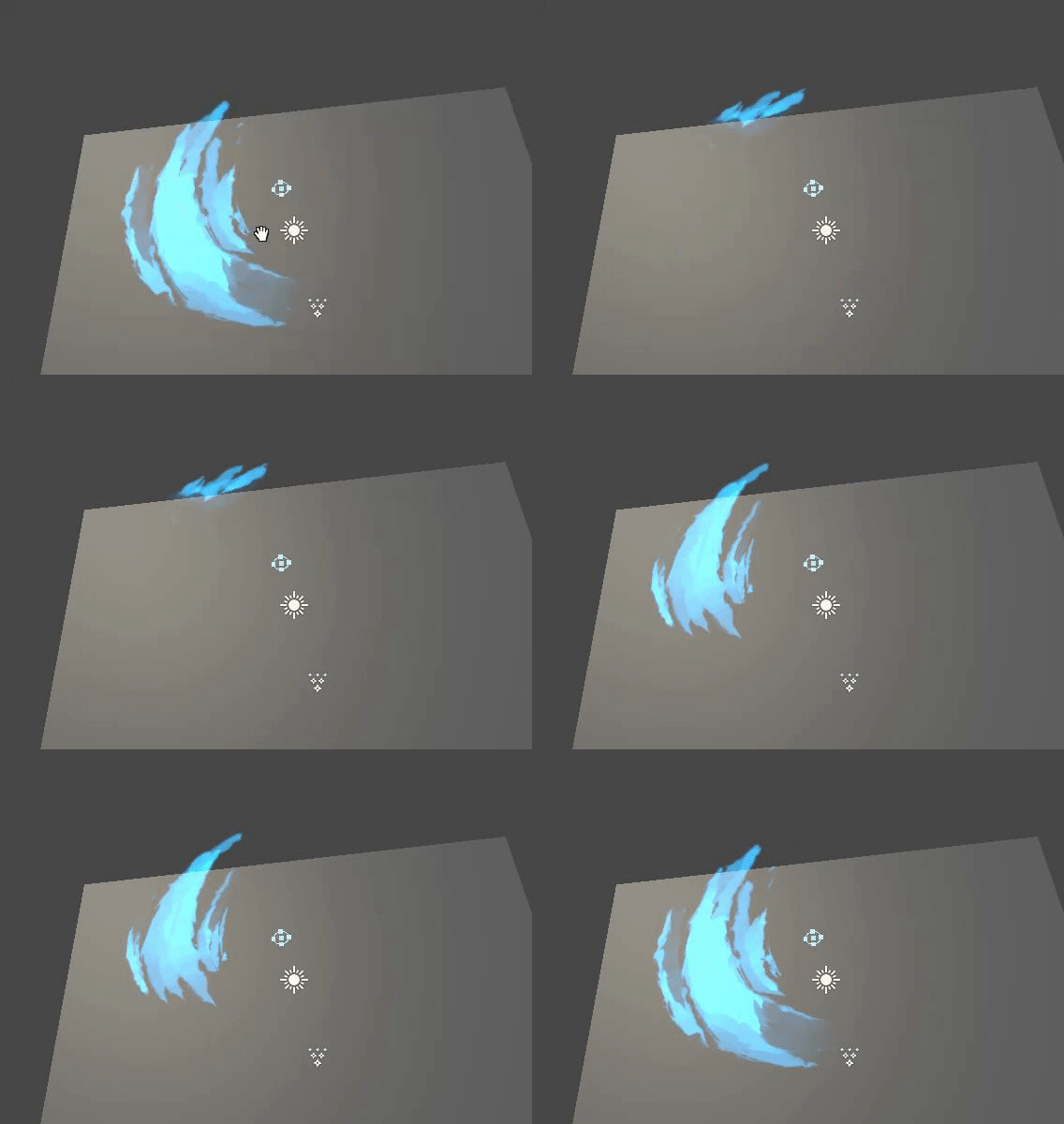
making your own particles is kinda fun
especially when you can animate it yourself
 opaque moth
Does anyone know how to fix the flames on avatar for charizard? In unity
tender orbit
I seem to have found another bug that only affects some users, like my model's hips will tilt left or right sometimes while moving but it works perfectly fine in the mirror for the person with it equipped?
 robust yarrow
is it possible to change the players jump and movement speed for specific areas of a world (not for the entire world)? I've got separated zones that players can teleport to by interacting with a door or object. One of those areas, I'd love to increase the jump distance (and revert to the default world settings i've set with the player mod on the world prefab, once they leave that zone).
another issue i can imagine if it does work, is how would i revert to default player settings if they choose to respawn from the menu?
warm niche
i just found a button that says "Keep Quads", does this mean we can save poly by using quads in vrchat!!??
can't upload pics anymore it seems

@ me if you know anything about this.
 next smelt
@warm niche Quads are just 2 triangles
You're not saving polys
If you remesh, you might actually create more polys
warm niche
What do I need to learn so that I can leave slime trail when I move around?
robust yarrow
@warm niche look up tutorials for particle trails, i assume it would work the same way
just have the lifespan for the slime particle last for like a second or two
and have it fade out over its lifespan or have it shrink in size or something
warm niche
Alrighty, thank you very much. 
@next smelt no, quads can save a lot of polys on certain surfaces
because if you ctrl+t in blender, or import without saving quads, then poly increases, because it cuts the quads into tris
you don't want ngons, but quads are good
i know could save quite a few polys on my model if i could use quads, because i got stuff with flat surfaces and such
and "remesh"? do you know how to use blender? there's actually options for removing redundant edges etc, aka turning flat double-tris into quads, and so on.
part of optimization process, including "remove doubles" etc that everyone should be doing
decimating really beastly 80k+ mmd's requires a lot of indepth work to pull off to get under 20k
next smelt
@warm niche I do try to keep my topology all quads when making models, but I can see where importing might gain big benefits from converting to quads.
I consistently go back to each component to remove doubles after any amount of work is done, since it's easy to miss those while manipulating a mesh
Also, I want to say I have a good basic understanding of Blender, but am I a pro at it? Nah.
somber moth
Does the VRC_SyncVideoPlayer pause method not work? When I use it, the video will start again from the beginning after using the play button I made. Also, does the PlayIndex method have something to do with this?
warm niche
I want to do an animation override where I fire a projectile and it eventually will explode, I have the particle effect I want to use for the explosion, but how can I have it go off where the projectile ends after a period of time, is there a tutorial someone can point me to?
halcyon pendant
Hi. I have a question. Do rigidbodies position sync automaticly between clients ?
I mean...do I need to add another component to an object with a Pick-up script in order to sync its position in realtime ?
rough sleet
@somber moth Press the pause button again to unpause.
@warm niche Enabling keep quads breaks some shaders, like Cubed's Toon Shader.
warm niche
So I made a flamethrower with some Unity assets from the unity store but when I import it into the game it appears at my feet instead of my arm any idea how to fix this?
warm niche
Also at the moment no scripting will work correct? So if I used a script to make sub emitters make noise it wouldn't take effect in game?
yes, no scripts allowed
Yeah that's understandable, just frustrating. I cant find another way to make a subemitters make noise
warm niche
@rough sleet thanks
 dreamy badge
@warm niche if the particle effect is a child of the projectile, it will be at the position of the projectile when it is triggered
no script required
warm niche
@dreamy badge yeah the scripting was for separate the start and at the death of the particle
warm niche
The plan is for it to be an animation override
So for the hand emotes
@placid current how did you make your shader behave with baked light? i can only get them to work with directional or light sources, unless i use the ugly standard lighting through the diffuse.
 midnight lark
@warm niche I can show you something of what you're trying to make
I did exactly what you're trying to do
There are no tutorials
warm niche
Really? I'd love to take a look, I'm fairly new to unity so a lot of this stuff goes over my head
midnight lark
can you get in game?
I'll show you what I'm talking about
my handle is Razzle Dazzzle
warm niche
I can't get in game at the minute unfortunately
midnight lark
ok well add me and I'll show you and explain how it works when you can
warm niche
Alright, I'll likely be on tomorrow afternoon after I get out from work so if you're on then I'd love to see
I'll add you when I get on as well
warm niche
Update: I can now get the full explosion effect minus sound
midnight lark
If you can get the explosion sound on the particle effect death that would be dope
because I'm trying to get an explosive report from my rocket launcher
I've heard that it's only possible to do with scripting, and that's not allowed on avatars
warm niche
I just redid a lot in unity and its looking pretty good right now actually, except for lack of an explosion nois. Quick question, can I have the particl system floating in the air in fron of the gun or does it have to be attached to an object, and should it be set to world or local for particle effects?
midnight lark
well my particle system is world generated so it's attached to a game object
it's just an empty gameObject that I mounted into the wrist by rigidbodys and fixed joint.
But I can't find a way to play a sound unless it's is on awake or called through a script
warm niche
If I dont attache it via rigid body, how would it effect it?
midnight lark
If it's not attached to a rigid body then it won't work properly
want a world generated particle that is
warm niche
What's the difference between local and world? I'm sorry for all the questions like I said Im very new and am mostly expirementing
midnight lark
Ok so Local particles generate locally
so like if you're shooting a gun
and the bullet shot is local, it's like there's a long stick on the end of the gun and the stick is how long the bullet travels. So if you move the gun the bullet will travel down the stick at wherever you're aiming
steel swallow
anyone familiar with using clamp in cgprogram?
midnight lark
A world generated particle will follow the same trajectory that it initially started. So if you fire a rocket and then point the launcher down the rocket doesn't change trajectory
make sense?
warm niche
Meaning if i move while the projectile is in flight it would effect it? For the local
midnight lark
the flight would affect it. If you turn flight is disturbed. Where that won't happen with a world generated particle
warm niche
ahhh, okay, so I'll have to reset all of my sub emitters and the main one as world then. Next step is figuring out the rigid body so that it';ll work properly. I believe that was the issue with my flame thrower earlier too then
midnight lark
So a rigidbody is a component
you add it to something
So for example. I have a rigid body in my right wrist and one in the gameObject that is in the same wrist. (It doesn't matter where you mount the gameObject.) Then I have a fixed joint in the gameobject and I mount the right wrist rigidbody into the connected body there. Then you mount the gameObject right under the Armature in the model. Now's the fun part. Depending on the type of particle your animation may need to enable the particle system itself, the gameObject itself, or the particle emission.enable itself
so that's where it gets a little complicated
warm niche
oh joy
midnight lark
Yep, just don't go too overboard with particles. They're flashy and loud but most people get annoyed by them. And honestly I'm not impressed by the overworked particle systems. They're easy to make once you know and just obnoxious.
Going into Gaia night at any given time is a perfect example of people who have excessive particles
warm niche
Yeah I just wanted one for one character and to mostly mess around with friends with. I cant stand when suddenly see emojis raining from the sky, and youre right, it's always gaia night
midnight lark
Yeah there was a guy who had some flashy loud avatar with excessive particles. He didn't like it when I told him it wasn't impressive due to spammy earrape nature. So he flipped me off 😂
warm niche
sometimes particles can really enhance an avatar, but more often then not it just quickly becomes obnoxious. I just want my cute little ship girl to have a working naval cannon for special occasions c:
midnight lark
I completely agree. Like my main avatar is a white carbon miku and I wanted to be able to shoot some sparks out of my wrists when I was in void club
so I made it happen. I might actually change it, because even I think it's a bit excessive at times.
warm niche
ooh fancy, I like it. Add some spice to the party
warm niche
anything as long as its not another goddamn nuke
midnight lark
Nope. That shit is annoying
warm niche
for my rigidbodies should I use gravity, or uncheck that, or does it not matter?
midnight lark
Uncheck gravity
warm niche
thought so, thank you
midnight lark
and make sure this
the rigid body in your armature
0 angular drag
and ensure all the constraints xyz are checked
for freeze position and rotation
the game object you do not freeze
but still 0 angular drag and no gravity
warm niche
Alright, is there any other settings I should be wary of, like is kinematic or interpolate?
midnight lark
I don't touch any of those
warm niche
Alright, again thank you. You are a tremendous help, and I very much appreciate your kindness
midnight lark
Yeah man, enjoy it. It's not too hard. Just takes some time to get it and then you can do even more advanced things
I need to find a texture
or material
That looks like a hellish portal
for my necromancer
warm niche
I went into this game knowing nothing about blender and unity, learning them is a bitch but man is it satisfying when things work
midnight lark
yeah man. I've been at this a little over a week now
warm niche
Good on you though, and spreading the knowledge too
warm niche
I'd love to see it, if I can get this to work I'll show it to you too
midnight lark
cannon shooting a cannon ball?
warm niche
naval cannon, but some concept yeah, nothing too fancy compared to what some people to do, but if this works I'll be ecstatic, so I think I have my rigid bodies set up, where do I attach the fixed joint? To the wrist or the game object with the particles?
midnight lark
fixed joint is in the gameobject
midnight lark
good luck
warm niche
@midnight lark It doesnt seem to be working, if you had a minute would I be able to show you what I have just to see if everything looks okay?
warm niche
Kind of an off topic question. I've been downloading hundreds of avatars for use with VR Chat. Am I legally allowed (Or at least, not going to get sued), if I made animations with these ripped models?
Like I've seen MMD videos of copyrighted characters but Im not sure if that's different cause they make the MMD from scratch
 delicate harness
you are as long as you arent making money
actually.. depends on where you live US is a bit ficky
 barren lantern
Hey. I know you can make your avatar draw in the air by attaching a Trail Renderer to one of the bones, then setting that up to activate on a button press using Animation Overrides. However, this solution causes the trail to disappear when the animation is undone, and the trail can't be "paused", forcing it to be one long line. I've seen avatars around that can "pause" their trail renderers to draw more like the pens in the Presentation Room. How can I replicate this?
warm niche
Look up a tutorial for snail renderer I believe it's called
barren lantern
Ah, found it. It's called a Snail Marker. Thanks!
warm niche
No problem!
barren lantern
Uh-- okay, new issue. I can't publish my updated model. It's getting stuck at "Future proofing your content!", and the bottom of the Unity window reads "Exception while posting the result object".
 little talon
@warm niche no need for video. Just select the mesh, and then go to edit mode. Select the vertices you want to delete using C or B, or just plain right clicking and then press delete to delete them
midnight lark
@warm niche show me later today
 sour mural
Since im getting VR soon, i want to try to do overrides
I saw people doing lines in the air and so on which interested me, anyone got a good link?
warm niche
For that look up snail marker on YouTube
sour mural
snails 🤔
warm niche
Make trails
sour mural
does that dissappear when you remove the button press
warm niche
For that one it shouldn't erase until you do a second animation override to make it erase.
sour mural
i see
I have felt so limited without VR so im going to have so much fun doing all the overrides and stuff
warm niche
It's very fun, the game itself is a lot more immersive, and interacting with people is so much more fun
sour mural
headpats :3
warm niche
Headpats for everyone, even knuckles
sour mural
When we raided knuckles with club penguin avatars, all those with VR hugged the knuckles and some even said they loved it. getting attention
 sand kiln
So since this is advanced development does anyone here know how to do the trick where your character is invisible until holding up a 'window' people can view you through?
I had any idea I could have tried with the camera but that's disabled now so no idea where to begin
sour mural
i use stencil buffer shader for that
robust yarrow
anyone know how to create the live maps like in the hub (where it shows red dots on the map to show where players are)?
 scarlet rover
How do you do those animations that change the look of the character depending on vr finger poses?
 hard lintel
you override the animation of those finger poses with other animation
you basically set values to the hand + for the thing you want to change when doing this hand gesture
autumn hatch
@robust yarrow Currently that is using c# scripting and that is dev only for now. I suppose you could somehow get very creative with the trigger system and make a very primitive version of a map like that?
robust yarrow
@autumn hatch thanks, I'll probably stick to a static map in that case.
sand kiln
@sour mural ah thanks. Is there any sort of tutorial to using a shader like that even unrelated to VRChat or will it be a matter of experimentation? Eithers fine but I'm fairly new so kinda stumbling my way through
sour mural
should be some videos on it online
But pretty much, one shader makes things with the other shader invisible if its in the way of it,
sand kiln
Oh awesome. That should be pretty easy to do then anyway I guess. Thanks!
 tiny finch
Hi guys, I'm having some trouble with a shader. I am offsetting vertices on a mesh such that it will be rotated to 0,0,0 in world space no matter what the local orientation is. But I can't figure out how to do it. Multiplying by unity_ObjectToWorld locks the y rotation correctly but it incorrectly links the x rotation lock to the y-rotation and the y-rotation lock to the x-rotation. Any ideas?
frozen pike
I am still trying to figure out a head scratcher
I'm trying to make it so when someone enters an area their whole avatar goes black except anything that glows on it
 vital socket
Hmm, some way to basically disable lightmaps in an area for avatars?
that said, I'm making a massive assumption by assuming the glowing is done solely through things like emissions and/or other shader features
frozen pike
It is a tough one
vital socket
yeah ; _ ;.
frozen pike
Basically I've been making a replacement for the Hub, a mini hub. I'm trying to make it as light weight and as less rendering intensive as possible so I have no real time lighting at all.
But due to this I actually have no dark areas for glowing avatar testing
glass cosmos
What I'm making could be considered a hub replacement
It's got a presentation room, great pug, avatar area, spot for conversations
vital socket
This may be... unconventional @frozen pike ... but you could disable Global Illumination, and manually do baked lighting (that way it skips the realtime lighting issue), and do your own kind of Sun lighting so you could make enclosed areas for testing?
frozen pike
Good idea