#This is a vague question.
1 messages · Page 1 of 1 (latest)
 fervent summit
Taking this to a thread to avoid derailing the main animation area
So, the basic idea is that my top down game has aiming in 3D to an extent- you can up and down as well as on all sides. Think of Shadow Complex, how you could shoot enemies in the background of the stage.
so what I'm trying to do is use the player's cursor position / stick point of aim, take the point with a constant to adjust the animation to shoot flat, and then add or subtract on the Z axis to rotate spine bone 1 to bend at the torso
and to gate it off based on whether or not the player is actively aiming their weapon, or perhaps to auto-adjust to an enemy they are mousing over that is on a higher or lower point than the player
when I tried to do it automatically purely based on cursor position, it would lock into the floor or the ceiling depending on the clamp
when I tied to the activation to a blend by bool, nothing happens and it just shoots straight
Eventually I'd like to be able to tie in a bit more logic to the point of aim, such that you can aim at and shoot out specific targets like light sources to create areas of darkness to move through (since this is a stealth game, this would be necessary)
MGS2 did all this by shifting to a first person viewpoint, but I'm trying to maintain an unbroken top-down perspective
there are two reasons for this:
- accessibility. My friend has motion sickness and too much camera shifting sets that off.
- narrative. I'm trying to ensure that, like Half-Life, we never leave the intended gameplay perspective. The player's camera is supposed to be an in-universe surveillance drone, so we want to stay within its capabilities at all times
Does that more or less make sense?
 topaz minnow
So you want your player to aim at any available world location from fixed perspective.
fervent summit
Yes, more or less
I'd really like to get an aim offset working too, but right now I'm just focusing on the basics
topaz minnow
As a starting point, I’d get the point in the world space where the character supposed to aim and use Find Look at Rotation function to find a Look At rotation that I’d feed to the either procedural looking implementation or Aim Offset.
Find Relative Look at Rotation also might be useful as it would define space from the rotation would be calculated.
E.g it would take your player’s rotation into account and give the relative angle.
Do you have the issue with getting the correct values for your aiming implementation?
fervent summit
That's the thing, I'm not sure. Lemmie get some shots:
I might be using the wrong axis?

the values at left are a real time per-frame output of the cursor position
so when moving to a higher elevation for the cursor trace location (collision with terrain) the y axis value increases
but as you can see in the shot, the torso is bending down to the ground
I tried plugging it into the different rotators for the spine, and the value has to be done on Roll because Pitch sends the torso to the side and Z just rotates the character model entirely

I'm trying to use a clamp to keep the rotation in a rational amount
because if I don't clamp it we get this
 topaz minnow
What is Adjusted Cursor Location?
fervent summit
as for the aim offset I disconnected it and am not using it yet

I do not know what the hell this code did to cause the character model to go below the level
but yeah, Adjusted Cursor Location
I'll explain
So basically there was a bug where when aiming with the laser sight of the weapon, the gunshots were flying wildly off path, but only when aiming at the side of the screen
and I figured out the solution was to basically add to the height value of the cursor position
to make it more scalable, I use the CapsuleHalfHeight as the value to add
so that way the point of aim stays consistent regardless of stance
(at this time, standing or crouched)
so when further adjusting the value for the spine bend, we still have to account for the adjusted height to keep shots on target
topaz minnow
Shortly speaking, it is a location in a world space and it's looking correct if you draw debug point at this locaiton.
fervent summit
let me do a debug test

red sphere is the ground location where the cursor is, blue is the adjusted area, which the laser sight and the barrel point of aim are close enough to that shots feel accurate
I currently have a degree setting modifier that makes the shots go a bit off the mark depending on the type of weapon being fired/caliber of ammo
the red debug line at the feet is an expression of the rotation of the capsule
the yellow line is supposed to be where the head is pointing, but this does not rotate correctly
that doesn't really matter right now, so we can safely ignore that line
so the image in this screenshot does not have any bend to the player's spine bone other than the Pitch Correction Constant
basically, I was having trouble consistently shooting enemies and enemies shooting back, so I hacked in an adjustment to the bone to bend it to the point where the weapon shoots level

I got these values by rotating the spine bone in the editor to the correct spot and copying the rotation value to a variable

in my animgraph, this constant is applied to the bone spine 01 transform to adjust to the correct pitch
it's hacky and awful but it helps the gunplay
and also that way I don't need to edit hundreds of animations
topaz minnow
So from what I understand you're trying to add the location vector values to your constant variable and plug that to the X axis rotation
fervent summit
Correct
so that when the point of aim of the cursor is on a different altitude than the player, the mesh leans to compensate and "aims" up or down as needed
the non-awful way to do this would probably be an aim offset
topaz minnow
This isn't going to work as it's the location.
You need to get a rotation to your aiming point and use that to drive your anim logic.
fervent summit
Ah....
alright, so for my rotation value
in the player controller
after we get the cursor locations


so I'm guessing I need to recombine the Set Actor Rotation values and make that a value that the animgraph can read
the rest of the code is related to the point of aim calculations, I got it from a tutorial and I only barely understand it after putting it together, so I'm careful not to mess with it too much
basically it enables the mesh to correctly rotate with the capsule, so that the body is always pointing the correct direction to the point of aim
hence the red debug lines, those are the side values
so when you rotate, the red lines rotate with the mesh orientation
topaz minnow
Try using this in your ABP, see if that would give the desired result
 fervent summit
ah, a property access node

alright, so the rot value computed here, do we break that, grab the axis, and feed that into the clamp?

well, I found my other possible issue
the ground calc isn't hitting the ramp
topaz minnow
fervent summit
If you need just a pitch, yeah, that should do it.
fervent summit
It's definately doing something, when I moved my mouse close to the model I started aiming upwards
the cursor starts low to the ground and then comes up to normal height when the cursor hits higher ground, so I'm guessing I need to adjust my clamp values a bit

but this is definately getting somewhere
Thank you so much!

I try to leave credits anyplace where someone helped me in my code so if my game ever comes out I can have a BIG special thanks section
hm...
so to fix the float clamp, should I add the constant before putting it in the clamp?
nope, not quite. That brings the default point of aim up a bit but it's not bending back when looking up enough
topaz minnow
Take into account that your starting calculation point also might need to be adjusted.
GetActorTransform would return the root of actor location, the bottom part of the capsule.
Make sure to debug your values and see if they are at the right places in the first place.
fervent summit
Curious, I can't draw debug for those values
I guess I could try the capsule half height addition trick again and see if that helps
topaz minnow
fervent summit
Curious, I can't draw debug for those values
You mainly would care about the location points. That could be drawn with debug point.
Relationship between them could be shown with the debug line.
If you need to debug the rotation, you can draw debug coordinate system.
fervent summit
rip engine crash
I tried to save my project and it got hung up at 75%
good thing I save super often
but yeah, I'll try to do those
thank you again for all this
this is very helpful
OH. this reminds me- when working out the rotation stuff for the cursor, there was already an adjustment to the actor transform for a root transform where 90 is added to Z
maybe we could use that instead
less redundant math
nvm that's not pre-event graph, the root transform is calculated in the animgraph
fervent summit
Weird. I can't seem to print the value from the clamp at all.
since it's inside the animgraph I can't print string without an exec pin and there isn't one inside animgraph
I tried moving that function to go on anim update to output a variable
The rotation is less than I thought it would be- from -0.1 on the ground to under 20 on the upper platform

AHA
wrong transform

on the Z it correctly accounts for the pitch
which is weird because earlier it was working on X
not sure why
for some reason the bool blend still didn't work though- the Z axis modification will go through no matter whether I have it designed to only add the offset on aiming or not
it also has the odd effect of staying elevated until I pass it back through a wall not tagged to be traced by the cursor
but the important part is that it works, and it's all thanks to you
I can officially shoot enemies on an upper floor
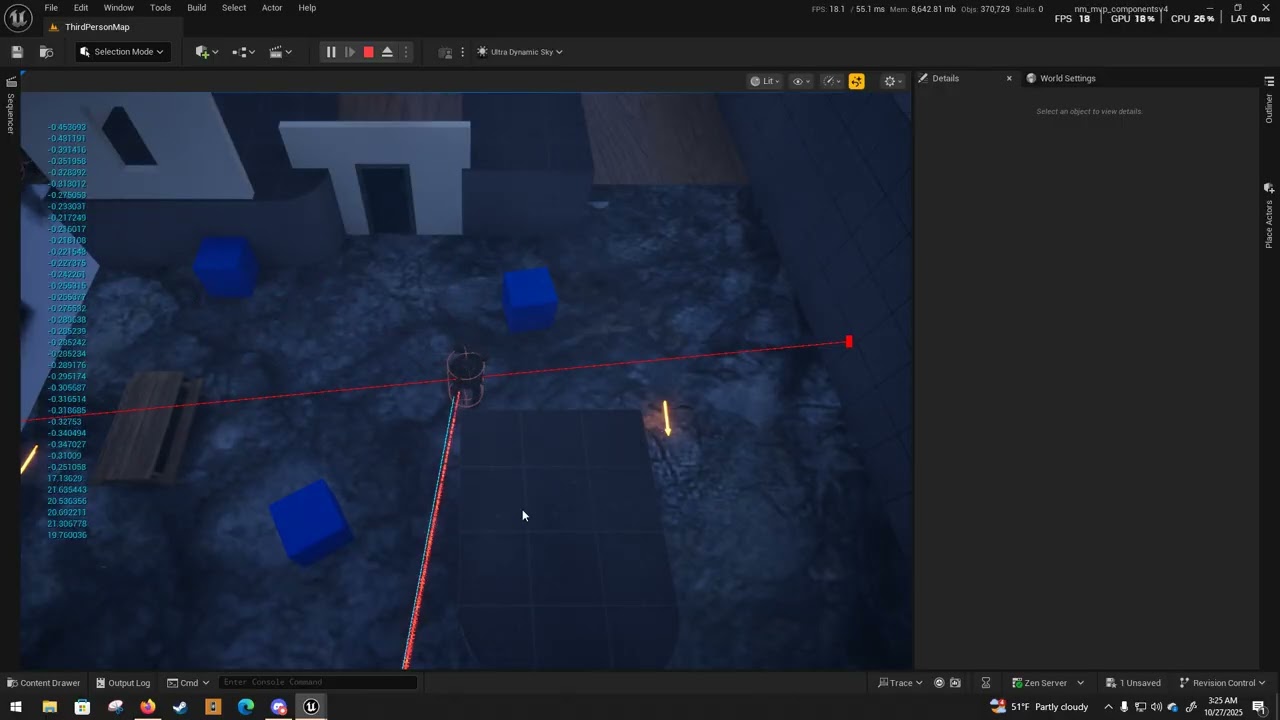
An important step! With some help from a member of the Unreal Source discord, I was able to get aiming above normal point of aim working, albiet in a WIP state. I plan to have this only work if the player is using aim down sights, but for now I'm just happy that I can shoot people on upper floors. This is a big win.
topaz minnow
Good to know.
fervent summit
Alright, I shifted some code around to try and get the aiming to only work on bool check but this happened

Attempting to hook up the aim down sight mechanic to regulate the calculations for shooting upper elevations caused John Kreig Bastion to disassemble briefly at the molecular level, apparently
topaz minnow
Hm, I'm not sure, that could be anything.
Do you have any additives running on top? Anything that modifies the mesh additionaly?