#packaging
1 messages · Page 28 of 1
 quick kayak
and I don't think it properly assigns my computer as a swarm worker because my DNS address is changed from default
Is there a place I can post this info for people to find in the future? I couldn't find anything online and I just figured it all out through trial and error
 wanton mist
hey my project is not compiling and it isn't showing any error at all. it just says it can't compile, but does not show any error. help? UAT_Log: https://pastebin.com/zAjEUg9W | UnrealBuildTool-2018.11.29-17.09.16.txt: https://pastebin.com/AUKk7GkL | UE4 Output Log: https://pastebin.com/BFt7zx05

Pastebin
Pastebin
 mental dune
is Canvas included into packaging process ? After package I got all c++/blueprint classess included, and their logic is executed, but I can't see any DrawTexture/DrawLine that has been executed in DrawHUD
 nocturne holly
I send this again, because i din't find a solution until now... It says allways that Universal CRT is not installed
 fierce pebble
have you googled what that is yet?
yee you will not find anything
heres solution
install windows 10 sdk with visual studio installer
nocturne holly
there are different windows 10 SDKs, i installed many of them and tried nearly everything
fierce pebble
if that is installed
then you might miss CRT main module
it usually comes directly with vs17
you should not have an old version
dont worry this is an easy error
4.21 just needs the sdk
so it gives this error
nocturne holly
I forgot to say that i can package a blank project. But in my project where it fails the Advanced Session Plugin is enabled.
When i enable the Advanced Seiion Plugin in my blank project, i get the same fail
fierce pebble
no that is totally normal my friend
as soon as you good extra code in it breaks
i had the exact same
nocturne holly
so can i solve it with the right settings in visual studio 17?
fierce pebble
probably
but all about 4,21 is already in the chat
you really dont have to worry
you are on the right track
i cant say how different your vs install is ho
my fix took 3 hours
nocturne holly
Do you speak coincidentally german?
fierce pebble
its better not to
XD
my german is baddo
my muttersprache is not great bc we have bratwurst and bier
but we create great autos
fierce pebble
no
nocturne holly
I don't know what i could do now :/
nocturne holly
in the visual studio 17 installer
 cedar cedar
Hey guys, have any of you had your packaging process get stuck at: Cooked packages #### Packages Remain #### Total ####?
There are no errors. The packaging process just stays at that line and doesn't continue.
 sly flint
so I keep trying to package one of my Plugins, and it keeps giving me this error that An explicit Category specifier is required for any property exposed to the editor or Blueprints in an Engine module.
however I've set UPROPERTY(EditAnywhere,BlueprintReadOnly)
to
UPROPERTY(EditAnywhere,BlueprintReadOnly, Category = "Senses")
won't go away
 flint skiff
I got an issue with my packaged game, it won't launch after be successfuly package :/
I'm using 4.20
 open rapids
so i'm packagin a project for linux on 4.21 and i get an error. same project was ok on 4.20
gonna paste logs in a sec
LogWindows: Warning: CreateProc failed: The system cannot find the file specified. (0x00000002)
open rapids
so I'm working on a heavily UI-based game
and I'm packaging it just to test a few things.
and.... Left-clicking buttons doesn't work.
I can't get past the main menu.
I feel like it's a quirk with the editor because everything works fine in PIE
but as soon as I go into a packaged build, can't click things
open rapids
I'm really not sure what's going on
what's strange is that, I can see the UI at least trying to respond to a click
like, the button will press for a single frame
Also, worth noting that I'm using a 3D widget component.
That's how I'm achieving things like bloom.
 obtuse hollow
Hello where can I find the argument to UnrealPak?
 lucid star
@obtuse hollow is this what you want? (see the first answer) https://answers.unrealengine.com/questions/702457/how-to-use-unrealpakexe-to-build-pak.html
lucid star
I know this might not be the best place to ask, but I'm having trouble creating separate game builds for 32 and 64 bits on Steam. (My files are ok, I just don't know how to configure it on steamworks)
My game is only being downloaded in the 64 bits version. Even for those that still have 32 bits OS
obtuse hollow
Perfect! Thanks.
It miss the only argument I need :(
I would like to create a patch between 2 pak file
Maybe -diff but there is no doc
 sinful kraken
Hello. I'm trying to write a windows.bat file that packages my UE4 project. Is that possible to do from the command line?
sinful kraken
Thanks, vampy! I poked google and nothing came out 😃
 fleet ridge
any chance to see on which asset the cooking failed, when it fails with a callstack error during "serialization of objects"?
 vague hare
Does anyone know how to tell a device to use a specific device profile?
I've created the device profile but I'm unsure how to actually tell a device to use it >.<
 solar wharf
@vague hare Not sure how to force it to use any specific profile, maybe it could be done through UserSettings. But the way I would handle this without forcing it to some device profile is by looking at the log from the device, see what device profile it uses on load. So if you had an iPhoneX, it would load that profile, etc. It may be possible the profile doesn't exist, so it defaults to Android or iOS, whatever it's base is. You could add a new profile for what name it says it is, within the device profile manager. Either way, go back in the Device Profile Manager, and make the necessary changes to whatever profile you discover it uses.
 hot latch
Hi Guys, anyone ever had issue about widgets not appearing in packaged build but working in editor, if so , how did you manage to fix the issue. Regards
 heavy quiver
is real question or troll question? 😉
 somber flower
Suddenly I can't package my project anymore on UE4.21, could someone help me please ?
 paper cipher
I'm not sure if this is the right place for this, but I have an Xbox one x in developer mode, I have the custom UWP supported engine built, and I packaged the vehicle demo. I managed to get a network share location recognized and when I start the game I can see the cpu of the Xbox ramp up to 100% but the game never launches due to it "taking to long to launch"
so I'm wondering two things. How can I manually package the game to test and in the event the same thing happens on that approach... what do I do now...
I have the settings all on medium and this is just the example content. i don't know why something like this wouldn't be able to run if it's all recognized
so yeah, def need to find out how to packaged this into a file I can manually drop into the xbox, I have found where to drop it, but it's looking for a package not a folder

 low radish
Hi everyone! I want in my package to set configs like in console. How and where I can to write this configs?
 rare pawn
has anyone else had this when packaging with 4.20? we updated from 4.18
UATHelper: Packaging (Windows (64-bit)): LogLinker: Warning: Unable to load PhysicsSerializer with outer InstancedStaticMeshComponent /Game/Blueprints/FlyingCars/Detailed/FlyingCarSpawner_BP.FlyingCarSpawner_BP_C:FlyingCarInstance_GEN_VARIABLE because its class does not exist
@paper cipher the xbox will fail to launch if it takes too long (i think its like 20 or 30 seconds?)
Make a debug pc build and run a memory test and clean up references. you are probably loading all of your games assets on launch unintentionally
paper cipher
@rare pawn it failed to launch on PC as well after checking, was .dll related errors
rebuilding now after some adjustments. will post findings
 misty bluff
Hello bois i found a error(?) i did put 2 different trail particle eye and hands. its original:
but then packaged to client the color is blue.
wtf (No changeable trail emmitters)
using 4.20 btw
thats packaging problem ?
 fluid thicket
Hey guys,
I built an application with VR and non-VR mode which works as expected when using the VR preview mode. In the packaged version I get a side by side video output when starting in the non-VR mode when the headset isn't connected and works correctly when the headset is connected.
The IsHeadMountDisplayConnected() and IsHeadMountDisplayEnabled() both work fine in the editor/VR preview but always returns true in the packaged version.
Using UE 4.18 and HTC Vive. Any suggestion on how to solve this issue ??
Edit : Resolved ! Disable the SimpleHMD plugin before packaging.
 proper monolith
@low radish device profile editor is where you want to go, under Window->Developer Tools->Device Profiles iirc
low radish
@open rapids Probably You use plugin with c++ code. Try to disable these plugins.
 heavy dawn
Hi, i can't package my projet on 4.21. Help me please... https://cdn.discordapp.com/attachments/509132588128927754/520711651822141451/unknown.png
 misty bluff
@heavy dawn Renew ur structure
i have same problem 4.20 i did just deselect switch and reconnected it then build successfully. 
heavy dawn
So I just rename my structure and it should be good?
misty bluff
No just try, if it is variable, change to int and rechange again before structure. (my english not perfectly)
Or it is node, delete node and recreate on same way.
said weirdly bug
and compile bp rebuild it
misty bluff
TR
heavy dawn
ok thank you
misty bluff
np gl
 stoic iron
I am getting ERROR: System.ArgumentException: Illegal characters in path when trying to build on the command line
Any help would be appreaciated
open rapids
@low radish ty bro, I think is substance painter for ue, now works
 vague bloom
Hey there, I wanna ask a question about packaged game. Is it possible to add any asset to shipping game?
stoic iron
what do you mean by that?
 raw ridge
Greetings im having problems packaging, it gives me an error 5 seconds into packaging, please help!
This is in 4.21.1
open rapids
@raw ridge update u visual studio
raw ridge
thx
 mint dirge
UATHelper: Packaging (Windows (64-bit)): LogInit: Display: LogOutputDevice: Error: Failed to identify the asset package that '/Game/FirstPersonBP/Blueprints/W_HUD' belongs to.
Anyone get something like this?
 harsh tusk
I accidentally excluded ALL of the content from my android build. Somehow the .obb file was STILL 9 megs
 blissful elbow
Hey guys, was anybody able to remote compile ios build on windows with plugin which contains it's own binaries? Issue is that FMod contains custom in-house dlls (downloaded from their site) in Binaries folder and remote compile is not sending them to Mac. We tried to just copy them into corresponding folder on Mac, however unreal deletes them on compile start because it thinks they can be generated from source. (Manually pasting them right after delete phase of packaging caused build to success, however manual copy paste during every remote build is not really a nice way)
 ruby sky
I recently downloaded source from Git. After compiling, the icons for Android and Linux packages are missing. Anyone know why?
 terse sorrel
Need to flag to include those
ruby sky
@terse sorrel what do you mean flag?
terse sorrel
heavy quiver
"in List of maps to include in a packed build" in settings I don't need to include sublevels right? just maps (just double checking)
 proven glade
This error just started today during packagine, I havent touched the source code:
Module.BuildPatchServices.2_of_3.cpp.obj : fatal error LNK1318: Unexpected PDB error; OK (0) 'C:\UE421\Engine\Binaries\Win64\vpx.pdb'
18>UnrealBuildTool : error : UBT ERROR: Failed to produce item: C:\UE421\Engine\Binaries\Win64\UE4Client-Win64-Shipping.exe
ill try a full rebuild
didnt fix. hmm any ideas?
proven glade
development packages perfectly fine. switch to shipping and it wont package
 zealous remnant
Look at the Output log in VS. Check a few lines above the error to see if there's any more clues there.
 tame shadow
Hello guys,
I'm getting an error when trying to package my game.
ERROR: System.IO.DirectoryNotFoundException: Ein Teil des Pfades "D:\Epic Games\UE_4.20\Engine\Intermediate\Build\Win64\UE4\Development\EditorWidgets\EditorWidgets.precompiled" konnte nicht gefunden werden.
EditorWidget is an Editor module, but I really don't think that I am using it...
PublicDependencyModuleNames.AddRange(new string[] { "Core", "CoreUObject", "Engine", "InputCore", "NavigationSystem", "AudioCapture", "AudioMixer", "Voice", "HTTP", "JSON", "JsonUtilities", "MediaAssets", "OnlineSubsystemUtils", "OnlineSubsystem" });
These are the modules I am including
fierce pebble
It could be part of one of those
tame shadow
Do you know a good way to test which one it is? It's a relatively big project
Also I don't think its one of those... Because they are all runtime modules
 valid sun
Guys someone can help me? Pratically the Steam overlay is working inside the UE4 but when i build the game is not.
I copied and paste the dll in both folders, project and engine
But nothing change!
 cunning tulip
PNG error. Ignoring bad adaptive filter type ue4. Any ideas as to what this means?
 scenic egret
Running my packaged game, it seems to be running my main hud OnConstruct before it runs my game mode BeginPlay.... I thought it was supposed to be the other way around?
 versed elbow
A channel just for packaging great!
How do I add some binary files to the build without them being added to the package file? I want a folder and a DLL to go right into the root by the EXE
versed elbow
Need to save files:

**/Binaries/**

Engine/Intermediate/Build/Win64/Inc/

Engine/Intermediate/Build/Win64/UE4Editor/**.lib
I'm going to try and place files in Intermediate to see if they get copied
versed elbow
Bah it's copying to the loose section but not the staing builds
It'd be cool if they just had a Binary/Platform/inc folder that you pop binary files into and it gets included in that platform's builds....
 clever obsidian
I keep getting this error when packaging to iOS
PackagingResults: Error: Missing UE4Game binary.You may have to build the UE4 project with your IDE. Alternatively, build using UnrealBuildTool with the commandline:UE4Game
but I can package to Win64 and Win32
versed elbow
Sounds like you need to build UE4 for each target you need
versed elbow
I did run into that a lot for Android
Just make sure you install the build UE4 from source dependencies and that usually adds whatever missing component
Also check if VS 2017 is up to date
Well I got my binary files to include. I had to brute force the manifest builder to include my files. There's probably a better way
Checking it in!
 modern rover
dunno if that is packaging related, but since moving to 4.21.1we experience a lot of problems with the engine and our packaged build (using engine source) ...
Some maps have weird performance issues, a weapon skeletal mesh got scaled up like 10x while everything works fine in the editor itself and playing standalone.
Also one map crashes the game like a few seconds after loading it while other work fine; attaching a debugger does not work, it just freezes. Sometimes I get this crash log (the symbols haven't been deleted): https://pastebin.com/CsmVKq3K
Crash context xml: https://pastebin.com/0SV09yU4
Like the other bugs, working perfectly fine when using the standalone PIE session :/
Does anyone have similar problems?
/edit: crashed it multiple times and got this in the log https://pastebin.com/jvUjY7qY
/edit2: getting weirder https://pastebin.com/vDD5rAAu (is that chinese?)
 wraith dune
For some reason my computer keeps freezing every time i package my game. It shouldnt be, and I have never had problems packaging until today. I have even packaged the same project before.
 main mason
Anyone ever seen this one:
Attempt to construct staged filesystem reference from absolute path (/Plugins/Runtime/Oculus/OculusVR/Content/Textures/touchController_albedo.ubulk). Staged paths are always relative to the staging root.
looks like others have had this issue:
https://answers.unrealengine.com/questions/811194/android-manifest-bug-prevents-launching-on-device.html
this solved it for me.
 weak creek
Dear guys, So I have build this mobile project and try is on android
project and launch* on android
I launched on several devices
the scaling were so bad'
some follow the screen size while some did not follow
some of the UI are far under the screen
hahha
Is there a solution for this madness
thanks in advance!
 finite gull
Is there anyway to override these properties from my game config? https://github.com/EpicGames/UnrealEngine/blob/f509bb2d6c62806882d9a10476f3654cf1ee0634/Engine/Programs/CrashReportClient/Config/DefaultEngine.ini
These look to be higher priority than the game DefaultEngine.ini
 covert escarp
Guys I have a totally new and never before asked question
Why is the packaged exe size so big?
Not the Pak files
The exe is like 150mb
covert escarp
Nah dev
fierce pebble
my exe is 71mb
 mellow bane
Package for shipping
fierce pebble
and has alot code too
covert escarp
But I understand that's only a 14% diff
mellow bane
Dunno about that
But shipping is the obvious first step
Check in your build.cs file too if you don't have unused targets
covert escarp
Is there a way to see what's in it? Like what modules and plugins
mellow bane
There's the plugin manager window in the editor, so you can always remove unused stuff
mellow bane
Our shipping executable is 54MB
Apparently
Though we ship with a 115MB PDB file too for bug tracking purposes
At that point, the PhysX binaries are larger (60MB)
covert escarp
guys
i just went full ham
and i dont remember why
but i made a python tool that runs through all a plugins dependencies and tells you what redundant references you have
covert escarp

GitHub
Dependency Explorer for UE4. Contribute to GeorgeR/UEDepends development by creating an account on GitHub.
thats it there
replace the two lines at the top of the python file with your data and run it
it will tell you about unused references in your build.cs
i havent tested it for false positives yet, ie. Slate may require SlateCore, etc
actually i can fix that
fixed.
 eager moon
hey people
at one computer I had this when trying to open my packaged game
LowLevelFatalError [File:D:\Build++UE4+Release-4.19+Compile\Sync\Engine\Source\Runtime\Core\Private\HAL\MallocBinned2.cpp] [Line: 1146]
FMallocBinned2 Attempt to realloc an unrecognized block 01060000 canary == 0xc7 != 0xe3
0x000000007535B727 KERNELBASE.dll!UnknownFunction []
0x0000000001059E30 DiacrisisBetaLevel-Win32-Shipping.exe!UnknownFunction []
0x0000000001225BA9 DiacrisisBetaLevel-Win32-Shipping.exe!UnknownFunction []
 buoyant plover
Hello, I'm quiet new here but I'm struggling with packaging my project for over 16 hours now and I cannot find any solution even though the error seems so simple
I've already tried everything I could find on the boards and also had a look at general android packaging but nothing seemed to work.
I've also deleted binaries, build and intermediate and rebuilt the project afterwards but still nothing.
Here are the last few lines of the logs (ignore the #, those are just to color the lines red)
If you need any more information, like project settings or more logs, I'll gladly send those too.
(Also, the packaging worked a while ago - just now that I "finished it" it doesn'T work anymore. I also added a new plugin since the last working packaged apk, so maybe that's connected to it (?))
#UATHelper: Packaging (Android (Multi:ASTC,PVRTC,DXT,ATC,ETC2,ETC1)):      [aapt] Z:\JavaLibs\androidlib-1.0.0\bin\AndroidManifest.xml:38: error: Error: No resource found that matches the given name (at 'value' with value '@integer/google_play_services_version').
UATHelper: Packaging (Android (Multi:ASTC,PVRTC,DXT,ATC,ETC2,ETC1)):      [aapt]
UATHelper: Packaging (Android (Multi:ASTC,PVRTC,DXT,ATC,ETC2,ETC1)): BUILD FAILED
UATHelper: Packaging (Android (Multi:ASTC,PVRTC,DXT,ATC,ETC2,ETC1)): C:\NVPACK\android-sdk-windows\tools\ant\build.xml:597: The following error occurred while executing this line:
UATHelper: Packaging (Android (Multi:ASTC,PVRTC,DXT,ATC,ETC2,ETC1)): C:\NVPACK\android-sdk-windows\tools\ant\build.xml:649: The following error occurred while executing this line:
UATHelper: Packaging (Android (Multi:ASTC,PVRTC,DXT,ATC,ETC2,ETC1)): C:\NVPACK\android-sdk-windows\tools\ant\build.xml:694: null returned: 1
UATHelper: Packaging (Android (Multi:ASTC,PVRTC,DXT,ATC,ETC2,ETC1)): Total time: 44 seconds
#UATHelper: Packaging (Android (Multi:ASTC,PVRTC,DXT,ATC,ETC2,ETC1)): ERROR: cmd.exe failed with args /c "C:\NVPACK\apache-ant-1.8.2/bin/ant.bat" debug -Djava.source=1.7 -Djava.target=1.7
UATHelper: Packaging (Android (Multi:ASTC,PVRTC,DXT,ATC,ETC2,ETC1)):        (see C:\Users\yulfa\AppData\Roaming\Unreal Engine\AutomationTool\Logs\C+Program+Files+Epic+Games+UE_4.21\Log.txt for full exception trace)
UATHelper: Packaging (Android (Multi:ASTC,PVRTC,DXT,ATC,ETC2,ETC1)): AutomationTool exiting with ExitCode=1 (Error_Unknown)
UATHelper: Packaging (Android (Multi:ASTC,PVRTC,DXT,ATC,ETC2,ETC1)): BUILD FAILED
PackagingResults: Error: Unknown Error
Update:
I tried packaging a third person template for android and even though it took way longer than usual, it was successful.
So I know fore sure it's not an SDK issue (Which I already reinstalled and updated and all that stuff) but rather a project related issue.
The plugin I integrated since the last successful build is a plugin for ad-integration (I use it for admob). I suspect the issue to be there but I really don't know what to do if that's the case (as I integrated the plugin explained in the documentation and I'm only into game dev for about 5-6 months now so I really lack the knowledge here)
Would be great if someone has some helpful ideas on how I can proceed with this or what else I could check.
buoyant plover
^ I just removed the plugin from my package folder and deleted every mention of it in my blueprints - packaging worked afterwards
The plugins name is UnrealEngine4-EZ-Mobile-Ads
(not linking it because I don't know if that would be fine with the rules)
 pine oak
 crisp wraith
What happened?
fierce pebble
You cant just make a 2 gb android game...
crisp wraith
@fierce pebble How is it possible that my files are 2 gb,all i do is spawn and destroy 15ish objects as player goes thru some triggers
crisp wraith
Do i need to delete everything i dont use ? I mean i have some assets that are never used but they are not huge size vise....
crisp wraith
900MB
I think half of that is not used,do i need to delete unused assets or does unreal only build used ones
 wispy pumice
Unreal's cooking process when you package your game will only include assets you use
so if you add 5000 textures and use 3, it will only build 3
what you can try is removing all the plugins you are not using
open the Plugins view and then uncheck everything that isnt relevant
nocturne holly
@crisp wraith The Action RPG from Epic is only 27 MB big: https://play.google.com/store/apps/details?id=com.EpicLRT.ActionRPGSample. Here you can download it as project: https://www.unrealengine.com/marketplace/action-rpg
You could look how they made it so small and you could compare it with you project (project settings, installed plugins etc.)

Do you want to know more about how to make a high-end mobile game for Unreal Engine 4 (UE4) that can be deployed to both Android and iOS? Learn this and more in the Action RPG sample.
Licensed for Use Only with Unreal Engine-based Products
crisp wraith
@nocturne holly I'll check it out 27 MB is really nothing ,thanks for sharing
nocturne holly
Yes, Unreal Match 3 is also a very small example
When I package my project on 4.21 i get the Error that Universal CRT is not installed in Visual Studio 2017. I've deleted everything from this project so it looks like a blank project, but i get still the same Package Error. When i make a new, blank project, I can package without any problems. Does anyone know how I can fix this? (Maybe update something in this project, so that it knows the path of this universal c runtime??)
eager moon
a little help here please
eager moon
Hey, I finally got to make it work
I saved that log, then opened the automationTool trough cmd command line!!
It made a fine copy of a level of the game, I'm now sharing at my discord channel for the beta testers
Let's hope I'm not screwed and the engine works on every pc from now on
This is the link if anyone interest in playing

MEGA provides free cloud storage with convenient and powerful always-on privacy. Claim your free 50GB now
Thanks! Happy new yers everyone!
buoyant plover
UATHelper: Packaging (Android (Multi:ASTC,PVRTC,DXT,ATC,ETC2,ETC1)): Z:\app\build\intermediates\incremental\mergeDebugResources\merged.dir\values\values.xml:95: error: resource android:attr/fontStyle not found.
UATHelper: Packaging (Android (Multi:ASTC,PVRTC,DXT,ATC,ETC2,ETC1)): Z:\app\build\intermediates\incremental\mergeDebugResources\merged.dir\values\values.xml:95: error: resource android:attr/font not found.
UATHelper: Packaging (Android (Multi:ASTC,PVRTC,DXT,ATC,ETC2,ETC1)): Z:\app\build\intermediates\incremental\mergeDebugResources\merged.dir\values\values.xml:95: error: resource android:attr/fontWeight not found.
UATHelper: Packaging (Android (Multi:ASTC,PVRTC,DXT,ATC,ETC2,ETC1)): error: failed linking references.
PackagingResults: Error: resource android:attr/fontStyle not found.
PackagingResults: Error: resource android:attr/font not found.
PackagingResults: Error: resource android:attr/fontWeight not found.
PackagingResults: Error: resource android:attr/fontStyle not found.
PackagingResults: Error: resource android:attr/font not found.
PackagingResults: Error: resource android:attr/fontWeight not found.
PackagingResults: Error: failed linking references.
I'm kinda lost here. Anyone has some ideas on how to fix this ?
Only happens when using gradle - but I have to use gradle in order to use a plugin
eager moon
ITS working god damn thank you unreal
open rapids
might be wrong thread but I've got one user who is saying the game's screens are all shifted to the bottom right, off center. They cant do/see anything and switching from window'd to fullscreen doesn't help. I've confirmed a couple different builds as seemingly working perfectly for my two machines and 3 other friend's machines. Can't Reproduce. Anyone with leads?
eager moon
@open rapids is your build of the game made by the automationTool through command line?
open rapids
@eager moon I believe my builds use the automation tool, but I make them by going file>package project> win64
eager moon
Só i must say to you my fine friend, that theres a reliable way of doing it
You will have learn this:
Unreal Engine Forums
This is the place to show, share, and link to your stuff!
The way youre doing is just a step for the real package
And after doing that should be the copy you want to distribute and discover real bugs
Just read some comments above yours dude
It is me trying to make that tutorial works aheheahe xD
 dusk swan
Is it possible to make a packaged game work with both VR and non-VR? Sort of like VRChat does.
fierce pebble
yes
dusk swan
How do you do that?
fierce pebble
how can you not?
there is a bool for head mounted device and hmd
so you can have any control sheme you want
dusk swan
There's no dedicated way to do it?
fierce pebble
dedicated?
dusk swan
like a "proper" way
fierce pebble
this is proper
dusk swan
So I should just have a command like argument or something on if it should use vr?
So Steam can tell it what to do
fierce pebble
i dont understand what your issue is
you can simply code a switch in your game to shut of hmd or the other way
what do you want
dusk swan
Does that work in Blueprint? This is the first VR game I've actually gotten to the packaging stage with.
fierce pebble
it works in blueprints yes
 haughty depot
hey guys, one of my landscape textures is white when i package, but is fine in editor. i don't see it in the log anywhere.
any ideas?
buoyant plover
Mhm check your texture file - also, for which platform are you packaging ?
I also got a new issue with packaging, however, to not spam the chat here with all the logs, here's a link to the awnsers hub page where I asked the question.
The issue comes from ProGuard and only happens since I inserted my keystore file, so maybe some of you know what I got to do.
buoyant plover
^nvm, just found out it still needs approval by a mod .-.
cunning tulip
Anyone general reasons why I would be having issues in a packaged version of my game vs standalone? I know its general but any thoughts could help. Specifically, on begin play, random it based branch is always turning up true.
eager moon
Hey @haughty depot , you want to check yours TextureSubUV file directory.
Go to your texture and check clear that box:
Then take the SubUV PNG file to the folder of your game, mannually, don't use import
After doing this you use import to find your texture
And then put the new right path on that Source File, that should correct your package
This texture is inside your material blueprint:
haughty depot
i'm packaging for win64. I'm not sure what changing the import directory for the texture will do to fix it, all textures are currently imported from the same location, but I will give it a shot when i get home this evening
 modern loom
any idea why i keep getting this error?
Visual Studio 2017 requires the Universal CRT to be installed.
i have visual studio 2015 and 2017
modern loom
Ouch ok
But won’t order versions of UE4 cause problems then?
4.18 doesn’t pack without 2015 for some reason
Also, visual studio community right?
modern loom
Okay
 eager moon
@heady briar these áre the only errors that appear?
 heady briar
yes
eager moon
Hummm...
And why youre packaging it in 32bits?
Try tô package It trough project launcher
Follow these steps first to see your errors
Unreal Engine Forums
This is the place to show, share, and link to your stuff!
eager moon
DOES SOMEONE HERE KNOWS
sorry for caps loc
Does someone here knows if:
I need to package my game for MACos
So I will need to go to a Mac and package the game inside there
So, the engine editor will open the unreal engine files I open there, right?
Like, I don't need to construct the game all over again
eager moon
I found this on a topic so I think Imma okay ''UE4 project files are platform-agnostic. You won't have any problems opening any blueprint-based project regardless of the OS on which it was created.''
open rapids
How i can fix that?
 rare sun
does anybody know how to build ios apps for distribution with remote build?
I'm getting the "Provisioning profile "dis" doesn't match the entitlements file's value for the get-task-allow entitlement." error
 lost flame
Does ue4 exlude unused assets on packaging now? I've seen some say yes and some say no ...
mellow bane
Depends on how you package.
If you manually input a list of levels to cook, yes, it does, has been for a long time
If you let it cook everything, no, it doesn't
lost flame
Ok thanks :) yeah i dont have that much, it was more of a general question , if it matters what one puts in the project or not
fierce pebble
there other reason are references
fierce pebble
if that trash stuff is referenced to the content and is broken... you are in for hell
everything that gets referenced gets compiled
so you are wasting alot of hours into something that noone ever sees
lost flame
Thats what i expected
fierce pebble
its really bad
fierce pebble
in clean states XD
but it starts with simple things, textures in rando folders, material functions only used once...
optimization is really important
We dont need to hold a lesson about cleaning XD its obvious
lost flame
Yeah im working on a cleaning project as we speak lol. 2000 paragon fx assets 😂 where's the auto clean plugin when i need it..
Ty for info anyways!
fierce pebble
you should make use of the reference viewer aswell
it compiles you a view for asset dependencies
that way you can see folder routes
lost flame
Im just going over them manually
Since i copied it all to the same folder
All the unique things got copied over while alot of the functions and textures are duplicates, so they stayed at their original folders, and the references stayed..
Anyways OT!
 bold iris
Plugin Packaging error UATHelper: Package Plugin Task (Windows): ERROR: Remote compiling requires a server name. Use the editor (Project Settings > IOS) to set up your remote compilation settings.
UATHelper: Package Plugin Task (Windows): (see C:\Program Files\Epic Games\UE_4.21\Engine\Programs\AutomationTool\Saved\Logs\UBT-UE4Game-IOS-Development.txt for full exception trace)
UATHelper: Package Plugin Task (Windows): Took 3,3863805s to run UnrealBuildTool.exe, ExitCode=5
UATHelper: Package Plugin Task (Windows): ERROR: UnrealBuildTool failed. See log for more details. (C:\Program Files\Epic Games\UE_4.21\Engine\Programs\AutomationTool\Saved\Logs\UBT-UE4Game-IOS-Development.txt)
UATHelper: Package Plugin Task (Windows): (see C:\Program Files\Epic Games\UE_4.21\Engine\Programs\AutomationTool\Saved\Logs\Log.txt for full exception trace)
UATHelper: Package Plugin Task (Windows): AutomationTool exiting with ExitCode=5 (5)
UATHelper: Package Plugin Task (Windows): BUILD FAILED
LogTemp: Executing iPhonePackager certificates Engine -bundlename com.YourCompany.Gravity
LogTemp: CWD: C:\Program Files\Epic Games\UE_4.21\Engine\Binaries\DotNET\IOS
LogTemp: Initial Dir: C:\Program Files\Epic Games\UE_4.21
LogTemp: Env CWD: C:\Program Files\Epic Games\UE_4.21\Engine\Binaries\DotNET\IOS
LogTemp: BranchPath = DESKTOP-31ML0EN/C/Program Files/Epic Games/UE_4.21/Engine/Binaries --- GameBranchPath = DESKTOP-31ML0EN/C/Program Files/Epic Games/UE_4.21/Engine/Binaries
LogTemp: IPP ERROR: Could not find provision directory 'C:\Users\MaverX\AppData\Local/Apple Computer/MobileDevice/Provisioning Profiles/'.
LogSlate: Only BGRA pngs, bmps or icos are supported in by External Image Picker
LogContentBrowser: Native class hierarchy updated for 'ConfigEditor' in 0.0109 seconds. Added 2 classes and 0 folders.
LogSlate: Window 'Config Editor' being destroyed
LogSlate: Window 'Config Editor' being destroyed
mellow bane
Have you tried what the first line says ?
fierce pebble
you are expecting to much
fierce pebble
i found an error
your project path is to long
store it on root directly in a folder
like
c:ue4/project
super small path
C:\Users\conne\Documents\Unreal Projects\HNPrototypeRemastered\MyProject8\MyProject8.uproject
6610 error(s), 15221 warning(s)
never
in my entire career
have i seen a project with this many crits
15K warnings
this project is so dirty, it wants to crawl out of your pc
remove it before it hurts someone
 cobalt wolf
Hey guys, I'm getting this error:
CVTRES : fatal error CVT1107: 'C:\Program Files (x86)\Windows Kits\10\lib\10.0.17134.0\um\x64\opengl32.lib' is corrupt
I noticed I was missing the latest WIndows 10 SDK by one version, hopefully installing the newest one will fix the issue
cobalt wolf
That fixed it
eager moon
hahhahahahahahahahahahah 15k of warnings xDDDDDDDD
''this project is so dirty, it wants to crawl out of your pc
remove it before it hurts someone'' HhahAhHAHAHAHhaHA xDDD
@open rapids did you solved it dude?
For sure it's a problem with meshes
Or else you have a HUGE game
but as I see the name of ur project is house
 unborn tiger
Hi guys! I was wondering if anyone has tried to package a project for iOS iPad gen 3? We're getting some issues here when we try to package, but works perfectly on gen 2
eager moon
are you pakcaging it via command line?
unborn tiger
figured it out, 4.20 didn't support gen 3, but 4.21 does. So just needed to update Unreal 😉
finite gull
Does anyone know how to get the splash screen to show up in Shipping?
 covert locust
Hey everyone, i have part of code that is resetting my random seed every time object is loaded. But somehow that is not working after i pack project (everything works fine in editor). Any suggestion?
void ASpawner::BeginPlay()
{
Super::BeginPlay();
FMath::RandInit(FMath::Rand());
}
 feral plover
I really need help with an error and I'm willing to pay for it.
My game is randomly (about 1 in 5 times) crashing ONLY when packaged. I get a Fatal Error. The error log is useless - it just says "LogLoad: LoadMap /Game/Levels/setup" and nnothing after that. I can not figure out what the issue is and I NEED this fixed.
Again.. only getting this fatal error in packaged, otherwise everything works fine.. I already moved everything to new project, didn't help.. I have no idea what the issue is and really need help
 red latch
Hi, I just failed to cook a project
What is the possible cause for this?
https://www.mediafire.com/file/8l01vtt2fkp4hr6/Output+log.docx

MediaFire
 craggy shore
hi, dunno where else to ask here. But i am downloading the VS files so i can export my project, for some reason i keep gettkng this error. Any ways to solve it? kinda need them to package everything.
open rapids
Hey, anyone have any idea why the AssetRegistry isn't finding a lot of my assets in a standalone build? I have a lot of data assets in my game that don't have any hard references but the game looks for them using the Asset Registry and loads them in through that. Those assets only get loaded in when playing in-editor. Because this kind of asset loading is so prevalent in my game, it leads to crashes and bugs in standalone builds because the assets the game is trying to find aren't being packaged.
I've added the folders those assets are in to the list of folders where the cooker should always cook assets (regardless of them being un-referenced), and I CAN see them being cooked in the logs - but the game still doesn't find them. Any reason why?
 sharp jolt
anyone have a working checklist of what you need to do to build a game for android? I followed the recommended quick start guide that pops up, restarted multiple times after doing everything and it still won't let me package a game for android
open rapids
This is what I did to export games for android, I'm using C++ however:
1- Install UE4
2- Install Visual Studio 2017
2.1 - enable Game Development with C++  in Visual Studio installer.
2.2 - enable Unreal Engine Installer in Visual Studio installer.
2.3 - enable Visual Studio Android Support for Unreal Engine in Visual Studio installer.
3- Reset device.
4- Install Nvidia codeworks for android
5- Reset device.
6- Run UE4
7- Make a mobile project.
8- Go to project settings > Android > Accept SDK License
9- Build and done.
@sharp jolt
your button should look like this after accepting
if not, there is a problem with Nvidia code works installation, things like environment variables, try re installing it
also try disabling this and see if it works
make sure testing it with a new project, not an existing one.
sharp jolt
Thanks I got it working and got my project built and running on my phone! @open rapids
open rapids
😉 good to hear
 near stream
May be a dumb question, but I've got a PS4 controller I've connect to my laptop through Bluetooth. I've added controller inputs to my project settings, but the engine doesn't seem to be processing the inputs at all.
Is there some additional setting I need to click to set this up?
I've verified that the controller does work with games I have installed through steam.
 inland shore
http://prntscr.com/m7aytt I have the UE 4.21.1 Version and Advanced Sessions are V 4.1

It still won't let me package it :<
It can't find a precompiled file of advanced steam sessions
but it doesn't even make one itself so I am left confused
If anyone has some spare time please consider Dming me if possible because I gotta go to school now and won't be able to answer for the next few hours
Sorry for the inconvenience!
open rapids
@craggy shore do you have any additional SDKs?
craggy shore
I just have UE4, Advanced Sessions (and the steam one) amd then Visual Studio Community 2017 with the C++ Game Development for Unreal package
sharp jolt
So I got to test my Android build on a variety of phones yesterday. Ran in to two phones which didn't support astc, a Galaxy wide and something else. They popped up stating they need etc1 etc2 or atc which one is better choice?
quick kayak
I'm getting an error trying to package my plugin, and it says that I need a remote server to package because I don't have a mac. Is there a way to turn mac support off when packaging a plugin?
 unkempt jay
I'm having a pretty annoying packaging error
PackagingResults: Warning: STEAM: Steam API disabled!
I'm getting this even on UE4 example projects.
unkempt jay
UATHelper: Packaging (Windows (64-bit)):   LogOnline: Display: STEAM: Loading Steam SDK 1.39
UATHelper: Packaging (Windows (64-bit)):   LogOnline: Warning: STEAM: Steam API disabled!
UATHelper: Packaging (Windows (64-bit)):   LogOnline: Display: STEAM: OnlineSubsystemSteam::Shutdown()
UATHelper: Packaging (Windows (64-bit)):   LogStreaming: Display: Took  0.001s to delete old logs.
UATHelper: Packaging (Windows (64-bit)):   LogHAL: Display: Platform has ~ 16 GB [17115533312 / 17179869184 / 16], which maps to Larger [LargestMinGB=32, LargerMinGB=12, DefaultMinGB=8, SmallerMinGB=6, SmallestMinGB=0)
PackagingResults: Warning: STEAM: Steam API disabled!
hey dude
can you check on your plugins?
did you installed any plugin?
@quick kayak hey dude, what kind of a plugin was this? the name please. :D
Also, why you want to package the plugin, cant you just get the result of it and then delete everything else, even deactivate the plugin (will be better for pack)
@sharp jolt Hey dude, how are you packaging these? Because if you package only trough the editor then it gonna have a LOT of missing files
even if the game runs in one or another cellphone, if you dont package the way its meant to be done It wont work for the most of them trust me
sharp jolt
Packaged in the editor. I've made an ASTC and ETC2 version, installed it on about a dozen different phones types, they all work fine.
I also packaged it with all files in the apk for now
eager moon
@inland shore Im p sure your plugin is causing all these errors
Well crossmr then whats the issue ure havng?
Also, packaging only trough the editor inst the way professionals do bt okay
sharp jolt
I've run it on a J3, S6, S7, S7 edge, Huawai, A couple LG phones, a Note5, a Galaxy Wide, and a couple others that I don't recall the model right now.
The J3 was the only phone that had performance issues with it.
eager moon
yeah okay best of luck then
sharp jolt
If there is a better way to package it, you could simply tell me what it is. It's my first time packaging anything for android, so I just used what i knew.
eager moon
alright my dude
yeah there is
I'm no expert in packaging for phones tho
but the editor version for packs are really, well, I dont know, they just make some files for the real automationtool make the service
but they dont package the GAME you know
they package files so you can run the log
the log is what you want
a log from the project launcher
within this log from the project launcher is where you are able to real cook the game and make it to the Steam or whatever
I will send you a link but it works for me in my Pc games
sharp jolt
ok
eager moon
you should read a lot of packaging, its a wide area and not easy
It could be even harder than make the game
thats the basics you should learn
Unreal Engine Forums
This is the place to show, share, and link to your stuff!
sharp jolt
Thanks, I'll read up on it
eager moon
yeah, if your game packages then youre on the right path
make a test right now
open the editor
and go to the Project Launcher
is on the menu
 weary steeple
Hello, I'm making a shipping build for android through project launcher. It builds alright, but spits 'Failed to open descriptor file ../../../project_name.uproject' on device. Any ideas?
open rapids
UATHelper: Packaging (Windows (64-bit)):          (see C:\Users\Gebruiker\AppData\Roaming\Unreal Engine\AutomationTool\Logs\F+fortnite+fortnite+UE_4.21\UBT-MyProject-Win64-Development.txt for full exception trace)
PackagingResults: Error: Visual Studio 2015 must be installed in order to build this target.
UATHelper: Packaging (Windows (64-bit)): Took 1,4934715s to run UnrealBuildTool.exe, ExitCode=5
UATHelper: Packaging (Windows (64-bit)): ERROR: UnrealBuildTool failed. See log for more details. (C:\Users\Gebruiker\AppData\Roaming\Unreal Engine\AutomationTool\Logs\F+fortnite+fortnite+UE_4.21\UBT-MyProject-Win64-Development.txt)
UATHelper: Packaging (Windows (64-bit)):        (see C:\Users\Gebruiker\AppData\Roaming\Unreal Engine\AutomationTool\Logs\F+fortnite+fortnite+UE_4.21\Log.txt for full exception trace)
PackagingResults: Error: UnrealBuildTool failed. See log for more details. (C:\Users\Gebruiker\AppData\Roaming\Unreal Engine\AutomationTool\Logs\F+fortnite+fortnite+UE_4.21\UBT-MyProject-Win64-Development.txt)
UATHelper: Packaging (Windows (64-bit)): AutomationTool exiting with ExitCode=5 (5)
UATHelper: Packaging (Windows (64-bit)): BUILD FAILED
PackagingResults: Error: Unknown Error``` does someone know how to fix ?Well, do you have Visual Studio installed @open rapids ?
open rapids
yes
mellow bane
Which version ?
open rapids
2017
open rapids
yes
mellow bane
What does C:\Users\Gebruiker\AppData\Roaming\Unreal Engine\AutomationTool\Logs\F+fortnite+fortnite+UE_4.21\UBT-MyProject-Win64-Development.txt say ?
Also why Fortnite ?
open rapids
the map called fortnite and 1 sec
but where can i search for visual studios in project settings ?
?
bc if i make a new project i can build that one
@mellow bane
mellow bane
Project Settings -> Windows -> Toolchain
mellow bane
"No Visual C++ installation was found. Please download and install Visual Studio 2015 with C++ components."
Did you previously build C++ UE4 projects ?
fierce pebble
this is a bit strange
like
this error should not exist
at all
if you use 4.21 then it is vs17
open rapids
like i got it
fierce pebble
i am not sure what to advise here
the error is inconsistent
i would use default procedure
4.21 needs 17
so remove what ever you got
and install 17
it doesnt matter if you have 17
it must be broken then
you have to clear up
open rapids
yeah but its strange bc if i make a new project in ue4 the build is working but when i use my other project im working with its saying that
fierce pebble
you only work on 4.21?
open rapids
yes
fierce pebble
well in general
ue4 doesnt need vs to build
you can package a game with no extras just fine
this project here uses plugins/c++?
open rapids
no
fierce pebble
then proced and wipe your visual studio
bc one thing is consistent here
it didnt found an installation
at all
so whatever you have is broke
so you can just go ahead and fix that
open rapids
how do i wipe my visual studio/
fierce pebble
you have the launcher there
you should be able to remove it with that
modify
or more
last time i did this
i used external tools
but maybe its just vs here
bc it comes with a large array of extra components
windows sdk 10 for instance...
which is also a requirement with 4.21
open rapids
and i have stored my project files in my f and my vs in c does that matter ?
fierce pebble
are they both static drives?
open rapids
yes
fierce pebble
then it shouldnt matter
but good that you said it
if this wipe doesnt work you might wanna install vs to the same drive
mellow bane
@open rapids
You need a specific setup for VS
VS2017 + "Game development with C++"
And make sure to pick 2017 in project settings
open rapids
ah oke
i keep getting this WARNING: No Visual C++ installation was found. Please download and install Visual Studio 2015 with C++ components.
PackagingResults: Warning: No Visual C++ installation was found. Please download and install Visual Studio 2015 with C++ components.
fierce pebble
it shouldnt say 2015
i am really confused why its doing that...
you can find the c++ components in the launcher aswell
under modify this time
open rapids
open rapids
to do what
fierce pebble
to fix it
open rapids
how to fix
fierce pebble
i would reinstall
mellow bane
@open rapids Did you check your project settings ?
open rapids
yes
fierce pebble
what options does it actually give?
open rapids
this right
open rapids
he
open rapids
witch one
open rapids
still broke
open rapids
still the same isue
still this UnrealBuildTool.GuardedMain: Command line: "F:\fortnite\fortnite\UE_4.21\Engine\Binaries\DotNET\UnrealBuildTool.exe" MyProject Win64 Development -Project=F:\TheCat\MyProject.uproject F:\TheCat\MyProject.uproject -NoUBTMakefiles -remoteini="F:\TheCat" -skipdeploy -Manifest=F:\TheCat\Intermediate\Build\Manifest.xml -NoHotReload -log="C:\Users\Gebruiker\AppData\Roaming\Unreal Engine\AutomationTool\Logs\F+fortnite+fortnite+UE_4.21\UBT-MyProject-Win64-Development.txt" WindowsPlatform.GetDefaultCompiler: WARNING: No Visual C++ installation was found. Please download and install Visual Studio 2015 with C++ components. Log.WriteException: ============================================================================== Log.WriteException: ERROR: Visual Studio 2015 must be installed in order to build this target. Log.WriteException: (see C:\Users\Gebruiker\AppData\Roaming\Unreal Engine\AutomationTool\Logs\F+fortnite+fortnite+UE_4.21\UBT-MyProject-Win64-Development.txt for full exception trace)
fierce pebble
this is really confusing
open rapids
i know idk what to do now
fierce pebble
i still dont get why your thing is called fortnite
vague hare
@open rapids Modify VS 2017 and go down to Compilers, Build tools and runtimes, then select
However, 4.21 should be using VS 17 C++ compiler. Did you previously have 15 installed?
open rapids
i will
vague hare
and make sure you have the right SDK's installed for VS 17
open rapids
where can i find compiler ?
vague hare
VS Installer , toolchain number listed above in the Compilers, Build tools and runtimes section
open rapids
toolchain?
vague hare
 vague hare
You'll want 16299 for the Win SDK
Chances are it will be fine but just in case make sure it matches the UE release notes
vague hare
After installing VS17 did you restart your PC? That may be required to set path variables.
vague hare
What happens if you right click on your UProject file and go GenerateProjectFiles?
open rapids
how do you mean
vague hare
open rapids
1sec
where can i do that i don`t have that blue icon
how to fix that
@vague hare
vague hare
What blue icon? The uproject file is in your project root
open rapids
vague hare
Roger, do you have code plugins installed?
open rapids
whats that
vague hare
Plugins in your project that are C++ based. Reason why I ask is I don't know why it's trying to compile your project. Regardless, if you try and package in editor again what does it say?
open rapids
PackagingResults: Warning: No Visual C++ installation was found. Please download and install Visual Studio 2015 with C++ components.
UATHelper: Packaging (Windows (64-bit)):   ERROR: Visual Studio 2015 must be installed in order to build this target.
UATHelper: Packaging (Windows (64-bit)):          (see C:\Users\Gebruiker\AppData\Roaming\Unreal Engine\AutomationTool\Logs\F+fortnite+fortnite+UE_4.21\UBT-MyProject-Win64-Development.txt for full exception trace)
PackagingResults: Error: Visual Studio 2015 must be installed in order to build this target.
UATHelper: Packaging (Windows (64-bit)): Took 2,235711s to run UnrealBuildTool.exe, ExitCode=5
UATHelper: Packaging (Windows (64-bit)): ERROR: UnrealBuildTool failed. See log for more details. (C:\Users\Gebruiker\AppData\Roaming\Unreal Engine\AutomationTool\Logs\F+fortnite+fortnite+UE_4.21\UBT-MyProject-Win64-Development.txt)
UATHelper: Packaging (Windows (64-bit)):        (see C:\Users\Gebruiker\AppData\Roaming\Unreal Engine\AutomationTool\Logs\F+fortnite+fortnite+UE_4.21\Log.txt for full exception trace)
PackagingResults: Error: UnrealBuildTool failed. See log for more details. (C:\Users\Gebruiker\AppData\Roaming\Unreal Engine\AutomationTool\Logs\F+fortnite+fortnite+UE_4.21\UBT-MyProject-Win64-Development.txt)
UATHelper: Packaging (Windows (64-bit)): AutomationTool exiting with ExitCode=5 (5)
UATHelper: Packaging (Windows (64-bit)): BUILD FAILED
PackagingResults: Error: Unknown Error```Did you select this earlier?
https://cdn.discordapp.com/attachments/402958499660955658/535540286768807936/unknown.png

Hoping it's not actually looking for VS 15 and instead just the compiler
(This shouldn't be needed but I'm unsure why it's still requiring 15 when 17 is the default)
open rapids
i don`t have that option
vague hare
open rapids
is it bc of this ?
vague hare
Visual Studio Installer -> Modify -> Individual Components is where I am in that video
 blazing acorn
Hey guys, for your "licensing terms" do you guys put a standard copy paste text in there or do you yourselves pay a lawyer to do it?
open rapids
@vague hare so so so thank you
vague hare
No worries at all 😃
open rapids
i can`t thank you enough
 clear granite
@open rapids That happened to me for 2 days when I first got UE4
and then it finally finished xd
open rapids
oo gosh XD
blazing acorn
How do I fix this error when trying to package? "The Binaries for this Target Platform are not currently installed, would you like to use the Launcher to download them?"
I have visual studio 2017 and all. Im noob at this, answer hub not really helping
 tight siren
it means youre building the game for mobile or a console
you'd need the runtimes and/or toolchain for them, e.g. parts of the android sdk for android, or the XDK (or whatever its called now) for xbox
if you didnt mean to package your game for mobile, check the settings
hope that helps @blazing acorn
 eternal flare
I also got the visual studio error just now, even though I have vs 2017 community installed... going to try to find the toolset thing mentioned now
I wonder if these are the "prerequisites" that the launcher tries to install and constantly fails to do
mellow bane
@blazing acorn Which platform ?
For Windows, just look at the C++ setup tutorial on the doc page
VS2017 + "game development with C++" in VS setup options
eternal flare
Woo, success! It compiles. Everything @vague hare said yesterday, with screenshots, should be pinned to this channel! CC @light junco @spring swift
eternal flare
wow, is it compiling the entire contents of the engine? I see pages upon pages of textures I don't use in my project...
fierce pebble
so
ask yourself
why do you have a ton of unused stuff in your project
and the more important question
why this is all your fault.
eternal flare
UATHelper: Packaging (Windows (64-bit)): AutomationTool exiting with ExitCode=25 (Error_UnknownCookFailure)
nooooooooooo
BUILD FAILED
fierce pebble
XD
blazing acorn
@mellow bane Yeah I just had to get Visual Studio 2017 installed and the proper C++ and game dev set up. It packaged but now my door material and grass mat's wont load. Any tips?
open rapids
Help. My project won't launch to my phone. It keeps telling me that VS is installed but missing the C++ toolchain. This was working yesterday...
I just tried my other project and it can successfully launch to my phone.
What can I check to fix this?
Note: This is a BP project
 golden cape
Log.WriteException: ERROR: UBT ERROR: Failed to produce item: U:\UE4 Projects\BrainMirkers\Binaries\Win64\BrainMirkers-Win64-Shipping.pdb
Log.WriteException:        (see U:\UE4 Versions\UnrealEngine-4.21.1\Engine\Programs\AutomationTool\Saved\Logs\UBT-BrainMirkers-Win64-Shipping.txt for full exception trace)
Log.WriteException:
Log.WriteException: BuildException: UBT ERROR: Failed to produce item: U:\UE4 Projects\BrainMirkers\Binaries\Win64\BrainMirkers-Win64-Shipping.pdb
Log.WriteException:    at UnrealBuildTool.ActionGraph.ExecuteActions(BuildConfiguration BuildConfiguration, List`1 ActionsToExecute, String& ExecutorName, String TargetInfoForTelemetry, EHotReload HotReload) in U:\UE4 Versions\UnrealEngine-4.21.1\Engine\Source\Programs\UnrealBuildTool\System\ActionGraph.cs:line 507
Log.WriteException:    at UnrealBuildTool.UnrealBuildTool.RunUBT(BuildConfiguration BuildConfiguration, String[] Arguments, FileReference ProjectFile, Boolean bCatchExceptions) in U:\UE4 Versions\UnrealEngine-4.21.1\Engine\Source\Programs\UnrealBuildTool\UnrealBuildTool.cs:line 1699
Log.WriteException: ==============================================================================
UnrealBuildTool.RunUBT: Total build time: 315.63 seconds (Parallel executor: 0.00 seconds)
So that's interesting
eager moon
@golden cape did you fixxed it:?
golden cape
?
golden cape
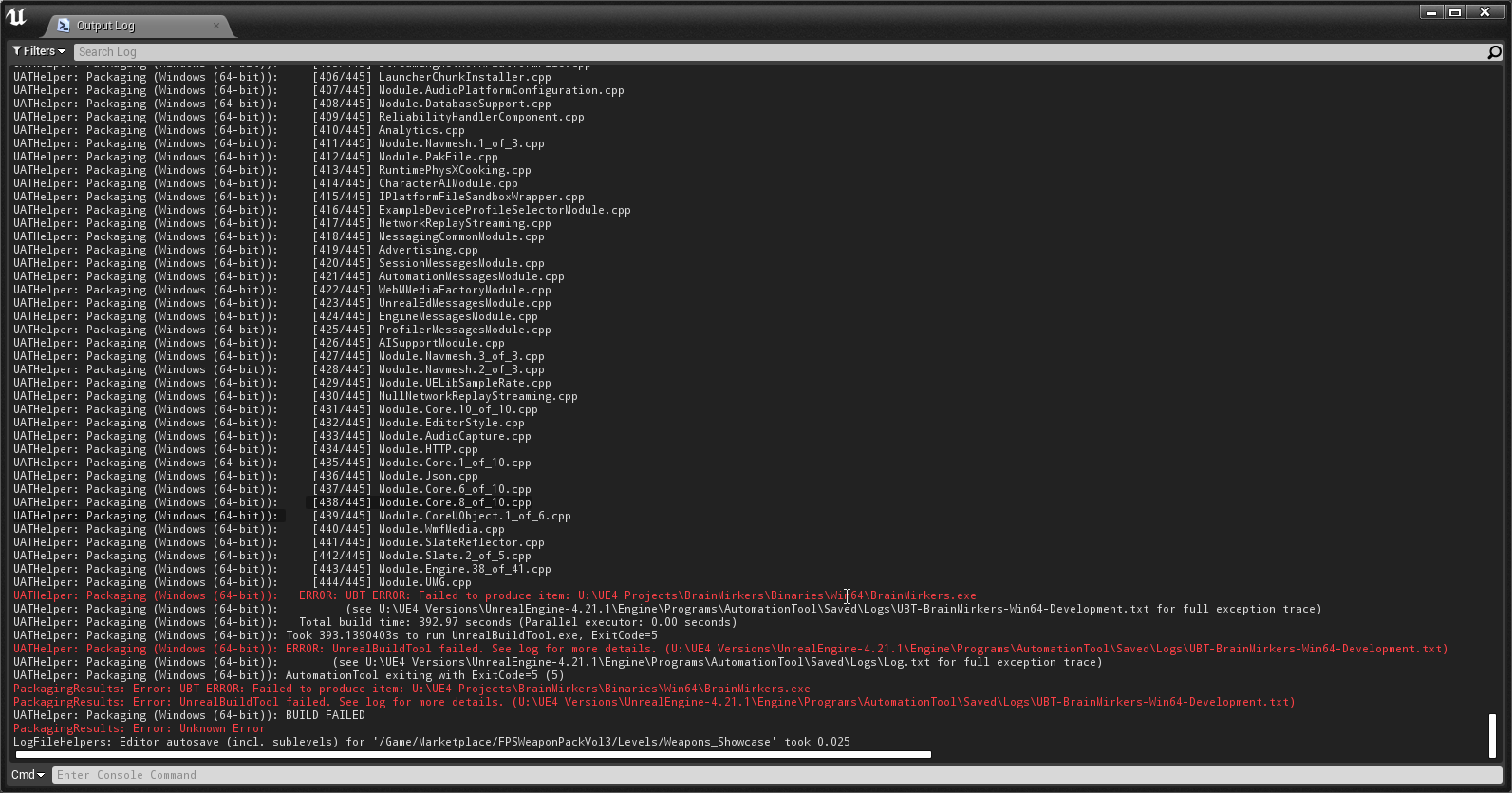
UATHelper: Packaging (Windows (64-bit)): [444/445] Module.UMG.cpp
UATHelper: Packaging (Windows (64-bit)): ERROR: UBT ERROR: Failed to produce item: U:\UE4 Projects\BrainMirkers\Binaries\Win64\BrainMirkers.exe
UATHelper: Packaging (Windows (64-bit)): (see U:\UE4 Versions\UnrealEngine-4.21.1\Engine\Programs\AutomationTool\Saved\Logs\UBT-BrainMirkers-Win64-Development.txt for full exception trace)
UATHelper: Packaging (Windows (64-bit)): Total build time: 392.97 seconds (Parallel executor: 0.00 seconds)
UATHelper: Packaging (Windows (64-bit)): Took 393.1390403s to run UnrealBuildTool.exe, ExitCode=5
UATHelper: Packaging (Windows (64-bit)): ERROR: UnrealBuildTool failed. See log for more details. (U:\UE4 Versions\UnrealEngine-4.21.1\Engine\Programs\AutomationTool\Saved\Logs\UBT-BrainMirkers-Win64-Development.txt)
UATHelper: Packaging (Windows (64-bit)): (see U:\UE4 Versions\UnrealEngine-4.21.1\Engine\Programs\AutomationTool\Saved\Logs\Log.txt for full exception trace)
UATHelper: Packaging (Windows (64-bit)): AutomationTool exiting with ExitCode=5 (5)
PackagingResults: Error: UBT ERROR: Failed to produce item: U:\UE4 Projects\BrainMirkers\Binaries\Win64\BrainMirkers.exe
PackagingResults: Error: UnrealBuildTool failed. See log for more details. (U:\UE4 Versions\UnrealEngine-4.21.1\Engine\Programs\AutomationTool\Saved\Logs\UBT-BrainMirkers-Win64-Development.txt)
UATHelper: Packaging (Windows (64-bit)): BUILD FAILED
PackagingResults: Error: Unknown Error
golden cape
ParallelExecutor.ExecuteActions:   u:\ue4 projects\brainmirkers\source\brainmirkers\BrainMirkersHUD.h(26): error C3158: 'RegisterServer': 'override' can only be applied to a virtual member function
ParallelExecutor.ExecuteActions:   u:\ue4 projects\brainmirkers\source\brainmirkers\BrainMirkersHUD.h(26): error C2575: 'RegisterServer': only member functions and bases can be virtual
ParallelExecutor.ExecuteActions:   U:\UE4 Projects\BrainMirkers\Source\BrainMirkers\BrainMirkersGameMode.cpp(9): error C4430: missing type specifier - int assumed. Note: C++ does not support default-int
ParallelExecutor.ExecuteActions:   U:\UE4 Projects\BrainMirkers\Source\BrainMirkers\BrainMirkersGameMode.cpp(9): error C2374: 'bUseAuthentication': redefinition; multiple initialization
ParallelExecutor.ExecuteActions: u:\ue4 projects\brainmirkers\source\brainmirkers\BrainMirkersGameMode.h(19): note: see declaration of 'bUseAuthentication'```can you print screen the part where it says ur warning
and errors
should be at the end
fierce pebble
ohhhh
golden cape
 fierce pebble
these are real errors for once
golden cape
its weird because ive never touched the gamemode file on this peroject yet
fierce pebble
doesnt happen often that someone has real errors
no this isnt a code issue
it looks very much like a settings error
a dependency changed here
golden cape
{
    public BrainMirkers(ReadOnlyTargetRules Target) : base(Target)
    {
        PCHUsage = PCHUsageMode.UseExplicitOrSharedPCHs;

        PublicDependencyModuleNames.AddRange(new string[] { "Core", "CoreUObject", "Engine", "InputCore", "HeadMountedDisplay", "OnlineSubsystem", "OnlineSubsystemUtils" });

        //DynamicallyLoadedModuleNames.Add("OnlineSubsystemSteam");
    }
}
okay so can you go to see U:\UE4 Versions\UnrealEngine-4.21.1\Engine\Programs\AutomationTool\Saved\Logs\UBT-BrainMirkers-Win64-Shipping.txt
what does it says there
eager moon
and what exacly are you trying to do, despite the fact ure packaging in 64 bits
golden cape
something wrong with a 64bit package?
eager moon
no, its fine but youre mking it where
trough the editor?
try Project Luncher
and see what happens and post here
also try to compile ur project too
golden cape
project launcher is the edit tho?
golden cape
but isnt that the same as "package game"
eager moon
well it will need a 64 package build actually, but first, did you compiled ur project and removed all errors and warnings?
golden cape
its basically a fresh project, no real "code" in place on this
golden cape
sorry haha
{
    public BrainMirkers(ReadOnlyTargetRules Target) : base(Target)
    {
        PCHUsage = PCHUsageMode.UseExplicitOrSharedPCHs;

        PublicDependencyModuleNames.AddRange(new string[] { "Core", "CoreUObject", "Engine", "InputCore", "HeadMountedDisplay", "OnlineSubsystem", "OnlineSubsystemUtils" });

        //DynamicallyLoadedModuleNames.Add("OnlineSubsystemSteam");
    }
}
you know, you can restart ur project if its fresh
just migrate ur blueprints
but you need to hit a button called compile
and will show a log with errors and warnings
golden cape
"ye man, keep restarting this project due to this error"
eager moon
hahahahaha
dude, see if you have errors
if you have them thats the bug of your package
thats the first thing
then I can help you with more options
But first just try compile navigation
compile shadows or set to dont use them at world settings
I can find a vieo tutorial to help ya
golden cape
ive listed errors above.
eager moon
I saw those errors but theyre from your package try.
We need to first see the errors of the level on the editor
its just a button you press really
its called ''compile''
golden cape
the compile button works just fine.
It just compiles the bp i use it on
and nothing happens
good old "green" check
eager moon
no no no
wait
you want that button
it will open a box after it compile the shadows and navigation
eager moon
yeah thats a good tool you know
if you hit there and everythings is fine you are kinda good to go
golden cape
Spells and magicery
eager moon
after you learn how the magic works you learn it its fine
but its kinda messy to understand all the shit
but go on keep working with it its the only way to know it
golden cape
"Wingardium Leviosa"
near stream
So I'm trying to package my project and for some reason it can't find the startup map.
Here are my settings
And here is the error message
Anyone have any inclination about what I might be doing wrong?
near stream
I figured it out for anyone who searches this in the future. If you explicitly tell the engine to not include certain folders later on below, I think it then expects you to explicitly state the ones you want to include. I solved this by just removing the ones I explicitly said I want ignore and the above settings worked fine.
golden cape
So I'm trying to package my game using AutomationTool.exe (so i can use patching)
My automationtool seems to just close when it parses my command (copied from project launcher in ue4 editor)
 narrow yew
My first time deploying to my iPhone. Can anyone tell me why I see this texture instead the view from my camera?
narrow yew
Thanks @fierce pebble
Happen to have a tip on debugging without deploying every time? @fierce pebble
narrow yew
Reading what is and isn't supported helped. Thanks!
eternal flare
jesus christ, packaging files in Unreal is 1000x harder and more shitty than in Unity
what a god damn shitfest
wonder if it's because of Datasmith...
huh... seems to be a combination of Datasmith and Perforce fuckery
ugh
mellow bane
What's your problem ?
fierce pebble
he is angry bc he cant keep order in his files...
and now unreal is compiling all the shit he doesnt use...
mellow bane
Actually UE can do that
If you provide a list of levels to cook explicitly
It will cull the unused assets
eager moon
@golden cape did the automation tool through command line parsed the command sucesfully?
@eternal flare hey I agree it is a witchcraft to understand, but once you read on it and learn, you see that is not their fault, actually if you were a better programmer than just pointing who better in what, you could reprogram unreal for the next time we can have all these fuck up features in the editor, you know, it's a free software for such complaints, peace xD
It's trully a beautiful thing I'm having dreams out of a free software
If all those years cracking up serial numbers I have knew of that
I would just be chillin, but now you can create Call of duty out of your lap top if you know the way
Also Eobet, dude, any issue youre having just share here we will help ya
 hearty socket
Anyone here have UBT experience with loading .SO files for linux?
E.g using PublicLibraryPaths.Add(Path.Combine(ModuleDirectory, "Lib", "Linux"));
In the build target
eager moon
Well thats something I cant help buddy, but its interesting that your building in linux
 rough knoll
How to fix this issue
https://forums.unrealengine.com/unreal-engine/unreal-studio/1561770-packaging-failed-datasmith-error
Unreal Engine Forums
I get the error below when packaging a project.
It's a project that I've been working on since 4.19 I think. It was imported using Datasmith 4.19.
It used to
I tried to disable datasmith plugin including datasmith content plugin.. But when I try to package it.. Engine is freezing and not responding
eternal flare
@fierce pebble @eager moon funny people.... it was a datasmith issue
fierce pebble
no
you are working dirty.
you should consider only having used assets in your project really
eager moon
Yeah, create in another project then migrate only the assets, not the full plugin
eternal flare
if datasmith doesn't allow you to work dirty, then it's not made for the real world
they should have kept it in some clinical research lab
I keep track of my own assets, I can't keep track of the shit that datasmith is supposed to handle automatically
eager moon
even when a plugin is made of Unreal devs it creates problems for packaging, like the Realtime Simulation and Volume Modelling Plugin by Ryan Bruck
If you try to package that with your game it just will fail... But so what? You just need to remove the folder.
Just use its assets and remove it when packaging for shipping build, its simple as that
eternal flare
so messy compared to Unity, and all answers is "yeah we won't fix it, just work around it". it's so lucky for Epic that their results are bloody fantastic 😛
mellow bane
To be clear, UE4 does support removing unused assets from the build
Plugins are plugins - they're unsupported by design unless they ship with the engine.
When you start using a plugin you accept responsibility for updating it, too
eternal flare
datasmith ships with the engine
and is still under development
this is just something I hope they fix
mellow bane
Well if it crashes, ships with the engine and you report the crash, it probably will
eager moon
Coding your own games is easier than you think...Y'know, you should take this online Unity course in udemy, you will learn c sharp, variables and stuff, really cool for packaging in unity
mellow bane
Which is probably helpful if you're an Unity developer
fierce pebble
c cheap
mellow bane
But people here mostly use Unreal
eager moon
hahahahahahaha xD
fierce pebble
very assumptious...
eager moon
this asian guy is so convincing with his eyes
mellow bane
Anyway, post your packaging problems, wait for answers. As far as I'm concerned I'm often available here for help, and we've open-sourced our build scripts we use for shipping - there's always a solution
sharp jolt
ugh.. I've built this android project 50 times..no problem. Fairly quick. Turned on mobile hdr so I can do more post processing work, and I'm like 40 minutes in to this build and it seems to be doing nothing..
mellow bane
Post the full log on pastebin
Oh right
That seems normal I guess for a first build
 primal dirge
Can someone help me? My packaging is failing and I'm not sure why
mellow bane
Your Game/SuperGrid/StarterPack/Tutorial/Blueprints/FirstPerson/FirstPersonCharacter.FirstPersonCharacter Blueprint doesn't compile
But that's not your biggest problem
T_BathStone_mrao is
Sounds like the texture is corrupted or something
Also you have thousands of warnings - assets that need resaving, NULL references because you removed assets but didn't save their users...
You should read that log yourself and take a stab at every thing weird-sounding
fierce pebble
this entire thing is full with errors until the end
and you are missing a license
it seems like this log
includes game data too
from outside the build
mellow bane
That's normal IIRC, I think UE enables this thing by default
fierce pebble
the upper part is mainly PIE log
 sweet elk
I need to package sqlite databases with my game which need to be both read/write-enabled. I've been looking over the info from https://wiki.unrealengine.com/How_To_Package_Extra_NonUASSET_Files_With_Your_Game and referencing a few forum posts https://forums.unrealengine.com/development-discussion/android-development/18261-help-package-non-ufs-files and I'm wondering, if I use the option to package instead of copying but disable using .pak file, will I be able to read/write to these databases in-place in a packaged game?
Unreal Engine Forums
For Android developers to discuss development and ask questions.
I should also note, I am only targeting Win64
The android-related forum post was the only one I was able to find specific to packaged databases so far
eager moon
Its so epic on how you remove all the plugins and it fucks up all package, then you have to mannually put all correct plugins back together, hey the game has a big size file but at least its working
The fixxed message in this channel should be "first make a build through project launcher and also don't mess up with plugins"
 alpine peak
 fierce pebble
well
theres no error there
why dont you post the entire log in a nice
pastebin
hearty socket
Is there a way to change the directory UAT puts .dlls in the packaged game? PublicAdditionalLibraries.Add
 heavy forge
so I packaged a basic game for windows 64 and it built the executable. but when i run it nothing happens (i think maybe it closes before it actually opens up, i don't even see it pop up in the task manager)
eager moon
Hey vilerscape, how yoy doing dude?
So what yo need to do now is go to the editor and go to the window where it says Project Launcher
There you will select advanced settings, and choose "default" - "shipping" - "do not cook"
It will make you a log, you save that log
If you do everything and saved that log sucessfully then just talk here you will have one more task to do
heavy forge
ERROR: Client exited with error code: -1073740791
i'm going to create a blank project
heavy forge
I don't understand why it's including this plugin during the packaging process, fatal error C1047: The object or library file 'C:\Program Files\Epic Games\UE_4.21\Engine\Plugins\Media\WebMMedia\Source\ThirdParty\libWebM\libvpx\lib\Win64\VS2015\vpxmd.lib' was created with an older compiler than other objects; rebuild old objects and libraries
If I remove the WebM plugin (it says beta) it finishes compiling, but still fails to launch
 flat glade
Hey everyone, hope yall doing well. Wanted to ask, any suggestions on the best software to use to create an installer for our UE game? We have a very simple setup and just need to put our folder wherever they want, and make a shortcut...would also like to do updates...any suggestions welcome. Thanks!
heavy forge
Well hopefully someone sees this and comments on it: https://answers.unrealengine.com/questions/868681/error-client-exited-with-error-code-1073740791.html
 minor iron
you're welcome in advanced
 wide condor
Hi everyone! Need help on server package. Following this tutorial https://wiki.unrealengine.com/Dedicated_Server_Guide_(Windows_%26_Linux) from @stoic nova . Got stuck on packaging project on Win64. UBT says: "UATHelper: Packaging (Windows (64-bit)): ERROR: No target name was specified on the command-line." Need to say that every step before was made as in tutorial and everything was good before that point. I would appreciate any help.
 drifting heron
 wind timber
which asset did it happen on
 opal cedar
hey..I try to package the project for android with project launcher...When I run the first profile, I get huge .obb file, over 1.1GB! There is just the empty map, with no reference to other maps or content, nothing! I've assigned this map to chunk 0. Also, I've 6 chunks with content over 700MB, but after packaging I've only 90mb content
Any ideas how to solve this?
 rocky bramble
Hello All, I'm super new to Unreal, and I'm basically follow the documentation to learn pixel streaming, https://docs.unrealengine.com/en-us/Platforms/PixelStreaming/PixelStreamingIntro I use the latest 4.21 version, and followed all the steps, untill I reached package your project for windows64, I kept getting Pakaging failed, and the errors I get from log is "UBT ERROR", "UnrealBuildTool failed", any idea how to solve this? Thanks!
 fossil dust
Any idea why my maps aren't packing? I've included both the levels and the build data in the packaged maps in the project settings, but it's still not including them.
 gritty knoll
folks, is there any way to politely get someone's attention from epic if there's a major bug preventing from releasing/packaging my game? i've already posted in forums and Answers but nobody seems to respond
i see some people in this chat asking how to reduce the size of APK, that's where the bug is, there is a file being cooked that costs 32MB alone and it was supposed to be fixed in 4.16 but it still persists in later versions such as 4.18, 4.19 and 4.21 (including blacklist doesnt help)
gritty knoll
if anyone has any insight for this, please tag me, thank you in advance
 inland crescent
 acoustic juniper
anyone knows how to use Ue4's HTML5 for Newgrounds?
eager moon
@acoustic juniper https://www.newgrounds.com/bbs/topic/1389662
Newgrounds.com
Recently I've been experimenting with Unreal Engine 4, I've been thinking about The possibility of making something in it and putting it on Newgrounds. Since UE4 can be used for HTML 5 Development I can't see why It shouldn't be possible to this. ...
If you manage to upload ur piece into newgrounds you tell us dude, this thread is a good start.
 amber galleon
i'm wondering if there's a way to override DefaultCrypto.ini? I'd like to submit the settings to a semi public source control but keep the keys private, can I just create another ini file (with which name?) and override the 4 keys in there?
mellow bane
You can have multiple levels of files, including in the Saved folder : https://docs.unrealengine.com/en-US/Programming/Basics/ConfigurationFiles
amber galleon
literally can't find anything in the docs about that. the only ini files that's got the overrideability described is Base/Engine/Game ini
@mellow bane yes, i've seen that, but Crypto isn't Engine, is it?
mellow bane
[ProjectDirectory]/Saved/Config/[Platform]/[Category].ini should be relevant for you, with category "crypto"
amber galleon
oh so i can just follow the same procedure for the other types?
ok i'm gonna try that, thanks 😃
mellow bane
Yeah, not sure what the platform codenames are though
Probably Win64/Win32/Linux/ etc
Like for other files
amber galleon
oh i just realized the editor actually created an empty saved/config/linux/crypto.ini for me for some reason 😛
open rapids
Anybody know what causes this?
acoustic juniper
@eager moon i did manage a few times ,it didn't work to most people tho ,it was like nonsensical
people get some kind of error
 vernal elm
[2019.01.31-00.06.21:726][ 0]LogLinker: Warning: Unable to load package (../../../Engine/Content/EngineResources/WhiteSquareTexture.uasset). Package contains EditorOnly data which is not supported by the current build.
anyone any idea
 rancid mountain
@vernal elm If you have any assets that use /Engine content, it will sometimes get that
vernal elm
im not though
i checked
its a source build engine
when i cook it in non source it works fine
rancid mountain
delete build/intermediate/save folders then try cooking first?
rancid mountain
@vernal elm
If that doesn't work, see if that's unchecked and check it
Under Packaging
vernal elm
nah not working
im stripping my project just to bare bones
and see what happens
found out it was a widget
 timid yew
Getting this error building for android
Running: C:\NVPACK\android-sdk-windows\platform-tools\adb.exe -s ce0717175b07a8e30c7e uninstall com.YourCompany.thirdpersonstarter
LogPlayLevel: Exception occurred while executing:
LogPlayLevel: java.lang.IllegalArgumentException: Unknown package: com.YourCompany.thirdpersonstarter
LogPlayLevel: at com.android.server.pm.Settings.getInstallerPackageNameLPr(Settings.java:5051)
LogPlayLevel: at com.android.server.pm.PackageManagerService.getInstallerPackageName(PackageManagerService.java:27963)
LogPlayLevel: at com.android.server.pm.PackageManagerService.isOrphaned(PackageManagerService.java:27969)
LogPlayLevel: at com.android.server.pm.PackageManagerService.deletePackageVersioned(PackageManagerService.java:24096)
LogPlayLevel: at com.android.server.pm.PackageInstallerService.uninstall(PackageInstallerService.java:996)
LogPlayLevel: at com.android.server.pm.PackageManagerShellCommand.runUninstall(PackageManagerShellCommand.java:912)
LogPlayLevel: at com.android.server.pm.PackageManagerShellCommand.onCommand(PackageManagerShellCommand.java:134)
LogPlayLevel: at android.os.ShellCommand.exec(ShellCommand.java:96)
LogPlayLevel: at com.android.server.pm.PackageManagerService.onShellCommand(PackageManagerService.java:28768)
LogPlayLevel: at android.os.Binder.shellCommand(Binder.java:581)
LogPlayLevel: at android.os.Binder.onTransact(Binder.java:481)
LogPlayLevel: at android.content.pm.IPackageManager$Stub.onTransact(IPackageManager.java:3209)
LogPlayLevel: at com.android.server.pm.PackageManagerService.onTransact(PackageManagerService.java:5096)
LogPlayLevel: at android.os.Binder.execTransact(Binder.java:682)
Got a different error when using gradle, though this might be easier
timid yew
Fixed it, just had to try building again i guess
 blazing ruin
Did anyone got this error after packaging and launching the game
 austere crypt
Hello! I've got a question about graphic settings after packaging, when I packaged my game and after launching it I noticed that the texture quality is lower than in the editor, is there a specific reason for this or how can I adjust this, does someone know or have a tip?
 hollow ember
Quick question. When the game is finished and I decide the pack this game up inside the editor let's just say all actors and things meches demos things I've used to create the game are the only things that get packed up right? So more less I'm saying all the stuff that I didn't even use in the editor for the game. That stuff doesn't get packed up also does it? Or do I have to go through everything and clean this crap up?
I was packing my game up just to do a quick test and it's giving me warnings and errors for items I didn't even put in the game.
 vapid fulcrum
Does anyone know how to fix this error:
I get it when I try cooking the game (Pressing the launch button)
 meager lion


 gritty knoll
hello @hollow ember did you check the Saved/Cooked folder to see what was cooked?
anyways, as long as an asset is referenced anywhere in your project, it will be cooked, even if you dont use it
opal cedar
hi, according the asset audit, in my first chunk ( chunk0 ) should be only patching map and nothing else. After package, there is much more stuff. Does someone the same results why packaging the project? I'm pretty sure I'm not referencing the other stuff packaged in the patching map and the same also tells reference viewer.
I used UnrealPak to see, whats inside the pak0, that's how I know what is inside
Is unpacking the .pak to folder, delete some folders, and then repack the way how to create packages, if't it's not working for some reason in editor?
 primal kettle
hay can someone tell me what you need to do to get a vive hmd to start with steamvr
at the moment the game starts
you can see the player camera on the floor
but there is nothing in the hmd
I have checked the box in project settings start in vr
I have enable hmd blueprint node enabled on event beginplay node in the map blueprint
and set execute command node to vr.benablestereo true
but none of that has done anything to help
 limpid socket
@primal kettle Do you have the VR plugins you need enabled?
 hollow nymph
hey i'm trying to package my game server and windows no editor in ue4 project launcher however i get this error at the start of the build any1 knows what this could be ?
hollow nymph
ok uninstalling vs2017 build tools solved the problem
 solemn trellis
Getting this error when I try to package:
FormatException: Index (zero based) must be greater than or equal to zero and less than the size of the argument list.
Any ideas?
Could it be to do with the steam API?
mellow bane
What's the full log like ?
solemn trellis
mellow bane
Any reason you pass the project twice ?
solemn trellis
No idea why its doing that
I've never really dabbled with packaging my project before (aside from another project that I shipped without problems)
mellow bane
Are you just teying to package from the menu ?
solemn trellis
yeah, from edit - package x64
mellow bane
That's weird. It... should work well ? Is it a launcher engine ?
solemn trellis
A launcher engine?
The project is using the steam subsystem, I feel it may be to do with that?
mellow bane
No, I mean is it a launcher build of the engine, as opposed to custom source build ?
mellow bane
That's pretty weird
solemn trellis
Any idea what it could be related to?
I cant find any indication to where the problem may be
mellow bane
Yeah, same. Maybe try building through the project launcher instead
It's more involved but you'll have more options
solemn trellis
This is my output log, just tells me to look at the txt file
Alright I'll give that a go, thank you for your help!
TFW you spend over a year making a game and it wont package 😉
mellow bane
Packaging hurts the first time
solemn trellis
How do I package through the project launcher?
solemn trellis
Project browser doesnt have any options for me, or am I being stupid?
yep I'm being stupid/
mellow bane
If you're into that sort of thing, and not afraid of going into details, I've got a nice Python script to build releases
mellow bane
https://github.com/arbonagw/HeliumRain/blob/master/Scripts/1-Build.py - config files used are in the same directory

GitHub
HELIUM RAIN - Full sources for Helium Rain, a realistic space opera using Unreal Engine 4 - arbonagw/HeliumRain
solemn trellis
Whats UAT?
mellow bane
The end of the script isn't relevant for other projects, and it probably needs lots of reading, but it does generate a valid command line
UAT is Unreal Automation Tool
Basically the engine high level command line
solemn trellis
ah okay
mellow bane
Ultimately, no one needs the same packaging options, so it's good to just look at everuthing