#slate
1 messages · Page 21 of 1
 split laurel
np, all of this has helped me too so far :)
 tribal fractal
hmn I'm curious how to get TWeakObjectPtr from FAssetData
maybe Property table can work with TWeakObjectPtrs and try to load them when needed
 tribal fractal
yea but SPropertyEditor need TWeakObjPtr
tribal fractal
hmn how to stop FStreamableManager from async loading?
Like this:
for (FAssetData& Path : ItemsToAsyncLoad)
{
TArray<TSharedRef<FStreamableHandle>> HandleList;
if (StreamableManager.GetActiveHandles(Path.ToSoftObjectPath(), HandleList))
{
for (TSharedRef<FStreamableHandle>& Handle : HandleList)
Handle.Get().CancelHandle();
}
}
but I can see they are still loading using stats lol 😄
it just stops delegates from firing but not actualy disable requested async load 😄
 maiden talon
How do I position a widget, except with just HAlign and VAlign
e.g. if I want it anchored to the center but like offset 100 pixels lower
do you just do that with padding?
maiden talon
how can I copy a slate brush
 pastel phoenix
by padding, but it is not only option.
you can make a vertical box, and split it by slots, and set the height of every slot
or overlay
maiden talon
is there any proper way to preview a slate widget btw?
like maybe an editor or something
 main hedge
use umg 
maiden talon
I do for most things, it's just this async loading screen I need, and all examples I find are mate with Slate since that runs on a different thread by default
main hedge
you could stick your slate widget in a umg one and preview it that way 
 quaint zealot
Slate does not run on a different thread
maiden talon
this dude from epic says it does https://youtu.be/ON1_dEHoNDg?t=1199

This engineer-oriented talk about assets loading management for good performance and smooth transitions by Epic Games' Support Engineer Axel Riffard goes ove...
quaint zealot
It does not
The rendering of Slate (and all rendering in UE4) does
The entire UI updates, callbacks, all your UI code, runs on main thread
maiden talon
well, it works for my purposes so good enough
tribal fractal
anyone know how to get key from FPointerEvent? I have OnMouseButtonDown but want to check if it's left mouse button or right.
main hedge
slate is indeed ticked on another thread during the async loading screen though
its very strange
quaint zealot
Yeah, but only in that specific case
tribal fractal
found this: MouseEvent.GetEffectingButton() == EKeys::LeftMouseButton
pastel phoenix
MouseEvent.IsMouseButtonDown(EKeys::LeftMouseButton) or MouseEvent.GetPressedButtons()
buttons could be pressed together
 warm vault
Ehy guys, I'd like to make a custom USpinBox which could allow text to be shown sometimes instead of only-numbers;
Instead of overlaying a text onto it, I decided to make a custom class which allows me to customize the slate graphics into it
However, I don't know how to traverse the slate tree to get all the children of a slot recursively in order to find the SEditableText element to be replaced with a custom one
Does anyone know how to do this?
tribal fractal
how to save asset? I have package pointer why SavePackage need that much parameters?
this is working
tribal fractal
Items editor work in progress. https://www.youtube.com/watch?v=XCyQO_wcitU
Still to do:
- Filter by item type: change columns then (eg. weapons data)
- Search should work with async loading as well,

 serene eagle
why do you use a checkbox for the editor save?
tribal fractal
to lazy to create my own widget for save 😛
serene eagle
SButton?
tribal fractal
I would need to create customization, add button, make lambda etc
you can't add things like this using SPropertyTable
serene eagle
looks great so far
tribal fractal
thanks!
pastel phoenix
work is great. but why you don't use database for savings, @tribal fractal ?
it is typical task for some SQL
tribal fractal
what do you mean by database? my items have lots of functions OnSlotChanged, CanUseAction, UseAction etc - they are complicated and they need blueprints for custom implementation. (eg. cat in inventory, teleport scroll etc - wanted to have this in one place, quicker to work with items like that)
tribal fractal
anyone know how Comment Node is actually saved? Can't find any seralization
tribal fractal
https://www.youtube.com/watch?v=5cCKagKrBoE&feature=youtu.be learning EdGraphNodes. Created blueprint sticky note 😛
 split laurel
I only created edgraphnodes in my own editor so far: is it possible to just create a custom node and use it in normal blueprints?
tribal fractal
it's tricky. Basically it's K2Node which uses "comment" functionality to store data in note.
But I think it's doable, just need some "data container" which can be linked to node.
but yea - this node is created without custom editor, can be added in Blueprints (will check material editor 😄 )
split laurel
I see, cool :) good to know
tribal fractal
hmn, I can see that ZOrder is weird - my node is always above everything else. @split laurel had you the same issue?
split laurel
hmm can't say that rings any bells for me sadly
 craggy holly
Anybody know which shader is used for the background blur widget?
quaint zealot
Pretty sure the blurring is handled separately from rendering the widget.
Could be wrong but.....
craggy holly
Yeah found it eventually.. SlatePostProcessPixelShader.usf
Trying to feed a mask texture into it
warm vault
Hey guys! I'm new here. I've started to touch some slate. The only "documentation" I have is the engine source. Do you have any other documentation where I can learn to use slate properly?
warm vault
That's what I thought. I'm using it to make our own EditorModes.
quaint zealot
Yeah it's the most common use case
serene eagle
there are some tutorials of Rama which are really nice for the beginning you can just google it. There is also this really little page by Epic which only provides some basics -> https://docs.unrealengine.com/en-US/Programming/Slate/Widgets/index.html
Layout and widget complexities not demonstrated in the Slate Viewer Widget Gallery.
There was also a header and cpp file inside engine source which was smth like a test class and showed some implementations of slate widgets but looking into source is mostly the best way to see implementation
quaint zealot
Some of Rama's stuff is wildly outdated though
serene eagle
sure but it can be quite helpful from time to time.
warm vault
Nice, did you remember what is the name of that class?
split laurel
Upon pressing a custom button in Unreal I want to bring a specific program into the foreground. Anyone know how something like that is done? The button itself is already done, I just need to know some class that lets me access different running processes
 wide plaza
@tribal fractal it looks like you can add custom columns through the ColumnCustomizations argument but it looks like it requires a bunch of boilerplate
 unkempt locust
whats the best way to include a WidgetBlueprint in a STab?
wide plaza
that's just using normal slots right? you can construct your UserWidget through CreateWidget, and in the slot you just pass MyUserWidget->TakeWidget()
although i don't see a slate widget called STab
unkempt locust
I was trying to use EditorUtilityWidget
Cant seem to figure it out properly
SNew(SDockTab);
sorry
not STab
wide plaza
UEditorUtilityWidget derives from UUserWidget so you can TakeWidget() from it
so it'd be something like SNew(SDockTab).Content(EditorUtilityWidget->TakeWidget())
(i've not used SDockTab so this might not work at all)
ah looks like it uses this declarative stuff
so instead of an SNew in the slot there, you'd have the TakeWidget call
split laurel
looking for a way to update a single row in an assetview when a button is clicked, anyone know how to do this? I essentially just need to regenerate individual rows. While I could refresh the entire thing, that's not something I want to do since in a big project there might be many tens of thousand asset accesses at once so refreshing would take at least a couple seconds
unkempt locust
thanks @wide plaza
 willow salmon
Can anyone tell me why I'm getting "unresolved external" for FEditorStyle::GetBrush even though I have EditorStyleSet.h included? I'm trying to define a custom widget in a plug-in and even copy pasting from UE's own classes verbatim results in that error
I'll just substitute in an FSlateColorBrush for now I suppose
willow salmon
Actually, I think a plain gray works better than "Checkerbox" anyway -- so never mind
 limpid atlas
@willow salmon You need to add "EditorStyle" to the [Public/Private]DependencyModuleNames in your module's .build.cs file
willow salmon
D'oh
Ah yes, of course... Knew I was forgetting something xD
I kind of pivoted to using solid colors for my slate elements anyhow, but thanks for tying up that loose end
willow salmon
New question:
How do I bind a SLATE_ATTRIBUTE to a getter with a parameter? I've been able to bind it to a lambda on the widget's user, that in turn calls a function that generates the value for the attribute. But I'd like to give that getter the size of the widget as a parameter.
I notice that the TAttribute has some Bind* functions but I'm not sure if that's what I want or not
I'll be able to provide some context once I get home to my PC
willow salmon
So basically what I'm saying is this works, but...
I'm wondering how I could pass parameters to my GenerateDistributionGraphPoints method (I need to tell it what the actual size of the widget is, since it doesn't seem to match the desired size that I set -- and I don't want to do rescaling in the onPaint() method)
 paper hamlet
ok this is day 1 of slate for me what is the difference between _Text() on line 45, Text on line 71 and BoundText on line 164 in STextBlock.h
and if i wanted to call set text from another slate widget how would i go about doing that
 rain heron
any good rescources how to make your own slate widget (draw your own)
f.e. what is ISlateRun and when do I need it? When I'm allowed to use MakeShapedText, MakeBox...
main hedge
there is no documentation on this stuff, you'll just have to look around at how other widgets are using it, maybe find some comments
willow salmon
Yeah it's mostly just an inordinate amount of reading and trial and error
split laurel
Wow, I was just on a wild goose chase because I was handing down a slate event through multiple widgets (because only the leaf widgets required it) and I had about 80 compile errors, supposedly because of it. Turns out it was something completely different, I was setting the text of a TextBlock via .Text(this, &FStyleCheckerTool::GetSelectionText) and while the precompiler didn't complain about that, it was the reason for not working, since the FStyleCheckerTool is a raw c++ class and doesn't have the AsShared member, which apparently is required if the delegate is created implicitl
on that note, does anyone know if it is possible to have enums via Slate events as return value? It didn't work on first try so I changed it to just use ints instead and cast in between the functions
paper hamlet
how do i add children to a SScrollbox from an array
i just can't get the syntax to work
main hedge
just call addslot
paper hamlet
except if i try to do SScrollBox::FSlot& = mainScrollBox.AddSlot() it claims that SScrollBox::FSlot::FSlot(const FSlot&) is deleted
main hedge
Box.AddSlot()
[
    Content
];
ok thanks
paper hamlet
the slate syntax is hella confusing
main hedge
slate™*
quaint zealot
For what it's worth, you don't need to use the syntax
Slot.DoStuff();```It's less a syntax than it is chaining multiple legal statements
You can do this in non-Slate code too if you truly hate yourself
main hedge
there are clearly not enough templates involved here
paper hamlet
auto newSlot = mainScrollBox->AddSlot();
that gives me
Error (active) E1776 function "SScrollBox::FSlot::FSlot(const SScrollBox::FSlot &)" (declared implicitly) cannot be referenced -- it is a deleted function
main hedge
you would need auto&
paper hamlet
thank you
paper hamlet
3>U:\Program Files\Epic Games\UE_4.23\Engine\Source\Runtime\SlateCore\Public\Widgets/SWidget.h(107): note: see declaration of 'FSlateControlledConstruction::operator new'
3>U:\Program Files\Epic Games\UE_4.23\Engine\Source\Runtime\SlateCore\Public\Widgets/SWidget.h(93): note: see declaration of 'FSlateControlledConstruction'
3>U:\Program Files\Epic Games\UE_4.23\Engine\Source\Runtime\Core\Public\Templates/SharedPointer.h(194): note: while compiling class template member function 'TSharedRef<SScrollBox,0>::TSharedRef(void)'
3>U:/UnrealProjects/PluginCreator/Plugins/ModuleViewer/Source/ModuleViewer/Private/ModuleViewer.cpp(73): note: see reference to function template instantiation 'TSharedRef<SScrollBox,0>::TSharedRef(void)' being compiled
3>U:/UnrealProjects/PluginCreator/Plugins/ModuleViewer/Source/ModuleViewer/Private/ModuleViewer.cpp(73): note: see reference to class template instantiation 'TSharedRef<SScrollBox,0>' being compiled```TSharedRef<SScrollBox> mainScrollBox; this is the line in question
what on earth is going on
main hedge
you want TSharedPtr or immediately initialize it with something
main hedge
TSharedRef can not be nullptr
if you want to use TSharedRef you will have to use TSharedRef<SBlah> Blah = SNew(SBlah);
paper hamlet
oh ok then
    SAssignNew(outTab, SDockTab)
        .TabRole(ETabRole::NomadTab)
        [
            TSharedRef<SScrollBox> mainScrollBox = SNew(SScrollBox)
            +SScrollBox::Slot()
            [
                SNew(STextBlock)
                .Text(WidgetText)
            ]
        ];

    TArray<FModuleStatus> allModules;
    FModuleManager::Get().QueryModules(allModules);

    for (FModuleStatus MS : allModules) {
        mainScrollBox->AddSlot()
            [
                SNew(SHorizontalBox)
                +SHorizontalBox::Slot()
                [
                    SNew(STextBlock)
                    .Text(MS.Name)
                ]
            ];
}```yeah but then i can't use it further donw
so i should u tsharedtpr?
main hedge
TSharedRef<SDockTab> outTab; this is also wrong
paper hamlet
why?
main hedge
paper hamlet
but OnPluginTabCreated returns TSharedRef<SDockTab>
main hedge
a TSharedRef can be constructed from a not-null TSharedPtr
paper hamlet
return TSharedPtr<SScrollBox, outTab>::ToSharedRef(); am i close
main hedge
you went so far from the light you can't even see the tunnel anymore
main hedge
I think just
TSharedPtr<SDockTab> OutTab;
...
return OutTab;
already works
been a while since I used these though
paper hamlet
do people normally used shared ptrs and refs or only when absolutely necessary
and no it doesn't
main hedge
rip
paper hamlet
you can do ref to pointer not the otherway
main hedge
I never use them outside of slate
paper hamlet
ok
main hedge
dunno what other people are doing
paper hamlet
ok i just never really understood why we would use then out of slate
main hedge
can be useful when you have shared ownership of stuff
 tame granite
anyone know where in the code software cursors are drawn? I'm having an issue that it shows up in vr even if I set GameViewportClient->SetUseSoftwareCursorWidgets(false) (which works to make it hardware-based in 2D; I'm guessing it is falling back to software cursor in vr anyway after seeing that a hardware cursor can't be rendered to an offscreen viewport or something)
tame granite
seems to happen in DrawWindowAndChildren
tame granite
it seems when you enter vr you would never get a new FCursorReply until the mouse was moved again, and the last widget would stick even with SetUseSoftwareCursorWidgets(false), since it only changes whether or not the reply will have a widget.
what I added as a workaround is:
--- a/Engine/Source/Runtime/Slate/Public/Framework/Application/SlateApplication.h
+++ b/Engine/Source/Runtime/Slate/Public/Framework/Application/SlateApplication.h
@@ -1852,6 +1852,10 @@ private:
        /** The cursor widget and window to render that cursor for the current software cursor.*/
        TWeakPtr<SWindow> CursorWindowPtr;
        TWeakPtr<SWidget> CursorWidgetPtr;
+public:
+       void ClearSoftwareCursorWidget() { CursorWidgetPtr.Reset(); }
+private:
+```and call that once after calling UGameviewportClient::SetUseSoftwareCursorWidgets(false)
 scenic sun
I think this is probably the best place to ask.... Are there known issues with html5 drag-and-drop in UE4's webview?
pastel phoenix
coordinates could be wrong, if web widget is not full screen
at least in UMG web PKM on web widget gives wrong coordinates
paper hamlet
what do I actually need to put in synchronizeproperties
I have a child of SCompoundWidget that has a SOverlay with 2 slots: 1 containing a SText and the other a SButton
i'm trying to figure out how to get the text in the SText to update when i edit the text on my slate widget
main hedge
look at what UTextBlock has in there
paper hamlet
what does PROPERTY_BINDING_IMPLEMENTATION(FText, Text); do?
like the macro it's self i see that it has a matching
{
    return PROPERTY_BINDING(FText, Text);
}```but i don't understand the macros
quaint zealot
I don't know about that, but you don't need this syntax to use properties
paper hamlet
ok i'm just curious what it does and why they used it
main hedge
these implement the horrifying umg property bindings
just forget it ever existed and set your text property directly
main hedge
they run blueprint code every frame regardless of whether the widget is visible or not
 magic rock
you can disable umg bindings so they don't even appear in editor
main hedge
yeah, did that long ago
magic rock
same
main hedge
with the extreme option where existing ones also stop compiling
uncovered a few forgotten ones
paper hamlet
so if i drop the property binding then i don't even need the TDelegates do i? @main hedge
main hedge
wym
paper hamlet
like for text I have both an FText and a TDelegate<FText> do i still need the delegate or can i drop that if i don't use property binding
main hedge
the delegate is only for implementing the property binding
paper hamlet
ok so without property binding is does nothing
paper hamlet
.OnHovered_UObject( this, &ThisClass::SlateHandleHovered )```what's the difference between these lines
found on likes 56 and 57 of Button.cpp
inrebuild widget
main hedge
probably the time at which it was written
paper hamlet
but functionally it's the same
willow salmon
Welp, finally got everything to work properly today -- let's hope I never have to touch slate again
main hedge
slate™*
pastel phoenix
slate is good
craggy holly
Anybody know what BeginPerInstanceBufferUpdateConst has become in 4.24?
It's obviously been removed, but apparently with no deprecation warnings.
craggy holly
Urg. Thanks Obama.
paper hamlet
so i'm still kinda lost about what needs to be set in synchronize properties
and how that list differs from what gets set in rebuild widget
paper hamlet
how do i set my widgets icon in umg
 low bluff
@paper hamlet You mean you have a slate widget you want to set an icon in via umg?
If yes, theb you'd wrap the swidegt with a uwidget and expose the texture variable via that. There are tons of examples due to all native widgets in umg doing that
 eternal wave
how do simulate virtual mouse by joystick?
I mean I wanna send low level input to slate
 urban bloom
@eternal wave check out Rama's implementation. There may be more recent ones now but he had a mouse to joystick function in his plugin
 jolly prawn
Is there an array widget that live updates? I know I can add slots programatically through c++ but my widget will still be outdated if I add object while my widget is visible. Only solution I know of is to manually add and remove slots from your widget while adding and removing items to your array. I'd prefer to not have to do this though, if possible.
urban bloom
@jolly prawn is your array living in a detail panel?
urban bloom
im not sure in your case, but detail panels can be refreshed for such purposes when creating custom views (such as one that might hold an array that can be edited in the detail panel)
jolly prawn
I want to show my selected actors in this dropdown
urban bloom
Oh that looks like the Class Viewer on a toolbar
jolly prawn
I spawned it with MakeActorPickerWithMenu
urban bloom
yeah it defaults to class picker iirc
jolly prawn
I just wanted something nice to select actors with
you know what, scratch that. I'll do it some other way (i.e. no dropdowns)
Sorry for taking your time
urban bloom
im bored as hell m8. you did me a favour
but yeah, thats not a great solution for multi-selection either. it only returns a single selection I think. dont quote me on that
paper hamlet
@low bluff sorry no i mean these icons
magic rock
@paper hamlet I personally have never added my own custom icons to widget palette, but look at the FUMGStyle::Create(): this is how all icons for widgets are created and registered
urban bloom
I've only done that with detail panels myself. Im sure if you use the Widget Reflector you can see exactly what is being used, then just dive into the source
jolly prawn
I have my custom button here. When I press Play I want to disable/gray it out. Is that possible and how do I do it?
urban bloom
just get access to the element within the Toolbar and set it's state to disabled usually. Some buttons might differ but standard ones should have it
paper hamlet
is there a way to call get slot in c++
paper hamlet
for slate
craggy holly
In that case not unless it's already been defined and stored somewhere IIRC
paper hamlet
like i want to set the paddingof a slot in rebuild
craggy holly
slate doesn't have any type safety
paper hamlet
👍
craggy holly
In UMG at least slots are discrete objects, I'm not sure if they are in Slate too
 fallen hamlet
Hi, I've a strange blinking on a loading screen with slate. Basically I created an animation from an array of images, incrementing the image number every tick. When I test from the editor the image sequence play perfectly, but on the shipping it seems that the correct images are alternated with some white frames. Anyone can help?
 undone geyser
anyone know how to make a button to select a folder in the Content Browser?
like SDirectoryPicker but inside unreal not in the File System
 novel geyser
in order to access source via the widget reflector, do you need to have built the engine from source?
 spring frost
No, you do need the Source code though. There is an option to download the engine source along with Launcher versions of the engine now.
The links to the CPP definitions that you see in the Editor, may require a C++ project though.
novel geyser
strange, when clicking source, a blank file opens in vs
definitely on a C++ project
paper hamlet
is it best practice to make a slate widget if i'm just making templates for UMG or is just donig a UWidget and building it in rebuild widget
urban bloom
if its for UMG, you extend from UUserWidget as far as I have read.
paper hamlet
except i'm building templates. it's not for directly displaying on the screen
i have a field that has a textblock, a spacer, and an editabletextblock. I want the ability to just drag and drop it into userwidgets
but not the ability to display it directly
urban bloom
like a sub-widget?
urban bloom
ahh I get you . any reason you wouldn't want it displaying if it was used by itself?
paper hamlet
just not the intended use
novel geyser
Still having issues opening source - defaulting to some D drive installation?
which naturally doesn't exist
guessing I just need the engine source
urban bloom
hard to open source without the source I should think
you can read it on the web tho. Its all there on github too even if its a pain to traverse
novel geyser
Moderator here suggested I don't require the engine source and I've located the file in:
C:\Program Files\Epic Games\UE_4.23\Engine\Source\Editor\PropertyEditor\Private\UserInterface\PropertyEditor
Just the first bit of the path is wrong.. I wonder if the ue devs typically work from D:/build/++ue4/sync
seems strange it wouldn't default to the ue4 install path
urban bloom
yeah that seems to be a defaulting path that appears often
novel geyser
makes sense
urban bloom
looks like a depot style path to me
 graceful trench
Any idea why SetFont would not be exposed on SSpinBox? Just oversight or some reason I do not see? (I just created a PR that creates that function and it does seem to work without issues)
urban bloom
@graceful trench from what I can see its pass by args. In that the font only changes when construct happens or the sub-elements .font slate attribute is set directly. There are two textboxes to deal so perhaps a dual purpose function was felt to be too much for something that would read it in from args when constructed anyway.
graceful trench
Well for editor widget or any user created widget there is reasonable assumption that you might want to change the font in preconstruct to fit that particular window style(talking from UMG standpoint obviously). Anyway, the PR is out there, it is not a breaking change just exposes the ability to change the font on those two textboxes
quaint zealot
Anyone has experience with sharing material instances between game thread and movie player thread ?
tame granite
is there any delegate for when focuses changes? wanting to add some logging for debug
 solar venture
NavigationConfig has one, I use it to hack around UE4's tendency to set focus on the viewport and break my gamepad
magic rock
@tame granite enable LogSlateDebugger log category (log LogSlateDebugger Log), It already logs all kinds of slate events. If you want some kind of custom logic, check FConsoleSlateDebugger and see how it binds to delegates
"all kinds" includes focus change
 amber palm
👋 is this the place for editor customization questions using slate?
tame granite
@magic rock thanks, seemed I also needed to SlateDebugger.Start and now I'm getting everything
amber palm
can anyone point me in the right direction for how to get the value of a customized property?
I'm customizing the display of a struct, and have an array of enums that i need to read
and modify
limpid atlas
@amber palm The property handle has a method called AccessRawDataor something like that. You need to use that and cast the pointer.
amber palm
@limpid atlas AccessRawData gives me a TArray<const void*>, how can I cast that to an unreal struct?
limpid atlas
Each entry is a struct. Property displays can be displaying more than one underlying object at a time.
amber palm
right
limpid atlas
So your customization would likely need to check if it's one, or more than one, and display accordingly.
amber palm
would you be okay with guiding me a little? I'm fumbling in the dark here with all the Unreal specificity
so far I've managed to retrieve a handle to the specific UPROPERTY I want to access. However, this UPROPERTY is of the type TArray<TEnumAsByte<ECustomEnum>>
limpid atlas
Arrays are awkward to access from customizations, I can't remember offhand how to do it.
What do you want to do with the array?
amber palm
basically it's acting as a lookup map. I want to render a button for each entry in the array and have that button toggle the value in that entry
to basically set whether or not that cell is "Occupied" or no. But having a 9x9 array in the default view is not great for usability, so I'm trying to turn it into a clickable grid
I've already looked through what's on the wiki, but the actual specifics of customizing the property isn't really covered
limpid atlas
You can use GetChildHandle to get the handle of an element at a given index I think. And then call Get/SetValue on that.
But honestly if the array lives in a struct, I suspect it would be easier to just use the above approach to get a pointer to the struct.
amber palm
right, that was the original plan
but since I can't unreal, it's proving rather difficult
limpid atlas
Just be aware that trying to anything like this will take about 100x longer than you expect, because the whole system is a total mess.
amber palm
do you have any alternate approach you'd recommend?
I feel like this should be a fairly simple thing to do. I mean I'm just making a grid of buttons and setting a value from it
UObject* Object = NULL;
    StructPropertyHandle->GetValue(Object);
    FRoomConfig* s = Cast<FRoomConfig>(Object);
right now I got this together, but it doesn't compile since FRoomConfig is a struct
limpid atlas
Yeah that's my point. Things that should be simple to do generally aren't. ;)
amber palm
😰
oh well, I'll take it as a learning opportunity
shame that it's soooo sparsely documented
limpid atlas
Don't use GetValue in that way, that's for when your property handle is referring to an object property.
Since here it's clearly a struct, you need to use AccessRawData. And then a regular static_cast to your struct type.
amber palm
I must be doing it wrong, it's not letting me cast to my struct
TArray<void*> data;
    StructPropertyHandle->AccessRawData(data);
    FRoomConfig* s = static_cast<FRoomConfig>(data.GetData());
AccessRawData won't return anything but a TArray of void*
limpid atlas
Check the array length is 1, if not just do nothing for the moment. If it's 1:
static_cast<const FRoomConfig*>(data[0])
amber palm
ohhh right
@limpid atlas okay so in the inspector i can see that data.Num() is 1, but my if statement doesn't result to true anyway
if I skip that check I manage to get the data into my struct though, so I guess that's good?
but still weird why the comparison fails
limpid atlas
How did you write it?
amber palm
TArray<void*> data;
    StructPropertyHandle->AccessRawData(data);
    const FRoomConfig* s = static_cast<const FRoomConfig*>(data[0]);
and with the if:
TArray<void*> data;
StructPropertyHandle->AccessRawData(data);
if (data.Num() == 1) {
    const FRoomConfig* s = static_cast<const FRoomConfig*>(data[0]);
}
Should work, looks right to me.
amber palm
yeah but it won't pass into that if statement, might be compiler shenanigans
I wasn't actually using the struct later
which brings me to my next issue, how in the heck am I supposed to be able to use a string in a Slate Text attribute?
whatever I try it just keeps spitting errors at me
limpid atlas
Right, if you're not building in Debug config then the compiler would optimize the code away
FText::FromString(s)
amber palm
oh
well I feel like a fool
where do you get this information from? Just previous knowledge?
and also thanks a ton for this help, it's invaluable
limpid atlas
From experience yeah, but fundamentally, from reading the engine source code a lot.
amber palm
gotcha. I'm trying to get better at that
been a long while since c++, a lot to get back into
it's just completely unforgiving
now, as the punchline, how do I set the value when I know what I want?
limpid atlas
There should be a version of AccessRawData that gives you regular (not const) pointers. So you can modify it directly through that.
Afterwards I think you're supposed to call NotifyPostChange and NotifyFinishedChangingProperties() on the struct property handle.
limpid atlas
Nice, no worries
 mild oracle
Has anyone used MenuAnchors? Is there a way to get them to automatically close when the player clicks anywhere outside them?
 ivory adder
I use them
hmm. no i don't use them:)
but i tried to use them
there is some slate function that closes all opened menu, i used for workaround
FSlateApplication::Get().DismissAllMenus();
i still use this workaround even for other type of menu
amber palm
So I'm back with a minor issue, but it's bugging me. I've managed, thanks to @limpid atlas, to set up property customization. However somewhere in the process it seems I the category title of my property?
the property of the struct looks like this
UPROPERTY(EditAnywhere, BlueprintReadWrite, Category = "Room")
TArray<TEnumAsByte<ELayoutCell>> cells;
but the property in the editor doesn't seem to pick it up
void FRoomConfigCustomization::CustomizeHeader(TSharedRef<class IPropertyHandle> StructPropertyHandle, FDetailWidgetRow & HeaderRow, IPropertyTypeCustomizationUtils & StructCustomizationUtils)
{
...
    HeaderRow.NameContent()
        [
            StructPropertyHandle->CreatePropertyNameWidget(FText::FromString("Cells"))
        ].ValueContent().MinDesiredWidth(600.0f)[
            btnList
        ];
}
Anyone ever made an SClass Picker work with an SComboBox ie. You have the dropdown visible, when you click it, the ClassPicker shows, rather than the usual ComboBox dropdown. Im sure I've seen it in the engine before, but thought I'd ask before I go digging.
 strong topaz
Why use Slate instead of UMG?
 lyric otter
@urban bloom : I think whenever I have done a class/actor picker ive used a details view since it does alot of the work for you
quaint zealot
@strong topaz Slate's fine if you don't need quick artist iteration
urban bloom
@lyric otter im using it in a detail panel, but I don't want either of the views. I want something that looks like a combobox, but when you click, instead of the sharedptr's to textblocks, I want it to have a shared pointer to a class viewer. I guess I have to roll my own on this one but I could have sworn I've seen it before, otherwise where did I get the mental image? (semi-photographic. I remember what I can be arse to :p )
lyric otter
@urban bloom : Yes, in the past I have used a custom uobject that contains a UPROPERTY with class type I want select box for. Then I create an DetailsView (using FPropertyEditorModel.CreateDetailView) to generate a widget with the appropriate pickers
I know there is a way to create pickers directly but that seems to be the way with the least overhead afaik
urban bloom
Im fine to the point of creating a regular picker, but I don't want to be adding new functionality if I don't need to. Thanks I'll take a look into that.
lyric otter
example.h: UCLASS() class UMyContainer : public UObject { GENERATED_BODY() public: UPROPERTY(EditAnywhere) TLazyObjectPtr<AActor> ActorToPick; }
example.cpp:
void SMyWidgetClass::Construct(const FArguments& InArgs)
{
    UMyContainer* Container = NewObject<UMyObjectContainer>();
    FPropertyEditorModule& PropertyEditorModule =  FModuleManager::Get().GetModuleChecked<FPropertyEditorModule>("PropertyEditor");
        FDetailsViewArgs DetailsViewArgs(false, false, false, FDetailsViewArgs::HideNameArea, true);
    DetailsView =         PropertyEditorModule.CreateDetailView(DetailsViewArgs);
    DetailsView->SetObject(Container);

    ChildSlot
    [
        DetailsView.ToSharedRef()
    ];
}```I see, nice. I'm currently working in the Widget Detail Panel right now. But as you can see, putting a normal class picker in looks bad.
I already have it setup as a ComboBox(String) and its functional and looks fine
Something kept telling me to so it as a Class Picker tho. One of them things.
I guess I just want it to be a combo anyway. The only effective point of the class picker is to see unloaded classes and have the search and view options. But I can add that anyway if I think it needs it. Thanks for the snippet. It's opened my eyes a little 🙂
pastel phoenix
some things just imposible to do in UMG, @strong topaz , because lack of functionality. for example - in UMG web browser you can't handle title changing, in slate SWebBrowser you can
strong topaz
nice thats good to know 😄
 pastel basin
I have a question about UV in UMG widget. Maybe it's slate related. You can see the top is cropped, how to get full screen UV in widget texture?
 median basalt
It is not cropped it looks like you drawing title bar over it
use widget reflector to debug and verify it is actually cropped
maiden talon
How do I spawn a slate window with tabs if I'm not editing an asset
I always used InitAssetEditor before
I guess I could just use a dummy asset to make it easier
solar venture
I might as well ask here: I'm doing work with slate loading screens, and I'm at a point where it's only updating texture streaming for the loading screen when I move my mouse
I can't figure out where Slate handles updating texture streaming, if anyone has any ideas let me know
Ah nevermind slate is going to sleep so stops trying to redraw the window because it thinks nothing changed
 pale nacelle
kinda lost there warning: 'condition' is deprecated: Binding a delegate with a const object pointer and non-const function is deprecated. so what's the new way of doing it?
main hedge
get a non-const object pointer or use const_cast
following this change they added like 100+ const_cast in various places
 grizzled quartz
I can't find anything about this in forums, maybe it isn't possible. I am writing a custom edit mode and i'd like to drag a blueprint reference into it (a created blueprint object). given that i'm creating the buttons in slate (SNew(SButton)) etc, is there one of those for object reference?
pale nacelle
So since when SAssignNew() needs 14 arguments???
Ah, right... since I don't know how to write Construct properly :/.
grizzled quartz
a full day later i found that SDropTarget is what i'm looking for, however I get a linker error when I try to use it.
I have included SDropTarget.h, added EditorWidgets and EditorStyle to build.cs, and forward declared FDragDropOperation.
Intellisense (if accurate..) says no instance of function template matches argument list?
pale nacelle
@grizzled quartz that's because SDropTarget is part of EditorWidgets, not Slate
grizzled quartz
@pale nacelle Source code has it using the slate macros just like this, with SNew(SDropTarget). I also have editor widgets in the build.cs, not sure what is missing?
 neat smelt
Hey guys! Does anyone know how can I simulate press of my action bindings, axis bindings from c++
I am trying to send fake press when I press button in slate
I know a way of sending gamepad keys using OnControllerButtonPressed where you select button that you want to send. but is there a way to send bindings by name directly
warm vault
@neat smelt is it important that it calls the input event or could you just use a custom event that gets called?
neat smelt
@warm vault yeah it is quite important to connect all the pieces of my game code to single] place of action bindings
mild oracle
I'm kind of sick of how TArray<T> is presented as a weird list of properties in the details inspector. Does anyone know of an easy way to change it to be displayed as a table?
warm vault
So I had been having issues with loading my textures a while back and I think I figured out then that using UTexture2D is pretty much depricated because you had to do like texture:// or something. Now I should make a SlateBrush as an asset in the content browser and then load the asset and get it's brush by accessing that member right?
I'm still waiting on my guy to give me the main menu textures so I haven't done much else
pale nacelle
no you can still load texture directly from the source code
something like should work fine cpp static ConstructorHelpers::FObjectFinder<UTexture2D> textureObj (TEXT("/Game/Path/To/Texture"));
mild oracle
@warm vault Using an FSlateBrush asset over a Texture2D asset will let you define stuff like 9-slicing
urban bloom
Anyone give me a quick heads up on getting access to the FUICommandList on a node's right click context? Prepared to dig around, just asking in case someone saves me time 🙂
 hard hatch
Anyone got a clue as to what could be happening here?
https://answers.unrealengine.com/questions/941974/crashes-in-fullscreen-mode-with-424-update.html
Getting lots of seemingly slate related errors.
low bluff
@hard hatch Do you have the debug symbols installed? Lots of UnknownFunction stuff. Hard to debug without any callstack.
Also the formatting of the log you posted is horrible. Check if you can edit that to have more linebreaks.
hard hatch
I don't know what that is sorry ^^ Not a programmer
And yeah, it got buggered after copy pasting from notepad, I'll try to fix it up!
low bluff
When you install the Engine through the Launcher, you have options to choose.
You can still choose these. One of that is Editor Debugging Symbols or something like that.
People often skip them cause they are a few gigs big.
But if the engine crashes, you lose most of the information from the callstack.
hard hatch
Ah yes I most definitely do not have them then, as I'm responsible for the art only.
low bluff
Then I would suggest trying to find reproduction steps and having your programmer crash with the same problem :D
Or to install the symbols
In the Launcher Library where you Engine Versions are listed, next to the Launch Button of the Engine is a drop down arrow menu.
In there you find the Options menu.
And then select the Editor symbols for debugging
hard hatch
Hmm cool, he didn't really have a clue what the cause could be so I figured it'd be better to post here! I'll give him a poke about getting a more detailed crash log!
Thanks, I'll install that!
low bluff
Would def help to have more info.
hard hatch
OOOF 23 gigs
low bluff
:P yeah
hard hatch
Jeeesus what are these lol
low bluff
Files with information about all sorts of classes, functions, varaibles of the engine code
anyway, g2g now. Make sure to update the post and maybe ask here again
hard hatch
Aaah right! Alright I'll tell my programmer to fetch these, see if I can get something more detailed out of the engine, thanks a ton for the help I would've never guessed to do this.
hard hatch
Nothing from my programmer yet, but I've managed to isolate the issue to my minimap widget, if I remove it all the problems are gone.
hard hatch
So unhooking these three nodes has completely removed the hitching and crashing, however all that these do is, well, play some umg animations
However I can preview the animations in my timeline with no issue
The most bizarre thing is that it only crashes in fullscreen or standalone, if playing in editor without having fullscreened it, the animations and game runs just fine.
 plush ruin
Does any body know how to add an external window as panel in game like standalone but linked with game session
urban bloom
@plush ruin FViewport has functions to create new windows, but if you want something even more external you can go direct to the Window.h class
plush ruin
@urban bloom thanks, then i will give a shot to FViewport actually i want to do kinda umg transfer to addictional panel
 hexed plank
What's better for UMG, drawing a line in slate? Or drawing one in a material?
urban bloom
@hexed plank consider materials have natural overhead and bloat for such a thing. I would go with the more direct route but it depends on usage
 weary eagle
Anyone ever use the WidgetCarousel in UMG? I'm trying to figure out if it has some functionality I'm looking for.
Here's the documentation on the class: https://docs.unrealengine.com/en-US/API/Runtime/WidgetCarousel/index.html
 obtuse stag
Hello, there I search a way to display a struct property inside an editor module, sadly this didn't work for struct :
FPropertyEditorModule& PropertyEditorModule = FModuleManager::GetModuleChecked<FPropertyEditorModule>("PropertyEditor");
TSharedPtr<ISinglePropertyView> SinglePropView = PropertyEditorModule.CreateSingleProperty(MyObject, GET_MEMBER_NAME_CHECKED(UMyObject, MyProp), InitParams);
also I tried CreateStructureDetailView but it didn't display my vector in one line as I wish
 misty robin
Any Slate related profiling tools available? like stat commands? Slate kicks in and starts ruining my FPS after I start looking around in the viewport for a few seconds
And these don't seem to be terribly specific as to what was called
quaint zealot
Is it in editor ?
misty robin
Yes which is the part I don't understand, because I dont think I exec my laggy slates yet heh
misty robin
Yeah I had ran things in standalone before and had the same issue
Has to be something I'm calling, it would just be nice to see it, instead of the general Slate 'RenderThread: Present Time' function
It's like, yeah I know it's taking 21 ms, now show me the receipts lol
quaint zealot
Sure that's not the GPU ?
misty robin
Well I think it's on the gpu thread yeah
oh nvm, so the render thead could have been stalled then, waiting for gpu?
looks like there is a slate stat group 👍
misty robin
Nothing out of the ordinary, the issue was fixed when I enabled the stat group slatememory
Wierd issue, may have nothing to due with slate, AI appreciate your help, I should probably just keep observing this for now
quaint zealot
Ok !
eternal wave
is that only my VS or its just normal because autocompletion and intellisence don't work in my slate file at all.
its too annoying
I have VAX btw
main hedge
usually it works at least somewhat
it would be interesting to see if resharper can handle slate stuff and accurately suggest stuff
pastel phoenix
not works, as in all lambdas too
eternal wave
is there any way to inherit FAargument from the parent widget ?
 wary steeple
Would anyone here have some advice or be able to point me to where I can find more info on what I'm trying to do? Not sure where to start.
I'm trying to add an option to the drop down menu of the CreateEvent node that will allow me to create a new function with the correct signature of the event to which I'm registering
main hedge
easy! simply update your engine to 4.24:
 astral shard
When I open my inventory widget in-game I get a crash with these top three lines:
UE4Editor_SlateCore!FSlateBrush::SetResourceObject() [d:\build\++ue4\sync\engine\source\runtime\slatecore\private\styling\slatebrush.cpp:112]
UE4Editor_UMG!UWidgetBlueprintLibrary::MakeBrushFromTexture() [d:\build\++ue4\sync\engine\source\runtime\umg\private\widgetblueprintlibrary.cpp:415]
UE4Editor_UMG!UWidgetBlueprintLibrary::execMakeBrushFromTexture() [d:\build\++ue4\sync\engine\source\runtime\umg\public\blueprint\widgetblueprintlibrary.h:29]
What could be causing an issue with SetResourceObject()?
This all works in the editor version...
quaint zealot
Maybe the resource isn't packaged
 lethal kite
if it has a strong ref to it its packaged
if it has a soft one, then you need to make sure it gets packaged manually
additional folders to cook
in addition to that it could be a dangling pointer (if you loaded it, put the ref to a weak pointer, then didn't immediately assign it), or you could had made an error in multithreading
quaint zealot
Anyone knows how I can disable or negate DPI scaling on a particular widget ?
quaint zealot
Okay, SScaleBox did the trick.
 maiden musk
Hi all, is there a good resource to start learning slate, and what would be the main benefits of going slate over plain umg
I have never used anything in slate, tried to study it but it seems really daunting
I have read the official epic page about it but all I could think of is that I could do all of the examples easier with umg
quaint zealot
UMG is very much the recommended approach
It's definitely what actually gets documentation, support and features
Slate is just the engine's basic layer below that
 ancient wigeon
@quaint zealot We needed to negate DPI scaling for half of the UI, we ended up creating custom dpi scaler widget which does that and applies different scaling
Does anybody know why there is no DPI scaling rule based on screen ratio?
None of out of box provided DPI scaling rules offer solution which would keep full screen content always visible at any resolution
It can be easily achieved with custom rule. I just wonder why it is not already there and made as default
main hedge
that would be easily achieved with a scale box rather than the dpi scaling system
ancient wigeon
From what I heard from @silent patrol , scale box should not be used to scale UI to different resolutions
Wrapping whole UI and every widget with scale box is not really a convenient solution
Scalebox is there for some special cases like scaling text to some button
main hedge
dunno if it was intended to be used that way, but it works perfectly
we have the dpi scaler set up so the screen height is always 1080 slate units, then a root scale box in the hud that scales down dialogs that are too wide
ancient wigeon
Yes, that's right. I used to do exactly same thing, however not using scale box can be cleaner and even more performant as DPI scaling is applied automatically to all widgets anyways. I am trying to find reference on that.
main hedge
the dpi scaler itself is a slate widget
which does pretty much the same thing a scale box does
ancient wigeon
Yes, it is automatically used as root widget for every UI and it reads UI Scaling Rules from Project Settings. That is the reason why there should be usually no need to use root scale boxes. However, Screen Ratio based rule is missing. Gladly, it can be very easily added inheriting from custom dpi rule, selecting that rule in project settings and overriding dpi calc function in C++.
urban bloom
@ancient wigeon there is a DPI section for widgets. You have a Canvas Panel as your Outer widget container as usual, and it adjusts according to the DPI Curve. You can add any odd resolutions there too.
In the bottom corner of a widget blueprint viewport, there is a Cog icon. Click that and it takes you to the DPI curve.
Looks like there is a spot for a custom rule class there now too. Never noticed that before
ancient wigeon
@urban bloom Yes, I know. I just find it weird that there is no way to choose there Scale To Fit (or aspect ratio) rule. Basically rule which would do the exactly same thing as Scale Box, so you would not need to mess with any curve and your game will work for any resolution.
It is good especially for mobile development because there are dozens of different resolutions
Anyways, I fixed it with the custom rule, thank you guys
warm vault
Anyone know how to change the actual fill progress bar shape to something like a rounded rectanlge? I can change the background to one using material, but not the actual bar that moves.
Thanks
 crystal socket
Hey guys, I'm new to slate, and I'm trying to make a widget that will animate during loading screens, but when i'm using a material and assigning it to a slate brush and passing that into an SImage (and then passing that into the loading screen through the movie player loading screen properties) it's not animating. The animation is done in the material, via the "time" input parameter, which is never being updated. Am I missing something, or is there something I have to do to get the animation to work?
main hedge
probably time doesn't get updated since the engine is not ticking
SThrobber moves when you put it on a loading screen, so maybe investigate how that is updating its animation
 narrow terrace
The throbber starts a curve and just pulls from that time and as it increases
main hedge
guess you could do the same except send the value from the curve to a material parameter
eternal wave
could someone give me an example popup code ?
 torn crystal
@crystal socket just in case you didnt know, you can set a UMG widget as the loading screen widget using TakeWidget() on the UWidget you created
 mortal edge
is there a way to open a new window and attach a ui screen to it?
 dense yarrow
Has anyone encountered problems with rich text image decorator?
main hedge
 why is it not possible to override FReply::bIsHandled after it has been constructed
eternal wave
how do I clear all children of an SWidgetSwitcher ?
quaint zealot
Does it have ClearChildren ?
eternal wave
@quaint zealot no
mortal edge
How do I go about using SWindow to create a new window.
I've got this
TSharedRef<SWindow> NewWindow = SNew(SWindow)
        .Title(WindowTitle)
        .ScreenPosition(WindowPosition)
        .ClientSize(FVector2D(ScreenWidth, ScreenHeight))
        .AutoCenter(EAutoCenter::PreferredWorkArea)
        .UseOSWindowBorder(UseOsWindowBorder)
        .SaneWindowPlacement(false)
        .SizingRule(ESizingRule::UserSized);
but I can't find any function to show() it
I'm also trying to make it a blueprint function
mortal edge
Anyone have a clue?
mortal edge
bump 😛
mortal edge
FINALLY!
I solved it
sort of, lol
Implementation in character bp for testing
the header file
the function declaration in the header file
UFUNCTION(BlueprintCallable, meta = (DisplayName = "Open New Window", Keywords = "GalacticBlueprintLibrary Open New Window"), Category = "GalacticBlueprintLibraryTesting")
        static void OpenNewWindow(FString WindowTitle, int ScreenWidth, int ScreenHeight, FVector2D WindowPosition, bool UseOsWindowBorder);
and then the source file,
void UGalacticBlueprintLibraryBPLibrary::OpenNewWindow(FString WindowTitle, int ScreenWidth, int ScreenHeight, FVector2D WindowPosition, bool UseOsWindowBorder)
{
    TSharedRef<SWindow> NewWindow = SNew(SWindow)
        .Title(FText::FromString("WindowTitle"))
        .ScreenPosition(WindowPosition)
        .ClientSize(FVector2D(ScreenWidth, ScreenHeight))
        .AutoCenter(EAutoCenter::PreferredWorkArea)
        .UseOSWindowBorder(UseOsWindowBorder)
        .SaneWindowPlacement(false)
        .SizingRule(ESizingRule::UserSized);

        FSlateApplication::Get().AddWindow(NewWindow);
}
and then the result( this only works when you launch in standalone mode not in the viewport or pie window)
low bluff
What's the goal of this? (:
quaint zealot
I'd love to see a plugin for easy multiplatform handling of additional fullscreen window for UI
mortal edge
that's basically what I'm working on
 deft wren
I'm brand new to slate and trying to make an Editor Mode. I'm going with the template plugin and trying to figure out what's what. When prototyping some UI, are you meant to write this sort of stuff: https://i.imgur.com/3N5C9ln.png or is there a way do this through the UMG editor or something similar, and use the asset/generate the code?
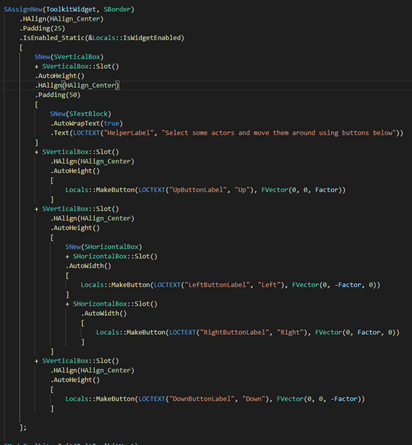
I don't necessarily mind typing the code out, it'll be slower, but I just want to make sure I'd be doing the right thing 🙂
(I have no special constraints to my UI either, just mostly static stuff and perhaps a dynamic list or two, no high frequency creation/destruction of elements like the pin mentions)
 signal pulsar
Any ideas why this is only working on right mouse button and not left?
 FReply UwInventorySlot::NativeOnMouseButtonDown(const FGeometry& InGeometry, const FPointerEvent& InMouseEvent)
FReply Local_Reply = Super::OnMouseButtonDown(InGeometry, InMouseEvent).NativeReply;
UE_LOG(LogTemp, Warning, TEXT("WHYWONTYOUWORK"))"
@signal pulsar Is it possible your action mapping in the input section of your project settings sets the wrong mouse button?
signal pulsar
Nope 😦
warm vault
😦
signal pulsar
This function is being called on the widget the other other widget is being dropped on to. The code is firing but the widget just wont move.
well it wont stay where i drop it rather
low bluff
iirc, just dropping a Widget somewhere won't add it as a child.
@signal pulsar
You'll have to do that manually in the Drop Call, based on the payload etc.
 runic patrol
Any idea why the call SNew(SRichInlineButton, Brush, TextStyle, Width, Height, Stretch); works with
void Construct(const FArguments& InArgs, const FSlateBrush* Brush, const FTextBlockStyle& TextStyle, TOptional<int32> Width, TOptional<int32> Height, EStretch::Type Stretch)
but as soon as i add another parameter (for example FText) it doesnt compile anymore
RequiredArgs::MakeRequiredArgs [...] function doesn't accept 6 arguments
split laurel
is SRichInlineButton a class created by yourself?
runic patrol
Yea, extends SCompoundWidget
runic patrol
Got it now by using Slate Attrbutes
eternal wave
how do I inherit FArguments ? I have a widget derived from SBorder I want it to have all construction arguments of the SBorder
split laurel
typically you don't want to derive widgets from other widgets, use composition. So inherit from SCompoundWidget and add an SBorder in there
mild oracle
@eternal wave SButton inherits from SBorder, check out how they do it
eternal wave
why my event is not fired when I do one right click on the SBorder? but its fired if I double click. thats weird.
SNew(SBorder) .OnMouseButtonUp(this, &SMMPlay_Relations::OnRowMouseUp)[ SNew(STextBlock).Text(FText::FromString(..)) ];
 split gorge
Hey guys, is there any documentation on this stuff or do I need trough source code?
narrow terrace
There really isn't.... I do suggest looking at Nick(Slate God) Darnell's loading screen plugin as it has a fantastic example of just showing an image(all of this setup the same way you would in UMG) and a throbber. Because it's so simple you can break it apart and figure out how to make your own slate widgets. Just kind of looking at other people's stuff actually helps with figuring out how slate works, and how powerful it is...
eternal wave
can someone elaborate the following comment from slate.
'This event does not bubble.'
main hedge
"bubble" is used for things like mouse events
for example, if you click the ui, the following will happen:
- slate will call "OnPreviewMouseButtonDown" on every widget on the path from the root to the one that was clicked, in like a top-down order. if anything returns handled, stop. (this is called a "tunneling event")
- slate will call "OnMouseButtonDown" on every widget on the path from the one that was clicked to the root, in bottom-up order. if anything returns handled, stop. (this is called a "bubbling event")
 vast steeple
hey
I'm trying to create a button that has a textblock inside it, that can be used with UMG
I created a new class and Inherited from UButton, and it seems like it retuns a shared SWidget pointer, is it possible to add a child widget to this?
 ivory tiger
Pls Help! How to add elements to canvas and set location of child
graceful trench
Question anybody knows how to create a table like thing, or knows of a place where it already exists?(So I can look at how it is done)
Never mind... DeviceManager module... 🙂
 loud ember
Im trying to create a custom details panel. How would I make a heading like this under a category. I have everything set up and have been able to make buttons and text input but I can't find any documentation on this
Figured it out. gotta use .WholeRowContent()
 halcyon grove
Hello, all. I updated to 4.24.3 (from 4.21.3) and now my Hardware Cursor is broken on a cooked build. It now displays as four squares, colored magenta, cyan, black and yellow. This was working fine in 4.21. Any idea what changed or what settings I need to fix up? Thanks! Images to follow
Should look like the first one
actually looks like the second one
 leaden tusk
I'm looking for examples of alignment, and resizing for slate. Trying to make SButton wrap around the size of its text.
leaden tusk
I figured it out with AutoWidth and AutoHeight but need to surround the button with SVerticalBox and SHorizontalBox
 last cloud
@halcyon grove amd gpu ?
halcyon grove
Intel. On macOS
Oh gpu
Let me check
Radeon Pro Vega
Was working fine on 4.21
last cloud
@halcyon grove soz so late to respond but that image shows classic amd gpu cursor glitch. something must have broke in later ue4 versions almost always solved with a gpu driver update
craggy holly
Is there any way to debug the routing of click/input events in slate?
halcyon grove
@last cloud Thanks for the info! I won’t worry about it for now then.
 royal geode
@craggy holly lemme know if there is 😮
craggy holly
Didn't find anything 😦
 ocean mason
@craggy holly other than IInputProcessor and intercept activity i don't think. https://docs.unrealengine.com/en-US/API/Runtime/Slate/Framework/Application/IInputProcessor/index.html
Interface for a Slate Input Handler
you'll have to register it like: FSlateApplication::Get().RegisterInputPreProcessor
ocean mason
you just log the actions and return false to leave it unhandled by the custom processor
ocean mason
once you intercept the KeyEvent or Pointer event you have also something like https://docs.unrealengine.com/en-US/API/Runtime/SlateCore/Input/FInputEvent/GetEventPath/index.html
i guess for this you don't need the input processor stuff
A widget path is a vertical slice through the tree.
A widget path is a vertical slice through the tree. The canonical form for widget paths is "leafmost last". The top-level window always resides at index 0. A widget path also contains a reference to a top-level SWindow that contains all the widgets in the path. The window is needed for its ability to determine its own geometry, from which the geometries of the rest of the widget can be determined.
 faint sentinel
On a scale from 0 to impossible, how hard is it to recreate something like this? An array of objects that can be added/edited from the editor. Each object can be of different class, and has different settings when expanded (such as Datasmith in this image).
split laurel
@faint sentinel 2 or 3 maybe? It uses the Instanced specifier (or EditInline, there are a couple specifiers related to that, I'm not sure which ones you need), so instead of adding an object that existed externally to the array it gets created as you choose what type it should have (probably inheriting from a common data asset class), once you chose the class an object gets instantiated for which you can configure the data
this is default ue4 functionality and not specific to slate
faint sentinel
Thanks! Yeah, I figured it out. I was initially following a tutorial for adding a module for editor customization, but it turned out to be completely unnecessary. UPROPERTY/UCLASS keywords did the trick!
split laurel
yup :) there is some magic that UBT allows you to do, but a lot of it is just doing as you go because often those kinds of things aren't really covered much. You just discover them at some point or you dont
mild oracle
Is there a simple way to force a redraw of all slate widgets? I'm changing a default font at run-time and want to force a redraw
mild oracle
I've tried calling Invalidate(EInvalidateWidget::All) on a root widget but it doesn't seem to force a redraw
 bleak tapir
There any easy way to create a single property editor from the property inside a struct? Sort of like FPropertyEditorModule::CreateSingleProperty but for struct? I know there's CreateStructureDetailView but that creates a view for all properties.
 stuck jewel
I'm experimenting and trying to apply a Property Customization to an instanced class field which is stored in an array in the details pane. If I use HeaderRow.NameContent and .ValueContent with the default CreatePropertyNameWidget() and CreatePropertyValueWidget() it works fine, but it duplicates the array's dropdown arrow which is annoying. If I use HeaderRow.WholeRowContent and manually split it, I can get rid of the array's arrow so that works fine, but I can't make the split point match up with the parent widget columns. Would anyone have any advice how to tackle either problem (either remove the duplicate array controls, or get the splitter column widths to match the parent widget or something)?
https://i.gyazo.com/e7935e29bea9312fda8ca263b0da79b6.mp4
https://i.gyazo.com/f121e2b1917b33c5c4b3f339d82be703.mp4
stuck jewel
hurrdurr that was easy. CreatePropertyValueWidget(bool bDisplayDefaultPropertyButtons = true) setting the default arg to false stops creation of the array element dropdown arrow, making the first option workable
oh great, that somehow breaks construction of children properties with customized widgets. should have known epic would have thrown a wrench in the spokes somewhere for me
PS - XY problem - the actual problem I'm trying to solve is to streamline my details pane by removing all of the annoying extra "category" foldouts that UE inserts for instanced classes. i.e. https://i.gyazo.com/4e8bcc0c22d873fd208e514ea75a462a.png
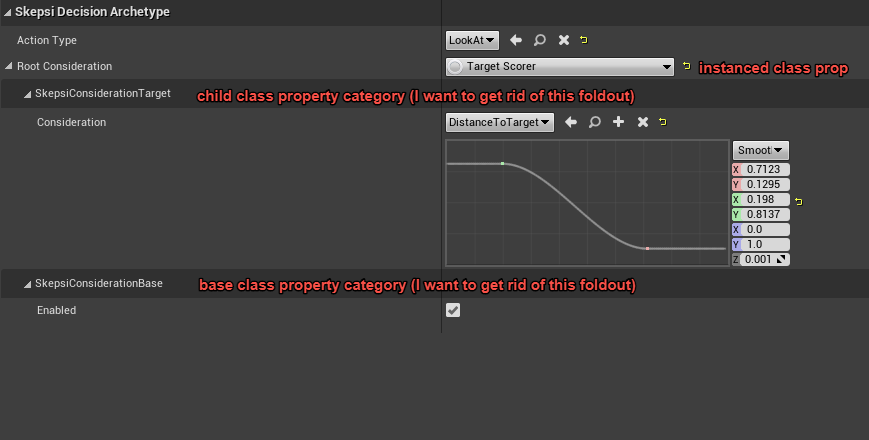
================= https://i.gyazo.com/eebd977168348e19fb92d40f54b218e3.png
 stuck jewel
well that was a freaking treat. it all works fine (custom property drawers of children included) if I don't ever call CreatePropertyNameWidget on the instanced class property. dear slate: go f a duck. sincerely - hojo
mild oracle
@stuck jewel do you have a snippet showing how you solved that?
stuck jewel
@mild oracle hiding the instanced class's category foldouts? in the class customization (using a property customization not a class customization) I iterate through all the child properties and add them to the drawer. not sure if there's a better way to do it or not but it seems to work fine
void FPropertyCustomization_SkepsiInstancedClassBase::CustomizeChildren(TSharedRef<class IPropertyHandle> StructPropertyHandle, class IDetailChildrenBuilder& StructBuilder, IPropertyTypeCustomizationUtils& StructCustomizationUtils)
{
    uint32 NumClasses;
    StructPropertyHandle->GetNumChildren(NumClasses);

    for (uint32 i = 0; i < NumClasses; i++)
    {
        TSharedRef<IPropertyHandle> ClassRef = StructPropertyHandle->GetChildHandle(i).ToSharedRef();

        uint32 NumCategories;
        ClassRef->GetNumChildren(NumCategories);

        // Iterate backward through categories because the engine always lists inherited children categories first, and I want them to be listed last (show base class properties first)
        for (int32 j = NumCategories - 1; j >= 0; j--)
        {
            TSharedRef<IPropertyHandle> CategoryRef = ClassRef->GetChildHandle(j).ToSharedRef();

            uint32 NumProperties;
            CategoryRef->GetNumChildren(NumProperties);

            for (uint32 k = 0; k < NumProperties; k++)
            {
                TSharedRef<IPropertyHandle> PropertyRef = CategoryRef->GetChildHandle(k).ToSharedRef();
                StructBuilder.AddProperty(PropertyRef);
            }
        }
    }
}```(or rather - it seems to work fine except it randomly refuses to draw some of those children properties if they have customizations themselves. which is what I was getting butthurt about above)
ancient wigeon
Hey guys
I have two questions about profiler output
- Why is glSwapBuffers() taking so long? It should just swap buffers, shouldnt it?
- Is stat unit command's Draw field showing RenderThread time or only FDrawSceneCommand time
deft wren
Why are my widgets bunched up? https://puu.sh/Fmpi1/c674b1f747.png
  VBox (Align Left, Auto Height)
    HBox (FillWidth)
      Button (FillWidth)
      Button (FillWidth)
      Checkbox (FillWidth)

I can't set my vertical box or borderto fillwidth (which is what I'd want I expect?)
(Also on a tangent this doesn't compile and I've no idea why, same syntax works with my buttons:
SNew(SCheckBox)
.OnCheckStateChanged_Static(&FSecmaVREdModeToolkit::OnModeChange)```)@main hedge Yeah that's what I'd think too (that or the border), but there's no fillwidth method on VBox
Just FillHeight
As if they naturally fill the width (which could make sense I guess since their role is only to split vertically)
main hedge
huh
no I mean the slot that the vbox is in
widgets themselves don't fill things it's all on the slots
deft wren
Yeah neither the vbox or the slot have a fillwidth method
main hedge
that doesn't seem right
are you sure it's not just autocomplete playing a joke on you
deft wren
This is the compiler error (not autocomplete): error C2039: 'FillWidth': is not a member of 'SVerticalBox::FSlot'
I've somehow managed to make VSCode's autocomplete accurate in most cases 😄
Conceptually this doesn't surprise me that much, I'd assume a vertical slot to take all the width it can (the rest of the width would just be wasted otherwise, since no other widget could go in it)
.FillWidth(1.) is what you want right?
It says it's a ratio, so that's what I've put everywhere for my buttons
(I tried much higher values too, without any impact)
main hedge
maybe first play with this layout in umg until you get it to do what you want and then just make the same thing with slate
it's much easier to do that when you can see all the layout options rather than having to guess about slate syntax lol
deft wren
Yeah I guess so, I'll try that
You wouldn't have any clue about the delegate issue by any chance?
Because this one stomps me
main hedge
maybe your function has the wrong signature?
you didn't show what the actual error is with that
deft wren
@main hedge Ah sorry, this is the error:
[1/4] Module.SecmaVR.cpp
  C:\UE_4.24\Engine\Source\Runtime\Slate\Public\Widgets/Input/SCheckBox.h(68): error C2664: 'TBaseDelegate<void,ECheckBoxState> TBaseDelegate<TTypeWrapper<void>,ECheckBoxState>::CreateStatic<>(void (__cdecl *)(ECheckBoxState))': cannot convert argument 1 from 'StaticFuncPtr' to 'void (__cdecl *)(ECheckBoxState)'
          with
          [
              StaticFuncPtr=FReply (__cdecl *)(ECheckBoxState)
          ]
  C:\UE_4.24\Engine\Source\Runtime\Slate\Public\Widgets/Input/SCheckBox.h(68): note: This conversion requires a reinterpret_cast, a C-style cast or function-style cast
  C:/Users/Cafe/Documents/Unreal Projects/SecmaVRTemplate/Plugins/SecmaVR/Source/SecmaVR/Private/SecmaVREdModeToolkit.cpp(327): note: see reference to function template instantiation 'SCheckBox::FArguments::WidgetArgsType &SCheckBox::FArguments::OnCheckStateChanged_Static<FReply(__cdecl *)(ECheckBoxState)>(StaticFuncPtr)' being compiled
          with
          [
              StaticFuncPtr=FReply (__cdecl *)(ECheckBoxState)
          ]```

And the signature: `static FReply OnModeChange(ECheckBoxState State);`

I couldn't find documentation on the subject, but all the code using this seems to do something similar(Error is pretty verbose sorry)
And that's how I attempt to use it: .OnCheckStateChanged_Static(FSecmaVREdModeToolkit::OnModeChange)
(I've tried the nonstatic version and I've tried with an &, no success)
main hedge
your function is supposed to be void
cannot convert argument 1 from 'StaticFuncPtr' to 'void (__cdecl *)(ECheckBoxState)'
with
[
    StaticFuncPtr=FReply (__cdecl *)(ECheckBoxState)
]
@main hedge God dammit, that's it!
Thanks ❤️ I always struggle to read those errors, I thought it expected an undescript "StaticFuncPtr" and I gave it the other one
jolly prawn
Can I remove this ugly line that covers my input value? The input box is made using SNumericEntryBox
 proud harness
Hey guys anyone tried to use menu anchor with input mode being game and ui? I've had the menu anchor working with ui only but i switched to game and ui, then it stopped working
split laurel
anyone know how to get rid of the grey box of a button? I inserted an image in the button's content but want the grey box gone
nvm found some button styles in SlateEditorStyle.cpp
royal geode
Yeah it's in the button style 🙂
@jolly prawn change the brush used by the spin box style
jolly prawn
Do you have a small example? I thought I tried changing the spin box style but I probably did it incorrectly.
 delicate ridge
Hey guys can anyone point me in the right direction on making a simple Background Image in slate that stretches the image to fit and not fill? I'm not able to use SScaleBox for some reason..
I'm trying to make a loading screen image that scales correctly but so far I haven't been able to make SScaleBox get recognized by the engine
 fickle garnet
Hi! So im kind of a noob at UE4 and im having a ui problem where whenever I try to drag in any element like a progress bar it gives me a 🚫 and wont let me drag it in
also sorry if this isnt the right section idk what slate or umg is
<@&213101288538374145>
spring frost
@fickle garnet Please dont ping Moderators unless there is an issue with the Server or its Members.
spring frost
Ask your question in the appropriate channel. Wait for a response, someone with an answer will respond.
If you need an answer immediately, consider posting a job listing in #looking-for-talent
fickle garnet
ok
spring frost
This is a community run server, no one here is paid to answer questions.
Please keep that in mind.
 rugged brook
Whats's the difference the between SlateWidget and SlateWidgetStyle classes?
royal geode
@rugged brook A style is used to configure a widget
eg if you want to change the background of a button etc
 fierce lark
Is anyone able to recommend some great Slate (for Editor) resources beyond the Epic documentation?
 shrewd finch
hey uhh.. quick optimization question.. im looking through my profiler data from a VR session and this "slate operations FindPathToWidget" is really cloggin things... its a blueprint project mostly..
how do i know what that's coming from? im kind of blindly just disabling properties in different widgets trying to find the one that's causing that
main hedge
are you in the editor? by default, slate runs in slow path mode in the editor, but in packaged this overhead does not exist
 inner sable
Hi, little question : is there a way to definitely disable tool tips in UE ? I always do that through Output log, and each time I restart my session, tool tips are back again.
quaint zealot
Does anyone know how to permanently disable mouse cursor while in UI input mode ?
Not just hide it, but disable it
i.e. no hover events or clicks
@violet olive looks like you had this issue
 violet olive
@quaint zealot yes, but I use UMG not slate, and I haven't managed to find a solution yet
quaint zealot
Well, I found one
Basically, there is no way to remove the cursor in UI only mode
So you have to use game only instead
Once you're in game only, you can disable input on player and pawn
And it kinda works all around
violet olive
ouch... well, I liked the built-in UI grid navigation in Unreal... but I didn't like that it ate the grid navigation input for the player controller... (it sabotaged my attempts so far at detecting which last input device was used)
quaint zealot
Nav works for me, though I'll admit I customized it
 jolly patrol
Instead of UMG/Slate I’m trying to use the web browser widget + JavaScript/CSS to make an UI. Has anyone else seen/done this? I know Coherent make something similar but it is ££
quaint zealot
Well, UMG/Slate have a Web widget
Overview of using the Web Browser widget to create in-game web browsing functionality.
pastel phoenix
and how do you make callbacks in UE, @jolly patrol
ui elements is not only for visual, they should have some functionality
quaint zealot
You get a callback on URL changes, so presumably you can work with that
And IIRC you can have some communications too
The SWebBrowser is what the launcher uses for Web views presumably
Of course I'd recommend going UMG for the deep engine integration
I worked with Web tech for game UI twice, a shitshow twice
jolly patrol
Ok cool will keep in mind, I was using the UMG web widget to make a full screen transparent browser in my game and then JS/CSS. But yes call backs will be tricky, getting vars from other blueprints/c++ 🙂 Though primarily I’m using the UI to gather financial market & news feeds and overlay them on the game screen. If that makes any sense. Thank you !
pastel phoenix
UMG web browser have no event on url change, only Slate web browser have it
quaint zealot
I'd look into the BindUObject stuff
That seems exposed to UMG
There's a full tutorial here : https://programmer.help/blogs/ue4-ue4-embedded-web-and-communication-with-web.html
UE4 is embedded in the Web and UE4 to Web communication. I use ue4.22.3, and take UE4 embedded in ECharts and communicating with ECharts as an example. 1, Custom WebBrowser Uwebbrowser is a plug-in class for browsing the Web provided by UE4. In order to communicate with the W...
jolly patrol
Thanks guys
 leaden goblet
Sup guys.
So i am trying slate out
            SNew(SVerticalBox)
            + SVerticalBox::Slot().HAlign(HAlign_Center).VAlign(VAlign_Center)
            [
                SNew(SButton).Text(LOCTEXT("ButtonTest1", "This worked, nice."))
            ]
            + SVerticalBox::Slot().HAlign(HAlign_Center).VAlign(VAlign_Center)
            [
                SNew(SButton).Text(LOCTEXT("ButtonTest2", ":thinking:"))
            ]
        ];  ```
Is there a way i can like add 2 buttons in the same box?
that way i can align them in the center together (for example)@leaden goblet wdym same box
leaden goblet
I guess it does not matter, i guess its just how it works.
Also, how do I add functionality to the button?
i saw there is .OnClicked() but its confusing
@royal geode
royal geode
Cross-platform user interface framework for creating tool and in-game UIs.
 scarlet wagon
@jolly patrol we tried coherent for a while
and it is no worth considering not mention money
yes you get nice HTML + CSS+ JavaScript
but then you get half-working editor and have to create even most basic widgets from scratch
jolly patrol
@scarlet wagon thanks for the heads up !
 spring island
hey could somone give an example of how you make a widget show up? currently im trying to make it show in a HUD class ( BeginPlay() ) linked to the GameMode class, but nothing happends Cpp //in STextWidget void TextWidget::Construct(const FArguments& InArgs) { //code for the widget... } //in HUD TSharedPtr<class TextWidget> TextWidgetPtr; ///BeginPlay()... GEngine->GameViewport->AddViewportWidgetContent(SNew(SWeakWidget).PossiblyNullContent(TextWidgetPtr)); //in GameMode HUDClass = AHeadsUpDisplay::StaticClass(); Is this the correct way or am i supposed to call the construct function somewhere?
main hedge
well you never made an instance of your widget
you gotta use SNew(STextWidget) somewhere to do that
spring island
i tried adding SNew(STextWidget); above the GEngine->... but nothing changed
oh i figured it out, you have to TSharedPtr<class TextWidget> TextWidgetPtr = SNew(STextWidget);
 severe quest
Anyone know of some good resources for getting started in slate? I'm trying to create a dynamic ui system.
Also, does anyone know how to/if you can create a data table from a slate widget style?
quaint zealot
UMG is where things are at to start with
severe quest
I'm not a newcomer to ue4, just to slate.
quaint zealot
Well, if you really want to use Slate and not UMG, there really isn't much more documentation than the engine source
You can check our source code (Helium Rain on Github) for a Slate game
severe quest
thx, ill look into it
quaint zealot
Not exactly the best resource though
severe quest
unfortunate how some things have so much documentation, and others less than a page
split laurel
It's pretty much mandatory for proper tools Dev though. But I guess they are thinking if you are gonna do custom tooling you'll need to find your way around the code base anyways lol
quaint zealot
Yeah if you're modifying the engine to add new features, the idea of a game API isn't really a thing
If you're doing game UI though, it's clear that Epic doesn't consider Slate a solution
They've never done a Slate UI in one of their games
split laurel
Oh yeah for game UI definitely
royal geode
Cross-platform user interface framework for creating tool and in-game UIs.
more than enough docs I say 😛
 turbid mantle
I have an issue, I'm learning how to use Slate and to start of I'm trying to make a crosshair in the middle of my screen. I've already made a main menu that works so I kind of know the basics but now I just cant figure out how to place a .png image in the middle of the screen. This is what I got so far:
#include "SCrosshairWidget.h"

void SCrosshairWidget::Construct(const FArguments& InArgs)
{
    CrosshairImagePath = FPaths::ProjectContentDir() / TEXT("Slate/crosshair.png");
    CrosshairImage = new FSlateImageBrush(FName(*CrosshairImagePath), FVector2D(16, 16));

    UE_LOG(LogTemp, Warning, TEXT("%s"), *CrosshairImagePath)

    ChildSlot[
        SNew(SOverlay)
        + SOverlay::Slot().HAlign(HAlign_Center).VAlign(VAlign_Center)[
            SNew(SImage).Image(CrosshairImage)
        ]
    ];
}
I've found the solution:
CrosshairTexture = LoadObject<UTexture2D>(nullptr, TEXT("/Game/Slate/crosshair.crosshair"), nullptr, LOAD_None, nullptr);

CrosshairImage= new FSlateBrush();
CrosshairImage->SetImageSize(FVector2D(16, 16));
CrosshairImage->SetResourceObject(CrosshairTexture);
I created a texture from the crosshair.png and referenced that.
spring island
i cant figure out how to set size and location for my widget, this is what i have so far: ChildSlot [ SNew(SOverlay) .IsEnabled(false) .Visibility(EVisibility::SelfHitTestInvisible) +SOverlay::Slot() .HAlign(EHorizontalAlignment::HAlign_Fill) .VAlign(EVerticalAlignment::VAlign_Fill) [ SNew(SImage) .ColorAndOpacity(FColor(0, 0, 0, 200)) .IsEnabled(false) .Visibility(EVisibility::SelfHitTestInvisible) ] +SOverlay::Slot() .HAlign(EHorizontalAlignment::HAlign_Fill) .VAlign(EVerticalAlignment::VAlign_Fill) .Padding(20.f) [ SNew(STextBlock) .ColorAndOpacity(FColor(255, 255, 255, 255)) .AutoWrapText(true) .WrappingPolicy(ETextWrappingPolicy::AllowPerCharacterWrapping) .ForceVolatile(true) .Visibility(EVisibility::HitTestInvisible) .TextStyle(&FCoreStyle::Get().GetWidgetStyle<FTextBlockStyle>("NormalText")) .Justification(ETextJustify::Left) .Text(DisplayText) ] ]; im guessing i need to set SOverlay,s size and location and then have everything else relative to it, but how?
pastel phoenix
you need a boxes for positions and sizes
for example -
            SNew(SBox)
            .WidthOverride(300)
            .HeightOverride(120)
box should be inside of overlay slot
quaint zealot
Reminder that game UI might be much easier to create with UMG
spring island
so like this:? ChildSlot [ SNew(SOverlay) .IsEnabled(false) .Visibility(EVisibility::SelfHitTestInvisible) +SOverlay::Slot() .HAlign(EHorizontalAlignment::HAlign_Fill) .VAlign(EVerticalAlignment::VAlign_Fill) [ SNew(SBox) .WidthOverride(800) .HeightOverride(300) [ SNew(SImage) .ColorAndOpacity(FColor(0, 0, 0, 200)) .IsEnabled(false) .Visibility(EVisibility::SelfHitTestInvisible) ] ] +SOverlay::Slot() .HAlign(EHorizontalAlignment::HAlign_Fill) .VAlign(EVerticalAlignment::VAlign_Fill) .Padding(20.f) [ SNew(SBox) .HeightOverride(300) .WidthOverride(800) [ SNew(STextBlock) .ColorAndOpacity(FColor(255, 255, 255, 255)) .AutoWrapText(true) .WrappingPolicy(ETextWrappingPolicy::AllowPerCharacterWrapping) .ForceVolatile(true) .Visibility(EVisibility::HitTestInvisible) .TextStyle(&FCoreStyle::Get().GetWidgetStyle<FTextBlockStyle>("NormalText")) .Justification(ETextJustify::Left) .Text(DisplayText) ] ] ]; unfortunately it does not seem to work =(
putting it before SNew(SOverlay) does not seem to work either
seems that HAlign and VAlign works when used with the box at the very top, but height/width overrides does nothing at all..
do you know any examples i could look at?
pastel phoenix
    ChildSlot
    [
        SNew(SOverlay)
        + SOverlay::Slot()
        .HAlign(HAlign_Left)
        .VAlign(VAlign_Fill)
        [
            SNew(SBox)
            .HAlign(HAlign_Fill)
            .VAlign(VAlign_Fill)
            .WidthOverride(300)
            .HeightOverride(120)
            [
                mBgImage.ToSharedRef()
            ]
        ]
works for me
fullscreen example
spring island
thanks, i got it working now
 queen citrus
Has anyone ever had the problem that after the hot reload the editor crashes with the following error message and after restarting it works.
Assertion failed: !FindSlateStyle( SlateStyleName ) [File:D:/Build/++UE4/Sync/Engine/Source/Runtime/SlateCore/Private/Styling/SlateStyleRegistry.cpp] [Line: 21]
UE4Editor_Core!AssertFailedImplV() [d:\build++ue4\sync\engine\source\runtime\core\private\misc\assertionmacros.cpp:105]
UE4Editor_Core!FDebug::CheckVerifyFailedImpl() [d:\build++ue4\sync\engine\source\runtime\core\private\misc\assertionmacros.cpp:455]
UE4Editor_SlateCore!FSlateStyleRegistry::RegisterSlateStyle() [d:\build++ue4\sync\engine\source\runtime\slatecore\private\styling\slatestyleregistry.cpp:21]
UE4Editor_1523!FApplicationStyles::Initialize() [H:\Source\UI\ApplicationStyles.cpp:16]
UE4Editor_1523!SEditorWidget::Construct() [H:\Source\UI\Editor\SEditorWidget.cpp:102]
quaint zealot
Do you use Slate styles ?
queen citrus
yes
quaint zealot
Then you need some work to get them to work with hot reload
Basically return a default slate style in your styleset
queen citrus
ok i try thanks
quaint zealot
This is what my "get style asset" function looks like
template<typename T>
static const T& GetTheme(const FName& Name = TEXT("Default"))
{
#if WITH_EDITOR
    if (Instance)
#else
    check(Instance);
#endif
    {
        return Instance->GetWidgetStyle<T>(Name);
    }
#if WITH_EDITOR
    else
    {
        return T::GetDefault();
    }
#endif
}```Instance is a static TSharedPtr<FSlateStyleSet>
The thing you create, register, then unregister and shutdown in your module callbacks
queen citrus
Maybe my StartUpModule Method is wrong. It look like this:
void FGameModule::StartupModule() {
//Hot reload hack
FSlateStyleRegistry::UnRegisterSlateStyle(FApplicationStyles::GetStyleSetName());
FSlateStyleRegistry::RegisterSlateStyle(FApplicationStyles::Get());
}
 noble meteor
Hm. I tried following this tutorial, just to get a starting point for using Slate. (https://www.ue4community.wiki/Legacy/Slate,_Hello)
But there's errors in 3 out of the 4 files created, and when I play the game it's a bunch of red A's in boxes instead of red text.
MenuHUD.cpp
SMenuSlateWidget.h
SMenuSlateWidget.cpp
 opaque garnet
Hey guys, is there any template for UCanvas size?
I see in shooter game they did this
UCanvas::MakeIcon(HUDMainTexture, 250, 468, 21, 28);
But how did they get those numbers?
I doubt they randomly guessed...so is there a template where I can see how much I gotta move my texture in a certain direction?
quaint zealot
@opaque garnet Just the size they wanted for the icon at the size they wanted
@noble meteor The red underlined text in VS are not errors, just Intellisense being bad. Compile and look at the log for errors. As to the result itself, the font is probably wrong.
Loading from a font by name like that has been deprecated for at least 5 years
This is why the Wiki was removed
You should be using the styleset system, create a style asset that would reference your fonts
Styleset example : https://github.com/arbonagw/HeliumRain/blob/master/Source/HeliumRain/UI/Style/FlareStyleSet.h
Style asset example : https://github.com/arbonagw/HeliumRain/blob/master/Source/HeliumRain/UI/Style/FlareWidgetStyleCatalog.h

GitHub
HELIUM RAIN - Full sources for Helium Rain, a realistic space opera using Unreal Engine 4 - arbonagw/HeliumRain
GitHub
HELIUM RAIN - Full sources for Helium Rain, a realistic space opera using Unreal Engine 4 - arbonagw/HeliumRain
opaque garnet
Thanks I'll look into this!
royal geode
@quaint zealot Hey Stranger, since you seem to have done quite a bit of slate/umg in HeliumRain: how do you handle styles in UMG?
In Slate all the styles can be regrouped in a single theme cpp
quaint zealot
I don't do UMG generally but AFAIK UMG assets have the style built-in as a member
royal geode
It seems to be a struct member yes: cpp UPROPERTY(EditAnywhere, BlueprintReadWrite, Category="Appearance", meta=( DisplayName="Style" )) FButtonStyle WidgetStyle;
but I wonder if there's a simple way to centralize their definitions 🤔
quaint zealot
Style in Slate is underwhelming. Some style elements aren't used, some styling isn't possible with styles. Epic appeared to go "fuck it" on them.
royal geode
well idk, I managed to use them quite neatly
although quite a few engine fixes are required yeah
quaint zealot
The way I handle style is more and more "no styling on core widgets, do the styling in custom classes"
I think progress bar is the only widget I still have an engine style struct for
Maybe scroll box too
royal geode
all your other stuff is entirely custom? You remade the widgets from scratch?
I see, you have wrapper classes for all widgets
(dang open sourcing code is awesome :D)
quaint zealot
Most of that is very different in my current project but that's the idea
royal geode
I did pretty much the same yeah
Adding wrappers everywhere
I guess I should do that for UMG as well then 
quaint zealot
The way I see it, you can do your own UMG widgets based on Slate matching widgets
Many UMG widgets are 100 lines
royal geode
yup
 umbral saddle
I just asked this in UMG but maybe this is a more appropriate place for my question.. so sorry for the double post.
Can anyone tell me the difference between GetTickSpaceGeometry and GetPaintSpaceGeometry? It looks like they are just returning different parts of an FSlateWidgetPersistentState AllottedGeometry and DesktopGeometry. One is used in Update and one is used in Repaint... but I would really love a higher level explanation of what these are. They output different vectors even if an object is not moving/being repainted.
 chilly coral
Hi, so im making a custom property type customization for a struct i have in my project and ive been succesfull setting it up, but im not sure how to proceed from here,
I would like to make my struct "some new representation" show up like FColor does where it has the drop down menu and it shows my variables. Im relatively new to editor scripting so i havent found out how the engine does it yet. Thanks.
 short hollow
You can see the file ColorStructCustomization.cpp/.h to see how the engine does it 😄
chilly coral
Thanks for the reply!
It took me a bit to think of that, looking throught engine code is new to me. if anyone if anyones curious about the solution you can use the CustomizeChildren() function in IPropertyTypeCustomization and add properties there and it will automatically do the dropdown for you aswell.
void FCustomStructDetailsCustomization::CustomizeChildren(TSharedRef<IPropertyHandle> PropertyHandle,
    IDetailChildrenBuilder& ChildBuilder, IPropertyTypeCustomizationUtils& CustomizationUtils)
{
    uint32 NumChildren;
    PropertyHandle->GetNumChildren(NumChildren);
    for (uint32 ChildIndex = 0; ChildIndex < NumChildren; ++ChildIndex)
    {
        IDetailPropertyRow& Property = ChildBuilder.AddProperty(PropertyHandle->GetChildHandle(ChildIndex).ToSharedRef());
    }
}
Nice! Glad you could find how to do it!
 green maple
Hi.
Upon launching my UE4 application I want two separate windows to be made, and I want to render two different scenes to them. Would I just make a new SWindow and attach a second render target to that new window?
not using blueprint btw
warm vault
Is there a way to get the size of an SWidget at runtime if i set it in UMG design time?
quaint zealot
GetDesiredSize ?
main hedge
that would give you the desired size, not the size the slot forces it to be
you would need to read the size from the slot directly or use get cached geometry
quaint zealot
Yeah, GetCachedGeometry it is
warm vault
How can i make this image's rotation change depending on a varaible
 warped saffron
I'm new to Slate, but have created a basic UI with some labels.. the label's get their text from a function. However, how do I update the label? I can change the value the function returns but the label never see's this - is there some sort of refresh I need to do or is it more complex than that?
quaint zealot
.Text(this, &MyClass::Callback)
warped saffron
so I have this ".Text_Raw(this, &FKJModEditorModule::GetLocalProcessUpdateString)"
warped saffron
I've copied some example, but the point being will the UI call this function every frame? constantly - so if I change what it returns the label gets updated?
Or is there some .Update() I need to call to refresh the window
quaint zealot
The UI will call this function every frame.
warped saffron
Thanks, I must have something else wrong 😮
quaint zealot
Well did you try Text( ?
Text_Raw looks like some weird variant of Text so that's suspicious at best
royal geode
@quaint zealot Text_Raw is the Text delegate created from a raw pointer
just like you'd have Text_UObject
 tired sandal
@low bluff @quaint zealot Thanks. Your conversation and shared code from a year ago just lead to finding the solution to the issue I was having setting an image on a throbber for a loading screen.
quaint zealot
@royal geode But Slate objects are not raw pointers
Though looking at the code I guess FKJModEditorModule might be
Problem here might be that FKJModEditorModule instance not being valid anymore after the creation of the text box
quaint zealot
What I mean is, all Slate objects would use .Text()
And the text callback should be on the object directly imho
Store a pointer to the data object on the widget and get the data in the callback
warped saffron
I'm struggling to figure out how to spawn an async (or different thread) for doing work on a button OnClick() - basically my OnClick() needs to execute a series of commands that are external to UE4 (like executing DOS commands, or C++ stdlib directory searching, etc.) - but if I do that in the button click UE4 stalls (as you would expect) but I can't find the ideal way to do this.. I would appreciate any hints or tips!
pastel phoenix
AsyncTask(ENamedThreads::GameThread, []()
{
  // some async doing
});
@warped saffron
warped saffron
Cheers @pastel phoenix for the pointer, I'll dig there
 spice leaf
Hey all, I have a singleton class that acts as a logger. I am trying to display that information on an in-editor slate widget and although the information is correct on a simple UE_LOG, when the slate widget is trying to get my singleton the information comes up empty. Any ideas?
royal geode
Not really a slate issue is it
spice leaf
No idea what it might be so I figured I'd ask in both channels
royal geode
Like you messed up something in your code somewhere
Hard to say anything without seeing the full code
narrow terrace
Hello would anybody here be able to help me out with the scrollbox? I'm trying to figure out how to allow the mouse button down function to return an Unhandled reply but still allow for the scrollbox to be dragable...
craggy holly
You can possibly override SScrollBox::OnMouseButtonDown() to just return an unhandled event. Not sure it'll behave properly though because focus won't be properly applied then.
craggy holly
Put the box in a container widget that acts as a border/header and make that dragable instead
warm vault
anyone know anything about this d3d11 rhi crash?
quaint zealot
What RHI crash ?
warm vault
quaint zealot
How is that Slate related ?
quaint zealot
Do you have Slate code ?
quaint zealot
If you don't have Slate code there is nothing for you to fix here, the renderer just crashed. Report the bug if you're on 4.25
 unborn nimbus
I'm getting this error how can I fix it ? : D/UE4: Slate vertex buffer is too large (65568) to work with uint16 indices*
 cyan iris
Hey everyone, i'm searching for a minimal project like "hello world" for slate ui
I worked through around 4 tutorials already and not one tutorial worked
quaint zealot
There really isn't much documentation. Usually you'd mirror what other editor tools do
cyan iris
@quaint zealot But isn't there just a very minimal project where you create a SWidget with Text in it and add it to the Viewport?
Either by creating a HUD or something else?
I can't even google for Slate Tutorials since all seem to mix up with UMG at some point
quaint zealot
If you're doing a game, UMG is very much the recommended approach
Epic does not consider Slate a game development tool
cyan iris
I'm creating a GUI for Moodle inside Unreal
Where you can select courses etc.
And unfortunatly i have to do this with code only
quaint zealot
As someone who does use Slate for game UI, the reason there is no documentation is that Slate really is a mess to use, it's C++ intensive, widget styling is very inconsistent, and you'll end up rewriting all widgets yourself
UMG is a much much much easier time if you don't have a lot of work invested in Slate already
cyan iris
I mean, it's nice to have a WYSIWYG-Editor


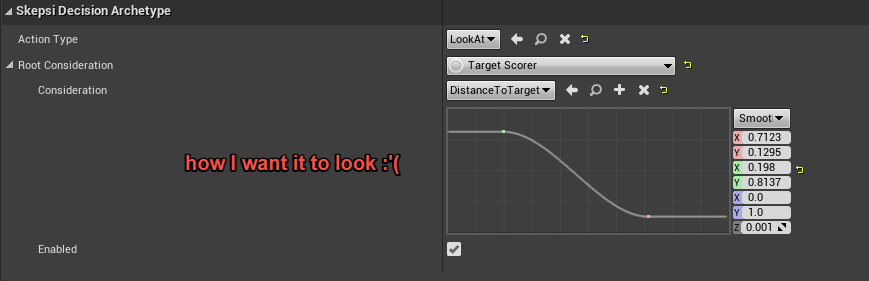

Ye, but i kinda think UE in general doesn't handle UI very well. At least with what i researched...
I would say even JavaFX handles UI 1mio. times better and that kinda dissapoints me
I saw that people use Web-Designs in Unreal instead using Unreals UI.
Would you suggest starting with creating HTMLs to display?
Otherwise i would have to go with Slate
quaint zealot
UMG is perfectly fine
It's what I would suggest
There are multiple ways to use HTML in UE4, with or without paid solutions
And you can use Slate too, but as you found out, it has issues
cyan iris
Did you already work with HTML and would you suggest it over Slate?
Or would you rather use Slate?
quaint zealot
In particular if you want to have style on buttons etc - you'll need 3 new classes just for that
No, I would never suggest HTML
cyan iris
Ye, i saw styling is also kinda weird
But thats a problem in UMG too or am i wrong?
I never saw options like dropshadow etc.
And cloning a widget just to offset it by hand is kinda weird imo
quaint zealot
You're in game development here, so "drop shadows" is a border with a shadow image
cyan iris
I guess i ask my mentor if i'm allowed to go with UMG then
quaint zealot
UMG is quie straightforward for styling, it's much more consistent than Slate anyway. To this day after 6 years of Slate I have no idea which of the two color types are accepted by the .Color() attribute of a given widget
What UMG doesn't do is what Slate attempt badly, which is HTML style stylesheets
UMG is entirely per-widget styling instead, so you create a styled button and use that button in your widgets
But Slate does this terribly and you end up doing the same thing, except it's C++ instead
cyan iris
hmm, you kinda convinced me, but i would like to give Slate a last try before i ask
Maybe i could use this experience for something later
Do you have a good tutorial for displaying one simple widget on screen?
quaint zealot
No, I don't
What I do have is the source code for a full Slate game : https://github.com/arbonagw/HeliumRain/tree/master/Source/HeliumRain/UI
GitHub
HELIUM RAIN - Full sources for Helium Rain, a realistic space opera using Unreal Engine 4 - arbonagw/HeliumRain
cyan iris
Thanks for all the information tho!
It really helped me out :)
quaint zealot
Here's how I create widgets on screen : https://github.com/arbonagw/HeliumRain/blob/master/Source/HeliumRain/Player/FlareHUD.cpp#L196
GitHub
HELIUM RAIN - Full sources for Helium Rain, a realistic space opera using Unreal Engine 4 - arbonagw/HeliumRain
Basically SNew + the AddViewportWidgetContent thing
cyan iris
Thanks, i'll have a look and try to understand what and how you did this :)
cyan iris
@quaint zealot, thanks, i managed to reproduce a minimal UI.
Is there a basic font i have to set in UE?
SNew(STextBlock)
        .ShadowColorAndOpacity(FLinearColor::Black)
        .ColorAndOpacity(FLinearColor::Red)
        .ShadowOffset(FIntPoint(-1, 1))
        .Font(FSlateFontInfo("Verdana", 80))
Need a style asset, with a font you'll set in a Blueprint asset based on that style
cyan iris
Is there a way without a blueprint?
Just importing a fontname.ttf?
For example Roboto?
quaint zealot
All Slate assets are going to be in the content browser, just like regular textures
Style is just an asset
cyan iris
@quaint zealot So i tried to create an asset to apply the BasicFont to every UI-Element via Project-Settings
It actually works with the on-screen-message but not with my regular "Hello-World"
I tried using either:
.Font(FSlateFontInfo("Roboto-Bold", 80))
or
.Font(FSlateFontInfo("BasicFont", 80))
Both don't seem to work
If i remove this line totally i can see the hello world, but cant adjust the textsize
Since i didnt find an option for this
quaint zealot
'FSlateFontInfo("BasicFont", 80)' is never going to work
need a FSlateFontInfo UPROPERTY, asset based on that class, asset created, and used from C++ using the styleset system
Like I said, Slate styling is hard
You can't have the font defined in code that way
Used to be the way in 2013, but no longer
Check the Style folder of the repo I linked earlier for some example
cyan iris
I found a way @quaint zealot :)
.Font(FSlateFontInfo(FPaths::EngineContentDir() / TEXT("Slate/Fonts/Roboto-Bold.ttf"), 80)) does the trick
quaint zealot
Alright
Just make sure to get the font packaged too, because this font won't be in the package
Perks of UPROPERTY + a stylesheet is that it's just another asset
Like you'll do for images
cyan iris
Ye, i hope this works x_X
Thanks a lot for the help tho :)
I will try the asset solution later if i discussed this with my team-member !

cyan iris
Is there a way to remove the opacity from an Image?
bc i guess thats what the checkered pattern is
I used
SNew(SImage).ColorAndOpacity(FColor::Green)
``` for thisWell, what's the image used ?
cyan iris
Then i tried using a SBorder, since it seems to work in UMG
SNew(SBorder)
                .ForegroundColor(FColor::Green)
                .ColorAndOpacity(FColor::Green)
                .BorderBackgroundColor(FColor::Green)
So you have no image at all, and you just have the default engine material instead, except tinted green.
cyan iris
Yes, i tried using a brush for that
with a tint
But maybe i understood something wrong
quaint zealot
Well, what is it that you actually want to do here ?
cyan iris
Just a Box