#slate
1 messages · Page 17 of 1
 oak grove
 silent patrol
Calling UObject code on multiple threads is sketchy, triggering blueprints, a lot of the interactions and material related operations are not permitted outside the gamethread...etc
oak grove
I see, makes sense. Thanks for the heads up!
silent patrol
Also - the whole point of the loading screens is to be able to load before the game is done loading, and the assets are available, e.g. the Startup loading screen happens before the engine is even initialized, so loading anything that's Game related, will likely fail or cause issues b/c those modules aren't even good to go yet
loading screens are just special casey 😃
I use UTextures, even that is kinddaaaa sketchy
silent patrol
np
oak grove
So best suggestion to improve it is to nope out of there?
git revert and don't look back
silent patrol
basically
 simple vale
Hey guys. Need some help. 😃 I try to create ListView for my structure customization. But it's not working and i don't know why. I make this code in cpp file:

And then i add my struct variable to blueprint or another struct in editor, i get this result

and here my struct definition https://i.gyazo.com/2f6d2d02fb2fe20cf9f7ab9deb11ca06.png
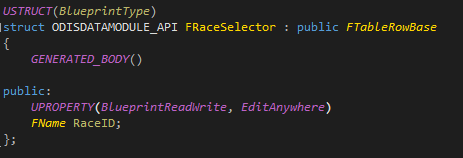
 limpid atlas
@simple vale You're passing a pointer to MakeShareable, to local variable (stack) memory.
You need to always pass a heap pointer. So in this case, it should be MakeShareable(new FName(RowNamesList[i])).
simple vale
oh. thanks man. )
 high hedge
How do I make something like this (I just started learning Slate It is probably obvious) I tried SDetailSingleItemRow but I can't even include it, SDetailSingleItemRow.h is private
I need it for asset selection
 earnest gyro
@high hedge looks like you want to create a details panel
 craggy holly
IDetailsPanelCustomization
high hedge
I have a custom window in which I want to create the thing I took a screenshot of. Isn't IDetailsPanelCustomization for customizing existing panels?
limpid atlas
@high hedge Just use the WidgetReflector on it to find out what widget it is.
I know IContentBrowserSingleton lets you create an asset picker menu, but for the combo box variant I can't recall what it is exactly.
high hedge
this what the widget reflector shows (it is more and more apparent to me that I have no idea how Slate works)
I will try IContentBrowserSingleton
limpid atlas
If you dig down from that node, you should hit something that looks like asset picker or some such, along with thumbnail view widget maybe.
Hmm, it's SPropertyEditorAsset, which isn't going to help you if you want to use it outside of a details panel. Unfortunately issues like that are common when trying to reuse editor widgets.
ContentBrowserSingleton is probably your best bet, but you'll have to hook it up to an SComboBox I think, as it only gives you the dropdown menu itself.
SComboButton, rather.
high hedge
Thank you, will try it
 sly adder
Quick question: Can you define a command without a name?
UI_COMMAND(Command, "Do This", "Do this by doing this", EUserInterfaceActionType::Button, FInputChord());```Where "Do this" wouldn't show on the toolbar
sly adder
ToolbarBuilder.AddToolBarButton(FQGDebuggerCommands::Get().Command, NAME_None, FText::GetEmpty());
^^ That worked. LabelOverride parameter
 lethal kite
widget switcher is the simplest option
 steady walrus
Hello, I added a new toolbar button for create new slate window. but this button add a lot of window whenever when I click it. Is there any way to control it if is valid ? or something like that
FModuleManager::LoadModuleChecked<IMainFrameModule>
(TEXT("MainFrame"));
if (MainFrameModule.GetParentWindow().IsValid())
{
FSlateApplication::Get().AddWindowAsNativeChild(MyToolBarWindow, MainFrameModule.GetParentWindow().ToSharedRef());
GEngine->AddOnScreenDebugMessage(-1, 5.f, FColor::Red, TEXT("this is if "));
}
else {
FSlateApplication::Get().AddWindow(MyToolBarWindow);
GEngine->AddOnScreenDebugMessage(-1, 5.f, FColor::Black, TEXT("this is else!"));
}``` low bluff
Well, can't you save the Window?
FSlateApplication::Get().AddWindowAsNativeChild
Does that not return anything?
steady walrus
I just want add only one time.. but its add every time whenever I click to my new button
FSlateApplication::Get().AddWindowAsNativeChild this add everytime
steady walrus
yes
low bluff
Then save it to a variable and check if the variable is valid
And only add the window if it's not valid
steady walrus
got it I will try
low bluff
Something like
In header file:
TSharedRef<SWindow> OpenedWindow;
In cpp file:
IMainFrameModule& MainFrameModule =
            FModuleManager::LoadModuleChecked<IMainFrameModule>
            (TEXT("MainFrame"));

if (MainFrameModule.GetParentWindow().IsValid() && OpenedWindow.IsValid() == false)
{
            OpenedWindow = FSlateApplication::Get().AddWindowAsNativeChild(MyToolBarWindow, MainFrameModule.GetParentWindow().ToSharedRef());
            GEngine->AddOnScreenDebugMessage(-1, 5.f, FColor::Red, TEXT("this is if "));
}
else
{
            FSlateApplication::Get().AddWindow(MyToolBarWindow);
            GEngine->AddOnScreenDebugMessage(-1, 5.f, FColor::Black, TEXT("this is else!"));
}
Then you only need to make sure you somewhat clear the variable again I assume
steady walrus
@low bluff is it problem if I write if else condition in .h files? or is it legal
low bluff
Should be in your cpp but there speaks nothing against having it in the header
steady walrus
I couldnt find any destroy method for SWindow. Isn't there any method?
steady walrus
I still looking remove SWindow method? Any idea?
steady walrus
ok I found a solution. here it is
        TSharedPtr<SWindow> ParentWindow = MainFrameModule.GetParentWindow();

        if (ParentWindow.IsValid() && OpenWindow.IsValid()==false)
        {

            OpenWindow=FSlateApplication::Get().AddWindowAsNativeChild(MyToolBarWindow.ToSharedRef(), ParentWindow.ToSharedRef());


            GEngine->AddOnScreenDebugMessage(-1, 5.f, FColor::Red, TEXT("active window"));


        }
        else {

            OpenWindow.Get()->DestroyWindowImmediately();
            OpenWindow.Reset();

            GEngine->AddOnScreenDebugMessage(-1, 5.f, FColor::Red, TEXT("sss"));

}```I'm trying to create my own button and when I click it I want list class(for exmp: I have 20 characterBP and they have struct. age, name , height, hair color... ). My function will list it according my filter. Could someone help me? I extended ue4 editor already created window and added some components.
 quaint zealot
What's your question ?
steady walrus
My question about Custom Content Browser Filter. I tried access content browser via cpp . I did create object FContentBrowserModule& ContentBrowserModule = FModuleManager::Get().LoadModuleChecked<FContentBrowserModule>(TEXT("ContentBrowser")); but I dont know how to use it? How can I get all BP Classes and filter them according my struct?
quaint zealot
I don't know. Maybe look at how filters are implemented in the editor.
 plain portal
you must extend UContentBrowserFrontEndFilterExtension look at other classes thet extend it
steady walrus
@plain portal I did it but I dunno what should I write in it ?
quaint zealot
Do you really need a custom filter, BTW ? Using folders to sort content works too 😃
steady walrus
lets imagine if I have 20 character
and all of them have their own properties(like age, height, hair color)
plain portal
and you want to only show characters with hair color blue?
plain portal
well as I said, look at examples, I did something similar not so long ago, and the examples helped
look at UGameplayTagSearchFilter
steady walrus
I already check all of them. I think my cpp knowledge not enough to do this. I just had experience with BP . I started work cpp 3 week ago. I need work more... ok thanks a lot @plain portal for your suggestion
plain portal
oh, then yes, you will need to start learning a lot 😃
quaint zealot
I mean, this sounds like a lot of work for unclear value, for 20 characters i'm sure you can remember which is which
steady walrus
yeha for game creator its ok. but for anyone else?
quaint zealot
What do you mean ? if it's an editor feature, only you will get it
steady walrus
for another game creator or game developers or game designer whatever 😃
I know its so easy via BP. but in editor a hard for me at least 😃 but I will do it and share from here
quaint zealot
I mean, an Excel sheet with attributes on columns and a line for each character would present all that data (and you could actually import that into a DataTable in UE4)
It's okay to develop tools, but are you sure that's the best use of your time ?
steady walrus
yeah because this project which I work on it will be a special framework for project.
I will prepare whole character BPs, ActorBPs etc. and game designer only will write for exmp. character with yellow hair and etc.
for make easier
quaint zealot
Why not just do your game right away ?
steady walrus
Its not game exactly. Its VRET project
Virtual Reality Exposure Therapy
and when someone want a scenario we will use it
I know sounds like complex
low bluff
How would one go about using DrawVisualizationHUD to add a Slate Widget to the EditorViewport?
limpid atlas
That's for drawing directly to canvas.
If you have a widget, you need to get hold of the viewport widget itself somehow and add it as a child.
low bluff
Yeah got that far then, but at the end went back to just using the Canvas with text and the context menu for options
 toxic dove
how would I modify an SImage's pivot?
it defaults to 0,0, I'd like to make it 0.5, 0.5
found it
RenderTransformPivot
steady walrus
Hello, Can I define slate components as variable?
TSharedPtr<SEditableText> ageInput; I tried like this
and also SVerticalBox::Slot().VAlign(VAlign_Center)[ ageInput ]
SAssignNew(Variable, type)
 trim kestrel
You can use SAssignNew to create it and set a variable to point to it, all inline, as @quaint zealot mentioned, @steady walrus.
But specifically, the error is saying that you can't use TSharedPtr as the value for the [] operator on slots. You need a TSharedRef. Just call ToSharedRef() on your shared pointer variable - that'll get you a shared reference.
IE: ageInput.ToSharedRef()
 warm vault
This is more of an editor-related question, but does anyone know any examples of how to make a text box that autocompletes or autosuggests?
 fluid ore
@@
craggy holly
Is there any documentation anywhere regarding managing the lifetime of objects create inside slate widgets?
E.g, creating a UTexture2D in an SLeafWidget and adding it to root.
When the widget is destroyed, I want to ensure that the texture is removed from root and can be destroyed
Do I just override the destructor for a Slate Widget or is there some native destroy function I should override?
limpid atlas
@craggy holly Better to just FGCObject instead of adding to root. It will handle referencing for you.
See SInvalidationPanel class.
quaint zealot
@craggy holly I use regular UObjects for controlling lifetimes myself
craggy holly
Thanks both!
@limpid atlas Just looking at SInvalidationPanel, so by inheriting from FGCObject, I can just add the texture to the collector in AddReferencedObjects?
Then when the widget is removed for whatever reason, the texture should get cleaned up
limpid atlas
@craggy holly When the widget is destroyed, yep.
craggy holly
Awesome. tah!
warm vault
Does anyone know how to create a new window with multiple tabs instead of just one, when you click on a button in the toolbar?
I already have it working with one, but I don't see how to make it two tabs
I already discovered SDockTabStack btw, but I coudln't figure out how to use it
also, there are two widgets, SDockTab and SDockableTab that are completly unrelated and while code examples use SDockTab, SDockTabStack seems to support only SDockableTab
lol, I just saw that SDockTabStack isn't even implemented properly... It's functions have an empty body
warm vault
ok now I found out that SDockingTabStack (which seems to be the one to be used) isn't public
low bluff
You basically want multiple windows
Or?
Cause the default "Tab" that you use to move the tab to multiple different other windows is kinda per window
warm vault
Yeah, multiple windows, but I want to create all of them with one button click and I want them to be in the same window
limpid atlas
@warm vault You would likely want to create your own nested tab manager for that.
Have a search in the engine code for uses of FTabManager to see how. It's fairly involved though, so if it's not super important, you might not want to bother 😉
warm vault
I agree, I wouldnt want to bother with that then
low bluff
Non-dockable tabs are really easy though
warm vault
then I will just be satisfied with creating multiple windows and arranging them by myself 😄
low bluff
If you are fine with that :D
warm vault
whats the difference between dockable and non-dockable tabs?
there are only SDockTabs, right?
low bluff
Na, don't get me wrong. Just tabs you click that show different content below them
The MergeActor stuff
Has these neat buttons at the top
So if you find that window, you can at least do these kinds of sub tabs
low bluff
That's also a way (:
warm vault
and I have to moved them into the same window once and UE remembers their placement
so I kind of get the effect I want
but maybe I want to use these sub-tabs 😄
whats the widget called?
low bluff
Ehm, just check for MergeActorDialog or something like that
The tabs are checkboxes that have an index bound to them
warm vault
 sudden fossil
I have a UMG WidgetBlueprint, is there an easy way to transfer it to Slate?
trim kestrel
"Transfer" it? Like, convert it and get rid of the UMG asset? No.
If you just want the Slate widget created by the UMG widget at runtime, GetCachedWidget
sudden fossil
Well, I have an UMG Widget Blueprint, but the function in the classes I want to use uses SWidget.
 drowsy galleon
Use GetCachedWidget then
trim kestrel
Yep. UWidget simply wraps Slate widgets and provide a UMG API. UUserWidget is a UWidget subclass that supports having a tree of UWidgets inside of it.
Ultimately, everything boils down to UWidgets wrapping SWidgets.
sudden fossil
I wish I had an idea how Slate works, but it's so unreadable D:
trim kestrel
Slate is a few things. One of them is the weird kind-of-horrific-abuse of C++ operator overloading to make it look like a declarative language and one giant statement that can't be easily debugged.
But also, more broadly, the whole Slate renderer, input routing behavior, etc.
craggy holly
I actually quite like Slate syntax once you get used to it :p
quaint zealot
I love the Slate syntax, though it definitely is an horrific abuse of C++ operator overloading
low bluff
Once you understand the container logic of UMG you'll have no problem reading slate
As long as vs doesn't screw up the format
It's just widget in widget in widget and below each widget listing you can add options, bind functions, set variables
For generic ui like a few boxes and buttons, it's really not that hard to use
Still a monster though
sudden fossil
Well, UMG is visual, Slate is not 😄
toxic dove
are there VS settings to fucking not fuck up slate formatting
 scarlet wagon
Biggest issue with overloading [] for slate
it makes literally impossible to debug
especially if you have long widget tree
and debugger can only show you that there is something wrong in tree but not where
and I don't like that slate can't really work in retained mode.. ;s
quaint zealot
To be fair I've almost never got anything to debug in the Construct() call
Despite writing quite a high volume of Slate code
Mostly it's just creating widgets, the crashy parts are when they're running
 hasty scarab
Anyone have a good web-page or video overview, tutorial, etc... for handling the navigation/focus system inherit to Slate?
 dense gorge
There aren't any shortcuts to convert Slate widgets to UMG widgets, right? I'm pretty sure there aren't other than just manually remaking everything by hand but I wanted to check to be safe so that I don't waste a bunch of time.
hasty scarab
There is no automated way, you need to wrap your Slate widget with a UUserWidget, UPanelWidget, or some other type.
I've hit a wall with SlateApplication::GetUserIndexForController not using a mapping I can tie into with engine changes ... Anyone here create or knows of a good workaround for mapping a gamepad to ControllerId=1 (while ControllerId=0 uses the keyboard?)
warm vault
@dense gorge what does speak against making oyur slate widget available to UMG?
you can still make properties visible to blueprints through UPROPERTY
same for delegates and stuff
low bluff
@hasty scarab There should already be a general setting to move the Controller to ID 1
So that you can have Keyboard and Controller for first and second player
Not really slate related, but more input
hasty scarab
@low bluff how would this work? From what I can tell in int32 UserIndex = GetUserIndexForController(ControllerId) it's just passing through the ControllerId. And the ControllerId comes from the input interface (e.g. XInput on Windows).
low bluff
I just know that people struggled with the controller offset and someone PRd a change that allows you to offset it so that the second Player starts with Controller
And User index for controller sounds more like the local for a player controller reference
hasty scarab
Right, multiple players in local space (nothing network based), both sharing the same viewport.
Aside, I know if I force a remapping by deriving off of GameViewportClient it works.
bool UMyViewportClient::InputKey(FViewport* Viewport, int32 ControllerId, FKey Key, EInputEvent EventType, float AmountDepressed, bool bGamepad) { if ( bGamepad ) { ControllerId=1; } // TODO: test force remapping controller to P2 return Super::InputKey(Viewport, ControllerId, Key, EventType, AmountDepressed, bGamepad); }
craggy holly
Has anybody done much work with FSlateDynamicImageBrush?
I want to know if I can provide it with any renderable resource (like a UI material or a texture) and whether it will render it correctly or not
Basically I'm trying to parse materials/textures from a Rich Text Block and display them using an image decorator
I've got it working with Slate Brush Assets, but i want to be able to specify any texture/material if possible
 mild oracle
@craggy holly I'd love to know if you managed to do this, I only got the image decorator working with PNGs on-disk and brushes
toxic dove
     * Inserts a widget at a specific index.  This does not update the live slate version, it requires
     * a rebuild of the whole UI to see a change.
     */
UPanelSlot* InsertChildAt(int32 Index, UWidget* Content);```someone ever used this?
what does "rebuild of the whole UI" entail?
mild oracle
@toxic dove You're dealing with the problem of wanting to insert children in Horizontal/Vertical boxes at particular indices?
mild oracle
Yep, I tried for a while
In the end I found it easier to save pointers to children, remove them all from the box, and re-add
or to use another type of container like a grid one that lets me set row/col
mild oracle
yep, at runtime it's fine
you get the correctly cast slot for the widget, and call SetRow
mild oracle
Try it and find out 😃 You can even do it from Blueprints
toxic dove
thats funny say that again
simple vale
Hi guys. I need help. 😃 How i can convert editor viewport screen point to editor viewport world point?
 paper heart
` FLoadingScreenAttributes LoadingScreen;
LoadingScreen.bAutoCompleteWhenLoadingCompletes = true;
LoadingScreen.WidgetLoadingScreen = FLoadingScreenAttributes::NewTestLoadingScreenWidget();
GetMoviePlayer()->SetupLoadingScreen(LoadingScreen);`
Hey I found this code for creating a loading screen, I've never touched slate, how can I define my widget and then find it from the code here?
low bluff
A widget is just another class
You can use SCompoundWidget as parent
It works similar to UMG
You have a main SLOT (ChildSlot)
And you can put other widget in there
for example a SHorizontalBox
And in its slots more widgets
etc. etc. just like the hierarchy of UMG
There should be examples on what function to use and how the header and cpp file of a widget should look like
Don't have them at hand right now
paper heart
can't I create that widget with blueprints and load in C++?
like with UMG I don't need any code
low bluff
Already asked that. It seems it doesn't tick/work properly
You can create a UUserWidget
Which is basically the C++ parent of a UMG widget
And grab the CachedWidget
Which should be the underlying SWidget
But that doesn't seem to work, at least that's what I got told
paper heart
jesus xD
who could've thought that such a simple thing as loading screen would be so tedious
low bluff
It is only if you haven't stepped into this
In general it takes a few minutes to setup
You can later even feed the Widget values that you define in the game instance
Such as images, text, etc.
I do that in a client's project to randomly grab loading screen images
paper heart
well slate seems bullshit so far
like 2 pages of code to set up a widget with 2 buttons
low bluff
That's c++ compared to Blueprints in general
But trust me, the Loading screens work properly
So it's worth the fight
#include "Hoverloop.h"
#include "LoadingScreen_Base.h"
#include "SThrobber.h"

void SLoadingScreen_Base::Construct(const FArguments& InArgs)
{
    LoadingScreenImages = InArgs._InLoadingScreenImages;

    const int32 RandomIndex = FMath::RandRange(0, LoadingScreenImages.Num() - 1);

    ChildSlot
    [
        SNew(SOverlay)
        + SOverlay::Slot()
        [
            SNew(SBorder)
            .HAlign(HAlign_Fill)
            .VAlign(VAlign_Fill)
            .BorderImage(&LoadingScreenImages[RandomIndex])
        ]
        + SOverlay::Slot()
        [
            SNew(SBox)
            .Padding(FMargin(40.f))
            .HAlign(HAlign_Center)
            .VAlign(VAlign_Bottom)
            [
                SNew(SVerticalBox)
                + SVerticalBox::Slot()
                .HAlign(HAlign_Center)
                [
                    SNew(STextBlock)
                    .Text(FText::FromString("LOADING"))
                    .Font(FSlateFontInfo(FPaths::EngineContentDir() / TEXT("Slate/Fonts/Roboto-Bold.ttf"), 16))
                    .Justification(ETextJustify::Center)
                ]
                + SVerticalBox::Slot()
                [
                    SNew(SThrobber)
                    .NumPieces(8)
                    .Animate(SThrobber::Horizontal)
                ]
            ]
        ]
    ];
}
That's all I needed for mine
paper heart
I know they work properly
tested already with the default one
use of undefined type 'SThrobber'
any idea how to deal with this?
low bluff
SThrobber sits in some module
paper heart
okay found it
low bluff
If a Header can't be found, then yo uneed to include the module in your build.cs
Most important is still:
"UMG",
"Slate",
"SlateCore"
so basically how do you guys make slate widgets?
low bluff
Don't know if that fixes it
paper heart
because you can't preview them like umgs right?
low bluff
Well no, you'll have to test ingame
I mean, you really don't HAVE to use slate in most cases
It just turns out that it's needed here
Slate widgets can be wrapped into UWidgets
(Not UUserWidget)
These will then show up in your UMG
Just like the other elements you can drag and drop in there
So if at all, use Slate to extend your UMG
paper heart
I tried to use UMG as my loading screen
used async tasks and threads
but the engine crashed : P
low bluff
Yeah, don't do that :D
paper heart
ue seems so random to me xD
like I was messing with game instance to add background loading/unloading
and suddenly my game instance variables don't work anymore
xD
`class MyLittleLoadingScreen : public SCompoundWidget
{
public:
SLATE_BEGIN_ARGS(MyLittleLoadingScreen) {}
SLATE_END_ARGS()
    void Construct(const FArguments& InArgs)
{
    ChildSlot
        [
            SNew(SVerticalBox)
            + SVerticalBox::Slot()
        .VAlign(VAlign_Center)
        .HAlign(HAlign_Center)
        [
            SNew(SThrobber)
            .Visibility(this, &MyLittleLoadingScreen::GetLoadIndicatorVisibility)
        ]
    + SVerticalBox::Slot()
        .VAlign(VAlign_Center)
        .HAlign(HAlign_Center)
        [
            SNew(STextBlock)
            .Text(NSLOCTEXT("MoviePlayerTestLoadingScreen", "LoadingComplete", "Loading complete!"))
        .Visibility(this, &MyLittleLoadingScreen::GetMessageIndicatorVisibility)
        ]
        ];
}
private:
EVisibility GetLoadIndicatorVisibility() const
{
return GetMoviePlayer()->IsLoadingFinished() ? EVisibility::Collapsed : EVisibility::Visible;
}
EVisibility GetMessageIndicatorVisibility() const
{
    return GetMoviePlayer()->IsLoadingFinished() ? EVisibility::Visible : EVisibility::Collapsed;
}
};`
could you just tell me how to make the throbber bigger and green?
: P
made it bigger using NumPieces
can I make it green? 😛
low bluff
Ehm, not 100% sure
Maybe via a Tint or color
Just check what comes up when you use "."
What you can set there is what is defined in the "SLATE_BEGIN_ARGS"
So you could check the SThrobber
and its args
and see what you can do
paper heart
probably nothing will come up when I use "." because intellisense is shit 😛
low bluff
Gnah, open the SThrobber header
SLATE_BEGIN_ARGS(SCircularThrobber)
        : _PieceImage( FCoreStyle::Get().GetBrush( "Throbber.CircleChunk" ) )
        , _NumPieces( 6 )
        , _Period( 0.75f )
        , _Radius( 16.f )
        {}
So I guess you could maybe modify the PieceImage
It's a "FSlateBrush"
warm vault
I think there is a loadingscreen plugin that exposes some things to create loadingscreens from blueprint

GitHub
LoadingScreen - A plugin for Unreal Engine 4 to expose simple controls for managing load screens.
and I think it can easily be extended to show a UMG widget on top of the loading screen
should be a few lines of code
if that helps @paper heart
paper heart
@warm vault nope : P
warm vault
what is it lacking?
paper heart
I have no idea how to show umg there
and even if I did, I don't know if it wouldn't freeze
I've already used it to display a slate loading screen : P
warm vault
I think I know how to do it, I will see if I can add it this weekend, since I will need code like this later anyway
paper heart
I suggest you test it with a throbber
because non moving umgs load fine
but as soon as you need something animated, it goes poop
warm vault
you mean you could add non-animated widgets to this plugin?
paper heart
without any plugin I think
or wait
I think i just grabbed a part of the code
and hooked my own umg stuff there
warm vault
I see
paper heart
`void UMyGameInstance::Init()
{
Super::Init();
FCoreUObjectDelegates::PreLoadMap.AddUObject(this, &UMyGameInstance::BeginLoadingScreen);
FCoreUObjectDelegates::PostLoadMapWithWorld.AddUObject(this, &UMyGameInstance::EndLoadingScreen);
}`
warm vault
you should expose an asset pointer to the UMG widget, set it from the config window, then load it via .Load() and then get a valid instance of the widget with .Get()
paper heart
I've overwritten these functions in a blueprint and displayed umg, my main problem was that it freezes because the game freezes during loading and slate/ movie player is running on a separate thread
warm vault
which you should be able to add in a child slot, if the loading screen allows any
paper heart
but it runs on the same thread as the game and freezes during loading 😛
when I tried async tasks, ue crashed
warm vault
umg runs on the same thread as the game thread, but slate does not?
paper heart
I don't know if it's slate or movie player
but movie player runs on a separate thread and I think it works because of it
warm vault
but it makes sense that some things freeze, since a lot of things get invalidated during a loading screen
so you wouldnt want many things to run in the background
paper heart
yeah but come on, I just wanted a throbber lol
and the things I've gone through to have it made me dislike throbbers and loading screens in general
😄
warm vault
then how important can it be to show a throbber? xD
well if you tried my approach already I guess I dont have to try anytime soon
paper heart
a throbber is a must have 😛
at any point there must be something moving on the screen!
😛
warm vault
well yes, i guess you are right
 bitter basin
Anyone know whether it's possible to tweak the shooter Game code UI so rather than "AddToViewport" I can just add it to a UMG widget, or even assign a viewport to a UMG in world object. Basically just looking for a quick an easy port. At some point I will just redo all of the UI, but for some quick prototyping I just want to hack it onto an in world UMG if possible
toxic dove
course its possible
go look at where its adding the widgets and change it to your liking
warm vault
can anyone tell me which slate widget I can/should use to render a dynamic texture?
I already know how to create a FSlateTexture2DRHIRef, but what widget uses this to render the texture?
limpid atlas
@warm vault I would guess SImage using an FSlateDynamicImageBrush. But not sure how it works.
warm vault
thank you, but the issue lies somewhere else :/
warm vault
I think the issue is that I can't access objects from the level, when I create widgets in the editor
 sage valley
anyone know why i am getting this error:
warm vault
you have to add semicolons at line 15 and 16
and you have to add : _OwnerHUD(nullptr) behind line 14
also make sure you add SlateCore/Slate to your private dependencies @sage valley
warm vault
@sage valley has it been fixed by now?
first of all, I made an error, I didnt mean line 15 and 16, I meant line 16 and 17
and second, maybe you have to put the initializer list into a new line... (but I doubt it)
but if you do that its exactly the same as in my code
but I think you have to check your module dependencies
because the macro does not seem to be recognized
 gentle bison
Hey, I'm creating a mobile game, and have made a widget with a UI button
I can add it to the viewport fine, but the button isn't clickable for some reason
I also don't see it change to the hover state when I hover over it in the editor, so I'm thinking it may have something to do with the z-index compared to the default mobile joystick widget?
However, even if I create this new widget with a z-index of 9999 or -9999 it still doesn't work
Huh, fixed it by changing "Add to Player Screen" to "Add to Viewport", still feels like a bug though, you expect to be able to use the button if it gets added correctly and you can see it...
toxic dove
ive never used AddToPlayerScreen
maybe this has to do with splitscreen support
usually you would use AddToViewport, or AddChild under panel widgets
low bluff
AddToPlayerScreen is Splitscreen, yes
gentle bison
Hey, I'm trying to add a widget in world space (for interactable screens ingame). However, no touch input seems to go through to them. I've also tried to add the slider from the math example, which also isn't getting input (could this be caused by the mobile joysticks?). How could I make sure the 3D space widgets work too?
warm vault
if I remember right there is one component to render the widget and one component to handle input for such widgets
since you are in 3d world space you need to mimic a mouse pointer in a different way, which is the purpose of that second component @gentle bison
if I remember right, at least
gentle bison
I have the widget input component added
Hover states do work, I just can't click on the button (it just resets to the non-hover state when I try clicking it, until I move my cursor and it goes back to the hover state)
@warm vault any idea how to fix this?
warm vault
nope, not on the spot
quaint zealot
Slate in general yes
toxic dove
How would I get a scrollbox's max offset if its within this hierarchy
canvas panel -> veritcal box -> sizebox -> scrollbox
 ripe atlas
Hello Slate friends... I feel like this channel is the most dead of the dead.
But I'm having an issue with the correct syntax for binding a SButton
warm vault
what do you mean?
warm vault
anybody knows how to programmatically add slots to a layout widget?
        .UseAllottedWidth(true);

SWrapBox::FSlot slot = ref->AddSlot();```
this doesnt work, but there is nothing else that would allow me to add a slotif I look at the operator, it says to use it somehow like this:
ref + SWrapBox::Slot()
            [
                SNew(STextBlock)
                .Text(FText::FromString(TEXT("Hello")))
            ];```
this doesnt work either...@warm vault i would assume it's the same way as adding slots to Veritcal/Horizontal box?
SNew(SWrapBox)
            .UseAllottedWidth(true)
            +SWrapBox::Slot()
            .HAlign(EHorizontalAlignment::HAlign_Fill)
            .VAlign(EVerticalAlignment::VAlign_Fill)
            [
                SNew(SButton)
                .Text(FText::FromString("btn1"))
            ]
            +SWrapBox::Slot()
            .HAlign(EHorizontalAlignment::HAlign_Fill)
            .VAlign(EVerticalAlignment::VAlign_Fill)
            [
                SNew(SButton)
                .Text(FText::FromString("btn2"))
            ]
            + SWrapBox::Slot()
            .HAlign(EHorizontalAlignment::HAlign_Fill)
            .VAlign(EVerticalAlignment::VAlign_Fill)
            [
                SNew(SButton)
                .Text(FText::FromString("btn3"))
            ]
Not the greatest example... But you can see it working here
warm vault
thank you, but I was trying to add it programmatically after it has been created.. :/
I currently gave up on it, since I could work around it, but I still would like to know for the future
i mean, I already had it working your way, but it was not what I wanted to do
limpid atlas
@warm vault Are you just after this?
  [
    ...
];```Hah. Don't do that 😉
But yeah, pretty sure the syntax is basically the same as the declarative version.
warm vault
at least the compiler doesnt complain
warm vault
i will report tomorrow if it worked..
warm vault
ok it worked
and I forgot the key shortcut to flip the screen upside down, so can I take my words back that I would do it xD?
warm vault
how do I tell VS to not automatically inline stuff for slate?
oh my god, i solved the slate indention issues
dont put the opening [ on a new line and everything will indent properly
 tame granite
@warm vault you can try wrapping functions where things are getting inlined in PRAGMA_DISABLE_OPTIMIZATION, PRAGMA_ENABLE_OPTIMIZATION
Does anyone know why ShooterGame sets:
[UI]
+ContentDirectories=/Game/Sounds/InterfaceAudio
DefaultEditor.ini
do UI sound assets not get packaged otherwise?
tame granite
when a widget in a slate virtual window has keyboard focus, is there a way to make the key event go back to the non-virtual window if the FReply is unhandled?
tame granite
possible solution seems to be: use inputpreprocessor, manually dispatch back to game viewport
warm vault
Hey, does anyone know how would I add a Collapse all button to the Widget viewer in the UMG editor, like the Details panel have for example? where do I need to look?
silent patrol
You'd need to modify the editor code
Hit it with the widget reflector
that will tell you where the code was written
If you need to collapse all in the hierarchy view, if you hold shift and click, the arrow, it collapses everything under it
or expands it when doing the opposite
 timid dew
Hi guys.. I need to make a chat system where in a message is displayed in the form of texts and emoticons. Can RichTextBlock be used for this? If yes, where should I begin? I have never used slate before.
 crisp bluff
If you want some example code, go see STestSuite
there's a section in there that uses RichTextBlock
dense gorge
Was attempting to convert Slate widgets to UMG here. Had the idea, recently, to try migrating all of the DrawMaterialSimple() methods and whatnot into a UMG child widget that I can drag-and-drop into the UMG Editor. I think that I'm going about this the wrong way, though, because in the HUD class you can get direct references to Canvas... but since HUD::Canvas is a protected member, I cannot get a reference to it from outside of the class instance.
This really screws up my plan and I can't think of how to get around it, apart from just manually drawing absolutely every detail in the UMG Editor from scratch.
low bluff
@dense gorge I don't see the problem right now?
To get a Slate Widget into the UMG, you have to create a UWidget Child and build the Slate Widget in it's RebuildWidget Function iirc
dense gorge
That's a good point @low bluff -- I feel really stupid because I'm only realizing just right now that this thing I've been working on has not been a Slate widget. It's a bunch of Draw() commands in the HUD class that I'm trying to convert to UMG. No wonder I've been banging my head against this wall! I was misunderstanding what I was working on here. I feel really dumb.
So what I'm -really- trying to do here, apparently, is to convert a UI system contained in a series of HUD classes into a bunch of UMG widgets
craggy holly
My dudes, I'm creating a tooltip for a custom SCompoundWidget - is there a way I can easily get the mouse position normalized in widget-space for said tooltip?
E.g, hovering top-left would be 0,0, hovering over bottom-right would be 1, 1
I could do it manually, but hoping there's an easier way
 minor turret
there is a local space value hiding somewhere in teh codez
trim kestrel
@craggy holly Any luck? I'm fighting with the fact that "absolute" space for FGeometry is legitimately absolute. Like, 0,0 is the corner of the first display... :/
 rugged prism
guys so a question can i not play a movie during seamless travel ?
not sure if this question belongs here or in multiplayer
craggy holly
@trim kestrel I feel like I've done this before, I think there's a way to convert absolute to local using the Cached Geometry
Like AbsoluteToLocal or something.. though sometimes I'm not entirely certain what absolute / local actually is
scarlet wagon
I thought local
is the local space of the widget you call the function on
so the erm
lowest level local in hierarchy
 real horizon
@trim kestrel @craggy holly Absolute is the slate coordinates in virtual desktop pixels. Local is the pixel coordinate in widget(slate) space
craggy holly
Yeah, that's what I figured. I've had some odd edge cases where things come back in viewport coordinates or screen coordinates - but only in very specific scenarios
real horizon
I did a pull request waaaay back on this, it basically added functionality to project VDPs to slate units (VirtualDesktopPixelToViewport)
this function has since then rotted however (it no longer takes DPI into account), but I'm working on an amended pull request that will fix this as soon as I get my ass moving
Hmm, I would be super interested in those edge cases if you manage to find good repro cases for them 😃
I actually found another DPI related bug/problem in slate quite recently, hopefully I can get that into the PR as well
would be great to talk it over with Nick or someone first though xD
but can do that in the PR I suppose
silent patrol
@real horizon Those functions already take scale into account
LocalToAbsolute puts it in Desktop or WIndow space depending on if you're in Tick vs, Paint geometry
real horizon
Hello there @silent patrol !
I tested them over 2 days, and they unfortunately do not
you can compare the implementation to for example UpdateCachedMousePos in the very same file, which does introduce the DPI scale correctly
it's giving us some problems since our device reports coordinates in VDPs, and it stops working in non-standard DPI modes unless I correct using windows DPI scale (which I'm doing now until the pull request is accepted)
it's a bit more complicated than that, but in editor mode, it is a decent explanation I suppose 😃
I'm pretty sure that DPI was working when I originally added those two functions years ago, but either they never worked correctly, or something changed in how DPI is treated in the engine since then
craggy holly
Guys anybody done much with Details Panel Customizations?
I want to specify a couple of unique widgets for properties of a given class, I don't want those customizations to carry over to details panels so I'm trying to do this all in the class details panel itself.
So far though, I can't seem to find a way to set a custom widget for a given property
I could try hiding the original property widget and adding my own custom one, that seems easy enough to do - but I can't actually find the original property in IDetailLayoutBuilder
craggy holly
Kk, worked it out. Can access it this way. Only problem is, GET_MEMBER_NAME_CHECKED doesn't seem to allow protected properties ahhhhhh
{
    IDetailCategoryBuilder& GridSettingsCategory = DetailBuilder.EditCategory("Grid Properties");

    // Get the properties we want to customize, mark them as hidden so they don't show up
    TSharedRef<IPropertyHandle> PropHandle_GridOrigin = DetailBuilder.GetProperty(GET_MEMBER_NAME_CHECKED(UST_SparseGridData, GridOrigin));
PropHandle_GridOrigin->MarkHiddenByCustomization();```You're making editor customizations, @craggy holly ?
low bluff
Oh yeah, I had a lot of fun when doing the InstaLOD Plugin UI
@craggy holly Ping me if you have any problems.
scarlet wagon
@craggy holly there should be FindProperty (or something like that)
or Property Iterator
which should just iterate over everything in given class
trim kestrel
Oh, joy. Details customizations. I lived and breathed that for months, working on localization related UI.
@craggy holly Also down to help consult on that rabbit hole.
 forest lichen
What are you guys making with Slate these days? Any screenshots?
trim kestrel
The item cards in Fortnite are 100% Slate, for what that's worth. Did that back in like September though.
trim kestrel
Half-typed out another message and forgot about it.
The skill tree stuff in Fortnite is a mix of UMG for the actual nodes and the details panel stuff, but the lines between them, zooming, and panning are done in Slate.
forest lichen
@trim kestrel what drives your decisions when it comes down to use UMG or Slate?
trim kestrel
Unless I have any reason to do it in Slate, it should be UMG.
The only reason to use Slate over UMG is because you don't have a choice in the matter or rare performance cases.
Mind you that Slate is not the only option for writing UI logic in C++.
There's always having native abstract base classes in C++ for UMG widgets that you then make concrete BP subclasses of, where you then layout the widgets within it.
forest lichen
For editor UIs though... Slate is just the only option right?
quaint zealot
Yeah
trim kestrel
Sorry, yes.
I guess, strictly speaking, it's not impossible... but you wouldn't have access to most of the Slate-only editor UI that exists already, which is huge.
quaint zealot
Not to mention, when you get into editor code, it's not like you're going to have much high-level Blueprinteable stuff
forest lichen
I see.
craggy holly
I got around it in the end, unfortunately there are some limitations with details customizations it seems - but the re-ordering issue is driving me batsh!t. Anytime you want to customize a property, you have to manually add all subsequent properties or it'll appear at the top of the category.
I mean it's fine i guess, since CustomizeDetails() is only ever called when the panel is created by the looks of it, just a bit of a pain when you have a lot of vars to tweak
Sorry folks - I go away for a few days and everyone replies within minutes :p
It is however.. slowly paying off..
low bluff
Looking good
And yeah keeping order was a pain iirc
However despite the big square, what did you actually change? Most of the visible Properties look non custom
As in the Detailsview should already take care of them
@craggy holly
craggy holly
Grid Origin and Number of Cells are a customization so far, along with a bit of extra text for a couple of properties.
The big square is another tab entirely 😄
I wanted to Grid Origin and Cells to mirror the way Transforms look
oak grove
Is there someway I can generate a slate widget from a given UObject much like what is done in the editor for details panels?
Effectively create a detailpanel widget and initialise it with the uobject. This is all for editor work
oak grove
@trim kestrel gave me a hand. Pretty simple once you find it
FPropertyEditorModule& propertyModule = FModuleManager::GetModuleChecked<FPropertyEditorModule>("PropertyEditor");

TSharedRef<IDetailsView> settingsDetailsView = PropertyModule.CreateDetailView(FDetailsViewArgs());

TArray< UObject* > objectsToView;
Objects.Add(ObjectToView);
settingsDetailsView->SetObjects(objectsToView);
Yeah that can be quite handy if you want to use the details system elsewhere
especially for things you can't necessarily "select"
warm vault
@arctic gale is SettingsDetailsView a slate widget that contains everything you need to render and edit the details view?
oak grove
@warm vault To render a details view in your own custom window yep! To override existing detail views for uproperties that's a different process
warm vault
but the snippet above renders default widgets for properties, right?
so if I had a UObject with a FColor and boolean property, it would show a color picker and checkbox
?
oak grove
Yep, well as long as you add the slate widget to the viewport
warm vault
yes of course
we are talking about adding it to a widget inside the editor, right?
or does it have to be a viewport widget?
oak grove
Yeah adding it to a widget inside the editor, specifically for a custom tool I'm working on
warm vault
ok nice
i knew this was possible because nick mentioned it in one of his streams
but i didnt know how
 pearl badger
So how hard is it to make your own editor UI?
warm vault
hardly at all
even for the UE editor, they use automatically generated UI (like the one above) in most cases
trim kestrel
I'd actually say it's pretty tedious.
The details customization system leads to a lot of verbosity in terms of how you write your code and how many classes you need to create to do any simple thing.
I'm not saying it's unnecessarily complicated, but it is complicated.
There are a lot of abstractions between the reflection system and getting a set of widgets for an object.
limpid atlas
Yeah I agree. Amount of boilerplate gets tedious pretty fast.
I could be missing something, but I never found an example of just creating a property handle directly. Meaning there is this split between detail customization, and general UI. You're always in one context, and missing the use of functionality from the other.
I find I spend half my time working around limitations that there's no obvious reason for.
limpid atlas
Anyone come across the issue of scroll bars showing up for one frame, then readjusting, and know of any way to suppress it?
warm vault
I dont, but does that happen only when you use scrollbox widgets? are the scrollbars not supposed to show up ata all?
limpid atlas
In this case it was an issue with a details panel, I've worked around it. But I've seen it a number of times in other contexts. It seems like the calculations it does for determining required size sometimes aren't instant, but rely on previous frame state or something.
warm vault
i think I noticed something like that as well once, when I had used a combination of wrapbox and scrollbox in order to dynamically render a lot of (variable) items
or even when using tileviews
i will do a stresstest using tileviews and report back if it happens even in a scrollbar scenario implemented by the staff itself
if it does, then I assume that there is no solution to this issue xD
warm vault
hmm yeah there is a flickering
 median basalt
Anyone have idea how to create something like scrolling text which is used in news to display messages? Or is there something similar built in engine I can look at? I'm open to sugesstions
I found this: https://www.youtube.com/watch?v=ejs4fkQvbhY which is UMG 'SHorizontalBox' clipping text inside it and it is animated. For me I would like to display messages pulled from server so it I think I need to approach it in some procedural manner.

In this tutorial we quickly cover how to make scrolling text in unreal engine 4 to work on your widgets for a cool dynamic look and feel.
ahh, I think I can do with jus SScrollBox and hide scrollbar
 deft rampart
Debugging slate in editor should not be a problem right?
Shooter example doesn't show the slate UI in editor
trim kestrel
Not sure what you mean by "debugging slate in editor".
You could use the widget reflector to inspect the Slate widgets you're seeing.
deft rampart
@trim kestrel I guess they have code to not add the slate menu to viewport when in editor because I don't see it in editor. Only once I run the built exe
deft rampart
shooter game's in game main menu is made using slate
It doesn't show in editor though
trim kestrel
That's unusual. I would not expect said UI to just not be added if in-editor.
deft rampart
its been like that since I've messed with it back in 4.8
Only now am I digging more into slate and would like to debug faster
trim kestrel
🤷 I don't know why you're not seeing any of the game's UI when PIE'ing.
You could try running with -game to see if it's any different.
deft rampart
oh neat ok I'll try that
deft rampart
its been tough but I'm making progress on adding a Key Rebind to the shooter game! Really nice to see progress
deft rampart
In t his example https://wiki.unrealengine.com/Template:Slate_Introduction_‒_Basic_Menu_Part_1 is the SNew(SVerticalBox) + SVerticalBox + SVerticalBox done because you can only add vertical boxes to the SNew(SVerticalBox)?
If I wanted to add a SHorizontalBox I could not add it there without first doign SNew(SHorizontalBox) ?
deft rampart
I think I finally made sense of it
I've gotten the nesting down but it doesn't seem to want to align any different
oh I think the shooter menu does something fancy where the first item is always centered (or forced to be)
limpid atlas
The + SVerticalBox::Slot() [ ... ] is just adding an entry into the vertical box, you can put anything inside it.
So yeah, if you want to nest a horizontal box, you need SNew(SHorizontalBox) in one of the slots.
median basalt
Check you have your module dependencies listed properly for slate to show up, it should work same way in editor as in game, the only way you could omit some parts of code is by using macro and platform dependent compilation
 ornate apex
hey guys
can i use an override of the slateapplication?
I need to get in there to fix some issues with input
ornate apex
no what i mean is
if I override that class
sorry i expressed myself wrong
if i create a child class of slateapplication to override some of its functions
I need to use the new child class instead of slateapplication
And I don't know the slate architecture well enough
so I would like to know if there is a way to use my own custom slateapplication class
low bluff
Ah well that I don't know, sorry
But I'm pretty sure someone will ask sooner or later (timezones)
limpid atlas
@ornate apex Not without using a modified engine, no.
ornate apex
@limpid atlas Oh man that is bad news.... Here is the deal... Unreal engine allows to skip assigning gamepad 1 to player 1 if you want
so you can play with keyboard on player 1
and player 2 uses the plugged in controller
...that works just fine
...but it's not shifted on UI input
so this feature is basically limited to gameplay only
pearl badger
gonna have al ittle play in slate and such
im just wondering do editor modules have a sort of
OnTick thing
well editor module windows
limpid atlas
Every Slate widget has a Tick method.
pearl badger
Man they need more doc and tutorial for slate information
warm vault
yeah they do, but for more meta like things
i really would like to have more tutorials or docs on how the UE works internally
it would help tremendously with debugging code
and also writing proper code
 heady mirage
Hello, I learning how to use ListView in Slate, In ListView, I have one row, and one columcell of it with a checkbox, I wonder when the checkbox is checked, how to change the background color of the row. It seems slate have no API for changing the row's background. thx thx 😃
heady mirage
in UMG's UWidget, it has a method "GetParent". but in slate's SWidget, I can't find a method like that, I googled it, It seems I must set a private variable in my SWidget to save its parent's pointer, is that right? thx 😃
low bluff
You could simply make your list view entry have a border and change its color or?
median basalt
I think you can make that with binding function to check property, look how scene outliner does it when you select something in hierarchy, engine code is good to look at when dealing with wall of slate code and interaction
heady mirage
Got it, I will try. Thx 😃
real horizon
Uhm
I don't have any console dev kit, so it would be hard for me to verify
but looking at the code, it looks like the rich text box will not work on consoles... is this correct?
it seems to be contingent on the UE_ENABLE_ICU flag
I'm looking around in the build files now, but it's a bit unclear :/
sometimes it makes me super sad that it's not easier to get a hold of the PS dev kit for example, would make this super easy to verify
the ICU binaries seem to be for a lot of platforms... maybe I'm worrying about nothing then
dense gorge
Am trying to figure out how to incorporate the SRichTextBlock and am having trouble figuring out how to use it. Is it just a kind of HTML parser? I haven't been able to find any resources explaining how exactly to use it. Just a bunch of AnswerHub posts pointing to it and saying "here, use this thing."
crisp bluff
You're going to have to dig through its usage in STestSuite, methinks.
But, yes, in general it'll parse HTML-ish tags and you can then apply formatting to them.
Its not all too complex, but then I haven't fully used it.
heady mirage
Hello, I have new a SDockTab, but how to get it's ReActived Event? Just like this situation: when my plugin runs, I am working on this DockTab, and then I do some operation on other window(my plugin's DockTab will not in actived), and later I return to my plugin's DockTab. How to get the Event when I return (ReActive)? Thx 😄
I have try the "OnTabActivated" EVENT [FOnTabActivatedCallback] , But it seems dosen't work for this situaction.
quaint zealot
Hey @silent patrol , riddle me this. We've got a strange bug on some Linux devices where only a top layer of our Slate UI responds to clicks. App::LocateWindowUnderMouse() returns an empty path no matter what's pointed, and when clicking on UI elements from the unresponsive sections, App::GetUserFocusedWidget() returns the viewport.
Thought you might have some hints & things to look for
silent patrol
someone turned off hittesting below some layer in the UI?
quaint zealot
No, these layers do have hit tests
It works perfectly on Windows, and most Linux systems too
We just have this randomly
Our UI is a pile of SOverlays with different Z, and it looks like only the top 4-5 get input
silent patrol
no clue
never seen that happen before
only thing that makes sense is something id expect to see on all platforms
quaint zealot
Well @silent patrol , I could get the issue to reproduce on Windows too, and it's much simpler than expected. I have a SOverlay on top of most the UI that uses a SCanvas. It looks like SCanvas has a weird handling of visibility - if it's set to Visible, it intercepts everything on the entire screen, no matter if widgets really exist on the canvas, and no one gets focus or clicks underneath.
That supposed to happen ? How can I selectively make parts of the canvas opaque and have the rest behave as HitTestInvisible ?
We used SCanvas to allow part of the UI to slide outside the screen, not sure if there was a simpler way.
quaint zealot
If SCanvas doesn't handle hit tests gracefully, is there any other option to move UI elements outside the screen ?
quaint zealot
Help me Nick, you're my only hope.
toxic dove
use the widget reflector
look at visibility settings on your layers
if the top most layer is not set to HitTestInvisible, it will eat clicks
(by layers I mean I assume all your UI is 1 Overlay with several layers under as children)
quaint zealot
Yeah I end up understanding that SOverlay really are completely opaque to hits, or completely transparent
Somehow I had the notion that they were only opaque on widgets and boxes, layout objects etc weren't
@silent patrol So what I've done is toggle the visibility between visible and hittesttransparent based on mouse position
Feels hacky, works really well
silent patrol
selfhittestinvisible?
Why do that? why not just let their children be hit test visible or not?
quaint zealot
Well, I tried having the SCanvas as hit test invisible and the children as visible, but I could never got it to work.
quaint zealot
... There's such a thing ? 😃
silent patrol
SelfHitTestInvisible makes just the parent not hittestable
HitTestInvisible, makes all children and itself invisible to hit tests
quaint zealot
Well, shit, I just lost lots of time on this.
Thanks for the heads up, I'll look into that
toxic dove
(it says the same if you hover over the visibility options)
quaint zealot
I don't have "options" though, I'm writing C++ here
Just never knew there was a SelfHitTestInvisible option
silent patrol
you still have tooltips 😛
toxic dove
but it also says it in the code
UENUM(BlueprintType)
enum class ESlateVisibility : uint8
{
    /** Default widget visibility - visible and can interact with the cursor */
    Visible,
    /** Not visible and takes up no space in the layout; can never be clicked on because it takes up no space. */
    Collapsed,
    /** Not visible, but occupies layout space. Not interactive for obvious reasons. */
    Hidden,
    /** Visible to the user, but only as art. The cursors hit tests will never see this widget. */
    HitTestInvisible,
    /** Same as HitTestInvisible, but doesn't apply to child widgets. */
    SelfHitTestInvisible
};```Like I said I didn't know there was more than the first four.
I thought HitTestInvisible acted like SelfHitTestInvisible does
Which is why I asked for help in the first place 😃
 warm vault
Hi, does anyone know if there's a way to make a sterescopic material work with a Slate widget?
quaint zealot
Doubtful
warm vault
https://docs.unrealengine.com/en-us/Platforms/VR/StereoPanoramicCapture/QuickStart/CreatingViewerMaterial works when applied on a regular object such as a simple quad, but when used in a slate widget (for example image) it doesn't work. I'm guessing the reason here is because the widget renders into an intermediate render target before being rendered in the scene. That being said I dont fully understand the part about the "Screenposition" shader node anyway. So maybe there's some other way to make this work?
quaint zealot
Materials in UI are very limited compared to regular world objects
 urban bloom
Anyone know if there is a base/shared class between all Widget styles? Or are they only defined in each subclass of UserWidget?
sudden fossil
Is there some rule of Thumb or easy explanation how to translate UMG to Slate?
The Slate Syntax is a friggin' nightmare
toxic dove
its actually not if youve been using UMG in c++
if youve been using BPs, then yes it must be strange
 hoary sun
Guys, im trying to add a custom row to a detail custamization like so:
        .WholeRowContent()
        [
            SNew(SBox)
            .HeightOverride(true)
            .MinDesiredHeight(100)
            .MaxDesiredHeight(100)
            .Content()
            [
                SNew(SConstraintCanvas)
                    + SConstraintCanvas::Slot()
                        .Anchors(FAnchors(0, 0, 1, 1))
                        [
                            SNew(SColorBlock)
                            .Color(FLinearColor(130, 130, 130))
                        ]
                    + SConstraintCanvas::Slot()
                        .Anchors(FAnchors(0, .5, 1, .5))
                        [
                            SNew(SColorBlock)
                                .Color(FLinearColor(223, 114, 229))
                        ]
            ]
        ];
my objective here is to have a canvas where I can draw lines drawn on top of the properties of my struct
I'm trying to set a custom height for my canvas but this box thingy i created is not working
does anyone know a good way of achieving this?
oh nevermind, i got it!
HeightOverride actually takes a float with the desired height
StructBuilder.AddCustomRow(RadiusLabel)
        .WholeRowContent()
        [
            SNew(SBox)
            .HeightOverride(100)
            .Content()
            [
                SNew(SConstraintCanvas)
Hi, Im trying to use SNew(SProperty, PropertyHandle) but I am getting this error "error C2065: 'SProperty': undeclared identifier". I have #include "PropertyEditing.h"
#include "PropertyEditorModule.h" in the header. Any ideas?
 spring frost
Did you include Slate as an Dependancy?
urban bloom
yep
other slate objects are working too. Just this one in particular
hmm looks like I got it with a nicely undocumented "#include "PropertyCustomizationHelpers.h" "
toxic dove
everything is nicely undocumented
urban bloom
yeah ive been having fun circling the same 3 documents over and over
urban bloom
I managed to get that SProperty to do something, but it just made the property and didn't populate it. So in the inspector I had SProperty -> SSpacer only
I should get VAX but im poor atm. Im coding to try make money. But between Intellisense being sloooow and not having that Live++ code thingy, it's tediously slow work
trim kestrel
Ah
urban bloom
Im having fun going through Epic's detail customisations code though. Its nicely setup, I just have problems on the Slate side
It took me an entire day to get a Struct to show in the panel too and when it did, I didn't like the look of it :p
urban bloom
Im trying to use DetailBuilder.GetProperty() to get a property handle on a variable that is a UProperty. However I can't seem to get a Valid Handle back. Im using this line :
TSharedRef< IPropertyHandle > PropertyHandle = DetailBuilder.GetProperty(GET_MEMBER_NAME_CHECKED(FThemeDetailPanel, bIsThemeEnabled));
Any ideas?
craggy holly
It may fail if the property is protected or private, since GET_MEMBER_NAME_CHECKED can only access public properties unless you're doing this inside the FThemeDetailPanel class
The class itself needs to be a UCLASS too, I believe
Could be wrong on that part though
usually though GET_MEMBER_NAME_CHECKED won't compile anyway if the property isn't accesible
urban bloom
I tried without the macro, even though the macro is telling me the property exists. And its not protected. It turns out I was just doing it all wrong. Im starting from scratch today with a new plan so wish me luck 😃
 true bolt
how can I change the fontsize of a text without having access to a font? Doing a thing from a plugin.
toxic dove
you could load the font object from the plugin
er nvm there's a font size setter
look at FTextBlockStyle
urban bloom
Has anyone utilised the FWidgetBlueprintEditor class to get infomation on relevant events, such as when a widget is being replaced, so you can capture the changes that occur between widgets?
ie. between Widget and Preview Widget
 woven spindle
Anybody have easy example how use PropertyCustomizationHelpers::MakeActorPickerWithMenu not enough for me from engine only....? while using MakeAssetPickerWithMenu
 ancient wigeon
Is there a reason why IInputProcessor does not support double click handling? ProcessMouseButtonDoubleClickEvent() in SlateApplication is not giving it chance to pre process input. Is it just missing feature? (question probably on @silent patrol , I am sorry for disturbing) Would you accept PR on this Nick?
 regal shore
Wanna ask. Is there any latest/updated guide or tutorial that i can refer to regarding Slate?
median basalt
During ancient times
quaint zealot
Not much documentation on Slate
dense gorge
Yeah, I'm still trying to figure out how to incorporate the SRichText thing, personally
quaint zealot
Well, what's the trouble with that ?
It's like a regular STextBlock with optional formatting
 atomic wasp
Hi I'm trying to find out how to bubble all slate users OnKeyDown up to my UserWidget's OnNativeKeyDown, currently I call FSlateApplication::Get().SetAllUserFocus(GetCachedWidget(), EFocusCause::SetDirectly); from my UserWidget derived class but I noticed that this call doesn't find the path to my widget hence my slate users don't bubble the KeyDown event. Does anyone know why or how to make it work so that void FSlateApplication::SetAllUserFocus does find the path to widget? I feel like I'm missing something
//ensureMsgf(bFound, TEXT("Attempting to focus a widget that isn't in the tree and visible: %s. If your intent is to clear focus use ClearAllUserFocus()"), WidgetToFocus->ToString()); how do I make my widget be in the tree?
atomic wasp
Update: just found out that if I wait a little bit (like 1 second) and I SettAllUserFocus I can find the path and everything works, now I wonder why this is happening
 sweet wasp
Can someone help me create a SWidget for the NotificationManager with just a background image and text?
warm vault
Hi, I want to make custom widget base, trying to use NativePaint to draw my base widget, but if I add any children to the widget on top, they are drawn under my background that is drawn in NativePaint
how to make sure all I draw in NativePaint will be UNDER any added widgets ?
median basalt
@sweet wasp look to engine source code, there is complete test examples for every aspect of slate functionality Window > Developer Tools > Debug Tools then click Test Suite button, you can use Widget Reflector or look into source directly. Provided examples illustrate most of Slate functionality, rest is skinning
warm vault
ok I got around my question by using UImage widget
I guess I cannot mix native paint and widgets
sudden fossil
guys, since slate mostly works with Operator overloading, is there a variant that could be used in the traditional Imperative Programming sense?
like Qt forms or Java's Swing. where you create the objects/forms manually and compose them with methods
that is more readable than the slate cancer tbh
limpid atlas
@sudden fossil You generally can, yes. For example, instead of +SHorizontalBox::Slot() [ loads of stuff ], you can do MyWidget = ...; MyBox->AddSlot() [ MyWidget ];
sudden fossil
that looks more readable. Thanks :)
limpid atlas
Sometimes it gets really verbose though, because the declarative stuff does a lot of boilerplate. For assigning delegates mostly.
low bluff
I wouldn't even mind the overloading stuff
If it wouldn't auto format so crappy in VS
However I never spend time resolving that
 oblique moss
ya know i've always heard people say shitty things about slate
but slate actually isnt that bad
its actually extremely powerful
spring frost
Slate is great. People just have a hard time with it.
ancient wigeon
Is there a reason why IInputProcessor does not support double click handling? ProcessMouseButtonDoubleClickEvent() in SlateApplication is not giving it chance to pre process input. Is it just missing feature? (question probably on @silent patrol , I am sorry for disturbing) Would you accept PR on this Nick? (copied, as your are online now)
limpid atlas
Nick, if you happen to still be around - any idea what happened with the long forum thread regarding the new clipping system? I posted a question in there relating to an issue I'm having, and a day later the thread completely disappeared.
Seems like a rather important thread to have been full-on deleted out of existence.
ancient wigeon
@silent patrol awesome, thanks
limpid atlas
@silent patrol The issue was that my charts plugin stopped clipping points properly inside a scroll box. I was using a custom draw element and directly setting the scissor rect. Since the update, it seems no matter how I set the scissor rect, points will still be drawn outside the bounds of the chart when it's in a scroll box.
Playing around with the new clipping options for the chart and parent didn't help either.
As for the thread - I think there was a spam post shortly after mine, but removing an entire thread with so much useful info as a result didn't seem necessary.
low bluff
@limpid atlas What's the thread title
limpid atlas
Already brought this to ambershee's attention a while back, he said it was fully deleted, even as a mod he couldn't see it.
low bluff
Well, seems really like it's gone.
Could be that it got merged into a different thread
We usually aren't allowed to hard-delete threads, at least as mods.
So either a mod screwed up, it got renamed/merged or Epic hard-deleted it
However rename/merge would mean you can still find your post
limpid atlas
It's gone from my posting history.
This was an official thread with huge amounts of info from Nick on the update, so really bizarre that it got nuked.
low bluff
Welp, I'll ask Amanda, maybe she knows what's up :P
limpid atlas
Cheers
silent patrol
it may have been removed after it was converted to documentation?
i dunno - bizzaro
Official Unreal Engine news and release information from Epic Games.
limpid atlas
Yeah, bit of a weird one.
Any thoughts on why scissor rect might be doing nothing with custom elements?
Maybe I can just dump custom elements, but creating an element for every data point on a chart seemed like a bad idea. Not sure it's possible to set UVs for a regular tile element either.
silent patrol
probably a bug? what are you doing for custom?
if you're resetting the clipping state in your custom renderer it aint gana work
does non-scissor work fine?
low bluff
@limpid atlas
limpid atlas
@low bluff Yup?
Or you were just letting me know Nick responded?
low bluff
Yus
limpid atlas
When I know someone's in a different timezone, I tend to just wait until it's a resonable time before replying, otherwise stuff just gets lost.
limpid atlas
@silent patrol Basically this:
{
    RHICmdList.SetScissorRect(something);
    RenderTarget->SetRenderTargetTexture(*(FTexture2DRHIRef*)InWindowBackBuffer);
    [Construct FCanvas from RenderTarget]
    [Render some tiles to canvas]
    Canvas.Flush_RenderThread(RHICmdList, true);
    RenderTarget->ClearRenderTargetTexture();
    RHICmdList.SetScissorRect(false, 0, 0, 0, 0);
}```Where RenderTarget is the FSimpleRenderTarget class I grabbed from somewhere in engine code. Honestly I don't know a thing about rendering side of the codebase, but I just based this off something in the engine ages ago, and like I say the clipping stopped behaving after the recent updates.
silent patrol
oh
@limpid atlas in 4.17+ the clipping is still handled for you, even in custom, we set everything up just before it draws the custom code, so you can remove the SetScissorRect
Actually, why are you creating a new render target to do this work?
im not sure why you're not doing raw slate draw calls
You could even use the the custom vertex drawcall if you need to do tons of quads
limpid atlas
Yeah, probably a terrible idea, I took this from some engine code 3 years back and haven't touched it since.
silent patrol
ah
limpid atlas
From what I remember, I guessed (maybe wrongly) that adding a slate element for every single data point would be slow.
silent patrol
yes
full blown widgets sure
but not as bad if you're doing MakeBox calls
so like a single slate widget that does lots of paint calls
and those calls can be optimized more with the CustomVertex call i mentioned
limpid atlas
Also, I use a texture with a bunch of data point images packed into it, so I need to be able to specify UVs for each one other than just 0,0 to 1,1. Have a feeling that wasn't possible with the regular Box/Tile element.
silent patrol
Yeah that's possible in slate
that's how the editor does all icons
puts pngs into an atlas
limpid atlas
Can you link me something to what this custom vertex draw call is? Exact type name or github link maybe.
limpid atlas
Okay great, will take a look.
Ah okay, I see there's UVRegion on FSlateBrush, either I missed that originally or it's been added since. To be honest this doesn't need to be especially optimized, so using regular box elements may be fine.
Thanks for the help.
ancient wigeon
Hey guys, we have been discussing internally two mysteries and community is not probably sure too as there are different answers around the internet:
- Is there any performance benefit from using texture atlas? If so, what is proper way to implement this (e.g. Paper2D sprites or maybe it is good idea to implement game texture atlas the same way as editor texture atlas works).
- Is there any benefit when using mipmaps for UI textures? Everybody says that those should be disabled, however default mip map settings for ui group is not No Mips. Will mobile device pick mip which is clostest to it's resolution. E.g. smaller mip for smaller resolution.
(btw. I submitted the PR on IInputProcessor https://github.com/EpicGames/UnrealEngine/pull/4788 )
 shut mirage
@silent patrol the Epic Games Launcher is WPF?
toxic dove
would anyone know where bShowMouseCursorfinally updates the cursor state
it's never immediate and i would like it to be instant
quaint zealot
@toxic dove So, this particular thing is crazy hard
It's been forever
Do you really just want to hide the cursor, or have all the changes that come with it in terms of focus & input handling ?
toxic dove
hide
quaint zealot
The there's a very easy soluttion
Give me a sec
FSlateApplication::Get().GetPlatformApplication().Get()->Cursor->Show(false);
This will just hide the cursor - no other change, keep bShowMouseCursor to true. Behaviour will still be as if it was visible, so mouse inputs will be like they were.
Here's what we have in Tick() ourselves to safely toggle bShowMouseCursor, instantly, and not have to click for it to work
And I'm fairly sure there is more of it
@silent patrol probably has some more... input on this topic.
toxic dove
that is hacky, and it's setting input mode on tick
er well not on tick you have a flag to guard against
but it's doing that thing to simulate a mouse movement
so it will probably bubble up and tell slate to wake up and update cursor state
quaint zealot
That's the point, yeah
toxic dove
why not just directly tell slate to wake up and update state without a hacky mouse movement
quaint zealot
Well, if you find a C++ snippet that correctly updates the mouse behavior after changing bShowMouseCursor, works on all platforms and doesn't look like that, be my guest
This awful thing is the result of basically 3 years of trying different stuff, maybe there's a cleaner way now.
toxic dove
i did this exact thing
i was wondering if there was a more direct call but
FSlateApplication::Get().GetPlatformApplication().Get()->Cursor->Show(false);
why doesnt this work for you?
quaint zealot
Because we don't just want to show or hide the cursor, we want to keep the 50 other settings that come with bShowMouseCursor - focus, input style, some stuff related to accuracy of dragging movement in the UI
bShowMouseCursor is basically a master switch for "game mode" and "full-screen menu mode"
toxic dove
why would calling that mess with the input mode?
quaint zealot
Because like I said, bShowMouseCursor is a far cry from a simple boolean setting
It's a master switch for UI
toxic dove
🤷 i stay far away from UE's input handling besides mouse for UI
theres no reason for me to switch input modes
i am just trying to find a solution to make sure the mouse cursor does not appear when a gamepad key is detected
it's inconsistent
quaint zealot
Then just use the line I referred you to
toxic dove
and also relies on viewport focus at times
its weird that FSlateApplication::Get().GetPlatformApplication().Get()->Cursor->Show(false); has platform implementations for PS4 too
i didnt see a cursor in PS4 one time when i debug on the ps4 devkit
i wonder what it is
quaint zealot
Dunno
ancient wigeon
Cursor input and focus handlign is one of biggest mysteries in unreal, personally I was very confused by bShowMouseCursor and all changes which are caused by it. I think it should be renamed as it simply is not just show and hide. Some full input and focus doc would be best :(
toxic dove
forget about input handling in UE, even Epic's own games use hacky methods
i had to roll my own method for UI for seamless gamepad / mouse-keyboard changes
quaint zealot
We have mouse-keyboard, joystick & gamepad simultaneously here
So you can drop one and pick the other up and it works
toxic dove
yeah you can seamlessly go between both for us as well
btw it worked fine
this was also a good way to make sure the cursor is not visible during the splashscreen video
 limpid fog
how do i convert worldspace to screenspace
to put a point over an object
wait
nvm
 main mesa
I want to call ShowSuccessNotification in the editor from a thread
but I'm getting an assert fail that I can't call it from a different thread
how can I notifiy my main thread that something is done
 main hedge
lots of ways
simplest is probably AsyncTask(ENamedThreads::GameThread, [](){ .... }); at the end of your task
main hedge
it's kinda weird how there are like 5 different ways to do async stuff in the engine, none documented, all used in several places
main mesa
is AsyncTask the preferred way
main hedge
🤷 it's the one I used
main mesa
wait that doesn't work
it still locks up the whole UI
which makes sense, it's running on the game thread
How else can I talk to Slate?
a more complicated way?
main hedge
what do you mean by "talk to slate"?
main mesa
I have a notification
and I want to call ExpireAndFadout
from a thread
it seems that I need to be on the main thread to call it
oh maybe I can make that an async task
hmm
main hedge
the AsyncTask thing basically enqueues a command for that specific thread / thread group
so you can use it to send things from your custom thread to the main one to run there
main hedge
you can also use it to move a job off the main thread, but don't put game thread then of course
main mesa
what are threads that I can use for other jobs?
CREATE_BACKGROUND_TASK_THREADS
assuming this creates a thread?
main hedge
some of these https://i.imgur.com/qX8H7HV.png
 main hedge
AnyThread seems like a bad idea
you wouldn't want your thing to end up on the game or render thread
main mesa
O
but neither one of those names has AnyThread on the right hand side
so I'm assuming it's not talking about the game or render thread
main hedge
https://i.imgur.com/JPpDlFe.png looks like you're right

still with these ones you get to specify a priority 🤷
main mesa
Right, so I could do AnyHiPriThreadHiPriTask and it'll go in the background?
so cool
Thanks for the help!
tame granite
is there a umg or slate file selection widget? I know about IDesktopPlatform::OpenFileDialog, but I want this for VR where that won't work
 old scarab
Hey everyone, I’m very new to the Unreal Engine and I have a question about compound widgets.
I’m trying to visualize the content of an array with a SListView widget, which seems to work fine. The problem that I currently have is that the widget doesn’t update when an instance is added or removed from the array. I realized that this happens because the widget isn’t updated. I tried to find out how the property editor refreshes itself, which appears to be happening via the IPropertyUtilities. A reference to this object is passed to the SColumnHeader in a private Construct function, but I can’t find where that IPropertyUtilities reference comes from.
I would really appreciate it if someone can help me out!
low bluff
If you have an SListView
Can't you just save a pointer to it
And call Update on it?
Or are you that far already (:
@old scarab
old scarab
That was easier than expected, thank you very much!
 chrome root
Hey there, I'm currently working with the SBackgroundBlur and try to render the blur with a irrectangular shape
It might be possible with Slate's new clipping system, does anybody maybe have a clue?
toxic dove
masked blur has been asked every 3 weeks
the answer is it is non-trivial and would require a custom solution
i dont think this answer has changed
main hedge
actually clipping blur works just fine
whether that is a good solution for drawing a custom shape depends on the shape and how complex it is, I guess
toxic dove
everything is a quad though
toxic dove
nifty, but yes sounds real haxxy
main hedge
it is :D
 frozen perch
I'm watching the plugin tutorial series and he's just getting into the slate stuff... could you hypothetically use slate as just a UI library to create standalone programs or not really?
LOL -- literally 5 seconds after I resumed the video
boom, custom game launcher epiphany
omg widget reflector ❣
 somber root
I'm sorry. . .but that is trivial use case
urban bloom
Is there a way to get Slate widgets to react to Transactions? ie. I have a custom detail panel with a checkbox. The transaction is scoped within the delegate for OnSelectionChanged. Obviously this is a step after clicking so the physical click isn't represented in the scoped transaction. Im not sure how to get the state to be recorded in the transaction. Anyone ever come across this issue before or have an idea where to start?
 faint cradle
could anyone verify a possible HUD glitch in UE4.19.2 for me?
im not certain, bit it seems odd that the function Set Hide HUD takes a matinee Actor object as an input instead of a HUD class?
oh wait nvm, i see: thats a method for turning off HUD during matinee
is there a way to toggle HUD class draws?
i just made a custom flip flop in the meantime 🤷
mild oracle
@frozen perch What custom game launcher?
trim kestrel
The Epic Games Launcher is in fact made with Slate.
No doubt a bunch of it is also web tech stuff too, just to leverage whatever web APIs and UIs already exist.
 feral sapphire
Does HUD have a canvas by default? or do I need to create one? I tried to use the DebugCanvas and it seems to be null
should I just create one in the HUD on beginplay and set it? Or should i be doing something in viewports?
if anyone has experience with debug drawing to canvas I could use some tips on how to set it up
feral sapphire
Okay seems like i should be adding debug stuff in post render, probably
tame granite
in unmodified shootergame, 4.19, if you alt tab into the window instead of click into the window, the menu won't get mouse or keyboard focus if it is up (even on the main menu screen, but also when ingame menu is up)
anyone know a fix for that?
also happens when clicking in via task bar
@trim kestrel does fortnite do anything to work around that issue? mainscreen UI doesn't seem keyboard navagable, but it did have an prompt with 'esc' that worked after only alt-tabbing in and not clicking in
for me shootergame UI won't get keyboard or mouse focus unless clicking in and not alt-tabbing
trim kestrel
We have a lot of custom stuff going on as far as UI input in FN.
Hard to say what exactly.
tame granite
ah ok..
trim kestrel
Also about to workout so I can't expound on it right now.
tame granite
well shootergame has some kind of hack thing for returning focus after closing the console
maybe I can use that same code when detecting an alt-tab in
thanks
I'll keep poking at it
frozen perch
@mild oracle The ability to write one with slate
mild oracle
@frozen perch Got any tutorials or links to stuff that explains how to do that? I'd love to learn more.
frozen perch
No sir, I just read that slate can be used to create standalone desktop applications.
mild oracle
oh, hehe
 velvet prawn
hullo

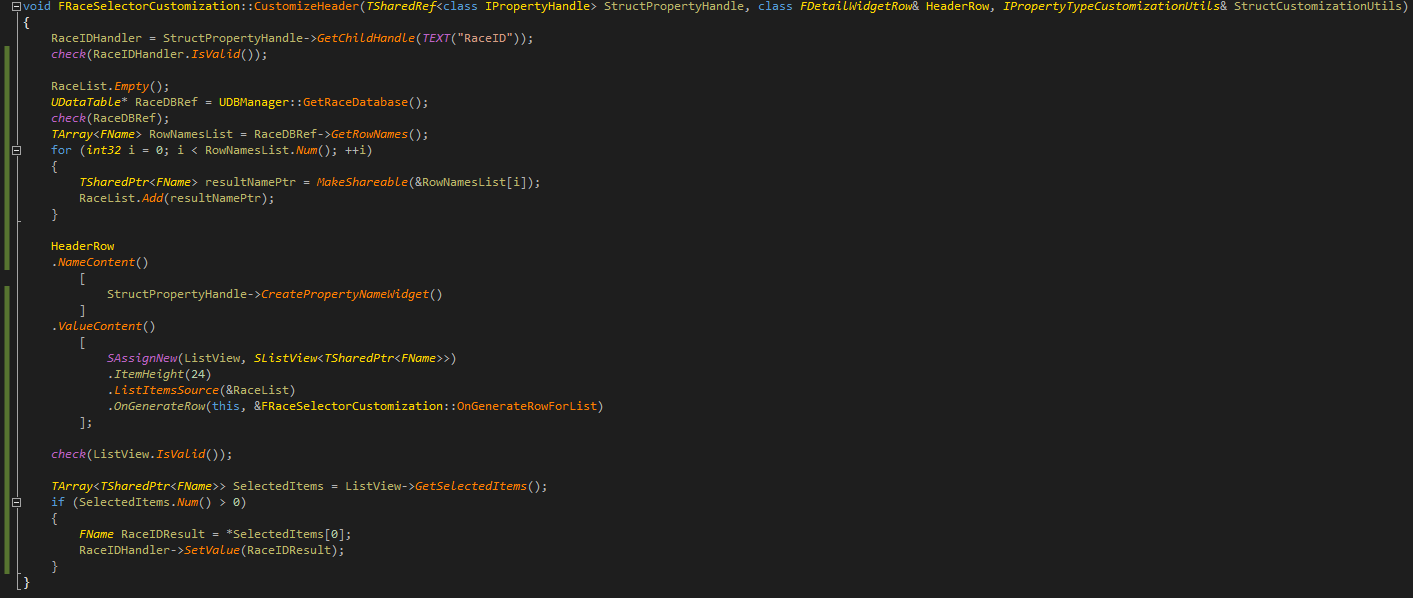

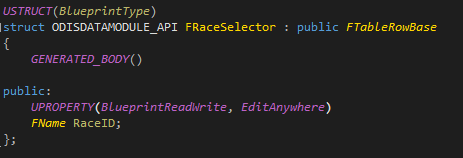

 silent patrol
-.-
quaint zealot
@toxic trench asking the important questions
 toxic trench
@silent patrol I did kill it, and everything still works
silent patrol
k
toxic trench
is there a reason why it runs for VR games?
silent patrol
it processes mouse movement
toxic trench
0.055 ms is a lot of time for something thats not needed at all
silent patrol
some people use the mouse in their game
it's incredibly difficult to make the call 'nobody will ever need this ever'
toxic trench
its pretty hard to find a VR game where you ever use your mouse I think
silent patrol
research projects have done stuff with it
toxic trench
it should be some checkbox in the project settings then so that people can adjust it
silent patrol
nobody will know to find that checkbox
toxic trench
well, you can put it in the VR category
so when someone finds instanced stereo, he will also find that
silent patrol
Would rather just make the function faster
toxic trench
well, if that's possible, that would be good of course