#engine-source
1 messages · Page 41 of 1
 arctic spear
Any way to download plugins from the launcher withouth having to install the precompiled UE version?
 modest glade
Any audio programmers in here? I swear I've just found a bug in some audio code. Runtime\SignalProcessing\Public\SampleBuffer.h line 485-486, surely that doesn't work.
I've been using it to sample an audio buffer at fractional indices, but couldn't work out why playback was both slow and mixing both channels. I think the line should be SampleA = RawPCMData[(WholeThisIndex * NumChannels) + i].
Yep, that definitely fixes the problem. Guess I should submit a pull request, if that's possible?
modest glade
 stable hemlock
@arctic spear I was looking for a solution to this. I've always had to download precompiled versions and move them from the Plugins folder to my source built engine Plugins folder. If you manage to find this out let me know please!
 formal flower
Having problems compiling 4.25.3 in VS2017. Wondering if I should use the latest toolchain (available in VS2019).
Do the setup instructions here (https://docs.unrealengine.com/en-US/Programming/Development/VisualStudioSetup/index.html) comply with 2019? (the page simply says it also supports 2019, but it doesn't seem to contain any 2019-centric settings)
In short, I'm curious as to what VS version (VS2017 or VS2019) most UE4 users are using with the latest versions of the engine.
stable hemlock
@formal flower Hi. I had an issue with 4.25.3 and vs 2017. I upgraded to vs 2019 for this version of unreal and had 0 compile errors or packaging errors.
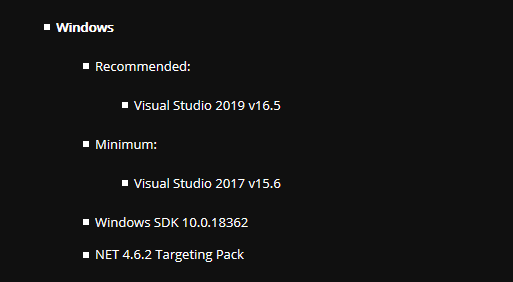
if you study the bottom of the chart they mention 2019 is okay.
  [4027/4028] UE4Editor-UnrealEd.dll
     Creating library F:\unreal\src\UnrealEngine-4.25.3-release\Engine\Intermediate\Build\Win64\UE4Editor\Development\UnrealEd\UE4Editor-UnrealEd.suppressed.lib and object F:\unreal\src\UnrealEngine-4.25.3-release\Engine\Intermediate\Build\Win64\UE4Editor\Development\UnrealEd\UE4Editor-UnrealEd.suppressed.exp
  [4028/4028] UE4Editor.target
Total time in Parallel executor: 2164.15 seconds
Total execution time: 2395.86 seconds
build worked eventually.
I will also suffix this by saying I DID have issues with using vs 2017 to build my games before, because I have a dedicated server. Epic has since fixed these issues with their latest version. The change happened in 4.25.3 specifically for me. I used vs 2017 up to 4.25.2.
So I'm no longer relegated to VS 2017 as of now.
formal flower
interesting.
Did you uninstall vs2017? i installed vs2019 with 2017 still in place.
stable hemlock
@formal flower On a good faith effort to cycle visual studio, I did do this yes. I uninstalled vs 2017 using chocolatey because that is how i install most cyclic things on windows. and installed vs 2019 this way too, using choco install visualstudio2019community
Might want to keep visual studio 2017 in case you need it for something else. But I did flush it out.
formal flower
really appreciate the info @stable hemlock . thanks!! I'll give it a go with vs2017 installed. if that doesn't work, I'll re-set it up clean. Good thing is I don't really need 2017.
stable hemlock
@formal flower ```bat
set ENGINEVERSION=4.25.3
set DRIVE=F
git clone https://github.com/EpicGames/UnrealEngine.git --branch %ENGINEVERSION%-release %DRIVE%:\unreal\src\UnrealEngine-%ENGINEVERSION%-release --quiet --progress
call "%DRIVE%:\unreal\src\UnrealEngine-%ENGINEVERSION%-release\setup.bat"
call "%DRIVE%:\unreal\src\UnrealEngine-%ENGINEVERSION%-release\GenerateProjectFiles.bat"
::BUILD UNREAL SOURCE
call "%DRIVE%:\unreal\src\UnrealEngine-%ENGINEVERSION%-release\Engine\Build\BatchFiles\Build.bat" -Target="ShaderCompileWorker Win64 Development" -Target="UE4Editor Win64 Development" -Target="UnrealLightmass Win64 Development" -WaitMutex -FromMsBuild
I really enjoy using automation in batch scripts to download the latest version of the engine, so I usually use those for builds.
arctic spear
@arctic spear I was looking for a solution to this. I've always had to download precompiled versions and move them from the
Pluginsfolder to my source built enginePluginsfolder. If you manage to find this out let me know please!
@stable hemlock Unfortunately I didn't found any other solution, but at least I found that after installing the engine from the launcher you can delete all the folders inside its root apart ".egstore" and you can still download plugins. It will create the Plugins/Marketplace/<plugin> folder
Also, when installing you can deselect all the options to reduce the download size
it's ok to build 4.25 with VS2017 or should I go with VS2019?
 manic kite
 elder falcon

formal flower
my custom fork (that initially compiled fine on VS2017 when I merged 4.25.1 into it) kept failing to compile when I merged the 4.25.2/3 changes into it.
Installed VS2019 (alongside VS2017), updated it, set it up with Epic's recommended settings, and it compiled first time. Thx @stable hemlock . (I saved out your build bat for later use, really appreciate it!)
stable hemlock
cool
 leaden nova
how hard would it be to add functionality to transform class ? Or maybe create a subclass of transform and can that be in a plugin ?
 dusky zinc
anyone else not able to compile 4.25 with the houdini Niagara plugin from github?
 barren stratus
Not sure if this is the right place to ask, but seems close... Where can I find detailed instructions on how to connect VS to symbols for UE4 to catch crashes in the engine? I've been getting a lot of editor crashes and want to see if it's in an area I'm doing something stupid or not. I'm working in BP only, but figure I can at least get an idea what's causing the issue, but can't connect it properly. Thanks
 ripe bluff
How do I go about building the engine with the cross-compile toolchain for linux included? I want to be able to cross compile from windows for linux. I've downloaded the proper toolchain from here: https://docs.unrealengine.com/en-US/Platforms/Linux/GettingStarted/index.html, I just don't know how to make sure the engine source is built so that linux is a target platform.
EDIT: Rebuilt engine from source after installing xcompile toolchain, all good now.
 stoic crane
so uhh, does anbybody know how to make pakfile chunks actually work in 4.25? Switching from 4.24 -> 4.25 chunks will not build. no changes in settings, chunks are enabled, asset labels are in place, etc.
no matter what settings, it just refuses to make more than pakchunk0
(been using chunking on this and another project for ages, but switched to 4.25 because of a bug fix, and now the chunks just don't work anymore)
i guess asset labels are broken.
 keen wedge
Does anyone have any good tutorials about implementing a custom render pass?
i'm trying to do a custom post processing pass
 serene yew
It is safe to delete the default ${Your project name}GameModeBase class that UE generates for you in a fresh C++ project, right? Why do they provide that for you?
 spiral mortar
it's totally safe. For convenience I guess?
serene yew
In theory... more like for inconvenience in practice
What does the predefined "Generate Project Files" build target do? When do I need to built that target?
I googled for 'ue4 "generate project files" build target' and nothing related to that came up (only got back results concerning generating the project's IDE files but not about the build target)
serene yew
@spiral mortar If I do delete both the header and cpp files for ${ProjectName}GameModeBase, should I also remove the following line from Config/DefaultEngine.ini (I hadn't touched the config files myself, so this line was generated by UE at some point):
+ActiveClassRedirects=(OldClassName="TP_BlankGameModeBase",NewClassName="${ProjectName}GameModeBase")
(where ${ProjectName} is of course substituted for the actual project name, even for the ini file string)
serene yew
lol
stable hemlock
@stable hemlock
serene yew
k
serene yew
Anyone here use Visual Studio Code (not regular Visual Studio, but Visual Studio Code; it's a totally different thing) as their IDE? For some reason mine will be working fine, then one day I go into it and while everything still works fine, the Settings page for the IDE is just completely blank (like it can't find/read whatever config file vscode uses, maybe). Anyone else ever experience this?
I've googled for it in every way I can think of, but can't seem to find much about it
nvm I think I finally found something

Stack Overflow
I'm following a tutorial and I'm trying to point vscode to my virtual workspace I had set up for Scrapy, but when I open settings in VSCode, Workspace Settings tab is not there next to User Setting...
serene yew
Got it. There was no User-level settings.json file where the vscode docs said it would be (I'm on a Mac): /Library/Application Support/Code/User/settings.json and in fact the directory /Library/Application Support/Code didn't even exist
I tried creating it, changed the permissions correctly 755 for dirs, 644 for the file itself, and used the vscode docs description of the default settings file and pasted it in there, still no luck
Then, after reading that vscode gets its Workspace-level settings from the .vscode/settings.json file in your workspace's root dir, I tried closing it down and launching it from the Finder, navigating to my UE project dir and opened vscode directly from the project's ${ProjectName}.code-workspace file and the settings reappeared 🙂
 nocturne compass
when you set the buildid for the engine you're building from source does anyone know if the correct syntax is
"BuildId": "d38b46b7-3f56-4a3d-8051-d8c87ee6271c"
or
"BuildId": "{d38b46b7-3f56-4a3d-8051-d8c87ee6271c}"
 unreal oar
How do I define my own brush for FEditorStyle::GetBrush()?
 short quarry
when you set the buildid for the engine you're building from source does anyone know if the correct syntax is
"BuildId": "d38b46b7-3f56-4a3d-8051-d8c87ee6271c"
or
"BuildId": "{d38b46b7-3f56-4a3d-8051-d8c87ee6271c}"
@nocturne compass The last one is correct. https://docs.unrealengine.com/en-US/API/Runtime/Core/Modules/FBuildVersion/BuildId/index.html (In code it is different: https://docs.unrealengine.com/en-US/API/Runtime/Core/Modules/FBuildVersion/index.html)
nocturne compass
oh! Thank you so much ❤️
short quarry
However, you could select your build when right clicking a project and select the unreal engine version.
Then the engine will set the correct version without any mistakes.
Just right click on the project and select version and browse for your version.
nocturne compass
thank you 😄
 marble rune
Anyone using VS2019 16.7.1 and 4.25.3, having issues with Datasmith's PostBuild-1.bat file complaining it can't find xcopy? Building 2 times in a row seems to resolve it, just odd.
stoic crane
you can use anything you want for the Id also. just edit the registry and set a friendly name, or make a tool to update the registry to a friendly name.
mine are all like UE4_MYCOMPANY_4xxx where the xxx depends on the version of installed build, source uses _SRC,
ie: UE4_MYCOMPANY_4250
 misty palm
What is the best way to share a source build with your team without them having to build it themselves aswell? I was looking at UGS but its perforce only, we are using Plastic SCM
stoic crane
i do it by making installed builds (like the epic launcher)
so everyone else runs custom binary, and only i use the source
well, or anyone that needs to buildf rom source.
faster for teh artists too, since they get the DDC, and don't have to compile anything except projects.
misty palm
@stoic crane Thanks! I'll look into that then 😄
 cosmic pulsar
Anyone seen this from using PhysX MBP Broadphase?
 ornate fjord
I have a strange issue, I have a perfectly fine working source build on my pc
from a 4.25 fork
I pushed it to my own repo, and cloned it on a different pc
but it somehow has missing files
like images
making it fail to generate project files for xbox
I guess it's just not pushing those images, but I don't know why
cause I don't think png's are in the ignore file
 frigid epoch
Is it normal that saving updated reflection captures on an engine built from source doesn't work?
@ornate fjord are you using github repository?
ornate fjord
yes
frigid epoch
and did you make a lot of changes?
ornate fjord
only like 4 files
frigid epoch
Did you first forked Unreal's repository on yours?
ornate fjord
yes I did
the weird thing is, when I make a binary build from the source build on my own pc, it also is missing those files
frigid epoch
then you'd better change that first
ornate fjord
I would if I knew how lol
frigid epoch
Do you know where your files are missing?
ornate fjord
I know a few
but I don't know what others might be missing
that's the big problem
otherwise I'd just copy paste them
frigid epoch
Also did you have to change the files couldn't you just use an editor module and override class methods there?
stoic crane
binaries/dotnet/gitdependencies.exe
run that, like the setup script does.
or.. just run setup.bat on the otehr pc.
git only has the source code. not all the dependencies like icons, and content, and shared third party binaries.
setup.bat registers a hook, so whenever you pull it runs gitdependencies.exe, as well as.. runs it the first itme
well when you recieve a change, from a pull.
 signal epoch
please i need help
stoic crane
where did you download from?
 fading venture
Morning! How do we track memory used by third party libraries in ue4?
stable hemlock
tag them manually
Going over how to use the Low-Level Memory Tracker in your Unreal Engine projects.
 grizzled breach
When I go off the master branch I have no engine folder in source
grizzled breach
How to contribute to source for Hololens 2?
stoic crane
Anyone know what might be going on here? Error when starting the game, never happens in PIE, sometimes happens when launching with DebugGame build target or running the cooked/exported game (maybe 50% of the time?)
The actual place where it dies fatally (but presumably stuff has gone wrong before then) is LandscapeRender.cpp line 2397:
check(!bCurrentRequiresAdjacencyInformation || (bCurrentRequiresAdjacencyInformation && SharedBuffers->AdjacencyIndexBuffers));This is in 4.25
@latent ferry did you ever find a solution for this? Updated one of my projects to 4.25 and have this in cooked build with any map that has landscape, even ones that haven't been touched / modified.
(and the check doesn't fail, it's dereferencing the AdjacencyIndexBuffers further down (line 2424) that is the crash)
Unhandled exception thrown: read access violation. this->SharedBuffers->AdjacencyIndexBuffers was nullptr.
ahw ait im shipping, so the check can't fail.
 latent ferry
Yes I found the solution
Somehow a landscape got corrupted, and any time I make a new landscape in the same level, it triggers the crash
the solution is to move all other landscapes to a level different from the corrupted one
Or maybe destroy/remake the corrupted one
it's really annoying to find the corrupted one because the problem goes away when the new landscape gets deleted
stoic crane
this is weird, because the only change was going from 4.24 -> 4.25
and every map with landscape, even without modifying from before, crashes on load
with zero changes
but only in shipping. even with a full clean cook (saved killed)
 normal isle
Does anyone know how bad engine build times are on an average 7200 RPM HDD vs SSD?
marble rune
I tried building on a spare pc, Intel Q3300 and a WD Blue HDD, I gave up after 72 hrs and integrated FASTBuild into my source.
marble rune
Indeed, a modern 18c CPU and a recent nvme can build in 10-30 minutes.
normal isle
Okay well assuming I can't upgrade to an NVMe SSD currently 😅
latent ferry
@stoic crane Exactly the same thing as I experienced. Only in shipping. It was hell to figure it out. I had to keep deleting landscapes and cooking (and even then it would only crash some fraction of the time, but it would always keep crashing once it had crashed once)
If you are pulling your hair out trying to deal with it then DM me
stoic crane
i fixed it
just had to delete the builtdata
and re-bake lighting
deleted built data, cooked and tested, no crash. rebuild, save, cook again, no crash.
now to build for the other maps.
 gritty thistle
Anyone know where the 'make awesome AI' button is?
 whole ether
Guys I need help adding a custom module to my source build. I already created a folder in the Editor source folder with the CustomModule.Build.cs and CustomModule.h and .cpp. Also implemented the IModuleInterface.
Everything compiles just fine, but my module does not start... Did I miss something?
 tulip girder
Good day guys, does anyone knows the difference between the branch "Release" and "4.25" on git? both are 4.25.3 (apparently) but they seem to have different commits.
 quick mica
Release is always the latest release, so 4.26 will also be pushed there one day. So if you just want to latest engine, go release, if you want latest for a specific version, choose the branch of the specific version,
 limber heath
Hey guys, this is not directly related to the source code but for sure it's related on how the PCH files are generated, feel free to delete the message from here if you feel it doesn't fit. Im having an issue while trying to compile my project against android. I do have Cpp17 enabled (I changed the UnrealBuildTool) and read somewhere that I should also use PCH files. I get rid of a lot of problems but still this one remains:
GameplayAbilityBase.cpp [armv7]
LogPlayLevel: Error: error: C++17 was disabled in PCH file but is currently enabled
It's happening for a bunch of files. What Im trying to do is to set the includes in PCH file (the one that is pointed in my build). But Im just not sure if that will do the trick. Did anyone faced a similar issue?
limber heath
I "fixed it" by setting PCHUsage = PCHUsageMode.NoPCHs; Of course compile times now are huge. But I guess I can toogle it while developing
 blissful bramble
I'm getting this when I run GenerateProjectFiles.bat:
Setting up Unreal Engine 4 project files...
WARNING: C:\Users\ADMIN\AppData\Roaming\Unreal Engine\UnrealBuildTool\BuildConfiguration.xml(8): The element 'Configuration' in namespace 'https://www.unrealengine.com/BuildConfiguration' has invalid child element 'BuildMode' in namespace 'https://www.unrealengine.com/BuildConfiguration'. List of possible elements expected: 'EddieProjectFileGenerator, WindowsPlatform, VCMacProjectFileGenerator, VSCodeProjectFileGenerator, CodeLiteGenerator, KDevelopGenerator, HTML5Platform, RemoteToolChain, QMakefileGenerator, XcodeProjectFileGenerator, SNDBS, CMakefileGenerator, WindowsTargetRules, UEBuildConfiguration, ProjectFileGenerator, SourceFileWorkingSet, VCProjectFileGenerator, IOSToolChain, CLionGenerator, MakefileGenerator' in namespace 'https://www.unrealengine.com/BuildConfiguration'.
ERROR: UnrealBuildTool Exception: System.Collections.Generic.KeyNotFoundException: The given key was not present in the dictionary.
          at System.ThrowHelper.ThrowKeyNotFoundException()
          at System.Collections.Generic.Dictionary`2.get_Item(TKey key)
          at UnrealBuildTool.XmlConfig.TryReadFile(FileReference Location, Dictionary`2 CategoryToFields, Dictionary`2 TypeToValues, XmlSchema Schema) in D:\UE4\UnrealEngine\Engine\Source\Programs\UnrealBuildTool\System\XmlConfig.cs:line 529
          at UnrealBuildTool.XmlConfig.ReadConfigFiles() in D:\UE4\UnrealEngine\Engine\Source\Programs\UnrealBuildTool\System\XmlConfig.cs:line 101
          at UnrealBuildTool.UnrealBuildTool.GuardedMain(String[] Arguments) in D:\UE4\UnrealEngine\Engine\Source\Programs\UnrealBuildTool\UnrealBuildTool.cs:line 517

GenerateProjectFiles ERROR: UnrealBuildTool was unable to generate project files.

Press any key to continue . . .
I already have another custom unreal version on my computer, can it cause the problem?
blissful bramble
Just deleted the other versions and it didn't fix the error. I tried looking at the error's C# files but I still don't understand which key is missing.
blissful bramble
I found the problem: My global BuildConfiguration.xml in %appdata% wasn't compatible with the engine version I'm working with.
 nimble linden
Is new Chaos goodness supposed to work off the release branch (after changes to the build script from the guide)? A freshly built editor hangs during loading for me...
 teal plinth
on a fresh windows install i copied a source version of ue4 and a game/project from another disk, the build of the project succeeded but I'm getting this error
nimble linden
You need DirectX installed
blissful bramble
Does anyone know how to change the shadow color with Deferred Shading?
 brazen river
Anyone know how long it takes for epic to respond to a pull request? Just made my first one
teal plinth
but dxdiag tells I have directx12...
teal plinth
https://answers.microsoft.com/en-us/windows/forum/windows_8-performance/how-to-fix-xinput13dll-missing/b73c5fb8-12b6-493f-bc90-e8cc76fb842b
So many weird answers to this problem, this fixed my issue

I'm fed up of this error. Someone told me that it's a DirectX error. So I uninstalled DirectX from my computer and reinstalled it back. It was worthless effort as the error persisted. I also checked
 storm geyser
Anyone familiar with nvidia gamework flex's integration? Are there any documents about the integration work itself? I am quite struggle to get a clear view of this plugin.🤔
storm geyser
I change the 'container template' property in staticmesh editor and expect the first call of 'UpdateFlexPreviewComponent' would be from 'OnObjectPropertyChanged' or something like that but instead this 'previewupdate' function is called from external code.🤔
 olive basin
anyone building on an intel 18-core? how long does it take?
elder falcon
why would you want a massively expensive 18 core intel instead of a 16 core ryzen that costs much less and is faster?
 thick storm
16 core ryzen is going to be starved on memory
not taht intel is going to be any better
16+ cores you need Threadripper with 4 memory channels
 spice terrace
On my 3950x engine builts in roughly 20 minutes, I’d go with a threadripper for sure if i could run macos on it. The biggest selling point for me was pcie4.0. Engine building tests can probably be found on pugetsystems blog
stoic crane
my threadripper 3990x only takes like 6-7 minutes less than my 3900x
probably need a faster ssd.
lol
stoic crane
i should time it next time.
 cosmic stump
last night I saw this one https://issues.unrealengine.com/issue/UE-38597 resurfaced in 4.25.x
someone checked the code and said the funtionality for haptics is all there, but the code exposing stuff to UI is not
does anyone have an ide how to fix this? (to make haptic assets to show up in Miscellaneous menu when right clicking in the Content Browser)
 peak zinc
is there any way to expand a Spline component node without modifying the source? i want it to have more data than just position/rotation, etc etc
olive basin
Yes, I'm thinking about how to speed up. Currently using a 3950X and 128GB, but I'm starved on SSD space on a normal platform.
I'd like to go HEDT for memory bandwidth and core bump could help.
3990X is way too expensive so late into 2020 and probably 4990X or I at least think so.
Intel is about $900, which is a cheapest HEDT I'd consider - 3960X and 3970X are much more.
Can you guys post your times?
For example, my friend's 10900K builds in about 22 minutes and my 3950X builds in about 17 minutes (10 vs 16) which shows Intel's frequency counts for a few more cores.
spiral mortar
I'd be extremely careful when comparing build times to use the same exact settings
olive basin
Identical, replicated settings and project 🙂
And the engine is the easiest part. The game, oh, the game. A full rebuild is about double the time and then packaging takes even more.
spiral mortar
damn
 swift lark
i built ue4.25.3 from source, switched my unreal engine version to that one and now my project doesn't load my plugins anymore. Im supposed to download them from the store, but I already have the 4.25 versions downloaded?
stoic crane
i thought there was a fix for that in the 4.25 branch
elder falcon
how did you manage to write game code that takes longer to compile than the engine?
 tardy pollen
i built ue4.25.3 from source, switched my unreal engine version to that one and now my project doesn't load my plugins anymore. Im supposed to download them from the store, but I already have the 4.25 versions downloaded?
@swift lark Copy them from your 4.25 engine to your source build
go to the engine directory: "Engine\Plugins\Marketplace"
copy the plugins from there to the same folder in the source build
 round pagoda
Is there any way I can collaborate with team members using the pre built version of the engine? (We are not changing any engine source code, I just need the server linux build toolchain)
I.e. is there any way for them to use the pre built and for me only to use the source?
quick mica
sure, just put your Project into some Source control and you are fine, it doesn't matter if you use a prebuilt or a local built engine to build your editor (if you use the same version of course)
stoic crane
@latent ferry https://issues.unrealengine.com/issue/UE-94535 this is the problem actually, shutting off tesselation in the material is the only thing that fully fixes it right now.
latent ferry
Heh, interesting
stoic crane
so i went through and turned off tesselation in all the base landscape materials for now, cooked, no more crashes. annoying, but at least the tesselation in our case right now isn't super important.
stable hemlock
landscape has always been super hit or miss with tessellation
I think they broke lods and tessellation multiple times in the past while doing different fixes
 onyx light
UATHelper: Cooking (Windows (64-bit)): RunUAT.bat ERROR: AutomationTool failed to compile.
how is this solved
ive built the automation tool in vs
 pseudo axle
will confirm figuring that out was a giant pain
stable hemlock
lots of deprecations in cmc!
olive basin
will confirm figuring that out was a giant pain
@pseudo axle i would really sincerely appreciate you sharing what you found out 🙂
pseudo axle
I did it via UAT/UBT
olive basin
Would share a command with me? So I can replicate it on my proj? Because it's so much pain doing everything by the book and having the toolchain dud out.
pseudo axle
Im not near the code atm, will try to grab later
 tired tinsel
hi, i'm trying to orchestrate a company that has multiple ue4 projects bound to different versions of the engine. sometime with their own modifications to the engines.
we're under perforce and i'm sort of new to the stream thing.
what's the best way to manage changes?
should you create a main stream and checkin the ue4.25.3 source code. Then create a development stream for the company's changes and then development streams from that development stream for individual projects?
or is it better to
create a main stream for each project's version of the engine?
Vanilla Stream->company development stream->projectA development stream
or
Vanilla main stream
company main stream->company development stream
projectA main stream->projectA development stream
 noble sleet
can someone point me to the 4.25 source on github.. whenever i dl it from github it gives me 4.25.4, i need the old 4.25 not 4.25.1 or .2 or .3 i cant seem to find just reg old 4.25
elder falcon
that would be 4.25.0-release tag
noble sleet
@elder falcon TY

 tight condor
any way to change a project that i've been working on in a source build to open in a regular build from the launcher? im getting crashes all the time
 torpid moth
if I would want to play an animation once UE4 crashes is it possible to somewhere add my implementation when the crash window pops up?
 dense kettle
Hi, someone already use IncludeTool from ue4 sources ?
I have some issue to scan my project, the tool always scan the Engine source
 harsh lantern
Hey all, just a sanity check: it should not take 48 minutes to compile UE4 from source using a Ryzen 3900x and a fast SSD. I'm hearing some folks compiling in ~15 minutes but no idea how to achieve that.
elder falcon
do you correctly see the "building .. actions with 24 processes"?
harsh lantern
yes
I now changed to vs 2019 and it seems much faster
20 minutes
I would not have guessed this to be the issue..
 fierce moss
Hi all! has anyone experience with adding a variable to serialize function in one of the engine core classes? I need to serialize a boolean in UStaticMesh class.
harsh lantern
16gb
harsh lantern
I see, I didn't notice it reach 16gb, but I wasn't looking at all times
but yeah, was meaning to upgrade regardless
thanks
olive basin
I don't think you can compile in 15 with a 3900X. A 3950X does it in 17. pretty much stable result.
stable hemlock
Why selected project starts fully rebuild, how to avoid editor or engine rebuilding and rebuild only game project?
Rider..
@harsh lantern possible not standard ssd, something like on PCIe interface and with memory cashed feature +unix arc
and most of unnecessary modules compiles at default, maybe someof them can be deactivated (not maybe, they must be deactivated)
Rebuild succeeded at 23:48:27 (for default hdd)so 17 minutes, it's not great result :\
fierce moss
@amber mango Hie, Thanks for the response! To be specific I want to add a custom boolean data bUseCustomSettings to all static meshes in my Unreal project. And I want to store this value in all the static mesh asset files... Based on this boolean value I have some other functionality code. Thanks for the help!
 amber mango
@fierce moss I never did that myself, but shouldn't it be as simple as adding it, and marking it UPROPERTY?
any UPROPERTY that's not marked Transient should serialize automatically
fierce moss
Yes even I read about that... So the thing is, I already have StaticMesh asset files which do not have that boolean... now that I have added new UPROPERTY boolean... it tries to serailize it but the asset files don't include that data... I'm not sure how it will work in this situation
amber mango
it will just not load it, thus it wil be set to whatever the default value is set to in the constructor
presumably "false"
and the next time it is saved, it will now save your new field
fierce moss
Oh I see... also I wanted to know the Serialize function is used for saving and loading, right?
amber mango
yep
well.. what function? You shouldn't have to worry about any function, it's done "automatically". But yes, just adding the boolean as UPROPERTY should load and save it
fierce moss
Alright, got it! Thanks alot for the help 🙂
amber mango
You're welcome!
 hollow wadi
Anyone tried adding their own code generation to the unreal header tool for use in a regular non source build?
Is that a doable thing?
spiral mortar
I just made my own parser that I run manually, easier
 kind kraken
@hollow wadi To extend UrealHeaderTool, you have to use the source build since you will have to rebuild the project UnrealHeaderTool(which isnt present in the non-souce build)
 fresh ledge
I am planning on checking out Chaos. Is it difficult to compile the engine or should I just wait until 4.26?
formal flower
@fresh ledge I got it working easy on 4.23 by just doing this https://docs.unrealengine.com/en-US/...iew/index.html. Couldn't get it to work on 4.24+.
fresh ledge
Thanks I'll have a look at that.
formal flower
@fresh ledge
Ah sheit sorry. This is the right link. Think that link got messed up after the documentation rewrite. https://docs.unrealengine.com/en-US/Engine/Chaos/ChaosDestruction/ChaosDestructionOverview/index.html

Overview of the Chaos Destruction tools that are available, and how they work together to create destruction in UE4.
Not sure what VS version you're on, but I can only compile 4.25.3+ using VS2019.
fresh ledge
@formal flower Thanks for the link! It looks way easier than I thought it would be. Going to have a go at it now.
 sterile quiver
Hello everyone. So is messing with Chaos Destruction worth the hassle as it currently stands? I have been trying to get a stable build all week with no success (I am new to this).
I think my issues are related to SteamVR and the shaders that compile for MixedReality headsets. Going to try and remove SteamVR, compile a new build and debug it later on.
stoic crane
not at the moment, no. if you just wanna play with it, sure.
sterile quiver
@stoic crane , OK thought so. I understand that APEX destruction is currently broken?
sterile quiver
@stoic crane OK that's good, haha. I have been spending so much time working on a chaos build I had not tried to play with APEX. A bunch of forum posts on EPIC and other places have complained APEX had been busted since 4.2'ish
Sorry, before 4.23. I will load up a regular project and see how APEX goes.
stoic crane
the editor is a little messed up, and you have to change parms to make it refresh, but it does still work.
and im pretty sure since 4.23
sicne chaos was added.
but chaos is missing a lot of stuff still, and if you have it enabled, many other things don't work
though i haven't tried with 4.25.
sterile quiver
OK thanks for the info @stoic crane , most appreciated. I am looking at UE4 as a real time VFX tool (one tool) for virtual production.
formal flower
Apologies for the bump:
On an Actor-derived class, the first object created, via CreateDefaultSubobject, automatically becomes the RootComponent.
Is there a recommended way to keep that DefaultSceneComponent as the root?
elder falcon
just add a scene component?
stoic crane
that's not entirely true either. f you have multiple scene components, and you don't actually SET Rootcomponent = <whatever>
it will randomly pick one.
and warn about it in logs.
formal flower
@stoic crane
A default Actor class has this hierarchy when a BP is created.
That DefaultSceneRoot can be optionally replaced by another component, or it can be used as the rootcomponent. It doesn't seem i can easily keep it in C++.
I'm not sure how to keep that same DefaultSceneRoot on an Actor-derived class, and attach other components to it.
stoic crane
if you're making in c++
you just do what Zeblote said.
  SceneRoot = CreateDefaultSubobject<USceneComponent>(TEXT("SceneRoot"));
  RootComponent = SceneRoot; //Hell, you can probably just do Rootcomponent = CreateDefaultSubobejct..

  Othercomps = CreateDefault(...)
  Othercomp->SetupAttachment(RootComponent)
and now you have a scene component root.
formal flower
Ah, sorry. Thanks. Actually, if I do that, though, the SceneRoot can't be replaced in BP, no?
formal flower
Gotcha. Really appreciate the help! Sorry for the stupid question.
stable hemlock
Hello guys, I have a quick question, what is this channel for? I read the comment but I can't get it, here the most clever people are together to grow the engine with updates?
formal flower
@stable hemlock You can see the purpose of each channel at the top of the window.
engine-source Working with Unreal Engine 4 source code • Extending the editor
stable hemlock
yeah I saw the ocmment, I know, I read it but I can't still understand what it is
that's why I am asking
formal flower
@stable hemlock
OK. It basically means this channel is for talking about working with the UE4 source code which is primarily written in C++.
You can get UE4 source code from here: https://github.com/EpicGames/UnrealEngine
If you don't work with UE4 source code, then you don't need to use this channel.
Though some people here may have added features and fixes to the engine, I don't believe this is the place to request features
- as most people here don't work at Epic Games.
stable hemlock
okay, ty for the info
 summer cairn
hey guys, i'm trying to create a new FAnimNode_BlendListBase child class, do i need to include this in the engine source ? has anyone attempted this ?
I want it to resolve what to blend based on a different list, not an int32 or an Enum
stoic crane
looking at that node, it's exported, so you can do it without modifying the engine.
summer cairn
ty, i will try it out and come back with it
summer cairn
hey guys
error LNK2019: unresolved external symbol "public: virtual class FString __cdecl UAnimGraphNode_BlendListBase::GetNodeCategory(void)const
im getting this error when inheriting from UAnimGraphNode_BlendListBase
i have added the, i think, required modules but no luck
 fallen island
After watching Inside Unreal livestream today I'd like to build the NVidia RTX fork. Has anyone tried compiling the NvRTX rtx-dlss-4.25.3 branch?
The instructions say: "Reach out to your Nvidia contact and get an AppId", but their site says it's invitation only. https://developer.nvidia.com/nvidia-dlss-early-access-program
Has anyone managed to build and try this?
NVIDIA Developer
NVIDIA DLSS - Early Access Program This program is accessible by invitation only. NVIDIA set out to redefine real-time rendering through AI-based super resolution - rendering fewer pixels and then using AI to construct sharp, higher resolution images. Powered by dedicated AI p...
elder falcon
fill out the form at the bottom of the page
fallen island
thanks, i was not expecting it to work without an invitation.
elder falcon
I guess they're calling the code they send you an invitation
 tight prism
You can compile and run their branch without that code, and get the RTXGI side of things working. My understanding is that the additional invitation stuff relates to the DLSS bit which wont work without registry keys etc. I certainly have RTXGI running anyway, without the extra invitation, but I think I am going to be out of luck with DLSS as the online application starts asking for project names and a url for info of the project you intend to use with DLSS etc
fallen island
Thanks. I applied for research, but haven't heard back from them yet.
 upbeat olive
Hey im trying to build engine from source, branch 4.25. When I build UE4 I get the following erros ```Severity Code Description Project File Line Suppression State
Error C2761 'const int *gte::GenerateMeshUVBase::msSource[]': redeclaration of member is not allowed UE4 G:\UnrealEngine\SourceBuilt\UE_4.25\Engine\Plugins\Experimental\GeometryProcessing\Source\GeometryAlgorithms\Private\ThirdParty\GTEngine\Mathematics\GteGenerateMeshUV.cpp 97
Error C2761 'const int gte::GenerateMeshUVBase::msGLSLSource': redeclaration of member is not allowed UE4 G:\UnrealEngine\SourceBuilt\UE_4.25\Engine\Plugins\Experimental\GeometryProcessing\Source\GeometryAlgorithms\Private\ThirdParty\GTEngine\Mathematics\GteGenerateMeshUV.cpp 14
Error C2761 'const int gte::GenerateMeshUVBase::msHLSLSource': redeclaration of member is not allowed UE4 G:\UnrealEngine\SourceBuilt\UE_4.25\Engine\Plugins\Experimental\GeometryProcessing\Source\GeometryAlgorithms\Private\ThirdParty\GTEngine\Mathematics\GteGenerateMeshUV.cpp 56
Error C2503 'gte::GenerateMeshUVBase': base classes cannot contain zero-sized arrays UE4 G:\UnrealEngine\SourceBuilt\UE_4.25\Engine\Plugins\Experimental\GeometryProcessing\Source\GeometryAlgorithms\Private\ThirdParty\GTEngine\Mathematics\GteGenerateMeshUV.h 61
 mental olive
Hello everyone, i have a question about the early z pass settings, in the project settings (i am using 4.25.1), there are 2 settings one says Early Z Pass and has 3 options and the other one is a check box and is saying Mask materials in early z pass and i wanted to ask whats the difference between those two. If one is active and the other one isnt active will this make any changes because i used both and i didnt see any changes in my scene.
stable hemlock
Hi I was wondering if anyone had any tips on where I could start for implementing forward+ rendering (by adding onto the existing forward renderer) I've read through this article and understand the concept of it, but just don't know where to find the lighting pipeline to start monkeying around with. Any advice would be helpful and @ me cause I'll be out and about for awhile~
stable hemlock
if its a plug in you copy it to your own folder manually, and start praying to the old gods
if its just normal assets just use the migrate function with a launcher build
 lapis bloom
is it normal to let visual studio build the solution and it spends hours, and then it gets "stuck" at a certain moment?
I started building yesterday, went to sleep, now it seems it's stuck at compiling 3927/3929 library
im not sure if I have to restart the process or just wait longer 😓
lapis bloom
has anyone had this error after building the engine and trying to run a project with it?
"VulkanRHL.dll is either not designed to run on Windows or it contains an error"
stable hemlock
Hello
Does anyone know anything about UE4 reverse engineering
I’m confused about some things
 half talon
just noticed there's a new experimental EnhancedInput plugin on the master branch, anyone have insights on it?
 slim steppe
Unable to load module ../UE4Project/Binaries/Win64/UE4Editor-UE4Project.dll' because the file couldn't be loaded by the OS.
Does somebody know what is wrong? i tried to launch my project in c++ in Development Editor mod and this happened...
stable hemlock
I wish they would switch to C++20 before ue5 release and convert everything to modules at the same time
I sometimes wish the sun would rise from the west as well though...
 gloomy hamlet
You can already compile the engine fine in cpp17 mode. Just need to enable it in the target file or build config.
 little olive
Hi. I'm new
 undone oxide
Hey unreal people!
Does anyone know how to get an IPropertyHandle from an FProperty?
 mild falcon
@undone oxide what you trying to do friend?
 hot glade
Hey all, i notice a common issue with compiling ue4 source engine using visual studio.
it seems even here it was talked about but i didnt see any solution.
it gives error because Linkage on certain function pow10.
apprently this function defintion appear twice and almost identical except it's Linkage specifier
uint64 Pow10(const int32 InExponent)
{
    const int32 ClampedExponent = FMath::Min(InExponent, Internal::MaxFractionalPrintPrecision);
    return Internal::Pow10Table[ClampedExponent];
}
and
is there a proper way to solve linkage specifier issue?
 thorny granite
@stable hemlock Did you find out which branch had the new water tools in it?
@rapid fable It exists in the master branch or release-engine-staging branch. However, version 4.26 is currently being merge, so the code of these two branches may fail to compile.
You can wait for the newly created 4.26 branch. In the next few days. Related functions will be merged into this branch.
stable hemlock
Update version number in //UE4/Main to 4.27.
Huh, didn't think there would be a 4.27, but I guess doing maintenance updates for ue4 makes sense for the foreseeable future
stoic crane
and to think, there are still breaking bugs in 4.25
thick storm
@stoic crane It always eaxggarted. What you consider breaking bugs, are non issues for other people
there are built in analytics into engine for that reason
stoic crane
i think landscape sculpting is pretty significant.
stable hemlock
4.25 is still getting updates though
its not like they abandoned it
there will be a patch release soon
thick storm
that's accidental
because it version to use if you target next gen
and don't have access to UE5
generally Epic does not work this way
stable hemlock
I'm not talking about the plus branch
they incremented the patch version in 4.25 release but didn't release an update yet
iirc
thick storm
you are expected to upgrade to new version as soon as it releases
stable hemlock
just rechecked, 4.25 branch is at 4.25.4 while the latest version in the launcher is 4.25.3, so I would expect some more hotfixes soon. 4.25-plus branch gets loads of other updates but that isn't going to 'released' as a patch release
thorny granite
4.25 plus is mainly to update console programs such as ps5/xbox, 4.25.4 will also be updated recently.
UE5 is a separate branch and cannot be viewed by non-Epic personnel.
@rapid fable The 4.26 branch is still in its early stages, and many functions have not been merged from the Main branch.😆
In addition, you are right, the Main branch has been updated to 4.27
thorny granite
The 4.26 merged into the release branch is about the end of the year, and the release branch will temporarily update 4.25.4. 👀
thick storm
@thorny granite everything is merged to main
from the point that branch was created
that's how branching works ;p
 normal saffron
Why am i getting this crash when running my dedicated server shortcut?
is there something missing in my project? or do i need to fix an error?
 full ermine
I get the same :<
normal saffron
@full ermine the same?
full ermine
Yes
normal saffron
for dedicated server?
full ermine
Yes
normal saffron
Well i deleted some massive junk from my project went from 97 gb to 68
now re packaging
full ermine
I'm on an empty project 😄
full ermine
New Third Person Sample; Setup the Target.cs; package and then run
Trying it out a second time now
normal saffron
server target file?
full ermine
No idea tbh. I just did a repackage
Guide on building Unreal Engine and project in the Dedicated server configuration.
full ermine
None; I did exactly as described
normal saffron
Okay
 main moth
Are there any custom, modified versions of UE4 that can be downloaded for free somewhere?
Like example, a team added a bunch of features, changed UI layout, etc and uploaded the source for others to use?
 grizzled geyser
Hi guys, I'm trying to build UE4 from source but when I'm trying to run I'm getting an error of Bad Image with status code 0xc000012f:
D:\dev\UnrealEngine\Engine\Binaries\Win64\UE4Editor-LevelEditor.dll is either not designed to run on Windows or it contains an error. Try installing the program again using the original installation media or contact your system administrator or the software vendor for support. Error status 0xc000012f.
Any idea what am I missing?
thick storm
@main moth not really
you can look up on github for somethiing
personal ran
rant*
gamedev unlike rest of the software industry doesn't like share code
where everybody is going open source, we still cling to secruity and advantage by obscurity
there are few notable exception, but for most time people are going to extreme lenghts to protect code like it matters -;-
grizzled geyser
@thick storm Any idea about my issue?
 plain lily
@grizzled geyser never seen that error. Building the engine should be straightforward simply by following the instructions.
Any other clue from the log file while building?
grizzled geyser
:\ I did follow the instructions.
What log file? are you talking about output?
@plain lily
plain lily
Yes the build output. Any warning or error there?
grizzled geyser
Nope, quite short. The closest thing to an error (which is not useful) is the last (exit) lines
The thread 0xbc8 has exited with code -1073741521 (0xc000012f).
The thread 0xf04 has exited with code -1073741521 (0xc000012f).
The thread 0x285c has exited with code -1073741521 (0xc000012f).
The program '[23284] UE4Editor.exe' has exited with code -1073741521 (0xc000012f).
Other than that it's multiple lines of loading dlls such as 'UE4Editor.exe' (Win32): Loaded 'D:\dev\UnrealEngine\Engine\Binaries\Win64\UE4Editor-InputCore.dll'. Symbols loaded.
plain lily
Strange. Looks like something is trying to interfere with your build process, but I don't know what.
grizzled geyser
I did change some source files, but nothing that should do that. I'll try stashing them and doing it again.
What are the directories I should remove to "reset" the process? (like Intermediate & Saved in a game project I guess)
plain lily
@grizzled geyser Before you do that, do you have any malware protection running?
grizzled geyser
@plain lily seems I already changed a file, so I have to rebuild, part of it anyway. Sorry for the delay
plain lily
np
grizzled geyser
@plain lily In the meantime - do you know of anyway to change the amount of processors used in compilation?
I found a post online talking about BuildConfiguration.xml and ProcessorCountMultiplier, but I'm getting a warning that it doesn't exist when using it (and I also can't find it in the source, unlike the other arguments)
plain lily
@grizzled geyser sorry I don't. I don't build the engine that often to be needing that.
Unreal Engine Forums
Hi All,
I read an article in Unreal Wiki ( https://wiki.unrealengine.com/Boost_Compile_Times ) that you can allow UE (version 4.22 for me) to use more cores,
Check this out.
Last post
grizzled geyser
How did you find it and I didn't :p but cool looks great, thanks!
@plain lily How many cores you have?
Just wondering since the guy in the post was talking about reducing from 48 to 24, while mine only has 8.
Looking at i9-10900F, it seems to have 10 (which is an advanced chipset as far as I can tell).
Who has that many cores? what kind of pc is that?
grizzled geyser
to run UE4? :p
plain lily
No, to compile the engine
Typical of a professional studio setup
They may be using it as multiplayer server afterwards
grizzled geyser
oh yeah for a professional studio that make sense; not sure why I assumed it's for a personal/home computer
@plain lily finally complete and I disable the AV, but I'm getting the same error :\
plain lily
Think someone was suggesting some missing dependencies?
Even though that is strange as well
grizzled geyser
I sort of saw that, but then I saw the error he got was about .dll while mine is about the acutal .exe files, so I ignored it.
Where did you see that?
plain lily
If you are up for some hard core debugging, we can try to find out what is wrong
You can use Process Explorer to see potential errors

Find out what files, registry keys and other objects processes have open, which DLLs they have loaded, and more.
grizzled geyser
I got that. I thought it's only for loaded/running programs though
If you are up for some hard core debugging, we can try to find out what is wrong
@plain lily I usually am yes :p
plain lily
You said you try to run the Editor and then you get the error
So the loading of the EXE starts but then it goes wrong
grizzled geyser
yeah but there's no time to capture it or anything like that. Or is there a way to capture it anyway?
plain lily
You just filter for the editor exe
We can switch to DM if you like so we don't flood the channel
grizzled geyser
Sure w/e more comfortable to you, you're the one helping me ^^
You just filter for the editor exe
@plain lily Yeah but I doubt I can inspect it in time before it stops. Or perhaps it would still be running while the prompt message is showing? let me check
plain lily
As soon as the process stops it will stop tracking it as well
You can review the output afterwards
grizzled geyser
been long since I used it and I can't seem to find a filter line or anything like that?
@plain lily Just tried to use dumpbin /headers and it seems the .dll files are bad somewhat. This is what I get from it:
Microsoft (R) COFF/PE Dumper Version 14.28.29213.0
Copyright (C) Microsoft Corporation.  All rights reserved.


Dump of file D:\dev\UnrealEngine\Engine\Binaries\Win64\UE4Editor-CoreUObject.dll

File Type: COFF OBJECT

FILE HEADER VALUES
               0 machine (Unknown)
               0 number of sections
               0 time date stamp
               0 file pointer to symbol table
               0 number of symbols
               0 size of optional header
               0 characteristics

  Summary
Sorry buddy pointed you to the wrong tool
You actually need to use Process Monitor for that
Monitor file system, Registry, process, thread and DLL activity in real-time.
Yes I see. So something goes wrong in the build process.
Producing invalid DLL's.
grizzled geyser
yup. The question is what / how to fix it? and how come there aren't even warnings about it
mm ok, that's interesting & weird & bad. I opened the file in npp, and it pretty much contains only this:
the .dll file, that is
plain lily
that may explain why it doesn't run properly...
plain lily
Which version of Visual Studio?
plain lily
I suspect something wrong with your VC2019 installation
grizzled geyser
It works when I'm building my game project in cpp btw, and other various projects
@plain lily Here's something interesting: I changed one of the source files related to the UE4Editor-CoreUObject.dll and built, and now the .dll file looks good and it's not complaining about it when running.
If that tells you anything?
plain lily
Changed how?
plain lily
So that solved all the issues?
grizzled geyser
not sure, there are multiple errors with multiple .dlls. Gonna try the others now and we'll see
plain lily
outdated DLL?
plain lily
I am clueless. I would say your computer is possessed.
grizzled geyser
lol
I think it's something with that unity build. Perhaps a bug in vs 2019? :S
I am updating quite frequently
plain lily
That's possible.
I would try to rebuild everything from scratch, starting from a fresh copy from GitHub
Looks like something went wrong at a certain point and you are carrying the effects along
did you see any error with GenerateProjectFiles?
grizzled geyser
I agree with you but I'm gonna try to carry on anyway, see if I can get away with just adding empty lines to source files - just because the process is so long.
I'm just trying to create PRs and not actually run UE4 constantly from source, so as long as I can get it to work and check the PR is working I'm fine with it.
but yeah I'll go that way if this doesn't work
did you see any error with GenerateProjectFiles?
@plain lily nope it looked fine too. I could try to regenerate it later on though. Do you know what directories I should delete before doing that?
plain lily
Honestly I would delete everything and start from scratch
grizzled geyser
It's gonna take me an entire day again, I'd rather not do that :p
plain lily
At least rerun Setup.bat and GenerateProjectFiles.bat -2019
grizzled geyser
didn't know there's -2019 flag :-o
I reran setup.bat already btw, but I'll try again with the project files yeah
grizzled geyser
Specifically with ue4 or in general?
plain lily
Specifically with UE4
Have a look at this: https://variable63.wordpress.com/2019/09/27/how-to-build-unreal-4-4-23-0-from-source-code-and-server/
Content Visual Studio Download Set up Solution PsAllocator Build and Launch (client) Server Cooking Launching Joining Build Times Summary Use Visual Studio 2017 for 4.23, Visual Studio 2019 solutio…
Probably more up to date than the official docs
grizzled geyser
Looks good I'll start following it now!
He's recommending VS 2019 for 4.25 btw
plain lily
Because Epic is recommending it, but 2017 is still supported
grizzled geyser
Just finished rebuilding the .dlls btw and it seems to work, or at least startup. I can see the Unrel Editor splash/loading screen.
grizzled geyser
I ended up realizing all the "null dlls" are 2048 kb in size, so I deleted all these .dlls
yeah nope I turned it on enabled it like 5m after we initially talked about it
plain lily
That may have played a role
grizzled geyser
Yeah definitely. It occurred to me the av might have been playing with the build process rather than the running process,
but to check it means disabling it for the entire day hehe.
plain lily
if everything works you can re-enable it
grizzled geyser
re-enable what?
oh sorry:
fixed the message; I meant I enabled the AV quickly after disabling it.
grizzled geyser
yup. I almost got it btw, it even compiled many shaders (around 2k), but it seems one of the later dlls wasn't rebuilt.
Just trying to rebuild the entire UE4 project, hopefully it will only rebuild some of it and not actually everything. But looks like it's leading the way of doing things from scratch
grizzled geyser
@plain lily Finally got it working! Regenerated the project files back then and rebuild. Took me 6h, but it's still less than what it would of been. Project is up and running and for the past 10m everything works smoothly.
And thank you!
plain lily
@grizzled geyser Great! 👍
main moth
where everybody is going open source, we still cling to secruity and advantage by obscurity
@thick storm Really? Why is game dev unlike other software dev?
 ionic plover
Pardon my naiveté, but I don't need a GPU to run engine builds do I? Could I run Engine or project builds on a rack-mounted Windows Server? Anyone know?
elder falcon
a dedicated server or packaging in headless mode sure
ionic plover
@elder falcon So I couldn't build a user client? Or are you saying that I can run UBT in all the ways needed to package engine binaries, and game binaries (both client and dedicated server?)
elder falcon
you can build all of those things, but not run them
ionic plover
Right. Not concerned with running, just staging, building and packaging them (and deploying them)
elder falcon
yeah that works fine
ionic plover
Coolio, that's what I suspected. Just wanted to be sure. Thanks @elder falcon
 minor sparrow
Hello @all
I'm using UE 4.25 and using Webbrowser. Issues come from when I press some key when enable the IME option using another language different EN(Such as Ko,Jp,China..). IME allows input of Windows change status enables to be disabled. According to Release notes: https://docs.unrealengine.com/en-US/Support/Builds/ReleaseNotes/4_18/index.html
New: Chromium Embedded Framework (CEF) upgraded to branch 3071 Win32/Win64/Mac. Added web browser support for foreign language character input via IME.
But Webbrowser still occur issues when user input IME.
Who can help me this issue?
Release Notes for Unreal Engine 4.18
 unique sparrow
Hey is there an easy way to set up new inputs? As far as I've seen you cant map custom controllers without plugins.
serene yew
@unique sparrow What do you mean new inputs
Like mouse, touch, keyboard, whatever, etc?
Or do you mean like from some weird piece of hardware
like a pressure plate you step on or something like that
unique sparrow
@serene yew Haha no, I want my HOTAS set up for my helicopter controller. Problem is, I can't use an existing plugin since I want to sell the controller on the marketplace in the end
serene yew
lol okay. i can't help you then, sorry. I don't even know what HOTAS and a helicopter controller are.
serene yew
@unique sparrow UE4 should be able to handle your joystick input without any trickery... have you gone through the "setting up inputs" guide? If that didn't work for you then it looks like you have to use this:
https://docs.unrealengine.com/en-US/Gameplay/Input/RawInput/index.html
The RawInput plugin can read specific devices that don't conform to XInput standards.
stable hemlock
how would i access an actor's yaw, pitch, and roll from its rootcomponent?
serene yew
@stable hemlock the root component's yaw pitch and roll is the actor's yaw, pitch and roll.
stable hemlock
how would i access it?
what is the field called
actor->rootcomponent->???
or is there a function
which returns the FRotator
serene yew
well i don't think there are methods built in like GetYaw(), etc, but yaw would just be its rotation around the z axis, pitch would be its rotation around the y axis (i think it's y...) and roll is its rotation around the x axis.
double check it, but i'm almost positive yaw is z. if i'm wrong about pitch and roll then just just change x and y
that make sense?
stable hemlock
not really
I know that XYZ can be accessed through Actor->rootComponent->componentToWorld.translation.X
is that right?
serene yew
you're using c++?
stable hemlock
yes
serene yew
you want it the values in world space?
stable hemlock
yea
serene yew
um... okay, so first just get the actor's rotation
you don't even need to reference the root component. just get it from the actor
they'll be the same value anyway
then pass in those values, each separately, to um... let's see i think there is a function called like LocalToAbsolute or something like that
basically just look up a function that can convert a local-space rotator to be a world space one
and then that's it
 merry jacinth
Hey guys, i've tried to build UE from source, i did every step which i was told from here https://github.com/EpicGames/UnrealEngine, but when i try to run it via F5 i get this here
1>------ Build started: Project: UE4, Configuration: Development_Editor x64 ------
1>Using 'git status' to determine working set for adaptive non-unity build (C:\UnrealEngine).
1>Waiting for 'git status' command to complete
1>Building UE4Editor and ShaderCompileWorker...
1>Using Visual Studio 2019 14.27.29111 toolchain (C:\Program Files (x86)\Microsoft Visual Studio\2019\Community\VC\Tools\MSVC\14.27.29110) and Windows 10.0.18362.0 SDK (C:\Program Files (x86)\Windows Kits\10).
1>Building 5 actions with 12 processes...
1>  [1/5] dte80a.tlh
1>C:\Program Files (x86)\Microsoft Visual Studio\2019\Community\MSBuild\Microsoft\VC\v160\Microsoft.MakeFile.Targets(46,5): error MSB3073: The command "C:\WINDOWS\System32\chcp.com 65001 >NUL
1>C:\Program Files (x86)\Microsoft Visual Studio\2019\Community\MSBuild\Microsoft\VC\v160\Microsoft.MakeFile.Targets(46,5): error MSB3073:  ..\..\Build\BatchFiles\Build.bat -Target="UE4Editor Win64 Development" -Target="ShaderCompileWorker Win64 Development -Quiet" -WaitMutex -FromMsBuild" exited with code 6.
1>Done building project "UE4.vcxproj" -- FAILED.
========== Build: 0 succeeded, 1 failed, 2 up-to-date, 0 skipped ==========
Any chance that someone knows how to fix this ? :c
merry jacinth
Actually, i did not every step
I did not install VS17 since i have VS19.
And after i tried to google this error i read that making it with VS17 will fix it, but another one said that it didn't fixed it.
I guess i'll just stay away from source builds then >_<
gloomy hamlet
@merry jacinth I ran into that on a recent source build, I suspect it's a bug they've introduced, or maybe compiler-specific problem. But if I remember right that dependency comes from the VisualStudioSourceCodeAccess plugin. I think I got around the problem by removing that plugin.
grizzled geyser
Anyone having an issue compiling the latest source (12h ago) ? Specifically this error:
2>D:/dev/UnrealEngine/Engine/Source/Runtime/Engine/Private/SkeletalMesh.cpp(1399): error C3861: 'UpdateStreamingStatus': identifier not found
Or is it common for master to have compilation errors?
 limber jacinth
you really should not be using Master
its not ready for use and def should not be used for making your game (unless you are just testing features in a test project)
and yes it is common.
grizzled geyser
I'm making a feature and planning to do a PR
grizzled geyser
in release? you usually don't do PR against release branches
limber jacinth
they won't accept it for 4.26
grizzled geyser
usually = in most products that is
grizzled geyser
Yes I know, that is what I said
grizzled geyser
they won't accept it for 4.26
@limber jacinth why not? how do you know?
elder falcon
they won't accept it anyway so who cares?
you make a PR and it sits there for years
limber jacinth
hey they accepted mine! 😄
grizzled geyser
they accept my old one :p
limber jacinth
2 days ago!
grizzled geyser
to be fair though, it was a 3 line functions that pretty much didn't do much :p
2 days ago!
@limber jacinth when did you submit it?
grizzled geyser
yeah that seems to match mine as well
That was my PR btw lol:
int32 UKismetMathLibrary::Conv_Int64ToInt(int64 InInt)
{
    return (int32)InInt;
}
(And back).
Took around 2 month as well
limber jacinth
i have had them accepted in a week
int64 to int?
did they not have that anyway?
grizzled geyser
yup. and no they didn't have it, not for int64
limber jacinth
that is shobby of them, offer int64 in BP, but no nodes to use with it. Then again converting int64 to int32 feels strange but int32 to int64 is ok
lol
grizzled geyser
yup lol
limber jacinth
tbh tho, most BP users won't use int64
grizzled geyser
oh I also had another PR for a bugfix, really annoying one, about navmsh.
But one of the core devs fixed it before any of them got time to take a look at it :p
true, but it exist for all the other types, it should exist even if no one uses it.
Anyway - what makes you think they won't accept PRs into master?
from what I can tell it doesn't seem to matter the branch at all, it's as if one of the core devs enters it manually
limber jacinth
just what i heard, but then again i only ever use Release branch
and PR's are against that
grizzled geyser
all other PRs from the dev team seem to be against master actually.
thick storm
ok manged to use the enhanced input component
wasn't actually that hard
event names got me confused : D
thick storm
you can make things like combos in it
where you need to press defined sequence of actions
where each action can have different trigger parameters
you can easily add curve to it, to scale input value
you can easily make things like hold to trigger
or hold, release to trigger
no input is actually hardcoded
there is no concept of press, release, etc
everything is defined as trigger, which is just custom object
and you can stack multiple triggers
so you can have Press
and add hold
or release
or both
it's still pretty bare bones as there so in engine way to map names to keys
but the core of the system work fine
 gritty saffron
Hi! My plugins always re-compile every time y open UE4, how can i avoid that?
Only plugins added in the project folder do that, not engine plugins
stable hemlock
huh, combo thing sounds pretty nice
 celest viper
@thick storm is that in 4.25 or for a future release? I added button combo functionality to our game awhile back but its pretty simple
thick storm
@celest viper 4.26 for experimental 5.0 for maybe beta or stable
celest viper
Ah, gotcha. Explains why I wasnt finding anything when I searched around the project 🙂
 deep finch
OK this is ridiculous. I just build 4.26 and it takes 166GB of hard drive space for a development editor build alone. There has to be a better way to build the engine.
spiral mortar
That's why we have launcher builds?
 tacit cloak
xD
 nocturne fjord
Hi! Small question. Has anyone worked with porting the game to Switch? Does debugging work on this platform in version 4.25?
I mean debugging engine code, not a game code.
 dense helm
Do anyone know where the static method SetupThreadAffinity in unrealengine class is called?
dense helm
Anyone?
elder falcon
just find references?
dense helm
i don t find anything outside unrealengine class
elder falcon
this is the only usage
dense helm
ok thx so no error
so this is only used by a cmd ok
 rocky cloud
Anyone else on macOS getting errors in UE4 with the latest XCode?
/Users/Shared/Epic Games/UE_4.23/Engine/Source/Runtime/MeshDescription/Public/MeshDescription.h:478:24: error: loop variable 'EdgeVertexID' of type 'const FVertexID' creates a copy from type 'const FVertexID' [-Werror,-Wrange-loop-analysis]
                for( const FVertexID EdgeVertexID : Edge.VertexIDs )
                                     ^
/Users/Shared/Epic Games/UE_4.23/Engine/Source/Runtime/MeshDescription/Public/MeshDescription.h:478:8: note: use reference type 'const FVertexID &' to prevent copying
                for( const FVertexID EdgeVertexID : Edge.VertexIDs )
                     ^~~~~~~~~~~~~~~~~~~~~~~~~~~~~~
                                     &
I suppose I could add #pragma(warning(disable: <warning-num>)); to the files in questions... but what is the clang warning number?
rocky cloud
fix was to add Result += " -Wno-range-loop-analysis"; to GetCompileArguments_Global in MacToolChain.cs
well "fix"
 regal yoke
i'm browsing the source code and I see this green cross a lot. anyone know what it is?
oh wow i'm stupid. it's a god dang task. It's on every "todo" comment. my b
 cold wigeon
Having a real hard time tracking down what source file is doing this during packaging:
ERROR: Missing precompiled manifest for 'DerivedDataCache'.
DDC is not included in anything from what I can tell
Build fine in source built engines, but not binary
4.25.3
I can rebuilt the automation tool and unrealbuildtool etc, and drop it on top of the binary engine. So you guys have an idea, I'll happily edit and build one of the tools to spit out more debug
I tried to make unrealbuildtool spit out where its coming from, but I only see it building DDC, nothing about WHY
 tired spade
@bright olive not really sure where to ask this but recently I’ve discovered that overlay api calls don’t seem to be working with openvr/steamvr and ue4
Friends, wallet, etc
I’ve worked around the friends issue using the url method
But in order to support steam wallet and microtxn I’m not sure what to do as their doesn’t appear to be a way to authorize payment using the wallet due to the complete failure to call the overlay
I submitted a ticket on openvr git because steam doesn’t appear to have an formal method for steamworks api tickets
Any advice would be much appreciated
 bright olive
@tired spade I'm not sure, but that is definitely a concern for me too.
have you tried the example payment stuff that was added to shootergame? I'm not sure if it pulls up an overlay or what
tired spade
Yeah
Also looking at the steamcore web example
@bright olive seems to work outside of steamvr module being loaded and running the steam app
I think it’s just busted like the friends overlay call with the openvr module loaded
I can confirm that steamcore and steamcore web steamworks api calls work in their examples running without the openvr module
I just don’t think they have anything handling overlay calls in steamvr at all
Kind of sucks because now I’m forced to look at some 3rd party transactional system
At least with friends I could use the url method
tired spade
@bright olive looks like using steam web core in combination with inventory api might allow you to to the full in app purchasing logic
The issue comes from the wallet overlay not returning to allow you to complete the purchase and me not seeing an in game method to bypass
Might be something where the openvr/steamvr source could be modified to force a 2D overlay call instead of returning 0
Then send a msg to complete purchase in desktop mode
To the hmd.
Until the interface gets implemented I don’t see a resolution on this
Maybe a custom Interface to call the 2D overlay?
tired spade
The only other thing would be to handle all purchases of inventory directly through steam before entering the game which isn’t ideal
bright olive
@tired spade are any games using micro transactions in VR? Rec Room maybe?
I think you can purchase movies on big screen but have to go off to a third party site or something
tired spade
Yeah they use playfab @bright olive
Or aws with a web service
But so far I’ve been able to setup steam inventory services and add items to the item store
I can sell those items from the steam hosted item shop from desktop
There just isn’t an in app purchasing option due to steamvr overlay interface returning 0
I’m wondering if a custom interface class can be made to call the 2D overlay even if the steamvr module is loaded
Instead of trying to call steamvr overlay
I can just call a widget to tell the user to complete the purchase in desktop mode
So far I’ve only seen vr apps working around the busted non working wallet overlay
Orbus, townshiptale, recroom etc all have non steam external purchasing APIs
bright olive
@tired spade Does steam allow micro transactions that don't go through them? Or it is still through steam, just through the web api/token stuff?
tired spade
Kind of sucks because I have a 9/10 rated F2P steamvr game and there doesn’t seem to be a lot of steamworks support on their own platform
Making it hard to monetize
It’s through them but you pass the token to a web payment server if you can’t access the wallet overlay (which vr seems to have issues with)
Meaning additional overhead
They offer a way to not have to do this for flat games “rust for example”
But again the steamvr api working with steamworks is “incomplete”

Drop In - VR F2P is a Free to play Low poly social game space. In Early Access players will be able to hang out in a lobby, play mini games, Squad up for Apoc, Zombies or Sandbox. Missions are being actively developed. DLC will unlock the full multiplayer capabilities with acc...
Got the store setup
Item list won’t populate until I generate the server key
They went down for maintenance but I should have that done soon

Basically this
I’m opting for the item store
And in game
Uses inventory services
 sudden ingot
Not sure where to post this, but it's an engine question.
I have like a dozen structs with 3 arrays each, two dozen variables and a bunch of arrays more that I write values to every frame. This is a recording application for motion tracking and after around 5 minutes the recorded values start to jump because of degraded performance. After recording is finished, all the data can be written out in a csv file.
Now I'm wondering why the performance degrades over time (and need to solve it somehow). Is it getting more expensive to access bigger arrays? Would it help to split the arrays into smaller arrays that I combine later on?
gloomy hamlet
@sudden ingot It's because the arrays have to constantly reallocate themselves, then copy across the elements.
Decide on some reasonable number of elements and reserve each array to that capacity at the start. When they hit that size, move the contents somewhere else and begin again. Somewhere else could be an array of arrays, or merging to a bigger array/directly writing out to csv on a background thread.
elder falcon
this seems like the kind of thing TChunkedArray was made for
it will allocate a new block every X elements so it never has to resize the full thing
you can still iterate it normally at the end
gloomy hamlet
Yeah sounds ideal. Never even seen the name 😉
sudden ingot
@gloomy hamlet @elder falcon Aha, thank you for the tips! Now just to test what a reasonable number is ;) Just so I understand correctly: The problem is resizing the array instead of using an array that already has, say a 1000, empty elements, correct?
elder falcon
well I don't know what is your problem, I don't have access to your profiling data
I was just replying to the array resizing thing
sudden ingot
Do you mean by that as well, that when I have a 1000 element array and resize it to 1001, it will copy over the 1000 elements despite them being at the beginning of the array and the 1001th is at the (new) last index?
Yeah, of course.
elder falcon
are you manually resizing your arrays?
elder falcon
it will use slack as expected then, roughly doubling in size every time it becomes full
sudden ingot
I see, just reading up on it here.
If I'm using "Size to Fit" in the Set Array Elem node will that take slack into account or does a new reallocation happen? It sounds to me as if it would still use slack until it is at the new limit. Which, if it doubles, would gain a lot of leeway when the array goes from an allocated size of around 1k to 2k.
Looks like I will have to do some testing.
Thanks :)
gloomy hamlet
No idea how the BP array nodes work. If you insist on doing this in BP, I think you'll need to have an array of structs of arrays, and append each array of, say 1000 elements, into it each time it fills up.
sudden ingot
And unfortunately I can not really profile, because it requires hardware our company doesnt have. It's only at the customers location which has a heavy security on all its hardware stuff. So I'm doing too many things blind.
No idea how the BP array nodes work. If you insist on doing this in BP, I think you'll need to have an array of structs of arrays, and append each array of, say 1000 elements, into it each time it fills up.
@gloomy hamlet Yup, that is how it works right now. Minus the breakup of 1000 elements every time it fills.
gloomy hamlet
Even assuming it's not resizing too often it doesn't help you, as there is still the occasional frame where it has to do a huge realloc, which grows over time. So you need to restrict the size of the array you're adding to.
tired spade
@sudden ingot might try pulling this logic into a library function and nativize
Bp is going to cost a tad just from running in the vm
Is this event driven, timed or tick?
Sounds like it’s got a high frequency of collection if it’s motion
sudden ingot
@tired spade It's a quite complex system at this point, there is a lot of other data being recorded as well. I could try to separate parts into a library function, yeah. I'm primarily working in blueprints and aware that this is a prime candidate for C++, would need to outsource that. It's timed, but running every frame anyways once recording starts.
This is an example output
tired spade
Wow 😳
sudden ingot
This is a test recording, so these values are all 0 instead of Translations and Quats
tired spade
Yeah it’s ticking every frame
sudden ingot
Until you hit stop and export it, yup 😂
tired spade
But pull that blueprint into a function library call and nativize it
It’d literally a check box
sudden ingot
Yeah, I believe I tried that before.
tired spade
Pick exclusive nativization
Not inclusive
And that way it nativizes that function only not your entire application
There are some quick and dirty guides out there on google to get you going
sudden ingot
Yep. I'll try that again. But I believe I ran into problems last time.
tired spade
No cpp knowledge needed
sudden ingot
Even with exclusive.
This isn't the first time this topic has come up :I But yeah, I'll check it again.
sudden ingot
Oh, I see. Yeah, I have not tried only a function library.
tired spade
It would only have the logic for the array manipulation
Similar to if you moved the function to cpp
And called it every frame
No difference here
tired spade
Just create a new function library bp
Add the function to the library
Copy and paste
Add your parameters
For inputs/outputs
It can be called from any actor at this point
Nativize the library
You shouldn’t even have to modify your old logic
Just point to the function when it’s ready
sudden ingot
Alright, will try that :) Thank you for the info, very helpful.
sudden ingot
:p
stable hemlock
Is Visual Blend what I should use for compiling UT from source?
 silver knot
Is there a way to create a custom payment gateway in Unreal? I wish to evade the In-app purchase commissions , any suggestions?
tired spade
@bright olive so inventory services and the item store seems to be working
Dead end is in app purchasing
VR overlay interface returns 0
Anything that calls steam overlay appears broken
The only path I’ve heard ppl say try is the web api to pass the purchase request but even then I think it calls validation through steam overlay
Outside of steam vr it’s fine but it’s dumb that you can’t handle in app purchasing
stable hemlock
In app purchase is very touchy obtaining people's credit cards etc.
tired spade
Yes but that’s what the overlay Interface was for
It pulled up the steam wallet through the overlay interface
Allowed you to confirm payment
You could build your own widget for the item shop and use steamworks api to enumerate through them
Pass the purchase request from the server using the api key
Call the overlay for authorization
It works still in all flat games
Just not VR
Rust is an example
And many others
The overlay interface call is handled differently when steamvr module is loaded
Breaking the interface
bright olive
@tired spade I guess for mine I can tell them to relaunch in pure 2d mode, but that will probably cut conversions more than in half
tired spade
Yeah it’s not ideal
bright olive
I toggle in and out of VR when taking off or putting on the headset, but I don't think 2d overlay stuff works in that case when just toggled to 2d with VR system still loaded
tired spade
They can always use the store before launching
But that again isn’t ideal
Oh yeah ... you can’t unload steamvr on the fly I don’t think
bright olive
Sometimes I've had the 2d overlay pop up in the mirror view somehow
tired spade
But yeah they can remove the headset and just use steam to buy
bright olive
I'm not sure what causes it
tired spade
But it’s kind of crappy
Cause I can list all the store items
Just can’t put a buy button in game
bright olive
I don't mind too much if hey have to remove the headset, but it is bad if they have to switch to steam where I can no longer guide them and stuff
tired spade
On flat it’s so easy
It literally pops up the wallet to authorize
In VR you just get nothing
bright olive
Yeah if they have cash in wallet it should all work in VR, and if they have to add or authorize credit card it would be ok if they could do it through a 2d overlay
But if I have to explain 2 or 3 steps for them to go through in the steam window it probably cuts a lot of purchases
tired spade
I’ve tried both steamcore and steamcore web
I’ve even written my own class instance
Just doesn’t seem like there is any way to handle
Doesn’t ue4 have a browser?
I wonder if I feed the item store url into a browser
Then render to a widget
Might be able to complete payment through it
bright olive
Yeah, it wouldn't have their normal cookies so they would have to re-login I think
That would be better though because you could frame around it with instructions on how to do everything
tired spade
@bright olive
Might be on to something
I think I "might" be able to use this in combination with steamcore to authenticate the user session
then go right to the store and purchase authorization for payment method


 bright olive
@tired spade nice, how?
tired spade
steam beta
ue4.24.3
updated steamcore
call start purchase
pass in itemdef and qty
friends is still broken
but you can do something like this if you want


I can't really take all the credit its been a few days of collaborating with @stable hemlock
really talented guy 🙌
limber jacinth
how was all the previous chats related to engine source o_0
stable hemlock
Lmao those are all my screenshots
tired spade
@limber jacinth we were thinking the steamvr overlay issue might be tied to the overlay interface call in source
Sorry if this was the wrong place
 next dirge
can anyone help with compiling UE4 from source?
C:\Program Files (x86)\Microsoft Visual Studio\2017\Community\Common7\IDE\VC\VCTargets\Microsoft.MakeFile.Targets(44,5): error MSB3073: The command "....\Build\BatchFiles\Build.bat -Target="UE4Editor Win64 Development" -Target="ShaderCompileWorker Win64 Development -Quiet" -WaitMutex -FromMsBuild" exited with code 6.
1>Done building project "UE4.vcxproj" -- FAILED.
 fervent osprey
https://answers.unrealengine.com/questions/986157/view.html here I have a question
next dirge
Already tried
next dirge
stoic crane
you're running out of memory, like the error says.
next dirge
Anyway to solve it?
stoic crane
upgrade your computer? start with making your pagefile bigger?
next dirge
It compiled once btw
But i thought something is wrong and tried recompilling and it never compiled again
Are u sure that's the only problem?
next dirge
C:\Program Files (x86)\Microsoft Visual Studio\2017\Community\Common7\IDE\VC\VCTargets\Microsoft.MakeFile.Targets(44,5): error MSB3073: The command "....\Build\BatchFiles\Build.bat -Target="UE4Editor Win64 Development" -Target="ShaderCompileWorker Win64 Development -Quiet" -WaitMutex -FromMsBuild" exited with code 6.
1>Done building project "UE4.vcxproj" -- FAILED.
 hidden hedge
this happens to me occasionally and i have 64GB of RAM, you just have to keep redoing it until it eventually works
 mint vault
I have engine build from source but I cannot build ligthing. Light compile worked previously, but then I had to rebuild the engine, during the rebuild progress my install drive ran out of space and I haven't been able to get the light build to work after that even by rebuilding the engine and unreal lightmass. Is there some files I can remove to make the rebuild of unreal lightmass even more pure than hitting the rebuild button in visual studio?
Found the problem. embree.dll had wrong name in the binaries/win64 folder of the engine
 brisk silo
For the people who might be interested, ive been busy this last couple months writing an in depth Vulkan graphics tutorial, showing how to build a small engine from scratch. Right now it lacks the final chapter, but there is a whole lot of content there, and im looking for some feedback
If you ever wanted to learn about vulkan, this can be a good opportunity, as ill answer the questions directly
gloomy hamlet
@brisk silo Looks great! I'm completely out of the loop with rendering, but reads very clearly, nice job.
Is the thing with it having no concept of a frame normal nowadays, or unusual? I guess it means it's trying to be more of a general GPU API than merely a 3D rendering API?
brisk silo
yup, vulkan does indeed not have concept of frames
swapchain stuff, (which is the whole frame stuff) is a system extension
you can use vulkan in pure headless mode, without even opening a window, just rendering stuff into files
hell its not even hard to do it
i was thinking of starting the tutorial by showing how to use compute shaders to draw a fractal, and save it into a file
gloomy hamlet
Makes me a bit nostalgic. DirectX was pretty much where I started programming. 7 or 8, maybe? Pretty much haven't done any low level graphics programming since 😉
To be honest I was so out of the loop, I had assumed Vulkan was mobile only...
brisk silo
well its vulkan and desktop
but a lot of its design is like that due to mobile
in fact, to use vulkan effectively
the idea is to go full bindless
essentially full "AZDO"
approaching zero driver overhead
DrawIndirect the fuck out of everything, use bindless textures, stuff literally all the meshes of your engine into 1 vertex buffer
thats what Doom does
gloomy hamlet
Is the idea of that to reduce the CPU use for issuing draw calls?
brisk silo
it also goes super fast on the gpu
the thing to know in modern graphics rendering
is that the gpu is a monster
an absolute monster
so much of a monster that you will likely not even put it at 100% usage
to do so, you generally have to do very fat drawcalls
draw indirect that does a lot of objects at once
lots of vertices/pixels etc
big compute shaders
that sort of thing
fat commands let the gpu reach full utilization
tho vulkan commands are very low overhead
but the fun thing with AZDO techniques, is that they allow further trickery
for example, you can do LOD selection and occlusion culling on compute shaders
and let the gpu find its own work
doom does that
they do culling on the gpu, not on the cpu
cpu only does a very basic part of the culling
gloomy hamlet
Makes sense. Yeah I watched a talk on parallelization recently where they had a graphic showing the distribution of processing power on a typical PC, pretty ridiculous really.
Do you think it's likely Nanite is doing something along those lines?
brisk silo
its doing it
absolutely
the thing with nanite is that it also has some fancy compute shader stuff for very dense meshes
but for not so dense meshes, its doing draw indirect stuff
gloomy hamlet
Right. Yeah still can't quite get my head around whether the 'no more LODs' thing really means exactly that.
brisk silo
thats a different thing, its definitely doing lods, just automatically or with some fancy things
the important thing, is "no more object merging"
because the engine and gpu will render all objects of the same material at once
gloomy hamlet
Yeah, but from user/content creation side.
Ah, like automatic instancing?
Or draw call merging I guess, I suppose instancing of geometry is a bit different.
brisk silo
yes, like automatic instancing
except it also merges multiple different meshes
as long as they have the same material
gloomy hamlet
Right, yeah sounds interesting. Been working on some procedural generation stuff on and off for a while, so been giving a bit of thought to how that might fit in with next-gen rendering. But I'm a ways off actually experimenting still anyway.
thick storm
@gloomy hamlet from user perspective you just as well forget something like lod ever existed. That's 100% sure
gloomy hamlet
Right, seems that way. Was wondering if the same will apply to procedurally generated meshes. Potentially can do some clever stuff there with higher level information, but seems like perhaps that won't really be worth it and just pumping out max res, cooking as regular static mesh and letting next gen tech take over will end up being the most efficient.
Which would be a bit disappointing ;)
fierce moss
Hello! I need help editing Config/DefaultDeviceProfile.ini. The file has settings for each platform but it doesn't say anything about build config on that platform. I wanted to know if there's a way to check for build configuration and add settings based on it?
thick storm
@gloomy hamlet It might, but there is other problem. How efficient would be generating mesh with 1mln triangles ? [;
But once you have mesh it's source doesn't matter
grizzled geyser
Anyone ever used fastbuild with UE4? I can't get it to work, just getting multiple errors like this:
6> Failed to build Object. error : 4294967295 (0xffffffff) Target: ...
gloomy hamlet
@thick storm Ah I meant more offline procedurally generated but with custom representation and render component/shader, didn't mean to imply generating all the data on the fly. But tbh the system I'm working on is not likely to fit for really high fidelity stuff anyway, so rendering performance probably not likely to be so critical anyway.
thick storm
from what I know
if you have static geometry
there is no reason to not go nanite path
once you have the mesh, everything else is automated
gloomy hamlet
Yep, does indeed look that way. Gonna be interesting to play around with. How compatible will the approach be with Chaos/dynamic destruction for example...
celest viper
Is there any world where I can / should use the Animation Montages Parent Asset for montages on different skeleton? Trying to avoid having to dupe notify timing and other info across several differently sized body types
 pliant light
can someone help me with source control please
spiral mortar
 opaque lotus
Has anyone successfully built the 4.25.3 engine and iOS apps using Xcode 11.7?
 high fog
im getting a error with the compiling with Fastbuild: Failed to spawn process for 'C:\UE4\Engine\Intermediate\Build\Win64\UnrealHeaderTool\Development\BuildSettings\BuildSettings.cpp.txt.dummy' how can i solve this
half talon
Anyone know where to submit changes to SteamAudio? I've exposed Phonon components to other C++ modules, fixed a dynamic scene crash, and added linux support.
dense helm
GetOuterAPlayerController() where is the implmentation of this function?
opaque lotus
For anyone curious, it took about 18 small changes. Mostly ensuring container iterator for loops gave references for (auto blah& : stuff) and then there was a couple of execution dependent issues for incrementing a variable, which just required shifting the increment to be on it's own line to ensure correctness, rather than using the variable twice in the same line, once with a postfix ++
high fog
@ocean inlet Can you help em maybee with this problem: Failed to spawn process for 'C:\UE4\Engine\Intermediate\Build\Win64\UnrealHeaderTool\Development\BuildSettings\BuildSettings.cpp.txt.dummy' how can i solve this
 final wasp
Hi All - this may be a dev studio issue - I'm getting the following:
SharedPCH.CoreUObject.ShadowErrors.h.pch' precompiled header file is from a different version of the compiler, or the precompiled header is C++ and you are using it from C
I've rerun setup.bat, regenerated the project files, and deleted the pch before retrying - the build recreates the pch and then I'm getting that error. I'm using dev studio 2019 - ... help? 🙂
 ocean inlet
@high fog Unsure sorry
SharedPCH.CoreUObject.ShadowErrors.h.pch' precompiled header file is from a different version of the compiler, or the precompiled header is C++ and you are using it from C
@final wasp Try selecting rebuild for your target project in VS
final wasp
rm -rf UnrealEngine
git clone git@github.com:ScottKirvan/UnrealEngine.git
start again... sigh
high fog
@elder moat i got it working so far only the FBWorker on the laptop is not working
 junior parrot
i build engine from source code, how should i setup profile to able set a break points in source code of engine? when im run solution its started and shutdown immediately
final wasp
@junior parrot under Debug menu - use "Attach to Process"
... startup the app outside dev studio (assuming you're on windows, I guess), and then attach to the process
junior parrot
tyvm
serene yew
I am building my project as DebugGame Editor, and yet, when it crashes, I don't seem to have a stack trace available... All I get is this (this is the very last few lines, from when something goes wrong onward):
2020-10-03 15:45:42.708704-0700 UE4Editor-Mac-DebugGame[42826:1731956] [UE4] [2020.10.03-22.45.42:708][571]LogOutputDevice: Warning:

Script Stack (0 frames):
2020-10-03 15:45:42.708854-0700 UE4Editor-Mac-DebugGame[42826:1731956] [UE4] Fatal error: [File:/Users/build/Build/++UE4+Licensee/Sync/Engine/Source/Runtime/CoreUObject/Private/UObject/UObjectGlobals.cpp] [Line: 2518]
None is not being constructed with NewObject.
2020-10-03 15:46:02.385695-0700 UE4Editor-Mac-DebugGame[42826:1731956] [UE4] [2020.10.03-22.46.02:385][571]LogMac: Error: appError called: Fatal error: [File:/Users/build/Build/++UE4+Licensee/Sync/Engine/Source/Runtime/CoreUObject/Private/UObject/UObjectGlobals.cpp] [Line: 2518]
None is not being constructed with NewObject.
2020-10-03 15:46:02.901947-0700 UE4Editor-Mac-DebugGame[42826:1731956] [UE4] [2020.10.03-22.46.02:901][571]LogMac: === Critical error: ===
2020-10-03 15:46:02.902061-0700 UE4Editor-Mac-DebugGame[42826:1731956] [UE4] [2020.10.03-22.46.02:902][571]LogMac: Fatal error: [File:/Users/build/Build/++UE4+Licensee/Sync/Engine/Source/Runtime/CoreUObject/Private/UObject/UObjectGlobals.cpp] [Line: 2518]
None is not being constructed with NewObject.
2020-10-03 15:46:02.920143-0700 UE4Editor-Mac-DebugGame[42826:1731956] [UE4] [2020.10.03-22.46.02:920][571]LogExit: Executing StaticShutdownAfterError
2020-10-03 15:46:02.921167-0700 UE4Editor-Mac-DebugGame[42826:1731956] [UE4] [2020.10.03-22.46.02:921][571]LogMac: FPlatformMisc::RequestExit(1)
Only engine code, none of my code... I must be doing something wrong, right?
And sorry if this question is in the wrong channel... there is no #build channel so I looked and this was as close as I could find to the proper place to ask
 woven magnet
So, I'm trying to make my own custom engine build.
When building the engine inside VS, I get like 3,9k actions and I guess this number depends on modules, plugins, thirdparty stuff that needs to be build.
However, I would like get this number down. Is there any file where I can just tell UBT to exclude stuff? 🤔
spiral mortar
@woven magnet make sure you only build your project
That way you won't build plug-ins you don't need
hidden hedge
^, you can also disable some default plugins like paper2d, source code access, source control, and importers (you know, the ones you don't use)
woven magnet
interesting, I thought I could do this before creating the first project,
like you can disable plugins in your .uproject file, but I was wondering if the engine had such a file so these default plugins like paper2d won't even show up if you create a project,
I could for example already strip out ios, android, linux dependencies and reduce setup.bat download size from 11gb to 4gb, believing that this stuff won't show while building
but I did not check what stuff will be compiled when my project uses the custom build, thanks for pointing that out, because I would have not proceed any further ❤️
hidden hedge
well there's a lot of defaults which not everyone needs, like all the VR stuff
UGS does take the pain out of syncing specific platforms without needing virtual streams in perforce
 distant olive
Hi everyone! Can you please tell me, I'm a relatively newbie here, how often are pull requests with fixes or features reviewed on GitHub?
hidden hedge
Basically never, I think the only way to fast track something is if you’re a licensee with UDN access and you post your fix there
It also depends on the scope of your changes
If the changes are very simple then it might not take as long
distant olive
It is sad. The changes are minor. In one commit. A couple of lines. But annoying bugs are fixed.
hidden hedge
do you have a link to it?
distant olive
Yes. One moment
distant olive
- Small bug - small fix: https://github.com/EpicGames/UnrealEngine/pull/7371
- For the second week, the master has not been compiled on MSBuild - again small fix: https://github.com/EpicGames/UnrealEngine/pull/7392
- One small feature: https://github.com/EpicGames/UnrealEngine/pull/7372
I see. And it saddens (((
hidden hedge
first one is trivial and includes a gist with a unit test, but it's "only" 5 days old