#engine-source
1 messages · Page 40 of 1
 obsidian elbow
 red nymph
How does one rebuild all engine third party libs for the HTML5 target?
setup as follows:
UE 4.23 sourcecode compiled locally
I changed the used emscripten + llvm versions used
removed *.bc files in UnrealEngine/Engine/Source/ThirdParty/[SomeLib]/HTML5/
want to rebuild them from either the UE.sln or some dummy project targeting HTML5 (if I do the last, the build just fails since it expects the libs to already be built for HTML5)
red nymph
Seems like one does not locally build third party libs, but gets the compiled versions through Setup.bat -> GitDependencies.exe.
Can this be changed?
 fresh stump
Is anyone using Unreal Game Sync? Is it worth using?
 tawdry orbit
Currently im with an HDD.
In compiling the engine does it make a difference a nvme ssd than Sata III?
 spiral mortar
nvme is better
If you have a crappy CPU won't make a difference - if you have a proper CPU it will
spiral mortar
SATA will do just fine then I'd say 🙂
 crude furnace
Hey folks, just wanted to start with a new project and tried googling the issue to no avail. On a first person starter project on Mac I'm getting this issue when trying to open and build the project for the first time. I'm trying to store the project on an external SSD in ExFAT format if that matters.
 tardy pollen
is it possible to remove icons from the toolbar ?
I mean ofcourse its possible, but is there a guide or a resource?
 last swallow
hi i don't know where else to ask really, i am trying to connect my github account, i click connect, loads of redirects happen and i ended back on the accounts page not being connected with github, anyone have any idea what could be the problem?
tawdry orbit
Are you doing it from the web?
Try relaunching your web browser
Make sure to open unreal webpage and log in before connecting
and then log in on github
After that try connecting the accounts
 wicked pawn
I am trying to package my plugin, and i get this error
ERROR: Platform Android is not a valid platform to build. Check that the SDK is installed properly.
my .plugin looks like this
"TargetPlatforms": [
"Win64",
"Win32"
]
why am i still getting this error above if my target platforms arent android?
tawdry orbit
What SDKs have you installed for visual studio?
did you install support for android?
I hope this thread helps you

Stack Overflow
I am trying to package a code plugin for Unreal Engine but, it keeps failing to build with the error:
ERROR: Remote compiling requires a server name. Use the editor (Project Settings > IOS) to ...
last swallow
@tawdry orbit thanks, i've done all of that and still no joy, i've located a post saying the same thing and epic support had to do something their side
tawdry orbit
Make sure to at least have installed these guys
on Visual Studio
and just make sure even if you wont need them that these are installed:
"C++ Android development tools"
"Visual Studio Android support for Unreal Engine"
"Android NDK (R12B)"
"Android SDK setup (API level 23) (local install for Mobile development with JavaScript / C++)"
"Microsoft distribution OpenJDK "
tardy pollen
eeeh, who thought that deleting two icons from the toolbar requires editing 4+ files
 boreal jungle
How do you build engine source with VSCode? ( or from command line )
 fresh coral
easiest way is probably to invoke msbuild against the solution file
boreal jungle
Thank you @fresh coral that worked. Only issue now is I can't find an executable to run it with or a debug configuration.
fresh coral
you'll need to provide the msbuild command line parameters if you want to build other configurations
 marble rune
I copied a plugin to my project folder, and under a launch build it shows up in Content Browser okay
But the same project under a source build doesn't show these at all
4.25.1 on both Launcher/Source builds, any idea's why this is happening?
fresh coral
you have "show plugin settings" enabled in the content viewer?
I'm not sure offhand where its persisted but I don't think it's shared between the launcher and source editor
 brave walrus
Hello all
Do any of you have experience in modifying the source code... ? After the initial build, every small change I make, an additional build is taking tens of minutes... How can I decrease the build time ?? Thanks !!
I had already changed the build configuration to build only UE4, but even after that it takes tens of minutes (3672 jobs / modules)... How can one develop like that .. 😟
spiral mortar
Don't change engine headers @brave walrus
brave walrus
Didn't change headers... Only changed the modules to be built
Under configuration manager
Only kept UE4
brave walrus
I don't follow... this is the source code I'm modifying. Didn't create a game project yet.
Ok I added it all back.
But do I really have to wait for full rebuild everytime I want to test my changes ?
It's the source code...
spiral mortar
Why are you modifying the source code if you don't have a game project?
How are you testing it?
brave walrus
Only manually. Once I'll make the changes I will test it out with a project.
Of course I will do it incrementally. So once I'll make the initial changes - I'll test it out manually in the project.
spiral mortar
You should create a dummy project
brave walrus
But I'm totally not there yet... every small change in engine source takes forever to compile
spiral mortar
What's your CPU
spiral mortar
That's on the slow side sadly
spiral mortar
Making engine changes is always going to take a while
if you have a dummy project and only compile that project, less modules will be compiled (less plugins etc)
But with a 7700HQ you won't get far
Do you really need to edit the engine
brave walrus
I can create a dummy project... but the changes are in the source not in the project..
spiral mortar
Doesn't matter - will still be faster
But you should really consider using launcher builds
brave walrus
Yeah I tend to agree... But I don't want capsule collision for my character
spiral mortar
😐 no need to edit the engine for changes like that
brave walrus
Character only takes Capsule collision
spiral mortar
Then make your own character class
brave walrus
Right... but then I will have to implement Movement Component
CharacterMovementComponent
But Character movementComponent is heavily tied to the Capsule implementation
spiral mortar
You could copy paste and rename the engine ones
as a starting point
Just feels very wrong to edit the engine for a custom character behavior
brave walrus
I actually looked into that... but some key Macros only work in an 'Engine environment'
for example
struct ENGINE_API FFindFloorResult
spiral mortar
😐
Replace ENGINE_API with YOURPROJECT_API
done
I'm sure there are tutorial explaining how to do non-capsule characters
brave walrus
You will be surprised
You can't use the CharacterMovementComponent without a capsule
brave walrus
I understand, but as I said - I'm afraid some macros only work in Engine environments
mmm... maybe I could try out your approach
I will need to make a new macro file as well
brave walrus
mmm... reading just a sec
So basically
If I import "Engine.h"
I will get the macro ??
spiral mortar

 tepid star
So which branch is 4.25.1 ? cuz I dont see that I see a weirdo branch named 4.25-plus ?
fresh coral
if you're building your own movement component, with the code in your own project, you won't mark it with ENGINE_API
@tepid star it's just 4.25, they don't make new branches for the hotfixes
but if you're looking for the code that corresponds with what is shipped in launcher builds, you're looking for release
tepid star
right on thanks.. guess i'm confused because I was attempting to build the dedicated server... ( I didnt have the full source from github ) and it told me you can't build the server with this engine.. so I was like wthell? Ended up seeing that I needed the full source, went got the 4.25 branch, pulled it down -- built it.. worked like a charm. Went to my project, changed the version of the engine to my source version, built the server -- 100% no issues... then I wanted to work on my game some more, so I opened up the editor i've been using for last like weeks.. and it said it wasn't the same engine version.. so I was curious... wtf? do I need to build my engine from the source now.. or whats it talkin bout
fresh coral
yeah you can't build dedicated servers from launcher versions, since it's relatively rare use case and including the required binaries would grow the download too much
tepid star
yeah thats fine, my only issue is now, that I want to dev some more on the game ( through the editor ) how .. do I?
fresh coral
you can launch UEEditor.exe direction from the binaries/win64 directory in your source tree
tepid star
well I did compile the editor and launched it ( it took for-freaking-ever at 39% ) but it did just launch and work fine, lol
fresh coral
or you can double click on your uproject file, now that you've retargted it
tepid star
cool.. thanks guess I was just impatient
fresh coral
or you can run the editor from visual studio or the IDE of your choice
because it's a new build it has to rebuild all of the shaders, your project is going to do the same thing when you open it for the first time
tepid star
yeah I didnt know how that would work if it was running through the IDE in debugger mode, and then also trying to hot-reload C++ modules... lol this is my first-go aroundish with this... ecosystem
fresh coral
I hardly ever run the editor directly under the debugger, if I need to debug I'll attach the debugger to the process and then PIE
or do a standalone build
tepid star
Appreciate the responses for sure
marble rune
you have "show plugin settings" enabled in the content viewer?
@fresh coral Thanks dude, I thought that was stored per project in the config folder, perhaps now. I feel dumb now.
 nocturne compass
does anyone know how to get the manually specified BuildId working??
https://docs.unrealengine.com/en-US/Programming/BuildTools/UnrealBuildTool/VersioningofBinaries/index.html
this is what my Build.version looks like
    "MajorVersion": 4,
    "MinorVersion": 25,
    "PatchVersion": 1,
    "Changelist": 0,
    "CompatibleChangelist": 13144385,
    "IsLicenseeVersion": 0,
    "IsPromotedBuild": 0,
    "BranchName": "++UE4+Release-4.25",
    "BuildId": "7CA6ABDC-940B-462D-8C62-63857B59F7F9"
}```Reference for Unreal Engine's BuildID system, which mitigates potential errors that may result from outdated DLL files.
it seems no matter what I try I can't get the project I open with my source engine to have that as their engine association?
 dense helm
Hello,
Anyone can tell me where the navmesh is generated (tiles) ?
thx
 dusty inlet
Why Every vulkan function in unreal is contained inside VulkanRHI namespace ?
 queen mural
yes
tardy pollen
where my video memory is 4gb and not much of it is used
queen mural
for me it happens only sometimes when i use the engine on Cinematic graphics
tardy pollen
well it happened on a brand new "empty" project
I had a couple of actors, animations
queen mural
I have a fairly strong PC
tardy pollen
then it "randomly" crashed, and my screen went black
queen mural
and it's 8gb ram so it can handle the engine abit better
tardy pollen
i7 4790k
8gb ram
GTX 1050 TI
queen mural
k hold up
um
I belive it's sometimes random
One time i undone an action where i Moved a Large Model and it crashed
I myself don't really mind crashes. As long as they don't corrupt anything you should be good
tardy pollen
hummm
I'm now considering Godot
if these crashes happen frequently
what would happen when i publish my game to mobile
is it gonna be stable ?
 stable hemlock
Someone said they started crashing after the updating to windows 10 2004
not sure if they were using the newest drivers, or the hardware managed video memory, but it was an update specific out of memory error
tardy pollen
funny enough that I can't update my windows 10 to 1908 or smth
dusty inlet
after 30 min trying to understand the purpose of this code
    TArray<float> QueuePriorities;
    QueuePriorities.AddUninitialized(NumPriorities);
    float* CurrentPriority = QueuePriorities.GetData();
    for (int32 Index = 0; Index < QueueFamilyInfos.Num(); ++Index)
    {
        VkDeviceQueueCreateInfo& CurrQueue = QueueFamilyInfos[Index];
        CurrQueue.pQueuePriorities = CurrentPriority;

        const VkQueueFamilyProperties& CurrProps = QueueFamilyProps[CurrQueue.queueFamilyIndex];
        for (int32 QueueIndex = 0; QueueIndex < (int32)CurrProps.queueCount; ++QueueIndex)
        {
            *CurrentPriority++ = 1.0f;
        }
    }
``` i just discovered it is uselessif we wont use the queuePriority why not just assign the pointer to float prio = 1.f;
 unborn monolith
How could i overload the instanced mesh struct from the engine but in the game source?
like, can you change the https://docs.unrealengine.com/en-US/API/Runtime/Engine/Components/UInstancedStaticMeshComponent/index.html component somehow so i can change one of the functions that is not virtual? ,...i m wondering about that
A component that efficiently renders multiple instances of the same StaticMesh.
 elder falcon
no
 lunar gazelle
is it possible to disable hot-reload on UE builded with source
tardy pollen
i have again faced the VRAM issue, this time i took a screenshot with the vram not being completely used
I narrowed it down to Animation retargeting, sadly I can't use the Visual studio to debug this one
 daring river
Hi,
I keep getting these errors! Being a blueprint guy have no idea what to do with this! Unfortunately I have to build UE4 from a source for a project!
It's UnrealEngine-4.25-plus on Win10, VS2019, PS4:SDK 7.508.001
 hidden hedge
since it's related to PS4, i would suggest you post either in the PS4 forums or on UDN
also wasn't it recommended that you don't use the "plus" branch unless you've been explicitly instructed to do so?
daring river
since it's related to PS4, i would suggest you post either in the PS4 forums or on UDN
@hidden hedge I tried the PS4 forums but it's dead!
But regardless this isn't a PS4 issue. I think it's a Visual Studio library or component that is missing but I can't figure it out!
I needed the 4.25.1 support for SDK 7.5 and it was only available in plus branch
also wasn't it recommended that you don't use the "plus" branch unless you've been explicitly instructed to do so?
@hidden hedge
hidden hedge
For NDA'd platforms, you shouldn't really be asking that here
If you're a custom licensee, then UDN is definitely the best place for it
dusty inlet
Hey, if anyone understand VulkanRHI can u tell me where the is the Presentation Queue where vkQueuePresentKHR is called.
hidden hedge
Isn't that just something that would come up if you searched in all files in VS?
dusty inlet
yes, but that would take time. and i actually dont have a clone in this PC i am using.
hidden hedge
Uh the binary version has the code in it
And a VS search would take less time than having someone answer here when you'd get that answer from VS find in all files within 30 seconds
daring river
For NDA'd platforms, you shouldn't really be asking that here
@hidden hedge
I hear you but, again, this is NOT a playstation issue. It's ue4 source code and vs2019 issue!
 spice delta
Does anyone have experience with making a separate tool that can load in UPackages like a .umap ?
Im trying to create a custom physics geo exporter for my server implementation, but Im running into some issues
I made a thread on the forum, but I thought Id ask here in case there was someone who has actively worked on something like this
Unreal Engine Forums
Hello,
I should probably explain my use case a little bit:
Ive created a UBT Program based off of the "BlankProgram" project in the Programs folder, and finally managed to be able to resolve the path to my level file.
using UnrealBuildTool;
using System.Collections.Gene...
elder falcon
@daring river did you read the error message? it's quite clearly an error in PS4ToolChain.cs
 teal plinth
when the source code builds again after updating visual studio do I need to change the solution configuration, because the Startup Project was a editor project with Debug GAme Editor selected, not the source code with Development Editor selected...
 formal flower
Question about reducing a built custom fork's size.
Currently, the custom fork I'm building takes up 146GB. One of the users on the forums was curious if it's possible to reduce the size. Any hints on reducing it?
Seems he/she wants to reduce it by around 30GB.
spiral mortar
@formal flower You can make a binary build
formal flower
@spiral mortar Ah, sorry. I've never done that before. Could you give me a current link that might explain how to do that?
Would this info still work? https://forums.unrealengine.com/development-discussion/engine-source-github/105030-tool-create-your-own-binary-build-for-your-team
Unreal Engine Forums
I just made a small app that can help you build binary version of UE4 from source build.
https://i.imgur.com/z9u42gI.png
Users can now zip their rocket builds for
spiral mortar
Haven't looked at it recently, you'll have to dig up 🙂
formal flower
Got it. Really appreciate the lead, tho. Thx!
daring river
@daring river did you read the error message? it's quite clearly an error in PS4ToolChain.cs
@elder falcon
Do you have PS4 build? If not then you won't know what's going on!
I get these errors because of linking issues from somewhere like Win SDK or VS SDK or whatever. It's complaining about 'LinkEnvironment' NOT because PS4ToolChain has an error! Is it clearer now?
spiral mortar
Braking NDAs is a fun hobby
stable hemlock
After open my GameInstance. I just deleted a Structure which was there and now i cant open the blueprint. is there a rescue Way? Because there is a lot of important stuff in 😄
Version 4.25.0
 small mauve
Anyone know where I can find the world composition's slate code? Well, this window:
Need to find a way to force the editor to load a level to automate some things
last swallow
I wanted to compile from source so I followed the instructions to connect my account to github but I don't appear to be able to access the github ue4 repo
Is there anything else I need to do?
teal plinth
I'm building source from Rider For Unreal Engine, Im getting SwarmInterface.cpp(21): [C1083] Cannot open include file: 'metahost.h': No such file or directory, I remember I fixed this by fixing the empty include directories but idk if that's possible in rider
teal plinth
okay found the directories and it built
 latent ferry
Anyone know what might be going on here? Error when starting the game, never happens in PIE, sometimes happens when launching with DebugGame build target or running the cooked/exported game (maybe 50% of the time?)
The actual place where it dies fatally (but presumably stuff has gone wrong before then) is LandscapeRender.cpp line 2397:
check(!bCurrentRequiresAdjacencyInformation || (bCurrentRequiresAdjacencyInformation && SharedBuffers->AdjacencyIndexBuffers));
This is in 4.25
 forest hazel
Hello friends ! please help! when i try open my .sln file of my unreal project the vs 2017 splash screen start but the ide of vs not open and in the task manager i see vs run on the backrgoud process
 upper shard
So why is it that when I change some of my normal non-engine code..now that I have the engine source, it keeps rebuilding the source? I expect it to just rebuild once if I never change the engine source...I keep getting full rebuilds triggering...why? It takes so long to build and almost every change will trigger this...
I'm running vs 2019 and I did the generate.bat -2019
Here's an example of the rebuild no idea why it's doing this because I didn't touch any file this is in:
Building UE4Editor and ShaderCompileWorker...
28>Using Visual Studio 2017 14.16.27038 toolchain (C:\Program Files (x86)\Microsoft Visual Studio\2017\Professional\VC\Tools\MSVC\14.16.27023) and Windows 10.0.18362.0 SDK (C:\Program Files (x86)\Windows Kits\10).
28>[Adaptive unity build] Excluded from Engine unity file: CharacterMovementComponent.cpp
28>Building 3466 actions with 44 processes...
28> [1/3466] Default.rc2
And yes no idea why it's using my vs 2017 toolchain to rebuild in this case...
This is the UE4Editor module that is rebuilding over and over..
 sterile summit
does anyone have any idea why HighResShot freezes the game for 3 seconds?
upper shard
@sterile summit I don't think it's meant to be anything other than for the art production pipeline(not for playing the game), depends on your harddrive but it's going to be a large file and slow..and probably #cinematics can fill you in on more
sterile summit
Was trying to get beta testers to take some screenshots
They all complain when taking screenshots 😂
upper shard
Should do regular resolution, why need high res? It's like 4x the size
you don't even play in that resolution
sterile summit
Would it help if we run it on a different thread?
Or a screenshot that big will make it freeze regardless
upper shard
maybe if it's threadsafe...I doubt it since it's taking a full render with all the main thread assets
 random glade
Greetings! I have a question that isn't about modifying the engine itself, but more about how it works, so maybe someone here can shed some light on the matter
I'm using Data Assets to store really large arrays (in the thousands) and no matter how much info I throw in there, they always seem to have the same size when I check them in the windows explorer (1.44 Kb)
Does anyone know how data storage works with Data Assets?
tawdry orbit
Hello friends ! please help! when i try open my .sln file of my unreal project the vs 2017 splash screen start but the ide of vs not open and in the task manager i see vs run on the backrgoud process
@forest hazel perhaps it is taking a while to load
What are ur specs?
Sometimes when loading it will seem as not responding but if you wait it should appear
 quick crystal
C:\Program Files (x86)\Microsoft Visual Studio\2019\Enterprise\MSBuild\Microsoft\VC\v160\Microsoft.MakeFile.Targets(46,5): error MSB3073: The command "chcp 65001 >NUL && C:\Source\Repos\UnrealEngine\Engine\Build\BatchFiles\Build.bat
This error intermittantly happens
I fixed it originally by adding $(Path) to my C++ directories
and then it went away for days
now it randomly appeared again
quick crystal
And yes $(Path) is still in my C++ directories I checked
 undone oxide
Hey unreal people!  sorry to asking twice in different channels, just in case anyone can help :)
Is there anything similar to TSubclassOf but for structs?
teal plinth
Idk if it's a cpp or source question, In NavArea.h there is the method of the class NavArea::InitializeArea my IDE detects no implementation of this
anyone knows what could I look for?
 thick storm
@undone oxide UPROERTY(EditAnywhere) UScriptStruct*
 plain mango
Hey everyone! I am wondering if there is a way to open exported game projects as an unreal project?
Oh hey @undone oxide
undone oxide
@thick storm UScriptStruct is not a blueprint type, so it won't be available AFAIK
thick storm
try first
undone oxide
@thick storm oh my god, it seems it's working! Thanks a lot!
 lusty coral
@forest hazel try to reinstall or repair visual studio, also right on uproject file click on generate visual studio project files
dense helm
hello i got a question about character movement and want to know if this situation is managed bye the character movement or other thing
in red is the collision point
in green is capsule
component
upper shard
@dense helm the character movement can do it, or if you set it to nav walk, you can have physics do it and give you events, in general physics is still used by the character movement, but the character movement will do the simulation step I think if you're using "pyswalking" mode(regular walk). At least that's how I remember the last time I went through the code.
you can extend character movement and override virtual void UCharacterMovementComponent::HandleImpact, there are lots of ways to do it though
dense helm
@upper shard thx for the answer so it s not in a specific function for now?
 pseudo tusk
Hello guys, trying to startup a compiled version of ue4 and I get this error and startup crashes. Anyone have an idea how to fix it?
 coral current
Is it possible to ensure that compiling for a source build and compiling for an installed build results in a compatible build ID?
I created an installed build from an engine source build, but even though they are using the same code base, if I compile the project against them I will get incompatible BuildId
 ionic plover
I just pulled the latest Oculus UE4 release of 4.25 and MemoryProfiler2 refuses to build. I've had similar issues w/ .resx in the past on Win10 where I need to use Powershell to Unblock the files. But this time VS claims that Resources.resx is missing (and it's not.) Any idea what to do about this?
 charred cargo
Hi everyone, I have a question about building from source, I need to compile a patched version for a subsystem but I've already made a lot of my game in the stock download UE4. So what will happen to all my work and my other projects from the stock version?
stable hemlock
Building process for 425 version same as for 424? Wanna trying Rider..
stable hemlock
Building from sources possibility only with VS? Can I do this via Rider instead MS VS?
forest hazel
@tawdry orbit @lusty coral : i fix it by reunstall vs and now is ok 🙂 thank you freinds!
stable hemlock
not sure if anyone posted it here before.
network prediction update
This checkin is a large refactor of the NetworkPrediction system. We hope this is the last big set of changes, though
there is still work to do. User code requires some fixups but should be a straight forward port overall. All existing
examples have been updated. See "Upgrade Notes" below.
thick storm
don't bother now
;d
the version is completly broken
you can't really use it on sim proxies
elder falcon
there's not much of a point in "bothering" with it until they release a stable version that includes the rewritten movement component, but it's very nice to follow the progress
thick storm
speak for yourself I'm using it ; p
sterile summit
anyone successfully nativized their game?
there is a known bug with collision that epic marked as fixed but its still broken
 low dust
you should probably mention the version you need that to work at
I have successfully nativized one game but it was like in 4.19 :p
sterile summit
4.24 and 4.25
did you run into collision issues in 4.19? @low dust
its been a bug since 4.15
says fixed but its not lol
low dust
I didn't have any issues with collisions
sterile summit
thats strange. Literally everyone i have talked to have run into this issue.
There is a work around for it
but its a bit hacky
low dust
weird, I don't really have much collision cases though so it's possible that I could have just missed it
low dust
I mainly used physics collisions as fail safes really on a track that's in the air, main interaction from road to vehicle was through linetraces so pure queries
there were few places on track where the vehicle should have bumped to the collision if driven at high speeds and it could clip the collider without this but it's totally possible it just never happened then...
so the issue only happens with custom collision profile?
 timber shoal
Does anyone here know what kind of spline is used in the spline mesh component?
 thorny hemlock
Does anyone know how to fix the "Microsoft.MakeFile.Targets(46,5): error MSB3075: The command "chcp 65001 >NUL" error
?
 grand sand
Hi devs
I was working on getting the Chaos System to work with 4.23.4
I got everything correctly compiled. And when I run the chaosdestruction demo project. It crashes on the runtime error with this log. https://pastebin.com/bh6GQPHh

Pastebin
Has anybody tried building chaos here ?
 shrewd thorn
There's no way the 4.23 version of chaos will work. The 4.25 one barely works
 queen aurora
Input related question.
Background: Some android devices support up to a 240hz touch sampling rate. I'd like to understand if UE4 receives input events from the android OS at 240hz.
In reviewing the engine code, it looks like the engine code is set up in such a way that it can receive an arbitrary number of input events per frame from the OS - so that's great.
My question is - does unreal by default receive touch input events at 240hz from android phones that are capable of 240hz touch input. If not, what in the architecture limits the number of touch input events?
dense helm
hello,
Anyone know where the nav mesh is generate i m talking about tiles.
i want to see how they check landscape collision and normal of face to know if yes or no is a walkable surface etc
stable hemlock
can't remember which version was that, but the initial version that chaos was introduced did work OKish
it compiled without any fuss and tools worked alright for the most part
subsequent engine versions had big issues though, especially the one that changed the UI
tardy pollen
is there a way to re enable openGL ES 2.0 ?
elder falcon
that's the expected behavior of Setup.bat
 blissful bramble
Does anyone know how to fix the "Microsoft.MakeFile.Targets(46,5): error MSB3075: The command "chcp 65001 >NUL" error
I'm having the same problem, does anyone know how to fix this?
random glade
Greetings!
Quick question: Can you create objects/instances of classes that don't start with U (and therefore aren't derived from UObject)?
I'm trying it with BitCrusher.h but it says "StaticClass is not a member of Audio::FBitCrusher" but I'm not sure if it's because my code is wrong or it just can't be done
I'm using Audio::FBitCrusher* BitCrusherFX = NewObject<Audio::FBitCrusher>();
blissful bramble
Btw, does anyone know how to fix the "compiler is out of heap space" error?
 obtuse bronze
~
 reef flower
Hello, I am trying to build UE4.25 with steam SDK v149, by this "https://docs.unrealengine.com/en-US/Programming/Online/Steam/index.html" I should look for OnlineSubsystemSteamPrivatePCH.h, but there is no such file. Any help please? I can't point into the sdk root folder
blissful bramble
I found a solution for the chcp error https://www.youtube.com/watch?v=KXIv4y51fyw&feature=youtu.be
@thorny hemlock you might need it too
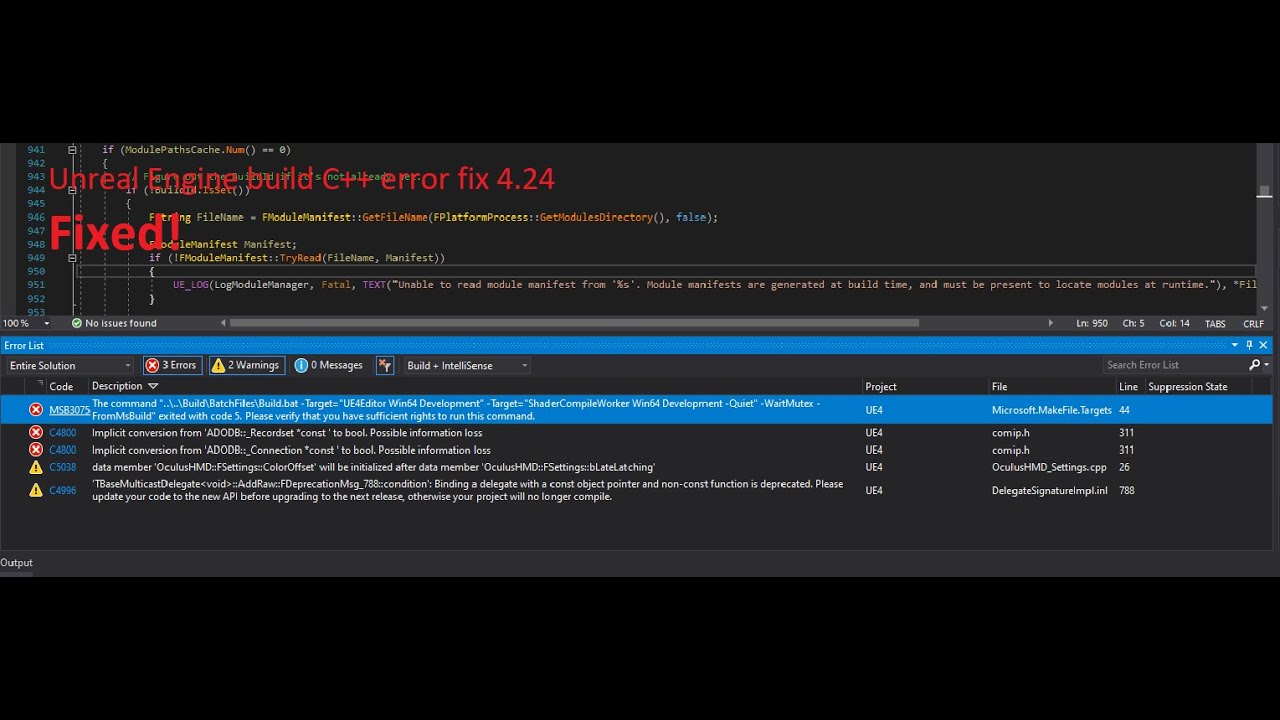
The file pass: YOURENGINEPASS\Engine\Source\Programs\UnrealBuildTool\Platform\Windows
and the file name "VCToolChain.cs".
You should add after 456 lines that code:
Arguments.Add("/wd4800"); // 4800: Implicit conversion from 'type' to bool. Possible information
 opaque lotus
hi all, just checking that this isn't a by design, but if you select a material instance for the material on an element in a material billboard, then upon that level being loaded, you crash with the following callstack https://cdn.discordapp.com/attachments/221799368884355072/731567061582741585/unknown.png

Oh, that's in 4.25.1
 scarlet saddle
I don't know where to ask this
I have this problem: https://forums.unrealengine.com/development-discussion/content-creation/1490500-missing-transform-widget-arrows-in-my-project
Unreal Engine Forums
All the sudden I've lost my transform widget arrows for moving objects around in the viewports
Its both in the view seen here
https://forums.unrealengine.com/
any insight?
yes I have the visibility turned on in settings
unless there's another setting for it beyond that
elder falcon
yeah you'll need to fix some things
?
I mean for win 7
no clue about the editor
I only care for the shipping build to run on it
all the attempts to use unavailable library functions need to be guarded
luckily the one that was making the ship build die on start already had an example for how to make it work elsewhere in the engine
development on windows 7 in 2020 is a joke anyway so
shipping is an actual problem because quite a few players are stuck on ancient pcs
blissful bramble
I want to make a custom shading model but I've never worked with unreal engine's source code. Does anyone know any good tutorials and documents I should read before I begin making it?
spiral mortar
Starting to be old: https://medium.com/@lordned/unreal-engine-4-rendering-overview-part-1-c47f2da65346
 blissful bramble
ty
stable hemlock
windows 7 64bit has 5.91% share according to steam stats
87.12% is at win10 64bit
while 6% of tens of millions is still a lot, I'd say at this point most of them will have quite old hardware anyway
and running ue4 on their system might be a problem in and of itself
win10 adoption seems be rising pretty fast too
its up 1.54% from the last hardware survey
if you are not releasing in 6 months to a year, win7 might become even more irrelevant by the time you release
stable hemlock
its up to you to decide which audience you want to cater to 🤷
 gray glade
Blegh. I've got a client project in a source build of the engine and I need to get new versions of their plugins.
But
That involves the marketplace and it won't let me manually download a version of the plugins.
Anyone figured out how to a) add an engine source build to the launcher and/or b) directly download a marketplace asset for a specified engine version?
 boreal tartan
hi! so I've successfully modified the Unreal Engine from the source code from GitHub but I don't seem to find a way to attach the built exe file inside the Epic Games Launcher so that I can have the plugins and all of that ready to use. Any way to work around this? I've got a few assets that are only on the market but I can't find a way to import them in my custom UE4 build
gray glade
(I just asked the same thing)
boreal tartan
sorry, sorry. my bad, I didn't read that as I was in a rush because for about 3 days I'm still searching for this
gray glade
At this point I'm wastefully installing the same engine version as I'm targeting just to get the marketplace to let me install the plugin.
Waste of space and time.
elder falcon
that is the only way
boreal tartan
what is the only way?
elder falcon
install the same engine version with the launcher, add plugin, manually copy it
boreal tartan
I tried this but it says that the build is different and it can't run UE4 with those plugins
 gloomy hamlet
@boreal tartan After copying the plugin into your source engine, you'll need to build again
 stuck meadow
Is this normal when building from a source build? I havent changed anything but it seems like it has some default errors
boreal tartan
@boreal tartan After copying the plugin into your source engine, you'll need to build again
@gloomy hamlet thanks for the help, but it doesn't work.. when I copy the files, the build is done in less than a second - meaning it didn't do anything. when I open the modified UE4, I'm faced with the following error. The problem is that these plugins don't seem to have any .sln or .proj files in any of their folders so I can rebuild them or to add them as project in the UE4 .sln file; they only have .h and .cpp files
this error appears when I run the engine with the plugins activated
gloomy hamlet
@boreal tartan Don't know what build setup you're using, usually all plugins should get built by default as part of the engine target, they don't need their own project files.
boreal tartan
I'm using the 4.25.1 from GitHub and those plugins seem to be working on the 4.25.1 from the Epic Games Launcher, but not on the GH one. Even the old projects made with the Launcher version don't seem to be working on the GH one.
boreal tartan
I think I just made it work, but I have 0 f'ing clues how
First thing to do was to manually import the plugin's folders and files inside VS
And then I just built and ran it
@gray glade maybe you can find this information useful
gray glade
Eh, not really.
I mean, I did what I said. Install the same engine version, via the launcher, and install the plugin there, then copy it over.
That's as simple as it is.
manually import the plugin's folders and files inside VS
Sounds wrong, @boreal tartan
You don't do anything to the solution or project within VS, because they are generated, and your edits to them will be undone when generating project files and building.
boreal tartan
I mean, I did what I said. Install the same engine version, via the launcher, and install the plugin there, then copy it over.
@gray glade for me this solution didn't work as much as I wanted to and the image above was the error I kept receiving when opening up the newly built UE4 (including the copied plugins)
boreal tartan
Yes, I did. I've also installed the ReSharper plugin for VS2019 which in my opinion it did a good work
gray glade
ReSharper shouldn't have any impact on building UE4 plugins.
boreal tartan
One thing that I don't like after build are the extra 50-60 gbs that I won't use - like mobile support, TVOS, VR, etc
gray glade
Those are crucial to the engine. Removing them is somewhat possible, but involved.
boreal tartan
ReSharper shouldn't have any impact on building UE4 plugins.
@gray glade yea, I know, but it seems to me that VS is very unpredictable in some instances 😄
gray glade
UE4 is still an industry grade product, the ease of access to it's source code is somewhat misleading in that respect. It's target demographic involves studios with IT departments and considerable technical expertise.
50 - 60 GBs for platform support should be nothing (to the target demographic).
(Disclosure: I left Epic February of this year)
But I speak from my own perspective, not on their behalf.
boreal tartan
I see. That's very cool
If I'm not very intrusive with the following question, what was your position at Epic?
gray glade
I worked as an external contractor, then as an individual contractor, and finally an employee over the course of about 7 years, on the engine team and on the Fortnite UI team.
boreal tartan
Really amazing, man!
So I came across this tool, but it seems that it wasn't updated for 4.25 - https://github.com/ryanjon2040/UE4-Binary-Builder - and I can't find a workaround to do that

GitHub
An application designed to create installed Unreal Engine builds (aka Rocket builds) from Unreal Engine GitHub source. - ryanjon2040/UE4-Binary-Builder
 obtuse quarry
How do you distribute a source build of the engine properly? I read some post in forum/answerhub and also Epic Docs, but ... I would go with it like the project itself. Download the source, add everything of the download to perforce.
Every programmer now would need to run the setup.bat to get everything else that is necessary. Problem 1: How to prevent that devs accidentaly/unknowingly checkin stuff that is downloaded with the setup.bat? I think stuff is downloaded into multiple locations, thus just adding a simple ignore would not suffice.
Problem 2: Ensuring that artists always get the correct binaries. The problem already exists for the project itself, as plugin binaries are placed different to the engine binaries. Thus just making a "Resolve Offline Work" in perforce on the binaries folder, does not include the plugin binaries. And now making an engine change introduces more folders where you would need to look for updated binaries. And "Resolve Offline Work" would also cause Problem 1, as it would say that there are files that are not part of perforce yet
formal flower
@obtuse quarry Pretty sure you don't have to worry about #1. the default gitignore ignores all setup.bat dependencies
stuck meadow
Anyone knows how to fix errors from not being able to compile ispc files? Says its not a class.
obtuse quarry
@formal flower GitIgnore, but we use perforce. Good point though, will see for reconfigure to perforce
Thanks
boreal tartan
@stuck meadow are you trying to build a project from source?
stuck meadow
Yeah and I keep getting that ispc error @boreal tartan
obtuse quarry
@formal flower nope... ~33000 files that were downloaded with setup.bat are not covered by the ignore
though it ignores the content directory. Thus the .gitignore is realy just to publish the engine in github.
https://allarsblog.com/2017/04/05/populating-perforce-with-an-unreal-engine-source-build/ recommends a custom p4ignore to get rid of most of the stuff
Allar's Blog
This document covers how to set up a new Perforce server and populate it with an Unreal Engine source build alongside your projects. This is the most basic setup for 'beginner' Perforce pipelines and does not cover things like streams. Please note that you should only do thi...
 bright olive
has anyone added gamepad support to the pixel streaming plugin yet (https://developer.mozilla.org/en-US/docs/Web/API/Gamepad_API/Using_the_Gamepad_API )?

MDN Web Docs
HTML5 introduced many of the necessary components for rich, interactive game development. Technologies like canvas, WebGL, audio, and video, along with JavaScript implementations, have matured to the point where they can now support many tasks previously requiring native code....
just wondering if there is a branch out there somewhere
 low glacier
@boreal tartan May I know what issue you are facing related to 4.25? It should build without issues. You can select 4.24 in the Engine Selection tab and it should work for 4.25 also.
boreal tartan
@boreal tartan May I know what issue you are facing related to 4.25? It should build without issues. You can select 4.24 in the Engine Selection tab and it should work for 4.25 also.
@low glacier this is the error I'm receiving
low glacier
@boreal tartan You have the InstalledEngineBuild.xml file in that location?
You can also manually select the InstalledEngineBuild.xml file by clicking the button next to it.
And try running the binary builder as administrator since you have the engine installed on C drive.
boreal tartan
Ok, I just tried you recommendations but unfortunately with no success 😦
low glacier
You have the xml file in that location?
low glacier
I don't see InstalledEngineBuild.xml in that screenshot and the location is wrong
boreal tartan
oooohhh sorry
I didn't see that mistake
guess I was trying with the wrong XML file
here's the original location for the requested XML, but I don't see anything here
low glacier
Wait. Are you trying to run this on an Engine build from the launcher?
boreal tartan
guess I was just screwing myself up
thanks for the heads up
really appreciated!
I simply didn't notice what I was doing wrong
and I think I should take a bigger brake to free my mind a little
low glacier
No worries 🙂
boreal tartan
I don't seem to find another exe
and when selecting the 'build' one it gives me the following error
oh, and the selected engine version is 4.24 - not 4.22 as seen in the photo. I just tested to see what's disabling between the version numbers
obtuse quarry
After syncing the custom engine and the project via perforce to the artist, the engine is not registered to the system and thus the project can't find the engine. Does every artist/coworker need to run setup.bat of the custom engine?
 limber jacinth
unless you checked those files in yes
i would suggest making a binary version of the engine
for artists etc
they don't need the source build
 rain lake
is the 4.26 water tool in master?
obtuse quarry
@limber jacinth the problem is that the project does not find the engine, as the custom engine is only stored as an ID in the uproject file. Thus something needs to be registered somewhere (I think windows registry?) but that does not happen from a simple perforce sync. So how should the project find the custom engine without running the setup.bat?
obtuse quarry
... thanks. Why is that not documented?...
or is it and I'm just blind
and can you tell me where the ID that is placed in the uproject file is stored in the engine? as that obviously needs to be send to the artists as well so everyone is using the same ID to not change the uproject file on every user.
obtuse quarry
@stable hemlock Thanks. So you realy need edit the registry on every team members machine ...? Seriously?
So a remote artist is supposed to know that he has to edit the registry?
"Although we provide Installed Engine Builds as a courtesy through the Epic Games Launcher, ..." ...
obtuse quarry
yeah thanks. Already on it to write a batch
low glacier
@boreal tartan You need to select AutomationToolLauncher.exe not UnrealBuildTool.exe. Follow these steps (assuming you have completely downloaded/cloned UE4 git repo).
1: Run Setup.bat
2: After Setup.bat finishes run GenerateProjectFiles.bat
3: Then open UE4.sln
4: In solution explorer expand Programs folder, right click on AutomationToolLauncher and select Build.
5: You should now have AutomationToolLauncher.exe in Engine/Binaries/DotNET folder.
stuck meadow
is there a problem if one user opens the project with a source build while others use the epic launcher version?
 lilac shale
Does anyone know how we can contact the devs or look up and if needed report issues in Development branches? Couldn't really find any info.
stuck meadow
well 4.25 just for server builds @stable hemlock
lilac shale
@stable hemlock Yeah.. I know that form, but there is no option to select another version then the binary builds. "send your bug reports to /dev/null" there is no option like that?
shrewd thorn
I've had much more success sending in pull requests that halfway fix a bug then using that bug form. I only used the bug form for platform-specific stuff that can't be a pull request due to licensing
It goes through a weird layer of QA before those bug report bugs even get to a developer
It seems like very few make it through
 frozen plume
Hello, I'm trying to save a procedural wave out as a soundwave; I tried everything but for whatever reason when I play the audio in the game it doesn't work.. any ideas would help thanks 🙂
USoundWaveProcedural* NewAsset = NewObject<USoundWaveProcedural>(AssetPackage, USoundWaveProcedural::StaticClass(), *filename, EObjectFlags::RF_Public | EObjectFlags::RF_Standalone, SoundToSave);
FAssetRegistryModule::AssetCreated(AssetPackage);
AssetPackage->MarkPackageDirty();
bool bSuccess = UPackage::SavePackage(AssetPackage, SoundToSave, EObjectFlags::RF_Public | EObjectFlags::RF_Standalone, *filename);``` clear cloak
For getting into customizing the engine source, I wanted to do a few things with customizing the blueprint graph i.e changing the execution flow wire color or blueprint node colors since I figure that might be a fun jumping off point. Does anyone have any recommendations on how I find where things like that are located in the code so I can change them?
stable hemlock
Our main goal is to make sure Chaos is fully featured and production ready 4.26.
Is it though? 😅
elder falcon
@clear cloak use the widget reflector on a blueprint node
random glade
Greetings! I'm trying to find the C++ function called when right clicking an asset and hitting AssetActions/Reload, but most reload funcionts I find on the source code seem to be for hot reload of code. Any pointers?
gloomy hamlet
@random glade Just do a text search in code for the tooltip text. Easy way to find code behind just about any UI element.
clear cloak
I'll take a look at that thanks @elder falcon! One more thing is after building from source and starting up the editor, it's been stuck at 39% loading for the past 12 hours on a pretty good spec system which I assume is normal and it's just compiling shaders & whatever other setup it needs to do
elder falcon
that's not normal at all
first startup takes maybe 5 minutes for me on a fresh workspace
clear cloak
Huh ok, thanks for letting me know I'll take a look at the logs and see if there's anything funky
Found it, going to add the solution here so if people ctrl + f they can find it:
Problem: Source build of editor stuck at 39% 39 39 percent
Solution: Disable XGE https://forums.unrealengine.com/community/general-discussion/1743009-work-from-home-disable-xge-incredibuild
boreal tartan
@boreal tartan You need to select
AutomationToolLauncher.exenotUnrealBuildTool.exe. Follow these steps (assuming you have completely downloaded/cloned UE4 git repo).1: Run
Setup.bat
2: After Setup.bat finishes runGenerateProjectFiles.bat
3: Then openUE4.sln
4: In solution explorer expandProgramsfolder, right click onAutomationToolLauncherand selectBuild.
5: You should now haveAutomationToolLauncher.exeinEngine/Binaries/DotNETfolder.
@low glacier Hi! Thanks for the help so far. Really appreciated! I've done what you just said, but I'm encountering other errors. Please see below the first one
If I'm trying to change the name to 'AutomationTool.exe' it gives me the following error
low glacier
@boreal tartan Open UE4.sln and under programs, right click on AutomationTool and select Build.
Make sure you build AutomationToolLauncher as well
Then in the Binary Builder, select AutomationToolLauncher.exe and not AutomationTool.exe
boreal tartan
Thank you, but right now I'm getting the following one...
low glacier
@boreal tartan Try turning on Host Only option.
boreal tartan
WOW! Amazing! This one just did the trick
I don't know how and why, but previously I've tried with that option on ON but I was receiving the exact same error when Win64 was selected
Anyway, thank you very much Ryan!
You were really helpful and I really appreciate that!
 trail bloom
Anyone have experience tuning Task graph for performance kicking around to answer a question about threads? https://answers.unrealengine.com/questions/971903/how-to-specify-number-of-task-graph-threads-numnam.html
blissful bramble
Whenever I build Unreal Engine with visual studio my computer begins to overheat and struggles to keep up, and it often causes errors and makes Visual Studio to crash. I always make sure that nothing runs in the background too. My computer should have enough specs to handle this. Does anyone know how I can improve the performance?
stable hemlock
you should define what overheat means
some processors can handle heat better than others
sometimes overheating of the cpu might not be an issue, but overheating ram might cause all sorts of problems
in any case, your pc should not overheat when compiling
you should definitely fix it if that is actually the case
blissful bramble
Thanks for the suggestion! I'll try to clean my PC and get a better cooling system. I don't know if this is related, but in addition to overheating my computer also becomes very slow to the point where VS sometimes crashes. Is there anything I can do to fix that?
limber jacinth
you are using your entire CPU compiling
you haven't told us your specs, but building the engine really taxes a cpu
also requires a decent amount of memory >=16gb
tawdry orbit
Whenever I build Unreal Engine with visual studio my computer begins to overheat and struggles to keep up, and it often causes errors and makes Visual Studio to crash. I always make sure that nothing runs in the background too. My computer should have enough specs to handle this. Does anyone know how I can improve the performance?
@blissful bramble You need at least 8 gb of ram; turn off turbo boost if you have it to avoid overheating; and you need at least 6 cores in your pc to perform decently.
But tell us your specs
blissful bramble
tawdry orbit
okay, on your pc go to
Power & Sleep Settings > Additional Power Settings > High performance > Change Plan Settings > Change Advanced Power Settings
[Select High performance if not]
blissful bramble
It is already selected
tawdry orbit
Hard disk > Turn off ... > 0
Processor power management >
min to 5%
active cooling
max 99%
I did that on my pc and it dropped down like 18° Celsius:
i have an intel i7
make sure to apply and save,
blissful bramble
I changed it, thanks! I'll try building unreal soon and tell you if it made any difference.
tawdry orbit
you are welcome, also, how much cores do you have?
blissful bramble
10
blissful bramble
nope XD
tawdry orbit
all right, so before recommending you the settings, how many physical cores vs logical cores do you have?
blissful bramble
Built it by myself (I chose the parts and had someone build it).
spiral mortar
This conversation is better suited for #lounge btw, since this is clearly not an unreal-specific issue 🙂
tawdry orbit
<?xml version="1.0" encoding="utf-8"?>
<Configuration xmlns="https://www.unrealengine.com/BuildConfiguration" >
<BuildConfiguration>
<MinFilesUsingPrecompiledHeader>1</MinFilesUsingPrecompiledHeader>
<bUseUnityBuild>true</bUseUnityBuild>
<bAllowXGE>false</bAllowXGE>
</BuildConfiguration>
<BuildMode>
<bIgnoreJunk>true</bIgnoreJunk>
</BuildMode>
<LocalExecutor>
<ProcessorCountMultiplier>2</ProcessorCountMultiplier>
<MaxProcessorCount>20</MaxProcessorCount>
</LocalExecutor>
</Configuration>
You need three copies of this file, save it as xml
spiral mortar
^ not really needed, default config does what's needed
tawdry orbit
"https://www.unrealengine.com/BuildConfiguration" (mistaken)
^ not really needed, default config does what's needed
@spiral mortar he has 10 cores, 32 gb if ram and its lagging when compiling
not normal
spiral mortar
Yes, most likely because his cooling system is not good enough
Changing unreal build config files won't help with that
 unique blade
does anybody ever tried to fix lightshaftrendering.cpp so it doesn't jitter with TAA enabled ? There's a dedicated func to handle TAA, but it doesn't yields expected result. I'm wondering either if it's borked or a special snowflakes that need very custom fix (from 4.20 to 4.25).
 lucid whale
Probably anyone can explain why according https://docs.unrealengine.com/en-US/API/Runtime/Engine/FSceneInterface/UpdateSceneCaptureContents/1/index.html
"This must be called on the game thread." Is it possible to write data to Render Target not in Game Thread without engine modification?
Updates the contents of the given scene capture by rendering the scene.
 heavy crater
In Source build UE how to install plugin form marketplace?
 unique patrol
help! I get really frustrated when I get this. How would I go about fixing this, and what is causing it, how do I avoid it ??
heavy crater
@unique patrol do you have visual studio install in sys?
and do you use any c++ files in your project, if yes then try to generate visual studio project by right click on .uproject file
I 'have only seen this when i made c++ project!
unique patrol
If only it were that easy. 😂
I spent half a day trying to fix it... the other half just redoing the entire project.
1>D:\_PROJECTS\GameDev\WednesdayNightRising\002_Game\Intermediate\Build\Win64\UE4Editor\Inc\WednesdayNightRising\WednesdayNightRisingGameModeBase.generated.h(16): error C2007: #define syntax
1>D:\_PROJECTS\GameDev\WednesdayNightRising\002_Game\Source\WednesdayNightRising\WednesdayNightRisingGameModeBase.h(13): error C2059: syntax error: 'public'
1>D:\_PROJECTS\GameDev\WednesdayNightRising\002_Game\Source\WednesdayNightRising\WednesdayNightRisingGameModeBase.h(14): error C2143: syntax error: missing ';' before '{'
1>D:\_PROJECTS\GameDev\WednesdayNightRising\002_Game\Source\WednesdayNightRising\WednesdayNightRisingGameModeBase.h(14): error C2447: '{': missing function header (old-style formal list?)```I checked it all... and I couldn't figure out how to fix it.
 prime torrent
@unique patrol Post code in something like Pastebin for us to see.
It'll be much easier.
unique patrol
I trashed the project and started again
Sorry, next time 😃
I may have moved something, or deleted something, and it just broke everything
I need to learn how things work 'under the hood'
Any suggestions, docs , books, videos, tutorials?
 weary fog
i don't have Programs folder what should i do
 long wave
Has anybody had any luck exposing eMESH_MULTIPLE and eMESH_BOTH_SIDES for trace queries?
Ideally trying to add them as options within FCollisionQueryParams - but certain physics types appear to just hardcode the flags.
Looks like PxScene::raycastMultiple will give what I need
 lusty spire
Is there any official way to reach out to devs and request few methods to be marked as virtual? I have tried it on forums, but that is obviously not the way https://forums.unrealengine.com/development-discussion/engine-source-github/1787988-staff-marking-method-as-virtual-request
Unreal Engine Forums
I am not sure, if there are some official requests forms for this type of request. If so, please let me know.
With Paper2D being quite some time without any update, I wanted to give it some love and introduce few optimisation. I found class PaperSprite having almost no virtu...
lusty spire
@elder falcon Thanks, I thought so. The problem is that if I change it myself I cannot use those functions in plugins or other distributable code. I am happy to fix problems with Paper2D, but without a proper way of distributing it, it feels like ton of wasted effort
gloomy hamlet
You can try making a PR on Github. But can take ages, and depending on who reviews it there's a good chance it'll end up being rejected anyway.
lusty spire
@gloomy hamlet Worth a shot, thanks
 grizzled breach
Does it take time for public hotfix to get merged in the release branch on git?
weary fog
Is there a way to fix C4800 and MSB3075 without building engine from scratch?
quick crystal
I am seeing the epic launcher showing UE 4.25.2 available, but I can't find a single article about it
hidden hedge
it came out today and the forum thread for hotfixes was updated
Unreal Engine Forums
The 4.25.2 Hotfix is now live!
Feel free to discuss this release on the 4.25 forum thread (https://forums.unrealengine.com/unreal-engine/announcements-and-releases/1755531).
If you experience a bug with the 4.25.2 Hotfix, please follow the How To Report a Bug Guide (https://...
opaque lotus
Anyone else finding that github doesn't appear to have 4.25.2 ?
release branch sits at 4.25.1 still and there's no 4.25.2 tag
 sudden flume
Hello! I have a couple questions about the source. Any info would be greatly appreciate as I'm both new to Unreal, and building things through VS. (Though Youtube has helped a lot with getting it running!)
Are there any ways to launch a custom version of the editor without Visual Studio? I've been using VS for the last few days, and I'm a little concerned that I might need to rebuild UE4 if I have to close VS due to a restart or something. 😭 (My PC's on the lower-end so building takes about an hour and a half.) If not; then would me replacing the files in the current unreal version with the files from my custom source make Unreal launch my custom source over Unreal's default source?
Another question is: Is there any easy way to get marketplace content? For plugins I already figured out that I can just copy them from the editor editions of unreal, and put their files in the custom source's files, but I'm concerned Marketplace may not be that easy? I'm not 100% sure though I haven't tried just yet.
 opal gorge
Going from 4.25.1 to 4.25.2
Does this file change count sound right??
Seems like a lot...
 jagged sinew
Is that the number of files or just lines?
opal gorge
Number of files
I know that epic changed a lot of the Copyright claims at the top of files but this number just seems wrong...
fresh coral
@sudden flume You can launch the editor without VS by double clicking on your uproject file, or by running Engine\Binaries\Win64\UE4Editor.exe (adjust as required if you're not on windows)
sudden flume
Thank you!
fresh coral
for marketplace content, plugins are the most annoying because you need to install them to a launcher build and copy, for non-plugin assets you can just select the "show all projects" box when installing and it will show projects associated with your source build
@opal gorge I didn't look closely when I rebased my local changes but pretty sure it wasn't nearly that many changes, because the diff window was a reasonable size and loaded with reasonable speed
opal gorge
@fresh coral thanks for the info. Not sure what is wrong with mine...
fresh coral
yeah 292 files, 5261 additions, 4556 deletions between 4.25.1 and 4.25.2
sudden flume
@fresh coral Ohhh I see!! Thank you for that I've been really enjoying using prefabricator & a few unreal assets from the asset store in the editor builds so that's really helpful!
I have one more question though. When you get a new custom build of the engine do you need to run the setup every time?
I'm interested in trying a new toon-method someone made the other day (https://github.com/Ikeiwa/UnrealEngine-Toon), but I'm just unsure if I need to do the entire setup or if I can maybe skim down about 2 hours off of that process.
fresh coral
you should re-run the setup, because a thing that can change is the external dependencies stored outside of git
setup is incremental and won't do anything if it isn't required, I re-run setup and GenerateProjectFiles.bat everytime i get new engine updates
 sharp stag
how big is the source build for 4.25.2?
fresh coral
do you mean relative to 4.25.1 or just in general?
my unrealengine directory is 147gb
sharp stag
in general
fresh coral
I have both development and debug binaries in there so ~150gb is probably a little on the high side but is probably a decent working estimate. I use filesystem compression so actual size on disk is 80gb
sharp stag
ok thx
teal plinth
if I want to edit a source file do I have to build source all over again?
fresh coral
it will build everything affected by the file you changed, that can be very small or very large depending on what file it is
elder falcon
no, 4.25.3 will
elder falcon
actually, seems like this got in 4.25.2, so I was mistaken there
normally use a fork directly off the 4.25 branch so wasn't sure where exactly the release was
quick crystal
Hey everyone, not sure if anyone else has run into this or not, but ever since I upgraded to 4.25 I can no longer use Attach To Process.
I noticed the type is now Python... do I really need a certain version of python installed to use Attach to Process now?
I'm trying to debug the server process that spawns inside of the PIE... I could do this in UE 4.23.x
oops. Disregard. VS is just detecting it automatically as python. I had to explicitly
force the types to debug... never had to do that before.
quick crystal
Ok, well now to the real problem... has anyone encountered this crash in 4.25.x? It randomly happens when I open animation assets
Assertion failed: !UICommandBindingMap.Contains(InUICommandInfo) [File:C:/Source/Repos/UnrealEngine/Engine/Source/Runtime/Slate/Private/Framework/Commands/UICommandList.cpp] [Line: 62]
Command list already contains a command named 'Rename'
sorry, meant to only post in the VS window
blissful bramble
Does anyone know how to add more material properties?
 fluid roost
I don't know if this is the right channel, but I am trying to compile unreal on linux and when I run it I get this error:
./UE4Editor: symbol lookup error: /usr/lib/x86_64-linux-gnu/libvulkan_radeon.so: undefined symbol: amdgpu_bo_list_create_raw
What is the issue here?
libvulkan_radeon.so does exist
 mint vault
I'm trying to run ue 25.1 from source, but I get an error on this line UE_LOG(LogICUInternationalization, Fatal, TEXT("ICU data directory was not discovered:\n%s"), *GetPrioritizedDataDirectoriesString());
So apparently that folder doesn't exist, but I'm not quite sure where to make it. I tried adding it directly to the engine folder because that was one of the folder in PotentialDataDirectories in code just prior to that error
 serene yew
Is this channel the proper place to ask questions concerning broken projects/builds?
At first I assumed that this was a channel for people who were working directly on the UE source (like someone who had forked the engine's repo to contribute to it), but now I realize that this may be just for anything related to working with the source code that doesn't belong in #cpp
Okay, well, it looks like it is, judging from other people's posts...
mint vault
I'm trying to run ue 25.1 from source, but I get an error on this line
UE_LOG(LogICUInternationalization, Fatal, TEXT("ICU data directory was not discovered:\n%s"), *GetPrioritizedDataDirectoriesString());
I got this sorted by updating the source to 25.2
serene yew
Does anyone here use Visual Studio Code (not regular Visual Studio) on MacOS?
 small cobalt
Where ever you have put the UnrealEngine Source files is resulting in to long of a file path.
Its important to ensure that you put the UnrealEngine directory as close to the drive root as possible.
 errant berry
oh ok thanks for your help
 tired lintel
I need to see how unreal.AssetToolsHelpers.get_asset_tools().import_asset_tasks works. How can I find it in the source code?? (UE 4.23)
 lethal heron
has anyone here experience setting up a build automation aka. CI for a source build?
Thinking of using jenkins to listen to perforce submits, and starting builds then, aswell as nightly builds.
Is jenkins alone suffice to do that, or would you recommend tools like the BuildGraph or UGS to start the build process?
also: is the Engine/Source folder needed e.g. when you would want to distribute small builds to your artists?
this is almost the biggest folder when you build from source, with ~16gb out of the 36
blissful bramble
I'm trying to make a shading model but I can't find the switch(GetShadingModel()) in MaterialShared.cpp in the latest version of Unreal, does anyone know what happened to it?
blissful bramble
Nevermind, I think I found it in HLSLMaterialTranslator.cpp, I'll compile it later and check if it works.
blissful bramble
I don't know if I did that properly but I definitely did something wrong because the build failed with error MSB3073
I followed this https://medium.com/@lordned/ue4-rendering-part-6-adding-a-new-shading-model-e2972b40d72d tutorial in the latest version of unreal. Does anyone know how to fix it?

 junior trail
does anyone know what is causing the bug where engine verisions 4.25* affecting the IDE to not recognize any of the source code and as a result errors out everything (but compiling still works fine) i tought if i just waited long enough a fix would come but 4.25.2-release and it is still there. Is there a way to fix it myself?
serene yew
@junior trail you may be experiencing the same thing I am. I was getting something similar, so I:
Created a new project (C++).
Added a new class (clicked Public, so it would create the Public and Private dirs)
File > Generate Visual Studio Code project
File > Open Visual Studio Code
Closed UE4Editor
Compiled the project's Editor Development build (success)
Opened UE4Editor:
It claims that there are missing modules, recompile? I click yes.
Error, cannot recompile.
but I just did! 🥺
junior trail
well my problem is just in the IDE, compiling and running the engine works just fine. im using CLion, i wonder if that might affect it
serene yew
Check this out
It only does that if I click on the UE icon in the dock
If I open a terminal and do:
cd /path/to/cwd
/Users/Shared/blah/blah/blah/UE4Editor /Users/myname/blah/blah/blah/myproject.uproject
It runs just fine!
Same thing the Build+Run should do (the Run part anyway) according to my launch.json
So what's going on here?
junior trail
so you can run the .uproject trough UE4Editor?
serene yew
Yes. But only if I launch it from the Terminal instead of the dock
Weird, right
I am sure that the dock icon in question is the same exact path. I did "open in finder" and checked it
errr points to the exact same path
Does the same thing work for you?
I dunno what type of box you're on, your terminal commands may be different than mine
check your build settings to see what the IDE is told to do
junior trail
i have no idea whats happening for you, but im pretty sure we dont have the same problem
serene yew
Mine looks like:
{
    "name": "KittyCatastropheEditor (Development)",
    "request": "launch",
    "preLaunchTask": "KittyCatastropheEditor Mac Development Build",
    "program": "/Users/Shared/EpicGames/UE_4.25/Engine/Binaries/Mac/UE4Editor.app/Contents/MacOS/UE4Editor",
    "args": [
      "/Users/wes/Documents/UnrealProjects/KittyCatastrophe/KittyCatastrophe.uproject"
    ],
    "cwd": "/Users/Shared/EpicGames/UE_4.25",
    "type": "lldb"
}
so that's why I changed directory (to whatever "cwd" says) before launching
in the terminal
then just type [program] [args]
substituted for whatever that says
I am still not satisfied, I don't want to have to do that every time I want to launch the editor, but more importantly than it allows me to launch the editor is I may be getting closer to figuring out WTF!
fresh coral
@lethal heron despite the name that folder actually contains a lot of third party binaries that make up the bulk of the size, and your artists probably need those. https://docs.unrealengine.com/en-US/Programming/Deployment/index.html has some details on how to get your engine build to your non-programmers
Learn what it takes to to deploy UE4 to a team.
blissful bramble
I followed this https://medium.com/@lordned/ue4-rendering-part-6-adding-a-new-shading-model-e2972b40d72d tutorial in the latest version of unreal. Does anyone know how to fix it?
I updated Visual Studio and it fixed the problem
blissful bramble
nvm, it just happened again :/
dusty inlet
Hey
How does unreal's renderer abstraction work? does it decide which call should go to the selected API at init time or at the actual call time?
And where is the entry point of VulkanRHI? where a FRHIVulkanInstance and FRHIVulkanDevice are actually created?
I've been reading the source code of the RHI but i can't wrap my mind around it.
jagged sinew
Does it decide which call should go to the selected API at init time or at the actual call time?
@dusty inlet I think that depends on if it's a dynamic or static mesh batch. See https://docs.unrealengine.com/en-US/Programming/Rendering/MeshDrawingPipeline/index.html and https://docs.unrealengine.com/en-US/Engine/Rendering/Overview/index.html
Product documentation including reference and guides for Unreal Engine 4
Overview of the main features of the rendering subsystem.
By API, do you mean OpenGL, Vulkan, Direct3D, etc, or glDrawArrays and the like? The former is decided at startup, for the latter see the links above.
dusty inlet
Thanks ibbles. Yes i mean graphics API like opengl and vulkan.
blissful bramble
nvm, it just happened again :/
@blissful bramble Nvm it was a different error XD
 hexed valley
Hey Guys, I built UE4 from source and I can run my game and build a linux dedicated server. However, When I try to generate visual studio project files, I don't get my sln file back. I read the log file but it doesn't tell me any errors. Any suggestions how to fix?
 livid fiber
Hey guys, does anybody know, if it is possible to add custom shading model by plugin?
 tropic tapir
this might be a mobile question but for iOS/TvOS, I'm guessing I would have to edit the source code to add the standard controller's R3 and L3 buttons/inputs, can anyone share any advice on how I could add this functionality?
blissful bramble
I added a new function in ShadingModels.ush and I call it when my custom shading model is selected but whenever I use GBuffer.DiffuseColor inside of it, I get this error: "variable GBuffer used without having been completely initialized". I am already using GBuffer to get two custom parameters and they work fine.
Any ideas?
 heady gate
Posting here too, cause might be more relevant to this channel...
Hello! So I have an annoying thing that's bugging me here... I have a Commandlet that's running that loads and inits packages and worlds. I want to completely tear down and destroy a world, before reloading it entirely to ensure it's fully clean. I keep hitting the ensure inside UWorld::InitWorld because whatever I try, bIsWorldInitialized is not being reset. Do I have to manually set that? Or am I not calling the correct method of shutting down a world?
heady gate
So, bit of a hack, but it turns out that calling InitWorld on a world that had bIsWorldInitialized = false set, caused a NiagaraWorldManager error. Through some trial and error, I hacked in a call to FWorldDelegates::OnPreWorldFinishDestroy.Broadcast(World); to remove the world from the WorldManager, and that seemingly worked... If I tried to get the NiagaraWorldManager to fully clean up from the world, it was destroying the world entirely, so the next time I tried to grab it from the package, it returned nullptr, which is obviously not great. Hopefully this hack works 🤷♂️
heady gate
Well, it failed, because Niagara now fails a check on editor startup in the level. I hate everything 😦
 ornate fjord
if I got 23.1 from source and changed nothing except add console plugins, could I just pull from the current tag to upgrade, or would it be smarter to clone the entire thing on the latest version?
fresh coral
@ornate fjord you will end up with the same sources on disk either way
 main mortar
I want to build 4.25 source, I am wondering does anyone know how many GB that will consume?
jagged sinew
About 100 GB, I would guess. I have 77 GB for 4.22 and 109 GB for 4.24.
 fading venture
Hello everyone, This is an excerpt from a memreport. Does anyone know what the numbers on extreme left represent? Their sum overshoots Process Physical Memory:
elder falcon
vram usage
categorized
not individual entries, some of these are groups that include other entries in their size
though there are also others in here
it's basically just a dump of various memory stats
fading venture
@elder falcon Ah! so those values may overlap? Or their sum should match any numbers above?
elder falcon
they will overlap yes
some of them are for ram usage and some for vram usage
for example, Persistent Uber Graph Frame memory is related to blueprints and SkeletalMesh Index Memory is on the GPU
fading venture
welp, in order to get more accurate list for RAM usage, is there a way to list items which use RAM? is there any flag that i need to set for eg. just print elements belonging to STATGROUP_Memory
@elder falcon Thanks for the quick responses! 😄
elder falcon
there are a lot of ways to see what uses memory
there is the memory stats in the engine
there is LLM
there will soon be memory insights (in 4.26)
there is the old memory profiler
I think there is also an integration with MemPro (3rd party software)
fading venture
@elder falcon amongst those I found memreport to include most detailed data, which I export to a csv file using the parser I wrote. Was just adding them up to see whether it matched the numbers above. But thank you so much for you insights! 🙂
blissful bramble
I added a new function in ShadingModels.ush and I call it when my custom shading model is selected but whenever I use GBuffer.DiffuseColor inside of it, I get this error: "variable GBuffer used without having been completely initialized". I am already using GBuffer to get two custom parameters and they work fine.
Any ideas?
After testing a few things I realized that the problem is probably with the parameters I added so I'll change my question: Does anyone know how to add variables to the GBuffer?
 fierce moss
Hello! Could anyone explain the relation between FMaterial and FMaterialShaderMap? Thanks! 🙂
 pure plover
I'm really looking for someone who is really expert / confortable with coding / blueprint, to help me achieve/create dockable/sizeable windows in unreal engine please. Please dm me if you're that persoon
stable hemlock
@jade trench hey
 jade trench
yea
stable hemlock
git clone https://github.com/EpicGames/UnrealEngine.git --branch %ENGINEVERSION%-release %DRIVE%:\unreal\src\UnrealEngine-%ENGINEVERSION%-release --quiet --progress

call "%DRIVE%:\unreal\src\UnrealEngine-%ENGINEVERSION%-release\setup.bat"

call "%DRIVE%:\unreal\src\UnrealEngine-%ENGINEVERSION%-release\GenerateProjectFiles.bat" >> %LOG%

::BUILD UNREAL SOURCE

call "%DRIVE%:\unreal\src\UnrealEngine-%ENGINEVERSION%-release\Engine\Build\BatchFiles\Build.bat" -Target="ShaderCompileWorker Win64 Development" -Target="UE4Editor Win64 Development" -Target="UnrealLightmass Win64 Development" -WaitMutex -FromMsBuild >> %LOG%
``` that should do it. replace DRIVE, engineversion and stuff with the engine version.auto gets the latest version. make sure to set %ENGINEVERISON% as a variable.
jade trench
just copy and paste that in cmd?
stable hemlock
been using this for about a year works really well.
no, you have to set the variables.
jade trench
uh
stable hemlock
paste it in notepad.. save as a .bat
set the vars
do you know how to set vars in batch files? 🙂
jade trench
nope
stable hemlock
set ENGINEVERSION=4.25.3
set DRIVE=F
there you are. replace drive with your drive of installation.
remove the >> %LOG% parts
from the script above
jade trench
ok
looks like its working
slowly, but working lol 6mb/s
why's it so slow tho, task manager says im recieving like 40mb/s
stable hemlock
works? nice
yeah i used this bad boy for a while. saved me a ton of time
i was goign to give my script to epic for them to use lol
but haven't yet
git takes a while to DL. they set caps on user downloads.
jade trench
oh ok
stable hemlock
yep
jade trench
yeah u should sell it on the marketplace
stable hemlock
make sure you updated your visual studio stuff too
stable hemlock
Tips, tricks, and techniques for setting up Visual Studio to work with Unreal Engine 4.
jade trench
u mean like rebuilding Unreal?
stable hemlock
further, i would recommend getting vs 2019
jade trench
do I have to rebuild UE tho
stable hemlock
that script builds the engine, yes.
stable hemlock
you may be best off getting the engine from the epic games launcher if you are not doing dedicated online servers.
my video game has a dedicated linux server as a host, so i must build the engine.
jade trench
nah that thing is a piece of shit, I cant even generate an .ipa file from it
stable hemlock
well it has it's limits that's for sure. but i do like all of epic's software 🙂 almost worked there
plus the epic store is based off of the launcher so it's important for them as a company.

jade trench
also Ive always wondered whats the fakeplatformxxx thing
like its an option in packaging
jade trench
ok
@stable hemlock You are in 'detached HEAD' state. You can look around, make experimental
changes and commit them, and you can discard any commits you make in this
state without impacting any branches by performing another checkout.
If you want to create a new branch to retain commits you create, you may
do so (now or later) by using -b with the checkout command again. Example:
git checkout -b <new-branch-name>
what do i do
oh nvm now its updating dependencies
jade trench
@stable hemlock Running UnrealHeaderTool UE4Editor "C:\unreal\src\UnrealEngine-4.25.3-release\Engine\Intermediate\Build\Win64\UE4Editor\Development\UE4Editor.uhtmanifest" -LogCmds="loginit warning, logexit warning, logdatabase error" -Unattended -WarningsAsErrors -abslog="C:\unreal\src\UnrealEngine-4.25.3-release\Engine\Programs\UnrealBuildTool\Log_UHT.txt"
is this a problem?
quick crystal
Please tell me someone here is also having a problem with opening multiple animation editor windows and having the editor crash
I'm hoping there is light at the end of the tunnel. It is very annoying. I have to remember to run the editor in debug mode so I can catch the exception about how there is a duplicate command being inserted
jade trench
I havent ever done that
quick crystal
if I am not running in debug mode, it just crashes all together
I'm running the stock editor from source
stable hemlock
@jade trench only if the log has an error, or fatal error during compilation is it an error.
the script works fine for me.
check the log to be sure.
  [4024/4028] UE4Editor-PixelStreaming.dll
     Creating library F:\unreal\src\UnrealEngine-4.25.3-release\Engine\Plugins\Media\PixelStreaming\Intermediate\Build\Win64\UE4Editor\Development\PixelStreaming\UE4Editor-PixelStreaming.suppressed.lib and object F:\unreal\src\UnrealEngine-4.25.3-release\Engine\Plugins\Media\PixelStreaming\Intermediate\Build\Win64\UE4Editor\Development\PixelStreaming\UE4Editor-PixelStreaming.suppressed.exp
  [4025/4028] UE4Editor-DetailCustomizations.dll
     Creating library F:\unreal\src\UnrealEngine-4.25.3-release\Engine\Intermediate\Build\Win64\UE4Editor\Development\DetailCustomizations\UE4Editor-DetailCustomizations.suppressed.lib and object F:\unreal\src\UnrealEngine-4.25.3-release\Engine\Intermediate\Build\Win64\UE4Editor\Development\DetailCustomizations\UE4Editor-DetailCustomizations.suppressed.exp
  [4026/4028] UE4Editor-NiagaraEditor.dll
     Creating library F:\unreal\src\UnrealEngine-4.25.3-release\Engine\Plugins\FX\Niagara\Intermediate\Build\Win64\UE4Editor\Development\NiagaraEditor\UE4Editor-NiagaraEditor.suppressed.lib and object F:\unreal\src\UnrealEngine-4.25.3-release\Engine\Plugins\FX\Niagara\Intermediate\Build\Win64\UE4Editor\Development\NiagaraEditor\UE4Editor-NiagaraEditor.suppressed.exp
  [4027/4028] UE4Editor-UnrealEd.dll
     Creating library F:\unreal\src\UnrealEngine-4.25.3-release\Engine\Intermediate\Build\Win64\UE4Editor\Development\UnrealEd\UE4Editor-UnrealEd.suppressed.lib and object F:\unreal\src\UnrealEngine-4.25.3-release\Engine\Intermediate\Build\Win64\UE4Editor\Development\UnrealEd\UE4Editor-UnrealEd.suppressed.exp
  [4028/4028] UE4Editor.target
Total time in Parallel executor: 2164.15 seconds
Total execution time: 2395.86 seconds
``` should be the last few linesif there is no error before total execution time there's obviously not an error.
blissful bramble
After testing a few things I realized that the problem is probably with the parameters I added so I'll change my question: Does anyone know how to add variables to the GBuffer?
Still looking for an answer
jade trench
@stable hemlock it seemed to download seperately
instead of updating, I think I just installed the entire thing
but there's no ue4.exe in it
so i cant launch it
in fact a lot of files are missing
stable hemlock
@jade trench the script installs the entire engine from scratch. F:\unreal\src\UnrealEngine-4.25.3-release\Engine\Binaries\Win64\UE4Editor.exe is the executable. sorry i can't be of more guidance than that, just to get the latest ue version is all that was requested
jade trench
but almost all the files are missing
stable hemlock
files aren't missing from that engine build
i use it for my game, works fine.
which file is missing?
jade trench
everything pretty much lol
stable hemlock
don't know what you're talking about. sorry.
stable hemlock
@jade trench https://docs.unrealengine.com/en-US/Programming/Development/BuildingUnrealEngine/index.html
Compiling Unreal Engine from source.
follow that guide if my script doesn't work for you please. thanks.
ornate fjord
so trying to upgrade from 4.23 to 4.25, what does this mean The platform name Quail is not a valid platform name.
what's quail?
ah wait forgot to regen project files
maybe that's it
ok yeah seemed to be fixed, was either the generate or me forgetting to update the console plugins first 😄
nvm it's back
fml
ornate fjord
ok I'm just stupid guys, it was google analytics plugin
opal gorge
Does anyone know what github branch the latest version of Chaos is?
elder falcon
release-engine-staging
 tropic pine
Hey, I've recently gotten UE 4.25.1-release from github on linux and compiled it, altough I didn't succeed at opening my already existing windows 10 project (prebuilt 4.25.1), as it would tell me that the versions are different and it would suggest me to rebuild the project for my natively compiled version. I wanna know if there is a way to open my win project on linux without changing the version of the original project, thanks. I've tried asking for helps on other platforms but didn't get any helpful answers.
fresh coral
I'm not sure what you're asking, you want to use the binaries you built for windows with your linux build? That's not going to work.
tropic pine
Yep, use the prebuild binaries for Windows on Linux
Sad
I mean. just open a project that was created on the Windows version
Well, unlucky
stable hemlock
@tropic pine only thing you should really be doing here is cross-compiling for linux from windows. more effective workflow IMO https://docs.unrealengine.com/en-US/Platforms/Linux/GettingStarted/index.html . are you trying to compile the engine and dev on linux?
start "COMPILE LINUX SERVER" /MIN /WAIT CMD /C ""%DRIVE%:\unreal\src\UnrealEngine-%ENGINEVERSION%-release\Engine\Build\BatchFiles\Build.bat" -Project="%GAMEPATHWIN% %ENGINEVERSION%\%UPROJECTNAME%.uproject" -Target="%SERVERTARGET% Linux Development" -WaitMutex -FromMsBuild"

start "PACKAGE LINUX SERVER" /MIN /WAIT CMD /C ""%DRIVE%:\unreal\src\UnrealEngine-%ENGINEVERSION%-release\Engine\Build\BatchFiles\RunUAT.bat" -ScriptsForProject="%GAMEPATH% %ENGINEVERSION%/%UPROJECTNAME%.uproject" BuildCookRun -project="%GAMEPATH% %ENGINEVERSION%/%UPROJECTNAME%.uproject" -noP4 -clientconfig=Shipping -serverconfig=Shipping -nocompileeditor -ue4exe=UE4Editor-Cmd.exe -utf8output -server -serverplatform=Linux -noclient -build -cook -map=%SERVERMAP% -unversionedcookedcontent -compressed -stage -package -compile"
``` parts of a script i use to package a linux sever that is hosted on a digital ocean dropletYeah I just want to do cross-platform development
So do I do a native Windows + Linux cross-compilation now?
Wouldn't that also change my actual project version
fresh coral
there's a few different things being meant by project version here
the thing that's probably confusing you is that the message you're seeing means "a specific directory with a source build of UE 4 in it" by version, not the same as "version 4.25.1 of the engine"
if this is troubling you, you probably do want to get a source checkout of the engine, retarget your uproject to use that directory (or directly embed your game in your source checkout) and then work from that source build on both linux and windows, regardless of whether you cross compile or not
don't try to use the launcher build on windows and a source build on linux
stable hemlock
@tropic pine Development on Linux for Windows / Linux is typically not recommended, but if you develop on your windows partition for linux / android / mac / windows as output binaries it works fine.
@tropic pine ```bat
set ENGINEVERSION=4.25.3
set DRIVE=F
git clone https://github.com/EpicGames/UnrealEngine.git --branch %ENGINEVERSION%-release %DRIVE%:\unreal\src\UnrealEngine-%ENGINEVERSION%-release --quiet --progress
call "%DRIVE%:\unreal\src\UnrealEngine-%ENGINEVERSION%-release\setup.bat"
call "%DRIVE%:\unreal\src\UnrealEngine-%ENGINEVERSION%-release\GenerateProjectFiles.bat"
::BUILD UNREAL SOURCE
call "%DRIVE%:\unreal\src\UnrealEngine-%ENGINEVERSION%-release\Engine\Build\BatchFiles\Build.bat" -Target="ShaderCompileWorker Win64 Development" -Target="UE4Editor Win64 Development" -Target="UnrealLightmass Win64 Development" -WaitMutex -FromMsBuild
this should download the latest unreal version for you and you can retarget your project as @fresh coral suggested above after you have the new engine version in your windows partitionThank you very much. I will try this tomorrow, can't do it right now. Thanks again
If I have any issues I will write here again
blissful bramble
After testing a few things I realized that the problem is probably with the parameters I added so I'll change my question: Does anyone know how to add variables to the GBuffer?
I tried adding a variable to FGBufferData and then giving it a value in BasePassPixelShader.usf but it still didn't fix the problem
hexed valley
Hey Guys, I built the engine source code to deploy my game to windows/linux but for some reason I can't generate my project files for visual studio using the source. I tried building from command line using the build tool, and it generates all the folders/files except for the .sln file. Does anyone else have the same issue or perhaps a fix?
 willow ether
How is it possible that in 4.25 the runtime navigation is not rebuilding in the testing and shipping build, I wanted to show navigation debug in the testing build and it was not working then I realized that in the engine source draw debug helper is excluded from build with !UE_BUILD_TEST which was really a big wtf moment for me. Isn't the purpose of the test build to test things that are not working in the shipping build, so why it is like that? I had to change the source code so now I can see that navigation is broken, so now I can fix it, what a mess 😦
ornate fjord
when you guys make changes to source code, do you just keep it in a separate repo, and do you keep the whole engine in there or only like actual source files like cpp and .h
hosting the whole shabang somewhere just for a few line changes seems maybe excessive
willow ether
@ornate fjord press fork button at github repo page, pull branch you want, then make your own, change some files, commit and push
I finally managed to run the test build in the editor, because it was crashing with world composition, so now I can track down that runtime navigation issue, I feel like this engine is very buggy 😦
lusty spire
Hey guys, ehm, is anyone else getting this error when compiling the newest github version?
1> [18/36] Module.CoreUObject.7_of_8.cpp 1>C:/ue4/425_fork/UnrealEngine/Engine/Source/Runtime/CoreUObject/Private/UObject/ScriptCore.cpp(1864): error C2065: 'BlueprintExceptionTracker': undeclared identifier 1>C:/ue4/425_fork/UnrealEngine/Engine/Source/Runtime/CoreUObject/Private/UObject/ScriptCore.cpp(1864): error C2789: 'ProcessEventDepth': an object of const-qualified type must be initialized 1> C:/ue4/425_fork/UnrealEngine/Engine/Source/Runtime/CoreUObject/Private/UObject/ScriptCore.cpp(1864): note: see declaration of 'ProcessEventDepth'
elder falcon
no
lusty spire
@elder falcon Thanks
fresh coral
@willow ether the build config you probably want is "development"
Reference guide for solution and project build configurations.
"test" is for game qa or automated tests
lusty spire
I didn't properly describe the what I meant by "newest github version", I meant master.
Is master branch currently broken?
elder falcon
master branch is often broken
lusty spire
I have fixed a bug in the Paper2D and I would like to submit it in the pull request. I am following the contribution tutorial and in which is stated the fork needs to be from latest master. How would one do that if the master is often broken?
elder falcon
just rebase it to master and hope it works
fresh coral
with some effort, sadly, wait for an unbroken master and make sure it builds and merges cleanly there
or build on release and rebase it on master, then review the errors and make sure they're not integration problems
integrating into master on a codebase the size and complexity of UE is never easy, paper2d being mostly abandoned should make it easier though
lusty spire
Thanks for the info. I am still learning the workflow. Can I branch out from a master version from earlier today, which was working? Or does it have to be the latest?
fresh coral
when you submit the merge request it will need to be latest, but you can build and test against an earlier version and probably want to if the current latest is broken
fading venture
Greetings everyone! has anyone tried turning on ENABLE_LOW_LEVEL_MEM_TRACKER and passing -llmtagsets=AssetClasses in command line args. Has anyone used this feature in ue4? I get following errors when I set that flag:
Going over how to use the Low-Level Memory Tracker in your Unreal Engine projects.
fading venture
Hmm...turns out there were some missing headers which needed to be included, that's a problem for ue4 version <= 4.24, if enabled llm asset tracking
blissful bramble
After testing a few things I realized that the problem is probably with the parameters I added so I'll change my question: Does anyone know how to add variables to the GBuffer?
Bumping this again, still looking for an answer.
spiral mortar
@blissful bramble wdym?
blissful bramble
@spiral mortar I added two new material parameters and I want to access their values in a function in ShadingModels.ush. From what I understand, the only way to do that is to add them to FGBufferData but I don't know how to do that.
spiral mortar
Have you looked at a similar engine feature?
blissful bramble
Yes, I tried to do the same thing but it didn't work. I probably missed some code parts
spiral mortar
What did you try to copy?
FGBufferData is per pixel, you probably want something global instead
blissful bramble
I mainly added stuff in BasePassPixelShader.usf
spiral mortar
C:\Program Files\Epic Games\UE_4.23\Engine\Source\Runtime\Renderer\Private\BasePassRendering.h
maybe add your parameters there
Then here
and you should be able to access it globally
blissful bramble
By material parameters I mean stuff like the base color or opacity that you can set in the material graph. I don't think this is related to them.
 blissful bramble
From what I understand, I need to create the variables inside GBufferData, then set the values inside BasePassPixelShader.usf. But I also need to encode and decode them with EncodeGBuffer()
spiral mortar
Not technically
but from a user perspective
would it be per material settings
console variables?
blissful bramble
spiral mortar
Ah
I see now 😄
From what I understand, I need to create the variables inside GBufferData, then set the values inside BasePassPixelShader.usf. But I also need to encode and decode them with EncodeGBuffer()
sounds right
what's not working @blissful bramble ?
blissful bramble
Mostly the encoding and decoding. I think I need to create a new GBuffer channel
spiral mortar
yeah, sounds pretty complex
blissful bramble
(like the ones you see when you change the view mode to buffer visualization -> overview)
blissful bramble
rip XD
lusty spire
I have a dumb question. I have created a pull request, made a silly mistake along the way, fixed it and those changes got approved by one of the devs. Is there anything else I should do or is it on Epic to merge it now? https://github.com/EpicGames/UnrealEngine/pull/7220
spiral mortar
@lusty spire projectgheist might not be an epic dev
You'll just have to wait for epic to get their eyes on this
might take a few days, or a few months
lusty spire
@spiral mortar Thanks, I didn't know that non-staff users can do reviews and approves changes.
elder falcon
or instead of a few months, it might take 3 years, or the more likely case, nothing happens at all
I noticed they recently stopped bothering to add labels to new ones
stable hemlock
they do accept quick fixes a lot though
its just that they stopped updating the pull requests even though they accept them
sometimes they accept a PR within a day
it depends on a dev seeing it and the PR being simple enough I guess
 brisk silo
yeah, simple PRs are the ones that do get merged
anything bigger and it goes into eternal limbo
stable hemlock
I don't blame them on that tbh
especially when they are going for a restructuring effort for ue5
they still did merge medium to big sized stuff back in the day, I think multiplayer rebasing started as a PR iirc, don't remember if they accepted that PR or did it on their own though
 old tinsel
Hello guys I'm not sure if this is the right place to ask. I have a problem understanding some source code and 2 other functions. Is it OK if I ask here?
 topaz stirrup
yes
old tinsel
So who knows about c++, object replication and other stuff, please dm me. I have not found answers for my problems in a while
 quick mica
Why don't you just ask your question oO
ornate fjord
is there any way to add a binary version from a source build to the epic games launcher?
ornate fjord
anyone know why on some people's pc it would say VCRUNTIME140_1.dll was not found
they have vs installed
the weird thing is the _1 at the end
quick mica
4.25.3 is latest source version and at least for me it's stable enough
quick mica
I was fine with both, also 4.25.1 worked good for me, so no Idea if it would work for your case...^^
old tinsel
@quick micaFirat of all i can't really understand what the UObject->GetUniqueID(). It returnes the place in gobject array, and I have no idea what this means.
shrewd thorn
@ornate fjord you cannot use the launcher to distribute custom source builds. I recommend using UGS: https://docs.unrealengine.com/en-US/Programming/Deployment/UnrealGameSync/index.html
An overview of UnrealGameSync (UGS), an internal tool used by developers to sync their Workspace with a project's stream.
The "check the binaries into p4 and set up a bunch of custom filters" method sucks
 plush shadow
git is so... so... slow
@shrewd thorn requires perforce right?
UGS, been curious about it, it's unclear how it works at a glance of the documentation imo
I mean, some of the quotes regarding this thing?
Conceptually, UGS is a tool that promotes code and content integration in a collaborative development environment,
what does that even mean? don't SCM tools also do this?
shrewd thorn
It's basically a wrapper on top of p4, yeah
I've never used Git to deploy binaries, I contracted for one studio where it worked well, they had git LFS working and it was okayish
But trying to explain git to artists is not easy. I'm a programmer and barely understand it
plush shadow
currently using SVN, generally perforce is just the best choice for UE4
SVN is decent
Yea, I used to understand git, at least to some extent
I don't anymore
for me that says a lot about the system
it's to complex imo for a day to day tool
when I mentioned git, I was referring to the github version of the engine
I didn't even check it out, just got the code github downloaded as a zip and added that to a local git repo
it took ages just to add everything
reverting one file, it just sat there for awhile
stable hemlock
I'm currently trying to build the engine, but having a problem where I'm continuously getting this error from ".\Setup.bat"
@west dune try this
set ENGINEVERSION=4.25.3
set DRIVE=F
git clone https://github.com/EpicGames/UnrealEngine.git --branch %ENGINEVERSION%-release %DRIVE%:\unreal\src\UnrealEngine-%ENGINEVERSION%-release --quiet --progress
call "%DRIVE%:\unreal\src\UnrealEngine-%ENGINEVERSION%-release\setup.bat"
call "%DRIVE%:\unreal\src\UnrealEngine-%ENGINEVERSION%-release\GenerateProjectFiles.bat"
::BUILD UNREAL SOURCE
call "%DRIVE%:\unreal\src\UnrealEngine-%ENGINEVERSION%-release\Engine\Build\BatchFiles\Build.bat" -Target="ShaderCompileWorker Win64 Development" -Target="UE4Editor Win64 Development" -Target="UnrealLightmass Win64 Development" -WaitMutex -FromMsBuild``` fleet dock
Hi all, I'd like to freely distribute an engine version to users of my app so that they can create mods for it. Is it legal to distribute via Github a fork of the engine with in my case not many changes to it for modders to use to build paks for my app from?
fresh coral
you can maintain your own fork on github, people who want to use it will need epic accounts that are linked to github just like any other UE developer
quick mica
@fleet dock you can checkout this: https://www.unrealengine.com/en-US/blog/new-example-project-and-plugin-for-mod-support-released
fleet dock
@quick mica thanks for the link. yes, i saw that. was going to implement some of it in my modding plugin setup. @fresh coral ok great, thanks for the confirmation
ornate fjord
anyone know what would be causing this or how to fix it? ```Assertion failed: EffectiveSize == (uint32)MipMap.BulkData.GetBulkDataSize() [File:C:/UE4.23-Source/UnrealEngine/Engine/Source/Runtime/Engine/Private/Texture2D.cpp] [Line: 1915]
Texture '/Engine/EngineResources/WhiteSquareTexture.WhiteSquareTexture', mip 1, has a BulkDataSize [512] that doesn't match calculated size [128]. Texture size 32x32, format 5
this happens when starting a switch build after upgrading to 4.25
I have not touched that texture in any way whatsoever
I don't even know why it is packaged, it's not used in the game
ornate fjord
does anyone know anything about this? I'm still stuck on this one error and no clue how to fix it
nothing on any forum or documentation
 woven quiver
@ornate fjord the error is clear the bulkdata is not matching the texture size anymore, I think they simple changed that texture when upgrade and your project is conflicting some how, it looks like a small corruption problem, first I will try to make a small clean up, remove the Saved and Intermediate folders of your project and check on project settings ->Packaging->Full Rebuild, also you can check what is the difference over the old WhiteSquareTexture. Also you cannot be 100% you are not using the reference, since UE has a very strong system, right click over the texture and open Reference Viewer, it will tell you if you truly have references to some asset in your project
ornate fjord
I checked the references all the way up, it's just in editor materials that we do not use
I did a full rebuild and still had the same
I'm now trying to start the project directly from source build instead of from a binary version from our source build
and I don't even know what bulkdata is
how could I fix that if it was corrupted?
woven quiver
@ornate fjord AFAIK the bulkdata is the raw data "editor only" to store the texture info , try to reimport that texture, does not matter if is engine stuff
ornate fjord
it worked when building directly with source version
so I guess something must be corrupted in the binary version I created of the engine
 dusky zinc
did 4.25.3 fixed the plugin compile issue? For whatever reason I'm just getting dumped with errors related to engine headers I don't even use
opaque lotus
Anyone know about tps files and where I could look in the source to see how they're treated?
 frigid epoch
Anyone know where I can found the implementation of the PlayerCollision View mode in the viewport to make a custom Collision trace channel view mode?
frigid epoch
@opaque lotus Have you searched in Engine/Shaders ?
fresh coral
If you're talking about files like Engine\Binaries\ThirdParty\AppLocalDependencies\DirectXRedist.tps those are descriptors for third party software that epic ships with the engine, I don't believe there's anything the engine does with them at runtime but there's tooling for listing them
it's about epic ensuring that everything they ship with the engine is properly licensed to be there, I don't think there's any external standard or anything they're using here I think it's an in-house thing they built
opaque lotus
@frigid epoch yeah, I had searched through the engine. Finally stumbled into what I think is the answer outside, one not in engine, I think they are used by gitdependencies when you run setup. Haven't read through it yet, but that's when associated files are populated
rain lake
i guess I'll crosspost my question here and see if anyone is on master branch and experimenting with 4.26 stuff
I'm fucking with ChaosVehicles in 4.26, but I'm getting a crash in it trying to access a Skeletal Mesh's FBodyInstance list (the list is empty). The Physics Asset has information regarding the BodyInstances
so, my gut is telling me that something is up related to generating BodyInstances in 4.26, either because I haven't set up Chaos correctly or there is some porting of physx data to chaos that hasn't happened
is anyone aware of any issues around there?
fading venture
Afternoon everyone! Has anyone used MemPro with ue4? I set following to enable llm asset tag tracking in every other build config except Shipping#define ALLOW_LOW_LEVEL_MEM_TRACKER_IN_TEST 1 and #define LLM_ALLOW_ASSETS_TAGS 1.
I took MemPro capture by passing following command line args to start capture from boot of the game
Game.exe -llm -nothreadtimeout -execcmds="MemPro.LLMTag *, MemPro.Enabled 1" In Mempro, most of the memory is untracked whereas, LLM report clearly has most of it tracked. MemPro uses ue4's LLM tracker to track memory. Does anyone know why there is such difference? Am I missing something?
 celest viper
Random for here, but anybody have any luck or experience using a symbol store with their UE4 automated builds?
shrewd thorn
I did it like 3 years ago. It was irritating and I don't remember much of it
celest viper
perfect
shrewd thorn
If I remember correctly the windows "symbol store" is just a shared network drive, and the executable indexes it. But that might have changed
PS4 symbols were far more irritating
formal flower
Getting a bunch of NVaftermath errors trying to compile a merge of 4.25.3 into 4.25.1. Anyone else?
I've never touched modules. Getting this error when trying to launch the engine.exe:
Fatal error: [File:B:/UnrealEngine/Engine/Source/Runtime/Core/Private/Modules/ModuleManager.cpp] [Line: 1013] Unable to read module manifest from '../../../Engine/Binaries/Win64/UE4Editor.modules'. Module manifests are generated at build time, and must be present to locate modules at runtime.
ornate fjord
I have a very strange issue, I pulled the source engine, added my console files that I got from the ftp, compiled everything the docs told me to compile, and then tried making a binary build of that source, but when I try to switch engine versions it's missing some xbox resource images, I added the manually, then I could switch, but then if I open the editor, the switch packaging icon is white, and when I try to package my game, it fails on startup on the switch
on 4.25
 normal saffron
Who has done HLOD?
 little stump
Hi, In UE4 VertexFactory.h
What is the difference between bSupportsPositionOnly and bSupportsPrimitiveIdStream ??
Because IMPLEMENT_VERTEX_FACTORY_TYPE and IMPLEMENT_VERTEX_FACTORY_TYPE_EX are to be used based on the usage.
So primitiveId in the .usf would give me the Id and not in the other case?
 unreal oar
I just cloned the master branch and am trying to build it now, it definetely does a lot but it's been over two hours now since I started the build and it says 1016/4140 climbing at relatively constant rate... Could it be because I cloned onto an HDD instead of a SSD?
stable hemlock
@unreal oar I posted a note in here on the clone and build process a little bit ago on 8/3/2020. it might help if you try building that way. if using 4.25.3 make sure to use vs 2019
unreal oar
Hmm, is the UnrealEngine folder supposed to grow to 80 GB?
unreal oar
Oof
I thought I could make performance better by moving it to my second SSD... What a fool I am ^^
spiral mortar
Compiling on a SSD will be much faster 🙂
dusty inlet
But why?
spiral mortar
that's always useful
 lapis bloom
hey all, I am starting to learn how to use a source-built engine. I understand the potential of things you can do by being able to modify anything in the engine is tremendous... but so far I haven't felt the actual need (except for creating a dedicated server build)
I am failing to visualize awesome things that could be done with a source build, so my question is, could anyone show an example of something useful that they achieved by modifying the source?
(not necessarily showing how, I just want some context of how useful it can be)
stable hemlock
@lapis bloom one benefit i found is that by using batch scripts, you can fully automate getting the latest version and auto compiling and packaging your game ded server if it's on linux / win64 client. this auto git clone download and compilation is not possible with the unreal launcher.
this is not an actual modification though just wanted to share this.
unreal oar
Halleluja, UE starts. Only took like what, 6 hours to builld
 rancid zephyr


 half talon
Took a look at all the RenderThread cvars and compiled a list of useful performance related commands:
r.CreateShadersOnLoad=1 ;; uses more memory but reduces in-game hitches
r.VirtualTextureReducedMemory=1 ;; packs virtual texture memory together
r.DBuffer=0 ;; use if no decals to remove overheard
r.DFShadowQuality=1 ;; low quality distance field shadows

;; remove static lighting overhead if you are only using dynamic lighting.
AllowStreamingLightmaps=False
r.AllowStaticLighting=0

;; everything from this point needs lots of testing
r.OcclusionCullParallelPrimFetch=1
;;r.UseParallelGetDynamicMeshElementsTasks=1 ;; curious how this would work with the cvar below
;;r.DeferSkeletalDynamicDataUpdateUntilGDME=1 ;; defer until GetDynamicMeshElements gets called
;;r.AOMaxObjectBoundingRadius=25000 ;; Half default size
;;r.ParallelShadowsNonWholeScene=1 ;; Toggles parallel shadow rendering for non whole-scene shadows.
;;r.DFFullResolution=0 ;; half DFFullResolution
;;r.DoLazyStaticMeshUpdate=1 ;; Don't add static meshes to draw list if they aren't visible
;;r.FinishCurrentFrame=1 ;; If on, the current frame will be forced to finish and render to the screen instead of being buffered.  This will improve latency, but slow down overall performance.
;;r.SkinCache.CompileShaders=1 ;; Tested on Windows only.
;;r.UseClusteredDeferredShading=1 ;; No idea what this is.
;; allows async compute SSAO (1ms saving on available platforms)
;;r.EarlyZPass=2
;;r.EarlyZPassMovable=1
;;r.EarlyZPassOnlyMaterialMasking=1
;;r.DoInitViewsLightingAfterPrepass=1 ;; might cause race condition


;; OpenGL PC RHI is deprecated, but still useful.
;;r.OpenGL.AllowRHIThread=1 ;; OpenGL RHI thread, untested.

;;r.Shadow.WholeSceneShadowUnbuiltInteractionThreshold=250 ;; default 500, lowered for potential shadow caching?

// for fun
;;r.DistanceFieldGI=1 ;; :O distance field GI, untested
;;r.VPLMeshGlobalIllumination=1 ;; needed for distance field GI
;;AllowAsyncRenderThreadUpdatesEditor=1 ;; untested with editor

// Vulkan latency improvements?
;;r.Vulkan.SubmitAfterEveryEndRenderPass=1
;;r.Vulkan.SubmitOnDispatch=1
Oh no will it take me another 6 hours to recompile after just one line of code added?
fresh coral
depends on where you added the code
but it won't just arbitrarily recompile everything, just the things that need to be recompiled
unreal oar
Okay, I think I need to select "rebuild" and not "build"
Haven't worked with VS in a while let alone a project of a size where it matters at all
fresh coral
rebuild will do what it says and rebuild everything, that is what you don't want
you want build
fresh coral
compiling is many times faster on an SSD than an HDD
you'll also want as powerful of a CPU as possible, with as many cores as possible, and at least 16gb of ram
unreal oar
I got an i5 8400, 16 GB RAM
gloomy hamlet
Rebuild gets removed from all the menus, first task when configuring VS. Too many misclicks...
unreal oar
I'm so proud of myself that I figured out how to remove it from the context menu on my own