#engine-source
1 messages · Page 37 of 1
 reef tapir
 silver hollow
well, Lineage M already earned $2.3 billion on mobile, I guess this engine isn't that bad for 3D mobile games
https://sensortower.com/blog/lineage-mobile-games-revenue-4-billion

Sensor Tower Blog
Lineage M by NCSoft and Lineage 2: Revolution by Netmarble have surpassed a combined $4 billion in lifetime gross revenue on mobile, Sensor Tower data shows.
 granite dust
And who knows how much Fortnite made on mobile
 dire crag
yeah just making cash is not a prove of quality, see candy crush 😉
 misty oak
Hello! So I'm not sure if this is the best place to ask but i have an issue with chaos. I have updated my source engine to run 4.24.2 and enabled chaos in my project. I am faced with an error that looks like:
"Scaled objects should not contain each other."
coming from ImplicitObjectScaled.h
It seems to be in the chaos namespace so I'm figuring it has something to do w/ the way chaos may handle the breaking of some meshes, doesn't like if something is scaled down because maybe it doesn't know what to do w/ its density or some other physical quantity, that makes sense. however I don't really have any components or actors that are scaled in my scene.
or in my project.
Does anyone know of a way I could figure out the offending object? or has anyone run into this and knows a hint about where to look?
thanks for your time!
dire crag
mh, i THINK i also have chaos in my custom build (i am always careful to say it, causee i thought it already sometime and then realized it wasnt hehe), and dont have any similar error, even with scaled objects
@misty oak ^
misty oak
I'm starting to think the issue is related to having some BSP brushes
I think that's the cause, I'll try to isolate the case in a new project and make a bug report
 cold wigeon
Why does my VS disconnect from UE4 when I load my project?
Seems some parts of the source can't be breakpointed
cold wigeon
Still can't hit a break point on AutomationTool even when I auto capture the exe
 spiral mortar
Are you debugging AutomationTool
cold wigeon
Yes
I get a connection failed or something like that when trying to cook on the fly with a remoted xbox
So I wanted to see exactly what address it was attempting to connect to
cold wigeon
@spiral mortar I think I got it, I can attach to this before it gets to the error
https://docs.unrealengine.com/en-US/Programming/BuildTools/AutomationTool/Overview/index.html
A host program and a set of utility libraries that enable you to script unattended processes related to Unreal Engine.
If I run it from the command line, I can attach correctly, but not if I ask the editor to do it
WOW JUST WOW
This makes no sense!
So I finally hit the "catch" in the try
And while I was looking at this, I saw this:
And then 20 seconds later this:
So right now, the automation tool is paused right when it want to fail/quit
but my server actually sent to cooked content to the xbox
cold wigeon
Okay figured it out, so windows has "Event Tracing for WIndows (ETW)" for all of its devices EXCEPT XBOX
If you look at this code UWPPlatform.Automation.cs line 206

If you look closely where my mouse is, you see platform == unknown, and because of this, it thinks its NOT an xbox, and tries to load ETW which fails, and kills the server that is trying to send cooked data to the xbox!
So this means two things:
We can completely remove this entire block
We need to find out why platform is unknown xd
Actually a third thing, we shouldn't fail just because we can't get event data xD, hell they could have just removed the check and put in a try/catch block with warning
 wraith crystal
    TArray<TArray<float, TFixedAllocator<10>>> test;
    test.SetNumUninitialized(10);
    for (int i = 0; i < 10; i++)
        test[i].SetNumUninitialized(3);
if I build this piece of code in the Debug configuration and run the built exe, ue4 crashes
it won't crash when launching the game from VS
no other configuration type seems to be affected
just Debug
if anyone could verify and @ me I'd be grateful
the error I get is this:
LogWindows: Error:
LogWindows: Error: Assertion failed: (ArrayNum >= 0) & (ArrayMax >= ArrayNum) [File:D:\Work\UE4Source_422\Engine\Source\Runtime\Core\Public\Containers/Array.h] [Line: 596]
Taking a shot here, You have an array of floats, (10x1 floats) but it looks like you are looping and initializing 10x3 floats?
You want FVector?
@wraith crystal
wraith crystal
I'm setting the nr of floats of the inner arrays
which have a fixed allocation for 10 elements
and the code runs and works fine on anything but a Debug exe
cold wigeon
Okay, I see that, then how about this, it looks like you have a 10x10 array, but you are only setting 10x3?
cold wigeon
can you breakpoint line 596 and see the values of ArrayNum and ArrayMax?
wraith crystal
I can't because it's not being launched from vs
cold wigeon
You can attach after launching
wraith crystal
can you put this in a debug exe and run it for me?
I only have 4.22.3 custom right now and just want to know if it's been fixed
the problem is that ArrayNum which is internal to TArray is -842150451 initially
cold wigeon
wraith crystal
probably b/c it's not getting initialzied to 0 explicitly
look
I appreciate your trying to help
but can you run that piece of code in a Debug build of an exe?
wraith crystal
if anyone else is willing to build my code above in a Debug config and run the resulting exe your help is much appreciated
wraith crystal
it WORKS in debug from visual studio but DOES NOT WORK when launched from an exe
is this so difficult to understand?
cold wigeon
cold wigeon
wraith crystal
debug, vs --> works
debug, exe --> does not work
cold wigeon
same thing debug vs != debug exe
Anyways, you could just attach to your exe instead of asking someone else to do the debugging for you
wraith crystal
THANK YOU
cold wigeon
@spiral mortar so its for sure nothing to do with what I post? (I don't mind being wrong, here to learn)
wraith crystal
it's not to do w/ what you've posted
spiral mortar
nvm @wraith crystal
It was TNonRelocatableInlineAllocator
😄
    TArray<TArray<float, TFixedAllocator<10>>> test;
    test.SetNumUninitialized(10);
    for (int i = 0; i < 10; i++)
test[i].SetNumUninitialized(3);```wtf glass
@wraith crystal First one should be SetNum
You silly
You need to initialize the TArrays themselves
not their content
but them
Else SetNumUninitialized is going to be all confused
since it's gonna try to work with an invalid ArrayMax, ArrayNum and Allocation
When will you start writing safe code instead of loosing a crazy amount of time on dumb issues ><
wraith crystal
I might have modified something in tarray in my custom build who knows at this pint
point
wraith crystal
what's really awkward is that it works everywhere
spiral mortar
Forgot you were doing silly stuff
spiral mortar
no
memory is weird
If you start reading uninitialized memory, you can get literally anything
wraith crystal
thanks for catching the setnum though, I did miss that
 calm raft
how do I fix
granite dust
Probably just missing a semicolon
calm raft
a few
 turbid horizon
Trying to build a dedicated server solution for 4.24, but cant seem to get rid of the "configuration: invalid win32" error, along with "the selected platform/configuration is not valid for this target", any ideas? A pretty empty project..
Seems its been asked a few times on this discord, but no solutions were posted. sigh
turbid horizon
Looks to be working now. Disabled all automationtools except windows linux and osx
misty oak
Hey happy weekend everyone. I wanted to re-ask this question I asked a little bit ago. Is anyone here running Chaos in 4.24.3? Im' finding that my game will crash with "Scaled objects should not contain each other" found in
https://github.com/EpicGames/UnrealEngine/blob/release/Engine/Source/Runtime/Experimental/Chaos/Public/Chaos/ImplicitObjectScaled.h#L27
Currently the crash seems to happen when I place a simple static-mesh with a projectile movement comp near to other "near" other scene objects, then on play i'll crash.
I have tried removing all the objects in my level that are scaled, and also tried removing some of the BSP
If anyone has any ideas about this please let me know! thanks. Currently I'm trying to come up w/ some reproduceable behavior.
granite dust
I think the general consensus is that Chaos is not usable in 4.24 without heavy modifications and limitations.
I didn't bother trying to get it working, since it wouldn't even compile for me
misty oak
Hmmm oh damn. The only modifications I thought necessary were the bCompilesChaos & bUseChaos flags in UE4Editor.Target.cs
 elder falcon
chaos is still actively being developed and not intended to be used
you might be able to begin using it in 4.25 or 4.26
misty oak
Ahh ok, thanks very much. that will save me some time tooling around this weekend.
misty oak
Well I reduced the issue to a mesh w/ projectile movement component colliding with a BSP. I submitted a bug report with the sample project https://github.com/dogsforarms/chaostest incase anyone is interested.
granite dust
I suspect as long as you still pay Epic 5% and mark it properly with unreal logos, etc. it should be cool
(I am not a lawyer, though. I don’t really know)
spiral mortar
It's definitely not fine at all
The EULA only allow the use of Unreal code for very specific usages
You'd have to have a custom agreement with Epic to use Unreal code outside of Unreal
elder falcon
it's fine, as long as you don't distribute the editor code to users
basically, the EULA says any project using unreal code counts as an unreal project and requires you to pay royalties, it doesn't matter how much of the engine you actually use
elder falcon
so you can totally make a non-unreal project with unreal allocators and containers instead of 🚮::vector if you wanted to
spiral mortar
That'd be one hell of an expensive library lol
cold wigeon
I need to include another project with the engine like these:
but im having a hard time figuring out where they did this
elder falcon
these are program targets
they can only be created in the engine folder
for an engine program you would need to create a new Target.cs that uses some modules and a main module for it that handles startup
I'm not sure how the C# based programs get there
cold wigeon
Yea, im trying to follow what they did here
WindowsDevicePortalWrapper
tried generateprojectfiles after putting the project there
Is there a bat file or something I need to edit?
elder falcon
would start by searching for the name of that project file to see if something explicitly registers it
cold wigeon
yea, pain in the ass, github has horrible search, and local search is slower
How nice of them
oh, i see what you mean about the c# projects
Hey!!!
This is all it took
a zero byte file
xD
but yea, I have to fork this so I can make the needed changes to the project itself
cold wigeon
if only they would release a new nuget package (2 years since last release, but only 2 months latest commit 😦 )
 last harbor
hi anyone knows what this means?
UE4Editor_UECV_2652!__delayLoadHelper2() [d:\agent\_work\1\s\src\vctools\delayimp\delayhlp.cpp:323]
UE4Editor_UECV_2652!_tailMerge_opencv_world420_dll()
I've opened a working project I grabbed from work, but it failes to work on my computer at home
 leaden star
Hi, I have been working on this fairly large level (I had to increase the texture pool multiple times) I have been doing nothing out of the ordinary and then all the sudden when I go to open my level it gets to 70% and then crashes with no error. Any ideas?(edite
 valid vapor
Hey I was wondering if there was any way to properly render portals how you'd expect with relative camera transforms, based on how the player is positioned and looking, like the game portal, WITHOUT resorting to scene capture components which kill framerates?
 frozen glen
Does anyone know how to get a UBlueprint from UBlueprintGeneratedClass?
 dense kettle
Hi, I start refactoring Engine to keep only the minimum to cook. But I have Unable to parse delegate declaration; expected 'DECLARE_DYNAMIC_MULTICAST_DELEGATE' but found 'DECLARE_DYNAMIC_MULTICAST_DELEGATE_OneParam'. UnrealCookTool D:\UE4\Engine\Source\Runtime\Engine\Classes\Engine\EngineTypes.h 3737 I have DelegateCombinations.h included so I don't inderstand
 half talon
Are there any icon replacement themes?
 stark adder
Hey guys today I upgraded from vs2017 to vs2019, and was not able to compile source of 4.24 until removed ADOSupport plugin. What does this plugin do, can I omit it, or should I look for the ways to integrate and compile everything alltogether
elder falcon
if you don't know what it does, you probably don't need it, like most plugins
I only compile the ones that are actually used and ignore the rest
makes the build faster too
 teal plinth
I have this weird duplicate images on a 4.25 build, happens in PIE too, is there a way to fix it?
 proud sedge

GitHub
The DirectX Tool Kit (aka DirectXTK12) is a collection of helper classes for writing DirectX 12 code in C++ - microsoft/DirectXTK12
Honestly want to avoid UWP
If I avoid UWP what issues I can avoid?
Can anyone tell?
 astral sapphire
@proud sedge how's that UE4 related?
 split rampart
Hey, has anyone had much experience using Unreal Insights? I've gotten it working with stat events but it doesn't show actor names or where the functions are actually called from. There's a presentation by Epic which looks like it shows this so I assume it's possible just not sure how to enable it. There are two defines in Build.h which look like they might help (ENABLE_STATNAMEDEVENTS and ENABLE_STATNAMEDEVENTS_UOBJECT) but I haven't been able to figure out a combination of enabling them and STATS which doesn't result in compile errors due to things not being found as they've been undefined. I could dive more into the source and try figure it out but just wanted to check if anyone knew the answer already :).
Here's what would be nice to have (from Epic's presentation). Where you can see actor names/where the functions were called from.
But here's what I've got:
elder falcon
that thing above wasn't made with insights
no one knows how they made it
it looks kinda like the chrome tracing thing
split rampart
Ah okay, yeah I had a feeling that might be the case :/.
 green flax
visual studio profiling tools would be your best bet probably
 drowsy tendon
Good morning from EU frens! Did anyone manage to build 4.24.3? Release branch is failing for me at the third-last module, even with a fresh VS2019 install and git pull..
Errors
 stable hemlock
Does a dedicated server (blueprint) from 4.21.1, when upgrading the project to 4.21.2, have to be entirely rebuild via source?
Or is simply upgrading the project enough
 brisk silo
@split rampart insights doesnt show object names by default, without some trickery
luckily, you can fairly easily guess it
a trick you can do is to add a dummy function with a dummy trace, and then you can use that to identify your class
 marble galleon
@drowsy tendon normally you use VS2017 and there is an extra switch for VS2019, I did compiled 4.24.3 without any problems in my editor build process (with VS2017)
drowsy tendon
@marble galleon Thanks for getting back to me - this actually fixed it:
https://forums.unrealengine.com/development-discussion/engine-source-github/1602477-c4800-implicit-conversion-from-t-to-bool-compile-error-when-using-vs2019?p=1602678#post1602678
For the future, any knowledge on where that switch is?
Unreal Engine Forums
I recently forked and cloned the latest release branch that updates the engine to 4.22 and I'm noticing that there are several errors when attempting to build the
 normal vortex
anyone?
marble galleon
@drowsy tendon Its one of the project settings, but i never used it, i just know that i should use that when i would want to
drowsy tendon
@normal vortex See my message above!
marble galleon
@drowsy tendon I am one of those guys that prefers to go by the book 😉 Is there any specific reason you want to use VS2019? Out of curiosity?
drowsy tendon
@marble galleon Ah I know which one you mean, that's the default editor setting though I suppose? Not having any active projects on my machine right now though
VS2019 is just the newer software - Epic still builds with 2017 I suppose, since it's technically still the default editor?
marble galleon
well i suppose they do, i mean that is what they officially tell you to do, install VS2017 to compile it, although if i remember they do tell you how to use VS2019, but as said: i didnt went down that rabbit hole 😉
drowsy tendon
Yep, luckily I got it now :) Earlier builds built just fine out of the box, so I didn't actually think about VS2019 as a factor too much
But now if I search Google that way specifically, guides are coming up (which say the same about the c4800 "warnings")
marble galleon
well now you know 😉 practical out of my experience with C projects in general (from hardware development specific), the version is not that crucial overall, you shouldn't be seeking a "newer C environment" if there is no need. On my hardware project i am bound to a specific ARM buildchain because the newer buildchain needs more bytes and explodes the ROM size 😉
drowsy tendon
c4800 is usually only a level 3 warning as well, according to Microsoft docs, which had me confused too since they're clearly logged as an error and failing the build because of that - the file with the error is also not in UE4, but in the MSVC code
marble galleon
haha 😄 aren't build environments great? 😉
drowsy tendon
Yeah you're right, I just downloaded 2k19 after doing a fresh install last year and never thought much about it
Yep, true that ;D Especially rebuilding the damn thing over and over, that cost me so much time
marble galleon
i have a script now for that
drowsy tendon
Also had to remove my custom BuildConfiguration.xml from 4.23 it was I believe, because it couldn't build with the new compiler, which luckily is fixed by now
marble galleon
actually i can share with you, if you like, i prepared even a Inno Installer that prepares an installer for me 😉
drowsy tendon
To re-build?
marble galleon
it includes now a complete blender, so i can actually call blender python from my unreal python indirectly (well not yet, but thats the goal)
yeah i just made some batch files that i fizzled together after fighting, that builds an editor for me that i distribute to my team (like we are blueprint driven)
drowsy tendon
Oh you mean building VS
marble galleon
building UE4Editor
drowsy tendon
Faster than doing it natively?
Also VS Installer is soooooo slow for me, jeez, 2mb/s at max
Guess it's the EU location
marble galleon
not faster per se, just more prepared, i just hit a batch file it does everything and is done in maximum time
VS must be there of course 😉 but with the result you dont need it anymore
imagine a project with plugins but a team without own VS
drowsy tendon
Don't you use it for C++ projects? I'd need it for programming
marble galleon
the persons who build the editor can also modify the C++ code, yeah
but the people who are working on the project blueprints dont need to have VS
drowsy tendon
Yeah of course
marble galleon
(which they normally would have to have cause of the plugins to compile alone or the C++ class of the project)
drowsy tendon
Oh really? Standalone from the launcher wouldn't suffice?
marble galleon
if you got plugins that are not compiled for the engine, then you are doomed 😉
like something not from marketplace
there are some good plugins on github which are not on the marketplace
for those you need to compile
drowsy tendon
Yes, I'm actually hosting the Substance plugin on GitHub myself c:
How are we not able to download plugins without a launcher installation yet >.<
marble galleon
yeah, you could "kinda" avoid that, thats what i do
i add all plugins to my engine build and then just activate them in the project
so practical i just add the .dll of the game itself to the project repository
and the rest comes from the installer of the editor i prepared
 marble galleon
so the team just downloads that installier of our custom editor, checkout the project and start working and both things are of minimal size
like the editor with blender included as isntaller is 1.4 GB, and the project itself is then just the blueprint assets + 1MB of dll, so no overhead of copied crap
drowsy tendon
Do you upgrade the engine at all?
marble galleon
thats what i wanted to say before: yes, and its working fine
4.24.0 was a bit rough but i think there was just bugs in their actual code (i actually submitted a patch haha for an error message bug)
4.24.1 then i finalized my scripts and now i had 4.24.2 and 4.24.3 upgrades through git diff without any problems
and yes: it feels scary if it "just works" 8-D
marble galleon
you might wanna store this here: https://dpaste.org/TXD7/raw
drowsy tendon
Exclude HDRI backdrop? :-(
marble galleon
what is that? I actually excluded everything that is big and that was not used by the build (so i know its not required)
drowsy tendon
Use the HDRI Backdrop to quickly set up product visualization using an HDR image projection with real-time lighting and shadowing.
Actually pretty sick and exactly what I needed on time in my last project!
marble galleon
ha yeah i dont need that 😉
if i remember right HDRI Backdrop was significant in size, like 100-200 MB or something
marble galleon
i mean size of code in editor 😉
marble galleon
wait let me check
drowsy tendon
But that is engine content which you have in the build anyway?
marble galleon
oh i dont have a checkout of the editor on my machine anymore haha
well no, you can exclude it
that is why i get down to 1.4 GB overall
compiled result - unnecessary files = 1.4 GB
drowsy tendon
Oh nice
drowsy tendon
Engine content and stuff gets downloaded through the prerequisite Setup.bat I suppose?
Since that's 10.5GB
marble galleon
no no
no one needs to fetch anything 😄
imagine i have a clone of the Engine source code
wait you mean the Git Requirements or the UE4 Requirements ?
setup bat does both 8-D
but one is required to run the editor the other is required to build the editor (well ok both are required for build but you get the idea)
drowsy tendon
I mean in the regular way, not with your script
marble galleon
oh yeah that is all Setup.bat
that installs the git requirements that are needed to compile and the general Runtime requirements
my script calls that Setup.bat to get the show running yeah, thats required of course
(but not for the enduser)
drowsy tendon
OK cool :-)
marble galleon
@drowsy tendon here is btw the good stuff https://dpaste.org/mbJJ/raw might help 😉
marble galleon
well Apocal is the project name, so its ApocalEditor 😉
drowsy tendon
Got it ;-)
marble galleon
but i THINK i have to name it different at some point because target is in the end to become a mod kit, and i THINK the ProjectEditor name is specific more the "UE4Editor Variant for Project" and not "an independent UE4Editor that can be used for Project"
like if you make a new project in C++
you always have ProjectEditor
and thats like the thing i used, to get an UE4Editor.exe for my project
(well one that is prepared for being for my project)
drowsy tendon
Yeah probably
marble galleon
and i need a different form of target if i want to be an independent stuff
Conan Mod Kit does it with the UE4Editor common way, but Squad doesnt if i remember right
its kinda weird, i thought i could learn from the modkits to see how this has to be done, but DAMN they are all so garbage organized
Conan for sure is the worst
@drowsy tendon btw there is also a bBuildAllModules = false; you can set on the ProjectEditor.Target.cs 😉
that spares a big amount of time, as it only compiles the modules required for the project, else it compiles all for the vague case of you adding one
 quick crystal
Once I upgraded to UE 4.24.3, I created a brand new third person template project. Everytime I start the game, I get warnings that say something along the lines of "IE: Warning: Constraint in '/Game/Maps/Segment01/UEDPIE_0_ThirdPersonExampleMap.ThirdPersonExampleMap:PersistentLevel.BP_PlayerCharacter_C_0.CharacterMesh0' attempting to create a joint between objects that are both static. No joint created."
Why is it doing that?
I'm using the built-in third person character
skeleton / mesh / anim bp
drowsy tendon
@marble galleon Interesting!
 orchid flare
Anyone able to help briefly explain something to me? Trying to wrap my head around this.
in UObject::LoadConfig
This line claims to return a warning anytime the buffer we return from ImportText is NULL
however, everytime we import text, we assign the data and then for every valid character in the buffer we remove it from the buffer and then return the resulting buffer.
to me that means we return NULL (empty buffer) anytime we had an acceptable buffer, yet this code here is claiming that's an error?
trying to grasp what I'm missing on that
UScriptStruct::ImportText shows what i mean with Buffer++
just eventually turns the Buffer to 0 if it's got all valid input
 late oriole
hi guys, i run to the same issue as this. I have VS2017 and VS2019 is that what causing this? should i uninstall VS2019? I have already run setup.bat https://forums.unrealengine.com/development-discussion/engine-source-github/1689875-building-4-21-from-source-failed
Unreal Engine Forums
Hi Devs,
I'm building from source. Its version 4.21 and I'm using Visual Studio 2017 for this. I'm struggling with this error on my end. Has anyone seen it before ?
https://gist.github.com/Pranavpaharia/b9dc9f80bdcbc1275085850b4c6b9ec2
 low dust
@late oriole it should build with VS2017 just fine unless there's been some toolchain update that broke it
VS2019 requires additional fixes
I put these in to fix the VS2019 builds on my 4.21 gameworks branch:
https://github.com/0lento/UnrealEngine/commit/5fbaa6dfceca5db2e26e64562befeef095070d6b
https://github.com/0lento/UnrealEngine/commit/fb595c6ef665d9b566ea9dedb4088360952ec46d
you can omit the blast file change as it's not in stock ue4, rest should apply to vanilla 4.21
misty oak
Hey all! I am using a custom source of ue4 with my game. I feel like 10% when I run my game or hot reload my game it will ocassionally start recompiling the entire ue4 engine. This kills my productivity massively! Does anyone else have this problem or know what may cause it?
low dust
that's pretty typical really
I dunno if there's any other way to guarantee that doesn't happen but to make your own binary release
there's this tool that can make it simpler for you: https://github.com/ryanjon2040/UE4-Binary-Builder

GitHub
An application designed to create installed Unreal Engine builds (aka Rocket builds) from Unreal Engine GitHub source. - ryanjon2040/UE4-Binary-Builder
I dunno if there are other similar tools
@misty oak
of course modding the engine code will be more tedious with this approach
 visual marsh
 heady sparrow
You need to move the repo to a higher level directory on the drive. The file path is too long with the extra folders.
I have mine in C:/UnrealEngine
I ended up just redoing the entire process after making the higher level folder. Not sure if setup.bat is capable of fixing half way done installs.
low dust
@visual marsh yeah, just shorten the path
there's zero reasons for git clones to even exist under program files to begin with
I've had mine in C:\dev\UnrealEngine for years
never had issues on path, but if I did, would be easy to shorten that a bit more
 long wave
@misty oak have this problem all the time - there are two ways to fix it, the right way and the wrong way.
The wrong way is to edit UnrealBuildTool.cs and make "IsInstalledEngineBuild()" return true, or to add a file called "InstalledBuild.txt" into Engine/Extras
That tricks it into thinking it's an installed build and it won't recompile the engine everytime you modify the project.
But the correct fix is to keep the project in the same directory as the engine.
The same way Unreal Tournament does it, and add .ue4projdirs file to the root folder.
also don't use hot reload anyway since it's a buggy mess nowadays, just use the live coding feature instead.
 tawdry oyster
So i am trying to build the engine from source right now in visual studio 2019. After i try to build UE4, i get this. Any1 seen this before?
 marsh vector
You should use visual studio 2015 or 2017
@tawdry oyster This happened to me when one of the projects that i we have done , were working in 2015 , when i upgraded the vs version to 2019 , i started getting this error. This comes when in your code bool is not being corrected properly eg: in some cases i was statements like this bool a = false ; but i had to change this to bool a = "false" or it can be vice versa, lol i fotgott
My Issue :--------- I am using oculus quest hand tracking branch for engine Git. but for some reason , i cannot package my project , strange thing is , when i create a instance of the source and open my project using that instance instance gets canceled inside visual studio , but project opens , and when i package , packaging does not go after some line and keep gets stucked at this point please help.
tawdry oyster
@marsh vector ok, ty
elder falcon
oof, insights traces in latest 4.25 preview are still corrupted
teal plinth
        if(!CurrentSocket->Close())
        {
            UE_LOG(LogExit, Log, TEXT("closesocket error (%i)"), (int32)SocketSubsystem->GetLastErrorCode() );
        }
i get this often on a 4.25 build
it happens when I PIE and close PIE fast
should I use 4.24?
elder falcon
send a bug report
spiral mortar
You should use visual studio 2015 or 2017 Nah VS 2019 is fine for anything about 4.22
low dust
you definitely should NOT use VS2015 anymore
it's not even supported
also confirm that 4.22+ has native VS2019 support
(and that you can compile 4.21 with small changes using VS2019
late oriole
@low dust Thank you! it works fine when i uninstalled VS2019 to compile 4.21 for workaround. Yes the root issue might be because of the tool chain version and using the latest windows 10 SDK. Will be using your fix for VS2019.
marsh vector
Hi Guys , I am not able to packgae the project using engine source. Logs get stuck at the same place , it seems like it is not running.
low dust
@late oriole btw, you can force it to generate 2017 solution and manually open it in 2017 without uninstalling 2019
generateprojectfiles -2017
I think at least it was like that, should be quick to test
if that doesn't work, could try -vs2017 but I'm fairly certain you didn't use vs prefix on that tag
 civic surge
Hey has anybody run into this issue with building from source?
Engine\Source\Runtime\Core\Private\GenericPlatform\GenericPlatformMemory.cpp] [Line:212]
Ran out of memory allocating 18446744069247632896 bytes with alignment 0
My specs are a Threadripper CPU, Geforce 2080, 32GB RAM, and a little under 2TB of available disk space.
A coworker was able to build it just fine using the same exact source build as me...
tawdry oyster
@civic surge I ran into something similar. I fixed it by freeing up a bunch of space and increasing my vram.
on my old pc
civic surge
yeah Im allocating a bit more space to it now... gonna see how it goes lol
tawdry oyster
@marsh vector I tried VS 2017 and i ran into the same errors.
I am running into these errors/output when trying to build the engine from source. Anyone know where to go / what to do about this?
I am on step 2 of this guide - https://wiki.unrealengine.com/Dedicated_Server_Guide_(Windows_%26_Linux)
 paper epoch
I followed https://docs.unrealengine.com/en-US/Programming/Development/VisualStudioSetup/index.html and setup VS and the UnrealVS extension for VS2019. When I open a c++ file I'm supposed to get the intellisense compiler icon, but it never shows up for me. Anyone go through something similar?
Tips, tricks, and techniques for setting up Visual Studio to work with Unreal Engine 4.
late oriole
@tawdry oyster are you sure using VS2017? from the log showing that it uses VS2019 toolchain and windows 10 latest sdk. it supposed to be like this.
"1>Using Visual Studio 2017 14.16.27023 toolchain (C:\Program Files (x86)\Microsoft Visual Studio\2017\Community\VC\Tools\MSVC\14.16.27023) and Windows 10.0.17763.0 SDK (C:\Program Files (x86)\Windows Kits\10)."
stable hemlock
someone know what check (expression) does ?
#define check(expr) { if(UNLIKELY(!(expr))) { FDebug::LogAssertFailedMessage( #expr, __FILE__, __LINE__, TEXT("") ); _DebugBreakAndPromptForRemote(); FDebug::AssertFailed( #expr, __FILE__, __LINE__ ); CA_ASSUME(false); } }
granite dust
It asserts and crashes, but only in development or editor builds
It will breakpoint automatically if you’re attached in VS which is nice
stable hemlock
so on shipping builds nothing will happen?
its just ignored?
you could say its a empty line on shipping?
 tardy plume
Im trying to build unreal engine 4.24.3 with chaos on (lunux Xubuntu) and (Windows 10) 1 had success without chaos building UE4.24.3 on Xubuntu and installing with the Epic Games Launcher but not with chaos source code
I followd a tutorial to build it on Xubuntu and work't without Chaos
Tutorial video on how to setup Unreal Engine 4 from source on Ubuntu.
This guide should work on all versions of Ubuntu 14.04 and above. It should also work on non-Ubuntu distributions as well.
Link to text tutorial: http://techpromad.wordpress.com/2015/03/14/running-unreal-e...
I followd the UE4 Doc and i modified the (UE4Editor.Target.cs)
To include Chaos

Overview of the Chaos Destruction tools that are available, and how they work together to create destruction in UE4.
Unreal Engine 4.24 Chaos Destruction Doc
My (UE4Editor.Target.cs) on the left and UE4 Doc on the right
My (UE4Editor.Target.cs)
UE4 Doc (UE4Editor.Target.cs)
I have ben trying for 2 weeks
green flax
I wonder if chaos destruction will work with distance field raytracing/AO at all
probably not
silver hollow
@tardy plume 4.24 could simply not support Chaos on Linux, it doesn't even work properly on Windows after compiling 😛
tardy plume
No not on linux or windows
 void oar
anyone got this error when building engine from source?
UnrealEngine/Engine/Source/Runtime/Experimental/Chaos/Private/Chaos/PBDCollisionConstraint.cpp(1122): error C2653: 'ispc': is not a class or namespace name
It seems like it's missing ISPC headers, but INTEL_ISPC define must be 1 otherwise the code it's compiling would be ifdefed out
long wave
What version are you on?
void oar
4.24.3
every developer on that version compiled succesfully, but one of our remotes has this issue, so nobody knows what's going on
silver hollow
@void oar using Git?
there was issue with some engine update and ISPC files were ignored under Git 😉
this dev probably doesn't have ISPC files locally
 thick storm
tl;dr
Chaos Destruction
doesnt't really work on any version beside 4.23
so People. Just to stop trying 🙂
and Chaos non 4.25+ is bit pointless
since it lacks features
that you expect and you essentialy run half chaos half physx
elder falcon
chaos in 4.25 is also very strange
it can only make ice cubes (ignores all physical material settings) and if you put many moving cubes at once then physx runs about an order of magnitude faster than chaos
stable hemlock
anything that fortnite doesn't need is going to be on the backburner for a while
silver hollow
no, it's not? they simply ignored state of Chaos merged to 4.24 😉
and Chaos is already tested in Fortnite - after stabilized Chaos would "simply" replace PhysX by default, so it's not like they only polish physics features used in Fortnite 😉
stable hemlock
fortnite doesn't use many rigid bodies, so performance of those in chaos are way worse than physx
fortnite is mostly just queries, at least right now
the only physics things are the loots, which act like (surprise!) ice cubes most of the time
cloth was also a big priority since fortnite depends on cosmetics
you'd think in a physics engine things like cloth would be secondary to the simulation performance 😄
 pale smelt
what exactly is a 'licensee build' of ue4?
i see lots of references to it in the source and it subtly would change the binaries if set, e.g. doing things like not bundling a crash report client
 limber jacinth
someone who paid epic for a license
thick storm
@stable hemlock realistically most games depend more on queries and cloth
than on physical interaction simulation
 jovial pawn
Any ideas: working with engine source. VS2019 Startup projects now shows BenchmarkTool and when I attach debugging to a UE4 editor, it acts like I do not have any of the debugging symbols. I am still able to build UE4 by right click>build, but debugging my engine changes is near worthless.
thick storm
that part will come though
 jovial widget
I tried compiling UE4.24 from source on Windows 10, and I get an error about permissions: The command "..\..\Build\BatchFiles\Build.bat [...]" exited with code 5. Please verify that you have sufficient rights to run this command.
Am I supposed to run all of Visual Studio as administrator or is there another way?
 echo nymph
everyone has issues from a clean install
api code needs updating
i'm doing a fresh 2019 visual studio install now with c++ for gamedev, .net & nugget package manager. Afaik compared to previous version this should build correctly with no changes.
also uwp and desktop with c++ to be sure
attempting build now
echo nymph
500/3500
echo nymph
unfortunately its broken :S @spiral mortar
seems to be having some sort of api issues
weird
would make everyone here correct in saying there's an issue? @spiral mortar or have you got some phy strats for us? 😄
echo nymph
when you fix that it creates more errors
no one can get a build working atm from scratch without decent code knowledge
which is the issue
i just wanna learn more T.T
elder falcon
why do you need a custom build if you don't actually have the ability to edit the engine
launcher build is fine for most things
echo nymph
so i can have the option to run it into a dedicated server and test replication
cant do that without a source build
// Allows this class to be used as the interface itself.
Interface* operator->() const
{
if (m_pInterface)
{
return m_pInterface;
}
    _com_issue_error(E_POINTER);
}

operator bool() const noexcept
{
    return m_pInterface;
}
thats the opiece that errors
which i swap to
Interface* operator->() const
{
if (!m_pInterface)
{
_com_issue_error(E_POINTER);
}
return m_pInterface;
}
elder falcon
you can launch a dedicated server through the editor
it's not necessary to cook & package for testing
elder falcon
basically forever
it's something like UE4Editor.exe "Path/To/Project.uproject" -Game -Server
echo nymph
can i still package that for others to use?
elder falcon
no, since it runs through the editor
echo nymph
so all testing i'd have to do myself untill i release it?
elder falcon
until you figure out how to get it packaged
elder falcon
I don't really get why the launcher build is unable to make a dedicated server
echo nymph
neither tbh
elder falcon
it would make a lot of sense to include it
echo nymph
yes
elder falcon
they actually added support for it
the installed engine build script can include dedicated servers
but then they turned it off by default because they can, I guess?
elder falcon
you'd have to make a custom installed build
which involves building it in the first place
echo nymph
the source?
elder falcon
yes
elder falcon
I assume you are using VS 16.5
elder falcon
first thing you wanna do is close that error list window and look at the output
and then just fix the errors 
you'll have less trouble if you disable all the unused plugins
(for that you'd make a project with a launcher engine, disable all the plugins you don't use, then right click the uproject file and change the engine to your source folder, then open the sln and build only Games/YourProject instead of UE4 or the solution)
echo nymph
ok
and when i build with changing the piece of code everything else breaks and i get so many more errors
can i roll back before 16.5.1
elder falcon
you can't roll back VS
you can install an older toolchain like 14.24
and then tell UBT to use it
echo nymph
ill install the old one and remove the new one
see if that works
100/3500 see you in an hour lol
echo nymph
yep that fixed it
 eager gust
Hello and a good saturday! I have a little question and hope you could help me out. I actually build UE4 from source (did that a hundred times before) but actually ran over a plugin recently I want to use. It is the correct one for source build UE4 and with source folder. The last time I used it, I may remember that I've added it before generating project files and all the building. Now I wonder - If i already have a working source UE4 (4.24.3) and want to add this plugin, what are the steps to go for? I probably don't need to re-download and build the whole engine if its just a plugin in the plugin folder?
this link above is the download version for source builds
and this here the original, which does not work for source builds

GitHub
Runtime VRM loader for UnrealEngine4. Contribute to ruyo/VRM4U development by creating an account on GitHub.
I wonder if I just can place the plugin with its source folder inside the ue4 plugin folder and then rebuilding ue4 in VS?
silver hollow
@eager gust
- better, place it in your project's Plugins folder - that should be any difference and it's cleaner approach (if you're adding this to specific project...)
- make sure that plugin is enabled, either in its .plugin file or added to your .uproject Plugins list
- generate project files like you would normally do when classes got added/removed
- compile project normally
plugin it's just another set of modules and entire point of modules is to able to compile them separately
also your project's code is another plugin (just a bit special one)
eager gust
ohhdayum i totally forgot about the projects plugin folder
Because.. I was using the plugin before but really can't remember how I added it to my source ue4 build and now wondered why the engine is crying and can't find it.
long wave
Anybody had any luck modifying UHT before?
Want to enable non-virtual BlueprintPure in interfaces.
Seems like a pointless limitation for non-bp implementable interfaces.
eager gust
@silver hollow Ok, actually I created a plugin folder in a fresh first person template, added the plugin which also has source folder etc.
opening the project asks for rebuild, thats fine but then ends up with https://i.imgur.com/qiUIWF6.png
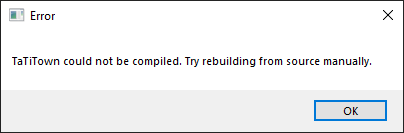
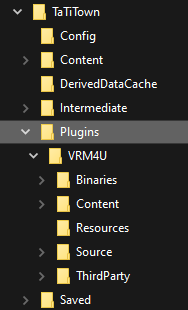
UE4 itself was build from scratch today from epic github
I should just dig out my old StarTrek plastic phaser and blow my head away
Have to admit, even working in the industry for over 7 years now, never had to rebuild things and now here the home office and a private project kills me, hehe.
silver hollow
@eager gust message is about rebuilding plugin, not the engine - just to be 100% clear
for some reason plugin has been compiled, I guess
adding plugin to .uproject's Plugins, regenerating project files and compiling the project normally - it's everything what's needed here...
perhaps you didn't trigger build before launching project? IDK
eager gust
Clear, it's just about the plugin. What I am doing now is adding an empty c++ class to the project (simple third person project) which I started as blueprint only, which may cause all of that issues. I actually can't generate project files by rightclicking the uproject, telling me I don't have any source code things.
Question, since I really try to understand whats going on: we don't touch anything on the ue4 (sourcebuild) editor, its just about project and plugin rebuild, correct?
Ah, it seems like that the addition of the c++ class also creates a lot new folders inside the project
silver hollow
correct
it looks like you need to get dummy C++ project working first - if you need it, but that's probably better way to go to for future, having C++ based project already
eager gust
hum yeah I see that going the BP route is causing a lot of meh moments
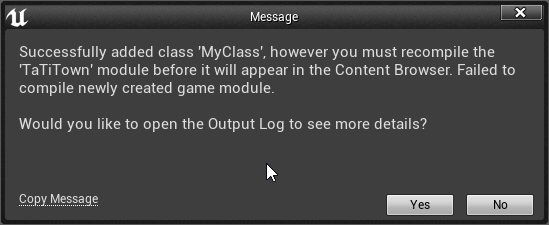
So, this is a question as a 3D Artist which has a little bit of BP knowledge but much less on all of that c++ magic alchemy. Does it make a huge difference if a fresh project is using c++ instead of BP or can I just continue working with BP's normally on an c++ project
testing out how a c++ project will do
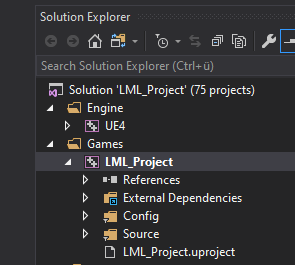
seems to work. @silver hollow Thank you so much, rescued my day..and night
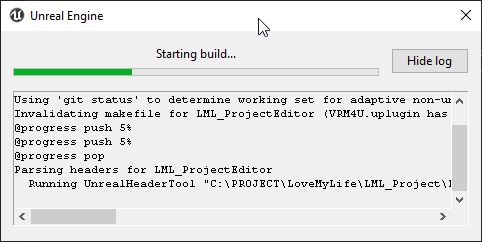


 silver hollow
So, this is a question as a 3D Artist which has a little bit of BP knowledge but much less on all of that c++ magic alchemy. Does it make a huge difference if a fresh project is using c++ instead of BP or can I just continue working with BP's normally on an c++ project
@eager gust continue as normal + you could now expose a new stuff to BP anytime
eager gust
thank you so much!
One day, I will write a book: "How to understand the World of Alchemy-Coding-Magic-Stuff as an stupid old Artist"
silver hollow
it would be useful to many stupid old artists, I guess 😄
eager gust
Gonna be a bestseller! ;D
marble galleon
Seriously, that is the reason why there are teams, it is like trying to build a house, no one can really do that alone in the best way without a team of experts. Not that I don't assume that "stupid old artist" (i quote!) can't do it, more like that I think they should be ARTIST 😄 no one asked the tech guy to do a painting, am i right? 😉
silver hollow
but T-shaped person (deep in one specialty, knowing basic things about others) is also more efficient and capable solo or team member
maybe programmer doesn't paint, but often needs to know the paints work 🙂
marble galleon
yes! but see, i should understand what are the requirements of an artist, but i shouldn't do his job
you as artist should know vaguely what the fuck we talk about if we say "the editor" or "the plugin", but you shouldnt actually be responsible to stick them together
thats the productive variant
it is these days really important that people dont waste time on things that doesnt bring them forward
if you make it work at some point you will not have REALLY learned something, you will have barely made it "one time right" cause you didnt understood what you ACTUALLY did
no critic tho 😄 if you WANNA learn it, please dont hold back, i just wanted to say for the bigger picture
silver hollow
true, but this is probably a case of a lone project that just needed to compile a plugin, once a year thing 😄
marble galleon
this is btw very very easy
if you follow some basic rules
you do not need to touch the engine source if you wanna add plugins to your game
you NEED to touch the engine source if you wanna have a multiplayer game server
but else, you will NOT need it (exceptions may apply)
silver hollow
well, I wouldn't go for vanilla engine ever again - there's long list of small needs and quick fixes there
obviously if you're programmer already - just another layer of utilizing the engine 😉
sure, here it was needed 😄
marble galleon
If you want i could imagine making you one of my custom build installer packages 😉 hehe
my team gets an actual installer for the custom build we use, so they dont need to even install Visual Studio
painfree world for the win
silver hollow
I just pushed compiled binaries back to P4, never actually bothered with installed builds or UGS
although always curious of it 😉
marble galleon
should think about abstracting that for everybody. Oh dear... P4.... <eyeroll>
silver hollow
what's wrong with P4? 😄
marble galleon
well for UE4 given UGS, nothing really, its like there is no alternative 😉
silver hollow
which is built on the top of P4 😉
marble galleon
yeah no alternative 😉
that doesnt make it good, if you understand what i mean 8-D
silver hollow
oh, ok 😄
marble galleon
but for UE4 usage its "fine", its not catastrophical bad like SVN
silver hollow
for me good enough to use for last decade and never needed something else
using GitHub for some tasks, never would back to almost-working SVN
marble galleon
I have my own gitlab server, github is kinda inefficient cause of the cost if you go really big
silver hollow
Plastic is tempting, but another monthly subscription when I use P4 for free - or eventually buying few expensive (but perpetual licenses) for entire team.... well...
marble galleon
most problem of git UE4 users is that they dont activate git lfs
silver hollow
Git is generally inefficient for storing assets 😉
marble galleon
with git lfs, git is faster and less resource eating as P4
silver hollow
at least LFS make it usable
silver hollow
how better? in what sense?
marble galleon
the only reason why P4 is still a thing is cause of the tools that still work only with it
silver hollow
no, it's not? 🙂
marble galleon
speed, resources, the complete action is quicker and needs less CPU power
you can checkup several tests on that on the net
the only tests that show otherwise are those not using git lfs
which is kinda logical
😉
silver hollow
perhaps, I didn't check in the years
anyway, the compression of archived versions, the minimal space P4 takes, still awesome
marble galleon
As said, the discussion is just worthless, cause P4 is unique integrated with UE4 world
silver hollow
AAA projects taking just few terabytes with all the revisions? like million of asset versions? still small
Git is also well integrated
I guess could be used as well
marble galleon
not enough not good
the UE4 git integrations are all horrible
and pretty much unusable
and since UGS doesnt support it at all
silver hollow
oh, I thought is much better 😉
marble galleon
not if idiots implement it 😉
silver hollow
for me Git itself simply doesn't provide the same simplicity as p4 for everybody in team
- this spartan UI client, but doing good job thanks to how changelists works: multiple pending changelists, numbering changelists in the simplest fashion (incremental integer for changelists and asset versions), easy reverting, viewing history easily per folder/file level
it's all there since forever and simply works 🙂
marble galleon
you described git, you just use other wordings
you can make git workflow easy if you enforce specific policies
silver hollow
no, I never seen easy UI for pending changelists in Git client
I asked here some time ago
marble galleon
they are called branches
silver hollow
no
silver hollow
that's totally different concept
pending changelist - it's just about separating my list of currently edited files into multiple lists
marble galleon
you mean the commits of a branch?
and then cherry picking to merge or rebase?
<headshake>
silver hollow
no, no cherry picking, merging, rebasing
that's like feels always like Linux user saying to Windows user - "oh, yes, that's simple in Linux too, you just need open Terminal and type few things" 😄
in P4 user never touches console, rebase or whatever
marble galleon
and i didnt said he needs to touch console
all those things got a lot of guis
you can even pick between several these days, a lot on all platforms
no console ever
for all the thigns i said
silver hollow
ok then, so - for sake of my curiosity - could point to a Git UI client that displays visually many pending changes before sending anything anywhere, option to drag & drop files between changelists (or commits, eventually? that's what I'm curious
to be clear, only I'd like to see limits or features or Git better 😉
marble galleon
i think you should check into the cherry picking processes, I don't do that often and most often very limited, so i dont know what tools are specific ultra relevant for that for you
silver hollow
such way of numbering commits it's simply the best when mainly working on single branch for entire development - hence P4 is simpler in this regard 😉
marble galleon
but start with the git client that they know have from the git for windows, my git master is using only that
i use Linux git for work, and Tortoise git for the gamedev work
well that is a personal preference, logical seen having a FREE TEXT for description of the change is the best
then you can still put in numbers
and work with them
git is not preventing this
its just kinda stupid 😉 you should name the change with what it is
silver hollow
oh yeah, Tortoise could mimic changelists, it had something like this for SVN... had too look 😉
marble galleon
well i dont know what you mean, cause everything tortoise does with git is not special
silver hollow
and changes are named
marble galleon
its like standard git implementation, no special tricks here
all the other GUI interfaces look similar
silver hollow
but if you want to reference a change somewhere, while talking to QA or there developer, it's useful to simply drop the number 😉
devil is in the details 😄
btw, nice offtop here 😄
marble galleon
yeah no
see
you can link that stuff directly to the actual issue listing
so normally you reference the actual issue task in the commit and gitlab/github automatically combines those 2
silver hollow
quick question for orientation: have ever used P4 for project? 😉
if you're using Gitlab/Github
marble galleon
what is the point? I checked up profesisonal explainatios about it
yeah gitlab is free
everybody can use it at home
silver hollow
these things are useless for teams working in office 😉
silver hollow
P4 on local server is most useful often in such case 🙂
marble galleon
yeah and on git you dont even need a server to get all the git features
i am so confused about what you actually know
silver hollow
it's about needs and workflows 😉
marble galleon
yees
and everything is solved
millions of teams work that way
lets not talk about it anymore, thats totally worthless discussion
silver hollow
and others work with P4, not because they have to - because how UE4 support things - it's just because it fits better or offers sth different
silver hollow
that's what I wanted to partially explain and ask about Git things
marble galleon
there is no particular reason why they hang on P4 beside that its legacy for them
you are implying there is one, but there isn't
silver hollow
...
marble galleon
they could implement 1:1 the same without any button change with git
if they want to
but people like you would be angry
thats why they dont do it
probably
silver hollow
man, I'm using P4 for reason in almost every team
nobody would be angry, why? if team wants Git, let them use it - why anybody would be angry? 😄
marble galleon
i talk about if Unreal would be switching it main support
and you cant use all the P4 tools anymore
that is what i talk about
silver hollow
and I'm using Git for some things, like forking engine too - obviously
it's not the same functionality 😉
oh, I see
marble galleon
yeah but that is not the talking point
it is such a stupid talk here, you switch the line all the time when it fits your point
lets stop here
its pointless
silver hollow
ok 😄
silver hollow
and all I wanted was to highlight that different systems are different, heh :D
i.e. P4 doesn't store any local repository copy on client drive - which would a hell waste on asset-heavy project already eating up SSD. And actually gamedev using P4 is like kid barely using tool, systems was designed not in gamedev with mind, but industries processing petabytes of data, single version of repository taking terabytes of space.
P4 server requirements are totally irrelevant when using dedicated machine for P4 (and often the same for build system and other automated tasks), especially when connecting mostly on LAN.
so studios (especially AAA studios, also Epic) has their reasons, it's not like they just don't like Git 😄
marble galleon
you can do al that with git way better, you cant let go, or? https://www.atlassian.com/git/tutorials/perforce-git there is no technical reason, just personal biatch
Atlassian
Business case for making the move from Perforce to Git: distributed speed, low cost, modern workflows, Git community, GUIs and storing large files with Git
silver hollow
I know, I told you few times, I'm using Git for things 😄
marble galleon
that doesnt matter
the main talking point is still that you say that there are technical reasons to use P4, but there isn't
P4 is literally a subset of Git features with a worst meta data system concept
silver hollow
yyy
marble galleon
the only reason left is that its UE4 integrated and UGS
silver hollow
oh, ok, so if you gonna NOT respond to any thing I say, just keep repeating "no technical reason", yeah, discussion has no point - I agree with that 😄
marble galleon
read the blog entry i pasted you, i cant help you more, you cant convince me to deny the reality ;).
silver hollow
they could use anything what they want for UGS 😄
marble galleon
no......
practical they could also support git, but that UGS is not support P4 is no option for Epic Games given the structure of their customers
like you
silver hollow
I read already in the past, looking at it now - still, many "problems" there are virtual where I use P4
- central server being bottleneck
- Price. Very often confused when comes to P4 (it also because Perforce company makes it confusing on purpose - to make more money).
"Take a team of 50 developers. Bitbucket would cost $600 per year compared to tens of thousands of dollars for Perforce. That adds up to a lot of free lunches for hard-working hackers."
you don't have buy a Perforce license for every person in team
marble galleon
he?
central server is bottleneck in P4, not in git
P4 cost money, git is totally free
silver hollow
also not bottleneck in P4
marble galleon
you dont need to use bitbucket you can run it all locally
it is
see the first block
damn seriously you igore reality i am done here
silver hollow
yes, and you can use P4 for free - up to 20 workspaces (effectively like 17 devs, since admin and build system would use some workspaces)
later is pricey, sure
but this comparison in article does reflect one scenario
when company buys P4 license for everybody (some do, like Epic or PUBG Corp)
but most often studios buy just few licenses per entire studio, and number of workspaces is unlimited
it's like buying few good chairs - you keep it forever
so $600/year on Bitbucket isn't that amazing, life-saving deal in this case 😉
if somebody wants P4 in cloud - sure, too expensive
the thing is company like mine, Epic and many others - just prefer to keep local repository on machine in the studio
than, BitBucket and other services - no use for them at all
what grows in P4 is like journal file - things allows easily access entire history
it grows with the number of commits - it's quickly goes into gigabytes
but no space is used on client disk - none
so there are many technical differences - does mean Epic is right to support P4?
I'd say, they could focus more on other VCS
although I wouldn't focus on UGS thing too much - it was their internal tool, they just published it, no more thought put into that on Epic side
it's normal thing under Perforce run locally that entire studio downloads a new build of the engine after somebody says "UE 4.24 integrated, get that" - and no bottleneck or slowdowns are noticeable, maybe if local network (cabling or router) can't support demand, IDK 😛
I love Git for code-heavy projects, branching, GitHub, sharing code
but still keep my project on P4, it's also quite natural for asset-heavy projects to utilize P4 - and Unreal-based projects are almost always asset-heavy?
(even if Git made huge progress with LFS and file-locking and know we can compare and argue)
and Git just recently got this good
AAA and medium-size indies were using Perforce for 25 years now - and there's no real reason to drop it 😉
good night, I guess 🙂
 short reef
anybody knows whars going on over here ?
i renamed my project and tried to build
hold on txt is too long...
see exception at the bttm of the file 🙂
i tried deletin the 'intermediate' 'saved' and 'build' folder already
 stoic crane
i'm curious if anyone else is seeing this: in 4.24, I have this random issue on 2 projects. Having to do with the CDO of Child classes.. overriding the parent class, as in:
I have Character Blueprint [A], which is used as is. and Character Blueprint [B], which is a child of [A], which overrides a couple things.
Now, when you change the CDO of [B] it's actually changing [A] as well.
This is... problematic.
though further update, if you exit after saving the [B] and reload, without changing [A].. then [A] is what it's supposed to be. Ugh
 lucid mantle
Can anyone help me with this?
https://discordapp.com/channels/187217643009212416/375021377666940928/693742695285522442
anybody knows whars going on over here ?
@short reef in case you want to change your game name after packaging, you can do it Project Settings
Otherwise, make sure you renamed modules in your .Build.cs file and .Target.cs files
 vast cairn
I'm trying to create a new in-editor Blueprint .uasset based on a C++ class.
I've got this working by using FKismetEditorUtilities::CreateBlueprintFromClass()
However, I then want to access the newly created Blueprint object in code, and update editor-exposed UPROPERTYs through C++.
Anyone know how to do this? Thanks!
 regal yoke
anyone notice an increase in build times for UE4 source? I ran a compile overnight and it took 3 hours. And I honestly don't remember it taking that long. if not, any tips on speeding it up? I have an i7-6700k, 16gb RAM, and I have source on a western digital black hard drive
stable hemlock
How can I install the varest plugin on 4.21.2 source?
 polar light
Does someone knows why the unreal engine needs 10GB RAM to delete a cube from my level ? (its a very big level but... ) is this maybe a windows RAM management Problem or is this a problem with the source version of the 4.22.3 ? 😮
(i have 32GB RAM)
elder falcon
I heard there are some big improvements to working with big levels in 4.24 and 4.25
polar light
Yea but when i upgrade it i have huge Perfomance Problems on my Open world Levels... i mean i can try it but i think its maybe a windows problem with the RAM
stable hemlock
there is probably something that either gets referenced by the cube, or something that references the cube in the level
RAM usage being that high makes me think of the undo buffer
it can blow up if you are doing landscape stuff
especially if the landscape res is high, and it has other things on it like foliage, other actors that are aware of the landscape, other actors that have construction scripts etc
if it isn't an engine bug, upgrading won't really matter, you're going to need to sort out the referencing in the levels
elder falcon
they just added 2 missing instructions to the bp disassembler
nothing of interest here
thick storm
branch is interestng
normally you have branches describing what they do (like dev-rendering)
elder falcon
it comes from fortnite branch so must be some fortnite related thing
thick storm
and super secret branches with code names (;
elder falcon
maybe solaris is an in game event
thick storm
maybe
idk, there is ECS in the works
new scripting is not out the qauestion to support it
elder falcon
but that one was called valkyrie
 dusty inlet
Hey, is there's any Offical or good UML digram for the entire unreal engine?
elder falcon
no
 vague heron
Hello !
Just a stupid question, can you confirm that you can build the engine from source with the VS2019 Community version ?
brisk silo
@elder falcon yo thats a not-null thingy
TNonNullPtr
thats super useful
it has the option to drastically reduce the amount of "if(character)" type stuff
stable hemlock
I doubt solaris is an event branch for fortnite. It was merged to Fortnite main first, but thats not surprising since fortnite gets the bleeding edge stuff often
unless robomerge screwed up royally, there is no way nonnullptr stuff would developed in an event branch
brisk silo
if non-null has BP support, it would be huge
and be a transformative change for cpp code
currently on cpp code you have to nullcheck everything constantly
if you can use non-null almost everywhere, it works as both documentation to the user of the functions, and as nullchek on a type level
languages such as kotlin have it as a part of the language itself
in kotlin and rust, references/pointers are non-null by default. If you want a nullable one, thats a different pointer type
polar light
@stable hemlock Thanks for your Answer :)
I hope its an engine bug or there is a problem with windows, otherwise it would be difficult to find the bug
green flax
@vague heron yes you can
vague heron
@green flax Thank you ! Any Idea on why would I get some error on the untouch engine code (implicit const conversion / command stopped with code 5) ?
green flax
nope, which branch are you trying to compile?
vague heron
Release
stable hemlock
make sure you have installed the game development with c++ tools from visual studio setup, it is required by the engine
if you still have issues, there might've been a problem with the pulled/extracted source files
a clean pull + setup.bat should fix it
Tips, tricks, and techniques for setting up Visual Studio to work with Unreal Engine 4.
lucid mantle
@silver hollow I've looked through one free plugin and found a hint for how to make it
And now, what i'm left to do is to map an action to it. But that is a hell of another job
vague heron
@stable hemlock Thank you, I'll check my install again !
polar light
Does anyone has recently downloaded and build the UE4.24 from github?
Everytime when i wanna build engine the engine, i get 3 errors like you can see on the screenshit ...
Implicit conversion from "ADODB::_Connection...." > C4800
and (...) -FromMSBuild" cancelt with Code 5. Make sure that you are authorized to execute this command.
Does anybody know how to solve this? (VS2019)
Btw. i had no problem to build the 4.22.3 several weeks ago
Developer Editor, Win64, i did the default right click on "Engine" > Build or however this button is called in the english version
 turbid sigil
@polar light add this: Arguments.Add("/wd4800"); // 4800: Implicit conversion from 'type' to bool. Possible information loss
at line 486 in VCToolChain.cs
it's a temporary fix
it's from the VS2019 update
polar light
Thank you !
regal yoke
@turbid sigil I don't have an answer but i'm looking for ways to speed up engine compile times. Does fast build require me to have multiple computers?
 fresh coral
there's no magic and UBT is pretty good about parallelizing, so building faster means more / better hardware one way or another
Does anyone know where the list of plugins loaded by default is stored? I'm tired of steamvr launching everytime I open the editor and want to only opt into it instead of opt out
silver hollow
@fresh coral just set EnabledByDefault to false in this plugin definition 😉
fresh coral
I guess that makes sense
regal yoke
@fresh coral thank you for your response. Considering that, has anyone used cloud services to decrease build times?
fresh coral
I'm sure someone has
it's not super difficult, just takes some time and then some money
regal yoke
yeah I haven't found any good resources for using it for UE4
fresh coral
BuildGraph is epics distributed build manager, that's new since the last time I looked at this sort of thing, so you'd probably want to use that
regal yoke
thanks! I'll look into that. Any UE4 resource I look up with regards to cloud is always about using it for servers and backend stuff, which I don't need
fresh coral
if you don't want to pay for incredibuild it looks like you can integrate fastbuild with XGE
regal yoke
what's XGE?
fresh coral
protocol for handling distributed builds
long wave
XGE is incredibuild
BuildGraph isn't a distributed build system either, it's just a scripting tool for making builds with.
fresh coral
is it? I haven't messed with it but the docs implied it could at least hand out parts of the graph to other machines
long wave
It's more of a config tool for setting up distributed builds AFAIK, it doesn't actually distribute compilation like incredibuild/fastbuild does
but tbh it's only useful if you have a local build farm or a spare machine on LAN anyway - otherwise the internet speed for transferring all those build products would be a huge bottleneck.
turbid sigil
I'm currently working on getting fastbuild working with UE4.24

GitHub
Compile Unreal Engine 4.22 using FastBuild. Contribute to budgidiere/UnrealEngineCompilationUsingFastBuild development by creating an account on GitHub.
if anyone wants to see progress or contribute
 noble hare
New compile error for me, compiling 4.25 from source ERROR: File size differs from manifest - Engine/Binaries/Win64/UE4Editor.target is 787921 bytes, expected 786891 bytes using RunUAT.bat BuildGraph -target="Make Installed Build Win64" -script="Engine\Build\InstalledEngineBuild.xml" -set:WithWin64=true -set:HostPlatformEditorOnly=true -set:WithDDC=false -set:VS2019=true I'll dig into it more
noble hare
Hmm, theUE4Editor.target does change during the build. Looks like the change is the addition of this line "Path": "$(EngineDir)/Plugins/Enterprise/MDLImporter/MDLImporter.uplugin", Guess I'll try disabling that plugin or something
 harsh thistle
Hi! I'm trying to make a plugin that generates textures based on others. For that I want to be able to reference a texture asset in the plugin's window but I'm stuck here, I don't know how to do that. I found the SPropertyEditorAsset class with the widget reflector but there's no documentation only and it is a private class of Editor so I don't think I can access it outside. Do you have any idea or resource that could help me?
 merry isle
@harsh thistle You want a widget that will let the user pick an asset? I'm using SContentReference currently (and using TileMapEdModeToolkit.cpp (from Paper2D) as a reference). There's a callback that gives you the UObject* that was selected.
harsh thistle
awesome! I'll check that out, thank you!
 median scroll
C:\Program Files (x86)\MSBuild\15.0\Bin\Microsoft.Common.CurrentVersion.targets(1657,5): error MSB4036: The "GetReferenceNearestTargetFrameworkTask" task was not found. Check the following: 1.) The name of the task in the project file is the same as the name of the task class. 2.) The task class is "public" and implements the Microsoft.Build.Framework.ITask interface. 3.) The task is correctly declared with <UsingTask> in the project file, or in the *.tasks files located in the "C:\Program Files (x86)\MSBuild\15.0\Bin" directory.
Any ideas guys? Getting this trying to generate project files for UE4.24_RTX branch
 still wren
hey, i want to build this fork of ue4 for toon shading but i had couple of issues while trying earlier.
i tried building it with visual studio 2019 and it failed, do i need visual studio 2017 since the code is from couple of years earlier?
and should i clone latest branch or download zip from releases tab?
fresh coral
@median scroll make sure you installed all the .net sdks for visual studio, this looks like you've got msbuild somehow but not its core SDKs
median scroll
yeah trying to find what's missing...
fresh coral
you might try just reinstalling, this isn't a normal condition for VS to be in
median scroll
Start Visual Studio Installer again.
On the Build Tools 2017, click Modify,
Ensure that "Nuget targets and build tasks" are ticked.
Press Modify to complete.
(On one computer this was not ticked, on the build server it was ticked but still needed me to 'modify' again)
stable hemlock
Hello am trying to build UE4.24 from the GitHub in VS2019 and am getting this Error
i did some reading here and i was told by @turbid sigil that i can add
Arguments.Add("/wd4800"); // 4800: Implicit conversion from 'type' to bool.
But as for the Error MSB3073 and C4996 i dont know what it means
can someone help me
fresh coral
C4996 are deprecation warnings, they're not errors but you should read and correct them
MSB3037 is just the build failing because of the 4800 errors
oh, the warnings aren't in your code, you can safely ignore them
stable hemlock
Thanks @fresh coral
turbid sigil
@stable hemlock did my fix work for you?
 west dune
Has anyone be able to get UWP support on 4.24+, as I'm currently using EvoPulseGaming's fork, but it's only on 4.20, and most of my projects don't build due to a lack of module support it seems.
I've tried to update it myself, but multiple things have changed since 4.20, and I don't have much knowledge when it comes to CPP and C
turbid sigil
I need people to help my test FASTBuild for UE4. 24
 snow kindle
Hi everyone, I have the error "failed to kick off lightmass". I remember seeing a thread about this with a solution, but can't find it again. I rebuilt Lightmass but still the same. I'm in DebugGameEditor
what is strange is that the swarm agent is there in the system tray
The error seems to be:
"[Interface:CacheAllFiles] Failed to cache the executable: D:\Engines\UnrealEngine\Engine\Binaries\Win64\UnrealLightmass.exe [Job] AddTask: Rejected, cannot add a task to a running job"
ok so it seems I need to build it in development editor
still wren
im trying to build doomfest's toon shading repo for 4.21 and i get these errors. and i have no idea how to fix it. can anyone help?
fresh coral
Some of this is stuff that just needs to be fixed, like the delete of a virtual class. The 4800s can be fixed or you can change your compiler flags to suppress them. The others look like a problem with your platform SDK. Can you compile the non-forked engine cleanly?
still wren
yes i did build 4.24 without issues
long wave
Look at the output log instead. Error list is useless
either way, looks like it won't work without changes in 4.24. Seems to require things that are no longer there.
thick storm
how to exclude plugin from compilation per platform ?
silver hollow
@thick storm did you try this?
thick storm
yeah it's working now
AdditionalDependencies in uproject
override all other settings (
i had module here whould should be per platform
 sturdy socket
so, my build can't find .iscp or .isph files but when i alt shift on the file VS finds it anybody has insight on this???
 warm lark
has anyong got pixelstreaming working on the latest vs2019?
it fails to compile because of missing externals
stable hemlock
@turbid sigil Hi i dont know yet am going to rebuild it today and see!
low dust
re: Fastbuild, every time I tried it, it's been major PITA to setup and even when it worked, it didn't really make things faster for me on 2 computers, more like made it compile 3x slower 😅
it's supposed to speed up the compilation a bit even on single computer but I never saw it myself
I'm guessing you'd need a ton of beefy rigs to get any wins on the distributed workload
elder falcon
it's not possible to speed up compilation on a single pc by using things like fastbuild or expensivebuild
ubt is already parallelizing the build to the max
 crimson violet
Hey guys, I am pulling the latest Oculus Source build currently. Is there a codeworks installer that gets built in that?
I was also told that the GPu baker is integrated in a source build, where can I find that?
stable hemlock
alright I am new to the source version of the editor and I am trying to import the ThirdPerson template in an existing project. I am getting a linking error about HeadMountedDisplay symbols. Where would I go to add this to the editor/project? I tried the plugin manager with no success. What am I missing?
stable hemlock
Nevermind I went digging and stumbled upon the Build.cs file and adding it to the AddRange array
 proper vine
lmao and here I am also attempting to make compilation faster
spiral mortar
@proper vine I suppose you're already using CompileTimeAnalyser?
that thing is pretty awesome
granite dust
I have heard the 64/128 thread ripper actually outperforms build farms
thick storm
on 24 cores
normal build is about 6-8 minutes
without building all the engine plugins etc, just things to get project running from scratch
long wave
I'd take a thread ripper over a recurring expensive software cost any day.
massive upfront investment though.
brisk silo
@granite dust diminishing returns
ive heard that the 32 core version is basically 80% of the way there
 weary bridge
hello guys, have anyone here ever had this before: C++17 was disabled in PCH file but is currently enabled?
using Explicit or Shared PCHs and C++17 on Build.cs
granite dust
@brisk silo there was a bug in Windows in early tests of the 64 core thread ripper that prevented full utilization
And so you basically only got the benefit of going from 32/64 to 64/64
But there’s some patch or truck that gets it fully working, and then there were significant gains
silver hollow
@long wave nah, just get the best Ryzen of the latest gen
it's faster than my 2nd gen Threadripper 32 threads that compiles engine in like 15 minutes 😉
spiral mortar
@weary bridge not sure you can enable C++ 17 only for a module
Or you might have to disable shared pch/use your own
weary bridge
hmm but I have only 1 module, I am using unreal source from GitHub, do I need to compile it differently?
spiral mortar
Well your module is still compiled against the engine shared pch :)
Which are not compiled for 17
weary bridge
hmmmm I will try to compile the engine with c++17 flag, let's see, thanks!
 regal jackal
Does anyone know what might be the cause of this :
4>UnrealBuildTool : error : UBT ERROR: Failed to produce item: H:\UEUWP\Engine\Intermediate\Build\Win64\UE4Editor\Development\DatabaseSupport\UE4Editor-DatabaseSupport.lib
4>                        (see ../Programs/UnrealBuildTool/Log.txt for full exception trace)
4>Total build time: 1797.47 seconds (Parallel executor: 0.00 seconds)
4>C:\Program Files (x86)\Microsoft Visual Studio\2017\Community\Common7\IDE\VC\VCTargets\Microsoft.MakeFile.Targets(49,5): error MSB3073: The command
"..\..\Build\BatchFiles\Rebuild.bat UE4Editor Win64 Development -WaitMutex -FromMsBuild -2017" exited with code -1.
4>Done building project "UE4.vcxproj" -- FAILED.```<>c.<PrintExceptionInfo>b__4_0: UnrealBuildTool: ERROR: UBT ERROR: Failed to produce item: H:\UEUWP\Engine\Intermediate\Build\Win64\UE4Editor\Development\DatabaseSupport\UE4Editor-DatabaseSupport.lib
<>c.<PrintExceptionInfo>b__4_0: (see ../Programs/UnrealBuildTool/Log.txt for full exception trace)
<>c.<PrintExceptionInfo>b__4_1:
<>c.<PrintExceptionInfo>b__4_1: BuildException: UBT ERROR: Failed to produce item: H:\UEUWP\Engine\Intermediate\Build\Win64\UE4Editor\Development\DatabaseSupport\UE4Editor-DatabaseSupport.lib
<>c.<PrintExceptionInfo>b__4_1: at UnrealBuildTool.ActionGraph.ExecuteActions(BuildConfiguration BuildConfiguration, List`1 ActionsToExecute, Boolean bIsRemoteCompile, String& ExecutorName, String TargetInfoForTelemetry, EHotReload HotReload) in H:\UEUWP\Engine\Source\Programs\UnrealBuildTool\System\ActionGraph.cs:line 570
<>c.<PrintExceptionInfo>b__4_1: at UnrealBuildTool.UnrealBuildTool.RunUBT(BuildConfiguration BuildConfiguration, String[] Arguments, FileReference ProjectFile, Boolean bCatchExceptions) in H:\UEUWP\Engine\Source\Programs\UnrealBuildTool\UnrealBuildTool.cs:line 1673
<>c.<PrintExceptionInfo>b__4_1: ==============================================================================```@limber jacinth Thanks. That was helpful. I have a possible culprit now.
 modest glade
I've been trying to create a custom detail panel using IDetailCustomization on a USceneComponent so I can populate a drop-down box with some custom data. I need to get that data from the Actor the component is attached to however it seems the component is uninitialized at the point I access it from void CustomizeDetails(IDetailLayoutBuilder& DetailBuilder). I call GetObjectsBeingCustomized to get the component but GetOwner(), GetAttachmentRoot(), GetAttachmentRootActor() all return nullptr. Is it possible to access the owning actor somehow?
stable hemlock
Currently I have replicated apex destruction working in my game in ue 4.24 -- a few minutes ago I discovered the Blast plugin... then of course there is the unfinished Chaos plugin.
I'm planning to stick with Apex since I have this working... but is it a waste of time at this point? What are my best options for working with destruction today?
A) continue with Apex
B) switch to Blast (doesn't seem to be supported?)
C) switch to Chaos (sounds like its not ready, but perhaps it will be soon?)
silver hollow
@stable hemlock
- Any PhysX-based solution is deprecated and not worth pursuing, especially if you're not gonna release game soon. And PhysX will get deprecated just at the moment of switching to Chaos by default. There's a reason why Apex has been turned off by default a long time ago.
- Also Apex is a crap, there's no control over it, it just fractures mesh in the simplest possibly way.
- Simplest Houdini-based setup would look better than Apex.
- Chaos is tested with Fortnite and polished to be production-ready, not by default in 4.25 yet, but 4.26 seems possible.
and what you could actually mean by replicating Apex destruction? AFAIK it's not deterministic, so every player would see a bit different fracturing 😉
stable hemlock
Thanks @silver hollow -- and you're right about the inconsistencies... most of the time the fractures match up but doesn't seem perfect at all times.
thanks for the info about apex being deprecated. I suppose I'll build my assets with chaos in mind and enable it when it comes out (hopefully in 4.26). I built 4.23 (and 4.24) and the engine would crash everytime I attempted to play a scene with Chaos destruction in it.
Are you saying that if I build 4.25 Chaos is stable, or that I'll need to wait for 4.26?
silver hollow
people say that 4.25 Chaos is stable, with some issues about physical simulation ("every mesh acts like ice cube") - you'd have test for yourself
stable hemlock
ok great thanks, I'll build 4.25 and try it out
elder falcon
it's also very slow in 4.25
 opal gorge
Ok so my engine source for 4.24.3 fails on a rebuild but succeeds on a build after?
Why would this be?
Says it can't find a header the first time, but finds it the second?
opal gorge
Ok, reinstalled VS and now it can't open any of the dlls?
Check folder and file permissions, anything can write...
opal gorge
Ok so tracked this down further
Might be a problem with MSVC 14.25
C:\Program Files (x86)\Microsoft Visual Studio\2019\Community\VC\Tools\MSVC\14.25.28610\INCLUDE\comip.h(311): error C4800: Implicit conversion from 'EnvDTE::Thread *const ' to bool. Possible information loss
Modifying the MSVC code made it work. Shouldn't I not have to do this? This is Microsoft's code, right?
silver hollow
@median scroll
what is the RTX build?
median scroll
nvidia branch
median scroll
wish I knew 😄 I can launch an editor from source, but the build crashes with this
modest glade
Thought I was making progess by setting the data I need from the actor onto the component inside PostEditChangeProperty as that is called when you add a component from '+add component' drop-down. However it seems the property on the component is reset after PostEditChangeProperty. Is there any way at all to pass data between actor <-> component during editor time in the blueprint editor?
^ this is following on from https://discordapp.com/channels/187217643009212416/375021179075035147/696705329269833758
 shrewd thorn
@modest glade Because of blueprints and merging changes between instances and templates, the component editing stuff is really weird. If you're making a new component type you might need to override FActorComponentInstanceData, search the engine for uses of that
I haven't done it myself, it's complicated
modest glade
@shrewd thorn thanks for pointing me to that, yeah I've noticed weird stuff, PostEditChangeProperty is getting called twice, once where GetOwner() returns the actor and once where its null, annoyingly changes are only applied when GetOwner() is nullptr, which I assume is the difference of the template and the instance.
modest glade
Didn't need FActorComponentInstanceData. I could access the data I needed from the Class Default Object in the detail customization, took me a while to figure out as you need to walk up the outer chain differently if the component was created via the C++ constructor or added via the blueprint.
 sullen flicker
When trying to open downloaded projects. It often comes to that some modules are not working and if I want to rebuild them. that usually fails and it tells me to manually rebuild it from source.
I don't really understand what I should do? I google it but it wasn't really helpful
 obtuse field
Hello,i'm trying to mod the Game Darksider 3,the modding target is the stats of certain item,armor and weapon ingame
Using unrealpak-bundle,i manage to extract the two folder
pakchunk0-WindowsNoEditor and pakchunk1-WindowsNoEditor
Most of the file in there are packed as either uexp or uasset,which i can not open,even using unreal engine.Drag.Copy and Paste,Import.None of them work.
- Is it possible to open these file ?
As i look for other solution, i notice that both of the pakchunk file contain a project folder.However i couldn't open it because it seem they are using a modify engine ( titled "GunFire419").I do notice that in the pakchunk folder there are a folder name "engine" which contain all the plugin for the project.But i do not know the correct to modify standard Unreal Engine 4.19 so that it become "GunFire419" engine
- Is it possible to modify the engine in such a way,or to open the project without the need to modify the engine ?
limber jacinth
we don't really discuss using assets from other games
as its against the engine terms and copyright.
Unless the game makes an official editor/allows modding. its illegal
obtuse field
I see
 molten field
My game keep crashing. I get the following message.
[2020.04.09-14.30.04:902][922]LogWindows: Windows GetLastError: The operation completed successfully. (0)
[2020.04.09-14.30.04:902][922]LogWindows: Error: === Critical error: ===
[2020.04.09-14.30.04:902][922]LogWindows: Error:
[2020.04.09-14.30.04:902][922]LogWindows: Error: Fatal error: [File:D:/Build/++UE4/Sync/Engine/Source/Runtime/RenderCore/Private/RenderingThread.cpp] [Line: 836]
[2020.04.09-14.30.04:902][922]LogWindows: Error: Rendering thread exception:
[2020.04.09-14.30.04:902][922]LogWindows: Error: Fatal error: [File:D:/Build/++UE4/Sync/Engine/Source/Runtime/Windows/D3D11RHI/Private/D3D11Util.cpp] [Line: 249]
[2020.04.09-14.30.04:902][922]LogWindows: Error: Result failed
[2020.04.09-14.30.04:902][922]LogWindows: Error: at D:/Build/++UE4/Sync/Engine/Source/Runtime/Windows/D3D11RHI/Private/D3D11Viewport.cpp:368
[2020.04.09-14.30.04:902][922]LogWindows: Error: with error DXGI_ERROR_INVALID_CALL
granite dust
Try turning off D3D11 maybe since that's your crash
molten field
Turn it off where? In the Editor?
granite dust
in windows settings I think is where you choose which RHIs are enabled
molten field
It seems the crash happens only when I am in native fullscreen.
I have D11 and 12 selected.
 queen meteor
Hello, anyone here uses linux? If so, do you guys can run c++17 projects in unreal?
elder falcon
you gotta go manually upgrade the LinuxToolChain.cs file in UBT if you want to do that, because they hard coded things to C++14
queen meteor
you gotta go manually upgrade the LinuxToolChain.cs file in UBT if you want to do that, because they hard coded things to C++14
@elder falcon really? there are any source of how to do that? Or I can just replace everystd=c++14withstd=c++17?
elder falcon
well yeah that's basically what you do
though I think on 4.25 someone has finally upgraded it
queen meteor
After I change that I need to recompile the entire engine?
weary bridge
hmmm I have that issue too @queen meteor !! please someone :((
 keen wedge
i dont think you ahve to
i tried using C++17 in linux and the only issue i got was with precompiled headers
stable hemlock
anyone know how to get the Substance plugin included in the source version of the engine? I know at one time you had to use their fork but I wanted to see if I can use the source files I already have
queen meteor
I'm trying to compile the engine from source, and I'm getting this error:
error: ignoring return value of function declared with 'nodiscard' attribute [-Werror,-Wunused-result]
didn't found anything on google
elder falcon
are you trying to build for linux?
you'll need to fix that error
the solution is to put (void) before the usage of the function that causes the error
queen meteor
are you trying to build for linux?
@elder falcon Yeah :/
you'll need to fix that error
@elder falcon Really? 🤔
There is a branch "linux" or omething like this with these already fixed?
or a community fork
there is already a void
void FIoStoreWriter::FlushMetadata()
{
    Impl->FlushMetadata();
}
ok fixed
with static_cast<void>
elder falcon
(void)Impl->FlushMetadata();