#engine-source
1 messages · Page 34 of 1
 hidden hedge
 wooden tiger
Anyone knoq jow to fix 4.23.1 crash when it reached 75%
 spiral mortar
@hidden hedge Ah really? That's good to know
 round pond
how do i get the world settings of a level that is open in the editor but not playing
 mortal cloud
I have a problem trying to compile 4.23.1, not sure what's wrong. This is the error I'm getting:
1>CMakeCCompilerId.c.obj : error LNK2005: main already defined in CMakeCXXCompilerId.cpp.obj 1>main.c.obj : error LNK2005: main already defined in CMakeCXXCompilerId.cpp.obj 1> Creating library D:\UE4\Engine\Plugins\Runtime\ResonanceAudio\Intermediate\Build\Win64\UE4Editor\Development\ResonanceAudio\UE4Editor-ResonanceAudio.suppressed.lib and object D:\UE4\Engine\Plugins\Runtime\ResonanceAudio\Intermediate\Build\Win64\UE4Editor\Development\ResonanceAudio\UE4Editor-ResonanceAudio.suppressed.exp 1>D:\UE4\Engine\Plugins\Runtime\ResonanceAudio\Binaries\Win64\UE4Editor-ResonanceAudio.dll : fatal error LNK1169: one or more multiply defined symbols found 1>C:\Program Files (x86)\MSBuild\Microsoft.Cpp\v4.0\V140\Microsoft.MakeFile.Targets(41,5): error MSB3075: The command "..\..\Build\BatchFiles\Build.bat -Target="UE4Editor Win64 Development" -Target="ShaderCompileWorker Win64 Development" -WaitMutex -FromMsBuild" exited with code 5. Please verify that you have sufficient rights to run this command.
 silent thicket
sorry misread the logs
 gentle walrus
Hi I have a compiling question. I currently have a 4 core i5. If I upgraded to something with more cores like a 12 core AMD, with that make a big difference in compile team because of the additional cores, or is the compile more synchronous and it wouldn't be much of an improvement?
 elder falcon
for building the engine, it will make a HUGE difference
if you upgraded to the ryzen 3900x, you'd be building at least 4 times faster
assuming you already have the engine stored on a nvme ssd
gentle walrus
@elder falcon thank you
 native mauve
Well, it's not purely based on amount of cores
Whereas more cores is a higher overall clock rate usually as it's easier to make a 8core, 3ghz cpu than a 4core 6ghz cpu
Compile time for the engine is based on the overall clock rate, not "how many cores"
Like there's cores with 100Mhz
elder falcon
the 3900x runs all cores at 4.2ghz and has higher ipc than most intel cpus
native mauve
Yeah I'm just saying, it's not purely based on number of cores
elder falcon
I would definitely prefer to have a single 50Ghz core 
native mauve
Whilst that's true, it'd compile the same speed
elder falcon
yeah, but it'd blow everything else out of the water in single threaded work
native mauve
Yes.. yes it would
 quick crystal
So I updated my Visual Studio 2019 to from 16.2.x to 16.3.7 and now I'm getting an error upon trying to build Debug Editor from source (was working prior to the upgrade and I have made no code changes).
I'm getting 1>C:\Source\UnrealEngine\Engine\Source\ThirdParty\PhysX3\PxShared\src\foundation\include\PsAllocator.h(40): fatal error C1083: Cannot open include file: 'typeinfo.h': No such file or directory
Trying DebugGame Editor now. I'll report if I get the same results.
elder falcon
Unreal Engine Forums
Anyone upgrade to this version? After changing the include in the NVIDIA engine file, did you get problems with the math check?
Compiling UE4 4.22 engine gives
quick crystal
@elder falcon Thanks for the information. I'm trying that out now. That all makes sense and seems promising!
 boreal plover
there is also this issue: https://forums.unrealengine.com/development-discussion/engine-source-github/1676362-4-23-is-building-successfully-but-crashing-on-start-up-vectorintrinsics-failed
Unreal Engine Forums
I've just finished building UnrealEngine-4.23 from the release branch of the repo. Everything has built successfully, but whenever I try to fire up Unreal
fix is probably the same though
elder falcon
that is just the same issue
 snow grail
Has this happened to anyone before?
All the camera look like this, the editor is source built 4.23.1
I've tried rebuild, rebuild lighting only problem still persist
 green flax
are they movable?
 summer spindle
has anybody tried new 24 features already? like new sky, gtao
elder falcon
gtao is not usable yet
you can either have a blurry mess with halos, or turn off the blur filter, and get a noisy mess
summer spindle
Gotcha 😁
What about the sky? Worth checking?
 grizzled panther
@quick crystal Not sure if you got it up and running. But the pull request to fix the new VS compilation issues doesn't resolve math unit tests failing on load. I had to revert to a previous version of Visual Studio. There's really nothing in there that we need with the new VS update

A list of released versions, build numbers, and release links for Visual Studio 2019.
 heady cosmos
@summer spindle it has to do with LOD thats all i know
i set it on the landscape it does nothing but in viewport setting it to 0 works
round pond
why are the projects on the source engine ignored
I'm trying to scan with VA but i keep getting "Find References is not available because the symbol is unrecognized."
 somber harness
Anyone have ideas on what may be causing this stack? Its a long loop of LoadPackageInternal calls then errors on some serialize...the locals is the final loadpackageinternal call...been staring for weeks but cant seem to find what the actual problem is besides 'stack overflow'
seems like if I remove the file the stack ends on, it just ends on a different file, and I can remove them on and on and on (there are hundreds in the stack)
if that may be a clue
 shrewd thorn
@somber harness are you in debug? Then yeah it's definitely a stack overflow that 's new to 4.23
somber harness
dang we arent using a custom engine source...guess I may have to start
 low dust
@gentle walrus I made exactly that upgrade (from 4 core i5 to 3900x) and difference is huge
with 3900x when I build fresh engine, I can be in the editor with all shaders compiled in like 20 minutes, when same engine version would have taken 2+ hours on my i5 to reach that point
it's not direct comparison tho as I got nvme now vs the sata3 ssd on i5 system
(and faster ram too)
3950x release date got also announced so would be curious to see how much extra you get with those 4 additional cores on it
somber harness
thank you @shrewd thorn I am setting up a custom engine source build to try this out...most hopeful clue so far...
tho we had a very similar error in 4.22 =X
gonna try anyway
shrewd thorn
Apparently that log thing was making the stack way bigger so if you have a deeply recursive load it got worse
somber harness
yea
shrewd thorn
There's also a way to increase the stack size manually, but you also need to do a native build
somber harness
that would totally make sense
funny i was thinking about that as an option
generally if UE does a stack overflow, its very likely to be an infinite loop happening?
or at least a VERY huge stack?
shrewd thorn
actual infinite loops are usually more boring stacks, but it's hard to tell
In theory loading should never infinitely loop, if it does that's another bug
somber harness
gotcha
i have been after this bug for months...if u helped me solve it imma be floating over here 🙂
shrewd thorn
DefaultStackSize is the variable in the build stuff that sets the size
so you can just set that way big as a test
somber harness
ty ty
low dust
so, this happened
4.23.1-release
I do have this installed (screenshot from control panel)
and there's no link for 10586.0 specifically on MS download archive (and even the version I have installed is so old you can't even install it along with VS2019)
so I'm guessing if I just install any newer version through VS2019 itself, this will be fine
but weird that 4.23 fails on this because 4.22 builds fine
installed way newer SDK with VS installer and UE4 script is happy again
low dust
17 minutes to build 4.23.1-release and get to Unreal Project Browser with all engine shaders compiled to that point on 3900x btw
I definitely don't see more than 4.1GHz on all cores tho when it builds it
elder falcon
I get the same ghz
low dust
I also tried using that custom power profile now
didn't really notice any difference while building ue4
so I guess if it changes something, it's probably on lower load scenarios
which would make sense since one of it's points was to boost better ranked cores but on ue4 build you load all cores 100% anyway
elder falcon
has anyone tried just normal overclocking it yet
low dust
also on agesa 1.0.0.4B
I don't really want to OC this at these temps 😄
when building ue4, it can go little past 80c
elder falcon
huh
low dust
you get better temps?
elder falcon
lets see
low dust
I've seen countless people reporting similar 100% load temps tho
it's bouncing around 80c for me
(while all 12 cores in full use)
elder falcon
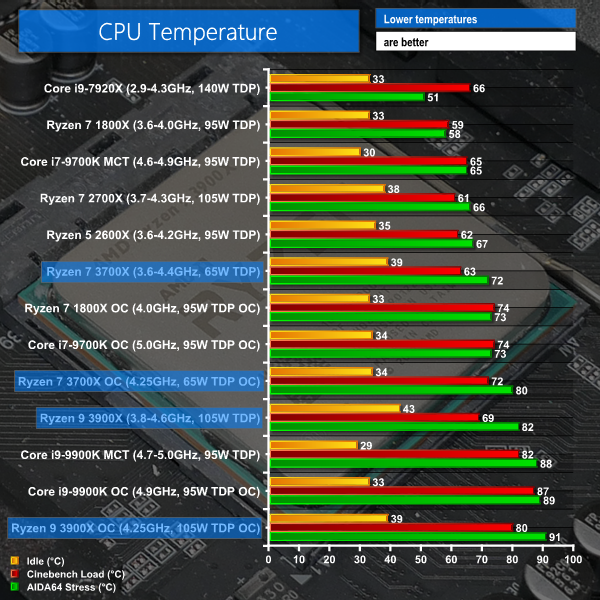
it seems to be just sitting there at 68c at 100% load
low dust
water cooled?
low dust
I'd be way happier with 70c 😄
elder falcon
the cooler doesn't seem to care about this
the liquid temp is just stuck at 40
maybe the reading is broken
low dust
nah, my noctua isn't properly hot either
it's slightly warmer than my hand
so around 40c I suppose
elder falcon
its running at low rpm this whole time too
way way way better than the 7820x I had before
it used to reach 90c and make the fans sound like a jet engine
 elder falcon
maybe they ran it for longer
low dust
which is probably harder on the cpu than ue4 build
low dust
for me the temps rise to ~80c almost immediately, probably few minutes in and you definitely have that but it's fairly same throughout the building after that
elder falcon
hm
it went to 60 immediately for me and then slowly up to 70 from there
maybe I finally got a good™ one to compensate for the extremely crappy 7820x 
low dust

that was on blender and using noctua u12s
which is newer model from the one I have here (I'm on u12p)
but I do have bigger fan on mine
anyway, I'm not super worried, what I see is in line what others are seeing (and people on box cooler are seeing even worse temps)
round pond
how do i got about including metahost.h to the UE4 project?
i have the source in a github folder and for whatever reason the project didn't get the file
 ripe zodiac
Hey guys anyone had any codesign errors in macos xcode? I'm unsure how to fix it.
Ah I see - Apparently the UE4Editor app isn't in the folder..
ripe zodiac
Turns out its a bug with xcode clean and it wipes the UE4Editor app
 grand sand
Hi I faced some errors in building 4.21.3 from github repo
C:\Program Files (x86)\Windows Kits\10\include\10.0.18362.0\shared\ndis/version.h(7): error C4668: 'NDIS_MINIPORT_MAJOR_VERSION' is not defined as a preprocessor macro, replacing with '0' for '#if/#elif'
can anyone help in how its happening and how can it be avoided ?
its coming when I'm compiling the source from Visual studio 2017 and 2019
 dreamy remnant
Hi guys!
I was pointed here to ask about recompiling engine
I've modified only this file : https://i.imgur.com/xBWkw5p.png

Can i avoid rebuilding whole engine, just UnrealBuildTool for example?
 hearty sand
Not sure if you can avoid grabbing source
But time-wise you should be able to only recompile the Program
dreamy remnant
Any hints on how to only recompile the program?
I'm downloading source (anyway, procedure changed a bit, no tutorial told about accepting invitation on git :P).
dreamy remnant
Aaaaand i'm getting this:
GenerateProjectFiles ERROR: It looks like you're missing some files that are required in order to generate projects. Please check that you've downloaded and unpacked the engine source code, binaries, content and third-party dependencies before running this script.
Press any key to continue . . .
Any ideas on how to check what depencency missing?
I do have VS2019 and 2016, i do installed 4.21-4.24 through Epic Installer so i should be good...
I was even recompiling project files few times.
But after using GenerateProjectFiles.bat from source i'm getting error as above
dreamy remnant
nope, i was not instructed to by any tutorial.
i did now and it's downloading something
9gb
round pond
these are the setup instructions right on the github page
setup says run Setup.bat
it just gets all the binaries
dreamy remnant
Oh, thx, i was looking at here -> https://docs.unrealengine.com/en-US/Programming/Development/BuildingUnrealEngine/index.html
Compiling Unreal Engine from source.
round pond
ahh i see looks like it's out of date
dreamy remnant
Yup, along with few others that i seen. Thanks a lot! 🙂
round pond
actually no
on that page right at the top it says that you have to have finished "Downloading Unreal Engine Source Code"
then on the next page it has the instructions including to run setup
i will say tho
it's not the most intuitive guide to follow so i absolutely get missing it
i did too NGL haha
dreamy remnant
Oh, right, it's there!
round pond
you may get another error later on in the process so if u do just check back
i'm here for a while feel free to ping me
dreamy remnant
Great, i'll manage from this point :D
As you are here anywhere, do you know if i can recompile only part of engine that i need? It was mentioned here but no clear answer.
I've modified only this file : https://i.imgur.com/xBWkw5p.png
Can i avoid rebuilding whole engine, just UnrealBuildTool for example?
round pond
yeah once you have it open in vs
but you need the solution for that
once you have the sln file open in vs
you can just right click on the UnrealBuildTool program and build it
dreamy remnant
And after that i'll end up with bunch of files to swap in engine files, yes?
I'll do all engine recompiling just to make it simpler, but i'm just curious.
round pond
no it should just rebuild that piece
but yeah since you need to build anyway i'd just do the whole thing and go get some lunch
dreamy remnant
Ok, thanks a lot again, <virtualhug> for you!
somber harness
anyone come across this error Illegal name (length > NAME_SIZE)?
round pond
where is it set
shrewd thorn
That sounds more like package corruption, I gather the stack fix didn't quite work?
That's either package corruption or there's a mismatch in the serialize code, where it is expecting a name or whatever and gets a name
err, and gets an int
somber harness
well, i used the 4.25 engine with that line fixed in there, and the project opened flawlessly!
round pond
4.25?
somber harness
but then I tried adding the same line (word) to the 4.23 source
it says that when u open it, but its just the latest dev branch i think
has a fix for this stackoverflow thats been in last few versions
round pond
ahh then i wouldn't be surprised if there was a bug lurking around
it's still the dev branch there may be another piece actually causing the issues
somber harness
the commit seemed to be a single thing
the bug was too much being traced out and going beyond the stack size, but the change was adding a word to the method definition that makes it not do external traces
dreamy remnant
@round pond anyway, i've managed to change what i needed without recompiling the engine!
round pond
good deal
dreamy remnant
I had problem with editing AndroidManifest.xml, which was not possible through Project Settings.
Answer was to add new file into ProjectFiles\Build\Android\ManifestRequirementsOverride.txt
And all in that file is gonna be added after <!--Requirements
So all this file content is <uses-feature android:name="android.hardware.vr.headtracking" android:required="true" android:version="1"/> and it works!
Good to know about that Override.txt
 limber jacinth
1>X:\UnrealEngineMaster\Engine\Binaries\Win64\UE4Editor-ContentBrowser.dll : fatal error LNK1120: 1 unresolved externals```this is odd
cause no where can i see or find EnableAllFilters
in any code file
shrewd thorn
Sounds like it's time to delete some intermediates!
 granite dust
Just run generate project files .bat
 stable plume
how come these are incorrect? i was following the docs on it havent changed anything
stable plume
was that to me?
 small cobalt
Yes
stable plume
I'm not very good with this, whats VAX? VAX here is a vacuum 😄
 woven owl
@stable hemlock Intellisense is what Visual Studio does to check your code as you type it - it's a bit glitchy but generally useful - if you hover over the red squiggly lines it will tell you what it thinks it's wrong. It can give you false positive sometimes (it shows you errors that aren't actually errors) - in that case you build and find out for sure.
In your example, I'm guessing it's complaining about declaring the MyClass constructor twice - the second one is probably meant to be a destructor, but your missing the tilde: ~MyClass
stable plume
@woven owl Hey so theres 2 for me MyClass.cpp and MyClass.h
this is my MyClass.h
and MyClass.cpp
woven owl
Like I said, replace the second call in the .cpp with MyClass::~MyClass() {}
Note the ~
stable plume
~ is now in ther ebut says type is not allowed
woven owl
Seems like a false positive, have you tried building?
stable plume
yeah this is the full list upon build
woven owl
lol, I see it - you have an extra semicolon after MyClass in the .h file
this is the (hopefully) correct version: #pragma once class SURVIVORX_API MyClass { public: MyClass(); ~MyClass(); }
hidden hedge
this is a bit strange, you're trying to do normal C++ in an unreal project rather than inheriting from something like UObject?
not sure why this is in #engine-source either
stable plume
@hidden hedge because this is engine source 🙂
hidden hedge
i didn't know there was a "SurvivorX" module in the engine
#cpp is more appropriate for general UE4 programming topics
stable plume
-.-
shrewd thorn
Probably something at the end of whatever .h file you include before this autogenerated file
 surreal heron
i didnt tho im basicly setting up attributeset,character and playerstate for GameplayAbility System
and then i get that error
 gray bay
@surreal heron "missing ; before bla" is usually VS code speak for "i encountered some unknown symbol"
you're most likely missing an include file or forward declaration somewhere
low dust
I've seen that error a ton myself too
like, it's super common thing I see when upgrading some things from engine version to another
summer spindle
so doing source build once again and already regretting it
just built the engine, associated game with, building the game and i get recompile of 600 engine files. does that keep happening to anyone else?
round pond
why on earth does borderslot use this void UBorderSlot::SetPadding(FMargin InPadding) { CastChecked<UBorder>(Parent)->SetPadding(InPadding); }
in build slot it saves a weakptr to it's border
so why get the parent
it means that if i make a compound widget with a border there is no way to add content to the border in UMG since the parent will just return the whole class instead of the direct parent
 lost linden
some things dont make sense until you know. I find that a lot with slate stuff
I guess the derivation is using its parent's padding settings in order to avoid something happening if it didn't.
but then its just a guess
 hardy mirage
Can anyone tell me where the deserialization/loading of content assets starts when the editor starts up? I'm trying to skip some data when deserializing so I can remove part of an asset (spatialOS classflags) and I'm getting dizzy from diving into all the serialize functions
The assets don't even get to the Object or Class serialize functions, apparently, so they must be discarded elsewhere at an earlier stage
lost linden
@hardy mirage just breakpoint the first line of code in the engine :p
 dense wharf
anyone else not able to get the quixel plugin to work with a source build?
round pond
does anyone have any clue where this gets populated? I can't seem to find it. I know it's a SPaletteView but the widget reflector doesn't tell me abotu this specific one
 quasi osprey
Hi all,
I have a question about UE4 profiler
In unity profiler, it will display cpu loading(DSP loading)
But in UE4 profiler, it will not display about cpu loading imformation..
It can only use QUICK_SCOPE_CYCLE_COUNTER to compute the performance?
But it is not the overall performance, it only for a thread?
https://docs.unrealengine.com/en-US/Engine/Performance/CPU/index.html
How to optimize the CPU demands of your game.
elder falcon
don't use the old profiler, use unreal insights
quasi osprey
It only support 4.24?
The Unreal Insights system for performance profiling
After I find more information, it support 4.23 and 4.24?
Unreal Engine Forums
190829_Announcement.jpg
WHAT
On this week's livestream we'll take a look at the beta release of Unreal Insights. Designed to help users better understand what is
low dust
why is there unity profiler here? 😄
also, they made another profiler, only now?
I mean, they definitely keep track of their competition - which just got new profiling tools
 rancid shell
ive been trying to solve this for 3 hours now, Im trying to build from source and made it this far. does anyone know whats causing this?
Any help is greatly appreciated. as I have found nothing online to help
 thick storm
Visual studio 2019 latest version + UE 4.23 ?
rancid shell
Yeah. The oculus source build 4.23
thick storm
well latest visual studio compiler does not work with 4.23
use 16.2
even if you manage to fix compilation
it will crash on vectorization tests
rancid shell
So download a previouse version of visual studio?
thick storm
or
Developer Community for Visual Studio Product family
either way it will not be fixed untill next MSVC update or later
 gloomy hamlet
@thick storm I think it's fixed now. At least, the issue I saw on microsoft site has been marked as fixed in latest
thick storm
16.4
rancid shell
Ok, ill try downloading Visual Studio 2017 and see if that helps at all.
rancid shell
I'm sorry but I don't know how to do that.
gloomy hamlet
It says fixed in 16.3.9 too, which is available now
This is unrelated to that include issue anyway, no idea what metahost.h is, never seen that error.
rancid shell
oh ok, from what I understand. visual studio is looking for something that is in a different location.
 finite shard
A fix for this issue has been released! Install the most recent release from https://visualstudio.microsoft.com/downloads/. Thank you for providing valuable feedback which has helped improve the product.

Download Visual Studio Community, Professional, and Enterprise. Try Visual Studio IDE, Code or Mac for free today.
4 days ago
also don't install 2017 for that, just install the oldest compiler toolchain that works 😉
low dust
when I got that issue, I just uninstalled the toolchain and installed the older one that worked
 worn dragon
I would like to future-proof my blueprint project so I am thinking that starting from a source build would be beneficial. The tutorial I am following only shows how to make the project C++ and that VS will pop up when starting the project. This does not occur on mine so it has me questioning if there is really much of an advantage to building from source if it is a blueprint focused project as compared to simply using the launcher. Does anyone have a link that could give me some insight (googling did not get me a clear answer), or quickly explain what the advantages/disadvantages would be?
 nocturne island
future-proof in what context?
worn dragon
Giving me more options to fix potential issues with Unreal down the road, or add more functionality that I "must" have later down the road
@nocturne island
nocturne island
So you can switch any project to any engine version by right-clicking and selecting Switch Engine Version. If you are not planning on making any engine changes then you are best off just sticking to the launcher versions. It is worth keeping your project up to date by switching once latest is stable.
worn dragon
@nocturne island Thank you for the heads up. So I can change the version of source build, but you are advising to stick to launcher if I have no intent of modifying the engine (I would really like to keep this option available in case I need to iron out issues or plugins do not play nice). Is the install and compile of the engine the only big caveat when going with source over launcher?
worn dragon
I need to sleep, I will check back in the morning. Thank you in advance
 shadow vector
Hi, I've got a more general question about 4.23. We are currently using 4.21 which has been pretty stable for us. 4.22 seemed to have quite a few issues due to the new compilation system. Is 4.23 a stable version?
 daring plover
Hey! Want to check out Chaos but haven't succeeded yet to make it running with 4.23.1. It's crushing on generating geometry collection on my Win7. Decided to try my luck with 4.23 but after downloading 4.23 from git it built me 4.23.1 again while the zip and folder clearly say 4.23. Is it possible to download precisely 4.23 so i don't need to rebuild the ChaosDestructionDemo project? Thanks
daring plover
@rancid shell My best guess is your insufficient rights problem could be caused by folder path - make sure there's no spaces and/or symbols from non utf charset in the path name. At least i solved this by moving the folder. Spaces in path force compiler using quotes => can lead to problems when they are resolved along the commands with bunch of parameters. But it's just a guess.
shrewd thorn
I haven't heard of anyone getting chaos to work particularly well in 4.23. I bet whatever crashes in .1 will crash in .0
 harsh lantern
I recall seeing a way to reduce the size of what setup.bat downloads using some excludes to exclude platforms. Does anyone have a list of potential platforms and how to use that command?
lost linden
@harsh lantern I posted one on the Facebook group, which I dug out not long ago. https://forums.unrealengine.com/development-discussion/engine-source-github/25735-tutorial-how-to-use-setup-bat-and-how-to-reduce-download-size
Unreal Engine Forums
Discuss GitHub, using source code to modify the engine, and the creation of engine plugins.
harsh lantern
thank you
 astral warren
Is there any way forcing the launcher version of editor to check for project/plugin code changes and provide the user with the auto-recompile message box that supposed to show up at project launch?
harsh lantern
has anyone figured out how to force a source version to never recompile, basically behave like a launcher version?
astral warren
Oz, you can try set all .h/.cpp recursively to be readonly in editor/source and /plugin folder, that may help some degree to avoid the recompile of source built version. Also make sure you use the unrealvs extension to compile the project only, and never choose clean/rebuild unless neccessary to.
harsh lantern
I see, didnt think setting it readonly would work! will give it a go, thnx
any little change triggers a full recompile, really wasted 2 days already 😛
astral warren
Readonly is a precaution it may help to avoid unwanted changes to source code of engine.
harsh lantern
ah ok
yeah the reasons it triggers a recompile for me is not me touching the code, I actually never do
I change code in my own project module, and it still triggers full engine sometimes
I might have changed build target perhaps, not sure
 mortal glacier
im on ubuntu 19.10 figure this is better here then #linux so here we go... compiling the unreal source i get this error anyone know how to fix it?
 reef wraith
I dont know if this is the right place to put this but I need help with a error im getting in MVSC its
Include file not found in browse.path.
I looked it up and got no help does anyone know how to fix this here?
lost linden
it means the path isn't right
reef wraith
okay do you know how I change it?
 torpid marten
how do I package a build without rebuilding engine
trying to package a development build
 indigo plover
Given a UObject, does anyone here knows how I can get all other UObjects this first UObject references?
 hollow wadi
hey guys, why is using the std library not a good idea in unreal?
lost linden
its not typesafe I guess. Unreal C++ deals with memory management and type definitions. std::anything requires dealing with things yourself I gather. However, that doesn't mean it's not a good idea. I use external code sometimes. Native C even. If it works, there is no bad way
limber jacinth
im getting some weird build error
UnrealBuildTool : warning : Missing required components (.... HTML5TargetPlatformFile
1>CSC : error CS2001: Source file 'X:\UnrealEngineMaster\Engine\Source\Programs\UnrealBuildTool\..\..\..\..\Engine\Platforms\HTML5\Source\Programs\UnrealBuildTool\HTML5SDKInfo.cs' could not be found.
1>CSC : error CS2001: Source file 'X:\UnrealEngineMaster\Engine\Source\Programs\UnrealBuildTool\..\..\..\..\Engine\Platforms\HTML5\Source\Programs\UnrealBuildTool\HTML5ToolChain.cs' could not be found.
1>CSC : error CS2001: Source file 'X:\UnrealEngineMaster\Engine\Source\Programs\UnrealBuildTool\..\..\..\..\Engine\Platforms\HTML5\Source\Programs\UnrealBuildTool\UEBuildHTML5.cs' could not be found.
1>CSC : error CS2001: Source file 'X:\UnrealEngineMaster\Engine\Source\Programs\UnrealBuildTool\..\..\..\..\Engine\Platforms\HTML5\Source\Programs\UnrealBuildTool\HTML5ProjectGenerator.cs' could not be found.
2>------ Build started: Project: Kaos, Configuration: DebugGame_Editor x64 ------
2>UnrealBuildTool : warning : Missing required components (.... HTML5TargetPlatformFile, others here...). Check source control filtering, or try resyncing.
2>Using 'git status' to determine working set for adaptive non-unity build (X:\UnrealEngineMaster).
2>Targets are up to date
2>Total execution time: 2.72 seconds
2>Done building project "Kaos.vcxproj".
========== Build: 1 succeeded, 1 failed, 1 up-to-date, 0 skipped ==========
i don't even need HTML5
lost linden
I dont need ioS or Google or Facebook but when I remove then, the engine shits. That really annoys me for what is meant to be a "modular engine"
hollow wadi
i got the same nonsense at some point with android
i had to dig around to find out what was happening, muttered 'well thats retarded' to myself and moved on to something else
not very helpful i know
hollow wadi
it can be because a referenced module requires that for some reason
@limber jacinth
you may be able to use this thing i made ages ago

GitHub
Dependency Explorer for UE4. Contribute to GeorgeR/UEDepends development by creating an account on GitHub.
replace the paths at the top of the .py script for your engine install/project and it will dump out what modules are referenced
in your entire project, recursively
lost linden
does that help with circular dependency tracking?
 lost lodge
Need Help, how do i fix this ?
lost linden
I would try rebuilding from source manually
 ornate fjord
Could I get the source and all the platform support on one pc, and then copy the compiled binaries to another and then make builds for those platforms on the other pc?
just asking cause our build pc has worse CPU than our working machines, so compiling from source would be faster on working pcs
I mean, we already do something like that with just game binaries, but not sure if it works with engine source compilation
elder falcon
yes you can
installed builds can support all the platforms
assuming necessary platform sdks are installed on the pc you want to make builds on
ornate fjord
ok cool
is there a guide on how to distribute compiled source builds to other pcs
I've never done it before
ornate fjord
how do I force the GenerateProjectFiles to use a certain VS version
elder falcon
you can add arguments like -2017 -2019
note that it will propagate those to the build command lines in the solution so you end up compiling with that version too
which may or may not be what you intended
 stable hemlock
How difficult would it be to backport 4.23's new experimental audio plugins to a custom build of 4.21?
elder falcon
most likely: 
 desert spruce
Hi, I'm having trouble including AudioMixerDevice.h into my BPFunctionLibrary.cpp. It throughs an error:
\Program Files\Epic Games\UE_4.22\Engine\Source\Runtime/AudioMixer/Public/AudioMixerDevice.h(6): fatal error C1083: Cannot open include file: 'AudioMixerSourceManager.h': No such file or directory
Does anyone know what I'm doing wrong here?
spiral mortar
Missing AudioMixer module dependency
desert spruce
In my .Build.cs?
PublicDependencyModuleNames.AddRange(new string[] { "Core", "CoreUObject", "Engine", "InputCore", "SlateCore", "UnrealEd", "AudioMixer" });```It is there
Here's my BPFunctionLibrary.cpp includes:
#include "AudioDecompress.h"
#include "AudioDevice.h"
#include "AudioMixer/Public/AudioMixer.h"
#include "AudioMixer/Public/AudioMixerDevice.h"
#include "ActiveSound.h"
#include "Audio.h"
#include "Developer/TargetPlatform/Public/Interfaces/IAudioFormat.h"
And it builds everything except for when I add
#include "AudioMixer/Public/AudioMixerDevice.h"
Then it says that there's no AudioMixerSourceManager.h
spiral mortar
Remove AudioMixer/Public from your includes
desert spruce
same thing 😦
Okay, I managed to include missing AudioMixerSourceManger.h to my BPFuctionLibrary.cpp by adding "Runtime/AudioMixer/Private/ to include path.
And this portion is missing in Engine's AudioMixerDevice.h which I'm trying to include to my BPFuctionLibrary.cpp
Could it be the issue here?
ornate fjord
is it normal that if I compiled a engine version from source and I then try to compile my project for the first time, it also compiles a bunch of engine modules again?
ornate fjord
so what exactly do I need to distribute to our artists from the sourcebuild?
spiral mortar
Could make a binary build?
ornate fjord
how do you do that
gloomy hamlet
@desert spruce That's clearly an engine bug, they've included a private header from a public one. Looks like it's still the same in 4.24 too.
If you need it, worth reporting to Epic.
desert spruce
@gloomy hamlet will do, thanks
 bleak turret
hey, maybe that's a stupid question but I know nothing about Unreal architecture so please forgive me. If I make a simple 2D game using only Widget Blueprint is it possible to get rid off all the 3D/level/lightning stuff from the engine source in order to make a game build smaller?
ornate fjord
So I have this issue while compiling Unable to find installation of PDBCOPY.EXE, which is required to strip symbols. This tool is included as part of the 'Windows Debugging Tools' component of the Windows 10 SDK
although the windows 10 sdk is installed
I'm guessing I need to update my vs install, but idk with what component
ornate fjord
ok fixed it by installing the sdk with debugging tools from microsoft site
 wary ginkgo
Just wondering
Does anyone know is there's a way to suppress the fatal error dialog box on packages build ?
or should i do it directly from windows
 quiet geyser
So I get this line when building engine source in visual studio 2017
Error executing C:\Program Files (x86)\Microsoft Visual Studio\2019\Community\VC\Tools\MSVC\14.23.28105\bin\HostX64\x64\cl.exe (tool returned code: 2)
So i'm getting errors after the build is finished, is it because vs2019 is installed on my system?
Would really appreciate it if someone figures out what's wrong
lost linden
thats a Paper2d based project?
 proper palm
Does anyone here know how to deal with a buggy launcher? My desktop epic launcher forever hangs on the preparing launcher screen. There is 3 sub processes running in the task manager under the main launcher task, but no matter how long you leave it run, nothing changes.
ornate fjord
I made a binary distribution of our source build, but the engine association ID is different for everyone if they link to the binary version
how can I make it a static number for everyone?
limber jacinth
i saw something online the other day

GitHub
ue4versionator is a tool to download custom UE4 engine builds, extract and register them for use. - ProjectBorealis/ue4versionator
might be able to see how that works
@ornate fjord but in a nutshell

this will be in your registr
registry
limber jacinth
well someone else might find it useful
so ill post it anyways
the Name in the registry key links to the project association key in the uproject
 terse zephyr
I have an issue when compiling the 4.21 engine source code while having Visual Studio 2019 installed. The solution and project are 2017, as expected, but when I compile it picks the wrong toolset.
On compilation start I get the following:
3>Using Visual Studio 2017 14.23.28105 toolchain (C:\Program Files (x86)\Microsoft Visual Studio\2019\Professional\VC\Tools\MSVC\14.23.28105) and Windows 10.0.17763.0 SDK (C:\Program Files (x86)\Windows Kits\10).
As you can see it takes the toolset in VS 2019. When it does, I have weird compilation errors like the following:
3>C:\Production\UnrealEngineEpicGit\Engine\Source\Editor\MovieSceneTools\Private\FCPXML\FCPXMLExport.cpp(1058): error C4800: Implicit conversion from 'const wchar_t *' to bool. Possible information loss
gloomy hamlet
@terse zephyr Try adding the following to your BuildConfiguration.xml:
  <Compiler>VisualStudio2017</Compiler>
</WindowsPlatform>```If that's not enough, you can specify exact toolchain under CompilerVersion too
terse zephyr
@gloomy hamlet Thanks will try right away.
terse zephyr
@gloomy hamlet I added both CompilerVersion and WindowsSdkVersion nodes to the WindowsPlatform in the BuildConfiguration and it seems to do the trick. Thanks a bunch.
 midnight river
oh so you had to fix this too, wasn't just me messing my engine build 
 half talon
yeah this is prolly a 4.23 bug
 edgy pewter
Hi everyone, looking for possible solutions for a problem.
I've been trying to use Tensorflow 2.0 with UE using Python C API.
After some time trying to figure out why it wouldn't work in editor but it would work in standalone i figured out it was because of the AlembicImporter plugin.
If load my plugin PreDefault, tensorflow is imported but the engine crashes because of the AlembicImporter plugin.
I used process monitor on the editor and found out that when this plugin is loaded, a bunch of dlls are loaded with it, including "hdf5.dll".
But, if i load my plugin first, this step is skipped because early on it loads the "hdf5.dll" from the tensorflow distribution.
I'm not sure if it's possible to load two different versions of this dll, but how could i solve this issue?
gloomy hamlet
@edgy pewter Obviously disabling alembic plugin would be simplest. If that's not an option, then you're kind of at the mercy of how they've linked against it and what version they used.
If it's crashing it's likely load time linked against an incompatible version, but hard to say without crash info.
edgy pewter
@gloomy hamlet thank you for the help
Yeah disabling the plugin works, but i was trying to find a way of not having to do that
If i import tensorflow before the plugin loads, i get the following error:
The procedure entry point H5Rdereference could not be located in UE4Editor-AlembicLibrary.dll (roughly, this is translated)
if i import tensorflow after the editor is up, i get the following error from python:
ImportError: cannot import name 'Layer' from 'tensorflow.python.keras.engine.base_layer' (C:\Program Files\Python37\lib\site-packages\tensorflow_core\python\keras\engine\base_layer.py)
gloomy hamlet
Yeah basically whichever is loaded first, loads its own version of the dll, then the other ends up with that one too. Dll loading in Windows is just done by matching file name.
Sounds very much like Alembic is linked against an older version of the dll and isn't binary compatible with the newer one in Tensorflow. And the old version is missing some stuff Tensorflow needs.
If you're just trying to work around the situation for internal use, you'd probably be able to just rebuild Alembic plugin against the newer dll.
edgy pewter
right now yes, i was trying to take this opportunity to learn some new stuff
but i think solving this in a robust and stable way is above my knowledge atm
compiling my code into a separate program and running it on another process may fix the issue
but i'm not sure its the right way of approaching this or even worth the trouble
gloomy hamlet
That would fix it but it's pretty drastic
But yeah there is no easy solution other than disabling the plugin
 wispy stone
wow, I'm glad I joined this channel, I was gonna ask the same question as Nexus when building 4.21 with VS2019
will try the same solution
harsh lantern
Does anyone know where @low glacier tool actually installs the build to?
harsh lantern
do these errors mean it wont compile successfully? first time I've seen them
harsh lantern
ah nvm, pdbcopy.exe could not be found, wasted quite a lot of time 😛 anyone know how to fix this issue?
 dusty inlet
hey guys
i was trying to build unreal and i started downloading 10 gigs
what is that supposed to be ?
isnt the code isee on github is all the code ?
harsh lantern
if you mean when you run setup.bat i think it downloads a ton of dependencies
 elfin kiln
i just built unreal engine from source and opened it and it was working, now i decided to comment one line in the engine and then build it again but it is taking hours... am i supposed to wait this long everytime i change something in the engine?
dusty inlet
only if u are clean building it, i think
elfin kiln
how can i only compile the things affected by the change?
dusty inlet
u just avoid hitting clean build
Visual studio will only build the files u changed unless u chose rebuild option
elfin kiln
i right clicked UE4 and pressed "build"..
dusty inlet
maybe u missclicked rebuild not built
elfin kiln
i hope that's the case
spiral mortar
@elfin kiln It's cuz it's using unity build
So it's going to rebuild that entire module
and if you modified an header, you're in trouble as it needs to rebuild every modules that have a file depending on it
elfin kiln
@spiral mortar where can i disable that? bUseUnityBuild in build configurations?
im planning on only changing cpp
elfin kiln
yes
elfin kiln
but i had build it already (without any changes)
spiral mortar
Yep
once you change something it's gonna build 2 cpp
one for the merged module files
and one for the one you edited
that way if you edit again only that second one is rebuilt
dusty inlet
hey guys. do u know where is the camera and camera controller?
harsh lantern
what do you mean by camera controller?
dusty inlet
the interface of the system which control the camera
and the representation of camera
harsh lantern
check out playercameramanager
 low glacier
@half talon In your custom build Engine check if UE4Server.Target.cs exists inside \Engine\Source folder.
half talon
@low glacier thanks for getting back to me, I've triple checked. It looks like 4.23.1 has bugged configs
low glacier
@harsh lantern It copies inside Engine\LocalBuilds\Windows folder.
Ahh ok. Never tried with 4.23. Looking forward to 4.24 actually 🙂
half talon
We discussed the solution earlier in this channel, basically you have to modify the BaseEngine.ini in your built engine, changing the PlatformType from "Game" to "Server" in Server targets
low glacier
Oh ok. Is it fixed in 4.24?
harsh lantern
@low glacier really useful tool btw, thanks for making it!
low glacier
@harsh lantern Thank you so much! 😃
 still saddle
If you want to preview 4.25, is master the correct build to download?
I would have thought promoted would be the more stable option but it seems that hasn't been updated in a while
elder falcon
the promoted branch is no longer used
granite dust
I have heard that it’s generally safer to pick one of the dev branches
It might not have all the features, but it generally compiles at least
round pond
does anyone know why GetHitResultAtScreenLocation doesn't have the ability to pass in a list of ignored actors. If you are calling it from a character then it will always collide with that character if you are scanning for blocking channels
 stiff canopy
Hey guys, i have video textures playing as cutscenes but when i build the game to .exe all the videos are black
how can i fix this?
 latent veldt
Guys Today I downloaded & Installed 4.20 from source and works good but the problem is whenever I right click on the project name in the solution and select the Build to compile the project, it starts to rebuild entire engine not only my project and takes around 30 mins! I didn't have this problem with 4.15!
lost linden
it will have to be done one time at least
are you sure you set the project as the startup project in VS?
thick storm
@granite dust dev branches are unstable
and quite a bit of time uncompilable
master branch is the stable dev branch
elder falcon
master is stable? 
lost linden
I was just thinking that. I got 4.24 master and it never compiled
thick storm
@elder falcon it is far more stable than dev branches
stable hemlock
has anyone ever tried implementing a new deferred rendering pass or customizing one? I have only found a guide for UE4.22 in chinese so far
elder falcon
time to learn chinese
stable hemlock
it's not that bad if you translate it from english, but it does require a bit of expertise

lonelyWaiting
基础概念 UPrimitiveComponent: 可用于渲染或者物理交互的基类,游戏线程拥有其所有变量和状态 FPrimitiveSceneProxy: UPrimitiveComponent的渲染线程版本 FPrimitiveSceneInfo: UPrimitiveComponent在渲染器的内部状态,与FPrimitiveSceneProxy...
I wish there was more documentation on implementing custom passes and modifying them!
latent veldt
@lost linden Yes I did for the first time, but the problem is whenever I change something & I want to build my project it starts to build the engine too!
I'm opening the .sln file of my project, what do you mean by set the startup project in VS?
lost linden
In VS, right click your project in the Solution Browser, then click "Set as Startup Project". (or something like that). It will then highlight your project, rather than the UE4 solution section. And then you can right click that and build (not rebuild) and it will only compile your project.
latent veldt
@lost linden Thanks, problem solved.
lost linden
gg
elder falcon
anyone tested building with vs 16.4 yet? does it work without issues?
gloomy hamlet
@elder falcon I installed it yesterday to try out the build insights stuff. Got internal compiler error on one of my non-UE4 libs...
Can try building 4.24 engine with it today, I'll let you know how it goes
elder falcon
@gloomy hamlet just tried it actually, builds 4.24 and physx just fine
gloomy hamlet
Nice. Only about 10% of the way through here 😉
Speaking of PhysX, they mentioned on the recent stream about Chaos having feature parity by around 4.25. I haven't look into it but thought at this point Chaos was pretty much destruction only - am I wrong?
elder falcon
chaos is a completely new physics engine
gloomy hamlet
Ok. I knew that was the long term aim but my impression was they were just starting with destruction. Really surprised to find out it can fully replace PhysX soon.
elder falcon
we'll see about that I guess
gloomy hamlet
Yup. I need to look into it further then, we may have a big decision to make for our game
elder falcon
doesn't really seem possible to make until chaos is actually production ready
gloomy hamlet
Yeah they were a bit vague in their discussion of it, and live stream info is often off the mark anyway
elder falcon
can't know whether it will actually have better performance in the future
elder falcon
 stuck patrol
why compiling an engine from source took so long
 mighty wasp
"an engine"
gloomy hamlet
Oh god no. Messing with the reflection system is gonna mean so much refactoring for me. You'd think by the 25th iteration they might have stopped regularly breaking the API.
https://github.com/EpicGames/UnrealEngine/commit/18c689aed113d058c849ff0a84e019932d9b6c26#diff-2f4f7f01cbddc4cf92591e2bc63630e4R588-L593
Find and replace skills need leveling up 😉
spiral mortar
#if ENGINE_MINOR_VERSION < 25
using FProperty = UProperty;
#endif
It’s still UProperty to declare blueprint properties in .h files, I believe
 timber remnant
After installing the engine from source - I realise it's better to run it from my SSD - am I going to cause all sorts of problems just moving the install folder across? I know you have to run the setup.bat, does it perform a bunch of linking and create associations with that particular install location?
mighty wasp
does someone know the class that deserializes network packets?
 gusty laurel
did they change anything besides the name for the reflection thing?
tbh I don't get the change
FBoolProperty::StaticClass() what
now they aren't UObjects anymore 🤔
why tho
CastField CastFieldChecked better preper my typedefs file from now I guess 😐
gloomy hamlet
My guess is they decided there were too many instances, UObject was too heavy. So they presumably made some more stripped down dynamic type checking (like they already have for a bunch of other stuff) to allow type comparisons/casting.
gusty laurel
maybe, but they did not explain in the commit 🤦♂️
gloomy hamlet
Do they ever? Half the time they don't even explain things in release notes.
 coarse aspen
anyone know if there's some docu for sparse class data? or just how to use it, i guess
stable hemlock
Anyone else getting this?
[Upgrade] Using backward-compatible build settings. The latest version of UE4 sets the following values by default, which may require code changes:
stable hemlock
I thought I did something due to my file changes, hadn't noticed it on previews before, thats why I asked
So with this:
bLegacyPublicIncludePaths = false => Omits subfolders from public include paths to reduce compiler command line length. (Previously: true).
anything in public/private folders don't get included unless I manually set it to false
elder falcon
I just set that option to true for my modules
stable hemlock
epic doesn't want game projects to use those folders?
gloomy hamlet
It's not about using the headers, they just suggest you to specify the path in the include, not only the filename.
stable hemlock
Ahh I see, thanks!
 unkempt cedar
What's the best way to find a specific CL on github? Top two results on google point to each other recursively without providing an answer other than "it's not easy"
https://answers.unrealengine.com/questions/749734/how-to-find-commit-in-github-by-cl-number.html
elder falcon
search the commit messages for the cl number
unkempt cedar
Im looking at the list of commits, but besides the github-wide search bar at the top, I dont see a way of searching all of the commits in one go. Even ctrl-f wont do it since there are only ~12 days worth of commits visible at a time.
Apologies, I barely ever use github so it's conventions aren't familiar to me
elder falcon
might have to use a local git client
unkempt cedar
bah, that would make sense I suppose. I'll give it a try
unkempt cedar
okay, got there in the end. it is the top main search bar on github, it will let you specify "This repository" when searching, then after searching you can specify code/commits/etc
lost linden
Anyone had issues compiling Chaos with 4.24? I compiled the engine first, without it. Then I set bCompileChaos=true etc and rebuilt. But I'm getting 1> [308/2734] Module.GeometryCollectionEngine.cpp 1>Z:/Unreal Engine Repository/4.24/Engine/Source/Runtime/Experimental/GeometryCollectionEngine/Private/GeometryCollection/GeometryCollectionComponent.cpp(1948): error C2440: 'initializing': cannot convert from 'FPhysScene *' to 'Chaos::FPhysScene_ChaosInterface *' 1> Z:/Unreal Engine Repository/4.24/Engine/Source/Runtime/Experimental/GeometryCollectionEngine/Private/GeometryCollection/GeometryCollectionComponent.cpp(1948): note: Types pointed to are unrelated; conversion requires reinterpret_cast, C-style cast or function-style cast 1>Z:/Unreal Engine Repository/4.24/Engine/Source/Runtime/Experimental/GeometryCollectionEngine/Private/GeometryCollection/GeometryCollectionComponent.cpp(1949): error C2027: use of undefined type 'Chaos::FPhysScene_ChaosInterface' 1> z:\unreal engine repository\4.24\engine\source\runtime\experimental\chaossolvers\public\PBDRigidsSolver.h(64): note: see declaration of 'Chaos::FPhysScene_ChaosInterface' 1>Z:/Unreal Engine Repository/4.24/Engine/Source/Runtime/Experimental/GeometryCollectionEngine/Private/GeometryCollection/GeometryCollectionComponent.cpp(1952): error C2039: 'GetScene': is not a member of 'FPhysScene_PhysX' 1> Z:\Unreal Engine Repository\4.24\Engine\Source\Runtime\Engine\Public\Physics/PhysicsInterfaceUtils.h(11): note: see declaration of 'FPhysScene_PhysX'
 devout trench
not sure if this is the right channel to ask this in. i just installed the new ue4 version (4.24.0) and moved my project over and now when i try and open it says the unrealenginepython, pythonconsole, and python editor are missing. i already tried installing visual studio 2018 and installing a bunch of stuff from there and nothing seemed to help, any help would be appreciated.
lost linden
did you have the Quixel Bridge plugin @devout trench ?
devout trench
I don't know when I went to install it I couldn't open unreal to check if it was Installed @lost linden
low glacier
Anyone else having compilation error with the new release branch? My build log is spammed with this message while compiling *.cc files: \Engine\Source\ThirdParty\Eigen\Eigen\src/Core/util/Memory.h(73): error C4834: discarding return value of function with 'nodiscard' attribute
gloomy hamlet
@low glacier That's a warning you can suppress. I guess for building some third party code you may need to adjust compiler settings.
low glacier
I'm using BuildGraph to compile the engine. Can you please tell me where to adjust compiler settings?
gloomy hamlet
Ah sorry I thought you were building third party libs. Yeah if it's included by engine source that seems odd.
nodiscard is a C++17 thing, did you alter any flags anywhere? I didn't think UE default to 17, but maybe it does now?
low glacier
Nope nothing. Just straight clone (release branch) from Git and built using BuildGraph.
gloomy hamlet
Not sure then, haven't used BuildGraph yet
What are the .cc files though? Sounds like it's building third party code from source too? In which case it's possible they just haven't updated some of that to build correctly under latest compiler version.
low glacier
A lot of cc files. You want the full list?
gloomy hamlet
Hah, not really. Just wondering where they are located, as I don't think there are any in the engine code itself.
low glacier
Here is the log. Its a lot though 😬



Release branch has some macro redefinition warnings too but thats ok
  ** For UE4Server-Win64-Development
  SharedPCH.Engine.Exceptions.ShadowErrors.cpp
  Module.Text3D.gen.cpp
  E:\UnrealGit\Engine\Plugins\Experimental\Text3D\Intermediate\Build\Win64\UE4Server\Development\Text3D\Definitions.Text3D.h(77): warning C4005: 'WITH_FREETYPE': macro redefinition
  E:/UnrealGit/Engine/Intermediate/Build/Win64/UE4Server/Development/Engine/SharedPCH.Engine.Exceptions.ShadowErrors.h(98): note: see previous definition of 'WITH_FREETYPE'
  E:\UnrealGit\Engine\Plugins\Experimental\Text3D\Intermediate\Build\Win64\UE4Server\Development\Text3D\Definitions.Text3D.h(81): warning C4005: 'WITH_HARFBUZZ': macro redefinition
  E:/UnrealGit/Engine/Intermediate/Build/Win64/UE4Server/Development/Engine/SharedPCH.Engine.Exceptions.ShadowErrors.h(99): note: see previous definition of 'WITH_HARFBUZZ'

  Module.Text3D.cpp

  ** For UE4Server-Win64-Shipping
  Module.Text3D.cpp
  E:\UnrealGit\Engine\Plugins\Experimental\Text3D\Intermediate\Build\Win64\UE4Server\Shipping\Text3D\Definitions.Text3D.h(76): warning C4005: 'WITH_FREETYPE': macro redefinition
  E:/UnrealGit/Engine/Intermediate/Build/Win64/UE4Server/Shipping/Engine/SharedPCH.Engine.Exceptions.ShadowErrors.h(97): note: see previous definition of 'WITH_FREETYPE'
  E:\UnrealGit\Engine\Plugins\Experimental\Text3D\Intermediate\Build\Win64\UE4Server\Shipping\Text3D\Definitions.Text3D.h(80): warning C4005: 'WITH_HARFBUZZ': macro redefinition
  E:/UnrealGit/Engine/Intermediate/Build/Win64/UE4Server/Shipping/Engine/SharedPCH.Engine.Exceptions.ShadowErrors.h(98): note: see previous definition of 'WITH_HARFBUZZ'
  Module.Text3D.gen.cpp
Yeah, it's building third party code from source. I don't know to what extent they maintain build graph or use it internally, but I can't imagine they guarantee all the third party code the engine uses will build will every engine release.
It will also change depending on the exact version of the compiler you have installed, which obviously they have no control over
low glacier
So no way to build using BuildGraph?
gloomy hamlet
I'm sure you can, but you'd need to tweak some compiler flags to suppress those warnings or revert to an earlier compiler version.
Not used it so not sure how you'd do so.
gloomy hamlet
Right, that's the very latest.
There was an issue with 14.23, so I think Epic will still be using something from before that.
low glacier
Ok I'll try setting the toolchain in BuildConfiguration.xml to 14.22
gloomy hamlet
Yeah that will likely help I think.
Assuming you have it installed of course
By default VS tends to overwrite when you update
low glacier
I'll have to install it. I removed 14.22 after that bug was fixed with 14.23
gloomy hamlet
If you still have 14.16, that should work too. It's still the default for UE4 it seems
https://github.com/EpicGames/UnrealEngine/blob/bf95c2cbc703123e08ab54e3ceccdd47e48d224a/Engine/Source/Programs/UnrealBuildTool/Platform/Windows/UEBuildWindows.cs#L563
And it's considered an earlier version of the build tools I think (v141 rather than 142), so VS won't overwrite it if you had it installed.
low glacier
I'll first try with 14.22 since there was no problems compiling with that before.
 dusky zinc
is there a way that I can take an engine from one hard drive on my computer, store it in another hard drive in my computer and move it back when I need it WITHOUT having to recompile the friggen thing
elder falcon
no
granite dust
you can launch it without using VS, but if you try to run from VS it will recompile everything because it detects changes in all the files
dusky zinc
you would think that we wouldn't need to do that
I have no idea if what I'm about to say is dumb or not, but should the engine only have to check it's path once and store that instead of rechecking all includes for everything? like it should know whats contained in its own folders without having to repath for everything
I dev plugins like that
elder falcon
that's not how it works though - a lot of absolute paths are used in the build process
dusky zinc
is that completely required?
lost linden
anyone know the best way to clean a UE4 source engine build after a failed build, in order to avoid old files getting in the way of a new rebuild? ie. I built UE4 fine, then rebuilt with chaos enabled but it failed. So I rebuild for regular and it also fails now. I dont want to download all those dependency files again
 celest viper
@lost linden Flush out your Intermediate files. You should see a folder called Intermediates in UE4/Engine. That folder is safe to delete and rebuild again
lost linden
way ahead of you thanks 🙂 mid-rebuild right now. I wanted to do it without manually deleting that folder though. My actual issue was based in the fact UBT had silently crashed and wasn't working properly. I rebooted the machine and its back to normal :/
low glacier
For some reason UE4 does not detect any toolchains other than 14.24.28314 despite the fact I installed them and restarted PC.
gloomy hamlet
@low glacier 4.24? This may help: https://forums.unrealengine.com/unreal-engine/announcements-and-releases/1683413-unreal-engine-4-24-preview?p=1692250#post1692250
Unreal Engine Forums
PREVIEW!
Preview 4 of the upcoming 4.24 release is available now on the Launcher and GitHub. We are making this Preview available so that our developer community can try our new features and help us catch issues before the final release. As fixes are implemented, we will rel...
low glacier
@gloomy hamlet I installed 14.16 toolchain and renamed 14.16.27023 folder to 14.24.28314 in C:\Program Files (x86)\Microsoft Visual Studio\2019\Community\VC\Tools\MSVC folder
Now the project file generates but remember that third party issue I mentioned yesterday? It still happens 🙁
gloomy hamlet
Did you verify from the output that it is using 14.16?
It checks version by cl.exe now, not compiler tools folder name
low glacier
Ohh ya. I just checked and it uses 14.24 from backup folder lol
gloomy hamlet
I knew this would cause problems for people when I noticed this change. Of course they paid no attention as usual, not even a line in the release notes...
low glacier
So I have to specify the version from cl.exe right
gloomy hamlet
Yeah right click cl.exe, properties, details, check the version. There is product version and also another version, they're similar and you need the right one, can't remember offhand which it is 😉
Then use that in build config xml
low glacier
Product version and File version
gloomy hamlet
Right. I think it's File Version that you want
low glacier
Yup its file version which is 14.16.27034
And folder is 14.16.27023
Thank you so much @gloomy hamlet. Now it's using 14.16 toolchain. Verified from output 🙂
gloomy hamlet
Yup, really confusing change!
No worries, don't know if that will fix the third party errors, but may help.
low glacier
Looking at the output. Hoping not to see 'em
elder falcon
read the argument sytax properly: UnrealPak <PakFilename> -Extract <ExtractDir>
the file name goes before -Extract, for some reason
it's not, run it without any arguments
this time you're missing the output folder
hmm, they changed it since last time I used it then
low glacier
@gloomy hamlet No issues. Build success 😃
gloomy hamlet
@low glacier Nice. Yeah I guess for compatibility always safest to stick with the compiler toolchain Epic are still using. At the top of 4.24 release notes it says they're still on 14.16
low glacier
Learned my lesson. Will keep an eye out
lost linden
I did not have much luck with 4.24 beyond a completely vanilla build. I tried Chaos, it crashed, then wouldn't compile at all. UBT had a silent crash and caused other build fails too. Eventually I got it back to a vanilla build and I'm not touching it again until the fixes are in. My bad for expecting otherwise on 0-day release build tbh 😄
shrewd thorn
Please put in a bug for crash reporter not working. In theory that should get marked as high priority
 oak oyster
Hey, I have a project that was made with a custom source build of UE4 with support for UWP, I want to use that project in a stock 4.24 build and when generating VS project files, I get this
ERROR: The platform name UWP64 is not a valid platform name. Valid names are (Win32,Win64,HoloLens,Mac,XboxOne,PS4,IOS,Android,Linux,LinuxAArch64,AllDesktop,TVOS,Switch,Quail,Lumin)


       while parsing PluginReferenceDescriptor OnlineSubsystemLive```

My custom C++ classes have no references to any source files that would not normally be included in a UE4 build

How can I clear my platform list so that it only has the default platforms

I also don't care about OnlineSubsystemLive plugin, that can be disabledI think the .uproject file lists supported platforms
oak oyster
now it says ERROR: The Visual C++ 14.23 toolchain is known to have code-generation issues with UE4. Please install an earlier or later toolchain from the Visual Studio installer. See here for more information: https://developercommunity.visualstudio.com/content/problem/734585/msvc-142328019-compilation-bug.html
Developer Community for Visual Studio Product family
 formal flower
Could the toolchain issues cause this?
C:\Program Files (x86)\Microsoft Visual Studio\2017\Community\Common7\IDE\VC\VCTargets\Microsoft.MakeFile.Targets(44,5): error MSB3075: The command "....\Build\BatchFiles\Build.bat DatasmithSketchUp2019 Win64 Development -WaitMutex -FromMsBuild" exited with code 5. Please verify that you have sufficient rights to run this command.
16>Done building project "DatasmithSketchUp2019.vcxproj" -- FAILED.
My output says "Using Visual Studio 2017 14.16.27031 toolchain..."
formal flower
Every single Datasmithxxx.vcxproj failed.
I'm on VS2017 btw. That thread XZ linked seems to apply to VS2019.
low glacier
Console logging in shipping builds are broken again 😑. It was fixed in 4.18 P2 and now its broken again in 4.24. https://forums.unrealengine.com/development-discussion/c-gameplay-programming/1359839-solved-unable-to-compile-shipping-build-with-logging-in-4-17-2
Unreal Engine Forums
If I add this below line to MyGameName.Target.cs and build as shipping then...
UEBuildConfiguration.bUseLoggingInShipping = true;
this error happens for a lot of
Adding bUseLoggingInShipping = true; in server target and trying to build it for shipping config fails.
 half axle
Trying to swap my current engine source to 4.24 and I am getting a lot of the following errors and a few like it. Is it a wrong windows sdk installed from the visual studio installer?
Error C4668 '_WIN32_WINNT_WIN10_TH2' is not defined as a preprocessor macro, replacing with '0' for '#if/#elif' C:\Program Files (x86)\Windows Kits\10\include\10.0.16299.0\um\winioctl.h 7542
gloomy hamlet
@half axle Clean clone of the engine, or modified?
half axle
It's modified, but barely, no modified includes
gloomy hamlet
Hmm, bit weird then. I have to suppress that warning all the time when including third party code, as most libraries just don't consider that an error.
If it's happening in regular engine build, then yeah maybe related to different version of SDK and/or compiler
 timber wraith
Had a problem in my dedicated server build that was referencing "HTML5Networking" which I think got moved in 4.24, if you go into your Builds Engine/Plugins/Experimental folder you can delete the reference to it and it should launch. Hope this helps some future searcher~
low glacier
@formal flower I was able to compile 4.24 with 14.16 toolchain but using VS2019
boreal plover
same
lost linden
@formal flower I managed it without issue, but only a vanilla install. No Chaos enabled or anything.
 dense kettle
Hi, someone try to build 4.24 with vs 2019 and 14.24 toolchain ? I get some issue with Eigen third party
 haughty stirrup
Anyone else gettign this ? VS2017, 4.24. (and know how to fix it?)
quick crystal
My source control provider for git doesn't like the size of my commit. I need to remove the pending push and then add only half of the files to next commit and push that... how do I do that? I'm afraid to test things on google because I don't have the space to back up the repo to test
*afraid to test commands I've found on google
 wet pike
if you have a commit in the branch, you can "undo" it using git reset HEAD^ - this removes the commit from the branch, and brings the changes back to your working directory
so you can then just recommit it however you want
quick crystal
ok thanks
weird. I did a git reset head and it said it did something, but I still see the commit showing up as a pending commit (I even reloaded the sln)
it is a git lfs enabled repo, and that commit has some lfs objects part of it... does that matter at all?
wet pike
I don't think it should but I'm not super familiar with how lfs works
quick crystal
Ok
wet pike
What was the "something" it said? :P
quick crystal
git reset head
Unstaged changes after reset:
M .gitignore
M Content/Characters/BP_PlayerCharacter.uasset
I have a lot of files as part of the pending commit though
wet pike
oh you have to have the ^ in there
quick crystal
95 files to be exact
wet pike
so it says HEAD^ not just HEAD
quick crystal
ohhh
wet pike
HEAD is your current commit so resetting to HEAD does nothing... ^ means "go back by one"
quick crystal
Yay it worked
Thank you so much. I learned something new about git in the process. Didn't know about the ^. I've only ever used git reset --hard when reverting committed changes
low glacier
@dense kettle With 14.24 toolchain you get Eigen error. The only way to compile is to use an earlier toolchain. 14.22 or 14.16. I personally used 14.16 thanks to kamrann. He helped me out.
We had some discussion in this channel. Scroll up to see them.
 pallid fjord
@low glacier is the ue binary builder capable of generating useful packages if GenerateProjectFiles.bat is run with the -Game option (if so, does it require the -Engine option?)
dense kettle
@low glacier yes, i saw your post. I downgrade to 14.22
low glacier
@pallid fjord Binary builder does not support running GenerateProjectFiles.bat yet. I'll be adding support for running Setup.bat and GenerateProjectFiles.bat later.
pallid fjord
@low glacier your sentence is ambiguous, so let me ask to clarify: by "not supported" do you mean "it doesn't handle the state of the project AFTER GenerateProjectFiles.bat was run" or "it doesn't run it on its own"?
btw, i'm wchristian from github, you merged some of my PRs :)
stable hemlock
How does two bone ik transforms the end effector from world to bone space?
low glacier
@pallid fjord. Hi wchristian. Thanks a lot for the PR's! 🙂 As for the GenerateProjectFiles.bat I meant binary builder doesn't run it on its own.
pallid fjord
@low glacier Thanks for the clarification. To update my earlier question then: After i have run GenerateProjectFiles.bat ../<game>/<game>.uproject -Game -Engine, should the binary builder generate both the ue4editor and the dll in the game project dir?
 dire crag
well it says what it says :D it wants to rebuild the module
stable hemlock
whats a module?
@dire crag
i am working in a team assignment and when i got latest on perfotce, this happened
dire crag
you should read about the engine more ;) but in general its a part of the engine or also your game is a module or a plugin you add
haha
thats more a workflow problem then
stable hemlock
im confused
 cerulean gust
Yeah sounds like your running an editor without the updated binaries from a teammate
cerulean gust
I assume you recently grabbed 4.24?
stable hemlock
no
cerulean gust
Oh hmmm
stable hemlock
im only using 4.23
cerulean gust
Do you know if any of your teammates may have downloaded 4.24?
dire crag
we cant fully help you cause we dont know the team flow and you are probably also just a whell in that flow
stable hemlock
theres only 2
dire crag
hehe
stable hemlock
people
dire crag
but you decided how that flow works?
dire crag
perforce and co. the way you work as team
stable hemlock
we just submit things we work on
dire crag
haha someone need to explain to you what that means ;)
so or so that is no ERROR, you just hit OK and he tries to build the module
stable hemlock
is there any way i can fix this
dire crag
and if that fails then you need to talk with someone of your team who knwos what they do ;)
just hit ok?
and if that fails you are out of luck ;)
dire crag
talk with the people who gave you the assignment ;) this is not a general problem
we would need to dissect the complete envrionment of yours and check how you work and how the flow of the team is
that is LITERALLY
the part why you got an "assignment"
cerulean gust
Yeah, its hard to diagnose from a distance. But somehow things got mismatched. If your partner is working ok you should compare what you did differently
dire crag
we know what you have to do, but you are not actually listening ;) and we cant stress that out enough: talk to the people who gave you the assignment and your team mate, this is not a problem of unreal engine, that is a problem of the process you specific have and something you made wrong in that process that is specific for you and we dont know
i mean seriously, who gives people who dont understand anything a project with a C++ module...... thats not how you teach that
stable hemlock
so its c++ related?
dire crag
you think i explain to you? now after your glorious statement? ;) hehe
stable hemlock
so its because theres a c++ file?
when its strictly blueprint
so someone must have messed with c++
 severe crest
i try to build Unreal from source... i downloaded source for UE 2.41 and i also have VS 2017 and VS 2019...
when i do the build...
i get many:
C4668: "NDIS_MINIPORT_MAJOR_VERSION"``` - Errors.
So far as i googled. this is due to VS 2019 and i should force unreal to use 2017 toolchain... but how? subtle thunder
is it possible to compile ue4 on a diff machine then later transfer it to another without having to recompile everything again?
spiral mortar
Sure thing
haughty stirrup
UATHelper: Packaging (Windows (64-bit)):        C:\Program Files (x86)\Microsoft Visual Studio\2017\Community\MSBuild\15.0\Bin\Microsoft.Common.CurrentVersion.targets(2110,5): warning MSB3245: Could not resolve this reference. Could not locate the assembly "Windows". Check to make sure the assembly exists on disk. If this reference is required by your code,
you may get compilation errors. [C:\UE4\UnrealEngine-4.24.0-release\Engine\Source\Programs\AutomationTool\HoloLens\HoloLens.Automation.csproj]
UATHelper: Packaging (Windows (64-bit)):        HoloLensPlatform.Automation.cs(934,12): error CS0234: The type or namespace name 'Management' does not exist in the namespace 'Windows' (are you missing an assembly reference?) [C:\UE4\UnrealEngine-4.24.0-release\Engine\Source\Programs\AutomationTool\HoloLens\HoloLens.Automation.csproj]```
I get this on packaging any project in 4.24. Anyone know how to fix? I built source with VS2017.It seems like the module management no more exist in the HoloLens module, have you update the source manually or just grab it from git ?
haughty stirrup
git
low glacier
@pallid fjord No the binary builder doesn't generate ue4editor or any dll in game project dir. It only supports running Automation Tool Launcher and compiles an installed build of UE4.
dire crag
@low glacier i am trying since some days togehter with mithaldu to understand more of the build process and the unreal build tool and the context
did you dived fully into that topic and could help me covering some understandment problems? Or did you primary concentrated on using those official ways to generate the "official own" build?
low glacier
@dire crag I was more into generating an installed build that supports dedicated server and client. I will be adding support for running Setup.bat and GenerateProjectFiles.bat so it will be like a one click button to do everything.
dire crag
yeah somehow i feel my problem is not even related to GenerateProjectFiles (setup.bat is anyway all necessary)
as far as i understood now, the generateprojectfiles is only relevant if you want to actually have the visual studio project files, and they have no actual relation to the build processes (beside that you can of course start the build processes via the visual studio)
and i already see that clearly with some example about compiling game for shipping and stuff with unreal build tool, kinda trivial once made. On the other hand there might be some advantage of going through the visual studio files i dont see/know, those are things that interest me right now
and the biggest thing is: how i at all manage "my world" of the files in that picture. Right now not fully show how i can provide an editor setup for the team with a compiled one (we need a compiled one) while parallel keeping it easy to extend and recompile, without bothering the "team repository" on that topic to avoid noobs to get into struggle
most of the project is blueprint only and only a few people of the team touch the C++ and the binary at all, so i want to splitteed that up
my problem is really that i think too much on that ;) I am way too deep into serious software development that i cant just ignore all this "not understanding" i have in my head.
shrewd thorn
I just updated to 4.24 and it's warning on startup about not having ARM64, because I don't have that platform installed. Anyone know how to make it stop trying to use that platform? It has something to do with hololens support, which I do not want
shrewd thorn
Also what the heck is the XXX platform
dire crag
thats just a sample :) hehe
elder falcon
it's the platform for questionable games
 midnight depot
hello im using unreal engine 4.24 and when i try to compile the c++ files it crashes. Should i try a different version or there is a way to fix it?
@minor veldt no idea
 minor veldt
ok i got it
midnight depot
how did you fix it?
 teal pumice
does anyone know how I would find out where in my PROJECT, this is being thrown from? Its like a needle in a haystack without a reference to where its happening 😡
shrewd thorn
There should be a stack there, but it's probably skipping because you don't have pdbs in the right place maybe. I usually just attach visual studio to a packaged build to find ensures though
teal pumice
"attach VS to a packaged build" not quite sure what you mean here
shrewd thorn
Attach Visual Studio to the game, either after it launches or launch it directly from visual studio
teal pumice
yeah that did it. showed me where it was. Thanks 👋
 flat tapir
Btw guys, if you can help me with some things: How to get the generated UE project paths? Intermediate folder? that Name+Editor (so project name + visual studio config)?
As right now I'm bad using a .h to enter your project paths
#define UE4_PROJECT_FOLDER_NAME "Test_vs2019" // ! EDIT THIS
#define UE4_PROJECT_NAME "Test" // ! EDIT THIS
#define UE4_ENGINE_PATH "C:/Git/UE4_CppHotReload/Engine/" // ! EDIT THIS
#define UE4_PROJECT_ROOT_PATH "E:/UE4/" // ! EDIT THIS
Where can I get those paths at compile time?
shrewd thorn
You want FPaths::ProjectDir and various related functions on FPaths
flat tapir
THanks jZig!
formal flower
How might one disable sketchup/revit/max datasmith exporters from being built in 4.24?
I can't build their respective datasmith exporters, and this is likely because I don't have any of their sdks installed. I dont use any of those apps so would rather not compile them.
midnight depot
Hello. Whenever I try to create a c++ project it says my license is invalid in the epic installer. Does using the source code work better?
flat tapir
Question about paths, Is there a way to get the intermediate folder + /Build/UE4Editor/Inc ? FPaths::EngineIntermediateDir() and... ¿?
 silver hollow
anybody tried to fix Chaos compilation errors in 4.24?
daring plover
Same question. Any luck building Chaos with 4.24 on Win7?
 wise leaf
@daring plover i may be misinformed but i believe that Chaos requires drivers only available in win 10
formal flower
has everyone installed 3ds max, sketchup and revit sdks? Wonder why no one reported datasmith exporter build fails...
first time i've seen successful building of source require the installation of third-party sdks.
Edit: I'll cease and desist. Seems my issue has been resolved by the 4.24.1 hotfix. I didnt have to install any sdks.
daring plover
@wise leaf Where did you get this from? Chaos is crashing on locking video buffer incorrectly iirc
wise leaf
Overview of the Chaos Destruction tools that are available, and how they work together to create destruction in UE4.
@daring plover Im not sure tbh. Looking around I cant find it documented anywhere as a requirement. I may be thinking of RTX and dx12
wise leaf
not sure tbh, i havent tried compiling chaos myself in 4.24
but i am not aware that anything has changed setup wise
I think people have been having troubles with it in 4.24 tho
 thorny oxide
Well I heard they changed the ui for chaos in 24, and I want my project to be as up to date as possible
thorny oxide
thanks anyway. I'll try
daring plover
@wise leaf What? Again where did you get this from? The post from Victor_Lerp post says there's nothing that prevents it from launching on win7.
 heady sparrow
Anyone manage to get Chaos going on 24.1?
Getting a build error saying it can't open "GeometryCollectionComponent.ispc.generated.h"
Ah, it was asked earlier as well, sorry
daring plover
@heady sparrow most of errors that i stumbled into in my searches has a 4.25 as a target fix. Let's hope for the best) I haven't managed to build a ChaosDestruction project on Win7. You can either build an empty project with Chaos on and it crashes when building a geometry collection or you can try to build the ChaosDestruction from the vault but it stops building when hiting an error in d3d11util.cpp / D3D11VertexBuffer.cpp
heady sparrow
Thanks. I suppose it's no big deal to wait on this for a few months. I was excited to mess around with it though 😛
flat tapir
Hey guys trying to compile my test project in DebugGame Client, says Unable to start the program "Intermediate\ProjectFiles\Invalid Output", what's wrong? :?
actually the same error, whatever config is not related with Editor
hearty sand
@flat tapir Is your project also the default startup project?
flat tapir
@hearty sand it is!
DebugGame Client, Test as my default startup project... whatever is not "Editor" says Invalid Output, it's a bit weird🤔
subtle thunder
what causes ue4 installation to bloat up in size so much??? my copy was taking up 140gb! i deleted the entire folder and git checkout 4.24 again, full compile now its 84gb
deleting intermediate, and .vs folders were not enough!
hidden hedge
debug symbols?
flat tapir
maybe the .git ? someone posted in the forums or answerhub a similar issue, the huge size in comparison with 4.23
silver hollow
WebRTC libs alone eat few GBs
I did remove iOS, Win32 folders
mhm, I run Space Sniffer on my engine
just removed 8 GB from Physx Libs 😄
Enterprise folder (mostly Datasmith) takes 1.2 GB
USD imported 0.5 GB
and son one, more features, more space eaten 😄
half talon
Hey, after upgrading to 4.24 my build script is failing on fatal error C1083: Cannot open include file: 'WheeledVehicle.h': No such file or directory
what changed?
hidden hedge
that happened a while back, unless you skipped a few versions
subtle thunder
i found out they added -useperfthreads to the engine like 6 or so months ago...
and its not documented anywhere at all
git history on the file shows they did this for a lumin sdk merge
such a huge change and nothing in patch notes???
forces multithreading to be enabled
packaged dedicated server builds are hardcoded to have multithreading disabled. but now i learned you can launch it with -useperfthreads to force it on
yea there seems to be no trouble at all.
my experience was testing dumping a pooled batch of sqlite3 queries on the TaskGraph using Async<>. it would run as a blocking operation normally. what i used to do is just comment the line out in app.cpp that was IsRunningDedicatedServer() || no more blocking on the game thread. the batch of queries take 8-10 or so seconds to complete so it was confusing when i first discovered why the server was always lagging.
now we have this // Enable at runtime for experimentation by passing "useperfthreads" as a command line arg.
the editor's standalone dedicated server is unaffected by this. only the packaged dedicated server builds are affected.
half talon
if only this information was more public
so much vital information is hidden in these obscure places, and you are always second guessing said information because it might be meant for an older version of the engine. I wish there was up to date Wiki that is actually useful
dire crag
\o/
For a software developer all this is like the equivalent of a post apocalypse scenario
you know people had done it, but they are all long gone!
half talon
what's the deal with the Steam Subsystem only supporting 2 server categories? RequestInternetServerList and RequestLANServerList?
Internet server list - game servers hosted on and accessible via the public Internet LAN server list - game servers found on the local class C network via UDP broadcast Friends server list - game servers where your friends are currently playing Favorites server list - game servers that the current user has explicitly marked as a favorite History server list - game servers that the current user has played on recently Spectator server list - game servers marked in a special 'spectate' mode, which means they are actually a proxy that allows the user to observe a different multi-player game via a relay.
how are we supposed to get these?
dire crag
probably if you buy some steam games, the documentation will appear <badumtss> sorry couldn't resist :D I have no idea
wooden tiger
hi anyone keep getting these random error/crashes in 4.24.1?
hidden hedge
@half talon by modifying the steam oss plugin
granite dust
Man I can't get 4.24 to compile
I get errors in the Chaos module and I'm not sure how to get around it
Is this just a problem with the Oculus branch?
How do I tell the engine to just skip compiling Chaos?
silver hollow
well, you had enable Chaos previously in Target.cs
it's disabled by default, remove lines you used to enable it
granite dust
Which target.cs? My game's?
silver hollow
not sure what "Oculus branch" is
granite dust
I definitely never enabled it..
silver hollow
wow, someone had mess up and enable in this branch then... and Chaos in 4.24 release doesn't compile
I had added lines in UE4Editor.Target.cs and UE4Game.Target.cs
granite dust
Oculus has their own branch of UE4 that gets updated Oculus SDKs and some special features
silver hollow
and in my project's target.cs, but you probably didn't change a thing there
silver hollow
yep, it shouldn' compile it then 🙂
is True in Oculus branch which doesn't compile because of it? 😄
granite dust
It's not listed in any of the target files
so I'm not sure why it's compiling
Hmmm that didn't help
I tried deleting the folders and it tells me it can't find the chaos module included by target
but every target file I've found doesn't mention chaos
does the 4.24 branch latest have working chaos?
Nope. Still errors
K back to 4.23..
subtle thunder
never easy upgrading engine version, i only do it unless i absolutely have to
for me going from 4.23 to 4.24 was because of memory leak in instanced static meshes being fixed and a couple of other things
granite dust
I'm starting a new project and I want to use the new VR input system
because eventually I'll be forced to
SculptrVR itself was actually released in 4.10 and had a release in every engine version through 4.23 except for 4.14(I think?).. There was some horrendous bug on that version, but I don't remember details anymore
granite dust
Well I tried one more thing. It seems like the Chaos issue was maybe caused by the PS4 files. I rolled back adding PS4 files to the engine and now my solution rebuild appears to be working.. Still a little ways to go, though
quick crystal
Anyone have problems in 4.24.1 where the SwarmAgent just infinitely sits at 0%?
I have a beast of a machine and I'm trying to build lighting for a brand new empty map (and it's small)
I went to eat and came back 30 minutes later and it's still at 0%
dire crag
I am confused, i look at the diff between 4.24.0 and 4.24.1 and see that "CompatibleChangelist" is not 0 anymore. Isn't it supposed to be always 0 for official releases? or was that meant to be just 0 for X.Y.0?
stable hemlock
If you enable multithreading on a dedicated server, async might become non blocking, but it would definitely reduce the overall server performance. Impact might be too unpredictable with so many context switches
nowadays with cloud servers, a dedicated server runs on a single core only. It would be rather wasteful to run it on multiple cores for traditional games
I think turning multithreading off by default on dedicated servers makes sense for vast majority of games
imho documenting these kind of details will never work in the long run. With millions of lines of code and the current pace of development, such things are better left on the source files
 brisk silo
both fortnite and pubg are singlethreaded
and in fact, run multiple servers per core
the main reason really is just cost
unreal is not very well multithreaded so 2 cores isnt x2 speed at all. Better to optimize stuff for singlecore and then just run more servers
elder falcon
does that mean you have no async loading, no background http requests, nothing basically?
 remote badge
Anyone knows how to debug a packaged game's engine source code? I've enabled debug symbol in packaging, however debugger can't find source code for the engine.
limber jacinth
did you build shipping or debug in packaging?
cause that is a shipping exe
when you package, you can build the debug binary
evertyhing is stripped out in shipping (debug wise)
quick crystal
So I guess I am the only person in the world having the issue with the swarm agent when running off of 4.24.1
?
remote badge
@limber jacinth Shipping, not everything is stripped, you can clearly see user code and even engine function names, the only problem is that VS2019 does not match it to source code with existing engine pdb files
limber jacinth
right, but the were the symbols made for shipping?
the engine ones
if not, they wont match
Debug symbols wont match shipping
remote badge
if I understand you correctly, editor that downloaded from launcher does not have shipping pdbs?
remote badge
right, its prob compiled with "Development Editor"
limber jacinth
its compiled with editor (dev and debug)
remote badge
makes sense, probably the case, thanks
remote badge
yeah I can, just the engine that is "invisible"
limber jacinth
yeah thats def the reason
remote badge
gotta get hands on source soon, hard to debug low-level stuff without the source, thanks for the help
stable hemlock
@elder falcon if you are running on a single core, is there really such thing as async? You are basically forcing the OS to do a context switch, which blocks your engine anyway. Sure on long running jobs things might appear a bit more smoothly, but even then you'll be doing perhaps millions of context switches. Your server will run slower and you probably won't be able to figure out why.
If you really need async you have to use multiple cores per server. If you can do that, then you can just remove the dedicated server defines and let it run with multiple threads
 quasi orbit
To get chaos to work, will a source build be the only way? I see the plugins in 4.24.1? Has anyone tried it?
 edgy relic
@remote badge
Did you download these?
remote badge
@edgy relic yeah
edgy relic
@elder falcon
Nope, those are just random concepts glued together
Just the editor uses around 80-100 threads
Same goes for a bare-bone game instance
UE surely relies on a single thread for the core logic because of reasons, but exactly the stuff that you asked about is the kind of stuff that is indeed run on separate threads
Threads and CPU cores are not the same things, same goes for async and actual parallel processing (e.g: javascript runs on a single event loop but indeed supports async operations)
Does anyone know how the starting point on a navmesh is calculated by FPImplRecastNavMesh::InitPathfinding?
Having some issue with AIController::MoveToActor because it's starting point seems to appear underground, way below the actor or its pivot point
subtle thunder
@stable hemlock newer engine versions (idk when since its completely undocumented) have command line switch -useperfthreads now to enable multithreading on packaged dedi server builds. before you used to have to hunt down the line in app.cpp and recompile whole engine.
stable hemlock
Ah yes, that too. Although to be fair, dedicated servers being forced to a single thread was also kinda undocumented, so yeah 😄
thorny oxide
Thanks for that, lol. I have HDD, so it took like 5 hours just to crash at the end... If anybody has a solution for this; enable chaos in 4.24, please @ me 🙂 Using Windows 10.
dire crag
I JUST had the same error suddenly with my Standalone Application that was previously doing fine, as it turned out i just had to fix the error BEFORE (which was a mission Icon.Ico which is also confusing cause it worked without before) and then it was fine, like as if the error before blocks something and that leads to that error we see
oh boy my editor compile just went through in under 4 minutes \o/ hope it works also haha
dire crag
funny ok, i had really cut out more than necessary, something is fishy about the MagicLeap integration, if you remove it, it seems to drop 1000< modules with it ;)
thorny oxide
@dire crag how do you remove that? 😝
dire crag
@thorny oxide this is part of your project configuration, like what you removed as plugins in the settings will also be not compiled
thorny oxide
@dire crag hmm interesting. How can I access these Settings and which are the biggest plugins I can probably turn off? (Im new to engine-source btw lol) Thanks for helping me out.
dire crag
well you will under the line not gain much, so you shouldn't try to work on that till you have the rest cleared up
in the end, its all about just making your uproject file
there you need the plugins disabled
dire crag
Wow, it seems i really made an UE4Editor with ~1500 modules to compile but somehow its splitted up onto project and engine. And weirdest is that he always wants me to compile the game again, i think i need to really compile the game with the editor that i just generated to make it absolute proper
dire crag
ah ok, i know why (and why it doesn't work), wrong platforms
thorny oxide
I don't getty(t) 😂
dire crag
forgetty ;-)
 fair storm
Hello. I am trying to build the Chaos Demo project but I keep getting errors when running the generateprojectfiles.bat
thorny oxide
same
dire crag
given that no one is able currently with 4.24.1 to compile chaos, you might wanna rest for xmas ;)
dire crag
AFAIR there were also problems there, but i dont remember details
dire crag
now i got a weird problem with some metrics include on D3D something....
dire crag
I dont really get it, it seems as if that is related to some of the extra dependencies, i am unsure, it just doesn't find the include, but its there. drives me crazy
fair storm
I finally got it to build. Its building now. Fingers crossed
dire crag
\o/
and i was actually built, but i changed something to make it fail now, and i dont know what
 wraith crystal
I have an issue w/ vs2019 specifically in that it won't display certain classes in the debug views (local, watch etc) at all. vs2017 used to work fine but I'm not wanting to do a downgrade - does anyone have a fix for this? UE4.22 fwiw


some classes expand, some don't
dire crag
it seems oculushmd was my problem, although i am surprised that it fails..... someone else should have the same problem, theoretical......
wraith crystal
well, the latest vs update has fixed it yay
 split kernel
It says the Path or Filename was to long 🙃 what should i do? xD
fair storm
@split kernel You need to make sure you have the 4.23 version from github
split kernel
Oh so i have to downgrade?
fair storm
4.24 is relatively new and most stuff is not compatible with it yet
I finally got the Chaos build running but I still cant get the Demo project running
split kernel
By Chaos Build do you mean the 4.24 ?
fair storm
no
4.23
Overview of the Chaos Destruction tools that are available, and how they work together to create destruction in UE4.
split kernel
Oh you meant that i see..
fair storm
you can see under step one... download 4.23
split kernel
Yeah guess have to use 4.23 then so anoying... even enabling long path names on windows didn't fix it
split kernel
Have to first get it wait a sec
nvm will just use the Launcher Version till that long name issue gets fixed... hate not using new stuff
dire crag
what long name issue?
split kernel
I posted a Picture, it cant download a file from the new version cause the path/file name is to long
dire crag
What is your base path?
split kernel
Desktop folder
dire crag
yeah..... so thats deep
always just make it in the root of something or one dir deeper
i have D:\UnrealEngine or E:\Unreal\MyGameEditor
and i dont have a long name issue
split kernel
but is it really cause of that path? cause it shows me the download url and that's also pretty long
dire crag
i know someone who had, cause he had the stuff in his Documents
yes
it is cause of that
the unreal people will develop on some lower path, no one puts it on the desktop or in his documents, that are exactly the bytes that blow up everything
split kernel
yeah i see.. would be nice when someone tells you that somehow