#engine-source
1 messages · Page 31 of 1
 lost glen
 solar sequoia
@lost glen You run setup.bat in the source, then generateprojectfiles.bat, then you open the sln solution and build the engine under development editor
lost glen
@solar sequoia thx, but that's not what I need. I am working on a build server image for our game and I wanted to know the minimum number of actions that need to happen for you to build your game
(in the fastest way)
 pine flume
@lost glen the Editor needs to be built in order to build and package projects, since the UE4Editor executable is invoked to run the commandlet that cooks content. If you're preparing a build image for CI use then you will need the following as a minimum:
- Setup.bat (ensures all Engine dependencies are downloaded)
- GenerateProjectFiles.bat (ensures UnrealBuildTool is built)
- Either invoke UBT to build the
UE4Editor,ShaderCompileWorkerandUnrealPaktargets, or use RunUAT to create an Installed Build of the Engine (https://docs.unrealengine.com/en-us/Programming/Deployment/UsinganInstalledBuild)
An Installed Build will take longer to create due to the overheads of generating the DDC for all Engine content, but once the DDC is generated it will significantly speed up the process of packaging games, since only the game's unique content will need to be cooked.
pine flume
If you're unfamiliar with invoking UBT or RunUAT from the command-line, the examples in these Dockerfiles may also be of help:
- Invoking UBT: https://github.com/adamrehn/ue4-docker/blob/v0.0.31/ue4docker/dockerfiles/ue4-engine/windows/Dockerfile
- Using RunUAT to create an Installed Build: https://github.com/adamrehn/ue4-docker/blob/v0.0.31/ue4docker/dockerfiles/ue4-minimal/windows/Dockerfile#L21
lost glen
I know your site by heart @pine flume
I even started building this based on your docker work but eventually settled for custom AMIs
The super huge docker images were a deal breaker for me.
pine flume
Yeah, the Windows ones in particular are nightmarishly huge, and Docker isn't really designed to cope with building image layers that big. The filesystem commits take forever and Docker uses hundreds of gigabytes of scratch space during the build. It's not so bad if you're using prebuilt images, but building them from source is a royal pain.
Fortunately the new GitHub Package Registry might finally provide a way to share prebuilt images with other members of the UE4 community that complies with the EULA, since it looks like it'll be possible to associate images with a fork of the UnrealEngine repo and have them inherit the access permissions from the fork.
lost glen
@pine flume while we're at it do you know if there's a UAT script that I can use to export an installed build to a zip file? I know how to do it from scratch but not if I've already built it.
pine flume
Not that I'm aware of, no. It should be as simple as zipping up the root directory though, since I don't believe there are any symbolic links inside the directory tree.
It'll be under LocalBuilds/Engine/Windows.
lost glen
thx anyway 😃
 honest ginkgo
can anyone help me with a packaging bug I have been trying to solve it for the past few days 😦
?
lost glen
depends on the bug 😃
 bright olive
when you change a property on a placed actor's component in editor, what all needs to be done to make sure it gets saved? the SteamAudio plugin is setting a plugin identifier thing on audio components when you bake (UAudioComponent::AudioComponentUserID), but it gets reset the next time I restart the editor, even if I save map afterwards.
I tried adding a call to AudioComponent->MarkPackageDirty(), but it still seems to happen, is anything needed beyond that?
 bleak heath
So i SUCK at CPP, but anyone know why i can't see the CPP files inside UE4? they are in the VS Editor
 granite dust
That is how it is. You can see that they exist from within the editor by going up a few folders in the explorer thing
 small cobalt
@bleak heath Cpp files are hidden by default in the editor content browser.
You have to enable them
 vagrant mica
anyone had issues in 4.22 with shader compilation related to the virtual path for /engine/shared not existing and you get something like
LogShaders: Display: FlushShaderFileCache() begin
LogShaders: Display: Shader directory mapping /Engine -> ../../../Engine/Shaders
LogShaders: Display: Shader directory mapping /Plugin/DatasmithContent -> ../../../Engine/Plugins/Enterprise/DatasmithContent/Shaders
LogShaders: Display: Shader directory mapping /Plugin/WmfMedia -> ../../../Engine/Plugins/Media/WmfMedia/Shaders
LogShaders: Display: FlushShaderFileCache() end
LogShaders: Display: We found 0 out of date shader types, 0 outdated pipeline types, and 0 out of date VF types!
LogShaderCompilers: Warning: 2 Shader compiler errors compiling global shaders for platform PCD3D_SM5:
LogShaderCompilers: Warning: C:/code/Engine/Shaders/Private/RayTracing/RayTracingCommon.ush(16): Shader FDefaultMainMS, Permutation 0, VF None:
error: Can't open include file "/Engine/Shared/RayTracingDefinitions.h"
#include "/Engine/Shared/RayTracingDefinitions.h"
from /Engine/Private/RayTracing/RayTracingBuiltInShaders.usf: 3: #include "RayTracingCommon.ush"
works if i compile in editor but trying to do so on a build machine doesn't
 hardy palm
I might have a stupid question that there is no nice answer to... I have a PR waiting since January to be looked at... it is marked for review... still mergable(because nobody touches that part of the engine code). I am pretty sure it is lost in the history. Is there a way to "ping" it up? In a nice non-obtrusive way, as it is a special case that possibly nobody cares about 😃
Edit for those interested. #5477
 elder falcon
prs don't get reviewed here
making them is waste of time unless it's a trivial 1 line fix
hardy palm
Oh I do not care about a review here I care about figuring out a way to ping the correct people so I do not bother unnecessarily... hence why did not even include link to the PR but only the ID as to lower the temptation of clicking on a link 😃
elder falcon
no I mean, epic usually doesn't bother looking at them
hardy palm
Well I already do have two changes that did get looked at one merged in and one still under consideration.... so it is not unrealistic 😃
elder falcon
having this much luck should be illegal
hardy palm
Well as you said keeping the changis minimal is the key...
To prove my point ... my merged in change was one character change....
 brisk silo

This Unreal Fest Europe presentation by Rare's Senior Software Engineer Jon Holmes covers the techniques employed to efficiently manage the scale of Ticking ...
2: it actually works (technique tested in PUBG got good gains)
3: WHY IS THIS NOT DEFAULT DAMMIT UNREAL
the TLDR of it is...
 lost linden
too late
brisk silo
want huge gains (and i mean huge) on your Ticks? make a super-tick that groups stuff by class
and that super-tick is a normal Tickable thing in unreal
thats it
ez gains
lost linden
PR
elder falcon
pls make pr
brisk silo
the issue is how to make it "properly"
maybe as a tickbox in the PrimaryActorTick?
EnableTickBatching
and then it does ti for you
by copying the values of the primary actor tick into the aggregate
elder falcon
it needs to support the dependencies somehow
as long as they're not different for multiple instances
also wtf too many videos
its gonna take weeks to watch them all
brisk silo
no, no dependencies
if you enable tick batching, dependencies arent a thing
or the dependency is on a per-class base (thats doable)
but the most obvious thing is that this is an automatic speedup with engine components
such as particle sys component
so why is it not a thing?
elder falcon
wait, particle systems all have ticks?
 slim schooner
Anyone know where I can find a reference to AppData/Saved/Config/Windows? - FPaths unfortunately only gives me project or engine relative content directories.
Think I may have got it - stealing it from a global: FPaths::GetPath(GPerProjectIni) EDIT: Yep, got it.
elder falcon
FPaths::ProjectSavedDir()
slim schooner
This gave me a project relative directory - I was looking for the Windows UE4 AppData directory.
elder falcon
this will give you the correct saved directory
in non-installed mode, it is in the project folder
in installed mode, it is in appdata
 thick storm
@brisk silo how will auto aggregation handle the fact that tick is virtual function?
Some temple magic and special non virtual tick for batching?
brisk silo
@thick storm not even needed
the thing is that the vtable and virtual function code will be on the L1 cache
so its hot on cache, improving perf
its not as good as using template magic for the array, but its pretty good anyway
elder falcon
build the project target not the engine one
 spiral mortar
Copy it in your project
And modify it there
You need to move it
Else you'll have conflicts
Might have weird stuff happening yeah

 coral fern
I'm trying to create my own transform gizmo at runtime and need help how to make it behave like the editor gizmo. I took a look at the Translucent Gizmo material and that didn't have anything special in the material (figured this out by duplicating it and applying it on my object but it didnt behave the same). So what is the extra bit that adds the dotted texture when the gizmo is occluded by something?
 dense wharf
keep getting a fatal error every time I click Simulate or PIE. I've been getting more crashes in 4.22 than any previous version, really sad
Okay the crash stops when I delete all my AI characters. Is there a limit? I only have 10 or so on my map
Oh its because I duplicated the character instead of creating the child, forgot you cant do that
slim schooner
Hey friends 😃 I've been working on a plugin to extend Layouts functionality of the editor. And it was suggested that I pull request it instead of just keeping it separate. I've still got one last thing I'm adding but after If there's any Engine contributors who have some time - I'd like some guidance.
https://forums.unrealengine.com/community/work-in-progress/1622803-quality-of-life-improvements
Unreal Engine Forums
Hey friends,
I've been giving myself a challenge of making small plugins/full plugin with small Quality of Life improvements to UE4. The limit to my challenge is I
slim schooner
Thank you! 😃
So my most comfortable place is plugins - I'm still relatively new (only a couple months) into both C++ and UE4.
Obviously, I should get the engine source, make my modification to the current layouts, but honestly, I just have a fear of contributing inherently stupid code 😛
Also - I've never made a pull request to anything, so that's new.
spiral mortar
That's pretty straightforward
Fork, commit your stuff to it, click the big green button on GitHub ^^
slim schooner
Okay, sounds simple - what's the process like with contributing to the engine?
spiral mortar
The review process?
slim schooner
mhm 😃
spiral mortar
You make your pull request, it's tagged as pending for review
Several months later someone at epic will review it
Or earlier if you're lucky ^^
slim schooner
hehe so it seems like initially making a plugin version of this was the best way.
slim schooner
awesome :3
spiral mortar
From what I've seen your code is basically a command + the callback to execute?
slim schooner
Effectively 😃
spiral mortar
Then all you need to do is add that command next to the engine reset layout one
And the function next to the one doing the reset
slim schooner
Awesome ^_^
There's a feature I'm adding at the moment, that is a little more than just the import/export/recent functionality,
which I'm skeptical would be accepted in the pull request given that it basically is a tab window that allows for 'quicker switching',
spiral mortar
🤔
slim schooner
The reason I'm skeptical is that unfortunately, slate requires the engine restart in order to actually load in the new layout - I've not been able to find a way of having UE4 regenerate all of slate without an engine restart.
spiral mortar
Yeah I've always been surprised by that
slim schooner
my thought with the concept is similar to Modo/Blender, etc. You can switch up layouts on click.
I had some coder friends at my work check it out - everything in slate is based on RootWindow, and trying to override or regenerate this seems a little impossible without serious rewriting.
 slim schooner
For sure, it's basically telling each tab to regenerate based on the given layout.ini - it does seem simple in theory, but then, with Unreal - nothings ever simple in practice... ^^"
That would be awesome, phy :3 ❤
Anyway, tomorrow I'll clean up what I've got and start looking at adding it to a fork, this has been a fun first qof project :3
slim schooner
hey ^^
 slim schooner
yep,
spiral mortar
I guess the best way to make the changes dynamic would be not to use ini files 😬
slim schooner
I mean I could probably parse the ini files when I've loaded a new one in, but I would still have to get slate across the editor to update the vals.
spiral mortar
I guess yeah
slim schooner
Is a tricky problem, :/
If I do happen to come up with a solution, it would definitely feel like a 'band aid' fix.
I appreciate your time in checking into it though 😃
spiral mortar
Yeah it wasn't designed for dynamic changes at all 🤔
Would require a significant redesign I think
lost linden
thats what I thought too.
bright olive
anyone know where in the source blueprint variable inspection tooltips during debugging are done?
I'd like to add the length of the array to the tooltip
lost linden
its a visualizer I believe. I remember back when it launched I asked that question
 astral sapphire
Have anyone tested VS2019 intellisense on ue4 source?
elder falcon
it worked better but it turns out it was causing my vs to constantly freeze and crash so I turned it off again
astral sapphire
there's "new" intellicode AI feature...and seems you can train in on ue4 source
https://docs.microsoft.com/en-us/visualstudio/intellicode/media/train-on-my-code.png

 shell lily
I had some problems with VS2019 crashing when trying to “find fixes” for intellisense errors, not the same feature but intellisense in general really struggles with the size of UE4
bright olive
@lost linden seems to be in FKismetDebugUtilities::GetWatchText and from there ExportText_InContainer and ExportText_Direct; not sure it is safe to modify as those text representations may be used somewhere else
lost linden
@bright olive good to know. I remember asking though and someone told me it was a debug visualizer. I wanted to extend it at one point but I got employed and forgot about it
dense wharf
is 4.22.2 more stable than 4.22.1? I get a ton of crashes in .1
 rain lake
just by nature of it fixing crashes its more stable
 low dust
also totally depends on what you do with the engine
I bet most users don't face the same bugs unless it's some really common engine feat
elder falcon
no
shell lily
is it a fresh clone or did you sync/update @gusty laurel
shell lily
Hmm I synced from 4.22.1 to 4.22.2 today and it worked for me, so I dunno
spiral mortar
Is there a magic way to speed up a simple pr approval
 delicate flare
 cunning oasis
Yo, does anyone know how to/ if there's a way to enable dfao for vr in engine source?
We're after the flexibility it provides more than the performance it takes
 limber jacinth
@delicate flare like it says, you need cooked content to launch
 lilac isle
 spiral mortar
😭
elder falcon
it's a pull request
not an accept request
epic will pull it and do nothing, you should be happy
spiral mortar
😭
solar sequoia
Hey guys, having this weird issue where i cant set the cache folder, it resets each time i restart the project and shader compiles each time
solar sequoia
and im also getting this error from compile insude ue4
ERROR: UnrealBuildTool Exception: Unable to open log file for writing (C:\Program Files\Epic Games\UnrealEngine-4.20\Engine\Programs\UnrealBuildTool\Log.txt)
and how do i set a environmental variable to a custom engine?
solar sequoia
Sorted it! 😃
solar sequoia
So im having this issue with python. I have currently activated the python scripting inside UE4 4.20, but im missing a few modules, like requests, and i have installed these into the custom engines folder third party python, but still its saying its missing
granite dust
Dedicated servers don't render at all
They also generally don't generate particles and any other cosmetic actors that don't influence gameplay
Oh I've never done that
My dedicated servers run on Linux and I haven't ported the game itself to Linux, so it makes sense for me
So if you run with -server it takes the dedicated server path? And NetMode reports as Dedicated?
elder falcon
the -server is only usable in editor builds
well a packaged build is definitely not an editor one
you can't pass -server to a packaged build
...I suppose you can, but it won't do anything
granite dust
You can run your UProject with -game and it launches directly into the game. So maybe -server is the same
elder falcon
yes
 hidden fjord
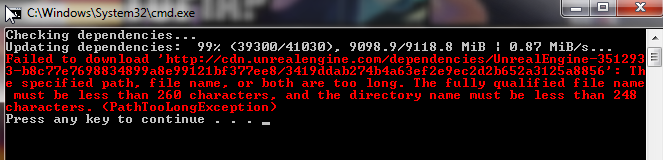
Second time, any chance I can salvage the download?
(the other time had 1 mb left.)
 gritty merlin
building engine from source, does this 2885 look right?.. i just clicked rebuild on ue4 since i came back to my computer after a while and my pc had crashed
@hidden fjord i got the same error but then i went to the other file and everything worked, i got a solution in the end
trying to build the oculus branch
hidden fjord
I got it on my third try. I moved it to a higher directory just to be safe.
gritty merlin
do you have this insane 2885 files to build?
shell lily
Yeah high 2000s is normal for a full engine rebuild
That’s after it’s even consolidated lots of cop files together
It takes about 1 hour for me to do the full rebuild
hidden fjord
I'm pretty sure I had some issues with my comp running slow for other reasons as it took 5 1/2 hours to get halfway through so I closed everything else and it finished in half an hour.
I'm following the wiki page for how to build a dedicated server and when packaging I'm getting this error:
UATHelper: Packaging (Windows (64-bit)): ERROR: No target name was specified on the command-line.
PackagingResults: Error: No target name was specified on the command-line.
UATHelper: Packaging (Windows (64-bit)): Took 0.5460313s to run UnrealBuildTool.exe, ExitCode=5
hidden fjord
How can I add the target to the command? I'm not seeing any options for it.
gritty merlin
even with that failed 99% thing
 past reef
I'm trying to build the VXGI2-4.21 branch for the first time, and I'm getting C# compile errors, building the build utilities, where it looks like it's expecting a newer version of C#... anyone know about that? I'm using VS2013 community.. because that's what the build instructions ask for
" #pragma warning disable CS1591" -> Warning as Error: Invalid Number
hidden fjord
Figured out my issue. For some reason the default was "projectname.Target.cs" rather than "projectnameGame.Target.cs".
 green flax
elder falcon
green flax
elder falcon
it looks like epic has started merging all the branches to master 🤔
maybe soon there will be the chaos one
brisk silo
@elder falcon nothing out of the ordinary on the merges
tho im definitely like "where is chaos dammit"
 stable hemlock
Can I safely delete the Engine source code after building from source? (If I'm sure I won't be making changes to the engine afterwards?)
Trying to recover some space
 celest viper
You could, I dont know why you ever would though. The source code itself is pretty minor. Did you take all the example games and content as well?
stable hemlock
Oh hell, I really hope I didn't take the example games
But my Engine\Source dir is nearly 20GB, which is a lot for me
celest viper
hmmm nah thats fair, Im surely only thinking about the code files, but once youve built youll end up with things Intermediates, PDBs, etc
stable hemlock
Will plugins still compile if I delete the Engine\Source directory? (It seems the Engine\Intermediate directory is required)
celest viper
I wouldnt expect it. If youre still planning on building your game or doing work.... trying to pull my directory up here
so yeah Ill say its a bit odd if just your Source dir is 20GB? Mine is around 5.2GB locally (though Ive got 4.21.1 locally)
stable hemlock
Wow, really? I wonder what the heck I did
I made like 20 small edits to the vanilla 4.22.2 and then cloned my branch with Git
Yeah, on both my laptop and desktop, it's 18.7GB
celest viper
huh....yeah to be fair I dont pull down from Git, and I barely pull the engine down here at home anyways heh.
 simple shell
hello.. uhm sry if this fits more in cpp... but i think it's more related to the engine source .. so i will ask it here ^^
I was setup the new build server with ue4.22 source installation and tested one of my projects to build a linux dedicated server. (which worked with the old build server and 4.20/clang-5)
Now i always get missing libs from the source installation.
12:05:13     ld.lld.exe: error: unable to find library -lembree3.so
12:05:13     ld.lld.exe: error: unable to find library -ltbb.so
12:05:13     ld.lld.exe: error: unable to find library -ltbbmalloc.so
The compile for linux works without any problems... only linking failed because of the missing libs ^^
Checked the third party folder and it was always only Win and Mac builded. (But this was missing on the old server too, maybe tbbmalloc is a new requirement for 4.22?)
using the v13_clang-7.0.1 toolchain for cross compiling.
As i remembered i didn't miss a step or a "build XY" in visual studio... (tested it again with build all ^^)
hope someone has some hints for me :/ (and thanks for your time ^^)
shell lily
Can you just apt-get libtbbdev?
simple shell
it's on windows... not native
currently i'm working with two buildsystems... for linux now with a native linux server and own ue4 source installation.
this works for now... but cross compiling failed all the time ;)
elder falcon
https://github.com/EpicGames/UnrealEngine/commit/ede40a0aa3f7e945e0b136d08a70f2c698a78d16 only took 4 years to get rid of that dumb requirement again
elder falcon
 elder falcon
 the bot added ispc files as binary dependencies so I can't open them on my phone
brisk silo
@elder falcon i dont see any ispc
alright im a dumbass, github defaulted to the release branch, not master
thick storm
that's probabaly because entire chaos implementation is currently in limbo
between physx and new interfaces
brisk silo
it just got megamerged
thick storm
i know
brisk silo
tons of things on it now
thick storm
there are new Modules PhysxCore and PhysicsSQ
brisk silo
btw, to make ispc work, you just add .ispc files to the build folder
thick storm
PhysicsCore*
brisk silo
and it will generate a file.ispc.generated.h
looks useful, i wonder if i could make my spaceship experiment run on that
thick storm
probabaly
but you are still going to be locked on transform update )(;
either way to hoped for more chaos drop
brisk silo
this is how they do it
@thick storm dont you remember i found a way to bypass the transform update enterely?
thick storm
it mainly seems about better destrruction integration
brisk silo
by setting ComponentToWorld directly, calc bounds, and then mark as needs render update
thick storm
and PhysX <=> chaos interop
brisk silo
they barely have any ispc stuff
just like a couple files
with a couple functions
and a header with vector + matrix
thick storm
It seems totally broken after update on VS2019
brisk silo
                    (ispc::FVector&)Box->Min(),
                    (ispc::FVector&)Box->Max(),
                    (ispc::FTransform&)SampleToObjectTM,
                    (ispc::FVector*)&SampleParticles.XView()[0],
                    DeepestParticle,
                    AvgConstraint.Phi,
NumParticles);```those two seem to be the use
so basically, reah. You add a ispc file to the code, with your functions, and unreal generates the namespaced function and links it for you
the casting tho...
brisk silo
3 ispc in the entire engine
one of the uses is to generate a bounding box out of smaller bounding boxes
btw, the smaller bounding boxes can be transformed
makes sense, this is the root of several accel structures
 wise cape
Hey ya'll ^^"
Wondering if anyone can help me bind a delegate.
SAssetView.h
872 FOnAssetRenameCommitted OnAssetRenameCommitted;
Not sure how to get access to it, but it appears the be the Content Browser Module. Alternatively, looking for a place to hook into when an asset has been named/renamed.
wise cape
Figured it out 😄 -
AssetRegistryModule.Get().OnAssetRenamed().AddRaw(this, &FMyModule::OnNewAssetRenamed);
Is WidgetReflector source links still broken?
 dusky zinc
using a custom toon shading model, any idea what this means?
wise cape
Is it using a custom node @dusky zinc ? Seems that one of the parameters is not specified.
stable hemlock
Hey, Is there anyway to use cooked umap from the pak files?
elder falcon
use for what?
elder falcon
no
stable hemlock
you sure that you can't?
elder falcon
cooked content is for packaged games, not the editor
stable hemlock
you can extract meshes animations sounds etc too
and use them again
But I can't do it with umap for any reason
elder falcon
what's the reason for doing this
 whole mauve
is there some kind of notification I can listen for when a specific UObject type gets cooked?
the type is my own from a runtime plug-in I wrote
aha UObject::CookAdditionalFiles()
elder falcon
I'd just look at some existing asset type that cooks stuff and how they do it
wise cape
Anyone know how to include ContentBrowserUtils.h?
From what I'm redaing, I should have UnrealEd in my dependencies, which I do - still can't get it to comple.
shell lily
Your Module type has to be Editor I’m pretty sure
I don’t think you can put that in a Runtime module
So if it’s in your game project you have to make a second module that’s Editor
whole mauve
is there a standardised way to get the output dir when cooking content?
I have some independent files I need to write out somewhere, so something like Saved/Cooked/MyPlugin, but I cannot for the life of me figure out how to get that path
it's different depending on how I start the cooker
wise cape
@shell lily Seems to have cleared the include issue, however I still get
error LNK2019: unresolved external symbol "bool __cdecl ContentBrowserUtils::IsValidObjectPathForCreate(class FString const &,class FText &,bool)" (?IsValidObjectPathForCreate@ContentBrowserUtils@@YA_NAEBVFString@@AEAVFText@@_N@Z) referenced in function "public: virtual void __cdecl FStyleGuideStandardModule::OnNewAssetAdded(struct FAssetData const &)" (?OnNewAssetAdded@FStyleGuideStandardModule@@UEAAXAEBUFAssetData@@@Z)
1>F:\AlessaPerforceServer\QOLImprovements\Plugins\StyleGuideStandard\Binaries\Win64\UE4Editor-StyleGuideStandard.dll : fatal error LNK1120: 1 unresolved externals
And these are always the errors I find impossible to figure out what's missing.
astral sapphire
Binding IntelliSense data... 100%
Writing project files...
Using x64 architecture for deploying to HoloLens emulator
Building using Windows SDK version 10.0.17763.0 for HoloLens
Writing project files... 94%
ERROR: Unable to find Visual Studio 2017 toolchain; 'Latest' is an invalid version

GenerateProjectFiles ERROR: UnrealBuildTool was unable to generate project files.
Any way to bypass this?
VS2019
-2019 key does not change anything
astral sapphire
yeah, i'd prefer to exclude Hololens at all, i wish i knew how
also, how BuildConfiguration related?
installing vc++ 2017 pipeline didn't help as well
it seems -CurrentPlatform can bypass that error...but...no Win64 in targets then
astral sapphire
hmm, looks like "-2019 -Platforms=Win64" did the trick
wise cape
EyeIndex implies that it's VR, or part of the model was written to support it
Honestly I'm going on a whim though - shading models aren't something I've written yet.
astral sapphire
Does anyone knows how GenerateProjectFiles keys work?
like what the priority order they have
astral sapphire
BTW "-2019 -Platforms=Win64" did not work as well, it indeed generated the x64 project, but w/o Editor target. It can compile it, but can't run the debug.
Is BlankProgram something new? I haven't noticed it before.
astral sapphire
i've managed to build it and run, but, once the ue4 is run it falls the same pit...
Running Z:/Dev/UE4/Master/Engine/Binaries/DotNET/UnrealBuildTool.exe  -projectfiles -project="Z:/Dev/UE4_Projects/NULL_Master/NULL_Master.uproject" -game -engine -progress
Discovering modules, targets and source code for project...
Binding IntelliSense data...
Binding IntelliSense data... 100%
Writing project files...
Using x64 architecture for deploying to HoloLens emulator
Building using Windows SDK version 10.0.17763.0 for HoloLens
Writing project files... 91%
ERROR: Unable to find Visual Studio 2017 toolchain; 'Latest' is an invalid version
uh
Check your BuildConfiguration.xml
In AppData\Roaming\Unreal Engine\UnrealBuildTool
astral sapphire
<?xml version="1.0" encoding="utf-8" ?>
<Configuration xmlns="https://www.unrealengine.com/BuildConfiguration">
    <BuildConfiguration>
    </BuildConfiguration>
</Configuration>```Welp, no idea then
 wraith crystal
@astral sapphire so what error is genprojfiles.bat giving you
astral sapphire
@wraith crystal it's above, large code block (above the project one)
wraith crystal
did you remove vs2017 and any of its windows sdks beforehand?
astral sapphire
@wraith crystal yep
wraith crystal
restarted windows?
astral sapphire
yeah
i've managed to build ue4 without Hololens...but once i generate project it shows the same error
wraith crystal
do you have an existing c++ project that you made with the old 2017 toolchain
astral sapphire
yep
wraith crystal
if you do:
Edit or create Config/DefaultEditorSettings.ini and add the following to the end of the file:
[/Script/SourceCodeAccess.SourceCodeAccessSettings]
PreferredAccessor=VisualStudio2019
also: open the engine's UE4.sln and show me the line that starts with VisualStudioVersion =
astral sapphire
Microsoft Visual Studio Solution File, Format Version 12.00
# Visual Studio Version 16
VisualStudioVersion = 16.0.28315.86
MinimumVisualStudioVersion = 10.0.40219.1
Project("{2150E333-8FDC-42A3-9474-1A3956D46DE8}") = "Engine", "Engine", "{6FDD7597-BF29-4720-8490-D7810DA51482}"
EndProject
Project("{2150E333-8FDC-42A3-9474-1A3956D46DE8}") = "Programs", "Programs", "{8F3F7EFE-D50D-4B26-B65E-EAD021D645F1}"
EndProject
Project("{2150E333-8FDC-42A3-9474-1A3956D46DE8}") = "Automation", "Automation", "{25A3775E-51B6-471A-8423-984F311DA703}"
EndProject
Project("{8BC9CEB8-8B4A-11D0-8D11-00A0C91BC942}") = "BlankProgram", "Engine\Intermediate\ProjectFilesWin64\BlankProgram.vcxproj", "{CF5C952A-C6B2-458F-A475-3DEAAC23A5B2}"
k ue4.sln looks alright
add what I quoted above to your project's defaulteditorsettings.ini
and regen your project's sln
and paste in its VisualStudioVersion = line
astral sapphire
well, it can't open the project...
wraith crystal
don't open the project
create Config/DefaultEditorSettings.ini
paste this in it:
[/Script/SourceCodeAccess.SourceCodeAccessSettings]
PreferredAccessor=VisualStudio2019
then delete your project's .sln
right click on your project's .uproject file
astral sapphire
i did
wraith crystal
switch unreal engine version --> source build at blablabla
wraith crystal
so what's in the sln?
elder falcon
did you try overriding it with build configuration
wraith crystal
or is it not even generating the sln for you
astral sapphire
Discovering modules, targets and source code for project...
Binding IntelliSense data...
Z:\Dev\UE4_Projects\UE4cppcourse_p1 - Copy\Source\UE4cppcourse_p1\UE4cppcourse_p1.Build.cs: warning: Modules must specify an explicit precompiled header (eg. PrivatePCHHeaderFile = "UE4cppcourse_p1.h") from UE 4.21 onwards.
Binding IntelliSense data... 100%
Writing project files...
Using x64 architecture for deploying to HoloLens emulator
Building using Windows SDK version 10.0.17763.0 for HoloLens
Writing project files... 91%
ERROR: Unable to find Visual Studio 2017 toolchain; 'Latest' is an invalid version```the config is there
astral sapphire
i wonder if i should remove this sdk and istall the newer one
wraith crystal
remove ANY windows sdks that vs2017 had been using
and make sure you have whatever vs2019 comes with
astral sapphire
i've removed the vs2017 prior to installing the 2019
wraith crystal
go here: c:\Program Files (x86)\Windows Kits\10`
open SDKManifest.xml
what's in PlatformIdentity =
astral sapphire
PlatformIdentity = "UAP, Version=10.0.17763.0"
wraith crystal
well, not sure if that's the problem but check what comes w/ vs2019 by default and install that instead
astral sapphire
oh, i remember, i've tried to remove it and it gave me this error...
if i try to uncheck 17763
installing 18362 atm
astral sapphire
well, posted here...let's see where it gets
https://answers.unrealengine.com/questions/902701/ue4-is-unable-to-build-the-project-files-on-vs2019.html
 topaz igloo
I have a really interesting problem in my hands. I've written my own modules to engine itself and whenever I add a benign piece of code into certain C++ files, I get a crash during intial loading saying "Virtual functions table is invalid." (being thrown from UObjectBase::IsValidLowLevelFast). The odd part is that, the addition I make does not have to be code at all. Even comments can cause this problem.. Anyone has any solution or even a suggestion to where should i start probing?
low dust
only if VS uninstaller could ever uninstall everything
I've spend days in total just removing all the crap they leave behind and that confuse specific build tools
astral sapphire
@topaz igloo what ue4 version are you using?
topaz igloo
@astral sapphire It is 4.22
astral sapphire
have you tried to disable the CompilationManager ?
DefaultEngine.ini

     [/Script/UnrealEd.BlueprintEditorProjectSettings]
     bUseCompilationManager=False
giving it a try
Btw this happensI doubt it has anything to do with blueprints though, crash happens even before the project selection window popups up, and the changes that create the problem are in cpps
Nope didn't helped.. 😫
topaz igloo
here it is
astral sapphire
@topaz igloo the error caused due to misalignment of the memory addresses of Virtual Functions and their addresses in the Vtable
are you sure you're not inserting code between macroses and their related functions?
topaz igloo
@astral sapphire Yes :/ guess i need to look into it a bit more..
astral sapphire
keep in mind that before compilation UHT kicks in, and it will modify the files
topaz igloo
is there way i can see those modified version?
topaz igloo
@astral sapphire Thank you truely for your time and effort 👍
 hollow plinth
Hm why do you check -1 pointer?
astral sapphire
@hollow plinth Alican? That's Epic games source on the screenshot.
 atomic radish
Not exactly familiar with all the engine changes for a year or two with respect to post process graph and what not. How should I add custom depth input for temporal AA shader and also make sure that custom depth is not released before TAA pass in 4.22 ?
topaz igloo
@astral sapphire I've found a really frustrating workaround. If I change the file name, that changes the paging of compilation which fixes the issue. Still it bugs me a lot thou
granite dust
A 4.23 fork doesn't necessarily mean it's feature complete
They added quite a few raytracing features after forking 4.22
thick storm
idk why they are forked now
if in the week they close office for 2 weeks for some holidays or sth
low dust
not super surprising
you get these always when new VS gets out
also what do you mean by 4.22.3? it's not listed on github for me
@astral sapphire
4.22.2-release is latest here: https://github.com/EpicGames/UnrealEngine/releases
astral sapphire
@low dust oh, i see now, i may cloned the branch and not the tag -_- (removed, to not confuse people)
 teal plinth
im getting this error when clicking the visual studio's local windows debugger button on a source code build, can't find an answer in google with this particular dll mentioned, anyone's had this issue?
UE4Editor-UnrealEd.dll is either not designed to run on windows or it contains an error. Try installing the program again using the original installation media. Error status 0xc000012f.
brisk silo
@spiral mortar what are the tools for generating terrain and such on your voxel plugin?
i want to experiment a good deal with a procedural RPG prototype, and i need something for the terrain, was thinking of voxelplugin, given that unreal terrain is static
astral sapphire
yeah, i was talking about solution build
@teal plinth the issue you have is the dll is not compatible with the binary, you may delete it and hit build again...also, afaik Dev Editor is limited in terms of debugging
i.e. you can debug games on it, but not the editor itself
teal plinth
alright thanks ill try to delete the dll and rebuild
teal plinth
oh my bad i didn't know they were different options
astral sapphire
yeah, rebuild is like, from scratch
@teal plinth oh, also, remove the Intermediate folder (from the project)
if that won't help, i assume you may need to delete Engine\Intermediate\Build\Win64\UE4Editor or even whole Engine\Intermediate\
but that;s essentially "rebuild"
i hope we're talking about editor build...
and not project build
sorry, have to go, bbl
teal plinth
ok thanks if I get stuck Ill ask
brisk silo
@spiral mortar i want to generate a terrain with a couple biomes and mountains and stuff, and then run some post for rivers and towns/paths
spiral mortar
How large would your terrain be?
brisk silo
spline that carves a path on the voxel terrain + procgen-d mesh
more or less same thing for paths
spiral mortar
👌
brisk silo
i want to do some experimentation/ R&D about basically a "procedural skyrim"
of course wont really happen
but wanna tinker a bit now that i know much more about high end performance optimization for huge maps with unreal
spiral mortar
The main tool I have to play with procgen are voxel graphs
Lets you experiment with noise pretty quickly
brisk silo
voronoi
spiral mortar
So precomputed?
brisk silo
no
spiral mortar
precomputed at runtime
brisk silo
the idea is some kind of islands/contintent
each island has 2-3 biomes out of N possible ones
spiral mortar
Yeah so you'd precompute the biome map on start
brisk silo
yup
spiral mortar
Ok good
brisk silo
but there are quite a few possibilities
like, if i choose 2 or 3 biomes and i have 6 total biomes... thats a lot of biome combinations
what you are suggesting is to have multiple graphs with multiple biomes per graph, no?
guess ill have to see if JIT could happen. You are generating the code, no?
spiral mortar
Why are you talking of biome combination?
brisk silo
would it be possible to hack the stuff so its 1 function per graph and combine them dynamically with a math formula?
spiral mortar
Yup
brisk silo
also, what about layered generation
spiral mortar
wdym?
brisk silo
like running multiple graphs, one after another
one graph postprocesses the data of the one before it
spiral mortar
Why not have a single one?
spiral mortar
You can use macros
brisk silo
i was thinking of rolling the mesh generator myself
but voxelplugin could be helpful for prototyping
spiral mortar
But if needed you can sample a graph inside another graph
Yeah, unless you need volumetric terrain you're probably better off writing a heightmap mesher
Although who knowns, maybe the plugin will be fast enough
Lots of crazy optimizations 😄
brisk silo
thats kinda it. I dont really need 3d terrain other than for a few things
spiral mortar
Well either you need it or not lol?
brisk silo
for now its just a prototype, i want to use it as an experimental crazy tech thing and then maybe use parts in other projects
@spiral mortar most of the biomes just dont need 3d terrain
at all
spiral mortar
No caves?
brisk silo
caves will be a special case. Iwont really generate them with the terrain itself
spiral mortar
🤔
brisk silo
tho if im using the plugin, some good old perlin-worming could work great for caves
spiral mortar
ye
brisk silo
i do want more dungeons than caves, and for that i was thinking of just making a massive hole underground and put 3d meshes for the dungeon pieces inside
likely literally unload the main terrain once you enter
spiral mortar
I see
eg switching to a dungeon culling system
makes sense
Anyways if you plan on using the plugin you should join the discord
spiral mortar
@brisk silo It's fine
brisk silo
btw, have you seen that 4.23 will have raytracing on procedural meshes?
brisk silo
they merged it to devrendering a couple days ago
so i guess you can now do RTX voxesl
spiral mortar
As I don't have a RTX or even a compatible pascal I haven't looked much into RT for now
brisk silo
dont worry, rtx support is absolute trash at the moment
spiral mortar
lol
thick storm
@brisk silo landscape is getting procedural brushes
brisk silo
@thick storm at runtime?
thick storm
ah no
thick storm
landscape is not editable at runtime
brisk silo
@thick storm i would be running houdini if it was about the edit-time
i already made some tests of procedural landscapes with it, and it is beyond OP
and it got even stronger on latest version
elder falcon
ray tracing on proc meshes is
it uses a weird dynamic ray tracing instances thing instead of the normal one
brisk silo
thats.. shit
shouldnt it give the option or something?
if you want a static RT or dynamic RT
elder falcon
the proc mesh component can't use static draw list anyway
or whatever it is called now in 4.22
thick storm

Something fun I worked on last year. Erosion on terrains in ue4. I hope to be able to integrate this properly into the engine at some point, or release a plugin, but its a ways off currently. Other aspects of terrain are being worked on though :)
 Twitter

Prototype of drawing landmass shapes using a mouse (well, you press spacebar to make a point since this is all blueprint based). Shapes are defined using distance fields. https://t.co/2GjN8bqJfK
Retweets
137
Likes
868
Twitter
elder falcon
they made a dynamic ray tracing instances thing similar to the GetDynamicMeshElements that sucks
thick storm
idk looks like cloud replace houdini at least for me ;
for runtime procedural terrain I would probabaly go with some off the shelf plugin like the Phyronnaz one
brisk silo
@spiral mortar what about creating a 2/3d array of raw data from C++ and then reading that data from the voxel graph?
is that possible?
spiral mortar
You can easily create custom nodes
brisk silo
then thats perfect
its because i only really need/want the voxel graph itself for the small scale detail. Stuff like biomes i think would be better to calc on a texture
spiral mortar
Yeah there's a texture sampler node
Voxel Plugin Forums
If you want to receive a mail for every new release, you can subscribe to this topic. Make sure email notifications are enabled in your settings. New release Log Generate...
Bottom of that post
brisk silo
Pro version doesnt have 4.22
spiral mortar
@brisk silo Trying to DM you
brisk silo
i have the pm opened 🤔
spiral mortar
I'll restart discord then lol
astral sapphire
it's #engine-source btw, not #plugin-dev
teal plinth
I rebuilt and now im getting this build error
1>Done building project "UE4.vcxproj" -- FAILED.
pepehands
The command "..\..\Build\BatchFiles\Build.bat -Target="ShaderCompileWorker Win64 Development" -Target="UE4Editor Win64 Development" -WaitMutex -FromMsBuild -2017" exited with code 5. Please verify that you have sufficient rights to run this command.
Hmm
dense wharf
so many crashes today. sigh
thick storm
seems like virtual textures are in for 4.23
teal plinth
noob question, in a source build in the project browser, is the editor not supposed to open after creating a project
limber jacinth
yes
teal plinth
thanks
is it possible to import assets from the epic launcher to a source build project?
 astral warren
If you cant find the project just untick the checkmark next to the list it should show you the project anyways.
astral warren
Also, you can install assets from earlier version of the editor, eg an asset for 4.18 should work in a project for 4.22, but not the other way around
teal plinth
thx Ill have that in mind
atomic radish
What stops standard base pass translucency from exporting to gbuffer velocity, besides pixel shader outputs ?
shell lily
@atomic radish pretty sure the translucency pass is just forward rendered after the deferred renderer is done with opaque stuff, so it wouldn't write to the g-buffer at all
atomic radish
@shell lily I don't see where translucency pass would get different targets and likewise, it uses same shaders, and frankly don't see the reason why you would not be able to write there from translucency. Maybe velocity buffer gets resolved somewhere earlier ?
shell lily
@atomic radish translucenct materials simply don't write to the G-buffer at all, because of this in BasePassCommon.ush
#define USES_GBUFFER (FEATURE_LEVEL >= FEATURE_LEVEL_SM4 && (MATERIALBLENDING_SOLID || MATERIALBLENDING_MASKED) && !SIMPLE_FORWARD_SHADING && !FORWARD_SHADING)
and then
#define WRITES_VELOCITY_TO_GBUFFER (USES_GBUFFER && GBUFFER_HAS_VELOCITY && (!SELECTIVE_BASEPASS_OUTPUTS || !(STATICLIGHTING_TEXTUREMASK || STATICLIGHTING_SIGNEDDISTANCEFIELD || HQ_TEXTURE_LIGHTMAP || LQ_TEXTURE_LIGHTMAP)))
so if USES_GBUFFER is false (as it is for a translucent material) then it's not gonna write velocity either, which makes sense
I think when the translucency pass runs, the G-Buffer isn't going to be its render target, the G-Buffer would just be read-only as source textures, and the render target is going to be the main back buffer
 strong oxide
@brisk silo wait what are raytraced landscapes?
atomic radish
@shell lily I've replaced BegingRenderingSceneColor in BegingRenderingTranslucency with a custom version, that targets velocity, as well as ensuring that USES_GBUFFER is true for shading model in question. It has velocity buffer targeted correctly and exporting there, I'm just missing a resolve somewhere.
shell lily
ah okay, I dunno, then...to be honest haven't really messed with that code
atomic radish
Yeah, my problem was resolve, which was done in FSceneRenderTargets::FinishGBufferPassAndResolve. Removed velocity from there and moved it further in translucency finish function. Thanks in any case.
 opal gorge
Anyone else have an issue where setup.bat gets everything but one file?
Failed to download 'http://cdn.unrealengine.com/dependencies/2597174-0975f975d1f0463f931b68ea4b0ef6d0/cefd87d67f6688e869ab62068aa16c5f02113c8c': The remote server returned an error: (502) Bad Gateway. (WebException)
I can put that URL in a browser and download the file manually but I have no idea where to put it
astral warren
Nowhere, that's a chunk. Without the context it means nothing i guess. Have you try run setup again?
teal plinth
Move plugin manually from Epic Games\4.XX\Engine\Plugins\Marketplace to your source engine plugins folder or your project/plugins folder.
is this actually safe to do in order to get a plugin from the marketplace into a source build?
astral warren
it is safe, just drop the binary folder and the intermediate, push a generate.bat for ue4 and it should set you up
if you get errors just move the plugin to your project instead
teal plinth
If you are trying to add a plugin to your project, you will need to create a Plugins folder in the project's root folder and put the source code for the plugin there. Then right-click the .uproject file and select the Generate Visual Studio project files option, open the solution in Visual Studio, and build the project.
Im trying this first
ill try that if fails
 orchid kayak
hello! I have a friend that is preparing a presentation about surprising code and I was wondering if you've ever stumbled upon something similar in the UE engine source
(example from Ogre)
 twin nymph
there are random assert crashes in my game project for no reason at all
fixing this error would be awesome
BlueprintDetailsCustomization.cpp line 2524
the assert is " Assertion failed : InPropertyChangedEvent.MemberProperty && InPropertyChangedEvent.MemberProperty->GetOwnerStruct() &&
InPropertyChangedEvent.MemberProperty->GetOwnerStruct()->IsA<UFunction>()
the file is : Engine/Source/Editors/Kismet/Private/BlueprintDetailsCustomization.cpp line 2524
happens randomly for no reason... I just have blueprints with functions, structs variables and local variables ...
if this could be fixed that would be great thx ❤
stable hemlock
4.22.3 hotfix is live but engine source doesn't seem to be updated? Does it usually take extra time for them to release the updated code?
elder falcon
maybe someone forgot to run the github bot 🤔
stable hemlock
😕
brisk silo
@orchid kayak if you want to see the biggest WTF of How Not To Make A Game Engine
try Torque or Ogre 1.9
the Octree of Godot is also a masterpiece
enterely based on linked lists, slower than a bruteforce loop in basically all cases
brisk silo
Ogre 1.9 has a great thing
Mike Acton, the lead engine developer of Imsoniac, and now the guy who is leading the entire "data oriented tech stack" stuff in unity, did a review of it
as an example of precisely how not to do it
elder falcon
torque script is a masterpiece: every value is converted to a string and parsed again when you pass it to a function, or store it, or do anything basically
orchid kayak
up to 8 children
elder falcon
looks like it only does it when the root only has one child
I wonder what the pairable elements is about
elder falcon
I made a bug report for it but they said they already fixed it lol
orchid kayak
yes
elder falcon
 they didn't fix it then
elder falcon
16.2 is out?
orchid kayak
yes
elder falcon
not showing it for me
orchid kayak
orchid kayak
😮 you mean to tell me it got out of preview?
well duck me sideways why am i using the preview
twin nymph
nothing can be fixed in all these guys are convinced that they're doing the right thing and they're in control
godot is gonna keep being bad, ogre , the uh ... the engine from epic games with the asserts
also
I just hate that my gamedev computer has to be connected to the internet everytime it has to update any goddamn thing
elder falcon
how else would it update a thing..
twin nymph
with offline installers and iso files



 elder falcon
the more painless and automatic updating is the better
twin nymph
openning it, running the installer
elder falcon
just do something else temporarily while your internet is down
twin nymph
I don't want my gamedev computer to access the internet
elder falcon

twin nymph
i'm fine with downloading a 20gb iso file and install it via a portable hard drive
elder falcon
why would you overcomplicate it like that
twin nymph
ffs i'm not saying you have to do the same, i'm saying i'd like to be able to do that with every software
elder falcon
but I don't understand why
twin nymph
it's not overcomplicated, it's copying a damn file and running it's installer 😮
elder falcon
you don't seem to have an actual reason like downloading a huge file once and then deploying it to 100 pcs locally
twin nymph
I told you why, I don't want my gamedev computer to access the internet
elder falcon
there's no reason for a single pc to not access the internet
twin nymph
you have to be trolling
a big reason is that I don't want other ppls to see what games i'm developping
twin nymph
I told you why
I don't want keyloggers, firewalls,
I don't want steam or epic taking infos from my computer
to install a program from an Iso file is the simplest thing
it's not "overcomplicated" as you're making it to
elder falcon
it's certainly more manual work than them updating themselves when I launch them
elder falcon
there are so many programs to keep track of these days
it's already bothering me with 3 vs extensions and live++
twin nymph
I don't need """"" so many programs """""
and yeah, if live++ can't be offline... screw live++
astral sapphire
sorry, but how does ISO install skipping "download" step?
You know you could just copy the assets and ue4 to your offline PC, right?
twin nymph
yes that's how I install UE4, build from source on a machine connected to the internet and then copied to my offline PC
astral sapphire
you could copy a rocket build as well
twin nymph
but it's not the case for everything, i'm not sure i'll be able to do that with visual studio
what's a rocket build btw Alexey ?
astral sapphire
the one distributed through launcher
it was a code name when ue4 was distributed to licensees
elder falcon

Learn how to install Visual Studio offline when you have an unreliable internet connection or low bandwidth.
astral sapphire
@elder falcon the only issue...will be the Trial license for Community build...i wonder how that works
@twin nymph you're not from Iran btw? And especially not from nuclear industry?
MS specifically prohibits exporting this software there w/o special US GOV permission. 
twin nymph
@astral sapphire why the hell would I be from Iran ...
elder falcon
it's because there are like 200 modules for vs, a full installer would be like 100GB
so you use a command to make it build one with the packages you need
twin nymph
several isos , an installer for each feature ? 😊
astral sapphire
@twin nymph cause...why not? Internet is world without borders (almost), and by using a vpn you could be from any country.
It was a sarcastic note, cause of your "paranoya" precautions.
elder falcon
that's probably similar to what it's doing behind the scenes
twin nymph
it would be easier to have several isos
right click, download torrent , copy to portable hard drive, done
that's how easy it should be
astral sapphire
ISIS is plural for ISOs...?
twin nymph
if you want Alexey, if you want
twin nymph
@astral sapphire you realize i'm almost at the point of blocking you right ?
astral sapphire
@twin nymph I have no intention to hurt you anyhow. Sorry if I did.
teal plinth
I added a plugin to my source project by making a plugin folder in the project, generating vs files, and building, the editor works fine but when I try to run the server I get this
teal plinth
nevermind I had to build the server again
 torn musk
@twin nymph how do you plan to Build offline, without Epic's Swarm accessing the Internet? Isn't it mandatory for the building process or did I understand it wrong?
twin nymph
@torn musk I just download the dependencies and build either on my laptop or my work PC, there's all the infos on epic's UE4 documentation, the "build from source" page
all that is needed is the source and the dependencies, in the latest versions the dependencies are downloaded all together ( no separation between mac android linux and core dependencies )
elder falcon
swarm is this ancient thing for building lights with multiple pcs on the local network it has nothing to do with building the engine
nor does it require internet to do its thing
twin nymph
riiiight 🤦
I thought it was the name of the program downloading the dependencies or something
elder falcon
isn't that thing literally called dependencies.exe
twin nymph
it is... but Soljenitin mentioned swarm so I thought... etc
elder falcon
gitdependencies
twin nymph
you mean it's based on a program from git called gitdependencies ?
twin nymph
argh too bad
honestly , comparing to all the CMake and Scons projects, I find building UE4 very easy
elder falcon
that's because ubt extremely good
twin nymph
to be fair, most mainstream opensource projects are rather well documented in terms of source building
elder falcon
things like cmake get made by linux people who are used to annoying complicated command line stuff and cryptic error messages, so ofc it's not user friendly
twin nymph
except ubt is also the thing that... in tandem with UHT cripples the building times on the UE4 c++ projects right ?
yes ofc indeed
or if ubt is only for building UE4, yeah it's rather well done
twin nymph
i'm tempted at trying to make a cuda/ C version of UBT and UHT ...
I know it sounds silly
twin nymph
ubt is c# tho isn't it ? or does it just takes .cs files as an input
elder falcon
it barely has a few seconds overhead on executing thousands of actions
twin nymph
Zeblote no it's not 😮 60seconds total building time on a simple UE4project
elder falcon
well if that time is actually spent compiling it's not ubts fault
it just launches the compiler
twin nymph
but it also generate huge generated.cpp files taking ages to compile
and forces the engine to compile locally for every project, resulting in huge "intermediate" folders
altrough I might not be qualified to make further statements in this domain
elder falcon
fast compile checklist: use IWYU, turn off unity builds for your modules, make a custom pch if necessary
elder falcon
it takes < 10 seconds for me to build iteratively and like 30 to compile all 70000 lines from scratch
twin nymph
yes but you might have a ryzen x 999999 and kilometers of ram
elder falcon
I have a 7820x that's a few years old
twin nymph
hmmm that's noice
elder falcon
gonna replace it with a ryzen 12 core tho you're right
twin nymph
imo... when it works don't replace it
but then again, you'd have <4second compiling times
I know almost nuthin' in this domain
btw Zeblote you meant this tool as well right ? https://include-what-you-use.org/
elder falcon
no not a tool, it's a set of rules you follow when writing code
there's something on it on the unreal docs
twin nymph
and do you know if there are tutorials to make a custom pch ?
i'm gonna find them, also this is nice https://docs.unrealengine.com/en-US/Programming/BuildTools/UnrealBuildTool/IWYU/index.html
A brief overview of the updated code base for UE4, now using an Include-What-You-Use (IWYU) dependency model, referenced herein.
much thanks for these infos
twin nymph
hm hm
elder falcon
in it I just added a few big files we include often but for some reason aren't part of the default pch
the pch then needs to be rebuilt basically never but it improves your iteration times
torn musk
@twin nymph , @elder falcon thank you for the clarification on this ancient thingy called Swarm Agent 😃
Include What You Use sounds good imho
twin nymph
@torn musk np 😊 @elder falcon and yeah i'm gonna try to optimize all this tonight that's awesome
brisk silo
@elder falcon precompiled header is a double edged sword
it also means all your files now need to include a megafuckton of lines of code, even if precompiled. It can fairly easily increase your compile times unless you are careful with it
elder falcon
I have been careful with it, only adding huge files missing from the normal pch
it decreased both iteration and full rebuild times even tho it has to wait like 20 seconds for the pch to build at the start
that MeshDescription.h thing especially, because it takes for-fucking-ever to parse that big template
completely ruins iteration times to include it anywhere without pch
brisk silo
classic C++ footgun
torn musk
Is anyone else getting this "unicorn" http://prntscr.com/o4p0hs when accessing https://github.com/orgs/EpicGames/dashboard ?
elder falcon
yeah
 ornate topaz
Would one expect to be able to build UE4 from source with the following in one's BuildConfiguration.xml:
<bUseSharedPCHs>false</bUseSharedPCHs>
<bUseUnityBuild>false</bUseUnityBuild>```It almost works, except for SymbolDebugger and WebRTCProxy which are missing some #include's.
Not sure if it's just an unsupported configuration, but the fact that it very nearly does work and is resolved by adding the missing includes, leads me to believe it's a bug.
astral warren
You can probably exclude webrtcproxy from your compilation it is only an external app for pixel streaming
ornate topaz
ah okay, yeah i wasn't sure how much of this was optional
astral warren
Yes it is optional, there is no need for that unless you want pixelstreaming fsr
shell lily
@ornate topaz Epic mostly uses unity builds in their workflow, so I've heard if you want to disable them from time to time there are some files you'll have to fix includes for because whoever made the changes didn't
ornate topaz
@shell lily that would definitely be my guess in this case -- the only reason i was building unreal without unity is i had a buildconfiguration.xml laying around (from a game project) which disabled unity, and unbeknownst to me, unreal was using it as well
 last cypress
you could disable unity build only in your project, not in the whole UE4 by bUseUnityBuild = false; in *.Target.cs
 prisma basin
does anyone here know where and how I can define these macros in the <game>ServerTarget.cs file? I'm struggling to find this bit of info on the net... setting up dedicated server via steam
https://cdn.discordapp.com/attachments/351623068382265344/592046547189891082/unknown.png


This is how i wrote it - please don't shoot me i know its wrong lol
prisma basin
@ivory spoke did you ever sort this issue out?
prisma basin
Thanks so much @elder falcon, that sorted it
// Copyright 1998-2017 Epic Games, Inc. All Rights Reserved.

using UnrealBuildTool;
using System.Collections.Generic;

[SupportedPlatforms(UnrealPlatformClass.Server)]
public class MyGameServerTarget : TargetRules   // Change this line as shown previously
{
    public MyGameServerTarget(TargetInfo Target) : base(Target)  // Change this line as shown previously
    {
        Type = TargetType.Server;
        ExtraModuleNames.Add("MyGame");    // Change this line as shown previously
        GlobalDefinitions.Add("UE4_PROJECT_STEAMPRODUCTNAME=\"MyGame\"");
        GlobalDefinitions.Add("UE4_PROJECT_STEAMGAMEDESC=\"MyGameDesc\"");
        GlobalDefinitions.Add("UE4_PROJECT_STEAMGAMEDIR=\"MyGameDir\"");
        GlobalDefinitions.Add("UE4_PROJECT_STEAMSHIPPINGID=\"MyGameID\"");
    }
}
Posting result here for any future reference
celest viper
Anybody around that can talk about doing a RenderTarget Texture Read?
Ive had an issue since an upgrade to 4.22 where some existing code we had now fails down in D3D land, but our code really didnt change with the update
I know a lot of the lighting and rendering did, but Im also not the graphics guy who wrote all this stuff originally so Im a bit out of my element
Mostly just trying to figure out how to debug an error that just tells me "One or more of the arguments are invalid" no idea what thats actually telling me
 hearty sand
Can I, in code, somehow filter between Launcher and Source build?
small cobalt
Dont think there is any variable or preprocessor to identify that
An overview of UBT Targets, including property descriptions.
Nothing in here that would help.
pine flume
@hearty sand if you retrieve the root path to the Engine then you can check for the presence of the Engine/Build/InstalledBuild.txt sentinel file, which only exists in Installed Builds such as those downloaded through the Epic Games Launcher.
 dense kettle
Hi, what is the best choice to do ci (on both windows and Linux)?
shell lily
well, Epic uses Jenkins and it's pretty popular in general amongst game companies
but you could in theory use whichever one you wanted to, since all the build processes can be done via command line
 gray bay
yes
artists do
Epic used Jenkins in the past, but switched to Electric Commander a few years ago
 frozen glen
Anyone ever come across anything like this?
Ensure condition failed: bArchetypeReinstanced [File:D:\Build++UE4\Sync\Engine\Source\Editor\UnrealEd\Private\Kismet2\KismetReinstanceUtilities.cpp] [Line: 1627]
Error: Reinstancing non-actor (/Engine/Transient.World_2:PersistentLevel.ItemDropBPV3_C_0.MyWidget); failed to resolve archetype object - property values may be lost.
dense kettle
I store my project on gitlab, so I try to use gitlab runner to build ue4. I use virtualbox, but wait https://github.com/adamrehn/ue4-docker to use github new container registry

GitHub
Windows and Linux containers for Unreal Engine 4. Contribute to adamrehn/ue4-docker development by creating an account on GitHub.
celest viper
Anybody use some SceneCaptureActors and might understand some of the changes that happened with capturing scenes to render target textures in 4.22?
frozen glen
@celest viper What issue are you having?
celest viper
@frozen glen Sorry bout that been away from my desk. Been trying to track down a DX crash while doing a scene capture from a game thread (in the editor)
I think I might have something now, some changes in D3D11UniformBuffer
with the 4.22 release
shell lily
Are you doing deferred capture?
Or like capture on every frame?
I’ve been using them in 4.22 without issue
celest viper
ok well maybe you can help me out, Im trying to cover some bases while our render guy is out
So not doing it every frame, were queueing up a bunch of captures from different angles to build up data for a dynamic lighting scenrio in the editor
At the end of the day Im getting an error that the texture were trying to read the values back out of wasnt setup correctly (essentially doesnt have the D3D11_CPU_ACCESS_WRITE flag)
It looks like that part of the UniformBuffer code changed if pooling is not enabled (see FD3D11DynamicRHI::RHICreateUniformBuffer) which seems to be true if youre doing this out of the game thread
shell lily
Are your targets just the normal render target resources or do you have something custom for that?
Cause I’m only using them just with making the render target asset in the editor etc
celest viper
Custom since this all running on the C++ side but pretty much using the default settings for a Render Target:
renderTarget->InitCustomFormat(128, 128, PF_FloatRGBA, true);
Bah, something like that, some psuedocode version of what Im looking at
shell lily
So which thread is the render target being created on? Is it the same one you’re trying to capture from?
celest viper
It looks like everything should be happening on the main thread.
and bah I think I just have somebody to smack when they get back
For some reason this code was, in general, disabling "r.UniformBufferPooling" before starting all the captures and then setting it back to its original state later
which would explain why the changes in D3D11UniformBuffer would affect us, were running our captures in a mode different then how we were pre 4.22
shell lily
ah
hidden fjord
When you accidentally build the editor instead of your project.
shell lily
yeah one of the rite of passages is that if you "rebuild" your game project it also rebuilds the engine
actually there was a funny bug on installed builds on Mac back in the early 4.1/4.2 days, where if you "cleaned" the project in Xcode, it would delete all of the compiled binaries from the installed build, lol
hidden fjord
I just hit the wrong button for this one. All I was trying to do was get plugins into my project. Oops.
 mossy patio
Has anyone out there had any luck detecting controller type?
I'm poking around in engine code, specifically around implementations of IInputDevice
Seems like it would be quite a pain to dig in and feed a device type through input event handling
just curious if anyone's dealt with this, and how
shell lily
@mossy patio like figure out if it's Xbox vs PS4 controller?
shell lily
so first, by default Unreal on Windows only supports XInput devices. so dualshock controllers don't work unless you use one of the hack XInput drivers
mossy patio
I'm poking around in FWindowsApplication for ideas, just figured I'd ask around to see if there were any thoughts on it in here
shell lily
so what I ended up doing was I made a plugin that wraps SDL's Game Controller stuff as a new input device
because it supports XInput as well as other controller types
mossy patio
SDL?
mossy patio
nice
shell lily
then in the SDL source itself, there's a private header that they use to figure out the type of controller based on the vendor ID and product ID of the controller device
so I took that also and put it in my plugin
then I was able to make some blueprint library functions for like asking which type of controller player X has connected
and then I made a custom RichTextDecorator so in a rich text field you can be like "I want the button icon mapping to the Jump action"
and then it'll figure out what type of controller you have, look at the action mappings, and show the correct button
nice thing about using SDL also is it works on PC/Mac/Linux, though I have not tried it on Linux yet
though I know the Unreal source on Linux is already using SDL anyway
if you just want to add DualShock 4 support, there is a WinDualShock plugin also, but it's only available to licensed Sony console developers so that doesn't really help most people
and then it still would only be XInput plus DualShock 4
so it wouldn't support like Nintendo Switch Pro (which SDL does)
mossy patio
my current plan is to look at the vendor id / product id for a few specific cases (DS4, Steam controller, DS3, XBox One), and otherwise default to Xbox360 layout, which seems to be the convention
I don't think i can match it to the controller thats actually providing input, but this may be good enough for now
i don't know a whole lot about the vendor id / product id convention, so i don't know if those change at all by region / revision
shell lily
Well one thing to watch for is there are multiple ids for those controllers that are commonly used
@mossy patio here’s the file I used to figure out controller types

GitHub
An unofficial, automated SDL2 and SDL1.2 HG mirror. - spurious/SDL-mirror
As far as I know it’s the same list of controllers that steam officially detects so should be good
 hollow wadi
hey does anyone know if the loading thread uploads GPU resources directly, or does it hand that off to the game thread first
as nice as it is to async stream assets, once they're loaded im getting a hitch when i then apply them to an actor
 long wave
@mossy patio there isn't really an easy way to do it, however the latest version of the Steam SDK allows you to determine whether the player is using PS4 / Xbox / Steam controllers.
https://partner.steamgames.com/doc/api/ISteamController
ISteamController::GetInputTypeForHandle()
celest viper
If Im queueing up a bunch of jobs to be threaded that derive from IQueuedWork, do I need a way to tell the thread to kill itself when Im done?
stable hemlock
I am currently having "swarm is failing to kick off, rebuild lightmass" errors. I have rebuilt UnrealLightmass and I still have these issues. Was wondering if there was an extra step to fix this
mossy patio
@long wave @shell lily UPDATE. So today i futzed around with writing an unreal plugin that hooks into raw input and registers for input from known gamepads (based on vendor / product id)
doesn't touch the underpinnings of the unreal engine, tacks on the functionality as a plugin, which i quite like
problem: devices registered to provide raw input event data aren't actually coming out the other end (the processmessage handler of the windows api)
I ... don't really know what to do at this juncture beacause nothing is reporting any errors. Perhaps something somewhere is intercepting the event, but i don't know how to find out where it's going.
(the idea being i react to input from those and note the most recently used gamepad, and assume that it is the gamepad the player is using)
It's super weird, the devices (XBox One controller, for example) successfully registers for input, but then no input is processed
shell lily
You could look at Epic’s Raw Input plug-in and see how they’re doing it
Also I’m not entirely sure whether Raw Input works completely with XInput devices like an Xbox Controller. It’s pretty common to still use XInput for devices that still support it
You’re also going to have a bit of a problem in that for XInput devices you’ll get double inputs from both the built-in and your plug-in
mossy patio
Yeah thats what I’m thinking: Xinput is likely handling and blocking whatever raw input is trying to read.
Technically I’d be fine with double inputs. I have no intention of handling the input, I just want to read the device providing it.
The raw input plugin doesn’t seem to do anything mine isn’t, but I’ll need to dig more.
I need to figure out how XInput reads the controller input, perhaps my answer lies there.
shell lily
Oh I see, you just want to know what the last input was so you can show the right icons and such?
mossy patio
basically
XInput is a bit of a black box unfortunately, having trouble figuring out the implementation
stable hemlock
I am currently having "swarm is failing to kick off, rebuild lightmass" errors. I have rebuilt UnrealLightmass and I still have these issues. Was wondering if there was an extra step to fix this
celest viper
Is there a practical way to destroy a SceneView mid render? Ive inherited an algorithm that does a shit ton of screen captures in a single frame and ultimately its running me out of memory.
So I can either try and break it up across multiple frames, or figure out a way to tell the engine once Ive captured to target and pulled the data out Im done wiht it and we can drop it
 frail swallow
Hi There, is there anybody who came across depth issues on MRT passes? For example one target output with correct depth and the other target ignores the depth?
frail swallow
Never mind, resolved by depth actions
 onyx crypt
Hello everyone i just build UE4 from source and getting a crash when i try to start the engine.
shell lily
did you compile ShaderCompilerWorker also?
 dreamy minnow
Hey guys, has anybody ever touched the landscape code in unreal? specifically vertex manipulation from the landscape vertices
spiral mortar
Why?
dreamy minnow
I want to give them a differen base shape (different from a default grid) and want to differently handle the influence of the heightmap (not just adding/subtracting on the z coordinate)
low dust
why?
@dreamy minnow the whole point of landscape/terrain systems in general is to have even grid, this is like the core basis on how this system works, how it's optimized rendering can work etc
if you need something more freeform, you use meshes and get the extra overhead from it
onyx crypt
@shell lily Yes i did. I tried to run from the visual studio 2017 debug mode and that failed too, after that i tried from the epic store but cant lunch epic store some kind of error 0x0007xb something like that i dont remember now. Than i proceed to see what dll was making the problem and found out that some dll aps-ms-win-core was the problem. Unfortunately that dll cant be downloaded its integrated in the windows, so now im reinstalling windows and i hope i will be able to do some work today spent 2 days debugging whats the problem 😦 .
stable hemlock
I am currently having "swarm is failing to kick off, rebuild lightmass" errors. I have rebuilt UnrealLightmass and I still have these issues. Was wondering if there was an extra step to fix this
dense wharf
why does my engine keep crashing when i go to save a level. its very random happens about 30% of the time but thats 30% more than it should
such an unstable mess
shell lily
Are you sure it’s crashing and not just an ensure that you can continue past?
dense wharf
it just freezes
like the percentage bar saving
I have to ctrl alt del
to close it
low dust
@dense wharf how long did you wait?
did you check cpu load with task manager etc?
I've had UE4 editor freeze randomly on the dialogs ever since 4.12 and that haven't stopped even in versions today... but it always wakes up like minute or two later.... and if it's not that, it could just really be doing actual work too. if it doesn't update the progress in short while, that sounds still pretty normal, need to be patient with this stuff. and lastly, this is not really #engine-source topic 😃
dense wharf
I use the source built engine so might be a bug with the build
Ive waited 30 minutes and the bar never moved so definitely a lock up of some sort
I just upgraded to the .3 version so hopefully it happens less
dense wharf
I upgraded to 4.22.3 from 4.22.2 and my fps went from 90ish to 120+. Pretty awesome, not sure why but FeelsGoodMan
and my world is fully dynamic with lots of foliage
 half axle
Is anyone familiar with how the engine handles motion blur? It appears that taking screenshots in quick succession causes motion blur to vanish between screenshots (using custom 4.19)
low dust
@half axle built-in screenshot tool allows you to render one frame at higher resolution for the screenshots
this doesn't work for PP effects that rely on multiple frames data
like motion blur does
there are some other effects you loose as well if I remember right
probably lose TAA for example
I dunno if you could capture real game footage instead easily, never looked into this
if you only need it for promo stuff, just take regular screenshot with print screen 😄
half axle
Thanks, that at least narrows down where I'll need to build some custom functionality. It's unfortunately core functionality for the product I work on
 spare phoenix
how exactly can you debug memory trashing bugs
eventually the allocator just crashes
in a random spot
spare phoenix
heh the corruption wasnt even my fault
https://github.com/EpicGames/UnrealEngine/commit/3c281c4ca5289802b741050f81117b88a52868ee#diff-4307661913a7b8476f50603ebd8eb3e1 thanks epic for not merging fixes into release
spiral mortar
@spare phoenix you could also use stompmalloc
spare phoenix
i did
spiral mortar
😃
spare phoenix
and ended up making that fix before finding the PR
spiral mortar
Haha
spiral mortar
totally never happened to me
spare phoenix
master more stable than latest release 🙄
spiral mortar
Heh
 magic hollow
Has anyone seen this error after trying to use an installed build from the build graph?
2>UnrealBuildTool : error : Missing precompiled manifest for 'Launch'. This module was most likely not flagged for being included in a precompiled build - set 'PrecompileForTargets = PrecompileTargetsType.Any;' in Launch.build.cs to override.```if I want to use linux do I need to rebuild the whole engine? My server is packaging fine but running it I keep getting an "error while loading shared libraries: libApexCommonProfile.so" message, even though that .so file is in the correct folder
figured I'd rebuild from scratch as a last resort