#engine-source
1 messages · Page 26 of 1
 low dust
and since UBT is what it is, you occasionally get the full recompile for no good reason 😄
(yeah, I'll stop ranting about this some day, maybe)
in other words, I stop when UE4 stops this BS 😄
I nowadays mainly port things made for older engine version to newer ones, I don't really make much new work on UE4
but then again, non-unity would be better even for making new work.. so I dunno why I even mentioned that
on non-unity, you can guarantee you got all includes and dependencies right
wish for example that nvidia did that, as I constantly need to fix their includes
 elder falcon
has anyone managed to get includetool to do stuff yet
 spiral mortar
Include tool?
elder falcon
it's supposed to automatically remove unnecessary includes and add ones you should have for iwyu, or something like this
idk since it doesn't actually work
spiral mortar
That's UE stuff?
elder falcon
yeah
spiral mortar
Interesting
elder falcon
engine/source/programs/includetool
spiral mortar
That's like a really complex task though
low dust
is it VS plugin?
spiral mortar
Really really
spiral mortar
I guess it uses some compiler symbols
elder falcon
there is this
but if you do what it says here it doesn't work
just says no files
spiral mortar
🤔
elder falcon
post here how to make it work if you do :D
low dust
I don't have include issues on this branch
low dust
but I bet my gameworks merge has ton
elder falcon
there are sometimes commits like "fix includetool warning" on github
low dust
as it's got tons of nvidia branches in it
elder falcon
so they must still be using it constantly to validate stuff
low dust
that merge only works in unity build
spiral mortar
Interesting
low dust
Since the program can take so long to run, it does have a facility for running in "sharded" mode. If you have several PCs all synced up to the same source tree, you can use the -Shard=N and -NumShards=M to configure a machine to only consider a portion of the input set.
if even Epic thinks it takes a long time to run, I wonder how long it could actually take 😄
elder falcon
Even then, it operates by brute force (which is fairly slow, on the order of taking several days to complete for large projects)
low dust
oh, it's meant for UE4 projects, not the engine itself?
elder falcon
both
low dust
but I dunno if I really want to keep my computer busy for days to fix some ue4 branch 😄
spiral mortar
hehe
low dust
if I had totally spare computer I could just let it process on the side
could try that for individual files tho
like, stock UE4 is supposed to be somewhat safe for IWYU
I've only seen one new plugin not being prepared correctly but they fixed it pretty quickly later on
so, I could basically script the include tool only run on files I've actually modified on the engine
or have been modified by merge from source that may have IWYU issues
that probably wouldn't take days
spiral mortar
👌
low dust
we are still talking about 500-1000 files here I think, at least based on the quick glance I took on the some gameworks tech merges
but could be that majority of those files are not actually UE4 engine side
but project etc docs
low dust
heh, edited SceneView.h
this triggered same full rebuild as well
2858 things to build again
I'll just move back to Unity build now that this thing compiles already
as it's way faster to do full builds on it and this keeps triggering them
low dust
btw, it's 2369 on unity build too
 sand flare
Hi, i am facing issue while compiling Unreal Source,
fatal error RC1015: cannot open include file 'windows.h'
I have windows 10 sdk also windows 8.1 sdk is installed.
Any idea why this error is coming?
low dust
my guess would be, missing SDK 😄
did you run setup?
you'd think it would install missing SDKs
@sand flare
sand flare
yes I did
sand flare
I have reinstalled Windows SDK but no help
 runic dock
@sand flare verify your project includes. maybe its missing an include to the sdk, or the folder is not the correct one
 noble fable
Hey guys, in gitdesktop how do you fix merge issues?]
low dust
by not using github desktop
(have you checked if it has option to set merge tool? )
I've been using kdiff3 forever with git
would also be curious if there's some more intelligent solution out there
it can fix like 95% of the conflicts on it's own
 stable hemlock
r.Streaming.PoolSize=3000 what this value doing?
 last frost
That's the texture streaming pool size set to 3GB
 lament prairie
is there anyway to have a foliage system per tiled level you stream in? we have foliage modification in our game (chopping down trees), but when we have ten's of thousands of foliage instances over a large map 8x8km map, it takes a long time to edit any of these instances in game play due to all of the instances being contained inside the one foliage system. appreciate any advice
 grizzled breach
Can I modify and rebuild the engine that I downloaded from the Epic Launcher?
elder falcon
no
grizzled breach
An attempts to do so would yield in zero results basically?
grizzled breach
ok
I think I can get by by making a child class of the ActorCompnent Class, overriding a method, exposing that then reparenting my existing blueprint. Hopefully that doesn't break anything
If they had just exposed CanAffectNavigation... for ActorComponents
sand flare
Waiting for 'git status' command to complete
Terminating git child process due to timeout```
How can I turn off 'git status' every time I compile? Thanks . lone scaffold
I use to rename .git folder to get rid of it, lol
sand flare
I can't do that because I am using it. but i don't want to fire 'git status' command for every module.
 edgy hedge
Hey if my UE4 project is on a SSD, should I make the source build also on the SSD? It's currently in the HDD
 gloomy hamlet
@sand flare bUseAdaptiveUnityBuild = false; in your target.cs file constructor.
Not sure why you'd want to though. Seems like you'd either want it on, or want unity builds off entirely.
@edgy hedge Yes, ideally. Most important is the engine intermediates folder though, so if you're short on ssd space you can use symlinks to have only that on ssd.
edgy hedge
What is this vault cache? Taking up my SSD space:
Can I get rid of it? I'm going to move my UE4 build into my SSD @gloomy hamlet 😃 thank you
 sterile kite
those are your downloaded assets
from the marketplace
anyone here who has enabled the new audio engine in Unreal Engine 4.20 from source?
sterile kite
Hello, folks!
I have recently enabled the new audio system in 4.20 built from source and once I enabled it, the following things happened:
- On development build, game crashes at startup.
- On shipping build, game crashes ONLY when a SPATIALIZED sound plays. For example, I have a background sound track, which of course isn't spatialized and I have footsteps sounds which are spatialized. The game will crash only when the player makes a step. It won't crash if the background audio plays. I only have the log from the development build and I also have a video:
https://youtu.be/gxLpSIOC3Mg

 heady flume
you could try narrowing your issue down a bit futher. does this also happen in a brand new project?
heady flume
@sterile kite that error log is from your main project though, right?
 severe granite
can anyone help me out, i seem to have a problem generating vis studio project files, all it generate is a cmakelists.txt file ?
heady flume
@sterile kite unfortunately i can't test anything myself since i'm having issues running version 4.20
 dusk rapids
Has anyone here managed to get a list of all Blueprint assets inside a .pak file mounted at runtime in a packaged build?
Here's the basics of what I'm currently doing (some code omitted):
When the game starts I'm mounting a pak (a separate, stand-alone level for the game)
PakPlatformFile = new FPakPlatformFile();
PakPlatformFile->Mount(*PakFileName, 0, *PakMountPoint)
Then I'm updating the asset registry with the files at the new MountPoint
const FAssetRegistryModule& AssetRegistryModule = FModuleManager::LoadModuleChecked<FAssetRegistryModule>(TEXT("AssetRegistry"));
IAssetRegistry& AssetRegistry = AssetRegistryModule.Get();
AssetRegistry.ScanPathsSynchronous({ PakMountPointRelative }, true);
The next step is to ask the AssetRegistry for the blueprint assets. I've tried several different ways to query the AssetRegistry with all kinds of filters, but none have returned any objects deriving from UBlueprint. The most inclusive way to check for the assets I'm looking for is with a non-filtered AssetRegistry.GetAllAssets() call.
TArray<FAssetData> AssetData;
AssetRegistry.GetAllAssets(AssetData);
This returns all the assets in the game, including blueprint actors packaged with the base game and all actors in the mounted .pak file except any blueprint actors from the pak.
What's going on here? Why does the AssetRegistry not find any Blueprints in mounted pak files?
I've also made sure it's not due to the specific pak file. Taking the pak file of the packaged base game and trying to mount that and list the files in there also shows the same behavior. All files except blueprints get listed. How does the engine treat the pak files differently when the engine / base game loads the paks, compared to how I load the paks? Any ideas? Help would be much appreciated.
gloomy hamlet
@dusk rapids How exactly are you trying to find 'Blueprints'? The UBlueprints themselves don't exist when packaged. What you get is the generated class object (at same path, Blueprint asset name + "_C".
Haven't worked with mounting pak files, but seems this might be part of your issue.
dusk rapids
Well, not really. I've read about that, but both UBlueprint and UBlueprintGeneratedClass inherit from UObject. The AssetRegistry finds all UObject derived classes. I do get UBluprints from the AssetRegistry for the base game (also packed as .pak file), just not from the one I mount at runtime myself.
I've seen 1 or 2 questions on the answerhub about this same thing, but unfortunately there are no answers to be found online. Apparently nobody has figured out how to find blueprints in .pak files.
 craggy whale
RHI means render hardware interface, HAL means what?
 brisk silo
@craggy whale Hardware Abstraction Layer i think
craggy whale
@brisk silo sounds about right
 hollow bone
Can someone help me with this? Im trying to import a dragon model FBX and this pops up
 gray glade
That doesn't seem like an issue with the engine's source code. Also, the error say, in no uncertain terms, exactly what's wrong. @hollow bone
hollow bone
Okay. Maybe it could just be the model then.
 wraith crystal
LowLevelFatalError [File:Unknown] [Line: 1152] FMallocBinned2 Attempt to realloc an unrecognized block 0000016A80D80000 canary == 0x6b != 0xe3 wth is a canary? :)
gray glade

Sentinel species are organisms, often animals, used to detect risks to humans by providing advance warning of a danger. The terms primarily apply in the context of environmental hazards rather than those from other sources. Some animals can act as sentinels because they may b...
Not being facetious, the link actually explains why it says that
TL;DR: Actual canaries were used as an early warning system in coal mines. If that bird starts freaking out or dies, you should be worried.
wraith crystal
a sense of impending doom... that's funny
brisk silo
@gray glade also becouse the canary is singing near constantly. so if you stop hearing the canarary, you notice it
 untold marlin
Error C4668 '_WIN32_WINNT_WIN10_TH2' is not defined as a preprocessor macro, replacing with '0' for '#if/#elif' (C:\Program Files (x86)\Windows Kits\10\include\10.0.16299.0\um\winioctl.h)
Hello guys, i've upgraded my 4.19 project to 4.20, i had a couple of errors that i solved like the noexcept error. But the above error i'm unable to solve.
found these links but they didn't help out
https://answers.unrealengine.com/questions/811727/including-windowsh-in-420-causes-win32-winnt-win10.html?sort=oldest
https://answers.unrealengine.com/questions/813258/updated-to-420-now-i-cant-build-error-c4668.html
can anyone help me with this please?
sterile kite
hey
anyone here who can gimme some quick help\
i need to get the latest stable release version of 4.20
now I know the the branch called release does that
but when 4.21.1 comes out
I will f*ck up
so how do I do it
elder falcon
make your own branch off 4.20.2-release
 subtle sorrel
Does anyone know if epic games has their own subsystem to access your friends list, and join lobbies through the epic games launcher?
 whole cloud
Can anyone help with this error when generating project files for VS2017 with UE 4.20.2 source? I have NuGet installed and it's still coming up with this error regardless:
NuGet is definitely installed and working fine in VS
 peak cargo
If anyone could take a quick look at this post, it would be greatly appreciated
low dust
@whole cloud you don't need -2017 tag on 4.20
it defaults to it
they changed that on 4.20 specifically, if you want VS2015 solution on 4.20, you need to use -2015
but if you don't put anything, it'll do VS2017
whole cloud
It does the same thing with or without the flag, but yeah. I ended up simply commenting out the line in GenerateProjectFiles.bat where it returns an error if NuGet isn't found
 lofty ore
Hello everybody, can I ask in which situation I should set the bCompareNumber to true when using IsEqual function to compare to FNames?
peak cargo
If anyone is interested, I did manage to solve my own post, and I will post my solution as soon as i can
 harsh osprey
does anyone have a sonic 2d flipbook engine
 twin nymph
Hello, i'm trying to build UE4 4.20.2 from source
it requires the Nuget package for visual studio, I did install it using visual studio installer it still doesn't work
UE4 requires the NuGet Package Manager to be installed to use "C:\Program Files (x86)\Microsoft Visual Studio\2017\BuildTools\MSBuild\15.0\Bin\MSBuild.exe". Please run the Visual Studio Installer and add it from the individual components list (in the 'Code Tools' category).
I did that, but it still doesn't work
wraith crystal
if that doesn't help then https://answers.unrealengine.com/questions/826443/view.html
twin nymph
@wraith crystal much thanks, checking these
 steep raptor
has anyone had any success in porting this over to newer engine versions?
https://github.com/EpicGames/UnrealEngine/tree/311cbebe313785b404731cf6c0f36bc20275ab9f
I've been trying to port it over to 4.21, but the entire shader code structure has been changed
elder falcon
porting what? you linked to a random commit
 dusky zinc
good I need that version. I have a project i've been using the older one on
twin nymph
@wraith crystal so much thanks to you! it worked btw, i edited something in GenerateProjectFiles.bat ( inside the build folder ) so as to disable the search for "nuget package manager"
and it worked just the same
but of course epic still needed to add a useless dysfunctional "nuget package manager" dependency
wraith crystal
np
 rustic reef
@steep raptor if youre talking about this toon shading model (https://forums.unrealengine.com/community/work-in-progress/41288-toon-shading-model/), I managed to port it to 4.20 (yes the lighting code was refactored from 4.19 to 4.20)
it was a bit of a bitch but once you figure out what they've renamed things, it is similar enough to understand where to plug it in
i did diffs between 4.19 and 4.20, you can grab them in Epic's git repo (or you can grab it from Epic's P4 if you have access)
steep raptor
@rustic reef what do you mean by "i did diffs between 4.19 and 4.20, you can grab them in Epic's git repo (or you can grab it from Epic's P4 if you have access)"
rustic reef
the toon shading model commit lists all the files the author modified
steep raptor
yeah
rustic reef
you get a list of these files, and then get them from both 4.19 and 4.20, and then diff them to see what changed, so you know where to place all the custom changes that enables the toon shading model
some file names changed completely
rustic reef
so you can do searches to find the code that matches with the new files
 undone oxide
Did anyone built UE 4.20.2 from the sources in XCode?
I've got the error:
ISO C++11 does not allow conversion from string literal to 'char *'
for UE4Editor-PythonScriptPlugin.dylib
Is there a way to fix it, maybe some setup for XCode? Or can I disable the plugin?
 plush flare
I am having issues with garbage cleanup and nativization. Seems every time the garbage cleanup runs the game crashs. I have it set to clean up at 120 seconds and it crashs on the dot everytime
gray glade
Got no context for your question, but those two folders aren't identical.
They've got different folder counts and the actual number of bytes they take up are different.
 dense wharf
Got this issue with Frontend where even though I've selected the option to skip cooked content that hasnt changed, it keeps recooking it all anyway. Any idea why?
 native dome
Hi, I keep getting an error when I try to build the ShaderCompileWorker and I don’t really understand what it’s saying. If anyone could help here: https://www.reddit.com/r/unrealengine/comments/9i02el/shadercompileworker_not_building/e6g4x4d/?context=3 I’d really appreciate it. Thanks 😀
stable hemlock
I have put Bullet Physics as a Third Party on UE4 and used it successfully in my game code.
Now I am trying to build the engine while using some Bullet Physics code under it. I've tried adding it on the Engine.Build.cs in many different ways:
- By adding with AddEngineThirdPartyPrivateStaticDependencies
- By adding to PublicDependencyModuleNames (following this advice: https://answers.unrealengine.com/questions/18617/adding-third-party-dependency-for-core.html?sort=oldest)
- By doing the second with the addition of adding the libs too, like PublicAdditionalLibraries....
However, doing this, I can have 17 succeeded builds but one fails, giving an error regarding OpenCV.dll with 5 unresolved externals
Any ideas how to workaround this?
 versed rapids
shared lib vs dynamic?
stable hemlock
@versed rapids So, since I added Bullet as a Third Party, and could use its functions in my game, and I basically indicated the path for the Include files and .lib files, no dll needed, I am assuming it's dynamic.
Now what I was trying to do was using code on the actual UE4 source...
stable hemlock
Hello everyone, we've got problems with importing rigs/animations to UE4. Someone here that has experience with that?
With 1 characters the bones are missing, but this is strange because we took the bones from Mixamo.
And the bow of the archer his string is not attached to the bow. But in Unity it works just fine 😫
Someone here that can help?
I mean we are stuck with this for a long time and we can't go further with our gladiator game 😦
wraith crystal
can the engine be forced to crash when out of ram instead of eating up virtual memory on Windows?
 swift ivy
@wraith crystal For Windows, you could use https://msdn.microsoft.com/en-us/library/windows/desktop/aa366589(v=vs.85).aspx in PlatformMalloc (I believe that's the low level allocator, but not certain) to throw an exception if your physical memory is just about full, but why would you want to do this?
wraith crystal
here's an example why: recently I've misplaced a drawdebug statement and accidentally ended up calling it a couple million times a second, and a side-effect of it was that the machine started paging like crazy, completely locking up the computer
and I'd rather it just fail w/ out of memory and boot me back into VS than force me to make a hard reset
swift ivy
Hmm, no quick and easy way to accomplish that, that I know of
wraith crystal
yeah the only thing that comes to mind is to disable virtual memory completely
 ember knot
Anyone know anything about the line when you hover over a static mesh in the content browser that says “sections with collision: #”? I am wanting to raytrace against the geometry of multiple meshes and some are coming in with a 0 value and some with a 1. The raytrace does not collide with the ones that have a value of zero in this display.
 radiant hazel
@ember knot yeah, what about it?
You need to have collision meshes to trace rays against objects, since raytracing is done by PhysX, it's not something UE4 handles
ember knot
I am importing fbx’s and sometimes it is set to zero. I am tracing against complex.
radiant hazel
It might be a bug then, you might need to have a simple collision mesh to use a complex one
ember knot
Generate collision set to off on import
radiant hazel
Go to static mesh editor, collision menu in the menu bar, give it a simple box collision or something
See if that fixes it
ember knot
Hmm. I imported 100’s of autogen’d meshes and none of them have a collision mesh. Seems like around 25% have that value at 1. I can try that for one of them but with the amount of meshes I am hoping to keep it a one click import
radiant hazel
Hmm
Well, you can embed a simple UCX in them if they are autogenerated, etc
It's hard to say without knowing exactly what is being done there 😄
ember knot
I’ll get back to you tomorrow when I’m able to do some more testing. I could if that fixes the problem! The meshes auto autogen’d with 4 LODs and and texture. They are all approximately the same size and tri count for each LOD
radiant hazel
Sure, just highlight me
 limber jacinth
https://gyazo.com/cf7273dee4aaec1488c48c57638356ed compiling ue4.20 :/
 limber jacinth
4>Total build time: 1747.95 seconds (Parallel executor: 1683.49 seconds) hoping for quicker
29mins :/
ember knot
@radiant hazel tried adding a box collision, also tried setting collision complexity to use complex as simple. Still no collision with my raytrace against complex
Figuring out what causes sections with collision to change will help
ember knot
Imported the exact same mesh into a different project and it has collision. Guess it’s a bug, but I’m not sure what caused it. The fbx importer likes to be sketchy I’ve noticed.
Some interesting notes on the project where it messed up: reimporting the mesh does not fix it, I had to delete the mesh and then import it.
ember knot
After digging through the details, bEnableCollision is set to true on LOD0 if bRemoveDegenerates is set... very obscure
 long wave
elder falcon
long wave
elder falcon
maybe you could use delegates for this?
'overriding' a bp native event for specific instances is not supported, or meant to be supported, since that is handled per uclass
 hearty sand
@long wave Isn't that just the Green Buttons that Widgets etc. feature to create a BP implementation of a function, such as a button click?
long wave
@elder falcon yeah that's pretty much what I want to avoid, creating new classes for each variation of a module. Seems it can't be done though.
@hearty sand That's for Delegates, I wanted that for functions with return values
undone oxide
Hey guys! did anyone here successfully built UE 4.20.* on macOS ? I got an error with the python plugin...
ISO C++11 does not allow conversion from string literal to 'char *'
versed rapids
I had no problem building on macos but 4.20 should not be using c++11 but c++14
undone oxide
@versed rapids is there any setup for xcode need to make prior to build? I just run "Setup.command" script, then Generate files, then opened the xcworkspace file and press build
@versed rapids can you please check – do you have a python installed and which version is it? python -V in Terminal
undone oxide
@versed rapids thank you, but still not working – the same error...
versed rapids
did you update your os to the last version but did not change xcode? or did you update xcode between the setup command and generateprojectfiles?
 devout epoch
I've built the engine from source. How do I have a pre-existing project use the built version of the engine instead of the one from Epic Launcher?
Nevermind, right clicking the UProject and selecting "Switch Unreal Version" lets me pick the version I compiled.
That's a nice feature Epic made.
elder falcon
it's actually very not nice in practice
because the custom engine gets a different id for each team member building it
so your uproject file is constantly modified
undone oxide
@versed rapids no for sure
something is wrong specifically with the python plugin, but I have no idea why...
versed rapids
I'm not using the python plugin tho that might be the reason
undone oxide
@versed rapids me neither, how can I disable it for the build?
versed rapids
what is your osx version?
edgy hedge
Getting \Engine\Intermediate\Build\Win64\UE4Editor\Inc\UMG\UniformGridPanel.generated.h(11): error C2144: syntax error: 'UWidget' should be preceded by ';' errors on my Source Build
Do I have to rebuild source?
undone oxide
@versed rapids
macOS Mojave 10.14 (18A391)
XCode 10.0 (10A255)
engine sources are from this tag: https://github.com/EpicGames/UnrealEngine/tree/4.20.3-release
versed rapids
do you have any external plugin for your game?
 cinder spear
Is there anyone who used build graph in 4.20.3?
undone oxide
@versed rapids I'm just trying to compile the clean UE4.20.3 sources, no changes from my side
@versed rapids what I do is just clone the repository, run ./Setup.command && ./GenerateProjectFiles.command, open the xcworkspace and run Build
Anyway, it's built succesfully if I just remove all the python plugin folder from the sources... Still fills not right, since it should compile by default
undone oxide
Hey, does anyone know how to locate a specific fix/change in the UE4 sources? A lot of fixes are complex merge from the Epic's internal repository, so it's hard to look just for the commit messages...
versed rapids
undone oxide
@versed rapids yeah... okay... that's so helpful (no, it's not)
versed rapids
well it is. That's all the commits made to the engine in the Release branch
swift ivy
@undone oxide I think you're looking for the dev-* branches on the github, which contain specific changes opposed to branch merges.
undone oxide
@swift ivy no, not really... I mean, it's still a manual digging into the commits messages...
I'm not even sure what do I want. Would be great to have an access to the Epic's internal repo as well as to their task tracker...
swift ivy
Yea I'm not sure either...
versed rapids
what are you looking to fix?
undone oxide
the fix for the UWidgetComponent positioning when it's in the screen space. It was broken in 4.20 and now it's fixed in 4.21.0-Preview1
versed rapids
not sure what to look for but you can try to search in https://issues.unrealengine.com
undone oxide
@versed rapids oh, really thanks for this one! didn't knew there is a search for their public issues.
Here is the bug, I think, if anyone interested: https://issues.unrealengine.com/issue/UE-62041
stable hemlock
I have added Bullet Physics as a Third Party on UE4 and used it successfully in my game code.
Now I am trying to build the engine while using some Bullet Physics code under it.
I have my Bullet.Build.cs, and currently I can include Bullet headers and write code on ue4 source. Intellisense recognizes it.
However, once I try to build the engine, it gives me errors on those lines where I put Bullet code inside UE4, all "unresolved external symbol" of the functions used.
I tried to add Bullet through AddEngineThirdPartyPrivateStaticDependencies and PublicDependencyModuleNames, but had no luck.
Any ideas how to fix this?
 gusty bridge
Is there a way to get mesh data from a generated navmesh? If so, what part of the navigation system holds that data and how do I use it?
I've been trying to hunt down the 'P' binding to determine how the navmesh renders but cant find that anywhere either.
Ive found the source in the engine for NavigationSystem/NavMesh and what function is called when the bounds are changed, but thats about it.
hearty sand
Can I somehow check what code a specific "UE-XXXX" bug-fix changed?
Cause the fix is in 4.20.3 and I have the same crash in 4.19.
And I'm not sure if I do something wrong or if the bug only just got fixed
Issues page for that seems to be private or at least missing
 placid furnace
Is there anything in the engine that could make a spawned actor be set "hidden in game" where there is no code on the actor to control it being hidden?
low dust
@hearty sand sometimes the fix commit is linked in the issue tracker
ah
if you don't have issue tracker, then you need to do little detective work
but basically your odds to find individual commit that fixed the exact thing only is close to zero due to the mass commits
usually the thing you need is bundled with 300 other commits
dev branches haven't helped on that on anything I've needed
I do hope that will change in the future
but most of these huge commits are from branches that are not in the dev streams
anyway
how I do this is that I track down a file that handles something on the said system, it helps a lot if you can guess the location well
then check it's git history using github and 4.20.3 in this case and compare to 4.19 commit history (if the dates and notes are not making it clear)
it's usually pretty easy to find the commit that fixed these but if it's a huge commit, it's not always easy to isolate the change itself
at worst, you need to track down all specific c++ and h that might be influenced by the change and do manual diffs between the engine versions you have there and figure out what is the required changes needed for the older engine to include the parts that did the fix
hearty sand
Yeah that's a bit too much work for this
All I need is "Does this bug exist in 4.19 too."
There should be a UE4 Dev who can look into the Bug Reports
.>
low dust
I for example ported 4.20 contact modification changes into 4.19 this route but then again, I had done contact mods myself since 4.15 so I knew pretty well what to look for
ah
hearty sand
@hot hinge May I annoy you for a second? Is it possible to get information on a bug that was fixed in 4.20.3?
Cause the Issue page isn't helping and I don't want to ping Nick as he isn't really the community person :D
low dust
last time I tried nagging Amanda I got totally ignored 😃
I guess she's more busy nowadays
I wanted to know how Epic planned users to use those said contact modifications after they listed it on 4.20.0 release notes. From where I look at it, it's not a feature that you can use with binary engine versions at all
I've modified their version to wrap physx functions for it but even if one did those on project side, it's still missing one crucial bit
I tried to get hold of some Unreal physics coder to get the real answer to it but after doing bunch of enquiries, I just gave up and made my own setup as I'm 99% sure the thing on 4.20 doesn't work as is
 hot hinge
What’s the bug?
low dust
@hearty sand ^
hearty sand
@hot hinge UE-64239
It's part of the 4.20.3 hotfix. I would like to know since which version it exists, cause I encounter it in 4.19
low dust
Fixed! UE-64239 [CrashReport] UE4Editor_SlateCore!FHittestGrid::FindFocusableWidget<<lambda_3a8b364273a2882da220e6e492096c17>,<lambda_d0075a811a928600995d1b2de6795365>,<lambda_105424556dbaeebf7f5bf9bed3e2f737> >() [hittestgrid.cpp:397]
yeah, that's informative changelog 😄
hot hinge
You mean which version the bug originated in?
hearty sand
Yeah
low dust
btw, they've changed hittestgrid.cpp between 4.19 and 4.20 but the fix itself isn't done in this file
oh wait, it is
that's different issue number tho?
UE-60696, not that issue tracker shows anything with it either
hmmm
Added some better const saftey while in there.```that doesn't sound like proper fix 😄
well, they could have put the actual fix on other files tho
and without callstack, tracing the related files is like trying to find a needle in haystack
hot hinge
The bug only lists it as affecting 4.20 - that must have been when it was reported.
Though, 60696 (which you list above) is listed as a clone of 64239
and has a target of 4.21, but also only mentions affecting 4.20
brisk silo
i dislike that C++ doesnt default to const
its so nice to have everything be const by default unless you put something
spiral mortar
🤔
hearty sand
@hot hinge Thanks a lot. So I basically know as much as before haha.
hot hinge
Sorry it wasn't more enlightening :/
hearty sand
Not your fault. :D It's the same crash message, so I just assume it's been there for longer.
stable hemlock
source finished building, only took 4 hours :)
elder falcon
anyone know what is GeometryCollection?
it's a plugin that was added in 4.20, and massively changed in 4.21, and it seems to do stuff with geometry (duh) but I can't figure out what it is actually for
 stable plume
I keep getting this error. I am trying to build a development server on win64. Any ideas on a fix. Thanks
 small cobalt
@stable plume Look at the Output Tab instead of the Error tab. It is way more descriptive of the issue and would probably even tell you how to fix it.
stable plume
@small cobalt ahh okay thanks
stable hemlock
Is it worth me moving from engine source 4.18 to 4.20? Are there any real significant changes that would benefit me on an overall general basis be it around networking?
 elder falcon
https://i.imgur.com/CpoVxtv.png https://i.imgur.com/vmfrKLT.png wtf is the point of this branch?
why would I ever call that and not want it to actually do the thing I asked it to do - regardless of what owns the body setup?
stable plume
anyone know whats up with this
(sorry for quality, I had to get a screenshot instantly as it closes instantly just about managed
stable hemlock
@stable plume Where have stored the current project within your harddrive or other secondary storage. I noticed from the screen shot that one of the errors is related to file path of the map. Ue4 doesn't like extremely long file paths to get to a specific destination. As for the other errors did you migrate assets from another project to this current project?
stable hemlock
@stable plume Well it could be the package name. I was suggesting that it could be an issue with the file path to where the project is stored. Did you ever move the project or any assets, plugins, etc to a different directory. As it could have caused it to drop certain .dll which in turn would create errors. Have you tried rebuilding vs files? I am only suggesting possible problems it could be as I haven't had experience with an errors like that.
wraith crystal
has anyone had any luck compiling UE4 with the Intel c++ compiler?
stable plume
@stable hemlock I will have a look in a moment at the package name, I don't think its long, but I could be wrong. And the plugins are in my project not in the engine. Would that cause it? I'm rebuilding it now
stable plume
Okay building the game in Development Editor
========== Build: 2 succeeded, 0 failed, 2 up-to-date, 0 skipped ==========
Now for server
========== Build: 2 succeeded, 0 failed, 2 up-to-date, 0 skipped ==========
now it works -.-
oh nope still the same errors
stable hemlock
@stable plume Could you post the entire output log through pastebin or something
 lament rune
quick tip tho @untold bone when the engine source is placed on an ssd compile times are much quicker
they are actually not that pricey today, got mine 500 as an upgrade from 120gb at 80€
 unborn badge
Heyas. I'm getting a packaged fail error after disabling / renabling the advanced sessions plugins (in project folder) and steam subsystem plugin (engine). The editor log notes exit code 5, and the log referenced there references d:/build/++ue4, which doesn't exist. I had previously installed ue4 source, which gave me headaches trying to open projects, and have since removed it. Not sure why the editor, which is 4.20.3 (launched from launcher and not source) is trying to access it if that's what it's doing.
<><PrintExceptionInfo>b__4_1: at AutomationTool.InternalUtils.RunSingleInstance(Func`1 Main) in D:\Build++UE4\Sync\Saved\CsTools\Engine\Source\Programs\AutomationTool\AutomationUtils\Utils.cs:line 725
Any tips? thanks.
there is literally noD:\Build++UE4 fodler.
i copied project and deleted saved and intermediate, building successfully. thanks to anyone who read!
 bright olive
anyone know where in the source Sequencer takes control of setting the camera view? I'd like to do some different stuff for VR vs. 2D
 somber harness
hey guys, I was wondering.,..when I type something in the console while playing, like viewmode lit or something, it basically shows that command in the console after it runs...is there any way to tell UE to NOT output console commands when used? We built an adaptive scalability system which changes a lot of scalability settings every few moments to keep maximum FPS vs visual quality...but its polluting our logs and making it hard to find other stuff we're looking for.
thanks for any advice 😃
 leaden nova
anyone know how to fix the intellisense bug with VS2017 ? i tried adding to the include list but did not really help
 strong crater
Clean and Rebuil solution works occassionally
leaden nova
ah, maybe clean ... ill try that
wow, clean succeeded .. yet i still have those error message:
strong crater
Did you rightclick your *.uproject and regenerated the project files?
strong crater
otherwise this is my last suggestion https://answers.unrealengine.com/questions/809801/ue420-is-missing-the-intellisense-includepath-for.html
leaden nova
oh, that last one seems interesting .. have the whole project + engine building right now
thanks @strong crater
leaden nova
I have created a plugin that used to work properly, i try to build my project and it wont make a generated.h file .. is there a way to get it generated ?
oops .. im in wrong channel .. should i delete from here and put in cpp ?
 cobalt anvil
 signal cove
@cobalt anvil seams to me that you are packageing stripping editor only content while referencing that samw content? I'm guessing purely on what your warnings tell xD
 livid imp
@low dust Hi, did you find a fix for the UE-60339 issue ?
low dust
@livid imp the crash?
livid imp
yup
livid imp
ok lol remove the problem
low dust
I'm guessing they added the check for trying to solve some other issue
but didnt take into account that people may have used the engine differently
livid imp
yup thanks a lot 😄
livid imp
yeah sadly
low dust
I haven't heard any complaints of my GameWorks merge users for this
well, there was one user claiming HairWorks crashed on him but he wasn't really clear on what caused it + I nor anyone else couldn't repro it with his steps
I don't think his issue was related to that issue at all
livid imp
ok 😄
wraith crystal
Has anyone managed to get profile guided optimizations (PGO) to work with 4.20 and VS 2017? If so, what compiler / linker flags did you have to set? VS keeps throwing up for me.
 trail hull
already asked in #cpp, but suppose asking it here wont hurt either
does anyone know how to fix this? https://media.discordapp.net/attachments/221799439008923648/503660104302723072/unknown.png?width=958&height=370

I tried adding ) behind value, but then I get even more errors
Ive read that this was fixed in 4.20.3 but im already running it 🙃
https://answers.unrealengine.com/questions/822711/atomich-error-in-all-new-projects.html
 hidden hedge
that is not a build error so ignore it, it's an intellisense error
set the error list to build only too
 proper vine
I've gotten to the point of just deleting the experimental alembic plugin
that plugin is fucking huge due to its third party shit
removing it, it actually has a noticeable impact on how fast you can scan through every source file
spiral mortar
lol
 weary star
Do I have to rebuild the engine for each config, like "Development Editor", "DebugGame Editor", etc.?
elder falcon
debuggame and development editor share an engine build
weary star
Thanks, it rebuilt when i tried to compile a shipping build.
 hollow beacon
Pls help me my editor is stuck at exact 73% in the splash screen and i cant open it in any way!! a little more information for the editor: it crashed with the error code 0x590 which means: ERROR_INVALID_EDIT_HEIGHT
1424 (0x590)

Height must be less than 256. https://cdn.discordapp.com/attachments/221796616653373441/504350752177913902/Desktop_Screenshot_2018.10.23_-_19.49.05.83.png

 fallow plover
does anyone know of any thing relating to the use of TPM (trusted platform modules) random number generators to feed the random stream in unreal? Maybe my google-fu is off tonight, but I'm really not finding much on the topic
radiant hazel
@fallow plover iirc on windows you will need to run your UE4 app under system authority (LocalService or NetworkServce) to be able to access and interact with a TPM
There's this whole API/interface for talking to TPM's
fallow plover
windows embedded if everything works out alright, still in the development stage 😉
 fallow plover
probably 10 based, from what I'm seeing, just a simple call to std::random_device might be all I need
radiant hazel
I've never did anything with TPM's so I can't be much of help, sorry
fallow plover
oh just what I was looking for ❤ thanks
radiant hazel
This is the low level talking to TPM's interface, supported in win2008 and up iirc
So I guess win7 and up
I'm not sure if this requires system authority or if you can do some of the TPM commands under user
fallow plover
doesn't matter for my context
game is running on a closed/controlled system, arcade style so to speak
radiant hazel
Do you work on those video slots machines? 😄
radiant hazel
Yeah, that's like, the only possible scenario where going that far with random numbers is a good idea
fallow plover
need to secure funding for the fun projects 😉
and I'm lucky enough to live somewhere where its all legal
radiant hazel
I hate those machines on surface, but I have a lot of respect and interest about their engineering
I hate branded slot machines 😄
But I can appreciate the interesting game logic and other stuff that goes into making them
fallow plover
yeah, it's not as glorious as it sounds
I've found that a lot of the mechanics are very generic-ally applied between games
and the mechanics really aren't that deep to begin with
radiant hazel
Me and spouse have fun picking out blackjack tables where in-house rules are slightly skewed against the house in some regards
fallow plover
relative to a major pc release game that is ofc
radiant hazel
Because those in-house rules aren't often vetted all the way through and they come and go all the time
So you can sometimes find tables with rules which either make it completely worthless to play or make it much more attractive than a generic table
fallow plover
oh yeah, the sidebets can really screw over the house if they dont analyze it first
radiant hazel
Yep
Most of the time they are so bullshit they aren't even worth doing
There was one side bet which had 5 tiers, 1st tier was basically no net gain. The probability to reach tier beyond 1 was basically zero
Well
fallow plover
but yeah, I wasn't really too concerned with the randomness that my game is already generating with the native ue4 rng, but this tpm was 16 bucks extra per unit, so if it gives it that extra boost of randomness, I'm all for it
radiant hazel
Probability that you'll reach it, considering how much investment it takes to make a bet that opens it up
@fallow plover ya, TPM's should have some sort of a quantum RNG source probably
I dunno, just making a guess
There are RNG's based on thermal noise (slow), but there are ones based on quantum tunneling and electron noise and other fun things
I know that one of the good ones is in a TPM, just not which one 😄
fallow plover
afaik its a combination of some phyical sources, and then a one way processor, or something like that
I dont think they are at quantum level stuff quite yet
fallow plover
at least not tpm 2.0
radiant hazel
It's called a quantum tunneling diode
There's not that much "quantum" about it
It's just an electric diode that is very sensitive and can generate very high quality noise under some conditions
fallow plover
that might make the machine more prone to external manipulation
assuming you know what noise to generate to produce positive results
although, from what I've read about tpm, it can be trusted not to be interfered with in that manner
radiant hazel
Yeah
 sick pivot
hey all - having a problem with my computer not showing steam overlay - but the same project other peoples works fine... i recently reimaged my machine to Windows10 and it used to work fine on Win7... not sure what i did differently.....
I was reading this article - and am wondering if this line looks correct before i go into a 2 hour compile lol. https://docs.unrealengine.com/en-us/Programming/Online/Steam
OnlineSubsystemSteamPrivate.h
//#define STEAM_SDK_ROOT_PATH TEXT("Binaries/ThirdParty/Steamworks")
#define STEAM_SDK_VER TEXT("Steam[v139]")
not sure if this article is even relevant anymore - as there is no .pch file....
somber harness
Does anyone have any good resources on performance optimization & profiling?
livid imp
@somber harness, https://software.intel.com/en-us/articles/unreal-engine-4-optimization-tutorial-part-1

Part 1 of 3 - This is a tutorial to help developers improve the performance of their games in Unreal Engine* 4 (UE4). In this tutorial, we go over a collection of tools to use within and outside of the engine, as well some best practices for the editor, and scripting to help ...
stable plume
Can anyone help me with this. I'm trying to run a server and I get this error. It's really starting to annoy me as I can't find a fix.
somber harness
thanks @livid imp
 hollow zealot
Anyone happen to know what I can do to resolve this issue?
I have VS 2017 and was running UE4 fine until yesterday when I removed 4.19.2
but I don't use 4.19.2
and I run niagara stuff in my project
yet my project is saying it was built using wrong engine and is asking me to rebuild
but vs 2017 no longer works for some reason
Any suggestions?
livid imp
@hollow zealot, hmm try to create or launch a simple project with 4.20 to change Editor preferences and change the Source Code IDE to VS 2017
hollow zealot
Installing vs 2017 game Dev tools fixed it ^^
Sorry I forgot to post the solution here last night
dense wharf
Can anyone help me with this error? I can no longer load my map anymore, a map I spent hundreds of hours on...
looks like it has something to do with foliage
 south ravine
Hi Guys! I got a guick question, no idea where to ask this.
Unreal Engine 4 "Input" in the Project settings
When i make an Axis Mapping for "Turn" We choose "Mouse X" for the mouse. But i just dont understand why X ?
If i look in the world of unreal engine, Z is going upwards, and i thought we would rotate around the Z axis for turning.
I hope somebody can clarify this for me 😃 im a beginner
elder falcon
huh? those are unrelated coordinate systems
mouse x/y is moving your mouse horizontally/vertically and has nothing to do with anything in the world
south ravine
@elder falcon I got the answer in a different chat 😃 I didn't know Mouse worked in 2d and not 3d ^^ Thanks for telling me none the less
 proven grove
some of the k2 stuff has _ in it
but aside from that _ is pretty uncommon in 95% of the engine
also a couple of private namespaces have _ in them
 regal bay
≈ 94%, not 95%. Or 11683/12373 to be precise.
radiant hazel
94.4% even!
weary star
I do wish UE would've used lowercase variable names
regal bay
I do wish UE wouldn't used uppercase macro names
proven grove
i started writing C++ with unreal
it seems to have permenantly affected my personal style guide
i do everything except the class prefixes and b on booleans
it seems to also have permentaly made me worry about code readability after seeing some of the horrors inside of unreal
and code docs
or lack thereof
 midnight river
i also skipped b myself
proven grove
they certainly follow the trial by fire approach for new coders
midnight river
but overall EverythingIWriteIsLikeThis
proven grove
yup

GitHub
The standard library that supports the Cthulhu Compiler Collection (CCC) - Apache-HB/CTULib
its all like that
but the code is faster than unreals
proven grove
really tho, the iterator unreal uses for arrays is so damn slow
they dont only ompare the index, they check that the arrays contents are the same as well
so every loop of the for loop, they loop over the entire damn array
midnight river
is that enabled even in shipping ?
proven grove
oh yes
proven grove
theres all kinds of things like that
my iterator just checks index
because no sane person would ever even try to compare different arrays iterators
my entire iterator model is differnet from unreals tho
the begin and end functions are their own seperate thing
so instead of cpp for(auto& I : Array) { //... }you do cpp for(auto& I : Array.Iterate()) { //... }
it allows me to make it a bit more modular
so i can put the iterator related things into the iterator class instead of the array class
midnight river
i looked at the source of TIndexedContainerIterator and there is no extra loop there 
hm with ue you have CreateIterator and both begin and end are private
proven grove
    FORCEINLINE friend bool operator==(const TIndexedContainerIterator& Lhs, const TIndexedContainerIterator& Rhs) { return &Lhs.Container == &Rhs.Container && Lhs.Index == Rhs.Index; }
FORCEINLINE friend bool operator!=(const TIndexedContainerIterator& Lhs, const TIndexedContainerIterator& Rhs) { return &Lhs.Container != &Rhs.Container || Lhs.Index != Rhs.Index; }``` FORCEINLINE friend bool operator==(const TIndexedContainerIterator& Lhs, const TIndexedContainerIterator& Rhs) { return &Lhs.Container == &Rhs.Container && Lhs.Index == Rhs.Index; }
FORCEINLINE friend bool operator!=(const TIndexedContainerIterator& Lhs, const TIndexedContainerIterator& Rhs) { return &Lhs.Container != &Rhs.Container || Lhs.Index != Rhs.Index; }```you see the &Lhs.Container == &Rhs.Container bit
that iterates over the entire array
midnight river
yeah
midnight river
i assumed it's a pointer and was confused
midnight river
it's crazy
proven grove
theres all kinds of things like that
proven grove
hang on it just returns a pointer to the first element without the ranged for checks
how the fuc
midnight river
one issue i can see is that CreateIterator returns TIterator directly, no macros
and TIndexedContainerIterator is not optimized in shipping
proven grove
another snippet is ```mm
#ifdef OBJC
/** Convert Objective-C NSString* to FString /
FORCEINLINE FString(const NSString In)
{
if (In && [In length] > 0)
{
// Convert the NSString data into the native TCHAR format for UE4
// This returns a buffer of bytes, but they can be safely cast to a buffer of TCHARs
#if PLATFORM_TCHAR_IS_4_BYTES
const CFStringEncoding Encoding = kCFStringEncodingUTF32LE;
#else
const CFStringEncoding Encoding = kCFStringEncodingUTF16LE;
#endif
        CFRange Range = CFRangeMake(0, CFStringGetLength((__bridge CFStringRef)In));
        CFIndex BytesNeeded;
        if (CFStringGetBytes((__bridge CFStringRef)In, Range, Encoding, '?', false, NULL, 0, &BytesNeeded) > 0)
        {
            const size_t Length = BytesNeeded / sizeof(TCHAR);
            Data.AddUninitialized(Length + 1);
            CFStringGetBytes((__bridge CFStringRef)In, Range, Encoding, '?', false, (uint8*)Data.GetData(), Length * sizeof(TCHAR) + 1, NULL);
            Data[Length] = 0;
        }
    }
}
#endif```
thats doable in 2 lines
and i know it is, because i've done it myself in 2 lines
midnight river
so begin / end is optimized but CreateIterator is not, am i missing something ? @elder falcon
proven grove
you can convert an NSString to a char* in one function call
elder falcon
I'm not on my PC to check right now but I'm positive all these checks are gone in shipping
proven grove
also shit like FString wrapping a TArray<char> rather than a char* directly
elder falcon
why wouldn't it
proven grove
/** Determines case sensitivity options for string comparisons. */
namespace ESearchCase
{
    enum Type
    {
        /** Case sensitive. Upper/lower casing must match for strings to be considered equal. */
        CaseSensitive,

        /** Ignore case. Upper/lower casing does not matter when making a comparison. */
        IgnoreCase,
    };
};

/** Determines search direction for string operations. */
namespace ESearchDir
{
    enum Type
    {
        /** Search from the start, moving forward through the string. */
        FromStart,

        /** Search from the end, moving backward through the string. */
        FromEnd,
    };
}
```or thisyou still need the length
midnight river
i have no idea, but i can't find any ifdefs around CreateIterator
proven grove
and seeing as most strings in unreal are never edited, strlen wont get called that often
about 90% of the data each function uses is only ever used for readonly stuff
elder falcon
FText is insanely strange though
proven grove
/** Redeclared in KismetTextLibrary for meta-data extraction purposes, be sure to update there as well */
enum class ETextGender : uint8
{
    Masculine,
    Feminine,
    Neuter,
    // Add new enum types at the end only! They are serialized by index.
};```well you're right therei sure do need to know what gender my text is
namespace EDateTimeStyle
{
    enum Type
    {
        Default,
        Short,
        Medium,
        Long,
        Full
        // Add new enum types at the end only! They are serialized by index.
    };
}```also right afterthis is probably useful for some translation stuff
proven grove
code style conflict is real
small cobalt
@gray glade Would be able to explain all that.
proven grove
and i dont even know what this is
you could just do a uint64 constructor and let stuff cast
elder falcon
but it clearly says what it is
midnight river
conversion methods, numbers -> FText
proven grove
also NULL instead of nullptr
midnight river
it's not trivial with localizations
not cleaned up
but it works so it has no priority
proven grove
i appreciate the amount of docs FText has tho
this thing is better documented than most of the engine
public:
    friend class FTextCache;
    friend class FTextFormatter;
    friend class FTextFormatData;
    friend class FTextSnapshot;
    friend class FTextInspector;
    friend class FStringTableRegistry;
    friend class FArchive;
    friend class FArchiveFromStructuredArchive;
    friend class FJsonArchiveInputFormatter;
    friend class FJsonArchiveOutputFormatter;
    friend class UTextProperty;
    friend class FFormatArgumentValue;
    friend class FTextHistory_NamedFormat;
    friend class FTextHistory_ArgumentDataFormat;
    friend class FTextHistory_OrderedFormat;
    friend class FTextHistory_Transform;
    friend class FScopedTextIdentityPreserver;
};
```***screeches in code smell***friend classes are always a code smell
you take pretty encapsulation and you yeet it into oblivion where todd howard devours it
midnight river
we can agree it's not perfect c++
elder falcon
FText really is amazingly strange when you explore how it retrieves the string
midnight river
i think i figured out TIndexedContainerIterator, 99% of the time you will do while( !It ) { } and that is just
FORCEINLINE explicit operator bool() const
{
        return Container.IsValidIndex(Index);
}
so pretty fast, just don't use operator==
 swift lark
Is there a way to modify the PlayMontage node to include parameters for blend in and blend out times? I'd need to tie it to the playrate, so that my animations don't get cut off if the animation speed is too high. I'm not farmiliar enough I guess, as I don't really understand anything around the classes that I'd think are the right ones.
gray glade
What am I explaining?
livid imp
@swift lark instead of modifying it what about creating your own node ?
brisk silo
@proven grove you are so mistaken its not even funny
the reason for the namespace enum is that C enums are GLOBAL identifiers, wich means they have basically no type safety whatsoever
that code was written before enum-class was a thing, the namespace enum is basically a workaround
also, the "tarray" part is so strings get automatically deleted on scope out
unlike a char* where you will need to do a delete function yourself. much better to have a tarray, MUCH, MUCH better
and the gender and other funky stuff is all for the localization. a lot of lenguages have different genders, and it needs different words
strlen and other c string functions are ultimate cancer, and should be deleted from all pcs
they are wildly unsafe to use in every single case
plus a fucking pain to deal with
 nocturne walrus
low dust
nocturne walrus
low dust
heh, this is now targeting 4.22 https://issues.unrealengine.com/issue/UE-60339
I could bet they either remove the check eventually or just keep postponing the issue target forever 😄
swift lark
@livid imp How would I go about that? Just broadly, so I know where to begin with
 dusky gulch
don't know if this is the right place to ask, but is there a way to get the default VR hand into Maya?
the skeletal mesh
nevermind I think I got it
somber harness
Has anyone gotten the latest SteamworksSDK (v142) to work with ue 4.20? It keeps looking for 1.39 and wont load even if I put the 1.42 plugins in the 1.39 folder structure
craggy whale
    // NOTE: The reason we initialize to nullptr here is due to an issue with static initialization of variables with
    // constructors/destructors across DLL boundaries, where a function called from a statically constructed object
    // calls a function in another module (such as this function) that creates a static variable.  A crash can occur
    // because the static initialization of this DLL has not yet happened, and the CRT's list of static destructors
    // cannot be written to because it has not yet been initialized fully.    (@todo UE4 DLL)
    static FModuleManager* ModuleManager = nullptr;
any one help me? ModuleManager.cpp line 53
Why assign nullptr to the static pointer?
 sleek sand
let's say I have a struct, FMyStruct. It contains an array full of instanced uobjects: TArray<UMyClassBase*> MyArray;
is there a way to display the properties inside any array element in MyArray without category, or with category force expanded without making details panel customization for UMyClassBase and all child classes?
by default one has to open the UObject, and then the category, to edit elements 😢
edgy hedge
How do you guys upgrade source builds to 4.21 for example? I have 4.20.
From my understanding, I just clone the 4.21 release from GitHub and then build engine all over again. Get rid of the old source build. Then rebuild my project.
Anyone got a shorter procedure?
low dust
@edgy hedge if you've already cloned the repo, just do git pull and checkout 4.21.0-release (and then build like normally, run setup then generateprojectfiles)
no need to clone again
if you have a fork, you need to do few extra steps (add Epic's repo as forks remote repo, fetch the epic's repo to get the changes and then checkout the release from it)
 cerulean atlas
Has anyone ever had this error whilst building? This is a new one on me. I have tried adding streaming levels per something I found online, but didnt seem to help the cook succeed.
LogWindows: Error: Fatal error: [File:D:\Build++UE4+Release-4.19+Compile\Sync\Engine\Source\Runtime\Core\Public\Serialization/MemoryWriter.h] [Line: 42]
LogWindows: Error: FMemoryWriter does not support data larger than 2GB. Archive name: None.
livid imp
@cerulean atlas did you checked the compress lightmaps box inside World settings ?
 shell kelp
is anyone familiar with IDetailCustomization or IDetailLayoutBuilder ? how should i use GetStructsBeingCustomized ? it return array of FStructOnScope , how to convert it to my customize struct?
 brave fossil
Hello here!
I am getting this error while trying to update my project from 4.18 to 4.19 or 4.20. I think it comes from the Windows SDK that the project should access from the included directories. No googling/testing for two days solved this...any idea?
error C4668: '_WIN32_WINNT_WIN10_RS1' is not defined as a preprocessor macro,
(I'm using VS.2017.15.8.9 but have close to zero understanding of cpp) 😰
Thank you
swift ivy
@brave fossil do you have the latest win sdk package? You can get it from the visual studio installer tool.
 fair hemlock
Anyone else seeing this message on 4.21 when the editor tries to build custom shaders in plugins?
"Can't map virtual shader source path"
All these shader plugins have worked on previous versions. The path is correct for them. Unfortunately the list of Directory mappings seems to be fixed to the following..
Directory mappings are:
/Engine -> ../../../Engine/Shaders
/Plugin/DatasmithContent -> ../../../Engine/Plugins/Enterprise/DatasmithContent/Shaders
/Plugin/OculusVR -> ../../../Engine/Plugins/Runtime/Oculus/OculusVR/Shaders
 granite dust
Plugin paths changed a bit in 4.21
fair hemlock
Ahh the loading phase has changed.
Changing it to Default from PostConfigInit seems to fix it.
odd
Hmm.. That gets the plugins past the loading phase but then yields this..
"Shader type was loaded after engine init, use ELoadingPhase::PostConfigInit on your module to cause it to load earlier."
brave fossil
@swift ivy Yes I do, I updated it today but nothing changed. :/
 pastel bone
Hi, does anyone know when to use TStructOpsTypeTraits for a custom USTRUCT?
Question on answerhub: https://answers.unrealengine.com/questions/845552/view.html
spiral mortar
lol, posted on discord, AH and SO 😄
@pastel bone When you need them?
They are used by a bunch of stuff, eg arrays to improve perf etc
I usually use ```cpp
template <>
struct TTypeTraits<FVoxelValue> : public TTypeTraitsBase<FVoxelValue>
{
enum { IsBytewiseComparable = true };
};
template<>
struct TStructOpsTypeTraits<FVoxelValue> : public TStructOpsTypeTraitsBase2<FVoxelValue>
{
enum
{
WithSerializer = true,
WithIdenticalViaEquality = true
};
};```
pastel bone
@spiral mortar Yes sorry, I was afraid not getting an answer. 😉 Thanks for your reply! I never used traits for my structs and stumbled across them yesterday in GameplayAbilitySystem. Since I didn't found the place(s) in the engine, where those trait classes are utilized, I got confused if it has disadvantages if I don't use them for my USTRUCTs where appropriate.Today, I did a meaningful search of WithIdenticalViaEquality -> UScriptStruct::HasIdentical() -> EStructFlags::STRUCT_IdenticalNative. This is used only in ::IdenticalHelper() which is intended for Blueprints. However, when searching for EStructFlags::STRUCT_NetSerializeNative, more places of usage (also in GAS) appear. Besides error messages (e.g. when the structs are used in blueprints), that flag is also used in FObjectReplicator and FRepLayout, where the setting is required for custom property replication. So when having a struct with a NetSerialize() implementation, a trait definition seems to be required.
While the description of TStructOpsTypeTraitsBase2 suggests, that these traits might be only important when the USTRUCTs are used within blueprints: type traits to cover the custom aspects of a script struct 😉
And thanks for the hint about TTypeTraitsBase. Didn't know about that, too.
PS: That trait code uses old techniques and e.g. has a custom implementation of std::is_same (C++11!). I often have the impression, that UE4 devs don't trust C++ standard implementations (e.g. TArray vs std::vector with custom allocators as just one example). Is there a reason why the engine devs don't trust even older standards like C++11? (e.g. is ue4 also intended to be used on embedded systems with very limited compilers?)
spiral mortar
@pastel bone eg. is ue4 also intended to be used on embedded systems with very limited compilers I think that's the idea yep
- some of that code is quite old
spiral mortar
Yes, but the std lib might not be entirely there
 fading dagger
I got a question regarding sequencer in UE4. Is there a way to use the sequencer in runtime and be able to pass sequences of recorded actors to it dynamically? For example if I want to record myself during run time and then make a clone of my self in real time to do something in the level is this possible or are we at the situation where we would have to literally capture inputs manually (key frames, etc)
 hollow hinge
Anyone able to look at where Dbuffer decals define their specular value?
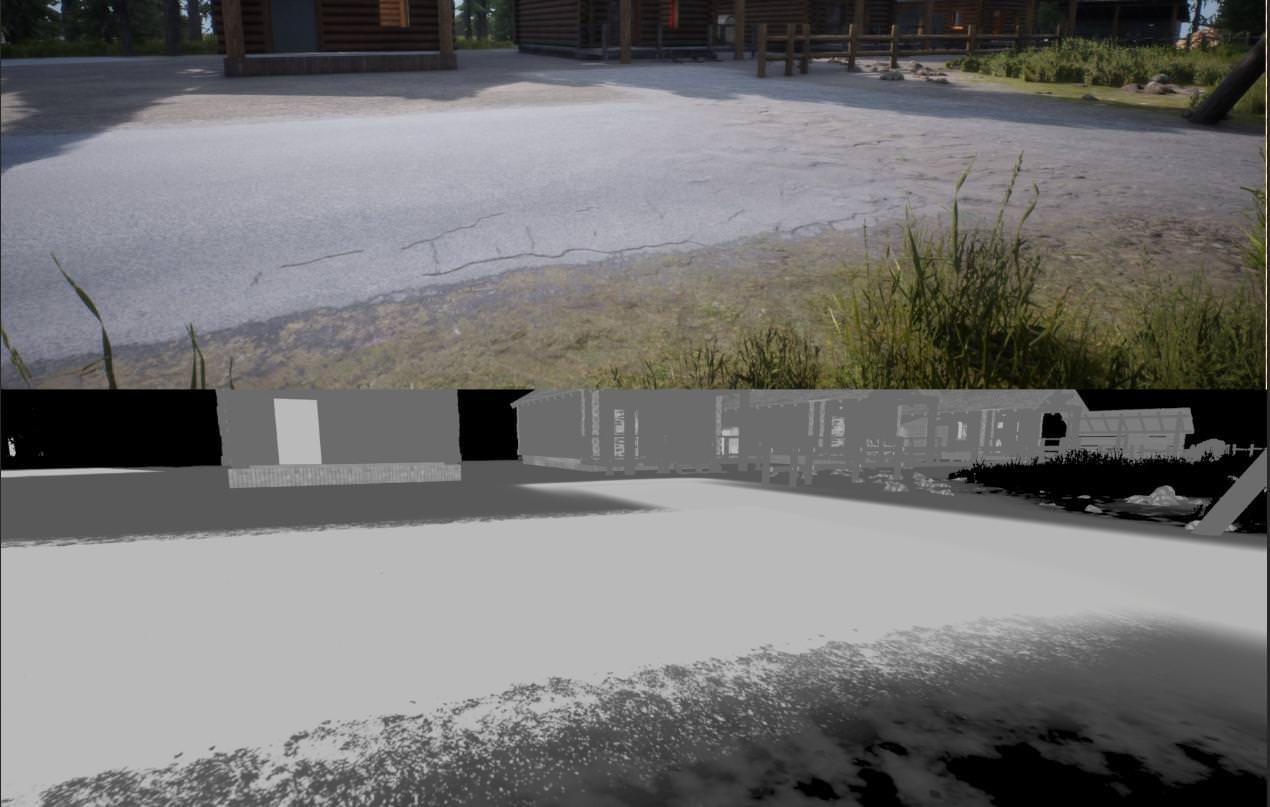
Theres a bug where all Dbuffer decals default their specular value to 1.0 and dont allow you to change it
So all decals look weird at some angles in some environments
pretty big issue
hearty sand
@spark panther PS4 is NDA stuff
UE4 has a special forum for this
Even if we have PS4 users here, they can't openly talk about it
You should also make sure that you aren't violating any NDA stuff with your posts.
 spark panther
oops. ok thank you cedric. Already posted on those fórums though. Devnet included, and I still dont have an answer. But I appreciate the heads up
 gray bay
@spark panther which post is it on the forums?
edgy hedge
How do I get substance working and packaged in a game made using the source build?
I'm not sure if I should be dropping the substance plugin into the Plugins folder
or enable it via the editor
or to download Allegorithmic's fork of the engine
and download that
edgy hedge
Anybody use substance plugin and packaged a game here?
edgy hedge
I wonder if this is going to help
PublicDependencyModuleNames.AddRange(new string[] { "SubstanceCore" });
 cold finch
ok so i compiled my engine and all
but i wont recompile for a while
is there any way to make the source folder lighter
edgy hedge
delete .git
cold finch
i didn't delete anything and it takes up a whole lotta space on my ssd
any other folders that can be safely removed ?
spiral mortar
You could make a binary release @cold finch
Will take a few hours to compile but will be much lighter
cold finch
well i mostly wanna free up some space
but it's going to take very long on my pc
https://i.imgur.com/NGegRf3.png
FeelsWeirdMan
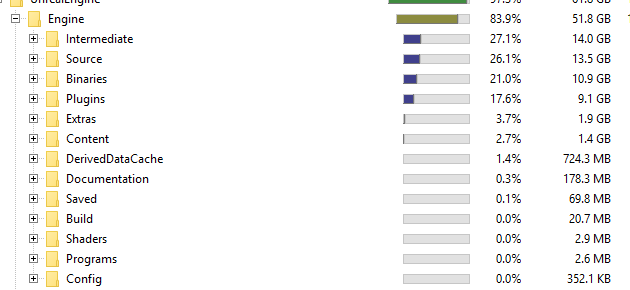
Intermediate has a fuckton of .pch and .objs
Intermediate can be deleted safely
14gb saved FeelsGladMan
edgy hedge
u need Intermediate or else you can't use the engine lol
 hollow kernel
I built this engine version https://github.com/SaimonMa/UnrealEngine that has some custom toon shader models. Build completed with 0 fails.
Creating a project under that engine (after all shaders are compiled) the editor fps is less than 1. After all shaders are compiled, killing and relaunching the project all shaders get compiled all over again.
What might cause that?
edgy hedge
I fixed the issues i've been having with Substance plugin. I deleted all my previous Substance plugin installations. Then I got one fresh from the marketpalce and dragged it into my project (not my engine). I also added in SubstanceCore to public dependencies in build.cs and it works now. I didn't expect it to work but it works...
spark panther
Hello guys! We want to recompile shaders to generate new sdbs. However we dont want to recompile all shaders in unreal engine. Is there a way to tell unreal to only recompile the shaders that its using in the packaged build of the game?
 dense kettle
Hello, I would like to build ue4 from source by command line on Windows.
I already do Setup.bat and GenerateProjectFiles.bat but don't know how to start Vs build
cerulean atlas
does anyone know where the ue4.sln file is located in windows 10?
granite dust
it doesn't exist until after you run "generateprojectfiles.bat"
cerulean atlas
oh okay where can i find the bat file?
granite dust
in the top directory
cerulean atlas
and thanks for responding!
granite dust
be sure to run setup.bat first
cerulean atlas
so users/local?
granite dust
where did you clone the repo?
cerulean atlas
i just installed from the epic launcher
cerulean atlas
sigh ok. i am trying to figure out a way to fic the "swarm didn't kick off" bs
so i assume you cant do that without source?
granite dust
I can't help there 😕
I'm pure procedural meshes, no baking
It's pretty straightforward to get source code if you need it, though
https://docs.unrealengine.com/en-us/GettingStarted/DownloadingUnrealEngine
hollow kernel
Anyone familiar with linking ue4 directories to a diff hdd?
I followed this (https://wiki.unrealengine.com/Installing_UE4_To_A_Different_Hard_Drive) thread on answer hub, and it all works fine for linked binary engines, but fsr my source build has 1 fps in the launcher and it keeps building all shaders every time I launch any project (be it an empty template or otherwise) under that engine.
So, I was wondering if linking the directories would cause the prob.
I've verified that the same source works on a different machine with all install dirs at default.
hollow kernel
Found the problem. It appears linking makes it so it doesn't know where to create the DDC folder. Specifying it in BaseEngine.ini fixed it.
tldr: Complete sheit fps may mean no DDC folder is specified.
elder falcon
anyone tested if we can build unreal with vs 15.9?
stable hemlock
what does PhysX3 folder in source/thirdparty , it's contain libs, but same folder PhysX contain same libs. where logic?
ue4.21
elder falcon
ya know, that's a good question
the PhysX3 folder is being used
I wonder if the old one is just a relict of some sort
stable hemlock
i will try rebuild engine without PhysX old folder
elder falcon
what's a render pass?
brisk silo
looks to be vulkan/dx12 style render passes
but given the nature of the code
this goes with the render graph too
im investigating the exact nature of it
elder falcon
huh he's still at it
thousands of changes
hopefully this doesn't mean every feature not used in fortnite doesn't work at all in 4.22
brisk silo
@elder falcon the features are almost untouched
they just migrated into the render pass api
so, instead of doing like
"SetRenderTarget(stuff)
//render code"
now it does
"BeginRenderPass(properties)
//render code
endrenderpass"
elder falcon
does this make it faster or something?
brisk silo
could make async compute much better
its also the "official" way of using DX12
and vulkan
i think its for integration with the render graph
 fleet ember
can somebody help me with the process of getting source code for unreal 4.20.
ue4 4.20.3 and beyond broke my game and i cant seem to revert it
i can compile it. but im not sure how to get it
nevermind. i think i found it
granite dust
Word is the rendering refactor gets like a 20% perf boost
Something measurable anyway
And it unifies the pipelines a lot more
granite dust
I had a conversation with someone that didn't involve exact numbers, but left me with that impression
elder falcon
20% improvement is a lot
low dust
@stable hemlock @elder falcon PhysX is the old one, I'm guessing someone forgot to get rid of the old entry for the dependency downloader
PhysX folder exists only after those dependencies get loaded, it's no in git itself
also on that 20%, I'd wait for actual user reports, I'm sure they can make such improvements on some synthetic tests but so far Epic's perf improment figures have never matched what I've seen on actual projects myself
 bitter brook
Hello !
Can I ask a question about a custom gamework branch of UE4 ?
Because I have a problem with an integration of VXGI 2.0 to UE4 4.20.3
Actually I managed to compile the engine code with VXGI integrated but everytime I open a map, the editor crash with this error message :
Here I tried to open the CornellBox samples map
Here is the log trace if you need it maybe :
[2018.11.18-10.10.51:084][ 71]LogWindows: Error: === Critical error: === [2018.11.18-10.10.51:084][ 71]LogWindows: Error: [2018.11.18-10.10.51:084][ 71]LogWindows: Error: Fatal error: [File:C:\Users\Megaport\Documents\UE4_VXGI\Engine\Source\Runtime\RenderCore\Private\RenderingThread.cpp] [Line: 826] [2018.11.18-10.10.51:085][ 71]LogWindows: Error: Rendering thread exception: [2018.11.18-10.10.51:085][ 71]LogWindows: Error: Assertion failed: (Index >= 0) & (Index < ArrayNum) [File:C:\Users\Megaport\Documents\UE4_VXGI\Engine\Source\Runtime\Core\Public\Containers/Array.h] [Line: 611] [2018.11.18-10.10.51:085][ 71]LogWindows: Error: Array index out of bounds: 5 from an array of size 0 [2018.11.18-10.10.51:085][ 71]LogWindows: Error: [2018.11.18-10.10.51:085][ 71]LogWindows: Error: [2018.11.18-10.10.51:085][ 71]LogWindows: Error: [2018.11.18-10.10.51:085][ 71]LogWindows: Error: [2018.11.18-10.10.51:085][ 71]LogWindows: Error: [2018.11.18-10.10.51:085][ 71]LogWindows: Error: [2018.11.18-10.10.51:112][ 71]LogExit: Executing StaticShutdownAfterError [2018.11.18-10.10.51:289][ 71]LogWindows: FPlatformMisc::RequestExit(1)
hearty sand
Does someone know where the Editor calls the "Drop" function of its Viewport?
Okay they PlacementMode is handling that
I wonder if I can somehow find out on an actor if they got placed
Cause currently I'm dragging an Asset into the Scene, which spawns a "SpawnHelper".
That SpawnHelper should only effectively spawn multiple other actors if the user releases the asset.
If however the user drags the asset away from the scene again, it shouldn't spawn the actors
Guess I could hack it by listening to FEditorDelegates::OnNewActorsDropped.Broadcast(DroppedObjects, OutNewActors);
And if the Actor that I place is in that array, then I will execute the spawning function
Seems a bit wrong but well
brisk silo
@granite dust do you know more about it?
its going to be fuckin huge when its finished
perf boost, and a render pipeline that could be customized in plugins
elder falcon
is it going to be in 4.22 already?
granite dust
I've heard that it's still an open question if it'll make it to 4.22
And there are a bunch of VR features that stuck on hold until the refactor is done
Like multiview on vulkan
brisk silo
makes sense
 zealous plank
Hey guys, maybe someone here can help me... I am unable to build UE4.18.2 from source, I completely reinstalled VS2017 with all necessary componenets (C++ Desktop, UE installer, ..), and downloaded the source code from github again, ran the setup.bat without issues, ran the GenerateProjectFiles.bat without issues, but I get tons of errors when trying to build UE4 in VS2017 after opening the .sln.
Full output log: https://pastebin.com/suKC0gd8
Full error log: https://pastebin.com/51Ycsbkr
Any help would be really appreciated!
elder falcon
did you install windows 8.1 sdk under individual components in vs installer? @zealous plank
zealous plank
Yes
elder falcon
🤔
zealous plank
It appears that there is something missing there, and the folder is nearly empty aswell, but I made sure to include it in the VS17 installation process
elder falcon
does C:\Program Files (x86)\Windows Kits\8.1\bin\x64\rc.exe exist?
zealous plank
No, there isnt even a bin folder
elder falcon
🤔 🤔
zealous plank
Reinstalling/verifying vs17 doesnt add anything, so im not sure how to get something there
elder falcon
maybe try installing the standalone windows 8.1 sdk?
I'm not sure why it would be missing
very strange
zealous plank
Where do i find the standalone version?
elder falcon
dunno, google probably
elder falcon
you should have .net desktop development checked
zealous plank
thats how the 8.1 folder looks like, and what components I installed with vs17
i do? thanks a lot, it never got mentioned when I looked up what to install
I will check it, and then report back if I still got issues
elder falcon
it's all very strange
no one really knows what dependencies we need
at some point I guessed cpp game dev, cpp desktop dev, .net desktop dev and it worked for me and everyone else I told that combination
zealous plank
yeah, i managed to get it to work before, then tried to install a plugin, and everything went up in flames and i cant open my game project anymore since compiling the engines now always fails, even with clean new install
the .sln files opens with vs15 by default, but I am using vs17 under the "other programs" option, right?
elder falcon
if you drop this in appdata/roaming/unreal engine/unrealbuildtool/buildconfiguration.xml it will never try using vs outdated for something again
<?xml version="1.0" encoding="utf-8" ?>
<Configuration xmlns="https://www.unrealengine.com/BuildConfiguration">
    <WindowsPlatform>
        <Compiler>VisualStudio2017</Compiler>
    </WindowsPlatform>
    <VCProjectFileGenerator>
        <Version>VisualStudio2017</Version>
    </VCProjectFileGenerator>
</Configuration>
thanks a lot!
unfortunately, I've got the same errors again: "EXEC : error : Failed to start local process for action: C:\Program Files (x86)\Windows Kits\8.1\bin\x64\rc.exe /nologo /D_WIN64 /l 0x409 /I "F:\UE_4.18_Source\UnrealEngine-4.18\Engine\Source""
elder falcon
rc.exe still missing?
zealous plank
yes
elder falcon
it's not going to magically work until you fix it missing
unfortunately I have no clue why it could be missing
zealous plank
yes, i didnt check it again, thought the different installer options would do the trick, sorry
elder falcon
never had this happen
elder falcon
I'm not seeing something obvious missing
wait
hmm
I have this windows 8.1 sdk off
and a different one on
🤔 🤔 🤔
zealous plank
I disabled my option, and yours showed up, I checked it and will report back. Thanks a lot for your help!
zealous plank
Okay, I completely reinstalled windows and everything else, and I only get one error now when trying to compile the engine, somehow "FPixelStreamingPlugin"doesnt want to compile. Is there a way to disable it, since I wont use it anyways? Google searching "FPixelStreamingPlugin" only brings 2 results, both related with the UE-64290 bug on the tracker, so I am not sure what I am supposed to do. Any help would be greatly appreciated!
elder falcon
post the error message
zealous plank
From the output log:
2>d:\unrealengine-4.20\unrealengine-4.21\engine\plugins\experimental\pixelstreaming\source\pixelstreaming\private\PixelStreamingPlugin.h(17): error C2011: "FPixelStreamingPlugin": "class" Typneudefinition
2> d:\unrealengine-4.20\unrealengine-4.21\engine\plugins\experimental\pixelstreaming\source\pixelstreaming\private\PixelStreamingPlugin.h(17): note: Siehe Deklaration von "FPixelStreamingPlugin"
2>D:\UnrealEngine-4.20\UnrealEngine-4.21\Engine\Plugins\Experimental\PixelStreaming\Source\PixelStreaming\Private\ProxyConnection.cpp(18): error C2027: Verwendung des undefinierten Typs "FPixelStreamingPlugin"
2> d:\unrealengine-4.20\unrealengine-4.21\engine\plugins\experimental\pixelstreaming\source\pixelstreaming\private\PixelStreamingPlugin.h(17): note: Siehe Deklaration von "FPixelStreamingPlugin"
2>D:\UnrealEngine-4.20\UnrealEngine-4.21\Engine\Plugins\Experimental\PixelStreaming\Source\PixelStreaming\Private\ProxyConnection.cpp(502): error C2027: Verwendung des undefinierten Typs "FPixelStreamingPlugin"
2> d:\unrealengine-4.20\unrealengine-4.21\engine\plugins\experimental\pixelstreaming\source\pixelstreaming\private\PixelStreamingPlugin.h(17): note: Siehe Deklaration von "FPixelStreamingPlugin"
From the error messages:
C2011 "FPixelStreamingPlugin": "class" Typneudefinition UE4 d:\unrealengine-4.20\unrealengine-4.21\engine\plugins\experimental\pixelstreaming\source\pixelstreaming\private\PixelStreamingPlugin.h
C2027 Verwendung des undefinierten Typs "FPixelStreamingPlugin" UE4 D:\UnrealEngine-4.20\UnrealEngine-4.21\Engine\Plugins\Experimental\PixelStreaming\Source\PixelStreaming\Private\ProxyConnection.cpp 18
gray bay
missing include file
either it wasn't included, or the module wasn't added as a dependency
zealous plank
Im just using the github 4.21 source build, anything I can do about it? I will test if 4.20 works, since the PixelStreaming plugin isnt in there
zealous plank
4.20 worked, don't know why I had the issue with 4.21, but thanks a lot for your help guys 😃
elder falcon
seems weird that it would try to compile an experimental plugin by default
did someone set it to precompile on accident?
zealous plank
I don't know how I would do that, but I didnt play around with anything, just did the steps from the "compile ue4 from source" wiki guide
elder falcon
look up "installed build", there are guides
rustic reef
you just build the editor
and then make sure to submit the dlls to your source control
then the non-prog just get the whole depot and binaries and it will launch fine for them
there are certain things you dont want to submit like .module files.. .exe.config... etc
limber jacinth
one thing i dont like is running setup.bat adds a lot of extra crap i dont want to put on perforce
and trying to filter out what it added is a nightmare
would rather they run setup.bat once on there machine to grab them files
rustic reef
i dont think thats a good idea
limber jacinth
so i should just submit everything to perforce?
thats alot for a remote perforce server
small cobalt
Not really
 static bone
is perforce like github?
small cobalt
Its a Source Control solution yes.
 nocturne flume
Just goto the site and download the zip
I don't use github for desktop because it had issues for me
@static bone
static bone
ok Devils thanks
Nomad it turns out that github dosent allow the Google DNS to download stuff from it's server
nocturne flume
-_- damn phone autocorrext
static bone
😛
nocturne flume
Oh sure. It corrects the correct stuff and doesn't correct the damn shit I get wrong
static bone
lol
 static bone
@nocturne flume doesnt fix it lol
nocturne flume
?
You downloaded it right?
I just got the 4.21 today from github using the download zip button and it's compiled fine
elder falcon
can anyone confirm that building 4.20 works with vs 15.9?
 static spoke
Is there any particular reason as to why the 4.17 branch is not compiling most recently?
spiral mortar
4.17 👀
static spoke
Indeed, quite an old branch, reasoning was just to test a patch made for that particular version. The latest ones changed so much that reworking the patch for them fails the entire compilation process lol.
static bone
@nocturne flume yes from releases
 coral fern
Does anyone know if ReadPixels should display the UMG widgets currently on screen? Its not showing for me.
static bone
can anyone upload ue4.21 zip and send it to me via mediafire, mega or anything pls
github doesnt work for me
 lost linden
Anyone know why an object wouldn't be saved to the Transaction buffer, even with RF_Transactional on the object?
 dry nymph
Hey folks! Are there any resources on the binary file format of uasset files? I'm investigating the feasibility of creating tooling to generate uasset files out-of-engine
static bone
😦
dry nymph
@static bone Sending via zip would be a license violation, I believe
static bone
nvm i found it out
stable hemlock
idk how these errors appeared
 humble kraken
Is anyone else getting a crash revolving around saving new levels?
"Illegal call to StaticFindObject() while serializing object data!"
Quite weird that an empty map would cause a crash
humble kraken
Fixed the crash, seems like when Epic Games moved over to an updated NavigationSystem, it doesn't update in DefaultEngine.ini
Remove the line
NavigationSystemClassName=/Script/Engine.NavigationSystem
in the following area
[/Script/Engine.Engine]
You'll gain back the ability to use navmesh as well as new maps won't crash
 errant shale
Hye guys how does the Editor converts Texture Formats ?
Is it accessable in runtime ?
 echo gyro


 lost linden
So... I have this hyperlink that opens an asset. In examples it uses this line with the comment that it should be done to inform the debugger before/as we open the asset. InBlueprint->SetObjectBeingDebugged(Obj);
Now this stalls on the first use per session. Its only for maybe 2-3 seconds but noticable. Then it opens the asset, which prompts a loading dialog. So I added an FScopedTask to make sure there is a dialog when SetObjectBeingDebugged is stalling. However is there any reason it should be stalling first time? Perhaps it's waiting for the AssetManager to load the asset?
the function looks fairly inocuous tbh.
{
    // Unregister the old object
    if (UObject* OldObject = CurrentObjectBeingDebugged.Get())
    {
        if (OldObject == NewObject)
        {
            // Nothing changed
            return;
        }

        DebuggingWorldRegistrationHelper(OldObject, NULL);
    }

    // Note that we allow macro Blueprints to bypass this check
    if ((NewObject != NULL) && !GCompilingBlueprint && BlueprintType != BPTYPE_MacroLibrary)
    {
        // You can only debug instances of this!
        if (!ensureMsgf(
                NewObject->IsA(this->GeneratedClass),
                TEXT("Type mismatch: Expected %s, Found %s"),
                this->GeneratedClass ? *(this->GeneratedClass->GetName()) : TEXT("NULL"),
                NewObject->GetClass() ? *(NewObject->GetClass()->GetName()) : TEXT("NULL")))
        {
            NewObject = NULL;
        }
    }

    // Update the current object being debugged
    CurrentObjectBeingDebugged = NewObject;

    // Register the new object
    if (NewObject != NULL)
    {
        DebuggingWorldRegistrationHelper(NewObject, NewObject);
    }
}```how are you calling it and loading the asset?
lost linden
GEditor->EditObject(InBlueprint.Get());
that doesn't hang any more than normal and produces its own Dialog as usual too. Its just the line before it that takes extra time on first session run
elder falcon
is InBlueprint a soft object ptr or something?
this seems like it requires having already loaded the asset
I may be confusing things
elder falcon
but that means it's already been loaded by the time you get here
lost linden
yeah thats what I thought
or its just the reference of the class that is loaded and not the actual asset. Rather just the classpath/details buffered from my search of assets.
its known about thats for sure
elder falcon
well in the case of a blueprint, the class is the asset
lost linden
yeah
lost linden
maybe due to the way i've loaded it, the debugger has no record of it and needs to do something first. But its only ever once per session. It's not really an issue now I added a dialog, but I just wanna make sure im not doing anything wrong
elder falcon
this definitely requires an already loaded object to be useful
otherwise, what would you be passing it that is a valid UObject*
lost linden
yeah. its not loading a package class or anything. Its a fully fledged, made in editor blueprint
and it doesnt fail... so im going with it.
runs to the hills
lost linden
huh... suspicious.
elder falcon
also what are these about
why are they adding random licenses for things marketplace plugins use to the engine
(while not making the plugins default, so there really is no point?)
lost linden
license for free stuff so it can be resold?
elder falcon
they have a big folder with a collection of all the licenses for used 3rd party libraries
but for some reason they are also adding licenses used by marketplace plugins there
which makes no sense
lost linden
yeah you would think that would be put there when downloaded.
lost linden
here is something strange. I updated my VS2017 just now.. and for some reason Intellisense is squiggling all my Array.Num() lines like something is wrong.
array has no member Num...
sorry object
elder falcon
intellidense at it again
lost linden
TArray< TWeakObjectPtr< UObject > > Objects //this in particular
brisk silo
damn they are truly all in with render graph
check this otu
easy way to launch a compute shader as part of the render pipeline
no more weird bullshit and boilerplate for days for a compute shader, but just a shader class to implement, and call this
elder falcon
good
granite dust
Ohhhhh shiiiit
radiant hazel
That's funky, I love it
granite dust
Anyone know if the render graph refactor will be ready for 4.22?
 thick storm
it might be (should be) ready for GDC 2019
at least to talk about it
idk about being production ready
 valid vortex
They already covered programable render pipeline on gdc last year
Is there any more info/available source code on the render graph?
I'm in dire need for this feature lol
stable hemlock
Hello guys,
Would someone helps me ?
I have an issue,
I've been trying to add new Custom Data pins, like Custom Data 02
The code compiles and all.
But when it comes to the HLSLMaterialTranslator, the Value that is fed toward the shader is the value from the existing Custom Data (Custom Data 1).
FString GenerateFunctionCode(uint32 Index) const
{
check(Index < CompiledMP_MAX);
return TranslatedCodeChunkDefinitions[Index] + TEXT(" return ") + TranslatedCodeChunks[Index] + TEXT(";");
}
In TranslatedCodeChunks (the index is the right one), at the right index, I see the value from the other custom data pin ><.
stable hemlock
Found the issue, Thx anyway
brisk silo
@granite dust they are full steam ahead
and this is not an "optional" thing
or a feature
this is a straight up "hey, we rewrote all the internals"
so 4.22 might have the first version of the render graph, wich maybe its still not fully optimized, or might have some bugs
but its default on
granite dust
I'm guessing 4.22 will stay in previews for a few months then :-)
brisk silo
if they do render graph for 4.22
definitely
lol
i think thats why 4.21 is a "stabilization" releas
they might go wild on 4.22 with this stuff
granite dust
I've heard some crazy numbers about speedups that I don't fully believe
brisk silo
render graph would give us mostly upgraded memory
no real speed increases, just better memory usage
maybe some speed upgrade tho, but not something really high
unless they are also implementing proper rendergraph in vulkan/dx12 + async compute
in that case... oh god
granite dust
Reduced CPU time is easy to believe. But I've heard they get much better scheduling of the GPU, too
brisk silo
they were also working on better CPU side rendering command internals
but i havent seen sources for that
in the leaked roadmap
low dust
I'll crosspost little because it's relevant to the channel
updated my merged 4.21 GameWorks branch: https://github.com/0lento/UnrealEngine/tree/4.21-GameWorks. It now contains UE 4.21.0, Nvidia Blast, Flow, HairWorks, HBAO+, TXAA , VXGI2 and additional physx usage options (fixed timestepping for physics, physx contact modifications wrapped to ue4 format)
granite dust
holy wow! HBAO works on the forward renderer?!
granite dust
whaaaat
low dust
you do lose normal texture map details from AO on forward tho
as there's no normal gbuffer to read them from
but AO from geometry works just fine
granite dust
I'm tempted to switch back from my baked vertex AO solution
I didn't see SSAO in the forward renderer mentioned anywhere in the patch notes
That was the last thing keeping me deferred on PC, too
 tired otter
@brisk silo @granite dust you can watch the progress on github in the dev-rendering branch. Not sure if they'll merge that for 4.22 but I hope so. Would be great for adding custom render pass without modifying the engine code, which is what I'm trying to hack around.
low dust
you still miss the SSR on UE4's forward tho