#engine-source
1 messages · Page 25 of 1
 brisk silo
 low dust
technically you could have 6 alternatives but nobody ever does X-Up
also consider how every tool uses their own system, you'd expect the modeling tool to have nice option to swap to up every alternative
but while they have those, usually things get messed up unless you stick to their defaults 😄
 elder falcon
every time you start using a new program, math goes wrong way lol
low dust
there used to be a nice image on the internet about most common apps and their coordinate systems, they basically had 4 sections where they stuffed app and engine logs into
elder falcon
 low dust
Modo is Right-handed Y-up
brisk silo
so Maya?
low dust
yeah, same
elder falcon
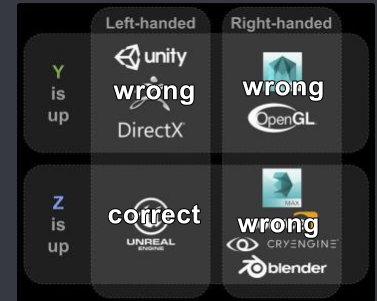 low dust
or wait, is it left handed after all?
I'd need to check, it let you change the up axis but if I put it Z-up, it's wrong side system
oh right, it's right handed then alright
as UE4 is left
elder falcon
I wonder what would happen if you change the forward/up vector defines in unreal to be one of the others
low dust
in modo tho, if you changed the up axis, it wouldn't translate the orientation back on fbx export
so models end up sideways on default import
making the the whole option completely pointless (at least when working with UE4)
one does get used to different coordinate system on modeling tool tho
it's just silly we can't always use the same as the engine does
also, I could almost swear that CE is Y-up
ok, it's not
"CRYENGINE by default features a world coordinate system where the Z-Axis points upwards."
low dust
hmmm
flex fluids work on my 4.20 port
I think the only issue is on the things requiring vertex manipulation
brisk silo
🤔 something ive done in my tales of optimization has actually pessimized the CPU
now running singlethreaded or real close in ps4
having HUGE holes in the timeline view of the profiler, unlike the other times where all the threads were well filled
like im missing helper threads
careful with the hacks people 😛
low dust
hmmm
this is basically what I'm facing when trying to use soft bodies on Flex: https://issues.unrealengine.com/issue/UE-60339
someone has made a crash report for it but it's really noninformative
low dust
anyway, there's a target fix set for 4.20.2 so I may as well wait
nothing related on dev branches or 4.20 branch on github yet
low dust
this build system tho
now getting like 15 of these WARNING: Exception while generating include data for UE4Editor: Could not find definition for module 'VXGI' (referenced via Target -> Launch.Build.cs -> SessionServices.Build.cs -> Core.Build.cs) WARNING: Exception while generating include data for BlankProgram: Could not find definition for module 'VXGI' (referenced via Target -> BlankProgram.Build.cs -> Core.Build.cs) WARNING: Exception while generating include data for BuildPatchTool: Could not find definition for module 'VXGI' (referenced via Target -> BuildPatchTool.Build.cs -> Core.Build.cs)
VXGI.Build.cs looks normal, I have almost identical other Build.cs that get accepted with same syntax
 gloomy hamlet
@low dust That warning implies it can't find the .Build.cs where it expects to, not that there's something wrong with it.
low dust
there isn't anything odd about the directory structure either
same setup for another module works
oh crap
if I move the Build.cs out of the folder, it works
C:\Dev\UnrealEngine\Engine\Source\ThirdParty\GameWorks\VXGI.Build.cs works
C:\Dev\UnrealEngine\Engine\Source\ThirdParty\GameWorks\VXGI\VXGI.Build.cs doesn't
gloomy hamlet
Seems weird. Usually doesn't matter where it is, so long as it's somewhere within the Source folder.
low dust
maybe they have some limitation to the folder depth on 4.20
this setup worked just fine on 4.19
but I did wonder why nvidia put NvVolumetricLighting.Build.cs under GameWorks and not GameWorks/NvVolumetricLighting
I put it under the specific folder on 4.19 and it worked just fine
but they could have had similar issues on their end, who knows
now if I move that NvVolumetricLighting.Build.cs into "right" folder, it fails the same way
gloomy hamlet
Yeah not sure. Never seen issues like that, but I haven't worked on source engine build for ages.
low dust
well, I don't really care too much, if it works this way, it's "fine"
it's dirty tho
but not my problem 😄
 fervent canopy
I'm contemplating adding a new shading mode for my game (following this guide https://blog.felixkate.net/2016/05/22/adding-a-custom-shading-model-1/) and it requires EngineTypes.h to be modified, but that's in Engine\Source\Runtime\Engine\Classes\Engine\EngineTypes.h. I've never touched engine code before; does this mean all projects I make using v4.20 will have my alterations?
 spiral mortar
@fervent canopy You need a source build to modify that
Then select that source build as your project engine
So you'll have binary build 4.20 from the launcher + source build 4.20
Which will be 2 different versions of the engine
fervent canopy
a source build wouldnt happen to be as easy as using the source that comes with the binary, would it?
 distant anvil
is there any way to see the finished, non-compiled code of a generated function?
elder falcon
what do you mean by generated function?
distant anvil
well, a UFUNCTION
not the implementation or validation, but the actual code that's generated for it
elder falcon
check out the generated.h / gen.cpp files in Intermediate/Build/Win64/UE4Editor/Inc/
in your project folder
the ModuleName.init.gen.cpp registers all the other things
distant anvil
hmm from what i can tell about that, some of it is actually generated at runtime?
static const UE4CodeGen_Private::FFunctionParams FuncParams =
{
    (UObject*(*)())Z_Construct_UClass_AMyActor, "ServerMyFunction", RF_Public|RF_Transient|RF_MarkAsNative, nullptr, (EFunctionFlags)0x80280CC0, sizeof(MyActor_eventServerMyFunction_Parms), PropPointers, ARRAY_COUNT(PropPointers), 0, 0, METADATA_PARAMS(Function_MetaDataParams, ARRAY_COUNT(Function_MetaDataParams))
};
UE4CodeGen_Private::ConstructUFunction(ReturnFunction, FuncParams);
it has to set up a fairly complex hierarchy of cpp objects to represent the reflection data, so you can't do all of it statically
distant anvil
ah, that makes it rather hard to find out what these functions are really doing
elder falcon
is there a specific reason you need to find out or just curious? you can waste days exploring how the reflection stuff works lol
distant anvil
was mostly curious on how, specifically, it handled RPCs

 distant anvil
right, but what happens when that function is called
processevent
it finds a function, but which function
elder falcon
it's gonna find the UFunction object generated elsewhere in the generated code
distant anvil
right, and whats that code gonna be doing
distant anvil
then where's the actual RPC functionality
elder falcon
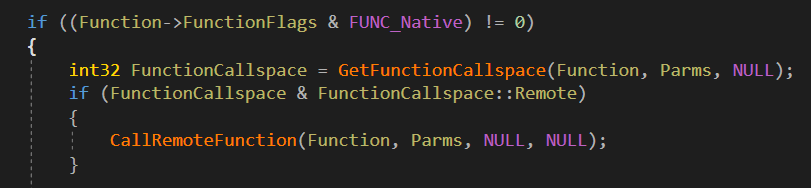
this is the interesting path to follow in ProcessEvent https://i.imgur.com/2QYLQ9d.png
 elder falcon
intresting
this code seems to have changed in 4.20
there used to be a bypass of the relevancy check for reliable multicasts but now it's gone
distant anvil
yes, its definitely checking relevancy there, though i didnt see the old implementation
was there some kind of note on why they bypassed relevancy then?
brisk silo
fortnite changes
 hollow kernel
Is there anyone here who does UI solely via C++? I know doing it in BP is best for fast iteration, but, supposing I'm not using/implementing any extended UI functionality, is there any benefit to doing it in C++?
 pearl fulcrum
And if you find BP-only UMG working just fine and don't plan to do anything extravagant, you'll see very little benefit from switching to slate.
 spark panther
Hello guys! We were experiencing problems with the media player pipeline in terms of hickups and frame dips so we changed our videos to flipbooks, which literally shuffle frames of huge image textures containing every frame necessary.
The problem we get is this insane texture size causes texture streaming pool to overflow. My question is, is there any possible way to tell unreal to completely remove a texture from memory or from the texture pool once disposed of? I want to play my flipbook once and then make it dissapear from memory completely as it wont be needed any longer. This doesnt seem to be the case, as te streaming pool size increases regardless of whether im directly referencing the texture in-game or not.
Thanks in advance and forgive my ignorance! 😁
 bleak bear
someone here that can help me with FArchive ? i can't seem to find the header. i think the uncompressed size & compressed size is part of the header , but what is 0x8C02 , it looks to be the same every FArchive
 tall canyon
I'm running into an issue with Data Assets. In a cooked/packaged build, Blueprint references to a certain "problem-asset" are None. Works fine in the editor. If I copy the asset, then make a copy of that copy, and reassign the references, it comes out like it should. That's obviously an undesirable workaround, and one that I don't want to have to repeat if this happens again. In the scenario where problem-asset doesn't work properly, the uasset file does exist in the export, so I figure I should attach my debugger to the standalone build and analyze what's going on in-between "load this from disk" and "assign the default value on the blueprint" (or probably not even that far, as all references to problem-asset resolve to None) - only problem is I'm not familiar enough with those parts of the engine to know where that "in-between" is (where I would place breakpoints). Anyone here have any tips?
 wraith crystal
I've made an engine modification whereby the navigation / path finding / movement system is now able to follow USceneComponents. I use this in my game to make units move in formation. It's working pretty well, and there might be others interested in using this system.
Since I've never published any engine modifications before, my question is what's the best way to go about it? I don't think it'll get accepted as a pull request, given that it's somewhat specialized functionality, but I'd still like to share it with folks who'd be interested in using it. Mainly for RTS games.
(it's against 4.19)
spiral mortar
@wraith crystal GitHub fork
wraith crystal
that's it, share the url and done?
 edgy hedge
Hey guys I'm trying to get debugging symbols working on my Source Build. I tried building SymbolsDebugging in the UE4 solution to no avail
 peak hull
hello, i'm tryna set up a dedicated server and i'm stuck at the target file part. trying to compile on 4.19 and i'm getting errors when switching the unreal version to the source built one, more specifically when generating the vs project files. i put the 4.18 server.target.cs as any newer version of that file is nonexistent. any help? error log: https://pastebin.com/raw/hYWEHWYY | server.target.cs: https://pastebin.com/raw/wAppsUE6
spiral mortar
@wraith crystal yup
edgy hedge
Anybody got debugging symbols working?
tall canyon
@edgy hedge What command do you use to build? We use Engine\Build\BatchFiles\Build.bat UE4Editor Win64 Development -precompile -2017 - gets us minimal debugging symbols. Replace "Development" with "Debug" to get full debugging symbols.
edgy hedge
I GOT IT TO WORK!!! @tall canyon
I just had to rebuild my project after building DebuggingSymbols
edgy hedge
@tall canyon I use Visual Studio to build. Or I use the Project Launcher from the Editor. I used to use command line, but that was really tedious and it's already automated by the Project Launcher. Highly recommend
 long wave
low dust
long wave
low dust
I wouldn't mind a fix for this either https://issues.unrealengine.com/issue/UE-60339
spiral mortar
No step to reproduce = 😢
low dust
I actually have
but I think it's some error on my end
all you need to do is to run this https://github.com/0lento/UnrealEngine/tree/4.20-FleX-WIP with it's flex example scene and it'll crash for that
I'm pretty sure I'm not initializing some buffer etc properly tho
but this again some rare case where nvidia used things that epic never used in-engine things even on earlier versions
you'd need to really understand the renderer code as these things aren't exactly documented + no examples
wraith crystal
@low dust as a workaround you can comment out lines 217 - 220 in D3D11UniformBuffer.cpp until they deliver a proper fix. My game would always crash after about 10 seconds of play with this uncommented.
i.e.
            //if (!(GMaxRHIFeatureLevel <= ERHIFeatureLevel::ES3_1 && Layout.Resources[i] == UBMT_SRV))
            //{
            //    checkf(Resource, TEXT("Invalid resource entry creating uniform buffer, %s.Resources[%u], ResourceType 0x%x."), *Layout.GetDebugName().ToString(), i, Layout.Resources[i]);
            //}
 stable hemlock
i changed one value in engineautomationtests.cpp and build ue4 development editor and visual rebuild this engine wtf?
gloomy hamlet
@low dust I think you're right that it's due to improper initialization rather than a bug. They may have added stricter state checks in 4.20.
Pretty sure I got the same crash when creating a custom rendering component recently on 4.20, and it was down to something like going ahead with GPU resource init (vertex buffers) in cases where I had no geometry.
low dust
yeah, that's my assumption as well
I don't really understand flex internals well enough to start even decipher what to change there tho
it's not a huge thing, I don't really need this to work, would have just been cool if it would
gloomy hamlet
Yeah. It's tough to debug because the crash is on the render thread, but it's dependent on data pushed there previously by the game thread, so the call stack is basically no help.
low dust
I'll check if removing that check will let it go further but I have a faint memory I tried that and it crashed somewhere else...
yeah, call stack wasn't helpful at all 😄
but I kinda know what part of the flex integration is involved to this
low dust
@wraith crystal well, it does run with that stuff commented out
so thanks for the heads up 😃
I still not like the fix 😄
wraith crystal
yeah, it's a workaround until someone fixes the underlying issue
low dust
hmmmm, this uses VS2017 toolchain on packaging
wonder if it still screws up everything 😄
I've compiled 4.20 with VS2015 and set Edit->General->Source Code to use VS2015 as well
last time I let VS2017 compile c++ project on VS2015 built engine, it corrupted everything 😄
low dust
because it's slower on my use
I dunno why but UE4 engine builds take like 1.5-2x the time on VS2017 for me
plus Visual Assist version I got is rock solid on VS2015 and bit crashy on VS2017
and you do need VA with UE4
there's really no reason for me to pick VS2017 at that scenario
I do use VS2017 for other stuff tho
probably have to swap to VS2017 on UE4 at some point too
heh, git really messed up something
(or I messed up git, either way)
I have my commit changes doubled there
on same commit 😄
never seen this happen before
low dust
and somehow gitk refresh made it go away 😄
low dust
apparently any change on material expression headers forces full engine recompile 😄
gotta love this sh*t 😄
wasted countless hours on solving simple standalone build issue
basically they've moved some things into editor only in 4.20 and I needed to mirror the changes, but it took a long time to catch all these as regular editor builds work
elder falcon
anyone got to play with those new threadrippers yet?
 timid prairie
Hi! not sure if this is the right channel, but has anyone tried using a shared Derived Data Cache before? Our studio are considering using it to potentially save some time. Unreal docs doesn't say much: https://docs.unrealengine.com/en-us/Engine/Basics/DerivedDataCache
 gray bay
@timid prairie I just set one up for one of my clients a few days ago
PM me if you need help
low dust
hmmm
how does this remotepath thing work?
  <Packs>
    <Pack Hash="11c1a5de13598afc395527668ddc4b2ffca57f9f" Size="1181704" CompressedSize="238553" RemotePath="VXGI" />
    <Pack Hash="463ae3f27e73fc0655bb309a4838c588f75941e8" Size="1065992" CompressedSize="212090" RemotePath="VXGI" />
    <Pack Hash="ee8cf2ebe44b7e45c5b86aac44243b8f633892fb" Size="1044022" CompressedSize="197481" RemotePath="VXGI" />
    <Pack Hash="f9087cb9877834890f057155fafbc424478f8de1" Size="964150" CompressedSize="184776" RemotePath="VXGI" />
</Packs>```like, is there some remote path defined somewhere else with that tag then or what?
this file had the same so it's not defined there https://github.com/NvPhysX/UnrealEngine/blob/VXGI2-4.19/Engine/Build/VXGI.gitdeps.xml
I'm stripping that VXGI out, leaving HBAO+ there so feels weird to leave "VXGI" on build debs and I don't really see anything that makes sense for those lines 😄
 mint thicket
Is anyone else having an issue where a project leveraging a source-built engine of 4.20.1 throws an error stating the MagicLeap plugin could not be loaded when loading source-built launcher? I'm not using magic leap and have the plugins disabled on my project. Everytime I want to load my project's editor I have to rebuild the engine briefly first
elder falcon
just disable the plugin in your uproject
mint thicket
@elder falcon it is. This error is when trying to run my source built engine launcher
low dust
heh, well, now I know what that RemotePath is 😄
I dunno why I even changed it, I was supposed to test the effects but my local cache prevented it from failing apparently
got this post on forums :D
Good afternoon! Faced a problem. After running Setup.bat when the last 8 files are loaded, i receive an error: Failed to download 'http://carbon-deps.s3.amazonaws.com/HBAO/f9087cb9877834890f057155fafbc424478f8de1': The remote server returned an error: (403) Forbidden. (WebException)```well that was an easy fix
also stupid of me to not even test it on clean clone
 stable plume
anyone know why im getting this error
Error MSB3073 The command "D:\UE_4.20\Engine\Build\BatchFiles\Rebuild.bat SurvivorX Linux Development "E:\PatientX\PXEditor 4.19 - 2 4.20\SurvivorX.uproject" -WaitMutex -FromMsBuild" exited with code -1. SurvivorX C:\Program Files (x86)\Microsoft Visual Studio\2017\Community\Common7\IDE\VC\VCTargets\Microsoft.MakeFile.Targets 49
 swift ivy
@stable plume What's the output log say?
stable plume
1>------ Build started: Project: SurvivorX, Configuration: Linux_Development_Game Win32 ------
1>Creating makefile for SurvivorX (no existing makefile)
1>Performing full C++ include scan (no include cache file)
1>E:\PatientX\PXEditor 4.19 - 2 4.20\Plugins\SettingFunctionality\Source\SettingFunctionality\SettingFunctionality.Build.cs : warning : Referenced directory 'D:\UE_4.20\Engine\Source\SettingFunctionality\Public' does not exist.
1>------- Build details --------
1>Using toolchain located at 'C:/UE-Toolchain/v8_clang-3.9.0-centos7/x86_64-unknown-linux-gnu'.
1>Using clang (C:/UE-Toolchain/v8_clang-3.9.0-centos7/x86_64-unknown-linux-gnu\bin\clang++) version '3.9.0' (string), 3 (major), 9 (minor), 0 (patch)
1>Using bundled libc++ standard C++ library.
1>Using default linker (ld)
1>Using llvm-ar : C:/UE-Toolchain/v8_clang-3.9.0-centos7/x86_64-unknown-linux-gnu\bin/llvm-ar
1>Using old way to relink circularly dependent libraries (with a FixDeps step).
1>------------------------------
1>UnrealBuildTool : error : Cannot use an old toolchain (missing ToolchainVersion.txt file, assuming version earlier than v11)
1> (see ../Programs/UnrealBuildTool/Log.txt for full exception trace)
1>C:\Program Files (x86)\Microsoft Visual Studio\2017\Community\Common7\IDE\VC\VCTargets\Microsoft.MakeFile.Targets(44,5): error MSB3075: The command "D:\UE_4.20\Engine\Build\BatchFiles\Build.bat SurvivorX Linux Development "E:\PatientX\PXEditor 4.19 - 2 4.20\SurvivorX.uproject" -WaitMutex -FromMsBuild" exited with code 5. Please verify that you have sufficient rights to run this command.
1>Done building project "SurvivorX.vcxproj" -- FAILED.
========== Build: 0 succeeded, 1 failed, 0 up-to-date, 0 skipped ==========
@swift ivy ^^
swift ivy
Well there's your issue, you're trying to build with a toolchain that's too old
Might be your CLang, try updating it
stable plume
How do I update my toolchain
swift ivy
Download the latest version of clang
stable plume
i have v11 in my documents now
setup.bat run that?
@swift ivy when i go on setup.bat it just opens and closes the cmd
stable plume
Well rip me
stable plume
pretty sure i did as in the normal ue4 i can package a game
just when i wanna build in visual studio it brings them
I'm reinstalling atm, so i will choose those options again
stable hemlock
i'm not sure if reisntallation is absolustely necessary unless you've exhausted all options. but as far as installing process and setting up i followed this https://docs.unrealengine.com/en-us/Programming/Development/VisualStudioSetup
stable plume
Thanks
stable plume
I followed that and still getting the same @stable hemlock
stable hemlock
@stable plume are you just doin a windows build:?
stable plume
nah, its a linux, im following a dedicated server tutorial
stable hemlock
ah - i have never done that type of a build before
but i have a suggestion
that might help
stable plume
sure
stable hemlock
you can try tgoing into visual studio installer and looking at modify
and clicking indivual components
and clicking CLAng
there
stable plume
ahhh
I will try that now
I just tested see if Win64 worked it did
so ill go an install that clang
stable plume
erm
lemme find it
😂
Allar's Blog
This document covers the bare basics on how to get your Unreal Engine 4 game project able to build both Windows and Linux dedicated server builds, using just a Windows machine for compiling. Requirements For 4.9.X or older, you need Visual Studio Community Edition 2013 For 4.10
yup
stable plume
friend linked me it i dunno lol
 proper vine
I think it should still work but who knows
proper vine
so am I
stable plume
literally the last thing i need to do is the dedicated server
jesus i just keep getting toolchain error (assuming version earlier than v11)
and error MSB3075
Would this be more ideal to work from?
proper vine
well if you're building for linux
you definitely need the linux toolchain installed
so maybe its that the toolchain i reference is too old
and that you need to install a newer linux toolchain
stable plume
im not bringing my game out on linux a friend linked me and everything was linux
or am i just confusing myself
apperently im missing ue4.exe
stable hemlock
you want to build your game for windows right?
stable plume
Yup
stable hemlock
with ded server?
stable plume
Yeah
stable hemlock
take a look at this guide
it goes through everything including setting up a t2.micro instance on aws when you're ready to beta your game. keep in mind the guide does not use steam , and i use the default ipnetdriver and exclude all steam refs in my defaultengine.ini file
stable plume
So that guide will allow my partners to setup servers for the full game?
stable plume
Okay thank you ill give it a go
stable hemlock
my game is ded server operational.
well hold on a min
just give it a quick skim now and let me know if you have any questions
then try
i will be here for a few min
then i gotta go soon
stable plume
okay 2 secs
stable hemlock
ok
stable plume
so the 1. Build unreal from source, Part D, open sln vs file. Is that my source engine sln?
stable plume
Okay
I think ill give it all a go, if i have any problems ill dm you or just type it here
so build with Win64 instead of Linux?
stable hemlock
yep you dont need that i fyou are exportring a win64 build..
you only need that if you are doing a linux ded build
stable plume
okay i was wondering why i was being told linux 😂
stable hemlock
like if you wanted to store your dedicated binary in a superfast linux aws server or something
then you would do that
proper vine
i read linux up above
stable hemlock
since you are hosting on win u dont need to do that
stable plume
Yeah i3D are working with me with servers so I need to get this dedicated stuff out quick to get it setup faster
So i need to get these done
- The game needs to have a dedicated server option so that we can start the game in the background without any graphics and the like;
- Parameters required to start the dedicated server (this usually includes IP-address, ports, slotcount, location of configuration, map that needs to be loaded at start etc.)
- Ports used by the server (normal game port, query port, RCON port etc.)
stable hemlock
on t2.micro, i just open all ports basically remoately. it's a little too open but that's what i did for beta so far.
and i connect using execute console command x.x.x.x from a bp node. keep in mind the entire dedicated server is just a binary that you run, and you execute a -log to have it displaying on your ded server. it's always on, as long as you can afford hte server, and t2.micro is free for a year as long as you're under quota. so you just gotta run your binary, and once it's on, anyone can connect to it directly with the IP. the t2.micro ip is static and i literally just copied it from the aws ec2 console to my game blueprint code and haven't changed it since since i never shut down my ded server machine. once you connect to the game, everything should work the same as in 2 player pie once you start getting more players in (otherwise something may be wrong with your replication code). and if you have any errors with lag or anything, just use the net class of profiling tools to get network latency figured out in a standalone game you connect the same ded binary. and one other thing - you set the ded server map by going to project settings->maps and modes->server default map, and make sure to also include your map in the project launcher item as well in UE.
stable plume
Okay thank you
low dust
@stable plume UE4.exe error simply means your visual studio project is defaulting to UE4 instead of the game (if building c++ game project against launcher engine)
there's a simple fix
just open the solution, right click the game project from it and set it as default start-up
stable plume
okay thanks
elder falcon
look at the output log not the error list, it usually has garbage in it
the other error means you're trying to build something with vs 15.8 that does not support vs 15.8 yet
stable plume
1>C:\Program Files (x86)\Microsoft Visual Studio\2017\Community\Common7\IDE\VC\VCTargets\Microsoft.MakeFile.Targets(44,5): error MSB3075: The command "D:\UE_4.20\Engine\Build\BatchFiles\Build.bat SurvivorXEditor Win64 Development "E:\PatientX\PXEditor 4.19 - 2 4.20\SurvivorX.uproject" -WaitMutex -FromMsBuild" exited with code 5. Please verify that you have sufficient rights to run this command.
1>Done building project "SurvivorX.vcxproj" -- FAILED.
========== Build: 0 succeeded, 1 failed, 0 up-to-date, 0 skipped ==========
It says 1 failed, so im guessing its this one above it
elder falcon
the actual error will be above this
that's just telling you that Build.bat exited with a non-0 exit code
elder falcon
that's not what it means
that's just a default message vs prints when a build command fails
stable plume
when i build UE4 source
it comes up with multiple errors https://pastebin.com/eU3F7fwv
 elder falcon
you seem to have some crappy plugins that fail building
stable plume
i need advanced sessions and settings functionality
scenefusion is in development
but wont let me disable it
elder falcon
hmm
stable plume
i will check settingsfunctionality
elder falcon
not sure what's up with those plugins then
elder falcon
surely they would not allow a plugin on the marketplace that doesn't even build
stable plume
would it be scene fusion cause its 4.19?
elder falcon
SceneFusion, SettingFunctionality, AdvancedSteamSessions, AdvancedSessions are all failing to build
elder falcon
how did you install these to your custom engine
if you copied marketplace versions from the launcher, did you delete binaries and intermediates?
stable plume
dragged them from 4.20.1 and put them in 4.20.1 source plugins folder
elder falcon
for each plugin
stable plume
i didnt delete before moving them no
elder falcon
try deleting those folders for the 4 plugins
then regen project files and build again
stable plume
shall i delete binaries and intermediate, in all 4 plugins and inside of my own project as well?
when i generate files for my project (not source)
do i have to then open my .uproject in source?
elder falcon
huh
you should set your project to use the source build
(right click uproject -> change engine version)
elder falcon
generating project files for the project will include the engine from then on
elder falcon
yeah
stable plume
Select my game then build? or should I clean first
elder falcon
if you clean the game it'll rebuild the whole engine
stable plume
okay shall i just build the game
elder falcon
I'd only try that as a last resort
stable plume
Development Editor, Win 64, Game, right click my game, then build
elder falcon
yes
stable plume
Okay
 coarse aspen
debug > development
stable plume
huh
coarse aspen
compiling for debug lets you place breakpoints properly and see live values
since compiler wont optimize away stuff
stable plume
okay so change development editor to debug?
coarse aspen
debuggame editor
elder falcon
that won't change anything about the plugins being broken tho
coarse aspen
ah yeah, i just meant for the future
stable plume
shall i redownload the plugins
elder falcon
I've never used those plugins so I don't know if they're going to work at all or not
stable plume
dont i need advanced sessions for dedicated server?
coarse aspen
if youre just starting out, you can probably worry about that later
elder falcon
we just completely ignore the existence of the online subsystem since it's such a convoluted api, and use our custom thing as if it didn't exist
stable plume
Well I'm getting servers from i3D.net and they need dedicated setup so if there is a way to get it done without advanced sessions that would be great
SettingsFunctionality plugin is for my options graphics etc
(Scene Fusion is a in development plugin so can be removed)
stable plume
now i cant open my freakin project
coarse aspen
always open it using VS
 unreal hollow
Is it possible to add a render target the forward renderer? Something that I can then access in a post process shader?
I have already written a custom shading model if that helps
stable plume

This video shows you how I got a dedicated server working on Steam with UE4 4.18.3 using the Advanced Sessions Plugin. Please use these below jump points to ...
Does this still work for 4.20.1?
stable hemlock
i personally didnt use advanced sessions for mine, i just used a direct connection using execute console command node and also i dont use the 3d.net i use aws
i know that sebatnik has some good videos though, i've seen some of his material before
you can try either way really i think.
stable plume
i dunno what to do, i just tried running a server and had an error in it, im just gunna leave it until tomorrow cause i really cant be assed atm
stable hemlock
?
no you gotta open up your dedicated server binaries on your local machine to test it first. to see if the console window opens.
then once the binary is able to open, kill the exe
and upload it to your ded server.
then run it there 24/7, (ideally)
just DM me maybe when you try it out. U can also try to talk to some of the people on here to help if they are on they are smart and good people. mine is on 24/7 and it works currently for my beta testing. don't give up whatever u do.
talk later. good day to ya
stable plume
Getting this when i run a server, shall i just delete it (i dont use it now anyway)
stable hemlock
@stable plume glad to see you're still working on this. the accessed none is because you have an empty reference somewhere - you got to debug that specific call in your level blueprint and if you ask some of this in #multiplayer they will probably write you more info there okay. I will try to be on tomorrow. i had some similar errors in my dedicated server for a while and eventually fixed them one by one by observing what each line stated, and rebuilding the server each time and re-uploading. it's great to see that you actually completed the steps in my guide to get the server up and functional, at the first stage. again let me know if there was any errors or issues please - i want to make my guide better as it goes along the pipeline for anyone who tries it.
unreal hollow
Where would be the best place to get advice if I want to dig around in the forward rendering system?
stable plume
WOHOO
dunno why its not showing on the internet tab but lan works
@stable hemlock Everything seems to be working other than internet
currently getting this LogOnline: Warning: STEAM: Server setting ,ServerName_s:Test overflows Steam SetGameTags call
elder falcon
reading unreal engine code https://i.imgur.com/DagxkIH.mp4
 elder falcon
I wonder if there is anything for which a double wide screen is actually useful
spiral mortar
Yeah
elder falcon
(other than for reading unreal code)
spiral mortar
🤔
Well
Joke aside, I think you might have issues reading my code on a 1080p screen
😁
pearl fulcrum
dw I've got VR
 candid cloud
A friend of mine has one and says it is great for watching movies... I think I prefer multiple screens myself, I currently run a 27 inch 4k screen with a 22 inch 1080p screen rotated 90 degress. Big screen for main work area/gaming etc, adn side screen for multi use, usually a 1/3rd - 2/3rd split with browser/pdf view in bottom 2/3rds and youtube or other video in top 3rd (and this is way off topic I think 😃 )
low dust
I'd love to have a monitor like that for racing games
I used to have a 2.40:1 projected screen on my living room in past, it was awesome at games, but that wasn't as wide on that that gif
also, if you have a triple wide screen, you'd probably split it in chunks for desktop use anyway as use it like you use triple screen setup normally
just without the middle bezels :p
and if someone says they don't need three screens for gamedev, they probably haven't tried such setup
spiral mortar
Need a huge desk to fit 3 34 inches screens though 😉
stable hemlock
Would you guys know where in the code UE4 handles the mouse input?
So, I can further investigate why some slight mouse input lag is present when playing First Person Shooter games?
I think it's about time this get fixed once and for all. That slight mouse input lag has been present since the release of UE3.
spiral mortar
Sure there's a lag?
spiral mortar
Feeling or actual proof?
stable hemlock
Proof, see above
Epic Games acknowledged the issue, how to fix it... that's a whole other story
if I can't fix it myself, I'll just find someone who can. Or spend the time I need to fix it myself. I just need to know where to find it in the code to begin with.
spiral mortar
Doesn't seem to be so easy
stable hemlock
It's probably really hard to fix and to find, which is why I'm asking where I can find it.
candid cloud
Hi, I am still learning my way around the source code version of the kit trying to set u pa dedicated server project. I am using version 4.20 and I am getting hundreds (like 89 😃 )of these errors in VS
I did some searching and found it was a known bug that had been fixed in July so I am not sure why I am getting this issue, any ideas?
I think it is this error: https://issues.unrealengine.com/issue/UE-62042
I built the editor from the github source.
 white oriole
The fix is supposed to he in 4.20.2 iirc
candid cloud
ok, github is 4.20.1 😦
low dust
well, if you build yourself, just cherry pick this on 4.20.1
or build from 4.20 branch, not release
@candid cloud
by 4.20 branch I mean https://github.com/EpicGames/UnrealEngine/tree/4.20
elder falcon
https://issues.unrealengine.com/issue/search?q=fix%3A4.20.2&resolution=open&component=&sort= 3 more bug fixes until 4.20.2?
stable plume
// Copyright 1998-2018 Epic Games, Inc. All Rights Reserved.
// Can't be #pragma once because other modules may define PACKAGE_SCOPE
// Intended to be the last include in an exported class definition
// Properly defines some members as "public to the module" vs "private to the consumer/user"
#undef PACKAGE_SCOPE
#ifdef ONLINESUBSYSTEMSTEAM_PACKAGE
#define PACKAGE_SCOPE public
#else
#define PACKAGE_SCOPE protected
#endif
elder falcon
what is going on there
stable plume
IT says it cant open source file onlinesubsystemsteampackage.h
that is whats inside of that file
so i dont get why it says it cant open
elder falcon
why are you including this file
stable plume
why shouldnt it be included
stable plume
ill remove it and see if it still works
``
#include "OnlineSubsystemSteam.h"
#include "OnlineAuthInterfaceSteam.h"
#include "OnlineSubsystemSteamPackage.h"
``
these 3 are causing errors in vs
elder falcon
are you including them in your project?
if yes did you add the module to dependencies?
stable plume
im pretty sure these are default from source
stable plume
Discovering modules, targets and source code for project...
While compiling D:\UE4Source\UnrealEngine-4.20.1-release\Engine\Intermediate\Build\BuildRules\UE4Rules.dll:
d:\UE4Source\UnrealEngine-4.20.1-release\Engine\Plugins\SettingFunctionality\Source\SettingFunctionality\SettingFunctionality.Build.cs(5,14) : error CS0101: The namespace '<global namespace>' already contains a definition for 'SettingFunctionality'
ERROR: UnrealBuildTool Exception: Unable to compile source files.```Line 5-14 is this
public class SettingFunctionality : ModuleRules
{
    public SettingFunctionality(ReadOnlyTargetRules Target) : base(Target)
    {
        PCHUsage = ModuleRules.PCHUsageMode.UseExplicitOrSharedPCHs;

        PublicIncludePaths.AddRange(
            new string[] {
                "SettingFunctionality/Public"
```doesnt seem to be anything wrong
 lofty wave
I am attemtping to build the engine from source code. When I get to the point I need to run GenerateProjectFiles.bat it it complains that I don't have nuget package manager installed and tells me to install it before continuing. I already have nuget installed does anyone know how to fix this? Things I have tried - reinstalling nuget from visual studio, updating visual studio, updating msbuild tools reinstalling visual studio, reinstalling ms build tools. Nothing seems to make the generate project files batch file recognize that nuget is already installed
candid cloud
@low dust I'll double check when I get home but I am 90% sure I checked out the 4.20 branch
candid cloud
Yep, I am already using the 4.20 branch, so why is this bug still present? https://issues.unrealengine.com/issue/UE-62042
 oblique cave
so why does unreal only support 720p video and why hasn't this been changed ?
candid cloud
I just updated my fork (from 4.20.1 to 4.20.2), and build the developer editor, and tried to open an exsitign project and I am getting this error
clearly I am doing it wrong, is there a tutorial somewhere on the correct way to do this?
spiral mortar
@candid cloud 4.20.2 is out?
candid cloud
in Github they bumbped the version to 4.20.2
candid cloud
I updated for that reason, but now my project wont open, no big deal as the project is literally a test so I ma doing a clean and rebuild on the engien and will try a new project, all becasue of the intellisens errors 😃
lofty wave
I created a project on the launchers 4.20.1 version then converted an existing project without any problems after finally getting 4.20.2 to generate the sln @candid cloud , must be something in your project causing the bug
elder falcon
low dust
@candid cloud just regen the solution
meaning make sure you have backup, wipe .vs, intermed and saved folder and delete the game's sln from game project folder
then right click your .uproject and generate solution files from that
 haughty sedge
So, I'm trying to enable the cross-compile for Linux by following this doc: https://docs.unrealengine.com/en-us/Platforms/Linux/GettingStarted
I did everything up to building UE4 for Wind64, now the doc says I should select Linux from the platforms dropdown
Thing is,
Also, LinuxClientTargetPlatformModule.cpp doesn't look all that good lol
A looooooot of red
candid cloud
@low dust Thanks, I'll give that a go next update, hopefully I have some actual work worth savign by then 😃
lofty wave
I downloaded a copy of the source engine branch 4.20.2 I built the editor created a project set it to the devlopment server and changed builttarget.cs accordingly. However whenever I attempt to launch the exe I get this in my logs. https://hastebin.com/olahomiteq.md Any suggestions on how to fix this?
lofty wave
Ok so from what i have read I need to cook my content but now i am getting
Game target not found. Game target is required with -cook or -cookonthefly
I am not finding any results for this on google unfortunately how do I fix it?
gray bay
@lofty wave did you add -targetplatform=XXX (where XXX is your target platform)?
 tranquil granite
I am about to begin trying to compile the Unreal Engine source code again... last time I ran into several problems, so this time I hope to be better prepared.
Is it true that I will have to use Visual Studio 2015? Oh, and I also want to try to merge parts of different versions. Nvidia made custom branches with different features. One with VRWorks Audio and one with Flex. Both use different versions of Unreal Engine... well Flex might have been done in 4.15 like VRWorks Audio at some point, but the point is I want to know if anyone here have experience with trying to take these and put them into newer versions of Unreal Engine?
swift ivy
@tranquil granite 0lento maintains multiple UE branches with nVidia tech merged in, check out his fork here: https://github.com/0lento/UnrealEngine
tranquil granite
Uhh... that looks pretty awesome 😃 Seems I would then mainly need to add the VRWorks audio... and maybe VRWorks itself, but not really sure I want to use it
Thanks for sharing
Flex already in 4.20, ahh 😃 Now I just hope I can manage to get it to build / compile. Is the Git source supposed to take 30 minutes or more to download? Seems like its throttled. I have gotten about 10% now I think. Can you get around this buy getting a Github subscription or something maybe?
Well, updating Visual Studio is going to take... quite a long time... anyway. Seems it needs 18gb more to install this. Sadly it seems rather determined it should all be on the C drive. I do have the space though, but I end up with 10gb or less space free on my system drive.
tranquil granite
60% of the git... and I still dont have the VRWorks audio which will be pretty much the same amount I need to download. There must be some way of getting a better download speed 😦
Well, seems its unlikely I will be done with this today. I have begun downloading this repo as a zip, and it seems like it does not even give me 1 Megabyte per second. I think it might even be normal from what I have found looking around the Internet? I know Git is not exactly great as a backup solution for big amounts of data, but 10mbit or less? At least my Visual Studio is ready.
tranquil granite
Hmmm, suddenly both downloads were done. Strange, maybe the connection suddenly got better. Nice 😃 Time to try to compile the engine.
I better back up the source files 😛
tranquil granite
Promising so far. Visual Studio is building the project.
tranquil granite
Wow... last time it had thrown a bunch of errors by now. Seems like its.. oh, it just finished :)
I was pretty sure I would not get this far today
@swift ivy thanks for the link, that sure seems like the most all around build of the newest UE version around. That guy... or team... also seems really active on it. If I manage to make a build that has VRWorks and or VRWorks Audio integrated into it at as well I will share it. Probably as a fork of 0lento's fork.
tranquil granite
It works 😃 Finally trying out Flex. Seems very similar to the Obi assets I am using for Unity, but they are mainly CPU based when it comes to their physics calculations. Seems I better dig into several Unreal Engine tutorials and get to know C++ or at least its UE4 variant.
tranquil granite
I am not especially experienced with UE4 yet, but I do know about about iOS and Mac... Apple likes to close their systems which also means they do not allow iOS and Mac software to be built on a Windows machine
That is why you need a remote Mac to build it, because Apple is pretty strict about that. As for Android, well, I know you need the Android SDKs to build for Android, but it seems to be a bit different with UE4 than it is with Unity, because you can chose to also download some Android stuff when you install it, just not sure if it was only NDK or if it was SDK as well.
But usually you need to tell the editor where your Android SDK library is for the editor to be able to build for Android.
low dust
@tranquil granite as the guy maintaining that fork, I can tell that integrating full VRWorks is really tricky
you might be able to pull it off in the current form as there's no HairWorks and VXGI
but especially after VXGI, it would be near impossible to fix all the conflicts unless you know that codebase inside and out
flex and flow do mess up with the renderer a bit so you may still encounter some issues
also, be cautious on the 4.20 fork, every tech in there are quick ports from official 4.19 versions, a lot of small things have changed and I could have made some small mistakes here and there
I've only verified that it runs nvidias example scenes for each tech and packages them
also for the download times, actual repo is pretty huge nowdays as I've maintained a lot of things there along the years, I haven't done clean clone in years so I don't really know how much it transfers if you get all the git history
one part that bloats the repo is GameWorks binaries, only HBAO+ and VXGI ship dependencies separately (you see these getting downloaded when you run setup)
everything else is using regular git, which takes it's toll when you clone the whole fork
tranquil granite
Yeah, I noticed it downloaded some 5gb when running the setup. But it had much better speeds. I do not think I have run into bugs so far, and the only part of VRWorks that I want to try out is the Audio part which seems to be standalone... I think. Its on its own branch anyway, and it also only has one release, which is based on the 4.15 version. I am guessing that also might be a problem then if the rest was something you got from 4.19 and even then it could be a problem
tranquil granite
I just got home, so I am about to try to see what would happen if I added VRWorks audio to the project and registered it... just have to figure out how to register it. After that hopefully there are no errors or only simple to fix errors and it can be built. If its more than that, I think I will just try out VRWorks audio on its own to see if I even want it, but the video there was released to show it off, makes it seem like its pretty good.
The idea is to use the GPU to help with the audio based on raytracing
low dust
porting the audio only wouldn't be that difficult
tranquil granite
Oh, good 😃
low dust
but does that VR audio lib actually work without the headset?
I thought these VR libs had dependencies
oh wait, it's nvidias VR lib
tranquil granite
Good question... I have been wondering why it seems to be VR specific. Not sure what that really means, because the concept should work just as well with regular games
I would actually be surprised if it does not work with regular games and regular audio headsets
low dust
tbh, I have zero experience on these
but since it's VRWorks, it could still rely on nvidia gpu's unless there's some note somewhere it runs on other vendors gear too
they might offload the processing to gpu etc
tranquil granite
Same for me, its mainly just assumptions for me. The rest of VRWorks is VR specific, I just do not see any reason for the audio part to be
low dust
NVIDIA Developer
VRWorks Audio brings truly immersive audio to applications by pathtracing sound in 3D space in real time.
Compatible with: Maxwell and Pascal based GPUs. (GeForce GTX 900 series and higher, Quadro M5000 and higher)
that's a pretty huge limitation
I'm not huge fan of having nvidia only things
it's main reason I never included Waveworks branch on my ue4 gameworks merges
tranquil granite
Yeah, but that is an overall problem with these things. GameWorks and VRWorks
low dust
as it's cuda only
well, if you look at my current 4.20-GameWorks, I think everything you see there runs on AMD
tranquil granite
With GameWorks you force AMD users to use the CPU
low dust
not 100% sure about TXAA
but Blast isn't gpu accelerated, FleX and Flow use Direct Compute (FleX has cuda mode but it's not on by default)
tranquil granite
Hmmm, so FleX can actually be done by an AMD GPU then?
tranquil granite
that makes it a lot more interesting for more than just experiments on the idea then
tranquil granite
Nice
low dust
I do not have AMD gpus here to test that stuff tho
but those things should run on both
I don't know anyone who has AMD so can't ask them to test either 😄
tranquil granite
I have been looking into 3D geometric audio processing on the GPU solutions and it seems there has been several ways of doing it over the years, but it always ended up being scrapped at some point sadly.
tranquil granite
I watched a video made by an AMD going through several games where GameWorks seemed to be the reason AMD GPUs got way lower fps. Like a 10-15% difference even when the AMD GPU was better
Yes, there are several methods for spatialization, but its rarely GPU and ray based I think
low dust
I only know that early versions of HairWorks ran like crap on AMD
I dunno if that's still the case on latest 1.4
tranquil granite
Yup, that was one of the examples I think
low dust
hairworks isn't all that impressive IMO
I wish someone would have integrated AMD's Tressfx
tranquil granite
Some game used HairWorks, Witcher or something, and it did not really add much at all, but you could not turn it off, and it ended up draining CPU or GPU power
low dust
it's way better tech for that problem
tranquil granite
Sure would be nice if there were third party options that would be better for these things
That is not made by AMD or Nvidia
low dust
well, AMD stuff is usually more permissive
tranquil granite
My initial idea was to try to code my own method of doing it, but I have pretty much zero experience with that kind of close to the hardware coding
I just have ideas and then figure if its good someone else probably already did it
Uh... Unreal Engine 4 with all your stuff added and compiled is 60gb. Takes a while just to copy, even though its an SSD
But AMD has software for different things that might work well with Nvidia cards as well?
I hope Unreal Engine and Unity will begin to focus more on more complete audio systems at some point. Ones that handle surface types, collision sounds, different ways for the audio to be "played" so that they could be done with the GPU, how some materials should not block the sound completely and so on. I would think you could really do a lot more with sound than we do now.
But I guess if just I can get it to work, maybe it can help sell the idea of getting this into more games... but there are already several videos with pretty good demos of what raycasted audio could add to games
Great work on the custom Unreal Engine btw 😃 I would probably have spent several days trying to get Flex into 4.20 and then given up on the idea when I kept failing. Now I can actually try to compare FleX to the Obi stuff I am using in Unity.
 vapid sonnet
GitHub is 404ing, I'm signed in and have linked my Epic account, is there anything else I need to do? Edit found it
brisk silo
@low dust AMD is fucking retarded in some cases
they have the best "Vulkan training wheels" library there is
and they have it closed source
making it useless
(Vk-EZ), its a library that simplifies the most annoying parts about vulkan to turn vulkan into "opengl but actually not retarded"
brisk silo
oh
turns out they open sourced it 3 days ago
fuck yes

GitHub
Contribute to V-EZ development by creating an account on Github.
low dust
heh
@tranquil granite on my end, my UE4 repo compiled is around 80-90GB but I have more stuff here 😄
talking of audio systems, Unreal just got new one
Unity uses fmod under the hood
tranquil granite
Ahh, I was looking into Fmod because it could help give Unity better audio, and I was not sure why. I did not know how. It seems Unity does support using plugins or something to help with the audio. I am getting some compile errors, and I am not sure I can figure out how to deal with them. A few of them I managed to fix, but it told me the method was deprecated and what the new method was called. The other errors seem more problematic:
b:\Git\UnrealEngine-0lento\Engine\Plugins\Runtime\Nvidia\VRWorksAudio\AcousticRayTracer\Source\AcousticRayTracer\AcousticRayTracer.Build.cs(7,48) : error CS1502: The best overloaded method match for 'UnrealBuildTool.ModuleRules.ModuleRules(UnrealBuildTool.ReadOnlyTargetRules)' has some invalid arguments
b:\Git\UnrealEngine-0lento\Engine\Plugins\Runtime\Nvidia\VRWorksAudio\AcousticRayTracer\Source\AcousticRayTracer\AcousticRayTracer.Build.cs(7,53) : error CS1503: Argument 1: cannot convert from 'UnrealBuildTool.TargetInfo' to 'UnrealBuildTool.ReadOnlyTargetRules'
b:\Git\UnrealEngine-0lento\Engine\Plugins\Runtime\Nvidia\VRWorksAudio\AcousticRayTracer\Source\AcousticRayTracer\AcousticRayTracer.Build.cs(14,27) : error CS0103: The name 'UEBuildConfiguration' does not exist in the current context
b:\Git\UnrealEngine-0lento\Engine\Plugins\Runtime\Nvidia\VRWorksAudio\AcousticRayTracer\Source\AcousticRayTracer\AcousticRayTracer.Build.cs(62,7) : error CS0103: The name 'UEBuildConfiguration' does not exist in the current context
It seems it works differently when the Visual Studio project is C++ based. I cannot just tell it to include folders I added to the project that was not yet included. So I cannot use Visual Studio to help debug the code. So I have been trying to debug it with Notepad++
Those are just the first few errors, but they seem to be the main ones that happen a few times
Well, and this one:
b:\Git\UnrealEngine-0lento\Engine\Plugins\Runtime\Nvidia\VRWorksAudio\AcousticRayTracer\Source\AcousticRayTracer\AcousticRayTracer.Build.cs(76,4) : warning CS0618: 'UnrealBuildTool.ModuleRules.RuntimeDependencyList.Add(UnrealBuildTool.ModuleRules.RuntimeDependency)' is obsolete: 'Constructing a RuntimeDependency object is deprecated. Call RuntimeDependencies.Add() with the path to the file to stage.'
Uh... that Vulcan stuff being open sourced is interesting. Vulcan sure worked great for Doom 2016.
tranquil granite
For now I am just going to build the VRWorks Audio project on its own. I think I mainly need to figure out how to include the plugin folders in the other project to have an easier time debugging them and getting them to work with 4.20.
low dust
@tranquil granite you are porting the original vr audio to 4.20?
tranquil granite
I was trying to.. not sure if I could use the SDK to do something... better
I just copied the folders from the 4.15.1 branch Nvidia has shared. I read somewhere that should be enough if I then rebuilt the project. But then there was the build errors.
For some reason I cannot build 4.15.1 either, it gets build errors.
low dust
how I do it when I port things is a) check the suggestions from compiler b) check a sample from original engine version that uses the offending thing and find the same file from engine version I'm upgrading it to and see how it handles the same thing n ow
but in your case, I'd first check if VRWorks splits the audio changes clearly and see if you can use 4.19 VRWorks as basis
there's a quite a lot changed since 4.15
tranquil granite
Yeah, seems its about 2 years old. I was thinking about checking other plugins and how they might have done similar things
low dust
oh, are you building the 4.15 version as is?
tranquil granite
I think the main error causing it to fail pretty fast is this:
Severity Code Description Project File Line Suppression State
Error Failed to produce item: b:\Git\UnrealEngine-VRWorks-Audio-4.15.1\Engine\Intermediate\Build\Win64\UnrealHeaderTool\Development\UnrealHeaderTool-Core.lib UE4 b:\Git\UnrealEngine-VRWorks-Audio-4.15.1\Engine\Intermediate\ProjectFiles\ERROR 1
Maybe it was not able to download whatever dependencies it requires?
low dust
I'm curious tho, with all these audio spatializers around, why do you want to use one that only works on nvidia maxwell and better?
there's like 3-4 other ones around
tranquil granite
Because its not the spatializer I am mainly interested it, its the part that uses GPU raytracing to improve it
tranquil granite
Only other project I have found doing this was from 2014, and it seems to be dead
low dust
I'd check it myself but I can't deal with the nvidia limitation 😄
tranquil granite
Well, its mainly because I want to see how effective it is. If it works well... well I would want to look further into other ways of doing this. That does not have this Nvidia limitation... or see if I can prod Nvidia to remove that limitation
But I guess with the problems I am encountering here and the fact that its 2 years old, I guess I will just look into FleX some more instead as I did get that working. Especially its water physics
It seems quite a lot more effective than the Obi system I am using in Unity, but it also only uses the CPU. The programmer says its because the interactions are faster that way, but it also gives the limitation that the CPU has to do all the work
tranquil granite
@low dust I have gotten FleX and the VR example to work together and it is pretty impressive... but I cannot figure out how to add any kinds of fluid? Shouldnt there be ways of generating or adding fluid?
low dust
@tranquil granite it's been ages since I've messed with manually doing FleX stuff, I'd start by checking the docs (if there is any) and the FlexProject's example scenes
there are many sample scenes that do fluids
 small cobalt
Building the engine can take a while...
 slim viper
59.56 to build
 hollow timber
Hello ! Does anyone tried to compiled UE4 with the flag /std:c++17 ? And where can I put it if t's supported ?
swift ivy
You would specify it in VCToolChain.cs, not sure if it's supported
hollow timber
Yeah maybe I will try it to see on a second machine 😄
tranquil granite
@low dust oh right, there are example scenes... Thanks 😃
Not sure if you have worked with VR, but all the fluid I have found so far uses a shader that is not ready for VR. So it only gets rendered for one eye.
The easiest way of getting around it in Unity is to change the rendering from single pass to multi pass... but I cannot find a similar setting in UE4. I tried looking it up, but VR seems to work differently and I am not even sure if this option exists.
low dust
@tranquil granite nvidia used flex fluids in VR funhouse project
but it was really old flex version (it was cuda only) and the engine was 4.11
it's on github tho
I haven't tried flex in VR myself, it's totally possible it's broken 😄
I don't have proper VR gear here
I can mirror steamvr to cardboard but it's not very convenient 😄
tranquil granite
Hmmm... I think I even tried that, but had not considered that there were FleX based fluids used in VR Funhouse... I think I will give that demo another go, it was several years since I tried it last time


 tranquil granite
Yeah, back when I tried VR Funhouse I used something called... hmmm, dont remember, but it gave 6DoF controllers to Google Cardboard and a tracked headset. It did not work very well, but it worked well enough to make SteamVR games playable, and enough to make me want to buy my Rift when it got on sale shortly after
low dust
@tranquil granite have you tried 4.19 flex in VR?
tranquil granite
I have this annoying feeling that I would not be able to build Nvidias source. I could probably build yours instead. But no, I have not tried it.
For some reason the Nvidia sources seems to throw several errors at me when I try to build them
spiral mortar
@low dust You're not distributing any built editor?
tranquil granite
I think the built editor is about 50gb or more...
spiral mortar
Binary build
Well technically
Any public Distribution (i.e., intended for Engine Licensees generally) which includes Engine Tools (including as modified by you under the License) must take place either through the Marketplace (e.g., for distributing a Product’s modding tool or editor to end users) or through a fork of Epic’s GitHub UnrealEngine Network (e.g., for distributing source code).
You can if you upload it to your github fork
As a binary release
spiral mortar
No
low dust
and other alternative is the epic launcher
spiral mortar
You can
low dust
but that's only for released games modding
well, I'm not going to debate this
it's a super bad idea 😄
low dust
yes
tranquil granite
I guess that explains why Nvidia never shares binary builds then
spiral mortar
😓
low dust
if they didn't care, they would have never shared their github fork
tranquil granite
Pretty sure they would share binary builds if they could, but I did figure it was because they wouldnt bother building it
low dust
actually, they don't want to merge their techs themselves
it makes a lot of sense too
because if you do a commercial game that uses only some of these techs, you really don't want the things you don't need in the build
the way they do it keep the techs nicely in separated branches
well, besides HBAO+ and VXGI stuffed in same repo
I recently separated them to get HBAO+ to 4.20
tranquil granite
Either way, I do think there is a simpler solution to this. Pretty sure UE4 does not have to use single pass rendering
low dust
oh, I'm sure there's a switch to that somewhere
I didn't even know they did that by default
it used to be a thing you had to force on before
tranquil granite
I think I found it... it might be called "instanced stereo"... not sure why they are calling it that. But then, maybe "single pass" is something Unity came up with, I just dont think so.
Now I just need to wait for the shaders to compile... what is that about btw? Almost no matter what I add to a scene or whenever I load something, it seems all the shaders needs to be compiled again? Is it doing some fancy optimization of it so that it uses less memory and resources? Seems a bit strange when Unity does not seem to need this, but I do suspect its because Unity is just not as optimized when it comes to shaders and GPU memory.
wow.... this runs... way way better than the Obi Fluid for Unity.
low dust
it works now in VR?
and yeah, it's an optimization pass, you'd really want to use instanced stereo if you have a complex scene
for limited object and polycounts, instanced stereo could be even more heavy
tranquil granite
Yeah, pretty sure its the exact same thing is single pass vs multipass
Single-pass gives you about 30% better performance because you get to render both eyes in one pass
But it also adds a requirement for the shaders to support it
tranquil granite
Besides... the performances is way beyond what I got in Unity with Obi fluids and such
low dust
@tranquil granite fyi https://assetstore.unity.com/packages/tools/physics/nvidia-flex-for-unity-1-0-beta-120425

FleX is a particle-based simulation technique for real-time visual effects. Traditionally, visual effects are made using a combination of elements created using specialized solvers for rigid bodies, fluids, clothing, etc. Because FleX uses a unified particle representation fo...
tranquil granite
The video actually seems to consist with the about 30%. Standard takes 12 seconds and the other one takes about 9 or 10 seconds
I have looked into that plugin, but the reviews are pretty bad so far
tranquil granite
Yeah... that does look different
low dust
this isn't uFlex
tranquil granite
Maybe it was another FleX port I was looking at
low dust
which was a third party port
tranquil granite
Yeah, might have been uFlex
tranquil granite
Wait... this is free?
low dust
yes
tranquil granite
Oh right, I guess it has to be, if its Nvidias
Well... this will make for some interesting comparisons
low dust
unreals default materials will definitely look nicer 😄
tranquil granite
yup 😃
low dust
just wanting to throw that out there if you are more familiar with unity
tranquil granite
Yeah, thanks... I had given up on looking for flex for unity, so this came out of the blue
tranquil granite
Hmmm, maybe I shouldnt try to run Unity and Unreal Engine at the same time while also installing new graphics drivers... 😛
tranquil granite
Sucks... for some reason they split it up into two assets, one with flex plugin examples and one with the plugin itself. They then took down the examples for some reason
low dust
oh they didn't include it with the plugin?
they took both the examples and plugin down for few weeks as the initial implementation had issues
I still have access to samples myself as I got them on the initial release
tranquil granite
Uh... maybe you could share them somehow?
low dust
it's against the terms, so I can't, but I can see if I can show the actual water setup
tranquil granite
that would be nice
low dust
(you can't distribute the asset store items, even free ones, outside of your own team)
tranquil granite
I have looked at the tutorials, but they seem to be based on the samples for quite a few things
Also, for some reason Unity keeps crashing on me... maybe its because I had both UE4 and Unity running at the same time
low dust
yeah. you'd really want to have the samples to get started faster
tranquil granite
yup, seems so
tranquil granite
Btw... I have some plugins I would like to install into your build of the engine, but I cannot seem to get the Epic Launcher to recognize it. Shouldnt the engine get added just by running the "UnrealVersionSelector-Win64-Shipping.exe" file?
low dust
@tranquil granite epic launcher will not list custom engine builds at all
but it does list project made for them
so if you launch a custom engine targetting project from launcher, it knows to launch the right editor
tranquil granite
So I cannot add plugins from the market to it?
low dust
you can
but you need to compile them either with your custom engine (just copy the marketplace folder from binary 4.20 plugins into your custom engine and regen the solution files) or by adding the plugins in your c++ projects plugins folder manually and regen your c++ game projects solution files
I prefer the latter
as I feel that 3rd party plugins should belong to specific projects rather than every project that is opened on that same engine version
low dust
right click the uproject file on the project root
in engine's case, yes if it doesn't cache the results properly
UE4 build tools can be pretty dumb at times
but rebuilding your project only isn't huge deal
it's fast anyway
low dust
you may need to wipe intermediate and saved and previous sln before you generate solution files again
like I said, you can do it either with engine or with project
it's your call
tranquil granite
Well, I would prefer trying to avoid rebuilding the engine, it seems to fail... more than 9 out of 10 times
I must be missing something I think
low dust
well, ue4 building is pretty complicated
it doesn't need much to be wrong for things to do sideways
tranquil granite
Yeah, sounds about right
low dust
meanwhile, I ported SMAA into 4.20, it's still compiling shaders
tranquil granite
I do hope I figure it out and get used to the engine
low dust
I'm 99% sure this is all broken still
but it did compile
repo I've ported this from was on 4.14 so there's a quite a lot of changes on the structure since
tranquil granite
must have taken some time just getting it to compile then
low dust
well, I did spend like week or so porting it to 4.18 before
so I took those changes as basis
but my 4.18 port was broken 😄
I have idea where it broke
but if I get this to work eventually on 4.20, I could just forget the 4.18 misteps
tranquil granite
That would be nice 😃
low dust
it's no magic pill
it has it's own issues
there's no good AA solution on UE4
FXAA blurs everything, TAA blurs and ghosts in motion, MSAA in forward has those mentioned shadow artifacts
I do prefer MSAA most of these options tho
SMAA more clear, not as blurred in motion as TAA but it leaves some jaggies behind
tranquil granite
Sure is a bit frustrating how different Unreal Engine is to Unity. When you have a blueprint, it seems specific to your object, so you cannot just make one and add it to several objects... does not seem logical
I am trying to make it possible to pickup flex objects, but I probably have to add joints or something to them first
low dust
use components
they are more like your scripts in unity
there are blueprintable components
actor component is something that doesn't have transform, so it's always at your actors root
tranquil granite
That might be what I need then
low dust
scene component can be thought of like gameobject in unity that is attached to the parent, it has transform but it also can contain your custom code
tranquil granite
Well, I think I am too hungry and tired for now, I better continue tomorrow
low dust
I really recommend keeping actors themselves as simple as possible
tranquil granite
Yeah, everything in Unity has a transform
low dust
put all logic in components
they are more reusable
there are some things you can't do in components but you'll see those then
tranquil granite
Sounds that way, seems strange to make specific blueprints for each object
But I guess that has its uses in some cases
low dust
putting all code in base actor blueprint is like having single gameobject in unity and writing all the code in single class there
you get similar issues on unreal as you do if you do such silly design in unity
tranquil granite
So a bit like making one file and add all your classes and such to it if you are coding?
tranquil granite
Helped a bit, but it was still confusing
low dust
well, they simplify the concepts a lot
biggest thing to figure out in UE4 is the whole gameplay framework
how it all works, actors, pawns, gamemodes etc
Unity has none of that
which is both good and bad thing there
you get freedom but usually it ends up in nightmarish designs 😄
in UE4, the framework is battle proven
almost all ue games ship with it
tranquil granite
They are moving towards something new these days... I dont remember what they are calling it though. Should be more efficient though but for now its going to be a mix of how it is now and how they want it to be
Not sure if it will be closer to this when done, but it sounds different
low dust
if you mean unity then yes, they have new ECS
tranquil granite
Not completely, no... so you get this frankenstein setup where you cannot fully do it yet so you have to do a mix and it wont give the full benefits that way
thats how I understood it anyway
We have some systems at work, one in particular, the CRM system, where they decided to go with Microsofts... freedom sure can be a problem sometimes
The CRM system pretty much allows anything
Well, if it had been coded right from the beginning it could have gotten restrictions I guess, but its a mix of how its used and how it was coded that ended up... well being messy
But everything can get messy if you are not structured anyway
I can see I am still missing quite a bit of the Unity introduction to UE4, so I will look more into that tomorrow
I should probably also follow a few basic introductions and such as well... I am just too impatient 😛
 amber mango
Hello everyone! Seeking for someone experienced in the API and scheme of the UTexture system for some advice and tips. Our primary goal is to load and save UTexture2D's, UTextureRenderTarget2D's and UTexture2DDynamic's on background thread to prevent hitching on the GameThread. Would appreciate any kind of insights you could provide, if you have done something similar or have ideas for a starting point of our research! I already have spend quite some time in researching, now it was made my #1 priority, so I figured I ask if someone here has some information
gray bay
@amber mango are you loading assets already in the content browser, or are you talking about populating texture assets from raw data at run-time? if the former, have you tried enabling async loading in the project settings?
amber mango
@gray bay Hey, yes, I am talking about the latter, loading dynamic textures at runtime
Simplified, In our application, users can load images from their disk, modify them, and then save them (in a custom format of our app) and reload them
Issue here is that this hitches a lot on the GameThread / RenderThread (Writing to textures)
gray bay
ok, in that case you can do the following: 1) create the texture objects on the game thread, 2) load your texture data on separate threads using the existing mutlithreading helpers, such as FRunnable, Thread Pool, or Async, 3) submit the data on the render thread using RHIUpdateTexture2D
you can find examples of this in Media Framework
for (3), look at FMediaTextureResource
for (1) and (2) there are examples all over the place
amber mango
I don't think that the loading is the issue here, we already do everything we can on a background thread, the actual writing to the texture seems to be what causes the hitching
But I surely will take a look into the named examples
gray bay
how are you writing to the texture?
amber mango
For UTexture2DDynamic:
so, in short, we use ENQUEUE_UNIQUE_RENDER_COMMAND_TWOPARAMETER
and then call WriteRawToTexture_RenderThread
For normal UTexture2D's we use
LoadedT2D = UTexture2D::CreateTransient(ImageWrapper->GetWidth(), ImageWrapper->GetHeight(), PF_B8G8R8A8);

                if (!LoadedT2D) return NULL;

                Width = ImageWrapper->GetWidth();
                Height = ImageWrapper->GetHeight();


                void* TextureData = LoadedT2D->PlatformData->Mips[0].BulkData.Lock(LOCK_READ_WRITE);
                FMemory::Memcpy(TextureData, UncompressedBGRA->GetData(), UncompressedBGRA->Num());
                LoadedT2D->PlatformData->Mips[0].BulkData.Unlock();


                LoadedT2D->UpdateResource();
use RHIUpdateTexture2D. it doesn't stall the render pipeline and gives the RHI some freedom to schedule the copy operation
also, note that ImageWrapper is extremely slow for decoding images
amber mango
BUT, I think I could replace all UTexture2DDynamic's with UTextures, that's just an imperfection that made it into the app as we changed developers (the inconsistancy)
oh, okay, that sounds interesting
gray bay
you said you're getting hitches. did you profile whether they are on the CPU or the GPU?
how big are the textures you're reading in?
gray bay
oh boy, yeah, ImageWrapper is going to be the bottleneck there
you might consider integrating a multi-threaded image reader library
the PNG/BMP/JPG loaders built into UE4 are terrible, performance wise
the only thing that loads fast is EXR
amber mango
So, we load in images from the PC, that usually is not hitching too much, then we display them on RenderTargets (where they can be modified), and then dump the rendertargets to disk at some point
gray bay
I optimized the EXR loader really well last year, so if you can, consider using EXRs
otherwise try a different library
amber mango
Probably embarassing now, but what is EXR? A file format?
gray bay
yes, it's used in video live production
amber mango
And by the way, thanks a ton for your support
gray bay
OpenEXR is a high dynamic range raster file format, released as an open standard along with a set of software tools created by Industrial Light and Magic (ILM), under a free software license similar to the BSD license.It is notable for supporting multiple channels of potentia...
amber mango
So you are suggesting to load in the images - which have to be any type the user chooses, eg PNG, BMP or JPEG (what we support atm), and then when we save them, save them in EXR and reload them in EXR and then use the RHIUpdateTexture2D to populate textures?
gray bay
take a look at the ImgMedia player, specifically the EXR loader. it is heavily multi-threaded and might give you some more inspiration on loading images. it was designed to load 4K image sequences for videos
amber mango
One concern here also is that all the data is synced to a remote server, so it should be compressed, but I guess I can figure out the specs on my own, no need to bother you with it
certainly will!
gray bay
if you have control over the image data, you can also control the format. if the user is in control of the image data, then you might have less flexibility
amber mango
I am pretty confident by the way that you are the guy my boss wanted to contact anyway hah, do you visit the Oculus Connect this year?
gray bay
i will not be at OC this year as i am travelling to Germany
amber mango
thats where I am at the moment 😛 Well then you may not be the guy, but glad I stumbled across you. Yeah so we don't have controll about what the user loads initially, he should be able to load any kind of common img format
but after that, we are free to re-save and re-load that data in any format we wish
it is dumped into json anyway, which is not a beautiful thing, but yeah, thats how it evolved. For now the main priority is to get rid of the hitching, as especially with the Vive, any hitching shows up the VR Composer screen or whatever it was called again
 unique osprey
I'm trying to debug the engine source code's localization dashboard. Specifically, the section which compiles a language into a binary file. I've found that the compilation process is a separate worker thread which gets run and a modal slate window pops up and periodically gives updates on the thread progress. I'd like to know how I can set a breakpoint on this external thread and step through it. The hard part is finding where this thread of execution is in the code. Does anyone have any recommendations?
gray bay
i haven't looked at that code, but if it's running in the same process, you can simply set a breakpoint in the worker thread's loop/workload function
if it's running in an external process, you have to attach Visual Studio to that process
low dust
heh, I really hate this UBT's git status crap
I rebased earlier commit, so therefore UBT thinks everything is changed and it decides to recompile the bloody whole engine again
this is non-unity build so this takes like few hours minimum on my computer
I mean this is absolute BS
I should check where it checks for git presence and erase that crap
or just do symlinks to UE4 folders without the .git part
so UBT can't access git
this stuff started to be totally untolerable around 4.19
good thing I don't have to deal with these things on daily basis anymore tho, I'd be so stressed out
gloomy hamlet
I thought the git status was only for adaptive unity builds. Don't think it should be having any effect if non-unity.
spiral mortar
Maybe the timestamps just changed?
elder falcon
the adaptive non-unity build is not affected by you rebasing though
it just checks if the files have uncommitted changes
low dust
well, I didn't change anything but did a rebase, hit F5 and now I'm here sitting on waiting
so I dunno what else could have done this
411/2858 atm
I've had this crap now on both unity and non-unity
I want to hide git from UBT so badly
I get that they had good intension with that, making sure you always compile the changes
but this is so painful
elder falcon
if rebase changed the timestamps on the files then disabling this won't change anything
low dust
my rebase only removed extra readme file so doubt it 😄
unless git rebase has gotten really bad
I can check the timestamps tho
elder falcon
I made 2 clones of the repo for myself
one that only ever does pull/commit/push for the install
one without even running setup.bat for more advanced things
low dust
hmmm, the timestamps I checked were totally unaltered for created, modified and accessed
elder falcon
🤔
low dust
they were all set to week ago when I initialized this branch
also
it's not like the files included on rebase and anything after it would require full rebuild if changed (but they were not changed, besides removing one .md)
these are ALL the files involved on my changes
elder falcon
Engine.h
elder falcon
that probably causes a full rebuild
low dust
true
I'll check it's stamp
edit-> pasted image from wrong folder (removed image)
still that modified stamp is right
but I guess that's not monitored?
oh crap
sorry, false alarm, I have two folders open
I'll check the actual repo now 😄
that was my diff folder where I check what has changed between two specific ue4 versions
ok this looks better
so, no changes on engine.h timestamp
so, that will not explain the full rebuild either
well, on the bright side, I think I know how to fix SMAA on 4.18 now
downside is that I'm not working on 4.18 branch now but 4.20 and it breaks for different reason 😄
but still need to wait for few hours until I get even this compiled I think
whole reason to use non-unity for this branch was so that I can do quick iterative builds
but this isn't exactly quick now 😄
low dust
also, seems like I'm not the only one
Unreal Engine Forums
Dear Community,
Yay for 4.19!
Please post any questions you have about the upgrade process here!
Also feel free to share any thing you learn as you do the
I've started to get this BS after 4.19
elder falcon
weird, I haven't got any unexpected rebuilds in 4.19 or 4.20
low dust
I've got ton of them
messing with the git history is one sure way to get this
I never had this much issues on any version up to 4.18
elder falcon
using a separate repo to do that and then pull the final result to your engine install helps with git nonsense
low dust
well, I'm at a point where I literally just want to hide git from UBT
it's getting wrong signals
elder falcon
that doesn't cause it to rebuild things though
low dust
I'm 90% sure it does
elder falcon
it's a step it does after finding all changed cpps to see if any unity's should be changed
low dust
there's no other change than me running git rebase that makes it do full recompile
if the files themselves are intact
there's only git polls that can make the difference
elder falcon
also "git status" will still report "no changes" to it after a rebase
low dust
it can't know there's a change otherwise
elder falcon
it doesn't do anything else with git
it just checks for changes you haven't commited
low dust
I'd test my theory but it would mean I'd need to wait for hours again :p
spiral mortar
😐
low dust
hmmm
it doesn't do anything but status --porcelain ?
yeah, that wouldn't report anything in cases like this
I was expecting it to get the commit hashes etc
as it clearly detects somewhere things has changed, things that only git knows
gloomy hamlet
I've found UBT to be just generally awful at detecting when it needs to recompile something, for as long as I've used UE4. Full rebuilds without cause, as well as failure to rebuild something when it should.
I gave up bothering with source builds ages ago because I couldn't face dealing with it anymore.
gloomy hamlet
I just found it completely unpredictable, it would happen frequently on one engine version, then be much better on another.
 wispy shuttle
Anyone use Perforce?
low dust
1519/2858 😄
I got the changes for SMAA in, but it will take a good while before I can even test it
elder falcon
how did you even get to 3000 actions, it's just 1500 for me 🤔
elder falcon
what are you using non unity for anyway
low dust
to be fair, it's something between 80-90 GB on my fork even on unity builds
spiral mortar
😮
low dust
well I got tired of waiting UE4 compile 100 unrelated things when I tried to fix compile errors on one cpp
spiral mortar
😃
low dust
when I use non-unity, I don't have to recompile all unrelated things to do that