#engine-source
1 messages · Page 22 of 1
 dense wharf
its like my structure blueprint got corrupt or something. I'm guessing this is a bug?
dense wharf
so duplicating the struct and reconnecting the new one fixed all errors, but still this bug scares me. I'm lucky I didnt use the struct hundreds of times or that would have been a nightmare reconnecting everything
 stable hemlock
@dense wharf hey! glad to see you are making progress. if you have declared a struct in unreal, there is a bug where if you add or remove an element there may be issues with the struct later if you reference it. so basically you would need to add all elements you need to add at the beginning - this happened for me in my 6dof game, and i eventually fixed it by deleting and re-creating struct with all connections re-done, although i recently helped someone on here that said he solved it by trying to recompile a few times.
dense wharf
@stable hemlock yo! Yeah I duplicated it, gave it a new name, and reconnected and it fixed it. Sounds like a serious bug, no?
stable hemlock
yea
dense wharf
but other than that i set up my own ded server on an EC2 instance and its working great
6 cents an hour 😛
stable hemlock
wow great
so
how did you do the ded server
you built a dedicated target in vs?
dense wharf
yeah just following that guide
getting the EC2 server to work took awhile tho
its a ghetto solution for hosting a server lol
stable hemlock
that wiki you said you hate? 😛
you actually used amazon. crazy
can you like share some of your steps when you get a chance?
i could benefit from the knowledge actually 😃
here's some basics from what i have so far. if you get a chance could you let me know how you ddi the EC2 thing? like general details would be great i can really use it.
i want to transition to ded server, i am happy to pay 6 cents an hour for it. that's crazy and amazing and i wana get into it and i need to for my steam 6dof game 😃
wow thats about $40 a month. that's so cool man. congrats on getting your ded server up on amazon L:)
dense wharf
Yeah it took me awhile man lol
i'd suggest read thru this first just to get an idea
Larry Land
Playing Witcher 3, a GPU-intensive game on a 2015 fanless Macbook
but ignore what he does basically
the only thing that I followed was the steps at the very bottom called Using the pre-made AMI
and then since we're just testing our games, use the t2.medium server instance
its 6 cents an hour and it runs my game perfectly fine with me and my friend testing it
but yeah it still can be complicated at first lol it took me several hours to figure it out, but ive never ran a remote server before
also make sure you add an EBS drive to your instance because that's where you'll store your project. Don't put your project on the desktop or whatever
then you can turn your instance on and off whenever you want and not worry about losing your files
but yeah PM me if you get stuck so we don't fill this chat up haha
 pine epoch
Hello! Is it possible to exclude AnimGraphRuntime module from ue if I don't need it?
stable hemlock
@dense wharf thanks! will do. i will write down everything you said and look into it in the next few days -- currently overwhelmed doing texture dev for my singleplayer. thanks again!!
 spiral mortar
@pine epoch Why do you want to do that?
pine epoch
@spiral mortar I'm building for android x86 and clang++ keep crashing during compilation on Module.AnimGraphRuntime.cpp on Linux and Windows. Only on this one, everything else is fine.
spiral mortar
Weird
 bronze crest
4.20 branch is available on github now
 proven grove
well, i just tried to recompile after one tiny change of removing another #include
39 duplicate symbols
oh god
 elder falcon
why're you still messing with the engine includes instead of doing something productive? 🤔
proven grove
because im too inept to actually add code
so i might as well clean up after people who know what their doing
 limber jacinth
2>D:\UE4\Engine\Plugins\Runtime\PacketHandlers\CompressionComponents\Oodle\Source\OodleHandlerComponent\Private\OodleCustomCompressor.cpp(3): fatal error C1083: Cannot open include file: 'oodle2.h': No such file or directory
just removed the oodle plugin
eek i must have grabbed 4.21 not 4.20, must have got wrong repository
 elder falcon
aaaaa these accidental rebuilds are getting annoying
is there anything we can do to prevent rebuilding the engine?
 lost linden
I dont know but mine has been doing it too. I never touch my Engine source either. The worst thing is, other projects that relied on that build, also have to rebuild everything.
elder falcon
made quick batch files to make the Developer, Editor, Runtime source folders read-only
no more accidental header changes
can't set programs read only or it fails to generate project files
lost linden
im not sure how I ever had any changes. like I said I literally never touch the engine source. im a pure plugin guy
elder falcon
🤷
I often accidentally save engine headers since I have a habit of randomly pressing ctrl s
lost linden
yeah me too lol
elder falcon
so this prevents that from wasting 15 minutes
lost linden
but I dont do it with engine source. Its happened more frequently recently too
elder falcon
I'm sure it's not the only way to trigger a useless rebuild
just the most common one for me
it would be nice if ubt could detect like
"this header says it changed but it actually didn't so let's not rebuild"
lost linden
it would be nice if it didn't even try unless you told it to 😄
elder falcon
could probably be implemented as an additional hash comparison after the modified date check?
lost linden
no idea. I have never touched any UBT UHT stuff. Its just part of the Epic Magic I leave alone
spiral mortar
Why are you building from source @elder falcon ?
elder falcon
so I can fix or change stuff that doesn't work the way I need it to
but actually having to change something is rare
so it's nice to not have the constant danger of an engine rebuild if I wasn't actively changing stuff
spiral mortar
And why not using a binary build?
elder falcon
then I can't change things
lost linden
I would do more engine edits if it was for personal work but I hate that dreaded feeling of having to merge changes between patches from source control 😦
proven grove
cpu_power.wav
28675
8 hours
for a partial recompile
not even a full recompile
i changed less than 50 files
 hollow kernel
I want to add another pin (that uses the gbuffer) to the materials Result node.
By default there are 2 custom pins (x and y). The custom shader model I'm using added a new one (z).
Anyone know what the max number of custom pins that can be added is?
From what I can tell, it looks like you can add a max of 2 v3s to the gbuffer.
hollow kernel
Actually, I can repurpose one of the existing custom pins, but it'd still be nice to know how many custom pins can be added.
proven grove
so, im training a neural net to write c++. and im using unreal source to teach it
one caveat, the program needs the training data in a single file
so i made a script to copy all of unreal into one txt file
my computer only has 8gb ram
i may have bitten off more than i can chew
its only about a third of its way through unreal as well
oh dear
its now taking up over 16gb of ram
this is slightly problematic
its just not stopping
 astral sapphire
@proven grove i don't want to disappoint you but you can't teach AI to write C++ code with ue4 source... unfortunately
ue4 written with c++ and c#
and it uses UBT and macroses to generate reflection for c++ classes
 pearl fulcrum
I'm curious what the output would be tbh
limber jacinth
@astral sapphire it does compile if you remove oodle plugin 😄
pearl fulcrum
Like do you get a competing game engine 🤔
astral sapphire
@limber jacinth yeah...
limber jacinth
i think its going to be part of there setup script
astral sapphire
@limber jacinth i don't even know what it does
limber jacinth
to get oodle files
its just a packet compression, its disabled by default
suppose what they used for Fortnite Battle Royale
astral sapphire
for FN? isnt it some kind of craigslist?
proven grove
i was curious to see what it would output as well
it would never compile
but it would be fun to see what it made
elder falcon
@limber jacinth to get oodle files you gotta get a license for it from rad game tools
it won't come with unreal by default
limber jacinth
oh right
elder falcon
RAD Game Tools' web page. RAD makes Bink
Video, the Miles Sound System, the Telemetry Performance Visualization System, Oodle Data Compression, and Granny
3D (a 3D toolkit with exporters for 3D Studio Max, Maya and XSI). The
RAD Video Tools can also convert MPEG, QuickTime, D...
looks like pretty cool stuff tho
limber jacinth
i am so confused with GAS :/
elder falcon
everyone seems to be confused with it
maybe it's for the better that I never tried to use it :D
limber jacinth
thing is, some times things work, sometimes they don't
and when it don't work how you think it should, its a pain
look at my post in #gameplay-ability-system
the source effect always gets removed if i am a client instantly, but there is no reason why it would
where is the api docs and maybe a sample project 😄
proven grove
my ai kept learnning
``#if PLAFT_INDELEFTABPE_COPI_N_UEEd
#include "IOSVector.h"
#include "Windown.h"
// You meth the projection and project client.
// OSVR_HIBD impterformat file fice
// he law both serent used hearryows (ide yousy to with the required to
// Y mitiouss from UncetedC.h>
//
// clillic initialized whtat descruck.
// the with the scree thich a yourw on'ted.requise) coder
#include "WindowWorlerix(OSVRR.YAPI 1.0
// You need flocation all escep in a Copy to new in.
#define HS")
// for copryset requint with to mu "OWSharedPtruction it'sted
#endif
#define ORMASST_CCE_RE_EY``
it wrote that
that technically works
not all the #includes exist
but it did a #if #endif
proven grove
this is the first file it made
this is the most recent one
it also just managed TArray<ValueType>& per.of
almost valid as well
for (int32 i = 0; i < Mesh.GetNumVertexes(); so close
for (int32 i = 0; i < Itr tescling = 0; is 3d; ++i)
close enough
proven grove
FORCEINLINE uint32 FQuadricMeshSimplifier::TriType>::GetQuadric(const SimpVertType* vertQuadricFactory);
TArray< QuadricCache< QuadricType> > assmainer
return (*this)
ah
i cant belive you've done this
#if WITH_PYTHON
#include "CoreMinimal.h"
#endif// WITH_PYTHON```its getting smarter
template <typename TOtherPythonType>
``TPyPtr& operator=(const TPyPtr<TPyPtr& InOther)
{
}``
virtual void OnDire() override;
it continues
its started including generated files
it always includes them last as well
static PyObject* GetItem(Py_ssize_t InSelf, Py_ssize_t InType, const UProperty* InType, const EPyConversionMethod);```so close
static void Default(FPyWrapperMap* InSequence);``` and it got itstatic int Clear(FPyWrapperMap* InSelf);```twiceits also started putting b on the front of bools
virtual TArray<FNiagaraDataInterfaceBufferData> &GetBufferDataArray() override;```this is the first thing its output that would even have a hope of compilingwould it actually compile?
astral sapphire
niagara is not released yet, not sure how many people even worked with it
proven grove
just ignoring the types and stuff
is the actual syntax correct?
would this compile if it was put into another module and given equvilent names?
astral sapphire
it could be only virtual void
so, basically when you define a virtual method it could be only
virtual void myMethod() override {}
override is checking if this method exist in the predecessor class to override it
astral sapphire
then why you asking?
proven grove
im seeing if what my ai has output would work or not
becuase im not that good at c++
astral sapphire
oh, ok
proven grove
pointers still confuse me
 still ember
I have a question about the DDC, is this the right place to ask?
astral sapphire
@still ember um, depends, if it's related to ue4 implementation - maybe...otherwise #graphics
also #cpp
still ember
It's about the boot/launch time when launching the editor through Visual Studio.
It builds all the assets each time we launch it, this shouldn't happen in my opinion and I am trying to figure out how to avoid this.
astral sapphire
what "builds all the assets" means?
i'm launching ue4 master in debug sometimes, it's only hooking the dlls...the rest is exactly the same as generic boot (i think)
proven grove
https://github.com/Apache-HB/UnrealEngine
if anyone wants to watch my ai rewrite all of unreal
one file at a time
you do need to agree to the unreal eula and stuff tho
its quite a sight
it looks like it was written by a madman
still ember
About the 'building assets', this is what happens each time I launch the editor, this takes quite some time. Can this be avoided? I thought the DDC could fix this
still ember
Well not really, this takes about 2 minutes each time I launch. Doing this once should be enough?
astral sapphire
@still ember look for line Boot.ddc inside your Engine\DDC folder
@still ember not in the project, but in the engine itself
still ember
Yes, I can't read that file.
astral sapphire
@still ember um, "can't read" mean can't access or ?
just make sure it's not write protected etc
still ember
I open this Boot.ddc with what?
astral sapphire
i have no clue, why you need to open one?
still ember
What do I need to do with this Boot.ddc then?
astral sapphire
@still ember make sure it's not write protected etc ...generally all inside ddc should have write access
still ember
It is not, but I guess I don't quite understand your question. What am I supposed to do with this file?
astral sapphire
nothing, i've suggested to check it's permissions
also, after second look, it seems like your assets are project ones...my bad
still ember
So there is no way to fix this?
astral sapphire
@still ember i think it's related to
"EngineAssociation": "{D30E1B25-486A-9EE0-8596-958DD7D2DDB1}"
in .uproject
if you recompile the engine it will change the id...but it should not be affected if no changes were made...that confuses me
still ember
I use a custom engine, modified version of 4.15-vxgi
with a fixed id
"EngineAssociation": "{4.15-vxgi-CompanyName}"
But still, I'm just closing and relaunching the editor. And still I get 2 minutes long messages saying all the assets are getting build.
astral sapphire
@still ember could you post full log on pastebin?
proven grove
FMemory::Memcpy(VarData, EnumEnIt) const +  EIterName()conss {

}``` it continues to learnalmost looks like a language now
proven grove
virtual void PostLoad() override;``` i think its managed to get somewhereUPROPERTY(EditAnywhere, Category = Ed const const override;
virtual bool CanRemovePin() override;```its just so closevirtual void CompileInterfaced(const UEdGraphPin* GraphPin); ```static TSet<SelectedItemType>```its starting to get to the point where i cant see the diffrence at first glance
its started making kismet nodes
holy
its declaring K2_Functions
its also started using slate macros
it knows to end functions with ;
its started making classes
its made arrays of weakobjectpointer
this this is really going
its done inheritence
and refrences
elder falcon
but will it ever generate code that actually does something useful
proven grove
in time
i plan on training it on unreal 10 times over
then letting it rewrite unreal
and trying to compile the output
for now im not even going to try and compile it
 clear nacelle
does anyone know where in the source i can set this to be checked by default so i dont have to set it back every time i delete saved/intermediate?
elder falcon
looking at the class
you want to make a DefaultEditorPerProjectUserSettings.ini
in there a section [/Script/Engine.LevelEditorViewportSettings]
and in there set bUsePowerOf2SnapSize to true
clear nacelle
found it
is there a place i can add preset values to the list of snap sizes?
i hate using 10 because 100 50 10 5 1 is frustrating compared to 64 32 16 8 4 2
dunno why theres no 25 option
proven grove
virtual void PinCompile(UEdGraphPin* Pin) const { return false; }``` its realy learning stuff quicklytrue, its trying to return a value in a void
but still
technically, if i gave it infinite amount of time to run
it could make anything
clear nacelle
nvm found it right below the snap size bool
proven grove
>>> textgen.generate()
virtual bool CanRemovePin(UEdGraphPin* Pin) const override;

>>> textgen.generate()
#pragma once

>>> textgen.generate()
/*/

>>> textgen.generate()
/** Widget for an or not to a graph for an moin a script the from an internal script this compile assignen the generated by the graph for Interface

>>> textgen.generate()


>>> textgen.generate()
virtual bool CanRefreshFromExternal() const override;

>>> textgen.generate()
virtual bool CanRemovePin(const UEdGraphPin* PinType) const override;

>>> textgen.generate()```its defiently trying to make stuff
its reading niagra at the moment, so thats why its so interested in blueprint pins
 wispy shuttle
I renamed my engine folder and it worked but it left behind the old folder name with a project folder inside and intermediate folders
Can I delete that and keep the new, complete, re-named folders?
 steel flume
if i used class UWidgetComponent* MyWidget; in header *.h its good or not good for garbage collector or safe code runtime by ue4 maybe much more good using Uproperty or SmartPtr?
still ember
To come back to my question from yesterday,
It says that it doesn't find DDC.ddp, how can I resolve this?
astral sapphire
ddc.ddp is a pack ddc cache ... it hink you need to make one to be used. it's generally used for distributions or shared cache
More here:
https://docs.unrealengine.com/en-us/Engine/Basics/DerivedDataCache
still ember
That was the first document I read on that topic. But it's fixed now so thanks for the help
astral sapphire
oh, ok...didn't notice the timestamp
still ember
I will take the opportunity to ask a final big question.
For a while now I have the problem that when I use the hot-reload function and press play the editor crashes.
I am not able to find the cause of this
I don't know if this sounds familiar to anyone and thus having a direct idea what the problem is?
astral sapphire
@still ember i believe hotreload crash bug popping from time to time, and since you're using pretty old build it still maybe unresolved there
 wicked whale
Hi all, how do I go about setting up the Crash Reporter to pop up whenever a source built version of the engine crashes? I've built it in the .sln but it's not active.
astral sapphire
@wicked whale CrashReportClient works with Shipping configuration afaik
wicked whale
@astral sapphire Thanks, I'll give it a try
astral sapphire
@wicked whale also not work with debug
i.e. vs debug hooked
@wicked whale also you may find some useful tips here https://answers.unrealengine.com/questions/453736/engine-crashes-instantly-what-to-do.html
 sage lagoon
Hello. What would be the entry point to start understanding the rendering process in UE4? Is it Renderer/Private/SceneRendering.cpp?
I'm trying to understand the Engine architecture so I'm able to implement custom changes to it, mostly related to shadowing and masking.
ok, never mind, I found this: https://docs.unrealengine.com/en-US/Programming/Rendering/Overview
wicked whale
@astral sapphire Hi, I went ahead and rebuilt the engine for Shipping but Crash Report client still doesn't pop up after crashes and the engine is no longer generating new crash logs.
Am I dumb 🤔
yes I'm dumb
I finally understood someone else's advice and renamed the crash reporter executable to just be "CrashReportClient.exe". It's working now
astral sapphire
@wicked whale oh...that one, haha, true
@wicked whale pls tell if the debug version also working with the crash reporter (if you eventually switch back to one)
wicked whale
Yeah I'll rebuild debug editor and see if this trick also works
Sometime later today though since I'm on a laptop and it takes a good while to do that build lol
astral sapphire
yeah...i wish octobuild still worked for newer ue4 versions
XGEControlWorker should work for parallel builds but it's not using build caches as i can see
wicked whale
Isn't incredibuild a thing?
elder falcon
incredibuild is managed by that xge thing
but the only thing unreal seems to do with it is distributed builds across multiple machines, if you don't have that it's useless
 wraith crystal
trying to understand how blueprints are integrated on an engine-level; does someone know where/how the default values you set on blueprint variables are stored?
astral sapphire
@elder falcon octobuild that used xge was really useful, it used build caches that incredibuild produced, so 2nd build was 5 min instead of 40
wraith crystal
@spiral mortar thank YOU :)
spiral mortar
Or any kind of symbol search?
elder falcon
that cache stuff would be really useful for accidental rebuilds
wraith crystal
I don't have vax (if the question was for me)
wraith crystal
yeah I just didn't know where to start, not familiar with the blueprint implementation at all
spiral mortar
All I did is symbol search Blueprint -> UBlueprint -> Ctrl F -> Variable
I'm not really either 😉
 still quarry
Has anyone worked with ReplicationDriver.h?
 rain lake
given that it's brand new in 4.20, probably not
I've been looking at it's implementation (ReplicationGraph.h)
but there is no documentation
might be more docs when 4.20 comes out
still quarry
Where is it in implementation @rain lake ? I can't seem to find it using Github search
still quarry
Thanks Roy! I did have it set to the 4.20 branch but it yielded nothing. It might not be searchable yet.
still quarry
I still don't see it when i search
astral sapphire
github only indexing main/master branch
so not possible to find that file by github search
still quarry
Ohh, I see. I totally forgot you can just use "Find file" as well.
astral sapphire
yeah, that's "find file"...search is on top
astral sapphire
what's the difference between staging-4.20 and 4.20 branches?
rain lake
i think staging is what goes onto the launcher
wicked whale
Just pulled latest master branch build but had a failure to compile. Anyone ever seen something like this?
Error C1083 Cannot open include file: 'oodle2.h': No such file or directory UE4 ...\UnrealEngine\Engine\Plugins\Runtime\PacketHandlers\CompressionComponents\Oodle\Source\OodleHandlerComponent\Private\OodleCustomCompressor.cpp 3
astral sapphire
@wicked whale delete/move that plugin folder...it's optional
wicked whale
@astral sapphire Thanks, will do
astral sapphire
they also patched this issue on 4.20 branch, you could try to fix it if you want
wicked whale
Argh it must've been pushed right after I pulled latest version last night
OK then, I'll fix that and then report back as to whether crashreporter works on developmenteditor builds
astral sapphire
it's on 4.20 branch, not master
elder falcon
wtf
I cloned the 4.20 branch for testing
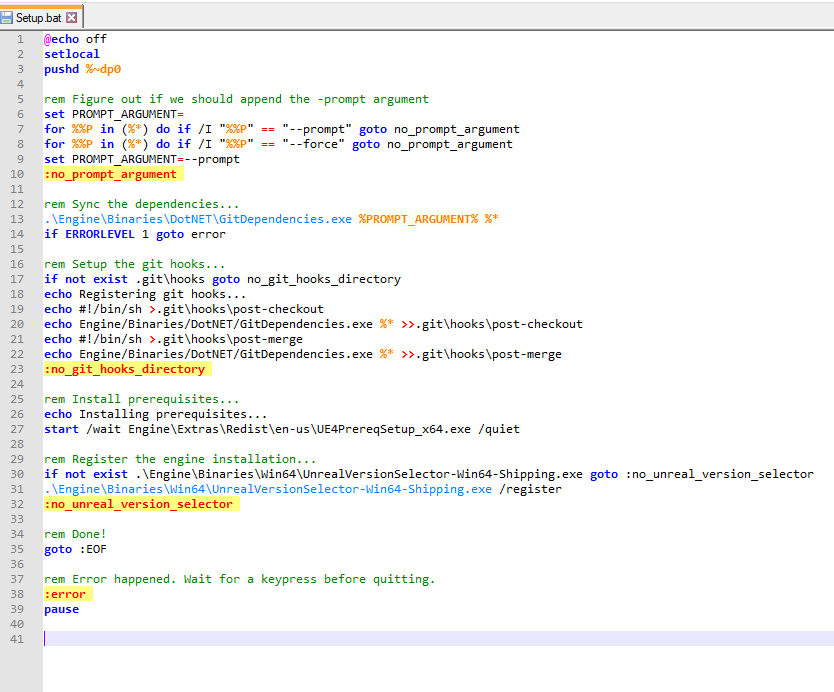
at the end of setup.bat it automatically rebooted my pc
???
oh nice
4.20 no longer uses the win 8.1 sdk
wicked whale
Well, I can confirm that renaming crash reporter to CrashReporter.exe does work for DevelopmentEditor builds
astral sapphire
@wicked whale ty for this info
wicked whale
I'm kinda curious why it even works that way
astral sapphire
@elder falcon stetup.bat now updates VS
 astral sapphire
@elder falcon it installed some dependencies for me at least
elder falcon
aw the framepro profiler integration in 4.20 doesn't work properly
astral sapphire
@elder falcon Engine\Extras\Redist\en-us\UE4PrereqSetup_x64.exe
framepro...i'm surprised someone even using it
elder falcon
it looks miles better than the profiler unreal comes with by default
are you saying there's something else even better?
@astral sapphire
I've been looking for a useful frame profiler like that for a while
and now this one doesnt work
(╯°□°)╯︵ ┻━┻
hold up, what is FTracingProfiler
this is new too
elder falcon
🤷 I'm just trying to find out if there will finally be a good profiler available
astral sapphire


Good news everyone. We just converted this @UnrealEngine microprofiler to a slate widget that live updates and can draw as an in-game HUD. Still free + opensource #indiedev #gamedev #bebylon https://t.co/E1b1PebhCB
 Twitter
its on github
elder falcon
ooo that looks interesting too
 cosmic stump
I got a project that works like a clock using launcher version of UE4 (Android build). However, I needed to start using Oculus fork and I build engine from the source. Now my project crashes on the device: https://pastebin.com/mFn4xnXL

Same 4.19.2 source (except with updates SDKs from Oculus), but something seems to be broken
Any idea how to work around this issue ?
astral sapphire
@cosmic stump why oculus fork?
elder falcon
so I've been wondering... compiling development editor project seems to result in about 500 less jobs then compiling ue4 development editor, and appears to work fine for starting the editor
what is all that extra stuff being built as part of the ue4 target?
(and why is it being built if it's not necessary?)
cosmic stump
@astral sapphire because Oculus has all SDKs current.
astral sapphire
@cosmic stump why you need current sdk?
cosmic stump
huh!? Why not to stick with UE 4.11 or something like that?
silly question
obviously you don't need to keep up with Oculus SDKs if you don't develop for Oculus hardware.
astral sapphire
@cosmic stump no, i mean, what version of oculus sdk 4.19.2 have?
and what version fork has
cosmic stump
1.21 I think and fork has 1.26
astral sapphire
and you need that difference right?
cosmic stump
🤦
hmm... just got e-mail from Oculus saying something about "async loaded thread enabled" option. Gotta see if I have it off or on. Might be a workaround.
cosmic stump
Unreal is distributed with Oculus plugins which make it easy to develop applications
that work with Oculus Rift, Oculus Go, and Samsung Gear VR.
go to "Epic GitHub Repository"
astral sapphire
Platform SDK 1.20.0
astral sapphire
@cosmic stump that's OVRP version, != SDK version
cosmic stump
OVRP, Platform, Audio, Avatars are referred to as Oculus SDKs
SDK with "s" after SDK
meaning multiple components
regardless, 4.19.2 from Epic has outdated OVRP and Platform SDK\
4.19.2 from Oculus has everything current (except it has no Avatars)
how is this related to my issues with project crashing on the device ?
cosmic stump
so, using "Async Loading Thread Enabled" was the issue
with that option disabled everything runs fine (except loading time is long now)
proven grove
how the hell does a TArray actually work
its such a mess of abstraction its impossible to tell what goes where
or how any of it works below top level
cosmic stump
now, the weird thing is that Oculus fork cpp files are "binary identical" to Epic's repo cpp files (related to async thread loading and streaming)
that makes me wonder if launcher version of UE4 is different than source version, even though it's the same version number
elder falcon
@proven grove tarray works pretty straight forward tho
proven grove
pretty straight forwards
what
it has 10 layers of abstraction in it
at least
i had to hop between 5 diffrent files just to find a class that didnt inherit
elder falcon
it only has the element type and the allocator as abstractions really
what part of it are you wondering about
proven grove
all of it
i'm looking to make my own array for another project
and im looking through the unreal source code to see how they do it
but they just made it so damn complex
elder falcon
you could just use std::vector
proven grove
but using std is a sign of weakness
elder falcon
it's not necessarily possible to make it less complex if you want it to be as performant and versatile
proven grove
i do try not to use std whenever possible
i just want to have more control over it
and i dont care as much about performance as it should never really be an issue
elder falcon
some of the complexity comes from it being able to use move semantics on elements supporting it
proven grove
so are there any particular parts i should look at?
elder falcon
I mean.. all of it is necessary to make the thing work
elder falcon
probably with the constructor to see what the starting point is, and then follow the add method to see what happens when you insert a thing
elder falcon
at least that's where I started trying to make sense of it
this low level stuff is really interesting
since there is so much FORCEINLINE crap it might be hard to use the debugger on it
 cold wigeon
I've been bad and need help getting my fix xD
Now that I can pass a material function back into c++
I have a compute shader that I would like to inject this into
so instead of injecting it into a material
I just want to inject this into my c++ shader
elder falcon
are you sure that's a thing you can do
elder falcon
doesn't the material function only contain nodes and need a real material graph to be able to compile it
cold wigeon
If I have to spawn up a material, and then get the hlsl code, and then inject this into the c++ shader thats okay to
I would just create a bare material \
elder falcon
welll good luck with that 😅
cold wigeon
hey, if you can't help, then just stop bloating the chat
pearl fulcrum
Uh yeah you need a graph to compile
pearl fulcrum
I don't have any examples for you though - you're outside of my wheelhouse here
cold wigeon
yea Im well aware that this is some unreal stuff here
the issue is, we can create our shader in a material, but we can't use it unless we assign it as a material
pearl fulcrum
If you're really feeling brave you might be able to emulate the graph
cold wigeon
we just need to have manual control over when material functions are run, and we need to access the output
we don't want to actually see the results, its a gpu data manipulator
think cuda
we can use the graph in the editor
maybe I can just use a material and just hijack the output
and maybe I can hijack the fps tick
pearl fulcrum
What I'm curious about is why you're using ue4 mat at all if you want a compute shader
cold wigeon
I already have a compute shader
we are working on a game changing plugin
and I need to be able to let the user to create the shader in the editor like a sane person, and it gets injected into our c++ shader because its data only
we can't use the typical material because the only way to run the shader is to assign the material
but then we can't control the tick
we can't get the data results
and also the results would produce visual garbage
also, we don't want to waste resources creating an actor and then hiding the actor
no to mention damn resource management skipping the material if its not in view ect
also our compute shader allows cpu and gpu access to the data
elder falcon
you can draw materials to render targets which can then be read on the gpu without spawning actors/other nonsense
cold wigeon
okay, as long as I can use the render target as my input to the material
elder falcon
they can read from render targets if you set up a texture parameter and assign it, and write to one by drawing the material to it
cold wigeon
okay thank you
so if I wanted to store weather simulation data, RTF R32f should be a big enough container for accuracy right?
proven grove
i wonder what would happen if i made FORCEINLINE expand to nothing instead of expanding to always inline
proven grove
it would make it a whole lot easier to debug
im just worried about performance
would the diffrence be noticable enough to warrent the better debugging potential?
or would the performance hit be unnoticable
elder falcon
noone really knows, the auto optimization is pretty much magic
it's possible some parts will run like garbage while others don't change at all
you don't really see any other cpp projects put so much forceinline on everything
it's even possible some parts might run better with forceinline removed
cosmic stump
Has anyone had "Async Loading Thread Enabled" option crashing app on Android ?
proven grove
so uh
taking out forceinline did some bad things
i got over 2000 linking errors
within a minute of starting the compile
over 2000 duplicate symbols
from every function that was marked as forceinline
so dont do it
pearl fulcrum
did you do a full rebuild?
proven grove
yes i did
pearl fulcrum
oh interesting
pearl fulcrum
well rip that
proven grove
ill try again some other day
elder falcon
tried clean solution?
elder falcon
why would you do that
proven grove
im on mac
elder falcon
hm
elder falcon
well what cmd line do you use to build?
proven grove
mono Engine/Binaries/DotNET/UnrealBuildTool.exe UE4Editor Mac Development -buildsw
elder falcon
actually I think I know what the problem might be
they have all the definitions for forceinline methods in the headers, below the class declarations
proven grove
i changed them all
elder falcon
making them not inline now results in a duplicate definition in each cpp
elder falcon
that'd work
elder falcon
I wonder what would happen if you set every method to forceinline
elder falcon
the packaged exe is already ridiculous big tbh
and if you make a linux build it becomes 600mb like what
proven grove
on mac the editor app file is about 650mb
but the dynamic libararies are about 15mb each
and theres a couple thousand
elder falcon
ye but I'm talking about a shipping build of the game only
it ends up with the largest executables I've ever seen in any game engine
proven grove
the fps template is about 430mb packaged on mac
the c++ variant is anyway
idk about blueprints
proven grove
well, it compiled
so when it has all the forced inlining stuff, its about 44gb total on a fresh build
its still 44gb
but all the binaries have gone from being 17-20mb each
down to just 3mb each
the editor executable went from 620mb to 590mb
so it is slightly smaller
time too see the performance
shader compiling is significantly faster
like about 4 times as fast
it usually take my computer 20 minues to compile about 2500 shaders
it just did it in 2
holy moly
thats, an actual performance boost
thats
really damn good
and thats a really noticable thing as well
like, most artsits spend alot of time compiling shaders
so a performance boost like that is great
thats an important thing
uht also ran about 5 seconds faster on my project
went from 24 seconds to 19
why did this one change affect so much
elder falcon
ofc the real question is whether in an actual real-world project, it now runs at higher fps
proven grove
im about to find out
the project loaded about twice as fast as it used to
i must be dreaming
elder falcon
did you measure that or did it just feel faster?
proven grove
it felt alot faster
elder falcon
this would be huge if it actually had this effect
proven grove
turns out trying to outsmart the compiler doesnt always work
almost double framerate in editor
phew lad
elder falcon
well now I have to try this aswell
time to make some "before" measurements
you just replaced it with "inline" right?
proven grove
yeah
elder falcon
so that basically makes it do nothing
proven grove
wont compile if it expands to nothing
elder falcon
since the compiler just ignores normal inline
proven grove
it needs to expand to inline for some reason
not always
it will most of the time
but sometimes it wont
elder falcon
it needs to be inline because of the definitions in the headers
proven grove
yup
elder falcon
properly removing it would require a large refactor
well
as long as copy pasting code around counts as a refactor
elder falcon
🤔
elder falcon
gonna have to make some shipping comparisons with ltcg active aswell
proven grove
if this is actually a thing it could be pretty good
elder falcon
if only making shipping builds wasn't this slow
proven grove
testing engine changes is always a pain
so a full rebuild for my game usually takes close to 3 minutes
it took 2
noice
elder falcon
how are you rebuilding the game by itself lol
proven grove
i mean just deleteing itermediate and binaries then running the build tool on it
proven grove
you dont need the editor to rebuild
elder falcon
yeah I never use the editor to build
proven grove
i still use the editor compile button because of some other weird fuckery
but still
elder falcon
I was just thinking of trying to rebuild in vs and it cleaning the engine
proven grove
try that as well
elder falcon
tf my shipping build failed
aaa what the heck is this nonsense https://i.imgur.com/8d0N2sD.png
 proven grove
time for a rebuild
elder falcon
but I didn't even update the compiler recently? 🤔
proven grove
dont you just love it when you get compiler errors from the generated header files
proven grove
and now its magically fixed
alright then
ignoring that
lets try cooking content
elder falcon
good idea but I'm not sure how to measure that since it caches so much stuff in lots of places
proven grove
i've never succesfully cooked my game before
it always errors on something
so lets see if it even works
nope
it exploded like usualy
elder falcon
I do that pretty often to make sure the project doesn't get broke
proven grove
UATHelper: Cooking (Mac): ERROR: Cook failed.
UATHelper: Cooking (Mac):        (see /Users/student/Library/Logs/Unreal Engine/LocalBuildLogs/UAT_Log.txt for full exception trace)
UATHelper: Cooking (Mac): AutomationTool exiting with ExitCode=25 (Error_UnknownCookFailure)
UATHelper: Cooking (Mac): RunUAT ERROR: AutomationTool was unable to run successfully.
PackagingResults: Error: Cook failed.
PackagingResults: Error: AutomationTool was unable to run successfully.```well thats a helpful error message
elder falcon
scroll up to find the real error
hmm
"AutomationTool was unable to run successfully"
and now I get to stare at this for 5 minutes https://i.imgur.com/rq1lZ7Z.png
 elder falcon
same
proven grove
its complaining about not finding dylib files
elder falcon
when I tried to fix an issue in ubt I just spammed the thing to hell with log outputs
elder falcon
it would be nice if this window was more interesting
maybe let us play a little text game while it compiles
proven grove
a nice game of rock paper scissors or something
elder falcon
finally it's done making the shipping build
now I can measure the before times
rip gsync locks my shipping game to 100fps
proven grove
disabling time
proven grove
thats quite a bit
 west haven
not sure if this is the right place to ask, but does anyone know if theres an option or smt. to make the editor not pause the game while editing properties in simulation mode?
elder falcon
now the light build
proven grove
im never going to be able to cook content
it doesnt even work on a blank project
ffs
proven grove
its still going
its kinda slowed down at this point
not much changes when it reads a new file
thats where i keep it
its just sort of stopped evolving
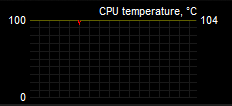 proven grove
only a bit
elder falcon
cpu fan was at 40%
proven grove
that may need fixing
also, uht and ubt are running way faster now
its taking about half the time it usuualy takes to compile
elder falcon
oh yeah uht is made in c++ so would be affected by this too if it works
proven grove
the generated code came out way faster
and for some reason the compiling was much faster as well
elder falcon
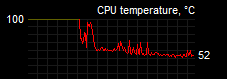
https://i.imgur.com/uaAtOcJ.png reaching more reasonable temps
 proven grove
that seems safer
it takes longer to link the dYSM files than it does to compile the game source
i like this
elder falcon
I may have overclocked this thing a little too much
proven grove
how much is too much
proven grove
base clock?
elder falcon
normally it comes with 3.6
elder falcon
I have no patience for fiddling with it so I just picked some random value, set it to that, increased the voltage until it worked and called it a day
proven grove
so i did shit to make the cooking work
last time i managed to cook succesfully i had to leave it overnight
it just cooked a full project within 30 seconds
elder falcon
let's see if this more reasonable fan curve prevents it from escalating like that again
proven grove
sweet jesus
elder falcon
that is probably because you got a ton of cooked content cached now
in the derived data cache things
proven grove
i deleted everything before trying the cook
i've reformatted my harddrive at least once in between the now and the last time i cooked content
i managed to overclock my vram up about 300mhz when i still had a pc
elder falcon
closes the editor without writing down the light build time
ah it's still in the log
ok
now to try without the forceinline
proven grove
lets see how it goes
when i get a new desktop of some kind im going to spend ages documenting this
actually contributing to the engine would be pretty nice
then all the people at school who play fortnite would praise me as their new overlord
clear nacelle
does anyone know exactly how the server updates the client's location when it gets out of sync?
clear nacelle
for example, launching a character with 200 ping will cause the client to teleport to where they should be once they receive the RPC
but the thing i cant figure out is how it manages to put it back to a position where the client is in charge of their movement
so once the client updates the position, its actually ahead of where the server sees it
left is the server's view, right is a 200 ping client
client still manages to land first
elder falcon
that's a pretty complex system
the client stores moves it sent previously so it can replay them on top of an update from the server in case of a de-sync
clear nacelle
makes sense
the reason i ask is because id rather have it setup to quickly interpolate through what the server saw
instead of that jarring teleport
elder falcon
have the thing launching the character run on the client too
the server will still be authorative
clear nacelle
that works fine when the client launches itself but not when someone else shoots that character
then the guy who shot is stuck waiting on the RTT between both clients to the server before he sees the other guy get knocked back
clear nacelle
asked there a while ago, nobody had any answers
my goal with this is just to disable movement replication on the character and do it manually so i can correct it with my own code, but finding out how to put the client ahead of the server again, and in the correct location, is the hard part
west haven
isnt 200ms a bit too much to expect smooth gameplay for this sort of stuff anyway? its almost half a second roundtrip time... and if you want to disable the client prediction system you can always implement your own character movement component
clear nacelle
im surprised UE4 still just teleports to correct it
yeah 200ms is just to really demonstrate the issue, but it can still be slightly noticeable at 50
quake live handles it well when a player receives a knockback, im basically trying to copy that
elder falcon
@proven grove it runs slightly slower for me with it disabled
gonna try the shipping build once more then revert it lol
slightly slower there too
elder falcon
🤷 it went from 150 fps to 140 for me
proven grove
diffrent cpus and operating systems must handle it diffrently
i'll see if i can find anything more out
it might just perform better on mac
or just on partiular cpu's
 hybrid night
Are there specific defines that I can check which will be set in official engine builds from Epic (e.g. 4.19.2 out of the launcher) and won't be set or present in an engine I compiled myself for source?
I want to use that to turn on/off some optional features that will be compiled in my game code only if I'm running against the custom engine
elder falcon
maybe BUILT_FROM_CHANGELIST > 0
hybrid night
cute
wicked whale
I'm dense, how to I add a file to a source build and actually have it included by UBT?
Nevermind, I realized that adding existing file in VS wouldn't actually move it out of the intermediate folder despite displaying it in a different place in the solution... that doesn't make any sense to me! But manually moving the file in explorer solved it.
 gray glade
Yeah, trying to add files to a UE4 project via VS will erroneously default to creating it in the intermediates directory - so just don't do that or manually fix the default location everytime. 😦
lost linden
yeah that sucks
 burnt flare
I don't know where i should ask this but i guess people here will know it wink wink so i've seen a video that i need to type "stat startfile" in the console to start recording and "stat stopfile" to stop the recording. Now i've open the frontend and i don't see any files 😦 why ?
proven grove
have you tried explicity opening them with frontend?
west haven
not sure if this is the right place to ask, but does anyone know if theres an option or smt. to make the editor not pause the game while editing properties in simulation mode?
cold wigeon
how do I get from FTexture2DRHIRef to UTexture2D?
cold wigeon
thats under content creation
 surreal latch
that's a good point
there's a TextureName, that should be the name of the UTexture2D. think that might be the best you can do
 versed sky
I'd like to expose FPoly to my game projects. What's the best way of going about doing that?
I thought there was a trick to it...although I just might hand role what I need to skip the hassle
still quarry
Anyone know if there's an eta for 4.20 previews?
bronze crest
@still quarry the branch is on github already, so very soon
 royal glacier
@still quarry arkit2.0 was confirmed to be in 4.20 "this month"
so I guess we're getting it in the next couples of weeks
proven grove
this is epic we're talking about
this month could really mean anywhere between now and 4.20 release
 cursive geyser
does anybody have a solid explanation as to the use of WITH_EDITOR and WITH_EDITORONLY_DATA?
or a good example
 barren flame
Where is the GUI programming section in the source?
barren flame
no, the UI of the engine
proven grove
if i remember correctly, the editor uses slate
and umg is just a wrapper around slate
 edgy hedge
I needed to run the dedicated server for my game using Unreal Engine's source build. I also had to convert my project to use the source build. From now on should I just be making the game on the source build?
rain lake
i think you are looking for the Editor module Borbia
 unreal hollow
Hi, I am hitting a wall at the moment trying to implement a custom shading model for mobile. I have everything work on desktop, I even have all of the surface shading in mobile, the issue I am stuck on is that I cannot get any dynamic lighting data in the MobileBasePassPixelShader. I can make changes to the code in that file but as soon as I change the shader model to my custom one I lose all of the defines and data for dynamic lighting. Any advice or help would be amazing!
 final quarry
anyone know where the new steam authentication for 4.20 is handled? having trouble tracking it down on github
 hidden hedge
the OSS stuff is pretty self-contained, it uses a packet handler for the authentication
it's easier to look through the changes on dev-networking
 low dust
Change 4031710 by Jake.Leonard

    Implementation #3 of Steam Auth:

    Features:
    ----------------
    * Most of stuff from Implementation #2
    * Blocks users from progressing unless they pass valid keys to the auth system
    * Overrides for licensees to change the behavior
    * Requires little to no configs
    * Has no P2P mesh support

    #Jira UE-10686, UE-50441, UE-50444
hmmm
apparently it's been done before the dev streams got properly tracked
that commit is in dev-networking
@final quarry
seems like there's been a fix for it later on
final quarry
ah i see, thanks!
low dust
but at least we'll get the individual commits in the future
final quarry
i just got ours finished up and they implement theirs after years of waiting lol
low dust
yeah, it's taken a long time 😄
hidden hedge
oh right, thought it would have the history. i was looking through it on perforce
cold wigeon
is there a way to bind or read UniformBuffers after the shader has modified it (I need the results sent back to cpu)
I've found a way to memcpy a texture back to cpu, but I really don't want to play with packing an all that
bronze crest
what did they do with the master branch 2 days ago where a lot of individual #ROBOMERGE-AUTHOR: commits appeared?
elder falcon
merge staging-4.20
still quarry
Has anyone else been getting the issue where you use (PIE) New Editor Window, you move the window, and when you relaunch the editor window it goes back to the center of the screen. This is especially frustrating when trying to test multiplayer.
Infact changing the Window Position settings does nothing at all for me.
 grand sand
Any idea where I can see more details about these changes in 4.20 ?
 sick basin
D3D11VertexBuffer.cpp
I'm trying to add simple validation to workaround this crashing bug for now. but how does access violation happen if there is validation in place?
spiral mortar
@sick basin Ain't so easy
sick basin
that's unfortunate 😦 thanks
 plush lark
Hi, if anyone could help me with this error I would be greatly appreciative. I'm trying to build the engine from source in visual studio for a dedicated server build of game but when I try and load the editor from source I keep getting this error and upon clicking ok the process ends and I can't do anything with my project
I'm not aware of any plugin called Audio Capture that is being used in my project
These are the errors preventing the build of the AudioCapture module as far as I can tell.
pearl fulcrum
You might try just straight up removing the plugin
limber jacinth
how can i speed up the build of my project
it is quicker when i use the launcher version not the source version
i mean at least 3 times faster
spiral mortar
Why are you using a source version @limber jacinth ?
limber jacinth
for dedicated server?
limber jacinth
yeah
just weird why it takes ages on the source build not the binary build from launcher
maybe my ue4 build target was wrong?
hybrid night
compare the logs
elder falcon
anyone messed with the mesh description stuff in 4.20 yet? is it good?
limber jacinth
why would you delete vr from the engine?
stable hemlock
why i need vr when i dont have powerful pc with vr?
 hot plaza
Hi ! Is it possible to get the rendertarget with the the scene+lighting+shadows, but before any postprocess is applied?
I have in CompositionLighting.cpp, line 216: FSceneRenderTargets& SceneContext = FSceneRenderTargets::Get(RHICmdList); I think it starts from here right ?
 brazen fiber
😃 hi
 terse lake
Hey there! I'm currently trying to create a binary build from my source build(which works fine, I can run and compile projects etc. No issues here).
The command I'm using is this: AutomationTool.exe BuildGraph -target="Make Installed Build Win64" -script=Engine/Build/InstalledEngineBuild.xml -set:WithDDC=false -set:SignExecutables=false -set:EmbedSrcSrvInfo=true -set:HostPlatformOnly=true
At 4/9, Compile UE4Game Win64 however I get an error and I sadly have no idea what it exactly means. Can someone help me out?
(Shows whole log for 4/9, but error is at the bottom)
Thanks in advance for any tips <3
If it's of any help, this is Unreal Engine 4.19.2 with visual studio 2017. And I also applied a fix for the pdbcopy.exe bug, fix can be found here: https://forums.unrealengine.com/development-discussion/engine-source-github/113790-installed-build-fails-trying-to-run-pdbcopy-exe?p=1409032#post1409032
elder falcon
actual error is error C4577: 'noexcept' used with no exception handling mode specified; termination on exception is not guaranteed
googling this one might lead to more info?
proven grove
for some reason projects compile faster when built from the command line than when built from the editor
strange
proven grove
and, what form of pull requests do you think epic would accept
i've done a ton of low level optimisation in certain parts of the engine
and i've reduced build times by about 2 minutes
and i've reduced the amount and complexity of the code in certain parts as well
its nothing that anyone using the api would ever see
so would that get in or not?
pearl fulcrum
yeah, probably.
proven grove
Noice
elder falcon
it will get accepted if the right guy sees it at the right time and is in a good mood
otherwise, it will get ignored for 3 years
terse lake
@elder falcon I've done that, but the only solutions I find regarding that say that I should put something into my project build.cs
The thing is, this is an engine build and I dont have a project-related build.cs. And putting that into the UE4game build. cs just results in an error that says it doesn't exist. (Two possible solutions: Definitions.Add("BOOST_SYSTEM_NOEXCEPT"); and UEBuildConfiguration.bForceEnableExceptions = true;)
Is there something I'm missing? Can I put these options for an engine build, too?
It's really weird, the normal compiled build works just fine. Only this rocket build throws this error.
stable hemlock
     * The system calls this method to notify the widget that a mouse button was pressed within it. This event is bubbled.
     *
     * @param MyGeometry The Geometry of the widget receiving the event
     * @param MouseEvent Information about the input event
     * @return Whether the event was handled along with possible requests for the system to take action.
     */
    virtual FReply OnMouseButtonDown(const FGeometry& MyGeometry, const FPointerEvent& MouseEvent);```
what does it mean "this event is bubbled" or "this event is tunneled"?my current problem is that a UMG Image's "OnMouseButtonDown" event isn't called every time an image is clicked quickly & repeatedly, but only every second time
so i'm trying to find where the problem is in source
lost linden
@stable hemlock bubbling is a term used for when a reaction to an event is passed through a system of checks. When it hits the right one, the search ends (figuratively popping the bubble). In the case of Unreal, input events are bubbled through a chain and where you want to capture it is where you use an FReply(handled); or unhandled if it you want it to pass to the next in the chain
stable hemlock
I see. this has nothing to do with the bug then...
lost linden
probably not. I would output the current focus on each click so you can see if it changes at any time.
 regal yoke
Anyone know where keyboard shortcuts are defined? I want to add a shortcut that’s not in the key binding editor
wicked whale
@lost linden @stable hemlock The term "bubbling" is also probably referential to the way events are passed through widget hierarchy, e.g. an event that starts at the bottom of a chain of widgets will "bubble" up the chain until a widget handles it. This is why events that proceed in the opposite direction are said to "tunnel", which can be achieved by using a function like OnPreviewMouseButtonDown. No clue what the "preview" part of the nomenclature is supposed to represent.
But in any case if UMG event isn't being handled in an expected manner then it's worth inspecting with Widget Reflector, I believe you can view info on what's receiving input through there.
regal yoke
I should specify that I only need to know where keyboard commands/bindings are in the code. From there, I should be able to figure it out
elder falcon
it's kind of spread out? lots of things involved with key bindings
I guess if you want to figure out how the mapping works you could start exploring at UInputSettings::ActionMappings
from there it'll be copied to UPlayerInput and stuff
 gloomy hamlet
@stable hemlock Don't have access to source just now, but I'd guess highly likely that the other half of the clicks are triggering a double click event instead.
You may be able to disable that somewhere, or otherwise just handle it too and call the same code from both.
stable hemlock
it's true, it's because it's treated as double click. don't know how to disable it though, and an image can only catch OnMouseDown, not doubleclick
proven grove
how does UHT redefine the GENERATED_BODY() macro diffrently in every file?
what kind of magic does it do to achive it
spiral mortar
C# magic @proven grove
proven grove
what kind of c# magic tho
spiral mortar
Well it creates a beautiful .generated file
proven grove
i know about that bit
elder falcon
 proven grove
its just how does GENERATED_BODY() expand diffrently in every file
spiral mortar
Well different includes
 spiral mortar
Ah lol
 spiral mortar
Ohhhh
That gives me a great idea
Add a #define CURRENT_FILE_ID
Now I understand why the generated must be at the end
elder falcon
yeah this is probably the only reason
everything else in it wouldn't matter where it goes
 lapis wave
Hi all! Has anyone successfully build and use the 'ScriptPlugin' in Plugins\ScriptPlugin? Last time I tried it on 4.19 branch it just didn't work.
proven grove
thats the branch that unreals dev team works on for making mobile features
if you read the readme its all explained there
and new features are rare for mobile
its probably mostly optimisation
wicked whale
So, I just pulled the latest 4.20 branch, compiled it and am in the process of launching the engine, and the splash screen says 4.21 👀 https://gyazo.com/9b601eaaafc70d342e41d1313f479a02

I also think the process hung, it's been sitting at 45% worryingly long
alright nevermind it launched fine. Kinda curious what causes that version number to be one higher than it should be, maybe someone accidentally the version number string?
 shrewd thorn


 wicked whale
it was just the plain ole 4.20 branch
elder falcon
you got the master branch then
 echo storm
oof yeah being on master is risky
wicked whale
Naw, I hadn't pulled from master, there's a branch explicitly named 4.20. I'm guessing it's some weird result of already having the repo open in another instance of git bash that had hung
proven grove
when building from source, how do i correctly configure BuildConfiguration.xml to enable bForceUnityBuild=True
i've never used xml before
wicked whale
@proven grove it's much like editing an .ini file, just open it up in notepad++ or whatever program of choice and edit the line
be forewarned non unity builds take forever
proven grove
the file comes empty tho
i've never written xml in my life
what should i actually write?
wicked whale
@proven grove Copy the implementation huwp provides in this thread https://forums.unrealengine.com/development-discussion/engine-source-github/121146-how-to-compile-in-non-unity-mode
Unreal Engine Forums
Discuss GitHub, using source code to modify the engine, and the creation of engine plugins.
proven grove
thank you
proven grove
building from source without unity is why i went back to the premade binary
i just hated not having full control over source
now time to spend the next 8 hours compiling the engine
cold wigeon
How to I "bind" a UProperty to a regular c++ variable?
I have a pure c++ backend IModuleInterface, that I expose to a BP frontend
but this doesn't work with UProperty declared
UPROPERTY(BlueprintReadOnly, EditAnywhere, Category = "TimeManager")
FTimeDateStruct* CurrentLocalTime = &TimeManagerBackEnd.CurrentLocalTime;
proven grove
thats not really how upropertys work
remove the uproperty from that and add a getter function
then mark the getter function as a UFUNCTION
cold wigeon
I should have clarified, I'm doing this tickless/timerless
I just want the details panel to show the value realtime
cold wigeon
I don't understand. Aren't getter functions manually called?
proven grove
everything is called at some point
you just wont be able to use a UPROPERTY like that
it just wont work
gloomy hamlet
Anyone know if it's possible to somehow exclude a specific cpp file from a module's unity build?
spiral mortar
@gloomy hamlet You could do it with a minor UBT modification
Adding it to your working file should exclude it from Unity
gloomy hamlet
Nice idea. I've worked around it for now with a small hack in my code, but if it doesn't suffice I'll look into that.
Think I also recall reading that 4.20 is introducing more control on UBT/compilation configuration, so that may help going forwards.
spiral mortar
Yep, should be helpful
proven grove
when building with ubt is it possible to change -ferror-limit= to another number aside from 20
 spark stump
Hey, I think I managed to mess up my system somehow. I just tried to reinstall 4.19.1 but can't seem to generate project files:
Everything has been working perfectly the last weeks. Been packaging and deploying multiple times per day with no problem. This just started happening today all of a sudden. Any ideas? 😦
elder falcon
is there any way I can disable the unnecessary "simplification" of blueprint nodes when zooming out?
surely it is capable of drawing the whole graph, and this would fix all those weird wire drawing issues
elder falcon
ooh
spiral mortar
Took me some time to find
spiral mortar
Have a look at the beauty of vector graphics?
elder falcon
slate can draw vectors?
elder falcon
nice
elder falcon
ooh it works
spiral mortar
?