#visual-fx
1 messages · Page 19 of 1
 obtuse seal
ok so you can set that up to line up your sprite particles in a grid
from there you need to do some math with exec index to get the desired subimage index
e.g. you know how many sprites wide and how many sprites tall your grid will be, uh gimme a sec
I can just copy this from laying out a render target
actually nevermind that, subimageindex uses a table
@south gyro What range of subimageindices do you need?
 south gyro
Hmm in accordance to what in particular? Right now I use from 0 to 35
based of a 6 by 6 UV that I've set.
or am I going about this in a wrong way?
This is completely unknown territory for me haha
obtuse seal
Seems fine to me
@south gyro To assign the desired subimageindex you can just assign the particles execution index
awkward bit is that there's not a module or dynamic input to get execution index for a float yet so you have to write your own
obtuse seal
Uh, I haven't made a new DynamicInput myself so I just did it in a module

Just something simple like that
And the stack will look something like this https://gyazo.com/5633c59c761ba7f0a83827bb2285e377

May or may not have to do some additional math to get the desired subimageindex if it doesn't happen to line up with the grid layout
south gyro
Gotcha let me try it out. How did you attach that module you made ? or is it global?
obtuse seal
When you make a new module you can just toss it into any emitter
south gyro
Gotcha was able to at least get it to compile correctly. I'll try and mess with the executionindex stuff.
to see if I can get the math right.
obtuse seal
Essentially once you have the desired subimage for each particle then you just add a Add Velocity From Point or generally Add Velocity module in the Particle Spawn stack to provide the explosion force
south gyro
Perfect, thank you for your help 😃
 indigo jolt
there's vfx that spawn when destruction triggers
THEN there's destruction when the broken CHUNK dies
step 1 - main mesh breaks into chunks (first vfx plays)
step 2 - chunks fall to ground and disappear (2nd vfx plays)
i'm not sure which slot is which, but both slots have a purpose
indigo jolt
might require more setup - maybe in bp, dunno
i know it's something i've seen done that way
on projects i've been on
 hushed dawn
anyone know if you can spawn another particle on particle death?
 celest birch
ive put together this dissolve/construction material for our purposes and it would be a shame not to share so if anyone needs the code ill copy paste it into a txt file
https://media.giphy.com/media/24dd5Gwk7c2DSBmyc3/giphy.gif

@celest birch Oh wow, kickass fx. I wouldnt mind taking a look at it! 😃
tell me if youre missing any inputs
also material is blend masked
No inputs missing, jsut textures 😃 for the Emiisve scan lines.
any noise will do
That is one hell of a node setup.
It really takes alot of nodes to get something awesome deosnt it?
ye and "only" 50 instructions
yes it does
Very clean setup too.
Good structure.
was only a pain to make a gradient line
oh man that is so cool
So cool man ty for sharing!! Going to use it as a refrence to study. Ty!
np
 hasty plank
anyone know why my particle effect disappears when i launch the game? https://gyazo.com/e9daa846f773b280699b282e7f527475
 obtuse seal
I espy a commit referencing Fur simulation in the Niagara Content Examples 👀
 short sorrel
All, I'm just trying to build a snow footprint (normals only), however I'm not succeeding, since you can see the whole square around the footstep AND depth is practically non-existent:
https://gyazo.com/d8427ba3d8824852ec0041569191bff4

This is my material:
https://gyazo.com/9e15070c9a6f1b9afeed8cd339e82a0e

does anyone have a pointer on how to go with this?
(also tried dbuffer translucent normal)
obtuse seal
You can mask out all normals pointing straight up to be rid of the big ole square decals
short sorrel
how can i do that?
obtuse seal
Make a separate mask based on your NormalMap where everything that is part of the boot is white, everything else is black
short sorrel
there's no opacity mask in my mnaterial, it's grayed out
obtuse seal
Uh, I haven't worked with masked decals before so I'm not sure on the correct setting for that
should be a material option to expose it I reckon
short sorrel
but also: this thing isn't DEEP
obtuse seal
Shouldn't be a problem, masking won't introduce any visual depth
short sorrel
the point is that I WANT IT to be deep, but it's not
obtuse seal
I think you will specifically need to change your material's Decal Blend Mode to translucent in order to mask it
short sorrel
right now it looks like a water footprint
obtuse seal
@short sorrel Regarding depth you can use Parallax Occlusion Mapping to give it some apparent depth although I'm not familiar with the technical implementation
indigo jolt
if you want a masked look with decals you have to switch over to Dbuffer type
you won't lit-rendering in shadow with translucent or additive
if you keep it always in a lit area, you can almost do some good stuff with translucent, but i wouldn't bother
just dbuffer
short sorrel
ok, but decal requires translucent, maybe i did misunderstand your point? also, still there's no depth of my footprint
i want to achieve something like this https://static4.depositphotos.com/1015300/308/i/950/depositphotos_3087820-stock-photo-footprint-in-the-snow.jpg
 indigo jolt
oh if you want to do that then just set it to normal

the blend mode will always be translucent
but the DECAL BLEND MODE is the thing we change
that's the only relevant topic with regard to decals
for what you're doing use that Normal blend mode and make sure you use an opacity mask to crop out everything around the boot or you'll be affecting things in a square
short sorrel
yes indeed 😃
however the depth is really disappointing... maybe i need to change my normal map..? my approach seems correct given what you are stating
i’m trying to find nm like these... https://answers.unrealengine.com/storage/attachments/85187-footprint03.png

maybe this will help
but i can’t seem to find them
obtuse seal
A normalmap only provides information on the direction light should bounce per pixel, it does not modify geometry or otherwise create true depth, although it is an important part of selling the effect
 cold sorrel
If you want actual depth your only option is POM
If you are after this classic. http://dougvfx.blogspot.com/2013/07/deep-snow-prints.html

Spoiler Warning!!!!!!!!!!!!!!!!!! Be aware that the video below shows some footage that would be a spoiler for someone who hasn't played th...
Is it ok to call TLOU a classic yet? feels like it just came out
indigo jolt
i'm not sure if you can do parallax occlusion mapping with decals or not though
cold sorrel
Sure you can
indigo jolt
i guess they did it in Fallout 4
cold sorrel
Well, you could a year ago, last time I tried it
indigo jolt
i just struggled to make it look right in unreal
cold sorrel
They are finicky as all hell though
indigo jolt
might be personal failing
i think it's worth doing for huge divots like craters
not sure i'd advocate it for shallow footsteps
cold sorrel
It's madness from a performance perspective, but that wasn't the question 😄
cold sorrel
Most of the things in this channel are mad from a performance perspective so it's par for the course
indigo jolt
yeah, i'm not even thinking performance, i just usually cull any solution that isn't going to visually register
it requires a lot of shape/depth to get much out of POM.
unless it's like fur
then it's pretty sick even shallow
short sorrel
so to do a footprint like the image above i need pom?
indigo jolt
no, but feel free to go that far if you're a perfectionist looking for cinematic quality
obtuse seal
didn't the snow in the latest GOW use some vertex displacement and tesselation, that effect is nuts 🤔
indigo jolt
ya that snow was insane
obtuse seal
Of course it is entirely different though like glad said lol
indigo jolt
i think they might have been using that render-target type terrain offset stuff + mesh emitters?
i'm not even sure
cold sorrel
Pleh I had to fake that stuff for a static cinematic using VATs a while back. That was tricky enough. Don't even want to think about doing a proper implementation for it
obtuse seal
I'm guessing there's a separate deformation mesh that that projects onto the tesselated snow
plus some really sharp particle systems to sell all of the snow fluff that gets thrown around
indigo jolt
or you could have 1 million gpu snow particles all set to render on the terrain but offset vertically a bit. then put vector fields on the character's feet
you try it first tho plz
obtuse seal

short sorrel
thank you guys 😃
is there an online resource for things like these?
not necessarily free
 ebon gate
I prefer the viewport from cascade is there a way to change the viewport background in niagara?
i want to have a black background.
also in cascade i am able to slow down the time of the viewport in cascade and was wondering how i can do it niagara?
obtuse seal
@ebon gate Took more FOREVER to find it but there's options under the Window panel
I think, I would check where the settings are but I'm waiting on a source build
In regards to time adjustment you can change that by setting the timescale on the sequencer scrubber thingy on the bottom
yeah I'm really good at explaining this
ebon gate
Oh right i see it.
Preview scene settings
found the settings for playback speed thanks.
 slender tapir
how do i start to do game effects like cokie
cold sorrel
Cokey Li?
If so, take a course on traditional handdrawn vfx, to learn the drawing and timing. Then learn all the essential realtime vfx techniques. Then you just have to spend a few years practicing that combo.
Should be doable within a decade or so
indigo jolt
i'll be at least as good as Cokey in no more than 8 years from now tops
cold sorrel
Yeah, but you already know the basics 😄
cold sorrel
Cokey is godtier in his niche
indigo jolt
had no less than 2 job interviews where i was told "do Cokey Li" and showed me his reel
 barren raven
Can anyone verify that motion blur for a Niagara system doesn't work by default on a new 4.20 project? Using the visualize motion blur it's easy to see. The motion blur works perfectly in the Niagara content examples, so I feel like there is a project specific setting I'm missing to enable the blur.
indigo jolt
i don't suck, but god it's a painful comparison
obtuse seal
I'll give it a try @barren raven
barren raven
Thank you very much
It's definitely possible to get working, but can't find whatever project setting that is needed to enable it
I have the Niagara / Niagara Extras plugin enabled btw, and the default new level is enough to test as it shows blur for other objects there. Going through the project settings one by one comparing to the content examples project until I find it 😄
cold sorrel
Yeah, I kept getting asked about Cokey and ChengGang effects
ebon gate
I have this flickering effect when particle spawns I set the curve to 0 on Opacity in time 0bit it still somehow appears white. https://gyazo.com/54908cfd7b3ebfc1f26bdd7f5da68c21.gif
 barren raven
Ok I think I've found the solution
slender tapir
haha ok thanks everyone, is all of that mostly mesh and particles or is there more to it?
ebon gate
oh wait nevermind. i forgot to right click to scroll back to the negative values like in sequencer.
barren raven
Enabling the "Accurate velocities from Vertex Deformation" checkbox seems to enable motion blur with Niagara
Double checking now
obtuse seal
What window is that under?
barren raven
Project Settings / Rendering
slender tapir
it looks like ive got a lot of work to do 😄
barren raven
Confirmed for me at least
Phew glad to get to the bottom of it!
TLDR: If you want motion blur with Niagara, tick the "Accurate velocities from Vertex Deformation" checkbox under Project Settings -> Rendering
ebon gate
where is the orbit module in niagara? is it under some other name?
 stone verge
hi i wan your opinion
i am making a particle pack and sell it for ue4 markeplace and make some money for my game
should i work on it using cascade or should i make it for niagara?
what would you do?
ebon gate
I think niagara cos its new and will replace cascade at some point.
cold sorrel
Niagara isn't production ready yet. The only ones buying things for it now are people trying to learn it, I think
Cascade isn't going away for years
 sullen forge
you could do both,and sell the niagara one separately
people might buy the niagara version to tinker with it and experiment
that in the case its not too bad for you
ebon gate
is there a module similar to Initial Rotation rate in niagara? I tried using particle.spriterotation in the particle update but that doesnt seem to rotate at a constant rate.
 spark latch
I'm having a hard time figuring out how to get a particle to spawn at 0.0 in the niagara timeline
I want it to only spawn once, with a lifetime of 0.25 at 0.0
short sorrel
so... following up on yesterday discussions i’m making footprints in the snow with POM. At least just for fun. Probably a question that makes not much sense in this group but... how expensive is this? Like, can I use it in my game? 😄
multiplayer, max 12 concurent
cold sorrel
Then you better fade them away quicklike
cold sorrel
before you have too many
 tardy dome
when the cost gets too high 😛
short sorrel
i’m sensing a circular discussion is about to come up 🤣
cold sorrel
12 people running in the same area, 2feet12people2stepspersecond*30seconds =1440 decals.
If you place that many in your testlevel and test it on target hardware, you'll know
tardy dome
somehow my teamm allways have 1 person standing still tho
cold sorrel
You don't opt for your team 😉
You opt for the competent players
And the dickheads who all throw their gasgrenade in the same area... All 64 of them. ptsd twitching
tardy dome
yea, ppl will team up and try too break ur game as much as possible 😛
cold sorrel
Oh yes
And it all ends up on youtube as "fun glitch compilations".
Bastards the lot of em
😄
tardy dome
what if all 12 of us stand on each others head and the bottom person jumps
this will happen 😛
short sorrel
that’s a good point
well indeed i can set a time & total count limit
well indeed i can set a time & total count limit
but is pom way more expensive than a normal map?
cold sorrel
yes
cold sorrel
To be fair that many regular decals still sound very impressive
tardy dome
but footsteps are small so there is that
hard crusted icy snow doesnt need footsteps 😛
cold sorrel
still 1400 drawcalls on something barely visible
cold sorrel
Perhaps. I haven't looked into them in ages.
tardy dome
i spawned decals on tick once took a while for it to get real bad, and the cost is directly related to their size
cold sorrel
That's just overdraw
Can't find any info about dynamically spawned decals would auto instance. Do you have a link?
tardy dome
dunno what it was but something made em kinda cheap to use
cold sorrel
right...
short sorrel
decals normal maps or decals pom?
cold sorrel
Either
short sorrel
sorry i meant “something made em kinda cheap”: which ones
then again knowing what would be helpful 😃
cold sorrel
POM is just a shaderfunction so there would be no difference in the instancing question
tardy dome
deferred
cold sorrel
Well, the docs say "Many Decals can be rendered at once without a large performance decrease" so go nuts
we don't need more detailed descriptions
tardy dome
where?
short sorrel
lol
short sorrel
well then if “many” is ok... i can sleep well now
tardy dome
not bein able to write my name with bulletholes allways bothers me 😛
but i knew i read something somewhere decals were made kinda cheap 😛
 mortal lily
yup
tardy dome
then again only 1 way to really find out 😛
tardy dome
learn it right by doin it wrong, thats my motto 😛
cold sorrel
"Decals cost similarly to an unshadowed Movable or Stationary light, because they are both applied in a deferred pass. Covering the entire ground with them should have a pretty heavy cost, especially as you look at an angle where you are looking through potentially hundreds of them. GPU costs such as this can be seen with 'profilegpu', so to a performance test. Decals are under PostProcessDeferredDecals."
That doesn't sound like what I imagined when I read, Many...
tardy dome
the plot thickens 😛
short sorrel
wellwell
cold sorrel
"Decals cost mostly in overdraw, similar to unshadowed dynamic lights or if you placed translucent sheets everywhere."
short sorrel
tomorrow i’ll spawn my pom footsteps ontick event and report back when gpu screams
sounds like a fun sunday
cold sorrel
The Epic stance on it seems to be, worry about overdraw, not much else, then profile it
short sorrel
i’m way too ignorant to know what overdraw means in practical terms for my footprints
cold sorrel
Let us know! I'm super curious about the drawcalls.
I mean, 1400 drawcalls would be insane. For comparison the total target drawcall budget for Robo Recall was 1500
short sorrel
i’m not the first one to put footsteps though am i...
i’ll set a hard limit
one in time, one total
my understanding is that anyway decals far from a player are outside the render zone
 celest jasper
You are right, you are not the first to put footsteps in his game, but 1400 decals per second is something that not everyone is doing, so the number of people who tested this is pretty low. Also, nobody would test for a raw decal per second number. There is overdraw, different gpu's, the rendering pipeline every engine is using, the material complexity and like you said, if you can cull.
cold sorrel
1400 total. Not per second
Many people have done it. Many have done it and then cut it due to performance vs visual add
celest jasper
woopsie, sorry for reading not properly ❤
 lime agate
Hi! I'm new to vfx, should i start learning Niagara instead of the old system?
all what can be done in the old sysctem can be done in Niagara at the moment?
ebon gate
@lime agate I'd say learn cascade first then niagara to learn the basics and learn the concept of modules, emitters, Initial modules and multiplier modules etc. I was initially confused with niagara but the knowledge from cascade made things a lot clearer for me.
this tutorial from Bill Kladis is amazing. it will make you a VFX expert in no time.😉 http://3dmotive.com/series/udk-cascade-beginner-s-guide.html
The web's best 3d modeling tutorials and training videos for popular 3d modeling software including 3ds Max, Maya, ZBrush, UE4, UDK, Mudbox, Unity, ZBrush and more.
lime agate
wow thankyou
ebon gate
By the way does anyone know how to kill the particles on collision in niagara?
obtuse seal
There should be a Particles.IsAlive member or something like that, toggle it in the collision response
short sorrel
@cold sorrel indeed i was not implying i did not get your point, quite the contrary
i meant: i’m not the first one so with compromises it can be done, i’ll pay more attention to what kind of compromises game have took
for instance: only the last 10 footsteps per player (that’d be a max of 120 and only if all players are near each other)
ah plus 2 dogs 🤣
and thanks for taking the time to help, really appreciate it
celest birch
You could go the route of storing trails into a render target instead
short sorrel
that sounds interesting? what do you mean with that, i.e. not footprints but traces?
celest birch
They would still be footprints. You just draw a footprint "brush" into the render target and have your ground material use it to do displacement or whatever else
 analog onyx
I suggest using a render target with indirection texture, that would point to actual footstep texture. There are certain limitations, as if not being able to get overlapping footsteps, but it scales remarkably well for huge number of footsteps and their sources.
Can integrate it directly into terrain rendering, with all consequent benefits.
 near ferry
Can you set the skeletal mesh for a niagara system via bp / code?
short sorrel
@celest birch and @analog onyx these seems very interesting suggestions, given that my game relates to chasing a fugitive and keeping track of all footprints might be very interesting http://www.misultin.com/

One Step Ahead is a multiplayer simulation game where you can choose to play the role of a fugitive, military or a K-9 unit.As a fugitive, stay alive and complete your primary goal. As military, team up with K-9 units to track fugitives down.
however i'm really ignorant in terms of render targets... will start learning
still it looks to me that even with render target i'd need to limit the area (cannot cover a 2kmx2km map)
maybe i could save the footsteps coordinates in an array
and hide/show them according to the player's position
 mortal lily
POM based decals? oh dear shader instruction count 😛
short sorrel
yeah I know right..
but how the hell can I get a DEEP footprint instead

the difference is pretty significant
 rapid thistle
Have you tried bump offset instead? It'll be a ton cheaper and might look decent enough
If not, POM should be fine, a couple of games do it, even on console.
short sorrel
I need to check if you create a bump offset with normals only. Is it much better performance-wise?
i will def try
spark latch
Has anyone had success with skeletal mesh sampling using Niagara?
 ocean hedge
take a look at the content example we just shipped
the last example has a skinned mesh that you can dig into
also make sure to look at your log
if we cannot attach to a skinned mesh or it doesn't have the right flags set, we should warn you in the logs
 robust quail
the niagara preview feels like it's running at low fps to me, anyone else notice this?
claims it's going at 100 like it should but it doesn't look smooth?
obtuse seal
@robust quail I haven't noticed any performance issues with the preview scene personally, does the problem happen in a blank scene, under stress with a lot of particles, etc?
robust quail
it doesn't seem to be a performance issue, since even with 1 million particles it's running at 100 fps
it just doesn't... feel smooth? idk how to describe the problem
it looks like how a game locked to 60hz running on a 100hz monitor looks like
obtuse seal
Interesting
robust quail
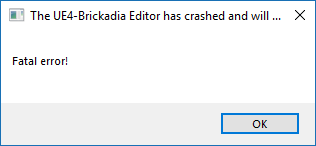 obtuse seal
Can't say I would know what causes that, there's probably a profiling stat for the Niagara moviescene
uh don't know anything about that crash though lol
sullen forge
might be inproper frame pacing
where your average fps is high, but your frametimes are wobbly
check stat unitGRAPH
robust quail
is there some way I can bring that up in the niagara window?
hm
dunno what's up with the niagara preview window, it looks perfectly smooth in the world
it's definitely running at lower fps in the preview
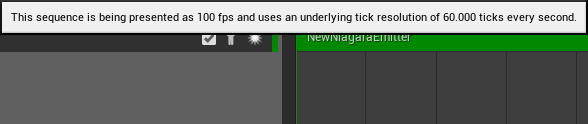
wonder if this is related
wut the emitter disappears if the source is off screen
obtuse seal
That's how automatic emitter boundaries work, generally speaking
Here's something I'm curious about. I'm testing out a Niagara DataInterface to add user defined buffers to GPU Emitters. Do I need to manage the lifetime of buffers I create? i.e. I create a new buffer with RHICreateUniformBuffer and then set it to a FShaderUniformBufferParameter member of my DI.
I'm guessing it should be safe as the buffer RHI gets GC'd with my DI
 fair orbit
Hey guys, I've got a question. I have an effect created in this particle editor, let's say it's explosion. is there any way which would let me render this explosion to PNG frames in the editor here?
ebon gate
In cascade you can use GPU particles for receive events but in niagara when i use receive collision event on gpu particles nothing comes up. am i missing something or is it a limitation in niagara?
robust quail
is the map get node meant to work?
I put the emitter in a system so I can put it in the world but now it seems to have made a copy in there and editing the emitter doesn't change the one in the system
niagara is very confusing
attempting to edit the system while it's spawned in the world crashes the editor
aaaaa
obtuse seal
What in tarnation
@robust quail I don't know why everything is broken for you but it werks on my machine(tm)
The issue with getting a pin from the Map Get node is particularly concerning, did you resolve that?
robust quail
nope
it's broken
have to select an option like "engine" and then use keyboard navigation to go from there
robust quail
that one works mostly flawless
though the menu where you chose a new parameter class sometimes also jitters left/right
at least it did in 4.19
I like how taa makes all my particles have trails
obtuse seal
I haven't had an issue selecting options from a sub-menu even with the early versions of Niagara so I'm assuming it's some long standing issue related to the slate code for the graph behavior
but if you can replicate it then please send a bug report for it
robust quail
I mean
I can replicate it by just trying to add a pin to map get
it simply doesn't work
obtuse seal
How very strange. I would submit a bug report with your systems specs regarding the issue. Do you have an odd resolution monitor?
robust quail
oh
I figured it out
the issue happens when the menu goes off screen at the bottom
if I move it all the way up so it doesn't it works
obtuse seal
good catch, I'll try replicating in a few...
robust quail
it should probably stop somewhere above the bottom of the screen and get a scrollbar instead lol
obtuse seal
@ebon gate To get a collision event you need to have the Collision Query and Generate Collision Event modules in your Particle Update stack, see the example content for reference
robust quail
is there some way to set approximate culling bounds based on how big you expect it to get so it doesn't disappear instantly?
obtuse seal
@robust quail Trying to get the submenu to flow off of the screen but it repositions to be within bounds, will have to do more testing to see what causes it to overflow the screen boundaries
@robust quail Regarding particle system boundaries you can assign them under the Emitter Properties module in the Emitter Spawn section of the stack
robust quail
it just goes off screen for me
then it becomes unclickable
sometimes it also flickers above and below
obtuse seal
thanks for that info, I'll try that method to see if it overflows
robust quail
https://i.imgur.com/BSrmtZD.png what would be editing the bounds?
 obtuse seal
You set fixed bounds to true and then manually set a bounding box where the Emitter is relevant and not culled
it defaults to a 100x100x100 cube
robust quail
it appears to work without checking the box so I'm confused what the box is for
obtuse seal
uh
that sounds like a potential bug lol
I'll look into it
should have to set the bvar to enable fixed bounds
robust quail
I mean the box doesn't say it's to use these bounds but to prevent editing the bounds
(whatever that means)
obtuse seal
Uh... shows what I know
I assume without fixed bounds the engine checks whether an emitter is relevant if the source is within the camera frustrum
robust quail
are you supposed to add the emitter to a system to spawn it?
obtuse seal
Yes Emitters must be part of a System to be in the game world
robust quail
right
but if I then add new modules to the emitter asset
it doesn't update the copy in the system
obtuse seal
You have to hit the Apply button and probably recompile the system as well
also regarding getting the Map Get submenu to overflow I can't make it work even by squishing my window or positioning it between the boundary of two monitors, @robust quail what resolution is the monitor your Niagara editor window is on?
obtuse seal
wellthere'syourproblem.wav
Yeah I'm guessing there's a logic issue with determining the bounds for the submenu when it's created
robust quail
just using the default 1:1 dpi scale
so no fancy stuff going on
what's the giant sphere I can see in the background when bounds view is enabled? https://i.imgur.com/YguaGfS.png
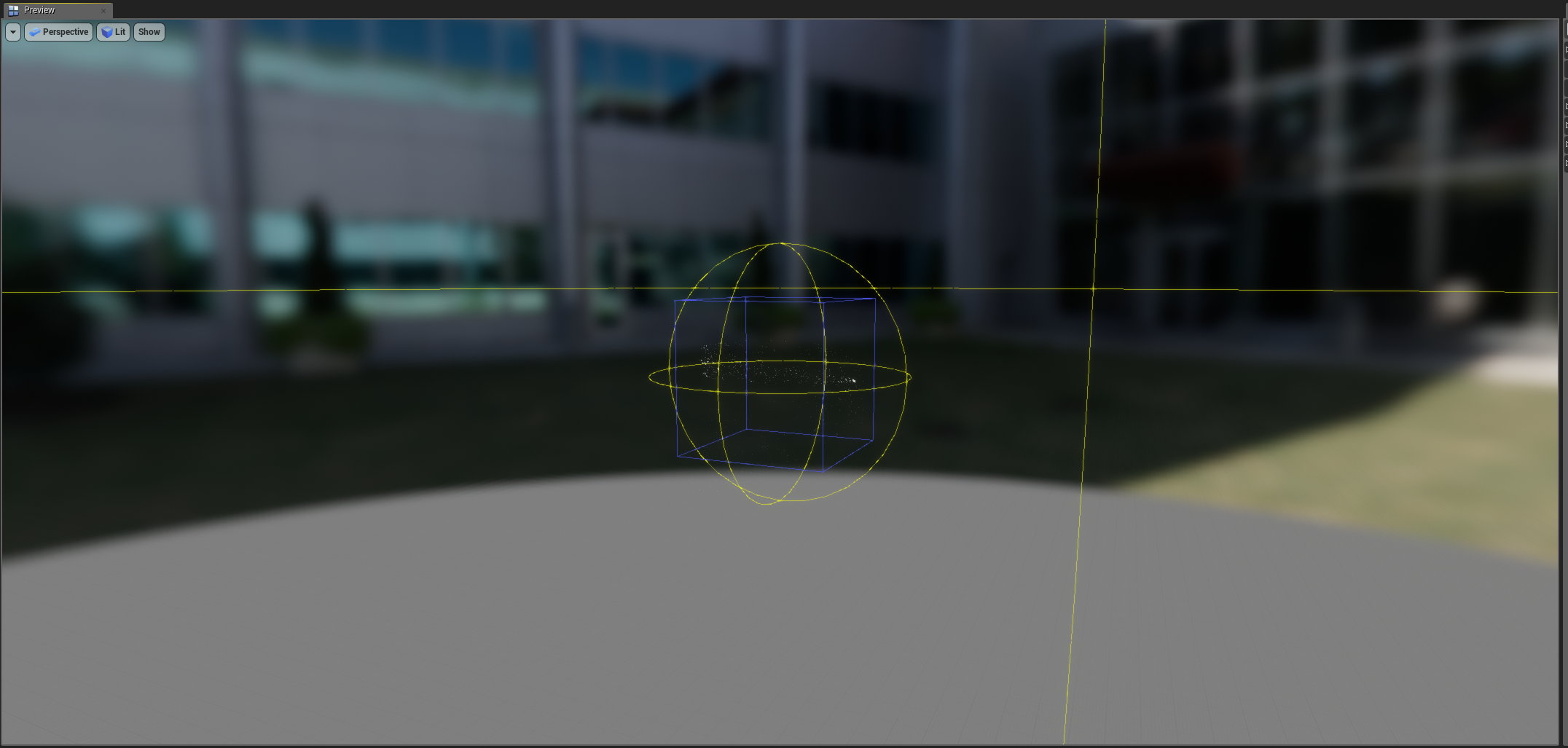 obtuse seal
good question, I have no idea
robust quail
maybe particle sim bounds?
obtuse seal
relevance boundaries or some such
I haven't played around with it yet so just a guess
obtuse seal
careful with walking back through the edit history, there's probably still a good few crashes related to it
e.g. save often :)
robust quail
yeah
got into a habit of saving like every 5 seconds when working with unreal
what's up with the wire colors randomly changing
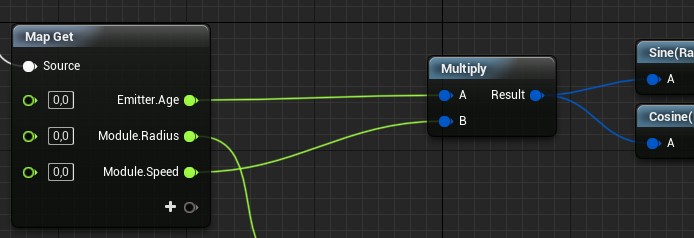 obtuse seal
It's just how abstraction works in Niagara Graph right now
Multiply node isn't type dependent, you can plug any type into it
robust quail
ah
obtuse seal
so the type it outputs is called a NiagaraNumeric
robust quail
so it's kinda like the material editor
obtuse seal
you can actually right click the pin exiting the multiply node and manually assign what type goes out
obtuse seal
I believe it's planned sometime that the pins will dynamically change to represent what's actually getting passed through
yeah you have to break all links first I think
it's a little buggy anyway and not required but worth noting
robust quail
ah yeah it works with nothing connected
interesting
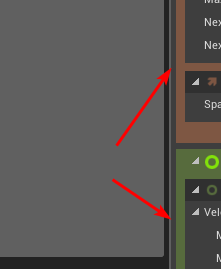
these 2 background colors could really use more contrast between them
what it crashed by itself without me doing anything
just in the background lol
obtuse seal
Regarding the issue with Map Get node's submenu to add a pin overflowing I'm guessing it's an issue underlying in SExpanderArrow but I don't write Slate so I've no clue where the geometry bounds get verified
moreover it likely stems from issues supporting high resolution displays that would affect everything that uses the existing graph code
ocean hedge
I'm going to get some of our QA guys to try and reproduce the problems above
@robust quail if we need it, mind if we DM you for more info?
robust quail
sure
you're right it's affecting more menus
https://i.imgur.com/Hffbmua.png this one is broken aswell
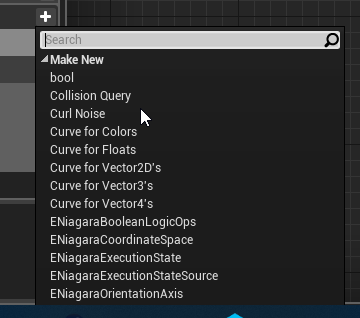 ocean hedge
@obtuse seal If you create the resource, make sure it is traceable back to a UProperty on a UObject. Otherwise, it could leak.
obtuse seal
@ocean hedge Good call, I hadn't marked the FShaderUniformBufferParameter as a UProperty 👍
Oh and thanks Wyeth for adding a Slerp function, I needed that but couldn't find any docs on writing it in hlsl
obtuse seal
I was looking through the VM binding for functions in Niagara DIs and I see you can instantiate FNiagaraTypeDefinitions with a UScriptStruct, is this part of planned support for an eventual arbitrary struct type in Niagara?
robust quail
how come the make [thing] nodes in niagara are so much larger than similar ones would be in bp? https://i.imgur.com/aI2yTcG.png
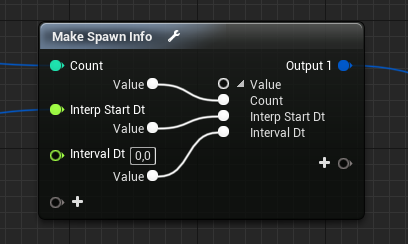 obtuse seal
It's a Conversion node unique to Niagara
you can drag the pins manually to convert types however you like
robust quail
huh
obtuse seal
but yeah making a new type in place uses the Convert node which is huge
you can click the little wrench icon to squish it a bit lol
 boreal gull
woah what a node.
robust quail
oh wtf
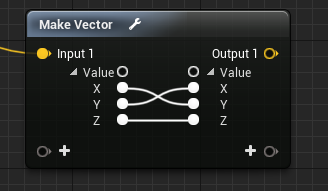
so it's some kinda advanced split/regroup node https://i.imgur.com/aT3hTAg.png
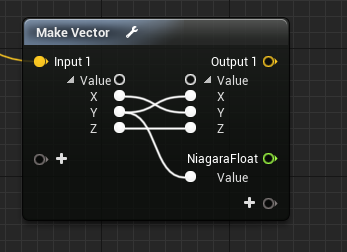 boreal gull
if they uh "port" that to BP that'd probably make a PR I've been working on moot.
obtuse seal
some other peeps working with Niagara were interested in seeing that in BP too
robust quail
how come the spawn burst module needs to go in emitter update instead of emitter spawn
obtuse seal
it just werks that way
robust quail
it's kinda strange tho because you'd only want that to do stuff once right
obtuse seal
I couldn't tell you the technical reason
spawn burst can happen multiple times, for instance every time the particle system loops
so it logically must be in Emitter update durr
robust quail
hm
obtuse seal
you just set the max loops to 1 in your emitter to prevent the burst from looping
robust quail
I keep getting things stuck highlighted https://i.imgur.com/2vdNlMU.png
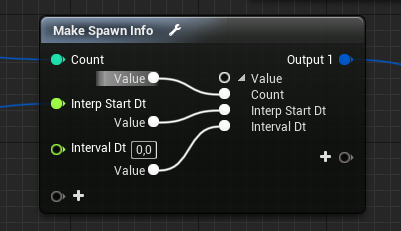 obtuse seal
yeah there's a bug with highlighting not fixing
happens with the exec pin "strings" pretty often
robust quail
am I missing an obvious way to open the emitter asset from a system?
the way you can change things in the system without it indicating you changed it from the emitter defaults in any way is probably going to lead to a lot of confusion
ocean hedge
the green arrow next to the changed value is the indicator
we'll probably be moving to a different coloration of the field itself, but that is much harder to implement
just right click on the header and pick the open source emitter from menu
robust quail
the arrow seems to indicate that it was changed from the module defaults
not that it was changed from the values set in the emitter asset
ocean hedge
there are two arrows
robust quail
oh shit I didn't notice
yeah
nvm that then
ah yeah
there wasn't anything indicating right clicking the name would do something so I didn't try that
ocean hedge
we should probably do a dropdown icon or something to indicate that there is a right-click menu
we considered something like the blueprint parent text for a bit, but felt that was too heavy
maybe just a hotkey icon on the header
robust quail
how come the preview viewport on an emitter asset uses the normal right click / wasd navation while the one for the system seems to be using some kind of orbit controls
or is that something I somehow toggled without noticing
obtuse seal
@robust quail You can toggle orbit controls under the dropdown arrow in the *preview viewport
robust quail
huh
oh found it
definitely didn't change this though
it must have been this way before
maybe there could be some max width for how wide the properties panel becomes automatically
because the default looks like this on my monitor every time I open a niagara thing https://i.imgur.com/ZpWXi0H.png
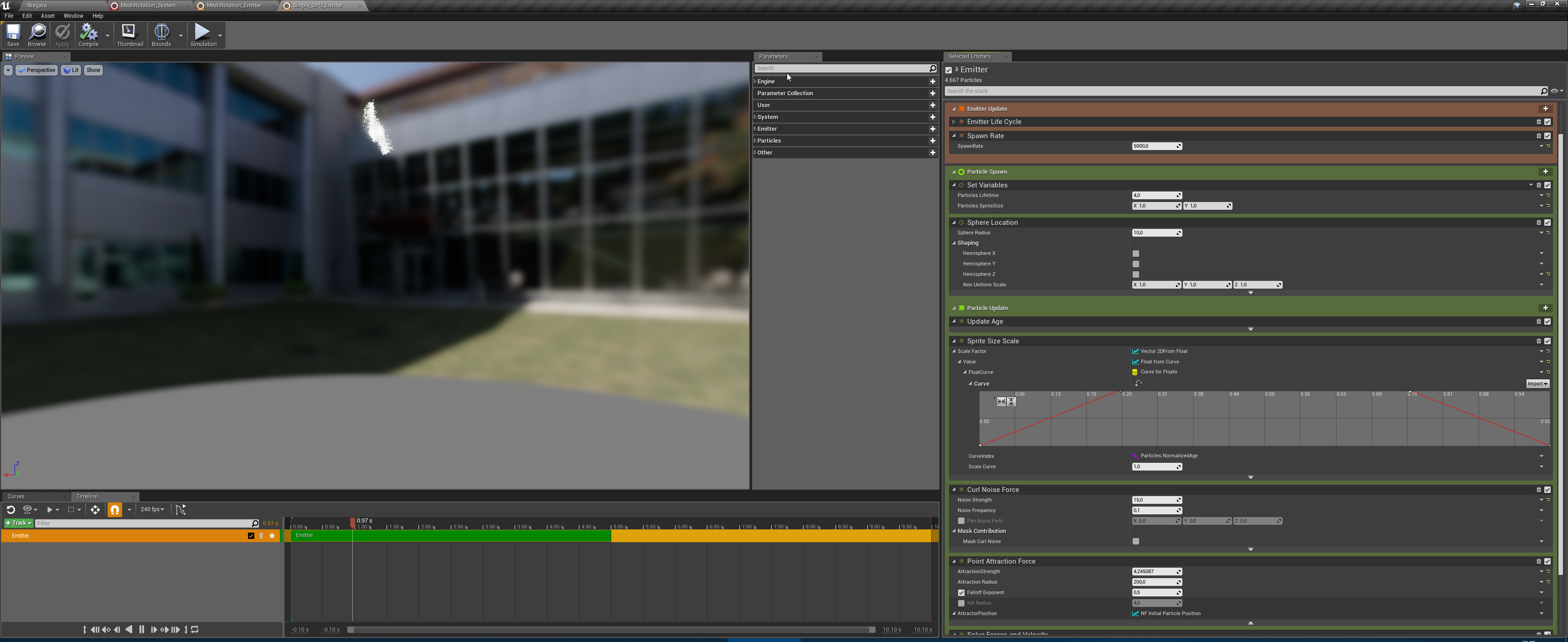
see why I didn't notice those arrows to revert things before
ocean hedge
yeah, that makes sense
it's set up for multi selection
although most people haven't gotten to that use case yet
but I definitely take your point
robust quail
the panel is a lot more usable after changing it to be this wide https://i.imgur.com/2YZsJ4v.png
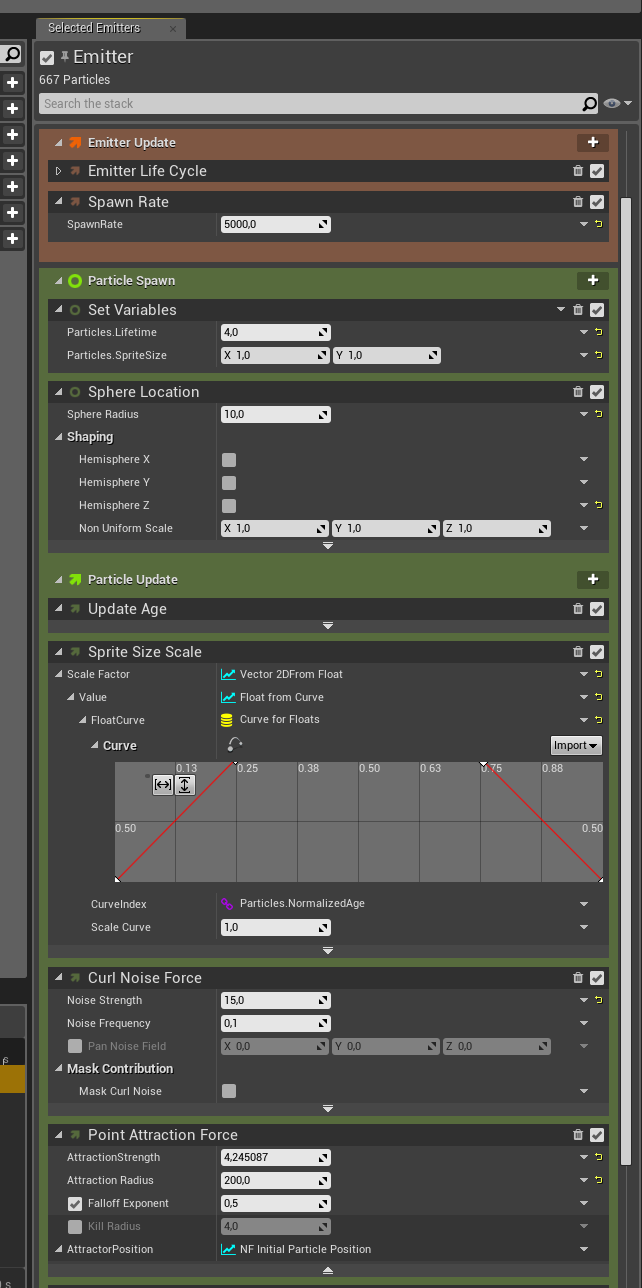
does compiling a niagara module optimize out unnecessary math like * 1 or + 0?
ocean hedge
yep
robust quail
nice
ocean hedge
the system still "hard codes" ints, bools, and enums for just that reason
you can examine the hlsl source in the Generated Code Tab
robust quail
so if you got a thing like this, assuming everything is left at defaults, the last 2 operations get removed? https://i.imgur.com/PG4Ny7I.png
 ocean hedge
no
we treat any float-based variables as "shader constants" and they are not yet optimized out
this makes tweaking variables much more responsive
we are investigating having a mode that bakes any non-user/non-engine variables as hard-coded values during cook
so that we can more aggressively cull out redundant/dead code
but for now we treat ints/bools/enums the same way that the material editor treats static switches
so "if" on a value equalling an enum will cause the final assembly to only select the matching path
sorry for the confusion
robust quail
interesting
hm there's no entry for emitter update script in the generated code tab
does it all get combined into system update?
ocean hedge
it's a special case, they all get baked into the system update right now
or system spawn
robust quail
definitely makes sense to only consider optimizing it during cook though
indigo jolt
does anyone know what would prevent Static Mesh Morph targets from doing more than about 50% of the overall morph target movement?
it's nuts, i try to squash this pyramidal shape down to basically a pancake and instead it only gets half way there
indigo jolt
hmmm the initial scale changed to 0.75
just changed that back to 1.0 and not really seeing a difference tho
i'm wondering if it's because i did things in reverse of normal
i've had success before
but normally it's like "small shape to large shape"
in this one i'm trying to go from big to small
maybe it doesn't like to go "inward"?
mmmm nvm nothing i'm doing is working right
gonna try messing with overall scale in 3d max before export
other successful things i've done before were smaller
 fresh harness
@indigo jolt Dang, sorry. I haven't messed much with morph targets, but I have seen similarly strange problems with a few other animation-related things when something's scale is changed only in the editor.
Edit: I just did a test. Created a huge cube with a point extruded from the top so it's like a pyramid. Scale was twice the size of the default FPS map. Added a morph key to it that shrunk it down flat and scaled to 100th of the original. Have it morphing between the two shapes via timeline in BP and seems to work perfectly fine in 4.20.
ebon gate
Is there a way to expose nuagara VFX parameters so that I can change them via BP?
near ferry
@ebon gate Also interested in this. Haven't tested it myself but there are some functions called SetNiagaraVariable (Type). Unfortunately it's missing meshes which was what I wanted. The one for setting actors currently does nothing. You can have a look over here: http://api.unrealengine.com/INT/BlueprintAPI/Niagara/
Niagara
short sorrel
All, still fighting with footprints in the snow 😃 it's a MP game which unfortunately means that it's easy to go over budget with effects, as they apply also to contendants.
Has anyone tried this? looks real nice but I'd be interested in guru's opinions 😃 https://www.raywenderlich.com/196937/creating-snow-trails-in-unreal-engine-4

In this Unreal Engine 4 tutorial, you will learn how to create deformable snow trails using a scene capture and render targets
 fading void
ok problem
I have niagara system
I want to externally tell this system to spawn EXACTLY one particle
and then every time I press some button (input) I want this system to spawn another particle
but there seems not be any event handling for spawning ;s
ocean hedge
@ebon gate Make them User parameters. There is a Blueprint node for setting User parameters on a Niagara component.
@fading void The simplest suggestion I can make is to have a user SpawnCount variable and as needed set that variable to 1 for a frame. Have a module that looks at that variable and creates an appropriate SpawnInfo in its emitter update script. You'll then need to set it to zero in the next frame. We'll be looking at better ways to drive this stuff externally in future releases.
you'll be able to set that user variable in BP as indicated in the previous reply
fading void
@ocean hedge hey thanks for reply 😃
@ocean hedge one more question though. Do you guys plan to expose particle event into BP/Code ? like collision events, location, so external systems can use those events.
And the other way around, will external systems be able influence niagara events ?
ocean hedge
We are investigating it. It is usually a bad idea for game logic to depend on particle system simulation results, but if you wanted to play sound effects or do other aesthetic work I can understand wanting more information. Right now we have DataInterfaces, which allows users to inject completely custom code into the simulation. For instance, you could call a data interface function within your system that caused audio to play. Today most of the data interfaces are there to bring data into the sim, but there's no reason why it couldn't also go out.
We may also do things like the previously mentioned spawn event, which has a lot of solid use cases.
obtuse seal
The potential for massively complex particle sims that aggregate data from everything is quite enticing :)
fading void
@ocean hedge thanks. Quite understsable you don't want to drive game logic trough particles, I was thinking more in terms, create particle system which spawn tracer (as mesh bullet), and then when that bullet collide spawn another system with hit effect. It's purerly cosmetic.
Guess i could do it from within one system, but idk how maintanable it would be.
ocean hedge
gotcha
there's another complexity that I haven't mentioned yet... latency due to GPU pipelining
for any GPU particle system, you may be several frames behind the game thread for rendering
any communication from the GPU back to the CPU (which we have to be very careful about coding because it can introduce horrible stalls if not done properly) will inevitably have to be latent by how deep the rendering pipeline is
I think Cascade avoided this issue entirely
I"m not sure that Niagara can, although any efforts on this front will likely be staged CPU first then GPU
for CPU-side effects, though, this problem largely doesn't exist
you just have to be careful about thread-safety as the particles are simulating on worker threads, not the game thread
just trying to give you guys some insight into our thought process here
obtuse seal
Can the VM sim systems run a few frames behind the game thread or is that work done in sync?
ocean hedge
we're not allowing it to be latent right now
some of our optimizations will include pushing any simulation that doesn't need updated data from the game thread to sim as early in the game frame as possible
depending on bone sockets, skinned meshes, other object transforms/etc inevitably push back when we can fire off the sim
obtuse seal
Ah that's interesting, so I'm guessing there's a lot of bouncing between game thread and sim thread for systems polling any UObject info then?
ocean hedge
right now we run about the same time that physics runs (i.e. after the game thread has done all its major work for transform updates)
this is really late in the frame and since we make the frame wait unti l we are done, it can slow down the overall game frame
optimizations like the ones mentioned above are more fine-grained resolution, allowing us to kick off data much earlier in the game frame
fading void
ok there is UNiagaraDataInterfaceCurveBase > where can I find it, in editor ? I'm totally at loss where to look for it
ocean hedge
right now, we can just pull the data we need off the game objects, but in the optimized scheme above, we'll need to push data into something like a command buffer
obtuse seal
@fading void The DataInterface stuff is just for Niagara Scripts/Emitters/Sims so it's contained within one of the above
ocean hedge
@fading void it is an abstract base class, not directly instantiable inside the editor, found at Engine/Plugins/FX/Niagara/Source/Niagara/Classes/NiagaraDataInterfaceCurve.h in the depot
fading void
yeap I found the code, I just don't understand where it is used in editor (;
ocean hedge
ah
it is just there to share some implementation details between sub-classes
the instanceable ones are NiagaraDataInterfaceColorCurve, VectorCurve, etc
one class per data type that you might interpolate
obtuse seal
A question I'd like to throw in @ocean hedge , load-balanced sims are just an idea at this point in time but what use cases would be suitable for if/when implemented?
ocean hedge
@obtuse seal that is a super thorny question
obtuse seal
hahahah
I was mostly curious where one might see it suitable for usage, as personally I couldn't think of an example
ocean hedge
in a perfect world the simulator would know that the game is GPU or CPU bound and could simulate on the one with the most bandwidth for any given frame, copying data around as necessary
sadly, this perfect world is impossible due to the GPU latency I mentioned before
obtuse seal
I expected as much
ocean hedge
so that puts us in an alternative world where we might have two versions of the sim
i.e. a particle will live and die in whatever mode it was spawned in
fading void
aa thanks, found others
ocean hedge
but we might decide based on historical data to instead bias all future particles to be spawned on the alternate mode
obtuse seal
Good to know the thoughts behind this load-balanced mode 👍
ocean hedge
so over time, it tries to balance out the load
to be honest, this is more theory than practice
I'm not sure that the "juice is worth the squeeze" here, given the other optimization avenues we have in front of us
obtuse seal
I was wondering whether you would say that yourself haha
I had guessed that it would be quite difficult to implement a load-balancing mode given the other potential optimizations as you stated
ocean hedge
another, probably easier mode is to compile the script for both cases
then, given that most systems live and die in very short time spans, each system instance would be put in one bucket or the other
that might have some legs, but it would still be lower priority than other optimizations
obtuse seal
@ocean hedge Another question I have, I'm working on a boid flocking implementation and was curious how much overhead is incurred using events to synchronize information between all particles in a system
obtuse seal
It's a very general question but I ask this because I'm curious about whether it would be possible to expose all particle params as accessible by index
oh and there it is ok 👍
haha that resolves it
ocean hedge
if you look at the code that we generate, all the data is sitting there attached in a buffer... you just need the right offsets to access it
you just need some sort of data structure to spatially organize the particles
so you could iterate over all the ones within a certain distance
obtuse seal
I had briefly looked into some implementations and for large numbers it was apparently more efficient to just iterate over all members although I would certainly be doing some profiling myself at that stage
ocean hedge
for you brave souls that want to work with the latest and greatest, the team is currently working out of Dev-Niagara.. expect some volatility, but also yummy goodness like the ability to sample from 2d textures...
obtuse seal
The texture sampling DI is coming along nicely by the way 👍
I should have a pull request up for my render target DI soon, I will just be copying the implementation provided in the texture DI as it looks much cleaner 🤓
ocean hedge
I'm actually working on something similar at the moment for approximating volume textures
with a data interface that lets you read/write to them directly
obtuse seal
Interesting, how do you propose the handle the writeback to (I'm guessing a texture3d)?
ocean hedge
the engine doesn't support 3d textures right now
at least not dynamic ones
so it is using atlased texture2d's
ocean hedge
trying to cover as many platforms as possible with the technique
obtuse seal
good point
ocean hedge
it will hopefully show up in the branch in a few days
but I expect you guys will be able to come up with crazy fun stuff to do with it
obtuse seal
Do you create a UAV resource binding for getting data in and out, or otherwise how is read write handled? 🤔
ocean hedge
there's a read and write texture that are swapped
can't get that super-fast hardware texture sampling without it
RWTexture2D doesn't let you use samplers, just direct indexing
obtuse seal
Interesting, I need to become more familiar with these optimizations
ocean hedge
but yeah, bind one tex as a UAV to read and the other as a buffer and write with direct indexing
obtuse seal
is texture UAV binding implemented yet?
I had looked into it but it appeared that the necessary flag to pass through on creating it wasn't exposed
Likely I misunderstand the proper method to do it
in any case I will sift over the new code as soon as it's up on the repo 🤓
ocean hedge
still working on it
will have to create the textures myself with proper bindings
http://shaderbits.com/blog/authoring-pseudo-volume-textures for more info on the overall approach
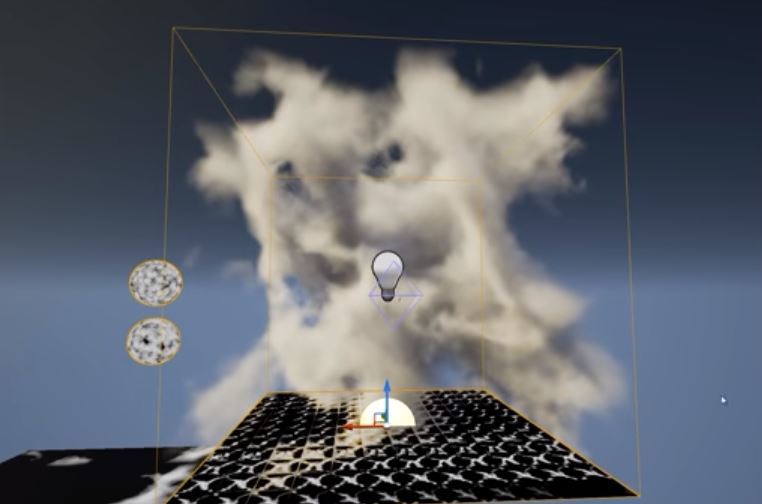
This post is the second part in a series leading up to building custom volumetric effects inside of UE4. The previous post went over ways to make subUV or volume textures tile seamlessly and that will be used at the end of this post:
Part 1: http://shaderbits.com/blog/tili...
by Epic's resident Wizard, Ryan Brucks
obtuse seal
I had a 50/50 bet this would be built off of Ryan Brucks work lol
very nice then, I had been wanting to try replicating the cloud volumes effect
 viral wadi
@robust quail The lower frame rate you're seeing in the editor window is due to the fact that we sim at a constant fixed 30fps in order to make scrubbing and seeking work consistently and performantly. In the future we'll probably link this value to the frame rate selected in the sequencer control in the emitter and system editor that way you can configure it yourself.
obtuse seal
Where would one find the source code for generic util nodes in Niagara, specifically the Execution Index node?
indigo jolt
@fresh harness just an update on the static mesh morph target problem - i switched from Max 2014 (which i've used before successfully for static mesh morph targets) over to Max 2012, now it works perfectly again
totally unclear what the cause was
starting to really want a newer max
obtuse seal
argh finally found it under NiagaraEditorCommon
retrospectively that makes sense for it to be there 🤔
 mortal jacinth
https://gyazo.com/5e7212c18953678766ac969b3ffddbbe
anyone know how to make the particle effect constant and faster? havent really done particles before
 obtuse seal
crank up that spawn rate
mortal jacinth
on "Constant" or?
obtuse seal
well to get it to persist longer you need your particles to live longer, so you will be increasing the lifetime. To get it to go faster you need to increase the spawn rate
obtuse seal
Yes that's spawn rate
but if you want to increase the "speed" of the particle you need to give it some more velocity
mortal jacinth
im increasing the velocity doesnt seem to be respawning faster
obtuse seal
Respawn rate is controlled by the spawn rate number you posted earlier, bigger number = more spawns (specifically it is the number of particles spawned per second)
mortal jacinth
thanks
mortal jacinth
How would I go abouts adding water splash when shooting at water?
obtuse seal
@mortal jacinth Everytime you shoot you do a linetrace, from the hit result of the linetrace you check if you hit a water body or water surface and if so then spawn a water splash effect at the relevant hit location
 tiny river
Any Houdini artists here that would be up for a paid tutoring session?
ocean hedge
speaking of live streams, @strong carbon will be doing a livestream this Thursday at around 1:30pm EDT. The focus will be on the new Niagara Content Examples map and Niagara's capabilities
ebon gate
@ocean hedge Just saw your message on exposing parameters. I was just wondering is there a way to set the default values for those parameters to preview the particles? Exposing them makes it difficult to preview what it will look like.
ocean hedge
@ebon gate may have lost the train of though on that question. Are you referring to default values for module variables or default values for User variables... or something else?
ebon gate
for user variables
obtuse seal
It would be nice to be able to assign default user vars in the Emitter stage
ocean hedge
I see
that's something we could add if people wanted
ironically, you could do something similar when defining the User variable in a module
ebon gate
Oh right in the system not in the emitter. i was doing it in the emitter.😆
obtuse seal
interesting
Yes it would be very nice to be able to assign default user vars for Emitters
ocean hedge
our original thoughts were that you'd only need user variables to expose specific things to blueprints or for the level artist to tweak
they were the way to connect up systems to the world
if they were also shown in emitters, what would you expect to happen if you had two of the same emitter in the system?
they would both point to the same user variable?
or should they each get their own?
obtuse seal
There should be unique User vars for each Emitter instance, I think. If I make a generic explosion Emitter with a radius property that is a User var, then when that emitter gets collated into some cluster-bomb System it should be possible to assign multiple explosion radii
ebon gate
ok im starting to get the gist of the process. Expose the parameters in the system and not in the Emitter and then change the variable in the BP using this:
ocean hedge
yep
ebon gate
niagara truly is flexible. Its amazing! 😁
ok im starting to get a clear picture of how niagara works. I need to figure out the module scripting side. is there a documentation on this?
obtuse seal
@ebon gate I haven't read over it myself but there's some docs here https://docs.unrealengine.com/en-us/Engine/Niagara
ebon gate
I've been through all of those guides such as setting up niagara, emitters and add modules. I'm thinking of making my own modules via node graph.
ocean hedge
Join us for a first look at Epic Games' new Unreal Engine VFX editor, Niagara. This new suite of tools is built from the ground up to provide unprecedented p...
obtuse seal
worth watching the gdc talk too 🤓
ebon gate
Cool! Will do. Thanks for the help @ocean hedge and @obtuse seal 🤓
ocean hedge

pursuing the dream of making weird things full-time | building stuff with ue4 niagara
Tweets
46
Followers
104
 Twitter
lots of good tutorials ^
@obtuse seal has some good stuff on his blog
obtuse seal
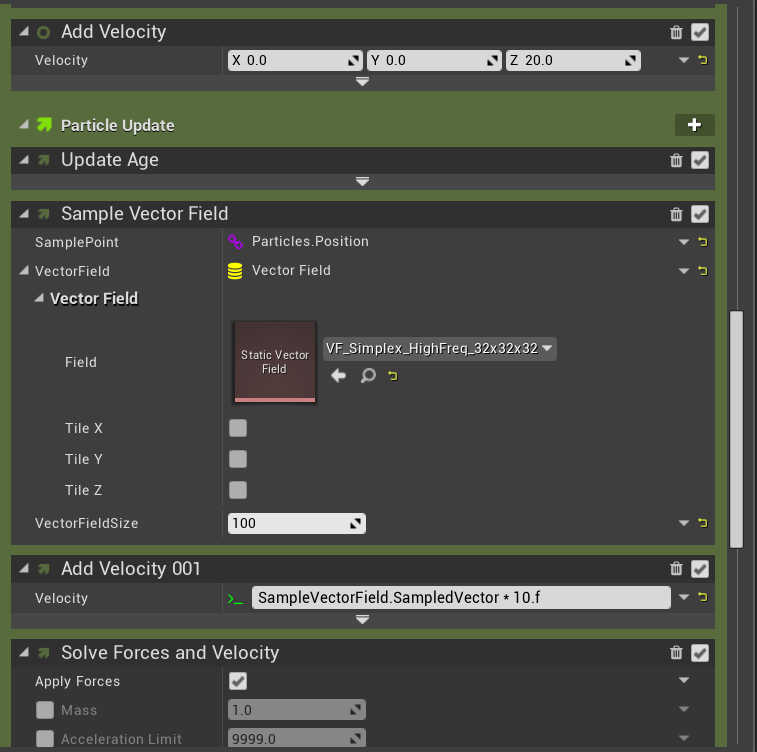
Really outdated tut on sampling vector fields which is still WIP lol https://unrealingens.wordpress.com/2018/05/30/exploring-niagara-pre-release-part-1/
Unreal Engine’s new VFX module Niagara has been on Epic’s roadmap for a few years but following Epic’s GDC presentation on Niagara in March, this new system is quickly moving towa…
But it does go over a lot of elements of Niagara so good practice familiarizing yourself with a lot of it
still need to do a blogpost on other important bits like debugging with Attribute Spreadsheet
ebon gate
cool! will check both after watching video.
 past osprey
shouldnt this be changing the color? https://gyazo.com/a16a48f1cc970a46aac0d20faef87539

 nocturne isle
it won't work if your texture is black
past osprey
Thanks
cold sorrel
@mortal jacinth You can go wtih traditional sprites (of which there are millions of tutorials) or meshbased splashes.
In this tutorial, I'll show how to create a Paintsplat projectile in Unreal Engine 4. I'll take you through the creation of Vertex Animation Texture splashes as well as creating a decal based on baking a FLIP splat. We will start with an empty Houdini scene and finish with a ...
Or the slightly older way of doing it: https://www.sidefx.com/tutorials/splashmesh-houdini-for-games/
Create a nice and thick mudsplash in Unreal Engine 4, using a FLIP tank in Houdini. Literally go from an empty scene, set up your FLIP tank, throw a rock down (it's really just a deformed sphere) and then reduce it to the barebones shape and export that single frame of geo in...
cold sorrel
Hmm
You should probably stick to sprites
If that's the question.
Yes,
The direction is based on the blueprint you spawn the effect with
the tutorials I linled where more about the creation of the effect, but I believe they may be a bit too advanced.
mortal jacinth
Looking at that tho, just looks like the gun would always shoot water splash lol
 frail sail
any good resources for making a bullet trail effect like in Fortnite?
do you guys think it's particle effects or just a cylinder mesh with a material?
 solid stream
how about ribbons @frail sail ?
frail sail
maybe
thing is, fortnite's shoots are hitscan (except for some) but the effect still gives the idea that there was a bullet being fired while also matching the hitscan pattern of the shot
a very fast particle with ribbon could work
solid stream
havent really paid attention to it while playing, but I'd say particle ribbon yeah
solid stream
so mesh then ?
frail sail
one thing that is clear is that the WHOLE trail is present as soon as the shot happens
sullen forge
or beam with some fancy material-ing
frail sail
it's not a traveling thing
cold sorrel
Beam over Ribbon!?!
solid stream
oh true there is the beam too
cold sorrel
What year is this!?
solid stream
but beam is straight though
frail sail
the whole trail appears, from start to projectile hit point, then there is some animation to make you "feel" like the projectile has traveled
 frail sail
that's not actually what you see in game haha
solid stream
yeah
frail sail
or maybe
solid stream
I dont have the game at hand here so I cant check 😄
frail sail
if you stop it it's like that
 cold sorrel
no
cold sorrel
Culling will murder you if you do
frail sail
I was thinking of some cylinder mesh
no particle
just dynamic materials
but I'm not that into VFX
sullen forge
robo recall uses mesh for its bullets
with some fancy material
very fancy
that way it does a good looking weapon trail without going through particle system
frail sail
yeah, they really nail materials at epic. So complex.
cold sorrel
Man, you get so many cool options when you don't have bulletdrop to worry about
frail sail
yeah
hehe
I will try with cylinders then
tho I do have Luos's particle toolkit vol 1
might be worth checking it out
obtuse seal
What is the absolutely gargantuan superforumula node for in Niagara graphs? 🤔
Also, out of curiosity I looked into writing a new node for Query a particle by its ID and getting the context for it back. A really naive implementation as a NiagaraNodeOP that gets the assigned tmpwriteindex and puts all of the default values into a parammap doesn't work out since the parammaphistory isn't built correctly (doesn't register the accordant input pins).
As well generally speaking it doesn't serve much purpose without a way to iterate on loops which would likely require a good deal of work in the hlsl translator
ocean hedge
I think superformula is something @strong carbon cooked up
 strong carbon
Those scripts are an implementation of this. There should be a location module in there that lets you play with them. If not hook it into position and you can generate all these weird patterns. Just a fun toy.
http://paulbourke.net/geometry/supershape/
ocean hedge
We'll probably have to implement the lookup particle variables by ID using a data interface, as that can do loops and interface with other C++ logic
obtuse seal
@ocean hedge I had looked into implementing particle lookup at the DI level but avoided it as it seemed to be the wrong level of abstraction for the use-case. However considering the benefits of the interfacing it provides it does seem to be the most direct solution, so I'll turn my attention there. Also @strong carbon thanks for the link 🤓
obtuse seal
Where is the code for the generic Set Variables module laid out in the Niagara source?
indigo jolt
just spent 30 minutes trying to "logic out" how to make a Tetrahedron in 3ds Max
that's the pyramid with a triangular base
i succeeded but god was it annoying
 steel sable
noob niagra question but how do i add an emitter I've made to a new system? o.O
woops nevermind i found the docs https://docs.unrealengine.com/en-US/Engine/Niagara/HowTo/SpriteEffect
viral wadi
@obtuse seal UNiagaraNodeAssignment::InitializeScript builds a local graph in code for that module
obtuse seal
@viral wadi thanks for that 👍
viral wadi
one of the things I want to explore in the future is having a way to make similar nodes easier where you somehow define the graph snippet to be used, and then you can add multiple calls to that same snippet directly from the stack in a single module
obtuse seal
I was looking into something of the sort myself haha
ocean hedge
Ie a way to do static for loops
steel sable
in Niagra, If i want to render a "magic circle" on the ground do i need to use a mesh render or is there a way to have a sprite render have a non-camera facing orientation (e.g. world up)
obtuse seal
@steel sable You should be able to use the Particles.SpriteFacing parameter to set the sprites z-up
steel sable
@obtuse seal Thanks! That was the missing peice. I also had to set facing mode to custom and custom facing vector to 1,1,1 (for anyone else wondering)
ocean hedge
yep, that's the way to do it
update... livestream will start in about 40 mins for Niagara https://www.twitch.tv/unrealengine

I'll be in too, so if you have programmer questions.. I'll hopefully have answers 😃
obtuse seal
👀
obtuse seal
Lots of different approaches, depends on the particulars of the particle 🤔
steel sable
so I just have these simple magic circles randomly spawning (box location) and spinning around and slowly fading out ( opacity ). I'd like them to flicker a bit, somewhat randomly
obtuse seal
Is it a texture or material? If you do it with material then you can handle the appearance there, otherwise you want to make a pseudorandom contiguous value from 0-1 and and assign it to the particle opacity
cold sorrel
Ash-nazg thrakatuluk
You simply utter the black speech inside the editor and it'll flicker
obtuse seal
@steel sable Not sure precisely what appearance you want but a quick and dirty method is linking a bunch of sines with different periods https://gyazo.com/0dd10ba8eb7dba59475b7ffc2c9d1048

Can try linking something like this into the particle color alpha 8*sin(6*sin(7*sin(Emitter.Age)))) * Particles.NormalizedAge
*through a custom expression that is
you could do this in a visual script as well
sullen forge
niagara hallway 😍
obtuse seal
Crossposting in discord and twitch 🤔
 brittle remnant
@indigo jolt Just a heads up for next time you need to make a tetrahedron. Just use a cone primitive with 3 sides. 😄
@obtuse seal Interesting question: Is it now more efficient to do flickering per particle in Niagara VS doing a flicker effect inside the material? I think pre-Niagara my answer would have been "do it in material because CPU cost of particles is high"
indigo jolt
hmmm a cone! that does sound like it would work
obtuse seal
Yeah I think you would be saving CPU time doing the flicker in a mat but doubtful it's a large cost in either case @brittle remnant
brittle remnant
@obtuse seal Even considering Niagara? My understanding is that it all compiles down to HLSL that runs on the video card?
obtuse seal
The compiled assembly from the cross compiled hlsl executes on a CPU vector VM or the GPU (dur) depending on which it targets @brittle remnant
brittle remnant
@obtuse seal So essentially its up to the dev to decide where to do the work? Seems like I would always choose the GPU since theres so much more power there?
obtuse seal
It can be a performance improvement to do simple particles on the cpu and save gpu time if you're gpu bound. particularly dependent on the project in question @brittle remnant
brittle remnant
Awesome thanks! Looking forward to getting Niagara immersed soon!
While I'm in here learnin' stuff. Is there still a significant CPU overhead for spawning particles for GPU side Niagara? (Similar to the old GPU particles) or has that bottleneck been removed with the new system?
obtuse seal
@brittle remnant I think like 3 people would even be able to say for certain but I think that the GPU calls to run the shaders are packed together now which saves draw calls
Not sure specifically what cost you're talking about tho
brittle remnant
My understanding was that there was CPU overhead specifically connected to spawning gpu particles in cascade. Was wondering if that was now gone.
obtuse seal
This is a good question to ask on the stream so I'll send it there @brittle remnant
obtuse seal
https://www.twitch.tv/unrealengine get in here
 long rapids
hey gang, i want to get a mesh particle to orient along the vector it's being emitted on, and rotate appropriately after spawned
the trail shows its' vector....(just ribbon emitter attached), and you can clearly see the missle is staying horizontal, not 'pointing' to where it's headed
any suggestions/clues?
obtuse seal
@long rapids Gonna be honest I can't make out a missile in that but for a Cascade system you can have your mesh orient to velocity by setting Screen Alignment in the Required module to PSA Velocity
long rapids
@obtuse seal (its the white thing dead-center)....yeah i tried all the Alighnment features, but they dont seem to work with Mesh particle
Alignment variants, i should say
obtuse seal
Your missile mesh will need to face positive x while at rest for it to face properly towards the velocity vector I think
long rapids
hmm.....if it's original orientation was off, woudn't you expect to see it update over life.....just "wrong" ?
as is, it just stays at default orientation
maybe this is a bit more clear
i shoot it "up" and sideways then have gravity bring it down.....and it just lays flat even with PSA Velocity set
obtuse seal
@long rapids Try making an empty Cascade emitter with Mesh typedata and set it to velocity alignment. From there compare your implementation 🤔
long rapids
hmmmm....lol. ok.
obtuse seal
Didn't show skeletal mesh sampling on stream 😡
steel sable
@obtuse seal so in the twitch live stream in their expressions content sample I noticed they have a built in hlsl 'rand' function I was able to add flicker to my particle by simply adding this color variable modify at the bottom of my stack! so easy and straighforward, niagra is really awesome!
 obtuse seal
looks good 👍
ocean hedge
@obtuse seal Sorry, we totally ran out of time
steel sable
did anyone catch how you're supposed to define and set a new "temp" variable. I can't seem to do it.
obtuse seal
Don't worry, I jest 😜
@steel sable you can create namespaces at will so make a new variable of the desired type and rename it however
ocean hedge
@steel sable in the Parameters panel, click on other, add the variable and type in Temp.NewVariable as the name (for instance)
I hope that folks found today's livestream useful.. we're actively looking into multiple ways to get the information stuck in our heads out into the world..
sullen forge
@steel sable One ring to rule them all, one ring to find them, One ring to bring them all and in the darkness bind them.
steel sable
@ocean hedge the stream and the content sample are so helpful thank you!
obtuse seal
VFX runs on dark sorcery apparently
sullen forge
@ocean hedge great stream
obtuse seal
Anxiously awaiting the really cool content examples to come 👀
ocean hedge
wait til you see the fun jon and wyeth are having with the texture data interface
obtuse seal
Curious about that fur sim mostly but what's possible with textures and render targets is already getting too insane for me to even comprehend applications
steel sable
@ocean hedge for sprite particles angular velocity doesn't work correct? (it's only for mesh paritlces?) is there any thing similar for giving a sprite particle a constant 'spin' or should i just modify SpriteRotation each update.
ocean hedge
that's right.. angular velocity doesn't currently work
I suppose you could do something with the custom facing, alingment, and rotation vectors to achieve the same thing
obtuse seal
Just something like this @steel sable https://gyazo.com/19d5527d9ce6ea0ceee3a2bf26846477

The B factor is the speed multiplier so you can play with that
sullen forge
@ocean hedge im curious about one thing. If you can keep binding properties near endlessly, isnt it pretty much a node tree?
ocean hedge
yep
sullen forge
in that case, why not a node tree itself ? Reminds me of Cycles "non nodes" mode
wich basically collapses a node tree into a stack
steel sable
yeah i wound up doing basically the same thing but with inline expression. was just curious if there was a built in method since rotating a sprite would be a core thing.
ocean hedge
@sullen forge It's definitely a philosophical question. The reality is that most game effects work is really a lot of really common, shared base logic with customized tweaks specific to the situation. We thought that blueprints tend to spiral out of control quickly into spaghetti messes that aren't easily readable. The stack allows you the flexibility to string together a lot of really common pieces of functionality very quickly without a lot of glue wiring. It is also easy to at-a-glance scan the stack and understand what is going on. With the ability to create expressions, dynamic inputs, and modules, you can do everything you want in the graphs. It feels like the best of both worlds for us and the majority of our audience.
steel sable
Hmmm. So i try to add a new Particles.Spin float but it doesn't appear in the available choices for add new variable for the set variable module.
obtuse seal
didn't we stomp that bug with new vars not being intiialized
"we"
You need to give it a default value so that it's initialized in the script
@steel sable You can click and drag it into the Set Variables module and that should work
steel sable
that worked thank you 😃
obtuse seal
Odd, I was pretty sure there was a change at some level to initialize new vars so that they were accessible but it doesn't seem to work that way anymore
really odd
am I insane
sullen forge
@ocean hedge thanks for the answer, it makes sense
ocean hedge
something may have been lost when coming back from 4.20
obtuse seal
It appears to be the case
 wild rock
Has anyone used the Spline Component? I'm trying to work out how my mesh should be set up, relative to origin etc. Currently it's not being stretched correctly, it never actually touches the final point in the spline.
sullen forge
once i update my RPG project to 4.20, im going to try to set goblins on fire through niagara
and other objects on fire
obtuse seal
other objects i.e. everything
barren raven
Great stream guys and thanks for the amazing content examples. Super exciting stuff!
steel sable
@ocean hedge I'm not sure if this is a bug or i'm not doing it correctly. But I have never been able to create a Temp variable and set it. I even tried to modify Content Example "1.5 Blend Attributes by Value" emmiter by removing "Temp.DistanceFromCenter" and then trying to add it back but it won't seem to let me. Here's a video showing what I mean. https://youtu.be/2o04LeW3g-c
(Edit: the only way i was able to do it was to add another float variable like 'Particles.Age' and then double click the name to rename it to 'Temp.DistanceFromCenter')
 long rapids
i want to fire an emitter, single emitter and have it auto destroy itself when done emitting (loop=OFF of course)
is there a way to do this?
auto deactivate will kill the emitter?
steel sable
@long rapids If you are asking how in Niagra, you should be able to set Num Loops=1 on the emitter (Also called Max Loop Count in Emitter life cycle)
hmm however i don't think the actor will destroy itself, just deactivate.
short sorrel
all, any pointers on how to have a widget which has an lcd feel? thinking about an old style gps
brittle remnant
Epic folks, Is there any plan to improve the default motion blur implementation with regards to sprites / particles? It's easy to see in the Niagara test examples how the circular sprites get distorted strangely by motion blur when moving.
viral wadi
@brittle remnant It's a difficult problem with transparent geometry and the velocity buffer which I don't think there will be a solution for any time soon. In the short term the best way to handle it for transparent sprites is to scale them using velocity, or other similar tricks, or if possible make them masked sprites so that they can write to the velocity buffer and will blur correctly.
steel sable
Not sure what I was going for but this is what I wound up with 😄 https://youtu.be/pEpGxUmMhEQ

 dark rain
I'm trying to make a bullet tracer. I want it to look like smoke, so I used a beam emitter, mixed with some noise. The problem is, the noise looks makes it look like lightning. Is there a way to get the noise module to look like wispy smoke instead?
steel sable
@dark rain have you looked at this content sample? (From the Example Content project on the learn tab)
It seems like it would be a good start for wispy type beams.
dark rain
that looks good, I'll check it out!
Thanks @steel sable!
steel sable
@dark rain It uses Curl Noise with these settings
dark rain
oh that's Niagara..
I'm still working in Cascade 😛
steel sable
lol i was just about to type that.
dark rain
I tried upgrading my project, but a bunch of plugins failed to compile
steel sable
is there a curl noise module in cascade? maybe those settings would be similar
 round fog
There is not. The common way to get that kind of noise effect in Cascade is with gpu sprites and vector fields, but then you can't have ribbons.
Did I mention how happy I am about Niagara? :)
 plain dock
Has anyone else encountered the issue of not being able to open the Niagara level in the content examples?
 devout portal
@plain dock check if Niagara plugins are enabled
mortal lily
Quick one: Was the "Surface Only" checkbox replaced to only use the Surface Only Band Thickness one? I can't find it anymore under my sphere location.
strong carbon
Yep, it's now an inline checkbox on the parameter. We will update the docs
mortal lily
Aye. Thank you!
devout portal
@strong carbon will is be possible to edit docs later? afaik Epic now uses some profile subsystem for Docs (probably question for Docs team)
strong carbon
Sorry, no idea
devout portal
Hm. I think I found a bug...
need to test to confirm
Autosave crashes when trying to save modified Niagara files.
obtuse seal
There was an old bug I had once with creating a new empty niagara script and crashing on autosave without having edited any parameters but I couldn't replicate it
devout portal
nope...it was not a bug...(well UE4 crashed, but only thanks to 0 bytes left on disk)
hmm...but ue4 and project are stored on different disk...hmmm
@strong carbon fix suggestion for niagara content example 2.2, it now has hardcoded target, also scale depends on position (i.e. if you code the position as relative it still will be affected by the emitter position (curve arc), also this effect is referenced in Level Blueprint (kind of complex as Niagara example)
sorry if i got this example wrong (it's about realtime endpoint update)
strong carbon
The hard coded target is intentional, as it represents the type of world space location result you can get from a line trace in blueprint, say a bullet trace from a gun. You can override that with whatever you like. The reference to level blueprint doesn’t have any effect on the simulation so I wouldn’t consider that complex as it is not feeding any parameters to the sim (it’s just moving it around in space and rotating it. So I don’t consider those bugs, but they definitely could use better documentation on why the settings are they way they are.
obtuse seal
How do you expose the Outputs expander in a Set Variables module anyway? 🤔
oh wait it's exposed for every module
oh there's an option under the 👁 symbol
devout portal
So, how to set the endpoint of the beam through blueprint then? In this example only the actor position is changed.
obtuse seal
expose it as a User param and then set it through BP
specifically using a SetNiagaraVariable node
devout portal
@obtuse seal i'm having the issue with the first thing...
round fog
@devout portal create a new parameter in the parameter list, in the User namespace
You should be able to set that through BP
And then use that parameter in the stack for your position
devout portal
@round fog , @obtuse seal thank You!
round fog
Got it working?
devout portal
@round fog yep
round fog
I haven't messed with that yet, so glad to hear it :)
steel sable
So when using a User property like above. Is there a way you can set those user properties to default values from within the effect/system editor windows? Otherwise they'll initialize to (0,0,0) which could make it hard to visualize your beam within the effect/system editors.
ocean hedge
The values you set in the System Exposed Parameters window are the defaults it gets created with in-world
indigo jolt
hey anyone got a good idea on what's the best way to do a procedural ring in material that has soft edges on both sides and can get be adjusted easily to vary thickness?
must be SOFT edges
so far doing this and it's not really doing it for me https://i.gyazo.com/bfb914d06023a68dd3076cbba6bc111d.png
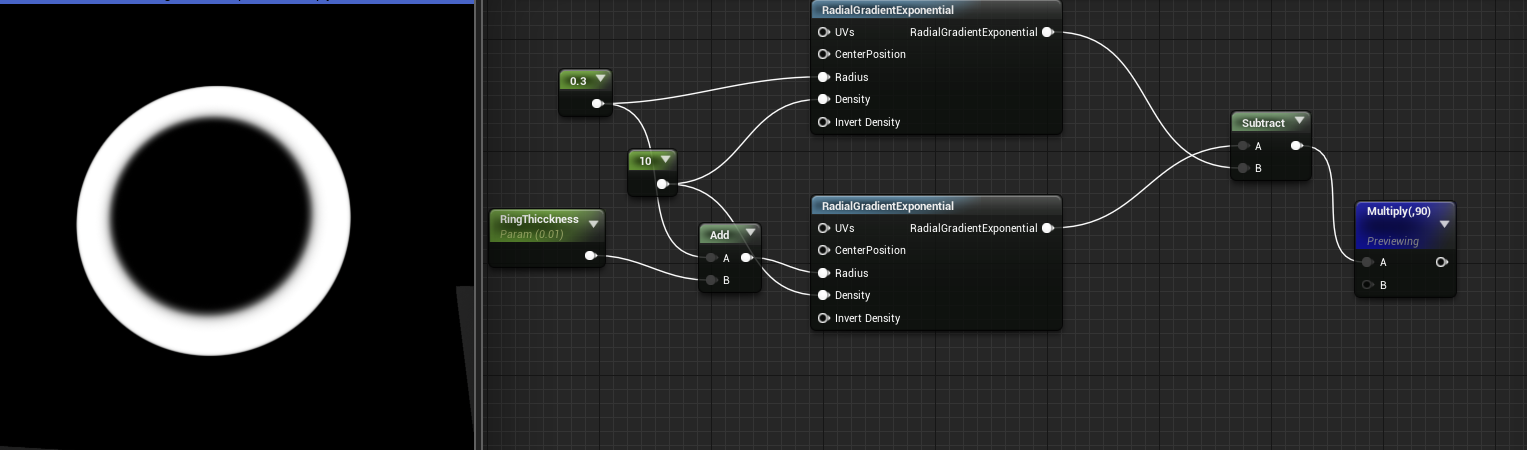
i did this method too, but it's way too crisp https://i.gyazo.com/05c180715731e3946e61c44a4ea0f050.png
 sullen forge
distance field-ish stuff
essentially, make it 1d. Work on the distance to center
calculate the distance to a point, wich is your radius
there is even a distance node
so do distance ( radius, targetradius) basically
indigo jolt
hmmm i'll tinker around with distance node a bit, i don't really understand the math well enough to do what you said verbatim t hough
indigo jolt
hmmm thanks, but i don't know math, i just know nodes
i have very dumb methodology 😦
 brisk wedge
@indigo jolt where is the difference between node math and number math?
indigo jolt
comprehension
i only understand the actual mathematical concepts behind about 25% of these things so I'm usually repeating things that i've seen work before, or I'm adding/removing various nodes and watching visually what happens
and yeah what you've got there does a good ring, but it has crisp edges. i'm hoping for a soft edge solution
sort of like a radial gradient
i've got a real nice crisp edge solution right now and it actually looks fairly legit in-game so i may just give up and stick with it, but a soft edge ring would be pretty useful in general, especially on large scale effects where i want a shock-wave type thing with infinite pixel resolution
brisk wedge
well distance gives you a gradient from the center
indigo jolt
ya i do get the feeling distance node will play a role in a soft edge ring solution, i just don't know what solution will look like yet
hoping i can shortcut the 8 hours of tinkering 😃
brisk wedge
you need to fade the color when the distance is close to the inner/outer radius
indigo jolt
oh the above example will do soft edges if i change parameters?
 drifting wave
have you tried using Radial Gradient Exponential?
brisk wedge
not really its only the distance gradient where distance is between Inner Radius and InnerRadius+Thickness
indigo jolt
yeah radial gradient exponential is the first thing i tried, but that's good for a circle, not so much a ring
drifting wave
Im looking at a ring made with 2 radial gradient exponentials, I would show you a pic but NDA
Something like this could do it too. Value adjustments can sharpen or soften it
strong carbon
You can just use spheremask if you like, very controllable.
The abs is there in case you put a subtract in front of the length calc to give you another "point" in the center
indigo jolt
hmmmm i think the Spheremask thing looks good
Joesith i will try your method too, it looks like it might have trouble "thinning out" to a fine point smoothly, not sure
i did something similar and it had problems on that front
cold sorrel
Has anyone else run into issues with the PseudoVolumeTexture function from Ryan Brucks volume examples? It offsets the texture when using 16x16 textures and I can't figure out where that function lives so I can fix it.
analog onyx
@cold sorrel PseudoVolumeTexture is defined in Common.USH. I never used it, consequently, never had issues.
cold sorrel
Hmm... Strange.
That's the only part of the code that takes in the framesXY as an argument so I guess that's what causes it.
devout portal
Where is the Static mesh defined for niagara 3.1 example? the one that referenced in the level (not the one in the system)
oh, i see now, the source in the override
i think this is one of the most powerful features
devout portal
@strong carbon sorry for poking, but how is SampleStaticMesh working? I see random Tri Coord node, how it randomizes the coordinates for specified mesh?
Is it possible to get vertices?
obtuse seal
@devout portal You can see how the operation works in NiagaraDataInterfaceStaticMesh, the Random Tri Coord node gets a Random Tri Index which itself calls Random Section that uses an FStaticMeshAreaWeightedSectionSampler to choose an arbitrary section. Regarding getting vertices there is a Get Vertex Position node that takes a tri index argument I believe

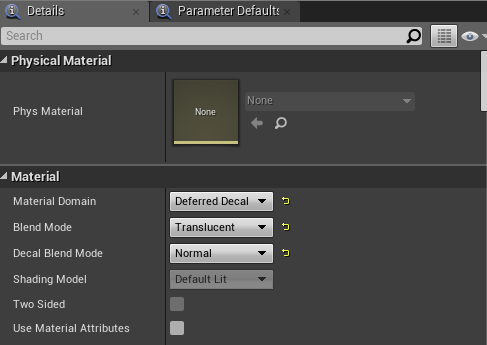


/cdn.vox-cdn.com/uploads/chorus_image/image/59094129/fortnite_battle_royale_gunfire_1920.0.jpg)