#visual-fx
1 messages · Page 18 of 1
 wanton vector

I know that eruptions are more dirt-colored, but Im going for the black smoke & deadly fire-look atm
 cold sorrel
@wanton vector seeing as you straight up ignored all the advice you got last time you asked that question in this channel, I'm going to go with no. No recommendations.
 crisp pendant
Anyone trying Niagara?? Initial Rotation Rate.... anyone an idea? 😃
 spare hare
@thick wigeon your material has to be in the Volume domain
 viral wadi
@crisp pendant In niagara you want to add an "Initial angular velocity" module in the "Particle Spawn" section
crisp pendant
@viral wadi thanks
trying
@viral wadi had hope but nope 😃
it isn't working for me
@viral wadi thanks very much anyway haha
viral wadi
@crisp pendant Are you using a mesh or a sprite renderer?
crisp pendant
sprite
i found the mesh rotation rate
but yeah sprite
im just asking to avoid feeling stupid 😃
viral wadi
ok that one won't work with sprites
crisp pendant
so easy on cascade but since a hour im trying this to learn while copy
oh ok not possible yet?
viral wadi
this system is very new and we're still working on making things more discoverable for our users so if you're having an issue doing what you want, there's no doubt that other people will stumble there too, we want all of the feedback we can get
no it's possible, let me check
crisp pendant
oh yeah shure that 😃 its totaly not important and not even released yet
its just me killing my brain if i need to write a missing function it seems so easy 😃
just to new for me (checking it out since today)
it's basically turning Cascade's "Initial Rotation Rate" into Niagara what i'm trying
viral wadi
There are a bunch of different ways to do it, but we should have a built in module for it
crisp pendant
@viral wadi Thanks very much for telling
yea just need to write it custom correct?
(i was just thinking maybe i'm blind)
viral wadi
The easiest way without a module would be to set a custom sprite rotation rate variable in particle spawn, and then multiply that rate by delta time and add it to the angle in particle update with an expression
crisp pendant
😮
@viral wadi Thats it! Thanks very much Frank. Doing a video on it soon. Appreciate it
a video on cascade to niagara on some effects
 thick wigeon
@spare hare Sorry for bothering you again, but where can I find that thing since I can't really find an answer on google(nvm found it, thanks tho!)
viral wadi
@crisp pendant Here is an example setting variables directly and using expressions.
crisp pendant
@viral wadi Thats way smarter then what i was about to do! Awsome
viral wadi
Our goal is to have functionality like this built in for our initial release, but in the mean time you can use expressions and custom modules to get behavior that's missing
crisp pendant
exactly. i really don't to disturb anyone with this questions
because its not out yet
happy i still asked
viral wadi
Another way to do this would be to use the "initial angular velocity" module which is solved by "Solve forces and velocity" and then taking one of the axes of rotation and updating sprite rotation with that
wanton vector
@cold sorrel Holy. Well, I flat out forgot that I posted about it earlier, thought I scrapped the post. Didn't know I got any answers either due to no tag. I'll look into those recommendations.
viral wadi
@crisp pendant We've been really happy with the community jumping into Niagara and asking questions, it helps point out things that are missing, or things that are unclear. We'd like to keep that up as long as the community finds it valuable, and I think we could also make a separate channel if it gets to be too noisy in here with Niagara questions.
crisp pendant
That would be a good idea. It would encourage talking about Niagara with a dedicated channel
my first thought was i will get the answer "wait until its out" 😄
 fossil swan
this channel is mainly for vfx, so when cascade phases out, niagara will take its place discussion wise.
so imho its the right channel for it
crisp pendant
@fossil swan sounds good to me thanks
wanton vector
Will Cascade be obsolete though? I've asked that once before, but the answer was vague.
crisp pendant
@viral wadi trying it in about 5min excited
i dont think so Simen
think about it
Matinee....
😄
i would bet it will stay
it wouldn't benefit anyone if it would be gone
viral wadi
@fossil swan Ok sounds good, we've been loving the feedback and questions
crisp pendant
but maaaaan is Niagara superior holly sh*it
 strong carbon
Cascade will still be around for years, however we likely won't be adding any new features or enhancements. The occasional bugfix, sure. Someday in the distant future it will likely be migrated into a plugin and deprecated. Don't expect that anytime soon. All new feature development will take place in Niagara though.
wanton vector
Yeah not gone, just... not what you'd want to go for
crisp pendant
@strong carbon Thanks for info
wanton vector
Alright, thanks for the answer
 sullen forge
Cascade is also a super extensible thing, wich makes it more future-ready, i think
crisp pendant
@viral wadi And it works flawlessly...... of course it does 😃
crisp pendant
matinee vs sequencer 😃 remember guys
strong carbon
@cold sorrel I mean, you're not wrong. Cascade is long overdue for a replacement
cold sorrel
Hey if it works it works
crisp pendant
@cold sorrel ?? 😃
cold sorrel
What?
crisp pendant
what does work?
cold sorrel
Cascade
crisp pendant
ok i should read better
cold sorrel
There's a reason it has remained the same for 10 years
crisp pendant
"if" is what i missed
😃
How hard is it to bring "Cascade's Orbit Module" C++ Code into Niagara??
strong carbon
We'd do it a different way. Cascade's orbit was a bizarre hack. Now, we have generalized "rotate around point in space" functions which can be used for that purpose, or you write your own
crisp pendant
@strong carbon you guys are amazing thanks once more
strong carbon
I happened to have this lying around, but this shows the generalized rotate around point function working. It's a module you put in the stack and you give it the point to rotate, the position to rotate around, and the vectors for the rotation axis. In this case, I gave it the spline position and direction to spiral around, and I advance the rotation by age, making the radius smaller at either end. Showing this to indicate that you can "do whatever you want" in Niagara, there's no such thing as hardcoded anymore.
 brittle remnant
@strong carbon Does Niagara natively support splines as source shapes now? IE: Spawn particles along a spline?
strong carbon
We have two ways we support that. We have a generalized "calcuate bezier spline" function to procedurally generate a spline for beams etc, which you see here. Or you can sample a level spline using our spline data interface which gets spline data from a spline actor component placed in the world or generated from blueprint
brittle remnant
Awesome! That's going to be a huge win for a game I am working on. We use splines as a building block for flight paths, and it has been a huge pain to spawn particles along the spline with cascade.
wanton vector
@cold sorrel From the looks of it I need 3ds Max to use the VATs? I'll go with Ballsproblem and check out liquid FX. Thanks.
crisp pendant
huh 4.20 just updated?
cold sorrel
You got to Max from the houdini video I posted? 😛
But yeah, there's an ancient script you could use to do it with max.
Oh well
wanton vector
Yeah, I read this post here:
I've just got Blender hehe. I'll do some more research after I've eaten hehe
wanton vector
I'll try simulating liquid with GPU sprites, dont you think that could work out? Obviously my current setup blows, but if I make it more liquid... hmm..
strong carbon
Blender has a VAT solution , never tried it though.
https://forums.unrealengine.com/community/work-in-progress/110003-vertex-animation-script-for-blender-3d-users
Unreal Engine Forums
Building something cool? Tell us about it!
wanton vector
Oh sweet, thanks. I'll look into it soon
strong carbon
Let us know if it works-
wanton vector
Yeah will do. I havent done enough research to know how to make use of VAT or what to make in blender if that even works. Would I make a liquidish mesh that would animate in cascade pretty much?
cold sorrel
You can get the general workflow here, but I have no idea how to do it in blender.
In this tutorial, I'll show how to create a Paintsplat projectile in Unreal Engine 4. I'll take you through the creation of Vertex Animation Texture splashes as well as creating a decal based on baking a FLIP splat. We will start with an empty Houdini scene and finish with a ...
wanton vector
Cheers!
 obtuse seal
Looks very electric, I think for a smoother transition you could try using alpha erosion with smoke or voronoi noised textures (I'm thinking generic purple magic) 👍
cold sorrel
xD
obtuse seal
Meanwhile I look at Wyeth's example with rotate around point in Niagara and realize I broke my butt programming the exact same functionality in a separate module 🤦
sullen forge
@obtuse seal tends to happen when you are actually a programmer, not an FX artist
thanks for the review, will keep in mind
this was for a mostly generic swirly magic effect, i created the mesh+anim to be fairly reusable
obtuse seal
I'm not an FX artist in any case so take what I say with the world's tiniest grain of salt lol. I like it so far
obtuse seal
That looks pretty good actually, reminiscent of the goopy monsters in the Prey reboot
sullen forge
that is exactly what i didnt want it to look like XD
my idea was some kind of magical charging effect
the swirlies around the central energy core
obtuse seal
Oof. Is that actual dynamic geometry?
sullen forge
you can see it there, its a mesh
obtuse seal
How were you generating the vertices?
sullen forge
houdini
its a particle simulation, fluid
for the swirlies, they are orbit emitters
that emit fluid particles, particles that have a gravity towards center
obtuse seal
Ah I see. Now import the .CSV to Niagara and do it with ribbons or sprites or somesuch 😛
sullen forge
for the central core, i emit particles from a sphere that i increase in the size with an animation
obtuse seal
Oh I found the RotateAroundPoint module, although it actually assumes Z-Up like I had done on my first pass 🤔
 celest jasper
@strong carbon @wanton vector The Blender Vertex Animation Script is still working
strong carbon
@obtuse seal The basis vectors are exposed as inputs so you can give it a different basis if you want
obtuse seal
@strong carbon Yeah I was giving it a read to understand how it works, I'll definitely copy over some of the implementation to my own system 👍
wanton vector
@celest jasper Do you know of any specifically good documentation/workflow tutorials on the Blender vertex animation?
celest jasper
you do your simulation and click on the bake button
it's that simple
the forum thread has all the information you need
wanton vector
Okay, thanks, I'll check it out
wanton vector
@cold sorrel "If you can play around it you need particles." - as far as I understand VAT is the ability to make a material transform a static mesh during realtime. So if I want players to be able to interact with the volcano eruption (i.e walk up to it and die at close range), I should go with particles and not VATs? Can I use VATs' materials on a static mesh that I use in a particle emitter? Would this be the most viable solution for this, or should I just go for full-blown GPU particles and blow some stuff up with that?
cold sorrel
That comment proved you didn't watch the video so you've now ignored advice twice. I'll pass thanks
wanton vector
Like I already mentioned, I didn't ignore the first advice you gave me. I'm extremely new to VFX. I'm simply asking you a question to determine whether I should pour an hour on this workflow video or go look elsewhere. Anyways, I skimmed through the video and got my question answered.
 indigo jolt
watch every video every time
being "too knowledgeable" isn't a thing
😃
I'm not trying to bully or anything - this is just something I learned early on in college. When I wanted to put together a good video showcasing my character artwork at the time, there was no such thing as an Unreal Marketplace, so I had to teach myself how to Rig and Animate over the summer since I had no classes. I haven't consistently NEEDED the ability to Rig and Animate through most of my career, but now and then the need pops up, and it's a great resource I can draw from
learn some extra stuff and you'll find a use for it when you least expect it
the first time I got paid to use my ability to Rig and Animate it was to simulate Eggs frying for a cooking game 😛
wanton vector
True @indigo jolt. I'm gonna try to take the workflow from Glad's video and look at how I can do it in Blender; I'm shit in Blender (hey, surprise!) so it's gonna be a try-and-fail party tonight. I just looked at how your volcano turned out and it looked sweet, and you said you were using particles so I figured there were multiple ways to attack this issue. I misunderstood one of Glad's statements, which was explained in the video of course. I was out and about while writing which is why I figured I'd ask due to my eagerness haha. Simply didn't expect such a negative response.
indigo jolt
there's about a dozen GOOD ways to do any VFX, and about 200 BAD ways to do any VFX
you basically have to try everything to get a feel for what's smart and what's dumb
things aren't as black and white as environment art where maybe 2 end result methods are valid
modular or not modular
Glad is easily the most qualified professional VFX artist that's active on this discord
so try to keep in mind that if he gives advice - it's kinda like "worth paying for" and you got it for free
he's worked on VFX on games for DICE etc
indigo jolt
hehe, i don't know the qualifications of everyone tbh - if Ryan Brucks is around i might give him the nod as "top dawg" on the VFX heap
brittle remnant
bows to the Brucks
wanton vector
Yeah, that's totally understandable.
obtuse seal
Aw man I had declared the InstanceData pointer before the input params in my DataInterface and it was causing me to reassign the pointer when I was trying to adjust the x and y sample position 😬
wanton vector
#vfxgoals when I understand what you just wrote haha
obtuse seal
I'll be doing a writeup soon on making your own data interface for Niagara, which in short means sampling data from anything inside Unreal and putting it into the sim
But yeah what I messed up was binding the pointer to internal data to an integer you use to select what pixel to sample 😡
wanton vector
Heheh, can't wait. Niagara sounds amazing
obtuse seal
Should have a gif ready veerrrry soon showing render target sampling
only pain is actually setting up a test scene to write into the rt
also need to address making a service to handle the sampling for each instance but I don't think there's any prior art on how to even approach that in the source 🤔
@strong carbon If you have a moment, what's the proper way to handle preventing a Niagara Emitter from compiling if a module is incorrect? i.e. someone tries to use a Render Target Data Interface and they pass in a RT with Shared GPU memory, since the textureRHI of the RT isn't accessible I'd like to display an error.
strong carbon
Going to have to summon @viral wadi for that one. Who I see typing away 😉
obtuse seal
👀
viral wadi
@obtuse seal It won't prevent the emitter from compiling, but data interfaces have their own data validation functions for propagating error information to the stack UI. You need to override:
virtual TArray<FNiagaraDataInterfaceError> GetErrors();
obtuse seal
👍
@viral wadi I had played around with returning false if the per instance data failed to initialize but that just makes the system sit at 0 seconds instead of failing out
viral wadi
There is also an InitPerInstance data function for per simulation instance data which can return false to disable the simulation if the data is invalid
obtuse seal
ahahah yeah exactly
I was thinking of adapting the message a SkeletalMesh DataInterface displays when it needs CPU access, that brings up a resolve button prompt
obtuse seal
Laziest example of Niagara System sampling a Render Target I could come up with https://gyazo.com/28c0129fbae444346bca2cdd20c5a5c3

SceneCapture views the same scene as the Camera and writes to a 100x100 RT that the Niagara System reads in real time and updates pixel color
You can see the sampled pixels are upside down and the performance is probably horrid in a complex scene but no more crashing! :D
obtuse seal
Logical issue I've run into, there's RHI commands for textures in 8bit 16bit and linear colorspace, but RenderTarget DataInterface can only pass out the data in linear. That's fine except I have to convert the 8bit and 16bit colors in place since the RHI command handles converting the raw bytes to color internally. Can I write a new RHI command just to pass back the untyped data?
actually in retrospect there's nothing stopping me from copying the implementation into a one off function for my own usage so I think that's the right way to go 🤔
double retrospect, that won't work since the RHI commands boil down to platform specific implementations
 drowsy lynx
This is my NOT YET OFFICIALLY released new video. If you want, feel free to watch it 😃 (but please don't share the link, it might be that i change some things and upload a new version) https://youtu.be/FEMqR7ggSwE
 crisp pendant
Niagara BoxLocation Module spawns different then InitLocation on Cascade?
it looks like a X from above if you spawn a lot with a 15k lenght box
celest jasper
@drowsy lynx I actually hardcoded this into my material for some lazy billboards with refraction to simulate fire heat 😅
the node is so much easier to use 😃
I feel dumb
also, this is basically the answer to what I asked a week ago @plain dock if you remember, might need to upload my fire storm with and without this stuff enabled
drowsy lynx
@celest jasper good idea wiht the fire heat! nice usecase 😃 i use it for a fire-aura. i made sure all particles stay behind the object and with that it looked pretty nice 😃
so in your material you manually got the camera vector, billboard position and then did everything manually?
 buoyant escarp
Does anyone know if you can edit parameters of a dynamic instance material on a particle system in blueprints?
celest jasper
I spawn my particles some units in x, in the material I use particle location and rotate around axis cheap (z). Amount of rotation is player to mesh angle. @drowsy lynx
Bounds are totally messed up like that
so, I will definitely replace it with The Bling-Bling Offset ;P
drowsy lynx
hehe cool 😄 i hope bling-bling.offset will the official term now 😄
@buoyant escarp usually you have to assign the newly created material to the object again. in your case you create an instance and change a value, but the particle system should still use the old material.
 pure sedge
hi i want to know how i can make my particle system completing
so that its not infinite
buoyant escarp
@drowsy lynx I try assigning it and sitll no result =/
drowsy lynx
click "required", i the options you will find a diration option and something like "loop" or "count". add "1" instead of "0" @pure sedge
is it maybe not the correct emitter? i found t his in a forum @buoyant escarp
"I believe this will work if you use the regular Set Material node, the Element Index will apply to the emitter in the particle system, so 0 will be the first emitter, 1 the second, etc. from left to right."
buoyant escarp
@pure sedge
Yes, I only have one emitter =d
I can change particle parameters and I can set material, but not change material parameters on the dynamic instance on a blueprint
To me, at this time, it seems like unreal will not let you. So I wonder if anyone have done this and succeeded before, or maybe have found that it is actually not possible. =d
buoyant escarp
Aha, damn. @drowsy lynx, you were right. I do fail to asign the material to the particles... 😮
 bright panther
A tutorial I made detailing how to hand paint a blood/liquid texture and then create the shaders and particles for it. :)
https://youtu.be/J3pVQrElBcE

In this tutorial, we'll cover how to paint realistic viscous blood, create the shaders for it and set it all up in a nice particle system! To find out more a...
drowsy lynx
looks very cool! @bright panther one thing i like with liquid particles: deform them at the end of their lifetime (e.g. x/y dimensions 1:1 at the beginning and at the end 1:2)
bright panther
yeah possibilities are endless 😃
You can draw 256x512 textures as well with this method for great velocity textures dealing with blood
obtuse seal
https://gyazo.com/ef160dba4b081bfac9873a364a7f1bc3 Slightly better example of RT interface for Niagara
viral wadi
Pretty cool! Nice to see you were able to get a non-trivial data interface up and running without documentation!
obtuse seal
@viral wadi Thankfully the code is very legible for Niagara stuff 👍
brittle remnant
@viral wadi Also please make great documentation! 👍
@viral wadi In a less joking tone can we expect a first round of Niagara documentation/samples to release with 4.20?
viral wadi
@brittle remnant Yes, we're working on it now
Niagara will have it's own hall in the content examples project, and there will be documentation up on the official documentation portal
brittle remnant
@viral wadi Awesome to hear!
viral wadi
that being said, documentation for more advanced topics like building new data interfaces and renderers, which are extensions you have to make in c++ will probably come later, although at least for those there is lots of code to look at
brittle remnant
Understandable. I think for those diving into more advanced topics reading the code isn't an unreasonable expectation.
 spiral stag
 obtuse seal
@viral wadi (or any other available Epic staff 🤓 ) My Render Target DataInterface is causing an engine crash if there exists a NiagaraSystem using the RT DataInterface in the scene and if the RT it references has its bGPUSharedFlag set true (cannot sample the RT if the RHI memory is shared). I can catch the RT being changed in PostEditChangeProperty but I don't see a method to invalidate the simulation from there, as the engine crash occurs in the RT DataInterface PerInstanceTick.
Update, I can't actually catch the change in PostEditChangeProperty, perhaps CanExecuteOnTarget is suitable although I don't see an implementation in the source 🤔
obtuse seal
I think I'm just gonna band-aid this one with a check in PerInstanceTick for the time being
viral wadi
@obtuse seal how is that value modified?
obtuse seal
Update, I tried the same order of operations on a new emitter using SkeletalMesh data interface, placed one in the level and then edited the skeletal mesh resource to disable cpu access while it was running, surprisingly no crash so I'm guessing accessor functions have a safety in there somewhere
@viral wadi If the user opens the RT in editor and changes the value
viral wadi
oh yeah we've run into similar issues with the mesh data interfaces, using the per instance tick to validate state is a good solution for that.
obtuse seal
Yeah, SkeletalMesh DataInterface doesn't get around to displaying the GetErrors fixup message if the SkeletalMesh resource has CPU access disabled while it is running
But in any case it's not expensive to safety check per tick anyway so I'll handle it that way
obtuse seal
Is there only one concurrent instance of an actual DataInterface object? I need to make a singleton RT reader that the DataInterface instances can subscribe to so that I don't have multiple instances polling the same RT. I'm not particularly certain where I would instantiate the singleton from a DataInterface object though. 🤔
Actually singleton might not be such a hot idea but in any case I only need to instance one RT reader
 ocean hedge
so your problem is that you have multiple system instances pointing to the same render target and only one of them can write to it?
obtuse seal
Not writing no, but it would be inefficient to have multiple instances reading the same RT
ocean hedge
won't each instance be different?
obtuse seal
That is, in theory it would be better to have a separate object read the RT per tick and then distribute it to instances
ocean hedge
on the GPU, I'd expect the rendertarget to be viewed like a texture
obtuse seal
Perhaps I have a poor grasp of the optimization involved 🤔
To explain more clearly, it would seem to me that having X instances of a DataInterface performing X samples on 1 Render Target would be inefficient compared to having X instances of a DataInterface subscribing to 1 helper that takes 1 sample of a RT.
ocean hedge
if you were reading back to the CPU, then yes.. you're right
but on the GPU, you'd just treat the render target as a texture and do the lookups there
the CPU readback is tremendously expensive because you have to completely stall out the rendering pipeline to sync the CPU to the current GPU state
obtuse seal
I think I need to sit down and read some literature on how the CPU and GPU state interact in a game engine before I can understand what I'm working with lol
 orchid marsh
cold sorrel
orchid marsh
cold sorrel
Tweak any value that affects the size individually. Velocity, scale, drag, forces and so on. Just scaling it ignores most of that and will ruin most effects.
 fresh harness
Is it possible to use Vector color to influence the thickness of Epic's sobel outline postprocess effect?
 uneven sandal
Which chat do I go to talk about toggling visibility for several hundred spotlights
 bleak rampart
I got stumbled upon this problem that my particle system gets reversed when i use it within my Blueprint, it allso keeps reseting without having any code triggering a reset event. After a while it stops resetting and just continues playing backwards. If i drag out the particle system from content browser and into a map it works like it should, just not within my Blueprint
bleak rampart
Even when i spawn the particle system through blueprint code it bugs out.
how can it look correct when particle system is open and i can view preview but not when spawning the particle system in the world ?
 round fog
@uneven sandal probably #graphics!
@bleak rampart make sure that the component you attach it to, or the root component, don't have negative scale or any rotations set perhaps. Would have to see your setup to say exactly.
bleak rampart
@round fog I remade it from scratch using another particle system as base. Think something was up with emitter duranation , lifetime and burst spawn with legacy time = true. Something combined there got fucked up when using it ingame. Works now when i used another Particle system as a base.
round fog
weird! good that you fixed it 😃
thick wigeon
Guys, quick question, how to create a particle which is just like the stun effects in games where couple stars spawn on your head and rotate around the center while leaving a small white trail? I will obviously use a mesh emitter for the stars but the part where they rotate around the center and leaving trail is something I don't know how to do
 warm portal
hey guys! what program should i turn to if i want to create visual effects for UE4?
spare hare
Houdini?
 mortal lily
to learn and see if vfx is something for you you dont need to learn other tools than photoshop or a modelling package.
spare hare
is already happy with Cascade
warm portal
okey thanks mate c:
bleak rampart
@thick wigeon use the orbit module ? dont know about the trail tho
cold sorrel
I agree with @mortal lily Photoshop and whatever modelling package you already use is more than enough to figure out if VFX is for you. Houdini has a pretty mean learning curve and could turn a beginner off. It's more an endgame piece of kit 😃
thick wigeon
@bleak rampart That's what I was thinking of using but the trail was kind of tricky
bleak rampart
@thick wigeon there is something called ribbon i think, i vagily remember the documentation was good on the wiki. should be what you are looking for
warm portal
thanks alot guys! ill check into them 😄
obtuse seal
Kinda curious how NiagaraDataInterface's GetFunctionHLSL actually interacts with the class, e.g. where does it get called? I've been looking over ColorCurve for like 5 minutes and can't wrap my head around it 🤔
ocean hedge
It gets called when we build up the hlsl during translation, allowing you to insert totally arbitrary code into the hlsl
Not at my desk, but other functions, for curves it’s all in the base curve class, generate the samples keyframe data that is input through the gpu as structured buffers.
obtuse seal
Really glad you can find the time to answer these questions, helps a lot with getting to know the stuff :)
 mortal sandal
Does anyone know if I can have separate exponential height fog visibility setting for the volumetric fog that covers the world by default, separate from the visibility that is used by volumetric materials? I shut my exponential height fog visibility off when the character is at a high Z value (because it looks bad from way up above), but I'd like other volumetric materials to still be visible when that happens
round fog
@mortal sandal the easiest way to disable exponential height fog when using volumetric fog is to set the fog cutoff distance to a lower value than the start distance
I'd recommend that when working with volumetric exponential height fog anyway, unless you've got huge vistas
mortal sandal
I do
round fog
The two fog types don't mix well
mortal sandal
I'm asking if you hide the world fog while keeping the materials
If you can*
I'm thinking I may end up just lowering it at day
Like z axis
So it "disappears" under the ocean
This way the volumetric materials don't disappear
But if there's a neater solution?
round fog
You can do a lot via the fog distance and resolution settings, but the best values there depend on your project's event composition... Do you need near field fidelity or distant good rays, etc.
Aah, easiest way then is to just set the density to something like 0.0001
As long as it's above 0, volumetrics particles will still work
round fog
Or maybe... Do the volumetrics settings of fog have an extinction scale setting? You can try to set that to 0
round fog
Re un-dense, the fog density should only affect fog, not volumetric particles
mortal sandal
I'll try both of those, just loading up muh project
round fog
Density is additive, so dense fog + particles is denser then just particles, but it shouldn't affect how dense the particles are. That's controlled by the extinction output of their *material (wtf autocorrect)
Ok, good luck :) not in front of a PC or I'd try
mortal sandal
awesome, thanks for the explanation too
now loading my map..... 😄
aaah this is difficult because I'm changing the fog extinction and density on tick more or less
and density is already .001
tho setting the extinction to 0 does allow the fog materials to remain, it doesn't really shut off the world fog completely, but it's something at least
my problem is I'm changing the extinction and density regularly, but when the character enters/leaves a space (i.e. he's above a certain z axis but not inside a floating church in the sky [pictured]) then I want the fog to not be visible.... but the extinction is constantly going between 0 and 10 from day to night and back so idk if I can just override that (on multiplayer, so a little complicated to make sure it only happens on owning PC's computer)
what I'm trying to avoid is this:
much better with fog visibility off:
but this kills the materials
and even with extinction set to 0, and density set to .000001, you still see some horizontal lines on the horizon from the fog :/
not the worst but idk... is there anything else you can think of?
cause ideally, I'd like to use a skeletal-based particle effect of fog as the character is falling out of the sky, but it won't show up with the fog visibility off
set actor hidden in game does the same :/
lol! so I lowered the world position of the exponential height fog actor and it did the trick! but at night time it's still visible beyond the ocean
there's gotta be a checkbox for that, right? 😄
nevermind! I've done it lololol... just had to lower it to like -100k
volumetric material on the left, "hidden" fog on the right:
mortal sandal
And now...... volumetric particle effects while falling through the sky with no volumetric fog 😄
mortal sandal
Anybody care to discuss a high level overview of different options for making great looking fire? 😇
like panning 2d sprites vs ..... idk, what else can ya do?
it's not something I've looked up so I know it's a noobish question just curious what some people think 😄
spare hare
Spritesheets are usually the way to go for fire
mortal sandal
yea?
round fog
www.reatimevfx.com might help!
cold sorrel
Spritesheets, Uv Distortion, Meshbased vertexwiggle, rotating fresnelflames, VAT based sim and lit smoke are probably the fire approaches I've used. What do you want to get out of the discussion seeing as you haven't even researched it?
mortal sandal
😃 some topics to research! Thanks for a great reply
Better than "UE4 fire tutorial" search on YouTube ;D
cold sorrel
Fair enough!
wanton vector
Oh wow, yeah that's quite a few different methods to make fire. I like how many different approaches there is to making good VFX. Lots to learn for sure.
 shell summit
hey guys.. so i have this texture.. i'm looking to make these white spots blink individually randomly.. any idea how to achieve that?
strong carbon
@shell summit does it have to be on a single quad or can you chop up the geometry a bit?
shell summit
@strong carbon looking to do this on a mesh sort of.. so single or multiple quads dont matter im guessing
strong carbon
This is a pretty easy method. If you need the dot pattern to be even more random, make two small textures of the dots in different color configs and blend them together using time (like a sinewave or something) so they colors are more random.
You can also carve up your geo and put every dot on it's own little 0-1 UV island offset by 1, then dot against those UV islands like you would dot against the color texture, and you'll get a similar result
shell summit
oh nice - thanks @strong carbon gotta test this
 strange silo
I have a camera overlay (text) in my game level but noticed it's reflecting in my environment. Does anyone know how to disable it reflecting?
 bold forum
Re-lighting of a scene by epic games + added shield and other stuff to make scene my own. Unreal Engine. Thoughts?
 empty linden
that's actually looks amazing!
obtuse seal
For Niagara Scripts, is there a way to view the cross-compiled HLSL to debug how the graph is getting optimized?
obtuse seal
Let's just act like I forgot about the generated code window in Niagara Emitter 🤦
brittle remnant
XD
viral wadi
@obtuse seal if you're looking for the translated hlsl generated from the module graphs and emitter graphs, you can use the "Generated Code" window inside of the emitter and system editor, if you're looking for the cross compiled hlsl which is generated from our "translated" graph hlsl and is used on the GPU that's not going to work, I'll have to check if that's available somwhere
obtuse seal
@viral wadi Thanks for that, I actually had no clue there was an intermediate translation step. 👀
Mostly curious about this to verify I actually understand how the data pipeline works.
ocean hedge
If you follow the instructions for generating debug shaders, you can see each step

Unreal Engine
During development, it’s a good idea to take a look at what exactly UE4 is sending to the platform’s shader compiler. This post will allow you to debug any issues associated with it.
Most of it you can see without this step using the generated code tab
 lethal gorge
how do I make a post process material use a gradient as the scene alpha? Sorry if the lingo is off, im new to this.
So say I have a horizontal gradiant (white --> black) and I want my scene to be fully render at white, partially rendered at gray, and fully blocked at black
 calm folio
@lethal gorge sample the gradient using the texture coordinates, then linear interpolate between 2 images you want (scene texture: postprocess 0) and other (don't know what you want when you say blocked, render black?)
 zinc remnant
@lethal gorge http://puu.sh/AMiE7/a617d857f3.jpg

the power after the gradient was just to change the contrast a bit
lethal gorge
ah i was missing using a 3vector for lerp's B 😃
thank you
is there a way to inverse the gradient in one node?
nvm lol, i just swapped A and B
is it possible in BP to adjust specific blend weights for PP materials?
or can you only adjust the entire volume's blend weight?
zinc remnant
you can swap A and B, or to invert the gradient you can feed it into a oneminus node
lethal gorge
does onemius just translate U = -U or something?
zinc remnant
1-x
lethal gorge
ah
zinc remnant
so if your value is 0.25, it'll end up being 0.75
lethal gorge
gotchya
zinc remnant
Also, as for your blend weights question - you can use the "add or update blendable" node
With the InBlendableObject being a material instance of your Post Process material
zinc remnant
I hate updating Post Process stuff via blueprint though - I don't do it often and so I always have to fumble through it as I forget the exact process of doing it
lethal gorge
that worked! thank you so much
yeah it seems like trying to modify PP at run time via BP is poorly implemented atm
what i was trying to do this whole time is make a custom vignette effect that toggles whether or not the player is aiming to give a "focused" feel
sort of like a toggled vignette you see when players sneak in some stealth games
zinc remnant
does the regular vignette not give you the look you were looking for then
viral wadi
It obviously won't help you right now, but one of the things we've discussed for Niagara is having a "renderer" that would spawn a post process volume which could be controlled by the simulation, then it could be built right into the effect without having to go through blueprint and PIE
lethal gorge
@zinc remnant correct, i found the default vignette to not have the parameters I wanted
zinc remnant
@viral wadi that sounds v cool. So conceivably you could have saturation and film grain or something controlled your niagara sim and as you get close to it it'd fade in and out
lethal gorge
@viral wadi thats pretty clever
viral wadi
Yeah, adding things like that, plus camera shake, and deferred decals, would make it much easier to get a complete picture of the final effect without having to constantly start and stop the game.
zinc remnant
That's really nice
lethal gorge
so ive got a new question regarding runtime PP fx
blend weights for mat instances seem to act as a boolean for me. is there a way i can adjust the "strength" so 0.5 strength would be half the strength of the instance? Or would I just do that through a dynamic parameter?
zinc remnant
Hm. Now that you mention it, I had the same problem. For one of my projects what I did was I used a bunch of "add or update blendable" nodes in the construction script of my character, with the blendables being material instance varables
Then at runtime I simply updated parameters within those material instances
Well, I set their weight from 0 to 1, then updated the material parameters, then when I was done I set the weight back to 0
thick wigeon
Guys, I have a problem with my blueprint/particle. How can I make sure that the stars which are spinning around are staying on top of the player's head when they get hit? The only particle that is moving as it should is the small stars emitter which is constantly spawning.
zinc remnant
in the "required" module of those stars. Look for a tickybox that says "use local space" and tick that
thick wigeon
Thank you very much!!!
Thought I had to do that in a blueprint
but you saved my life. Thanks a lot!
zinc remnant
just one of those small things you never will forget 😛
 cloud quest
Just started playing around with niagara, but for some reason burst spawn wont give me any particles at all. Anyone got any obvious things I might have missed?
ocean hedge
Pic?
cloud quest
Should have posted an update sorry, I had by mistake dragged the burst up into emitter spawn rather than emitter update
tired eyes didn't catch the difference 😃
 stone verge
hi i hae a small problem
Spawn Per unit is supossed to spawn when the particle moves
i am trying to use it to spawn smoke and sparks
when a projetile fly, but spawn per unit fire always. Even when the particle is quiet
stone verge
i solved wathcing this

Don't Forget to Subscribe to my Channel :) (I forgot to say that you need to set bounds.Because we use some GPU particle systems here.Also change the smoke t...
 cloud quest
Looks like a few noises + fresnel
cloud quest
the depth look is probably achieved by modifying the coordinates for the "closest" noise
 thin brook
Bump offset I think
cloud quest
bumpoffset indeed
source article for the image: https://deepspacebanana.github.io/blog/shader/art/Ice-Shader-in-UE4
@soft tartan
 soft tartan
thanks man!
thin brook
no problem ^^
soft tartan
< 3
indigo jolt
hey does anyone know a way of Tiling PART of a texture Atlas?
ie - grab one tile inside it and tile that?
 celest birch
Off the top of my head, scale subUV to 0-1, frac and then scale back down
indigo jolt
ah that sounds sorta right
thanks
i'm asking for someone else that is making things REALLY hard to understand
 grim moat
hi peeps!
I hope someone could help me out a bit with cascade
I barely did any SubUV particle system, but now I have to, and I'm seeing a weird behavior which I cannot fix
 tawdry light
does anyone know how to make it so my ribbon attatched to a projectile doesn't go behind where it has spawned?
not sure if that makes sense
basically, i am spawning a projectile out of a gun, and because of this.. the trail is going through the gun. GIF showing the problem: https://gyazo.com/99ee8f5a87f7ff9adb352065138d8f35
grim moat
There is a 16x8 SubUV material. It's spawned by a constant float. It consists of a flaming up going into a white smoke. I need the smoke part to be consistent. The particle system is moving in the level, dragging smoke with it. However I need the smoke to stay after flaming up. I've changed the Subimage Index to start as a second emitter from the correct index. And it works fine, no flaming, just the smoke. However, if I change the lifetime of the particle system to anything above 1, it spawns a set of smoke, then stops spawning anything completely, then after a while there is another batch as it's moving around in the level.
Nevermind, seems to be hitting CPU limit...
indigo jolt
you could put a start delay on the ribbon
i should point out that in this particular instance, a ribbon is wrong
ribbons are cool because they follow things and curve in nice arcs - which is neat for tracers on slow moving things
i think you're looking at a Beam situation
 near blaze
Does anybody know why Niagra is not available in the 4.20 beta
obtuse seal
@near blaze Niagara is still in the works, if you want to try it out you can enable the plugin for it *on 4.20 preview
near blaze
Ok cool thank you
obtuse seal
Is there some metadata value I need to set for my DataInterface to compile for GPUCompute?
I'm guessing I need to set the usage flag for the module which implements it for GPUCompute, although I can't seem to make GetFunctionHLSL inject the hlsl either 🤔
ocean hedge
you'll want to implement:
virtual bool CanExecuteOnTarget(ENiagaraSimTarget Target) const override { return true; }
virtual bool GetFunctionHLSL(const FName&  DefinitionFunctionName, FString InstanceFunctionName, FNiagaraDataInterfaceGPUParamInfo& ParamInfo, FString& OutHLSL) override;
virtual void GetParameterDefinitionHLSL(FNiagaraDataInterfaceGPUParamInfo& ParamInfo, FString& OutHLSL) override;
virtual FNiagaraDataInterfaceParametersCS* ConstructComputeParameters()const override;
take a look at Engine\Plugins\FX\Niagara\Source\Niagara\Private\NiagaraDataInterfaceCollisionQuery.cpp
obtuse seal
yeah I was copying everything from CollisionQuery 👍
Oh thanks for that heads up though, I just realized that CanExecuteOnTarget was defined in the .h since it's just changing the return type
I thought I could get by without it 😬
thank goodness the logging is so verbose otherwise I'd have gone mad
 unkempt jacinth
Hi folks. I want to get an object orientation in a shader. ObjectOrientation node gives me the up vector. But surely I need 2 vectors to construct a rotation matrix?
celest birch
You can get up, right and forward vectors by transforming constant3 from local to world space
unkempt jacinth
Of Course! Thank you!
ocean hedge
Spread the word! We're hiring for the Niagara team here at Epic: https://epicgames.avature.net/careers/JobDetail/FX-Rendering-Engineer/3183
OverviewFor over 25 years, Epic Games has been making award-winning games and game engine technology that empowers others to make visually stunning games and 3D content that brings environments to...
obtuse seal
👀
stone verge
what is the equivalent to circle on UE4? so i can make this emitter spawn particles on circle pattern like an spiral
obtuse seal
@stone verge With Cascade you can use Cylinder location to get particles in a circle, however to follow a spline like in the image I think you would have to do something like a "soulercoaster" https://realtimevfx.com/t/vfx-basics-mesh-soulercoasters/1987

Real Time VFX
https://i.imgur.com/PgT7hOn.mp4 In this tutorial I’ll be going over a common technique used when building spell effects in games. I like to call them Soulercoasters, but you can name them whatever you like. The effect is a trail that flows along custom built me...
At least in Niagara this is quite easily achievable with the RotateAroundPoint module or merely sampling a spline directly
stone verge
thank you i am going to check it
it is not the same

it spawns the particle and moves up . Then the next is spawned on the next degree of the circle perimeter
i cannot use Niagara because this is for a production game
cold sorrel
Is there sequential emission on the cylinder or skeletal mesh distribution?
If so, you could use that
Worst case you'd have to do it with an animation but that seems overkill
 heavy quartz
could use paramaters to set the particle initial position, and set the parameter with a blueprint
celest jasper
if you like messing around with mesh bounds, do the math in the material with RotateAroundAxisCheap
cold sorrel
Can you emit from material masks now?
celest jasper
pretty sure you still have to mask out the other particles
cold sorrel
O.O
celest jasper
and I'll eat a hat if they implemented it
cold sorrel
Now that's a hack I haven't used in many moons
celest jasper
just to make sure: you asked if you can emit from a given alpha mask, so the answer is still same, where you have to emit from the whole mesh, but you can mask the other particles out
and I'm pretty sure that never changed
cold sorrel
Which is a horrible hack I haven't used since I had to "spawn on mesh" using depth fading particles in unity
celest jasper
I agree 🙂
all those poor dragonball aura guys had to switch to something like camera offset or post process or math
cold sorrel
@stone verge I had a quick look and the easiest way I could see was to set up one emitter to spit out one particle at a time. Using direct location to make it go in a circle and then use that as the emitterlocation for the "real" system. A stupid way, but at least it's fairly easy to work with
stone verge
@cold sorrel so you have to make it with blueprints?thats bad
stone verge
yes but how can i make the particle move circular using direct location? i could calculate the perimiter position bby angle, but that must be done with bp isn't?
stone verge
i see. i will try that
stone verge
@cold sorrel it worked
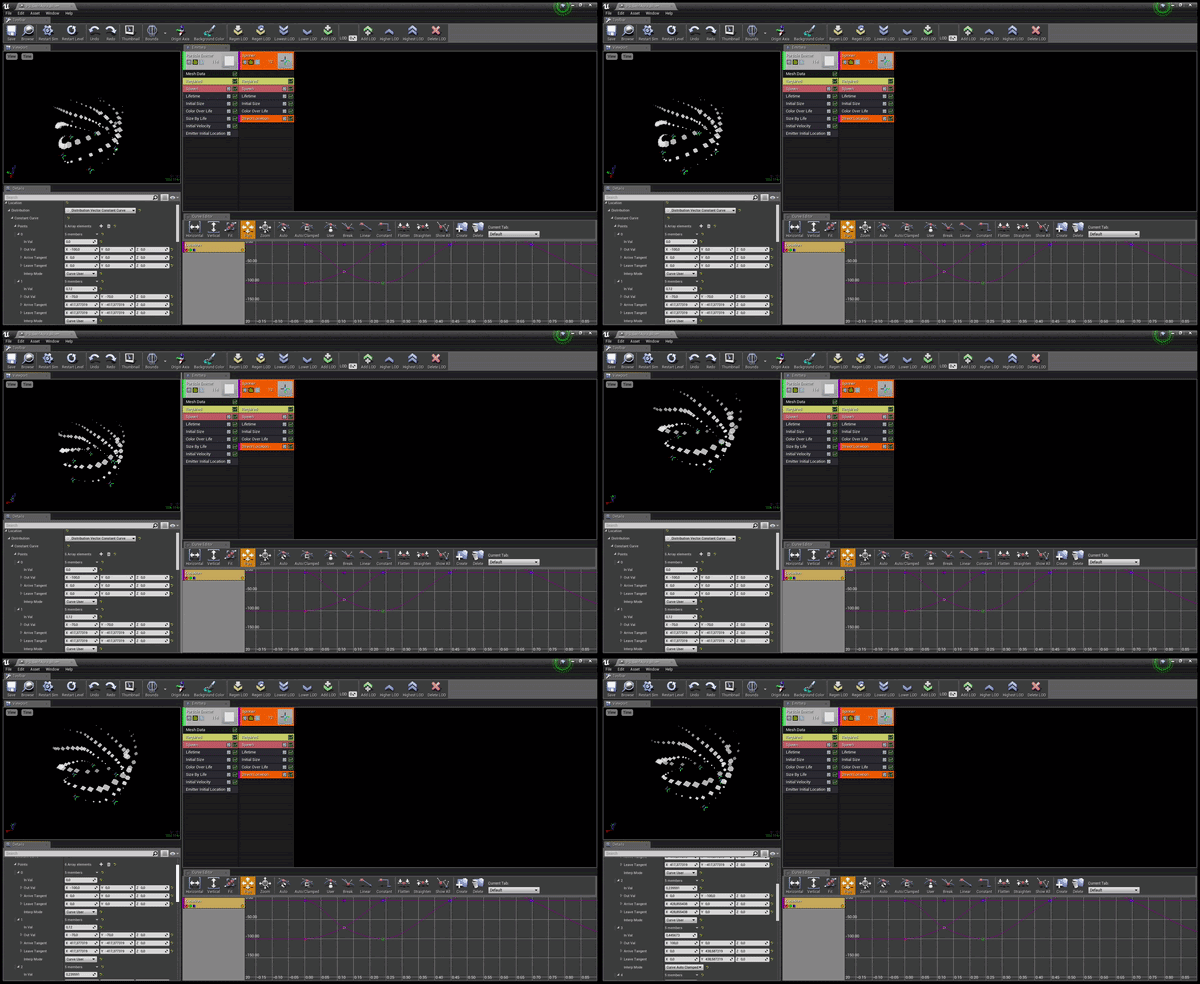
i calculated the points location here
Bolt Circle Calculator for determining the X/Y coordinates relative to the center of a circle.
and added as keyframes
obtuse seal
Oh, that's pretty smart. 🤔
I've gotten too used to bruteforcing these solutions with Niagara lol
stone verge
@cold sorrel thank you!
cold sorrel
😃
 lone wing
Can i call blueprint function from particle events?
wanna change some directional lights intensity from a particle
celest jasper
'Albedo will depend on the type and color, and level of wear of glass.'
also, about metall
'Metalness of 0 means a reflectivity of 4%, and standard glass has a reflectivity of 4%, so yeah, upping the metalness isn't going to give you more realistic glass. Special types of glass have coatings to be even less reflective, down to about 1%.'
I think Unreal has the 4% as default
might be combined with the default 0.5 spec
not sure though
 analog onyx
@stray parcel reflectance at normal incidence is specular input in UE4. When metalness is 1, your base color is your specular color. Glass should have metlness of 0.0
 velvet osprey
Hey guys
Is there a way to add a normal map to a fog volume using an additive blend node?
 sullen crescent
anyone know how to force my particle effect to disappear? Ive tried setting visible, set hidden, deactivate, and even gone into the particle itself and check "Kill on Deactivate" for everything
Im pretty sure its getting called too because right before it I activate a different particle component
so its reaching that part of the code
oh and tried straight up destroying the component lol
out of pure frustration
 honest sentinel
hi guys, how would I set the colour of an emitter based on a linier colour in a bp on the emitter being spawned? im not really a vfx artist but I,ve done this before and have forgotten how
sullen crescent
nevermind, guess it was an artifact of my other particle which looks similar, ignore my question
round fog
@honest sentinel in your color module, set the distribution as particle parameter, and then in the BP, set vector/color parameter
 ebon copper
Hi all! I'm trying to use a ribbon to create a trail after my projectiles, but currently running into some trouble with my ribbon setup - right now I'm spawning it using a source module which creates ribbons by sourcing them from particles spawned in a separate emitter ("Bullets" seen in the video as tiny yellow specks going left from the muzzle flash)
However, for some reason my ribbons aren't always starting in the correct position. The start position seems to "jitter" going back and forth between several positions and never really staying in one place - You can see this in the video where the majority of the ribbons spawn in one location, but occasionally a single ribbon spawns behind them. Does anyone know how I can make sure my ribbons always start at the same position?
soft tartan
there is no option for tlm
im trying to have relfections and refraction 😦
where do i find it?
soft tartan
pls halp 😦
soft tartan
does the fact im using dynamic lighting affect it?
soft tartan
issue resolved 👌
 fathom karma
Is there any documentation or tutorials for niagara yet? I feel like if there isn't I should probably wait to mess around with it until some sort of tutorial is created
Since it's still a very new feature
 quiet mesa
Is there any way to use Convolution Bloom with Dirt Mask? Or it is only for standard bloom?
 brittle monolith
Hey guys, I have this fire that doesn't like to stay in the middle, and I'd like it to stay in the middle:
How would you go about that?
It's a 2d material, where the fire starts from the bottom
brittle monolith
Figured it out, had to use absolute rotation
 low cove
Hi guys. I wonder, since Niagara is yet to be released and there are only preview builds out - does that mean that the documentation for Niagara will arrive at release as well? (Because I can't find any, for the life of me)
 weary helm
Hey guys, I would like to create an effect similar to a "window to another dimension", for that I need this sphere, and whatever it contains, to be only visible if we look through the "window", otherwise it should be transparent, any idea how to achieve that ?
 foggy juniper
you could hide the stuff inside and use a volume box to unhide the stuff when the camera's in the volume
ocean hedge
@low cove we'll have doc out around the time that 4.20 finalizes
foggy juniper
so i was able to get a wire frame view through scene capture but at the cost of having duplicate game meshes, that are hidden only to the player.
anyone have a better idea to make this work?
i really dont want to build an entire world of duplicate meshes just to have some neat in-game HUD
obtuse seal
@foggy juniper SceneCaptureComponent apparently has a flag for showing wireframes, have you tried using that?
obtuse seal
Can probbbabbblyyy enable this in bp, gimme a sec 🤔
foggy juniper
well i probably shouldn't use it anyways, it doesn't look too great. but would be nice to know if you find something.
i think i read it's more easily available in 4.20
anyways thanks though
obtuse seal
@foggy juniper I tried setting SetWireframe through ShowFlagSettings member of scenecapturecomponent but I couldn't get it to actually change 🤔
Apparently ShowFlags got fixed in 4.17 so it might not even be possible in 4.16.3
But if you want to try for yourself you can find a bunch of advanced show options under the details panel where you assign the render target to a scenecapturecomponent
foggy juniper
yeah i dont even have a flag for wireframe
obtuse seal
It's not exposed, not certain if you can enable it by getting the ShowFlagSettings member of the SceneCapture and adding to the array (which is what I tried)
Although I wasn't getting expected behavior to begin with, it didn't seem like toggling any advanced show flags was changing render target output
foggy juniper
yeah there's issues in general with scene capture flags and also for hiding actors in its view
like i said though i probably need to change how i render anyways
i just want a cool in-game hud
 uncut jasper
Hey guys I'm trying to make a flow mapped sky like shown in this video https://youtu.be/o66p1QDH7aI?t=20m24s I'm getting pretty hung up on how to use the math to create a texture on the dome mesh though? Could someone point me in the right way? Could houdini do this easily?

In this 2014 GDC talk, Naughty Dog's Keith Guerrette walks through the artistic considerations of creating a compelling, dramatic sky to cast as a backdrop f...
cold sorrel
Sure! Or Maya, or even in the shader
Actually. looking at it, it should be super easy to do in Houdini
1 sec
uncut jasper
Cool! looking forward to some more info
cold sorrel
Hmm, no idea why the dot in my wrangle isn't accepting the attributes.
Oh well. here's how you do it with vops
drop down a polyframe.
Set it like this
Then set your pointvop like this
Shoudl be the exact same in wrangle but I have to run and won't troubleshoot it
The Cd is of course only for preview. Remove that before export
Had some more time before things kicked off so I redid it with just a point wrangle. Much cleaner.
vector windDir = normalize(chv("WindDir"));
vector up = set(0,1,0);
vector tangent = cross(@N,up);
vector binormal = cross(tangent,@N);
v@uv.x = fit(dot(windDir, tangent),-0.5,0.5,0,1);
@uv.y = fit(dot(windDir, binormal),-0.5,0.5,0,1);
cold sorrel
That actually looks wrong. Nevermind me
cold sorrel
Playing games. I'll get back to you
 silent scarab
haha cool
uncut jasper
Sounds good appreciate the help so far
 zealous viper
Hey guys, making a jetpack FX, I kinda know what I want to achieve but it's not there yet. I want to have a portion of the jetpacks flame be pretty much locked in place, and then the rest after it as a trail in the sky
Right now the whole thing is a trail, but when you suddenly change direction this looks pretty bad
I'll upload a GIF of what's going on now
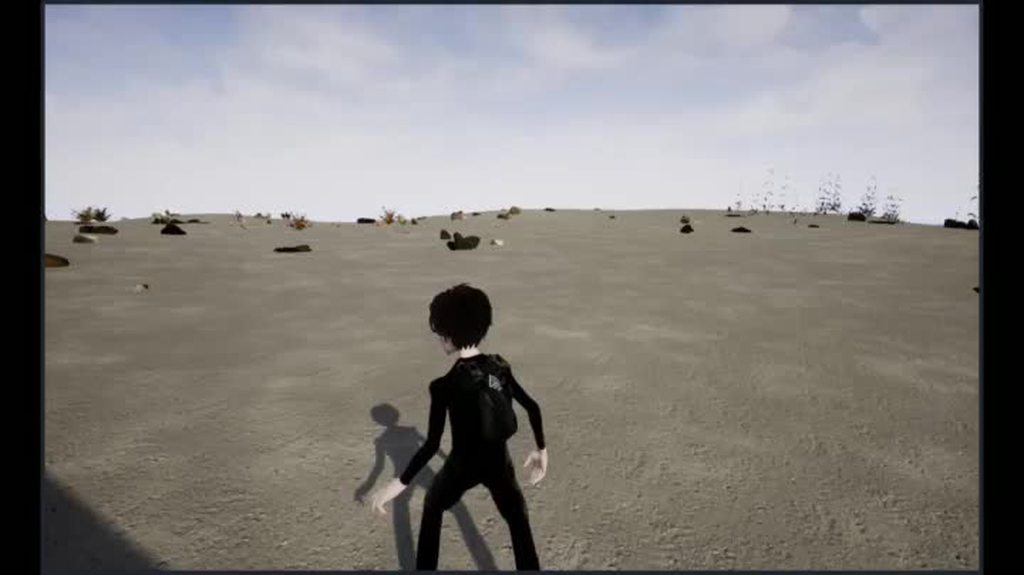 spare hare
you need two emitters. one for the smoke trail, and one for the burst.
The Burst needs to be in Local Space (There is a checkbox for that in the Required module)
@zealous viper
 candid flint
Hey everybody. I'm having difficulty with a material for my 360° VR stereo setup. It works just fine, but I'm trying to increase resolution by having most of the scene be an image and a small portion a video. The problem comes when I try to combine these two things, because for the image-video combination I have to change the UVs.
And the stereo effect doesn't like that at all. It starts shifting around weirdly. Does somebody have an idea how I can fix that?
 teal tundra
How can I spawn particles in a ring? With equi-distant particles? I found I can use a Sphere module and disable +/- Z as well as check Surface Only, and that almost works. But the position around the circle is random. Say I have an exact number of particles spawned via a burst, how can i make them equal distance apart around the circle?
And then make them orbit in a circle? The orbit module seems to have the orbit in place individually. I want them all to orbit the center of the circle
cold sorrel
You can't with cascade
teal tundra
@cold sorrel I found a solution which is to just have ONE orbiting emitter and then duplicate it 2 more times with different offsets. It's getting the desired effect and should be fine since I only need such a low number of particles.
Is there a way for a particle to have infinite life but then have a curve of the position/velocity over life? So it's basically looping the curve forever? I want each particle to oscillate up and down basically
zinc remnant
@teal tundra I'm not sure if it is. You could just move a particle up and down with using a curve where the start and end points are at the same position. That way if it's spawning one particle per second for example when it spawns a new one it'll be at the location the old one died and so it'll look like a continuous particle anyways.
In spawn the rate is 0, it has a burst list of 1 particle with a lifetime of 1 second and it just loops forever
teal tundra
That could work but the particles are also orbiting in a circle already. It would have to sync with that too. And the ribbon trail behind each one... hmm
Basically i'm doing a cartoon-y "seeing stars" effect
zinc remnant
In that case you could try doing it in the world position offset of the material applied to your particle
if they are always going to be bobbing up and down relative to the world
teal tundra
Ooh, yeah. That's thinking outside the box 👍 +
I'll have to try that tomorrow. Headed to bed. Thanks for the idea
zinc remnant
Have a good one
 upbeat jungle
hi is it possible to import old particle to niagara or you will have to redo them again to make them work ?
viral wadi
We will be building some tools to migrate cascade systems to niagara in the future, but in the short term you'll have to just remake them.
indigo jolt
@celest birch lol i've never known the difference between those 2 either. if you ever find out let me know
 dim musk
does anyone know of any issues with lighting channels on forward rendering?
doesnt seem to be working with the same settings i had used with deferred rendering
 marsh plinth
hi, does anyone know how would go about easily changing a particle system from CPU particles to GPU particles while still keeping the light? also, the GPU particles fade out (when they disappear) is much more choppy..how would i also fix that?
indigo jolt
with the exception of vector field usage, there's no point to using particles as GPU + using light function
which is brutally expensive
it can't be done regardless - i suggest using an actual light via bp or something
or a light function
 restive birch
Any arty wizards here that may be able to give me tips on how to get my red and blue to be softer colors? I want them to be a bit more pastel.
indigo jolt
add green and blue to red
restive birch
I tried to add 10% to each side but it didnt really pan out how I'd like
indigo jolt
here's a quandary - anyone have a good guess how to make particle mesh emitter that spawns meshes at the outer edges of a sphere (location module I know) but then sucks them towards the middle....with a SPIRALLING motion?
like a vortex/sinkhole/toilet type spiralling
cold sorrel
Build the emitter mesh as a series of faces facing the tangent (or slightly inwards) of the circle
emit with the velocity you need and attract over life
it won't loop around it, but with enough particles it's usually enough to sell the illusion
indigo jolt
right aim slightly off center then pull in
hmmm i'll try that, the orbit solutions are kinda wonky
obtuse seal
Question for Niagara DIs: I cleaned up a lot of my implementation for a RenderTarget DI but ran into an issue with binding the Render Target texture SRV to the compute shader. I was trying to pass through the FShaderResourceViewRHIRef in the call to ConstructComputeParameters but that function resolves to a call to ConstructParameters in the NiagaraShader class where it gets and uses the DI's CDO, which naturally does not have the FShaderResourceViewRHIRef assigned.
uh, the question being, is there any way to handle passing through the RenderTarget DI instance SRV?
 wet pumice
ConstructComputeParameters() just creates the right struct. The Set() function does the actual setting of the DI's buffers.
Look at FNiagaraDataInterfaceParametersCS_CollisionQuery
lethal gorge
Sorry if this is the wrong channel: How do I achieve a scene capture 2D effect like this where the background gets ignored? https://cdn.gamer-network.net/2018/usgamer/For-Honor-Shot-17.jpg

this is what it is currently projecting
celest birch
@lethal gorge If there's nothing in the background, it should work
When I say nothing, I mean literally nothing. Not even a sky sphere
mortal lily
Anyone knows if epic changed something how you can control certain aspects of macrouvs from within a material? I'm pretty sure i could control UV Scale, Panning speed etc in UE3.
Perhaps i'm just doing it wrong. But changing any of those params in a MI does not do anything in the particle system i'm using to test my material.
analog onyx
Have you actually set speed on panner node ?
mortal lily
yeah. just an 1.0 on Y
lethal gorge
@celest birch my problem here is I'd like the scene capture to represent the character in real time, so if the player equips a sword, the scene capture also equips a sword. However, this would require double the executions if I use a proxy scene capture in a nothing environment no?
celest jasper
Show Actor Only? @lethal gorge
celest birch
Yeah try show list
lethal gorge
ah, didnt notice that option. ill give it a shot
btw for clarity, this is the effect i am trying to achieve
so that show only option seems to work
oddly enough it doesnt actually fill in the array
i mean, textually. but it seems to still take the selected actor
so i got it all to work, tyvm 😃
weary helm
Hey, I want to render a grid around my character but only within a sphere, any idea how to achieve that ? I'm not sure if I should use beam particle effect or a mesh
indigo jolt
a mesh unless you're insane
you could MAYBE do it with a gpu vector field
beam would not do it
i'd simply use a bunch of planes for the mesh, then use a Sphere Mask on the material
so you can dynamically grow/shrink it
 past osprey
how do I make this not look low-poly while maintaining the current poly count? https://gyazo.com/18facf80375a035bf2800be8b1b28312
 calm folio
smoothing groups
past osprey
It seems to be enabled in my blender export settings but in my import settings i dont see an option
buoyant escarp
I'm having trouble trying to set a particle spawn rate from an animation curve. I cant seem to find a way to read the curve in blueprints, any tips?
fresh harness
@buoyant escarp Where is your reference to the particle system?
I've never done what you're doing before, but I'd imagine you'd read the anim curve in your anim blueprint, and set it to a new variable in there that, say, your character BP can access. Then make sure that the name of that new variable matches the name of the dynamic variable you have in the Particle effect.
buoyant escarp
Yes, thanks. Setting the spawn rate from a blueprint is actually very easy =)
But what I cant do is read the curve of the animation =<
😮 !!
I finaly found get anim instance ^^
Tnx @fresh harness ^^
fresh harness
Sweet. Sorry, I didnt give a more direct answer,
I've read curves before, but just never fed it into a particle effect. Curve data is effin great. It alone makes UE4 extremely powerful.
obtuse seal
Finally succeeded in binding the Render Target texture SRV to the Niagara Compute Shader for much less laggy gpu sim goodness

Very odd issue is edge pixels are sometimes reading NAN
but the perf is leagues better than doing cpu writeback
sullen forge
@obtuse seal awesome
im thinking you could do some seriously advanced effects with it
becouse you could run a material on a render buffer as a "compute shader", and then read that from the particles
or other kind of effects
indigo jolt
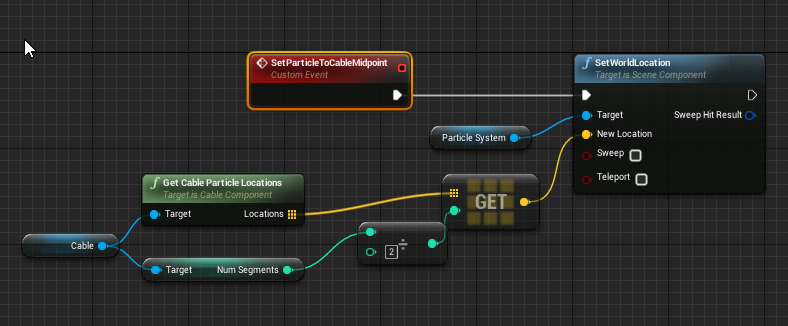
does anyone have an idea if there's a reasonable way to spawn a Particle System that is attached to the mid-point of a Cable Component?
or roundabouts
ie - if cable component is a chain, having a particle system with sparks affixed to the links in the middle?
 ebon gate
Hi when i use Init Volocity and set the value -2000 in Z the particle is flipped updside down for some reason. how can i stop this?
oh wait nevermind it turns out its velocity aligned so i have to flip the V
fresh harness
@indigo jolt
https://i.imgur.com/EZ3d9tH.png Something like this? (It's an error prone example, but it seems to work)
 marsh plinth
@past osprey on the left toolbar (if you don't see it press T)
and make sure you've got your object selected
 pseudo elm
Quick question: Is it possible to have particles (CPU) synced between clients connected to a server?
wanton vector
Hey guys, how do I make a radial panner? I want to simulate a lava pit where the lava erupts from the middle and pans outwards in every direction. I've been looking around for a while now and trying and failing.
obtuse seal
Flowmap seems to be the easiest approach
It is dependent on how the lava material works however
Or more specifically the geometry of the plane that should have lava panning outward scratch that, that doesn't matter 😬
zinc remnant
You could use like a polar coordinate function maybe?
I have one floating around
You'd get like a pinch in the middle though, naturally
wanton vector
@zinc remnant Yeah a pinch in the middle wouldn't matter, I'm pretty blown on how to do this so willing to try anything 😃
@obtuse seal Okay, thanks. I'll look up flowmaps as I haven't worked with these before. Thanks guys!
I'm pretty much hoping to use my current lava material, only changing the panner so it moves outwards in every direction instead of in a flow in one direction. Currently for the lava pit all I have is a basic plane mesh from starter contents. https://gyazo.com/671af3b8f422f74c1741262fcf80175c
 indigo jolt
@fresh harness whoa i must try that!!!
cold sorrel

Real Time VFX
@Russell I used a texture: diffuse / alpha scrolling across a mesh with crunched UV’s like this gif: I had a quad under the mesh with another texture, with similar colors: Scale at a different speed : Then add all the other stuff I edited a few elements so the g...
wanton vector
Thanks man, that was an interesting read. I don't fully understand it though. From Shannon's post I'm still unsure how to make the material pan outwards in UE4. I'll give the flowmaps a try first, following this workflow from Luos: https://www.youtube.com/watch?v=9PuIlPmm2iI

Flowmap painter: http://teckartist.com/?page_id=107 Kiinda explaining a little on flowmaps in ue4. As stated in the video, I've only recently gained some exp...
cold sorrel
Here's how I approach flowmaps on meshes
Learn how to create a flowmap using the new Flow Map tools in Houdini. You will see how control the flowmap velocities by using terrain geometry, a curve, and also how to manually comb it if you wish for more specific control. Then export the mesh geo, bake out the flowmap, a...
I don't really get the randompainted ones
wanton vector
Yeah, I tried making a flowmap in the flowmap tool now and it looks okay in the tool, playing some games now, but I'll let you know when I tried it out 😃
I'll watch your tutorial when I'm done, thanks man
obtuse seal
Hello Niagara fellows, is there a method to profile gpu compute performance for Niagara systems?
I see a Niagara GPU Simulation group in the profiler but the results don't seem correct
obtuse seal
Throw another question on the pile, I've noticed in Niagara Data Interfaces that CanExecuteOnTarget doesn't get called for CPU sim targets, is this intended behavior?
To be more clear, I have no need for PerInstanceTick for my Render Target DataInterface when it is set to GPU sim so I skip that execution by setting a bool in CanExecuteOnTarget.
I suspect there's a better *method
wanton vector
Hmm... I have this whole set-up for the lava with masked out molten rocks and lava like in the GIF I shared. I'm finding it difficult to tear apart the flowmap material function (since the inputs are incompatible with float values) and grab what I need to be able to have the flowmap working as a mask for the color & normal logic. Anyone that could help me out with this one through DM or something so I could share my graph without spamming this channel? I'll be tearing it apart meanwhile 😃
Oh, this guy talks about using flow maps in materials without using the default material function: https://www.youtube.com/watch?v=tEr3NE_XLbc

I explain how to setup a material for using a flow map. Flow Map Painter: http://teckartist.com/?page_id=107
 vast raft
This guy makes some great VFX https://www.unrealengine.com/marketplace/good-particle-status

Good Particle : Status was developed to provide more aesthetically pleasing visual communication to the player about a characters status.
 barren raven
Anyone experience regular frame drops (every 2-4 seconds) when viewing large amounts of mesh particles with motion blur enabled?
Goes from 120FPS to about 10 fps for a few milliseconds then back to 120FPS
Only when motion blur is checked in the particle override settings
Actually happens without large amounts too, very noticeable and the hitch is the same even for 10x the amount of mesh particles
vast raft
That would certainty not surprise me.
barren raven
Why is that?
barren raven
No, only when motion blur is overridden in the mesh particle settings
The particles are moving with motion blur at 120FPS for the majority of the time
But every few seconds there is a hitch, as if the motion blur is clearing some kind of cache
Disabling the motion blur override gives constant 120FPS with no hitches, so it's the culprit, just not sure how to fix it
Running in an empty blank new scene so nothing else is running

Hitch only seems to happen when motion blur is enabled on the mesh particles, and is the same even with larger or smaller amounts of mesh particles.
There's a video showing what I mean, any help would be much appreciated!
celest birch
@barren raven 4.19?
Could be related to this; https://forums.unrealengine.com/unreal-engine/feedback-for-epic/1457519-4-19-4-20-editor-packaged-games-have-hangs-hiccups-constantly/page13
Unreal Engine Forums
4.19 & 4.20 Editor & Packaged Games Have Hangs/Hiccups Constantly
barren raven
@celest birch on 4.20. Thanks so much for the link!
Looks like it might be the same thing and Epic are on it! Thanks again
celest jasper
Did you also check your RAM @barren raven ?
Does it also leak?
And you could also add what Hardware you are using.
 abstract swan
this is funny

Shit VFX Artists Say... 'nuff said. Music: And The Bells They Rang Artist: Find The Others www.findtheothers.com Copyright 2011 (SOCAN) Directed & Edited by:...
barren raven
@celest jasper will check the RAM now thanks! Would be surprised if a single mesh particle system is filling up 64GB that fast! Other hardware is 1080ti / i7-6950x, I think it’s likely related to the thread Tommy posted- very similar issues
Could also be related to Nvidia drivers as mentioned in the thread, hopefully a future fix is on the way!
wanton vector
Hmm... the flowmap absolutely wrecks the material set-up I've used. Is that because I'm plugging the flowmap information into the UV's of the material setup? It's being distorted way too much.
In comparison to this: https://gyazo.com/671af3b8f422f74c1741262fcf80175c
The flowmap set-up that the tutorial I followed provided blended between two phases to make a sine-waveish blend. Is this behavior normal for flowmaps, to distort everything this much? I'll play with the settings haha.

https://gyazo.com/84001f99796cf38ce4ba4a800ea74024 Current set-up for the flow map
 barren raven
@wanton vector Could be artifacts if compressing an EXR or other lossless input for the flowmap data
I had similar problems with packed data from Houdini, but selecting the HDR compression preset fixed it I believe
wanton vector
Hmm, okay. Issue arises when I use the flowmap data as the UV input for my texture setup: https://gyazo.com/a3047215d716b4d747906deabe3251f7
 barren raven
It looks like compression artifacts which will in turn affect whatever they influence, so would look into making sure it's uncompressed to test
wanton vector

It's uncompressed, isn't it?
I tried the HDR compression aswell, but it gave the same result
barren raven
You could also try the UI compression to test, but it may be a different problem if that doesn’t change anything!
It’s been a while since I had a similar issue so I can’t remember the specifics sorry
wanton vector
Yeah that also gives the same result, sadly. Thanks a lot for the help though!
Might just be a bad combination of the flowmap and the lava material, not that I know for certain 😓
zinc remnant
Those settings are fine, the texture should be uncompressed if it's set to VectorDisplacementmap
Your texture might not be high resolution enough.
barren raven
Does anyone know how to enable motion blur on mesh particles using Niagara?
zinc remnant
Haven't played with Niagara yet myself
barren raven
It's incredible from what I can see so far
Just recreating some basic Cascade setups to try and get up to speed
Can't find a motion blur checkbox anywhere
obtuse seal
hrm, I'll take a look
barren raven
Thanks!
obtuse seal
I don't see anything in NiagaraRendererMeshes referencing motion blur so I'm guessing that feature isn't in the works yet
barren raven
@obtuse seal Thanks for checking it out! That is unfortunate to hear, back to cascade for now! I'm sure it'll be added in the future!
brittle remnant
@wanton vector You need to scale down the influence of the flow map. The amount of UV offset should be approximately 0.01 or less
wanton vector
Yeah I tried scaling everything low, played with every value in the MI
Thanks @brittle remnant - I guess I need another controller for that offset... hmm. I got DMed another method that I'm gonna try out first :)
wet pumice
Motion blur should just work in Niagara. Although I do want to make some improvements.
It was gated behind a bool in cascade for performance reasons but things work differently in Niagara so it's less of a concern.
If it doesn't work ping @ocean hedge to add a jira. I'm afk this week.
barren raven
@wet pumice Thanks for the response! By default I don't see any motion blur working on Niagara particles, tried a bunch of different speeds and orientations.
There is a comparison between Niagara and Cascade (with the motion blur bool checked)- both sets of particles have the same downwards velocity
Maybe I'm missing something or doing it wrong, either way thanks for having a look @ocean hedge
obtuse seal
Personally curious at what stage the motion blur is actually applied if it does function properly 🤔
strong carbon
We used motion blur in our demos during GDC, it worked fine then. I am not at my desk to verify whether or not something is broken, will take a look tomorrow
barren raven
@strong carbon Thank you so much! Amazing talk, had to watch it a few times to process the sheer power Niagara brings to the table!
obtuse seal
Reality is a fragile thing https://gyazo.com/bca7e422f76a861f2e08a1a5a0efd9c8

For Niagara Scripts is there a means to get data from other particle contexts? e.g. I want to iterate over all particle positions for each particle so I can do gpu boid flocking.
strong carbon
We implemented Boids using events, you can send a custom payload in an event script. Beware, until we get direct particle reads and some sort of spatial hashing, it will be n-squared slow as every particle has to care about every other one. It works though!
obtuse seal
👌 Good stuff, I had looked into using events for that
I surmise this is what the GenerateLocationEvent module is for
Great now I'm even more eager to see the content examples 👀
strong carbon
Yes there is a generate and receive event handler which manages sending those events
we have location events, collision events, death events, but they are just prefabs, you can send whatever you want, whenever you want
fossil swan
< wants to send stroopwaffles right away
past osprey
How can I have an object leave a particle trail as the player moves it around in VR?
Animtrails seem to rely on an animation
obtuse seal
I uh... what? https://gyazo.com/c8963a9ff32b42ea751aee43679c2aaf
 ocean hedge
0 to INT_MAX
obtuse seal
Oh now I see, good stuff 👍
ebon gate
Hi i have a gpu particle with collision (Scenedepth) and i noticed that some of the sprites go through even though it has collided is there a way to stop this?
fresh harness
@ebon gate if I recall correctly, that may be a frame step issue.
I'm not sure if it matters, but did you try enabling constant collision detection (CCD) on the mesh u want the particle to collide with?
wanton vector
Man... I'm finding Houdini FX so hard to work with, when just jumping in and following along a tutorial. I have read about the basic controls etc. When I make a FLIP Fluid from Object and I get into the AutoDopNetwork to set the flipfluidobject's Initial Data SOP path to the source nothing happens, and changing it's values does nothing either. I feel like I'm doing a rookie mistake that maybe someone could shed light on?
3:50 in this tutorial by Glad: https://www.sidefx.com/tutorials/vat-paintsplat-houdini-for-games/ to see what I'm trying to make. Re-done the project several times as I can't get past this step
In this tutorial, I'll show how to create a Paintsplat projectile in Unreal Engine 4. I'll take you through the creation of Vertex Animation Texture splashes as well as creating a decal based on baking a FLIP splat. We will start with an empty Houdini scene and finish with a ...


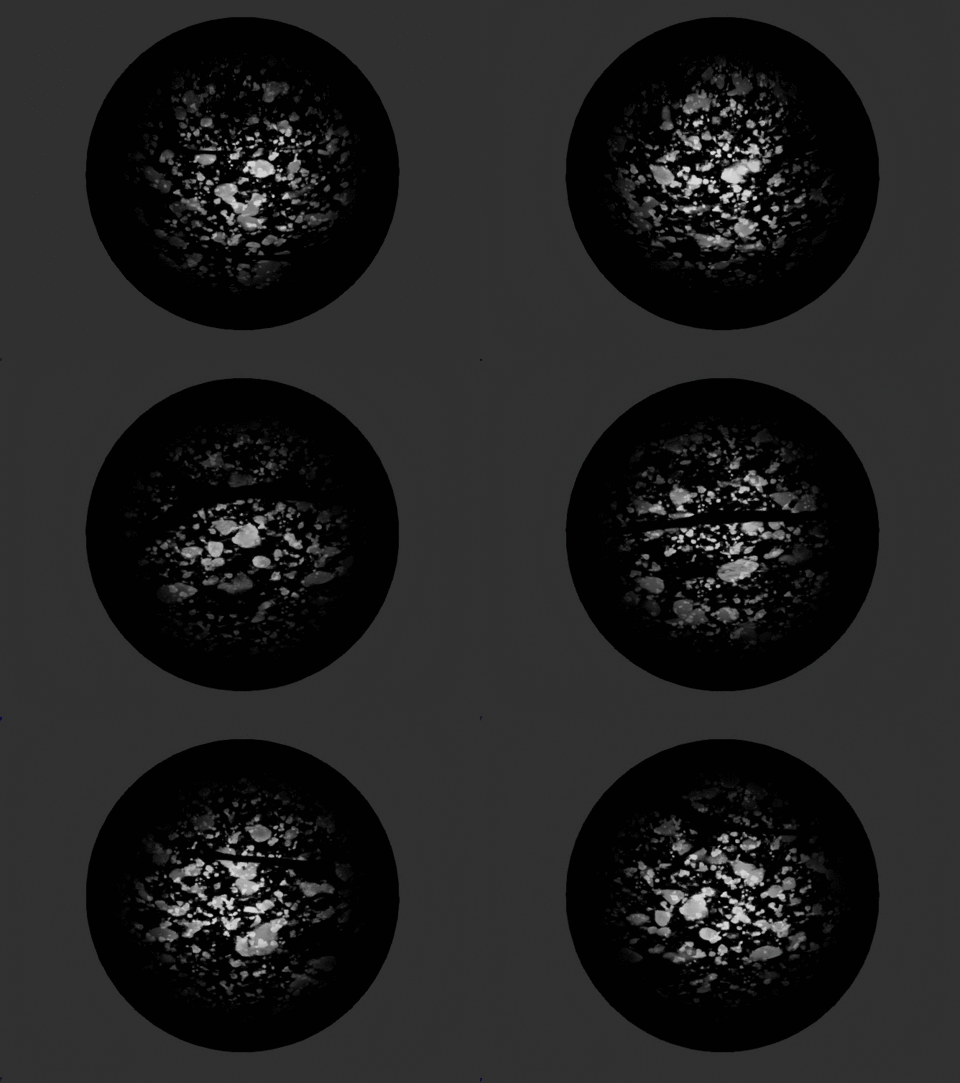

 cold sorrel
Upload the Hip so we can have a look
wanton vector
Sure, 1 sec - I'll tag you since I was a bit late uploading the file hehe - cheers man @cold sorrel
cold sorrel
@wanton vector Here's your scene, but with particle separation at 0.01
0.001 was so small it wouldn't even build
Try going back to frame 1, and hit this button:
wanton vector
Thank you, I will do that when I'm done munching food
ebon gate
Hi im trying utilise the Sub UV in my particle. how can i make it so that it is randomly chosen rather than move like a flipbook?
Also I tried selecting random but its greyed out for some reason
mortal lily
Hmm did you correctly set-up everything? In the material, particle system etc
cold sorrel
Hahaha! "Something is wrong" "Are you sure you didn't do anything wrong?"
Anyway, the reason it's grayed out is because you are using a particle type that doesn't support it, like GPU particles
mortal lily
ha lol you're right...i should have asked for screen caps or something hehe
 radiant frigate
🤔 my post process material's intensity actually increases the further away i move from the blending volume
thats ...not what its meant to do, right?
what determines the intensity of a ppm if using a blendable?
 regal sphinx
Guys what would be the best way to recreate a jet wash effect? I tried using the particles but the number of particles needs to be huge and they need to be tiny. It needs to be animated so it turns on for 2 seconds, then turns off.
I did think about maybe a material applied to a triangular plane but I'm not sure how best to approach it for animation
indigo jolt
i'd make more of a cone probably but sorta flatten it a bit for that visual
then it'll have a bit more shape where it hits. use Depth Fade to make it more intense near intersections
then just add other elements to accent
like tiny spray bits out to either side
a plane still isn't a bad idea
or even a half-cylinder
then you can get more shape to silhouette in texture
i love half-cones, half-cylinders, and half-domes 😃
 uncut kestrel
Guys - is anybody experiencing a bug in Preview 5 where closing a niagara emitter, then opening it again results in lots of modules having their properties reset to default? @strong carbon might be interested.
I did submit a bug report, now I've lost the case number though 😦
ref:_00D1aL44R._5001afThC4:ref if you're able to find it. I'll put the video here too
strong carbon
Haven’t seen that one lately. Were they emitter level, particle level, properties in a module, renderer settings...? Or all of the above?
uncut kestrel
Both Emitter and Particle. here's a video of it for reference:
https://www.youtube.com/watch?v=fo_HzD7hQwo
The Emitter was in use in a Niagara System which I've noticed in that video has a * on it once I change the emitter... wonder if there's a conflict caused there somehow
Sorry man.. I know it's Sunday 😛
uncut kestrel
Seems like as soon as I put an emitter into an actual system asset, everything breaks. Can't open the System without getting crashes (unless i open the emitters first), and opening the emitter wipes all data. I can open the emitter and not even touch anything, close it, and the package wants saving for some reason. Also finding that each time I open the editor, any niagara particles don't show up for a few seconds, almost as if everything is being recompiled.
Can't send the project along unfortunately 😦
celest birch
Hi,
Any ideas how to change the vertex color of an animated object (fbx import) based on acceleration
the faster the brighter...
 rough jewel
I have a beam emitter that the lifetime is set to 2 .... the "KillOnDeactivate" is set to true as well..... it will last forever - what gives?
forget i asked - emitter loops was set to 0
brittle remnant
@celest birch I would just change a material parameter based on the velocity of the object. Why do you want to manipulate the vertex colors at runtime?
celest birch
hi thx for the feedback, because i'd like to highlight parts of the geometry based on its speed
experimenting with motiongraphics
barren raven
@strong carbon Sorry to bother you again, just checking back to see if you confirmed the motion blur not working was something on my end, or if it was an internal issue? Have been going over and over but can't seem to get it to work.
 west knoll
Please can someone explain why when I'm using a particles with beam data the Sub UV is not working?
obtuse seal
@celest birch for Cascade systems you can only read back the position of the emitter. If you set your emitter to use local space then the particles will be constrained to the emitter's coordinates
obtuse seal
Regarding Niagara Emitters, if I want to make an Emitter extensible by exposing a property that can be assigned separately for each instance, what is the correct namespace?
e.g. I make an emitter Explosion_Smoke, I want to be able to configure the number of smoke particles spawned per instance, so I make a User namespace parameter NumSmokeParticles. This emitter is part of a system Explosion. When I add an Explosion instance to the level I don't see NumSmokeParticles exposed. 🤔
OK, I tested for another 3 seconds and realized that the User namespace variables need to be defined in the NiagaraSystem and not the NiagaraEmitter.
Although this does make me wonder, should it be possible to have multiple parameterized NiagaraEmitters and have their User namespace variables propagate to the NiagaraSystem level?
I'm also guessing that spawning Niagara Emitters during play is still WIP, but I don't see any way to assign my user variables.
ocean hedge
If you reference a user parameter in an emitter, it should be pulled into the system when instanced
if you want to tweak the parameter in the space of a system, you could just do Emitter as the namespace but that won't be exposed to the end user of the system as a tweakable
for simple user variables, User.NumSmokePartilces, do you want different values per instanced emitter in the system or is it ok that one parameter drives multiple emitters?
if you need them disjoint, you could do something like User.MyEmitter.NumSmokeParticles
you may even be able to do this down in an emitter, having it use User.Emitter.NumSmokeParticles, but I haven't tested to see if that would work
ideally it would, but it's a complicated system / code path
obtuse seal
Thanks for the quick reply, I'll keep playing around with the namespace variables and see if everything seems to be working as intended.
obtuse seal
Nesting the namespaces as User.Emitter.VariableName almost appears to work (values are displayed correctly in the relevant NiagaraEmitters and NiagaraSystems) but it ended up setting off a huge memory leak, I need to update the latest version and replicate this.
celest birch
Why do particle FX change auto exposure?
When I shoot my gun, a muzzle flash blinks, and the screen turns dark for a few seconds
thin brook
@celest birch Your particle is probably too bright, so the auto exposure adjusts itself
wet pumice
^^
celest birch
@thin brook lame
 hasty plank
any one know how to produce something like this? https://www.youtube.com/watch?v=cz7ybx2C_xk

This video shows how to use spline to draw any shapes of items you want,It is useful in VR games
obtuse seal
Niagara GPU particle sims seem to flicker a lot when their boundaries are set to automatic and they're within the near clipping plane
In retrospect Cascade systems are even worse for this so, not a big deal 🤔
uncut kestrel
Yeah particle bounds seem to matter a lot more, especially with mesh emitters.
Probably not a bad thing though, will force people to actually set them up
Most folks don't bother usually
celest birch
circle normal map for hot air effect.... https://lh3.googleusercontent.com/-tT_-c_hOS2E/W04dB2s1NQI/AAAAAAAADoM/5wddWaSRQkI3lneOQ2jg1frrs5itQZiHQCHMYCw/s0/UE4Editor_2018-07-17_18-44-54.png

but in world i get only rectangles
https://lh3.googleusercontent.com/-fYMeXDvjTcc/W04dO5W7KRI/AAAAAAAADoQ/t6aDz-6NP4MF0M0plkx3XVkcXIounN25QCHMYCw/s0/UE4Editor_2018-07-17_18-45-45.png when placing con1vector in refraction, the hot air WORKS


ok foudn issue.... parameter was on 1.... if on 0 its good.... but... seems like the texture map isnt good for this
indigo jolt
refraction works so that 1.0 = no refraction. anything MORE or LESS than 1.0 is refraction. the closer you get to 1.0 the less powerful it gets
so a value of like 0.95 or 1.05 is same strength, very soft/weak
a value of 0.0 is insanely strong
celest birch
okey.. so the problem now is improve the normal map
mortal lily
I'd use a lerp right after the dynamic param to lerp between IOR values.
celest birch
so its not a square
indigo jolt
ah maybe, but i'd try lerping between 0.95 and 1.0 or in particle going between those values
celest birch
this will make rectangular
indigo jolt
also you usually want to crop out the refraction
so those blue flat spots
you'd set those to 1.0
no matter what
right now you have refraction power going out to every pixel uniformly, use a mask into a LERP to cut out the parts outside that circle
it's not just the normal maps that's defining this stuff
indigo jolt
1.0 = no refraction
those blue spots on your normal map = areas you want completely at no refraction
so you need a black and white mask texture that sets refraction to 1.0 on those regions
should be a black square with a white circle same size as that normal map circle
or a white square with a black circle - same deal, just need a mask so you can kill refraction in those spots
otherwise you can't change refraction on the other spots without borking the corners
 river linden
I lifted a water material from the "mobile" Sun Temple. Unfortunately in my scene (Android OpenGL ES 3.1) it is a uniform grey color. In the editor with SM5 it renders nicely. There are several settings under Rendering : Mobile, not too mention a few under the material itself. Does anyone have a simple answer to this, or should I systematically start ticking off options 😄 Any help is appreciated.
brittle remnant
@hasty plank That example is spawning many particle systems along a spline. (Essentially draw a spline, get points along the spline, spawn emitter at the points) It's likely very expensive given the number of emitters being created at runtime. Niagara should be able to do this much more efficiently by spawning particles along the length of a spline. As such you would end up with only one emitter per spline.
obtuse seal
I'm guessing it's an issue in the hlsl translation stage
oh my other message dissapeared
There's a strange issue with dividing integers and Niagara Numeric types inside a Niagara Script
By strange issue I mean dividing two integers that have been abstracted to Niagara Numeric types gets compiled into hlsl " int / (int , int)"
Played around with it more and found that it's an issue with the Random node, as I can divide two ints passed through Abs nodes
ocean hedge
we have a couple of other issues with ints
have you tried:
- Right-clicking on the pin to convert the numerics to a known fixed type
- doing a convert node to a float and back again?
obtuse seal
@ocean hedge Hi Shaun, I had no clue that you could convert the numeric type pins! I've tried every sequence of converting to floats/ints but it still produces invalid hlsl.
Having toyed with it a bit I'm almost certain now it's specifically a degenerate interaction between randomizing an integer and division since I can't replicate invalid hlsl with other numeric types or operations (although I haven't tested exhaustively).
ocean hedge
ok, we'll investigate on our end
 tacit heath
I didn't know you could convert the pins
ocean hedge
It should auto-discover the type
And in the long run we’d like to have the graph color automatically
Until then, we let you manually change the pin type of it is numeric
obtuse seal
Revisited the issue with compiling random integers in Niagara Scripts, as it turns out there isn't a defined random function for integers on CPU
Actually I rescind that, random function isn't implemented for CPU sim
although I don't think this is news
taken from NiagaraEmitterInstanceShader.usf
I'm guessing the rand function doesn't work since the vm can't pass through GDispatchThreadID
obtuse seal
In retrospect I've no clue how the rand function even operates for CPU sim since it definitely does work
I'm totally stumped where the rand function is actually drawing its implementation from, in the .usf int rand(int x); is declared as an empty function for VM sim. Does this have any special meaning in hlsl? 🤔
obtuse seal
OK, so the bvar for GPU_SIMULATION is always true which everything I already posted is pointless
so that's a good start
indigo jolt
does anyone know what the best solution is visually for SUPER fast moving ranged attack vfx where you're moving something so fast that Unreal 4 just starts dropping frames?
like 0.1 second duration beam - i'm using that and trying to get a shape to pan along its length from start to end
but Unreal 4 just drops like 70% of the frames so you don't see a smooth path
 dark dagger
Say, does anybody know a good way to generate a random value in the material editor? PerInstanceRandom seems like the right concept, but it just gives me 0.0000; there's some reference to it being bugged for instanced static meshes on help. So I'm hoping there's a decent way to fake it.
indigo jolt
ya it usually fails
use a dynamic parameter and set it to Uniform and "Spawn Time Only" checked
that'll be random af
won't work with gpu tho.
Particle Random i think works for GPU and nothing else
dark dagger
In this particular case I need it to work with a static mesh.
indigo jolt
and then there's always the option of using Initial Color module and using your particle color
ok so static mesh means use Dynamic parameter for sure
with the parameter set to Uniform and Spawn Time Only
dark dagger
I mean, I can't run it through cascade as a pseudorandom source in this instance.
indigo jolt
you know what dynamic parameter is right?
dark dagger
Well, I mean, I sure thought I did, but asking that question makes me assume that I'm missing something? Vec4 node with its components renamed to parameters accessible in Cascade.
indigo jolt
i was just asking because it seems like you weren't sure about my answer
you can't run this through cascade?
btw what are you trying to randomize? UV locations?
dark dagger
I'm overlaying three mask patterns on a surface, and I want to swizzle which goes to which color (without randomizing the colors).
ocean hedge
@obtuse seal we have some bytecode instructions and I believe random is one for the cpu Vm
 sullen sail
lighting vr question. I have a handheld candle point light object. I would like to make the light have an ambient bounce to it
i would like the light to bounce off walls in a way that lights faces of objects that are facing away from the point light
while still having some reasonable falloff
trying to think of how to do that well
best i can think of is a janky way of having point lights behind things i want to do the reflection with and turn shadows off, and have those point lights intensity go up and down as you get closer/farther
if there is a normal sane way of doing this please @ me
fresh harness
Anyone know where this "Essentials" section they refer to here https://docs.unrealengine.com/en-us/Engine/Niagara is?
Maybe "Essentials" is referenceing "Starting Out"?
ocean hedge
fresh harness
@ocean hedge Awesome thanks. Since Essentials was in bold I was expecting to see an Essentials heading for the section, nbd. Regardless, it's awesome Epic hooked us up with so much documentation on it despite it still being EA.
ebon gate
Im going through Niagara guide and I added Sphere module node but it doesnt have surface only checkbox like in the guide.
 mental quiver
click the little arrow at the bottom? @ebon gate
ocean hedge
@fresh harness just wait for the content examples. Wyeth and Jon did an awesome job with effects that show off important aspects of the system.
We’ll go over it all in a livestream in a few weeks
ebon gate
wow! the ones in the content examples looks amazing! looking forward to the livestream!
tacit heath
literally cannot wait for teh content examples
barren raven
Can’t wait!!
ebon gate
isnt it already available because i see the niagara fx now in the content browser.
obtuse seal
Just spotted the new texture DI in dev-niagara 👀
ebon gate
whats that?
obtuse seal
@ebon gate You can reference a texture in your Niagara Script/Emitter/System and get the color value for a given UV
 south gyro
Maybe it's a bug? Trying to attach the spawn rate remainder which is a float to the sub image which takes a float but I get this error. Any input?
ebon gate
Oh i see. I will need to check that out later at the moment im still figuring out the basics like whats like cascade and what isnt like cascade. then i can transfer all of my FX i made from cascade to into niagara. the modules are like mini-Bps. its amazing!
obtuse seal
@south gyro Try making an expression for the Particles.SubImageIndex assignment and put in the same value (Emitter.SpawnRate.SpawnRemainder)
You can always inspect the hlsl directly by bringing up the generated code tab under Views and inspecting the offending line(s)
woops I said Views, meant Window 😬
Well I tried it myself and I can't see why it's not generating valid syntax
Looks like spawnremainder isn't getting set properly in the script to begin with
Looks like there's a bug with the hlsl generator passing through nested namespaces from different sections
normally Emitter.SpawnRate.SpawnRemainder doesn't exist in the Particles namespace for optimization reasons, but when you include a reference to it then the hlsl is recompiled so that it exists in that context
however the namespace gets resolved to Emitter.Module.SpawnRemainder so there's a logic issue in there somewhere
south gyro
Thank you for the info I'll try the expression
obtuse seal
Sorry if I didn't explain well, using an expression will not resolve the issue @south gyro
south gyro
Ooh gotcha okay
 surreal willow
is there a console command to show emitters?
in PIE mode, if I have a spawned emitter which isnt creating any particles
south gyro
Not sure sorry :/
So I'm trying to see if I can create a sprite exploded into a few dozen pieces. I've split the sprite's material into a divisible UV and search through each subimage, the last problem I'm facing is positioning of each particle. I see I can set something here looks like its a parameter, where can I access this parameter to set programmatically?
obtuse seal
@south gyro You want your particles to explode outwards, right?
south gyro
Yeah.
but I want to set it's start position to same index as the sprite int he world.
obtuse seal
OK, have you calculated that start position already?
south gyro
Well where can I even do this? I don't see a place where I can do that in particular.
obtuse seal
You can handle it separately in a module
if you explain what you need to calculate I can provide some guidance :)
south gyro
Gotcha alright lets see here.
obtuse seal
particularly "setting the start position to the same index as the sprite in the world"
south gyro
So this is the sprite I want to explode. In the world, I want when you destroy the "statue" for it explode into pieces. I want to map each particle I create to this sprite based off the subspace image I get from the emitter.
south gyro
Kinda I just use UV and subimage to grab specific regions of the sprite inside the emitter stack
for instance I have the UV set to x6 y6 and I go through 0 - 35
obtuse seal
Oh ok so you just need to get the right subimage index for each location
south gyro
Right
obtuse seal
so under Particle Spawn subsection of the stack you can start with a Layout in Grid by Exec Index module , this one might still be under Niagara Extras if it doesn't appear for you but I use it a lot