#visual-fx
1 messages · Page 11 of 1
 rotund quartz
 fossil swan
also dont multiply particle color with alpha > opacity
 drowsy stag
I've got a problem with my rain emitter in relation to a Vehicle Pawn. The particles are set up to get destroyed on collision. As long as I stand still with the vehicle everything works as expected. However, the rain collision fails as soon as the vehicle is driving. For test purposes I have parented a box over the vehicle. Even here, the particle collision fails as soon as the vehicle drives. I'm using no GPU Sprites, because Scene Depth and Mesh Distance Fields don't work at all in this scenario (Vehicle (Skeletal Mesh), VR First Person Perspective). CCD is set to true for the Vehicle Collision. Does anyone know the problem and has a solution?
Haha, I've been trying to fix the problem for about 2 hours before I posted here. A minute later I come up with a possible cause and actually... fixed. Nevertheless, thank you
 indigo jolt
what was the the cause and fix?
 winged nymph
What's the best way to spawn a burst of particles when a physics object lands on something
EventReceiver Spawn -> Blueprint?
 spare hare
@winged nymph If I understand you correctly, you want to spawn particles when an objects lands, right?
If so, you may want to use Event Hit and spawn a particle Emitter at the Hit Location.
winged nymph
I would need a separate particle system? I couldn't run it through the system already attached to it?
spare hare
The Modules in the Particle System are a ParticleSystem>Blueprint connection, not the other way round.
oh wait. You can trigger a Particle Burst by simply Activating the Particle System again and check the Reset input
 pseudo elm
Can someone verify that Particle Random node works for volumetric particle materials in 4.18? I only get 0.0. It seems like a bug. It's a CPU particle system.
fossil swan
particle random only works for gpu particles @pseudo elm
pseudo elm
Ah ok thanks!
 crisp pendant
Heya everybody need some input 😃
just made yesterday a tornado nice looking with translucent material on cascade
looks nice....... but my shader count went to ..... yeah you can guess 😃 (using Forward Shader)
and im using it for 2D btw
if someone could tell me the most efficient way would be awsome
 cold sorrel
If it's 2d, render it out to a flipbook and just play back a loop. Super efficient
crisp pendant
i tought about that yep yep
which programm would you use Glad?
@cold sorrel ?? 😃
cold sorrel
If you already have the effect working, you could even render it out of unreal
crisp pendant
ohhhh!
cold sorrel
Put it in a completely green level, add a camera, render the sequence. Key out the green in After effects
Or whatever color is not in the actual effect
crisp pendant
thats smart 😃
cold sorrel
old tricks are the best
crisp pendant
nah its brown sandish you know
indigo jolt
anyone got a clear idea how to create a material that references an object's pivot and does a gradient outward from that?
messing around with localposition node
i've gotten it to work in just one direction, but not radially
basically i got an explosion shape i'm using a morph target to transform
and regular UV's seem like they'd be a messy way of handling things
i want the parts that explode outward from the center to get more and more of one color as they get farther from center
cold sorrel
Doesn't a sphere mask do that?
 analog onyx
Object pivot point is 0.0.0 in local space, so what is the coomplication ?
indigo jolt
just want a mat that does a gradient outward from that
cold sorrel
Plug that into A of the spheremask
indigo jolt
plug localspace into A
cold sorrel
Plug the position you want the sphere to originate from into A.
 celest birch
Object pivot into A and Absolute World Position into B
cold sorrel

This tutorial explains how to create a material that modifies the opacity of objects based on an external point in space. Material instances are used to driv...
indigo jolt
oh object pivot
watching vid
ah strange, seems like static mesh versus particle slightly different behavior

static mesh on right
wondering if particles don't "get" the same kinds of position data
i'll try ParticlePositionWS
dang, it doesn't quite seem to do it
ah there we go https://gyazo.com/52587d4fbd8a3fc0b46b50e22a571667


winner!
thx guys!
now to use this for a prettier color, then drive an inside-to-outside dissolve 😃
crisp pendant
guys is it possible to render/record a particle effect with a translucent background??
like seems for mesh you would use custom depth
anyone an idea?
 karmic kraken
cant you use separate translucency for that? The object should be in this buffer
@crisp pendant
 outer fulcrum
Hello, What is the best way to debug why a particle parameter set in my blue print is not being picked up by the emiter?
outer fulcrum
re-checking @crisp pendant
crisp pendant
😃
outer fulcrum
O
It is correct, perhaphs the way I am going about the burst list is not the adecuate.
crisp pendant
hm possible
outer fulcrum
the value gets set correctly
crisp pendant
i need to leave soon would check otherwise :S
outer fulcrum
@crisp pendant I am trying to control the burst list particle with that parameter.
crisp pendant
change to dpm direct?
Data types that provide flexibility by allowing for constant values, random values within a range, values interpolated along a curve, and values driven by parameters.
crisp pendant
anytime 😃
outer fulcrum
@crisp pendant do you
@crisp pendant do you happen to have handy a good resource that goes over the different compressions and what better to use for what in UE4?
crisp pendant
@outer fulcrum sorry was about to go out when we wrote m8
still need something?@outer fulcrum
 cinder zodiac
Hi everyone! Does anybody knows what is wrong with reflection?
This is video example
https://youtu.be/0mxw49djLPE
 rotund quartz
@cinder zodiac You're looking at screen space refections, which can only reflect visible geometry (t raytraces against the depth buffer to find the reflected point in the scene); the missing face you're pointing to isn't visible from the view point, so it can't reflect anything
There's a planar reflection feature that re-renders the scene from the reflected view point, that would remedy that; it is quite a bit more expensive, however, and can handle only near-planar reflectors
cinder zodiac
@rotund quartz Thank you! I will try planar reflection feature.
I understand about hiden faces but what about dark reflection in the center between cube and reflection?
Is it hidden part of background behind the cube?
rotund quartz
SSR tries to find a valid pixel for each reflected ray; if it can't, it'll take the first intersection of the ray with the depth buffer it can find - it looks like in this case, that ends up around the horizon, which is dark blue.
cinder zodiac
@rotund quartz Thank you very much! Now I understand. Planar reflection has resolved this problem.
celest birch
Hi, can someone please clarify to me the difference between material and material instance?
 mental quiver
@celest birch In Unreal Engine 4, Material instancing is used to change the appearance of a Material without incurring an expensive recompilation of the Material. Whereas a typical Material cannot be edited or changed without recompiling (something that must happen prior to gameplay), an instanced Material can be made to change without such recompilation. Certain types of instanced Materials can even change during gameplay in response to in-game events (such as a tree whose Material blackens and chars while it burns). This allows tremendous visual flexibility in your artistic elements.
See: https://docs.unrealengine.com/latest/INT/Engine/Rendering/Materials/MaterialInstances/
celest birch
Right, I found this, my problem is that I have an animation material made with flipbook and it looks great on a 2D playing card set as a texture brush. But whenever I try to add this same material to a 3D static mesh, it is visible in the editor but shows nothing in game. It's definitely set to visible, etc. The other elements that work fine are material instances but this animation (either set as material or material instance) doesn't get rendered in game and I have no idea why..
fossil swan
flipbooks generally only work when using the particle sub-uv texture sample node.
unless you use the flipbook material function
(on meshes)
 errant elbow
Good afternoon everyone. May I kindly ask if someone can give me some insight as ot where HLSL code should be used to create a material? I'm trying to replicate the effect as shown here: https://forums.unrealengine.com/development-discussion/rendering/14113-post-process-sonar-pulse-material
analog onyx
@errant elbow It is to be used in Custom Material Expression
errant elbow
Thank you ! I'll check it out now.
 lone wing
anyone know have any tutos on how to animate materials mathematically? or at least know the name of the thecnique, cant find anything about it
not the uv
procedural textures
indigo jolt
@lone wing panner node?
not the uv...procedural textures
sphere gradient
noise
linear gradient
i'd just go here for starters https://docs.unrealengine.com/latest/INT/Engine/Rendering/Materials/ExpressionReference/Math/index.html
Expressions that perform mathematical operations on one or more inputs.
look at the examples for each node type
and get a visual idea of the rudimentary hookup methods
lone wing
yeah i saw those, but didnt discover how to rotate, stretch or pan an image, for example
indigo jolt
to rotate - use Rotator, plug a single float value of something like 6.5 or so to rotate it 90 degrees


one way to stretch https://gyazo.com/daf1198a397a0ff0dcd00deb8b69c13a

another way to stretch https://gyazo.com/14b20b615e3250c9f3644db33bb1d0ea
 lone wing
@indigo jolt not the uv
i want to use with procedural textures, math only
see, ive seen people doing it but i cant find much info on it :p
indigo jolt
can you give an example of what you mean?
lone wing
yeah i should have done that
indigo jolt
i'd say mostly mess with the Noise node, but i don't really know what you want things to look like
if you want tons of different fractal and other shapes, noise can do that and then generate a texture for you...but that's not really a performance-sane thing for realtime gaming
i'd kinda make the argument that one of the best people at procedural textures is HappyDay#0250
on this forum
well materials that make procedural generated shapes
 ashen stump
^
lone wing
well i realized that every example i tried to make i could be using UVs to animate if the nodes with uv input were exposed inside the functions
 weary helm
Hello, quick question, is it possible to control the "fragments" of a destructible mesh ?
Ideally, after an actor hit a destructible mesh, I would like the 'fragments" to scale down and follow my actor, is it doable ?
 steel pier
is this particle system channel?
 brisk wedge
particles are part of fx to my knowledge
indigo jolt
@lone wing most functions have UV inputs, even the ones that don't look like it. that may not mean you can use "panner" but you can replace panner by using UV Coord + Time + Multiply + Float
the only real restriction with most material functions is that they don't let you use the texture inputs as parameters
BUT if you find that to be too much of a problem, take the function, double click it, open it up, copy all the nodes, and just paste them into your main material
and re-use in a way that fits your purpose
like if you use World Align Texture function, you can pan that by inputting Absolute World Position + Time + multiply
@weary helm short answer = no. longer answer = your destructible components usually have a particle component or 2 (one for on fracture, one for full destruction). if you make your actual destruction in mostly larger chunks, then have those trigger particle systems that throw out more chunks - the particle system based chunks CAN scale down over time
so yes you can get what you want, but it has to trigger a particle system to finish the job
which is easy
 paper pond
Greeting for all!
I have little question about vfx that i want achieve, namely i want put magic glowing symbol inside frosted ball that is face to camera. I have semi solution that i put decal on ball, but that seems not working.
fossil swan
thats more statement than question though hehe
fossil swan

particle cutouts can reduce overdraw and therefore result in performance wins. its easy, and should be used where possible!
fossil swan
hmm kinda wondering what else I can add to a low poly vfx pack
indigo jolt
you got a link to the original vid?
i haven't seen it in a while
i think generally speaking - in that category that you have, if you provided particle FX that matched everything in that latest Zelda game...would be pretty hot
everyone kinda wants to get a piece of that stuff
i dunno if you'd have to legally NOT say it's Zelda themed
or what
 fresh harness
@weary helm A while back I saw someone who got bones to get generated for each chunk. If you got a hold of them bones, I'd imagine it wouldn't be difficult to scale the chunks down and/or have them foillow something around. Lemme see if I can locate how he did it. iirc, it was more of an accident that he got bones to get generated. Some kind of tricky thing with the import/export. Ah, maybe export the DM, and then reimport as a skeletal mesh?
fresh harness
@weary helm Not sure if it's what you were after but, I've verified you can in fact export the DM and reimport it as a skeletal mesh to get manipulatable bones. Afaik, the only way to change their size and scale individually would be through an Anim Graph.
fossil swan
@indigo jolt in this case its a low poly polygonal style.
fresh harness
@paper pond Im not sure this is VFX, or even if it's what you want, but if you use something like an Engine/EngineMaterials/Widget3DPassThrough material, check Disable Depth Test on it), stick your symbol texture in place of the pill in the ss, by default the particle'll always face the camera (I think).
 paper pond
the effect im seraching is similar to this ice shader https://80.lv/articles/developing-artistic-ice-in-unreal-engine-4/ but i don't want to have rotation of texture, but facing to camera for fake depth

Taizyd Korambayil gave a detailed description of his approach to the creation of the ice shader creation and shared some tips for technical artists.
fossil swan
so i was invited to do a livestream during an upcoming israeli ue4 meetup showing some vfx targeting mobile & its optimisation.
considering doing this: https://i.gyazo.com/6421262a22175e413d900e78a0fb500c.gif
should be fine right? (45 minutes talk max)
 cold sorrel
You can cover a lot in 45 minutes
fossil swan
yea, though explaining a lot of material nodes and previewing them to explain it takes up a lot as well
cold sorrel
yup
fossil swan
not to mention my accent + them also not being native english speakers means slower talking
cold sorrel
My GDC talk came in a 50 min+questions and that was 80 slides
fossil swan
this is the 2nd time I practiced this effect while talking and got around 50-ish minutes. so going to practice it once more.
just need to not keep adding stuff XD
fresh harness
@fossil swan I was always under the impression most Israelis, at least in the game, IT and entertainment industries, are fluent in English. I seriously doubt an accent would trip them up.
indigo jolt
relax man, i've seen several of your vids, i am a native english speaker and i am TERRIBLE at understanding heavily accented english
and you're very easy to understand
minimal accent to the point that i couldn't even place it until you said it was dutch
fossil swan
hehe thanks.
Alexander Paschall (former ue4 community lead) told me that all dutchies are worried about their dutch accent.
its probably because whenever we hear a politician or other influential person speak english its either extremely poor, or extremely dutch sounding and we dutchies seem to prefer to blend in better hehe.
analog onyx
I've worked with dutch people for quite a bit and never noticed the accent.
fossil swan
dutch people notice dutch accents :p
 celest jasper
german players in fortnite also notice my german accent, but then I'll just start talking in my 2nd language, which is polish, then they are confused
also, I think your accent is fine (not a single time I had to rewatch your youtube videos, because of your accent), except the way you pronounce 'mask' annoys me, but nothing to worry about 🙂
fossil swan
afaik its quite english the way I say mask, but it might also be quite dutch at the same time XD
fresh harness
In the end, you're talking while you show them the editor edits, so even if they don't catch every word, I'm of the mind that they'll be more focused on what they see rather than what you say. Even watching native speakers explain stuff, what I see them do sticks more than what I hear them say. In short, I don't think it's a good idea to change the way you do things.
 unkempt jacinth
Hi folks. Is it possible to multiply a particle subUV node by a gradient in a material? I'm trying to mask out the lower half of a texture but as soon as I multiply against the G component of a texture coordinate node the particle disappears all together.
indigo jolt
that won't work right, use a flipbook instead
you could make it work but you'd need to use a UV text coord set to however many rows you use 8 by 8 etc, then plug that into frac, then mult that against your subuv thing i think
but then you get some bleed over
flipbooks take a smidgen of setup in material but they're functionally pretty similar, except you have to be a bit crafty to get good animation curve out of it - like use dynamic parameter, or a color channel
they have advantage of working good with meshes and cooperating more with other types of texture blends/multiplies etc
drowsy stag
I'm in the process of creating a window glass material with raindrops animation for a driving car. I would like to create the raindrops animation World Aligned. The raindrops should run along the world z-axis, no matter where the car is located and how it is rotated. Is that even possible? I have done a lot of experimentation with it, but I don't get a satisfying result.
I am aware that it would be easy to implement through UVs, but in this case I prefer a world aligned solution.
Thanks for your help
 hardy furnace
Hey guys, is it possible to enable 'high frequency' noise on beams? I can't make it work. As soon as i disable 'Low Frequency' the noise module is basically ignored.
fossil swan
@drowsy stag its possible but would need object location and rotation data.
also: https://twitter.com/klemen_lozar/status/953674110009163776


Raindrop shader. Three layers, two dynamic, one static. Packed tiling textures with normals and opacity mask. More detailed breakdown on the way, look for replies to this thread! #UE4 #gamedev #indiedev https://t.co/xmVSpsefXq
Retweets
634
Likes
2825
 Twitter
celest birch
Twitter
celest birch
Hey guys, wondering if you have an answer 😃 I have a dynamic parameter in my particle system and a dynamic node in the material (this material is on the particle system). For some reason the Dynamic parameters are not populating automaticly and I cannot edit them since they are read-only. Has anyone had this same problem and maybe even found a workaround ? (I'm on 4.18.2)
fossil swan
in cascade > rightmouse click > refresh
unless some other issue is at hand
(right mouse click on the parameter module)
celest birch
Thanks a million Luos !
fossil swan
worked? great 😃
celest birch
worked like a charm 😃
unkempt jacinth
Thanks @indigo jolt. I’ll give that a try.
celest birch
anyone
andy idea why its just rotating every new birth.. but not directly?
and how do i make it spawn it only once... ?
brisk wedge
you rotate the mesh at spawn, i think you want rotation rate and for spawning once you need to select spawn module, set spawn rate to 0 and add burst
brisk wedge
did you add burst? under required you can set emitter loops
needs 1 to only run one time
fossil swan
hashtag tutorials :p
celest birch
later later ^^....
im not fully into it.. just wanna try something
haha just found your chanel 😛
brisk wedge
the + and maybe you should watch a tutorial
celest birch
ok i will later.. had no time.. btw
how is it possible to make a particl effect which expands in size and is connected with 2 points
like a flame from point a to be.. like a beam.
point b is much more far away than before
the particle effect streteches or tiles.. so it fits the distance
is this possible?
fossil swan
ofcourse
cold sorrel
I don't understand this antigoogle movement that's going on. Is it a generational thing? Am I really getting that old? No offense to you @celest birch I'm just using you as an example for my question. How is it more efficient spending 30 minutes asking for help on discord when one of hundreds of 5 minute tutorials would give the same answer?
celest jasper
it's more efficient to ask your question on Discord, then start googling, and if you can't find anything in 10min, you go back and hope someone replied @cold sorrel
cold sorrel
But like in the above example, the googling step was skipped as he "had no time"
celest jasper
Unreal users know better/ are faster than google though, so it's natural for them to ask for help here
ashen stump
I generally avoid asking for help here. In lots of cases googling is more efficient and less intrusive to my workflow
I only post here if I think I'm doing something wrong with stuff where I know how it works
But that I've stared myself blind on my issue, so I don't see the blatant fix
x3
celest birch
btw. something to the experienced here
why do i only get some of the particle emitters when i reset
sometimes its 2 together, or 1 or just none...
why is this?
fossil swan
not to mention that a lot of basic questions get answered with simple google search links, or the occasional lmgtfy link hehe
celest birch
so no idea on my problem . ok
fossil swan
its not a problem
rightmouseclick > emitter > duplicate emitter
and for the other one you'd need to be way more clear
fossil swan
which you can also do with spacebar btw
fossil swan
that has to do with burst, looping, delay, and more.
fossil swan
i honestly suggest to follow some of my tutorials
if you disable lifetime & color over life they wont show
celest birch
hmm ok :/
hmm but i dont need lifetime if its infinit and looping.. it should just spawn the mesh once and from there on it rotates
fossil swan
if you set lifetime to zero it stays forever, if you loop once it spawns once, forever
cold sorrel
I mean, it's now 4 hours from the first question, and so far all of them would have been answered by watching a basic tutorial or even glancing at the documentation.
fossil swan
for those who dont use google much
write this in google
"ue4 cascade problem you have"
celest birch
i do study atm ^^.. just doing this in the pause to relax... i like art ^^
fossil swan

This will blow your mind! How to use google for basic ue4-related questions. Yes, take this with a few grains of salt. Spongebob is spongebob. lmgtfy is lmgt...
indigo jolt
i'm so arrogant that i usually assume i've already read all documents and all tutorials, that's why i'm here so much
fossil swan
yea, but we know due to the questions being asked
indigo jolt
when people actually know a link i couldn't find, i'm usually floored
fossil swan
at the start of every year I sort out my fav's in chrome and place it in the right folders again

understand that asking questions is always good, but try asking google first 😃
indigo jolt
i'm seriously having trouble with my chrome bookmarks, i just can't visually understand em well enough
cold sorrel
Oh, yeah! I'm in no way trying to discourage asking questions, but if you are just starting out try google, or even searching in discord as all the basic questions have been asked and answered a million times before. Endlessly repeating them will just drive the vets away from the channel.
fossil swan
hehe
indigo jolt
speaking of links, neither of you wouldn't happen to have the link to the youtube of latest live stream would you? i've been hitting refresh in youtube at epic's thing
and maybe it hasn't gone up yet
i only caught tail end
so far nothin https://www.youtube.com/user/UnrealDevelopmentKit/videos

YouTube
Welcome to the official Unreal Engine channel! Unreal Engine 4 is a complete suite of real-time 3D tools made by developers, for developers. Create and take ...
fossil swan
it tends to be published a day or so after the stream
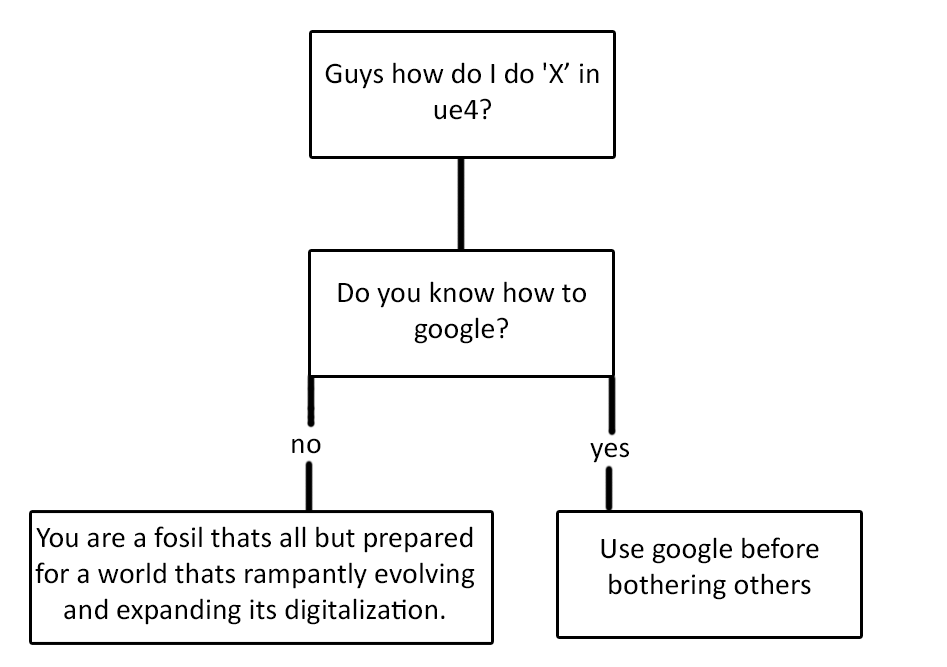
also, just made this
https://i.gyazo.com/9797856d0b9abe5190b3944f9c0331ec.png hehe
 unkempt jacinth
Does someone want to write a discord bot that converts questions into google searches? 😃
indigo jolt
whoa that would be sweet, except it would be too guilt free
 humble thistle
Hi guys, does anyone know how to increase the size of a Particle Collision?
I have a size by life so it starts out small, then expands towards the end of its lifetime. I want to make it so that it has a constant collision size when it spawns
fossil swan
afaik they auto-scale along with size over life
indigo jolt
ya that was my thinking too. it's too bad we can't visualize particle collision size/shape and impacts etc
not that they can really be used that often anyway
still would be nice
my #1 gripe with particle collision isn't the performance - it's the inconsistency and difficulty in identifying collision fails. like in non-play mode collision will act one way, then in play mode it will take "max collision distance" into account and stop colliding
unless collisions are within range
fossil swan
one of my gripes (besides not being able to rotate sphere/cylinder location) is ribbons. nice smooth 120fps and still the ribbons decide to be 20 times as big as I want em to be from time to time.
indigo jolt
YES
they get very jerky
if they're not being pulled by a high velocity they crumple up and get weird
it's very frustrating
i feel like the Anim Trails work pretty smoothly by comparison - but they're totally for different use-cases and they're not camera facing
i think both Ribbons AND Beams need a way to do non-crumple geometry. ie - the the polygons should STRETCH ONLY when bending occurs, by stretching + pinching, polygons fold
it makes wider beams/ribbons way higher risk than narrow ones
this issue does not happen with Anim Trails
they do stretch-only
outer fulcrum
get your heads out of your own asses.
This attitide and enviroment does not benefit anyone.....take some time and think when you were starting out
you just sound like a bunch of entitled jerks trowing stones out of your ivory tower
fossil swan
when I started out we had to figure it all out ourselves though <_< no youtube, google barely had any results, and everyone was as clueless as the next guy.
now we have youtube/google/much more and people refuse to use it.
outer fulcrum
good for you! I am sure you inspire a lot of people to greatness with that attitude.
fossil swan
hehe if only you knew.
you also failed to pick out the part where we did point out asking questions is okay, and we suggested to follow some documentation first, witha reply saying he doesnt want to
outer fulcrum
meybe the point would have come across better if you did not sounded like an asshole.
fossil swan
maybe that would be a terrific point if we actually started like assholes
and lets not forget that I made a plethora of cascade tutorials for beginners so they have a to-go-to place to take their time and learn.
outer fulcrum
so the journey made you one....it must be a delight to work under your religious objection to see others succeed. Great role model.
fossil swan
re: my previous posted sentence
outer fulcrum
then capitalize on that and point them to the PLETHORA of cascade tutorials you have made. as suppose to be like ....
humm your stupid use google
outer fulcrum
but hey....my point proven...this is already a great open space to share knowledge... by your masters and moderators. 👌
fossil swan
then we again politely told him to take a look at some tutorials
if anything, its not proven. but hey, im fine to agree to disagree
outer fulcrum
you are somehow missing the point that as a moderator you reacted poorly....defended all you want...but I belive that is probably not what your role is about.
 unkempt storm
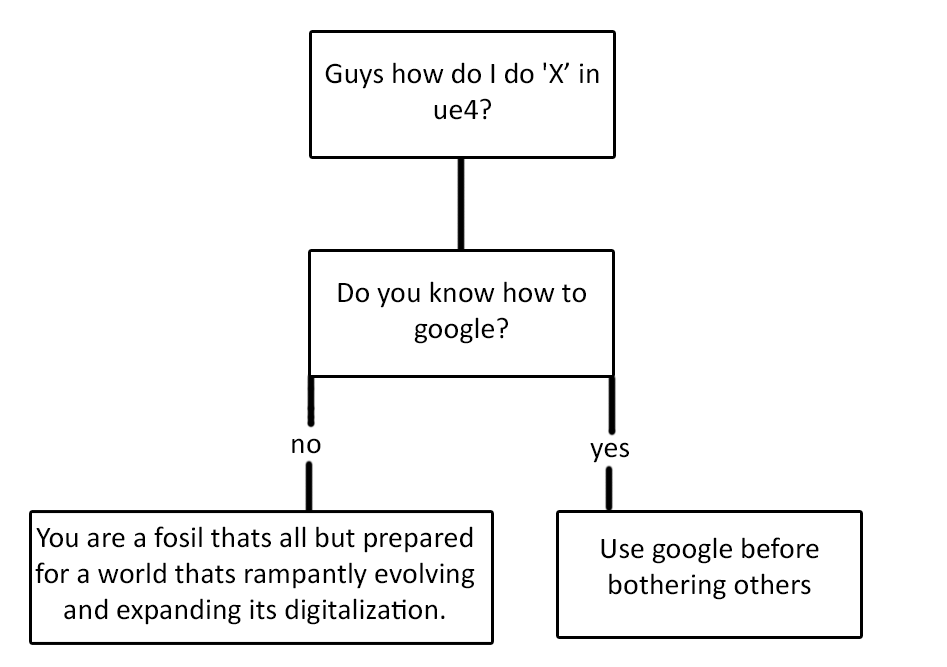
I see where you're both coming from, but @fossil swan your flow chart is not a great way to get your point across.
outer fulcrum
thank you!
fossil swan
again, im fine to disagree on that. especially when someone keeps refusing to actually take the advice to try out some tutorials to learn the basics
unkempt storm
Refusing to take advice is a separate issue entirely from "Google it."
I am with you on that. It's frustrating when people come here, ask for help, refuse to take your advice and complain that things aren't working out.
That's on them.
Developers should have a basic understanding of Unreal before coming here. But it also stands to reason that, as a place people explicitly seek out for help with Unreal, telling people to use Google instead is often counterproductive.
fossil swan
yet you expect people to take prescious time to google the answer for them and copy the first link
teach a man to fish
unkempt storm
No, I expect people to share their expertise. Not Google something for someone else.
Continue pointing them to the many resources out there that exist. If they refuse, that 's on them and it's not your fault.
fossil swan
thats how 99% of basic questions get answered though
unkempt storm
If you know how to help someone, do it. If you don't, move on with your life so someone who does know can help them.
 calm hemlock
Whenever I look in this chat, I am fine with investing a little bit of time even if the question is easy to google
Unless the question is just straight up boring, I don't mind questions that have an easy google-able answer
fossil swan
yea me too, and every of his questions was answered
mostly by me
regardless of the whole google discussion
indigo jolt
hehe about 10% of the time someone asks a question i actually do google for someone just because i know my faith in google is greater than theirs
i'm such a pro googler
cold sorrel
#Proogler
fossil swan
heck, I even explained what words to use to get accurate google results
unkempt storm
OK, so someone didn't take your advice.
Making a snarky flowchart doesn't help the situation.
fossil swan
not only mine mind you, im not the only person here to point at
indigo jolt
let's not make a big deal out of all this, if anyone's upset, i think we're all amicable adult sorts that won't be mean to each other
fossil swan
not to mention that discussion was a global discussion about people not googling, and not directly aimed at one
cold sorrel
@unkempt storm I think the fault lies with me. Before this discussion I asked about this very phenomenon. Lately there's been an increase in superbasic questions without a google attempt so I asked and wondered wether it's a generational thing. I believe it snowballed from there.
The asker in question got squeezed simply because I used him as the example due to being the most recent
indigo jolt
leave all super-basic stuff. i'm working from home and i need to communicate a few times a day or i go insane
i'll take care of it
lol
i'm actually on a webcam with my studio and vise versa but still....my sanity levels pretty low without guiding a newbie a few times a day
unkempt storm
The "Google it" discussion is always a controversial one, unfortunately.
fossil swan
ive always been active in this vfx chat, heck I asked for it. and i am never troubled answering questions, but you cannot expect people not to respond on things that are one right click away
unkempt storm
Hm. I think I'm confused as to what the problem is here. It sounds like you're all talking about different things.
fossil swan
all related
indigo jolt
btw, i'd like to pivot a little bit. has anyone here actually had any active experience using Cable Components in VFX? i've used it as a result of programmer hook up before....and looked up the tutorials but i'm curious about other people's experiences
has anyone here done any like grappling hook stuff with cable components - any opinions about using them with characters?
outer fulcrum
@cold sorrel and expect more as artist from VFX and Film move more and more to Real Time because of their conditions in their industry. Perhaphs change the channel name to "Just google it"
indigo jolt
i'm trying to get a balanced picture of pros and cons of using cable component vs a beam for a grappling type spell
fossil swan
@indigo jolt wow, that was a 180 degree turn in my thinking
@outer fulcrum ok, that made me laugh
celest birch
Cable component supports collisions now IIRC so you can wrap it around objects
outer fulcrum
@fossil swan 🙃
indigo jolt
yes that's one solid point in their favor
i also like the fact that they're not FLAT so in first person they can be more shapely
celest birch
I did use them for a grappling prototype and I don't see any negatives in using them
indigo jolt
but right now all examples i've seen online have been really basic "mannequin" type examples, sometimes with good gameplay, but no in-game stuff
cold sorrel
I'm not sure the film transition people are necessarily leading that group, as when you've worked in a studio for a while, you learn to be self sufficient. That's what caused my initial question. I feel as if it is a new generation of somewhat entitled people who take this approach. I have nothing to back this up, which is why I asked the chat.
indigo jolt
so +1 vote from Tommy - i appreciate your input
fossil swan
anyways, regardless on my stance on googling and people not taking advice should also be able to take a small flick on the chin I do agree I'll think about it twice next time.
@cold sorrel I notice the same behavior though. im active on a lot of ue4 related media, and it actually happens quite often that an answered question gets asked right again without even attempting to scroll one sentence down.
another good example is the rtvfx group, where whenever a new vfx-inspirational video comes out, its posted multiple times, sometimes right next to eachother
cold sorrel
It's fine to ask, there's always someone who'll answer. I'm just curious about the underlying mentality
unkempt jacinth
My spidey senses tell me that the cables might not be performant once you've got everything else in the game, but I guess that depends on your budgets.
fossil swan
besides that I am not sure, entitlement? people only using facebook and their trendy social media only never looking beyond that? teachers not explaining how to gather information? parents not explaining it? we need a study group hehe
indigo jolt
ah VR - so mid way between mobile and PS4.
well more accurately, PS4 VR
which is midway between PS4 and Wii i think
sorta sub-PS3
cold sorrel
Yeah, Not sure I'd rate psvr above wii when it comes to vfx
indigo jolt
haha yeah
cold sorrel
I've had to opt harder now than I did on the wii...
indigo jolt
masked materials are my friend
translucency, what's that?
going stylized helps
i don't know if you have that luxury though
having to pull off realistic-style VFX with VR restrictions sounds painful
cold sorrel
Oh, I'm superstylized
indigo jolt
ok good for you then 😃
cold sorrel
I love a good challenge
indigo jolt
yeah i don't even know what to say to that
like i imagine it must be part of a really amazing grand vision to justify such a thing
or you'd be in a terrible mood
indigo jolt
well let's compare VR games once they're public
indigo jolt
yeah i'll look like a lazy cheater
are you using any flash-like image 2d image sequence animations?
indigo jolt
ah gotcha
that's kinda where i'm at, but so far done all with material stuff. i may have to dig deep and get my hands dirty with 2d animation at some point
cold sorrel
I got away with very controlled uv distortion for many things
indigo jolt
yes this method definitely is a friend of mine
i just started playing with Static Mesh morph targets in particles
totally in love
cold sorrel
Vertex Animation Textures is the bees knees for VR.
Depth and everything
You only have to sacrifice a lamb and some memory to get it
indigo jolt
i've been trying to keep poly count small in hopes i don't alarm the powers above
cold sorrel
o.O
indigo jolt
not sure if that'll really help
cold sorrel
It's been at LEAST three generations since we first started saying we don't need to care about polycount anymore.
😛
indigo jolt
but i haven't been able to detect any clear memory or fps costs at the scale i'm doing - like 160-500 tri range, single object
cold sorrel
pfft
indigo jolt
but i'm not the greatest at profiling yet
cold sorrel
I've been shouted at to reduce my meshparticle tri counts a couple of times.
Though, not on VR projects.
But the TADs didn't like my debris kicking out a couple of hundred k tris for every explosion.
cold sorrel
My condolances
indigo jolt
yeah....i think most VFX artists need someone to keep us in check
but maybe i'm just greedy
calm hemlock
We settled for some special effects that effectively double all polycounts on the scene
indigo jolt
hehe i hope it was at least clever
on a star wars Wii game we did reflections by duplicating the entire environment and character, flipping it all inverted vertically, and gluing it to the floor, then setting floor to translucent
cold sorrel
That's how all reflections worked pre ps3
calm hemlock
@indigo jolt it almost entirely has to do with using extra vertices that don't change actual shape of the mesh for various technical purposes
indigo jolt
neato, sounds mysterious
calm hemlock
It's not, just our flavor of soft edges implementation + different masking things
calm hemlock
If you highlight me later tonight I'll gladly show you
After work
It looks like any other soft edge thing, but it's not face-weighted-normals and uses bit more polygons
indigo jolt
very smooth
 opal arch
Trying to figure out how to spawn particles from a mesh where the vertex color is painted. Is this a thing?
calm hemlock
I mean, it's a kinda straightforward thing to do with C++, but I'm not sure if there's a pre-existing thing for that
opal arch
rip, I found one person who'd asked the same thing but it was back in UDK. Couldn't seem to find an update to it.
cold sorrel
afaik you can only inherit the vert color but not control the emission with it
opal arch
yeah, that seems to be the case. ty!
The overall goal is to keep particles spawning within a volume but not clip outside of it. Sort of like a snow globe.
I'm gonna fart around with a sphere mask and see what I can do with that
unkempt jacinth
You can also spawn based on material assignment (for skel meshes) so depending on how you setup your materials that may work.
Never mind. Should have read the question properly. You want to paint the vert colour in the world.
indigo jolt
@opal arch could you explain more about the specifics of situation?
i mean if you just want to spawn like in a snow globe - Location > Sphere module will cover it
sphere mask could possibly help masking opacity of particles that exit if that's what you want
opal arch
^ yeah, you've got it 😃 @indigo jolt . @unkempt jacinth you're right, I should have said imported for this scenario. I just didn't wanna get too specific. The particles the clip through the thin shell are more or less the issue and the technical constraints are very tight so I was considering a few methods.
thanks for chiming in btw
paper pond
Anybody know cgwell forum? Those chinese guys are making super work and some of them are sharing their work. With google translate I get some jpg tutorials but there is one nice .zip file that is really interesting http://bbs.cgwell.com/thread-74804-1-1.html if anyone can re-share this zip i will be really appreciated.
celest jasper
we need a tutorial how to make this QQ account to register on that website
tried with my phone once, not sure where I got stucked
paper pond
I guess QQ account is not enough because you need to have some rank to see some hidden link or something.
Probably QQ work only if you have chinese internet or VPN in their region.
 junior matrix
Any suggestions on making a particle that is a fixed size on screen?
Was enjoying the point render mode, but it's obviously a debug mode that's only yellow and 2x2 pixels.
indigo jolt
there's probably a few ways to do this, what is the end goal?
for instance, why does it need to be a particle and not a part of post process material?
or UI
celest birch
how would i go about doing a "blink"
like when a player gets hit
their post processing just blinks red
for one second
junior matrix
@indigo jolt I'm looking for garbage-tier Quake graphics (those single pixel particles always fascinated me), and dreading the WPO math that might be needed.
junior matrix
Turns out
indigo jolt
there's a screen-position thingy you can do with materials
junior matrix
I just found a ConstantScaleByDistance material function...
indigo jolt
that sounds useful
does it scale up particle via the mat though? or just scale up material?
junior matrix
Maybe it will break my heart.
indigo jolt
ScreenAlign and ScreenPosition might be the ticket
but then there's scale issues of the particles themselves to contend with, ie - you'd need them to scale up immensely at a distance
junior matrix
ConstantScaleByDistance has the right idea, but when the description says "falls apart at close distances", that's an understatement. Might need some more trig.
indigo jolt
good luck!
who can guess what i'm doing https://gyazo.com/5e22f747b9cb7843378a5bbc01653843
 cold sorrel
Dust. Them be blendshapes
celest birch
pizza
celest jasper
Procedural Moustache Generator
indigo jolt
correct, blendshape experiment time!
and yes, this is obviously part of a game about moustaches, character customization will require at least 9000 moustache combinations
it's a dating sim where you try to seduce women, while also being a Private Eye. it's a Magnum PI dating sim
pick the wrong moustache for your tom selleck-type PI and you'll wind up with the Bad End
celest jasper
I've never played a dating sim in my life, but this will probably be the first one
indigo jolt
thanks, we're counting on your support, we have 10 confirmed customers and we expect to have as many as 12 by the end of next year
we're really not counting on sales, as much as DLC purchases of additional moustaches in the $10k-200k spending region per customer
fossil swan

Let's kick off this foundational series of artistic principles by discussing how gameplay holds a critical role in how we make visual effects for games. Visi...
mental quiver
@fossil swan Interesting, thanks for the link!
 hard olive
Im trying to make a projectile with particle effects, right now i have a set of 3 emitters for each lightning, one is the beam itself, another is the source emitter and last one is a target emitter
For each simultaneous lightning particle i want to make, i need to have a separate set of 3 emitters so that the beams dont share the same source and target, anyone have any ideas to truncate this?
indigo jolt
source and target can be in same emitter. Just change source type/parameters same with target then use noise for shape
unkempt jacinth
Hi folks. I'm emitting small pieces of debris from a particle system. It's a masked material. If I can't turn on responsive AA how do I stop the temporal AA from turning my debris into a mushy smear?
fossil swan
never really noticed that, and I use masked all the time
unkempt jacinth
Once you see it you can't unsee it.
fossil swan
care to show me?
unkempt jacinth
It's more noticeable when the debris passes in front of the water. I've simplified the capture but when the arch collapses with translucent dust it's even worse.
 barren raven
Temporal AA trails suck! Had loads of issues with them for dense grass scenes- the grass in motion caused loads of smeared distortion like that
unkempt jacinth
yeah. it's a pretty common problem. I wanted to check if there was another way to mitigate it than I wasn't aware of.
barren raven
The only things that helped a bit was ensuring a high fps (lower fps counts seemed to make the distortion more noticeable), making sure post processing like contact shadows, SSAO , SSR etc were either disabled or at max quality to not add further noise
fossil swan
those are meshes right? why make em masked?
unkempt jacinth
They're particle sprites with a subUV texture.
barren raven
The SSR on the water may be why it's more noticeable there, maybe test with the SSR off and see if it improves at all
Definitely way less noise going frame by frame on the other areas
unkempt jacinth
The water isn't too much of an issue because the arch actually collapses. So the chunks of the arch and dust are behind the debris. But the chunks and dust are causing a similar problem.
barren raven
Also not sure if that is the native res your screen is at, but these kind of problems are often exaggerated with limited resolution
unkempt jacinth
It's just a crop of the editor view.
barren raven
In fullscreen you might see less noise, but it'll still be there in some form
cold sorrel
Does it look better if you use actual meshparticles instead?
unkempt jacinth
I haven't tried yet. I'll try. I have a feeling they're small enough that the resolution of the motion vectors just doesn't pick them up.
fossil swan
when you buy a 3dsmax plugin that greatly enhances vertex normal editing, but it doesnt have anythin that can target the normals towards a location
celest jasper
and some random guy tells you that he is using a free software and it has a free addon that actually can do it
fossil swan
hehe
fossil swan
trying to solve particle issue with em not showing up in orhto, ends up just the viewport being broken and got stuck between wireframe and lit
 verbal bramble
How would you make this multi layered lens flare effect in unreal ?
indigo jolt

Unreal Engine doesn't have any built-in features for create highly-customized lens flares. By default, lens flares are implemented as a...
fossil swan
just lerp in an ice texture from bottom to top or whatever.
the new 4.19 layer materials might be beneficial for this kind of thing.
 gray inlet
Someone please enlighten me, what kind of UV sorcery do I have to perform to achieve these screenspace panning textures

In this video, we discuss the top 5 most common mistakes that TANK players make in Overwatch. This isn't about pointing fingers, we have made these errors to...
 cold sorrel
Looks like screenspace particles
gray inlet
that is actually the first thing I googled, but nothing
celest jasper
Ugly post process method: sphere, sphere with 0-1 gradient, x amounts of panners/offsets/speed, 1 texture of your choice
I think I also saw another method/tutorial with green health crosses
gray inlet
I am trying the post process method atm, but I wan to avoid large textures with mainly empty space
and rather have individual textures rendered
cold sorrel
I'd try faking it first. Attach a localspace particlesystem to the camera. Offset them to play in front of camera.
celest jasper
why do you need a large texture with empty space? you can have x single spheres and move them around in screen space
celest jasper
desperately trying to find that healing UI animation
celest jasper
written I think
I can't find it 😐
but
I'm trying a setup right now
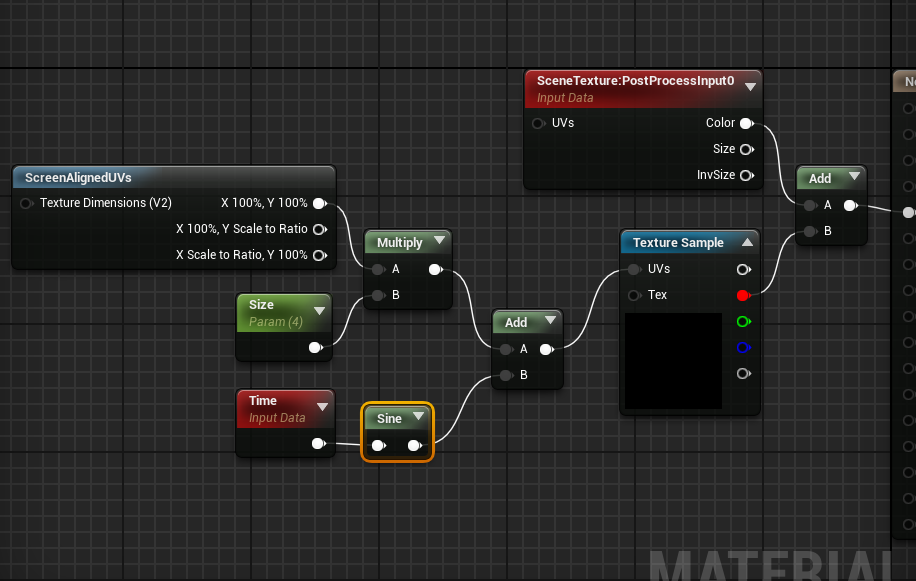
with that setup I can move a texture from the top left corner to the center of the screen
back and forth
gray inlet
is it a clamped texture?
gray inlet
I considered using the custom expression
celest jasper
I think the health UI tutorial was on a japanese site
gray inlet
ya, also I already have a barebone system like yours
clamped texture and just add V-values over time
but
the math is so fucked
can't wrap my head around it
😄
celest jasper
I agree and I also think there must be another solution
gray inlet
well, my plan B was just UMG widgets
or coherent UI and javascript particle effect engine 😄
but all the other effects are post process
wanted to try it all together first
celest jasper
Luos probably knows the answer, looks like he successfully hacked the particle material to show particles on screen
Did you check out this?
My personal favorite though, render the particle with a black background and put a rendertarget on top, saw another game one day where they did that to render 3D objects on the UI, dayum impressive
 candid flint
But render target is pretty expensive, isnt it?
celest jasper
depends, in that 3D model case it was cheap, because it was not on the whole screen, but rendering a particle scene with 2k res to use as UI, that's like rendering your scene twice, maybe less if you only render color and not buffers
my brain was sparkling when I thought about the 3D model case, but you are right, wouldn't make sense in that case
 spare hare
I would say the contrast between lit and shadowed is too low. Decrease the Indirect/ Sky Light
@hard olive
The whole scene is evenly lit, light bouncing is definitively missing.
pseudo elm
Does anyone know if the panini post process works in Unreal?
https://docs.unrealengine.com/latest/INT/Engine/Rendering/PostProcessEffects/PaniniProjection/
The console variables do nothing.
3D projection that fixes the perspective projection's geometric distortion on sides of the view having a wide FOV.
 pale dagger
@hard olive needs shadows
indigo jolt
@hard olive do what Raildex said. Skylight is too strong
celest jasper
@pseudo elm Last time I checked, pre 4.18, they worked
indigo jolt
bounding box
click on empty area in particle system to the side of any of the emitters, then scroll down the list until you get to "use fixed bounds"
select that
set values to -9999, -9999, -9999 for minimum
and 9999, 9999, 9999 for max
 lofty vapor
Hello guys
I would like to ask smth
If there is anyone who has experience in Unity,
How difficult to remake particles made in Unity in Unreal Engine?
cold sorrel
Easy. Its harder to go the other way
The big things cascade is missing, that shuriken has, is a noise module and simulation speed.
But thats doable through other means
Your main hurdle would be ui. If you are used to shuriken, cascade will seem very cumbersome and a bit obtuse
cold sorrel
All particlesystems are more or less the same
 median peak
Does anybody known how to update the location of a single burst (or constant looping) particle in a BP/at runtime?
spare hare
I think he wants to directly manipulate a single particle, which is not possible
fossil swan
direct location
median peak
@fossil swan thanks that worked. didnt know about direct location, thats a useful one to remember
 hallow arrow
did anybody play hellblade? remember the complete darkness part? does anybody have an approach how to recreate that?
cold sorrel
Hey, does anyone remember that Blood vfx pack I was planning on submitting to Marketplace? I ended up not doing so. Instead I started a Patreon and that pack is the first post there. Check it out! https://vimeo.com/257195158

A while back I meant to release a pack of blood VFX for Unreal Engine 4 but I decided I'd rather share it in a way that it's affordable for both people…
indigo jolt
whoa clicking now
cold sorrel
Do it! You would be able to join the patreon for nearly two years for the price I meant to ask for the pack.
candid flint
That looks amazing, but what is the performance impact?
cold sorrel
It's all in the vertex shader so it's cheap
The only thing to be wary of is the uncompressed textures that drive it but they are fairly small.
The core of the effects is all opaque as well so there's no overdraw like traditional blood so on most platforms, i'd say it's a bit cheaper than a normal blood effect.
candid flint
That's sweet
 near blaze
Hi can anyone help I'm having a fairly easy time creating particle effect but for some reason the effect will run fine then either drop off or not be working completely my emmiter loops are set to 0 for continuous so I'm not sure it doesn't happen in cascade just the editor and play level
Also how do I get access to partikels blood pack do just have to donate
fossil swan
in what way does it drop off/not be working completely?
and yea, donate some munnies
near blaze
Well created some bubbles for a cryo chamber with multiple emitters for different sizes of bubbles runs fine for about a minute and a half then starts pumping out 1 bubble bout every 3 seconds happened the other day to with a fountain I created run for a minute and a half then just stopped its weird because they run fine in the cascade editor
fossil swan
lifetime correct?
near blaze
Set min 0 and max 0 on all emmiters
fossil swan
thats why
yoou are flooding your cpu or gpu
and since they cant die
you are hitting the limit
and ruining performance as well
near blaze
What should I run them at
fossil swan
not sure what you are exactly doing with em, care to show or tell?
near blaze
Just basic bubbles
brisk wedge
are the bubbles disappearing at any point or you want to see them forever?
fossil swan
static? moving upward/downward?
what should their behaviour be
that way I can accurately tell you how to approach it
near blaze
Yeah just bubbles rising
fossil swan
then set the lifetime slightly longer than them being in view
and if you want to make sure they are already started before looking at em, set the warmup time to a few seconds.
near blaze
Ok I'll give it a try thanks bro your somewhat of an icon to me so I appreciate your time👊
fossil swan
no worries, and good luck.
near blaze
Thank you
 orchid crown
how do i get a material like water to flow along an object in a specific direction?
median peak
@orchid crown if its just needs to go straight use a panner node on its UVs. If it needs to bend, use either a mesh distance field setup or make a flowmap.
orchid crown
yeah i asked in the Graphics chat and it was those or adjust the UVs and Pan
fossil swan

A pre-recorded and extended talk I did for the UE4 Israeli meetup. While creating the effect I talk about some optimizations and performance gains for effects.
indigo jolt
clicking
 steel skiff
Hello, does anyone know if there is a way to get per-particle location and\or velocity?
fossil swan
materials can grab location with ParticlePositionWS and speed with ParticleSpeed modules
so could be used to grab what you need
steel skiff
Yeah I know about that, however I needed to drive C++ logic via particle position to do other kinky stuff, so simply grabbing it in material wouldn't help me much
 latent hound
can you put collison meshes around this stuff to make spells :v
fossil swan
@steel skiff my point was, if it can be forwarded to the material, im sure there is another way to grab that data.
pseudo elm
Hi. How do I get the screen position for an arbitrary world position passed into a post process material? It seems the TransformVector (WS to camera space) node is using 3x3 matrices under the hood :/ I subtracted the camera position from the arbitrary world position I am using but I seem to be missing some projection transform.
Is there a handy WS to screen space transform that I am missing?
spare hare
Is there a way to force LPVs to update instantly? They somehow smoothly interpolate and it looks werid with fast moving objects
pseudo elm
To answer my own question: TransformToClipSpace did the trick!
indigo jolt
@pseudo elm could you do us a favor and share images/video of what you accomplished? Sounds cool
I like seeing use-case scenarios
 dusty sorrel
Hey, sorry if this is too vague or a silly question, but I’m trying to create a smoke effect that can interact with objects. Like if it were rising and hits a surface, it would disperse outwards from where it hit.
indigo jolt
that's at the far end of what's possible
you could use Distance Fields + Nearest Object nodes to make large smoke sprites distort and dissolve as they impact
or just depth fade to softly fade out opacity
and/or you make it so that it does those things, then set it to have an Event on collide that spawns other particles that move horizontally
with like a cylinder location module set to velocity with no positive/negative Z
dusty sorrel
Awesome ideas, I’ll see what I can do! Thanks!
analog onyx
I'm having a bit of trouble hitting right spot with particle effects for one project. They need to be somewhat semi-stylized, with low visual clutter. The problem is I keep falling into either something completely cartoonish or totally realistic. If anyone has a link to some inspiration regarding that, which is not on a first dozen of search result pages, or any advice in general, I'd be grateful.
indigo jolt

a lot of it is flash, but some of it rides the line - closer to Street Fighter


Pinterest
Copy of the big brother welcome Tucao - Game effects - CGwell CG Wei children forum, the most professional game special effects division, animator community - Powered by Discuz!
analog onyx
Well, yeah, something like that in terms of visual smoothness, but yet at the same time should be closer to realistic.
indigo jolt
pick through those links
each one has links to more
until you kinda find the style you want
the amount of stuff there on pinterest is godly
i haven't found similar quality/quantity anywhere else
analog onyx
Thanks, I did dig through PI quite a bit. I can't even use words to describe what I am after. Can't show pictures of the style either.
indigo jolt
so it's something no one's ever done in any media?
and not even similar to anything?
analog onyx
Hard to say. I can't even pick a good baseline to iterate on. Describing it, the closest would be befriending path of exile effects with outline shader.
fossil swan
just comes down to some good noise textures, masks, and meshwork.
indigo jolt
yeah i'm suspecting same thing - masky stuff + some distortion.
analog onyx
I'd say that the culprit is that every effect falls out of the picture, once slight outline effect is added.
indigo jolt
a lot of path of exile stuff was very full of masked materials with a lot of specular etc
analog onyx
Aaand if the outline is added to effects, some of them stop reading properly
like steam for example
it fails to look like steam with dark outline
indigo jolt
yeah i kinda imagine it would, is there a reason why you feel like the outline is important?
analog onyx
Nope, the outline on the particles themselves is not important at all.
indigo jolt
i mean part of a "style" is usually related to triggering a familiar nostalgic aesthetic in an audience to something they've seen before. outlining all the vfx seems like a dubious move
i can't argue with going for a path of exiles look by any means, it's a lot of liquidy, shiny, gooey stuff
have you looked at Street Fighter 5 vfx?
that stuff is super good and does a lot of liquidy aesthetics
indigo jolt
ya its' crazy good
fossil swan
there was a post on the realtimevfx facebook group about it (made by me) and one of epic's devs submitted an awesome tool, he promised to update it but never gotten around to it 😦
stuff looked so liquidy and organic
indigo jolt
i'm doing a LOT of that stuff right now, but cannot share yet
i don't think it's SF 5 quality though
that would be a stretch
pseudo elm
@indigo jolt No problem. I show you tomorrow.
 normal bolt
Heya guys, Anybody know if it's possible to make a material or material instance that would split a mesh into different parts and have those parts rotate?
pseudo elm
@indigo jolt This is a post process where a texture is centered on an actor in the scene.
indigo jolt
neat!
unkempt jacinth
@normal bolt you could store the pivot point of each separate piece in extra uv channels and use that to drive the position and rotation of each piece.
Or in the vertex colour which might be easier to setup.
 mortal lily
I'm not on 4.19pX but with the focus on niagara at multiple talks this year..i'd say its not too far away.
mortal lily
nvidia pfx?
 surreal willow

This is a project I've been working on for quite a while now, It's an integration of Nvidia Flow in Ue4, the scene you see is completely made by me, all mode...
theres a few git branches with each individual one
bunch of nvidia gameworks technologies which utilise gpu particles for water/smoke/fire/hair etc
NVIDIA Developer
Developers need the best tools, samples, and libraries to bring their creations to life. NVIDIA's award winning GameWorks SDK gets them access to the best technology from the leader in visual computing. In addition to providing industry-proven GameWorks solutions for real-time simulation and rendering, NVIDIA engineers deliver cutting edge presentations at world class venues like GDC and SIGGRAPH throughout the year; helping developers exploit the latest technologies for game development.
thing quite a few are integrated into the main build but hoping they add the pfx stuff with nigara
mortal lily
ahh flex and flow
you can already use them just get the branches from nvidia github
or try out the branch by @inner flicker
he combined a lot of them into one
surreal willow
hmm
mortal lily
incl. vxgi
surreal willow
ah nice, thanks
yeah Im no coder so i dont really know how to merge a bunch of branches into a working build
right now I want to modulate each particles position with a sine wave, but it isnt really possible in cascade
think I need to paramatize its velocity and use a sine function from the material editor or smth
 inner flicker
basically
just read the last pages from https://forums.unrealengine.com/community/general-discussion/24447-nvidia-gameworks-integration
someone usually has latest merged branch there
I didn't include few techs as there were issues with them
some are less picky and merge things even when it breaks the merge
this is why I didn't end up having hairworks and waveworks in the merged build
waveworks rendering literally clashes at one point with flex rendering
@surreal willow
https://github.com/0lento/UnrealEngine/tree/4.18-GameWorks (Blast, Flex, Flow, HBAO+, Volumetric Lighting, VGXI)
or https://github.com/0lento/UnrealEngine/tree/4.18-Blast-Flex-Flow (Blast, Flex, Flow)
both based on 4.18.3 and have latest Blast (which I don't think all other peoples merges have)
do note that I updated Flex and Flow both from official 4.17 versions into 4.18.3, so I could have missed some things during the engine upgrade changed, had to change few things here and there in the process
but all examples seemed to work fine on my tests
surreal willow
thanks man downloaded it now
however when I build the engine it needs to download 4gb again to 'update dependences' is that normal?
I am in sz china and it seems to be downloading from the us servers, bc its downloading at about 500kbs but I get 30mbs from when I download builds from the launcher or via git
 gusty vapor
indigo jolt
gusty vapor
indigo jolt
@ϟKΔŁ#1842 looks like time of day difference
2nd image clearly has sun/directional light aiming from a borderline sunset location
first image is almost noon
if your sunlight is set via blueprint, this would change in gameplay
outer fulcrum
Howdy would any of you fine peeps like to share tips/tricks to reduce overdraw at the material level?
indigo jolt
masked/opaque materials instead of translucent
fossil swan
^
rotund quartz
Just in case this hasn't made it into the channel yet

GDC SF 2018
Wednesday, March 21 5:00pm - 6:00pm -
mortal lily
So we can expect niagra in coming releases? 4.20+ ?
also i would like to know more about a potential timeframe for a transition period cascade->niagra
 crimson crest
making a material and i want to access the far plane value. can i do that?
rotund quartz
@mortal lily I can't commit to dates here and now, but GDC should answer most of these questions for you!
mortal lily
Neat! Thank you for answering. @rotund quartz
fossil swan
generally if epic shows something during gdc, you can try it right away at home. either in experimental or full state.
at least, thats how it has been last few years
so cant say that with 100 certainty but generally speaking
surreal willow
did some niagara testing today, its buggy but in 4.18, unfortunately none of the nvidia gameworks pfx work in it
there is a spawn flow particle module in cascade but cant access it in niagara graph
rotund quartz
@surreal willow Niagara is a completely from-scratch new system. Cascade's functionality doesn't necessarily apply. Please don't consider what you see in 4.18 to be in any way representative - most of our development work has been happening in separate branches and what's in Main is woefully out of date 😃
fossil swan
^ still fun to play with, but yea, dont use it for anything serious
surreal willow
hmm okay man, ya seemed like the ui was a bit all over the place for it
I am working on an interactive projection exhibition for a company in shenzhen, but cascade has pretty limited functionality
hopefully we can delay it until niagara is in a workable state
rotund quartz
UI and workflows have been our strongest focus over the past few months, as most code-side functionality is reasonably well in place. I think you may hardly recognize it in our GDC presentation 😉
surreal willow
thats good dude, I like the cascade style stack, and also the node based system, looking forward to seeing it
 coral sentinel
For some reason color of one of my ribbon particles in PIE is different from packaged game. What could be the cause?
celest jasper
Particle Material is using a Parameter Collection, but I highly doubt that
 brave dove
outer fulcrum
brave dove
outer fulcrum
Hi fine people,
I am trying to attach a ribbon to a Mover emitter to create trails. However the ribbon gets all over the place. It does look cool but not what I am after. Any suggestions are greatly appreciated. 😃
unkempt jacinth
@balaganvfx#1174 can you see the uvs in Houdini?
cold sorrel
It looks like the UV2 uvs from the VAT Rop has ended up in UV1 somehow
If you bring in the exported mesh into Houdini again, and check the uv editor. What does the different uvsets look like?
 drowsy lynx
just created this little tutorial. :)
https://youtu.be/zykKhdMUTwg
I'll show how to create, use and bugfix Motion Vector Textures with the Slate Editor and bring them into Unreal. Effect Texture Maker: https://mebiusbox.gith...
mortal lily
Slate looks really neat. ty! @drowsy lynx
 pine crystal
Anyone ever run into a situation when using a cube map for skylight in a open world layout that the inside of buildings display reflections from what seems to be outside light sources?
I’m thinking about deleting all of my reflection captures and trying to narrow down the cause but I figured I’d run it by you guys first
pine crystal

JPG Image
example of what I'm talking about. What is with the light in this otherwise dark corner
 wise geode
I'm working on a tron-like game where the player controls a bike with a ribbon particle effect spawning behind. The problem I'm having is I can't seem to get the ribbon to last forever and I also can't get it to have any collision. Would anyone be able to point me in the right direction at all?
surreal willow
@pine crystal skylight lights a mesh from all directions and does not take occlusion into account
if you are getting reflections then you may need to adjust the priority/radius/intensity of your refl captures, it basically blends them together. or possibly capture them in your scene with the skylight disabled then re-enable it
also last time I used the refl capturesI noticed that they did not capture metallic materials, and I had to use a scene capture camera, bake out the capture points and use them as cubemaps in my reflection captures
not sure if that has changed since 417
pine crystal
@surreal willow I’m trying to use the skylight cast shadow LPV option in 4.18 .... epic has a video on how they do this in fortnight but I’m just now learning that dynamic global illumination and LPV is broken in 4.18
I’m not the only one having this issue it seems 😩
If this was working the occlusion would mask the specular highlights in the dark corners and my scene would look great with completely dynamic lighting
pine crystal
Looks like nvidia makes a plugin that can be built into the engine for dynamic global illumination
Just not sure if it’s for nvidia cards only and I’m pretty sure it will kill VR performance
celest birch

anyone have an idea on how i can prevent it from changing the material with the slightest rotation
im using vertex normal ws

trying to get something like this
 woven yacht
are flow maps the only way to do waterfalls in ue4?
celest birch
@Klera_is_Foon#4275 Waterfalls only flow in one direction so why would you need a flow map?
woven yacht
to tell it what direction
drowsy lynx
@woven yacht you can make the geometry and the UVs in a way that the flow looks nicely without a flow map. this for example is a plane with some subdivisions:
this wiggly motion does NOT come from a flow map or the texture itself!
it's the uvs of the plane which give it the fluid motion
spare hare
A Panner Node should be enough for a simple water fall.
If you want to have wobbly animation, you can distort the UVs without altering the UV Layout of your mesh
@fossil swan has a video uploaded where he explains how to distort the UVs and what usage it has
surreal willow
hey guys, any way to stop particles colliding with each other?
more specifically nvidia flow particles are colliding with cpu particles with collision enabled
but I cant change the collision channel because nvidia flow particles are set to worldstatic it seems
and I need it to collide with other geo
@uno the nvidia GI does not support reflective materials and has a very high overhead,
celest birch
anyone know why my spline mesh only tears on the last mesh at that specific part?
 sullen forge
btw guys niagara is working on 4.19 preview
you can actually do stuff with it
and man its complicated as fuck
but so much cool things
pine crystal
Does DFAO actually work in 4.19?
My project has a dynamic day/night cycle and would benefit from Distance Field AO but I haven’t been able to get distance Fields working in 4.18.3
drowsy lynx
@woven yacht you can also watch this. i talk about how we did the water falls in rime: https://www.youtube.com/watch?v=fwKQyDZ4ark

More Game Art Tricks: http://simonschreibt.de/game-art-tricks/ Article to this Video: https://simonschreibt.de/gat/stylized-vfx-in-rime/ This talk was given ...
karmic kraken
@sullen forge does it? When i tried it crashed instantly as soon as i created some of the Niagara assets
pine crystal
@surreal willow @indigo jolt https://1drv.ms/u/s!ArlMtU4-teLahVfyu0dNntZ59HR8 think I may have figured it out

PNG Image
indigo jolt
this working indoors now?
pine crystal
Yea
Distance Field AO
Fixed the movable skylight shadow and specular issues
I’ll take an inside screenshot in a bit
https://1drv.ms/u/s!ArlMtU4-teLahU-bDRLRGQSMubyL look at differences

PNG Image
Outside shadows before DFAO
So apparently there is a bug you can work around with 4.18.3
pine crystal
@indigo jolt https://1drv.ms/u/s!ArlMtU4-teLahV0sB52zu5uQc3no

PNG Image
Vs with it turned off https://1drv.ms/u/s!ArlMtU4-teLahV5zslUlu4iX9j6C

PNG Image
 brazen galleon
anyone have trouble getting emitters to fire during game play but they work fine in the editor when getting triggered by sequence?
the emitters are attached to actor and move just fine in the PIE but during gamelay they do one cycle then never fire again
any help appereicated
indigo jolt
ya that AO looks good
@brazen galleon i'd say yes, but not with the "fires once" - that sounds like it's on the blueprint
feels like some sort of non-replicated behavior or maybe a key press that doesn't allow multi-use
something in that ballpark sounds like the suspect
brazen galleon
I found it after 2 years
i had this issue before
I gave up on trying to fix this before
for anther prototype but so the default setting is to stop renderering the emitter after 1 second of being considered non critical
if you set that to 0 it will never kill it and work fine and you can you do it on the local emitter attached to the actor
so if you want to have it be auto culled never to return just do it on the local emitter
for the ones you want to keep
I have a looking main menu screen and my vapor trails were going away and it was making me sad and it was only happening when I was playing the game triggering the emitters in the sequencers made the trouble worse
I dont know what i mean with the sentence need coffee
sorry
😃
looking should be LOOOPing
I am streaming right now you can see it fixed and looping it is the red ship flying around

I will leave it up for a few mins while i make some coffee
ok need to work again if you want to see it fixed and what I did then let me know
fossil swan

polycount
Stylized Winners 1st - Etienne POV – Etienne blew us away with an absolutely stunning final piece.
mortal lily
realistic magic spells tho 😛
 bleak inlet
hmm never been in this channel
hello
is it possible to increase motion blur on particles ? 😃
fossil swan
hmm good question hehe
bleak inlet
seen in a game it has nice blurry snow
each particle is blurred in the direction its going
I dont think its a matter of just multiplying the blur node in material editor 😄
but havent tried that
fossil swan
<_< going over my 2017 vfx stuff.
besides it being a limited amount since I did a lot of material stuff instead, god some of my old stuff is timed or set up poorly hehe
indigo jolt
it does seem like timing is one of those things that just slowly progresses
it's still not my strong point, but god is it hard to rush it....the more i do, the more perspective i get on it
fossil swan
having a lot of contact with an animator who keeps telling me
FASTER
SNAPPIER
LESS THIS, MORE THAT!
helps so much
indigo jolt
haha yes, that's the hardest thing, trying to make everything "win" in 0.5 seconds or less
i've had to move most of my workflow to 0.1 speed time dilation
so i can see what i'm doing
 indigo jolt
that's pleasant to watch
indigo jolt
show me shader complexity view lol
i have a heck of a hard time doing this sorta thing with even remotely reasonable overdraw
indigo jolt
you can use a buttload of gpu particles to ACT like a trail (sorta) but neither Ribbons nor Anim Trails can get all the fancy GPU particle benefits
ie - cost savings for large quantities
however, it's plausible that a Ribbon COULD be cheaper than GPU particles for the same amount of screen coverage in an effect
since a single ribbon, although semi-pricey, is at least low on overdraw...just high on cpu
surreal willow
yeah was thinking along those lines\
ribbon is quite expensive too
main problem is that said particle with the ribbon attatched has a lot of transform updates
needs to have collision and transform by an animated vector field
indigo jolt
haha oh man that sounds like quite a headache of requirements
what are you trying to make?
 subtle idol
hey guys! I guess reflection captures are a visual effect? I was wondering if anyone has needed to use them in a large level where the player can seee both sides of a think wall or roof... and how they were able to hide the bleeding of the reflection. any help?
they dont seem to have any settings within them to let the fade over distance or a bounding box for culling
pine crystal
@subtle idol you using movable skylight aren’t u
We all have that issue it’s a limitation of the engine
subtle idol
Hey @pine crystal Stationary sky light. but reflection probes have the priority on the external walls where there is overlap
pine crystal
Static and stationary bakes lighting and is blocked by meshes with reflection captures
You bake AO and lighting and recapture the reflections
With stationary skylight
subtle idol
aye, and this should solve the issue of reflection probes inside a building overlapping with the roof (due to an odd shaped building) giving less bleeding of that reflection on the exterior?
pine crystal
With movable the only way to mask is dynamic AO in post process and distance fields
Yes
subtle idol
ok, I will give it a try then! I havent baked in a while. Worth a shot!
pine crystal
It will solve as it now has updated lighting information for reflection
subtle idol
ty
pine crystal
System for capturing and displaying local glossy reflections.
Really good article on reflections
I’m still trying to figure out a way to do movable skylight reflections without bleeding but this article doesn’t really address it other than stating limitations on movable objects
Stationary and static skylight will give awesome reflections once Lightmass is baked and captures are refreshed
Occlusion will take care of the bleeding as long as your radius doesn’t overlap wall geometry
My challenge is working with stationary skylight and movable directional lighting as the skylight isn’t static for lighting completely so I’m in between worlds lol
In a world where I have to bake AO but not directional light shadows
And use cascading shadowing for directional light
Makes my head hurt honestly
So I’m trying to fake dynamic skylight with a stationary ambient cube .... bake the AO only and allow the directional light and stationary skylight intensity to fake dynamic lighting as the sun sets and rises
The joys of VR forward rendering lol
 past osprey
This particle emmiter isnt showing any colors I set in color over life, do I need to enable some sort of material override? https://gyazo.com/e28b6550fb00caf0ccf6151beb11795e
 fossil swan
need a particle color node in the material
multiply it with whatever goes into base and/or emissive
also multiply its alpha with whatever goes into mask/opacity
pseudo elm
Has anyone here made a Global shader as a plugin?
https://docs.unrealengine.com/latest/INT/Programming/Rendering/ShaderInPlugin/QuickStart/index.html
I would like to create a post process material from HLSL (mostly to leverage the VS). Is that even possible with this method?
Creating and setting up a new Global shader via a Plugin.


 bold bane
Hey all, do you think morph targets are more efficient than joint deformations for performance?
wanna try some animation but the quantity of joints are making me think about performance
bold bane
actually it is a kind of a procedural root growing/wiggling animation but for retain the geometry as smooth as possible, I should spend a lot of joints like 10 or 15
so I though morph animation might ba a way to go
 celest birch
thats cool @sullen forge
fossil swan
neato @sullen forge
I'd probably get something masked (opacity) at the bottom going upwards a bit to really ground it.
sullen forge
what about the blending with the ground?
at the moment the depth fade + the light grounds it quite well
i also need some flames or particles
fossil swan
well its a personal taste, i'd probably not blend it but make the contrast stronger
analog onyx
Pretty neat effect! I'd probably say that the effect would look better, if the wave was reading more bulky on the bottom and lighter in the crest, but that is probably personal flavor.
sullen forge
i see what you mean @fossil swan
maybe i can use one of those mesh animation effects for the ground
like an opaque energy cloud
fossil swan
hmm, what I'd try is duplicate the mesh, expand flat over the floor a little, mask out the top and get some masked energy over it.
If you send me the mesh I can do a quick mockup. and if you dont like the result, fine with me either way 😃
pine crystal
https://1drv.ms/u/s!ArlMtU4-teLahWEWLcanA8jzUnxj so I decided to bake AO and stationary skylight to save perf for VR instead of doing fully dynamic.

JPG Image
I still think I'm going to be able to fake a really good look
https://1drv.ms/u/s!ArlMtU4-teLahWJsQdxGyQk-wvmw Outside progress

JPG Image
pine crystal
So even though the baked lighting looks better than dynamic AO VR seems to do better 👍🏼
I’m really impressed by ue4’s ability to do dynamic light source for the sun while allowing stationary skylight light mass to cascade shadows
 solid stream