#visual-fx
1 messages · Page 10 of 1
 vast path
 ashen stump
@fossil swan Yup, that's gonna have to be code, I think
 fossil swan
I wish they added the option to expose particle parameters in persona. would save a lot of headaches
 cold sorrel
I'd love to see the dissolvemap that gives such beautiful frames all the way through. Wherever you pause it, it has perfect hooks and points and no "half shapes" that usually give away a dissolve.
fossil swan
unless its a very very well executed stepping fade out, but doubt that
cold sorrel
For the frames, it would have to be a curated thresholdmap, but that comes with the shrinking frame limitation which you need to counteract by scaling up the sprite. That's not happening here since it's a WPOffset sphere.
It would have shown up
Sure you can get close with a thresholdmap, but not all the way
 indigo jolt
@cold sorrel i've been doing a LOT of work with dissolve materials lately, the most important work is done on the texture
as long as you don't have any "flat" values - areas where several identical value pixels are side by side, you can get a really smooth dissolve
essentially it just requires 100% gradients
it can also be done sorta well with a different material that gets multiplied against the main dissolver texture
in tandem it can be smooth
it's the areas of adjacent same-value pixels that cause stuttering and aliasing
if my current project wasn't still so much under wraps i'd share. but i'm focused very much on stylized spells with smooth dissolves like this
cold sorrel
It's not not the smoothness I'm doubting. It's the shapes and their progression. Each individual frame is perfect, no inbetween iffy ones and it's progressing nonlinearly. So it's not eating into itself. I'm sure your effects are looking great, but I don't believe this one was made that way.
indigo jolt
i don't think he did it this way either
i think he he's just got a high frame rate of some really nice animations done in After Effects/Flash
i just lean towards advising people to NOT doing that because it's so much more difficult and time consuming
even though the results are really special
cold sorrel
Oh, yeah totally.
If I were to recreate it I would do it with a dissolve as well just because it's so mych quicker and easier to iterate on.
To do it handdrawn you either have to be your own art director, or fast enough that you can do the inevitable changes quickly
indigo jolt
yes, very high skill operation
btw while you're here Glad - what do you think is best way to make a ring of smoke bits to spawn in a ring without having them randomly bunch up in some spots
and create gaps in others?
cold sorrel
Sphere location not giving you good enough spread?
indigo jolt
simply using a Cylinder location module with "Surface Only" for spawn just has too much randomness
indigo jolt
that's honestly my next probable approach as this is already using mesh emitters
cold sorrel
If I recall correctly you can spawn sequentially on those right?
ashen stump
Thought so
indigo jolt
yeah, i'll probably just have to create a "smoke ring mesh"
not favorable but i guess that's the cost of trying to kill off randomness
cold sorrel
Yep
That's a price for stylizing effects 😃
Can't get away with general areas of smokiness
indigo jolt
yes, i can't afford to just spam a billion clouds so it looks like a mesh is in order
ashen stump
I'm sure @fossil swan can tell you all about the pain of stylized particles in ue4
If you don't want to be tagged btw, just say so
fossil swan
s'all good.
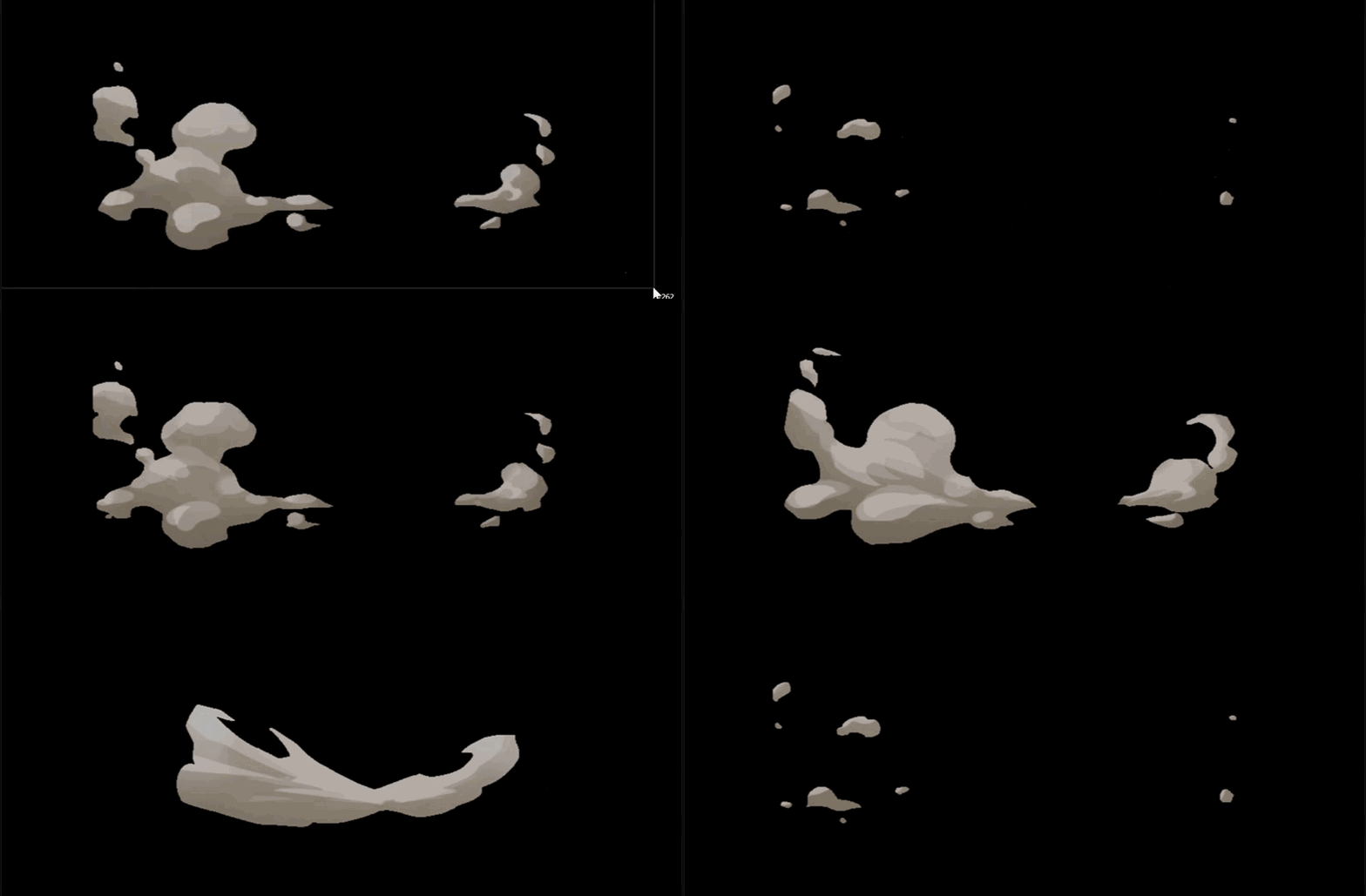
im just happy that for one client I have a personal artist drawing flipbooks all day.
https://i.gyazo.com/00bdadae0355814412677c0ef2ce1219.gif gif ruining it ofcourse.
 fossil swan
yea me too, ive been trying and practice it but.. so far no luck.
doesnt help I barely have any time, and huge gaps between practice sessions sucks
indigo jolt
btw, what's the best UV solution for World-Aligned textures that have good Object Rotation built in?
i've messed a bit with "LocalPosition" but not sure what node setup math-wise will work best in regards to the 3rd channel
hah! nevermind, Luos, found your material function going to try that
ya that's the ticket
fossil swan
😃
fossil swan


 mental quiver

 celest birch
https://www.youtube.com/watch?v=hVFPU5eEmGA Hmm hmm it works

Yay it works, I guess...
ashen stump
How well does that work outside the preview thingy though? E.G. in a dynamic scene with moving actors?
indigo jolt
i imagine pretty well, refraction is a reasonably strong point for UE4
fossil swan
that is so sexy @celest birch that I am borderline nerdgasming
indigo jolt
is it weird that i'm more impressed with that dragon sculpture than the shader?
that's a really really good sculpture
fossil swan
if im correct its one of the generic ones you can download
indigo jolt
very skillful download work then
fossil swan
fo sho
indigo jolt
alright got a little bit of a shader problem that i'm fairly certain there's an answer to
"how to make a gradient Bottom to Top" on a material that keeps it's range limited to the object's size and stays aligned to the world-up/down
i want this on left https://gyazo.com/38696c3e3aadf40df3befabb333e6ff6

even if it's rotated like you see on the right
fossil swan
i have a function for that I think, but just closed everything to go to bed.
http://luosarts.com/planar-gradient-mf-alt/ might have been this one, but im not sure

bed now though.
indigo jolt
ok!
indigo jolt
ya this appears to be it, thanks!
indigo jolt
ah dang, so close
it kinda works, but it sets the object size and position based on where initial emitter location spawns
which is real wonky
i dunno why it does that
 valid stag
hey guys
Is there any chance that i can leak AO in UE4 to direct lighting?
I know the trick with postprocess, but it applies AO after everything (like volumetric fog and particles)
and i need AO injected after lighting but before transparency
indigo jolt
aaaaggh i got best cartoonized smoke i've ever done before now
and can't show yet!!!
it's not flash-quality but it's 95% there
indigo jolt
i need to get that detail tattoo'd on my body somewhere
i always forget that collision distance thing
indigo jolt
well yes, better to just spawn an entirely different emitter based on collision data from a blueprint projectile or something usually
one collision, not 100
 bleak rampart
hmm, cant find a way to set a beam source actor via blueprints. Only define a point. I want it to follow the actor i set without updating the coordinate manually each tick. Am i missing something ?
 topaz wind
Can anyone here give me any tips as to why moving lights in volumetric fog looks bandy and leaves smearing trails?
 junior matrix
Volumetric fog updates slowly. It uses temporal reprojection to fake updates for camera movement, but it can't do the same if you're moving lights as well.
 tawdry light
Does anyone know how i would be able to make the oscilation of the single beams in this video? https://www.youtube.com/watch?v=ULQ147vUIK0. I've played with noise, although i haven't been able to produce the smooth interpolated noise shown in the video...
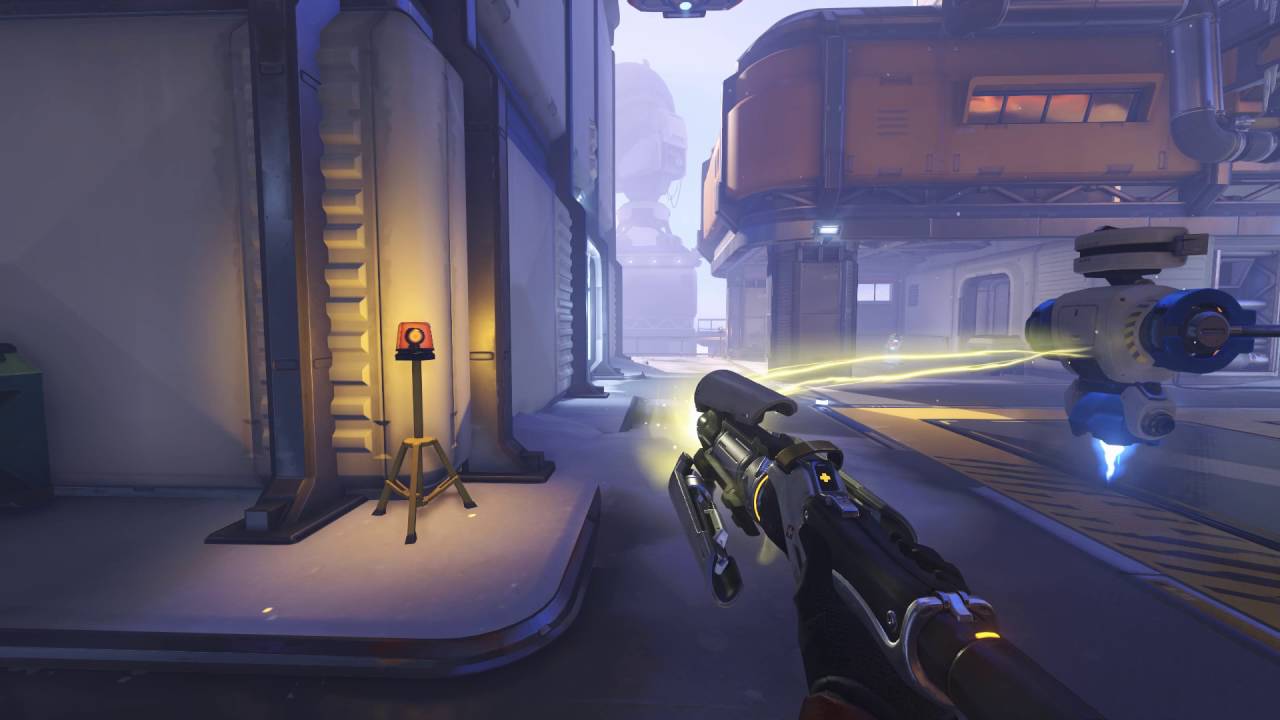
This is a video of Mercys healing beam from Overwatch for VFX Reference.
cold sorrel
Scroll a noise texture along the beam
tawdry light
in the beam material?
tawdry light
how come?
cold sorrel
The built in beams are awful
cold sorrel
Don't know. I avoid them if at all possible
fossil swan
same
tawdry light
How would you guys tackle something like this? If not via beams
fossil swan
you can play around with the values a little, I managed to get it smooth one time, but as I always avoid em..
you could download UT4 trough launcher, they use a mesh for it in their linkgun
heavily relies on a proper shader and very confusing blueprint
tawdry light
ahh
fossil swan
but it def works neat
tawdry light
mm
fossil swan
(yes, ut4 comes with its own editor)
tawdry light
although, with a mesh.. would i be able to bend it like in the video procedurally? based on viewing angles
tawdry light
hmm
fossil swan
since you can link linkgun beams for crazy effects
tawdry light
wow
fossil swan
(and even link to the biorifle alt blast)
tawdry light
i'm not very good at modelling, guess i must get better now
fossil swan
its mesh can be fairly simple, even just a cylinder when you start
tawdry light
mmm
fossil swan
but it does need a lot of picking apart the material, mesh, cascade, and blueprint
tawdry light
earlier glad mentioned using scrolling noise
would that work?
maybe i can use world position offset in the material
^ nvm
fossil swan
that would really mess it up on movement
tawdry light
yeah
 celest violet
hey guys, how can I add parameters to particles ? for example I want to change from blueprint radius of my particle system

 brittle monolith
Yo guys, I'm making stylized fire inspired from Rime. Not sure what to do here:
Here's my reference: https://www.youtube.com/watch?v=lrAchLnhemk

This video is a little help for Brandon how to setup materials correctly to mimic the RIME fire VFX. The original talk about the "Stylized VFX in RIME" you c...
fossil swan
@brittle monolith you need to componentmask the the multiply going to the add
or replace the add with a multiply
bleak rampart
i got this honey comb texture from the starter content. (Tech Hex Tile M) If you look in the green channel you get the outlines of the hexagons. Take that one minus and you invert it. What i'm now trying to do is to have some of them flash on and off, any idee how to procede ?
ashen stump
Take the sine of time multiplied by how fast you want it, then use that as input in a lerp between that texture and 0
@bleak rampart
(Or something like that, not 100% sure what you're trying to do)
bleak rampart
that makes all of indivual hexagons flash. I'm looking for a way to just have some of them flash and others stay the same
@ashen stump
ashen stump
Ah
You're gonna need a mask for that, then
And then use that as another multiplier for the time
brittle monolith
Thanks @fossil swan ! https://www.youtube.com/watch?v=fwKQyDZ4ark

More Game Art Tricks: http://simonschreibt.de/game-art-tricks/ Article to this Video: https://simonschreibt.de/gat/stylized-vfx-in-rime/ This talk was given ...
bleak rampart
@ashen stump Yea figured as much, but what i have right now is just a texture that is all white. I'm looking for a way to multiply it with a noise and what ever noise texture (white) overlap with the hexagons the whole hexagon and not just a part of it needs to turn white.
if that makes seens
brittle monolith
Hey guys, how do you randomise noise, my flames look identical
Here's what I'm working with:
fossil swan
dynamic parameter in material editor & cascade controlling something random like uv-offset or whatever
ashen stump
You could use absolute world position to offset the UV
So basically what Luos said, except it's more or less per-instance random, instead of per-material-instance random
 stone verge
per instance random works on Instanced Meshes only
ashen stump
I meant it as a normal statement, not in reference to the node
brittle monolith
@ashen stump how do you do that in practice?
ashen stump
You do more or less exactly what I said
You get absolute world position
You add or multiply or whatever that with the UV
And then you use that as UV input
brittle monolith
Getting some weird artifacts:
cold sorrel
Using Worldposition to offset uv distortion will only work if the instance Never moves.
If it's a particle just add a dynamic parameter between your panner and the multiply. Give it a random value at birth.
Done
If it's a static mesh that won't move: take the frac of your objectworld psoition and add it between the panner and the mult
brittle monolith
@cold sorrel https://gfycat.com/YellowJampackedBongo
 fossil swan
set it to spawn time only
brittle monolith
 cold sorrel
Hence the "at birth" comment 😉
ashen stump
Ah, it's a particle?
And yeah, my bad, somehow I was thinking that world-pos was 0-1, which it obviously isn't
(Damn sobol confusing me)
celest birch
@fossil swan quick question, i've made a fire effect and it seems when i put it on an egg shape it doesnt tile around the mesh and it also sits at the bottom would tiling be the best way to fix this?

@brittle monolith nice fire, did you get that from the RIME breakdown?
ashen stump
He did
And don't put it on an egg-shape?
I'm not sure what you're trying to get and what the problem is though
indigo jolt
i think your mesh emitter simply needs to have Mesh Camera-Facing enabled, and probably locked to ONE rotation axis so it just faces camera when walking around, but still only faces upward
if i'm understanding problem correctly
brittle monolith
@celest birch That's right, RIME breakdown.
celest birch
@ashen stump @indigo jolt im just trying to give it more of a 3d look
ashen stump
Considered using a cylinder instead?
Possibly two cylinders, one being smaller and placed inside the other
indigo jolt
instead of using an egg shape, i'd use one HALF of an egg shape, set it to camera-facing while locked to a vertical axis (like a globe), and add in ONE MORE piece of geometry somewhere behind it
spaced back a bit
so then as you move around you'll get the sense of depth from seeing the spacial difference between foreground/background flames
the other piece could literally be same Half-Egg shape, just inverted and rendering on opposite side
brittle monolith
Yo guys, is the Zelda fire volumetric?
Got this thing that looks ok, but doesn't change with perspective: https://gfycat.com/GenuineUniformBushbaby

Looks like they're also using a plane https://gfycat.com/CarefreeQuarrelsomeAmericanredsquirrel

 eager edge
Maybe is the facing camera option
try switching that off
Btw guys
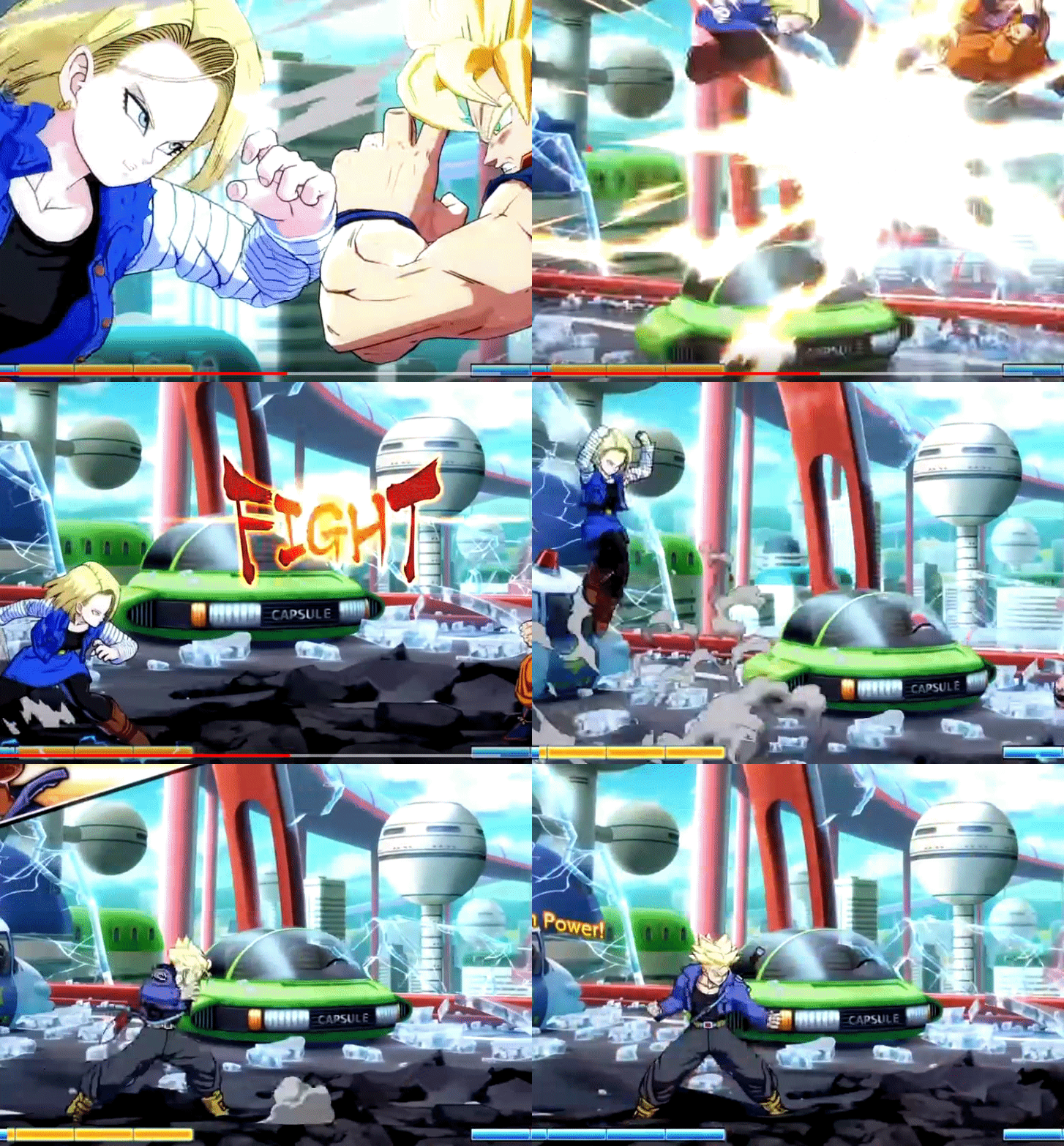
is the particle in the last attack
primarly a 3d mesh particle with a saturated texture/material
or just a sprite based particle?
cold sorrel
@brittle monolith No. The Zeldafire is a z-offset sprite and depending on which fire you are looking at, some are axislocked aswell. I looked into it quite extensively when recreating it a while back.
brittle monolith
@cold sorrel I was thinking of figuring out how to get that affected by movement and call it a day:
https://gfycat.com/AccomplishedFoolishChafer
 cold sorrel
The Zelda Fire has very limited movement influence. A limited counter rotation of the sprites, but that's it
brittle monolith
Would you do the movement with a dynamic parameter?
cold sorrel
Could do
brittle monolith
Or maybe a ribbon
cold sorrel
All depends on your endgoal
 drowsy lynx
@brittle monolith zelda uses a bent plane oriented to the camera similiar to this one: https://twitter.com/klemen_lozar/status/948590985419767810


New year, new tips. When you have a camera facing mesh with a panning effect, offset it in a world space direction to mimic wind, this helps make it appear more 3D. Works great for a dirt cheap barrel fire, no sprites no subUVs. #gamedev #indiedev #UE4 https://t.co/fwKcbvmsdN
Retweets
3513
Likes
12471
 Twitter
cold sorrel
Twitter
cold sorrel
@drowsy lynx Are you sure about that?
indigo jolt
i think zelda is going lower tech than this, but i like this solution
indigo jolt
ya based on that earlier gif it does indeed appear to be totally flat as a sprite
cold sorrel
It is. If it used the technique Simon suggests it would hold up when looking straight down at it, which it does not.
indigo jolt
sooo since you're here Glad, maybe you might have answer to pressing question relating to smoke/fire/particles.....
any idea how to get the generalized nearby color of environment onto a particle?
as in, color sampling the terrain directly below particle, and sending it to the material?
cold sorrel
Haven't tried it in Unreal
bleak rampart
I got a problem, i could use some help. My particle is set to use local space but the flames still correct themselfs to the velocity world orentation. The small particles are working correctly as far as i can tell they are both set up the same.
Pic
cold sorrel
Also, the color approach is often a bit, finicky
Sampling the material and having a material version of the effect is usually more reliable
bleak rampart
(FYI one is a GPU spite the "flames"/"beam" isn't
indigo jolt
yeah i think generally speaking you are correct and that i should just get ONE color that relates to the level at hand
which is what i currently have
sometimes Art Director wants things and i just want to be able to say YES
😛
cold sorrel
Just show him an example where you spawn an effect on the border of dirt and grass and watch it flicker like a 90s rave
indigo jolt
hehe that's a good point
i'm currently just illuminating some smoke mesh bits via SlopeMask nodes
(as in not actually illuminating or lighting at all, fully unlit)
but it kinda fakes it
and i'm faking bounce lighting same way from below, but it's currently just a color node
i don't suppose there's an affordable way of doing "Unlit Screen Space Reflections"....
celest birch
SO how to make one room pitchblack darkness while I have my unmovable skylight?
 analog onyx
@celest birch Bake it.
analog onyx
Taht is as real as it gets, Sir
celest birch
tried 1million times
see i have a room without windows and i have one point light there. I want it to be pitchblack and not affected by skylight
there is no windowss
so skylight disabling is an option
but how to do that?
celest birch
If you can't see outside the room, then just make a trigger volume that sets skylight intensity to 0
@celest birch
yeah
tried that but cant understand how to do it
I have trigger volume but dont understand why i cant put blueprint to it
ahh level blueprint
Was about to explain but seems you like you got it now
😄 thanks though
fossil swan

This is "Battle_Chasers_vfx_reel_final" by Alex Redfish on Vimeo, the home for high quality videos and the people who love them.
mental quiver

celest violet
hey guys, how can i use Distribution vector particle param as vector uniform ? I need this for initial location to be a box and to be defined by params
 pseudo elm
Has anyone here passed TextureObjectParameters between custom hlsl nodes and can give pointers?
brittle monolith
@fossil swan that smoke, holy damn... Also the fire reminds me of Jason Keyser's effects: https://www.youtube.com/user/jasonkeyser

YouTube
fossil swan
yea, Jason is also a great vfx artist
pseudo elm
RIght. If anyone was interested in my problem from yesterday I realised the solution. There is a SamplerState input generated for a custom node that receives a texture object parameter. This is injected after the Texture parameter and disrupts the order and number of input parameter of the custom node. In order to call a custom expression from another custom expression you need to send in both the texture and the sampler. I hope the picture explains it better than I can. I added the custom HLSL below the nodes for clarity.
 valid matrix
Hello everyone!
Can somebody give me a tip on Set Beam Target Point node?
Trying to get it work but it's quite strange
My beam data particle has target node set to User Set mode to 3d const vector + absolute space
I am trying to set position before particle system activation, but it always points zero
celest birch
I have a material for my landscape. It has layers that will use masks.
The layers show up correctly, but when I right click and import from file, nothing happens upon import.
It says it has the texture, but when I visualize it, it shows nothing. If I export the texture it's just a white box.
Anyone know anything I might be doing incorrectly?
Also importing the file type PNG
I think I got it.
Didn't select no weight blend
Yup. That was all
 lusty saddle
@celest birch : I don't think so... but you can manually attached it to the player
celest birch
do particles have physics?
cold sorrel
Is this some kind of a deep existential question I don't understand?
ashen stump
Ikr
Sure sounds like it
xD
Is a skybox attached to the player...? I don't know.... But... Do particles have physics...? So many questions, so few answers...
cold sorrel
How many navmeshes must a man walk down?
ashen stump
None, the player doesn't need navmeshes
celest birch
You can download the test level here: http://thomaskole.nl/2018/01/20/opaque-transparency/

an experimental shading model for UE4 I've been working on a shading model for UE4 that uses reflection probes for transparency. Works best with medium sized objects with high refraction. Because objects with this shading model are actually opaque, it…
 candid wagon
Hey particle masters. I'm creating a rain GPU particle system, but my camera is at a 45 degree angle, so my rain looks...crooked. Is there a good way to make the rain fall downwards instead of camera-down?
indigo jolt
make rain particles Velocity based
and set the velocity to whatever you want
you're probably doing camera-facing
which is no bueno
candid wagon
What I have is the initial size, z is stretched. But this only really works if you're looking at the rain from the side
indigo jolt
ya i know
candid wagon
So how can I stretch the particle based on velocity?
 candid wagon
Sorry, I'm new to cascade
indigo jolt
click on that Required thing at top of emitter
then set Screen Alignment to PSA velocity
next you'll have 3 scale values in initial size - X, Y, Z - it'll be your Y value that will be scaled up for length
if your texture isn't aiming the right direction to begin with, it won't work at all
you'll understand rather quickly once you try this 😛
if your texture of a rain drop is a horizontal shape, that'll probably make a bad rain drop
candid wagon
No its a sphere. It works perfectly! That was it
indigo jolt
and it may be upside down. if these are the cases - you'll need to modify the texture or at the very least rotate texture inside material
yeah if it's a sphere you're in safe zone
candid wagon
Wow there's always a button or option for everything. It's just a matter of finding it
indigo jolt
yeah welcome to the rabbit hole
 jolly leaf
Hey guys, I have a quick question --- Is it possible to have multiple global vector fields at once, overlapping? I have two vector fields in a scene and only one is being applied to my particles.
indigo jolt
as far as i know, yes
fossil swan
up to 5 can affect eachother
indigo jolt
that's a better answer
jolly leaf
@fossil swan @indigo jolt Thanks for the answer!
fossil swan
but unless you have really radical different ones with --depending on scale-- proper density vector fields, you might not really notice
also depends on strength and what not
jolly leaf
Thanks for the advice, I'm definitely getting multiple fields to work now, it was only a matter of strength
indigo jolt
nice. that's an excellent set of swirlies
 inner flicker
@celest birch I think this uses somewhat similar setup: https://www.unrealengine.com/marketplace/advanced-glass-shader

Detailed and beautiful solid glass shader capable of everything from crystal balls to art glass, with simulated reflection and refraction.
junior matrix
Is it just me or does that "advanced" glass shader have no translucency?
 mortal lily
everyone can put "advanced" in the description to sell their stuff. Doesn't mean its actually advanced stuff tho 😛
esp. on UE4 marketplace 😄
analog onyx
So guys, how would I make a chain drive animation like that one http://prntscr.com/i3f147 Having in mind two things: 1) mesh with panning texture won't be an option, the object occupies large screen portions 2) Need an ability to have arbitrary number of these in the scene.
 mortal lily
I suppose arbitrary implies skel meshes are out of the question as well?
analog onyx
Yep. Need to be able to make the chain in editor, of any length and ratio
fossil swan
along a spline is only thing that comes to mind
inner flicker
I can think one pretty hacky way
it involves having two half circle chain meshes and two straight pieces and calculating the movement on code (you only need to move the half meshes for one chain length to give illusion it's spinning)
I mean, as long as you don't need any marks on the chain that can differentiate the position, in that pic, every chain piece is edentical
analog onyx
@inner flicker Could you kindly elaborate a bit more in detail?
inner flicker
if you think about the chains, they look all alike, right? and to give illusion of a motion the need to seem like they are moving each frame, your eyes can't separate the individual chains so you are not forced to actually move the chain more by one chain length max
but, math to figure out how much to more each frame could be tricky
if you look at that, you could have those 4 elements as separate meshes
for straight pieces, you'd need to figure a way to extend it
the end pieces would only need to rotate for one chain length max until they return to the initial position
again, this is pretty hacky, I dunno if anyone would do it like this
@analog onyx
fossil swan
I was thinking of something similiar, but in addition use allembic to make one chain move, having the side thats moving forward dissapear and the end part appear. put multiple in sequence and it should/could look like an endless chain moving
analog onyx
Pretty neat idea that you can actually combine the middle pieces in a single component and move it only one section. Thanks. @inner flicker So far I haven't found anything better than having a ton of individual indstanced static meshes and updating transforms of every each of them every frame
I'd probably consider animating everything in vertex shader but that does not work well with given vertex count
fossil swan
well as Olente suggested you could probably seperate it in 4 or so pieces.
still be a challenge nontheless, whatever you end up trying
analog onyx
Yeah, Olento gave a nice idea rotating the half circle parts as single meshes instead of having unique bits there. Even if worst case scenario, following that logic will be way better than what I initially planned, thanks.
inner flicker
spline meshes are expensive to compute every frame
I think @still delta did tank threads by moving instanced static meshes along the spline
if I remember right, it was still pretty expensive that way
analog onyx
Not expensive for a pair of tracks, but yeah, might be prohibitive with hundreds of objects
inner flicker
his tracks were all dynamic tho so you couldn't even bake the data
analog onyx
Might actually avoid ISM all together. The way 0lento suggested is.. what? 8-16 draws per chain ? seems okey
 brisk wedge
not sure how well that works with a chain, but cant you make a material with a panner node?
analog onyx
Not really. At least not for LOD0
 whole plinth
Hi everyone!
I've got a problem that's driving me mad, and I wanted to ask here before spending more time on it
I've got a particle system that works fine on Epic. But if I downgrade the effects scalability settings, one of its particle emiters just doesn't render.
So.. is there any parameter to handle the scalability settings in the particle editor?
(PS: I thought that maybe the Quality Level Spawn Rate Scale Parameter could do something about this stuff, but I just can't change its value...)
inner flicker
@analog onyx actually, you could just rotate full circle chains on both ends but mask the inner parts to not render, that way you could actually rotate the cogwheels along with them
then you'd only need to sync the middle pieces in right positions
although, not sure if that will make it much simpler
also probably tricky to mask that properly
 still delta
@inner flicker actually I don’t think it’s expensive, the only "expensive" part is getPointAlongSpline function that simply not optimized in UE4
and it's not optimized in a way that it doesn't exploit coherency of queries on the spline.
still delta
And for chain configuration like that, most of the links will be on the same part of spline all the time. So that can be cached.
But you don’t need to use spline for this at all, just two half circles and two straight lines, as each link need to be moved to distance of a single link and then looped. With tracks I do full loop so later I can break them and unfold on landscape.
fossil swan
@whole plinth check emitter Lod's and significance level
inner flicker
@still delta that's pretty much what I suggested, no?
whole plinth
@fossil swan
Hi!
I've made a little research, but I don't fully understand what implies the significance. It's set as Critical (which I assume it's wrong)
I don't know how to associate the LODs with the Quality Settings, so I suppose that the significance level has to do something with it (setting a different significance level for each LOD)
If that's the case, I suppose I could change some parameters in my emiter for each diferent Quality level, which would solve my problem...
still delta
@inner flicker I thought you mean a vertex animation done on 4 sections of chain
whole plinth
(I solved the issue with the particles unchecking "Apply Global Spawn Rate Scale". I actually don't know exactly what it means... so if anybody does, I would be grateful ;D)
(Now I can see all right my particle emitter in any Quality Level. But as I said, I don't know exactly why...)
 frank peak
indigo jolt
frank peak
indigo jolt
i'm going to roll the dice and say "texture first" - although the vagaries of this question and this situation are alarming
fossil swan

►► Select 1080p HD for Best Quality ◄◄ Every Super and all variations for every character in Dragon Ball FighterZ Timestamps for all Supers below: 0:00 Goku ...
mortal lily
just one punch but ninethousand screams 😄
 vivid dragon
Needed to ask something
I have this advanced landscape material
And i have water caustics in It as well
so i wanted to ask is there a possible way for me to create multiple instances of a material function to adjust colours fo individual places without having the user to dive into the node editor ?
analog onyx
@vivid dragon Potentially, you should be able to assign individual material instances to different landscape components, so yeah.
indigo jolt
Yup can do that. Need to add input nodes to functions though and put colors in main material or they won't have unique parameter names
No unique color nodes = no way to assign unique colors
Functions have inputs and outputs for scenarios like this
pseudo elm
Quick question: Can I have GPU particles that are attached to an actor? I.e. can I have particles that are local to the emitter and not just spawned in worldspace?
 karmic kraken
@pseudo elm CLick on the required tab of the emitter and activate "use local space"
fossil swan
@pseudo elm you can emit gpu particles on the surface of a skel-mesh, though the PEX plugin on marketplace and popcornFX can do more than that

I explain how you spawn particles on the surface of an actor.
or, if thats not needed. Tyrus's suggestion works
pseudo elm
Thanks! I just need them to attach to the actor though.
 tropic mauve
okay..question that google isn’t answering for me.
Exactly, like, how are special effects made? How do you turn nothing, into something? How do you create your own explosion? Do you just trace a picture of an explosion and then animate it? i don’t understand the process in making visual effects, and there’s no way i’m paying thousands of dollars just to add some simple ass small effect into my game you know?
so, could someone point me in the direction of where and how and what is used to make special effects? thank you!!
tropic mauve
i’m literally still searching the web. i want to know how people create realistic looking effects. i want to know how someone creates a nuclear explosion animation look incredibly realistic without ever having to capture the footage yourself. HOW!!
 minor fog
Well. They study and experiment for 4-6 months while they deconstruct existing effects.
Then they learn how to make them for a year or two and refine their tools and learn more outside programs to generate better base content for things like explosions.
Then if they are really good they get a job as a studio doing effects
Thats how it's done.
junior matrix
I thought they just threw a crapton of smoke particles at it.
And when that kills the framerate, they dial back the number of particles until it still sort of looks like an explosion but doesn't kill the framerate.
tropic mauve
@minor fog But, how do they make it? Do they piece an explosion together piece by piece, color by color, and animate it frame by frame?
minor fog
get some effects.. open them up. start learning.
its really that easy @junior matrix you arent far off! hahaha
 real ore
@tropic mauve To give you a more technical answer, even though I'm not a VFX artist myself.
There are software packages that have so called solvers, there are different ones, but let's assume you want to make an explosion.
The sofware (Houdini, FumeFX and many more) will simulate particles based on parameters you have chosen.
You can then animate the state of the individual pieces of your simulation by telling the software to alter certain parameters over time
In order to make them production ready for a game, you would normally have the software package export each frame of said particle simulation into a texture atlas which then can be read and animated within UE4s Particle System.
Please VFX gurus, correct me if something's wrong about my description.
fossil swan
sounds about right
real ore
Yeah very true, Houdini is a goliath compared to PopCornFX
mortal lily
Its also an runtime solution for particles, while Houdini, Maya, krakatoa etc are tools with actual solvers for fluid sims etc.
real ore
Absolutely, makes perfect sense to make that distiction
analog onyx
Any reliable workaround to drive particle spawning location by texture in stock engine ?
cold sorrel
@tropic mauve I cover this very topic in this course: https://www.pluralsight.com/courses/houdini-vfx-games

Have you ever tried to create an explosive effect for a game engine, and not had a clue where to start? In this course, you'll learn how to create all the content needed to create an explosion effect in Unreal 4. Software required: Houdini 15 and up, Photoshop, and Unreal Engine 4.
It won't get you any awardwinning results, but it'll get you started on the How
minor fog
@cold sorrel nice. I just recently started studying Houdini at a VFX school part time
 plush thunder
Hey

ivde made this particle portal thing
and i was wondering
is there a way to make have some width? Instead of being a 2d plane
 keen rock
You could use mesh particles
indigo jolt
yep mesh particles, think camera-facing Dome (like captain america's shield) or camera facing half-tube. it's generally good to use primitives that have some sort of camera or velocity-facing and open-geometry rather than fully sealed off cubes/cylinders/spheres, this way you can get a precise silhouette rather than having the texture "fold over" at the edges.
there are exceptions to that obviously, but it's just so tragic how often people try to leverage the 3 dimensional nature of mesh particles...but then allow the geometry to ruin the silhouette
 polar loom
what settings i need to apply for particle system for volumetric fog?
ive read to give some time and size, and apply material, but these dont help me
celest birch
Is your material domain set to Volumetric?
polar loom
yes
it works on static meshes, just not on particle system
eh, figured out, you could apply material in different places in particle editor, i placed in wrong one
 gray inlet
somebody please write a proper HLSL shader editor for UE4, I am getting sick of the material editor for complex stuff
fossil swan
so for a project I need to use animtrails and ribbons. these are attached to the character in the animation/persona editor. but specific weapons need a specific color. what would be the easiest way to set them up? the weapons are meshes attached to a socket.
ashen stump
Hook the ribbon trails etc to the weapon as children, make them use a material set up for that specific weapon?
Not sure on the specifics of animtrails/ribbons
So can't help much more than that
fossil swan
there are hundreds of weapons, doing that would be a shitload of work
instead of one ribbon per type of weapon in the animation
ashen stump
Well
You could make a material parameter and edit that through blueprint depending on the weapon ❤
fossil swan
yea, the coder wants to make a datatable and IF weapon X is equiped get Y color and pass it onto cascade
not sure if datatable is the right word
ashen stump
Or not a datatable, I'd say that's overcomplicating things (unless all the weapon stats are in a datatable)
ashen stump
Data-table being glorified excel sheet imported into engine?
fossil swan
code though, no bp
ashen stump
Or just an in-editor list
Same thing
Very few things you can't do in C++ that you can do in BP
fossil swan
true
all weapons/equipment are in a big list already
so adding color per weapon isnt too hard
ashen stump
Yeah, might as well
Just pass that color to the material or whatever and it'll be fine
fossil swan
now the hard part, the more unique weapons have unique shapes so we'd need to tell which sockets to use, and still be able to control the start and end time of the animtrail
analog onyx
I assume that weapons were not authored(rigged) having anim trails in mind ?
fossil swan
nope
we'll probably end up having a set of sockets on the skelmesh for each potential type of weapon and assign the ribbons trough some code to the right sockets.
shouldnt be more than 10 sockets
if I could code I'd make a plugin where each weapon's material/instance had a tag which would tell the ribbon what color to have/sockets to attach to in the animation editor
analog onyx
I would probably write a script to automatically process all the models in content creation package to place the end socket.
As for weapon colors... I don't really see a complication here. Should be particle color.
Building a data table with weapon-> effect color, ribbon end point seems good.
bleak rampart
I'm making a "nanobots" grenade that explodes on impact and spawns some particle system within an area that heals teammates robots and damages enemies within the area. I'm looking for reference material for something that could fit well with what i'm trying to do, any suggestion ?
fossil swan
google chaff grenades
 near blaze
I need to create a blood puff for a headshot effect but then for said blood to hit the wall and drip how would I approach this multiple linked particle fx or particle to decal
cold sorrel
Spawn decal on particle collision event.
Use a misty sprite for the puff and an invisible particle to drive the collision event
 lusty sierra
can you change a particle colour via blueprint ?
lusty sierra
brill ty 😃
cold sorrel
Have the unreal ribbons been nerfed lately?
I'm having more issues than usual with them
 unkempt jacinth
@cold sorrel what version are you on? what kind of issues are you having?
cold sorrel
4.16
Just, weird stuff like a constant intial size acting like it's a uniform and so on.
Recreated it and I got rid of most of the weirdness.
And plenty of snapping when it loops, but I guess that may always have been there
unkempt jacinth
I've got 4.17 running. I can put something together for a sanity check if you want..
unkempt jacinth
Okie dokie!
Quick question - Can I use events to constantly spawn particles from an event generator? I want to have the classic film sparks from an explosion but it seems I can only spawn on birth or death.
cold sorrel
Oh you want actual subemitters!?
pfft, what do you think this is, 2018?
afaik that's gonna need verteex anim or bp
cold sorrel
Hehe, sorry I'm just being mean.
You could do it with spawn location right?
Or do you really need the events?
unkempt jacinth
Nope. I just want 2 or 3 spark streamers to add to the overall effect. I don't care how I do it.
cold sorrel
Yeah, classic 80s/Bay sparks are doable by setting one emitter to use another emitter as inital location
unkempt jacinth
Oh! Yeah, that's what I'm looking for.
cold sorrel
It's a dumb hookup though, so you won't be able to do fancy emitterlife things but it can you get you some of the way
Cool
unkempt jacinth
That works! thanks!
unkempt jacinth
Michael Bay would be so proud of me right now.
cold sorrel
I'm proud of you. Almost the same thing.
unkempt jacinth
I'll take it.
 sinful valley
Anyone here know how this person's changing the shadow color and scale on this? https://www.youtube.com/watch?v=XCMxq_W1Yxc&feature=youtu.be&t=18

My Anime shader in Unreal 4 using Blueprint to control light vector inside Material, and post process line art. my twitter for more; https://twitter.com/Eric...
Someone in the graphics group said it was post process. But actually I just now noticed that the drop shadow isn't changing color. Would that indicate it's all done in the material?
vivid dragon

ArtStation
This is a demo scene of an asset pack that I have been working on for quite some time.
All the materials have been made from scratch
vivid dragon
Would love it if you guys game me a honest critique on the artstation post
 barren raven
@vivid dragon honestly I think it needs quite a bit more work both with the materials and lighting. Overall the scene is very dark and the textures feel scaled up and low res. It’s a great starting point but I recommend heavily referencing real life landscape pictures closely to try and more closely match the color tones, light balance and detail. The sky is grey, but the water is a deep blue, and the fog comes in very strong very fast. Looks like you have the right idea about material comments and organization, I’d say keep focusing on improving the areas mentioned above, will take some time to get right.
ashen stump
In addition to that, the grass is really odd at the moment. It's nearly black, doesn't match the terrain color in the slightest and its placement is very spotty, which makes it look really out of place
vivid dragon
Thanks a lot guys 😃

I still need to change the textures
because right now i am using the starter content textures
but i really don't know from where to get good textures for free :/
analog onyx
@vivid dragon I might sound a bit harsh, but there is nothing to give constructive feedback for. At this point it looks pretty terrible overall.
lusty sierra
ouch
keen rock
@vivid dragon go on Pinterest and find real world images of what you're trying to create, make a "inspiration board" and try to make your scene more like that, it needs more than just terrain but I don't know what your goal is with the scene
vivid dragon
I am seriously trying to make a good looking mountain with a lake in the area in between
@analog onyx at what all areas should I be improving the scene?
vivid dragon
Is my peak too bumpy?
celest birch
@vivid dragon Its not a bad scene. The terrain lacks detail and looks unnatural on a macro scale, but whats more important right now is lighting and atmospherics. If youre just playing around and not using this for a game, do the following:
- disable auto exposure. 2) remove all lights, leave only the directional light. 3) tweak the directional to be as bright as you see fit. Also angle it nicely 4) Add a sky light. 5) add an atmospheric fog actor, make sure there are no other fog actors. 6) tweak the density to make the scene feel large in scale. 7) remove thr reflection probe. Use screen space reflections for now. 8) and move the discussion to #graphics , this channel is more for effects :)
Once youre done, upload a new screenshot there and tag me in it
 spare hare
Not sure if this goes to #graphics, #blueprint or here:
Is there a way to access the Rendered Image and copy it to a render Target?
I would like to create a cross fade for Cameras. I could use a SceneCaptureComponent but that would probably be an overhead (The same Frame gets captured twice)
My idea was to copy the currently rendered Frame to a texture and gradually fade it out with a PP.
lusty sierra
anyone here know how to do a thermal image effect? not the colour one you normally see, but the white on black one ? cant think how to go about doing it
brisk wedge
why is there a need to differentiate between the color or BW version? you show heat of objects if you display that as a color or BW gradient doesnt makes any difference
lusty sierra
hmm ok, fair point 😛
brisk wedge
you would need to add heat in some form to each object, heat texture is a easy one and than only render that + probably some post process
lusty sierra
every object.. as in every object on the map?
brisk wedge
well, how should the engine decide if something is a cold box or a running generator emitting heat, you could probably make a normal heat spectrum via the post process and use custom depth for objects that have distinct heat
lusty sierra
ok i get ya, you've given me an idea there, thanks! 😄
pseudo elm
Quick question: I want to control the min and max random range for initial size for a particle system from a BP. Do I need to expose a a parameter, or can I access this some other way?
pseudo elm
Is there no way to control the initial size of the particles? 😐
indigo jolt
expose particle parameter of your initial size or size over life in particle system, name that parameter
and just set value in BP
 blissful beacon
Hey, does anyone have an idea as to how I could get something like this to work in UE4?

Batman: Arkham Knight New Game Plus Mode - Most Wanted Walkthrough \ Guide in Full HD (1080p and 60fps) Batman: Arkham Knight Most Wanted Playlist: https://w...
I was hoping to use UMG to control the circular viewport thing and have it follow the mouse cursor, but I don't understand how you can get that kind of selective xray vision to work in a localized space on the screen, with different layers, no less.
If anyone could link some resources that touch on this technique, I'd really appreciate it. I'm just not sure what to search to do my own research.
brisk wedge
dont know any resources, but post process where you use custom stencil with the xray data and only show it in the area where the widget is or maybe vertex painting to render they xray directly in the mesh material
blissful beacon
Is that possible? Showing it only where the widget is? How would I achieve that?
brisk wedge
you could also do something like this http://www.tomlooman.com/rendering-wounds-on-characters/ only that you have 1 point where you change to xray

Earlier this week I tweeted about hit-masking characters to show dynamic blood and wounds. Today I’d like to talk a little about the effect and how it came to be. I’ll talk a little bit about the technical details and some alternatives. The effect is a proof of concept to try and find a cheaper …
blissful beacon
Hmm... I'm not sure that's what I'm looking for, but it may give me a direction to investigate. Thank you.
 bright panther

Low resolution explosion animation from my vector field software
You can see the huge steps with the choppiness
bright panther
35 frame animation
bright panther
 near blaze
Sorry if this sounds a bit noobish but I'm looking at creating a blood effect with a puffy mist of blood which then hits the wall and drips down how is the best way to approach this flipbook straight particle decals etc and also what are the rainbow 🌈 coloured materials in some of these particles are they for reflection or something 😀
fossil swan
@near blaze we replied multiple times on that question. once last saturday, once at januari the 10th and I think I even linked to a generic google search "ue4 blood splatter tutorial" which will give you enough information to get going.
celest birch
Glad-Partikel - Last Sunday at 12:52 AM
Spawn decal on particle collision event.
Use a misty sprite for the puff and an invisible particle to drive the collision event
@near blaze
pseudo elm
@indigo jolt Thanks, but that does not allow me to control the random range values, just the initaial size value for all particles. They would all be the same size.
brisk wedge
@pseudo elm those values you set have a min and max and are random between those
pseudo elm
@brisk wedge Interesting. But I can only set a vector parameter value for 1 vector, but a min and max would be 2 values. Do I not use SetVectorParameterValue in this case?
https://docs.unrealengine.com/latest/INT/BlueprintAPI/Rendering/Material/SetVectorParameterValueonMateria-/
Set Vector Parameter Value on Materials
brisk wedge
pseudo elm
Right, but is there any way to control the min and max from a blueprint?
fossil swan
you can make it a blueprint parameter in distribution
indigo jolt
yup, "random vector in range" or something in bp
or random float in range plugged into a Vector LERP
 swift cape
anyone know why i can't dynamically toggle the Render CustomDepth? i'm trying to do an outline on mouse over but for some reason even though the render custom depth value gets changed it doesn't remove or add the outline onscreen
junior matrix
Did you enable it in project settings?
Or maybe you need to add the relevant postprocess to the camera (or a global postprocess volume). Hard to guess without knowing what's been done.
swift cape
I didn't see an option in project settings besides the stencil thing (is that what is required to be used now?) I have a global post process volume with my post process material added to the post process array. It works sometimes but not others. Like when I first spawn the projectile it gets highlighted but then won't unhighlight Alternatively if i spawn it away from where i'm looking it isn't highlighted and won't get highlighted even when I mouse over it. If i break on mouse over I can see the Static Mesh's Custom render depth checking and unchecking but it doesn't change in the level
swift cape
so after some more testing I got it working in blueprint, I'll have to look into what I did to break it in code
Got it working! Sorry to bother everyone. Turns out I needed to call SetRenderCustomDepth(). I was trying to set the variable bRenderCustomDepth directly since it was public apparently that doesn't work for some reason.
indigo jolt
@swift cape you gotta enable to the Render Stencil Depth thingy
and assign the number below it
in outliner, in scene
or in bp
 merry berry
hey guys, can anyone tell me how to use ribbon trail particles for a static mesh?
indigo jolt
Yeah but be specific. Does mesh move? What do you want ribbons to do or look like?
Move up? Sideways? Stay still and drag behind as mesh moves?
I'd follow the basic YouTube Unreal 4 tutorial on ribbons first either way https://m.youtube.com/watch?v=jBUF6at1s1o

Ribbons are particle streams that can be emitted from other particles. They're useful for things like contrails. Here we show how to set one up to stream fro...
If you don't want them to trail a particle just do same steps but do not parent ribbon to particle. Give it velocity or just attach system to a projectile
indigo jolt
speaking of Ribbons
anyone have a clear idea of best practice for scaling ribbons up/down over life?
fossil swan
size over life seems only thing that works (afaik)
indigo jolt
Yeah I am noticing this too. I was just frustrated that tapering ribbons don't taper until the very tip exits source location. Fixed by tapering texture mask.... lame fix but works
inner flicker
ok so, found out the weirdest thing
if you make advanced vehicle template for blueprints, you get TAA ghosting
if you make advanced vehicle template for c++, you don't get TAA ghosting
I checked the config files with diff, they don't have differences on these settings
also tried replacing the assets, in case some material settting was different but nope
it's in the actual level files
and actual levels are super simple, I removed PP volumes even to make sure they don't affect this
this makes very little sense
analog onyx
@inner flicker Are you referring to TXAA build or stock ?
inner flicker
stock
I need to solve this as TXAA could be better if I get rid of the ghosting mess
ok so
they have different UV scale on the floor BSP 😄
so this makes the noise pattern bigger on the BP template
which makes TAA ghost
I guess it makes sense, since it's kinda worst case scenario
I should put some actual foliage here I guess

you can see the transition there
also realized that I'm on the wrong channel 😄
were supposed to post on #graphics
 subtle idol
hey all, anyone hanging about for some quick help? I dont know how Im not achieving a lighting effect.
gah. after looking in the materials and the lighting settings in the world, directunal, sky, lightmassimportance and so on... the button is in the mesh.
 winged nymph
I'm trying to make confetti with streamers. I'm using ribbons and sourcing a basic emitter, trying to get different color streamers is proving difficult. It'd be easy if there was a way to Source the color of the trail particle... Initial color doesn't work like it would on normal particles, so I'm just making multiple ribbon data emitters and making their initial color constant, the problem now is both ribbon emitters are picking the same source particles and I assume that "Selection Method" would solve this, but it doesn't, it seems to just pick particle 0 for all of them. Am I going to have to make separate ribbons AND separate source emitters?
this is with BlueStreamers hidden
also orbit doesn't work with ribbons
indigo jolt
tbh i think you're going to want to do this a different way
you're not going to find a happy solution to this color topic
AND ribbons are expensive as sin
AND for this particular effect, you could get 99% similar shape visuals via a material with some noise-distortion animating UV's based on particle life
or some Dynamic Parameter randomization
and if that's not quite enough, combine that with a rectangular plane mesh with a bit of noise to the shape, and run some more noise into the world offset and/or scale in positive/negative values over life
and set it to Velocity facing
winged nymph
alright I'll check that out, thanks
 timber whale
How do I make all the particles in a system spin around the systems origin?
indigo jolt
orbit module
timber whale
but that just makes each particle sort of jitter
I want them to orbit around the center of the system not the individual particles center
indigo jolt
Substance Designer has some good methods
celest birch
Houdini?
spare hare
Do Particles with the Actor Collision Module collide against Translucent meshes?
fossil swan
iunno actually
spare hare
I would like to have water drops which should cause small riplles when colliding with water (I am using the Phys Material in the COllide event for this).
But they do not caus ripples every time
This is the collision Module
0
This is the Generator Module
fossil swan
i'd fake it without collision.
spare hare
and how?
fossil swan
have rain in one emitter. have ripples in another on the water surface.
or inside the texture.
spare hare
nah, it's not that easy, since the water drops are coming from my character
fossil swan
uncharted rain impacts are inside a shader
hmm
is it a water volume you can enter? or walk over?
spare hare
yeah, it's a custom Water BP with Suface Mesh (Plane) and a Collision Box (Water Physics for character)
Anything that creates the desired effect minus the Collision checks is welcome tbh 😄
fossil swan
the actor collision looks for the collision bounding box
or whatever collision is enabled.
so you might need to set up custom collision thingwhateveritscalledIdonthaveue4open
collision channel thingy
(that said, my experience with particle collision is limited use it maybe a few times a year)
spare hare
Thanks, I'll try to that
fossil swan
might not be fully related but here are some cool tips for raindots
https://twitter.com/klemen_lozar/status/953674110009163776

Raindrop shader. Three layers, two dynamic, one static. Packed tiling textures with normals and opacity mask. More detailed breakdown on the way, look for replies to this thread! #UE4 #gamedev #indiedev https://t.co/xmVSpsefXq
Retweets
628
Likes
2801
Twitter
cold sorrel
Has anyone ever shipped a game with actual splashes from drops?
I mean, every projects tries it at some point but it never makes it to the box
fossil swan
probably some indie games here and there hehe
cold sorrel
I guess. When you don't have to care about performance it's not as big of a deal.
fossil swan
https://www.youtube.com/watch?v=SoLz4BPXsOw even "rain" doesnt do it

Watch the first rain™ gameplay video from Chapter 1, "The Children and the Night". ©2013 Sony Computer Entertainment Inc. Rain is a trademark of Sony Compute...
cold sorrel
If I were to guess it'll be in one of the minimalist type games. Where a splash is 4 solid squares representing drops or something.
fossil swan
hehe
when Uncharted 4 came out and we reached the storm chapter I was rather.. "herbed up" and told my brother to stop moving so I could see the rain/wind effects properly.
suddenly noticed almost everything was done in the shaders of the surfaces I was mind blown.
think I watched it for a good 20 minutes
analog onyx
It is still somewhat common to decouple rain splashes from raindrops for simplicity
cold sorrel
U4 did the storm rain splashes as a depth effect, not in the shaders
It works sometimes, and sometimes it looks... strange
fossil swan
made perfect sense to me when stoned :p
analog onyx
On the job we approached rain splashes in somewhat lame way. We spawn shitloads of particles above the scene. The particle shader then moves each particle to the rain-space scene depth(we are capturing scene depth for rain occlusion anyway)
analog onyx
You can sync those to raindrops, but on practice it is never noticable
cold sorrel
Exactly, and it's a huge waste of particles
analog onyx
We also tried projecting dense water splashes flipbook onto geometry shader fins, but the result was inferior and there is no point to that, if you have rain occlusion info anyway
Probably the only thing about watery stuff rendering, that failed to find efficient approach to, is sea spray particle spawning on top of breaking waves. 😦
If anyone has any thoughts about how to get it implemented decently, I'd be happy to know.
vivid dragon
How's this?
spare hare
Do you guys recommend changint the Indirect Lighting Parameter in the PPV?
Imo Changing PPV is a cheap method, because "it's not what it seems".
I want to have contrasty Lighting : A brown/orange direct light and blue/green-ish environment lighting, but not everywhere (only caves for example)
No Indirect Lighting Change
How I want it to (or similar) look like
barren raven
@spare hare I change it all the time, if it works for your scene why not!
spare hare
@barren raven because Objects outside the PPV will also appear green
analog onyx
@stray parcel Thanks, I'm aware of that vid, but that is not the thing I'm after.
 gloomy vortex
Hey , it's probably a long shot but I was wondering if anyone knows how I could make it seem like a shader is vibrating when applied to a model? Sort of similar to the speedster effect on shows like The Flash?
fossil swan
vertex displacement
barren raven
@Raildex#6923 well if you have to have different lighting scenarios covered then it’s best to get it right with a neutral tint and either use fake bounced lights or increase the environment influence for the bake so materials give off a stronger color in the lighting
 rotund quartz
@gloomy vortex - @fossil swan ' and @stray parcel's is the right suggestion. Use three sine waves of varying frequencies to calculate an offset along each axis, then just pipe that into World Position Offset in the output node. If you want something more random, you could use one of the noise functions to generate your offset.
gloomy vortex
@fossil swan @stray parcel @rotund quartz Thank you 😃 I'll try that when I'm next in the project file
fossil swan
didnt know @rotund quartz was in tha house.
welcome!
lemme know if you want the Epic Staff tag 😃
indigo jolt
starting to think the Orbit Module is highly underrated https://gyazo.com/7f53ae65501bb0de1c0eec3cb0aeb601


hehe good snakes and vines
weirdly it doesn't behave quite the same if you use GPU particles
such a bummer
 forest mason
do particles have lod system or something for efficency built in or do you manually have to tell particles when to run and stop? thx
forest mason
k, so i guess it would be a good practice to put them in a blueprint to turn them off if the player is far away?
fossil swan
depends on the usecase. if its a fire and you just want to reduce/stop smaller parts to stop emitting you can.
and if you set bounding boxes you can disable them when they are out of that bounding box
(also in cascade)
forest mason
ok cool thanks. I will go read more of the documentation on cascade to understand it further. Do you know of anyone who could help me with a level streaming question in the blueprint chat? thanks for the help
fossil swan
An overview of the Cascade Editor's UI, breaking down each key area.
no clue about the blueprint stuff hehe
forest mason
ight, thanks
indigo jolt
anyone here familiar with using Skel Vert/Surf Location with emitters?
and how to use this to work with a character?
indigo jolt
quite specifically, I wish to use the material associated with a character's hair to emit particles
bone/socket location seems to work just dandy, but skel vert/surf doesn't quite make sense
indigo jolt
As in - not spawning anywhere other than emitter location
If anyone has a screenshot of this working in action I'd love to see the module settings
fossil swan
I explain how you spawn particles on the surface of an actor.
shouldbe able to tell it to emit only on the hair bits
indigo jolt
dang, it like gets me 90% there
but it doesn't seem to work right with a blueprint character
at least not that i've found
i can get it to spawn all over hair of an SK in scene after applying it to the BP
but won't actually apply to the movable player character
indigo jolt
from further reading it sounds like one can set this in a Level Blueprint....but that's no bueno
there's no documentation, examples, or tutorials on how to utilize Vert/Surf module on an actual skeletal mesh blueprint actor AND keeping it all bundled inside the main actor
ie - if you want a character who just naturally has cool spell magic spawning along an arm, hair, etc as part of their "deal" there's not a game-ready way of doing that i can find resources for
indigo jolt
Weirdly enough I know how to do exactly this in Unity
fossil swan
maybe ask @round fog i think he usedit before for his bunny.
cold sorrel
@indigo jolt Where does it break?
I've done a similar setup in blueprints and set actor parameter worked then
(4.16)
 round fog
Yeah, I've done this and don't remember having any problems with it
What's the issue exactly? Getting the proper mesh reference in the psys component? Iirc you need to set an actor parameter for that
celest birch
anyone know how i can get this sort of effect
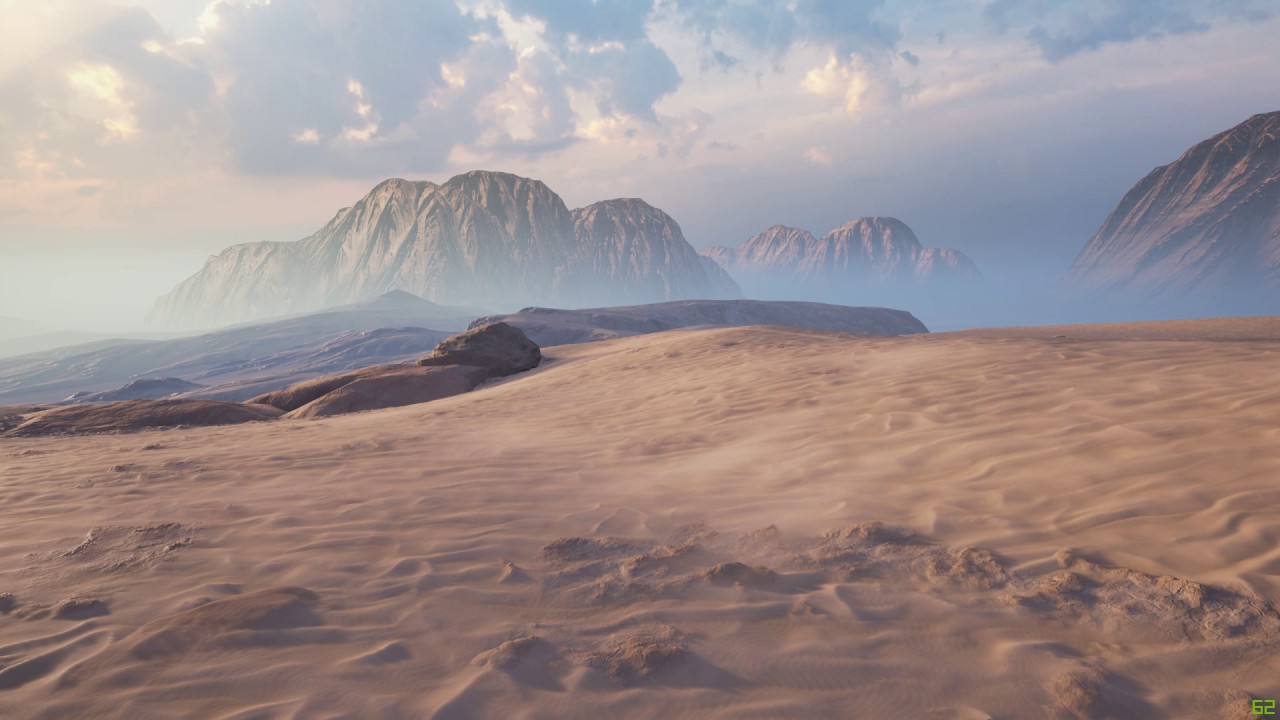
Created some effect for my current environment.
cold sorrel
Scroll a texture over the mesh an you are halfway there
The other half is cursing the environment artists who keep placing meshes around without setting the wind direction up so all your effects look inconsistent. Especially when you start making particle sand as well to emit from the sand crests.
No bad memories there ar all.... What makes you say that?!
celest birch
lol
you sound like me with my water splashes XD
@cold sorrel this these trigger your ptsd lol
cold sorrel
Huh?
indigo jolt
@cold sorrel I placed the particle system inside the character blueprint, assigned the particle system to the character's hair material and put blueprint character in level
it did nothing to the blueprint character. However, placing just the skeletal mesh of the character in level DID work
but that's not a playable anything
cold sorrel
You need to do that, in the blueprint, using a set actor parameter
indigo jolt
every time i tried to set the actor parameter it wouldn't let me fill the box
cold sorrel
That's mean!
indigo jolt
i know!
cold sorrel
(Loading UE4 so I can grab a screenshot of setup)
indigo jolt
yes please....
this is driving me nuts
based on what i've read, it sounds like i need to attach the particle to something other than just parenting it to the character blueprint mesh....but that's all i know and i'm skeptical of that
indigo jolt
oh
see this is what i suspected but i wasn't sure
i need to spawn this in event manager
not just parent to mesh
well i suspected 20% of this
lol
the get owner thing with parameter is not something i would have guessed
cold sorrel
Neither did I. Not sure why or if there's a better way. Trial and error on my part
indigo jolt
maybe spawn emitter attached?
i wonder if that would simplify it
oh actually i probably need that
cold sorrel
That's all I needed for this example
indigo jolt
right, like a blood splash or something
this is great for that
whew thanks so much man
going to plug this in asap
cold sorrel
No problem
indigo jolt
alright, not only did this work, but it gave me the control i needed to toggle the particles on/off based on 3p or 1p control
so it's not playing in first person
which is perfect
😃
was getting electricity spawning on my eyeball in VR at first
lol sucked
fossil swan
at least it wasnt real electricity
round fog
@celest birch maybe @bleak inlet can tell you exactly how he did it? :)
celest birch
well the chances of that haha
@round fog turns out i've actually spoken to him before haha
cold sorrel
@indigo jolt Great!
fossil swan
Im still amazed (and loving) how much data you can drive trough vertex colors
 alpine elm
Hello! I'm trying to create a Blood that follows the slash of the sword, similar to Bloodborne, and I have no idea where to even begin. Did any of you create a system like this?
keen rock
alpine elm
Yes, good, now let's wait for somone who can actually read to answer my question. Thank you anyway!
indigo jolt
if you want blood to just trail the sword, i'd use anim-trails and anim-notify blood
you can convert a particle anim notify to a blueprint, then in that anim notify blueprint you can get more tech-specific with it, since you'll want the blood to only come out during hits
an anim trail will just streak blood behind the sword (good after the hit) and a particle notify event in the anim notify system will allow you to have the particle system affixed to the tip of the sword and gain its rotation values during emission
alpine elm
Thank you!
indigo jolt
np, just be prepared for a little bit of work if you don't know blueprints. the anim notify system is pretty great for this stuff
nesting a particle notify event in a bp thing is a little bit awkward but it works
i've done it 😃
alpine elm
To this point I had the "blood" emitter spawn as attached to the bone of the enemy
It looked bad...
Gonna play around with the notfiy
indigo jolt
you can add additional notify tracks
do one for the sword trail regardless
also you can copy the results and paste them into other animations
so you won't have much re-work
but you do have to put it in EVERY animation you want this to happen in
it's not a big deal tho
alpine elm
I will have to do the weapon trails anyway. One more qestion: Inside the anim notify can be there a switch based on type of enemy? Coz I do not want to make a skeleton type of enemy to bleed 😄
indigo jolt
yes this is what i meant about the bp aspect
so you can make a BP notify
and put your particles in that
then specify circumstances under which do particle, not do particle, or do particle A or particle B
to do this you have to be in content browser, and right click and look for the anim notify stuff
alpine elm
Thank you again! Gonna get to work now :]
indigo jolt
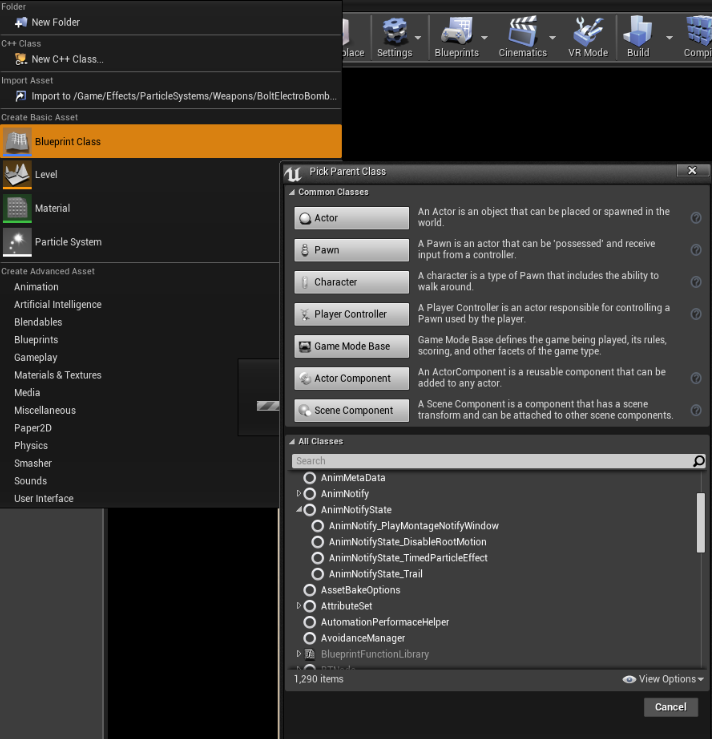
there it's one of those
you gotta make that first
then drag it into your anim notify part of your animation
 bleak inlet
@round fog oh look I actually got a mention which is not @ everyone , such wow 😄
ashen stump
Oh come on @bleak inlet
You get tagged all the time, because you actually have interesting things to say
bleak inlet
right
round fog
He's not wrong
Anyway, Greggy was looking at your sand material, and wondering how you did it :)
fossil swan
you mean michal
 pastel wadi
Hey, does anyone know how to overcome this?
I have set the trail particles tick group to post physics and this seems to work in editor
but once packaged it lags behind
(bike is physics, particles should come out rear light)
I guess maybe this isn't just a fx issue but it only seems to happen with particle systems for me
indigo jolt
i normally solve this by just starting the particles + a bit in X axis or whatever
i'm tempted to say "warmup time" or something might help
but frankly, i just go with fast/easy fix first usually and ignore other solutions until needed
pastel wadi
Yeah I did that for a while but looks dumb when you do a wheelie
indigo jolt
this is common issue
pastel wadi
light trail comes out of the seat
I thought I had fixed it with the tick group thing, it 100% stays in place in editor 😦
indigo jolt
hmmm, lol ok here's another ghetto fix
change texture to be off-center
like lower down
THEN move it + in X axis
so when you pop wheelie, it'll have different axis point
indigo jolt
haha
pastel wadi
but if I go over front wheel it then looks even weirder 😛
but maybe I can make it more dynamic adjusting postion based on speed
bleh
indigo jolt
also i'd put in a Depth Fade to it so you can have some clipping that looks smoother
pastel wadi
see works in editor 😦
indigo jolt
ok ok better solution - use a mesh emitter that shoots out a short 6" version with same color that fades out and has soft edges, - like a rounded soft circle to fill in that gap
it would be like a "hinge point"
pastel wadi
ribbon
indigo jolt
that's a whole other topic we're not really discussing if this was an Anim Trail i dunno if that would work better or not, it might not even function since there's likely no Animation to attach it to
mechanically there's a lot in common between ribbons and trails, except a trail wouldn't look too good top-down since it has to spawn between 2 fixed bone locations
but they do tend to be a bit easier to work with imo
pastel wadi
I had thought of trying to fake it with a spline mesh also
indigo jolt
exotic!
pastel wadi
anyway, thanks for your help
I'll see how the base glow/hinge looks
I was hoping there was just a setting I missed or something quick to fix it 😛
never the way
indigo jolt
also it might help to draw attention TO the problem area if things don't work out great
this is something people rarely try, but if something looks weird, make it a focal point
 pastel wadi
yeah that's kinda wwhere my mind was going with your hinge suggestion
indigo jolt
it's like...if you have a concrete tiling texture and it looks janky at seams....put some mortar there
indigo jolt
a little bit of lens-flarey shapes would be kinda cool
rays etc
likewise, a smidgen of the same on front end wouldn't hurt
not the trail, but the glow + some shine shapes
inner flicker
@pastel wadi spline mesh will be pretty expensive as you need to recompute the mesh every frame
pastel wadi
I'll steer away from that then
I like thos eideas re the lights, projects not really at that point yet to go all in on the details with those sorts of effects but I'll keep it in mind. It just bugs me to look at it lagging behind so I figured if there was a fix I'd do it now, but if not and it requires more treatment I'll just deal with it till it's more pressing
maybe by then niagra will be out it might work better 😛
indigo jolt
btw, not sure anyone here will benefit from this - but discovered that PS4 does not seem to "believe" in the existence of Particle Light Modules
it does believe in bp-based lights
 hard olive
Aside from, directional light, fog/light shafts, sky sphere, and post-proc volume, what else would be important to learn for building atmosphere?
I guess that's a loaded question, but my experience so far is generally knowing what each slider/option is on those componenets
indigo jolt
AO?
bugs.
flying bugs
people usually forget to add appropriate amounts of bees to scene
hard olive
That is relevant to what I'm making, thanks for the bugs 😄
Totally forgot about those
hard olive
I don't have a dragon fly model, I guess for now I'll make a GPU particle with vector field?
indigo jolt
ya do that and make your dragon fly with like 4 image sub uv or something
then set it to velocity-facing
hard olive
Gotcha, thanks!
indigo jolt
np
hard olive
AO I haven't gotten deeply into, I'll check that out too
indigo jolt
play around with the post process features for a while...it's a bit of a rabbit hole
there's more features than you'd think
as soon as you think you've touched every option....there's post process materials
hard olive
Yeah, there are so many options, still trying to get my first level to look the way I want it to haha
indigo jolt
messing with bloom and shadow color can do some neat stuff
can get you to dreamy visuals real fast
"glamour shot" style
 graceful hill
Hey guys
I have a very quick problem to fix, I have a Quasy-Terrain - that needs to have scanlines panning over it, as if it were a projection
I think I know how to do it with World POS coordinates
does anyone know how to do all of this in the shader editor?
indigo jolt
depends, do you need this to be World Position so that you don't get stretching on cliffs and stuff?
if so, i'd use a world align texture node
then for panning multiply a TIME node (for speed) into a vector color node (to set direction) then ADD that to a World Position node, and plug that into the World Position input on that World Align node
graceful hill
nice
The terrain is very flat not very Peaky
I shouldn't get major stretching from World Pos or anything
thank you
indigo jolt
np
indigo jolt
OH
graceful hill
But it's not coming out correctly, I have my terrain (mine doesnt peak too much), but I am trying to get the shader scanlines to follow the terrain like so
indigo jolt
well that's actually easier
indigo jolt
ya you want them to be totally horizontal
indigo jolt
ah one sec i got engine open i think i can figure this out in about 5 min
indigo jolt


lines might be less jaggy if they are a different texture, more resolution on terrain, and other factors
that's a very low rez terrain
 graceful hill
ok trying the new one
in the old one the tiling just increased the power on the lines
indigo jolt
just updated it
tiling works sorta inverse
you want smaller values
i should probably change this to a divide

k that works better

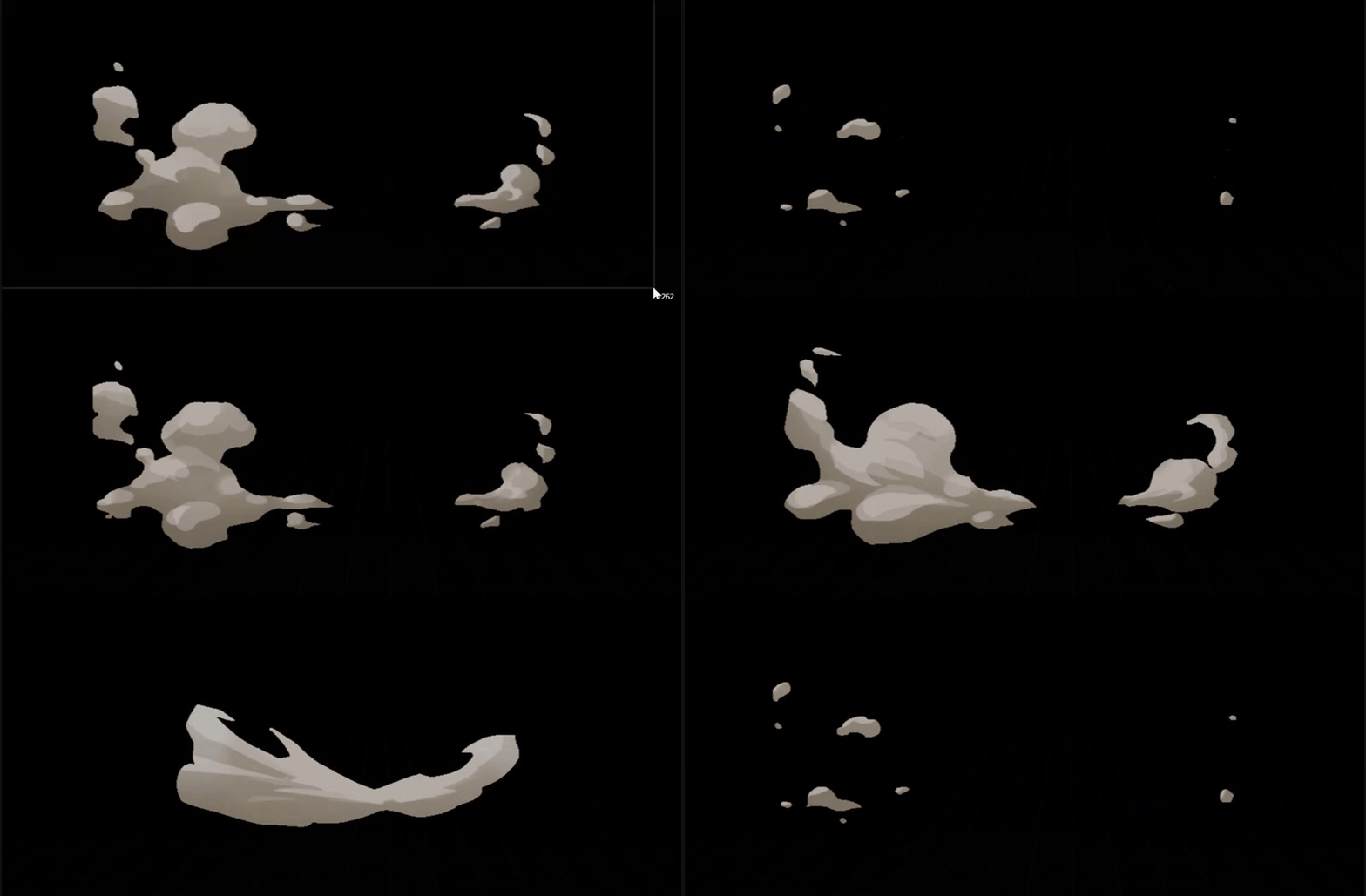
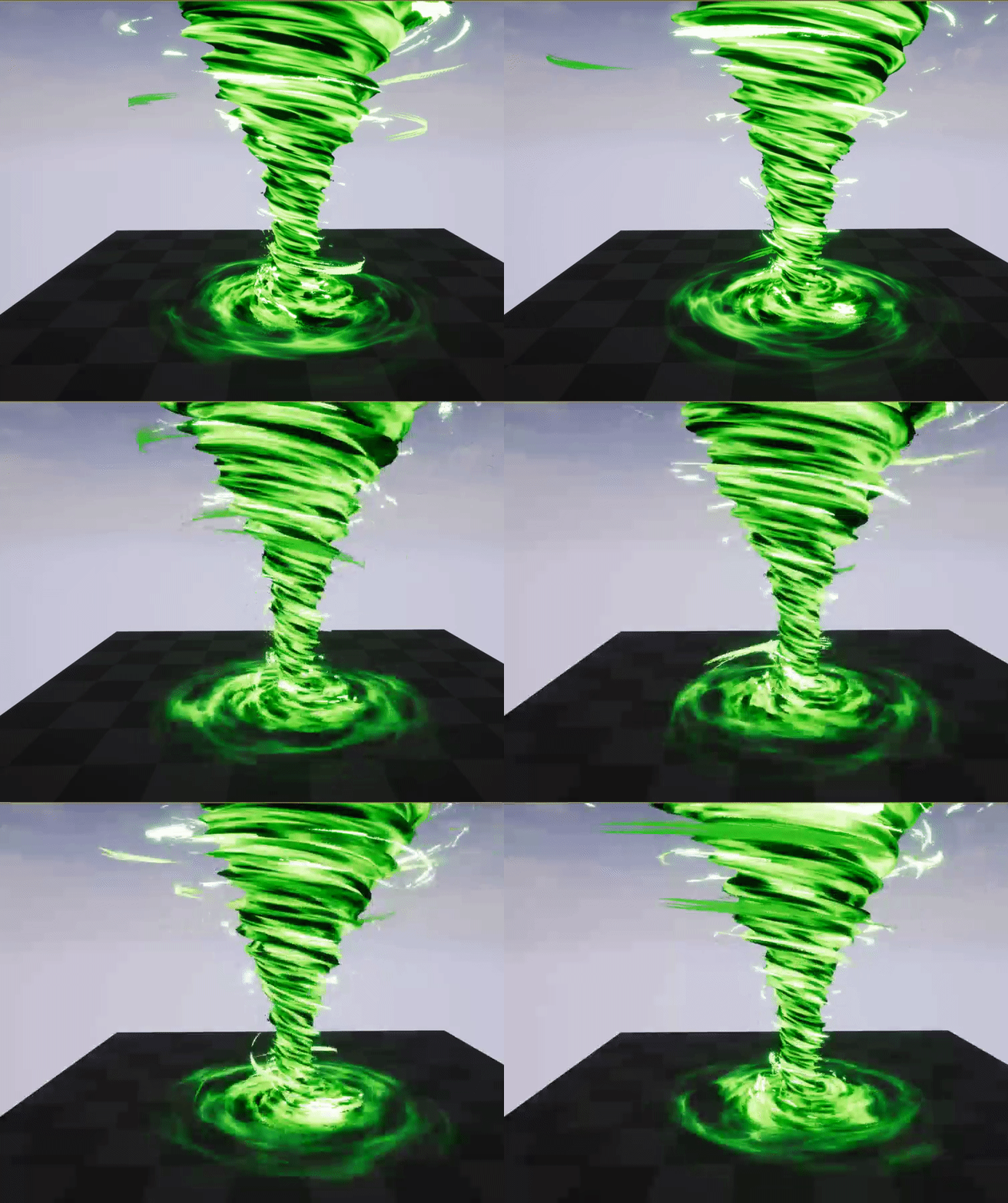

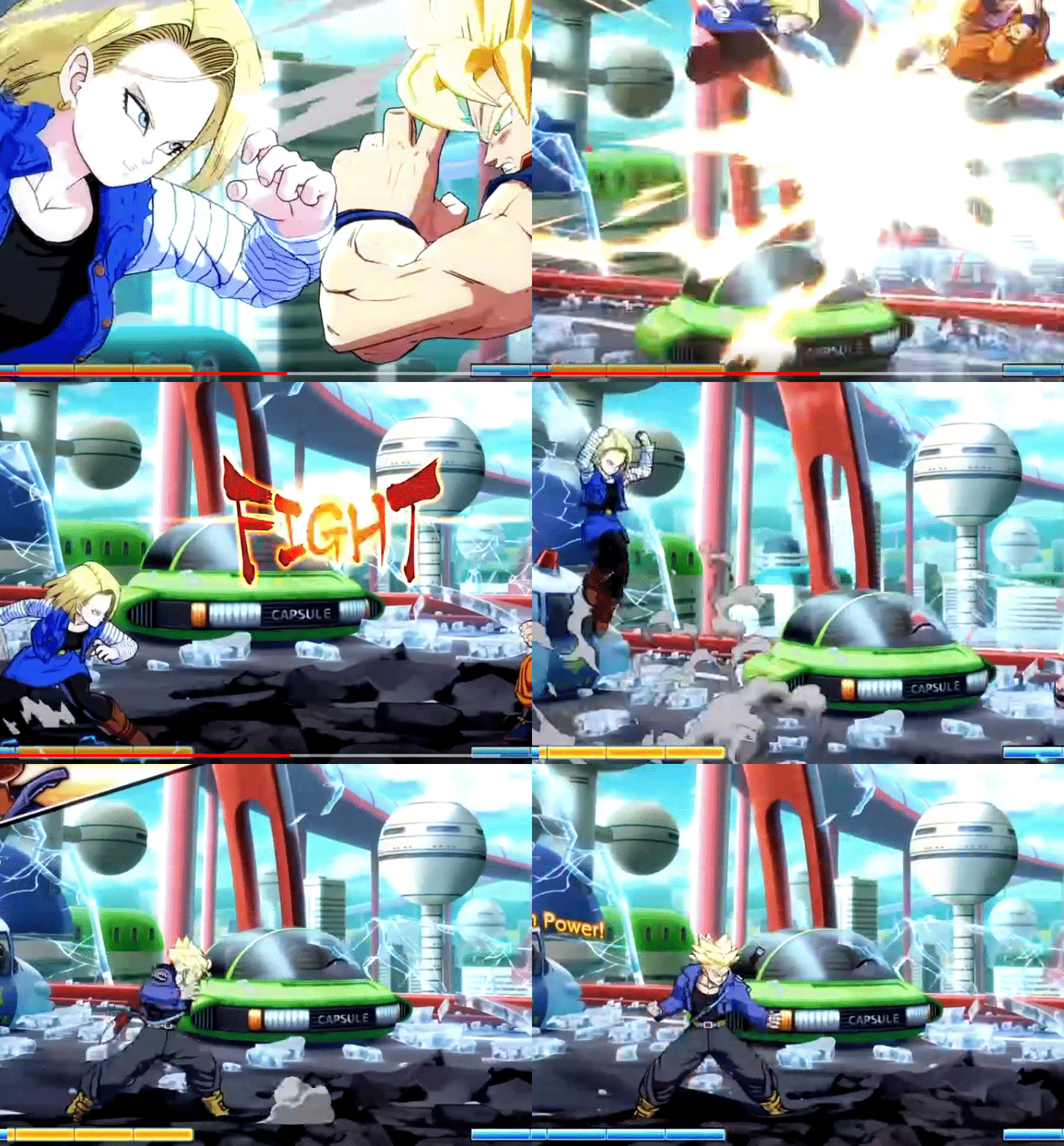


make sure to turn it into a Material Instance when you're done and use that
right click the material after and do "create material instance"
slap that onto terrain
and then start messing with the parameters
you'll be able to do it in real-time that way
graceful hill
I did it
Wonderful
Im adding a Multoply with color Param at the end so I can control the color of the line
Thanks man \
indigo jolt
ya no prob
world position stuff is fun, it's basically a giant gradient you can play with if you pull out the Blue color channel of it - that's the height
Red and Green = north/south and east/west
Blue = up/down
if you want to do more with it - you could probably use world position to colorize everything in a gradient too
which might be pretty
graceful hill
❤
vivid dragon
yeah
pastel wadi
As a quick followup to my trail thing yesterday - changing the tick group works in packaged projects if I don't have substepping physics enabled
I've been looking at a plugin that lets you get the real location of meshes via bp w/ substepping tured on. I think @inner flicker made it? Hopefully I can set the location of the emitter with that and it will work
inner flicker
I've only made things for physics substepping, it's not related to particles in any way
pastel wadi
well it's not particle specific but just getting the real location during substeps? It seems like that might be why the ribbon appears to lag, as it's not getting the right location
when I dusabled substeps it works
Or maybe I'm misunderstanding at it can only use those values on physics simulated things, doh.
pastel wadi
So I implemented your plugin @inner flicker and the gap has dramatically reduced, to the point I think if I push the emitter further into the mesh it won't be a problem
inner flicker
my plugin?
pastel wadi
is MMT not yours?
inner flicker
I don't have any public plugins
pastel wadi
oh
inner flicker
nah, that's boredengineer's
inner flicker
it's ok
I've helped him to get started with the substepping on that project but most of the code is purely done by him
pastel wadi
your name comes up when looking for fixed timestep stuff
inner flicker
yeah, probably because most others doen't care about it 😄
MMT doesn't do fixed timesteps
well, not without custom engine anyway
it requires changes to the engine side
pastel wadi
I've googled myself into knots it seems 😃
inner flicker
there's one fork
I should have put simpler failsafe for that tho, the one I have there is bit experimental
pastel wadi
I think it's private as it 404s but not worries, bit beyond my grasp I think
inner flicker
if you get 404, you are either not logged into github or you haven't linked your github account to epic account
unreals sources nor any forks sources aren't public, you need to have linked accounts to the main repo first
pastel wadi
ah
graceful hill
Does anyone know why Ortho Cameras are showing Gray Meshes, and yet perspective Cam is completely fine?
indigo jolt
probably a view mode is selected in one of those
select one of those other views and hit like F1, F2, F3 to toggle through
those let you see things like unlit, wireframe, etc
indigo jolt
np
timber whale
how do you get a black particle with a color over life module?
I don't want it invisible I just want the particles black
 lilac zodiac
@timber whale For sparks I tend to use a simple spheregradient material. Translucent + Unlit. Then I just set all the color values in particle to 0. I also usually up the value of the alpha so that the black is actually visible amongst the other colours
rotund quartz
@timber whale make sure your material's blend mode is set to 'translucent', not additive