#cinematics
1 messages · Page 18 of 1
 barren lagoon
 subtle violet
Hey guys, very new here and looking for some help. I am coming from various 3D suites and am only using unreal for animation/rendering.
In short, I am looking to randomly animate a light with a blueprint, but it seems that the blueprint only works when I hit play to simulate the game, which prevents me from capturing what is going on in my sequencer. Does anybody have a solution for this?
 gusty heath
Hi all I put a media video with the media player on my sequence and I would like to change this media framerate inside unreal engine if someone know how it's possible to change the speed of a media source inside UE4 it will help me a lot Thanks all !!
I found the timedilation but i don't know how to time dilation just a media not all sequence
 wise jacinth
Hello #cinematics people. I recently bought a foliage pack, and was bummed to learn that the world offset position in the material (if adding wind) seems to break the material, (or can't render properly.) Everything static looked beautiful and crisp, but everything that was moving with the offset world position node was fuzzy and preview-esque resolution. I was told that it could be a "RTX" problem, but raytracing is turned off. Can anyone help with this?
Thanks for your time and reply!
Andrew
⬆️
 dense kiln
@subtle violet make a blueprint class that contains your light and use an actor sequence to animate the light?
 tight stone
@subtle violet When you render a movie out it is like simulation so it will work in the final render.
subtle violet
@tight stone no way. really?
tight stone
Yes we just start the Play in Editor feature and capture the output while the game runs.
 north spear
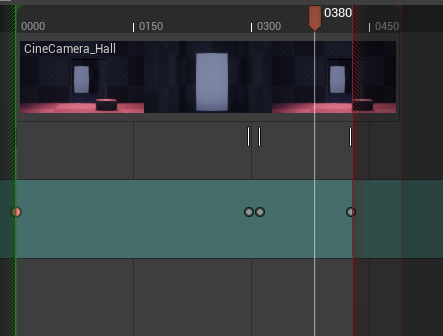
Hey guys I'm new to sequencer, I set the end of the clip at 450 frames as you can see but the camera stops on the diagonal red lines, can some body tell what that is ? https://i.gyazo.com/177009db589a1ccba11e50ddb92ef2f3.png
 tight stone
@north spear You're being clipped by the length of the shot section in the parent sequence
north spear
this is the parent https://gyazo.com/91257e2eb85426ac7079d52d85cfd196
 tight stone
Yes, it's not long enough. Drag the right handle further
You'll notice if you go too far that part of it is drawn darkened out - that means the inner sequence doesn't have a big enough playback range.
north spear
I extend the master way to the right but still the same issue
Ohhh I have to extend the clip itself not the master limit gotcha thank you @tight stone
barren lagoon
is there an option in the curve editor that allows a sort of sharp "plateau" between two keys? (excuse the MS paint)
 simple valve
Got more of a conceptual question. Is there a way to transfer camera animation data done in another 3D software and transfer it to a game engine's camera? I'm wondering, for example, how something like Overwatch's Play of the Game is done, where the camera is a huge part of selling the animation and everything (I don't believe they are pre-rendered videos but I may be entirely wrong on this one). I highly doubt that Blizzard hand-replicates all the complex camera moves done in whatever 3D software they have. So I guess A) Is this camera data transferring a possibility and B) How would one go about that in Unreal Engine? Are there video links or documentation that discusses this?
I guess you could parent a bone to the 3D camera's movement, then export that bone as an fbx w/ animation, then connect a camera to the socket of the bone...lol. I may be overthinking this. Thanks in advance for the replies!
tight stone
You can import fbx's onto a Sequencer Transform Track
Or you can do the latter
I believe the cameras and the victory animations are tied to the Victory pose so they animated the character to the camera, so probably exported the skeletal rigs for the characters with a bone for that camera and then parented the camera at runtime
 rustic plume
hey guys, got this problem with new groom rendering feature. In some cases - when rendering in particular angles OR in higher resolutions, the hair starts to randomly flicker and dissapear (seem like some kind of a problem with depth). Any ideas for a fix?
 junior heath
if i capture a scene in 3840x2160 or without compressing i get a big avi file what is not really playable in video players, because the video is stucking all the time... so how can i get the same quality but as a normal video?
tight stone
You should use a third party tool to compress it afterwards, uncompressed AVI is not meant for playback
 paper iris
I usually run an export through premiere Pro straight after and then delete the raw file (also helps with space)
 glossy hamlet

This week, we welcome Matt Workman, producer and host of the Cinematography Database channel on YouTube.com, and moderator of the Virtual Production Facebook group, a popular group frequented by top professionals in the field.
Matt is also the developer of Cinetracer, a real-...
 pallid rock
I rendered a sequence in UE and now that I have the erxs I want to use the camera move from sequencer in Nuke. Its easy enough to export the camera from sequencer as an FBX but I cant seem to find orientation options. UE is Z-up (correct me if Im wrong) and Nuke is Y-up. When I import the camera into nuke I have options such as transform order and rotation order but no combination seems to match.
Anyone have any ideas?
 mint monolith
@pallid rock There should be options on exporting the FBX, alternatively I think you Rotate things in Nuke with a scene node or similar
Is there any way to directly use Blendspaces in Sequencer? (without animBP)
 shadow mesa
Hey guys, I have a small problem that I have never encountered before. Im working an a sort of animation movie in sequencer and I have the following problem. I have some character actors that play an animation (running etc) and since the ground is not always in level with the feet/body of the characters I keyframed the transform of the actors so they are always on the ground. But whenever I try to render that sequence it seems like my keyframes are ignored. It is completely fine in the editor viewport but ignored on render. I have attached a picture for comparison (you can see one character is completely blended into the pavement and the others as well going through the ground)
Okay actually found out what was causing the problem. At the beginning I wanted to use ragdolls instead of the death animations and I have setup physics simulation inside the character blueprint that I accidentally left in there
 quasi gull
is it possible to copy one track from one sequence to another?
trying and it insta crashes
using Geometry Cache and GeoCache Component... wonder if thats why crashing...
 stark palm
Is there an "easy" way of playing video when you finish the level? Similarly like the intro level thing that you set up in the project settings.
 fierce topaz
Geometry caches are... flaky
 rare aurora
im trying to render out a simple animation in ue4 all i have is the camera going from left to right with 2 keyframes set to liniear interpolation SO WHY THE F DID IT TURN OUT LIKE THIS? i mean why is it jumping thats not how the animation is supost to be what is this weird lag or choppyness?
mint monolith
@rare aurora render out as an image sequence instead of a video
rare aurora
thats exacly what i did
turns out it was blender
i was imporing files by date instead of name extension
silly me
 turbid canyon
Im gonna make a trailer for my game, and i seem to have heard someone talk about direction of panning clips, wether or not to ease i to views with zoom or not. Anyone know where i can find some solid tips/tricks for this kind of stuff? Something like do/donts
rare aurora
just imagine the scene in your head or if you cant refrence the camera movement from movies that fit the feel
and just animate the camera with simple 2 keyframes in liniear mode
@turbid canyon
 covert halo
Hi all ! When I'm reviewing a take I just did, all the moving objects are duplicated. One with the animation, one without. Any idea where that might come from ?
The duplicated ones are with a little lighting bolt icon
turbid canyon
just imagine the scene in your head or if you cant refrence the camera movement from movies that fit the feel
@rare aurora but there must be some theory out there on the matter. Thats what i look for (im total noob with cinematics, as in zero experience)
rare aurora
@turbid canyon well there are tiny tips but they dont matter much just think about words literly like you want a slow feel? make the camera move slow
also if you are doing pannings forward or left to right etc try to make it very very simple and the movement predictable it iwll make the viewer feel at ease
turbid canyon
Ok thx i’ll do some experiments i guess
fierce topaz
The term you are after is Cinematography. There are plenty of tutorials that cover this for film. Watch those, then do the same in Unreal.
rare aurora
yea you should study how people do films
after all cinematography is the full art of visuals combined
mint monolith
@turbid canyon I remember following your tutorials for setting up VR ikinema bodies
May I ask what solution you are using now?
turbid canyon
My own cpp upper body implementation. Its sadly not capable of fullbody solving, but may come later
Its opensource/public available btw, just search for UBIK either on my yt-channel or google. It should pop up
covert halo
Also do you guys know where the sensor location is on the Cine Camera ? Is it at the tip on the lens, the middle of the camera ?
 winged thistle
@paper iris and @mint monolith thank you! Doing the changes 🙂 and learning about lightning and camera anim and positions.
mint monolith
@turbid canyon thanks i'll check it out
paper iris
@turbid canyon When I first embarked on my attempts at cinematic visuals / gameplay trailers I found that some of the best material to look at were other trailers that have come out over the recent years, ranging from 'indie' to 'AAA'. You can further break this down by searching for said trailers that match your games art-style / genre. If the game is something whacky, you may be able to get away with some more out there cinematic design. Whereas if there is an huge element to realism you might want to consider something more 'conventional'.
Another thing I would actually suggest would be to look at speed level designs on Youtube. The reason I suggest this is because they are primarily doing the scene for visual value as apposed to gameplay expectations. They will have the scene framed often in a single static point to work from - They also often do a video at the end showcasing it, sometimes static, sometimes panning.
And others have said, looking into the fundamentals of sequencer, as well as cinematography in general will assist you in many ways.
But I also want to say, just because everyone else does things one way, doesn't mean you have to do it that way as well. Don't be afraid to experiment, seek feedback and keep trying. Make sure you remind yourself of what you want to achieve and why you want to achieve them. Creative processes and workflows when trying something new can sometimes be disheartening. BUT KEEP GOING! It will always be worth it. You've got this! 🙂
turbid canyon
@paper iris thanks so much for putting together such explicit suggestions... great pointers and definetely usefull. I hope i will be able to present a preview in this forum here and get some feedback before i put it out there. Any feedback i can get will be appreciated.
tight stone
@covert halo Pretty sure there's a preference in Take Recorder about always recording into a spawnable instead of possessable, perhaps you want to change that? There's a project wide setting or per-recorded actor. You want Possessable.
covert halo
@tight stone I fixed the issue since then, but didn't touch that setting. Good to know tho ! Thank you 🙂
I'm using a Player pawn in my setup, and that setting is not there
 edgy stratus
i want to render a sequence that reacts to audio and then sync it with the audio in a video editor. its a particle simulation that reacts to audio. but its heavy and doesnt render in real time so it soon gets out of sync with the audio. what could be the solution to that?
tight stone
@edgy stratus You could try the new Movie Render Queue in 4.25. You will need to launch the editor with -audiomixer -deterministicaudio as command line arguments. I do not know if it will work or not, no one has tried it before and may depend on how the code you use to react with the audio works. It is still experimental.
Couldn't you just use the original audio and line it up with the particles later? Or does the audio get generated in-game dynamically?
edgy stratus
hey @tight stone thanks, will check it out now. no the audio is not generated in game, it is a wav file. but the particles react to the audio. even the slightest delay i frame rendering will make video/audio impossible to sync
tight stone
Oh right yeah I see the problem. The other backup plan if the above doesn't work would be to write a mode where it 'reacts' to the audio and saves the values somewhere for each frame, and then play them back during movie rendering instead of doing it in realtime then. There's no system built in for that.
edgy stratus
@tight stone i should launch the editor with -audiomixer -deterministicaudio you say, is it the same if i use these in the field "additional command line arguments" of the render movie settings? i render using a separate process
tight stone
@edgy stratus I believe you don't need either of them (if you're already using the audio mixer) if using separate process, we tack on -deterministicaudio automatically for separate process renders
But failing that yes. The Additional Command Line Arguments has moved to Project Settings
Do note that the movie render queue is not a replacement for the old one in 4.25, you have to get to it via Window > Cinematics > Movie Render Queue, and then click the link in the Settings column, then click +Setting and add .wav Output
edgy stratus
ok i see. i have no control of the character/camera. this movie queue is for keyframed camera movements?
tight stone
@edgy stratus Add the Game Overrides setting and uncheck "override gamemode" (or replace the game mode it overrides with GameModeBase instead)
You won't be able to hear any sound with the -deterministicaudio flag, hope you don't need the sound to play your game. Also delete the .jpeg option and choose .bmp for the fastest write-to-disk speed
edgy stratus
ok. and then i sync the image sequence and the wav and hope they work?
tight stone
Yeah, or replace it with your original wav at the end. But hopefully the visualizer will react based on the audio which is now not being processed in realtime, it's being processed 1/<framerate> at a time no matter how long it takes to render
tight stone
@edgy stratus What method do you use for the audio detection in case someone asks about it in the future?
edgy stratus
what do you mean? how the particles react to the audio?
tight stone
Yeah
edgy stratus
well they are niagara particles and i made a niagara dynamic input script that uses the audio spectrum input and node. makes sense?
tight stone
👍
edgy stratus
ok so, what if it was essential to listen to audio while capturing?
tight stone
There is not much you can do other than play the audio on your computer at the same time
edgy stratus
ok thanks again man
edgy stratus
ok i use the original audio now but what does the .wav audio output actually do? should it write some audio file somewhere with the audio generated in the engine?
@tight stone
tight stone
@edgy stratus There should be a .wav file in the folder adjacent to your output frames yes
@edgy stratus It is not necessarily perfect so I would still suggest using the original audio clip instead of the one that has been played through Unreal and re-reocrded
edgy stratus
@tight stone ok then thats ok since it may have glitches, though it may be the only solution when audio is generated in game. but actually i dont see a wav file exported somewhere
tight stone
@edgy stratus Try changing your output directory, if it is a relative path try changing it to an absolute one. You can debug it by looking at the MoviePipelineWaveOutput.cpp code. Also look in the output log for any warnings
edgy stratus
@tight stone i cant make it work. do you think its worth trying?
tight stone
I don't have anything more to suggest than what I did above. Double check that you are using the audio mixer and -deterministicaudio (though I think you are based on the fact the stuff is more in sync). If you can figure out why it doesn't produce audio, please file a bug report so we can follow up on it and see if we can fix it
edgy stratus
ok cool, thanks Matt
 kind wedge
Hi, there, guys
I'm wondering if there's a way to apply smooth mesh similar to the one we have in DCC packages to get more rounded polygon surface?
The reason for that is to import light-weight mid poly animated cache from DCC and then apply smooth tesselation before capturing the movie in UE
 errant estuary
you can add tesselation material
kind wedge
Partually solves the problem but mostly not
Also, mesh becomes extremely dense what will kill the performance
What im looking for is this type of basic mesh smooth
gusty heath
Hey, how can I turn off the little pop up preview window for cameras?
edgy stratus
@gusty heath in editor preferences, disable preview selected cameras
edgy stratus
movie render queue is skipping some frames. why could that be? can i do something to fix it? for tests i prefer to use jpg sequence output, maybe thats the reason?
 rustic flume
What im looking for is this type of basic mesh smooth
@kind wedge
That's catmull Clark. It's a different operation/algorithm to tessellation. I dont think ue4 supports it. Though it is possible in realtime.
Another thing is that the engine meshes are only triangles. So if you want good quad topo it must be done outside engine.
kind wedge
@rustic flume yeah, you are totally right...pity
@gusty heath go to editor settings, type in cam preview and uncheck preview option
image.png
tight stone
@edgy stratus Is it only one frame at a time usually? There's an unfortunate race condition between garbage collection and the rendering thread... workaround in the mean time is to take uh...gc.TimeBetweenPurgingPendingKillObjects cvar and increase it to be longer in duration than your cinematic. I don't remember if the cvar is in seconds or ms, I think it's in seconds. It's probably set to around 30 by default, increase that to say 2 or 3 minutes (120-180). Add the "Console Variable" setting to the render queue and add that there and you won't have to run it each time the editor starts
That is assuming your sequence is under 2-3 minutes timeline on Sequencer
edgy stratus
@tight stone well its one frame missing every 2k frames, 5 frames missing in total in the 10k tests i do (approximate numbers) shall i go after the solution you propose or is this something else?
tight stone
@edgy stratus Yeah sounds like the bug 😦
edgy stratus
ok cool, thanks
tight stone
If that doesn't work there might be another way to delay garbage collection, ping me on Monday to remind me and I'll find the code for you. Will probably require a few lines of C++ that you can put in a game plugin.
edgy stratus
alright
also, one more thing, i use shallow dof and i get this artefacts
in front of the camera, these are some cube particles. and they appear like this, is there a setting to get higher quality dof render? its ok if it doesnt render fast
tight stone
I suspect that happens in the viewport too? If so I can't help you there, more of a #graphics question probably.
edgy stratus
yes its in the viewport as well. thanks @tight stone
 modern sinew
Hello, I'm new to this kind of stuff and wanted to ask if someone knows how to make a blink effect in a cinematic ( more like a wake up scene )
errant estuary
no stil wont work
if i change a value in the details panel it autokeys
but it wont if i set it from a blueprint
errant estuary
is there any way to key floats from blueprint?
tight stone
You can enable the Sequencer Scripting plugin and use scripting to modify the underlying data, something like:
GetMovieScene() -> FindTrackByClass -> GetAllSections -> Cast -> AddKey/Delete Key/etc.
Only works in the editor.
errant estuary
damn thanks man 🙂
ill take a look
i only need it in editor so thats fine
im not so great at phyton tho
 stray spear
hello
could i use a text on cinematic as for print character dialog. But without in runtime
?
errant estuary
yea, just add it as an actor to the sequence and make it visible when you want it?
stray spear
even if i m not on runtime
?
because i don t succes show the widget when i m not in runtime, and when i only clic play here :
stray spear
yes
on a unreal video
a playlist :
In this video we get a quick introduction to the basics of the Sequencer Editor. We set up our viewport to include a Cinematic Preview so that we can preview what our scene will look like in real-time. We then discuss how Sequencer uses a multi-track editing interface and how ...
errant estuary
thats really old 😛
stray spear
he don't go on runtime
ha oki 😅
but i wonder if i must record in editor my cinematique
and show it when i need it
errant estuary
no
stray spear
or if it s better to do a play of the sequencer during game
stray spear
in a package game you mean ?
errant estuary
yea
stray spear
lol
in fact, there are not a lot of ressource about sequencer i think
i never use it, and it s a little difficult to begin
errant estuary
yea that might be true, but 4.12 it was still in preview i think, much has changed
stick to the documentation if there are no good vids is best i think
tight stone
@errant estuary If you have a Posessable or Spawnable actor in your Sequence there should be a binding, and then you can get tracks for the binding instead
errant estuary
im finding binding now, it found 5 and there are 5 actors in that sequence
they are all named the same
tight stone
@errant estuary Can you rename them and just do it by name? I don't remember if you can get the object instance from the BP scripting, since at least with Spawnables, they don't exist if the sequence isn't being evaluated
Oh I see, no don't break the sequencer binding proxy
You should be able to plug the SequencerBindingProxy into other functions
I don't have code infront of me but pull off the Array Element pin and look through the context-sensitive functions
tight stone
@errant estuary You can look at the /Engine/Plugins/MovieScene/SequencerScripting/Content/Python/sequencer_examples.py
They're in Python but they should translate across relatively straightforward to Blueprint, though you may need some additional casts in Blueprint compared to Python
Not totally sure we have an example of doing just this but have a look around those functions
errant estuary
i can only see the cpps, got pyton editor script plugin enabled
ahh i found it with google on github 🙂
UnrealEnginePython/blob/master/examples/sequencer_scripting.py
tight stone
Hmmn... don't think that's the official one. The official one isn't on github because it's considered 'content' so it's downloaded with the Setup.bat. It probably isn't added to the visual studio project and you'll just need to go look on disk
 opal sinew
Does anyone know how to make a smooth blend transition in the cinematics as shown in the timestamp here? https://youtu.be/2xa_P1KrQvQ?t=7

This is a real time Architectural Visualization of a Loft Interior created in Unreal Engine 4.
Created by PIXELBRAVE.
http://pixelbrave.com/
Longing by Joakim Karud https://soundcloud.com/joakimkarud
Music provided by Audio Library https://youtu.be/wSL0sGLTgLQ
tight stone
The cross-fade between camera cuts is done in post with something like Adobe Premiere, it's pretty standard capability in video editing programs

 timid pasture
realize I should have asked this here:
Evening all. Can I add a level blueprint variable to the level sequence? I know this is super easy with actors since you just add them and grab the variable (check expose to cinematic). But i can't find how to add a variable from the level blueprint
tight stone
@timid pasture No.
@opal sinew You can use the curve editor to make the cameras move without the soft start/stop you have in each shot, it will help the motion feel a little more continuous
timid pasture
Cool thank u Matt, good thing i just moved all that to an actor : ) What's the best way to get a reference to your level sequence in an actor? Is one get actor of class without a cast enough?
it seems to be working though i'm getting some wierdness. Maybe it's not getting the sequencer view target properly yet
(just one level sequence sequence actor in the level)
tight stone
The view target will not be set in the Construction script no, it will be set the frame after you call Play()
timid pasture
ya for sure, it's just that my camera track is quite slow and for some reason when i start sequence play through the actor, the track moves super fast and then just freaks out
im sure im doing something dumb
just got that reference from the construction script and
in event graph
for testing
opal sinew
I'll look into it Matt
timid pasture
ya auto play is the same so nothing to do with the lvl sequence reference in the actor
gusty heath
hello guys
I created cinematics for the level and i want to render it but when I click on render it doesn't render moving the camera, what to do?
I made door animation
and I want to capture it
also I did change color of cube and I will want after this to can render it too but idk why it doesn't render it
 crisp horizon
Hey, I have problems rendering out a sequence.
It renders only the first 125 frames out, after that it only renders out the skybox and the floor.
Its a simple scene, just a character on a floor for testing. It has a bunch of 8k textures though, so I wonder if its a GPU ram issue?
Nevermind, figured it out. Had to extend the camera cuts area...
tight stone
@gusty heath Is your camera cut track pointed at the right camera? From the thumbnails it looks pretty static and I see you have two cameras in the sequence
quasi gull
Anyone have experience Motion Builder FBX export into Houdini? Some reason geo and bones come in, animation is there in curves, but nothing animates when scrubbing....
 split iris
hey guys, Does any1 know after rendering a video in ue4, on the video file my foliage load in later as the scene goes.. How do i fix this issue?
tight stone
@split iris Try adding per-shot warmup time in the settings dialog, or use the new Movie Render Queue feature
 regal urchin
Can you layer takes inside a sequencer layer or merge
So I can do separate live link takes for each character, and then add them
regal urchin
@tight stone
edgy stratus
while rendering with movie render queue, remotely, in a separate process, i get this message: LogConsoleManager: Warning: Performance warning: Console object named 'r.DefaultFeature.AntiAliasing' shows many (500) FindConsoleObject() calls (consider caching e.g. using static) is this something to worry about?
tight stone
Probably not - more important for realtime games. Can you submit a bug report with a verbal explanation of which settings you used and how long of a sequence caused that to show up though?
 zealous cypress
Hey guys, I'm trying to do some rendered cinematics out of sequencer. I'm also using composure for some composites with live action footage.
I'm having an issue of when I render the cg element / character is rendering in the incorrect position from where I've lined it up in Sequencer
It's like a whole different series of translations kick in the moment I hit render, and it's as though the physics engine fires up too cause my character will slowly drift down before snapping back up. It's all very confusing
edgy stratus
@tight stone ok, i will try
 warm pelican
Hi! My particle system is not working when I play the level with sequencer or when I render the movie. In the viewport it works and is visible. What could be causing this?
edgy stratus
@warm pelican particles worked for me while rendering. are you using niagara? in the emitter details, is "auto activate" checked? is maybe "actor hidden in game" checked?
quasi gull
hey guys, so if i have a character animated from anim dept, so fbx mesh and bones etc... and i want to retime it over a range, like play normal rate, key it to play .35 speed for a while then ramp back up to normal rate... where would i do this? cant seem to in Sequencer (cant key the playback rate)....
 south relic
@quasi gull perhaps a custom time dilation on the actor would work
quasi gull
Cant seem to apply a dilation to just actor
south relic
Sure you can 🙂 https://www.youtube.com/watch?v=VeA2K1coDVw
What is Custom Time Dilation in Unreal Engine 4
Source Files: https://github.com/MWadstein/wtf-hdi-files
kind wedge
Hi, folks!
I'm struggling with importing abc cache files as animated skeletal meshes
The actual problem is: I can't manage the materials to auto-apply durign the import process. 😓
I got Write Face Sets enabled on export and Find Materials anabled on import.
I also tried to name materials with and without SG but it doesn't seem to help ither.
Can anyone please, tell me what am I missing or doing wrong?
regal urchin
Somehow i changed the anchor point of my camera while i was setting up a tracking shot, how do i adjust the anchor so i dont do it again?
 unreal hatch
@kind wedge Not directly applying to your problem, but we usually do import our alembics through a python process and then apply the materials needed.
kind wedge
@unreal hatch Yeah, that is a bullet-proof solution for sure but for now im trying to get the default features working for me as currently I don't have any coders to help me out with the custom scripts
tight stone
@zealous cypress Yes, disable physics on your objects. Movie Renders are just PIE sessions, so the game is running.
zealous cypress
Thanks @tight stone ! Yeah there was still an active physics solver within my character blueprint. Managed to track it down, it was driving me absolutely spare.
 fallen knot
So, I animate an object in a sequence, its keyframed, its in the sequence, and somehow.. despite being in the sequence with autokey, keyframes........
the object has moved.... outside of the sequence
and broken all other sequences
For the second time
Heed my warning, do not use the sequencer unless you absolutely have to. If you can animate something outside of UE4 and import, DO IT.
 knotty iron
Hi everyone!
I tried importing an .abc file and cannot figure out why UE won't let me import it: The alembic is exported from Speedtree Cinema (screenshot attached). I already tried a variety of import settings in UE (screenshot attached), none of which worked for me. UE either crashes during the import (mostly around 10-15%) or upon playing the .abc in Simulate. I also tried adding a track for the Geo Cache and playing over sequencer, which resulted in a crash again.
Thank you for your help!
Example .abc attached, if anyone of you manages to import it to UE you can let me know. 🙂
tight stone
@knotty iron Are you using raytracing?
knotty iron
Yes I am
knotty iron
4.25.1
tight stone
@knotty iron Try without it - pass "-noraytracing" as an argument to the editor or turn off raytracing in the project settings. If that still crashes then you should submit a bug report and attach that file and say it happens only with raytracing. I took a brief look at it, also crashed and the crash was in raytracing code
regal urchin
I am recording takes each take shows in the sequence while its recording then the sequece remains, but the take disapears, what is happening
ive been doing 4.24 everything was fine, 4.25 this is happening
regal urchin
@crisp bay go to unreal website and sign up for the video tutorials, all the intro stuff is really helpful
tight stone
@regal urchin Press the "Review Last Take" button in Take Recorder and then you can initialize a new take from that one if you want
 crisp bay
@regal urchin lmao ok i wasnt rly sure where to start out and was looking on youtube and a ton of other sites
regal urchin
@tight stone i do that and i see it, but when i go to play it it disappears and becomes 1 frame
@crisp bay its just really good foundational stuff, then it goes too fast, the first 2 hours of the program are really helpful
then noodle around on youtube
basically until you get past the first blueprints page
tight stone
@regal urchin Try turning off timecode related options in the recording settings for actors
crisp bay
@regal urchin gotttt it tysm!
knotty iron
@tight stone Disabled ray tracing but getting crashes on launch/compiling shaders now, attaching screenshot here.
knotty iron
Here's another report where playing the .abc with raytracing turned off caused the crash on Simulate.
gusty heath
@gusty heath Is your camera cut track pointed at the right camera? From the thumbnails it looks pretty static and I see you have two cameras in the sequence
@tight stone idk tbh, I did render a video previous tear and I don't remember-lol
gusty heath
it is something really really weird
I have this for opening and closing door
now I touched something in the sequencer for the door and I added the camera cuts
and I added new camera
and now when I press R the camera switches and run the animation, hmmm
when I record the video it is on the other camera, it is mess
 upbeat ridge
@gusty heath Make sure the Camera Icon is actually active on the Sequence and not on one of the Cameras inside the Sequence. The Render Movie Tool will render the currently active camera or sequence. That could be the reason why the sequence seems to play fine when using Blueprints but not when recording.
gusty heath
the icon should be orange? @upbeat ridge
Okay, I remved the second one camera and I locked it
upbeat ridge
Yah.. So The Camera Cuts Track is intended to Cut between different cameras. You can actually see which camera is used by this track in the timeline (preview image) where it says at the top left which camera is used. So if you got multiple cams you need to choose witch cam should be used for this part of the time line (right click -> Change Camera). You can create Camera Switches by Splitting the sequence and then changing the cameras of the different parts.
Now that the correct camera is visible in the Camera Cuts Preview, you should be able to Render the sequence Movie
gusty heath
yeah it rendered the door opening, I want to make after this animation the camera to move forward but I don't see the location to change?
hmmm
like for this:
upbeat ridge
Click + Track on the Camera to add a Transform Track
gusty heath
a okay 😄
upbeat ridge
The Documentation is actually quite good for the sequencer feature: https://docs.unrealengine.com/en-US/Engine/Sequencer/HowTo/index.html
A How To Guide for creating cinematic sequences with the Sequencer Editor.
gusty heath
yeah thank you, will check it ofc
little thing which is weird:
on 0:30 is little bit more zommed idk why 😦
you see?
upbeat ridge
hmm.. seems like in one screenshot it shows the editor camera and in the lower screenshot is shows the actual camera selected in the Sequencer (You can see it fits into the view / letterbox, but in the first Screen the entire view is covered).
upbeat ridge
If you want to render it, just make sure it looks okay when you use the camera buttons inside the Timeline. It will display with the settings you setup in the Camera Actor
yes and no.. You could also work with a Shots track instead of the CameraCuts Track. But only the camera Track won't work afaik.
 muted lintel
there are new camera anim sequences that inherit from the new template sequences. Any way to let that animated camera take control of the player camera too? Because I can "play" the sequence and the camera spawns and gets animated but not used
upbeat ridge
afaik?
@gusty heath As far as I know (sorry for using the abbr. - Got used to it)
 hollow yoke
Hey guys, brand new just learning some things playing with sequencer. Have a Countess that I'm applying an animation to. When I add it to her in the sequencer, the animation simply doesn't play on playback. What other info can I give?
The actor that I added to the scene was the Anim Blueprient as opposed to the player character asset
hollow yoke
I changed Animation Mode to Use Custom Mode and it's now playing animations.
muted lintel
hmm a sound cue played inside sequencer cuts off maybe a second before the end. How does that happen?
ok interesting, pitch is responsible. Didnt know it had that effect
 muted moon
New to sequencer, curious if I can reference the actors sequencer is driving via the sequencer reference itself so I don't have to create another container for those objects being animated.
Oh think i found it
must be Get Sequence Binding
oh wait no
that just some sort of ref iD
tight stone
@muted moon If you're just trying to replace which actor a sequencer is animating, you can do that with GetObjectBindings/SetBinding, I am not sure if you can retrieve the actors the binding is animating, as they don't necessarily exist when called (ie: spawnables that are not spawned cannot be exposed to blueprints)
muted moon
@tight stone Yeah I saw the docs for replacing but I'm not trying to replace just trying to get a reference of them from the Animation. I can technically get the refs by other means but trying to make things neat by doing it all from the Animation sequence.
was going to make a custom function that does it but the have what I need in a protected method
Looks like I'd have to edit source to do what I want
GetObjectBindings has you put in an object and if it happens to be in the Sequencer then you can get the SquenceID for it
but if you just want to get a all objects used in a Sequence there doesn't seem to be a way without already knowing the object.
tight stone
"from the Animation", what is the animation in this context?
muted moon
yeah to be clear I just mean the sequencer
tight stone
@muted moon Yeah they're not exposed publicly because a Spawnable exists as a template in the sequence and not an actor and it is extremely easy to do the wrong thing ie: changing properties when it only exists as a template = bad time
muted moon
I mean... sure... but I can check if it is valid?
I get that it might not actually exist
I guess this is another one of those lets baby proof it things
Technically though there is the "Get Sequence Binding" node
It's already doing it
I just want that but to let me set dynamically the Sequence and to return an array of Objects or just their bindings
tight stone
Bindings and spawned things are a separate concept in Sequencer
The bindings exist as -effectively- plain old data, and the tracks you animate and key belong to the binding
The binding has a GUID which is looked up in another system to turn it into an actual actor instance
muted moon
Great
So all I want is an array of bindings for all objects in a sequencer
I want what Get Sequence Binding does but with a bit more flexability
tight stone
I'm not totally certain, but I think you want the IMovieScenePlayer::ResolveBoundObjects function
muted moon
but it is protected
It might be what I need not sure but looks like I'd have to edit engine to get what I want
as there is currently no native way for it
But I'm sure there is good reason for protecting these calls
I guess what I could do but which would be super silly is use the Get Object Bindings node and just loop through all the objects in the world lol
tight stone
@muted moon From C++, I think (but did not test) that you can do this:
ULevelSequencePlayer::GetSequence() (returns a UMovieSceneSequence)
UMovieSceneSequence::LocateBoundObjects(objectId, Context, OutObjects)
Context can be gotten via
ULevelSequencePlayer::GetPlaybackContext() iirc
And objectId is the binding id
muted moon
Actually what I said didn't stall things as badly as I thought it would
Worked 🤷♂️
But I'll look into what you just posted as well
since that isn't ideal
@tight stone Can't seem to do #include "LevelSequencePlayer.h"
Do I need to add a module to access it?
tight stone
@muted moon Yes. You need to link your Build.cs against the LevelSequence module
muted moon
ah ok
wait but I don't have the binding ID to leverage this
Isn't my issue getting the Binding ID's from the objects in the sequencer?
There is a BP node for getting the Objects from ID's but I don't know the ID's without doing what I did there to just iterate through all actors till I find them.
tight stone
@muted moon Pretty sure you've flipped, there's
A) nodes for finding out the Object Binding IDs. These are just reference IDs and not the objects.
B) The instances those point to. Which is what I thought you wanted to get.
tight stone
The ResolveBoundObject function takes an ID, and outputs the actual instances
We support multi-binding, like one track in Sequencer assigned to several light actors to animate all of them, so that's why it returns an array
muted moon
crap I'm confusing myself with this lol
LocateBoundObjects needs an ObjectID and gives you an array of all bound objects
I don't have an ObjectID.
tight stone
You started with an object id... hang on, let me finish the code I am working on so the editor runs again
muted moon
lol
ok
But sadly no, I have no Object ID
Trying to pluck them from the Sequencer so I get the objects
tight stone
@muted moon Ah, I misunderstood the GetObjectBindings node. You'll need to copy/paste some functionality out of MovieSceneSequenceExtensions - there's a GetSpawnables/GetPossessable function which returns the object ids for all the spawnables/all the possessables in the sequence (or GetBindings if you don't care which type)
And then that gets plugged into ResolveBoundObject
The sequencer scripting stuff uses a FSequencerBindingProxy to wrap around the bindings... you might want to leave it all in C++ and just collapse it down to one function that takes a sequence and outputs the actor array
The stuff in MovieSceneSequenceExtensions is editor only (because it's designed for Python) but the code it uses is runtime too afaik
muted moon
Thanks I'll look into some more
tight stone
Use an Event Track. You won't be able to preview it in the editor.
stray spear
yes
but when i launch cinematic
it don t move
maybe i m wrong
but you confirm it s possible?
well, in fact the caracter seem to don t have controller ...
mint monolith
@stray spear Is it working in normal play in editor mode?
errant estuary
ok, so i can now add keyframes from an editor widget, i can see em pop in the sequencer timeline and they work,
but when i change focus they are still there but are not counted until i move the keyframe or restart the sequence
errant estuary
it usually is 😛
stray spear
Yes 😅
I made mistake on ai Moveto function
But now it s OK
I made an even on track
When event is fire the character move where I want
Thk you all
🙂
errant estuary
well dont think i said anything but np 🙂
errant estuary
ok this shows my problem

Google Drive
on 0:27 i drag a editor widget slider , it puts the right arm controll rig to 1
it pops in a keyframe for the value and it works. i can drag the arm around
i let go of the arm or lose focus another way , the keyframe value is still at 1 but it doesnt count it as so
if i drag that keyframe or restart the seq it wil work like any other keyframe
and this is my node setup for the adding of a key
gusty heath
ok, no problem, sorry for the later responde @upbeat ridge
gusty heath
I need really really big help about the camera and rendering the video, I can't do it
so I have door animation and after this I added camera cuts and added the only camera that I have
then I added transform on the camera and moved it forward, then I save it and then I rendered it and then I got nothing, the person who can help me please tag me or write me in DM, I will be more than happy to help me
gusty heath
one moment
I want to make the moving the camera only for the video not for the game
@errant estuary
errant estuary
if u dont mind keyframe the camera again
gusty heath
huh?
I made keyframes for the camera to render the video
but why these frames are not in the video?
😦
I watched tutorials, read docs and nothing 😦
errant estuary
it renders nothing?
muted moon
@tight stone I enabled the plugin, GetBindings is exactly what I wanted
However, I'm now confused between what is a movie scene and a sequence?
I still need to get the sequence but movie scene doesn't seem to have that.
Actually the bindings I get from the movie scene doesn't seem to work with the type of bindings the sequence Get Bound Objects is expecting
errant estuary
i also dont know what the moviescene is for, i looked in the sequencer scripting examples they use it there , but i used get sequencer to get the bindings
movie scene doesnt have as much context sensitive stuff
errant estuary
there is a get bindings node that gets all of em right?
muted moon
But why use a Movie Scene Sequence?
Can you get a Sequencer Player ref from that?
Both seem to have limitations and don't work well together as far as I can tell
IDK why it isn't all just one thing
or at least mesh together
errant estuary
the screen i posted gets the binding of 1 actor and it works
muted moon
what screen?
errant estuary
if you do get bindings i think u get all of em
its a lil up in this chat
that screen gets a specific actor from the seq, gets the tracks it has, in my case float tracks 10 or something
they all have 1 section , than i get the type, its a float track so i selected that and casted to float track
and add a key
if you use get bindings instead of : binding by name u should get all actors in the sequence?
muted moon
Bindings alone don't get you the objects
errant estuary
the binding is the object right?
what do you want to do when u get the object?
also u can split that pin
muted moon
@errant estuary Notice how for Get object bindings you had to already provide the objects?
Also I don't have that node exactly as you have it
Custom code?
muted moon
in any case you already have your object list
I want bindings to get objects
not objects to get bindings
errant estuary
what is the end goal when u get the objects?
you can allready fire off events and change variables on the bindings
muted moon
just to get them to reference them
I know I can get the objects by other means
but am hoping to use the Sequence as a container and not make another one
errant estuary
you can add an object tag and get all objects with tag?
muted moon
I know there are other ways but this would have made my code look cleanest
And I didn't think it would be this difficult to achieve
tight stone
@muted moon ULevelSequencePlayer owns a ULevelSequence which owns a MovieScene.
And yes, that's why I indicated you will need to copy paste the code, they're two different representations of object guids, so you will need to use the inner code that doesn't wrap it in the binding proxy type
 rugged condor
I'm making my first cutscene
and i have a problem
How can i reference a player character in the sequencer if that character is spawned in the world only when player plays the game?
How can i use player character in sequencer cutscene if the character is not there when in editor?
Any ideas?
muted moon
@tight stone Ah ok
tight stone
@rugged condor Look up Dynamic Actor Rebinding for Sequencer
rugged condor
Thank you, will take a look at that
also another question, if i have enemy in cutscene and then after the cutscene ends i want this enemy to start moving from where cutscene ended, what is the best way to do it?
because at the moment my enemy after the sequence goes back to default spot in different location of the map
tight stone
@rugged condor You can use "Keep State" on the transform section (or track, can't remember which), but that can make previewing in the editor a little odd at times
rugged condor
Yeah that's the problem i have at the moment, i've selected keep state at the last animation that the actor is playing but he disappears at the end
tight stone
@rugged condor If you're using an animation where he walks out of his origin, then the problem is much more complicated
errant estuary
on 0:27 i drag a editor widget slider , it puts the right arm controll rig to 1
it pops in a keyframe for the value and it works. i can drag the arm around
i let go of the arm or lose focus another way , the keyframe value is still at 1 but it doesnt count it as so
if i drag that keyframe or restart the seq it wil work like any other keyframe
did u see that1? 🙂
tight stone
Yes, I don't have an answer. Please file a bug report, as Control Rig is experimental.
errant estuary
ahh buts its not controll rigs its the float i think
tight stone
Attaching a project (with a specific control rig) that reproduces the problem will help significantly.
Also check your auto-key and your edits settings in the sequencer toolbar
errant estuary
i could test w/o the rig
ill do that first
ill drive a color or something
there are a few other things in control rig that produce unexpected results so it could be it
its not autokey, i key it from the editor widget
errant estuary
driving the intensity of a pointlight has the same thing
i can set the key and it wil stay there at the right value, but if i drag another object the keyframe i placed with the widget wil stil show in seq, with the right value. but the effect is gone, until i restart the seq or drag the widget keyframe a lil
i used VPeditortickable actor base and editor utility widget
looks like im missing somekind of asset save or construction scrip
errant estuary
ill set it up in a clean project later but i kinda expect the same result
mayB try another editor tick
hmm now it seems to work
and now it doesnt
and now it does, for reasons completely unknown to me for now 😛
errant estuary
it just looked like it was working cuz i turned autokey off, looks like i can freely move actors around that have nothing to do with seq and dont have a track
if i scrub the timeline or move an actor that gets keyed it ignores the keyframe until resart or if i move the key i placed with the widget
gusty heath
Hey guys, I"m trying to record Animations with a virtual Camera, using the Uremote app. However, when I start recording, a new sequencer is automatically being opened, causing it impossible to record the animations I made upfront. Does anyone know how to fix this? Or basically knows how to record into a sequencer that's already open?
errant estuary
you mean sequence recorder or take recorder?
gusty heath
I want to load the clips I recorded with the the take recorder directly into a level sequence
That way I could film a pre-made animation
I'm just getting started in Unreal, sorry if these questions are very noob
errant estuary
you open a new sequence and add the recorded animation into that
errant estuary
i havent used take recording a lot, just sequence recorder
tight stone
@gusty heath You should initialize Take Recorder from the sequence you want to record into
If you want to continually build ontop of it, review the last take after recording and then import it into take recorder
The idea is that you probably won't get your take perfect on the first try so you can record a bunch of takes and then assemble the best parts of different things
errant estuary
@tight stone

Google Drive
its not the rig or my animation blueprint from hell
send it to bug report?
tight stone
@errant estuary You're animating a custom float channel, how are you applying that to the light
errant estuary
tight stone
@errant estuary Try using the construction script as well, I'm not familiar with that tick method. You'll need to go into the class blueprint settings and enable "Run Construction Script in Sequencer", and go to your Sequencer toolbar and make sure it says run construction scripts
tight stone
That should work @errant estuary - hook up a print statement
errant estuary
it doesnt seems to set the light from construction script, the float value does make it trough
now it doesnt even show the change unless i move the keyframe
it adds the keyframe with the right float but doesnt show the light goin on, i have to move the keyframe for it to show
tight stone
@errant estuary Are you calling Modify on the section before you add a keyframe?
tight stone
@errant estuary Yes, the clue about moving the key reminded me. If you don't call Modify it doesn't know the data has changed and so it doesn't rebuild the evaluation templates
errant estuary
scan modified asset files?
tight stone
Which will cause the UI and the evaluated data to come out of sync until a key is moved. Modify alone might not be enough - the C++ way of interacting is different than Blueprints/scripting
It's not totally supported yet (modifying the sequence while it's open), you might have to write a BP function to call the template rebuild thing too, but try the modify first
tight stone
Oh. No. I'm not even sure it's exposed to Blueprint Scripting tbh
errant estuary
what file is it in?
tight stone
https://docs.unrealengine.com/en-US/API/Runtime/CoreUObject/UObject/UObject/Modify/index.html this is the function but I don't know if if there's a blueprint wrapper
Note that the object will be modified.
errant estuary
i can do a lil c++, like comment out stuff and change true to false 😄
tight stone
It would just be called "Modify" most likely. You can make a blueprint library function that takes a UObject* and calls Modify() on it.
I think the new C++ class thing (or the new plugin thing) can help you make a Blueprint Library
tight stone
You'll have to poke through the Plugin Manager's New Plugin (bottom right corner) or Content Browser +Content -> New C++ Class uis, I'm not at the editor sorry
#cpp or #editor-scripting might be able to help as well
errant estuary
ok thanks ill read up a bit than 🙂
i went trough the plugin examples and allready noticed it was for building the seq from scratch or modifying it w/o opening it
tight stone
Yeah I don't think it's quite there for modifying it while it's open but I think you can make it happen with a little bit of C++ code
errant estuary
yea or dragging the keys around 😛
anyways thanks for the help ill take a look at it again later 🙂
 crystal tangle
why the cine camera goes back and forward while rotating around a tracked object?
ain between the transform keys
tight stone
Look at the curve editor
crystal tangle
yes but i can't find what is making this
everytime i put a new keyframe it tries to zoom to the target and get the new transform
gives me nausea
gusty heath
@tight stone Thank you. Can't try it out right now, but I'll make sure to do so anytime soon
crystal tangle
what should I check in the curve editor? why is the camera slightly zooming in and out in beetween each frame?
 jaunty spire
Hello Friends! another friend of mine is having some issues with some basic sequencer stuff. For what ever reason their camera attaches to where the level sequence actor is in the world and not the camera associated with it. from what I can tell the cinematic plays because of it ends up reattaching to the player camera/control.
tight stone
@crystal tangle Look at the keyed values. You're likely ending up swinging between -180 and 180 so it travels a full 360 rotation between keys
crystal tangle
ok thanks gonna check now
I guess you are right but I have no clue how to redo the animation to fix this
 sacred tide
anyone know how to replace a spawnable actor in a track with an actor you have in scene through blueprint?
i saw some docs and ealrier conversations about it but i'm having some issues getting the LevelSequenceActor to call SetBinding on. currently using LevelSequencePlaybackController. I can pretty easily call GetBindings(), and also LocateBoundObjects()
sacred tide
hah, scratch that, can solve this easily just by not marking the object as spawnable (i think)
errant estuary
@crystal tangle r click the transform track ( next to a keyframe) properties and quanternion interpolation
crystal tangle
thanks
 clever roost
Im setting up a sequence for a kind of picture in picture view of the scene. Ive got it working where it will start from a trigger volume, and render an output into a texture target on my HUD.....but it also takes over the player camera while running the sequence. What am I missing to have the sequence playing without taking over player camera?
man I love getting right up to the answer before asking my question
Removed the CameraCuts track from my sequence and I get my desired result
I do seem to be adding and removing that cuts track every time....is there a way to disable it?
 north ridge
Not sure if this is where I should post this, but does anyone know best practices around live streaming video in the engine? I know stream media source should be used, but what file format works for most platforms without having to use a third party plugin? Thanks in advance!
 cursive parrot
Is there a way via sequencer, to add a track of the players character if you're using a player start to spawn them in? EDIT nevermind, I think I can pass in a reference to a cinematic event from the director class blueprint.
 forest bay
Hi guys. Can somebody please tell me is there any way to make my camera transform consistent throughout cut without it slowing down? Like when I transform it from point A to point B, it starts off slow and slows down in the end, so is there any way to avoid it and to just make it with one speed at all times?
tight stone
@forest bay The curve editor can help, you'll need to convert to linear keys
forest bay
@tight stone thank you
 vernal moth
Does anyone have a solid tutorial link to something that explains the UE4 to NukeX workflow?
I can't for the life of me figure out how to get an EXR pass output (AOV's work but they are always PNG's and I can't seem to change that unless I go EXR output, which doesn't let me have a Zpass)
I also have a ton of issues regarding color in the output, it's exposure is blown out in the render output where the preview window & game itself isn't
crystal tangle
can someone tell my why I have those weird reflections, and how to fix this?
 signal temple
is it possible to do some type of smoothing to a transform track in a sequencer?
timid pasture
Hey all, what are my options for making 100% sure the one camera in my level and in the sequencer gets sets to the view? Recently i've been using set view target with blend, but it requires a player controller and right now i have multiple player controllers in the level which is confusing
tight stone
@timid pasture The camera cut track will control which camera is the view target while a sequence is active
timid pasture
Matt ya. I have a set view target with blend at begin play in the level blueprint. My team got used to having it there so that even if the sequence hasn't start playing when the map loads we always set view to that camera
once i put in an extra player controller or two, set view target became unreliable because of the indexing
So maybe my problem is that we just shouldn't use set camera to view target at all
But I need to make sure that when the level loads, the camera in sequencer is the active view, but i don't want to play the sequence
Do you think removing set viewtarget and then just playing and pausing the sequence in one frame at begin play should do the trick?
Ya i dunno why, but without Set View Target with Blend, i can't get the camera to be the active camera when the level loads
 muted linden
I recorded a sequence with a virtual camera and am unable to view it while the game is playing. Is there a dumb-no-more spray that I can spray on myself?
The camera whose transform is sequenced is at the top, and the keyframes are shown on the bottom
tight stone
@muted linden Add a camera cut track that points to that camera
tight stone
@timid pasture You can try play + pause on first frame, there might be a one frame delay though. You probably need to figure out what's calling the camera stuff in your game... there's an automated system built in for pawn posession -> looking for a camera within the target actor to take over so that things work by default
@muted linden are you trying to look through the camera in the editor view? Push the camera icon on the right side of Camera Cuts
muted linden
I am trying that to no avail. Is it OK that I am doing Play In Editor and have my game mode to VirtualCameraGameMode?
Oh, sorry, let me clarify
it works if I dont hit play 🙂
Crap, need to clarify in two ways
It works if I dont hit Play In Editor
However, if the game is not running, the viewport will show the recorded transform of the cinecamera if I hit play in the sequencer
sorry for not being explicit
If I hit Play In Editor, the viewport no longer is locked to the camera's recorded transform
tight stone
Do you have anything in the level that tells it to play that sequence automatically?
muted linden
It looks like the virtual camera's record function created a sequence, however I don't see one in the world outliner
created a sequence
Okay, I've created a sequencer, placed it in the world, and enabled auto play. I then ran Play in Editor, recorded a sequence, verified the sequence by playing it while the game isn't running.
I'm failing at the last part, which is to view the recorded camera transform while the game is running
I think it is somehow working now
timid pasture
It's weird. I have no characters or pawns in the level with a camera. I only have one cine camera actor in the sequence
muted linden
investigating..
Okay, it works when changing Play in Editor to Selected Viewport. It isn't playing automatically, but beggers can't be choosers.
I switched from Unity to UE4 because Epic Games takes digital cinematography seriously, and I am now reaping the rewards. Thank you @tight stone!
tight stone
@muted linden That's the auto-bind-to-PIE behavior in Sequencer.
The vcam gamemode might be overriding the camera if you put it in the world, enabled autoplay and it still doesn't want to play
But if you're trying to play the sequence and record into it, maybe that's what you want.
turbid canyon
Im gonna make a camera controller for pilotting a virtual camera around for a vr scene (trailer), and for that i want to use either a ps3 controller or xbox controller. Which one would you guys recommend getting?
(reason i cant use the mouse and keyboard, is that i use that for a pc-player)
mint monolith
@turbid canyon This group is a great place to ask: https://www.facebook.com/groups/virtualproduction/
I'd suggest Xbox over ps3. I've had issues with ps4 connections before, I imagine ps3 is worse.
Also you should look into setting up a virtual camera rig, makes for great shots. You use your vive tracker or even controller, stream to a phone/tablet attached to it and can shoot shots in engine like it's a real camera. You'll generally get much better shots this way, especially since you mentioned before you are new to the cinematography side of things.
turbid canyon
@mint monolith yeah i thought about the virtual rig setup, which would probably be optimal, but at this time, i feel it's a bit late to start to experiment with that.
im getting an xbox controller and will see how that goes
crystal tangle
how can i record a physics simulation inside the sequencer?
i have a mesh falling and colliding
sacred tide
alright, it seems that I added the camera to the 'Sources' array, which tracked the camera, but didn't show up int he bindings?
muted linden
Anyone ever get No Signal on their iPad when using Virtual Camera? Rotation still is communicated but I am not seeing translation.
It worked yesterday and started happening today.
nvm, had to change game mode to VirtualCameraGameMode
muted linden
Is it possible to parent the transform of object Child to object Parent midway through a scene?
sacred tide
@tight stone
Is there a way to override a sequence binding from GetSequenceBinding() from a LevelSequence found at runtime? I've tried GetSpawnables() on a sequence to get the spawnable bindings to override, but that returns a SequencerBindingProxyStructure instead of a MovieSceneObjectBindingId. Ideally, I'd get the object binding id, and call AddBinding() on it, overriding the binding in the sequence with my current actor.
At the moment I'm using blueprint code, could swap to cpp if I needed to.
tight stone
@muted linden AttachToActor?
@sacred tide GetSpawnables is an editor-only function for scripting. I'm not entirely sure you can swap Spawnables - since they're supposed to spawn something and if you're trying to swap what template it spawns, I'm not sure that's possible. You might need to create dummy possessables, spawn your own dynamic instance and then use dynamic actor rebinding to swap those to your new inst
sacred tide
is there an easy way to just grab the spawned actor? i guess i could look through the scene itself for it, but I'm wondering if there's a more robust way to grab the actual spawned object from the sequence
muted linden
@tight stone is that a control within the sequencer or is that something I'd do programmatically through C++ or blueprints and coordinate it during runtime?
sacred tide
alternatively, i can switch it to a possessable and grab those bindings with GetPossessables()
muted linden
Another way of asking: Can I do AttachToActor with a keyframe?
tight stone
@muted linden Blueprints or C++. Or did you want to do it partway through a Sequencer animation, at which point you can play with attack tracks, but they need careful coordination with your Transform tracks to get them to do what you want.
You can either use AttachToActor with a keyframe (event track) or use the attach track
@sacred tide I don't think the spawned actor is exposed... we had a conversation about this in this channel within the last week if you look backwards.
muted linden
Partway through a sequencer animation. Looks like I'll check out attack tracks. Thank you tons for helping, and an extra thanks for hanging out in the discord to help out us lowly peons
sacred tide
gotcha. i'll take a look around. i'll probably just grab it from the scene itself, seems like the least convuluted way of grabbing that actor
split iris
@tight stone Do you have any idea why does the attached objects in Sequencer seems to be teleporting away from the object i attached to? Also I managed to attach my spotlight to the cine camera, but when I render it, it only records the camera movement, but no light.. :/ any idea?
tight stone
You should consider looking at the attach rules in the attach track and see my note that I just mentioned to hv about carefully coordinating the transform track with the attach track, and you should look for any warnings related to movability in PIE/Render as additional game logic runs when rendering that is not in the editor.
split iris
as long as I don't hit render button, it wont disappear, but when I rendered it, the light already gone in the rendered avi file, + its like 20 meters away from the camera I've attached to
tight stone
You should try playing the sequence in the game normally outside of rendering and debug the issue there
rendering is just a Play in Editor session
muted linden
When recording a vehicle actor's movements, I am running into two issues:
- playing the sequence when the game isn't running results in the transform correctly updating, but the wheels don't move
- playing the sequence when the game is running results in the wheels moving, but the transform doesn't update
Does anyone have an idea as to what is happening?
muted linden
Interestingly enough, I had to uncheck Simulate Physics on the vehicle mesh in order to have both the animation + transform apply from the sequence to the running game
tight stone
Yes, otherwise the two systems fight each other
muted linden
I'm having difficulty finding online documentation regarding the Attach track -- I am looking to use that for parenting the transform of object A to object B midway through a sequence. Does anyone know where the online documentation for it is?
muted linden
I was able to get object A to attach to object B via an event trigger, however the transform's location of object A, no matter the location rule (keep world, keep local, snap to target) teleports object A way off in the distance instead of making object A move with object B
tight stone
You need to cut the transform track and change the values, transform tracks are always evaluated locally
So when you go from being attached to nothing (where 'local' = global coordinates), to attached to something, your local is now far off
 pliant parcel
does anyone know what sort of codecs are supported by the WebMMedia player that you can select in FileMediaSource? I know it needs a .mkv file, but I cant find any info on the codecs itll accept, it gives me errors like these for anything I throw at it:
LogWebMMedia: Warning: File contains unsupported audio track 1: A_AAC```to answer my own question, it actually wants .webm, the error message saying it cant parse matroska file threw me off in the wrong direction
muted linden
You need to cut the transform track and change the values, transform tracks are always evaluated locally
@tight stone, thanks for the response! would I have to change the transform values by hand or is there a way to do this via a few button clicks?
@pliant parcel thanks for sharing the solution after you solved it!
tight stone
@muted linden Right click on the transform section and choose Edit -> Split
You still need to change the values by hand but this skips having to key it
muted linden
@tight stone thanks. Is it possible to have the attachtoactor event and rerecord the transform live? would the transform automatically parent?
tight stone
Attach tracks are already a bit finnicky, I'm not sure I'd want to do anything to complicate that
muted linden
thanks 🙂
Sounds like I may need to place a visual marker in 3D space where camera A wants to transition to being parented, then record with camera B converging on that spot. Finally, switch between Camera A to Camera B in the sequencer. Not sure how I'd go about knowing what values to manually tweak Camera A's location to be.
This is the cinematography that I am replicating - moving up to a vehicle and then seamlessly becoming parented to it: https://youtu.be/3vfbCKDijxc?t=196
Hmm, thinking more about it - I can't visualize the implementation of parenting a virtual camera to a moving object
Will look into it, thanks!
errant estuary
i couldnt get the uobject modify to work, also cant make ufunctions in sequencer to work cuz its not a uclass or something
also it wont include sequencer.h in other files to do a delegate
isnt there a reload all function somewhere i can spam?
errant estuary
move it into tick or timeline update or something
 viral surge
Hello, i tried to use Sequencer to record my player character. However, there's something wrong that made my recorded actor goes rotated 90 deg. What's affecting the transform? i tried in clean project using standart ThirdPersonBP and everything goes well. Any suggestion?
winged thistle
Hi Guys, girls :), can you please help me in deciding if this would be a proper trailer for my game, your opinions or suggestions, critics. Thank you! https://www.youtube.com/watch?v=lOjq3r-Dtxk

Hi everyone, this is my trailer for a new game in progress.
errant estuary
@winged thistle looks decent, :11 i recognize a MP particle, bit of a dev thing mostly, the sword clang has a pop in it, u should blend between those anims
winged thistle
Thank you @errant estuary will see how to improve that.
Not too much of a designer of me 😛
errant estuary
in sequencer its pretty easy to blend em, gameplay wize it gets a bit more technical
winged thistle
Will try with seq
viral surge
Hello, i want to record my character inside sequencer. However, when i record it, my character goes to rotate 90 degre (facing the floor/landscape). It happen if i use my character skeletal mesh. I try to use other skeletal mesh and my sequencer recording goes well. Can anyone know what happen with my skeletal mesh?
errant estuary
only when u record, not when u play the sequence?
 half axle
Is there a way to render from sequencer with the capture window not on full screen?
It's kind of strange because I was rendering my scene in 4k jpg output and It was working with no error... then, it started rendering with this full screen and ue4 crashes..
muted linden
Hey folks, I am having trouble having the sequencer record the emission of a particle system. I'd be super grateful for some insight into what I am doing wrong.
I begin with recording the possessed Pawn.
muted linden
Here is the sequence of events that transpire from player input to creation of particle emission
The Pawn activates the Weapon Actor's Fire function upon pressing space bar
The weapon creates a Projectile Actor
The Projectile Actor spawns an emitter upon Event Hit
only the spawning of the emitter is not being recorded
I have verified with a print string that Event Hit is not being invoked in the recording's playback
clever roost
Ok well my previous problem was fixed up. Next question, does anybody know if they fixed up dynamic bindings to work from a dedicated server or if you still have to setup the bindings to work on both sides?
muted linden
Running into a perplexing jittering situation. There was no jitter whatsoever when recording. When viewing the sequence not from this camera's perspective, I don't notice any jittering with the APC. Interestingly enough, look at the trees from the camera -- the trees look stable, which implies the camera isn't jittering. This leaves me puzzled as to what is jittering. When recording, this is what I did:
- started game with game mode virtualcameragamemode
- put cinecameraactor, virtualcamera pawn, and all other virtual camera actors as child to the APC
- tried recording both the virtual pawn and the cinecameraactor
 gritty rain
Hello, good people.
My volumetric lights disappear when camera moves away. Is it possible to fix it?
muted linden
It seems to only happen upon playback in the sequencer
muted linden
Does the virtual camera not like to be manually parented to the transform of another object? I am observing the camera jittering when it is
muted linden
@mint monolith thanks for the response. Do you know of other ways?
mint monolith
Have you tried using an attach track in sequencer?
You could also simplify things by copying the transforms onto just a camera actor
muted linden
I've tried using an attach track but didn't quite know what I was doing :p
couldn't get it to work
@mint monolith I'm walking up to a vehicle and midway through the sequence I become locked to it
demonstration in the beginning and end
the end scenes it is fixed to the vehicle the entire time
mint monolith
Right but you've recorded it into a sequence right?
muted linden
indeed
mint monolith
So you can change whatever you want now
muted linden
there are....there are so many keyframes
mint monolith
So I'm pretty sure the issue is the attachment doesn't get updated the same way every frame. I've had the same thing
Either figure out a way to update transforms properly: eg try things like setting frame delay to 1 or something
Or try attach it in different ways that sequencer likes
muted linden
try things like setting frame delay to 1 or something
where would I look to do this?
Or try attach it in different ways that sequencer likes
I'll see if I can think of some things 🙂 Do you have any ideas?
Thanks a ton for the responses @mint monolith
mint monolith
When you click render down the bottom of the window there's a few delay options. You want the one that waits a bit of time between capturing each frame
The attach track in sequencer is a better way. You could also try adding the transform of the APC to camera instead of having it attached
muted linden
You could also try adding the transform of the APC to camera instead of having it attached
Would this allow for independent movement of the camera within local space of the APC?
aka the behavior exhibited in the video @mint monolith
can't find frame delay anywhere. saw a few threads on it but no one mentioned where the button is 😆
is this it?
my attempts at using attach track makes the camera teleport kilometers away
mint monolith
frame delay is in the rendering window
You can set the attach to keep current location
alternatively set the transform to what it was before the attach
 jagged raptor
Anyone able to tell me if they know of a universal 'Stop/close all media' node I can use ?
I have a tutorial which I have on a widget switcher, each slide in the tutorial has open/close media source but
I would really like a nice 'stop all' to go at the end to save my performance incase I am leaving anything running in the background without knowing...
 dark smelt
Hey :)
I'm trying to understand "Warm Up Frame Count"s behavior in the Sequencer's Render Movie Settings.
Basically, I have an animation playing on a character that starts at the beginning on frame 0. If I leave "Warm Up Frame Count" at 0 and render out 100 frames, I see the animation play from the beginning, which is expected. However, when I set "Warm Up Frame Count" to 24 frames, and then press play, I don't see the first second of the animation. I still get my 100 frames, but I don't see the animation starting from the beginning. Instead, on frame 0, I see that the animation start has already been playing for 24 frames.
If I leave Warm Up Frame Count at 0, I see the fur settling. If I set it to 24 frames, I don't see the fur settling, but I also don't see 24 frames of my animation.
Is this a bug or is "Warm Up Frame Count" supposed to work this way? It just seems like it cuts away however many frames you specify and starts your renders from that point on. I guess I expected the warm up period to be BEFORE any of the animations start playing, but it seems like it's AFTER.
Can anyone shed any light on this?
 torn bloom
pls help my camera in game only goes left and right not up and down and my character wont walk straight
muted linden
@mint monolith I can't find the rendering window 😆
tight stone
@dark smelt The warm up stuff is pretty picky, and I think the behavior changes if you are using shot tracks or not... the new Movie Render Queue simplifies it down so that it Just Works ™️ now
 brazen geode
I'm learning about triggering Blueprints in the level from an event track in Sequencer, and it seems that "Call in Editor" must be turned on in order to view these events in Sequencer, otherwise they don't fire. Can someone explain why this is, or perhaps point me to an alternative if I'm doing something wrong?
I'm working on a music video project that's all done in Sequencer. I'm adding audio visualization functionality to the video, and I want my teammates to be able to see what it will look like when they play in Sequencer instead of having to render it out every time. It seems I could just set Call In Editor on every event, but I'm hesitant because 1) it's not on by default, and 2) it's got a long, all caps "BEWARE" warning about how using it may save changes to levels or assets.
mint monolith
When you playback in editor your blueprints aren't ticking etc. they aren't really active it seems.
You can click playineditor/simulate and then playing the sequence should work ok.
I think that BEWARE warning is mostly talking about changes that would usually reset if you were in PIE mode. Maybe things like moving a box 10 units in X. If you call that in editor its going to change the position of the box permanently but in game it would reset it at the end of play
muted linden
Does anyone know where I can find the "rendering" window?
mint monolith
Shows you can render out your cinematic sequences to a saved movie file on your computer.
muted linden
thanks @mint monolith!
bummer, looks like jittering still happens when I set a frame delay to .1s
using the attach track makes the camera teleport kilometers away
I'm probably just not using the track correctly
muted linden
appreciate the help though : D
mint monolith
It sets the new attached object as the transform origin
So instead of being 10,000 units in x in worldspace it is now 10,000 units in x from the parent object
muted linden
ah hah, confirmed!
is there a way to automatically recalculate so it keeps its initial location in world space?
mint monolith
You can go add attach track then before clicking there should be options at the bottom you can click like Keep current location
I dont have unreal open right now to chec
muted linden
Can I add this after recording a virtual camera's position or do I have to do it before recording?
mint monolith
I believe you should be able to do it after
If its not working doing the above you might have to make a 2nd transform track, right click it and click set as current
(new transform should be set to additive)
mint monolith
No, if you delete the attach track
then go to add a new one
the drop down should show some attach options
muted linden
I'll try and take a short screen cap of what I see, I don't see that
mint monolith
What version are you using?
muted linden
4.24
couple minutes, throwing screen cap into adobe media encoder to reduce filesize of the 30 second video from 3 terabytes to 4 megs
muted linden
!! thank you
mint monolith
It's a little unintuitive
muted linden
trying it out now
mint monolith
You have to select preserve current
And then remake the attach
Hmmm so wait you have both actors in the same blueprint?
muted linden
blueprint or sequence?
mint monolith
Looks like your virtual camera blueprint has the vehicle mesh in there too?
mint monolith
Ah ok, if it was the issue I was thinking of that should have helped I would have thought
You could try make a sequence and "Copy" all the actors out so they arent in subscenes, not sure if subscenes would cause weird attach updates but its possible
muted linden
after doing the attach, here is what the camera did (preview in bottom right)
Its movement seems linked, but it goes off in another direction
I think it might be because of...
one sec, gonna take a minute to write up all the steps and mistakes in my life that lead up to this
muted linden
yes
clever clever
after some time of experimenting with this parenting issue, this is what I found to work (but it has jittering)
- Create empty game actor
Hitch - Start a PIE session. Move the newly spawned
VirtualCameraPawnto be parented underHitch - Have an event track reparent
Hitchto theTruck. VirtualCameraPawn's parenting thus never changes
As I am writing this, I recall that I didn't use that procedure for the scene that I showed
but I used that procedure for a previous scene involving a truck stopping and moving again
I might just have to re-record the scene I just showed
mint monolith
Hmm so you shouldnt really need to rerecord
muted linden
So the attach track seems to be a retroactive track -- I record something and then add the track. Is it possible to have it at the start of recording with a virtual camera?
mint monolith
What you are trying to do isn't super complicated if you break it down
You want the transform of the truck added to the transform of the camera
muted linden
indeed
mint monolith
You could actually replace the camera with a brand new plain old camera if you wanted
And the truck could be a plain old sphere with the transforms copied on
Theoretically parenting the plain camera to the sphere should work fine and give the intended result, if it doesnt work it might make it easier to find problems
You could ignore parenting all together and try something like a second transform track on the plain camera and copy the keyframes from the truck there
muted linden
Will that method result in a fixed camera that can't change rotation/position as I am doing with a virtual camera?
mint monolith
So you've recorded camera movement in a virtual camera
This would take that recorded movement and use that
You would just use it to render out again
What are you trying to accomplish?
muted linden
sounds like what you're saying is what I'm trying to accomplish
What are you trying to accomplish?
Move my camera with the virtual camera while it is attached to a moving object without the object jittering
mint monolith
It would just be a cheat to render it out without the jitter
muted linden
jittering is present in first and last scene
mint monolith
How did you render this out?
muted linden
run Play -> Selected Viewport
open up the sequencer, play the sequence
record w/ geforce experience
mint monolith
And you tried rendering out using the rendering window right?
Did you render out an image sequence or a video?
muted linden
I tried the rendering window earlier today as per your instructions, and concluded that it produced the same jittering from looking at the preview window
mint monolith
Video or image sequence?
muted linden
looks like video
mint monolith
Render an image sequence as .pngs
Try without frame delay and then with frame delay
muted linden
is the Move Render Preview window a reliable indicator?
or should I only be looking at the finished result?
Jittering is in the preview window
mint monolith
Look at the finished result
You will need to put the image sequence together in a program
muted linden
yeah, might need to dust off ffmpeg
mint monolith
The way you've been doing it compresses it heaps and forces it to realtime
yeah ffmpeg is great
Rendering as a video can cause stuttering but usually its the whole video not elements of it
muted linden
used it all the time on *nix -- I still haven't taken the time to not be scared of window's cli
wow, I got lucky with adobe media encoder
mint monolith
Yeah it was a great tool where I used to work but our programmers made a nice front end
muted linden
awesome
does that mean they made a wrapper around ffmpeg for your other services to hit?
jittering still exists
mint monolith
Yeah + a bunch of automation
lame
Last thing I'd recommend trying
Duplicate the sequence
To save a backup
Then open it and simplify the curves so there isn't so many keyframes
The APC transforms that is
muted linden
is there a tool to help simplify the curves of the many, many keyframes that exist?
muted linden
gotchya, will give it a shot
mint monolith
Even test on 2 keyframes as the parent and see...
muted linden
Do you know if there is a "correct" way that I should be parenting the virtual camera to an object?
I wonder if the way I am doing it is just bad
IIRC I would spawn an instance of VirtualCameraPawn at runtime, and then manually drag it under the parent-to-be (congratulations!!) in the world outliner and then hit record
mint monolith
I honestly wouldnt have done it how you did it since its quite complicated
I would have just done a virtual camera on a stationary truck
Then parented it afterwards
muted linden
Good to know
mint monolith
I think the only wrong way it the world outliner way as I remember having similar issues with it before
muted linden
Oh, perhaps my way of recording was faulty -- instead of pressing the record button on the ipad, I right clicked the VirtualCameraPawn and hit record to sequence
mint monolith
Hmm i'd be surprised. Maybe you are right about it being an issue at recording time and the jerkiness is baked in. I'd imagine you'd be able to see it in the keyframes though?
muted linden
perhaps, I'll look into it
thank you so much for taking time out of your day to chat and help
I don't know what time it is for you, but for me it is the morning which is the most inspired/productive time for me -- so if you gave up your morning I give you extra thanks!
mint monolith
Simplist way to test might be replace APC keys with just 2 far apart and see if it jitters
No worries, it's 1:30am haha. Best of luck with it and please share when it's ready. Looking great already
muted linden
Thanks a ton 😄
haha holy shit, it is totally jittering with 2 keyframes
It might be with the camera's transform, checking
as soon as the camera starts translating, the apc starts jerking
Reduced the keyframes for the camera and the apc, still jerkiness
this is wild
I wonder if it has to do with the recorded animation of the vehicle rig
simulate physics is turned off
nope, removed the animation and it still happens
mint monolith
Ohhhh it could be trying to simulate physics while also trying to copy transforms
muted linden
mint monolith
Try copying the transforms etc. To a plain skeletal mesh of the vehicle
muted linden
happens both in runtime and not in runtime
mint monolith
Hmmm
If it's doing that on only 2 keyframes then it must be something to do with the attachment not updating properly each frame
Try a plain camera with no animation parented to the apc
mint monolith
Ummmm
If there's no attach track then it shouldn't be attached.
So unattach it in World editor etc. Or whatever is keeping it together
You want your only attachment to be that track
I gotta crash, best of luck
muted linden
have a good sleep!!
APC is not jerking when I am flying beside it in the editor's controllable camera
muted linden
Looks like the virtualcamerapawn is experiencing jerkiness every time I parent it to a moving object
the jerkiness does not happen during recording -- it presents itself upon playing back the recorded sequence
 shadow frost
Hi! Im rendering a movie and while I see the sun disk with convolve bloom in the viewport, it’s missing in the movie output by the sequencer. Any ideas?thanks!
shadow frost
Crash and restart did it 😂
muted linden
Recording an actor is appearing to not record its child actors. Is this by design or am I doing something wrong?
muted linden
is it possible to use virtual camera and record to an existing camera? I am trying to add a spring arm to the virtual camera for debugging purposes
 flint maple
Hello, any advice on switching player camera angle when in game?
 stark ermine
im trying to get the virtual camera plugin to work, the camera keeps shifting, switching and the environment keeps sliding everytime i connect to the ipad pro and start to look around ... ive tried with and without wifi and set everything correctly including the ipad 11 pro resolution in UE....anyone else have same issue?..this is in 4.25.1
 trim herald
Hey is there an event that is called when cinematic vars are updated/changed be a sequence?
muted linden
Is it possible to use an existing camera when choosing to record with the virtual camera? I need to attach a spring arm between an actor and my virtual camera
muted linden
The virtual camera pawn jitters when attached to a moving object. Is this because of some tick discrepency?
Tested it out on a moving primitive object - no physics whatsoever
fallen knot
I'm getting an issue where 3 objects vanish, in a certain distance, and then reappear
fallen knot
Of course its the DOF
muted linden
Looks like the speed of particles aren't synced to the rendered movie -- each frame takes a bit longer to process when rendering a movie, but the particle will still play out at a higher framerate. Does anyone know what I am doing wrong?
may have been because I had Delay Ever Frame be > 0
that was indeed the case
 shadow portal
Hey! When I make my character walk in the sequencer, on a small distance, the animation plays faster than the character moves. Is there any way to calculate the speed for the animation? Or anything I can do to sync the animation with the transform?
 arctic moat
Hi, I made a project with the First Person Shooter blueprint by accident when I wanted to make a cinematic flythrough. I've got everything working except the flythrough is interrupted a few seconds in by it returning to gameplay!
In the sequencer, the end frame is in the correct place. I just don't know what's causing it to return to gameplay
gusty heath
Hello everyone, I just imported an FBX object which I generated in C4D. My plan is to texture it in Unreal. However, when I want to apply textures, it is really hard to align them correctly because something weird is happening to my mesh: https://i.imgur.com/BzVuWxj.jpg Does anyone know how to avoid this? I'm new to this stuff so the answer could be very simple..

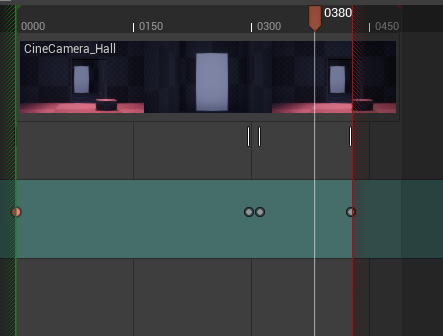

Sorry, wrong chat
 gloomy garnet
Hello All. . . . So, I am using game engine levels in 4.24, to output Raytraced Cinematics. Are there any automated 'instances' or LOD's that ray tracing does not 'play' well with? Or is there any settings I'll need to adjust? I have a level that when ray trace is on, it crashes due to an 'InstancedSetActor', that reveals geo details as the CineCam animates within proximity to area.
muted linden
Looks like the animation that is generated from recording a skeletal mesh to the sequencer also applies the x, y, z offset from world origin to the root motion's local position as opposed to having the skeletal mesh start at local 0,0,0. Does anyone know what is happening?
example: humanoid is at world pos 100, 0, 0. Record the human doing anything. Playing the recording now puts the skeletal mesh of the humanoid at 200, 0, 0 -- the skeletal mesh is offset by 100 from its relative position.
 brazen vortex
hello, having an issue with the sequencer
I cannot create keyframes and I cannot find out where a manual keyframe button is
 quasi frigate
Hi
Hey guys I had a doubt about live compositing on ue4
I used a plane in the real world for the character that will stand in front of the camera
The plane has video streaming in
From the camera
And I used a vive tracker for the virtual camera and real camera facing the green screen
Is this an ideal setup ?
I don't know 😕
I don't think I can use the available live compositing plugin coz they want to ship it as a product
Can anyone please help me 😖
trim herald
Is it possible to run a high quality media export from the commandline?
Ive got it working in python but it doesn't seem ideal for out-of-editor automation of the process
is there a commandlet for the movie render pipeline I can make use of?
muted linden
So now the sequencer isn't updating an actors transform via the keyframes during play -- only during editor. It does update if I try to manually change the translation - then it snaps to its designated keyframe. Thats where I'm at in life now. Does anyone know where I went wrong?
brazen geode
I have a blueprint class with an audio component and it runs stuff on Begin Play and Audio Playback Percent events. How can I run all of that in Sequencer and be able to see it when I play/scrub through the sequence?
I created a spawnable for the blueprint and looked into event tracks, but Begin Play and Audio Playback Percent aren't available as bindings. I basically just want the blueprint to run the same way it would in PIE, but have it show when I play/scrub in Sequencer.
muted linden
Why is the transform of this recorded cube only updating when I select it? AttachToActor is functionally useless as the parent actor's transform doesn't change
This behaviour only surfaced a couple hours ago. Now this is what I'm spending all day debugging 😭
 lavish dock
I tried using the Movie Render Queue but it does not seem to take into account Time Dilation or Time Scale for sequences or shots, respectively. I love the image quality I'm getting from the High Quality Media Export workflow, but I have some sequences that depend on time manipulation, so I'm bummed to have to fall back to the Sequencer's Render Movie option instead.
Is there something I'm missing? If not, will this feature be integrated into the High Quality Media Export workflow in the future?
 twilit veldt
Hi, I downloaded the Automotive Beach scene from the marketplace but the reflections seem really pixelate and bad quality. How do I fix them? Please help
timid pasture
Afternoon all, could anyone help me understand something about Sequence Recorder. I'm trying to record an actor (and all the component) transforms. When I add the actor and record, it does this perfectly as a new sequence, but my question is:
Can I record into an existing sequence? (in this case, my master sequence)
I notice there is a "create new sequence" checkbox in the recorder, but i can't tell what that does when it is off
regal urchin
@timid pasture you can’t, you need to add a subsequence to your level sequence then you can add that recoding into your sequence like a video clip
gloomy garnet
Hello All. I am doing a Ray Traced cinematic with various assets and props in anim Cam. In the Cam view port, I can see all my assets cast shadows from the SkyLight, Sun and movable lights in sequencer. When I output my cinematic, any characters or assets that are 'instanced' do not cast shadows. - If anyone can point me in a good direction, I'd be most grateful ! 🤙 😎
regal urchin
@gloomy garnet I’m not sure but I don’t know that raytracing your cinematic is the best course of action. Raytracing is more for live motion like in a game. I am doing cinematic as, baking in the lighting w raytracing baked in, then rendering that into a movie.
Either way you may want to make sure you’ve rendered whatever lighting needs to be rendered before you export
gloomy garnet
@regal urchin - Thanks much for the info. I am still understanding all the ins and outs of ray tracing in UE. When you bake the RT lighting, is that just doing a build? Or, is that what 'path tracing' is used for?
 paper atlas
Hi UE4 Wizards. Why went I render with MOVIE RENDER QUEUE my renders are soft with some type of shallow depth of field? I am using: | Anti-aliasing Spatial 20 | Temporal 3 | Override AA
 dapper island
Hi, is it possible to output Z-Depth using the High Quality Media Export?