#cinematics
1 messages · Page 17 of 1
 mint monolith
 tight stone
(Or turn off auto-key)
 violet igloo
ye i got that lol thx
 barren lagoon
i posted progress on my cinematic in #work-in-progress.
looking to get some feedback on how i can improve my camera work
the goal is for the soldier to be the main focus of the cinematic and camera movement is supposed to be similar to the movie 1917
i want transitions between transforms to look less stiff, so to speak
 left oyster
Do you have any good links on cinematics topic?
mint monolith
Hey @barren lagoon this is a good start. To get smoother movement you will need to use the graph editor. Right now your keyframes will have sharp harsh angles, you want those to be nice curves. One important thing to understand when emulating real camera moves is the limitations of the kind of rigs on real film sets. As well as remembering camera operators aim for perfection but can never achieve it and these little human mistakes often make a CG camera shot feel realistic.
My advice is to redo what you've done (sounds like a lot of work but trust me it will make you better and faster at this). This time pretend the camera is being held by a person of human height and restrictions. In real life act out looking through your fingers or use a smart phone and figure out how you would film it. You'll notice you use a lot more rotation and very little translation.
For reference a lot of 1917 was probably shot using a rig like this: https://www.youtube.com/watch?v=iuyYO7jQVhA

Matt Allard takes a ride with Johann from Easyrig to find out about the Easyrig Flow, a stabilisation arm that works with their existing Cinema 3 and Vario 5 vests.
Good luck and I hope you share what you come up with!
Something that also might help: In CG we control both the actor and the camera but in real life scenes like these the camera operator responds to what the actor is doing. So animating the camera as if you are responding to the characters movement will help things feel natural.
barren lagoon
@mint monolith thanks a ton! i've made a lot of updates to the scene itself, but i haven't updated my camera movement or settings yet. have no idea how i'm gonna approach that 😅 feel free to check out what i've got so far in #work-in-progress
barren lagoon
is there a way to make a camera follow an object's position?
 dusty coral
Hey everyone! Happy to be a part of the group. Hope everyone is keeping safe across the world! First time post here and I was wondering if this is doable inside of Unreal Engine. I'm currently building a camera rig inside Cinema4D that updates it's focal length towards a target object no matter how close you get. Further away, smaller focal length, closer - bigger focal length. But it also keeps the object in frame. It's still a little janky but I'm just wondering if this could be pulled off inside UE4.
mint monolith
@dusty coral definitely with some clever coding
tight stone
An approximation would be to use SOHCAHTOA, - You can represent the camera's view as a right angle triangle, where the height of the target is the vertical axis, and you know the angle (which is half of the FoV)
So you can use one of them (TOA?) because you have the height and theta (half the fov) which will let you solve for the distance you need to be to keep the object in frame
Which also means you can rearrange the terms (algebra) to provide both the opposite (height) and adjacent (length) to find theta to get the FoV angle
 calm jackal
how can i set a 21:9 aspect ratio on the cine camera?
 pallid spire
You can change the sensor width and sensor height
For 21:9 you can do 15.06 on the sensor height
 distant mauve
In sequencer, how can I make Actor to Track track a specific socket or bone from a skeletal mesh? Like the hand for example. I've tried setting the pivot point to the hand but Actor to Track will just look at the root of the asset.
 stark flame
Hey guys I chose 2 points in space for my character to move in, i wanted it to move linearly, but it is automatically creating this curve, does anybody know why?
distant mauve
@stark flame first check that you arent getting extra data into your keyframes from the auto key, (tick this off so its not highlighted)
then check your curve editor and make sure your curves are only going in the directions you want, try highlighting the frames and right click to use linear interp
tight stone
You can convert them to linear from the main Sequencer window as well, select and right click on a key and choose, or press 1-5, but the curve editor is good to know as well
 young flame
Hello! idk where to put this
But how do i pause a matinee? i want my matinee to play but after 5 sec i want it to stop and then play the rest after 10 sec how do i do that? 🙂
mint monolith
@young flame Blueprints, delay 5 seconds and then pause it, delay another 10 then play. Hook it up to delta time so it's framerate independent if that matters to you. Matinee is kinda obselete now, you should look into sequencer!
 clever roost
I just started looking into this, but can the Take Recorder be used to capture player moment in PIE like the Sequence Recorder can? Seems like its really just geared for MoCap if I read the basic documentation correctly
mint monolith
@clever roost Yes, I believe it is meant to replace sequence recorder eventually
tight stone
The underlying data recording capabilities are very similar, it was mostly a workflow change to make recording and reviewing multiple attempts easier, and layering multiple recordings together.
clever roost
ok thanks yall, Ill dig around some more
distant mauve
How can I reset or refresh the viewport? With sequencer, the regular viewport will inherit the last used settings of the cinematic camera, see how the fade, tilt, and zoom stay with the regular viewport? for me to reset it I have to drag out a new camera and lock the viewport to it.
distant mauve
Even if I save a layout, allow cinematic control gets re enabled for my main viewport, also by default for some reason each viewport is set to 4 panels, so I have to change them both to 1 every time I re-open ue
tight stone
@distant mauve Try renaming the /saved/ folder for your game, I think the config for the UI is stored in there.
violet igloo
Any good settings for auto exposure? Is it worth using?
Or should I just play around with the settings
 rugged tide
hi, Is there any different between render sequence to file using the UE feature than just play and record the screen?
In terms of quality/ray tracing
tight stone
Sequencer will ensure that the delta time in the world is correct, ie: If you make a 24fps movie it ensures only 1/24 of a second passes in the world each time no matter how long a frame takes.
clever roost
With the TakeRecorder, Ive got it recording my character doing some movement in PIE.....but Im not getting the animations. So I see my guy moving in a T-pose when I replay the scene. Is there any better tips or tricks or tutorial video then the simple help page on the UE4 documents right now?
calm jackal
Does motion blur not work in engine
Because even in the render frames the fast moving object is very clear
And not motion blured at all
tight stone
You can't use "Delay per Frame" @calm jackal
calm jackal
Ohhh thank you
 cerulean grail
Hey all, I'd need some wisdom 🙂
We are working on a JRPG game ine 3d and our battle maps work as different levels (no level streaming). In the battle maps, the players can choose their skills that will play an animation. We are trying to find a way to use the sequencer to create unique camera animations per skill that would be systemic, ie work on all our battle maps. So the camera needs to adapt its position to the character and play the correct sequence. Is the sequencer capable of doing something like this ? Everything I find is very level based, not much about adaptability in different levels.
The animation itself will be played in code, but we'd just like to use the sequencer for the camera movement and effects
 unborn magnet
hello,
Can I somehow have two subsequences play at the same time? currently when I add them to the master sequence they will only play after one another.
It is just animated actors in the subsequences, no cameras. I want to be able to compose the flow of the scene by draging the subsequences around. Is that possible?
nvm. solved it. It was just the matter of using a subscene track instead of a shots track
tight stone
@cerulean grail Use Spawnable cameras, instead of Possessable
cerulean grail
Oh interesting I didn't know you could make the camera being a spawnable
I'll look into that, thanks !
tight stone
@cerulean grail Just right click on it in the tree view and convert to spawnable 👌
 slow scaffold
@distant mauve I know that cinematic is probably changed by now but that looks INSANE
I cant believe theres people like me out here doing stuff like that, just talented people
 potent ruin
Cinematic noob question. Why would my rendered video playback be running at nearly double the speed? Or generally irregular playback speeds. I've tried different FPS settings, changed clock source.. Currently googling around and sifting through the cinecamera settings. Happens in both avi render and image sequences.
tight stone
What makes you think it's going fast
 gusty heath
Hi everyone, hope you're all safe and doing well. I'm having an issue exporting a camera from unreal to Houdini
When exporting from the timeline it exports with animation but slightly offset and in the wrong location. When going file... export, it exports without animation but in the right place
Whats the difference between the two export methods? and does anyone know why it might be exporting with a light offset? I know thats not a lot of information. I also might try the houdini engine plugin but I havent gotten around to that just yet
gusty heath
Looks like it isn't exporting with the roll pitch and yaw, is there any way to bake this inside of unreal before exporting?
potent ruin
^following up on my issue, it looks it's specifically my media player video going way too fast or out of sync (I thought it was other particles in the scene but it's just the player). Looking into some solutions but any pointers would be super helpful!
potent ruin
Alright, so I've got the media to stop going twice the speed. I'm using the media track instead of level begin play media source. Now I'm having an issue where it will sometimes slow down a bit and/or is generally off sync when compared to the original begin play media version. I've been testing using image source vs video file, tweaking offsets, but if there's a better way, or best practice, to get it to that original play state I'm all ears.
tight stone
@distant mauve Try hitting 'f' after you pop the viewport out to see if that resets the camera as a workaround.
@potent ruin use an image sequence as your media source instead of a video file, that's going to be the most reliable. Uncompressed EXRs are usually the 'best'
potent ruin
Hmm, when I use an image sequence the playback is going slower than everything else in the scene. Tried different FPS and clock sources, still happens.
tight stone
You should make the Sequence fps and the image sequence fps match, and the image sequence needs to be controlled by a Sequencer Media track, it can't just exist in the world and play on its own @potent ruin
 prisma hinge
Made a small infinity blade fanart. They were great games!
 muted lintel
is there a way for spawnables in sequencer to stay after the sequence finishes?
Imagine cut scene plays, enemy trolls spawn, do some emotes, cut scene finishes, combat against trolls in gameplay ensues
when I select "keep state" on the spawned track it just gets disabled
 gleaming tangle
i have a weird problem that only accurs in full screen: When my sequence plays the two black bars appear on either side of hte screen but theres also a short strip that displays the game. I'm guessing this has something to do with screen size?
tight stone
@muted lintel This might have changed in 4.25, I forget. Can you change the owner of the spawnable object to the Persistent Level in your version?
 lyric marten
Has anyone have used destructible mesh in sequence? In game (play bode) it appears, but when I record sequence video, its not there. For some reason it ignore it.
 steady osprey
Hey, thought maybe you could point me to the right direction on this,
What could be causing Sequencer to freeze while rendering? After I press to Render Animation, everything goes smoothly until it reached the last frame, and then it just freezes. The whole thing, UE included. No error, nothing. The video file just becomes corrupted.
I've checked for loose Transform Keys or animations of some sort in the Sequencer itself but it looks fine. I've created completely fresh sequencer and it rendered out perfectly fine, render setting are matching too.
Any ideas would be appreciated, thanks.
tight stone
@steady osprey what output format, image sequences? avi?
 fickle vine
Is it possible to have a camera only "record"( for a lack of a better word) a specific mesh. E.g have a camera to record first player animations at a set FOV, and have a secondary camera to record the world, FOV adjustable as per player preference.
Camera 1 would have to only see the player skeletal mesh in order to make this system viable. Additionally camera 2 would have to see everything but that mesh
First Person animations usually break when FOV is adjusted, and we are trying to avoid this problem
 plain hornet
Silly question but - does anyone know if it's possible to have a spawnable actor in the master sequence, that the subsequences can then have access to?
without having each subsequence spawn its own actor
plain hornet
I see on UDN that this wasn't possibleb ack in 2018, I'm wondering if there have been any changes to this
 mystic epoch
Hello everybody. I would like to know if there's a way for me to anime multiple minions at the same time using sequencer.
I'm going to have roughly 20 to 50 Minions on screen. if anybody has any helpful clues or videos please send them my way.
 fiery prism
anyone know why when I export a sequence the focus is off but when I watch it in editor the focus is fine?
dusty coral
Migth be a dumb question but can have a VR camera export sequencer?
 tawny cape
Hello guys, here is the thing. I've recorded a sequence in UE4 (27GB, whoa!) and now i just wanna add some music to it in a final video but without any video quality compression or optimization. Any way to achieve this without buying some PRO soft?
 versed musk
The free version of DaVinci Resolve is a solid editor & will let you add music, etc.
tawny cape
Thx, i'll try it!)
 covert kite
 edgy lion
sorry if this has been asked before but I find even in cinematic mode the shadow lod's are too aggressive for my liking when exporting video. I have trawled online looking for commands to increase the shadow distances but none of them actually seem to work, some infact make them worse.
Can anyone please give me some guidance?
 sweet ruin
does anyone know if there's a way to stop media playlist from automatically cycling through the media files in the playlist, in blueprints?
I found an easy workaround where I can open the media source from the playlist. You can set looping to loop the media source too. I'm still curious to know if there's a bool or something that can stop automatic cycling in media playlists
mint monolith
Is it possible to have a seperate attach track for each of 2 mesh components that are part of the same blueprint? Trying to get take recorder to record both but it keeps making the attach track for the blueprint as a whole
*attached to 2 seperate sockets
 raw moth
Hi guys, I have a "game" that reacts to sound and needs the song audio to make things glow etc. How could I render this as a video. When I try the song plays and ends before the video render is complete and doesn't react to the sound on beat any more.
i don't need the sound rendered, just want my scene to react to the music in time and render a video of it
 modern onyx
Hey, can anyone give me some hints on how to use depth of field with a normal (non-cinematic) camera in 4.24?
I've been playing around with the "Focal Distance" and "Aperture (F-Stop)" values, but it seems impossible to get a decent depth blur unless I use a vera small field of view and move the camera further away from the object I want to focus on. With a camera at standard gameplay settings (90.0 ° FoV, 300-500 units distance), it just blurs pretty much everything or nothing at all.
Is that a limitation of the new system or are there any other settings I can use to achieve a nice depth of field?
tight stone
@raw moth This may not be possible. What system do you use for your game to respond to audio
raw moth
@tight stone I bought audio analyzer the plugin, he has videos of his projects reacting in real time. I've got it working where it is reacting in semi-real time by rendering it "as a separate process" but sometimes it gets a low frame rate and the video is ruined...
tight stone
@raw moth You can try using the new movie renderer in 4.25, has similar requirements (launch editor with -audiomixer and -deterministicaudio) but I do not know if their plugin will work any better in this situation (or if at all) or not
In the new movie renderer we only tell the audio engine to process time when we finish rendering a frame (instead of in real time) so it may or may not help
 sour silo
Does anybody know of a debug command that lists all running level sequences?
tight stone
@sour silo I don't think there is one. You could find all actors of type ALevelSequencePlayer and check if they're playing though.
sour silo
That could work, wasn't sure if there was anything out of the box. Just have multiple sequences going off all fighting for control of the player camera so trying to work out what the order is 😛
Thanks!
 kind wedge
Hi, @tight stone i have a noob question, sorry, about that, but still: how can we manage to use pre-capture delays to give anough time to AO and GI to settle down and at the same time have the vegetation wind effect via world offset or any other realtime procedural FX like fire, snow, e.t.c to look at the right speed after capturing?
Thank you in advance!
 shadow wolf
Hi guys, im new to UE4. I would like to know if there is a way to lock the cine camera actor from moving. I've set up a pretty decent frame but I'm being stupid and I keep moving it out of place when editing things from camera view. A way to lock its transform would be really helpful?
kind wedge
@shadow wolf If you're using sequencer then set the key and lock the camera track. This won't prevent camera from moving but it will snap back to it's keyed position as soon as you hit play or scrub the timeline
shadow wolf
Thanks a lot, I will give it a try...this will save me a great deal of pain lol!
tight stone
@shadow wolf turn off autokey, that way when you accidentally move it the next time you evaluate sequencer (step to next frame etc.) it snaps back. Or set up two viewports side by side and only check "Alllow Cinematic Control" on one of them and that way you have an unrestrained editor perspective to fly around in
You'll need to specify what tool you are using Alexey, and please don't ping people directly in the future, just ask questions and if someone has time and knowledge they will suggest things.
tight stone
@kind wedge You can use the per-shot warmup frames/per-shot warmup time which should make it evaluate the first frame and then wait for the specified time and then go. I'm not exactly sure the behavior on those options so you will need to play with them. It's simplified in the new movie render queue in 4.25
raw moth
@tight stone i ended up just making a package and capturing my screen. Not as good video output but it's workable.
tight stone
@raw moth Glad you got something sorted out. You might try a gpu based capture (like the NVidia overlay thing), it's usually pretty good about being efficient and not impacting performance and you can usually adjust the end quality
raw moth
@tight stone thanks! Will look into it. Making a music video, I've done many in Unreal but always did the effects in a video software. Wanted to be more creative and the end product is amazing, just was gutted when I couldn't figure it out, so had to think outside of the box
 hybrid pelican
In 4.24 I had a simple on Event to looping Sequencer with target to a seqs that had a cut track and camera - this is set to not loop then it goes to another looping sequencer node with another sequencer that has no cameras or cuttrack - and after the first one finished it would play all the animations and would allow me to fly around in VR as it gave me control back to my VR setup then i upgraded to 4.25 and now it doesnt allow me to fly around . it doesnt give me control back to my first person view - any help trying to get this proposal out
 light birch

ArtStation
I made the details of the forest in UE4 today.
I used the material of megascans.
The lighting is real time.
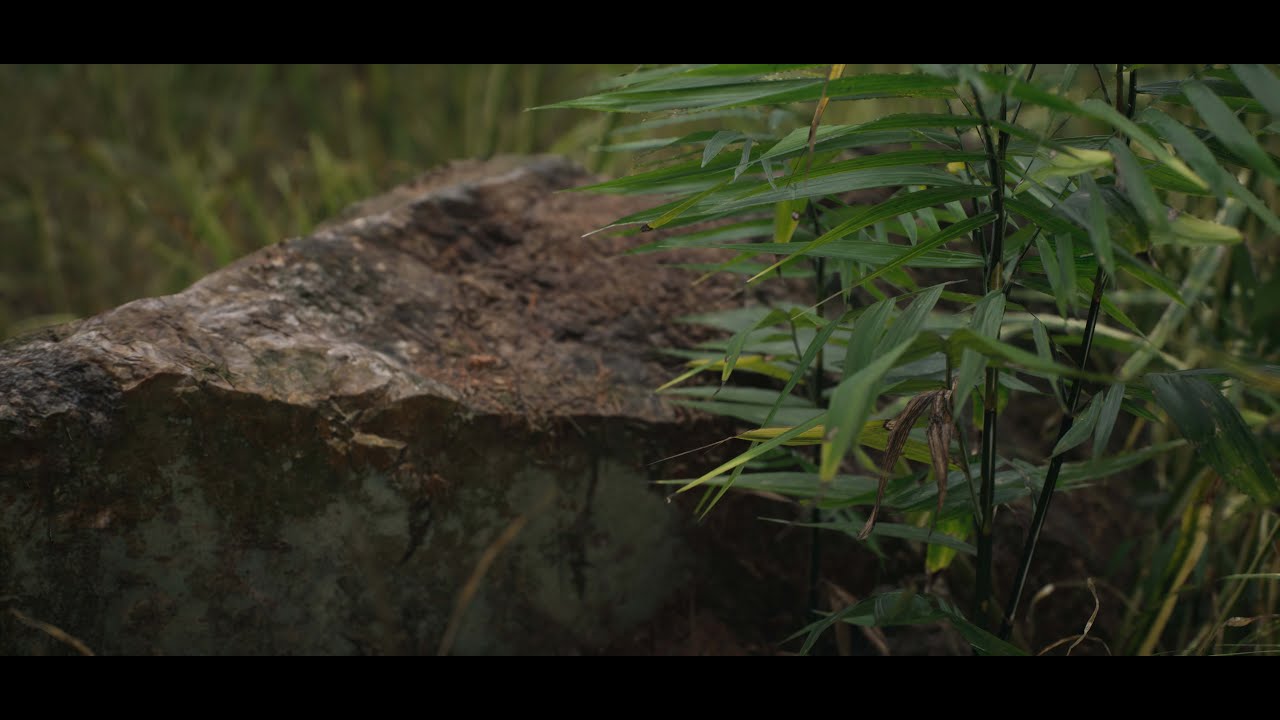 tight stone
@light birch Was this rendered from Sequencer at 24 or 30fps?
light birch
24 fps
tight stone
You might try rendering it again at 30 to see if it helps with the juddering in the middle, YouTube is playing it back at 30
So it repeats frames every now and then to upsample 24->30.
light birch
render 24fps but I combined the video another software render 30 fps. I uploaded a 30 fps video on youtube
tight stone
I would keep the frame rate the same throughout the process, it does look like YouTube can take 24fps. Just a thought 🙂
light birch
I also don't understand why I can't get likes on artstation or youtube, frankly. matter of follower. Worse works gets more likes on youtube or artstaion. I dont understand😩
Thank you
I will consider in my other works👍
 rustic plume
Anyone tried rendering sequence through new movie render queue with the groom and enabled physics? For some weird reasons if I export through legacy movie render, everything is fine, if i use the render queue, hair starts to move around rapidly
 sand arch
@tight stone youtube aint playin it at 30fps, dont mislead the guy.
Problem with jittering is shutterspeed, if he adjust everything manualy (as i see by rac focus).
@light birch if y rendered it at 24fps check your shutterspeed it must be 1/50
tight stone
I suspect Youtube is playing it at 30fps especially if the uploaded content was 30fps 🙂
@rustic plume Do you have an example? Did you set some engine warmup time for it to settle?
 timid pasture
Hey all, when i used take recorder it looks like all the tracks are read only
how can i make them read/write?
tight stone
@timid pasture Click the lock in the top right of Sequencer
timid pasture
Ah thank you! one more question. If i have an action mapping or a simple key press like this
how can i get take recorder to record that?
I'm testing with a simple third person char default map setup
i can't get it to record those by just adding the player to take recorder
tight stone
It can only record the end results and only can record things Sequencer can already key.
timid pasture
but it does record the third person char moving
Is there any way for me to be able to record me triggering these events?
tight stone
Hmmn, it should pick up changes to the mesh scale. I wonder if it's getting lost when it tries to convert the animations from world space. Might be worth a bug report on the new site if you can reproduce it in a small project.
Not without writing your own recording source (C++) and system, no. It doesn't record input.
timid pasture
I see, so of course the transform itself is getting recorded but no input whatsoever
Without writing my own recording source I would have to manually key those event calls?
think that is my path of least resistance?
tight stone
I think so unfortunately. You'll need to mark the functions as "Call in Editor" in the Sequencer Director (and maybe in the final bp too?) if you want them to be called while playing the sequence in the editor
tight stone
Click on the red node, then look in the details panel in the blueprint editor and choose 'Call in Editor'
timid pasture
tight stone
You need to do it in both places
And events are only fired when playing in the editor, not while scrubbing.
timid pasture
It's now working without "call in editor" in the sequence. I only checked it in the red node
but i have to be in simulate mode. Does that sound right?
tight stone
No
tight stone
And you have the red node you pictured earlier also marked as call in editor?
tight stone
And that blueprint is compiled and saved?
I guess the other question to make sure is that the THirdPersonChar actually exists at edit time, ie: It's not shown as Red in the Sequencer outliner
timid pasture
definitely yes
welp
the third person char is spawned by the sequence
I'm not sure what that lightning bolt means in the world outliner. I assume it means it's spawned
tight stone
Correct. That looks like it should all work. Maybe save everything and restart the editor?
timid pasture
on it
tight stone
Oh, are you looking in the Output Log for the print message or on-screen? I don't think it shows up on-screen in edit mode, only in the output log.
tight stone
See above; Look in the Output Log at edit time
timid pasture
still only prints to output log in simulate mode
OK!
I see what's going on. So the sequencer "Call in Editor" checkbox does do something. it's now printing to the output log with that checked without simulation mode
thank you, this is so helpful
tight stone
Strange, but I'm glad you got it sorted either way!
timid pasture
ya sorry i had a typo there. it is printing with that checked
if unchecked, it only prints in simulation mode which totally makes sense
One more really basic question. What simple thing am I missing to loop a range?
I'm not seeing "Keep Playback Range in Section Bounds"
Just trying to loop where those event triggers are
tight stone
If you want to just loop a sub-set of your playback range, go to the wrench menu and look for Selection Range, and then click the loop icon in the bottom left until it has a yellow bar
I think the shortcutk keys are i/o, or [ and ] to change the range
But then you still need to change the loop mode of playbck to loop only selection and not whole thing
timid pasture
this wrench?
tight stone
@timid pasture Try the square box instead... sorry, we recategorized the menu entries recently
timid pasture
Great, ok these orange-ish bars seem to be working
not sure what the red bars indicate in this case then
tight stone
You get two sets of red and green bars. The red and green are the "playback range" for that particular sequence. The red and green bars with the hash marks on either side are "the playback bounds as defined by the shot/subscene sequence in the current parent."
They often will match but don't have to if you have gone up to the top level sequence (via breadcrumbs, top right) and moved the handles of the section to trim it, then when you dive back inside you'll see it's showing you a different range
timid pasture
Awesome. that's on me to fully explore and figure out : )
I do do c++ in ue4. I'm keen to make my own recording source as you mentioned earlier
Right now I have a Niagara system that an invisible character is interacting with so I want to trigger some timelines that drive params on that system. Due to time it looks like i'll have to go full manual based on everything you helped me with
tight stone
Make sure you check out the Unreal Academy course on Sequencer if you haven't already, it's only 40 minutes. https://www.unrealengine.com/en-US/onlinelearning-courses/your-first-hour-in-sequencer
 timid pasture
Cool I will do. I'm working on a freelance gig with a 360 installation using nDisplay. 6 displays. Today I have to print 360 videos for pre-vis. The final work will of course be packaged and real-time for nDisplay. I've been experimenting with ansel and the recently updated panoramic capture tool
Ansel (no built-in video recording) and panoramic capture (no height fog god rays with light shafts or camera facing particle sprites) both have their limitations i'm trying to work through.
I'm praying i can pull this off this weekend lol
tight stone
I don't know what the API for Ansel looks like, but you might be able to create your own 'video recording' by stepping 1 frame, telling it to capture, stepping 1 frame, telling it to capture, etc. You can set the engine into fixed frame rate mode in project settings - ie: 24fps fixed will always use a delta time of 1/24s regardless of how long it took to capture
timid pasture
ya, i wrote a macro with a windows macro tool
tight stone
That's effectively what the movie recording does, tells the engine to go 1/24s at a time and advances Sequencer at the same rate.
timid pasture
and a blueprint to pause the game every 0.0333333 seconds
not exactly 30fps, but close enough hopefully
the macro using only key commands to step through the ansel commands
an nVidia blog post documents this a bit
timid pasture
Matt do you have a preference for fixing framerate for this? I'm reading conflicting info on the console command t.maxFPS being obsolete (although at least one person says it works with smooth frame rate checked)
tight stone
@timid pasture t.maxFPS only limits the maximum but doesn't prevent you from going lower. There's a project setting, uncheck Smooth Framerate and instead use Fixed.
timid pasture
ok just use fix then? cool!
tight stone
If your scene doesn't already run at about that many fps, your scene in the editor will either be fast-mo or slow-mo, because the engine is processing data as fast as it can but always saying the delta time between frames is 1/24 or 1/30 or whatever
So if you can actually run the scene at 90fps, then it will go 3x as fast. It won't matter when you're actually outputting these things to disk though, as long as you're capturing each frame, the world will only have 33ms dt each time, even if it takes you 10 minutes per frame
 full bloom
blending between camera cuts in 4.25 is super sweet! 🙂
but release notes also mentions "This allows you to easily blend in and out of a cinematic or blend between different cinematic cuts."
is it possible to blend gameplay with sequencer? can't find option for that? maybe that's what I thought it is?
it would be a nice upgrade too, if you wouldn't need custom camera modifier class to deal with blending from gameplay to cinematic camera
tight stone
It's still early days, but I think you can do it in 4.25 with just setting up a blend on the section without butting another camera cut section into it. Right click, enable blending, and then there's hidden handles at the top left/right of each section I think that if you drag out will show the cross-fade curve, except you don't need to fade with another section
I've not actually done it, but have a gander around that kind of stuff. Not sure if it previews in the editor or not.
full bloom
yeah, that works... almost...
after removing the second camera from cut, this appeared
it does blend to viewport camera
but when I drag this blend, it just gone, all space filled by camera cut itself 😄
only Ctrl+Z restores it
maybe there's some hidden shortcut? can't create such blend through UI or dragging things 😉
but this work smoothly in gameplay! 🙂
only need to play with lens settings
ok, might play with it later (midnight here)
@tight stone thanks for help, fixing this editor weirdness would be appreciated, but this a game changer even with editor workaround for creating cinematic-gameplay blend! 🙂
tight stone
@full bloom I suggest reproducing it in a minimal project and submitting it using the official bug report form
full bloom
@tight stone I guess properly annotated video would suffice, probably I'll do it tomorrow 🙂
tight stone
Either way, the official bug report form is the best way to ensure something actually gets looked at and can be followed up upon.
full bloom
sure thing, thanks 🙂
mystic epoch
Okay while I'm now officially come down. Can someone explain to me why all my animations for character in unreal just dropped when they were working a few seconds ago
mystic epoch
Hey can somebody explain to me how to properly render with audio attached to the render instead of just getting no sound. Everything is completed but I just need to render with sound. Unless I need some other software along with it
 stoic sundial
Hi
i'm doing my first steps in unreal and try to animate the focal length of the camera. In basic it works, but at the edges to a window, the edges stay sharp?
Any idea?
Greetings Christian
mint monolith
@stoic sundial Open your window material and untick the box that says render after Depth of Field
stoic sundial
@stoic sundial Open your window material and untick the box that says render after Depth of Field
@mint monolith Yess!!!! Thx a lot!
stoic sundial
New question ;)
I am trying to fade between 2 cameras. It seems, that i can only switch between them. Ist there a way to fade between cameras in a level sequence?
stoic sundial
What i found is how to make a cut or fade out and later on fade in... but no transition 😭
stoic sundial
another question from a newbie ;)
I have a level sequence where i switch between 2 cameras... problem: in my viewport i don't have the vie from my cameras. I already swiched to cinematic control and cinematic viewport but still have the wrong view.
Tanks and greetings.
Christian
Ohh... so stupid... got it 😉
 weary lintel
Hey, did something change recently with the sequencer? If I try to save it to an .png sequence it doesn't seem to slow down the game capture window which results in my video playing like it's 300fps and going superfast
Something like this
Play in-editor works fine, just on export it's weird
edgy lion
looking for tips on increasing shadow distance for cinematic video export.
I have tried:
r.Shadow.DistanceScale
as well as:
https://i.gyazo.com/1617857a9ffb09193eccad51b4d4b3bb.png
but none of these are having any effect on my mesh
 tight stone
@stoic sundial Cross-fades are not supported (too expensive to do in realtime renderers)
@weary lintel Nothing should have changed... does it produce the correct number of frames?
 loud patrol
Hey guys, I'm trying to record a movie with the Sequencer. I have an issue with that, as the Sequencer starts the game when I hit the record button, and it uses the default player camera instead of the cameras I have in my sequence. I there a way to force the Sequencer to use only the cameras in the track?
 trim herald
Are you using sequence recorder or take recorder?
depending on what you are doing you might have more luck with the take recorder.
Other than that you should be able to change the camera that is active by selecting it using the camera cut track after you have recorded your sequence
Demonstrates how you can use multiple cameras with the Camera Cuts Track.
loud patrol
I am using the Sequence recorder, I'll check your link, thanks
Ok so I already have the camera cuts working properly. My issue comes when I try to capture the movie, because at that point my camera cuts are overriden by the game camera. What I would like to do is to capture what I have in my editor's viewport, and ignore anything that is game related
I have never used the Take Recorder, I'll look into it
trim herald
hmm, you should be able to record in editor without actually playing the game.
not sure if it is a setting in the sequence recorder but in my experience i have had to play the game manually once the recording countdown has started
loud patrol
Alright interesting, I'll dig more into it, I'm familiar with the Sequencer itself, but not that much with recording
 sly eagle
Does camera frustum only render whats in the camera view? I'm lookin into render optimizations for large scenes, computer seems to crash on those. Large scenes like soul city
trim herald
An overview of Visibility and Occlusion Culling methods in Unreal Engine 4.
sly eagle
Is culling the right solution? or am i goin into the wrong direction?
trim herald
Culling happens automatically, but the scene itself has to be constructed in a way that makes good use of it. if you are having performance issues you may want to look into engine scalability
Options for adjusting quality and performance.
also level streaming can be used to cut down on what is loaded into the level at any given time
Asynchronously loading and unloading levels during play to decrease memory usage and create seamless worlds.
sly eagle
Level streaming works on cinematics too? like when rendering a clip
trim herald
yes afaik it should
also there is a special cinematic scalability mode that is applied when rendering sequences. So you can do your work in low quality mode and cinematic quality will automatically be applied when doing your rendres
sly eagle
Yeah its only crashin on me when i render, or if i change the viewport to epic or cinematic or the preview to sm5
on the*
I'll look into those docs you sent, i'll be back if im still havin trouble. thank you!
loud patrol
I didn't express myself correctly in my original post, what I want to do is rendering a movie
Describes the options available to you when rendering out your cinematic sequences.
I used the sequence recorder to record my camera movements, now I'd like to export an image sequence out of Unreal
My problem is that the render movie tool does automatically start the game
And overrides my camera cuts
tight stone
Is there a camera cut track in your sequence @loud patrol
weary lintel
@tight stone It seems that If I enable path-tracing it automatically sets the "Delay every frame" to 1 s or more depending on samples. I tried changing global time dilation to compensate but that didn't work either. The preview window runs at like 30 fps but the sequencer only captures every 1/30rd frame. Should I try the new high-quality export in 4.25?
tight stone
@weary lintel yes you should try the new one, but path tracing is not exposed there. Path tracing needs time to resolve into a recognizable image so that is why it wants to delay every frame
weary lintel
But the window still runs in max fps and not slowed down like with the normal mode
tight stone
That is because it has to run the rendering loop to give time for path tracing to resolve, so anything not controlled by your Sequencer will appear to go fast in the final result.
Do you need path tracing?
weary lintel
Yeah actually, I have a glass material that doesn't look good at all without it. I spawn stuff with beginplay and timers
Without path-trace
And with
tight stone
Unfortunately I don't think there is anything you can do at this time without modifying the engine @weary lintel
loud patrol
@tight stone Yes there is
tight stone
@loud patrol And it covers the whole length? Do you have a game mode override enabled in the render settings?
loud patrol
It does cover the whole lengths, but I don't have a game mode override. I tried several of them, it always crashed the editor
weary lintel
Well thanks anyway Matt, gonna have to try and experiment more with the non-pathtrace rtx settings I guess
tight stone
@weary lintel If you want to compile 4.25 from source it may not be hard to add path tracing, though it is not tested.
@loud patrol Does it behave as expected if you PIE (with the level sequence set to autoplay)
loud patrol
I don't know what PIE is or if the level sequence is set to autoplay
weary lintel
@tight stone Nah, I don't really have the know-how to dig into the source code and add functionality tbh. I'm in no rush really on this personal project
tight stone
@weary lintel 👍 (looks neat btw)
weary lintel
Thanks, doing one of those snow-balls that's everywhere atm. Gonna be a harry potter-inspired one
loud patrol
Ah Play In Editor, gotcha
tight stone
Yup. And autoplay is a setting on the Level Sequence Actor in the world for your sequence
loud patrol
@tight stone When I play in editor, the game plays as expected. Can't find the said settings in the Level Sequence Actor, I wasn't using one, I just created a sequence from scratch. I have one Level Sequence Actor, looking into it
tight stone
@loud patrol basically the camera cut track is supposed to override which camera the player pawn is looking through, unless you've written code that fights that intentionally
loud patrol
I see. That might be the case in our game, I'll have to check into that. Is the autoplay activated by default? I can't find it at all
tight stone
I don't remember, editor doesn't compile atm for me to check sorry. Maybe someone else can chime in. It's just a way to test if you have game code fighting it. Movie Rendering only opens a PIE session for you, so if it happens in regular PIE you can rule out movie rendering
loud patrol
I see! Thanks for helping me, I'll keep searching. I feel like our character spawner forces a camera when play mode is activated and gets over the camera cuts, so I'll have to check with the gameplay team too. What I would love to get is a simple way to save fly through videos for weekly reviews. I'd just have to render them every Friday or Monday if that works
tight stone
You don't actually need a Level Sequence Actor in your level (the system creates one automatically if it can't find it) but you need to do it to test normal PIE.
Generally the idea for the Game Mode Override setting is to allow you to override the Gamemode to avoid logic like that 🙂
Without having to change your actual gameplay code
trim herald
@loud patrol you might need to set the Override Game Mode in the capture settings to a game mode that does not spawn your player
loud patrol
Makes sense
Thanks to both of you, I'll still hope that I can find the autoplay feature and make it work, if not I'll probably have to create a game mode that gets rid of the player spawn
tight stone
(The default GameModeBase just spawns a spectator pawn, and when combined with Hide Player it disappears)
(It shouldn't crash though)
loud patrol
It crashes, we probably have something that breaks it somewhere
I don't know much about that, I'm just a lighting artist 😛 But I have a callstack, so I may be able to find some help
sly eagle
So if i use camera culling by turning on camera frustums to render a cinematic, but it is still crashing. and if my camera isnt really going anywhere where level streaming would be worth it, what else could i be doing wrong here? Using the soul city map thats free from the store
tight stone
You should really consider why it is crashing. Drawing too much (ie: not using culling) generally just results in slow rendering. You can look into if it's a device timeout (there's a windows registry setting you can increase) because it took too long to perform one operation (common if you're asking to render very large resolutions) and you can use the Windows Task Manager to look at the GPU memory consumption of your card to see if it spikes up to near max right before crash @sly eagle
sly eagle
It looks like it only crashes on the large maps. small maps like the subway or the space interior, it works perfectly
Soul city, soul cave, it crashes every time
edgy lion
Does anyone know what happened to the codec field in video export? I was looking if it's possible to export directly to an .mp4 using h264 compression but the codec field is missing.
tight stone
That is not supported.
gusty heath
where do we start with making a cinematic?
just looking for some camera movement and some moving objects right now
tight stone
@gusty heath Have you checked out the educational resources such as Unreal Academy and the Learn tab in the launcher?
 gritty rain
its weird. My sequencer camera renders some weird cam angle. Not my camera. I am going crazy over this.
sly eagle
Anyone run AMD cards in unreal?
 visual hedge
Hoping someone can help me out. I’m seeing notes about raytracing with world position offset being a new feature in 4.24 according to the roadmap on trello. I have a foliage scene I would like to render with wind speed. But can’t find the option to allow raytracing to respect the world position offset animation. Any help here would be appreciated 🙂
tight stone
I don't think it works with foliage, try it on a static mesh first.
visual hedge
@tight stone looks like it works somewhat on a static. Thanks!
gusty heath
Anyone know how to get UE4 to actually look okay. I've played a lot with lighting, camera and rendering settings and cannot get it to look sharp. It always looks blurry/as if the rgb is shifted/grainy/harsh - just not good. Using Epic settings, 4.24, 4k on rtx 2080, AA set to FXAA (seems the best), lighting has all adjusted, bloom turned off, etc etc. Still looks poor.
mint monolith
Looks like you've got post processing on doing that stuff
gusty heath
There is some here, but turning it off did not make much difference, landed its not much better.
Seems better zoomed in. Almost like its a DoF or focal point thing on the camera, but I checked all those and changing did not make much difference.
tight stone
Which part is problematic to you, the anti-aliasing on the edges?
gusty heath
The AA is a problem, but mostly its the fact that the character is blurry unless you are completely close them.
 night umbra
Hey! I would like to record the gameplay of my project by adding it to the video plans that I already have in Final Cut, you advise me to record the gameplay by launching the project in .exe with a software like OBS or it is there a possibility to have a better quality, by recording with Unreal? I don't know if it's possible and what's the best
tight stone
@gusty heath If you type showflag.motionblur 0 or showflag.antialiasing 0 or showflag.depthoffield 0 does any particular one get you the result you are looking for? That will at least isolate which system it is that is causing the undesired effects.
@gusty heath You can resolve the aa problem by using the new movie rendering system in 4.25 which will let you render real samples instead of using TAA/FXAA. It will take longer (about 8x) but it gives you nicely anti-aliased edges.
@night umbra Building a shipping copy of your game and using something like OBS (or the NVidia overlay) is going to be the easiest and most effective way to record gameplay. If you don't want to ship/package your build you can also try running the editor with -game as a command line argument (ie: ue4editor.exe PathTOUProject -game -windowed) which may give you a little more more performance than PIE
gusty heath
@tight stone Okay thanks
 pale swallow
My mesh doesn't have a material when I capture video?
In editor:
In video player
tight stone
Did you use separate process @pale swallow ? Does it look correct if you just do Play in Editor?
tight stone
Only thing I can suggest is either try again, or try the new tools in 425 which ensure all outstanding shader compiles are finished before moving forward
pale swallow
I just install 4.25 and migrate my folders over from inside this project, right?
tight stone
If you just open 425 and then try to open the uproject it will give you some options
Like making a copy before upgrading
Make sure you check the notes linked in the 425 release notes about the new tool, but Window > Cinematics > Movie Render Queue and then the +Job button will get you most of the way there
pale swallow
Thanks, looking at the changelog it seems really promising
gusty heath
Just upgraded to 4.25 but it not working well. Light intensity increased, and I'm getting wired flashing on textures. Even in a empty world with just a water plane and foliage and no light source the water is flickering as if reflecting rapidly moving clouds. Walking causes light to flick as if shining through textures
tight stone
Did you read the blog post about auto exposure changes
gusty heath
?
Just moving around in the editor causes water to flash white and back to normal, looks pretty broken. Same is happening with basic wall textures, its as if light is going from zero to 200% with slightest movement.
 gusty heath
Example
gusty heath
In 4.25, if I set the anti-aliasing to TemporalAA then the flashing stops, but the other two modes cause it. The light intensity in general looks 30% more than what is was in 4.24. Not sure why. Will go back to 4.24.3. Also Auto Exposure was off by default, turning it on just increased the light intensity hugely but the flickering remained (until I changed the AA to TemporalAA) -- Edit Update: Okay, there is a setting 'Auto Exposure Bias' which is 1.0 in my 4.25 converted project. This is affecting the overall light intensity, even though auto exposure is unchecked. I set this down to 0.5 and it looks more like 4.24.3 now. But only TemporalAA works without flickering. For me FXAA produced sharper images even though they were still blurry. TemporalAA very blurry.
tight stone
If you use the new movie pipeline rendering system, add the anti-aliasing setting and set temporal sample count to 8 and set override anti-aliasing and set it to none
 granite lily
Hello! I have a few concave model and when im using raytrace + Global illumination, I dont see any effects of it inside the object even though theres an opening for light. Ive tried changing the collision of the mesh to complex just in case that was the problem but it doesnt seem to be. Is it a normals issue, although the normals seem fine in ue4. Any help will be much appreciated.
 golden flower
aye everyone, for those who've played kingdom hearts 3, when you activate a special attack, the camera goes into a pre programmed animation cinematic wherever in the level. I know it's done in sequencer but how would I go about making the sequencer camera animation be able to be toggled anywhere?
tight stone
@golden flower Spawnables and relative transforms for your Level Sequence Actor. I've posted about both a couple times is here, try searching for "relative transform" or "dynamic transform"
 rapid oyster
making some airplane scene, any recomendations for great volumetrics for the clouds? Been using blender for some previous tests but would be nice with some faster alternative than full pathtrace
this is the blender one that take a few hours per second of footage
timid pasture
@tight stone and all. I have an nDisplay question, I can't test myself yet until we can package. I'm looking for a singular object to create a server that will receive external user input. Am I correct that GameInstance is singular even though we have one nDisplay master + x number of slaves?
I just want to make sure each slave isn't creating its own GameInstance which would lead to our server getting created more than once.
 harsh oar
can anyone help me, whenever i try rendering a cinematic the world starts flickering blue
is it something with the post processing or camera settings?
ill post a yt video link here to show u whats happening

That keeps happening, sometimes it doesnt happen in other parts of the map
tight stone
@timid pasture Please don't ping people if they're not already in a conversation with you. Ask the question, if someone sees it and knows the answer, they will reply, it's historically considered a bit rude and demanding 😉.
@rapid oyster Have you read Ryan Bruck's blog post? He's talked about volumetrics some, though I don't know if it would work at that scale.
rapid oyster
oh thanks, i'll take a look
tight stone
To answer your question, you get one game instance per client as far as I know (though I am not intimately familiar with nDisplay). nDisplay exists outside of the networking stack as well. Every running process of the game gets a game instance. I do not know how nDisplay differentiates between machines.
timid pasture
My bad Matt, thanks for the note! My anxiety got the best of me there up against a deadline doh.
I'm guessing this means each nDisplay slave would have its own game instance then, unless being outside the network stack means the master is the only client and the slaves are not considered such. I wouldn't want to create an instance of a receiving server in it if each nDisplay machine (one game running per machine) would count as a client. I wonder if player controller is any different as far as nDisplay goes. Such a niche thing I'm reckoning with using nDisplay. Anyone have any experience on this front? I figured this channel might be best suited.
It's this, currently in GameInstance, that I want to make sure only gets called once per game session (as opposed to 6 times if I have 1 master and 5x slaves)
harsh oar
Can someone help me with my problem?
tight stone
@timid pasture Can you read the command line arguments in Blueprints? I think you can. Just pass an extra made up command line argument when you launch the master that the slaves don't get and branch based on that
Does the flickering reproduce in PIE Vironicer? You probably have some game code causing it
timid pasture
Nice idea Matt! Thank you. I found this forum post and I will give it a shot. I'm happy to go C++ if needed.
harsh oar
@tight stone i need ur help
timid pasture
Afternoon all. Hoping I can word this clearly. I'm wondering if anyone has a link or any tips for best practices with sequencer when creating an interactive cinematic from a first person point of view where i'll be keyframing the point of view for movement. Sequencer itself steers you towards using a cine camera actor. The crux of my questioning is what's the best practice to also have a blueprint following along that camera? My question isn't meant to be a how to, but rather what affords the most flexibility and may be closest to the "Epic way". Since sequencer steers you towards that cine-camera actor it seems a bit convoluted to make a character or pawn bp with a cine camera component and then sequence that instead of the seemingly preferred way in Sequencer
I don't necessarily need any movement component on the BP since movement is keyframed on the track.
So should I just parent an actor blueprint to the cine camera actor that sequencer created and let that blueprint follow along the track or does it make more sense to use a cine camera component in the actor?
 amber canopy
how do i fix the speed. Cuz it dont want the speed to slowly decrease when it gets to a new location.
amber canopy
nvm found it
tight stone
@timid pasture Sequencer doesn't really care about cameras or not, it's just glue to make it easier. You can either animate something and later attach a camera to it, or you can animate a camera in sequencer and use runtime rebinding to swap it to something else
If you want to preview looking through it in the editor it's going to be helpful to have a camera (cine or regular)
timid pasture
Thanks Matt. That's all super helpful. Still not sure what the best route is for me, but perhaps that's because there are multiple viable solutions with little practical differences among them. I may just sequence the camera due to the previewing like you mentioned, then duplicate that track and rebind to an actor blueprint.
The goal is to end up with a blueprint and a camera sharing the same position and rotation keyframes
i'm going to do a lot of procedural distance from camera and whether facing camera checks for interactive and animated objects in the level and thought it'd be cleaner and maybe more flexible to check against a blueprint rather than that cine camera actor
tight stone
The cine camera actor is just a blueprint like everything else 😉
The same optimizations don't apply, ie: don't look it up every frame by using find objects by class
tight stone
You can inherit from the cine camera actor as well
timid pasture
that'd give me the event graph yup : ) Ya if I was going to find actor from class i'd do it at begin play and set the reference
 grizzled snow
@gusty heath Do you know for your blurriness if your resolution is actually set high? I have a problem with it not rendering the correct resolution. When I cooked everything it turned out fine. The Editor play resolution is horrible with my 5k monitor, something about windows scaling stuff makes it not start in the right resolution with a 5k monitor that is barely supported by any apps.
tight stone
@grizzled snow You should look at the editor prefs dpi scale curve
grizzled snow
@tight stone Hi Matt yeah I have, I think in my case I narrowed it down to also do with windows telling the app what the actual resolution is and not the 'logical' resolution. Have to change the .exe properties in windows itself to do that. I gave up once I saw that the cooked resolution outside the editor was fine. I was just wondering if tridasha sees the same thing and if it would be fine for them as well.
At least I knew it wasn't unreal just being a bad renderer..or my eyes going crazy
At high res, @gusty heath I think temporal AA is still probably the best look..especially for hair..
 pine mason
Hello everyone. I'm new to unreal engine. i have a question. Can we use cine camera actor that tied up to Camera Rig Crane as a player camera/view? if yes, how can i specify some limitations to the crane Pitch, yaw and arm length?
gusty heath
@grizzled snow Hi, yes I think this is the problem! Thanks! The editor is not rendering at the native 4k but scaling even when the screen percent set to 100.
@grizzled snow Thanks, I found the option (editor preferences) This needs to be checked and resolves the blurry in editor rendering on 4k. 🙂
grizzled snow
👍
muted lintel
@tight stone sorry for the late reply, you advised me to see if I could change the ownership of the spawned actor to the persistent level. If that's sequencer functionality then I didn't find where that would be. However, I finally got my own viewport added in my dialogue tool :) https://gyazo.com/24dc15fb23c420cbf29d7e341a0feb5d
tight stone
@gusty heath @grizzled snow Is this using the new movie render queue, or is this using the old Render Movie dialog from Sequencer?
Nice @muted lintel !
grizzled snow
@tight stone actually doesn't have to do with cinematics, this is with the editor in general and the resolution it's rendering at because of our 4k+ displays.
tight stone
Right but it shouldn't affect cinematics. Guessing it's the old Render Movie thing though based on 4.24.3 in the above image
grizzled snow
yeah it doesn't affect it when it's actually in game, but when you're previewing it in the editor, it will look very blurry
but everything in the editor looks blurry unless you fix the resolution it renders at
muted lintel
I'm updating my plugin to 4.25 right now, given by what you just said there have been some relevant code base updates to sequencer?
tight stone
@muted lintel The new movie rendering lives alongside the old one so hasn't changed the functionality of the old one yet... but there's always new things in Sequencer
muted lintel
I'd prefer going with all the new stuff for future compatibility though. Since my tool is becoming quite large and there aren't any docs on that stuff... is there anything I should watch out for?
tight stone
I can't tell you off the top of my head... we added gameplay camera blending that might affect you
muted lintel
oh yeah I saw that. Honestly I have a request or perhaps just a question, not sure how feasible it is though. My Dialogue Sequence inherits from LevelSequence, because that gives some default functionality already (like skeletal anim support). There are some tracks though that have their support specifically only for the class called 'LevelSequence' (literal name checks rather than just class checks) which prohibit the useage of, for example, camera tracks in my dialogue sequences.
Is there a particular reason for that? Could it be changed?
tight stone
It was probably just built that way and it's only tested that way. I will get back to you in a bit.
muted lintel
that would be great. Thank you
harsh oar
Can I get somones help?
im having an issue with cinematics and a blue flickering light whenever I render and capture the cinematic
theres a look at the problem
does anyone know how to fix this issue?
 valid wolf
Guys, is it possible to record a gameplay video from edit with higher resolution than my screen allows me to?
harsh oar
Can someone help me?
i asked the same thing like 4 days ago and still no help from anyone
 dull vortex
Anyone had experience animating enums on instanced actors? I have a traffic light that remembers its previous state when change to the next state.. for example.. red is on for stop.. the go.. but both remain on?
dull vortex
eh.. solved my own problem.. ended up using custom events
harsh oar
I still need help lol
 carmine thorn
hello, pretty new to ue4, so please excuse a potentially dumb question. How do I make a parameter keyable in the sequencer (some parameters seem to have the little symbol next to them, some don't)? an object (in my case an hda loaded via houdini engine) has some parameters that I would like to animate by adding a track for it, however it's not listed in the +track/properties menu?
dull vortex
@carmine thorn https://docs.unrealengine.com/en-US/Engine/Blueprints/UserGuide/Variables/index.html#exposetocinematics <-- this.. then in the Sequence Editor you select and add these actors.. then + add the exposed variable.. then create keys, use the curve editor.. etc.. etc..
Properties that hold a value or reference an Object or Actor in the world.
carmine thorn
@dull vortex great, thanks - that is very helpful!
rapid oyster
What do you guys use to get motion blurr for sequenced cinematics? I tried using post processing volume with camera shutter speed but it didn't do much
harsh oar
@tight stone can you help me with my problem?
 open gyro
@harsh oar Constantly asking for help is not constructive, please read the #more-resources and #old-rules thanks. This is an unofficial and community run Server for which people volunteer their time if they can spare it.
If you need help immediately consider adding a Job listing to #looking-for-talent
Please do not harass members of the community if you do not get help straight away.
harsh oar
I asked like 3 days ago. But alright, ty
I'll check out the looking for talent channel
 spiral furnace
Hi everyone, not sure if this is the right place, but I can't figure out how to make a video play in a widget. I can't follow any of the tutorials I find online because they ask me to create a new File Media Source asset, but the "Media" category isn't available when I try to create a new asset. I'm running 4.24.1
I assume I don't have a necessary plugin enabled, anyone know which one I need? I just want to import an MP4 and have it play in the background for a loading screen
gusty heath
@harsh oar I had the same problem with 4.25. And raised a bug..Setting AA to TemporalAA seemed to remove the flashing but caused another issue. This might be a fix? Not tried it - https://forums.unrealengine.com/development-discussion/rendering/1759242-reflective-metallic-material-flickering
Unreal Engine Forums
Since updating to 4.25, I've been getting flickering on any materials that are reflective. It occurs not only from any light source that's present, but also if there's a bright additive material within the vicinity of it. Below is a video of it.
Is anyone aware of a setting c...
tight stone
@harsh oar I'm sorry, I don't know the answer to your question. When you asked it the first time I proposed a direction you can work in to debug the issue to try and isolate it, but I've never seen it before which is why I didn't respond with a specific answer the first you posted about it.
dusty coral
This might be a very dumb question. But if I import a camera through datasmith into Unreal that is keyframed, can that camera be changed into a VR camera? Very new to this workflow so any advice would be awesome.
 neon condor
Hi everyone, I need some help please
In unreal engine I have 2 screens in the same scene, how to play in each screen a different video at the same time when I press play.
I've already loaded the texture (video) in the 2 screens and made a blueprint for the video but could not make it play at the same time
tight stone
@neon condor Is the issue that they are losing sync with each other or are you struggling to play two videos at all?
@dusty coral You'll have to try it and see, make a level sequence and then put on a VR headset
 nova onyx
When using camera rails, for some reason when I hit render, the output is just one still camera angle. I have added key frames and everything. Any ideas?
tight stone
Did you make a camera cut track that tells the sequence which camera to look through?
neon condor
@neon condor Is the issue that they are losing sync with each other or are you struggling to play two videos at all?
@tight stone yes it's about to play the videos at the same time, in the blueprint only one video plays when I play the level, I can't put event begin play twice
tight stone
@neon condor Take the output from one Open Source and plug it into the input of the other?
neon condor
@neon condor Take the output from one Open Source and plug it into the input of the other?
@tight stone how ?
tight stone
@neon condor Have you looked at some of our content on the Learn tab or the Unreal Academy courses?
Click on the output triangle and drag it tot he input triangle on the other one.
neon condor
@neon condor Have you looked at some of our content on the Learn tab or the Unreal Academy courses?
@tight stone yes some of them
@neon condor Have you looked at some of our content on the Learn tab or the Unreal Academy courses?
@tight stone solved thank you very much
by the way is there a solution to only play the video when the camera or the player approach the screen
 reef furnace
any way to view psa animation files? please
nova onyx
@tight stone I did
tight stone
@nova onyx can you post a picture
tight stone
@nova onyx I'm not entirely sure that camera is attached to the rail? What does it look like in the editor viewport if you click the camera icon next to "Camera Cuts" on the left side of Sequencer?
nova onyx
Nothing happens but I do believe it is attached
When I adjust the rail slider, the camera goes with it
tight stone
@nova onyx Try making another level sequence and using a Shot track to add the one that you are actually editing, and then render from that new master sequence
nova onyx
@tight stone Still does not work
tight stone
I don't have any more ideas to suggest other than try using the attach tracks in Sequencer to attach it to the camera rig
 fathom fiber
Hey all, I’m using UE4 to teach a remote cinematography class. I’m working in C++ and I’ve been able to map lens changes, aperture changes, toggle false color, all to a game pad but I’m struggling to find a built in function that will set the focus distance.
I’m trying to perform a linear interpolation from a min-max distance while holding the right trigger and from max to min while holding left. Is there a built in function to set focus distance and I’m just not seeing it or is there a different way I should approach this
Oh I should mention I’m doing all of this with a custom class that has a CineCameraComponent.
tight stone
@fathom fiber What part do you need help with? I'm pretty sure you'll have to invent a minimum/maximum focal distance and then you can just set FocusSettings.ManualFocusDistance, they're public variables
fathom fiber
So whenever I set FocusSettings.ManualFocuseDistance = to a given amount it didn’t actually affect anything. I even created a dummy debug function that just set the focus Distance to a random number every time a pressed A but it never actually updated. I was afraid that perhaps I misunderstood the meaning of ManualFocusDistance.
But if that should work, I may just have another error I’m overlooking.
tight stone
@fathom fiber Is the focus mode set to Manual?
fathom fiber
@tight stone That sounds like the issue . I thought it was manual by default. Sounds like I just need to set it to Manual.
mint monolith
Take Recorder isn't picking up the transforms of instanced static meshes inside the tank blueprint i'm working on. I can capture everything except the (300 or so linked static mesh) tank tracks which are generated on play. Even explicitly selecting the track component isn't recording them.
Anyone got any ideas?
It's a PhysX track component if that helps
mint monolith
Alternatively how do I designate a property as recordable?
tight stone
Currently it records everything it knows how to, ie: generally things it can make tracks for in Sequencer as that is where the recorded data is stored
Suggest you drive the transforms of the instanced static mesh from some other properties (a float of how rotated they are, a int of how many, etc?) and record those in sequencer and then when they're spawned in the movie render those floats would be animated
mint monolith
The instances have their own transforms so i'm suggesting to copy those to new custom variables. I noticed "Expose to Cinematics" makes a variable appear in take recorder. Would I be able to add that property to all the instanced transforms using c++ do you think?
tight stone
We don't support arrays, so, no 🙂
mint monolith
Ah, ok. Thanks Matt!
 south bronze
can anyone help me, yesterday the purple smoke was thick and clear to see, today he is clipping with the clouds. i dont know what i have changed, can anyone see clear thru and guide me easy where i can change this.
gusty heath
anyone know a way to change lights in scene depending if it's night or day ??
edgy lion
When exporting 4k video using a 1080p screen, is it possible to make the preview window a useful size rather than this super zoomed in useless corner?
 tight stone
@edgy lion No, not without source code changes. Upgrade to 4.25 and the new Movie Render Queue, the issue has been resolved there.
 signal sparrow
Hi all. I am currently working on a project and I am trying to use DoF in UE4. There is a cel shader via post processing being used in the project, however when turning on the DoF with the cel shading PP enabled, it creates a halo effect and I am not sure how to remove it. Any help is greatly appreciated. Side note: the first photo has no cel shading; the second photo has cel shading enabled and the third photo has the lighting intensity reduced.
tight stone
@signal sparrow Try changing when your Post Processing Material runs https://docs.unrealengine.com/en-US/Engine/Rendering/PostProcessEffects/PostProcessMaterials/index.html
How to author and blend custom Post Process passes with the Material Editor.
I am not sure but Before Tonemapping would be my guess but I am not 100% sure where DoF falls into the chain
signal sparrow
@signal sparrow Try changing when your Post Processing Material runs https://docs.unrealengine.com/en-US/Engine/Rendering/PostProcessEffects/PostProcessMaterials/index.html
@tight stone I can check and give that a try. Thank you for replying!
How to author and blend custom Post Process passes with the Material Editor.
mint monolith
@tight stone Apparently driving them differently to how they are now isn't an option. I did get transforms recorded by adding a static mesh component manually and copying transforms to that. But for some reason addStaticMeshComponent in blueprints results in nothing being recorded. Do you know why that is? I've got to capture 158...
tight stone
Blueprint components are pretty complicated internally, hard to capture and recreate the state of later, since they're not actually part of the class
tight stone
You could try replicating the idea of adding the components in C++ (creating them as default subobjects in the C++ Constructor instead) and see if that's better
mint monolith
Ok thanks i'll give that a go
 errant estuary
if i have autokey on and move an actor while playing the sequence it puts a key at every frame, could i reduce that to 1 in 15 or something?
 umbral basalt
Hey guys can someone help me out? I want to use an event to loop a section of a level sequence, then when the player presses continue, the loop will end and continue to play the rest of the sequence. DM me if you can help please, thanks
gusty heath
When I build lighting for some reason if the skysphere is set to night so sun is at -0.6 and refreshed and street lamps are set to 30cd for instance the ground looks black asif the light aren't on at all ?
gusty heath
not sire if this is right place but anyone know why the road is completly black yet everything else has light from sun even though it's ar - 0.6
valid wolf
Guys, I'm trying to render a gameplay using sequencer, but window is too small. Is it possible to select the size of a window?
I do not even see what happens
tight stone
@valid wolf Scroll up, djd711 asked about this yesterday
pine mason
Hi everyone. can someone please help telling me how to pause the state of the 'shot'? because when rendered, in the empty section before master sequence end (green arrow). the animation is reset into the 1st frame state. in the sequencer window everything works fine, tho.
Basically i want the objects to keep their state (paused) while the camera continue maneuvering around them.
valid wolf
@tight stone Unfortunately this is not what I need. I cannot control my game using Movie Queue. I need to record a gameplay, not just a sequence. With Sequencer Movie Render I'm able to use controls and play, but there is this little window problem even in 4.25
valid wolf
I've described my problem here https://forums.unrealengine.com/development-discussion/cinematics/1765617-how-to-render-gameplay-video
Unreal Engine Forums
Hi! I've run into an issue with recording gameplay video.
I want to record high resolution gameplay (portrait 2k for mobile), but I have a laptop with fullHD screen.
So I was trying to find a way to record a video inside UE. None of these ways was successful.
What I've trie...
calm jackal
any good way to match the camera movements and the view in maya to the camera in unreal
calm jackal
i did a test render of a still in unreal and maya with the movements from maya and had the same focal length and sensor width and height as in the mayas camera aperture which seems to relate to the film aspect ratio but when i superimpose the renders in photoshop they dont line up
tight stone
@pine mason Er... why not extend your data? You might be able to use Evaluate Nearest on the section but that can cause other issues if combined with restore state.
@valid wolf If you add the "Game Overrides" setting and change the Game Mode Override to the one your map normally uses it will not prevent you from controlling the player. This isn't really a recommended workflow in general though as the performance while recording is generally too low to actually play, though writing out bmp files (with a fast hard drive) is going to be the fastest method. If you really want I can fish up an engine change that will fix the behavior (but will break other windowing-related behavior)
@calm jackal Can you share screenshots of how misaligned they are and what kind of misalignment?
calm jackal
@tight stone the following are the screen shot of all the information and the render with a super imposed image to show the misalignment
maya camera settings
unreal camera settings
unreal render
maya render
superimposed in photoshop
sorry its a little many images but i didnt know any other way to show whats happening
 tight quartz
hi guys, no one answers my questions in the general chat so this might work better. Why cant i drop down my cameras anymore? any new cameras dont give me a dropdown arrow so i cant keyframe any camera movement anymore. ive drawn out the issue in red. any advice is appreciated!
tight quartz
all good sorted it out. dw
dusty coral
Get out of here @tight quartz 😉
tight quartz
omg lol
gusty heath
hi with Virtual Production anyone know how to alter moving head to be RGB instead of Color wheel ?
tight stone
@calm jackal Hmmn... do you know why there's a black border on the left side of the Unreal render? Looks like letterboxing? DO you have constrain aspect ratio enabled on the Unreal camera? Should it not be?
 warm dune
Why would it be that using Brute Force raytraced GI causes an out of GPU memory crash when using the new movie render queue? Final Gather works well but Brute Force crashes even at low samples and resolution. I'm using an RTX2080Ti.
tight stone
@warm dune Could be a TDR. There's a cvar, don't know it off the top of my head, it's r.<something>.d3d12.<something>tdr, try just opening the console and typing "tdr" or "dx12" or "d3d12"
You can now flip the cvar on and the TDR will be disabled which allows you to take infinite time per frame without Windows thinking the GPU has crashed
You can check if it's OOM by watching in Task Manager's tab on Dedicated Memory for the GPU section
nova onyx
So when trying to render a short sequence in ue4, no mater the resolution, unreal engine just freezes up. Any suggestions for how to fix this?
warm dune
@tight stone thank you for the advice. Are you referring to the Windows 10 registry entries for GPU timeout? I already have those set to no timeout.
tight stone
@nova onyx needs more details...
@warm dune The cvar is a shortcut for that.
@warm dune In general you can use more spatial or temporal samples to get less noise in raytracing, spatial samples won't increase gpu memory consumption
ie: If you flip all the denoisers off (search for 'denoiser' in console) and render with one sample you'll see how noisy it actually is, then you can set the temporal sample count up and see how it's less noisy, etc.
warm dune
@tight stone I did set the temporal samples to zero and spatial to about 16.
nova onyx
@tight stone What type of details?
tight stone
... I don't know what it does if you set it to zero, try it at 1.
tight stone
@nova onyx what settings, what output formats, when does it freeze, does your sequence work in Play in Editor normally outside of movie rendering, is it actually frozen or is it just taking a long time to load things.
warm dune
@tight stone it's only brute force that causes the out of memory error.
tight stone
There's not much you can do other than use a different method to accumulate more samples, or buy a bigger gpu if it's really an OOM.
warm dune
@tight stone do GI sample count incur GPU memory increase?
tight stone
@warm dune I don't know.
warm dune
@tight stone other than increasing spatial samples, what other methods are there for accumulating samples?
tight stone
Spatial or Temporal samples. Or both. It renders the scene again (with a different sampling pattern for the rays) and averages the results.
You can clearly see how it works by turning off the denoisers and running some tests as indicated earlier.
warm dune
@tight stone Thank you for your advice. I'll keep testing.
nova onyx
@tight stone I've done it in AVI and JPEG, only thing in the sequence is the cinematic camera, tried exporting five seconds of AVI footage and 30 JPEG frames, works in Play in Editor, and lastly it might be just be taking a long time because it just uses 100% cpu which ran for a really long time until the engine just crashed.
tight stone
@nova onyx Do the end of your logs say anything interesting, you can get those after a crash
nova onyx
I don't have it on hand, but I do remember it saying a lot about shader errors. I could try to wait and let it crash again, but it will take a couple hours
tight stone
Are you using separate process or not? You could try that
nova onyx
What do you mean?
tight stone
It's a checkbox in the settings menu
nova onyx
Okay, I will thanks 🙂
@tight stone Do you mean separate translucency? I can't seem to find separate process.
tight stone
It's in there. https://docs.unrealengine.com/Images/Engine/Sequencer/Workflow/RenderMovieSettings/GeneralSettings-1-1.webp
 nova onyx
It works! Thank you so much! Might I ask why this fixes it?
tight stone
@nova onyx I have no idea
 unreal hatch
If you want actual high quality images you are better off with Movie Render Queue, but keep in mind, it is only generating image sequences
 graceful cradle
I've had to make "Render in a separate process" my default workflow. I found the quality in the 'in editor' render to be terrible, but I think you can get away with it for dev/iteration. Then I do beauty render and find out that timings/animations have shifted subtly and end up having to re-work things. 😦
unreal hatch
@graceful cradle Are you saying that you are having different results (shorter/longer clips) when using Movie Render Queue and Render Sequencer Movie ?
calm jackal
@tight stone it is on but I think it's because the aspect ratio is matching the maya camera which is 1.5 and Maya render turns it into 1.7 which is 16:9 bit if I do 1.7 in unreal it just crops in and misalign even more
tight stone
@calm jackal Not sure then, sorry. I believe they're both physically based (Maya/Unreal) so they should come up with the same answer, but you will have to be careful that they're both using the same axis for measurement (Horizontal vs. Vertical) and make sure some other system isn't later ignoring/changing that (like letterboxing), but beyond that I don't know
calm jackal
I see
So far I m trying all the different combinations I can think of which can cause it
And the closest I have gotten is using 16:9 dslr in unreal with resulting in the least amount of misalignment
graceful cradle
Not different durations but just small shifts in animation timings. So I'd frame up a shot in the editor so a characters animation landed them perfectly in frame and when I rendered it they'd be slightly out. What I saw in the editor wasn't always what I got out at render time. Could be any number of reasons for that, was just what I was getting.
 subtle sage
@timid pasture hey, maybe you can help me with NDisplay tearing? I'm getting very bad artifacts on clusters borders on a single PC. https://youtu.be/5S1-PVrLPno
It looks like game instances out of sync for some reason
 junior heath
what can be the issue if DOF makes artifacts on edges by using a cinematic camera?
timid pasture
@subtle sage because the tearing lines look vertical i'm guessing this isn't a vsync issue?
I've only been experimenting with nDisplay using one PC per display output
subtle sage
Yeah, we are testing server-class PC with 4x GPU. But looks like NDisplay not intended to work on a same machine
Was there any sync artifacts on multiple PCs?
 unkempt widget
which hardware do you use for cinematics ?
kind wedge
Hi there, folks!
I wonder how i can deal with this kind of antialiasing effect on hard-edged surfaces and high contrast areas?
The project has raytracing and TAA enabled and Im getting this on 4.25 via Render Movie as 1920x800 image with 100% compression quality. And the "fun" thing is that capturing doesn't provide any better result than the scree-grab from editor viewport.
Which settings I am missing to get the anti-aliasing work a bit better than that?
kind wedge
Ok, I guess the Render Movie Queue with custom antialiasing settings solves that issue pretty OK... along with adding some extra details which are not visible in the Editor Vieport nor on grabbed images with the Render Movie option 🙄
tight stone
Yup, that's why we built it. Turn off TAA and use 8 temporal or spatial samples (or more) for improved quality.
Also consider combining with r.screenpercentage 200
 coarse crystal
anyone can help me figure out how to show UMG animation in a cinematic?
i have it already being called by a level sequence event and it plays nice in the viewport play
but when i render it it skips the UMG animations
tight stone
In the Movie Render Queue you'll need to add UI Render (Non-Composited), should just work in the Render Movie
 final rock
I dont really know much about how cameras work (i know i know i should) but does anyone know why my camera isnt defocusing my background? I tried using the debugg focus plane in the focus settings, which does work and I have the plane to where I want it, but when i change the aperture, or the DOF in the post process settings, nothing happens?
coarse crystal
@final rock i turned off focusing and it focused everything in
but i dk if u want that
final rock
nah im trying to get the DOF working so the back and foreground are blurry but not my focal plane
coarse crystal
yeah, no idea, i'm still new to this too
final rock
i think i mightve figured somethin gout though. my aperture could have been too high and my lens too wide so it wasnt making much difference
coarse crystal
i'm rendering a 10 second video on 60 fps in 1080p, the resulting video size is 1 GB for a 10 second video, is that normal?
final rock
hoo boy thats big
i have about 30 seconds at 30fps in 1080 and its about a gig so i guess thats normal
tight stone
AVI is pretty uncompressed, you should either turn on ProRes or AvidDNx plugins and use those or compress it using third party software
You can look up for the pro-res codecs on apples website what the target bitrate is for 1080p @ 30
 restive sinew
Hi I have a question about movable vs stationary vs static lights regarding cinematic projects. I know that movable lights give dynamic lighting and shadows but lacks Global illumination. So during the process of making the scene I plan to use movable. Then when its time to render I should use stationary or static? then build the lighting? Would that give me a better cinematic lighting? Thank you
 bitter shadow
Hi, can you help me with one problem? I want to control morph targets in sequencer. Mesh have animation blueprint where float variable has checked "instance editable" and "expose to cinematics" and is linked to set morph target`s value. I track in sequencer mesh and mesh component but I cant see where track animation blueprint.
graceful cradle
@bitter shadow Does this help?
https://forums.unrealengine.com/development-discussion/cinematics/1717510-animation-morphs-target-direct-in-sequencer
Unreal Engine Forums
Hi. Is it possible that in future versions in Unreal engine 4 to add direct access to the animation morph target of skeletal mesh in the sequencer menu? And what options are there now to do this in the sequencer. What tools through?
bitter shadow
@graceful cradle thanks, but I have same problem like in last post
junior heath
can someone explain me why the focus of the cine camera is making my grass transparent at some points? and how to fix this?
https://gyazo.com/eceeb5f244efac794e2c115059ee1600
 thorn atlas
Hey does anyone know of any pipeline improvements with the sequence exporter?
 faint scarab
Trying to do a simple camera animation loop for a menu. I swear this was a lot damn easier with Matinee
clever roost
Anybody have any gotchas that I might be missing while trying to attach a particle FX to a Skeletal Mesh by socket name? Right now the FX are showing up at the root as if that socket doesnt exist on the mesh.......Ive done a direct copy paste of the socket from the mesh though so Im certain its there
(Also this same FX / Mesh setup works when spawned in game)
faint scarab
Anyone know how to disable the black bars when the aspect ratio isnt 16:9 in a cinematic?
I'm getting black bars at the sides of my screen
tight stone
@faint scarab turn off 'constrain aspect ratio' on the camera
faint scarab
I dont know where you can find that option using sequencer.
Blargh... got it
Camera actor only appears when the level sequence is open
tight stone
You can make either possessable (changes properties on a thing that exists in the level) or spawnable (only exists inside the sequence and is spawned when its playing)
faint scarab
Ahh yeah. I get ya
Probably doesnt help that I was revisiting a setup I made ages ago
tight stone
@faint scarab You can convert between the two types by right clicking on the entry in the SEquencer tree
faint scarab
Cool cheers!
 deft dove
Hi guys I followed this documentation (https://docs.unrealengine.com/en-US/Engine/Sequencer/HowTo/SequenceRecorder/index.html) to record a gameplay of my game. But when I render it to a video, don't know why but video rendered doesn't follow the rotation of camera actor. Instead in the sequecer work perfectly. Does someone know why? 😕
tight stone
Do you have a camera cut track that points to that camera which covers the whole range @deft dove
deft dove
Yes, sure, but when I render the video, this seems that follow my character but don't follow through his camera. @tight stone so view is only by one point and don't follow the camera.
 fallen knot
I'm getting alot of aliasing and artifacts in DOF, that don't seem to go away, even if I delay every frame by a substantial amount.
tight stone
@deft dove can you post a screenshot of your sequence?
@fallen knot You can try the new movie render queue in 4.25 which will let you render real anti-aliasing instead of TAA, that may help, not sure
gusty heath
Hi! I, I’m trying to learn sequencer with a very short film scene. My camera is on a FPS character. The shot would i like to have as close to a human eye. What I understand the perspective should be around 90 degrees, focus 50 mm. Anything else? Shall I use cinematic camera? Aspect ratio of the screen?
fallen knot
@tight stone
Thanks, I will give that a try :)
clever roost
bit of a followup on my previous question....but what should I look for if I have a VFX track in a Sequence that shows up in preview, but shows nothing when I try to capture a render?
tight stone
Do you perhaps need warm up time for that effect to create enough particles? Alternatively is it not rendering because the bounding box is not visible to the camera?
dull vortex
anyone had problems with the sequence not possessing the player pawn? but still playing?
tight stone
Are you sure it's animating the same instance of the pawn as you're controlling?
fallen knot
Okay, how do you make sure that the sequencer renderer is using real AA?
tight stone
Window > Movie Render Queue > Drag sequence into list or press +Job and add it > Click on Unsaved Preset in settings column > +Setting button > Anti-Aliasing
Temporal Samples: 8
Override Anti Aliasing: True
Anti-Aliasing Mode: None
@fallen knot
(and check out the linked documentatoin in the 4.25 release notes for more info)
dull vortex
@tight stone yeah I'm ending up rebuilding the sequences.. new ones worked.. the old ones are borked..
fallen knot
@tight stone Even with the sample inputs set to 16, im still getting terrible artifacting.
tight stone
Are you sure it's DoF? It's weird that everything around that is fine it's just that one spot
fallen knot
Its my hunch, but I'm not 100% certain.
Do you think it is fixable?
I'm halfway into the project and I think switching to Vray this late, would be a nightmare.
tight stone
Try increasing the size of your apeture on the camera so more is in focus and see if that affects it. Using the old Render Movie you can do showflag.depthoffield 0 in console / in the viewport to see
Is there translucency involved? Any post processing materials?
fallen knot
No translucency, using RTX
tight stone
You can also have a look around the cvars for 'depth of field' related terms, or DoF
And see if there's any that can be tweaked up
fallen knot
All I am using in post processing, is disabling bloom, disabling motion blur, and a gamma adjustment
tight stone
That's unfortunately about all my suggestions (looking at the cvars), getting much more into the art side than the programming ( #graphics perhaps?)
fallen knot
this console command is for disabling DOF right?
tight stone
Yes. But it only works either in the viewport or the old render movie flow, not in the new Movie Pipeline Queue yet
fallen knot
no DOF
I can see some aliasing in that, but it doesnt look as bad as when DOF is on
see? 😮
tight stone
https://docs.unrealengine.com/en-US/Engine/Rendering/PostProcessEffects/DepthOfField/index.html might have a gander at some of the debug modes
https://docs.unrealengine.com/en-US/Engine/Rendering/PostProcessEffects/DepthOfField/CinematicDOFMethods/index.html has a bit of info on some "useful console variables for optimization" - you can go in play with them and see what you come upwith
Simulating focus by blurring the scene depending on depth.
The following depth of field methods provides a cinematic look that closely resembles photography and film for desktop and console platforms using the Deferred rendering path.
mint monolith
@fallen knot Try rendering double resolution, might fix it or help isolate the problem
fallen knot
@mint monolith Is that the same as using 200% screen percentage, or is just double res better?
And I was actually just now rendering in 4k with the old video renderer to test
mint monolith
I've not used 200% percentage, sounds like it'd be the same but try 4k
fallen knot
still does it
mint monolith
can you screenshot wireframe
and these are just normal materials? No clear coat, subsurface etc.
mint monolith
yeah
Whats the light setup?
Go into you master materials for everything and make sure Render after DOF is off or greyed out
fallen knot
i deleted it before and it didnt fix it
fallen knot
okay 😄
mint monolith
So is the BG white or just a fog
fallen knot
okay, so the area with the worst artifacting, the material is simple, and has Render After DOF checked
there is a skybox with emissive white
mint monolith
yeah shouldn't be the problem
I think there's 2 issues. The edge aliasing. And this:
Aliasing should be fixed with 4k
or improved at least
Can't tell from the wireframe, maybe the geo doesnt have enough divisions or something weird. Creating the issue above. Maybe add a cylinder in place of it and see if it has the same problem
Also try replace it with a normal grey material that just has .5 in base colour and nothing else
mint monolith
Wait are you rendering to avi?
fallen knot
yeah
fallen knot
mint monolith
looks a bit better there
fallen knot
in that message, i was using the new video renderer, with a sample rate of 16, which was snail slow
and i still had that artifact randomly 😮
Can see how smooth everything was, except that
mint monolith
Did you try putting a default cylinder there?
fallen knot
not with the 16x sample thing
cause it will take like an hour
was honestly overkill
but, it showed that some of this doesnt go away with higher sampling
mint monolith
In the image above is that one though?
fallen knot
the images ive been sharing are the old renderer
mint monolith
Do you have a default cylinder in any of these images?
mint monolith
Try setting the BG to not be an emissive white thing
like maybe emissive .5 grey or something
Other than that i'd try meshing something properly. Those cylinders are extremely stretched and the ray tracing might be having a hard time with the topology
Test a non stretched cylinder there if you like
They are 25 * the length they normally are
tight stone
Try it without raytracing (launch with -noraytracing) too in general
mint monolith
My money is on the mesh being the problem
fallen knot
no RTX
added some cubes
there is aliasing without the DOF, but it seems like its just way worse with it, so I feel like its a post processing issue
it looks like id have to render at like 8k or something insane
ill try that actually, why the hell not, just see what happens (it will probably crash lol)
yup
If anyone does figure out a solution for this, I will pay $$$. xD
Cause otherwise, I literally have to redo everything for Vray instead.
mint monolith
Humour me and try a subdivided cylinder
Like just take them to maya and subdivide them once or twice
See if it affects it
tight stone
Did you play with any of the cvars at all
fallen knot
What do you mean by cvars?
I mainly just did proces of elimination with the scene itself, like, removing emissive stuff, fog, checking materials, mesh as ddubs mentioned
mint monolith
You aren't getting much "aliasing" on any of your complex meshs
fallen knot
until its a certain distance from the camera
mint monolith
Is fog still off?
fallen knot
latest shot was back at original scene
mint monolith
Your ghetto cylinders are the closest objects
fallen knot
since it made no difference really
switching from 4.24 to 4.25 really altered my lighting too
My light setup is a bit odd, because of 4.24
but, ive had the aliasing and artifacting since before upgrading
tight stone
Auto-exposure got changed, there's a blog post about it.
@fallen knot Press the ` key, type r.dof, look at the various commands... put a ? after them to see what they do, as per the article I linked earlier 😉
fallen knot
nothing changes in the editor, so im guessing ill only see this when making a video
tight stone
No, they will change in the editor if you execute them in the viewport.
tight stone
Just restart the editor
junior heath
is no one here who knows how to fix issues with the cine camera??
 midnight lantern
Hi team! 👋
I’ve tried to render a sequence from a camera — but the final render looks completely different from the viewport preview.
How can I make them match?
There are post-production effects to check and tweak in viewport settings, in post effects volume, in the camera, even the camera rig trail, in Render settings...
I’m just lost at this point.
• Where should I tweak my post-production effects?
• How to render what I actually see in the viewport?
Can you please help me understand?
Thanks so much to anyone who will take the time to help! 😊
SEE PICTURES HERE
https://drive.google.com/drive/folders/1-3Dfaw9jD0GNzD125s6tXoIW-Thus5fk
mint monolith
@midnight lantern Do you have particles making that haze?
@junior heath Are the materials with the issue transparent?
junior heath
@mint monolith the materials? i'm not sure what you mean
 civic roost
Hello
Im searching for someone who has working experience on making cutscenes in ue4 with level sequencer and making cutscenes in 3D programs as blender or Maya
mint monolith
For what?
junior heath
@mint monolith there you can see weird artifacts, and i also noticed, that the blur background will make weird blur outlines on the mesh what is closer to the camera and more sharp if i move the camera that i see the sharp mesh infront of the blured mesh
mint monolith
Open the materials of those leaves, search for Render after DOF and tick it off if its on
gusty heath
Hi! I, I’m trying to learn sequencer with a very short film scene. My camera is on a FPS character. The shot would i like to be as close to a human eye as possible. What I understand the perspective should be around 90 degrees (effective sight), focus 50 mm. Anything else? Shall I use cinematic camera? Aspect ratio of the screen 16:9?
junior heath
@mint monolith can you tell me where exactly i can find this option? i was looking in the instance materials at the details, but there is not option for this
mint monolith
You need to do it in the parent material under the details panel on the bottom left @junior heath
junior heath
@mint monolith i found it and it is checked but it is greyed and i can not uncheck it
mint monolith
Ah I see, I think i've gotten similar with low aperture values
junior heath
and how can i uncheck it?
mint monolith
Sorry, its not the issue. I reread what you said. Try increasin Aperture to get rid of the sudden shift in focus
or manual focus distance
junior heath
yea i guess it could help
coarse crystal
anyone know how i can increase depth of fields of cine camera?
i can't find it inside in the details tab when i have that camera selected
junior heath
do you see a post process part in your camera details?
edgy lion
is it possible to get camera track to look at a cube within a blueprint? the cube doesnt show up as an option to track when its inside
 ionic aurora
hey i need some help i want to let the player skip the cinematic using space bar
fallen knot
@edgy lion You probably need to add the camera to a blueprint actor, or maybe can blueprint the look-at-target.
You can also create events in the blueprint, and access those from the sequencer.
Are there any templates for cinematics where all the settings are perfect for high quality rendering?
fallen knot
First person who helps me solve this artifact issue in my DoF will be paid. Ad is on looking-for-talent.
Previous troubleshooting is above to see what was already tried.
 lime siren
Looks like it might be motion blur. Have you tried disabling that and seeing if it persists?
fallen knot
@coarse crystal Depth of field is controlled by aperture. It is like a real camera. Use 1.8 to 4.0 for narrow DoF, 5.6 for sort of a default, 8 to 16 for wide.
Like in photography, the wider the lens, the wider (lower number) the aperture can be while maintaining a large depth of field, so your aperture will have to be set also based on the focal length. This also can affect exposure, if your exposure is setup based on camera settings. 1.8 aperture lets in more light than 5.6 for example.
@lime siren I believe I did, but I will double check to be absolutely sure.
lime siren
Something definitely changed with DOF over the last few versions. I remember having more control (albeit unrealistic). I'll keep thinking on this. Very much having similar issues with it.
Haven't read the whole history so apologies if I'm doubling down on anything. Brain dumping in the few minutes I have. Definitely check motion blur. I've also seen some better feeling results with blur/bokeh with different film backs. In a pinch you might try the mobile depth of field. It's less realistic but you can use it to cheat. You might also try supersampling if you haven't already. Obviously it'll increase render time but worth it if it fixes it.
If you find the answer definitely post it here. I'd love to know. DOF is life. I'll keep thinking
lime siren
@gusty heath Definitely use a cinematic camera. Play around with different film backs as well. With the cinematic camera you can use actual film variables, so a 35mm on most filmbacks should get you a normal lens (human eye) feel. If you find a filmback you like, check it against google for what would be your normal lens. 16:9 is safe for screen. You can go scope (2.35:1) for a more cinematic feel.
@fallen knot pulling mine up. Can't recall if there's a project setting for it. You can also hit tilde (`) and look for motion blur. I believe r.defaultfeature.motionblur 0 or r.motionblurquality 0 will disable it
@fallen knot try disabling it in project settings. You can search for motion blur at the top
ionic aurora
hey i need some help i want to let the player skip the cinematic using space bar
fallen knot
@lime siren Motion blur is disabled (already*) in the project.
Though I think TemporalAA basically adds a motion blur look regardless 🤮
I always disable that in games.
Double checked in output log as well. r.DefaultFeature.MotionBlur = "0" LastSetBy: ProjectSetting
lime siren
yeah, that should be the same as checking that box. Have you tried a supersample render? 5k or 8k for 4k, 4k for HD
fallen knot
I tried to render in 8k, but it crashed.
4k was yesterday, and you could still see way too much noise, considering the resolution.
Though, I have not tried 4k or 8k in the other movie render dialog, only the one in sequencer.
lime siren
5k would be worth a try. Also what are you rendering to? avi/png sequence/etc
fallen knot
Don't think it would make a difference given that I still had artifacts when AA was 16 in that.
in the sequencer one, i tried avi and png
in the new one, it only allows jpg
fallen knot
Agreed
I wouldn't mind transplanting my scene to something that is already working perfectly.
lime siren
I tend to agree with you about the AA but I'd still give it a try, even just a few frames worth. I don't know what all is changing under the hood and what causes differences in the rendering vs realtime. I tend to approach sequencer with a very guess test and revise mentality vs tried and true 3d renderers
Maybe consider increasing your framerate too?
fallen knot
I tried that
lime siren
damn
fallen knot
it seems like the artifacts are not too dependent on resolution or frame rate
maybe only half influenced
Cause I don't see the kind of gains, you'd expect to see, from increases
lime siren
I'll keep thinking. Let me know if you have any success/affect anything. If this is commercial work you might try hitting up their support team. That might be enough to get them to talk to you live.
fallen knot
UE4's support?
lime siren
yeah
Have you tried disabling the anti-aliasing completely? I have an after effects trick to reduce banding and aliasing in post....
fallen knot
I have not, but, I don't mind having to use After Effects, if I can get consistent clean masks. I know you can fake DoF in AE
lime siren
I would try leaving the DOF and disabling the temporal AA. If you end up with aliasing but no artifacts, that's more fixable after render
I'm not crazy. They DID get rid of the DOF type option. Gaussian was better
Unreal Engine Forums
I understand that CircleDOF is super-fancy and has all the bells and whistles - and I appreciatte that, but CircleDOF can't do blending or summation between
tight stone
@fallen knot The new system supports exrs, jpegs, png, and bmps right now not just jpeg
lime siren
@tight stone Any chance Gaussian will come back on RDG?
tight stone
I do not know, sorry.
lime siren
No worries. If you have any sway for some updated DOF documentation, the community would really appreciate it. I've been working with some living games clients and we've been warring with the DOF changeover in our marketing endeavors. Any extra info would amazing.
tight stone
I would suggest posting that on the feedback section of the forums @lime siren
lime siren
Will do
fallen knot
@lime siren Have to deliver some renders for work, non-UE4 stuff. It will be awhile, but I will be back.
lime siren
👍
midnight lantern
@mint monolith no particles making the haze, this is a fog volume!
lime siren
@coarse crystal You can sort of overclock the aperture. If you turn down the minimum aperture down, setting the aperture to .5 or a little higher can get you more. Also consider increasing your lens focal length. You'll get more blur.
gusty heath
@lime siren Thx I will test it 👍
 sinful snow
Is there a way to trigger a sequence from a sort of master sequence?
midnight lantern
Hi team!
Any idea of how to make this look more realistic?
It’s all made using Megascans assets LOD0.
Are there rendering settings that can help push the quality forward?
I’m not familiar with all these Ray Tracing rendering options.
tight stone
@sinful snow Does a subsequence fit what you're looking for?
fallen knot
@lime siren I only just now caught a damn break. So I am going to try to disable the TemporalAA and run some tests.
fallen knot
Okay, so this is kind of interesting, this is without AA.
Look how different the aliasing is on the right from the left.
Make sure you view in fullscreen
Obviously from the DoF, but now its clearer that the issue is just that some of the aliasing is not being removed by AA
Why the AA is failing to work properly on certain parts more than others, who knows.
Like that test I did with the super high sampling, where everything was butter smooth except the right section, even though they both had equal DoF blur
 wheat prairie
So I am working on a cinematic and I need a destructible mesh work in it. Normally I would just let physics do it but physics don't work in cinematics. (I am kinda new to UE4 sorry if it an obvious solution) I know that I need a event to active the mesh destruction but I'm not sure what I need to do inside the blueprint to get that to work.
wheat prairie
is anyone able to help
fallen knot
I'm willing to look at it.
But, its best if we do screenshare, much faster
@wheat prairie
wheat prairie
@fallen knot sorry after I though about I more its okay. But thank you for offering to help
lime siren
@fallen knot so weird. I think the difference left and right is the distance. The far looks like it has the same problem but at scale.
What kind of film back and aperture are you using? I’m grasping here but your DOF seems not very blurry compared to what I’ve been encountering.
graceful cradle
@bitter shadow Hmmm....are you using Level Sequences or Actor Sequences?
I've just tired and this Actor Sequences can't seem to properly reference an Animation Instance. Level Sequences are fine. Will continue to tinker but that's a little annoying.
fallen knot
@lime siren 16:9 DSLR, 50mm, f/1.8
lime siren
Maybe play with filmbacks. You might need to adjust your FOV or transforms, definitely save a version out. I’ve seen enough variation (not just aspect ratio) to believe there’s at least some real optics math going on. You might get better DOF with a 16x9 film back.
I could be believing too hard, but UE is seriously after the film industry. Wouldn’t be surprised if the DOF overhaul is super aimed at real world camera feel.
fallen knot
I tried different presets and it didnt fix it sadly, I still have AA disabled.
I'm switching to Forward Rendering, idk if that will still work in RTX, but I wanna try MSAA.
Have to wait for like 8,000 shaders to recompile. Hope its worth it lol
kind wedge
Hi, there!
Can anyone help me with exporting sound option using Movie Render Queue?
It says: Process must be launched with "-deterministicaudio" for this to work.
So, what is it actually means?.. 🤔
junior heath
can someone explain me why the recorded version makes these weird rings what looks like a 16 bit version of the editor one?
 quiet siren
I would say compression?
junior heath
unfortunately, no... even 100% or no compression makes these shit
 safe wigeon
Hello, I am using a cinecamera in Unreal and trying to use the Focus Settings in it. So, in the Focus Method is in Manual but when I'm moving the Manual Focus Distance (using the Draw Debug Focus Plane), it didn't do anything at all and when I check in Show - Visualize - Depth of Field Layer, I don't see anything too. Nothing is in blue. Does anyone know what is the probleme ? Thank you ! 🙂
fallen knot
@lime siren Tried MSAA with Forwarding Rendering last night, wasn't any better.
fallen knot
I'm trying subsampling of 2,048
If this doesn't fix it, idk what will
literally ran out of VRAM
but no surprise, 2k subsamples fixed it
but, the trade off is terrible
1 minute render for 1 frame
Vray by contrast is 30 seconds
Okay, 512 subsamples is decent and 5 seconds
I have to use the tiled renderer, because if I try to bump the AA up with 1 tile to = 512 samples, the render is much slower.
 quasi gull
hey guys anyone know how to play an Geometry Cache Actor live in Sequencer when you hit space bar or scrub the timeline? I see my effect, but it wont play unless I actually play the sequence in level. cheers!
tight stone
@kind wedge Er... how did you get that warning message to show up three times? Haven't seen that one before! https://docs.unrealengine.com/en-US/GettingStarted/RunningUnrealEngine/index.html This shows you how to run the editor with an additional command line argument.
Running the engine as a game or editor, including how to launch a specific map and useful in-game commands.
 jovial vessel
is there a reason i cant launch film project? it just gets stuck at 39% with my cpu at 100% output. and i have a good PC.
@quasi gull did you add an anim track to it?
tight stone
Check the end of the output log on disk, it's probably still compressing textures/building meshes/etc. @jovial vessel
jovial vessel
i guess i will try again but i do not know where to check that info @tight stone
tight stone
@jovial vessel /MyGame/Saved/Logs/
quasi gull
cheers MeowStu, do i add that like Playback Speed in Geo Compontent?
as i dont see one for anim
tight stone
Is there one in the right click menu for the section? Under properties? I am not sure if it is supported off the top of my head
jovial vessel
@quasi gull use geometry cashe. I hope this helps
quasi gull
ah ok so i dont put the geo cache in the level as actor, and then drop it in here
jovial vessel
- add actor to track 2) click on the + and click geo cashe
@tight stone I found it but i dont know what i am looking at. I checked online and a lot of people have the same issue with no fix. do i need special plugins for it to work?
kind wedge
@tight stone
@kind wedge Er... how did you get that warning message to show up three times? Haven't seen that one before!
Piece of cake - each time you change the fIeld's content it rises up this message :)
Oh, and I got the audio file by using "remote render" option, as it states.
Thanks!
tight stone
@kind wedge Thanks, will get a JIRA in it. It's not supposed to happen (obviously... 🙂 )
@jovial vessel Can you paste the last 5 or 10 lines from the log?
kind wedge
@kind wedge Thanks, will get a JIRA in it. It's not supposed to happen (obviously... 🙂 )
@tight stone
Here's one more for JIRA bug tracking, if you please: In the Sequencer, using a Pitch parameter on a sound track leads the file's waveform to disappear.
quasi gull
cheers MeowSTu!
tight stone
https://www.unrealengine.com/en-US/support/report-a-bug @kind wedge thanks 🙂 - that way it goes through our qa and gets followed up on.
kind wedge
Thanks, will use that link from now on
jovial vessel
[2020.05.28-17.17.56:529][ 0]LogShaderCompilers: Display: Worker (12/13): shaders left to compile 1535
[2020.05.28-17.17.56:529][ 0]LogShaderCompilers: Display: Worker (7/13): shaders left to compile 1534
[2020.05.28-17.17.56:529][ 0]LogShaderCompilers: Display: Worker (9/13): shaders left to compile 1533
[2020.05.28-17.17.56:529][ 0]LogShaderCompilers: Display: Worker (11/13): shaders left to compile 1532
[2020.05.28-17.17.56:529][ 0]LogShaderCompilers: Display: Worker (2/13): shaders left to compile 1531
@tight stone
tight stone
@jovial vessel It is still working then, just leave it alone for longer
jovial vessel
@tight stone But should it be using 100% of my cpu though?
tight stone
@jovial vessel Yes. It's using all of the cores to compile shaders at the same time to make it faster. I don't know if there's a way to lower the priority, sorry.
jovial vessel
i will try it later and come back with what happend. thanks @tight stone
 winged thistle
Hi All, anyone can help me please with some advices I am working on my game trailer and I am lacking the artistic side :). https://www.youtube.com/watch?v=YwuV2TUEZbA https://www.youtube.com/watch?v=D2UcmYZwy3E


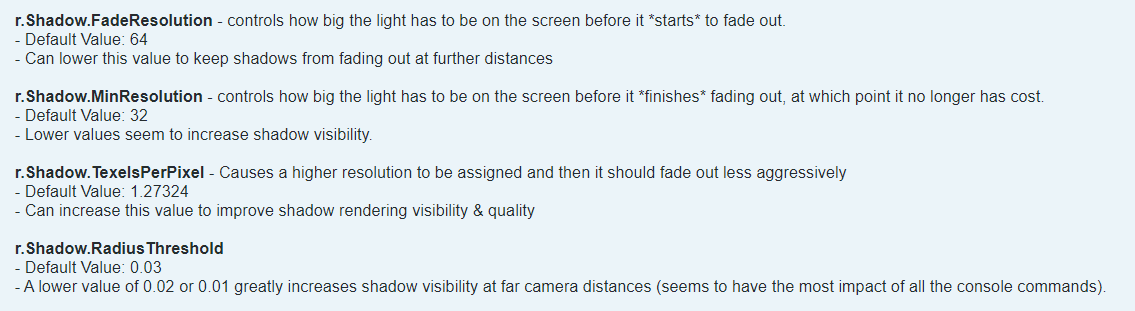
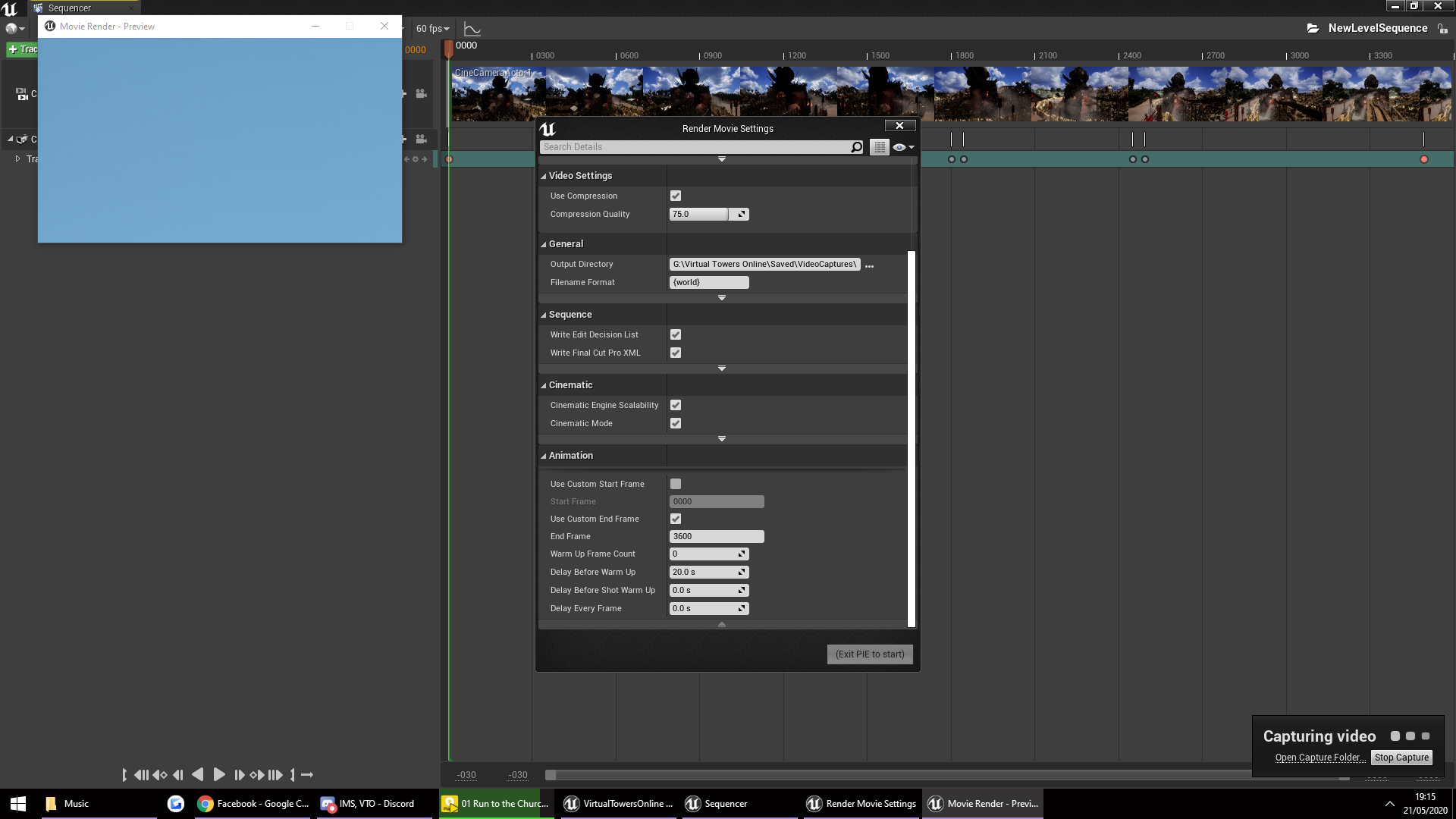
 junior heath
is planar reflection not working in cinematic recording? if i play my record the planar reflection disappears
jovial vessel
@tight stone you were right it finaly loaded up (took forever though). Also is the movie version of UE4 stronger than the game version at rendering videos? cause i have a sequnecer that runs perfect in the preview but renders out horably with lag and poor quality with the game engine. (even with good settings.)
tight stone
The movie rendering is just a PIE session that we capture the results from
So it's not really any different than the engine normally
Performance is slower because writing files to the disk is the slow part - uncompressed bmp files will go pretty fast 😉
"poor quality" doesn't really describe the problem with enough detail to make any suggestions.
jovial vessel
@tight stone i switched to rendering image sequence instaed of avi and then i will put it into a video editing program. that way get better res with less lag. realy quick do you know how to play the same frame of an animation continuously? i got an alemic geocashe that is playing to early.
tight stone
Modifying the source animation is going to be your best bet
unreal hatch
How do you pull in a media file into sequencer as an overlay?
mint monolith
@winged thistle This is good for a beginner. 1 Really big thing that will help a lot is to try and film it like they would in real life. Copy real camera moves from real movies. You are flying the camera around in a really unnatural way. Also the framing of your shots could be more intentional to try to convey a 'story'. I'd recommend you research Cinematography on youtube and learn some of the core principles of visual storytelling. Looks like you've got good software technical skills you just need to brush up on some of the filmmaking techniques.
 paper iris
@winged thistle [Referencing the first video "army for"] - My advice would be to take multiple shots, as apposed to potentially doing one fluid take - it's okay to take smaller reels and work from that. If you do take this approach, watch out for making all of the shots non-static. In most artistic flows you need "break" points for the viewer.
I would also recommend if you are rendering out of sequencer is to do a warm up, or record frames before the camera movement - Not only will this give you more room to wiggle in post production, but also will give VFX, landscape foliage and such time to load in before the "action" starts within your sequences. In regards to animations within your sequences, a little bit of variety would go a long way - If you have limited animations or no time / budget for me, starting them at different time intervals is a way to make the scene look a little more fluid without repeat actions. You can also slow down animations too.
@mint monolith Makes some very good points too.
But most of all @winged thistle Take a breath, enjoy the moments, and don't be afraid to try different things 🙂 You got this! ❤️
quasi gull
@jovial vessel thanks again, so I have control etc of the geocache, and it plays in level, but again when scrubbing timeline or hitting spacebar to just play timeline, I see no animation, its just frozen on one frame of the geocache.... is it possible to see it live when scrubbing?
junior heath
can a cine camera render a planar reflection?
quasi gull
Is it possible to attach a Niagara System to a socket within Sequencer?
 fierce topaz
Yes
quasi gull
heh, when i try to Attach>Bindings, etc cant find it
fierce topaz
Make sure the thing you are attaching it to is in the scene. Click it in the bindings and you get a list of bones
quasi gull
Ah i got it, you cant attach direct to socket, has to attach to the weapon, then choose that socket, cool!
quasi gull
hehe
paper iris
@junior heath It should. What version of the engine are you running on? Have you enabled Planar Reflections? - clip plane in project settings?
Are you trying to use something that has built in planar reflections or a standalone planar reflection actor?
junior heath
@paper iris 4.25, yes it is enabled - otherwise i could no use it probabaly, i use a planar reflection just from the visual effects - drag and drop
paper iris
@junior heath Are you using the cmd HighResShot, sequence render or the new pipeline?
junior heath
not sure what you talking about :/ sounds like something i never cared for because i dont know
paper iris
You can do a highresolution still image using HighResShot 2 (lower number is lower res, higher is higher) or you can specify res ie 'HighResShot 1920x1080'.
There is also movie rendering using sequencer, which allows you to use cameras to make shots and scenes to render out as movies.
The new pipeline also offers rendering out with quite a few neat features.
However, that being said, everytime I've tried to render something with planar reflections through the new pipeline it seems to freeze me up
junior heath
a image is not what i want, i am making movies currently and using cine camera, everything besides some weird bit depth issues worked befor, but now i have this issues with the planar reflection, in the finished avi files there is no planar reflection and also if i press the play button in the sequencer the planar reflection disappears like the camera was not captchering it
junior heath
nvm. i compensate it with ssr
lime siren
@fallen knot So which AA was the 512 subsample with? 5 vs 60 per frame is crazy different. I wonder what 1024 would be. Looks much better!
jovial vessel
@quasi gull screenshot your timeline
timid pasture
I got a tip from Matt Hoffman to set a command line on the master instance of a multi pc nDisplay setup. This way I can branch off and only call certain functions on the master. I can't however figure out how to add command lines to only one package (or unpackaged Editor -game), i.e. the master and NOT the slaves as well
I know it's really niche but does anyone have tips on adding command lines at launch?
tight stone
@timid pasture Er... Command lines are part of the launch. If you go to the /Engine/Binaries/Win64/ folder and then click in the title bar of windows explorer and type "cmd" it will open a command prompt window in that directory. Then you can type
UE4Editor.exe <path_to_your_uproject.uproject> -game -foo -bar -windowed -resX=720 -resY=1280 etc.
You can also right click on the UE4Editor.exe and make a shortcut and add the arguments there
Running the engine as a game or editor, including how to launch a specific map and useful in-game commands.
timid pasture
@tight stone thank you for the tips!! I'm totally stumped though on how to get an extra command line onto just one of the nDisplay nodes given that I have to use the nDisplay launcher to launch all the nodes
I assume the custom command line arguments apply to all nodes listening when their respective packaged projects or editor - game projects launch
I can't launch from the command prompt or a shortcut using (I don't think) using the nDisplay launcher
My only hope so far is that packaging grants something that Editor -game nDisplay mode does not. With packaging, i pray i can select the application's shortcut (the packaged project executable) and put a command line into the shortcut only on the master project on the master node.
tight stone
@timid pasture Oh, I didn't know there was even a nDisplay launcher. Hmmn. Well the next suggestion would be to use an environment variable set per machine but there's no way to retrieve environment variables from just Blueprints, you'll need a little bit of C++ code
timid pasture
If that's my only route, i'd totally do that. I can querry environment variables in c++ and then if statement? Maybe in my game instance where i create my OSC Server?
The goal here is simply to only call the CreateOSCServer in my game instance on the master so i'm not creating more servers per slave node
tight stone
You'd have to do something like...
#include "GenericPlatform/GenericPlatformMisc.h" // not sure on this one, search the entire engine codebase to see where someone else uses it.
UFUNCTION(BlueprintCallable, Category = "...")
static FString GetEnvironmentVariable(const FString& InVariableName)
{ return FPlatformMisc::GetEnvironmentVariable(*InVariableName); }```https://docs.unrealengine.com/en-US/API/Runtime/Core/GenericPlatform/FGenericPlatformMisc/GetEnvironmentVariable/1/index.html that's the C++ function that can get the env var
Retrieve a environment variable from the system
But you'll need to make a Blueprint Library and use the UFUNCTION macro to make a new function which wraps it so that it is callable from blueprints
You can do it as a game plugin, no engine changes required.
timid pasture
could i also just make a custom UGameInstance sub class?
and declare that function in the header there?
tight stone
Yeah
If #include "GenericPlatform/GenericPlatformMisc.h doesn't work you might try HAL/PlatformMisc.h instead - they're a bit unusual C++ code because we swap out what implementation internally when compiled so the includes don't quite line up like they should.
(Or search the entire codebase for PlatformMisc.h" and see how someone else already uses it 🙂 )
timid pasture
i will for sure try both. I like this solution as both my last resort and my ONLY option right now haha
if you can think of any other option, i'm open to anything
tight stone
@timid pasture are there any blueprint nodes for ndisplay?


Is master node, is slave node
Describes how multiple computers work together in an nDisplay rendering network.
timid pasture
They do exist, yes. I believe they help with receiving input, (which is actually what i'm trying to do essentially with this OSC) but i was thinking if i could avoid them all-together i would. Maybe there is a special node that only gets called on the master...
tight stone
Looks like you can just call Get Display Cluster Module API, then from that call Is Master Node, then plug that into a branch to decide if you do OSC things or not
Presumably internally nDisplay knows if that instance is a master or a slave
timid pasture
beautiful if you're right!
Thanks so much for the help. I'm going to read through this DisplayCluster Module API carefully and I'll report back after testing
tight stone
👍
timid pasture
Has anyone tested nDisplay with multi displays in 4.25. For some reason all my nodes will only show the front view doh!!!!!!
right now i'm using the cave_5_sides.cfg for testing
timid pasture
I am unfortunately so lost with nDisplay input. The docs suggest you can't simply send input to the master and expect it to replicate, but i have an actor with this and it replicates fine
These components on the other hand, I can't get to do anything https://docs.unrealengine.com/en-US/Engine/Rendering/nDisplay/Replication/index.html
An overview of how to control Actor replication across your nDisplay cluster.
such as here:
i am sending OSC to control the transform of these components and hoping that SyncThis component would replicate the transform to the same actor on the slave, but it's not doing anything
timid pasture
If anyone happens to have used the nDisplay nodes DisplayClusterSceneComponentSyncParent or DisplayClusterSceneComponentSyncThis, any tips would be much appreciated. Hoping to get them to work in any way at all?
restive sinew
Hi does anyone know how to setup a camera which looks like an FPV cinematic drone video? I tried prior but I did it manually and its hard to sync the roll, yaw and pitch. This is the video I did and I wanted to know if there is an easier way, blueprints perhaps? thank you
https://www.youtube.com/watch?v=BZRHLcPDX9M
Please do subscribe if you want more content like this :) This is my first cinematic render in unreal engine 4 using 4.25. I started unreal engine 2 weeks ago and wanted to focus first on its 3d cinematic quality. Making 3d scenes in real time using a game engine is quite amaz...
timid pasture
For anyone curious, I've come to the conclusion that DisplayClusterSceneComponentSyncThis nDisplay component may be broken, but SyncParent does work
 open jolt
anyone else have issues importing unreals sequencer AVI output into premiere?
barren lagoon
how can i make the transition from not tracking to tracking smoother? i don't want the camera to simply "snap" to what it's now tracking