#cinematics
1 messages · Page 16 of 1
 snow spire
 tight stone
Another good reason to use Dev-Editor for rendering only is that things get broken as people work on it, so depending on when you sync some stuff might not work or may crash :p
Also if you're using a git client to download the repo, make sure it grabbed the dev-editor branch and not the default (master) @snow spire , I don't think the latest set of changes have copied up to master quite yet
snow spire
I've never used git so might either just get the zip download or convince my wife to show me how to git stuff
 scenic frost
Hey all, is im looking for a way to give the end user the ability to create a custom camera path and export video/stills from a simple scene, is that possible?
tight stone
@scenic frost With some C++ work you can build one yes;
scenic frost
Is there any documentation or tutorial u know of that could help me? @tight stone
tight stone
You can look at the FrameGrabber.cpp / FrameGrabberProtocol.cpp to figure out how to capture the viewport, you can look at the ImageWriteQueue/ImageWriteTask (or ImageSequenceProtocol) to see how to write image sequences to disk. You can just build a camera path with whatever gameplay logic you want (spline components?)
Then set the engine to use fixed framerate, and walk along your spline each frame while capturing the viewport to image sequence.
Don't expect it to be realtime though
scenic frost
i appreciatae the help, i dont expect the capture to be real time, ive used sequencer a bit to know there is some lag
tight stone
The png writer is the slowest portion in simple scenes surprisingly. If you write .bmp files you can actually write out to disk at 30-60fps in empty scenes :p
scenic frost
good to know, thank you again
snow spire
I gave compiling the dev/editor branch a go last night but no dice I'm afraid. I might need to post some highlighted screenshots to check if I've set things correctly but firstly it did seem to error on stuff like datasmith, seems like they're disabled etc. Do I need to do anything like compile the master branch before grabbing any of the other branches I have no idea how to really use visual studio I'm afraid.
tight stone
@snow spire Try to only build the UE4 solution.
snow spire
yep, chose that. over on the top bar, what have you got set in startup solution and what right click options on teh start buton (no idea if they're even important)
tight stone
@snow spire do you know which commit you downloaded? Looks like the branch doesn't build right for us either starting this morning at 10am eastern
snow spire
dev-editor grabbed it a little over 12 hours ago
 alpine jetty
@tight stone Completely random, were you part of Interlopers?
Now for my question, here I'm trying to animate a plane flying then crashing in sequencer. You can see that it's got a pretty sharp turn and tends to jolt when using linear interpolation between the points. Cubic (auto) interpolation is nicer but isn't great to use because the object your'e animating eases in and out in speed instead of being relatively consistent. Is there a better way to do this? Should i just add more key frames and use linear?
tight stone
@snow spire Hmmn. If you post the build log on gist.github.com I can take a quick look
@alpine jetty yes; Also curve editor + editing the tangents
alpine jetty
I was Jangalomph on Interlopers. PM me if you'd like to catch up. :D
-snip- I think i found the curve editor
tight stone
If you convert them to cubic or break handles (select + right click on keys) you'll get tangent handles that you can drag to change the shape of the curve
alpine jetty
Much smoother, thanks!
snow spire
@tight stone try this link <script src="https://gist.github.com/28DavesLater/ec1d0ac9781d6ba1819755c086c1af25.js"></script>
that really didnt need to be pasted like that did it?

Gist
UE4 Dev-editor branch error. GitHub Gist: instantly share code, notes, and snippets.
maybe thats better
alpine jetty
Rip, sequencer crashed when trying to add a rotation key haha
tight stone
@snow spire if you don't need datasmith you can probably just go into the Engine/Plugins/Enterprise folder and delete DatasmithCADImporter (well, move it to your desktop or something in case you need it)
And then re-run GenerateProjectFiles.bat
snow spire
hmmmm.... my current project I was hoping to test did use datasmith but... to do some basic look at the render features outside taht project I could do that
here's a snapshot of what else i have set which I'm not even sure is correct....
this line in the github instructions was abit confusing too: After compiling finishes, you can load the editor from Visual Studio by setting your startup project to UE4 and pressing F5 to debug.
cant see a place to set my startup project to UE4
tight stone
BuildAgent is the wrong startup, you want UE4, but that compile error is in an engine plugin anyways so if you wanted to use it you'd have a problem :p
If you right click on UE4 in the Solution Explorer, you can choose "Set as Startup Project"
snow spire
ah.... see I kept clicking on startup projects but couldnt see UE4 only unrealbuildtool
didnt realise you could add it from right click..... this is why us tech artists stay away from compiling 😉
FYI my preoject uses datasmith from max exports so not necessarily the CAD stuff
tight stone
Not sure why it doesn't build to be honest, maybe just update to the latest source again in a few days when it does build, but fingers crossed you don't need it right now
snow spire
alright, so build seems to have worked and is loading UE4 now - sitting at the 45% mark as is traditional
there was a fleeting glimpse of a yellow warning in the generateprojectfiles.bat command line warning...something something datasmith but it was gone while I bliknked and it built anyway
tight stone
Probably a warning about something referencing it but not found, hopefully another plugin doesn't rely on it
When you open your uproject it'll probably compile more and you might still run into problems
snow spire
so another noob question.... do I need to build it on each machine I might want to test on?
tight stone
If you copy the whole build folder around probably not
snow spire
cool, cos theres a threadripper with a 2080ti that want to do some raytracing
tight stone
Should have compiled on that threadripper!
snow spire
danger will robinson
So... seems to have booted up... and made a project for me... where should I start looking for some of the right dials to tweak for stuff like better AA etc... is there anything forward facing or is it all under the hood? looked under the sequencer render setting but nothing obv there... Project render settings? Post Process? Camera settings?
tight stone
@snow spire window Cinematics Movie render Queue
Drag a sequence in, click the settings, click plus setting in the top left, anti-aliasing
The raytracing setting doesn't do anything yet
Optionally save your settings to an asset for reuse later by pressing the Preset button in settings editor
tight stone
Yeah works up to 16k. Set output resolution in output, set tile count to 8, overlap to 0.1
Takes a bit right now, 30min for 15360x8640 @ 32 spatial samples
Should work around timeouts/memory limits on large images, some caveats (no taa, bloom/convolution bloom don't work, ssr and other screen based effects may not)
snow spire
still interesting direction.
the whole movie render queue looks promising too. especially the linking of sequences to levels, very handy
pass rendering? couldnt see it in there?
tight stone
Composure and GBuffer channels not in yet
The level linking thing only works with remote renders right now, but should work with local ones soon
snow spire
remote just means close down UE4 and open a new process correct?
tight stone
Doesn't have to close but yeah
You could write your own distributed rendering implementation
And change in the project settings what the button does
So that studios can write a deadline implementation or otherwise
snow spire
nice. deadline is our render manager of choice so interested to see how that might be hooked into at some point.
tho the scale of out rendered projects within UE4 and the speed we can output them from one machine slightly makes distributed a non-issue currently....
should have scare quoted "currently" on that one
tight stone
I'm sure you'll find some settings in the new tools to increase those times :)
snow spire
lol. I'm sure I will 🙂
not sure if this is in your wheelhouse, but we previously made a VR Previz / storyboarding tool for a film that came out last year (production was mid 2017 tho so a while ago) I'm going through and updating our setups and trying to figure out the feasibility of our virtual camera being rendered / raytraced on a second machine and being network sent live back to the virtual monitor in the VR setup.
so the VR side runs smooth and looks ok but the camera sees a more realistic view
tight stone
You might be able to put something together using the pixel streaming support in the engine (though I don't know if it's intended to ingest the results of it). Sending the position of the virtual camera to both machines and then sending the pixel data from one to the other is plausible, but I don't know how much latency you would have which may or may not be a deal breaker
snow spire
yeah thoughts I've had on it were to show the live render target but send off position updates to the second render slave and pull back frames either on request or on an interation to show better frame. not a deal breaker if cant be made to work as backup plan is just to offline render all the shots outside of VR session...ala through movie render queue.
FYI here's our self indulgent making of / behind the scenes for the film. https://vimeo.com/359446829
tight stone
I am Mother was 👌
snow spire
made using UE4 - well the VR previz anyhow 😉
tight stone
Now that you can compile the code from source you're unstoppable btw 😉
snow spire
bwahahaha... you over estimate my abilities and underestimate my tendancy to break things
but sincerely thanks for youe help. compiling stuff is something I've always wanted to be able to dobut no idea how.... you've been extraordinarly helpful and patient
tight stone
(I just need more people to test the new tools before it's released for reals  )
)
snow spire
How do I keep an eye out for when Gbuffer and composure are in there?
 calm jackal
Matt I was recently watching a conference from epic that recently happened and the guy said something about sequencer which I didn't understand can u get some insight on it pls
 swift bridge
@unkempt ravine set your editor to cinematic
but specifically raytracing is a different beast.
go into your main light and set hte cascades to 3-4 and the shadow draw distance as far as you need it
yes
that will at least lod bias everything to highest settings.
well. what you are asking doesnt really have 1 answer
thats the problem
depending on your scene it has many answers. 🙂
i do large world landscapes. There is a specific solution for that in distance fields and dynamic lighting
you might need a different solution. I am not sure. 🙂
there are some handy commands as well... for example.
r.ForceLOD 0
yep
i get what you mean
but its not one answer.
that command above will force everything to always draw on the highest LOD level.
open the console with you "~" key
 unkempt ravine
thanks
swift bridge
foliage.ForceLOD 0
if you need that to draw at lod 0 as well.
and setting the number of cascades in the main light to 3-4 and choosing an appropriate distance to draw out to willl give you crisp shadows.
tight stone
@calm jackal if you have a question ask the question and if someone knows the answer they will help
tight stone
I believe it only controls the HUD class in the GameMode which isn't used by a lot of games @unkempt ravine
calm jackal
Ah
It's about the new sequencer addition that they showed I didn't quite understand it
 muted lintel
you basically just repeated yourself banishingshift... how about adding more detail so others don't have to do research and at least know what you are talking about in case they have an answer for you?
"something's new and I don't understand" won't make people want to explain things to you
snow spire
@tight stone So starting to play with a real scene with the 4.25 features, I dont suppose there's any concept of a virtual frame buffer where you can render temporary single frames with all the render queue settings? basically if you want to see what the AA is doing before rendering your sequence etc?
calm jackal
Oh wait I can do something better I can just share the clip can't i
tight stone
@snow spire No. You can make camera cuts that are 1 frame long though and add your sequence multiple times to the queue and use different settings for each job? (caveat: not well tested)
Using different output string formats you can put the results into different folders at least.
(You could also trim the playback bounds down to a single frame... or try playing with Output > Custom Frame Range, though i'm not entirely convinced the upper bound setting on it works properly)
 rose pine
is it possible to have a single trigger volume both play and reverse a sequence?
like player overlaps trigger, sequence plays to the end, then the same volume overlapped again reverses the sequence. Having a hard time trying to work this out (im a total noob with graphing)
tight stone
@rose pine Make a boolean that tracks whether or not the sequence has played forward. On Volume Enter:
if(bHasPlayedForward == false) { Sequence.Play(); bHasPlayedForward = true;
else
Sequence.PlayReverse(); // I forget the node names, maybe set speed to -1 and play?
Depends on the exact behavior you want wrt retriggering / interrupting the cutscene
rose pine
thank you.. ill see if I can figure out how to turn that into something. been using UE4 for nearly 3 years and the graph editor still confuses me
tight stone
if statements are called branches, which always gets me 🙂
rose pine
im a modeler/texture artist first programmer last 
rose pine
oh thats easier to read, thank you! ill give it a shot when I have the editor open next
snow spire
@tight stone started some renders and maybe got a tad overenthusiastic with how many samples I added for a first test at 4K. Are you normally mixing temporal and spatial samples and are you usually leaving of overriding TAA when doing all this?
tight stone
@snow spire in general; dump time into temporal sampling, it gives you the same anti-aliasing as spatial sampling but you get nice motion blur out of it instead. If you go above 8 samples (temporal&spatial combined), turn off TAA. TAA will only give you 8 unique positions for the 'jitter', so after that point you're not gaining much quality
Don't think you should use TAA with spatial samples, you can get away with using TAA with temporal, but again once you > 8 samples it's not worth having TAA on
snow spire
awesome... great starting advice
tight stone
Do you want 4k as your final render resolution or are you planning on downresing to 1080?
snow spire
downsampling to 1080 for current applicable projects - but who knows after that
tight stone
I'm not entirely convinced you need to downsample if you're using supersampling (Temporal/Spatial)
snow spire
it was a wonder of mine.... put time into 4 x sample rate
tight stone
Since every time the camera is offset you get new data that wasn't there before (such as a bright spot from a reflection) that will influence the final pixel as appropriate
snow spire
so is teh temporal sampling some sort of step along the distance the frame would travel based on the shutter angle?
i.e. so 16 samples would be a sample every n/16
tight stone
Yes; We take the shutter angle (as defined by the 'Camera' setting, 180 by default) and split the timestep up to be 1/n * shutterAngleFrac time
so with a 180 shutter angle and 4 ts, each sample 1/8th of a frame in duration
snow spire
any bias or jittering on that?
and being a center motion blur its backwards and forwards in time?
tight stone
Unreal's motion blur is always 'centered' (but we do give you the option to set a shutter timing now, which only affects when a sequence is sampled relative to the output frame)
We jitter the camera position but not the duration/time - the duration needs to be correct so that the motion blur makes a nice even gradient when built out of all of the individual subsamples
Just like a single sample would be
snow spire
fair point.... bias, i.e. controlling the fallof of the blur distance would be interesting to match (some) real camera shutters
tight stone
It wouldn't be too hard to add - would have to add an additional 'weight' when accumulating the results together, but it would cause a noticable step in your motion blur I think
tight stone
Right but say you have 3 samples and the outer ones have falloff, so they don't contribute as much to the final image (say 0.5, 1.0, 0.5)
I think there will be a noticeable stair step because the outer samples are only contributing half weight. It's admittedly not something I have tested
Since the motion blur for each sample is still 'centered', and you only get a nice smooth gradient if the values add up correctly
snow spire
probably not something I see myself needing anytime soon but I'll bet you a beer someone else asks for it 😉
tight stone
You can test it if you'd like pretty easy if you have something like Nuke. In the High Res setting there's an advanced dropdown for "write all samples to disk". Works without tiling.
Can render 1 or 2 frames with say, 3 TS and then multiply the first/last temporal sample by 0.5, add all 3 images together in Nuke, then divide by 2.
snow spire
I do have Nuke 🙂
tight stone
I'd do the test here but uh, Nuke doesn't launch when connected via remote desktop 
snow spire
yes.... teamviewer or similar is your best bet for remote access of stuff like Nuke (open GL issue I think)
tight stone
This is the test we use, constant value keys that teleport the square between the reference squares
(Stepping through it in the editor so no motion blur)
Also be-warned that temporal subsampling will go outside your frame range on the first frame, since it needs to center the timing on the first frame, so need to make your data extend past your playback bounds
snow spire
thats pretty standard for moblur I'd say. we'd usually normally put handles on the shot or have out of range data
tight stone
This is what you get when using 3 temporal sub-samples, notice how the solid white section of the box is only 1/2 the original width, and then it falls off evenly on the outside edges
This matches the behavior of a single temporal sample using built in engine motion blur
(the 3 TS is just a little smoother in general b/c camera jitter)
snow spire
I dont think bias would step it.... would just fade off sooner, more like if I srgg curved that grad
maybe at small samples tho
tight stone
lemme send you the samples directly and we can test 😄
snow spire
sure
tight stone
I'm only convinced you'll get a step because of how much time I spent chasing down weird stepping issues due to motion blur that was the incorrect length
snow spire
ok, you sort of get some ghosting / stepping.... but you kind of get some of that in camera too
I think the ghosting I'm mostly getting is also becasue each image also has some TAA moblur too?
tight stone
TAA might exhibit some ghosting, usually only on the trailing edge
snow spire
I over engineered it a little and expression hooked up the multiply to autodivide by the correct amount
based on varying bias
tight stone
I do feel like 0.25 does show a shelf... I dunno what a real camera would do, but it's probably not noticable in motion 🙂
snow spire
i'll see if I can try somestuff when I can get back in front of the build (maybe not till tomorrow now) I think dividing by more than 1/(number of samples) for bias might be prone to step
tight stone
I assume the stepping isn't an issue in real cameras since they're a continuous gathering of light?
snow spire
youd be surprised
at least with digital cameras these days becasue who knows
some still ahve mechanical shutter so I think that means they get arc distance stuff (effectively bias as we're talkign about
or I could be completely wrong about the whole thing
but I definitely notice ghosting moblur in footage on stuff I comp
tight stone
The idea of bias is definitely a thing that affects real cameras
snow spire
I'm not sure this tells us anything other than motion blur is weird and full of optical illusions
real camera mo blur from a thing
no idea what camera
tight stone
Yeah that's about my conclusion. Video games finally present a chance to have no weirdness (no motion blur) and then we go and fake it 🙂
snow spire
is DOF different via this rendering too?
I'm getting differences in my test that look better but I'm unsure if my comparison is exact between versions
 placid path
hi, not sure if this should go in #graphics but I'm having an issue with rendering out a final image using the sequencer.
I've rendered a few frames (with shot warmup/delay to let post processing quiet down), and yet my ambient occlusion disappears?
i even add a render pass for the engine to render out my AO and it just shows a white image.
in the editor however, visualizing the AO buffer and the distance field AO gives me what I'm expecting, and the viewport image looks much better
I'm using distance field AO with mesh distance fields enabled, and all of my lights are dynamic
what have i forgotten?
tight stone
@snow spire I guess technically it lets you see around corners (by a sub-pixel amount) and DoF is limited by not being able to see around things so... maybe?
tight stone
More than a subpixel if using temporal sampling, not sure if it's better or not though since our DoF isn't like how the real world works
 supple garnet
Hello! I am having the issue where the materials of one of my characters disappear when I render the cinematic. It's visible in the viewport, only happens to one of the characters and when I am rendering it out. I also tried to place the same mesh somewhere else inside the level but it didn't work out - still no materials. Does anyone know a solution to this problem?
tight stone
Does it work in normal PIE?
snow spire
I've got a project where I need to control the timing of about 300 seperate objects appearing. Inputs I'll have is basically a datatable of each asset and a time when it appears. Wondering about simple ways to drive that. I can think of a couple inclusing doing it all within a blueprint, but curious if I can build a sequence from a datatable?
 gusty heath
@snow spire Not necessarily related, but I built cinematics before based on plain text input, from XML. So I guess anything is possible 🙂 my cinematics were not sequencer specific, but spawning camera actors, etc. etc.
 tight stone
You can construct sequences using Python, and probably read data tables too @snow spire - /Engine/Plugins/MovieScene/SequencerScripting/Content/Python has some examples 🙂
snow spire
gee Matt... now you want me to learn Python too? jk I know enough to get into some trouble with it 😉
snow spire
well I kind of have a simple version working without any python. I make a blue print actor that in construction script adds all the correct static meshe components from a data table. I make a function that loops over all the components and if its appearance time is less than an input float then do x else do y. I call that input variable from the sequencer. function is a set<varname> function that <varname> is the float I'm using in the sequencer. function is set to call in editor and the float var is use in cinematics
tight stone
:shipit:
snow spire
set<varname> functions still blow my mind for how powerful they are for sequencer
...and I've never seen it mentioned anywhere before you confused me with it a few weeks back
tight stone

 barren lagoon
hello! i have an audio track in my sequence, but when i render it out, the audio isn’t there. is there a way to enable it?
 green cloud
Heya, is it possible to play AI in the sequencer? And if so, what's the best way to do it?
 ionic elbow
Hey everyone, I'm trying to get a destructible mesh with physics on it from my level, recorded from gameplay and into sequencer. However when I record it, it only records the object in it's unbroken state. Is there something I'm missing, or do you have to set up the event in the sequencer?
 jade cloak
hi everyone, I want to start playing around with mixed reality. has anyone tried doing this with a low budget kit (logitech webcam?)
gusty heath
@barren lagoon I think I've seen a comment a while back from LordNed to the effect that currently the recommended way is to render your audio in a third-party outside the sequencer. I may be wrong, but I vaguely recall something like that 🙂
@green cloud If you don't mind me asking, what's your end goal? It's very simple to create camera actors managed by the player camera manager component and basically simulate a cinematic sequence, take a look at that video above with a test conversation. Please note that I'm not an expert with sequencer, so I cannot answer specific sequencer questions 🙂
 regal hare
I have a question Slackers ❤️
can I assign the player character in the sequencer?
(an already possesed pawn)
gusty heath
@regal hare Actor to sequencer maybe?
regal hare
OMG I finally made what I wanted ❤️
gusty heath
Yay!
tight stone
Add a camera cut track and a section that points to a camera on the sequence
green cloud
@gusty heath I'm working on some previz which will be an offline thing in the end, so I'll need to have it all recorded. I think I managed to solve all my problems in one way or another. Pretty hacky stuff from what I've gathered so far. For instance, my characters come out rotated 90 degrees after I've recorded them, switching Root Motion Root Lock to 'Zero' fixes this but that in turn cause other problems with components that do not get this offset applied.
So, has anyone come across recorded Characters that play with a rotation offset of 90 degrees? Is there a way to fix this without switching Root Motion Root Lock to 'Zero'?
ionic elbow
Any takers on recording a destructible to sequencer?
green cloud
@ionic elbow I haven't used destructibles but if it's a component class is this class set in the classes to record?
ionic elbow
Yeah the class is set to record, however the when the destructible is put int he sequencer it is keyed to spawned on and then when it is supposed to break it is then spawned off.
tight stone
@green cloud Are you using Sequence Recorder or Take Recorder
green cloud
@tight stone I just switched to the Take Recorder, thanks for the idea. This solves the 90 degree problem.. I'm still curious why it happens in the old recorder though.
Also I assume spawned particleSystems aren't working? I have to either have them as sub components inside a e.g character or wrap them in a blueprint for them to get picked up by 'Record Nearby Spawned Actors'?
Oh, the most important thing:
My character AI's animations are recorded in world space, so I have to switch on 'Force Root lock' on all recorded animations.
Is there a way to set this to be default for new animations, or record the character AI in local translation?
tight stone
@green cloud please bug report the particle system one. I don't think there is a way to change that, though you could add a relative transform track to sequencer which negates their starting position perhaps?
green cloud
@tight stone Will do, I have a list of things I'm going to report/ask for.. and I don't have a clue how to add a transform like that in the take recorder. I'm trying to get a setup that I can record, then immediately see the result in sequencer. Right now I'm almost there, it's just this 'Force Root Lock' that's missing
tight stone
I mean to the resulting sequencer track.
why do you need to see your animations relative to zero? Sequencer works in world-space by default as a general concept
green cloud
Maybe I'm doing something else wrong then.
I just add my AI and have all things as default, this records an animation that moves the root around - is that expected?
tight stone
Yes, iirc
green cloud
I thought animations should be recorded without the root baking any translations in, then the actor's translation is what's driving the recording as that is also recorded
So right now I have my root joint and the actor transform moving the character around, causing double translations.
And with the Take Recorder I no longer set 'Root Motion Root Lock' to 'Zero', I just set 'Force Root Lock' to ON.
With the Take Recorder Root Motion Root Lock doesn't seem to do anything when switching between Ref Pose and Zero btw.
tight stone
You shouldn't get double transforms, unless you're doing something unusual like moving both the actor itself, and moving the skeletal mesh component within it that the animation is playing back on.
There's a section in the Take Recorder that tries to extract the root motion from the animation and set it onto the transform track;
{
// We need to take the root motion data from the animation and override the data the Transform Track had originally captured
RootTransformRecorder->PostProcessAnimationData(FirstAnimationRecorder);
FirstAnimationRecorder->RemoveRootMotion();
}```
Make sure if you bug report that one to include a sample project with an AI in it. novel sparrow
Greetings!
How to access that from a BP?
Is that a same as reference to Actor?
Cause it's not look like, and it's the only variable i've found.
green cloud
@tight stone Yea, that seems like it's perhaps for those times when you have an anim that's using EnableRootMotion.. my anims are purely played at origin then the actor is moved around by an AI controller. So you might think one could disable recording the transform track on the actor and only make do with the animation, as it's played in world space... but then there's an offset instead so it plays ok, but at an odd location.
Maybe it's something with the AI controller that's buggy
Or maybe my brain is buggy
tight stone
@novel sparrow set bOverrideInstanceData = true; and then I would get the DefaultInstnaceData variable and print out its class type and see what it is.
novel sparrow
@tight stone "DefaultLevelSequenceInstanceData"
novel sparrow
after casting i was able to set the actor, thank you
Another question. Is it possible to shift keys by value in Editor?
tight stone
@novel sparrow open curve editor, select keys, type += somevalue in the value field
novel sparrow
wow
thanks...i was moving them manually in the curve editor, it was not precise
IIRC there was a checkbox to play sequence no matter if Time Dilation is active. I can't find one. Am I blind or it was changed?
tight stone
@novel sparrow FPS dropdown in Sequencer > Clock Source > Platform
novel sparrow
@tight stone thank you!
hmm...it's...still affected by the Sequence's own time dilation? ;_;
well, i've added event track
You're doing god's work sir.
Thank You for your time and knowledge.
tight stone
Sequencer play rate track is just controlling global time dilation
But platform should use system clock to calculate Delta time instead of game clock which is affected by time dilation
 warm dune
Hello. Anyone using the Panoramic Capture plugin: is it possible to render frames with alpha? I've tried rendering still images with nothing but a cube and a directional light but the background is rendered as black and not transparent.
tight stone
I do not know about the plug-in, but there's a project setting about persisting alpha through the tonemapler you might try
 sand pine
How do I update the transform of cinematic camera in sequencer actor from my character position
 gentle forum
hello, can anyone help me debug an issue with my camera? this isnt exactly cinematics related but figured you guys might know cameras the most :p
 burnt tree
Hello, I'm following the gamedev cinematics course which was recorded with 4.22. I'm using 4.24.2. Unless this was changed over the versions, I'm missing the triangle on the left of the camera icon, to expose some variables.
this is a screen of the seq in the course
burnt tree
Additional camera question: in the cameraback presets I can choose the 16:9 among others, how can I create a 21:9 one?
Thanks you.
 soft thorn
Hello everyone, I am wondering if its possible that a camera within sequencer can have a dynamic transform based on the players location? I've looked at a couple things, number one, trying to set the origin of the sequence but that didn't seem to help as the camera stayed in the same spot. Number two, I made the transform track of the camera additive, but alas the camera still did not change its position
soft thorn
@burnt tree for some reason you don't have a camera component with that cinecameractor. How did you spawn the CineCameraActor1?
burnt tree
@soft thorn by dragging it from the browser into the scene, as opposed to clicking on 'add camera' in the sequencer
soft thorn
Okay yeah so what you can do is hit "Track" -> "Camera Component" then hit "Track" -> "Transform"
Not sure why they are different but I see the same kind of behavior on my end
And then when you highlight the camera component you can edit the details on the right hand side under the Details tab
burnt tree
yeah it's weird bc in the course, he dragged the cam into the scene, and then selected the cam after creating the tracks, and all the variables were exposed
the reason I like this is bc I can manually put in the keys in the track, if I only had the settings un der the details tab, I won't have a visual on all the changes in the tracks themselves
soft thorn
Yeah I'm not sure why they changed it in 4.24 since you can click the add camera button within sequencer and get the result which is covered in your screen shot
burnt tree
the lower screenshot is 4.22, which is after he dragged the cam into the scene, not by adding cam in seq 😉
that's the difference
I can't replicate the step in 4.24
So for anybody reading this and maybe confused, let me try to explain it in short:
The first picture is a screenshot from my seq in 4.24.2;
The second is from the course video which was with 4.22;
I followed the steps exactly as instructed, yet get a different result.
soft thorn
I would probably read the patch notes then to see what changed
rose pine
is there a way to run a subscene in reverse?
 low bramble
Is it possible to animate spline points in sequencer?
tight stone
@burnt tree You can just click the + button on the right side of the CineCameraActor1 and add the tracks. Some are on the actor itself, and some are on the Camera Component (as you can see in your second screenshot). You can set any filmback size you want, the presets just set the Width/Height field so you can just type in any number you want.
@rose pine I don't know if negative playback speeds work, you could try it, for the sub-section
I forget if take recorder automatically adds a camera cut track or not. https://docs.unrealengine.com/en-US/Engine/Sequencer/Overview/#hierarchicalbias
Sequencer is Unreal Engine 4's multi-track editor, used for creating and previewing cinematic sequences in real-time.
It could be that it does and that the shots are taking precedent over the master track due to evaluation hierarchy
you can probably just go into the shots right click on the camera cuts track and deactivate it
click the lock in the top right 😉
(It's designed to prevent you from accidentally manipulating your recorded data when previewing/playing it back during a live recording session)
rose pine
yea no luck with -1 playback speed, guess ill just make another sequence of it going in reverse and just play that
is there a way to have audio trigger when sequences play in reverse? like in matinee?
soft thorn
So can you animate a camera within sequencer and also have its transform animation be in relation to the player?
tight stone
Describes how to create Level Sequences with Actors that have dynamic world transforms that can be changed at run time.
soft thorn
Yes but can you do that while the game is actually running?
Think I'll try this
Unreal Engine Forums
Hello folks, anyone knows how to use new feature in 4.19 called (Level sequence dynamic transform origin. ) ?
jade cloak
hi guys, not sure if this is the right place to ask but I want to play around with mixed reality capture and the logitech webcam is supported (as per UE document). Has anyone had experience with this / and the webcam thing (as the capture card mentioned by UE is like 10 times the cost of that webcam) . thanks.
 upper gale
hi. I have two problem when i try to render cinematic. First one, after render cinematic i dont here audio tracks. Second one, some emitter of rain storm dont visible in cinematic. But when i play cinematic in ue4, all work fine. How to resolve this problem or what guide i should read to fix that. my ue4 version is 4.18.3. I use emmiters from this assets pack https://www.unrealengine.com/marketplace/en-US/product/soul-city/

One of two free environment packs containing content built for the 2014 Soul demo, Soul: City is an urban-themed package of high-quality props, materials and textures optimized for mobile platforms.
 mint monolith
@upper gale audio doesn't really work properly when exporting as far as I know. Try adding your particle emitters to sequencer and setting them to start emitting
snow spire
probably a long shot but is anyone else going to SXSW this year. Im assuming most people are more likely to be heading to GDC as the dates compete? ANy Epic or UE4 presence at SXSW this year?
 neon slate
Can you import 16k or 8k video files in UE ?
rose pine
is it possible to attach a sound cue to an object in the Sequencer so it follows the object? engine version 4.21
 solid rapids
https://www.youtube.com/watch?v=XQWjHWRw8yI&lc=z23zsn1abyqbdbv4104t1aokgzpjaphfxbiard3kydofbk0h00410

Earthquake 8.2 - Official GameTeaser
8.2 Büyüklüğünde bir depremin yarattığı tahribat ! Karakterimizin büyük yıkım sonrası yaşadığı zorlukları anlatan üzücü ve zorlu hikayeye heyecan verici bir bakış.
Videodaki sahnede deprem olmuş, yıkım gerçekleşmiş, fakat hala büyük artçı de...
snow spire
@rose pine I dont have 4.21 but you can attach pretty much any sequencer item to another. drag your soundcue into the sequencer, click on the track + button for the cue and choose attach then pick an actor to attach to. if you need it attached to a skeletal mesh you'll probably need to attach it to a socket in the skeleton
I tested in 4.22.3
rose pine
okay cool ill try it thank you
 summer stream
In 4.21, can sequencer events receive inputs or is that added in later versions?
tight stone
If you mean parameters per key, that is later
 stark palm
Guys anyone know what happened to this option?
Is there a way to visualize camera frostum culling? I mean I know there is an option to turn the cammera frostums, but It just shows the bounds, not actually rendering only items within it.
 trim herald
@stark palm try the console commands: r.VisualizeOccludedPrimitives 1 and FreezeRendering
An overview of Visibility and Occlusion Culling methods in Unreal Engine 4.
stark palm
GOnna check it out. Thank you man.
 hybrid plank
how can i make an actor sequence instance editable?
this keeps happening when i try to edit the instance's sequence
 mint monolith
@hybrid plank You have 2 sequencers open try closing 1
tight stone
Actor Sequences are definitely not intended to be used with the Instanced Editable variable flag
snow spire
@hybrid plank what end result are you trying to achieve?
gusty heath
Hi guys, is there any way to carry materials across from Houdini I to unreal using an alembic cache? We have a destruction cinematic using Houdini and so I've assigned a string attribute with the reference to the material in Unreal, but when I bring it in the cache it doesn't link up automatically, alembic would be our preferred format so if there is any way to do this it would be great to know
 silent basin
Hi, I try to set up a kind product sequenz and have a Media player file in it and everything works fine but once I want to Capture and export the movie over Sequenzer it is played with double speed even thought in preview it did run in normal speed
tight stone
Try using an image sequence instead of a video container
upper gale
@mint monolith i try to follow your advice, but i does not help. There is the movie which i get after render. https://www.youtube.com/watch?v=ZBUIHXVy388 . I used emitter from this package (https://www.unrealengine.com/marketplace/en-US/product/soul-city). Truly, i dont understand why emitter work fine in one place, but doesnt in another. For example rain in the movie same at all parts of level, but in city in does not render. Maybe, i configured something wrong
 novel sparrow
@tight stone um...how exactly this "Override Instance Data" origin shift works?
Cause now i'm getting this wiggle even tho object it attached to is static
tight stone
Are you sure your character doesn't have physics enabled and it's fighting the sequence evaluation?
novel sparrow
hmm...i'm not
thank you, i'll check that
Nope. It's disabled for all the components if this bp.
gusty heath
Is there any way to modify the CircleDOF Bokeh aspect ratio to emulate anamorphic bokeh?
Like this example using BokehDOF (https://www.artstation.com/alectucker/blog/E8P9/anamorphic-bokeh-in-ue4-tutorial)
 novel sparrow
afaik Circle dof is in DOFGatherKernel.ush
novel sparrow
@gusty heath don't forget to backup it...as any engine update may reset it
snow spire
@upper gale does your rain particle system only exist around your player character? if so then it probably wont be around your cinecameras in your sequence unless its near the player character.
mint monolith
@upper gale Could be what @snow spire is saying. I have used Soul City before without issue. It might be culling particle systems far away from your player character. Try deleting all extra character shit for now and seeing if you can get it working properly in just sequencer
 quasi trail
hey guys I use this parent setup of objects to animate them quickly trough the sequencer but everytime unreal saves the level the parenting is gone, also when i render out my sequence they got also detached
mint monolith
@quasi trail that little lightning bolt symbol means that the object gets created at the start of the sequence. So having something created parented to something always there parented to something created can cause issues. Use the attach track inside sequencer and maybe make them all always there by turning off spawnable.
quasi trail
thank u 🙂 I also found out that i can attatch the objects directly in the sequence
ionic elbow
Is it possible to blend from a sequencer camera to player camera?
tight stone
Not in the current version. For now omit camera cut track and use event track to call SetViewTargetWithBlend to have it blend into the camera animated by seq. Camera cut track will do a hardcut to specified camera so need to avoid that
 astral robin
Hi, I have disabled look at input & movement on a sequence, yet my actors still uses mouse click info and activates a blueprint action. can you totally remove all input whilst a sequence plays? TIA. I have the sequence set to autoplay at start of game.
gusty heath
@astral robin You set cinematic mode on the level blueprint, and it didn't work?
astral robin
@gusty heath thanks. I'll look into that mode.
 deft sandal
if you want to start a sequence playing seconds 0-5 then loop 5-15 how would you do that?
deft sandal
This is working but is there a better way?
 amber igloo
https://docs.unrealengine.com/en-US/Engine/Sequencer/HowTo/RenderMovies/index.html
This page shows that UE4 has some video recording capability, however it's in the context of sequenced scenes.
Is it possible to use that functionality, especially including the fixed framerate playback, for outputting videos of replays? Assume we've already got replay recording and playback sorted using the engine's standard replay system...
Shows you can render out your cinematic sequences to a saved movie file on your computer.
tight stone
You'll need to build your own system and reuse or use similar techniques. Maybe you can just generate an empty sequence which is the same length as the replay and start the replay as soon as movie rendering PIE loads
mint monolith
Does anyone know if there will be more film jams?
 fiery prism
is there anyway to update an actor based on sequencer timeline while in edit mode? I have an obj sequence that I am trying to animate cameras around but I am shooting blind right now
snow spire
@fiery prism do you mean an like a blueprint actor that only updates during game? depending on how you're changing that there mght be a couple of ways to see that in the sequence while scrubbing, otherwise a bunch of other things can turn up if you use simulate in the viewport.
fiery prism
yeah, its its own file format but its similar to and alembic file. Being able to see it while scrubbing is the best way to put what I meant thank you. I think doing it during sim would work for virtual production type hand camera stuff for sure and is kind of my backup plan right now
snow spire
@fiery prism without knowing exactly how your file format calls it's frame update it might be a bit hard for me to guess but.... you can expose a variable in a blueprint actor and animate the value of that variable in the sequencer timeline to cause a frame change.
there's a couple of tricks to make that work tho.
first trick is we need to tell the blueprint to do something everytime that vlaue changes rather than constantly doing that on event tick or somesuch
happily there's a very useful thing that @tight stone told me a few weeks back.
if you have a variable in your actor if you name a function set<yourvariablename> (i.e. variable MyFloat would have a function setMyFloat) then everytime that variable MyFloat is changed even from outside (i.e. the sequencer) then that function is called
this means inside setMyFloat we can execute the update logic to cause the obj frame update.
the setMyFloat function needs and input that matches the type of MyFloat variable AND to get it to work in sequencer checkexpose to cinmatics on teh variable AND call in editor on the function
fiery prism
ah thats awesome thank you so much that should definitely work
snow spire
it is the coolest thing and it saved my bacon bigtime a few weeks back when I got my head around it.
it took me a bit to do it right but hopefully I've explained it well enough
fiery prism
ill let you know how it goes
snow spire
jsut make sure inside your function you use the piped in input value to drive the logic
fiery prism
@snow spire worked great thank you! have you figured out a way to associate the number with the timeline? I have it going but always advancing
fiery prism
ah I figured it out animate the value in the timeline I get it now
 half stump
Hello folks, I have question regarding Sequencer. Is sequencer capable of changing states such as shots or any other variables at runtime? Not editor time. I'm thinking more about something like procedural weather system where the entire day would be one timeline and each shot would be weather type (rain, sunny day etc...) For each day, the master sequence would "shuffle" sub shots for morning, day, afternoon, night with predefined shots for weather.
Here what I mean
Or is it better to use Timelines instead?
Each shot (or preset in this way) would drive everything necessary in the world (particels, wind, sun position, materials (cloud density, speed etc.)
When the sequence reach end of the timeline, it will randomly shuffle weather for next day.
My question is if the Sequencer would be capable of maintaining this (at runtime).
tight stone
You could build your own system that chooses level sequences to play and then listens for the on playback finished event to make your decision about the next segment
mint monolith
I'm using Additive transform sections to adjust baked (keys every frame) animations. Is there a toggle to allow me to edit transforms in the viewport so that it will affect the additive section and not the standard section? At the moment I am resorting to sliding numbers in sequencer which is not ideal.
tight stone
@mint monolith can you right click on a section or track and see if there's something about key this section? not sure it'll solve the problem here though
amber igloo
You'll need to build your own system and reuse or use similar techniques. Maybe you can just generate an empty sequence which is the same length as the replay and start the replay as soon as movie rendering PIE loads
@tight stone Was thinking along those lines, but when rendering the movie it starts the game with no server at all, so none of the recorded replay data gets played back... Tricky
tight stone
If you're compiling from source you could try modifying movie rendering startup... it's just making a PIE session, not sure how to view replays in PIE
 brazen geode
Hey folks. I'm trying to render out a sequence with a Composure element, but it always crashes the editor as soon as I hit Capture Movie. The crash error is:
Assertion failed: Inputs.bDumpToFile || Inputs.bOverview [File:D:/Build/++UE4/Sync/Engine/Source/Runtime/Renderer/Private/PostProcess/PostProcessVisualizeBuffer.cpp] [Line: 335]
The sequence otherwise renders perfectly fine; as soon as a Composure element is involved, I get this crash no matter the configuration. Any leads would be greatly appreciated.
brazen geode
Worth noting the project is made with 4.24, especially now that I've discovered the problem doesn't exist in 4.22. I made a test case with a similar project in 4.22 and it exported without issues, so this may be a bug introduced in 4.23 or 4.24. 😦
tight stone
@brazen geode Hmmn, I think i fixed an unrelated thing that tripped the same ensure, if you @ me in 12hrs I can look, was a pretty simple add-another-bool-to-an-if-statement kinda fix. Only works if you're building from source though
brazen geode
@tight stone Working with a binary build unfortunately, but we were able to use an alternate method to render out the passes we needed thankfully. Still very curious to know if you have a lead on the cause for the crash, though! Not much to go on with that error, especially since AnswerHub is down. 😅
tight stone
@brazen geode Looks like in November I changed it to say;
brazen geode
That certainly matches the error output we got. Any idea what causes that or why it's only happening when we try to render out a sequence with Composure Export?
Oh wait, are those red lines what it used to be? 🤔
tight stone
Red lines are modified lines (with what it's been turned into)
The error I fixed was admittedly gbuffer passes and not composure
brazen geode
Ah, OK. Hm... I may file a bug report then. The crash has a 100% repro rate in 4.24.
Thanks for responding! Appreciate it.
mint monolith
@tight stone That didn't seem to work, even when locking the base transform section. I assume because when you move something in the viewport those numbers dont actually change. Is there a better way to layer on transform animation? Sliding xyz locations and rotations is really arduous for character stuff
tight stone
Do you have autokey on
brazen geode
Does Sequencer support working with layers at all?
tight stone
@mint monolith \o/ yeah if you don't hit S to key the transform or enable auto-key then changes in the viewport are made the next time you evaluate the sequence (ie: scrub/play)
@brazen geode NMI
brazen geode
NMI?
Need more info?
I'm referring to Layers, the ones that have their own panel in Unreal and you can add actors to them, hide them, etc.
brazen geode
I don't think so. I mean... OK, so I know Sequencer has Level Visibility tracks for toggling visibility of levels in a sequence.
I was wondering if it supported Layers in any similar way.
I didn't see a Layer Visibility track and I couldn't drag a layer into the sequence, so I poked around the docs, didn't see anything, and figured I'd ask here. 🙂
mint monolith
So you are trying to hide all objects in a group?
I think you could use subscenes or something that way
brazen geode
Yeah, exploring a few different options at the moment.
mint monolith
In the past when i've wanted to hide shit i've added a visibility track, pasted it into everything and then whenever i need to change it I select them all and key them. Pretty messy but an alright quick fix
brazen geode
Yeah I've used visibility tracks in the past with other clients as well. It works alright as an alternative to comp layers.
We're having a painful experience with Composure, so I'm revisiting old methods for rendering out "layers" from Sequencer without it.
mint monolith
Ah right. Havent attempted it in a while but have you tried render layers through .exrs?
You could maybe make a script that runs through and renders objects by ID's in seperate sequences
mint monolith
Yeah
Won't render them seperately
but you can assign ID's or use depth maps etc. which can be just as useful in some instances
Hey Matt when I copy paste my additive transform section it brings the base section with it. Any ideas on creating an additive section with key this section on 200+ objects. Is Python the way to go?
brazen geode
Hadn't considered them because we're rendering out foreground, background, etc. that kind of layers. Figured it was either Composure or level visibility tracks.
mint monolith
Depends on what you need to do in the compositing stage really
tight stone
No great solution. You could write a track that edits the layers property (it's just an array of strings on the actor) but we don't have generic array support
No good way to choose which ones are visible right now though either
snow spire
https://youtu.be/gUnxzVOs3rk
anyone got a spare trunk full of $, I think I need a lot of LED panels 🙂

A behind the scenes look at the groundbreaking virtual production technology used on The Mandalorian, Season One.
Over 50 percent of The Mandalorian Season 1 was filmed using this ground-breaking new methodology, eliminating the need for location shoots entirely. Instead, act...
gusty heath
Hi everyone, I'm having some strange render issues with deffered decals. I have a camera slowly pulling back through a damaged hole in a wall, there is a decal on the inside left and inside right that get revealed as the camera moves backwards through the scene. For some strange reason the decal on the left fades in as the camera moves back, while the decal on the left slowly fades out and disappears. I cant figure out why this might be happening, is there a setting I am missing? this doesn't happen with any other decal anywhere else in the level. anyone have any idea whats wrong?
I should also add that this only happens at render time, when flying around the scene or scrubbing in the sequencer it doesn't happen... weird
 gloomy garnet
@gusty heath - I had the similar issue I posted over on the RT-VFX_Unreal board. Does the decal have proper alphas in the file? I know decals are quite skittish when cam zooms out and decal has geo in close proximity. Try changing it to a Surface in Blend Mode. Use Default lit and changed Lighting Mode to Surface Translucency Volume. See if that helps. . . Also, when outputting, I check off, the 'Render after DOF'. It's down lower in the material settings. so if there's any atmosphere in scene, it keeps it at proper depth. . . .
Even after doing these changes, i had to save, reopen UE4 andkeep testing till it output correctly.
mint monolith
Film Jam is no longer stickied 😦
 brave coyote
Hello Gus this is sanjay I’m an 3D Animator from India and I’m new to unreal engine, this is one of my work which, but I have some issue while using cinematics like interaction of character with the fossils
Can anyone suggest me any tutorial for that issue
mint monolith
If anyone is interested in ARkit facial capture this is what it can do, also an additive blended rig at the end with Alright rig: https://www.youtube.com/watch?v=Mp04iblZNmI

 undone rover
hey does anyone know why when moving my lookat actor, it snaps back?
so i set an actor as the camera lookat target, then attempt to animate the target and it just snaps back to its original location
mint monolith
hey @mighty lichen did the film jam results get cancelled?
 mighty lichen
@mint monolith No they will be awarded. I can't discuss specifics as to why it's been delayed but the awards will be handed out nonetheless.
I'm sorry for the wait :/
mint monolith
No worries, I hope its not something that will affect the chance of future ones!
mighty lichen
No we're hoping to do one again this year but eh, we'll have to finish the first one before I talk more about that :b
mint monolith
haha very true, looking forward to both
tight stone
@undone rover Is it keyed? If you don't set a new key when you scrub it will re-evaluate the track and restore
 thorny axle
Hey guys, my particles don't seem to render when capturing a movie through sequencer, although fine in-editor
any ideas?
tight stone
Do the particle systems have LODs?
Does setting r.particlelodbias -10 before rendering help?
 full bloom
can I disable capturing Sequence thumbnail while saving asset?
I don't want to clear it, just keep it as is
 hollow stratus
Sequencer keeps resetting in game mode. door keeps closing after being plyed
snow spire
@hollow stratus I'm pretty sure there's a pause at end bool input on the blueprint creation of a sequqnce player. you might need to break a struct input on the node
 copper spade
Hello all, i require some help.
An option to write the passes/AOS into one single .exr file.
Inclusion of ID (red, blue, green) masks for objects and/or shaders for better selection in compositing.
hollow stratus
No the its still reverting to start after being played is there an option
hollow stratus
Can some one help me please. I solved this error i need help with something else
gusty heath
Hey i need help with a interactive sequence
so when i press e near a door i want a sequence to play where the door opens, the player's input is disabled and slid through the door, the door closes, and the player's input is restored. How would i do this?
mint monolith
disabling player input etc. is a default value using sequencer. Just hook it up in blueprints/whatever like you normally would
 wintry schooner
I'm trying to expose a variable of type Class Reference to Sequencer
But it won't let me set it in the sequencer keyframes
It only allows me to use its default value
Even if it's a soft reference
mint monolith
Graph editor, is there an option to do =-360 like in maya to make all values -360 from their current value
It works on a single key but cant figure out multiple ones
tight stone
@mint monolith Should work if you type -= 360
mint monolith
@tight stone thanks! I wasn't deleting the "Multiple Values" part...
tight stone
Heh. It's supposed to auto-select everything there when you click in it so it's just click -> "-=360" -> enter
Instead of having to preserve that.
mint monolith
I think it did, my brain was in Niagara land though and thinking I had to reference the existing values or something silly
 warm pelican
Anyone know how to animate material inside Sequencer? or transition from 1 material to another?
I have emissive material that I want to turn on and off, basically a flashbulb animation
tight stone
You should be able to just expose the scalar value as a parameter and then add a track to your static/skeletal mesh component for that material
Element 0 will let you animate exposed parameters on the material, while Material Switcher lets you animate which material is assigned.
warm pelican
sorry Im couldn't understand anything you said I'm kind of new to ue4. Where am I supposed to go from here? I added my static mesh which is this lightbulb to the track
It has just emissive material
tight stone
Click +Track on the highlighted thing in Sequencer @warm pelican
And add the Static Mesh Component, then click +Track on the newly added one
warm pelican
Awesome, everything works I tried animating from 1 material to another
have found another alternative but this way is easier definitely
but also this is probably not realistic on how to set up flashbulb I guess
 halcyon pendant
Hello, quick question about the sequencer, I would like to control via sequencer the transform of an actor only after the first node , and whatever transform it is before the node ( let's say at frame 60) when the sequencer start, the transform stay unchanged until frame 60, How can I do that ?
tight stone
Right click on the Transform section and go Edit > Trim Left
halcyon pendant
thx
gusty heath
I had an interesting question/challenge
could a "dolly zoom" or vertigo effect be achieved somehow in ue4 by manipulating the cameras track/effects?
example of this lense effect is used most iconically in Jaws or the Shinning
mint monolith
Yes very easily. Frame the camera, move it forward/back along x, adjust focal length to reframe
Make sure you set keys to linear
Or at least matching tangents between the 2 animated properties
 neat ore
Hi, I was hoping to get some help with some video playback issues I've been having. I am working on a VR project for the Oculus Quest and Go where the player is in an elevator with some videos playing. When I watch the video in PIE on the elevator screens, it looks crisp and plays a smooth framerate. The screens are on all 3 sides of the elevator (one mesh, 1 texture), and the user is inside the elevator very close to the screens.
However in either headset, playback is much more choppy, and I often see banding issues that don't appear in the PIE version either. I have seen videos play in both devices at a relatively high quality, and was wondering if there is either some settings in engine that I am missing, or if I have to encode the video in a very specific way for this type of playback.
Attached is all the settings I could think to take a picture of. If you need to see anything else i would be happy to take a screenshot of it. Thank you in advance
tight stone
There's way less performance available on mobile, decoding a 4k x 2k video at 30fps (in HDR to boot) is a huuge ask of a mobile device.
Try encoding both the video and audio to something that has a native hardware decoder on the device (and that is supported by Unreal, I don't know what codec this is off the top of my head) to ensure you're at least getting hardware accelerated decoding. Note that there's often size limitations on the hardware decoder, probably closer to 1080p than 4k x 2k though...
neat ore
I will give that a shot, thank you.
muted lintel
ooph, matt, who made sequencer source so untransparent? 😂
I spent about 3 hours trying to figure out why my custom actor picker (like the default one but instead I select a character image and it spawns the corresponding blueprint actor) would spawn actors that wouldn't delete themselves automatically when closing the sequencer. Turns out that the Spawn track is required (MakeNewSpawnable is not enough), which wasn't created by default because my SpawnRegister didn't have the SetupDefaults function overwritten and instead called the empty super function.
but now it works properly, it looks like
 dull gale
Hey! Does anyone know why my decals dont when i use the sequencer but appear when i play and in view port. Thank you
neon slate
Hey guys any of you encountered issues with keyframin some Blueprint parameters in sequencer ?
I can't seem to get it to work
 sturdy lion
I increased my viewport quality to 200% if I render out a movie sequence will be at the same 200% quality?
tight stone
If you use r.screenpercentage 200 or whatever and you render in process, it should.
 fallen jacinth
Does anyone know if it's currently possible to change the skeletal mesh and anim blueprint applied to a BP during a Sequencer cutscene?
tight stone
yes
 blazing badger
anyone had issues with flickering happening only with cine camera and not with regular perspective camera
 wheat flame
hi, when i'm trying to render video with sequencer , everything is just black,, except particles , also camera movement is fine... but the rest is invisible (environment, character etc.)
 errant estuary
what are these things?
they only show up if i keyframe a sequence in the VR editor
i would like them to be gone 😛
they are huge and block me from grabbing stuff
errant estuary

if i keyframe 4 locations for a lil blue cube my scene loks like this with the cube selected
cant even select the cube anymore becouse the keyframe indicator is blocking it
 vapid schooner
hello. can anyone help me out with this error?
LogHttp: Warning: 000001F2324D3C40: request failed, libcurl error: 6 (Couldn't resolve host name)
errant estuary
aww cmon there must be some way to turn these ugly things off
errant estuary

Google Drive
this shows the problem
the visible spline gets a million times bigger
now i cant see or grab the cube
tight stone
@errant estuary You should report that one as a bug, looks like the scaling is wrong on the keys in VR mode.
@vapid schooner I don't think that is an error you have to worry about, it's probably just the editor analytics timing out.
@wheat flame set your sub-levels to Always Loaded instead of the default Blueprint Loaded
fallen jacinth
@tight stone How? I managed to change the mesh, but I don't see any track to change the anim blueprint in real time during the sequence.
tight stone
@fallen jacinth Did you hit +Track on the Skeletal Mesh Component? I don't have the engine open, send a screenshot of what you see in the +Track menu on the SMC
tight stone
And you're sure you have other AnimBPs that are valid? If you add the Anim Instance 'AnimSequencerInstance_12' is there anything you can +Track on that one to switch?
(It may be a 4.25 feature only, I don't know how long it's been there)
fallen jacinth
Adding that AnimSequencerInstance only gives me the option to create an Event track
which doesn't help in this case
Anim class just appears empty when I try that one
tight stone
If you put your skeletal mesh in the world and click on the dropdown for the animation blueprint there, does it show up?
tight stone
If you scrub into the sequence to where the Skeletal Mesh track is evaluated, do your options change?
fallen jacinth
Options seem to be the same all the time
tight stone
@fallen jacinth If you remind me on Monday I can look in 4.25, I do get the same results as you on 4.24.1
fallen jacinth
I see. I haven't checked 4.25 yet, so the new version might offer more track options for what I need. I'll try to remember to remind you!
tight stone
(4.25 preview 1 is out now if you want to check it our yourself before then)
Just make sure to make a copy of your project since it is a preview build 🙂
fallen jacinth
I'll just download the preview to see if the feature is in and wait for the full version to upgrade. Thanks for the help!
 prime vine
guys i need help asap

theres weird refraction artifacts apearing as laser cut lines in a grid
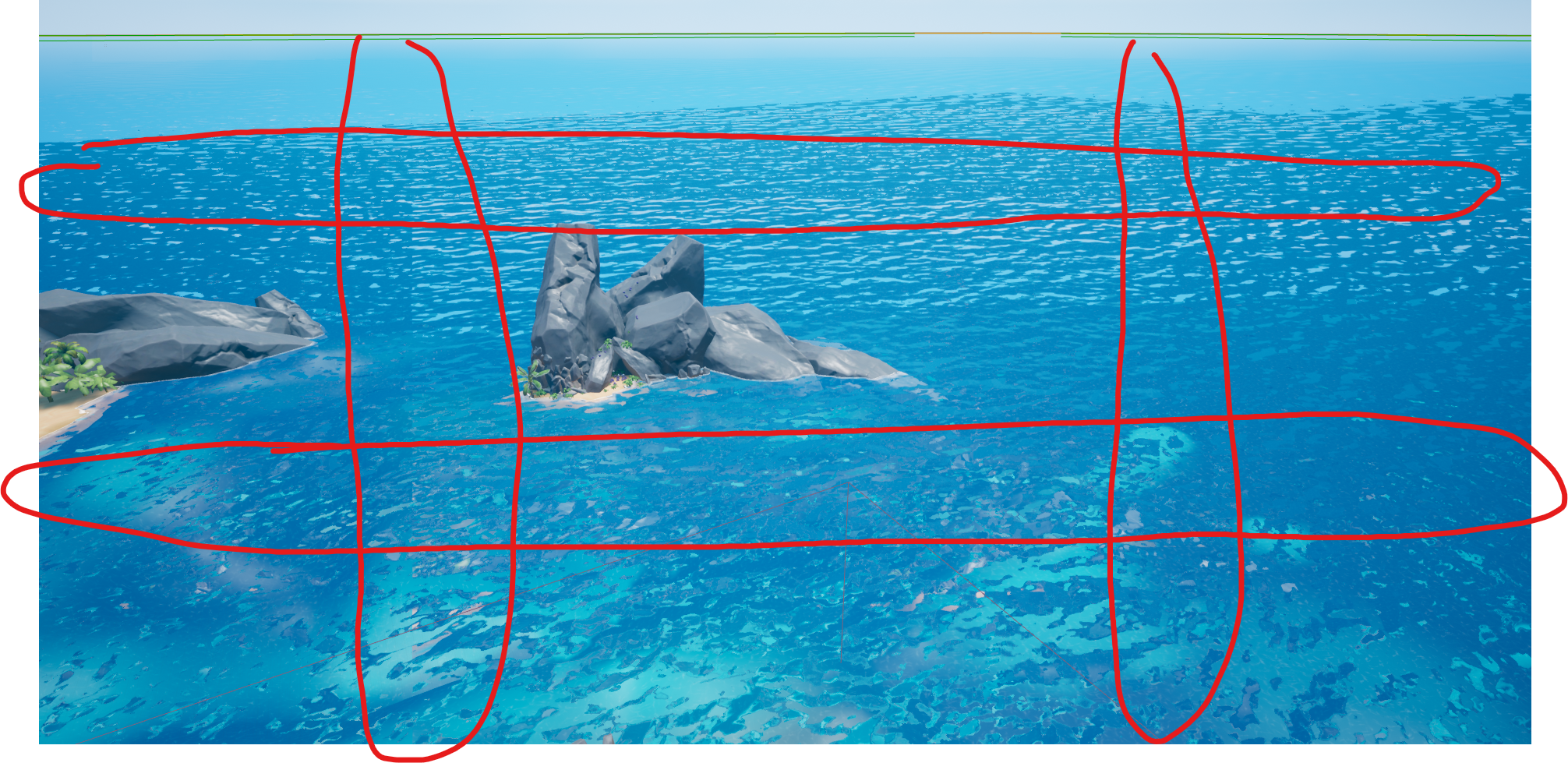 fallen jacinth
Considering it only affects your water, something in the material must be doing it
I'd say it has to do with something camera aligned
Can't help much without the material
tight stone
You'll have better luck posting the information where everyone can see it so that if someone else has an idea they can chime in.
Also more information like whether or not you're using raytracing, if turning on or off screen-space effects makes a difference, etc.
 waxen hedge
Does anyone know why rendering passes brightens the image?
EXR images
Png turns out alright tho
waxen hedge
So you’d fix that in post?
 granite lily
Hey guys, I have a nagging issue and I would be grateful is somen UE4 genius could help resolve. Im trying to export an actor fro sequencer to maya in order to simulate some effects externally. The problem is all my animated blendshapes are missing once imported into Maya even when i checked the "export blendshapes" checkbox in the fbx export dialog. Does anyone know how I can resolve this?
errant estuary
I found where the spline point gizmos get set in C++ so ill just change it there, i dont think its a bug because it gets set like this in the VReditorpawn prolly because 2d spline points would mess with ur eyes
i just like em 100 times smaller better, might be diffrent per situation
 halcyon zinc
anyone know how to get DOF working in 4.24 i cant get a camera that blurs everything out except a certain character
wheat flame
@tight stone thank you very much, it works !
 remote rapids
Hello guys, im trying to blend a facial animation with my body animation i have been told to use layered blend per bone but im struggling with it can someone help me ?
 surreal helm
recent work in UE4 https://www.youtube.com/watch?v=2ayqra7DwJ4
Short animation Tony Leonard and myself have been working on.
 plucky junco
@surreal helm that looks nice! I love the shallow depth of field in some of the shots
mint monolith
@remote rapids if it's only facial animation then turn Additive Anim type to local on the animation asset
@surreal helm Looks really cool, I think some basic animation principles are holding it back eg: the slow in/out on landing on the ground. Animators survival kit is a really good book but also just google the 12 principles of animation. Looking forward to your next one!
remote rapids
@mint monolith no bro it does nothing
mint monolith
Is this in sequencer?
gloomy garnet
Hey All. . . So I'm using UE4 raytracing in a few cinematics. It's a room and I'm using rectangle lights in my scene for the key lights. Once I set the rectangle lights up and build them, my scene turns extra dark. I have to over crank the light intensity, but doesn't seem to brighten correctly. Has anyone had any issues with raytracing rectangle lights? Thx ahead of time. . .
mint monolith
@gloomy garnet Make sure exposure is locked. Can you post a picture of what it looks like when it doesnt brighten correctly?
gloomy garnet
Ok. . . I've locked it down per camera. That's under control. What I'm running into is how dark it gets after the build . I have been increasing the bounce & per pixel settings in the camera as well. . . It have increase the output time per frame, but its getting better. . . .It seems that the higher quality ya have in your level, it' get very expensive.
mint monolith
Sounds like something is fundamentally broken in your scene
gloomy garnet
Quite possibly. . . I thought Raytrace would bring more to the scene. It can, it does. . but , the effort is more than the result. Might as well render it. Besides, I get preatty much a good result w/o raytracing & build. .. .
 rapid elbow
Hello there, I am looking for anyone who can give immediate help as I am running into a frustrating issue using the level cinematics as EVERY time I render a movie it seems to choose some random default camera despite putting in the right camera in the camera cuts...
mint monolith
@gloomy garnet The benefits Ray tracing offers are mostly on the realtime side. You dont have to build anything to get it looking good. Building lighting is largely unrelated to the newer ray tracing features
@rapid elbow It should only override based on the camera track. If you have a sequence with shots inside it make sure that there aren't conflicting camera tracks or that your shots don't overlap
gloomy garnet
@mint monolith - Yes. Thank you. . I'm finding that out the hard way. . . . Not a lot of current tut's on this yet.
mint monolith
@gloomy garnet Check this one out, it helped me a lot

As of Unreal Engine 4.22, Unreal’s renderer will support the new DXR API for real-time ray tracing. During this Unreal Engine Learning Theater session at GDC 2019, Epic’s Sjoerd De Jong demonstrates how to build a visually appealing environment using the new ray tracing featur...
gloomy garnet
Ahh, Cool. Thx!
rapid elbow
OK, I have got my main camera rendering properly, but now I still need help setting up camera cuts properly....
At this point I am frustrated enough that I feel like I should just make a totally new duplicate scene and remove the cameras from the outliner....
mint monolith
Like I said when you dm'd me you will benefit a lot from watching an intro series like this: https://www.youtube.com/watch?v=uEnfMV-4afA
Wes covers exactly that right here: https://youtu.be/e4fr23pVEuo?t=776
All those videos have bookmarks and are easy to navigate.
Right click on the shot from the top level-> new take will make a duplicate take

In this video we discuss what the series will cover and show the finished cinematic that we will create together from scratch. We also show how you can use the Take System in Sequencer to quickly swap out shots in your scene to provide different looks. We wrap up by discussing...
In this video we start working on the first shot of our cinematic by adding and animating a character in our scene. We also show how we can have our character carrying weapons during the scene that move along with our character’s movement. Finally work with our first camera an...
errant estuary
not sure how those hold up they are quite old
rapid elbow
Right....like one thing I noticed is in the shots he has mutliple shots on top of each other in one shot slot where as when I use 4.23.1, I only get one slot per shot..
tight stone
If you drag the shot section down it should pop onto a second row. Only one shot section will be evaluated in the event they are overlapping though.
gloomy garnet
Hello All. . .So, I'm doing cinematics with Unreal Raytrace. Do I need a Post Process Volume, if i'm setting all my Raytrace parameters in each Camera? My UE4 keeps crashing. Or, is that just what Unreal does when having animated Cameras using raytrace?
tight stone
The results of Cine Camera and Post Processing volumes are blended together to produce the final results, it doesn't matter where you set them.
You may be experiencing out of memory crashes or Windows TDR crashes, the latter of which you can fix, the former not so much.
gloomy garnet
@tight stone - Thanks for the info. Pretty sure it's the former as your said. Think I need a 2080 graphics, no less. Not sure I'm savvy enough for the Win. TDR issue. Cheers
tight stone
@gloomy garnet The TDR is pretty easy to work around, there's guides on the web (Windows Timeout Device Recovery). Just need to edit one registry key to put in a higher value
I believe the windows default is 2 seconds, so if any call to the GPU takes more than 2s it thinks the device has crashed and kills it. You can increase that to 30-60 potentially, but if your GPU does actually hang then you'll have to wait that whole time while windows is completely non responsive
(So maybe don't just set it to a value like 600 😉 )
gloomy garnet
Lol, . . .Right. Didn't realize the timeout is that short. If I can get it to 20sec. that would help lots. . . Thanks 4-da knowledge. 😎 👍
tight stone
Unfortunately I don't think it's very obvious which kind of crash it is. You can try looking in the engine logs (MyProject/Saved/Logs/...) afterwards but I'm not sure the software knows either. You can keep an eye on Task Manager's GPU tab and look at the memory consumption tooo
 north arch
Hi, just started messing around in sequencer - I notice small pops on animation clip transitions, what is the best way to prevent these?
tight stone
@north arch Put the clips on the same row and overlap them so they cross-fade.
I think it's resetting motion vectors between the two sections so you get one frame of motion blur doing the wrong thing.
north arch
Aha, thanks! The UI is kinda finicky but I was able to blend out those pops.
 viral saffron
Hi! Does someone know how to fix audio sync problem on in-game cinematics with level sequence?
tight stone
Going to need to be more specific than that, there aren't any known issues to my knowledge.
gusty heath
@tight stone I apologize for tagging, but recently I was playing with a proof of concept inspired by the mandalorian TV show use of unreal engine. I put together an example of a cutscene created on the fly at runtime from external data, and I wanted to share the results. Here is the example https://youtu.be/X_DPGSqqIJo

Proof of concept for external data-driven conversations rendered in unreal engine on green screen. The end result is rendered in Adobe aftereffects for showcasing and testing
it's basically using unreal engine for the Paragon characters rendering on a green screen and the end result dumped in Adobe After Effects, in this particular test I'm using some Star Wars background. I implemented some basic head tracking too.
I'm not using sequencer, the external data creates the actors and the cameras and makes the layout of the scene, etc. The external data can come from anywhere in any serialized form, in my example it comes from an older Bioware videogame
gusty heath
Is there a way to play a cinematic where my enemy is on the map? For example where my enemy catches me is where i want the cinematic to play
tight stone
@gusty heath https://docs.unrealengine.com/en-US/Engine/Sequencer/HowTo/DynamicTransforms/index.html
Describes how to create Level Sequences with Actors that have dynamic world transforms that can be changed at run time.
 round hazel
does anyone have recommendations for the best way to do 360 Video capture out of unreal? Ansel seems to be photo only
I've heard mixed things about the Panoramic Capture plugin
 muted hedge
Hello. I'm trying to play a couple of animation on my possessable character in a level sequence. Thing is, the character isn't in the world by default and is only spawned when player is restarted so I can't reference it in the level sequence. What's the best way to go around it? Ty
 gray sparrow
In my sequence apears a "Plane" who's not really here. I checked the outline twice.. D:
tight stone
@muted hedge Build it around a Spawnable and then use dynamic runtime rebinding to change the binding to apply to your particular instance instead of the spawnable.
@gray sparrow Does it show up in PIE?
muted hedge
@tight stone oh wow I would have never guessed that. I'll look into, thanks
gray sparrow
@tight stone "PIE" in meaning of, play in editor? Yes. Thats in play-mode 😕
tight stone
Try simulate instead (or eject out of your pawn during PIE) and see if you can click on it and see where it is in the World Outliner @gray sparrow
gray sparrow
I will give it a trie, alright
Aha! @tight stone Its looks like, it loads all Maps at same time. 🤔 I dont get it. "Suddently" happend.
Like.. it combine all maps.. uff. Okay, but now i know what happend. Thanks for the simulate-tip.
tight stone
@gray sparrow Did you set them all to "Always Loaded' in the Levels tab?
gray sparrow
@tight stone not independently / by my own. (And yeah, i know it sounds like a excuse >.<) I'll check this now
@tight stone : Okay, thats now a little bit to high for me.
Map/Level "Main-Menu" dont show up. And the stream:
tight stone
Yeah I think those are all set to always loaded, though they also look kind of busted. Did someone move files around or rename maps maybe?
iirc they have a blue dot next to their name in the Levels tab if they are blueprint loaded (which would mean not loaded/shown by default until you use code to show them)
gloomy garnet
Hi All. I'm having an Issue with the Preview Shader Indicator showing up in my Render Movie. . . . I have a series of separate sequencer shots in UE 4.24 using Rayrtrace. Each shot is using the same Level and 8 props, a table with some weapons. After a week of tests, I found the right lighting. They consist of mostly point lights, 2 spots and 2 rectangle. All lights are in the 'Blue- Green' in the 'Light Complexity' & 'Stationary Light Overlap'. In the last couple weeks, the preview never showed up in my avi's until a day ago, when I started refining the Camera raytrace setting per shot. Is there a wat to Turn Off the 'Preview Shader Indicator' in my AVI's manually??
tight stone
You probably need to run Build and bake lighting on all the levels and save them
gloomy garnet
@tight stone - 🤔 . . .I thought the same. So, I duplicated the Level, and ran a build, with raytrace on , and baked the lights. This would make the whole environment Level become so dark, and would sizzle. FYI, All my background lights were static, except for the 2 'stationary' point lights that interacted with my characters.
tight stone
I believe the Preview warning shows up after you have moved objects that are marked as static (or maybe it's lights that have been marked as static and moved?) and it's switched them to a realtime shadow
@gloomy garnet Try going to the World Settings and checking 'Force No Precomputed Lighting'. It'll switch them all to realtime lights but maybe works in your case?
gloomy garnet
@tight stone - Watched the UE4 tutorial and Live interviews going over the raytrace abilities. They said their environments in their test were hybrids. Both baked lighting and raytrace. . .But Never went into their set up. Mainly they were just selling the 'Raytrace' thing.
@tight stone - Ok, I'll check into the World Setting. . . Thank You
tight stone
They should be hybrid just fine, just trying to think of a workaround to get you going until you can figure out why the lighting build isn't playing nice.
gloomy garnet
@tight stone - I was thinking maybe by Hybrid, they mean: Build the lighting without Raytrace. Then reopen level in Raytrace with the Non-RT build, and only adjust the stationary/movable lighting. As far as props, now that I think of it, they were movable before. I changed them to static (since they don't move in shots) to save render output time. . . .
tight stone
I suspect that ray tracing only affects dynamic lights that cast shadows.
gloomy garnet
I know one thing. . . You are WAY better off with the Highest 20 series graphics card you can find!!!
tight stone
Static lights get vs. Static objects get baked down, but for movable objects they need dynamic shadows cast.
If your light is movable I think it casts a dynamic shadow (which would be affected by raytracing?), or if your object is movable it casts a dynamic shadow - I think.
Once you move them to static they're going to use lightmass and become static shadows stored in textures.
gloomy garnet
Even with Drivers, the 10 series(1060 -1080 graphics cards) won't give you accurate setting out puts or crash when you begin to set high parameters to the raytrace settings. . .
@tight stone . . . I think Your comment of 'objects to static', might be the issue. . . Thank ya lots for talking me through the issue-! It was a real big help to get me to the next step to a solution. . . 🤙 😎
 gloomy laurel
is it possible to re-use a sequence for another level later? was seeing if I could get/set the CineCamera+rig in level blueprint and update/replace it before running the sequence, but can't seem to access it
tight stone
@gloomy laurel either use Spawnables instead of Possessables, or use dynamic actor rebinding. Scroll up a bit, documentation link was posted earlier
 clever roost
Might be a silly question, but is it possible to control UI elements thru a sequencer track? Is there a good tutorial out there? My google searches only seem to find things talking about the Sequencer Tool itself
 hybrid pelican
@round hazel there is a 360 camera on the marketplace - its a bit pricey but is easily the easiest and best way f exporting 360 movies https://unrealengine.com/marketplace/en-US/product/camera I was using the $19 one but this is 100x better and the developer is very active in forumns and will get on any problem u have in a day

Camera 360 - camera system for video and screenshot (2D, 180, 360, Dome 180, Stereo and Mono)
hybrid pelican
ya but its a hard problem to solve
theres a new plugin that Unreal has but I cannot find any docs on sphereical captures - if u look in the plugins you can find it - maybe they are coming out with something I dont know
tight stone
@clever roost No. You can build UI animations inside of UMG using the Timeline tool (which is another instance of the Sequencer editor), but from the main Level Sequence editor you cannot animate nor spawn UI elements. If you need simple visibility or events you could make a blueprint actor which 'owns' the widget (and creates it) and animate properties on it.
 pallid spire
Does anyone know if it's possible to view the Infiltrator Demo in the sequencer? https://www.unrealengine.com/marketplace/en-US/product/infiltrator-demo

High-end demonstration of rendering and cinematic capabilities
Just noticed that it's older
tight stone
@pallid spire I believe it's built using Matinee, Sequencer's pre-cursor. Attempting to open the asset should ask you if you want to automatically convert it to a Level Sequence which will preserve most but not all Matinee content.
pallid spire
I opened the project but didn't see anything like that
I can press play and it plays the cinematic
tight stone
@pallid spire If you find the Matinee actor in the level and try to open it for editing is when it shows up I believe.
pallid spire
Yes that worked, thank you!
 gritty rain
Hey, friends! How can i import animated camera from houdini to unreal?
Failed to google any info
 unborn crypt
Is it just me or is depth of field not really working in 4.24.3?
 cursive parrot
My game has a dedicated server environment with 2 clients (1v1 gameplay). I'm trying to record a cinematic/sequence with both players in a match, but having trouble. Any suggestions? Currently I'm loading 2 separate PIE windows so I can initiate the action between both players (dedicated server runs in separate cmd line window). Is there something I can implement, even if it's a workaround, so that I can record both players actions while in this type of environment?
gusty heath
Hi all, hope everyone is well and healthy during these strange times, I was wondering if anyone has ever managed to create an atmosphere pass in unreal engine for use in a compositing package such as Nuke? My thought was to create a post process that turns everything black and render with the atmosphere but this doesn't seem to be working. Does anyone have any thoughts on this?
tight stone
@cursive parrot Why not have one client in PIE, the other a separate process launched with -game, and the server? That way you can record using the PIE instance, Take Recorder (and Sequence Recorder) work in PIE
cursive parrot
@tight stone - thanks Matt. So I did try with both windows in PIE, and at most could only record one. I think my issue is that for the player, they are unable to see themselves in-game and can only see their opponent. I could temporarily turn off hiding yourself just for the sake of recording though. Let me try that after work.
tight stone
@cursive parrot Ah, sorry I was thinking of like a third person game. Can you add a third person, a spectator and he's the one who records? And then two clients run in -game and the server?
I'm not totally sure how you're going to play as two people at once but I leave that one up to you
 normal fable
If you want to capture every moving actor in your game as data that can be played back later (To then set up shots in sequencer), is Sequence Recorder best for this or should I be using the replay system to capture the gameplay?
I have been trying with the sequence recorder but most actors are invisible, aren't playing the correct animations (it looks like they are frozen on the last frame of the custom saved animation but re-applying it and scrubbing does nothing)
They move correctly but since they are invisible and out of position it breaks the intention
normal fable
Just tried demorec and it works perfectly right out of the box
Only wish now I could scrub it in sequencer
 ionic sleet
Hey i couldn't find any answer online but is there any way i could trigger a destructible mesh in sequencer. Thanks!
tight stone
Can you use an event track? You won't be able to preview it in the editor via scrubbing though.
errant estuary
If i use sequencer in VReditor and i try to delete a keyframe it gives this, it tries to delete the entire object or something
where are the selected sequencers keys stored?
ionic sleet
@tight stone thanks ill look into it im new at sequencer so im just learning it
errant estuary
as far as i know the only way to delete a keyframe is with delete and that doesnt seem to work in VR
soft thorn
Hey guys, so did sequencer replace camera animation?
From how I understand it camera animation is unique in that its additive of the player camera where as sequencer is not
gusty heath
How would I be able to set the spring arm target length in the sequencer?
 broken snow
Hey guys, have a question I also asked in the level design chat, but relates more to cinematics (I think?). I am loading different cinematics together and levels and notice that my exposure gets overblown for the media plate and not the CG actors. I am using composure if thats helpful info.
mint monolith
@gusty heath Add an event track
 fresh saddle
@broken snow I haven't used composure, but if you're loading new levels and they have newly streamed Post Processing volumes overlapping the current ones, if you've checked the exposure option for one and not the other, the one that is checked is going to override the default value. I just make sure everything is checked on my PPVs to avoid this, also Check the priority values of your PPVs
cursive parrot
Is there a way to turn off safe zone markings when rendering out a cinematic? They are showing up in exported video capture.
 storm stream
When I make a cinematic and I will render it then it only shows a loading screen that I have set instead the world. Can I turn it off in the cinematic options for example?
So that it doesnt render any widgets (the loading screen)
Please @ me or DM me
broken snow
@fresh saddle I am using the same PPV, but I am going to see if I change the priority values if that helps. So odd that it would be a factor if it's being unloaded.
seems to still be occurring. Such an odd thing >.> I am going to try putting the PPV into the persistent level and see if that resolves it.
errant estuary
is there a simple way to keep camera from flipping 360 all the time?
to go from 350 to 10 it flips and takes the long turn
errant estuary
think i got it
tight stone
@cursive parrot You'll need to figure out how to turn it off for normal PIE unfortunately.
@storm stream You can use the "Game Mode Override" option in the settings to point to a different game mode (or launch the engine with -noloadingscreen(s? I don't remember which), but it entirely depends on how your game is set up to do a loading s creen.
@errant estuary You'll need to enable quaternion interpolation for that transform track which will take the shortest path between angles
 jagged raptor
Has anyone here ever made a QTE (Quick time event) In game ?
I am envisioning something coming at the player and when it gets close to the player it slows down, giving the player a couple of visual prompts that they have to do reactively in a set time,.
there would be an animation for success and failure.
getting abit more advanced, I would even like to do 2 QTE in a row, once the first is done a second begins immediately in quick succession...
Has anyone here ever made a QTE (Quick time event) In game ?
I am envisioning something coming at the player and when it gets close to the player it slows down, giving the player a couple of visual prompts that they have to do reactively in a set time,.
there would be an animation for success and failure.
getting abit more advanced, I would even like to do 2 QTE in a row, once the first is done a second begins immediately in quick succession...
 nova onyx
Question: So when I render an image through the sequencer within this particular scene, it creates these very weird artifacts. Anyone know why and how I could fix it?
@ me when responding 🙂 Thanks
 sudden pollen
Hey, I’m an amateur animation filmmaker here looking to migrate from SFM to a more powerful software. Does this program have things like destructible environments, cloth and hair physics and good laser effects?
nova onyx
@sudden pollen UE4 has their new and fairly robust Chaos system for destructible environments. I know that they recently updated their hair physics. Not so sure on cloth and laser effects, though their particle system is quite good.
sudden pollen
Cool : ), thanks
neon slate
heyo ! can anyone help with some lighting tips ? i have a bit atrium space with a bis emissive screen, ssgi is on so i get nice bounces in space, but is there a way to cast dynamic shadow from that emissive mesh as well ? and also is there a way to combine this with a baked static Ao for instance ?
was having a play with mesh distance fields but the resolution is too low, and i have too much geometry in the level it woukld be a huge perfomance hit
i thought about lightmass too, but as my light is mostly coming from the emissive screen plane it's wouldnt work
so i was thinking to just bake some nice shadows so that they show up when then screen is lit
otherwise, the space is mostly black when the screen is black
novel sparrow
@tight stone it seems, if the Replacing tonemapper PP is used, Fade in Cinematics is broken (does nothing)
Is that a bug? Or "by design" ?
tight stone
@novel sparrow I don't know how much or where replacing tonemapper kicks isn, but yes normally it is done in the tone mapper, it's just a multiplier in the shader;
novel sparrow
@tight stone Would be nice to have some node for that, is there a variable i can access in Custom node?
tight stone
@novel sparrow Sorry I don't know anything about the tonemapper replacement stuff. The fade track is applied as part of PostProcessCombineLUTs.usf,
float3 FilmColorNoGamma = lerp( FilmColor * ColorScale, OverlayColor.rgb, OverlayColor.a)
where OverlayColor is the color from Sequencer (still listed as Matinee in some code)
novel sparrow
@tight stone i've tried to find a away to use it, but seems it's not available in material nodes if PP set to Override Tonemapper
Seems the only way to make fade is via MPC -_-
Thanks anyway!
 copper escarp
hello! I learn ue4 for movie. I have a problem animating camera in sequencer, when rendering camera goes somewhere and does not move. How do I fix it?
copper escarp
another question)))
how to remove visibility hdri background in render sequence?
tight stone
@copper escarp extend your camera cut track, it tells the sequence what camera to use for a given frame, otherwise it defaults to the players view which will be at 0,0,0. Is your hdri background an object in the scene? Can you drag it into Sequencer from the World Outliner and animate the Visibility track?
copper escarp
@tight stone The first question is solved, thank you!
Visibility track doesn't work, hdri disappears and doesn't affect on world(
mint monolith
@copper escarp Try hidden in game
tight stone
I think you're asking a different question than you asked, and I don't think there is a good solution for you right now.
I believe they want the influence of the HDRI for lighting but to remove the pixels from the background from the final image.
mint monolith
Ah in that case I got around this problem earlier by making a massive plane, black emissive material, set to not cast shadows and attach it to the camera at a distance between the HDRI and everything else in your scene
copper escarp
I believe they want the influence of the HDRI for lighting but to remove the pixels from the background from the final image.
@tight stone
Yes, that's it!
Ah in that case I got around this problem earlier by making a massive plane, black emissive material, set to not cast shadows and attach it to the camera at a distance between the HDRI and everything else in your scene
@mint monolith
Thank you, good idea, I will do just that
errant estuary

Google Drive
a few problems here
when i want to move the timeline i have to click left of where the marker actually is
when i select multiple objects it loads all those keymesh things and drops my frames like a brick
and when i try to delete a keyframe from the sequence it wants to delete the object from the world and not the keyframe(the error in the end)
also, when i attach multiple objects to my motion controller it works fine outside sequencer, also inside sequencer when its on stop but when playing or scrub enabled it moves all the objects to some distant location, still attached to the controller tho(this is not shown in the vid)
first 3 problems do not accur in sequencer outside the VR editor, the 4th i wouldnt know cuz no motion controller in normal viewport and never tried any of this
not able to delete keyframes is kind of a biggy
i can drag em out if the play zone but it still keeps those keymesh things
novel sparrow
How can i request a feature for Sequencer?
Now it's not possible to drag track in sequencer and put it to last place. SUPER ANNOYING
tight stone
@novel sparrow I believe this has been fixed for 4.25
 dull palm
hi all, how should I achieve panning the camera to another angle on a certain interaction?
my use-case is to have the camera pan to another shot when my dialogue system runs
gusty heath
hi guys. need help here. my sequencer renders the image with strange colors while anywhere other the colors look fine. what can resolve this?
neon slate
Hey guys, I'm having some issues with figuring out my lighting scenarios with streaming levels, in the persistent level I have the main mesh with lighting scenario turned on, in the streaming levels i have additional assets that turns on/off with the sequencer and the lighting scenarios turned off for them, Now I'm trying to build the light of my persistent level, with all streaming levels turned off, so I want that lightmap to be present throught the whole thing... But when I build it it doesn't show on the streaming levels, and oddly the FPS drops dreamamtically
It's been bugging me out for a few days now, it would be awesome if you can shed some light on this
<3
 lyric marten
Do anyone knows why I don't see my video, when I set up foreground?
Without foreground everything is ok
If I take out FG object in material, video appears.
 chrome yoke
pallid spire
chrome yoke
pallid spire
Does anyone have some experience with virtual camera?
 gleaming forge
I want to make like a show or movie in unreal something like kingdom hearts 3 animated clips
Or better
jagged raptor
Hi Guys!
Would this be the right place to talk about/ Ask questions on Quick time events ? (And making them)
gusty heath
Hi everyone, I have a camera with two animation tracks, One is the main camera movement and then a secondary handheld camera shake, I was wondering if there is any way to concatenate these to be able to export the camera to houdini? For rendering external FX work
fresh saddle
@jagged raptor you'd probably want to go to the blueprint section
 cerulean grail
Hey guys, quick question to which I can't find an answer : is it possible in the Sequencer to replace a Mesh by another one sharing the same skeleton ? Basically I want to replace one of my old characters by a new one without having to redo all the animations inside the sequencer
tight stone
@cerulean grail Right click on the skeletal mesh actor in the Sequencer treeview and go to Assign Actor > Replace with Selected?
cerulean grail
Actually I'm dumb, I just had to go in the asset details outside of the sequencer view
Thanks 🙂
 floral stone
using sequencer to record gameplay but certain things like weapons that i pickup, or even spawn with dont get recorded
how can i change is so that it always records the weapon actor?
Pat answered my question
had to add that actor up here as well and not just my player
tight stone
You should try the Take Recorder plugin as well if you have issues, it is the replacement for Sequence Recorder, though it is based on similar recording techniques so it is mostly just a change in user workflow
errant estuary
take recorder is cooler, cuz it has a running milisecond timer
 steep frost
hi! i have two questions:
if I have a media playlist with some local stored video files
and i want any video to be in loop mode while i can skip through the playlist.
but can i loop the playlist only or do you know a way for it (enum etc.) ?
and i've tried to stream audio from a youtube radio channel but all i got is
the error "media failed to open" and the output log says "wrong datastream type".
so how to get around this?
i know the media stuff is not in final stage but i would be glad to get some help 🙂
pallid spire
What's the best way to add a hundred actors into sequencer with the same animation?
 wicked cosmos
Looking for a (paid) tutor to learn workflows from asset creation in C4D to rendering in Unreal. If anyone's interested please PM me. Thanks.
tight stone
@pallid spire scripting probably. Check the Sequencer Scripting plug-in, and the python examples in the folder
pallid spire
Does anybody know why it's all grainy? If I pause during the sequencer it's not grainy, only while it's playing. The render is the same.
I tried all the AA settings but nothing changed
pallid spire
I fixed it by just removing one of the extra cinecameras that I had, don't know how it caused that issue.
wicked cosmos
I'm a C4D animator looking to use Unreal as a renderer. Willing to pay for tutoring sessions. If interested, PM me. Thanks.
 stone igloo
I have a boss that activates through a variable. How do I activate the variable during the cinematic so the boss moves?
 tidal hedge
Is it possible to blur both the near AND far focal areas with a CineCamera? I could have sworn I saw a UE4 video recently where this was demonstrated, but I can't figure out how.
tight stone
@stone igloo Add the boss to the Sequencer, add an Event Track and call the function.
@tidal hedge I thought it just worked based on physics - pick an aperture with an appropriately sized area in focus and then set the focal distance as needed.
https://youtu.be/jbD9YnWFxnM?t=22
ie: I think here the table leg/far right chair is out of focus and so is the background. From the ArchViz learning sample

I am so happy to share with you all this archviz raytrace scene sample project for you to download free available from Learn tab of your Epic Games Launcher.
Responsable of leading the design work and composition on this scene, also for modeling, lightning and texturing.
You w...
stone igloo
@tight stone How exactly do event tracks work? Do you mind explaining it to me or pointing me to the right direction?
 gentle hamlet
Hello, I dont know if this is the correct place for this issue, but my ue4 crashes everytime I try to play the game with the level sequencer running. I have a video to show this:


 errant estuary
delete it?
gentle hamlet
yes, but how would I play the animation?
gentle hamlet
yes I did and it does the same thing
errant estuary
and in PIE?
gentle hamlet
in PIE, it also crashes
errant estuary
its also crashes the editor?
gentle hamlet
yes
errant estuary
i never seen this, anims allways for for me from seq, also in packaged
gentle hamlet
I'll try to put it in the blueprint to see that will work
errant estuary
use just a skel mesh in seq and replace with bp in the end?
try running it with just a skel mesh with the anim playing
errant estuary
np, now u either work around or try to do a proper fix 😛
cuz that bp shouldnt crash the editor 😛
gentle hamlet
I've just put a work around in, as I have the bp there but it is 'hidden in game' so I've set so it will show after the cut scene is done
but it is very werid
errant estuary
maY something on construction script
its all smoke and mirrors so hiding stuff wil work just fine 😛
there is something happening in that bp when the anim starts playing or something it would bug the crap out of me 😛
it allready does and its not my BP 😛
gremlins 😛
pallid spire
Is it possible to have several sequencer tabs open?
errant estuary
that would cause a callstack?
tight stone
@stone igloo When you create an event track in Sequencer and make a key, that key calls a function in the Sequence Director, which is a blueprint contained inside of your specific level sequence. If the event track is a 'Master Track' (isn't a track on an Actor but instead at the root level) then no arguments are passed by default to the function when called. If the event is on an actor, when the function is created it has that has that argument as a parameter, and will pass the particular instance to the function. If you add additional function parameters to the created functions, then they will show up as the Payload argument in the key properties.
@pallid spire No
 little reef
hey i am getting problem at rendering my particles arent visible on my render
some of the particles are visible but some aren't visible any know how to fix it
warmup was given about 1000
tight stone
Do they work in PIE? Possibly a visibility culling issue.
gentle hamlet
Hello, how would I get the players transform and make it a key for the level sequencer?
or would I do it a different way?
little reef
@tight stone i dont know about PIE
but some of the same duplicate particles are visible in render one which moved far its not visible
gentle hamlet
Hello, why doesnt my level sequence show/work?
gusty heath
Hi guys, I'm creating a sequence in which I need to use a blueprint actor but it seems like it doesn't work. I tried to use a custom event like on this tutorial but it doesn't work : https://docs.unrealengine.com/en-US/Engine/Sequencer/HowTo/TracksEvent/index.html
Example of how you can use Sequencer's Event Track to fire off Events in Blueprint.
I don't see the problem, seems like the trigger doesn't start so idk what happen.
tight stone
@gusty heath Events won't be called when scrubbing in the editor unless you have the "Call in Editor" checkbox ticked in the event key properties. That being said, I don't think that will work, Blueprints are not really 'running' so I don't think the Timeline will work. You would be better off applying the animation to the skeletal mesh directly in sequencer, or building the animation itself in Sequencer if it is simple. If you need to change what object it is animating at runtime you can use Actor Binding to swap out which instance the tracks are evaluated on;
https://docs.unrealengine.com/en-US/Engine/Sequencer/HowTo/AnimateDynamicObjects/index.html
This example illustrates how you can apply Sequences to dynamic objects at runtime that are different than the one the Sequence was authored with.
gusty heath
thanks for your help Matt, I think I will "deconstruct" the blueprint nodes in the sequencer like this : add animation, modify the dynamic material directly in the sequencer's timeline and that's it !
little reef


This IS Screenshot
When I Render This Scene


Some Of The Particles Aren't Visible Anyone Please Help Me
 kindred mesa
@little reef Have you checked the LOD settings on the particle actors?
little reef
Yea changed To High Details Still The Same
tight stone
Try r.ParticleLODBias -10 @little reef
When you're in game LODs take effect (which can still be done even on high settings, especially with game optimized particles from the store) so that console command will tell the engine to take ten steps higher quality LOD for any given calculation (which may be based on screen size) if possible, which should be more LODs than any particle has
Also if you end up being unsatisfied with how the grass looks in motion you can try downloading the Release 4.25 preview and trying the new movie rendering which lets you do real anti-aliasing samples instead of TAA (which is what causes iffy looking grass usually)
little reef
let me try and see
little reef
still the same after "r.ParticleLODBias -10"
@tight stone Any one please help me to fix the render
only some particles are visible
tight stone
At this point you're going to have to experiment. Movie renders use PIE so if you can figure out why it doesn't work in Play in Editor you can fix it. Experiment. Move the camera around. Examine the behavior. Does it not start immediately, does it disappear when you're too far, does it disappear if you look too far away, etc.
barren lagoon
hello! how can i make sure that a camera is at a perfect 180 to another object in the scene?
in the Z direction while having rotation selected i mean
never mind, just parented it to the object haha
pallid spire
Did they ever announce the winners of the film jam contest?
tight stone
I would go into the particle emitters and look at their settings, or look at the actor and see if there are min/max distances specified somewhere.
little reef
there 0 in min and max
pallid spire
Sequence Display Rate doesn't seem to work, no matter what I choose it still plays at a high fps
barren lagoon
how do i extend out the range here?
the left one
once i hit the 5 second mark the camera cut just stops doing what it was doing
these are my sequence recorder settings
barren lagoon
okay, this is weird
i'm not sure what i did
but now it's extended out to here
👀
tight stone
@pallid spire Display Rate really only controls how far apart the keys are, time is still calculated in seconds so it doesn't matter if you have a 2fps or 90fps sequence, half a second is still half a second. If you want to play it in say 2fps there isn't a built in way to do that right now without also setting t.maxfps=2, which probably isn't good for the rest of your game.
tight stone
@barren lagoon that is a combination of both inner play range and outer section range + offset
barren lagoon
aha, got it
yeah like i said i just had to extend my shot out lol
i was just focused on the camera cut track
i'm very new to Sequencer but it's so much fun
especially since i'm using it in Squad's SDK
i'm getting a little confused by the inception going on in my sequence. if i want to trim the length of my shot, do i adjust the shot or the camera cut?
i'm going to assume shot
tight stone
The camera cut only tells the sequence which camera to evaluate for a given time, it's not even a required track
The shot controls which sub-sequence is being evaluated at all
barren lagoon
that makes a bit more sense. say that i want to cut out a few seconds from the start of my shot. what do i do then? dragging to the point where i want it to start doesn't seem to work.
tight stone
You can just drag the left handle of the shot section in the parent sequence. Or right click on the properties and choose a start offset
barren lagoon
haha you legend. thanks so much! i'll report back if i run into anything else 👍
barren lagoon
alright, so my shot is trimmed just the way i like it. however, when i bring it over to the start of my sequence, it restores the shot instead of keeping it the way i like.
not sure what's causing that
so i basically have to keep it at the 2.58 second mark otherwise the trim is erased
 high locust
Will a vignette simulate tunnel vision well enough, or should I screw with the FOV as well?
barren lagoon
i have this shot trimmed out exactly how i want
it starts and ends at the spots i want it to
when i drag the shot back over to 0.00s, it goes right back to the very beginning of the shot
as if i never trimmed it out
i'm not sure what's causing this
barren lagoon
never mind, i know exactly what it is
pallid spire
I can't seem to copy folders from a level sequence and paste it onto another, is this possible?
 hybrid ore
hello, im trying to find a workflow for my sequence recording, i have 1 dog and 1 kid and i control them as pawns so first i record the kid running around (while controlling it) and then record the dog following him , so in the dog recording i simultaneously play the kid recording so i can know where the kid is , and at the end i want to use the 2 recordings and mix them to have the kid and the dog in one recording , is there a better way ?
mint monolith
@hybrid ore Checkout take recorder, I think it might have this functionality built in
 sweet hawk
Okay, I need a help with this issue.
I have forced Engine to NOT use any lods, but when I render a shot It uses LOD.
and turns off emissive for some reason....
mint monolith
@sweet hawk How did you force it off? Console overrides don't carry over when capturing so you will need to execute them on begin play in the level blueprint
sweet hawk
Ohhhhh! I forgot that UE4 splits viewport/render/game individually
mint monolith
Yeah thinking of it as basically like running a seperate game helps me solve a lot of problems
As for the emissive, check the material doesnt have some gameplay logic type stuff hooked up
But the LOD thing might fix both
sweet hawk
I will try using nodes once my UE4 stops crashing.
sweet hawk
@mint monolith yep that fixed it.
lyric marten
Why I see different things in viewport and in camera? In camera I can see SM trough landscape
gritty rain
Hey! Any1 here?
warm dune
Is it possible at all to layer record different properties of the same Blueprint actor (source) one at a time and using the same Sequence with Take Recorder? For example, if a BP actor has two properties (variables in a Blueprint) I would like to be able to record one of them, then stop and select the same Sequence so I can record the second property while playing the first one, layering the properties one at a time. So far even if I select the same Sequence to record on top (following the documentation under Using Layered Take Recording), Take Recorder creates a new sequence if the same object (source) is being recorded. Selecting each property individually in the source's Recorded Properties settings for each pass doesn't work either. It seems that layered take recording only works as long as the sources being recorded are different actors for each layer. Is this correct?
tight stone
Try turning off each-actor-in-a-subscene in the project settings. But the sequence you see when you open the take is the one played and recorded into so you need to make sure you've got the correct sequence as your source to play back
But you should be able to check the toggle on properties on an actor to control if they record or not
 pale swallow
Doing a magazine cover and I gotta export a High Res Screenshot of just my static meshes/everything but the skybox. Best way to do this?
Was thinking make the skybox green and key it out, but idk, might bleed into my reflections
warm dune
@tight stone thanks for your reply. I did try all of that and even if I choose what properties to record (different ones for each layer I record) it still creates a new sequence instead of using the same one. It layers properly if the second layer is a different object but that's not what I'm after.
tight stone
It is always going to make a new sequence, that's the idea of take record
is each take is stored separately so you can go back and change which take you're looking at later
But you can choose which take you're recording from (and it is played back at the same time)
tight stone
can you record your screen and show what is happening
warm dune
With different objects it's possible to record them in the same sequence one by one
I will. Thanks
barren lagoon
what's the difference between focus distance and aperture? both look like they give the same effect.
at least on my end here with what i'm doing
tight stone
@barren lagoon same thing as a real camera. Aperture controls the range of depth that is in focus (higher number = lens open wider = more light = only a tiny amount of depth is in focus, lower number = more closed = less light = larger amount of depth is in focus)
While Focus Distance is moving where that slice of depth is
barren lagoon
got it. thank you friend! you being active in this channel is a godsend. Sequencer has been so fun to tinker with.
cerulean grail
Hey all, I have a question now that I really dive into the sequencer.
How do you usually handle characters carrying weapons or not ? It's impossible to use BP in sequencer so I can't really put the character i built with his mesh + his weapon (different mesh) directly in the sequencer. Do I always need to reattach the weapon in the sequencer manually ? It sounds a bit tedious. Is there a way to make a "prefab" with character + weapon easy to re-use in the sequencer ?
The way I'm doing right now is have a character mesh with no weapon and a character mesh with weapon, though it's a terrible workflow as the weapon needs to change sometimes 🙂
gritty rain
Heya! How do i do a preroll for particles? I want to render a sequence with partciles already up in the air. But on my render they only start appearing.
gritty rain
Kinda solved it. By using Sequencer Render warmup option.
I reiterate this is great fcking place. So helpful.
tight stone
@cerulean grail Dynamic Actor Rebinding. Animate a Spawnable copy of your player, rebind to the actual player instance (which is already set up) at runtime.
cerulean grail
@tight stone thanks I didn't know about the dynamic actor rebinding feature. I'll give it a try today and see if I can do what i want with it, as I don't have only the player but also other characters that are carrying weapons. Cheers !
tight stone
@cerulean grail If all of your characters/players share the same parent blueprint class, it might go okay. Basically Sequencer just takes the tracks that are there and tries to evaluate them on a new object... gets tricky if they have different components so if they all share a parent blueprint that defines like their body skeletal mesh and weapon skeletal meshes (and are just swapped out which specific ones per person) it might go ok
cerulean grail
They definitely have different components. Some characters have one weapon, some have two (shield + sword etc). Let's see how it goes, but that looks like the right direction
But they indeed share the same parent so as you said, might go okay 🙂
pallid spire
Is it a bad practice to make the lights moveable instead of stationary/static just to avoid the red cross for cinematics?
tight stone
Movable lights are significantly more expensive than the other two kinds
 tight mesa
Hi everyone, I have a doubt about MOCAP technology in UE4, is here someone who can help to me please ? Thx 😉
tight mesa
it's necessary do a skinning / rigging ( at 3dMax for example ) if then I will apply the character in UE4 and test it with a MOCAP tracksuit ?
 thorn whale
Yes. U still need to rig and skin when using mocap data.
tight mesa
thx so much ! 😊
thorn whale
Ask away should u have any further questions about it
tight mesa
Okey thanks, i'm doing the final career project and surely I will have more questions, i'm thankful 😆 😊
barren lagoon
i haven't used cranes and rails yet, but what's the benefit of using them when you can just keyframe the transform of cameras?
barren lagoon
actually also begs another question. in what scenario would i use a crane over a rail (and vice versa)?
couldn't a rail theoretically do the same as a crane (and vice versa)?
tight stone
They're just there to provide constraints that physical camera moves often have
ie: Many real world cameras are shot on either a crane or a rail, cranes give you arcs relative to their dimensions.
The look of Cinema comes from more than just visual effects like color grading or lens settings, it also comes from the physical constraints used to shoot it
barren lagoon
i see. i'm just trying to wrap my head around it. it seems to me that a crane would be useful if you're trying to move your camera in a perfectly circular motion (like hands moving around a clock, essentially) and a rail would be useful if you're creating some type of sporadic "roller coaster" cinematic with perfect curves showcasing the layout of a scene.
but for perfectly horizontal or vertical movement, doing simple transform keyframing for a cinematic camera seems to still be the way to go
maybe i'm missing something
i have a soldier in my cinematic and i want the entire thing to be done in one shot (it's inspired by the movie 1917)
i tried using a rail but because of how close up and quick everything was the rail turned into a complete mess and was a hassle to be accurate with
so i'm unsure if a camera or a camera with a crane is the way to go
is there some benefit the crane would give me for what i'm trying to achieve?
tight stone
I would probably not use rails/rigs if you're doing a really long shot, it's probably going to be pretty hard to transition between them smoothly
 hollow owl
what's the proper setup for a virtual production enviroment, to properly match the tracker position to the lens?
hollow owl
I dont think that the position of the tracker vs lens should be approximated, since the paralax between the camera sensor and the tracker is very important for movement matching, is there anyone doing virtual production that has a proper calibration tool?
 violet igloo
anyone know how to change the camera res in a cine camera actor similar to in the regular camera
where i could just type like 2048x1072?
tight stone
I don't think the resolution actually defines anything, it's just a helper for generating the aspect ratio.
You can just type 2048/1072 in the field that says 1.9104 and it'll do the math
barren lagoon
using a standalone camera and keyframing it is working pretty well atm. what are some specific scenarios in which i would find it beneficial to use a rail or crane?
tight stone
@violet igloo In a cinematic camera it is based on your sensor size, change the Filmback. The sensor size is needed to accurately calculate physical effects for the camera.