#cinematics

1 messages · Page 12 of 1

neat jewel
#

Hey ! Is it possible to program the transformation of a cinecamera ? I want to attach it to a vehicle to shoot a sequence.

  • I try to add a cinecamera component to the actor, doesn't seem to work
  • I try to add a custom blueprint component that update the position of the camera every tick, but it seems to be a bit buggy...

I don't know what to do :/ ...

fickle lion
#

It should be possible as you would any camera. I say rrfenece back to the ue videos about it

neat jewel
#

I can't find anything about that... I tried to use sequencer and add an actor, but this actor has two cameras (a "normal" camera, and a cinecamera). But it always record the "nomal"/"main" camera, and not the cinecamera

#

Is it possible to set the cinecamera as the "main" camera for that actor ?

fast inlet
#

Is there a way to do a smooth transition from the camera attached to the player's thirdperson into the cinecamera in a level sequence?

#

Hmm, I'm thinking using set viewport, but wonder if the cinematic camera's attribute will stay intact? Gonna test rn

fickle lion
#

@fast inlet there should be a node that's blend something

fast inlet
#

Yup, the blend set view port

fickle lion
#

@fast inlet set view target with blend.

#

Yeah that's it

fast inlet
#

I'm experimenting with it atm and see if the cine camera will keep its property

fickle lion
#

It does, should I mean.

unkempt lotus
#

Can you also blend the camera bars during that transition to the player camera?

#

currently they snap out of existence for me

fickle lion
#

Yes

#

@unkempt lotus it should be possible

unkempt lotus
#

found solution

#

hopefully i can animate that

stiff plume
#

anyone know how to pause a sequence, change the camera back to the player camera and then be able to resume it?

vivid flame
#

any idea why my sequence has these weird vertical black bars on the sides? It wasn't like this before 4.20

unkempt lotus
#

thats aspect ratio

#

@vivid flame try selecting different aspect ratio or resizing window

stiff plume
#

hey all, I want to break out of a sequence and resume it

#

I am saving the the frame when the stopped button is pressed

#

and then when I click resume it starts the sequence again and scrubs to that time

#

but the variable type is not compatible

#

is there a better way to do that?

#

I cant use pause bc I want the sequence to break and revert back to the playercontroller

cobalt iris
#

Iam using a root motion animation on my player BP.. But when I preview it in sequencer the animation is playing in same place.. But when I play game it is playing root motion animation...

I want to preview that root motion inside sequencer.. So I can animate cameras properly..

Note : I am playing animations on player only.. No other skeletal meshes added in sequencer

uncut sparrow
#

Is there any way to keyframe camera shake scale in sequencer?

swift latch
#

Do you guys think the main menu background should be a real time UE4 level with a camera or do you think it should be a prerecorded video playing?

mossy drift
#

If you have a realtime background you can do some nice tricks like move the camera a bit or at least move paralax planes of dust or flares when you move the mouse around

#

video has advantages. A fixed quality that is consistent across machines, better antialias etc. but with realtime you have access to better resolution adaptation including higher resolution than video

#

also smoother framerate if you have a high refresh rate monitor

#

The DOTA International touranament is this week, and we have the option of watching the matches in streaming (steam.tv or twitch) or watch it in game. It looks way better in game.

uncut sparrow
#

Is it possible to pilot a keyframed camera while there is a camera shake or camera animation assigned to it?

#

Seems to be impossible to navigate and rotates like crazy

#

Fix is to delete the shake / animation and then pilot

#

But this is frustrating if making small adjustments after you have got the shakes lined up nicely

gusty heath
#

Is it possible to move inside a cinematic? Pressing a button and change from cinematic camera to player camera, while the cinematic is playing.

cobalt iris
#

@gusty heath yes.. Use set view target with blend

gusty heath
#

@cobalt iris You can't change the camera while in the cinematic, it automatically changes to the cinematic camera back again

winged dagger
#

@gusty heath are you using camera tracks?

fast inlet
#

When rebinding actor, for some reason the events in cinematic sequence are not triggered properly. Does anyone have the same problem?

#

(I don't have a struct however... is this the cause of the problem??... I should test that out soon once I'm back)

raven basin
shadow peak
#

hello friends .. someone who knows how to make cinematicas

shadow peak
#

how do I make a camera follow the plane as cinematica .. and start the game ... I'm not good at cinematics would appreciate a help

gusty heath
#

Hi everyone, I was about to start a cinematic project on a new map when the terrain material started to not loading the shaders. It seems to me that there's a problem in the connections of the material inside the editor but I'm not quite sure since I already checked it and found nothing strange. Does anyone know a fix for this?

shadow peak
open jolt
#

Anyone ever had trouble getting avi's saved out of unreal into premier pro?

#

I just get a black screen in premier

open jolt
#

Never mind, just had to turn off compression

whole dome
#

hey guys, newb question

#

i have a sequence with a bunch of Events. Is there any way to re-sort them vertically? just visually so i can have some at top, and others below it?

uncut sparrow
#

Is there any way to display UMG elements in sequencer for certain clips?

odd rune
#

Hey guys,
I'm trying to setup make a sequencer blueprint where the sequence runs at the location of the controlled pawn. I'm trying to use Spawnable Actors, but they always animate in the absolute world space.
I'm hoping I can use spawnables and they are relative to the transform of the Sequence Player. Has anyone done anything like this?

odd rune
#

I suppose the answer is to rely on Attach tracks.

silk gust
#

Hi, how can i record 2-4k 360 video in the Unreal Engine ?

#

Maybe someone knows the plugin or how I can do that.

pallid axle
#

is this the proper channel for talking about unreal studio?

steep tapir
#

hello who can help me i tried to make cinematics , I did it well but the only problem was that the character does not appear .

karmic forge
#

@silk gust do you have a 360 camera ?

silk gust
#

Nope

#

but i want to record 360 video inside engine

#

And actually Unreal have not nice tutorial or documentation

smoky cave
#

Hi peeps!

#

We got a weird issue. We got a sequence that did not happen before, nor does happen in the editor. When we play the sequence in a packaged game, it crashes with the message: Attempting to evaluate a Transform track with a null object.

#

Ofc there are no errors and no warnings at all in editor

silk gust
#

It's posible with Stereo Panoramic Capture plugin

#

but its is not easy and with command nodes

vivid flame
#

My intro movie works perfect when playing as standalone, but when I packaged the game, I can see it for 0.1 sec and then it skips straight to menu, any idea what might be happening?

stiff plume
#

hey guys I am trying to create a transition effect between two scenes

#

basically it needs to zoom in from a 1x scale to a 10000000x scale

#

any ideas?

lavish sphinx
#

render targets?

stiff plume
#

trying to figure out what kind of effect would fit it

#

if you have any references

#

for example using some kind of warp/hyperspace jump to zoom down

lavish sphinx
stiff plume
#

well the two levels are seperate, so I kinda have to zoom/blur it into a frame then switch levels un unblur it again

lavish sphinx
#

if you use render targets, you should be able to maintain the frame like the examples i showed

#

take a picture and load the next level while zooming in to the picture, then swap out for the new camera in the new scene
it should look seamless

stiff plume
#

sorry I was on lunch

#

thanks Ill try

shut minnow
#

guys, does the Composure Framework support compositing onto live video footage yet?

gusty heath
#

@gusty heath what assets do you using looks so good

stark tundra
#

What's the best format for videos in ue4? If not the "best" at least some guidelines would work for us.

gleaming bear
#

@stark tundra H.264 encoded .mp4 containers

proud coral
karmic halo
#

hello not sure where to post this question but since its cameras id think its cinematics haha andways the problem is that when my character goes behind an object the camera goes up (image) im not sure as to how to fix this :S

#

i just moved right

stark tundra
#

@gleaming bear Thanks

tough niche
#

When I click sequence recorder
and I play it, my character has a A pose attached with him

toxic oyster
#

Hey

#

Is it possible to output h265 or h264 from ue4?

dapper rover
#

Let me know what you guys think about this

sand sierra
tall palm
#

Hello, all. I cannot get the Startup Movies to work at all. I've tried .mov, .mp4, .mp4 as MPEG-4, .mp4 at 25FPS, .mp4 at 1280x720. What's the magic sauce for Startup Movies?!?

sand sierra
#

@tall palm try downloading and using the UE4 logo movie from the official source first. If that doesn't work then you'll know it's not a codec issue,I had an issue of something in my project blocking it playing - but it resolved itself when I updated to newer engine.

tall palm
#

I'm on 4.19.2

tall palm
#

Oh, great!

sand sierra
#

on the right hand side I think

tall palm
#

I thought you meant literally the code repo

#

But that's awesome. Thank you!

#

UE4_Startup_Moving_Logo_1088_60.mp4

#

Hmmm. No mention ANYWHERE about 1088@60fps

#

😐

tall palm
#

Is it supposed to play the Startup Movies when launching a Standalone game?

#

Nothing has worked so far. NOTHING

sand sierra
#

It should play in standalone. Try creating a blank project and using one of the ue4 startup videos to see if that works.

umbral turret
#

Hey all! A bit stuck on something I've done many versions ago and can't seem to replicate: I'm trying to play a simple video on an object in the world (in this case, a cell phone). I have the video set up properly as a material and media player etc. It will play on the object when I have it playing on the Media Player, but for the life of me, I can't find the right voodoo to script it such that it plays a) when the game runs b) via a level blueprint trigger.

Been watching videos etc all morning. Blarg. 😛

sand sierra
tough niche
#

My game level is apocalypse theme, and my ingame cutscene is before apocalypse so it's a normal day but, what method should I use then?

#

what method do you use? I want to play a specific cinematic after overlapping the trigger box but the problem is that it's in my second level, is there a way to play it? or should

#

render it and play it in my level?

#

I mean my world is apocalypse time with everything's destroyed, and When The pawn overlap to trigger it will play a cinematics like before the apocalypse so everything's normal but the problem is that that scene is not in my current level.

sand sierra
#

make the cutscene a video to save loading the other level

winged dagger
#

I have a BP that is added to level sequencer. when I add Transform track to it, it just doesn't appear, I have done this before with this exact BP. why is it not workign now

#

and now it appears. holy fuck epic

fluid cedar
#

Hey all, I've made a sequence with 10 cameras, working perfectly. But the last camera is my "FirstpersonCharacter" wich is locked, was hoping to be able to walk around with this camera in the scene after the sequence had played. Can anyone help?

fluid cedar
#

Bump

rain holly
#

Either use the possess node (don't have experience with that) or stop the sequence via a node manually at the end, that should possess your player again as well

fluid cedar
#

Thanks for your response, I have looked into that possess node - but I cant find out where to connect it to the firstperson default camera

smoky cave
#

Hi peeps!

Quick question. I have a character in the scene, that talks and has movements as he speaks, etc. There are multiple sequences for this said character, that all represent a different outcome. For instance:

Players are standing inside a house. The character is standing outside, and tells them to come out. If they come out, the character starts talking about whatever he wants. But if they do not come out, he has another sequence that he plays, where he asks them again to come out, but in a different wording etc, to avoid repetition.

My question is. How is it possible to blend the beginning and the end of a sequence into an idle animation, so that there is no "popping" if the character is in a different pose when he finishes the sequence, rather then being in the first key pose for the idle. Same for reverse, while idling and waiting for players, and then a sequence starts, how to blend in from said idle animation into the sequence anim, instead of popping straight into it?

#

I've read some stuff about making an animBP and creating an Idle animation, and using weight for the sequencer anim to blend in and out, but real question here is if it's really working? Also if it does, what if we have rootmotion for idle but regular anim for the movement, hence the origin of the actor is like a mile away from the actual mesh, whereas the idle would work with the actual position

hexed jetty
#

Anyone can tell me why when I used a sequencer to move a object after being activated in a blueprint that it doesn't save its location and resets back to where it was in the beginning of the sequencer.

summer forum
#

any idea how to activate an animated camera which is created inside sequencer?

#

I start the cutscene and the camera stays the player camera 😦

winged dagger
#

hey guys, how can i link multiple cinematics (level sequences) together in a master sequence - I can simply add them as camera tracks, or sub sequences, but i have embedded events in event tracks that don't fire.
what is the proper way to do this

#

@summer forum it should auto take over, is the camera inside the level or does it only exist in the sequence? you may need to have it in the level as a physical object

#

meh nah, should work, sorry no idea :x

#

@hexed jetty there is a setting in the sequence to keep objects at their end position, depends what you want to stop from moving:

#

in respone to my question, wew, good stuff, thanks for the soundign board haha

summer forum
#

it was only inside the cinematic
placing one in the level and calling set view target directly kinda solved it, but maybe that call wasn't even necessary then 🤷

winged dagger
#

with view target shouldnt be neccesary, it takes over automatically if cinematic is played,. ye

#

but you need viewtarget to take it back to the player camera

humble spruce
#

Hello, I have a question about the sequencer, is it possible to set a default start frame range when you a create a new shot ? I want to start at 1000 instead of 1 as set by default ?

#

And another question about the camera, i'm not sure, but is it possible to set a near clip per camera instead of global near clip ? I know that we can hack by camera fading effect on the shader, but i wanted to know anyone know a simplier solution ?

#

Thanks !

dense glen
#

I'm running into something odd. Whenever I full screen, play, or render this scene the reflection of the water changes in a funky way, and I have no Idea why.

#

Uh okay then I have to link it because for some reason discord thinks it is inappropriate. Yay me.

rugged pivot
#

not sure if thats the cause but, one reason reflection seens off sometimes is cuz its using Screen Space Reflections, meaning it wont reflect anything thats is not currecntly visible on scree, and when stuff goes in front of something that should be reflected, it disappears

#

now, idk if theres a better way with offline rendering, maybe ask if theres an alternative to SSR for offline rendering, or on how to minimize artifacts using SSR, on #graphics they may be able to help you

#

@dense glen

dense glen
#

A project restart fixed it :/

primal isle
#

What is the best way to do a cinematic in wich my characters are animated, I know how to do a level sequence, camera cuts, and such, but Im not sure how to do a sequence in wich my characters are animated and make them move the way I want them, Do i need to create an AI to make the characters move in scene or play some montages? or how is this accomplished?

unkempt lotus
#

Not sure if this has been asked before but how do you tween between tracking two different actors. i tried keyframeing xform of camera from one "actor tracking" to the next over some frames, but it doesnt seem to work as expected.

unkempt lotus
#

huh, redid the keyframes and it is working now

#

must have mis clicked or something

eternal prawn
#

I want to chose a different camera when playing a sequence if a player is wearing a VR headset; is that possible?

#

and beyond that, I ultimately want it to be able to toggle between the two camera choices when taking the headset on and off (already have detection for that and do it for non-sequencer stuff)

#

is there any kind of support for that, telling it an alternate set of camera tracks to use and switching during Play() ?

north dagger
full flame
#

Hi, is there a way to get one sequencer's object's location before it is played? 😃 I am doing some camera work. When player is attacking one monster, it will dynamic trigger a QTE skill, and play one level sequencer. in the sequencer, it will animate the player's camera. So it need to get the camera start position in the sequencer before it is played for the blending. The whole level sequencer is created in runtime. Need help 😃 thx thx

pulsar crystal
#

@loud sail hi

loud sail
#

Hi

balmy olive
#

Hello

sharp pike
#

I have basic problem

#

my sequence works well

#

all is fine until end

#

on finish it just snaps back to beginning state

#

:c

#

OH WOW

#

you can right click the animation track and that gives you properties window

#

where you can set keep state...

#

sneaky

#

Ohhhh

#

and i found a little bug

#

sad

#

nreal crashes when editing in sequencer and pressing undo

eternal prawn
#

When framing up shots in sequencer, is there a way to constrain the camera to a constant velocity?

#

Say I do three shots from different positions, have it auto stretch the keyframes to where the camera was moving 5mph the whole time

eternal prawn
#

I'm trying to set pause on end, it seems to exist in MovieSceneSequencePlayerbackSettings, but not in the level sequence actor details panel:

#

What's the right way to go about setting it? In the level blueprint I can't seem to get at it, the sequence actor already has a SequencePlayer by default, and the player only has a getter on settings, not a setter

#

it's very strange, the settings seem to come from:

    UPROPERTY(EditAnywhere, BlueprintReadOnly, Category="Playback", meta=(ShowOnlyInnerProperties))
    FMovieSceneSequencePlaybackSettings PlaybackSettings;```
#

and that has:

    /** Hide HUD during play */
    UPROPERTY(EditAnywhere, BlueprintReadWrite, Category="Cinematic")
    bool bHideHud;

    /** Disable camera cuts */
    UPROPERTY(EditAnywhere, BlueprintReadWrite, Category="Cinematic")
    bool bDisableCameraCuts;

    /** Pause the sequence when playback reaches the end rather than stopping it */
    UPROPERTY(EditAnywhere, BlueprintReadWrite, Category="Cinematic")
    bool bPauseAtEnd;```
#

hide hud and diable camera cuts show up, but pauseatend doesn't

#

but they seem to have exact same uproperty settings

#

ah, even though they are using ShowOnlyInnerProperties, they still are overriding the whole detail customization with DetailCustomizations/Private/MovieSceneSequencePlaybackSettingsCustomization.cpp

#

and they are missing it in there

#

fix is:

#
--- a/Engine/Source/Editor/DetailCustomizations/Private/MovieSceneSequencePlaybackSettingsCustomization.cpp
+++ b/Engine/Source/Editor/DetailCustomizations/Private/MovieSceneSequencePlaybackSettingsCustomization.cpp
@@ -140,6 +140,7 @@ void FMovieSceneSequencePlaybackSettingsCustomization::CustomizeChildren(TShared
        ChildBuilder.AddProperty(StructPropertyHandle->GetChildHandle(GET_MEMBER_NAME_CHECKED(FMovieSceneSequencePlaybackSettings, bHidePlayer)).ToSharedRef());
        ChildBuilder.AddProperty(StructPropertyHandle->GetChildHandle(GET_MEMBER_NAME_CHECKED(FMovieSceneSequencePlaybackSettings, bHideHud)).ToSharedRef());
        ChildBuilder.AddProperty(StructPropertyHandle->GetChildHandle(GET_MEMBER_NAME_CHECKED(FMovieSceneSequencePlaybackSettings, bDisableCameraCuts)).ToSharedRef());
+       ChildBuilder.AddProperty(StructPropertyHandle->GetChildHandle(GET_MEMBER_NAME_CHECKED(FMovieSceneSequencePlaybackSettings, bPauseAtEnd)).ToSharedRef());
 }
stiff plume
#

hey, I Asked in the general channel but figure someone may know here

#

what is the best way to attach an object in sequencer? I have tried using the attach track (bugged apparently) and also parenting in the editor

#

when I make the sequence in the editor the object moves with its parent, but on runtime it doesnt

#

gg fixed it, not sure how but I enabled 'keep state' on the attach/transform track of the child

winged moon
#

If I make an actor a spawnable, is there a way to reference it via blueprints? Essentially on the event track

fluid cedar
#

How do I put in an image in my sequencer, how do I do that?

#

Cant just drop it in like in premiere.

knotty aurora
#

I don'st understand whart really does sequence takes

#

Is something like a duplicate of the track and set the first or second version faster?

unkempt lotus
#

@stiff plume the attach track works fine, you are prolly setting it backwards. X attaches to y. For a camera rail for example you would attach camera to rail, not rail to camera

#

I’m curious about post process volumes

#

Seems like they don’t work with cinecameraactors?

wintry wave
#

Anyone try the new event system for sequencer in 4.21? Looks pretty robust.

dusty sparrow
#

I know there is a way to render video from sequencer menu

#

What if I want to render a video after I played that game ? Is there is a way for it ?

#

Means I normally play that game from editor and as I get over playing, sequencer will trigger and record all my activity and render a video

#

is that possible ?

fast inlet
#

Should I manually spawn player actor using Level Sequence Player or should I place a level sequence and get a reference to it?

gusty heath
#

Uhh. My camera attached to my pawn is receiving input instead of the actual pawn

#

What is going on?

boreal pawn
#

Hey guys, so basically I made a new shot or idk what I made

#

animated the camera and quite some settings

#

and the shot doesnt appear in the master sequence

#

it only plays when im in the shot

#

also it looks like the thumbnail is broken

#

i have no idea why it doesnt work

#

okay just figured it out

#

almost wanted to kill myself

#

had to right click on that part and select the camera that the sequencer will be using

eternal prawn
#

is there a way to have an artificial focus region with cine cameras? e.g. only blur things after the focus plane and not before it, or vice versa
I know it was possible with some of the older DoF methods

visual kestrel
#

Im tryign to orbit a cine camera around an object with a crane, but when I attach the camera to the crane and then save the map it detaches the camera

pure hamlet
#

hello, i have a question, how would one import a 60 fps camera? importing in sequencer and setting 60 fps locked in the scene doesn't work 🤔

north dagger
crude solstice
#

I have a DOF problem with the cinecameraactor. The DOF is simply not showing. When I turn on the DOF visualizer i see which sections should be blurred, but in normal view it's all sharp.

#

With a postprocessing volume I can see the DOF, just not with that camera.

crude solstice
#

Anyone have any experience with that?

dark smelt
#

hey guys! what do you think of this cinematic i made?

#

and the level design itself

#

so

#

its just a small scene

#

and since its my first ever real scene and level i built i wanted to get some feedback :3

crude solstice
#

you might ask yourself, what is the meaning of each shot, what is it trying to show. most shots show nothing significant and I wonder what I am supposed to see or learn from it. Like the first shot has the camera moving right into the dirt and I wondered if there is something small and meaningful, but no it was just dirt and it fades out.

rancid yacht
#

the level looks really good however you need to fix the lens flare. the pixelation of it is off from the realness of your level art.

fervent turret
#

is there an advanced guide on ue4 depth of field?

#

im having issues with the DoF looking completely wrong

#

foreground objects looking like gaussian blurred turds

#

the blurring fading towards the edge of the foreground object

dusty sparrow
#

Hi capture video is crashing for me

smoky cave
#

Hi peeps! Quick question. Ive created an animBP and popped it onto the level, then added this skeletal mesh to a sequencer track, but i cannot add the anim instance as a track inside the skeletal mesh. The option is simply not there

drowsy jewel
#

Hi all...is it possible to stream a cine camera view to a render target like a scene capture 2d?

wintry wave
#

Anyone know why I would be getting this
[LogMovieScene: Warning: Failed to trigger the following events because no director instance was available:]
in 4.21 while trying to send events to the new sequence director from its sequence?

drowsy jewel
#

Thanks man....I did exactly that thing with scenecapture and some math to convert focal length to field of view to mimic the cine camera behavior

visual kestrel
#

how do I rotate something in local space instead of worldspace in sequencer

rancid yacht
#

@gusty heath i have the same question!

#

im going to work on that tomorrow

#

well the issue with widgets is i have hide HUD selected in the cinematic

#

unless widgets created during cinematics still show

dusty sparrow
#

there are lines coming in the render if you see, what could be the possible reason ? how can I rectify it ?

rancid yacht
#

why might my cinematic scene be really blurry

#

think basics here. i only have 1 camera and im only moving it

fervent turret
#

motion blur?

#

im having issues where my render is interlacing

#

why cant i find anything about pal/ntsc for ue4?

#

only thing I can find is posts referencing to the frames in sequencer

#

neither anything about field order, progressive upper/lowerfield

rancid yacht
#

yeah i found it!

#

it was motion blur being saved

#

lol

drowsy jewel
#

Hi guys....I am trying to add depth of field to my scene capture 2d but I cannot do that unless I set the capture source to LDR but that ofc changes the look of the image captured. Is there a workaround to have DOF with hdr capture?

covert pike
#

The problem I had last night was because when I destroyed the character pawn, the camera got destroyed as well

obtuse wharf
#

eyy gang - just wanted to ask about Sequencer a bit. So, I was hoping to trigger a root animation to my pawn from a sequencer segment. However, Sequencer anims don't appear to apply root motion to my animBP (normal animations do, however, apply root motion as expected). Am I correct in saying Sequencer does not support Root animation applied to pawns?

weak glacier
#

there's a couple of ways you can solve that. You can straight up use the animation that you want in the sequence and move the pawn at the same time, or create a logic BP for it.

wintry wave
#

----PSA----

Currently there is a known bug in 4.21 that causes events to dissociates from their sequencer director and permanently ruins the sequence.

Epic does NOT plan on fixing this until 4.22 (many months from now). If you're experiencing this issue please make your self known here https://answers.unrealengine.com/questions/847422/bug-ue-66454-isnt-scheduled-to-be-fixed-until-422.html#comment-847422-form and this link https://issues.unrealengine.com/issue/UE-66454 to vote it up for higher visibility.

This is a serious bug and can effect anyone using 4.21 and we cant waite for a 4.22 fix.

obtuse wharf
#

@weak glacier Unfortunately I'm driving some walking behaviors on the bottom half of the body outside of the sequencer slot, so when sequencer takes over the full body again it'll have to be root motion to move from where the character is currently (so no keyframing translation in SQ)

#

bp logic i'm thinking on

weak glacier
#

is the pawn the player?

#

if it's not you can just make an AI controller for it and have it move through a separate BP and calll that in the sequencer.

obtuse wharf
#

i should've done that initially but artists requested that they wanted everything in sequencer and it made me make everything weird ha ha

#

the pawn isn't the player

weak glacier
#

is there a reason why they want to do it like that?

obtuse wharf
#

"it's how we do it"

#

but yeah, just having root motion in UE's sequencer would have been neat and make some life stuff easier. i'm hacking together a different solution now. we're on a pretty tight schedule so any involved refactor isn't super ideal. Thanks for your input though, @weak glacier !

weak glacier
#

ah, well hopefully you guys get it to work

gusty heath
#

I was using the sequence recorder to record gameplay for my game. The player moves properly, but all the lasers and missiles it fires don't have the proper rotation or scale. The spawned actors do get recorded and their position is correct, but their rotation and scale is not. Any idea how I can get spawned actors to preserve their correct transform on spawn? Is this because sequence recorder does not record blueprint data? Or some other reason?

dusty sparrow
#

check the animation curve logic which is driving the animation on the object. In Sequencer you have a small graph icon which if you click shows you how its interpolating the values, you can change it to different type of curve to suit your needs, I'm sure in that curve only you can fix the values of scale and rotation.

subtle spade
#

Hey guys, can anyone recommend me a good Sequencer tutorial/training video? 🙂

fickle hull
#

Quick dumb question : It's impossible to lock rotation/position of a cine cam ?!

gusty heath
#

@dusty sparrow i figured it out by disabling reduce keys. thanks for infos. spawned actors now preserve their correct rotation and scale. basically what happened is reduce keys deleted the key they needed for this.

stark cloak
#

@subtle spade, isn't the series which Unreal Engine uploaded on YouTube the best one?

subtle spade
#

It's good, but long.

stark cloak
#

It's worth it. Go for it!

visual kestrel
#

I love how I have a Viewport set to Cinematic camera and Cinematic mode and Unreal plays the sequence in the viewport without those settings -_-

#

ohh and now it starts using the right viewport again

#

wat

#

ok, guess I Just have to click inside the viewport and not just the tab

obtuse wharf
#

does anyone happen to know in blueprints on sequencers:
(1) IF I bind an event to OnFinish, will that fire if I stop the sequence? (since technically, it finishes when stopped to load another sequence)
(2) If I bind an event to "OnStop", will that fire if I FINISH but not stop the sequence? (since technically, it stops on finish)

#

I found the documentation to be sort of lacking (aka, I'm not even sure if they have documentation on it as I couldn't find it as far as I can tell)

#

sorry to be a bit grumpy sounding; i just get sick of "pictures = documentation" mentality of their doc base. You can't text crawl search images, dang it!

nova gust
#

how do you show the blue line of the objects movement?

#

i keyed a camera to go from left to right

#

but I dont know how I can see in the viewport where the exact points are

stiff plume
#

hey

#

I want to call an event in a BP object which is added in the sequencer

#

I did this before, and it called the event directly in the bp graph, but now it wants me to use a sequence director graph?

#

did they update it recently?

mortal carbon
#

You can add event with event track in sequencer

#

Can we dynamically change animations played in sequencer? I tried to set custom animations in Level BP (triggered via event in Sequence) but the animations don't change once the sequence has started playing

sacred bloom
#

Hey can anyone tell if there is away to lower the FOV of the CinemaCameraComponent, for some reason I can't go lower than 54.432224

stiff plume
#

?

#

@sacred bloom you probably need to set a custom sensor size in the camera component which you are using

fast inlet
#

For some reason when I render my movie out, it's all green. why does that happen?

sacred bloom
#

@stiff plume thanks I will look into creating one, I appreciate the info

stiff plume
#

so the top event track is one I created in 4.20, the lower one is one created in 4.21

#

seems like they changed the design a bit

#

I have two questions: is it possible to use the old method, where you specified an actor and event name and it would call it in that class, instead of having to create a new binding in the DirectorBP to pass it through (4.21 method)

#

also, it seems like they changed the behaviour of how events are firing. for example I have a pause event in the sequence. when it fires the sequence pauses. When I press play it is supposed to resume

#

but the problem is that the frame it resumes is the frame the pause event fires. so it instantly pauses again

#

in 4.20, the frame the sequence started on did not cause events to fire, when I converted this project to 4.21, that behaviour stayed the same, until I created a new pause event

#

basically the 4.20->4.21 conversion kept the old event track, and stopped events firing on the inital frame, but if I try to add any new events it uses the new behavior

proud folio
#

Hi, anyone know of any good tutorials or similar for creating cinematic cut-scenes? I have custom characters in, I can animate in 3DS Max etc, but I’m specifically a little lost with how characters should use props (cigarette for example). Do you animate everything in Max as you would ordinarily and then export it all? Or does it need to be somehow reassembled in UE4. Any pointers regarding stuff like that would be awesome - thanks!

trim schooner
#

How come playing a sequence doesn't render it to the current viewport (but still moves the cameras)

trim schooner
#

I thought play meant that it would render it to the current screen?

vale vessel
mortal carbon
#

However, I can't change the key value for my variable from the sequence (It sticks to the default value given in Mesh BP)

mortal carbon
#

Nvm, it worked. I changed the value from details pannel of the blueprint and added a keyframe from there

rose forge
#

Anyone familiar with fixing hitching in 4K 30 FPS video playback in media framework over SDI? (Blackmagic)

fluid oasis
#

Hi all, i have a newbie question...
is ue4 suitable for doing interactive video?🤔

mossy drift
#

Not really. It is doable. easy even. But there are surely tools with better quality and less overhead.

fluid oasis
#

@mossy drift thanks for the info. i will loom on anither tools😀

bold basin
#

has anyone written custom metadata into exr files?

lament junco
#

Hello, Is it possible to fire events of the Level Blueprint from an Events track in the sequencer?

tough narwhal
#

Hello, I would like to make a sequencer animation using

  • a character animation motion capture (a run for example)
  • plus a modification for the head movement via an anim blueprint for the head look at something.

for now I can't get an anim blueprint working on to of an anim sequence layer.
Do someone can point me to a starting point ?

tough bramble
#

Hey guys 😃
I start a particel system in a actor with a sequence but the Partical system is shown realy quickly and then not anymore but why?

mossy drift
#

I couldn't get particles to behave in sequencer, I ended up using geometry (it was to simulate a fountain stream)

mint sandal
#

Any idea why a video would have audio in the UE media player, but not ingame?

#

nvm, media sound comp was missing

deft sandal
#

anyone where with a lot of knowledge?

#

anyone here looking at this topic?

deft sandal
#

@tough narwhal do a search for head look and unreal you will find a few ways to do that.

#

you might want to put the head look on the players mouse movement or track that and play a particular animation

#

@tough bramble Is the sequencer control / spawn the emitter?

#

@tough bramble the emitter has a default setting that causes it to shut down after one play.

#

@tough bramble Check to see if the "Seconds Before Inactive" is checked and turn it off if it is on.

tough bramble
#

I have solved the problem but thank you @deft sandal 😃

plain dagger
#

Hey guys! Not sure if this is correct section, if not, sorry!
I have a problem with rendering out a video in UE4 v4.21.
At the beginning of recording the grass won't show up, it will appear first after 5-10 seconds. How to fix that?
I have built everything already, scalability set at epic / high. Cheers!

deft sandal
#

@plain dagger you might want to set your settings to Cinematic which is higher then epic/high also grass has a visiblity range setting which you can tune or it might need a delay before it starts rendering it because it needs to get calculated in the render settings you can set a delay before it starts rendering you might want to see if adding a 10 second delay before the rendering process starts fixes it.

plain dagger
#

@deft sandal thanks! well, the delay at the start fixed it when comes to start of animation but similar problem appears in the middle of the video. It's quite weird because it's like world tile 1 and 3 are rendering fine and tile 2 has a lag when comes to grass. I hope you get what I mean

deft sandal
#

@plain dagger yes I understand does it happen if you run the entire thing 2x in row as a loop where the memory gets filled with grass and then it has enough room to keep it, so the 2nd time through it is smooth?

#

are you using a BP to run the sequenceer? playlooped set it to 2 or 3 times and see if it can hold it all in memory the 2nd and 3rd time?

#

not sure what you are rendering or your system spec but you might have to render the good tiles that work then just see if you render the tile with the lag and cut it together after could be just overfilling the memory cup.

plain dagger
#

Well, even when in editor everything is loaded it loads from scratch when rendering. So the first part of video is now rendering corretcly due to delay. I'd have to test it and render full animation 2-3 times, maybe it will fix it. No, I'm not using BP to run sequencer. Ye, I've been thinking that I'll just render whole thing, then just render the problematic parts and put it together in camtasia or something

#

@deft sandal 😉

deft sandal
#

I was thinking you could run through the entire animation or cinematic with out rendering it one time to load it all then capture it the 2nd and 3rd time.

#

the idea is to get the engine to create everything and keep it in memory so the 2nd and 3rd run will have an entire smooth render because it is all loaded in memory

#

@plain dagger

#

@plain dagger Right now the way I capture cinematics is using obs and just looping the movie

plain dagger
#

Ah,, I see. I was using internal rendering because I can render it at higher res. Looks better than straight from viewport due to resolution difference, but maybe there are some ways to improve it

deft sandal
#

well I am rendering 2k full screen

#

at 60 FPS

#

I run the level using the play standalone which will run much faster then in the editor then just capture it using OBS and edit the clip after that, I started doing this because audio wasn't getting captured for many years. So this was the only way to get audio to be captured.

plain dagger
#

oh god, did not think about that @deft sandal have to try this standalone option... Totally forgot about that, thanks man! Do I have to set some quality options for it or does it use engine scalability settings from editor?

deft sandal
#

it should take it from the editor the way you have it set @plain dagger

#

I have it always set to cinematic and it seems to work for me

#

sometimes I will write a small cinematic capture only BluePrint so I can hook it up for captures then put it back to normal gameplay mode after I am done.

plain dagger
#

@deft sandal hmm, I have camera on rig rail set up. Can I play it with this stand alone?

deft sandal
#

do you have a blue print using event begin play to start it?

plain dagger
#

I've set up with sequencer

deft sandal
#

hey man I am going to turn on my stream so I can show you what I am talking about it is easier then trying to do it on discord

#

it will be here in a second

#

let me know if you are watchin in chat so I can show you

plain dagger
#

@deft sandal I'm there but no account haha

deft sandal
#

ok you can hear me

#

I have it up on my screen

plain dagger
#

yup I can hear you

#

haha

#

oh that looks simple

#

well, that is clever I have to admit

#

could you make a screenshot of this bp please?

#

snipping tool is best tool in windows haha

deft sandal
plain dagger
#

Awesome, thanks a lot!

#

Thank you, Merry Christmas to you too!

#

k, will do that, thanks again man 😃

#

Yeah, well I'm used to Blender and now while using UE4 i'm like WTF haha

#

awesome

#

ins't mp4 better? they are smaller in size for sure

#

will have to try that too

#

thanks a lot! take care

#

you too!

#

sure

deft sandal
#

bird stop pecking

#

crazy birds attack my house

plain dagger
#

haha

granite condor
#

anyone record a sequence in a level delete the sequence and now hitting play in the level just results in editor crash always?

jovial marlin
#

Hey guys. Is there a way to see the speed instead of the value curve in the curve editor?

#

So that it's easier to change the acceleration of multiple keyframes at once.

jovial marlin
#

Also, is there a (third-party) way to export camera data into After Effects?

devout parcel
#

Has someone rendered out a cinematic VR with spatial audio? I've seen youtube supports First Order Ambisonics which would be awesome for my purpose

green gulch
#

Hey guys is anyone aware of any character animation issues in sequencer where your actor wont move even though u added him and his animation to be tracked on the timeline?

silver saddle
#

I have a quality issue with imported videos when playing them in ue4

#

media player & media texture seem to be playing them at the right quality

#

however when used in-game, resolution gets degraded a lot

#

and the videos look pixelated

#

I'm using default compression settings for the media texture

#

tri-linear filtering

#

etc.

#

the video itself is 1440p (2560x1440)

#

bitrate is 30,000 kbps

#

mp4, h.264

#

any pointers?

jovial marlin
#

Lmao

#

I love how people only ask questions in here while noone's able to answer them

silver saddle
#

that's part of the answer didn't you know...

#

I ended up doing whatever it was differently

proper comet
prisma summit
#

damn... looks just.. uneral

#

so real that it's unreal

#

:D

#

that was smart wasn't it

proper comet
#

@prisma summit thanks really appreciate it

gusty heath
tight stone
#

@gusty heath This video is unavailable.

gusty heath
#

@tight stone

tight stone
#

The only thing that bothers me is sometimes the sound implies a lot more detail than the motion does

#

I think I get what you're going for there though

gusty heath
#

like the build up? @tight stone it's for our video game, a small teaser

tight stone
#

@gusty heath No some of the "belt buckle strap adjustment' type noises

#

Sounds of gear moving when there's not a lot of motion in the scene

gusty heath
#

Hmm could be other officers in the van

drifting rain
#

Hello people, I have created a 'Master sequence' on UE4

#

it contains camera shots and each shot contain camera cuts

#

whenever i press play the sequencer doesn't play. instead, spectator pawn camera shows up

#

i've also added Play sequence node in level editor

#

any help?

#

It worked. finally. Anyways thanks for the response

frail void
#

Wanted to share a quick cinematic I made

#

It was mainly a test of a mocap system I set up with the Vive

#

and vive trackers

#

I made the scenes in a day

#

Recorded and retargeted the animations in another

#

But the walk cycle is trash

modest tinsel
#

I'd like to make something like this - when the game starts, a level is loaded with several characters standing there and a camera pointing at one of the characters. When player moves d-pad or thumbstick on the controller, camera moves to another location and points at another characters. Basically a character selection "screen" where there are several camera positions and camera moves between them on player's input. How would I do that using Sequencer ? Thanks

#

(I am new to cinematics/sequencer in UE4)

drifting rain
frail void
#

@modest tinsel The sequencer is a tool for premade cinematics, like cutscenes, I don't believe you can use player input. You would need to do that via blueprints.

modest tinsel
#

oh, I see

tight stone
#

You could set up a bunch of different sequences that pre plan the move from each person and tell the right one to play

#

But probably easier to just do it through BP/Scripting if that's all that is happening @modest tinsel

modest tinsel
#

well, the reason to use Sequencer is to work with camera as if it's a 3D app (I can manually position cameras with proper angles and whatnot). At least I assume that's how Sequencer works.

#

With BP approach it's going to be trial and error to make cam lerp from one position to another.

tight stone
#

You could just position a dummy blueprint in 3d space like the camera, and then store an array of them to get their transforms

#

Then you can lerp your one camera between them all

modest tinsel
#

ah, true.. didn't think of that 😊

#

thanks

devout nymph
#

https://streamable.com/iq68n

How come rotating things in Sequencer is like.....super annoying to do? XD All I'm wanting to do is rotate this pinwheel to it's side, so it rotates like....well....a pinwheel. I do that, using the Z axis and nothing else. But I play it back, and it starts doing all of these wonky rotations that I'm not wanting it to do. Is there a way to fix this?

mint monolith
#

@devout nymph Could be 2 things

#

Try select those keyframes

#

right click and set interp to linear

devout nymph
#

Still does it.

#

Not as badly, but still not the desired result.

mint monolith
#

Hmm so I believe the problem is it's animating using world space rotation values

#

If you check the transform mode back to world by clicking the box in the viewport window (top middle 4th from the left icon) you will see how the rotation arms are facing

#

One thing I do to get around this kind of thing is attach it to an invisible scene component and rotate that. Might not be the right way but has worked for me

#

Otherwise reimport the object with a different transform so it can be rotated naturally without an offset

devout nymph
mint monolith
#

Yeah the cube shape

#

Clicking that will show you the world rotation which is what sequencer is using

#

(and why it is animating 3 rotation values instead of just 1)

devout nymph
#

@mint monolith Well, clicking that still didn't fix it. And trying to rotate seperate parts of the pinwheel instead of the whole thing isn't helping much, sooo..... :/

mint monolith
#

Yeah that wouldn't I just meant it would show the rotation order. Are you able to make a scene component in the blueprint and parent everything you want to rotate below that?

devout nymph
#

I could, but I don't know how that would help, considering the object I'm already currently rotating is parented to stuff.

mint monolith
#

Well here's how I would do it. Create a blueprint with all the objects you need attached in the correct order. Leave it flat on the ground/don't rotate it up to the wall inside the blueprint. Place the blueprint, rotate the blueprint as a whole up onto the wall. Then in sequencer rotate just the pivot joint

#

I've had this exact problem multiple times before. I've always fixed it by cleaning up attachment orders and removing unnecesary rotations in the tree structure.

devout nymph
#

Oh wait, are you thinking the pinwheel in the video is a blueprint?

mint monolith
#

I initially did yes, but realised it isnt. You should make it one

devout nymph
#

@mint monolith Alright, so let me make sure I'm understanding this correctly.

#

First, make a blueprint class of the pinwheel.

#

Then, put it on the floor.

#

Then rotate it on the floor using the sequencer?

#

Then place it on the wall?

mint monolith
#

Ah, almost. Make the pinwheel blueprint with all your attachments. Try to keep as many rotations zeroed as possible aka: leave it flat or whatever. Then using sequencer rotate just the pivot component. See if that works. If you do it that way it shouldnt actually matter which way its facing because the actor and object transforms are seperated

devout nymph
#

Or should I leave it upright still?

mint monolith
#

just leave all transforms at 0,0,0 for now

#

Go to sequencer, add the pinwheel blueprint actor, add the pivot component using the drop down and try rotate that

devout nymph
#

Or just rotation?

mint monolith
#

Just rotation, maybe scale too for now

devout nymph
#

Okay, so the Pinwheel is in the Sequencer.

#

And I'm looking for "Default Scene Root" correct?

mint monolith
#

No, so you looks like you have a cylinder and two cubes. So the attach tree is Cylinder -> Cube01 Cube02 right? If cylinder has a rotation value other than 0 then we want to add a new scene component, call it pivot. Attach cylinder to that.

devout nymph
mint monolith
#

haha nice man, sorry I probably overcomplicated things

#

Most important thing if it happens again is just to clean up transforms, make as many things 0 as possible. Also world outliner attachment seems unreliable

#

Great that its working now!

devout nymph
#

Thanks for the help man. Really appreciate it. 😄

mint monolith
#

No worries, good luck with the rest!

tight stone
#

Next time you should probably look at your graph

#

Your curves were probably all confused.

#

Would have been easy enough to look at the single channel for rotation and taken out all the flips

shadow plank
#

how to get perfect grass

fervent laurel
#

Hi, quick sequence export question. If I understand the framerate settings, if I have a 500 frame sequence that I edited at 25FPS, and I set the export at 50FPS, the export will be 1000 frames and all movements interpolated

tight stone
#

@fervent laurel Yes

stark jewel
#

question for you guys, i'm having an issue with my culling on some foliage that's driven by a master material using PLE

#

when i'm rendering a sequence, a portion off screen is taking its sweet time to render when it pops on scrreen

#

any tips on how i can keep this foliage present throughout the whole sequence render ?

stiff plume
#

any way to set a playbackposition in frames

#

for the sequencer?

stark jewel
#

sorry I don't follow @stiff plume

#

like a warm up frame count ?

#

i've got the sequencer testing right now, by starting the camera close to the foliage area, than moving the camera back and than doing the sequence.

#

But still no dice, it actually won't load quick, maybe it's a time issue?

#

going to give it an extra 200 frames in the beginning.

#

wow

#

even after 200 frames it wont render hahaha

#

what the hell

#

had to add 450 frames on the front handle of the shot

#

which kinda blew for animations of birds in my shot, but c'est la vie i suppose

stiff plume
#

oh, I was asking another question, but I fixed it

#

yeah, you need to burn in or adjust the LOD settings

tight stone
#

@stark jewel Put your game on cinematic quality preview settings and walk around that area. You may be able to find a console command which forces the lod distance up too.

#

@stiff plume 4.21 has it I think, it's called Jump or Seek now iirc

stark jewel
#

Thanks @tight stone I’ll look into those options. 🤘

crude solstice
#

Is there a way to make the default key interpolation linear instead of auto?

tight stone
#

I don't think so. Easy to fix of you're running a source build

#

Keyboard keys 1-5 change tangent types on selection, maybe a fast way to change?

tight stone
#

@crude solstice who I forgot to ping ^

crude solstice
#

when i create a new key 1 frame after the previous one, i need to zoom in first to select them, and the auto-setting is in any case bad. so it's always zooming, seleting, press 4, zoom out

tight stone
#

Can you not just do a drag select?

crude solstice
#

they are 2 on each point

#

they look like 1 if you dont zoom

tight stone
#

There's an option in the Sequencer menu to prevent it from merging keys iirc

#

Does that help?

crude solstice
#

it doesn't really merge them, just visually, because it wouldn't work otherwise, too close together

tight stone
#

I'm confused to the actual issue, unless it's just that you don't want all keys to be linear? I don't get when you can't drag select and change them both after creating it

crude solstice
#

i just wanna avoid the constant zoom in zoom out OR have them be linear by default

tight stone
#

So you want to have a cubic (?) followed up by a linear?

crude solstice
#

yeah

tight stone
#

@crude solstice I can look up how to change it if you'd like to make a source code change, other than that no luck I'm afraid 😦

crude solstice
#

no thanks, I won't go that far

cyan delta
#

hey there ! anyone knows if there's a way to "warm up" the camera lookat lerp ?

young bane
#

Hi Guys.
Anyone have problem with fps drop , when trying to use "sequence recorder"?
I have 22 characters in level , i adding them to recorder, and when i start playing game fps is around 100-110, but i click start record, fps goes down to 15-24 fps.

#

characters using "AI move to" nodes

tight stone
#

Does your FPS drop when you play the level without Sequence Recorder?

#

If you don't add all of the NPCs but only some of them is the FPS better

tight stone
crude solstice
#

oh nice @tight stone

#

but I fail to find that option

tight stone
#

Are you looking in Project Settings or Editor Preferences

#

I don't recall which one that's in.

crude solstice
#

found it, thanks

#

forgot that editor preferences even exists

young bane
#

without record i dont have fps drop @tight stone

tight stone
#

@young bane Add only some of them then and see. There may not be much you can do 😦

#

It's recording the animation of all of them + their transforms every frame so it might just be too much

young bane
#

@tight stone actually i solved it, i set recording sample rate to 60
And set fixed fps in game to 60 too. When im recording, fps drops, but after it its plays fine😀

tight stone
#

🤔

#

¯_(ツ)_/¯

young bane
#

😂

#

Thanks mate anyway

tight stone
#

I mean it just interpolates between all the samples it catches so it should have the right timing

heavy estuary
#

Hey! I'm trying to use sequencer to create a video by moving a camera around an object. The glass material flickers or moves (not sure how to describe what happens.. looks like the piece of the object with the glass is moving rapidly back and forth) when the camera moves around it. Does anyone know what the issue could be? I've attached a screenshot of the glass material.

tight stone
#

@heavy estuary I suspect that's just how Refraction works

smoky cave
#

Hi peeps!

#

Anyone experiencing crashes with 4.21.2 while trying to use the new event track system? If I try to create an event track and add an endpoint, the engine instantly crashes. If I add an actor, and add a sub-track (event) and try to create and endpoint there, it crashes. If I try to add a quick bind to said actor, it crashes.

cyan delta
#

@heavy estuary matt is right, your refraction is way too strong

#

just lower the value

tight stone
#

@smoky cave That's not good... does it repro in an empty project?

heavy estuary
#

ok thanks I'll try that out

gritty shore
#

Sequencer question - is it possible to have groups of actors and have a single track (e.g. visibility, additive transforms) that controls all of them? It seems logical and was somewhat possible in Matinee, but I can't seem to find any info on the topic

cyan delta
#

hmm good question

#

would love to get an answer too

strong cliff
#

Hey,

I'm wondering if anyone has any leads on how to fix these pixelated edges that appears in the camera when depth of field is applied and there is something close to the camera?

Camera settings:

Focal Lenght: 25.0 Manual Focus Distance: 139 Current Aparture: 1.2

Many thanks for any leads!

#

I'm sitting on version 4.20.2

cyan delta
#

could be a side effect of TXAA @strong cliff

strong cliff
#

hmm, okay. any leads on how I would go about fixing this?

#

thanks so much for the help!

cyan delta
#

switching to FXAA, MSAA with forward, or no AA and use supersampling :p

strong cliff
#

haha okay thanks. will look it up!

strong cliff
#

switching to FXAA doesn

#

t seem to help, i also tried MSAA with forward without much improvement

cyan delta
#

hmm

strong cliff
#

will try supersampling also!

cyan delta
#

its tied to the way its sampled then

#

maybe that blur is rendered at lower res

#

supersampling fixes a lot of problems I have with aliasing in general

strong cliff
#

do you switch off all types of aa when supersampling then?

#

i've never really tried supersampling before, is it just the more the better? bump screen percentage as much as I can?

cyan delta
#

I'm using Forward and MSAA most of the time

#

screen percentage doesnt do anything with video exports I think

#

just render at 4k for a 1080p video for example

#

and then convert to 1080p in whatever software you use to edit

strong cliff
#

hmm okay

strong cliff
#

hey, so i feel like i've tried everything but nothing works:( any last tips or settings i could tweak?

long shoal
#

I'm trying to find a way to set the cinematic to the viewport in my game,

currently the camera is spawned by the level sequence, and I'm trying to get a reference to it but can't find any nodes to do so.

I've got a reference to the level sequence itself, but it doesn't switch the camera in the viewport.

strong cliff
#

you can right click on your created camera and click "pilot". if you are working in the sequencer you can just click on the small camera icon next to the camera in the sequencer

long shoal
#

that's great, but I'm trying to do it in the game, can't pilot a camera outside the editor

tight stone
#

@gritty shore @cyan delta Coming Soon ™. I believe 4.22, "multibinding"

gritty shore
#

cheers

#

alas, I want it now 😦

tight stone
#

@strong cliff I would ask in a rendering/graphics related channel probably!

#

@long shoal Let your gameplay spawn the camera and rebind the Sequence to control your camera instead of its own camera.

strong cliff
#

Okay - thanks!:)

visual kestrel
#

everytime I try to Create New Endpoint on an event track Unreal is crashing (4.21.1)

#

is this just me?

#

@smoky cave same issue

tight stone
#

Does it repro in an empty project

#

What's the crash stack

visual kestrel
#

duynno why it's referencing 4.20

#

I wish sequencer would not be broken somehow

tight stone
#

@visual kestrel @smoky cave Are you guys running custom engine builds or are you on latest version from Launcher? Does it reproduce in an empty project?

visual kestrel
#

custom

tight stone
#

And are you sync'd against 4.21.2-release @visual kestrel ?

visual kestrel
#

no we're on 4.21.1

#

is there a work around at least, like can I create the event and assign it

#

and not rely on sequencer to make it for me

#

I haven't used the new sequencer system yet

tight stone
#

If you make a new level sequence does it also crash @visual kestrel

visual kestrel
#

yup

tight stone
#

Do you have anything in your project called "Director" or similar by chance?

visual kestrel
#

in the level?

#

when it runs?

tight stone
#

In the project

#

Like a blueprint with the name "Director" in it.

visual kestrel
#

nope

#

is that a forbidden name

tight stone
#

Not supposed to be; the level sequence creates a blueprint (stored inside the level sequence) called uh... LevelSequenceDirector I think. The check/crash suggests that it's being created but not being assigned to the Level Sequence for some reason.

#

Can you give me exact repro steps

visual kestrel
#

add actor track, this actor is super simple

#

just a radial force

#

add event track to it

tight stone
#

Does it crash if you use a master event track (Add Track -> Event, not on an actor)

visual kestrel
#

add key

#

right click key create endpoint thing crash

tight stone
visual kestrel
#

crashes too

tight stone
#

Odd, very odd 😦

visual kestrel
#

I would say its our custom engine's fault but someone else here (this server) is having this problem too

tight stone
#

I don't know of a workaround to suggest to you, or a resolution unfortunately other than updating to 4.21.2. It doesn't repro here (I'm newer than 4.21.2)

#

I assume you haven't intentionally mucked with Sequencer/core systems/etc in your custom branch?

visual kestrel
#

not me personally

#

someone might have though

#

I can ask around

tight stone
#

Yeah ask around and then if @smoky cave comes back and can repro it on a non-custom build I'll repeat my interrogations there.

visual kestrel
#

thing is I just need it to fire an impulse atm so I can really just work around it by setting a delay instead of triggering it through the sequence

tight stone
#

Or animate a member bool

#

Though there's no gurantee that it'll only evaluate once so probably worth internally tracking if you have fired too.

visual kestrel
#

so weird... it works fine in our other project using the same engine

#

or its my computer

tight stone
#

If you could test if it's your computer or your project and let me know, that'd be great, thanks!

trim schooner
#

How would I zoom a camera to fit an actor's bound perfectly on the screen?

smoky cave
#

I’m running the launcher version. Had the same crash issue as him above. I deleted cache, reparented Blueprints, renamed some, fixed up redirectors and after a few tries it just worked

tight stone
#

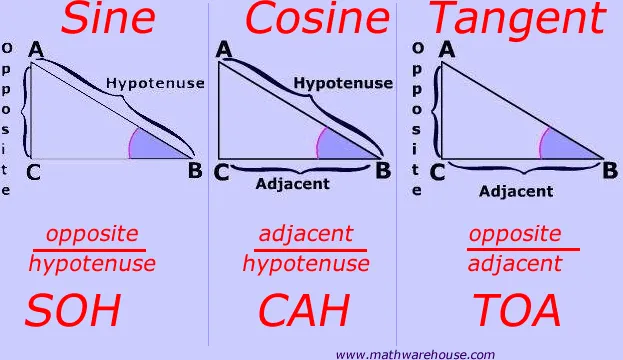
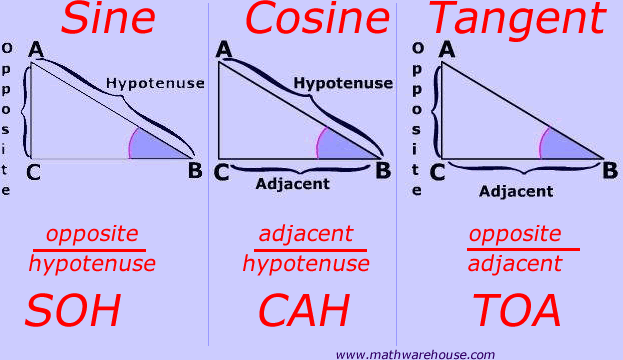
@trim schooner Trigonometry. If you know the FoV of the camera, and you know the height of the actor then you have a right angle.

#

SohCahToA lets you use angle (theta) and height to find distance/length required.

#

@smoky cave Weird. Let me know if you run into issues again

visual kestrel
#

hmm it could be redirectors

tight stone
#

Redirectors don't apply to new assets I don't think?

#

Only saved and then moved ones.

trim schooner
#

@tight stone does that calculate focal length or length or actor?

tight stone
#

@trim schooner That will calculate the distance you need to be from the actor.

trim schooner
#

Right. I want the camera to stay in the same spot

#

And “zoom in”

tight stone
#

zooming changes the FoV right

trim schooner
#

Yes

tight stone
#

So just reverse your trig, if you know the distance and the height you can calculate theta

trim schooner
#

So you have to calculate new fov

#

When you say height do you mean screen height?

tight stone
#

No, everything is in world units.

trim schooner
#

Wouldn’t I have to convert world units to screen space in order to determine if the actor has “filled the view” of the screen

tight stone
#

Think about how frustums work

#

Your "screen" is just the representation of the far plane of the camera projected onto the near plane

#

So if at slice of the frustum an object spans the top to the bottom of the frustum, it'll take up the whole screen

#

fwiw when you press F to focus on an actor this is what they do (the trig thing), though they add some extra padding to zoom out a little.

#

And you'll have to come up with a solution for finding out if you need to zoom out a little, depends how deep your bounding boxes are.

trim schooner
#

So you’re saying I need to make the far plane “stop” at the in world actor?

#

Right now I’m trying to calculate how much “zoom” is needed by an objects screen size. But it sounds like you’re saying I shouldn’t be using that to calculate the needed zoom. Correct?

tight stone
#

The screen size is irrelevant, it's derived from the frustum which is derived from the FoV

tight stone
#

Just try moving the camera like I suggested with a camera in your level

#

And see how that behaves, then try changing the math to change the fov instead

trim schooner
#

Ok gotcha

#

Yeah I’ve got the camera moving to the right position

#

But keeping the camera stationary and adjusting the fov is where it’s been tricky

tight stone
#

I think it should work the same way since you're just solving SohCahToa a different way, since you have both Height and Distance and not theta.

#

Make sure you watch your Rads vs. Degrees though

abstract thunder
#

is there a way to let sequencer play frames before 0?

#

I'd like sequencer to play the animation from before frame 0, without capturing anything

tight stone
#

Are you sure you don't just want warmup time.

abstract thunder
#

I can't get it to play the animation without also capturing... the custom start frame, warm up frame count, and delay before warm up all seem to delay animation+capture the same amount of time

#

@tight stone you mean "warm up frame count", right?

tight stone
#

Why would you want to play the sequence though

#

What good does that do

abstract thunder
#

because I have a particle system attached to the camera, and after the camera jumps to the transform set at frame 0, I need 10 seconds time to let the particles spawn correctly at that new camera transform

#

I need that "set camera transform to frame 0" happen 10 seconds before the capturing begins

#

but all the warm up options delay setting camera transform to frame 0 too

tight stone
#

@abstract thunder I thought per-shot warmup would teleport the camera first and evaluate it so particle systems started, which is different than the overall warmup frames. I agree it's kind of confusing. You also don't get motion blur on the first frame; You can use a custom start/end frame but if the particle section isn't extended in the Sequence it'll evaluate at frame say -1 but no particle section = no warmup.

#

For per-shot warmup to work you need a shot track and at least one section on it.

#

You'd have to remove the extra frames by hand from the output on disk though

cloud storm
#

Guide to 2D cutscenes?

tight stone
#

@timid vector How big is the avi file, if it's uncompressed it's probably your computer. Run it through Handbrake to compress it down to a smaller size.

#

@cloud storm They're like 3d cutscenes but you don't move anything on one of the axii?

tight stone
#

@timid vector The bitrate is probably really high (since Sequencer can't compress .avi files) so your computer is struggling to play uncompressed data at that resolution. It's pretty common.

#

Like how they compress a DVD video (1280x720 I think?) down to 700mb for a 2 hour film

#

You've probably got like... 6 gb for 1 minute of film :p

timid vector
#

yeah lol

#

more than that

#

20sec

#

1920x1080

#

9gigs

#

@tight stone need a lot of compression ?

#

you think that will down the rez ?

tight stone
#

It doesn't change the resolution it'll change the quality a bit

timid vector
#

a bit ? lol or alot ^^

tight stone
timid vector
#

yeah I do that

tight stone
#

Then choose the 8gb AVI file. If you go to the "Video" tab you can play with the "Constant Quality" slider and change the quality and press Start Encode (after browsing to make a destination file)

#

Then you can play with a balance of file size vs. quality you like

timid vector
#

Ok I think I found

tight stone
#

You will have to fiddle with the "Encoder Profile" to get higher framerates I think

timid vector
#

it works !

#

thanks a lot man

scarlet otter
#

hmm... why can't I see yaw reflected in my camera rail? I can see it in a normal spline point if I rotate it, but the camera rail spline ignores it

#

oh, it's apparently reflected in the actual track, but not visually

#

and now to figure out how to control the speed between each spline point...

#

perhaps hook up a curve somehow...

tight stone
#

Animate position along rail from 0-1 iirc @scarlet otter

scarlet otter
#

I copied and pasted a level sequence and a camera to a new level. Managed to replace the camera in the sequencer with the new one, and keep all keys. I can preview it in the editor, but once I press render movie, a default camera spawns and ignores the cinematic camera

#

anyone know why?

#

If I go back to the original level with the original sequence, everything works

#

gah... found it

#

camera cut binding had to be updated

#

but... hmm... fov is all screwed up on the camera

#

and bokeh dof is forced, wtf

scarlet otter
#

wow, this channel is DEAD 😄

tight stone
#

Shot track.

cyan delta
#

@scarlet otter you need to force the cine camera to be used in your master sequencer actor

#

in the details of your LevelSequenceActor

#

force autoplay

scarlet otter
#

@cyan delta only bug I have left now is that bokehdof is forced on my duplicated level sequence

#

and focus setting on the new cine camera is already on none

cyan delta
#

change the lens ?

scarlet otter
#

cameras are identical between the two levels

#

even if I paste the camera from the working level, in the new level in that same camera I see bokeh, despite it being set to gaussian

scarlet otter
#

Hmm... I'm missing something basic, because if I make a new empty project and try to get gaussian dof working on a cine camera added to a level sequence, I'm still failing

#

I can only control the near plane blur, no far plane blur or distance at all

#

regardless of what focus setting or lens setting I'm choosing

#

grr... this was convoluted and illogical... need to look up tutorials, I guess

tight stone
granite condor
#

anyone know the right path to trigger a level matinee from a bp ?

tight stone
#

@granite condor Do you really want a Matinee.... D:

high wren
#

Is there a way to use an external curve asset for a sequencer track? (like you can for a timeline)

#

I want to pre-record common physics things (like a basic "bounce" etc) to curve assets, and be able to use those on objects in Sequencer

tight stone
#

Not out of the box no. Skeletal Mesh/Animation Tracks would be the closest

high wren
#

ugh, ok, thanks

tight stone
#

You might be able to store them in FBX's and import them onto the Transform track directly but it'd be a copy and not a reference.

high wren
#

I think what I might do is forget about external curves /timelines, and instead record the physics to sequences using the sequence recorder, since I just realized you can use sequences in other actors, via sequence component

#

Especially if I can record sequences in blueprint.. there are "Start/Stop recording sequence" nodes.. no idea how to specify what sequence to record to though, they don't have many options

tight stone
#

@high wren That'll get easier in 4.22.

#

I think SequenceRecorder requires you to configure via the UI first and then start/stop, was just integration for people to trigger the start/stop automatically

#

4.22 will have Take Recorder which lets you set it up completely in BP and start/stop, no UI required.

high wren
#

nice

high wren
#

ah gaad, then there's the whole relative transform thing

#

can't record to a relative track, and there's only big complex workarounds to try and play an absolute track and have your animation play where you want it

#

The only thing I've really wanted to use Sequencer for is animating doors or objects falling etc. Things that you can move around and not have to-reanimate them in their new position, or re-use the sequence on more of the same objects in different parts of the level. And sequencer just seems like it's really not made for that still. Yet they are going to deprecate matinee... so you don't want to use that even though it does just what you want.

#

The sequence component seems promising - I just hope there is some way to record to it like you can record to a level sequence (and have the recording be relative)

tight stone
#

@high wren It doesn't preview in the editor but you can specify a transform for the Level Sequence Actor to be played back relative to.

#

I feel like if you wanted to take an absolute world recording and make it local you could add in a new relative track which negated the original position of the object

#

That'd make it relative.

#

And then you could use the Level Sequence Transform override data to move it to the right spot in the world to play out relative to that.

strong cliff
#

does anyone know if i need anything else than a vive controller for it? no base station or headset or whatever? one vr controller should do it right?

tight stone
#

@strong cliff really more a #virtual-reality question... you need more than just one controller though, they don't know where they are unless the base stations see it

#

Last I fiddled with SteamVR it wouldn't track the controllers without the headsets for two reasons; 1) the wireless recievers are inside the headset, so you'll need an external dongle for them (which requires buying the Steam Controller dongle and flashing them with different firmware iirc) and 2) you had to fiddle with steamvr config files to get it so that game engines would recognize the setup as being 'active' even though there was no headset plugged in

strong cliff
#

@tight stone thanks for replying, from googling I also understood that the headset is needed. thank u so much for ur detailed reply! will see what i end up doing!:)

tight stone
#

@strong cliff If you just need the position, some of the cheaper Windows Mixed Reality headsets might also accomplish the goal? They should work with UE4 (though no gurantees) because they go through SteamVR and they do tracked controllers

strong cliff
#

@tight stone hmm that's such a good tip! Will look that up. Might be more in my skill and money range!

strong cliff
#

Not finding any documentation on it but maybe it could work

jovial marlin
#

Not sure how to google this, is anyone familiar with this problem?

#

In the sequencer around one scene, the camera stops showing the assets, and only shows the sky.

analog ravine
#

Camera view options?

jovial marlin
#

That shouldn't be the problem

jovial marlin
#

It's unpredictable, but it happens a lot.

plain stirrup
#

Hey all, has anyone ever had issues where an event from the Sequence Events Track no longer fires off it's logic in the Sequence Director?

I've got many sequences, each with their own "cutscenes" and logic, all of them work great but this particular one just doesn't fire off it's logic. It also seems to be ending early (has an audio track that ends a second or so too early.

Wondering if the asset is just corrupt

#

@jovial marlin Not 100% sure, but it looks as though the camera could be going to location 0,0,0? How is your camera track looking?

#

Also, move your camera to location 000 and see if it's the same view

#

My reasoning is that you've got the fog directly in the middle of the screen and below, which would indicate your camera is at default rotation (looking forward along positive X) and then I would assume your map is probably built higher than that. Hence my thoughts that your camera track might be cutting to no camera, or a broken reference, and it just defaults to XYZ (0,0,0) and default rotation

#

Seems like my sequence was corrupt in someway - Just recreated it and it works fine - very odd!

scarlet otter
#

anyone having issues with objects moving alone spline paths in sequencer being rotated 90 degrees (but not in blueprints)?

jovial marlin
#

@plain stirrup I've been trying to recreate the situation for hours now to see if you're right, but it won't bug out! 😅
I should be glad but I'm really anxious it'll happen anytime.

plain stirrup
#

Haha, no problem!

Have you tried moving to 000 and just having a look at what the world view is like there? Looking along positive X axis? That would certainly backup the theory in case it ever crops again

#

@jovial marlin

jovial marlin
#

I would, if I knew where to set my XYZ 🤐

#

Ah, so I did it, and nope. [0, 0, 0] is somewhere in my scene, not in an empty space at all.

flat owl
#

I'm having trouble exporting animation from a Camera rig rail to fbx - should I just avoid using the rig rail component for animated paths I want to export?

tight stone
#

@flat owl Hmmn I don't know if that's supported. You might try the Bake Transform menu option first

#

So it gets baked into a Transform Track, then export the transform Track.

scarlet otter
#

dear GOD a keyed camera transform sure does like to spin around and tie a knot on the bloody spline it generates, doesn't it?

#

super frustrating to work with

scarlet otter
#

oh, and not only spin around, but create weird bumps in the spline that's almost impossible to straighten out without direct control

#

gues I have to manually create a spline and add that as a path track to the camera? sigh

#

ooooooh, just found the curve controls!

#

salvation!

minor pagoda
#

Dear users of Unreal, I'm a freelance 3d artist and just started using the engine. Gonna use it mainly for cinematics and rendering. I'm having a rigged and animated character I want to import using alembic. I would like to let that character leave footprints on a landscape I created (using world creator's height map). Since I 'm only gonna use the scene for cinematics, performance is not really an issue (as long as it will stay above 30fps). So I was thinking of doing this with the displacement map being deformed? Is this possible with an alembic object? Any idea's to get me started on this? thx a lot!

cyan delta
#

@minor pagoda hey ! might wanna ask about the footstep stuff in #graphics 😉

minor pagoda
#

ow ok, i'm sorry!

cyan delta
#

You shall be able to do that with rendertargets

#

dont be sorry :p

minor pagoda
#

rendertargets? Allright, thx, I look that up (since i'm a big noobie 😃 )

cyan delta
#

something like this I guess ? (less pronounced)

minor pagoda
#

super thx, i'm checking this right now. Just need to check if this is going to work with Alembic files, because they are not skeletons. But again, thx for the fast response!

cyan delta
#

no probs, good luck !

tight stone
#

@scarlet otter Check that you're interpolating using Euler mode and not Quaternion mode.

scarlet otter
#

@tight stone where do i check that?

tight stone
#

I think keying from the viewport is just sometimes whacko, but yeah you can use the curve editor to straighten channels out.

scarlet otter
#

ah, ok, nice tip! thank you!

flat owl
#

@tight stone Unfortunately that bake seems to ignore the camera rig rail and is instead just baking the small offset adjustment track. This seems like a post for UDN.

tight stone
#

@flat owl agreed

visual hawk
#

How to play spatial audio effects with sequencer, so they can be synced precisely to animations in VR-experience?

quaint lion
#

Hi all, Im starting to work on cinematics for project visualizations and have a few issues with the sequencer
Firstly the render settings seem very limited, I can only really see options for .avi or separate jpgs and Im struggling to create a cinematic of quality.
Secondly sometimes my sequence or widget events can get out of sync if the render is set to high a quality.
Lastly see video below, I'm only learning and any advice\critique on cinematics, materials, post processing or general would be super appreciated

https://www.youtube.com/watch?v=J9FRXHl8cc0&t=105s

SMEC Urban fly through using 12d Civil3d Infraworks Unreal Engine

▶ Play video
tight stone
#

The output format (avi vs image sequences) isn't going to change your quality

quaint lion
#

I guess not but anything over 1280 x 720 in avi uncompressed does not play, it stutters along and my sequencer events doesn't work\render correctly.

Another thing Ive found is that widget animation can get out of sync when widgets are called though sequencer events at higher quality settings.

tight stone
#

You can't play uncompressed video back on any desktop pc

#

It's simply too much data to read and process off your hd

#

It's probably like 800mb of data per second

hollow abyss
#

Hi all! Just saying hi and introducing myself.

#

Lighting/cinematic artist

tight stone
#

👋

silent bane
#

im just tested epic's automotive materials .. it's incredible..

arctic thicket
#

Hello folks. Im trying to add event to fire in sequencer via event track. When there is only void(no structure defined) event then it works, but when i add my custom structure(i assume should be event input structure) then it no longer fires the event. Im doing something wronk or its a bug??

tight stone
#

Events do not support parameters.

#

You should probably instead expose the parameters you want as tracks and key them so you can use the nice curve editor... you may want Constant Keys if you don't want gradual changes in the value.

#

@silent bane Enable the per-shot warmup time/delay in the movie rendering settings so that temporal effects have time to settle between each camera cut

#

That'll help on some of the popping (ie: 0:22)

tight stone
pine kindle
#

Hey there. Anyone have problem with Sequencer and MPC's (material parameters) not upadting values in editor ?

silent bane
#

@tight stone thx mate

tight stone
#

@pine kindle are you sure you're animating the right MPC/using that one in your materials

pine kindle
#

@tight stone its working when i have sequencer with those params and woring sometimes / notr working when sequencer is embeded as subseq.

tight stone
#

@pine kindle If you can repro in an empty project definitely worth submitting a bug report

granite condor
#

anyone know off hand which class of pawn is used when you use sequencer and output to avi? i have this problem it seems to change FOV mid export and i'm not sure which class i'm looking for here

cyan delta
#

@silent bane ya know, when I saw your Corvette video the first time I was like "shit is this DXR stuff ? It looks really nice, and all the noise is gone looks like" Then I noticed that it was using DF stuff and was a tad sad 😦

silent bane
#

well mate I'm sharing your pain . but i think this realtime power/quality can only be reached in 2-3 years.(with DXR)

subtle walrus
#

Anyone ever have issues with relative position in sequencer just being entirely random values?

spare hatch
#

is there a hot key or a way to "trim or cut" audio or animation clip in a master sequence?

tight stone
#

@granite condor whatever your gamemode/map specifies by default. You can tell it to override which GameMode the map is loaded with though so that you can force it to use the default pawns if you would like.

granite condor
#

Ahh 👌

tight stone
#

@spare hatch trim left - ctrl-, trim right - ctrl-. split - ctrl-/

spare hatch
#

Thank you

pine vector
#

Hello there. Im trying to setup my second camera group in matinee and it keeps snapping to another place when im about to start a key movement. Starting in a place i dont want it to. Does anyone know how to fix this im still new to this

tight stone
#

Are you really using Matinee

pine vector
#

Yes

tight stone
#

What functionality do you need from Matinee that is not present in Sequencer? Matinee is really really legacy at this point.

pine vector
#

Lol well i wouldn't know at all

#

Im just trying to get the next camera shot

tight stone
#

How did you create a Matinee? I'm curious how the messaging could be better to indicate that Matinee is legacy and not intended for new content creation

pine vector
#

Its like i will add a new camera and it snaps to the same point as the first camera

#

What is being used now?

tight stone
#

Sequencer

pine vector
#

Thanks

tight stone
#

If you've invested a lot of time into your Matinee there is an upgrade tool to upgrade Matinee assets into Sequencer ones, but if there's just a little I'd just re-make it in Sequencer tbh

pine vector
#

Alrighty thanks

tight stone
#

@pine vector How did you end up using Matinee, out of curiosity? Like what did you see that made you think Matinee was right

#

I'd like to know to see if it's something that can be made more obvious that it's no longer the right choice

pine vector
#

Just old tutorials i guess

tight stone
#

From the Unreal site, or just the web' at large

pine vector
#

YouTube, but i will use from the unreal site

tight stone
#

Ah, not much that can be done about that. Thanks, and happy cinematics-ing

tough narwhal
#

hi,
how to use the sequencer to blend and control animations with tracks, while using some automatic bone animation, like for example a target for eyes

lavish wyvern
#

I've just started googling, but does anyone know any good tutorials for making a cut scene?

mystic quest
#

@lavish wyvern No need for a tutorial

#

Just use matinees

lavish wyvern
#

Okay, thanks!

tight stone
#

No Matinee

#

Sequences

#

@mystic quest & @lavish wyvern

tough narwhal
#

Hello, is it possible to use the sequencer to blend/track animation from motion captures while retaining some sort of automated animation like eyes/head targetting ? I'm stuck here

compact hound
#

hey guys my render window size is inconsistent when rendering from sequecner

#

1 time render is small window, 2nd time it's in the resolution I chose. is there a way to make it always small?

tight stone
#

@tough narwhal Not yet I don't think.

#

Actually maybe? I think you have to set up your Animation BP to have a Sequencer node in it

#

Otherwise it stops using your AnimBP

kindred dragon
#

Hey y'all.. I'm trying to record a super simple shot using level sequencer, with a static camera, and about halfway through the camera jumps to another position in the world, even though I don't have any keyframes... anyone have any idea what's going on?

tight stone
#

Do you have a shot track

#

That is ending?

#

The shot track tells Sequencer which camera to use

gusty heath
#

hey, I tried to render this scene with sequencer but it's not work and looks like this.

tight stone
#

@gusty heath Add a shot track so it knows which camera to use from the sequence.

gusty heath
#

@tight stone thank you!

void flax
#

Hey guys, is there any way for me to play an image sequence in real-time in one of my viewports? When I apply the image sequence texture to a plane, the plane remains blank

tight stone
#

Sounds like a media problem

#

Should work in the Editor

void flax
#

Ahh, It only works while the media editor is open apparently. I can scrub through in the media editor and the animation will play on the plane, but I'm trying to get it to work in the sequencer. Is that possible?

tight stone
#

It should just work

#

If you have a media track with the right media configured

void flax
#

Hmmm... I'm still very new to all of this. I think what I'm trying to do may require a blueprint of some sort :\

#

I've dropped the media track in the sequencer that's linked to the image sequence and the plane still remains blank when the media editor isn't open

tight stone
#

pictures?

calm acorn
#

Hi guys need quick help. How can i make my flipbook actor to start at the first frame ib the beggining of the sequencer?

strange ermine
#

I've messed around with the level sequence instance data bool for 2 hours and I still don't understand how it works... 😦

#

I thought it was supposed to make your level sequenced objects behave on their own local transform based on like a pivot object as it's origin but it doesn't seem to work for me...

#

Is the trick with it to change the blend type for the transform keys?

calm acorn
#

Got a problem. The quality of sequencer movie capture is really reaalllly terrible. I dont mean the resolution. It just freezes. Good PC and low poly scene. Whats the problem?

tight stone
#

@strange ermine If you use the "override instance data" and specify a transform it'll use that transform at runtime, not at editor time.

#

@strange ermine It effectively makes the whole sequence relative, but it can only be seen at runtime.

#

So best to animate the scene relative to 0,0,0 and then use the transform at runtime to specify your new origin.

#

@calm acorn Are you trying to play back uncompressed avi files afterwards? You need more details than "really terrible" and "freezes" 😐

calm acorn
#

yes guess its not the render is it?

#

just my dumb ass?

strange ermine
#

@Lordned oooh ok. Thank you. I was hoping to set up a level sequence that I already animated to start elsewhere in my map. I guess I'll need to start from scratch. 😖

tight stone
#

You're probably trying to play back like a 10gb file for 1 minute of content lol.

#

Run the file through ffmpeg/handbrake to compress it down to a reasonable size before attempting playback on your computer.

calm acorn
#

1 gig 13 seconds 😄

tight stone
#

@strange ermine Well... you could try adding a relative track which performs the inverse operation (that would let you get it to 0,0,0 space in the editor)

strange ermine
#

@tight stone could you please post an example screenshot🙏

tight stone
#

@strange ermine Sorry, fightin' fires this morning. But the gist of it should generally be to leave your current Transform sections, and add a new Transform section of type Relative... or Additive (not sure what the difference is tbh) and stack the two vertically, and then plug in the negative transform

#

So if you animated your character at Loc: (50, 200, 8) Rot: (45, 0, 3), you'd set the Relative Transform to Loc: (-50,-200,-8), Rot: (-45, 0, -3) I think?

strange ermine
#

🤔 oh I see. Thanks!

tight stone
#

You're effectively stacking two transforms , a constant relative one that negates your accidental offset

#

And then the original one you made

strange ermine
#

I see. I'm sad hear that only solution is a work around.

#

@tight stone let me know if you're going to GDC next month, I owe you a drink!

tight stone
#

👍

plain stirrup
#

Hey all, does anyone here have an Nvidia RTX card? If so, I'd really appreciate it if you could help me out with a quick test - drop me a message for more details 😃

#

Note: This isn't work or anything, just in need for someone to try out the Kite & Lightning panoramic render plugin in a reflective RTX scene

#

Wondering whether it behaves properly!

wet granite
#

heyhey, i have trouble stopping my particle systems in "time". I have set them up inside a blueprint with custom dialition time and when I hit play it works perfectly. But when I start using the cinematic viewer they just play as if they had no reference to "time" anymore Oo

#

I want to freeze the particles in place after the warmup time i already set so it doesnt break the illusion of having a scene frozen in time

wet granite
#

nevermind ... the render works perfectly. this is just so WEIRD when you see it inside the preview and the export is completely different ...

tight stone
#

¯_(ツ)_/¯

#

Previewing things in the editor is complicated enough as is.

#

Because actors don't actually tick

gusty heath
#

Guys how can I make the camera not hide a mesh if it hides the character

#

would rather see the mesh on top of the character and not have it disappear from view

#

oh nice it was collision test option

winged orchid
#

how do you keyframe in this newer versions

tight stone
#

s, enter key, click on the icon between the "< o >" icons on the left for a given track

mild sapphire
#

in a level sequencer i created, I set keys to move the enemy (created based on basic third person asset and blueprint). When I play the sequencer when the player overlaps with the trigger, it moves the enemy correctly but does not play animation (thirdpersonwalk). Any ideas?

strange ermine
#

Can you post a screenshot of your blueprint @mild sapphire ?

proven ledge
#

just made this, any improvements i could make?

winged moon
#

I'm having an issue where my spawned particles/characters are not attaching properly, there is a huge offset on the particles when they attach to a socket

winged moon
#

Ah - nevermind, I forgot to reset the transform after placing it in the world and coverting to spawnable

kind cargo
#

Wanted to ask the Efficiency of either 1. driving a Character with vectors to create animation. Or 2. Make the Character animate and control it from the cinematics control ? What is more efficient when running in game?

tight stone
#

Probably the second one

eternal stream
#

is there a way to add pre-roll to particles in sequencer?
like they've been running for a few seconds before the sequence starts

tight stone
#

Should be able to just add pre-roll to the section @eternal stream , though I don't recall if particles do it in particular or if you need to set pre-warm on Cascade

eternal stream
#

@tight stone Thanks!

rotund carbon
#

hi, I have two pointcache objects to animate in the sequencer, when I "render move" only one will play an animation, how do I get both to animate?

rotund carbon
#

now it works, and I can't replicate what was happening before xD

gusty heath
#

Is there a hardware that helps me with Facemotion, motion caption and the ability to do 3d model objects? I am targetting to created something similar to "Frozen" animation and trying to figure out the hardware sets i would need for that

#

Thank you in advanced for your answers ! 😃

rotund carbon
#

Hello, I have a camera I've imported into the cinematic. the interpolation is not smooth. camera seems to be teleporting every 5 frames.

#

Any tips to solve?

tight stone
#

Imported how

rotund carbon
#

Created cinema camera, added to level sequence, animation imported as fbx, with "reduce keyframes" turned off.
keyframes curve is jagged. my exporter is generating keyframes on each frame to deal with constraints... I'm going to try using a rig, and attach the camera to a socket

tight stone
#

Did you look at the curves with the curve editor @rotund carbon

#

If the curves are messed up, you can try setting them to auto tangents, but if their values are weird/stepping then there's something wrong with the export imo

rotund carbon
#

yes, they were stepping