#aec-visualization
1 messages · Page 13 of 1
 spice sapphire
im in automotive, so im guessing it would be kind of similar, my boss is trying to get me to get unreal in our workflow , just seems like a huge amount of work for one person
 pastel summit
is there a way to make reflections look more realistic (Less rounded) without rtx
 solemn hawk
You can use a planar reflection
Planar reflections are expensive though, you’ll want to set it to capture only once and also to only render certain items using the “show only” option otherwise it will re render the whole scene
pastel summit
it needed to restart for it to be able to work but its stuck at 45%
 half wind
well just to say the dataprep is beautifull
pastel summit
@solemn hawk it works thanks for the tip. its super heavy indeed. moving the camera gets super laggy arround the mirror
 rose merlin
@pastel summit There are 2 options.
The 1st one is to use planar reflections, and this is very expensive on the machine actually, i don't use it much really.
The 2nd option: is to use a rectangular reflection capture if your space is rectangular in shape, and i think this is mostly commonly used in Archviz as most of spaces are rectangular in shape, but here's the trick : you have to adjust the reflection capture to be like the size of the space you are taking the reflection in, it really helps me a lot doing it that way but takes a little effort on adjusting the rectangular Reflection Capture Volumes. but it should do the job.
pastel summit
@rose merlin thx for the tips might dive into that some more. optimized some of the values, it runs a bit better allready but still a bit laggy.
 worthy loom
@cerulean stratus https://www.youtube.com/channel/UCR3F9ieLBZdMOr3CsWaEgzw/playlists?view_as=subscriber
i create this playlist to collect all good quality tutorial video, just check the playlist name. watch and practice video that you like

YouTube
 cerulean stratus
thx a lot man
worthy loom
i highly recommend this video. this will cover most of your need to start working with material in UE4
https://www.youtube.com/watch?v=0M9V5h6UE7U&list=PLxDUsZS2GhKdeUVga9wsku6nicW_ddbDJ&index=2
also check out the UE4 lighting playlist, really simple video with full explain of how light in Ue4 work

In this video tutorial, we'll step through the process of setting up a complex Master Material in UE4. We'll also cover embedding material functions for repeatability and cleaner material setups.
1:17 - Basic Setup
4:24 - Nesting Material Functions
10:48 - Advanced Master Ma...
 austere hazel
All these raytraced archviz videos I see on youtube are great but how would you go about showing that to the client? Do you bring your computer at his office and then bring it back home? Do you somehow stream scenes from a server? Any other way?
 mystic lynx
You absolutely don't put it on the clients machine
Unless you want to turn into a tech support business
Also look into pixel streaming
It doesn't require you to package so it's quick to deploy
austere hazel
I'm currently a full time developer, so I'm used to that XD I'd like to sell interactive projects to real estate companies who can then show them to their clients in their showroom so I don't think that bringing my computer to them every time is an option
mystic lynx
And they can play/review from web browser
Also you can put it on cloud and stream from that
austere hazel
The thing that worries me about pixel streaming is the performance hit on the streaming computer if more people connect to the same machine
mystic lynx
austere hazel
And I'm worried about the pricing if I put it on the cloud
mystic lynx
Wow nice link jesus
Well I imagine you'd want to put a cap on the number of connections
austere hazel
True
mystic lynx
For anything beyond reviews you'd pass the cloud costs onto the client
Cause it's that or they buy gaming machines
austere hazel
I've seen a talk on youtube by someone who made a good looking scene run on an old iPad, I wonder how they managed
wait I'll find it again

With an Unreal Engine approach to every visualization request, Theia Interactive has been able to meet and exceed any design request for our AEC customers and beyond. Our UE4 workflow allows us to produce a seemingly endless variety of deliverables from the same source conten...
their comany is theia interactive
I donwloaded the app on my iPhone and it runs super smooth
while I barely reach 120fps on a gtx1080 (I know 120 is enough, I'm saying that it probably won't reach 60 on an iPhone9
What they do would be the best solution for my case. Someone wants to buy a flat, they can download an app and run the whole scene on their mobile or tablet. Since it runs on iDevices I'm pretty sure it can run in the browser on most systems as well, without the pixel streaming thing
mystic lynx
Forward rendering, bake as much as possible, don't use fancy shit
Basically pretend it's 2004
Also open an epic provided example project and optimize it to run on mobile
It will teach you what you need to do while ruling out any of your own content being at fault
austere hazel
That's a great tip, I will do that
pastel summit
adding some details to this corner of my scene. any suggestions what i could at perhaps?
 prime echo
hi! a good parameter for the skylight and directional light for an exterior/interior scene?
 pale prairie
@prime echo that depends on what look your going for
but for a normal, clear day, defaults for both are physically accurate
 rotund ruin
@pastel summit if that was my sink I'd replace the faucet, it's too close to the sink wall (not sure if this counts 😄 )
 tropic flicker
Why hasn't EPIC moved TwinMotion's People walking and cars driving feature into Unreal? Its amazingly easy in TwinMotion but far more complex in UE4 : /
 dusty gyro
@tropic flicker keep your eyes peeled in 2020
tropic flicker
😮
oh boi if they did that...i would...I....I have nothing of value to give. But I'd sure as hell appreciate it! 😅
dusty gyro
lets just say that Twinmotion <> UE4 support is in the works
thats as far as I will say 😉
we know its a top priority feature the community has been asking

Christmas is coming early this year!
Take a look at this teaser of Twinmotion 2020.
Focusing on the quality of our assets, we are pleased to partner with Xfrog Plants, AXYZ design, and Quixel to bring you high-quality vegetation and characters in the next new version!
More ...
tropic flicker
Haha damn that is awesome!! Looking forward to it!
I don't suppose we have any idea of what Quarter of 2020 we'll be seein updates...do we? 🤫
dusty gyro
nope nothing to announce timeframe wise yet
tropic flicker
Understood. Well thanks for the info! Exciting times ahead for ArchViz in UE4
dusty gyro
Yep we're super excited, things are picking up steam 🙂
prime echo
so for a clear day the standard intensity for skylightand sunlighht (directional) it´s ok?? for a exterior and interior scene at the same tieme only play with the post procces volume?
 cyan ether
thats what i tend to do, adjusting exposure and bloom accordingly
 forest depot
Some exclusive teasers for my next project that's gonna go public soon 
Trying not to give too much away with these
Make sure to open the originals ;)
 fallow grove
@forest depot wow! just wow!
hey guys, i just want to ask if I can still use my old build of i7-3930k, 32gb ram,and just upgrade ng graphic card to rtx 2080ti. I have done some quick reading and i always end up with an answer that the processor will cause bottleneck, but they are all testing it on games. I am mainly doing archviz for retail and f&b interior and exteriors. Do you think just upgrading the ram to 64gb and purchasing the rtx 2080ti and just use GPU lightmass will be a good start? and do i really need the rtx 2080ti or rtx 2080 super for my type of projects? thanks in advance to those who will take time to answer.
forest depot
You don't need that much ram
16 is enough for realtime
Cpu is not the bottleneck at all. It's all about the gpu
fallow grove
@forest depot so it's ok that i invest on the 2080ti now? what about the 2080 super? is that also ok?
forest depot
2080ti is better
fallow grove
also why is it that when i try to build the lighting of a simple prayer room&ablution that i imported using datasmith with about 30 static spot lights(placed inside unreal), my 32gb memory is not enough?
forest depot
but we get along fine with 2080s
cause i dont use normal lightmass
use gpu lightmass
we have 2080s and will prob upgrade next nvidia release
fallow grove
oh ok. thanks for clarifying.. have to buy a decent RTX at home so i can practice properly. because im just practicing here in our office with quadro M2000 and dual e5-2620.
dusty gyro

Unreal Engine
Explore, learn, and reuse real-time ray tracing techniques for highest-quality interior rendering.
Enjoy everyone !
forest depot
Heh I could tell it was pasquale from the thumbnail 😄
 wicked willow
can't wait to check it out!
forest depot
Yeah just rectlights
Gotta be honest the lighting isn't... Great
The most shocking thing was the performance
14 fps on my 2080
 hallow arrow
cost of fully realtime 😄
forest depot
I don't understand what the proposed output is
It doesn't work as a realtime executable cause of the framerate
But the image quality is much worse than baking so it's not good for stills or animation
wicked willow
I'm still using spotlights outside my windows with the light portals in each one... should I be switching over to the rectangular lights for the windows?
forest depot
just use a skylight 🤷
wicked willow
@forest depot really? so just the Directional light for the sun and sky light?
wicked willow
@forest depot Ok I've got a long drive home. I'll try just that later tonight. Should I add an HDRI to the Sky light?
I'm just so frustrated with lighting in Unreal now.
I have a scene set up with 2 lighting scenarios
One with Baked Lighting and the other Raytraced . I want to get both looking great.
These are the resources I have been following:
From the Unreal Online Learning
Intro to Global Illumination
Lighting Basics
Creating an Arch Interior Project
Unreal Dev Day Montreal
https://www.youtube.com/watch?v=ihg4uirMcec
Now I'm so confused about what settings to use I just managed to make a mess of things!?

The session by Lead Artist Jerome Platteaux will focus on the different ways to light a project in Unreal Engine and covers the basics of Physically Based Rendering and how to choose between the forward and the deferred render. The session also explains Baked Lighting with Li...
forest depot
you can add an hdri, but its not necessary
that video seems to be legit
I pretty much started with that same video and just iterated on my own process
wicked willow
@forest depot oh and I am following the official documentation for the raytraced version of my scene
just got home 🙂
forest depot
That should be good
wicked willow
@forest depot should the skylight be moveable too or static?
wicked willow
ok im gonna work on fixing the raytraced light set up first
i took out the HDRI backdrop and the HDRI Image from the sky light
wicked willow
ok so what is the correct way to brighten up an interior if its too dark? i was adjusting the directional light & sky light intensity before
forest depot
Use real world values
wicked willow
world values for the lights or you mean this?
forest depot
No like real life
wicked willow
@forest depot In Editor vs In Game
wicked willow
7
austere hazel
you can increase the indirect lighting intensity https://www.youtube.com/watch?v=76J1gaVXFUk

In this quick tutorial, we will learn what Indirect Lighting Intensity does.
But be careful to not overdo it or you'll end up with an unrealistic result because there's too much light inside compared to outside
I'm a big fan of hdri's. My process is to start with only an hdri sky, then I add a directional sun (if needed), then I compensate with interior lighting (lamps and such) but I'm no expert yet 😉
 wraith cave
I just got the Raytracking project and followed the tutorial. Got a rtx 2080 checked drivers and win version all good. but why it everything burned out?
ok ill answer my own question. Engine scalabillity settings need to be set to epic or there about!
wicked willow
@austere hazel Even with a raytraced scenario? I bumped up the indirect lighting intensity to 100 of the directional light ( sun) and the regular intensity is 1000 . it still looks the same very dark actually looks like nothing changed?!
solemn hawk
@wicked willow dm me and I’ll set up a vid call with you to help you figure out what’s going wrong in your scene
wicked willow
@solemn hawk Oh that would be great! Thanks! I'm at work right now so it would have to be in later in the evening sometime. I'm in Los Angeles its 12:30 pm right now
solemn hawk
@wicked willow I'm on the east coast of the US, I should be free then, just ping me when you're all setup 🙂
 final wigeon
Hello there
I'm a programmer who wants to start my very beginning steps at arch-viz
Any tips for a beginner?
Recommended videos, tutorials, documentations. Anyhelp would be great.
Thanks in advance.
solemn hawk
Check out unreal academy
austere hazel
I second that, Unreal academy explains everything you need to know in the engine. Preparing assets is another topic
 grim smelt
Hello guys... I've got a problem about baked light... The hard seams between static meshes. You can see that in the image (the difference of smoothing caused by different lightmap UV density can be neglected). The problem is the difference of static shadow darkness between these meshes. It got relived after setting 'Diffuse Boost' to 0.1 under Lightmass Settings of World Settings. I dug over the community and people said it's caused by the multithreading of Swarm and cannot be totally eliminated. Is that so? That's really a bad news for arch-viz.
forest depot
the issue isnt with swarm
grim smelt
@forest depot Thanks for quick reply. Then what caused that?
forest depot
hard to say, but if you took 3 separate meshes and jammed them together, it shouldnt look like that
cant tell what else is going in on your scene
grim smelt
This is just from the 'Collab Viewer' template of UE4.24 with only these things changed:
- Meshes changed to static from movable.
- Directional light changed to stationary from movable.
- Disable ForceNoPrecomputedLighting in world settings.
Then you should see the same after light building.
grim smelt
Not to, from.
grim smelt
The template was designed to show dynamic light so I have to change that.
forest depot
right
maybe zoom out and take a screenshot thats more overview
now that i can see the issue i dont really need the close up
are those actually static meshes prepped with proper UVs cause if they were never meant to static it might not have them
grim smelt
Their UVs are ok.
I've checked.
All lights and ppv removed except a single directional light.
forest depot
view it from lighting only mode?
grim smelt
This can be reproduced on the classic UE project template (the template with chairs and table).
forest depot
ok
forest depot
i dont really ever use the templates but it could be that its stationary directional rather than static
grim smelt
Static is the same.
You can see the difference of ambient between in and out of the room.
forest depot
yeah i can see the issue
grim smelt
There was no difference before baking.
forest depot
just when I build my scenes from scratch its never like that
grim smelt
That happens when the seam is right on the door.
rose merlin
this is really strange, maybe check if the static meshes have the correct lightmap index specified correctly, sometimes i get good UVs but the engine specifies wrong index for the lightmaps, maybe that's the issue ?
grim smelt
I've checked the UV and no problem.
Unreal Engine Forums
Talk about Level Design, Static Meshes, Physics, and more.
forest depot
it says 3 uv channels
grim smelt
These guys had the some problem.
forest depot
which uv are you showing
grim smelt
The lightmap uv.
forest depot
oh it says UV channel 2
ehh
its the lightmap you made for the UV
but its not what the engine will be using
by default
grim smelt
I've made sure it is.
forest depot
it uses channel '1'
grim smelt
forest depot
which is channel 2 from any other software
ok cool just checking
cant tell how much experience you have with unreal
grim smelt
Yeah that's alright.
That shouldn't be the UV problem because it's relieved without ambient.
forest depot
that guy's problem is that hes using 128 x 128 lightmaps for walls
grim smelt
Unreal Engine Forums
For discussions about Materials, Textures, Lighting, Particle Systems, and Post Process Effects.
And this.
There are several topics about this.
forest depot
yeah i do know that
but theyre definitely doing something wrong
its not a limitation
for example this is from my last project
grim smelt
Try letting them all use white material?
forest depot
if there are long pieces that stretch for a while i will cut them up you will not be able to see a seam
forest depot
i dont think thats true
that last link again
same issue right
and the guy says 128 pixel maps
grim smelt
forest depot
you cant expect 128 maps across a wall thats super low
grim smelt
That part is too dark i think...
grim smelt
That carpet at the door... Right on the seam?
forest depot
theres a seam cause theres carpet... a piece of metal and then timber
grim smelt
Hard to tell. This issue is barely noticeable on your project because material changes through meshes.
forest depot
yep and what im saying is that flat wall you see in front of you
may as well be cut into 20 pieces
and its still seamless
grim smelt
Is there a seam right on the entrance?
forest depot
?
forest depot
there isnt
grim smelt
And the shadow... The direction is not like what i said...
forest depot
?
forest depot
grim smelt
A single shadow crosses the entrance, and the seam is right at the entrance.
grim smelt
No the lightmap res' problem.
forest depot
so what if you bump it up
forest depot
im aware
grim smelt
The shape is lightmap resolution problem.
forest depot
it affects both
grim smelt
Nope. I've tried.
The only setting I adjusted that helped is the diffuse boost under lightmass settings.
grim smelt
You mean static lighting level scale?
forest depot
yes
grim smelt
Yes and no good.
forest depot
i wouldnt be surprised if this problem disappears simply switching to gpu LM instead
grim smelt
You mean movable light?
forest depot
Unreal Engine Forums
Click image for larger version Name: image_138398.jpg Views: 1 Size: 82.0 KB ID: 1478783
Disclaimer:
This is a very simple and early version of my GPU lightmap
no i mean replacing the standard lightmass with gpu lightmass
nobody really uses default lightmass cause its kinda terrible
grim smelt
Ah i've never used that... Let me check it out...
The picture below shows exactly the same issue I think... Then it's the lightmass' fault?
forest depot
possibly
i havnt used default lightmass since this came out
its just better in every way
grim smelt
Oh this doesn't support 4.24 yet.
forest depot
no worries
grim smelt
😁
rose merlin
guys what do you think about the new Archviz Interior rendering sample? is it all dynamic and raytraced ? nothing backed ? really 😄 ?
i've tested it out i think it's pretty a good sample
great move Epic Games ❤️
forest depot
I think it shows that theres a long way to go for RTGI
both performance and visual quality is a lot worse than baking, it seems unusable for interactive and for stills/animation the quality isnt high enough
grim smelt
What do you guys' contractee utilize UE arch-viz for? A replacement for traditional rendering or what? I'm new to architecture...
forest depot
Interactive, stills and animation
grim smelt
Interactive, you mean client will do free roam in this room?
austere hazel
I think that's the whole point of using UE over VRay or other renderers. The fast rendering allows for the free roam thing plus you can try out different materials and colors in realtime. VR could also be a huge selling point
grim smelt
So one dedicated UE project for an architecture project?
solemn hawk
I have multiple projects in a single unreal project, but that's a relatively advanced setup, if you're just getting started I'd recommend doing one archviz project per ue project
austere hazel
I'd like to get your feedback on this quick test I did, thanks!
forest depot
to be more specific, ignoring that the colour is red. the saturation level is too high, it almost looks like its emitting red light
i think thats a pretty common mistake in 3d is not using realistic colour values, you should always avoid 100% white 100% black, super saturated colours
austere hazel
@forest depot ok thanks, I'll try and tone it down a bit
rose merlin
Did anyone manage to try out the AWS EC2 with pixel streaming for running archviz content remotely ?
austere hazel
Nope but I'm interested as well
rose merlin
i found out that the best suitable instance for me is EC2 G4 i guess, with nvidia T4 GPU, but i'm struggling figuring out the riddles on aws 😄
austere hazel
I worry about the cost of it. Are you planning to make your application open and available for everyone on the web or is it something only your client will be able to access?
rose merlin
@austere hazel actually one of the limitations of my products is being able for clients to see the output with hi quality, and maintaining hi quality requires high end gear or PC and that's not granted by every client really, so one of the limitations is that the client may find it an obstacle to get your service because of him being unable to view the project but only on the high end machine, so being able to provide a solution for him to just play the project on a regular web browser with full high fidelity is shrinking these limitations.
of course it's not a good solution for publishing a project to the public that way, but i guess just sending the client a sample of your work on a hyperlink just like that makes him more comfortable of how easy this service might be for him, and reduce the over thinking about how he gonna be limited with the hardware.
so it's just a concept to reduce the gap between you and the client i guess.
rose merlin
i guess it will be costy if used with public publishing unless if you have your own hosing server 😄
Does anyone know a good tutorial or have a good explanation on Vertex Color and using with materials or use it to bake textures inside 3ds Max for Unreal usage?
I couldn't find anything explaining this concept so far, as if it's a common known subject in the Visualization field but i don't know anything about it really !
 royal steeple
oh finally found the sub-section im interested in 😄
what ya all using for modeling?
I have access to modo and solidworks via work, but trying to learn blender as a free better supported alternative
Im planning to make bigger, industrial types of locations so maybe there is a better software to invest in? 🙂
think....... costco, ikea etc types of interiors
although solid is pretty capable, can make 1:1 props to use etc
but would love to hear about your flows and tools 🙂
rose merlin
@royal steeple welcome, I use 3ds MAX and Revit as for ArchViz but lots of people use blender and it's said to be a great tool also for 3d modeling, i never tried it actually but i think for industrial type it will work good, solidworks seems to be more of like a professional tool for mechanical equipment and machinery my college uses it for industrial as well for ikea interior props and so.
I'm really interested in that field if you find it okay you can DM me and we can talk a lot more about these stuff,
and welcome to the Unreal Community. 😉
royal steeple
Thanks :)
Well ill be using it for a personal project, but inspired by a company you just mentioned
royal steeple
Will most likely dm you later :)
rose merlin
no problem whenever suits you 😉
royal steeple
Just s bit too hydrated now for a Good discussion. :)
rose merlin
so did anyone used the Aws EC2 G4 before ?
royal steeple
As in Cloud?
rose merlin
yeah
does anyone tried pixel streaming using that machine ? and does it supports RTX with good performance ? i wonder ?
royal steeple
yawns
royal steeple
big dreams, but never done any live stuff =F
😄
pretty decent in still images and keyshot
and mostly packaging related rendering
royal steeple
hmm install UE4 and blender on work-lappie. or not....
rose merlin
yeah go ahead 👍
what's the best material resolution to use in Archviz without causing too much processing or stuck up all the ram, is it 2K or 4K, in other words does the 4k textures for materials use significant amount of RAM than 2k ? or it doesn't affect that much ?
royal steeple
Started playing around making my apartment
Solid does the trick :)
Easy to do though floor is connected in like 80% of it :P
 mellow crater
Im trying to work with materials, I am coming from blender -- The materials were properly applied in blender, but when I arrived in UE4 via FBX export, one of the materials stayed properly applied, the other 2 didnt. So I want to edit one of the ones that didnt
heres a screenshot of the material
solemn hawk
Try using gltf export through the datasmith plugin
pale prairie
@old sierra add a lightmass importance volume
pale prairie
How big was the lightmass importance volume?
 old sierra
covered all of my building plus quite a bit
probably twice as large as the area i needed the shadows to be seen in
pale prairie
It might have been to big, lightmass really doesn't like building on massive scales
old sierra
ah ok
pale prairie
Although I'm not exactly sure how I know there are ways to break up your world composition into more manageable pieces
old sierra
its was very small
lol
literally just started

changed to point light just to see if it was a problem with directional light*
pale prairie
@old sierra can I see your lightmass settings?
pale prairie
Ohh lmao
old sierra
ive closed it
pale prairie
All good
old sierra
do you want me to reload it
pale prairie
Nah it's fine
pale prairie
Alright
pale prairie
Are your graphics scaling settings on maximum quality?
old sierra
idk what that is
pale prairie
It should be an option when you were creating the project
You can also change it in project settings
Also if it's only happening to your imported mesh it might be a UV mapping issue
pale prairie
@old sierra press alt 0 to check lightmap density
If you are scaling the default UE4 cubes to make walls and such the lightmaps are going to be really stretched out
pale prairie
Can you take a screenshot of your scene?
old sierra
pale prairie
For arch viz your probably going to want your lightmaps to be green, but as far as I can tell the lightmaps look ok
You can check your graphics quality by clicking settings and going to engine scalability
Change everything to epic for arch viz if it isnt already
pale prairie
Should be under the settings button in too middle
It's usually max by default but it's always good to check because sometimes it changes it if you lag
old sierra
already all on max
pale prairie
Also if you click the drop down arrow by "build" you can change the quality of your lighting build
It's on preview by default which gives poor results but fast build times
old sierra
the shadows turn back to ok
once i move the object
do you think my engine is bugged?
pale prairie
Are your directional light and skylight set to static or stationary?
If so you need to build the lighting to get good shadows
And set your lighting build quality to medium at least
Also up the lightmap resolution on your objects until they are green in the visualizer
old sierra
i gave in and just went to a different version lmao
it is all workign fine now
welp
maybe not/.......
still the same
i am using a plane
ue4 one for the floor
idk ill fiddle about for a bit
i changed the flooring to moveable
instead of static
still isnt good enough though
it was because my modes were too smal
l
oof
xd
lmao
xd
ima kms
bye
solemn hawk
@pale prairie can you change your nickname? It’s really annoying to read through messages without an avatar/name to break them up
royal steeple
ahhh just got myself a "laser ruler"
perfekt for mapping up the apartment as a testbuild
surprisingly precise for the price 🙂
rose merlin
@royal steeple can you share the tool name you purchased please?
or is it just named "Laser ruler"?
royal steeple
Bah laser measurementtool
rose merlin
thanks a lot, i will give it a try 😄
royal steeple
Distancemeter
Laser distancemeter
Cheap Up to 20-40m range
1-3mm precision
Where you from btw?
Got mine att Biltema IF that rings any bells :D
But supercheap on ebay
old sierra
afternoon lads
can anyone explain why i am gettign these lines on my walls
@pale prairie
royal steeple
im no expert but preview quality?
royal steeple
modeler etc
old sierra
maya
royal steeple
ah cool
forest depot
Looks like your lighting scale is too high
 junior path
Try setting the lightmap res to 2048 and compare the result. 256 is too low. Looks like this 256 res lightmap is spread over the 6 faces of a cube as well, you'd be better off using a plane for the walls and ceiling if you want to optimise lightmap usage.
old sierra
um
is it a good idea to set it that high
because it turns the assets red instead of green
when i press alt 0
@junior path
forest depot
It doesn't change performance, as long as you are okay with bake times it doesn't matter
pale prairie
@old sierra turn off lightmap compression
austere hazel
@old sierra it's ok to have everything red when you hit alt 0, especially for archviz
 sudden canopy
Guys, what are the rules for ArchVis royalties?
dusty gyro
The rule is : no royalties @sudden canopy
https://www.unrealengine.com/en-US/eula/creators this is the EULA for creators (Archviz is part of it)
Create stunning real-time visuals for architecture, product design and manufacturing. Unreal Studio drastically reduces iteration time through efficient transfer of CAD and 3ds Max data into Unreal Engine.
Your royalty obligations do not depend on the features you use in Unreal Engine. Rather, royalty obligations will depend on the type of license that you accept. You can choose between the following license types:

- Unreal Engine End User License Agreement for Publishing: This license is free to use and incurs 5% royalties when you monetize your game or other interactive off-the-shelf product and your gross revenues from that product exceed $3,000 per quarter.
- Unreal Engine End User License Agreement for Creators: This license is free to use and 100% royalty-free, just like Unreal Studio was; you can use it to create internal or free projects, or to develop linear content or custom projects for clients, but not for publishing off-the-shelf offerings.
- There are also options for custom licenses. Contact us to inquire about a custom license for either games or non-games use.```how do i make my scene more lit
i have increased indirect lighting intensity
and fucked around with exposure values in postprocess
but idk if that is correct
looks a bit shit
parts end up being over exposed
and the room doesnt get fully lit
old sierra
austere hazel
How many light bounces do you have?
@old sierra have you tried increasing the skylight intensity?
old sierra
the skylight indirect lighting intensity?
old sierra
@austere hazel
austere hazel
@old sierra sorry I was afk, no I mean the intensity, the value with the weird value ( cd/m2)
I'm just guessing. I have a similar scene and ended up adding spot lights because the single window wasn't enough
forest depot
Try to use real world values for the sunlight and skylight
Then you can just change exposure settings
But definitely make sure you have enough bounces
 vast rain
You guys will probably know this one
I have a lamp, sorta similar to this

Has a cover in front of the lamps
It clearl has a normal map overtop of it
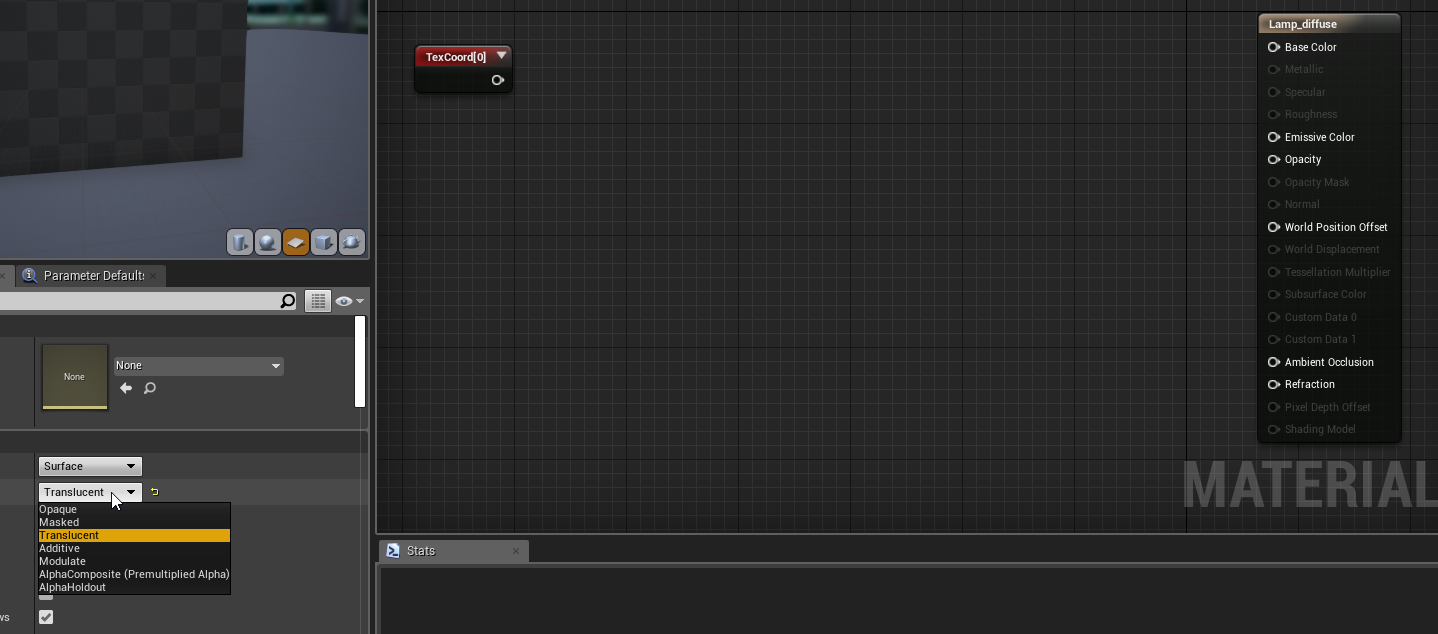
but how do you do this when you can't bump a translucency material
I need to make something like that pretty much
tropic flicker
What tools do you guys use and/or recommend to texture your objects/furniture?
forest depot
@vast rain build it like how it would be built in real life
Tubes of light
Covered by your glass / perspex with normals
If you did it with just a flat material it would look fake anyway as the light would look flat instead of having depth and parallax
vast rain
@forest depot The issue is that you can't put normals on a translucent material in UE4
I made this for it to tile it over
but i can't plug it in lol
forest depot
You definitely can plug normals into a glass material
 forest depot
That doesn't look right
Should be able to plug in roughness as well
Guide for using Transparency in your Materials
This is very old but see how the guide shows translucent and most nodes still work
You might have set some other setting somewhere
But normally a translucent material should definitely include normals
cyan ether
yea theres another dropdown box a bit further down you have to set
surface translucency volume or smth
forest depot

3Disciple Magazine
Get to know some of the worlds best architectural visualisation studios working with SiNi plugins and Autodesk 3ds Max.
First issue of this free to download magazine
Features quite a few of the top archviz studios
Some really amazing work in there
I think we (buildmedia) is the only one on there showing realtime/ue4 stuff but still relevant to compare to the best in stills
 fair forge
 earnest crest
any1 use quixel mixel? kinda stuck
 sweet fossil
@vast rain You need to set the lighting mode to "SurfaceForwardShading" to get the highest quality translucent shader. These are quite expensive though so be careful about how much you use a shader like this
vast rain
@sweet fossil Thanks alot man!
 dusky marsh
anyone using swarms to build lighting in here? they don't seem to be very resilient, do they? I've had instances of 3 completing their jobs, while 1 takes the rest and it currently sits at 10% and the others are just idling
forest depot
It's not that they aren't resilient, it's impossible to split up large maps into smaller maps, so it will never be evenly distributed
Easiest way is just to use gpulm and ditch swarm
Default lightmass is terrible compared to gpu
sweet fossil
The same issue will happen with GPU lightmass
the issue of one machine idling comes down to the inability for one objects calculations to be spread across multiple threads. Most lightbuilds we do will have a few large, high res lightmaps for things like floors and the threads that get assigned these, regardless of which machine they are on in the swarm, will sit and chug away for ages
forest depot
Well not exactly if you ditch swarm because gpulm is 20x faster
sweet fossil
We use GPUlightmass with swarm
As I said the issue is the same regardless of your setup
GPU is a lot faster but it straight up can't fix that issue as it's just about how resources are allocated. You'd have the same issue if you weren't connected to swarm - your GPU would still get hung up on one object
dusky marsh
I don't have dual titans yet, so... also, gpulm isn't official, not sure I'd get any support on it
not that Epic even bothers to reply to our request for an enterprise account quote...
sweet fossil
@forest depot I was explaining for @dusky marsh 's benefit as you were suggesting that the issue would be fixed by GPU Lightmass which is a misleading statement
dusky marsh
RTX baking can't come fast enough...
sigh... can't get my object that's inverted via the static mesh editor to look like the other objects... seems the lightmap doesn't stick to it the same way 😦
dusky marsh
I was talking about face normals
sweet fossil
so you've got a mesh like the default skysphere that you can see into from the outside?
dusky marsh
Datasmith fucked up the import that way, yes, but I fixed it via the static mesh editor... but seems lightmaps still get screwy on it
dusky marsh
no idea how, and it's unreal that generates them, not me
sweet fossil
you should be generating them manually. UE4 doesn't create fresh UVs for the lightmap channel, it only repacks the UVs already defined in the initial UV channel
"Generate Lightmap UVs" does not unwrap anything, it only repacks
so that's going to be an issue for you
dusky marsh
if what you are saying is true, then Datasmith is lacking a huge chunk of vital stuff, so I'm doubtful
lots of people use Datasmith with baked lighting
I think I just happen to have a piece of geometry that gets badly converted (and I've done a bug report on it, so we'll see what happens)
sweet fossil
Lots of people do and there are often a lot of mistakes that go unnoticed and things like this where people assume datasmith unwraps new lightmap UVs for them because it always seems to work due to them having appropriate UVs in the first place for UE4 to repack.
4.24 did introduce basic unwrapping tools so it's possible there may be a way to automate UVs entirely with DataPrep
Datasmith isn't something I've used as I found it way too unreliable and not very helpful for the most part
dusky marsh
I'm fairly certain a Step file does not have any UV information whatsoever...
sweet fossil
so it's possible DataPrep might already be able to do that as I'm sure the UV unwrapping code was available in Unreal Studio
Well there's your issue then, you need to generate UVs
either do that before sending to datasmith or see if the datasmith importer / DataPrep can use the new Unwrapping tools to generate basic box projection UVs that the lightmap packer can then use
dusky marsh
Datasmith DOES generate UVs
actually quite nicely packed too... too bad the lightmaps didn't stick to it 😛
forest depot
@dusky marsh trust me gpulm is the way you won't go back
It doesnt matter that it's unsupported
Regular cpu lm is basically unsupported and going through an overhaul
I had a scene that took 12hours on a high end render farm of 30 nodes (think i9s)
The same scene baked to the same quality using gpu lm in 3 hours with one 1080
I've worked on about 30 high end commissioned projects on gpulm which is experimental, it's not an issue
As for your lightmap UV problem, yes ue4 can create new uvs (not just pack them) you just need to tell the static mesh what uv channel to bake the lightmap onto
However, in saying that. I never use ue4 to auto generate lightmaps, it's always better to do it yourself
sweet fossil
GPU Lightmass does have limitations and can be somewhat unstable when used with swarm but we also exclusively use it now
been doing so for about a year or more
@dusky marsh Can you expand on your issue? What do you lightmap UV's look like and what does the baked result look like?
Also what lights are you using, what are their settings and what are your world settings?
forest depot
To be honest, best practice is just not to use datasmith unless you're dealing with gigantic scenes
sweet fossil
Even with gigantic scenes, if you just use datasmith you're not going to get properly tailored optimisation so it's going to run like crap unless you have a £12k GPU
forest depot
Yeah I mean I don't use it at all, there's a few around here that swear by it though
sweet fossil
I often find that projects that have exclusively used datasmith are very poorly optimized and are full of issues.
It's good for ingesting large amounts of data in a short amount of time but I doubt it will ever match the quality or performance of proper manual work
dusky marsh
I thought Datasmith was exactly tailored for optimization? 😄
forest depot
That's what it's marketed as
dusky marsh
it's the stupid 3D Studio Max tesselation that we're trying to avoid
forest depot
What 3dsmax tesselation?
dusky marsh
to tesselate CAD files?
forest depot
Oh...
sweet fossil
I'd say it's a decent toolset for CAD files but there are better 3rd Party solutions out there
forest depot
For interiors I never use what I get given by architects anyway and just remake 100% so it's perfectly optimized
Exteriors is another matter
sweet fossil
^ same
dusky marsh
@sweet fossil what 3rd party solutions do you consider to be better?
sweet fossil
PiXYZ Software is the leading solution for large CAD data automatic preparation, optimization & review
dusky marsh
ah, right
forest depot
But yeah if you're doing interiors, ditch cad imports and ditch datasmith
There's no substitute for doing things properly
sweet fossil
100% agree
dusky marsh
not doing interiors, though... doing prod-viz, but there's no such channel 😛
@sweet fossil we looked at pixyz but didn't want to pay the price and datasmith was on its way out anyway, so that's why we went with datasmith first
forest depot
What kind of product?
dusky marsh
I'm willing to give Datasmith a few more versions before we consider something else
boats currently
forest depot
When I mean interiors I just meant smaller scale than huge exterior masterplans
So boats would essentially be an 'inteior'
dusky marsh
interior + exterior, very thin, curved walls, glass all over the place, lights spilling outside the wheelhouses, etc etc
forest depot
A better way to phrase would be, is the scene accurate to the millimeter or centimeter
You can get away with being a bit messy with exteriors (accurate to centimeters in terms of details)
dusky marsh
millimeter... it's for VR
forest depot
Yeah so it's an interior through and through
dusky marsh
ok, so you two convinced me to finally look into gpulm then (many others have mentioned it as well, so time to bite the bullet, I guess)
forest depot
Honestly, default lightmass is kinda unusable in comparison
This test baked in 15 minutes
sweet fossil
I wouldn't say it's unusable, you can still get good results with it
forest depot
Make sure to open the original so you aren't seeing the discord compressed image
sweet fossil
one feature that is sorely unsupported in GPU is IES profiles
forest depot
The bake speed of cpu essentially makes it unusable because of the slow iterations and turnaround
dusky marsh
Well mine just completed in a few hours all of a sudden... emissive materials are a bit blotchy, though
inside looks surprisingly nice too... all "generated lightmap UVs" via datasmith
pastel summit
quick question: is there a way to set a color for emmsion on high brightness. whenever i go high on my values it becomes white, but with the color is to low to acctualy look somewhat decent like a light
i want it to be the color in the 2 pic
cyan ether
👌
sweet fossil
@pastel summit What's your material setup like?
pastel summit
@sweet fossil very simple just an emissive color and base color
 cosmic breach
Hey guys, anyone got the new SunSky tool to work with hdri skyboxes yet? I'm struggling to make the sun visible through my hdri.
mellow crater
Hi folks, I am trying to scale a texture -- im told its a texture coordinate and a multiplyer -- which makes sense, but I cant find a reference to tell me what nodes I need -- im coming from the blender world, I have the texture coordinate node, but dont know how to set up the multiply and im not having a lot of luck finding a reference on it
 vernal pecan
@mellow crater here's the reference for texture coordinate maths https://docs.unrealengine.com/en-US/Engine/Rendering/Materials/ExpressionReference/Coordinates/index.html
Expressions that perform actions on texture coordinates or output values that can be used as, or to modify, texture coordinates.
for UV scaling you want to multiply a vector 2 to a texturecoordinates node, then inject that in the UV input of your texture sampler
change the values of your Vector 2 to change the XY scale of the UV
junior path
You should do that sort of texture coord calculations using Customised UVs for best performance.
https://docs.unrealengine.com/en-US/Engine/Rendering/Materials/CustomizedUVs/index.html
Feature that allows running calculations in the vertex shader to increase performance over running them per-pixel.
austere hazel
When modeling for archviz in UE, do you model the whole thing in your 3d software, even things that get repeated, or do you export it once and then place multiple of them in the scene in UE? I mean things like doors, windows, etc
rose merlin
@austere hazel i think UE4 handles instancing perfectly, so if you have a 3d mesh repeated in a 3d application like 3ds max, and all those meshes are instances, then when you export the whole scene for example via Datasmith, the engine understands that these (Let's say a 100 instance) are all one mesh and will import only that mesh once, and make all the actors as instances of this static mesh.
austere hazel
The thing is, I work with blender, so no Datasmith. I'm able to place things more precisely in blender but exporting every single window separately is a pain, especially if you make changes later on
 limber latch
@austere hazel you may want to look at USD (it may help with importing complex scenes)
junior path
@austere hazel Try exporting glTF from Blender and importing that using Datasmith. Works for me.
austere hazel
really? I'll try, thanks!
forest depot
@austere hazel export architecture as is, with repeats done in 3d. Export furniture and props as.... Props for placement in engine
dusky marsh
I guess this is the place to ask, because all you arch-viz guys are light-baking-viz ppl too 😛
why the heck does my baking look like this after adding LODs?
it looked completely fine before LODs, and now it's just garbage
oh, wtf... LOD generation ruined all lightmaps??? why???
pastel summit
@austere hazel i also work with Blender I export the architecture as is under the walls for example and I have a sepraste folder for props where I iterate and the I have a separate folder in ue4 for furniture I leave the transforms as is like I placed them in blender and while selecting the model in the scene pressing middle mouse button Wil set the pivot so I can copy it and move it arround if I want to re-use it. That way I dotn have to pivot the whole scene and export sepratly
sweet fossil
@austere hazel Walls, Windows, Doors, all that kinda thing is just done in 3ds Max and exported as one (not one file, but one bunch of assets, even if they repeat) into UE4. Windows and doors are sometimes merged but rarely. The only things that are place by hand in UE4 is furniture and props.
mellow crater
@vernal pecan thanks -- sorry I didnt get to it yesterday -- kinda a swamped day
vernal pecan
no problem 😉
earnest crest
does any1 know when i use a hdri from hdrihavens.com it looks awful
but the default one looks so crisp?
 lucid orbit
do you have some good source for common dimensions for archviz related elements (such as doors, windows, stairs etc.) ?
googling does kinda trick, but results can vary, are quite fragmented/basic
 amber tendon
Roughness at 0.1
roughness at 0.25
(is a fully metallic material)
Only way to fix this is switching my skylight from stationary (or static) to movable
anyone else experienced this?
pastel summit
@amber tendon are you captureing the reflections?
@earnest crest did you increase the resolution under light settings?
its set 128 by default
 austere garnet
@pastel summit I dont know if youre emissive question got answered
But the only way you can do what you want really is to disable the tonemapper
lucid orbit
what's a good practice to avoid artifacts/leaks with archviz lightmass when it comes to building/connecting walls? Perfect edge aligning, or at least minimal crossing? I also removed "frames" from walls whenever it was possible, to save some uv space, should be all wall parts be fully enclosed? Trying to wrap head around it, tutorials vary in approaches in that matter
probably a place context would be handy, it's a small concrete cabin in shore/forest area, so a interior/exterior mix type project
forest depot
Everything should be snapped
Those two walls closest to the camera shouldn't be crossed over
pastel summit
@austere garnet yeah that was what i eventually did. was trying to find a way around that. thx
@lucid orbit i cut of places that come together in the corner or are hidden behind other objects. i try to keep the walls as short as possible so i can get better results. try to avoid cutting walls in the middle it will give nasty results. in corners you can hide that. when it comes to unwrapping i tend to keep it all in one continues piece so i have better lightmap results. when cutting walls in 'unnatural' places it can cause bleeding or weird acne
lucid orbit
thanks for tips, I've modified meshes to snap edges, removed frames (small surfaces between 2 major surfaces like walls), seems to be working well @forest depot @pastel summit
 warm slate
what may cause this kind of baked lighting artifacts? im pretty sure uv's are not overlapping
pastel summit
are the uvs in the lightmap cut into seprate faces
warm slate
yes
austere hazel
@junior path the glTF esport thing works perfectly, thanks a lot for the tip!
@warm slate do you have some margin between the various islands in the Lightmap UVs?
warm slate
im pretty sure they have margin
i can check it in 10min
is blender lightmap uv generator solid?
should i use it instead of auto ue4 thing
pastel summit
making them yourself is the best option for some objects automatic works fine. try making one for the complex objects.
junior path
@austere hazel No probs. The only thing so far I've found it doesn't like is linked collections in external .blend files. They cause a crash at Datasmith import time.
 boreal meadow
im starting a new render, its taking too long for a scene where i didnt put anything on it not even the materials... any advice?
amber tendon
bake time doenst really depend that much on materials
more on the amount of maps
their res
and your quality settings
@warm slate uvs do look a bit weird. its all one island ?!
warm slate
no, each face seperate island
pastel summit
thats why you get those artifects
the less seems the better it will look
@boreal meadow did you change the lightmap resolution on each model. might be that you set them to high for the pc
@warm slate every cut you make in the uv wil ahve bleeding you need to try to make ass less cuts in an object it looks pretty round cut of the top and bottem make a seem in the back and rectify until your checker maps look good
the red lines is where i cut the mesh
they need to be in palces where it would make sence if it were to be 2d
the thing you want to aim for is to try to keep pieces that are continuous in one continues unwrap. so if you have a plain dont make a cut in the middle but unwrap it as is
pastel summit
no
you want to aim for having continues faces stuck to each other like a wall
the less cut pieces the better the result
lookat ti like a wall you dont cut it in the middle
warm slate
yeah i understand
boreal meadow
ok, so if my walls, ceilling and floor are in one object can i cut the uvs for each side of the wall?
pastel summit
yes you can
if pieces are to big it will decrease the quality beacuse there is less room or you need to increase the size but that is heavy
warm slate
so can i uv lightmaps in blender the correct way?
pastel summit
these will be good places to good
in the corner
it wont bleed if you cut the wall of at the corners
warm slate
or shouldi use auto ue4 uv thing
pastel summit
i unwrap all my models and based on that it will usualy do a good lightmap unless the model is complex or roundish then i tend to make them myself becasue the results are way better
it will calculate a lightmap based on your unwrap
if you dont have a good unwrap it can mess up the lightmap
boreal meadow
so i can't just use auto unrwap on 3ds max...?
pastel summit
personally i worked with games so i learned how to unwrap fast and effiecient but i think datasmith and some auto unwrap pluginns are good ish to if you dont want to unwrap
yeah you can but its not the best result in my opinion
boreal meadow
i see
pastel summit
having the control over the unwrap is in my opinion still superiorly over automatic tools
but dont get me wrong you can do fine without the skill and the resutl will still be good
boreal meadow
thanks man, i'll give it a shot
lucid orbit
oh yeah, I was sometimes wondering when making own lightmap uvs would be good, my understanding is lightmap does the better the less islands it has? Since gaps between lightmap uv islands are what makes light leaks and non-uniform shading?
lucid orbit
blender 2.8's default UV island margin is 0.001. Is it fine for UE4 archviz stuff? My gut feeling says i'ts more than enough since archviz usually rely on high texture resolutions, meaning those island gaps aren't likely to cause texture/blur leaks (no idea what's the correct term)
pastel summit
its depending on the uv and lightmap size. you could have an 8k texture but it would still cause bleeding or artifacts those are 2 'materials/maps' if you will. personally i would go with making a good unwrap in the first place like you mentioned its likely not to cause anything but if it will its extra time and by doing it right away that could be saved
i think you could compare it to Photoshop somewhat. if you zoom in you see that the color always bleeds 1 pixel further than it originally looks like when zoomed out. when the faces are cut like that and put next to each other they will bleed on one another. even having high texture resolution wouldn't solve that as light-map is a separate thing just keep the uvs attached as long as possible and as long as you get good results
and whenever you need to go lower on resolution for maybe a vr product or web. you can downscale without having problems
pastel summit
hi guys, I'm looking for feedback on the pp mainly the color and over al feel of the atmosphere. got one warm/home feel and the other one pretty white. would love to know which suits better or if you have other ideas let me know
wicked willow
Have you guys switched to 4.24 or are you still using 4.23 for Luoshuang's GPU Lightmass?
wicked willow
I'm getting noise with my baked lighting
using these settings
ive played around with them and its not changing anything.. any suggestions?
 runic ermine
im using 4.24 with Luoshuang's GPU Lightmass
cyan ether
i like them both equally wes
wicked willow
@runic ermine there's a 4.24 version of GPU Lightmass? Do you have a link?
runic ermine
https://forums.unrealengine.com/development-discussion/rendering/1460002-luoshuang-s-gpulightmass/page104
The one i downloaded is the link on the 4th post from the top (i think)
Unreal Engine Forums
Click image for larger version Name: image_138398.jpg Views: 1 Size: 82.0 KB ID: 1478783
Disclaimer:
This is a very simple and early version of my GPU lightmap
im not sure why its not been edited intothe first page lol
lucid orbit
doesn't gpu lightmass from luoshang ignore all lightmass settings in world settings tab, except the bounce parameter?
sweet fossil
@lucid orbit Most, but not all.
lucid orbit
well, what does gpu lightmass support except 'Num Indirect Lightning Bounces'? @sweet fossil
lucid orbit
@pastel summit i don't think you can get good answer for that question, both renders are solid and I feel it's just a matter of taste or client's/target's preferences
warm render for fuzzy feeling, cold render for realism I guess?
pastel summit
@lucid orbit good point totally agree with that. it was more so that im personally not sure what route to go for and maybe some feedback could help me decide.
lucid orbit
@wicked willow you may want to bump up samples through gpu lightmass configurator bat script, at least 124 and 64 i think + disable Lightmap compression in World settings, this latter option reduced grainess for me
lucid orbit
@mellow crater yup, both Num's. I adjust them through gpulightmass configurator bat script,easiest to do. It has 5 presets that adjust those two params. I use first 1-2 presets for previews and 3-5 for tweaking/final result
 atomic grotto
hey guys are there any working or concept arcwiz work on quest or oculus go my team willing to try what can achieve on mobile VR headset and i am curious what you guys did or any sample render video document showreel I can find its just to see what can possible in mobile VR field
lucid orbit
to anyone using Luoshang's GPU baker, do you have some issues with baking lightmaps on assets that have multiple LODs (for example, megascan assets)? I've been troubleshooting black splotches on some assets in my project since yesterday and came to conclusion/solution of reducing LOD amount to 1 on megascan assets, they're now shaded properly.
sweet fossil
^I've heard of that being an issue but I've never experienced issues with LODs myself. Double check the lightmap UV's aren't crap
atomic grotto
@sweet fossil +1 lod might have improper lightmap uws
lucid orbit
lightmap UV shouldnt be crap, because when I switch from GPU baker to CPU, issue is gone. And on GPU it's fine, just asset's amount of LODs needs to be reduced to 1
doesn't look like megascan asset (wooden bowl) has bad texture uv map, no overlaps/mirrors etc., so ue4 lightmap generator shouldn't have issue with it (lightmap uv looks very similar to texture uv)
@atomic grotto as afar as i know, lightmaps have only 2 mipmaps? LQ and HQ, according to rollout in World setting lightmass section.
atomic grotto
@lucid orbit it has no problem with cpu and some problems with gpu cuz its a plugin its not made from epic games so some minor bugs there is some limitation as far as i know he stopped developing his plugin and working with epic atm to make better one but its not published yet
@lucid orbit if you are in a rush to deliver a project dont use lod at all just fix on lod 0 so you dont have model replace when far away so there will be no problem on your visuals
lucid orbit
Yeah, i thought its some GPU baker limitation, just that im not sure what it is exactly. Not commercial project, so no rush needed, i wish quixel bridge had more export options, it also doesnt check on option to generate lightmaps on import :(
earnest crest
any1 here know about cloth in ue4? tried to make/import a flag from blender like 3 times now and just doesnt work, followed tutorials step by step whole way
wicked willow
what normally causes light leaking at the edges/corners of the walls with baked lighting?
wicked willow
wicked willow
I tried increase the light map resolution which is what you see the results of above
before it was like this
the only other thing I could think of was keeping the indirect lighting smoothness low as recommended
runic ermine
I think thats light leaking,you might need to put some basic cube/rectangles around the building to block the light
 median rivet
Another work in progress...comments are welcome, anything i can do to make it better? thanks for looking
Funny, i just noticed the extreme tiling on the wood cabinets
mellow crater
I have taken the starter level of the architectural template, removed the sample meshes and some of the cameras etc. I would like to save this as a starter setup (is it called a blueprint???) for my uses, so I dont have to be removing stuff all the time, How do I do this?
wicked willow
@ Dita Ok I'll try that ..
I posted on the Unreal forums with more info here: https://forums.unrealengine.com/development-discussion/rendering/1709671-help-baked-lighting-troubles
Unreal Engine Forums
Hi Everyone,
I've been struggling to fix some lighting issues with my scene. I'm using Luoshuang's GPU Lightmass
I've got light leaking in the corners of my walls and noise everywhere.
I've been following mostly the advice from the Unreal Dev Day Montreal Video
https://...
junior path
@mellow crater Like this...
https://docs.unrealengine.com/en-US/Engine/Basics/Projects/CreatingTemplates/index.html
Steps for converting an existing project to a template.
cyan ether
more of a template project taholmes, you would keep that one in your projects and duplicate it out to start a new project based off it
 gusty quarry
any speedtree users
lucid orbit
@median rivet in your place I'd tone down either artificial lightning or exterior, both are very strong, which is unusual for interior lightning (at least for me) and are kinda fighting each other for dominance
 deep valve
People who uses Blender, do you know if there's a way to transfer Custom Properties data to UE4 as tags?
Like, this information
sweet fossil
@deep valve Did you try fbx?
 bold meadow
Guys can't we see objects or textures which we don't use so we can delete them ?
@deep valve Did you try to check this box when exporting?
Custom Properties Box
 leaden axle
Hello fellow arch-viz artists
Working on my first full UE4 project. Almost finished, just trying to wrap up the animation
wicked willow
@leaden axle looking good.. but what are these?
leaden axle
above them you can see the recessed can lighting. Used an ies profile to get the shape of the light scallop
they read a little bright and a bit sharp now that I look at reference images
wicked willow
It might be best to jsut turn them off. You a nice daylight scene with natural lighting
leaden axle
I also have a night time shot where these look better as is. Might be better to turn off, you are right
 brisk jewel
Would anyone know what can greatly affect GPULightmass baking times? I have fluctuated from sub 20 minutes to well over an hour. No extra lights and only material changes. Unless some values in the directional and sky lights affect it?
Though having said this. Restarting my PC seems to have helped a bit?
cyan ether
clear and validate cache to get rid of failed lightbuild files, this gives you enough hdd headroom incase the ram needs the pagefile. materials wise i can only think of emissive contributing materials, lightmass resolution on objects is the biggest factor, things above 2048 get unstable
earnest crest
is there a way to get emissive lighting to flicker without using any lights?
wicked willow
@earnest crest maybe animated the material with a blueprint?
leaden axle
@brisk jewel Yes, Id check to see if any resolution is 2048. That adds up I noticed
wicked willow
Anyone else find the 4.24.3 update seems to have broken their GPU Lightmass?
oops i meant 4.24.2
leaden axle
Anyone ever run into the issue where whenever you try and delete any asset, light, mesh, etc. Project crashes? Just started happening
Assertion failed: [File:D:\Build++UE4\Sync\Engine\Source\Runtime\CoreUObject\Private\UObject\Obj.cpp] [Line: 200] Renaming an object (Package /Game/Levels/MadMenNight_BuiltData) on top of an existing object (Package /Game/MadMenNight_2020-01-23-23-13-57_BuiltData) is not allowed
I wonder if I delete the 01-23-23 builtdata that would help?
Then again I am not even sure what that Built_Data file does...
wicked willow
Built_Data file has all the light map info.. it's safe to delete..
it can be recreated when building your lights again
leaden axle
@wicked willow thank you for the quick reply. I'll go ahead and do just that
earnest crest
@wicked willow but to actually emit the light from the object at the same time?
 queen grail
Does anyone know how to take a high resolution screenshots in Unreal ?
 grand fern
Does anyone know if its possible to achieve a white massing/physical model style look using a post process material on top of a fully textured scene?
wicked willow
@earnest crest Oops forgot that part !
earnest crest
@wicked willow hm kk thx will try it out
wicked willow
yaay I've got 2 new problems I've never encountered before..
light/ shadows when you look inside
and nothing when viewing from inside?
sweet fossil
@wicked willow Pax released an update to GPU Lightmass for 4.24.2
brisk jewel
Great. That was causing a problem for a colleague.
brisk jewel
This is still very odd. I have a scene here that's taking well over an hour to hit 30% when it took 20 minutes to do it all before. It's even just killed my GPUdisplay, all froze up.
GPULightmass related.
I have a few maps at 2k but only really been updating materials and some bad geometry.
Ideally one could do with a "best practices for GPULightmass because I'd love to know what's happening between a perfectly fast build and a shit show. Even things like restarting the PC makes a difference.
brisk jewel
Okay, evidently it is lightmap related. I was reporting datasmith stuff and it was setting A fair few things at 1k maps and it seems that was adding up.
fallow grove
Hi, i have a laptop with rtx 2080 max q, and have checked my windows version, but every time i enabled raytracing, the editor crashes, i have searched everywhere but i cant seem to find an answer or any workaround. By the way i am using latest 4.24
Thanks in advance
wicked willow
@fallow grove are the drivers up to date on your video card?
brisk jewel
@fallow grove have you set the default RHI to DX12 in te project settings?
hallow arrow
laptops with NVIDIA + Intel have known problem with ray tracing and currently there's no workaround 😦
the only 'workaround' is to connect an external monitor and hope that works
fallow grove
@wicked willow, yes all drivers are up to date.
@brisk jewel yes, it’s all ok and usable, buy once i enable dx12 on project settings, it crashes when i start to move around.
At first i thought it’s because of the gpu lightmass, but after removing through the verify option on the launcher, it still persist on crashing after enabling raytracing and dx12
@hallow arrow how about if i disable the interl graphics?
@hallow arrow i saw this forum https://forums.unrealengine.com/development-discussion/rendering/1707090-4-24-1-rtx2060-dx12-ray-tracing-editor-crash
The work around is to add a monitor. I hope they found a better solution soon. Thanks
Unreal Engine Forums
Hello! how to solve the problem of the fall of the engine? ((
repeats constantly!
cyan ether
not rtx ready at all, pretty shoddy nvidia
earnest crest
does any1 know why every time i build my lights i lose these shadows?
it looks like this after i build the lights, no matter the quality
forest depot
probably be a lot easier to diagnose if you just show lighting only
earnest crest
@forest depot like this?
forest depot
yep
there could be quite a few things going on
but most likely when youre adjusting a static light, the red one behind the door
that preview brightness is actually not accurate at all to what its supposed to be, so its probably travelling a lot further than its supposed to once baked
so rather than the shadow not reaching where you think it should
its more that the light isnt even strong enough to go that far
therefore no shadows
earnest crest
ok ill try to crank up the intesity and rebuild lights
@forest depot but you see the light on the floor and the intesity coming out of the door, it does look they kinda match no?
forest depot
can you draw over what you mean?
earnest crest
even though theres no shadows on one of the images, they look the same intensity
forest depot
yeah but i cant tell what else is going on in your scene
like is that the only light?
cause its very clear that there are shadows baked there
forest depot
so its either intensity of the light
earnest crest
yeah it could be tbh i made it in blender
earnest crest
shall i put a standard bsp brush there and rebake?
forest depot
no
forest depot
lightmaps use channel 1 (in engine)
uv channel 0 is for textures
its stupid because every other software in the world UV channels start from 1, so lightmaps is 2
once its brought into unreal it starts at 0
so youre looking at 0 which is 1
earnest crest
yeah ive not really dived into knowing how to UV map too much
seems hella complicated
forest depot
you need to look at 1
earnest crest
forest depot
you should really have a good understanding of UVs if you want to do any baked lighting
ok that looks fine
although i dont know why the mesh is so dense
forest depot
whats worrying about what i see in the asset viewer there is that its completely black
are the normals flipped?
earnest crest
it seems logical
ill double check it and reimport it
and then rebake i guess
think thats right?
forest depot
cant really tell from that
just make sure all normals are facint outwards instead of inwards
facing*
earnest crest
that is the face orientation view
ok i imported a new plane and im rebaking with new plane there
have quite a few lights so it takes a while 😴
@forest depot https://gyazo.com/6bd0cc309ca5697c06098f51949cf898

thats how it looked when i baked
then when i moved my camera it turned to https://gyazo.com/c602f5b44ca1cdb0046ca68e943d29b1

so im guesing uv maps are messed up on the gate also
forest depot
theres so much stuff going on its pretty hard to see whats happening : /
earnest crest
its basically just that red light coming out of the gate there
not much else is in this bit
so annoying having to wait 10 min to rebuild my lighting on preview
everytime i make tiny change here
forest depot
so have you checked lightmap sizes on the floor?
earnest crest
no
forest depot
ok so by default everything is 64x64 for lightmaps
a floor will need to be bigger
like 512
earnest crest
i dont have too much experience with changing lightmaps tbh
where would i do that
also, the floor is not black, its accepting the light so i think its just the gate
but i dont know how fix the uv maps on the gate so cant really test unfortunately
need to learn how to uv map in blender but havent got round to it, seems complicated to mark the seams and understand it in the 2d image.
on complex shapes
forest depot
click on the floor and on the object in unreal you can change the lightmap resolution
just search for 'lightmap' in the details
earnest crest
earnest crest
sio ill bump it up to 512
forest depot
yeah
or you can do it in the object
in the level
as an override
not on the asset
earnest crest
then rebake i guess
btw electric when you bake light isnt it ment to stay there, even when you move it
you have to rebake it somewhere else to get rid of it?
forest depot
yes
forest depot
probably because its not a static light?
earnest crest
because it was on stationary
forest depot
by default they come in as stationary
earnest crest
yeah i forget
forest depot
should probably also read up on the differences between them
earnest crest
i do know a little bit about how the 3 of them work
or the basics
ill try rebake this with the new floor and on static
earnest crest
@forest depot my pc crashed while trying to bake and i had to go do some other stuff, i rebaked with static and it didnt work, but it worked fine with bsp brush with the texture applied
it just looks terrible
so will revisit it tomorrow :<
forest depot
unlucky
 weary mortar
Pretty basic question but do people generally create skies using UE environment lights or do you use HDRI's?
forest depot
Doesn't matter, I use both and nobody can tell between the two
weary mortar
Is Hdri just as easy to use with the new updates in 4.24?
royal steeple
weird issue with camera movement, trying to render out a small slide, works fine for like 3-4 secs then it just switches to an non-animated camera
preview in editor looks fine
forest depot
The new updates don't change the workflow really
boreal meadow
it turns black at some angles of view... the uvs look ok, tried with box and sphere reflections... get the same result... =/
 jovial coral
Hey all, is im looking for a way to give the end user the ability to create a custom camera path and export video/stills from a simple scene, is that possible?
boreal meadow
@pastel summit it helped a little but the black texture still appears...
 keen bramble
Hi All, I'm running a PC with dual RTX 2080 ti, UE 24. How to take very high resolution RayTraced screenshots.
i tryng use High Resolution Screenshot tool, but i only render with screenshot size multiplier = 1.
when i tried to do it with = 2, then the process denoise is start again.
pastel summit
@boreal meadow are you using spec/gloss workflow or roughness/metalic?
tropic flicker
Do you guys have any particle websites/discords/resources for updates in ArchViz in UE4 ?
deep valve
Hello, so.. Ansel is just not working. Does anyone know why?
leaden axle
Any idea why in UE the cigarettes show but after a high res screenshot they disappear but leave shadow?
amber tendon
haven't seen these artifacts on the walls before. Like fireflies. any ideas?
deep valve
@amber tendon Lightmap resolution of the wall probably, try splitting the wall from the ceiling from the side wall. Then bump up the lightmap resolution and try the bake
amber tendon
Ceiling is split already!
i will increase the light resolution, like you said! Tho I thought that this would be a high enough resolution
deep valve
usually I use yellowish/orange for internal scenes..
also, send your lightmass setting on world settings
@amber tendon Important to uncheck these
amber tendon
This is what I baked with
Alright, I will use yellow/orange for that wall next time.
On the other end it looks really dirty like this
I guess I fix that by just upping the resolution from green to orange ?!
deep valve
Man, probably you're having issues with the lightmap of the walls, are they small elements:?
Also, you don't need 100 indirect lighting bounces, lower it dows and change your static lighting level scale to something like 0.5
Another thing, are you using GPU lightmass?: If so, what's your min max settings on lightmass.ini?
amber tendon
Nope, am using CPU Standard Lightmass. Don't really wanna change this mid-project.
Aight, i'll lower the counts!
The walls are medium sized elements
between 3 to 8 meters
 lethal vigil


 dusty gyro
@lethal vigil hey man, saw your video, good stuff as usual ! 🙂