#aec-visualization
1 messages · Page 11 of 1
 coarse kelp
yeah its vr and it will be a design review so i am pretty sure we need it more accurate than average
 mild oxide
Should be fine
And you can always use gpulm to iterate until youre satisfied bc its quick
And then switch back to a production build for the final bake
Interstellar iq
coarse kelp
thats a nice approach too
will see if it holds up in production 😃 in the end maybe we will have to let the customer decide what he values more - speed of changes or accuracy
coarse kelp
thx 😃
 forest depot
its definitely accurate enough
i havnt experienced it being less accurate
@coarse kelp do you have an example of the type of work youre doing?
coarse kelp
its under nda so sadly i can not share that information. i know it SUCKS xD
mild oxide
Or in general
coarse kelp
oh i am just asking about the gpu baker because we are right now testing unreal for our projects in general - we worked in unity before with bakery so are kind of used to the increbible baking speed it provides ^^
coarse kelp
i will definitly use it for preview but like agent said - if it needs to be "better" we might switch to cpu for the final bake
mild oxide
forest depot
fair enough, i just wouldnt expect it to really get any better
this is one of my projects and uses gpu, plenty of macro shots
coarse kelp
thanks a lot for the references 😃
mild oxide
Nothing to do with the gpulm juat curioua
Ah ok
I had been using substance/megascans but now I'm testing polligon and stuff
Cgaxis
forest depot
yeah i use a lot of that stuff as well
mild oxide
Nice thanks
 noble geyser
Has anyone figured out how to get GPULightmass working with 4.23 ?
 hallow arrow
recompilation is needed
merge 4.23 into the GPULightmass-4.22 branch, or rebase 4.22 on top of 4.23
 mellow crater
can some one help me to get realistic lightning with shadows?? i have tried since 2016 but haven't got it realistic 😦
forest depot
Let's see what we're working with
 gilded pulsar
I want to have collision on everything. Ofc I have been googling around but no solution that I could get to work. Any solutions?
gilded pulsar
I could change the ini file but I cant find it. DefaultEngine.ini
 dusty gyro
@gilded pulsar you mean complex collisions ?
gilded pulsar
yes
dusty gyro
two solutions
gilded pulsar
great
dusty gyro
bulk edit your meshes and change collision type to complex as simple
or change the default collision type in your project settings to complex as simple instead of default
gilded pulsar
like in property matrix?
dusty gyro
yep
gilded pulsar
cant get that to work
gilded pulsar
I select a few meshes and open property matrix and search for collision
dusty gyro
yeah
gilded pulsar
then what?
dusty gyro
well
I found it
in Body Setup
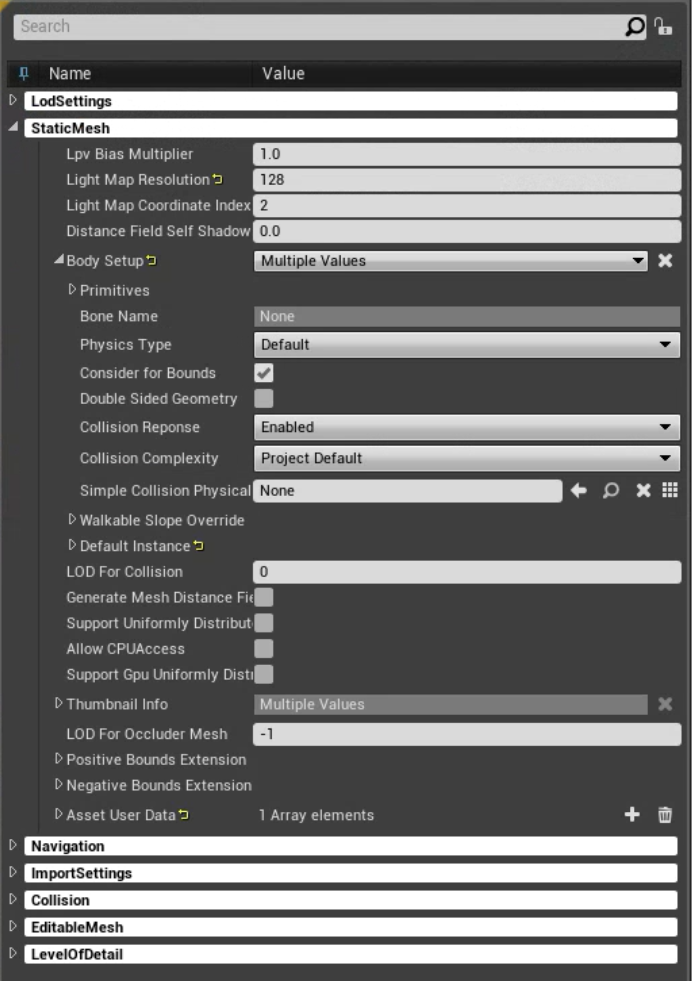
right in the middle
are you sure you are selecting only static meshes ?
try searching "complexity" instead
dusty gyro
hmm
gilded pulsar
getting nothing by searching complex
gilded pulsar
yours are saying static mesh
gilded pulsar
mine says staticmeshactor
gilded pulsar
Yes they work very well now thanks
dusty gyro
sweet 😃
gilded pulsar
Can you answer one more thing. In my content browser under materials when I search for ex. glass I get everything twice.
One in materials and one in master, I dont know what "Master" is.
dusty gyro
both are materials
how are you using materials in max ?
instanced materials ?
basically its creating a MASTER each time you create a new material in max
and instances for each time you are instancing that material in max
masters define your materials (basically what you did in max in the material editor)
instances are instances (heh) of these master materials, and you can only change properties that have been made visible in your master
also instancing is a good part of optimization
you dont want tons of masters, you want a few masters and lots of instances of these
dusty gyro
UE needs to create custom masters for max
Revit has its own master material in engine, so it only creates instances
hallow arrow
note: making static switches in masters and tweaking them in instances is equivalent to making new masters
 quick basalt
@hallow arrow are Rectangular Area Lights supported by GPU Lightmass (4.22)? i tried in a small test scene and it seemed to work, when i use a Blueprint actor with a rect light in it lightmass gets stuck though (gpu and cpu are idle after a short time)
hallow arrow
no they are not emitting gi
direct lighting calculated by lightmass CPU so you would still see something
quick basalt
@hallow arrow Ah thx good to know, so either use meshes with emissive or point lights with source radius would work? What would be recommended for large rectangular lightsources?
hallow arrow
source radius doesnt work either
currently the only way is to use emissive materials
however GPULightmass has robustness issues with emissives
and thats the reason why you see most of people who get good results from GPULightmass using skylight primarily lol
gilded pulsar
Oh boy my paths is getting too long, is there a workaround to this, or is it just about rewriting everything.
cant export/package the project now.
quick basalt
@hallow arrow Thx for all the info, awesome plugin btw. I have to bother you with another question though, IES Files aren't supported as well it seems?
 dusky marsh
@gilded pulsar is it imported via Datasmith? I swear I reported that at one point, but can't find it now... I thought it was fixed, because I haven't run into that again
gilded pulsar
@dusky marsh Yes I run everything via Datasmith.
@hallow arrow IES profiles are supported and work just fine
quick basalt
I meant using GPU lightmass, yeah they seem to work, not shure about the indirect bounce though.
dusty gyro
@gilded pulsar enable long path in windows and in the editor settings
that's the "fix"
 brisk jewel
there any way to change the distance of MIP textures? my lightmaps pop in and out a little too often
gilded pulsar
@dusty gyro Looking forward to test it, thanks for the answer.
Our LightGuy in the company is asking if it is possible to make something like this in Unreal?
 dark oriole
There is a view mode for that built into the engine, think it's HDR... something something. Yeah, you're gonna need to look for it but it's one of the viewport options.
 honest temple
@little star Use reflection spheres/boxes inside the interior...
Then use captured skylight, or if you use a HDRI. You have to rotate it and see were the light from the sun hits. Match that with the sun also..
Best guess is to add captures. Or have you set the hemisphere color to high?
 little star
@honest temple thank you for you answer! I changed nothing at the hemisphere color setting.
gilded pulsar
If I need faster build times, is it then better CPU or GPU or anything else then?
forest depot
fastest is gpu
honest temple
@little star Then try to use captured skylight, with cap spheres....
You can also try turning on Dynamic Inset shadows on the building mesh...
(Not sure it helps, but have some impact sometimes.)
If not.. Just try and build the light and cap spheres.
Also under World settings / Ligthmass settings:
You can set light bounces on both of them to 5...
Then build lights again....
honest temple
Or keep bounces at 3 for performance!
little star
@honest temple I‘ll try that out. Thank you!
gilded pulsar
any idea why my mesh doesent look the same in scene as in details?
mild oxide
Imverted normals?
Maybe you put a different material on it in the scene
Could be exposure/bloom settings too
gilded pulsar
Okey I will look into that
 native ferry
was wondering if anyone knows of any ue4 archviz mentorship programmes?
mild oxide
State of art academy has a masterclass if thats what you mean
honest temple
You need to have the material and mesh setup to work with emissive light i think..
See if it has a option in project or editor settings.
"emissive" something
mild oxide
No works by default. If you need the emissive to affect static lighting then you need to change it on the mesh
But visibility should work by default
 wheat pond
How can I get HighResShot to also include Buffer Visualizations?
wheat pond
If I can get viewmode console command to work in the editor viewport, I can make it export automatically from editor script
 ripe tartan
guys, do you have any idea what can be causing these light spots?
 golden cliff
Hi, I know this might be a newbie question. I am a beginner in unreal engine 4 and really interested in learning for Archi viz. I have a really basic knowledge in 3dmax. Can anyone explain what is the best workflow in working with Unreal engine 4?
is it cad > 3d max > Unreal?
or using cad > Unreal?
any help would be appreciated. Thank you very much.
mild oxide
Cad > max > unreal
But you'll be better off just looking at some introductory lessons on the academy
Answer most if not all questions you might have
 vernal pecan
@mild oxide check your friend invites
 uncut jolt
@golden cliff what cad software do you use?
vernal pecan
to bounce back on what agent said, head to https://learn.unrealengine.com/ for tutorials and archviz workflows
golden cliff
@uncut jolt Autocad > 3ds max > Unreal engine.
@mild oxide @vernal pecan I am working on learning the engine. Thanks heaps.. Really Apprieciate.. at least I'm not far off the track..
uncut jolt
@golden cliff okey then the workflow u use right now is the best yeah 🙂
golden cliff
Thanks. @uncut jolt
 lucid orbit
is there anyone who does archviz with equal texel density on all meshes? I need someone to explain me like i'm 5 years old 😄 I understand in theory that a good texel density removes the necessity to scale textures on various meshes to match the "real size" of textures, also it let's you to have native uv scaling matching the real size of texture (1x1m, 2x2m from megascans, etc.) without having to do any scaling (basically slap texture on mesh in UE and be done). But I'm having difficulties in grasping in how it looks in practice, I've used TD blender plugin to apply shared scaling to all meshes, but as far as I can see, it requires specific texture resolution (unless you want to manually scale meshes that have different resolutions, like 1k or 2k instead mainly 4k), and from what I see in UV editor, some of meshes have really, really low coverage of UV map (like 10-30%). Is it expected, or do you workaround this somehow? Or it doesn't matter as long as texture is tileable and UE4 makes own lightmaps from UV maps that will make baked lightning work okay?
dusty gyro
@lucid orbit check your scene in unreal with the Debug Lightmap density resolution. You'll have a pretty clear answer 🙂
lucid orbit
im sorry, but that's not the point 😛
i know im bad at explaining, hmm
i think lightmass is irrevelant as long as uv islands aren't overlapping - ue4 will generate fine
maybe my main worry is if this bad uv coverage on some meshes due to TD scalings may introduce some troubles
coverage, as in how much area uv islands are taking the, er, 0,1 uv cordinates? not sure if it's correct wording
dark oriole
If you're sharing textures between assets (aka using tiling textures), it's honestly fine to use 10-30% of your UV space for smaller assets but the ideal is just to use material instances to scale the UVs on those assets. Lets you still have unique details on those assets if you need to, without wasting a ton of UV space.
And yes, you do require specific texture resolutions when working with a uniform texel density. Let's say you have two objects, one's 2x1 m large and one's 1x0.5m large. The smaller one and the bigger one can both take up the same amount of space on the UVs but when you set up your material, you make the bigger one tile double the amount so it's the same texel density.
In an ideal world, you would be filling most of the 0-1 space with your UVs (it'll never be 100% perfect, expect around 30% or so to be wasted) and then scaling the texture in the material instances.
dusty gyro
@lucid orbit this pamphlet is for you
lucid orbit
thanks guys 🙂 Wasting ton of uv space is bad because..? More wasted memory?
if that's the case, then it's pretty much about two sides of issue, one being easy and badly optimized (uniform TD in modeler) and other being vice versa (more material instances needed/individual scales) ?
dusty gyro
yeah basically UV space is VRAM and storage on your disks. Packed UVs = better memory footprint.
gotta find the right balance between the two
 sleek cove
Hello guys. Do you have any info about IFC converter that was supposed to come with 4.23 version?
uncut jolt
nop
but u can import the IFC in Revit en then export it with datasmith?
@sleek cove
sleek cove
Yes
vernal pecan
@sleek cove we're in the last straight line regarding the IFC importer, making sure the licencing stuff is done right and fixing the last issues
I have tested it and it works well though 🙂
sleek cove
@vernal pecan Thanks! Can you tell do we need UE 4.23 or does the Engine works in 4.22 also?
vernal pecan
you'll need 4.23
its part of the CAD importers suite, not using the DATASMITH workflow
(we directly interpret the IFC file instead of using an exporter like with max, revit or sketchup)
sleek cove
Oh, we don't need datasmith at all for that?
vernal pecan
nope, UE will directly eat the IFC file
hang on
have you tried the 4.23 preview 7 ?
sleek cove
No
sleek cove
Oh! Thanks. I tried some older preview version and didn't see it there! Nice to have it now! I'm sure to test it
vernal pecan
its a recent addition to the previews I think
If you do have some issues with it, please tag me here and we can figure out a solution 🙂
I'll be sure to escalate to the devteam if its a bug
sleek cove
Will do.
uncut jolt
@vernal pecan awsome that IFC is supported in 4.23 🙂 haven't tried that one out yet....
vernal pecan
Please do @uncut jolt , all feedback is good 🙂
mild oxide
@vernal pecan what happened to the hdri skylight
vernal pecan
@mild oxide what do you mean ?
I had a user report that it was disabled by default somehow in the latest patch, go in the plugins and reenable it 😬
mild oxide
ye i found it
vernal pecan
noice
vernal pecan
Alright so regarding the backdrop not being active by default since 4.23pre8, here is the official statement from the team :
Starting with preview 8, you need to enable the HDRI backdrop plugin as it's not on by default. Having it on by default was causing package sizes to increase for everyone.
mellow crater
having some weird issues with the outside of my lightmap, if anyone knows what's up or needs any more information to help me fix the problem let me know. i just started learning lightmass today so any help is appreciated
mild oxide
Sure it's not overlapping polys?
mellow crater
it wasn't supposed to be leaking into the outside, that is why some of it appeared whiter and other parts were correct
mild oxide
I see
 left garden
It's the 20th anniversary of the first public demo of my Unreal 1 archviz software, dug up the original position paper and some screenshots: https://twitter.com/unrealtynetwork/status/1168339521374752769

20y ago (1-3 Sep 1999), I showed the original Unrealty demo in public for the first time, at the 5th International Conference on Virtual Systems and MultiMedia (VSMM). The original conference site via @internetarchive @waybackmachine: https://t.co/X1cflqSLsz
 Twitter
 worthy loom
hello. why every time i build light. it pop up this error,. i mean ofc i am doing it, but why error the thing i am about to do
WorldSettings_1 Maps need lighting rebuilt
Map check complete: 1 Error(s), 0 Warning(s), took 1.026ms to complete.
 sacred ore
Quick question for the unreal pros here. I'm trying to create a visualization exterior to interior of a home and I'm having trouble setting up the walls to remain continuous around the outside of the property as I was informed breaking up the walls was the right way to go, but it seems lining up exterior textures such as brickwork is a nightmare. any tips?
mild oxide
two meshes
if youre only doing exteriors then single mesh is fine
if interiors too then make separate meshes for the interior walls
the main reason is interiors need higher lightmap resolution
better shadows
sacred ore
makes a lot of sense
sacred ore
so sleeve the interior as such?
sacred ore
yeah they're mostly individual
worthy loom
hello any tip on dealing with wall corner when detach mesh ?. i usually go this way
but there r gonna be bad light leak at that corner
mild oxide
Extend the walls my guy
worthy loom
or this ?
mild oxide
Any 2 parallels
worthy loom
that light leak in the midle of the image .
what if my building only have window on 1 side, i cover the whole the other half with other box shape to block any light. will it work ?
because fixing every corner in some case isnt the best one
dusty gyro
You can wrap your model yeah @worthy loom
Like shown in post from Chemical Anomaly a bit upwards
This'll block light coming from outside
worthy loom
hello can someone help me. why my thing ( i dont know how to call it ) get so shinny like that. the wall and floor both extend to fully cover corner, so there are no light leak from outside
and how to turn off lighting reflect to world from plant Leaf.
dusty gyro
You can tweak the indirect lighting contribution of your materials @worthy loom
About the white strip, what does the model look like ?
vernal pecan
that white strip, could it be flipped faces/normals too ?
worthy loom
it just simple box, go along the wall
no it not flipped face problem, the lightmap resolution of it is fine, no light leak. and somehow it glow a like that after building the light.
my setting, , build with High quality. i think my setting is quite alright. but somehow shadow on the wall corner still look bad. i even increase Lightmap reso up to 2048.
why my light look so different when using static compare to movable
from what i know, i need to set it static or stationry in order to get indirect light. but why it make the wall look bad, i thought it should give me better visual than moveable ?
vernal pecan
can you show us the lightmap density view @worthy loom ?
on these same viewport spots
worthy loom
oh yes hang on
i also put lighmass portal and postproccess volumn, along with important volum and reflect capture cube and sphere
vernal pecan
hmm yeah thats quite a high density here
worthy loom
so yes, why green color ( the Beam) has better look than the red and orange color
worthy loom
i bake in high quality
vernal pecan
okay should be enough
worthy loom
this is my building, simple with window on 1 side. other side i wrap the whole wall with another layer of box. so there are no light leak or what so ever
so light come from 1 direction and interior should have a very clear and clean effect right ?
vernal pecan
oh hang on
try rebaking with a level scale value of 0.1
in your lightmass settings
you should have a lot more refined lighting
this is gonna add to your bake time though
worthy loom
that should increase insane amount of time to bake ?
vernal pecan
insane no unless you put in a very low value like 0.01
it will increase the bake time though, aswell as quality
worthy loom
i am using i5, 16gb ram. gtx 1060 3gb
build this file with only wall and some plant in 9 min. i will try the level scale. let see if this worth the time
thank you
vernal pecan
no problem, keep me updated
worthy loom
and also, i dont see much information on UE4 Document about what are thosenumber value and should i care about them.
is this bad or good
also this
i guess this is for higher level when working with UE4.
worthy loom
40 min
it does have better shadow, but also not so good grey area. i dont thinkn this is a good trade off
and it come with incorrect shadow too, i dont think this is the better way to do
lucid orbit
just saw new 4.23 version patch notes, looks good for graphic/arcvhiz related projects 🙂
uncut jolt
going to check that out 🙂
lucid orbit
ive noticed nvidia updated Studio drivers for 4.23 release as well, but I wonder if it makes a noticeable difference? Studio drivers seems to be always couple of versions older than Standard drivers for general use (like new games/apps)
lucid orbit
you might want to add post process material for adjustable sharpening, or if you want simpler, just use tonemapper sharpen command
looks good overall to me, i would want to go for more artistic approach, like adding some darker areas somewhere, as currently everywhere is evenly lightened up
but then again, clients hate artistic approach 🤷
btw, checked 4.23
used same cinematic camera to compare
4.22 vs 4.23 -> 60fps+ vs 7fps 😄
something is off i think
68fps*
when i checked with stat gpu, in 4.23 highest performance killer was PrePass, 9-10ms* or so, in 4.22 it costs 0.5ms
worthy loom
@median rivet if that is my project, i may increase the light direction because right now it looks quite flat, no main light source, adding clear light source will give a good amount of contrast and feeling of space
sleek cove
Holy shit @vernal pecan . You guys did amazing job with IFC importer! I have this IFC that took 20-30 minutes to convert using IFC converter or took about 10-15 minutes to load with Revit and then export. Now I used Unreal IFC importer and the whole thing took 30 seconds! What are you guys? Wizards?
 autumn ember
guys
is there anyway i can bake a lightmap onto an image texture?
i have a model made in blender with uv0 for texture and uv1 channel for lightmap
i want to bake out a lightmap image using uv1 channel
i could do this with blender but i want to know if unreal allows similar workflow
worthy loom
i think you can go into mesh editor, on the detail panel. select BUILD SETTING, in there you will find SOURCE LIGTHMAP, set it to 0. i could be wrong but that is how i do with my mesh
 sweet fossil
@autumn ember There's no way in vanilla UE4 to use external lightmaps but you could make your own composite texture and apply that to the base colour of an unlit shader
vernal pecan
@sleek cove Glad to hear it ! 🙂 Did you notice some issues with your imports ? Missing stuff, weird geo/transforms, etc.. ?
vernal pecan
@lucid orbit think you could share that project with us ? To debug the performance issues
 ivory creek

ArtStation
This Is My First Work On Twinmotion,
Building, Bag, Landscape Terrain, Wooden Bridge Model Done With Blender 3D, Character From Mixamo, Tie Downloaded From Turbosquid.
Rendered in Twinmotion With 4K Resolution.
sleek cove
@vernal pecan It looked great.
@vernal pecan Any idea can IFC importer be downgraded for 4.22? I found it in Engines Plugin folder and tried to move it in 4.22 Engine plugin folder. Unreal noticed that it is wrong version and tried to convert it but failed.
Converting whole project to 4.23 is so big change. I would just like IFC importer
vernal pecan
dont think you can sadly
the IFC importer was made for 4.23 (and later releases), and we dont provide the source code to rebuild it with lower engine versions
lucid orbit
@vernal pecan I think culprit is somewhere in one of Config files, I'm assuming it's some new setting/feature
I was trying to isolate level and send to you, so I exported map with other stuff to new folder, copied manually *.uproject
when I opened the migrated level in 4.23, framerate was fine, I guessed the only different parts would be editor/project settings, so I copied Config folder from mother project and bam, framerate went downhill, while switching it to 4.22 gives it back
do you have idea what I could check off in editor/project settings to find culprit?
vernal pecan
hmm
lucid orbit
like, was there a new settings that's on by default in 4.23?
vernal pecan
are you using raytracing ?
vernal pecan
maybe you can run a diff between your engine inis
lucid orbit
oh, good idea
vernal pecan
I'm not aware of the changes they did between 4.22 and 4.23 regarding rendering inis
it shouldnt change performance really
lucid orbit
oh wait, but do config files change when I right click on .uproject and switch ue4 version?
nope, switching 4.22/4.23 doesn't affect config files, no difference, probably 4.23 did a one-way update to them
i wish now there was 'show only modified settings' in project settings, I could compare that way 😄
ok, i narrowed culprit to DefaulEngine.ini, to the line with "[/Script/WindowsTargetPlatform.WindowsTargetSettings]
DefaultGraphicsRHI=DefaultGraphicsRHI_DX12"
deleting it gives back framerate
does it help somehow, or do you still prefer to download this level?
lucid orbit
looks like config file isnt really culprit, just something wrong with how ue4.23 handles dx12?
vernal pecan
this var just sets up your default RHI at the project startup
lucid orbit
yeah
vernal pecan
DX12 works well on my end
thats why I'm surprised
we had someone send us the same problem yesterday
lucid orbit
so it's either drivers or hardware on my side?
lucid orbit
oh well
i'm not sure what to do then
I assume the yesterday's problem couldn't be reproduced on your part?
 patent locust
Hey Guys, can you please recommend for me good tutorials for realistic lighting in arch viz
I am working on a project and I tried so much to reach a better lighting but still I am not there yet
vernal pecan
we're looking into it @lucid orbit
@lucid orbit can you send us the project zipped ?
lucid orbit
sure, can i give you google drive link on pm?
hallow arrow
We introduced ray tracing support for several 'heavy' geometries in 4.23
foliage and landscape
if you're experiencing fps drop, try setting r.RayTracing.InstancedStaticMeshes to 0 and see if it gets better
vernal pecan
yeah you can absolutely try what luoshuang said @lucid orbit
lucid orbit
@hallow arrow @vernal pecan setting this command to 0 changes nothing, but I switched off landscapes in world outliner and fps went up from 12 to 55, seems to be a rather large boost considering mesh on them is simple and texture is just albedo+normal pretty much
hidding foliage doesnt change fps (selecting foliage and using H key)
just on note - 55 isn't full recovery yet, on 4.22 I have 70-80fps in the same camera view
dusty gyro
@lucid orbit landscape CVAR toggle for RT coming with the next hotfix 🙂
lucid orbit
👍
honest temple
My speed remake of the epic apartment scene.
RayTracing on.
Shadows - reflections - GI
 median rivet
Thank you all for the comments and suggestions. I made a few changes, mainly to post process as there wasnt enough contrast in the previous image. Also tonemapper sharpen is amazing, i never knew this command. Will use from now on. Here is an updated image (diff angle)
lucid orbit
looks better 🙂 just fyi, this tonemapper command doesn't save, you have to type command every time you reload project. post process + sharpening post process material is one way to keep it permanently, it's pretty simple, you would find some tutorials on youtube
median rivet
@lucid orbit I did notice that tonemapper sharpen doesnt stick. I suppose unless i change the var in config perhaps? Not too worried ATM. As for the suggestion regarding PP material, i believe i tried a form of it a few months ago. Wasn't happy with the results, but will most likely revisit that option, thanks as always.
honest temple
@median rivet Look's really really good!
But there is something that breaks the depth.
perhaps add some DoF.
Little blur close.
median rivet
@honest temple I have to agree with you. Perhaps i'm adjusting the tonemapper too aggressively? The space was difficult to light evenly with just natural light coming from windows, hence i adjusted tonemapper to not crush shadows. Maybe this is why i tend to lose depth? Here is an image below where i didn't need to adjust the tonemapper and i feel as though this image has more depth. Would you agree?
honest temple
Maybe the materials have different specs and roughness settings that also makes some assets look less realistic. Like some wood's next to you awesome sofa. The brown sofa has to much spec, or to little roughness..
Give the wood frames in the roof more spec and roughness also! 😄
Anyway.. It look's VERY good i must say. RT would really boost work scene
 foggy swan
hi guys, is it possible to export a model as FBX from UE4? My project is 4.22.3 but 4.23 has a better datasmith importer so i would import in 4.23, save as FBX (or any better option) and load in 4.22.
honest temple
@foggy swan Right click the asset / Actions / export
I think that it work as it do for textures...
The exported asset should be in FBX..
Locate the asset in the folder in engine.
Right click, and under actions you shall see export. If possible!"
 near basalt
How do i know what is the best volumetric lightmap cell size for a project?
Is it simply seeing whats the thinest thing?
 ember notch
hello guys, is anyone else suffering from the fact that substance archives dont work for mobile?
interested to know how others are dealing with this limitation when it comes to developing for desktop & mobile apps.
ripe tartan
?
ember notch
@ripe tartan substance plug-in doesn't work on mobile
 analog egret
Hey I was going through the 4.23 release notes and saw this really cool new feature of generating UVs in the engine. itself. It also mentions that we could do this earlier in 4.22 using scripting Interface. Can anyone tell me or give me a link to how to do this in 4.22 ?
sleek cove
@vernal pecan hello. I think I found IFC that cause Engine to crash when importing with converter
I try again and send IFC to you
if crash again
vernal pecan
@sleek cove Please do, we can pinpoint where the IFC importer crashes exactly with your file
uncut jolt
@foggy swan why not copy and convert your project to 4.23?
foggy swan
Because the datasmith import does not import materials and i have a bunch of other models to import
Actually, lemme test something
uncut jolt
make sure u copy your project 🙂
foggy swan
i will first try to import a model, i read that if i reset the materials assigned the proper materials will come up
uncut jolt
what software did you use to make your model?
foggy swan
SolidWorks 2019
and no, i'm not an engineer 🙂 its just a project to make animations with the products
@uncut jolt What is your technique to convert to next versions ?
uncut jolt
@foggy swan i wil take a look When I’m home 🙂
foggy swan
i was forgetting, i could not upgrade because of plugins, i have purchased Nate Mary's Mesh Tools and other plugins that have not upgraded yet !
foggy swan
Ok, so importing seems better, but with a big model with lots of parts, its going to be a pain to repaint all that
or re-apply textures
uncut jolt
u can say that, or if u have some experience with python u can use that to re-apply the textures
mellow crater
anyone whos using ue4 friggin hate the teleportation navmesh in vr??? with unity i used an sdk which had teleportation destination points, and you didnt need to cast the nav mesh using a bounding box to cast nav mesh calculation over the whole area.... I am using a large model and it seems completely dysfunctional to have to box of areas unusable rather than to just mark areas with tags as teleportable or not.... or am i missing an sdk or a plugin that is better than using nav mesh volumees. PLEASE HELP ME!
honest temple
@near basalt there is a visual option for seeing the cell size. There is a tutorial on YT with the Epic realistic render scene...
 ripe tartan
is there a workaround for this?
objects with opacity are not burring when i change the focus distance🤔
vernal pecan
@ripe tartan there's a check somewhere in the material options to force it to render AFTER post process dof
afair 🤔
there it is
make sure this is checked
 plush egret
you sure you don't mean "unchecked"?
vernal pecan
oh uh
yeah
😄
wait hang on
doesnt change much on my end actually
but I remember seeing this kind of behaviour once
 amber tendon
anyone here who i could poke with some archviz freelance questions?
sleek cove
@vernal pecan Good morning! Can you say is there any exporters on the works regarding the arch-viz? Like exporting geometry to IFC?
 tall bay
Does anyone know of a good ArchVis VR blueprint pack? I have a project coming up and I don't have time to fiddle with to much on the backend. Ideally I would be able to just plugin models and materials and have the interface and navigation all done for me.
Just need a good jumping off point.
vernal pecan
@sleek cove nah we are concentrating our work on IFC importing in unreal
@sleek cove do you have a use case ?
sleek cove
@@vernal pecan We are building a virtual construction software and some of our associates are wondering if that could be possible.
Use case would be two-way communication between users and architects. Users could return modified IFC back to architect.
vernal pecan
I see
yeah thats definetely not in the plans right now 😬
we need to make the import part perfect first
sleek cove
Thanks for answer!
ripe tartan
thank you very much @vernal pecan and @plush egret 😅
near basalt
near basalt
thank you
 gusty quarry
question : with an RTX card, there is no need for lightmass baking anymore?. Therefore the workflow would be, model in 3D DDC app, use datasmith or fbx import, texture, light, render still or animation?
forest depot
that is an option, RTGI isnt quite production ready though, still extremely expensive and noisy
gusty quarry
but assuming in the near future this would be an option or something to turn to without having the need for deep UE4 knowledge
forest depot
yes except for your last point, youll still need to know your way around ue4 to get good results regardless
gusty quarry
true, I have been learning it for the last 6 months, but the learning curve has been very slow. although it is something I want to move into.
forest depot
do you have a background in traditional archviz?
gusty quarry
yes, been doing it for 10years+
gusty quarry
but I see unreal engine more of a finished output
nope, because I have not updated anything for the last 3 years.
and there is better work out there.
forest depot
😦
gusty quarry
also what i do in house is different to what is generally shown or advertised on public forums
forest depot
what kind of archviz?
gusty quarry
arch viz stems differently to each firm you work for
in house is generally an iterative process,
forest depot
what kinda studio do you work for?
gusty quarry
you may end up making a room or building and render it X amount of times depending on design and planning
I work for an architects and not a CGI studio
forest depot
i see
dusty gyro
@gusty quarry in the future (cant say when) you will be able to bake lightmaps on the go, with a progressive lightmapper using raytracing
gusty quarry
yes, that would be good for new comers and oaps. 🙂
dusty gyro
yep
and realtime raytracing will keep being improved and worked on in the meantime
its still pretty nice to use raytracing features like RTAO and RT reflections/refraction on opaque and translucent objects for Archviz
we also have a few surprises in store for our enterprise users in the next months
gusty quarry
awesome, I just went through the new UE4 tutorials. always helpful and makes the learning curve less daunting.
gusty quarry
yeah, I had to try and get an overview of the software too see what I can use it for.
 frosty gull
Hi, I can't get my head aroud how to render picture with a transparent background to finish the compositing in comp packages, like nuke...
Do someone has any hints for me ?
 royal osprey
There is possibly a way but I don't know how. I come from a background in doing 3d for 30 years, using IDs and render passes and compositing later, but rendering in Unreal has been a paradigm shift, the post is done before exporting it out. And since there is no render time if tweaks are needed they are done in Unreal then exported again, instead of fixing it in post.
mild oxide
Iirc there's a tool in unreal called composure for this specific task. @frosty gull
Im not exactly familiar with it but you might wanna look into it
Maybe it helps
median rivet
@frosty gull You should be able to achieve that by rendering everything into a custom depth pass except your background and using the highres screenshot make sure to enable depth as mask.
Original Scene
DepthMask Enabled
Photoshop with Alpha
 dawn plume
Hi there, can anyone direct me to a tutorial that could help me build this kind of touch screen interaction? https://www.youtube.com/watch?v=bhS7n38o_c4
 tidal skiff
@gusty quarry I'm curious, what is the benefit of using unreal in arch viz vs other means? It must be big if so many people are taking that huge jump in learning a new toolset vs what's been used for years before
forest depot
You can't interact with stills or animations
 arctic needle
Hello everyone, i'm new here... i'm trying to find a nice gFur tutorial or something else to make a longhair carpet for archiviz
thanks for your help
 summer dagger
Hello, my marketplace template was reviewed and some models were missing their lightmap uvs even though generate lightmap uvs is ticked on those models
Do they have to be UV unwrapped to function correctly or how to I fix this to have lightmap uvs?
 wicked willow
i had some really nice glass with ray tracing and I open the file today and its showing black?!
uncut jolt

Realistic trees and waving grass can make or break an exterior project. In this webinar, Epic Games’ Daryl Obert shows you how to generate fast, realistic ve...
mild oxide
Excellent
gilded pulsar
@uncut jolt nice share
I have a problem with lightmap resolution on a specific object in my scene. No matter what resolution I give it, its blue. Wich makes it grey instead of white in the final build. Any suggestions?
and all objects with opacity maps in get white, why is that? (it gives no problems in final build tho)
 rotund ruin
which setting are you changing?
royal osprey
white means it's transparent so lighmaps don't apply, blue means there is no lightmap UVs or it's too low rez. examine the object and look at the UV index asignments and examine UVs
gilded pulsar
@rotund ruin just changing the lightmap resolution.
rotund ruin
the override lightmap resolution setting in the details panel?
gilded pulsar
yes
@royal osprey I import all with datasmith. It is putting a lightmap on everything usually. Why would it not put lightmaps on these specific objects? The UV map channel is 1 in 3ds max.
rotund ruin
could you show the lightmap UVs?
gilded pulsar
I can see that other objects contain something in channel 2
nothing in 0 and nice unwraps in 1 and 2
rotund ruin
usually texture UVs are on UV channel 0 and lightmap UVs on 1
gilded pulsar
hmmm. I use datasmith for everhting, has that an influence`?
rotund ruin
I've never used it
gilded pulsar
well this is arch-viz so.. 🙂
rotund ruin
in the end it's just importing some FBX file I assume 😛
you can change the lightmap UV coordinate index in the static mesh properties
if there is one on UV channel 2
gilded pulsar
there is not. I will start by reimporting them. and see if that changes anything. its just strange that it is all objects with that product number.
so it is source lightmap index that I should change?
rotund ruin
I don't know, I just add a second UV map in max to the mesh and set that to be on the second UV channel and then I export it as FBX and import and it is where it's supposed to be
gilded pulsar
okey, I will try that.
yeees, now channel two looks great. I will try and build it again.
Havent had that problem before. Nice to have a solution when it happends 🙂 Thanks a bunch @rotund ruin
uncut jolt
@gilded pulsar u can use a steamroller script in 3DS Max on that object
brisk jewel
Unreal can auto unwrap for lightmaps quite well. There’s also a datasmith modifier in Max you can use to signify which uvw channel is to be used.
frosty gull
Hi, I'm searching infos, actually raytraced refraction isn't working in 4.23, I can't set the Refraction index, there is no effect...
ripe tartan
hey guys, i'm working on archviz for VR and i'd like some critics on my project images, (Quality, Composition, Colors, etc) the target client i want to hit is a big company so, stakes are kinda high, also, this is my second attempt to do Archviz on unreal, so please be kind and sincere
i did some other images but i don't want to flood the chat, if you want to see more (for c&c) just dm me :T
forest depot
its not bad for a second attempt at archviz in unreal
things that stand out to me, colours are too saturated - the art and guitar
and the couch model looks strange
mild oxide
Yeah couch model is 👀
 jade wave
I agree with above comments plus, far too much occlusion which makes everything look dirty.. weird black stains on the carpet ... there seems to be no detail in the texture so everything looks flat and I feel the perspective is a bit weird.
ripe tartan
Thanks, for the comments :) i'll check these things right away
dusty gyro
Dont forget to activate windows @ripe tartan 😛
 broken pecan
I'm working on a infrastructure project for a road. The area is around 2.5 km X 2.5 km, I have the terrainmodel and road model from the civil engineering programs as FBX. but i'm strugling with getting the terrain to be nice when its not a heightmap, any tips on this?
 solemn hawk
You can covert your 3D terrain into a height map and import that into unreal
mild oxide
speaking of height maps
These color and elevation maps are designed for use in 3D rendering software. They are created from data assembled by the Lunar Reconnaissance Orbiter camera and laser altimeter instrument teams.
ColorThe color map was adapted from the Hapke Normalized WAC Mosaic, a composit...
mellow crater
dichroic attempts//
here im trying to make a dichroic glass, i thought the best way to begin would be with implementing https://polycount.com/discussion/141545/ue4-polarized-colored-reflections

polycount
Searched but couldn't find anything. Sorry if this has been asked before (wouldn't be surprised).
but i cant get that applied to a glass material, Ive also tried fresnel lerping with a glass material but then it only does 2 colour change - and then looks bad. is there any way to implement some code where the white part of the colour through the glass could turn into perhaps another colour?
brisk jewel
just reposting here. I've a question about GPU Lightmass. I've noticed a massive jump in render times from 512 resolution lightmaps to 1024. literally 5 minutes to 3 hours. On 4.22 if that helps, running a 2080 8 gig RAM with threadripper and 64 gig system RAM.
brisk jewel
@forest depot about 130 but only 32 or so were set to 1024. Took about an hour in the end. Perhaps it is going out of GPU core?/RAM? Or I need streaming levels as I had to delete a lot of geometry to get the render to work.
 tender dune
Datasmith is different from Twinmotion, right?
I'm still patiently waiting for the import process of 3dsmax/Vray to be better... last I tried the lighting was all messed up. Is it worth trying again these days?
brisk jewel
Generally we've found that any lights imported are fucked. Maybe only worth it for them being in the right position but lighting over again.
Vray for unreal might be good to try. You can bake individual light maps with that.
tender dune
but does Vray for unreal support VR?
mild oxide
Vray for unreal is still a hit or miss
A miss with most in most cases that i know of
Datasmith import is way better now than it was before. Lights are not as fucked as they used to be, but generally a good idea to replace the ones you import with your own ones, as watcher said
brisk jewel
Aye Datasmith has been better and its developed by Epic now so I doubt Chaosgroup will beat them at their own game.... he says.
Love the idea of individual object baking however.
 minor mason
@tender dune im doing my own datasmith experimentation with UE4/Vray, the lighting tends to always be fucked
the suns/directional work alright
but anything like sphere lights or similar are totally fucked and require being rebuilt
tender dune
So still bunk. Right now I don't even bother with UE4 -- I can mostly get away with throwing an entire model into an FBX, load into Unity without textures/lighting and use VRTK for teleport locomotion for a quick study of a space. So wont switch over anytime soon unless Datasmith improves.
vernal pecan
@tender dune hey there ! When was the last time you tried Datasmith with the max/Vray workflow ? We're improving Datasmith all the time 🙂
tender dune
It has been months - but if others are saying the lighting is still wacky it isn't worth it yet for me to invest the time for the workflow. I'm having to constantly iterate on the spatial design
vernal pecan
We've done some improvements for lights for 4.23 afaik
ie Disc shapes, photometric lights, corona lights
minor mason
some of the directioanls were fine
fine*
but this is sitll early experimentation, im still doing testing on it
Overall it the workflow is definitely usable and we're going to be implementing it
vernal pecan
glad to hear that 🙂
have you been using Dataprep @minor mason ?
We havent really communicated on that tool yet as its still experimental (beta in the upcoming 4.24), but iterative workflows can benefit a lot of dataprep.
minor mason
i have not no
i was reading about Optim, i think yesterday or two days ago
not sure if thats a similar thing
vernal pecan
optim is an external set of tools made by a third party
Dataprep is fully integrated in the engine
but the goal is more or less the same for both Optim and Dataprep
minor mason
I'll have to look more into it. It will definitely take some time to wrap my head around the whole process.
The exr support really peaked my interest as well
vernal pecan
🙂
We have a lot of new features for AEC coming up in 4.24 too
might be one of our most feature packed release actually
minor mason
@vernal pecan could you point me in a direction to a resource you recommend for taking HRST out of the cam that also covered the AA and other settings? I've watched/read several things, but my results are still not quite what im looking for
vernal pecan
@minor mason HRST ?
minor mason
high res screenshot tool
vernal pecan
oh
hmm sadly I have no advanced knowledge of that tool, I can ask to our rendering devs about it though
minor mason
If you wouldn't mind that'd be great
Would you like my email address in case they want to send any info?
vernal pecan
if you want, I can send you the info by PM on discord also
minor mason
That works too. Thanks for doing that. I appreciate the help and information.
vernal pecan
pleasure o7
 tidal prairie
How high res are renders generally produced with ue4?
Or that's not possible?
Can 3ds+vray be replaced to ue4?
for statics
vernal pecan
People are switching over to realtime more and more
we have some very good stuff regarding this kind of workflows in 4.24
tidal prairie
for interactive or video that works for sure
vernal pecan
even for stills
tidal prairie
yeah, but the issue with AA on high res shots is kinda destroys the purpose
i was told that's "normal", and HRST is for dev purposes only (the issue Drazy mentioned)
vernal pecan
do you have some sample cases of that issue ?
tidal prairie
not right now (only the ones that under NDA), but i'll make an example
brisk jewel
@vernal pecan would you say Vray for UE is better or faster than GPU Lightmass? We are at a pivot point as to which one to stick with.
vernal pecan
GPULM is pretty much a pet project and hasnt been touched for a while now
@hallow arrow what do you think about it ?
I have no idea about how the Vray implementation for UE works too :/
brisk jewel
We have been struggling to match our non linear workflow images (3ds max. Vray) in UE4. A tutorial we've seen recently that my bosses like uses GPULightmass. I've used that and Vray for Unreal. They both feel fast and good. Perhaps it's more down to picky bosses and my lack of being an image. More technical.
vernal pecan
do you aim for still for both workflows ?
or do you also want to render videos out of it
brisk jewel
Stills in max then realtime in UE if the project calls for it
Interactive stuff is fine. That's more down to me learning the efficient ways of BPs and stuff.
vernal pecan
If you aim for realtime in UE4 with interactive experiences, no two ways about it you'll have to use GPULM
I'm not even sure you can run VRAY for UE4 at runtime
brisk jewel
Nah sorry I mean we've used it to bake the lighting.
Rather good for that. The ability to bake a single light map is great
tidal prairie
afaik ue4 exports all the stuff to vray (since vray has own geometry implementation for rendering)
*export though is bold word
brisk jewel
If that's the case then their engine for UE is wank because I can render in max vray fast as hell.
tidal prairie
no, you actually render in ue4
brisk jewel
Unless lightmaps are way more complex
tidal prairie
vray also can render lighmaps in ue4
main purpose of vray imo is exactly baking the lightmaps
brisk jewel
I know that. I've done it lots but its surprisingly slow compared to 3ds vray
I should ask them about it. It's real feckin slow. I can rinse a 2k render in 30 seconds or wait 10 minutes for 2k lightmap in her vray
UE Vray*
brisk jewel
I get that. Ue4 vray puts say 4, 512 lightmaps on a 2k render but still that one atlas takes 10 minutes on draft or low.
Though it does come down to lightmap size and I am sure I set some things too high but either way. Massive difference in 2k render times.
Or render times in general.
vernal pecan
@brisk jewel @tidal prairie right so I've had the info that we are working on dedicated rendering tools for high quality/high res exports
tidal prairie
how many atlases you generally have?
brisk jewel
@vernal pecanmagical
vernal pecan
😬
brisk jewel
@tidal prairiearound 30 to 60 with a big apartment. But that because some higher res than they should be
@vernal pecanits not about doing high res stills just finding the best lightmap baking solution.
tidal prairie
and you comparing baking 30 atlases to 2k shot?
brisk jewel
No I am comparing baking one 2k atlas to one 2k shot.
tidal prairie
btw, larger atlas -> faster bake, but larger memory consumption
vernal pecan
ah I wanted to ping @minor mason instead sorry
brisk jewel
No worries
vernal pecan
best lightmap baking solution for now would be GPULM for interiors
no doubt about it
brisk jewel
No doubt something is wrong with my settings. Just a pain not having someone who can point and say "that's the cause"
Yesh GPULM is fast. Entire scene baked in 10 minutes.
vernal pecan
at some point we'll have that integrated into UE4 as Lightmass 2.0 (very good stuff coming, like progressive baking)
brisk jewel
Oh please haha
tidal prairie
@vernal pecan you mean not third party? (like vray)
brisk jewel
Thatd be great
tidal prairie
cause vray can bake LMaps
vernal pecan
yes sir
basically a new lightmass
if you check what luoshuang posted a few months ago in this thread (or in #graphics )
brisk jewel
Yeah vray for unreal lightmap baking is great just not so fast.
vernal pecan
you'll have an idea of the progressive baking
brisk jewel
Demonising is good in it but GPULM is just nicer for the moment. I am sure itll blend I to a very powerful release from epic.
Denoising*
Bloody phone.
Vray for unreal doesn't seem to make use of the GPU much though. I think only for denoise?
tidal prairie
yeah, i'm aware about loushuang's work...
vernal pecan
hehe
I've seen his progress in action during a trip to our HeadQuarters, and it really looks awesome
but alas, no release date on this feature too
brisk jewel
@vernal pecan theres always updates for us to play with anyway
minor mason
@vernal pecan thx for the info 🙂
 wooden widget
keep getting lighting artifacts.. i don't know what causes them.
the white spots are allover the scene.
minor mason
@vernal pecan ok i got another question for you boss
cuase i just came across this

Behance
Photorealistic Real-Time Raytracing Porsche 911 in Unreal Engine 4, with help from Substance source.
how is this said invidual getting this level of still image quality out of UE4
vernal pecan
could be forcing a higher resolution through Post Processing @minor mason
minor mason
hmm interesting
Since this time the production goal is to explore the difference between DXR ray tracing and traditional offline renderer ray tracing, and the level of realism the DXR can achieve, Rev2 is very very neutral compared to the previous version: this time The goal is to simulate a most standard photo studio without any Eye Candy.
he makes this comment as well
and from what i understand the AA can cause some smoothing issues
for still shots
vernal pecan
I'm no rendering dev, cant really give you more info on how he did it..
but oversampling and then reducing the image's resolution can work wonders
vernal pecan
in the PP volume you can render at a higher screen resolution percentage
minor mason
i dont even know what pp volume is 😄
vernal pecan
Post Process 🙂
vernal pecan
not peepee 😬
tidal prairie
@vernal pecan regarding the issue of blurring...it seems it's not doing that on 4.23
i'm testing different project, but it's very crisp
tidal prairie
@minor mason are you on 4.23?
minor mason
yeah mayne
minor mason
the scene i posted up above
tidal prairie
 tidal prairie
 pale prairie
@minor mason resolution
minor mason
huh
pale prairie
He's probably bumping up screen resolution to 200-400% then downscaling or something like that
tidal prairie
so the issue was...it was set to FXAA =)))
minor mason
yea i gotta figure out how to up the screen res
tidal prairie
it's a highresshot 8
minor mason
and change the anti-aliasing
i havent had a chance to dive back in since earlier, im at work 🙂
tidal prairie
just render 16 an cross fingers it wont crash 🙂
pale prairie
For stills it's really easy
Just use the high resolution screenshot functuon
There a setting on it that lets you multiply your screen resolution
pale prairie
Nah
vernal pecan
welp, glad to see we fixed it with 4.23 ¯_(ツ)_/¯
 pastel summit
idk if this is the right place to share but i have a problem for a while now with substance source plugin in unreal engine it seems to be stuck on the loading screen forever i have noticed other people have this to is there anyone who knows if they brought an update out about whats going on ?
 forest pebble
So I enable Ray Tracing and did all the stuff from tutorials, but when I opened the world all these big shadow-patterns where there (they're even worse up close) and I have no idea how to fix it.
Also this error occurs after some time (yes the drivers are up to date). Can someone help me please?
mild oxide
My guess for that error is youre running out of memory on your gpu
I get it sometimes on big scenes if i turn up the samples
forest pebble
and the big shadows?
 fathom otter
@forest pebble this might be completely unrelated, but ...
doesn't hurt to mention/try 🙂
fathom otter
👍
minor mason
so im noticing, and i could be really wron ghere since im new
but UE4 HATES complex node setups coming in from max
anything using composites, or similar node setups seems to cause hell and high water
now, do i have to unwrap everything prior to export?
cause i get lightmap errors about overlapping UVs in UE
forest depot
Yep I unwrap everything before going into ue4
You can generate lightmaps in engine but they aren't the best
minor mason
Ok good to know electric. How do you approach the texturing process? @forest depot
minor mason
Do you do it all in Max? Or do you the more complex stuff alone and do those inside UE?
forest depot
The only 'texturing' I do in max is uvs
brisk jewel
Following up from something posted a while ago. I heard mention that the light baking is getting a big improvement? I'm curious about an expected release version as we use GPULM at the moment but VRAM limits are starting to be a problem. Itd be far cheaper if we can rely on our motherboard RAM with CPU baking if it's going to get much better soon.
forest depot
im pretty sure baking will be massively improved
vram doesnt seem to be that much of a problem on our end
we use 2080s to bake
id be scared of the bake times that would come with a scene that is being bottlenecked by vram
brisk jewel
@forest depot we have 2080s here too. Its fast but I think my 5 room apartment is hitting 12 gig and it's just not happy about it.
brisk jewel
Lightmaps yeah. Not many 2k but a fair few 512
Some big geometry too. Flowers and the sort.
Just not sure if one should expect a high detailed apartment to fit in an 8 gig ram limit or if things are just woefully optimised.
forest depot
hard to say
ive been able to fit them in with multiple 2k maps
i dont even worry about 512
brisk jewel
Do you resize textures outside of ue and reimport or use the LOD bias?
forest depot
ouch
brisk jewel
I make assets for some of the visualisers here. I have render time turbo smooth on some things but they turn it off and set it to like 3 in the scene.
forest depot
and then you bring it back into unreal?
brisk jewel
Were just trying some scenes in unreal. Soive unwittingly brought back heavy as hell geometry.
forest depot
ah right
brisk jewel
It's a bit of a nightmare explaining to mymanager that optimisatin is very important.
forest depot
that sucks
ive been able to explain that it takes a significant amount of time to do it right to both my manager and the clients
brisk jewel
Thing is I have two managers here. They both understand that but the owner manager guy is just old and wants yes men.
Either way. Moving towards this being optimised. Let's hope it all builds at the end.
forest depot
👌
brisk jewel
Great success. It bakes.... how I wish I was the one working on this from the start and not 3 other people.
pale prairie
@minor mason do you have your lightmap UV's in channel 2 and make sure they have sufficient padding
The role of UV Channels for rendering Static Meshes, and how you can work with them in the Unreal Editor.
forest depot
 edgy totem
Okguys so I have a problem thats been bugging me. Whenever I enable raytracing and enable "cast raytrace shadows" in my skylight, theres some weird animated discoloration on my foliage. This mostly only happens with any foliage asset. What do you guys think the problem could be. I would like to use raytrace shadows with skylight as it looks better with my characters who are using a subsurface profile, so im a bit irritated to say the least. HELP.
mild oxide
I saw this exact problem being solved in a video
Lemme see if i can find it
@edgy totem https://youtu.be/Ehg4sLxOH1o
Realistic trees and waving grass can make or break an exterior project. In this webinar, Epic Games’ Daryl Obert shows you how to generate fast, realistic ve...
Its around the 35 minute mark
Hope that helps
edgy totem
@mild oxide was excited for a second, but it didnt work for me. I even deleted the directional light in the scene and it was the same problem.
edgy totem
@mild oxide Thanks anyway. I appreciate
mild oxide
Nw dude
 lyric birch
@forest depot Wow bro! Good one! BTW, im new in here. Been archvizing with unreal for a while. Hope to get back with some videos soon.
lyric birch
I got some crappy shit hidden in YT for a playgrond WIP project, https://www.youtube.com/watch?v=b135j3KIXpQ&feature=youtu.be


 lyric birch
@mild oxide Hey!! Tahnks a lot man!! Music was random I was listening to, and I added to screen recording. Its actually a bad WIP video to show to a friend. But very glad you liked it!! Cheers! Good day
forest depot
That's a very impressive level of interactivity
median rivet
Experimenting with Octane plugin. Has anyone else tried it? Thoughts?
solemn hawk
I like it. Though the lack of support for substance materials is upsetting
 patent yarrow
that looks nice..
how long does it take to render?
median rivet
I thought i read on their forum that it is planned? I could be wrong. Really like the ease of use, the material conversion is not bad and you get pretty decent results right off the bat. That frame was 1500x1150 and it took 8mins to render at 4000spp on an 2080ti.
Although i did use out of core for that one since its a relatively large scene. I'm sure it would have been quicker if done purely on GPU.
median rivet
@mild oxide Have to agree with you on that one.
mild oxide
Last i checked it still had a few kinks to polish out. But theyrw getting there
I asked on the forum thread and they said that sbs support was planned so that's good news
patent yarrow
I really interested to use it on big site plan.
but dunno how long it will take, since my gpu its old, gtx980ti
and ancient i5 processor
mild oxide
Wont know until you try
But id suggest starting with a small scene
Since mine crashes on big scenes due to lack of vram
patent yarrow
yeah, right..
thank for suggestion..
median rivet
Even using out of core? I managed to render out an exterior that was roughly 40gigs in ram..ugh the horror, but at least it rendered 🙂
vernal pecan
@forest depot looks great ! Baked lighting + RT Reflections right ?
forest depot
Ye and refraction
Yeah octane has been the best experience for us as well, but as already mentioned no substance hurts
 surreal cliff
Anyway to show the lightmass's estimated time remaining?
dusty gyro
@surreal cliff GPU Lightmass does that... Unfortunately OG lightmass wont show you the remaining time, just a percentage
royal osprey
I've been testing Octane for unreal. The material conversion was surprisingly good, got most of it right. I started playing with the baking camera and got it to bake one object, but could not find a way to add objects to render layers to bake other objects in the scene.
forest depot
ooo
i had the same surprisingly pleasant experience with octane's material conversion
didnt give the baking camera a go
are you essentially baking objects with it?
royal osprey
@forest depot I am trying to bake the lighting in Octane. the way you set up what the camera is baking is to assign a layer to bake, but I don't know how to assign objects to the layers. By changing the layer value to 2 it worked for an object, but that's the only one that works.
 timid lichen
hi guys
is there a way to replicate the slice modifier from 3ds max in unreal engine?
dusky marsh
@timid lichen sure, with materials... quick search got me this tut: https://www.youtube.com/watch?v=MAzkNgzWK9w

Project File : https://www.patreon.com/posts/six-more-project-28703232 Material Cutoff Effect Tutorial in Unreal Engine 4 using a Sphere mask.This can be use...
sweet fossil
@timid lichen You can achieve something close to the slice modifier like this:

ArtStation
I create a small slice / Cut effect in UE4
Make sure your StaticMesh doesn't cast shadow
disable the Ambient Occlusion
I'll improve this effect later
I used this is a base to make as close as I could get to the slice modifier. Needed a new MPC and master material for every slice plane I wanted but it worked. Also used plane aligned screenspace UVs to get a texture to align with the cut
forest depot

Unreal Engine
Real estate developer uses an interactive interface to give homebuyers a VR walkthrough of unbuilt luxury apartments.
timid lichen
thanks for the people that replied I did a material that slices my mesh based on an object in worldspace
but I have another question is it possible to implement a sort of timeline scrubbing in unreal engine?
im trying to use unreal to make an archivis animation
mild oxide
Uh
Use sequencer
And theres a timeline node in the blueprints of you want interactivity
timid lichen
yes but can I still use sequencer for timeline scrubbing during runtime?
like is there a way to hook up the sequencer's playtime to a button or something to fast forward or to rewind?
mild oxide
I believe so yes
You'll have to map it to a key in the level blueprint
What specifically do you want to do
Maybe I can help
frosty gull
Hello !
I need help on a Archviz project where on some large shots I have a little city visible and many foliages.
I can build the light correctly and display the foliages without raytrace. But on raytraced mode at the moment I display the foliage I get like 0.2 fps ;-)
I absolutely need to combine raytraced shadows (for buildings) and Shadow mapped (for many many foliages).
I have way too much foliage on some shots and I can't find a way to render all of that without crashing on render... even with a 2080ti card.
How can I mix the two? I can't find a way
mild oxide
Use different post process volumes
frosty gull
hummm @mild oxide post process volumes doesn't control shadow !
mild oxide
They control raytracing
frosty gull
@mild oxide As far as i know I can't disable raytraced shadows with post process volumes. Could you show me how ?
mild oxide
mellow crater
fg
frosty gull
@mild oxide
Ok so you post me something that doesn't solve the problem because Post Process Volume doesn't control the shadows, so I can't disable raytracing totally.
In fact raytrace does some sort of precomputation who takes a big part of the rendertime, so if I desactivate only some parts of the raytrace set by keeping one (shadows) the 0.2 fps and crashs lefts 😥
 limber rapids
hey guys how can I see what is taking more time to bake I know there's a menu for it but I can't seem to find it
timid lichen
@mild oxide sorry for the late reply im trying to cheat making an archiviz video walkthrough but instead of making a rendered walkthrough like normal im gonna use unreal so that everything is in real time
so basically i wanna build the walkthrough as an executable and I want to be able to control the animation in real time
nothing too difficult if unreal allows for it just some playback controls for fast forwarding or rewinding and pause/play controls
is it possible using sequencer?
mild oxide
yes but what kind of animation
do you doors opening
something else
its possible using sequencer yes but theres a better node called timeline for simple animations
or are you gonna animate the camera
This document contains an overview of Timelines in Unreal Engine 4 Blueprints.
timid lichen
im gonna be animating alot of things
like a full build sequence
i've already tried timeline
and it can do what I need but the setup is really cumbersome
I'd like to be able to view the things in the editor while I add the tracks
mostly I only get to see how the animation will play out once I hit the play button
and in sequencer I can add gameobjects as tracks as well right?
mild oxide
well then theres the play sequence node
TriggeringSequencesfromGameplayIntermediateUnrealEngine4.12Sequencer-操作指南Onceyouhavecreatedyourcinem
but imo timelines better
i used it a long time ago so i dont really remember the ins and outs
but you can always test playback inside the editor
timid lichen
with timeline?
timid lichen
which timeline are we talking about here coz the timeline I have used is the one in blueprints
you can view how things are being animated on the viewport in the editor?
timid lichen
aight2 I'll give sequencer a try first since ive pretty much used timeline for an animation
thanks alot @mild oxide
mild oxide
nw
timid lichen
does anybody use blender here?
im having a pivot point related issue 😢
is there a way to set the pivot point of a mesh in blender for use in unreal engine 4?
 clever wave
@timid lichen from what i know wherever you set the pivot point in blender that should be exported in UE 4 too
maybe look here https://www.youtube.com/watch?v=ZdigpfcCS2c&t=218s

Exporting FBX can be complicated - or so they say. Exporting in Blender is pretty straight forward but just in case this video goes over lots of edge cases a...
royal osprey
you can also alter the pivot in unreal after the fact
 rancid folio
Hi anyone know about Luoshuang's GPU lightmass, are there any difference in the baked result or is it just a matter of faster/slower build time?
royal osprey
it looks generally better
@rancid folio It's faster and better looking. It does bug out sometimes and there are a few incompatibilities here and there. We started using it a few months back and haven't looked back.
rancid folio
@royal osprey you mind if I have a look at some of your work?
royal osprey
sure hang on
I was trying to find the direct link for this but I can only find it inside the application we made. https://sands.virtualplanner.com/V16/VenetianMeetings/?step=venueMultimedia&combination=437&venue=Area5&space=5
we did like 20 videos for the venetian
I can't show the new stuff and the old stuff didn't use gpu lightmass
rancid folio
Would you say the only upside for using cpu is it have less bug
and easier to set up if using cpu I guess?
royal osprey
you have to be careful with a couple things, don't use small super bright emissive objects, don't use doble sided materials and if the bake takes too long or just stops, clear the cache and make sure you are not using huge lightmaps
double sided materials can look odd, so vegetation is a problem, sometimes it looks good just setting it to be movable sometimes adding a bit of emission is good enough to make it look good.
rancid folio
Oh I see
royal osprey
you do have edit a cfg file to make changes, but I just set it to high settings from the start. I begin with lowish rez lightmaps and increas them where needed.
rancid folio
would you recommend using this on game development?
royal osprey
yes
rancid folio
Ok thanks for the talk 😀
royal osprey
np
sweet fossil
@rancid folio GPU Lightmass definitely has quality increases in most areas. Some things aren't supported like area lights but generally it's a better solution the CPU lightmass. This is in part to the fact that it calculates GI via brute force rather than irradiance mapping (I think this is what CPU uses.) It's basically essential in Arch-viz. It also reduces visible seams between modular meshes.
rancid folio
Sounds like GPU Lightmass is basically better than CPU Lightmass, if that's the case I wonder why this is still not officially added to the UE Editor
 silent cloud
Not feature complete, doubtless not stable yet
hallow arrow
I haven't seen cases where Epic would take a merge from community beyond bug fixes
basically all feature pull requests are reimplemented by Epic later
forest depot
im dying for a feature complete gpu LM @hallow arrow any hints ? : D
hallow arrow
im working on that
though in the first version you will see regression in convergence speed because a lot of work is dedicated to support real material shaders instead of flattened low res materials, supporting instancing & out of core texturing to improve memory usage, etc
forest depot
can you explain a little about real material shaders instead of flattened low res materials?
hallow arrow
current Lightmass export your material as a 128x128 diffuse texture
and things like painted vertex colors are not supported because of that
forest depot
huh... i never noticed
hallow arrow
🤔 then looks like a good way to reduce my amount of work 😄
forest depot
haha
i know a lot of time was spent to work on lightmass being better with UV seams, that will be greatly appreciated
is it a known issue that gpu LM seems to absorb too much light if a material's albedo is close to black?
hallow arrow
hmmm, never heard about that
forest depot
any ETA at all?
rancid folio
Will it be okay if I ask for error fix here?
Basically my engine is cloned from https://github.com/irobot/UnrealEngine/tree/GPU-Lightmass-4.23.1-release
, the engine built successfully but UnrelLightmass build is failed with LNK1181: Cannot Open input file 'GPULightmassKernel.lib'
I've downloaded GPULightmassKernel.lib (https://bit.ly/2NKaOBb) and don't know what I have to do with it?
 vernal pecan
@mild oxide I will not take any bribes :p
mild oxide
Ofc ofc wink wonk
 solemn prawn
Has anyone had an issue with Unreal Studio where upgrading a project from 4.22 to 4.23 results in "Reimport" on any datasmith file that was already existing, to not work? Nothing happens at all when I reimport.
 lone solar
I’m having an issue where foliage lighting needs to be rebuilt when I package or launch the project. It works fine when it’s played in the editor. I’m on 4.21. Any ideas why?
vernal pecan
@solemn prawn Datasmith is an every changing beast, not sure we can guarantee support for datasmith asset migration from a major release to another
solemn hawk
@solemn prawn that issue was fixed in 4.23.1 for me
solemn prawn
@solemn hawk I confirmed it still exist for me. Not sure what's going on.... And yes Im using 4.23.1.
 lucid gyro
hi any raytracing users here?
 teal cloak
what is the secret to getting a lighting this clean? i messed around with lightmass settings and never got something close to this https://www.youtube.com/watch?v=69v0TkBnvpA
Enjoy the videos and music you love, upload original content, and share it all with friends, family, and the world on YouTube.
 mystic lynx
does anyone know if DataPrep can combine meshes?
sweet fossil
@teal cloak Well made, high resolution lightmaps with GPULightmass cranked to high settings
You need a good GPU though as VRAM is the bottleneck for GPULightmass - and as you can see they're using a Quadro P6000
So they likely cranked their lightmaps as high as 4k
teal cloak
I cranked up many things but my walls always turn out dirty
I also wonder how most video games have excellent lighting in large and very occupied areas
vernal pecan
@mystic lynx you can combine meshes, or proxy them (like HLOD does)
analog egret
Hey, hope yall are doing good today. I am working on lighting a procedurally generated interior scene and I am using a directional light, skylight and postprocess but the results aren't good enough. If any one has worked on something similar can you please share your research.
pastel summit
are you using lightmass?
pastel summit
made a quick blockout for a new project that i am workin on. trying to put the focus mainly on lighting for this scene and learn some new stuff
forest depot
Oooo keen to see this evolve 👌
vernal pecan

Unreal Engine
Today Quixel has joined Epic Games, making the world’s largest photogrammetry asset library free for all use in Unreal Engine.
#aec-visualization users, rejoice, we just announced that Quixel is joining our ranks 😄
you can already download a first batch of texture packs on the Marketplace here >> https://www.unrealengine.com/marketplace/en-US/content-cat/assets/megascans
You can also link your Epic Games account and get Unlimited access to all the assets Quixel has to offer ! https://quixel.com/

Quixel
Discover a world of unbounded creativity. Explore a massive asset library, and Quixel’s powerful tools, plus free in-depth tutorials and resources.
median rivet
Correct me if i'm wrong, but with the latest commit it looks like the built in PathTracer is getting some love with GPU support. Is there an official roadmap as to whats planned for the built in PathTracer? Will it ever be a production ready tool? I'd love for this to be the case, however, can't find any relevant information as to what its purpose is other than it being use to compare results for RT.
vernal pecan

Unreal Engine
New additions to Unreal Engine bring more free tools, features, and content to everyone.
Also Twinmotion users can enjoy the Free licencing until first quarter of 2020
vernal pecan
And Unreal Studio is now a thing of the past ! Every feature available in Unreal Studio is now part of the engine (and still free get and use !)
median rivet
Great news
 fiery warren
This are excellent news.. wow Quixel 10000 mega scans for free.. yyyaaaaa
uncut jolt
😱
pastel summit
❤️